Upgrade to Pro
— share decks privately, control downloads, hide ads and more …
Speaker Deck
Sign up for free
Menu
Search
Features
All features
Private URLs
Password Protection
Custom URLS
Scheduled publishing
Remove Branding
Restrict embedding
Deck Collections
Notes
Features
All features
Private URLs
Password Protection
Custom URLS
Scheduled publishing
Remove Branding
Restrict embedding
Deck Collections
Notes
Explore
Featured decks
Featured speakers
Programming
Technology
Storyboards
Explore
Featured decks
Featured speakers
Programming
Technology
Storyboards
Pricing
Search
Sign in
Sign up for free
【英文ホスト用ainiチャット操作ガイド】
Search
aini school小中等部
October 09, 2026
Education
3
0
Share
Embed
Copy iframe code
Copy JS code
Copy link
Start on current slide
【英文ホスト用ainiチャット操作ガイド】
【英文ホスト用ainiチャット操作ガイド】
aini school小中等部
October 09, 2026
More Decks by aini school小中等部
See All by aini school小中等部
【ainiチャット操作ガイド】
ainischool
0
78
【ホスト用】ZEPメタバース操作ガイド
ainischool
0
31
【ホスト用】ainiチャット操作ガイド
ainischool
0
100
aini school小中等部説明会資料
ainischool
0
170
【新規入学者様】ZEPメタバース校舎ガイド
ainischool
0
190
【2026年サマースクール用ZEPメタバース校舎操作ガイド】
ainischool
0
140
Discordアカウント作成・操作ガイド
ainischool
0
140
【Discordアカウント作成ガイド】
ainischool
0
880
aini school 保谷STEAM校 紹介資料
ainischool
0
600
Other Decks in Education
See All in Education
2026年7月15日情報メディア入門Ⅰ・情報可視化とは
imash
0
110
Sekolah Sabat - Triwulan 3 2026 - Pelajaran 13
hiola
0
11k
Requirements Analysis and Prototyping - Lecture 3 - Human-Computer Interaction (1023841ANR)
signer
PRO
0
1.8k
子どものためのプログラミング道場『CoderDojo』〜法人提携例〜 / Partnership with CoderDojo Japan
coderdojojapan
PRO
4
19k
Sekolah Sabat - Triwulan 4 2026 - Pelajaran 2
hiola
0
9.9k
エビデンスベースト英語教育入門:エビデンスは科学的知見(だけ)ではない,制度だ!
terasawat
0
220
TISSUE
pawan_pharm
0
270
Modulo : abc
robintux
0
230
DRUGS ACTING ON THE PERIPHERAL NERVOUS SYSTEM
pawan_pharm
0
110
Introduction - Lecture 1 - Web Technologies (1019888BNR)
signer
PRO
0
6.5k
Geografía y fútbol. Atlanta. la megalópolis del fútbol
juanmartin2026
1
12k
Tema 1. El relieve de España: Formación y características
juanmartin2026
0
38k
Featured
See All Featured
The AI Revolution Will Not Be Monopolized: How open-source beats economies of scale, even for LLMs
inesmontani
PRO
3
3.8k
CSS Pre-Processors: Stylus, Less & Sass
bermonpainter
360
31k
Design in an AI World
tapps
1
350
Refactoring Trust on Your Teams (GOTO; Chicago 2020)
rmw
35
3.8k
Future Trends and Review - Lecture 12 - Web Technologies (1019888BNR)
signer
PRO
0
3.8k
Discover your Explorer Soul
emna__ayadi
2
1.3k
Agile that works and the tools we love
rasmusluckow
331
22k
Exploring the Power of Turbo Streams & Action Cable | RailsConf2023
kevinliebholz
37
6.6k
How to Build an AI Search Optimization Roadmap - Criteria and Steps to Take #SEOIRL
aleyda
1
2.2k
個人開発の失敗を避けるイケてる考え方 / tips for indie hackers
panda_program
123
22k
Leveraging LLMs for student feedback in introductory data science courses - posit::conf(2025)
minecr
1
420
Raft: Consensus for Rubyists
vanstee
142
7.7k
Transcript
aini Chat User Guide COPYRIGHT © LOCOTABI CO.LTD. ALL RIGHTS
RESERVED. 1
Let's log in to aini Chat! COPYRIGHT © LOCOTABI CO.LTD.
ALL RIGHTS RESERVED. 2
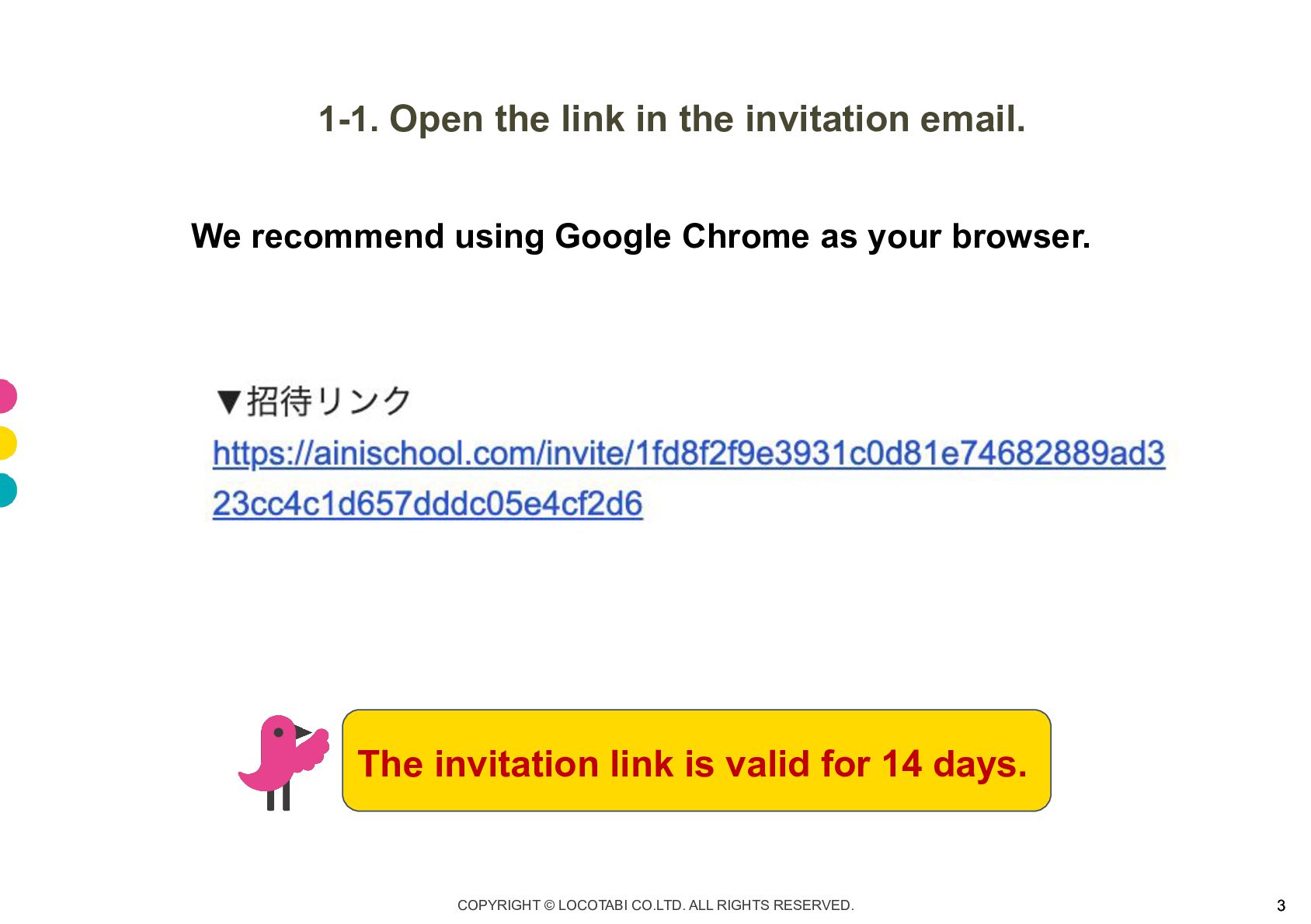
1-1. Open the link in the invitation email. We recommend
using Google Chrome as your browser. The invitation link is valid for 14 days. COPYRIGHT © LOCOTABI CO.LTD. ALL RIGHTS RESERVED. 3
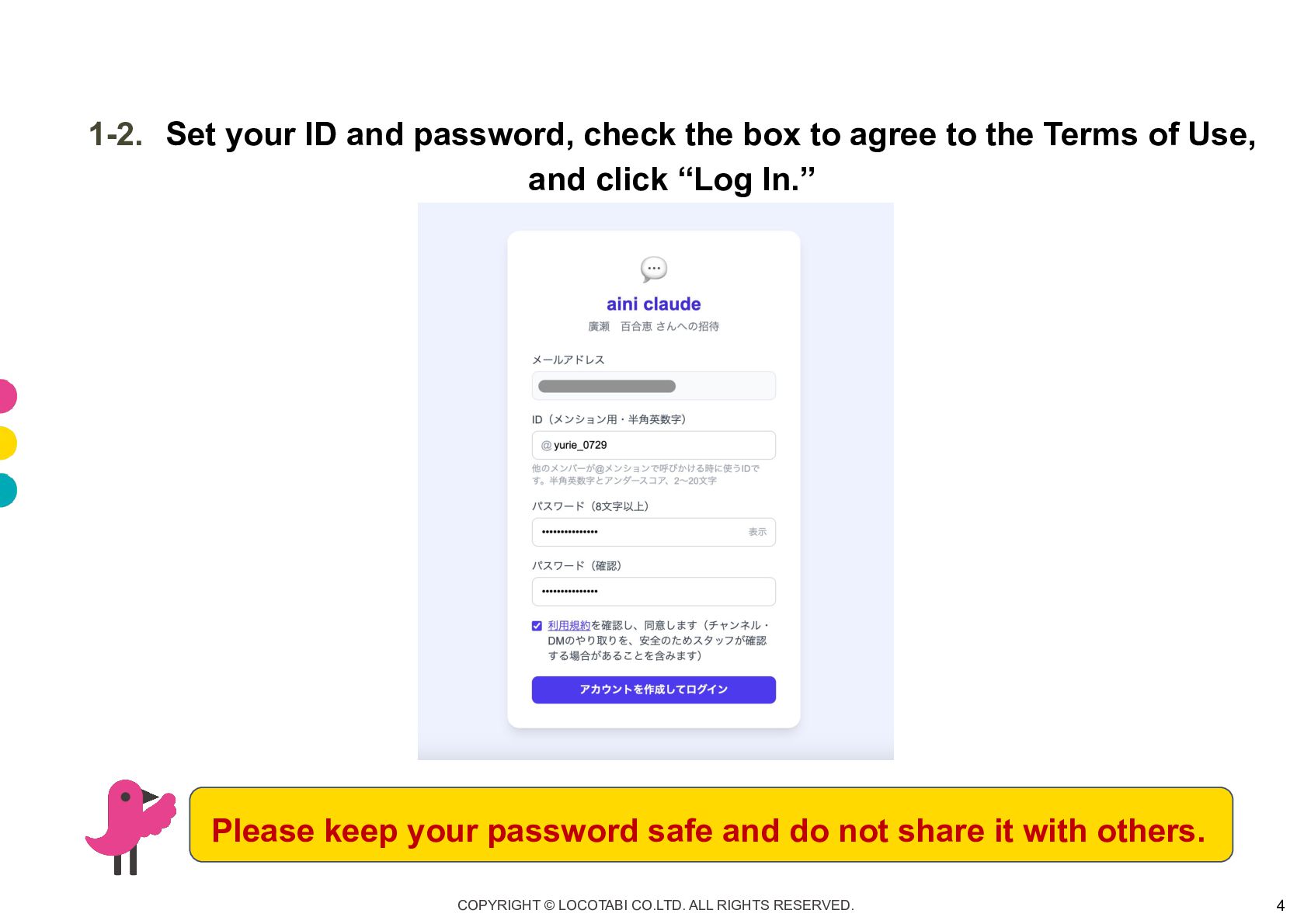
1-2. Set your ID and password, check the box to
agree to the Terms of Use, and click “Log In.” Please keep your password safe and do not share it with others. COPYRIGHT © LOCOTABI CO.LTD. ALL RIGHTS RESERVED. 4
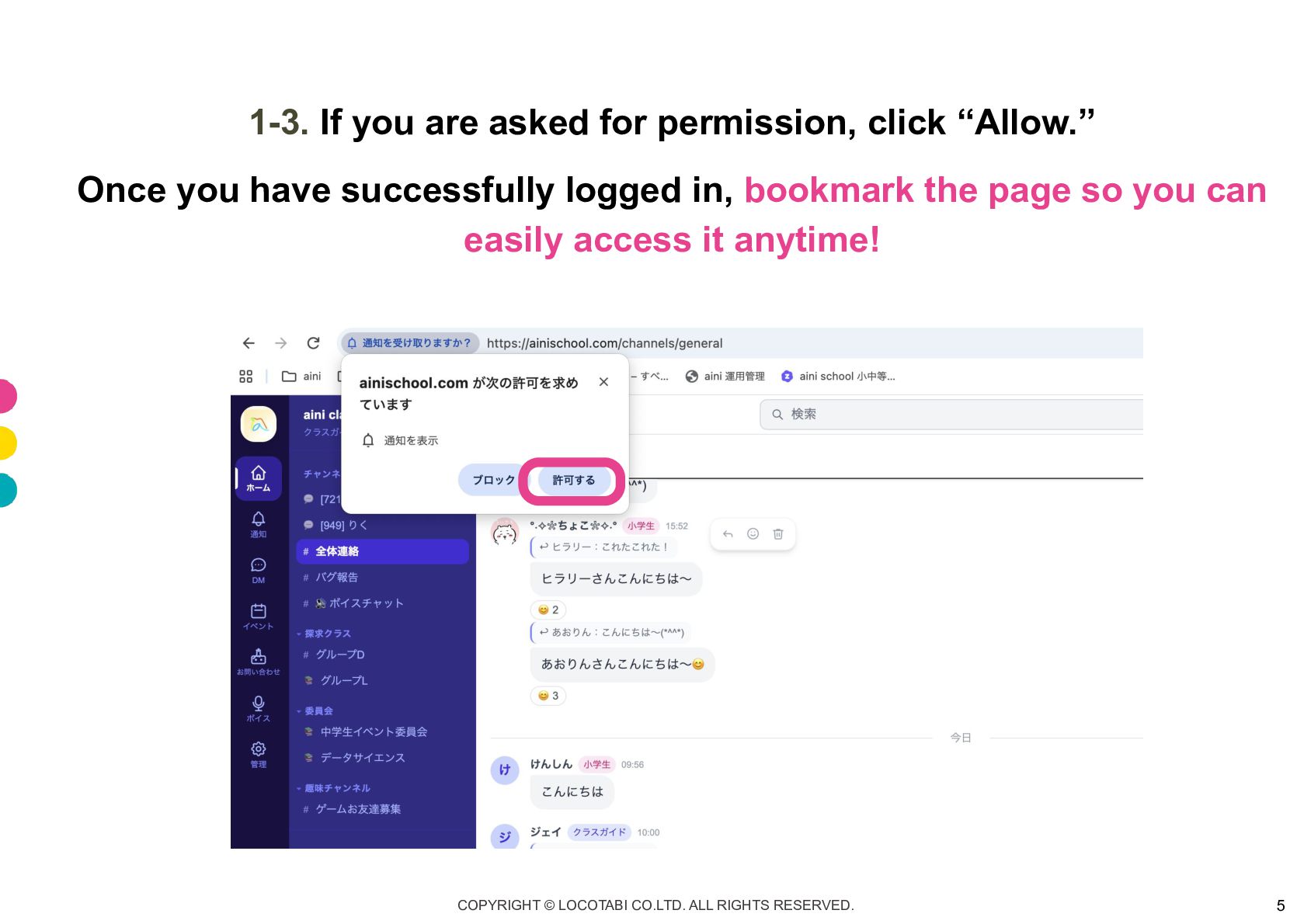
1-3. If you are asked for permission, click “Allow.” Once
you have successfully logged in, bookmark the page so you can easily access it anytime! COPYRIGHT © LOCOTABI CO.LTD. ALL RIGHTS RESERVED. 5
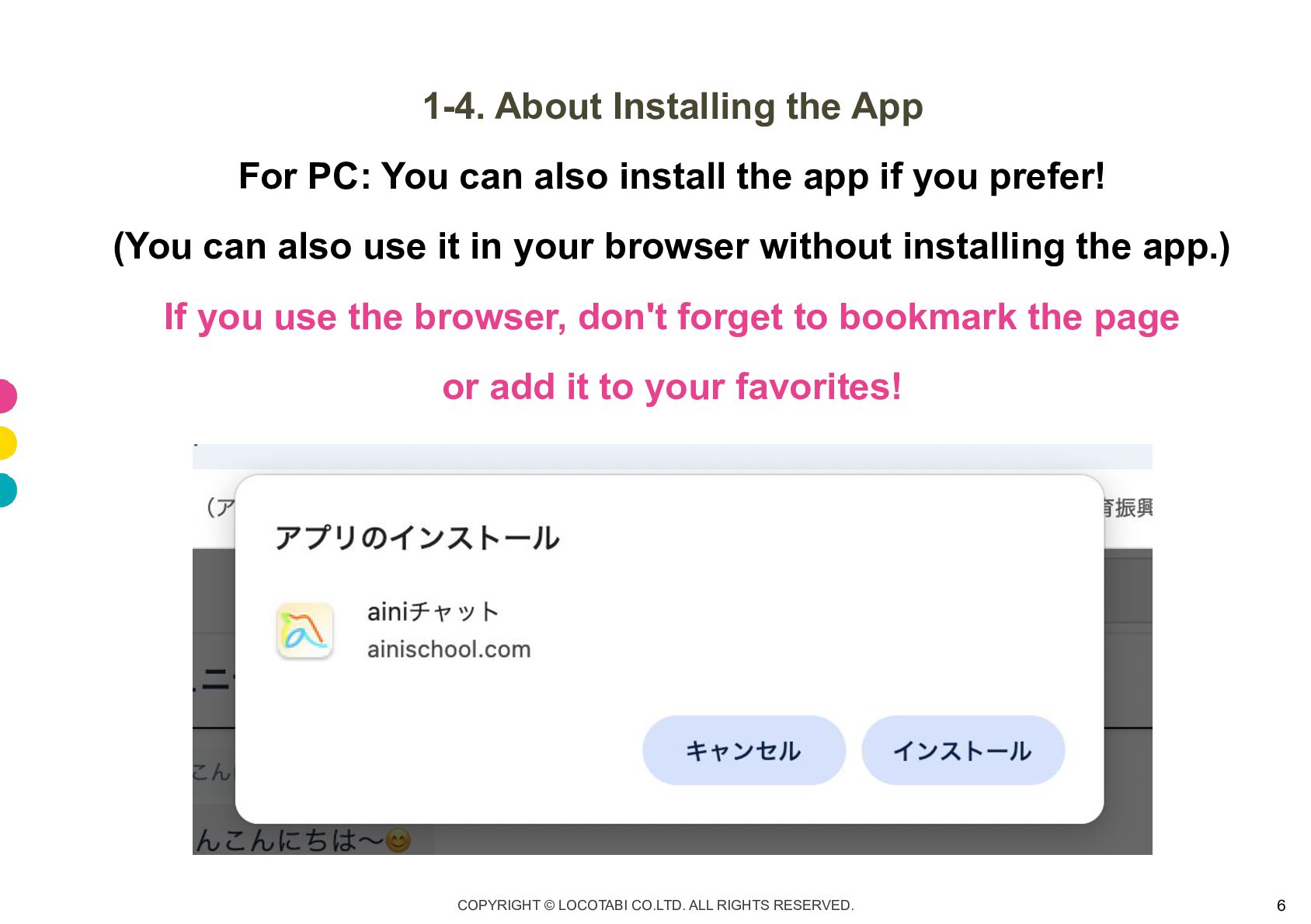
1-4. About Installing the App For PC: You can also
install the app if you prefer! (You can also use it in your browser without installing the app.) If you use the browser, don't forget to bookmark the page or add it to your favorites! COPYRIGHT © LOCOTABI CO.LTD. ALL RIGHTS RESERVED. 6
1-4. About Installing the App For smartphones: You can add
it to your home screen and use it like an app! Don't forget to allow notifications!! ▼For iPhone ▼For Android 1. Open aini Chat in Chrome or Safari. 1. Open aini Chat in Chrome 2. Tap the Share button at the bottom (or top) of the screen. 2. Tap the menu icon (three vertical dots) in the top-right corner of the screen. 3. Scroll down the menu and tap “Add to Home Screen.” 3. Tap “Install and Create Shortcut” or “Add to Home Screen.” 4. Change the name if needed. 4. Change the name if needed. 5. Tap “Add.” 5. Tap “Add” or “Create Shortcut.” COPYRIGHT © LOCOTABI CO.LTD. ALL RIGHTS RESERVED. 7
Let's try using aini Chat! COPYRIGHT © LOCOTABI CO.LTD. ALL
RIGHTS RESERVED. 8
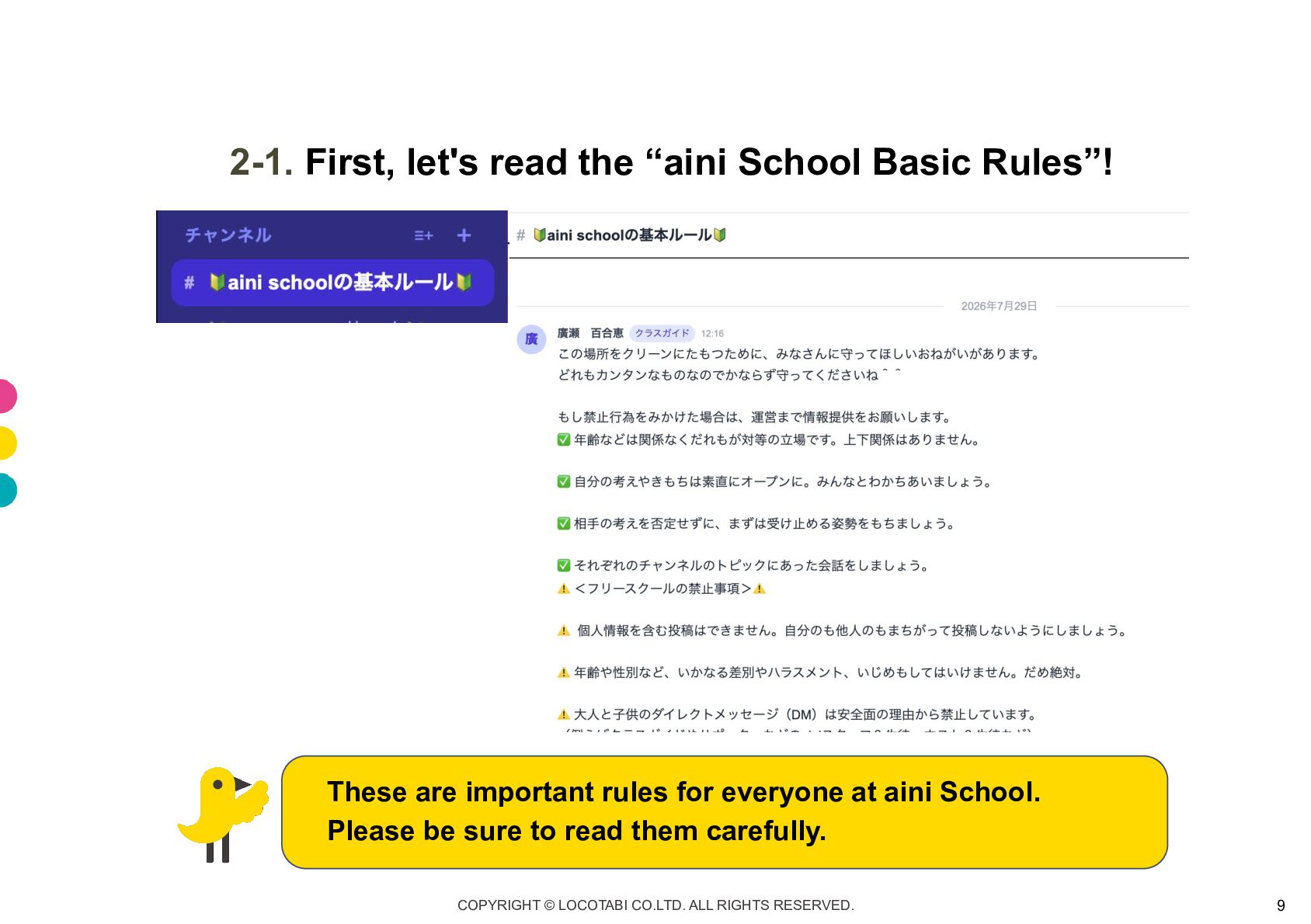
2-1. First, let's read the “aini School Basic Rules”! These
are important rules for everyone at aini School. Please be sure to read them carefully. COPYRIGHT © LOCOTABI CO.LTD. ALL RIGHTS RESERVED. 9
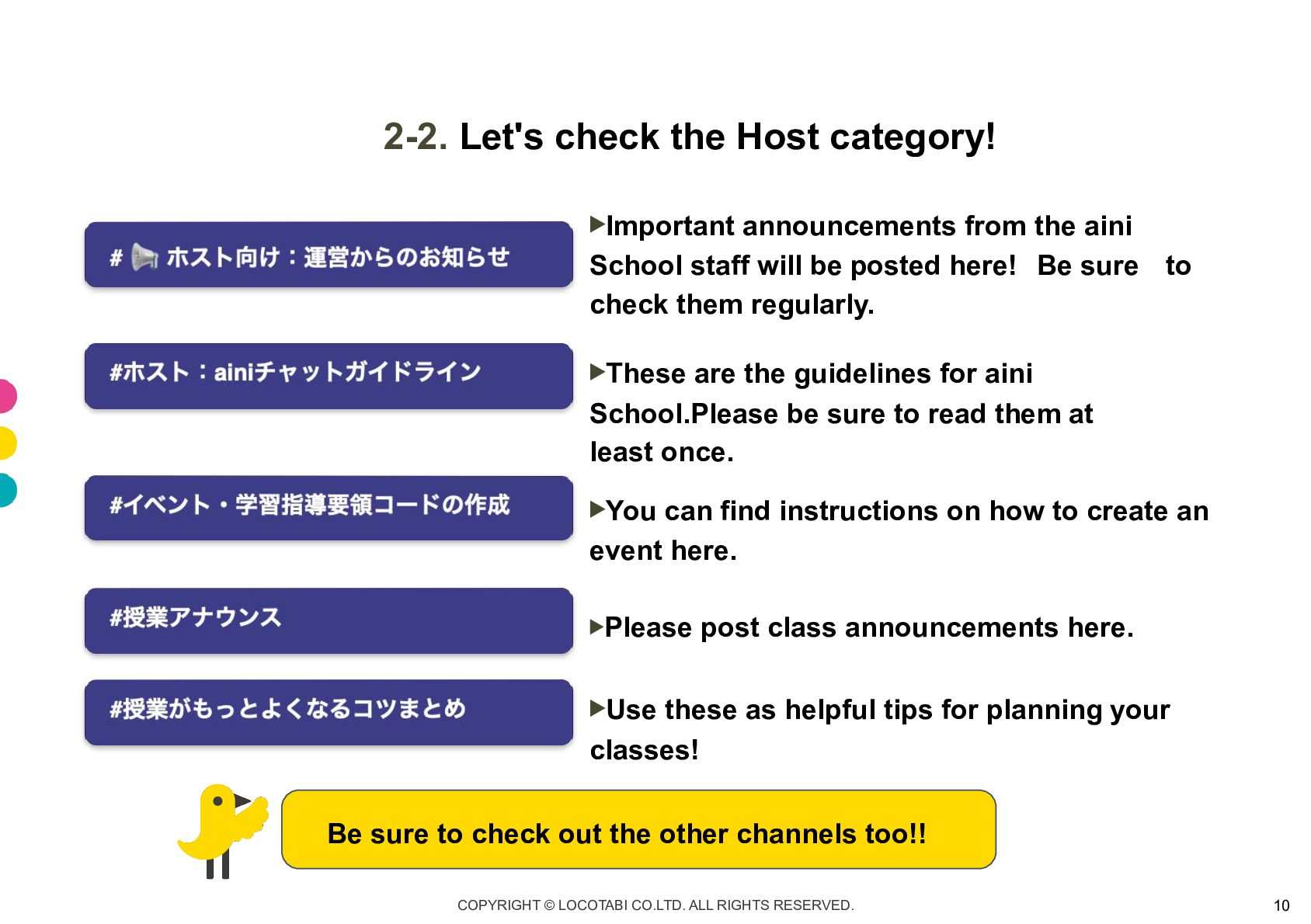
2-2. Let's check the Host category! ▶ Important announcements from
the aini School staff will be posted here! Be sure to check them regularly. ▶ These are the guidelines for aini School.Please be sure to read them at least once. ▶ You can find instructions on how to create an event here. ▶Please post class announcements here. ▶ Use these as helpful tips for planning your classes! Be sure to check out the other channels too!! COPYRIGHT © LOCOTABI CO.LTD. ALL RIGHTS RESERVED. 10
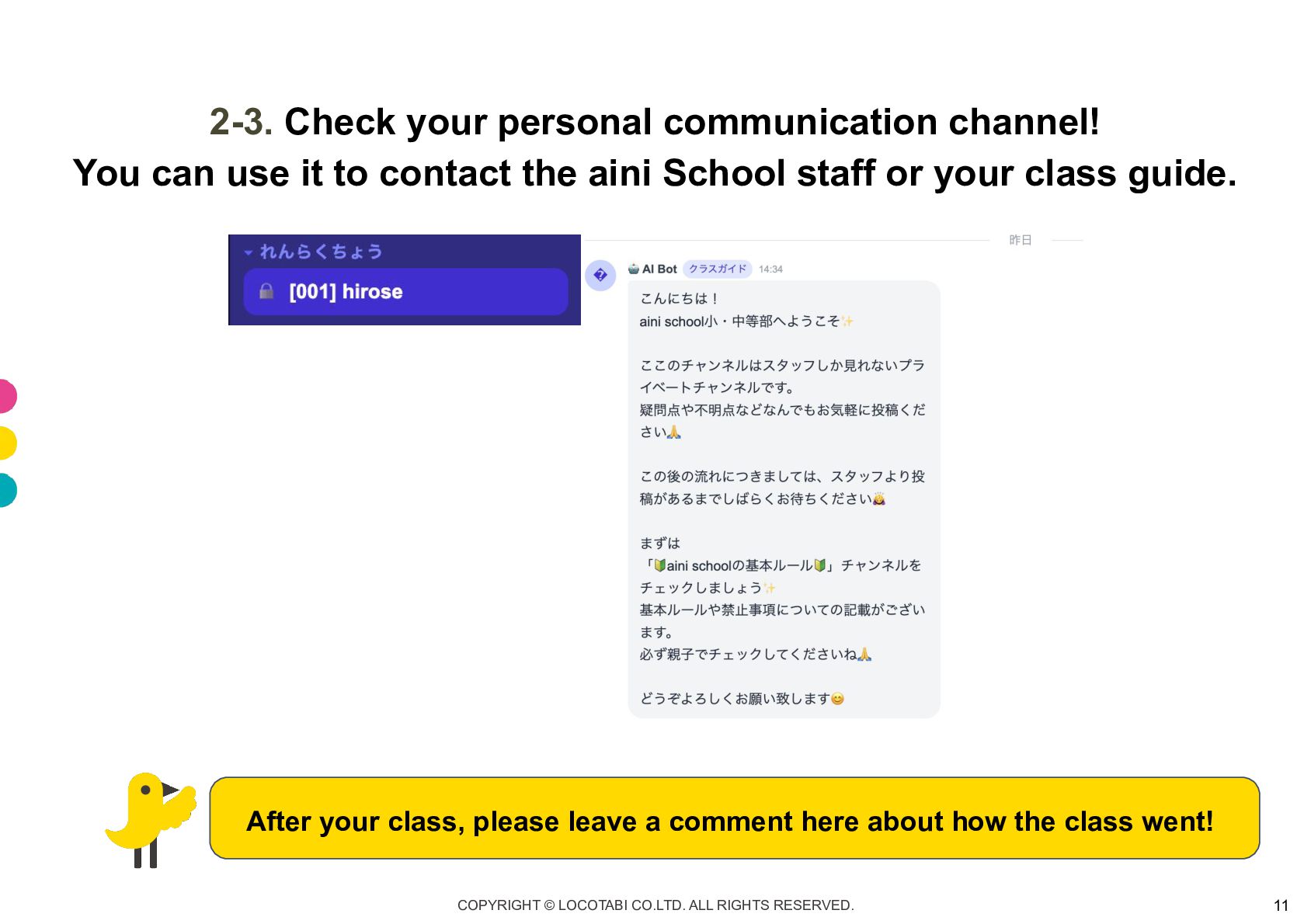
2-3. Check your personal communication channel! You can use it
to contact the aini School staff or your class guide. After your class, please leave a comment here about how the class went! COPYRIGHT © LOCOTABI CO.LTD. ALL RIGHTS RESERVED. 11
Let's check the class schedule and create your event! COPYRIGHT
© LOCOTABI CO.LTD. ALL RIGHTS RESERVED. 12
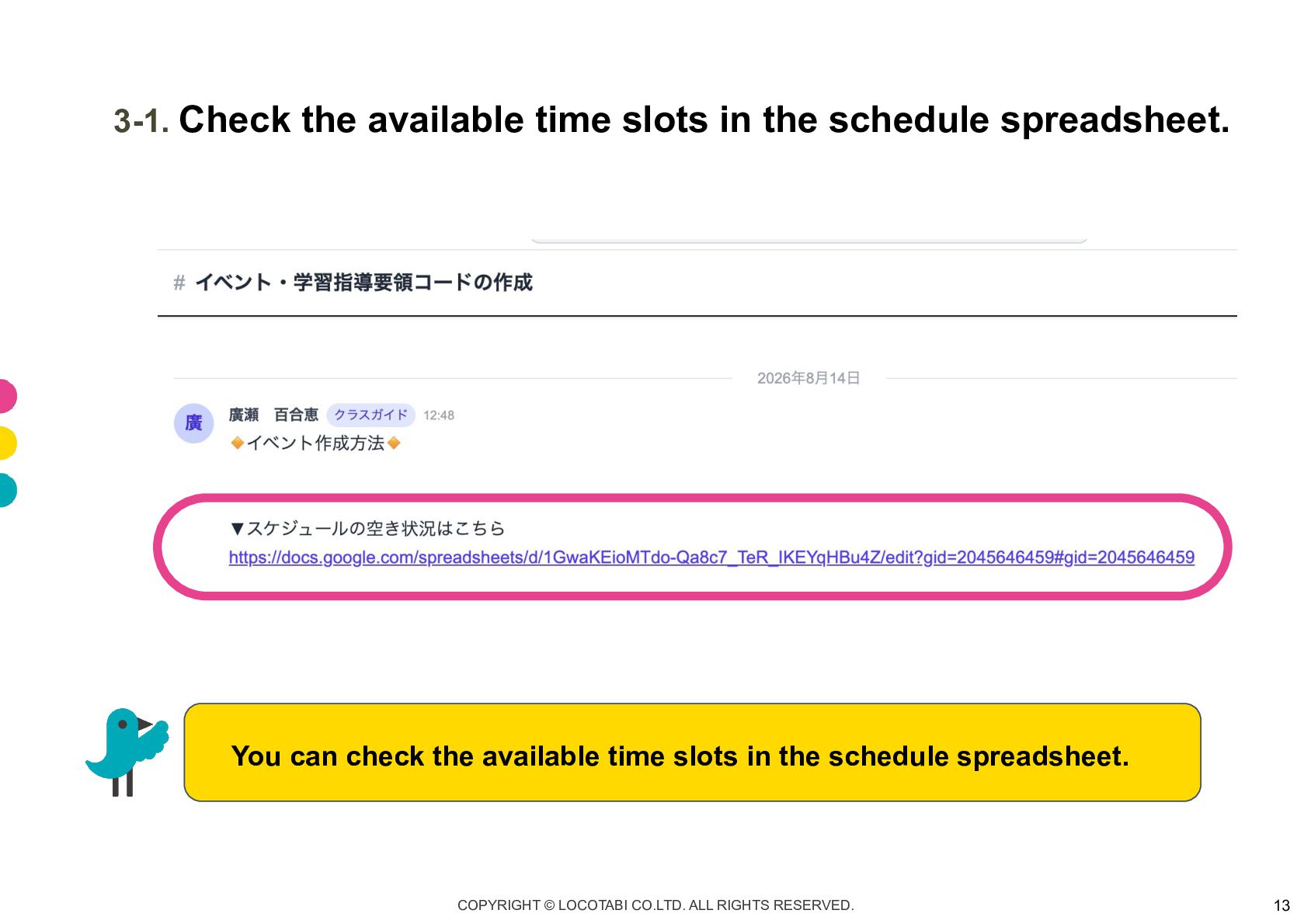
3-1. Check the available time slots in the schedule spreadsheet.
You can check the available time slots in the schedule spreadsheet. COPYRIGHT © LOCOTABI CO.LTD. ALL RIGHTS RESERVED. 13
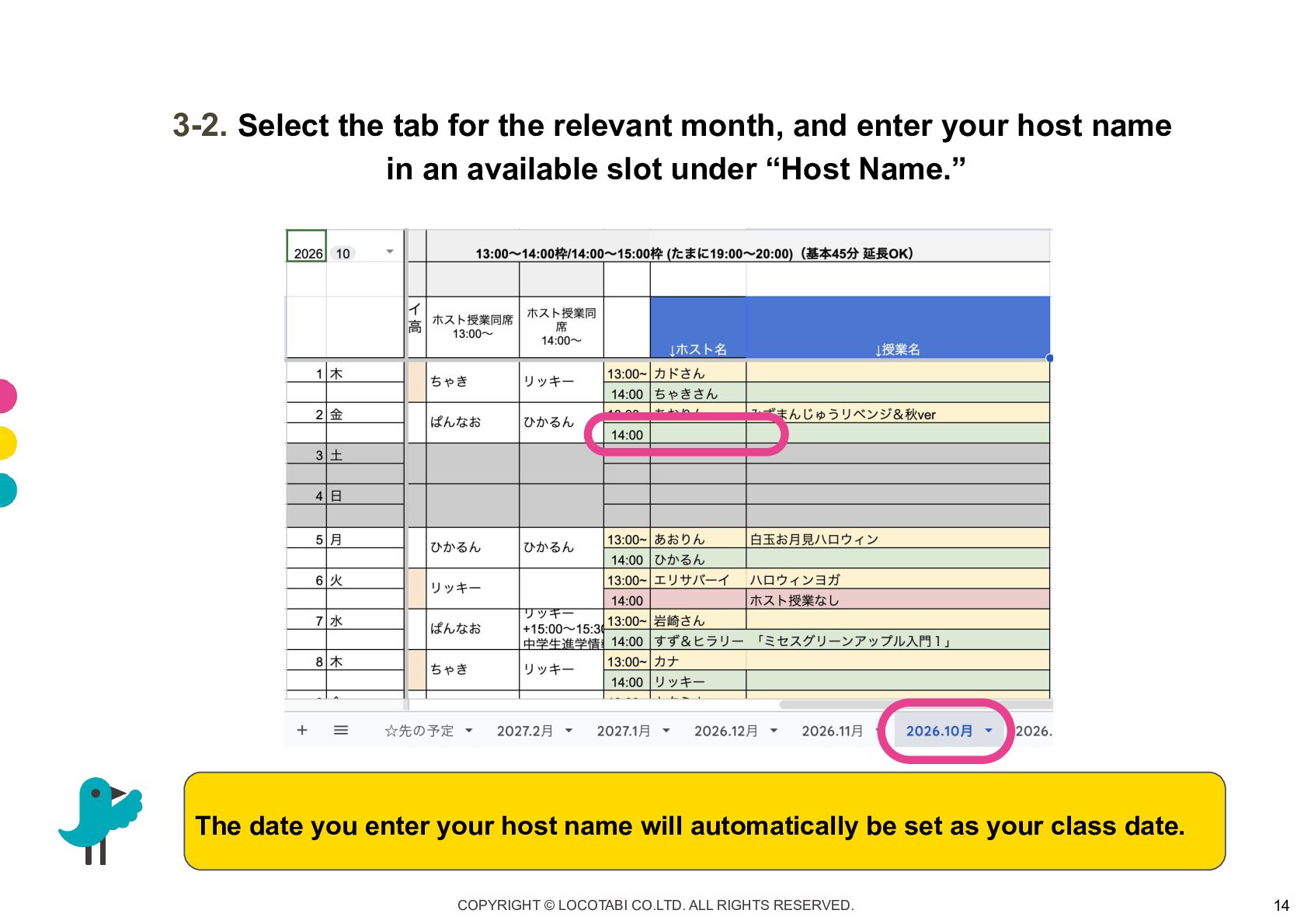
3-2. Select the tab for the relevant month, and enter
your host name in an available slot under “Host Name.” The date you enter your host name will automatically be set as your class date. COPYRIGHT © LOCOTABI CO.LTD. ALL RIGHTS RESERVED. 14
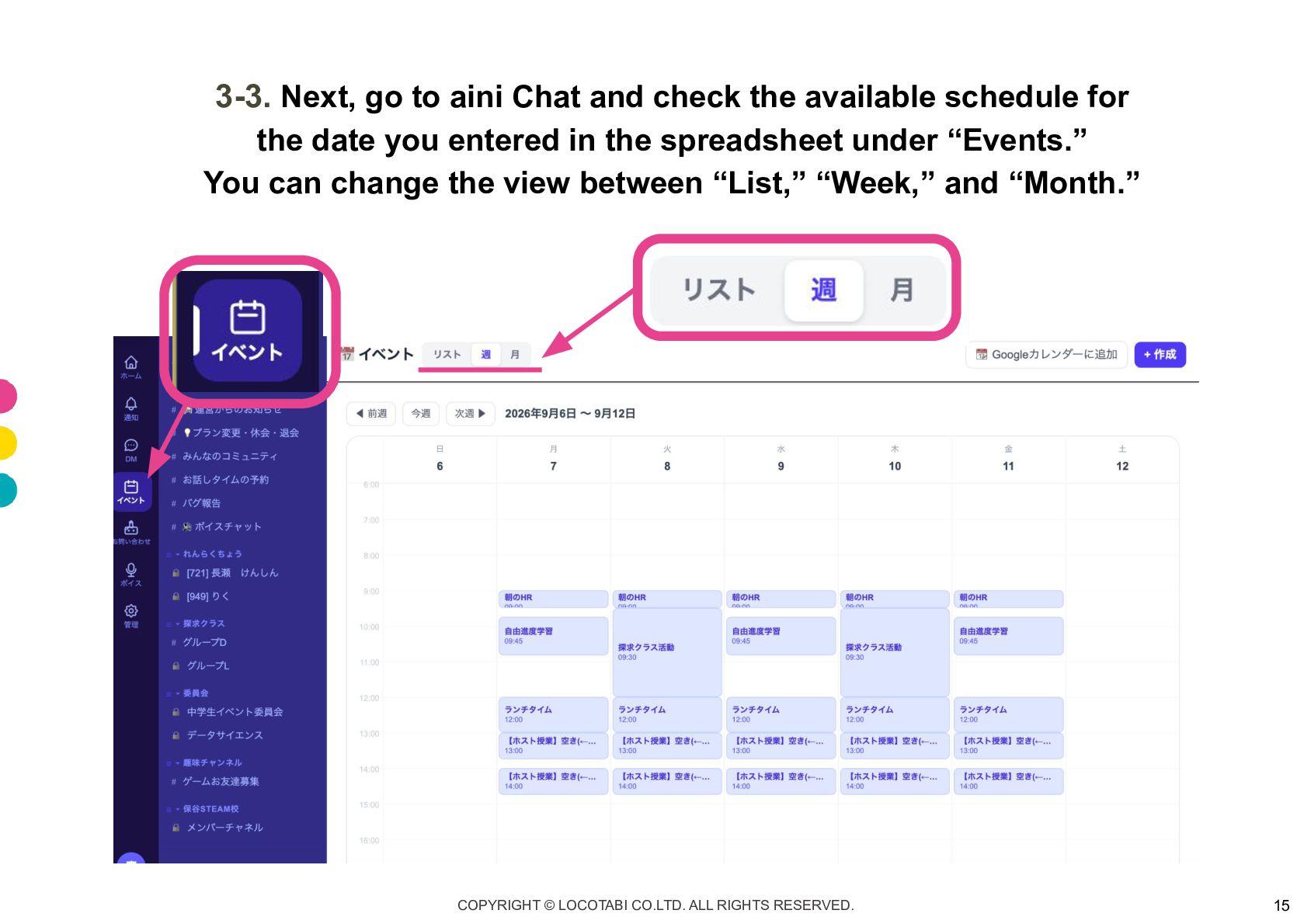
3-3. Next, go to aini Chat and check the available
schedule for the date you entered in the spreadsheet under “Events.” You can change the view between “List,” “Week,” and “Month.” COPYRIGHT © LOCOTABI CO.LTD. ALL RIGHTS RESERVED. 15
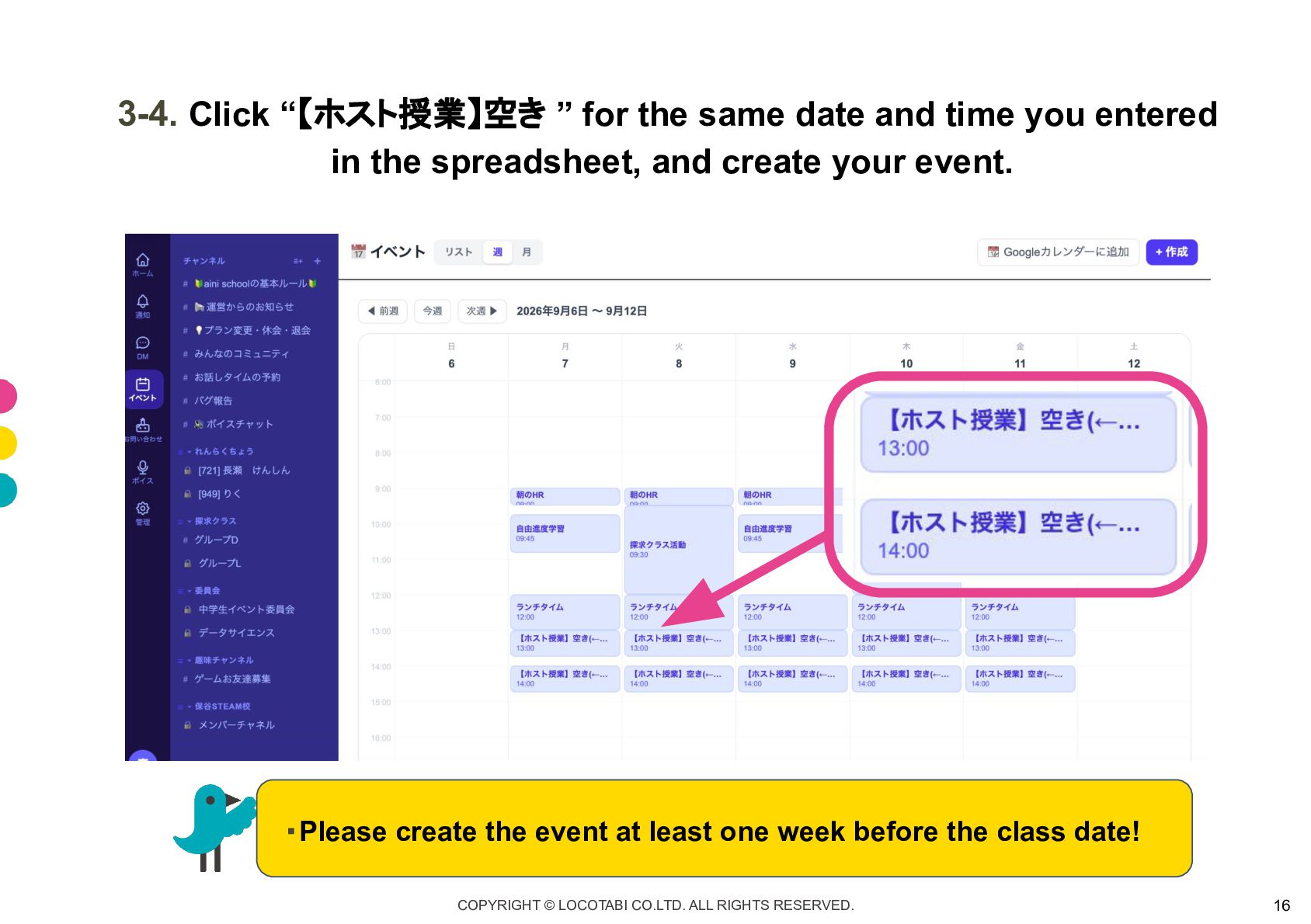
3-4. Click “【ホスト授業】空き ” for the same date and time
you entered in the spreadsheet, and create your event. ・Please create the event at least one week before the class date! COPYRIGHT © LOCOTABI CO.LTD. ALL RIGHTS RESERVED. 16
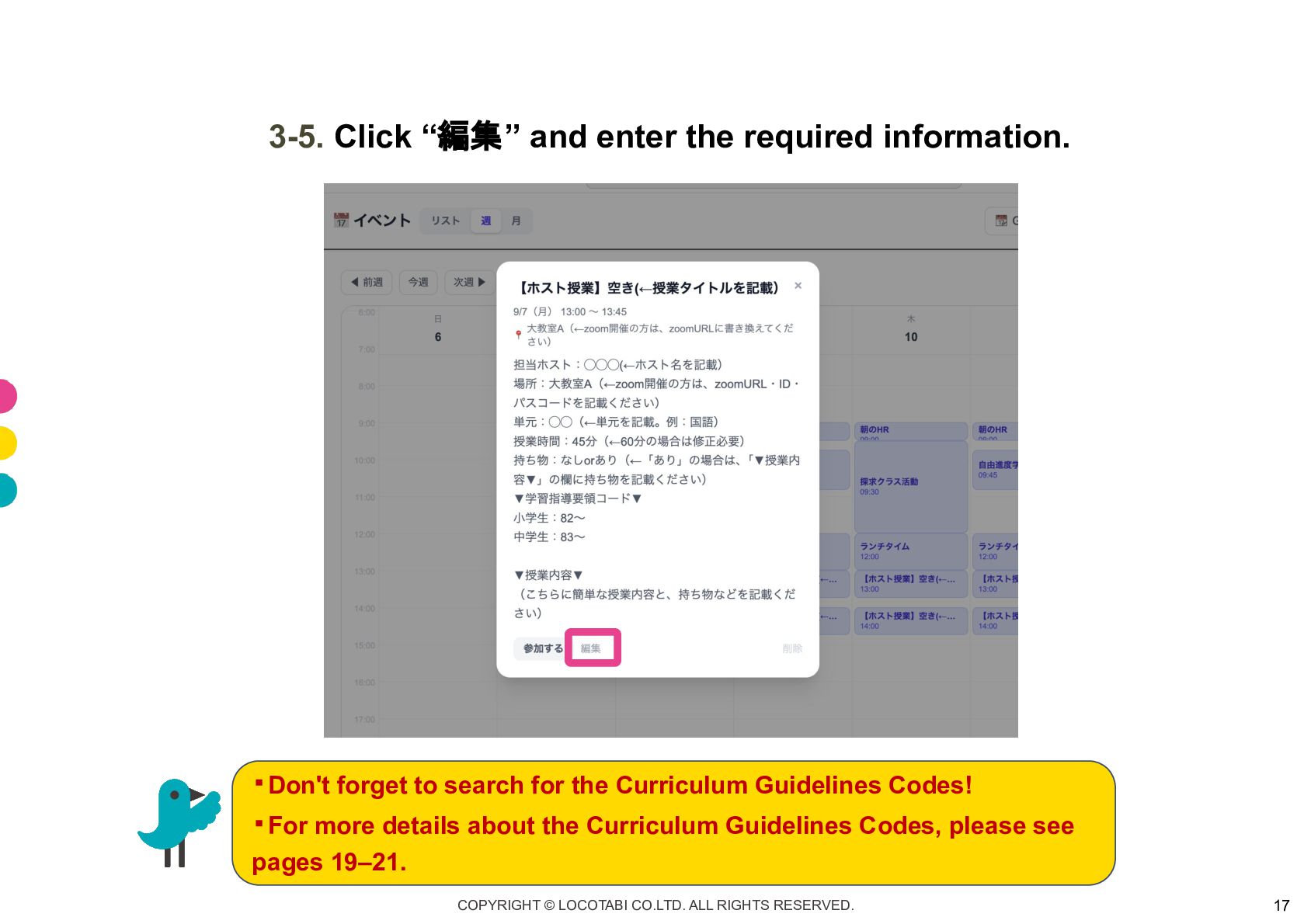
3-5. Click “編集” and enter the required information. ・ Don't
forget to search for the Curriculum Guidelines Codes! ・ For more details about the Curriculum Guidelines Codes, please see pages 19–21. COPYRIGHT © LOCOTABI CO.LTD. ALL RIGHTS RESERVED. 17
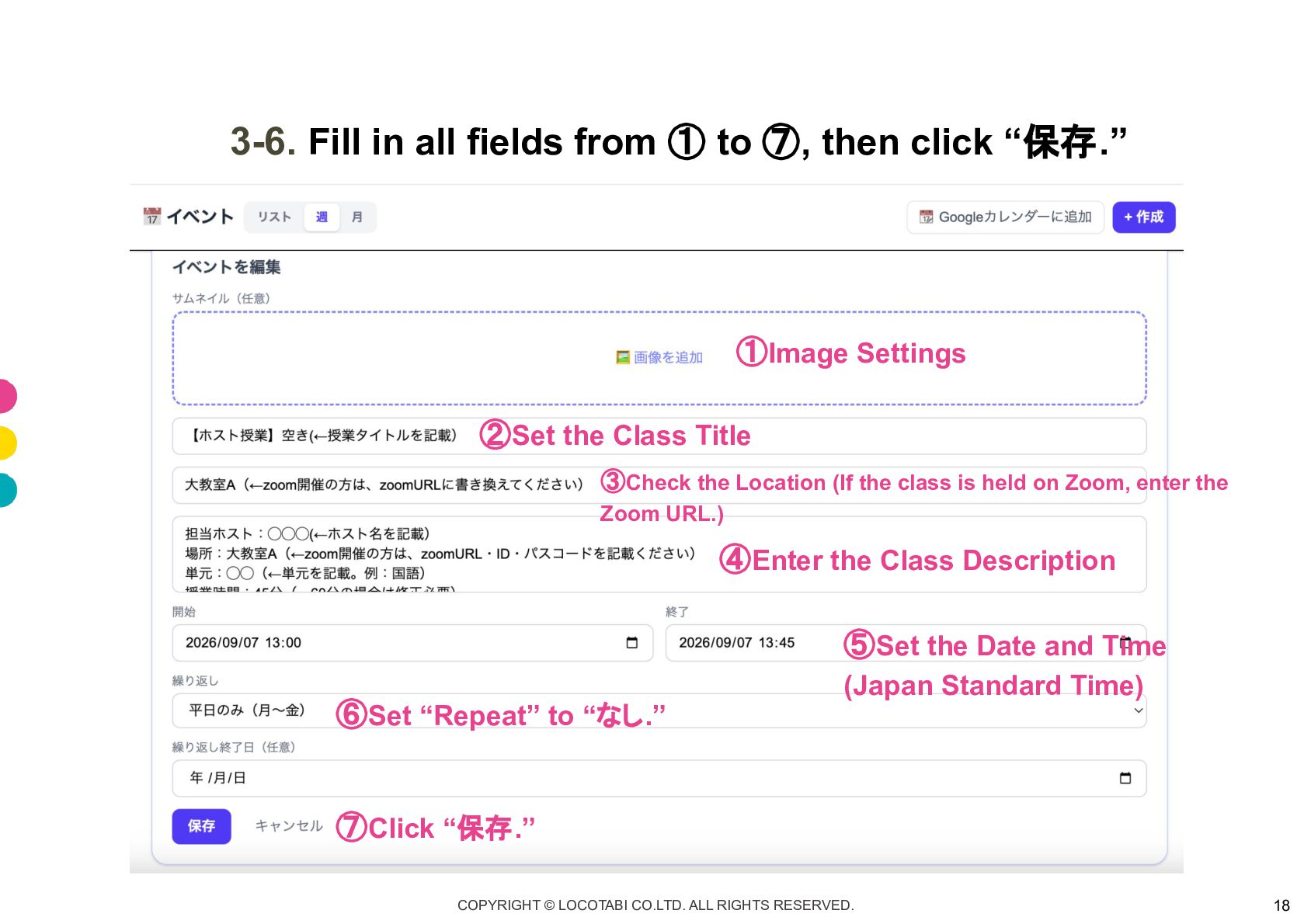
3-6. Fill in all fields from ① to ⑦, then
click “保存.” ① Image Settings ② Set the Class Title ③Check the Location (If the class is held on Zoom, enter the Zoom URL.) ④ Enter the Class Description ⑤ Set the Date and Time ⑥ Set “Repeat” to “なし.” (Japan Standard Time) ⑦ Click “保存.” COPYRIGHT © LOCOTABI CO.LTD. ALL RIGHTS RESERVED. 18
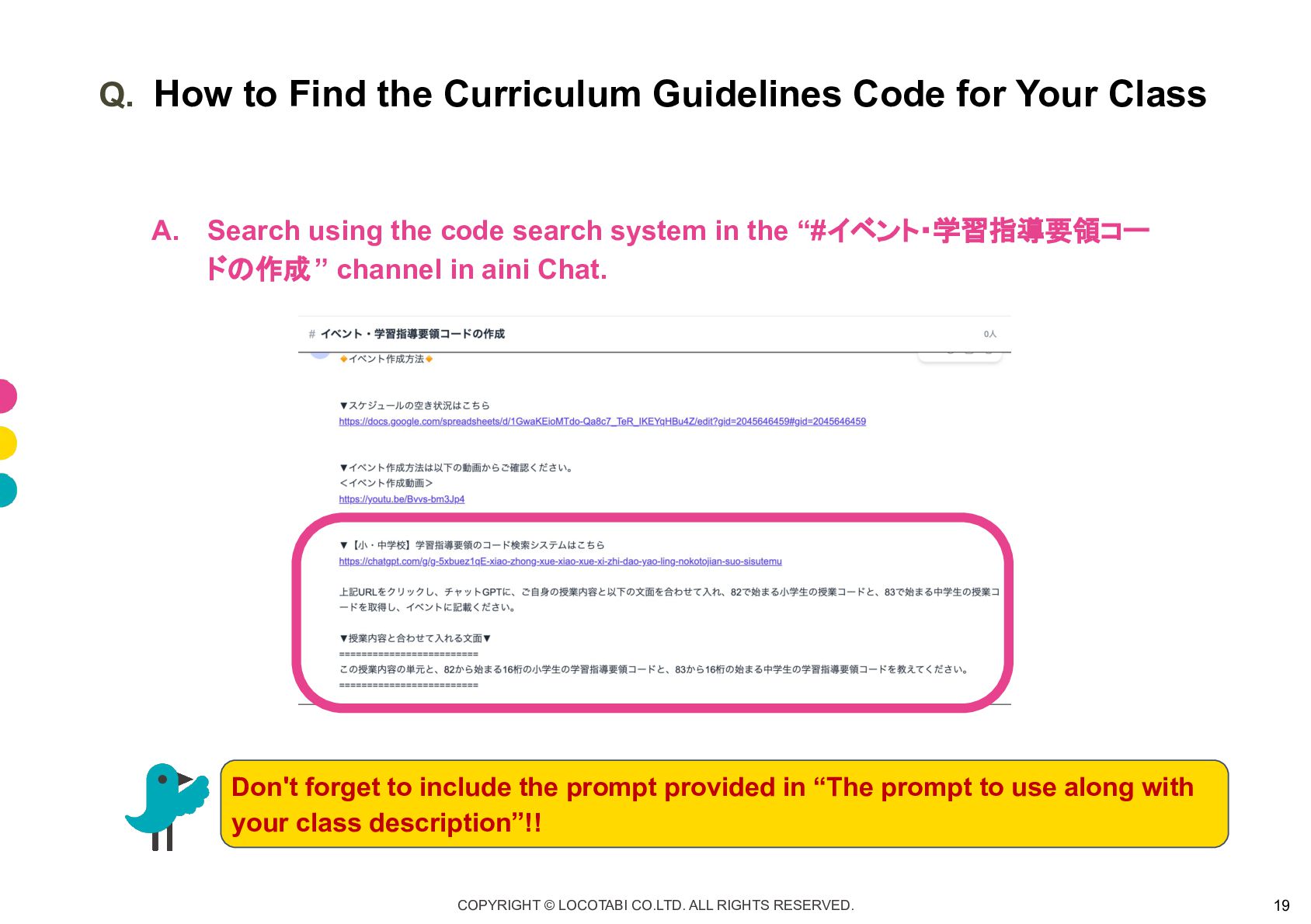
Q. How to Find the Curriculum Guidelines Code for Your
Class A. Search using the code search system in the “#イベント・学習指導要領コー ドの作成 ” channel in aini Chat. Don't forget to include the prompt provided in “The prompt to use along with your class description”!! COPYRIGHT © LOCOTABI CO.LTD. ALL RIGHTS RESERVED. 19
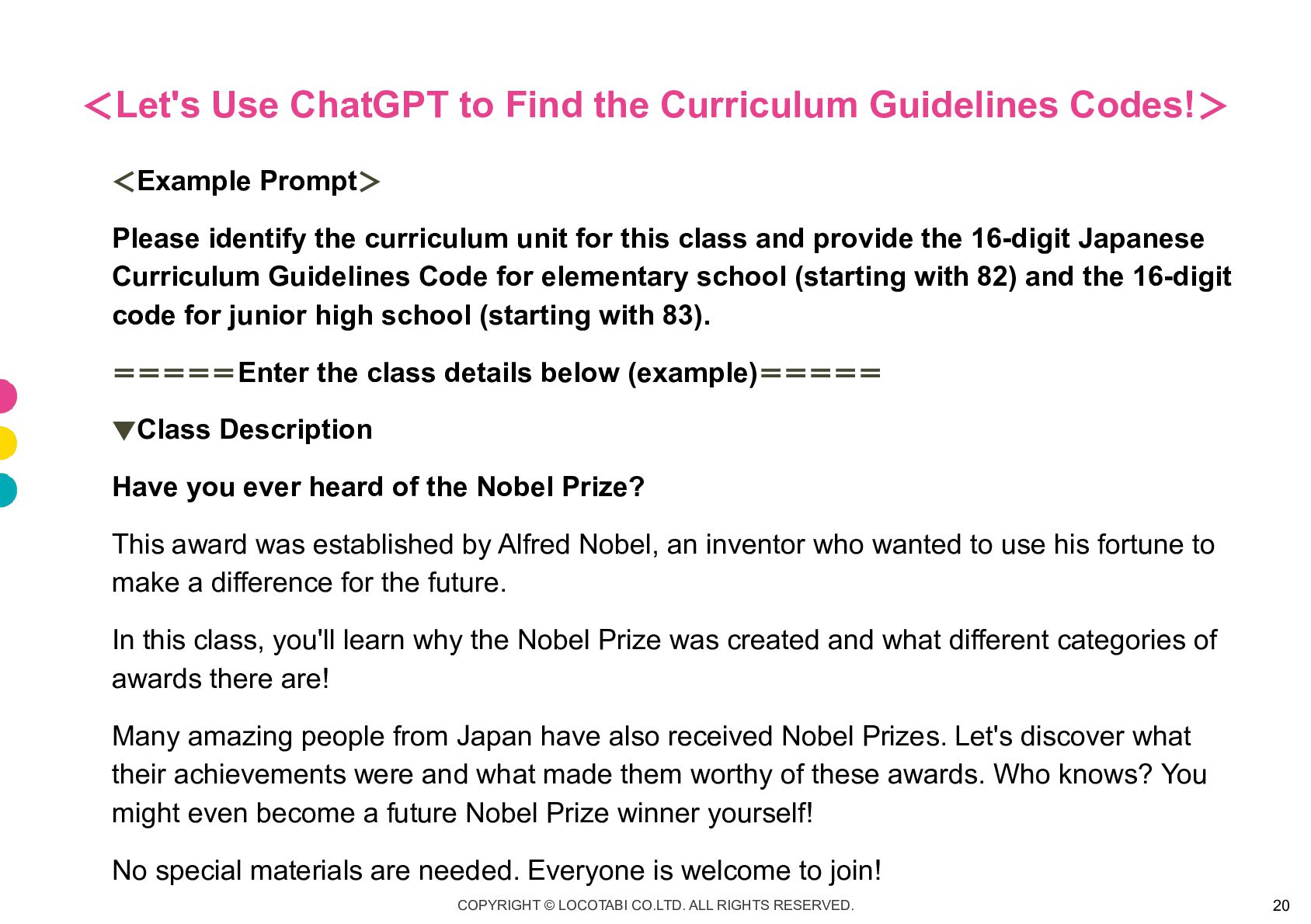
< Let's Use ChatGPT to Find the Curriculum Guidelines Codes!
> <Example Prompt> Please identify the curriculum unit for this class and provide the 16-digit Japanese Curriculum Guidelines Code for elementary school (starting with 82) and the 16-digit code for junior high school (starting with 83). ===== Enter the class details below (example)===== ▼Class Description Have you ever heard of the Nobel Prize? This award was established by Alfred Nobel, an inventor who wanted to use his fortune to make a difference for the future. In this class, you'll learn why the Nobel Prize was created and what different categories of awards there are! Many amazing people from Japan have also received Nobel Prizes. Let's discover what their achievements were and what made them worthy of these awards. Who knows? You might even become a future Nobel Prize winner yourself! No special materials are needed. Everyone is welcome to join! COPYRIGHT © LOCOTABI CO.LTD. ALL RIGHTS RESERVED. 20
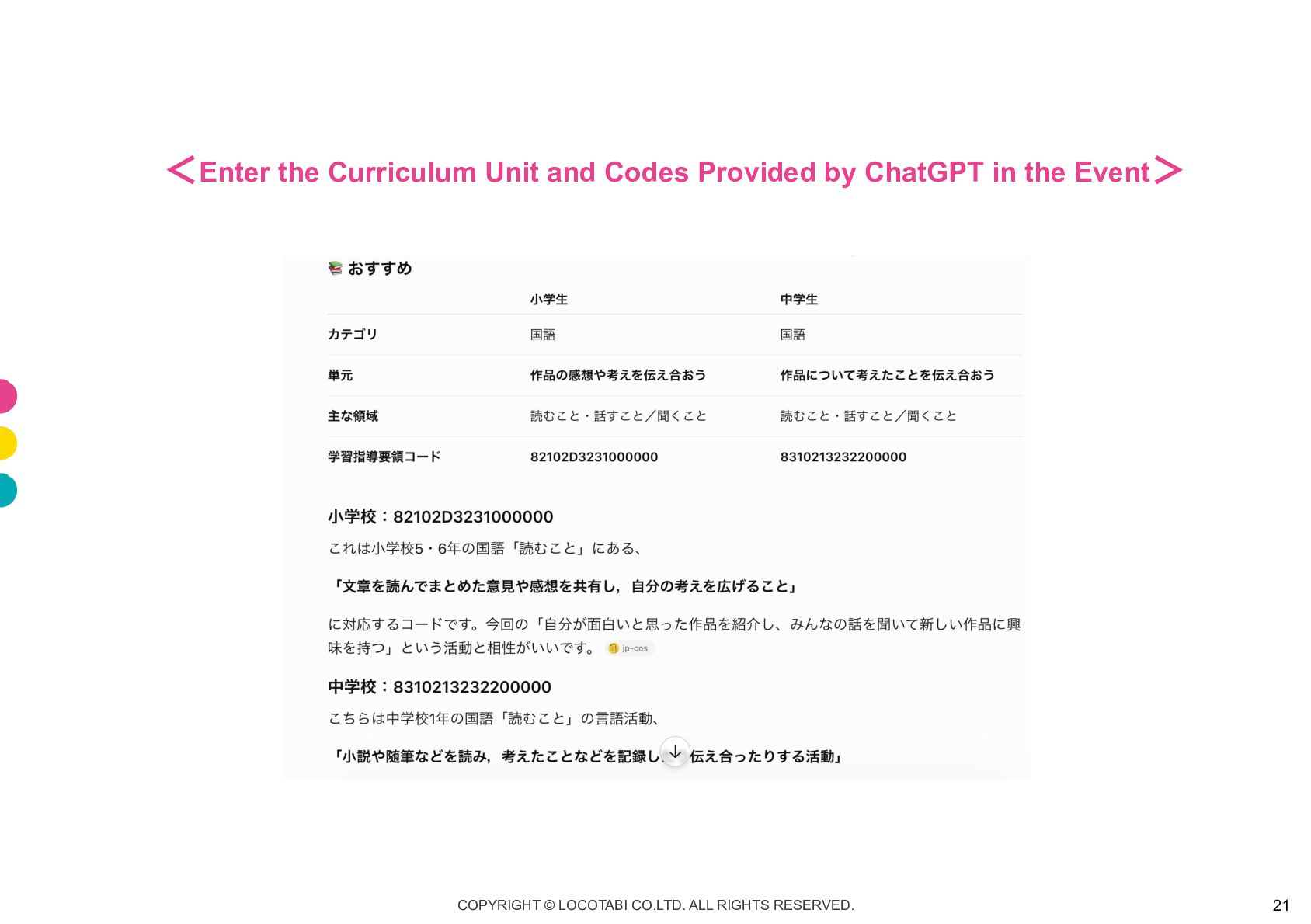
< Enter the Curriculum Unit and Codes Provided by ChatGPT
in the Event > COPYRIGHT © LOCOTABI CO.LTD. ALL RIGHTS RESERVED. 21
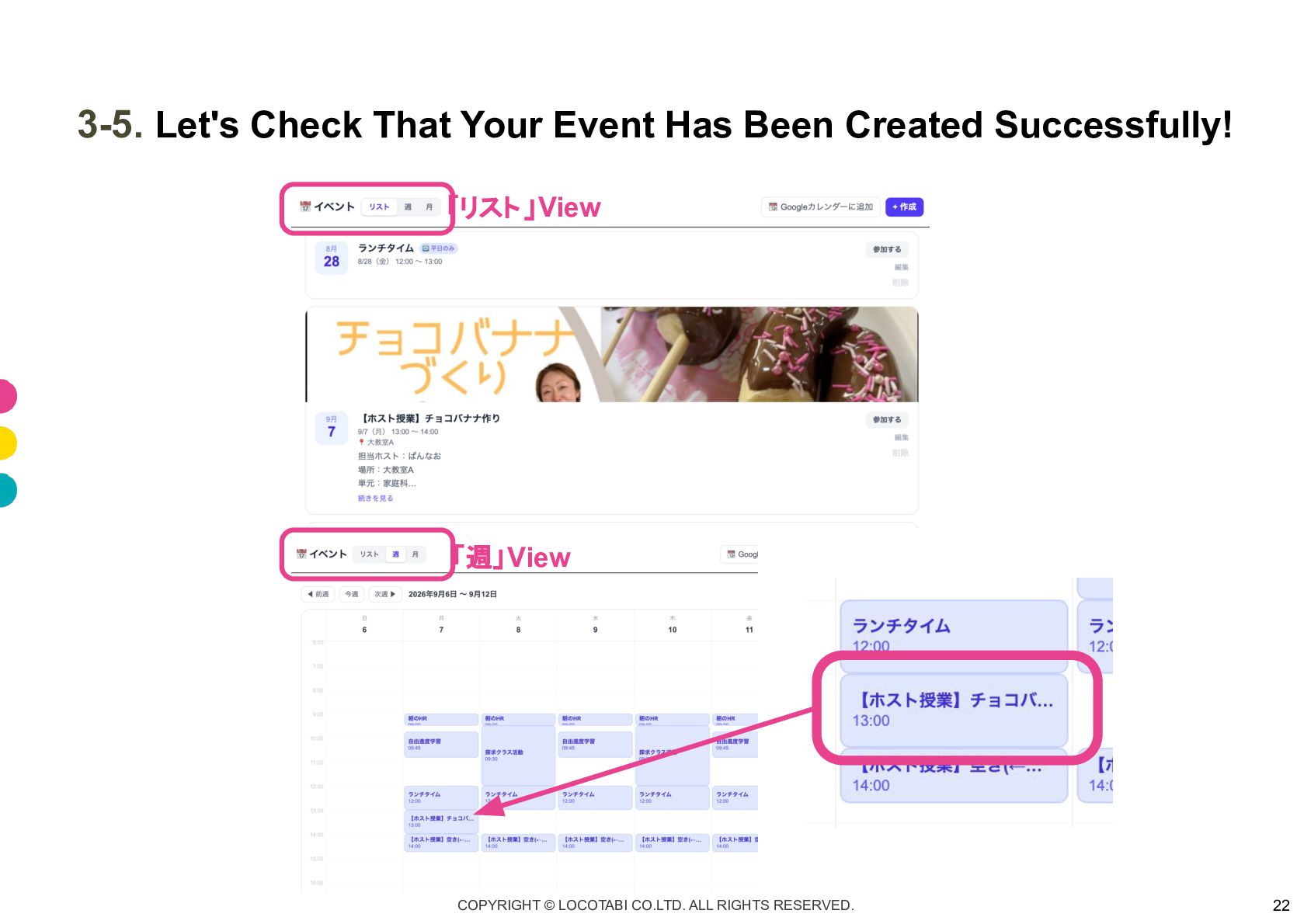
3-5. Let's Check That Your Event Has Been Created Successfully!
「リスト 」View 「週」 View COPYRIGHT © LOCOTABI CO.LTD. ALL RIGHTS RESERVED. 22
Let's Submit a Class Report! COPYRIGHT © LOCOTABI CO.LTD. ALL
RIGHTS RESERVED. 23
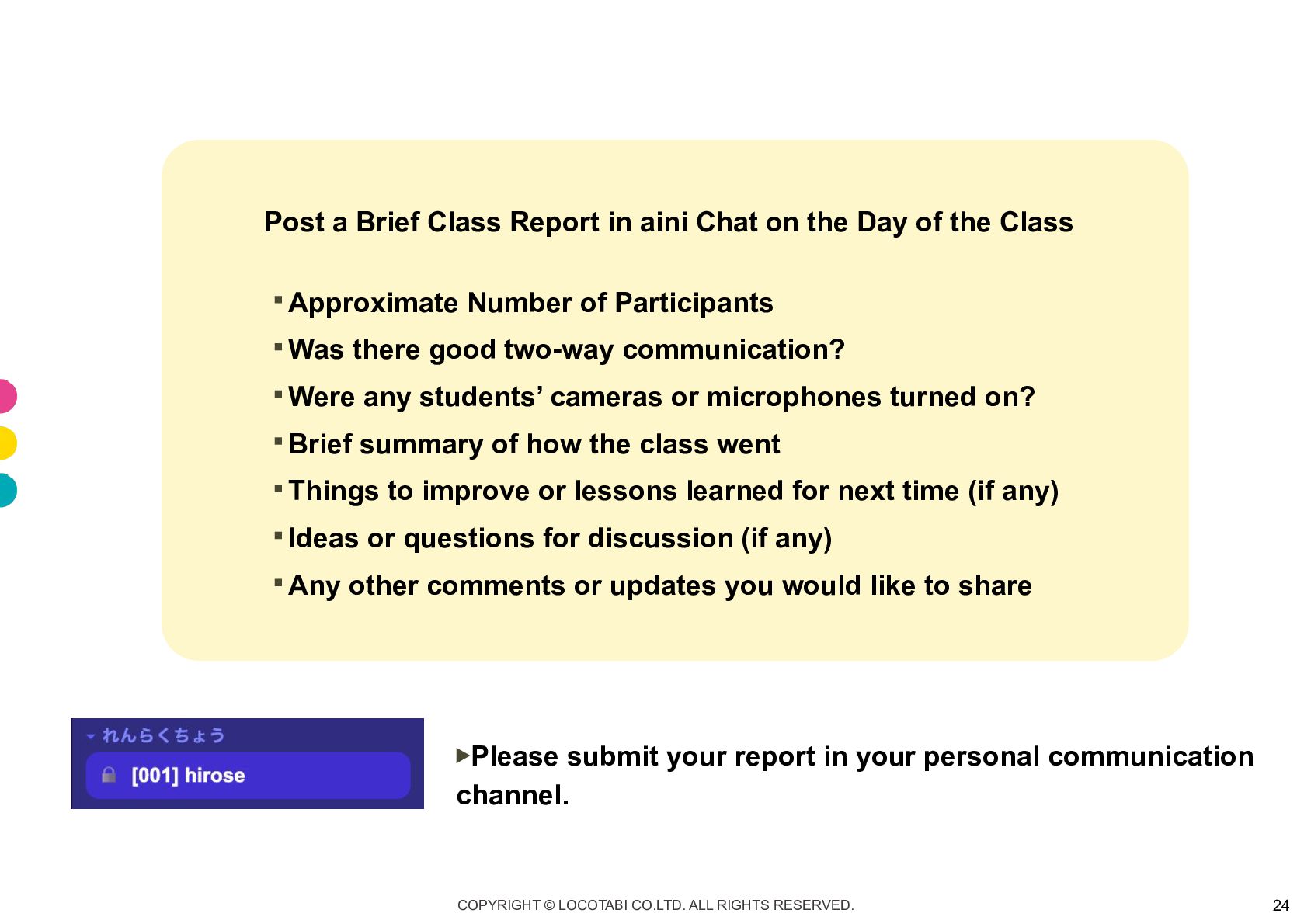
Post a Brief Class Report in aini Chat on the
Day of the Class ・ Approximate Number of Participants ・ Was there good two-way communication? ・ Were any students’ cameras or microphones turned on? ・ Brief summary of how the class went ・ Things to improve or lessons learned for next time (if any) ・ Ideas or questions for discussion (if any) ・ Any other comments or updates you would like to share ▶Please submit your report in your personal communication channel. COPYRIGHT © LOCOTABI CO.LTD. ALL RIGHTS RESERVED. 24
We hope you have a wonderful time teaching and sharing
fun learning experiences with the children! We always welcome new class ideas and suggestions! We’d love for you to join us in making aini School an even more exciting and engaging place to learn! With warm wishes from the entire aini School team COPYRIGHT © LOCOTABI CO.LTD. ALL RIGHTS RESERVED. 25


 ainischool
 imash
imash
 hiola
hiola
 signer
 coderdojojapan
 terasawat
 pawan_pharm
 robintux
 juanmartin2026
 inesmontani
 bermonpainter
 tapps
tapps
 rmw
rmw
 emna__ayadi
 rasmusluckow
 kevinliebholz
 aleyda
 panda_program
 minecr
 vanstee