Share
Embed
The State of Python for Data Science, PySS 2015
The State of Python for Data Science through four Continuum Analytics projects: dask, blaze, bokeh and conda.
Christine Doig
November 03, 2015
Transcript
79 slides
-
Christine Doig PySS 2015 The State of Python for Data
Science How to become an Anaconda Minion Dedicated to Oier, Borja and the rest of the PySS organizers -
Christine Doig is… a Data Scientist at Continuum Analytics originally
from Barcelona living in Austin, Texas loving Python and Data Science • Industrial Engineer, UPC, Barcelona • Master Thesis, Aachen, Germany • Process Engineer, P&G • Business Analyst/Consultant • Master in Data Mining and BI, FIB-UPC, Barcelona -
Continuum Analytics… …distributes Anaconda, an open source Python distribution that
includes more than 300 packages for scientific computing and data science …provides enterprise ready products for data scientist through the Anaconda Platform …delivers Python trainings and offers consulting services …supports the development of open source technology: conda, blaze, dask, bokeh, numba… …sponsors Python conferences PyData, SciPy, PyCon, Europython, PySS… -
This Keynote… • What is Data Science? • Why Python?
• Data • Parallel computing with Dask • Unified Blaze API for multiple backends • Data visualization with Bokeh • Anaconda and conda -
Data Science in 2D… ! ! ! ! ! !
! ! ! From the lab to the factory - Data Day Texas Slides: http://www.slideshare.net/joshwills/production-machine-learninginfrastructure Video: https://www.youtube.com/watch?v=v-91JycaKjc -
Scientific Computing Distributed Systems Analytics Machine Learning/Stats Web Data Scientists/
Modeler Data/Business Analyst Research/Computational Scientist Data Engineers/ Architects Developer -
Scientific Computing Distributed Systems Analytics Machine Learning/Stats Web Data Scientists/
Modeler Data/Business Analyst Research/Computational Scientist Data Engineers/ Architects Developer Model Algorithm Report Application Pipeline/ Architecture -
Scientific Computing Distributed Systems Analytics Machine Learning/Stats Web Data Scientists/
Modeler Data/Business Analyst Research/Computational Scientist Data Engineers/ Architects Models Deep Learning Supervised Clustering SVM Regression Classification Crossvalidation Dimensionality reduction KNN Unsupervised NN Filter Join Select TopK Sort Groupby min summary statistics avg max databases GPUs arrays algorithms performance compute SQL Reporting clusters hadoop hdfs optimization HPC graphs FTT HTML/CSS/JS algebra stream processing deployment servers frontend sematic web batch jobs consistency A/B testing crawling frameworks parallelism availability tolerance DFT spark scraping databases apps NOSQL parallelism interactive data viz pipeline cloud Developer -
Scientific Computing Distributed Systems Analytics Machine Learning/Stats Web Data Scientists/
Modeler Data/Business Analyst Research/Computational Scientist Data Engineers/ Architects Developer PyMC Numba xlwings Bokeh Kafka RDFLib mrjob mrjob -
Data Science Ad hoc analysis Domain problem Algorithm development Production
deployment tasks Report/Data Project/Models Library/Package Application/Architecture -
Data Science Ad hoc analysis Domain problem Algorithm development Production
deployment tasks Report/Data Project/Models Library/Package Application/Architecture Summarization statistics Metrics Munging & cleaning Prediction Classification Exploration Functionality - scikit-learn (python) - weka (java) - caret (R) Application - Recsys - Fraud detection -
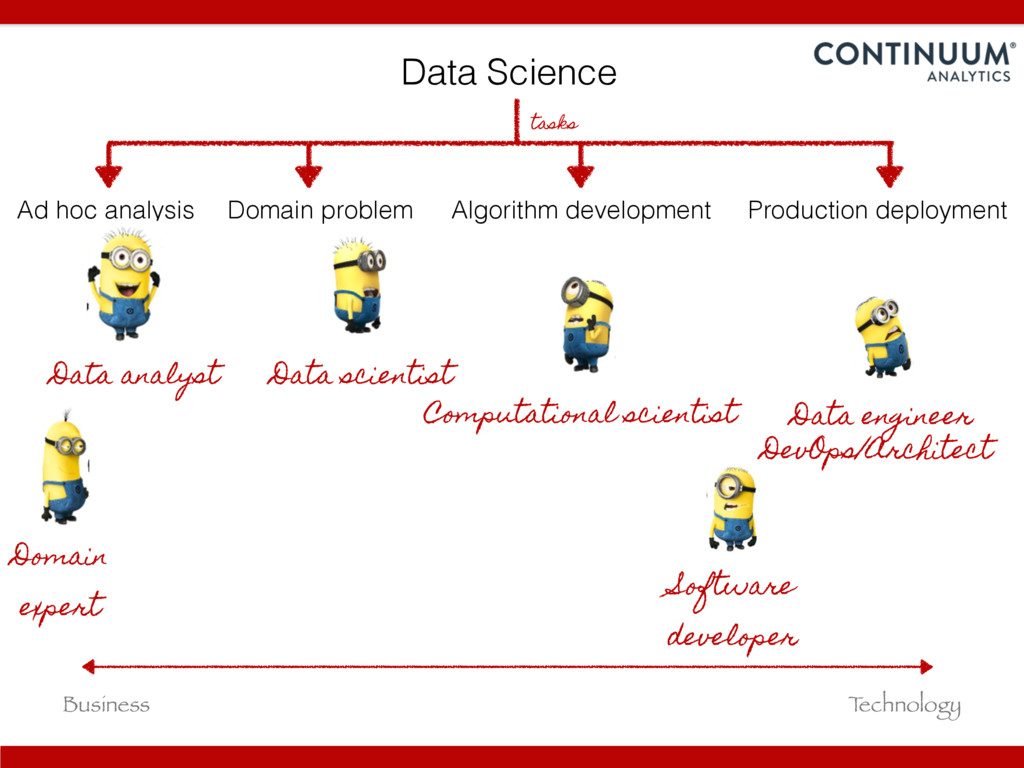
Business T echnology Data Science Ad hoc analysis Domain problem
Algorithm development Production deployment tasks Data analyst Data scientist DevOps/Architect Computational scientist Domain expert Data engineer Software developer -
Data Science in Academia Ad hoc analysis Domain problem Algorithm
development Production deployment tasks Domain Expertise/ Write papers T echnology/ Write code grad student -
Data Science Ad hoc analysis Domain problem Algorithm development Production
deployment Report/Data Project/Models Library/Package Pipeline/Architecture SAS Disclaimer: This diagram is based on my personal experience on the usage of languages in the data science field. The location of the language and its range aims to approximate their strength and common usage. In no way is intended to imply that those are the only tasks those languages can approach. -
• Rich ecosystem of libraries • Developer Community • Mature
core Scientific Computing libraries (bindings C/C++ or Fortran) • Glue language • Analysis -> Production (vs R, Matlab…) Why Python for Data Science? -
https://www.youtube.com/watch?v=5GlNDD7qbP4 Keynote: State of the Tools | SciPy 2015 |
Jake VanderPlas https://speakerdeck.com/jakevdp/the-state-of-the-stack-scipy-2015-keynote -
Data structures Arrays DataFrames/Tables Nested storage size csv/json binary small
medium BIG databases avro parquet castra np.ndarray pd.DataFrame relational DBs tables JSON kind numerical text images fits in memory fits on disk fits on many disks -
Data structures Arrays DataFrames/Tables Nested storage size csv/json binary small
medium BIG databases avro parquet castra np.ndarray pd.DataFrame relational DBs tables JSON kind numerical text images fits in memory fits on disk fits on many disks dask spaCy NLTK -
dask enables parallel computing http://dask.pydata.org/en/latest/ parallel computing shared memory distributed
cluster single core computing Gigabyte Fits in memory T erabyte Fits on disk Petabyte Fits on many disks -
dask enables parallel computing http://dask.pydata.org/en/latest/ parallel computing shared memory distributed
cluster single core computing Gigabyte Fits in memory T erabyte Fits on disk Petabyte Fits on many disks numpy, pandas dask dask.distributed -
dask enables parallel computing http://dask.pydata.org/en/latest/ parallel computing shared memory distributed
cluster single core computing numpy, pandas dask dask.distributed threaded scheduler multiprocessing scheduler -
dask array numpy dask >>> import numpy as np !
>>> np_ones = np.ones((5000, 1000)) ! ! >>> np_ones ! array([[ 1., 1., 1., ..., 1., 1., 1.], [ 1., 1., 1., ..., 1., 1., 1.], [ 1., 1., 1., ..., 1., 1., 1.], ..., [ 1., 1., 1., ..., 1., 1., 1.], [ 1., 1., 1., ..., 1., 1., 1.], [ 1., 1., 1., ..., 1., 1., 1.]]) ! >>> np_y = np.log(np_ones + 1)[:5].sum(axis=1) ! >>> np_y ! array([ 693.14718056, 693.14718056, 693.14718056, 693.14718056, 693.14718056]) >>> import dask.array as da ! >>> da_ones = da.ones((5000000, 1000000), chunks=(1000, 1000)) ! >>> da_ones.compute() ! array([[ 1., 1., 1., ..., 1., 1., 1.], [ 1., 1., 1., ..., 1., 1., 1.], [ 1., 1., 1., ..., 1., 1., 1.], ..., [ 1., 1., 1., ..., 1., 1., 1.], [ 1., 1., 1., ..., 1., 1., 1.], [ 1., 1., 1., ..., 1., 1., 1.]]) ! >>> da_y = da.log(da_ones + 1)[:5].sum(axis=1) ! >>> np_da_y = np.array(da_y) #fits in memory ! array([ 693.14718056, 693.14718056, 693.14718056, 693.14718056, …, 693.14718056]) ! # Result doesn’t fit in memory >>> da_y.to_hdf5('myfile.hdf5', 'result') -
dask dataframe pandas dask >>> import pandas as pd !
>>> df = pd.read_csv('iris.csv') ! >>> df.head() ! sepal_length sepal_width petal_length petal_width species 0 5.1 3.5 1.4 0.2 Iris-setosa 1 4.9 3.0 1.4 0.2 Iris-setosa 2 4.7 3.2 1.3 0.2 Iris-setosa 3 4.6 3.1 1.5 0.2 Iris-setosa 4 5.0 3.6 1.4 0.2 Iris-setosa ! >>> max_sepal_length_setosa = df[df.species == 'setosa'].sepal_length.max() ! 5.7999999999999998 >>> import dask.dataframe as dd ! >>> ddf = dd.read_csv('*.csv') ! >>> ddf.head() ! sepal_length sepal_width petal_length petal_width species 0 5.1 3.5 1.4 0.2 Iris-setosa 1 4.9 3.0 1.4 0.2 Iris-setosa 2 4.7 3.2 1.3 0.2 Iris-setosa 3 4.6 3.1 1.5 0.2 Iris-setosa 4 5.0 3.6 1.4 0.2 Iris-setosa … ! >>> d_max_sepal_length_setosa = ddf[ddf.species == 'setosa'].sepal_length.max() ! >>> d_max_sepal_length_setosa.compute() ! 5.7999999999999998 -
dask bag semi-structure data, like JSON blobs or log files
>>> import dask.bag as db >>> import json ! # Get tweets as a dask.bag from compressed json files >>> b = db.from_filenames('*.json.gz').map(json.loads) ! # Take two items in dask.bag >>> b.take(2) ! ({u'contributors': None, u'coordinates': None, u'created_at': u'Fri Oct 10 17:19:35 +0000 2014', u'entities': {u'hashtags': [], u'symbols': [], u'trends': [], u'urls': [], u'user_mentions': []}, u'favorite_count': 0, u'favorited': False, u'filter_level': u'medium', u'geo': None … ! # Count the frequencies of user locations >>> freq = b.pluck('user').pluck('location').frequencies() ! # Get the result as a dataframe >>> df = freq.to_dataframe() >>> df.compute() 0 1 0 20916 1 Natal 2 2 Planet earth. Sheffield. 1 3 Mad, USERA 1 4 Brasilia DF - Brazil 2 5 Rondonia Cacoal 1 6 msftsrep || 4/5. 1 -
dask distributed >>> import dask >>> from dask.distributed import Client
! # client connected to 50 nodes, 2 workers per node. >>> dc = Client('tcp://localhost:9000') # or >>> dc = Client('tcp://ec2-XX-XXX-XX-XXX.compute-1.amazonaws.com:9000') >>> b = db.from_s3('githubarchive-data', '2015-*.json.gz').map(json.loads) ! # use default single node scheduler >>> top_commits.compute() ! # use client with distributed cluster >>> top_commits.compute(get=dc.get) ! [(u'mirror-updates', 1463019), (u'KenanSulayman', 235300), (u'greatfirebot', 167558), (u'rydnr', 133323), (u'markkcc', 127625)] -
blaze interface to query data on different storage systems http://blaze.pydata.org/en/latest/
from blaze import Data iris = Data('iris.csv') iris = Data('sqlite:///flowers.db::iris') iris = Data('mongodb://localhost/mydb::iris') iris = Data('iris.json') CSV SQL MongoDB JSON iris = Data('s3://blaze-data/iris.csv') S3 … -
blaze iris[['sepal_length', 'species']] Select columns log(iris.sepal_length * 10) Operate Reduce
iris.sepal_length.mean() Split-apply -combine by(iris.species, shortest=iris.petal_length.min(), longest=iris.petal_length.max(), average=iris.petal_length.mean()) Add new columns transform(iris, sepal_ratio = iris.sepal_length / iris.sepal_width, petal_ratio = iris.petal_length / iris.petal_width) T ext matching iris.like(species='*versicolor') iris.relabel(petal_length='PETAL-LENGTH', petal_width='PETAL-WIDTH') Relabel columns Filter iris[(iris.species == 'Iris-setosa') & (iris.sepal_length > 5.0)] -
Builds off of Blaze uniform interface to host data remotely
through a JSON web API. blaze server iriscsv: source: iris.csv ! irisdb: source: sqlite:///flowers.db::iris ! irisjson: source: iris.json dshape: "var * {name: string, amount: float64}" ! irismongo: source: mongodb://localhost/mydb::iris ! server.yaml YAML $ blaze-server server.yaml localhost:6363/compute.json -
blaze server Blaze Client >>> from blaze import Data !
>>> s = Data('blaze://localhost:6363') >>> t.fields ! [u'iriscsv', u'irisdb', u'irisjson', u’irismongo'] ! >>> t.iriscsv ! sepal_length sepal_width petal_length petal_width species 0 5.1 3.5 1.4 0.2 Iris-setosa 1 4.9 3.0 1.4 0.2 Iris-setosa 2 4.7 3.2 1.3 0.2 Iris-setosa ! >>> t.irisdb ! petal_length petal_width sepal_length sepal_width species 0 1.4 0.2 5.1 3.5 Iris-setosa 1 1.4 0.2 4.9 3.0 Iris-setosa 2 1.3 0.2 4.7 3.2 Iris-setosa -
curl \ -H "Content-Type: application/json" \ -d '{"expr": {"op": "Field",
"args": [":leaf", "iriscsv"]}}' \ localhost:6363/compute.json curl blaze server requests blaze.server.to_tree -
CONDA PACKAGE AND ENVIRONMENT MANAGER LANGUAGE AGNOSTIC CROSS-PLATFORM Python R
Java OS X Linux Windows Scala -
CO NDA INSTALL PYTHO N=3.4 M O NG O DB
PYTHO N=2.7 R SPARK NUTCH R-M ATRIX PANDAS NUM PY FLASK NO DE -
ANACONDA MINICONDA PYTHON CONDA PACKAGES PYTHON CONDA a bunch of
for scientific computing and data science -
CONDA VS PIP(+VIRTUALENV) CONDA PIP Language agnostic Python packages handles
environments ! natively virtualenv installs binaries compiles from source general purpose ! envs python! envs -
CONDA + PIP $ conda install pip $ pip install
foo CONDA SKELETON PYPI $ conda skeleton pypi foo $ conda build foo/ -
WHY USE CONDA? Seen this message too many times:“Storing debug
log for failure in /.pip/pip.log” Python with compiled, platform- dependent C, C++, or Fortran code Multi-language Data Science Projects -
ANACONDA.ORG ~GITHUB FOR BINARY PACKAGES $ conda build conda.recipe/ $
conda server upload my_foo_pkg $ conda install -c chdoig my_foo_pkg -
ENVIRONMENT.YML name: myenv! channels:! - chdoig! - r! - foo!
dependecies:! - python=2.7! - r! - r-ldavis! - pandas! - mongodb! - spark=1.5! - pip! - pip:! ! ! ! - flask-migrate! ! ! ! - bar=1.4 -
FREEZE VERSIONS $ conda env export -n freeze.yml name: pygotham-topic!
dependencies:! - certifi=14.05.14=py27_0! - gensim=0.10.3=py27_0! - ipython=3.2.1=py27_0! - ipython-notebook=3.2.1=py27_0! - jinja2=2.8=py27_0! - jsonschema=2.4.0=py27_0! - libsodium=0.4.5=2! - markupsafe=0.23=py27_0! - mistune=0.7=py27_0! - ncurses=5.9=1! - nltk=3.0.4=np19py27_0! - numpy=1.9.2=py27_0! -
UPLOAD ENVIRONMENTS TO ANACONDA.ORG $ conda server upload my_foo_env.yml $
conda env create chdoig/my_foo_env.yml -
CONDA AUTO ENV cdoig:~$ cd pygotham-topic-modeling/ discarding /anaconda/bin from PATH
prepending /anaconda/envs/pygotham-topic/bin to PATH (pygotham-topic)cdoig:~/pygotham-topic-modeling$ https://github.com/chdoig/conda-auto-env