Share
Embed
Why Google Ads Are Not Generating Leads
Learn why Google Ads fail to generate leads and discover practical ways to improve targeting, conversions, and campaign performance while reducing wasted ad spend.

Digiproms
October 27, 2026
Transcript
6 slides
-
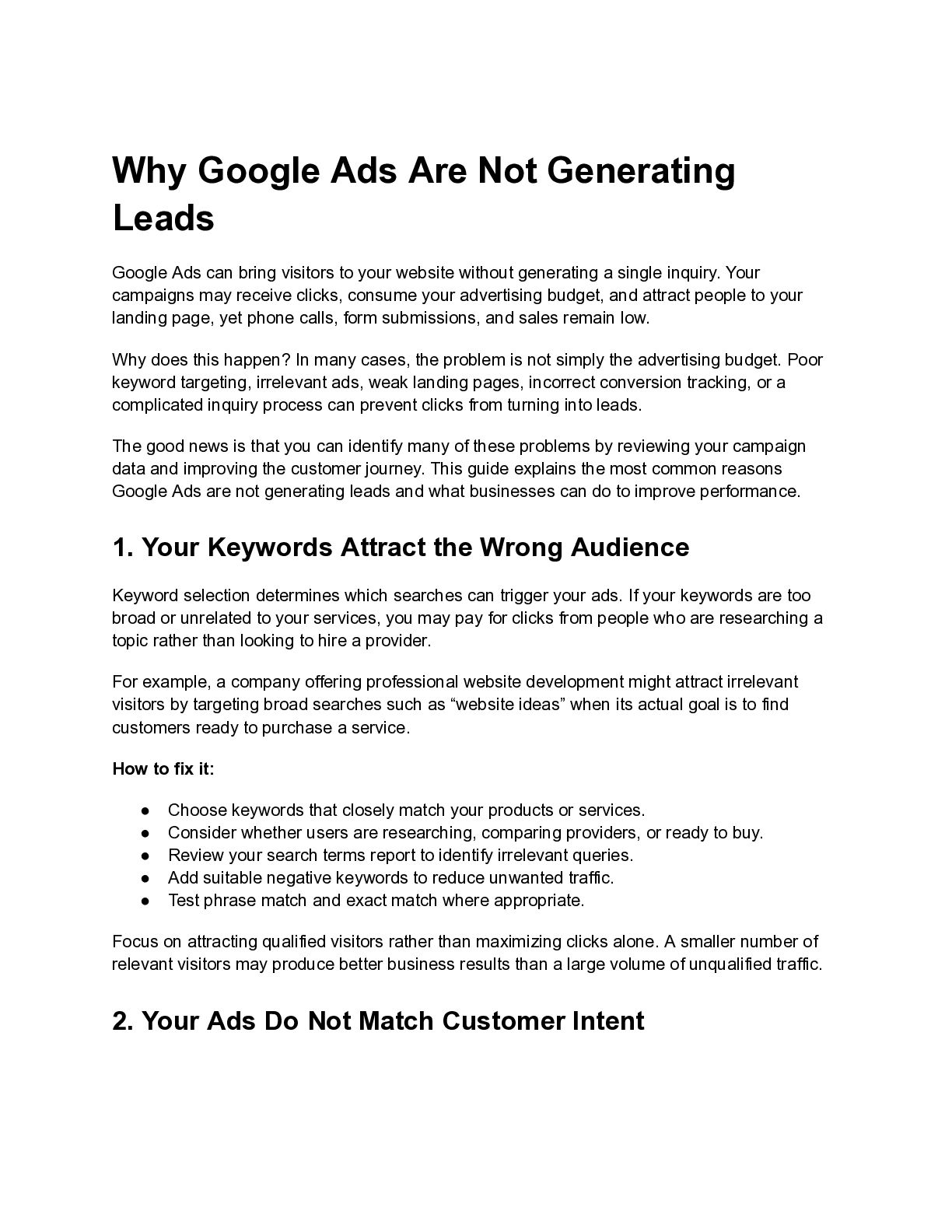
Why Google Ads Are Not Generating Leads Google Ads can
bring visitors to your website without generating a single inquiry. Your campaigns may receive clicks, consume your advertising budget, and attract people to your landing page, yet phone calls, form submissions, and sales remain low. Why does this happen? In many cases, the problem is not simply the advertising budget. Poor keyword targeting, irrelevant ads, weak landing pages, incorrect conversion tracking, or a complicated inquiry process can prevent clicks from turning into leads. The good news is that you can identify many of these problems by reviewing your campaign data and improving the customer journey. This guide explains the most common reasons Google Ads are not generating leads and what businesses can do to improve performance. 1. Your Keywords Attract the Wrong Audience Keyword selection determines which searches can trigger your ads. If your keywords are too broad or unrelated to your services, you may pay for clicks from people who are researching a topic rather than looking to hire a provider. For example, a company offering professional website development might attract irrelevant visitors by targeting broad searches such as “website ideas” when its actual goal is to find customers ready to purchase a service. How to fix it: • • • • • Choose keywords that closely match your products or services. Consider whether users are researching, comparing providers, or ready to buy. Review your search terms report to identify irrelevant queries. Add suitable negative keywords to reduce unwanted traffic. Test phrase match and exact match where appropriate. Focus on attracting qualified visitors rather than maximizing clicks alone. A smaller number of relevant visitors may produce better business results than a large volume of unqualified traffic. 2. Your Ads Do Not Match Customer Intent -
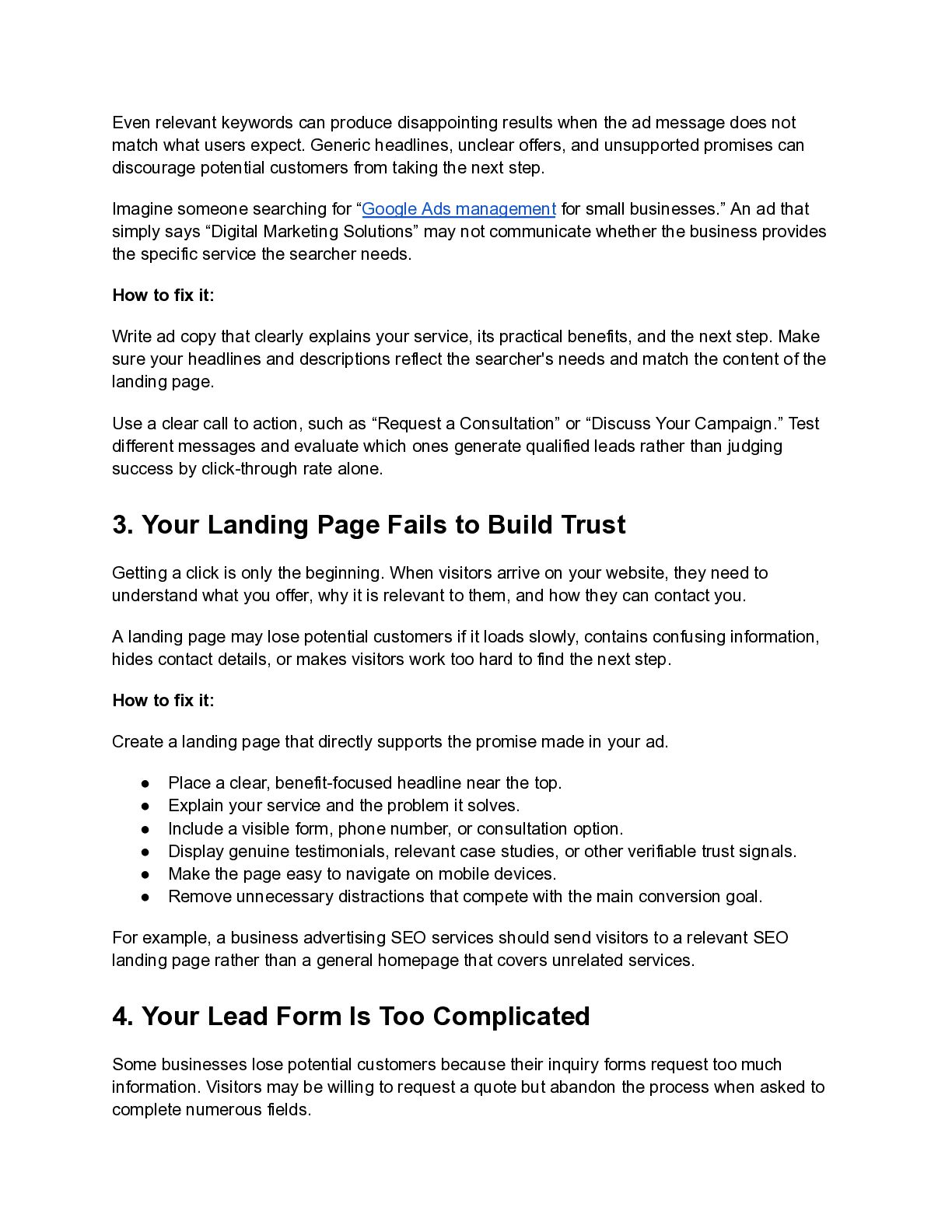
Even relevant keywords can produce disappointing results when the ad
message does not match what users expect. Generic headlines, unclear offers, and unsupported promises can discourage potential customers from taking the next step. Imagine someone searching for “Google Ads management for small businesses.” An ad that simply says “Digital Marketing Solutions” may not communicate whether the business provides the specific service the searcher needs. How to fix it: Write ad copy that clearly explains your service, its practical benefits, and the next step. Make sure your headlines and descriptions reflect the searcher's needs and match the content of the landing page. Use a clear call to action, such as “Request a Consultation” or “Discuss Your Campaign.” Test different messages and evaluate which ones generate qualified leads rather than judging success by click-through rate alone. 3. Your Landing Page Fails to Build Trust Getting a click is only the beginning. When visitors arrive on your website, they need to understand what you offer, why it is relevant to them, and how they can contact you. A landing page may lose potential customers if it loads slowly, contains confusing information, hides contact details, or makes visitors work too hard to find the next step. How to fix it: Create a landing page that directly supports the promise made in your ad. • • • • • • Place a clear, benefit-focused headline near the top. Explain your service and the problem it solves. Include a visible form, phone number, or consultation option. Display genuine testimonials, relevant case studies, or other verifiable trust signals. Make the page easy to navigate on mobile devices. Remove unnecessary distractions that compete with the main conversion goal. For example, a business advertising SEO services should send visitors to a relevant SEO landing page rather than a general homepage that covers unrelated services. 4. Your Lead Form Is Too Complicated Some businesses lose potential customers because their inquiry forms request too much information. Visitors may be willing to request a quote but abandon the process when asked to complete numerous fields. -
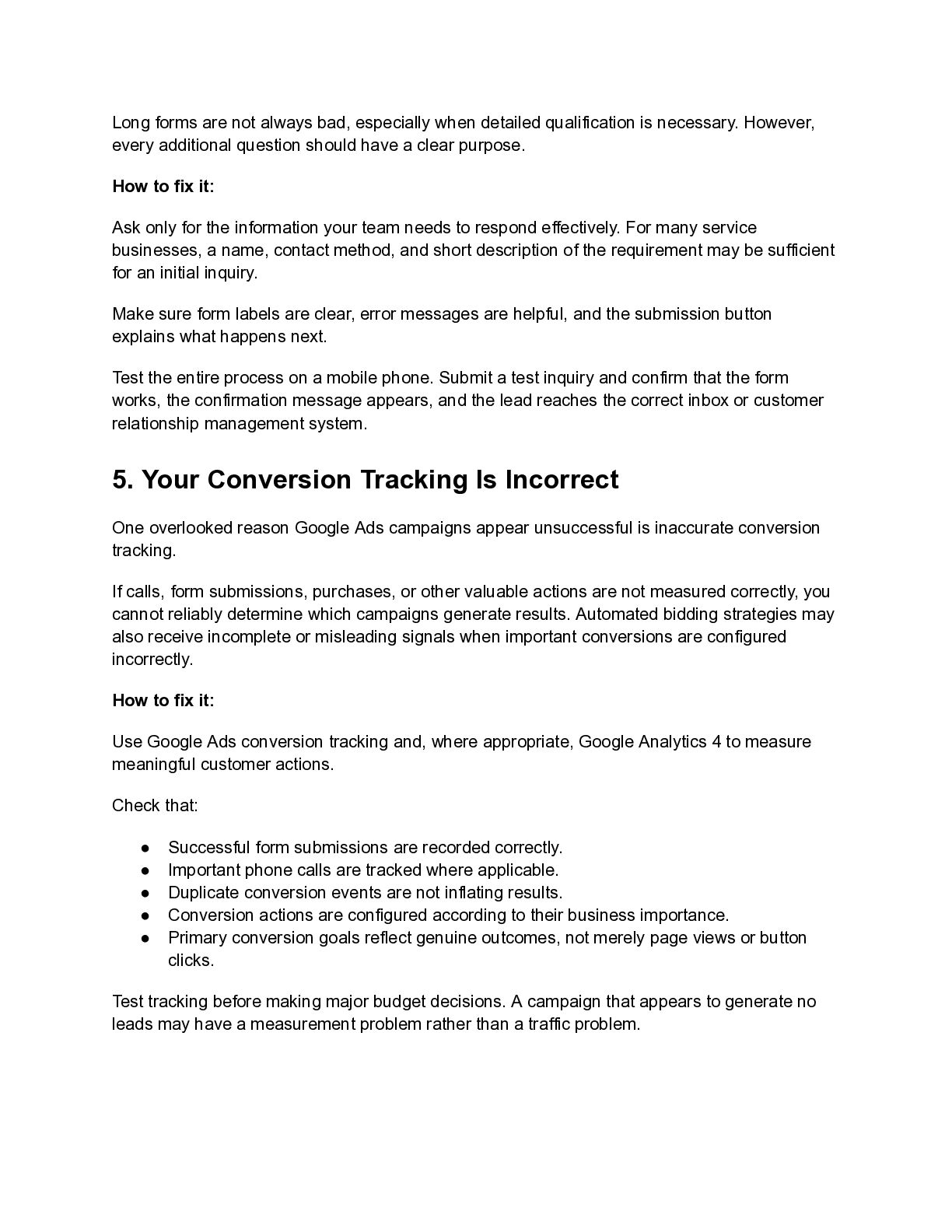
Long forms are not always bad, especially when detailed qualification
is necessary. However, every additional question should have a clear purpose. How to fix it: Ask only for the information your team needs to respond effectively. For many service businesses, a name, contact method, and short description of the requirement may be sufficient for an initial inquiry. Make sure form labels are clear, error messages are helpful, and the submission button explains what happens next. Test the entire process on a mobile phone. Submit a test inquiry and confirm that the form works, the confirmation message appears, and the lead reaches the correct inbox or customer relationship management system. 5. Your Conversion Tracking Is Incorrect One overlooked reason Google Ads campaigns appear unsuccessful is inaccurate conversion tracking. If calls, form submissions, purchases, or other valuable actions are not measured correctly, you cannot reliably determine which campaigns generate results. Automated bidding strategies may also receive incomplete or misleading signals when important conversions are configured incorrectly. How to fix it: Use Google Ads conversion tracking and, where appropriate, Google Analytics 4 to measure meaningful customer actions. Check that: • • • • • Successful form submissions are recorded correctly. Important phone calls are tracked where applicable. Duplicate conversion events are not inflating results. Conversion actions are configured according to their business importance. Primary conversion goals reflect genuine outcomes, not merely page views or button clicks. Test tracking before making major budget decisions. A campaign that appears to generate no leads may have a measurement problem rather than a traffic problem. -
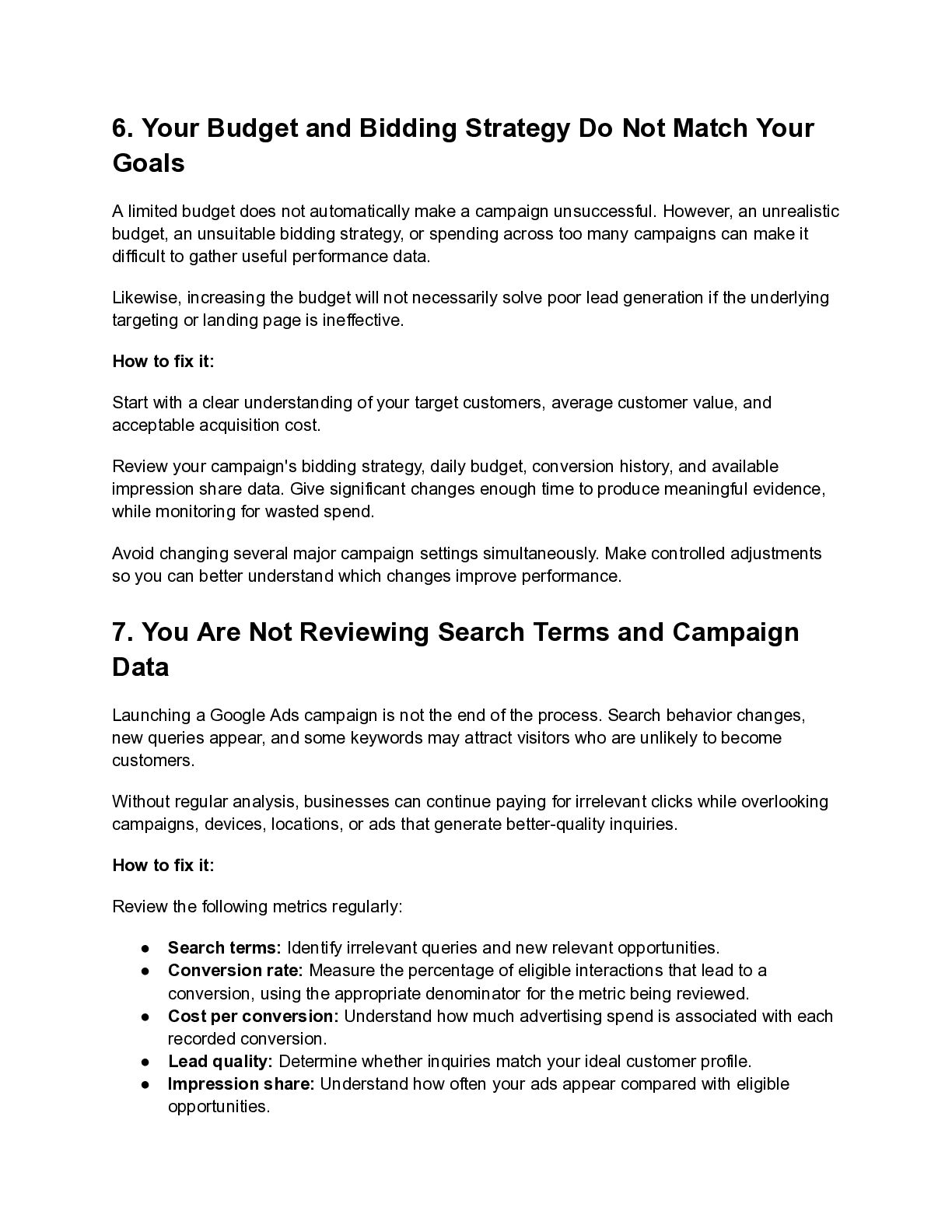
6. Your Budget and Bidding Strategy Do Not Match Your
Goals A limited budget does not automatically make a campaign unsuccessful. However, an unrealistic budget, an unsuitable bidding strategy, or spending across too many campaigns can make it difficult to gather useful performance data. Likewise, increasing the budget will not necessarily solve poor lead generation if the underlying targeting or landing page is ineffective. How to fix it: Start with a clear understanding of your target customers, average customer value, and acceptable acquisition cost. Review your campaign's bidding strategy, daily budget, conversion history, and available impression share data. Give significant changes enough time to produce meaningful evidence, while monitoring for wasted spend. Avoid changing several major campaign settings simultaneously. Make controlled adjustments so you can better understand which changes improve performance. 7. You Are Not Reviewing Search Terms and Campaign Data Launching a Google Ads campaign is not the end of the process. Search behavior changes, new queries appear, and some keywords may attract visitors who are unlikely to become customers. Without regular analysis, businesses can continue paying for irrelevant clicks while overlooking campaigns, devices, locations, or ads that generate better-quality inquiries. How to fix it: Review the following metrics regularly: • Search terms: Identify irrelevant queries and new relevant opportunities. • Conversion rate: Measure the percentage of eligible interactions that lead to a conversion, using the appropriate denominator for the metric being reviewed. • Cost per conversion: Understand how much advertising spend is associated with each recorded conversion. • Lead quality: Determine whether inquiries match your ideal customer profile. • Impression share: Understand how often your ads appear compared with eligible opportunities. -
• Return on ad spend (ROAS): Evaluate advertising revenue relative
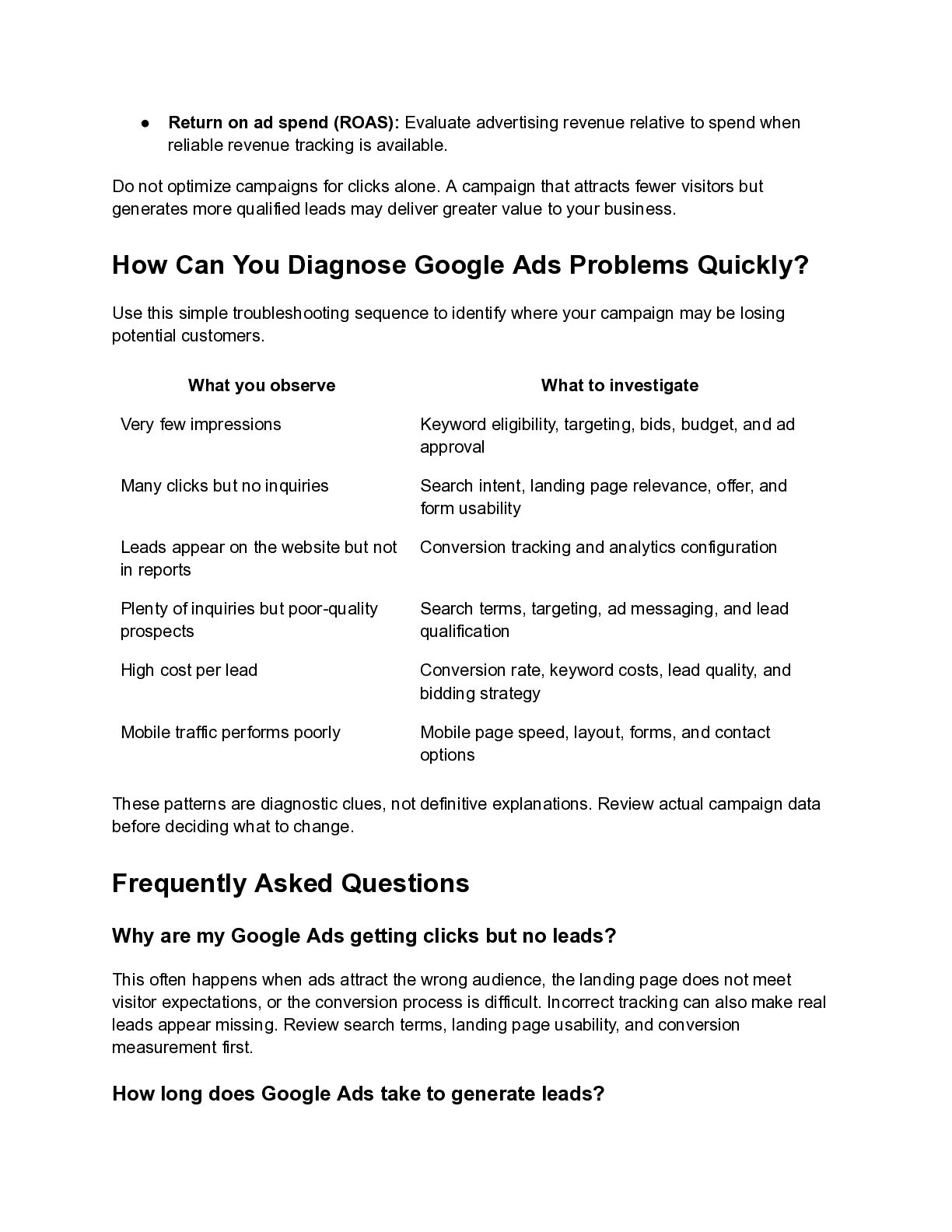
to spend when reliable revenue tracking is available. Do not optimize campaigns for clicks alone. A campaign that attracts fewer visitors but generates more qualified leads may deliver greater value to your business. How Can You Diagnose Google Ads Problems Quickly? Use this simple troubleshooting sequence to identify where your campaign may be losing potential customers. What you observe What to investigate Very few impressions Keyword eligibility, targeting, bids, budget, and ad approval Many clicks but no inquiries Search intent, landing page relevance, offer, and form usability Leads appear on the website but not in reports Conversion tracking and analytics configuration Plenty of inquiries but poor-quality prospects Search terms, targeting, ad messaging, and lead qualification High cost per lead Conversion rate, keyword costs, lead quality, and bidding strategy Mobile traffic performs poorly Mobile page speed, layout, forms, and contact options These patterns are diagnostic clues, not definitive explanations. Review actual campaign data before deciding what to change. Frequently Asked Questions Why are my Google Ads getting clicks but no leads? This often happens when ads attract the wrong audience, the landing page does not meet visitor expectations, or the conversion process is difficult. Incorrect tracking can also make real leads appear missing. Review search terms, landing page usability, and conversion measurement first. How long does Google Ads take to generate leads? -
There is no universal timeline. Results depend on demand, competition,
budget, targeting, the offer, and the website's ability to convert visitors. Some campaigns can generate leads quickly, while others need testing and refinement before performance becomes consistent. Should I increase my Google Ads budget if I am not getting leads? Not immediately. First, determine whether the campaign attracts relevant traffic and whether conversion tracking works correctly. Increasing spend before fixing major problems can increase costs without improving lead generation. What is a good conversion rate for Google Ads? There is no single conversion rate that works for every industry or campaign. Performance varies with search intent, competition, offer, device, and conversion type. Compare results with relevant industry benchmarks, your historical data, and the quality and value of the leads you receive. When should a business hire a Google Ads specialist? Professional support may be useful when advertising costs are increasing without better results, tracking is difficult to configure, campaigns have become complicated, or your team lacks time to analyze and optimize performance. Final Thoughts When Google Ads are not generating leads, the solution is rarely to make random changes or increase spending without a clear plan. Successful optimization begins with identifying the actual bottleneck, whether it is irrelevant traffic, weak messaging, a poor landing page, inaccurate tracking, or ineffective campaign management. Start with the data, correct the most significant problems, and measure the impact of each improvement. This approach helps businesses make more informed advertising decisions and focus on leads that have genuine commercial value.
 arnekittler
 wf714201
 tbpgr
 nessu_inc
 enechain
 tablecheckac
 karnelson84
 ubiregi_saiyo
 doiko123
 progmat
 circulation
 hrm
 mclloyd
 ammeep
 csswizardry
 maggiecrowley
 kimpetersen
 samlambert
 palkan
 mfonobong
 aki_iinuma
 skipperchong
 cassininazir
 rabernat