Upgrade to Pro — share decks privately, control downloads, hide ads and more …

Kiro Remote Workspaces: The IDE stays with you;...

Sponsored · Your Podcast. Everywhere. Effortlessly. Share. Educate. Inspire. Entertain. You do you. We'll handle the rest. →

Kiro Remote Workspaces: The IDE stays with you; the workspace moves

A reference deck, with figures and screens, on remote workspaces in Kiro IDE (announced November 20, 2026). The IDE stays on your computer while the workspace runs in a cloud session, a dev container (on your computer or an SSH host) or your own compute, and the agent runs where the workspace runs. The deck compares the three ways (who provides the machine, what defines the environment, cost, networks and what you need) and shows how to open each one: Open in IDE, Kiro: Connect to Host… and Reopen in Container. Based on public sources as of November 21, 2026.

Riku INADA PRO

November 21, 2026

Transcript

14 slides
  1. Reference Kiro Remote Workspaces The IDE stays with you; the

    workspace moves After reading, you can choose one of the three ways and open it As of November 21, 2026 Amazon Web Services © 2026, Amazon Web Services, Inc. or its affiliates. All rights reserved. 1
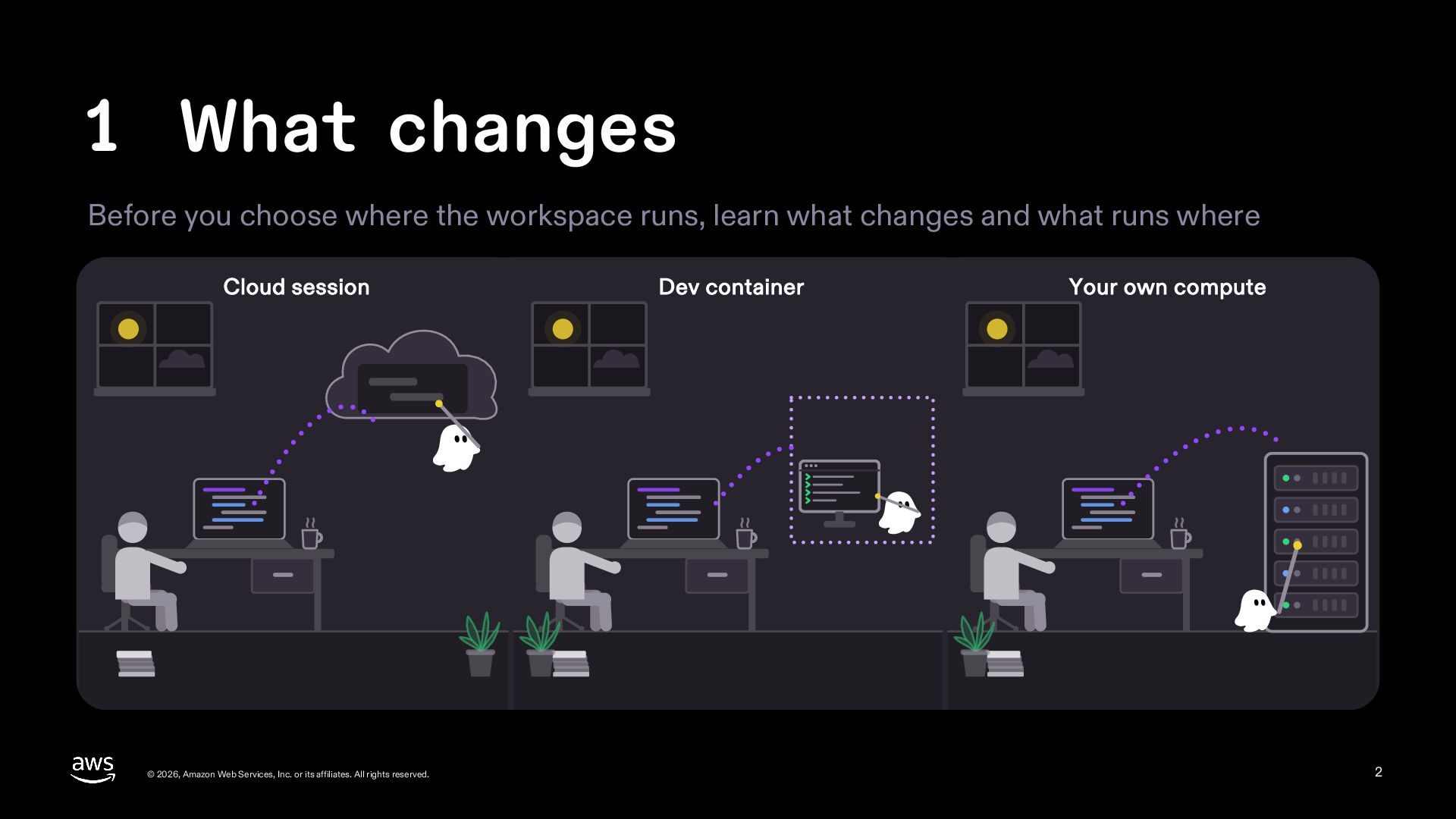
  2. 1 What changes Before you choose where the workspace runs,

    learn what changes and what runs where Cloud session © 2026, Amazon Web Services, Inc. or its affiliates. All rights reserved. Dev container Your own compute 2
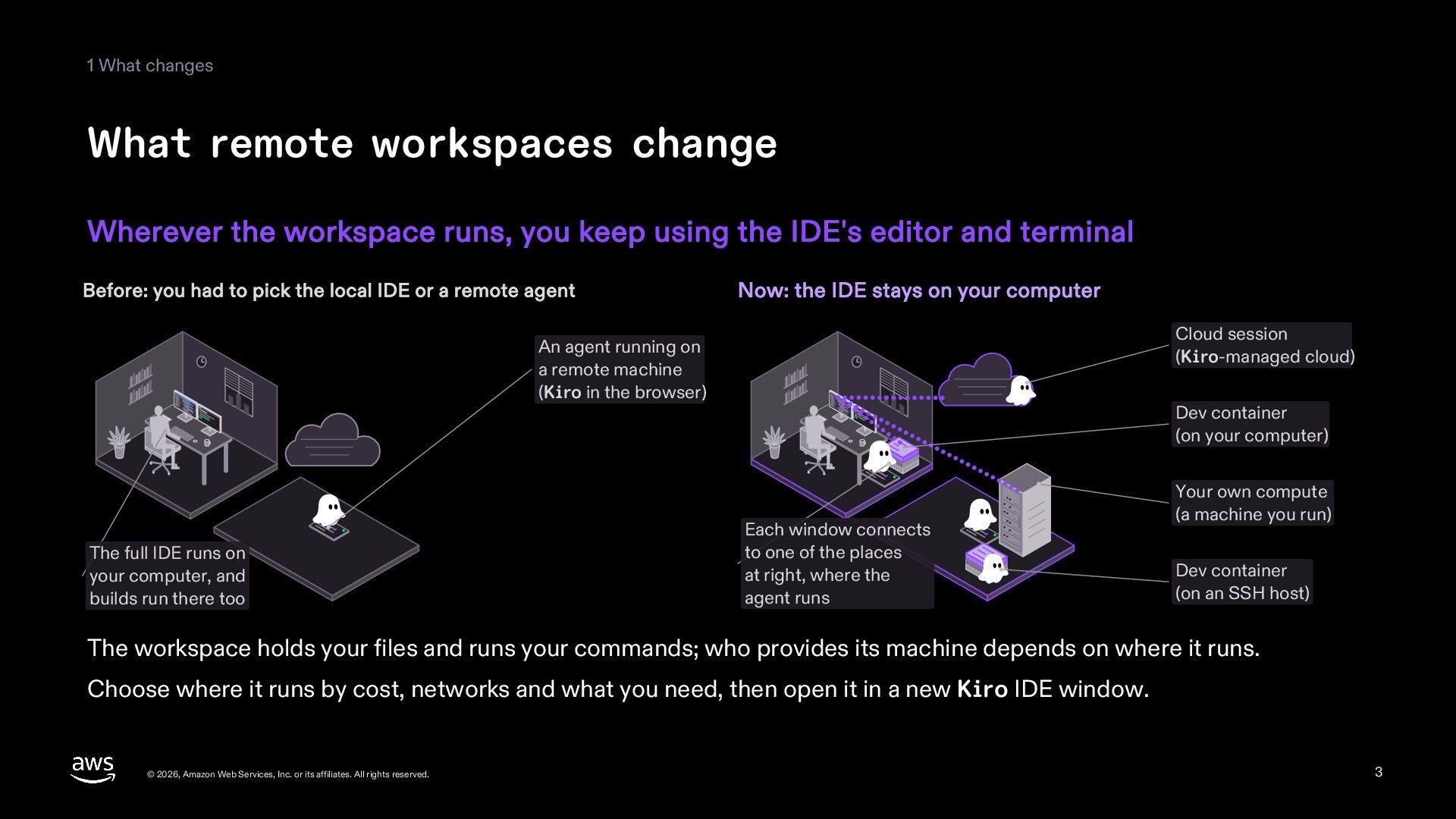
  3. 1 What changes What remote workspaces change Wherever the workspace

    runs, you keep using the IDE's editor and terminal Before: you had to pick the local IDE or a remote agent Now: the IDE stays on your computer Cloud session (Kiro-managed cloud) An agent running on a remote machine (Kiro in the browser) The full IDE runs on your computer, and builds run there too Dev container (on your computer) Each window connects to one of the places at right, where the agent runs Your own compute (a machine you run) Dev container (on an SSH host) The workspace holds your files and runs your commands; who provides its machine depends on where it runs. Choose where it runs by cost, networks and what you need, then open it in a new Kiro IDE window. © 2026, Amazon Web Services, Inc. or its affiliates. All rights reserved. 3
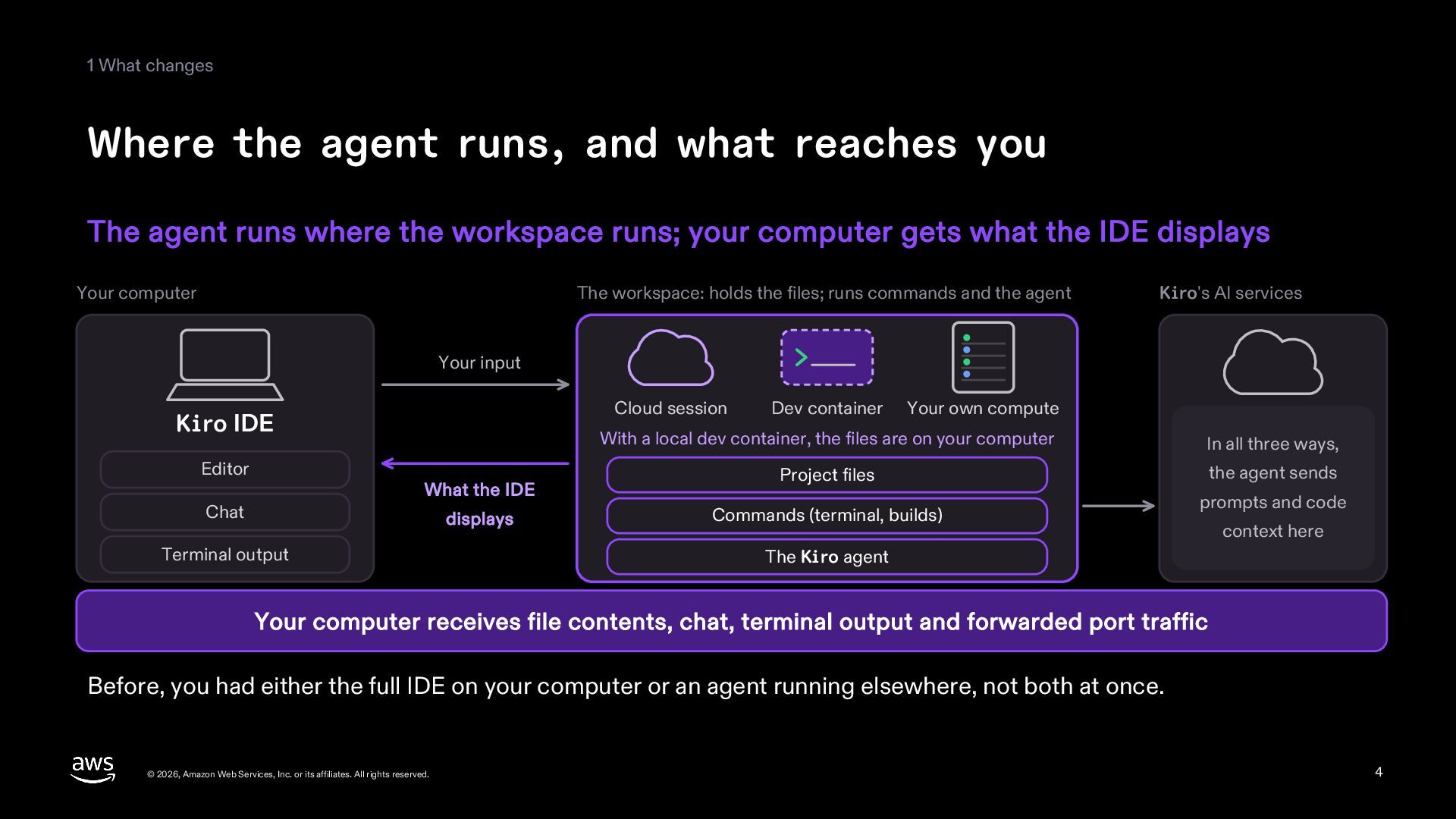
  4. 1 What changes Where the agent runs, and what reaches

    you The agent runs where the workspace runs; your computer gets what the IDE displays Your computer The workspace: holds the files; runs commands and the agent Kiro's AI services Your input Cloud session Kiro IDE Editor What the IDE Chat displays Terminal output Dev container Your own compute With a local dev container, the files are on your computer In all three ways, Project files the agent sends Commands (terminal, builds) prompts and code context here The Kiro agent Your computer receives file contents, chat, terminal output and forwarded port traffic Before, you had either the full IDE on your computer or an agent running elsewhere, not both at once. © 2026, Amazon Web Services, Inc. or its affiliates. All rights reserved. 4
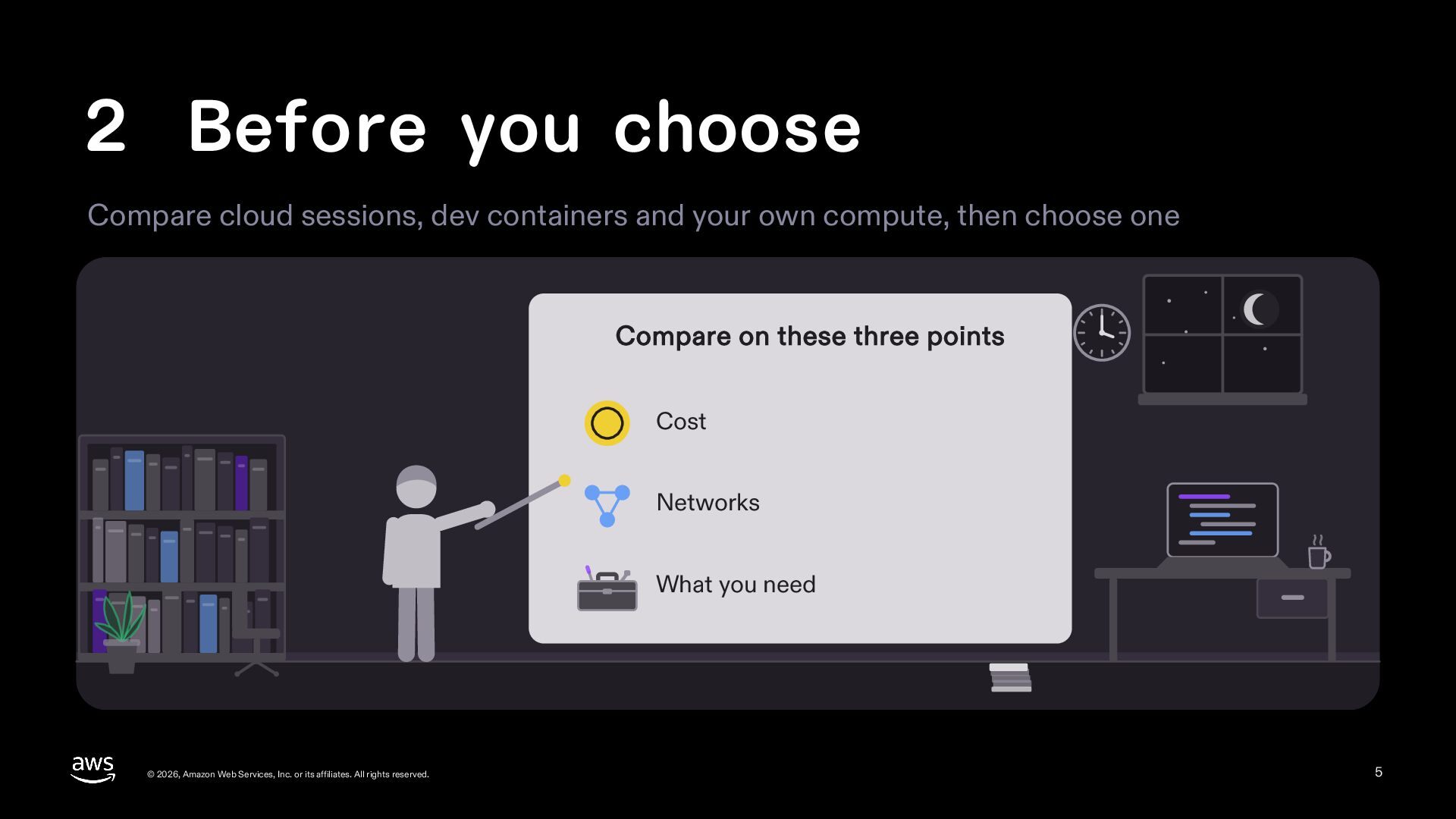
  5. 2 Before you choose Compare cloud sessions, dev containers and

    your own compute, then choose one Compare on these three points Cost Networks What you need © 2026, Amazon Web Services, Inc. or its affiliates. All rights reserved. 5
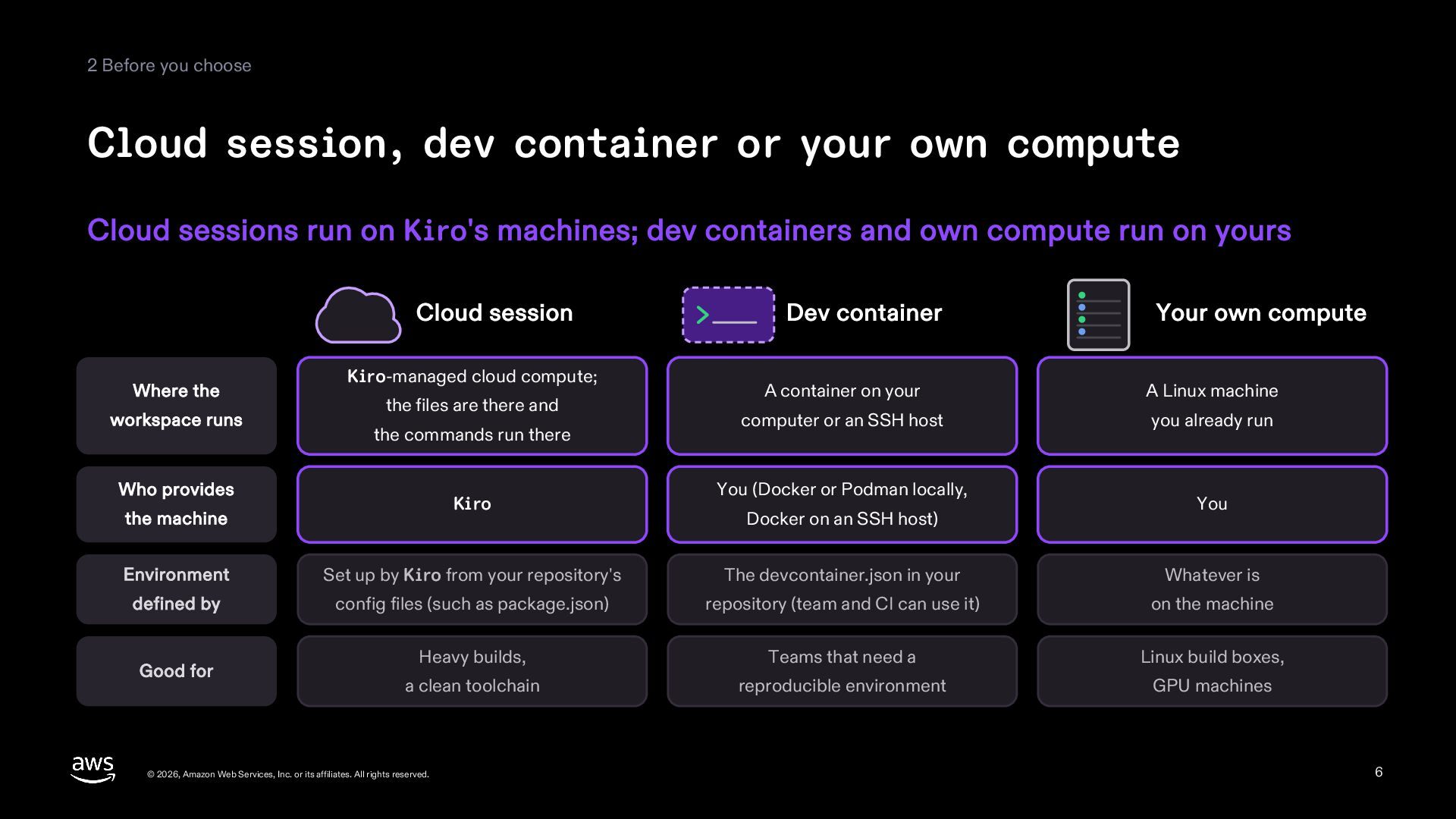
  6. 2 Before you choose Cloud session, dev container or your

    own compute Cloud sessions run on Kiro's machines; dev containers and own compute run on yours Cloud session Where the workspace runs Kiro-managed cloud compute; the files are there and the commands run there Who provides Kiro the machine Dev container Your own compute A container on your A Linux machine computer or an SSH host you already run You (Docker or Podman locally, Docker on an SSH host) You Environment Set up by Kiro from your repository's The devcontainer.json in your Whatever is defined by config files (such as package.json) repository (team and CI can use it) on the machine Heavy builds, Teams that need a Linux build boxes, a clean toolchain reproducible environment GPU machines Good for © 2026, Amazon Web Services, Inc. or its affiliates. All rights reserved. 6
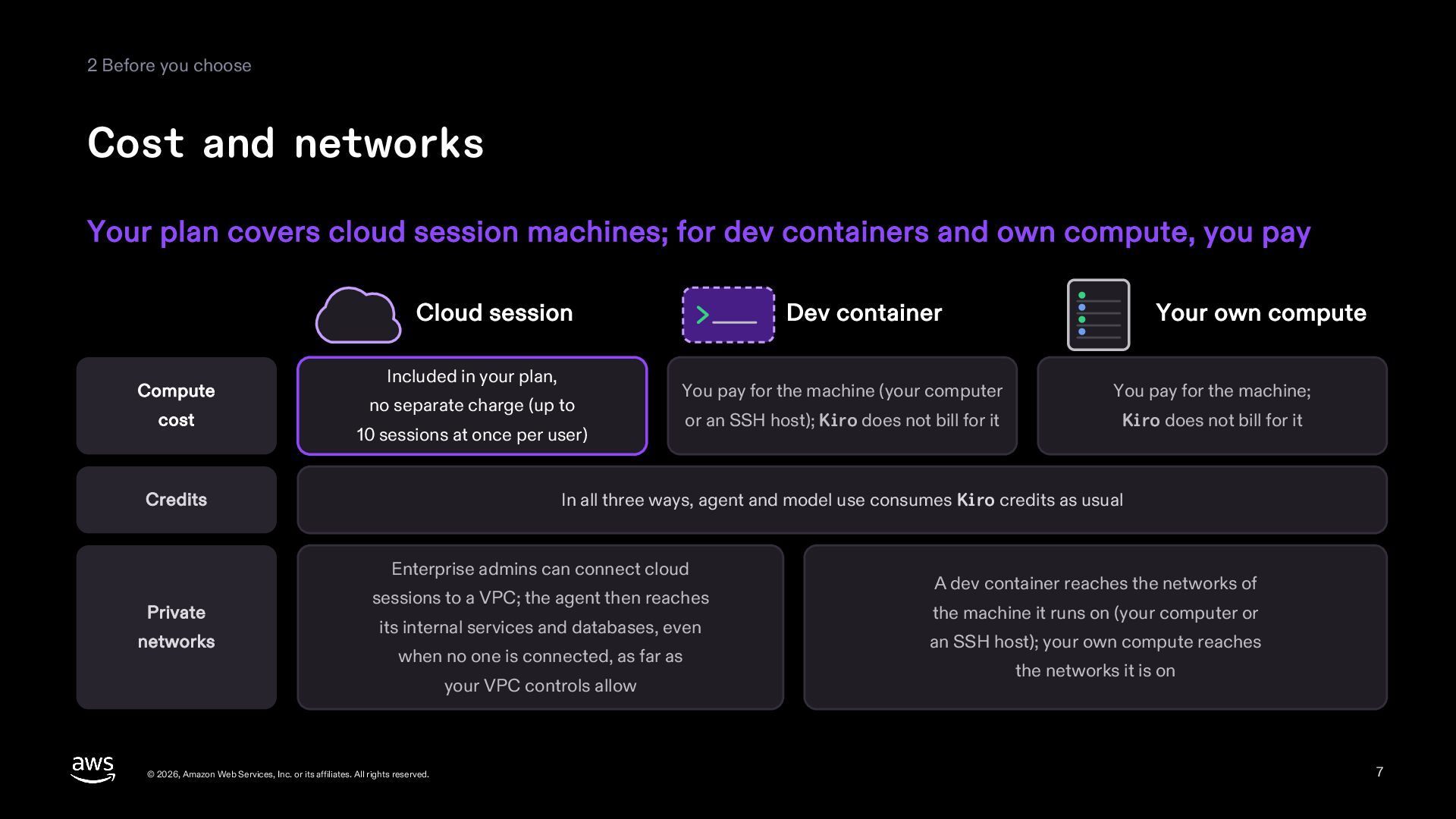
  7. 2 Before you choose Cost and networks Your plan covers

    cloud session machines; for dev containers and own compute, you pay Cloud session Compute cost Included in your plan, no separate charge (up to Dev container You pay for the machine (your computer You pay for the machine; or an SSH host); Kiro does not bill for it Kiro does not bill for it 10 sessions at once per user) In all three ways, agent and model use consumes Kiro credits as usual Credits Enterprise admins can connect cloud Private networks Your own compute sessions to a VPC; the agent then reaches its internal services and databases, even when no one is connected, as far as your VPC controls allow © 2026, Amazon Web Services, Inc. or its affiliates. All rights reserved. A dev container reaches the networks of the machine it runs on (your computer or an SSH host); your own compute reaches the networks it is on 7
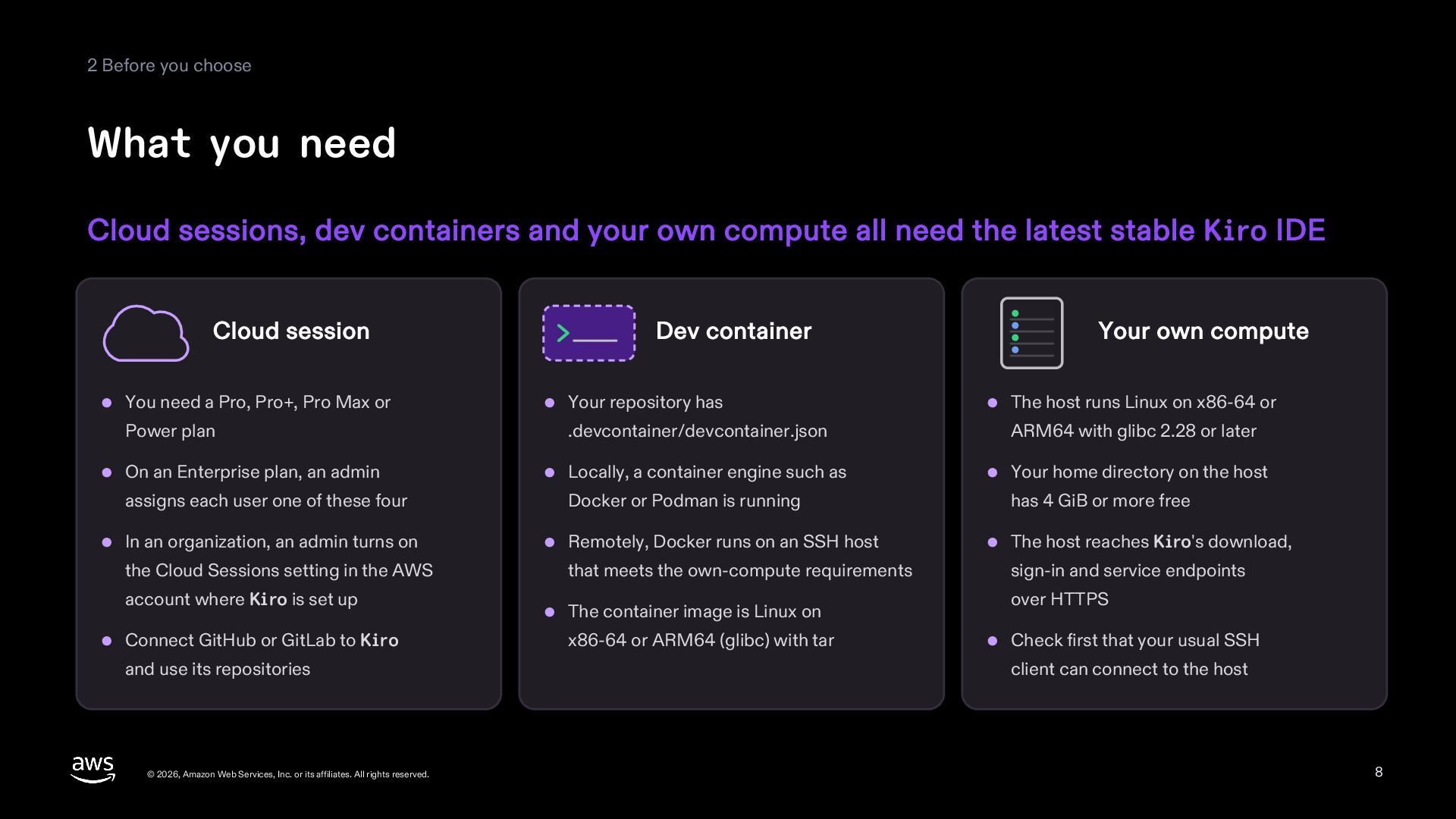
  8. 2 Before you choose What you need Cloud sessions, dev

    containers and your own compute all need the latest stable Kiro IDE Cloud session Dev container Your own compute You need a Pro, Pro+, Pro Max or Your repository has The host runs Linux on x86-64 or Power plan .devcontainer/devcontainer.json ARM64 with glibc 2.28 or later On an Enterprise plan, an admin Locally, a container engine such as Your home directory on the host assigns each user one of these four Docker or Podman is running has 4 GiB or more free In an organization, an admin turns on Remotely, Docker runs on an SSH host The host reaches Kiro's download, the Cloud Sessions setting in the AWS that meets the own-compute requirements sign-in and service endpoints account where Kiro is set up Connect GitHub or GitLab to Kiro and use its repositories © 2026, Amazon Web Services, Inc. or its affiliates. All rights reserved. The container image is Linux on x86-64 or ARM64 (glibc) with tar over HTTPS Check first that your usual SSH client can connect to the host 8
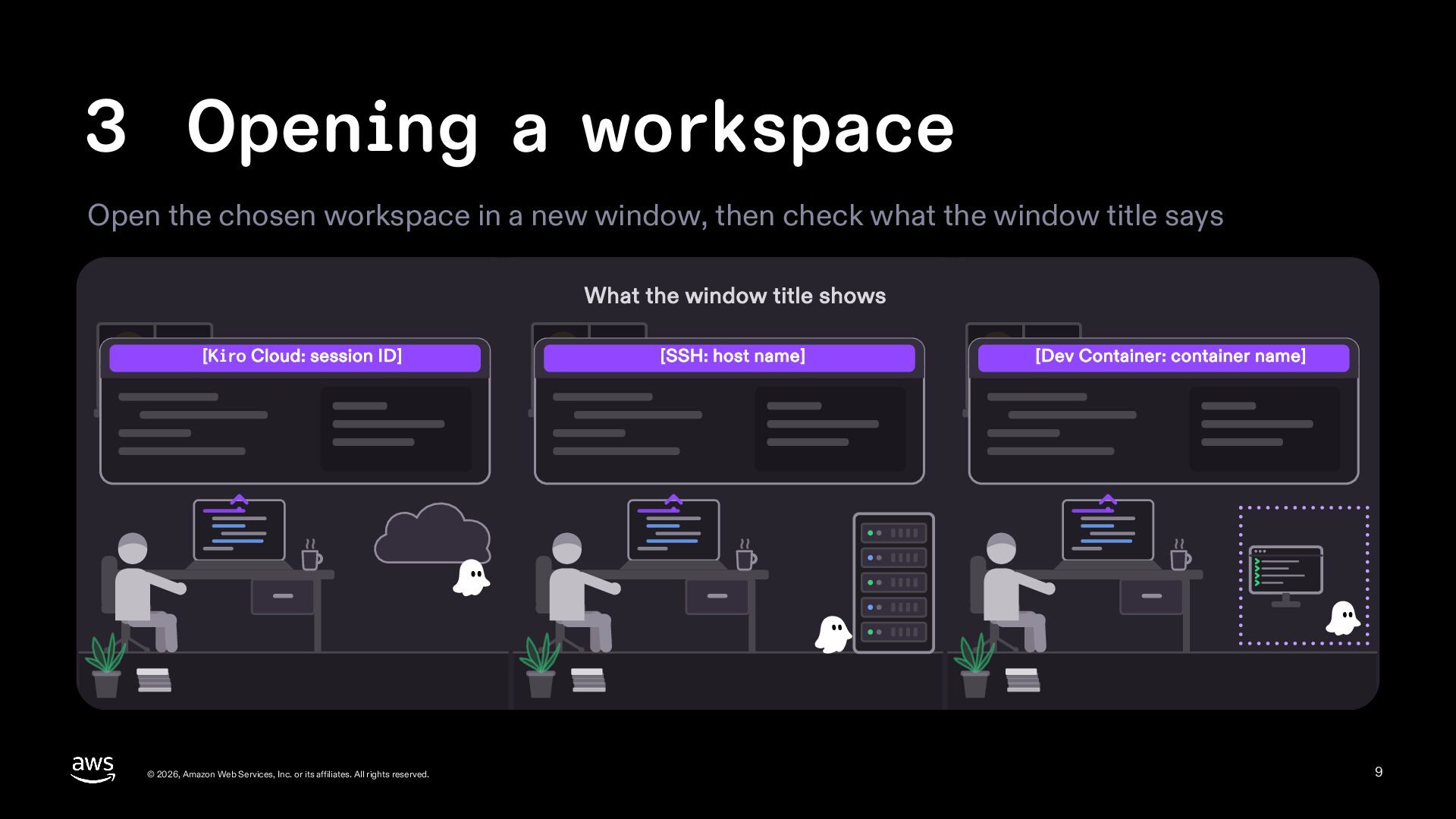
  9. 3 Opening a workspace Open the chosen workspace in a

    new window, then check what the window title says What the window title shows [Kiro Cloud: session ID] © 2026, Amazon Web Services, Inc. or its affiliates. All rights reserved. [SSH: host name] [Dev Container: container name] 9
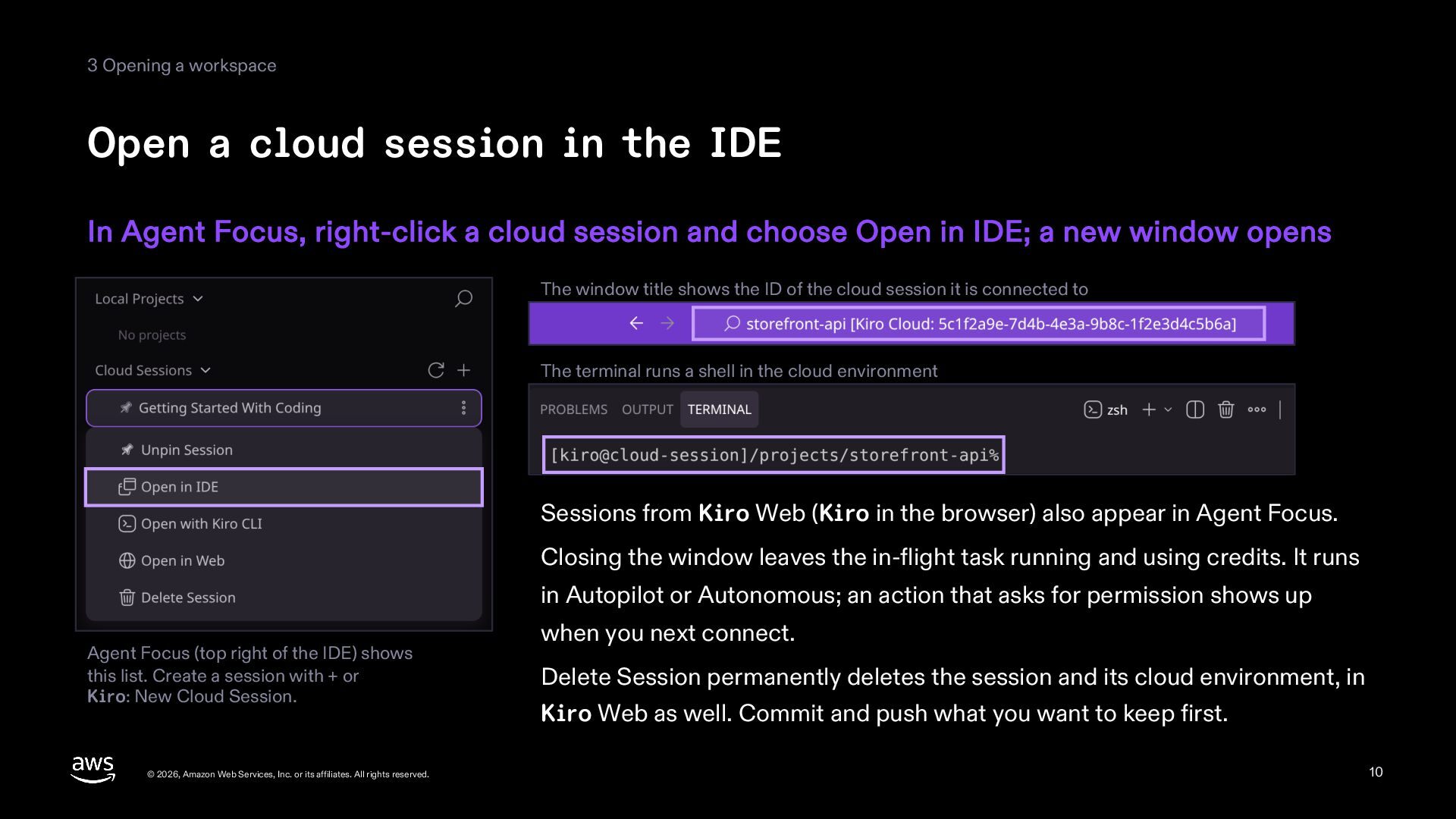
  10. 3 Opening a workspace Open a cloud session in the

    IDE In Agent Focus, right-click a cloud session and choose Open in IDE; a new window opens The window title shows the ID of the cloud session it is connected to The terminal runs a shell in the cloud environment Sessions from Kiro Web (Kiro in the browser) also appear in Agent Focus. Closing the window leaves the in-flight task running and using credits. It runs in Autopilot or Autonomous; an action that asks for permission shows up Agent Focus (top right of the IDE) shows this list. Create a session with + or Kiro: New Cloud Session. © 2026, Amazon Web Services, Inc. or its affiliates. All rights reserved. when you next connect. Delete Session permanently deletes the session and its cloud environment, in Kiro Web as well. Commit and push what you want to keep first. 10
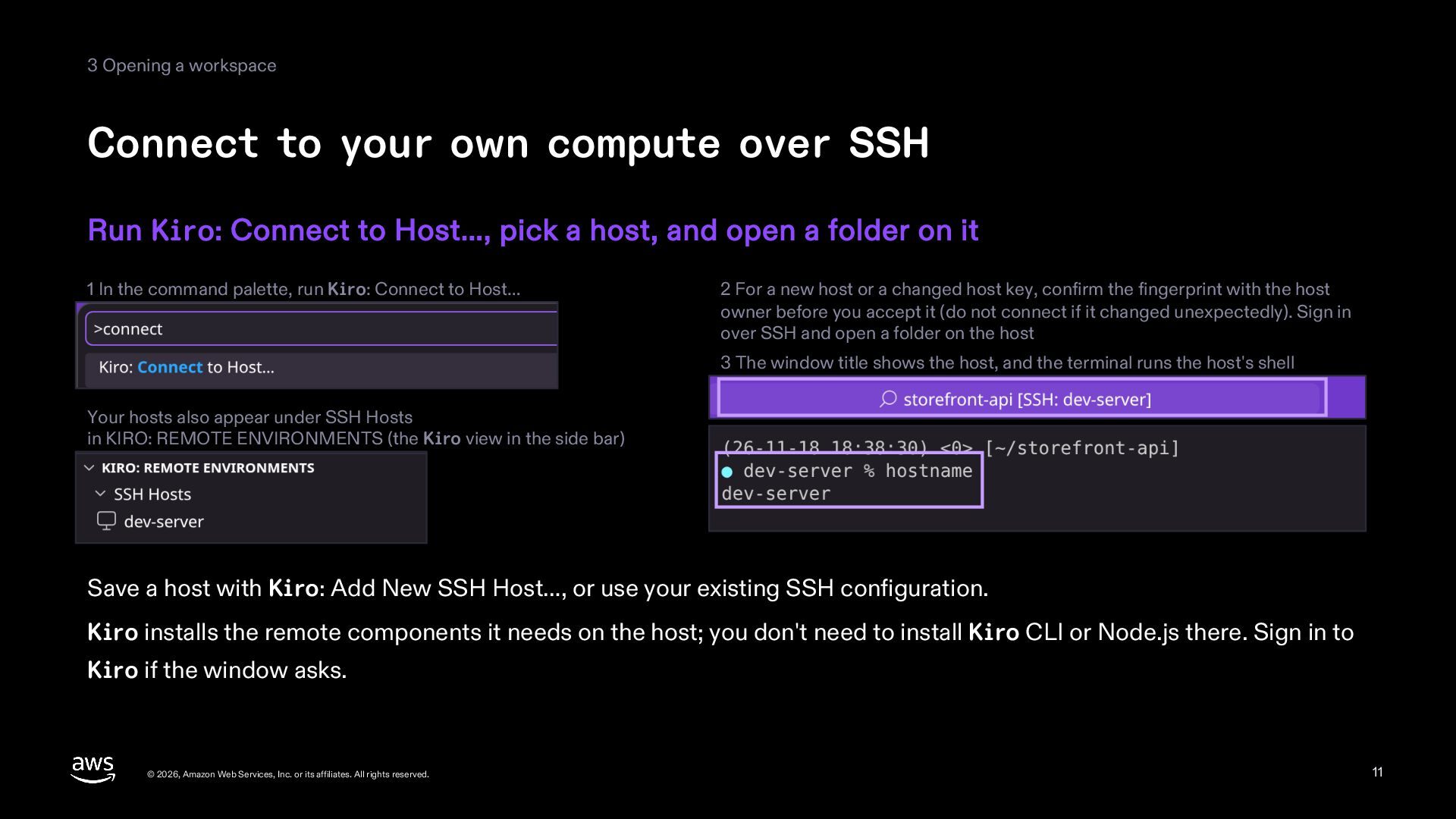
  11. 3 Opening a workspace Connect to your own compute over

    SSH Run Kiro: Connect to Host…, pick a host, and open a folder on it 1 In the command palette, run Kiro: Connect to Host… 2 For a new host or a changed host key, confirm the fingerprint with the host owner before you accept it (do not connect if it changed unexpectedly). Sign in over SSH and open a folder on the host 3 The window title shows the host, and the terminal runs the host's shell Your hosts also appear under SSH Hosts in KIRO: REMOTE ENVIRONMENTS (the Kiro view in the side bar) Save a host with Kiro: Add New SSH Host…, or use your existing SSH configuration. Kiro installs the remote components it needs on the host; you don't need to install Kiro CLI or Node.js there. Sign in to Kiro if the window asks. © 2026, Amazon Web Services, Inc. or its affiliates. All rights reserved. 11
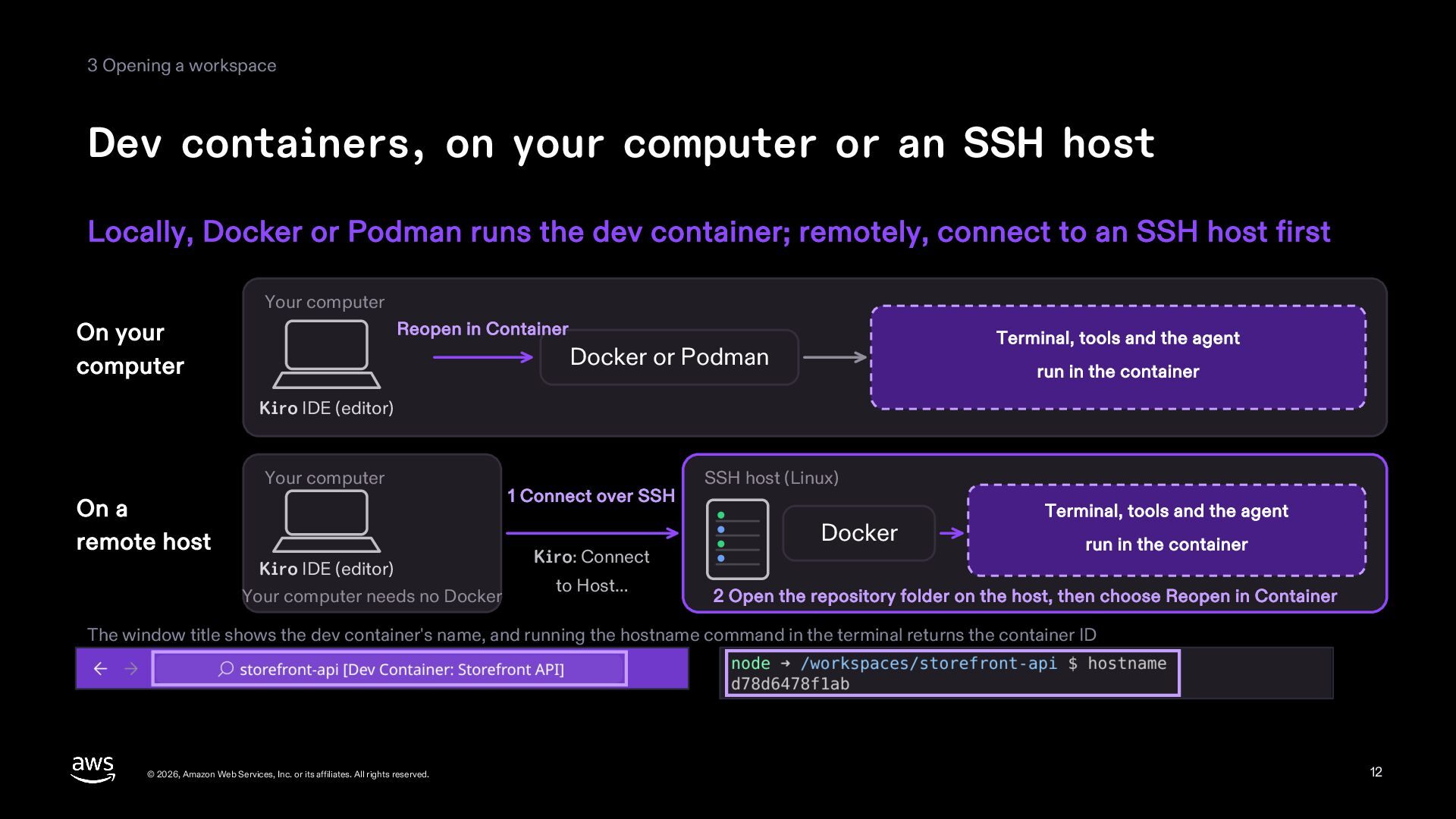
  12. 3 Opening a workspace Dev containers, on your computer or

    an SSH host Locally, Docker or Podman runs the dev container; remotely, connect to an SSH host first Your computer On your computer Reopen in Container Terminal, tools and the agent Docker or Podman run in the container Kiro IDE (editor) Your computer On a remote host Kiro IDE (editor) Your computer needs no Docker 1 Connect over SSH Kiro: Connect to Host… SSH host (Linux) Docker Terminal, tools and the agent run in the container 2 Open the repository folder on the host, then choose Reopen in Container The window title shows the dev container's name, and running the hostname command in the terminal returns the container ID © 2026, Amazon Web Services, Inc. or its affiliates. All rights reserved. 12
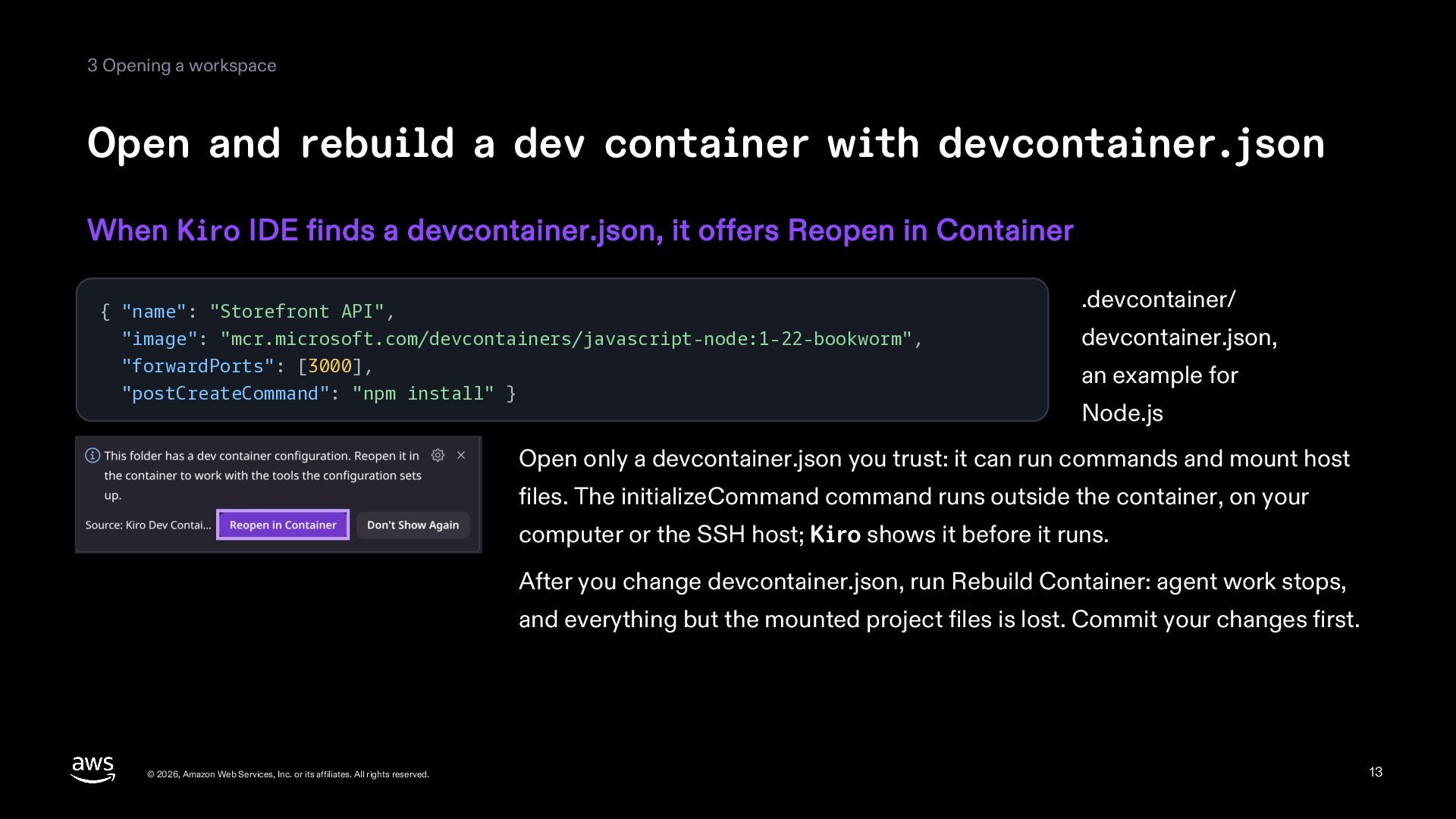
  13. 3 Opening a workspace Open and rebuild a dev container

    with devcontainer.json When Kiro IDE finds a devcontainer.json, it offers Reopen in Container { "name": "Storefront API", "image": "mcr.microsoft.com/devcontainers/javascript-node:1-22-bookworm", "forwardPorts": [3000], "postCreateCommand": "npm install" } .devcontainer/ devcontainer.json, an example for Node.js Open only a devcontainer.json you trust: it can run commands and mount host files. The initializeCommand command runs outside the container, on your computer or the SSH host; Kiro shows it before it runs. After you change devcontainer.json, run Rebuild Container: agent work stops, and everything but the mounted project files is lost. Commit your changes first. © 2026, Amazon Web Services, Inc. or its affiliates. All rights reserved. 13
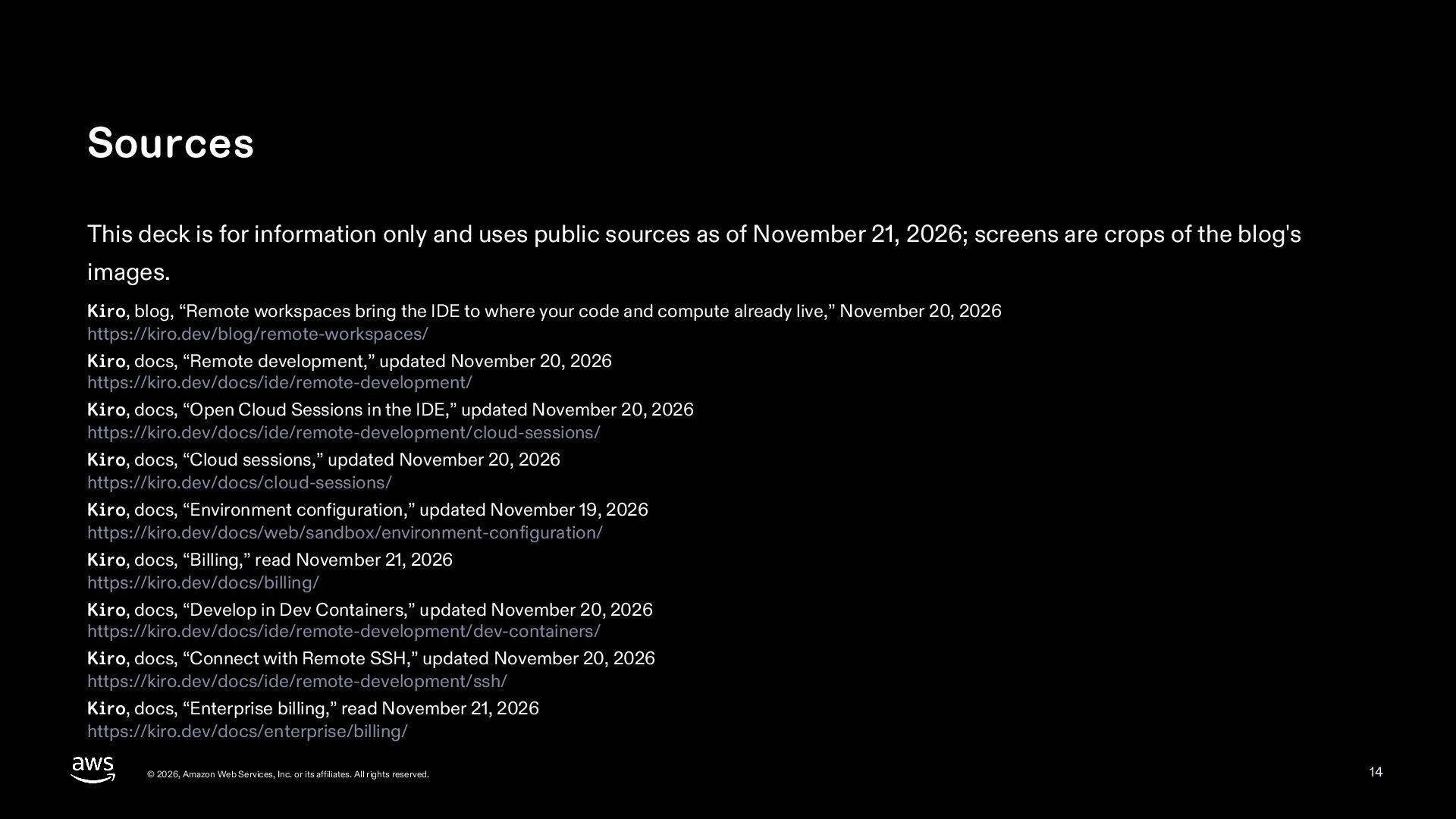
  14. Sources This deck is for information only and uses public

    sources as of November 21, 2026; screens are crops of the blog's images. Kiro, blog, “Remote workspaces bring the IDE to where your code and compute already live,” November 20, 2026 https://kiro.dev/blog/remote-workspaces/ Kiro, docs, “Remote development,” updated November 20, 2026 https://kiro.dev/docs/ide/remote-development/ Kiro, docs, “Open Cloud Sessions in the IDE,” updated November 20, 2026 https://kiro.dev/docs/ide/remote-development/cloud-sessions/ Kiro, docs, “Cloud sessions,” updated November 20, 2026 https://kiro.dev/docs/cloud-sessions/ Kiro, docs, “Environment configuration,” updated November 19, 2026 https://kiro.dev/docs/web/sandbox/environment-configuration/ Kiro, docs, “Billing,” read November 21, 2026 https://kiro.dev/docs/billing/ Kiro, docs, “Develop in Dev Containers,” updated November 20, 2026 https://kiro.dev/docs/ide/remote-development/dev-containers/ Kiro, docs, “Connect with Remote SSH,” updated November 20, 2026 https://kiro.dev/docs/ide/remote-development/ssh/ Kiro, docs, “Enterprise billing,” read November 21, 2026 https://kiro.dev/docs/enterprise/billing/ © 2026, Amazon Web Services, Inc. or its affiliates. All rights reserved. 14

More Decks by Riku INADA

Other Decks in Technology