Share
Embed
Kiro for VS Code: Build with Kiro in the VS Code you already use
A reference deck, with figures and real VS Code screens, on Kiro for VS Code (announced November 20, 2026). Installed as an extension in the VS Code you already use, it runs the same agent as Kiro IDE, so a team that mixes VS Code and Kiro IDE can work from one .kiro folder (specs, steering, skills, hooks, MCP and more). The deck covers where Kiro lives in VS Code, the context you pass with #, planning with specs, how much Kiro may do and how to undo its changes, workflows and memory, and getting started. Based on public sources as of November 21, 2026.
Riku INADA PRO
November 21, 2026
Transcript
13 slides
-
Reference Kiro for VS Code Build with Kiro in the
VS Code you already use After reading this deck, you can start using Kiro in your own VS Code and work from the same .kiro folder as teammates who use Kiro IDE As of November 21, 2026 Amazon Web Services Japan © 2026, Amazon Web Services, Inc. or its affiliates. All rights reserved. 1 -
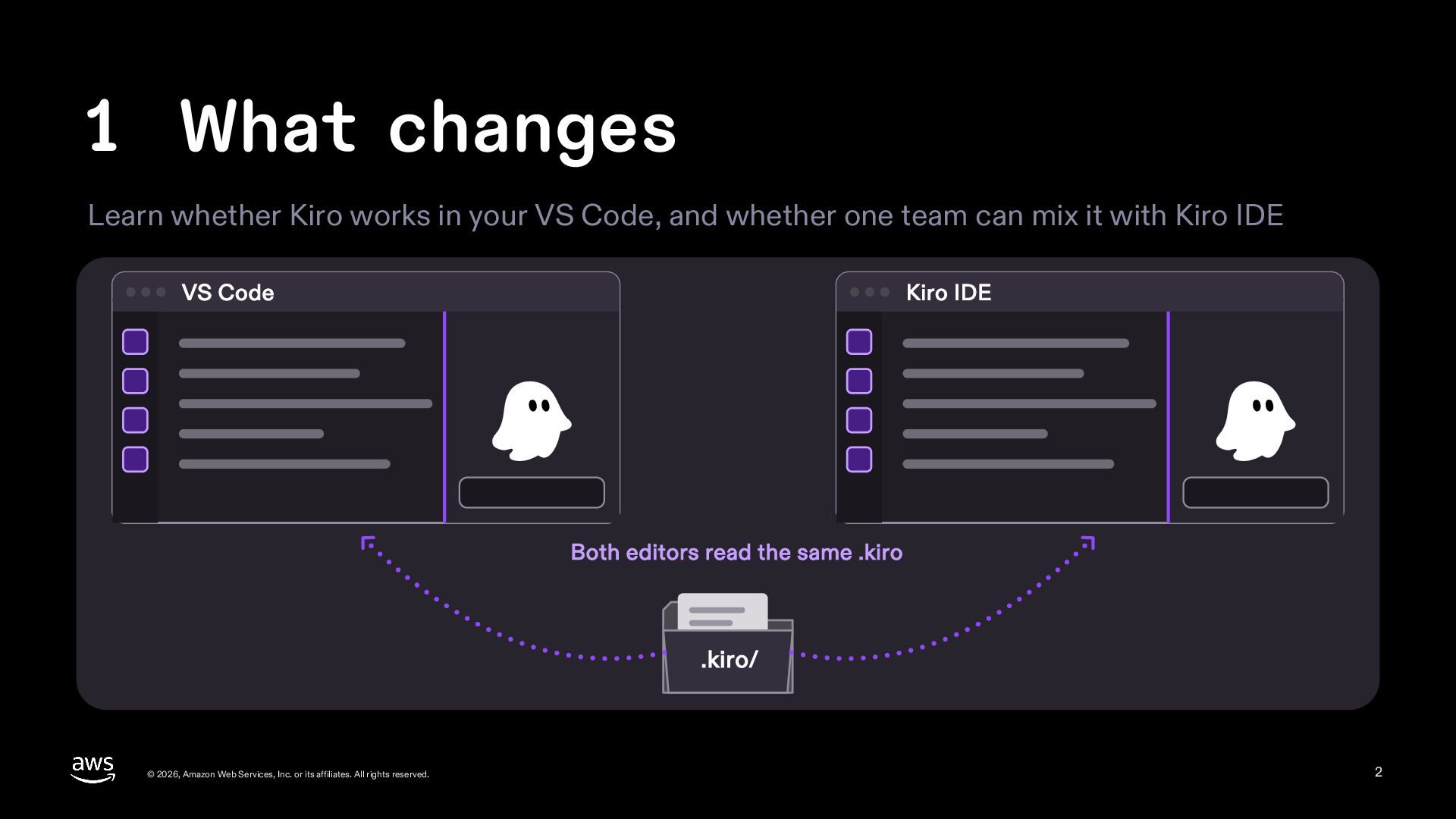
1 What changes Learn whether Kiro works in your VS
Code, and whether one team can mix it with Kiro IDE VS Code Kiro IDE Both editors read the same .kiro .kiro/ © 2026, Amazon Web Services, Inc. or its affiliates. All rights reserved. 2 -
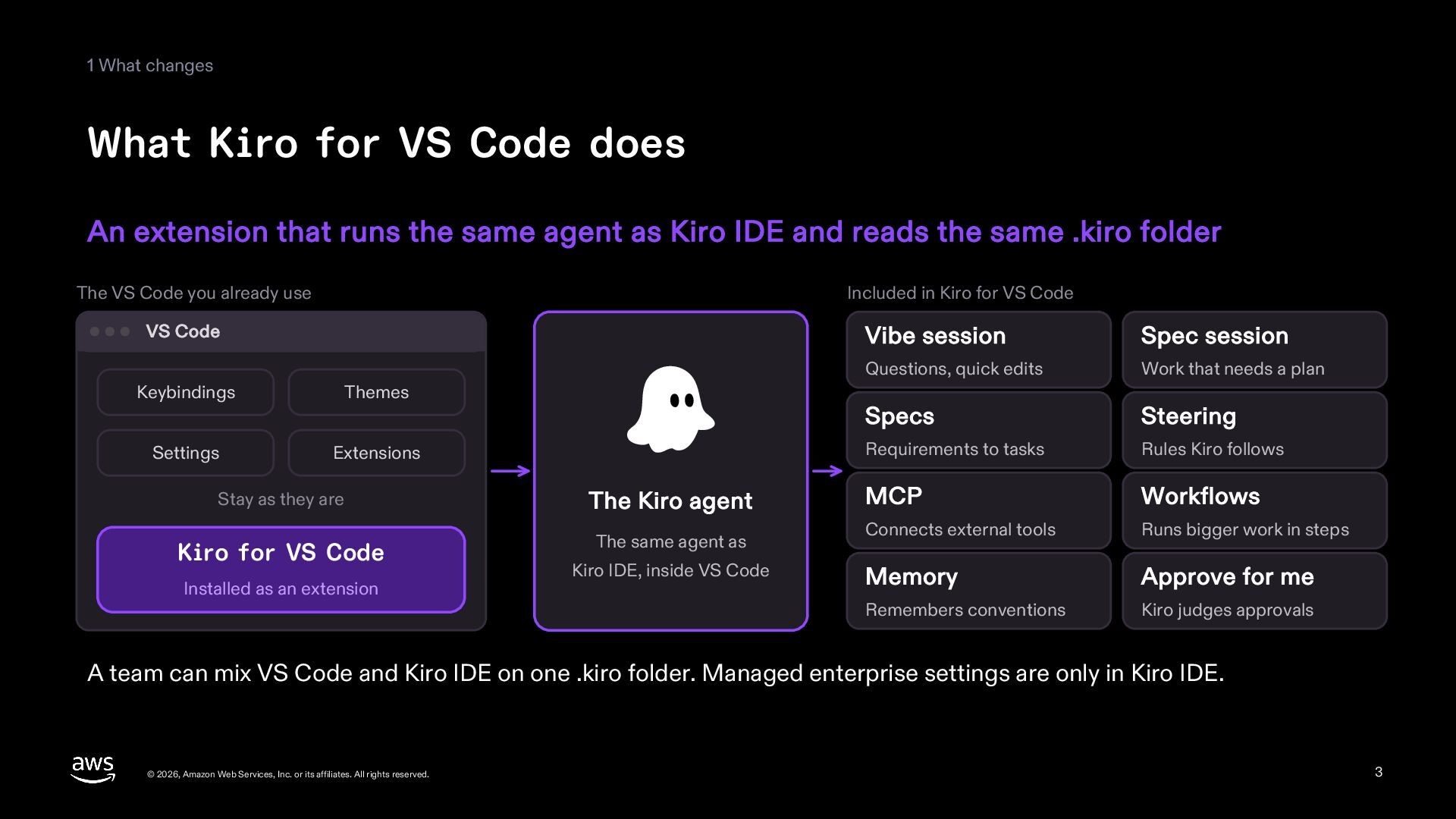
1 What changes What Kiro for VS Code does An
extension that runs the same agent as Kiro IDE and reads the same .kiro folder The VS Code you already use Included in Kiro for VS Code VS Code Keybindings Themes Settings Extensions Stay as they are The Kiro agent Kiro for VS Code The same agent as Installed as an extension Kiro IDE, inside VS Code Vibe session Spec session Questions, quick edits Work that needs a plan Specs Steering Requirements to tasks Rules Kiro follows MCP Workflows Connects external tools Runs bigger work in steps Memory Approve for me Remembers conventions Kiro judges approvals A team can mix VS Code and Kiro IDE on one .kiro folder. Managed enterprise settings are only in Kiro IDE. © 2026, Amazon Web Services, Inc. or its affiliates. All rights reserved. 3 -
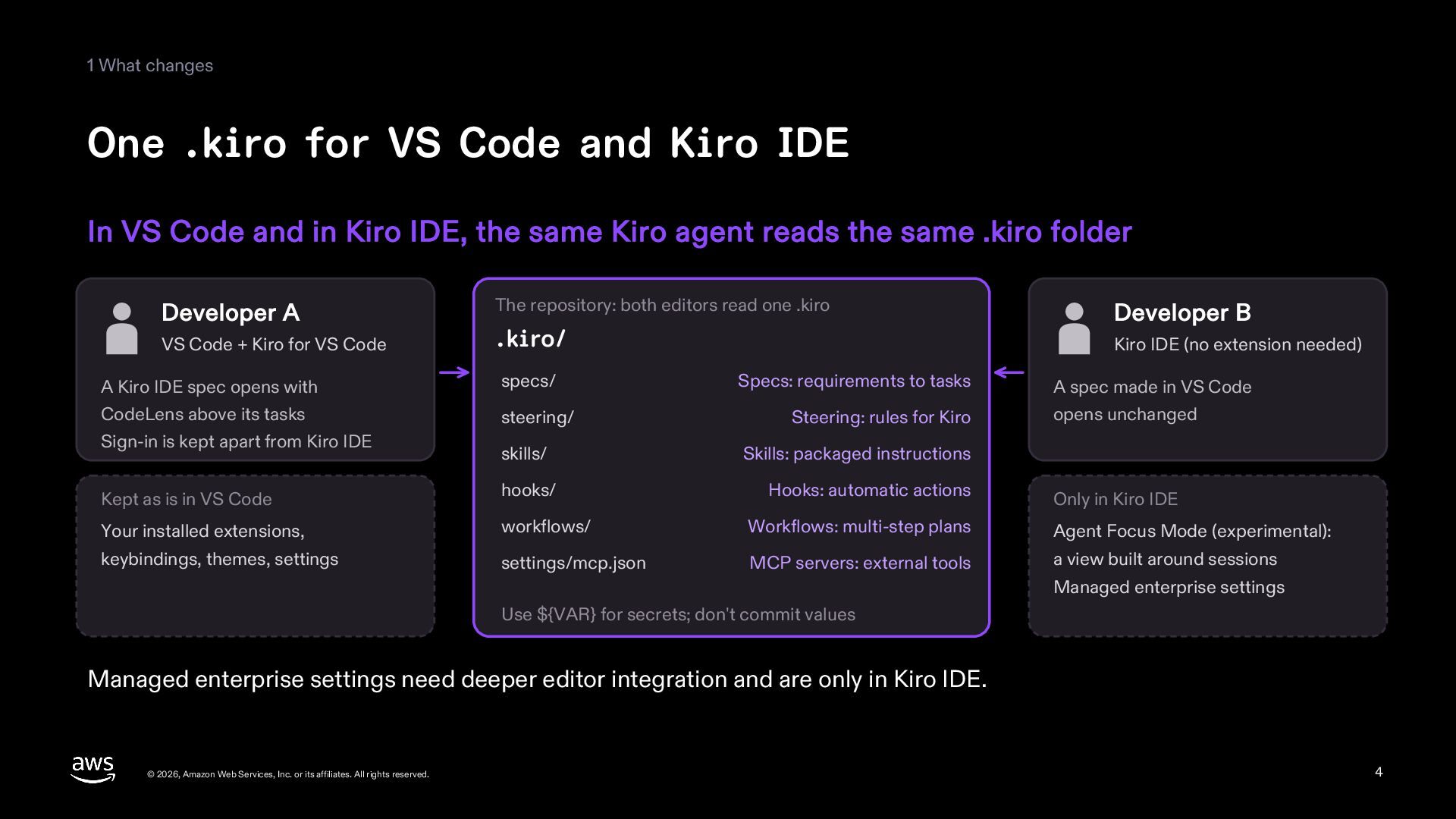
1 What changes One .kiro for VS Code and Kiro
IDE In VS Code and in Kiro IDE, the same Kiro agent reads the same .kiro folder Developer A VS Code + Kiro for VS Code The repository: both editors read one .kiro .kiro/ Developer B Kiro IDE (no extension needed) A Kiro IDE spec opens with CodeLens above its tasks Sign-in is kept apart from Kiro IDE specs/ skills/ Skills: packaged instructions Kept as is in VS Code hooks/ Hooks: automatic actions Your installed extensions, workflows/ Workflows: multi-step plans Agent Focus Mode (experimental): keybindings, themes, settings settings/mcp.json MCP servers: external tools a view built around sessions steering/ Specs: requirements to tasks Steering: rules for Kiro A spec made in VS Code opens unchanged Only in Kiro IDE Managed enterprise settings Use ${VAR} for secrets; don't commit values Managed enterprise settings need deeper editor integration and are only in Kiro IDE. © 2026, Amazon Web Services, Inc. or its affiliates. All rights reserved. 4 -
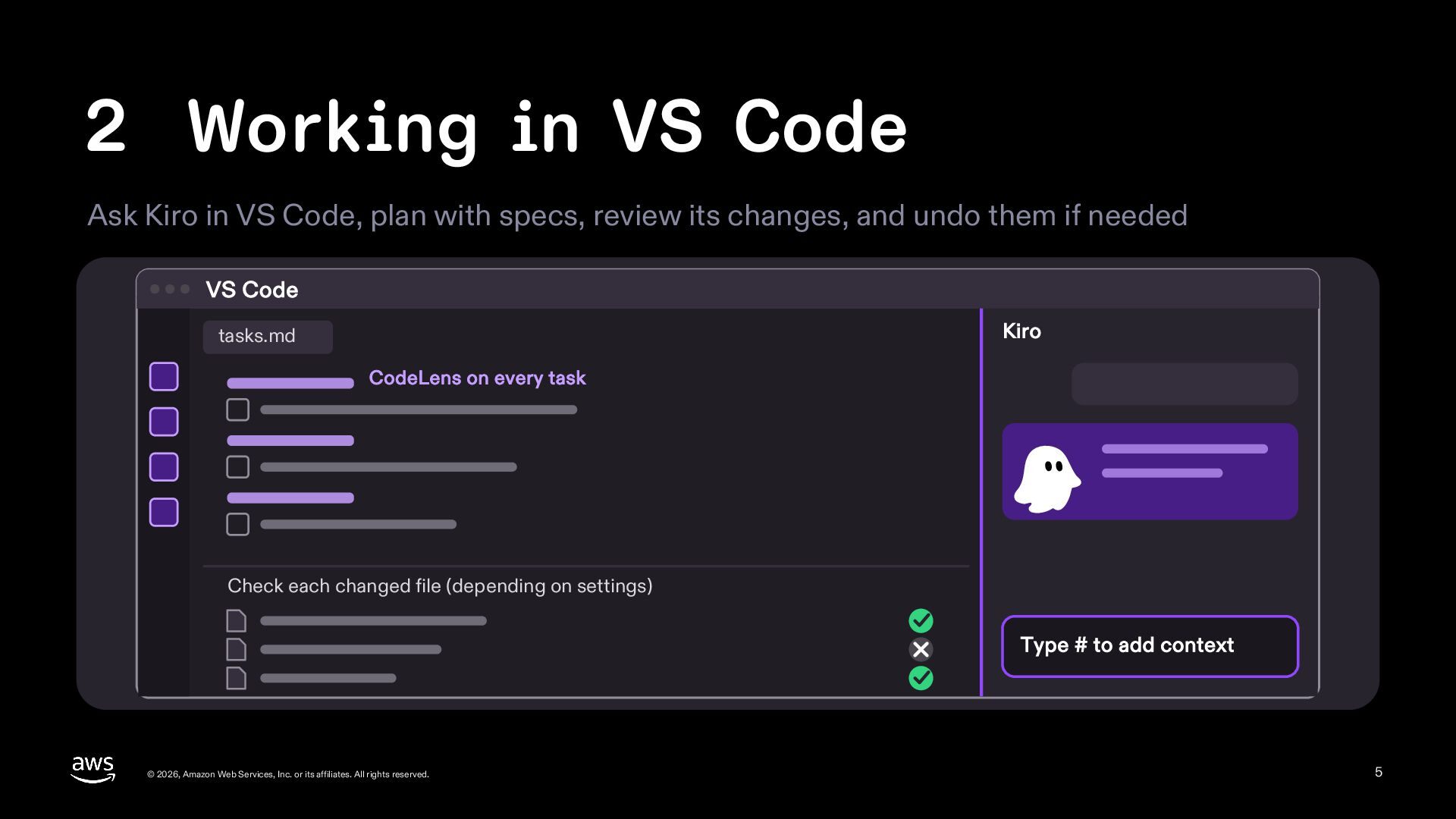
2 Working in VS Code Ask Kiro in VS Code,
plan with specs, review its changes, and undo them if needed VS Code Kiro tasks.md CodeLens on every task Check each changed file (depending on settings) Type # to add context © 2026, Amazon Web Services, Inc. or its affiliates. All rights reserved. 5 -
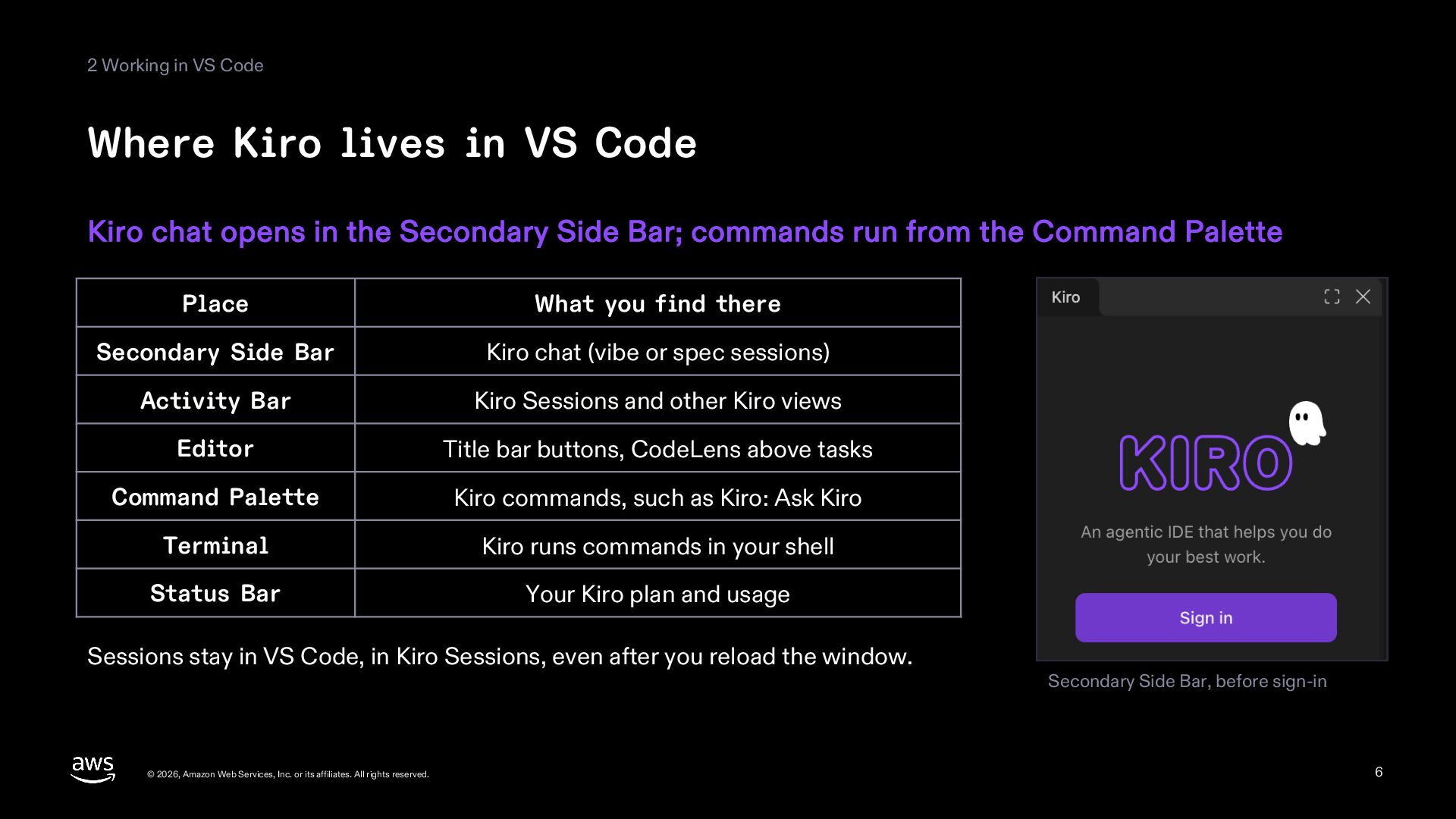
2 Working in VS Code Where Kiro lives in VS
Code Kiro chat opens in the Secondary Side Bar; commands run from the Command Palette Place What you find there Secondary Side Bar Kiro chat (vibe or spec sessions) Activity Bar Kiro Sessions and other Kiro views Editor Title bar buttons, CodeLens above tasks Command Palette Kiro commands, such as Kiro: Ask Kiro Terminal Kiro runs commands in your shell Status Bar Your Kiro plan and usage Sessions stay in VS Code, in Kiro Sessions, even after you reload the window. © 2026, Amazon Web Services, Inc. or its affiliates. All rights reserved. Secondary Side Bar, before sign-in 6 -
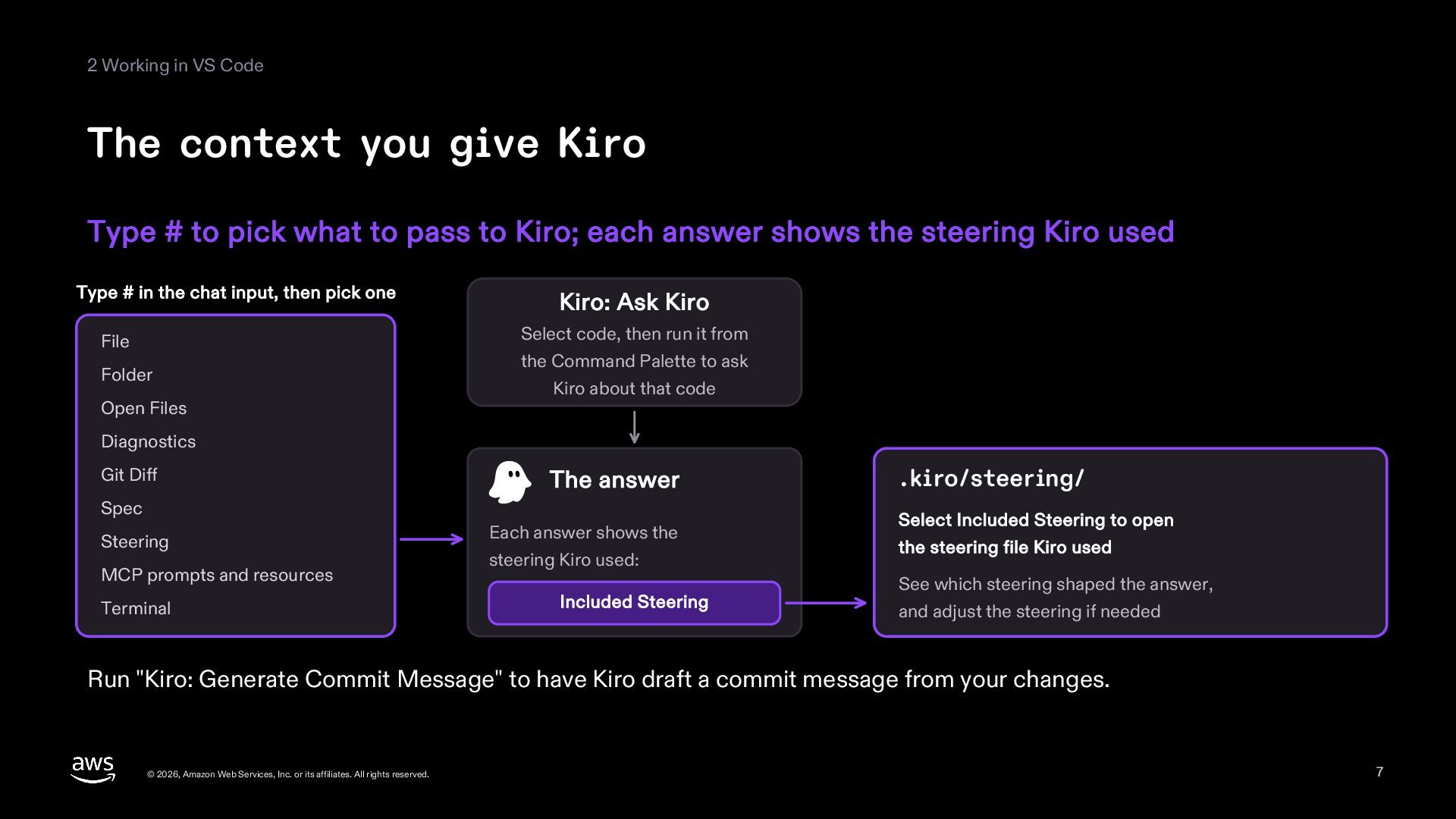
2 Working in VS Code The context you give Kiro
Type # to pick what to pass to Kiro; each answer shows the steering Kiro used Type # in the chat input, then pick one File Folder Open Files Kiro: Ask Kiro Select code, then run it from the Command Palette to ask Kiro about that code Diagnostics Git Diff The answer Spec Steering MCP prompts and resources Terminal Each answer shows the steering Kiro used: Included Steering .kiro/steering/ Select Included Steering to open the steering file Kiro used See which steering shaped the answer, and adjust the steering if needed Run "Kiro: Generate Commit Message" to have Kiro draft a commit message from your changes. © 2026, Amazon Web Services, Inc. or its affiliates. All rights reserved. 7 -
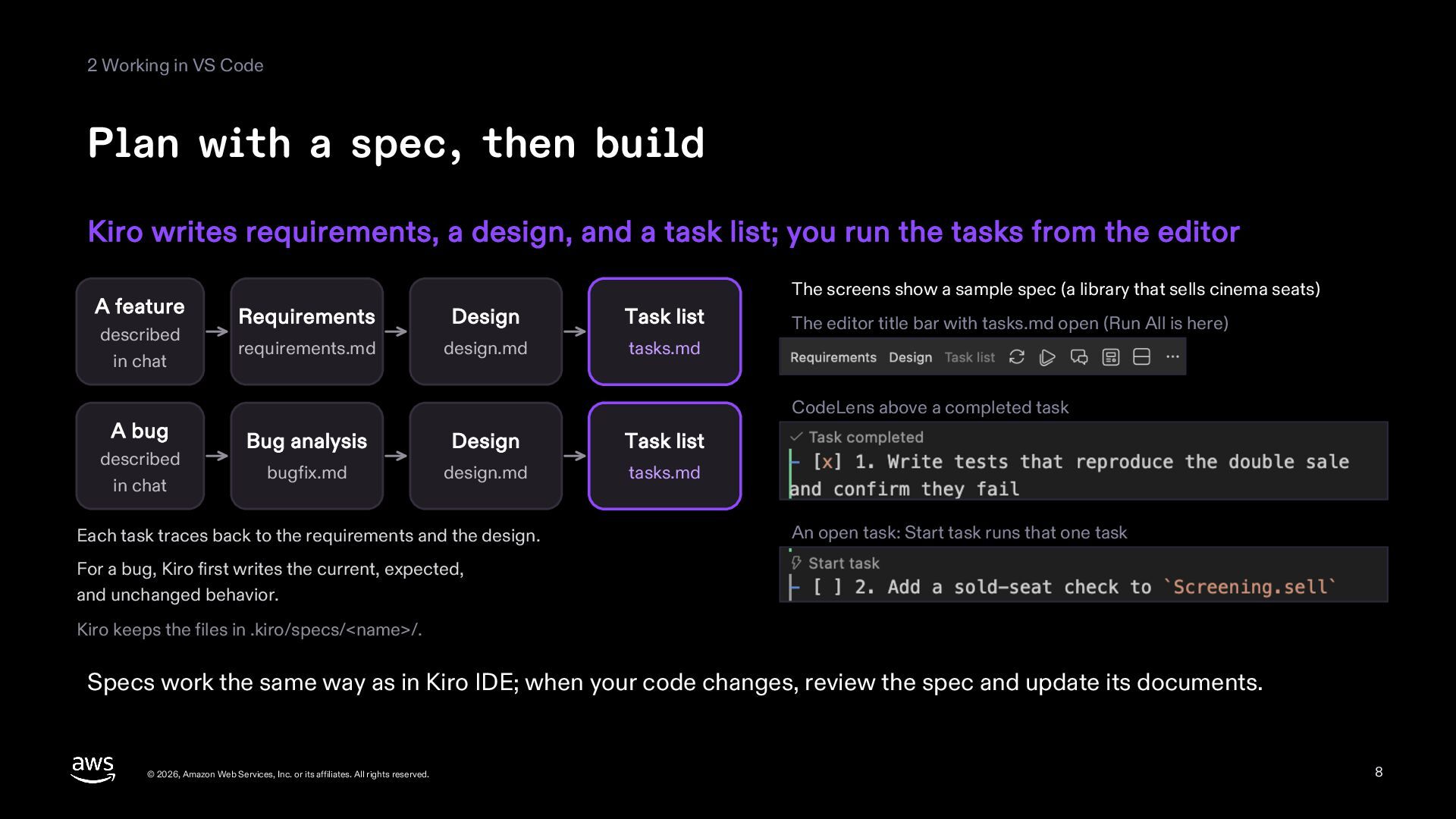
2 Working in VS Code Plan with a spec, then
build Kiro writes requirements, a design, and a task list; you run the tasks from the editor A feature described in chat A bug described in chat The screens show a sample spec (a library that sells cinema seats) Requirements Design Task list requirements.md design.md tasks.md The editor title bar with tasks.md open (Run All is here) CodeLens above a completed task Bug analysis Design Task list bugfix.md design.md tasks.md Each task traces back to the requirements and the design. An open task: Start task runs that one task For a bug, Kiro first writes the current, expected, and unchanged behavior. Kiro keeps the files in .kiro/specs/<name>/. Specs work the same way as in Kiro IDE; when your code changes, review the spec and update its documents. © 2026, Amazon Web Services, Inc. or its affiliates. All rights reserved. 8 -
2 Working in VS Code Choose, review, undo Choose how
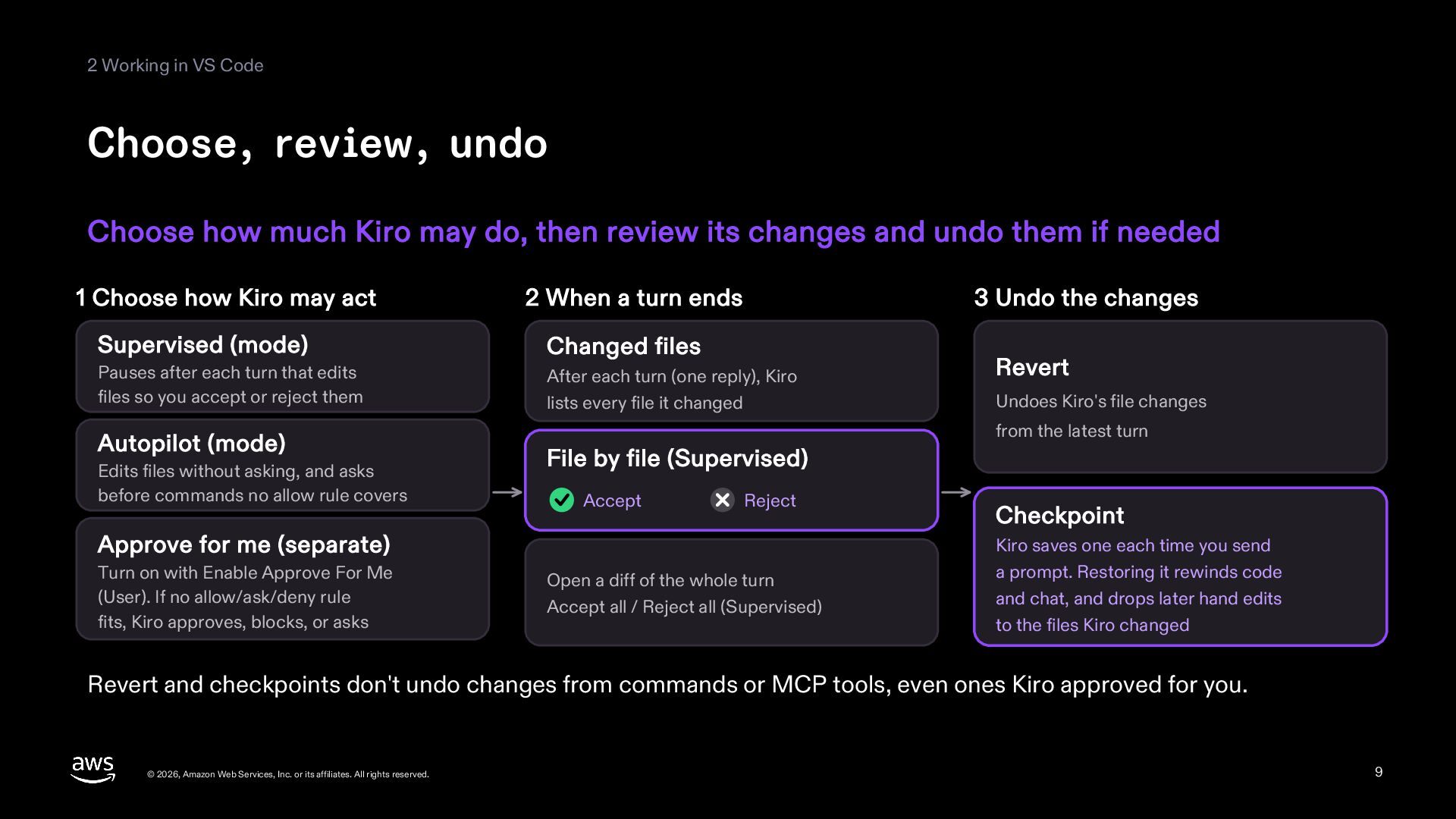
much Kiro may do, then review its changes and undo them if needed 1 Choose how Kiro may act 2 When a turn ends 3 Undo the changes Supervised (mode) Changed files Pauses after each turn that edits files so you accept or reject them After each turn (one reply), Kiro lists every file it changed Autopilot (mode) Edits files without asking, and asks before commands no allow rule covers Undoes Kiro's file changes from the latest turn File by file (Supervised) Accept Reject Approve for me (separate) Turn on with Enable Approve For Me (User). If no allow/ask/deny rule fits, Kiro approves, blocks, or asks Revert Open a diff of the whole turn Accept all / Reject all (Supervised) Checkpoint Kiro saves one each time you send a prompt. Restoring it rewinds code and chat, and drops later hand edits to the files Kiro changed Revert and checkpoints don't undo changes from commands or MCP tools, even ones Kiro approved for you. © 2026, Amazon Web Services, Inc. or its affiliates. All rights reserved. 9 -
2 Working in VS Code Hand off bigger work, stop
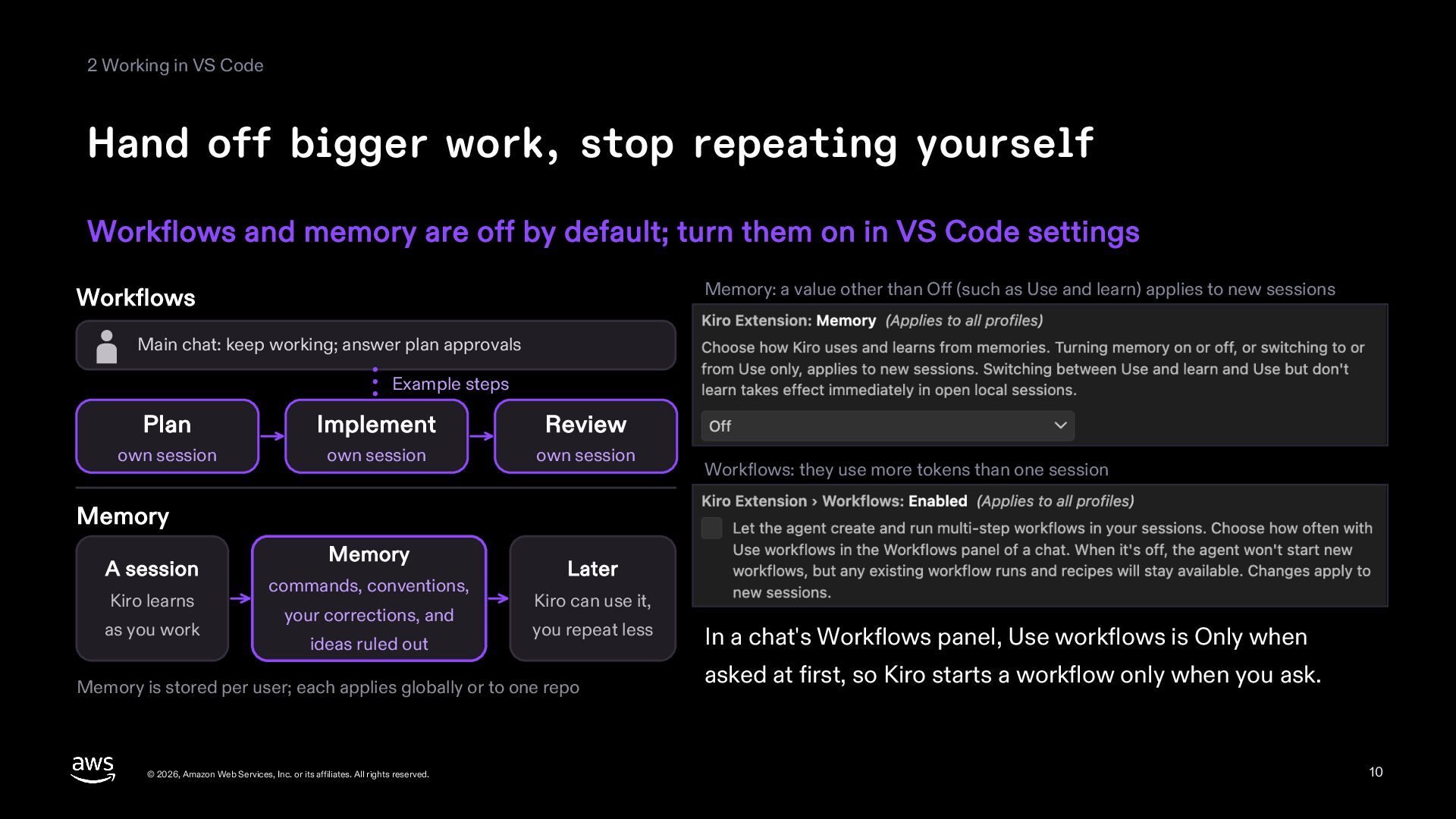
repeating yourself Workflows and memory are off by default; turn them on in VS Code settings Memory: a value other than Off (such as Use and learn) applies to new sessions Workflows Main chat: keep working; answer plan approvals Example steps Plan Implement Review own session own session own session Workflows: they use more tokens than one session Memory A session Kiro learns as you work Memory commands, conventions, your corrections, and ideas ruled out Later Kiro can use it, you repeat less Memory is stored per user; each applies globally or to one repo © 2026, Amazon Web Services, Inc. or its affiliates. All rights reserved. In a chat's Workflows panel, Use workflows is Only when asked at first, so Kiro starts a workflow only when you ask. 10 -
3 Get started Install Kiro for VS Code in your
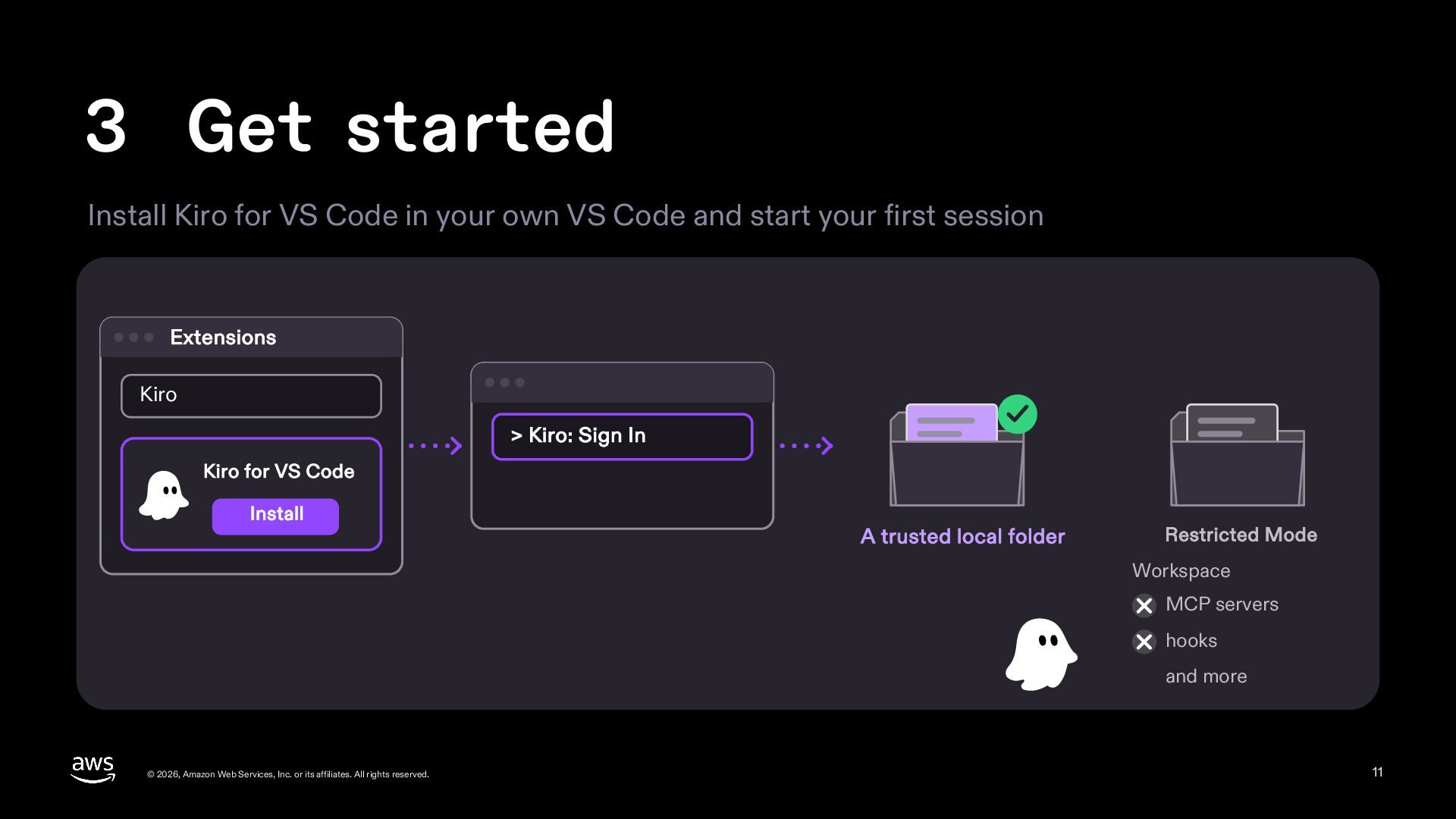
own VS Code and start your first session Extensions Kiro > Kiro: Sign In Kiro for VS Code Install A trusted local folder Restricted Mode Workspace MCP servers hooks and more © 2026, Amazon Web Services, Inc. or its affiliates. All rights reserved. 11 -
3 Get started Getting started Install Kiro for VS Code,
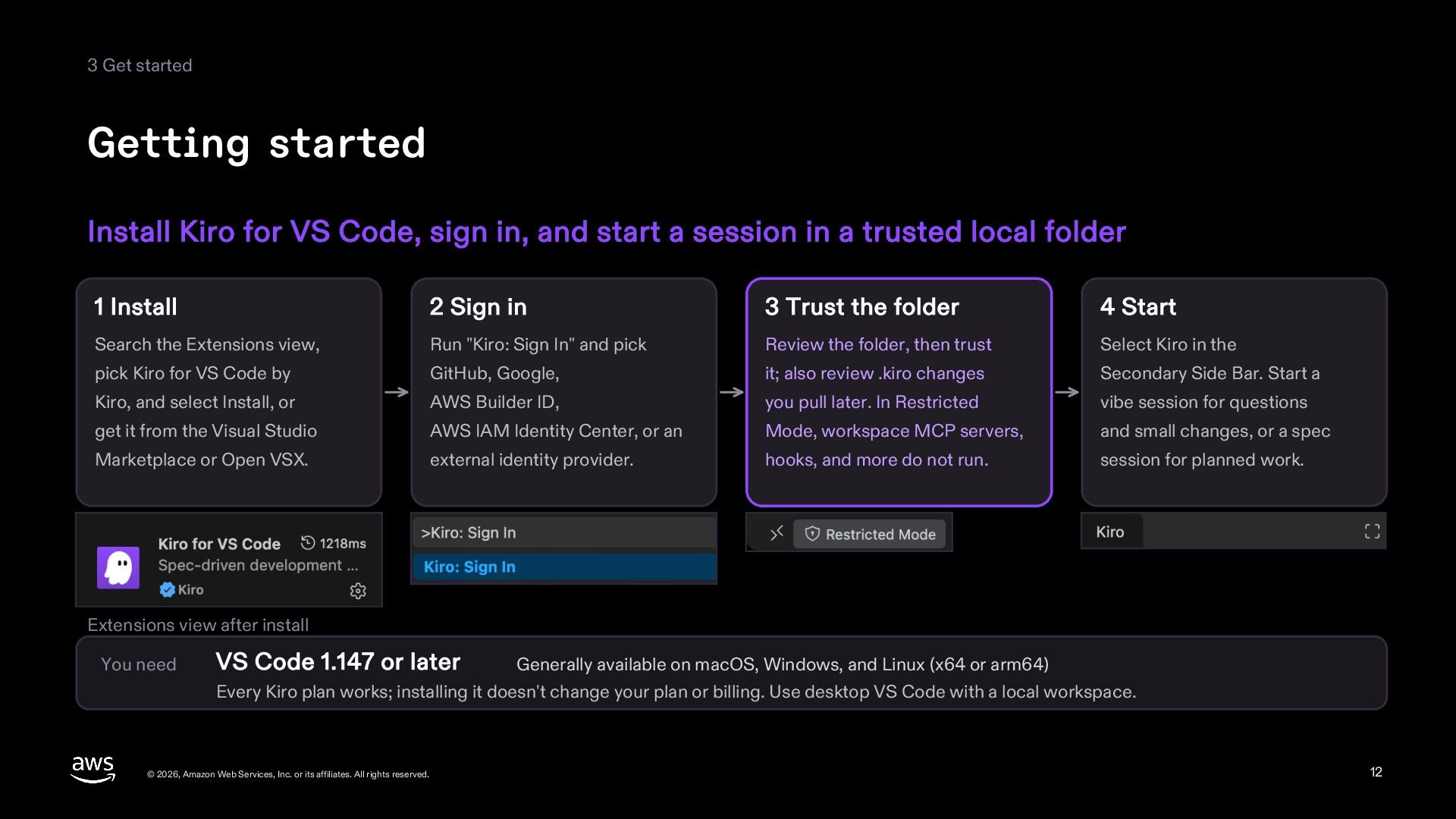
sign in, and start a session in a trusted local folder 1 Install 2 Sign in 3 Trust the folder 4 Start Search the Extensions view, Run "Kiro: Sign In" and pick Review the folder, then trust Select Kiro in the pick Kiro for VS Code by GitHub, Google, it; also review .kiro changes Secondary Side Bar. Start a Kiro, and select Install, or AWS Builder ID, you pull later. In Restricted vibe session for questions get it from the Visual Studio AWS IAM Identity Center, or an Mode, workspace MCP servers, and small changes, or a spec Marketplace or Open VSX. external identity provider. hooks, and more do not run. session for planned work. Extensions view after install You need VS Code 1.147 or later Generally available on macOS, Windows, and Linux (x64 or arm64) Every Kiro plan works; installing it doesn't change your plan or billing. Use desktop VS Code with a local workspace. © 2026, Amazon Web Services, Inc. or its affiliates. All rights reserved. 12 -
Sources This deck is for reference only. It is based
on the public sources below, as of November 21, 2026. The product may change after this date. The screenshots were taken on November 21, 2026, with VS Code 1.147.0 and Kiro for VS Code 1.5.0 on a sample project. Kiro, blog, "Introducing Kiro for VS Code", published November 20, 2026, https://kiro.dev/blog/kiro-for-vs-code/ Kiro, docs, "Kiro for VS Code", updated November 20, 2026, https://kiro.dev/docs/extensions/vscode/ Kiro, docs, "Set up Kiro for VS Code", updated November 20, 2026, https://kiro.dev/docs/extensions/vscode/setup/ Kiro, docs, "Use Kiro in VS Code", updated November 20, 2026, https://kiro.dev/docs/extensions/vscode/using-kiro/ Kiro, docs, "Specs", updated November 12, 2026, https://kiro.dev/docs/specs/ Kiro, docs, "Workflows", updated November 12, 2026, https://kiro.dev/docs/workflows/ Kiro, docs, "Permissions", updated November 18, 2026, https://kiro.dev/docs/permissions/ Kiro, docs, "Agent Focus Mode", updated November 18, 2026, https://kiro.dev/docs/ide/experimental/focus-mode/ Kiro, docs, "Agent Skills", updated November 18, 2026, https://kiro.dev/docs/skills/ Kiro, docs, "Hooks", updated November 12, 2026, https://kiro.dev/docs/hooks/ Kiro, docs, "Steering", updated October 21, 2026, https://kiro.dev/docs/steering/ Kiro, docs, "MCP Configuration", updated November 18, 2026, https://kiro.dev/docs/mcp/configuration/ Kiro, docs, "Checkpoints and rewind", updated November 17, 2026, https://kiro.dev/docs/checkpoints/ Kiro, docs, "Kiro for VS Code settings", updated November 20, 2026, https://kiro.dev/docs/extensions/vscode/settings/ Kiro, docs, "Memory", updated November 18, 2026, https://kiro.dev/docs/memory/ © 2026, Amazon Web Services, Inc. or its affiliates. All rights reserved. 13