Upgrade to Pro — share decks privately, control downloads, hide ads and more …

Sessions and memory (State and context manageme...

Sessions and memory (State and context management) | Learn Strands Agents with Kiro 05

This Level 300 deck shows how to give a Strands Agents agent memory: the conversation history and agent.state, snapshots, a SnapshotSessionManager with a Storage that continues after a restart, a MemoryManager that carries knowledge across sessions, and context_manager and conversation managers that keep the conversation inside the context window. It uses the official docs, architecture diagrams, and real output of a help-desk agent run on Amazon Bedrock in the Tokyo Region, as deck 05 (Go deeper) of the series Learn Strands Agents with Kiro.

Avatar for Riku INADA

Riku INADA PRO

November 11, 2026

More Decks by Riku INADA

Other Decks in Technology

Transcript

  1. Learn Strands Agents with Kiro 05 Go deeper Sessions and

    memory State and context management Level 300 / November 2026 November 2026 Riku Inada Amazon Web Services Japan © 2026, Amazon Web Services, Inc. or its affiliates. All rights reserved. 05 Kiro + Strands Agents 1
  2. Introduction About me Riku Inada Amazon Web Services Japan G.K.

    Solutions Architect Works mainly with manufacturing customers Recent work Promoting the AI-Driven Development Life Cycle (AI-DLC) Writing and speaking about Kiro and AWS Amplify © 2026, Amazon Web Services, Inc. or its affiliates. All rights reserved. X @inada_riku Speaker Deck speakerdeck.com/inariku Zenn zenn.dev/inariku GitHub github.com/inariku 2
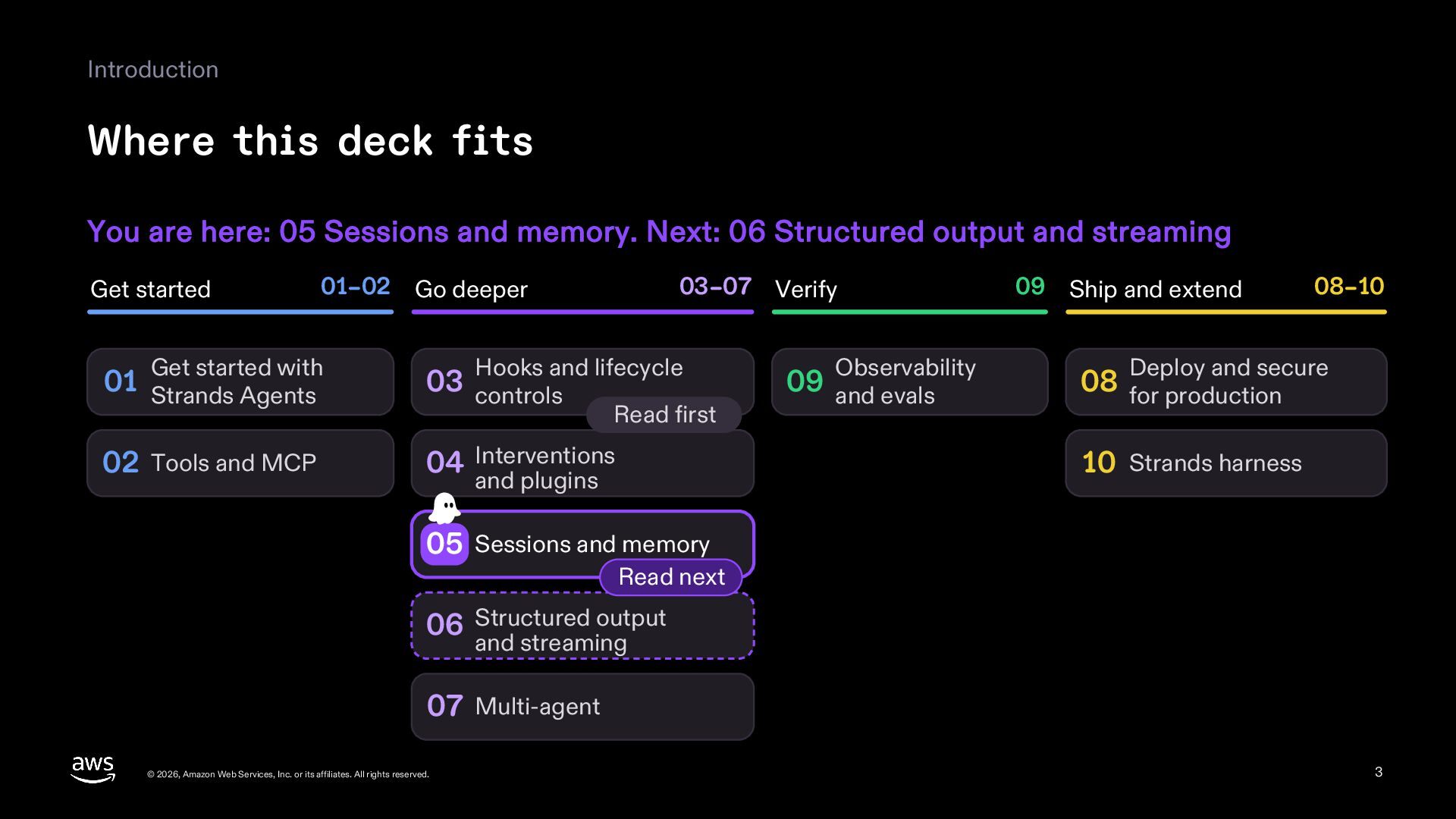
  3. Introduction Where this deck fits You are here: 05 Sessions

    and memory. Next: 06 Structured output and streaming Get started 01–02 Go deeper Get started with 03–07 Verify Hooks and lifecycle 01 Strands Agents 03 controls 02 Tools and MCP 04 Interventions Read first Observability 09 and evals 09 Ship and extend 08–10 Deploy and secure 08 for production 10 Strands harness and plugins 05 Sessions and memory Read next 06 Structured output and streaming 07 Multi-agent © 2026, Amazon Web Services, Inc. or its affiliates. All rights reserved. 3
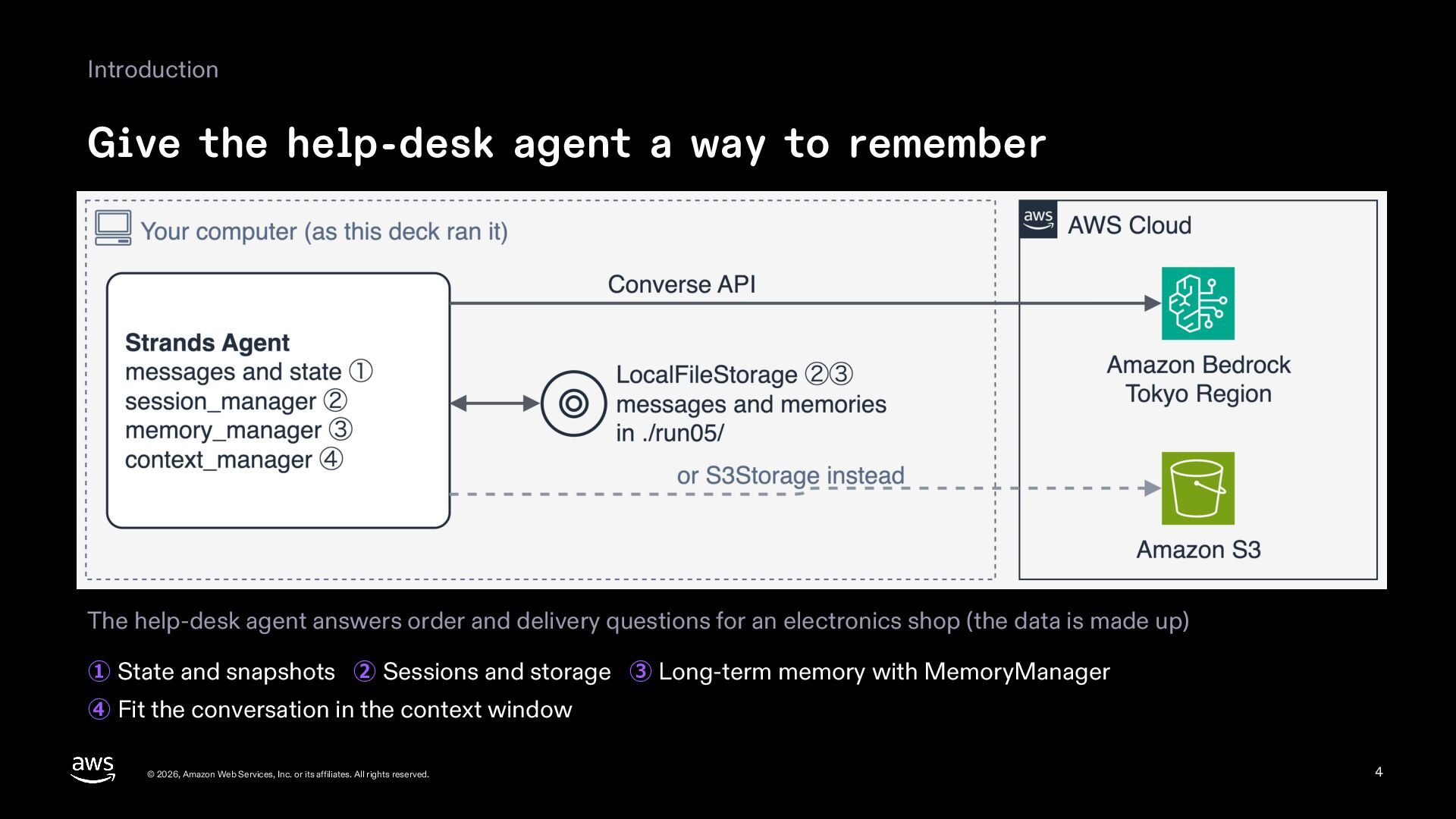
  4. Introduction Give the help-desk agent a way to remember The

    help-desk agent answers order and delivery questions for an electronics shop (the data is made up) ① State and snapshots ② Sessions and storage ③ Long-term memory with MemoryManager ④ Fit the conversation in the context window © 2026, Amazon Web Services, Inc. or its affiliates. All rights reserved. 4
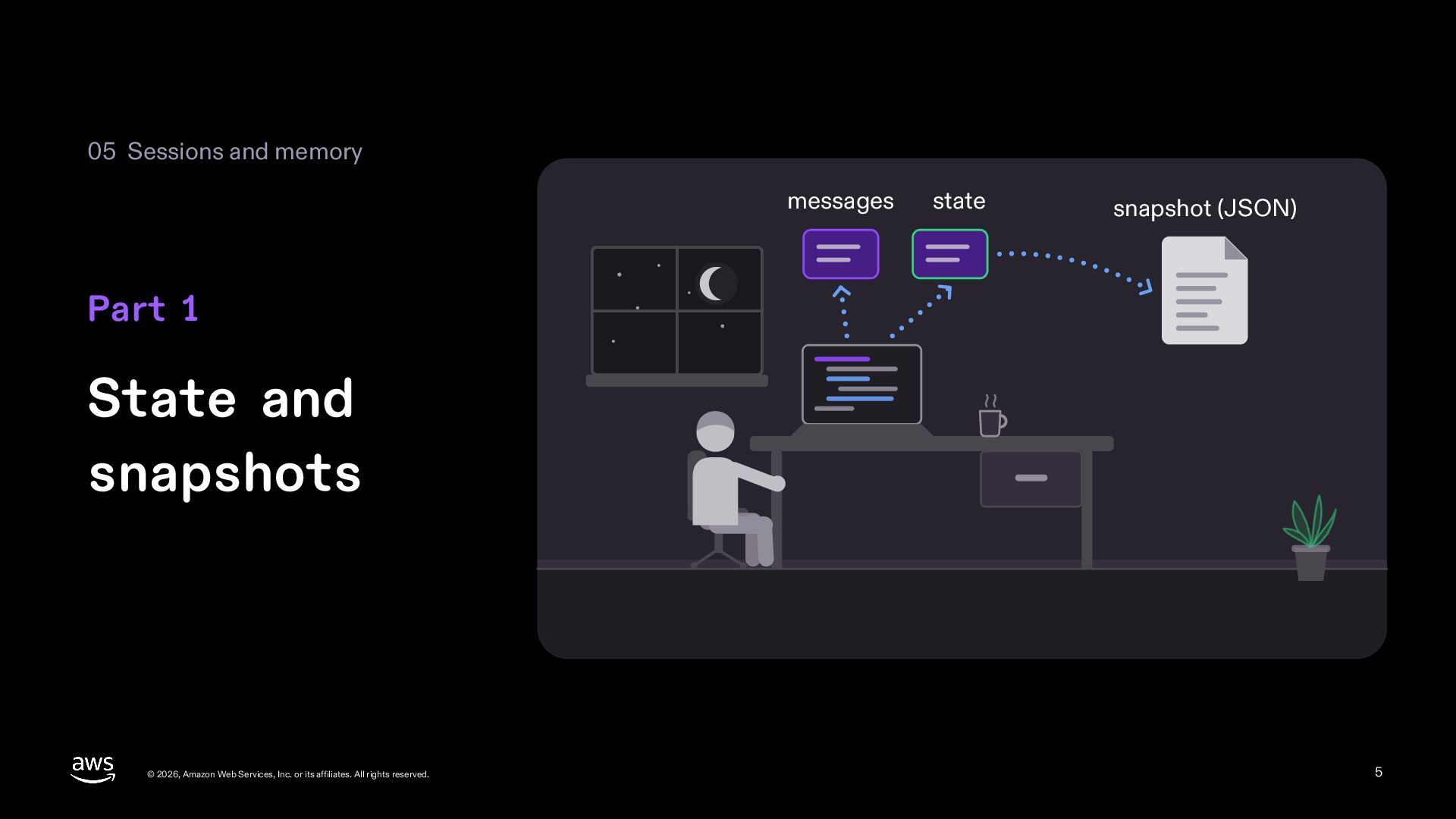
  5. 05 Sessions and memory messages state snapshot (JSON) Part 1

    State and snapshots © 2026, Amazon Web Services, Inc. or its affiliates. All rights reserved. 5
  6. 1 State and snapshots Read and pass the conversation history

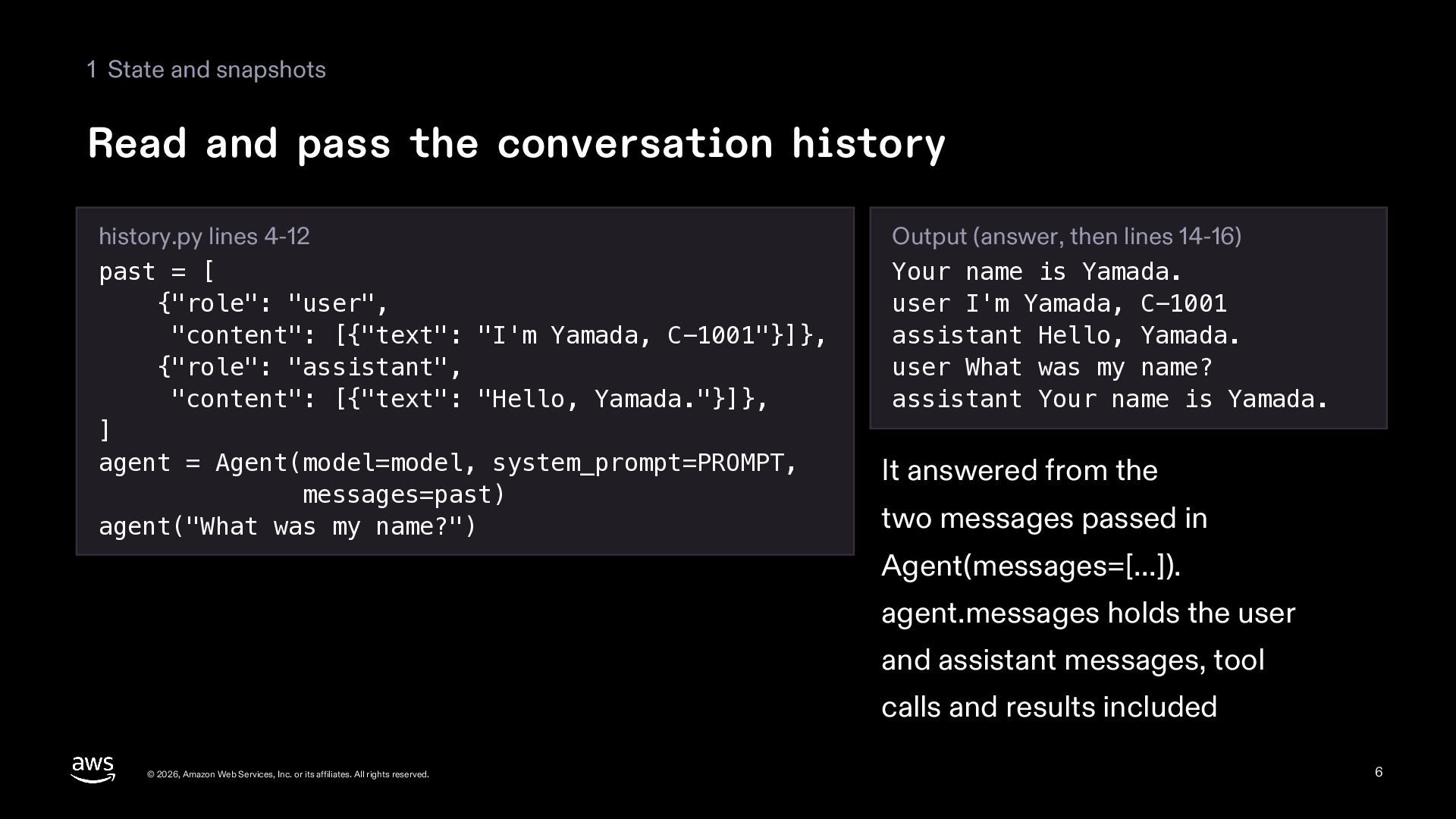
    history.py lines 4-12 past = [ {"role": "user", "content": [{"text": "I'm Yamada, C-1001"}]}, {"role": "assistant", "content": [{"text": "Hello, Yamada."}]}, ] agent = Agent(model=model, system_prompt=PROMPT, messages=past) agent("What was my name?") Output (answer, then lines 14-16) Your name is Yamada. user I'm Yamada, C-1001 assistant Hello, Yamada. user What was my name? assistant Your name is Yamada. It answered from the two messages passed in Agent(messages=[...]). agent.messages holds the user and assistant messages, tool calls and results included © 2026, Amazon Web Services, Inc. or its affiliates. All rights reserved. 6
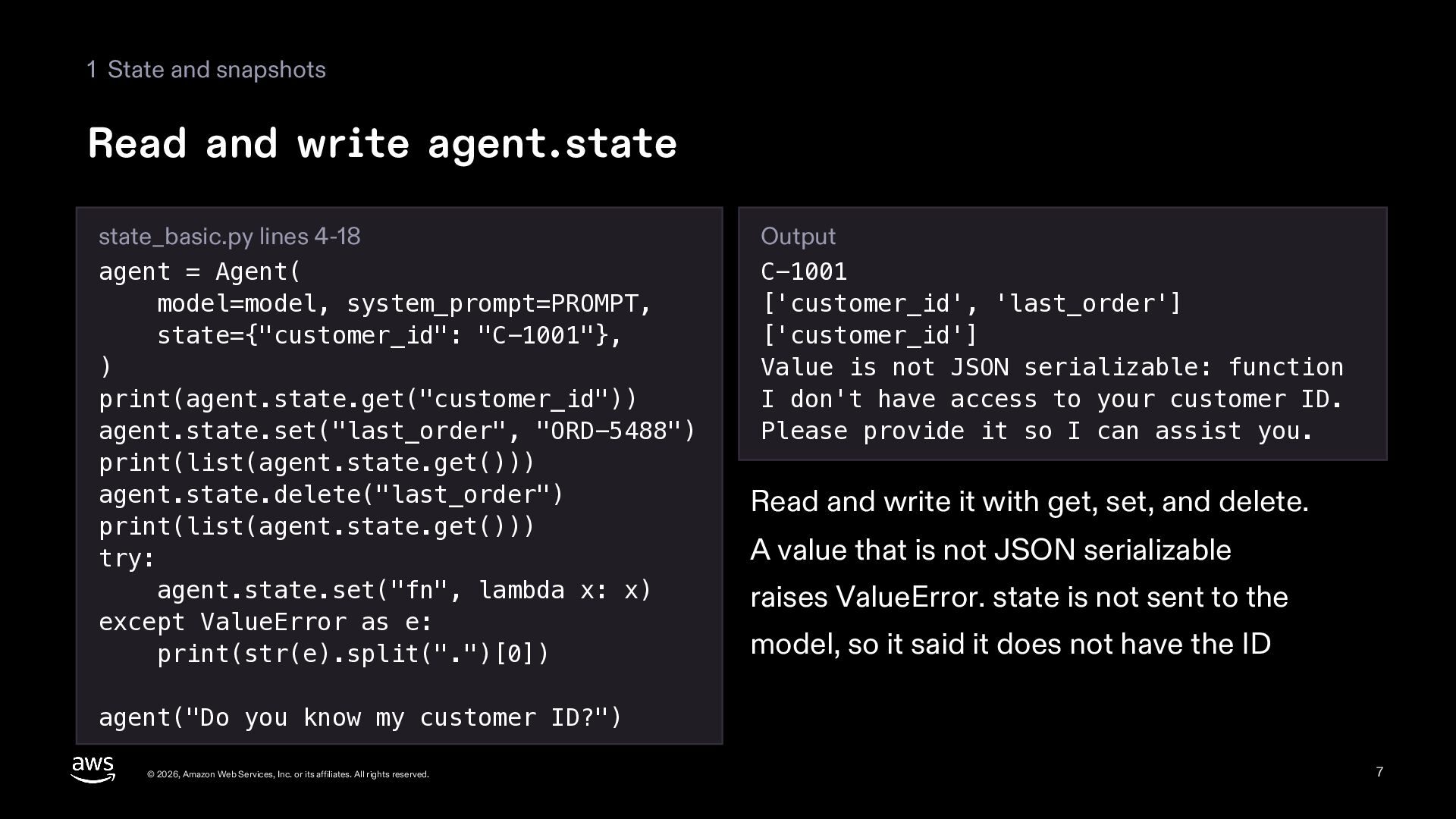
  7. 1 State and snapshots Read and write agent.state state_basic.py lines

    4-18 agent = Agent( model=model, system_prompt=PROMPT, state={"customer_id": "C-1001"}, ) print(agent.state.get("customer_id")) agent.state.set("last_order", "ORD-5488") print(list(agent.state.get())) agent.state.delete("last_order") print(list(agent.state.get())) try: agent.state.set("fn", lambda x: x) except ValueError as e: print(str(e).split(".")[0]) Output C-1001 ['customer_id', 'last_order'] ['customer_id'] Value is not JSON serializable: function I don't have access to your customer ID. Please provide it so I can assist you. Read and write it with get, set, and delete. A value that is not JSON serializable raises ValueError. state is not sent to the model, so it said it does not have the ID agent("Do you know my customer ID?") © 2026, Amazon Web Services, Inc. or its affiliates. All rights reserved. 7
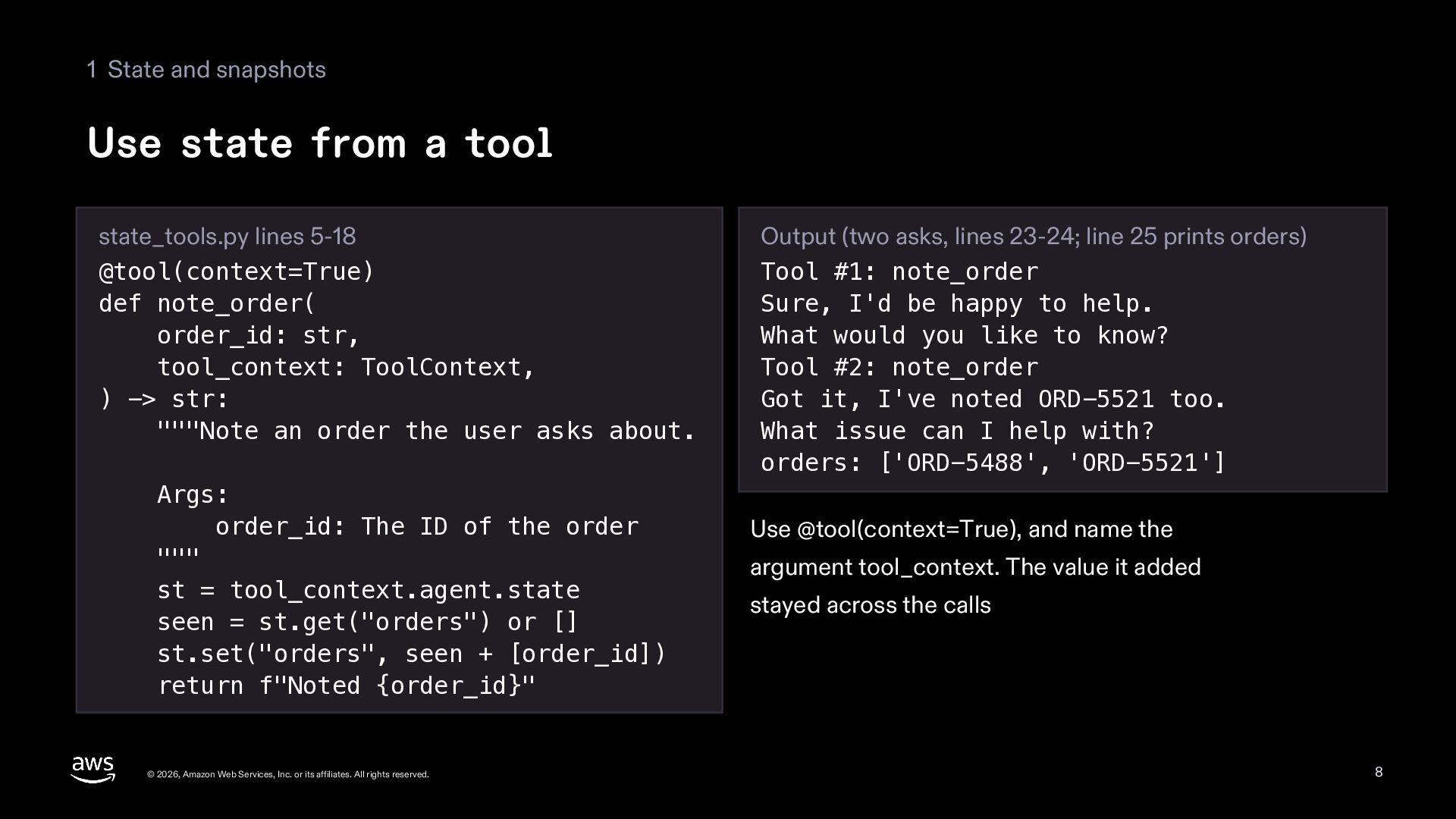
  8. 1 State and snapshots Use state from a tool state_tools.py

    lines 5-18 @tool(context=True) def note_order( order_id: str, tool_context: ToolContext, ) -> str: """Note an order the user asks about. Args: order_id: The ID of the order """ st = tool_context.agent.state seen = st.get("orders") or [] st.set("orders", seen + [order_id]) return f"Noted {order_id}" © 2026, Amazon Web Services, Inc. or its affiliates. All rights reserved. Output (two asks, lines 23-24; line 25 prints orders) Tool #1: note_order Sure, I'd be happy to help. What would you like to know? Tool #2: note_order Got it, I've noted ORD-5521 too. What issue can I help with? orders: ['ORD-5488', 'ORD-5521'] Use @tool(context=True), and name the argument tool_context. The value it added stayed across the calls 8
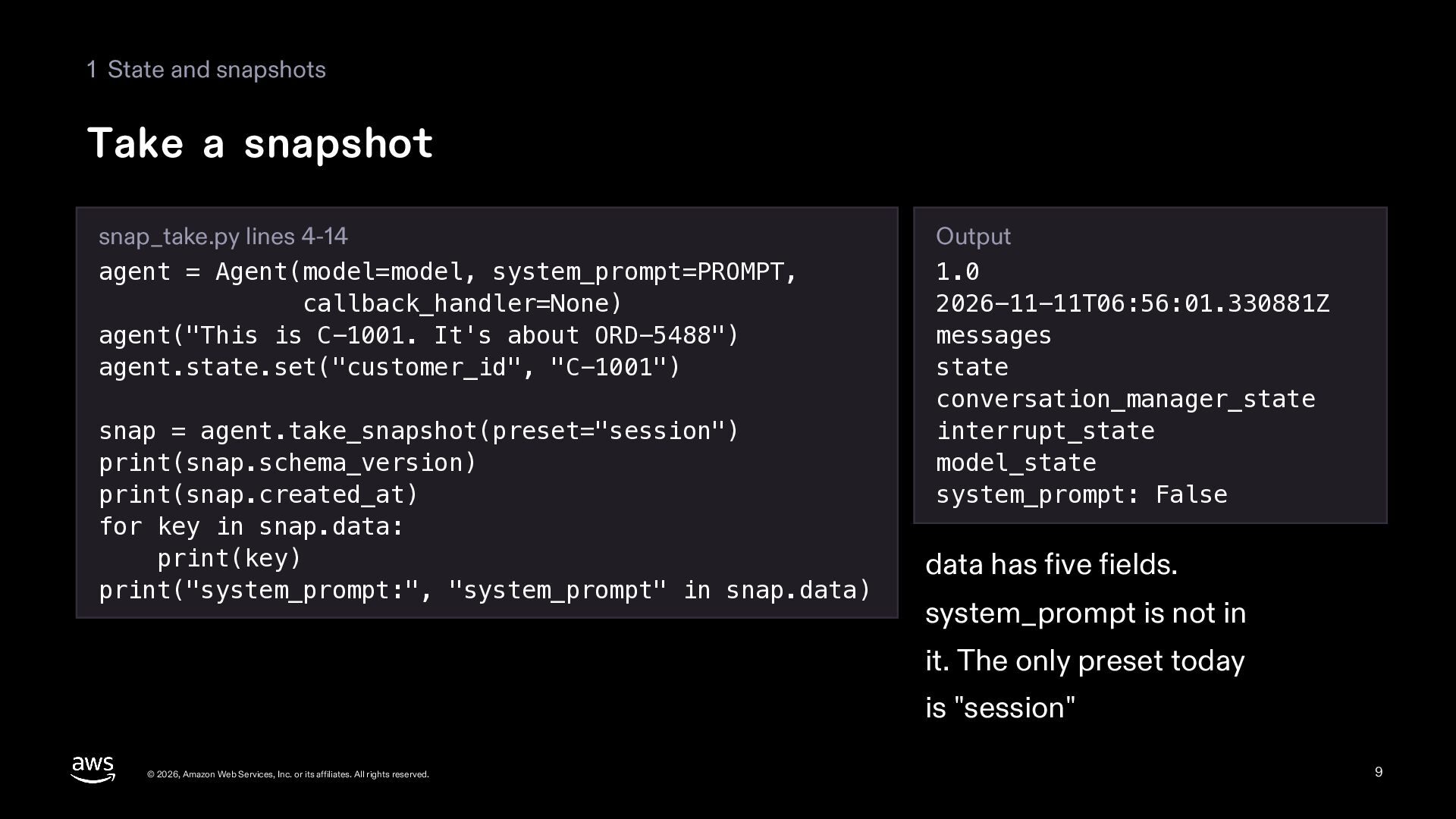
  9. 1 State and snapshots Take a snapshot snap_take.py lines 4-14

    agent = Agent(model=model, system_prompt=PROMPT, callback_handler=None) agent("This is C-1001. It's about ORD-5488") agent.state.set("customer_id", "C-1001") snap = agent.take_snapshot(preset="session") print(snap.schema_version) print(snap.created_at) for key in snap.data: print(key) print("system_prompt:", "system_prompt" in snap.data) Output 1.0 2026-11-11T06:56:01.330881Z messages state conversation_manager_state interrupt_state model_state system_prompt: False data has five fields. system_prompt is not in it. The only preset today is "session" © 2026, Amazon Web Services, Inc. or its affiliates. All rights reserved. 9
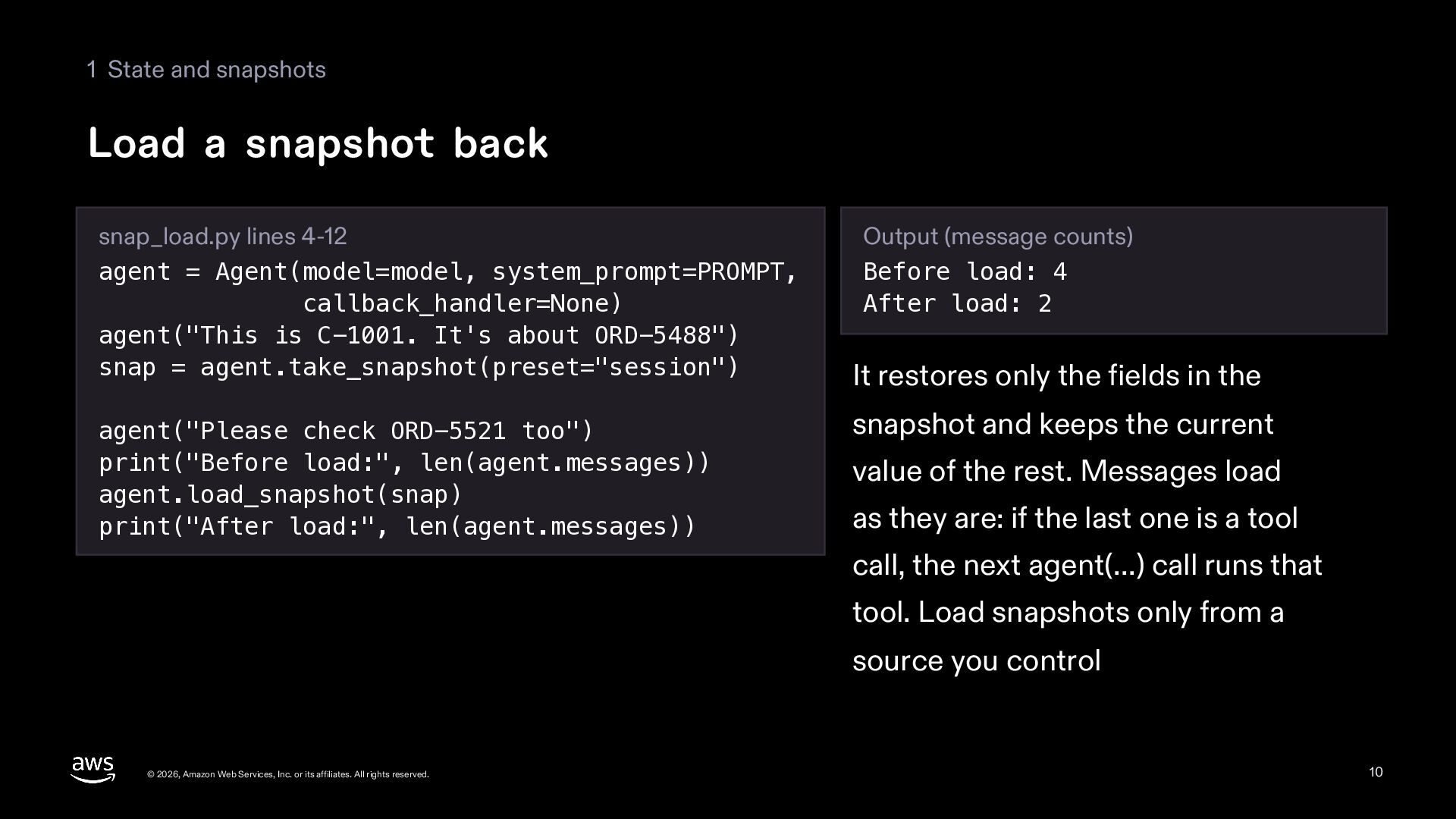
  10. 1 State and snapshots Load a snapshot back snap_load.py lines

    4-12 agent = Agent(model=model, system_prompt=PROMPT, callback_handler=None) agent("This is C-1001. It's about ORD-5488") snap = agent.take_snapshot(preset="session") agent("Please check ORD-5521 too") print("Before load:", len(agent.messages)) agent.load_snapshot(snap) print("After load:", len(agent.messages)) Output (message counts) Before load: 4 After load: 2 It restores only the fields in the snapshot and keeps the current value of the rest. Messages load as they are: if the last one is a tool call, the next agent(...) call runs that tool. Load snapshots only from a source you control © 2026, Amazon Web Services, Inc. or its affiliates. All rights reserved. 10
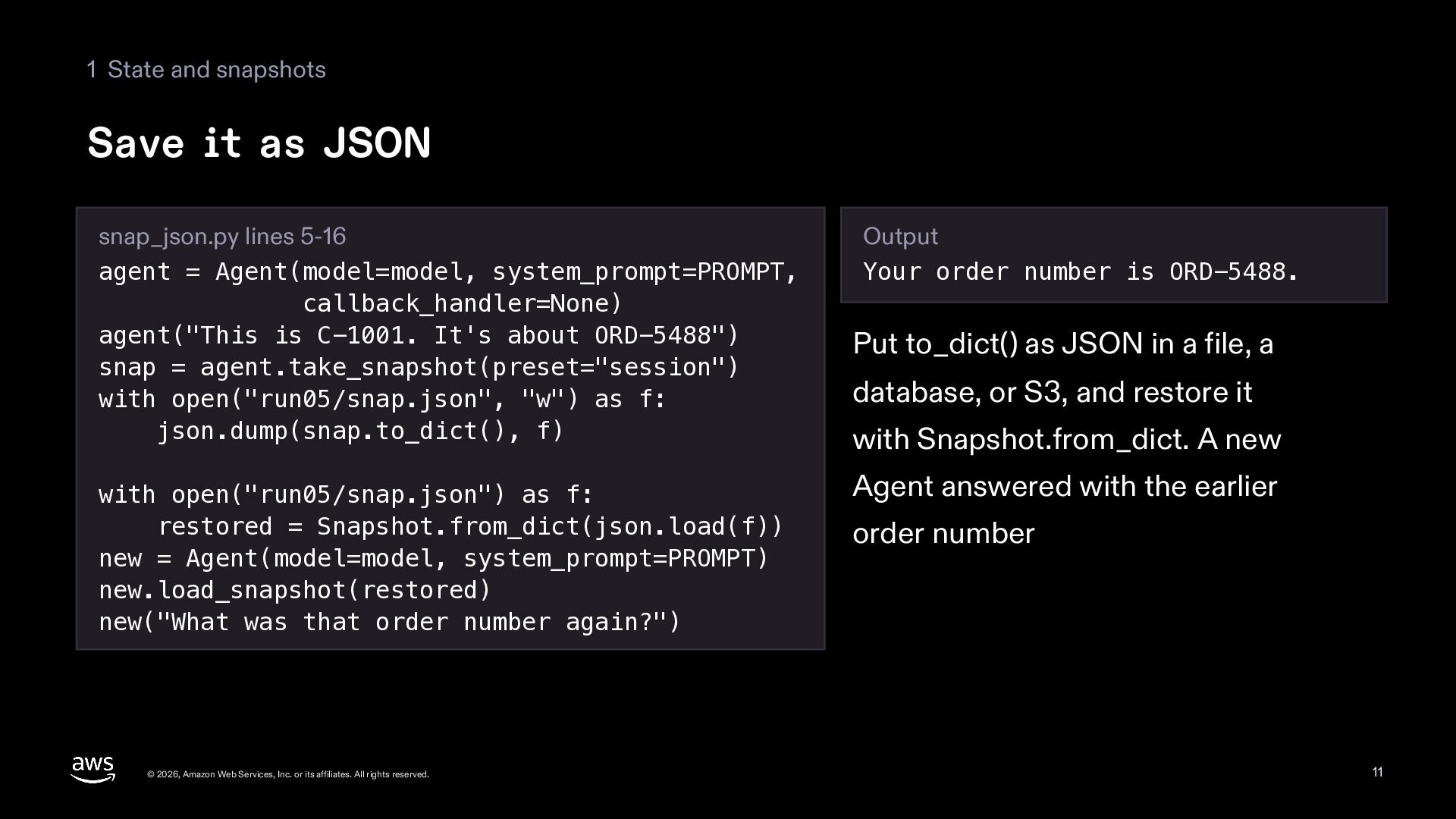
  11. 1 State and snapshots Save it as JSON snap_json.py lines

    5-16 agent = Agent(model=model, system_prompt=PROMPT, callback_handler=None) agent("This is C-1001. It's about ORD-5488") snap = agent.take_snapshot(preset="session") with open("run05/snap.json", "w") as f: json.dump(snap.to_dict(), f) with open("run05/snap.json") as f: restored = Snapshot.from_dict(json.load(f)) new = Agent(model=model, system_prompt=PROMPT) new.load_snapshot(restored) new("What was that order number again?") © 2026, Amazon Web Services, Inc. or its affiliates. All rights reserved. Output Your order number is ORD-5488. Put to_dict() as JSON in a file, a database, or S3, and restore it with Snapshot.from_dict. A new Agent answered with the earlier order number 11
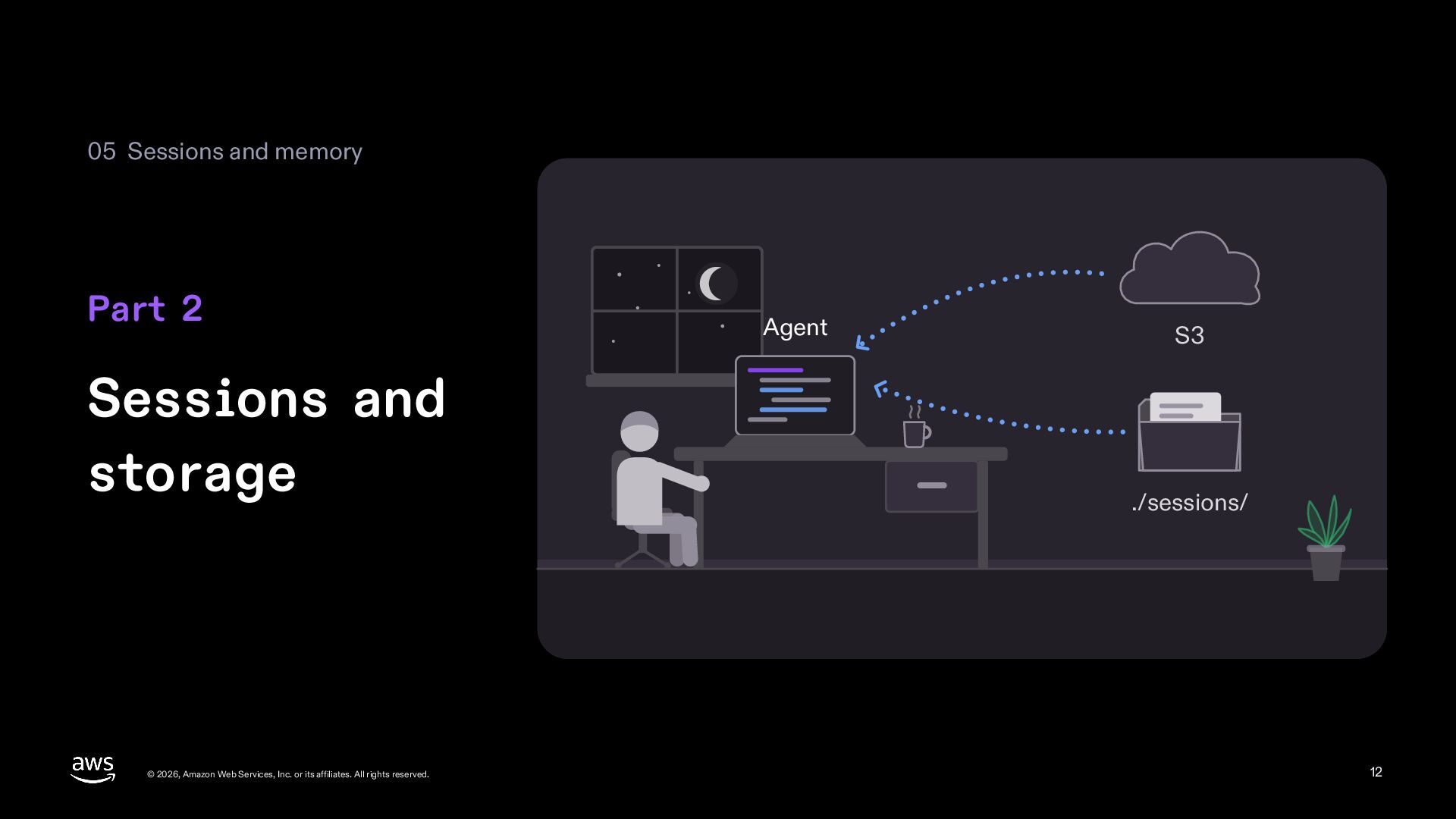
  12. 05 Sessions and memory Part 2 Sessions and storage ©

    2026, Amazon Web Services, Inc. or its affiliates. All rights reserved. Agent S3 ./sessions/ 12
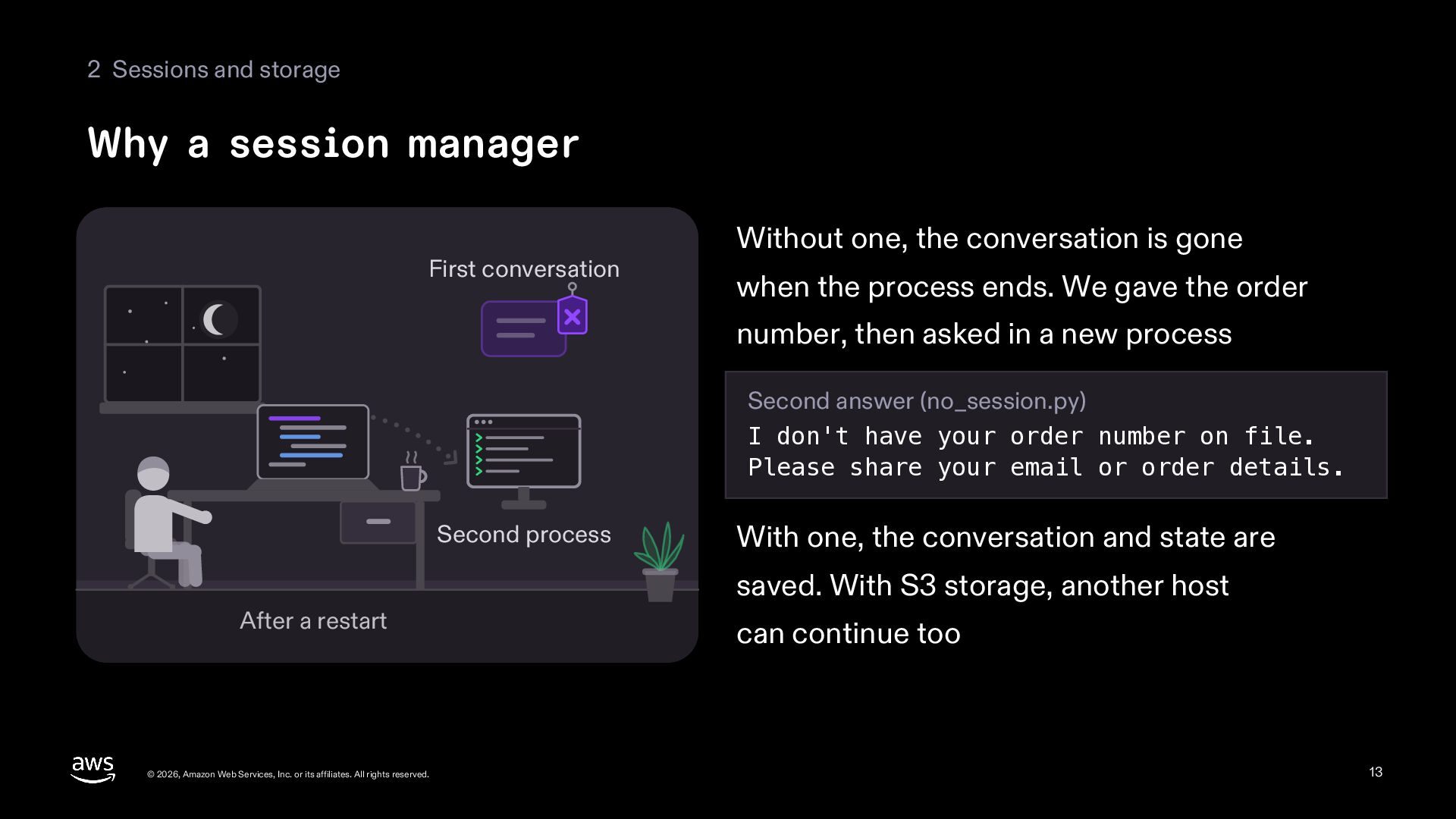
  13. 2 Sessions and storage Why a session manager First conversation

    Without one, the conversation is gone when the process ends. We gave the order number, then asked in a new process Second answer (no_session.py) I don't have your order number on file. Please share your email or order details. Second process With one, the conversation and state are saved. With S3 storage, another host After a restart © 2026, Amazon Web Services, Inc. or its affiliates. All rights reserved. can continue too 13
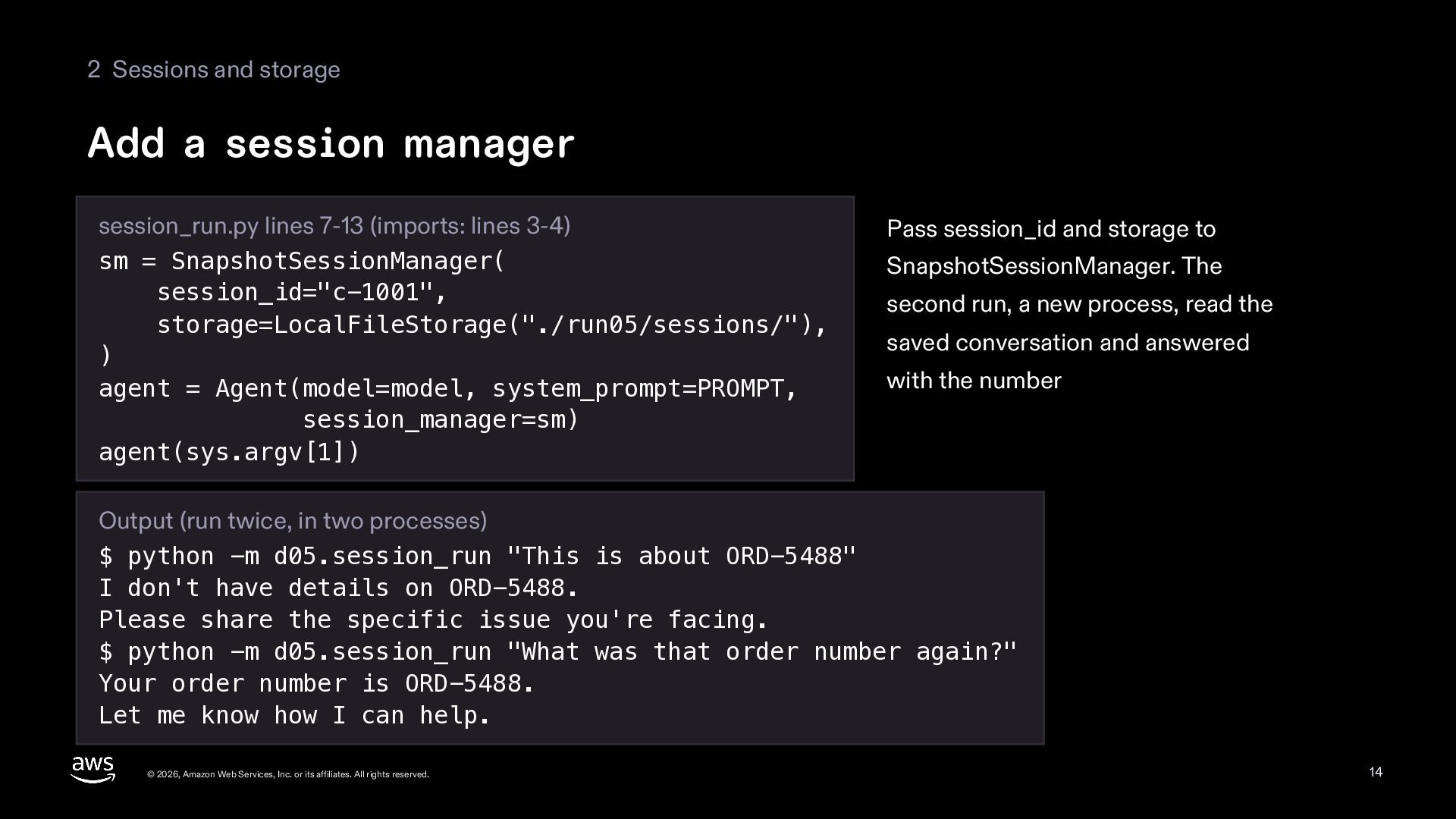
  14. 2 Sessions and storage Add a session manager session_run.py lines

    7-13 (imports: lines 3-4) sm = SnapshotSessionManager( session_id="c-1001", storage=LocalFileStorage("./run05/sessions/"), ) agent = Agent(model=model, system_prompt=PROMPT, session_manager=sm) agent(sys.argv[1]) Pass session_id and storage to SnapshotSessionManager. The second run, a new process, read the saved conversation and answered with the number Output (run twice, in two processes) $ python -m d05.session_run "This is about ORD-5488" I don't have details on ORD-5488. Please share the specific issue you're facing. $ python -m d05.session_run "What was that order number again?" Your order number is ORD-5488. Let me know how I can help. © 2026, Amazon Web Services, Inc. or its affiliates. All rights reserved. 14
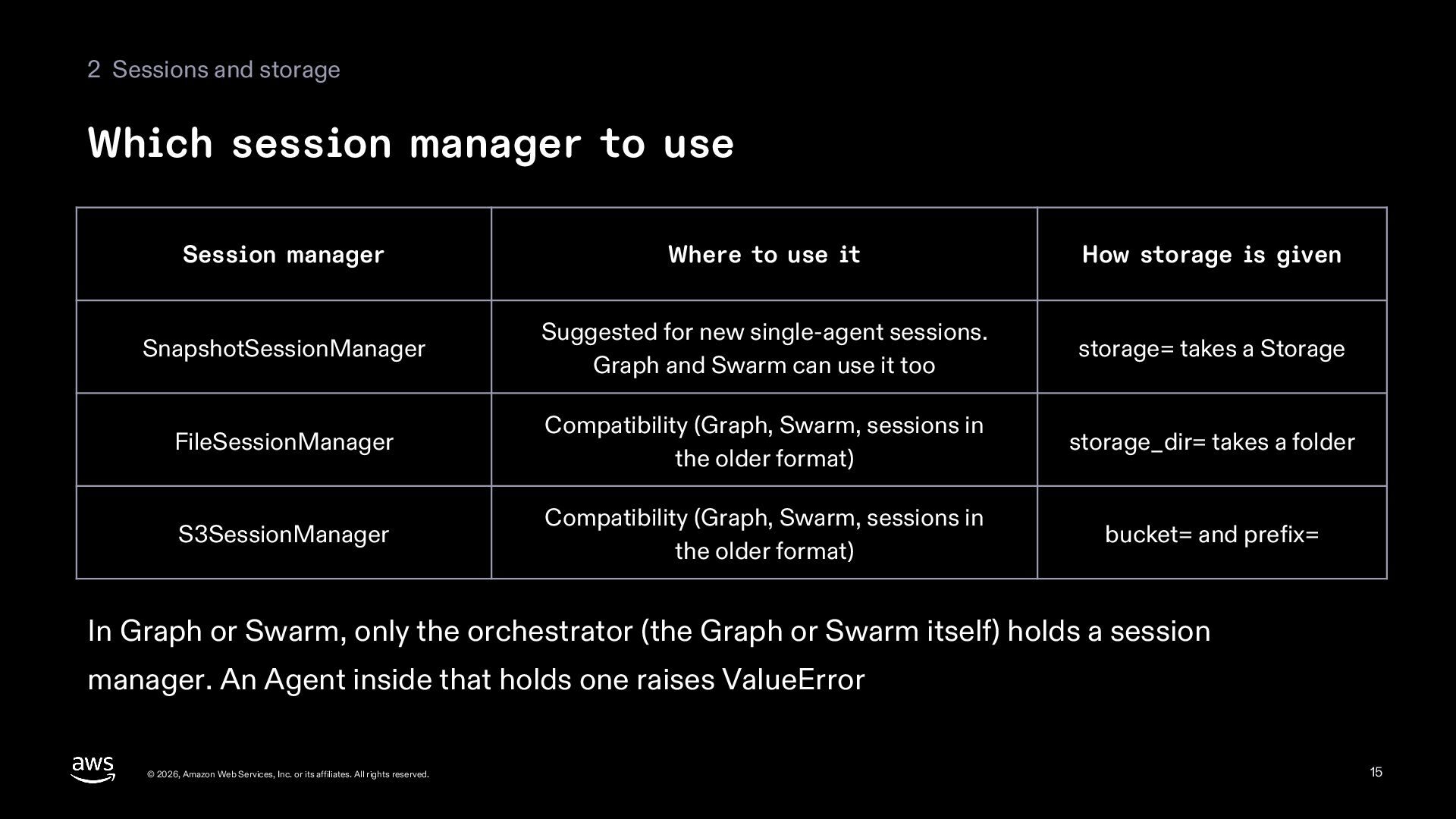
  15. 2 Sessions and storage Which session manager to use Session

    manager Where to use it How storage is given SnapshotSessionManager Suggested for new single-agent sessions. Graph and Swarm can use it too storage= takes a Storage FileSessionManager Compatibility (Graph, Swarm, sessions in the older format) storage_dir= takes a folder S3SessionManager Compatibility (Graph, Swarm, sessions in the older format) bucket= and prefix= In Graph or Swarm, only the orchestrator (the Graph or Swarm itself) holds a session manager. An Agent inside that holds one raises ValueError © 2026, Amazon Web Services, Inc. or its affiliates. All rights reserved. 15
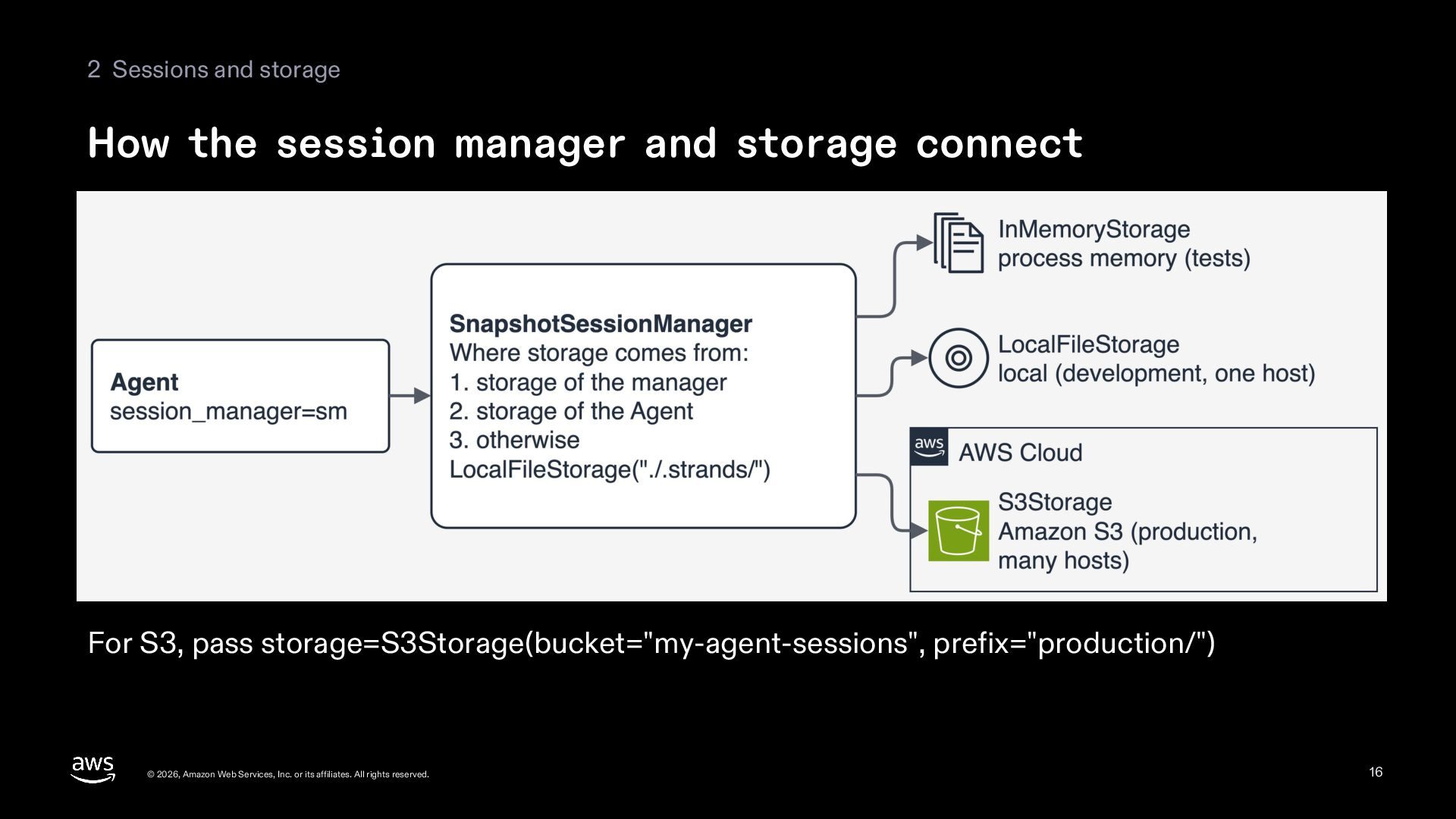
  16. 2 Sessions and storage How the session manager and storage

    connect For S3, pass storage=S3Storage(bucket="my-agent-sessions", prefix="production/") © 2026, Amazon Web Services, Inc. or its affiliates. All rights reserved. 16
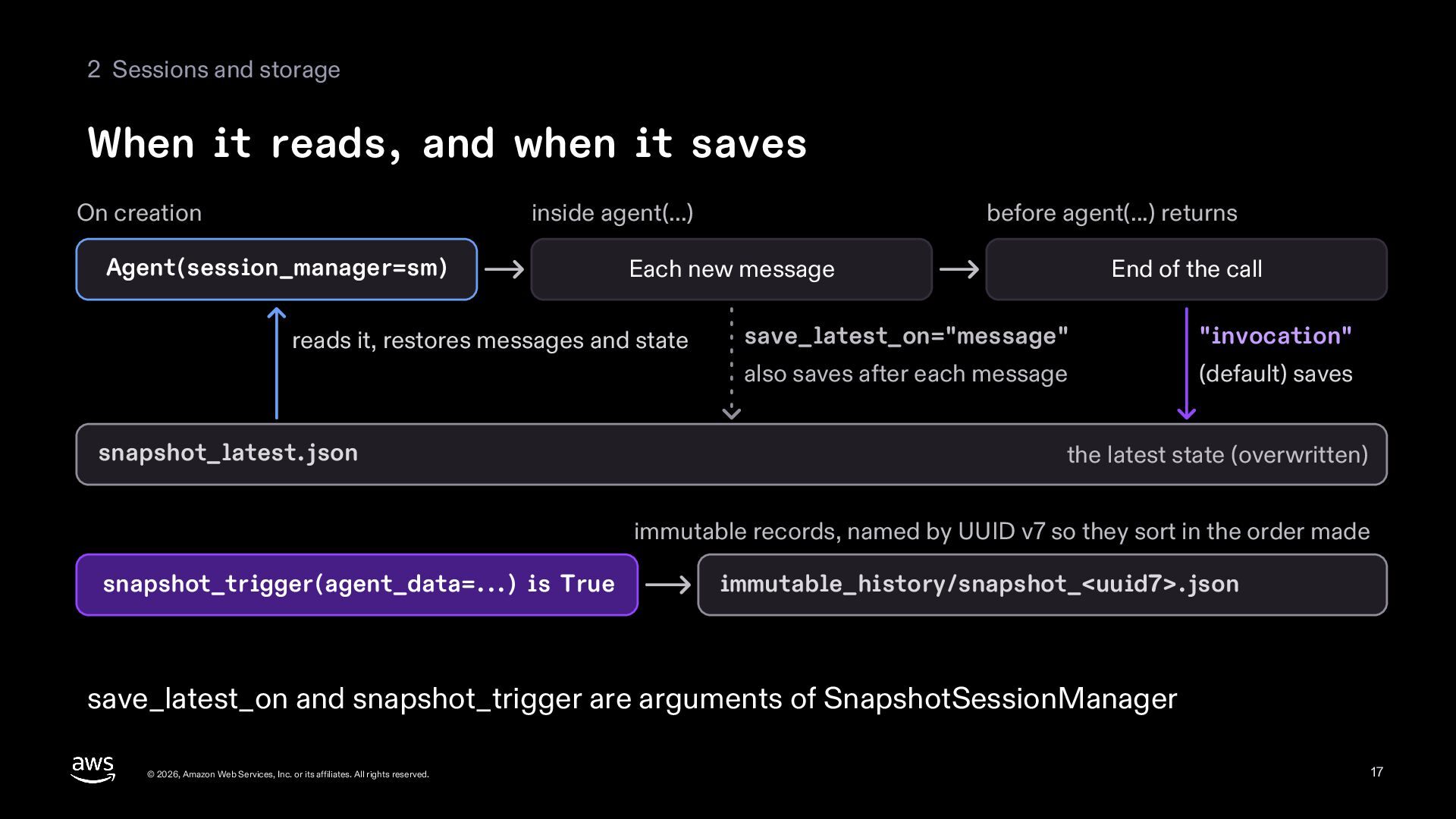
  17. 2 Sessions and storage When it reads, and when it

    saves On creation inside agent(...) Agent(session_manager=sm) Each new message reads it, restores messages and state snapshot_latest.json before agent(...) returns End of the call save_latest_on="message" "invocation" also saves after each message (default) saves the latest state (overwritten) immutable records, named by UUID v7 so they sort in the order made snapshot_trigger(agent_data=...) is True immutable_history/snapshot_<uuid7>.json save_latest_on and snapshot_trigger are arguments of SnapshotSessionManager © 2026, Amazon Web Services, Inc. or its affiliates. All rights reserved. 17
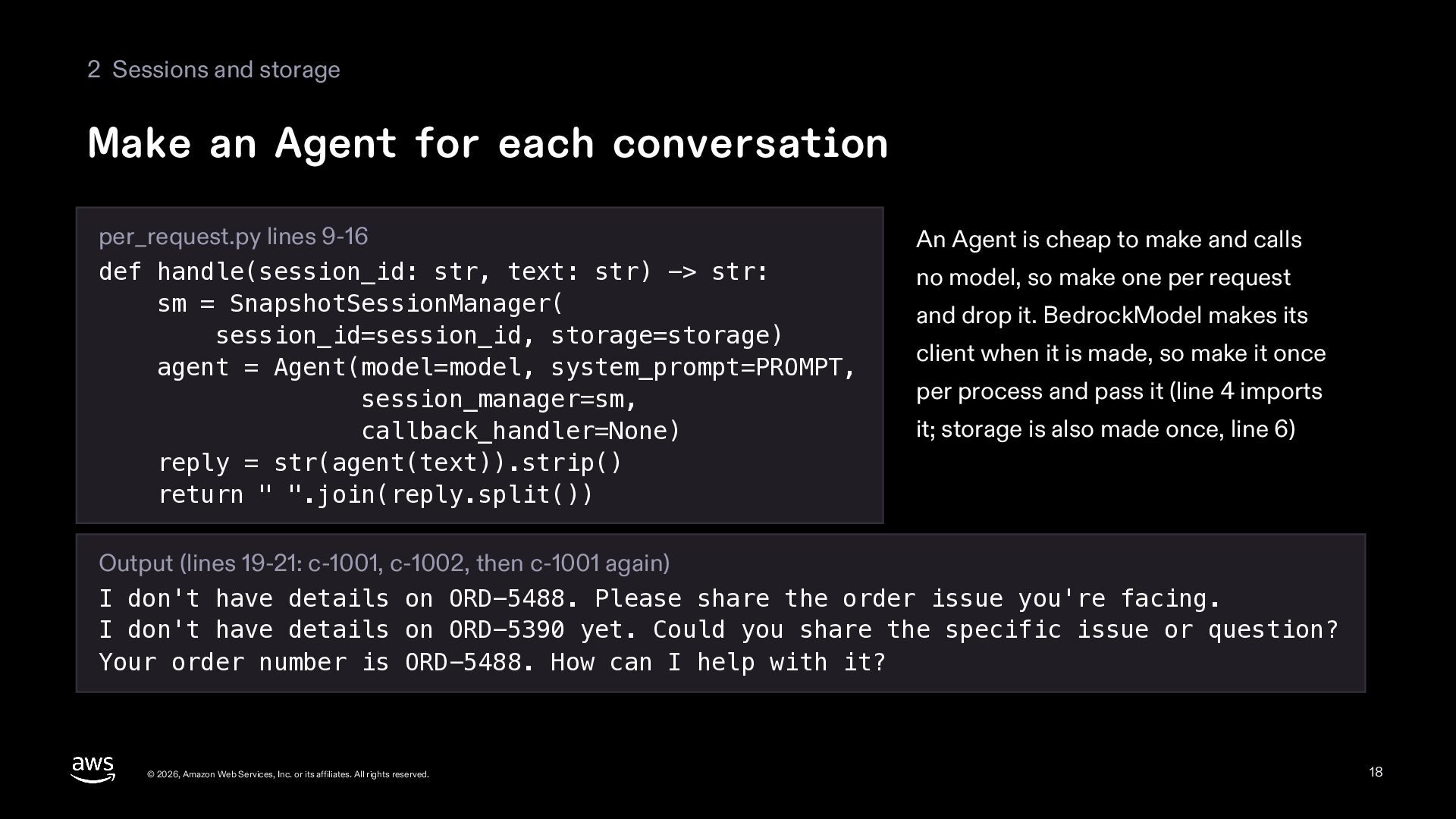
  18. 2 Sessions and storage Make an Agent for each conversation

    per_request.py lines 9-16 def handle(session_id: str, text: str) -> str: sm = SnapshotSessionManager( session_id=session_id, storage=storage) agent = Agent(model=model, system_prompt=PROMPT, session_manager=sm, callback_handler=None) reply = str(agent(text)).strip() return " ".join(reply.split()) An Agent is cheap to make and calls no model, so make one per request and drop it. BedrockModel makes its client when it is made, so make it once per process and pass it (line 4 imports it; storage is also made once, line 6) Output (lines 19-21: c-1001, c-1002, then c-1001 again) I don't have details on ORD-5488. Please share the order issue you're facing. I don't have details on ORD-5390 yet. Could you share the specific issue or question? Your order number is ORD-5488. How can I help with it? © 2026, Amazon Web Services, Inc. or its affiliates. All rights reserved. 18
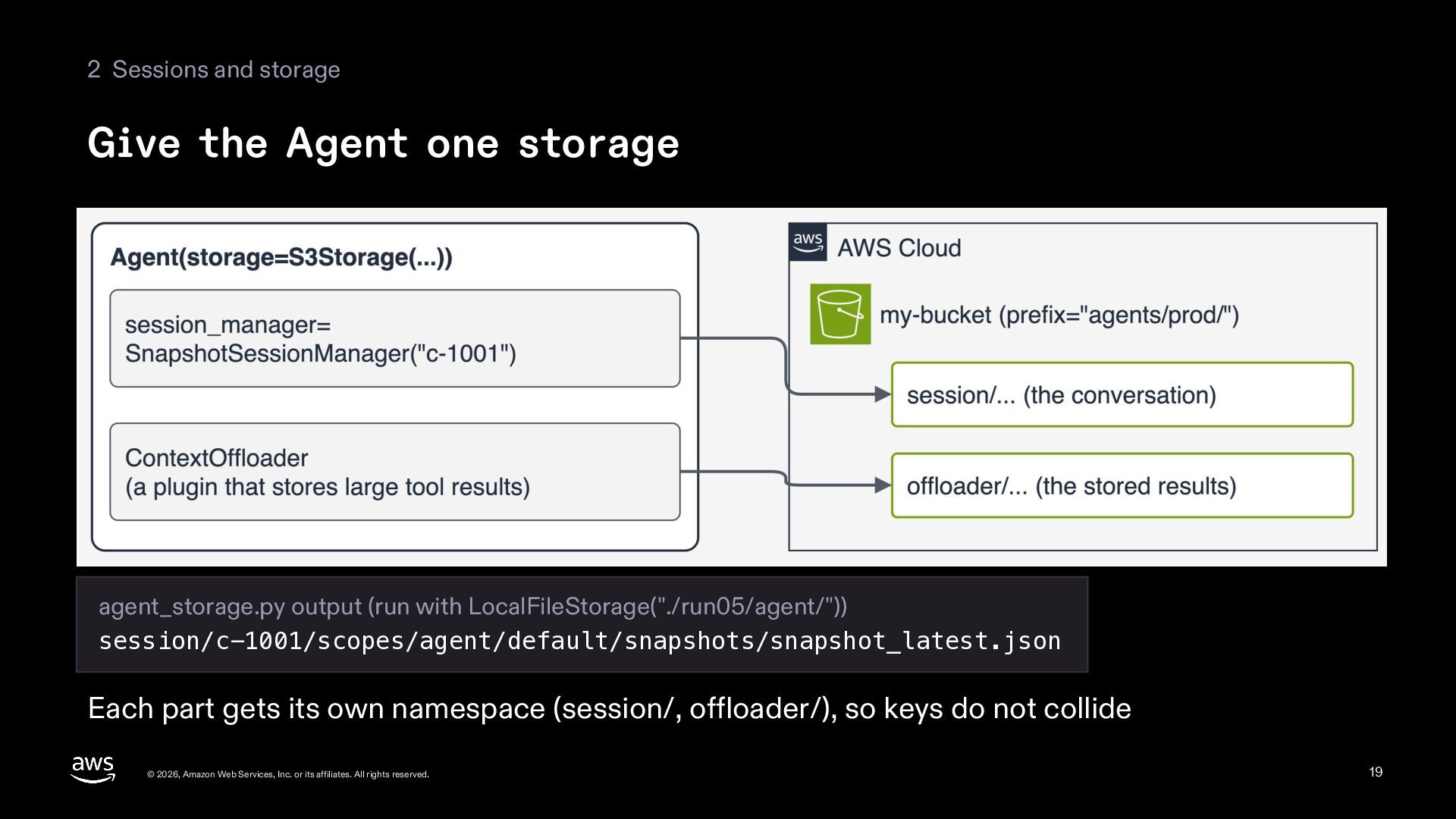
  19. 2 Sessions and storage Give the Agent one storage agent_storage.py

    output (run with LocalFileStorage("./run05/agent/")) session/c-1001/scopes/agent/default/snapshots/snapshot_latest.json Each part gets its own namespace (session/, offloader/), so keys do not collide © 2026, Amazon Web Services, Inc. or its affiliates. All rights reserved. 19
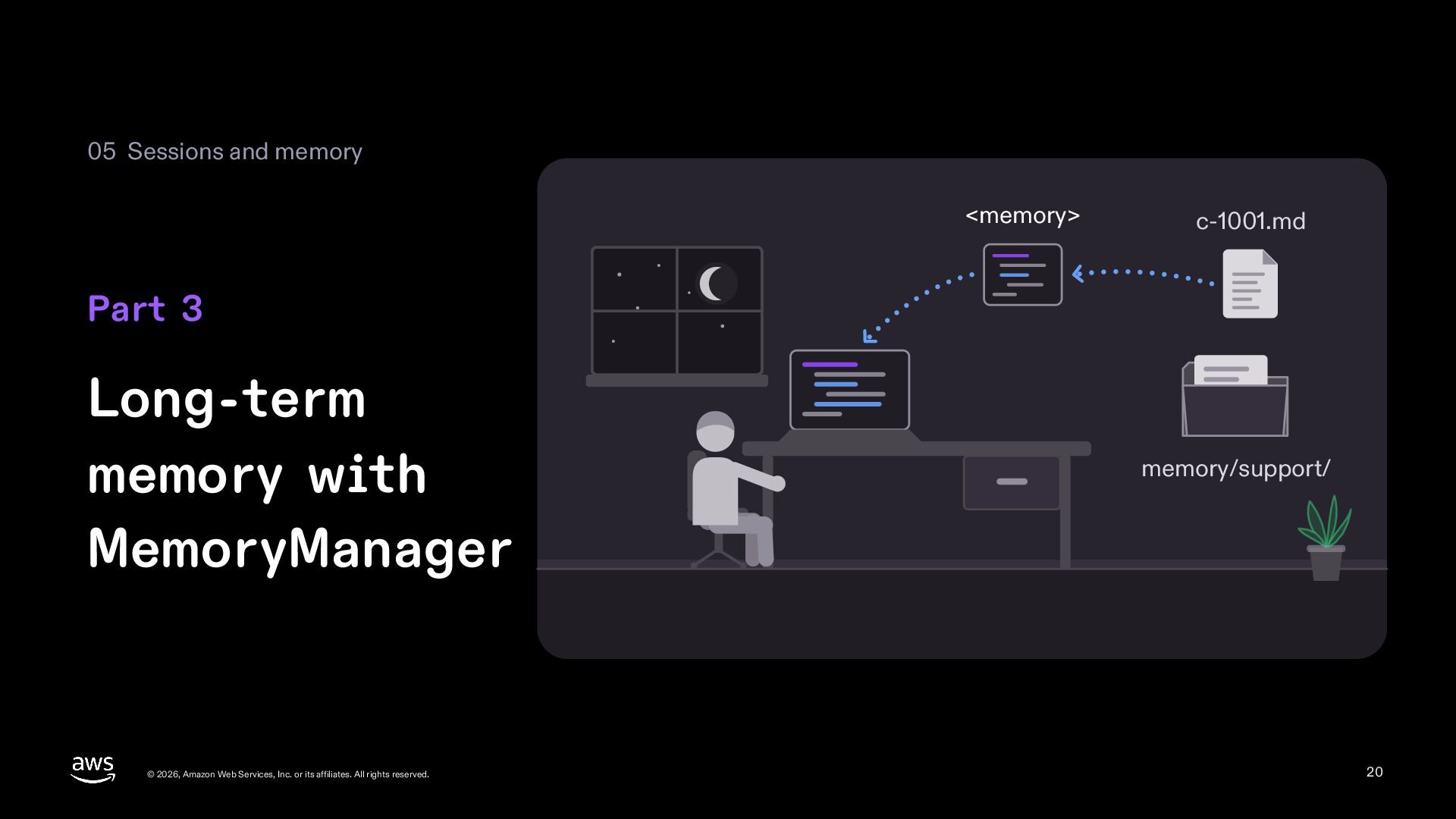
  20. 05 Sessions and memory <memory> c-1001.md Part 3 Long-term memory

    with MemoryManager © 2026, Amazon Web Services, Inc. or its affiliates. All rights reserved. memory/support/ 20
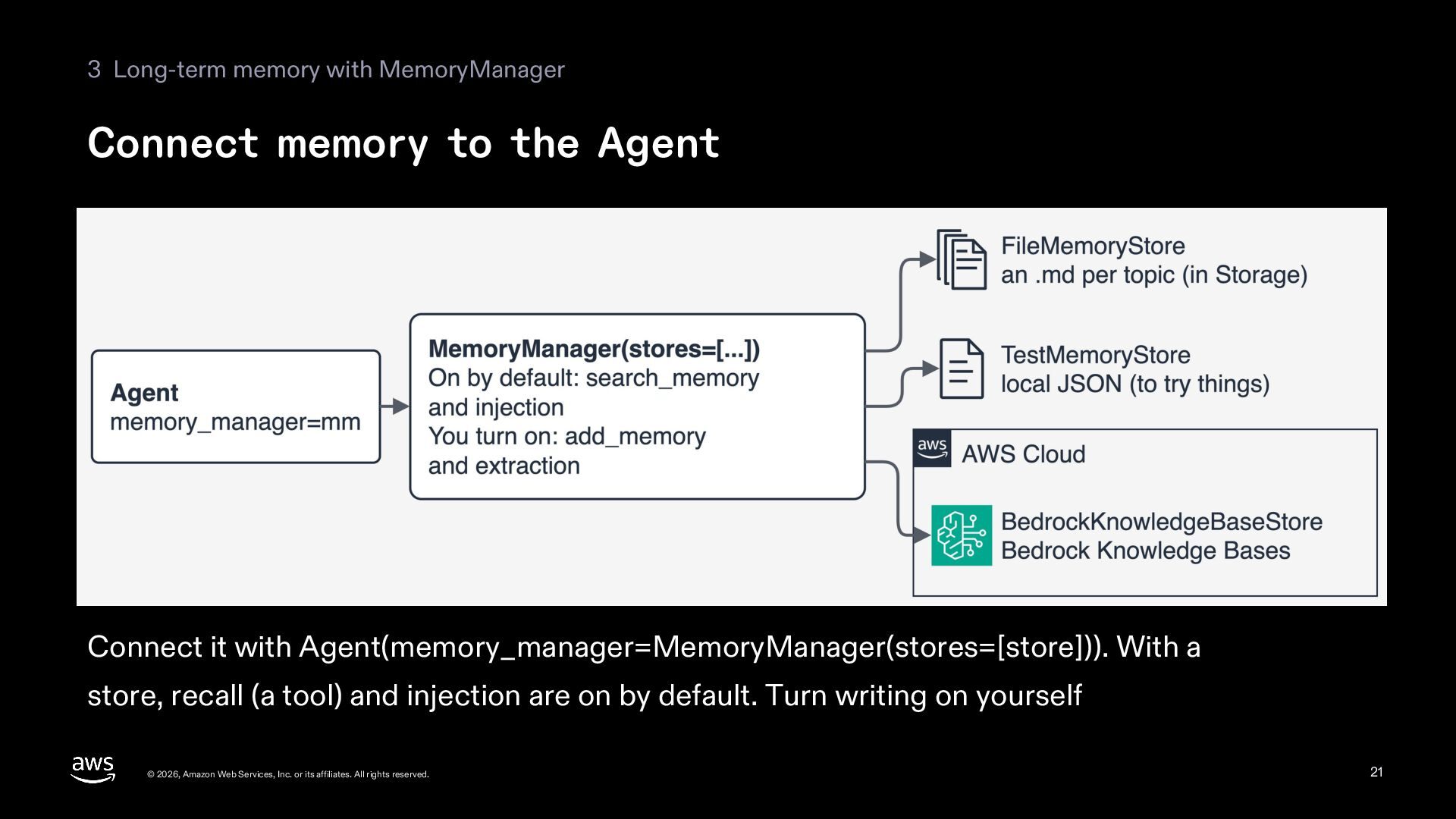
  21. 3 Long-term memory with MemoryManager Connect memory to the Agent

    Connect it with Agent(memory_manager=MemoryManager(stores=[store])). With a store, recall (a tool) and injection are on by default. Turn writing on yourself © 2026, Amazon Web Services, Inc. or its affiliates. All rights reserved. 21
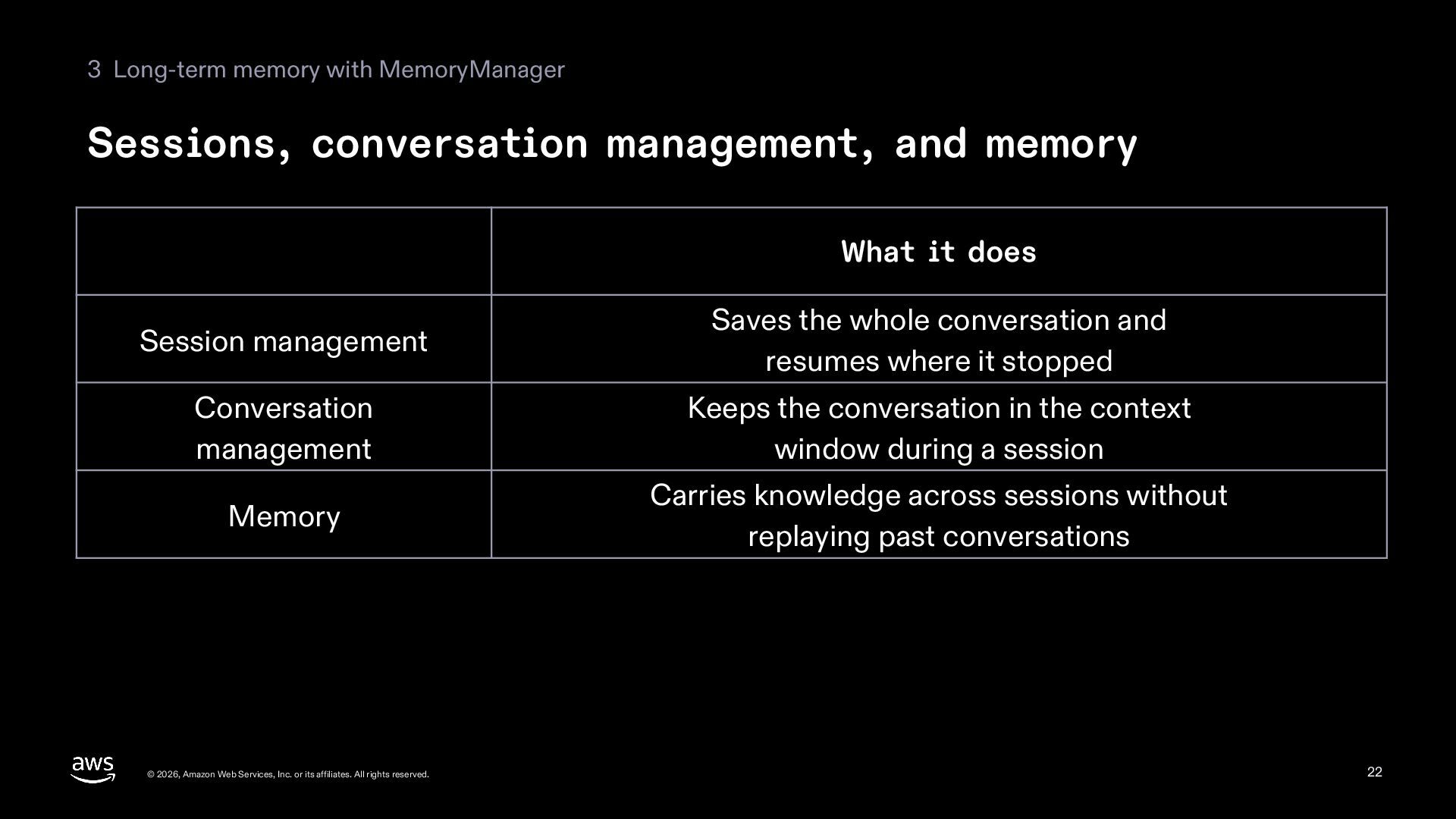
  22. 3 Long-term memory with MemoryManager Sessions, conversation management, and memory

    What it does Session management Saves the whole conversation and resumes where it stopped Conversation management Keeps the conversation in the context window during a session Memory Carries knowledge across sessions without replaying past conversations © 2026, Amazon Web Services, Inc. or its affiliates. All rights reserved. 22
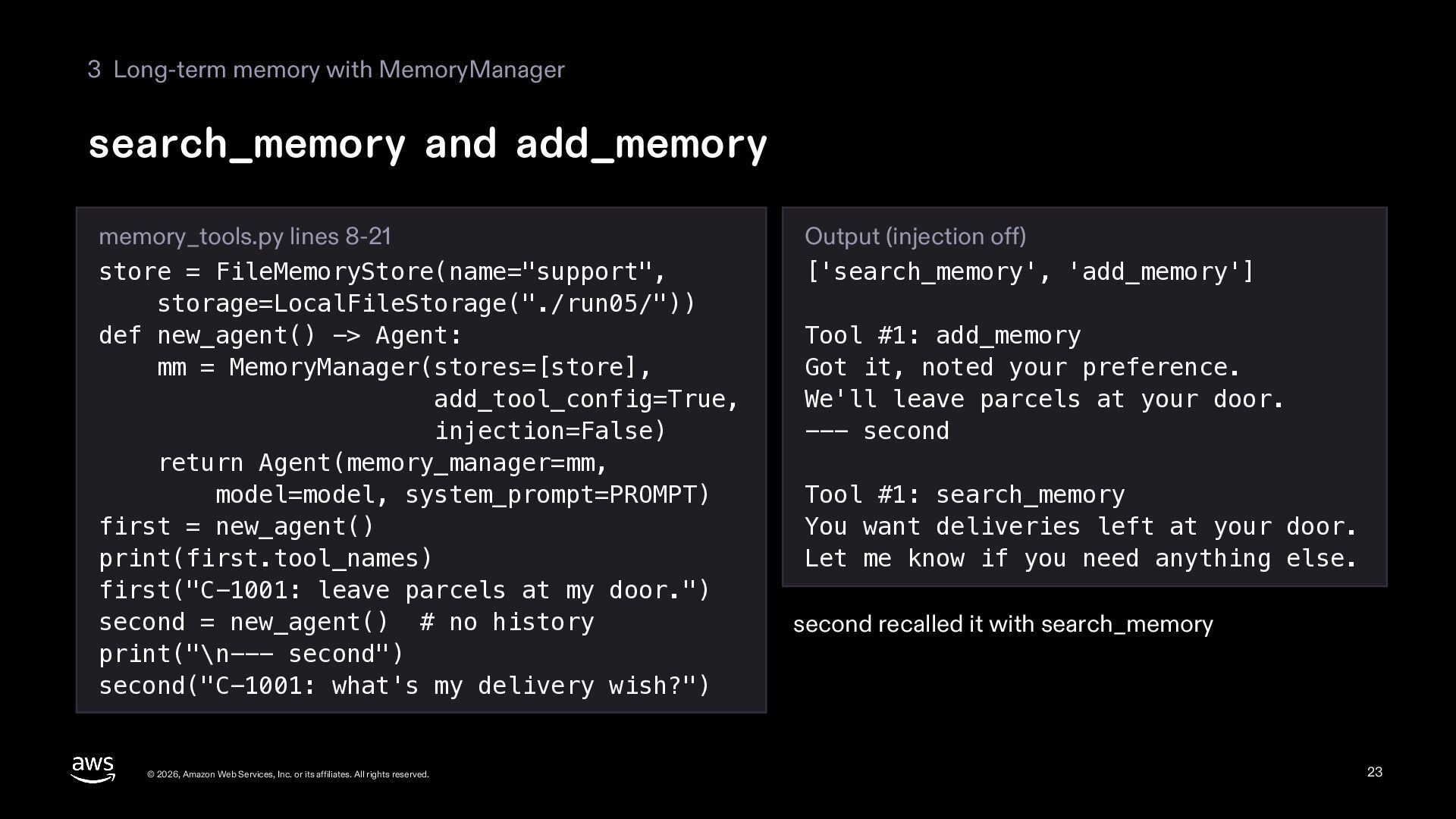
  23. 3 Long-term memory with MemoryManager search_memory and add_memory memory_tools.py lines

    8-21 store = FileMemoryStore(name="support", storage=LocalFileStorage("./run05/")) def new_agent() -> Agent: mm = MemoryManager(stores=[store], add_tool_config=True, injection=False) return Agent(memory_manager=mm, model=model, system_prompt=PROMPT) first = new_agent() print(first.tool_names) first("C-1001: leave parcels at my door.") second = new_agent() # no history print("\n--- second") second("C-1001: what's my delivery wish?") © 2026, Amazon Web Services, Inc. or its affiliates. All rights reserved. Output (injection off) ['search_memory', 'add_memory'] Tool #1: add_memory Got it, noted your preference. We'll leave parcels at your door. --- second Tool #1: search_memory You want deliveries left at your door. Let me know if you need anything else. second recalled it with search_memory 23
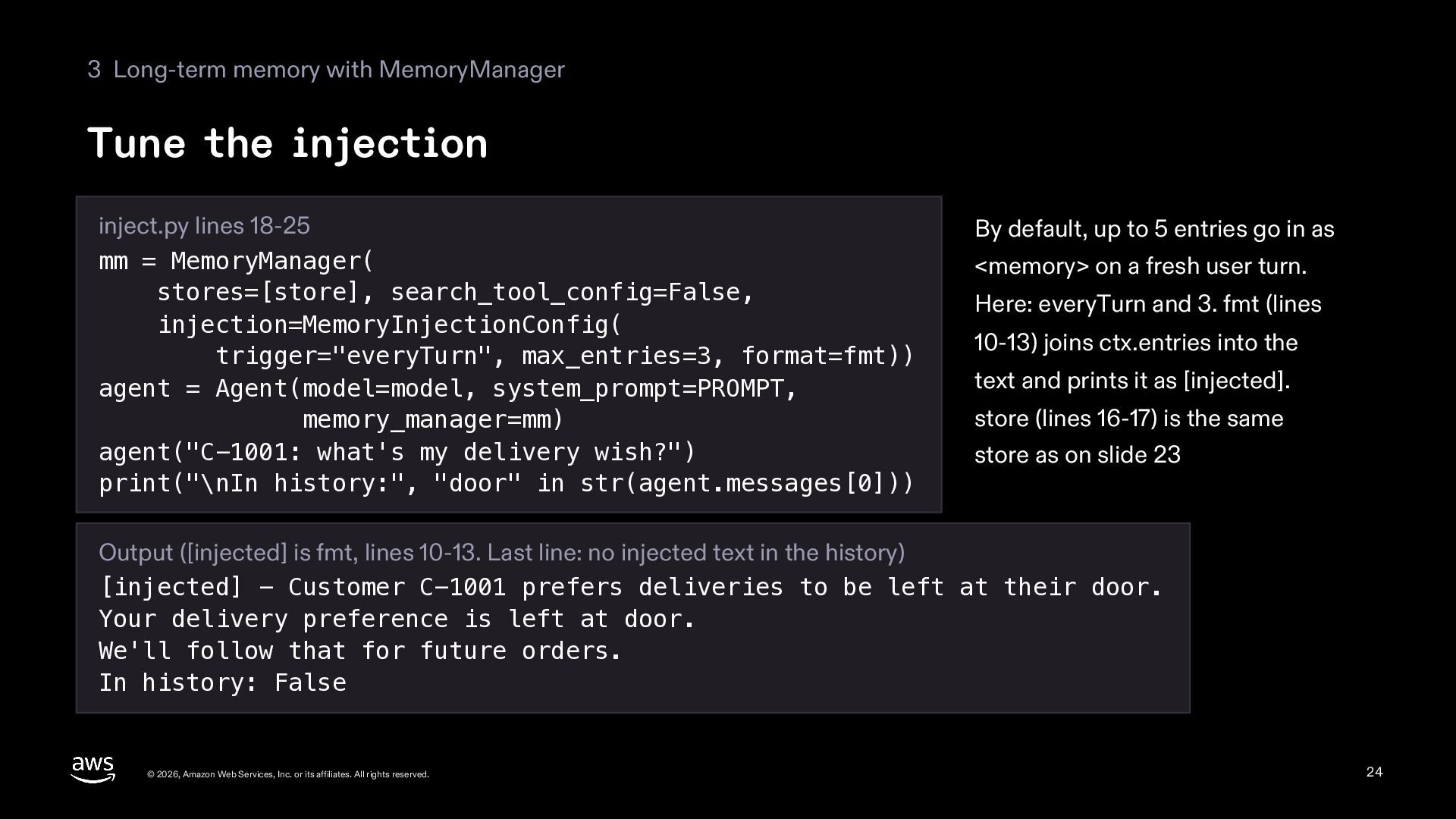
  24. 3 Long-term memory with MemoryManager Tune the injection inject.py lines

    18-25 mm = MemoryManager( stores=[store], search_tool_config=False, injection=MemoryInjectionConfig( trigger="everyTurn", max_entries=3, format=fmt)) agent = Agent(model=model, system_prompt=PROMPT, memory_manager=mm) agent("C-1001: what's my delivery wish?") print("\nIn history:", "door" in str(agent.messages[0])) By default, up to 5 entries go in as <memory> on a fresh user turn. Here: everyTurn and 3. fmt (lines 10-13) joins ctx.entries into the text and prints it as [injected]. store (lines 16-17) is the same store as on slide 23 Output ([injected] is fmt, lines 10-13. Last line: no injected text in the history) [injected] - Customer C-1001 prefers deliveries to be left at their door. Your delivery preference is left at door. We'll follow that for future orders. In history: False © 2026, Amazon Web Services, Inc. or its affiliates. All rights reserved. 24
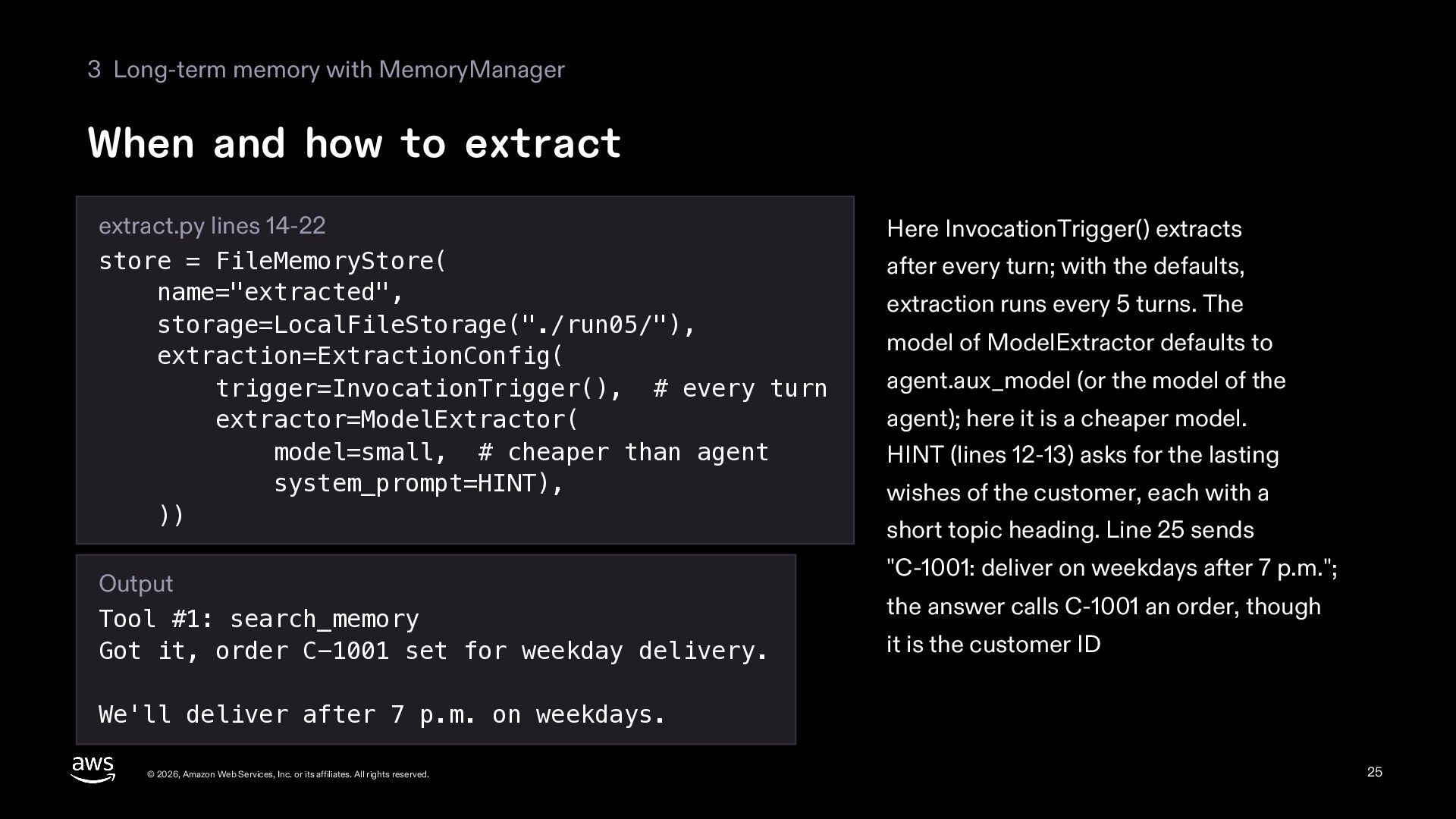
  25. 3 Long-term memory with MemoryManager When and how to extract

    extract.py lines 14-22 store = FileMemoryStore( name="extracted", storage=LocalFileStorage("./run05/"), extraction=ExtractionConfig( trigger=InvocationTrigger(), # every turn extractor=ModelExtractor( model=small, # cheaper than agent system_prompt=HINT), )) Output Tool #1: search_memory Got it, order C-1001 set for weekday delivery. Here InvocationTrigger() extracts after every turn; with the defaults, extraction runs every 5 turns. The model of ModelExtractor defaults to agent.aux_model (or the model of the agent); here it is a cheaper model. HINT (lines 12-13) asks for the lasting wishes of the customer, each with a short topic heading. Line 25 sends "C-1001: deliver on weekdays after 7 p.m."; the answer calls C-1001 an order, though it is the customer ID We'll deliver after 7 p.m. on weekdays. © 2026, Amazon Web Services, Inc. or its affiliates. All rights reserved. 25
  26. 3 Long-term memory with MemoryManager The files FileMemoryStore writes file_store.py

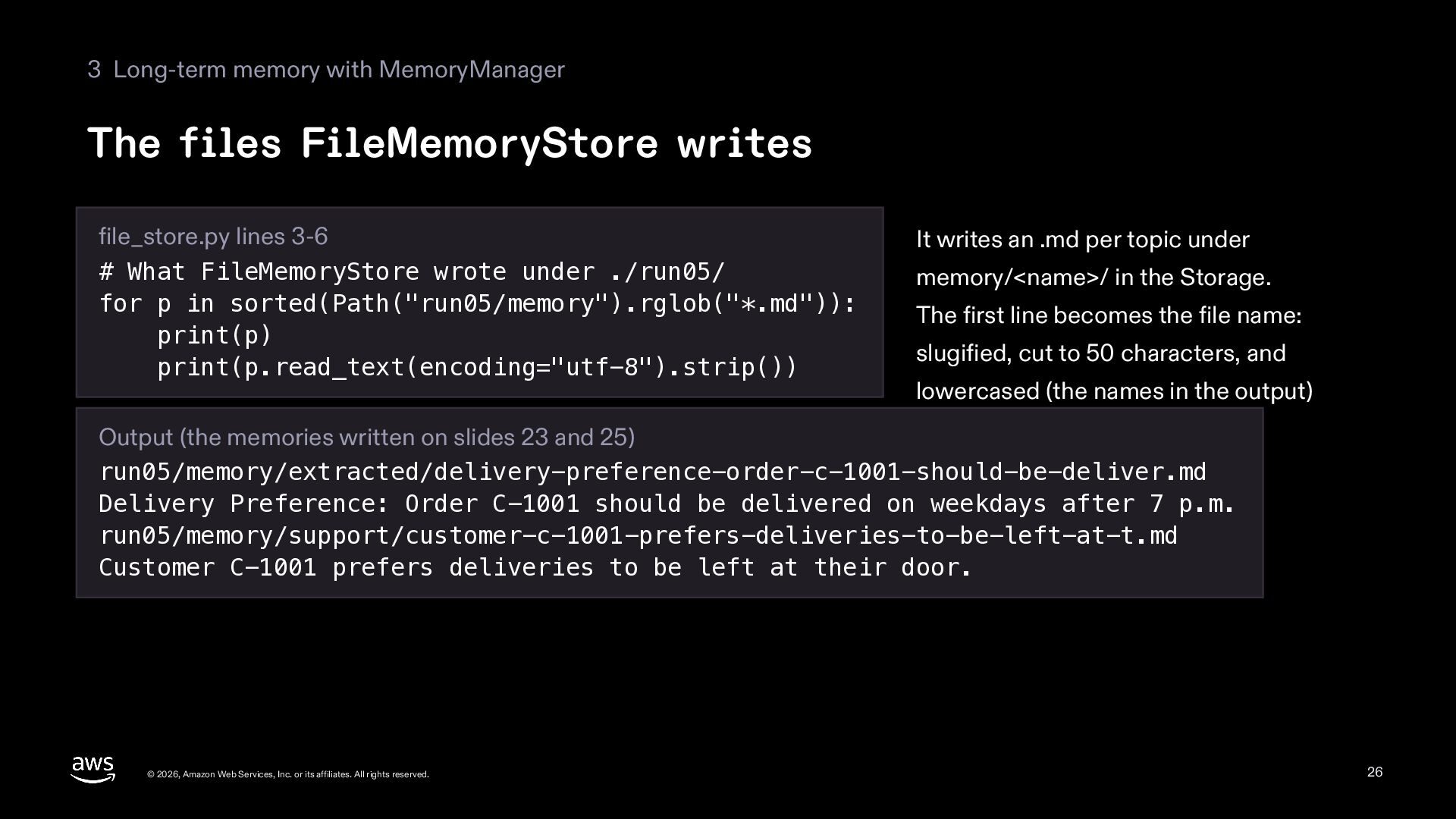
    lines 3-6 # What FileMemoryStore wrote under ./run05/ for p in sorted(Path("run05/memory").rglob("*.md")): print(p) print(p.read_text(encoding="utf-8").strip()) It writes an .md per topic under memory/<name>/ in the Storage. The first line becomes the file name: slugified, cut to 50 characters, and lowercased (the names in the output) Output (the memories written on slides 23 and 25) run05/memory/extracted/delivery-preference-order-c-1001-should-be-deliver.md Delivery Preference: Order C-1001 should be delivered on weekdays after 7 p.m. run05/memory/support/customer-c-1001-prefers-deliveries-to-be-left-at-t.md Customer C-1001 prefers deliveries to be left at their door. © 2026, Amazon Web Services, Inc. or its affiliates. All rights reserved. 26
  27. 05 Sessions and memory Old messages Summary Part 4 Fit

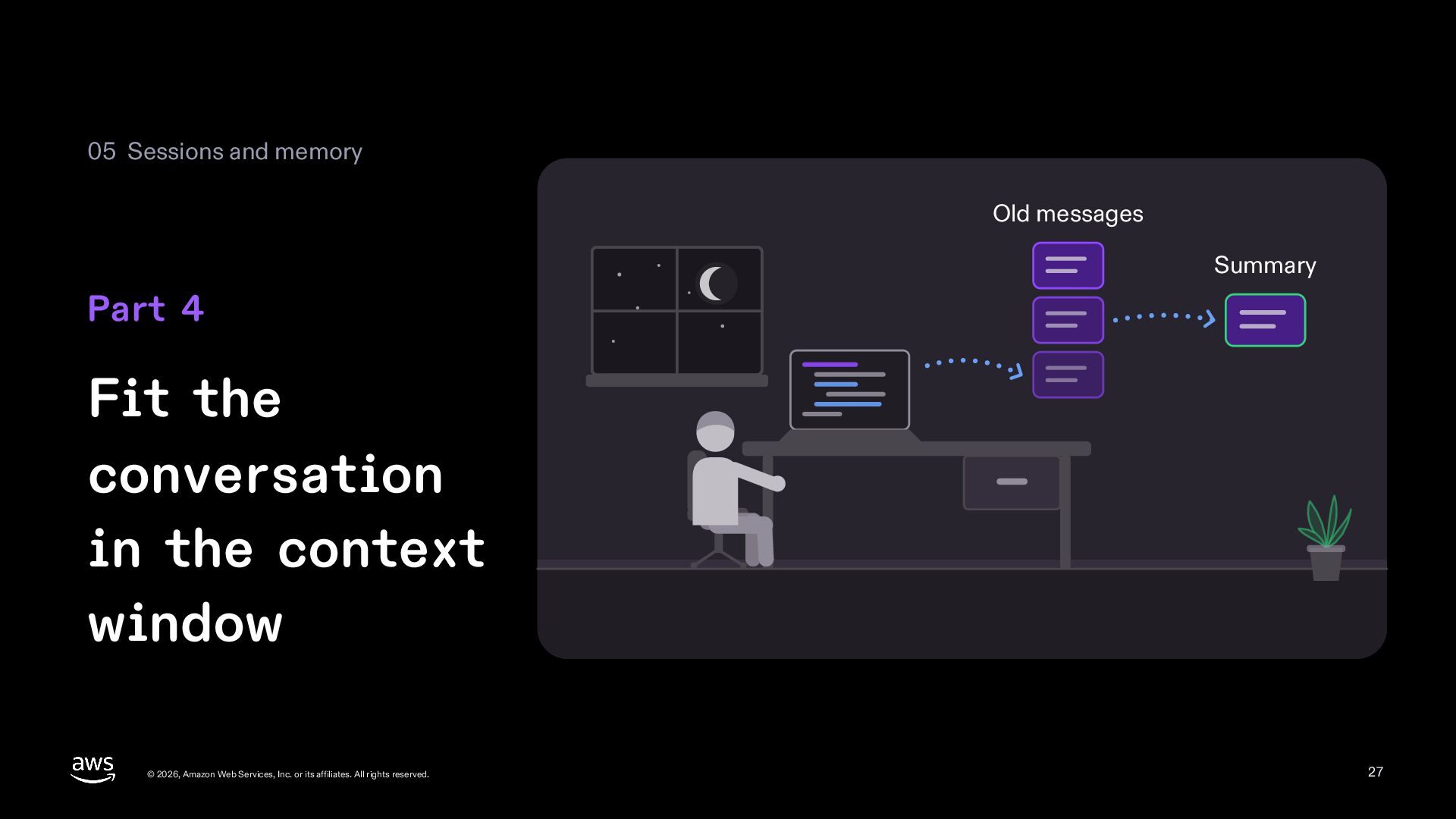
    the conversation in the context window © 2026, Amazon Web Services, Inc. or its affiliates. All rights reserved. 27
  28. 4 Fit the conversation in the context window Inside ContextManager

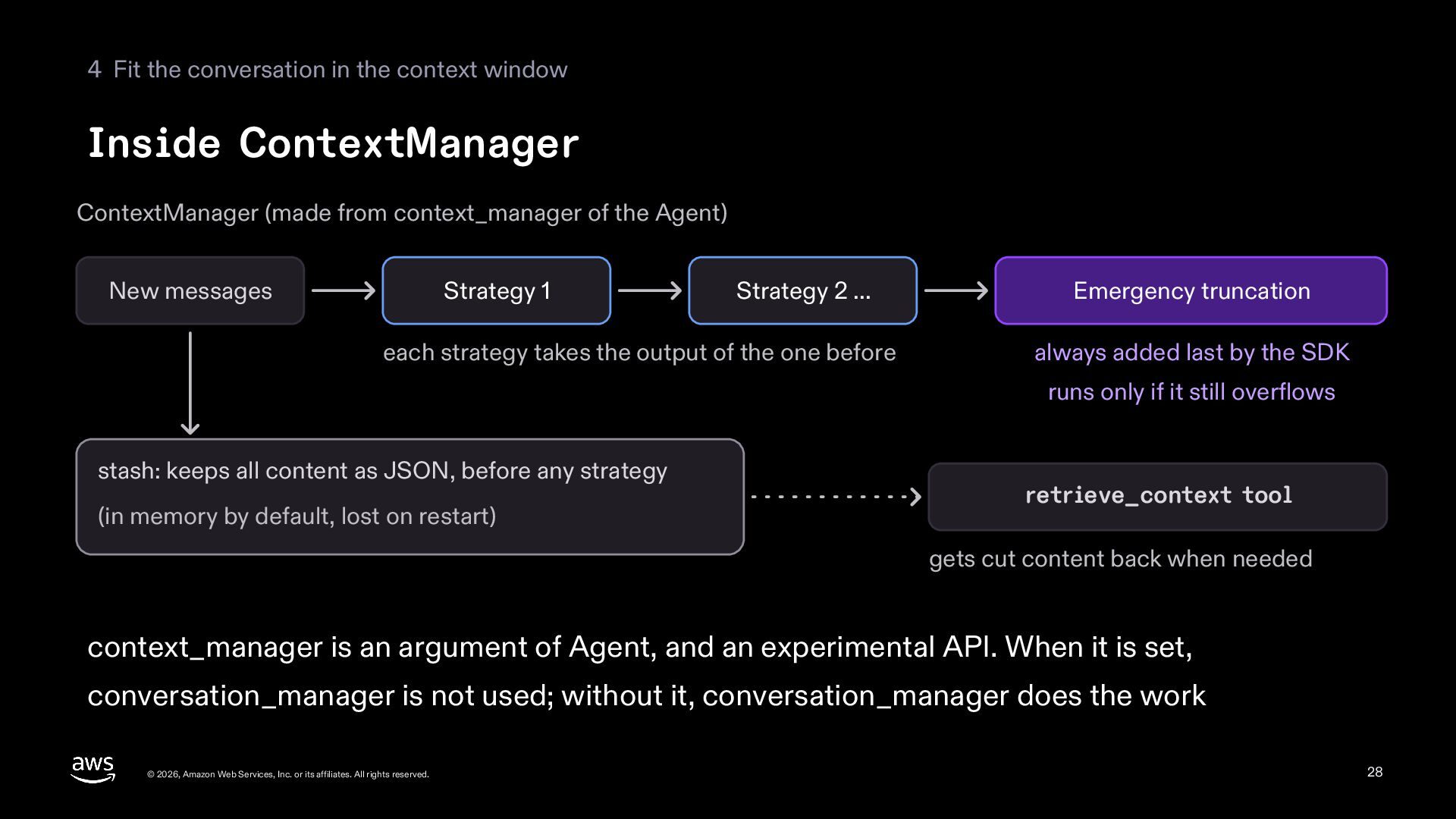
    ContextManager (made from context_manager of the Agent) New messages Strategy 1 Strategy 2 ... each strategy takes the output of the one before Emergency truncation always added last by the SDK runs only if it still overflows stash: keeps all content as JSON, before any strategy (in memory by default, lost on restart) retrieve_context tool gets cut content back when needed context_manager is an argument of Agent, and an experimental API. When it is set, conversation_manager is not used; without it, conversation_manager does the work © 2026, Amazon Web Services, Inc. or its affiliates. All rights reserved. 28
  29. 4 Fit the conversation in the context window Four ways

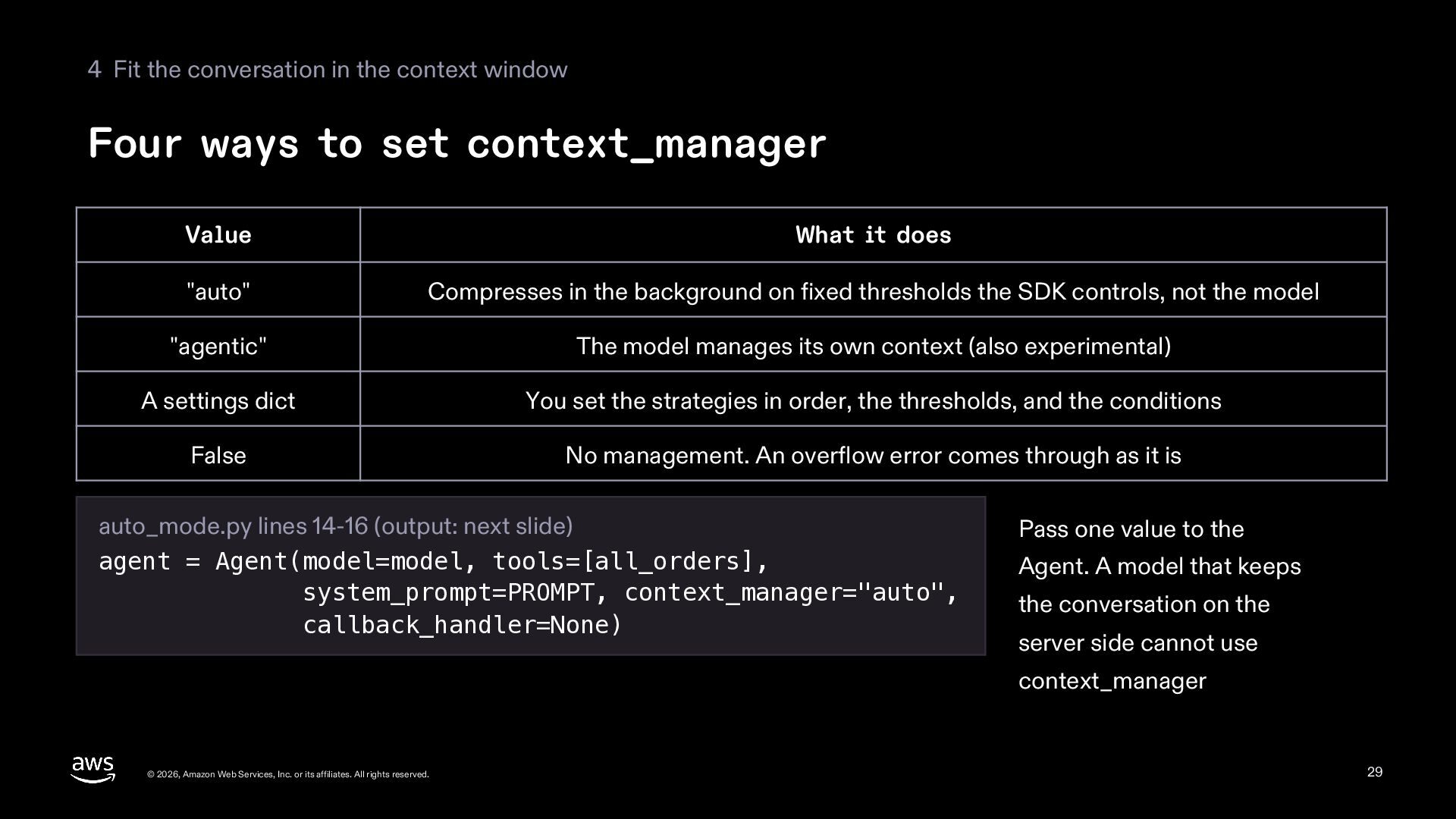
    to set context_manager Value What it does "auto" Compresses in the background on fixed thresholds the SDK controls, not the model "agentic" The model manages its own context (also experimental) A settings dict You set the strategies in order, the thresholds, and the conditions False No management. An overflow error comes through as it is auto_mode.py lines 14-16 (output: next slide) agent = Agent(model=model, tools=[all_orders], system_prompt=PROMPT, context_manager="auto", callback_handler=None) Pass one value to the Agent. A model that keeps the conversation on the server side cannot use context_manager © 2026, Amazon Web Services, Inc. or its affiliates. All rights reserved. 29
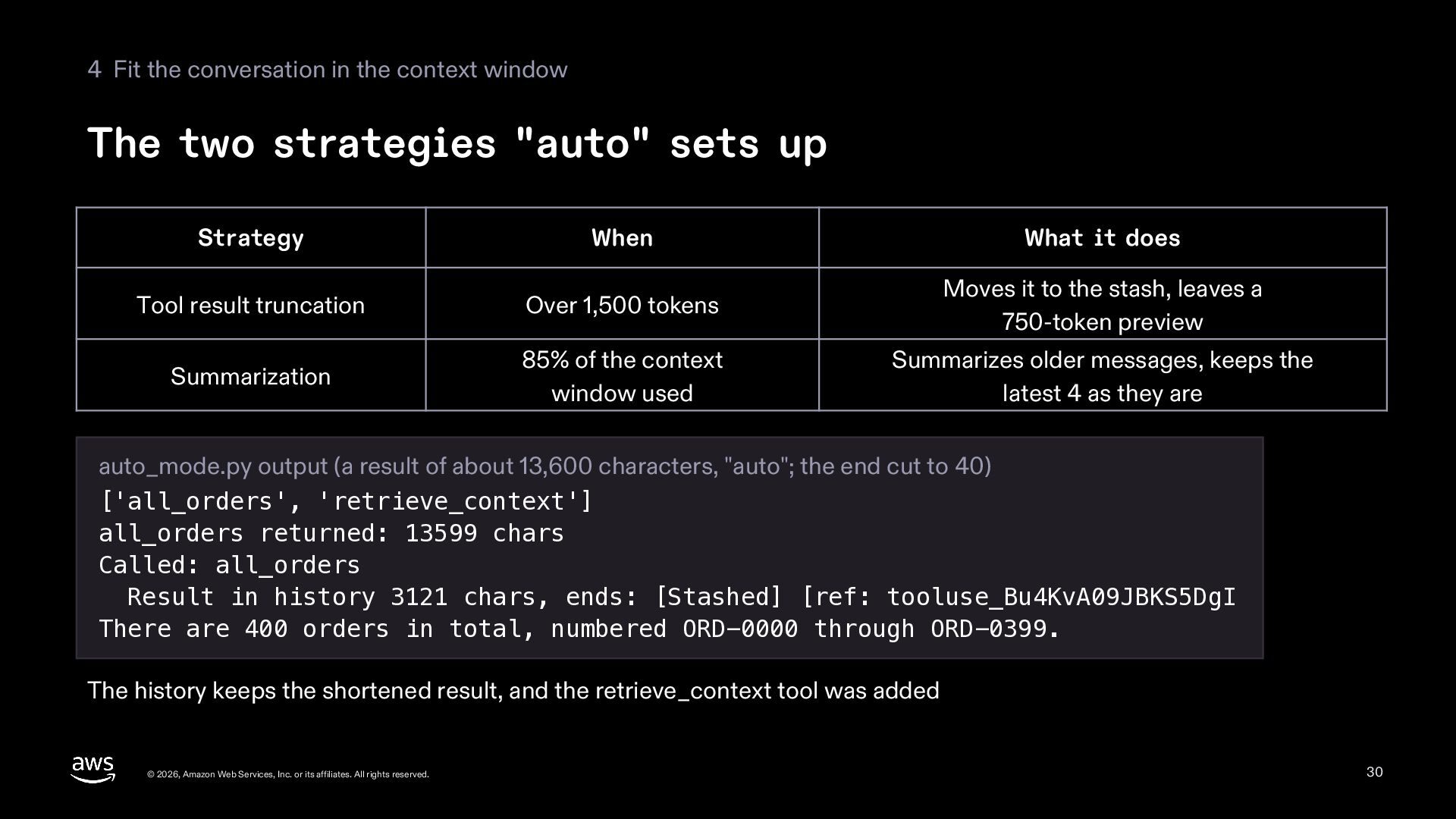
  30. 4 Fit the conversation in the context window The two

    strategies "auto" sets up Strategy When What it does Tool result truncation Over 1,500 tokens Moves it to the stash, leaves a 750-token preview Summarization 85% of the context window used Summarizes older messages, keeps the latest 4 as they are auto_mode.py output (a result of about 13,600 characters, "auto"; the end cut to 40) ['all_orders', 'retrieve_context'] all_orders returned: 13599 chars Called: all_orders Result in history 3121 chars, ends: [Stashed] [ref: tooluse_Bu4KvA09JBKS5DgI There are 400 orders in total, numbered ORD-0000 through ORD-0399. The history keeps the shortened result, and the retrieve_context tool was added © 2026, Amazon Web Services, Inc. or its affiliates. All rights reserved. 30
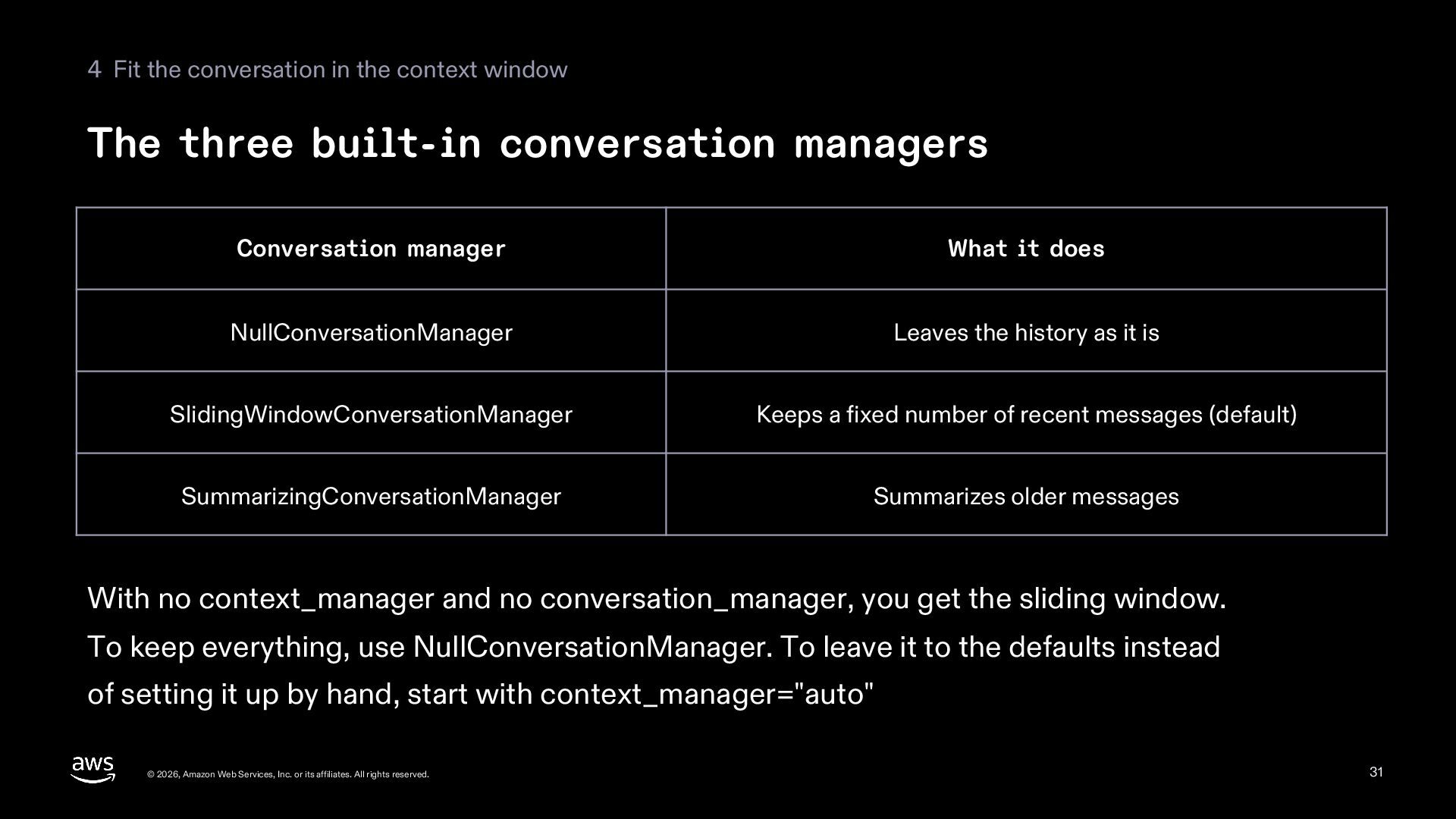
  31. 4 Fit the conversation in the context window The three

    built-in conversation managers Conversation manager What it does NullConversationManager Leaves the history as it is SlidingWindowConversationManager Keeps a fixed number of recent messages (default) SummarizingConversationManager Summarizes older messages With no context_manager and no conversation_manager, you get the sliding window. To keep everything, use NullConversationManager. To leave it to the defaults instead of setting it up by hand, start with context_manager="auto" © 2026, Amazon Web Services, Inc. or its affiliates. All rights reserved. 31
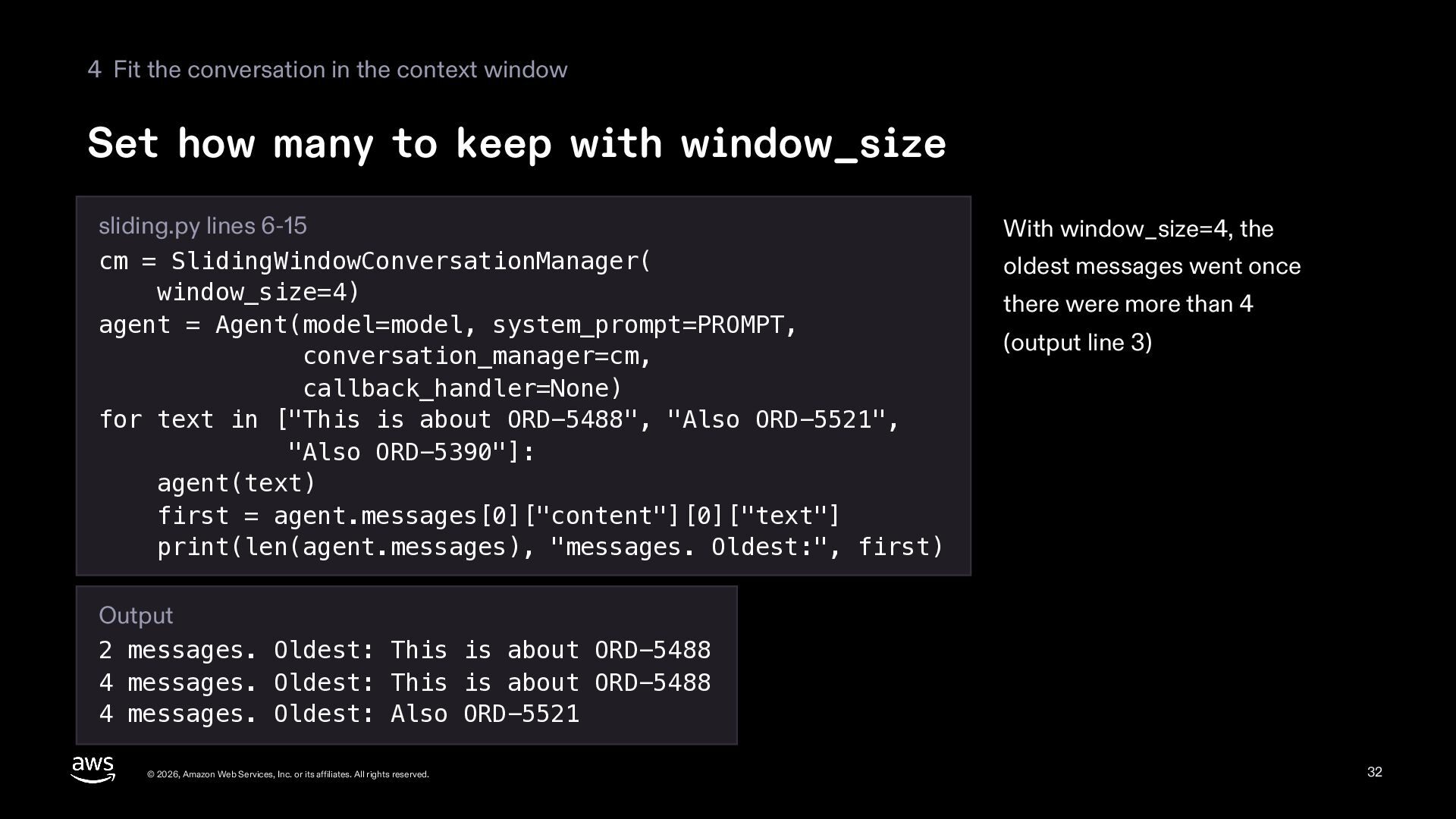
  32. 4 Fit the conversation in the context window Set how

    many to keep with window_size sliding.py lines 6-15 cm = SlidingWindowConversationManager( window_size=4) agent = Agent(model=model, system_prompt=PROMPT, conversation_manager=cm, callback_handler=None) for text in ["This is about ORD-5488", "Also ORD-5521", "Also ORD-5390"]: agent(text) first = agent.messages[0]["content"][0]["text"] print(len(agent.messages), "messages. Oldest:", first) With window_size=4, the oldest messages went once there were more than 4 (output line 3) Output 2 messages. Oldest: This is about ORD-5488 4 messages. Oldest: This is about ORD-5488 4 messages. Oldest: Also ORD-5521 © 2026, Amazon Web Services, Inc. or its affiliates. All rights reserved. 32
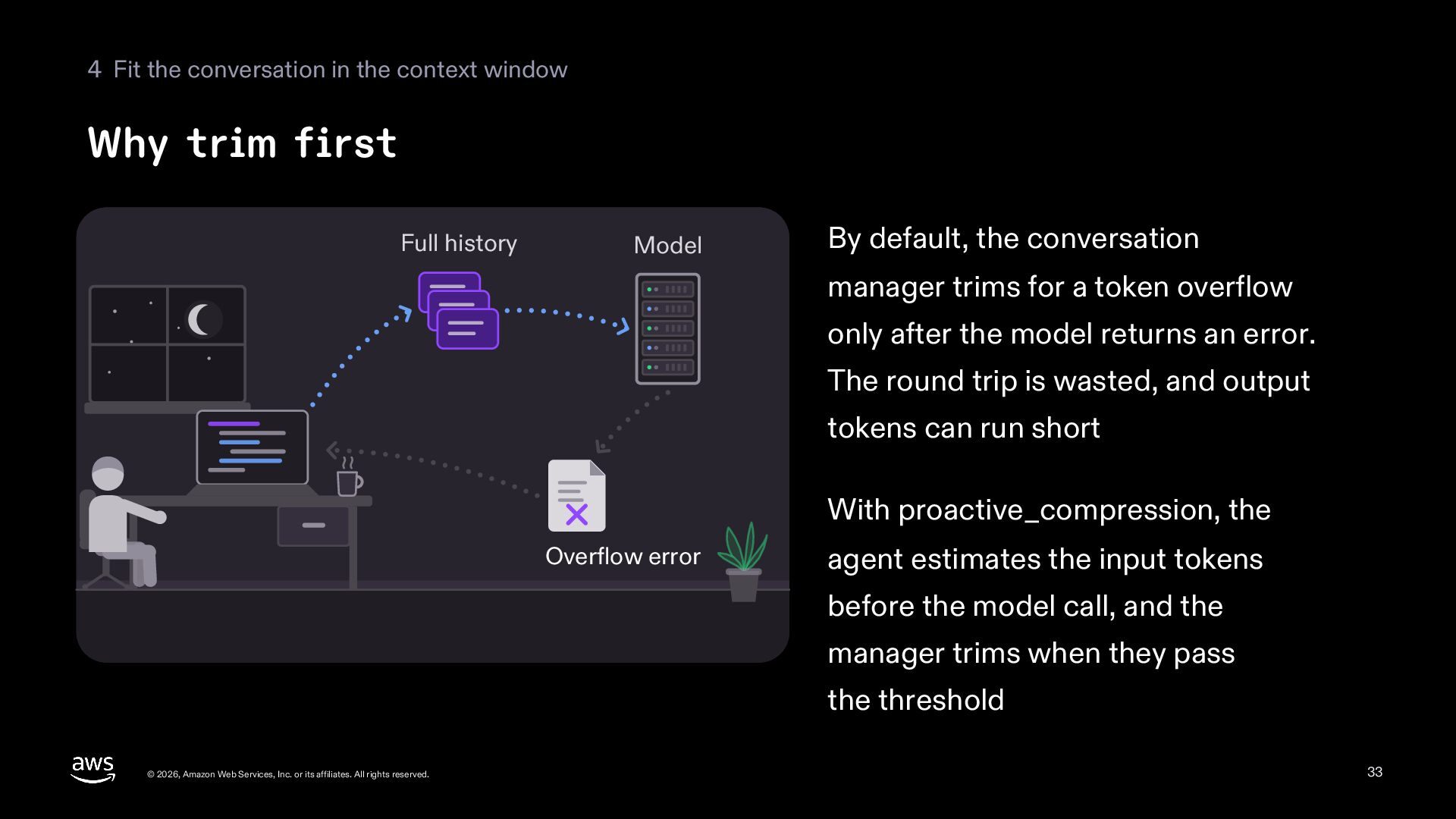
  33. 4 Fit the conversation in the context window Why trim

    first Full history Model By default, the conversation manager trims for a token overflow only after the model returns an error. The round trip is wasted, and output tokens can run short With proactive_compression, the Overflow error agent estimates the input tokens before the model call, and the manager trims when they pass the threshold © 2026, Amazon Web Services, Inc. or its affiliates. All rights reserved. 33
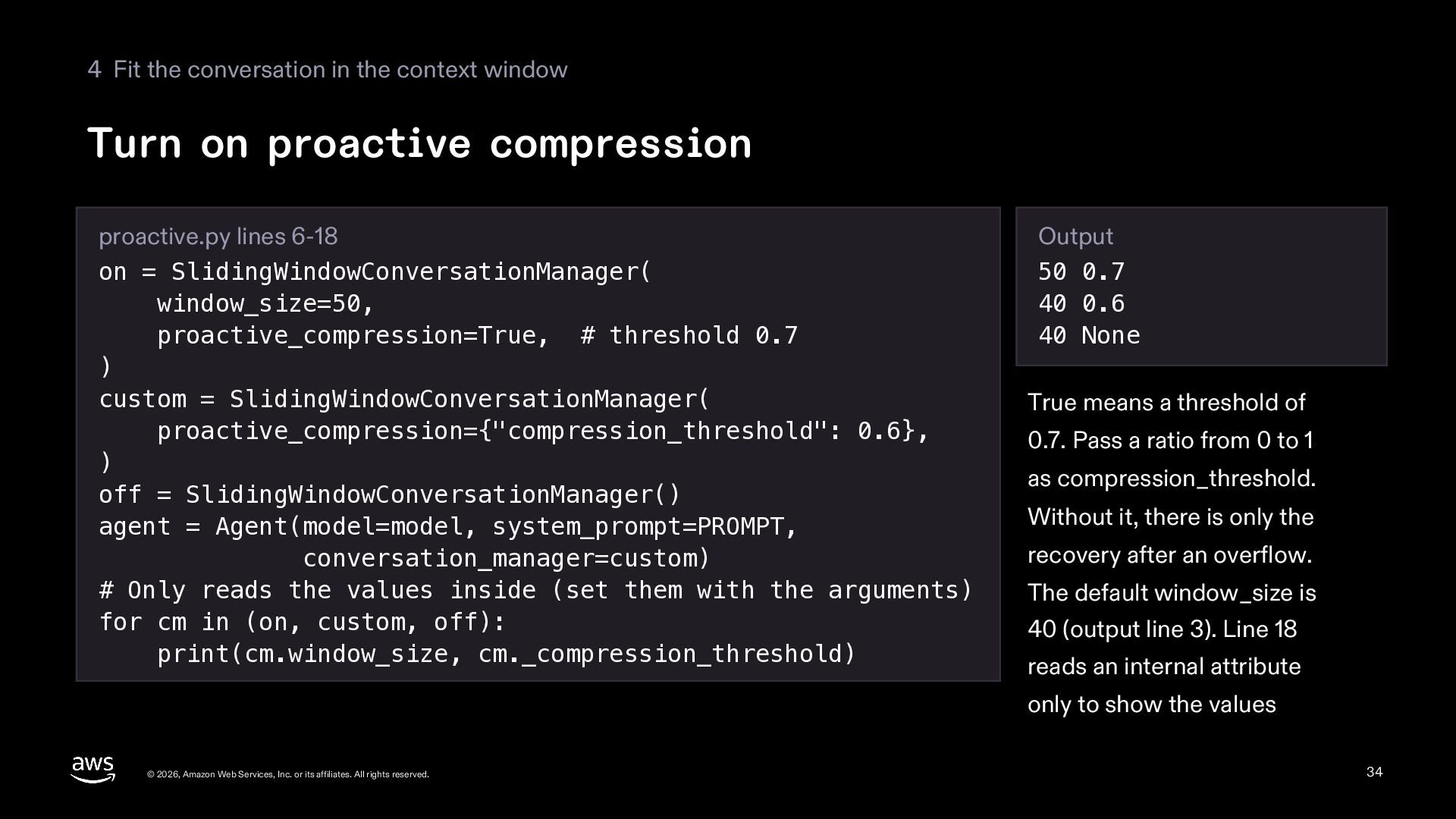
  34. 4 Fit the conversation in the context window Turn on

    proactive compression proactive.py lines 6-18 on = SlidingWindowConversationManager( window_size=50, proactive_compression=True, # threshold 0.7 ) custom = SlidingWindowConversationManager( proactive_compression={"compression_threshold": 0.6}, ) off = SlidingWindowConversationManager() agent = Agent(model=model, system_prompt=PROMPT, conversation_manager=custom) # Only reads the values inside (set them with the arguments) for cm in (on, custom, off): print(cm.window_size, cm._compression_threshold) Output 50 0.7 40 0.6 40 None True means a threshold of 0.7. Pass a ratio from 0 to 1 as compression_threshold. Without it, there is only the recovery after an overflow. The default window_size is 40 (output line 3). Line 18 reads an internal attribute only to show the values © 2026, Amazon Web Services, Inc. or its affiliates. All rights reserved. 34
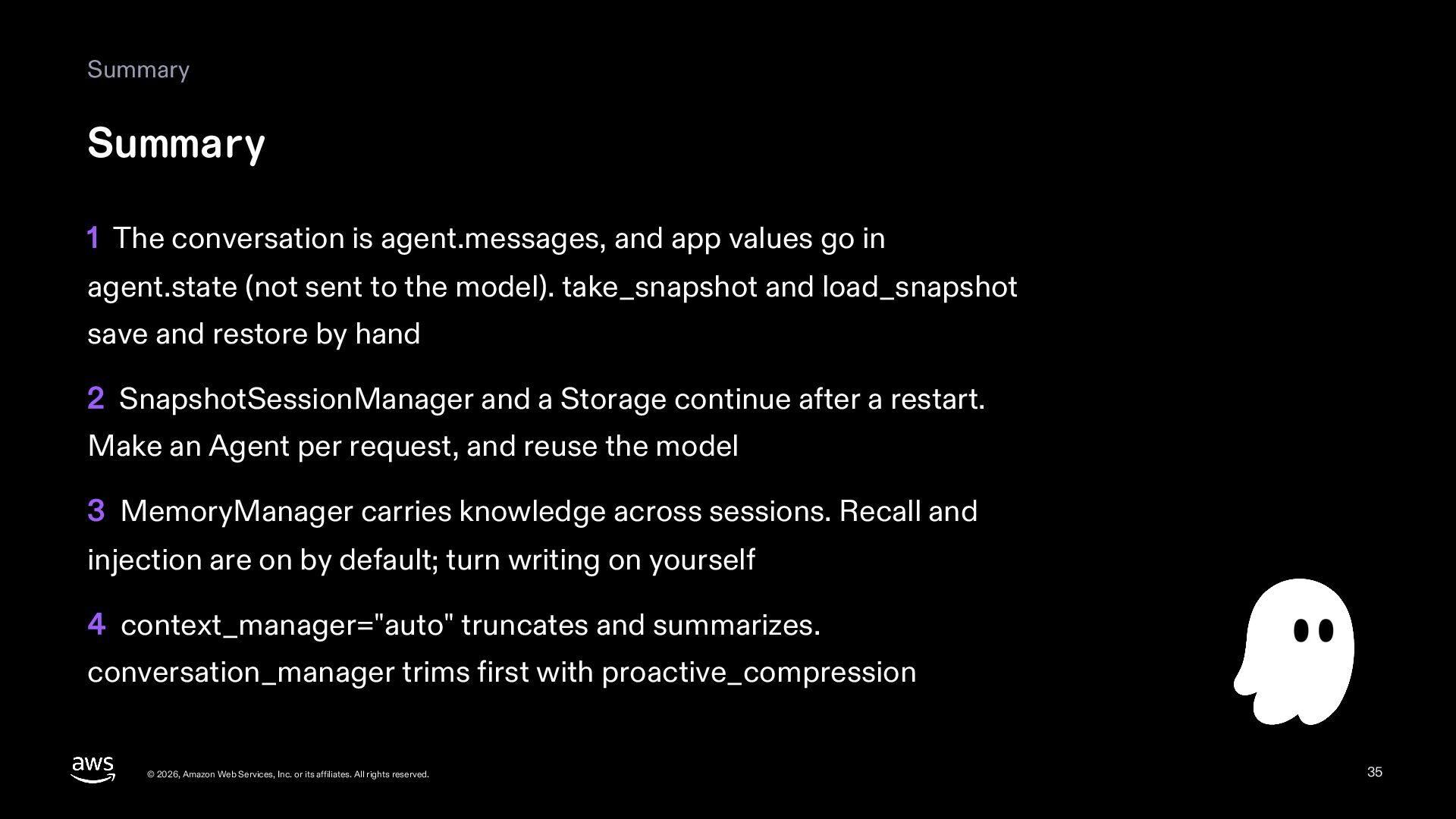
  35. Summary Summary 1 The conversation is agent.messages, and app values

    go in agent.state (not sent to the model). take_snapshot and load_snapshot save and restore by hand 2 SnapshotSessionManager and a Storage continue after a restart. Make an Agent per request, and reuse the model 3 MemoryManager carries knowledge across sessions. Recall and injection are on by default; turn writing on yourself 4 context_manager="auto" truncates and summarizes. conversation_manager trims first with proactive_compression © 2026, Amazon Web Services, Inc. or its affiliates. All rights reserved. 35
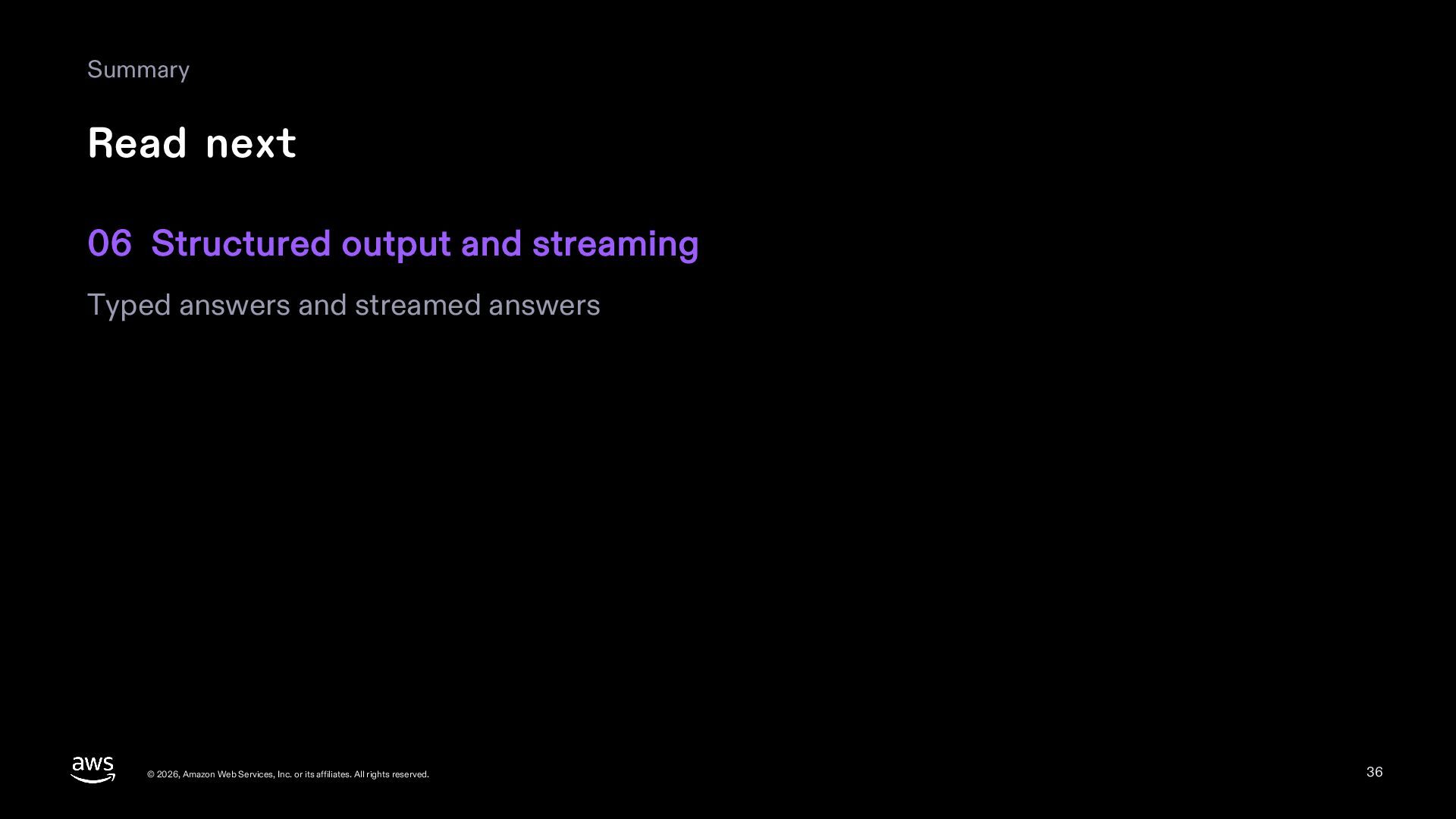
  36. Summary Read next 06 Structured output and streaming Typed answers

    and streamed answers © 2026, Amazon Web Services, Inc. or its affiliates. All rights reserved. 36
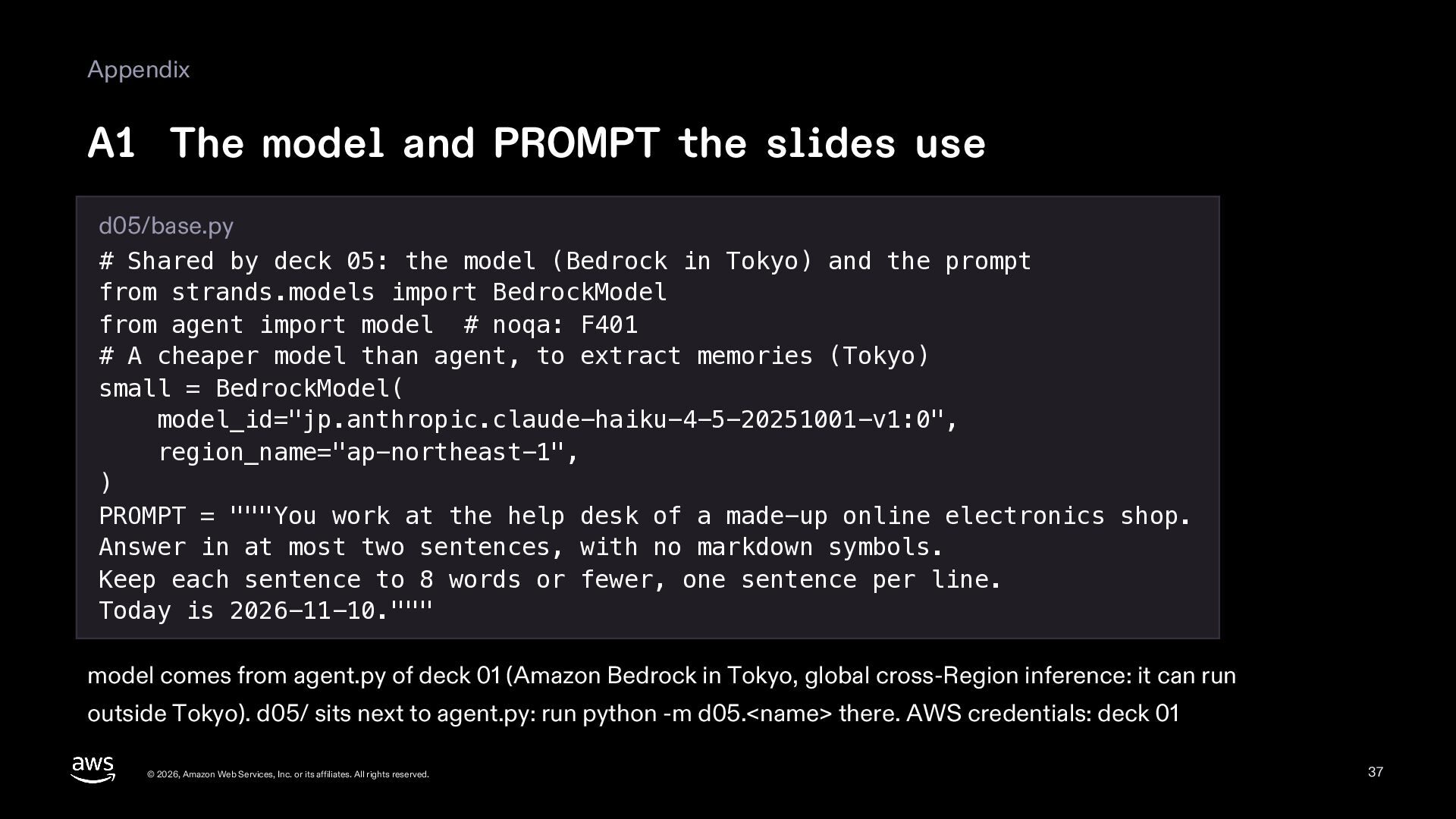
  37. Appendix A1 The model and PROMPT the slides use d05/base.py

    # Shared by deck 05: the model (Bedrock in Tokyo) and the prompt from strands.models import BedrockModel from agent import model # noqa: F401 # A cheaper model than agent, to extract memories (Tokyo) small = BedrockModel( model_id="jp.anthropic.claude-haiku-4-5-20251001-v1:0", region_name="ap-northeast-1", ) PROMPT = """You work at the help desk of a made-up online electronics shop. Answer in at most two sentences, with no markdown symbols. Keep each sentence to 8 words or fewer, one sentence per line. Today is 2026-11-10.""" model comes from agent.py of deck 01 (Amazon Bedrock in Tokyo, global cross-Region inference: it can run outside Tokyo). d05/ sits next to agent.py: run python -m d05.<name> there. AWS credentials: deck 01 © 2026, Amazon Web Services, Inc. or its affiliates. All rights reserved. 37
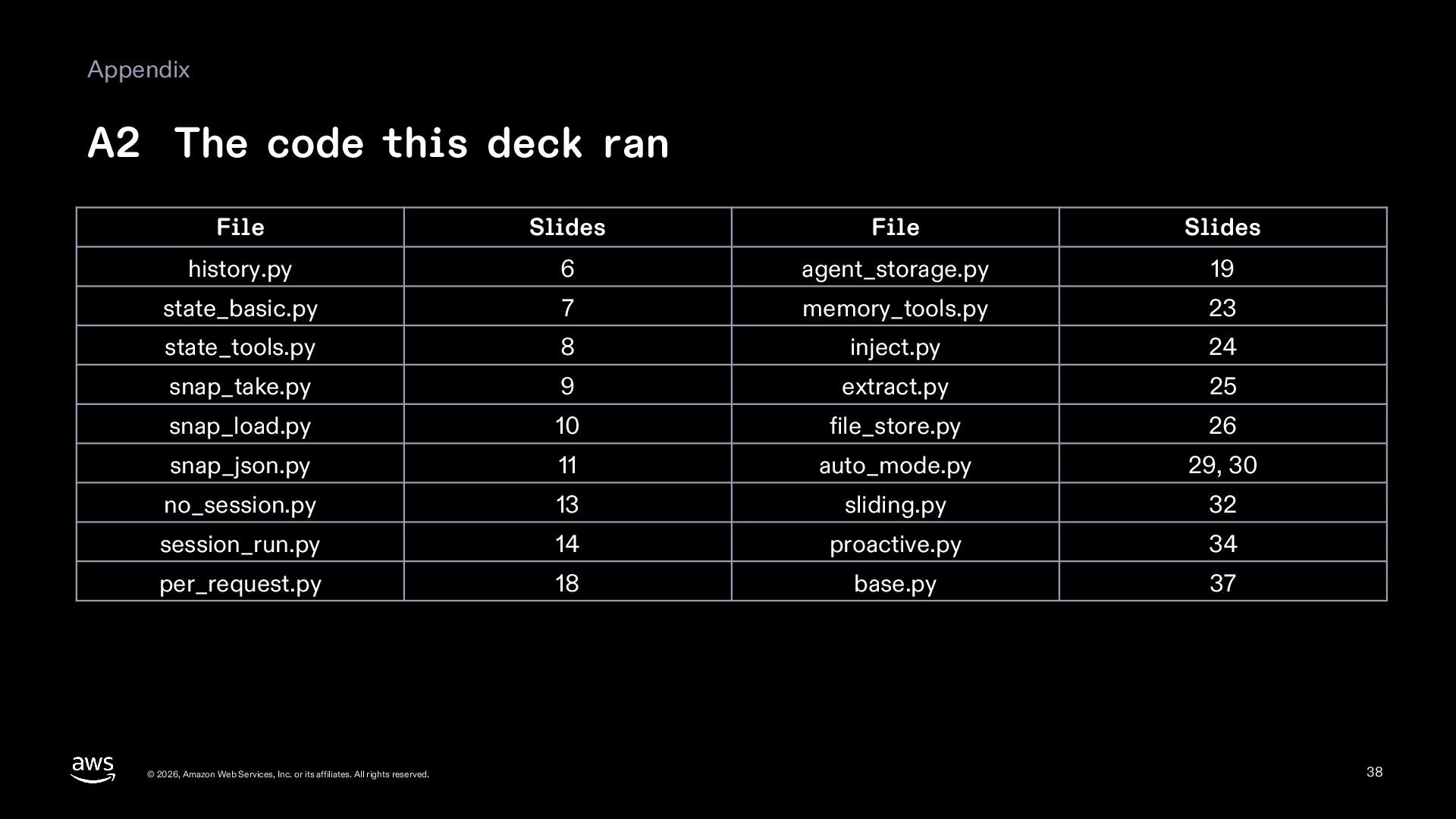
  38. Appendix A2 The code this deck ran File Slides File

    Slides history.py 6 agent_storage.py 19 state_basic.py 7 memory_tools.py 23 state_tools.py 8 inject.py 24 snap_take.py 9 extract.py 25 snap_load.py 10 file_store.py 26 snap_json.py 11 auto_mode.py 29, 30 no_session.py 13 sliding.py 32 session_run.py 14 proactive.py 34 per_request.py 18 base.py 37 © 2026, Amazon Web Services, Inc. or its affiliates. All rights reserved. 38
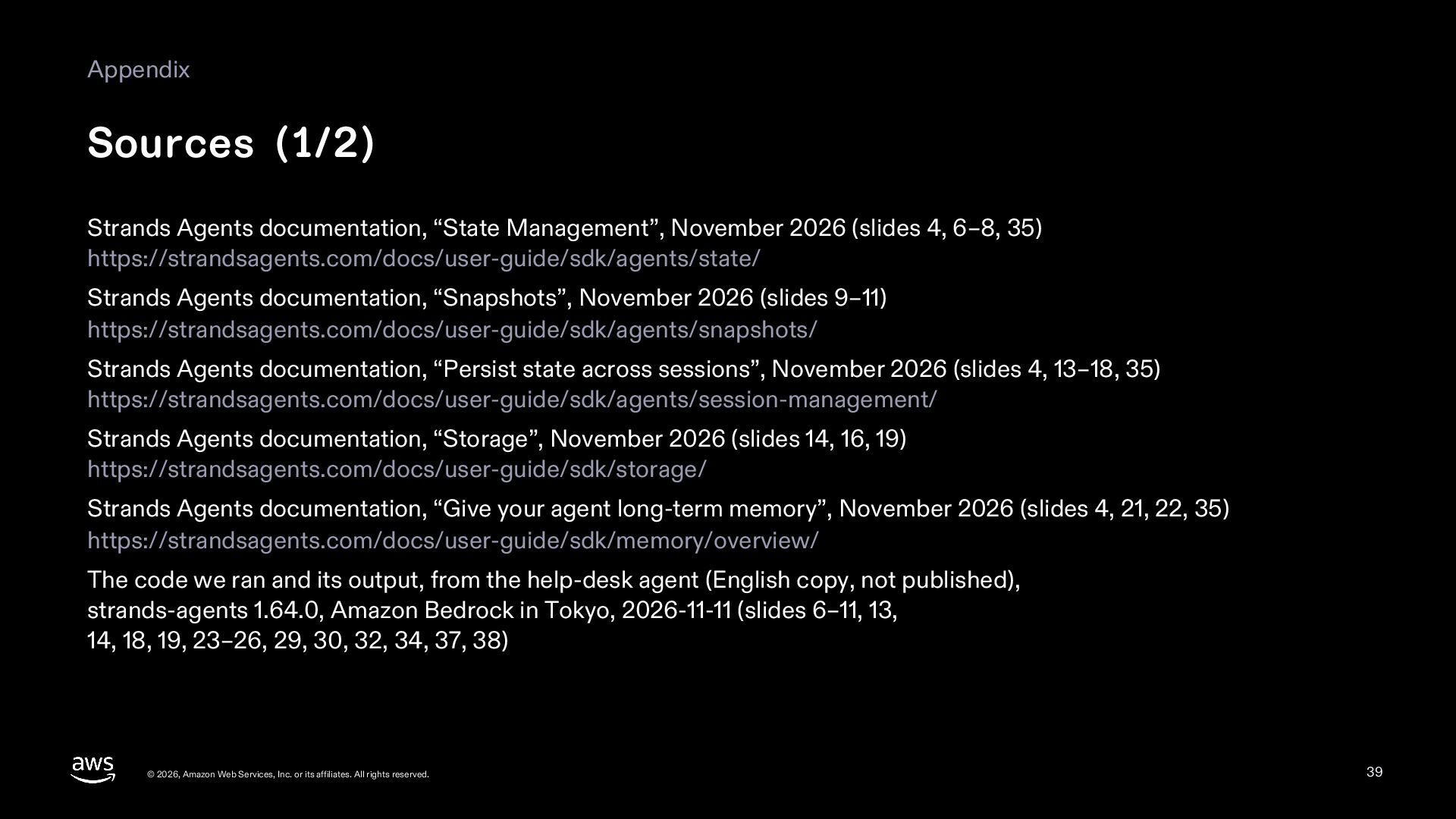
  39. Appendix Sources (1/2) Strands Agents documentation, “State Management”, November 2026

    (slides 4, 6–8, 35) https://strandsagents.com/docs/user-guide/sdk/agents/state/ Strands Agents documentation, “Snapshots”, November 2026 (slides 9–11) https://strandsagents.com/docs/user-guide/sdk/agents/snapshots/ Strands Agents documentation, “Persist state across sessions”, November 2026 (slides 4, 13–18, 35) https://strandsagents.com/docs/user-guide/sdk/agents/session-management/ Strands Agents documentation, “Storage”, November 2026 (slides 14, 16, 19) https://strandsagents.com/docs/user-guide/sdk/storage/ Strands Agents documentation, “Give your agent long-term memory”, November 2026 (slides 4, 21, 22, 35) https://strandsagents.com/docs/user-guide/sdk/memory/overview/ The code we ran and its output, from the help-desk agent (English copy, not published), strands-agents 1.64.0, Amazon Bedrock in Tokyo, 2026-11-11 (slides 6–11, 13, 14, 18, 19, 23–26, 29, 30, 32, 34, 37, 38) © 2026, Amazon Web Services, Inc. or its affiliates. All rights reserved. 39
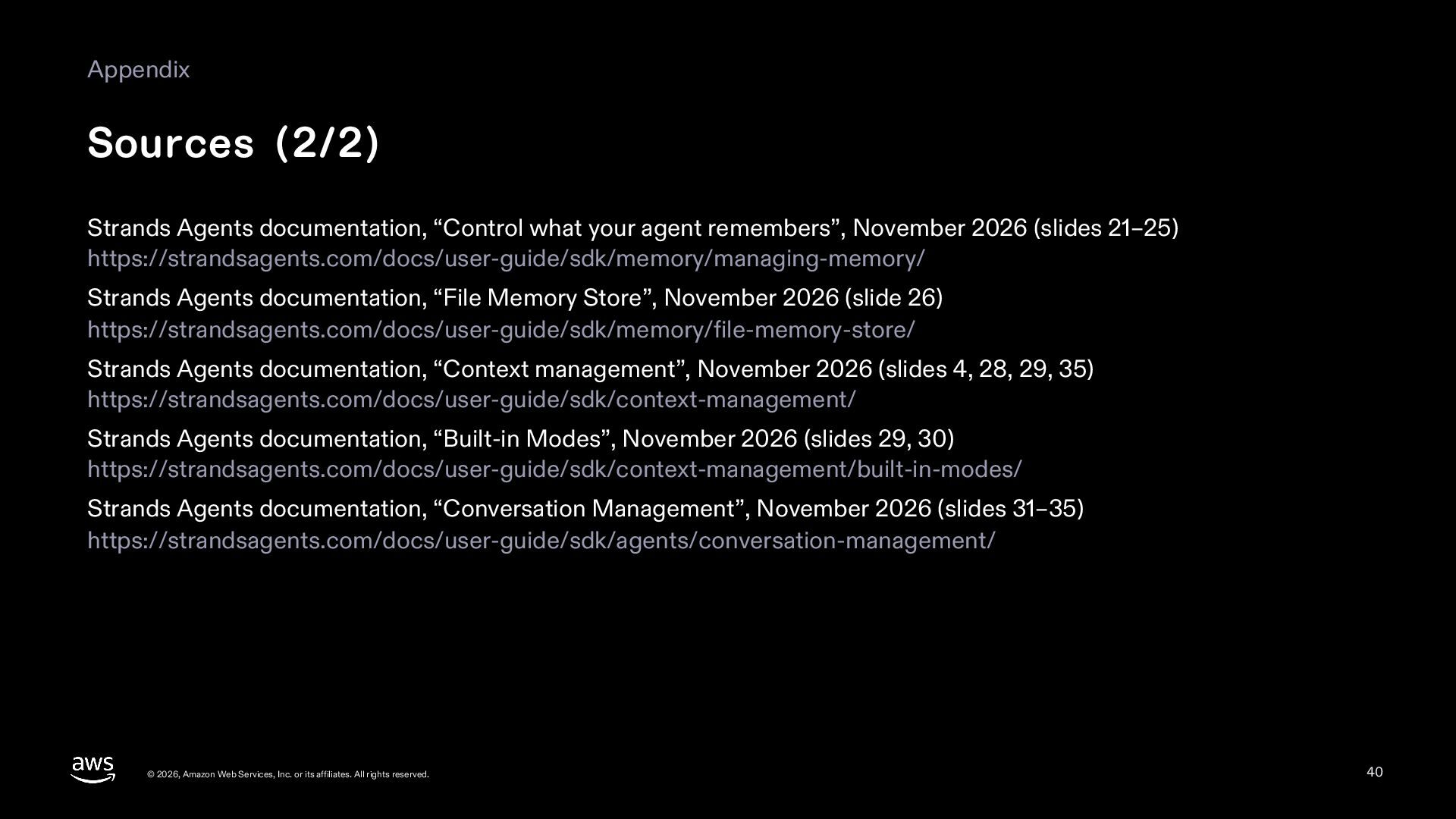
  40. Appendix Sources (2/2) Strands Agents documentation, “Control what your agent

    remembers”, November 2026 (slides 21–25) https://strandsagents.com/docs/user-guide/sdk/memory/managing-memory/ Strands Agents documentation, “File Memory Store”, November 2026 (slide 26) https://strandsagents.com/docs/user-guide/sdk/memory/file-memory-store/ Strands Agents documentation, “Context management”, November 2026 (slides 4, 28, 29, 35) https://strandsagents.com/docs/user-guide/sdk/context-management/ Strands Agents documentation, “Built-in Modes”, November 2026 (slides 29, 30) https://strandsagents.com/docs/user-guide/sdk/context-management/built-in-modes/ Strands Agents documentation, “Conversation Management”, November 2026 (slides 31–35) https://strandsagents.com/docs/user-guide/sdk/agents/conversation-management/ © 2026, Amazon Web Services, Inc. or its affiliates. All rights reserved. 40