Upgrade to Pro — share decks privately, control downloads, hide ads and more …

道具を渡す | Kiro と学ぶ Strands Agents 02

道具を渡す | Kiro と学ぶ Strands Agents 02

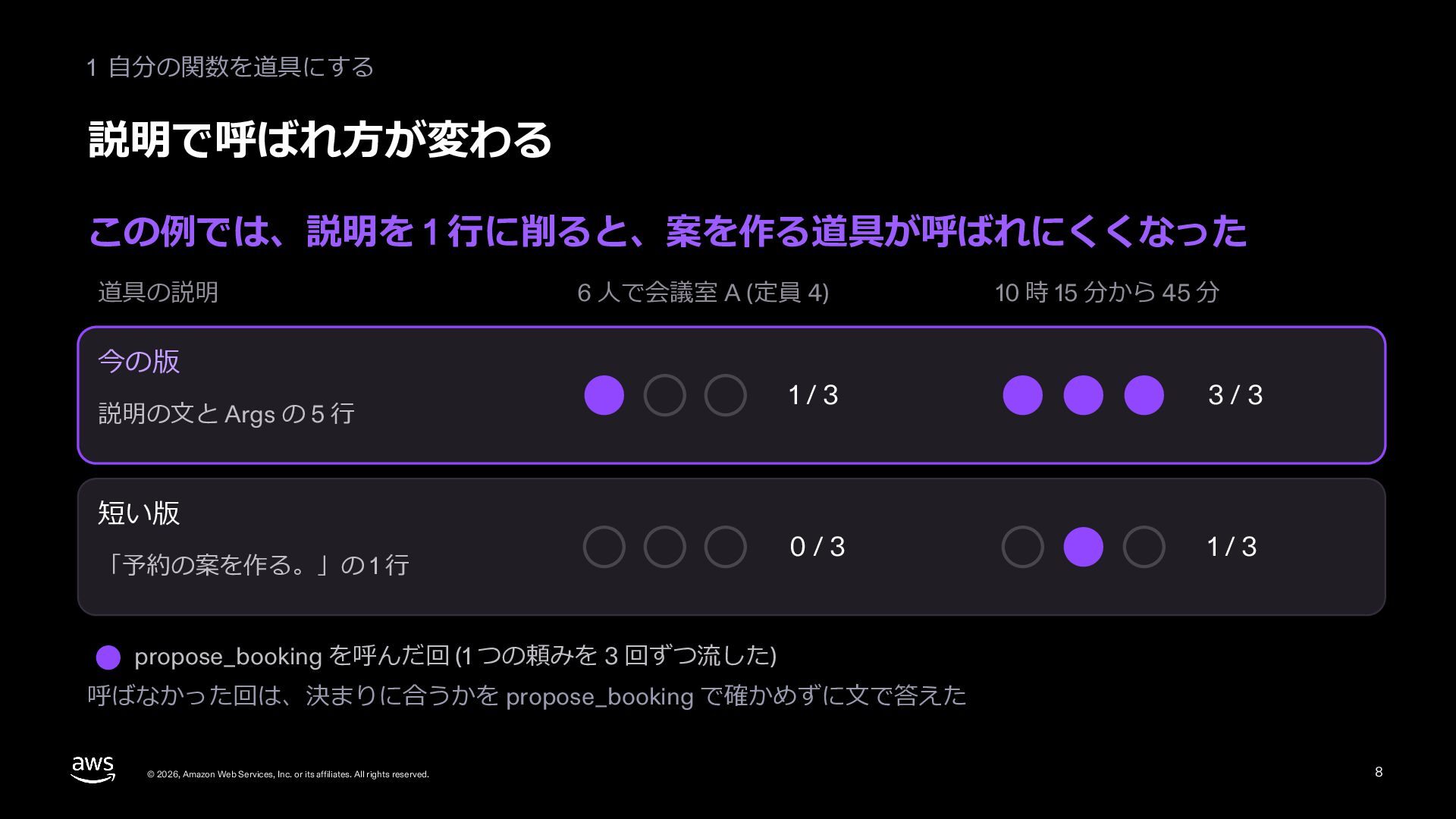
Strands Agents のエージェントに道具を渡す 3 つの形 (@tool を付けた自分の関数、SDK の組み込みの道具、MCPClient でつなぐ MCP サーバーの道具) を説明する配布資料です。会議室の予約を手伝う例題を Kiro に書かせて動かし、この例では道具の説明を 1 行に削ると予約の案を作る道具が呼ばれにくくなったことを、2 つの頼みを 3 回ずつ流して示します。agent.tool で道具だけを直接呼んで確かめる方法と、Kiro への頼み方も扱います。シリーズ「Kiro と学ぶ Strands Agents」の 02 (はじめる) です。

Avatar for Riku INADA

Riku INADA PRO

November 09, 2026

More Decks by Riku INADA

Other Decks in Technology

Transcript

  1. Kiro と学ぶ Strands Agents 02 はじめる 道具を渡す 関数、組み込みの道具、MCP 2026-11 時点

    2026 年 11 ⽉ 稲⽥ ⼤陸 アマゾン ウェブ サービス ジャパン © 2026, Amazon Web Services, Inc. or its affiliates. All rights reserved. 02 Kiro + Strands Agents 1
  2. はじめに ⾃⼰紹介 稲⽥ ⼤陸 いなだ りく (いなりく) アマゾン ウェブ サービス

    ジャパン合同会社 ソリューションアーキテクト 製造業のお客様を中⼼に⽀援 最近の取り組み AI 駆動開発ライフサイクルの推進 Kiro と AWS Amplify の情報発信 © 2026, Amazon Web Services, Inc. or its affiliates. All rights reserved. X @inada_riku Speaker Deck speakerdeck.com/inariku Zenn zenn.dev/inariku GitHub github.com/inariku 2
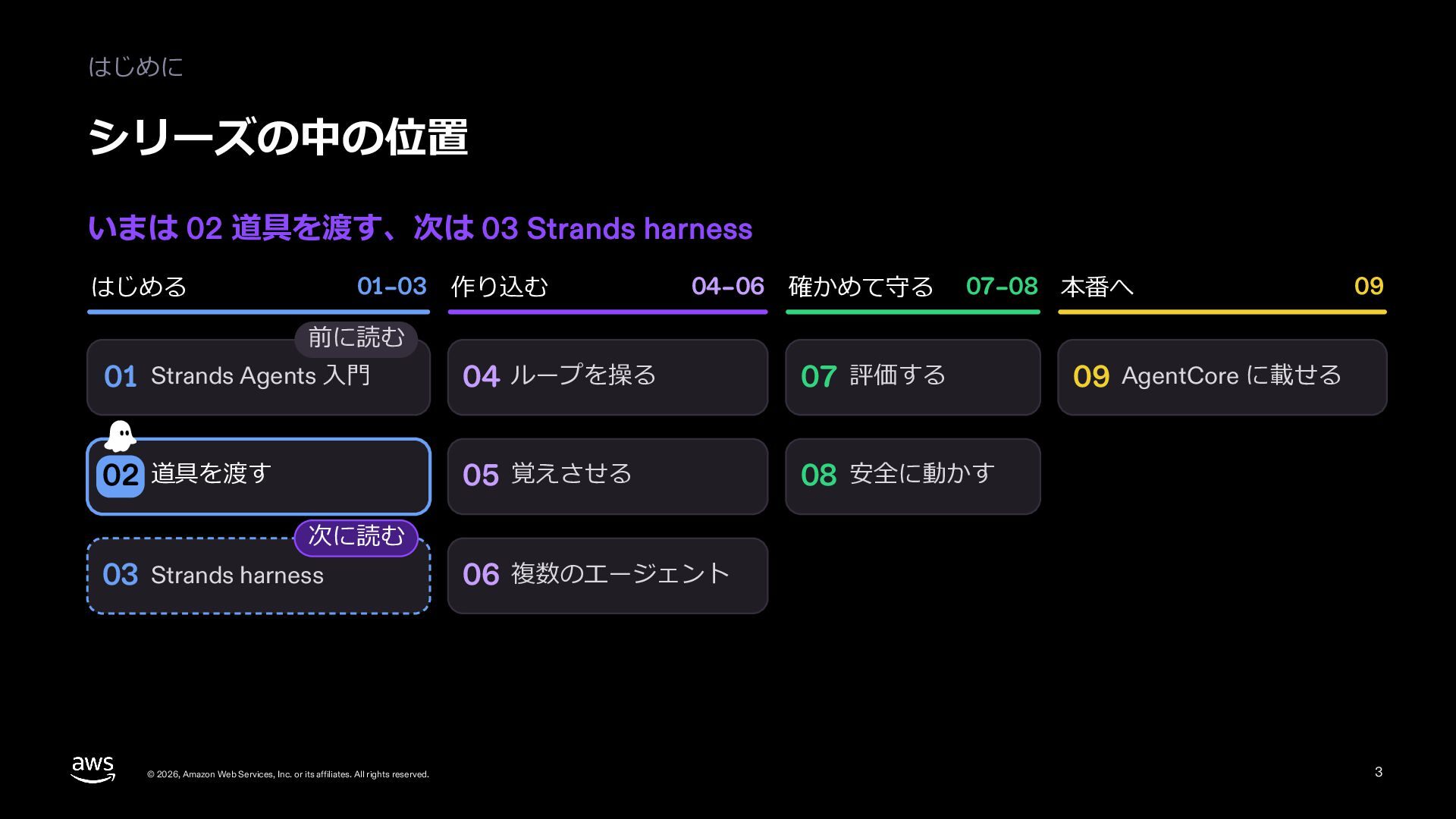
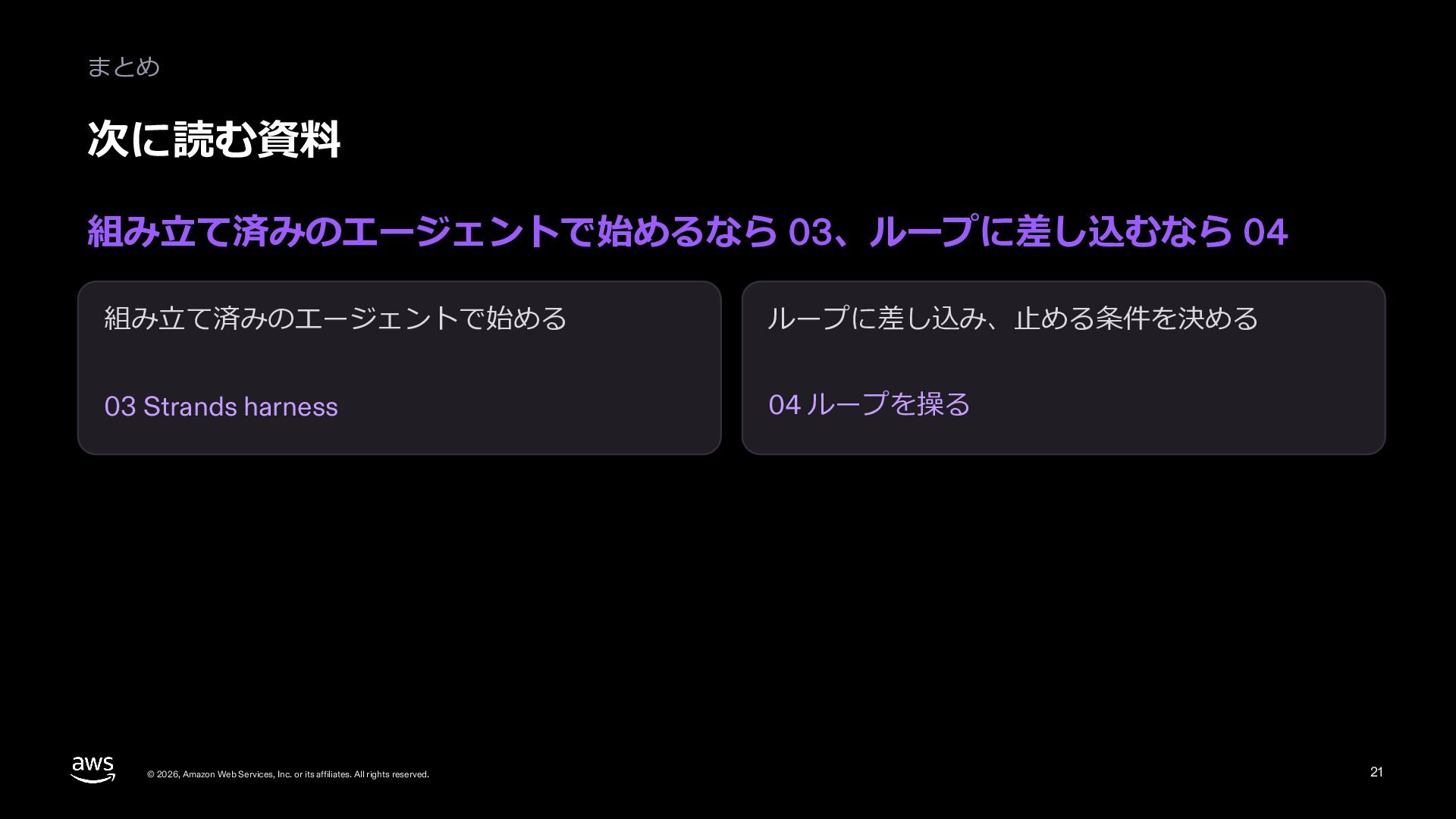
  3. はじめに シリーズの中の位置 いまは 02 道具を渡す、次は 03 Strands harness はじめる 01–03

    作り込む 04–06 確かめて守る 07–08 本番へ 09 前に読む 01 Strands Agents ⼊⾨ 04 ループを操る 07 評価する 02 道具を渡す 05 覚えさせる 08 安全に動かす 09 AgentCore に載せる 次に読む 03 Strands harness © 2026, Amazon Web Services, Inc. or its affiliates. All rights reserved. 06 複数のエージェント 3
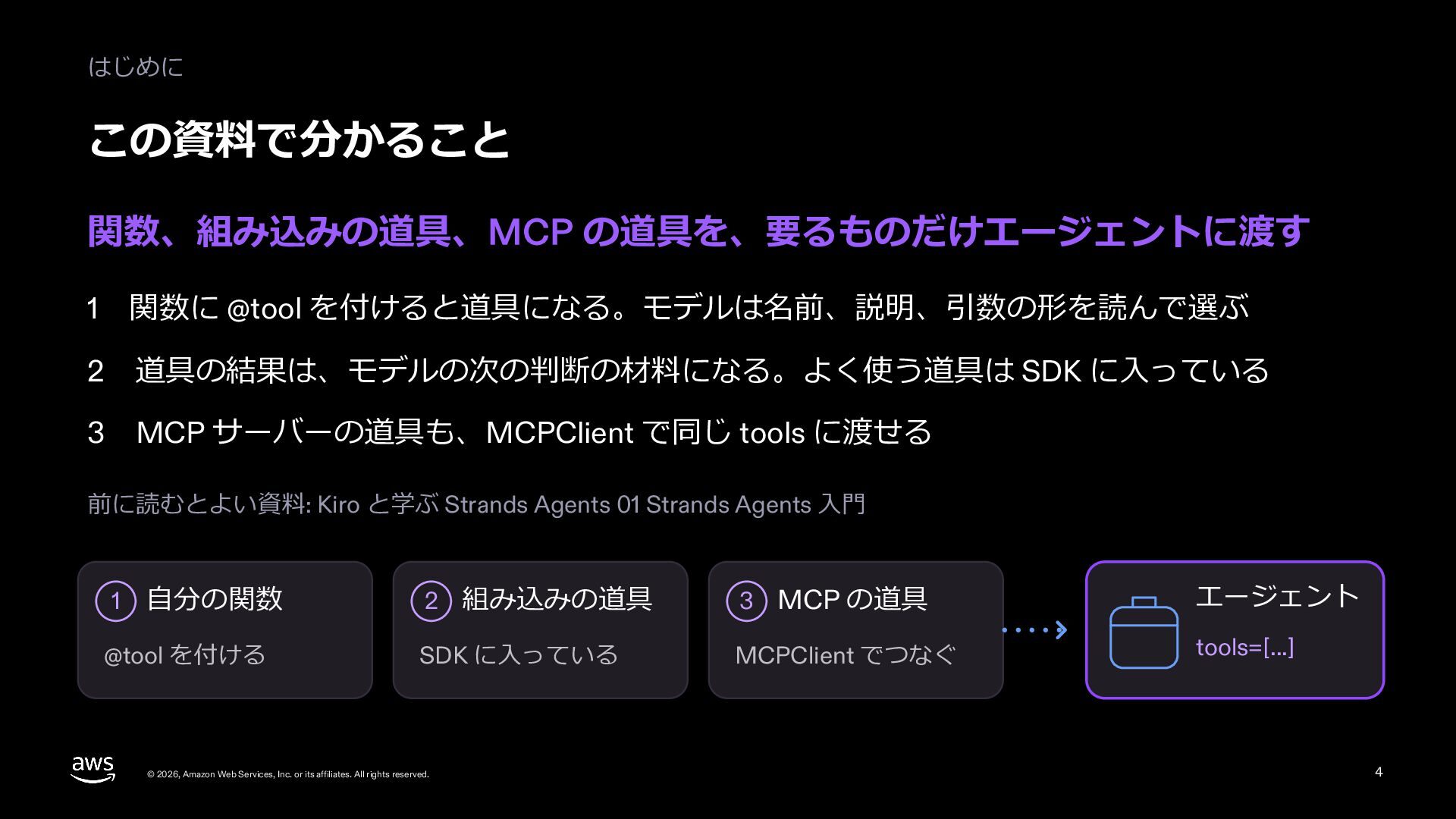
  4. はじめに この資料で分かること 関数、組み込みの道具、MCP の道具を、要るものだけエージェントに渡す 1 関数に @tool を付けると道具になる。モデルは名前、説明、引数の形を読んで選ぶ 2 道具の結果は、モデルの次の判断の材料になる。よく使う道具は

    SDK に⼊っている MCP サーバーの道具も、MCPClient で同じ tools に渡せる 3 前に読むとよい資料: Kiro と学ぶ Strands Agents 01 Strands Agents ⼊⾨ 1 ⾃分の関数 @tool を付ける 2 組み込みの道具 3 MCP の道具 エージェント SDK に⼊っている MCPClient でつなぐ tools=[...] © 2026, Amazon Web Services, Inc. or its affiliates. All rights reserved. 4
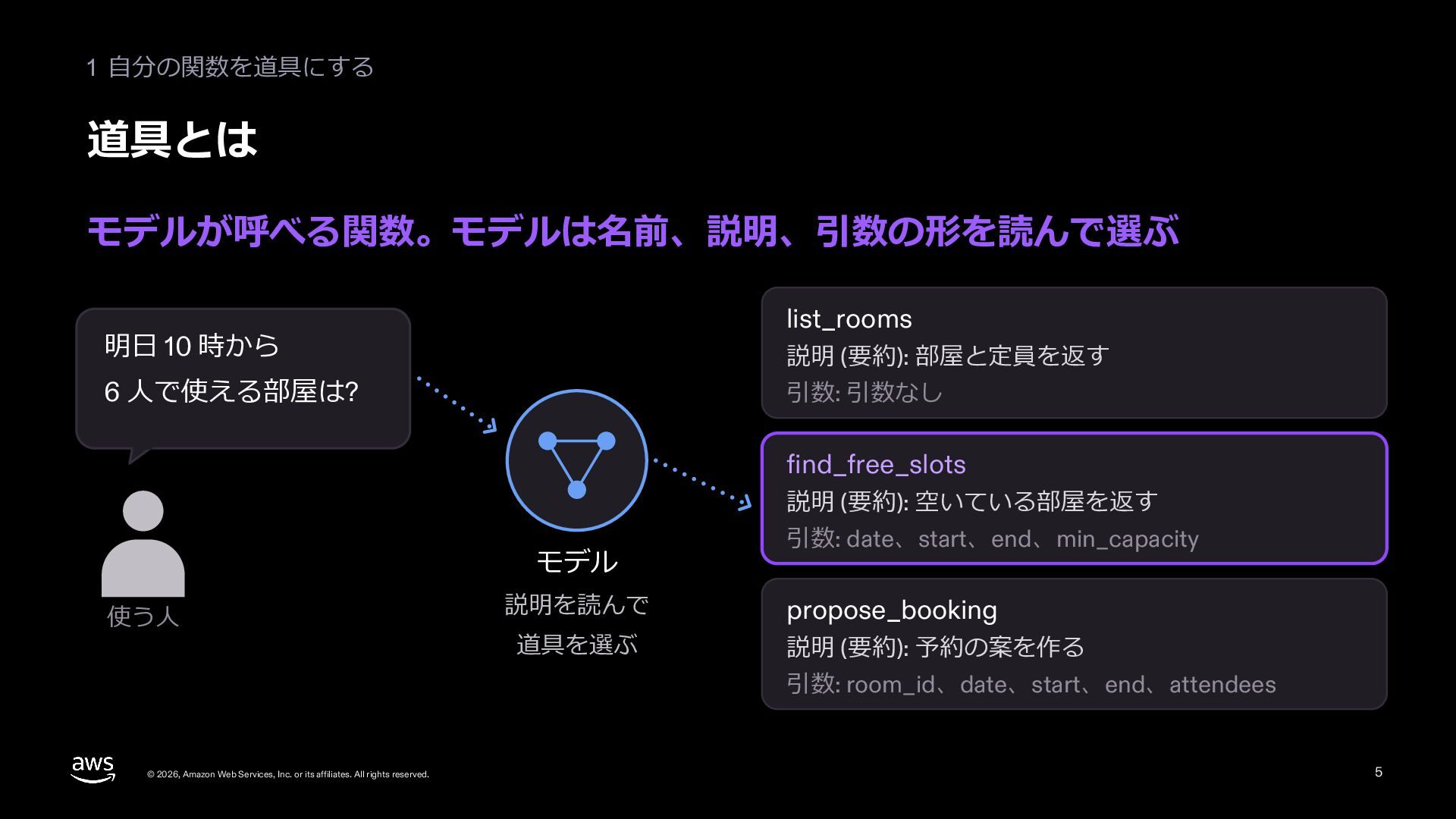
  5. 1 ⾃分の関数を道具にする 道具とは モデルが呼べる関数。モデルは名前、説明、引数の形を読んで選ぶ list_rooms 明⽇ 10 時から 説明 (要約):

    部屋と定員を返す 6 ⼈で使える部屋は? 引数: 引数なし find_free_slots 説明 (要約): 空いている部屋を返す モデル 使う⼈ 引数: date、start、end、min_capacity 説明を読んで propose_booking 道具を選ぶ 説明 (要約): 予約の案を作る 引数: room_id、date、start、end、attendees © 2026, Amazon Web Services, Inc. or its affiliates. All rights reserved. 5
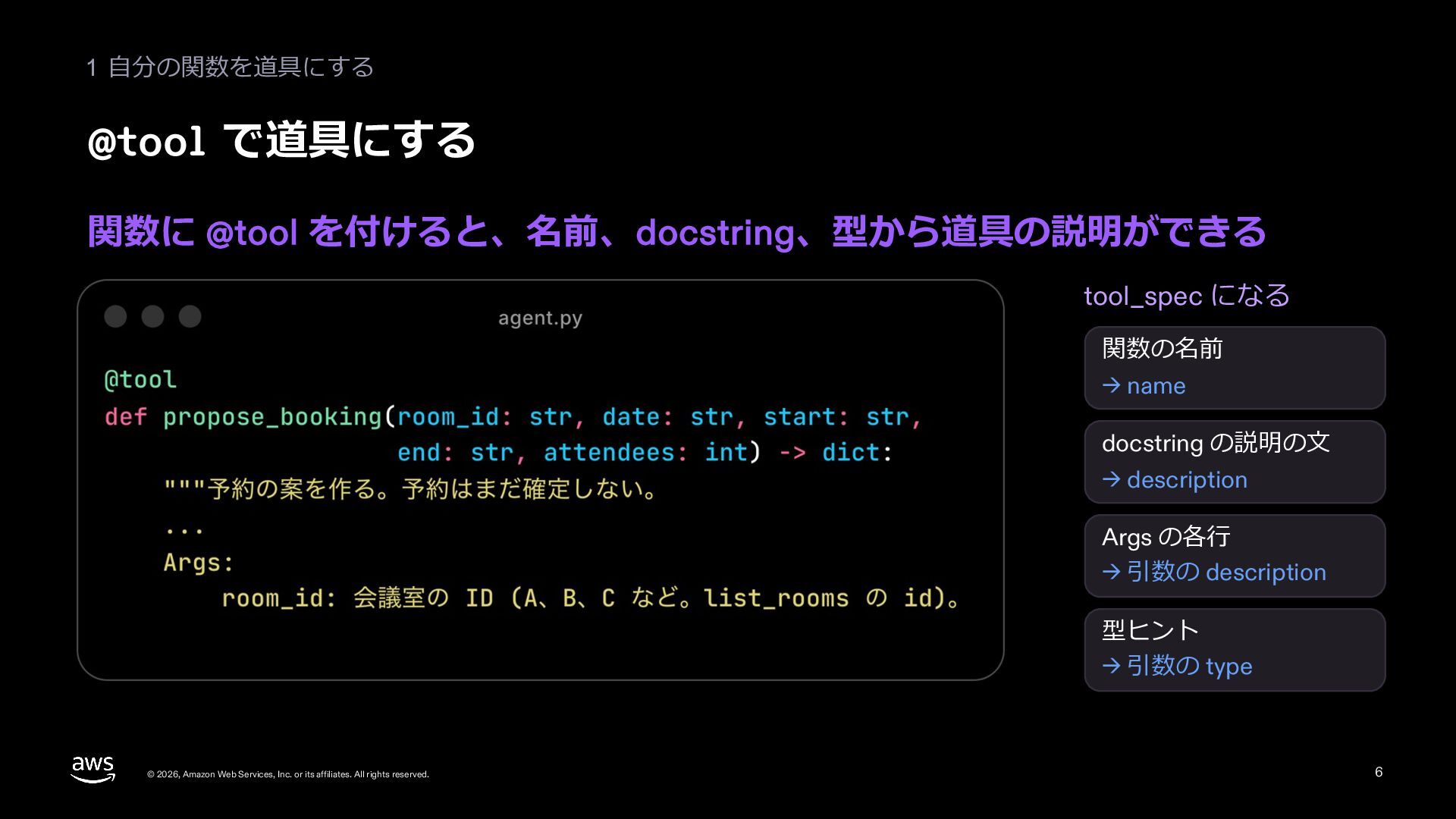
  6. 1 ⾃分の関数を道具にする @tool で道具にする 関数に @tool を付けると、名前、docstring、型から道具の説明ができる tool_spec になる 関数の名前

    → name docstring の説明の⽂ → description Args の各⾏ → 引数の description 型ヒント → 引数の type © 2026, Amazon Web Services, Inc. or its affiliates. All rights reserved. 6
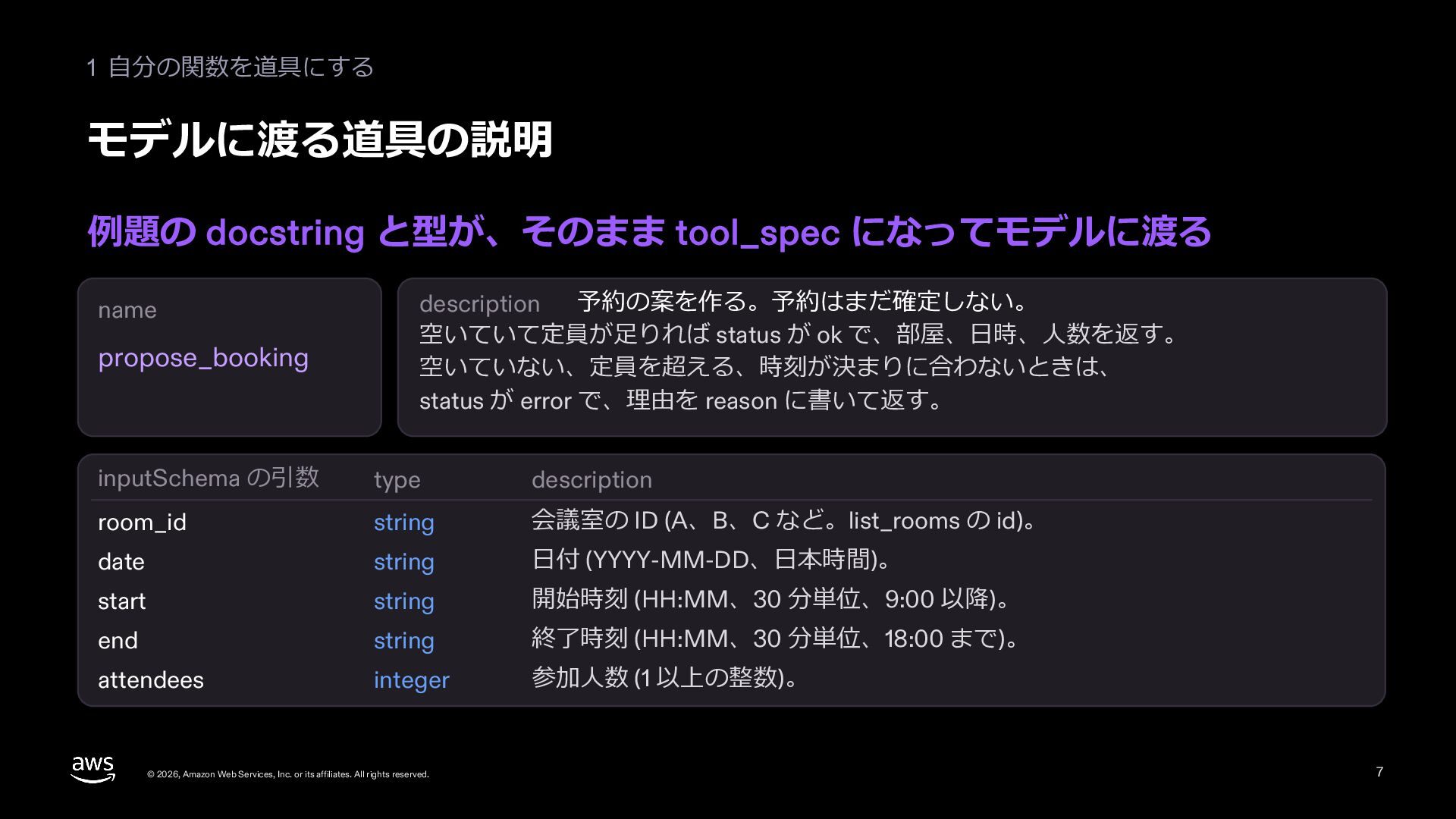
  7. 1 ⾃分の関数を道具にする モデルに渡る道具の説明 例題の docstring と型が、そのまま tool_spec になってモデルに渡る name propose_booking

    予約の案を作る。予約はまだ確定しない。 description 空いていて定員が⾜りれば status が ok で、部屋、⽇時、⼈数を返す。 空いていない、定員を超える、時刻が決まりに合わないときは、 status が error で、理由を reason に書いて返す。 inputSchema の引数 type description room_id string 会議室の ID (A、B、C など。list_rooms の id)。 date string ⽇付 (YYYY-MM-DD、⽇本時間)。 start string 開始時刻 (HH:MM、30 分単位、9:00 以降)。 end string 終了時刻 (HH:MM、30 分単位、18:00 まで)。 attendees integer 参加⼈数 (1 以上の整数)。 © 2026, Amazon Web Services, Inc. or its affiliates. All rights reserved. 7
  8. 1 ⾃分の関数を道具にする 説明で呼ばれ⽅が変わる この例では、説明を 1 ⾏に削ると、案を作る道具が呼ばれにくくなった 道具の説明 6 ⼈で会議室 A

    (定員 4) 今の版 説明の⽂と Args の 5 ⾏ 短い版 「予約の案を作る。」の 1 ⾏ 10 時 15 分から 45 分 1/3 3/3 0/3 1/3 propose_booking を呼んだ回 (1 つの頼みを 3 回ずつ流した) 呼ばなかった回は、決まりに合うかを propose_booking で確かめずに⽂で答えた © 2026, Amazon Web Services, Inc. or its affiliates. All rights reserved. 8
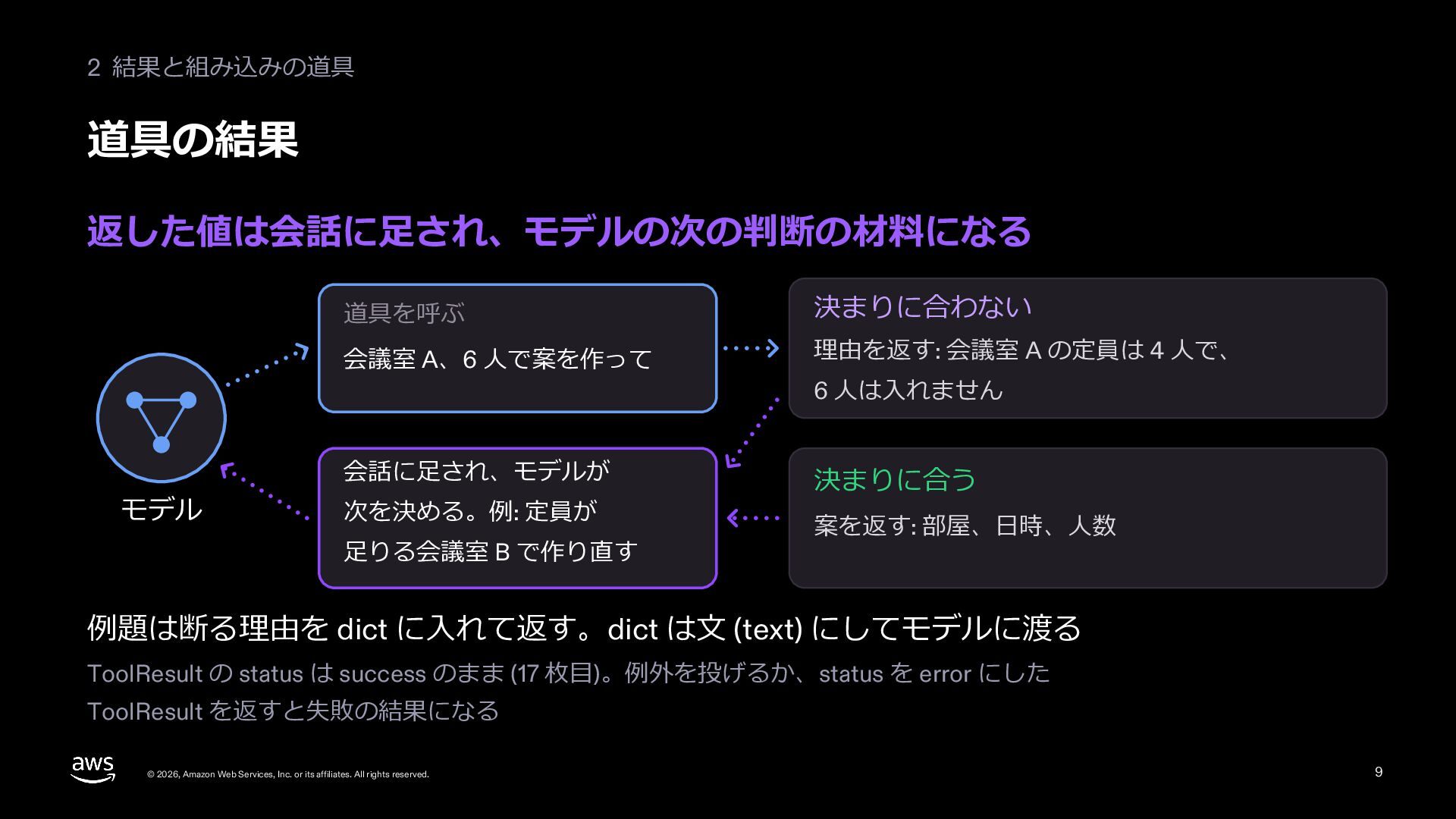
  9. 2 結果と組み込みの道具 道具の結果 返した値は会話に⾜され、モデルの次の判断の材料になる モデル 道具を呼ぶ 決まりに合わない 会議室 A、6 ⼈で案を作って

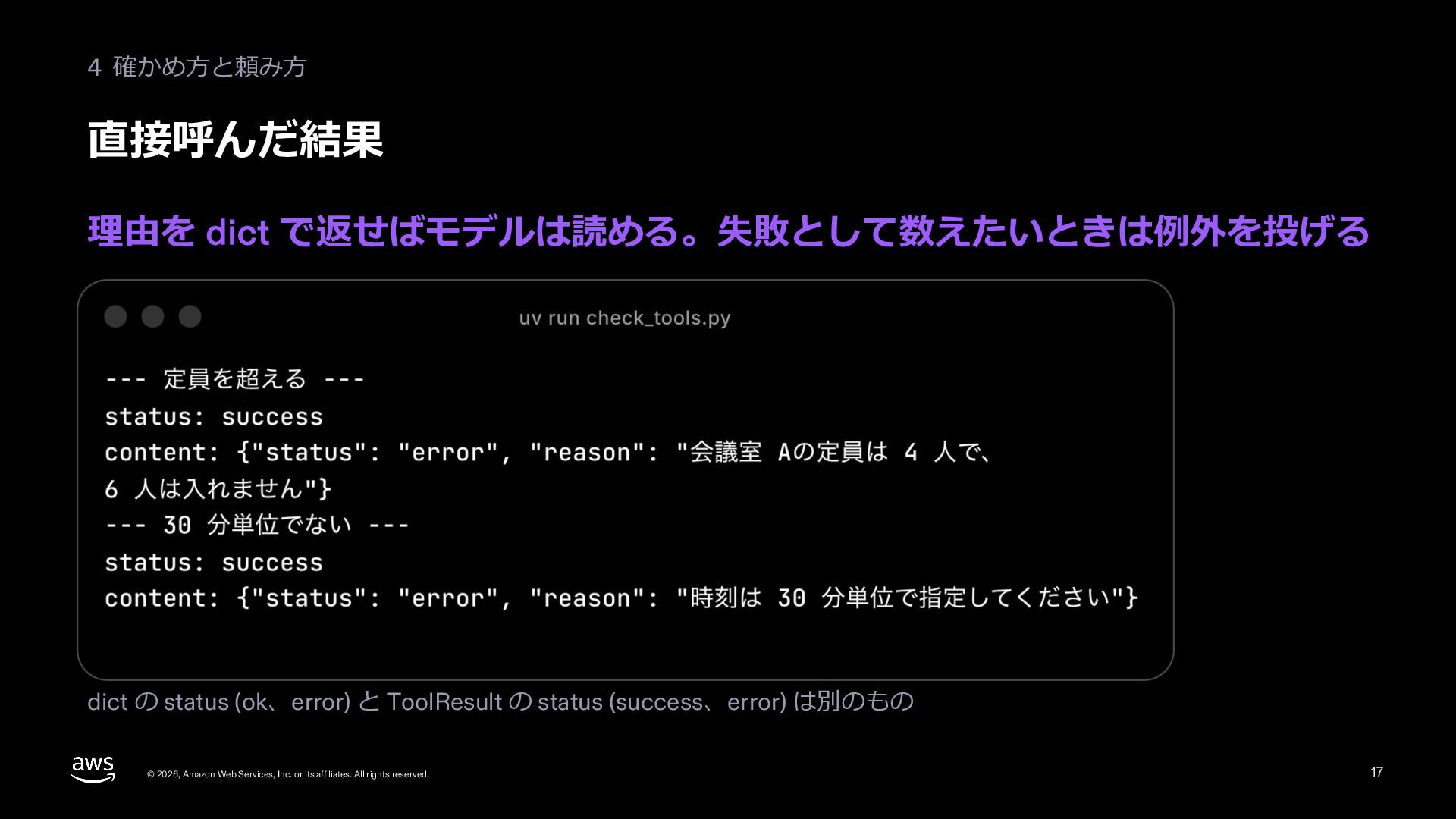
    理由を返す: 会議室 A の定員は 4 ⼈で、 会話に⾜され、モデルが 決まりに合う 次を決める。例: 定員が ⾜りる会議室 B で作り直す 6 ⼈は⼊れません 案を返す: 部屋、⽇時、⼈数 例題は断る理由を dict に⼊れて返す。dict は⽂ (text) にしてモデルに渡る ToolResult の status は success のまま (17 枚⽬)。例外を投げるか、status を error にした ToolResult を返すと失敗の結果になる © 2026, Amazon Web Services, Inc. or its affiliates. All rights reserved. 9
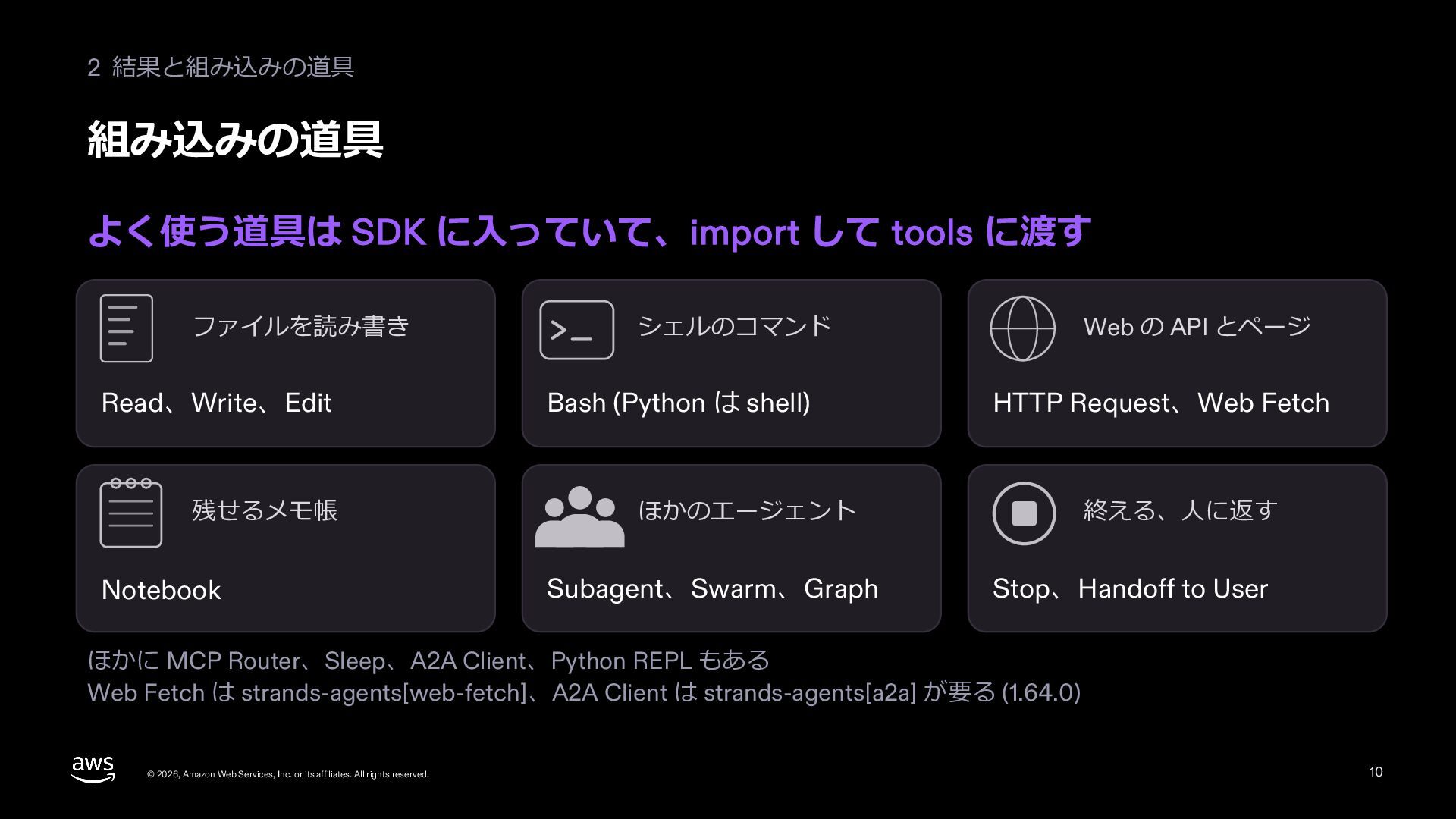
  10. 2 結果と組み込みの道具 組み込みの道具 よく使う道具は SDK に⼊っていて、import して tools に渡す ファイルを読み書き

    Read、Write、Edit 残せるメモ帳 Notebook シェルのコマンド Bash (Python は shell) Web の API とページ HTTP Request、Web Fetch ほかのエージェント Subagent、Swarm、Graph 終える、⼈に返す Stop、Handoff to User ほかに MCP Router、Sleep、A2A Client、Python REPL もある Web Fetch は strands-agents[web-fetch]、A2A Client は strands-agents[a2a] が要る (1.64.0) © 2026, Amazon Web Services, Inc. or its affiliates. All rights reserved. 10
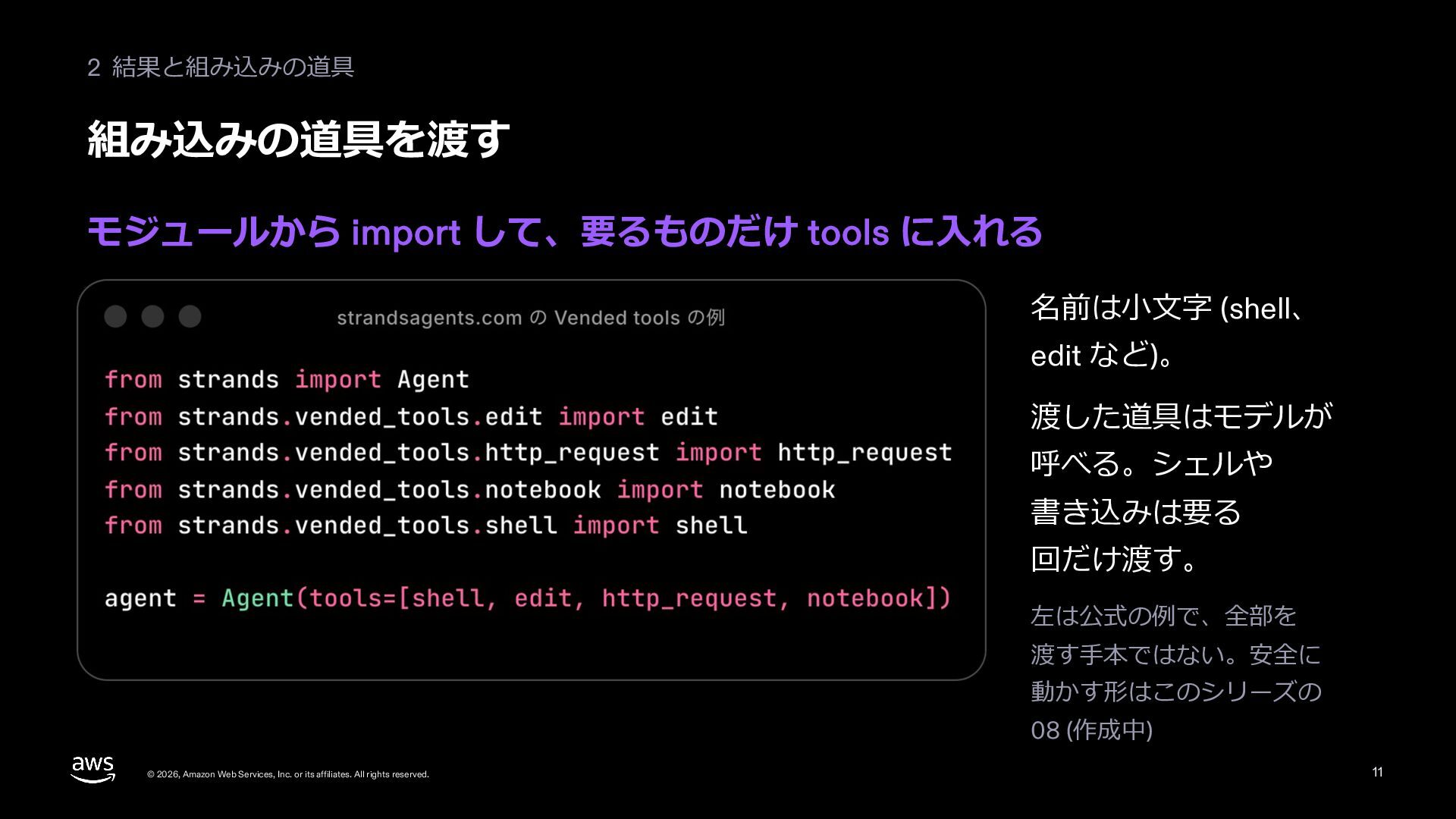
  11. 2 結果と組み込みの道具 組み込みの道具を渡す モジュールから import して、要るものだけ tools に⼊れる 名前は⼩⽂字 (shell、

    edit など)。 渡した道具はモデルが 呼べる。シェルや 書き込みは要る 回だけ渡す。 左は公式の例で、全部を 渡す⼿本ではない。安全に 動かす形はこのシリーズの 08 (作成中) © 2026, Amazon Web Services, Inc. or its affiliates. All rights reserved. 11
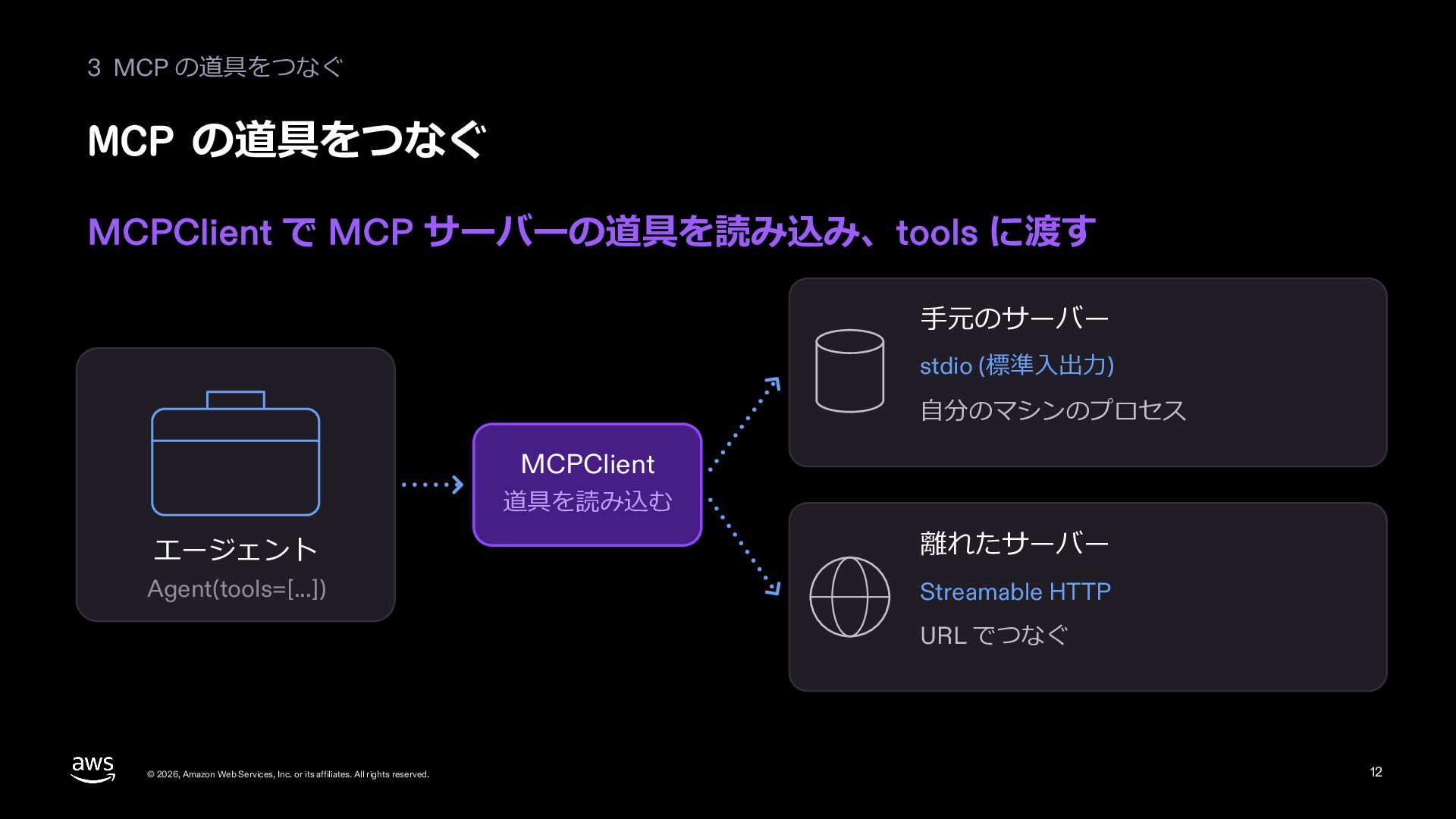
  12. 3 MCP の道具をつなぐ MCP の道具をつなぐ MCPClient で MCP サーバーの道具を読み込み、tools に渡す

    ⼿元のサーバー stdio (標準⼊出⼒) ⾃分のマシンのプロセス MCPClient 道具を読み込む エージェント 離れたサーバー Agent(tools=[...]) Streamable HTTP URL でつなぐ © 2026, Amazon Web Services, Inc. or its affiliates. All rights reserved. 12
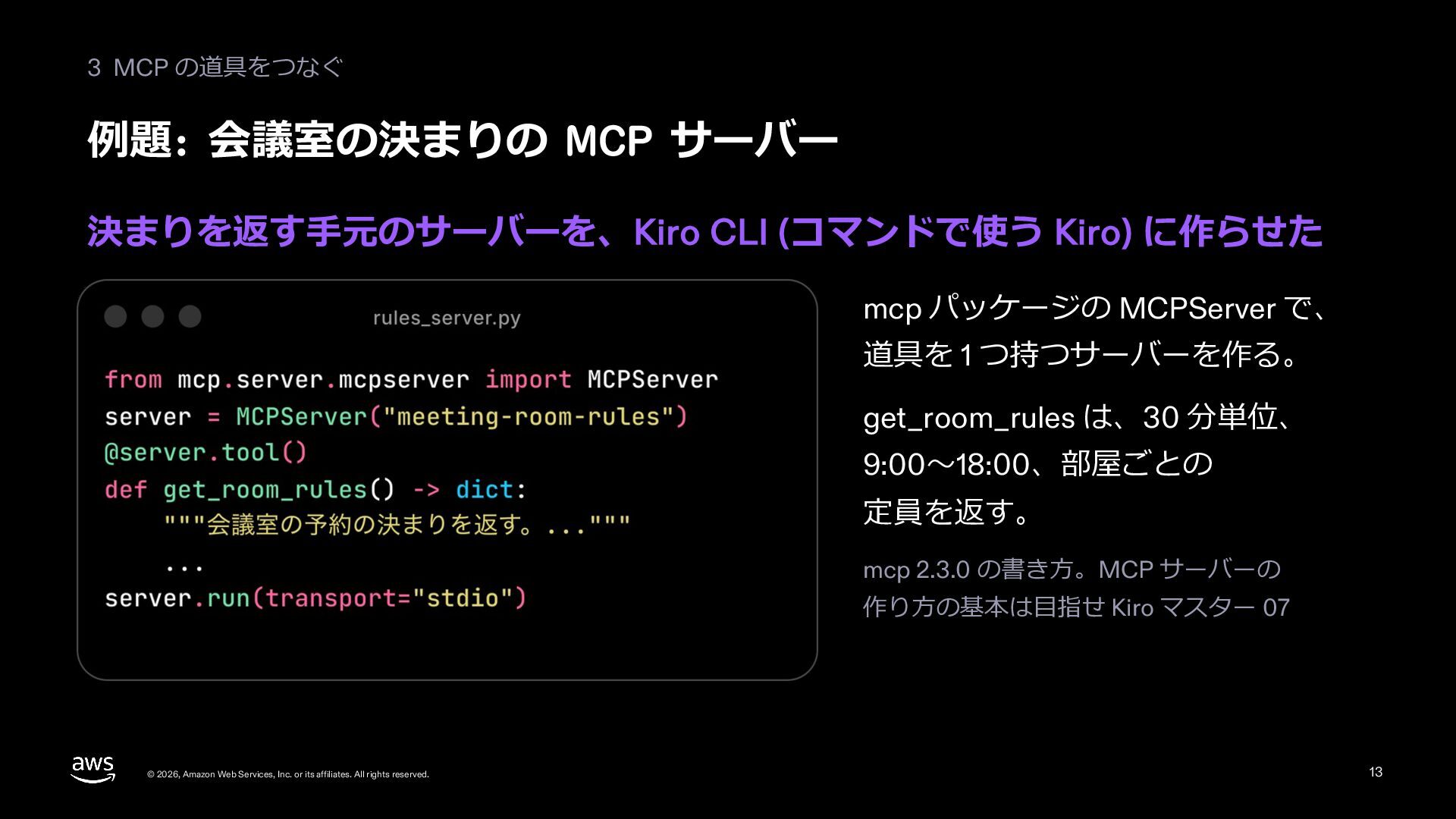
  13. 3 MCP の道具をつなぐ 例題: 会議室の決まりの MCP サーバー 決まりを返す⼿元のサーバーを、Kiro CLI (コマンドで使う

    Kiro) に作らせた mcp パッケージの MCPServer で、 道具を 1 つ持つサーバーを作る。 get_room_rules は、30 分単位、 9:00〜18:00、部屋ごとの 定員を返す。 mcp 2.3.0 の書き⽅。MCP サーバーの 作り⽅の基本は⽬指せ Kiro マスター 07 © 2026, Amazon Web Services, Inc. or its affiliates. All rights reserved. 13
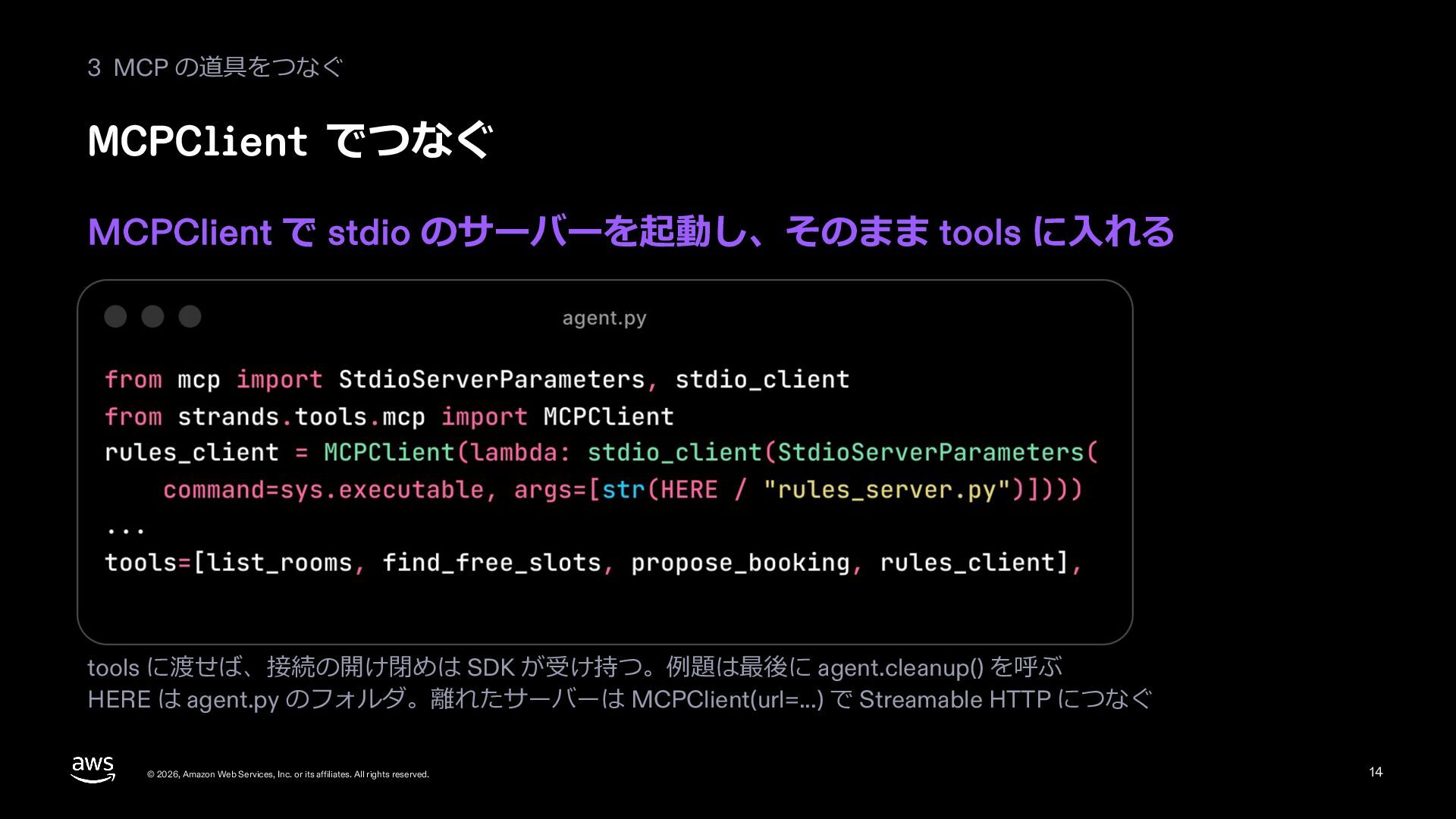
  14. 3 MCP の道具をつなぐ MCPClient でつなぐ MCPClient で stdio のサーバーを起動し、そのまま tools

    に⼊れる tools に渡せば、接続の開け閉めは SDK が受け持つ。例題は最後に agent.cleanup() を呼ぶ HERE は agent.py のフォルダ。離れたサーバーは MCPClient(url=...) で Streamable HTTP につなぐ © 2026, Amazon Web Services, Inc. or its affiliates. All rights reserved. 14
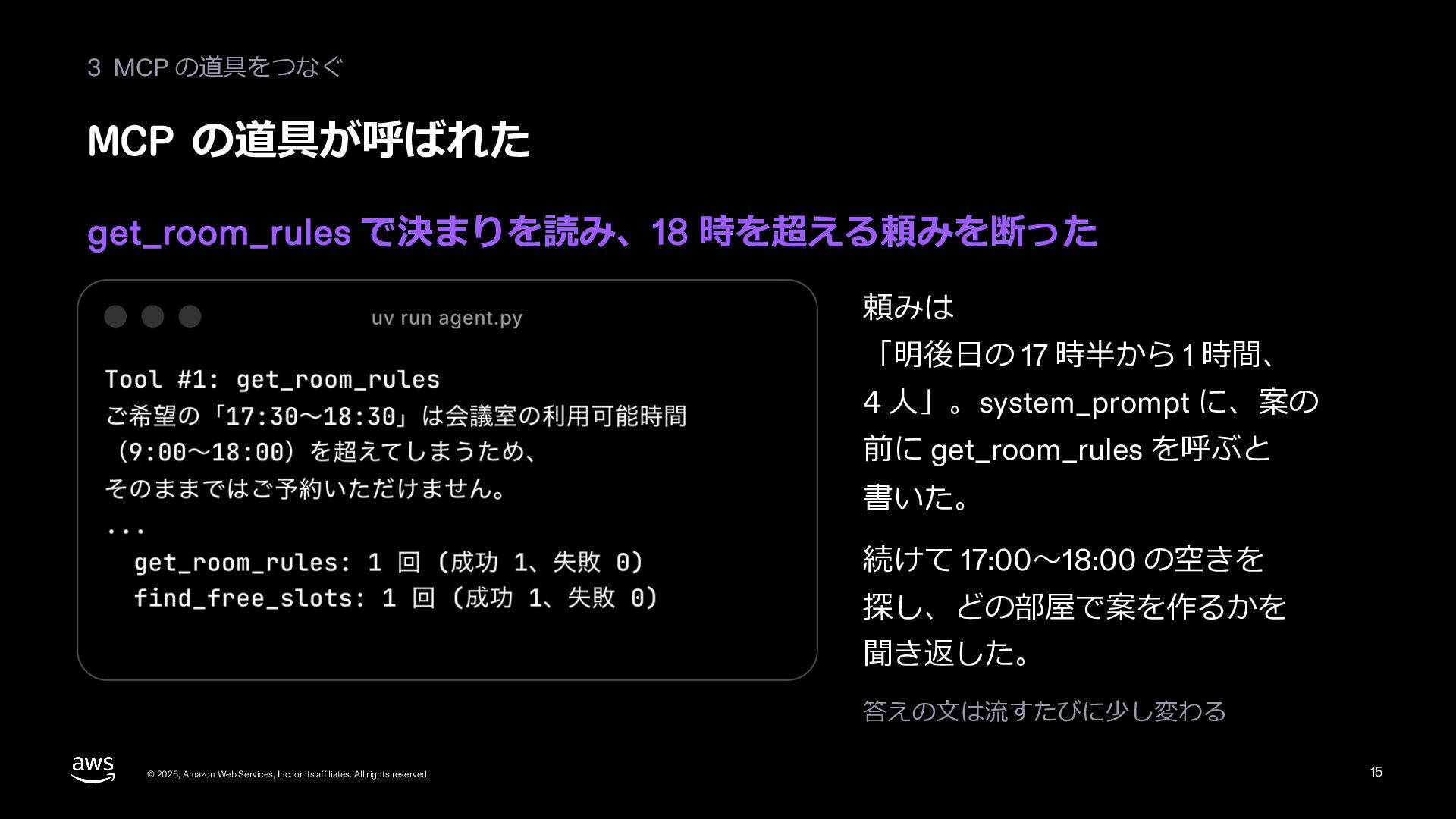
  15. 3 MCP の道具をつなぐ MCP の道具が呼ばれた get_room_rules で決まりを読み、18 時を超える頼みを断った 頼みは 「明後⽇の

    17 時半から 1 時間、 4 ⼈」。system_prompt に、案の 前に get_room_rules を呼ぶと 書いた。 続けて 17:00〜18:00 の空きを 探し、どの部屋で案を作るかを 聞き返した。 答えの⽂は流すたびに少し変わる © 2026, Amazon Web Services, Inc. or its affiliates. All rights reserved. 15
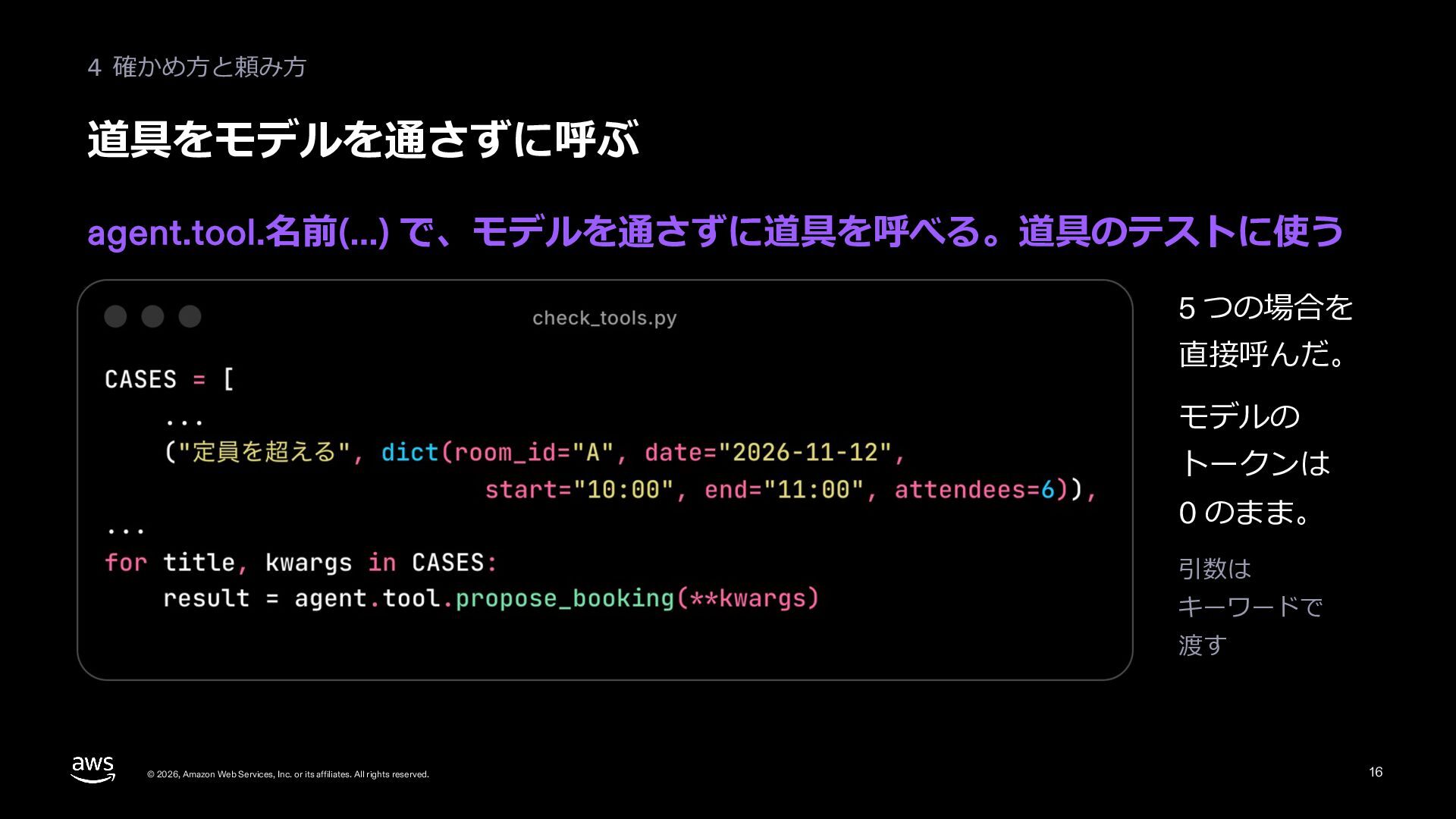
  16. 4 確かめ⽅と頼み⽅ 直接呼んだ結果 理由を dict で返せばモデルは読める。失敗として数えたいときは例外を投げる dict の status (ok、error)

    と ToolResult の status (success、error) は別のもの © 2026, Amazon Web Services, Inc. or its affiliates. All rights reserved. 17
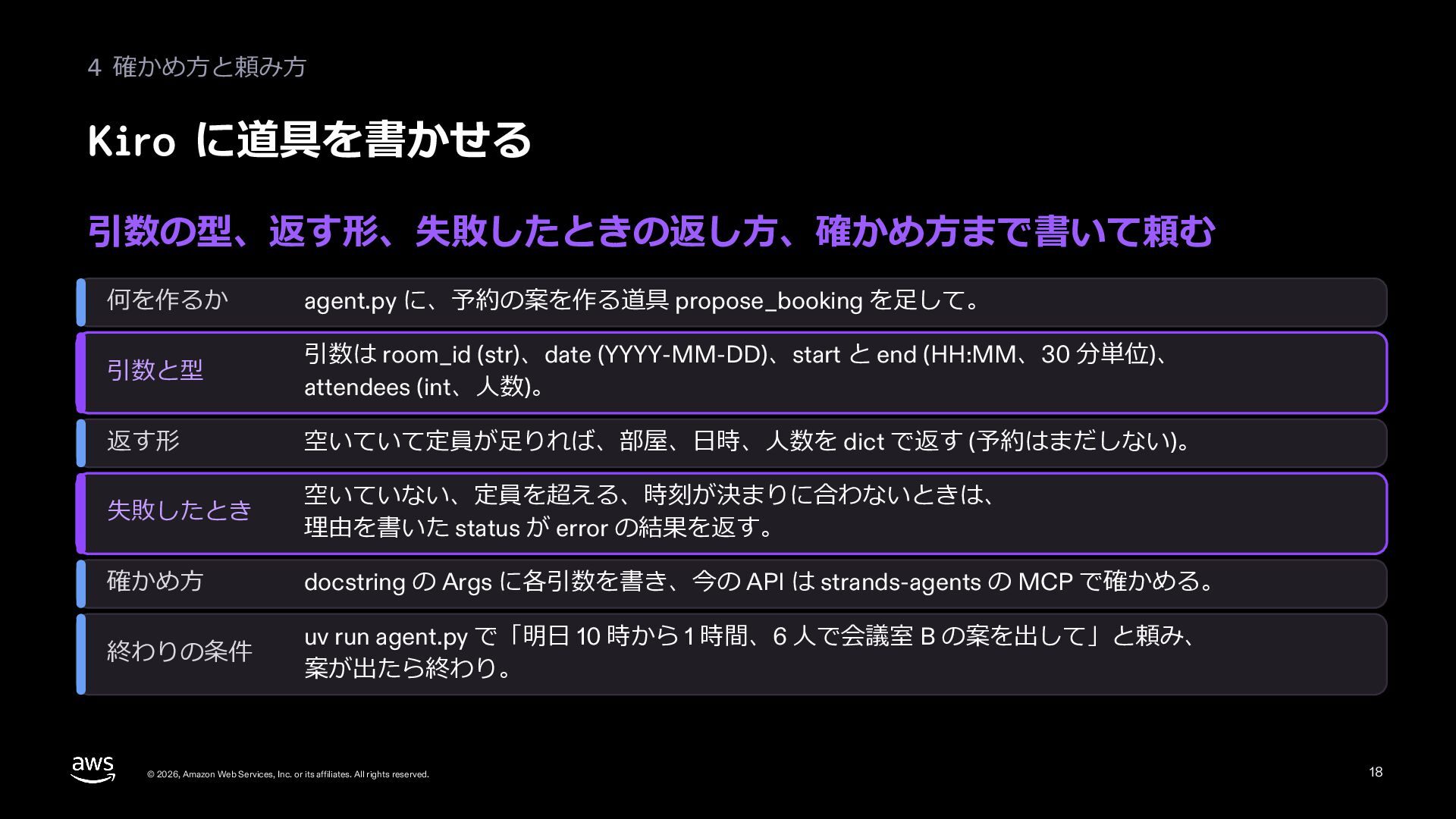
  17. 4 確かめ⽅と頼み⽅ Kiro に道具を書かせる 引数の型、返す形、失敗したときの返し⽅、確かめ⽅まで書いて頼む 何を作るか agent.py に、予約の案を作る道具 propose_booking を⾜して。

    引数と型 引数は room_id (str)、date (YYYY-MM-DD)、start と end (HH:MM、30 分単位)、 attendees (int、⼈数)。 返す形 空いていて定員が⾜りれば、部屋、⽇時、⼈数を dict で返す (予約はまだしない)。 失敗したとき 空いていない、定員を超える、時刻が決まりに合わないときは、 理由を書いた status が error の結果を返す。 確かめ⽅ docstring の Args に各引数を書き、今の API は strands-agents の MCP で確かめる。 終わりの条件 uv run agent.py で「明⽇ 10 時から 1 時間、6 ⼈で会議室 B の案を出して」と頼み、 案が出たら終わり。 © 2026, Amazon Web Services, Inc. or its affiliates. All rights reserved. 18
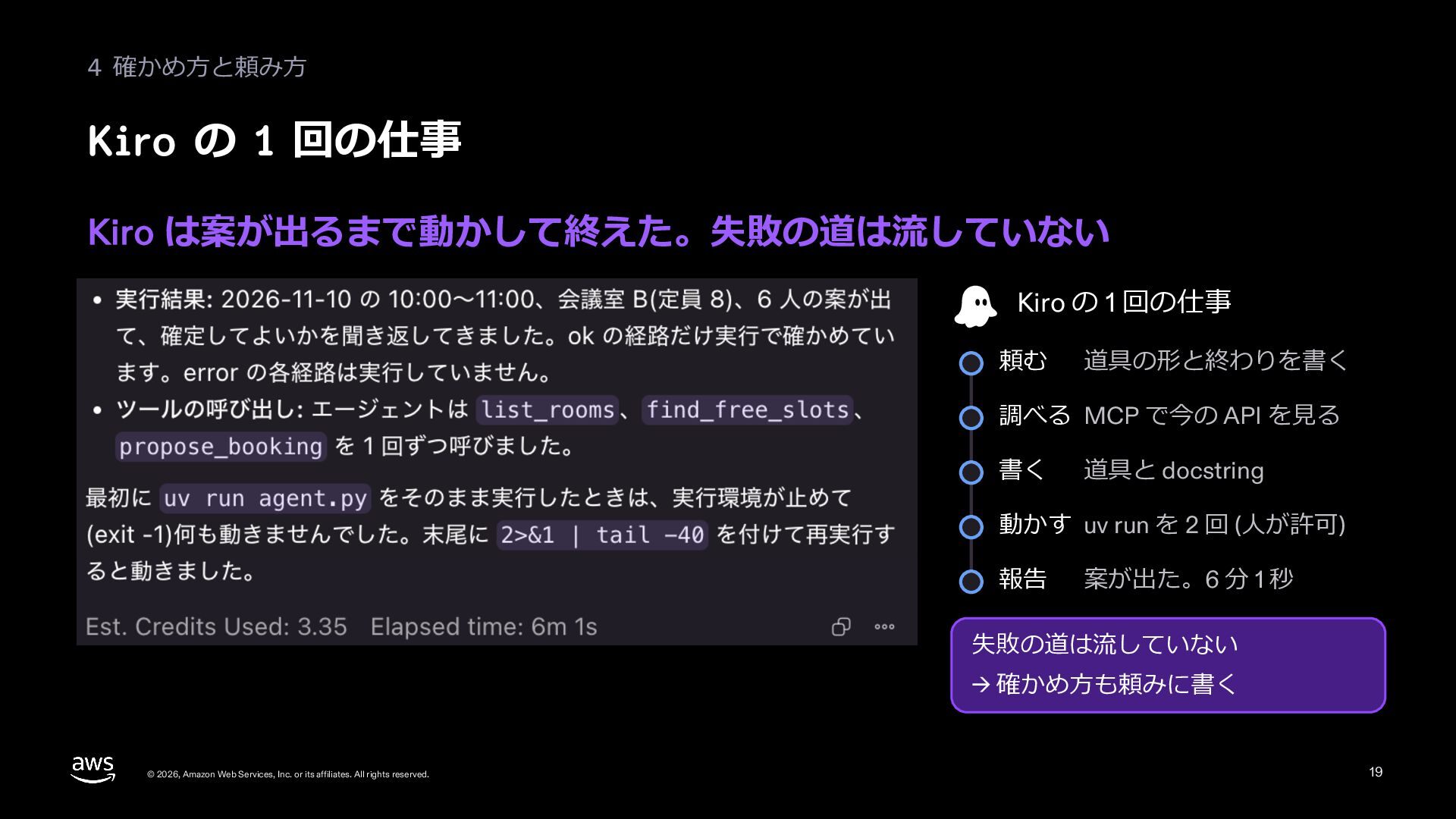
  18. 4 確かめ⽅と頼み⽅ Kiro の 1 回の仕事 Kiro は案が出るまで動かして終えた。失敗の道は流していない Kiro の

    1 回の仕事 頼む 道具の形と終わりを書く 調べる MCP で今の API を⾒る 書く 道具と docstring 動かす uv run を 2 回 (⼈が許可) 報告 案が出た。6 分 1 秒 失敗の道は流していない → 確かめ⽅も頼みに書く © 2026, Amazon Web Services, Inc. or its affiliates. All rights reserved. 19
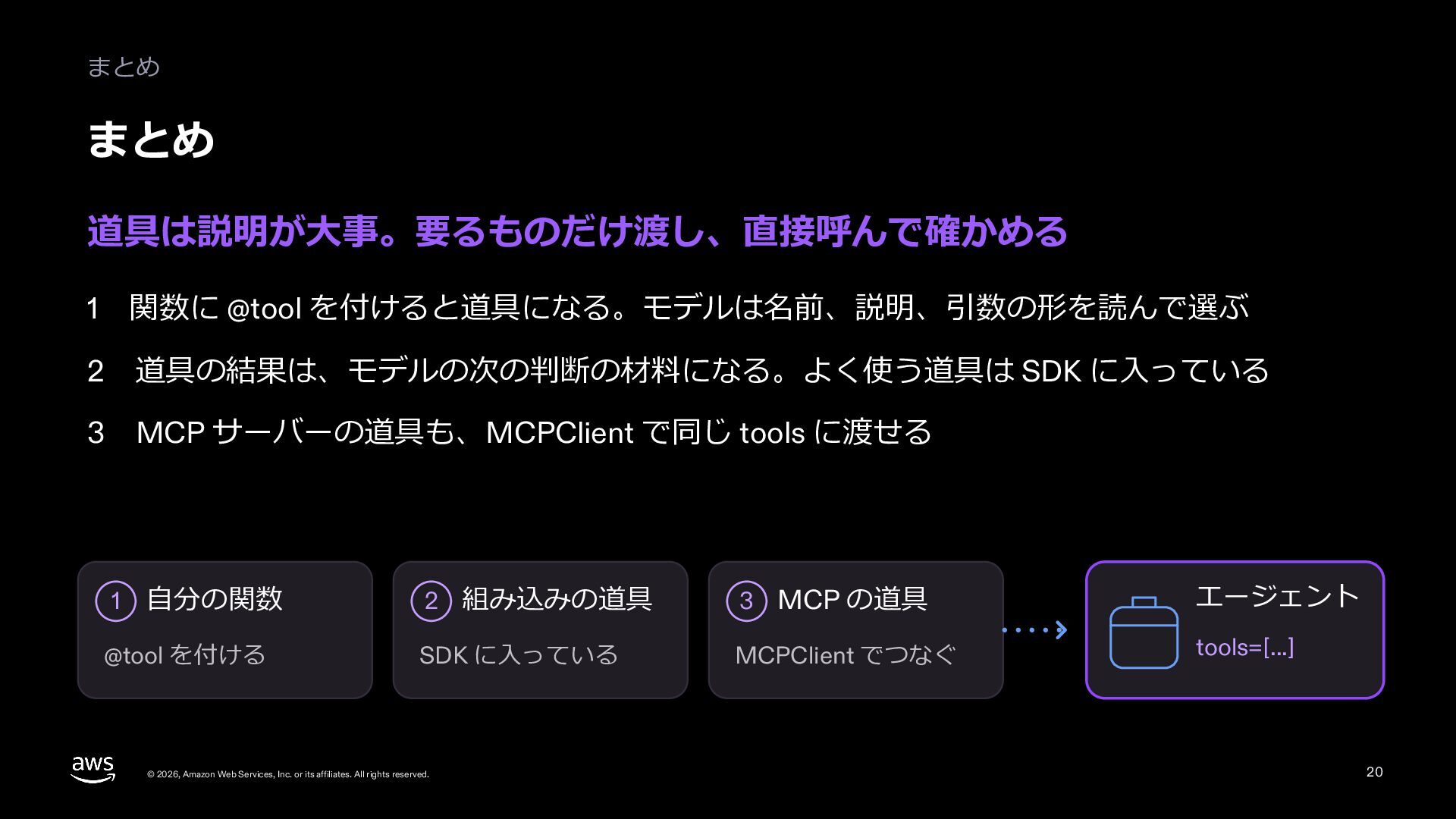
  19. まとめ まとめ 道具は説明が⼤事。要るものだけ渡し、直接呼んで確かめる 1 関数に @tool を付けると道具になる。モデルは名前、説明、引数の形を読んで選ぶ 2 道具の結果は、モデルの次の判断の材料になる。よく使う道具は SDK

    に⼊っている MCP サーバーの道具も、MCPClient で同じ tools に渡せる 3 1 ⾃分の関数 @tool を付ける 2 組み込みの道具 3 MCP の道具 エージェント SDK に⼊っている MCPClient でつなぐ tools=[...] © 2026, Amazon Web Services, Inc. or its affiliates. All rights reserved. 20
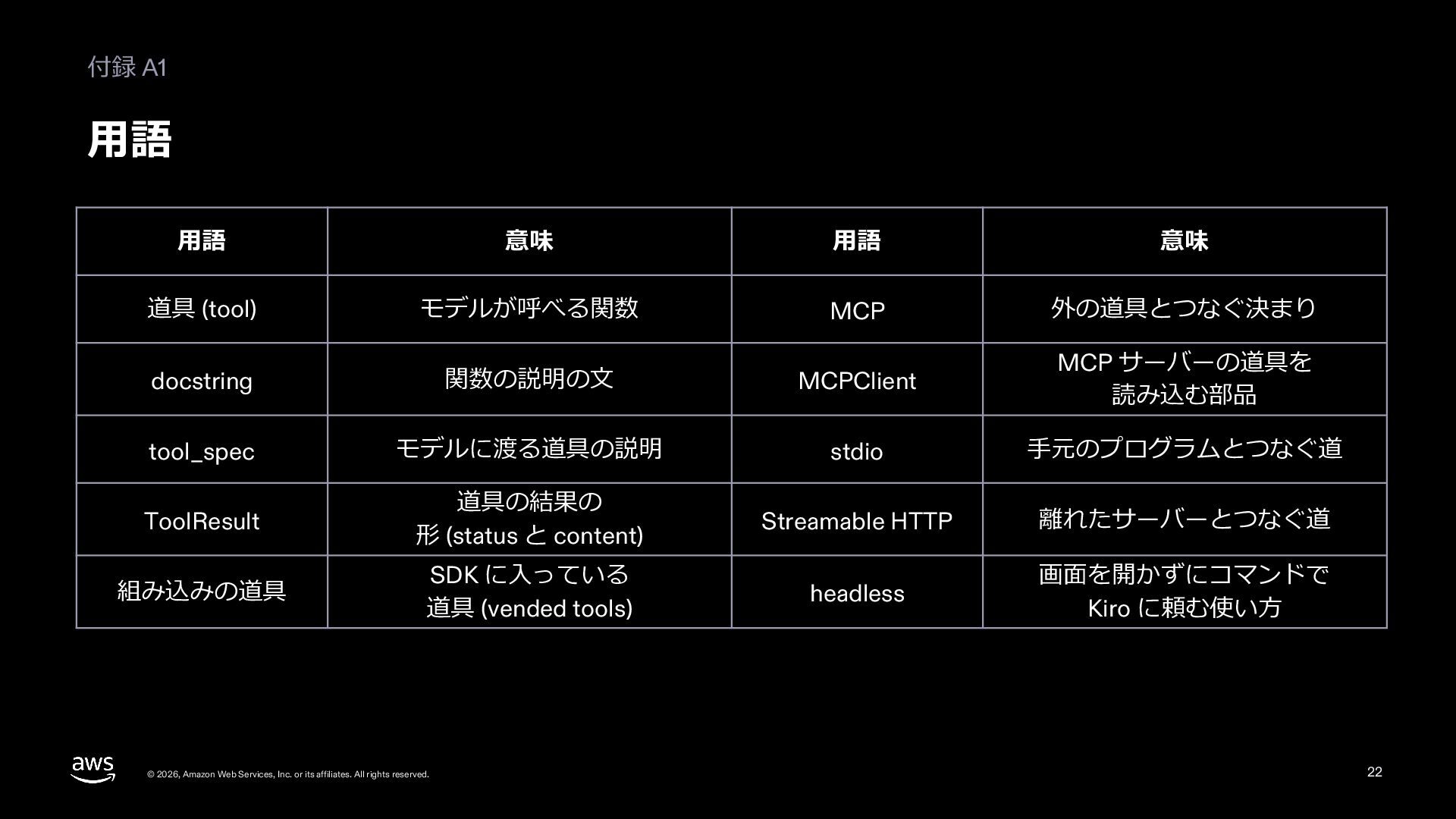
  20. 付録 A1 ⽤語 ⽤語 意味 ⽤語 意味 道具 (tool) モデルが呼べる関数

    MCP 外の道具とつなぐ決まり docstring 関数の説明の⽂ MCPClient MCP サーバーの道具を 読み込む部品 tool_spec モデルに渡る道具の説明 stdio ⼿元のプログラムとつなぐ道 ToolResult 道具の結果の 形 (status と content) Streamable HTTP 離れたサーバーとつなぐ道 組み込みの道具 SDK に⼊っている 道具 (vended tools) headless 画⾯を開かずにコマンドで Kiro に頼む使い⽅ © 2026, Amazon Web Services, Inc. or its affiliates. All rights reserved. 22
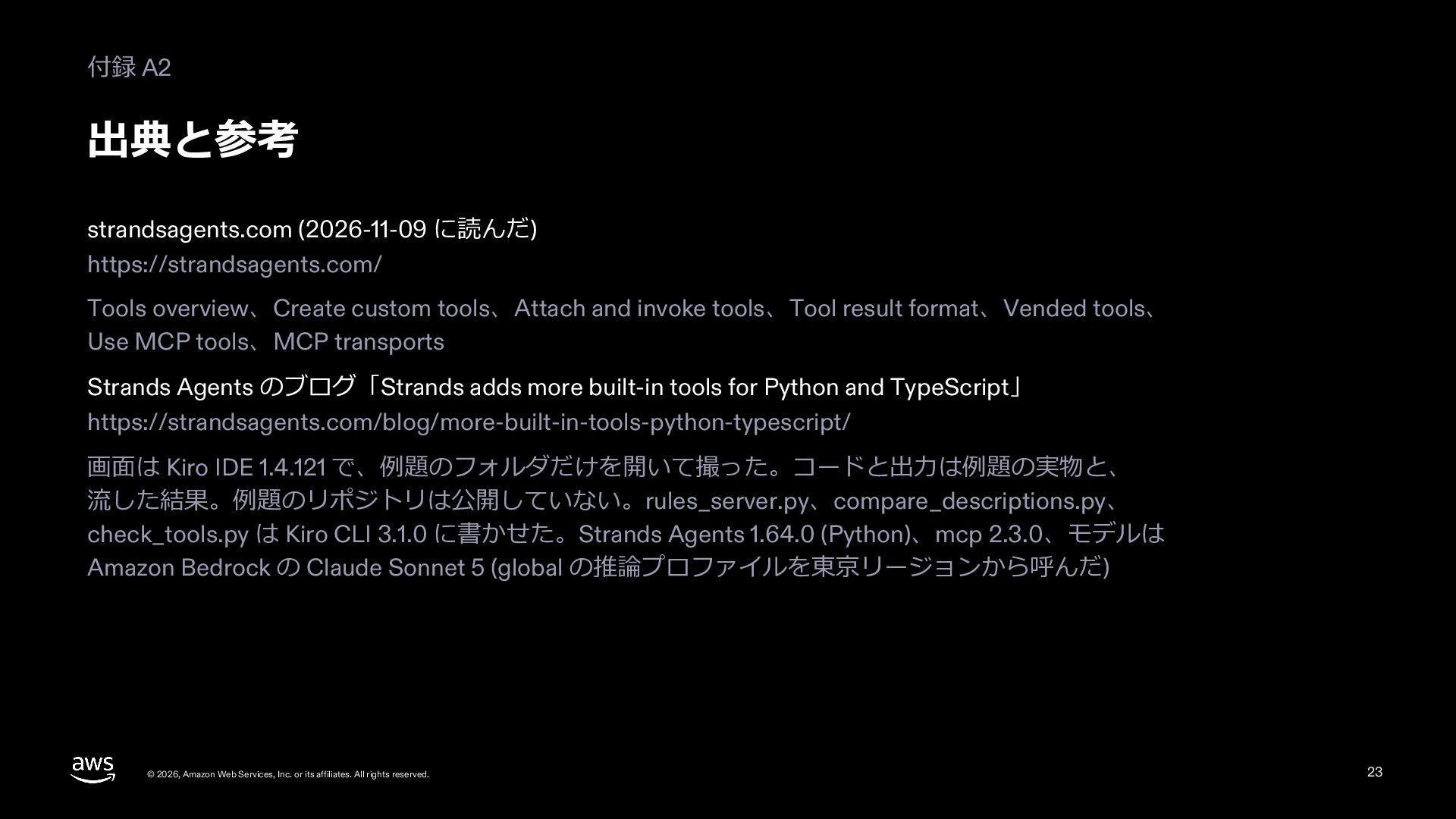
  21. 付録 A2 出典と参考 strandsagents.com (2026-11-09 に読んだ) https://strandsagents.com/ Tools overview、Create custom

    tools、Attach and invoke tools、Tool result format、Vended tools、 Use MCP tools、MCP transports Strands Agents のブログ「Strands adds more built-in tools for Python and TypeScript」 https://strandsagents.com/blog/more-built-in-tools-python-typescript/ 画⾯は Kiro IDE 1.4.121 で、例題のフォルダだけを開いて撮った。コードと出⼒は例題の実物と、 流した結果。例題のリポジトリは公開していない。rules_server.py、compare_descriptions.py、 check_tools.py は Kiro CLI 3.1.0 に書かせた。Strands Agents 1.64.0 (Python)、mcp 2.3.0、モデルは Amazon Bedrock の Claude Sonnet 5 (global の推論プロファイルを東京リージョンから呼んだ) © 2026, Amazon Web Services, Inc. or its affiliates. All rights reserved. 23