Upgrade to Pro — share decks privately, control downloads, hide ads and more …

Tools and MCP (@tool, vended tools, and MCP ser...

Tools and MCP (@tool, vended tools, and MCP servers) | Learn Strands Agents with Kiro 02

This Level 200 deck shows a Python developer who is new to Strands Agents how to give an agent tools: @tool functions, the vended tools that ship with the SDK, direct calls through agent.tool, concurrent and sequential tool executors, and class-based and async tools, with architecture diagrams, flow figures and the real output of each sample run on Amazon Bedrock in the Tokyo Region. It then connects the agent to MCP servers with MCPClient (stdio and Streamable HTTP, a client for a server protected by AWS IAM SigV4, several servers with prefix and tool_filters) and shows how a docstring and type hints become the tool spec, how return values become tool results and how invocation_state passes values outside the prompt, as deck 02 (Get started) of the series Learn Strands Agents with Kiro.

Avatar for Riku INADA

Riku INADA PRO

November 11, 2026

More Decks by Riku INADA

Other Decks in Technology

Transcript

  1. Learn Strands Agents with Kiro 02 Get started Tools and

    MCP @tool, vended tools, and MCP servers 02 Level 200 / November 2026 November 2026 Riku Inada Amazon Web Services Japan © 2026, Amazon Web Services, Inc. or its affiliates. All rights reserved. Kiro + Strands Agents 1
  2. Introduction About me Riku Inada Amazon Web Services Japan G.K.

    Solutions Architect Works mainly with manufacturing customers Recent work Promoting the AI-Driven Development Life Cycle (AI-DLC) Writing and speaking about Kiro and AWS Amplify © 2026, Amazon Web Services, Inc. or its affiliates. All rights reserved. X @inada_riku Speaker Deck speakerdeck.com/inariku Zenn zenn.dev/inariku GitHub github.com/inariku 2
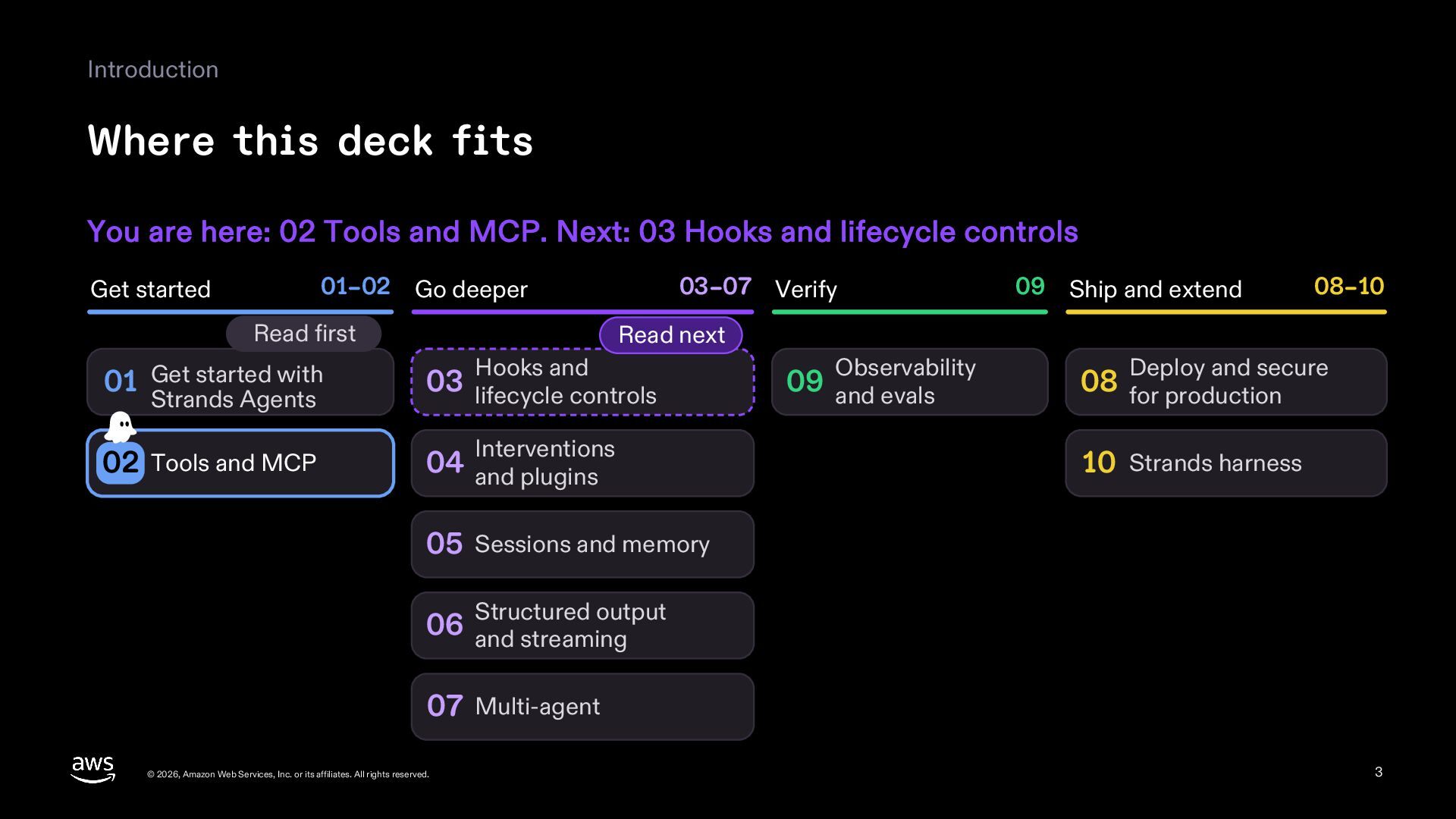
  3. Introduction Where this deck fits You are here: 02 Tools

    and MCP. Next: 03 Hooks and lifecycle controls 01–02 Go deeper Get started Read first 03–07 Verify 08–10 Read next Hooks and 01 Get started with 03 lifecycle controls 02 Tools and MCP 04 and plugins Strands Agents 09 Ship and extend Interventions Observability 09 and evals Deploy and secure 08 for production 10 Strands harness 05 Sessions and memory output 06 Structured and streaming 07 Multi-agent © 2026, Amazon Web Services, Inc. or its affiliates. All rights reserved. 3
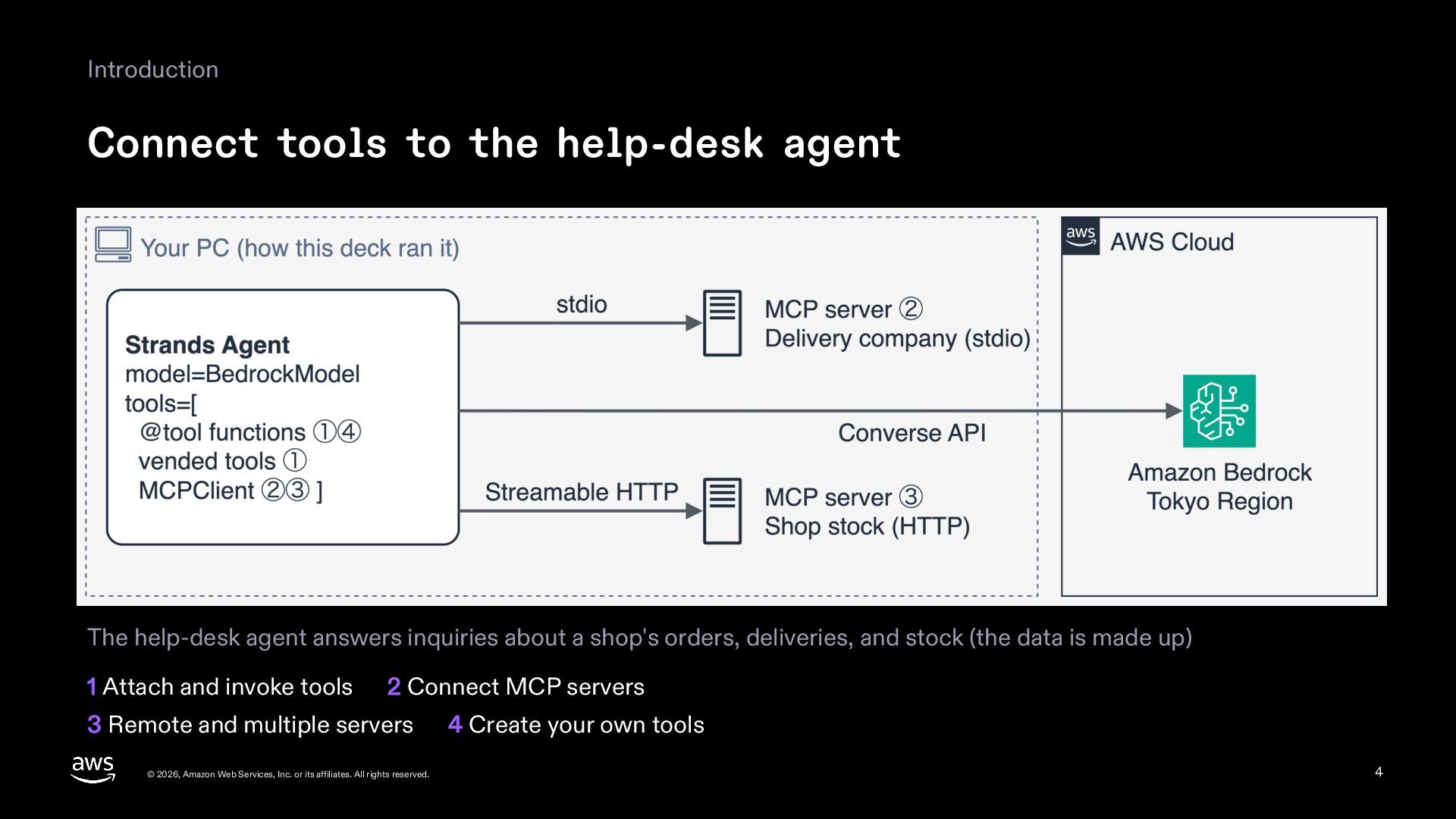
  4. Introduction Connect tools to the help-desk agent The help-desk agent

    answers inquiries about a shop's orders, deliveries, and stock (the data is made up) 1 Attach and invoke tools 2 Connect MCP servers 3 Remote and multiple servers © 2026, Amazon Web Services, Inc. or its affiliates. All rights reserved. 4 Create your own tools 4
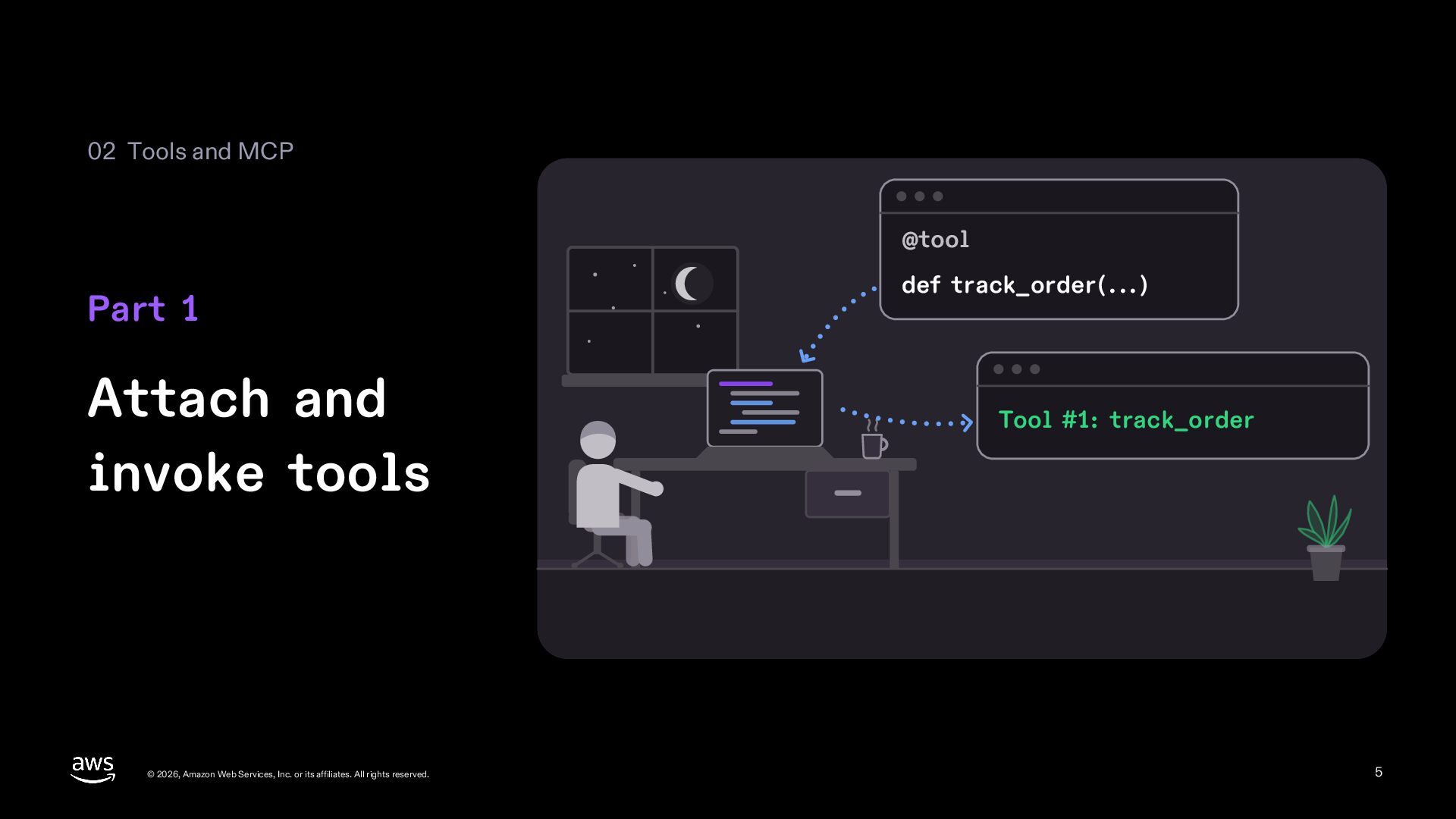
  5. 02 Tools and MCP @tool Part 1 Attach and invoke

    tools © 2026, Amazon Web Services, Inc. or its affiliates. All rights reserved. def track_order(...) Tool #1: track_order 5
  6. 1 Attach and invoke tools The smallest Agent with a

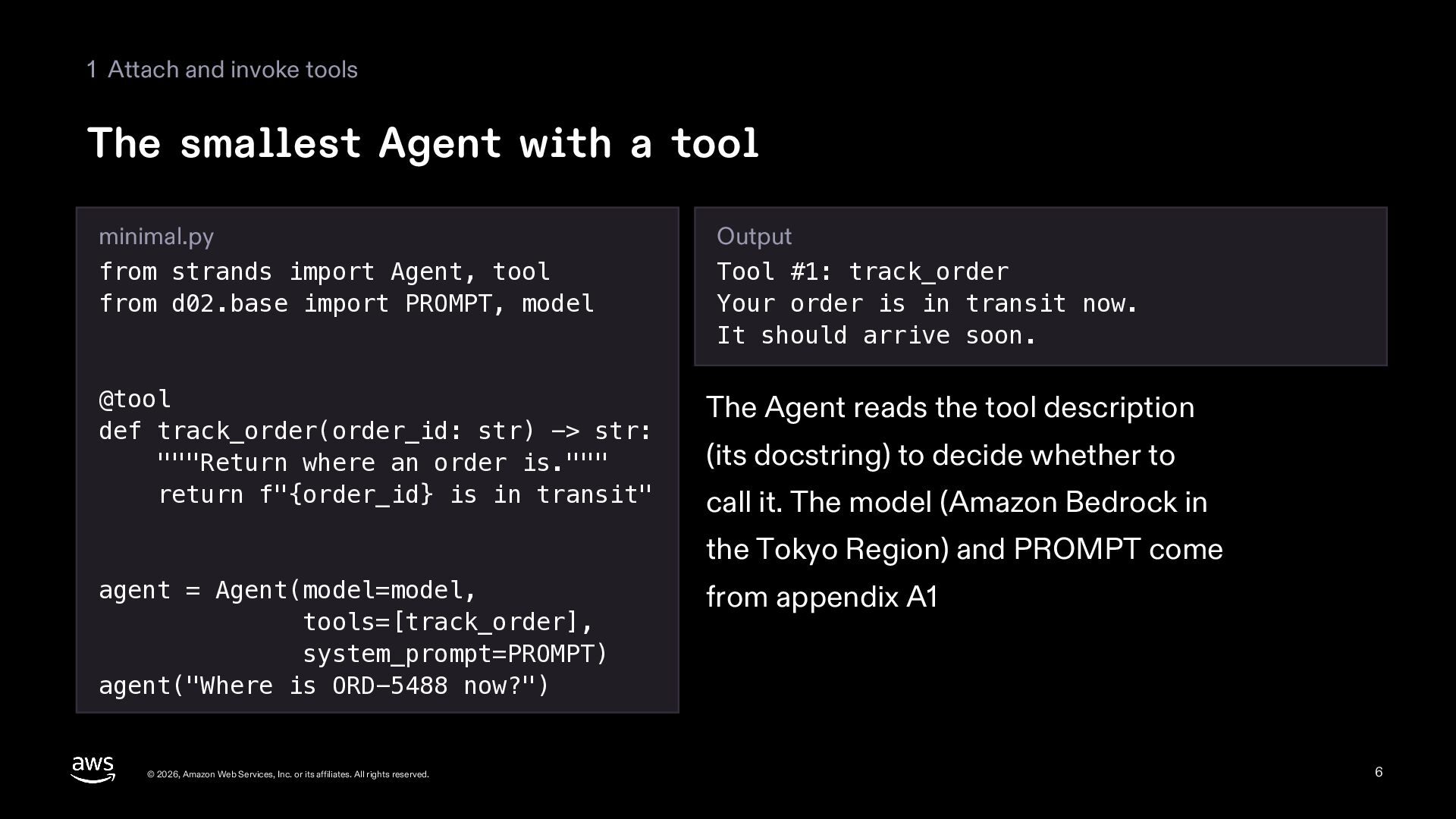
    tool minimal.py from strands import Agent, tool from d02.base import PROMPT, model Output Tool #1: track_order Your order is in transit now. It should arrive soon. @tool def track_order(order_id: str) -> str: """Return where an order is.""" return f"{order_id} is in transit" The Agent reads the tool description (its docstring) to decide whether to call it. The model (Amazon Bedrock in the Tokyo Region) and PROMPT come agent = Agent(model=model, tools=[track_order], system_prompt=PROMPT) agent("Where is ORD-5488 now?") © 2026, Amazon Web Services, Inc. or its affiliates. All rights reserved. from appendix A1 6
  7. 1 Attach and invoke tools One tools list takes every

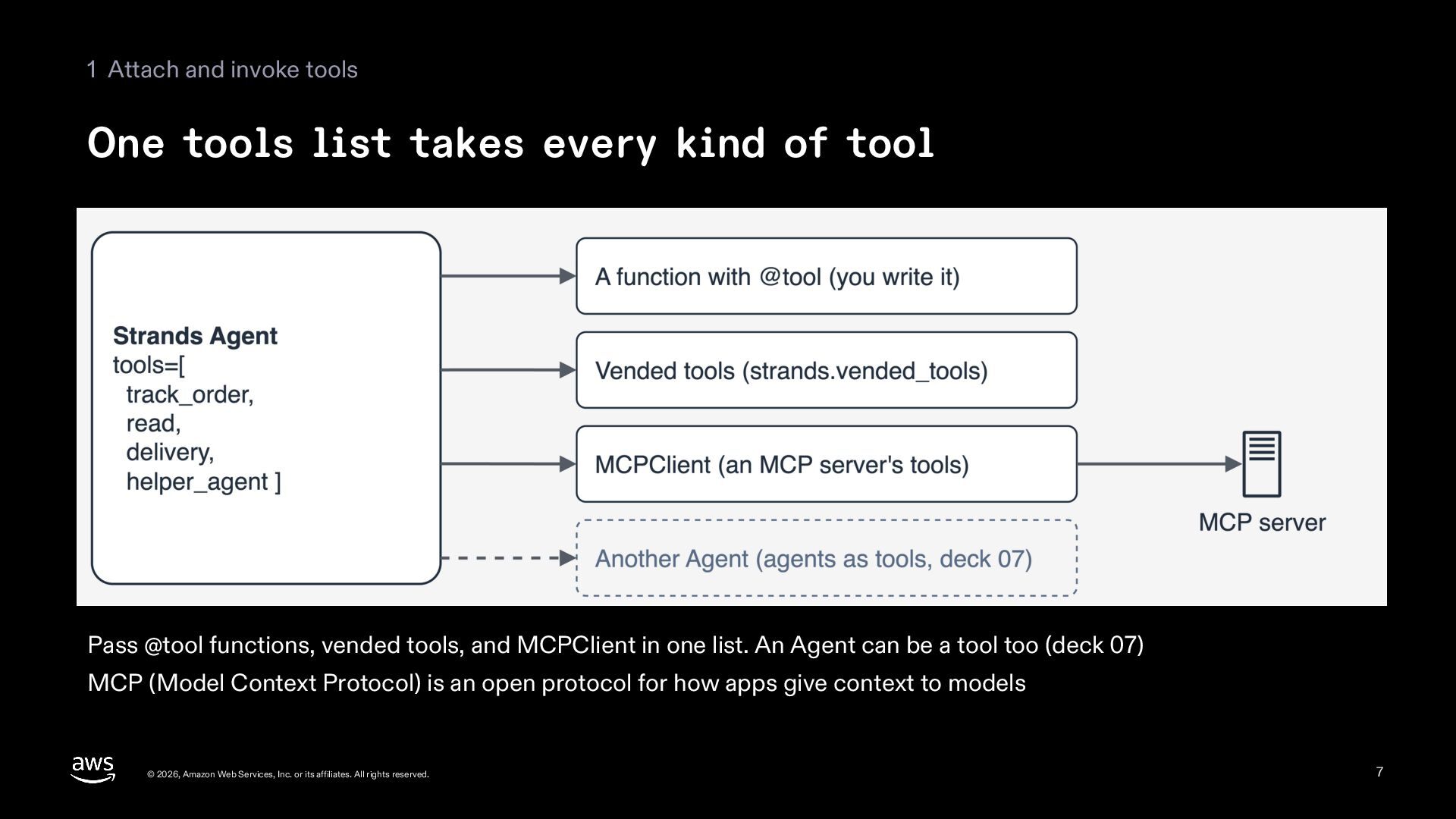
    kind of tool Pass @tool functions, vended tools, and MCPClient in one list. An Agent can be a tool too (deck 07) MCP (Model Context Protocol) is an open protocol for how apps give context to models © 2026, Amazon Web Services, Inc. or its affiliates. All rights reserved. 7
  8. 1 Attach and invoke tools Tools that ship with the

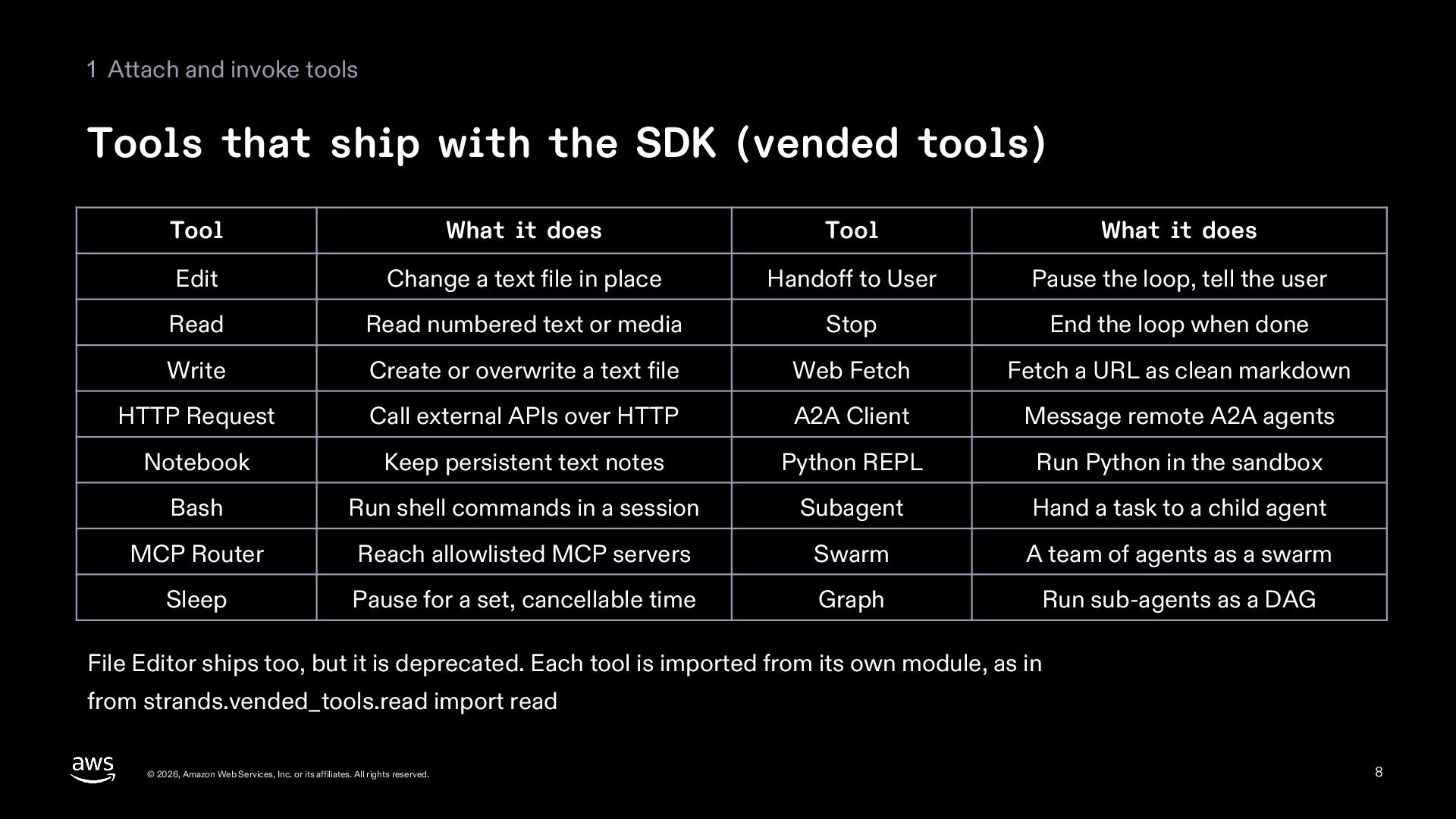
    SDK (vended tools) Tool What it does Tool What it does Edit Change a text file in place Handoff to User Pause the loop, tell the user Read Read numbered text or media Stop End the loop when done Write Create or overwrite a text file Web Fetch Fetch a URL as clean markdown HTTP Request Call external APIs over HTTP A2A Client Message remote A2A agents Notebook Keep persistent text notes Python REPL Run Python in the sandbox Bash Run shell commands in a session Subagent Hand a task to a child agent MCP Router Reach allowlisted MCP servers Swarm A team of agents as a swarm Sleep Pause for a set, cancellable time Graph Run sub-agents as a DAG File Editor ships too, but it is deprecated. Each tool is imported from its own module, as in from strands.vended_tools.read import read © 2026, Amazon Web Services, Inc. or its affiliates. All rights reserved. 8
  9. 1 Attach and invoke tools Check which tools the Agent

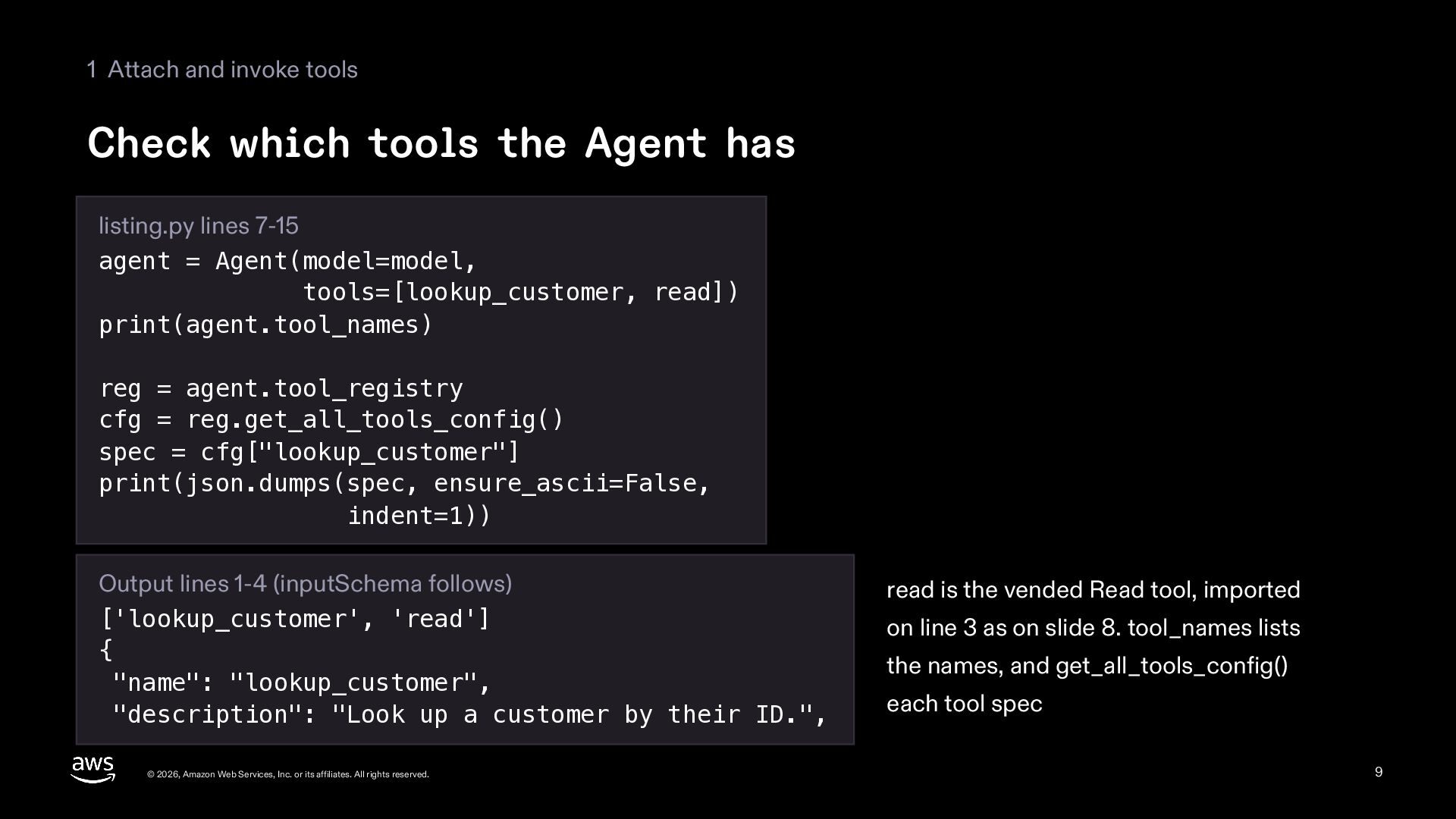
    has listing.py lines 7-15 agent = Agent(model=model, tools=[lookup_customer, read]) print(agent.tool_names) reg = agent.tool_registry cfg = reg.get_all_tools_config() spec = cfg["lookup_customer"] print(json.dumps(spec, ensure_ascii=False, indent=1)) Output lines 1-4 (inputSchema follows) ['lookup_customer', 'read'] { "name": "lookup_customer", "description": "Look up a customer by their ID.", © 2026, Amazon Web Services, Inc. or its affiliates. All rights reserved. read is the vended Read tool, imported on line 3 as on slide 8. tool_names lists the names, and get_all_tools_config() each tool spec 9
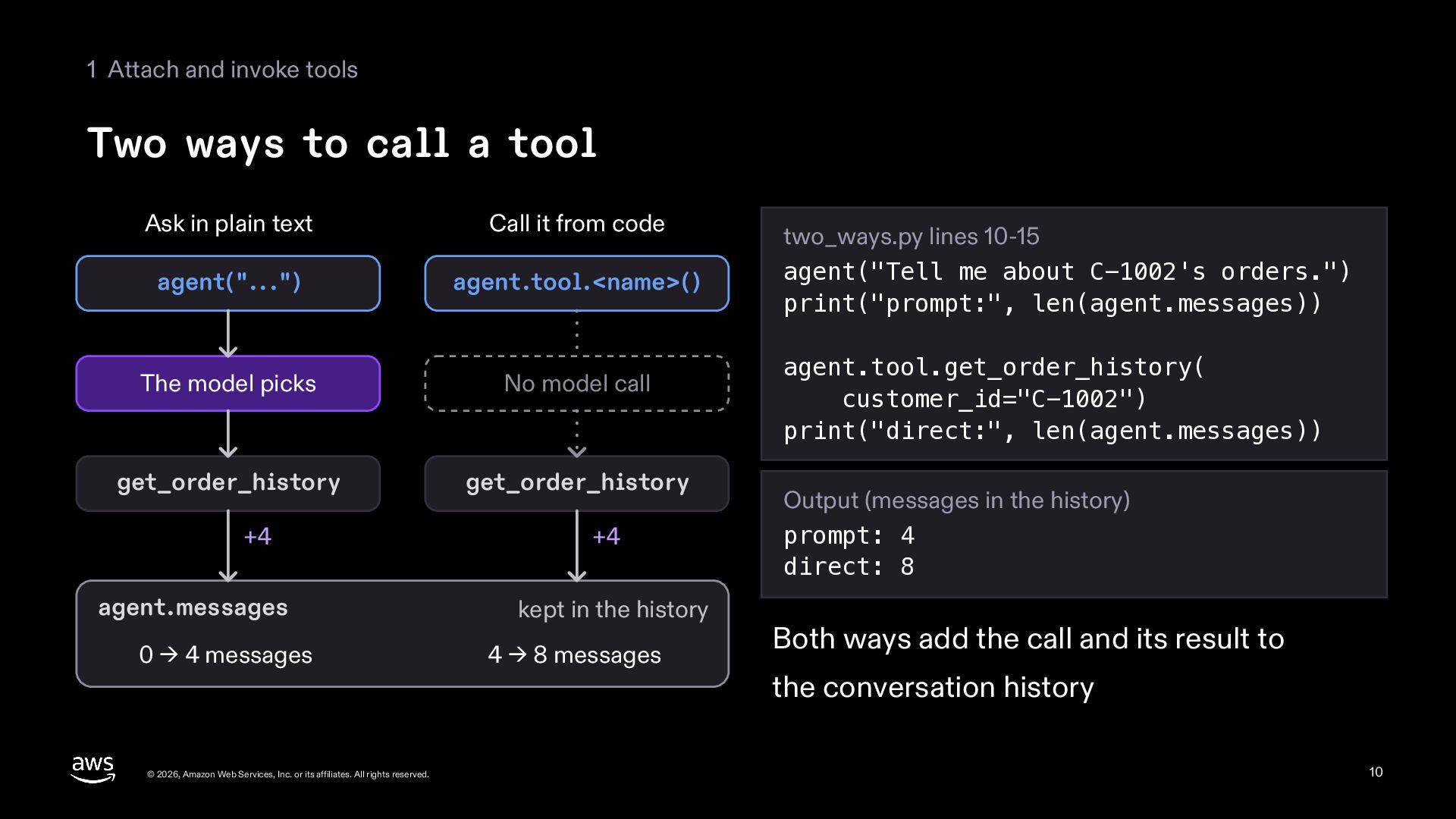
  10. 1 Attach and invoke tools Two ways to call a

    tool Ask in plain text Call it from code agent("...") agent.tool.<name>() The model picks No model call get_order_history get_order_history +4 agent.messages 0 → 4 messages © 2026, Amazon Web Services, Inc. or its affiliates. All rights reserved. +4 kept in the history 4 → 8 messages two_ways.py lines 10-15 agent("Tell me about C-1002's orders.") print("prompt:", len(agent.messages)) agent.tool.get_order_history( customer_id="C-1002") print("direct:", len(agent.messages)) Output (messages in the history) prompt: 4 direct: 8 Both ways add the call and its result to the conversation history 10
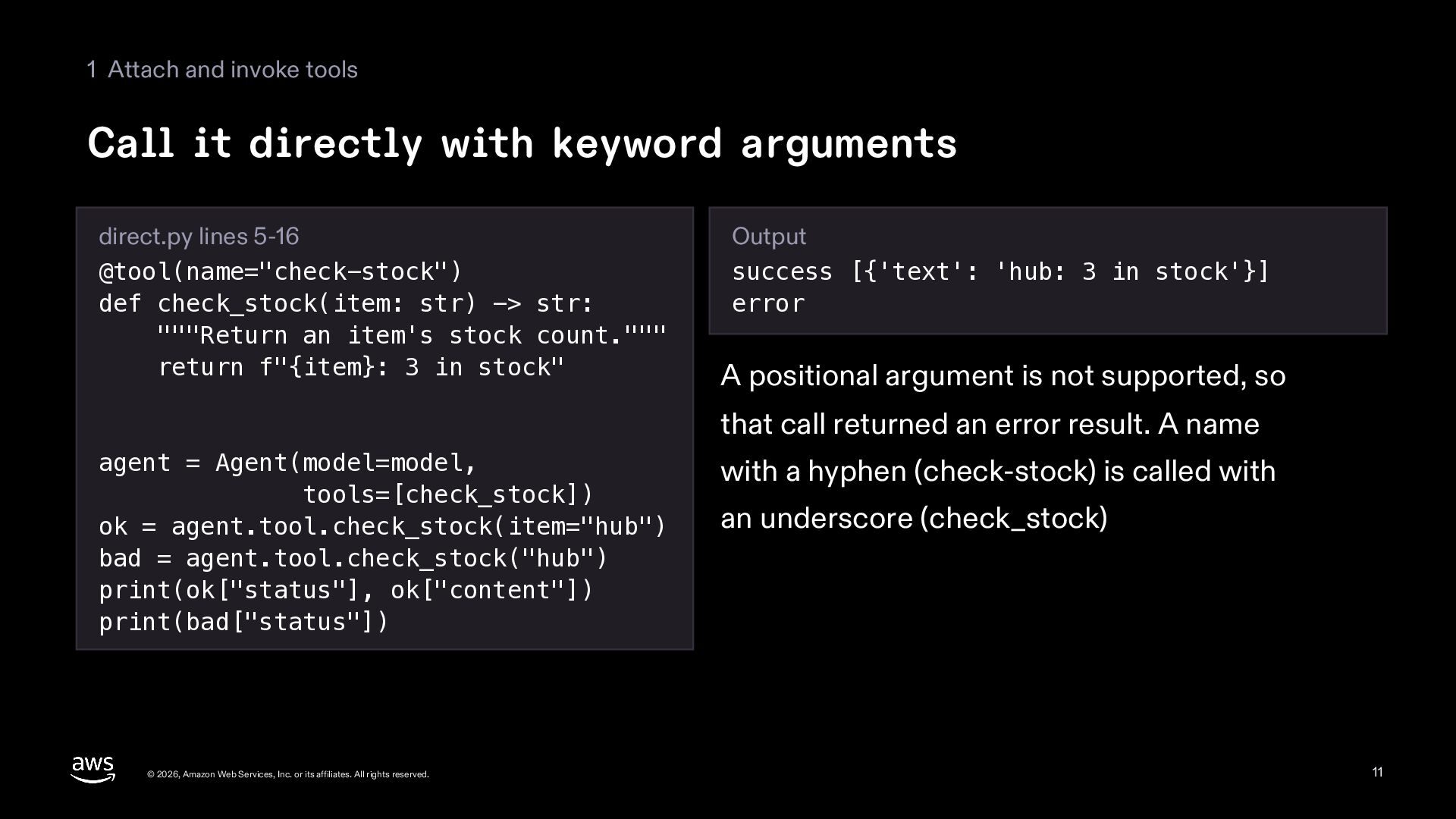
  11. 1 Attach and invoke tools Call it directly with keyword

    arguments direct.py lines 5-16 @tool(name="check-stock") def check_stock(item: str) -> str: """Return an item's stock count.""" return f"{item}: 3 in stock" Output success [{'text': 'hub: 3 in stock'}] error A positional argument is not supported, so that call returned an error result. A name agent = Agent(model=model, tools=[check_stock]) ok = agent.tool.check_stock(item="hub") bad = agent.tool.check_stock("hub") print(ok["status"], ok["content"]) print(bad["status"]) © 2026, Amazon Web Services, Inc. or its affiliates. All rights reserved. with a hyphen (check-stock) is called with an underscore (check_stock) 11
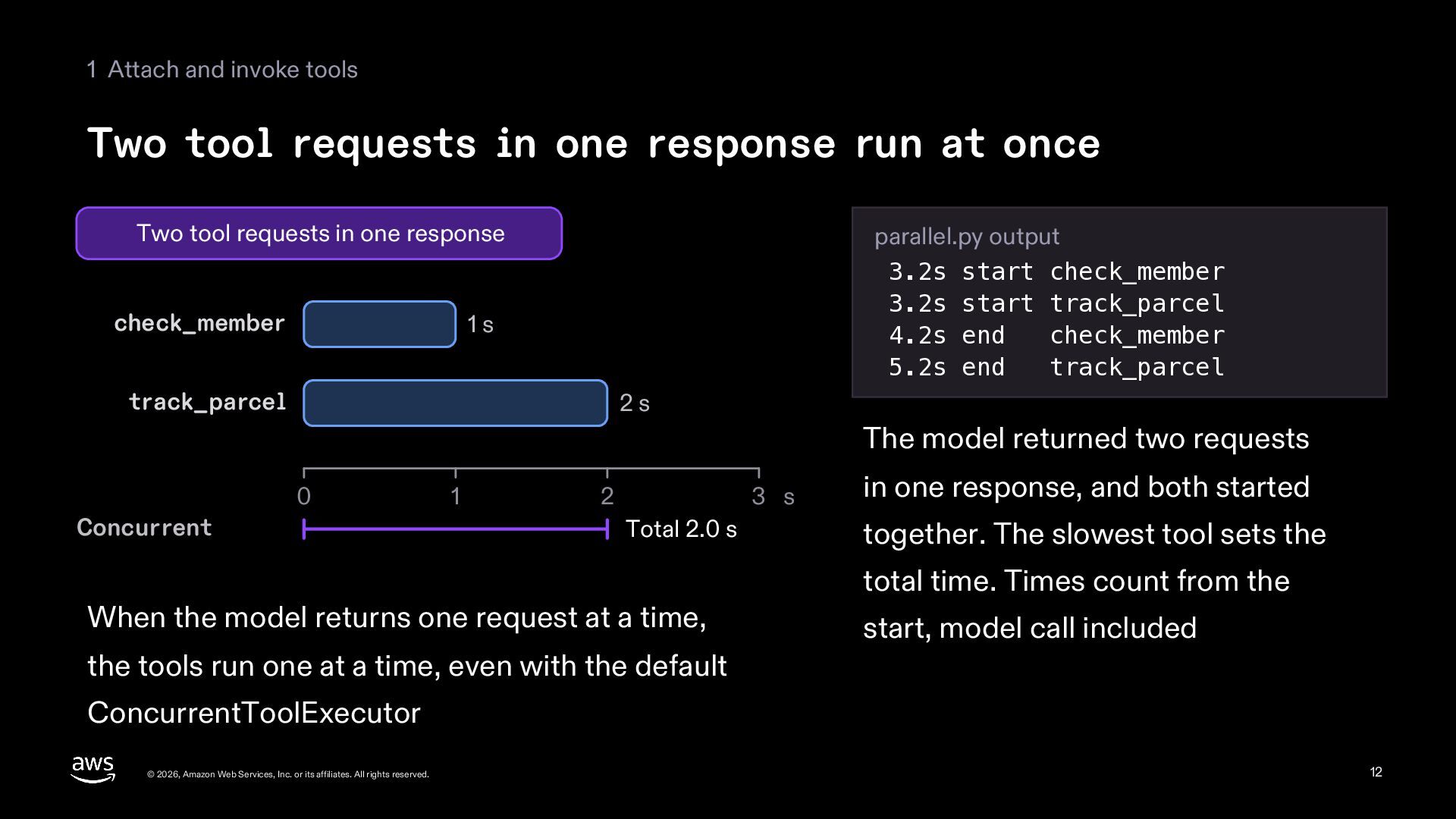
  12. 1 Attach and invoke tools Two tool requests in one

    response run at once Two tool requests in one response check_member parallel.py output 3.2s start check_member 3.2s start track_parcel 4.2s end check_member 5.2s end track_parcel 1s track_parcel 2s The model returned two requests 0 Concurrent 1 2 3 s Total 2.0 s When the model returns one request at a time, in one response, and both started together. The slowest tool sets the total time. Times count from the start, model call included the tools run one at a time, even with the default ConcurrentToolExecutor © 2026, Amazon Web Services, Inc. or its affiliates. All rights reserved. 12
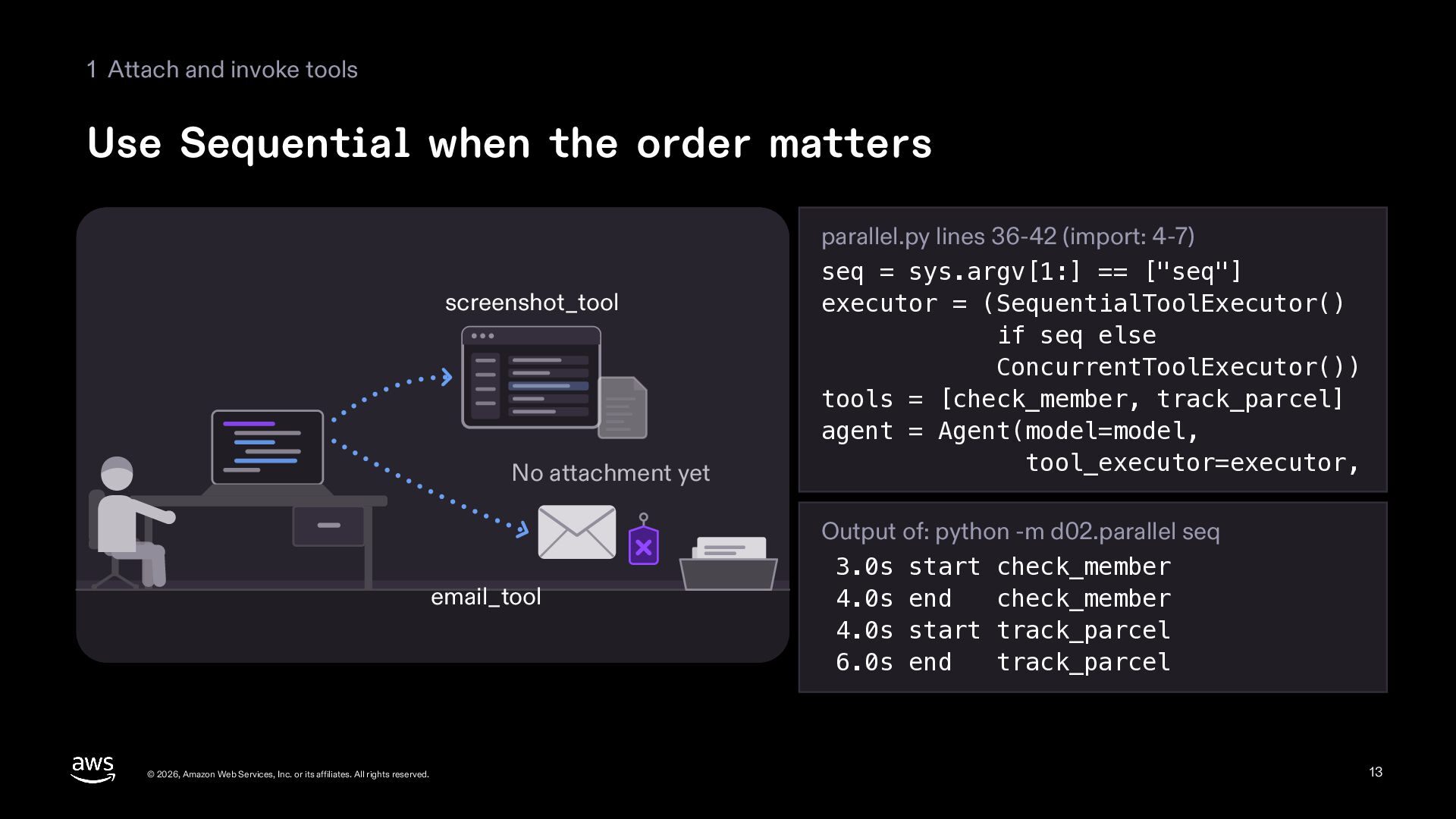
  13. 1 Attach and invoke tools Use Sequential when the order

    matters screenshot_tool No attachment yet email_tool © 2026, Amazon Web Services, Inc. or its affiliates. All rights reserved. parallel.py lines 36-42 (import: 4-7) seq = sys.argv[1:] == ["seq"] executor = (SequentialToolExecutor() if seq else ConcurrentToolExecutor()) tools = [check_member, track_parcel] agent = Agent(model=model, tool_executor=executor, Output of: python -m d02.parallel seq 3.0s start check_member 4.0s end check_member 4.0s start track_parcel 6.0s end track_parcel 13
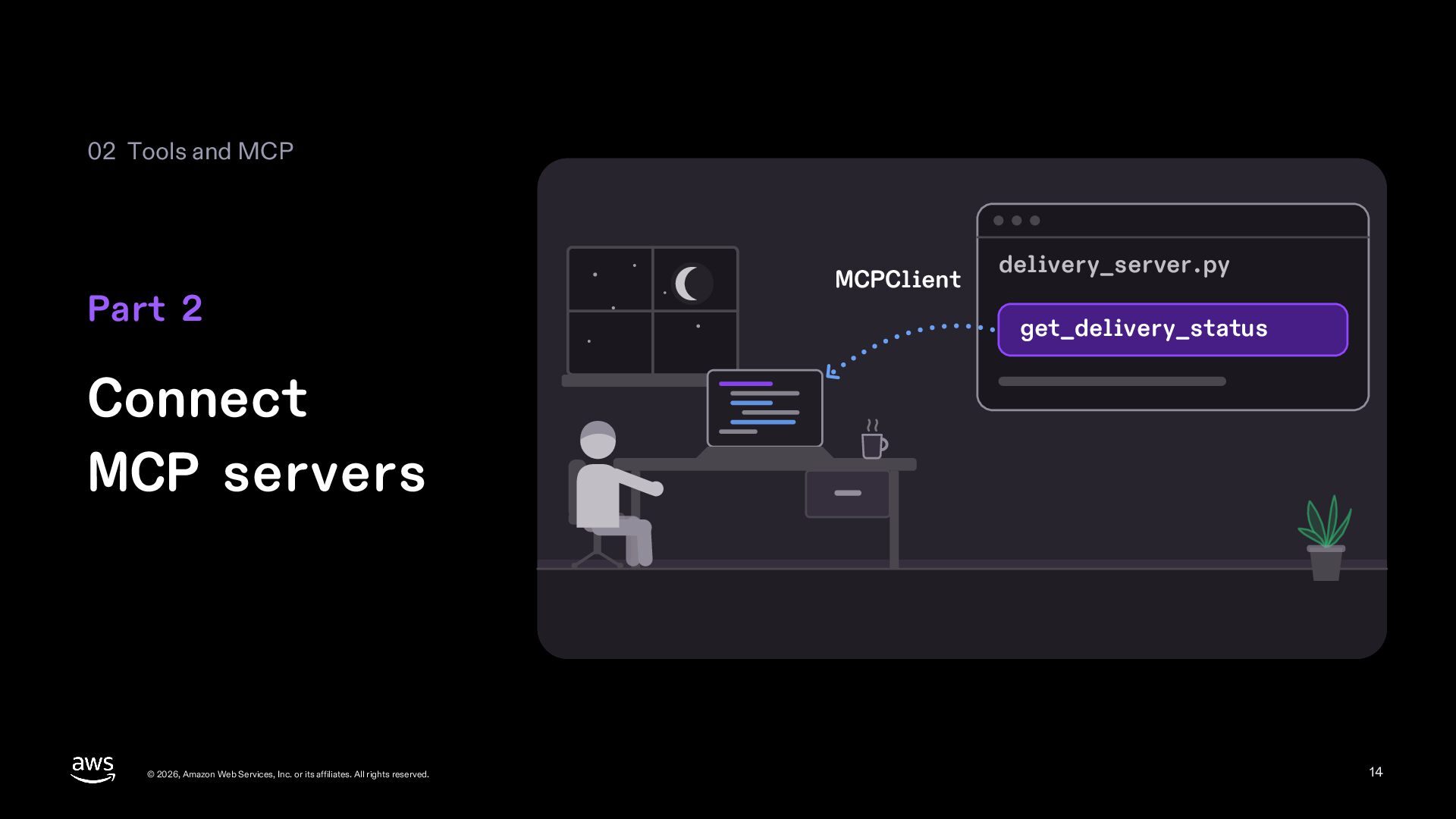
  14. 02 Tools and MCP Part 2 MCPClient delivery_server.py get_delivery_status Connect

    MCP servers © 2026, Amazon Web Services, Inc. or its affiliates. All rights reserved. 14
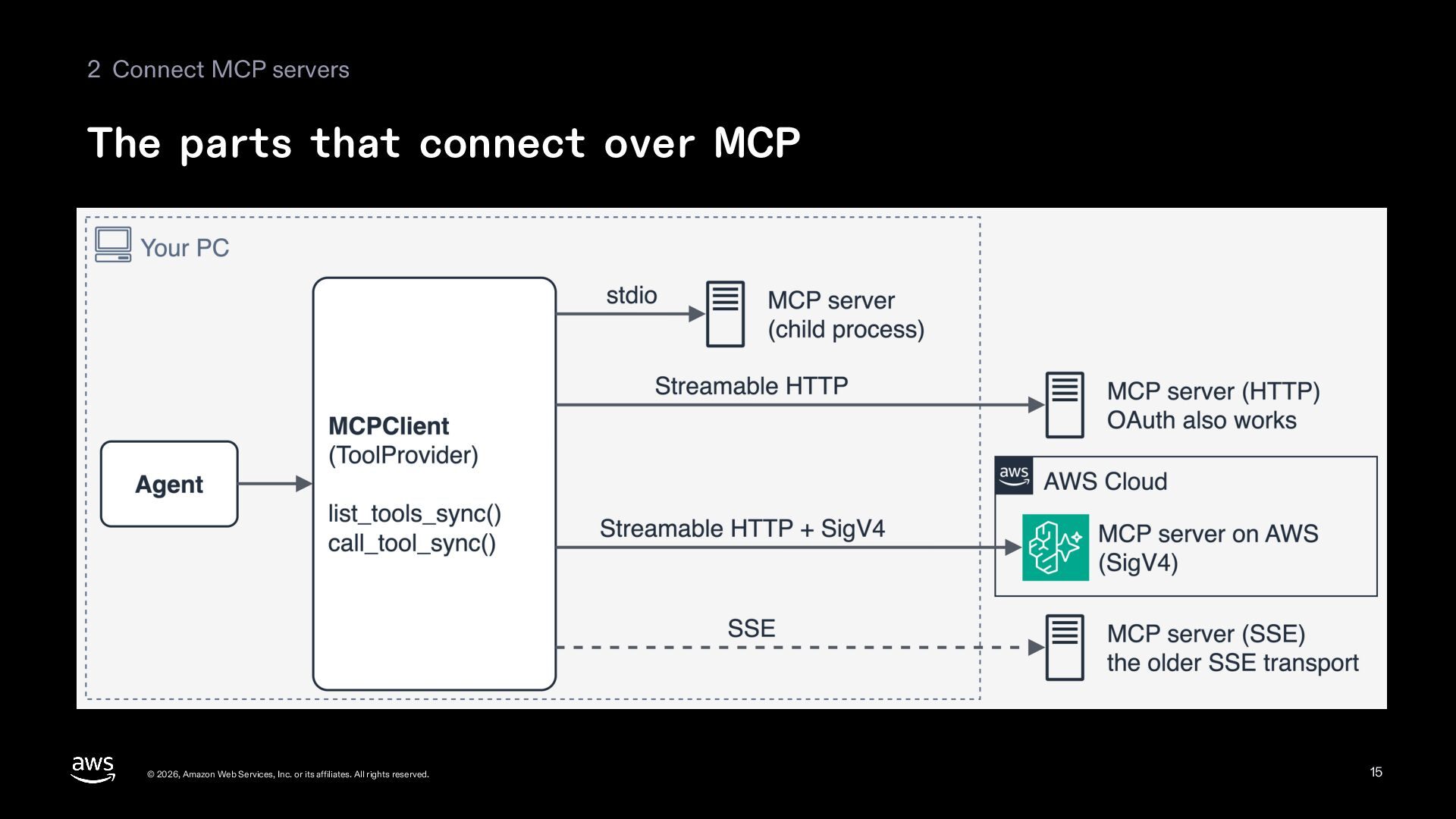
  15. 2 Connect MCP servers The parts that connect over MCP

    © 2026, Amazon Web Services, Inc. or its affiliates. All rights reserved. 15
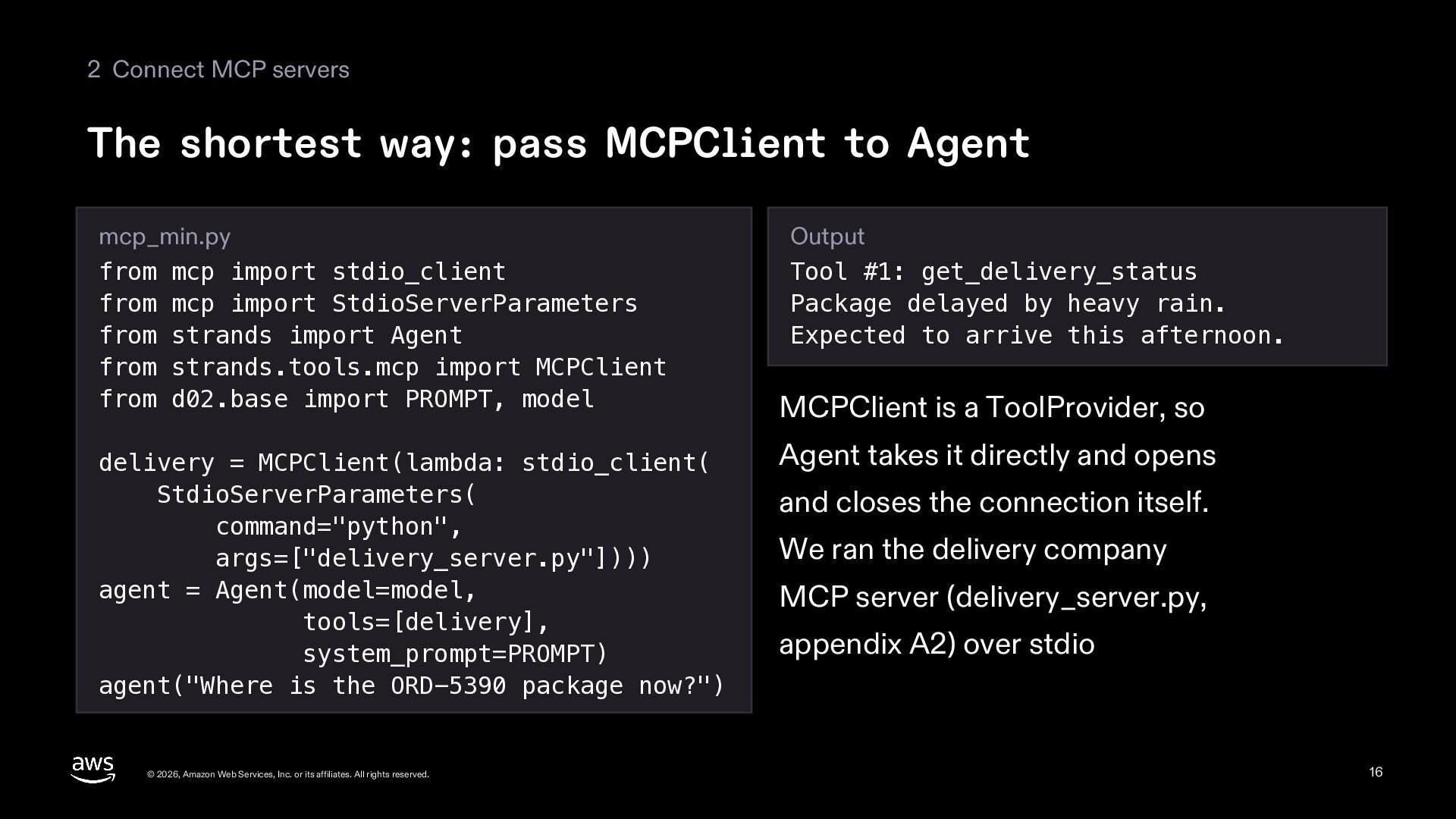
  16. 2 Connect MCP servers The shortest way: pass MCPClient to

    Agent mcp_min.py from mcp import stdio_client from mcp import StdioServerParameters from strands import Agent from strands.tools.mcp import MCPClient from d02.base import PROMPT, model delivery = MCPClient(lambda: stdio_client( StdioServerParameters( command="python", args=["delivery_server.py"]))) agent = Agent(model=model, tools=[delivery], system_prompt=PROMPT) agent("Where is the ORD-5390 package now?") © 2026, Amazon Web Services, Inc. or its affiliates. All rights reserved. Output Tool #1: get_delivery_status Package delayed by heavy rain. Expected to arrive this afternoon. MCPClient is a ToolProvider, so Agent takes it directly and opens and closes the connection itself. We ran the delivery company MCP server (delivery_server.py, appendix A2) over stdio 16
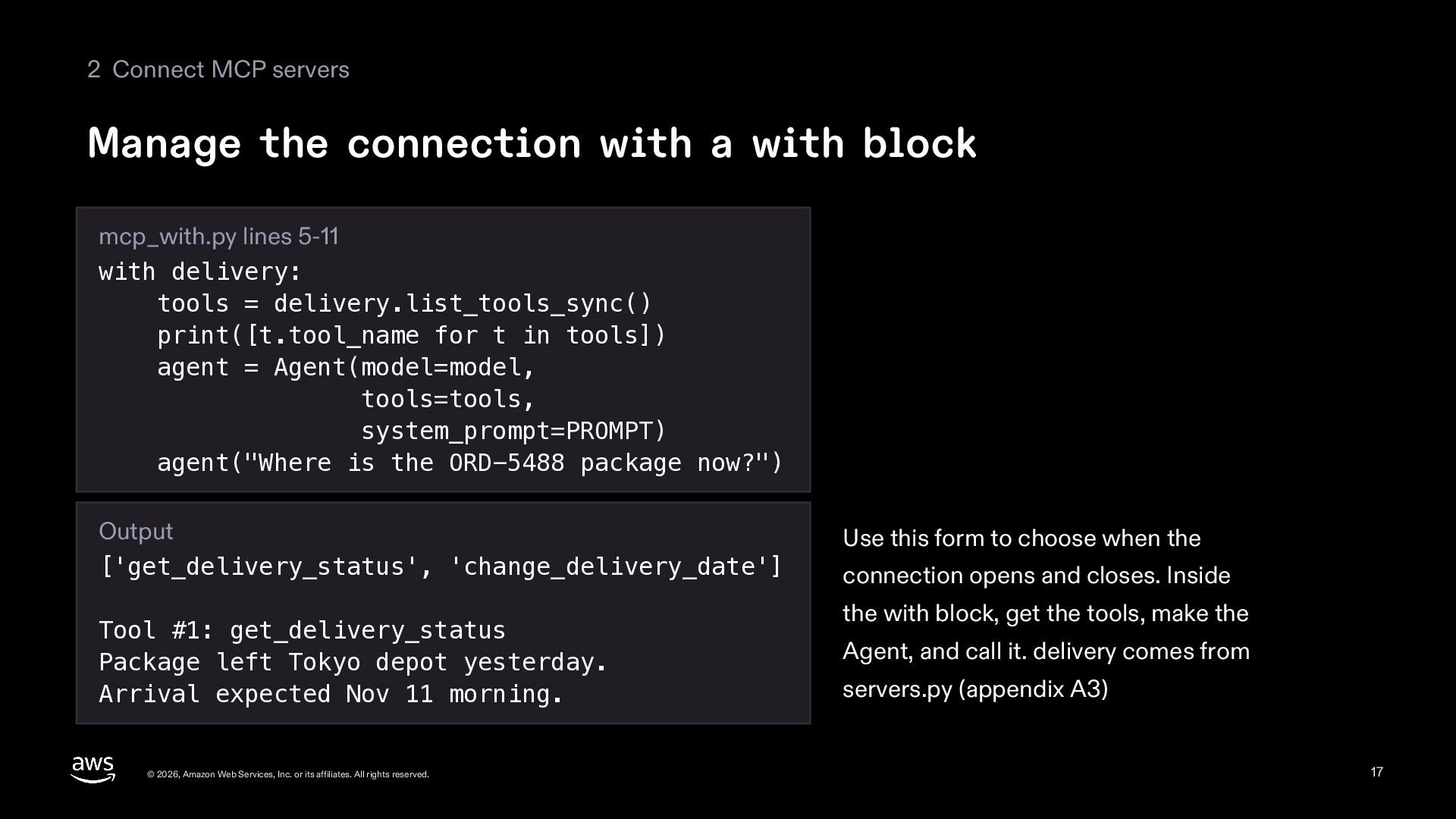
  17. 2 Connect MCP servers Manage the connection with a with

    block mcp_with.py lines 5-11 with delivery: tools = delivery.list_tools_sync() print([t.tool_name for t in tools]) agent = Agent(model=model, tools=tools, system_prompt=PROMPT) agent("Where is the ORD-5488 package now?") Output ['get_delivery_status', 'change_delivery_date'] Tool #1: get_delivery_status Package left Tokyo depot yesterday. Arrival expected Nov 11 morning. © 2026, Amazon Web Services, Inc. or its affiliates. All rights reserved. Use this form to choose when the connection opens and closes. Inside the with block, get the tools, make the Agent, and call it. delivery comes from servers.py (appendix A3) 17
  18. 2 Connect MCP servers Called outside the with block, the

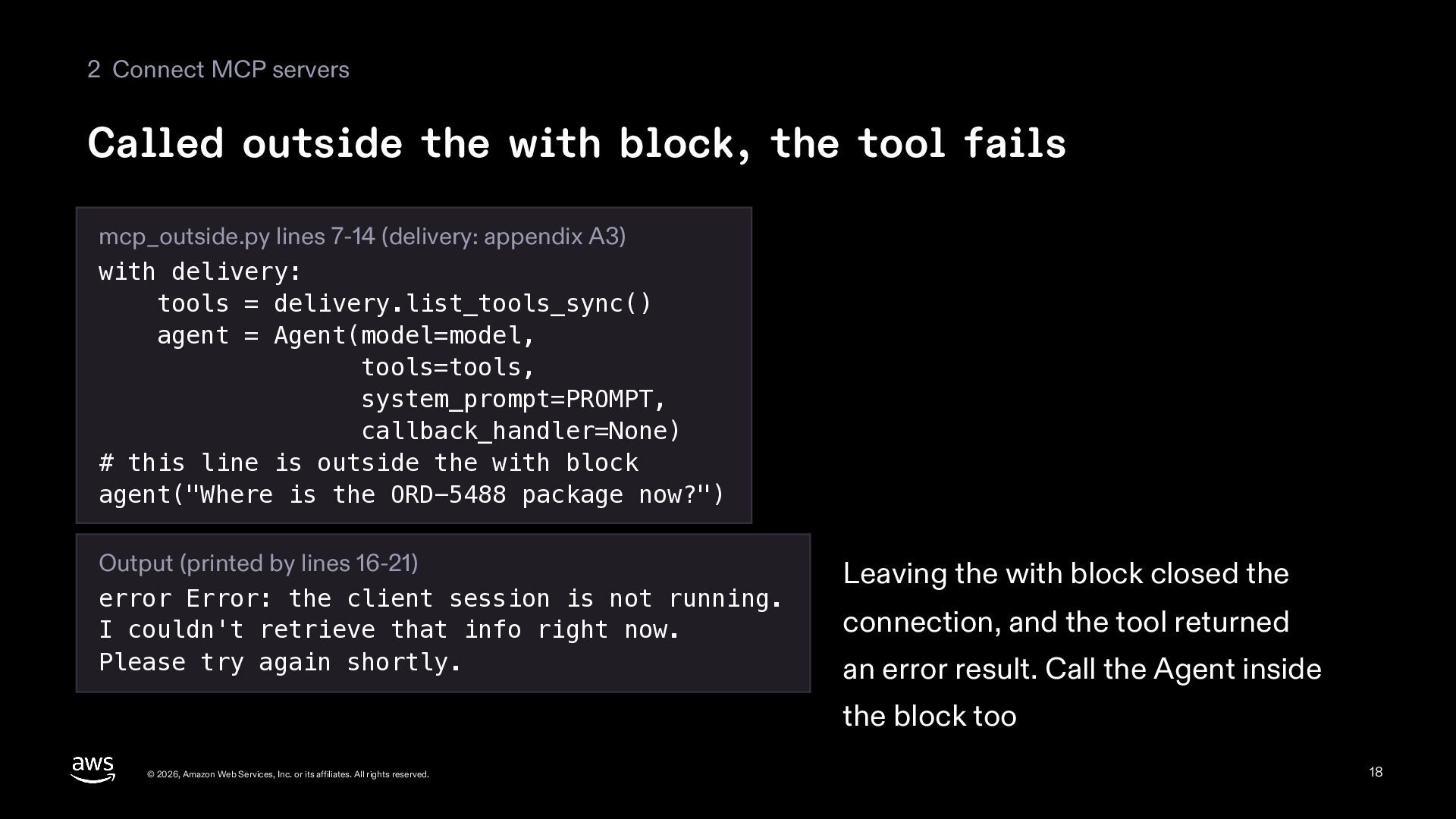
    tool fails mcp_outside.py lines 7-14 (delivery: appendix A3) with delivery: tools = delivery.list_tools_sync() agent = Agent(model=model, tools=tools, system_prompt=PROMPT, callback_handler=None) # this line is outside the with block agent("Where is the ORD-5488 package now?") Output (printed by lines 16-21) error Error: the client session is not running. I couldn't retrieve that info right now. Please try again shortly. Leaving the with block closed the connection, and the tool returned an error result. Call the Agent inside the block too © 2026, Amazon Web Services, Inc. or its affiliates. All rights reserved. 18
  19. 2 Connect MCP servers Choosing a transport Transport Server it

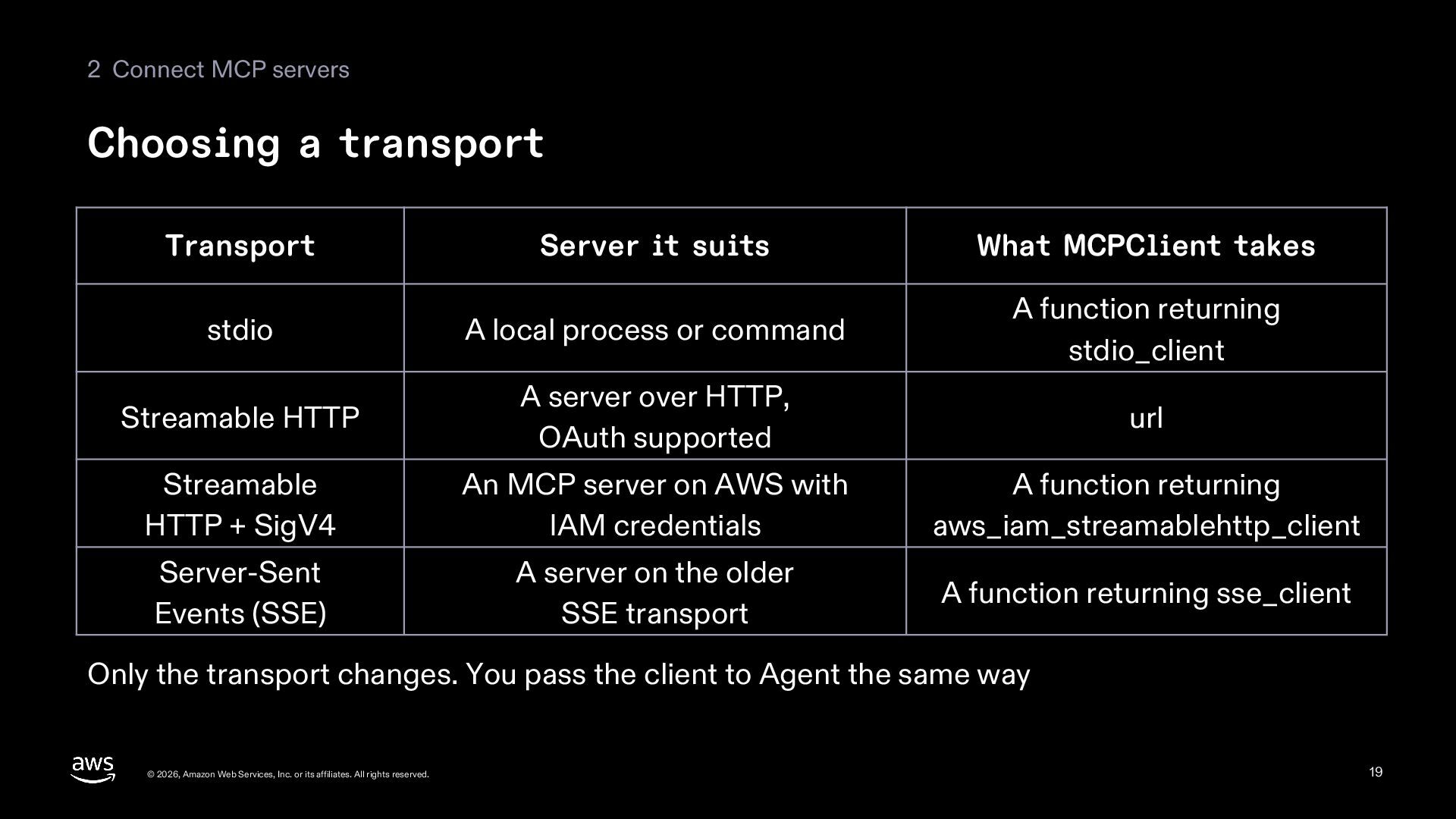
    suits What MCPClient takes stdio A local process or command A function returning stdio_client Streamable HTTP A server over HTTP, OAuth supported url Streamable HTTP + SigV4 An MCP server on AWS with IAM credentials A function returning aws_iam_streamablehttp_client Server-Sent Events (SSE) A server on the older SSE transport A function returning sse_client Only the transport changes. You pass the client to Agent the same way © 2026, Amazon Web Services, Inc. or its affiliates. All rights reserved. 19
  20. 02 Tools and MCP agent.tool_names Part 3 get_delivery_status Remote and

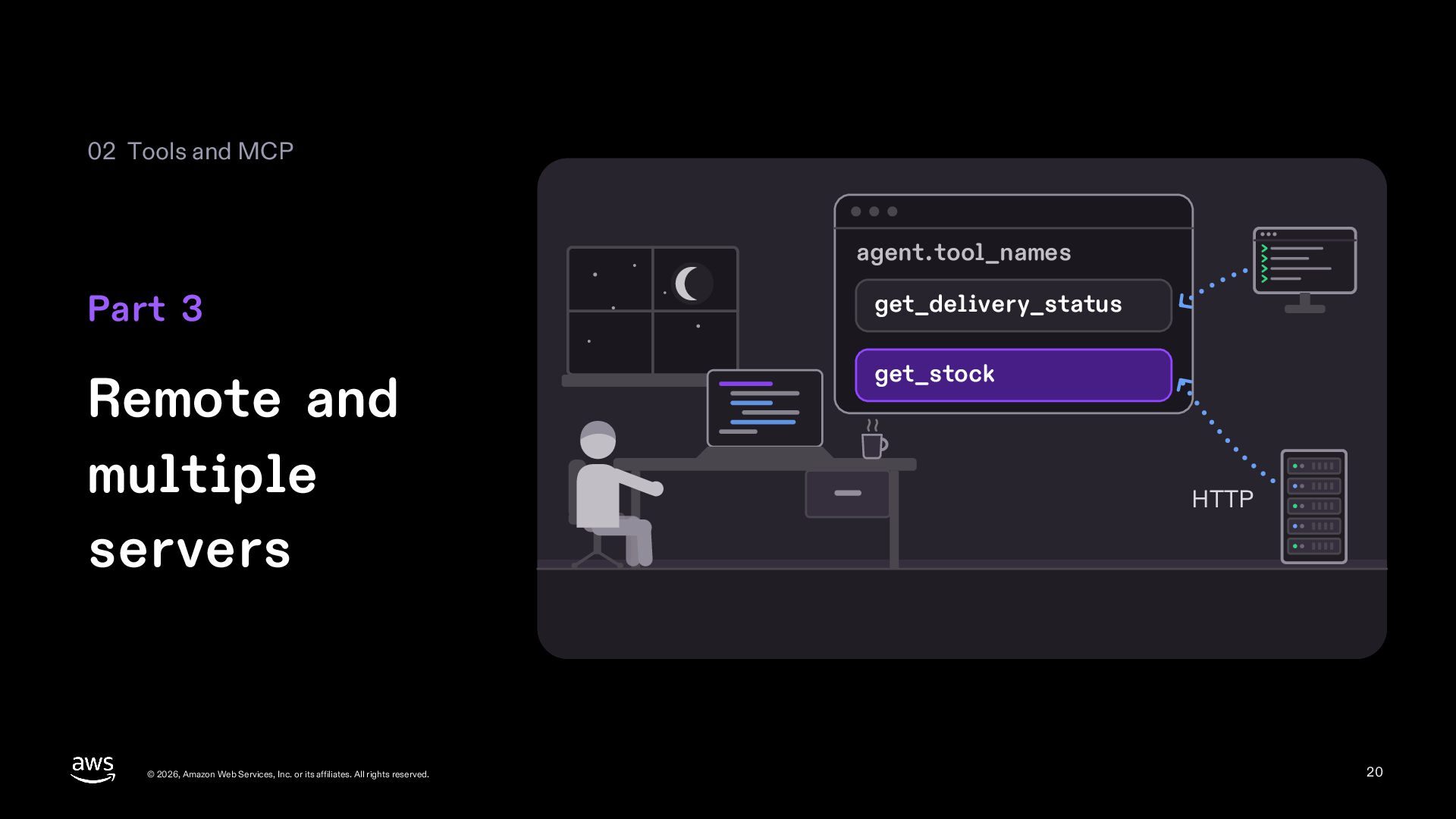
    multiple servers get_stock © 2026, Amazon Web Services, Inc. or its affiliates. All rights reserved. HTTP 20
  21. 3 Remote and multiple servers Streamable HTTP takes a url

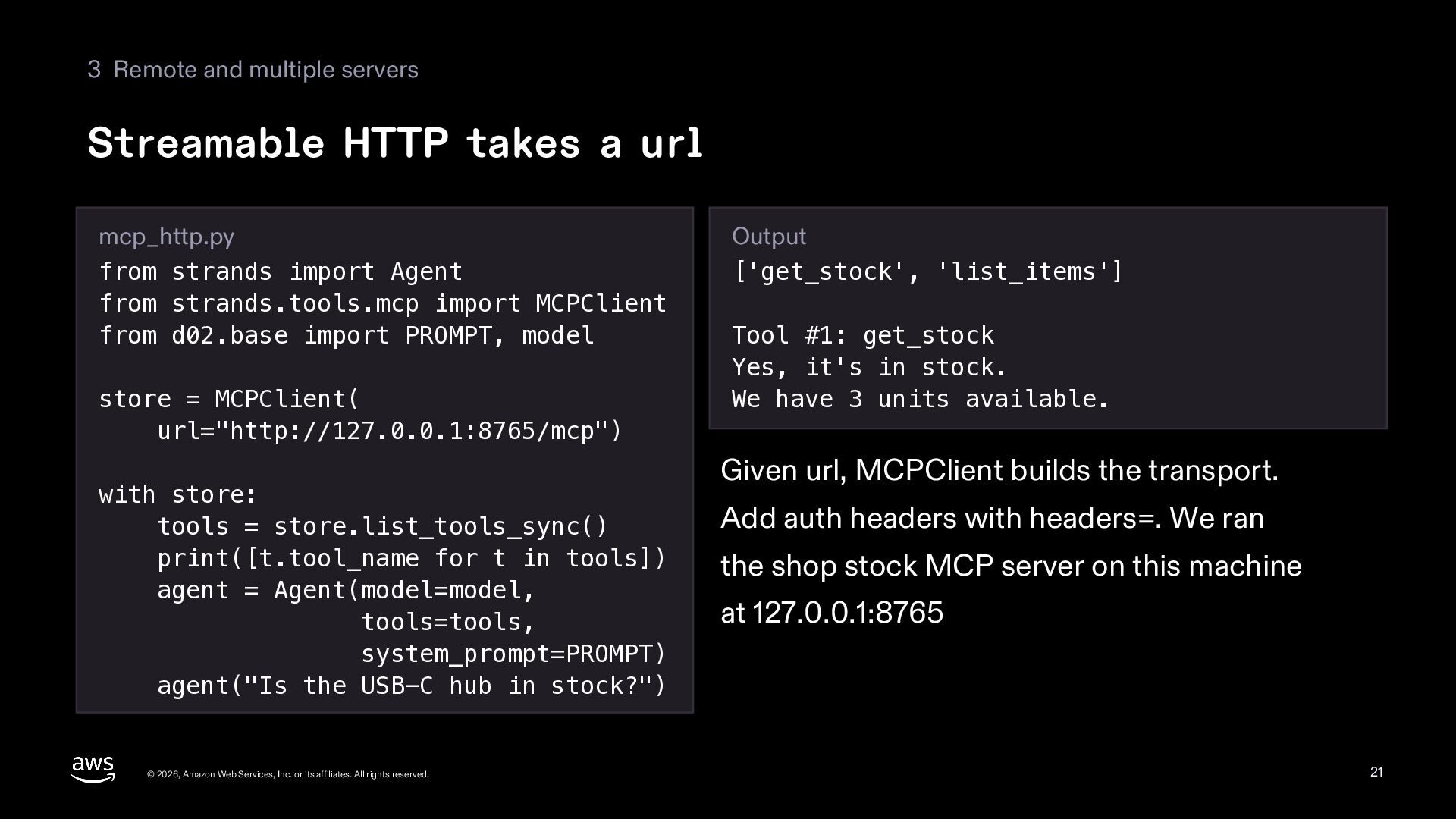
    mcp_http.py from strands import Agent from strands.tools.mcp import MCPClient from d02.base import PROMPT, model store = MCPClient( url="http://127.0.0.1:8765/mcp") with store: tools = store.list_tools_sync() print([t.tool_name for t in tools]) agent = Agent(model=model, tools=tools, system_prompt=PROMPT) agent("Is the USB-C hub in stock?") © 2026, Amazon Web Services, Inc. or its affiliates. All rights reserved. Output ['get_stock', 'list_items'] Tool #1: get_stock Yes, it's in stock. We have 3 units available. Given url, MCPClient builds the transport. Add auth headers with headers=. We ran the shop stock MCP server on this machine at 127.0.0.1:8765 21
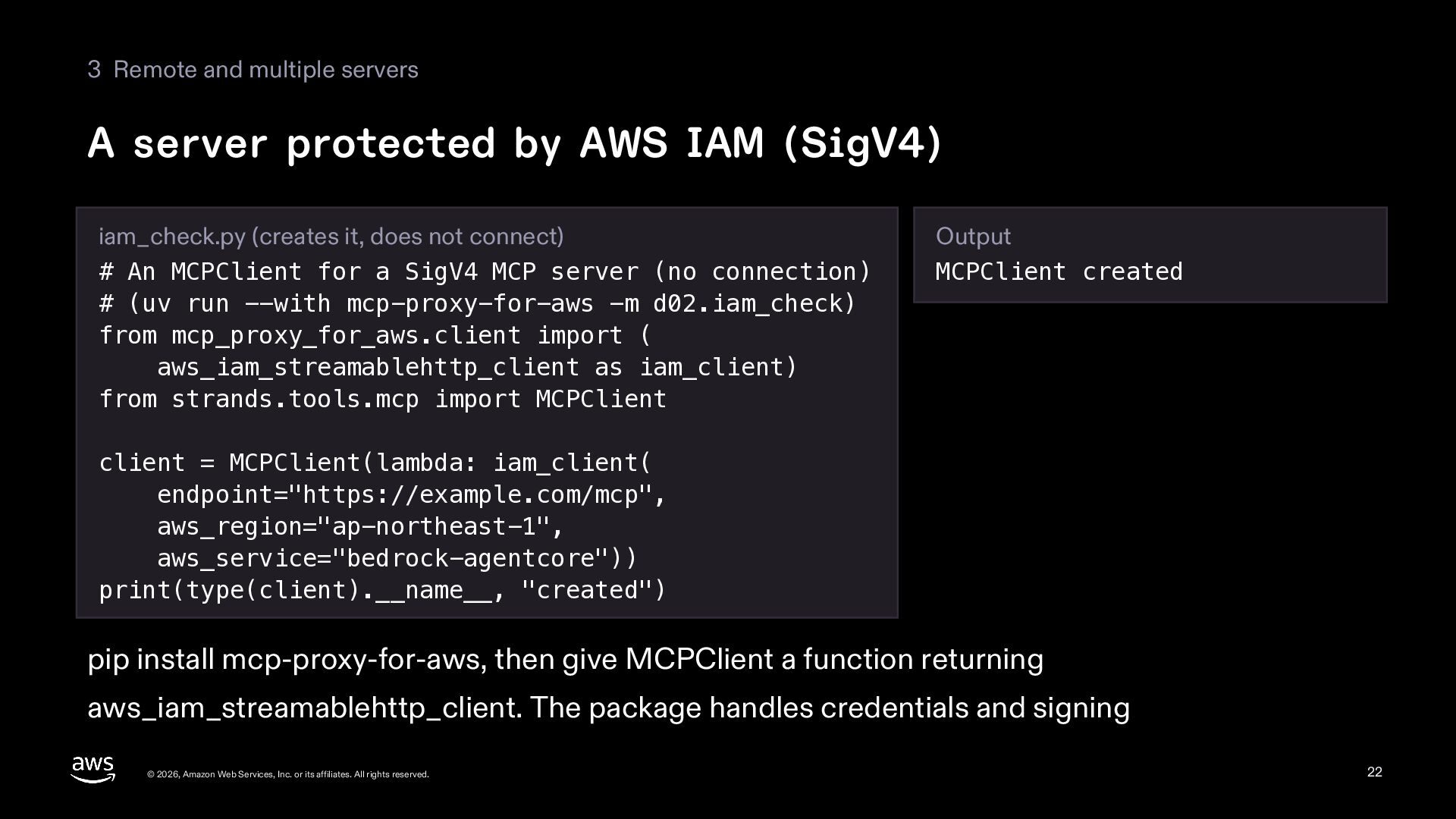
  22. 3 Remote and multiple servers A server protected by AWS

    IAM (SigV4) iam_check.py (creates it, does not connect) # An MCPClient for a SigV4 MCP server (no connection) # (uv run --with mcp-proxy-for-aws -m d02.iam_check) from mcp_proxy_for_aws.client import ( aws_iam_streamablehttp_client as iam_client) from strands.tools.mcp import MCPClient Output MCPClient created client = MCPClient(lambda: iam_client( endpoint="https://example.com/mcp", aws_region="ap-northeast-1", aws_service="bedrock-agentcore")) print(type(client).__name__, "created") pip install mcp-proxy-for-aws, then give MCPClient a function returning aws_iam_streamablehttp_client. The package handles credentials and signing © 2026, Amazon Web Services, Inc. or its affiliates. All rights reserved. 22
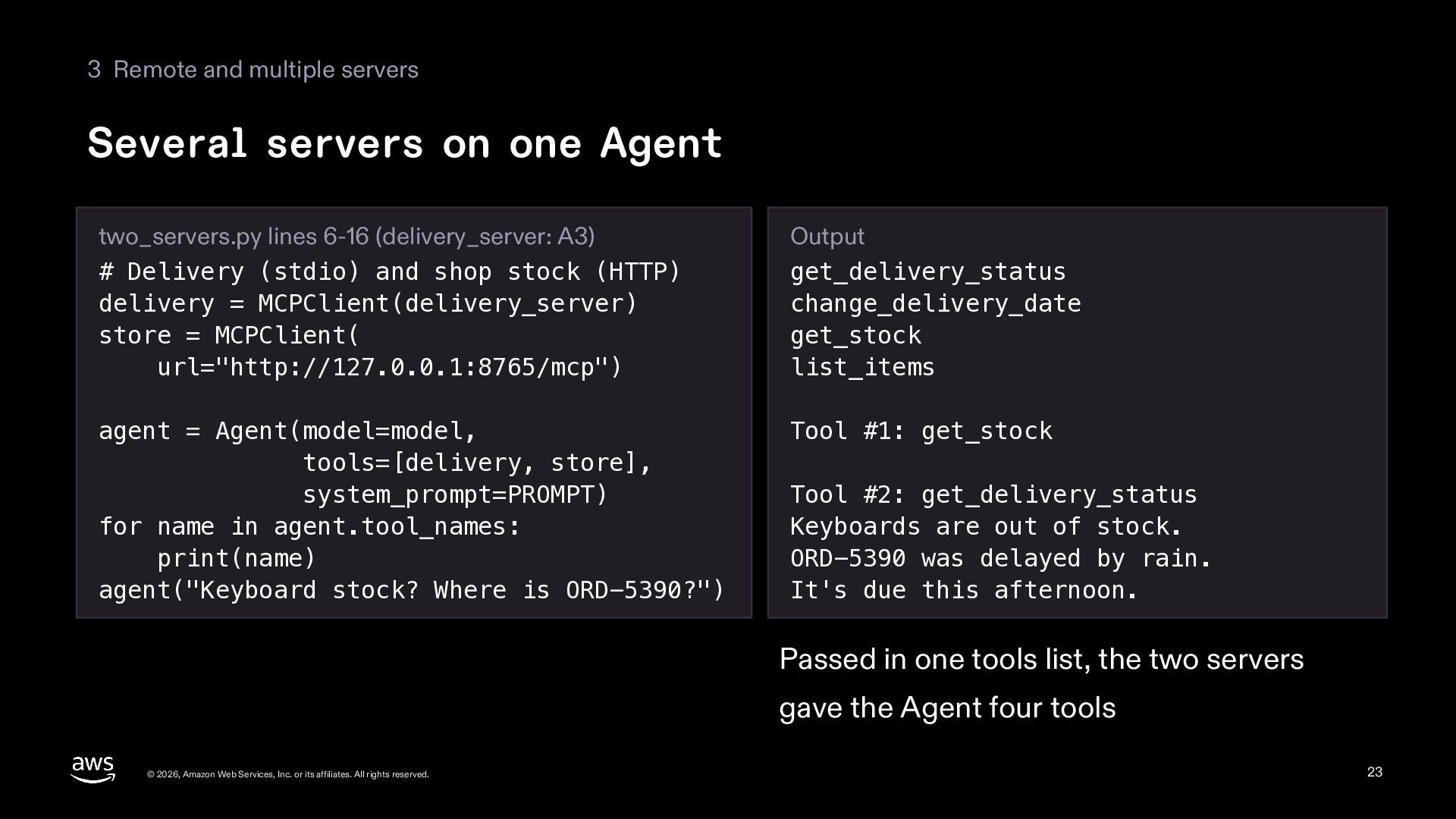
  23. 3 Remote and multiple servers Several servers on one Agent

    two_servers.py lines 6-16 (delivery_server: A3) # Delivery (stdio) and shop stock (HTTP) delivery = MCPClient(delivery_server) store = MCPClient( url="http://127.0.0.1:8765/mcp") Output get_delivery_status change_delivery_date get_stock list_items agent = Agent(model=model, tools=[delivery, store], system_prompt=PROMPT) for name in agent.tool_names: print(name) agent("Keyboard stock? Where is ORD-5390?") Tool #1: get_stock Tool #2: get_delivery_status Keyboards are out of stock. ORD-5390 was delayed by rain. It's due this afternoon. Passed in one tools list, the two servers gave the Agent four tools © 2026, Amazon Web Services, Inc. or its affiliates. All rights reserved. 23
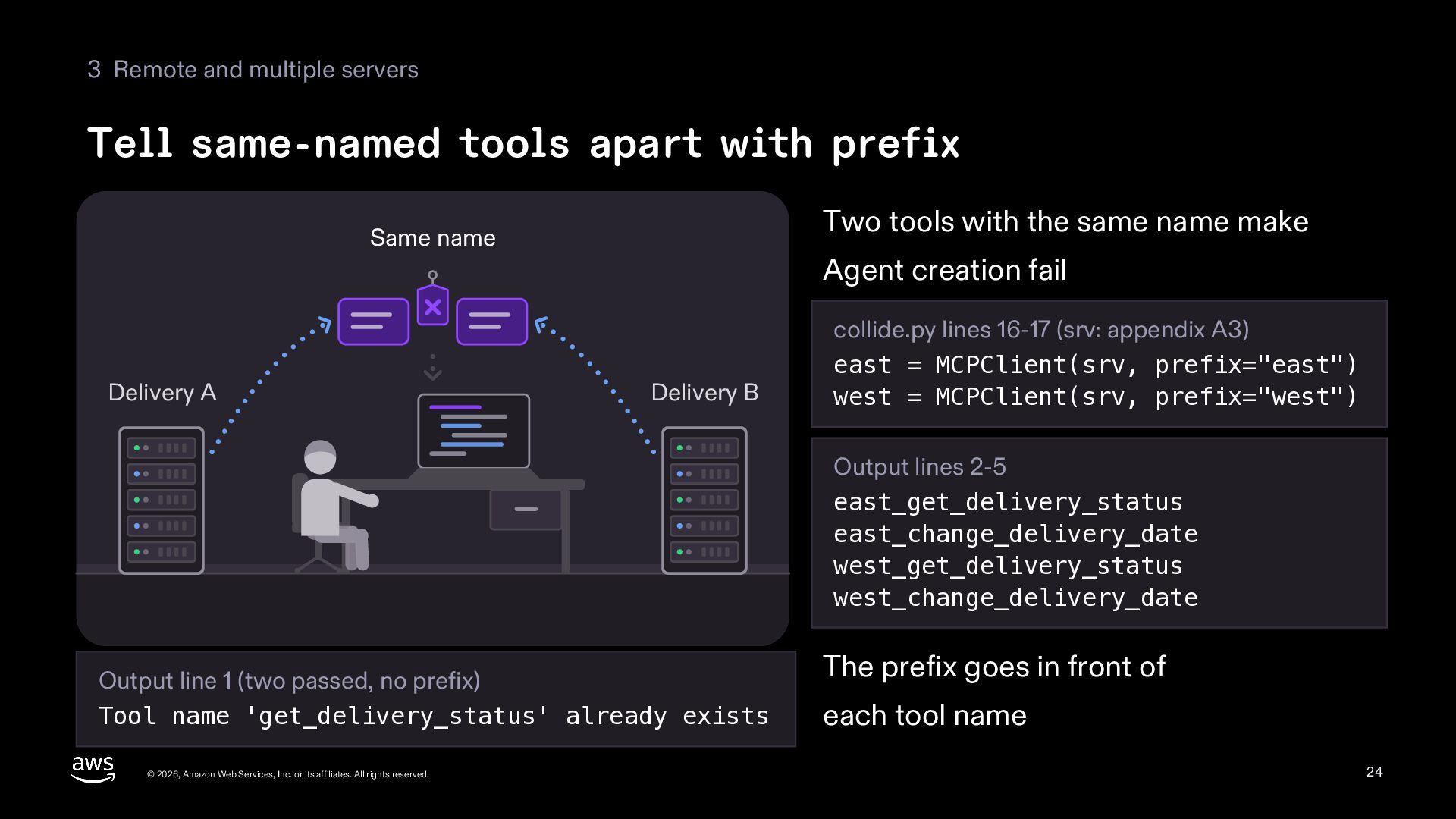
  24. 3 Remote and multiple servers Tell same-named tools apart with

    prefix Two tools with the same name make Same name Delivery A Agent creation fail Delivery B collide.py lines 16-17 (srv: appendix A3) east = MCPClient(srv, prefix="east") west = MCPClient(srv, prefix="west") Output lines 2-5 east_get_delivery_status east_change_delivery_date west_get_delivery_status west_change_delivery_date Output line 1 (two passed, no prefix) Tool name 'get_delivery_status' already exists © 2026, Amazon Web Services, Inc. or its affiliates. All rights reserved. The prefix goes in front of each tool name 24
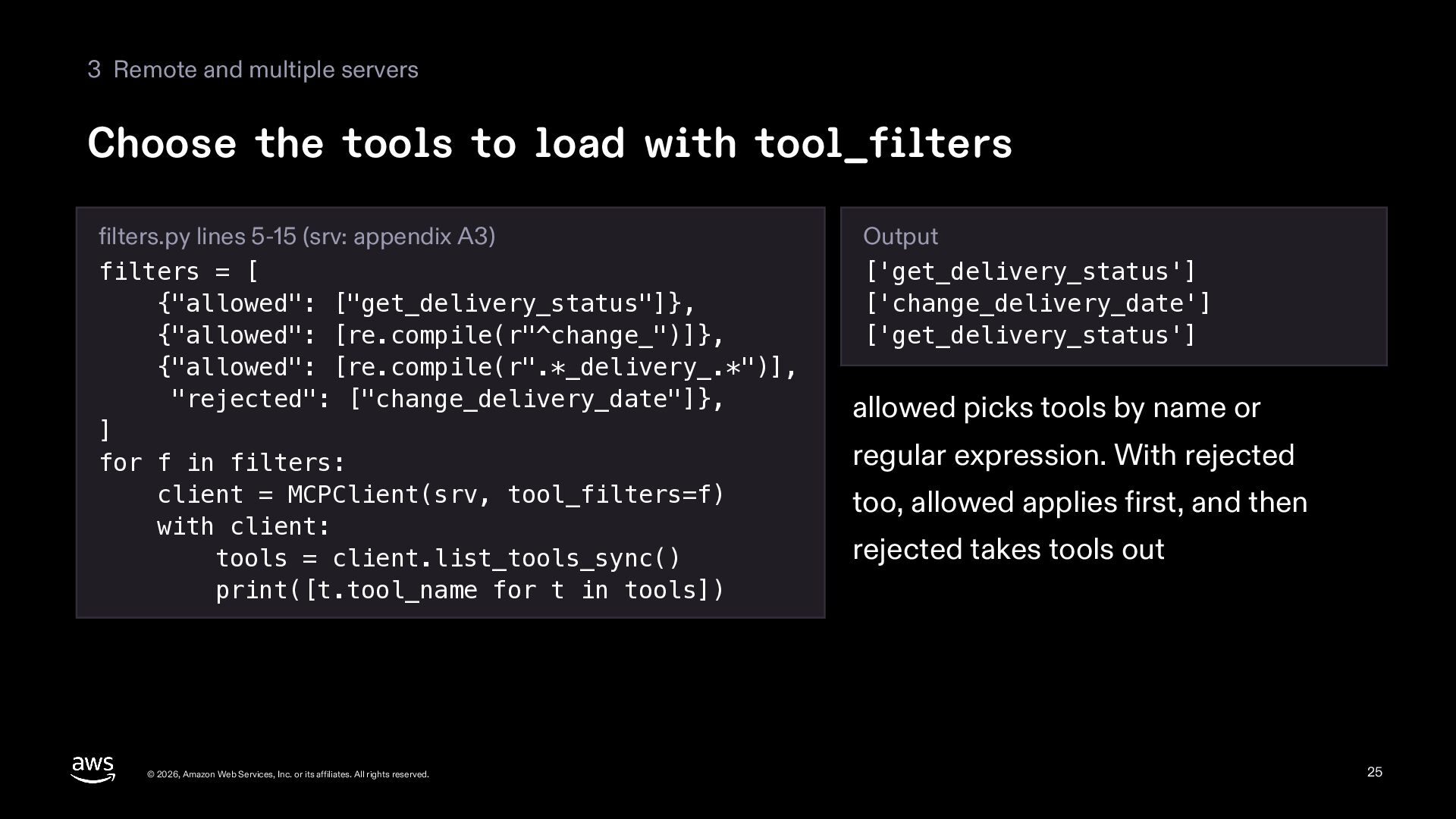
  25. 3 Remote and multiple servers Choose the tools to load

    with tool_filters filters.py lines 5-15 (srv: appendix A3) filters = [ {"allowed": ["get_delivery_status"]}, {"allowed": [re.compile(r"^change_")]}, {"allowed": [re.compile(r".*_delivery_.*")], "rejected": ["change_delivery_date"]}, ] for f in filters: client = MCPClient(srv, tool_filters=f) with client: tools = client.list_tools_sync() print([t.tool_name for t in tools]) © 2026, Amazon Web Services, Inc. or its affiliates. All rights reserved. Output ['get_delivery_status'] ['change_delivery_date'] ['get_delivery_status'] allowed picks tools by name or regular expression. With rejected too, allowed applies first, and then rejected takes tools out 25
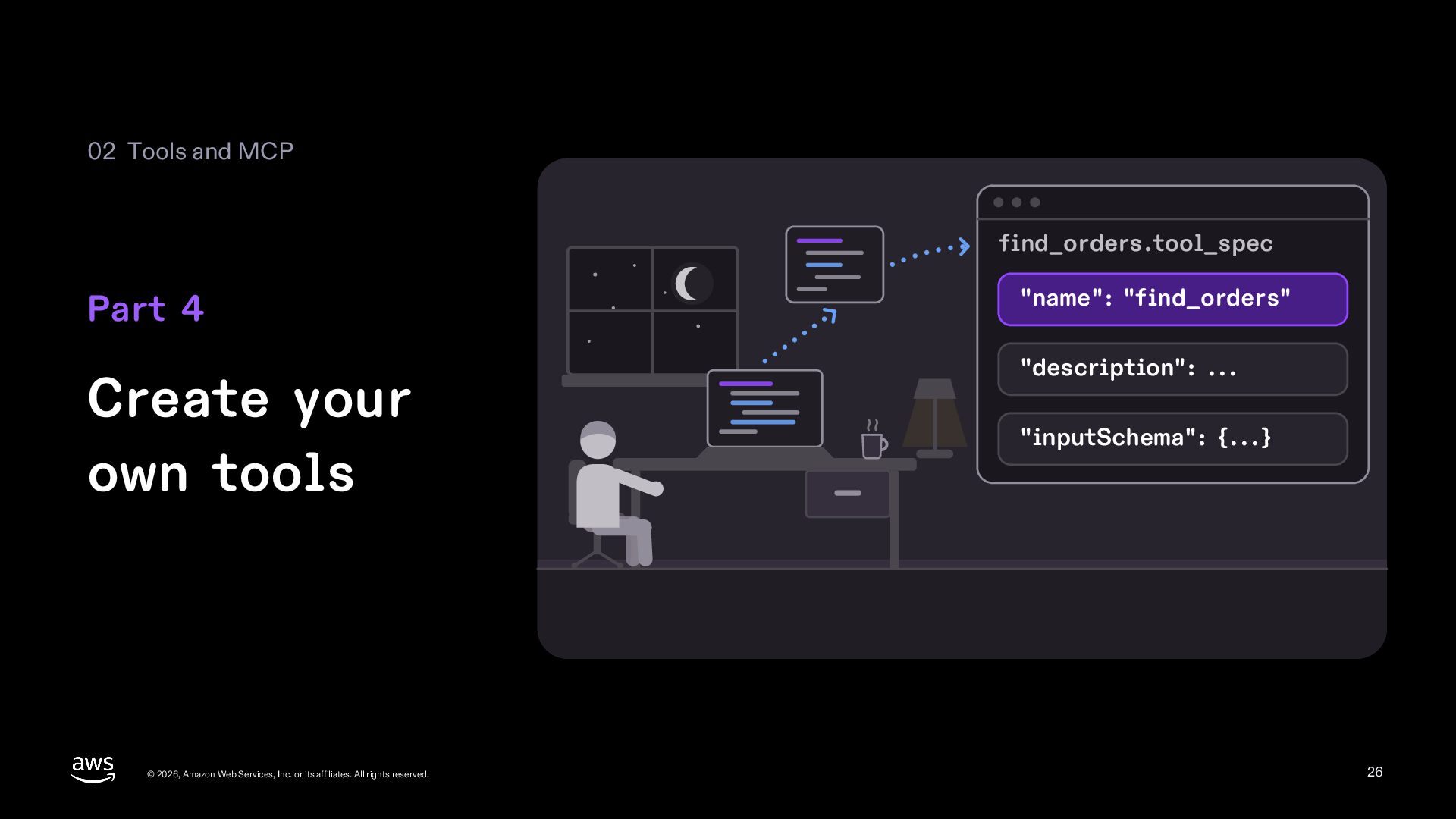
  26. 02 Tools and MCP find_orders.tool_spec Part 4 "name": "find_orders" Create

    your own tools "description": ... © 2026, Amazon Web Services, Inc. or its affiliates. All rights reserved. "inputSchema": {...} 26
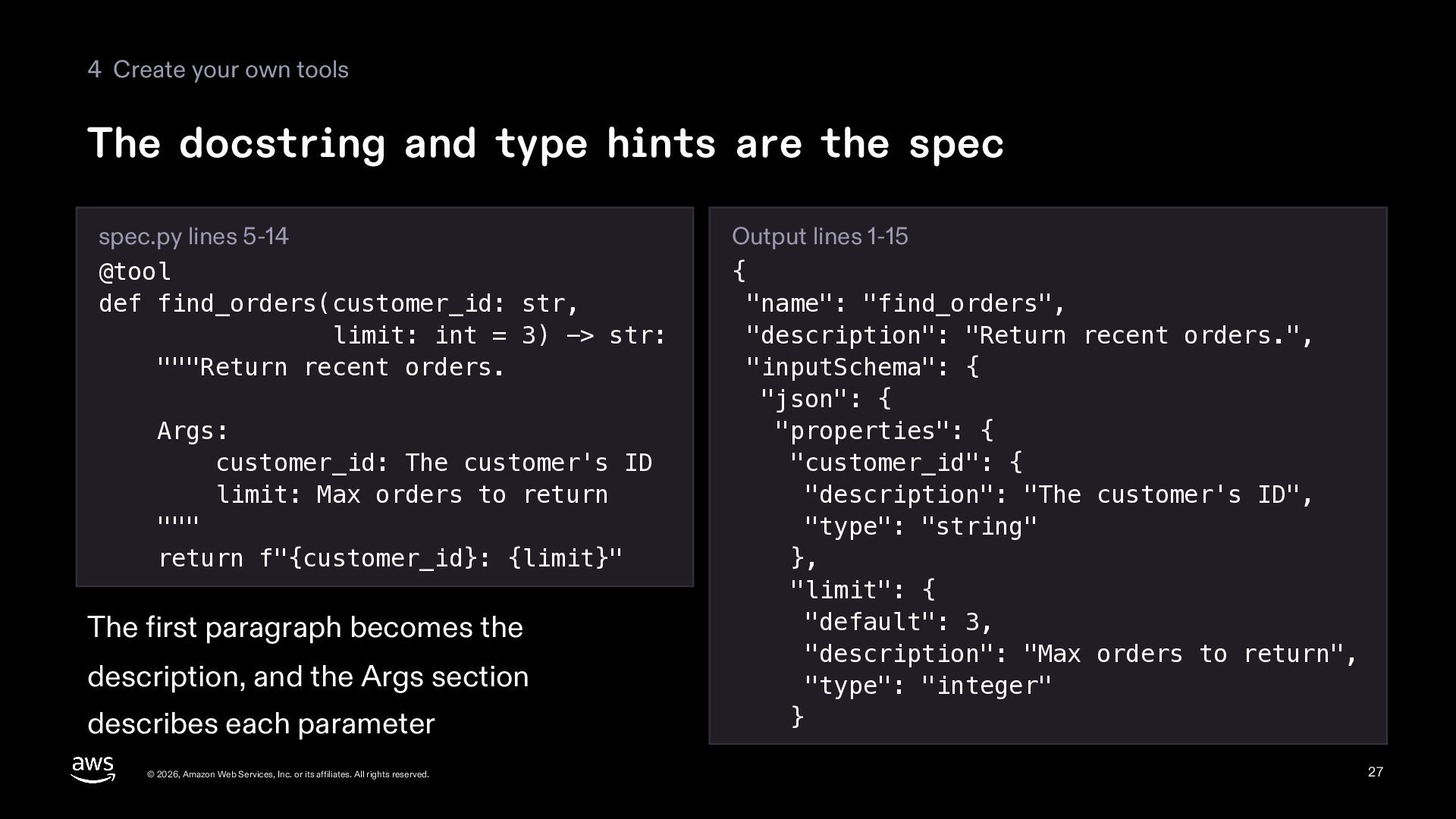
  27. 4 Create your own tools The docstring and type hints

    are the spec spec.py lines 5-14 @tool def find_orders(customer_id: str, limit: int = 3) -> str: """Return recent orders. Args: customer_id: The customer's ID limit: Max orders to return """ return f"{customer_id}: {limit}" The first paragraph becomes the description, and the Args section describes each parameter © 2026, Amazon Web Services, Inc. or its affiliates. All rights reserved. Output lines 1-15 { "name": "find_orders", "description": "Return recent orders.", "inputSchema": { "json": { "properties": { "customer_id": { "description": "The customer's ID", "type": "string" }, "limit": { "default": 3, "description": "Max orders to return", "type": "integer" } 27
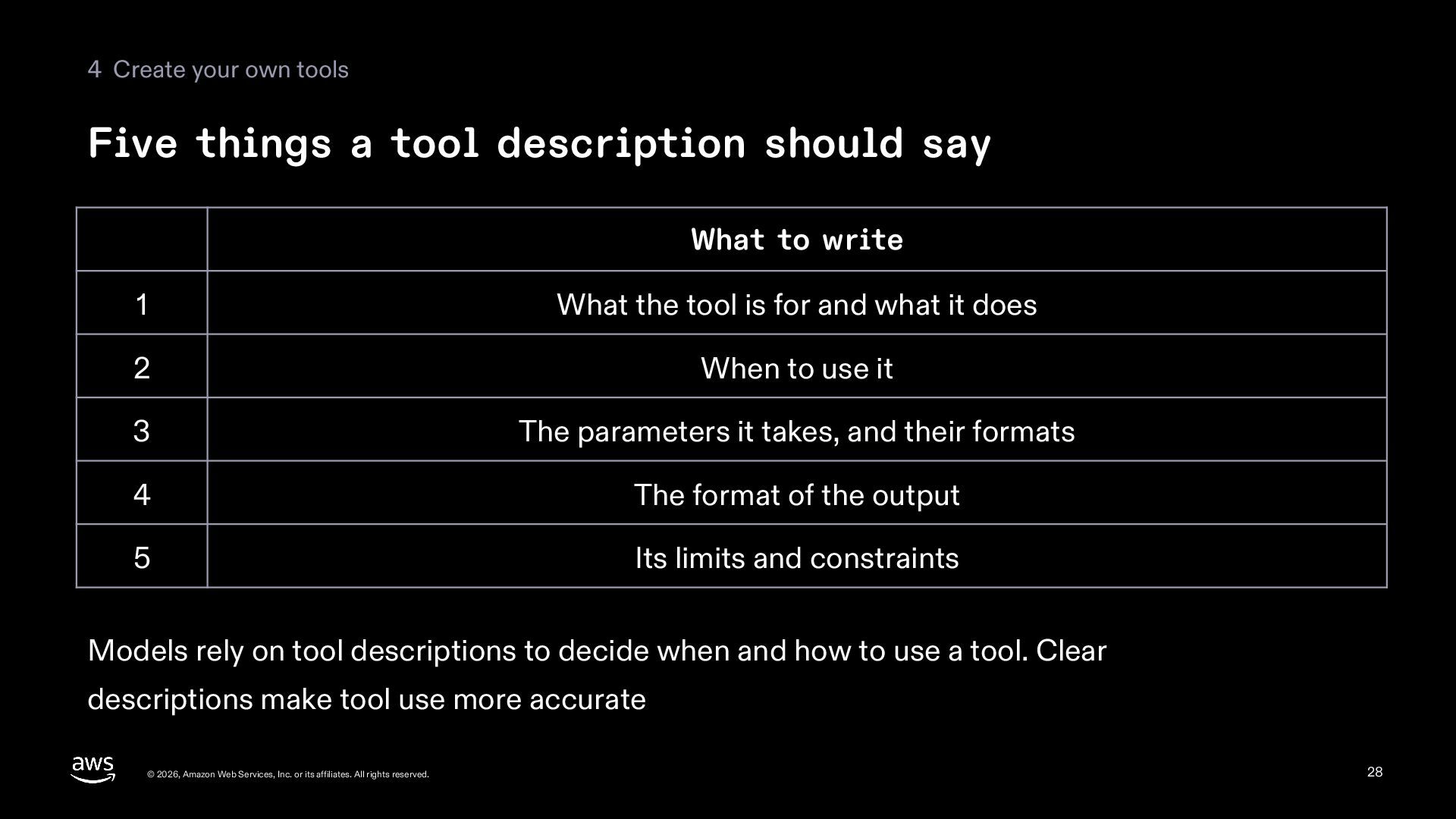
  28. 4 Create your own tools Five things a tool description

    should say What to write 1 What the tool is for and what it does 2 When to use it 3 The parameters it takes, and their formats 4 The format of the output 5 Its limits and constraints Models rely on tool descriptions to decide when and how to use a tool. Clear descriptions make tool use more accurate © 2026, Amazon Web Services, Inc. or its affiliates. All rights reserved. 28
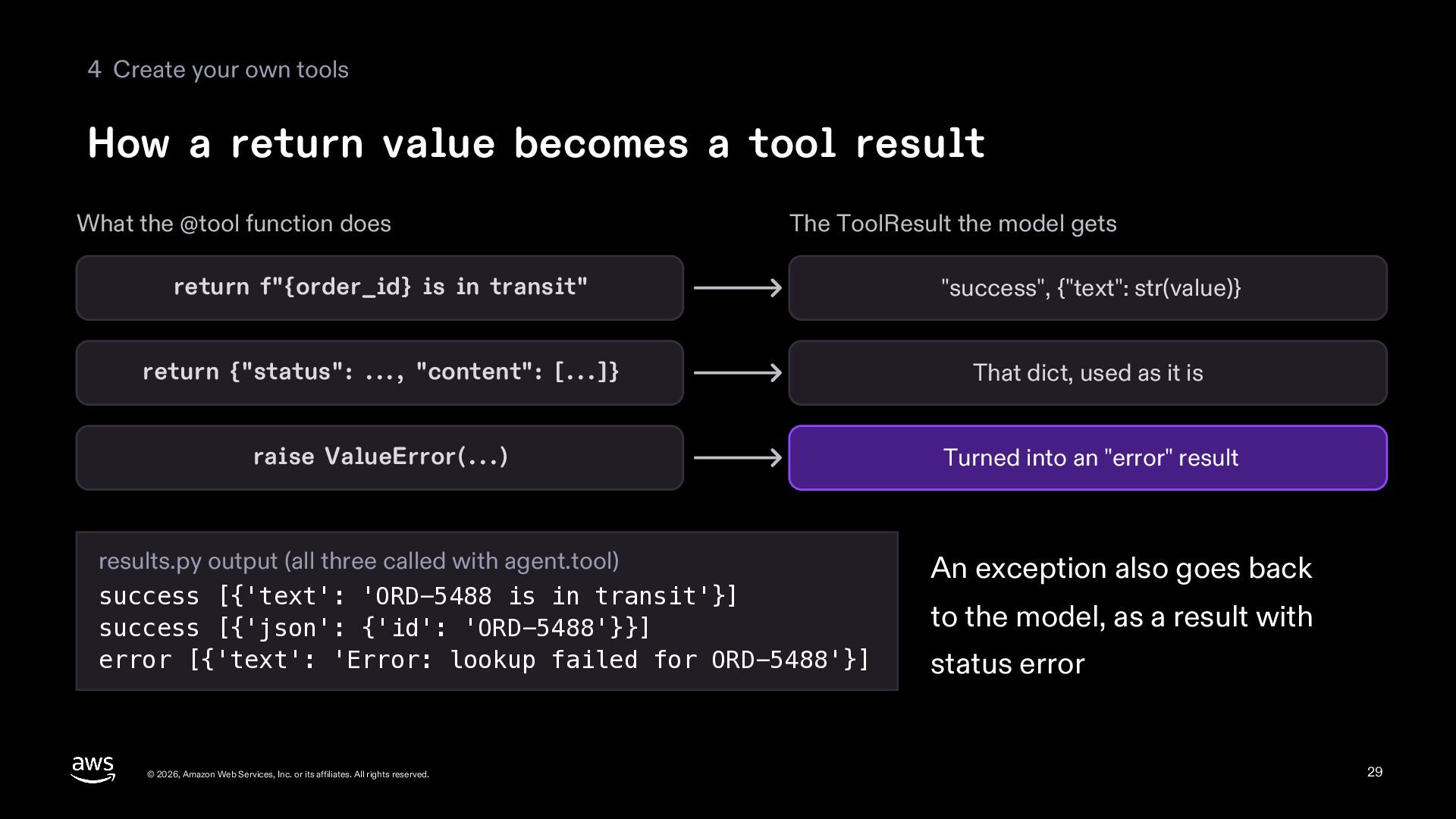
  29. 4 Create your own tools How a return value becomes

    a tool result What the @tool function does The ToolResult the model gets return f"{order_id} is in transit" "success", {"text": str(value)} return {"status": ..., "content": [...]} That dict, used as it is raise ValueError(...) Turned into an "error" result results.py output (all three called with agent.tool) success [{'text': 'ORD-5488 is in transit'}] success [{'json': {'id': 'ORD-5488'}}] error [{'text': 'Error: lookup failed for ORD-5488'}] © 2026, Amazon Web Services, Inc. or its affiliates. All rights reserved. An exception also goes back to the model, as a result with status error 29
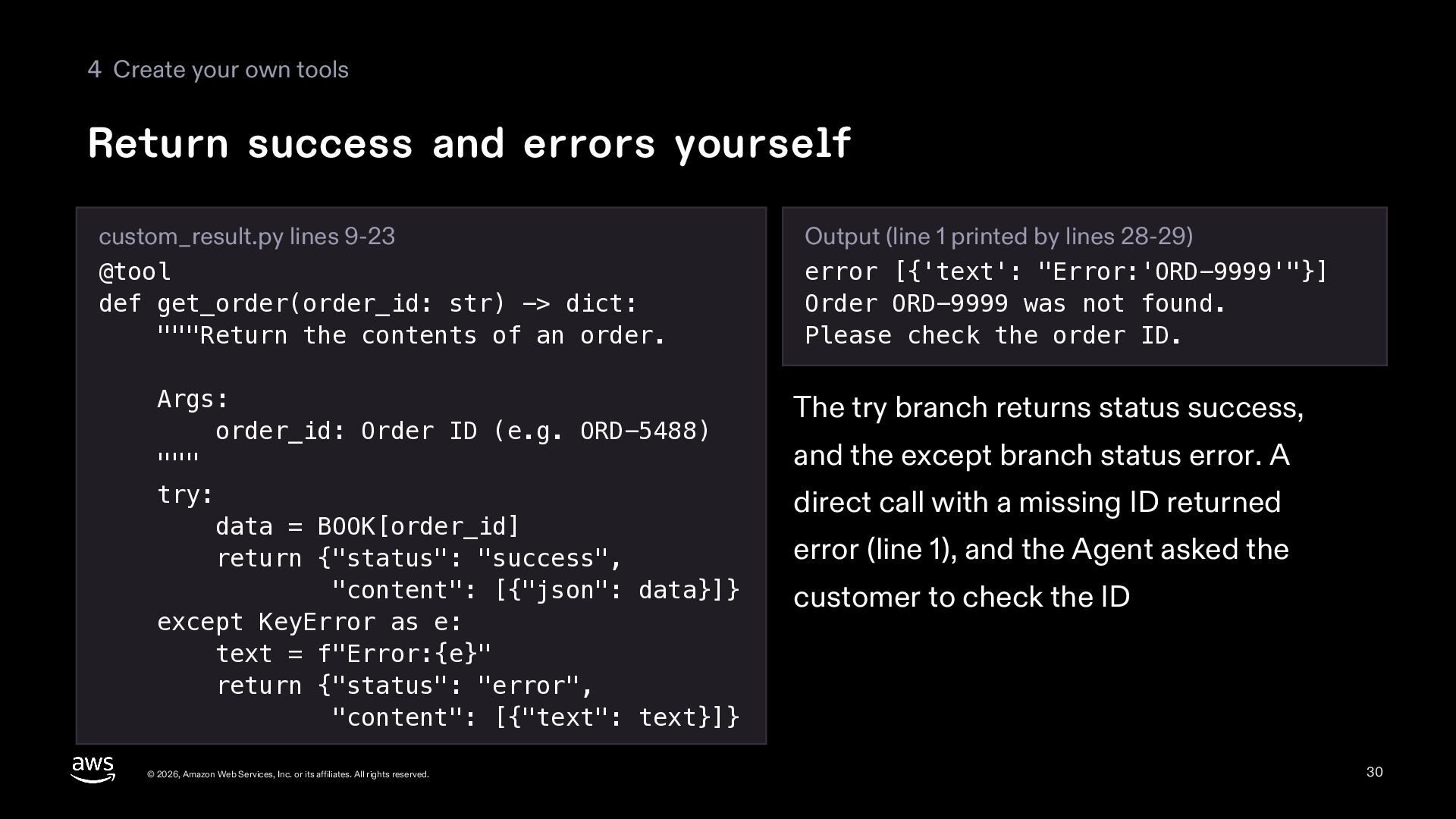
  30. 4 Create your own tools Return success and errors yourself

    custom_result.py lines 9-23 @tool def get_order(order_id: str) -> dict: """Return the contents of an order. Args: order_id: Order ID (e.g. ORD-5488) """ try: data = BOOK[order_id] return {"status": "success", "content": [{"json": data}]} except KeyError as e: text = f"Error:{e}" return {"status": "error", "content": [{"text": text}]} © 2026, Amazon Web Services, Inc. or its affiliates. All rights reserved. Output (line 1 printed by lines 28-29) error [{'text': "Error:'ORD-9999'"}] Order ORD-9999 was not found. Please check the order ID. The try branch returns status success, and the except branch status error. A direct call with a missing ID returned error (line 1), and the Agent asked the customer to check the ID 30
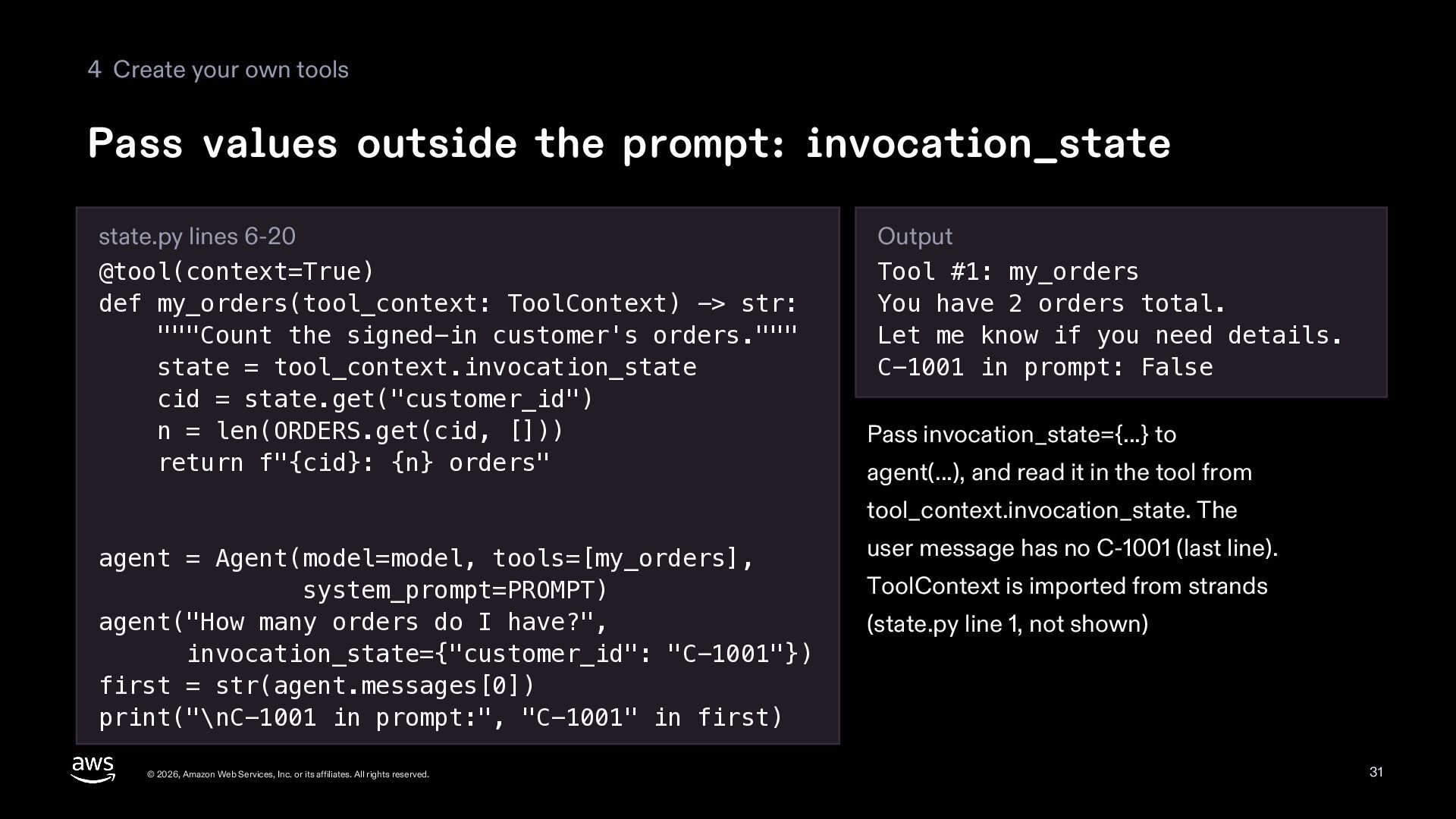
  31. 4 Create your own tools Pass values outside the prompt:

    invocation_state state.py lines 6-20 @tool(context=True) def my_orders(tool_context: ToolContext) -> str: """Count the signed-in customer's orders.""" state = tool_context.invocation_state cid = state.get("customer_id") n = len(ORDERS.get(cid, [])) return f"{cid}: {n} orders" Output Tool #1: my_orders You have 2 orders total. Let me know if you need details. C-1001 in prompt: False Pass invocation_state={...} to agent(...), and read it in the tool from tool_context.invocation_state. The agent = Agent(model=model, tools=[my_orders], system_prompt=PROMPT) agent("How many orders do I have?", invocation_state={"customer_id": "C-1001"}) first = str(agent.messages[0]) print("\nC-1001 in prompt:", "C-1001" in first) © 2026, Amazon Web Services, Inc. or its affiliates. All rights reserved. user message has no C-1001 (last line). ToolContext is imported from strands (state.py line 1, not shown) 31
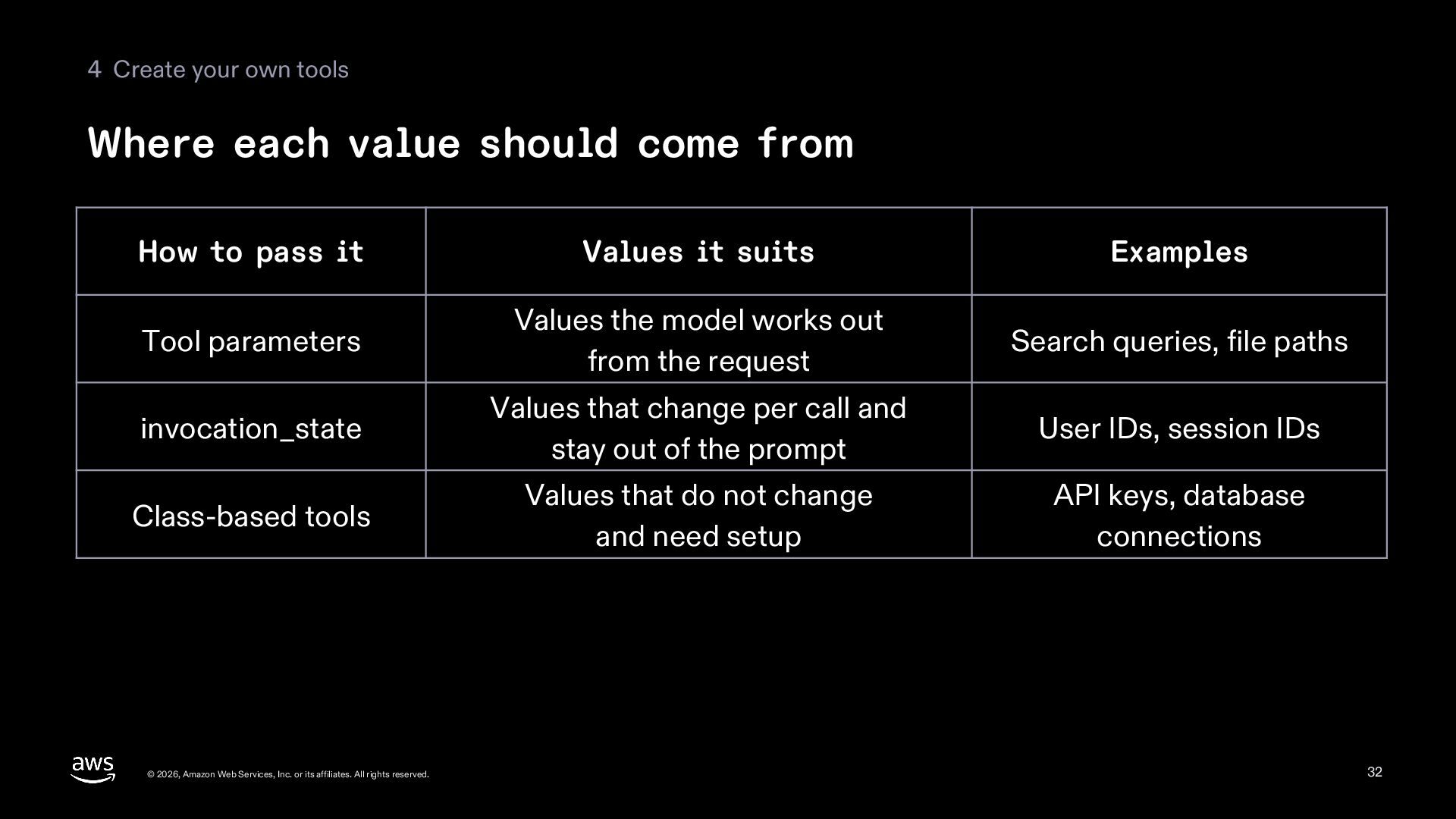
  32. 4 Create your own tools Where each value should come

    from How to pass it Values it suits Examples Tool parameters Values the model works out from the request Search queries, file paths invocation_state Values that change per call and stay out of the prompt User IDs, session IDs Class-based tools Values that do not change and need setup API keys, database connections © 2026, Amazon Web Services, Inc. or its affiliates. All rights reserved. 32
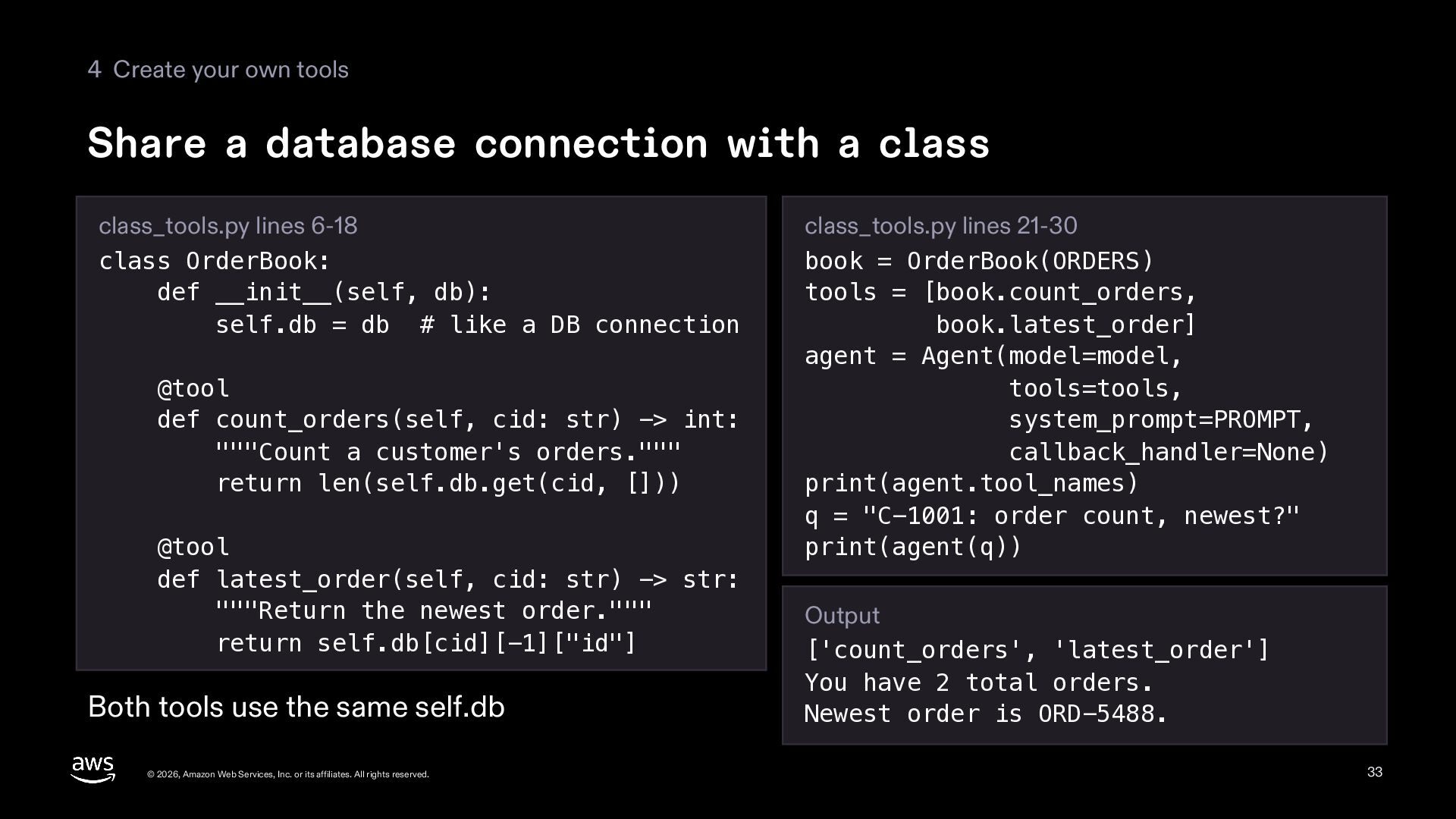
  33. 4 Create your own tools Share a database connection with

    a class class_tools.py lines 6-18 class OrderBook: def __init__(self, db): self.db = db # like a DB connection @tool def count_orders(self, cid: str) -> int: """Count a customer's orders.""" return len(self.db.get(cid, [])) @tool def latest_order(self, cid: str) -> str: """Return the newest order.""" return self.db[cid][-1]["id"] Both tools use the same self.db © 2026, Amazon Web Services, Inc. or its affiliates. All rights reserved. class_tools.py lines 21-30 book = OrderBook(ORDERS) tools = [book.count_orders, book.latest_order] agent = Agent(model=model, tools=tools, system_prompt=PROMPT, callback_handler=None) print(agent.tool_names) q = "C-1001: order count, newest?" print(agent(q)) Output ['count_orders', 'latest_order'] You have 2 total orders. Newest order is ORD-5488. 33
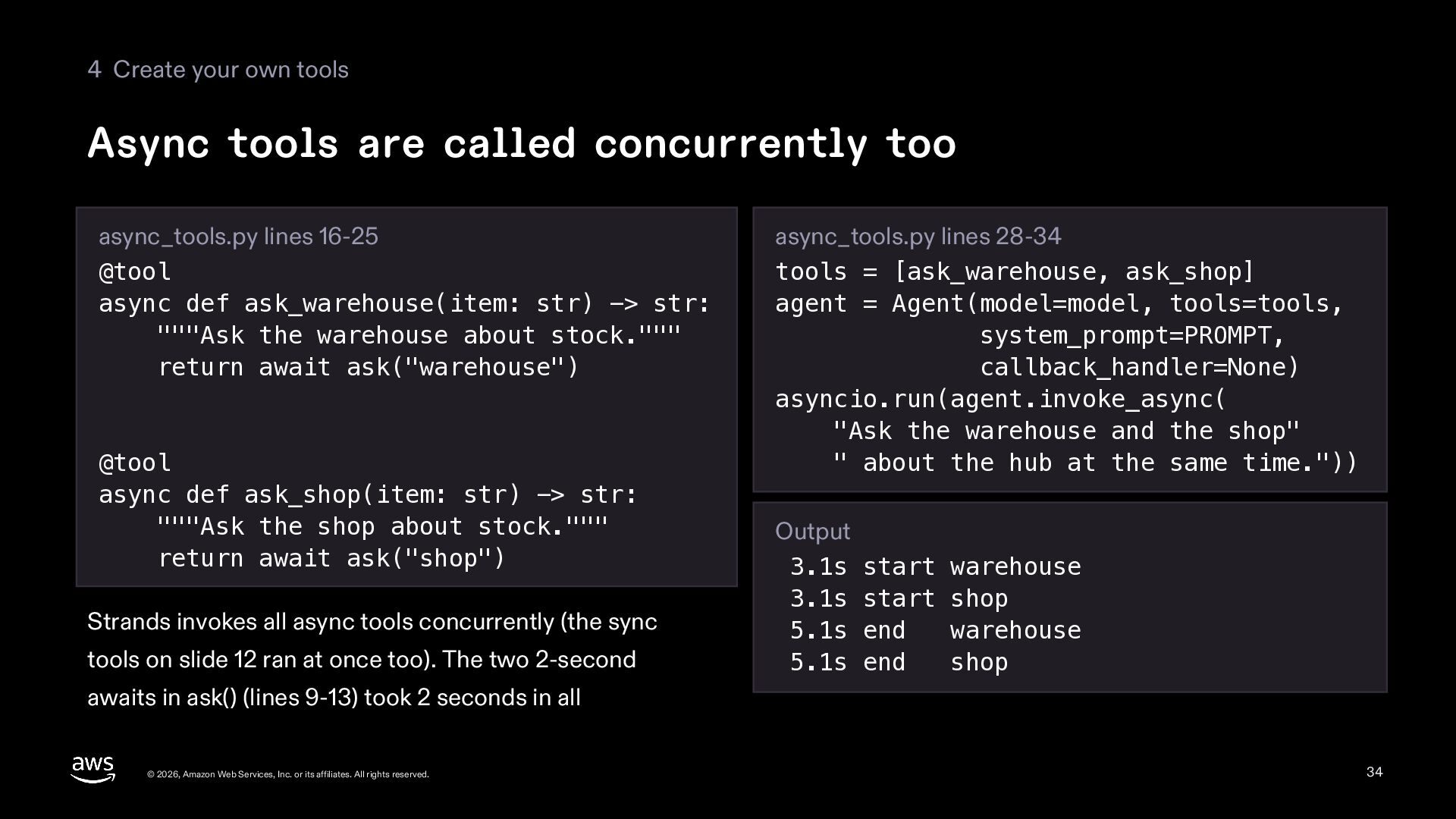
  34. 4 Create your own tools Async tools are called concurrently

    too async_tools.py lines 16-25 @tool async def ask_warehouse(item: str) -> str: """Ask the warehouse about stock.""" return await ask("warehouse") @tool async def ask_shop(item: str) -> str: """Ask the shop about stock.""" return await ask("shop") Strands invokes all async tools concurrently (the sync tools on slide 12 ran at once too). The two 2-second async_tools.py lines 28-34 tools = [ask_warehouse, ask_shop] agent = Agent(model=model, tools=tools, system_prompt=PROMPT, callback_handler=None) asyncio.run(agent.invoke_async( "Ask the warehouse and the shop" " about the hub at the same time.")) Output 3.1s start warehouse 3.1s start shop 5.1s end warehouse 5.1s end shop awaits in ask() (lines 9-13) took 2 seconds in all © 2026, Amazon Web Services, Inc. or its affiliates. All rights reserved. 34
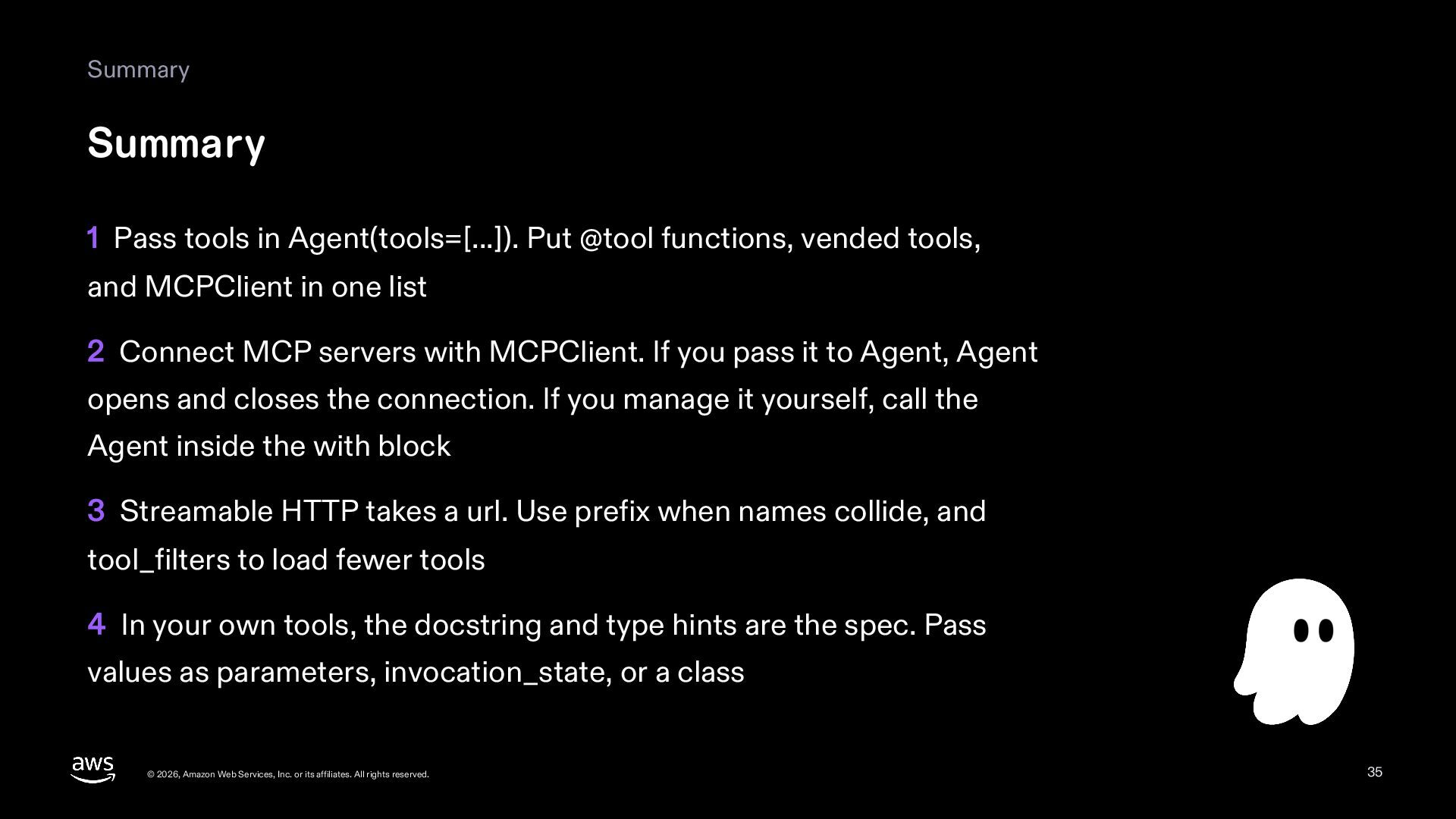
  35. Summary Summary 1 Pass tools in Agent(tools=[...]). Put @tool functions,

    vended tools, and MCPClient in one list 2 Connect MCP servers with MCPClient. If you pass it to Agent, Agent opens and closes the connection. If you manage it yourself, call the Agent inside the with block 3 Streamable HTTP takes a url. Use prefix when names collide, and tool_filters to load fewer tools 4 In your own tools, the docstring and type hints are the spec. Pass values as parameters, invocation_state, or a class © 2026, Amazon Web Services, Inc. or its affiliates. All rights reserved. 35
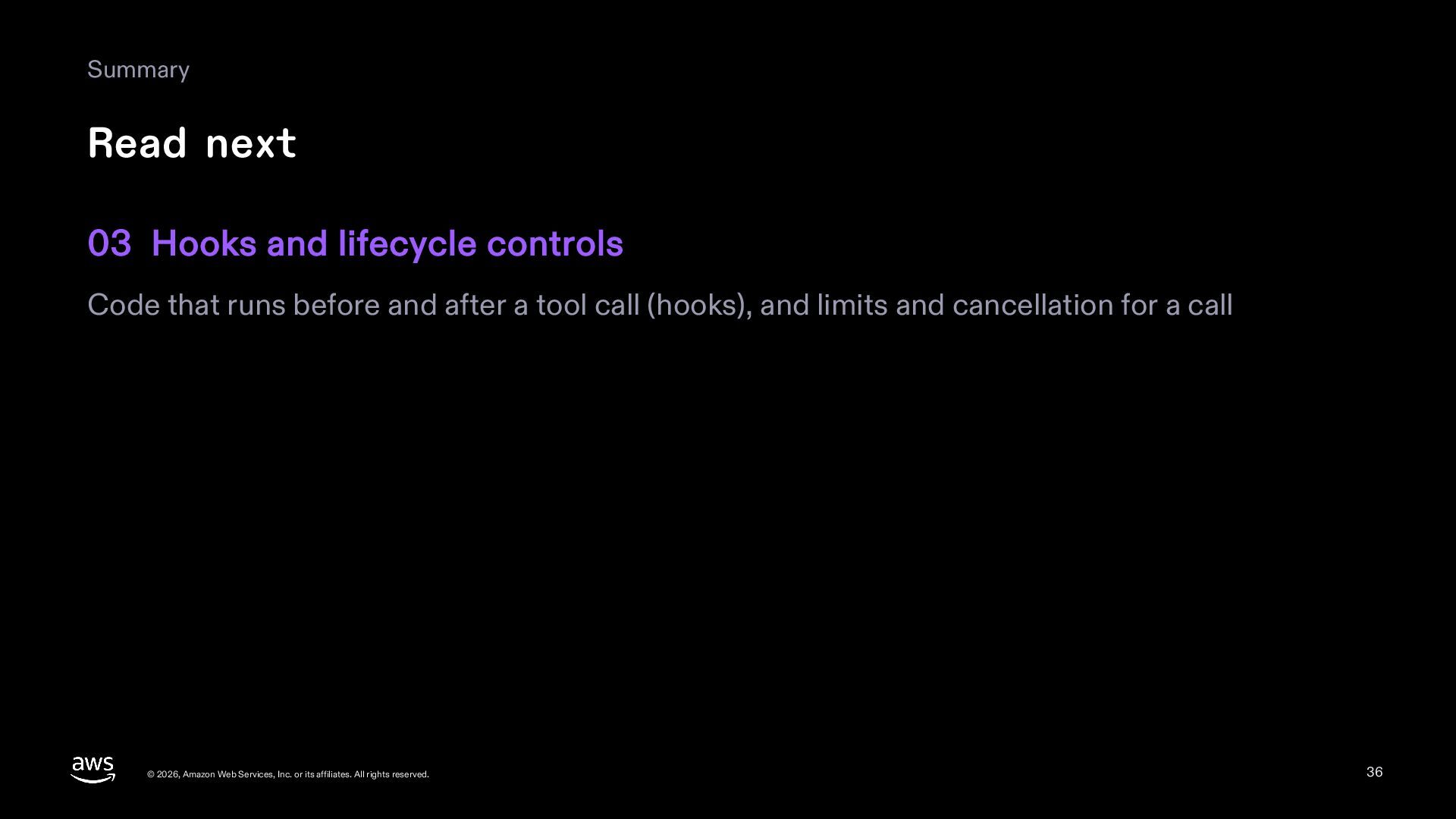
  36. Summary Read next 03 Hooks and lifecycle controls Code that

    runs before and after a tool call (hooks), and limits and cancellation for a call © 2026, Amazon Web Services, Inc. or its affiliates. All rights reserved. 36
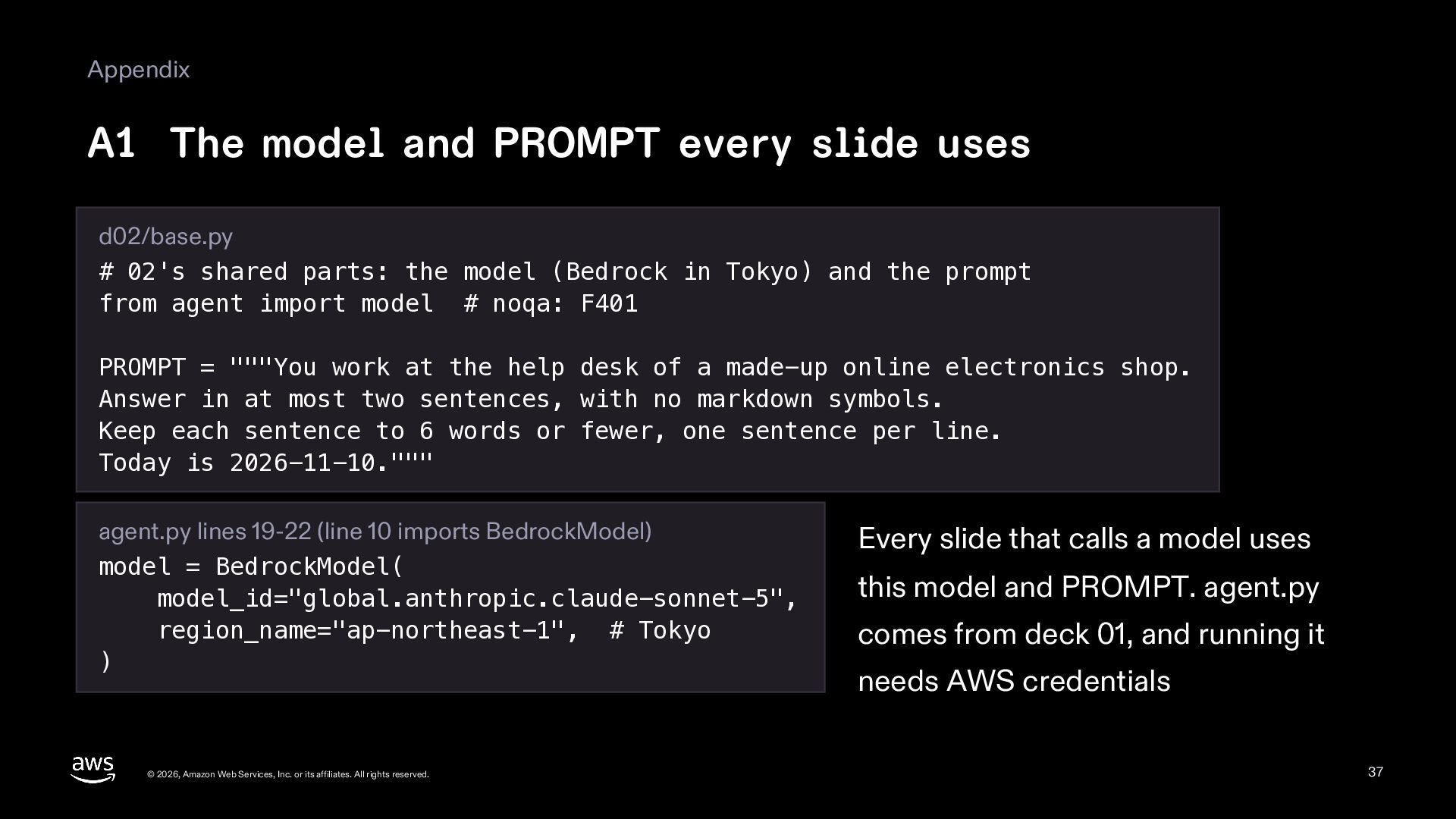
  37. Appendix A1 The model and PROMPT every slide uses d02/base.py

    # 02's shared parts: the model (Bedrock in Tokyo) and the prompt from agent import model # noqa: F401 PROMPT = """You work at the help desk of a made-up online electronics shop. Answer in at most two sentences, with no markdown symbols. Keep each sentence to 6 words or fewer, one sentence per line. Today is 2026-11-10.""" agent.py lines 19-22 (line 10 imports BedrockModel) model = BedrockModel( model_id="global.anthropic.claude-sonnet-5", region_name="ap-northeast-1", # Tokyo ) © 2026, Amazon Web Services, Inc. or its affiliates. All rights reserved. Every slide that calls a model uses this model and PROMPT. agent.py comes from deck 01, and running it needs AWS credentials 37
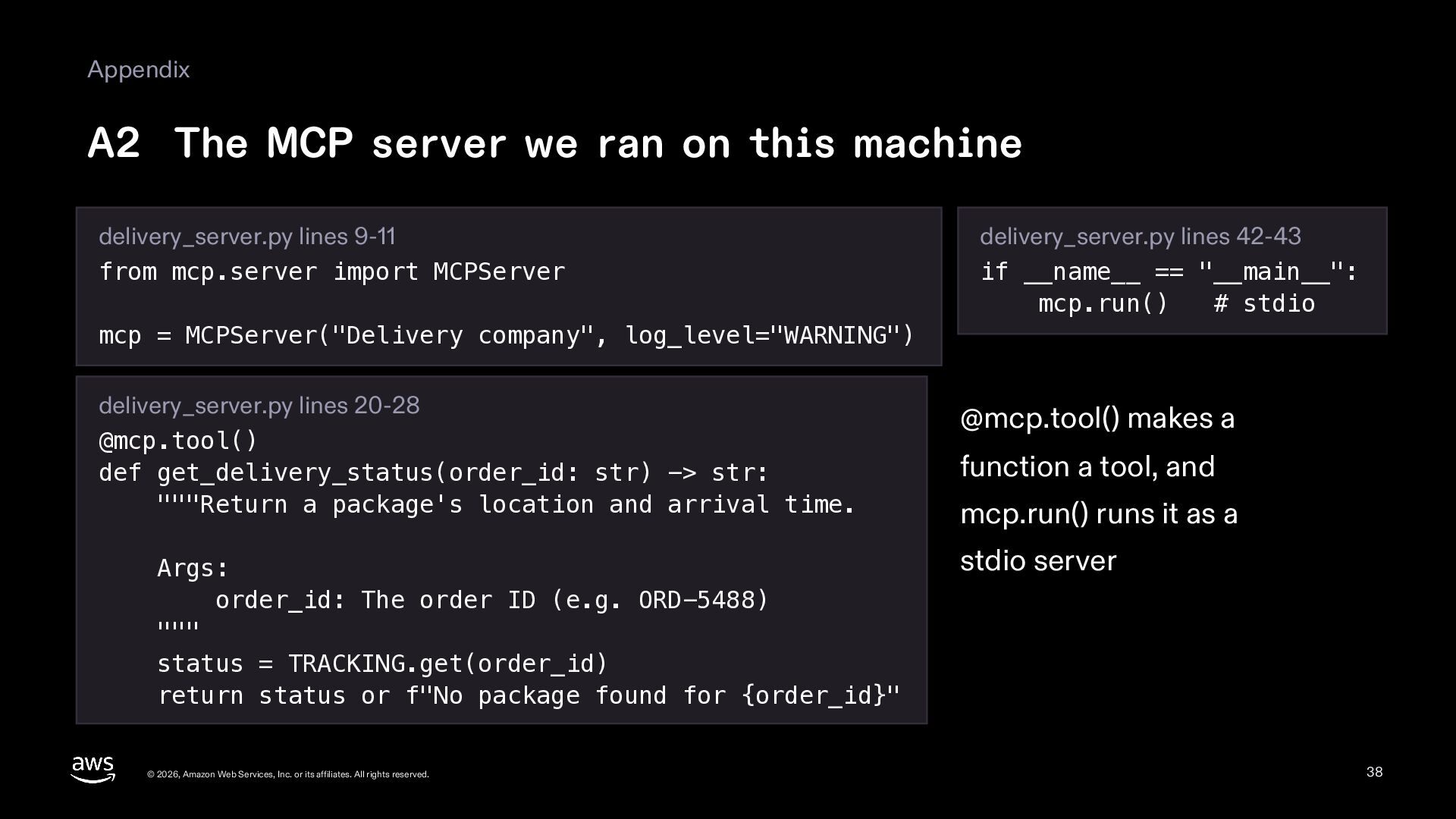
  38. Appendix A2 The MCP server we ran on this machine

    delivery_server.py lines 9-11 from mcp.server import MCPServer delivery_server.py lines 42-43 if __name__ == "__main__": mcp.run() # stdio mcp = MCPServer("Delivery company", log_level="WARNING") delivery_server.py lines 20-28 @mcp.tool() def get_delivery_status(order_id: str) -> str: """Return a package's location and arrival time. Args: order_id: The order ID (e.g. ORD-5488) """ status = TRACKING.get(order_id) return status or f"No package found for {order_id}" © 2026, Amazon Web Services, Inc. or its affiliates. All rights reserved. @mcp.tool() makes a function a tool, and mcp.run() runs it as a stdio server 38
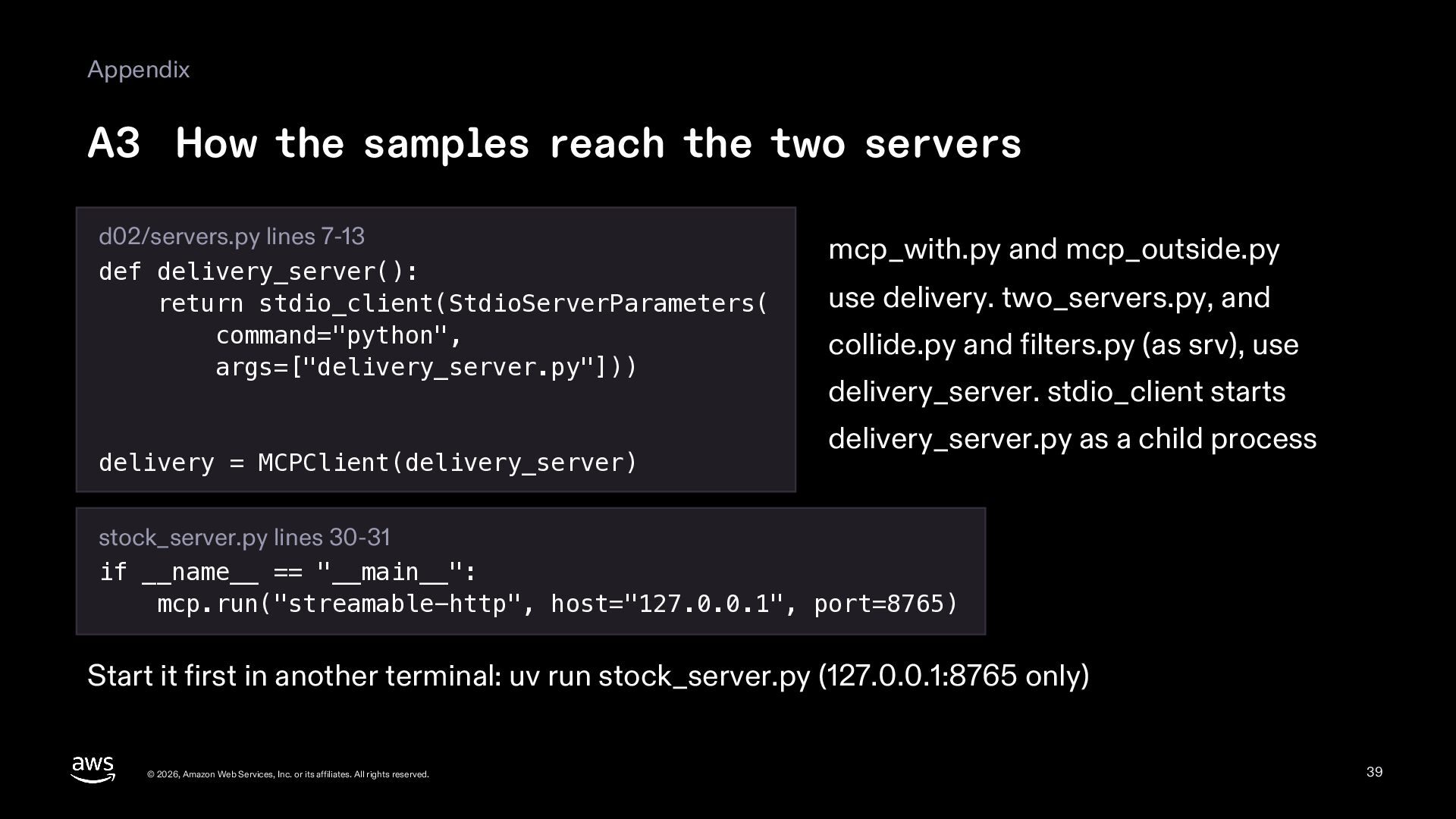
  39. Appendix A3 How the samples reach the two servers d02/servers.py

    lines 7-13 def delivery_server(): return stdio_client(StdioServerParameters( command="python", args=["delivery_server.py"])) delivery = MCPClient(delivery_server) mcp_with.py and mcp_outside.py use delivery. two_servers.py, and collide.py and filters.py (as srv), use delivery_server. stdio_client starts delivery_server.py as a child process stock_server.py lines 30-31 if __name__ == "__main__": mcp.run("streamable-http", host="127.0.0.1", port=8765) Start it first in another terminal: uv run stock_server.py (127.0.0.1:8765 only) © 2026, Amazon Web Services, Inc. or its affiliates. All rights reserved. 39
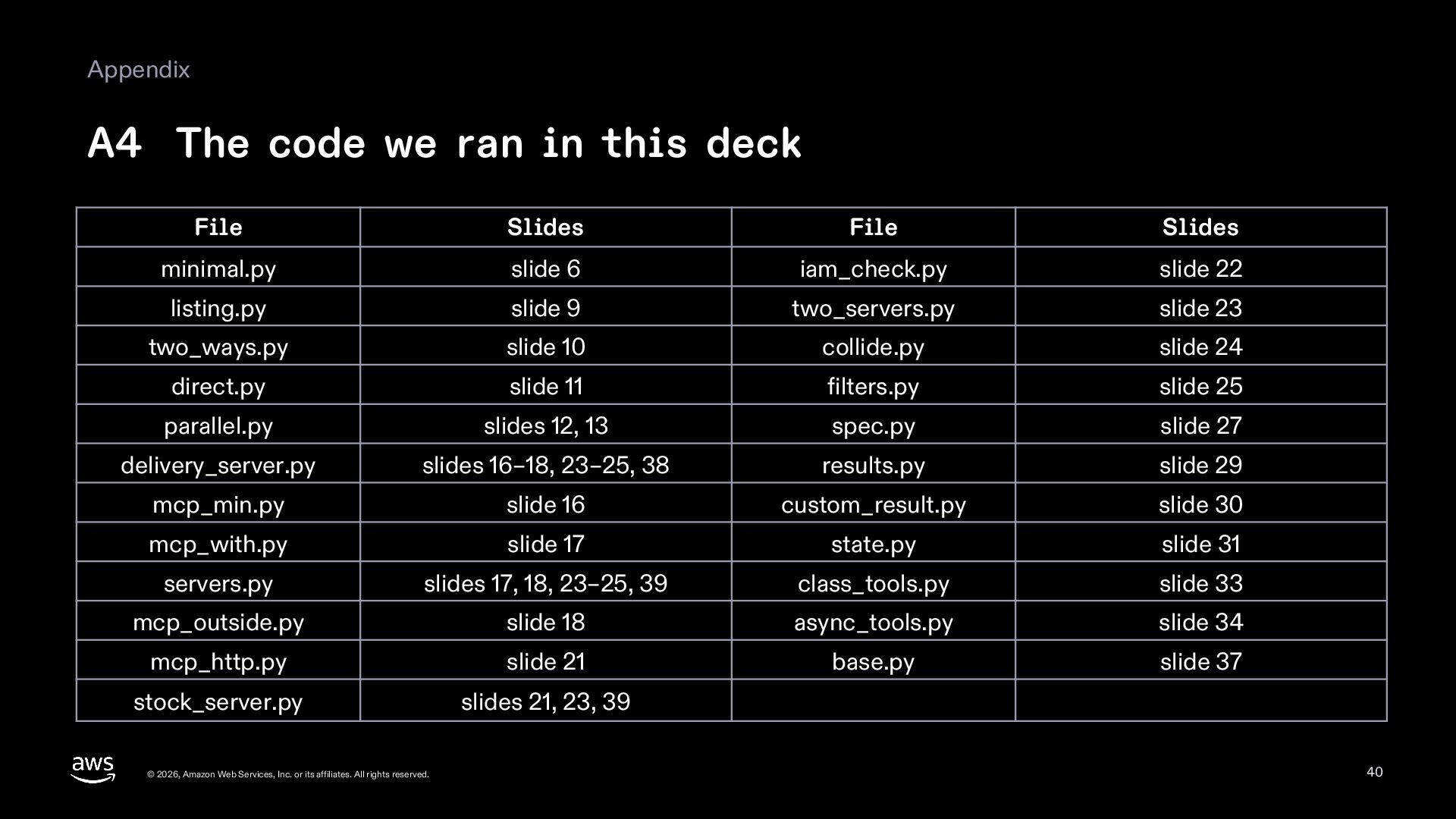
  40. Appendix A4 The code we ran in this deck File

    Slides File Slides minimal.py slide 6 iam_check.py slide 22 listing.py slide 9 two_servers.py slide 23 two_ways.py slide 10 collide.py slide 24 direct.py slide 11 filters.py slide 25 parallel.py slides 12, 13 spec.py slide 27 delivery_server.py slides 16–18, 23–25, 38 results.py slide 29 mcp_min.py slide 16 custom_result.py slide 30 mcp_with.py slide 17 state.py slide 31 servers.py slides 17, 18, 23–25, 39 class_tools.py slide 33 mcp_outside.py slide 18 async_tools.py slide 34 mcp_http.py slide 21 base.py slide 37 stock_server.py slides 21, 23, 39 © 2026, Amazon Web Services, Inc. or its affiliates. All rights reserved. 40
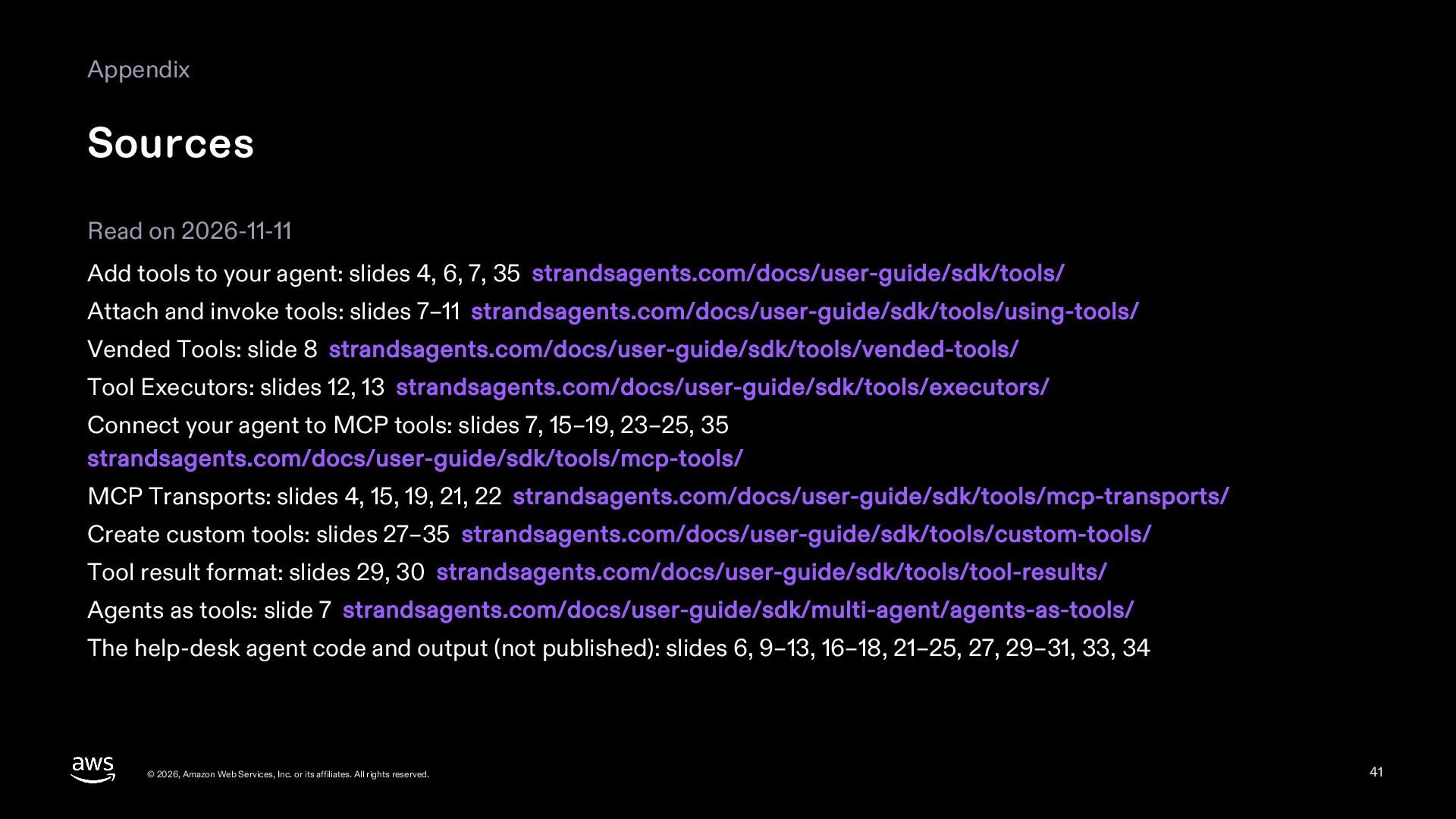
  41. Appendix Sources Read on 2026-11-11 Add tools to your agent:

    slides 4, 6, 7, 35 strandsagents.com/docs/user-guide/sdk/tools/ Attach and invoke tools: slides 7–11 strandsagents.com/docs/user-guide/sdk/tools/using-tools/ Vended Tools: slide 8 strandsagents.com/docs/user-guide/sdk/tools/vended-tools/ Tool Executors: slides 12, 13 strandsagents.com/docs/user-guide/sdk/tools/executors/ Connect your agent to MCP tools: slides 7, 15–19, 23–25, 35 strandsagents.com/docs/user-guide/sdk/tools/mcp-tools/ MCP Transports: slides 4, 15, 19, 21, 22 strandsagents.com/docs/user-guide/sdk/tools/mcp-transports/ Create custom tools: slides 27–35 strandsagents.com/docs/user-guide/sdk/tools/custom-tools/ Tool result format: slides 29, 30 strandsagents.com/docs/user-guide/sdk/tools/tool-results/ Agents as tools: slide 7 strandsagents.com/docs/user-guide/sdk/multi-agent/agents-as-tools/ The help-desk agent code and output (not published): slides 6, 9–13, 16–18, 21–25, 27, 29–31, 33, 34 © 2026, Amazon Web Services, Inc. or its affiliates. All rights reserved. 41