Upgrade to Pro
— share decks privately, control downloads, hide ads and more …
Speaker Deck
Sign up for free
Menu
Search
Features
All features
Private URLs
Password Protection
Custom URLS
Scheduled publishing
Remove Branding
Restrict embedding
Deck Collections
Notes
Features
All features
Private URLs
Password Protection
Custom URLS
Scheduled publishing
Remove Branding
Restrict embedding
Deck Collections
Notes
Explore
Featured decks
Featured speakers
Programming
Technology
Storyboards
Explore
Featured decks
Featured speakers
Programming
Technology
Storyboards
Pricing
Search
Sign in
Sign up for free
Tips and tricks du rebranding de l'app Captain ...
Search
Sponsored
·
SiteGround - Reliable hosting with speed, security, and support you can count on.
→
Jeremie Martinez
December 12, 2016
Technology
400
1
Share
Embed
Copy iframe code
Copy JS code
Copy link
Start on current slide
Tips and tricks du rebranding de l'app Captain Train
Talk fait au PAUG le 12/12/16 en Français
Jeremie Martinez
December 12, 2016
More Decks by Jeremie Martinez
See All by Jeremie Martinez
Gradle, je t'aime, moi non plus…
jeremiemartinez
0
380
The evolution of Android notification
jeremiemartinez
5
5.3k
DevOps sur Android : from one git push to a Play Store release
jeremiemartinez
17
2.8k
See the Truth
jeremiemartinez
0
370
DevOps sur Android : D'un git push à une release Play Store
jeremiemartinez
5
610
Dagger 2 : Back to basics
jeremiemartinez
2
1.2k
La stack réseau Android, disponible également pour vos backs
jeremiemartinez
0
570
Other Decks in Technology
See All in Technology
AI時代のPRレビューにどう向き合うか?
kairim0
1
240
[JAWS-UG彩の国埼玉#12]そろそろ準備する?re:Invent2026をやさしく解説 / reinvent2026-sainokuni
sh_fk2
1
340
Optunaの最新リリースv5.0について
pfn
PRO
0
120
Metadata - Section 1: HTML Basics
mohab1
0
120
実体験から学ぶ分析エージェントの開発と運⽤
recruitengineers
PRO
8
2.4k
QA4AI 2026-Oct 生成AI時代の品質保証
tokuty
1
860
1つのリクエストを追って理解する - llm-dのP/D分離
akhino
1
160
日本語に強いオープンな大規模言語モデル「LLM-jp」
odashi
4
1.1k
AI × アーキテクト 第1・2章|生成AIの課題とアーキテクトの素養
daidaidai
0
170
Tofu-Controller lightning talk @ Containerday 2026
gionn
0
110
Active Record Connection Adaptersにおける長年の課題に再び取り組む
yahonda
0
150
事業成長とデータ活用を止めないためのマネジメントへ挑戦
hiracky16
0
390
Featured
See All Featured
[Rails World 2023 - Day 1 Closing Keynote] - The Magic of Rails
eileencodes
38
3.1k
JavaScript: Past, Present, and Future - NDC Porto 2020
reverentgeek
52
6.1k
Navigating Algorithm Shifts & AI Overviews - #SMXNext
aleyda
1
1.7k
Keith and Marios Guide to Fast Websites
keithpitt
413
23k
The Cost Of JavaScript in 2023
addyosmani
55
10k
Site-Speed That Sticks
csswizardry
13
1.6k
Done Done
chrislema
187
17k
A designer walks into a library…
pauljervisheath
211
25k
Responsive Adventures: Dirty Tricks From The Dark Corners of Front-End
smashingmag
254
22k
The browser strikes back
jonoalderson
0
1.8k
Winning Ecommerce Organic Search in an AI Era - #searchnstuff2025
aleyda
2
2.2k
AI Search: Where Are We & What Can We Do About It?
aleyda
0
8.1k
Transcript
@JeremMartinez From Captain Train… … to Trainline
None
Qu’est ce qu’une marque ?
Une icône 1
None
Des couleurs 2
Bonnes pratiques colors.xml Nommer vos couleurs selon le métier Garder
votre palette la plus petite possible Toujours faire des alias
<!-- Official colors --> <color name="accent">#01c3a7</color> <color name="primary">#21314d</color> <color name="primaryDark">#1a273d</color>
<!-- Text variants --> <color name="ct_text_primary">#323e42</color> <color name="ct_text_secondary">#8c9da1</color> <color name="ct_text_accent">#14b69f</color> <!-- Status colors --> <color name="ct_error">#e02007</color> <color name="ct_info">#0375b6</color> <color name="ct_success">#90c25b</color> <color name="ct_warning">#e87619</color>
<!-- Official colors --> <color name="accent">#01c3a7</color> <color name="primary">#21314d</color> <color name="primaryDark">#1a273d</color>
<!-- Text variants --> <color name="ct_text_primary">#323e42</color> <color name="ct_text_secondary">#8c9da1</color> <color name="ct_text_accent">#14b69f</color> <!-- Status colors --> <color name="ct_error">#e02007</color> <color name="ct_info">#0375b6</color> <color name="ct_success">#90c25b</color> <color name="ct_warning">#e87619</color>
<!-- Official colors --> <color name="accent">#01c3a7</color> <color name="primary">#21314d</color> <color name="primaryDark">#1a273d</color>
<!-- Text variants --> <color name="ct_text_primary">#323e42</color> <color name="ct_text_secondary">#8c9da1</color> <color name="ct_text_accent">#14b69f</color> <!-- Status colors --> <color name="ct_error">#e02007</color> <color name="ct_info">#0375b6</color> <color name="ct_success">#90c25b</color> <color name="ct_warning">#e87619</color>
Bonnes pratiques themes.xml Utiliser au maximum les thèmes Séparer vos
fichiers de thèmes : themes.xml styles.xml text_styles.xml
Theme
Theme Theme.CaptainTrain Theme.CaptainTrain.Exchange Theme.CaptainTrain.Cancellation
<style name="Theme.CaptainTrain" parent="Base.Theme.CaptainTrain"> <item name="colorAccent">@color/accent</item> </style> <style name="Theme.CaptainTrain.Cancellation">
<item name="colorAccent">@color/cancellation</item> </style> <style name="Theme.CaptainTrain.Exchange"> <item name="colorAccent">@color/exchange</item> </style>
None
None
<style name="Base.Theme.CaptainTrain"> <item name="colorControlNormal">?attr/colorAccent</item> </style> <style name="Theme.CaptainTrain"> <item name="colorAccent">@color/accent</item> </style>
<style name="Theme.CaptainTrain.Exchange"> <item name="colorAccent">@color/exchange</item> </style>
<style name="Base.Theme.CaptainTrain"> <item name="colorControlNormal">?attr/colorAccent</item> </style> <style name="Theme.CaptainTrain"> <item name="colorAccent">@color/accent</item> </style>
<style name="Theme.CaptainTrain.Exchange"> <item name="colorAccent">@color/exchange</item> </style>
attrs.xml <resources> <attr name="ctColorTextAccent" format="reference|color" /> </resources>
<style name="Theme.CaptainTrain" parent="Base.Theme.CaptainTrain"> <item name="colorAccent">@color/accent</item> <item name="ctColorTextAccent">@color/text_accent</item> </style> <style
name="Theme.CaptainTrain.Cancellation"> <item name="colorAccent">@color/cancellation</item> <item name="ctColorTextAccent">@color/text_cancellation</item> </style> <style name="Theme.CaptainTrain.Exchange"> <item name="colorAccent">@color/exchange</item> <item name="ctColorTextAccent">@color/text_exchange</item> </style> themes.xml
<?xml version="1.0" encoding="utf-8"?> <selector xmlns:android="http://schemas.android.com/apk/res/android"> <item android:color="@color/disabled" android:state_enabled="false" />
<item android:color="?attr/ctColorTextAccent" /> </selector> text_accent.xml
attrs.xml <resources> <attr name="ctButtonStyle" format="reference" /> </resources>
<style name="Theme.CaptainTrain" parent="Base.Theme.CaptainTrain"> <item name="colorAccent">@color/accent</item> <item name="ctColorTextAccent">@color/text_accent</item> <item name="ctButtonStyle">@style/Button.Action</item> </style>
<style name="Theme.CaptainTrain.Cancellation"> <item name="colorAccent">@color/cancellation</item> <item name="ctColorTextAccent">@color/text_cancellation</item> <item name="ctButtonStyle">@style/Button.Action.Cancellation</item> </style> <style name="Theme.CaptainTrain.Exchange"> <item name="colorAccent">@color/exchange</item> <item name="ctColorTextAccent">@color/text_exchange</item> <item name="ctButtonStyle">@style/Button.Action.Exchange</item> </style>
<Button android:id="@+id/btn_pay" style="?attr/ctButtonStyle" android:layout_width="match_parent" android:layout_height="wrap_content" tools:text="Pay €456.00"/>
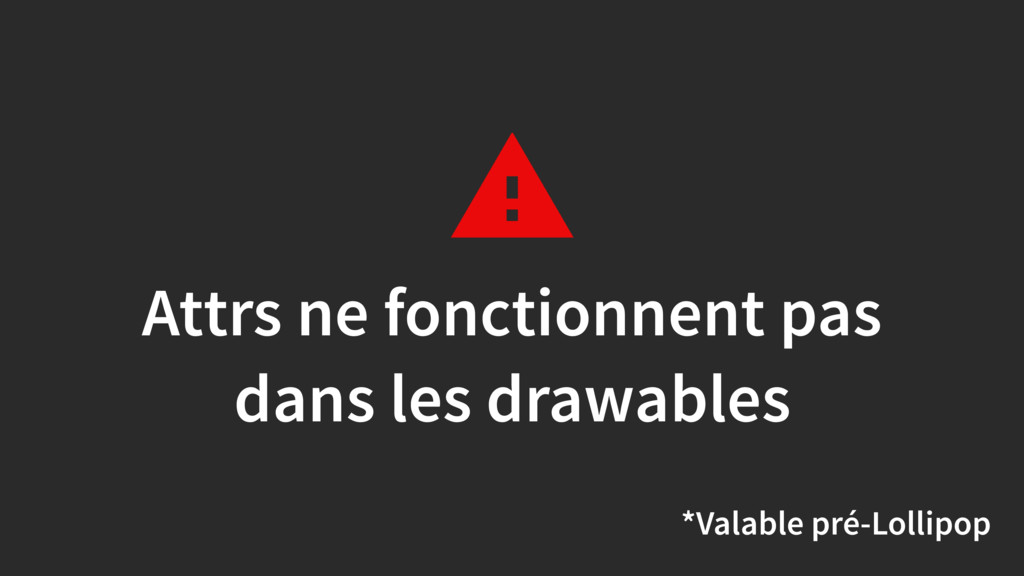
Attrs ne fonctionnent pas dans les drawables *Valable pré-Lollipop
Puissant mais pas magique Compile-time vs runtime Rapidement bordélique API
très verrouillée
Des drawables 3
Garder vos raws !
None
Un nom 4
Des empty-states 5
None
None
Des animations 6
None
None
http://jeremie-martinez.com/2016/09/15/train-animations/
Des liens 7
Interne www.captaintrain.com
Interne www.trainline.eu
Interne www.trainline.fr
Interne www.trainline.de
Interne www.trainline.it
Interne www.trainline.es
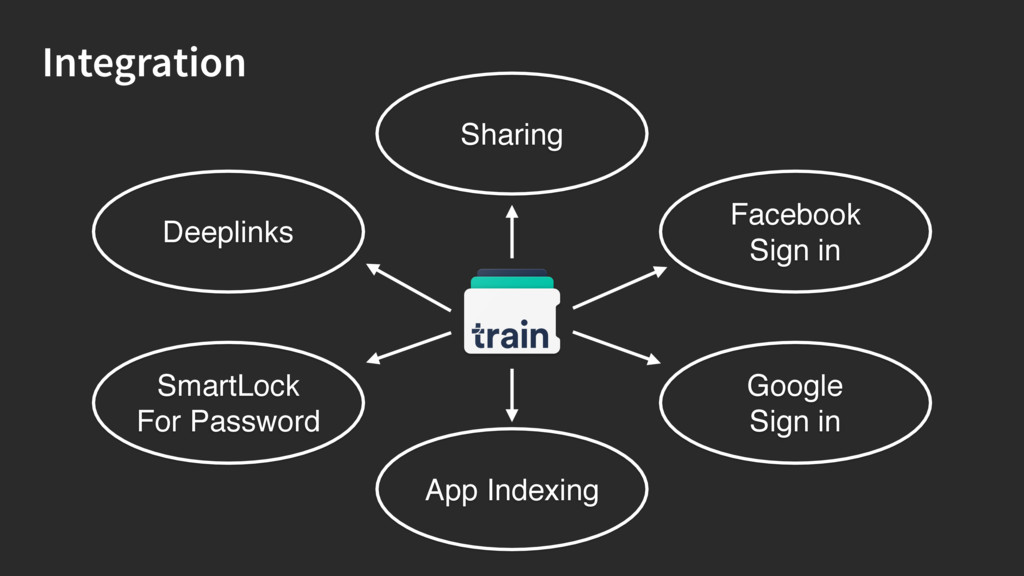
Integration Deeplinks SmartLock For Password Facebook Sign in Sharing Google
Sign in App Indexing
Un package name 8
No!
None
Une timeline 9
2 semaines avant …
Sur le web
Dans les emails
Le jour J …
None
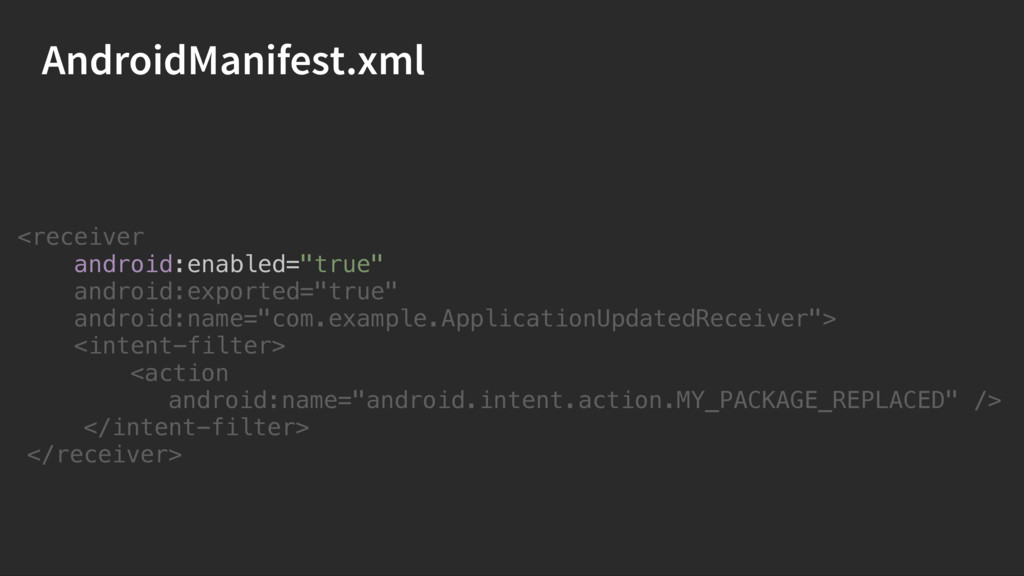
AndroidManifest.xml <receiver android:enabled="true" android:exported="true" android:name="com.example.ApplicationUpdatedReceiver"> <intent-filter> <action android:name="android.intent.action.MY_PACKAGE_REPLACED" /> </intent-filter>
</receiver>
AndroidManifest.xml <receiver android:enabled="true" android:exported="true" android:name="com.example.ApplicationUpdatedReceiver"> <intent-filter> <action android:name="android.intent.action.MY_PACKAGE_REPLACED" /> </intent-filter>
</receiver>
AndroidManifest.xml <receiver android:enabled="true" android:exported="true" android:name="com.example.ApplicationUpdatedReceiver"> <intent-filter> <action android:name="android.intent.action.MY_PACKAGE_REPLACED" /> </intent-filter>
</receiver>
AndroidManifest.xml <receiver android:enabled="true" android:exported="true" android:name="com.example.ApplicationUpdatedReceiver"> <intent-filter> <action android:name="android.intent.action.MY_PACKAGE_REPLACED" /> </intent-filter>
</receiver>
AndroidManifest.xml <receiver android:enabled="true" android:exported="true" android:name="com.example.ApplicationUpdatedReceiver"> <intent-filter> <action android:name="android.intent.action.MY_PACKAGE_REPLACED" /> </intent-filter>
</receiver>
ApplicationUpdatedReceiver public class ApplicationUpdatedReceiver extends BroadcastReceiver { …
} } @Override public void onReceive(Context context, Intent intent) {
ApplicationUpdatedReceiver String action = intent.getAction(); if (TextUtils.isEmpty(action)) { return; }
switch (action) { … break; } } @Override public void onReceive(Context context, Intent intent) { case Intent.ACTION_MY_PACKAGE_REPLACED:
ApplicationUpdatedReceiver case Intent.ACTION_MY_PACKAGE_REPLACED: AppPreferences preferences = AppPreferences.from(context); int version =
preferences. getInt(PREVIOUS_APP_VERSION, VERSION_CODES.NARIM); if (version < VERSION_CODES.ONEILL) { bumpToOneill(context); version = VERSION_CODES.ONEILL; } if (version < VERSION_CODES.PENDERGAST) { bumpToPendergast(context); version = VERSION_CODES.PENDERGAST; } preferences.edit(). putInt(PREVIOUS_APP_VERSION, version). apply();
ApplicationUpdatedReceiver case Intent.ACTION_MY_PACKAGE_REPLACED: AppPreferences preferences = AppPreferences.from(context); int version =
preferences. getInt(PREVIOUS_APP_VERSION, VERSION_CODES.NARIM); if (version < VERSION_CODES.ONEILL) { bumpToOneill(context); version = VERSION_CODES.ONEILL; } if (version < VERSION_CODES.PENDERGAST) { bumpToPendergast(context); version = VERSION_CODES.PENDERGAST; } preferences.edit(). putInt(PREVIOUS_APP_VERSION, version). apply();
ApplicationUpdatedReceiver case Intent.ACTION_MY_PACKAGE_REPLACED: AppPreferences preferences = AppPreferences.from(context); int version =
preferences. getInt(PREVIOUS_APP_VERSION, VERSION_CODES.NARIM); if (version < VERSION_CODES.ONEILL) { bumpToOneill(context); version = VERSION_CODES.ONEILL; } if (version < VERSION_CODES.PENDERGAST) { bumpToPendergast(context); version = VERSION_CODES.PENDERGAST; } preferences.edit(). putInt(PREVIOUS_APP_VERSION, version). apply();
ApplicationUpdatedReceiver case Intent.ACTION_MY_PACKAGE_REPLACED: AppPreferences preferences = AppPreferences.from(context); int version =
preferences. getInt(PREVIOUS_APP_VERSION, VERSION_CODES.NARIM); if (version < VERSION_CODES.ONEILL) { bumpToOneill(context); version = VERSION_CODES.ONEILL; } if (version < VERSION_CODES.PENDERGAST) { bumpToPendergast(context); version = VERSION_CODES.PENDERGAST; } preferences.edit(). putInt(PREVIOUS_APP_VERSION, version). apply();
ApplicationUpdatedReceiver bumpToOneill(context); Notification Sauver un état pour l’écran …
Subir la rage 10
None
None
Conclusion Ça prend du temps Faire le minimum de changements
possible Vous allez oublier des choses Il y aura forcément des déçus
@JeremMartinez Questions ?

 SiteGround - Reliable hosting with speed, security, and support you can count on.


 jeremiemartinez
 kairim0
 sh_fk2
 pfn
pfn
 mohab1
 recruitengineers
 tokuty
 akhino
 odashi
 daidaidai
 gionn
gionn
 yahonda
 hiracky16
 eileencodes
 reverentgeek
 aleyda
 keithpitt
 addyosmani
 csswizardry
 chrislema
 pauljervisheath
 smashingmag
 jonoalderson