Upgrade to Pro
— share decks privately, control downloads, hide ads and more …
Speaker Deck
Sign up for free
Menu
Search
Features
All features
Private URLs
Password Protection
Custom URLS
Scheduled publishing
Remove Branding
Restrict embedding
Deck Collections
Notes
Features
All features
Private URLs
Password Protection
Custom URLS
Scheduled publishing
Remove Branding
Restrict embedding
Deck Collections
Notes
Explore
Featured decks
Featured speakers
Programming
Technology
Storyboards
Explore
Featured decks
Featured speakers
Programming
Technology
Storyboards
Pricing
Search
Sign in
Sign up for free
Tasking Manager を使ったマッピング方法
Search
Sponsored
·
Your Podcast. Everywhere. Effortlessly.
Share. Educate. Inspire. Entertain. You do you. We'll handle the rest.
→
Moe Tanaka
July 05, 2017
Education
56
0
Share
Embed
Copy iframe code
Copy JS code
Copy link
Start on current slide
Tasking Manager を使ったマッピング方法
Moe Tanaka
July 05, 2017
More Decks by Moe Tanaka
See All by Moe Tanaka
田中萌提出物
moetanaka
0
58
Other Decks in Education
See All in Education
新入社員を「あの子」と呼ばない運動 -PBL その前に- / Stop Calling New Hires "Kids"
aokiplayer
2
930
1002
cbtlibrary
0
350
ちいかわを読め
uchi8977
1
410
吉岡研究室紹介(2026年度)
kentaroy47
0
370
Digijulkaisut
matleenalaakso
1
10k
2026年度秋学期 統計学 第1回 イントロダクション ー 統計的なものの見方・考え方について (2026. 9. 29)
akiraasano
PRO
0
260
Antigravityを使ってGeminiAPI(NanobananaPro)と連携して挿絵メーカーを作った
yoshimura_datam
0
260
Adobe Express
matleenalaakso
2
8.4k
LEGO Geometry Tutorial
arnoknobbe
0
720
Sekolah Sabat - Triwulan 3 2026 - Pelajaran 12
hiola
0
12k
医療事務養成の専門学校でのAI教育 非エンジニアの学生にAIを1年間使ってもらって、感じたこと
naochim2026
0
140
Padlet opetuksessa
matleenalaakso
12
16k
Featured
See All Featured
A Guide to Academic Writing Using Generative AI - A Workshop
ks91
PRO
1
520
HTML-Aware ERB: The Path to Reactive Rendering @ RubyCon 2026, Rimini, Italy
marcoroth
5
820
Cheating the UX When There Is Nothing More to Optimize - PixelPioneers
stephaniewalter
287
14k
The Success of Rails: Ensuring Growth for the Next 100 Years
eileencodes
47
8.4k
Product Roadmaps are Hard
iamctodd
55
13k
Docker and Python
trallard
47
4.2k
Primal Persuasion: How to Engage the Brain for Learning That Lasts
tmiket
0
500
Agile that works and the tools we love
rasmusluckow
331
22k
Code Review Best Practice
trishagee
74
20k
Measuring & Analyzing Core Web Vitals
bluesmoon
9
1k
Game over? The fight for quality and originality in the time of robots
wayneb77
1
310
What the history of the web can teach us about the future of AI
inesmontani
PRO
2
740
Transcript
Tasking Manager を使ったマッピング方法 1A117103 田中萌
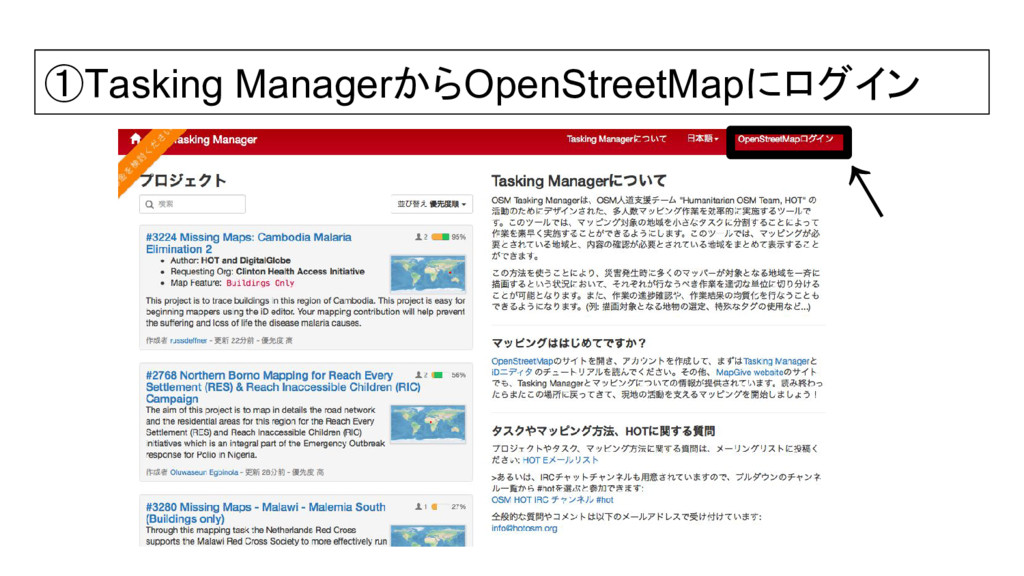
①Tasking ManagerからOpenStreetMapにログイン ↑
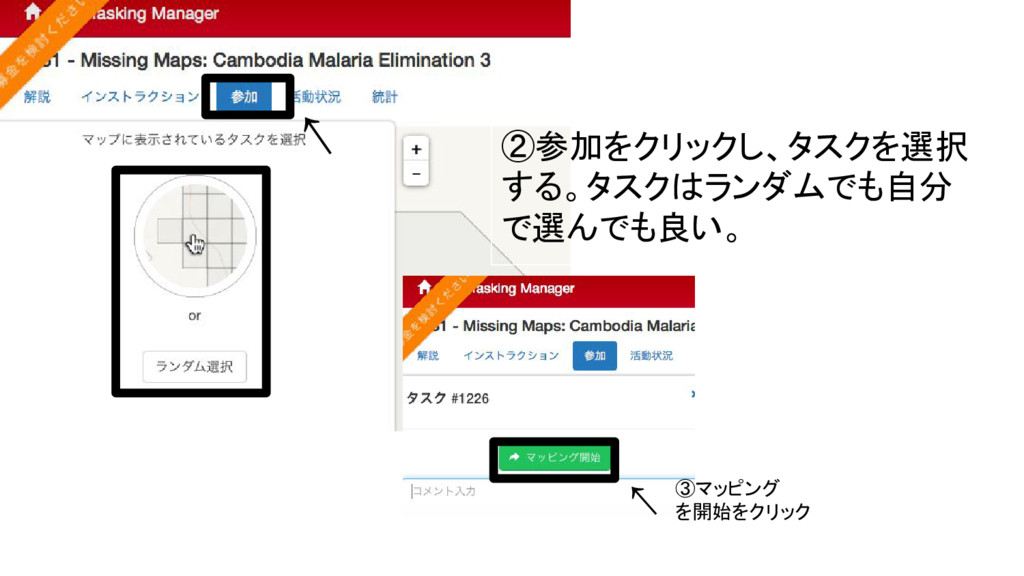
②参加をクリックし、タスクを選択 する。タスクはランダムでも自分 で選んでも良い。 ↑ ③マッピング を開始をクリック ↑
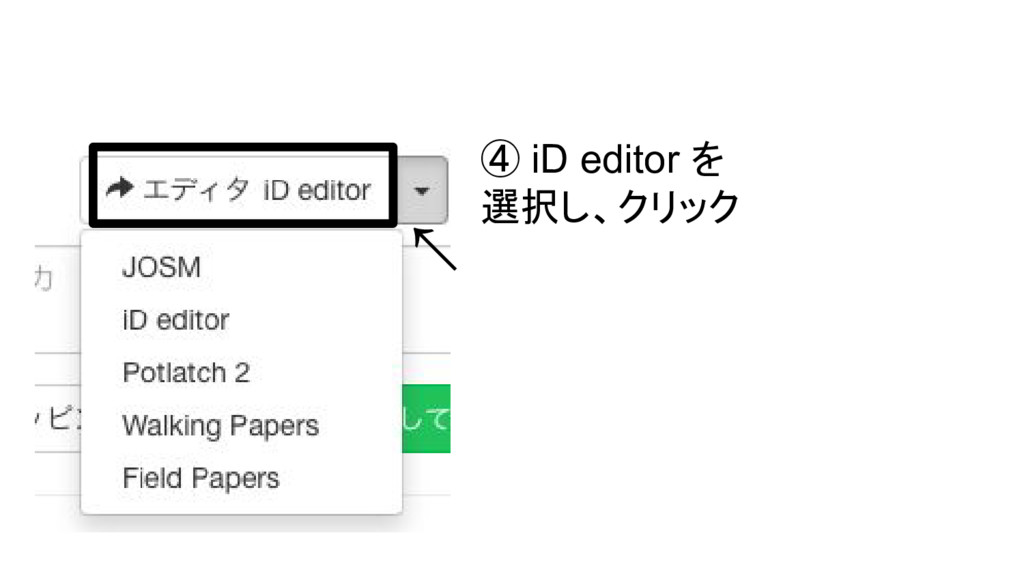
④ iD editor を 選択し、クリック ↑
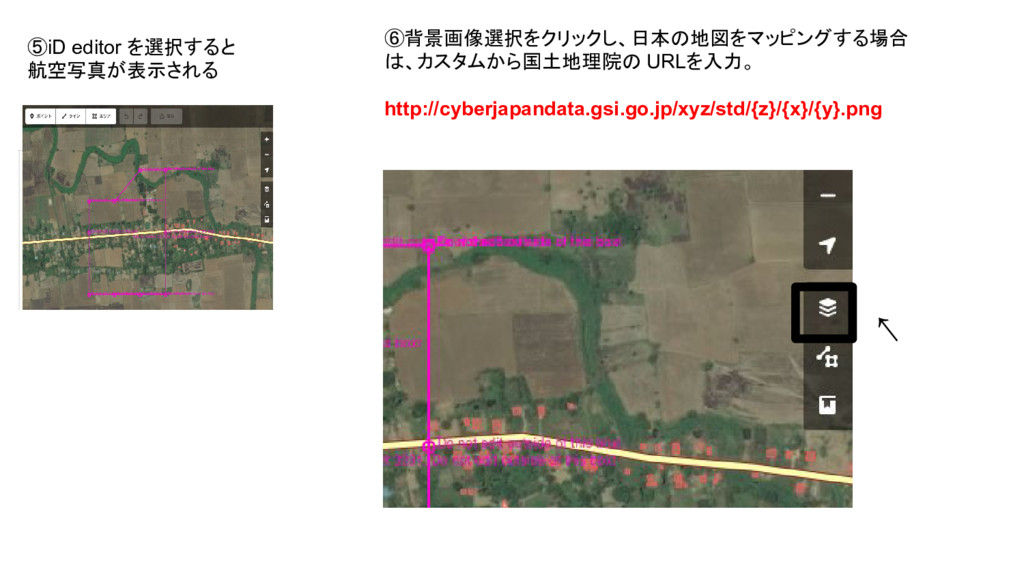
⑤iD editor を選択すると 航空写真が表示される ⑥背景画像選択をクリックし、日本の地図をマッピングする場合 は、カスタムから国土地理院の URLを入力。 http://cyberjapandata.gsi.go.jp/xyz/std/{z}/{x}/{y}.png ↑
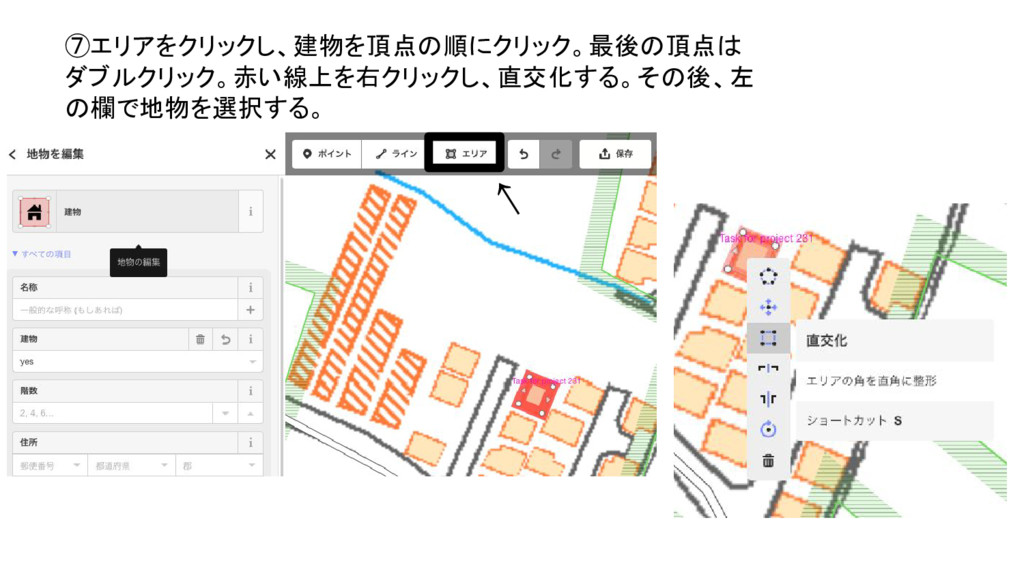
⑦エリアをクリックし、建物を頂点の順にクリック。最後の頂点は ダブルクリック。赤い線上を右クリックし、直交化する。その後、左 の欄で地物を選択する。 ↑
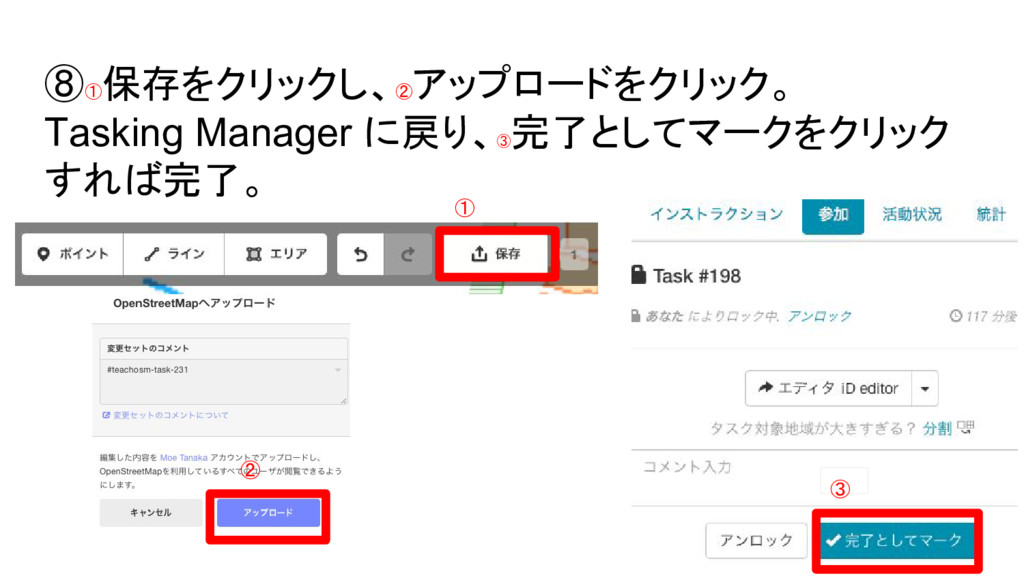
⑧① 保存をクリックし、② アップロードをクリック。 Tasking Manager に戻り、③ 完了としてマークをクリック すれば完了。 ① ②
③


 moetanaka
 aokiplayer
 cbtlibrary
 uchi8977
 kentaroy47
 matleenalaakso
 akiraasano
 yoshimura_datam
 arnoknobbe
 hiola
hiola
 naochim2026
 ks91
ks91
 marcoroth
 stephaniewalter
 eileencodes
 iamctodd
 trallard
 tmiket
 rasmusluckow
 trishagee
 bluesmoon
 wayneb77
 inesmontani