Zero-Downtime Deployment Mastery: Staging Sandb...
Sponsored
·
 Your Podcast. Everywhere. Effortlessly.
Share. Educate. Inspire. Entertain. You do you. We'll handle the rest.
→
Your Podcast. Everywhere. Effortlessly.
Share. Educate. Inspire. Entertain. You do you. We'll handle the rest.
→

Share
Embed
Zero-Downtime Deployment Mastery: Staging Sandboxes, Blue-Green Switches, and Rollback Strategies on Linux VPS
Learn how to eliminate 502 Bad Gateway errors with a blue-green staging sandbox on Linux VPS. Master atomic Nginx upstream reloads and automated rollback gating.

Onlive Server
October 31, 2026
Transcript
12 slides
-
C LO U D S Y S T E M
S & D E VO P S T E C H N I CA L K E Y N OT E Zero-Downtime Deployment Mastery: Staging Sandboxes, Blue-Green Switches & Rollback Strategies on Linux VPS Eliminating Customer-Facing 502 Bad Gateway Outages Through Containerized Parallel Pools, Atomic Nginx Upstream Switching, and Fail-Safe Healthcheck Automation. Speaker: Anjali (Onlive Server Official) Platform: Speaker Deck (Technology) Community Edition: AWS User Group Philippines & DevOps PH Meetup -
SLIDE 01 • THE ANTI-PATTERN DEPLOYMENT RELIABILITY ENGINEERING The High
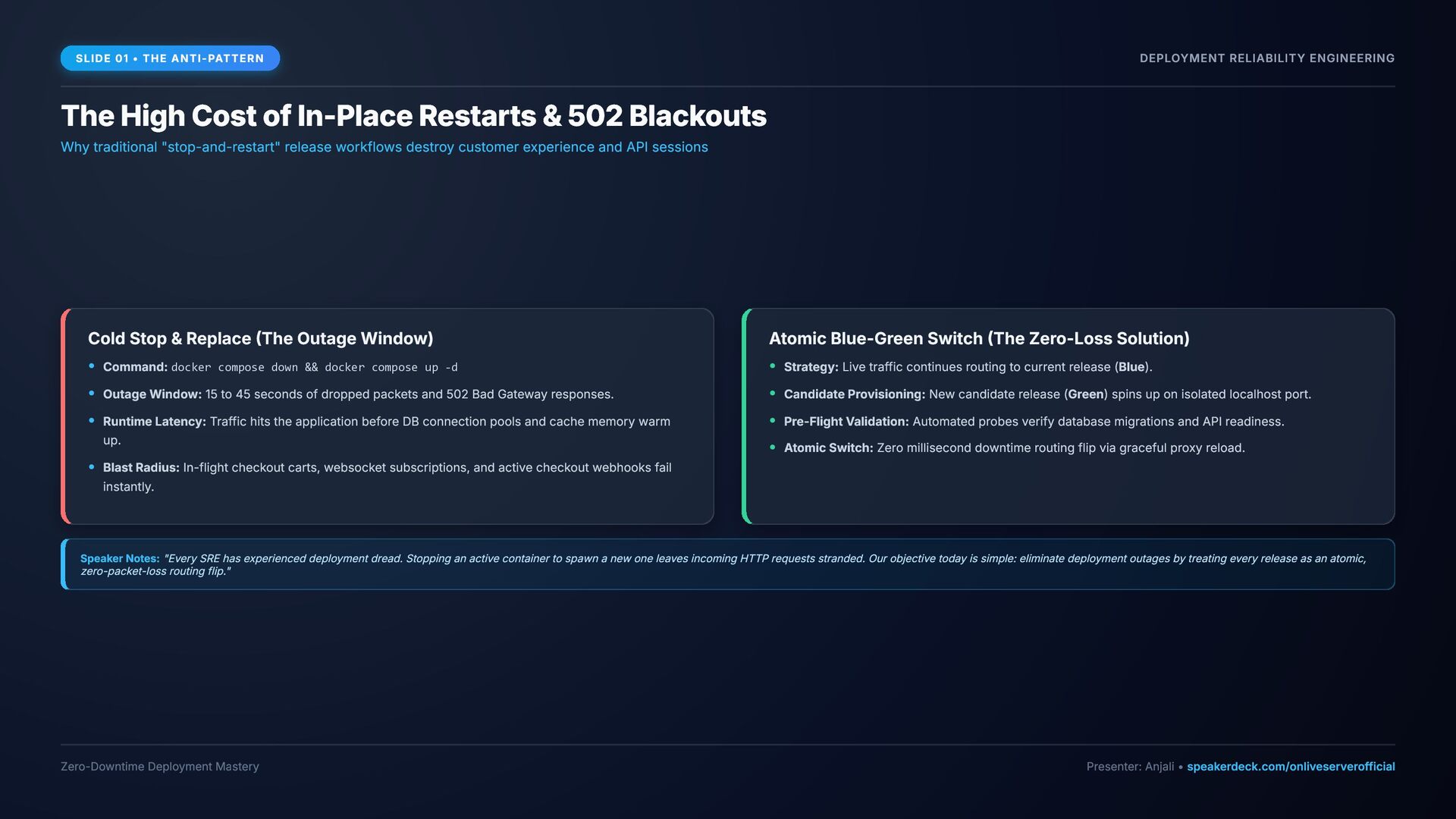
Cost of In-Place Restarts & 502 Blackouts Why traditional "stop-and-restart" release workflows destroy customer experience and API sessions Cold Stop & Replace (The Outage Window) • Command: docker compose down && docker compose up -d • Outage Window: 15 to 45 seconds of dropped packets and 502 Bad Gateway responses. • Runtime Latency: Traffic hits the application before DB connection pools and cache memory warm up. • Blast Radius: In-flight checkout carts, websocket subscriptions, and active checkout webhooks fail Atomic Blue-Green Switch (The Zero-Loss Solution) • Strategy: Live traffic continues routing to current release (Blue). • Candidate Provisioning: New candidate release (Green) spins up on isolated localhost port. • Pre-Flight Validation: Automated probes verify database migrations and API readiness. • Atomic Switch: Zero millisecond downtime routing flip via graceful proxy reload. instantly. Speaker Notes: "Every SRE has experienced deployment dread. Stopping an active container to spawn a new one leaves incoming HTTP requests stranded. Our objective today is simple: eliminate deployment outages by treating every release as an atomic, zero-packet-loss routing flip." Zero-Downtime Deployment Mastery Presenter: Anjali • speakerdeck.com/onliveserverofficial -
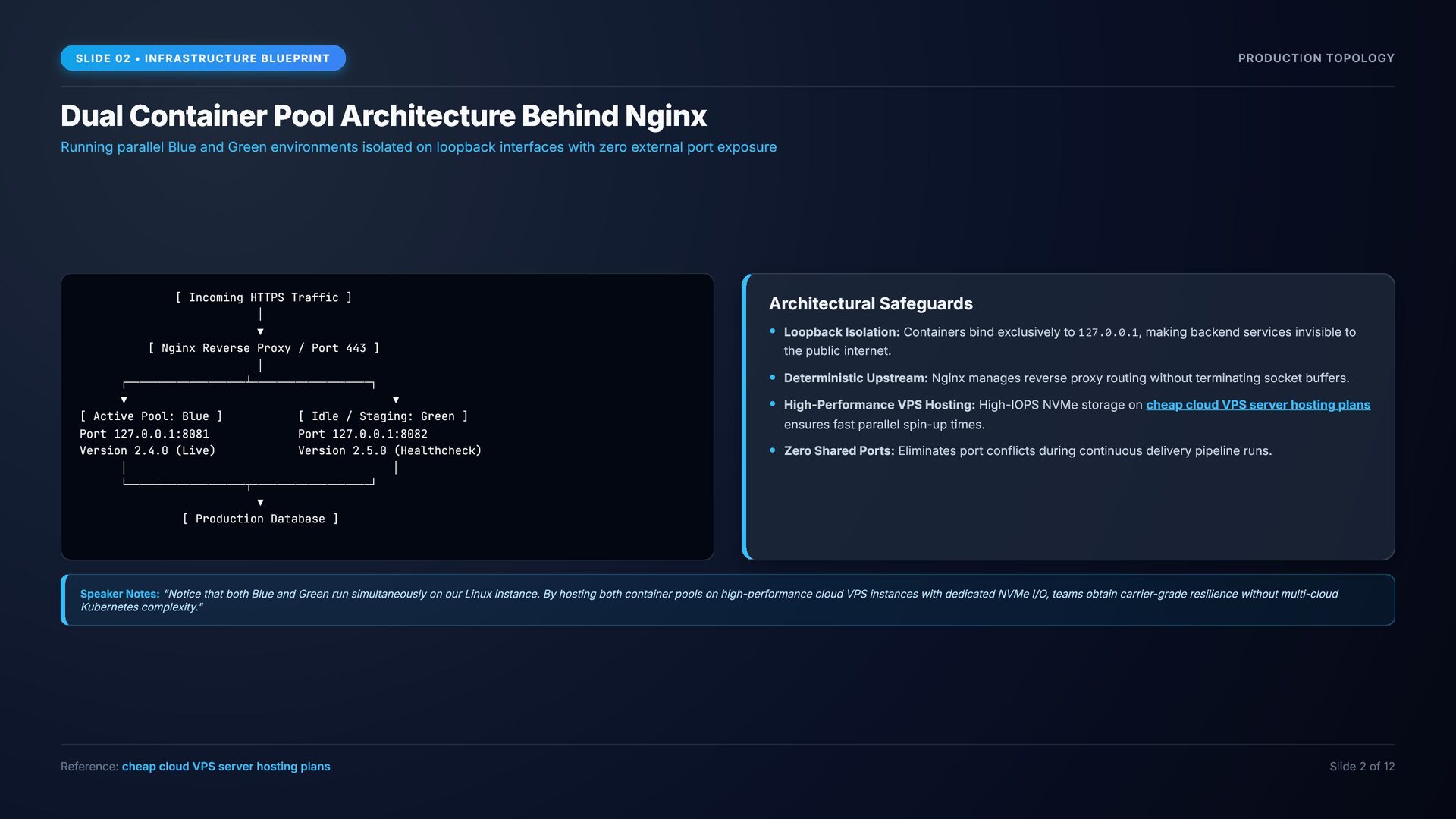
PRODUCTION TOPOLOGY SLIDE 02 • INFRASTRUCTURE BLUEPRINT Dual Container Pool
Architecture Behind Nginx Running parallel Blue and Green environments isolated on loopback interfaces with zero external port exposure [ Incoming HTTPS Traffic ] Architectural Safeguards │ • Loopback Isolation: Containers bind exclusively to 127.0.0.1, making backend services invisible to ▼ [ Nginx Reverse Proxy / Port 443 ] the public internet. │ ┌───────────────────┴───────────────────┐ ▼ ▼ [ Active Pool: Blue ] Port 127.0.0.1:8081 Version 2.4.0 (Live) [ Idle / Staging: Green ] Port 127.0.0.1:8082 Version 2.5.0 (Healthcheck) │ └───────────────────┬───────────────────┘ • Deterministic Upstream: Nginx manages reverse proxy routing without terminating socket buffers. • High-Performance VPS Hosting: High-IOPS NVMe storage on cheap cloud VPS server hosting plans ensures fast parallel spin-up times. • Zero Shared Ports: Eliminates port conflicts during continuous delivery pipeline runs. │ ▼ [ Production Database ] Speaker Notes: "Notice that both Blue and Green run simultaneously on our Linux instance. By hosting both container pools on high-performance cloud VPS instances with dedicated NVMe I/O, teams obtain carrier-grade resilience without multi-cloud Kubernetes complexity." Reference: cheap cloud VPS server hosting plans Slide 2 of 12 -
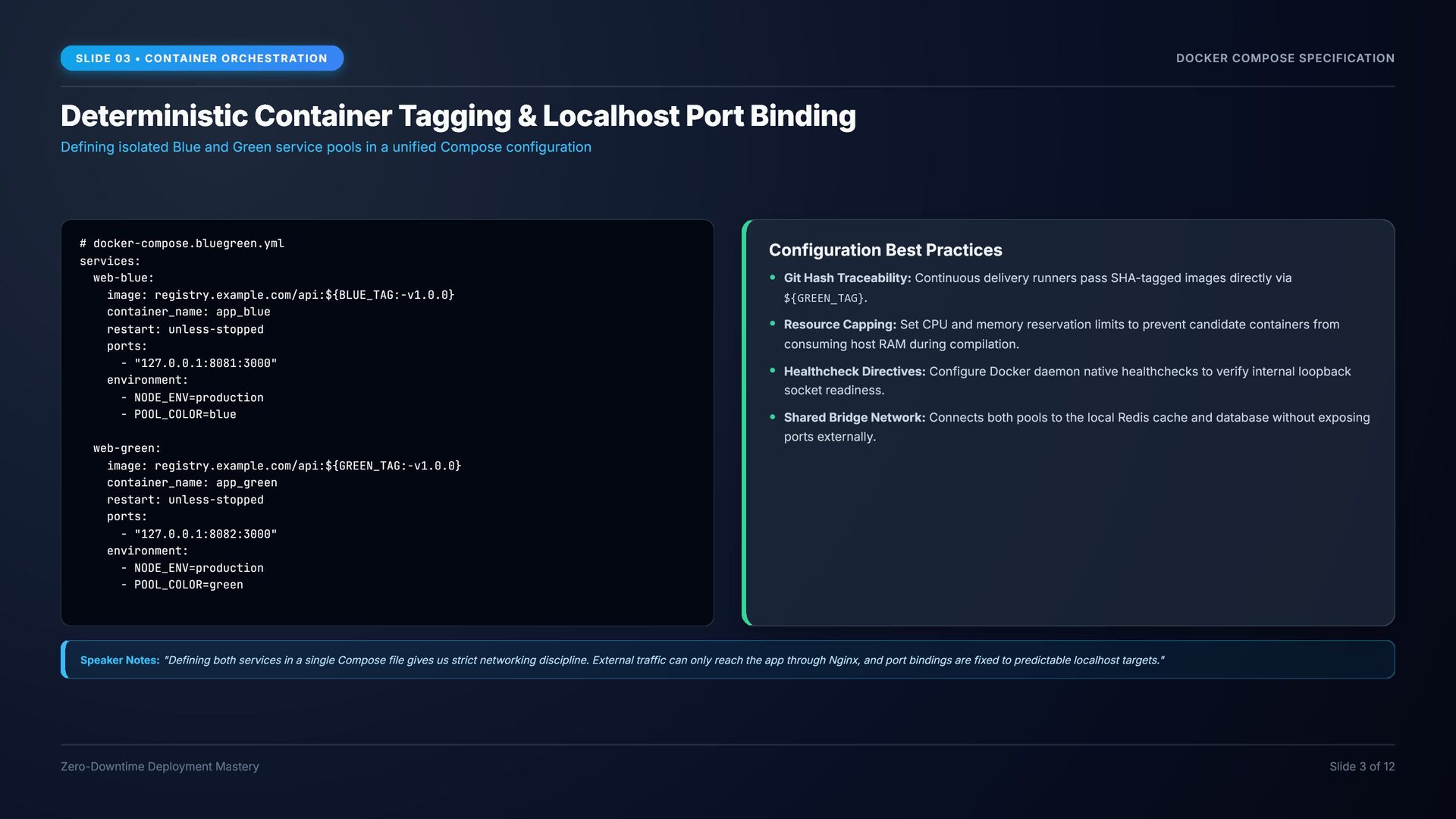
DOCKER COMPOSE SPECIFICATION SLIDE 03 • CONTAINER ORCHESTRATION Deterministic Container
Tagging & Localhost Port Binding Defining isolated Blue and Green service pools in a unified Compose configuration # docker-compose.bluegreen.yml services: web-blue: image: registry.example.com/api:${BLUE_TAG:-v1.0.0} container_name: app_blue restart: unless-stopped ports: - "127.0.0.1:8081:3000" environment: - NODE_ENV=production - POOL_COLOR=blue web-green: image: registry.example.com/api:${GREEN_TAG:-v1.0.0} container_name: app_green restart: unless-stopped ports: - "127.0.0.1:8082:3000" environment: - NODE_ENV=production - POOL_COLOR=green Configuration Best Practices • Git Hash Traceability: Continuous delivery runners pass SHA-tagged images directly via ${GREEN_TAG}. • Resource Capping: Set CPU and memory reservation limits to prevent candidate containers from consuming host RAM during compilation. • Healthcheck Directives: Configure Docker daemon native healthchecks to verify internal loopback socket readiness. • Shared Bridge Network: Connects both pools to the local Redis cache and database without exposing ports externally. Speaker Notes: "Defining both services in a single Compose file gives us strict networking discipline. External traffic can only reach the app through Nginx, and port bindings are fixed to predictable localhost targets." Zero-Downtime Deployment Mastery Slide 3 of 12 -
ATOMIC CUTOVER ENGINEERING SLIDE 04 • REVERSE PROXY ROUTING Atomic
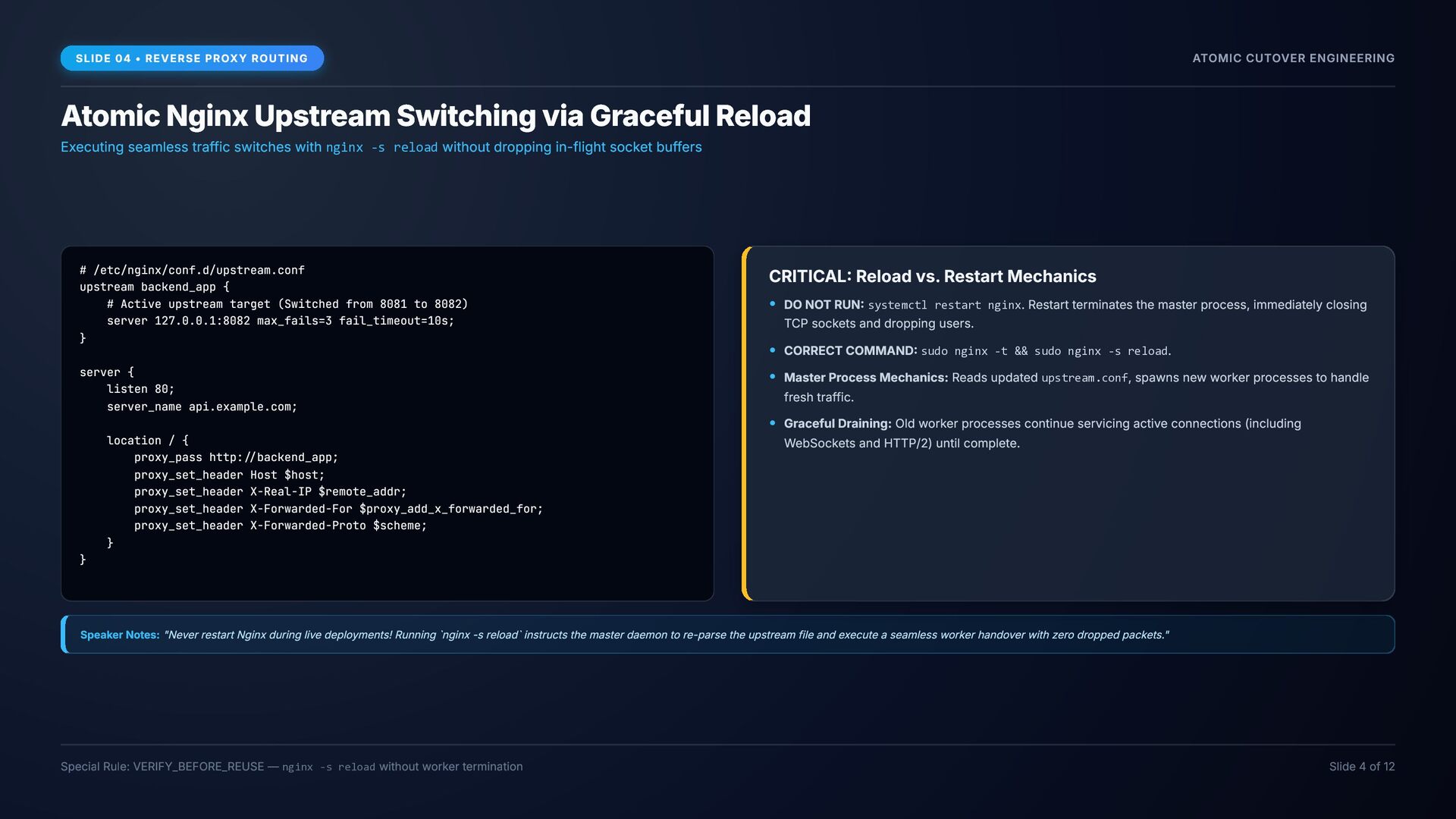
Nginx Upstream Switching via Graceful Reload Executing seamless traffic switches with nginx -s reload without dropping in-flight socket buffers # /etc/nginx/conf.d/upstream.conf upstream backend_app { # Active upstream target (Switched from 8081 to 8082) server 127.0.0.1:8082 max_fails=3 fail_timeout=10s; } server { listen 80; server_name api.example.com; } location / { proxy_pass http://backend_app; proxy_set_header Host $host; proxy_set_header X-Real-IP $remote_addr; proxy_set_header X-Forwarded-For $proxy_add_x_forwarded_for; proxy_set_header X-Forwarded-Proto $scheme; } CRITICAL: Reload vs. Restart Mechanics • DO NOT RUN: systemctl restart nginx. Restart terminates the master process, immediately closing TCP sockets and dropping users. • CORRECT COMMAND: sudo nginx -t && sudo nginx -s reload. • Master Process Mechanics: Reads updated upstream.conf, spawns new worker processes to handle fresh traffic. • Graceful Draining: Old worker processes continue servicing active connections (including WebSockets and HTTP/2) until complete. Speaker Notes: "Never restart Nginx during live deployments! Running `nginx -s reload` instructs the master daemon to re-parse the upstream file and execute a seamless worker handover with zero dropped packets." Special Rule: VERIFY_BEFORE_REUSE — nginx -s reload without worker termination Slide 4 of 12 -
AUTOMATED ROLLBACK GATES SLIDE 05 • QUALITY ASSURANCE Multi-Stage Automated
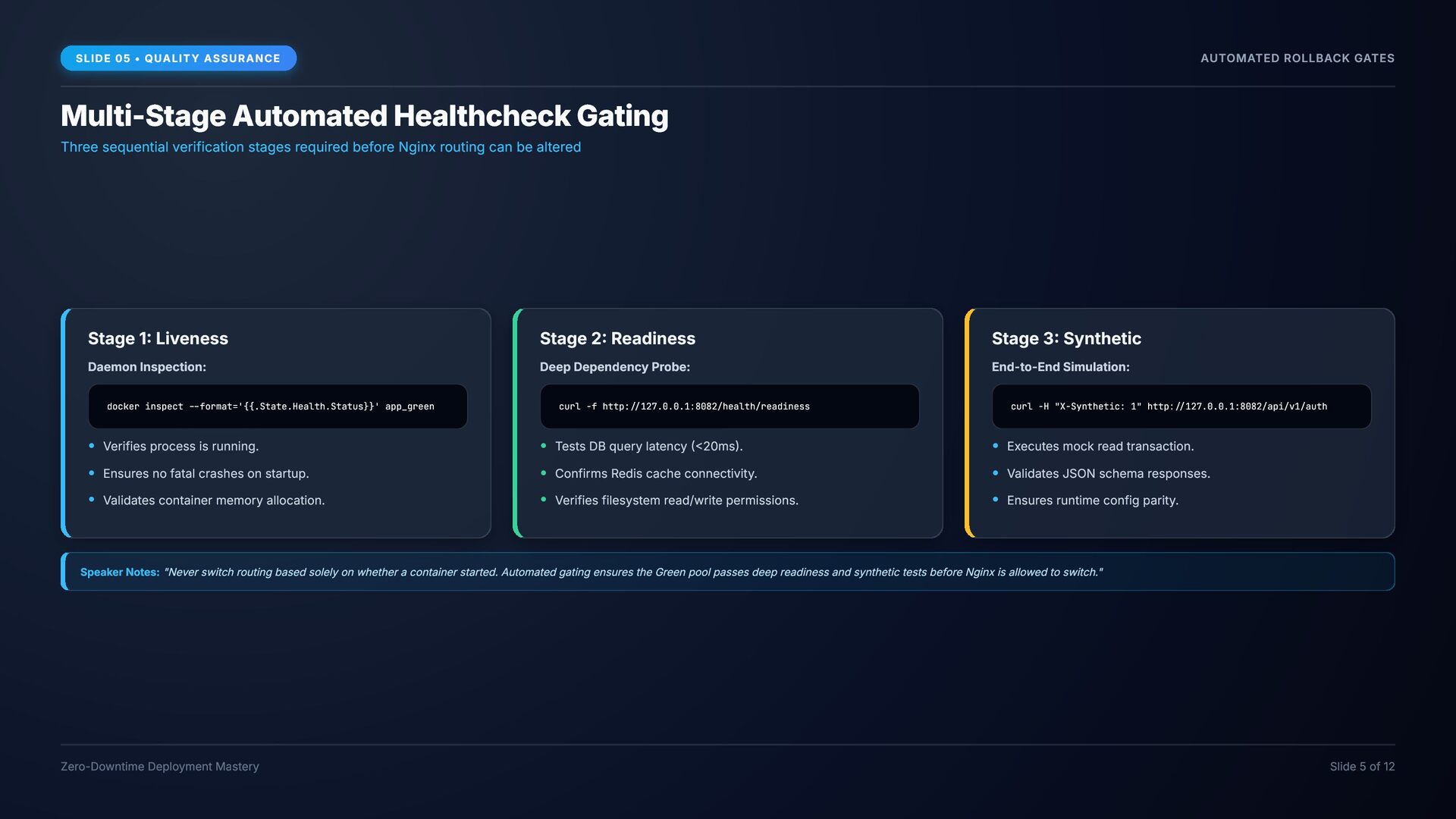
Healthcheck Gating Three sequential verification stages required before Nginx routing can be altered Stage 1: Liveness Stage 2: Readiness Stage 3: Synthetic Daemon Inspection: Deep Dependency Probe: End-to-End Simulation: docker inspect --format='{{.State.Health.Status}}' app_green • Verifies process is running. • Ensures no fatal crashes on startup. • Validates container memory allocation. curl -f http://127.0.0.1:8082/health/readiness • Tests DB query latency (<20ms). • Confirms Redis cache connectivity. • Verifies filesystem read/write permissions. curl -H "X-Synthetic: 1" http://127.0.0.1:8082/api/v1/auth • Executes mock read transaction. • Validates JSON schema responses. • Ensures runtime config parity. Speaker Notes: "Never switch routing based solely on whether a container started. Automated gating ensures the Green pool passes deep readiness and synthetic tests before Nginx is allowed to switch." Zero-Downtime Deployment Mastery Slide 5 of 12 -
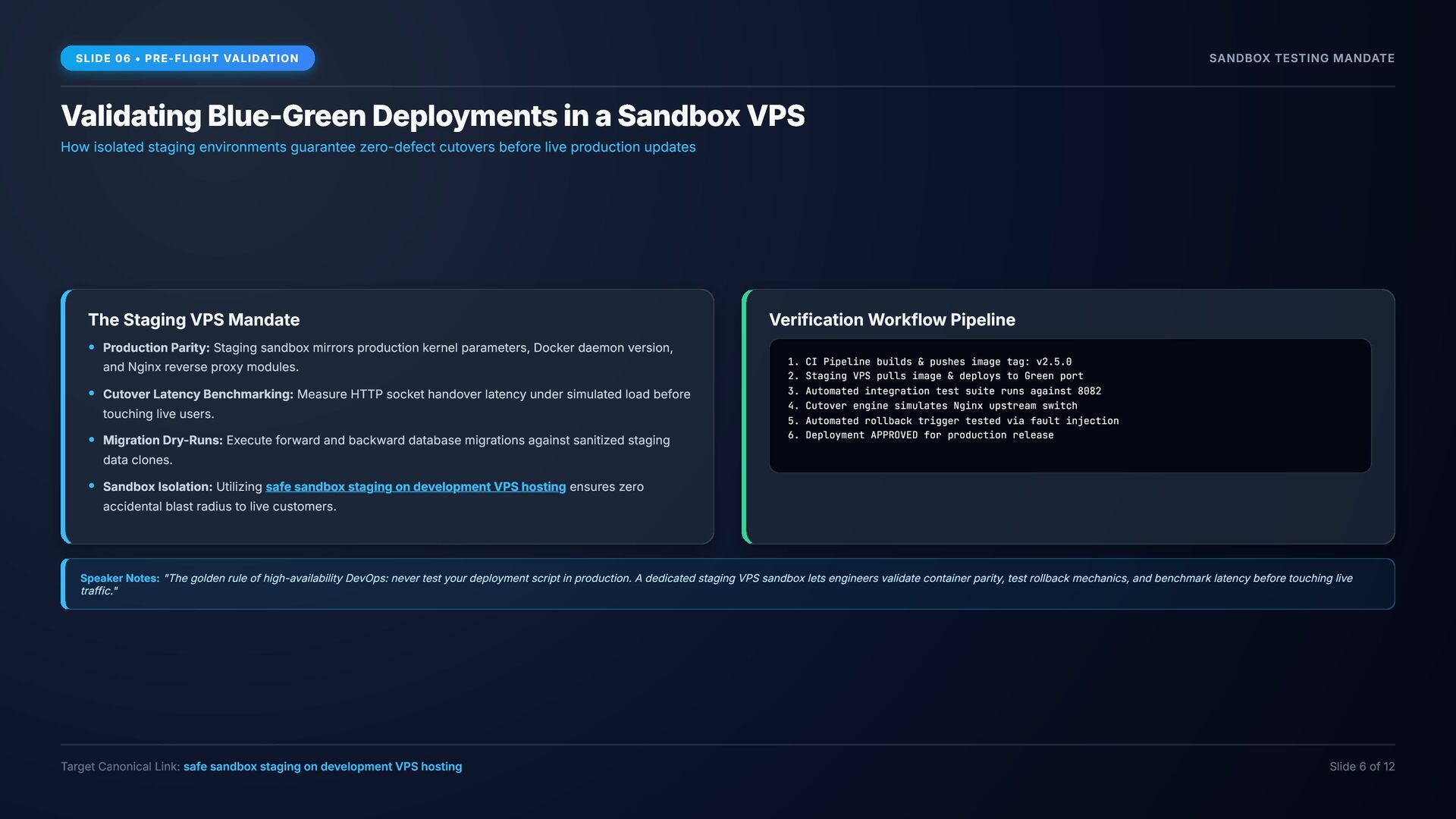
SANDBOX TESTING MANDATE SLIDE 06 • PRE-FLIGHT VALIDATION Validating Blue-Green
Deployments in a Sandbox VPS How isolated staging environments guarantee zero-defect cutovers before live production updates The Staging VPS Mandate • Production Parity: Staging sandbox mirrors production kernel parameters, Docker daemon version, and Nginx reverse proxy modules. • Cutover Latency Benchmarking: Measure HTTP socket handover latency under simulated load before touching live users. • Migration Dry-Runs: Execute forward and backward database migrations against sanitized staging Verification Workflow Pipeline 1. CI Pipeline builds & pushes image tag: v2.5.0 2. Staging VPS pulls image & deploys to Green port 3. Automated integration test suite runs against 8082 4. Cutover engine simulates Nginx upstream switch 5. Automated rollback trigger tested via fault injection 6. Deployment APPROVED for production release data clones. • Sandbox Isolation: Utilizing safe sandbox staging on development VPS hosting ensures zero accidental blast radius to live customers. Speaker Notes: "The golden rule of high-availability DevOps: never test your deployment script in production. A dedicated staging VPS sandbox lets engineers validate container parity, test rollback mechanics, and benchmark latency before touching live traffic." Target Canonical Link: safe sandbox staging on development VPS hosting Slide 6 of 12 -
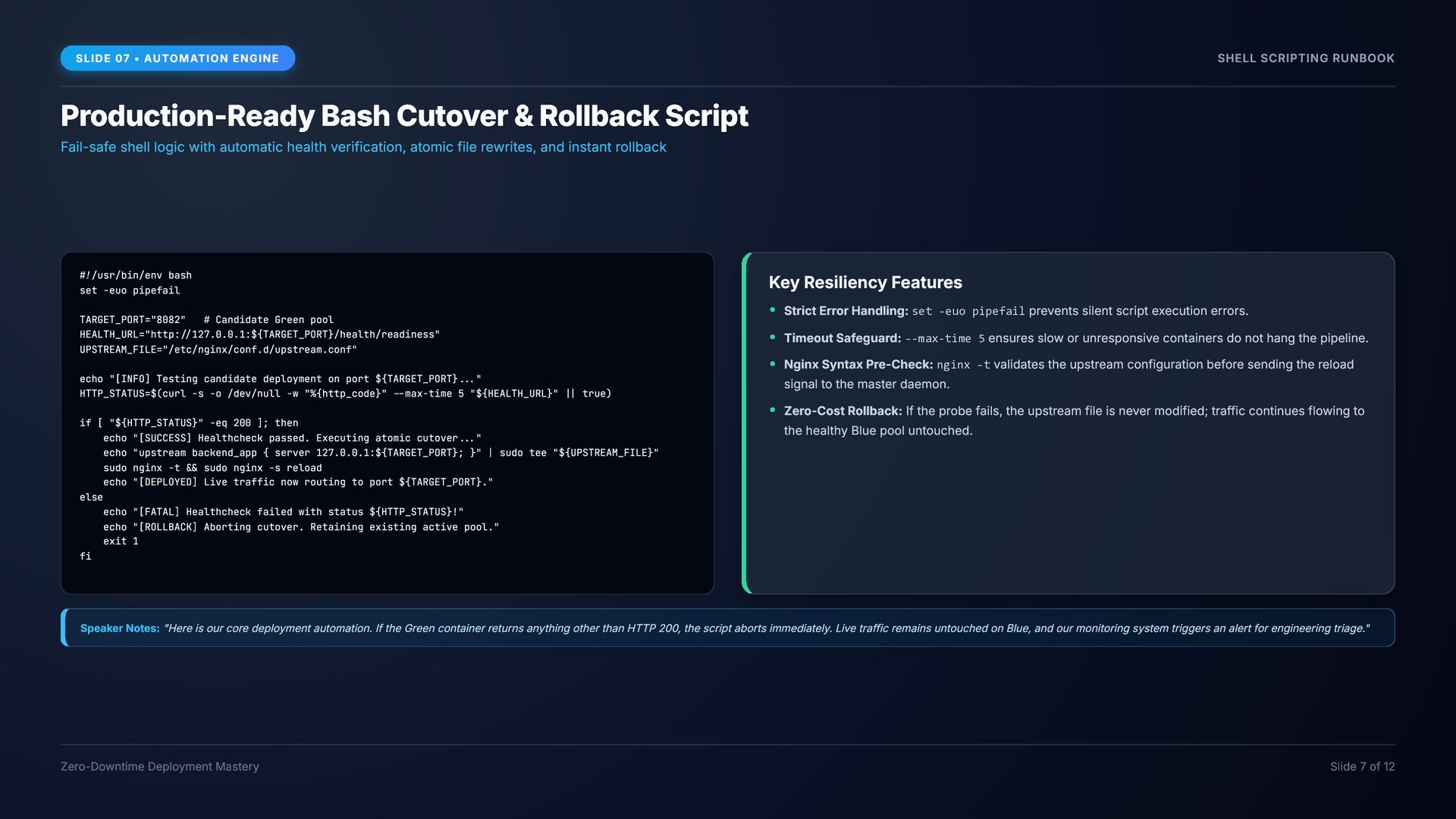
SHELL SCRIPTING RUNBOOK SLIDE 07 • AUTOMATION ENGINE Production-Ready Bash
Cutover & Rollback Script Fail-safe shell logic with automatic health verification, atomic file rewrites, and instant rollback #!/usr/bin/env bash set -euo pipefail TARGET_PORT="8082" # Candidate Green pool HEALTH_URL="http://127.0.0.1:${TARGET_PORT}/health/readiness" UPSTREAM_FILE="/etc/nginx/conf.d/upstream.conf" echo "[INFO] Testing candidate deployment on port ${TARGET_PORT}..." HTTP_STATUS=$(curl -s -o /dev/null -w "%{http_code}" --max-time 5 "${HEALTH_URL}" || true) if [ "${HTTP_STATUS}" -eq 200 ]; then echo "[SUCCESS] Healthcheck passed. Executing atomic cutover..." echo "upstream backend_app { server 127.0.0.1:${TARGET_PORT}; }" | sudo tee "${UPSTREAM_FILE}" sudo nginx -t && sudo nginx -s reload echo "[DEPLOYED] Live traffic now routing to port ${TARGET_PORT}." else echo "[FATAL] Healthcheck failed with status ${HTTP_STATUS}!" echo "[ROLLBACK] Aborting cutover. Retaining existing active pool." exit 1 fi Key Resiliency Features • Strict Error Handling: set -euo pipefail prevents silent script execution errors. • Timeout Safeguard: --max-time 5 ensures slow or unresponsive containers do not hang the pipeline. • Nginx Syntax Pre-Check: nginx -t validates the upstream configuration before sending the reload signal to the master daemon. • Zero-Cost Rollback: If the probe fails, the upstream file is never modified; traffic continues flowing to the healthy Blue pool untouched. Speaker Notes: "Here is our core deployment automation. If the Green container returns anything other than HTTP 200, the script aborts immediately. Live traffic remains untouched on Blue, and our monitoring system triggers an alert for engineering triage." Zero-Downtime Deployment Mastery Slide 7 of 12 -
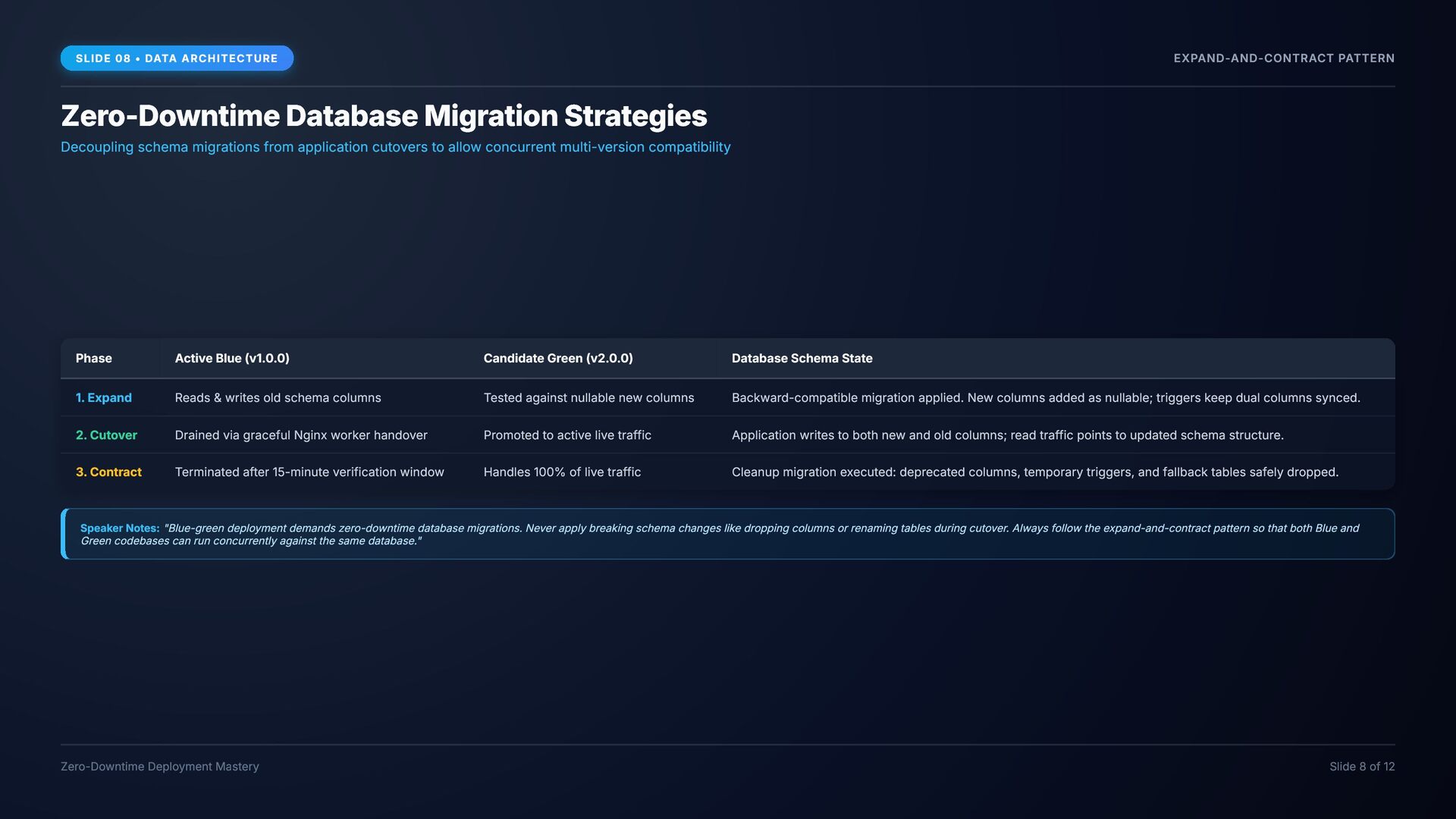
EXPAND-AND-CONTRACT PATTERN SLIDE 08 • DATA ARCHITECTURE Zero-Downtime Database Migration
Strategies Decoupling schema migrations from application cutovers to allow concurrent multi-version compatibility Phase Active Blue (v1.0.0) Candidate Green (v2.0.0) Database Schema State 1. Expand Reads & writes old schema columns Tested against nullable new columns Backward-compatible migration applied. New columns added as nullable; triggers keep dual columns synced. 2. Cutover Drained via graceful Nginx worker handover Promoted to active live traffic Application writes to both new and old columns; read traffic points to updated schema structure. 3. Contract Terminated after 15-minute verification window Handles 100% of live traffic Cleanup migration executed: deprecated columns, temporary triggers, and fallback tables safely dropped. Speaker Notes: "Blue-green deployment demands zero-downtime database migrations. Never apply breaking schema changes like dropping columns or renaming tables during cutover. Always follow the expand-and-contract pattern so that both Blue and Green codebases can run concurrently against the same database." Zero-Downtime Deployment Mastery Slide 8 of 12 -
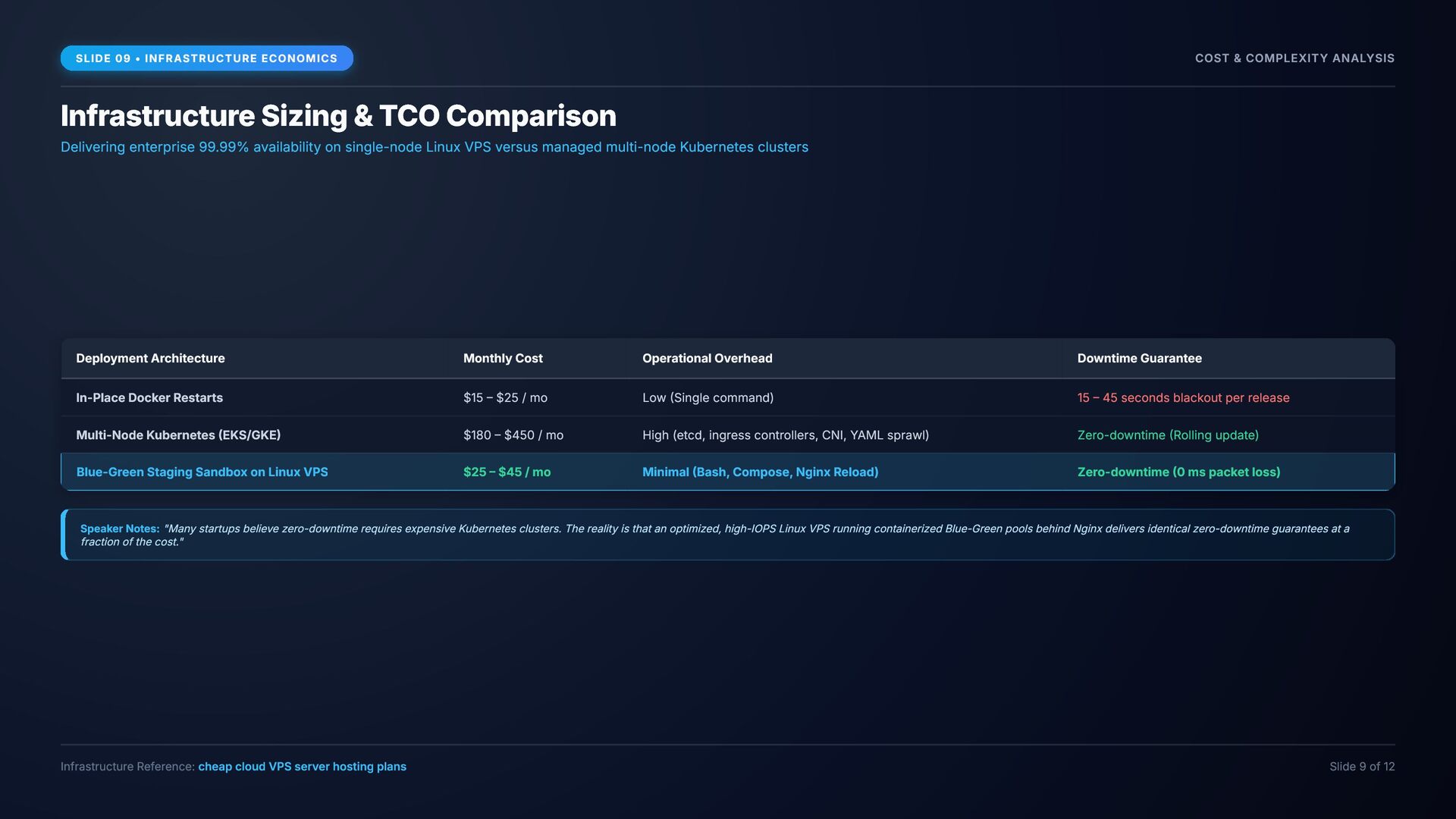
COST & COMPLEXITY ANALYSIS SLIDE 09 • INFRASTRUCTURE ECONOMICS Infrastructure
Sizing & TCO Comparison Delivering enterprise 99.99% availability on single-node Linux VPS versus managed multi-node Kubernetes clusters Deployment Architecture Monthly Cost Operational Overhead Downtime Guarantee In-Place Docker Restarts $15 – $25 / mo Low (Single command) 15 – 45 seconds blackout per release Multi-Node Kubernetes (EKS/GKE) $180 – $450 / mo High (etcd, ingress controllers, CNI, YAML sprawl) Zero-downtime (Rolling update) Blue-Green Staging Sandbox on Linux VPS $25 – $45 / mo Minimal (Bash, Compose, Nginx Reload) Zero-downtime (0 ms packet loss) Speaker Notes: "Many startups believe zero-downtime requires expensive Kubernetes clusters. The reality is that an optimized, high-IOPS Linux VPS running containerized Blue-Green pools behind Nginx delivers identical zero-downtime guarantees at a fraction of the cost." Infrastructure Reference: cheap cloud VPS server hosting plans Slide 9 of 12 -
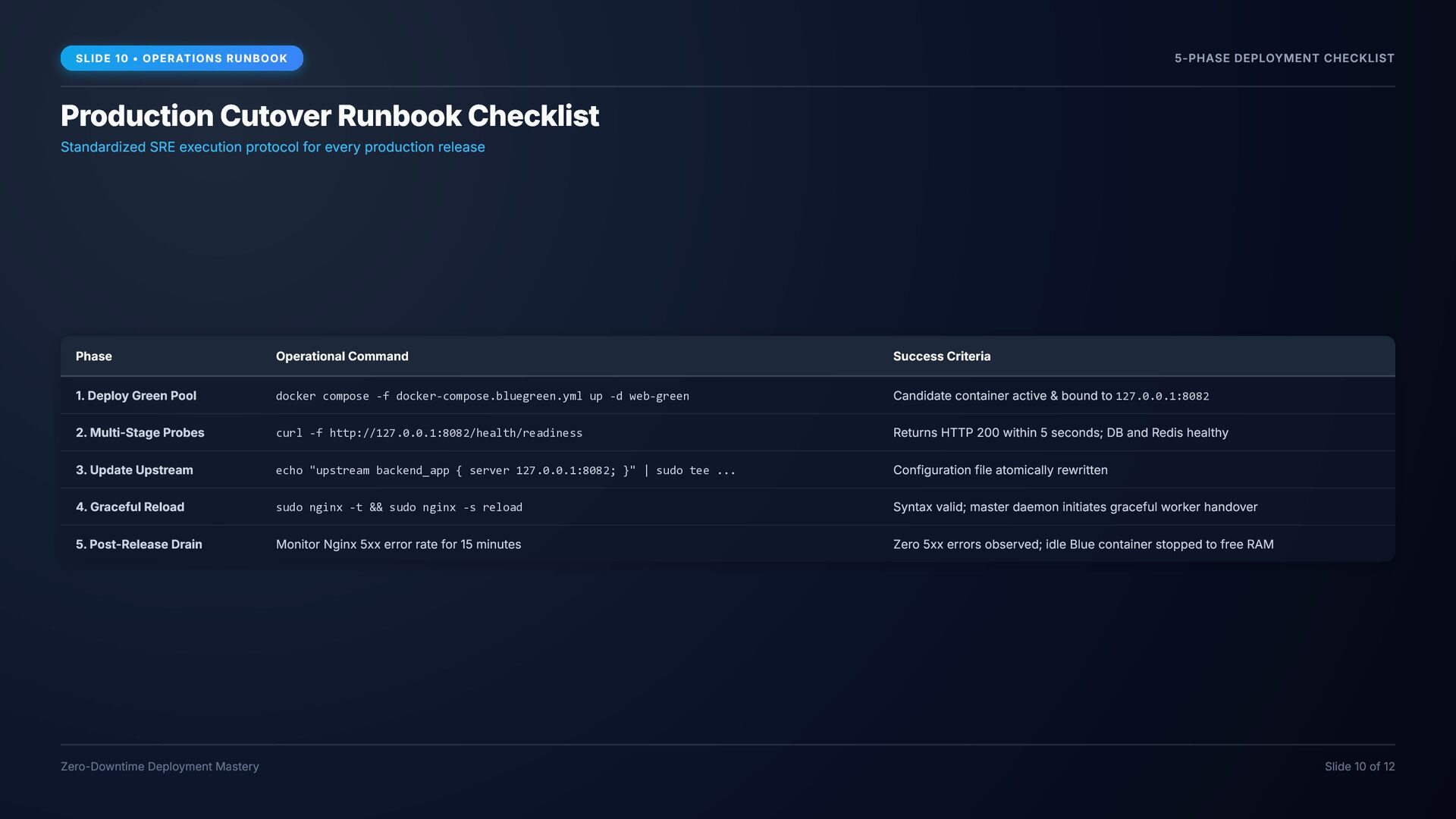
5-PHASE DEPLOYMENT CHECKLIST SLIDE 10 • OPERATIONS RUNBOOK Production Cutover
Runbook Checklist Standardized SRE execution protocol for every production release Phase Operational Command Success Criteria 1. Deploy Green Pool docker compose -f docker-compose.bluegreen.yml up -d web-green Candidate container active & bound to 127.0.0.1:8082 2. Multi-Stage Probes curl -f http://127.0.0.1:8082/health/readiness Returns HTTP 200 within 5 seconds; DB and Redis healthy 3. Update Upstream echo "upstream backend_app { server 127.0.0.1:8082; }" | sudo tee ... Configuration file atomically rewritten 4. Graceful Reload sudo nginx -t && sudo nginx -s reload Syntax valid; master daemon initiates graceful worker handover 5. Post-Release Drain Monitor Nginx 5xx error rate for 15 minutes Zero 5xx errors observed; idle Blue container stopped to free RAM Zero-Downtime Deployment Mastery Slide 10 of 12 -
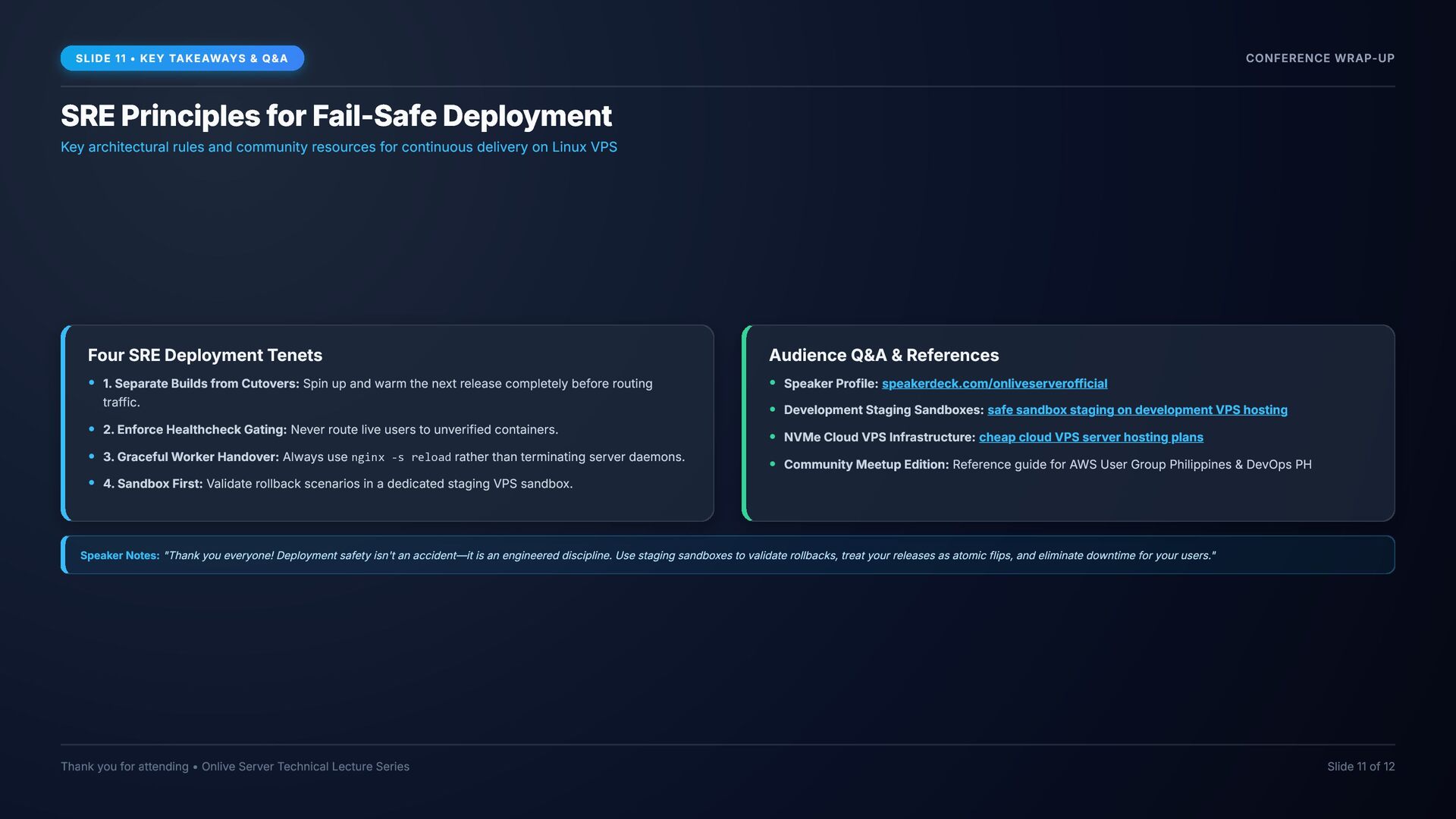
CONFERENCE WRAP-UP SLIDE 11 • KEY TAKEAWAYS & Q&A SRE
Principles for Fail-Safe Deployment Key architectural rules and community resources for continuous delivery on Linux VPS Four SRE Deployment Tenets • 1. Separate Builds from Cutovers: Spin up and warm the next release completely before routing traffic. • 2. Enforce Healthcheck Gating: Never route live users to unverified containers. • 3. Graceful Worker Handover: Always use nginx -s reload rather than terminating server daemons. • 4. Sandbox First: Validate rollback scenarios in a dedicated staging VPS sandbox. Audience Q&A & References • Speaker Profile: speakerdeck.com/onliveserverofficial • Development Staging Sandboxes: safe sandbox staging on development VPS hosting • NVMe Cloud VPS Infrastructure: cheap cloud VPS server hosting plans • Community Meetup Edition: Reference guide for AWS User Group Philippines & DevOps PH Speaker Notes: "Thank you everyone! Deployment safety isn't an accident—it is an engineered discipline. Use staging sandboxes to validate rollbacks, treat your releases as atomic flips, and eliminate downtime for your users." Thank you for attending • Onlive Server Technical Lecture Series Slide 11 of 12
 onliveserver323
 sue445
 inariku
 kazatohiei
 kasada
 keitah
 ryuz88
 oracle4engineer
 kentapapa
 miu_crescent
 tascript
 yoshimura_datam
 estie
 minecr
 afnizarnur
 addyosmani
 katarinadahlin
 thoeni
 kimpetersen
 davetheseo
 greggifford
 honzajavorek
 techseoconnect
 gurzu
 geoffreycrofte