a new form of intelligence. Not the human brain, nor conventional AI. Third Intelligence is an AI research and development company committed to creating a new form of intelligence and AGI. Beyond raw intellect, we aim to build AI that thinks, converses, acts, and grows like a human — paving the way for a future where AI enhances the lives of people everywhere. We welcome those eager to join us in the challenge of creating and utilizing a new kind of intelligence that does not yet exist in the world, all within a globally competitive R&D environment. To learn more, please contact us below. 2
Numbered Registers Fail You 3. Building a Safer, Intentional Editing Workflow 4. Beyond Basics: Expressions, Macros, and Tricks 5. Clipboard Deep Dive 6. From Understanding to Internalization Agenda 4
Numbered Registers Fail You 3. Building a Safer, Intentional Editing Workflow 4. Beyond Basics: Expressions, Macros, and Tricks 5. Clipboard Deep Dive 6. From Understanding to Internalization Agenda 5
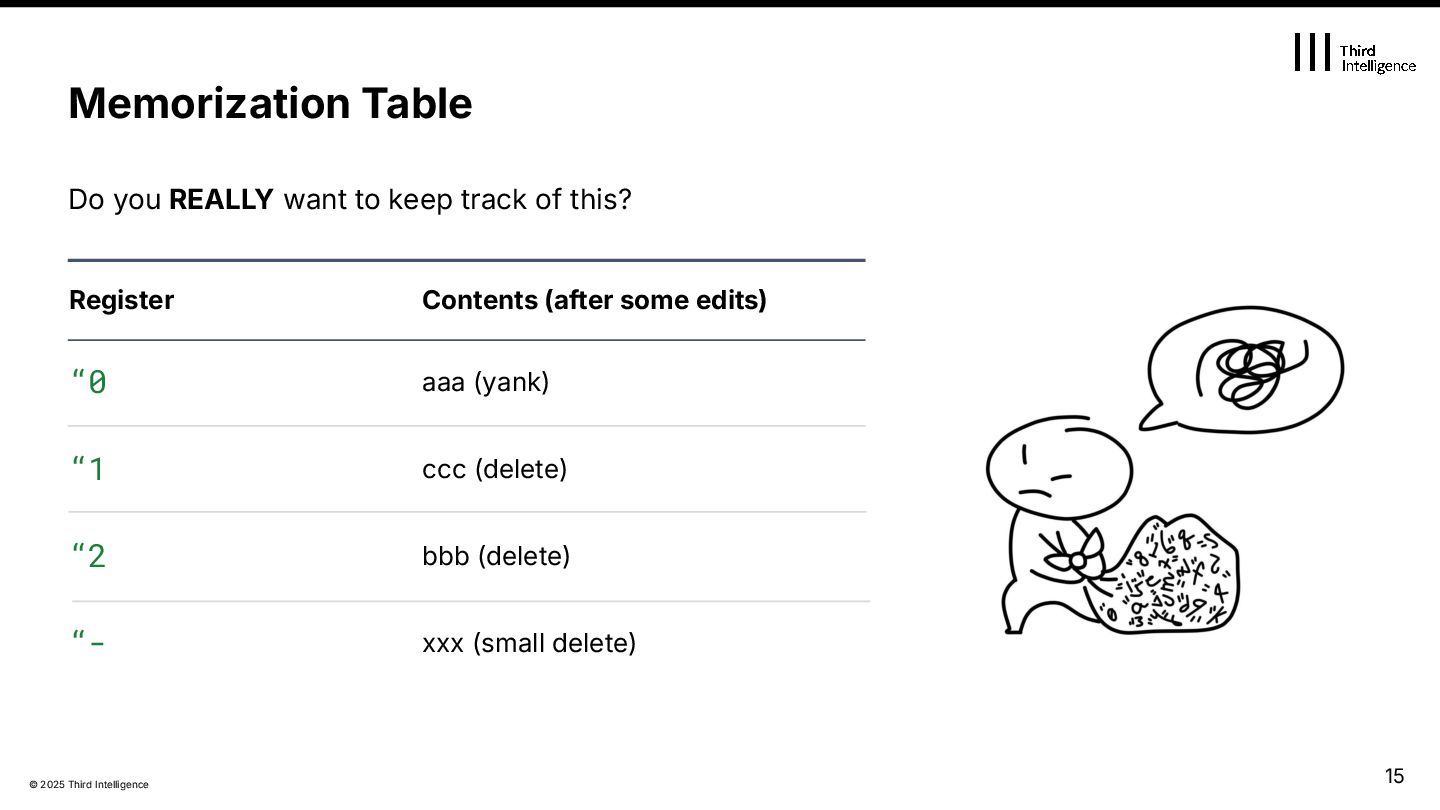
on a yank (y), never on delete / change. “1-9 Deletion history (new→old) Updated on linewise or multiline deletes / changes. “1 gets the newest others shift down. “- Small delete (within one line) Used for small deletes / changes like cw, dw, or single-line visual deletes. “_ Black hole Discards content. Nothing is saved. “(unnamed) Implicit Target Points to the last written register. (“0, “1, or “- depending on operation) Register Roles Table Role Notes 6
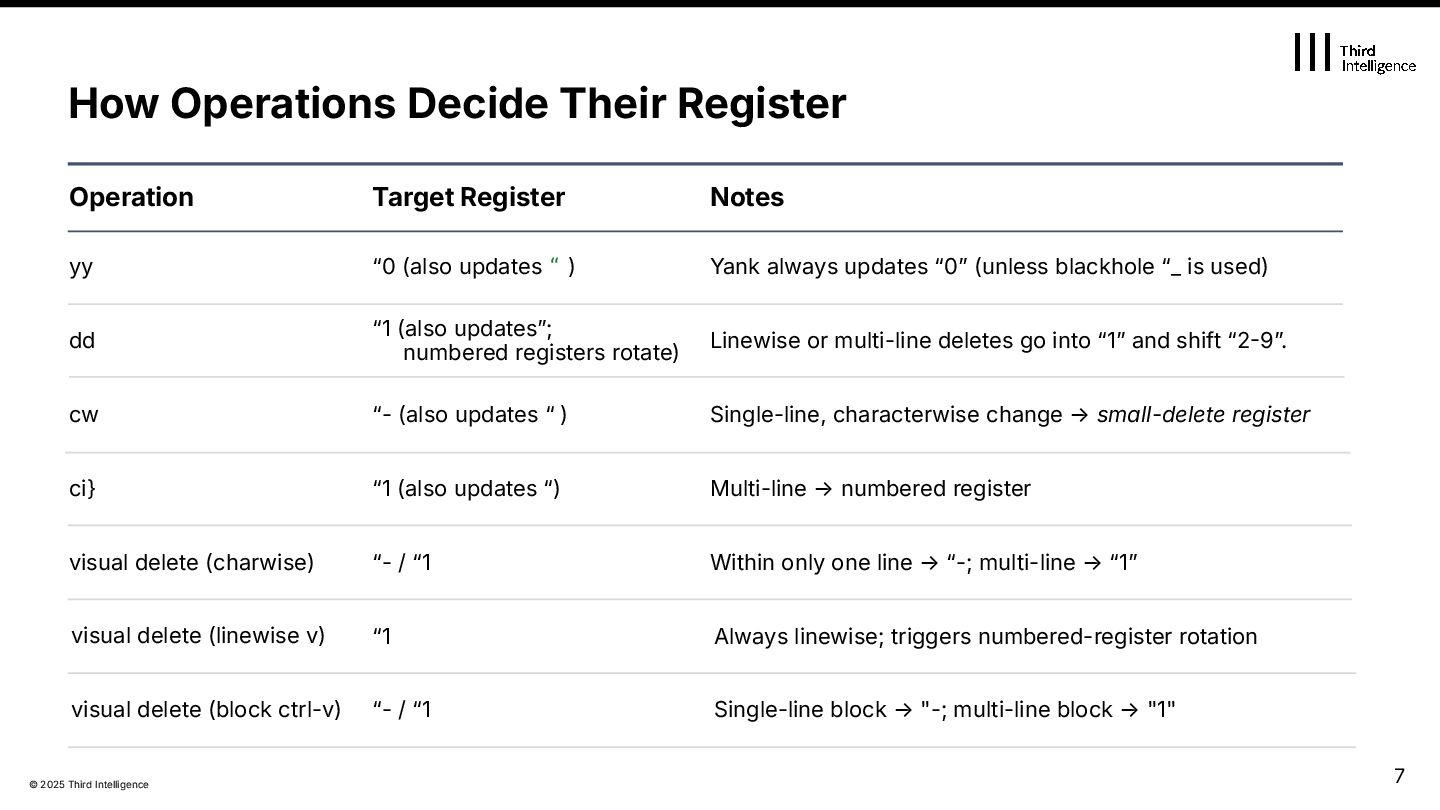
Behavior small path, same register Cmnd cw ciw motion type line cnt MCHAR triggers numbered rotation ci} MLINE1 note rgst 1 1 2 “- “- “1 from cursor → word end across lines or blank lines Range inner word 8
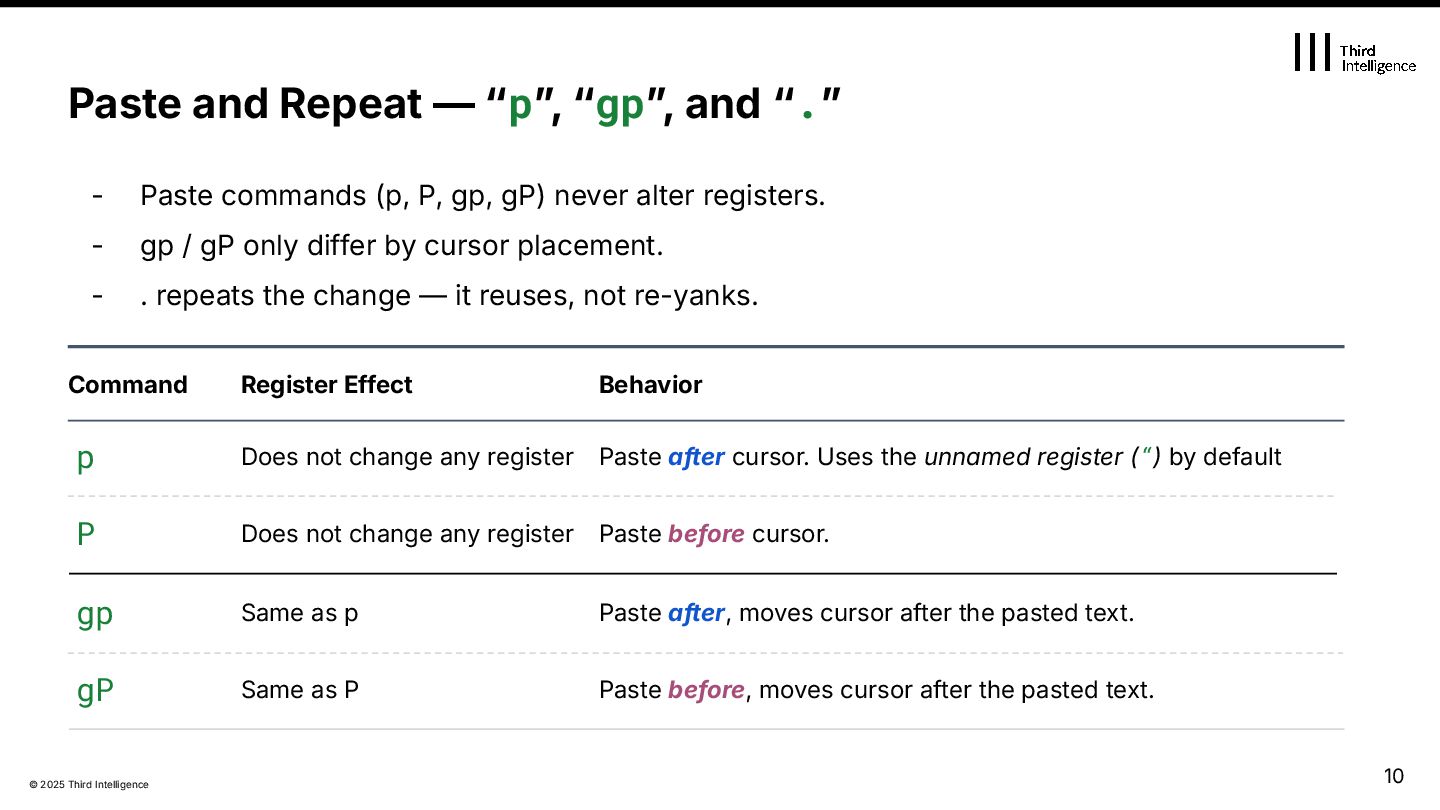
gP) never alter registers. - gp / gP only differ by cursor placement. - . repeats the change — it reuses, not re-yanks. Paste before cursor. Paste and Repeat — “pˮ, “gpˮ, and “.ˮ Command p P Does not change any register gp gP Same as P Paste before, moves cursor after the pasted text. Register Effect Behavior Does not change any register Same as p Paste after cursor. Uses the unnamed register (“) by default Paste after, moves cursor after the pasted text. 10
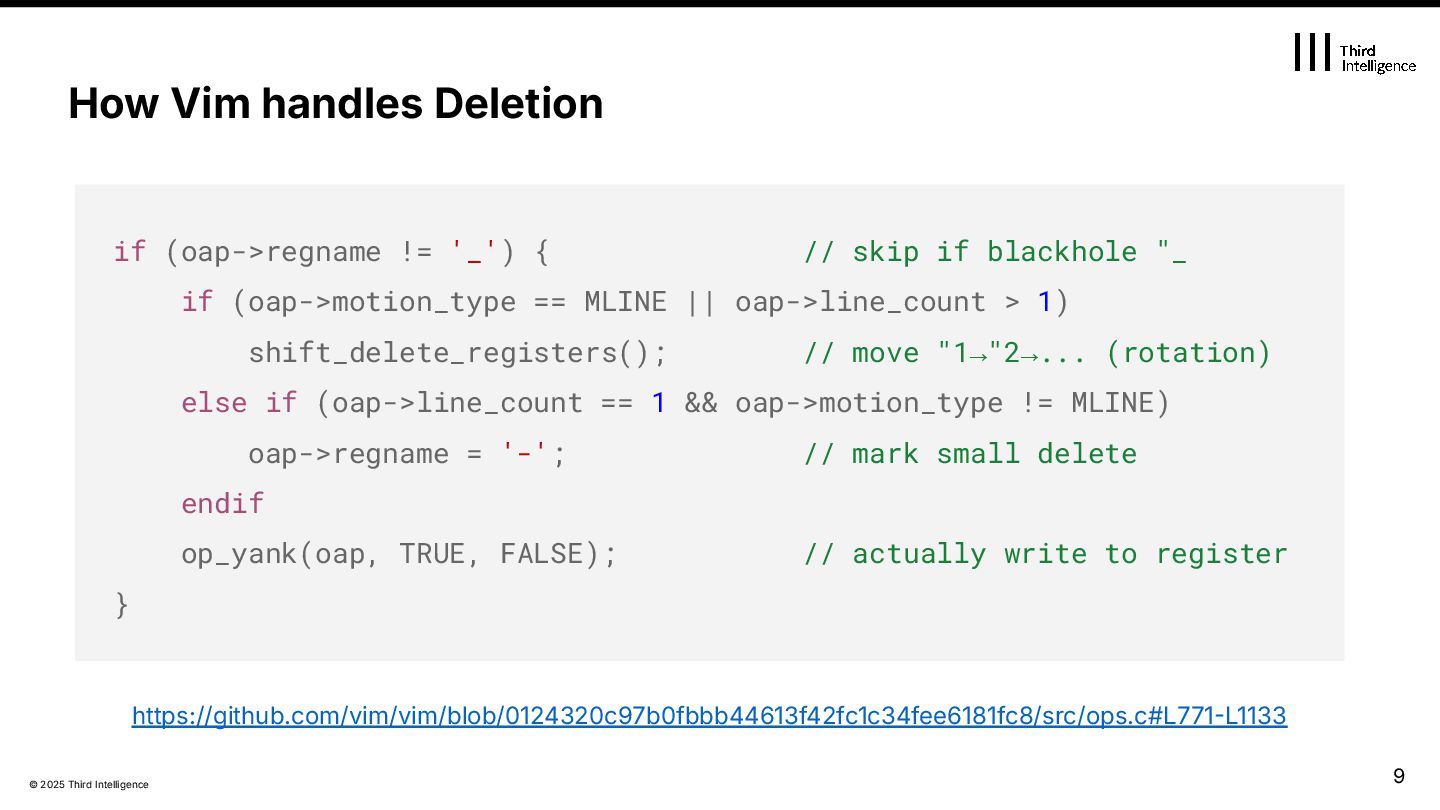
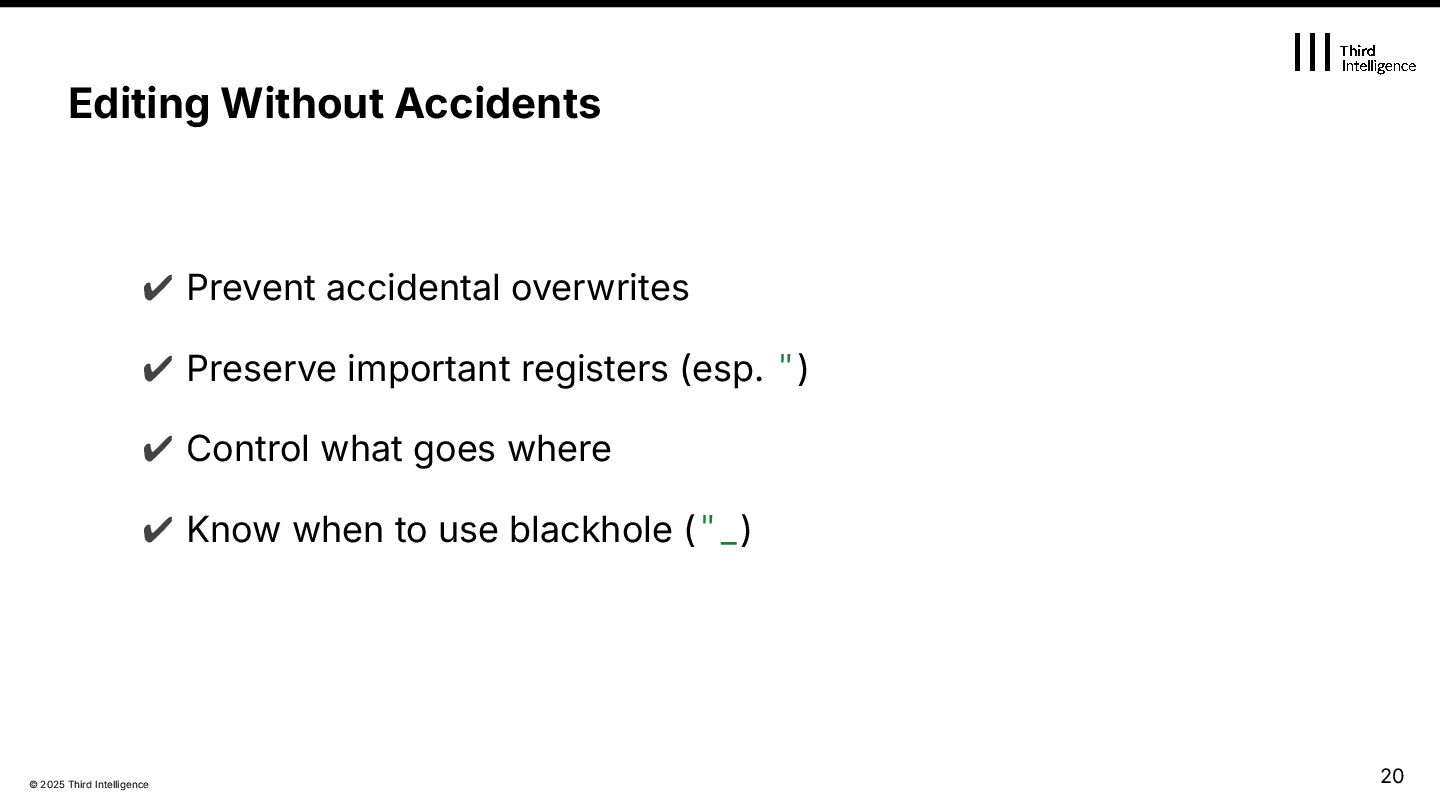
not the command — itʼs the motion. Registers depend on how wide your edit spans. The unnamed register (") is always updated (unless using the blackhole "_) ✔ "0 is yank-only — never touched by delete or change. ✔ "1–9 rotate only on linewise or multi-line deletes. ✔ "- is for small (single-line) deletes/changes. ✔ Use "_ to avoid writing to any register at all. 11
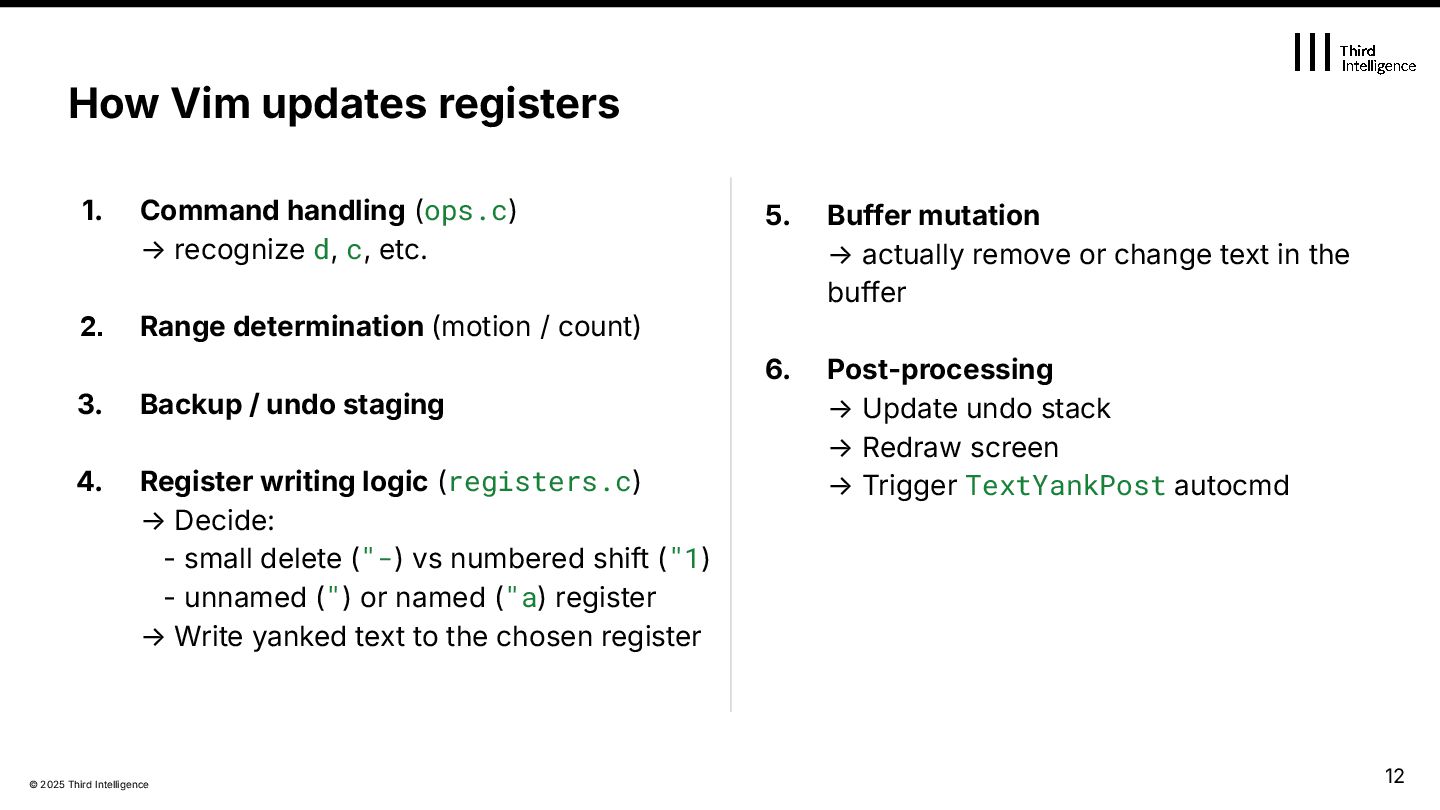
d, c, etc. 2. Range determination (motion / count) 3. Backup / undo staging 4. Register writing logic (registers.c) → Decide: - small delete ("-) vs numbered shift ("1) - unnamed (") or named ("a) register → Write yanked text to the chosen register How Vim updates registers 5. Buffer mutation → actually remove or change text in the buffer 6. Post-processing → Update undo stack → Redraw screen → Trigger TextYankPost autocmd 12
Numbered Registers Fail You 3. Building a Safer, Intentional Editing Workflow 4. Beyond Basics: Expressions, Macros, and Tricks 5. Clipboard Deep Dive 6. From Understanding to Internalization Agenda 14
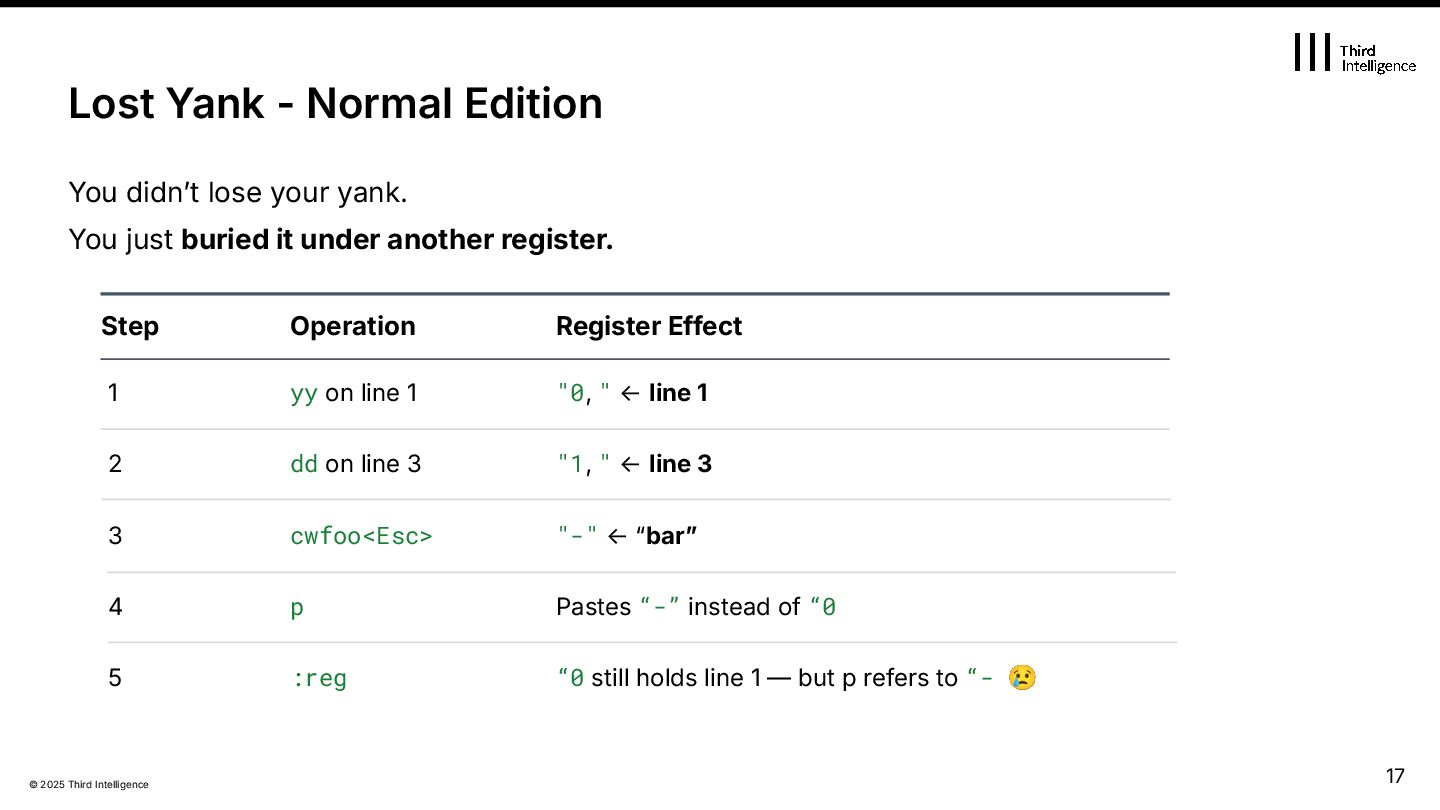
just buried it under another register. “0 still holds line 1 — but p refers to “- 😢 Step 1 yy on line 1 "0, " ← line 1 2 3 cwfoo<Esc> 4 Pastes “-” instead of “0 5 :reg Operation Register Effect "1, " ← line 3 dd on line 3 "-" ← “barˮ p Lost Yank - Normal Edition 17
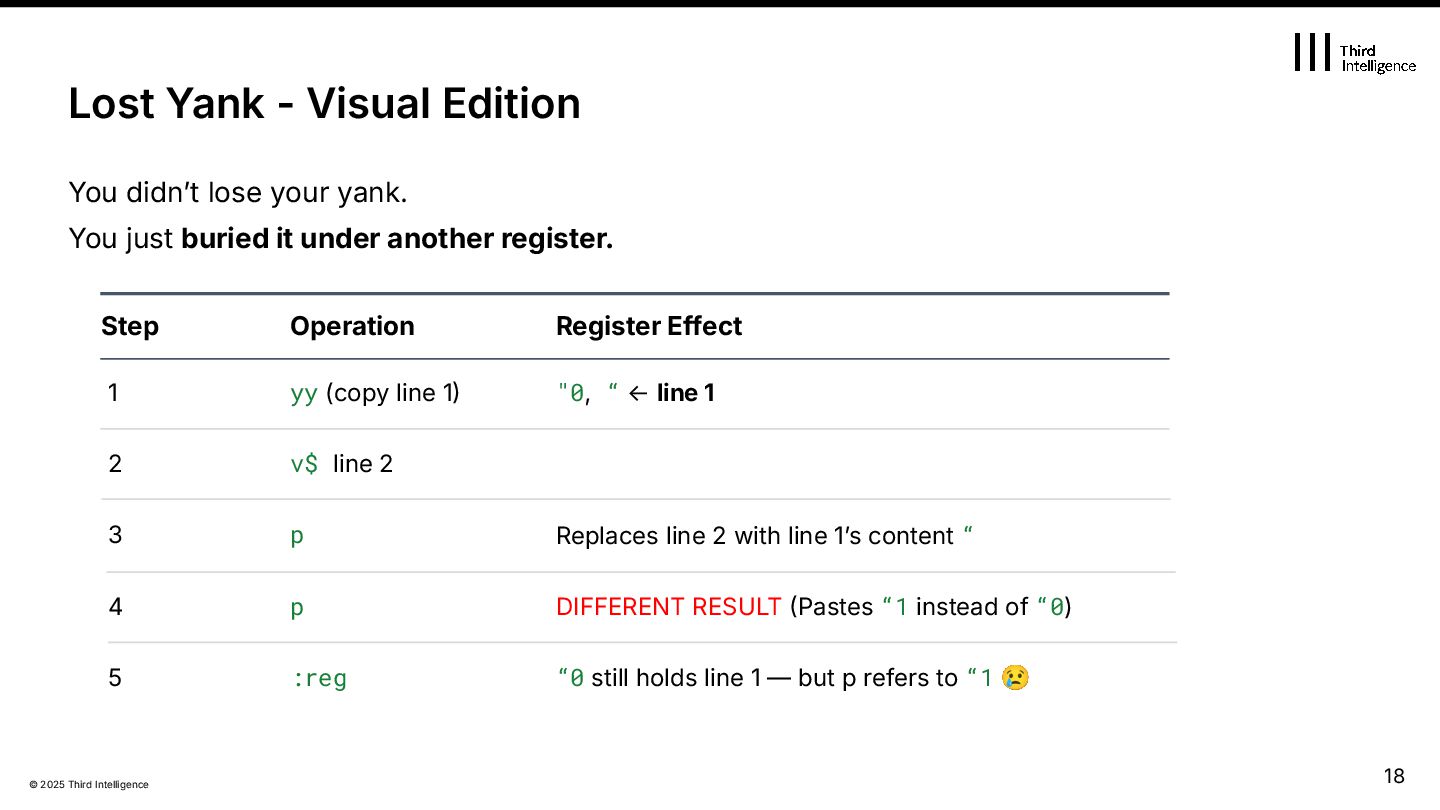
but p refers to “1 😢 Step 1 yy (copy line 1 "0, “ ← line 1 2 3 p 5 :reg Operation Register Effect v$ line 2 Replaces line 2 with line 1ʼs content “ You didnʼt lose your yank. You just buried it under another register. Lost Yank - Visual Edition 4 DIFFERENT RESULT Pastes “1 instead of “0) p 18
Numbered Registers Fail You 3. Building a Safer, Intentional Editing Workflow 4. Beyond Basics: Expressions, Macros, and Tricks 5. Clipboard Deep Dive 6. From Understanding to Internalization Agenda 19
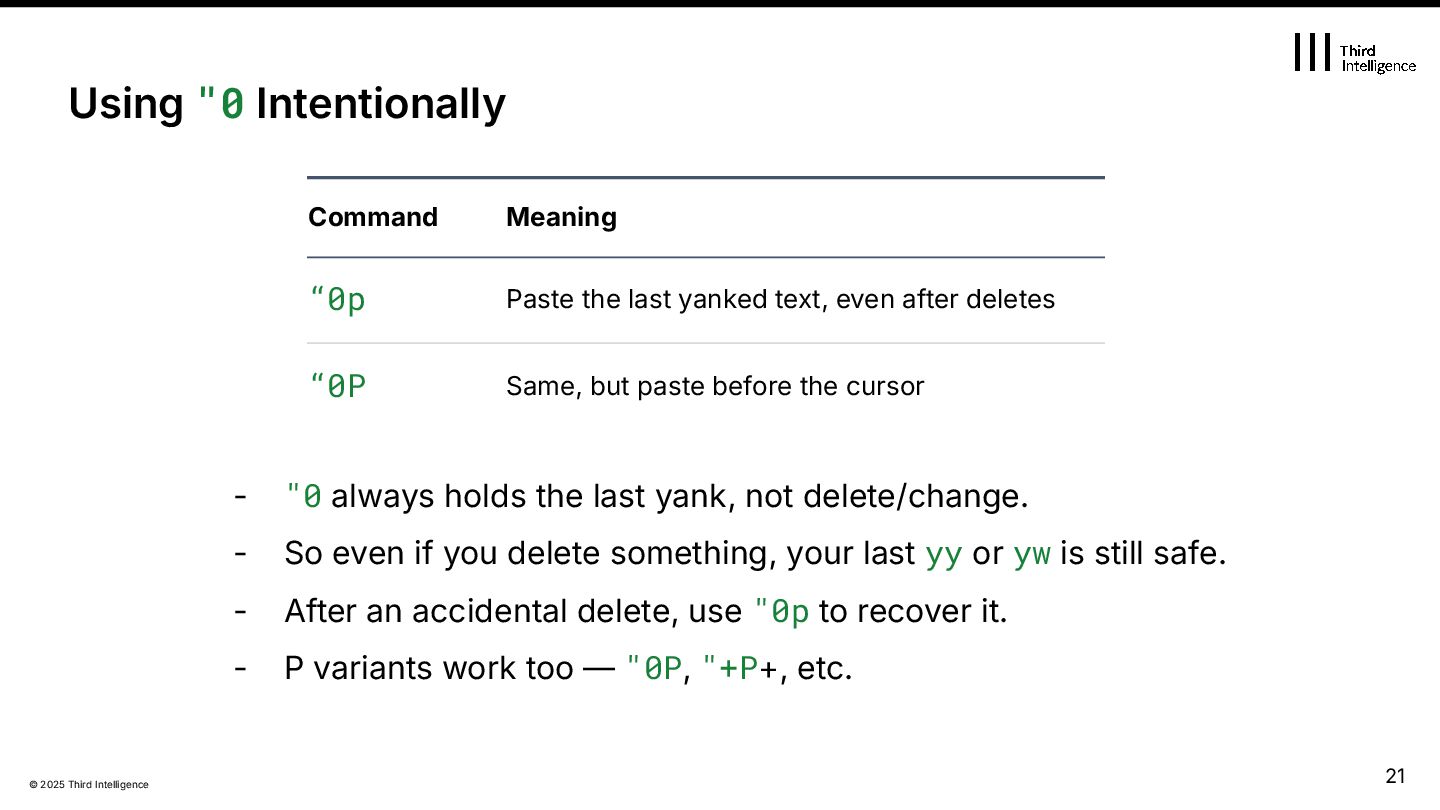
yank, not delete/change. - So even if you delete something, your last yy or yw is still safe. - After an accidental delete, use "0p to recover it. - P variants work too — "0P, "+P+, etc. Using "0 Intentionally Command “0p Paste the last yanked text, even after deletes “0P Same, but paste before the cursor Meaning 21
How it works Like /dev/null - text sent here are discarded Affected Scope Does NOT affect any other registers Use when you… Want to delete without overwriting your yank nnoremap D "_D Set with: 22
destructive ops By default, every delete / change updates - the unnamed register (“) - the numbered registers (ˮ19), pushing previous deletes down the stack. → A simple x can destroy text available for p. Prevent small deletes from polluting “- and “19 Stop Losing Your Yanks on Delete ❌ Problem x, d, c overwrites important registers! nnoremap x "_x nnoremap X "_X nnoremap d "_d " add more as needed, e.g. nnoremap C "_C 23
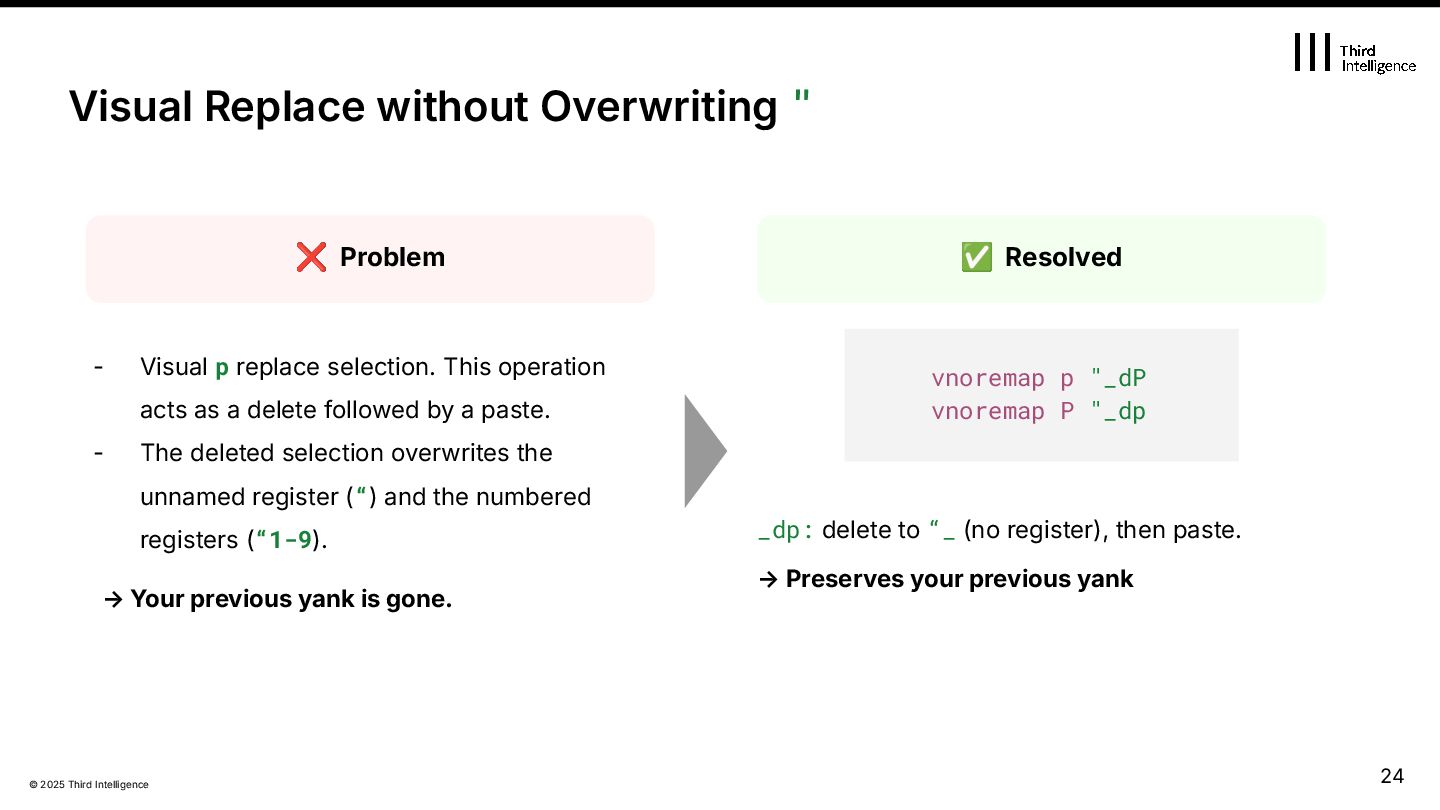
operation acts as a delete followed by a paste. - The deleted selection overwrites the unnamed register (“) and the numbered registers (“1-9). → Your previous yank is gone. Visual Replace without Overwriting " ✅ Resolved ❌ Problem vnoremap p "_dP vnoremap P "_dp _dp: delete to “_ (no register), then paste. → Preserves your previous yank 24
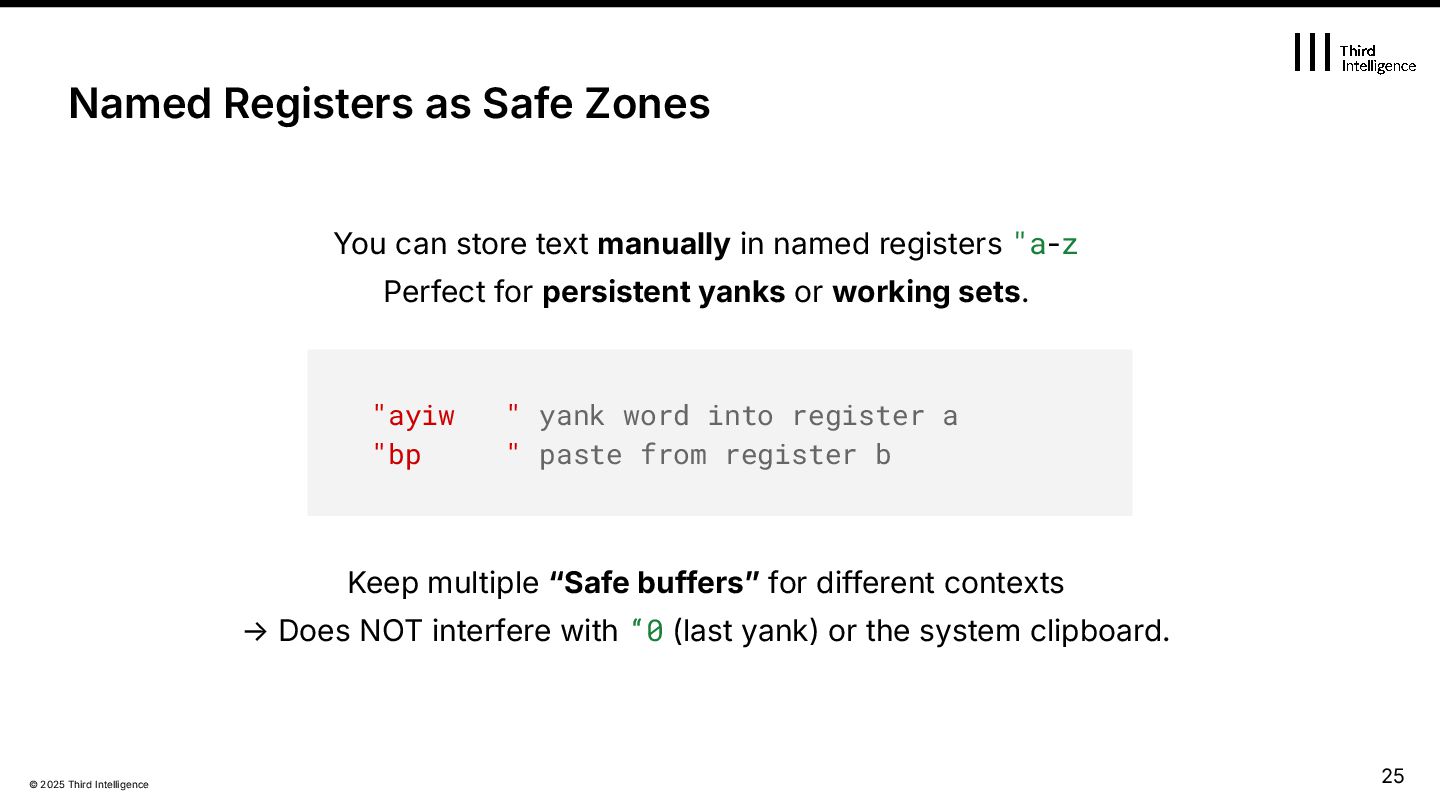
named registers "a-z Perfect for persistent yanks or working sets. Keep multiple “Safe buffersˮ for different contexts → Does NOT interfere with “0 (last yank) or the system clipboard. Named Registers as Safe Zones "ayiw " yank word into register a "bp " paste from register b 25
Numbered Registers Fail You 3. Building a Safer, Intentional Editing Workflow 4. Beyond Basics: Expressions, Macros, and Tricks 5. Clipboard Deep Dive 6. From Understanding to Internalization Agenda 26
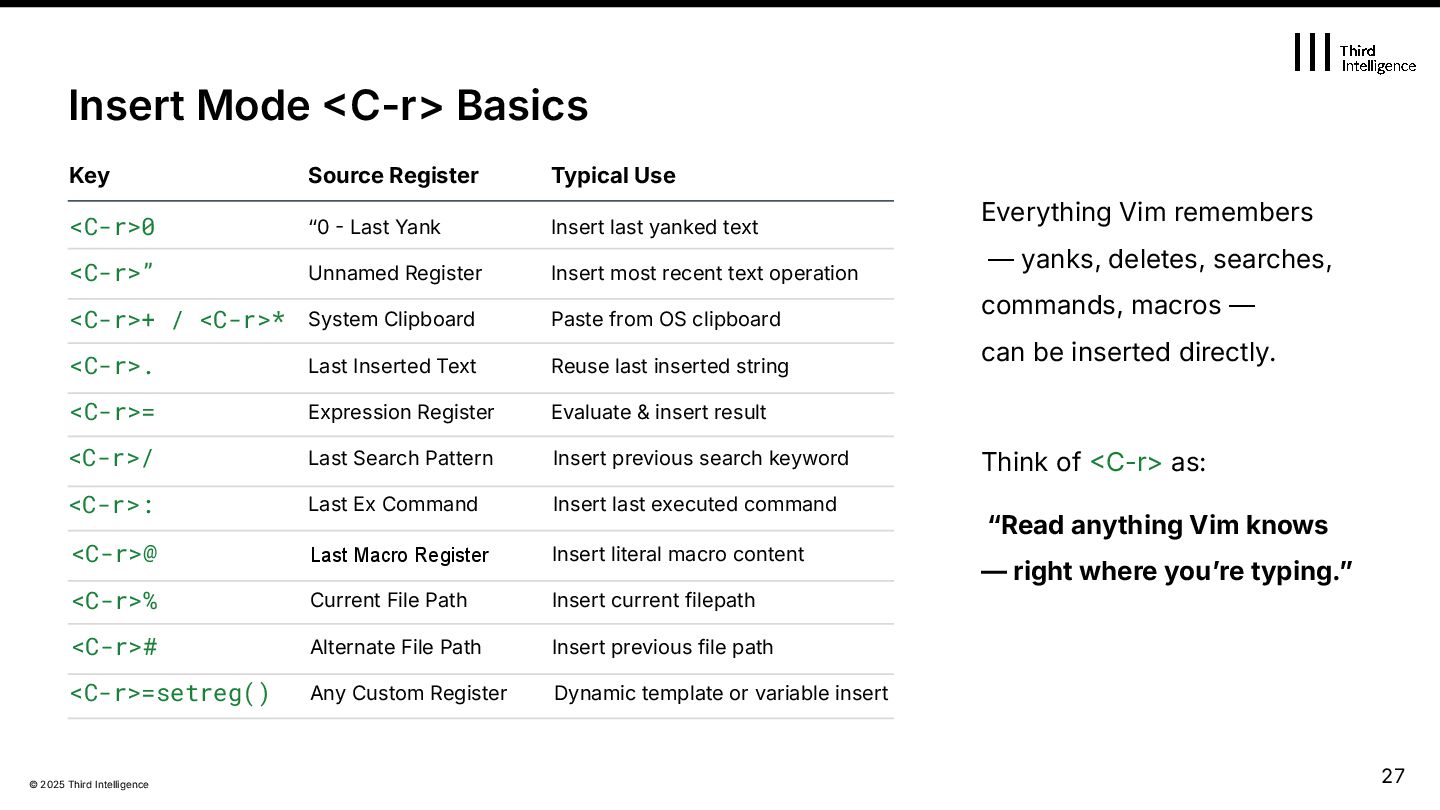
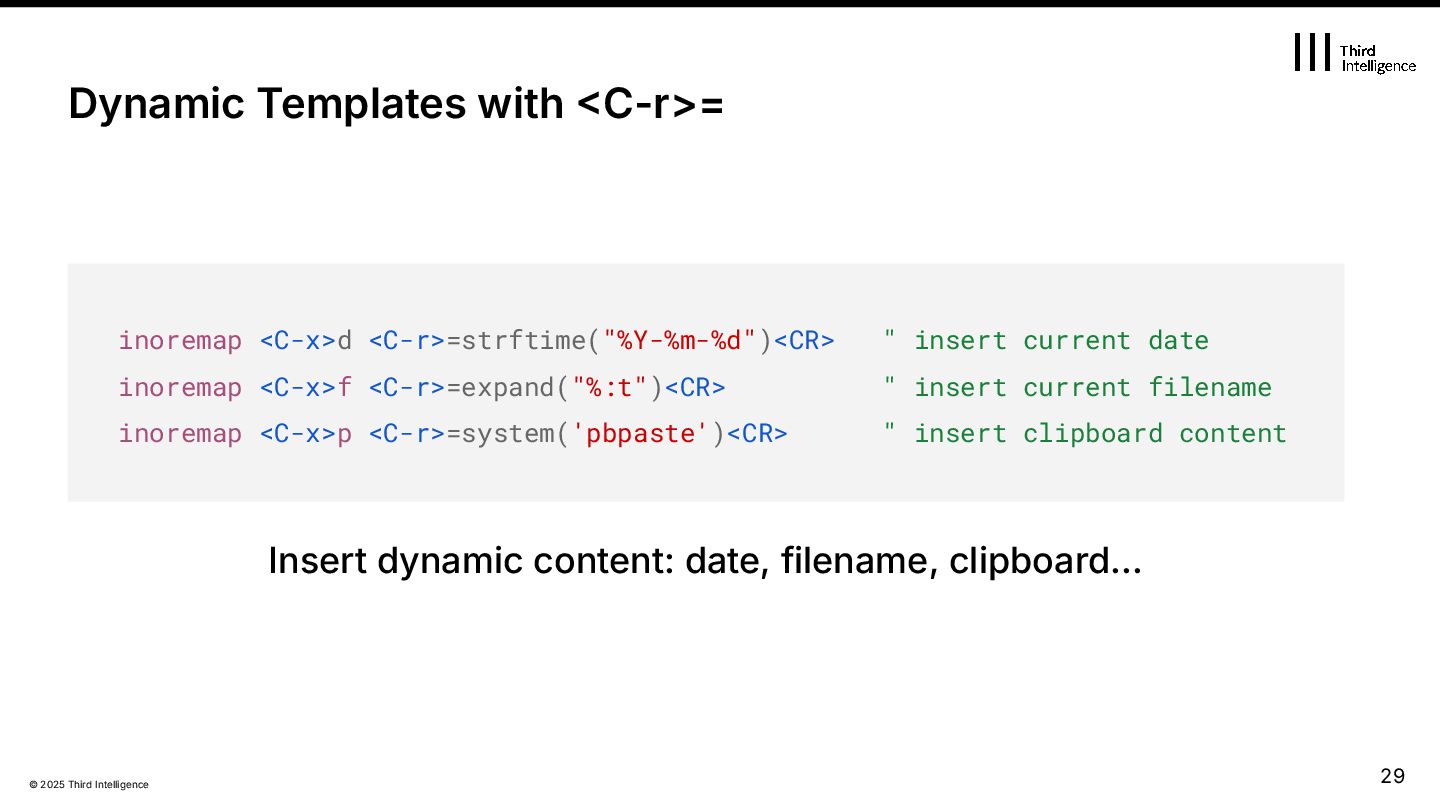
& insert result <C-r>0 “0 Last Yank Insert last yanked text <C-r>” Unnamed Register <C-r>+ / <C-r>* System Clipboard Paste from OS clipboard <C-r>. Last Inserted Text Reuse last inserted string <C-r>= Expression Register Source Register Typical Use <C-r>/ Last Search Pattern Insert previous search keyword <C-r>: Last Ex Command Insert last executed command Insert most recent text operation Insert previous file path <C-r>@ Last Macro Register Insert literal macro content <C-r>% Current File Path Insert current filepath <C-r># Alternate File Path <C-r>=setreg() Any Custom Register Dynamic template or variable insert Everything Vim remembers — yanks, deletes, searches, commands, macros — can be inserted directly. Think of C-r> as: “Read anything Vim knows — right where youʼre typing.ˮ 27
Abbreviations for Quick Access iabbrev @@ <C-r>@ " last macro text iabbrev !! <C-r>: " last Ex command iabbrev ?? <C-r>/ " last search pattern iabbrev ** <C-r>=strftime("%Y-%m-%d")<CR> " current date autocmd FileType markdown inoreabbrev <buffer> ;dt <C-r>=strftime("%Y-%m-%d")<CR> 28
- \V → disables regex magic (treats everything as literal) - <C-r>0 → inserts the last yanked text - <C-r>=escape(@0, '\\')<CR> → dynamically escapes regex meta characters This lets you safely search or replace the exact text you copied, even if it contains regex characters like *, . or \ 32
Substitute with Expressions :%s/{pattern}/\=@a/g :%s/{pattern}/\=EXPRESSION/g :%s/\v\[(\a+)\]/\='[' . toupper(submatch(1)) . ']'/g 👉 Use \= in RHS to evaluate expressions. Pattern Tips: <C-r>0 → last yank / <C-r><C-w> → word under cursor [debug] starting [Info] initializing [ERROR] failed AFTER BEFORE 33
that matches the pattern Programmatic Macros :let @q = "AyyjP" @q @="AyyjP"<CR> xnoremap Q :normal! @q<CR> :g/{pattern}/ normal! @a Generate and run macros without recording Apply macro q to every line in the current Visual selection 34
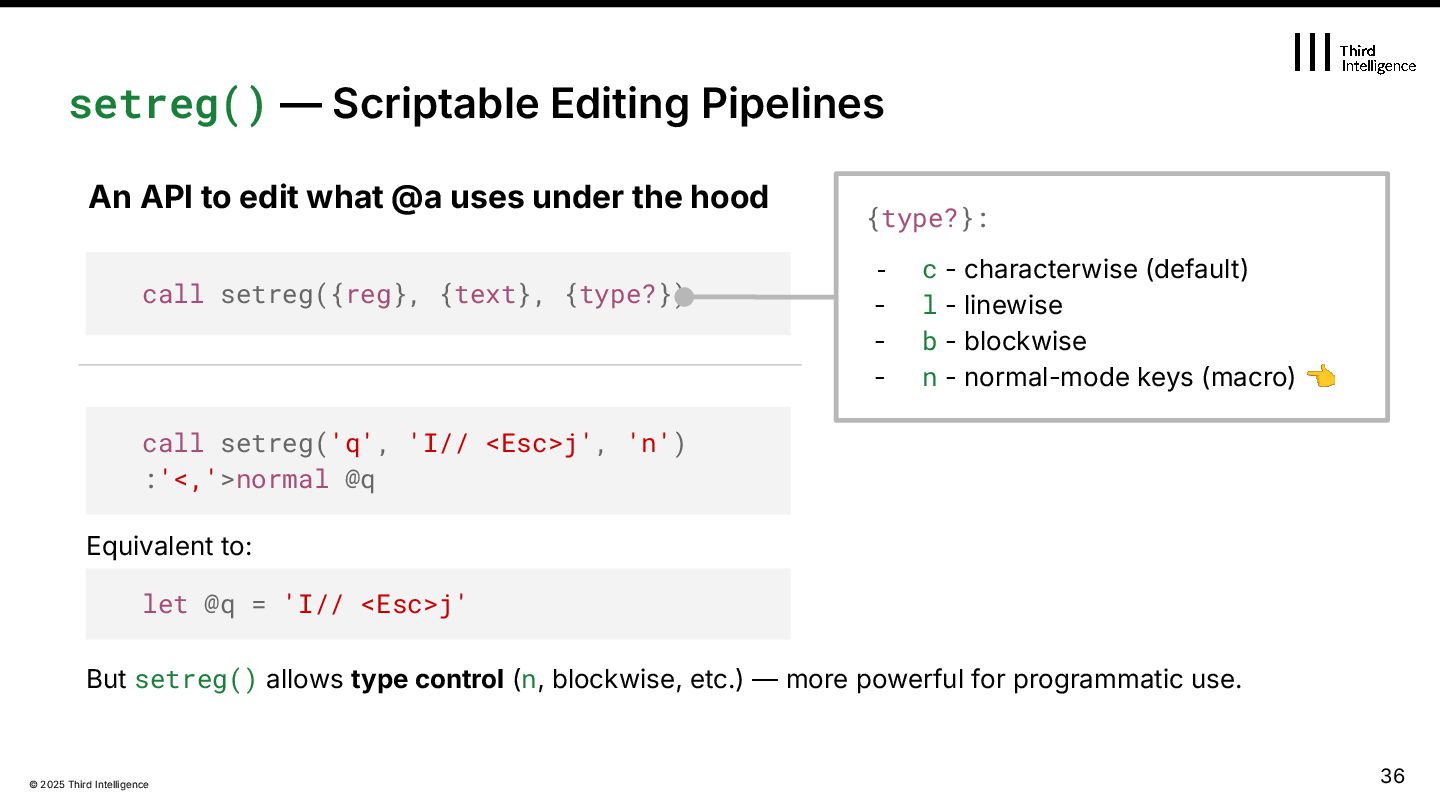
- l - linewise - b - blockwise - n - normal-mode keys (macro) 👈 setreg() — Scriptable Editing Pipelines call setreg({reg}, {text}, {type?}) An API to edit what @a uses under the hood let @q = 'I// <Esc>j' call setreg('q', 'I// <Esc>j', 'n') :'<,'>normal @q Equivalent to: But setreg() allows type control (n, blockwise, etc.) — more powerful for programmatic use. 36
script-friendly Feature Syntax style Simple and concise Explicit function call Type specification Not possible (always characterwise) Macro injection Possible but treated as a string n treats it explicitly as key sequence Multi-line List A bit awkward Natural with [line1, line2] Readability / Extensibility Short and quick let @q = … setreg(‘q’, …, ‘n’) Can specify n, b, etc. for type 37
| @ | <C-r> | +clipboard } Why Use Registers in the Middle? redir => result silent! ls redir END call setreg('r', result) :put r " paste into buffer <C-r>r " insert in Insert mode @r " run as macro (if keys) call setreg('+', result) " send to clipboard Reuse anywhere: setreg() = a practical bridge between commands, macros, and clipboard. Use it once — reuse it anywhere. 38
Numbered Registers Fail You 3. Building a Safer, Intentional Editing Workflow 4. Beyond Basics: Expressions, Macros, and Tricks 5. Clipboard Deep Dive 6. From Understanding to Internalization Agenda 39
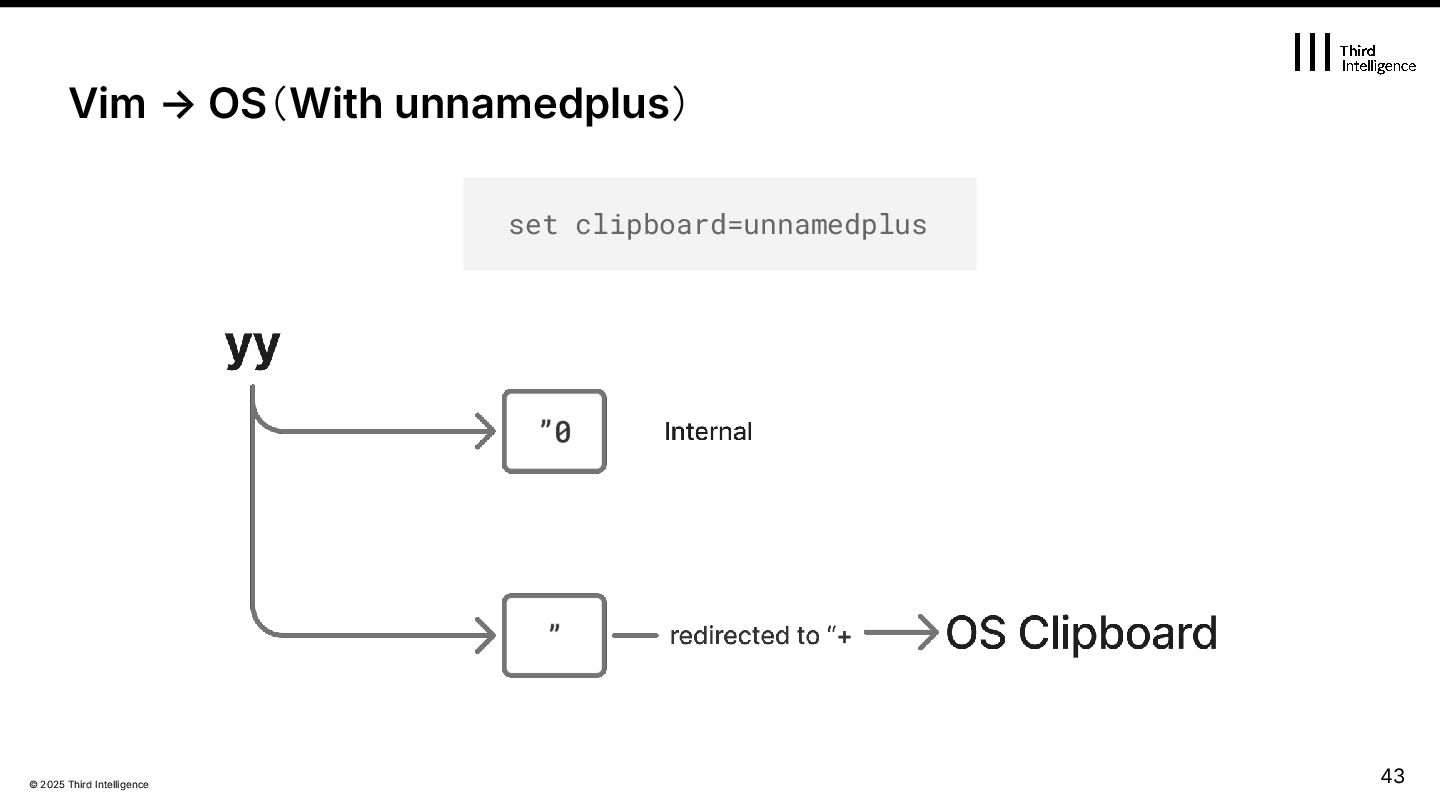
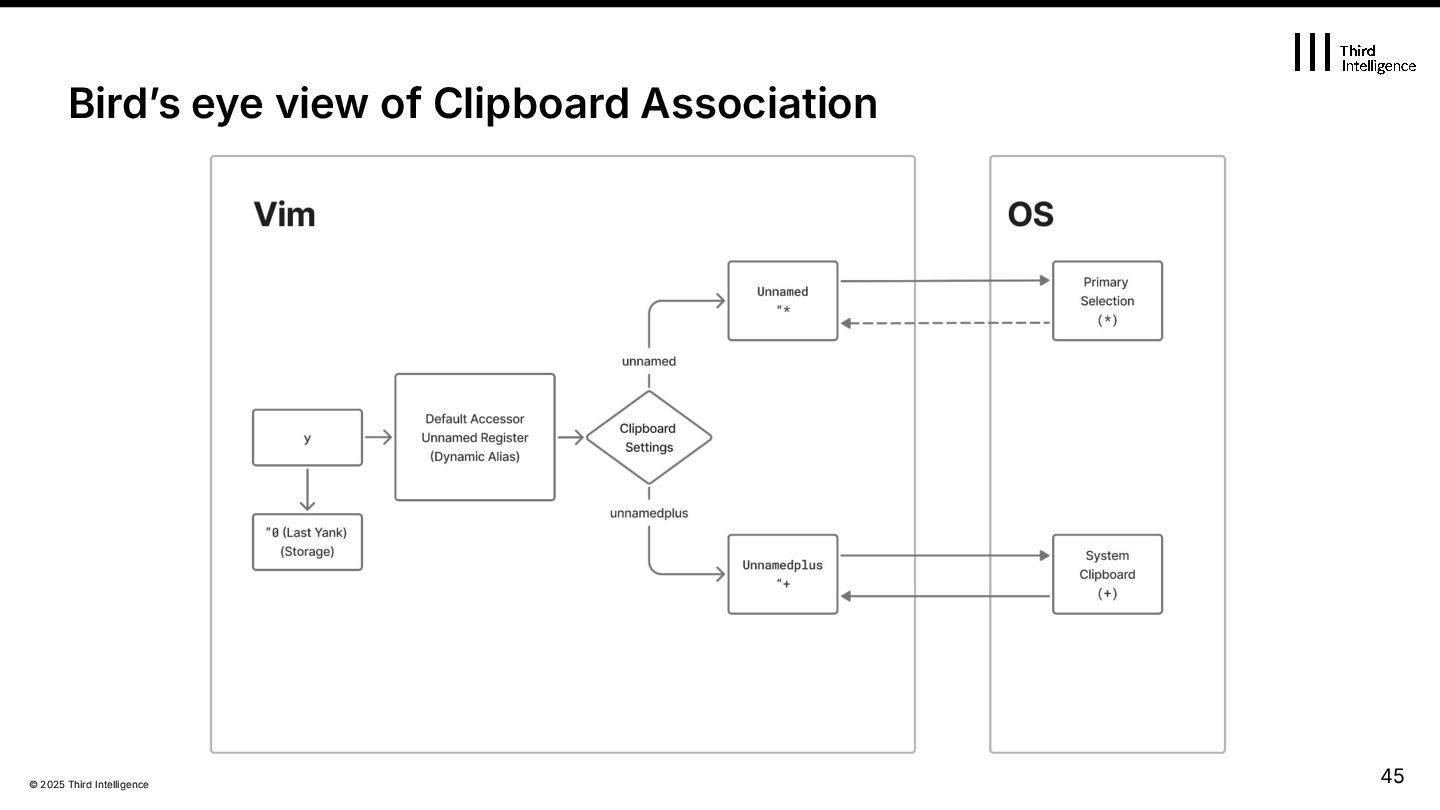
on yank ❌ None (internal only) “(unnamed) “+ Explicit ops / unnamedplus Updated on OS Link Yank / Delete / Change System Clipboard Theyʼre not the same. “* Explicit ops / unnamed Redirected to "+ / ”* depending on clipboard Primary Selection X11 41
"+ → System Clipboard via "+y - "* → Primary Selection via "*y Vim → OS(No clipboard settings) 👉So when you just run yy, it updates only "0 and ", not the system clipboards. 42
OS "+y, set clipboard=unnamedplus OS Vim OS Vim (auto) unnamedplus How Description "+p / <C-r>+ OS clipboard → "+ → " → p Paste from OS clipboard into Vim Copy from Vim to OS clipboard 44
set clipboard=unnamedplus Automatically syncs all yanks and pastes with the system clipboard. Explicit Control Description Pros Use "+ or "* manually to control when Vim interacts with the system clipboard. Cons Redirected to "+ if unnamedplus Seamless and intuitive experience. Predictable and script-friendly. Risk of accidental overwrites. 47
every yank to "+ — even without unnamedplus. ✔ Keeps explicit control for deletes and changes. ✔ Can add filetype-specific conditions if needed. augroup YankToClipboard autocmd! autocmd TextYankPost * \ if v:event.operator is 'y' | \ call setreg('+', getreg('0')) | \ endif augroup END 49
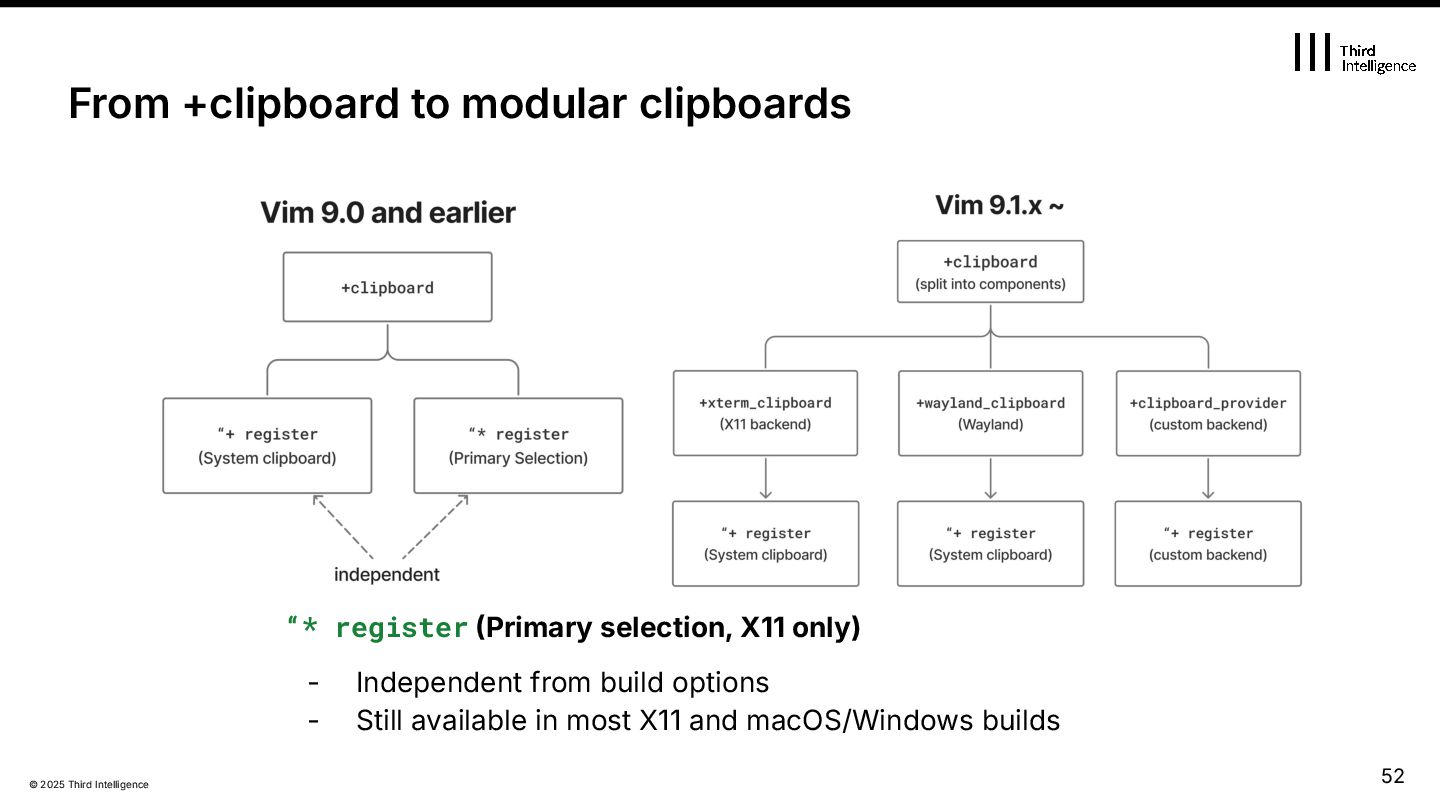
Vim with the +clipboard feature could access both "+ and "* directly. - Worked automatically on X11 or GUI builds. - Since Vim 9.1.x? - Clipboard support was split into modular features: - +xterm_clipboard → handles "+ System clipboard on X11 - +wayland_clipboard → handles "+ System clipboard on Wayland) - +clipboard_provider → enables custom backends via v:clipproviders - The old +clipboard flag was split for modularity. - If neither X11 nor Wayland clipboard is compiled: - "+ becomes unavailable. - "* still works in most environments — PRIMARY selection on X11, and behaves like "+ on macOS/Windows. From +clipboard to modular clipboards 51
how to handle “+ and “*. - clipmethod : Determines which clipboard providers to use and in what order. Vim 9.1.x clipboard settings v:clipproviders.pb = { available: function('PB_Available'), paste: { '+': function('PB_Paste'), '*': function('PB_Paste') }, copy: { '+': function('PB_Copy'), '*': function('PB_Copy') }, } " Make pb the preferred clipboard provider. set clipmethod=pb,gui,x11,wayland endif " Register '*' and '+' for all yank, delete, change, and put operations. " unnamedplus is available when +xterm_clipboard / +wayland_clipboard / gui_running set clipboard=unnamed,unnamedplus 53
Numbered Registers Fail You 3. Building a Safer, Intentional Editing Workflow 4. Beyond Basics: Expressions, Macros, and Tricks 5. Clipboard Deep Dive 6. From Understanding to Internalization Agenda 54
:reg regularly — observe, reflect, refine - Start with one mapping or habit at a time - Explore <C-r>=, setreg(), and macros in your own workflow - Let registers flow through your editing, not around it Understanding → Mastery → Internalization Understanding Mastery Internalization Know how registers work "0, ", "*, "*, yank flows Use them intentionally "_d, mappings, <C-r>, setreg() No hesitation, fluid editing 55


 satorunooshie
 taiseiue
 nao_randd
 iwatsukayura
 colorful12
 andpad
 neuecc
 mixplace
 yutobara
 tanahiro2010
 optim
optim
 takai
takai
 tammyeverts
 axbom
axbom
 jakevdp
 katarinadahlin
 chrisshort
 jeffersonlam
 jct
jct
 kimpetersen
 varn
varn
 uxyall
 3n
3n

















![© 2025 Third Intelligence [DEBUG] starting [INFO] initializing [ERROR] failed](https://files.speakerdeck.com/presentations/7b17dede47bd4d198c374cd1880997b8/slide_32.jpg)