Share
Embed
Developing in MapStore - Part 1b- RxJS/redux-observable
Second module of our Developers Training for MapStore: introduction to RxJS and redux-observable for MapStore 2 developers
Simone Giannecchini PRO
February 11, 2021
Transcript
31 slides
-
Purpose After this course you should know: • what is
Reactive Programming • what is Rxjs • How to start thinking reactively • what is redux-observable • what is an epic • how to start working on it -
What is Reactive Programming? An asynchronous programming paradigm! Reactive programming
is programming with asynchronous data streams. That means turn every async event : • actions (in our use-case) • data from server • callbacks • … Into a stream -
Representation of a stream A stream is a flow of
events over the time (value, error, complete) Marble diagram, commonly used to represent streams -
Implementation of a stream A stream emits values, errors, and
complete events. You can listen them, so you can use the “observer” design pattern. An observable in JS has the subscribe method that looks like this: MyObservable.subscribe( () => { callback for new values}, () => {callback for errors}, () => {callback when complete} ) -
Nothing new but... On top of that, you are given
an amazing toolbox of functions to combine, create and filter any of those streams. Without being too formal, RxJs is a lib to work that way! -
That's where the "functional" magic kicks in A stream can
be used as an input to another one. Even multiple streams can be used as inputs to another stream. You can merge two streams. You can filter a stream to get another one that has only those events you are interested in. You can map data values from one stream to another new one. -
Creation operators of Rx.Observable Create an observable • of(
) — (old just) convert an object or several objects into an Observable that emits that object or those objects -
Creation operators of Rx.Observable • from( ) — convert
an Iterable, a Future, or an Array into an Observable -
Creation operators of Rx.Observable • defer(() => new Promise(....) ):
converts a promise into an Observable. NOTE: a promise is an observable that emits only one value, or error. Most of the operators work with observable and promises -
Transform operators of Rx.Observable • filter(): Filters the elements of
an observable sequence based on a predicate. This is an alias for the where method. NOTE: transformation operators syntax: stream1.filter().map().do().scan()... -
Transform operators of Rx.Observable • flatMap( ) — transform
the items emitted by an Observable into Observables, then flatten the emissions from those into a single Observable switchMap has implicit cancellation, when new object received -
takeUntil Emits the values emitted by the source Observable until
a notifier Observable emits a value. -
Other operators Filtering • Filter — emit only those items
from an Observable that pass a predicate test • Debounce — only emit an item from an Observable if a particular timespan has passed without it emitting Combining • Join — combine items emitted by two Observables whenever an item from one Observable is emitted during a time window defined according to an item emitted by the other Observable 60 operators (have to use less than 20) reference: http://reactivex.io/rxjs/class/es6/Observable.js~Observable.html -
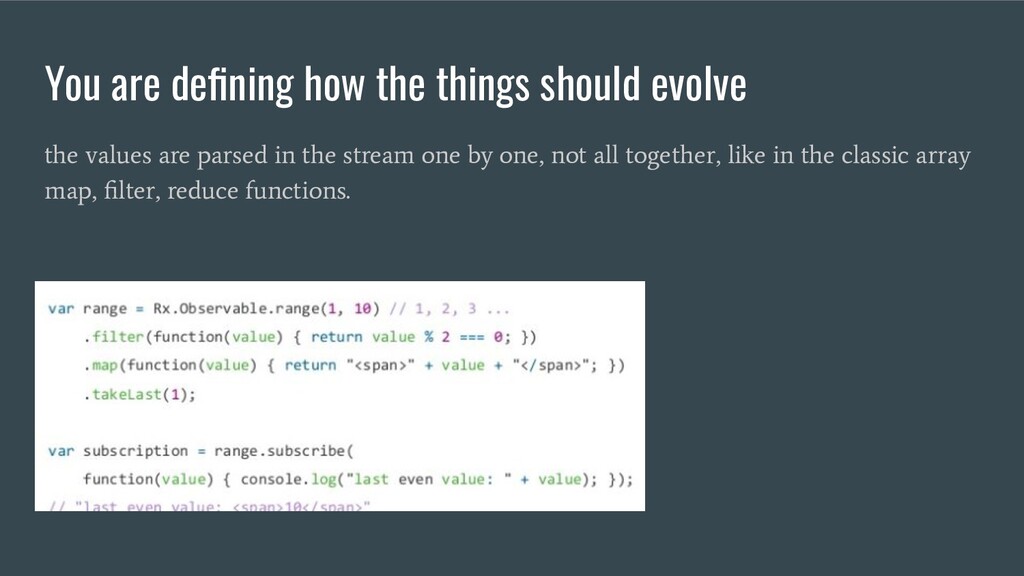
You are defining how the things should evolve the values
are parsed in the stream one by one, not all together, like in the classic array map, filter, reduce functions. -
Cold vs Hot observable observable are cold by default (implicit
creation of the source). We will not go deep into this aspect and not inside subscription. In our environment, the lib will take care about these aspects. -
Redux Observable Is a middleware for redux that allow you
to observe the stream of actions coming from the store and dispatch new actions. No need to subscribe, the middleware does it for you. Only thing to do is write an Epic reference: https://redux-observable.js.org/ API V5 http://reactivex.io/rxjs/class/es6/Observable.js~Observable.html (it uses hot observables internally but you don’t have to care about it) -
What is an Epic It is a function which takes
a stream of actions and returns a stream of actions. Actions in, actions out. You can think of it of having roughly this type signature: function (action$: Observable<Action>, store: Store): Observable<Action>; -
What is an Epic The actions you emit will be
immediately dispatched through the normal store.dispatch(), so under the hood redux-observable effectively does epic(actions$, store).subscribe(store.dispatch) Epics run alongside the normal Redux dispatch channel, after the reducers have already received them--so you cannot "swallow" an incoming action. Actions always run through your reducers before your Epics even receive them. -
FlatMap or switchMap are important creates another stream when the
action is received. This is important to support cancellation. Otherwise cancelling the stream will end the epic (killing it in fact) -
Multiservice de-bounced autocomplete tool with cancellation,error management and more... 20
lines of code,comments included](implemented in MapStore 2) -
Trivial notes • • redux-observable does not add any of
the RxJS operators to the Observable.prototype so you will need to import the ones you use or import all of them in your entry file. • Epics run alongside the normal Redux dispatch channel, after the reducers have already received them. When you map an action to another one, you are not preventing the original action from reaching the reducers; that action has already been through them! -
• Don’t stop the main stream Think the epic as
a function that returns a declaration of how to react to the events. The epic is executed once, to initialize the observables and subscribe. It defines the pipeline, the final in/out values are the actions. Don't be afraid, it is very simple and fast, after playing with it Less trivial notes -
Tips • Read and Draw Marble diagrams: http://rxmarbles.com/ • Study
basic functions ◦ filter ◦ map ◦ scan ◦ flatMap ◦ merge ◦ takeUntil ◦ debounce ◦ delay ◦ ...