Upgrade to Pro — share decks privately, control downloads, hide ads and more …

Wrestling JSON Data In Your Database

Wrestling JSON Data In Your Database

JSON is the data interchange format of choice. But its performance in a relational database is horrible. RDMS are built around standard data types such as INTERGERS and CHAR. There are many good reasons to store data in JSON in your database, but you give up many powerful features of SQL to do so. The answer is JSON_DATA(), which temporarily converts JSON to relational data types, unleashing Window Functions, Aggregates, and more.

You will learn how to perform simple conversions with JSON_TABLE(), move on to working with embedded data, and handle missing data or errors. Finally, we will look at alternatives that can be faster, such as materializing the data or using other JSON functions.

Avatar for David Stokes

David Stokes

October 12, 2026

More Decks by David Stokes

Other Decks in Programming

Transcript

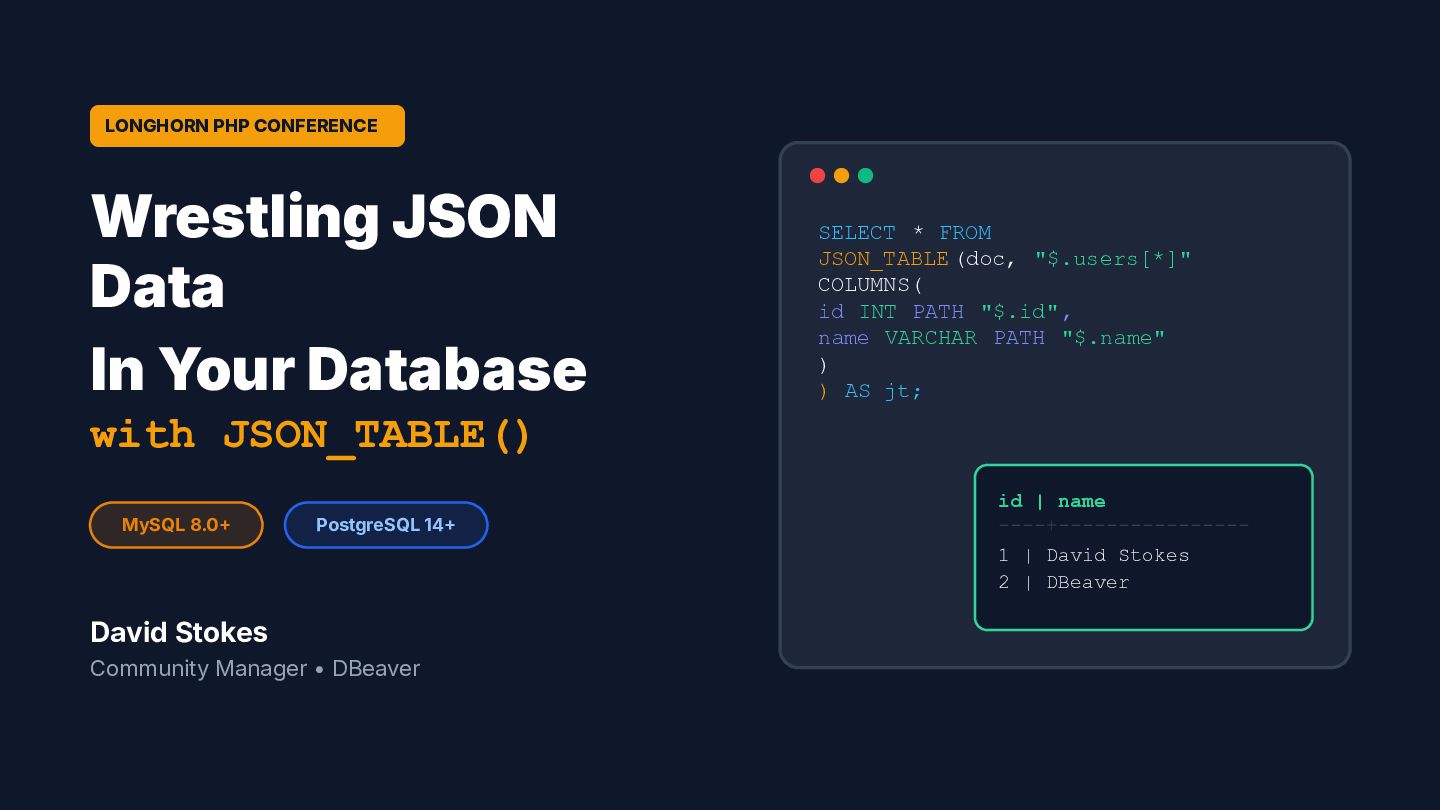
  1. LONGHORN PHP CONFERENCE Wrestling JSON Data In Your Database SELECT

    * FROM JSON_TABLE (doc, "$.users[*]" COLUMNS( id INT PATH "$.id", name VARCHAR PATH "$.name" ) ) AS jt; with JSON_TABLE() MySQL 8.0 PostgreSQL 14 id | name ----+---------------1 | David Stokes 2 | DBeaver David Stokes Community Manager • DBeaver
  2. About the Speaker  Former MySQL Community Manager at Oracle

     Published Author  Conference Speaker David Stokes @stoker Developer Advocate 10+ years of community leadership and advocacy "MySQL 8 & JSON  A Practical Programming Guide" Regular presenter at PHP, MySQL, and Open Source events DBeaver — Universal DB Tool  Technical Blogger davesmysqlstuff.blogspot.com stokerpostgresql.blogspot.com
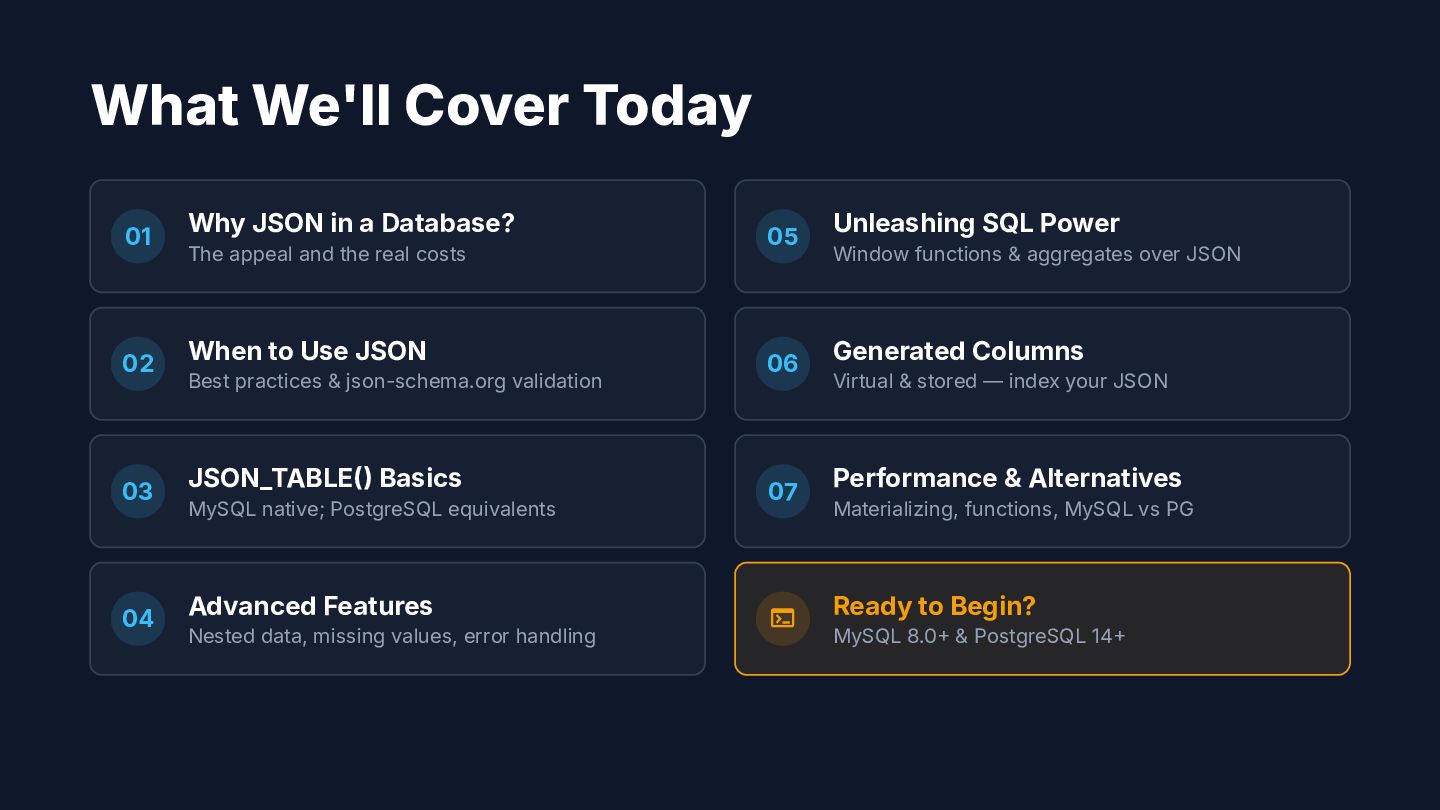
  3. What We'll Cover Today 01 02 03 04 Why JSON

    in a Database? The appeal and the real costs When to Use JSON Best practices & json-schema.org validation JSON_TABLE Basics MySQL native; PostgreSQL equivalents Advanced Features Nested data, missing values, error handling 05 06 07  Unleashing SQL Power Window functions & aggregates over JSON Generated Columns Virtual & stored — index your JSON Performance & Alternatives Materializing, functions, MySQL vs PG Ready to Begin? MySQL 8.0 & PostgreSQL 14
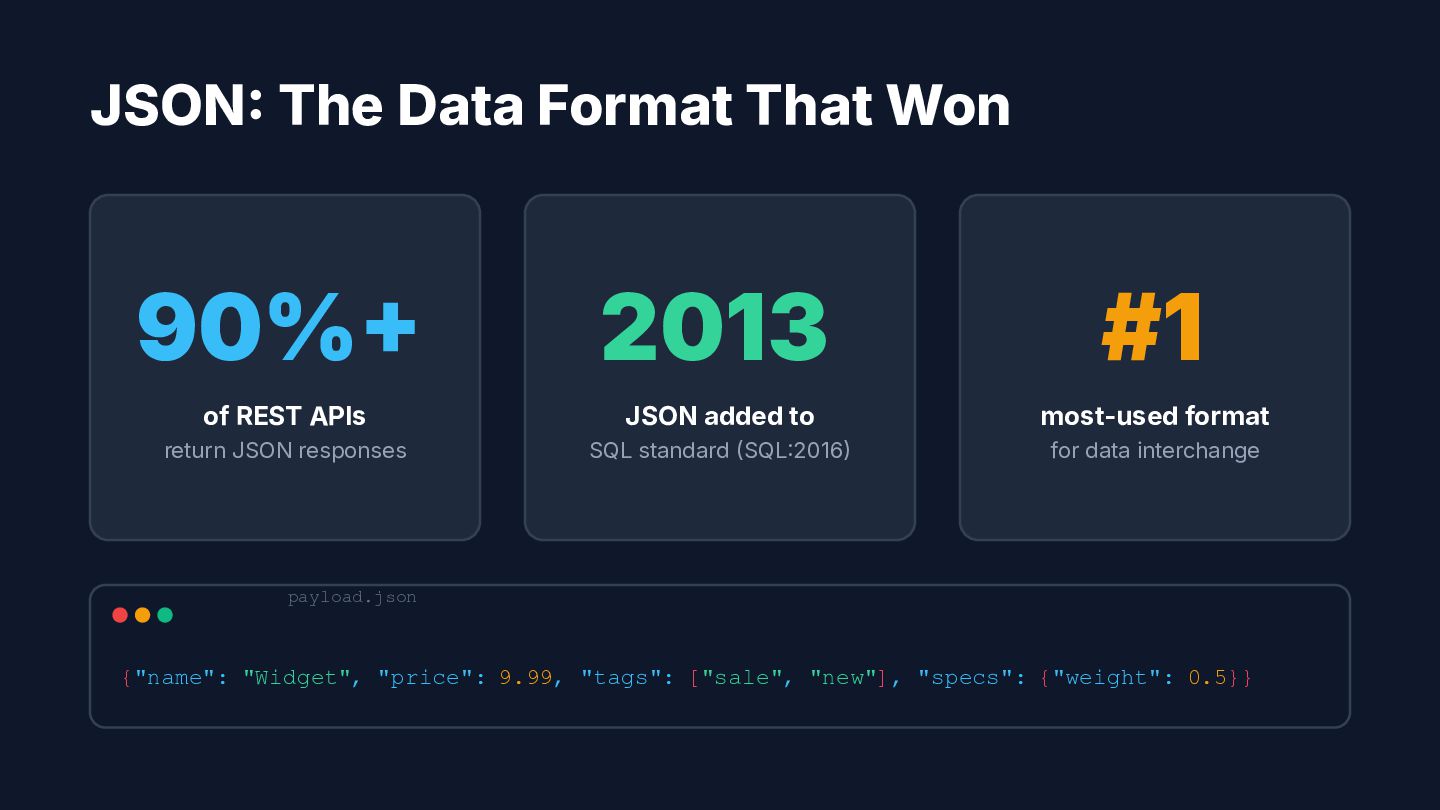
  4. JSON The Data Format That Won 90% 2013 #1 of

    REST APIs JSON added to most-used format return JSON responses SQL standard SQL2016 for data interchange payload.json {"name": "Widget", "price": 9.99, "tags": ["sale", "new"], "specs": {"weight": 0.5}}
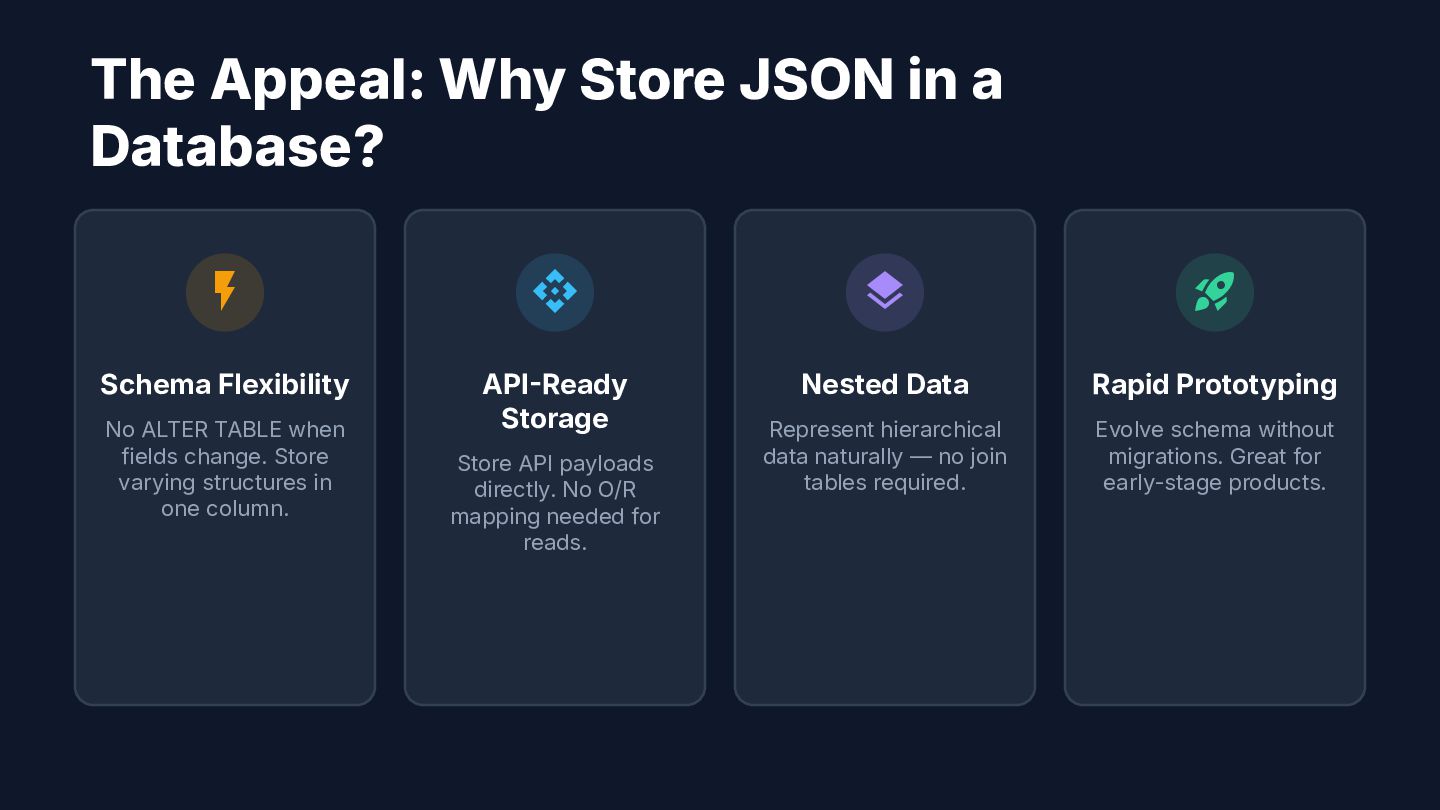
  5. The Appeal: Why Store JSON in a Database?  

      Schema Flexibility APIReady Storage Nested Data Rapid Prototyping Represent hierarchical data naturally — no join tables required. Evolve schema without migrations. Great for early-stage products. No ALTER TABLE when fields change. Store varying structures in one column. Store API payloads directly. No O/R mapping needed for reads.
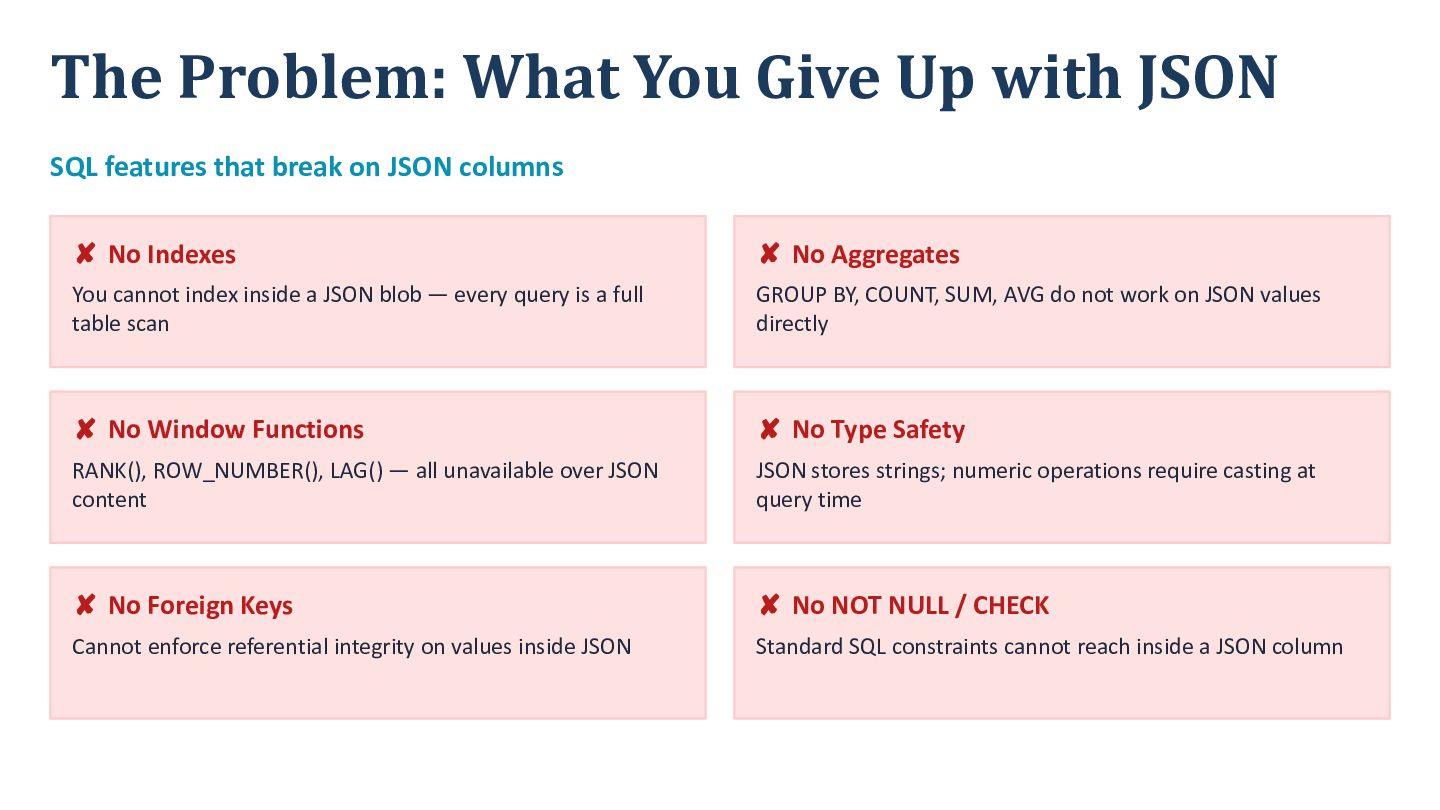
  6. The Problem: What You Give Up with JSON SQL features

    that break on JSON columns ✘ No Indexes ✘ No Aggregates You cannot index inside a JSON blob — every query is a full table scan GROUP BY, COUNT, SUM, AVG do not work on JSON values directly ✘ No Window Functions ✘ No Type Safety RANK(), ROW_NUMBER(), LAG() — all unavailable over JSON content JSON stores strings; numeric operations require casting at query time ✘ No Foreign Keys ✘ No NOT NULL / CHECK Cannot enforce referential integrity on values inside JSON Standard SQL constraints cannot reach inside a JSON column
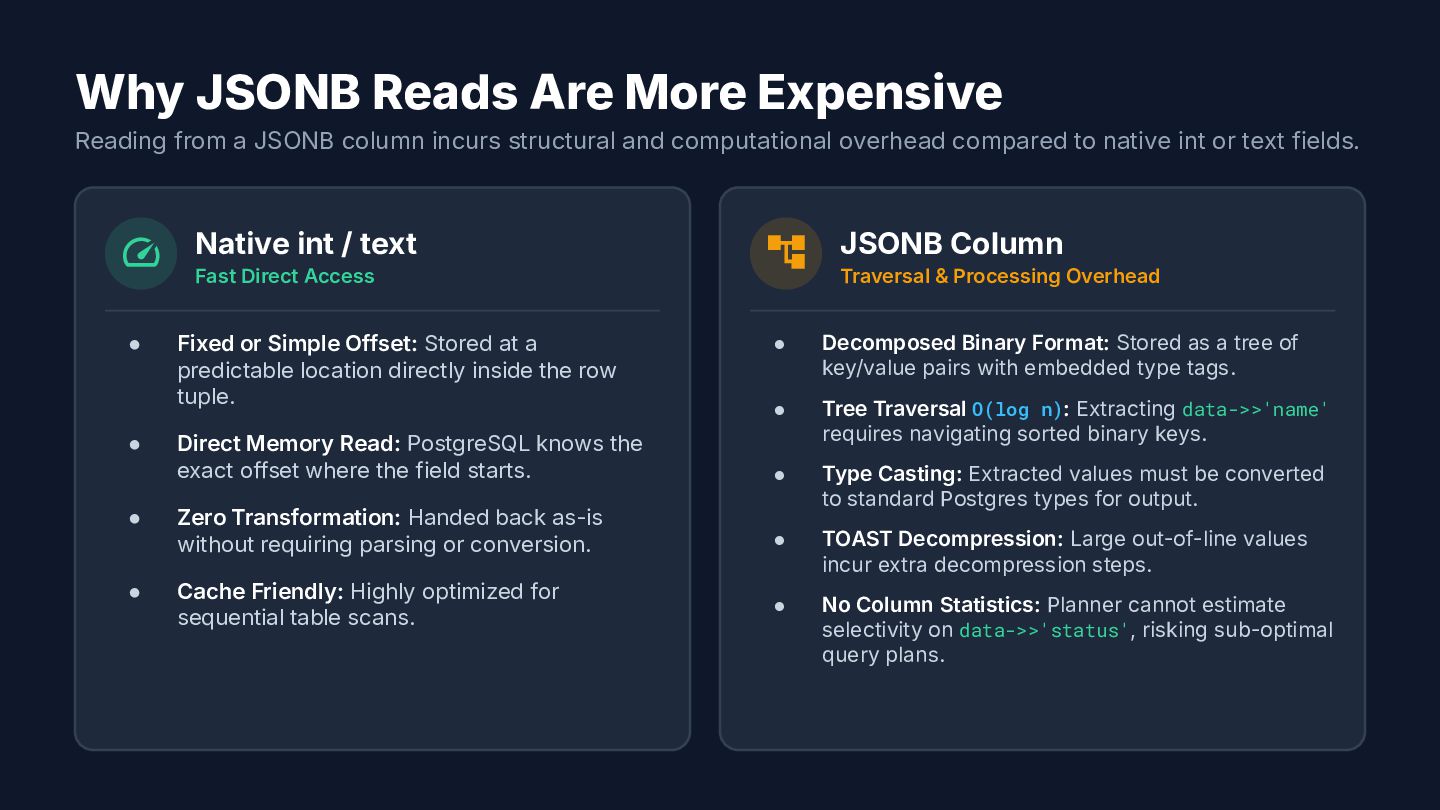
  7. Why JSONB Reads Are More Expensive Reading from a JSONB

    column incurs structural and computational overhead compared to native int or text fields.  • • • • Native int / text Fast Direct Access Fixed or Simple Offset: Stored at a predictable location directly inside the row tuple.  JSONB Column Traversal & Processing Overhead • Decomposed Binary Format: Stored as a tree of key/value pairs with embedded type tags. • Direct Memory Read: PostgreSQL knows the exact offset where the field starts. Tree Traversal O(log n): Extracting data->>'name' requires navigating sorted binary keys. • Zero Transformation: Handed back as-is without requiring parsing or conversion. Type Casting: Extracted values must be converted to standard Postgres types for output. • TOAST Decompression: Large out-of-line values incur extra decompression steps. • No Column Statistics: Planner cannot estimate selectivity on data->>'status', risking sub-optimal query plans. Cache Friendly: Highly optimized for sequential table scans.
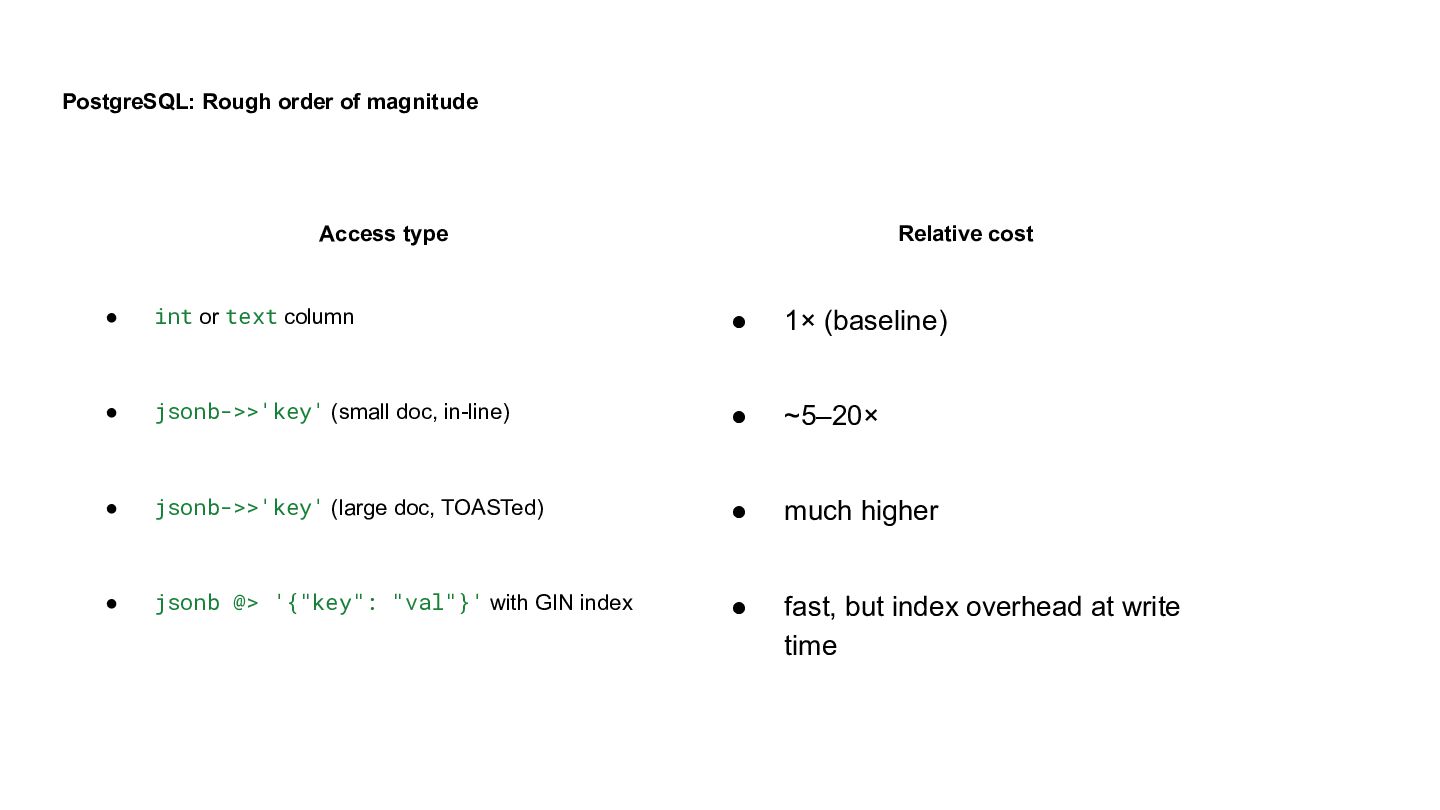
  8. PostgreSQL: Rough order of magnitude Access type Relative cost •

    int or text column • 1× (baseline) • jsonb->>'key' (small doc, in-line) • ~5–20× • jsonb->>'key' (large doc, TOASTed) • much higher • jsonb @> '{"key": "val"}' with GIN index • fast, but index overhead at write time
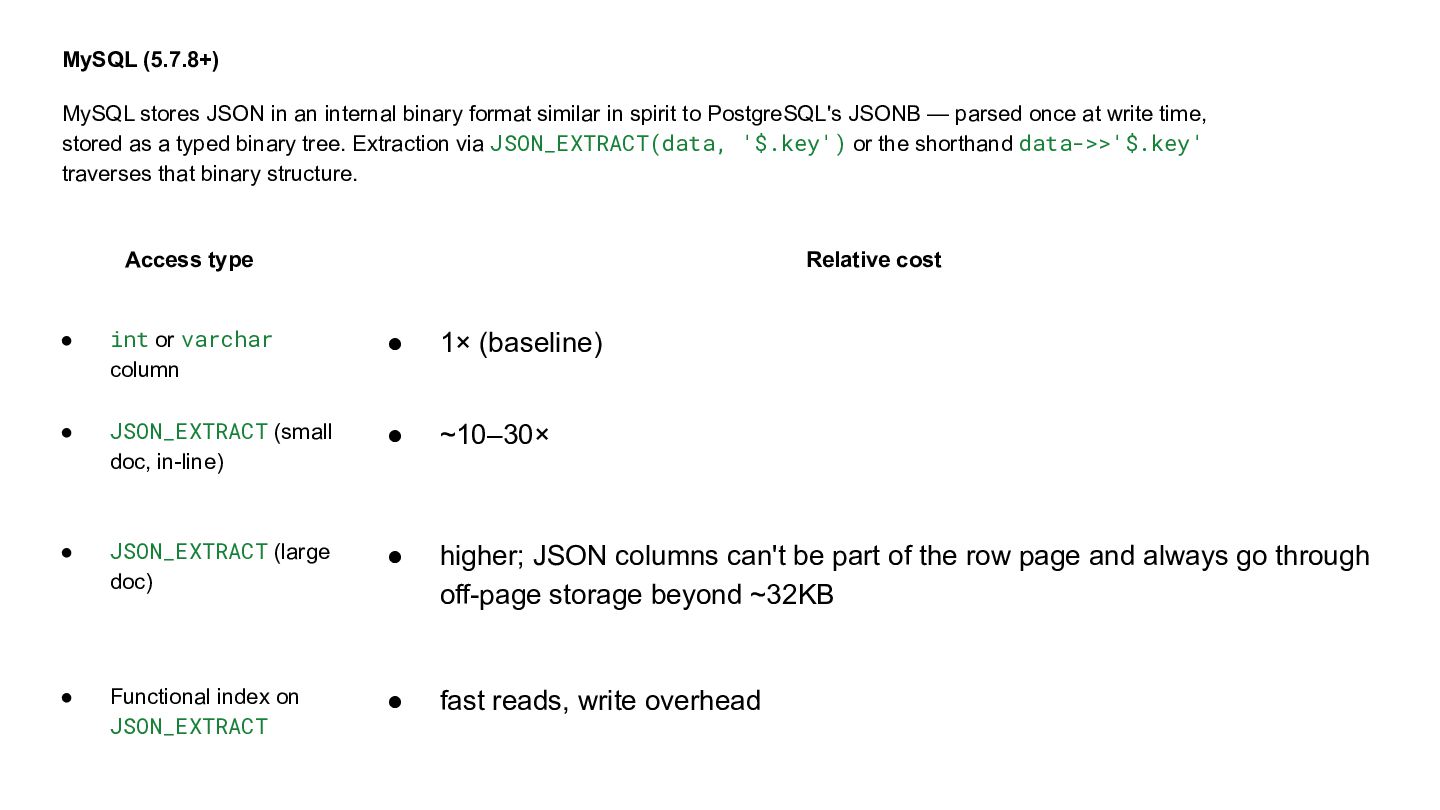
  9. MySQL (5.7.8+) MySQL stores JSON in an internal binary format

    similar in spirit to PostgreSQL's JSONB — parsed once at write time, stored as a typed binary tree. Extraction via JSON_EXTRACT(data, '$.key') or the shorthand data->>'$.key' traverses that binary structure. Access type Relative cost • int or varchar column • 1× (baseline) • JSON_EXTRACT (small doc, in-line) • ~10–30× • JSON_EXTRACT (large doc) • higher; JSON columns can't be part of the row page and always go through off-page storage beyond ~32KB • Functional index on JSON_EXTRACT • fast reads, write overhead
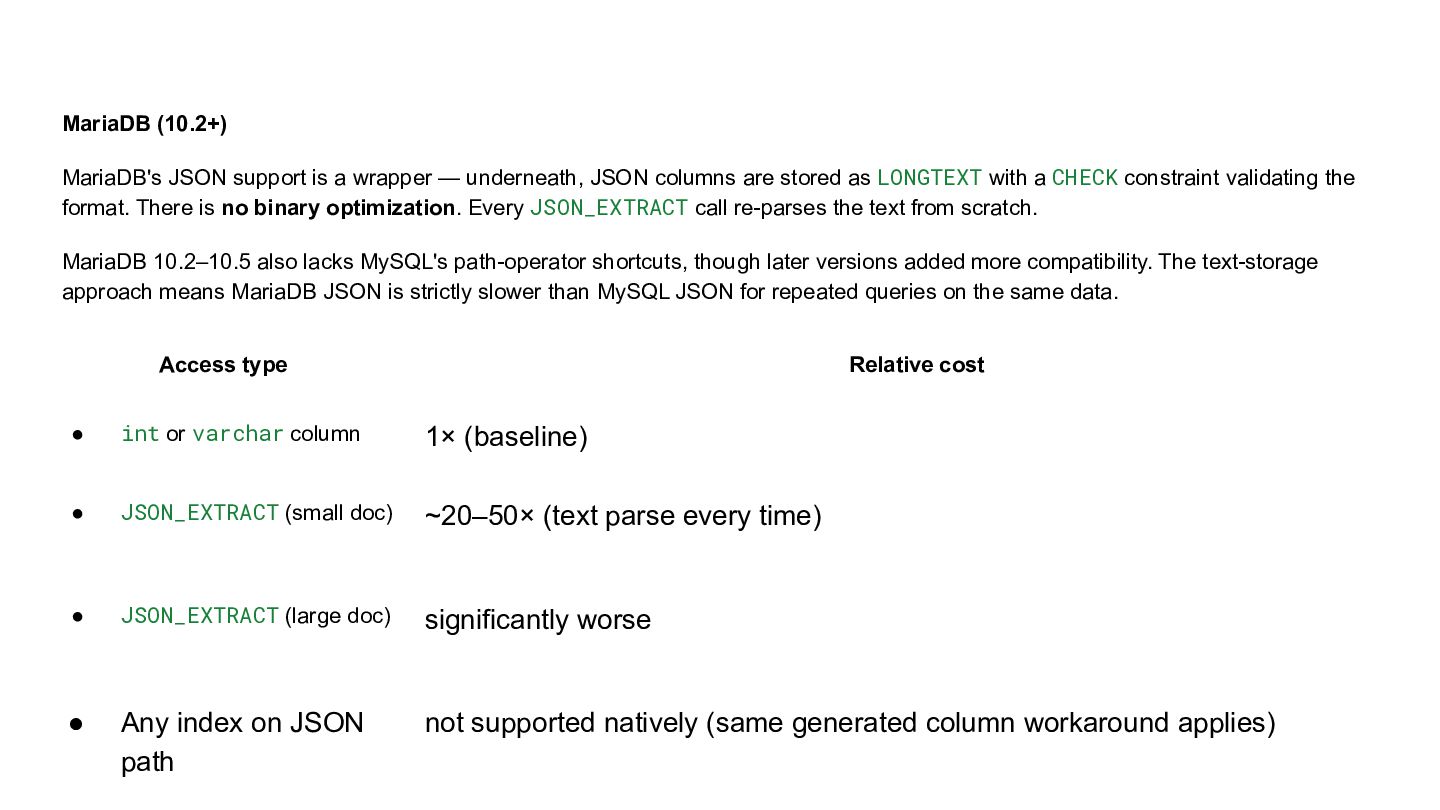
  10. MariaDB (10.2+) MariaDB's JSON support is a wrapper — underneath,

    JSON columns are stored as LONGTEXT with a CHECK constraint validating the format. There is no binary optimization. Every JSON_EXTRACT call re-parses the text from scratch. MariaDB 10.2–10.5 also lacks MySQL's path-operator shortcuts, though later versions added more compatibility. The text-storage approach means MariaDB JSON is strictly slower than MySQL JSON for repeated queries on the same data. Access type Relative cost • int or varchar column 1× (baseline) • JSON_EXTRACT (small doc) ~20–50× (text parse every time) • JSON_EXTRACT (large doc) significantly worse • Any index on JSON path not supported natively (same generated column workaround applies)
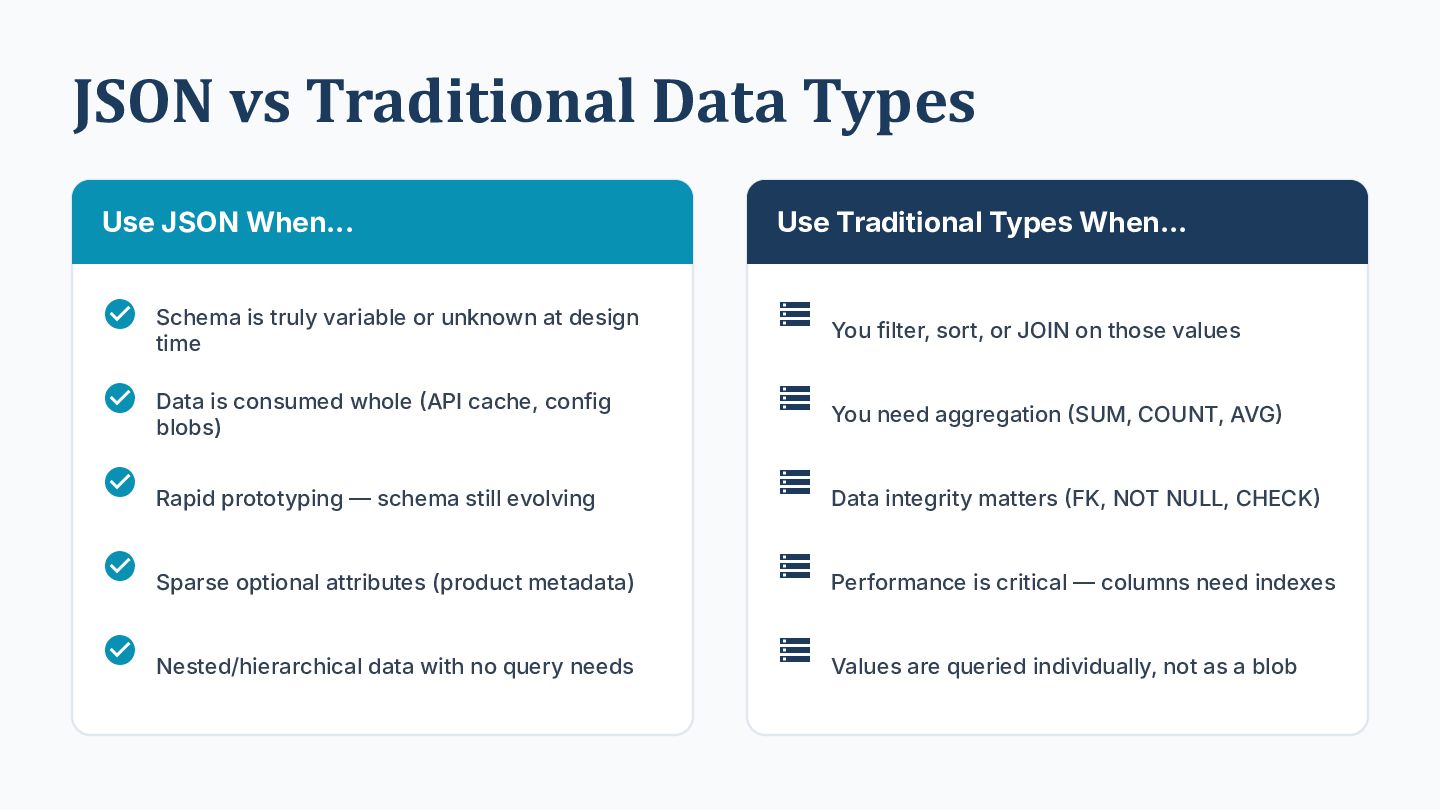
  11. JSON vs Traditional Data Types Use JSON When... Use Traditional

    Types When...  Schema is truly variable or unknown at design  You filter, sort, or JOIN on those values  Data is consumed whole API cache, config  You need aggregation SUM, COUNT, AVG  Rapid prototyping — schema still evolving  Data integrity matters FK, NOT NULL, CHECK  Sparse optional attributes (product metadata)  Performance is critical — columns need indexes  Nested/hierarchical data with no query needs  Values are queried individually, not as a blob time blobs)
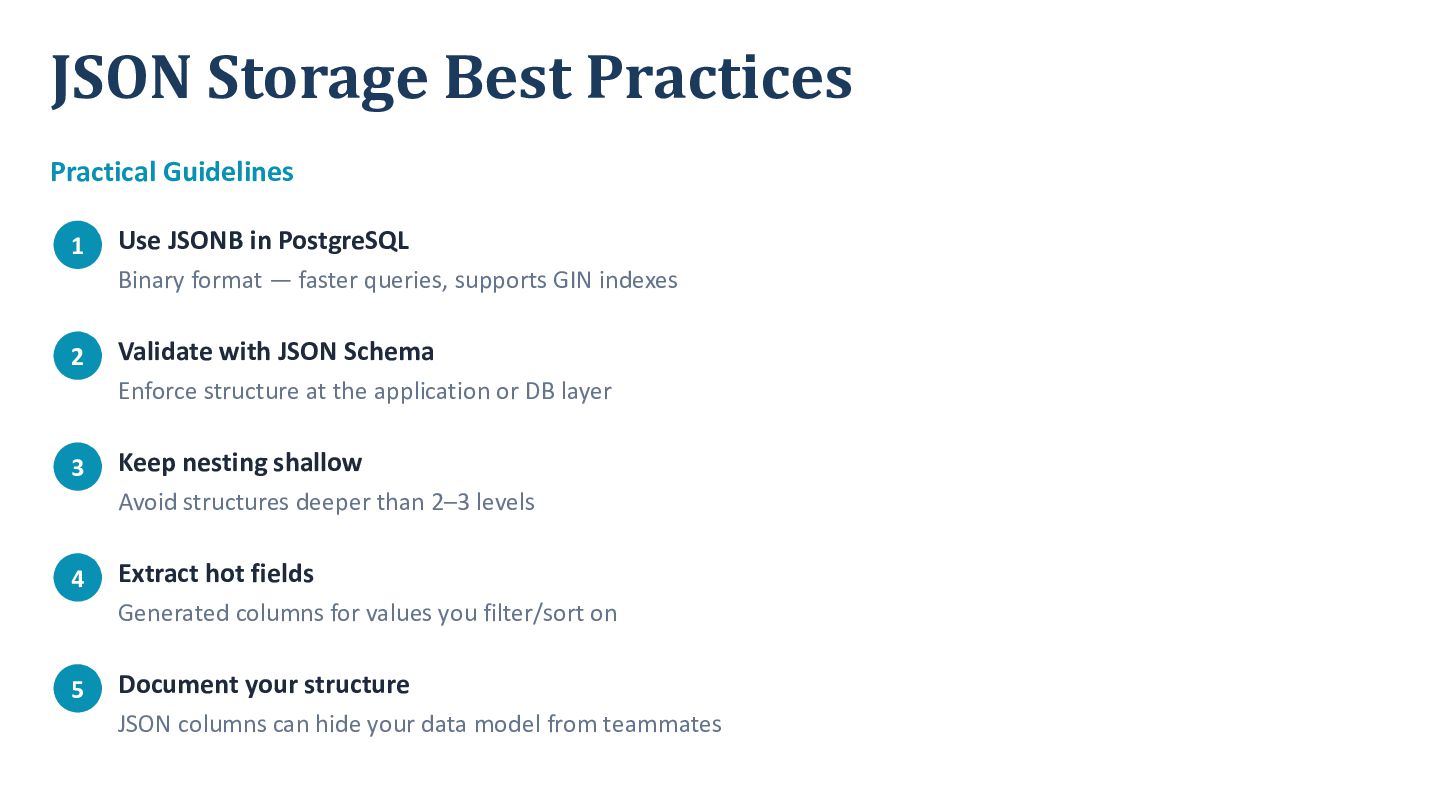
  12. JSON Storage Best Practices Practical Guidelines 1 Use JSONB in

    PostgreSQL Binary format — faster queries, supports GIN indexes 2 Validate with JSON Schema Enforce structure at the application or DB layer 3 Keep nesting shallow Avoid structures deeper than 2–3 levels 4 Extract hot fields Generated columns for values you filter/sort on 5 Document your structure JSON columns can hide your data model from teammates
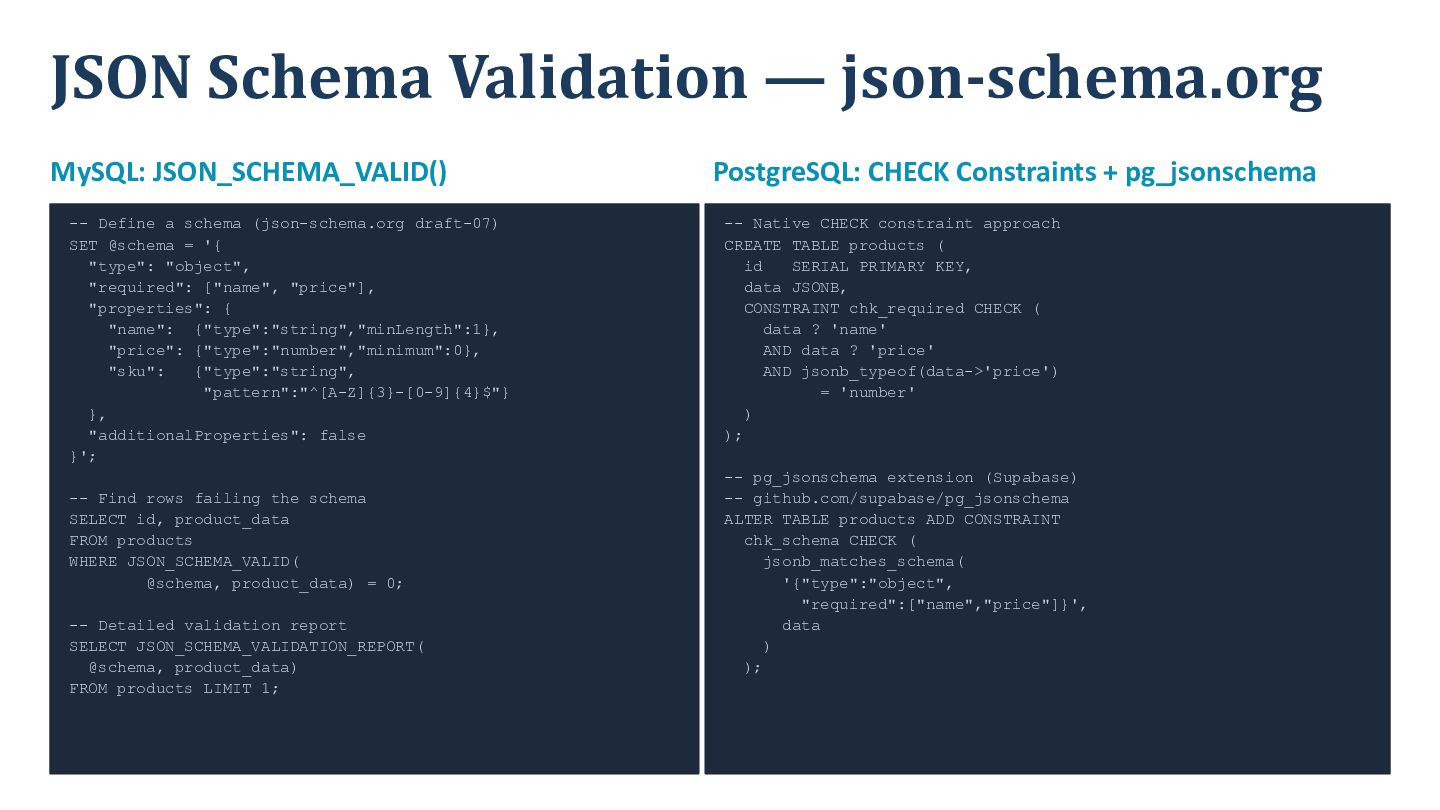
  13. JSON Schema Validation — json-schema.org MySQL: JSON_SCHEMA_VALID() -- Define a

    schema (json-schema.org draft-07) SET @schema = '{ "type": "object", "required": ["name", "price"], "properties": { "name": {"type":"string","minLength":1}, "price": {"type":"number","minimum":0}, "sku": {"type":"string", "pattern":"^[A-Z]{3}-[0-9]{4}$"} }, "additionalProperties": false }'; -- Find rows failing the schema SELECT id, product_data FROM products WHERE JSON_SCHEMA_VALID( @schema, product_data) = 0; -- Detailed validation report SELECT JSON_SCHEMA_VALIDATION_REPORT( @schema, product_data) FROM products LIMIT 1; PostgreSQL: CHECK Constraints + pg_jsonschema -- Native CHECK constraint approach CREATE TABLE products ( id SERIAL PRIMARY KEY, data JSONB, CONSTRAINT chk_required CHECK ( data ? 'name' AND data ? 'price' AND jsonb_typeof(data->'price') = 'number' ) ); -- pg_jsonschema extension (Supabase) -- github.com/supabase/pg_jsonschema ALTER TABLE products ADD CONSTRAINT chk_schema CHECK ( jsonb_matches_schema( '{"type":"object", "required":["name","price"]}', data ) );
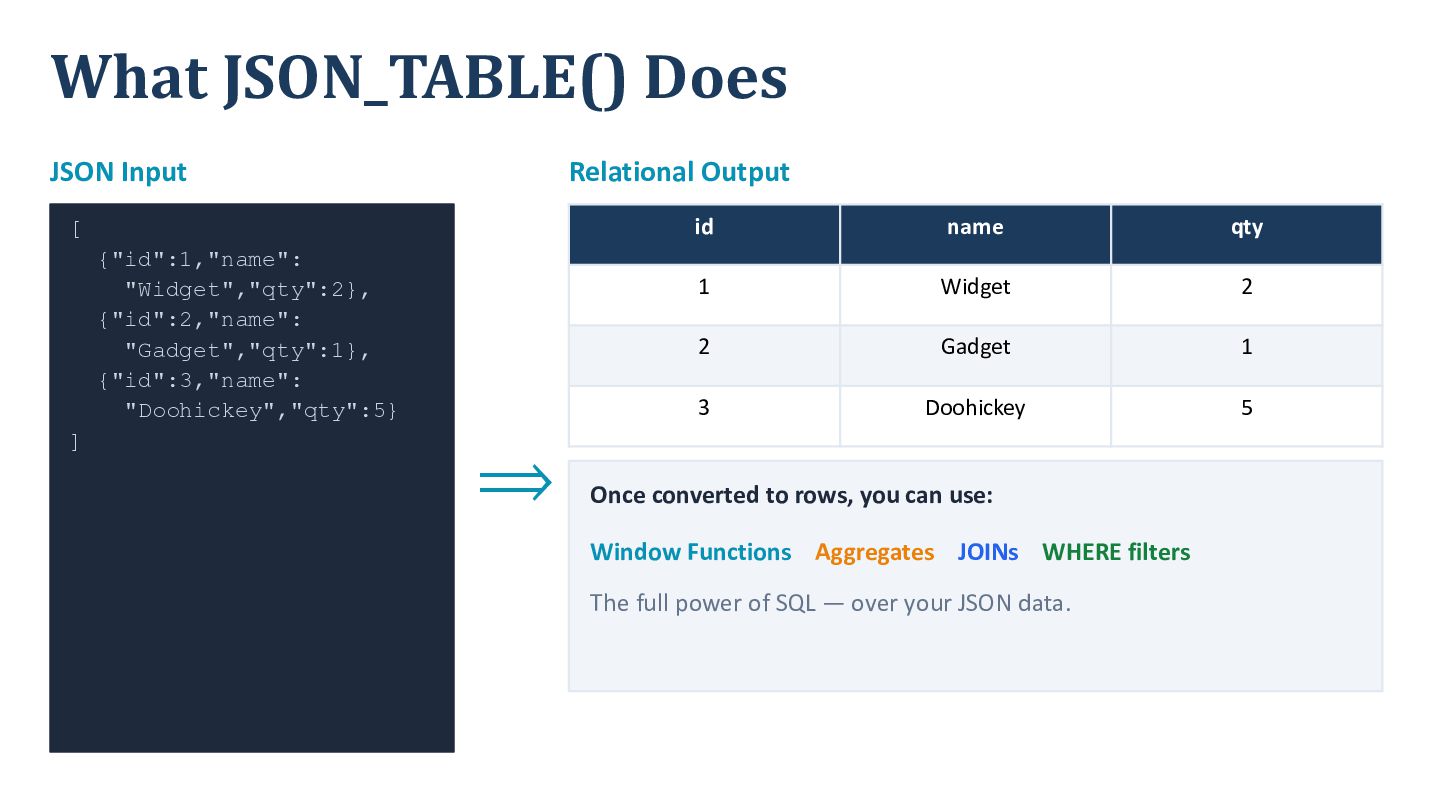
  14. What JSON_TABLE() Does JSON Input Relational Output [ {"id":1,"name": "Widget","qty":2},

    {"id":2,"name": "Gadget","qty":1}, {"id":3,"name": "Doohickey","qty":5} ] ⟹ id name qty 1 Widget 2 2 Gadget 1 3 Doohickey 5 Once converted to rows, you can use: Window Functions Aggregates JOINs WHERE filters The full power of SQL — over your JSON data.
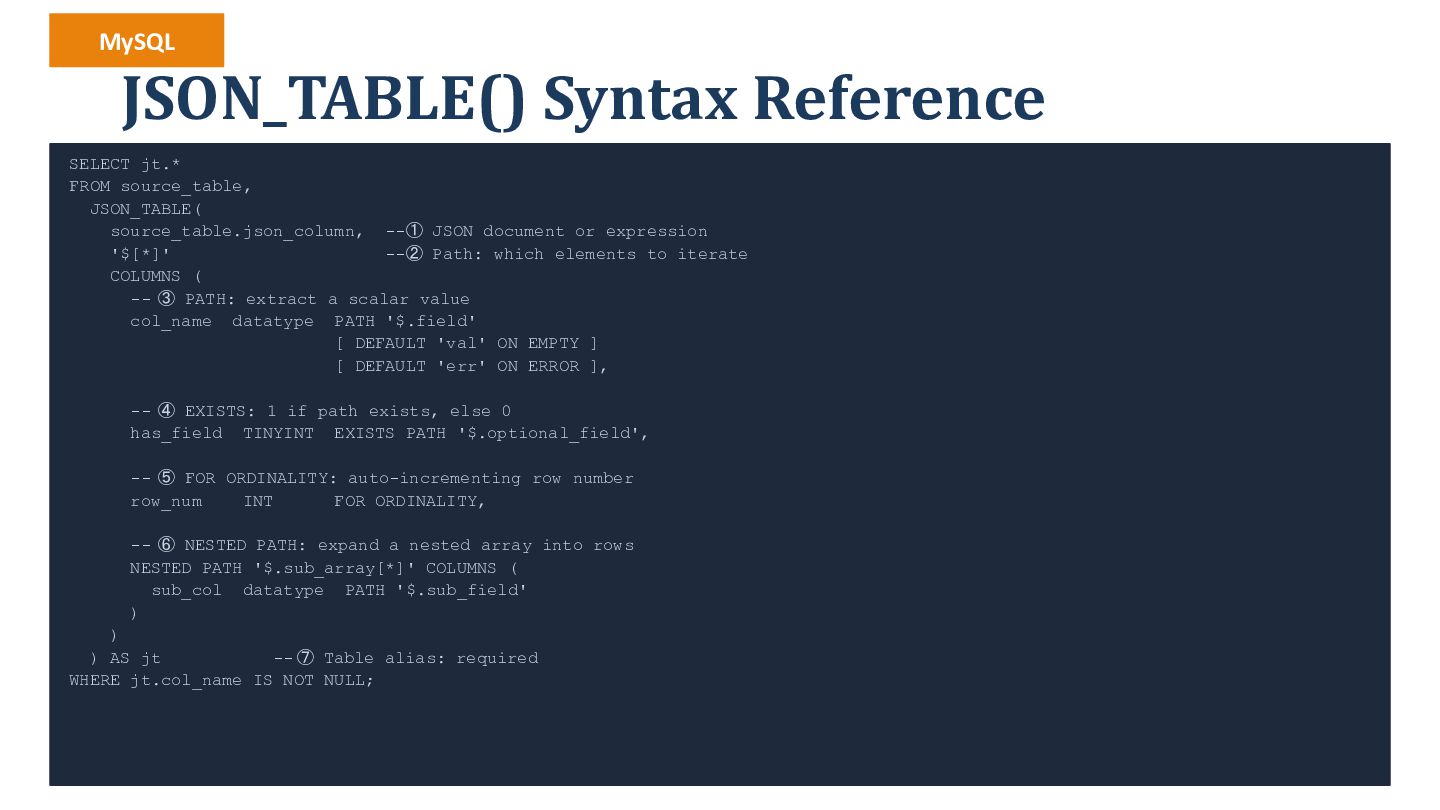
  15. MySQL JSON_TABLE() Syntax Reference SELECT jt.* FROM source_table, JSON_TABLE( source_table.json_column,

    --① JSON document or expression '$[*]' --② Path: which elements to iterate COLUMNS ( -- ③ PATH: extract a scalar value col_name datatype PATH '$.field' [ DEFAULT 'val' ON EMPTY ] [ DEFAULT 'err' ON ERROR ], -- ④ EXISTS: 1 if path exists, else 0 has_field TINYINT EXISTS PATH '$.optional_field', -- ⑤ FOR ORDINALITY: auto-incrementing row number row_num INT FOR ORDINALITY, -- ⑥ NESTED PATH: expand a nested array into rows NESTED PATH '$.sub_array[*]' COLUMNS ( sub_col datatype PATH '$.sub_field' ) ) ) AS jt -- ⑦ Table alias: required WHERE jt.col_name IS NOT NULL;
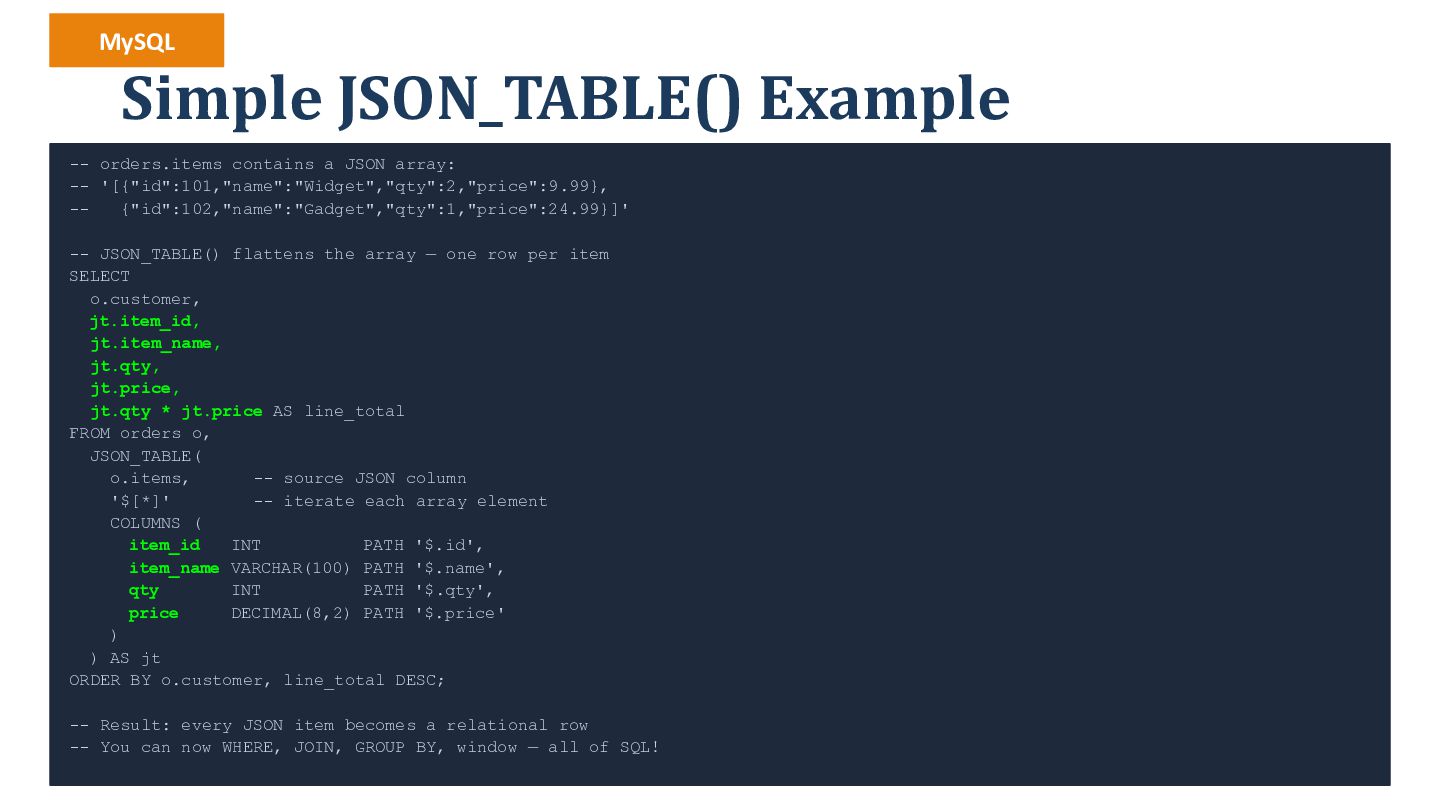
  16. MySQL Simple JSON_TABLE() Example -- orders.items contains a JSON array:

    -- '[{"id":101,"name":"Widget","qty":2,"price":9.99}, -{"id":102,"name":"Gadget","qty":1,"price":24.99}]' -- JSON_TABLE() flattens the array — one row per item SELECT o.customer, jt.item_id, jt.item_name, jt.qty, jt.price, jt.qty * jt.price AS line_total FROM orders o, JSON_TABLE( o.items, -- source JSON column '$[*]' -- iterate each array element COLUMNS ( item_id INT PATH '$.id', item_name VARCHAR(100) PATH '$.name', qty INT PATH '$.qty', price DECIMAL(8,2) PATH '$.price' ) ) AS jt ORDER BY o.customer, line_total DESC; -- Result: every JSON item becomes a relational row -- You can now WHERE, JOIN, GROUP BY, window — all of SQL!
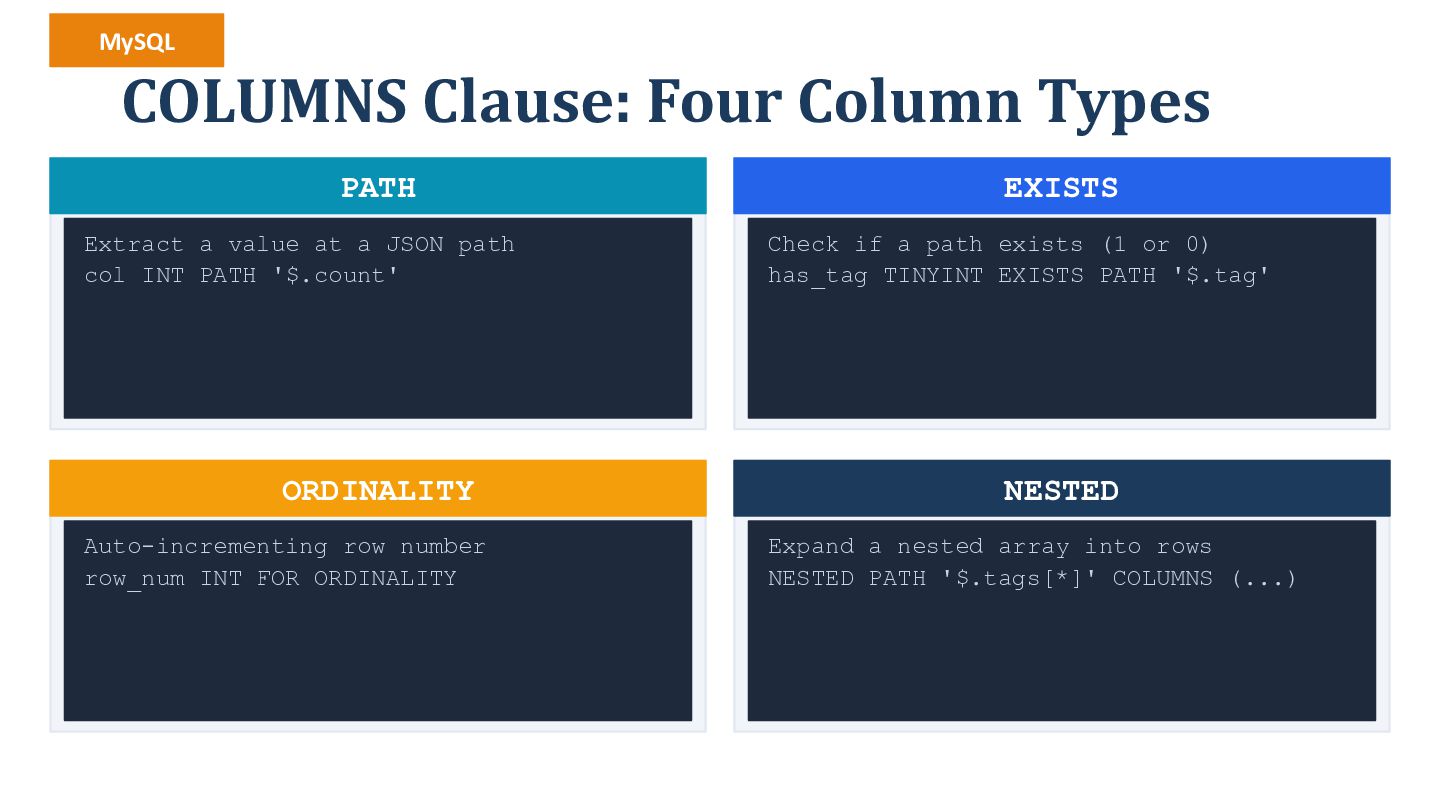
  17. MySQL COLUMNS Clause: Four Column Types PATH Extract a value

    at a JSON path col INT PATH '$.count' ORDINALITY Auto-incrementing row number row_num INT FOR ORDINALITY EXISTS Check if a path exists (1 or 0) has_tag TINYINT EXISTS PATH '$.tag' NESTED Expand a nested array into rows NESTED PATH '$.tags[*]' COLUMNS (...)
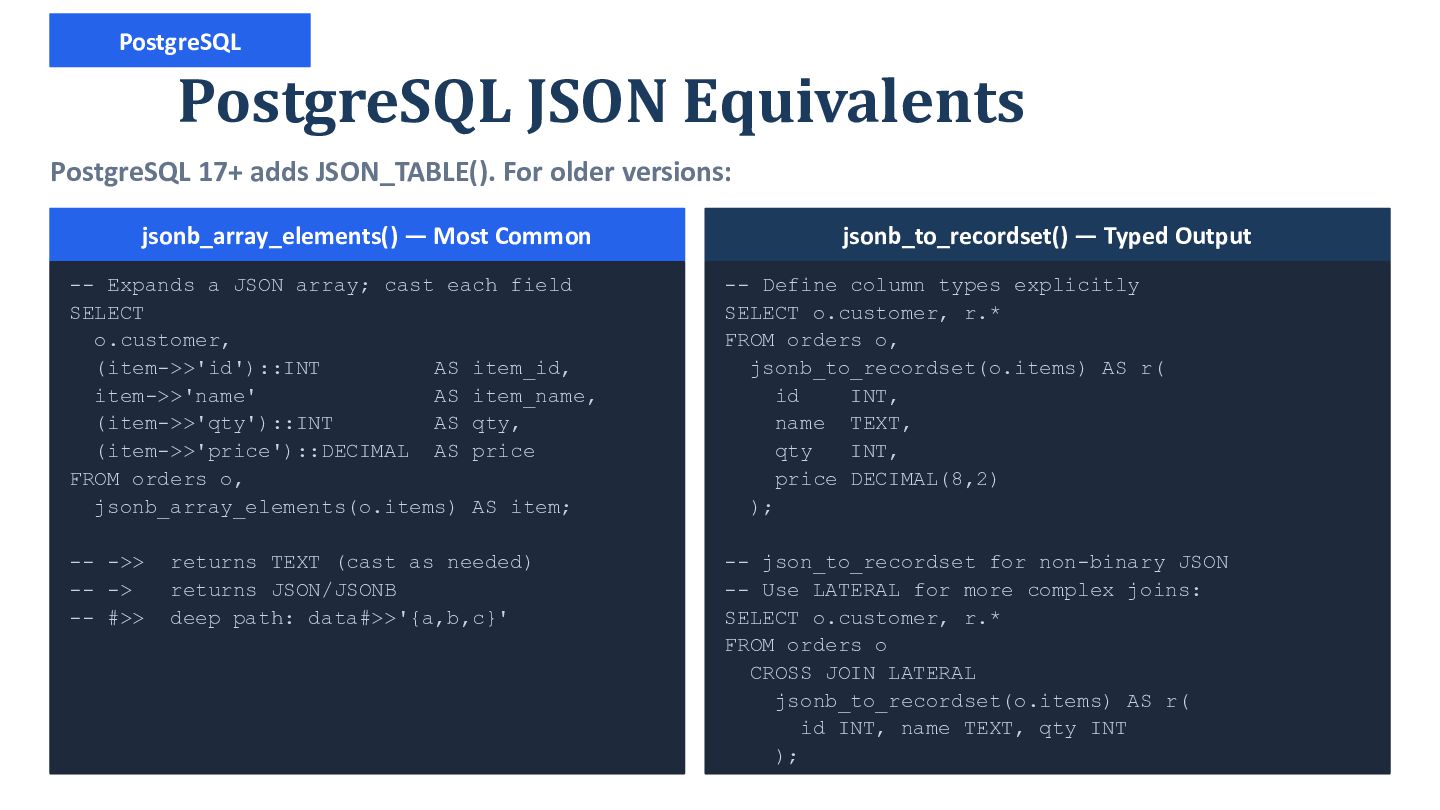
  18. PostgreSQL PostgreSQL JSON Equivalents PostgreSQL 17+ adds JSON_TABLE(). For older

    versions: jsonb_array_elements() — Most Common jsonb_to_recordset() — Typed Output -- Expands a JSON array; cast each field SELECT o.customer, (item->>'id')::INT AS item_id, item->>'name' AS item_name, (item->>'qty')::INT AS qty, (item->>'price')::DECIMAL AS price FROM orders o, jsonb_array_elements(o.items) AS item; -- Define column types explicitly SELECT o.customer, r.* FROM orders o, jsonb_to_recordset(o.items) AS r( id INT, name TEXT, qty INT, price DECIMAL(8,2) ); -- ->> -- -> -- #>> -- json_to_recordset for non-binary JSON -- Use LATERAL for more complex joins: SELECT o.customer, r.* FROM orders o CROSS JOIN LATERAL jsonb_to_recordset(o.items) AS r( id INT, name TEXT, qty INT ); returns TEXT (cast as needed) returns JSON/JSONB deep path: data#>>'{a,b,c}'
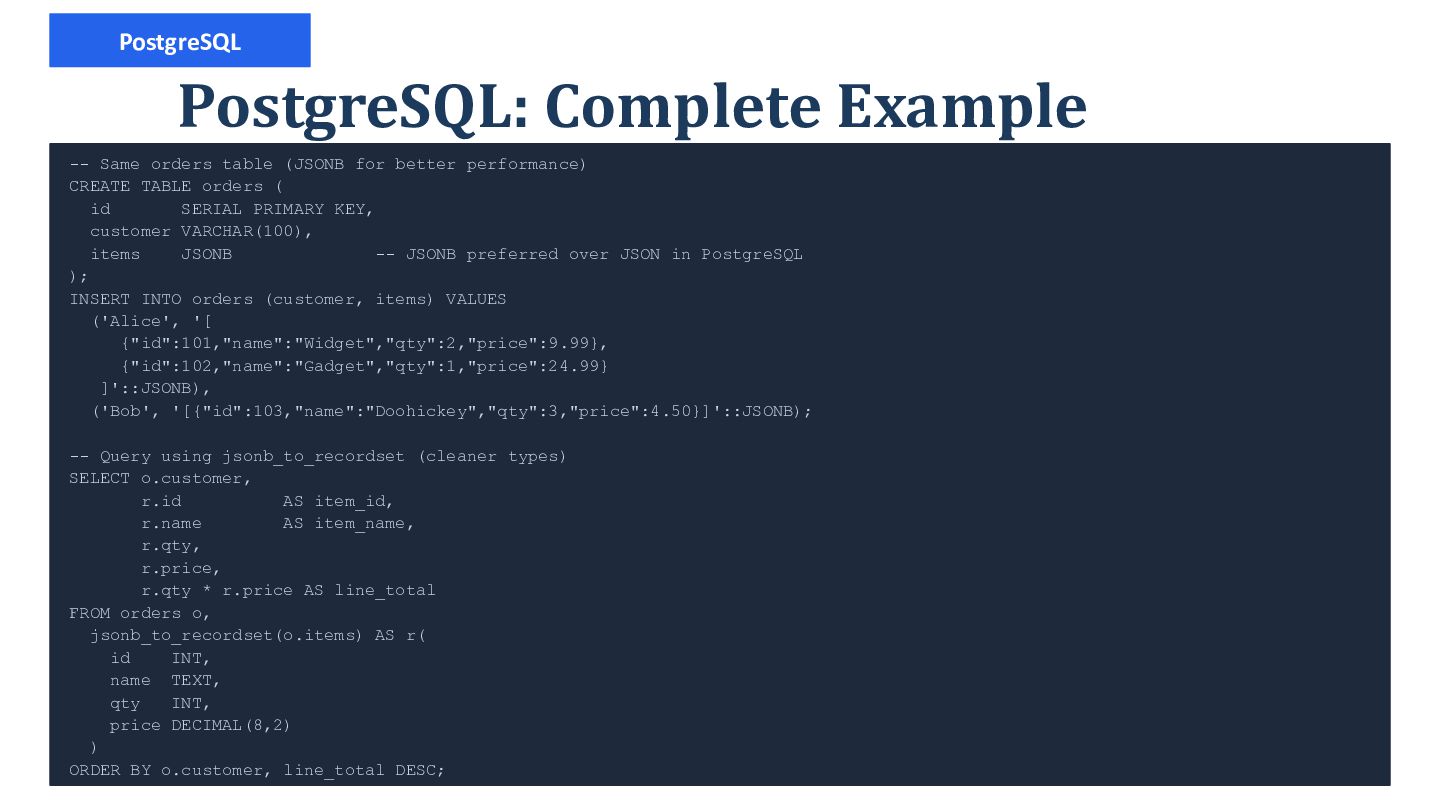
  19. PostgreSQL PostgreSQL: Complete Example -- Same orders table (JSONB for

    better performance) CREATE TABLE orders ( id SERIAL PRIMARY KEY, customer VARCHAR(100), items JSONB -- JSONB preferred over JSON in PostgreSQL ); INSERT INTO orders (customer, items) VALUES ('Alice', '[ {"id":101,"name":"Widget","qty":2,"price":9.99}, {"id":102,"name":"Gadget","qty":1,"price":24.99} ]'::JSONB), ('Bob', '[{"id":103,"name":"Doohickey","qty":3,"price":4.50}]'::JSONB); -- Query using jsonb_to_recordset (cleaner types) SELECT o.customer, r.id AS item_id, r.name AS item_name, r.qty, r.price, r.qty * r.price AS line_total FROM orders o, jsonb_to_recordset(o.items) AS r( id INT, name TEXT, qty INT, price DECIMAL(8,2) ) ORDER BY o.customer, line_total DESC;
  20. MySQL Nested Data: NESTED PATH -- JSON: {"id":1,"name":"Widget", -"tags":["sale","new"], -"variants":[{"color":"red","size":"M"}]}

    SELECT jt.item_id, jt.item_name, jt.tag, jt.color, jt.size FROM products, JSON_TABLE(data, '$' COLUMNS ( item_id INT PATH '$.id', item_name VARCHAR(100) PATH '$.name', NESTED PATH '$.tags[*]' COLUMNS ( tag VARCHAR(50) PATH '$' ), NESTED PATH '$.variants[*]' COLUMNS ( color VARCHAR(30) PATH '$.color', size VARCHAR(10) PATH '$.size' ) )) AS jt; -- Multiple NESTED PATHs = UNION rows, not cross join
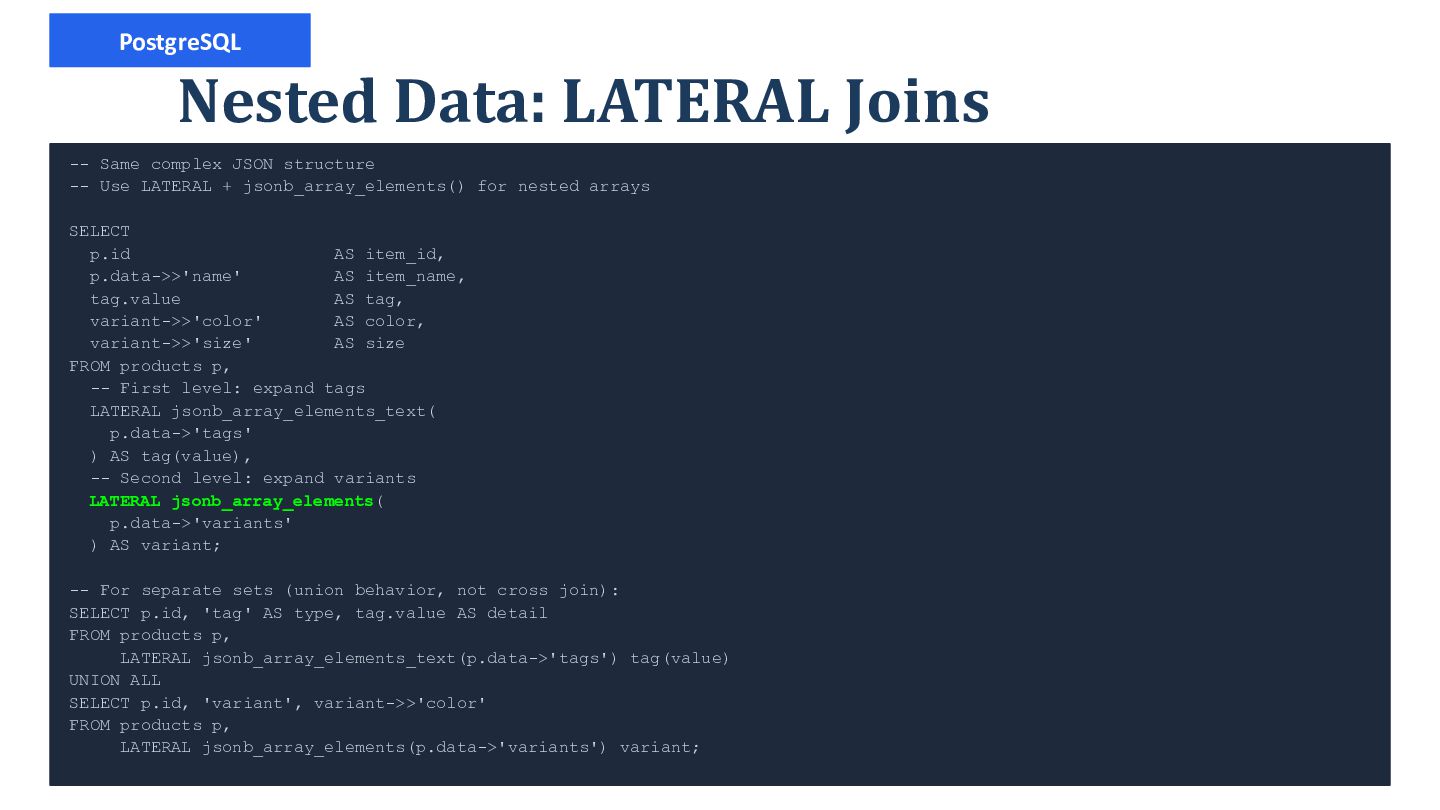
  21. PostgreSQL Nested Data: LATERAL Joins -- Same complex JSON structure

    -- Use LATERAL + jsonb_array_elements() for nested arrays SELECT p.id AS item_id, p.data->>'name' AS item_name, tag.value AS tag, variant->>'color' AS color, variant->>'size' AS size FROM products p, -- First level: expand tags LATERAL jsonb_array_elements_text( p.data->'tags' ) AS tag(value), -- Second level: expand variants LATERAL jsonb_array_elements( p.data->'variants' ) AS variant; -- For separate sets (union behavior, not cross join): SELECT p.id, 'tag' AS type, tag.value AS detail FROM products p, LATERAL jsonb_array_elements_text(p.data->'tags') tag(value) UNION ALL SELECT p.id, 'variant', variant->>'color' FROM products p, LATERAL jsonb_array_elements(p.data->'variants') variant;
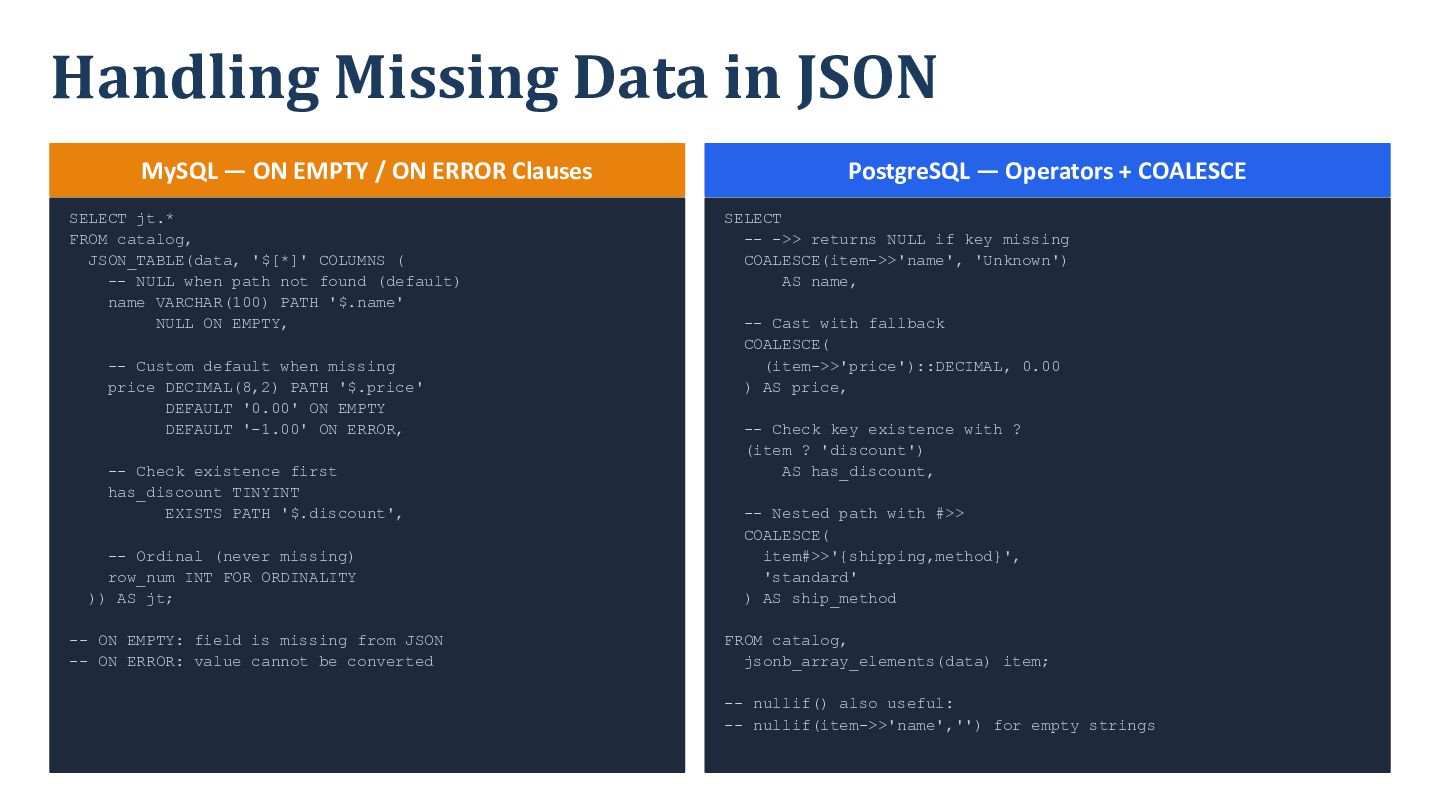
  22. Handling Missing Data in JSON MySQL — ON EMPTY /

    ON ERROR Clauses SELECT jt.* FROM catalog, JSON_TABLE(data, '$[*]' COLUMNS ( -- NULL when path not found (default) name VARCHAR(100) PATH '$.name' NULL ON EMPTY, -- Custom default when missing price DECIMAL(8,2) PATH '$.price' DEFAULT '0.00' ON EMPTY DEFAULT '-1.00' ON ERROR, -- Check existence first has_discount TINYINT EXISTS PATH '$.discount', -- Ordinal (never missing) row_num INT FOR ORDINALITY )) AS jt; -- ON EMPTY: field is missing from JSON -- ON ERROR: value cannot be converted PostgreSQL — Operators + COALESCE SELECT -- ->> returns NULL if key missing COALESCE(item->>'name', 'Unknown') AS name, -- Cast with fallback COALESCE( (item->>'price')::DECIMAL, 0.00 ) AS price, -- Check key existence with ? (item ? 'discount') AS has_discount, -- Nested path with #>> COALESCE( item#>>'{shipping,method}', 'standard' ) AS ship_method FROM catalog, jsonb_array_elements(data) item; -- nullif() also useful: -- nullif(item->>'name','') for empty strings
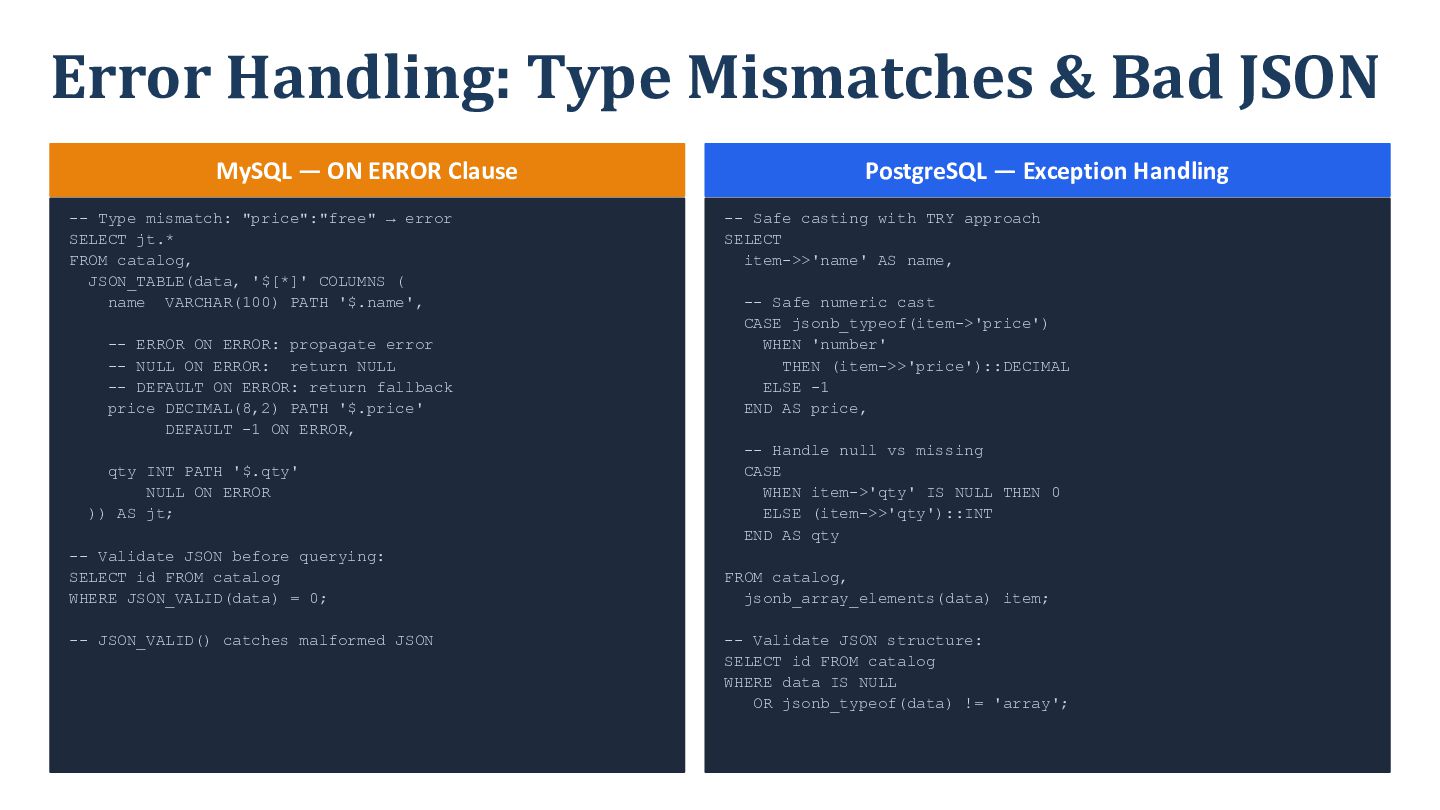
  23. Error Handling: Type Mismatches & Bad JSON MySQL — ON

    ERROR Clause -- Type mismatch: "price":"free" → error SELECT jt.* FROM catalog, JSON_TABLE(data, '$[*]' COLUMNS ( name VARCHAR(100) PATH '$.name', -- ERROR ON ERROR: propagate error -- NULL ON ERROR: return NULL -- DEFAULT ON ERROR: return fallback price DECIMAL(8,2) PATH '$.price' DEFAULT -1 ON ERROR, qty INT PATH '$.qty' NULL ON ERROR )) AS jt; -- Validate JSON before querying: SELECT id FROM catalog WHERE JSON_VALID(data) = 0; -- JSON_VALID() catches malformed JSON PostgreSQL — Exception Handling -- Safe casting with TRY approach SELECT item->>'name' AS name, -- Safe numeric cast CASE jsonb_typeof(item->'price') WHEN 'number' THEN (item->>'price')::DECIMAL ELSE -1 END AS price, -- Handle null vs missing CASE WHEN item->'qty' IS NULL THEN 0 ELSE (item->>'qty')::INT END AS qty FROM catalog, jsonb_array_elements(data) item; -- Validate JSON structure: SELECT id FROM catalog WHERE data IS NULL OR jsonb_typeof(data) != 'array';
  24. Window Functions Over JSON Data -- MySQL (PostgreSQL: same syntax

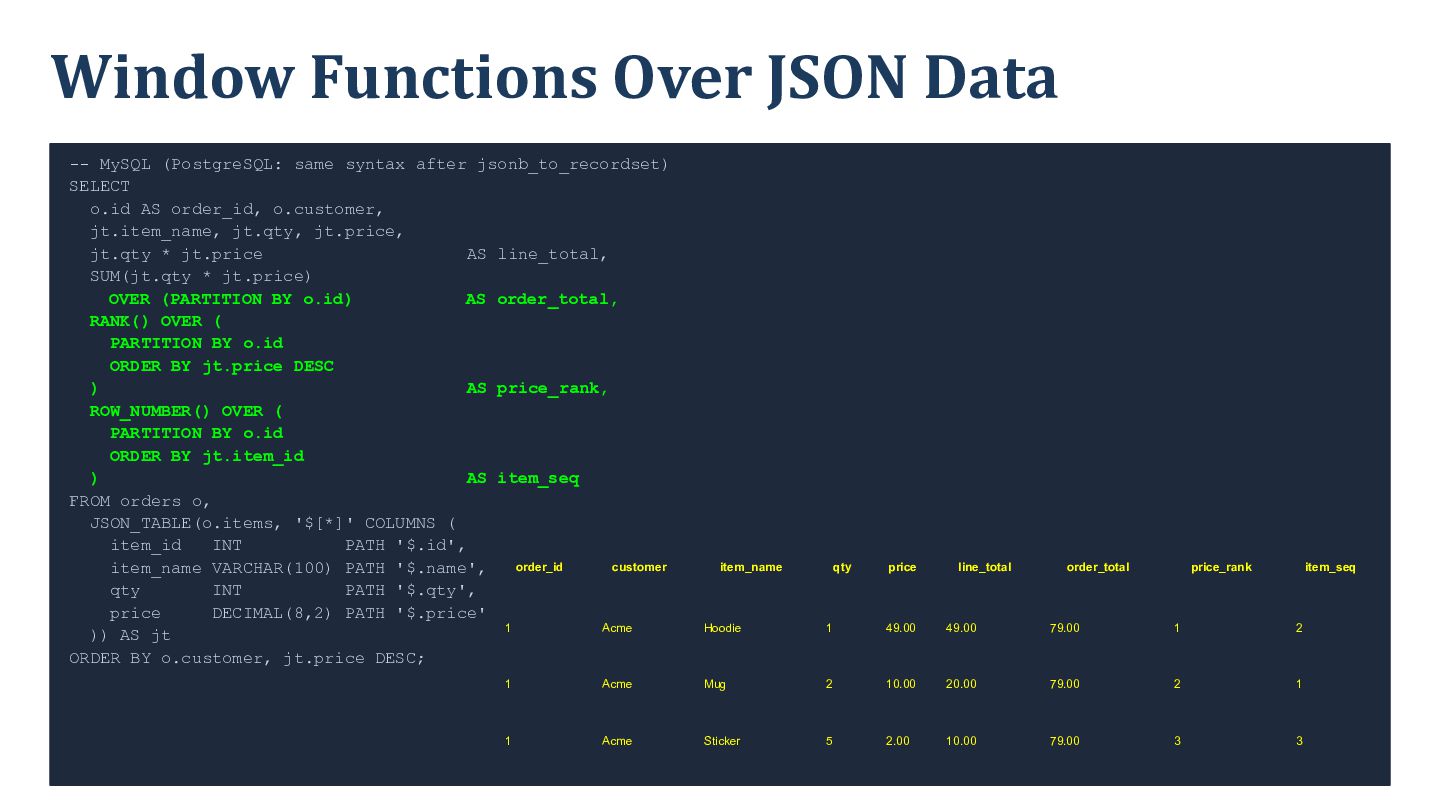
    after jsonb_to_recordset) SELECT o.id AS order_id, o.customer, jt.item_name, jt.qty, jt.price, jt.qty * jt.price AS line_total, SUM(jt.qty * jt.price) OVER (PARTITION BY o.id) AS order_total, RANK() OVER ( PARTITION BY o.id ORDER BY jt.price DESC ) AS price_rank, ROW_NUMBER() OVER ( PARTITION BY o.id ORDER BY jt.item_id ) AS item_seq FROM orders o, JSON_TABLE(o.items, '$[*]' COLUMNS ( item_id INT PATH '$.id', order_id customer item_name VARCHAR(100) PATH '$.name', qty INT PATH '$.qty', price DECIMAL(8,2) PATH '$.price' 1 Acme )) AS jt ORDER BY o.customer, jt.price DESC; item_name qty price line_total order_total price_rank item_seq Hoodie 1 49.00 49.00 79.00 1 2 1 Acme Mug 2 10.00 20.00 79.00 2 1 1 Acme Sticker 5 2.00 10.00 79.00 3 3
  25. Aggregates & GROUP BY Over JSON Data -- MySQL: Full

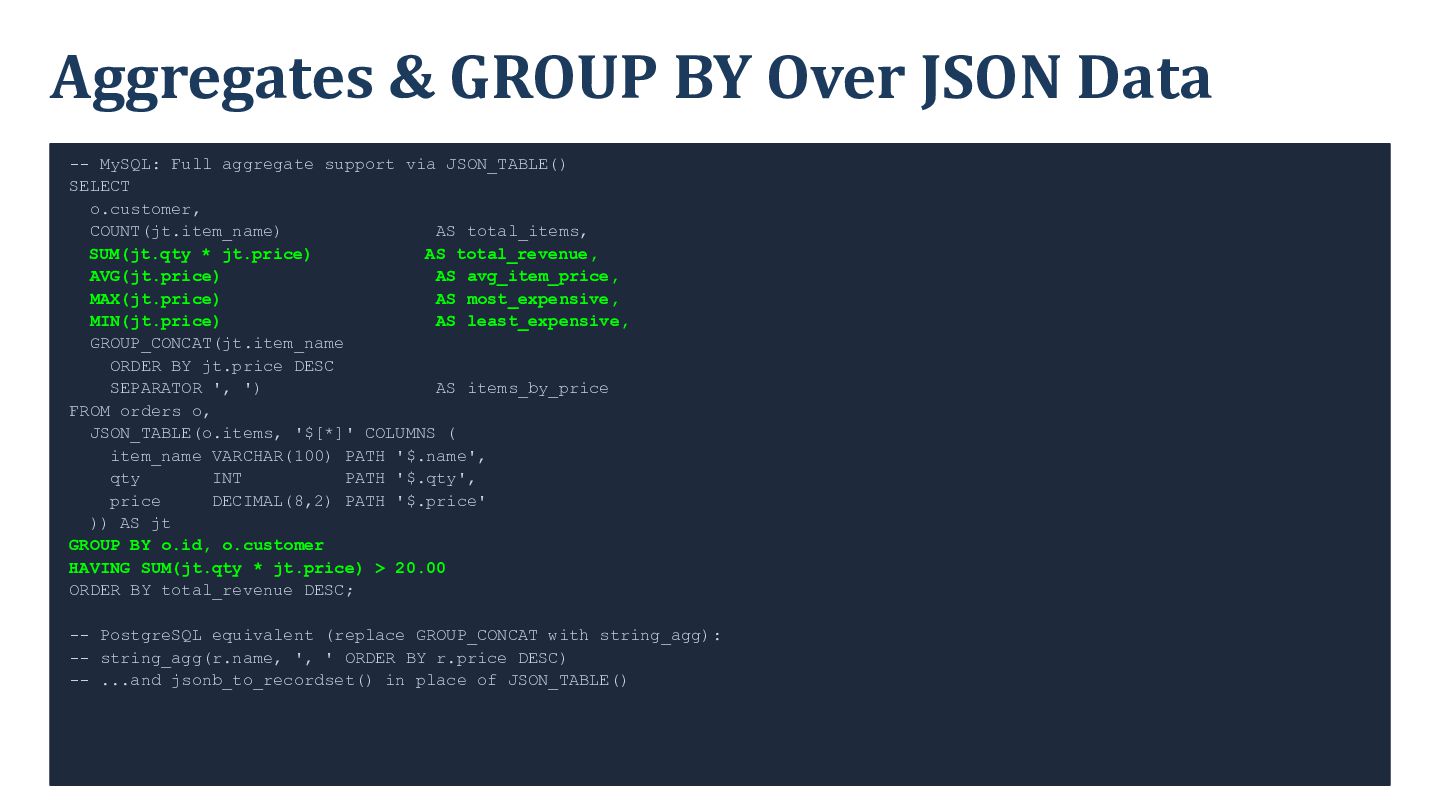
    aggregate support via JSON_TABLE() SELECT o.customer, COUNT(jt.item_name) AS total_items, SUM(jt.qty * jt.price) AS total_revenue, AVG(jt.price) AS avg_item_price, MAX(jt.price) AS most_expensive, MIN(jt.price) AS least_expensive, GROUP_CONCAT(jt.item_name ORDER BY jt.price DESC SEPARATOR ', ') AS items_by_price FROM orders o, JSON_TABLE(o.items, '$[*]' COLUMNS ( item_name VARCHAR(100) PATH '$.name', qty INT PATH '$.qty', price DECIMAL(8,2) PATH '$.price' )) AS jt GROUP BY o.id, o.customer HAVING SUM(jt.qty * jt.price) > 20.00 ORDER BY total_revenue DESC; -- PostgreSQL equivalent (replace GROUP_CONCAT with string_agg): -- string_agg(r.name, ', ' ORDER BY r.price DESC) -- ...and jsonb_to_recordset() in place of JSON_TABLE()
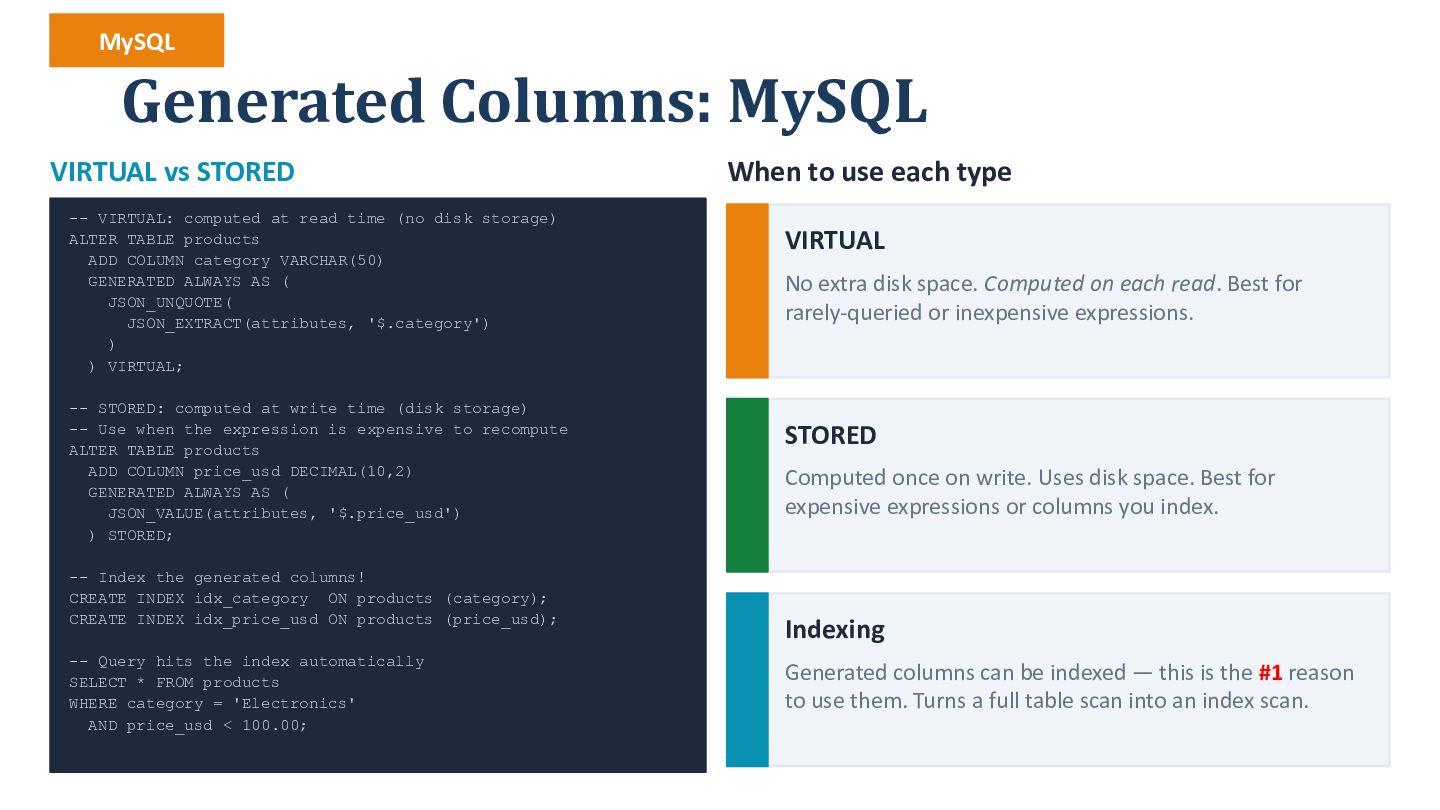
  26. MySQL Generated Columns: MySQL VIRTUAL vs STORED -- VIRTUAL: computed

    at read time (no disk storage) ALTER TABLE products ADD COLUMN category VARCHAR(50) GENERATED ALWAYS AS ( JSON_UNQUOTE( JSON_EXTRACT(attributes, '$.category') ) ) VIRTUAL; -- STORED: computed at write time (disk storage) -- Use when the expression is expensive to recompute ALTER TABLE products ADD COLUMN price_usd DECIMAL(10,2) GENERATED ALWAYS AS ( JSON_VALUE(attributes, '$.price_usd') ) STORED; -- Index the generated columns! CREATE INDEX idx_category ON products (category); CREATE INDEX idx_price_usd ON products (price_usd); -- Query hits the index automatically SELECT * FROM products WHERE category = 'Electronics' AND price_usd < 100.00; When to use each type VIRTUAL No extra disk space. Computed on each read. Best for rarely-queried or inexpensive expressions. STORED Computed once on write. Uses disk space. Best for expensive expressions or columns you index. Indexing Generated columns can be indexed — this is the #1 reason to use them. Turns a full table scan into an index scan.
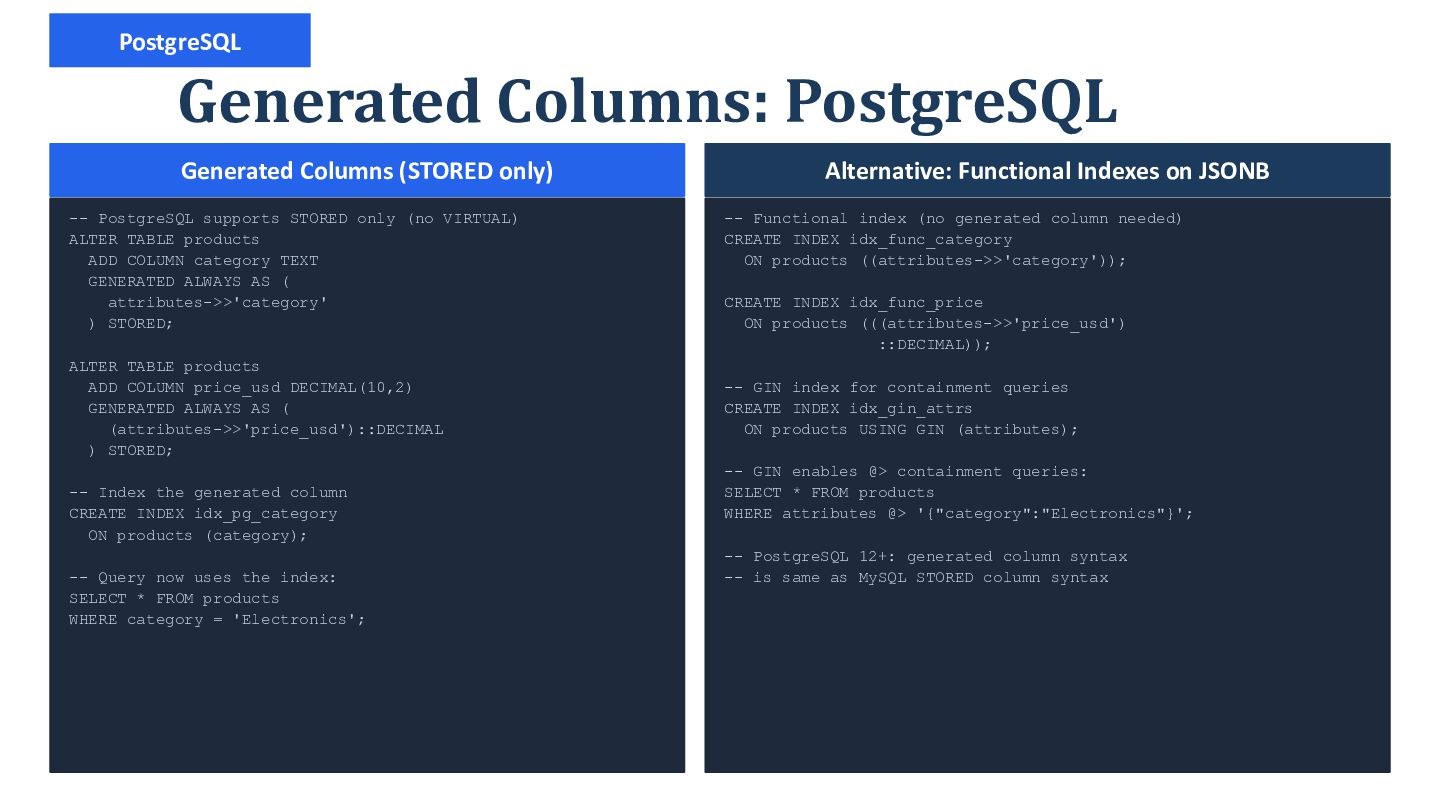
  27. PostgreSQL Generated Columns: PostgreSQL Generated Columns (STORED only) -- PostgreSQL

    supports STORED only (no VIRTUAL) ALTER TABLE products ADD COLUMN category TEXT GENERATED ALWAYS AS ( attributes->>'category' ) STORED; ALTER TABLE products ADD COLUMN price_usd DECIMAL(10,2) GENERATED ALWAYS AS ( (attributes->>'price_usd')::DECIMAL ) STORED; -- Index the generated column CREATE INDEX idx_pg_category ON products (category); -- Query now uses the index: SELECT * FROM products WHERE category = 'Electronics'; Alternative: Functional Indexes on JSONB -- Functional index (no generated column needed) CREATE INDEX idx_func_category ON products ((attributes->>'category')); CREATE INDEX idx_func_price ON products (((attributes->>'price_usd') ::DECIMAL)); -- GIN index for containment queries CREATE INDEX idx_gin_attrs ON products USING GIN (attributes); -- GIN enables @> containment queries: SELECT * FROM products WHERE attributes @> '{"category":"Electronics"}'; -- PostgreSQL 12+: generated column syntax -- is same as MySQL STORED column syntax
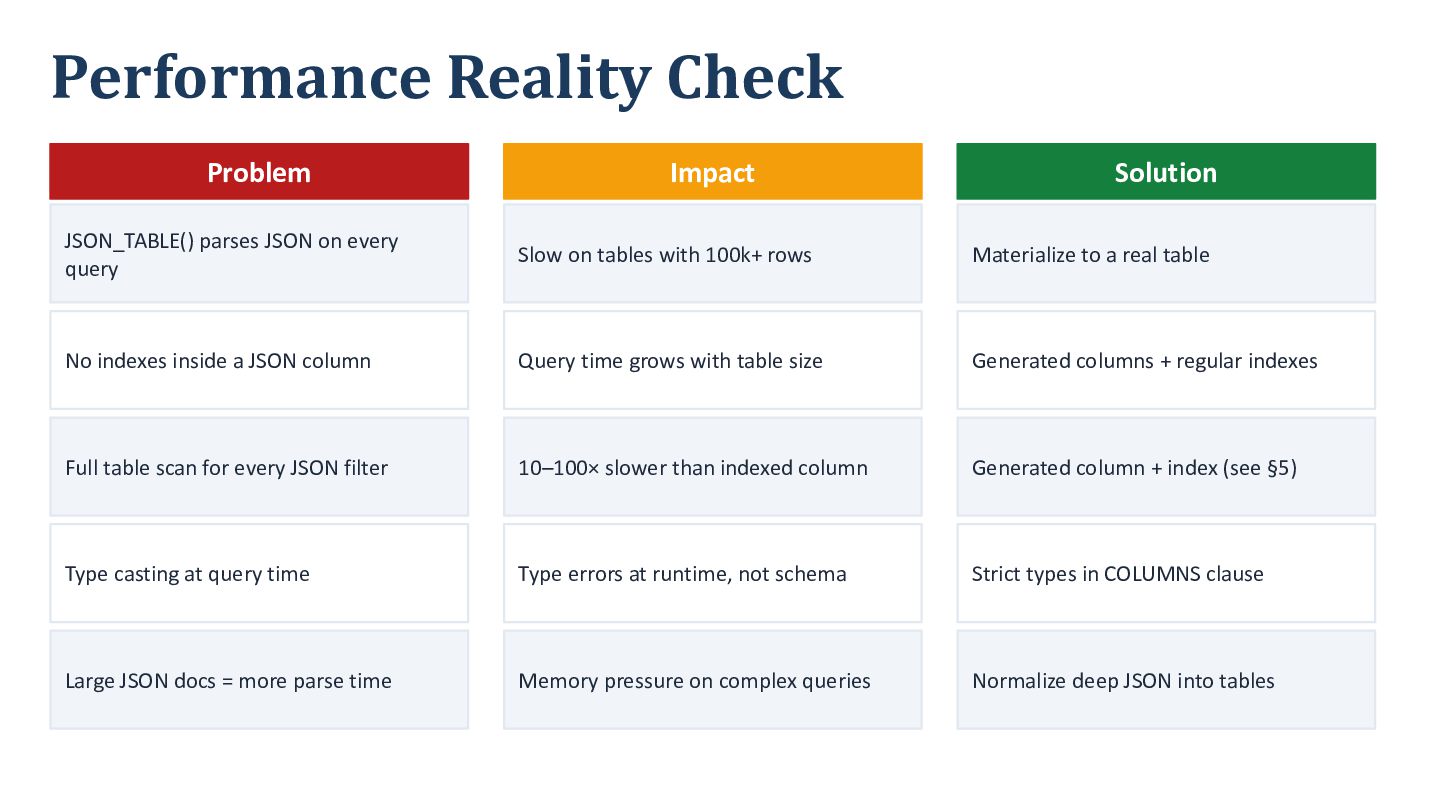
  28. Performance Reality Check Problem Impact Solution JSON_TABLE() parses JSON on

    every query Slow on tables with 100k+ rows Materialize to a real table No indexes inside a JSON column Query time grows with table size Generated columns + regular indexes Full table scan for every JSON filter 10–100× slower than indexed column Generated column + index (see §5) Type casting at query time Type errors at runtime, not schema Strict types in COLUMNS clause Large JSON docs = more parse time Memory pressure on complex queries Normalize deep JSON into tables
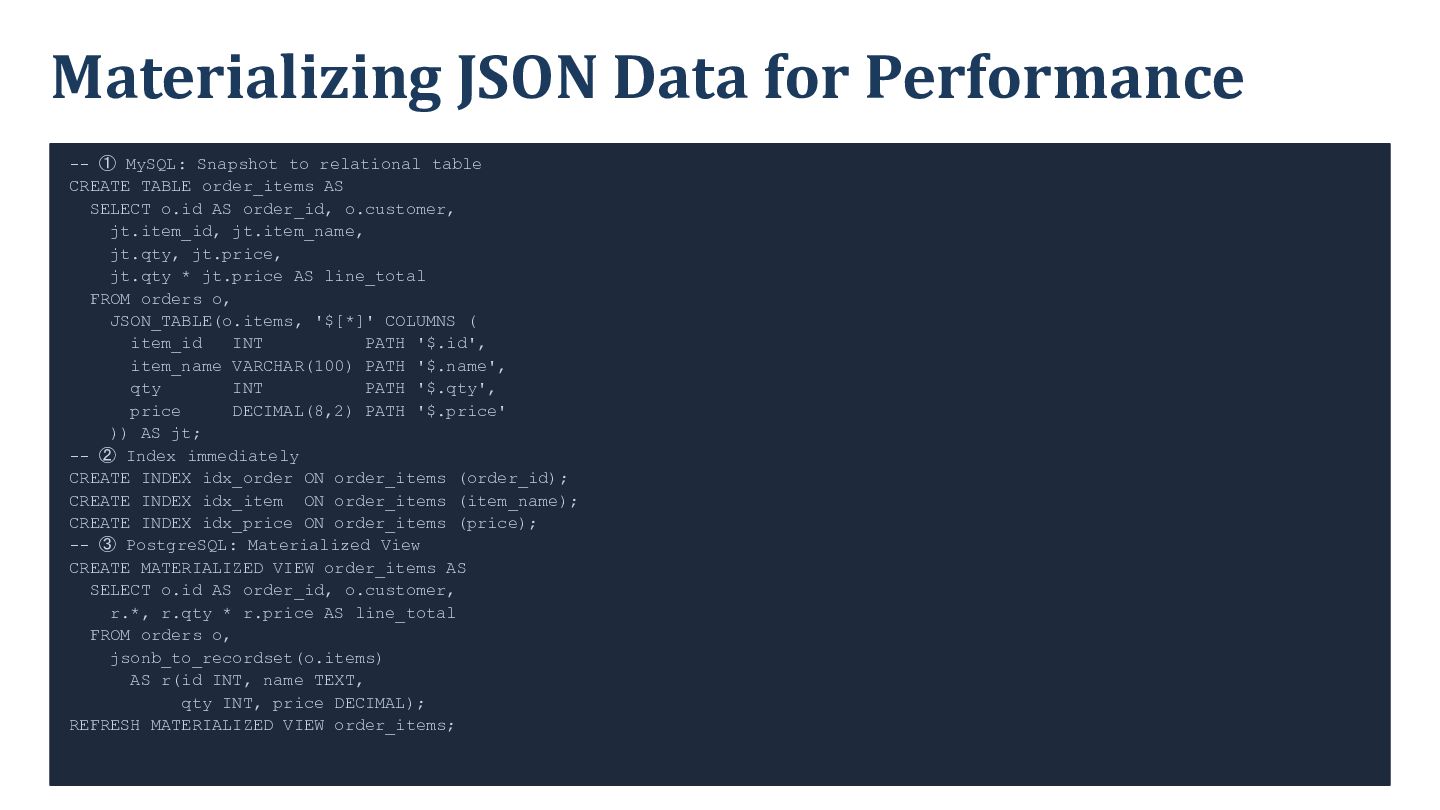
  29. Materializing JSON Data for Performance -- ① MySQL: Snapshot to

    relational table CREATE TABLE order_items AS SELECT o.id AS order_id, o.customer, jt.item_id, jt.item_name, jt.qty, jt.price, jt.qty * jt.price AS line_total FROM orders o, JSON_TABLE(o.items, '$[*]' COLUMNS ( item_id INT PATH '$.id', item_name VARCHAR(100) PATH '$.name', qty INT PATH '$.qty', price DECIMAL(8,2) PATH '$.price' )) AS jt; -- ② Index immediately CREATE INDEX idx_order ON order_items (order_id); CREATE INDEX idx_item ON order_items (item_name); CREATE INDEX idx_price ON order_items (price); -- ③ PostgreSQL: Materialized View CREATE MATERIALIZED VIEW order_items AS SELECT o.id AS order_id, o.customer, r.*, r.qty * r.price AS line_total FROM orders o, jsonb_to_recordset(o.items) AS r(id INT, name TEXT, qty INT, price DECIMAL); REFRESH MATERIALIZED VIEW order_items;
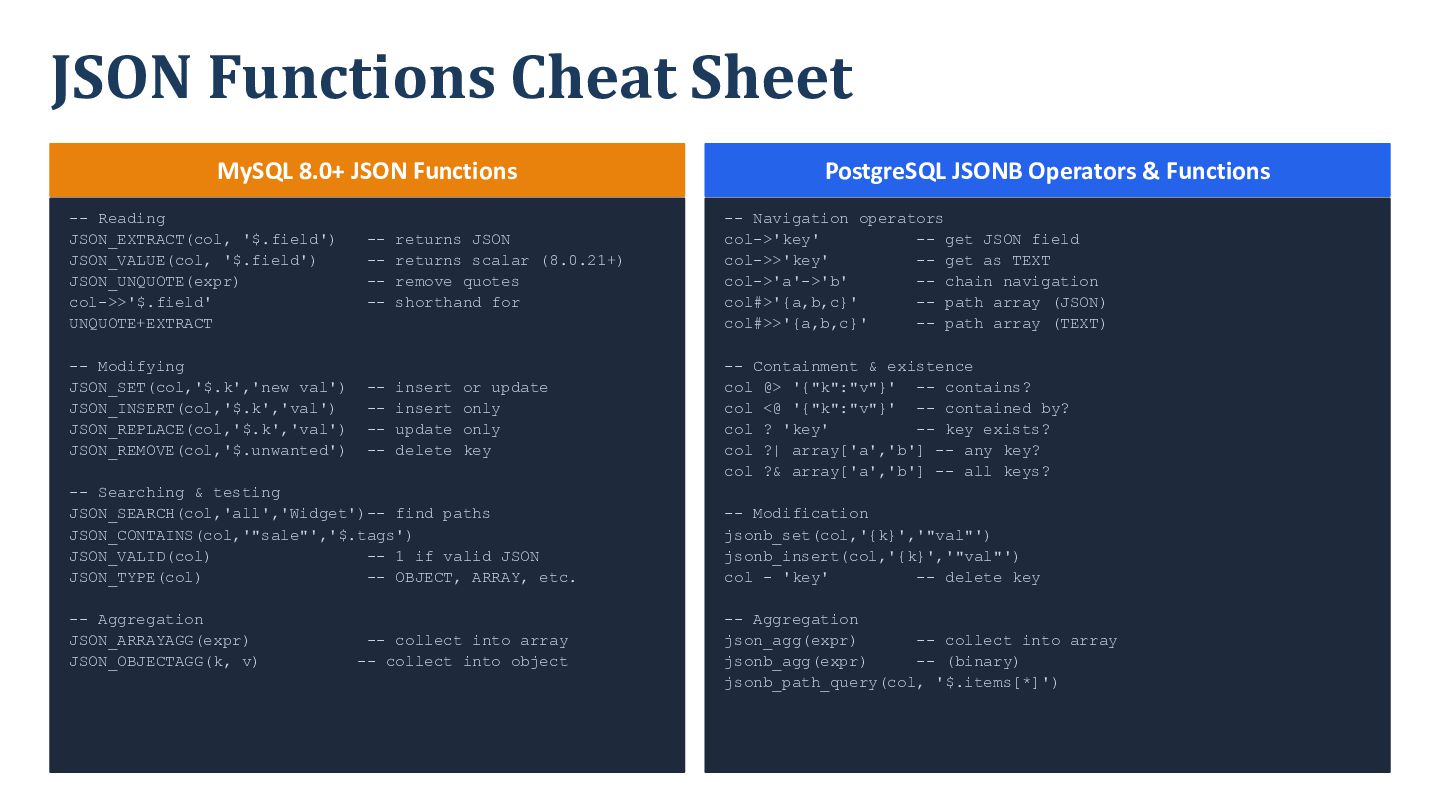
  30. JSON Functions Cheat Sheet MySQL 8.0+ JSON Functions -- Reading

    JSON_EXTRACT(col, '$.field') JSON_VALUE(col, '$.field') JSON_UNQUOTE(expr) col->>'$.field' UNQUOTE+EXTRACT -- Modifying JSON_SET(col,'$.k','new val') JSON_INSERT(col,'$.k','val') JSON_REPLACE(col,'$.k','val') JSON_REMOVE(col,'$.unwanted') -- returns JSON -- returns scalar (8.0.21+) -- remove quotes -- shorthand for -- Navigation operators col->'key' -- get JSON field col->>'key' -- get as TEXT col->'a'->'b' -- chain navigation col#>'{a,b,c}' -- path array (JSON) col#>>'{a,b,c}' -- path array (TEXT) -- insert or update -- insert only -- update only -- delete key -- Containment & existence col @> '{"k":"v"}' -- contains? col <@ '{"k":"v"}' -- contained by? col ? 'key' -- key exists? col ?| array['a','b'] -- any key? col ?& array['a','b'] -- all keys? -- Searching & testing JSON_SEARCH(col,'all','Widget')-- find paths JSON_CONTAINS(col,'"sale"','$.tags') JSON_VALID(col) -- 1 if valid JSON JSON_TYPE(col) -- OBJECT, ARRAY, etc. -- Aggregation JSON_ARRAYAGG(expr) JSON_OBJECTAGG(k, v) PostgreSQL JSONB Operators & Functions -- collect into array -- collect into object -- Modification jsonb_set(col,'{k}','"val"') jsonb_insert(col,'{k}','"val"') col - 'key' -- delete key -- Aggregation json_agg(expr) -- collect into array jsonb_agg(expr) -- (binary) jsonb_path_query(col, '$.items[*]')
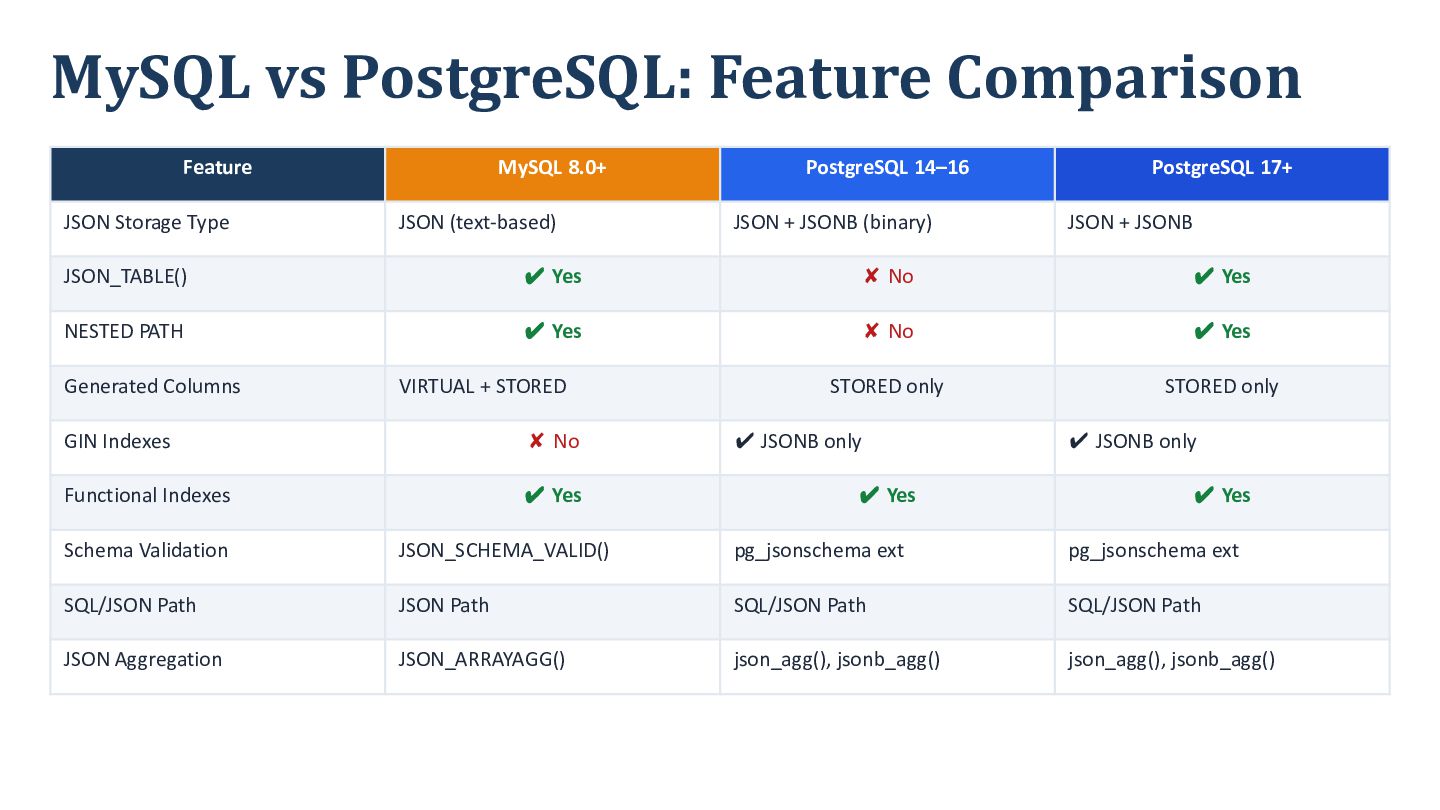
  31. MySQL vs PostgreSQL: Feature Comparison Feature JSON Storage Type MySQL

    8.0+ JSON (text-based) PostgreSQL 14–16 JSON + JSONB (binary) PostgreSQL 17+ JSON + JSONB JSON_TABLE() ✔ Yes ✘ No ✔ Yes NESTED PATH ✔ Yes ✘ No ✔ Yes STORED only STORED only Generated Columns VIRTUAL + STORED GIN Indexes ✘ No Functional Indexes ✔ Yes ✔ JSONB only ✔ JSONB only ✔ Yes ✔ Yes Schema Validation JSON_SCHEMA_VALID() pg_jsonschema ext pg_jsonschema ext SQL/JSON Path JSON Path SQL/JSON Path SQL/JSON Path JSON Aggregation JSON_ARRAYAGG() json_agg(), jsonb_agg() json_agg(), jsonb_agg()
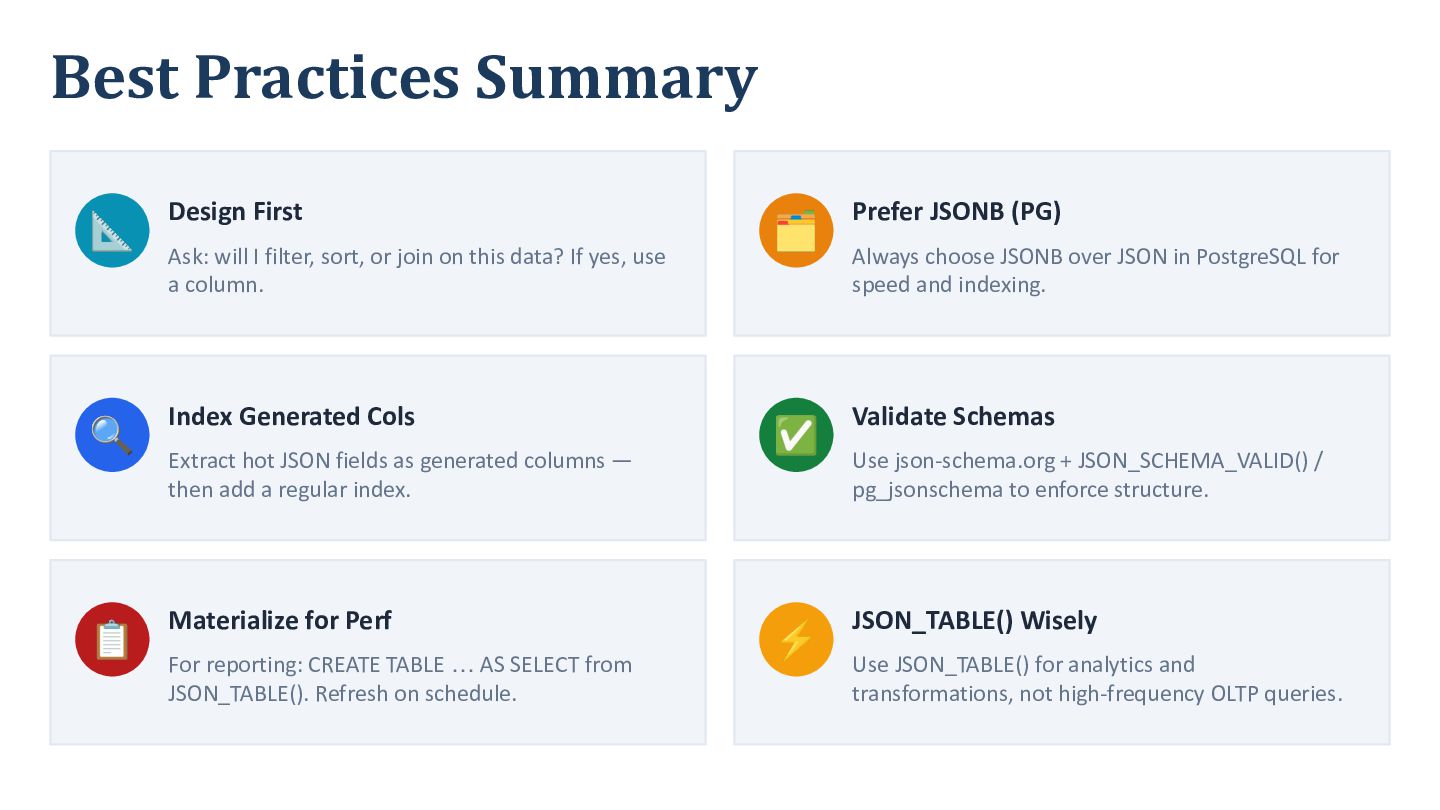
  32. Best Practices Summary 📐 Design First 🔍 Index Generated Cols

    📋 Materialize for Perf Ask: will I filter, sort, or join on this data? If yes, use a column. Extract hot JSON fields as generated columns — then add a regular index. For reporting: CREATE TABLE … AS SELECT from JSON_TABLE(). Refresh on schedule. 🗂 Prefer JSONB (PG) ✅ Validate Schemas ⚡ JSON_TABLE() Wisely Always choose JSONB over JSON in PostgreSQL for speed and indexing. Use json-schema.org + JSON_SCHEMA_VALID() / pg_jsonschema to enforce structure. Use JSON_TABLE() for analytics and transformations, not high-frequency OLTP queries.
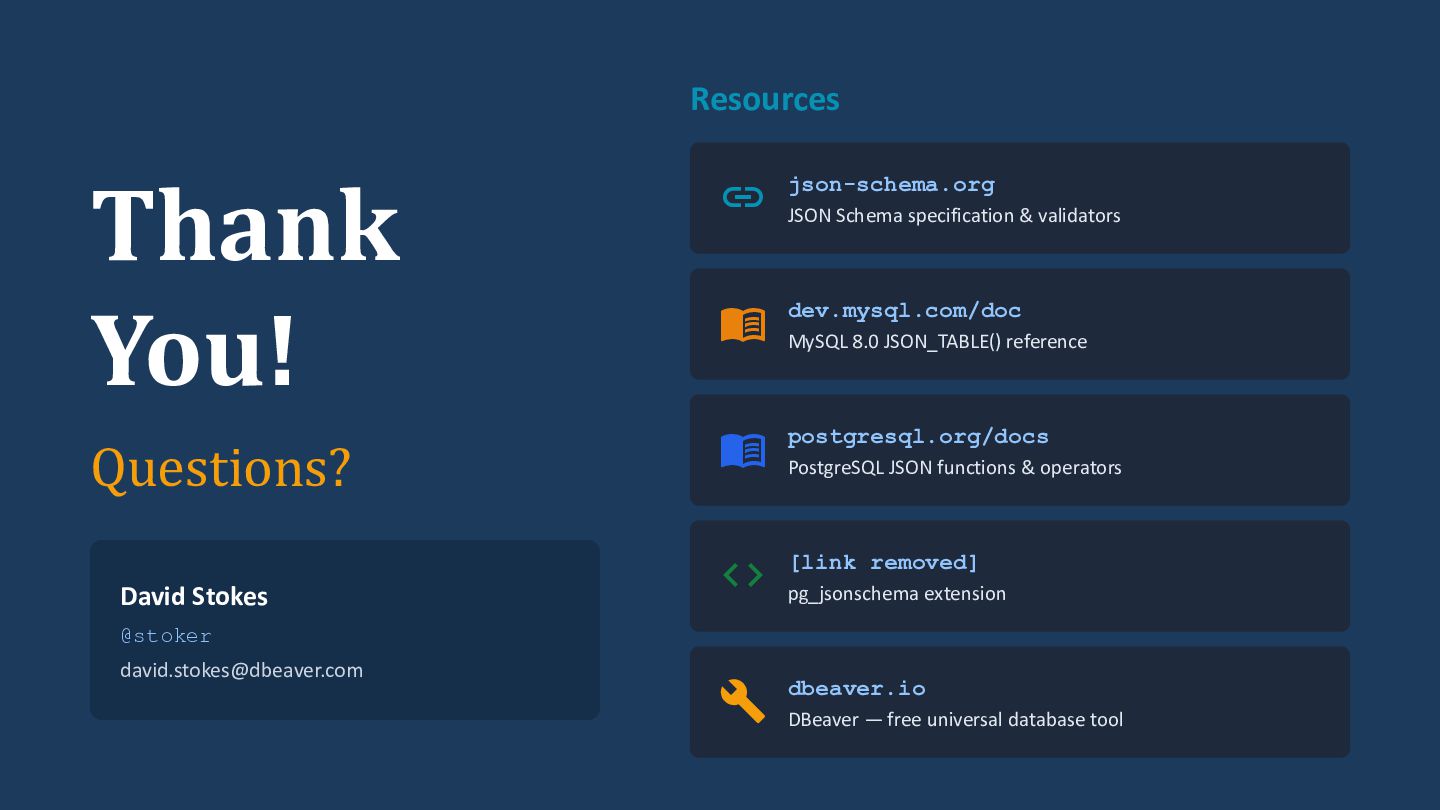
  33. Resources Thank You!  JSON Schema specification & validators Questions?

     PostgreSQL JSON functions & operators json-schema.org  MySQL 8.0 JSON_TABLE() reference dev.mysql.com/doc postgresql.org/docs  pg_jsonschema extension [link removed] David Stokes @stoker [email protected]  DBeaver — free universal database tool dbeaver.io