Upgrade to Pro — share decks privately, control downloads, hide ads and more …

Odoo Data Migration - Sygmetiv Business Solutions

Avatar for sriya sriya
October 06, 2026

Odoo Data Migration - Sygmetiv Business Solutions

Data migration decides whether an Odoo ERP implementation succeeds or struggles. This 10-slide guide explains what to move, what to clean and what to leave behind when shifting from Tally, Excel or a legacy system to Odoo.

Prepared by Sygmetiv Business Solutions, an Odoo partner in India based in Kochi, Kerala

Avatar for sriya

sriya

October 06, 2026

More Decks by sriya

Other Decks in Technology

Transcript

  1. SYGMETIV BUSINESS SOLUTIONS | ODOO IMPLEMENTATION GUIDE Data Migration in

    Odoo What Gets Moved,WhatGetsCleaned, What Gets LeftBehind odoo partner in india odoo partner india A practical guide from an Odoo partner in India for businesses planning a smooth switch to Odoo ERP. Sygmetiv Business Solutions | Kaloor, Ernakulam, Kerala | sygmetiv.in/odoo-partner-india/
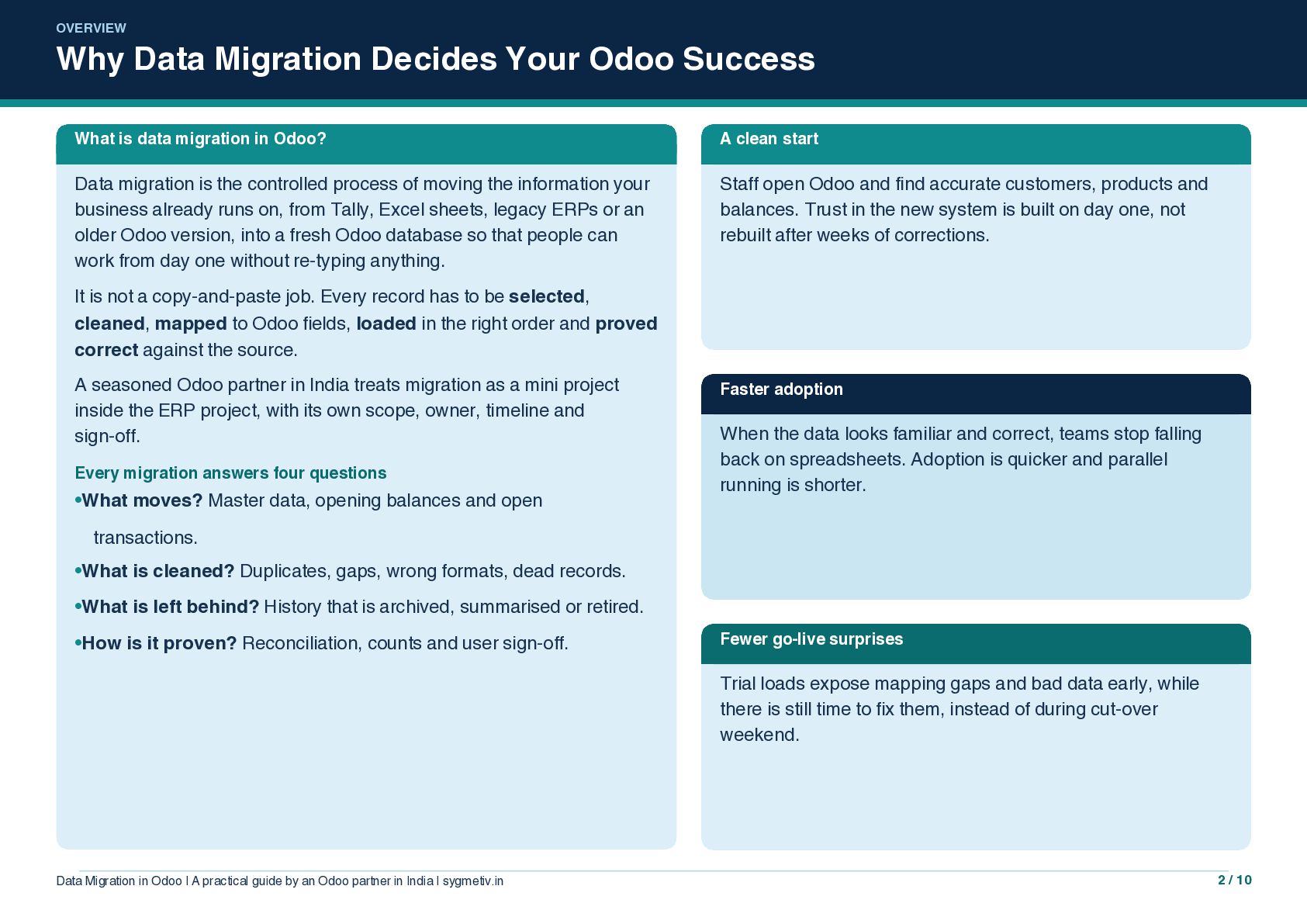
  2. OVERVIEW Why Data Migration Decides Your Odoo Success What is

    data migration in Odoo? A clean start Data migration is the controlled process of moving the information your business already runs on, from Tally, Excel sheets, legacy ERPs or an older Odoo version, into a fresh Odoo database so that people can work from day one without re-typing anything. Staff open Odoo and find accurate customers, products and balances. Trust in the new system is built on day one, not rebuilt after weeks of corrections. It is not a copy-and-paste job. Every record has to be selected, cleaned, mapped to Odoo fields, loaded in the right order and proved correct against the source. A seasoned Odoo partner in India treats migration as a mini project inside the ERP project, with its own scope, owner, timeline and sign-off. Every migration answers four questions •What moves? Master data, opening balances and open Faster adoption When the data looks familiar and correct, teams stop falling back on spreadsheets. Adoption is quicker and parallel running is shorter. transactions. •What is cleaned? Duplicates, gaps, wrong formats, dead records. •What is left behind? History that is archived, summarised or retired. •How is it proven? Reconciliation, counts and user sign-off. Fewer go-live surprises Trial loads expose mapping gaps and bad data early, while there is still time to fix them, instead of during cut-over weekend. Data Migration in Odoo | A practical guide by an Odoo partner in India | sygmetiv.in 2 / 10
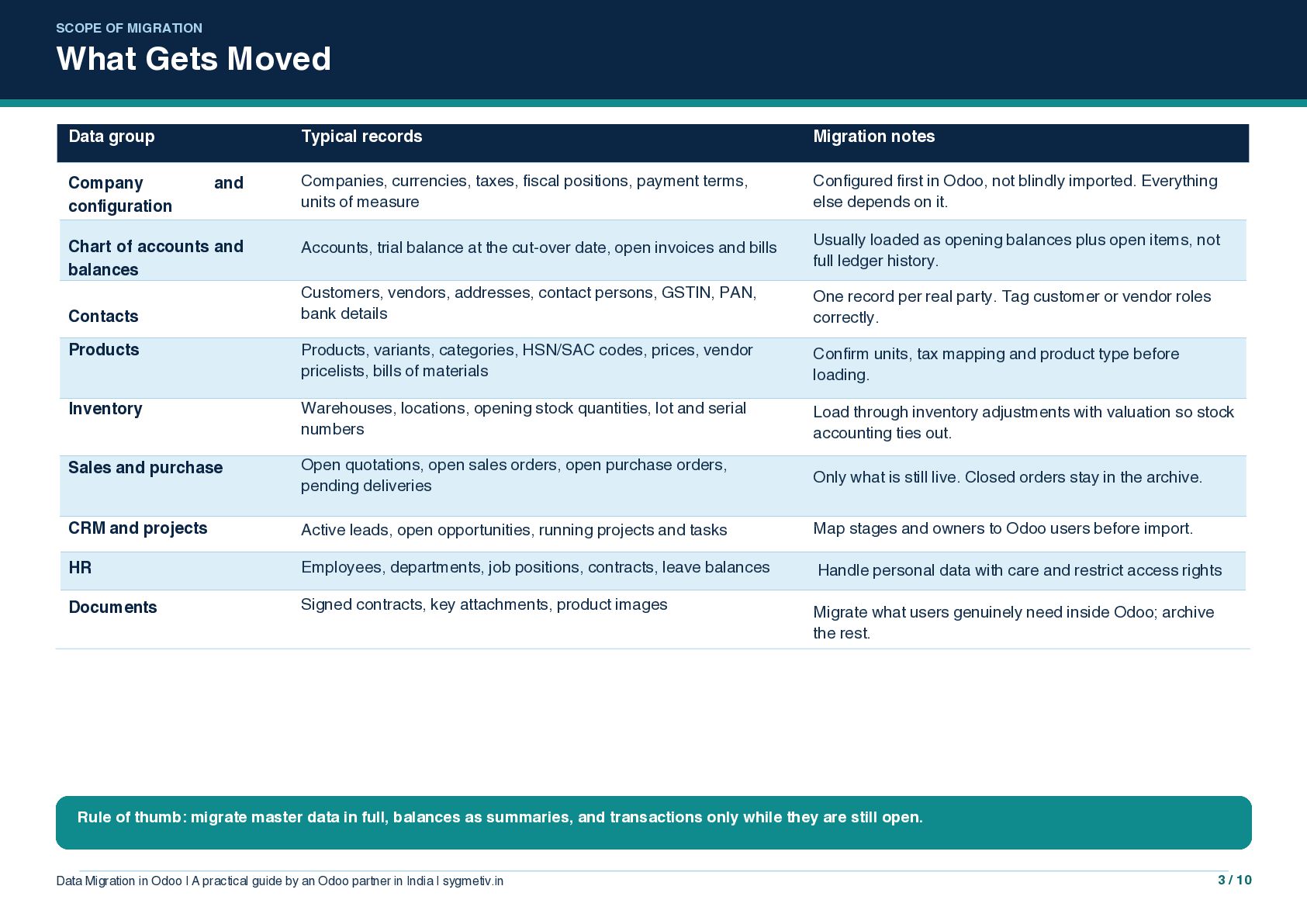
  3. SCOPE OF MIGRATION What Gets Moved Data group Typical records

    Migration notes Companies, currencies, taxes, fiscal positions, payment terms, units of measure Configured first in Odoo, not blindly imported. Everything else depends on it. Accounts, trial balance at the cut-over date, open invoices and bills Usually loaded as opening balances plus open items, not full ledger history. Customers, vendors, addresses, contact persons, GSTIN, PAN, bank details One record per real party. Tag customer or vendor roles correctly. Products Products, variants, categories, HSN/SAC codes, prices, vendor pricelists, bills of materials Confirm units, tax mapping and product type before loading. Inventory Warehouses, locations, opening stock quantities, lot and serial numbers Load through inventory adjustments with valuation so stock accounting ties out. Sales and purchase Open quotations, open sales orders, open purchase orders, pending deliveries Only what is still live. Closed orders stay in the archive. CRM and projects Active leads, open opportunities, running projects and tasks Map stages and owners to Odoo users before import. HR Employees, departments, job positions, contracts, leave balances Handle personal data with care and restrict access rights Documents Signed contracts, key attachments, product images Migrate what users genuinely need inside Odoo; archive the rest. Company configuration and Chart of accounts and balances Contacts Rule of thumb: migrate master data in full, balances as summaries, and transactions only while they are still open. Data Migration in Odoo | A practical guide by an Odoo partner in India | sygmetiv.in 3 / 10
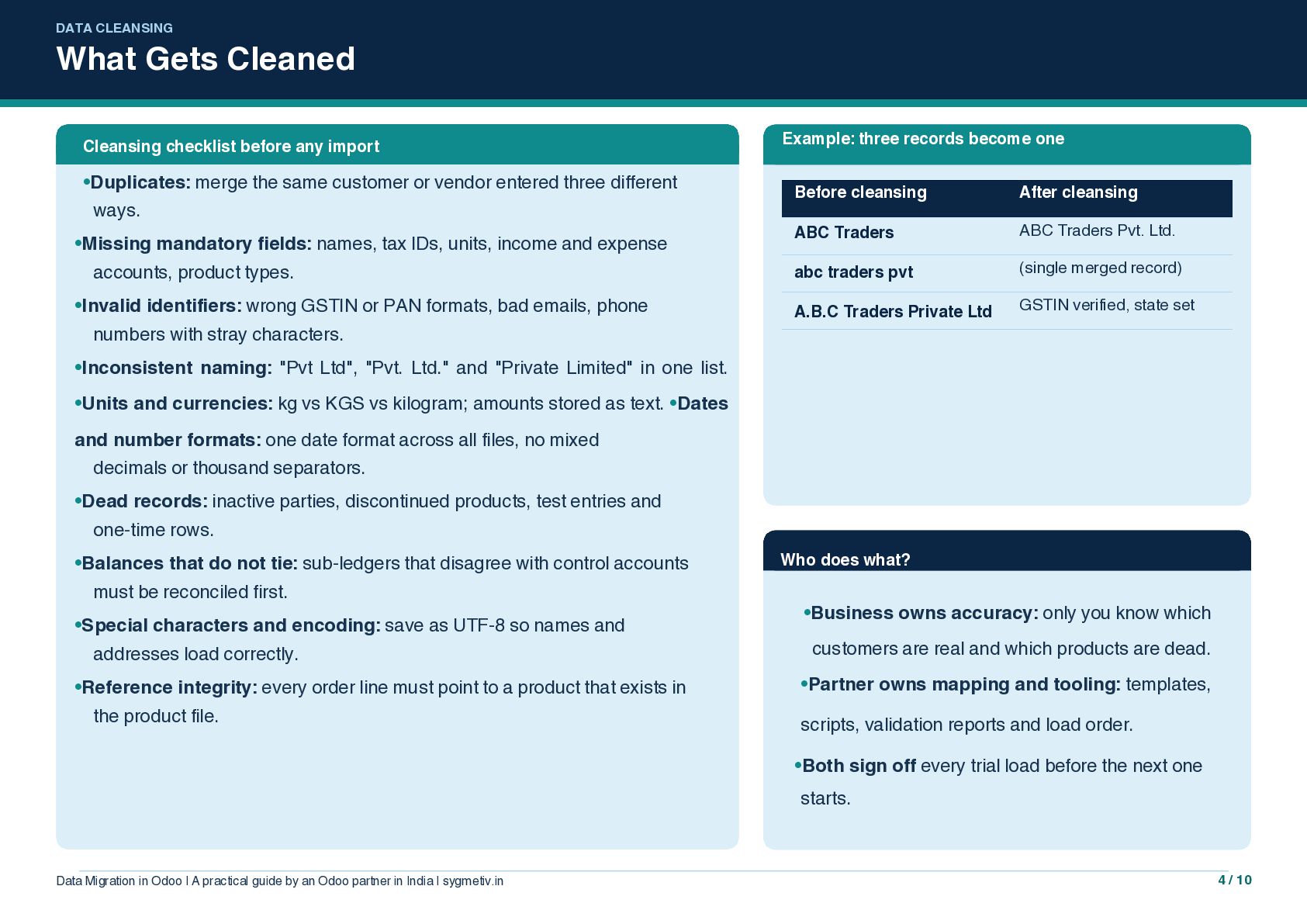
  4. DATA CLEANSING What Gets Cleaned Cleansing checklist before any import

    •Duplicates: merge the same customer or vendor entered three different ways. •Missing mandatory fields: names, tax IDs, units, income and expense accounts, product types. •Invalid identifiers: wrong GSTIN or PAN formats, bad emails, phone Example: three records become one Before cleansing After cleansing ABC Traders ABC Traders Pvt. Ltd. abc traders pvt (single merged record) A.B.C Traders Private Ltd GSTIN verified, state set numbers with stray characters. •Inconsistent naming: "Pvt Ltd", "Pvt. Ltd." and "Private Limited" in one list. •Units and currencies: kg vs KGS vs kilogram; amounts stored as text. •Dates and number formats: one date format across all files, no mixed decimals or thousand separators. •Dead records: inactive parties, discontinued products, test entries and one-time rows. •Balances that do not tie: sub-ledgers that disagree with control accounts must be reconciled first. •Special characters and encoding: save as UTF-8 so names and addresses load correctly. •Reference integrity: every order line must point to a product that exists in the product file. Who does what? •Business owns accuracy: only you know which customers are real and which products are dead. •Partner owns mapping and tooling: templates, scripts, validation reports and load order. •Both sign off every trial load before the next one starts. Data Migration in Odoo | A practical guide by an Odoo partner in India | sygmetiv.in 4 / 10
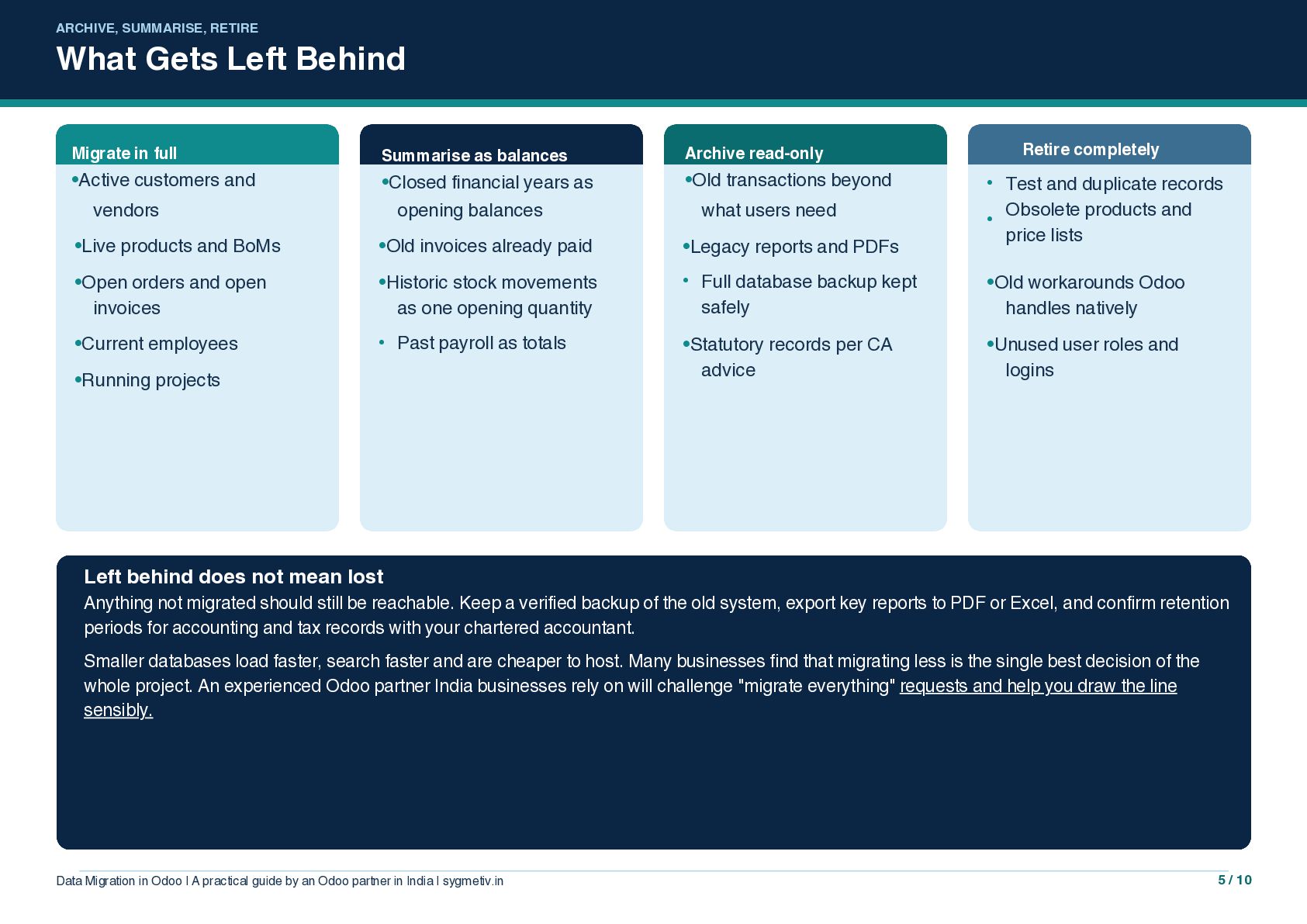
  5. ARCHIVE, SUMMARISE, RETIRE What Gets Left Behind Migrate in full

    •Active customers and Summarise as balances •Closed financial years as vendors •Old transactions beyond opening balances what users need •Live products and BoMs •Old invoices already paid •Legacy reports and PDFs •Open orders and open invoices •Historic stock movements as one opening quantity • •Current employees • •Statutory records per CA advice Past payroll as totals •Running projects Retire completely Archive read-only Full database backup kept safely • Test and duplicate records Obsolete products and • price lists •Old workarounds Odoo handles natively •Unused user roles and logins Left behind does not mean lost Anything not migrated should still be reachable. Keep a verified backup of the old system, export key reports to PDF or Excel, and confirm retention periods for accounting and tax records with your chartered accountant. Smaller databases load faster, search faster and are cheaper to host. Many businesses find that migrating less is the single best decision of the whole project. An experienced Odoo partner India businesses rely on will challenge "migrate everything" requests and help you draw the line sensibly. Data Migration in Odoo | A practical guide by an Odoo partner in India | sygmetiv.in 5 / 10
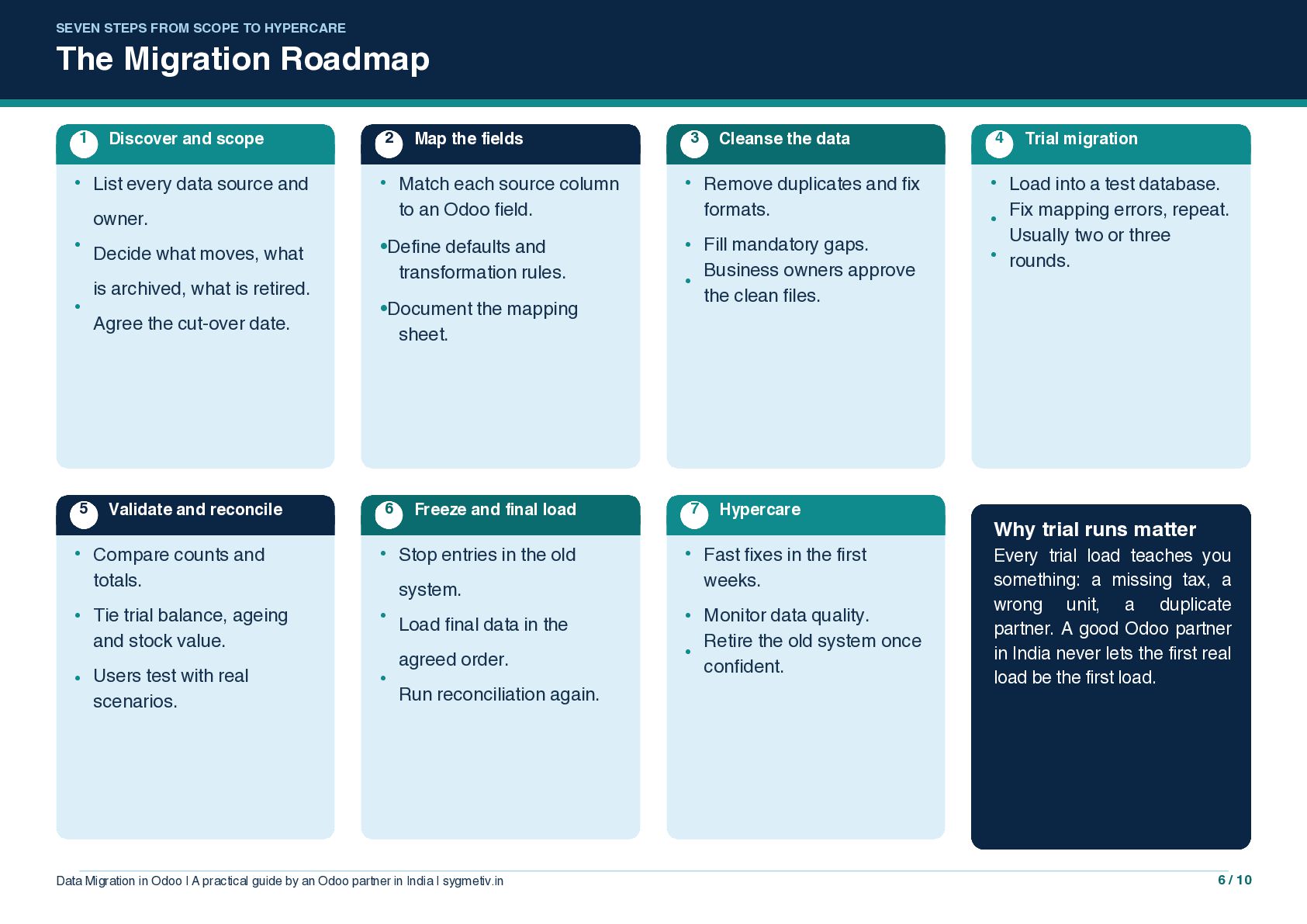
  6. SEVEN STEPS FROM SCOPE TO HYPERCARE The Migration Roadmap 1

    • Discover and scope List every data source and 2 • owner. • • 5 Decide what moves, what is archived, what is retired. Agree the cut-over date. Map the fields Match each source column to an Odoo field. •Define defaults and transformation rules. •Document the mapping sheet. 3 • Fill mandatory gaps. Business owners approve • the clean files. Freeze and final load 7 Compare counts and totals. • Stop entries in the old • • Tie trial balance, ageing and stock value. • • Users test with real scenarios. • • system. Load final data in the agreed order. Run reconciliation again. Data Migration in Odoo | A practical guide by an Odoo partner in India | sygmetiv.in Remove duplicates and fix formats. • 6 Validate and reconcile Cleanse the data • Hypercare Fast fixes in the first weeks. Monitor data quality. Retire the old system once • confident. 4 Trial migration • Load into a test database. Fix mapping errors, repeat. • Usually two or three • rounds. Why trial runs matter Every trial load teaches you something: a missing tax, a wrong unit, a duplicate partner. A good Odoo partner in India never lets the first real load be the first load. 6 / 10
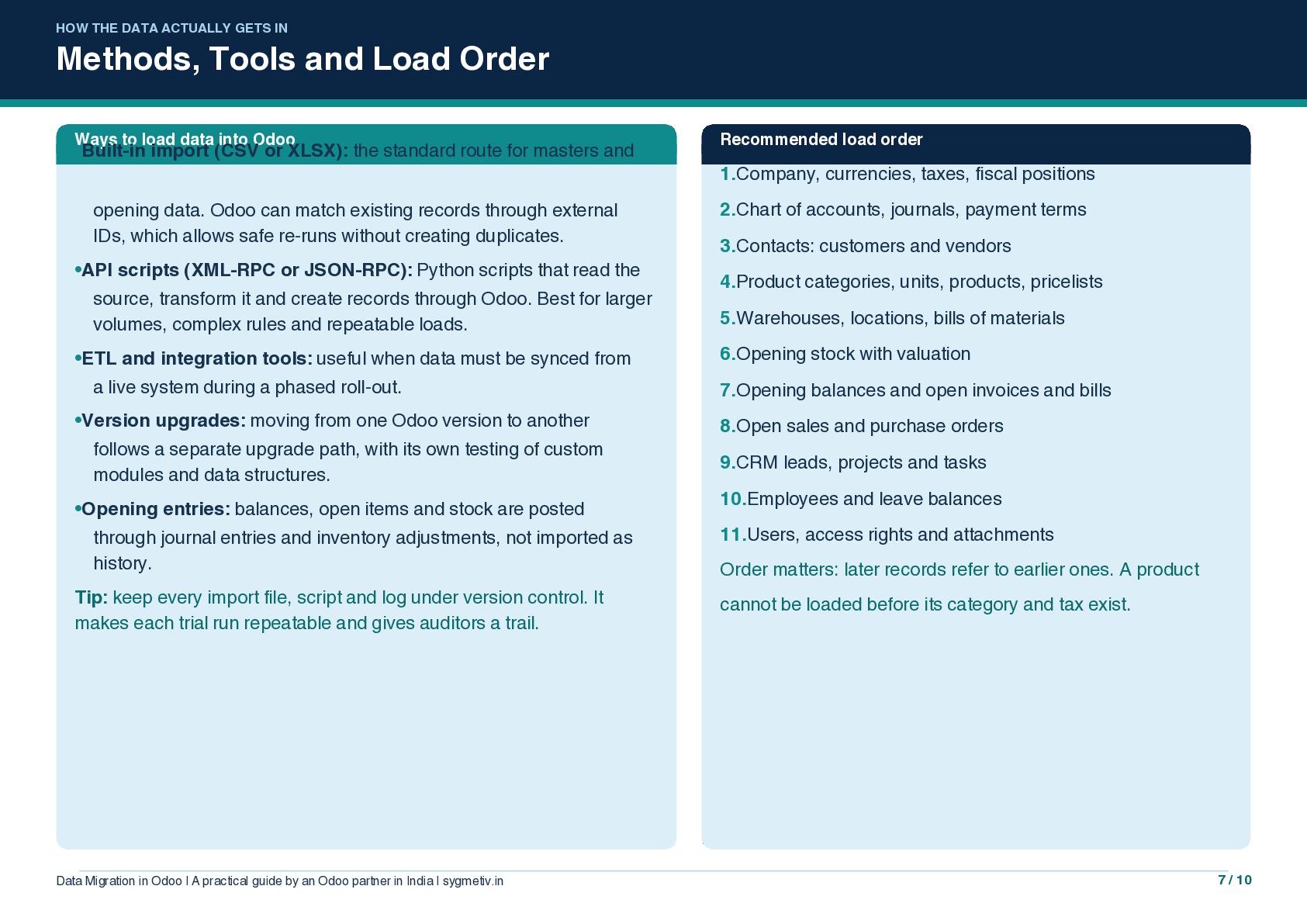
  7. HOW THE DATA ACTUALLY GETS IN Methods, Tools and Load

    Order Ways to load data into Odoo •Built-in import (CSV or XLSX): the standard route for masters and opening data. Odoo can match existing records through external IDs, which allows safe re-runs without creating duplicates. •API scripts (XML-RPC or JSON-RPC): Python scripts that read the source, transform it and create records through Odoo. Best for larger volumes, complex rules and repeatable loads. •ETL and integration tools: useful when data must be synced from a live system during a phased roll-out. •Version upgrades: moving from one Odoo version to another follows a separate upgrade path, with its own testing of custom modules and data structures. •Opening entries: balances, open items and stock are posted through journal entries and inventory adjustments, not imported as history. Tip: keep every import file, script and log under version control. It makes each trial run repeatable and gives auditors a trail. Data Migration in Odoo | A practical guide by an Odoo partner in India | sygmetiv.in Recommended load order 1.Company, currencies, taxes, fiscal positions 2.Chart of accounts, journals, payment terms 3.Contacts: customers and vendors 4.Product categories, units, products, pricelists 5.Warehouses, locations, bills of materials 6.Opening stock with valuation 7.Opening balances and open invoices and bills 8.Open sales and purchase orders 9.CRM leads, projects and tasks 10.Employees and leave balances 11.Users, access rights and attachments Order matters: later records refer to earlier ones. A product cannot be loaded before its category and tax exist. 7 / 10
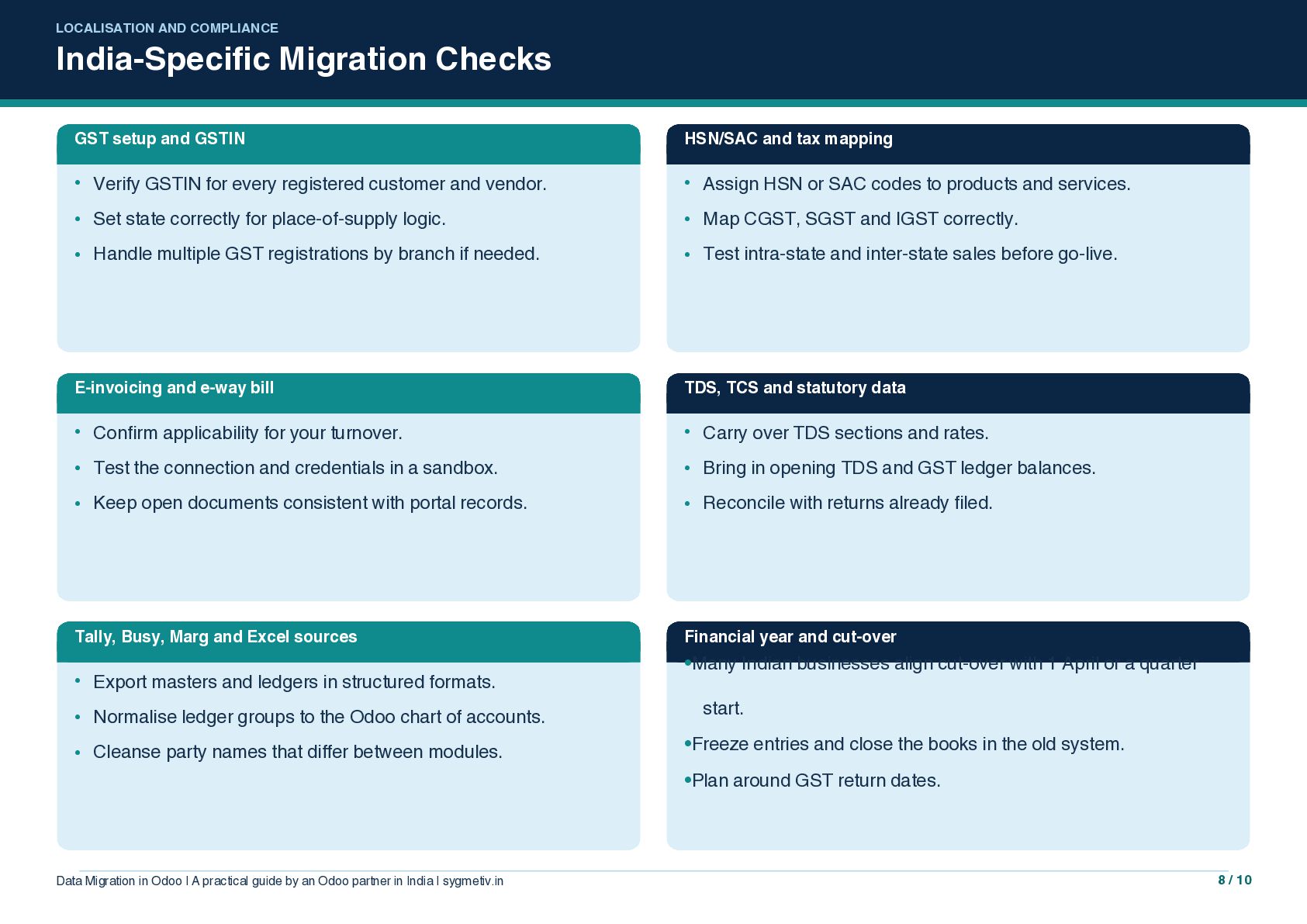
  8. LOCALISATION AND COMPLIANCE India-Specific Migration Checks GST setup and GSTIN

    HSN/SAC and tax mapping • Verify GSTIN for every registered customer and vendor. • Assign HSN or SAC codes to products and services. • Set state correctly for place-of-supply logic. • Map CGST, SGST and IGST correctly. • Handle multiple GST registrations by branch if needed. • Test intra-state and inter-state sales before go-live. E-invoicing and e-way bill TDS, TCS and statutory data • Confirm applicability for your turnover. • Carry over TDS sections and rates. • Test the connection and credentials in a sandbox. • Bring in opening TDS and GST ledger balances. • Keep open documents consistent with portal records. • Reconcile with returns already filed. Tally, Busy, Marg and Excel sources • Export masters and ledgers in structured formats. • Normalise ledger groups to the Odoo chart of accounts. • Cleanse party names that differ between modules. Financial year and cut-over •Many Indian businesses align cut-over with 1 April or a quarter start. •Freeze entries and close the books in the old system. •Plan around GST return dates. Data Migration in Odoo | A practical guide by an Odoo partner in India | sygmetiv.in 8 / 10
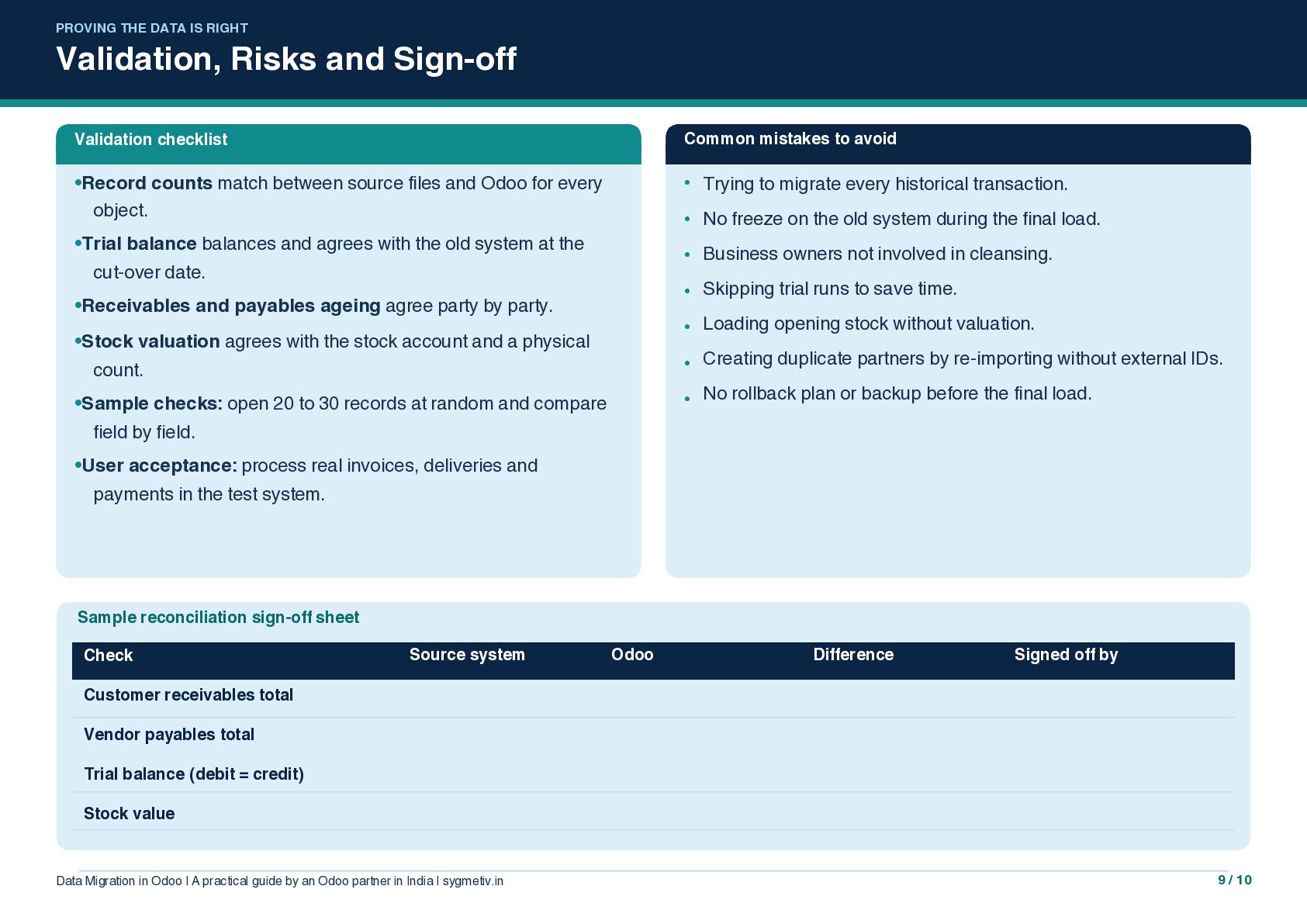
  9. PROVING THE DATA IS RIGHT Validation, Risks and Sign-off Validation

    checklist Common mistakes to avoid •Record counts match between source files and Odoo for every object. • Trying to migrate every historical transaction. • No freeze on the old system during the final load. • Business owners not involved in cleansing. • Skipping trial runs to save time. • Loading opening stock without valuation. • Creating duplicate partners by re-importing without external IDs. • No rollback plan or backup before the final load. •Trial balance balances and agrees with the old system at the cut-over date. •Receivables and payables ageing agree party by party. •Stock valuation agrees with the stock account and a physical count. •Sample checks: open 20 to 30 records at random and compare field by field. •User acceptance: process real invoices, deliveries and payments in the test system. Sample reconciliation sign-off sheet Check Source system Odoo Difference Signed off by Customer receivables total Vendor payables total Trial balance (debit = credit) Stock value Data Migration in Odoo | A practical guide by an Odoo partner in India | sygmetiv.in 9 / 10
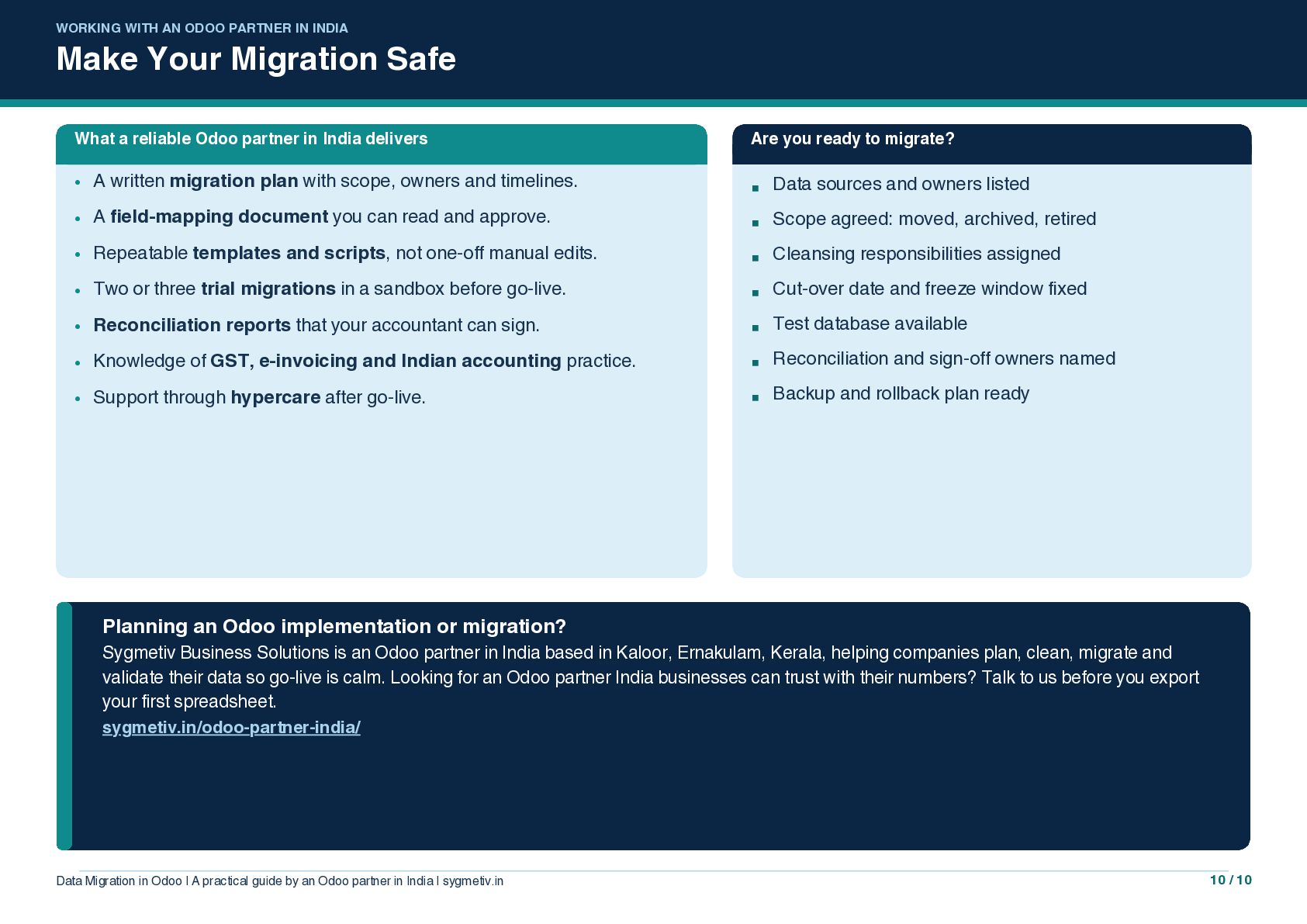
  10. WORKING WITH AN ODOO PARTNER IN INDIA Make Your Migration

    Safe What a reliable Odoo partner in India delivers Are you ready to migrate? • A written migration plan with scope, owners and timelines. ▪ Data sources and owners listed • A field-mapping document you can read and approve. ▪ Scope agreed: moved, archived, retired • Repeatable templates and scripts, not one-off manual edits. ▪ Cleansing responsibilities assigned • Two or three trial migrations in a sandbox before go-live. ▪ Cut-over date and freeze window fixed • Reconciliation reports that your accountant can sign. ▪ Test database available • Knowledge of GST, e-invoicing and Indian accounting practice. ▪ Reconciliation and sign-off owners named • Support through hypercare after go-live. ▪ Backup and rollback plan ready Planning an Odoo implementation or migration? Sygmetiv Business Solutions is an Odoo partner in India based in Kaloor, Ernakulam, Kerala, helping companies plan, clean, migrate and validate their data so go-live is calm. Looking for an Odoo partner India businesses can trust with their numbers? Talk to us before you export your first spreadsheet. sygmetiv.in/odoo-partner-india/ Data Migration in Odoo | A practical guide by an Odoo partner in India | sygmetiv.in 10 / 10