Share
Embed
Test-Driven Infrastructure
Talk introducing Test-Driven Infrastructure tools with a focus on Chef. Given at Bristol DevOps 18th March 2015.

Andy Gale
March 18, 2015
Transcript
87 slides
-
Andy Gale @andygale on Twitter Bristol Rovers fan #UTG Bristol
DevOps Organiser What do you do? Owner and DevOps Consultant at Hello Future -
Hello Future • @hellofutur3 on Twitter • DevOps, Continuous Delivery,
Chef and cloud automation consultancy • Web application development • If you like what you see today we’re hiring Web Developer and a Junior DevOps Consultant/ System Administrator What do we do? -
Infrastructure • Servers • Cloud configuration (security groups, load balancers,
Cloud DNS, IaaS etc) • Switches and other configurable hardware What do you mean by that? -
Topics • What is testing? • Stuff everyone can use
today • Chef & Test-Driven Infrastructure example • Behaviour-driven testing What we’re covering today -
Traditional sysadmin Setting up a website… Test website in browser
Test website in browser Setup website in text editor Fix that issue Fails Success -
Configuration Management Setting up a website… Test website in browser
Test website in browser Create website with configuration management Update DNS -
Test-Driven Infrastructure Run test in code to prove website is
up Setting up a website… Run website test to prove website is down Write test to see if website is up Create website with configuration management -
Test-Driven Infrastructure • With configuration management now you’re writing code
and you should have tests • Tests can be used alongside monitoring to ensure your services remain functioning • Continuous Delivery of your infrastructure code Okay - what are the benefits? -
So how can I test? • Serverspec • Cucumber •
Linting tools: Foodcritic, Rubocop • Behaviour-Driven: Chefspec, rspec-puppet • Integration Tests: Test Kitchen/Kitchen CI Tools you can use to help you test -
• Allows us to connect to existing servers (or localhost)
and check things are there. • Things can be packages, files, processes listening on ports etc. -
$ gem install serverspec Use RVM/Bundler/ChefDK whatever Ruby thing you
want Getting started -
$ serverspec-init Select OS type: 1) UN*X 2) Windows Select
number: 1 Select a backend type: 1) SSH 2) Exec (local) Select number: 1 Vagrant instance y/n: n Input target host name: bilbo.hellofutu.re + spec/ + spec/bilbo.hellofutu.re/ + spec/bilbo.hellofutu.re/sample_spec.rb + spec/spec_helper.rb + Rakefile + .rspec Getting started -
require 'spec_helper' describe package('httpd'), :if => os[:family] == 'redhat' do
it { should be_installed } end describe package('apache2'), :if => os[:family] == 'ubuntu' do it { should be_installed } end describe service('httpd'), :if => os[:family] == 'redhat' do it { should be_enabled } it { should be_running } end describe service('apache2'), :if => os[:family] == 'ubuntu' do it { should be_enabled } it { should be_running } end describe service('org.apache.httpd'), :if => os[:family] == 'darwin' do it { should be_enabled } it { should be_running } end describe port(80) do it { should be_listening } end Getting started - Apache example 1/serverspec/spec/bilbo.hellofutu.re/sample_spec.rb -
/Users/andy/.rvm/rubies/ruby-2.1.5/bin/ruby -I/Users/andy/.rvm/gems/ruby-2.1.5@tdi/gems/rspec-support-3.2.2/lib:/Users/andy/.rvm/gems/ruby-2.1.5@tdi/gems/rspec- core-3.2.2/lib /Users/andy/.rvm/gems/ruby-2.1.5@tdi/gems/rspec-core-3.2.2/exe/rspec --pattern spec/bilbo.hellofutu.re/\*_spec.rb Package "apache2" should be
installed (FAILED - 1) Service "apache2" should be enabled (FAILED - 2) should be running (FAILED - 3) Port "80" should be listening (FAILED - 4) Failures: 1) Package "apache2" should be installed On host `bilbo.hellofutu.re' Failure/Error: it { should be_installed } expected Package "apache2" to be installed sudo -p 'Password: ' /bin/sh -c dpkg-query\ -f\ \'\$\{Status\}\'\ -W\ apache2\ \|\ grep\ -E\ \'\^\(install\|hold\)\ ok\ installed\$\' # ./spec/bilbo.hellofutu.re/sample_spec.rb:8:in `block (2 levels) in <top (required)>' 2) Service "apache2" should be enabled On host `bilbo.hellofutu.re' Failure/Error: it { should be_enabled } expected Service "apache2" to be enabled sudo -p 'Password: ' /bin/sh -c ls\ /etc/rc3.d/\ \|\ grep\ --\ \'\^S..apache2\'\ \|\|\ grep\ \'start\ on\'\ /etc/init/apache2.conf # ./spec/bilbo.hellofutu.re/sample_spec.rb:17:in `block (2 levels) in <top (required)>' 3) Service "apache2" should be running On host `bilbo.hellofutu.re' Failure/Error: it { should be_running } expected Service "apache2" to be running sudo -p 'Password: ' /bin/sh -c ps\ aux\ \|\ grep\ -w\ --\ apache2\ \|\ grep\ -qv\ grep # ./spec/bilbo.hellofutu.re/sample_spec.rb:18:in `block (2 levels) in <top (required)>' 4) Port "80" should be listening On host `bilbo.hellofutu.re' Failure/Error: it { should be_listening } expected Port "80" to be listening sudo -p 'Password: ' /bin/sh -c netstat\ -tunl\ \|\ grep\ --\ :80\\\ # ./spec/bilbo.hellofutu.re/sample_spec.rb:27:in `block (2 levels) in <top (required)>' Finished in 0.49838 seconds (files took 2.56 seconds to load) 4 examples, 4 failures Failed examples: rspec ./spec/bilbo.hellofutu.re/sample_spec.rb:8 # Package "apache2" should be installed rspec ./spec/bilbo.hellofutu.re/sample_spec.rb:17 # Service "apache2" should be enabled rspec ./spec/bilbo.hellofutu.re/sample_spec.rb:18 # Service "apache2" should be running rspec ./spec/bilbo.hellofutu.re/sample_spec.rb:27 # Port "80" should be listening /Users/andy/.rvm/rubies/ruby-2.1.5/bin/ruby -I/Users/andy/.rvm/gems/ruby-2.1.5@tdi/gems/rspec-support-3.2.2/lib:/Users/andy/.rvm/gems/ruby-2.1.5@tdi/gems/rspec- core-3.2.2/lib /Users/andy/.rvm/gems/ruby-2.1.5@tdi/gems/rspec-core-3.2.2/exe/rspec --pattern spec/bilbo.hellofutu.re/\*_spec.rb failed -
Now run your configuration management tool or set things up
manually if you must Getting started -
$ rake spec /Users/andy/.rvm/rubies/ruby-2.1.5/bin/ruby -I/Users/andy/.rvm/gems/ ruby-2.1.5@tdi/gems/rspec-support-3.2.2/lib:/Users/andy/.rvm/gems/ ruby-2.1.5@tdi/gems/rspec-core-3.2.2/lib /Users/andy/.rvm/gems/ ruby-2.1.5@tdi/gems/rspec-core-3.2.2/exe/rspec --pattern
spec/ bilbo.hellofutu.re/\*_spec.rb Package "apache2" should be installed Service "apache2" should be enabled should be running Port "80" should be listening Finished in 0.41582 seconds (files took 3.65 seconds to load) 4 examples, 0 failures Getting started -
Things you can test for… Getting started bond, bridge, cgroup,
command, cron, default_gateway, file, group, host, iis_app_pool, iis_website, interface, ipfilter, ipnat, iptables, kernel_module, linux_kernel_parameter, lxc, mail_alias, package, php_config, port, ppa, process, routing_table, selinux, service, user, x509_certificate, x509_private_key, windows_feature, windows_registry_key, yumrepo, zfs http://serverspec.org/resource_types.html -
• Behaviour-Driven Development • Ruby ❤️ • Allows more complex
testing • Human readable so perfect for dealing with non technical people and/or customers -
1. Describe behaviour in plain text 2. Write a step
definition in Ruby 3. Run and watch it fail 4. Write code to make the step pass 5. Run again and see the step pass 6. Repeat 2-5 until green like a cuke 7. Repeat 1-6 until the money runs out Steps for success… as the Cumber website says… -
Example - our feature Feature: Web redirects Scenario Outline: Given
the http URL "<http_url>" When a request is made Then the response http_code should be "<http_code>" And I should be redirected to "<redirect_url>" Examples: | http_url | http_code | redirect_url | | http://www.scredible.com/ | 302 | https://scredible.com/ | | https://www.scredible.com/ | 302 | https://scredible.com/ | | http://scredible.com/ | 302 | https://scredible.com/ | | https://scredible.com/ | 200 | <nowhere> | 2/cucumber/features/http.feature -
Example - The Ruby require 'net/http' No need to write
HTTP code in Ruby we’ll just require this -
Example - The Ruby Given the http URL "<http_url>" Given(/^the
http URL "(.*?)"$/) do |http_url| @http_url = http_url end This feature…. Matches this Ruby step definition -
Example - The Ruby When(/^a request is made$/) do @http_code
= 0 uri = URI.parse(@http_url) http = Net::HTTP.new(uri.host, uri.port) if uri.port == 443 http.use_ssl = true end req = Net::HTTP::Get.new(uri.request_uri) res = http.request(req) res_hash = res.to_hash if res_hash.key?('location') @redirect_url = res_hash['location'][0] else @redirect_url = '<nowhere>' end @http_code = res.code end -
Example - The Ruby Then the response http_code should be
"<http_code>" Then(/^the response http_code should be "(.*?)"$/) do | expected_http_code| expect(@http_code).to eq(expected_http_code) end This part of our feature…. Matches this part of our Ruby step definition -
Example - The Ruby And I should be redirected to
"<redirect_url>" And(/^I should be redirected to "(.*?)"$/) do |expected| expect(@redirect_url).to eq(expected) end This part of our feature…. Matches this part of our Ruby step definition And of course we loop through each of the examples 2/cucumber/features/step_definitions/http_features.rb -
Example - The output $ cucumber Feature: Web redirects Scenario
Outline: Given the http URL "<http_url>" When a request is made Then the response http_code should be "<http_code>" And I should be redirected to "<redirect_url>" Examples: | http_url | http_code | redirect_url | | http://www.scredible.com/ | 302 | https://scredible.com/ | | https://www.scredible.com/ | 302 | https://scredible.com/ | | http://scredible.com/ | 302 | https://scredible.com/ | | https://scredible.com/ | 200 | <nowhere> | 4 scenarios (4 passed) 16 steps (16 passed) 0m2.727s -
• SSL testing (POODLE, Heartbleed.. the new one coming tomorrow)
• SSL certificate expiry • DNS records and Domain expiry • …. and testing complex configurations At Hello Future we also use Cucumber tests for simple customer readable tests -
The Chef development pipeline we use and recommend at Hello
Future Foodcritic Chefspec Rubocop Test Kitchen -
Foodcritic • Style • Correctness • Syntax • Best practices
• Common mistakes • Deprecations Foodcritic checks your cookbooks for the following -
Rubocop • Consistent style • Syntax • Best practices •
Cyclomatic complexity, etc Rubocop checks your Ruby for the following -
Chefspec • Test messages instead of actions • Test over
many different types of platforms and versions extremely quickly • Super fast feedback Allows you to test the behaviour of your cookbooks -
Test Kitchen • Supports Chef, Puppet, Ansible etc etc •
Supports Vagrant, EC2, LXC, Docker etc etc • Testing with Serverspec, Bats etc Test you recipe against operating systems -
• A cookbook to install Varnish • We’ll use all
the tools I’ve mentioned TDI Example -
• Install ChefDK because life is too short to piss
around with RVM and Gemfiles when you don’t have to https://downloads.chef.io/chef-dk/ TDI Example -
TDI Example $ chef exec knife cookbook create hf-varnish -o
. Make a skeleton cookbook WARNING: No knife configuration file found ** Creating cookbook hf-varnish in /Users/andy/Work/tdi ** Creating README for cookbook: hf-varnish ** Creating CHANGELOG for cookbook: hf-varnish ** Creating metadata for cookbook: hf-varnish -
TDI Example $ chef exec foodcritic -f any . Let’s
run Foodcritic The empty output from Foodcritic means everything is fine. And you would hope so as there isn’t any code to critique yet! -
$ chef exec rubocop Inspecting 4 files C... Offenses: metadata.rb:1:5:
C: Put one space between the method name and the first argument. name 'hf-varnish' ^^^^^^^^^^^^^ metadata.rb:2:11: C: Put one space between the method name and the first argument. maintainer 'Hello Future' ^^^^^^^ metadata.rb:4:8: C: Put one space between the method name and the first argument. license 'All rights reserved' ^^^^^^^^^^ metadata.rb:5:12: C: Put one space between the method name and the first argument. description 'Installs/Configures hf-varnish' ^^^^^^ metadata.rb:7:8: C: Put one space between the method name and the first argument. version '0.1.0' ^^^^^^^^^^ 4 files inspected, 5 offenses detected Let’s run Rubocop -
3/hf-varnish/.rubocop.yml Create .rubocop.yml in your text editor AlignParameters: Enabled: false
Encoding: Enabled: false HashSyntax: Enabled: false LineLength: Enabled: false MethodLength: Max: 30 SingleSpaceBeforeFirstArg: Enabled: false -
$ chef exec rubocop Inspecting 4 files .... 4 files
inspected, no offenses detected Let’s run Rubocop -
require 'chefspec' describe 'hf-varnish::default' do let(:chef_run) do ChefSpec::SoloRunner.new(platform: 'ubuntu', version:
'14.04') end it 'should install the varnish package' do chef_run.converge(described_recipe) expect(chef_run).to install_package('varnish') end end 3/hf-varnish/spec/default_spec.rb Create spec/default_spec.rb in your text editor -
$ chef exec rspec --color --format progress . F Failures:
1) hf-varnish::default should install the varnish package Failure/Error: expect(chef_run).to install_package('varnish') expected "package[varnish]" with action :install to be in Chef run. Other package resources: # ./spec/default_spec.rb:10:in `block (2 levels) in <top (required)>' Finished in 0.01204 seconds (files took 2.4 seconds to load) 1 example, 1 failure Failed examples: rspec ./spec/default_spec.rb:8 # hf-varnish::default should install the varnish package We’ll now run Chefspec and confirm our test fails -
require 'serverspec' set :backend, :exec describe package('varnish') do it {
should be_installed } end 3/hf-varnish/test/integration/default/serverspec/default_spec.rb Create test/integration/default/serverspec/default_spec.rb in your text editor -
3/hf-varnish/.kitchen.yml Create .kitchen.yml in your text editor --- driver: name:
vagrant provisioner: name: chef_solo platforms: - name: ubuntu-14.04 suites: - name: default run_list: - recipe[hf-varnish::default] -
$ chef exec kitchen converge We’ll now run Test Kitchen
and confirm our test fails Transferring files to <default-ubuntu-1404> Starting Chef Client, version 12.1.1 Compiling Cookbooks... Converging 0 resources Running handlers: Running handlers complete Chef Client finished, 0/0 resources updated in 6.452326869 seconds Finished converging <default-ubuntu-1404> (0m58.86s). -----> Kitchen is finished. (3m0.46s) -
$ chef exec kitchen verify We’ll now run Test Kitchen
and confirm our test fails -----> serverspec installed (version 2.10.1) /opt/chef/embedded/bin/ruby -I/tmp/busser/suites/serverspec -I/tmp/busser/ gems/gems/rspec-support-3.2.2/lib:/tmp/busser/gems/gems/rspec-core-3.2.2/lib /opt/ chef/embedded/bin/rspec --pattern /tmp/busser/suites/serverspec/\*\*/\*_spec.rb -- color --format documentation --default-path /tmp/busser/suites/serverspec Package "varnish" should be installed (FAILED - 1) Failures: 1) Package "varnish" should be installed Failure/Error: it { should be_installed } expected Package "varnish" to be installed /bin/sh -c dpkg-query\ -f\ \'\$\{Status\}\'\ -W\ varnish\ \|\ grep\ - \ \'\^\(install\|hold\)\ ok\ installed\$\' dpkg-query: no packages found matching varnish # /tmp/busser/suites/serverspec/default_spec.rb:6:in `block (2 levels) in <top (required)>' Finished in 0.12083 seconds (files took 0.29726 seconds to load) 1 example, 1 failure -
# # Cookbook Name:: hf-varnish # Recipe:: default # package
'varnish' do action :install end 3/hf-varnish/recipes/default.rb Create recipes/default.rb in your text editor -
# # Cookbook Name:: hf-varnish # Recipe:: default # package
'varnish' Create recipes/default.rb in your text editor -
$ chef exec foodcritic -f any . Let’s test our
cookbook $ chef exec rubocop Inspecting 4 files .... 4 files inspected, no offenses detected $ chef exec rspec --color --format progress . Finished in 0.01458 seconds (files took 1.92 seconds to load) 1 example, 0 failures -
$ chef exec kitchen test Let’s test our cookbook Recipe:
hf-varnish::default * apt_package[varnish] action install - install version 3.0.5-2 of package varnish Running handlers: Running handlers complete Chef Client finished, 1/1 resources updated in 20.503556761 seconds serverspec installed (version 2.10.1) Package "varnish" should be installed Finished in 0.19874 seconds (files took 0.50069 seconds to load) 1 example, 0 failures Finished verifying <default-ubuntu-1404> (0m18.79s). … -
Test Kitchen workflow $ chef exec kitchen converge $ chef
exec kitchen verify $ chef exec kitchen converge $ chef exec kitchen verify $ chef exec kitchen test -
require 'chefspec' describe 'hf-varnish::default' do %w(12.04 14.04).each do |version| let(:chef_run)
do ChefSpec::SoloRunner.new(platform: 'ubuntu', version: version) end it 'should install the varnish package' do chef_run.converge(described_recipe) expect(chef_run).to install_package('varnish') end end end 4/hf-varnish/spec/default_spec.rb Create spec/default_spec.rb in your text editor -
4/hf-varnish/.kitchen.yml Create .kitchen.yml in your text editor --- driver: name:
vagrant provisioner: name: chef_solo platforms: - name: ubuntu-12.04 - name: ubuntu-14.04 suites: - name: default run_list: - recipe[hf-varnish::default] -
$ chef exec foodcritic -f any . Let’s test our
cookbook again! $ chef exec rubocop Inspecting 4 files .... 4 files inspected, no offenses detected $ chef exec rspec --color --format progress .. Finished in 0.03363 seconds (files took 3.21 seconds to load) 2 examples, 0 failures -
$ chef exec kitchen test Let’s test our cookbook Recipe:
hf-varnish::default * apt_package[varnish] action install - install version 3.0.2-1ubuntu0.1 of package varnish Package "varnish" should be installed Finished in 0.1282 seconds (files took 0.30204 seconds to load) 1 example, 0 failures … -
$ chef exec kitchen test Let’s test our cookbook Recipe:
hf-varnish::default * apt_package[varnish] action install - install version 3.0.5-2 of package varnish Package "varnish" should be installed Finished in 0.10598 seconds (files took 0.28897 seconds to load) 1 example, 0 failures … -
if node['platform'] == 'centos' ver = node['platform_version'].to_i if ver ==
6 rpm_url = 'https://repo.varnish-cache.org/redhat/varnish-3.0.el6.rpm' else fail "#{ver} is an unsupported version of centos" end path = File.join(Chef::Config[:file_cache_path], '/varnish-3.0.rpm') remote_file path do source rpm_url action :create_if_missing end rpm_package 'varnish-rpm' do source rpm_url action :install end end package 'varnish' do action :install end 5/hf-varnish/recipes/default.rb Create recipes/default.rb in your text editor -
require 'chefspec' platforms = { 'ubuntu' => %w(12.04 14.04), 'centos'
=> %w(6.6) } describe 'hf-varnish::default' do platforms.each do |platform, versions| versions.each do |version| context "on #{platform}-#{version}" do let(:chef_run) do ChefSpec::SoloRunner.new(platform: platform, version: version, file_cache_path: '/tmp') end 5/hf-varnish/spec/default_spec.rb Create spec/default_spec.rb in your text editor -
if platform == 'centos' it 'should download the repo rpm'
do chef_run.converge(described_recipe) expect(chef_run).to create_remote_file_if_missing('/tmp/ varnish-3.0.rpm') end it 'should install the rpm' do chef_run.converge(described_recipe) expect(chef_run).to install_rpm_package('varnish-rpm') end end it 'should install the varnish package' do chef_run.converge(described_recipe) expect(chef_run).to install_package('varnish') end end end end end 5/hf-varnish/spec/default_spec.rb Create spec/default_spec.rb in your text editor -
5/hf-varnish/.kitchen.yml Update .kitchen.yml in your text editor --- driver: name:
vagrant provisioner: name: chef_solo platforms: - name: ubuntu-12.04 - name: ubuntu-14.04 - name: centos-6.6 suites: - name: default run_list: - recipe[hf-varnish::default] -
require 'serverspec' set :backend, :exec describe package('varnish-release'), :if => os[:family]
== 'redhat' do it { should be_installed } end describe package('varnish') do it { should be_installed } end 5/hf-varnish/test/integration/default/serverspec/default_spec.rb Create test/integration/default/serverspec/default_spec.rb in your text editor -
$ chef exec foodcritic -f any . Let’s test our
cookbook again! $ chef exec rubocop Inspecting 4 files .... 4 files inspected, no offenses detected $ chef exec rspec --color --format progress ..... Finished in 0.11968 seconds (files took 2.81 seconds to load) 5 examples, 0 failures -
$ chef exec kitchen test Let’s test our cookbook -
update content in file /tmp/kitchen/cache/varnish-3.0.rpm from none to 32d6d5 - restore selinux security context - install version 3.0-1.el6 of package varnish-rpm - install version 3.0.6-1.el6 of package varnish Package "varnish-release" should be installed Package "varnish" should be installed … -
#!/bin/sh set -e chef exec foodcritic -f any . echo
chef exec rubocop echo chef exec rspec --color --format progress echo chef exec kitchen test 5/hf-varnish/spec/default_spec.rb And now we introduce the test.sh file I like to use…. -
Continuous Delivery of infrastructure code • Individual Git repositories for
each cookbook • Use many small cookbooks that do one thing so are easy to test • Use wrapper cookbook to collate individual cookbooks per application • Force all cookbooks to be uploaded to Chef server by Jenkins; Jenkins is the gatekeeper This works for Hello Future but the best solution may be different for your business -
Continuous Delivery of infrastructure code Write code Push to Git
Jenkins job fires via Git hook Failure Jenkins uploads to Chef Server Use on staging Success -
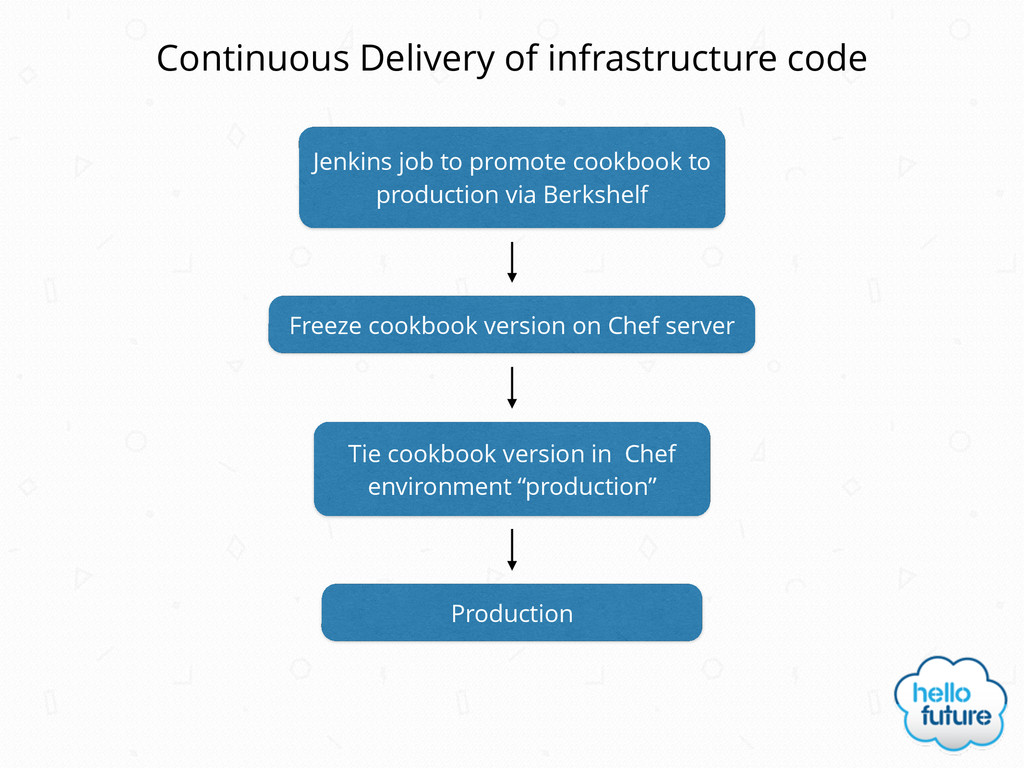
Continuous Delivery of infrastructure code Jenkins job to promote cookbook
to production via Berkshelf Freeze cookbook version on Chef server Tie cookbook version in Chef environment “production” Production -
Chef training • Day 1 Getting Started with Chef
and cookbook development • Day 2 Chef customer resources, patterns and best practices and testing • Day 3 Testing and setting up a Chef Continuous Delivery pipeline Hello Future will be holding two or three day Chef training course later in the year Talk to Andy if you’re interested -
Hello Future • We’re hiring for a Web Developer and
a Junior DevOps Consultant/System Administrator Don’t forget… -
Hello Future • And of course if you need help
with any of this we’re available a very reasonable consultancy rates! Don’t forget…
 andygale
 nejumi
 oidfj
 bengo4com
 oracle4engineer
 sansantech
 pipepasta
 nsatoh
 ama_ch
 wind111
 say_no_w
 maguroalternative
 masasuzu
 lemiorhan
 sferik
 keithpitt
 sergeychernyshev
 aleyda
 ammeep
 minecr
 bluesmoon
 techseoconnect
 dougneiner
 eileencodes