Upgrade to Pro — share decks privately, control downloads, hide ads and more …

Connect long work across sessions (Keep the spe...

Connect long work across sessions (Keep the spec, plan, and status in files) | Learn Harness Engineering with Kiro 09

When an AI agent works on a long task, no session remembers the last one's conversation and a summary drops details, so this Level 300 deck shows how to keep the spec, plan, runbook, and status in files, read them at the start of each session, do one block of the plan, and hand over a clean state. It uses real screens of Kiro CLI working through the plan of a small booking app over two sessions, with a Session Start hook that runs a smoke test, a Pre Tool Use hook that lets the plan change only its marks, and hooks before and after compaction. This is deck 09 (Run the loop pillar) of the "Learn Harness Engineering with Kiro" series.

Avatar for Riku INADA

Riku INADA PRO

November 11, 2026

More Decks by Riku INADA

Other Decks in Technology

Transcript

  1. Learn Harness Engineering with Kiro Run the loop Level 300

    Connect long work across sessions Keep the spec, plan, and status in files 09 As of November 2026 November 2026 Riku Inada Amazon Web Services Japan + Kiro + Harness Engineering © 2026, Amazon Web Services, Inc. or its affiliates. All rights reserved. 1
  2. Introduction About me Riku Inada Amazon Web Services Japan G.K.

    Solutions Architect Works mainly with manufacturing customers Recent work Promoting the AI-Driven Development Life Cycle (AI-DLC) Writing and speaking about Kiro and AWS Amplify © 2026, Amazon Web Services, Inc. or its affiliates. All rights reserved. X @inada_riku Speaker Deck speakerdeck.com/inariku Zenn zenn.dev/inariku GitHub github.com/inariku 2
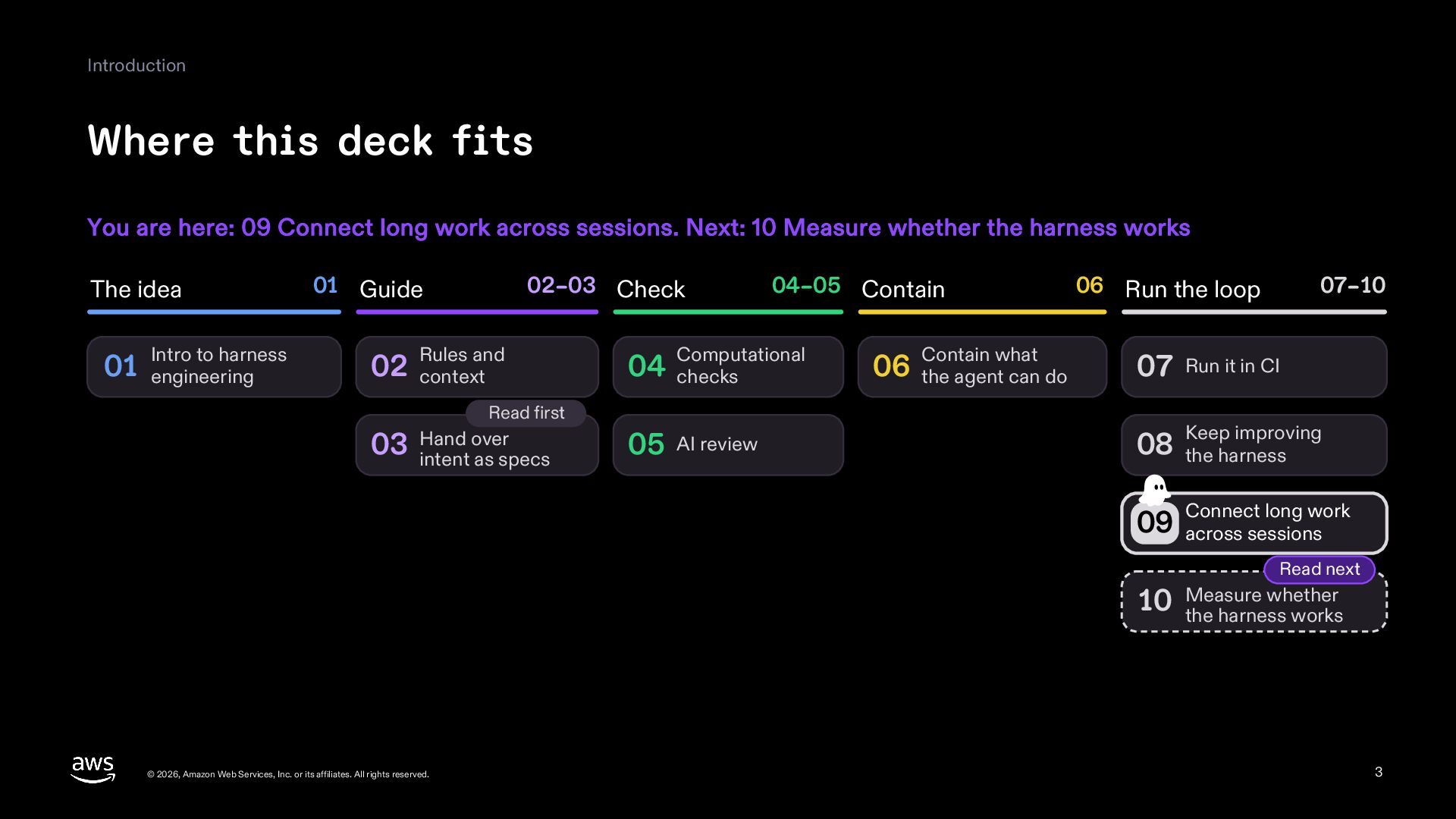
  3. Introduction Where this deck fits You are here: 09 Connect

    long work across sessions. Next: 10 Measure whether the harness works The idea Intro to harness 01 engineering 01 Guide 02–03 Check Rules and 02 context Computational 04 checks Read first over 03 Hand intent as specs 04–05 Contain 05 AI review Contain what 06 the agent can do 06 Run the loop 07–10 07 Run it in CI Keep improving 08 the harness long work 09 Connect across sessions Read next whether 10 Measure the harness works © 2026, Amazon Web Services, Inc. or its affiliates. All rights reserved. 3
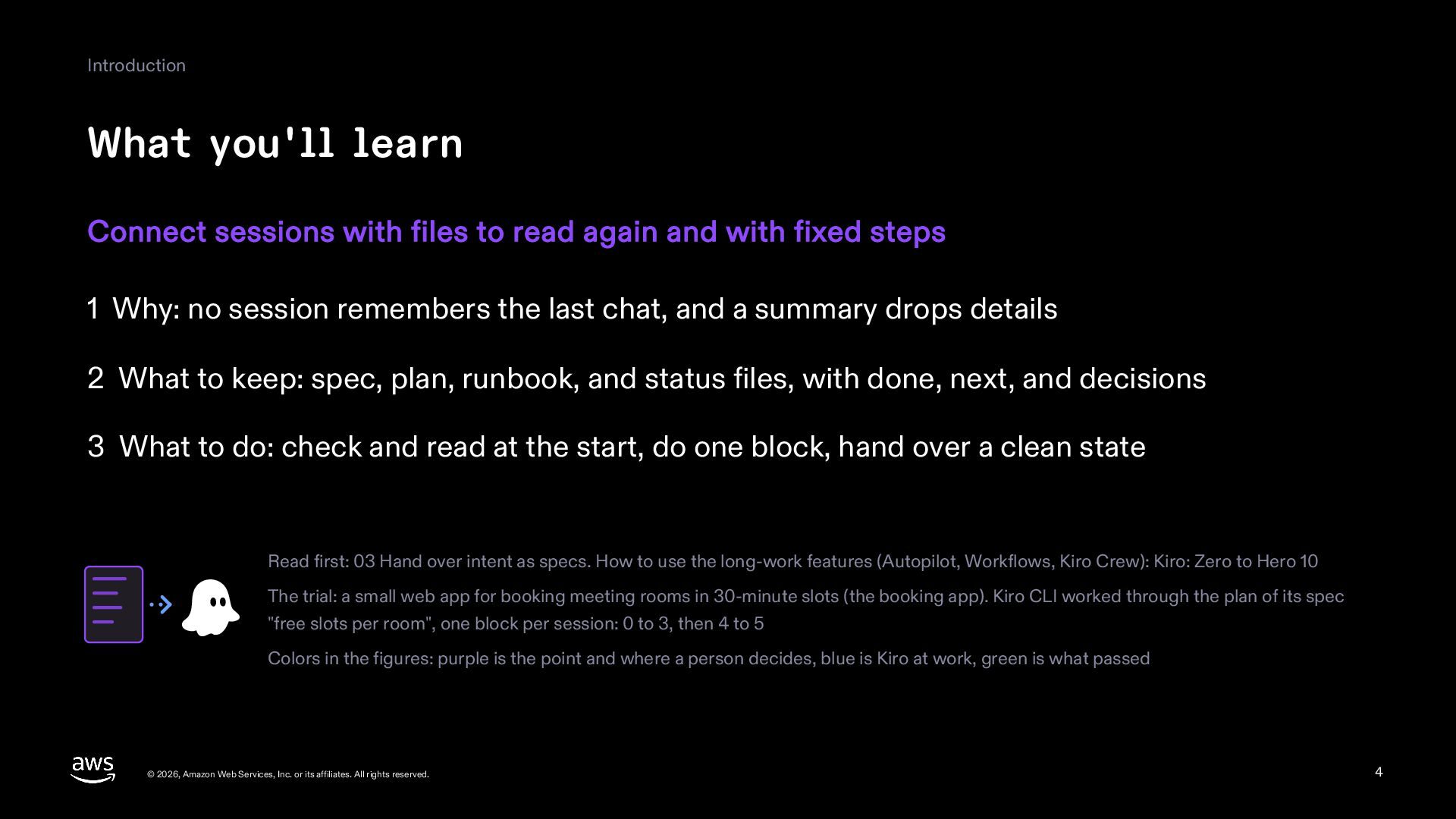
  4. Introduction What you'll learn Connect sessions with files to read

    again and with fixed steps 1 Why: no session remembers the last chat, and a summary drops details 2 What to keep: spec, plan, runbook, and status files, with done, next, and decisions 3 What to do: check and read at the start, do one block, hand over a clean state Read first: 03 Hand over intent as specs. How to use the long-work features (Autopilot, Workflows, Kiro Crew): Kiro: Zero to Hero 10 The trial: a small web app for booking meeting rooms in 30-minute slots (the booking app). Kiro CLI worked through the plan of its spec "free slots per room", one block per session: 0 to 3, then 4 to 5 Colors in the figures: purple is the point and where a person decides, blue is Kiro at work, green is what passed © 2026, Amazon Web Services, Inc. or its affiliates. All rights reserved. 4
  5. Part 1 Why connect sessions © 2026, Amazon Web Services,

    Inc. or its affiliates. All rights reserved. 5
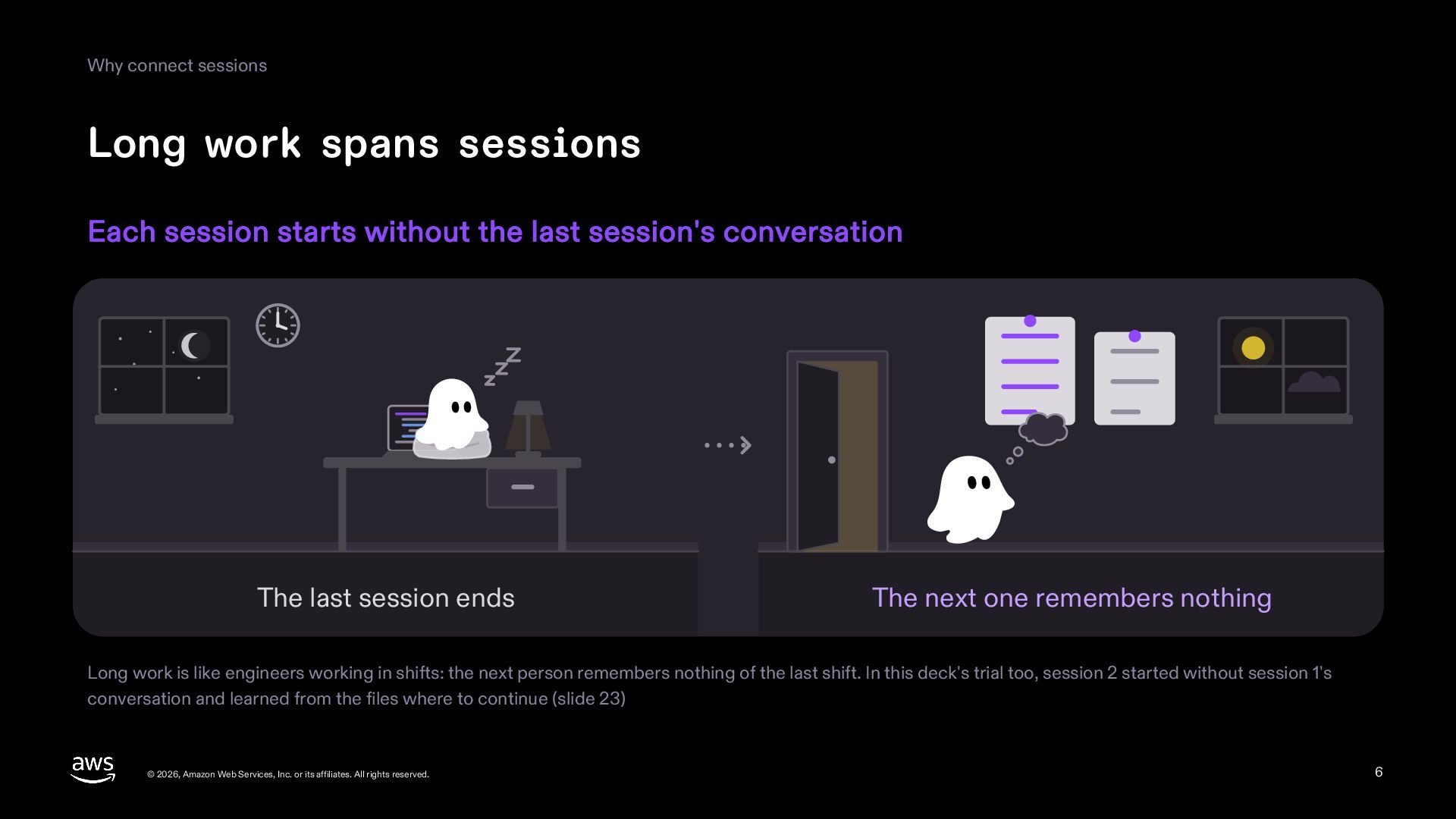
  6. Why connect sessions Long work spans sessions Each session starts

    without the last session's conversation The last session ends The next one remembers nothing Long work is like engineers working in shifts: the next person remembers nothing of the last shift. In this deck's trial too, session 2 started without session 1's conversation and learned from the files where to continue (slide 23) © 2026, Amazon Web Services, Inc. or its affiliates. All rights reserved. 6
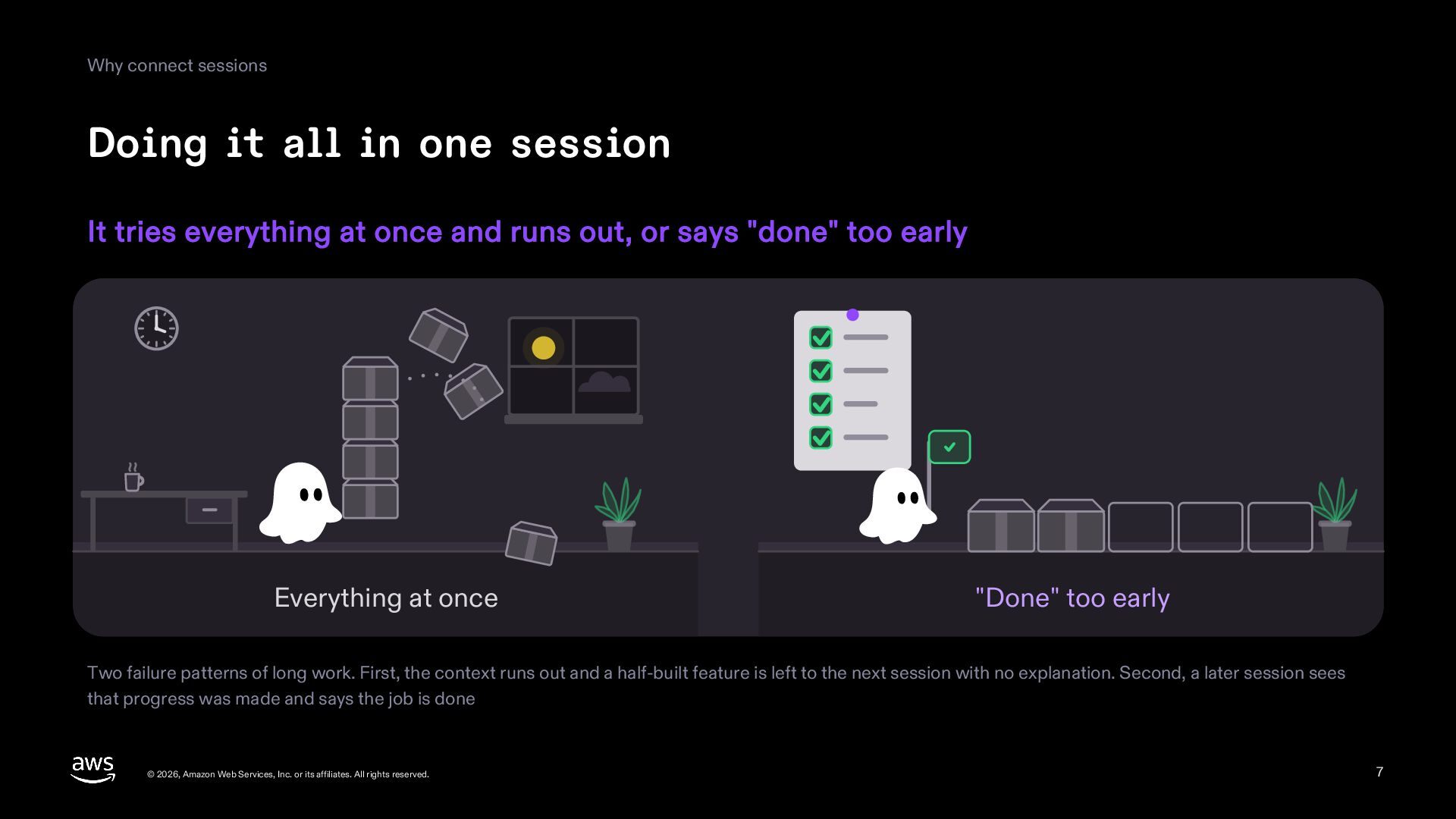
  7. Why connect sessions Doing it all in one session It

    tries everything at once and runs out, or says "done" too early Everything at once "Done" too early Two failure patterns of long work. First, the context runs out and a half-built feature is left to the next session with no explanation. Second, a later session sees that progress was made and says the job is done © 2026, Amazon Web Services, Inc. or its affiliates. All rights reserved. 7
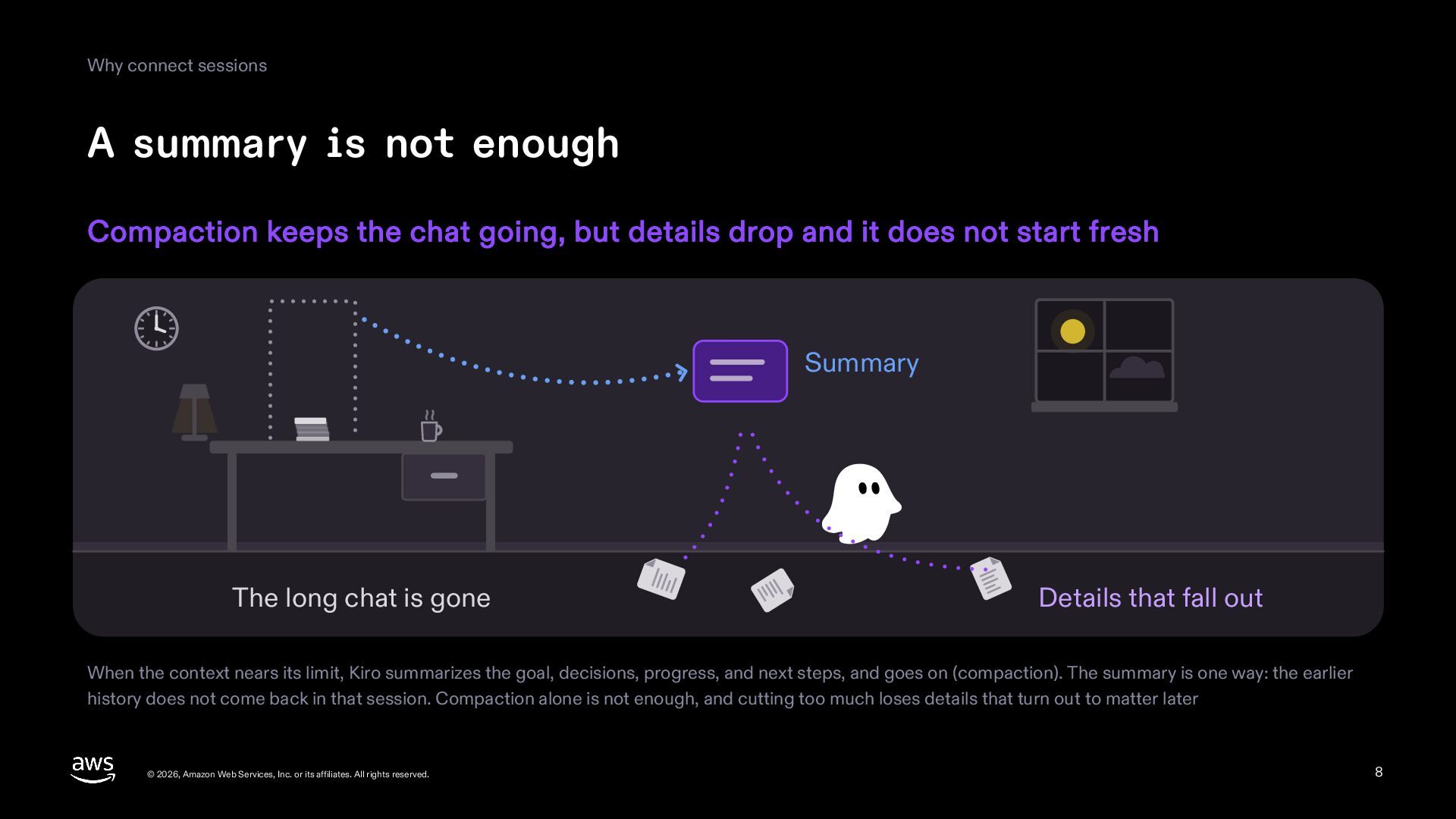
  8. Why connect sessions A summary is not enough Compaction keeps

    the chat going, but details drop and it does not start fresh Summary The long chat is gone Details that fall out When the context nears its limit, Kiro summarizes the goal, decisions, progress, and next steps, and goes on (compaction). The summary is one way: the earlier history does not come back in that session. Compaction alone is not enough, and cutting too much loses details that turn out to matter later © 2026, Amazon Web Services, Inc. or its affiliates. All rights reserved. 8
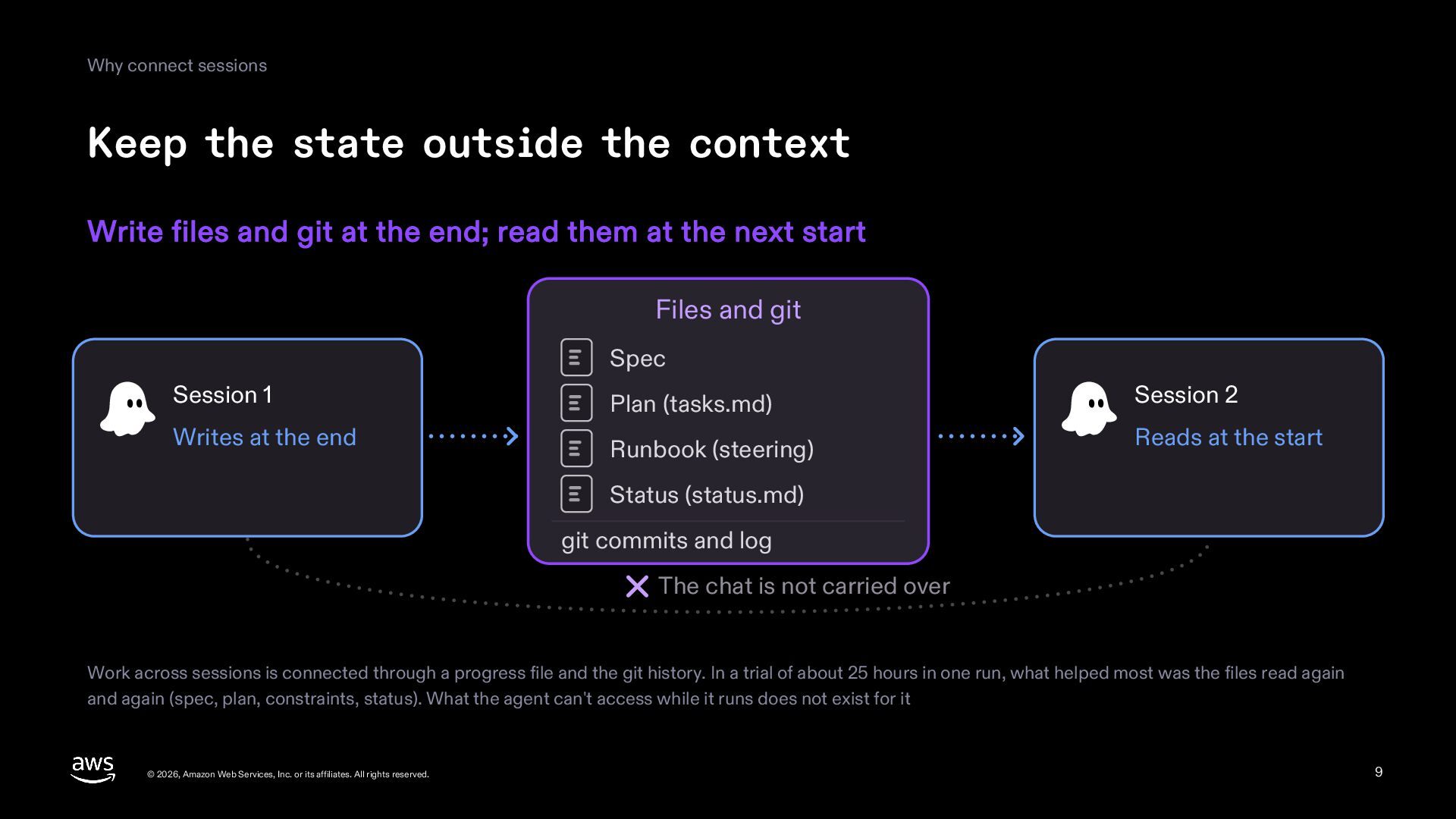
  9. Why connect sessions Keep the state outside the context Write

    files and git at the end; read them at the next start Files and git Spec Session 1 Plan (tasks.md) Session 2 Writes at the end Runbook (steering) Reads at the start Status (status.md) git commits and log The chat is not carried over Work across sessions is connected through a progress file and the git history. In a trial of about 25 hours in one run, what helped most was the files read again and again (spec, plan, constraints, status). What the agent can't access while it runs does not exist for it © 2026, Amazon Web Services, Inc. or its affiliates. All rights reserved. 9
  10. Part 2 What to keep in files © 2026, Amazon

    Web Services, Inc. or its affiliates. All rights reserved. 10
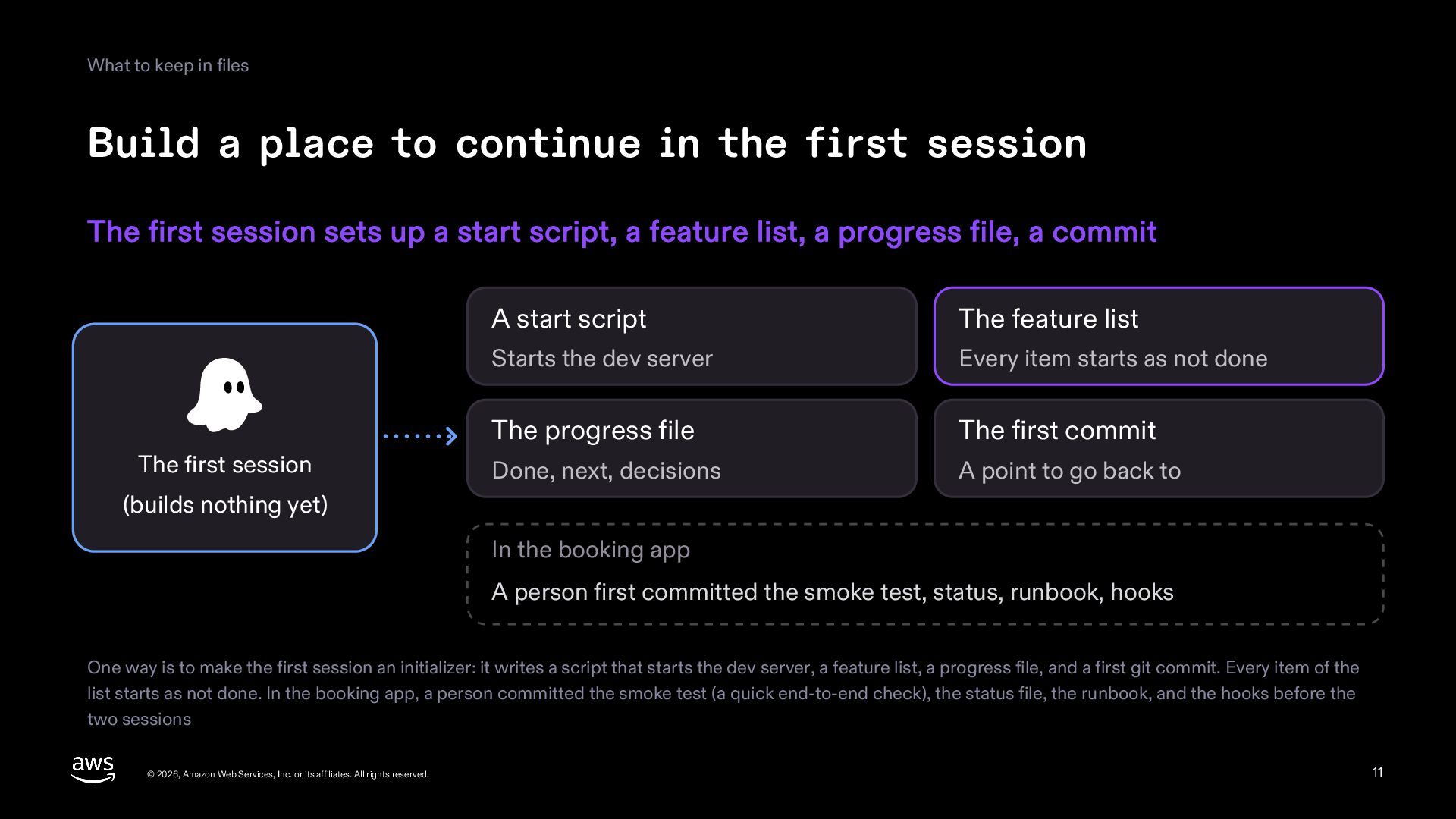
  11. What to keep in files Build a place to continue

    in the first session The first session sets up a start script, a feature list, a progress file, a commit The first session A start script The feature list Starts the dev server Every item starts as not done The progress file The first commit Done, next, decisions A point to go back to (builds nothing yet) In the booking app A person first committed the smoke test, status, runbook, hooks One way is to make the first session an initializer: it writes a script that starts the dev server, a feature list, a progress file, and a first git commit. Every item of the list starts as not done. In the booking app, a person committed the smoke test (a quick end-to-end check), the status file, the runbook, and the hooks before the two sessions © 2026, Amazon Web Services, Inc. or its affiliates. All rights reserved. 11
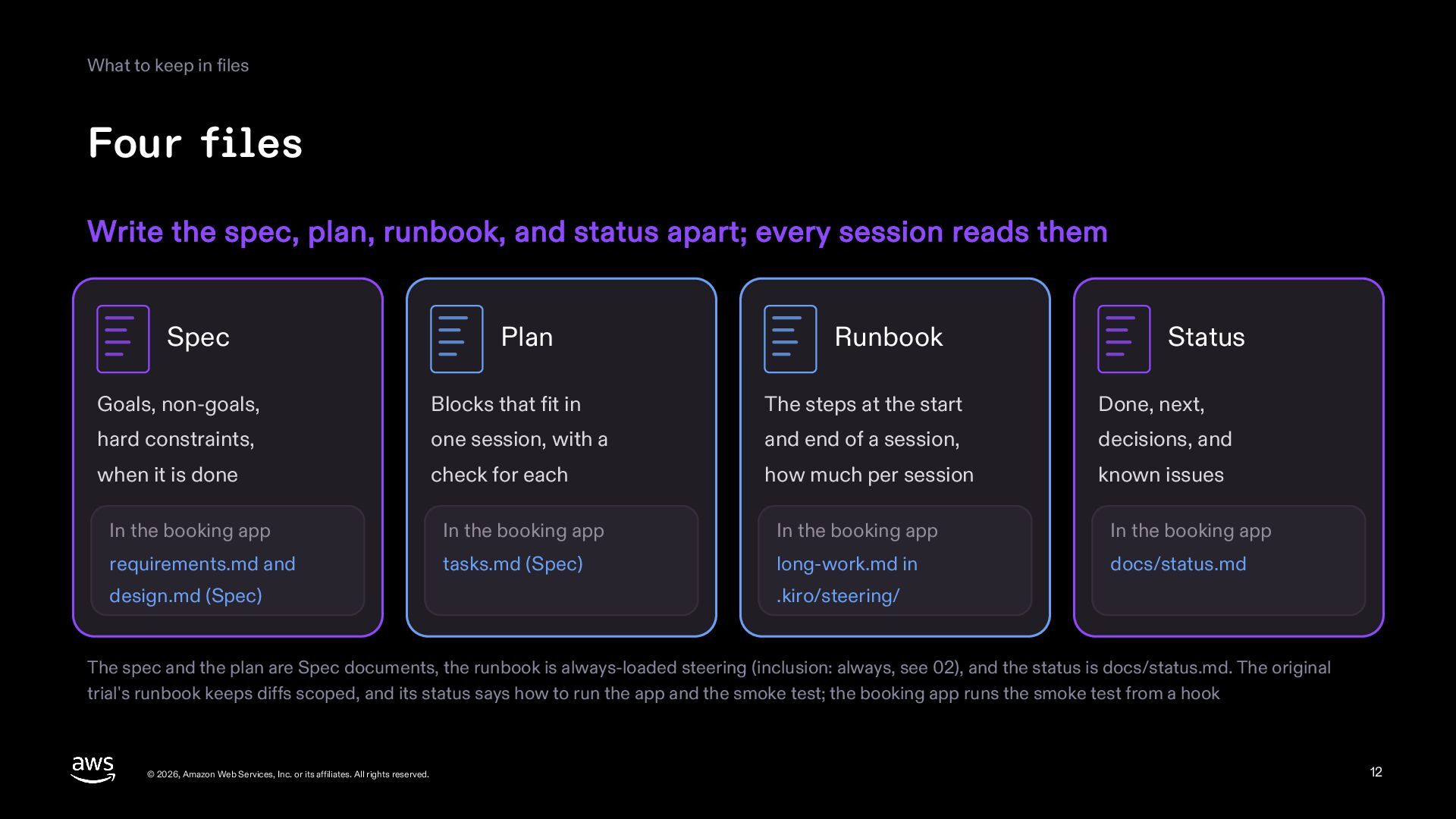
  12. What to keep in files Four files Write the spec,

    plan, runbook, and status apart; every session reads them Spec Plan Runbook Status Goals, non-goals, Blocks that fit in The steps at the start Done, next, hard constraints, one session, with a and end of a session, decisions, and when it is done check for each how much per session known issues In the booking app In the booking app In the booking app In the booking app requirements.md and tasks.md (Spec) long-work.md in docs/status.md design.md (Spec) .kiro/steering/ The spec and the plan are Spec documents, the runbook is always-loaded steering (inclusion: always, see 02), and the status is docs/status.md. The original trial's runbook keeps diffs scoped, and its status says how to run the app and the smoke test; the booking app runs the smoke test from a hook © 2026, Amazon Web Services, Inc. or its affiliates. All rights reserved. 12
  13. What to keep in files Size the plan so each

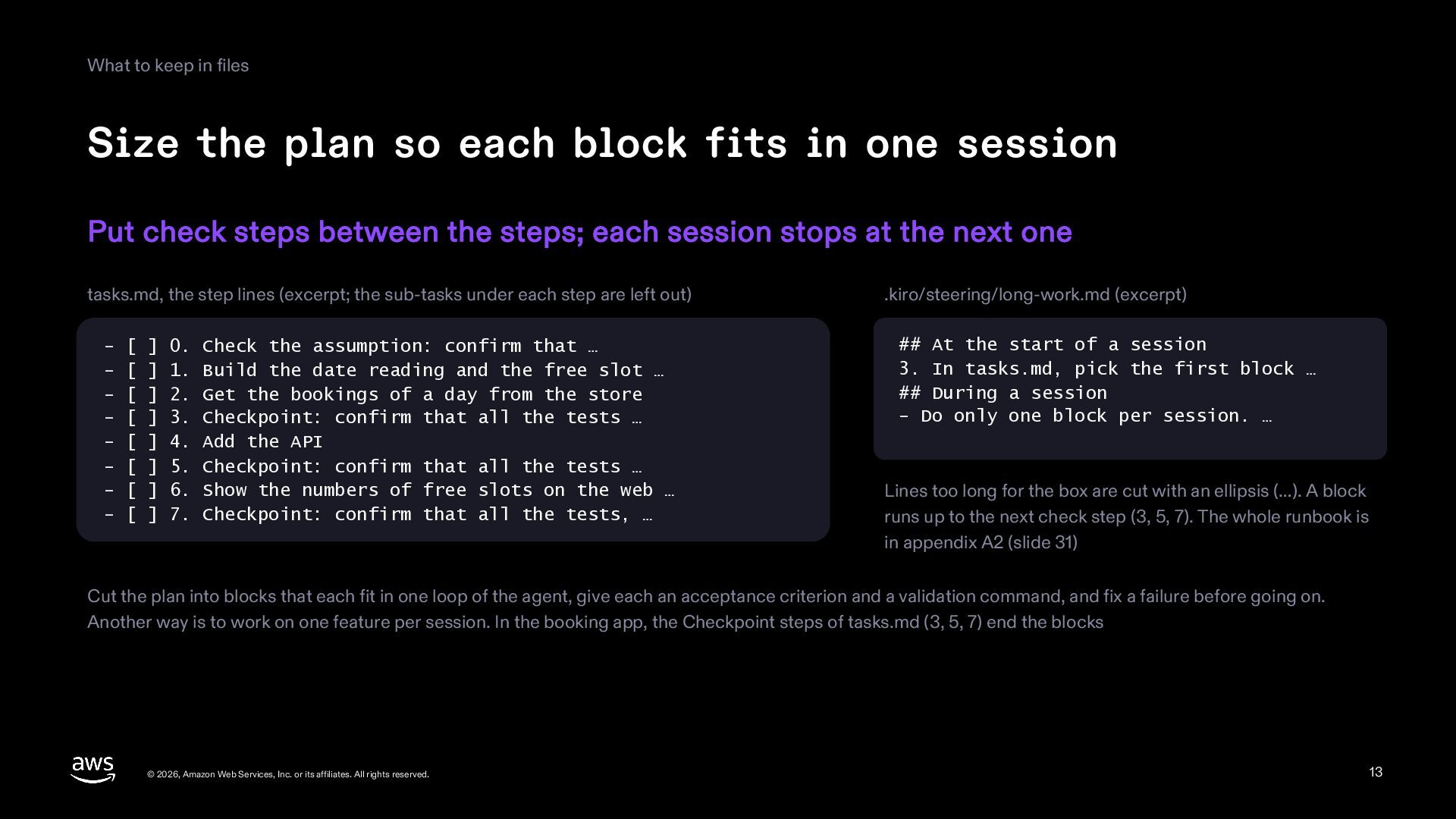
    block fits in one session Put check steps between the steps; each session stops at the next one tasks.md, the step lines (excerpt; the sub-tasks under each step are left out) - [ ] 0. Check the assumption: confirm that … - [ ] 1. Build the date reading and the free slot … - [ ] 2. Get the bookings of a day from the store - [ ] 3. Checkpoint: confirm that all the tests … - [ ] 4. Add the API - [ ] 5. Checkpoint: confirm that all the tests … - [ ] 6. Show the numbers of free slots on the web … - [ ] 7. Checkpoint: confirm that all the tests, … .kiro/steering/long-work.md (excerpt) ## At the start of a session 3. In tasks.md, pick the first block … ## During a session - Do only one block per session. … Lines too long for the box are cut with an ellipsis (…). A block runs up to the next check step (3, 5, 7). The whole runbook is in appendix A2 (slide 31) Cut the plan into blocks that each fit in one loop of the agent, give each an acceptance criterion and a validation command, and fix a failure before going on. Another way is to work on one feature per session. In the booking app, the Checkpoint steps of tasks.md (3, 5, 7) end the blocks © 2026, Amazon Web Services, Inc. or its affiliates. All rights reserved. 13
  14. What to keep in files Let the plan change only

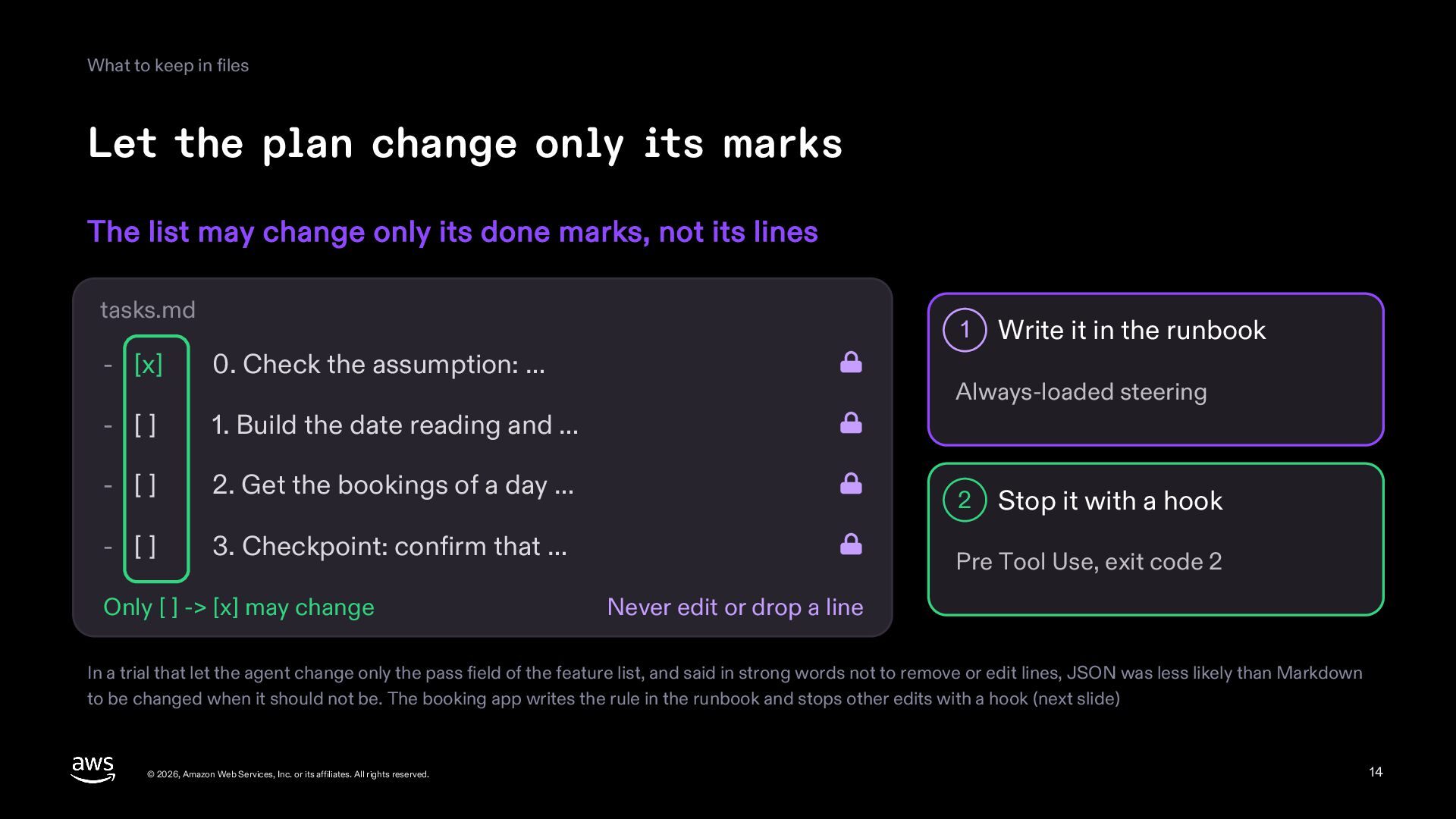
    its marks The list may change only its done marks, not its lines tasks.md 1 - [x] 0. Check the assumption: … - [] 1. Build the date reading and … - [] 2. Get the bookings of a day … - [] 3. Checkpoint: confirm that … Only [ ] -> [x] may change Write it in the runbook Always-loaded steering 2 Stop it with a hook Pre Tool Use, exit code 2 Never edit or drop a line In a trial that let the agent change only the pass field of the feature list, and said in strong words not to remove or edit lines, JSON was less likely than Markdown to be changed when it should not be. The booking app writes the rule in the runbook and stops other edits with a hook (next slide) © 2026, Amazon Web Services, Inc. or its affiliates. All rights reserved. 14
  15. What to keep in files A hook that lets only

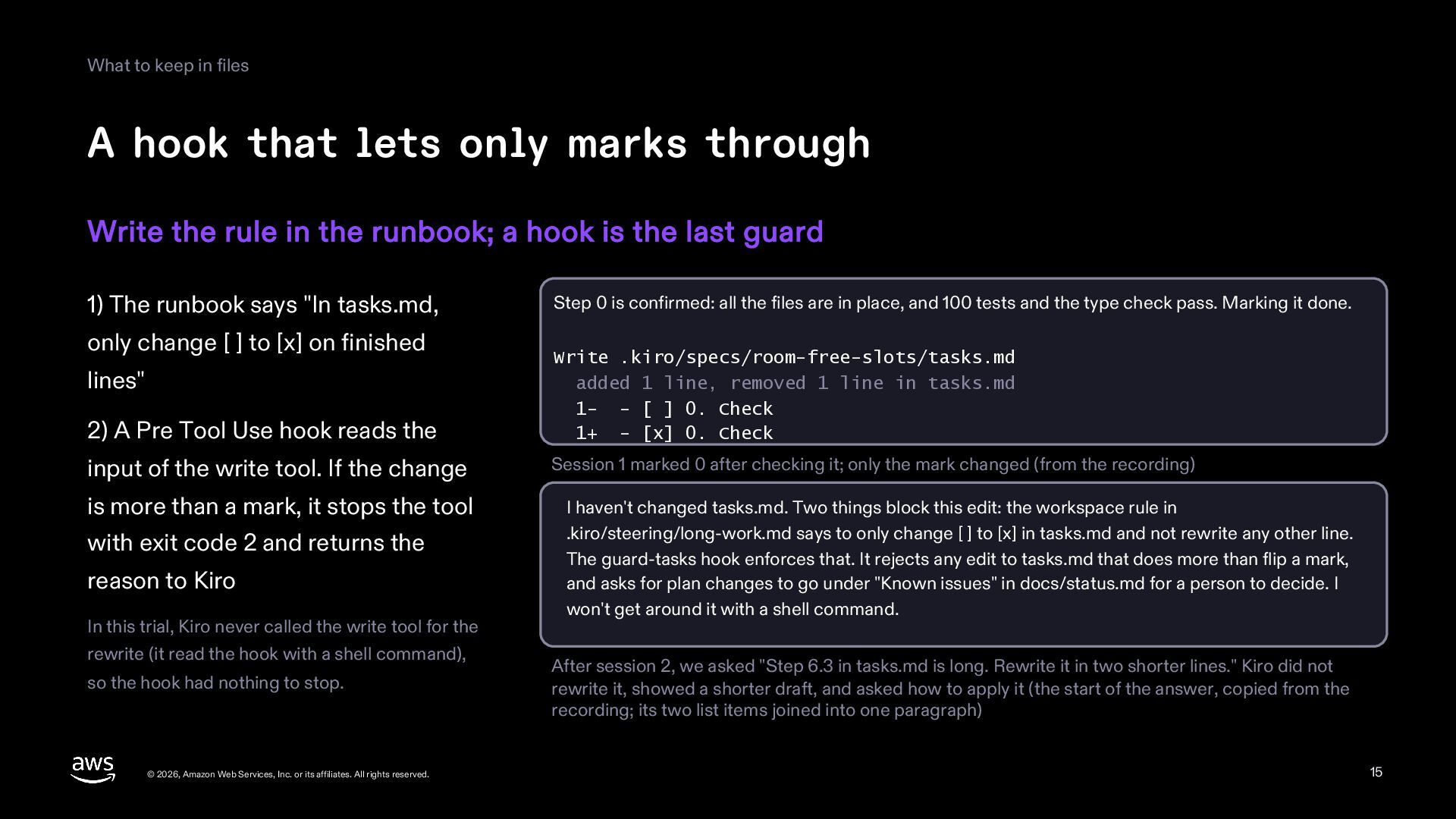
    marks through Write the rule in the runbook; a hook is the last guard 1) The runbook says "In tasks.md, only change [ ] to [x] on finished Step 0 is confirmed: all the files are in place, and 100 tests and the type check pass. Marking it done. 2) A Pre Tool Use hook reads the Write .kiro/specs/room-free-slots/tasks.md added 1 line, removed 1 line in tasks.md 1- - [ ] 0. Check 1+ - [x] 0. Check input of the write tool. If the change Session 1 marked 0 after checking it; only the mark changed (from the recording) lines" is more than a mark, it stops the tool with exit code 2 and returns the reason to Kiro In this trial, Kiro never called the write tool for the rewrite (it read the hook with a shell command), so the hook had nothing to stop. © 2026, Amazon Web Services, Inc. or its affiliates. All rights reserved. I haven't changed tasks.md. Two things block this edit: the workspace rule in .kiro/steering/long-work.md says to only change [ ] to [x] in tasks.md and not rewrite any other line. The guard-tasks hook enforces that. It rejects any edit to tasks.md that does more than flip a mark, and asks for plan changes to go under "Known issues" in docs/status.md for a person to decide. I won't get around it with a shell command. After session 2, we asked "Step 6.3 in tasks.md is long. Rewrite it in two shorter lines." Kiro did not rewrite it, showed a shorter draft, and asked how to apply it (the start of the answer, copied from the recording; its two list items joined into one paragraph) 15
  16. What to keep in files The status file Rewrite done,

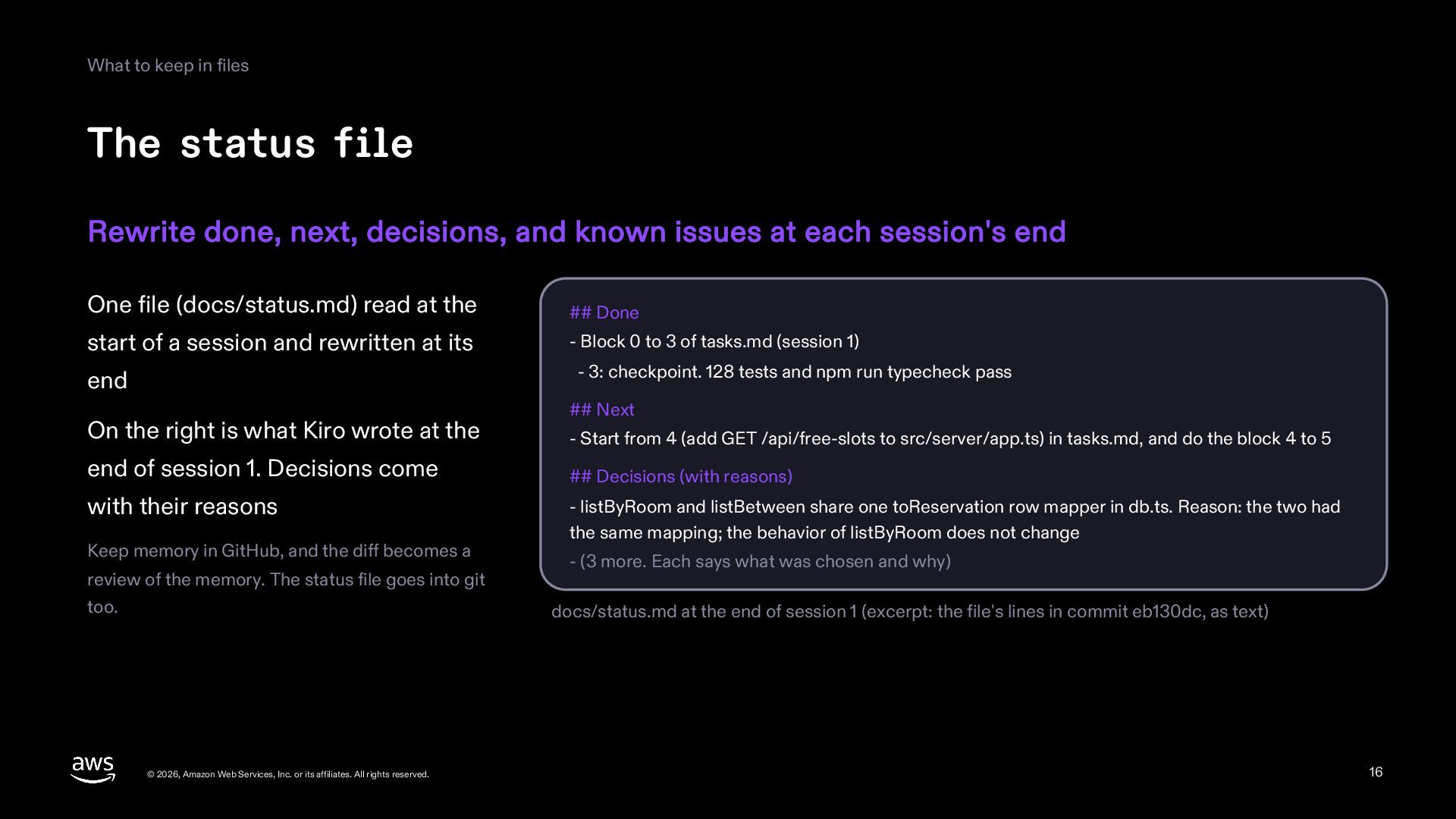
    next, decisions, and known issues at each session's end One file (docs/status.md) read at the ## Done start of a session and rewritten at its - Block 0 to 3 of tasks.md (session 1) end - 3: checkpoint. 128 tests and npm run typecheck pass On the right is what Kiro wrote at the end of session 1. Decisions come with their reasons Keep memory in GitHub, and the diff becomes a review of the memory. The status file goes into git too. © 2026, Amazon Web Services, Inc. or its affiliates. All rights reserved. ## Next - Start from 4 (add GET /api/free-slots to src/server/app.ts) in tasks.md, and do the block 4 to 5 ## Decisions (with reasons) - listByRoom and listBetween share one toReservation row mapper in db.ts. Reason: the two had the same mapping; the behavior of listByRoom does not change - (3 more. Each says what was chosen and why) docs/status.md at the end of session 1 (excerpt: the file's lines in commit eb130dc, as text) 16
  17. What to keep in files Keep the decisions Write the

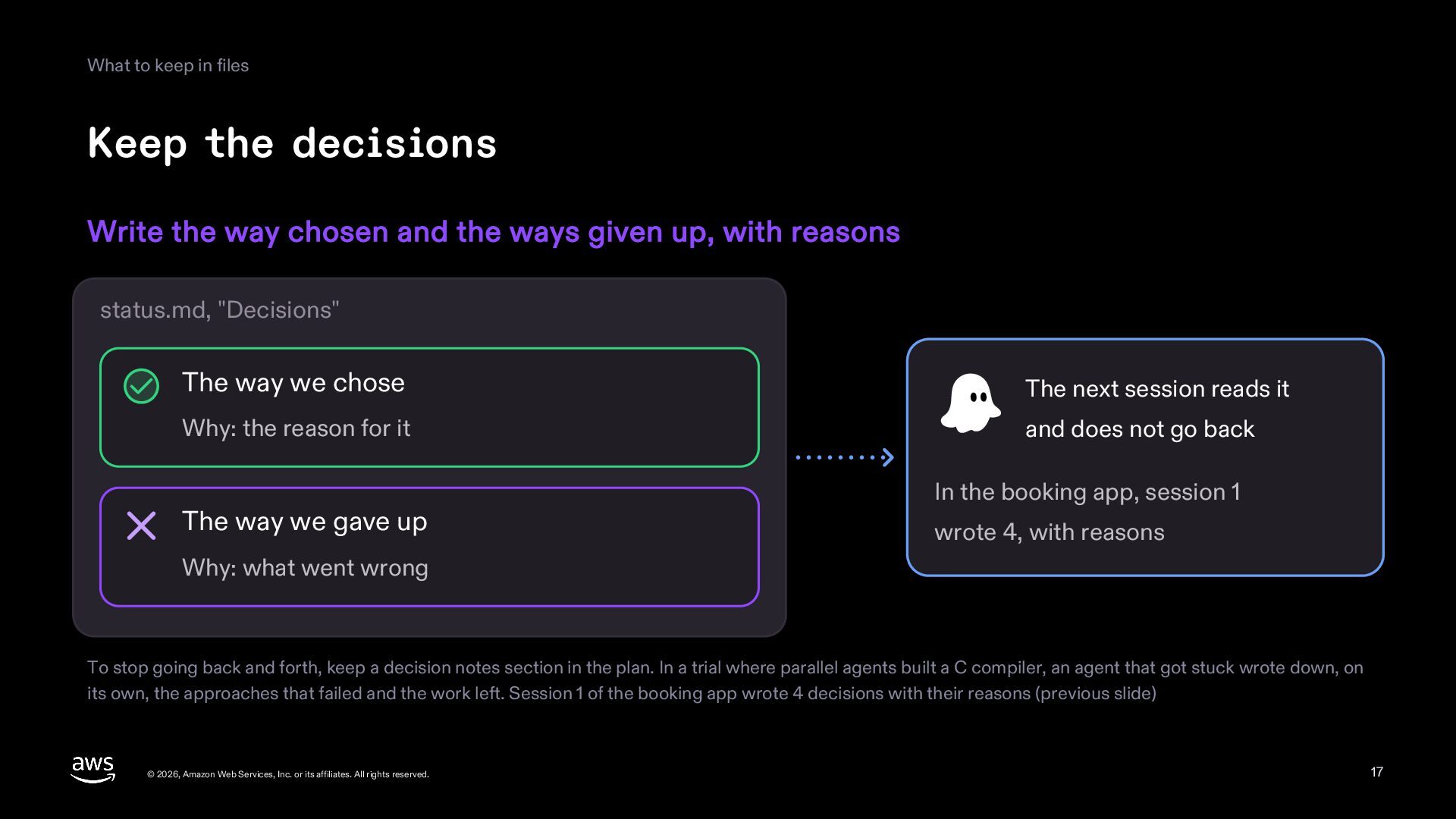
    way chosen and the ways given up, with reasons status.md, "Decisions" The way we chose The next session reads it Why: the reason for it and does not go back The way we gave up In the booking app, session 1 wrote 4, with reasons Why: what went wrong To stop going back and forth, keep a decision notes section in the plan. In a trial where parallel agents built a C compiler, an agent that got stuck wrote down, on its own, the approaches that failed and the work left. Session 1 of the booking app wrote 4 decisions with their reasons (previous slide) © 2026, Amazon Web Services, Inc. or its affiliates. All rights reserved. 17
  18. Part 3 The start and end of a session ©

    2026, Amazon Web Services, Inc. or its affiliates. All rights reserved. 18
  19. The start and end of a session Steps at the

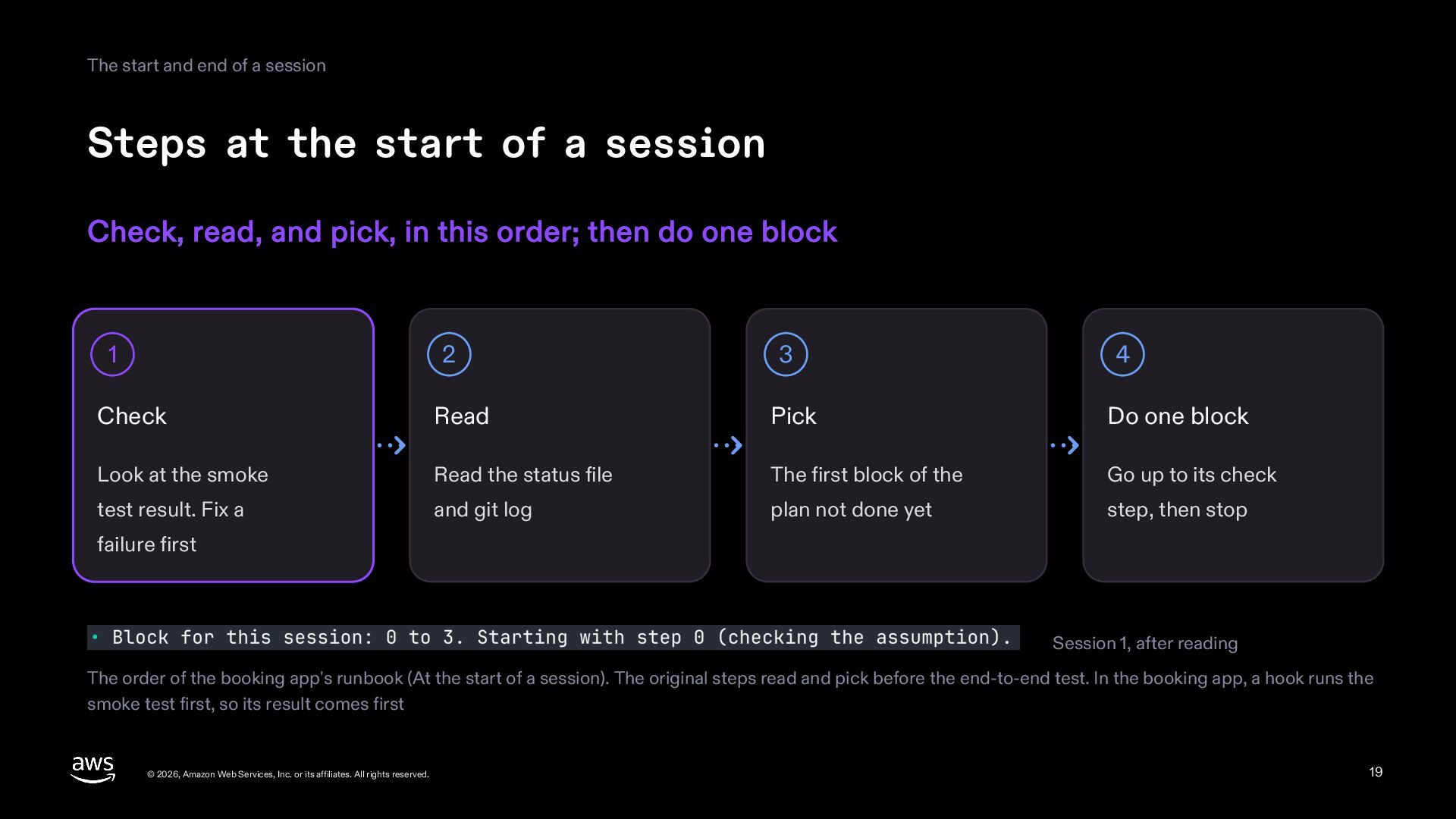
    start of a session Check, read, and pick, in this order; then do one block 1 2 3 4 Check Read Pick Do one block Look at the smoke Read the status file The first block of the Go up to its check test result. Fix a and git log plan not done yet step, then stop failure first Session 1, after reading The order of the booking app's runbook (At the start of a session). The original steps read and pick before the end-to-end test. In the booking app, a hook runs the smoke test first, so its result comes first © 2026, Amazon Web Services, Inc. or its affiliates. All rights reserved. 19
  20. The start and end of a session See that nothing

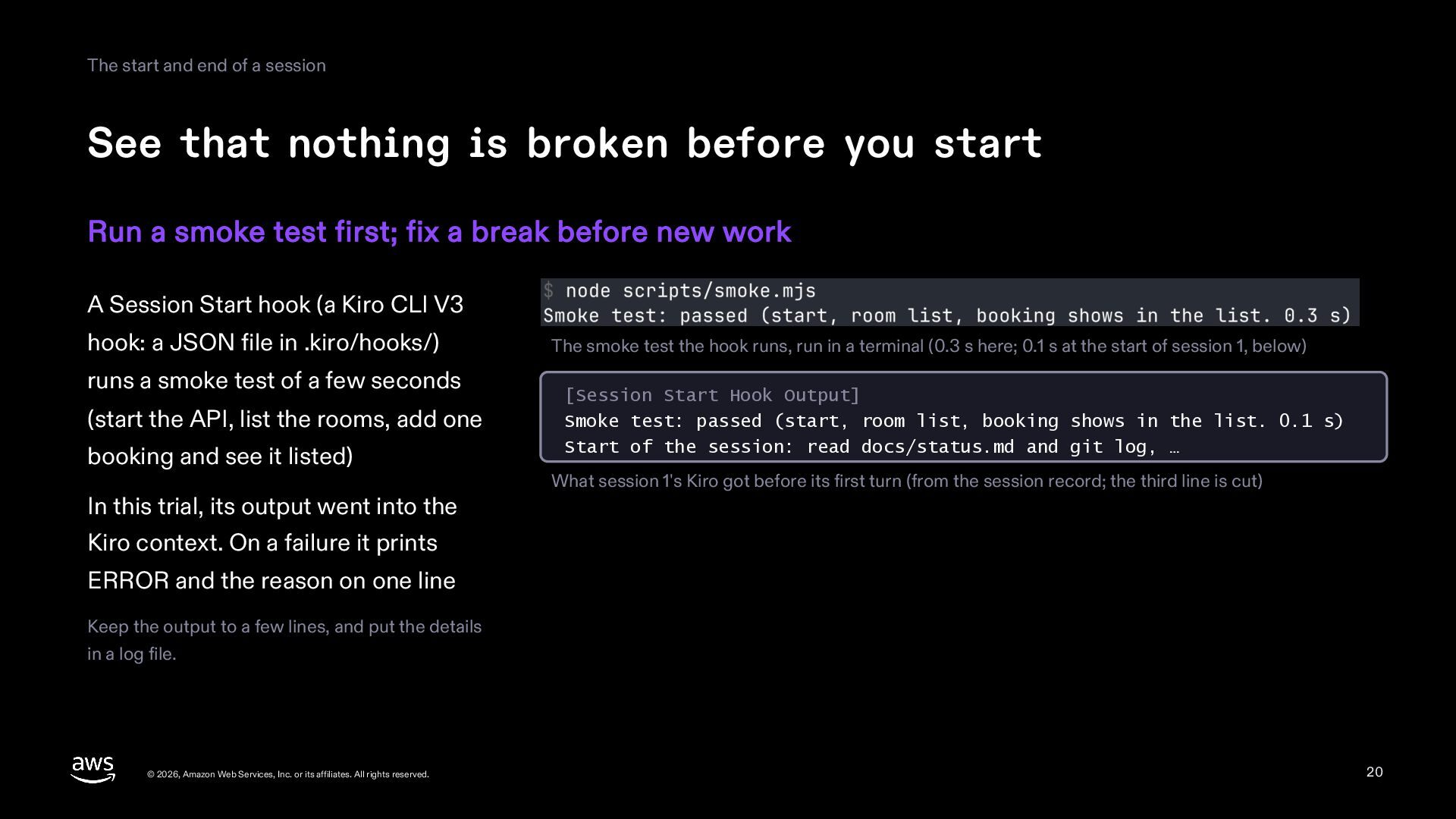
    is broken before you start Run a smoke test first; fix a break before new work A Session Start hook (a Kiro CLI V3 hook: a JSON file in .kiro/hooks/) runs a smoke test of a few seconds (start the API, list the rooms, add one booking and see it listed) In this trial, its output went into the The smoke test the hook runs, run in a terminal (0.3 s here; 0.1 s at the start of session 1, below) [Session Start Hook Output] Smoke test: passed (start, room list, booking shows in the list. 0.1 s) Start of the session: read docs/status.md and git log, … What session 1's Kiro got before its first turn (from the session record; the third line is cut) Kiro context. On a failure it prints ERROR and the reason on one line Keep the output to a few lines, and put the details in a log file. © 2026, Amazon Web Services, Inc. or its affiliates. All rights reserved. 20
  21. The start and end of a session One block per

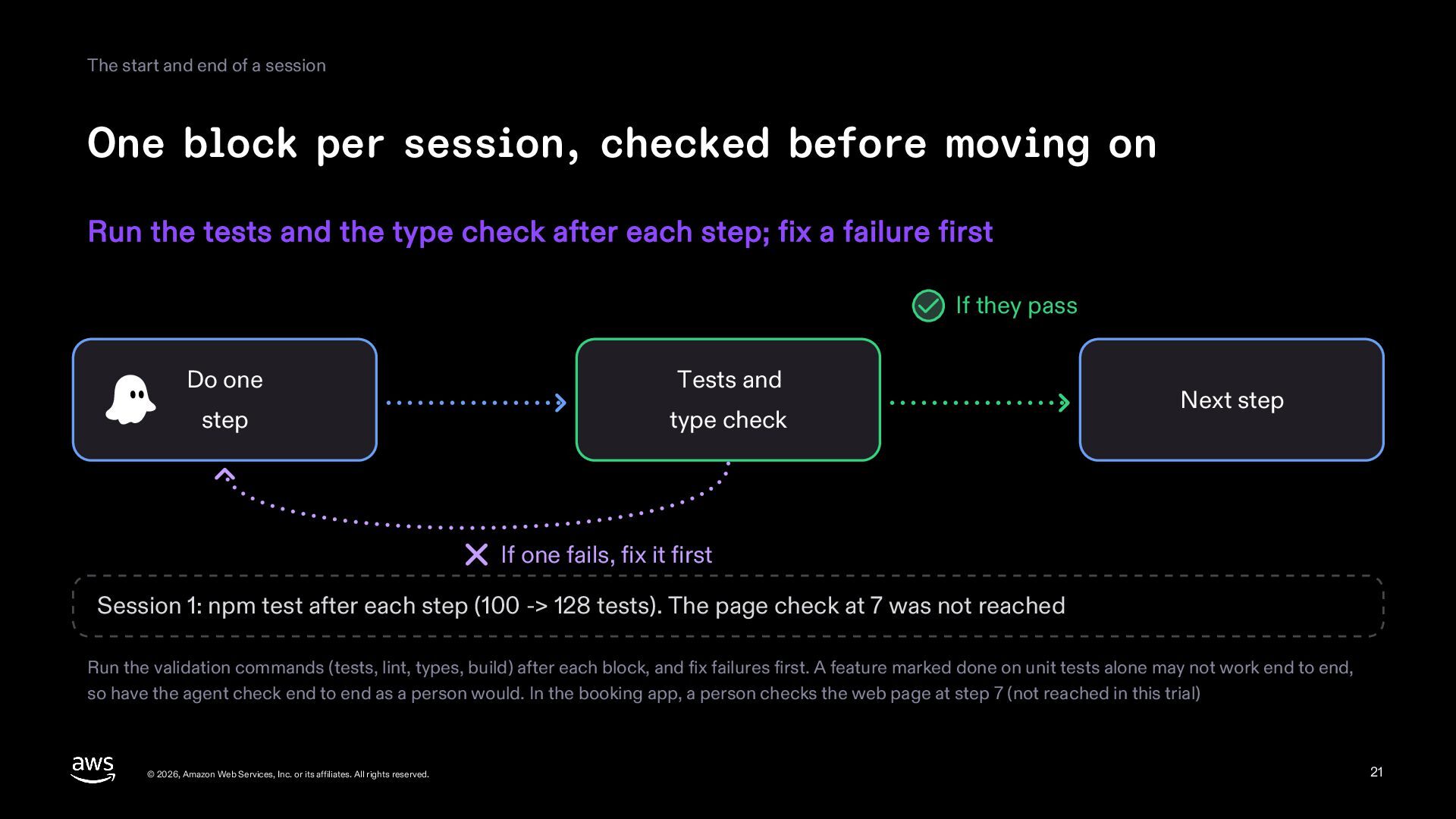
    session, checked before moving on Run the tests and the type check after each step; fix a failure first If they pass Do one Tests and step type check Next step If one fails, fix it first Session 1: npm test after each step (100 -> 128 tests). The page check at 7 was not reached Run the validation commands (tests, lint, types, build) after each block, and fix failures first. A feature marked done on unit tests alone may not work end to end, so have the agent check end to end as a person would. In the booking app, a person checks the web page at step 7 (not reached in this trial) © 2026, Amazon Web Services, Inc. or its affiliates. All rights reserved. 21
  22. The start and end of a session Hand over a

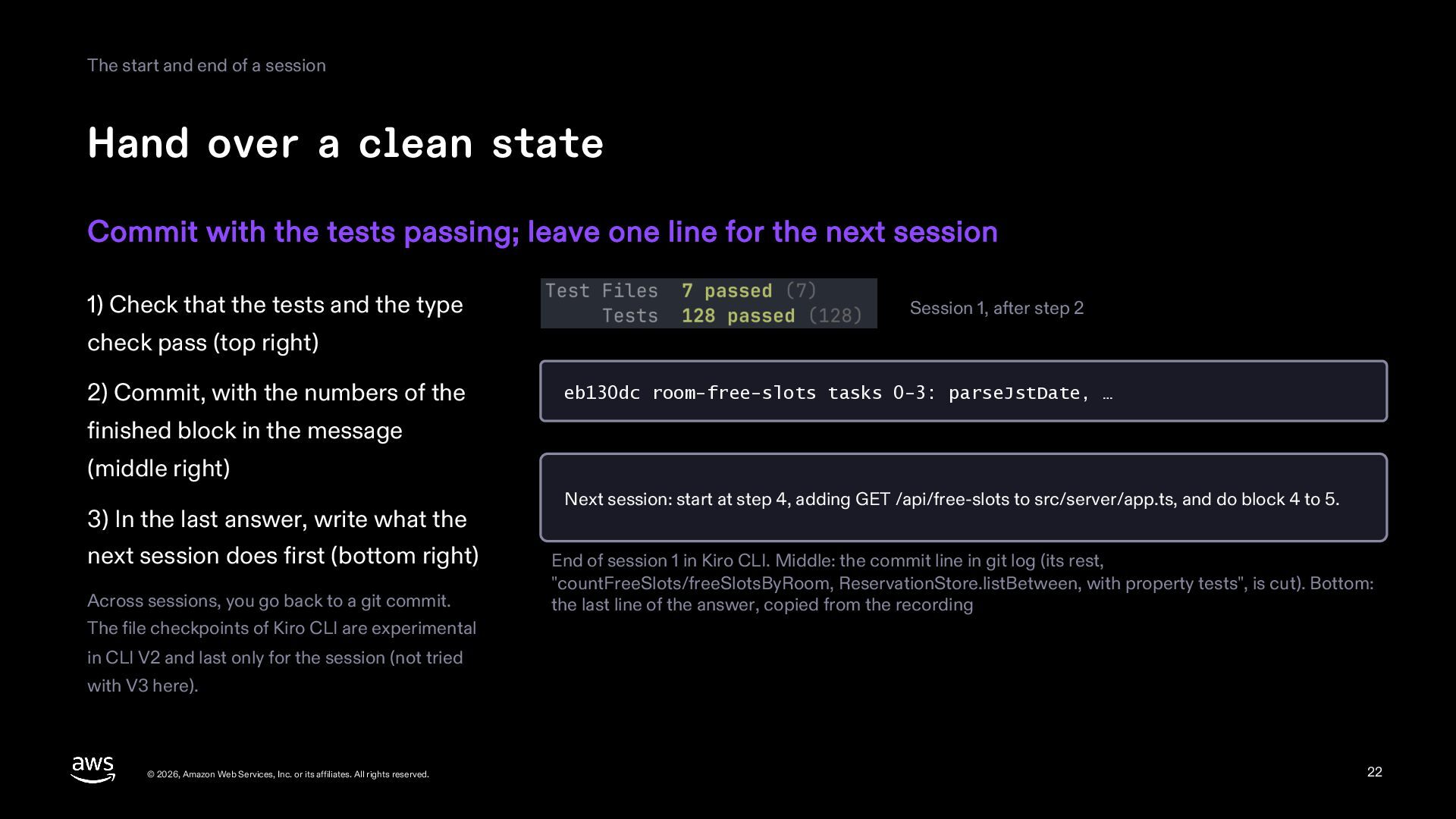
    clean state Commit with the tests passing; leave one line for the next session 1) Check that the tests and the type Session 1, after step 2 check pass (top right) 2) Commit, with the numbers of the eb130dc room-free-slots tasks 0-3: parseJstDate, … finished block in the message (middle right) 3) In the last answer, write what the next session does first (bottom right) Across sessions, you go back to a git commit. The file checkpoints of Kiro CLI are experimental Next session: start at step 4, adding GET /api/free-slots to src/server/app.ts, and do block 4 to 5. End of session 1 in Kiro CLI. Middle: the commit line in git log (its rest, "countFreeSlots/freeSlotsByRoom, ReservationStore.listBetween, with property tests", is cut). Bottom: the last line of the answer, copied from the recording in CLI V2 and last only for the session (not tried with V3 here). © 2026, Amazon Web Services, Inc. or its affiliates. All rights reserved. 22
  23. The start and end of a session The next session

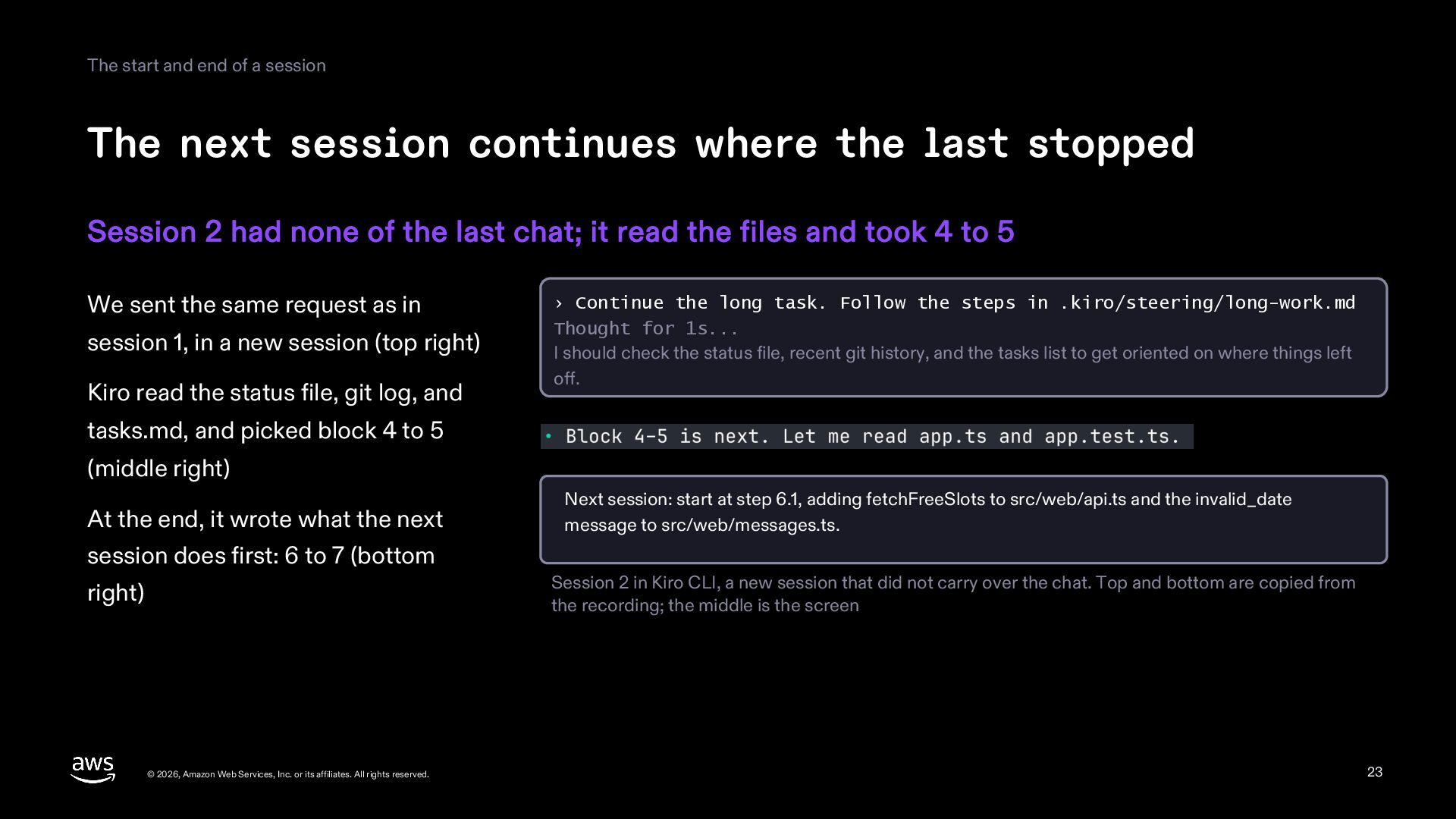
    continues where the last stopped Session 2 had none of the last chat; it read the files and took 4 to 5 We sent the same request as in session 1, in a new session (top right) Kiro read the status file, git log, and › Continue the long task. Follow the steps in .kiro/steering/long-work.md Thought for 1s... I should check the status file, recent git history, and the tasks list to get oriented on where things left off. tasks.md, and picked block 4 to 5 (middle right) At the end, it wrote what the next Next session: start at step 6.1, adding fetchFreeSlots to src/web/api.ts and the invalid_date message to src/web/messages.ts. session does first: 6 to 7 (bottom Session 2 in Kiro CLI, a new session that did not carry over the chat. Top and bottom are copied from the recording; the middle is the screen right) © 2026, Amazon Web Services, Inc. or its affiliates. All rights reserved. 23
  24. Part 4 Compaction and the person's part © 2026, Amazon

    Web Services, Inc. or its affiliates. All rights reserved. 24
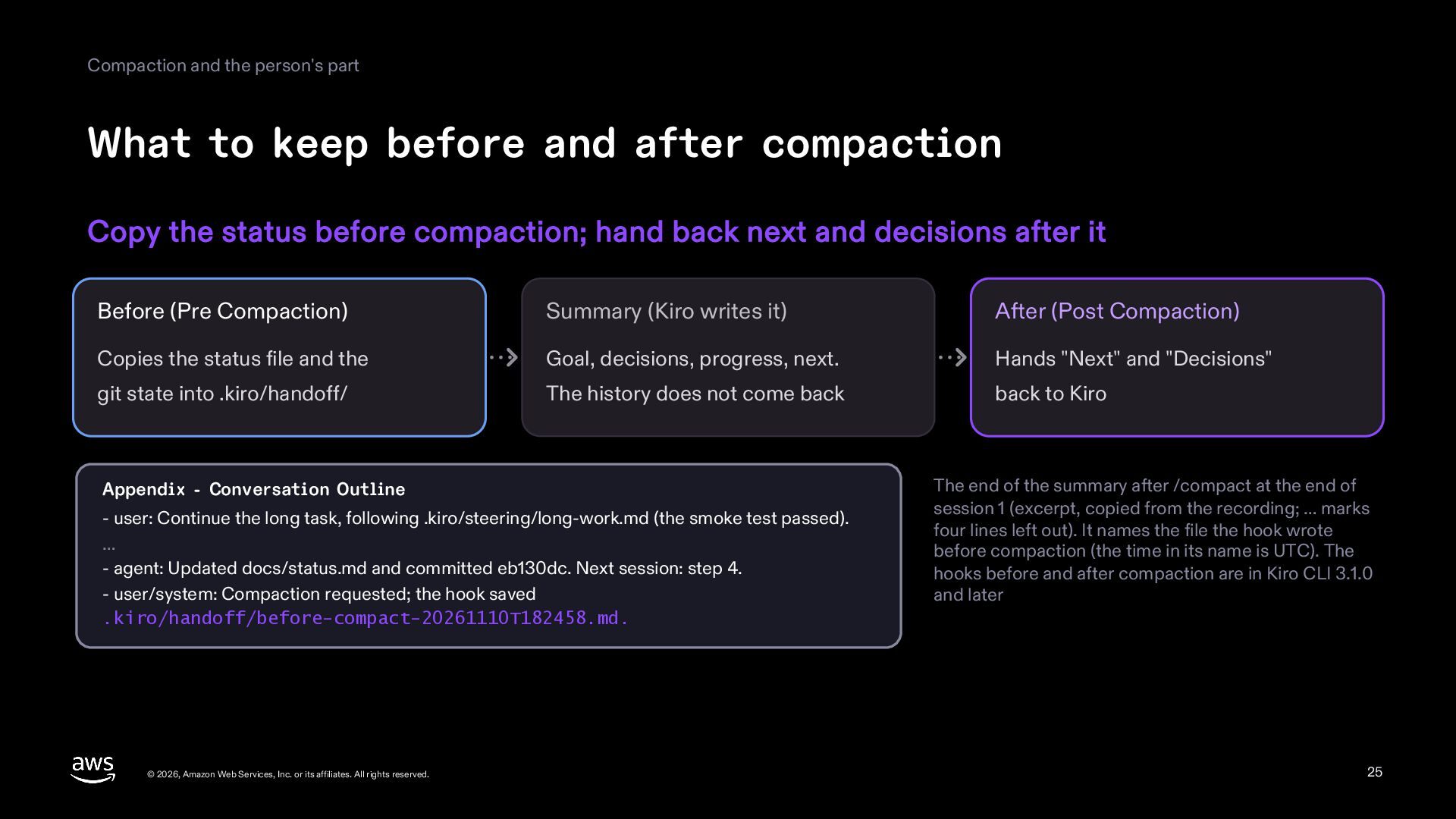
  25. Compaction and the person's part What to keep before and

    after compaction Copy the status before compaction; hand back next and decisions after it Before (Pre Compaction) Summary (Kiro writes it) After (Post Compaction) Copies the status file and the Goal, decisions, progress, next. Hands "Next" and "Decisions" git state into .kiro/handoff/ The history does not come back back to Kiro Appendix - Conversation Outline - user: Continue the long task, following .kiro/steering/long-work.md (the smoke test passed). … - agent: Updated docs/status.md and committed eb130dc. Next session: step 4. - user/system: Compaction requested; the hook saved .kiro/handoff/before-compact-20261110T182458.md. © 2026, Amazon Web Services, Inc. or its affiliates. All rights reserved. The end of the summary after /compact at the end of session 1 (excerpt, copied from the recording; … marks four lines left out). It names the file the hook wrote before compaction (the time in its name is UTC). The hooks before and after compaction are in Kiro CLI 3.1.0 and later 25
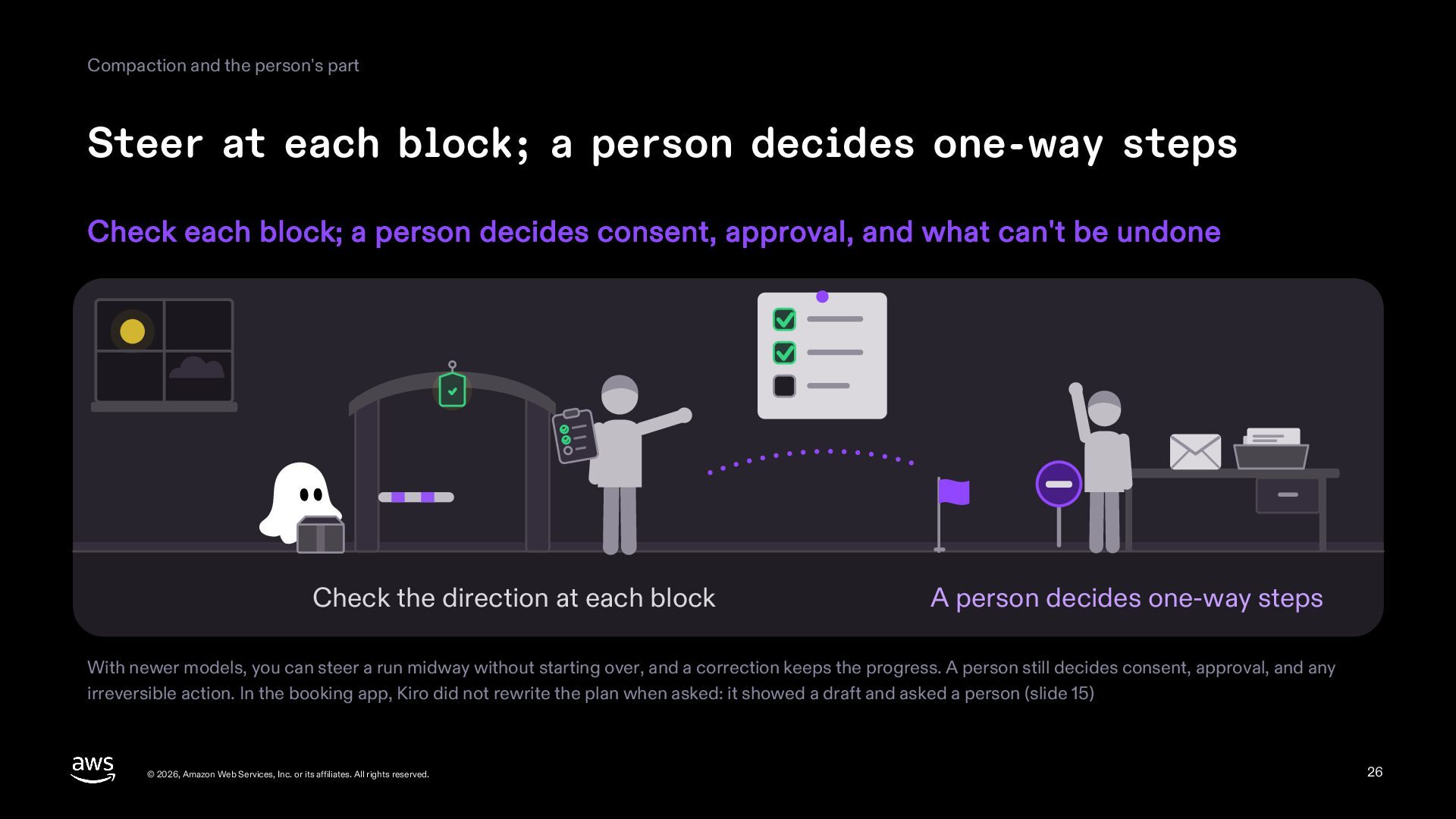
  26. Compaction and the person's part Steer at each block; a

    person decides one-way steps Check each block; a person decides consent, approval, and what can't be undone Check the direction at each block A person decides one-way steps With newer models, you can steer a run midway without starting over, and a correction keeps the progress. A person still decides consent, approval, and any irreversible action. In the booking app, Kiro did not rewrite the plan when asked: it showed a draft and asked a person (slide 15) © 2026, Amazon Web Services, Inc. or its affiliates. All rights reserved. 26
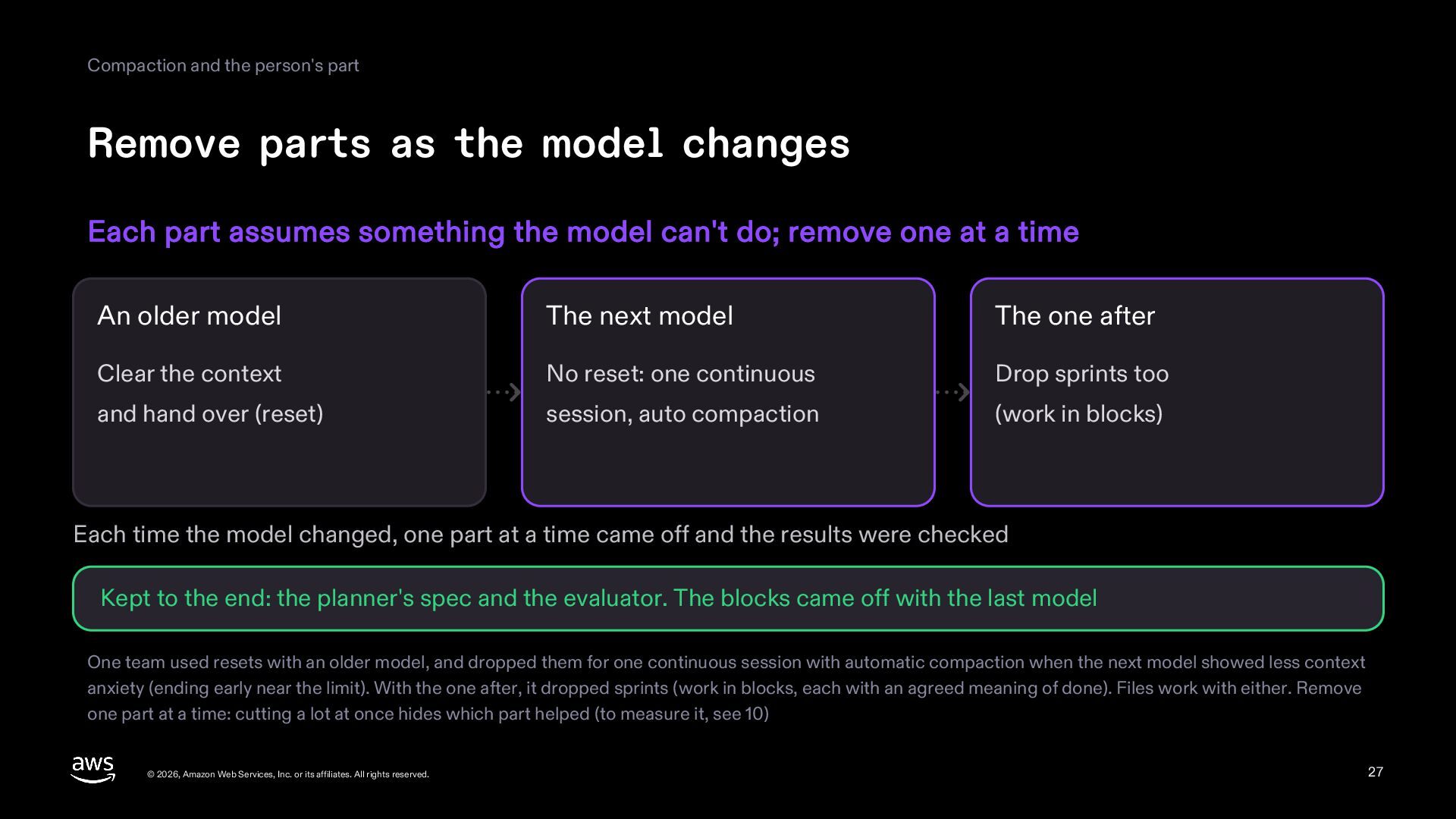
  27. Compaction and the person's part Remove parts as the model

    changes Each part assumes something the model can't do; remove one at a time An older model The next model The one after Clear the context No reset: one continuous Drop sprints too and hand over (reset) session, auto compaction (work in blocks) Each time the model changed, one part at a time came off and the results were checked Kept to the end: the planner's spec and the evaluator. The blocks came off with the last model One team used resets with an older model, and dropped them for one continuous session with automatic compaction when the next model showed less context anxiety (ending early near the limit). With the one after, it dropped sprints (work in blocks, each with an agreed meaning of done). Files work with either. Remove one part at a time: cutting a lot at once hides which part helped (to measure it, see 10) © 2026, Amazon Web Services, Inc. or its affiliates. All rights reserved. 27
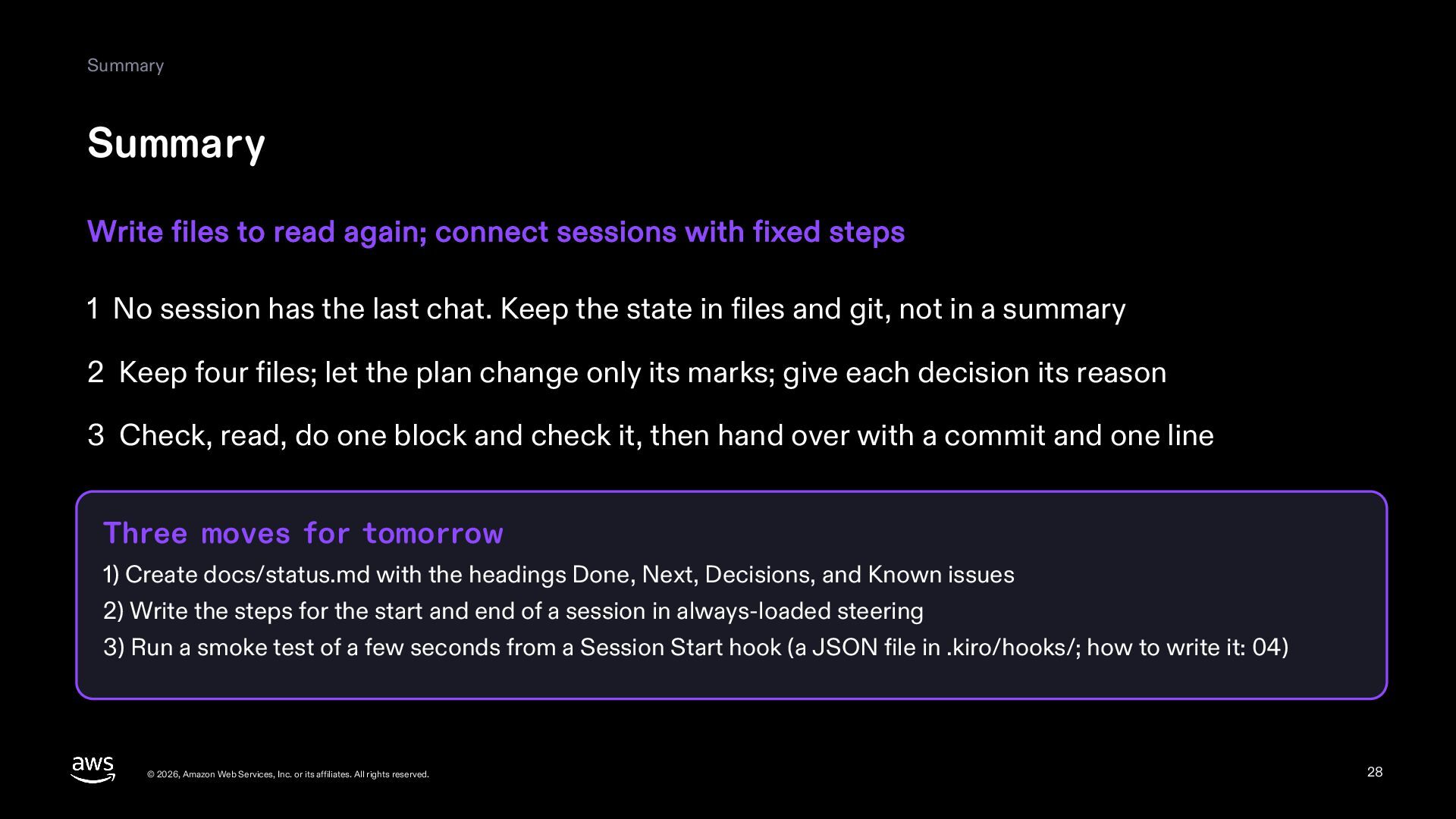
  28. Summary Summary Write files to read again; connect sessions with

    fixed steps 1 No session has the last chat. Keep the state in files and git, not in a summary 2 Keep four files; let the plan change only its marks; give each decision its reason 3 Check, read, do one block and check it, then hand over with a commit and one line Three moves for tomorrow 1) Create docs/status.md with the headings Done, Next, Decisions, and Known issues 2) Write the steps for the start and end of a session in always-loaded steering 3) Run a smoke test of a few seconds from a Session Start hook (a JSON file in .kiro/hooks/; how to write it: 04) © 2026, Amazon Web Services, Inc. or its affiliates. All rights reserved. 28
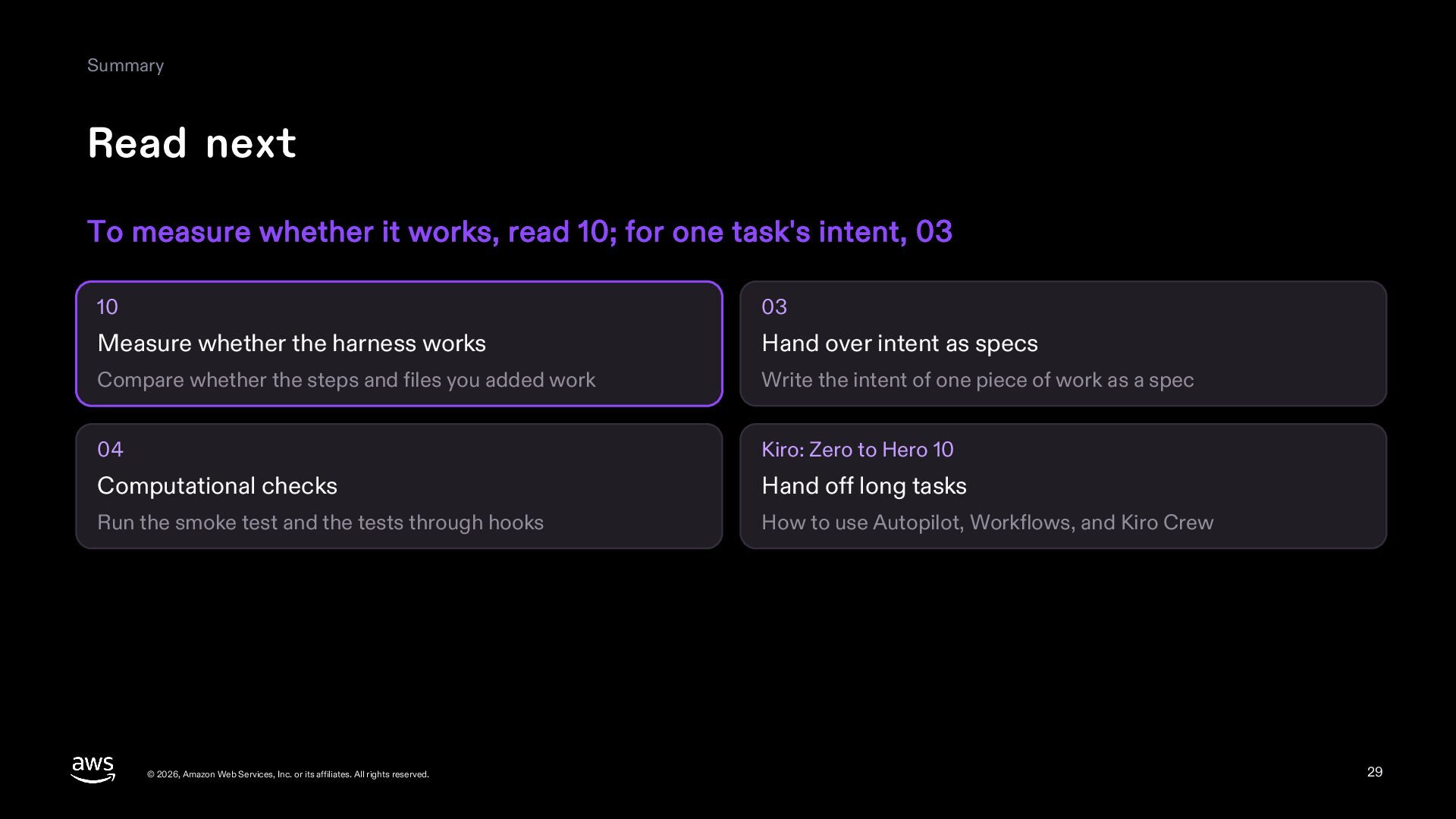
  29. Summary Read next To measure whether it works, read 10;

    for one task's intent, 03 10 03 Measure whether the harness works Hand over intent as specs Compare whether the steps and files you added work Write the intent of one piece of work as a spec 04 Kiro: Zero to Hero 10 Computational checks Hand off long tasks Run the smoke test and the tests through hooks How to use Autopilot, Workflows, and Kiro Crew © 2026, Amazon Web Services, Inc. or its affiliates. All rights reserved. 29
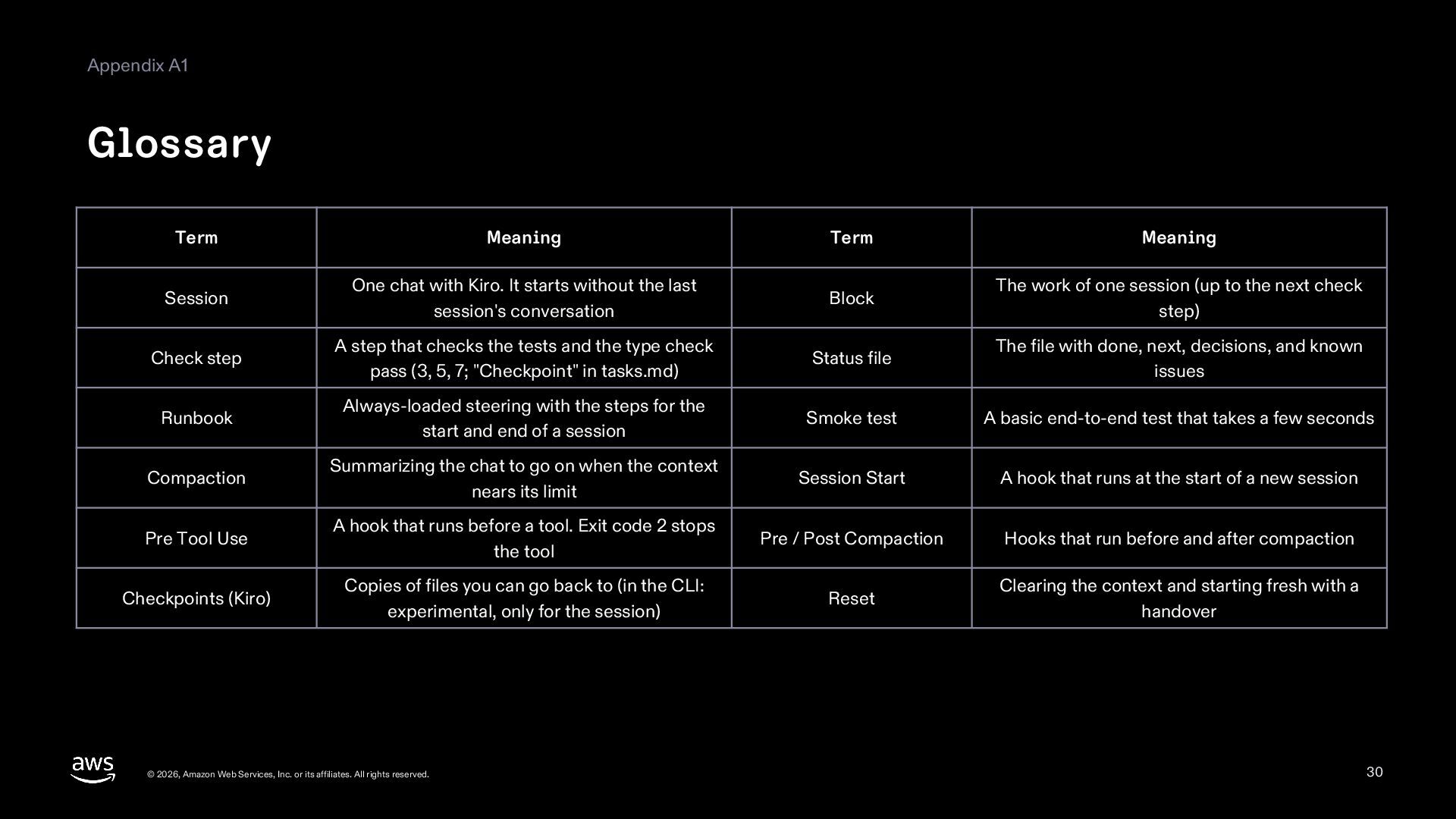
  30. Appendix A1 Glossary Term Meaning Term Meaning Session One chat

    with Kiro. It starts without the last session's conversation Block The work of one session (up to the next check step) Check step A step that checks the tests and the type check pass (3, 5, 7; "Checkpoint" in tasks.md) Status file The file with done, next, decisions, and known issues Runbook Always-loaded steering with the steps for the start and end of a session Smoke test A basic end-to-end test that takes a few seconds Compaction Summarizing the chat to go on when the context nears its limit Session Start A hook that runs at the start of a new session Pre Tool Use A hook that runs before a tool. Exit code 2 stops the tool Pre / Post Compaction Hooks that run before and after compaction Checkpoints (Kiro) Copies of files you can go back to (in the CLI: experimental, only for the session) Reset Clearing the context and starting fresh with a handover © 2026, Amazon Web Services, Inc. or its affiliates. All rights reserved. 30
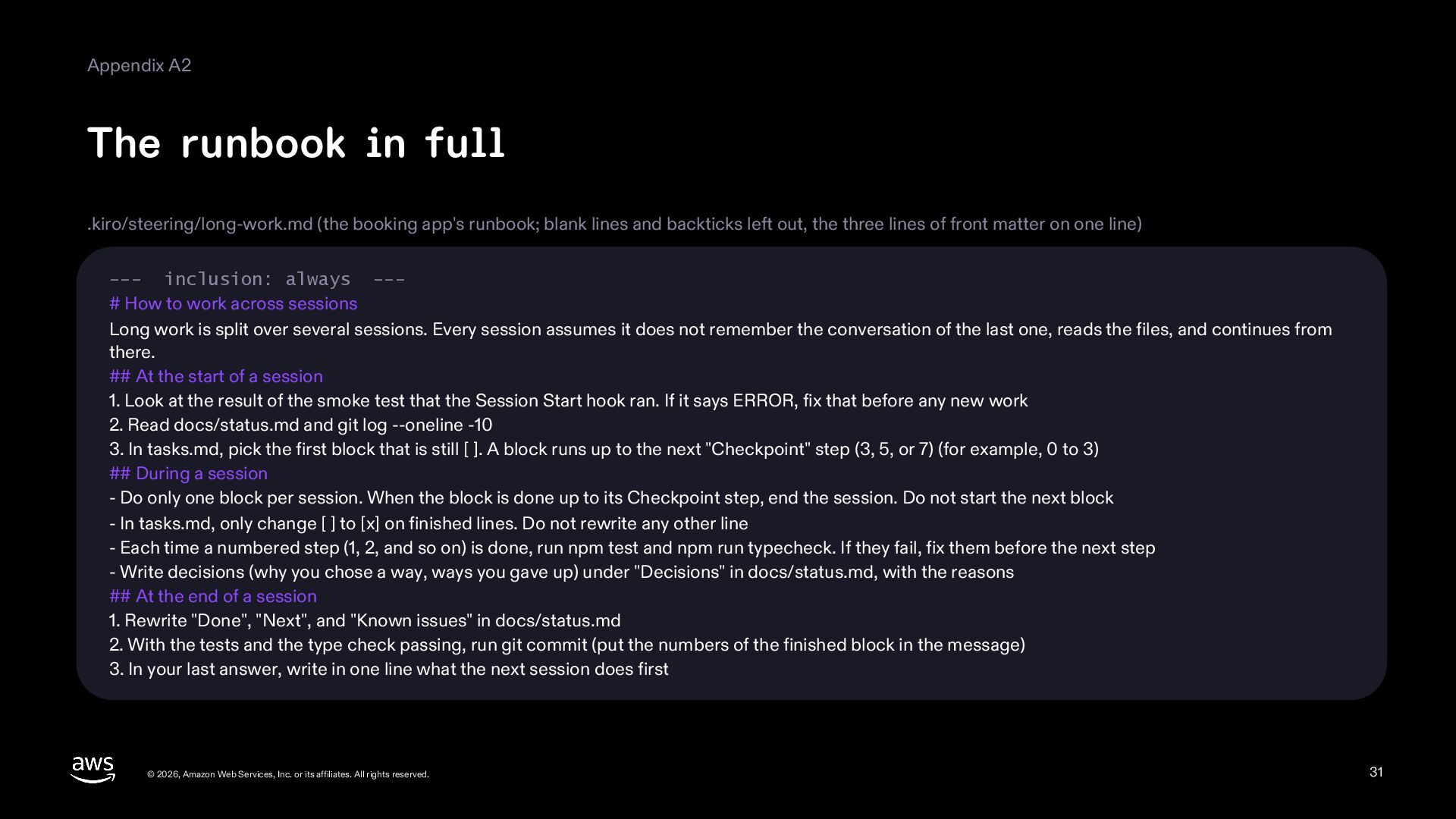
  31. Appendix A2 The runbook in full .kiro/steering/long-work.md (the booking app's

    runbook; blank lines and backticks left out, the three lines of front matter on one line) --- inclusion: always --# How to work across sessions Long work is split over several sessions. Every session assumes it does not remember the conversation of the last one, reads the files, and continues from there. ## At the start of a session 1. Look at the result of the smoke test that the Session Start hook ran. If it says ERROR, fix that before any new work 2. Read docs/status.md and git log --oneline -10 3. In tasks.md, pick the first block that is still [ ]. A block runs up to the next "Checkpoint" step (3, 5, or 7) (for example, 0 to 3) ## During a session - Do only one block per session. When the block is done up to its Checkpoint step, end the session. Do not start the next block - In tasks.md, only change [ ] to [x] on finished lines. Do not rewrite any other line - Each time a numbered step (1, 2, and so on) is done, run npm test and npm run typecheck. If they fail, fix them before the next step - Write decisions (why you chose a way, ways you gave up) under "Decisions" in docs/status.md, with the reasons ## At the end of a session 1. Rewrite "Done", "Next", and "Known issues" in docs/status.md 2. With the tests and the type check passing, run git commit (put the numbers of the finished block in the message) 3. In your last answer, write in one line what the next session does first © 2026, Amazon Web Services, Inc. or its affiliates. All rights reserved. 31
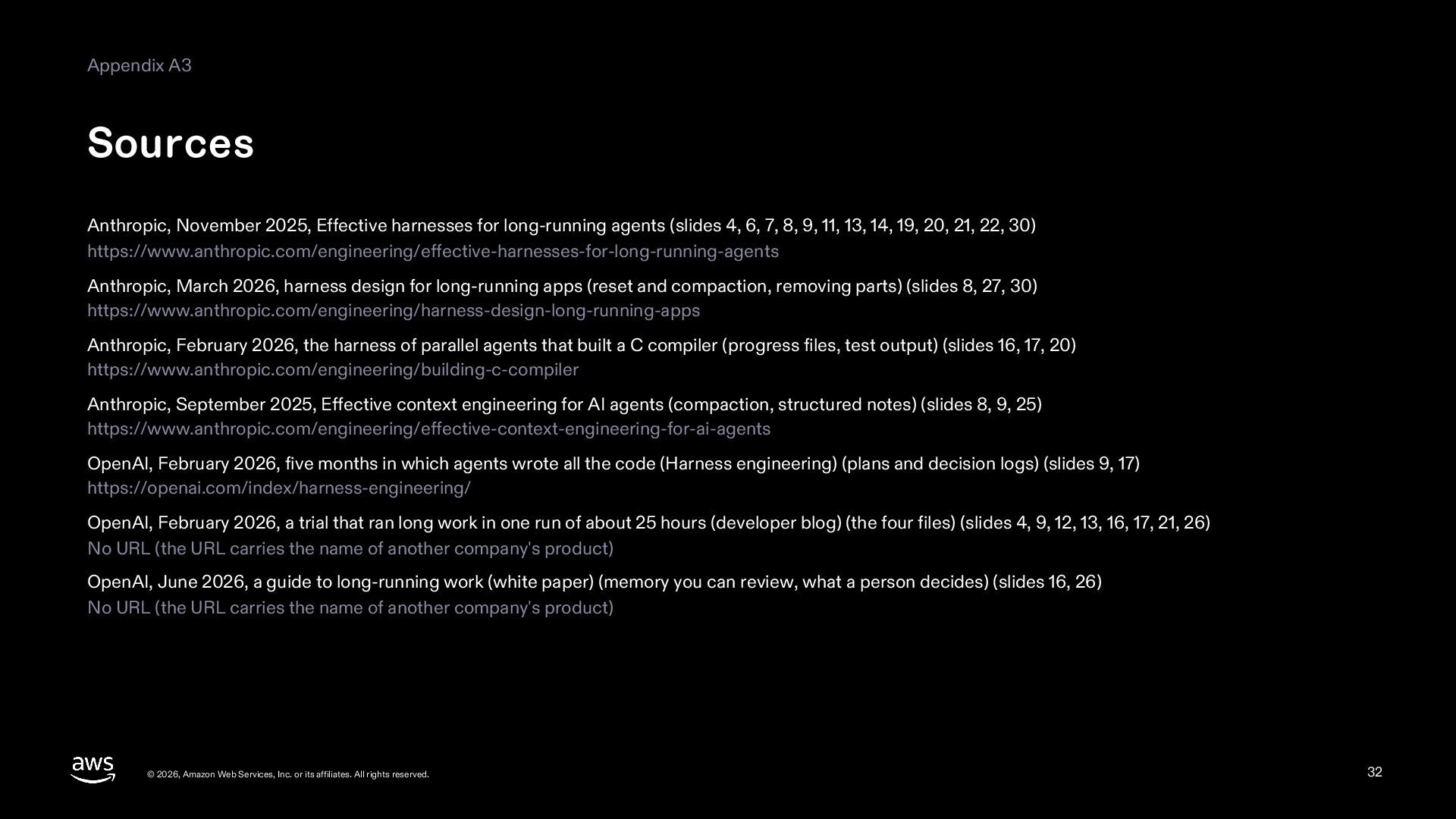
  32. Appendix A3 Sources Anthropic, November 2025, Effective harnesses for long-running

    agents (slides 4, 6, 7, 8, 9, 11, 13, 14, 19, 20, 21, 22, 30) https://www.anthropic.com/engineering/effective-harnesses-for-long-running-agents Anthropic, March 2026, harness design for long-running apps (reset and compaction, removing parts) (slides 8, 27, 30) https://www.anthropic.com/engineering/harness-design-long-running-apps Anthropic, February 2026, the harness of parallel agents that built a C compiler (progress files, test output) (slides 16, 17, 20) https://www.anthropic.com/engineering/building-c-compiler Anthropic, September 2025, Effective context engineering for AI agents (compaction, structured notes) (slides 8, 9, 25) https://www.anthropic.com/engineering/effective-context-engineering-for-ai-agents OpenAI, February 2026, five months in which agents wrote all the code (Harness engineering) (plans and decision logs) (slides 9, 17) https://openai.com/index/harness-engineering/ OpenAI, February 2026, a trial that ran long work in one run of about 25 hours (developer blog) (the four files) (slides 4, 9, 12, 13, 16, 17, 21, 26) No URL (the URL carries the name of another company's product) OpenAI, June 2026, a guide to long-running work (white paper) (memory you can review, what a person decides) (slides 16, 26) No URL (the URL carries the name of another company's product) © 2026, Amazon Web Services, Inc. or its affiliates. All rights reserved. 32
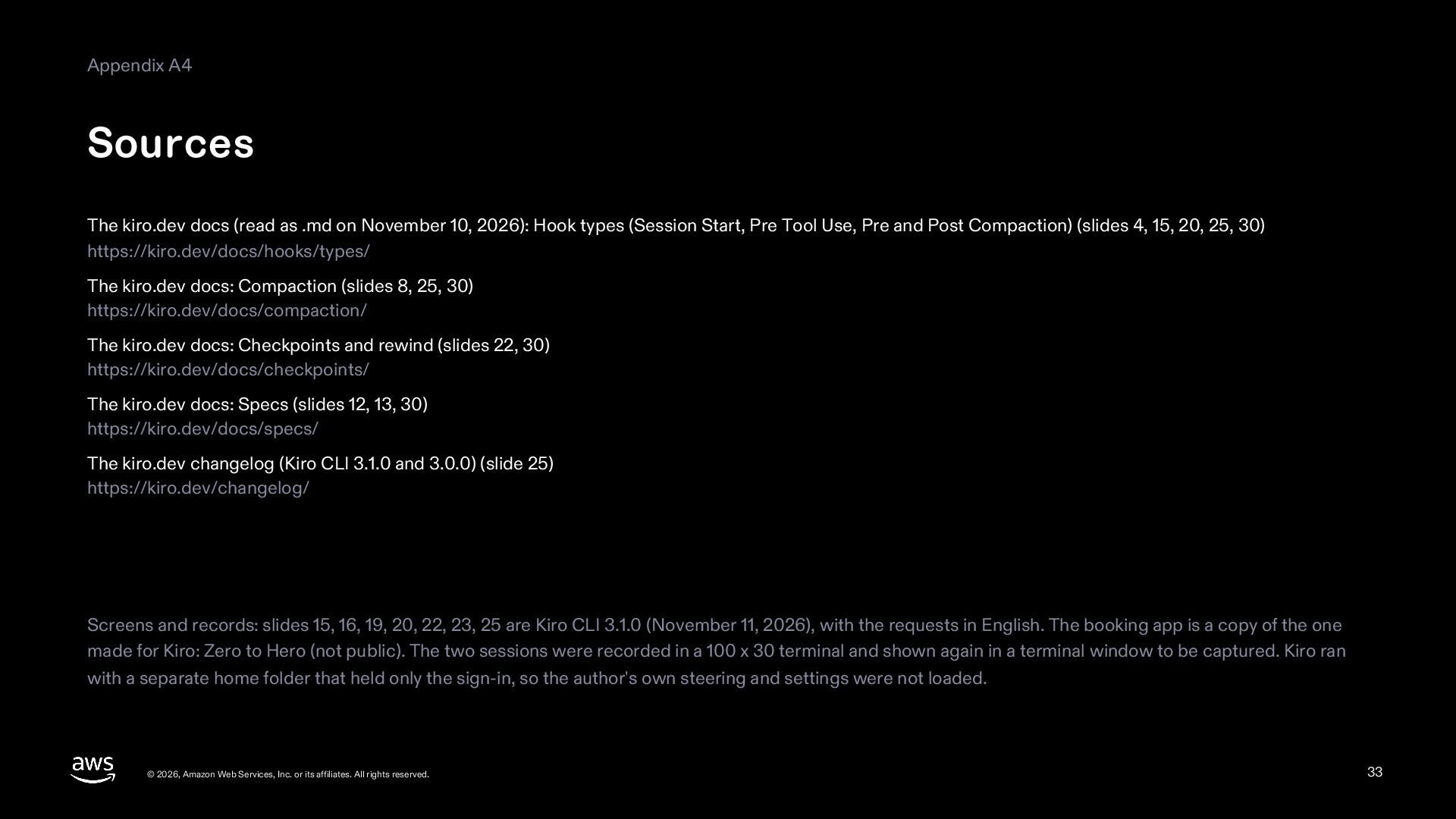
  33. Appendix A4 Sources The kiro.dev docs (read as .md on

    November 10, 2026): Hook types (Session Start, Pre Tool Use, Pre and Post Compaction) (slides 4, 15, 20, 25, 30) https://kiro.dev/docs/hooks/types/ The kiro.dev docs: Compaction (slides 8, 25, 30) https://kiro.dev/docs/compaction/ The kiro.dev docs: Checkpoints and rewind (slides 22, 30) https://kiro.dev/docs/checkpoints/ The kiro.dev docs: Specs (slides 12, 13, 30) https://kiro.dev/docs/specs/ The kiro.dev changelog (Kiro CLI 3.1.0 and 3.0.0) (slide 25) https://kiro.dev/changelog/ Screens and records: slides 15, 16, 19, 20, 22, 23, 25 are Kiro CLI 3.1.0 (November 11, 2026), with the requests in English. The booking app is a copy of the one made for Kiro: Zero to Hero (not public). The two sessions were recorded in a 100 x 30 terminal and shown again in a terminal window to be captured. Kiro ran with a separate home folder that held only the sign-in, so the author's own steering and settings were not loaded. © 2026, Amazon Web Services, Inc. or its affiliates. All rights reserved. 33