Upgrade to Pro — share decks privately, control downloads, hide ads and more …

MCP and Powers (Connect Kiro to outside tools) ...

MCP and Powers (Connect Kiro to outside tools) | Kiro: Zero to Hero 07

Connect Kiro to outside tools. Add MCP servers with mcp.json, approve their tools, wrap an in-house API as a server, and load only the tools you need with Tool Search. Then install powers and build your own (a power bundles tools with the steps to use them), and see when to use MCP, powers, skills, or steering. Includes a running example (a meeting-room booking app). As of November 2026 (Kiro IDE 1.4, Kiro CLI 3.1). This is deck 07, in the Go deeper part of the Kiro: Zero to Hero series.

Avatar for Riku INADA

Riku INADA PRO

November 08, 2026

More Decks by Riku INADA

Other Decks in Technology

Transcript

  1. Kiro: Zero to Hero Go deeper MCP and Powers Connect

    Kiro to outside tools As of November 2026 (Kiro IDE 1.4, Kiro CLI 3.1) 07 November 2026 Riku Inada Amazon Web Services Japan © 2026, Amazon Web Services, Inc. or its affiliates. All rights reserved. 1
  2. Introduction About me Riku Inada Amazon Web Services Japan G.K.

    Solutions Architect Works mainly with manufacturing customers Recent work Promoting the AI-Driven Development Life Cycle (AI-DLC) Writing and speaking about Kiro and AWS Amplify © 2026, Amazon Web Services, Inc. or its affiliates. All rights reserved. X @inada_riku Speaker Deck speakerdeck.com/inariku Zenn zenn.dev/inariku GitHub github.com/inariku 2
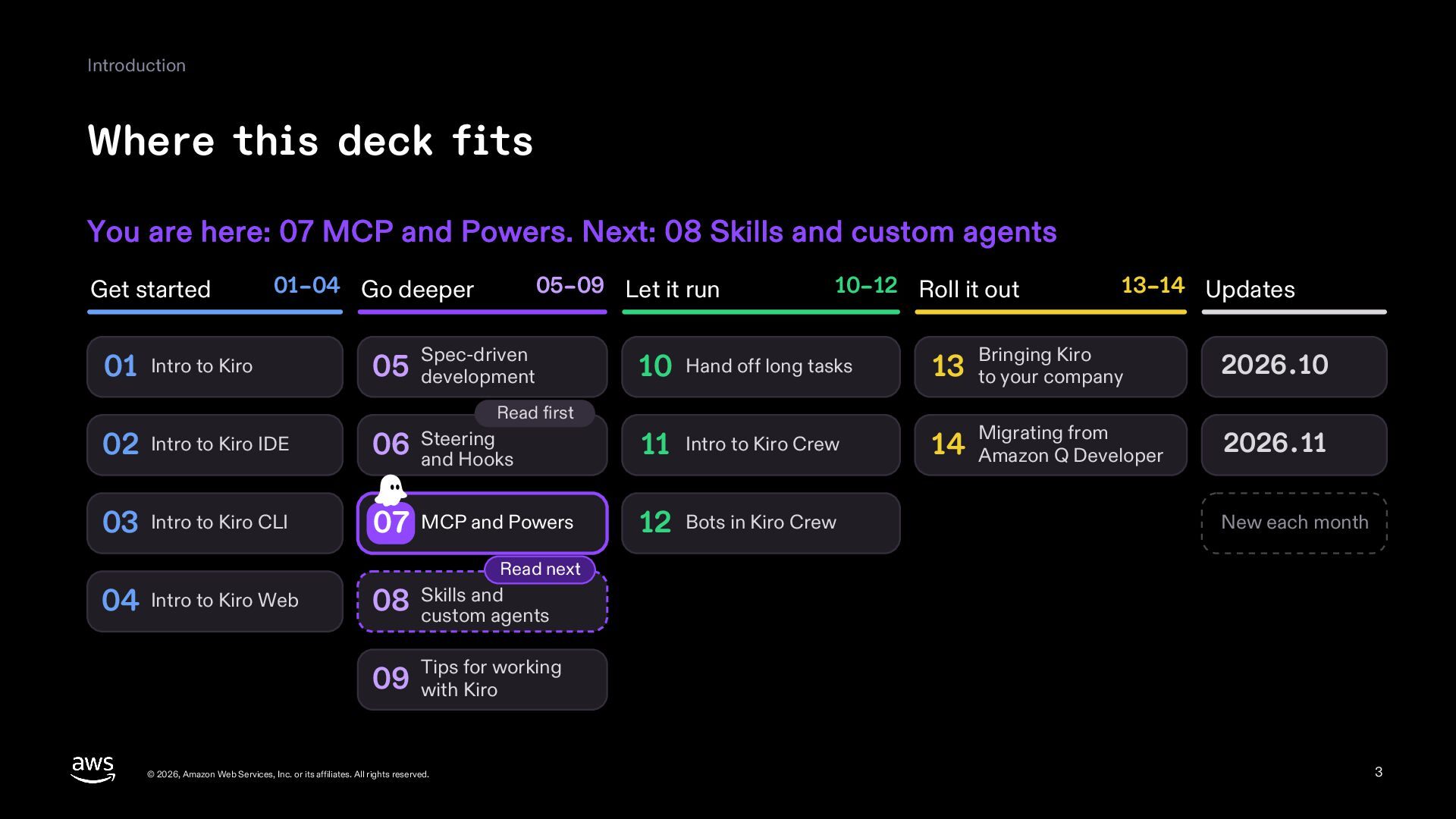
  3. Introduction Where this deck fits You are here: 07 MCP

    and Powers. Next: 08 Skills and custom agents Get started 01–04 Go deeper 01 Intro to Kiro 05–09 Let it run Spec-driven 05 development 10–12 Roll it out 13–14 Updates Bringing Kiro 2026.10 Migrating from 2026.11 10 Hand off long tasks 13 to your company 14 Amazon Q Developer Read first 02 Intro to Kiro IDE 06 Steering and Hooks 11 Intro to Kiro Crew 03 Intro to Kiro CLI 07 MCP and Powers 12 Bots in Kiro Crew New each month Read next 04 Intro to Kiro Web and 08 Skills custom agents for working 09 Tips with Kiro © 2026, Amazon Web Services, Inc. or its affiliates. All rights reserved. 3
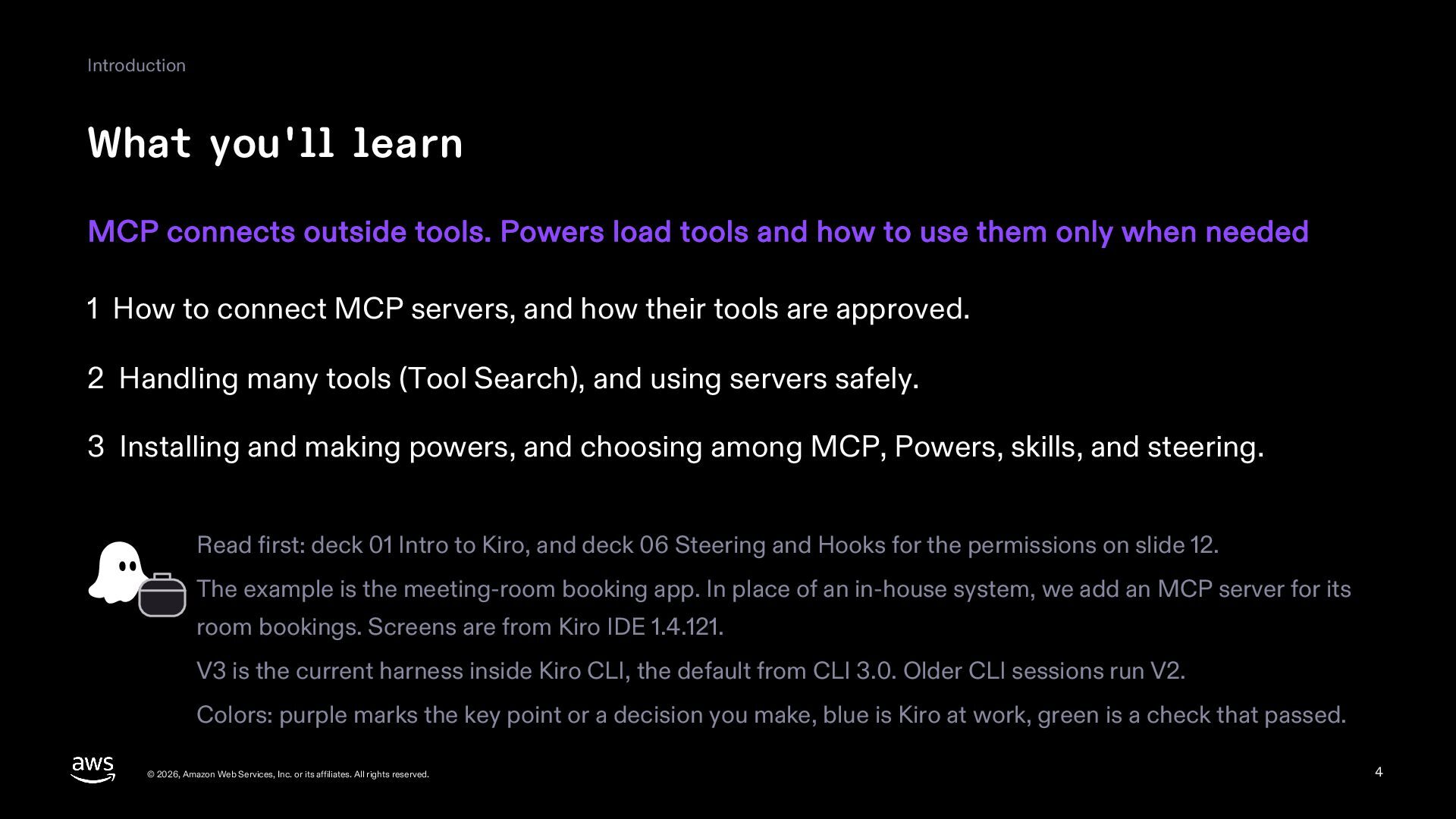
  4. Introduction What you'll learn MCP connects outside tools. Powers load

    tools and how to use them only when needed 1 How to connect MCP servers, and how their tools are approved. 2 Handling many tools (Tool Search), and using servers safely. 3 Installing and making powers, and choosing among MCP, Powers, skills, and steering. Read first: deck 01 Intro to Kiro, and deck 06 Steering and Hooks for the permissions on slide 12. The example is the meeting-room booking app. In place of an in-house system, we add an MCP server for its room bookings. Screens are from Kiro IDE 1.4.121. V3 is the current harness inside Kiro CLI, the default from CLI 3.0. Older CLI sessions run V2. Colors: purple marks the key point or a decision you make, blue is Kiro at work, green is a check that passed. © 2026, Amazon Web Services, Inc. or its affiliates. All rights reserved. 4
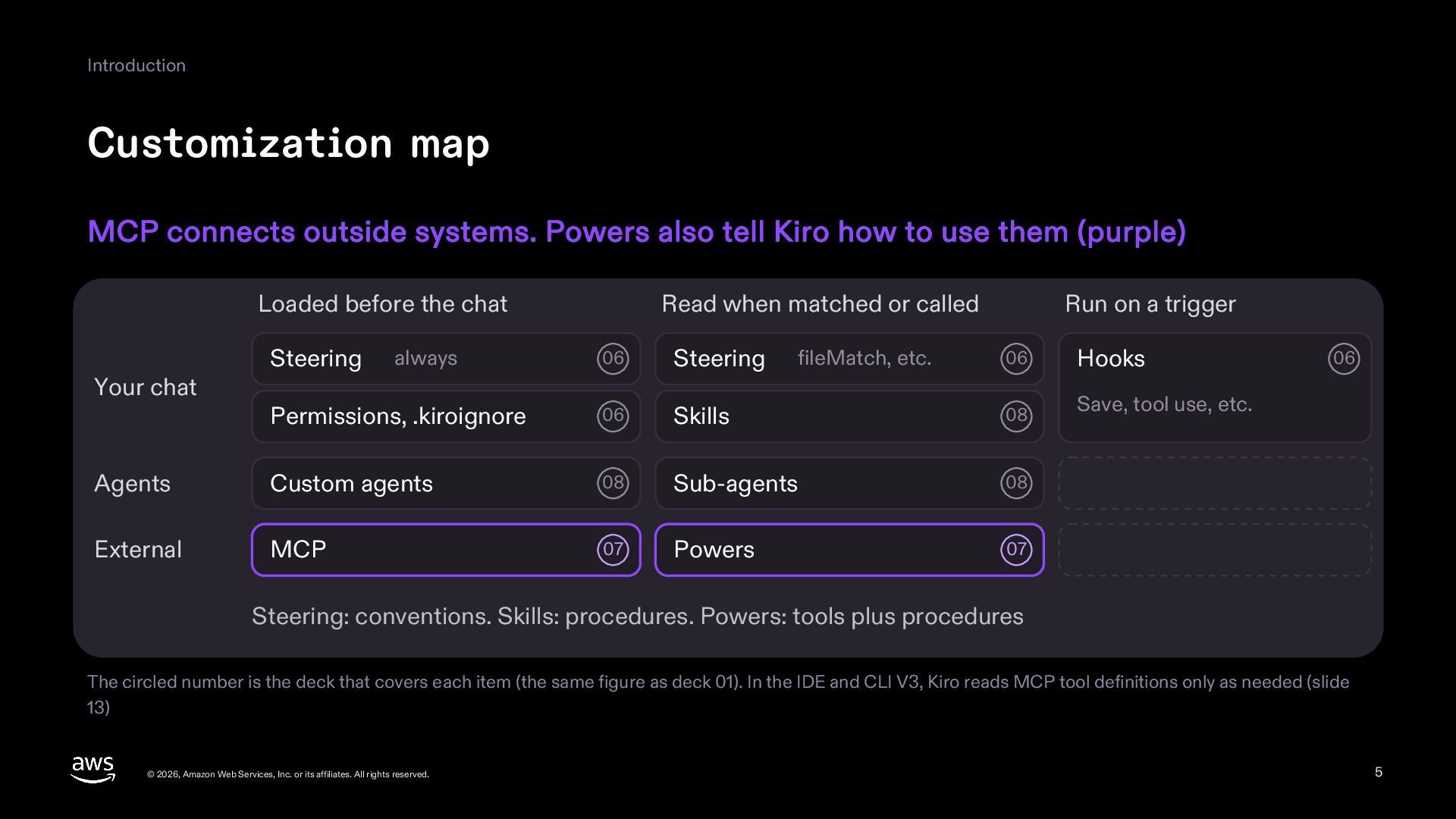
  5. Introduction Customization map MCP connects outside systems. Powers also tell

    Kiro how to use them (purple) Loaded before the chat 06 Steering Permissions, .kiroignore 06 Agents Custom agents External MCP Your chat Steering Read when matched or called always Run on a trigger 06 Hooks Skills 08 Save, tool use, etc. 08 Sub-agents 08 07 Powers 07 fileMatch, etc. 06 Steering: conventions. Skills: procedures. Powers: tools plus procedures The circled number is the deck that covers each item (the same figure as deck 01). In the IDE and CLI V3, Kiro reads MCP tool definitions only as needed (slide 13) © 2026, Amazon Web Services, Inc. or its affiliates. All rights reserved. 5
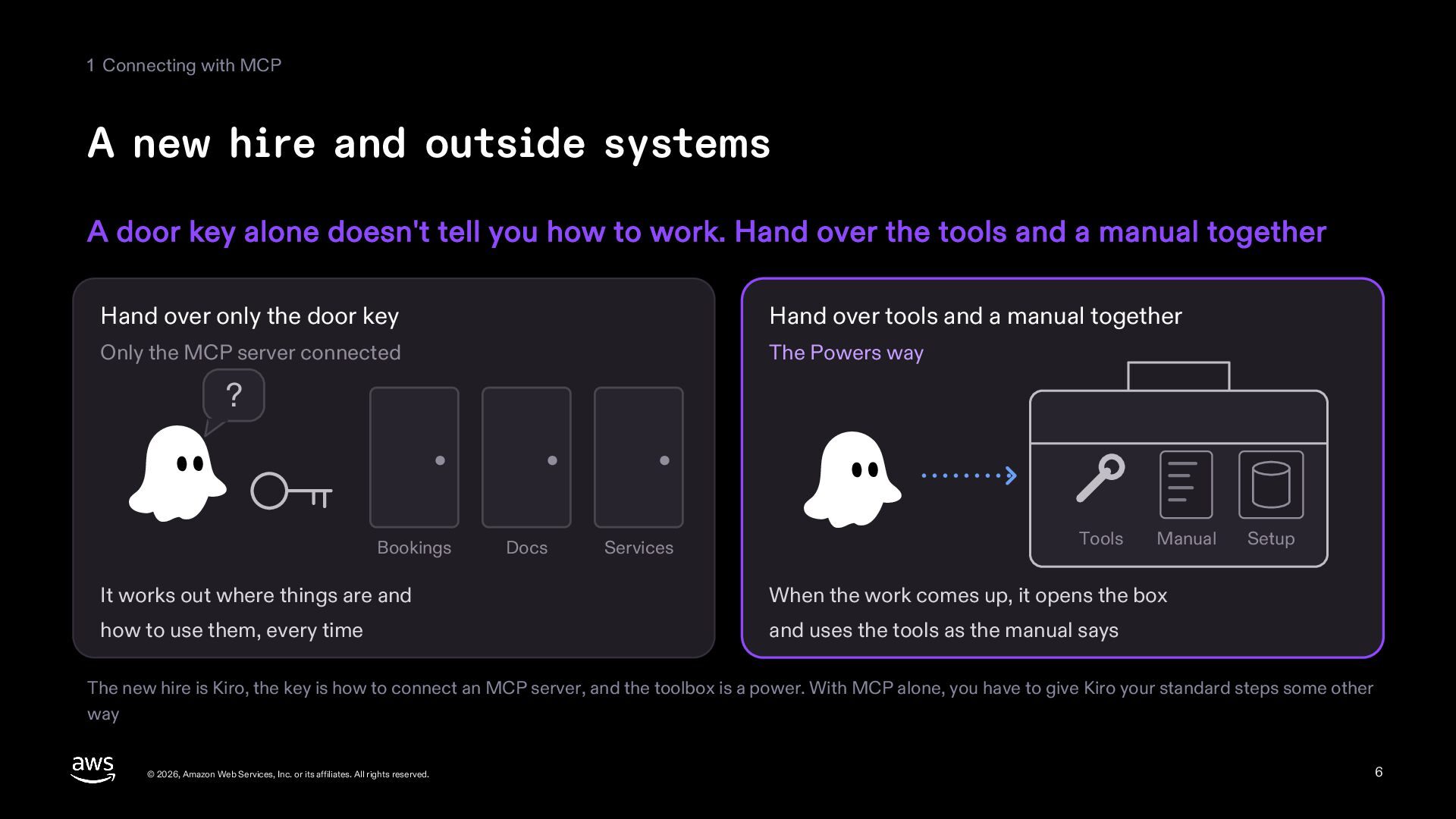
  6. 1 Connecting with MCP A new hire and outside systems

    A door key alone doesn't tell you how to work. Hand over the tools and a manual together Hand over only the door key Hand over tools and a manual together Only the MCP server connected The Powers way ? Bookings Docs Services Tools Manual It works out where things are and When the work comes up, it opens the box how to use them, every time and uses the tools as the manual says Setup The new hire is Kiro, the key is how to connect an MCP server, and the toolbox is a power. With MCP alone, you have to give Kiro your standard steps some other way © 2026, Amazon Web Services, Inc. or its affiliates. All rights reserved. 6
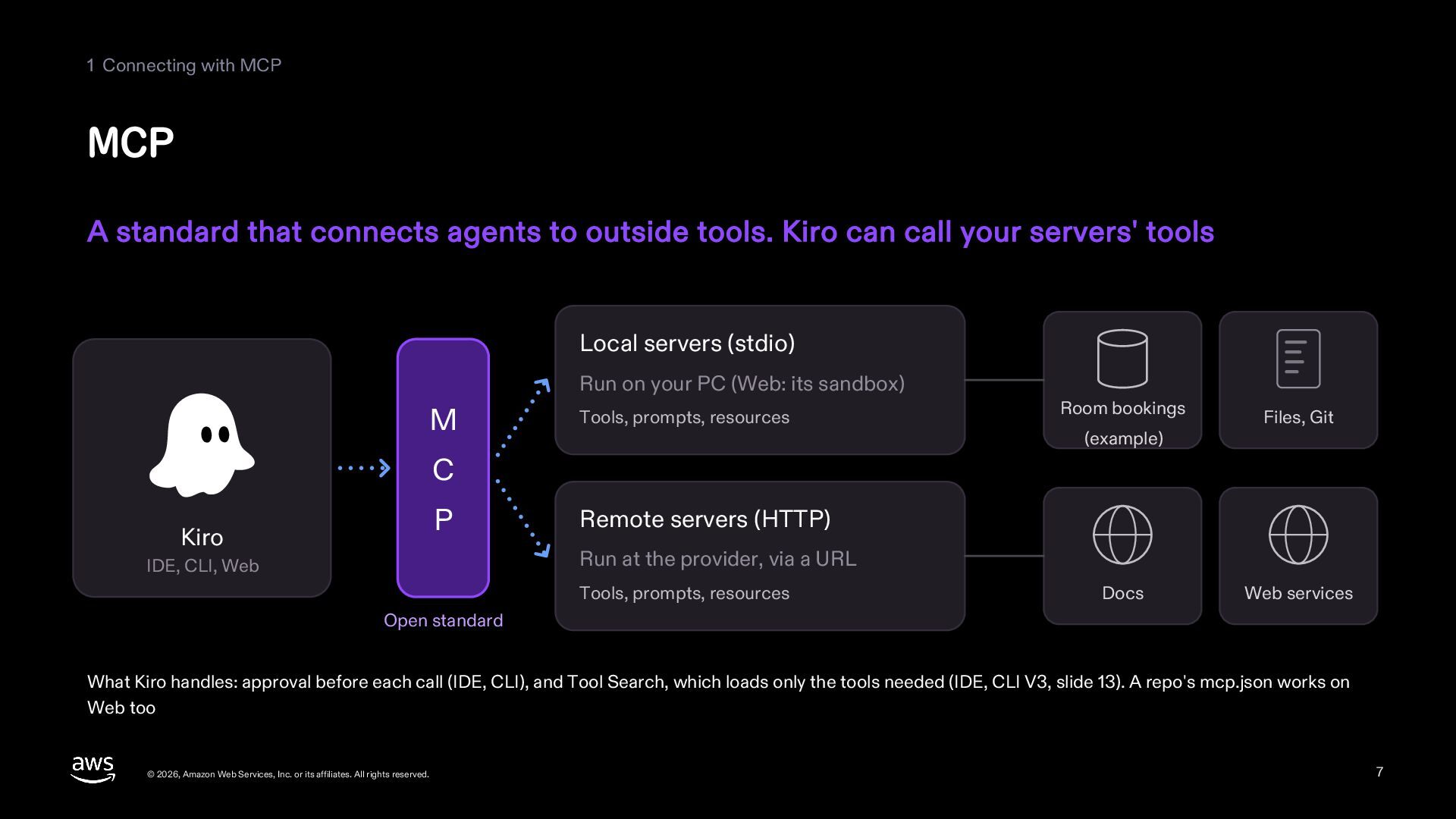
  7. 1 Connecting with MCP MCP A standard that connects agents

    to outside tools. Kiro can call your servers' tools Local servers (stdio) Run on your PC (Web: its sandbox) M Tools, prompts, resources Room bookings (example) Files, Git C P Kiro Remote servers (HTTP) Run at the provider, via a URL IDE, CLI, Web Tools, prompts, resources Docs Web services Open standard What Kiro handles: approval before each call (IDE, CLI), and Tool Search, which loads only the tools needed (IDE, CLI V3, slide 13). A repo's mcp.json works on Web too © 2026, Amazon Web Services, Inc. or its affiliates. All rights reserved. 7
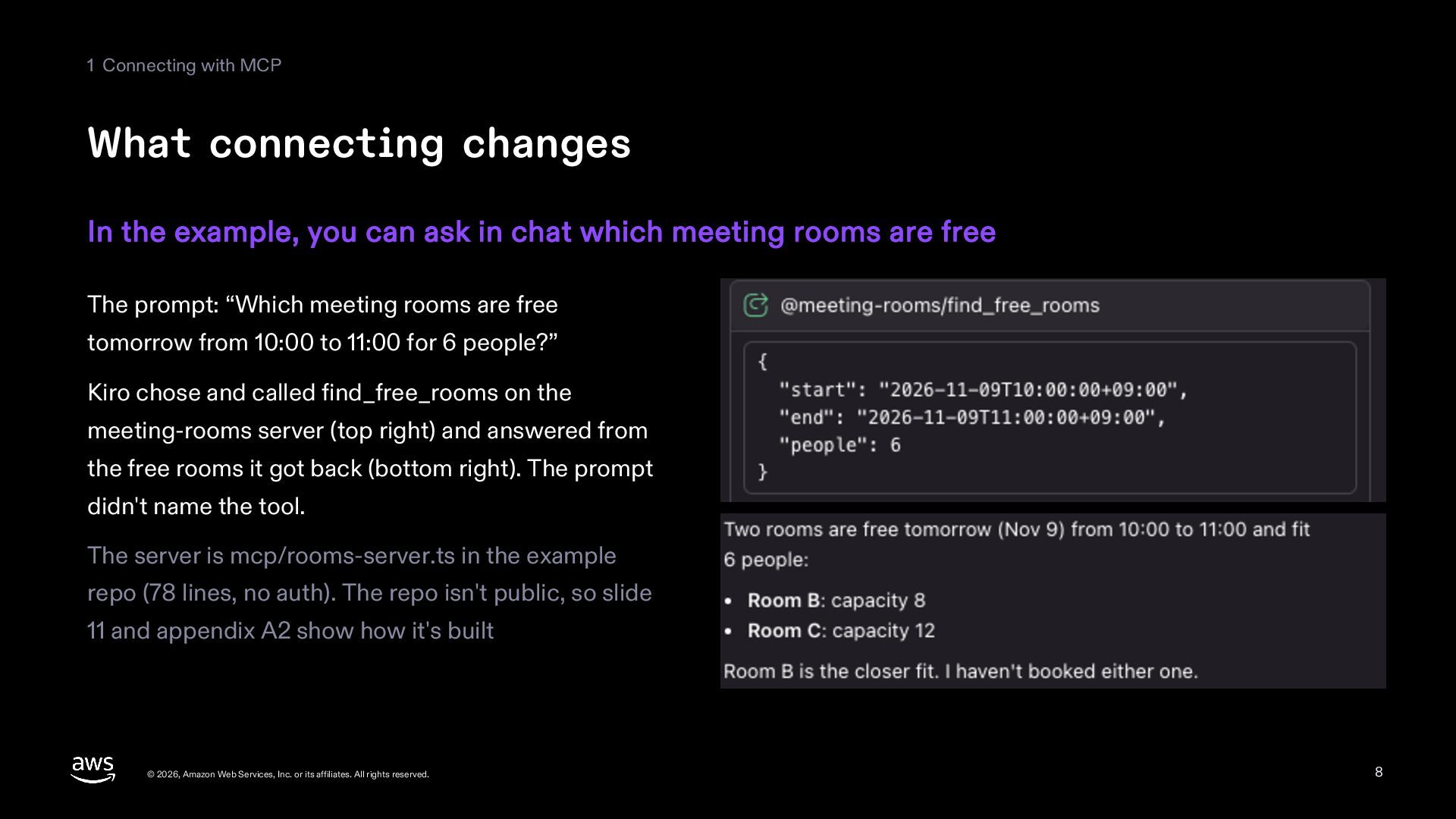
  8. 1 Connecting with MCP What connecting changes In the example,

    you can ask in chat which meeting rooms are free The prompt: “Which meeting rooms are free tomorrow from 10:00 to 11:00 for 6 people?” Kiro chose and called find_free_rooms on the meeting-rooms server (top right) and answered from the free rooms it got back (bottom right). The prompt didn't name the tool. The server is mcp/rooms-server.ts in the example repo (78 lines, no auth). The repo isn't public, so slide 11 and appendix A2 show how it's built © 2026, Amazon Web Services, Inc. or its affiliates. All rights reserved. 8
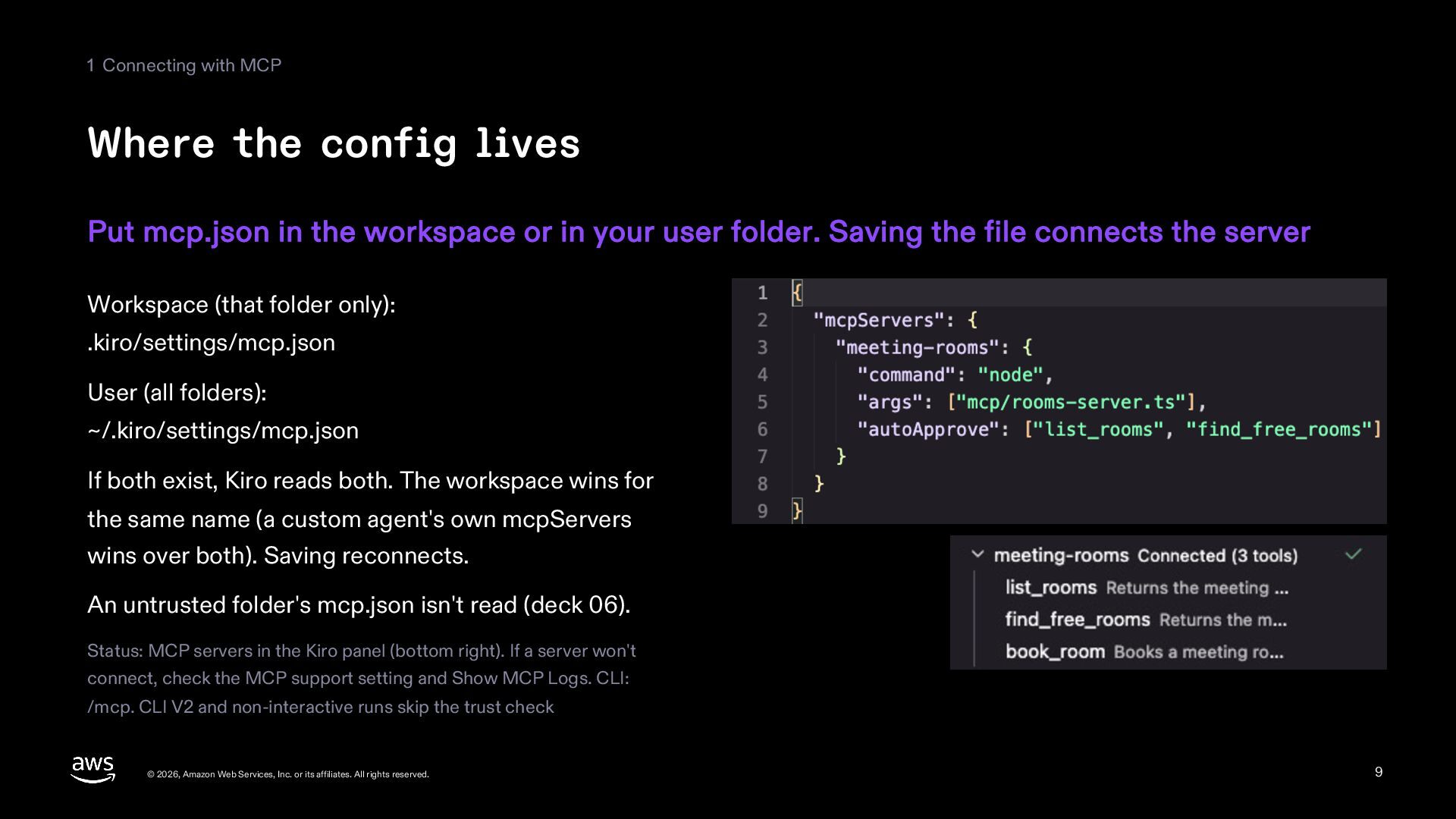
  9. 1 Connecting with MCP Where the config lives Put mcp.json

    in the workspace or in your user folder. Saving the file connects the server Workspace (that folder only): .kiro/settings/mcp.json User (all folders): ~/.kiro/settings/mcp.json If both exist, Kiro reads both. The workspace wins for the same name (a custom agent's own mcpServers wins over both). Saving reconnects. An untrusted folder's mcp.json isn't read (deck 06). Status: MCP servers in the Kiro panel (bottom right). If a server won't connect, check the MCP support setting and Show MCP Logs. CLI: /mcp. CLI V2 and non-interactive runs skip the trust check © 2026, Amazon Web Services, Inc. or its affiliates. All rights reserved. 9
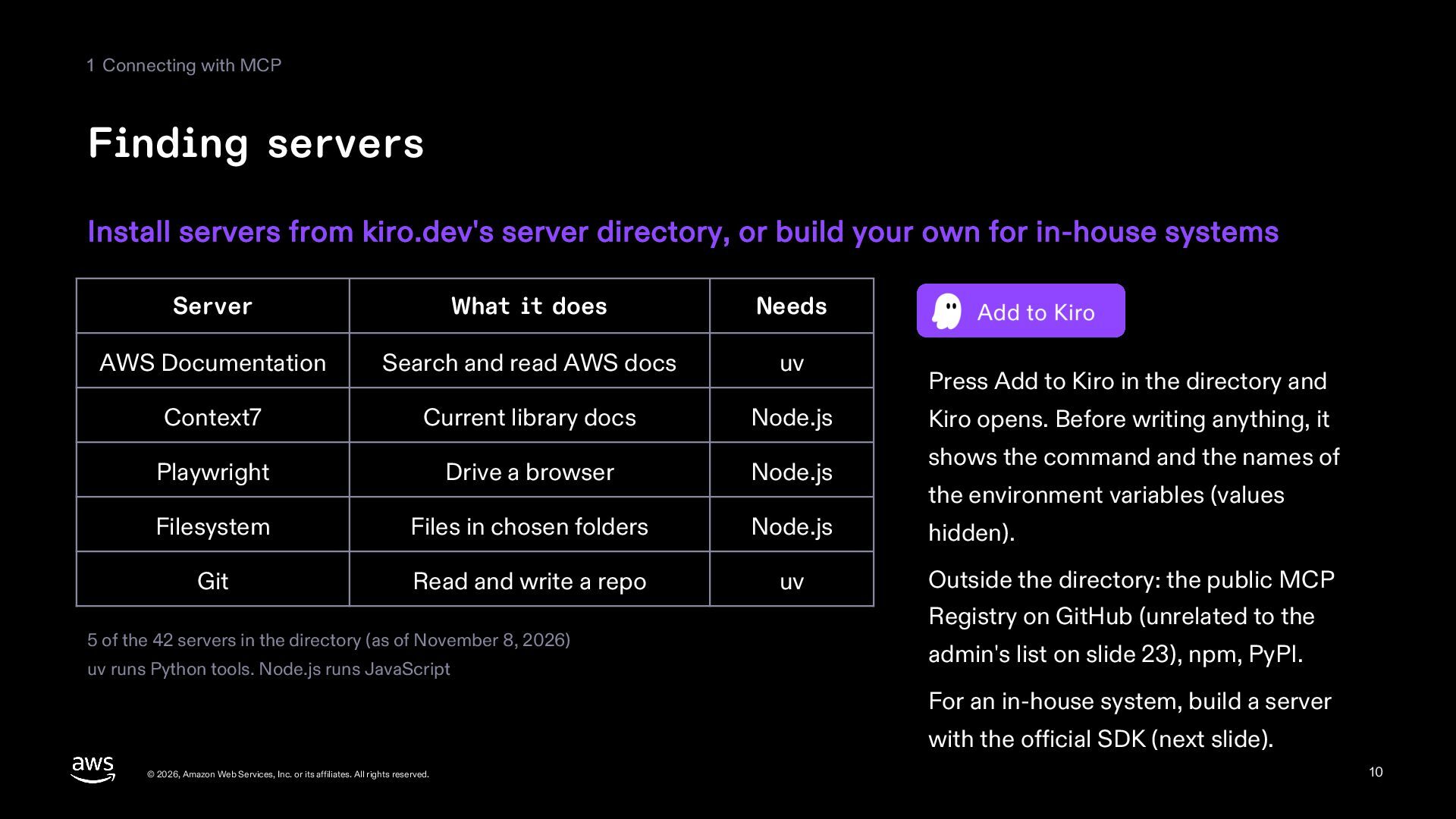
  10. 1 Connecting with MCP Finding servers Install servers from kiro.dev's

    server directory, or build your own for in-house systems Server What it does Needs AWS Documentation Search and read AWS docs uv Context7 Current library docs Node.js Playwright Drive a browser Node.js Filesystem Files in chosen folders Node.js Git Read and write a repo uv 5 of the 42 servers in the directory (as of November 8, 2026) uv runs Python tools. Node.js runs JavaScript Press Add to Kiro in the directory and Kiro opens. Before writing anything, it shows the command and the names of the environment variables (values hidden). Outside the directory: the public MCP Registry on GitHub (unrelated to the admin's list on slide 23), npm, PyPI. For an in-house system, build a server with the official SDK (next slide). © 2026, Amazon Web Services, Inc. or its affiliates. All rights reserved. 10
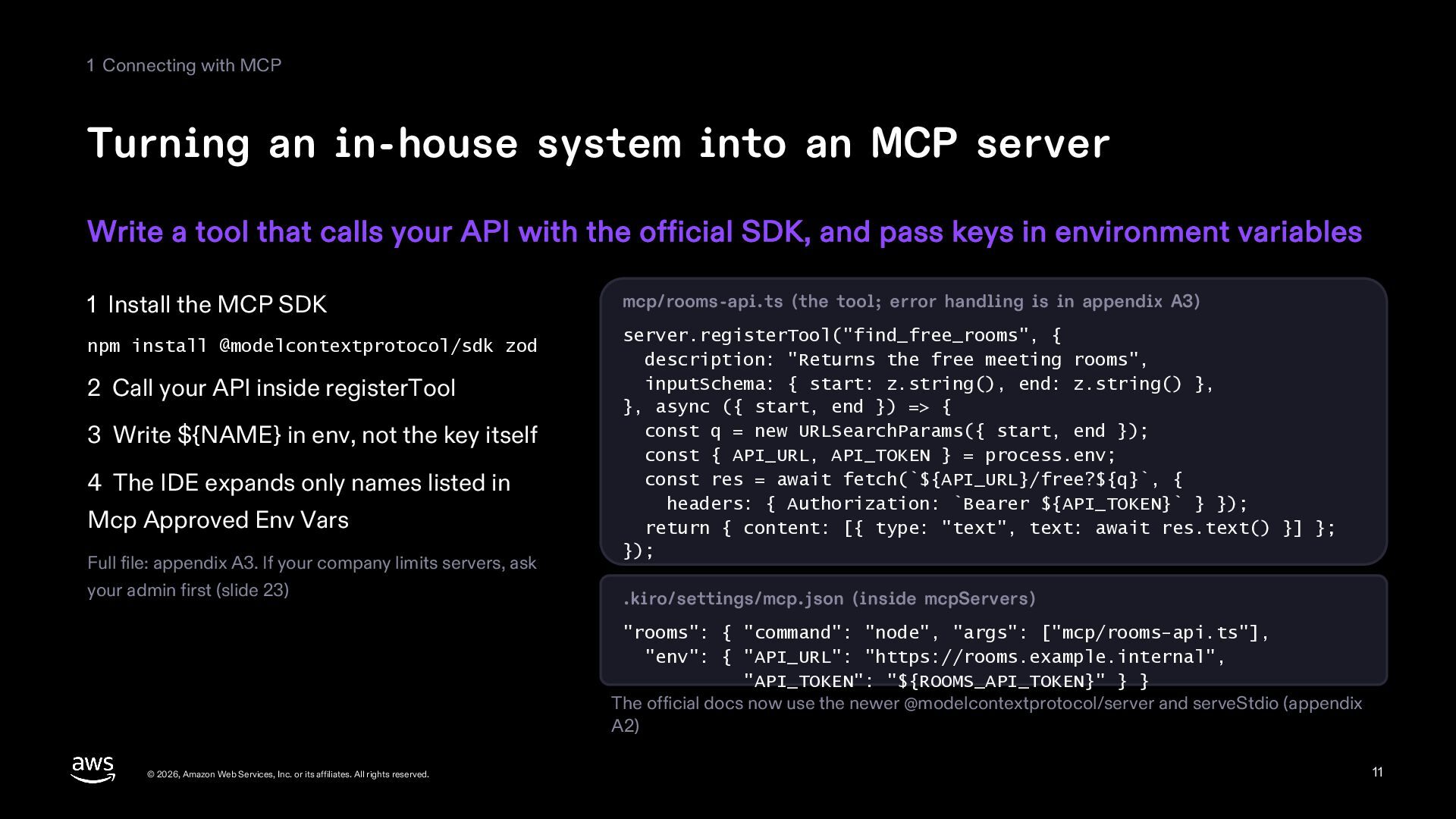
  11. 1 Connecting with MCP Turning an in-house system into an

    MCP server Write a tool that calls your API with the official SDK, and pass keys in environment variables 1 Install the MCP SDK npm install @modelcontextprotocol/sdk zod 2 Call your API inside registerTool 3 Write ${NAME} in env, not the key itself 4 The IDE expands only names listed in Mcp Approved Env Vars Full file: appendix A3. If your company limits servers, ask your admin first (slide 23) mcp/rooms-api.ts (the tool; error handling is in appendix A3) server.registerTool("find_free_rooms", { description: "Returns the free meeting rooms", inputSchema: { start: z.string(), end: z.string() }, }, async ({ start, end }) => { const q = new URLSearchParams({ start, end }); const { API_URL, API_TOKEN } = process.env; const res = await fetch(`${API_URL}/free?${q}`, { headers: { Authorization: `Bearer ${API_TOKEN}` } }); return { content: [{ type: "text", text: await res.text() }] }; }); .kiro/settings/mcp.json (inside mcpServers) "rooms": { "command": "node", "args": ["mcp/rooms-api.ts"], "env": { "API_URL": "https://rooms.example.internal", "API_TOKEN": "${ROOMS_API_TOKEN}" } } The official docs now use the newer @modelcontextprotocol/server and serveStdio (appendix A2) © 2026, Amazon Web Services, Inc. or its affiliates. All rights reserved. 11
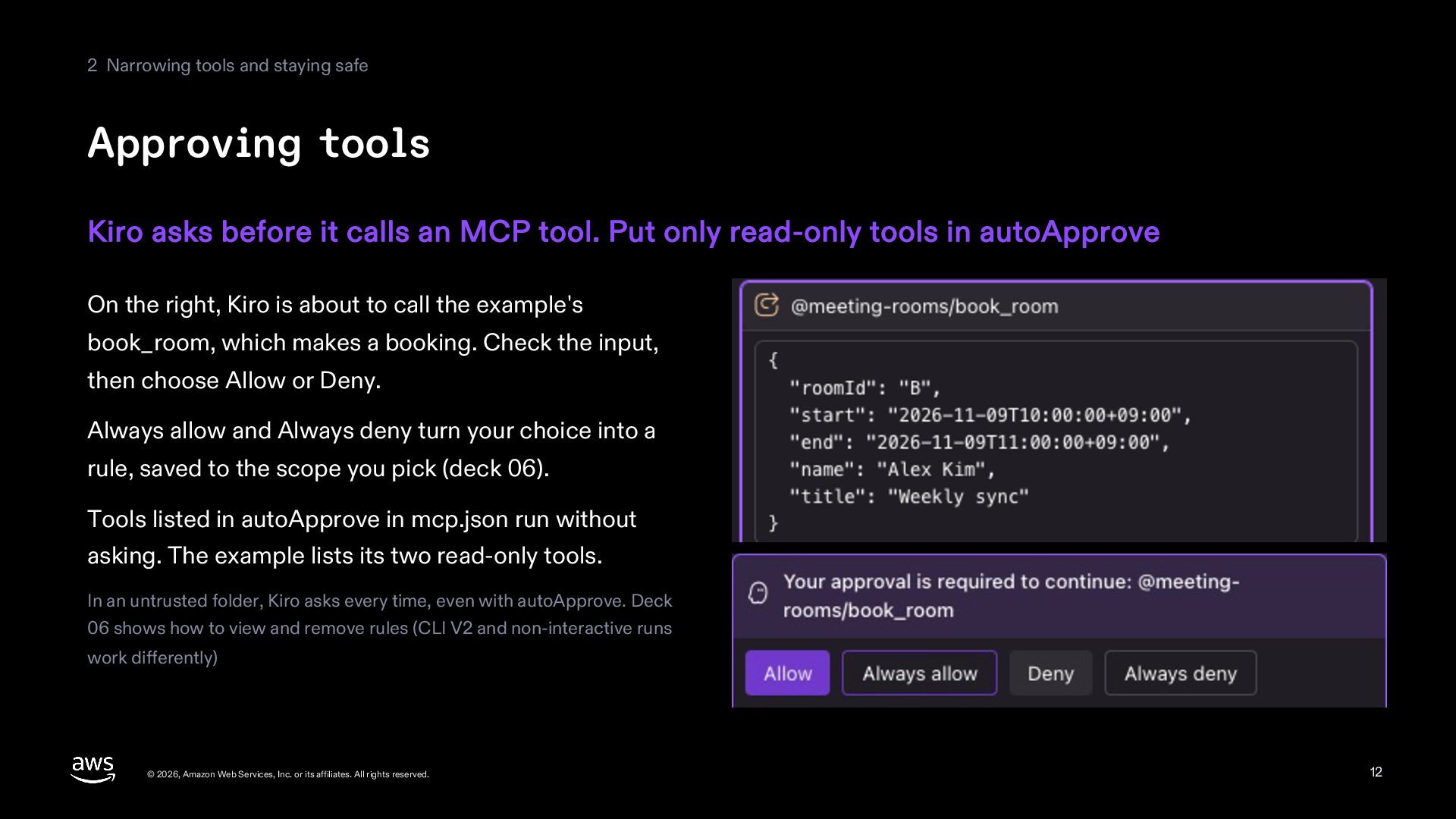
  12. 2 Narrowing tools and staying safe Approving tools Kiro asks

    before it calls an MCP tool. Put only read-only tools in autoApprove On the right, Kiro is about to call the example's book_room, which makes a booking. Check the input, then choose Allow or Deny. Always allow and Always deny turn your choice into a rule, saved to the scope you pick (deck 06). Tools listed in autoApprove in mcp.json run without asking. The example lists its two read-only tools. In an untrusted folder, Kiro asks every time, even with autoApprove. Deck 06 shows how to view and remove rules (CLI V2 and non-interactive runs work differently) © 2026, Amazon Web Services, Inc. or its affiliates. All rights reserved. 12
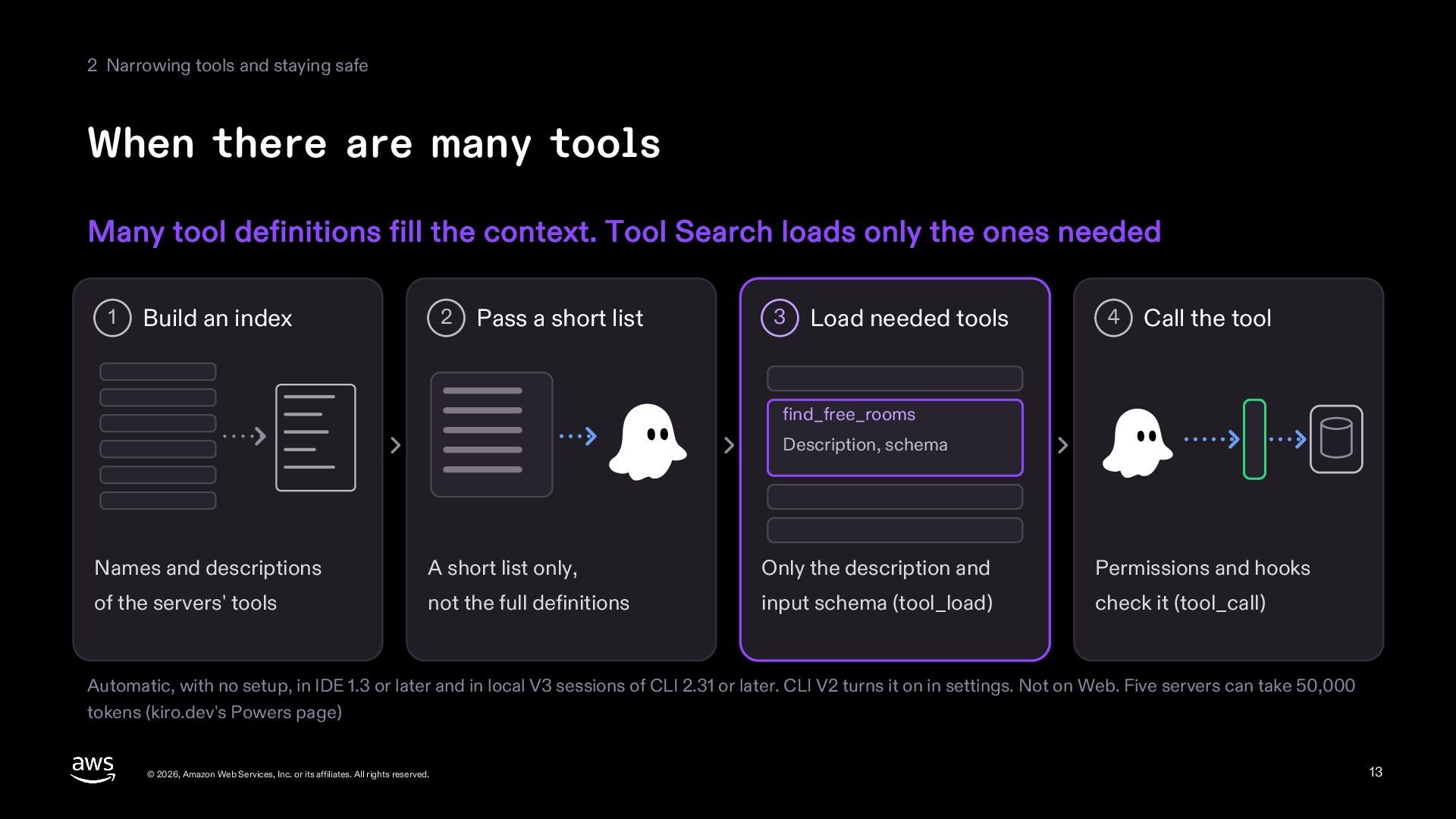
  13. 2 Narrowing tools and staying safe When there are many

    tools Many tool definitions fill the context. Tool Search loads only the ones needed 1 Build an index 2 Pass a short list 3 Load needed tools 4 Call the tool find_free_rooms Description, schema Names and descriptions A short list only, Only the description and Permissions and hooks of the servers' tools not the full definitions input schema (tool_load) check it (tool_call) Automatic, with no setup, in IDE 1.3 or later and in local V3 sessions of CLI 2.31 or later. CLI V2 turns it on in settings. Not on Web. Five servers can take 50,000 tokens (kiro.dev's Powers page) © 2026, Amazon Web Services, Inc. or its affiliates. All rights reserved. 13
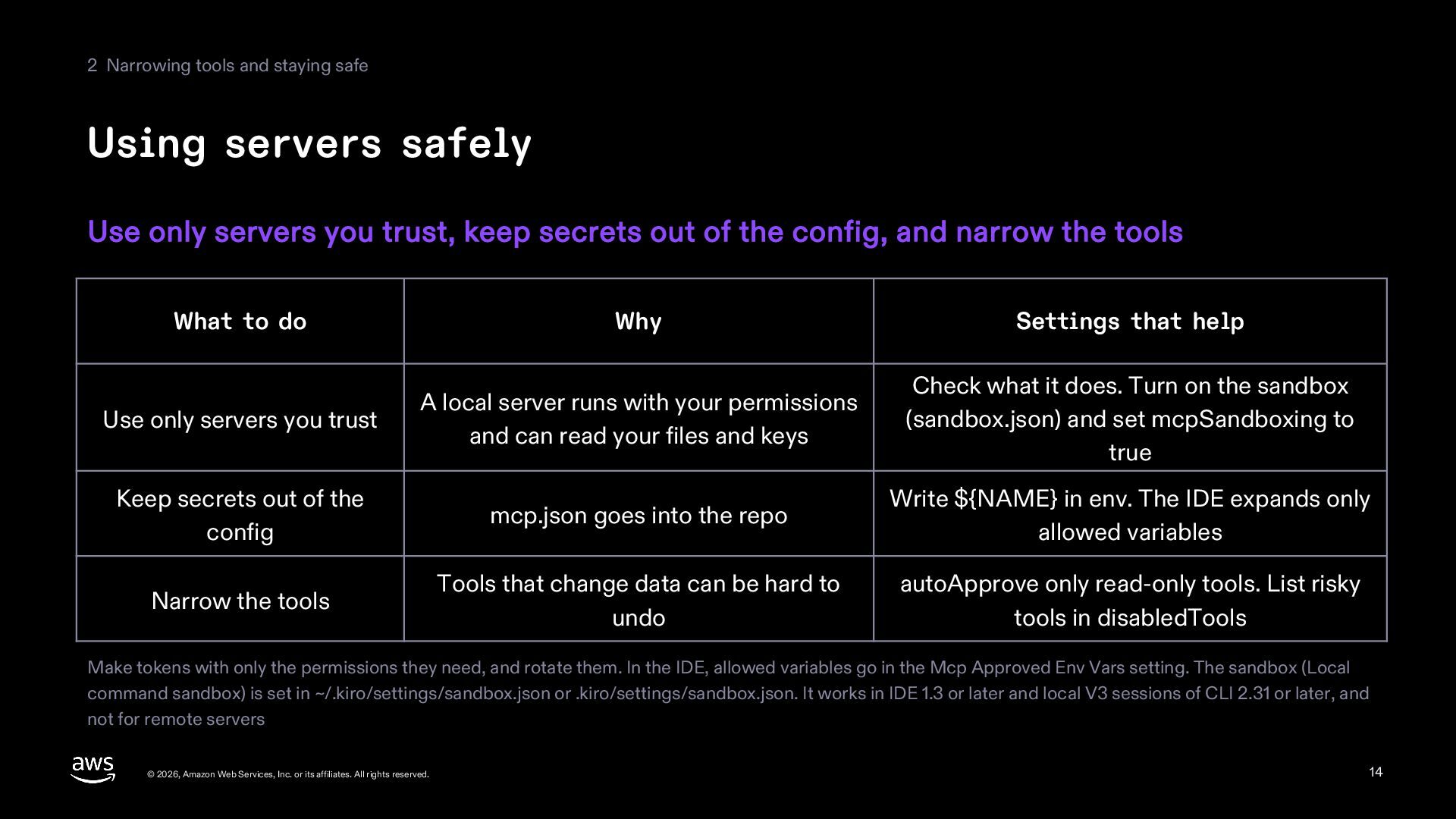
  14. 2 Narrowing tools and staying safe Using servers safely Use

    only servers you trust, keep secrets out of the config, and narrow the tools What to do Why Settings that help Use only servers you trust A local server runs with your permissions and can read your files and keys Check what it does. Turn on the sandbox (sandbox.json) and set mcpSandboxing to true Keep secrets out of the config mcp.json goes into the repo Write ${NAME} in env. The IDE expands only allowed variables Narrow the tools Tools that change data can be hard to undo autoApprove only read-only tools. List risky tools in disabledTools Make tokens with only the permissions they need, and rotate them. In the IDE, allowed variables go in the Mcp Approved Env Vars setting. The sandbox (Local command sandbox) is set in ~/.kiro/settings/sandbox.json or .kiro/settings/sandbox.json. It works in IDE 1.3 or later and local V3 sessions of CLI 2.31 or later, and not for remote servers © 2026, Amazon Web Services, Inc. or its affiliates. All rights reserved. 14
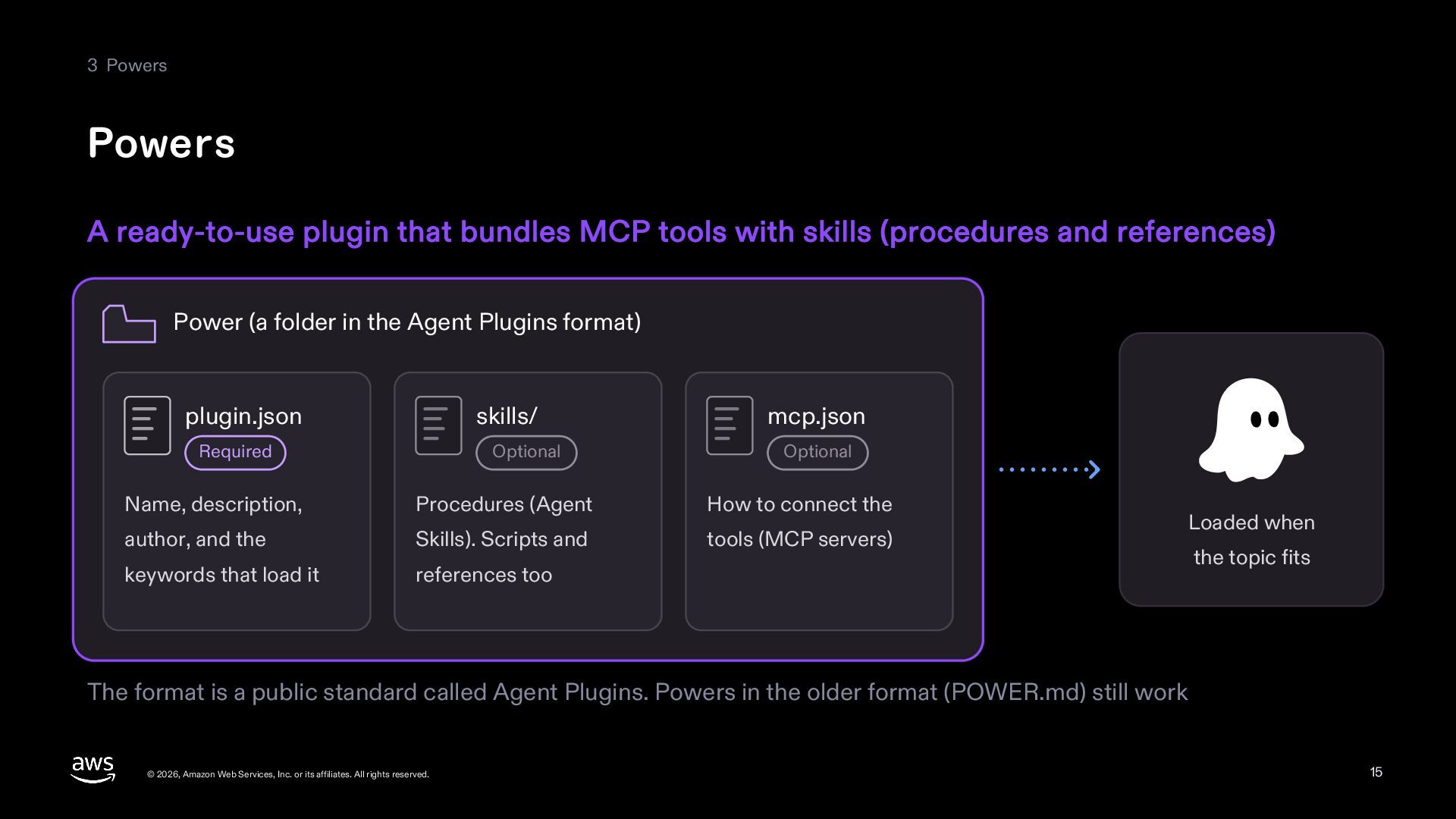
  15. 3 Powers Powers A ready-to-use plugin that bundles MCP tools

    with skills (procedures and references) Power (a folder in the Agent Plugins format) plugin.json skills/ Required Optional mcp.json Optional Name, description, Procedures (Agent How to connect the author, and the Skills). Scripts and tools (MCP servers) keywords that load it references too Loaded when the topic fits The format is a public standard called Agent Plugins. Powers in the older format (POWER.md) still work © 2026, Amazon Web Services, Inc. or its affiliates. All rights reserved. 15
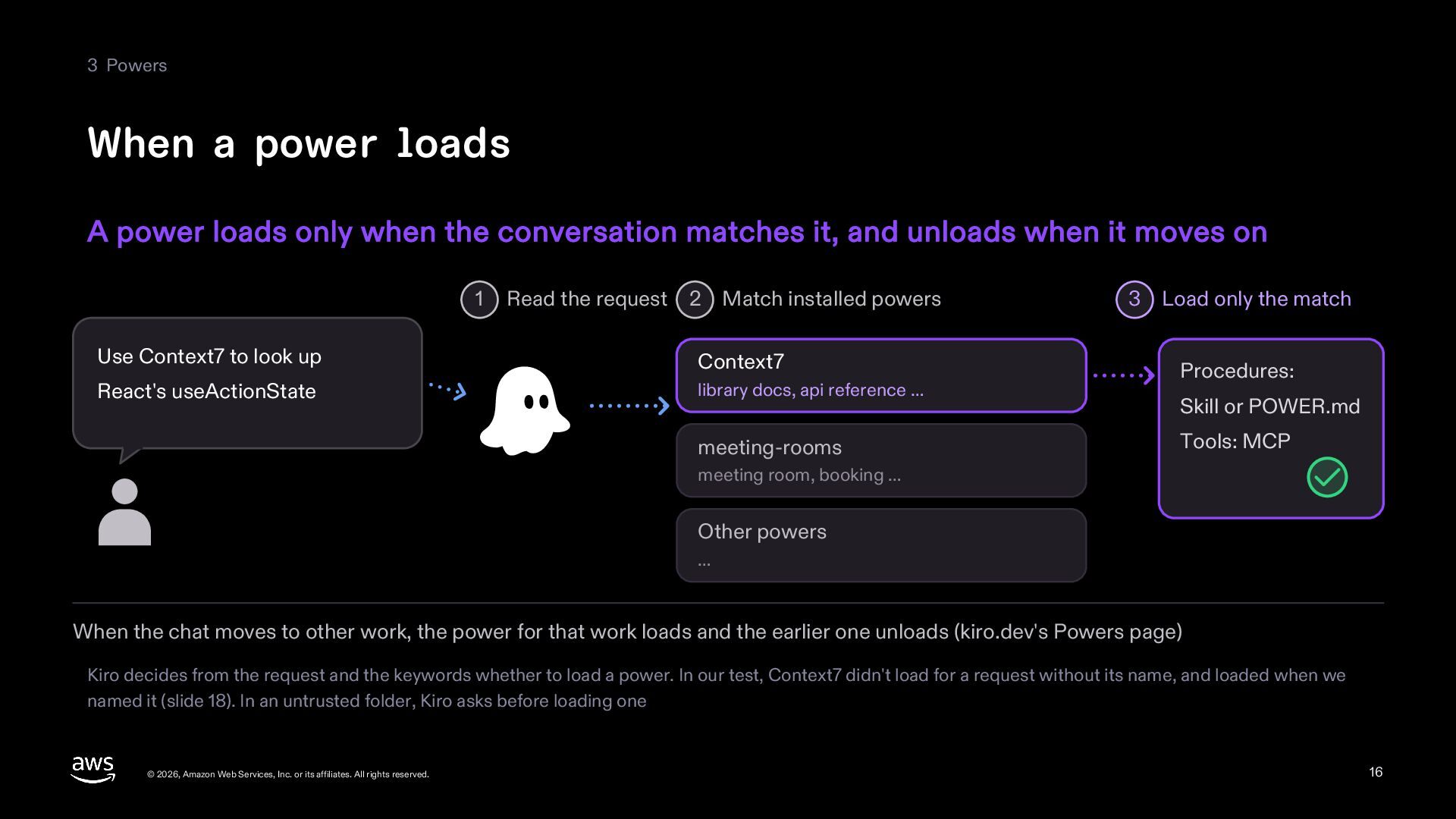
  16. 3 Powers When a power loads A power loads only

    when the conversation matches it, and unloads when it moves on 1 Read the request 2 Match installed powers Use Context7 to look up Context7 React's useActionState library docs, api reference … meeting-rooms 3 Load only the match Procedures: Skill or POWER.md Tools: MCP meeting room, booking … Other powers … When the chat moves to other work, the power for that work loads and the earlier one unloads (kiro.dev's Powers page) Kiro decides from the request and the keywords whether to load a power. In our test, Context7 didn't load for a request without its name, and loaded when we named it (slide 18). In an untrusted folder, Kiro asks before loading one © 2026, Amazon Web Services, Inc. or its affiliates. All rights reserved. 16
  17. 3 Powers Installing powers Install from the Kiro panel. kiro.dev,

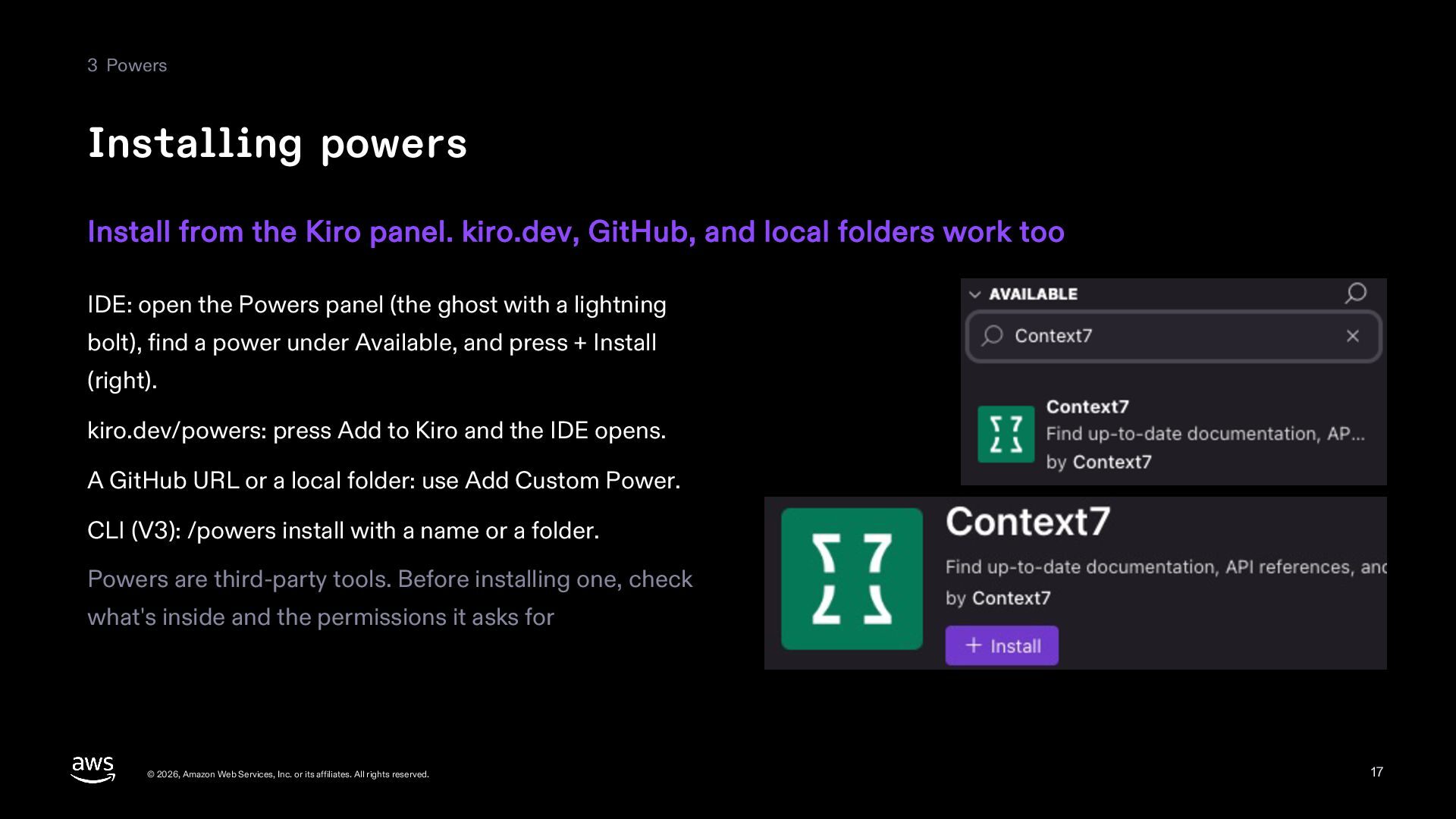
    GitHub, and local folders work too IDE: open the Powers panel (the ghost with a lightning bolt), find a power under Available, and press + Install (right). kiro.dev/powers: press Add to Kiro and the IDE opens. A GitHub URL or a local folder: use Add Custom Power. CLI (V3): /powers install with a name or a folder. Powers are third-party tools. Before installing one, check what's inside and the permissions it asks for © 2026, Amazon Web Services, Inc. or its affiliates. All rights reserved. 17
  18. 3 Powers Using the Context7 power Have Kiro look up

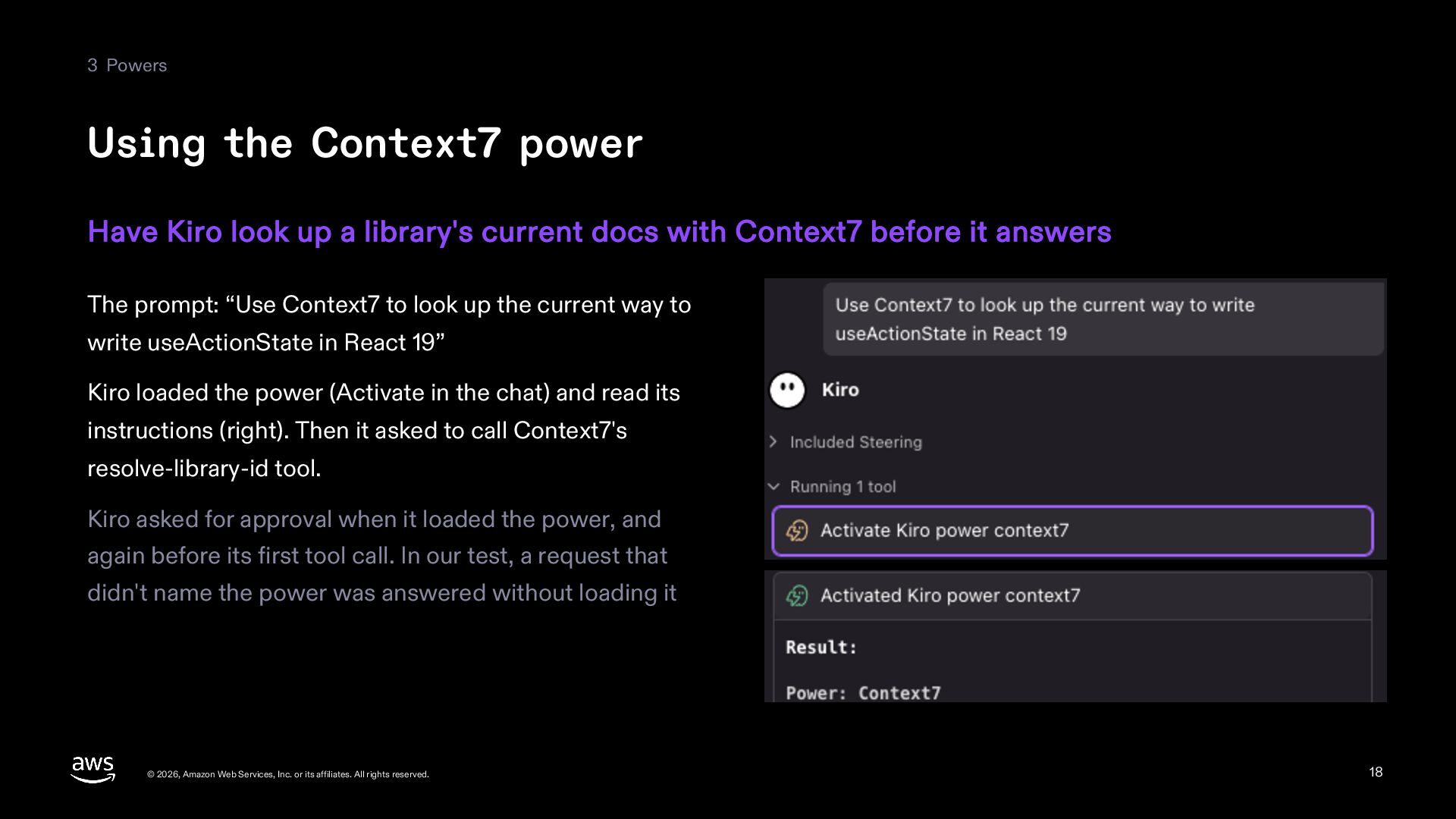
    a library's current docs with Context7 before it answers The prompt: “Use Context7 to look up the current way to write useActionState in React 19” Kiro loaded the power (Activate in the chat) and read its instructions (right). Then it asked to call Context7's resolve-library-id tool. Kiro asked for approval when it loaded the power, and again before its first tool call. In our test, a request that didn't name the power was answered without loading it © 2026, Amazon Web Services, Inc. or its affiliates. All rights reserved. 18
  19. 3 Powers What's in a power Write the name and

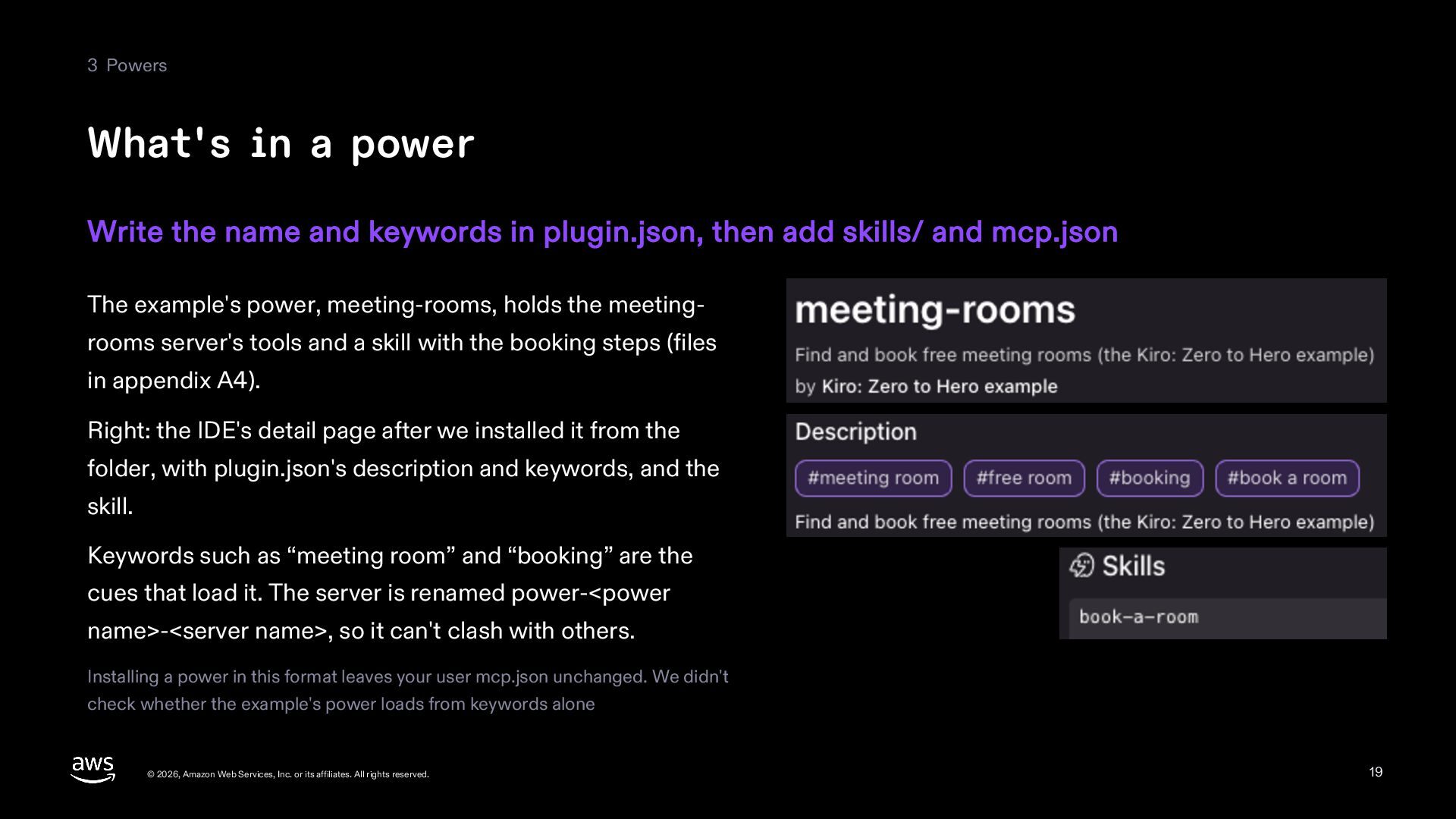
    keywords in plugin.json, then add skills/ and mcp.json The example's power, meeting-rooms, holds the meetingrooms server's tools and a skill with the booking steps (files in appendix A4). Right: the IDE's detail page after we installed it from the folder, with plugin.json's description and keywords, and the skill. Keywords such as “meeting room” and “booking” are the cues that load it. The server is renamed power-<power name>-<server name>, so it can't clash with others. Installing a power in this format leaves your user mcp.json unchanged. We didn't check whether the example's power loads from keywords alone © 2026, Amazon Web Services, Inc. or its affiliates. All rights reserved. 19
  20. 3 Powers Making a power Package how you use an

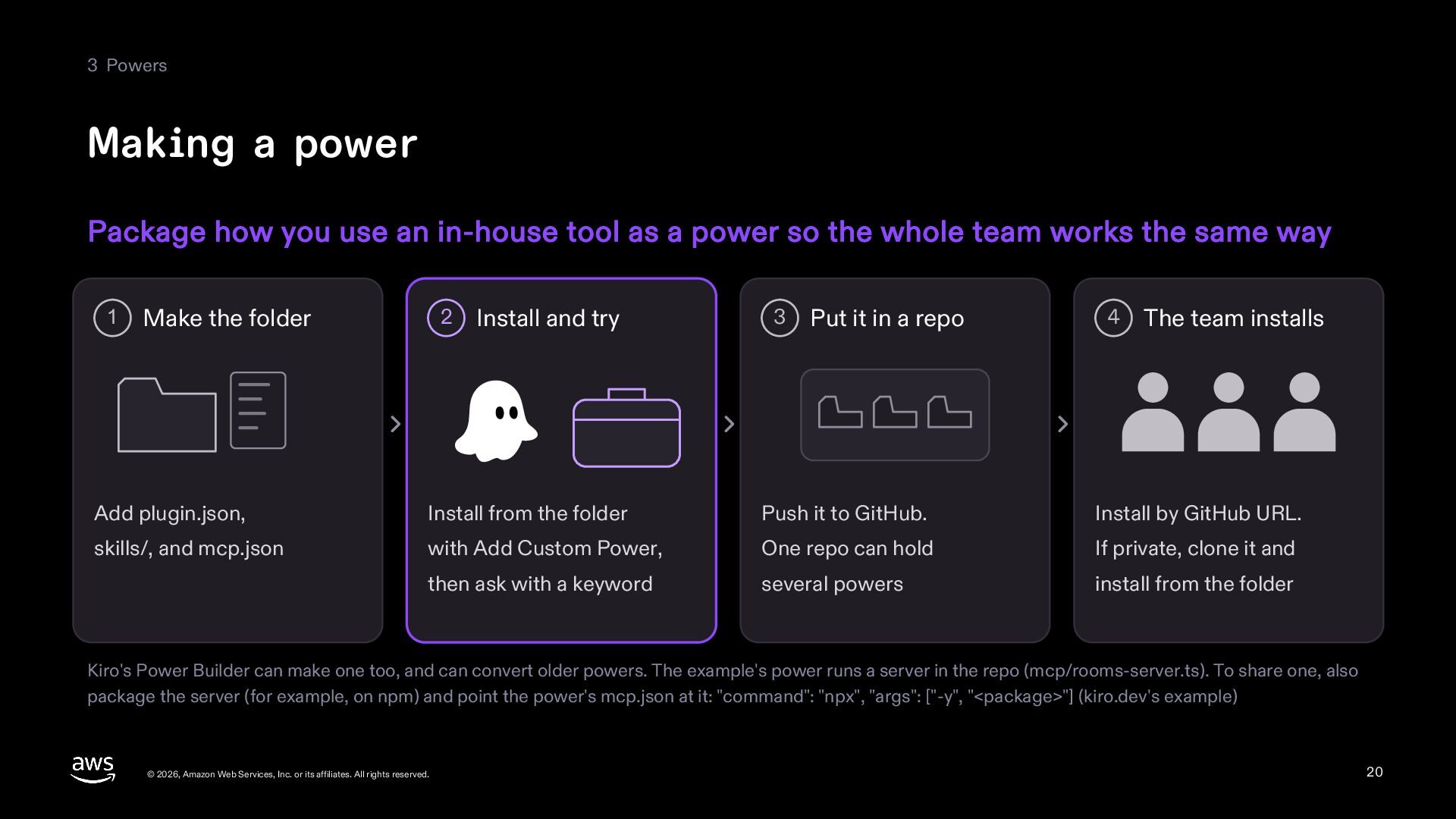
    in-house tool as a power so the whole team works the same way 1 Make the folder 2 Install and try 3 Put it in a repo 4 The team installs Add plugin.json, Install from the folder Push it to GitHub. Install by GitHub URL. skills/, and mcp.json with Add Custom Power, One repo can hold If private, clone it and then ask with a keyword several powers install from the folder Kiro's Power Builder can make one too, and can convert older powers. The example's power runs a server in the repo (mcp/rooms-server.ts). To share one, also package the server (for example, on npm) and point the power's mcp.json at it: "command": "npx", "args": ["-y", "<package>"] (kiro.dev's example) © 2026, Amazon Web Services, Inc. or its affiliates. All rights reserved. 20
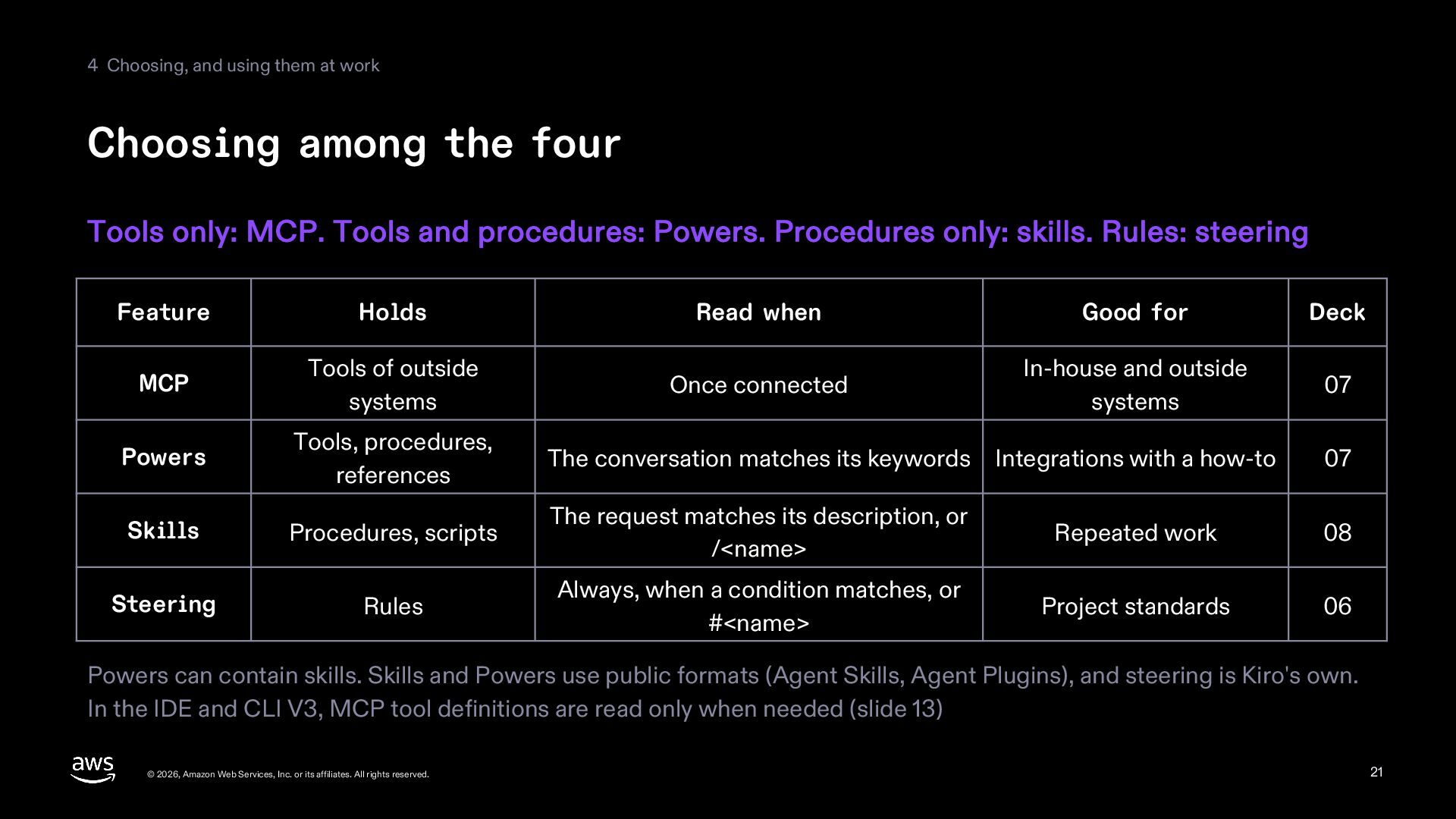
  21. 4 Choosing, and using them at work Choosing among the

    four Tools only: MCP. Tools and procedures: Powers. Procedures only: skills. Rules: steering Feature Holds Read when Good for Deck MCP Tools of outside systems Once connected In-house and outside systems 07 Powers Tools, procedures, references The conversation matches its keywords Integrations with a how-to 07 Skills Procedures, scripts The request matches its description, or /<name> Repeated work 08 Steering Rules Always, when a condition matches, or #<name> Project standards 06 Powers can contain skills. Skills and Powers use public formats (Agent Skills, Agent Plugins), and steering is Kiro's own. In the IDE and CLI V3, MCP tool definitions are read only when needed (slide 13) © 2026, Amazon Web Services, Inc. or its affiliates. All rights reserved. 21
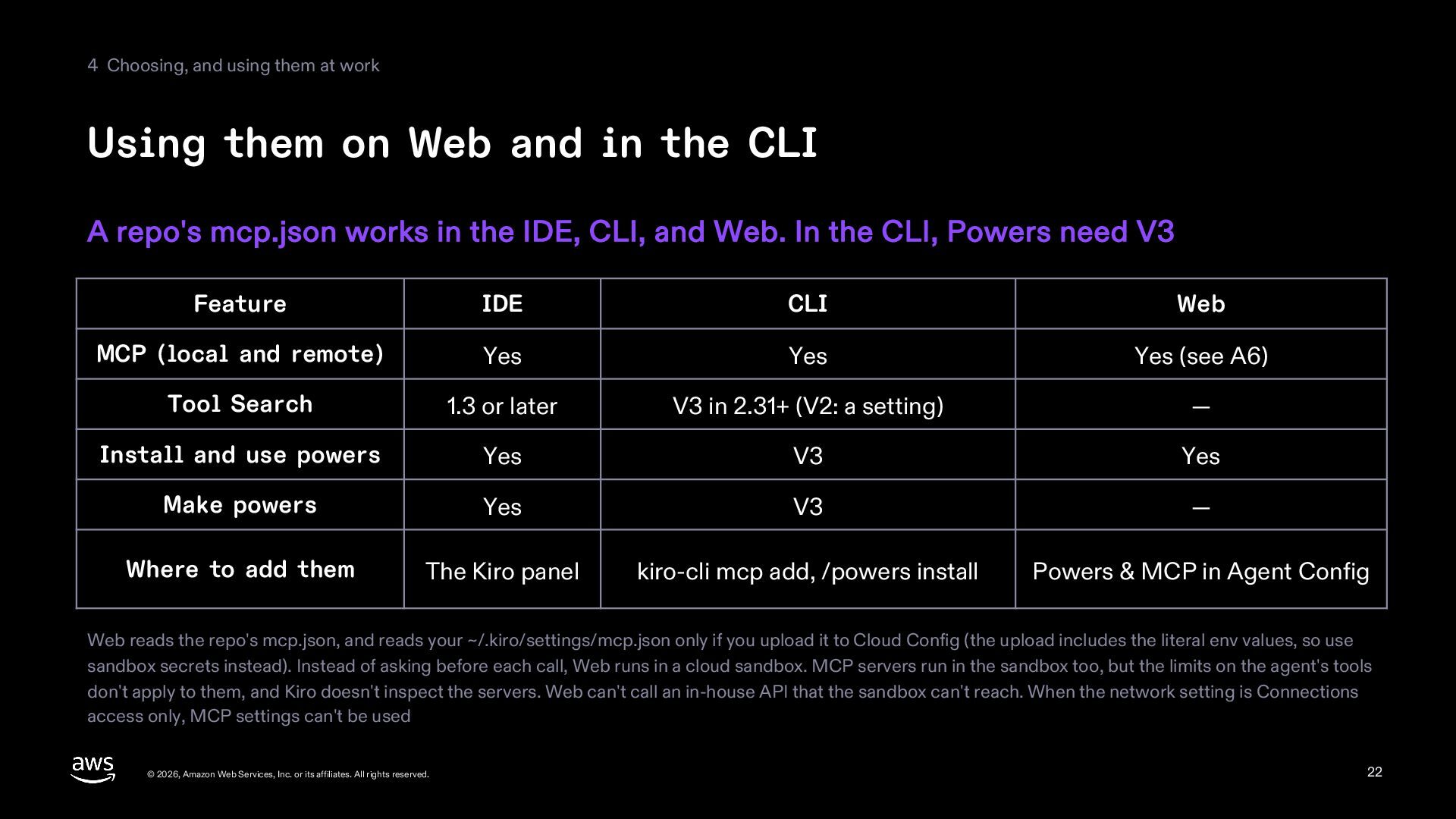
  22. 4 Choosing, and using them at work Using them on

    Web and in the CLI A repo's mcp.json works in the IDE, CLI, and Web. In the CLI, Powers need V3 Feature IDE CLI Web MCP (local and remote) Yes Yes Yes (see A6) Tool Search 1.3 or later V3 in 2.31+ (V2: a setting) — Install and use powers Yes V3 Yes Make powers Yes V3 — Where to add them The Kiro panel kiro-cli mcp add, /powers install Powers & MCP in Agent Config Web reads the repo's mcp.json, and reads your ~/.kiro/settings/mcp.json only if you upload it to Cloud Config (the upload includes the literal env values, so use sandbox secrets instead). Instead of asking before each call, Web runs in a cloud sandbox. MCP servers run in the sandbox too, but the limits on the agent's tools don't apply to them, and Kiro doesn't inspect the servers. Web can't call an in-house API that the sandbox can't reach. When the network setting is Connections access only, MCP settings can't be used © 2026, Amazon Web Services, Inc. or its affiliates. All rights reserved. 22
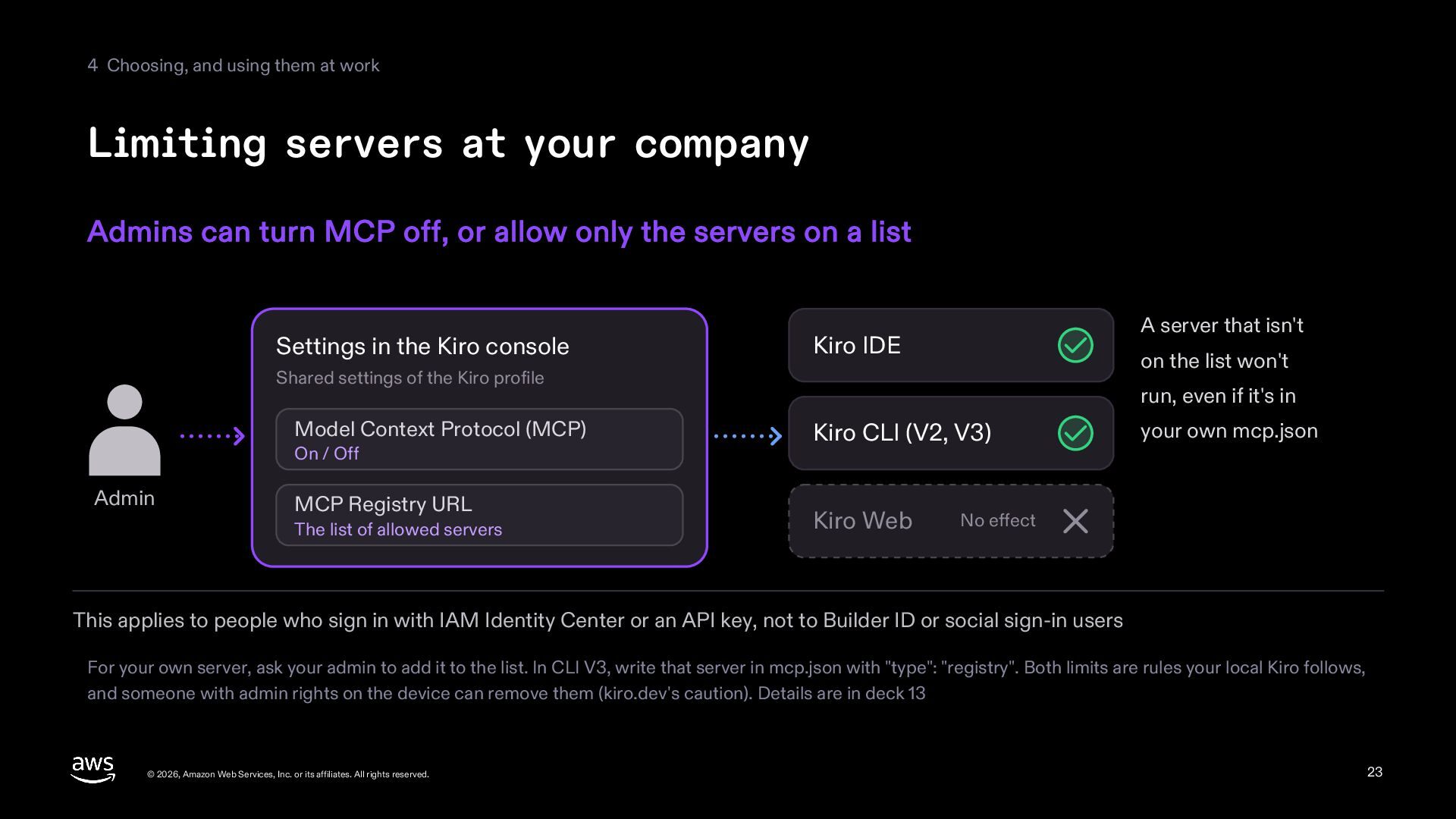
  23. 4 Choosing, and using them at work Limiting servers at

    your company Admins can turn MCP off, or allow only the servers on a list Settings in the Kiro console A server that isn't Kiro IDE on the list won't Shared settings of the Kiro profile Model Context Protocol (MCP) On / Off Admin MCP Registry URL The list of allowed servers run, even if it's in Kiro CLI (V2, V3) Kiro Web your own mcp.json No effect This applies to people who sign in with IAM Identity Center or an API key, not to Builder ID or social sign-in users For your own server, ask your admin to add it to the list. In CLI V3, write that server in mcp.json with "type": "registry". Both limits are rules your local Kiro follows, and someone with admin rights on the device can remove them (kiro.dev's caution). Details are in deck 13 © 2026, Amazon Web Services, Inc. or its affiliates. All rights reserved. 23
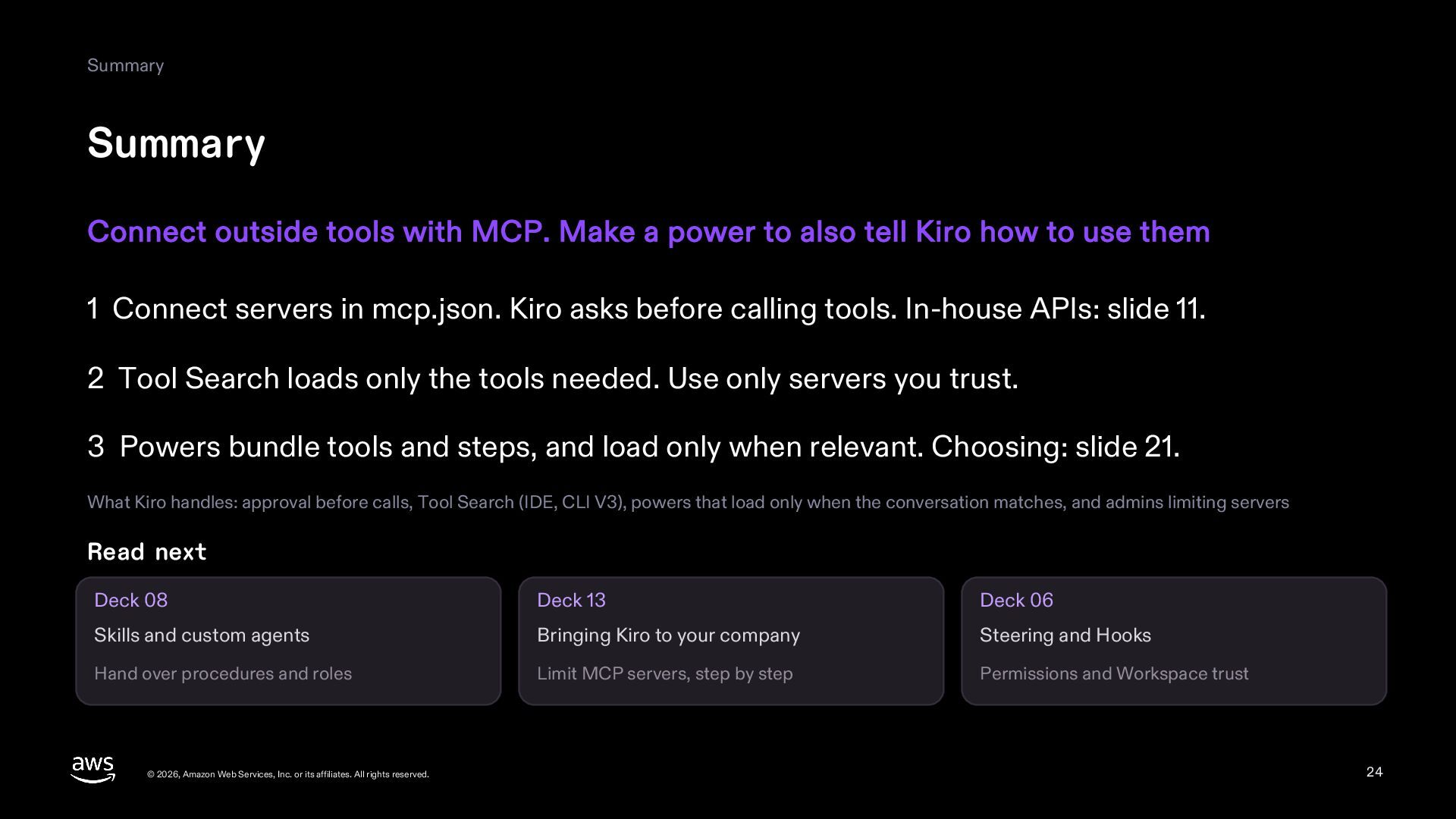
  24. Summary Summary Connect outside tools with MCP. Make a power

    to also tell Kiro how to use them 1 Connect servers in mcp.json. Kiro asks before calling tools. In-house APIs: slide 11. 2 Tool Search loads only the tools needed. Use only servers you trust. 3 Powers bundle tools and steps, and load only when relevant. Choosing: slide 21. What Kiro handles: approval before calls, Tool Search (IDE, CLI V3), powers that load only when the conversation matches, and admins limiting servers Read next Deck 08 Deck 13 Deck 06 Skills and custom agents Bringing Kiro to your company Steering and Hooks Hand over procedures and roles Limit MCP servers, step by step Permissions and Workspace trust © 2026, Amazon Web Services, Inc. or its affiliates. All rights reserved. 24
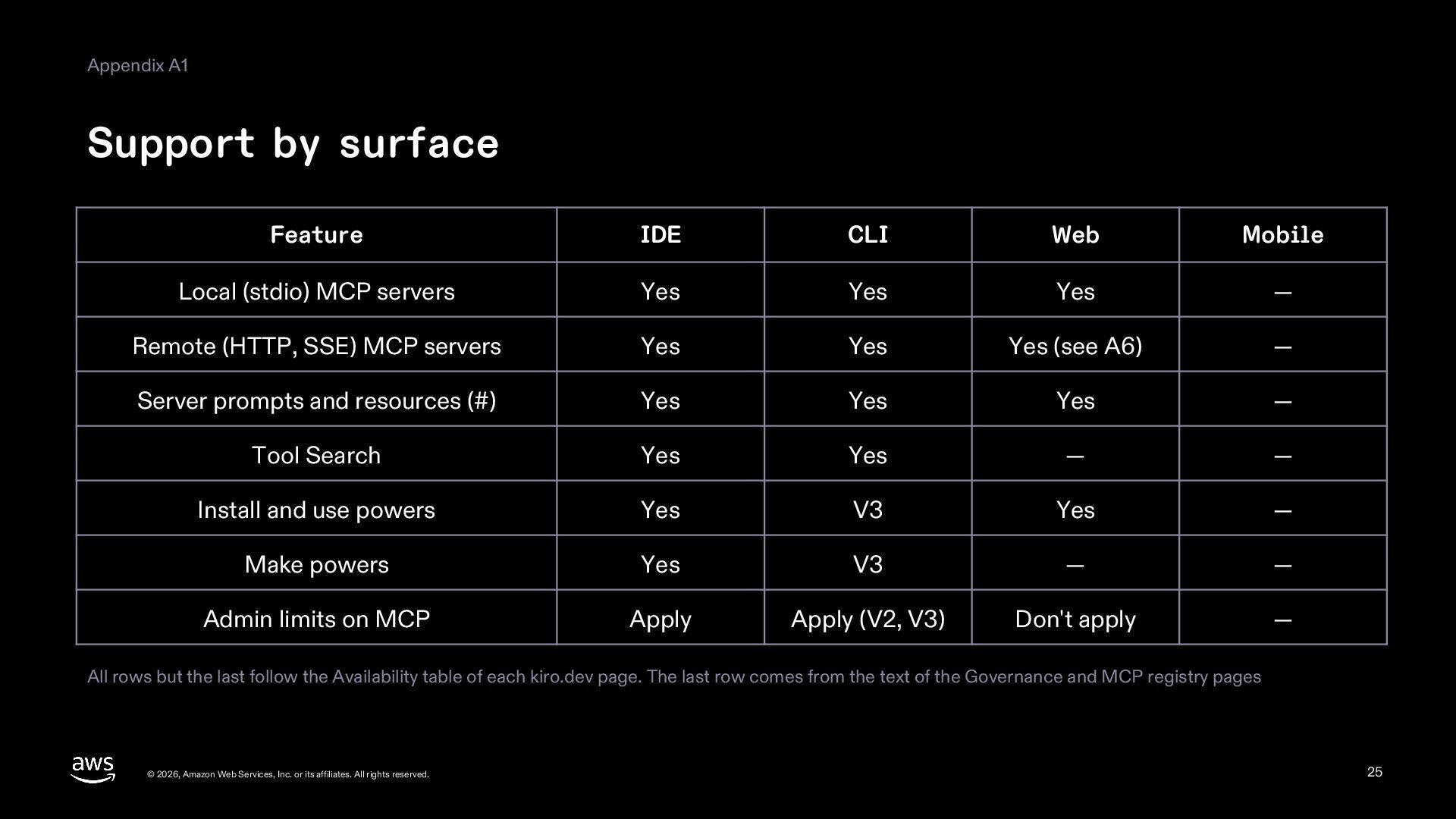
  25. Appendix A1 Support by surface Feature IDE CLI Web Mobile

    Local (stdio) MCP servers Yes Yes Yes — Remote (HTTP, SSE) MCP servers Yes Yes Yes (see A6) — Server prompts and resources (#) Yes Yes Yes — Tool Search Yes Yes — — Install and use powers Yes V3 Yes — Make powers Yes V3 — — Admin limits on MCP Apply Apply (V2, V3) Don't apply — All rows but the last follow the Availability table of each kiro.dev page. The last row comes from the text of the Governance and MCP registry pages © 2026, Amazon Web Services, Inc. or its affiliates. All rights reserved. 25
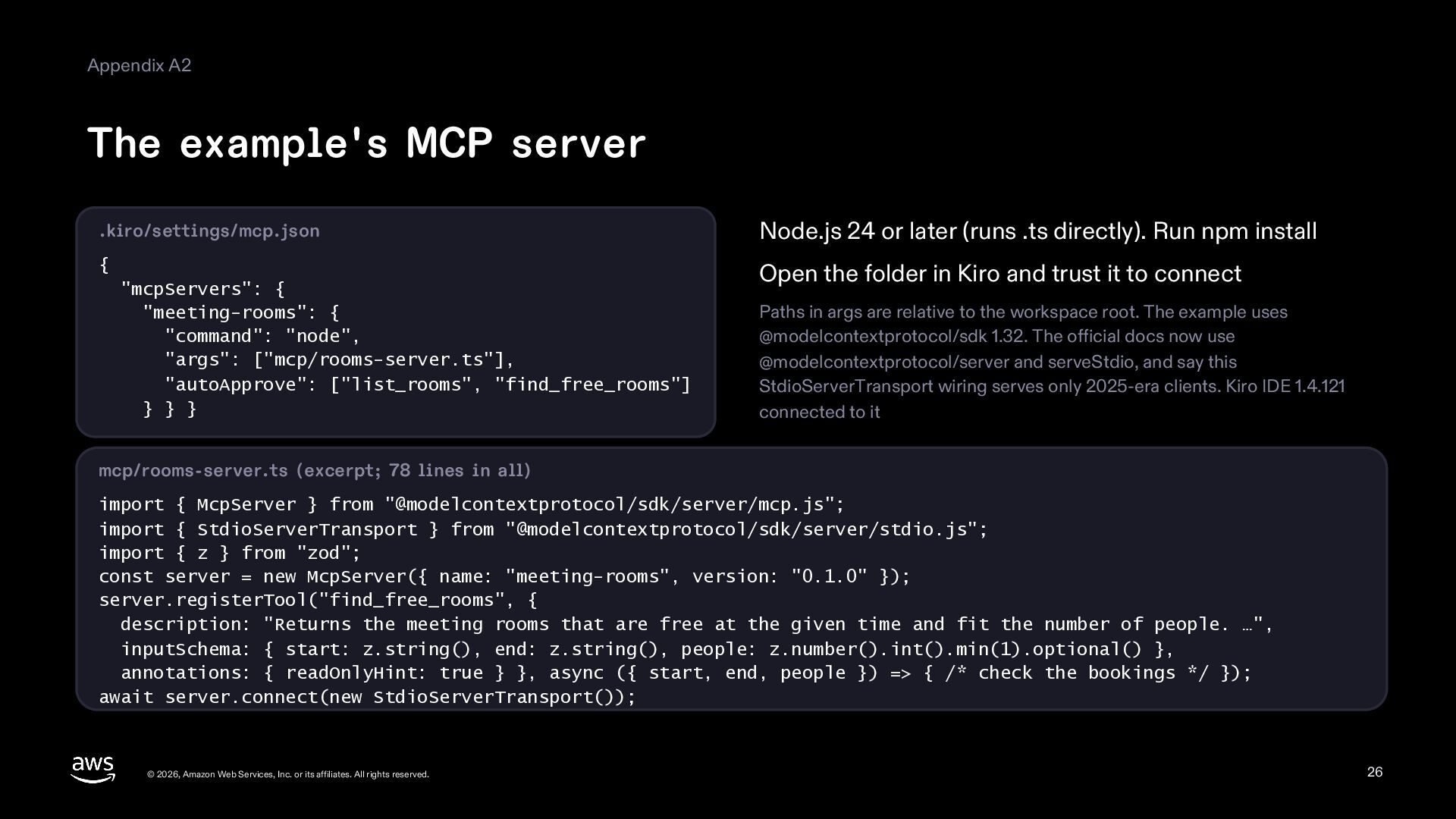
  26. Appendix A2 The example's MCP server .kiro/settings/mcp.json Node.js 24 or

    later (runs .ts directly). Run npm install { Open the folder in Kiro and trust it to connect "mcpServers": { "meeting-rooms": { "command": "node", "args": ["mcp/rooms-server.ts"], "autoApprove": ["list_rooms", "find_free_rooms"] } } } Paths in args are relative to the workspace root. The example uses @modelcontextprotocol/sdk 1.32. The official docs now use @modelcontextprotocol/server and serveStdio, and say this StdioServerTransport wiring serves only 2025-era clients. Kiro IDE 1.4.121 connected to it mcp/rooms-server.ts (excerpt; 78 lines in all) import { McpServer } from "@modelcontextprotocol/sdk/server/mcp.js"; import { StdioServerTransport } from "@modelcontextprotocol/sdk/server/stdio.js"; import { z } from "zod"; const server = new McpServer({ name: "meeting-rooms", version: "0.1.0" }); server.registerTool("find_free_rooms", { description: "Returns the meeting rooms that are free at the given time and fit the number of people. …", inputSchema: { start: z.string(), end: z.string(), people: z.number().int().min(1).optional() }, annotations: { readOnlyHint: true } }, async ({ start, end, people }) => { /* check the bookings */ }); await server.connect(new StdioServerTransport()); © 2026, Amazon Web Services, Inc. or its affiliates. All rights reserved. 26
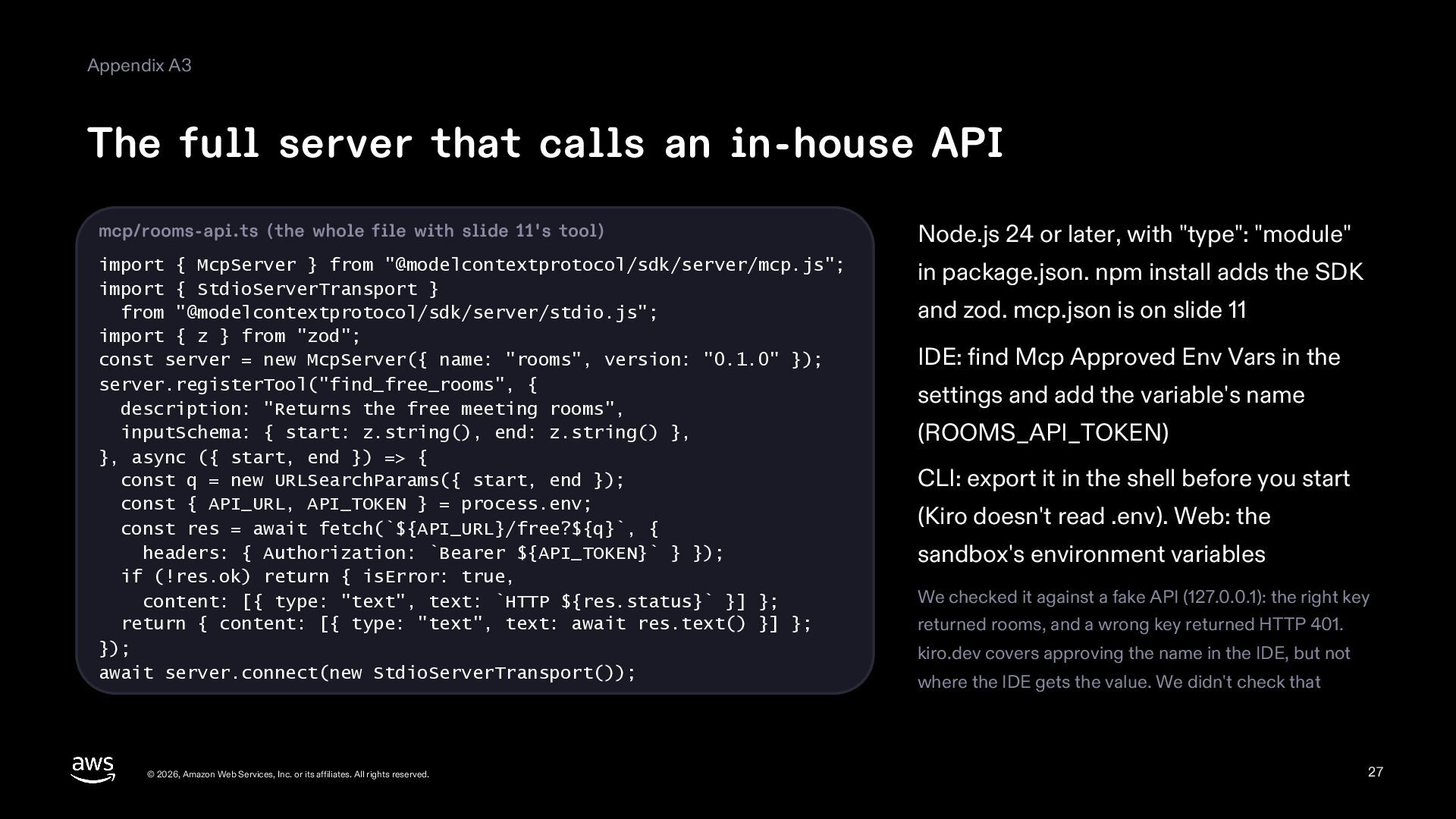
  27. Appendix A3 The full server that calls an in-house API

    mcp/rooms-api.ts (the whole file with slide 11's tool) Node.js 24 or later, with "type": "module" import { McpServer } from "@modelcontextprotocol/sdk/server/mcp.js"; import { StdioServerTransport } from "@modelcontextprotocol/sdk/server/stdio.js"; import { z } from "zod"; const server = new McpServer({ name: "rooms", version: "0.1.0" }); server.registerTool("find_free_rooms", { description: "Returns the free meeting rooms", inputSchema: { start: z.string(), end: z.string() }, }, async ({ start, end }) => { const q = new URLSearchParams({ start, end }); const { API_URL, API_TOKEN } = process.env; const res = await fetch(`${API_URL}/free?${q}`, { headers: { Authorization: `Bearer ${API_TOKEN}` } }); if (!res.ok) return { isError: true, content: [{ type: "text", text: `HTTP ${res.status}` }] }; return { content: [{ type: "text", text: await res.text() }] }; }); await server.connect(new StdioServerTransport()); in package.json. npm install adds the SDK © 2026, Amazon Web Services, Inc. or its affiliates. All rights reserved. and zod. mcp.json is on slide 11 IDE: find Mcp Approved Env Vars in the settings and add the variable's name (ROOMS_API_TOKEN) CLI: export it in the shell before you start (Kiro doesn't read .env). Web: the sandbox's environment variables We checked it against a fake API (127.0.0.1): the right key returned rooms, and a wrong key returned HTTP 401. kiro.dev covers approving the name in the IDE, but not where the IDE gets the value. We didn't check that 27
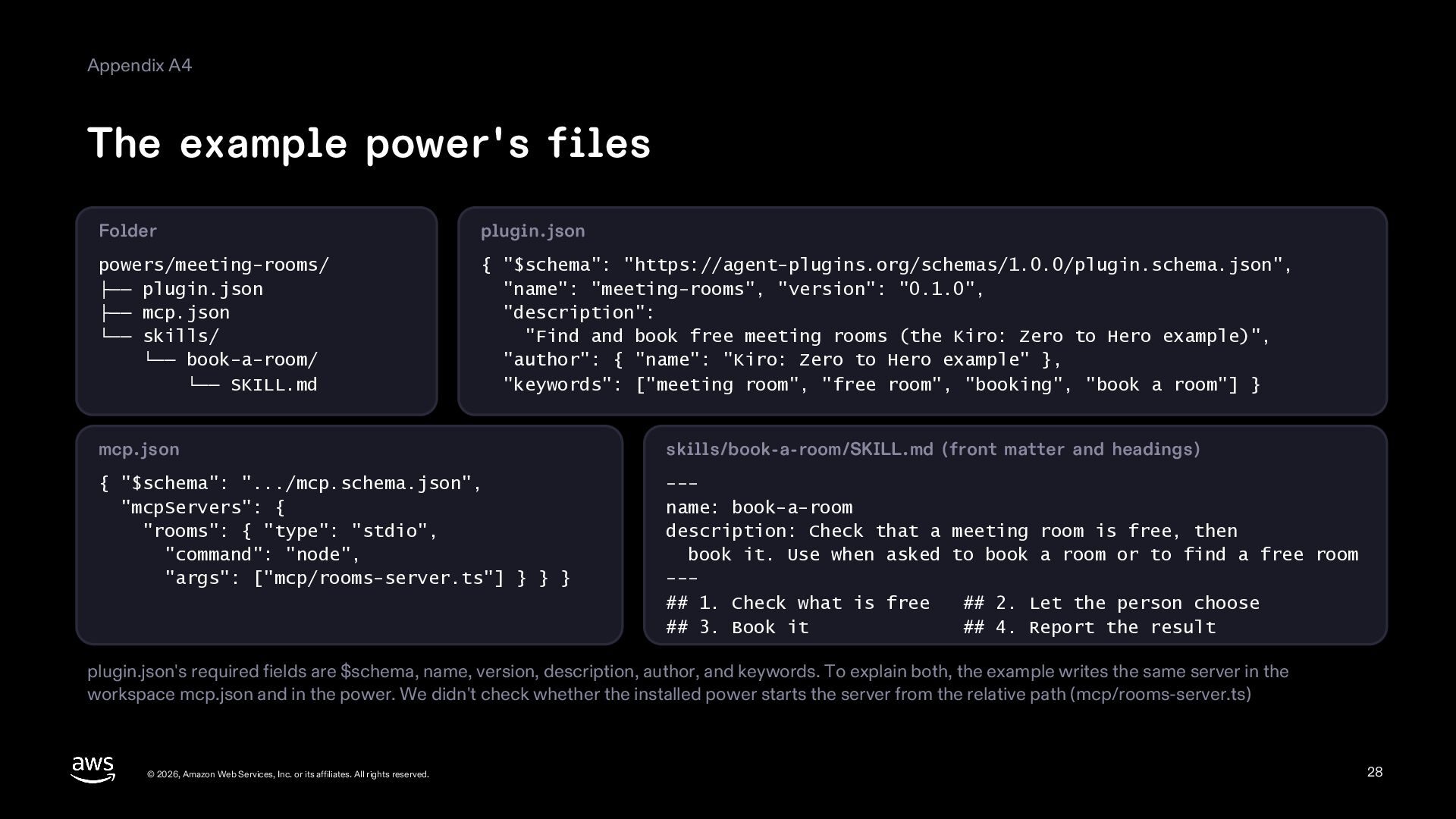
  28. Appendix A4 The example power's files Folder plugin.json powers/meeting-rooms/ ├──

    plugin.json ├── mcp.json └── skills/ └── book-a-room/ └── SKILL.md { "$schema": "https://agent-plugins.org/schemas/1.0.0/plugin.schema.json", "name": "meeting-rooms", "version": "0.1.0", "description": "Find and book free meeting rooms (the Kiro: Zero to Hero example)", "author": { "name": "Kiro: Zero to Hero example" }, "keywords": ["meeting room", "free room", "booking", "book a room"] } mcp.json skills/book-a-room/SKILL.md (front matter and headings) { "$schema": ".../mcp.schema.json", "mcpServers": { "rooms": { "type": "stdio", "command": "node", "args": ["mcp/rooms-server.ts"] } } } --name: book-a-room description: Check that a meeting room is free, then book it. Use when asked to book a room or to find a free room --## 1. Check what is free ## 2. Let the person choose ## 3. Book it ## 4. Report the result plugin.json's required fields are $schema, name, version, description, author, and keywords. To explain both, the example writes the same server in the workspace mcp.json and in the power. We didn't check whether the installed power starts the server from the relative path (mcp/rooms-server.ts) © 2026, Amazon Web Services, Inc. or its affiliates. All rights reserved. 28
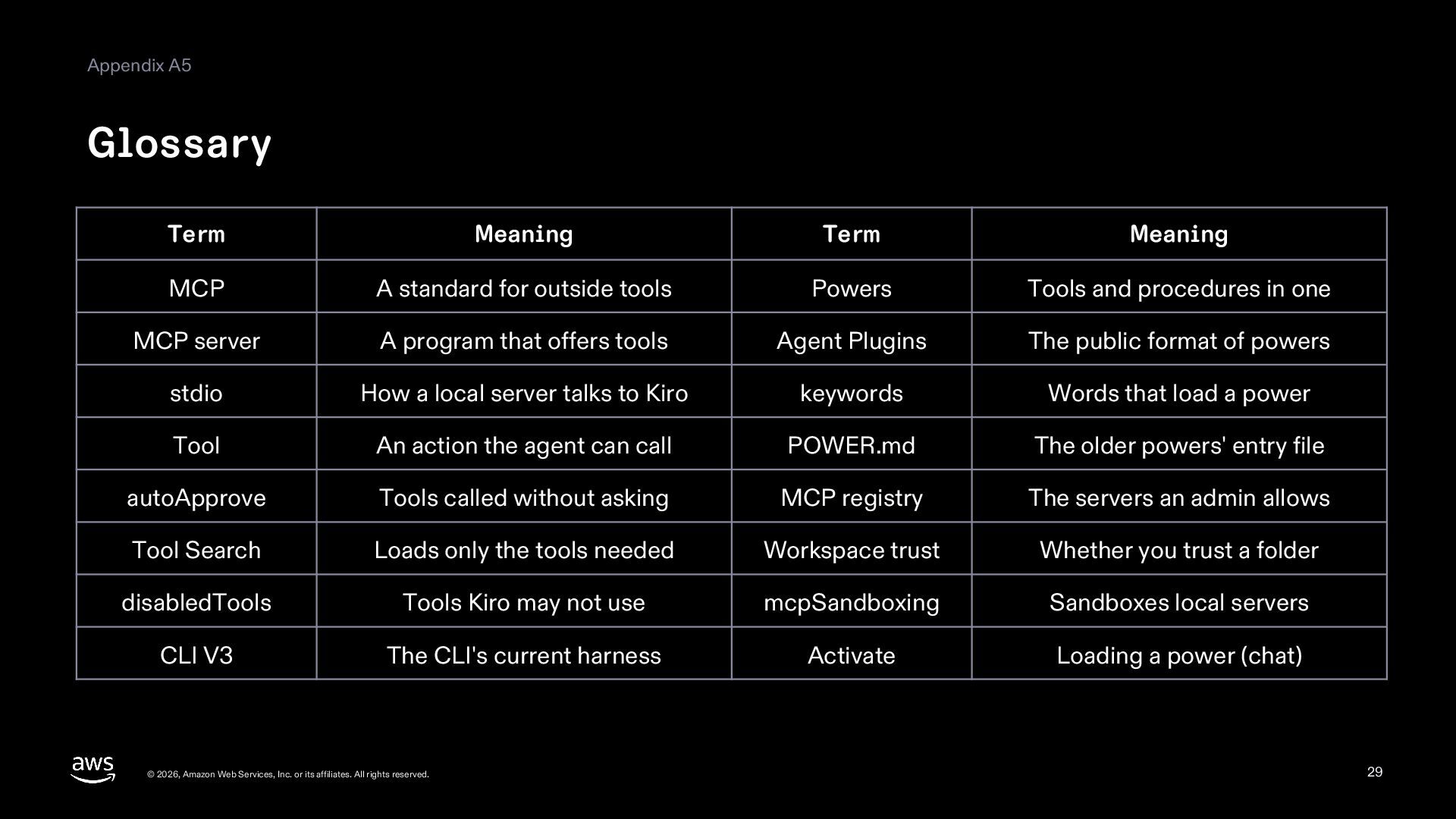
  29. Appendix A5 Glossary Term Meaning Term Meaning MCP A standard

    for outside tools Powers Tools and procedures in one MCP server A program that offers tools Agent Plugins The public format of powers stdio How a local server talks to Kiro keywords Words that load a power Tool An action the agent can call POWER.md The older powers' entry file autoApprove Tools called without asking MCP registry The servers an admin allows Tool Search Loads only the tools needed Workspace trust Whether you trust a folder disabledTools Tools Kiro may not use mcpSandboxing Sandboxes local servers CLI V3 The CLI's current harness Activate Loading a power (chat) © 2026, Amazon Web Services, Inc. or its affiliates. All rights reserved. 29
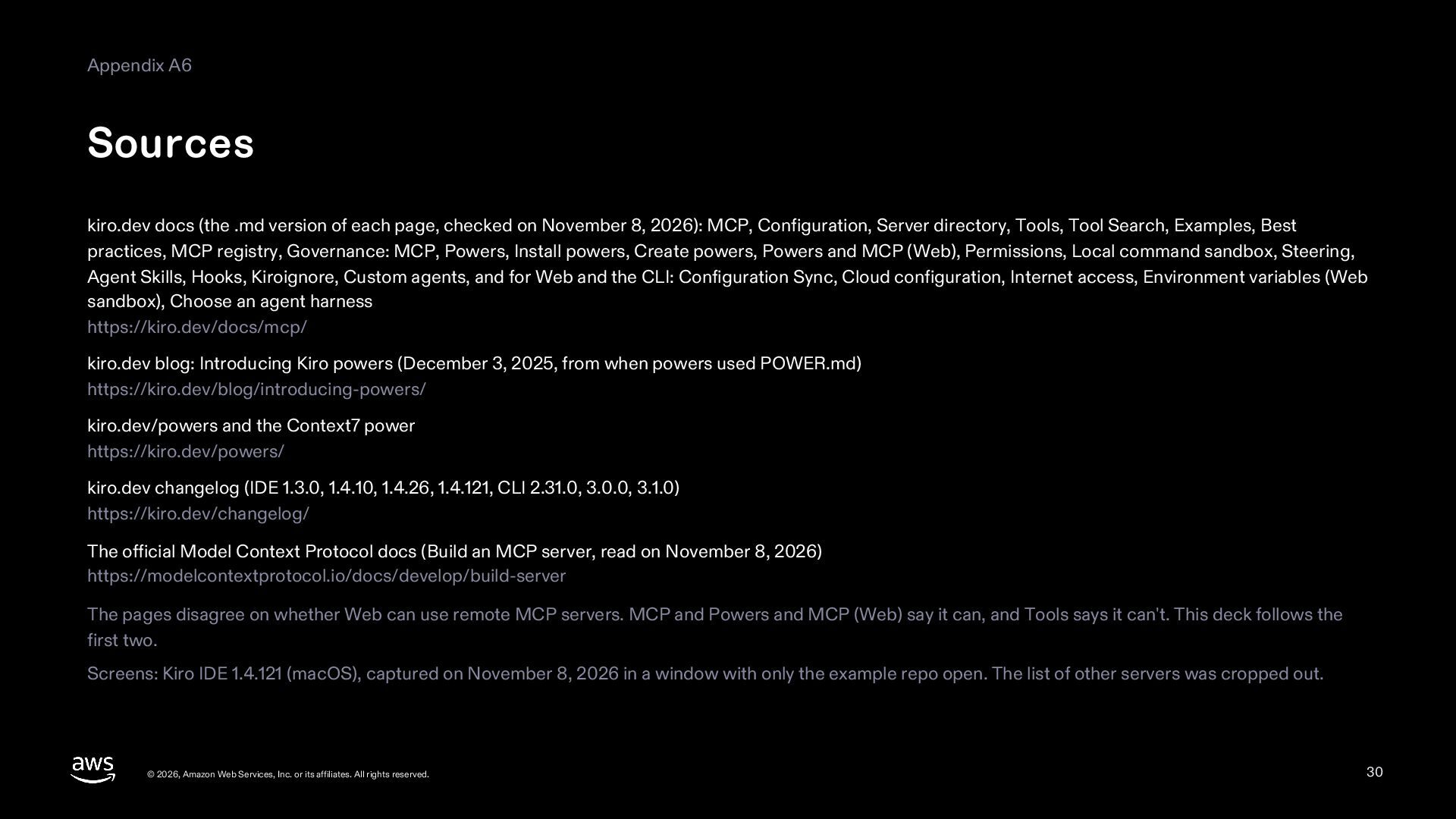
  30. Appendix A6 Sources kiro.dev docs (the .md version of each

    page, checked on November 8, 2026): MCP, Configuration, Server directory, Tools, Tool Search, Examples, Best practices, MCP registry, Governance: MCP, Powers, Install powers, Create powers, Powers and MCP (Web), Permissions, Local command sandbox, Steering, Agent Skills, Hooks, Kiroignore, Custom agents, and for Web and the CLI: Configuration Sync, Cloud configuration, Internet access, Environment variables (Web sandbox), Choose an agent harness https://kiro.dev/docs/mcp/ kiro.dev blog: Introducing Kiro powers (December 3, 2025, from when powers used POWER.md) https://kiro.dev/blog/introducing-powers/ kiro.dev/powers and the Context7 power https://kiro.dev/powers/ kiro.dev changelog (IDE 1.3.0, 1.4.10, 1.4.26, 1.4.121, CLI 2.31.0, 3.0.0, 3.1.0) https://kiro.dev/changelog/ The official Model Context Protocol docs (Build an MCP server, read on November 8, 2026) https://modelcontextprotocol.io/docs/develop/build-server The pages disagree on whether Web can use remote MCP servers. MCP and Powers and MCP (Web) say it can, and Tools says it can't. This deck follows the first two. Screens: Kiro IDE 1.4.121 (macOS), captured on November 8, 2026 in a window with only the example repo open. The list of other servers was cropped out. © 2026, Amazon Web Services, Inc. or its affiliates. All rights reserved. 30