Share
Embed
Strands harness | Kiro と学ぶ Strands Agents 10
Strands harness (strands-harness) の create_harness() で組み立て済みの Agent を作り、道具と指示を足して絞り、session と memory で会話と知識を残し、interventions と sandbox で止めどころを決めて本番に出すまでを、strands-harness 0.3.4 で動かしたコードと出力で説明します。Python は書けて Strands Agents は初めての開発者向けの Level 200 の資料です。

Riku INADA PRO
November 11, 2026
Transcript
48 slides
-
Kiro と学ぶ Strands Agents 10 載せて広げる Strands harness 組み⽴て済みの Agent
と Harness SDK Level 200 / 2026-11 時点 2026 年 11 ⽉ 稲⽥ ⼤陸 アマゾン ウェブ サービス ジャパン © 2026, Amazon Web Services, Inc. or its affiliates. All rights reserved. 10 Kiro + Strands Agents 1 -
はじめに ⾃⼰紹介 稲⽥ ⼤陸 いなだ りく (いなりく) アマゾン ウェブ サービス
ジャパン合同会社 ソリューションアーキテクト 製造業のお客様を中⼼に⽀援 最近の取り組み AI 駆動開発ライフサイクルの推進 Kiro と AWS Amplify の情報発信 © 2026, Amazon Web Services, Inc. or its affiliates. All rights reserved. X @inada_riku Speaker Deck speakerdeck.com/inariku Zenn zenn.dev/inariku GitHub github.com/inariku 2 -
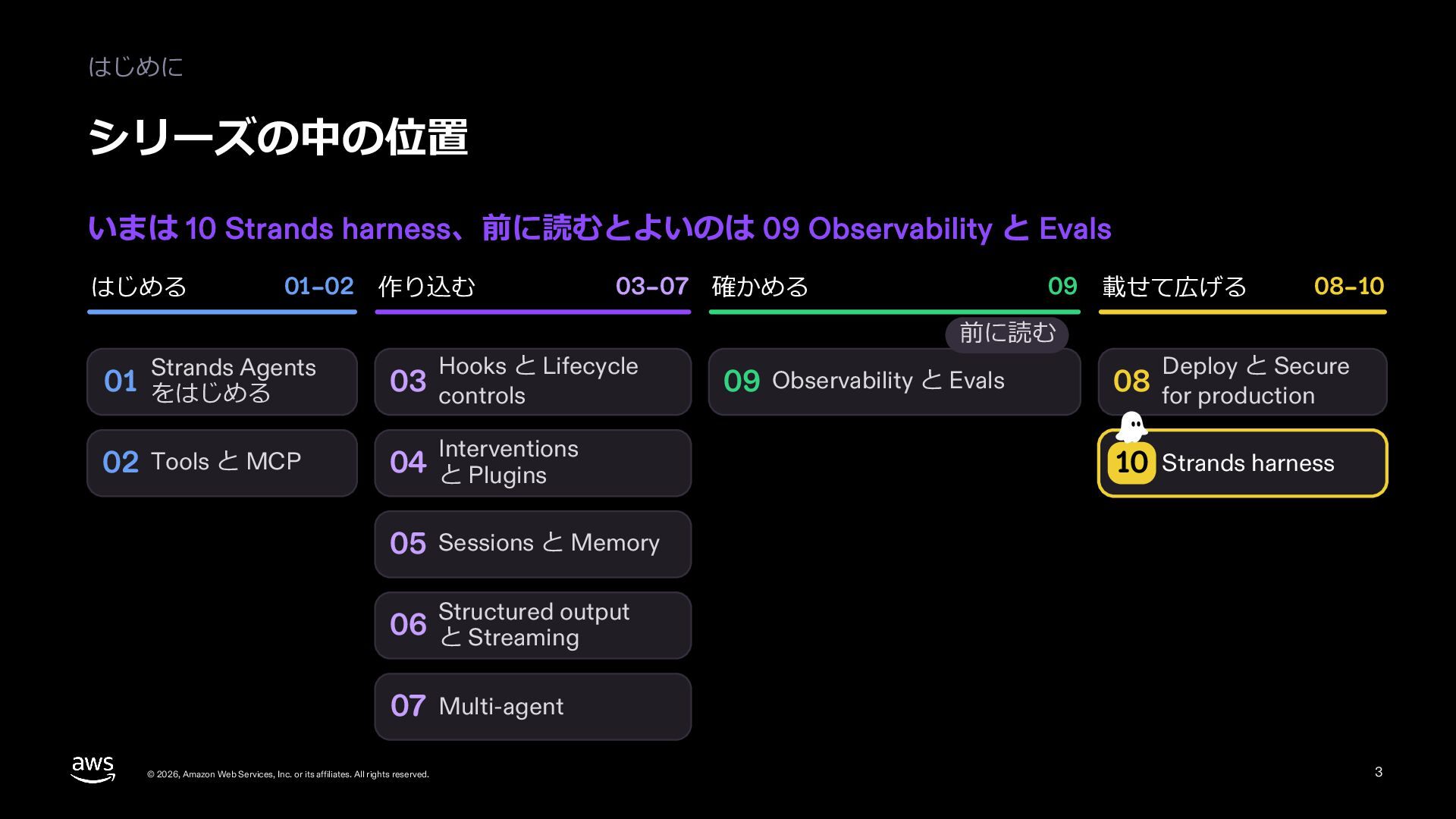
はじめに シリーズの中の位置 いまは 10 Strands harness、前に読むとよいのは 09 Observability と Evals
はじめる 01–02 作り込む Strands Agents 03–07 確かめる Hooks と Lifecycle 01 をはじめる 03 controls 02 Tools と MCP 04 と Plugins Interventions 09 載せて広げる 前に読む 09 Observability と Evals 08–10 Deploy と Secure 08 for production 10 Strands harness 05 Sessions と Memory output 06 Structured と Streaming 07 Multi-agent © 2026, Amazon Web Services, Inc. or its affiliates. All rights reserved. 3 -
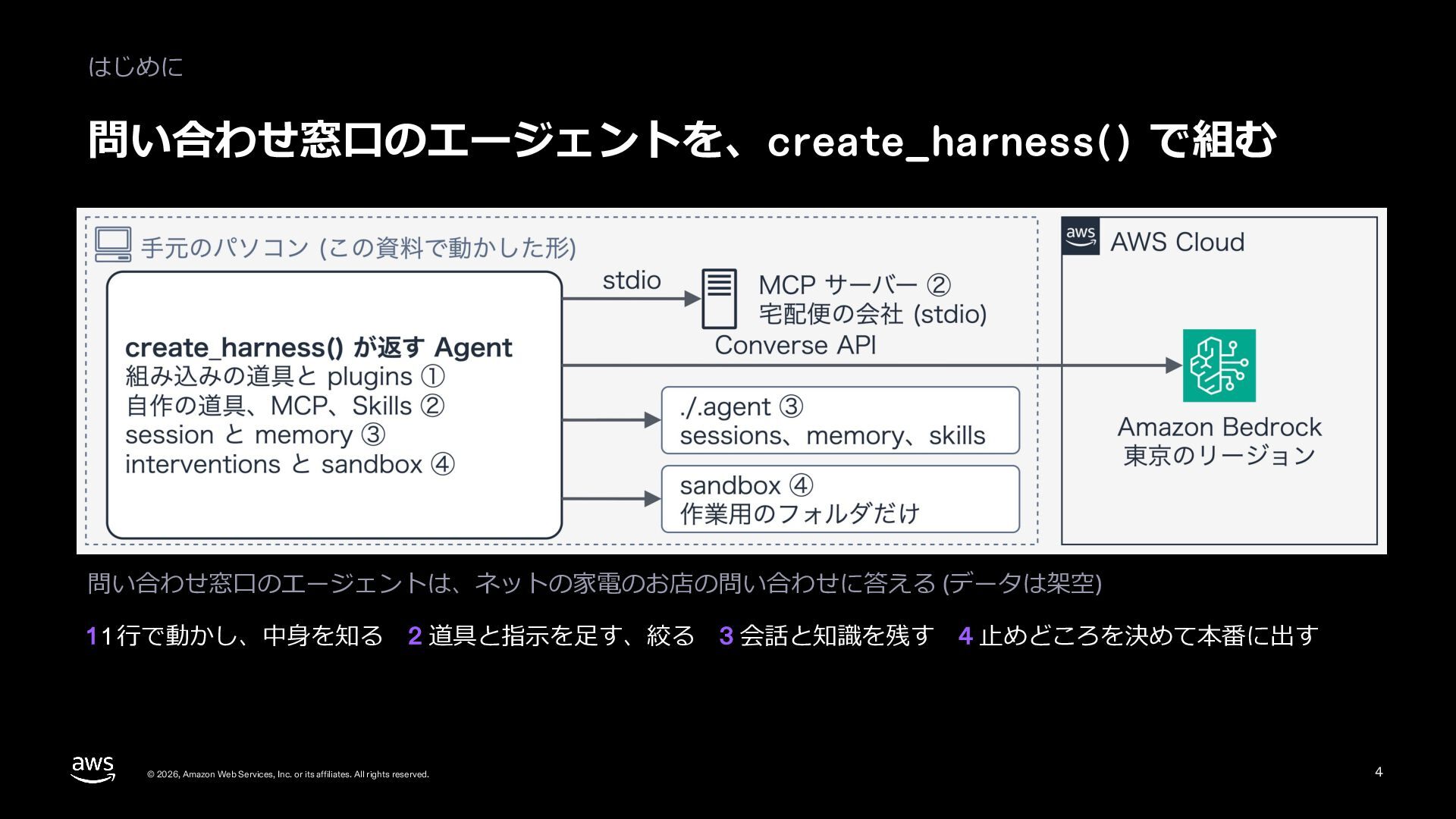
はじめに 問い合わせ窓⼝のエージェントを、create_harness() で組む 問い合わせ窓⼝のエージェントは、ネットの家電のお店の問い合わせに答える (データは架空) 1 1 ⾏で動かし、中⾝を知る 2 道具と指⽰を⾜す、絞る
© 2026, Amazon Web Services, Inc. or its affiliates. All rights reserved. 3 会話と知識を残す 4 ⽌めどころを決めて本番に出す 4 -
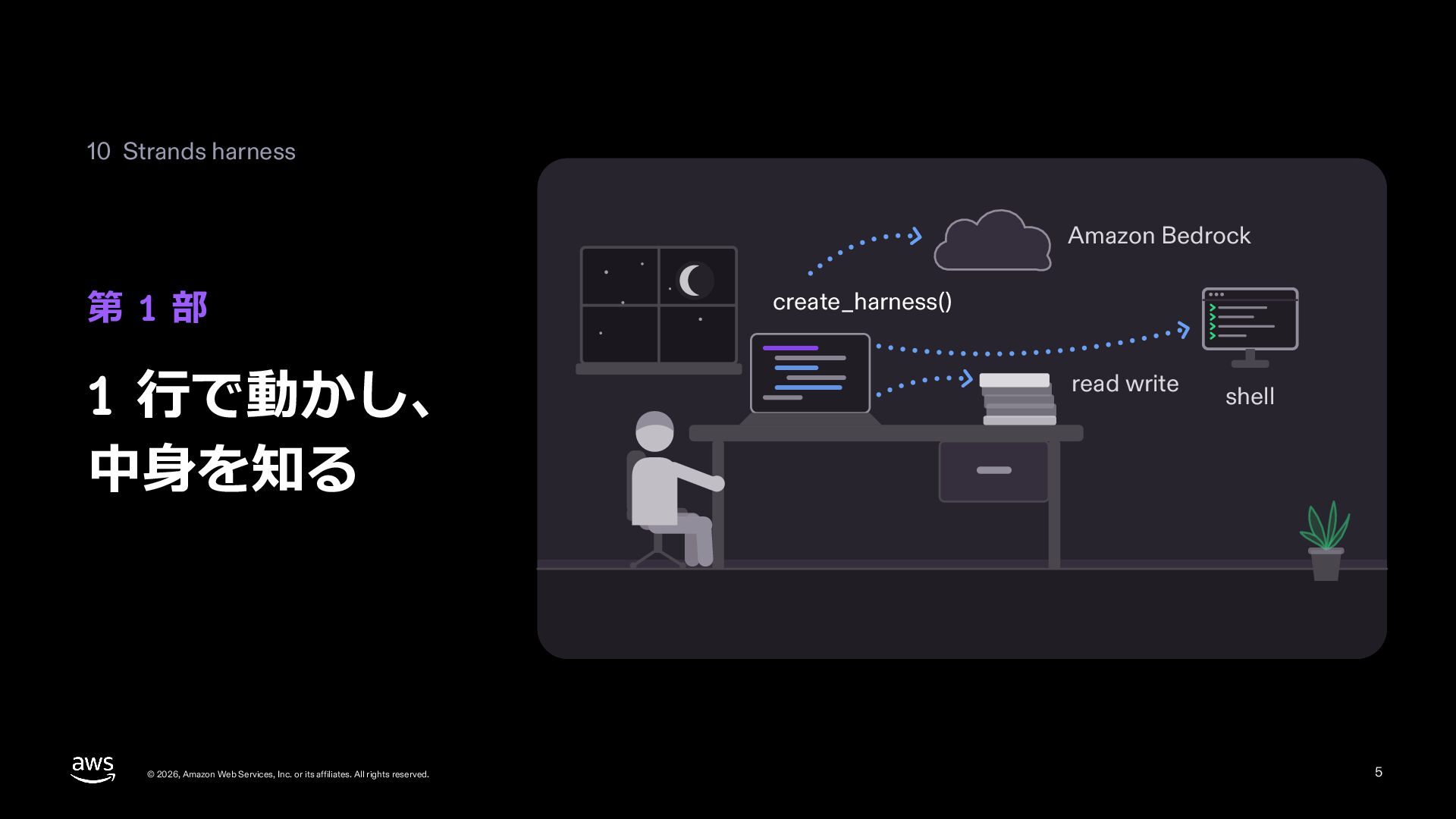
10 Strands harness Amazon Bedrock 第 1 部 1 ⾏で動かし、
中⾝を知る © 2026, Amazon Web Services, Inc. or its affiliates. All rights reserved. create_harness() read write shell 5 -
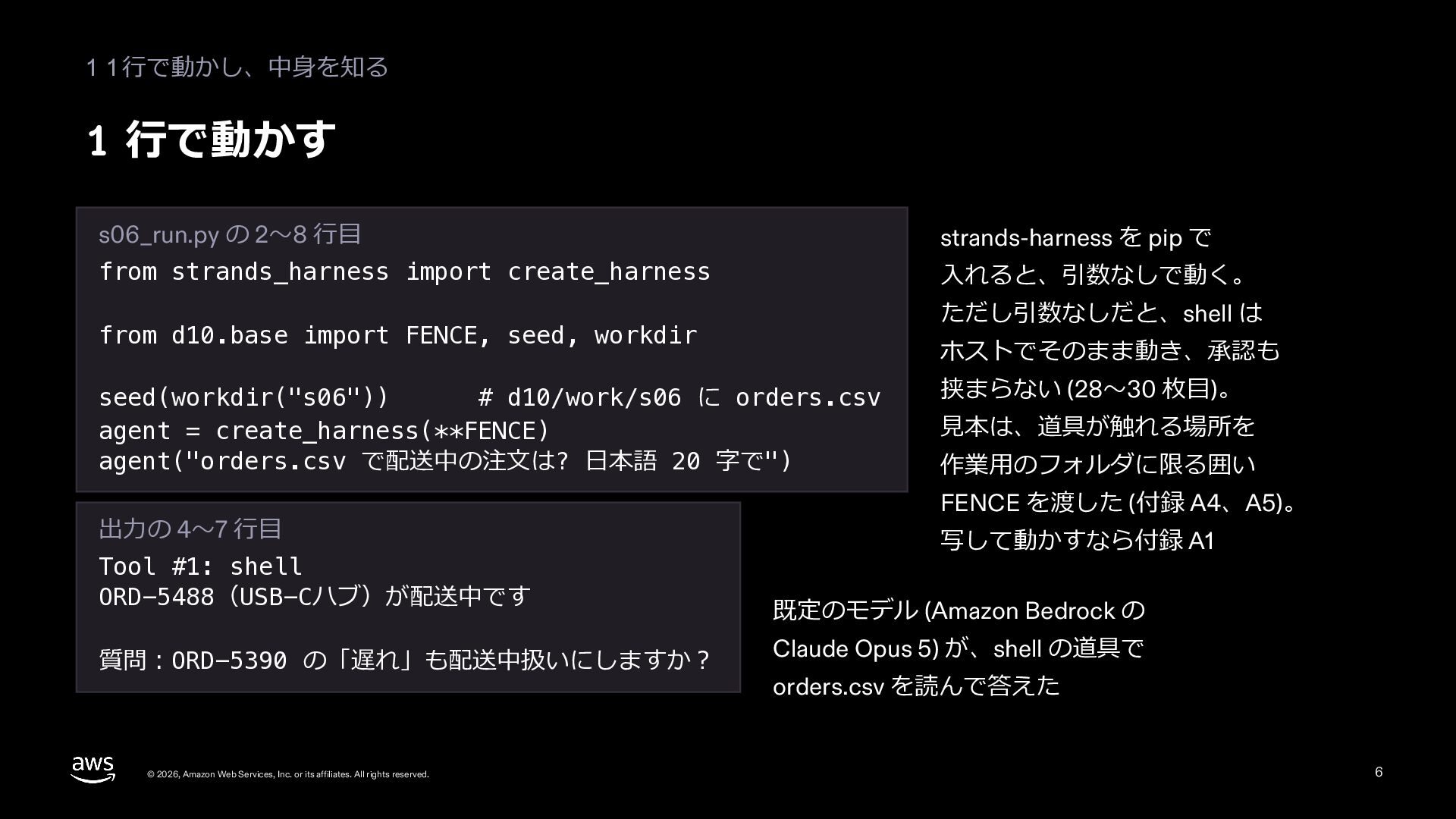
1 1 ⾏で動かし、中⾝を知る 1 ⾏で動かす s06_run.py の 2〜8 ⾏⽬ strands-harness
を pip で from strands_harness import create_harness ⼊れると、引数なしで動く。 ただし引数なしだと、shell は from d10.base import FENCE, seed, workdir ホストでそのまま動き、承認も seed(workdir("s06")) # d10/work/s06 に orders.csv agent = create_harness(**FENCE) agent("orders.csv で配送中の注⽂は? ⽇本語 20 字で") 出⼒の 4〜7 ⾏⽬ Tool #1: shell ORD-5488(USB-Cハブ)が配送中です 質問︓ORD-5390 の「遅れ」も配送中扱いにしますか︖ © 2026, Amazon Web Services, Inc. or its affiliates. All rights reserved. 挟まらない (28〜30 枚⽬)。 ⾒本は、道具が触れる場所を 作業⽤のフォルダに限る囲い FENCE を渡した (付録 A4、A5)。 写して動かすなら付録 A1 既定のモデル (Amazon Bedrock の Claude Opus 5) が、shell の道具で orders.csv を読んで答えた 6 -
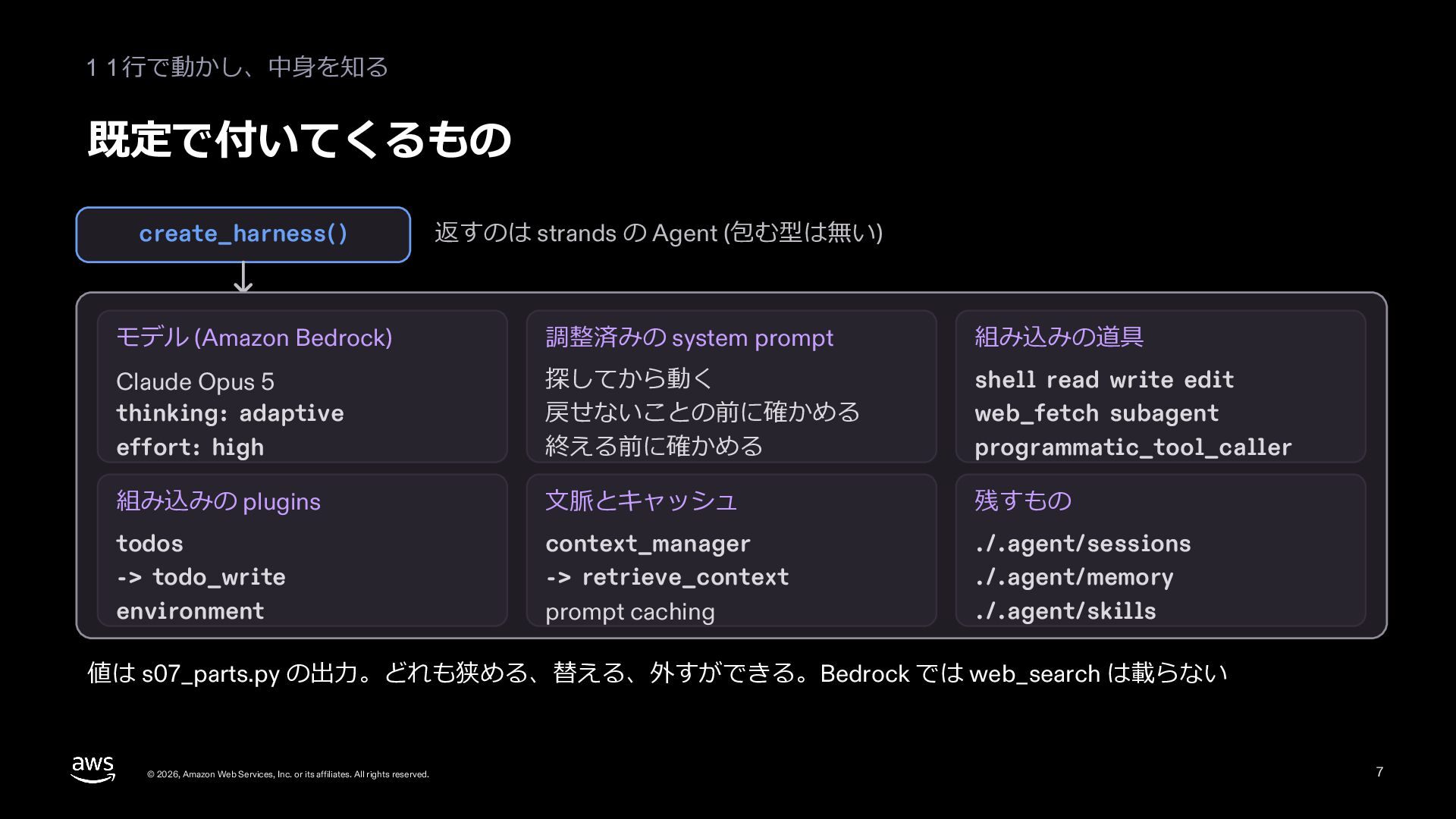
1 1 ⾏で動かし、中⾝を知る 既定で付いてくるもの create_harness() 返すのは strands の Agent (包む型は無い)
モデル (Amazon Bedrock) 調整済みの system prompt 組み込みの道具 Claude Opus 5 thinking: adaptive effort: high 探してから動く 戻せないことの前に確かめる 終える前に確かめる shell read write edit web_fetch subagent programmatic_tool_caller 組み込みの plugins ⽂脈とキャッシュ 残すもの todos -> todo_write environment context_manager -> retrieve_context prompt caching ./.agent/sessions ./.agent/memory ./.agent/skills 値は s07_parts.py の出⼒。どれも狭める、替える、外すができる。Bedrock では web_search は載らない © 2026, Amazon Web Services, Inc. or its affiliates. All rights reserved. 7 -
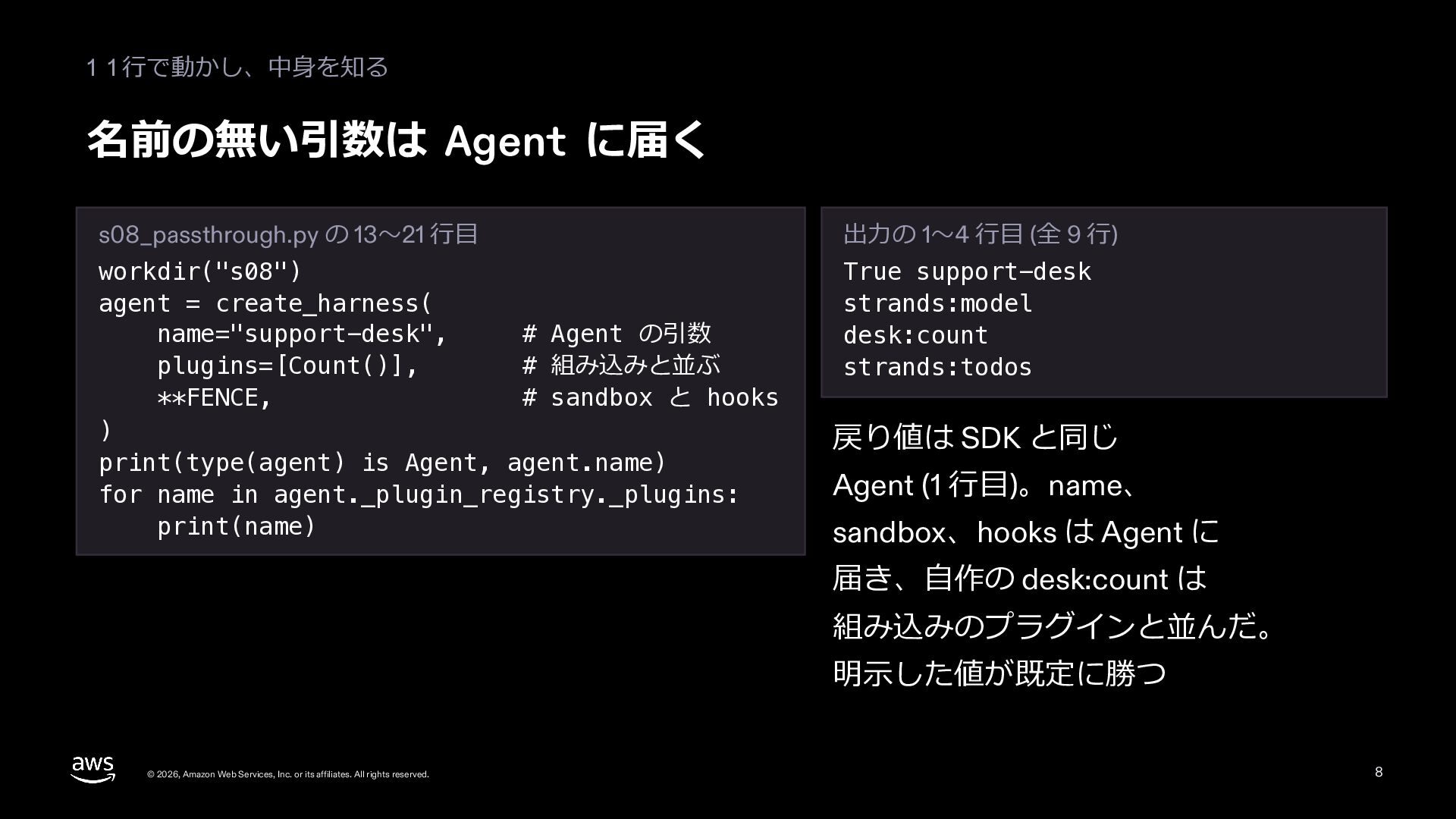
1 1 ⾏で動かし、中⾝を知る 名前の無い引数は Agent に届く s08_passthrough.py の 13〜21 ⾏⽬
出⼒の 1〜4 ⾏⽬ (全 9 ⾏) workdir("s08") agent = create_harness( name="support-desk", # Agent の引数 plugins=[Count()], # 組み込みと並ぶ **FENCE, # sandbox と hooks ) print(type(agent) is Agent, agent.name) for name in agent._plugin_registry._plugins: print(name) True support-desk strands:model desk:count strands:todos 戻り値は SDK と同じ Agent (1 ⾏⽬)。name、 sandbox、hooks は Agent に 届き、⾃作の desk:count は 組み込みのプラグインと並んだ。 明⽰した値が既定に勝つ © 2026, Amazon Web Services, Inc. or its affiliates. All rights reserved. 8 -
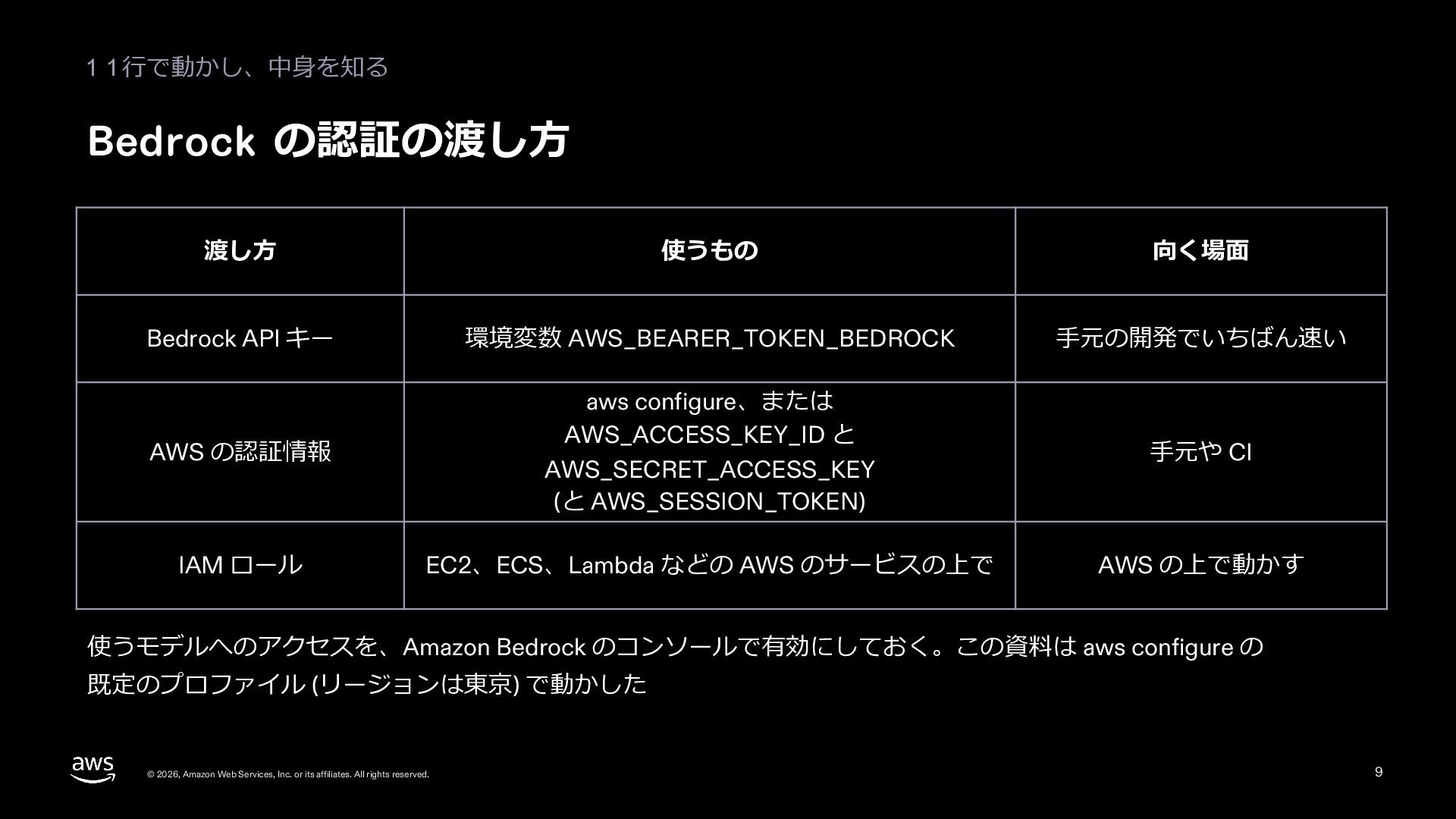
1 1 ⾏で動かし、中⾝を知る Bedrock の認証の渡し⽅ 渡し⽅ 使うもの 向く場⾯ Bedrock API
キー 環境変数 AWS_BEARER_TOKEN_BEDROCK ⼿元の開発でいちばん速い AWS の認証情報 aws configure、または AWS_ACCESS_KEY_ID と AWS_SECRET_ACCESS_KEY (と AWS_SESSION_TOKEN) ⼿元や CI IAM ロール EC2、ECS、Lambda などの AWS のサービスの上で AWS の上で動かす 使うモデルへのアクセスを、Amazon Bedrock のコンソールで有効にしておく。この資料は aws configure の 既定のプロファイル (リージョンは東京) で動かした © 2026, Amazon Web Services, Inc. or its affiliates. All rights reserved. 9 -
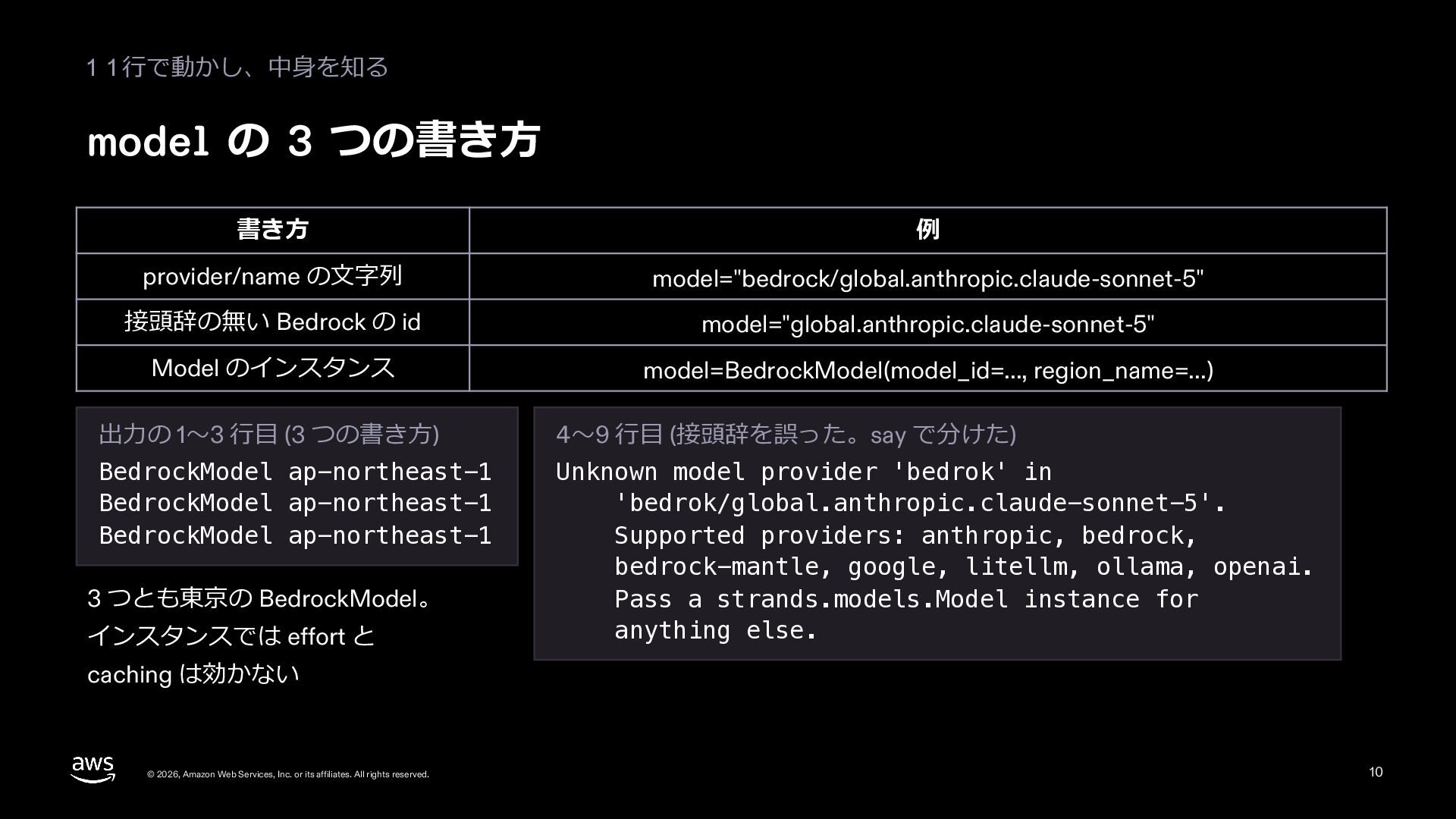
1 1 ⾏で動かし、中⾝を知る model の 3 つの書き⽅ 書き⽅ 例 provider/name
の⽂字列 model="bedrock/global.anthropic.claude-sonnet-5" 接頭辞の無い Bedrock の id model="global.anthropic.claude-sonnet-5" Model のインスタンス model=BedrockModel(model_id=..., region_name=...) 出⼒の 1〜3 ⾏⽬ (3 つの書き⽅) 4〜9 ⾏⽬ (接頭辞を誤った。say で分けた) BedrockModel ap-northeast-1 BedrockModel ap-northeast-1 BedrockModel ap-northeast-1 Unknown model provider 'bedrok' in 'bedrok/global.anthropic.claude-sonnet-5'. Supported providers: anthropic, bedrock, bedrock-mantle, google, litellm, ollama, openai. Pass a strands.models.Model instance for anything else. 3 つとも東京の BedrockModel。 インスタンスでは effort と caching は効かない © 2026, Amazon Web Services, Inc. or its affiliates. All rights reserved. 10 -
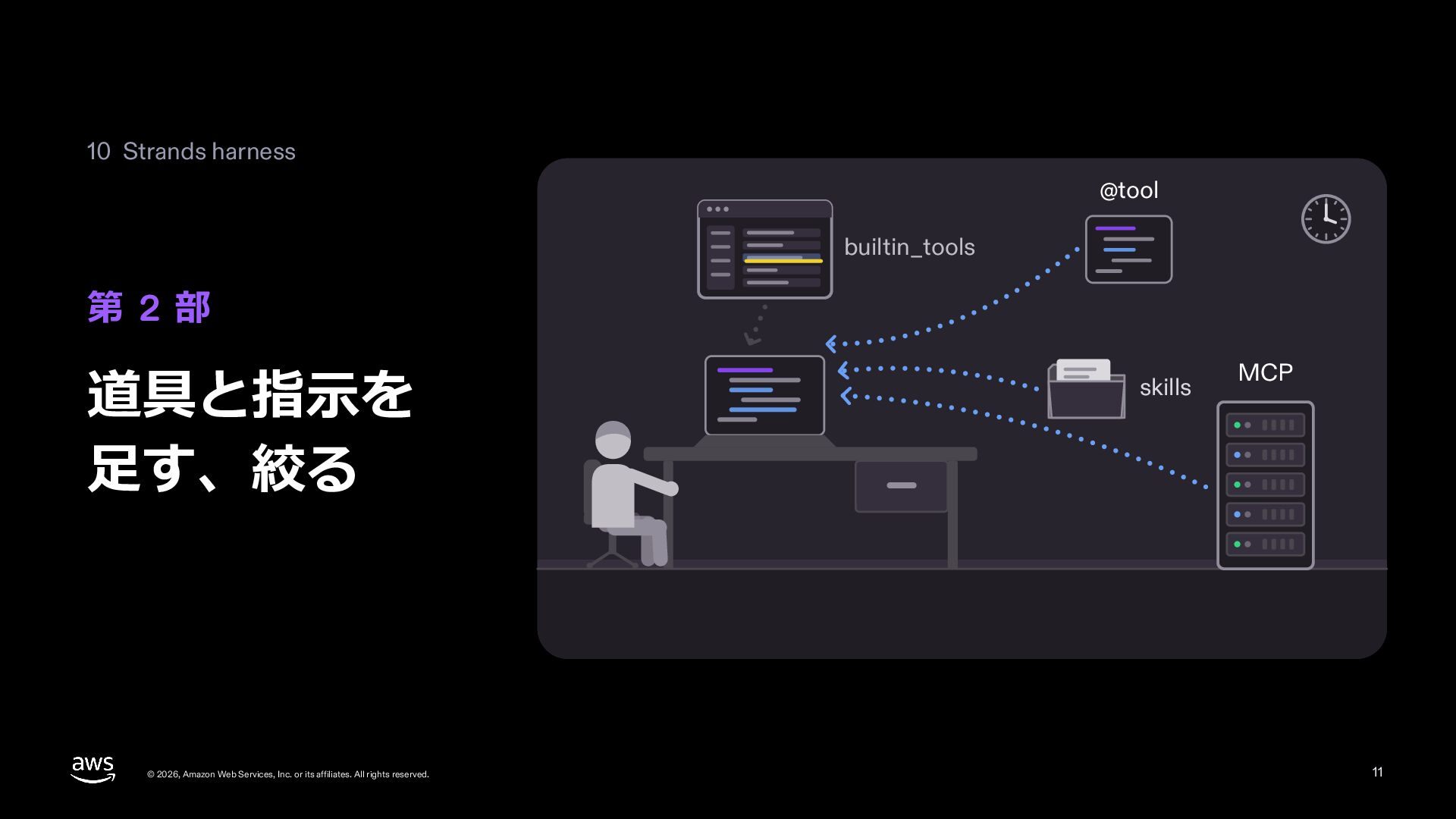
10 Strands harness @tool builtin_tools 第 2 部 道具と指⽰を ⾜す、絞る
© 2026, Amazon Web Services, Inc. or its affiliates. All rights reserved. skills MCP 11 -
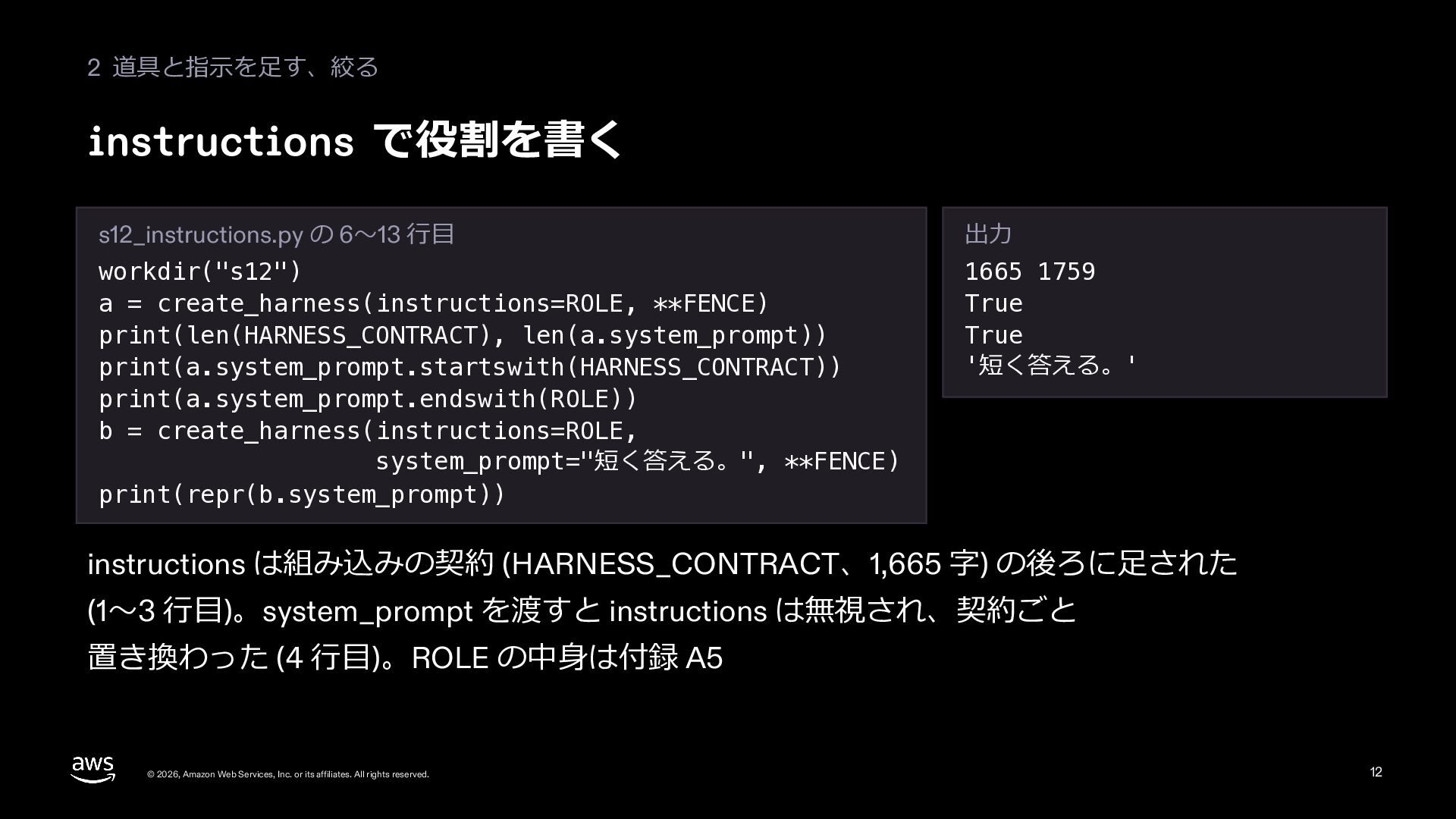
2 道具と指⽰を⾜す、絞る instructions で役割を書く s12_instructions.py の 6〜13 ⾏⽬ 出⼒ workdir("s12")
a = create_harness(instructions=ROLE, **FENCE) print(len(HARNESS_CONTRACT), len(a.system_prompt)) print(a.system_prompt.startswith(HARNESS_CONTRACT)) print(a.system_prompt.endswith(ROLE)) b = create_harness(instructions=ROLE, system_prompt="短く答える。", **FENCE) print(repr(b.system_prompt)) 1665 1759 True True '短く答える。' instructions は組み込みの契約 (HARNESS_CONTRACT、1,665 字) の後ろに⾜された (1〜3 ⾏⽬)。system_prompt を渡すと instructions は無視され、契約ごと 置き換わった (4 ⾏⽬)。ROLE の中⾝は付録 A5 © 2026, Amazon Web Services, Inc. or its affiliates. All rights reserved. 12 -
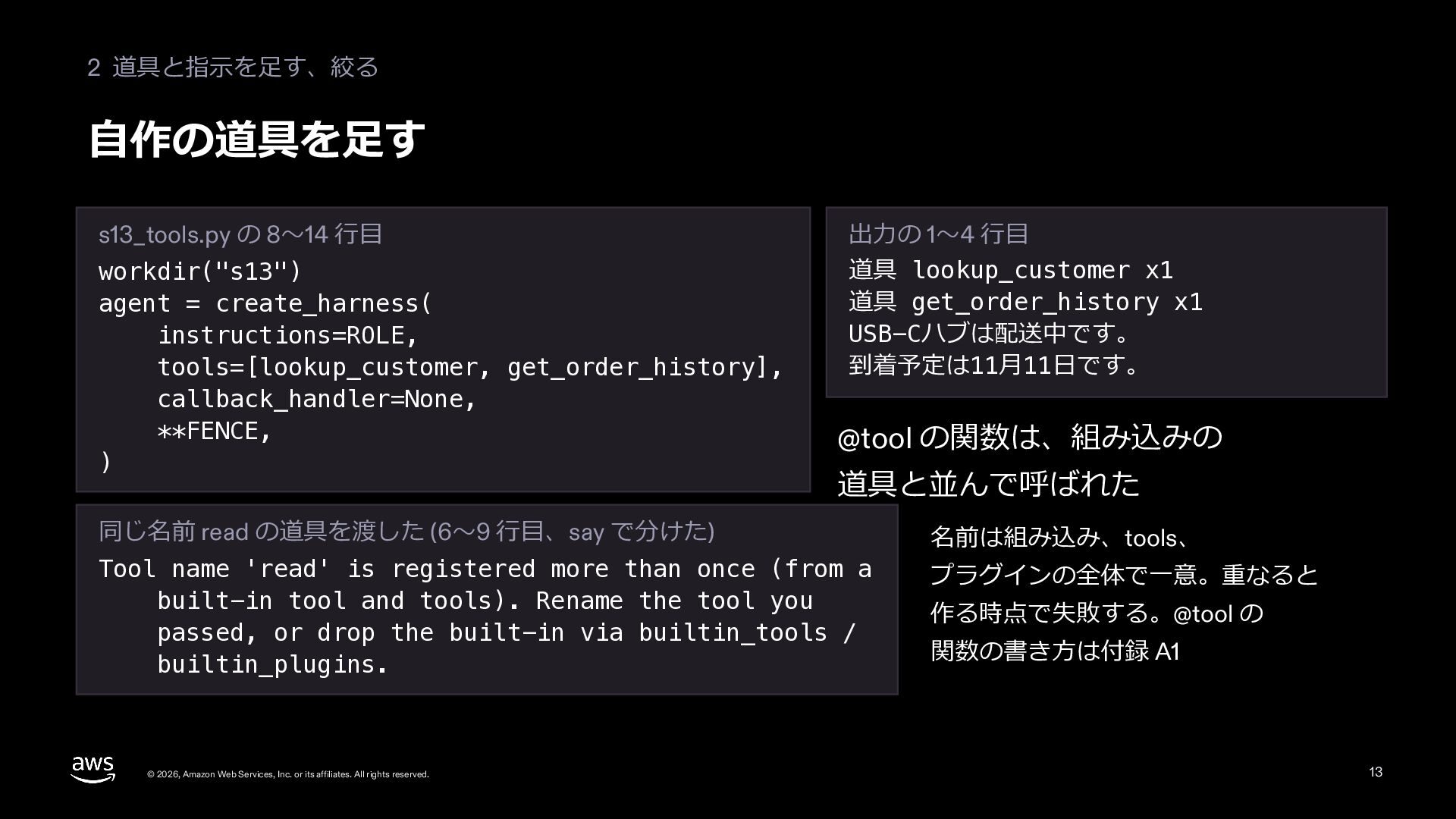
2 道具と指⽰を⾜す、絞る ⾃作の道具を⾜す s13_tools.py の 8〜14 ⾏⽬ workdir("s13") agent =
create_harness( instructions=ROLE, tools=[lookup_customer, get_order_history], callback_handler=None, **FENCE, ) 出⼒の 1〜4 ⾏⽬ 道具 lookup_customer x1 道具 get_order_history x1 USB-Cハブは配送中です。 到着予定は11⽉11⽇です。 @tool の関数は、組み込みの 道具と並んで呼ばれた 同じ名前 read の道具を渡した (6〜9 ⾏⽬、say で分けた) Tool name 'read' is registered more than once (from a built-in tool and tools). Rename the tool you passed, or drop the built-in via builtin_tools / builtin_plugins. © 2026, Amazon Web Services, Inc. or its affiliates. All rights reserved. 名前は組み込み、tools、 プラグインの全体で⼀意。重なると 作る時点で失敗する。@tool の 関数の書き⽅は付録 A1 13 -
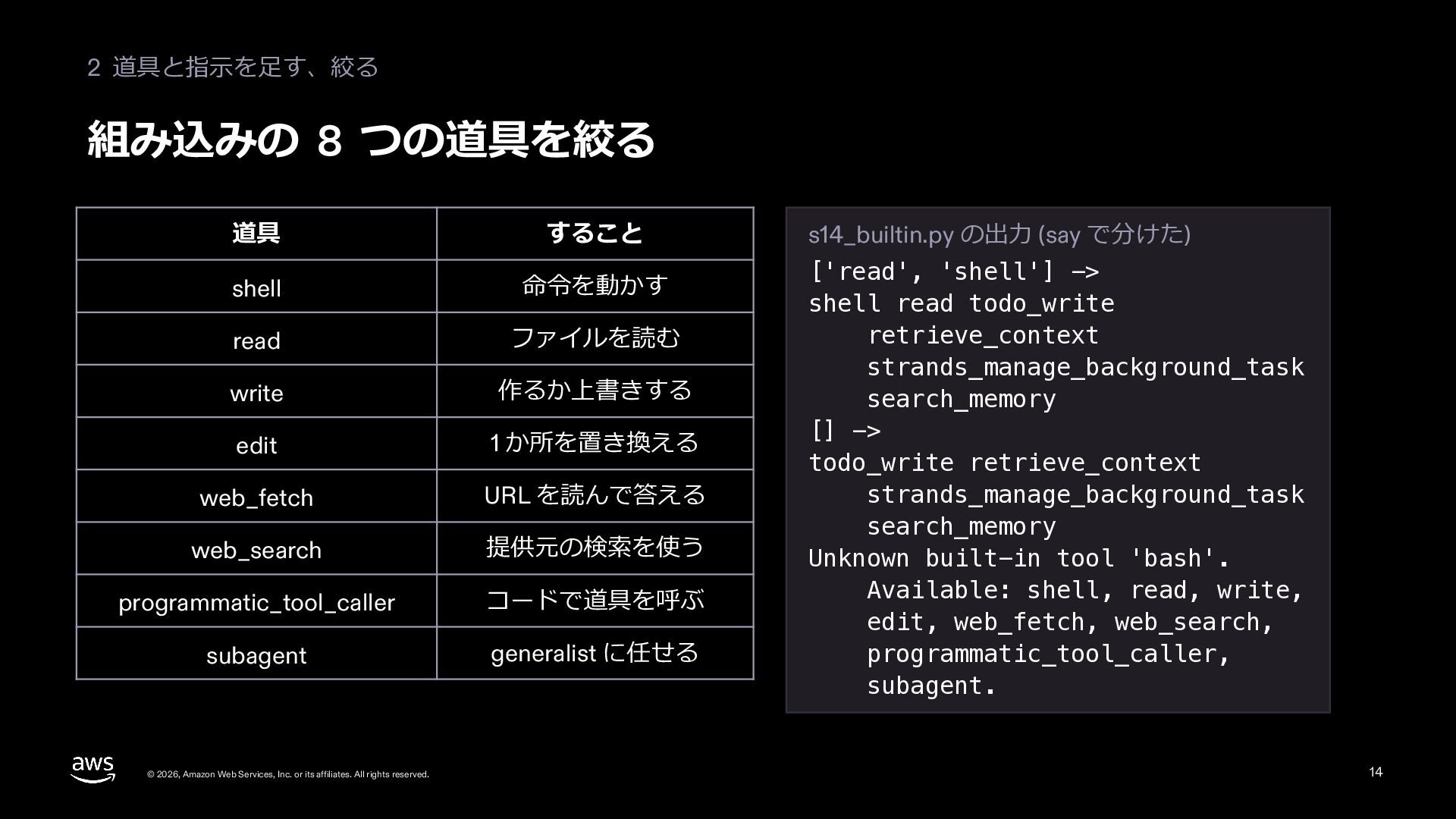
2 道具と指⽰を⾜す、絞る 組み込みの 8 つの道具を絞る 道具 すること shell 命令を動かす read
ファイルを読む write 作るか上書きする edit 1 か所を置き換える web_fetch URL を読んで答える web_search 提供元の検索を使う programmatic_tool_caller コードで道具を呼ぶ subagent generalist に任せる © 2026, Amazon Web Services, Inc. or its affiliates. All rights reserved. s14_builtin.py の出⼒ (say で分けた) ['read', 'shell'] -> shell read todo_write retrieve_context strands_manage_background_task search_memory [] -> todo_write retrieve_context strands_manage_background_task search_memory Unknown built-in tool 'bash'. Available: shell, read, write, edit, web_fetch, web_search, programmatic_tool_caller, subagent. 14 -
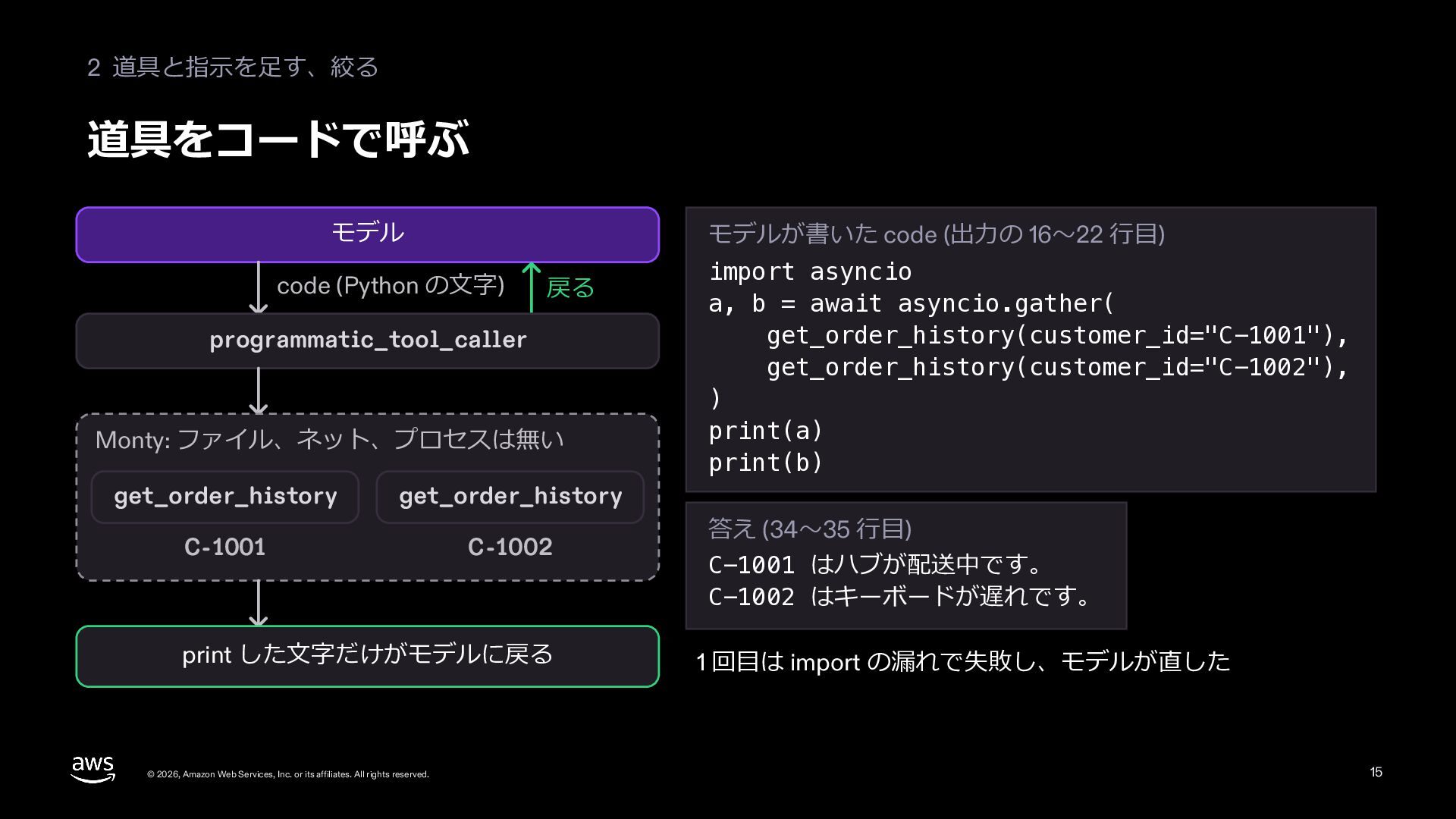
2 道具と指⽰を⾜す、絞る 道具をコードで呼ぶ モデル モデルが書いた code (出⼒の 16〜22 ⾏⽬) code
(Python の⽂字) 戻る programmatic_tool_caller Monty: ファイル、ネット、プロセスは無い get_order_history get_order_history C-1001 C-1002 print した⽂字だけがモデルに戻る © 2026, Amazon Web Services, Inc. or its affiliates. All rights reserved. import asyncio a, b = await asyncio.gather( get_order_history(customer_id="C-1001"), get_order_history(customer_id="C-1002"), ) print(a) print(b) 答え (34〜35 ⾏⽬) C-1001 はハブが配送中です。 C-1002 はキーボードが遅れです。 1 回⽬は import の漏れで失敗し、モデルが直した 15 -
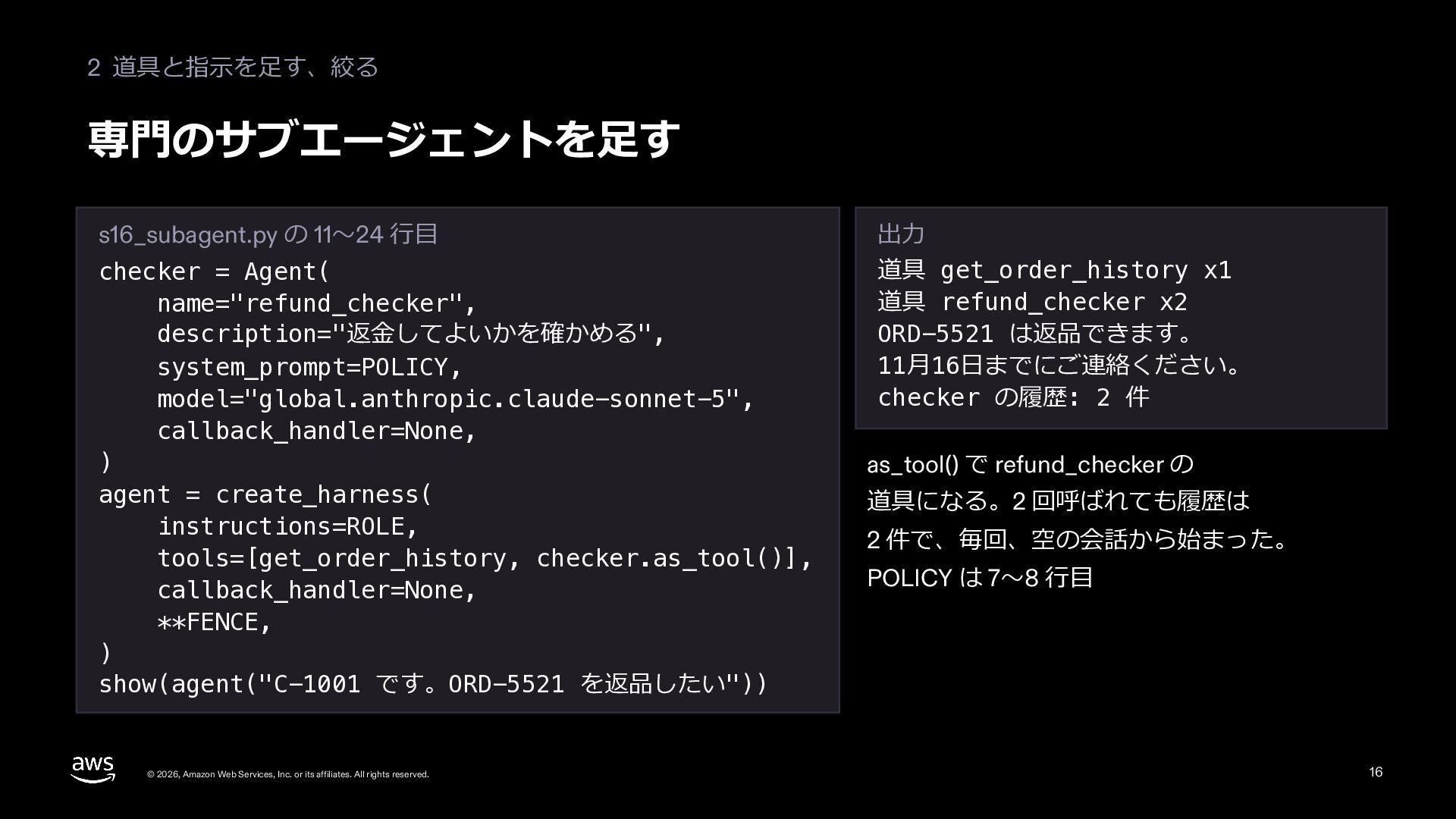
2 道具と指⽰を⾜す、絞る 専⾨のサブエージェントを⾜す s16_subagent.py の 11〜24 ⾏⽬ checker = Agent(
name="refund_checker", description="返⾦してよいかを確かめる", system_prompt=POLICY, model="global.anthropic.claude-sonnet-5", callback_handler=None, ) agent = create_harness( instructions=ROLE, tools=[get_order_history, checker.as_tool()], callback_handler=None, **FENCE, ) show(agent("C-1001 です。ORD-5521 を返品したい")) © 2026, Amazon Web Services, Inc. or its affiliates. All rights reserved. 出⼒ 道具 get_order_history x1 道具 refund_checker x2 ORD-5521 は返品できます。 11⽉16⽇までにご連絡ください。 checker の履歴: 2 件 as_tool() で refund_checker の 道具になる。2 回呼ばれても履歴は 2 件で、毎回、空の会話から始まった。 POLICY は 7〜8 ⾏⽬ 16 -
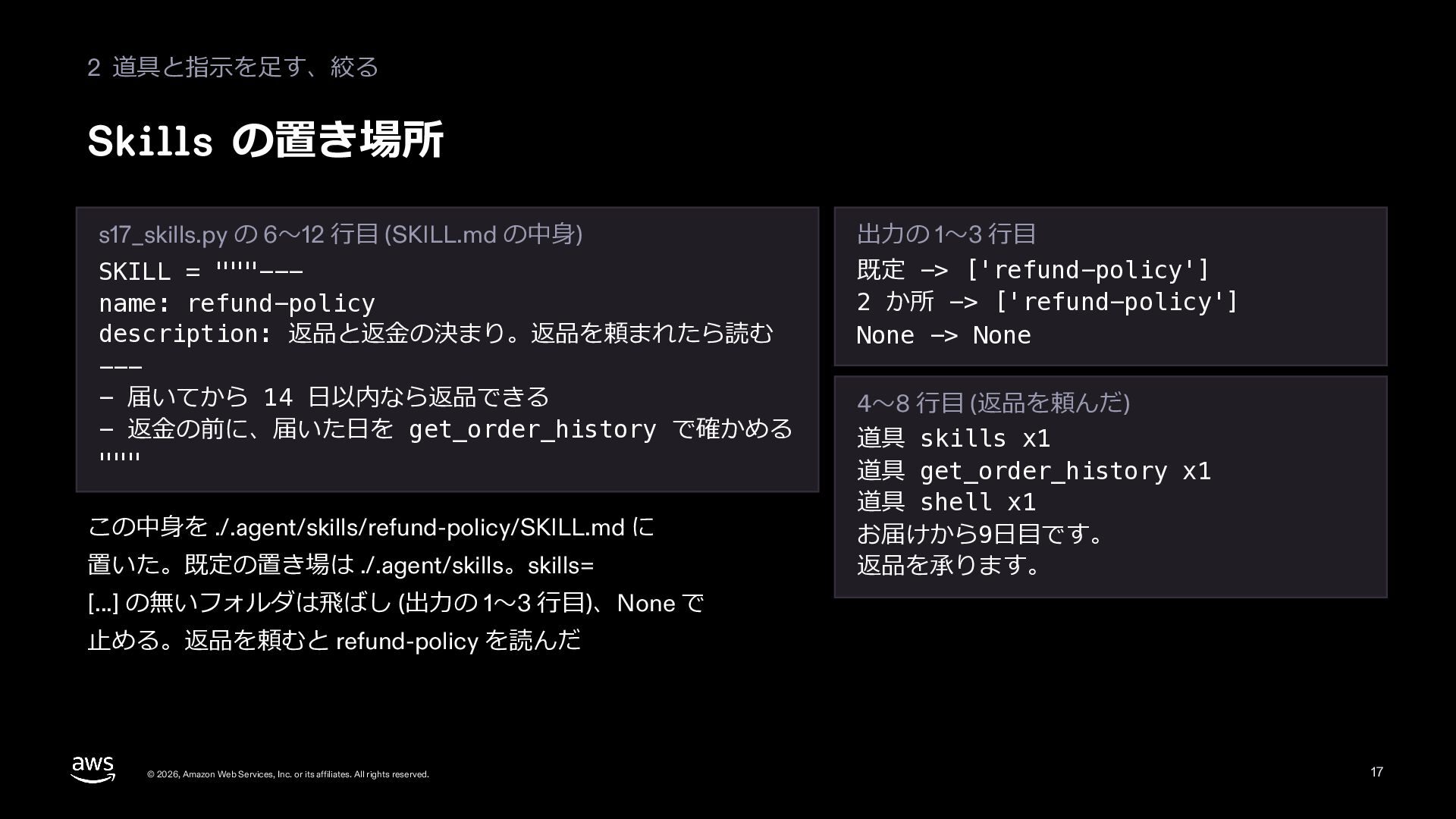
2 道具と指⽰を⾜す、絞る Skills の置き場所 s17_skills.py の 6〜12 ⾏⽬ (SKILL.md の中⾝)
SKILL = """--name: refund-policy description: 返品と返⾦の決まり。返品を頼まれたら読む --- 届いてから 14 ⽇以内なら返品できる - 返⾦の前に、届いた⽇を get_order_history で確かめる """ この中⾝を ./.agent/skills/refund-policy/SKILL.md に 置いた。既定の置き場は ./.agent/skills。skills= 出⼒の 1〜3 ⾏⽬ 既定 -> ['refund-policy'] 2 か所 -> ['refund-policy'] None -> None 4〜8 ⾏⽬ (返品を頼んだ) 道具 skills x1 道具 get_order_history x1 道具 shell x1 お届けから9⽇⽬です。 返品を承ります。 [...] の無いフォルダは⾶ばし (出⼒の 1〜3 ⾏⽬)、None で ⽌める。返品を頼むと refund-policy を読んだ © 2026, Amazon Web Services, Inc. or its affiliates. All rights reserved. 17 -
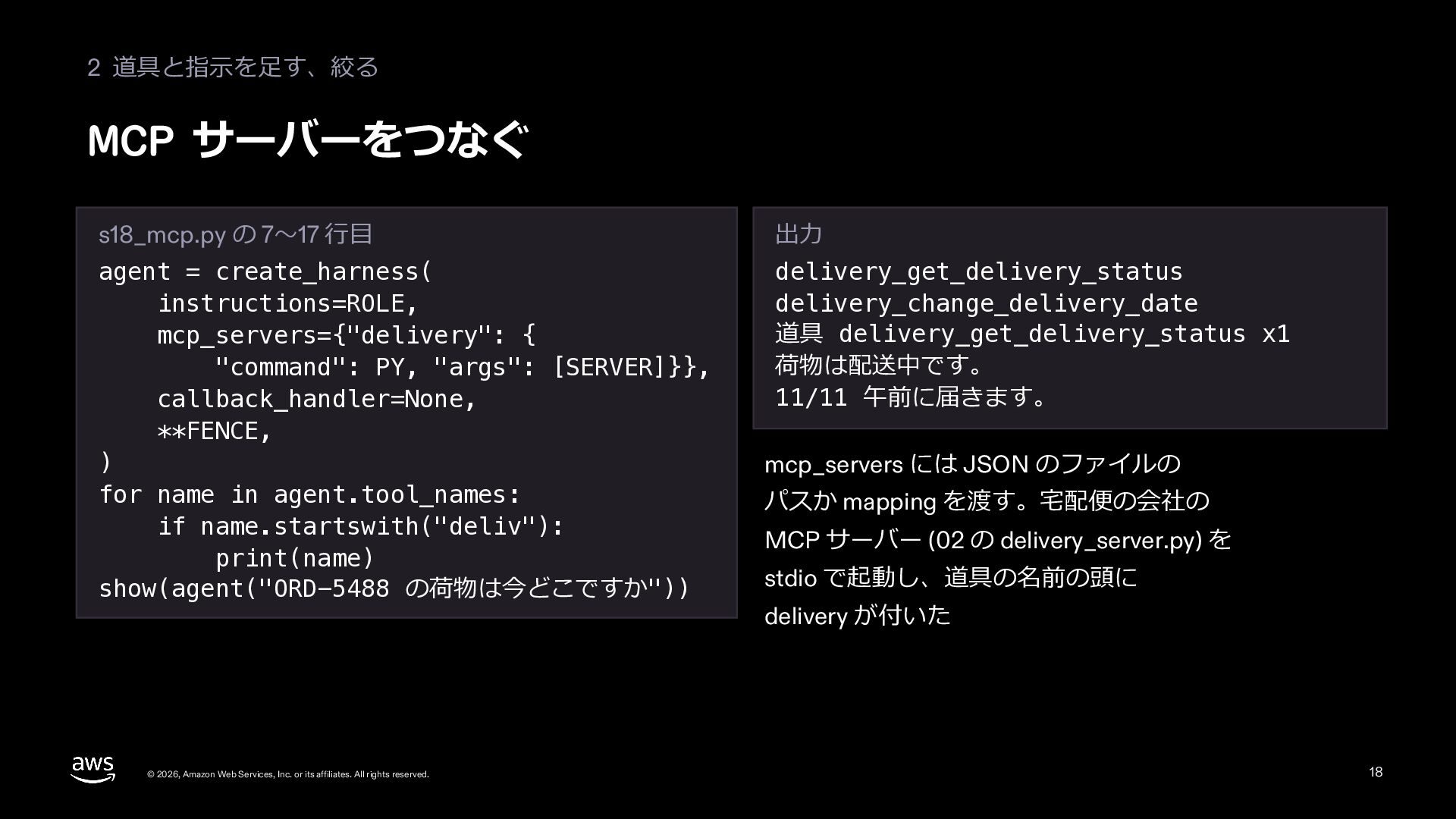
2 道具と指⽰を⾜す、絞る MCP サーバーをつなぐ s18_mcp.py の 7〜17 ⾏⽬ 出⼒ agent
= create_harness( instructions=ROLE, mcp_servers={"delivery": { "command": PY, "args": [SERVER]}}, callback_handler=None, **FENCE, ) for name in agent.tool_names: if name.startswith("deliv"): print(name) show(agent("ORD-5488 の荷物は今どこですか")) delivery_get_delivery_status delivery_change_delivery_date 道具 delivery_get_delivery_status x1 荷物は配送中です。 11/11 午前に届きます。 © 2026, Amazon Web Services, Inc. or its affiliates. All rights reserved. mcp_servers には JSON のファイルの パスか mapping を渡す。宅配便の会社の MCP サーバー (02 の delivery_server.py) を stdio で起動し、道具の名前の頭に delivery が付いた 18 -
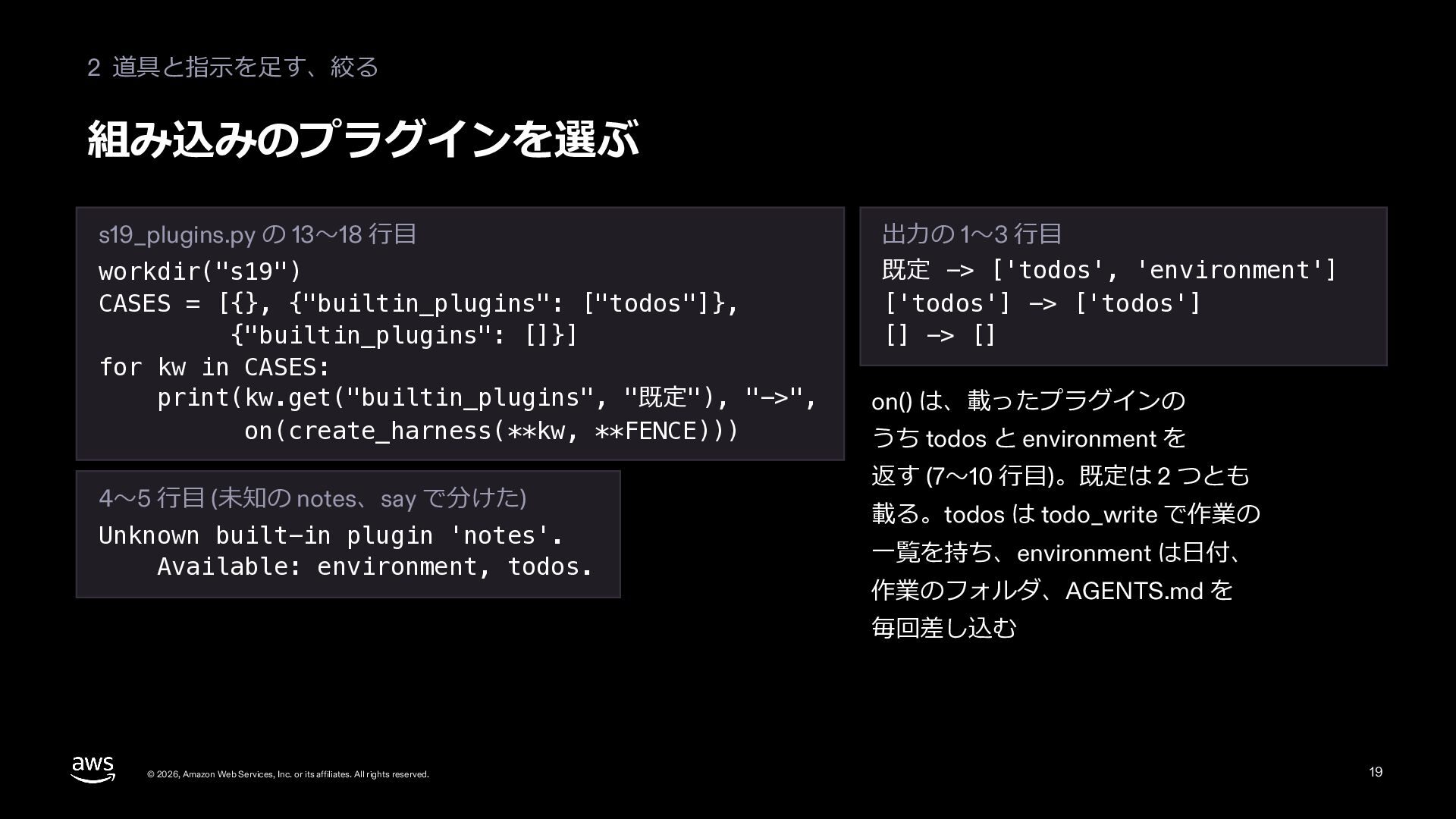
2 道具と指⽰を⾜す、絞る 組み込みのプラグインを選ぶ s19_plugins.py の 13〜18 ⾏⽬ workdir("s19") CASES =
[{}, {"builtin_plugins": ["todos"]}, {"builtin_plugins": []}] for kw in CASES: print(kw.get("builtin_plugins", "既定"), "->", on(create_harness(**kw, **FENCE))) 4〜5 ⾏⽬ (未知の notes、say で分けた) Unknown built-in plugin 'notes'. Available: environment, todos. 出⼒の 1〜3 ⾏⽬ 既定 -> ['todos', 'environment'] ['todos'] -> ['todos'] [] -> [] on() は、載ったプラグインの うち todos と environment を 返す (7〜10 ⾏⽬)。既定は 2 つとも 載る。todos は todo_write で作業の ⼀覧を持ち、environment は⽇付、 作業のフォルダ、AGENTS.md を 毎回差し込む © 2026, Amazon Web Services, Inc. or its affiliates. All rights reserved. 19 -
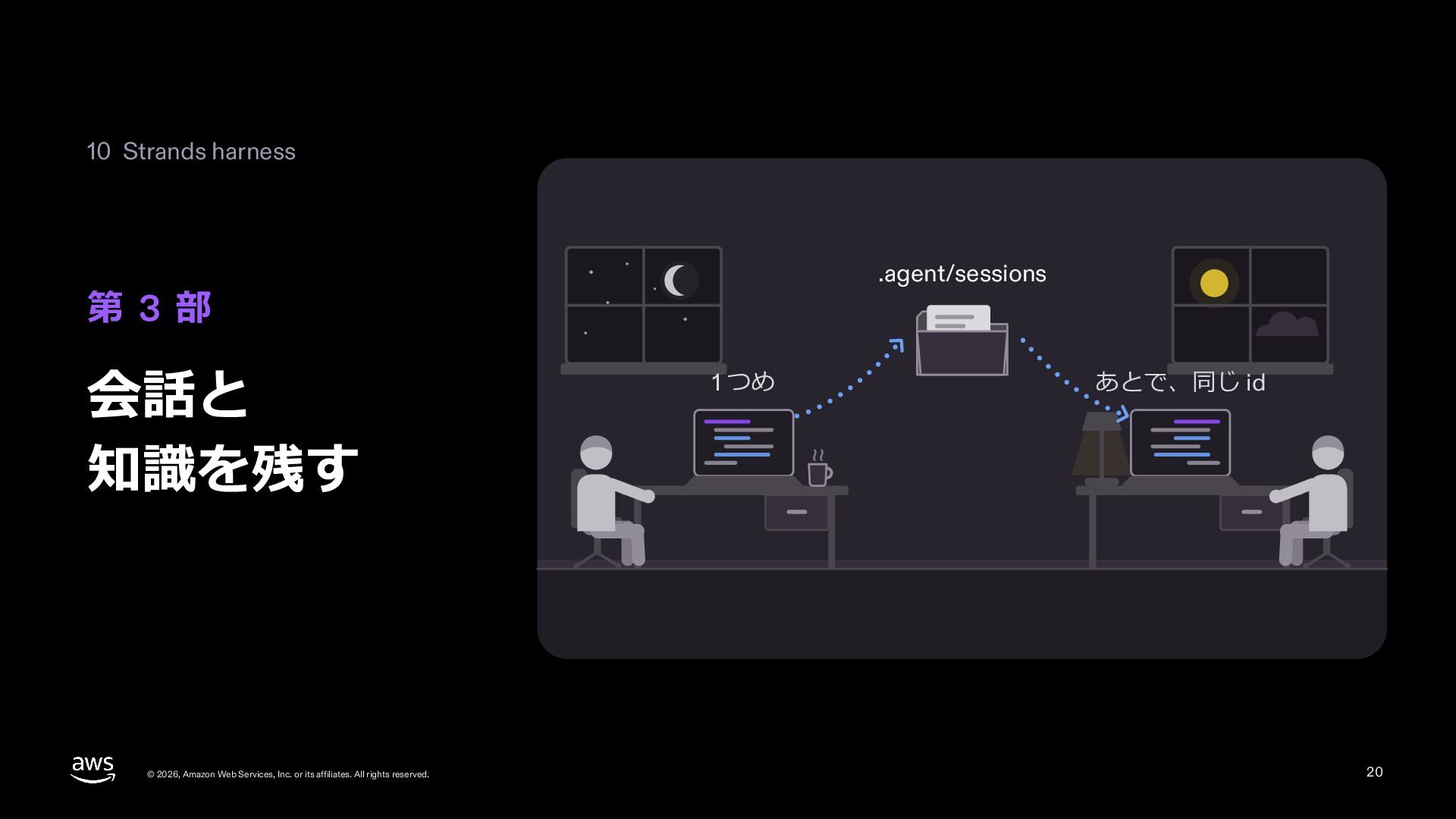
10 Strands harness .agent/sessions 第 3 部 会話と 知識を残す ©
2026, Amazon Web Services, Inc. or its affiliates. All rights reserved. 1 つめ あとで、同じ id 20 -
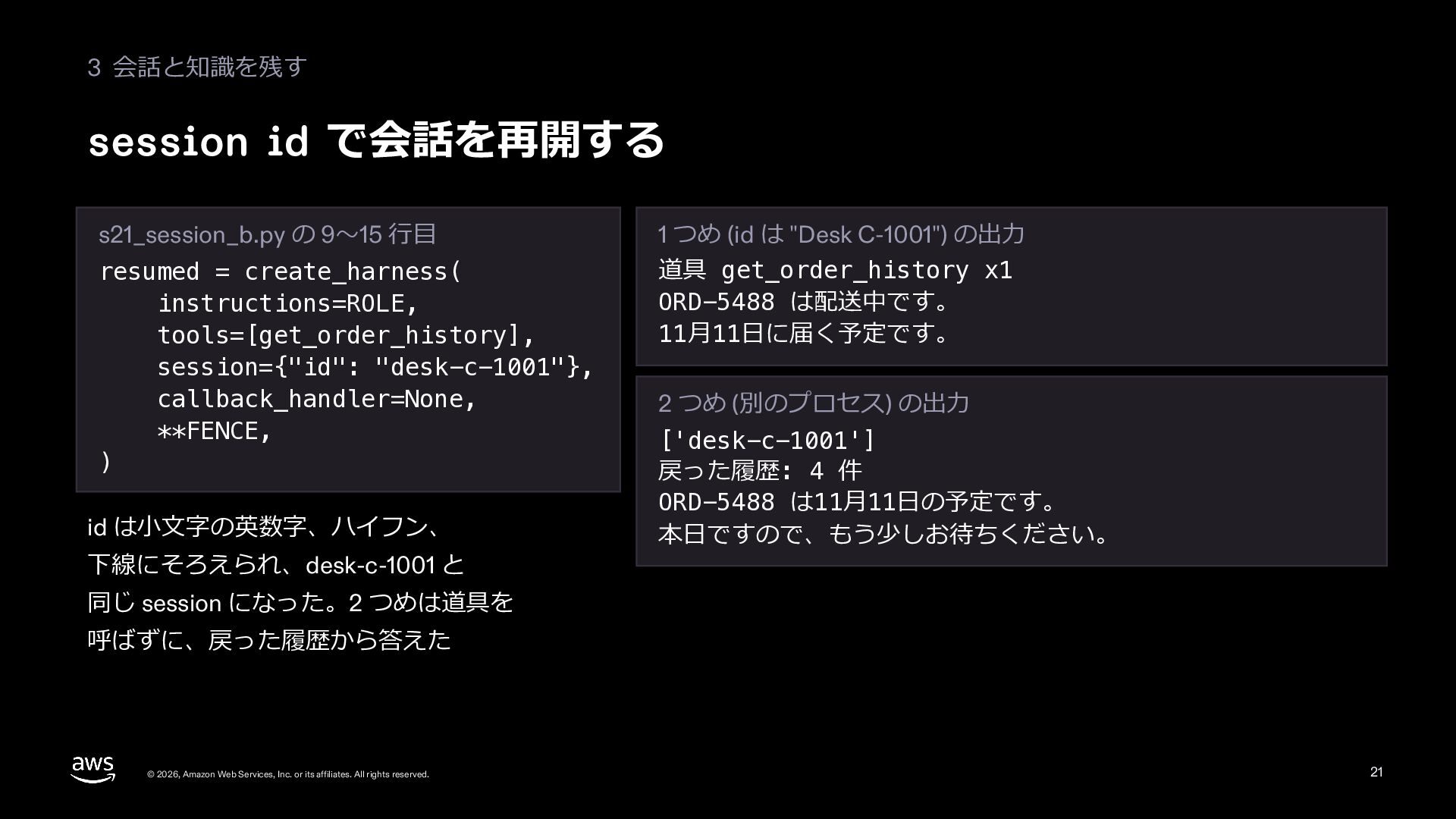
3 会話と知識を残す session id で会話を再開する s21_session_b.py の 9〜15 ⾏⽬ resumed
= create_harness( instructions=ROLE, tools=[get_order_history], session={"id": "desk-c-1001"}, callback_handler=None, **FENCE, ) id は⼩⽂字の英数字、ハイフン、 下線にそろえられ、desk-c-1001 と 1 つめ (id は "Desk C-1001") の出⼒ 道具 get_order_history x1 ORD-5488 は配送中です。 11⽉11⽇に届く予定です。 2 つめ (別のプロセス) の出⼒ ['desk-c-1001'] 戻った履歴: 4 件 ORD-5488 は11⽉11⽇の予定です。 本⽇ですので、もう少しお待ちください。 同じ session になった。2 つめは道具を 呼ばずに、戻った履歴から答えた © 2026, Amazon Web Services, Inc. or its affiliates. All rights reserved. 21 -
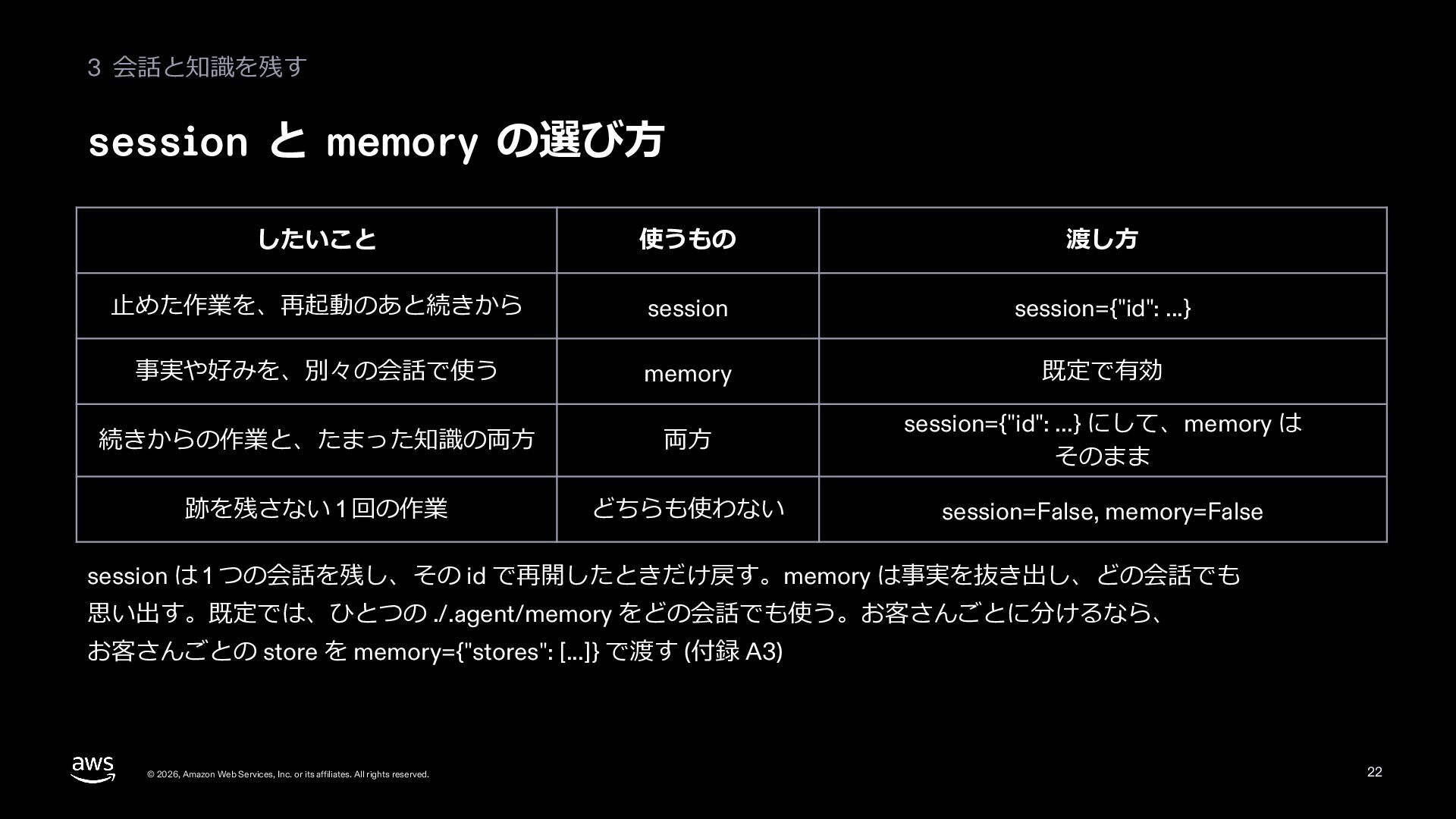
3 会話と知識を残す session と memory の選び⽅ したいこと 使うもの 渡し⽅ ⽌めた作業を、再起動のあと続きから
session session={"id": ...} 事実や好みを、別々の会話で使う memory 既定で有効 続きからの作業と、たまった知識の両⽅ 両⽅ session={"id": ...} にして、memory は そのまま 跡を残さない 1 回の作業 どちらも使わない session=False, memory=False session は 1 つの会話を残し、その id で再開したときだけ戻す。memory は事実を抜き出し、どの会話でも 思い出す。既定では、ひとつの ./.agent/memory をどの会話でも使う。お客さんごとに分けるなら、 お客さんごとの store を memory={"stores": [...]} で渡す (付録 A3) © 2026, Amazon Web Services, Inc. or its affiliates. All rights reserved. 22 -
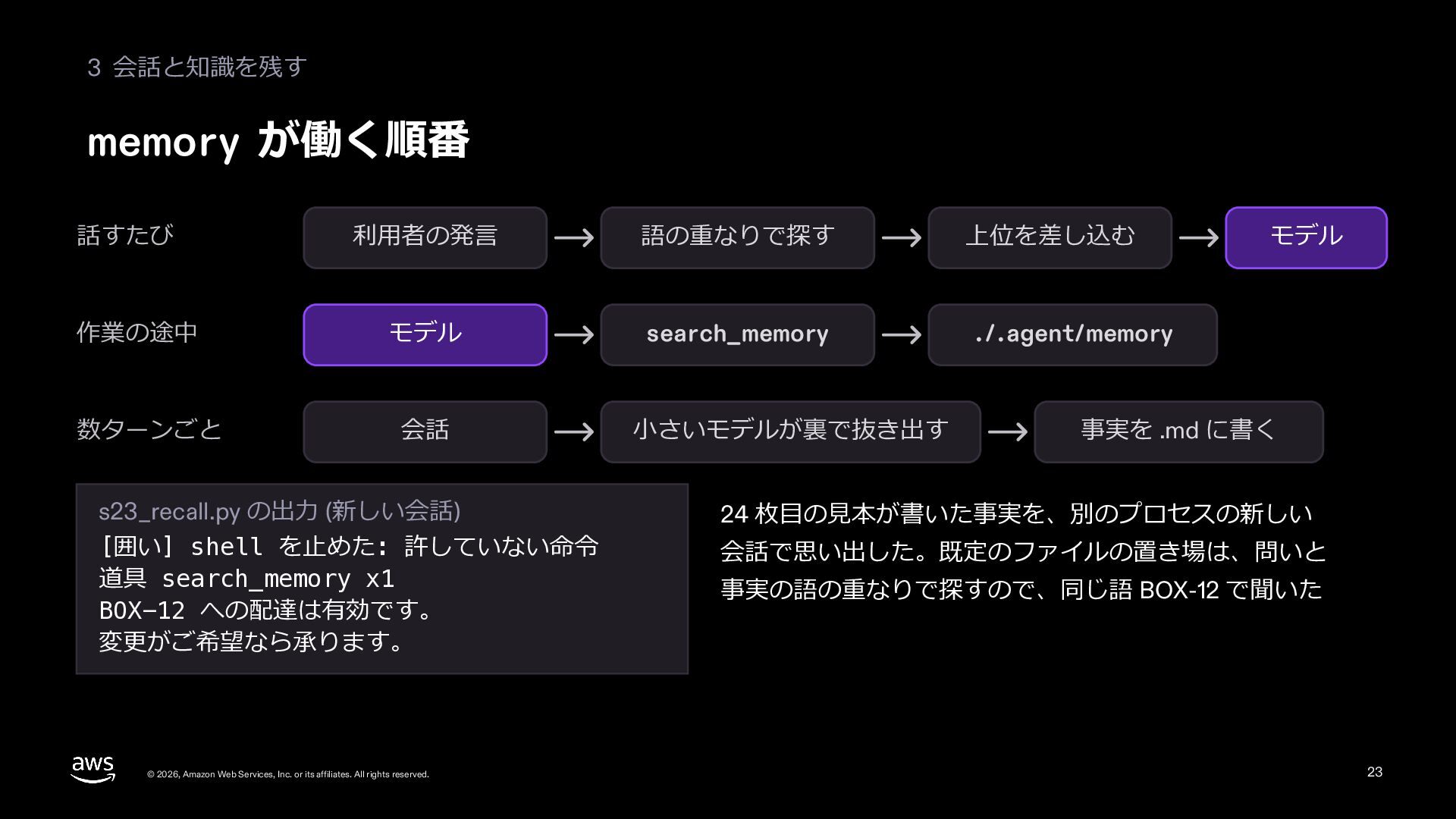
3 会話と知識を残す memory が働く順番 話すたび 利⽤者の発⾔ 語の重なりで探す 上位を差し込む 作業の途中 モデル
search_memory ./.agent/memory 数ターンごと 会話 ⼩さいモデルが裏で抜き出す s23_recall.py の出⼒ (新しい会話) [囲い] shell を⽌めた: 許していない命令 道具 search_memory x1 BOX-12 への配達は有効です。 変更がご希望なら承ります。 © 2026, Amazon Web Services, Inc. or its affiliates. All rights reserved. モデル 事実を .md に書く 24 枚⽬の⾒本が書いた事実を、別のプロセスの新しい 会話で思い出した。既定のファイルの置き場は、問いと 事実の語の重なりで探すので、同じ語 BOX-12 で聞いた 23 -
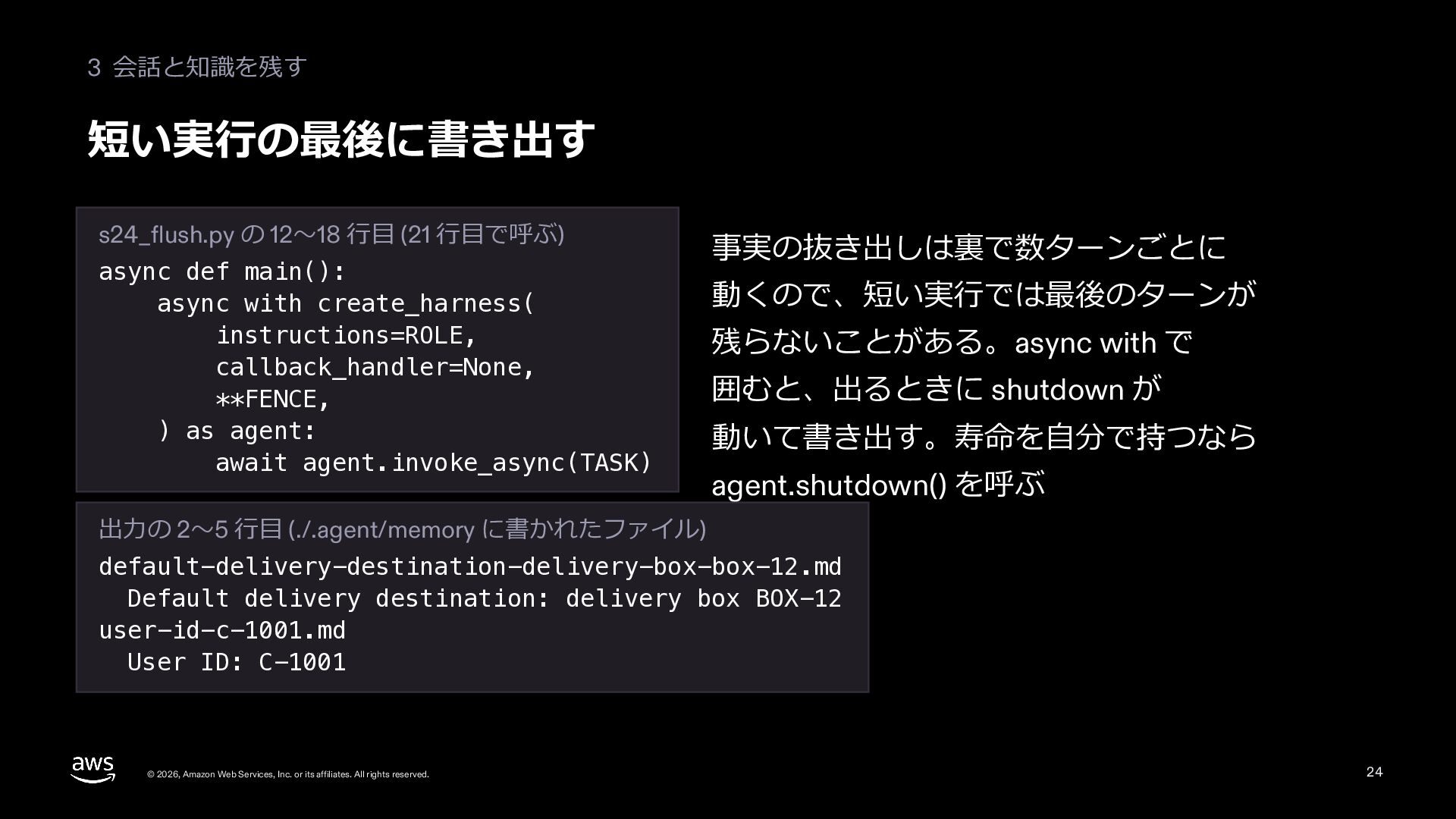
3 会話と知識を残す 短い実⾏の最後に書き出す s24_flush.py の 12〜18 ⾏⽬ (21 ⾏⽬で呼ぶ) async
def main(): async with create_harness( instructions=ROLE, callback_handler=None, **FENCE, ) as agent: await agent.invoke_async(TASK) 事実の抜き出しは裏で数ターンごとに 動くので、短い実⾏では最後のターンが 残らないことがある。async with で 囲むと、出るときに shutdown が 動いて書き出す。寿命を⾃分で持つなら agent.shutdown() を呼ぶ 出⼒の 2〜5 ⾏⽬ (./.agent/memory に書かれたファイル) default-delivery-destination-delivery-box-box-12.md Default delivery destination: delivery box BOX-12 user-id-c-1001.md User ID: C-1001 © 2026, Amazon Web Services, Inc. or its affiliates. All rights reserved. 24 -
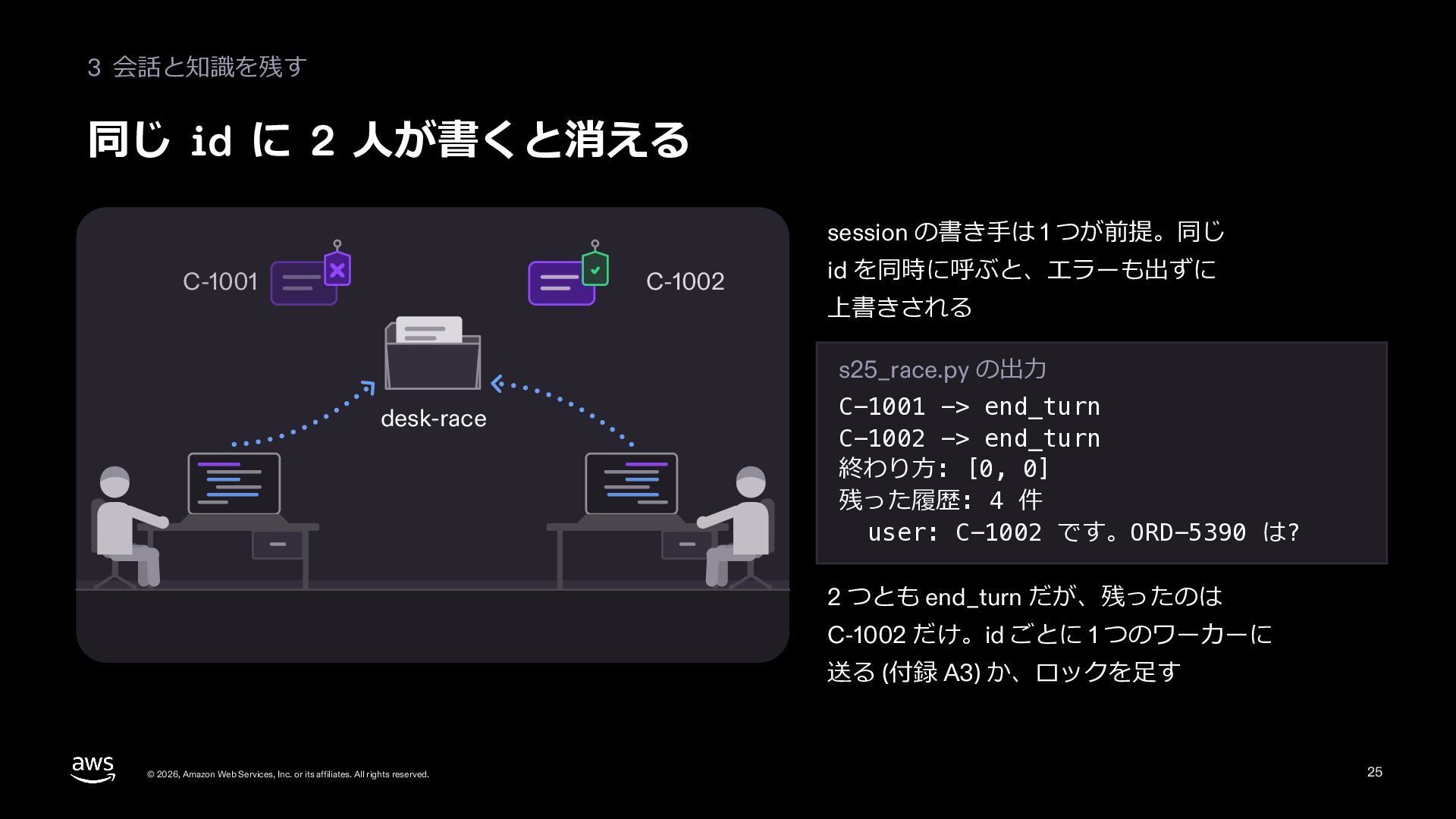
3 会話と知識を残す 同じ id に 2 ⼈が書くと消える session の書き⼿は 1
つが前提。同じ C-1001 C-1002 id を同時に呼ぶと、エラーも出ずに 上書きされる s25_race.py の出⼒ desk-race C-1001 -> end_turn C-1002 -> end_turn 終わり⽅: [0, 0] 残った履歴: 4 件 user: C-1002 です。ORD-5390 は? 2 つとも end_turn だが、残ったのは C-1002 だけ。id ごとに 1 つのワーカーに 送る (付録 A3) か、ロックを⾜す © 2026, Amazon Web Services, Inc. or its affiliates. All rights reserved. 25 -
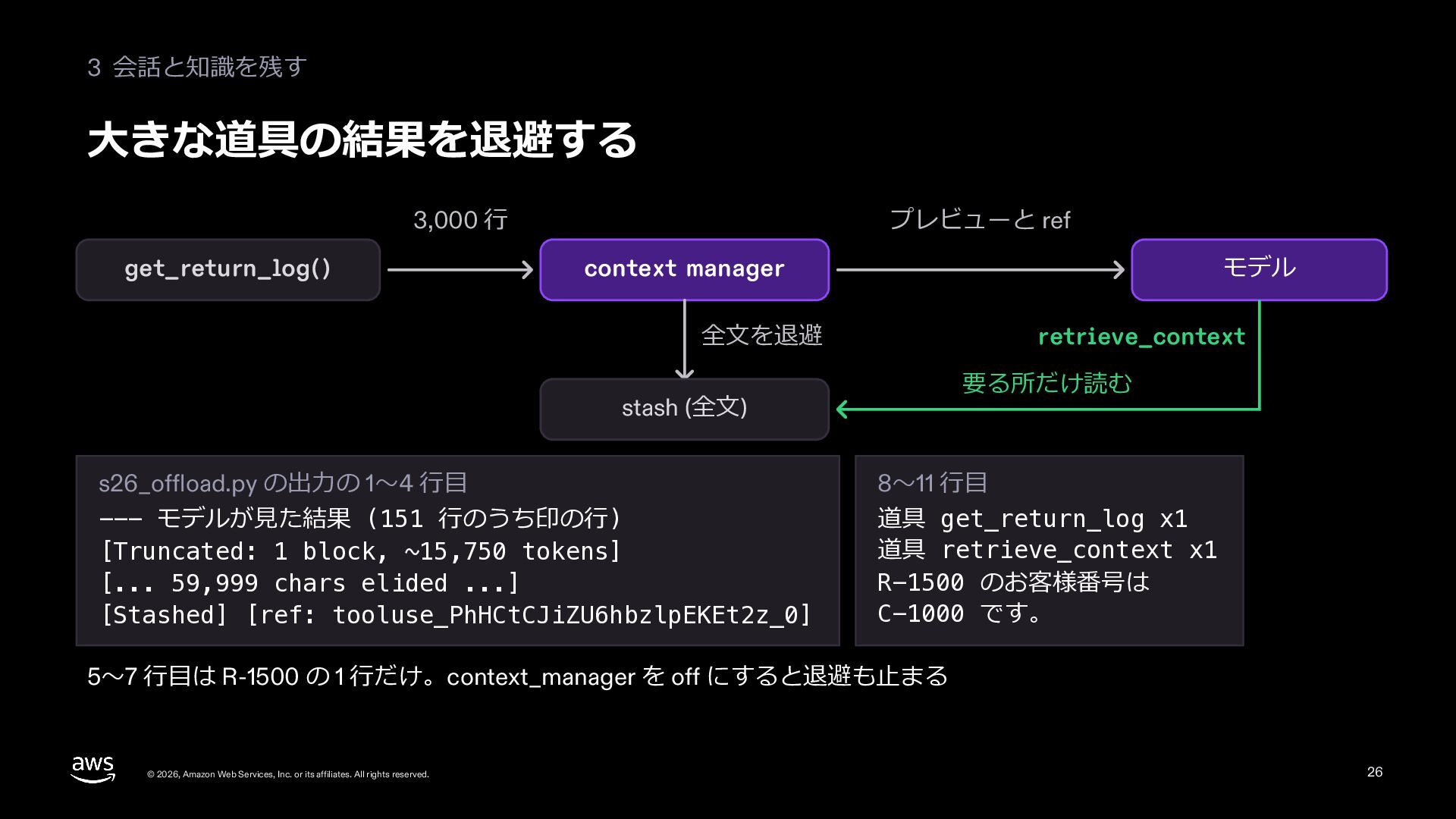
3 会話と知識を残す ⼤きな道具の結果を退避する 3,000 ⾏ get_return_log() プレビューと ref モデル context
manager 全⽂を退避 retrieve_context 要る所だけ読む stash (全⽂) s26_offload.py の出⼒の 1〜4 ⾏⽬ --- モデルが⾒た結果 (151 ⾏のうち印の⾏) [Truncated: 1 block, ~15,750 tokens] [... 59,999 chars elided ...] [Stashed] [ref: tooluse_PhHCtCJiZU6hbzlpEKEt2z_0] 8〜11 ⾏⽬ 道具 get_return_log x1 道具 retrieve_context x1 R-1500 のお客様番号は C-1000 です。 5〜7 ⾏⽬は R-1500 の 1 ⾏だけ。context_manager を off にすると退避も⽌まる © 2026, Amazon Web Services, Inc. or its affiliates. All rights reserved. 26 -
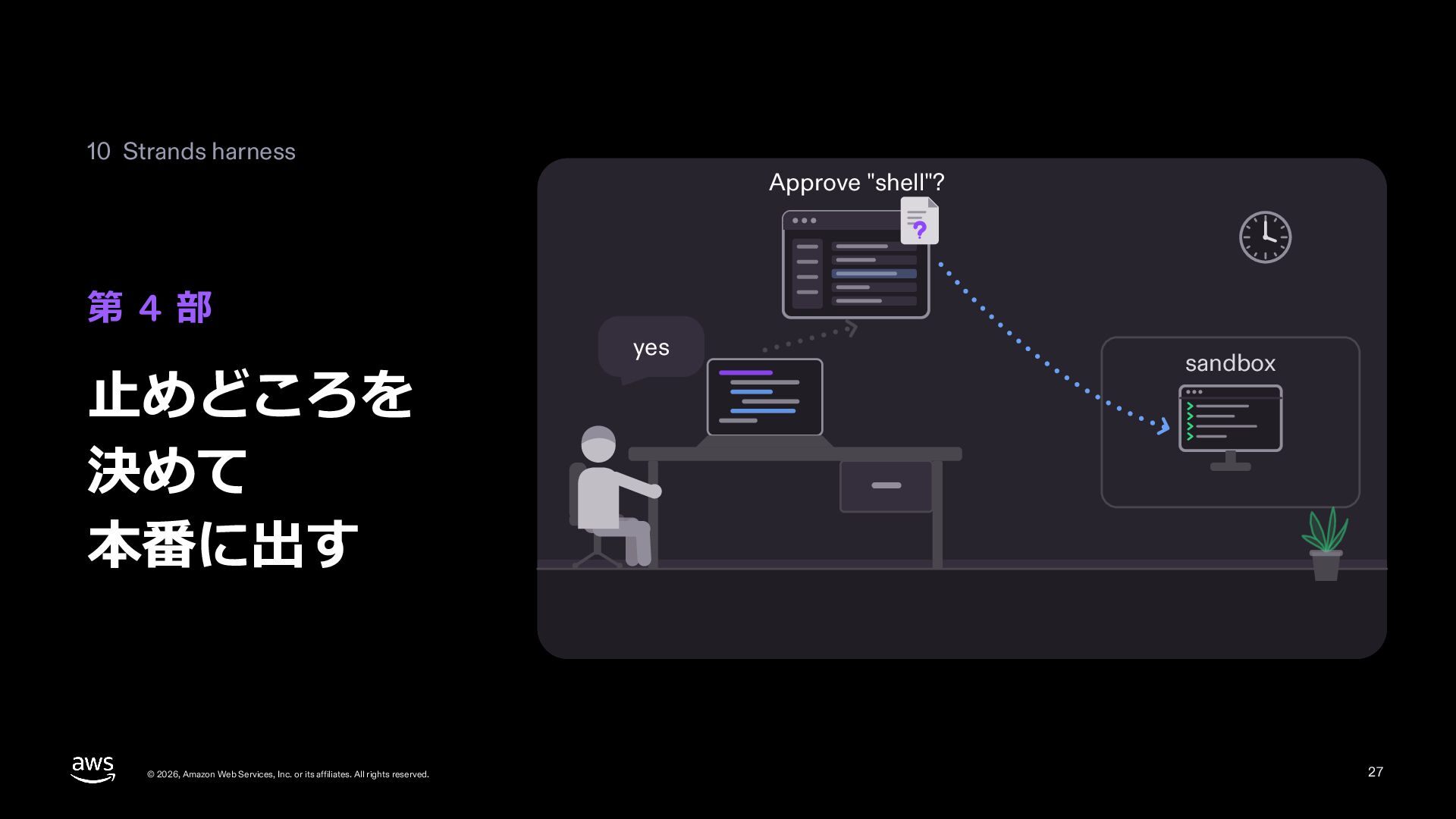
10 Strands harness Approve "shell"? 第 4 部 ⽌めどころを 決めて
本番に出す © 2026, Amazon Web Services, Inc. or its affiliates. All rights reserved. yes sandbox 27 -
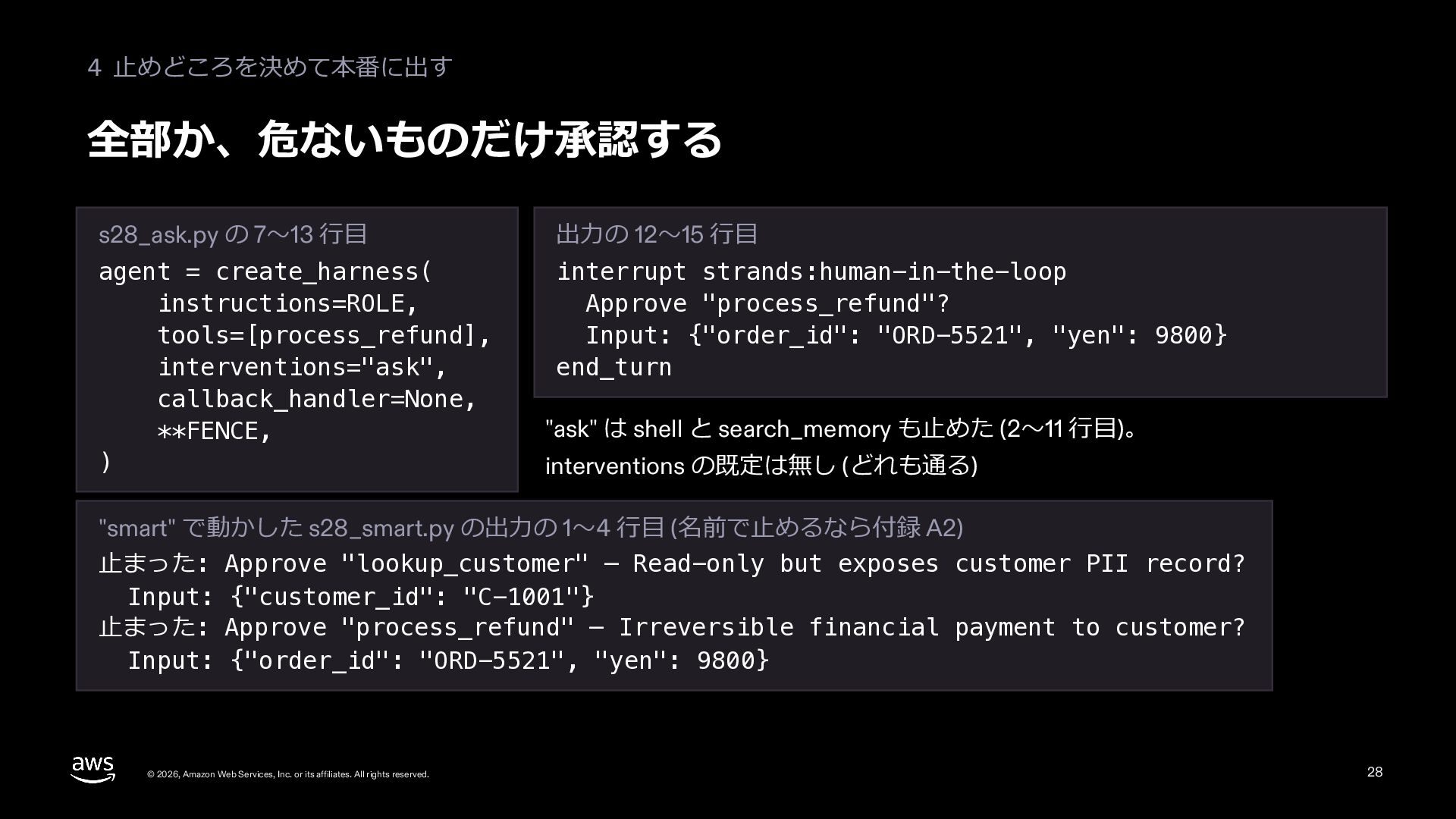
4 ⽌めどころを決めて本番に出す 全部か、危ないものだけ承認する s28_ask.py の 7〜13 ⾏⽬ 出⼒の 12〜15 ⾏⽬
agent = create_harness( instructions=ROLE, tools=[process_refund], interventions="ask", callback_handler=None, **FENCE, ) interrupt strands:human-in-the-loop Approve "process_refund"? Input: {"order_id": "ORD-5521", "yen": 9800} end_turn "ask" は shell と search_memory も⽌めた (2〜11 ⾏⽬)。 interventions の既定は無し (どれも通る) "smart" で動かした s28_smart.py の出⼒の 1〜4 ⾏⽬ (名前で⽌めるなら付録 A2) ⽌まった: Approve "lookup_customer" — Read-only but exposes customer PII record? Input: {"customer_id": "C-1001"} ⽌まった: Approve "process_refund" — Irreversible financial payment to customer? Input: {"order_id": "ORD-5521", "yen": 9800} © 2026, Amazon Web Services, Inc. or its affiliates. All rights reserved. 28 -
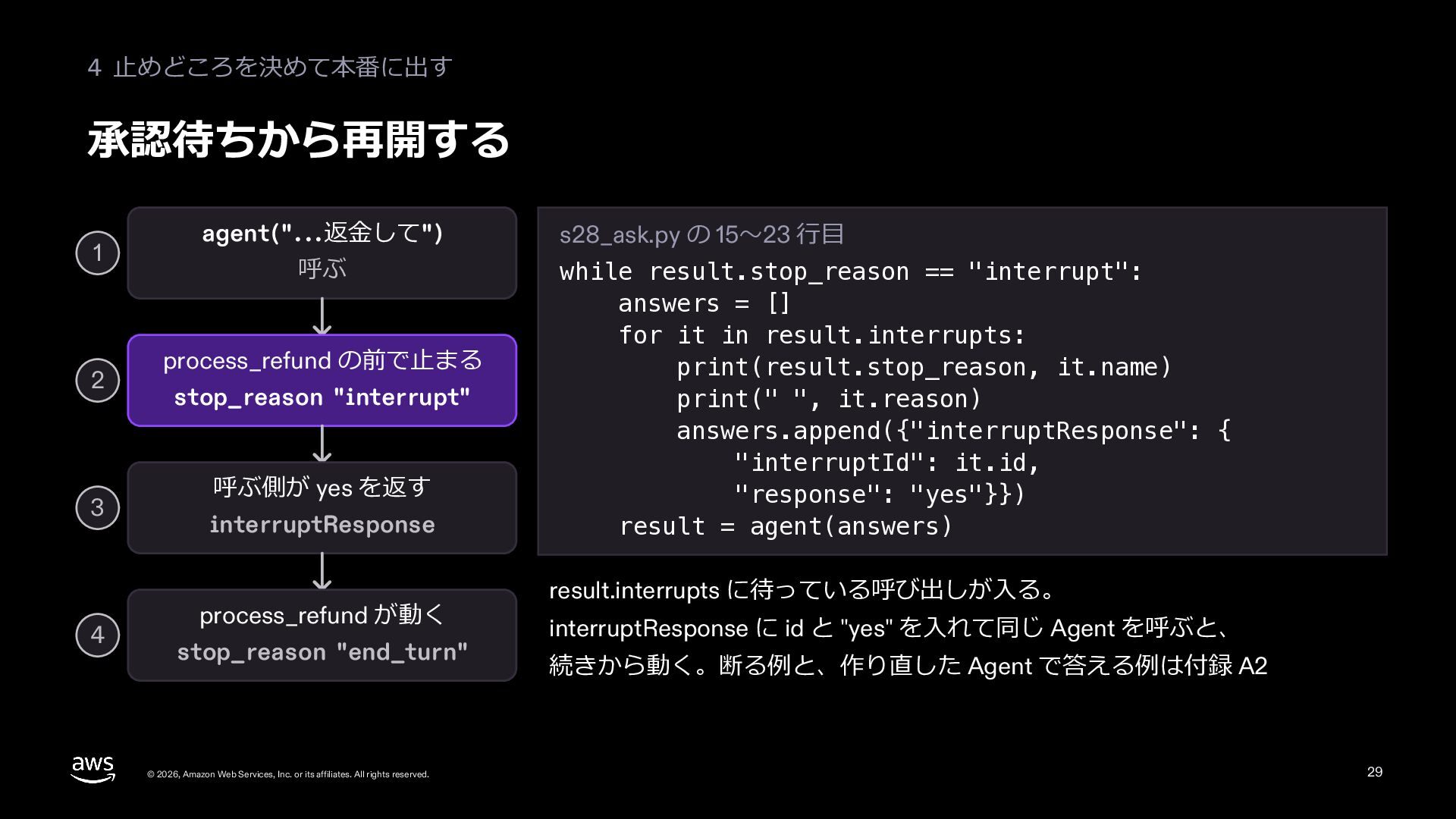
4 ⽌めどころを決めて本番に出す 承認待ちから再開する 1 2 3 4 agent("...返⾦して") 呼ぶ process_refund
の前で⽌まる stop_reason "interrupt" 呼ぶ側が yes を返す interruptResponse process_refund が動く stop_reason "end_turn" © 2026, Amazon Web Services, Inc. or its affiliates. All rights reserved. s28_ask.py の 15〜23 ⾏⽬ while result.stop_reason == "interrupt": answers = [] for it in result.interrupts: print(result.stop_reason, it.name) print(" ", it.reason) answers.append({"interruptResponse": { "interruptId": it.id, "response": "yes"}}) result = agent(answers) result.interrupts に待っている呼び出しが⼊る。 interruptResponse に id と "yes" を⼊れて同じ Agent を呼ぶと、 続きから動く。断る例と、作り直した Agent で答える例は付録 A2 29 -
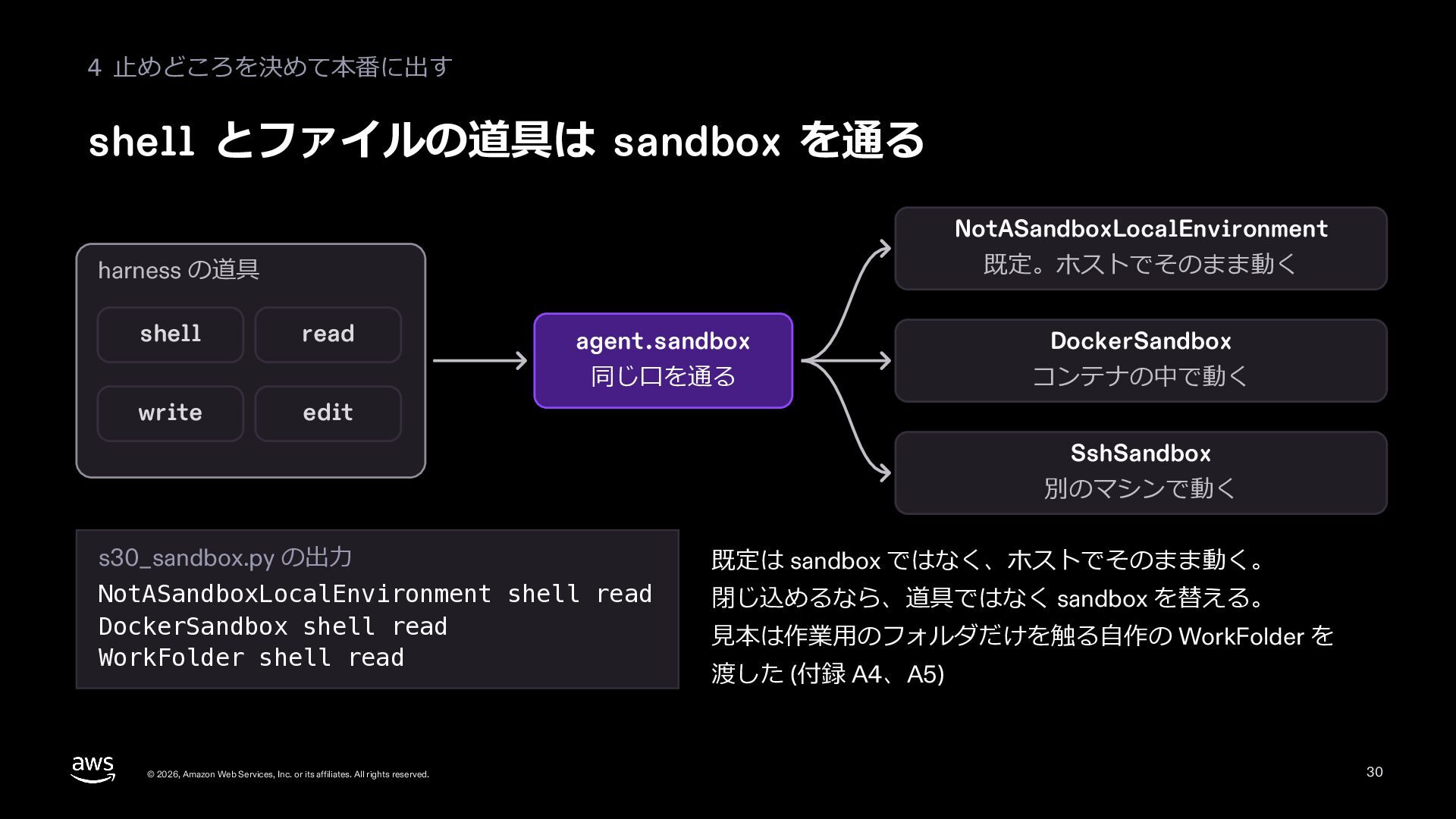
4 ⽌めどころを決めて本番に出す shell とファイルの道具は sandbox を通る NotASandboxLocalEnvironment 既定。ホストでそのまま動く harness の道具
shell write read agent.sandbox DockerSandbox 同じ⼝を通る コンテナの中で動く edit SshSandbox 別のマシンで動く s30_sandbox.py の出⼒ 既定は sandbox ではなく、ホストでそのまま動く。 NotASandboxLocalEnvironment shell read DockerSandbox shell read WorkFolder shell read 閉じ込めるなら、道具ではなく sandbox を替える。 © 2026, Amazon Web Services, Inc. or its affiliates. All rights reserved. ⾒本は作業⽤のフォルダだけを触る⾃作の WorkFolder を 渡した (付録 A4、A5) 30 -
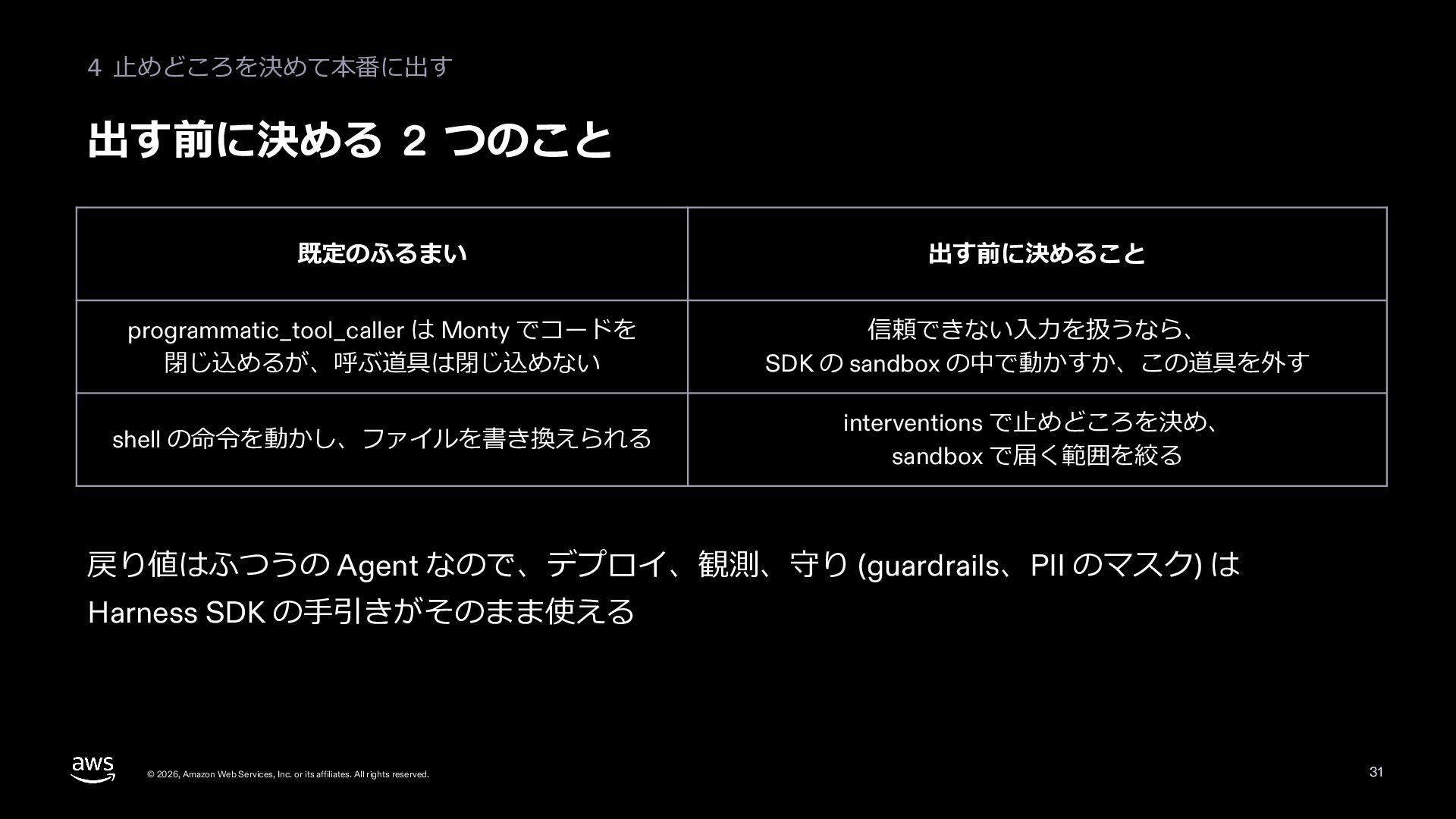
4 ⽌めどころを決めて本番に出す 出す前に決める 2 つのこと 既定のふるまい 出す前に決めること programmatic_tool_caller は Monty
でコードを 閉じ込めるが、呼ぶ道具は閉じ込めない 信頼できない⼊⼒を扱うなら、 SDK の sandbox の中で動かすか、この道具を外す shell の命令を動かし、ファイルを書き換えられる interventions で⽌めどころを決め、 sandbox で届く範囲を絞る 戻り値はふつうの Agent なので、デプロイ、観測、守り (guardrails、PII のマスク) は Harness SDK の⼿引きがそのまま使える © 2026, Amazon Web Services, Inc. or its affiliates. All rights reserved. 31 -
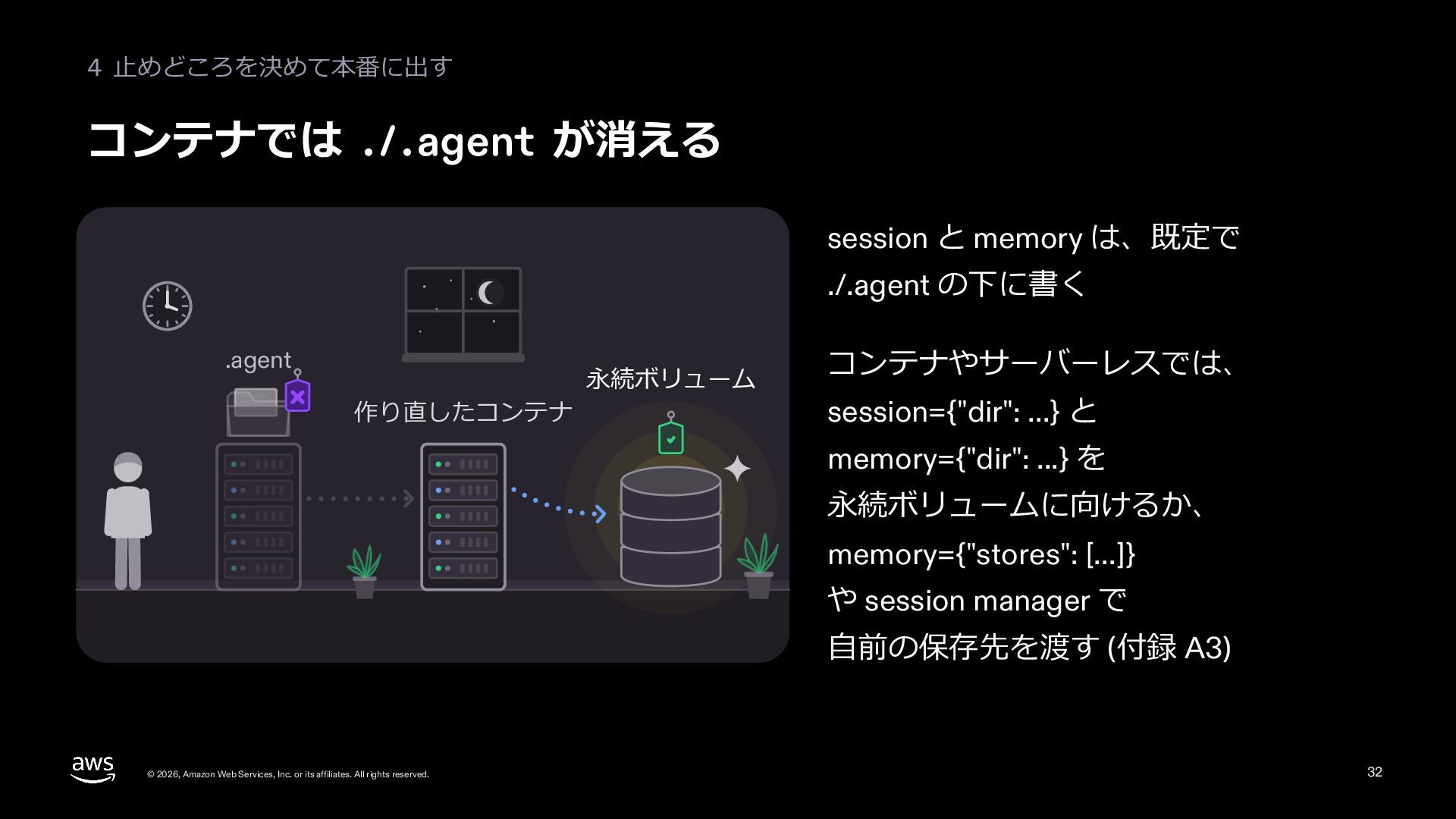
4 ⽌めどころを決めて本番に出す コンテナでは ./.agent が消える session と memory は、既定で ./.agent
の下に書く .agent 作り直したコンテナ 永続ボリューム コンテナやサーバーレスでは、 session={"dir": ...} と memory={"dir": ...} を 永続ボリュームに向けるか、 memory={"stores": [...]} や session manager で ⾃前の保存先を渡す (付録 A3) © 2026, Amazon Web Services, Inc. or its affiliates. All rights reserved. 32 -
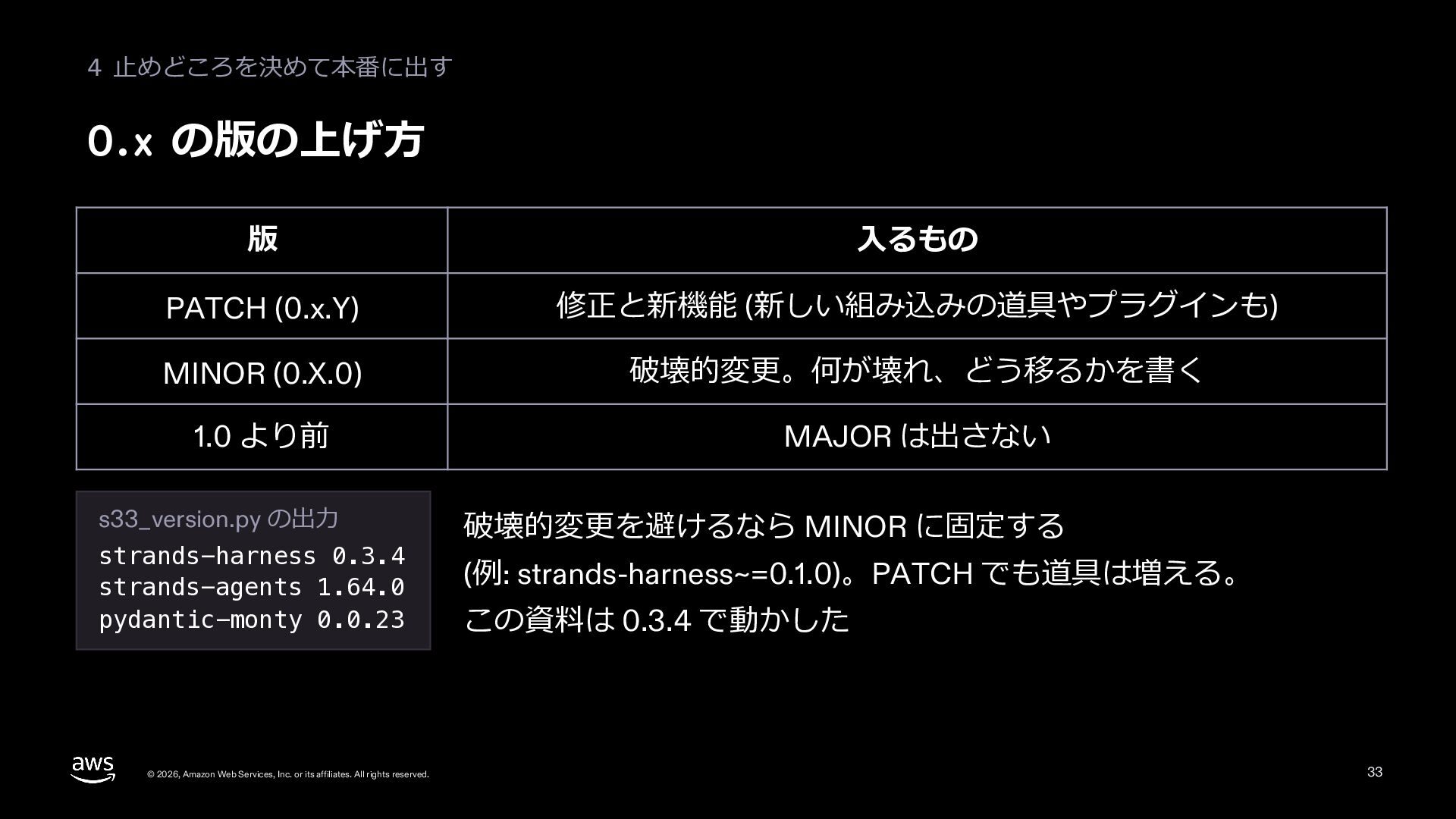
4 ⽌めどころを決めて本番に出す 0.x の版の上げ⽅ 版 ⼊るもの PATCH (0.x.Y) 修正と新機能 (新しい組み込みの道具やプラグインも)
MINOR (0.X.0) 破壊的変更。何が壊れ、どう移るかを書く 1.0 より前 MAJOR は出さない s33_version.py の出⼒ 破壊的変更を避けるなら MINOR に固定する strands-harness 0.3.4 strands-agents 1.64.0 pydantic-monty 0.0.23 © 2026, Amazon Web Services, Inc. or its affiliates. All rights reserved. (例: strands-harness~=0.1.0)。PATCH でも道具は増える。 この資料は 0.3.4 で動かした 33 -
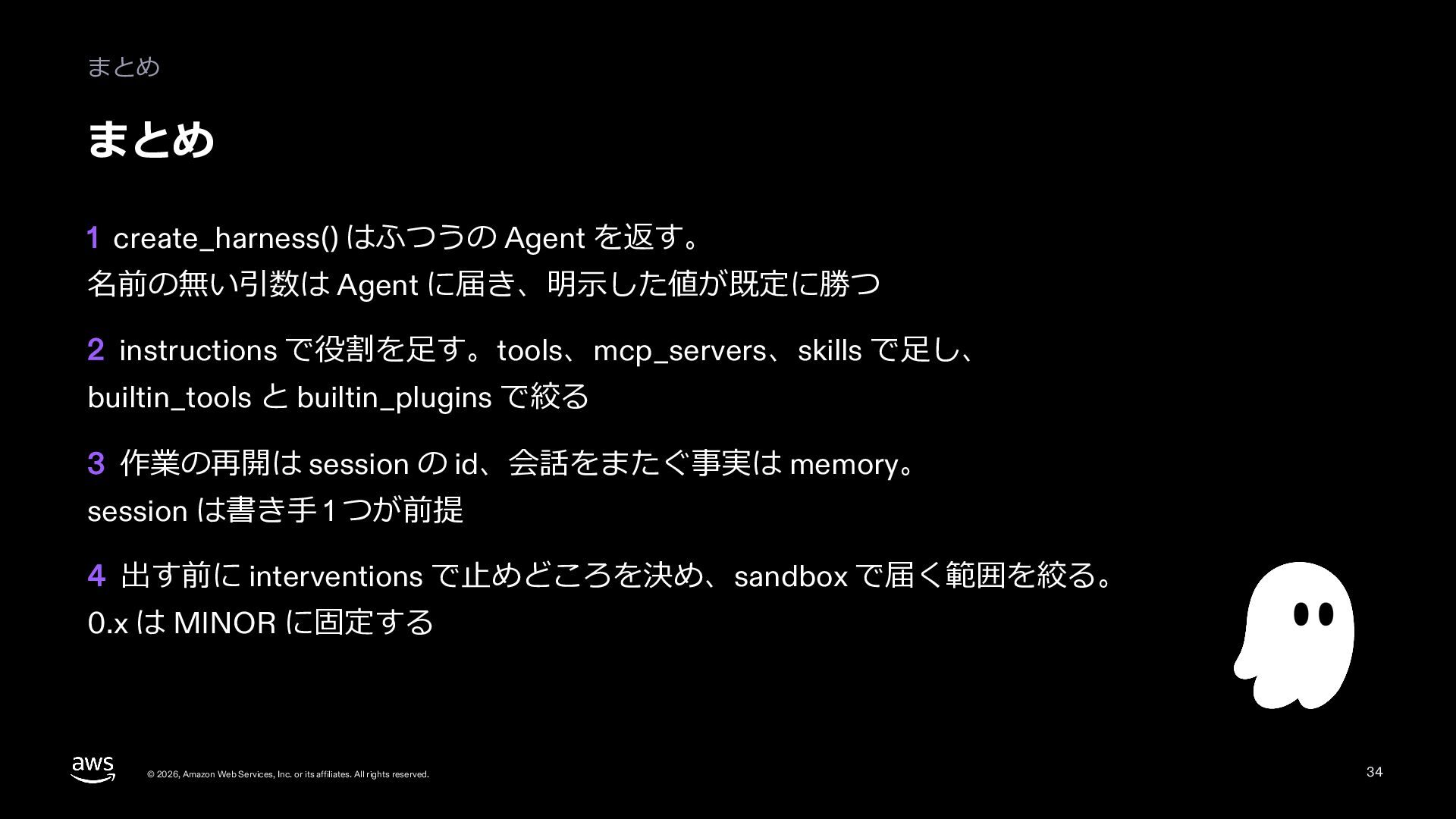
まとめ まとめ 1 create_harness() はふつうの Agent を返す。 名前の無い引数は Agent に届き、明⽰した値が既定に勝つ
2 instructions で役割を⾜す。tools、mcp_servers、skills で⾜し、 builtin_tools と builtin_plugins で絞る 3 作業の再開は session の id、会話をまたぐ事実は memory。 session は書き⼿ 1 つが前提 4 出す前に interventions で⽌めどころを決め、sandbox で届く範囲を絞る。 0.x は MINOR に固定する © 2026, Amazon Web Services, Inc. or its affiliates. All rights reserved. 34 -
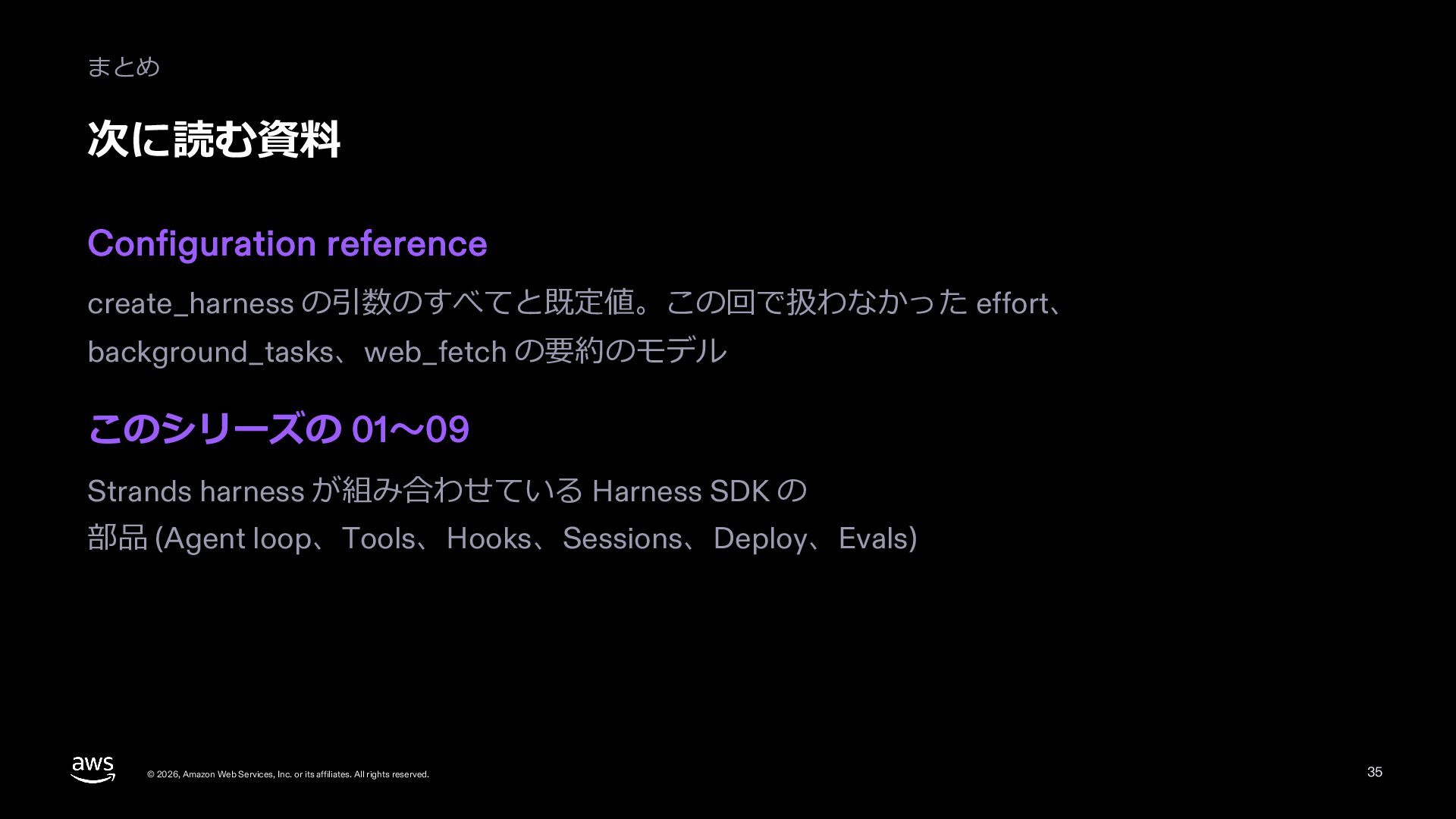
まとめ 次に読む資料 Configuration reference create_harness の引数のすべてと既定値。この回で扱わなかった effort、 background_tasks、web_fetch の要約のモデル このシリーズの
01〜09 Strands harness が組み合わせている Harness SDK の 部品 (Agent loop、Tools、Hooks、Sessions、Deploy、Evals) © 2026, Amazon Web Services, Inc. or its affiliates. All rights reserved. 35 -
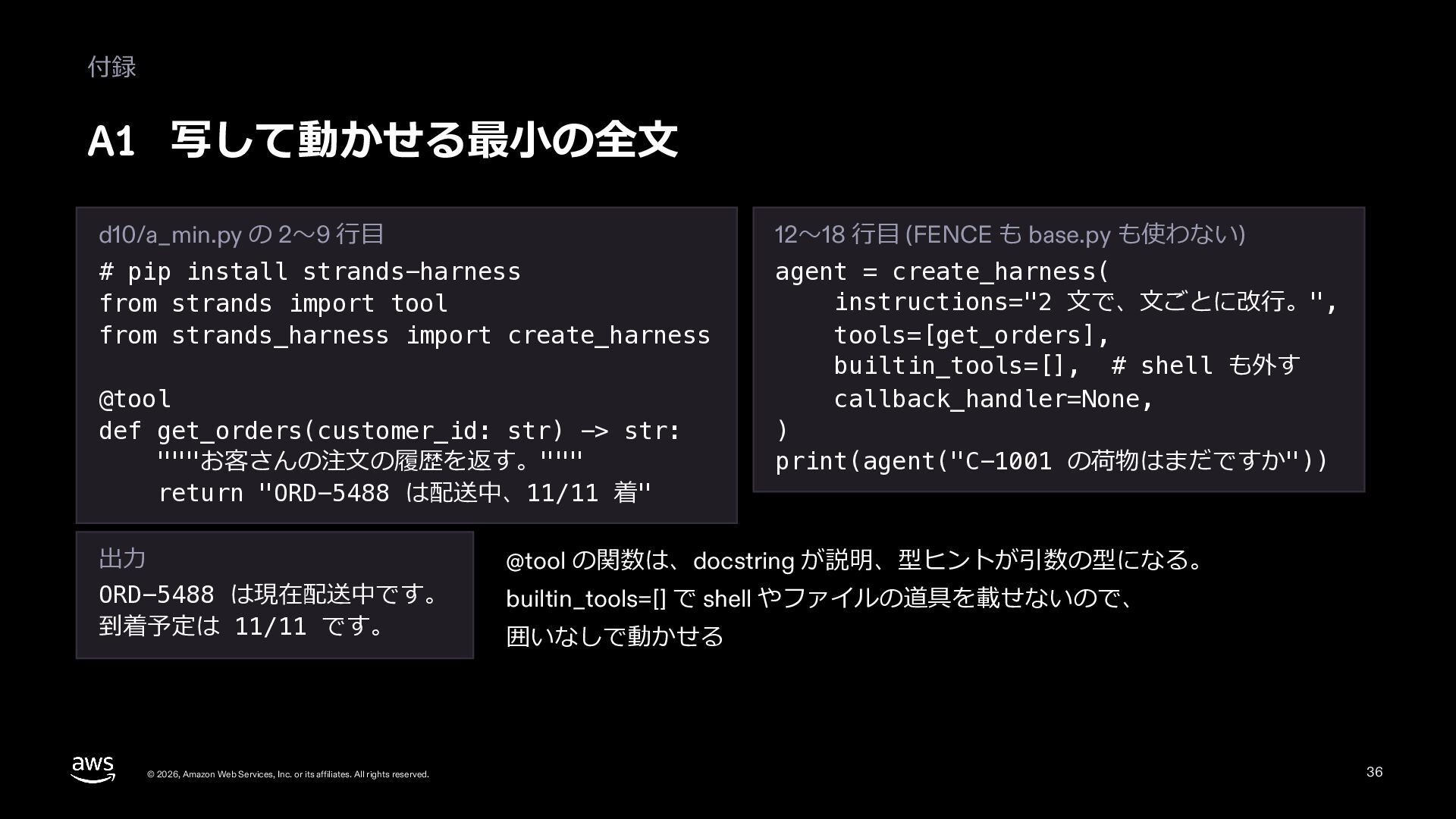
付録 A1 写して動かせる最⼩の全⽂ d10/a_min.py の 2〜9 ⾏⽬ 12〜18 ⾏⽬ (FENCE
も base.py も使わない) # pip install strands-harness from strands import tool from strands_harness import create_harness agent = create_harness( instructions="2 ⽂で、⽂ごとに改⾏。", tools=[get_orders], builtin_tools=[], # shell も外す callback_handler=None, ) print(agent("C-1001 の荷物はまだですか")) @tool def get_orders(customer_id: str) -> str: """お客さんの注⽂の履歴を返す。""" return "ORD-5488 は配送中、11/11 着" 出⼒ ORD-5488 は現在配送中です。 到着予定は 11/11 です。 © 2026, Amazon Web Services, Inc. or its affiliates. All rights reserved. @tool の関数は、docstring が説明、型ヒントが引数の型になる。 builtin_tools=[] で shell やファイルの道具を載せないので、 囲いなしで動かせる 36 -
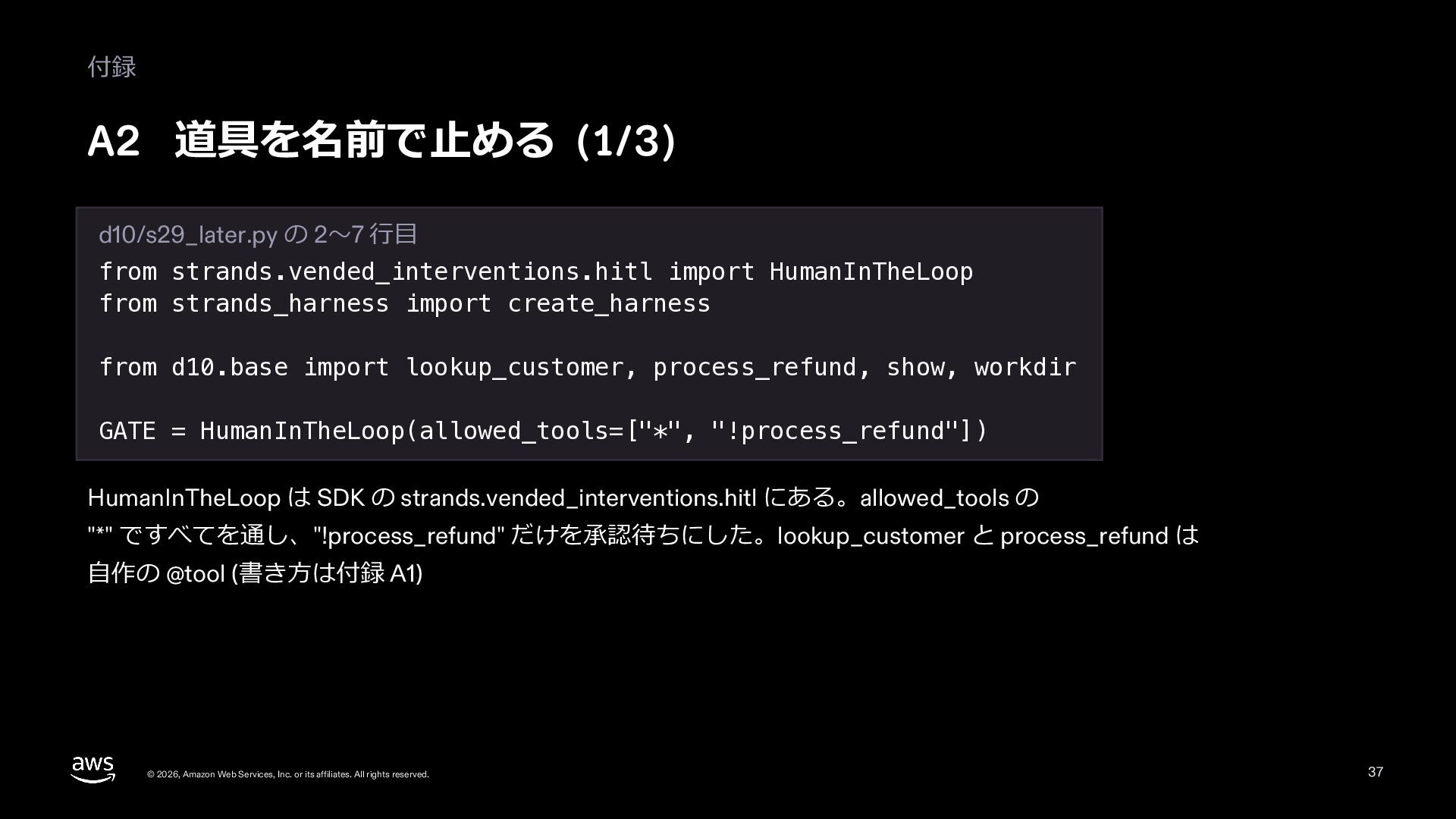
付録 A2 道具を名前で⽌める (1/3) d10/s29_later.py の 2〜7 ⾏⽬ from strands.vended_interventions.hitl
import HumanInTheLoop from strands_harness import create_harness from d10.base import lookup_customer, process_refund, show, workdir GATE = HumanInTheLoop(allowed_tools=["*", "!process_refund"]) HumanInTheLoop は SDK の strands.vended_interventions.hitl にある。allowed_tools の "*" ですべてを通し、"!process_refund" だけを承認待ちにした。lookup_customer と process_refund は ⾃作の @tool (書き⽅は付録 A1) © 2026, Amazon Web Services, Inc. or its affiliates. All rights reserved. 37 -
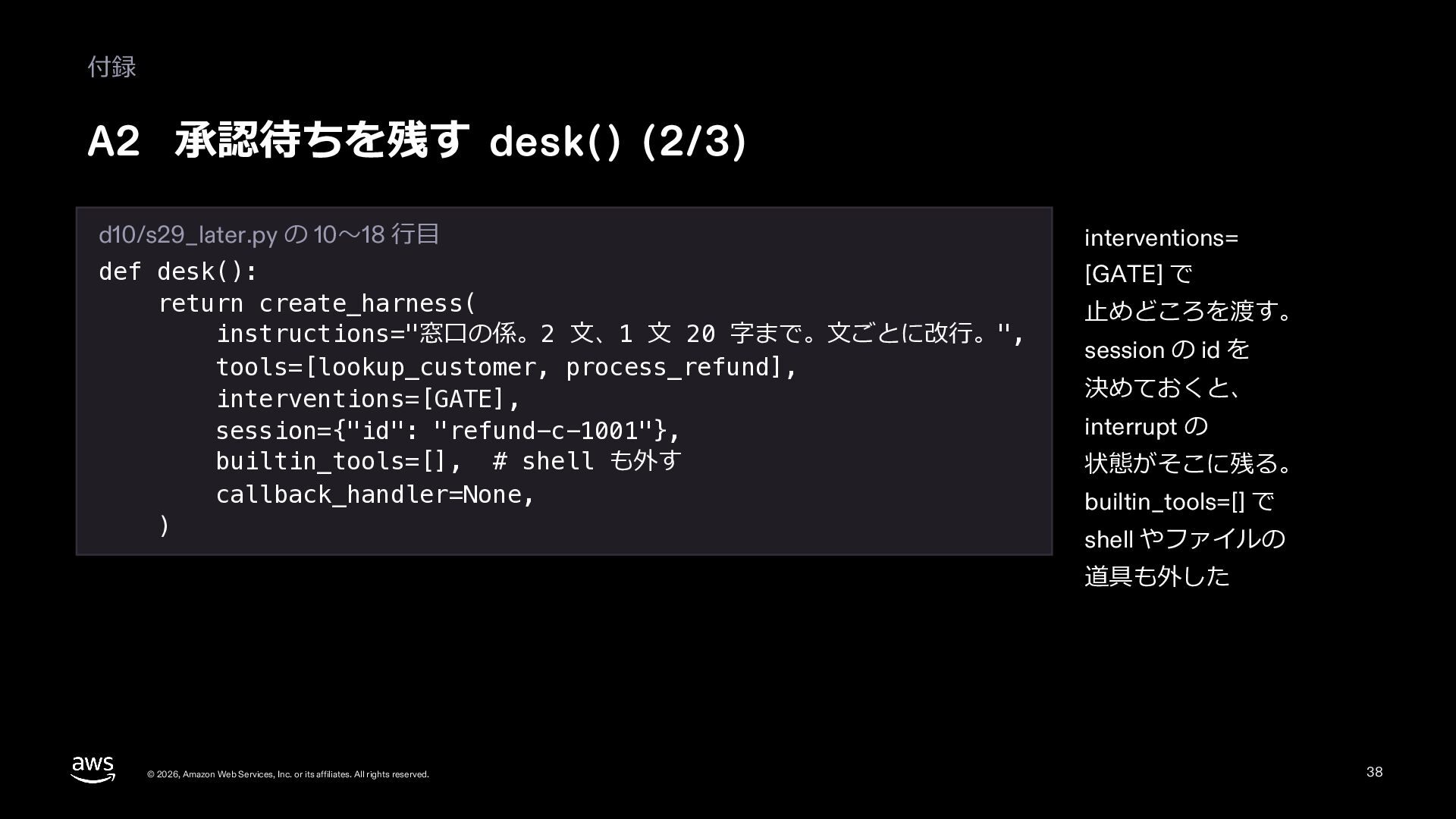
付録 A2 承認待ちを残す desk() (2/3) d10/s29_later.py の 10〜18 ⾏⽬ interventions=
def desk(): return create_harness( instructions="窓⼝の係。2 ⽂、1 ⽂ 20 字まで。⽂ごとに改⾏。", tools=[lookup_customer, process_refund], interventions=[GATE], session={"id": "refund-c-1001"}, builtin_tools=[], # shell も外す callback_handler=None, ) [GATE] で ⽌めどころを渡す。 session の id を 決めておくと、 interrupt の 状態がそこに残る。 builtin_tools=[] で shell やファイルの 道具も外した © 2026, Amazon Web Services, Inc. or its affiliates. All rights reserved. 38 -
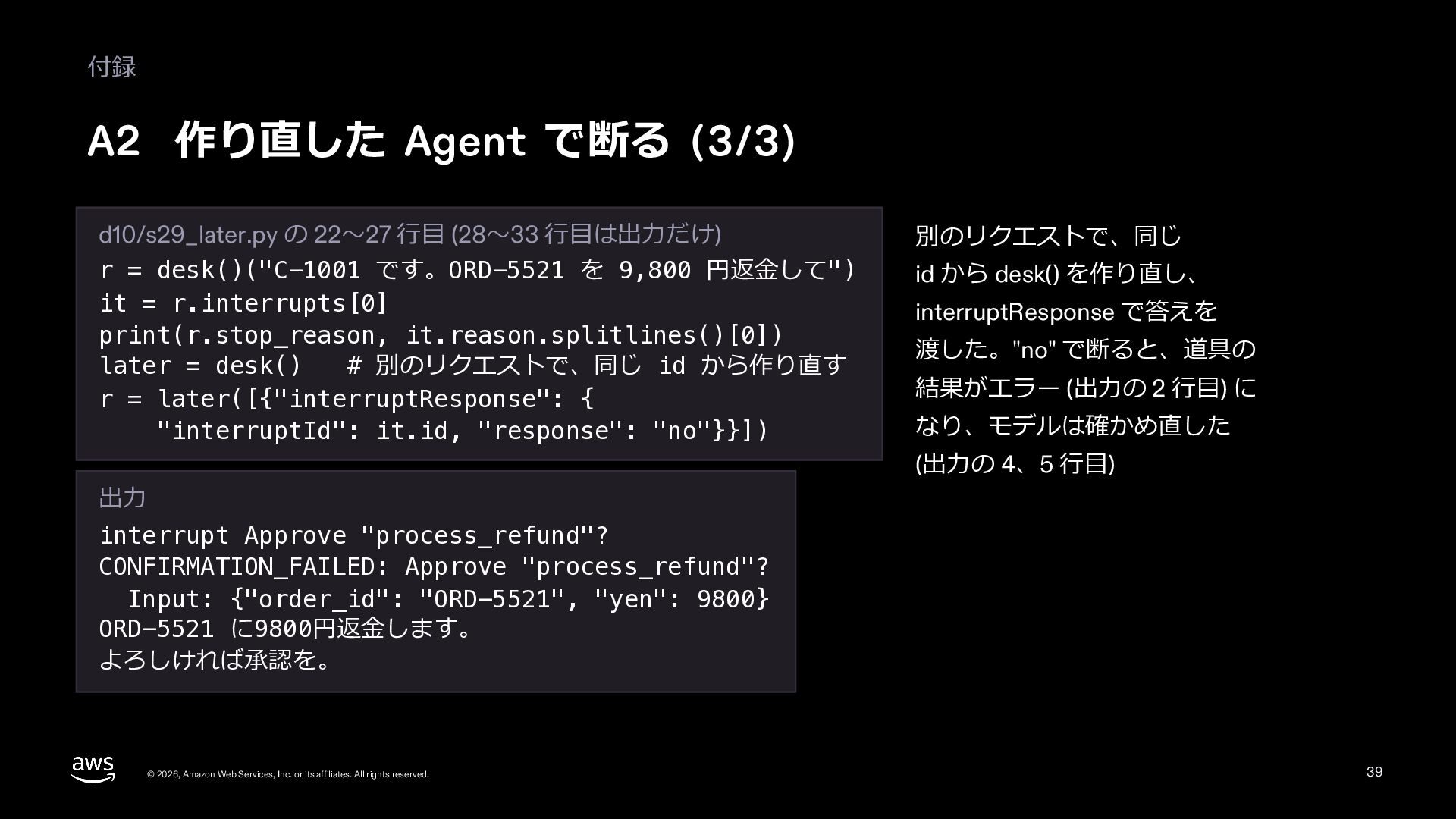
付録 A2 作り直した Agent で断る (3/3) d10/s29_later.py の 22〜27 ⾏⽬
(28〜33 ⾏⽬は出⼒だけ) r = desk()("C-1001 です。ORD-5521 を 9,800 円返⾦して") it = r.interrupts[0] print(r.stop_reason, it.reason.splitlines()[0]) later = desk() # 別のリクエストで、同じ id から作り直す r = later([{"interruptResponse": { "interruptId": it.id, "response": "no"}}]) 別のリクエストで、同じ id から desk() を作り直し、 interruptResponse で答えを 渡した。"no" で断ると、道具の 結果がエラー (出⼒の 2 ⾏⽬) に なり、モデルは確かめ直した (出⼒の 4、5 ⾏⽬) 出⼒ interrupt Approve "process_refund"? CONFIRMATION_FAILED: Approve "process_refund"? Input: {"order_id": "ORD-5521", "yen": 9800} ORD-5521 に9800円返⾦します。 よろしければ承認を。 © 2026, Amazon Web Services, Inc. or its affiliates. All rights reserved. 39 -
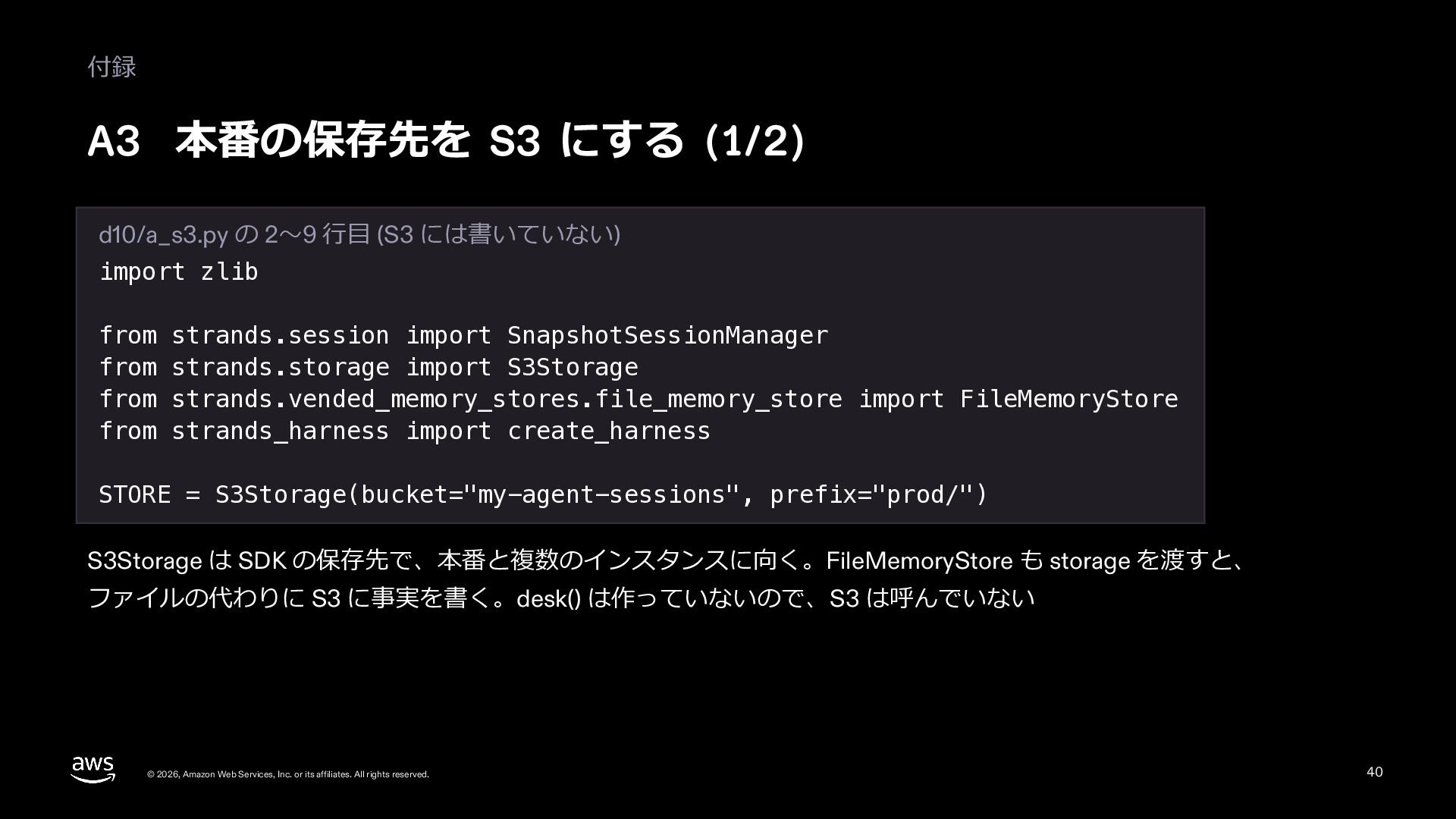
付録 A3 本番の保存先を S3 にする (1/2) d10/a_s3.py の 2〜9 ⾏⽬
(S3 には書いていない) import zlib from strands.session import SnapshotSessionManager from strands.storage import S3Storage from strands.vended_memory_stores.file_memory_store import FileMemoryStore from strands_harness import create_harness STORE = S3Storage(bucket="my-agent-sessions", prefix="prod/") S3Storage は SDK の保存先で、本番と複数のインスタンスに向く。FileMemoryStore も storage を渡すと、 ファイルの代わりに S3 に事実を書く。desk() は作っていないので、S3 は呼んでいない © 2026, Amazon Web Services, Inc. or its affiliates. All rights reserved. 40 -
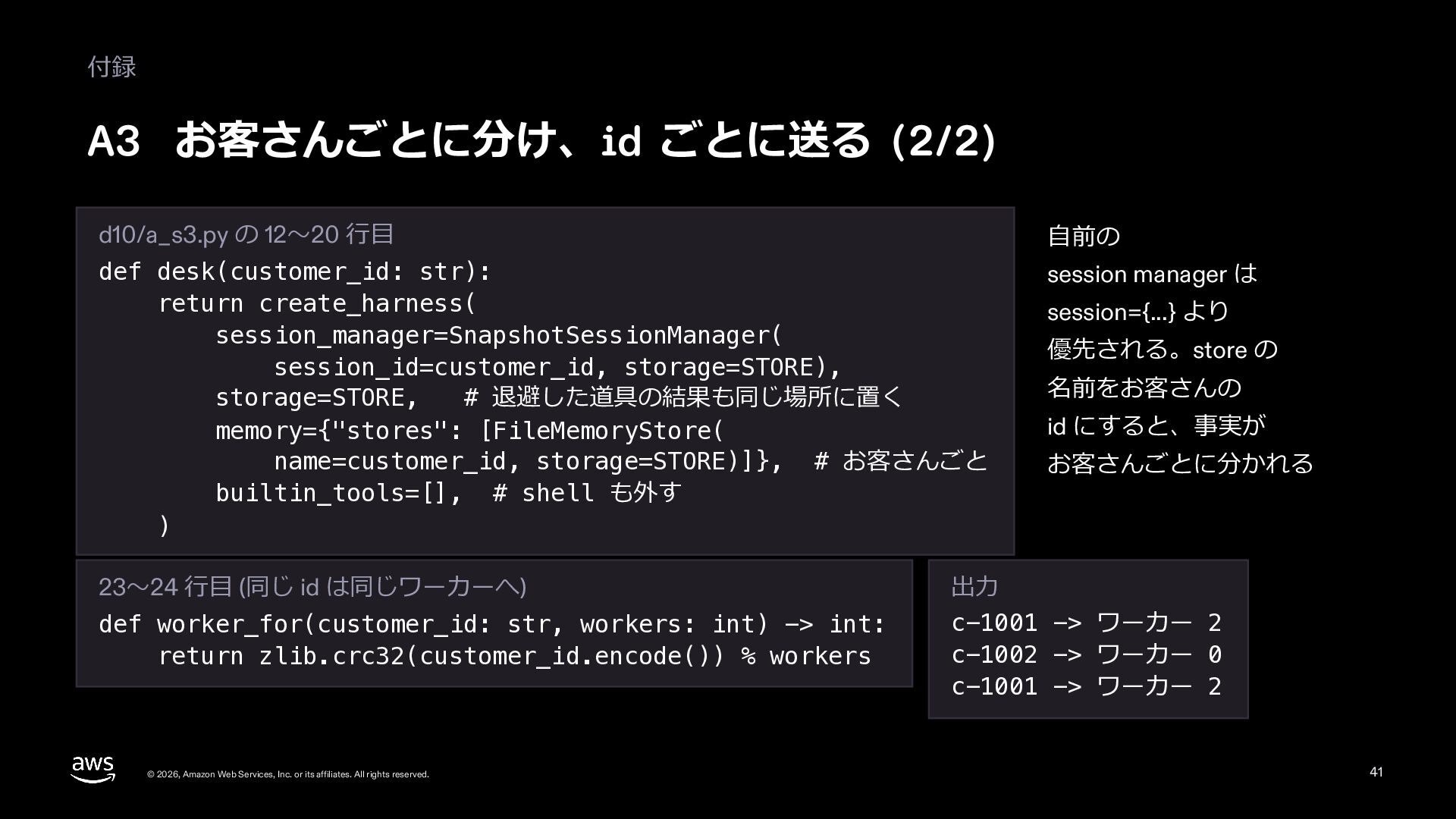
付録 A3 お客さんごとに分け、id ごとに送る (2/2) d10/a_s3.py の 12〜20 ⾏⽬ ⾃前の
def desk(customer_id: str): return create_harness( session_manager=SnapshotSessionManager( session_id=customer_id, storage=STORE), storage=STORE, # 退避した道具の結果も同じ場所に置く memory={"stores": [FileMemoryStore( name=customer_id, storage=STORE)]}, # お客さんごと builtin_tools=[], # shell も外す ) session manager は 23〜24 ⾏⽬ (同じ id は同じワーカーへ) def worker_for(customer_id: str, workers: int) -> int: return zlib.crc32(customer_id.encode()) % workers © 2026, Amazon Web Services, Inc. or its affiliates. All rights reserved. session={...} より 優先される。store の 名前をお客さんの id にすると、事実が お客さんごとに分かれる 出⼒ c-1001 -> ワーカー 2 c-1002 -> ワーカー 0 c-1001 -> ワーカー 2 41 -
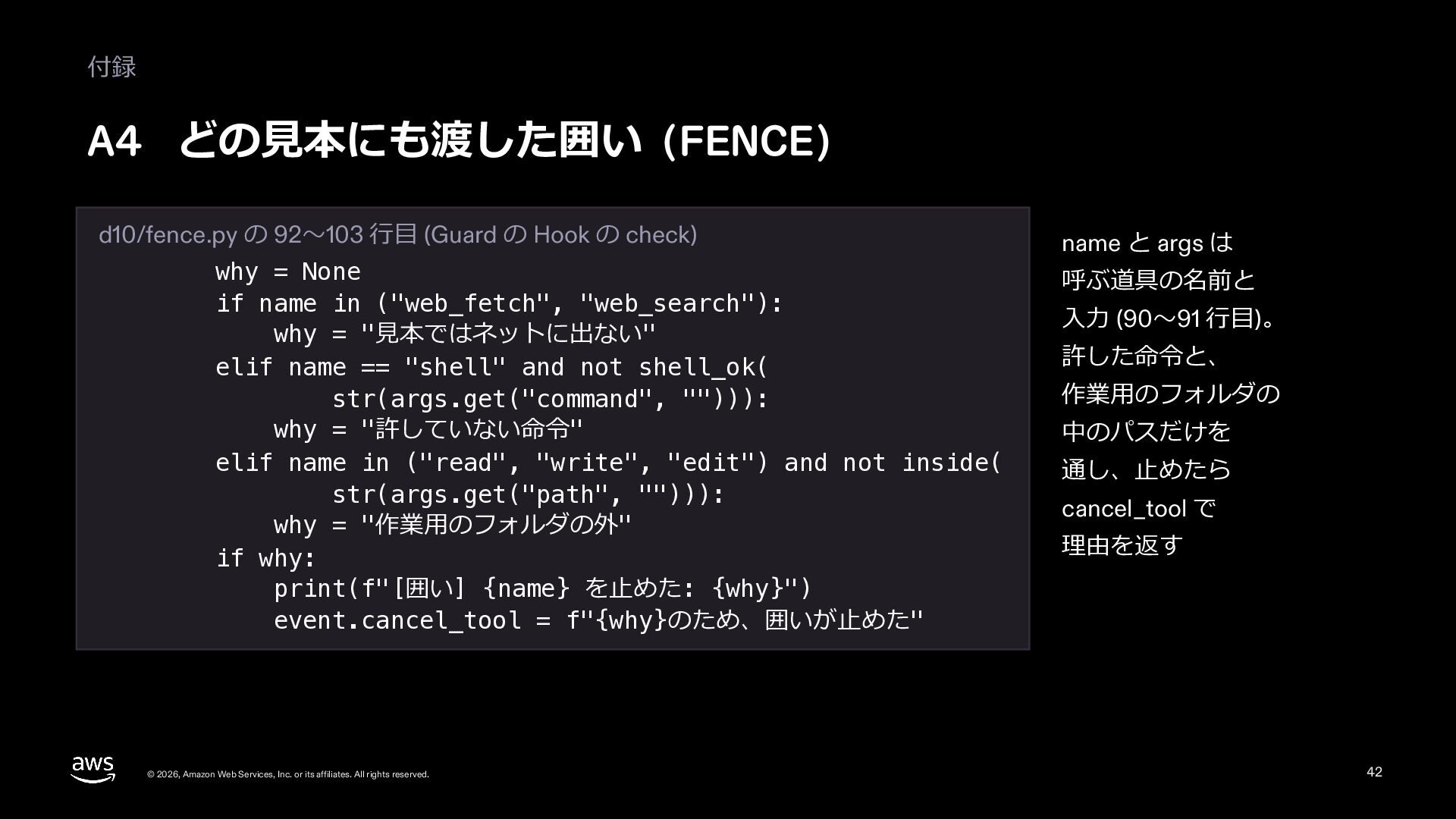
付録 A4 どの⾒本にも渡した囲い (FENCE) d10/fence.py の 92〜103 ⾏⽬ (Guard の
Hook の check) why = None if name in ("web_fetch", "web_search"): why = "⾒本ではネットに出ない" elif name == "shell" and not shell_ok( str(args.get("command", ""))): why = "許していない命令" elif name in ("read", "write", "edit") and not inside( str(args.get("path", ""))): why = "作業⽤のフォルダの外" if why: print(f"[囲い] {name} を⽌めた: {why}") event.cancel_tool = f"{why}のため、囲いが⽌めた" © 2026, Amazon Web Services, Inc. or its affiliates. All rights reserved. name と args は 呼ぶ道具の名前と ⼊⼒ (90〜91 ⾏⽬)。 許した命令と、 作業⽤のフォルダの 中のパスだけを 通し、⽌めたら cancel_tool で 理由を返す 42 -
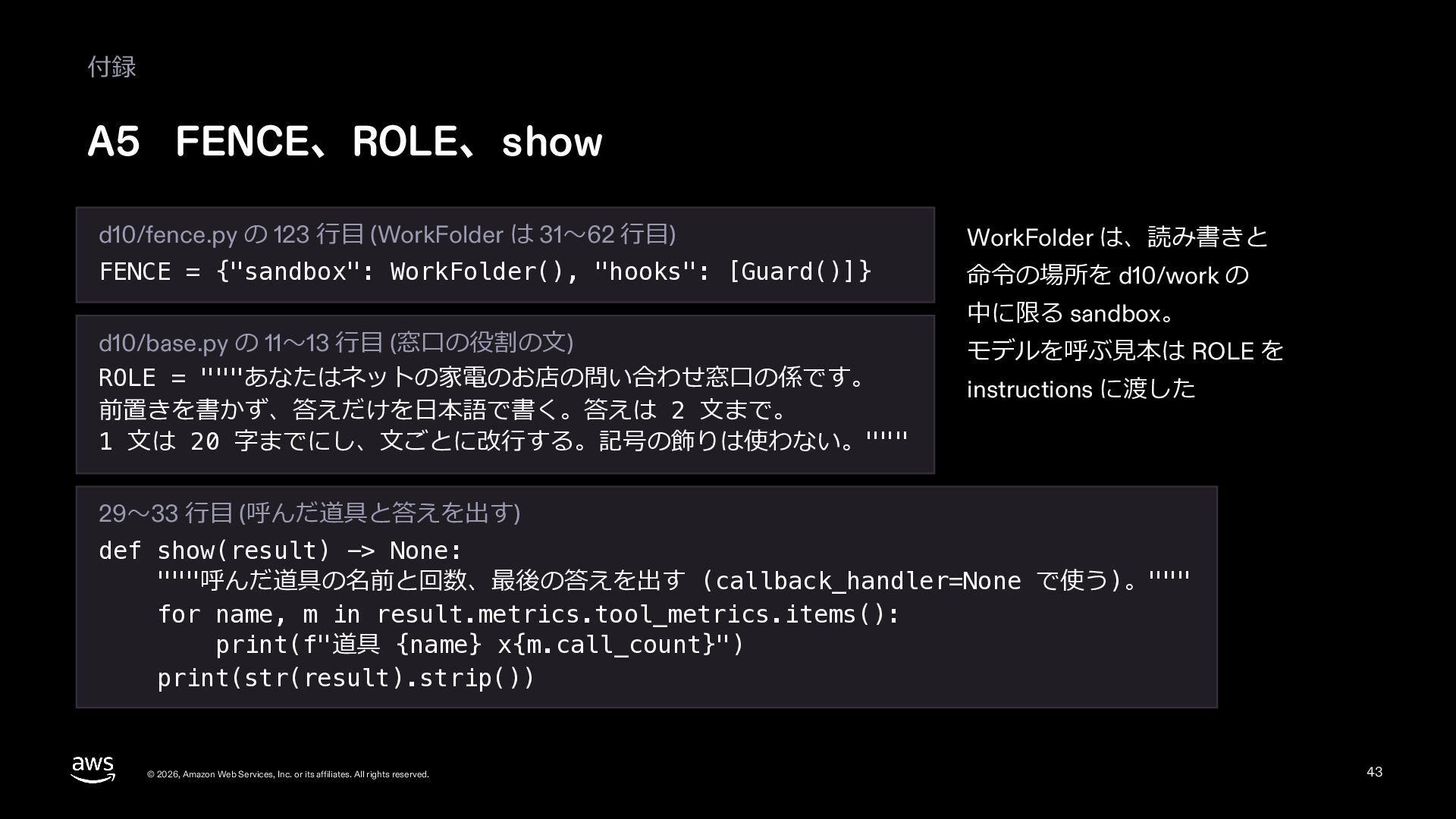
付録 A5 FENCE、ROLE、show d10/fence.py の 123 ⾏⽬ (WorkFolder は 31〜62
⾏⽬) WorkFolder は、読み書きと FENCE = {"sandbox": WorkFolder(), "hooks": [Guard()]} 命令の場所を d10/work の d10/base.py の 11〜13 ⾏⽬ (窓⼝の役割の⽂) ROLE = """あなたはネットの家電のお店の問い合わせ窓⼝の係です。 前置きを書かず、答えだけを⽇本語で書く。答えは 2 ⽂まで。 1 ⽂は 20 字までにし、⽂ごとに改⾏する。記号の飾りは使わない。""" 中に限る sandbox。 モデルを呼ぶ⾒本は ROLE を instructions に渡した 29〜33 ⾏⽬ (呼んだ道具と答えを出す) def show(result) -> None: """呼んだ道具の名前と回数、最後の答えを出す (callback_handler=None で使う)。""" for name, m in result.metrics.tool_metrics.items(): print(f"道具 {name} x{m.call_count}") print(str(result).strip()) © 2026, Amazon Web Services, Inc. or its affiliates. All rights reserved. 43 -
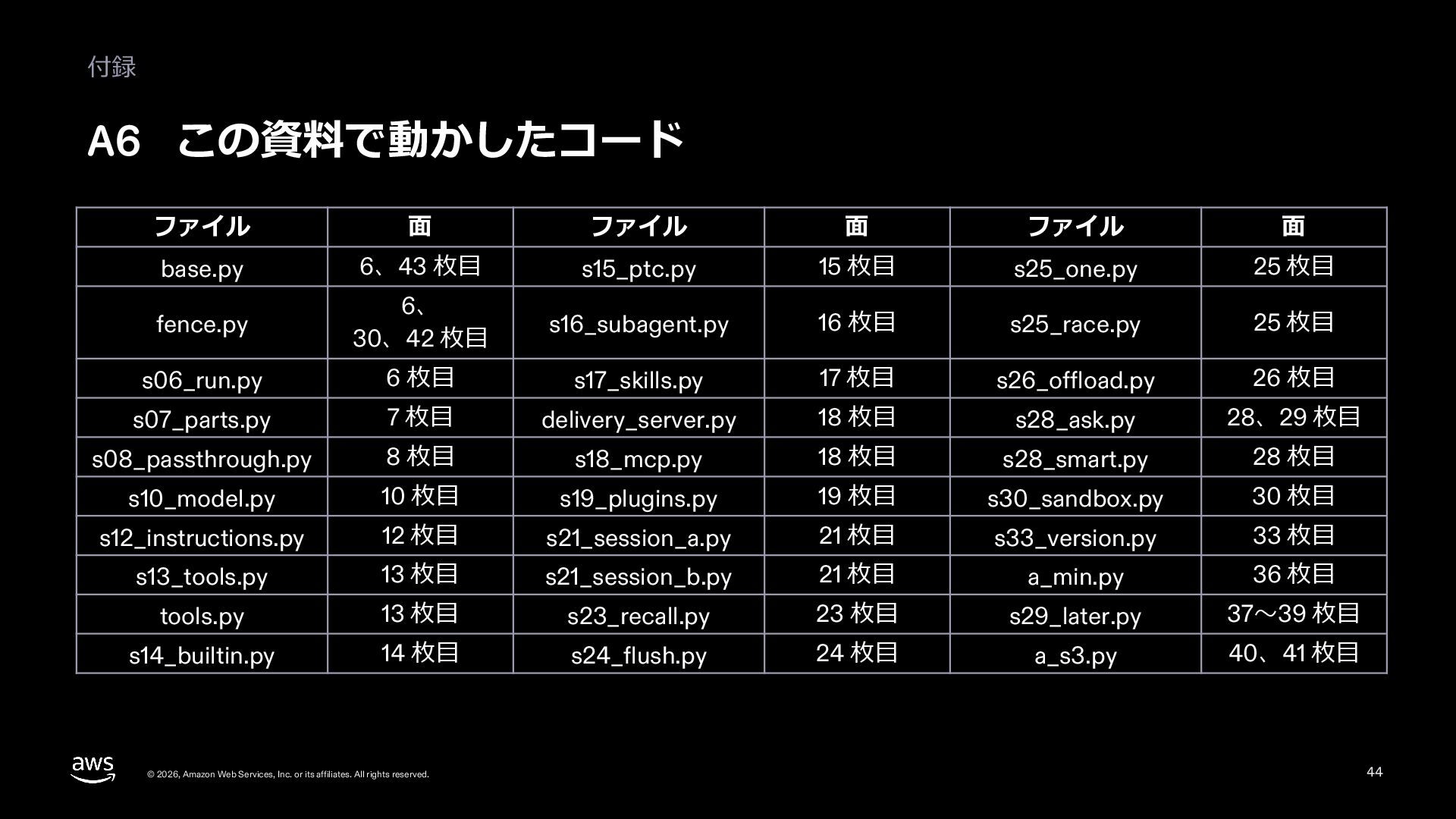
付録 A6 この資料で動かしたコード ファイル ⾯ ファイル ⾯ ファイル ⾯ base.py
6、43 枚⽬ s15_ptc.py 15 枚⽬ s25_one.py 25 枚⽬ fence.py 6、 30、42 枚⽬ s16_subagent.py 16 枚⽬ s25_race.py 25 枚⽬ s06_run.py 6 枚⽬ s17_skills.py 17 枚⽬ s26_offload.py 26 枚⽬ s07_parts.py 7 枚⽬ delivery_server.py 18 枚⽬ s28_ask.py 28、29 枚⽬ s08_passthrough.py 8 枚⽬ s18_mcp.py 18 枚⽬ s28_smart.py 28 枚⽬ s10_model.py 10 枚⽬ s19_plugins.py 19 枚⽬ s30_sandbox.py 30 枚⽬ s12_instructions.py 12 枚⽬ s21_session_a.py 21 枚⽬ s33_version.py 33 枚⽬ s13_tools.py 13 枚⽬ s21_session_b.py 21 枚⽬ a_min.py 36 枚⽬ tools.py 13 枚⽬ s23_recall.py 23 枚⽬ s29_later.py 37〜39 枚⽬ s14_builtin.py 14 枚⽬ s24_flush.py 24 枚⽬ a_s3.py 40、41 枚⽬ © 2026, Amazon Web Services, Inc. or its affiliates. All rights reserved. 44 -
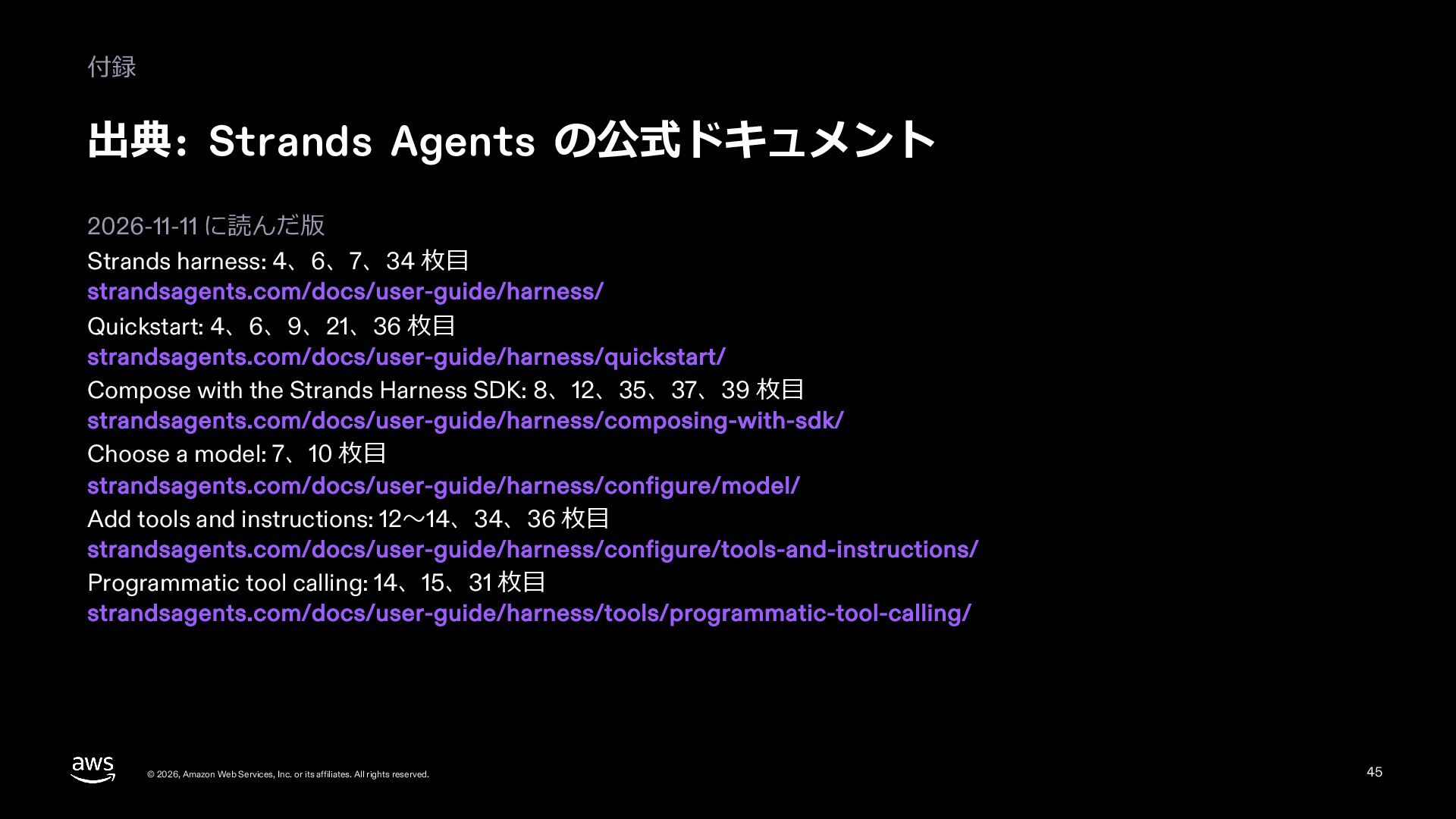
付録 出典: Strands Agents の公式ドキュメント 2026-11-11 に読んだ版 Strands harness: 4、6、7、34
枚⽬ strandsagents.com/docs/user-guide/harness/ Quickstart: 4、6、9、21、36 枚⽬ strandsagents.com/docs/user-guide/harness/quickstart/ Compose with the Strands Harness SDK: 8、12、35、37、39 枚⽬ strandsagents.com/docs/user-guide/harness/composing-with-sdk/ Choose a model: 7、10 枚⽬ strandsagents.com/docs/user-guide/harness/configure/model/ Add tools and instructions: 12〜14、34、36 枚⽬ strandsagents.com/docs/user-guide/harness/configure/tools-and-instructions/ Programmatic tool calling: 14、15、31 枚⽬ strandsagents.com/docs/user-guide/harness/tools/programmatic-tool-calling/ © 2026, Amazon Web Services, Inc. or its affiliates. All rights reserved. 45 -
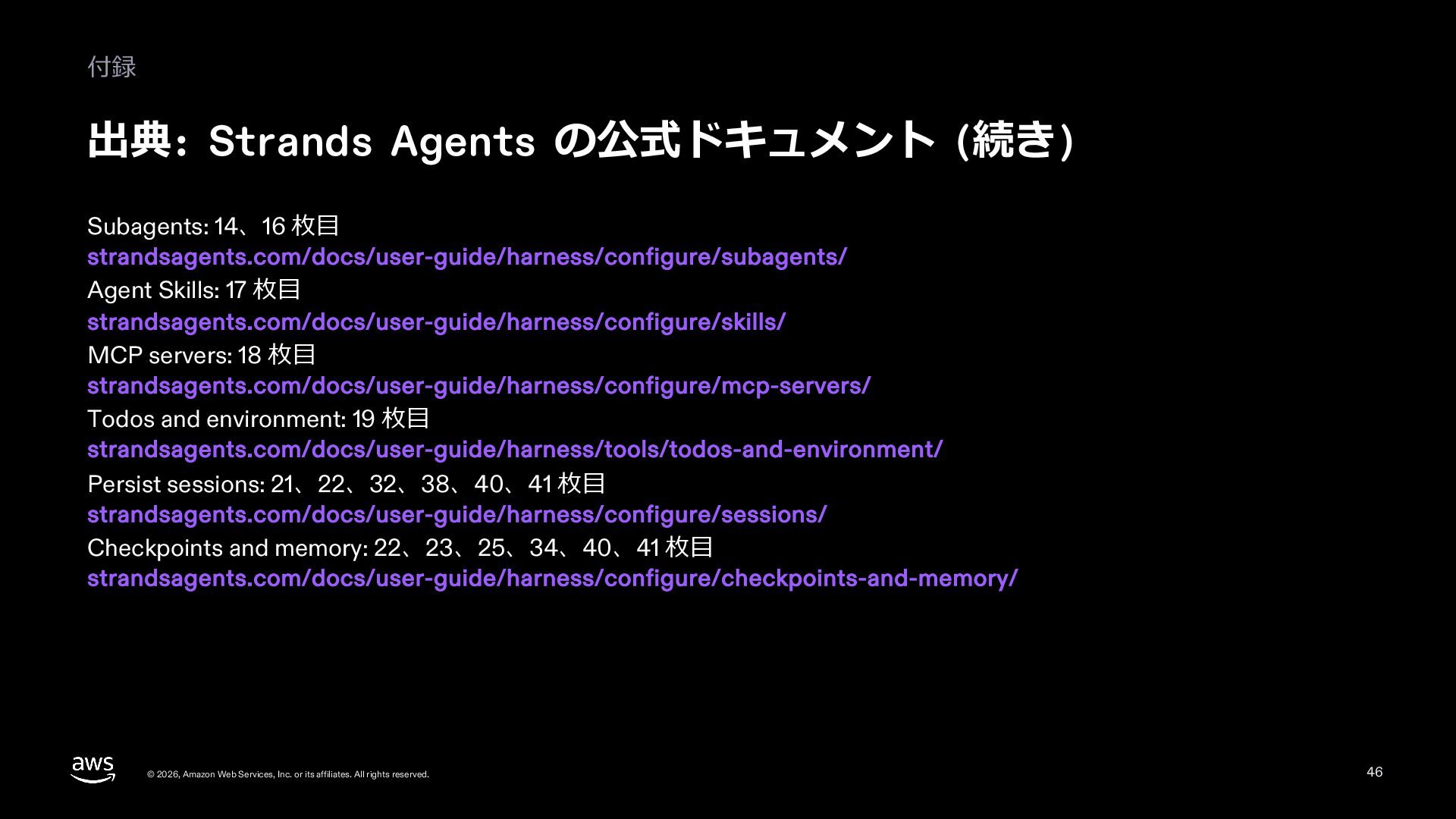
付録 出典: Strands Agents の公式ドキュメント (続き) Subagents: 14、16 枚⽬ strandsagents.com/docs/user-guide/harness/configure/subagents/
Agent Skills: 17 枚⽬ strandsagents.com/docs/user-guide/harness/configure/skills/ MCP servers: 18 枚⽬ strandsagents.com/docs/user-guide/harness/configure/mcp-servers/ Todos and environment: 19 枚⽬ strandsagents.com/docs/user-guide/harness/tools/todos-and-environment/ Persist sessions: 21、22、32、38、40、41 枚⽬ strandsagents.com/docs/user-guide/harness/configure/sessions/ Checkpoints and memory: 22、23、25、34、40、41 枚⽬ strandsagents.com/docs/user-guide/harness/configure/checkpoints-and-memory/ © 2026, Amazon Web Services, Inc. or its affiliates. All rights reserved. 46 -
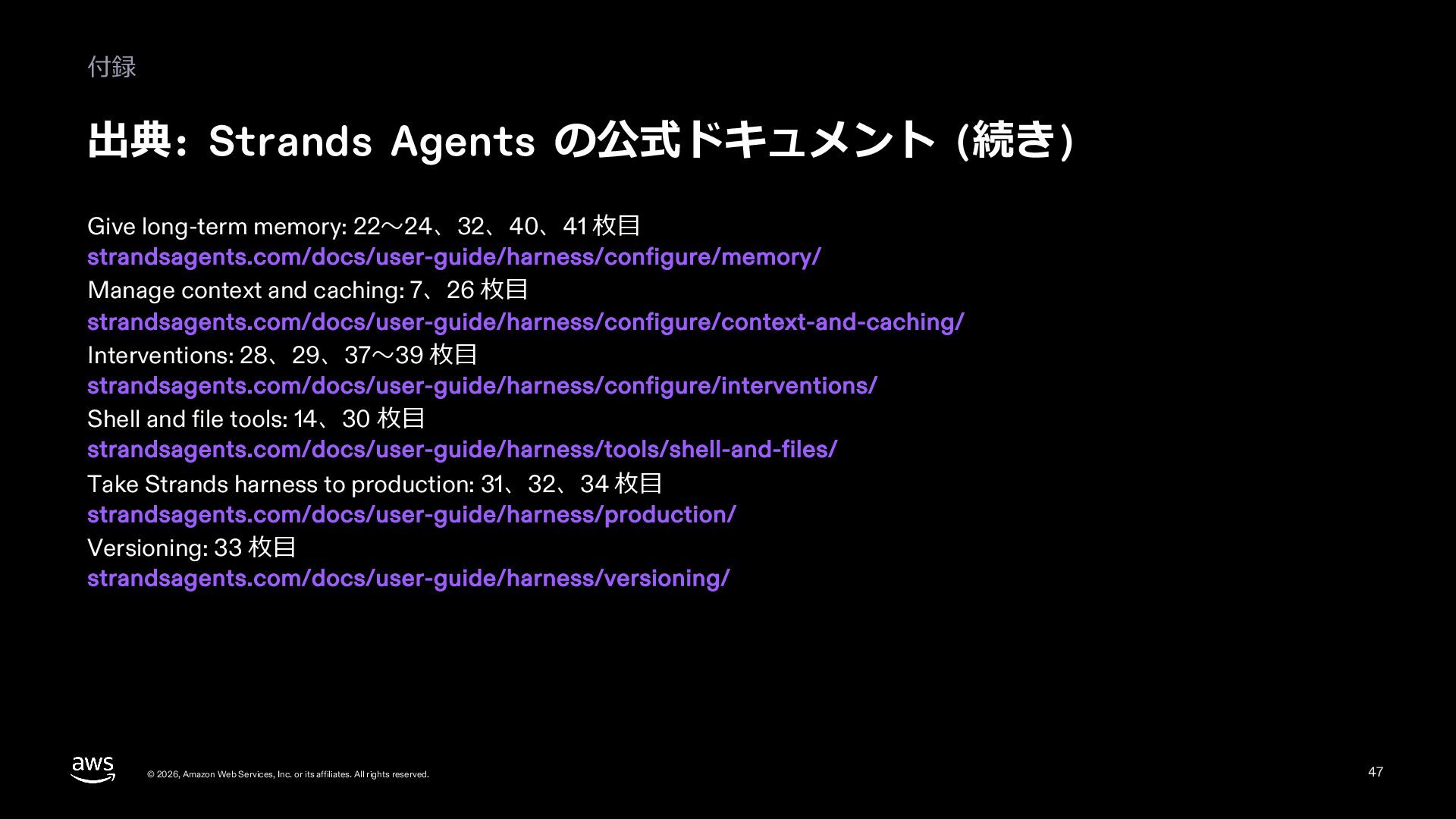
付録 出典: Strands Agents の公式ドキュメント (続き) Give long-term memory: 22〜24、32、40、41
枚⽬ strandsagents.com/docs/user-guide/harness/configure/memory/ Manage context and caching: 7、26 枚⽬ strandsagents.com/docs/user-guide/harness/configure/context-and-caching/ Interventions: 28、29、37〜39 枚⽬ strandsagents.com/docs/user-guide/harness/configure/interventions/ Shell and file tools: 14、30 枚⽬ strandsagents.com/docs/user-guide/harness/tools/shell-and-files/ Take Strands harness to production: 31、32、34 枚⽬ strandsagents.com/docs/user-guide/harness/production/ Versioning: 33 枚⽬ strandsagents.com/docs/user-guide/harness/versioning/ © 2026, Amazon Web Services, Inc. or its affiliates. All rights reserved. 47 -
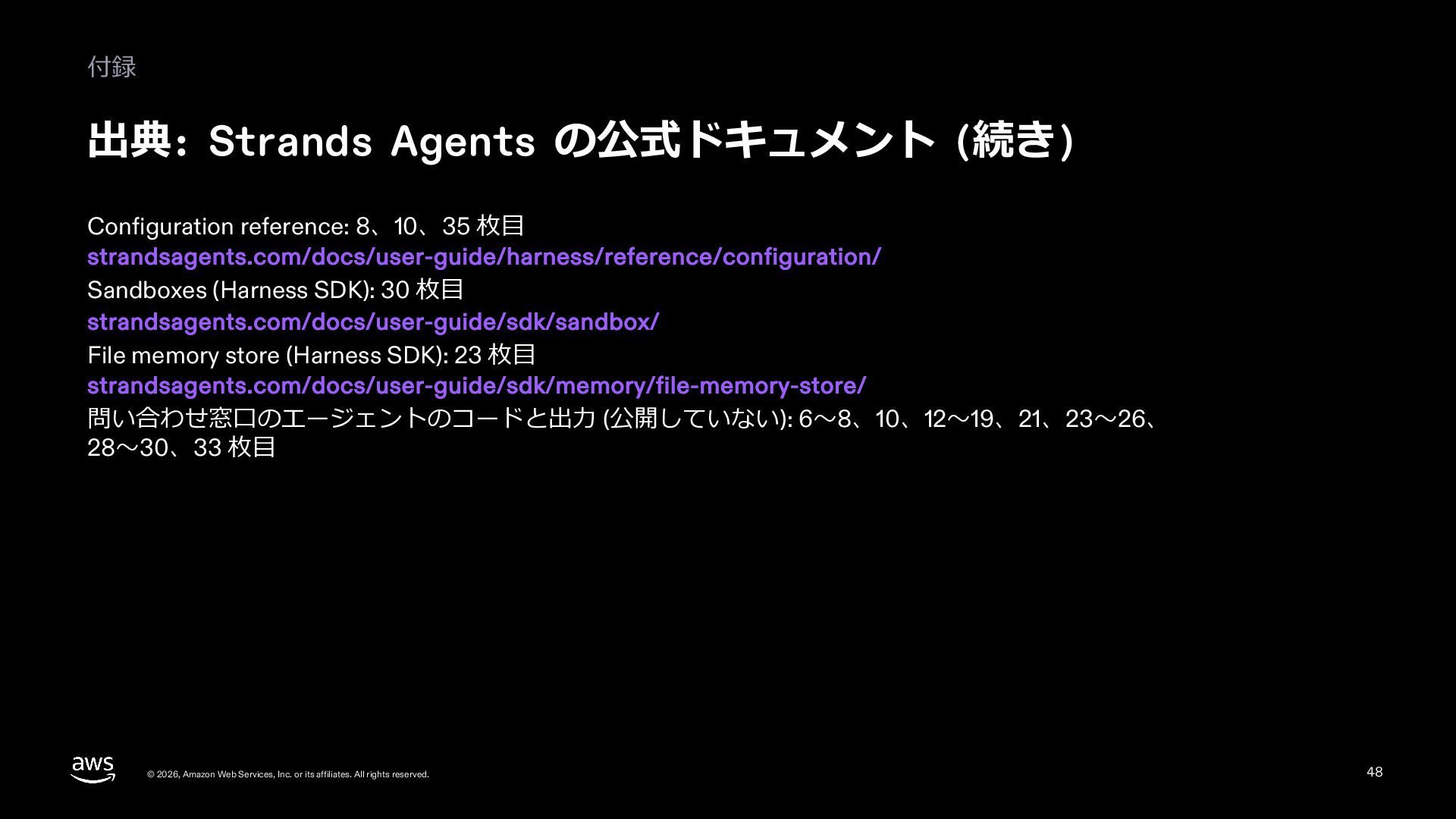
付録 出典: Strands Agents の公式ドキュメント (続き) Configuration reference: 8、10、35 枚⽬
strandsagents.com/docs/user-guide/harness/reference/configuration/ Sandboxes (Harness SDK): 30 枚⽬ strandsagents.com/docs/user-guide/sdk/sandbox/ File memory store (Harness SDK): 23 枚⽬ strandsagents.com/docs/user-guide/sdk/memory/file-memory-store/ 問い合わせ窓⼝のエージェントのコードと出⼒ (公開していない): 6〜8、10、12〜19、21、23〜26、 28〜30、33 枚⽬ © 2026, Amazon Web Services, Inc. or its affiliates. All rights reserved. 48
 inariku
 akihiro0038
 ota1022
 bengo4com
 yoshimura_datam
 rfdnxbro
 tomoki10
 yamakenji24
 ginjihayashi
 a_suenami
 kubell_hr
 csswizardry
 mkilby
 skipperchong
 bermonpainter
 codingconduct
 jacobtomlinson
 dougneiner
 katarinadahlin
 jonoalderson
 khoart
 axbom
 sachag
 addyosmani