Upgrade to Pro — share decks privately, control downloads, hide ads and more …

ClickHouse Internals Foundations: Level 1 Works...

ClickHouse Internals Foundations: Level 1 Workshop (CH-101 to CH-105)

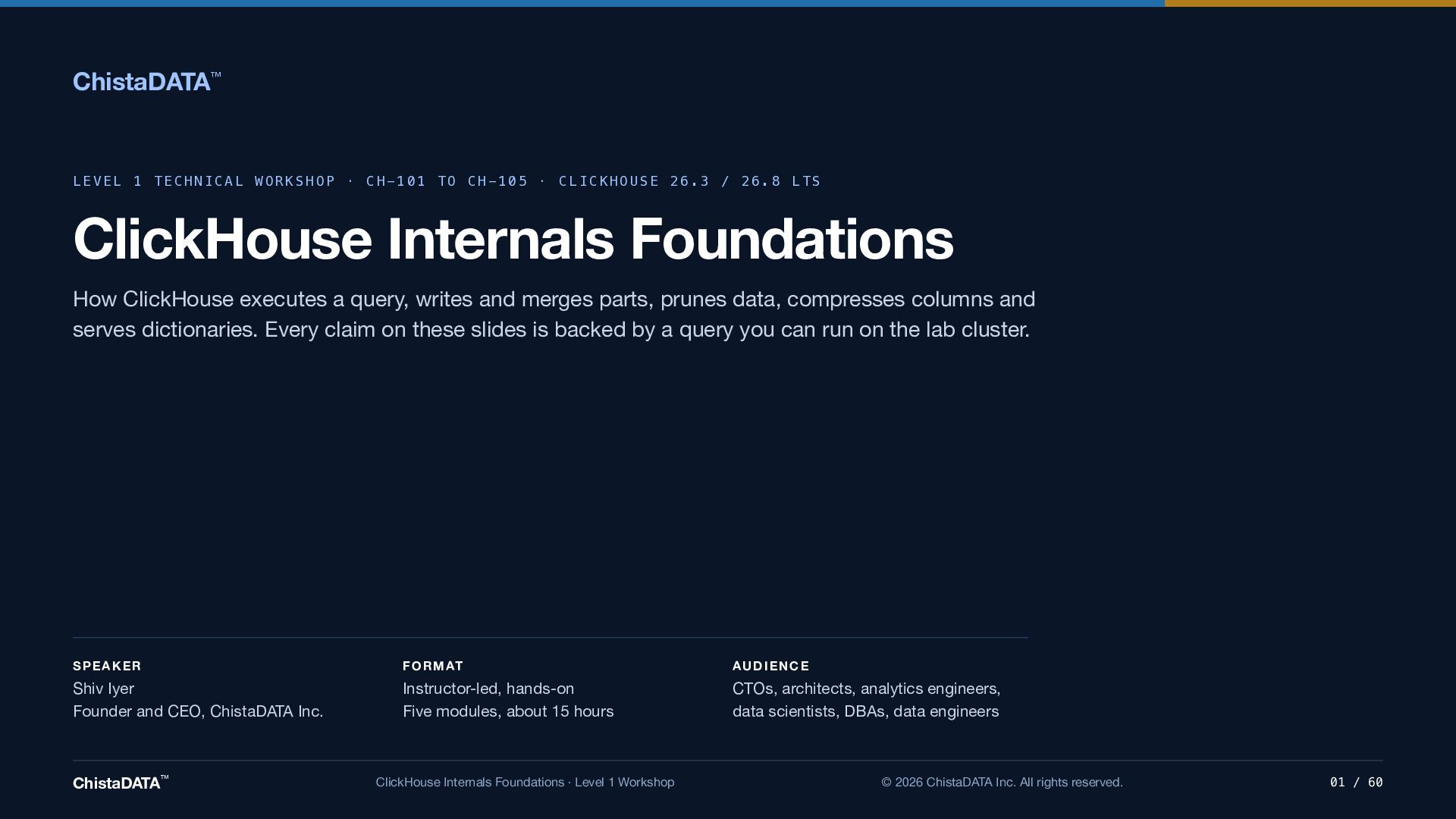
A Level 1 technical workshop from ChistaDATA on how ClickHouse works underneath: how it executes a query, writes and merges parts, prunes data, compresses columns and serves dictionaries. Behaviour and defaults were checked against ClickHouse 26.3 and 26.8 LTS, and every claim on the slides is backed by a query you can run on your own cluster.

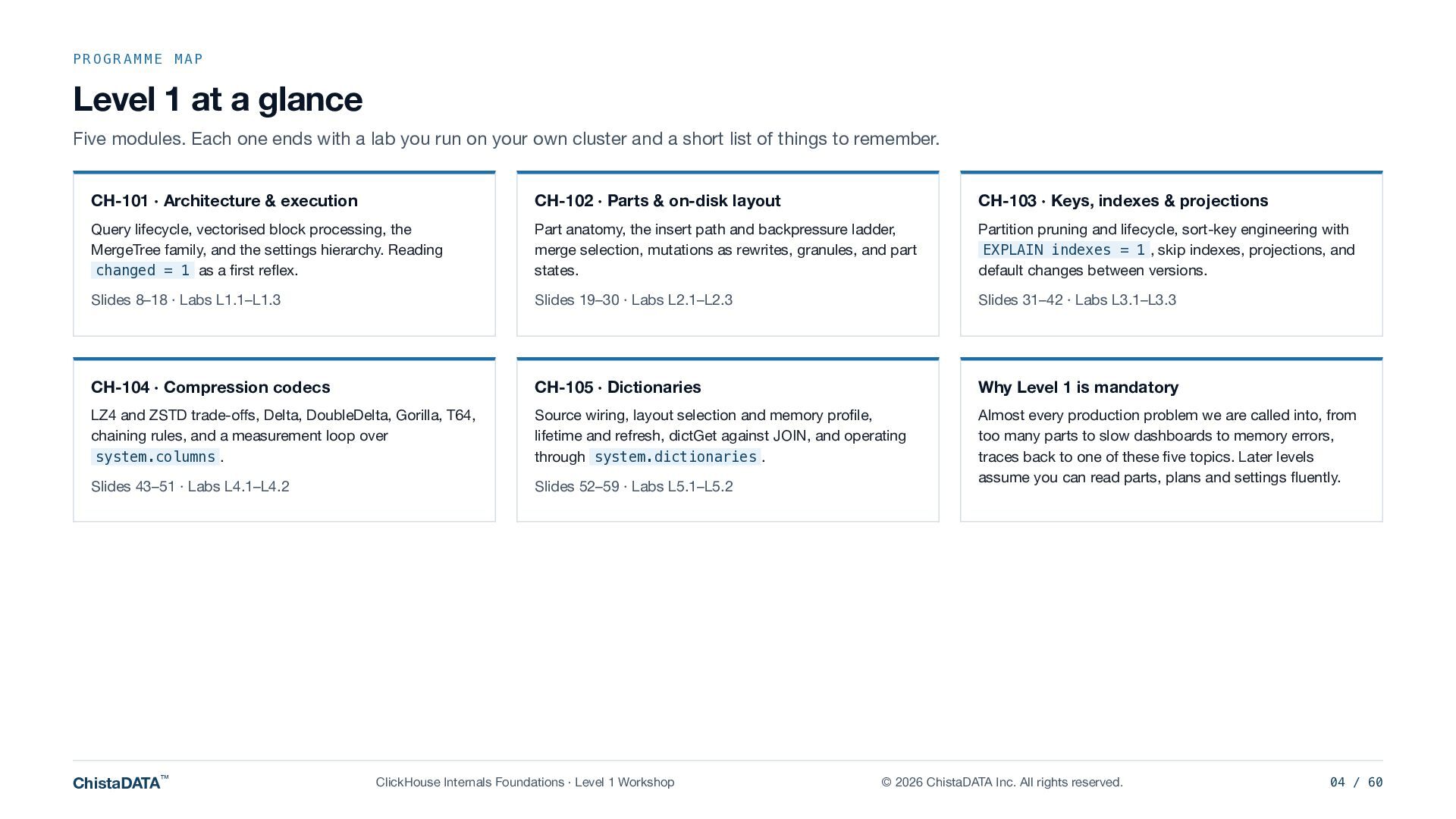
Five modules, about 15 hours, instructor-led and hands-on:

CH-101 Architecture and execution: query lifecycle, vectorised block processing, the MergeTree family and the settings hierarchy.

CH-102 Parts and on-disk layout: part anatomy, the insert path and backpressure, merge selection, mutations as rewrites, granules and part states.

CH-103 Keys, indexes and projections: partition pruning and lifecycle, sort-key engineering with EXPLAIN indexes = 1, skip indexes, projections, and default changes between versions.

CH-104 Compression codecs: LZ4 and ZSTD trade-offs, Delta, DoubleDelta, Gorilla, T64, codec chaining rules, and a measurement loop over system.columns.

CH-105 Dictionaries: source wiring, layout selection and memory profile, lifetime and refresh, dictGet against JOIN, and operating through system.dictionaries.

Written for CTOs, architects, analytics engineers, data scientists, DBAs and data engineers.

Presented by Shiv Iyer, Founder and CEO, ChistaDATA Inc.
https://chistadata.com

Defaults change between releases, so read them from your own server and test on your own workload before applying anything to production.

ClickHouse is a registered trademark of ClickHouse, Inc. ChistaDATA Inc. is independent of ClickHouse, Inc., and this workshop is not endorsed by it.

Avatar for Shiv Iyer

Shiv Iyer PRO

October 21, 2026

More Decks by Shiv Iyer

Other Decks in Technology

Transcript

  1. ChistaDATA™ LEVEL 1 TECHNICAL WORKSHOP · CH-101 TO CH-105 ·

    CLICKHOUSE 26.3 / 26.8 LTS ClickHouse Internals Foundations How ClickHouse executes a query, writes and merges parts, prunes data, compresses columns and serves dictionaries. Every claim on these slides is backed by a query you can run on the lab cluster. SPEAKER F O R M AT AUDIENCE Shiv Iyer Founder and CEO, ChistaDATA Inc. Instructor-led, hands-on Five modules, about 15 hours CTOs, architects, analytics engineers, data scientists, DBAs, data engineers ChistaDATA™ ClickHouse Internals Foundations · Level 1 Workshop © 2026 ChistaDATA Inc. All rights reserved. 01 / 60
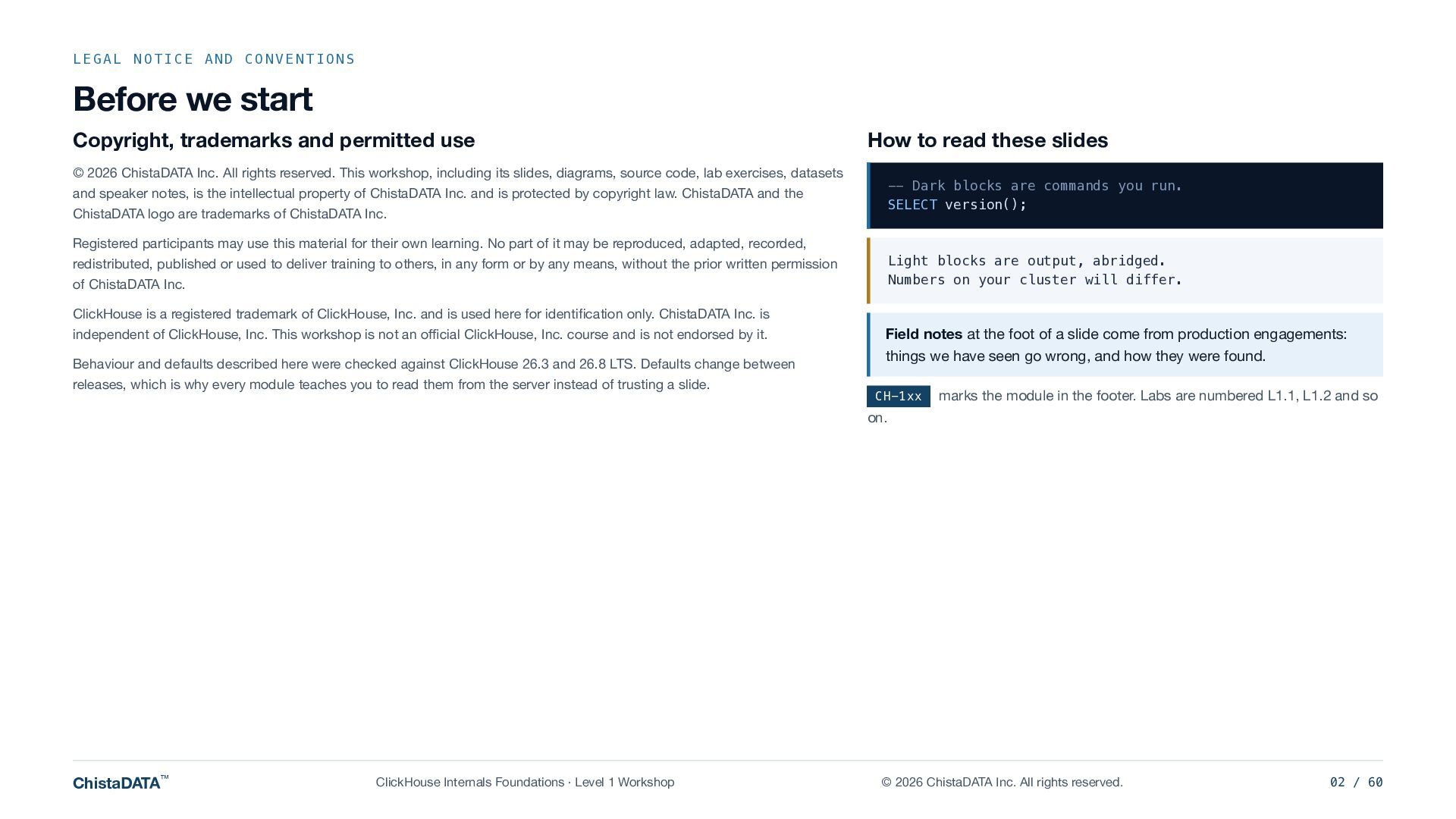
  2. LEGAL NOTICE AND CONVENTIONS Before we start Copyright, trademarks and

    permitted use How to read these slides © 2026 ChistaDATA Inc. All rights reserved. This workshop, including its slides, diagrams, source code, lab exercises, datasets -- Dark blocks are commands you run. SELECT version(); and speaker notes, is the intellectual property of ChistaDATA Inc. and is protected by copyright law. ChistaDATA and the ChistaDATA logo are trademarks of ChistaDATA Inc. Registered participants may use this material for their own learning. No part of it may be reproduced, adapted, recorded, Light blocks are output, abridged. Numbers on your cluster will differ. redistributed, published or used to deliver training to others, in any form or by any means, without the prior written permission of ChistaDATA Inc. ClickHouse is a registered trademark of ClickHouse, Inc. and is used here for identification only. ChistaDATA Inc. is independent of ClickHouse, Inc. This workshop is not an official ClickHouse, Inc. course and is not endorsed by it. Behaviour and defaults described here were checked against ClickHouse 26.3 and 26.8 LTS. Defaults change between releases, which is why every module teaches you to read them from the server instead of trusting a slide. Field notes at the foot of a slide come from production engagements: things we have seen go wrong, and how they were found. CH-1xx marks the module in the footer. Labs are numbered L1.1, L1.2 and so on. ChistaDATA™ ClickHouse Internals Foundations · Level 1 Workshop © 2026 ChistaDATA Inc. All rights reserved. 02 / 60
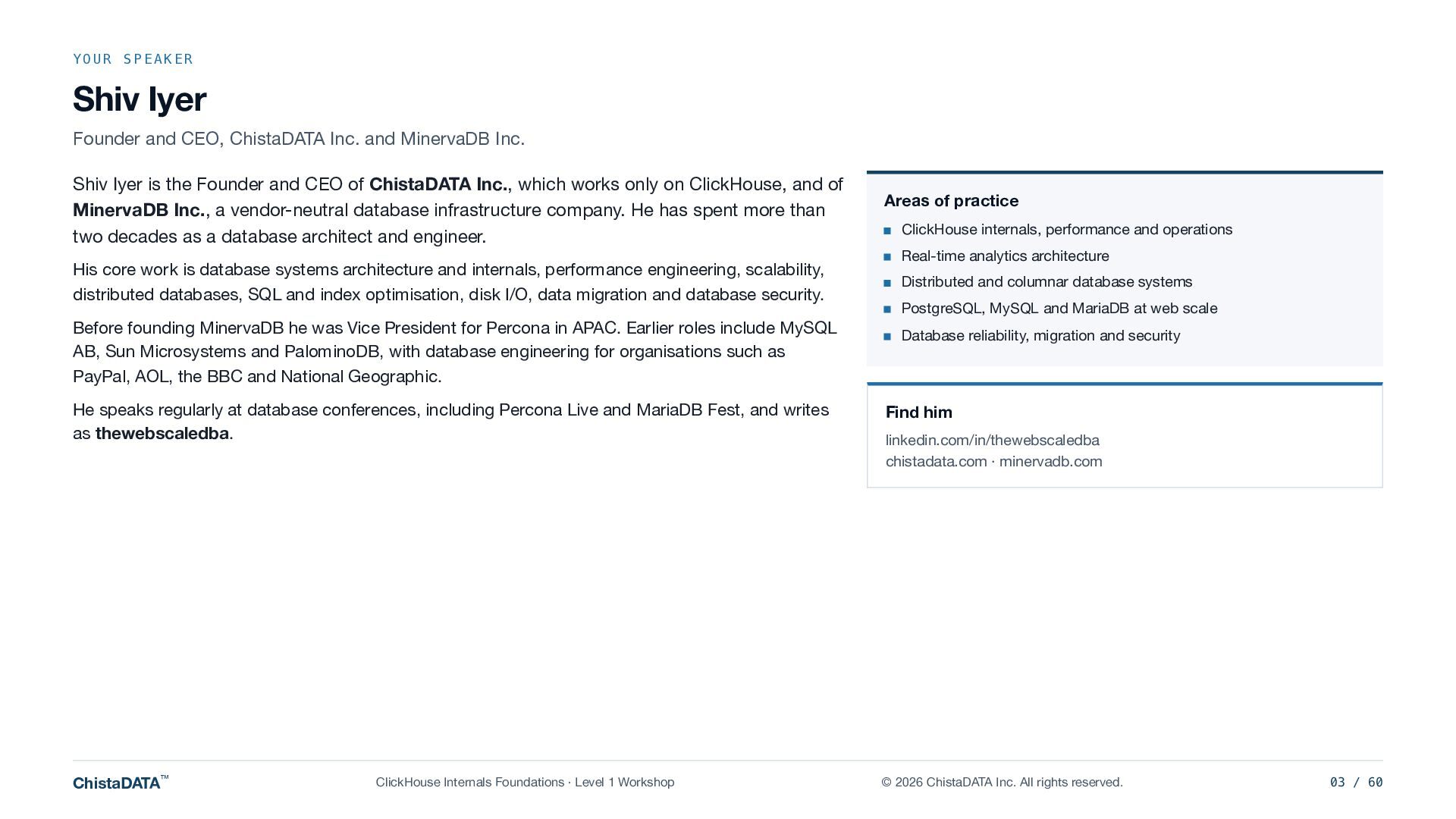
  3. YOUR SPEAKER Shiv Iyer Founder and CEO, ChistaDATA Inc. and

    MinervaDB Inc. Shiv Iyer is the Founder and CEO of ChistaDATA Inc., which works only on ClickHouse, and of MinervaDB Inc., a vendor-neutral database infrastructure company. He has spent more than two decades as a database architect and engineer. His core work is database systems architecture and internals, performance engineering, scalability, distributed databases, SQL and index optimisation, disk I/O, data migration and database security. Before founding MinervaDB he was Vice President for Percona in APAC. Earlier roles include MySQL AB, Sun Microsystems and PalominoDB, with database engineering for organisations such as PayPal, AOL, the BBC and National Geographic. Areas of practice ClickHouse internals, performance and operations Real-time analytics architecture Distributed and columnar database systems PostgreSQL, MySQL and MariaDB at web scale Database reliability, migration and security He speaks regularly at database conferences, including Percona Live and MariaDB Fest, and writes as thewebscaledba. Find him ChistaDATA™ © 2026 ChistaDATA Inc. All rights reserved. ClickHouse Internals Foundations · Level 1 Workshop linkedin.com/in/thewebscaledba chistadata.com · minervadb.com 03 / 60
  4. PROGRAMME MAP Level 1 at a glance Five modules. Each

    one ends with a lab you run on your own cluster and a short list of things to remember. CH-101 · Architecture & execution CH-102 · Parts & on-disk layout CH-103 · Keys, indexes & projections Query lifecycle, vectorised block processing, the MergeTree family, and the settings hierarchy. Reading changed = 1 as a first reflex. Part anatomy, the insert path and backpressure ladder, merge selection, mutations as rewrites, granules, and part states. Partition pruning and lifecycle, sort-key engineering with EXPLAIN indexes = 1 , skip indexes, projections, and default changes between versions. Slides 8–18 · Labs L1.1–L1.3 Slides 19–30 · Labs L2.1–L2.3 Slides 31–42 · Labs L3.1–L3.3 CH-104 · Compression codecs CH-105 · Dictionaries Why Level 1 is mandatory LZ4 and ZSTD trade-offs, Delta, DoubleDelta, Gorilla, T64, chaining rules, and a measurement loop over system.columns . Source wiring, layout selection and memory profile, lifetime and refresh, dictGet against JOIN, and operating through system.dictionaries . Slides 43–51 · Labs L4.1–L4.2 Slides 52–59 · Labs L5.1–L5.2 Almost every production problem we are called into, from too many parts to slow dashboards to memory errors, traces back to one of these five topics. Later levels assume you can read parts, plans and settings fluently. ChistaDATA™ ClickHouse Internals Foundations · Level 1 Workshop © 2026 ChistaDATA Inc. All rights reserved. 04 / 60
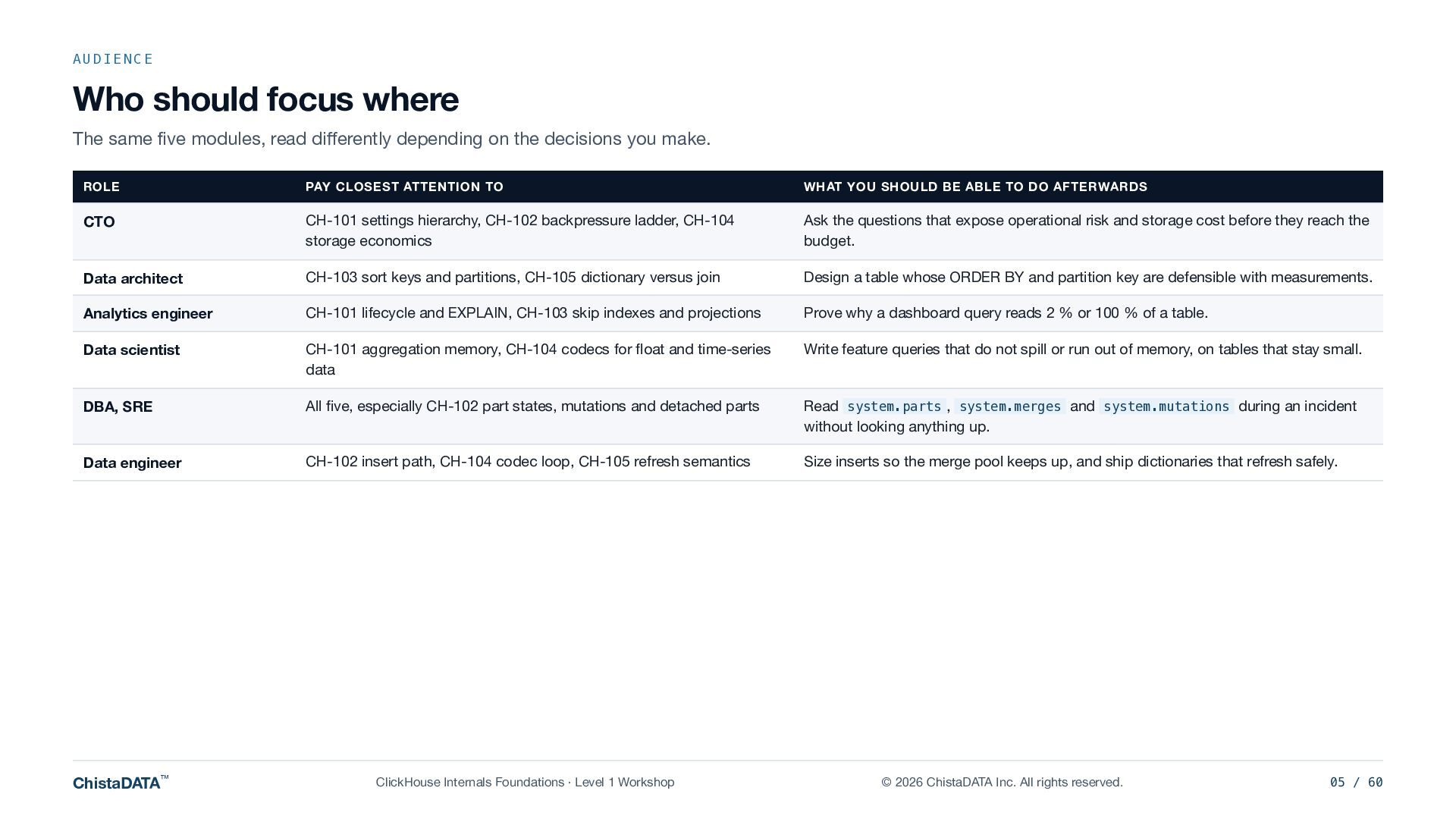
  5. AUDIENCE Who should focus where The same five modules, read

    differently depending on the decisions you make. ROLE PAY CLOSEST ATTENTION TO WHAT YOU SHOULD BE ABLE TO DO AFTERWARDS CTO CH-101 settings hierarchy, CH-102 backpressure ladder, CH-104 storage economics Ask the questions that expose operational risk and storage cost before they reach the budget. Data architect CH-103 sort keys and partitions, CH-105 dictionary versus join Design a table whose ORDER BY and partition key are defensible with measurements. Analytics engineer CH-101 lifecycle and EXPLAIN, CH-103 skip indexes and projections Prove why a dashboard query reads 2 % or 100 % of a table. Data scientist CH-101 aggregation memory, CH-104 codecs for float and time-series data Write feature queries that do not spill or run out of memory, on tables that stay small. DBA, SRE All five, especially CH-102 part states, mutations and detached parts Read system.parts , system.merges and system.mutations during an incident without looking anything up. Data engineer CH-102 insert path, CH-104 codec loop, CH-105 refresh semantics Size inserts so the merge pool keeps up, and ship dictionaries that refresh safely. ChistaDATA™ ClickHouse Internals Foundations · Level 1 Workshop © 2026 ChistaDATA Inc. All rights reserved. 05 / 60
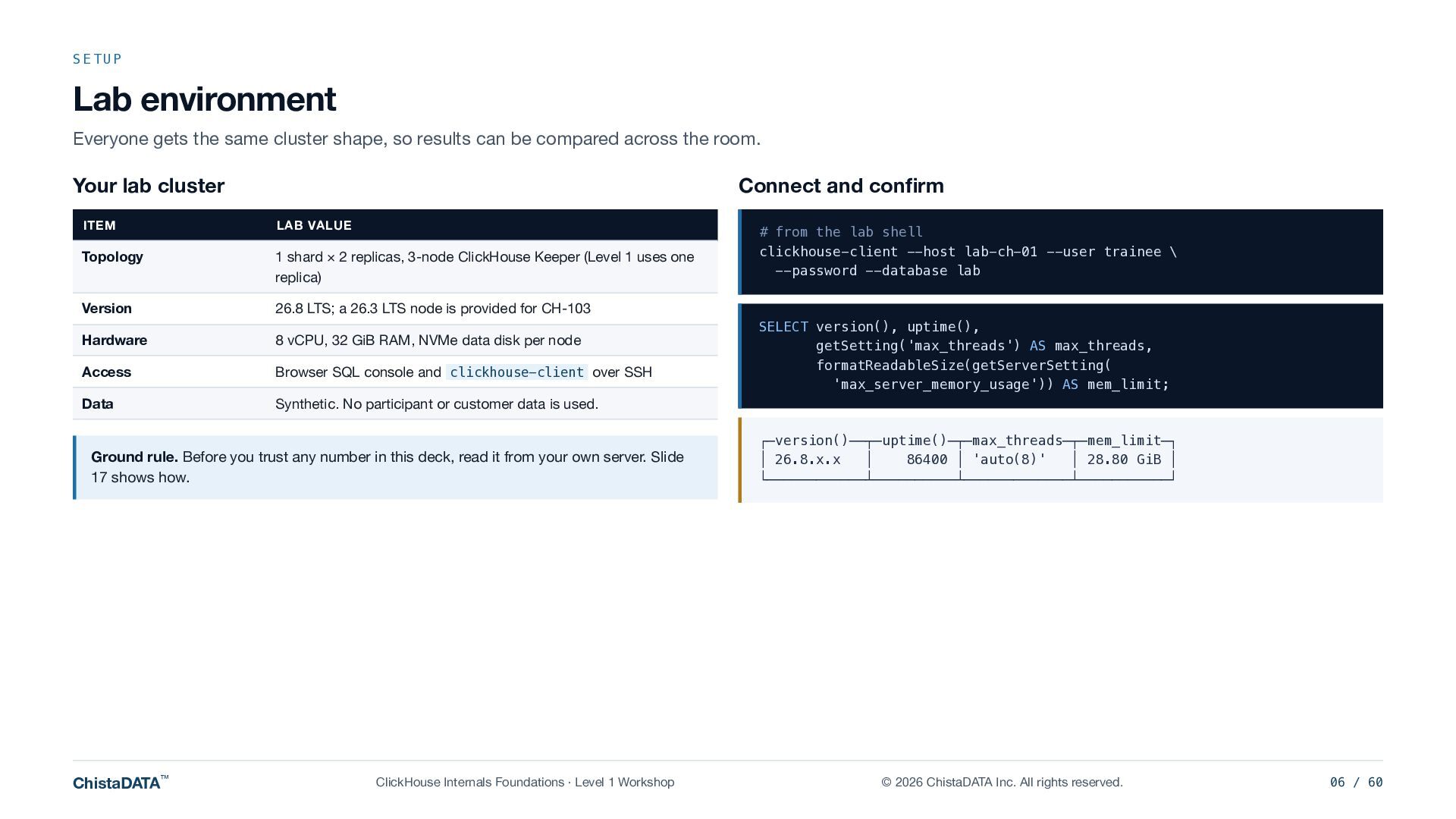
  6. SETUP Lab environment Everyone gets the same cluster shape, so

    results can be compared across the room. Your lab cluster Connect and confirm ITEM LAB VALUE Topology 1 shard × 2 replicas, 3-node ClickHouse Keeper (Level 1 uses one replica) Version 26.8 LTS; a 26.3 LTS node is provided for CH-103 Hardware 8 vCPU, 32 GiB RAM, NVMe data disk per node Access Browser SQL console and clickhouse-client over SSH Data Synthetic. No participant or customer data is used. Ground rule. Before you trust any number in this deck, read it from your own server. Slide 17 shows how. ChistaDATA™ ClickHouse Internals Foundations · Level 1 Workshop # from the lab shell clickhouse-client --host lab-ch-01 --user trainee \ --password --database lab SELECT version(), uptime(), getSetting('max_threads') AS max_threads, formatReadableSize(getServerSetting( 'max_server_memory_usage')) AS mem_limit; ┌─version()──┬─uptime()─┬─max_threads─┬─mem_limit─┐ │ 26.8.x.x │ 86400 │ 'auto(8)' │ 28.80 GiB │ └────────────┴──────────┴─────────────┴───────────┘ © 2026 ChistaDATA Inc. All rights reserved. 06 / 60
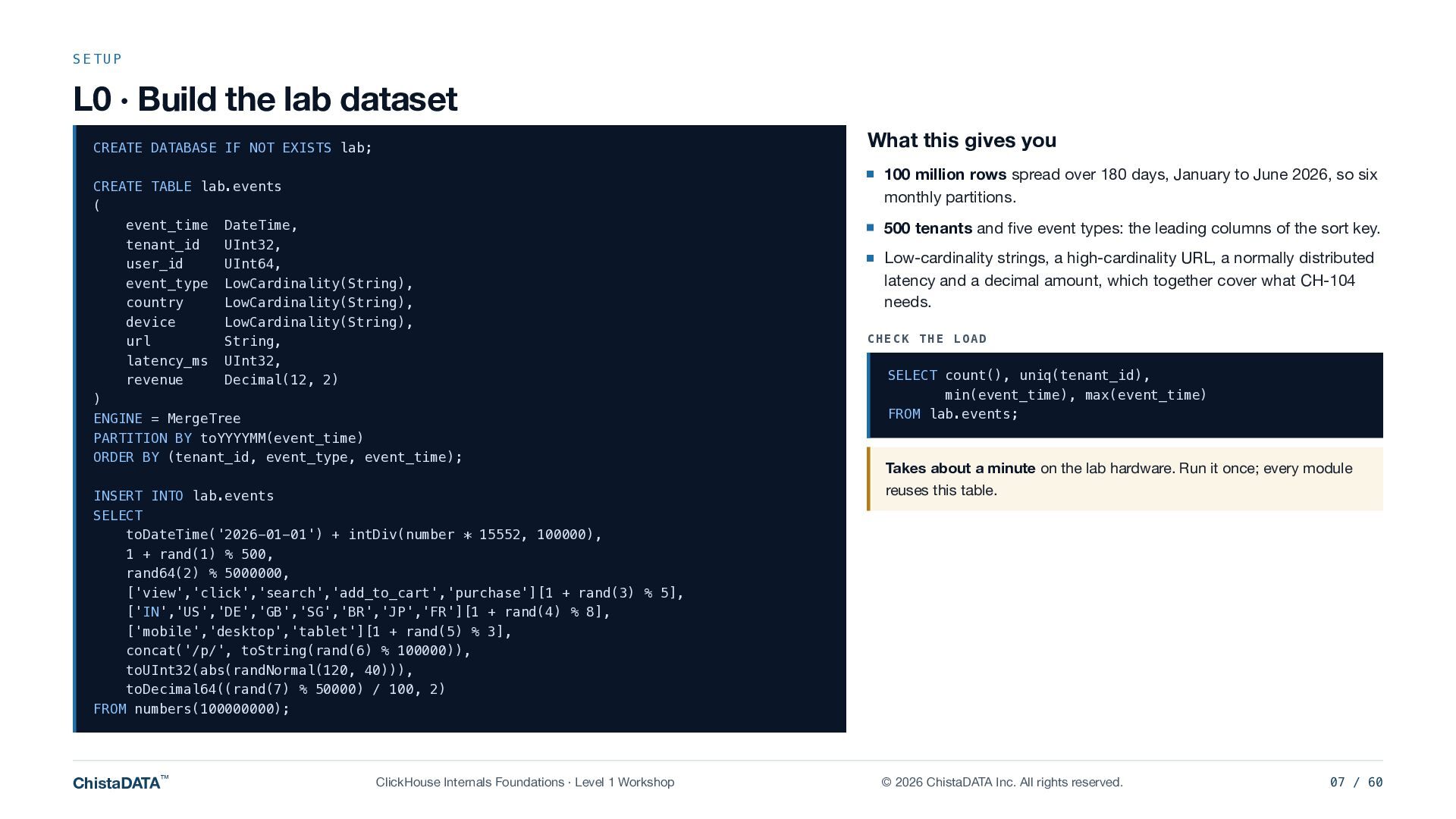
  7. SETUP L0 · Build the lab dataset What this gives

    you CREATE DATABASE IF NOT EXISTS lab; CREATE TABLE lab.events ( event_time DateTime, tenant_id UInt32, user_id UInt64, event_type LowCardinality(String), country LowCardinality(String), device LowCardinality(String), url String, latency_ms UInt32, revenue Decimal(12, 2) ) ENGINE = MergeTree PARTITION BY toYYYYMM(event_time) ORDER BY (tenant_id, event_type, event_time); INSERT INTO lab.events SELECT toDateTime('2026-01-01') + intDiv(number * 15552, 100000), 1 + rand(1) % 500, rand64(2) % 5000000, ['view','click','search','add_to_cart','purchase'][1 + rand(3) % 5], ['IN','US','DE','GB','SG','BR','JP','FR'][1 + rand(4) % 8], ['mobile','desktop','tablet'][1 + rand(5) % 3], concat('/p/', toString(rand(6) % 100000)), toUInt32(abs(randNormal(120, 40))), toDecimal64((rand(7) % 50000) / 100, 2) FROM numbers(100000000); ChistaDATA™ ClickHouse Internals Foundations · Level 1 Workshop 100 million rows spread over 180 days, January to June 2026, so six monthly partitions. 500 tenants and five event types: the leading columns of the sort key. Low-cardinality strings, a high-cardinality URL, a normally distributed latency and a decimal amount, which together cover what CH-104 needs. CHECK THE LOAD SELECT count(), uniq(tenant_id), min(event_time), max(event_time) FROM lab.events; Takes about a minute on the lab hardware. Run it once; every module reuses this table. © 2026 ChistaDATA Inc. All rights reserved. 07 / 60
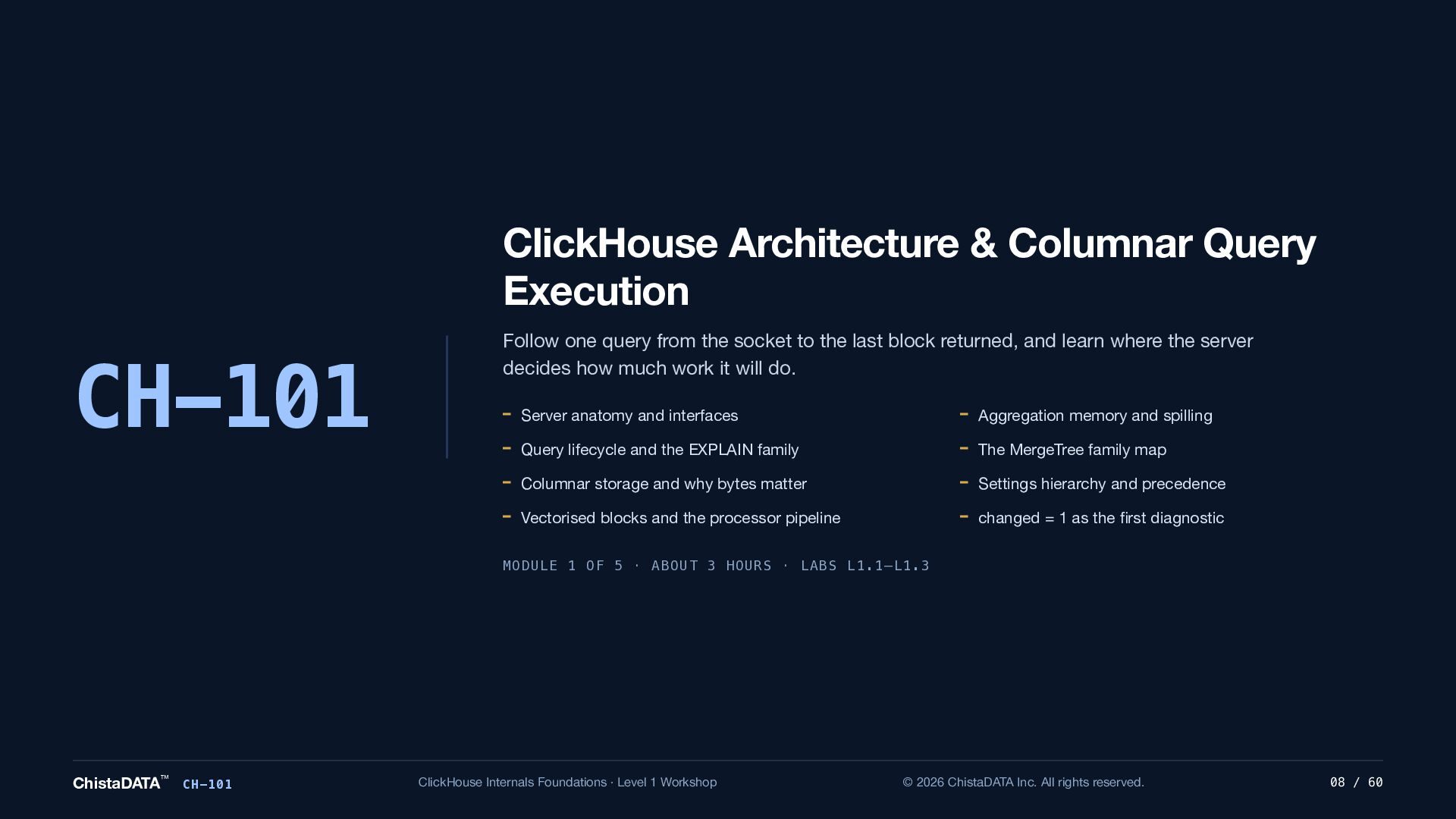
  8. ClickHouse Architecture & Columnar Query Execution CH-101 Follow one query

    from the socket to the last block returned, and learn where the server decides how much work it will do. Server anatomy and interfaces Aggregation memory and spilling Query lifecycle and the EXPLAIN family The MergeTree family map Columnar storage and why bytes matter Settings hierarchy and precedence Vectorised blocks and the processor pipeline changed = 1 as the first diagnostic MODULE 1 OF 5 · ABOUT 3 HOURS · LABS L1.1–L1.3 ChistaDATA™ CH-101 ClickHouse Internals Foundations · Level 1 Workshop © 2026 ChistaDATA Inc. All rights reserved. 08 / 60
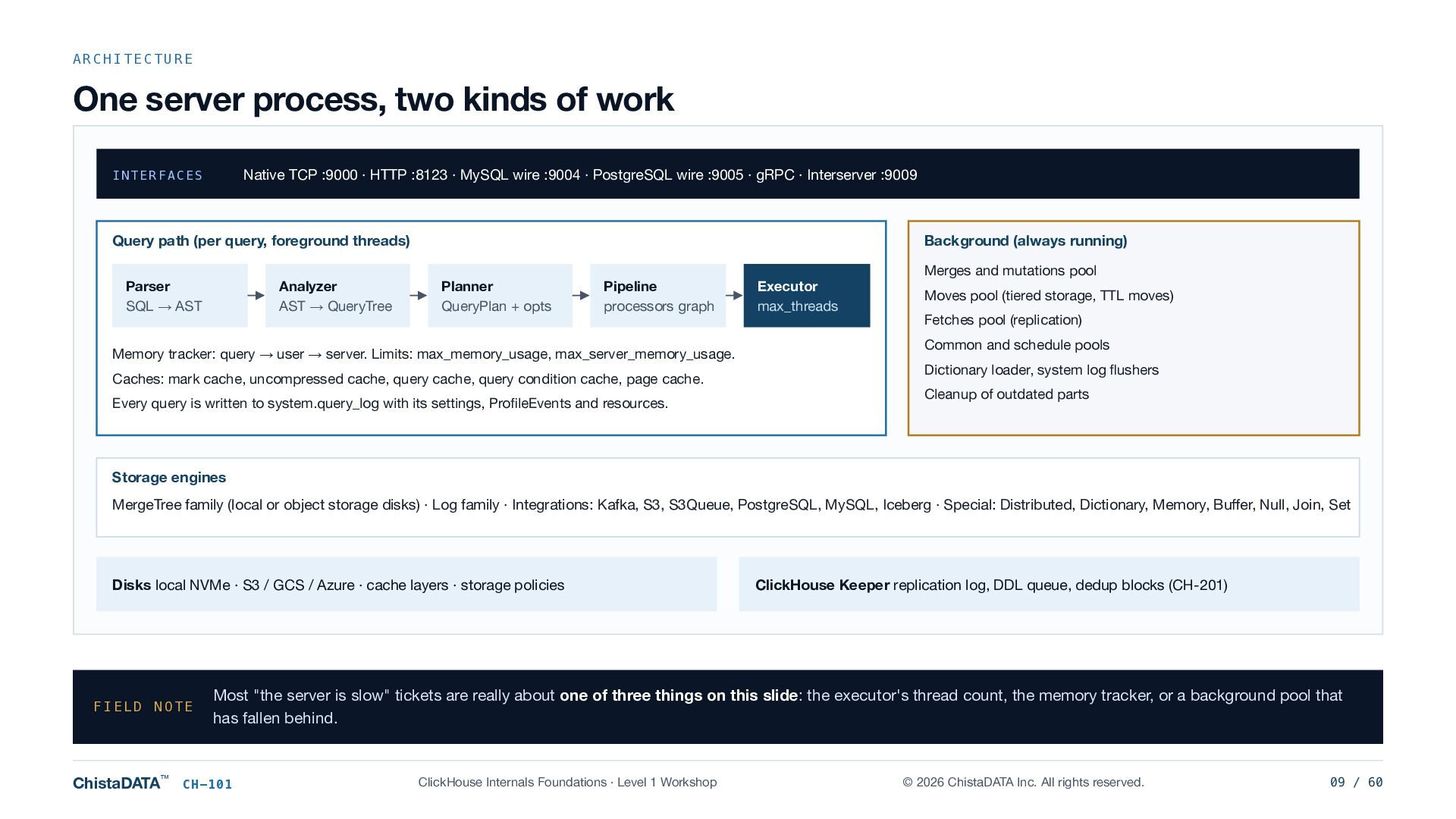
  9. ARCHITECTURE One server process, two kinds of work Native TCP

    :9000 · HTTP :8123 · MySQL wire :9004 · PostgreSQL wire :9005 · gRPC · Interserver :9009 INTERFACES Query path (per query, foreground threads) Parser SQL → AST Analyzer AST → QueryTree Background (always running) Planner QueryPlan + opts Pipeline processors graph Memory tracker: query → user → server. Limits: max_memory_usage, max_server_memory_usage. Caches: mark cache, uncompressed cache, query cache, query condition cache, page cache. Every query is written to system.query_log with its settings, ProfileEvents and resources. Executor max_threads Merges and mutations pool Moves pool (tiered storage, TTL moves) Fetches pool (replication) Common and schedule pools Dictionary loader, system log flushers Cleanup of outdated parts Storage engines MergeTree family (local or object storage disks) · Log family · Integrations: Kafka, S3, S3Queue, PostgreSQL, MySQL, Iceberg · Special: Distributed, Dictionary, Memory, Buffer, Null, Join, Set Disks local NVMe · S3 / GCS / Azure · cache layers · storage policies FIELD NOTE ChistaDATA™ ClickHouse Keeper replication log, DDL queue, dedup blocks (CH-201) Most "the server is slow" tickets are really about one of three things on this slide: the executor's thread count, the memory tracker, or a background pool that has fallen behind. CH-101 ClickHouse Internals Foundations · Level 1 Workshop © 2026 ChistaDATA Inc. All rights reserved. 09 / 60
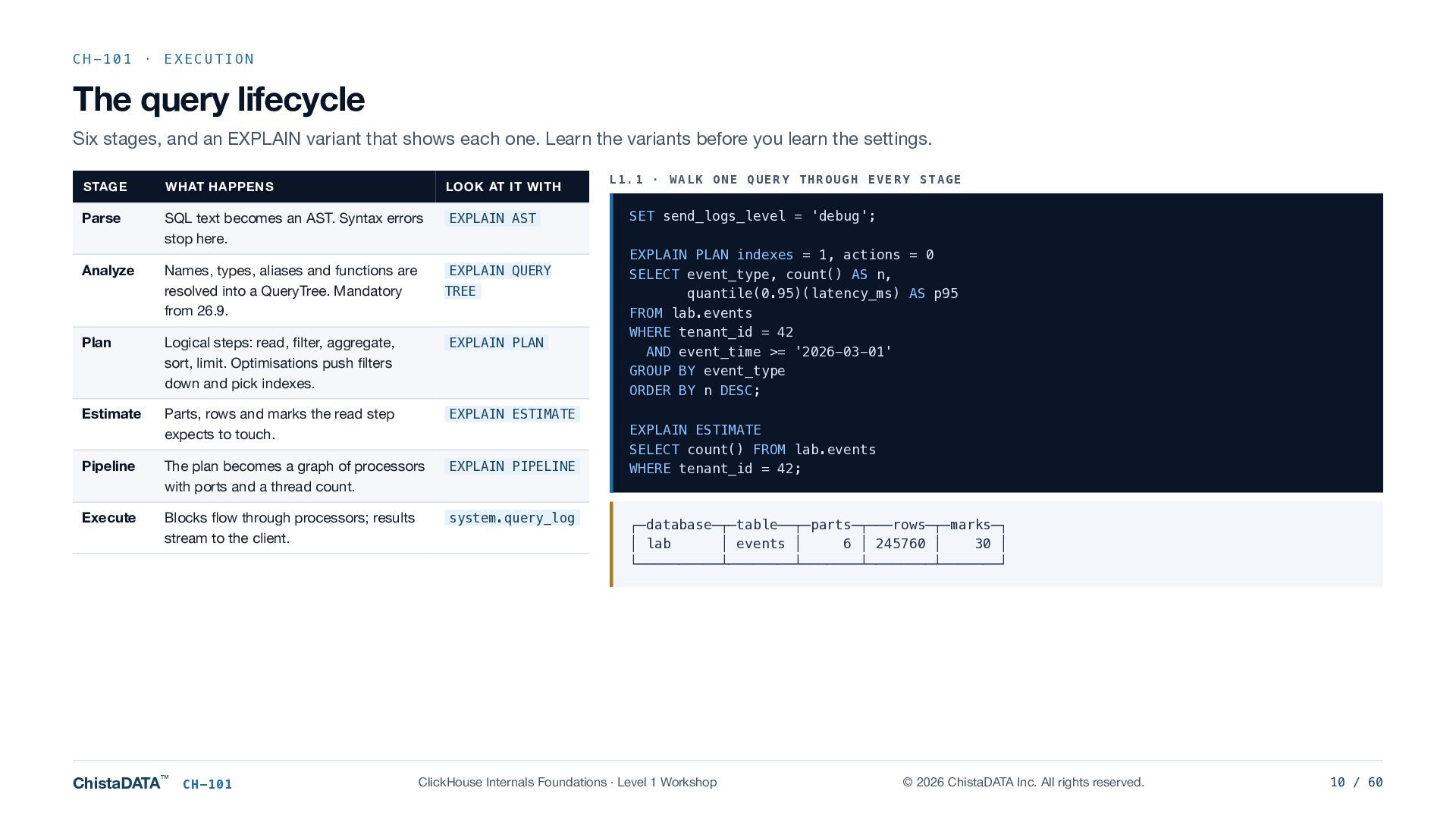
  10. CH-101 · EXECUTION The query lifecycle Six stages, and an

    EXPLAIN variant that shows each one. Learn the variants before you learn the settings. STAGE WHAT HAPPENS LOOK AT IT WITH Parse SQL text becomes an AST. Syntax errors stop here. EXPLAIN AST Analyze Names, types, aliases and functions are resolved into a QueryTree. Mandatory from 26.9. EXPLAIN QUERY TREE Plan Logical steps: read, filter, aggregate, sort, limit. Optimisations push filters down and pick indexes. EXPLAIN PLAN Estimate Parts, rows and marks the read step expects to touch. EXPLAIN ESTIMATE Pipeline The plan becomes a graph of processors with ports and a thread count. EXPLAIN PIPELINE Execute Blocks flow through processors; results stream to the client. system.query_log ChistaDATA™ CH-101 L1.1 · WALK ONE QUERY THROUGH EVERY STAGE SET send_logs_level = 'debug'; EXPLAIN PLAN indexes = 1, actions = 0 SELECT event_type, count() AS n, quantile(0.95)(latency_ms) AS p95 FROM lab.events WHERE tenant_id = 42 AND event_time >= '2026-03-01' GROUP BY event_type ORDER BY n DESC; EXPLAIN ESTIMATE SELECT count() FROM lab.events WHERE tenant_id = 42; ┌─database─┬─table──┬─parts─┬───rows─┬─marks─┐ │ lab │ events │ 6 │ 245760 │ 30 │ └──────────┴────────┴───────┴────────┴───────┘ ClickHouse Internals Foundations · Level 1 Workshop © 2026 ChistaDATA Inc. All rights reserved. 10 / 60
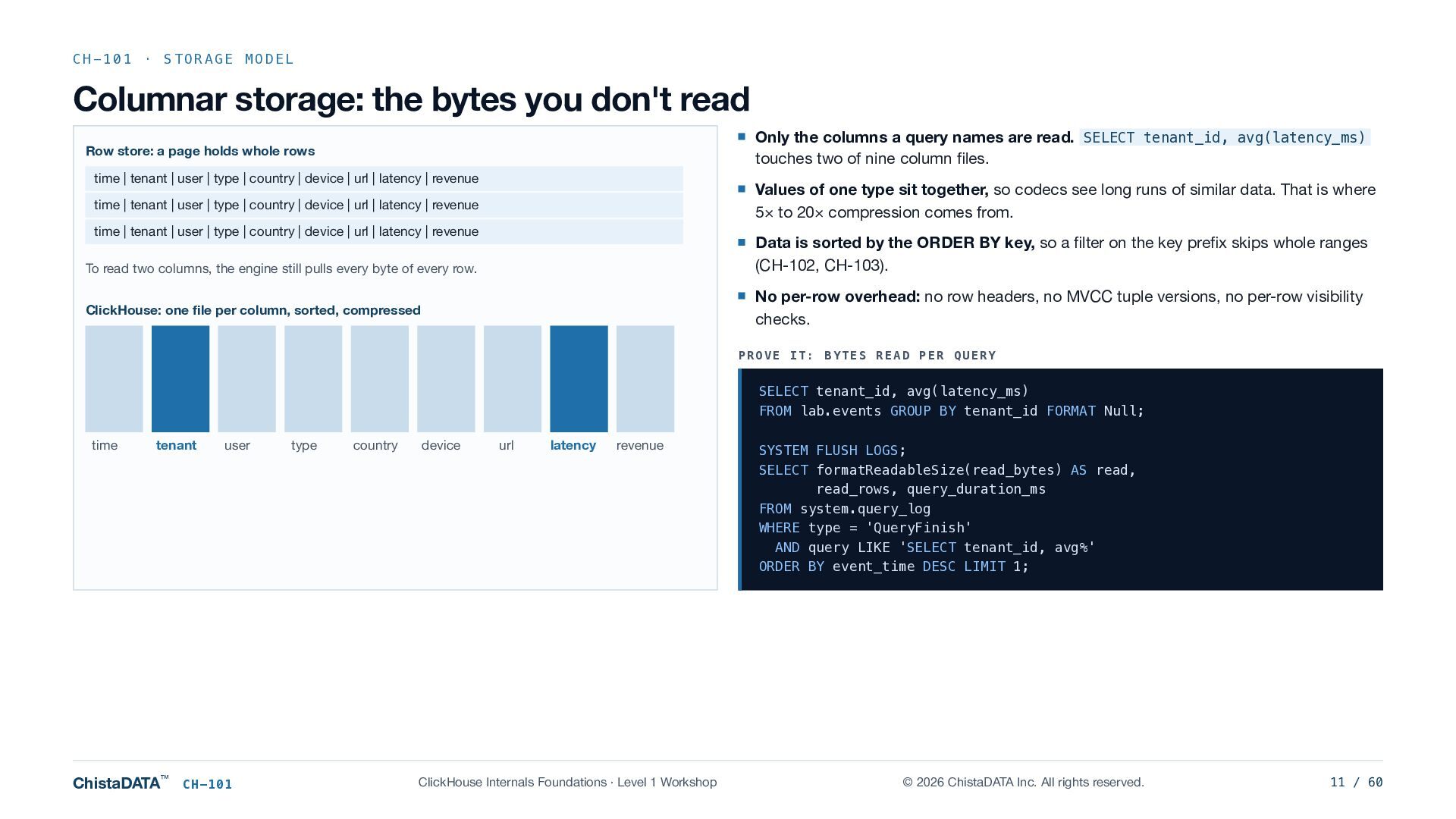
  11. CH-101 · STORAGE MODEL Columnar storage: the bytes you don't

    read Only the columns a query names are read. SELECT tenant_id, avg(latency_ms) touches two of nine column files. Row store: a page holds whole rows time | tenant | user | type | country | device | url | latency | revenue Values of one type sit together, so codecs see long runs of similar data. That is where 5× to 20× compression comes from. time | tenant | user | type | country | device | url | latency | revenue time | tenant | user | type | country | device | url | latency | revenue Data is sorted by the ORDER BY key, so a filter on the key prefix skips whole ranges (CH-102, CH-103). To read two columns, the engine still pulls every byte of every row. No per-row overhead: no row headers, no MVCC tuple versions, no per-row visibility checks. ClickHouse: one file per column, sorted, compressed PROVE IT: BYTES READ PER QUERY SELECT tenant_id, avg(latency_ms) FROM lab.events GROUP BY tenant_id FORMAT Null; time tenant ChistaDATA™ user CH-101 type country device url latency revenue ClickHouse Internals Foundations · Level 1 Workshop SYSTEM FLUSH LOGS; SELECT formatReadableSize(read_bytes) AS read, read_rows, query_duration_ms FROM system.query_log WHERE type = 'QueryFinish' AND query LIKE 'SELECT tenant_id, avg%' ORDER BY event_time DESC LIMIT 1; © 2026 ChistaDATA Inc. All rights reserved. 11 / 60
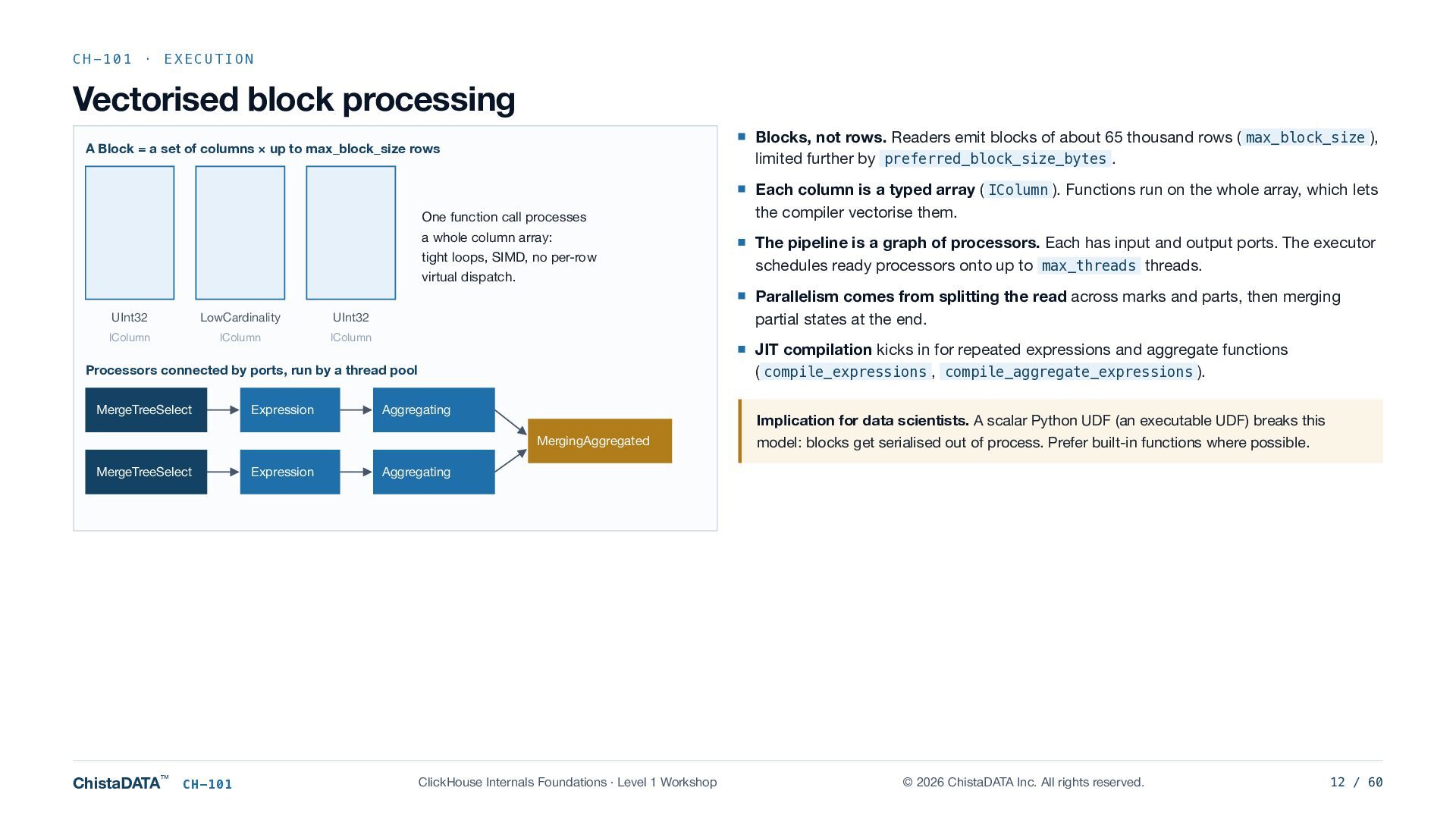
  12. CH-101 · EXECUTION Vectorised block processing Blocks, not rows. Readers

    emit blocks of about 65 thousand rows ( max_block_size ), limited further by preferred_block_size_bytes . A Block = a set of columns × up to max_block_size rows One function call processes a whole column array: tight loops, SIMD, no per-row virtual dispatch. UInt32 LowCardinality UInt32 IColumn IColumn IColumn Expression JIT compilation kicks in for repeated expressions and aggregate functions ( compile_expressions , compile_aggregate_expressions ). Aggregating MergingAggregated MergeTreeSelect ChistaDATA™ CH-101 Expression The pipeline is a graph of processors. Each has input and output ports. The executor schedules ready processors onto up to max_threads threads. Parallelism comes from splitting the read across marks and parts, then merging partial states at the end. Processors connected by ports, run by a thread pool MergeTreeSelect Each column is a typed array ( IColumn ). Functions run on the whole array, which lets the compiler vectorise them. Implication for data scientists. A scalar Python UDF (an executable UDF) breaks this model: blocks get serialised out of process. Prefer built-in functions where possible. Aggregating ClickHouse Internals Foundations · Level 1 Workshop © 2026 ChistaDATA Inc. All rights reserved. 12 / 60
  13. CH-101 · LAB Reading EXPLAIN PIPELINE L1.2 · READ THE

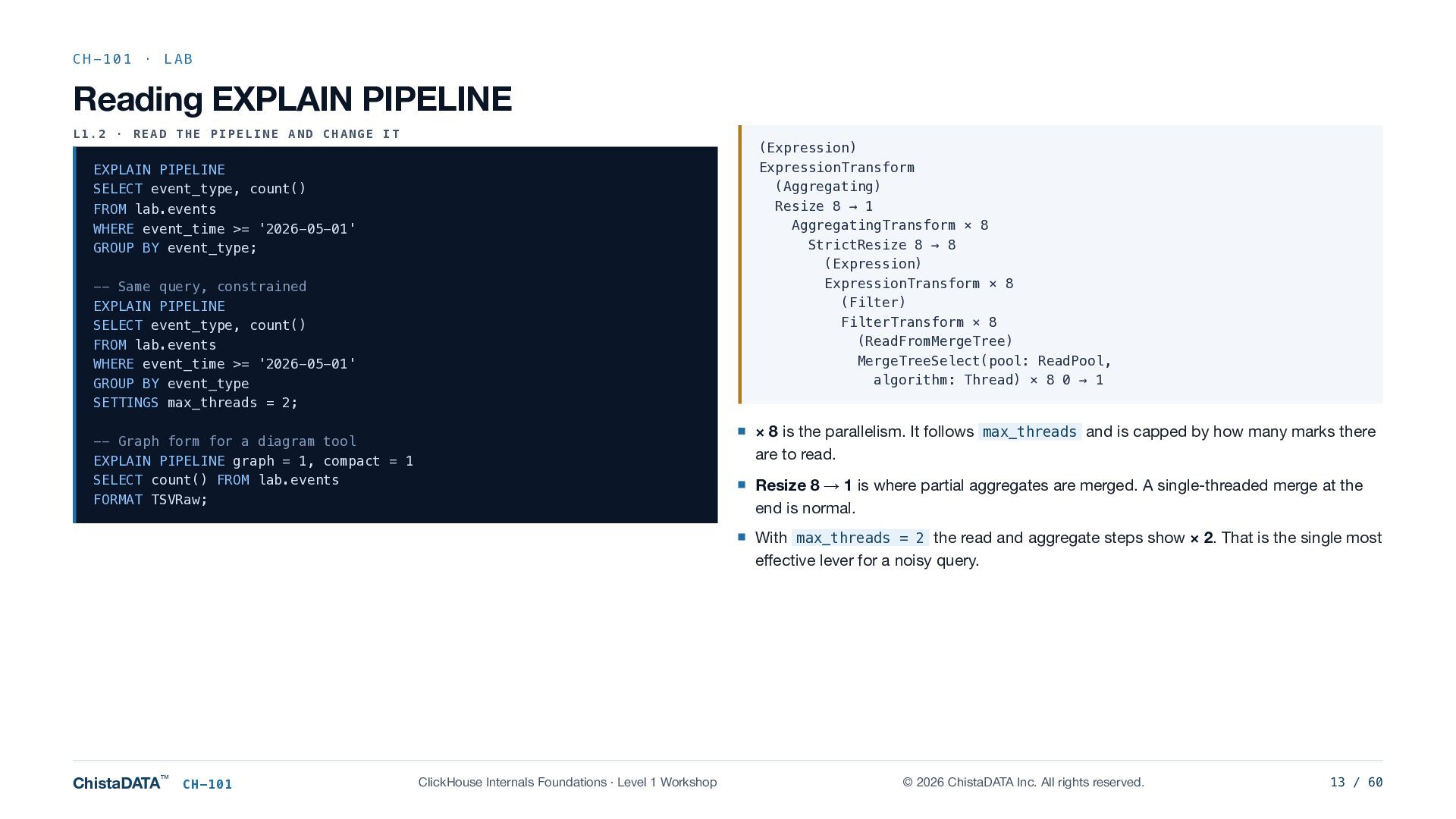
    PIPELINE AND CHANGE IT (Expression) ExpressionTransform (Aggregating) Resize 8 → 1 AggregatingTransform × 8 StrictResize 8 → 8 (Expression) ExpressionTransform × 8 (Filter) FilterTransform × 8 (ReadFromMergeTree) MergeTreeSelect(pool: ReadPool, algorithm: Thread) × 8 0 → 1 EXPLAIN PIPELINE SELECT event_type, count() FROM lab.events WHERE event_time >= '2026-05-01' GROUP BY event_type; -- Same query, constrained EXPLAIN PIPELINE SELECT event_type, count() FROM lab.events WHERE event_time >= '2026-05-01' GROUP BY event_type SETTINGS max_threads = 2; × 8 is the parallelism. It follows max_threads and is capped by how many marks there are to read. -- Graph form for a diagram tool EXPLAIN PIPELINE graph = 1, compact = 1 SELECT count() FROM lab.events FORMAT TSVRaw; Resize 8 → 1 is where partial aggregates are merged. A single-threaded merge at the end is normal. With max_threads = 2 the read and aggregate steps show × 2. That is the single most effective lever for a noisy query. ChistaDATA™ CH-101 ClickHouse Internals Foundations · Level 1 Workshop © 2026 ChistaDATA Inc. All rights reserved. 13 / 60
  14. CH-101 · EXECUTION Aggregation: where the memory goes Hash tables

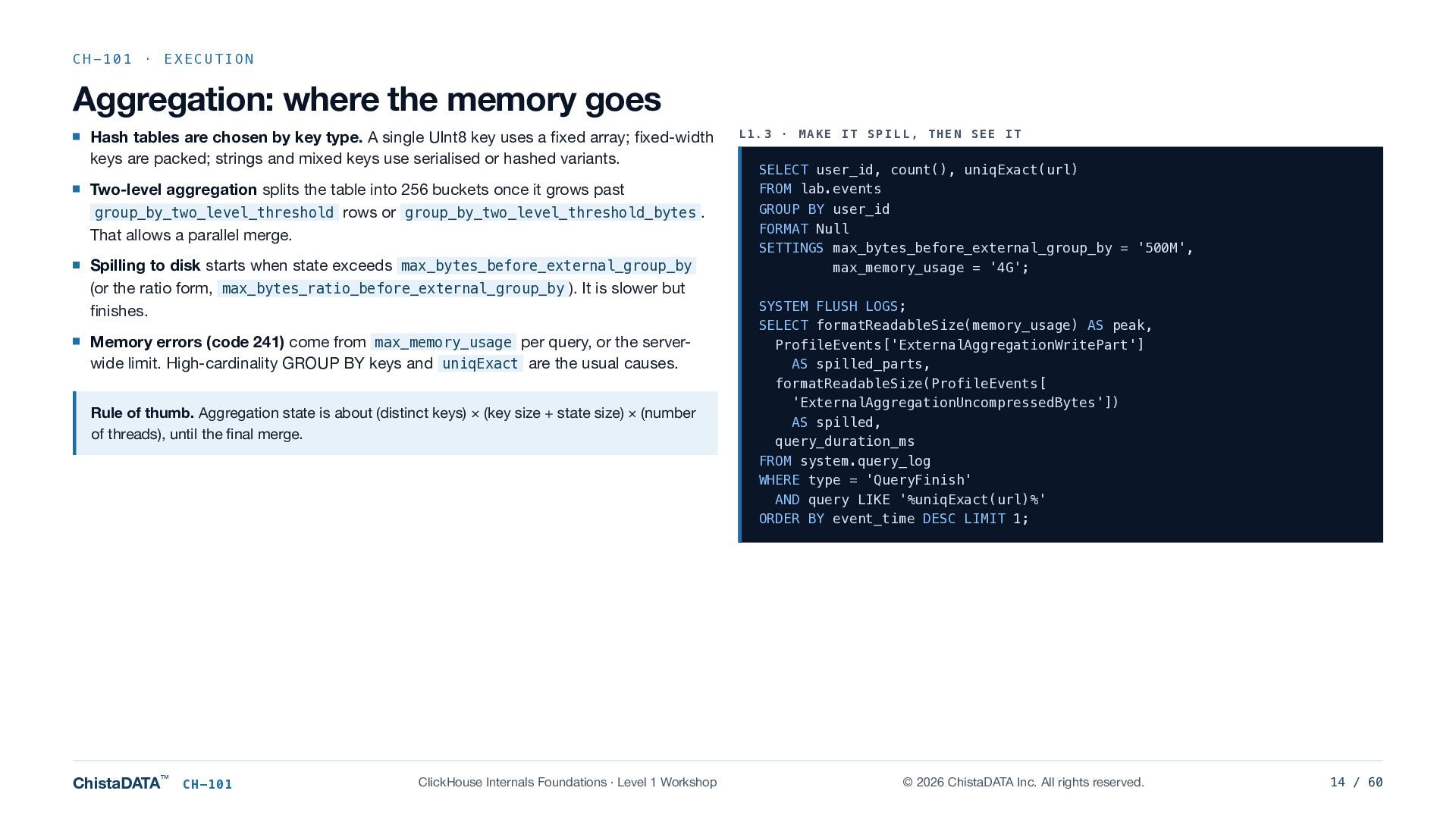
    are chosen by key type. A single UInt8 key uses a fixed array; fixed-width keys are packed; strings and mixed keys use serialised or hashed variants. Two-level aggregation splits the table into 256 buckets once it grows past group_by_two_level_threshold rows or group_by_two_level_threshold_bytes . That allows a parallel merge. Spilling to disk starts when state exceeds max_bytes_before_external_group_by (or the ratio form, max_bytes_ratio_before_external_group_by ). It is slower but finishes. Memory errors (code 241) come from max_memory_usage per query, or the serverwide limit. High-cardinality GROUP BY keys and uniqExact are the usual causes. Rule of thumb. Aggregation state is about (distinct keys) × (key size + state size) × (number of threads), until the final merge. ChistaDATA™ CH-101 ClickHouse Internals Foundations · Level 1 Workshop L1.3 · MAKE IT SPILL, THEN SEE IT SELECT user_id, count(), uniqExact(url) FROM lab.events GROUP BY user_id FORMAT Null SETTINGS max_bytes_before_external_group_by = '500M', max_memory_usage = '4G'; SYSTEM FLUSH LOGS; SELECT formatReadableSize(memory_usage) AS peak, ProfileEvents['ExternalAggregationWritePart'] AS spilled_parts, formatReadableSize(ProfileEvents[ 'ExternalAggregationUncompressedBytes']) AS spilled, query_duration_ms FROM system.query_log WHERE type = 'QueryFinish' AND query LIKE '%uniqExact(url)%' ORDER BY event_time DESC LIMIT 1; © 2026 ChistaDATA Inc. All rights reserved. 14 / 60
  15. CH-101 · ENGINES The MergeTree family One storage format, several

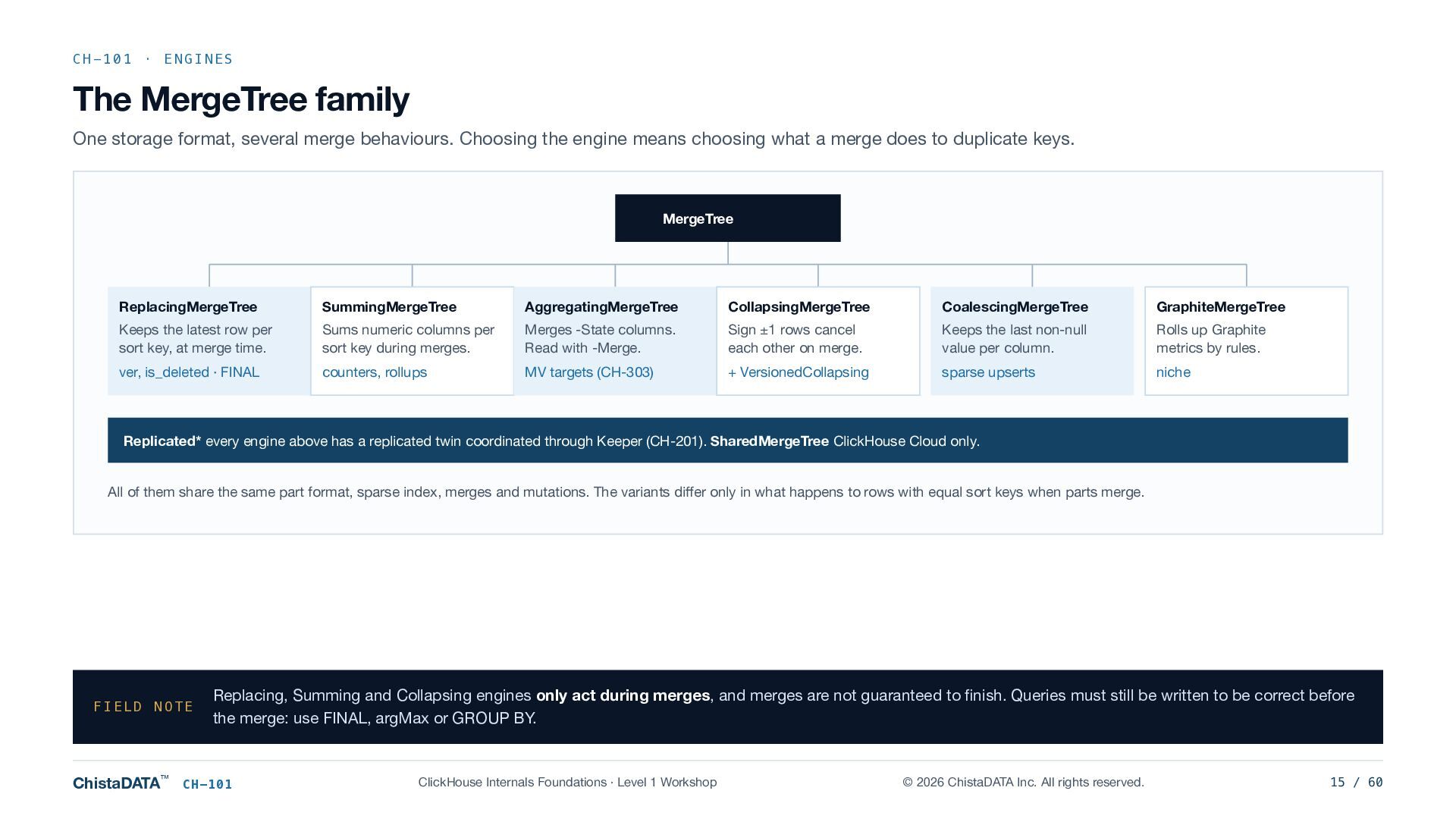
    merge behaviours. Choosing the engine means choosing what a merge does to duplicate keys. MergeTree ReplacingMergeTree SummingMergeTree AggregatingMergeTree CollapsingMergeTree CoalescingMergeTree GraphiteMergeTree Keeps the latest row per sort key, at merge time. Sums numeric columns per sort key during merges. Merges -State columns. Read with -Merge. Sign ±1 rows cancel each other on merge. Keeps the last non-null value per column. Rolls up Graphite metrics by rules. ver, is_deleted · FINAL counters, rollups MV targets (CH-303) + VersionedCollapsing sparse upserts niche Replicated* every engine above has a replicated twin coordinated through Keeper (CH-201). SharedMergeTree ClickHouse Cloud only. All of them share the same part format, sparse index, merges and mutations. The variants differ only in what happens to rows with equal sort keys when parts merge. FIELD NOTE ChistaDATA™ Replacing, Summing and Collapsing engines only act during merges, and merges are not guaranteed to finish. Queries must still be written to be correct before the merge: use FINAL, argMax or GROUP BY. CH-101 ClickHouse Internals Foundations · Level 1 Workshop © 2026 ChistaDATA Inc. All rights reserved. 15 / 60
  16. CH-101 · CONFIGURATION Settings hierarchy and precedence When a query

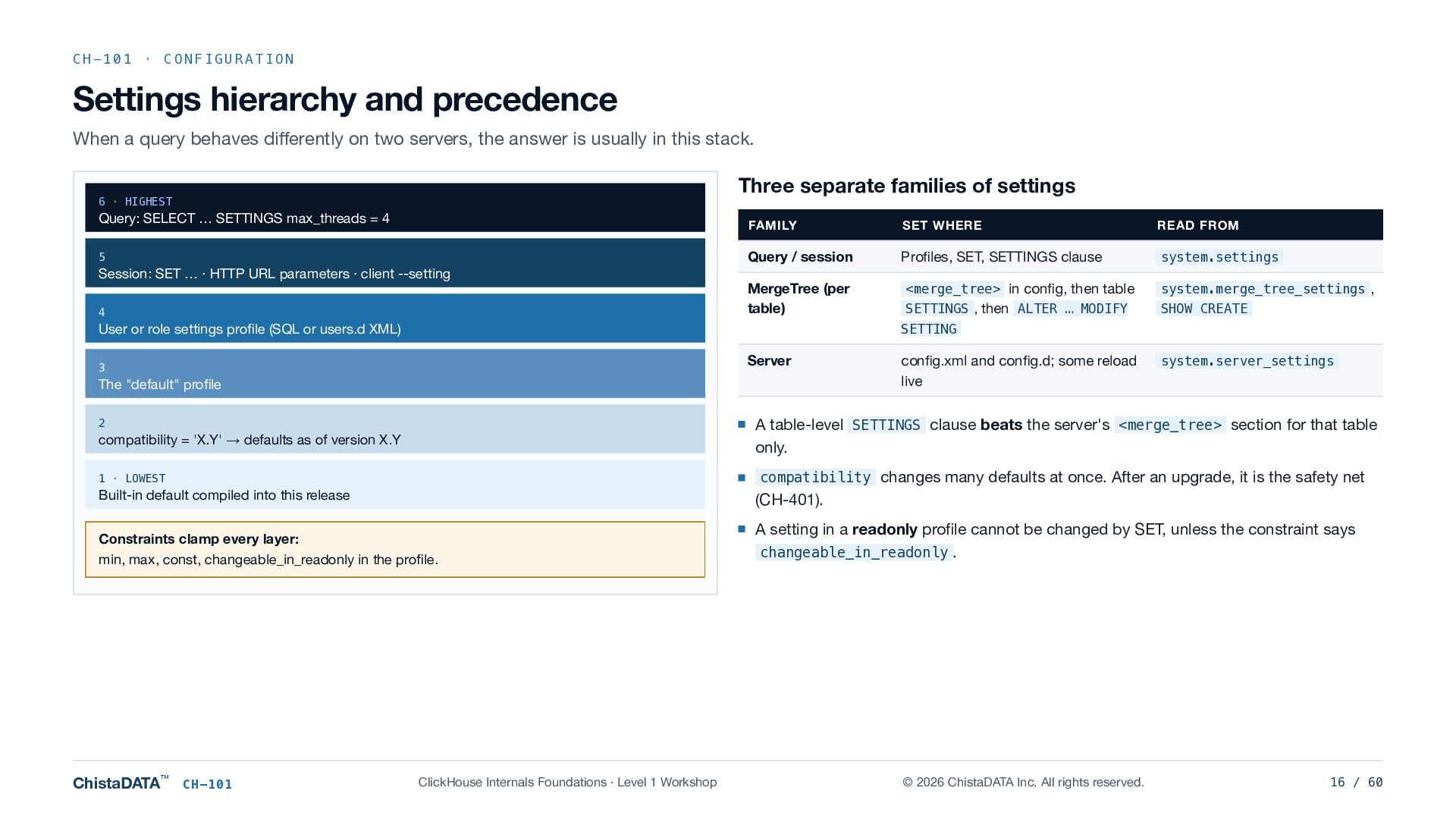
    behaves differently on two servers, the answer is usually in this stack. Three separate families of settings 6 · HIGHEST Query: SELECT … SETTINGS max_threads = 4 5 Session: SET … · HTTP URL parameters · client --setting 4 FAMILY SET WHERE READ FROM Query / session Profiles, SET, SETTINGS clause system.settings MergeTree (per table) <merge_tree> in config, then table SETTINGS , then ALTER … MODIFY system.merge_tree_settings , SHOW CREATE User or role settings profile (SQL or users.d XML) SETTING Server 3 The "default" profile config.xml and config.d; some reload live system.server_settings compatibility = 'X.Y' → defaults as of version X.Y A table-level SETTINGS clause beats the server's <merge_tree> section for that table only. 1 · LOWEST compatibility changes many defaults at once. After an upgrade, it is the safety net Built-in default compiled into this release (CH-401). Constraints clamp every layer: min, max, const, changeable_in_readonly in the profile. A setting in a readonly profile cannot be changed by SET, unless the constraint says changeable_in_readonly . 2 ChistaDATA™ CH-101 ClickHouse Internals Foundations · Level 1 Workshop © 2026 ChistaDATA Inc. All rights reserved. 16 / 60
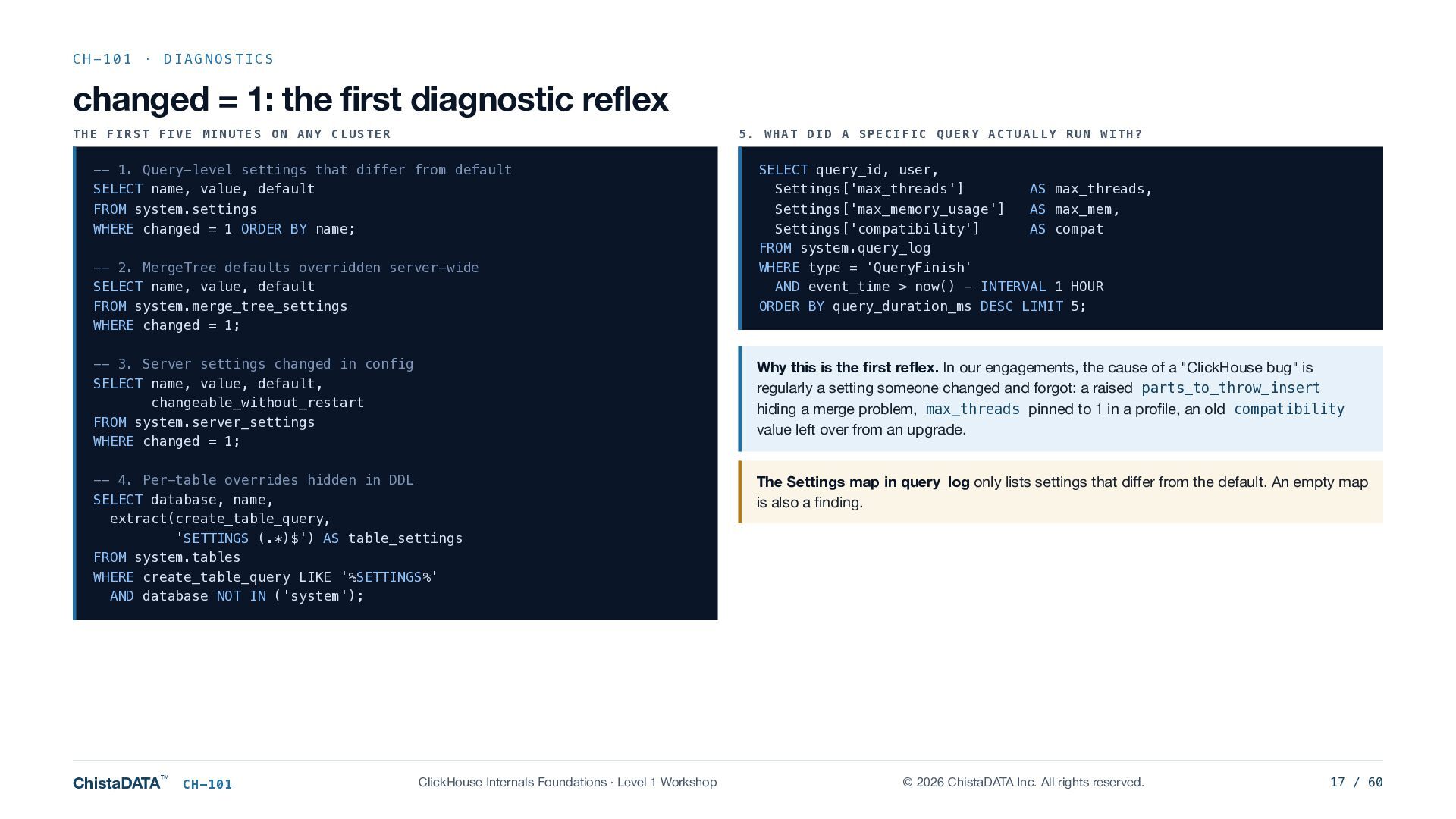
  17. CH-101 · DIAGNOSTICS changed = 1: the first diagnostic reflex

    THE FIRST FIVE MINUTES ON ANY CLUSTER 5. WHAT DID A SPECIFIC QUERY ACTUALLY RUN WITH? -- 1. Query-level settings that differ from default SELECT name, value, default SELECT query_id, user, Settings['max_threads'] FROM system.settings WHERE changed = 1 ORDER BY name; Settings['max_memory_usage'] AS max_mem, Settings['compatibility'] AS compat FROM system.query_log WHERE type = 'QueryFinish' AND event_time > now() - INTERVAL 1 HOUR ORDER BY query_duration_ms DESC LIMIT 5; -- 2. MergeTree defaults overridden server-wide SELECT name, value, default FROM system.merge_tree_settings WHERE changed = 1; AS max_threads, -- 3. Server settings changed in config SELECT name, value, default, changeable_without_restart FROM system.server_settings WHERE changed = 1; Why this is the first reflex. In our engagements, the cause of a "ClickHouse bug" is regularly a setting someone changed and forgot: a raised parts_to_throw_insert hiding a merge problem, max_threads pinned to 1 in a profile, an old compatibility value left over from an upgrade. -- 4. Per-table overrides hidden in DDL SELECT database, name, extract(create_table_query, 'SETTINGS (.*)$') AS table_settings FROM system.tables WHERE create_table_query LIKE '%SETTINGS%' AND database NOT IN ('system'); The Settings map in query_log only lists settings that differ from the default. An empty map is also a finding. ChistaDATA™ CH-101 ClickHouse Internals Foundations · Level 1 Workshop © 2026 ChistaDATA Inc. All rights reserved. 17 / 60
  18. CH-101 · WRAP-UP CH-101 summary Lab checklist Remember 1 L1.1

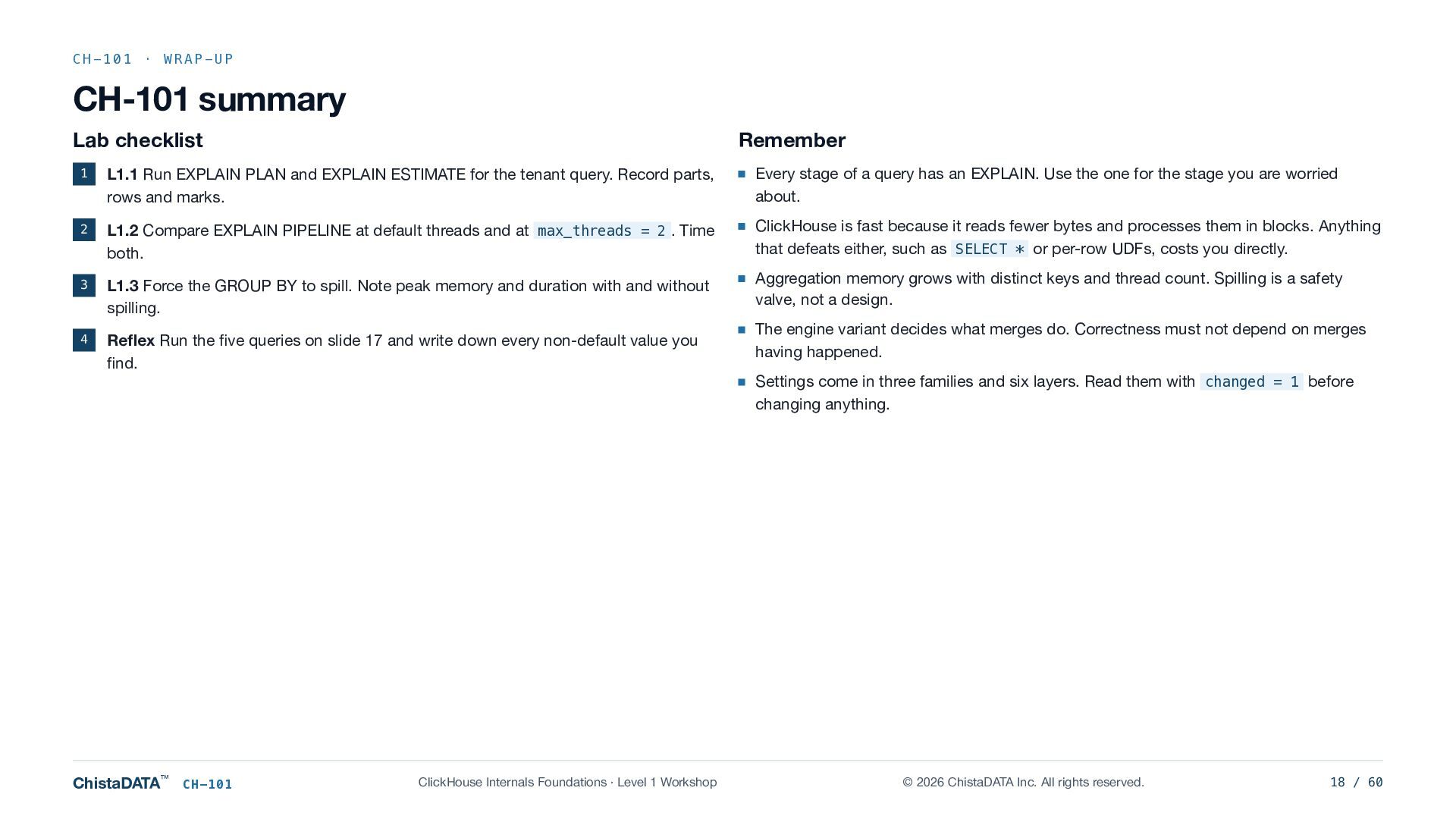
    Run EXPLAIN PLAN and EXPLAIN ESTIMATE for the tenant query. Record parts, rows and marks. Every stage of a query has an EXPLAIN. Use the one for the stage you are worried about. 2 L1.2 Compare EXPLAIN PIPELINE at default threads and at max_threads = 2 . Time both. ClickHouse is fast because it reads fewer bytes and processes them in blocks. Anything that defeats either, such as SELECT * or per-row UDFs, costs you directly. 3 L1.3 Force the GROUP BY to spill. Note peak memory and duration with and without spilling. Aggregation memory grows with distinct keys and thread count. Spilling is a safety valve, not a design. 4 Reflex Run the five queries on slide 17 and write down every non-default value you find. ChistaDATA™ CH-101 ClickHouse Internals Foundations · Level 1 Workshop The engine variant decides what merges do. Correctness must not depend on merges having happened. Settings come in three families and six layers. Read them with changed = 1 before changing anything. © 2026 ChistaDATA Inc. All rights reserved. 18 / 60
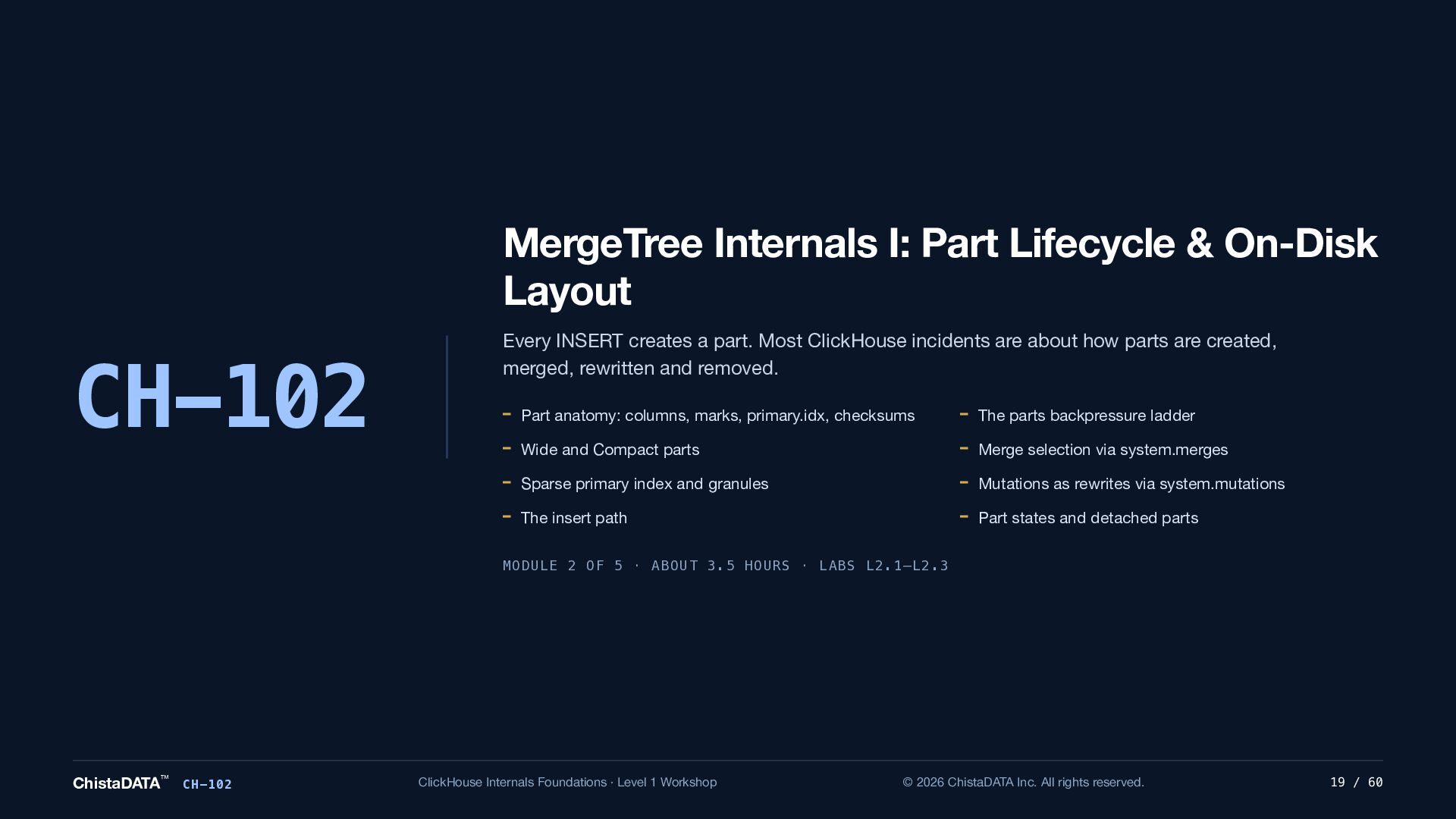
  19. MergeTree Internals I: Part Lifecycle & On-Disk Layout CH-102 Every

    INSERT creates a part. Most ClickHouse incidents are about how parts are created, merged, rewritten and removed. Part anatomy: columns, marks, primary.idx, checksums The parts backpressure ladder Wide and Compact parts Merge selection via system.merges Sparse primary index and granules Mutations as rewrites via system.mutations The insert path Part states and detached parts MODULE 2 OF 5 · ABOUT 3.5 HOURS · LABS L2.1–L2.3 ChistaDATA™ CH-102 ClickHouse Internals Foundations · Level 1 Workshop © 2026 ChistaDATA Inc. All rights reserved. 19 / 60
  20. CH-102 · ON-DISK LAYOUT Anatomy of a part A part

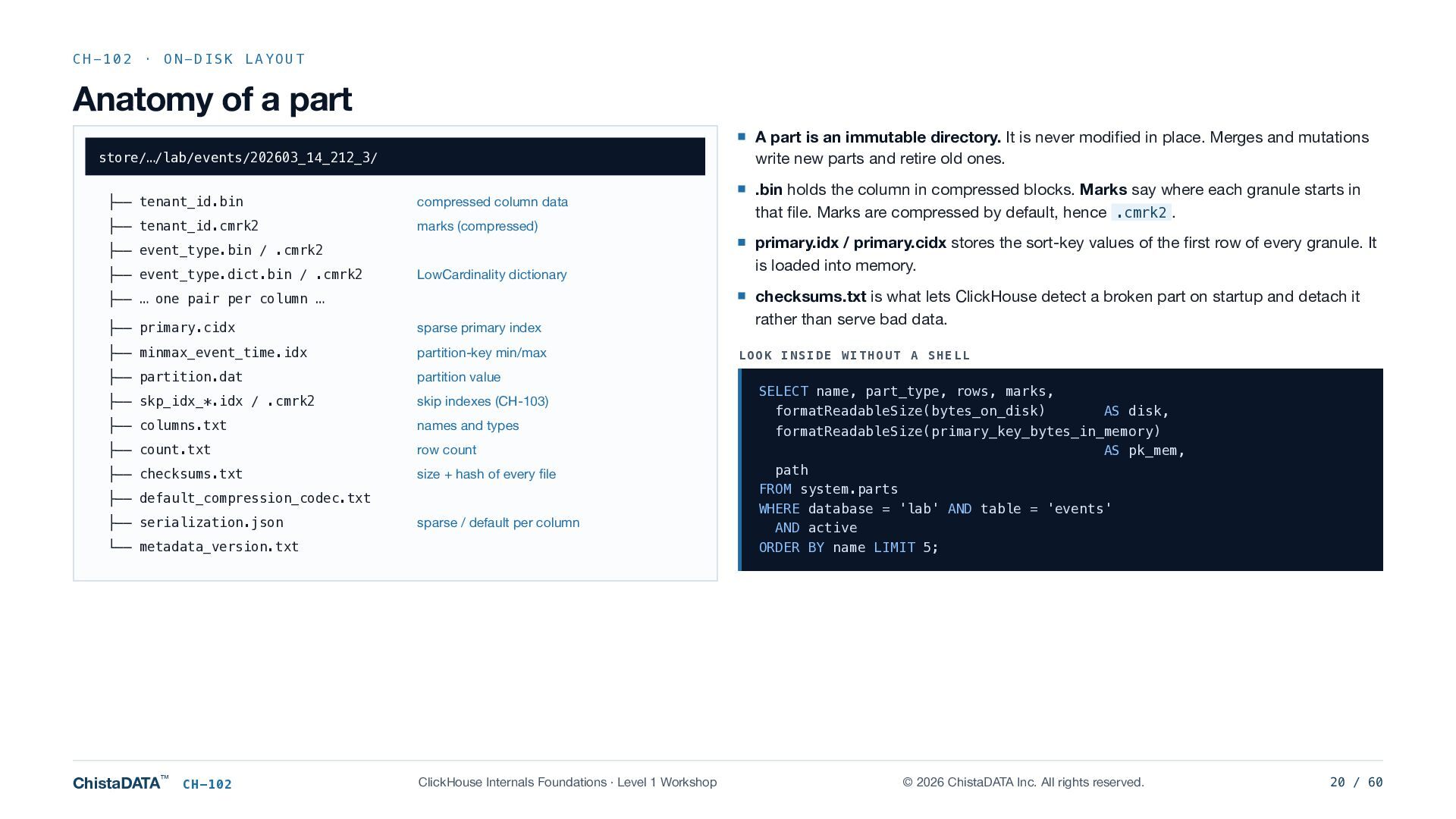
    is an immutable directory. It is never modified in place. Merges and mutations write new parts and retire old ones. store/…/lab/events/202603_14_212_3/ ├── tenant_id.bin compressed column data ├── tenant_id.cmrk2 marks (compressed) ├── event_type.bin / .cmrk2 ├── event_type.dict.bin / .cmrk2 LowCardinality dictionary ├── … one pair per column … ├── primary.cidx sparse primary index ├── minmax_event_time.idx partition-key min/max ├── partition.dat partition value ├── skp_idx_*.idx / .cmrk2 skip indexes (CH-103) ├── columns.txt names and types ├── count.txt row count ├── checksums.txt size + hash of every file ├── default_compression_codec.txt ├── serialization.json sparse / default per column └── metadata_version.txt ChistaDATA™ CH-102 ClickHouse Internals Foundations · Level 1 Workshop .bin holds the column in compressed blocks. Marks say where each granule starts in that file. Marks are compressed by default, hence .cmrk2 . primary.idx / primary.cidx stores the sort-key values of the first row of every granule. It is loaded into memory. checksums.txt is what lets ClickHouse detect a broken part on startup and detach it rather than serve bad data. LOOK INSIDE WITHOUT A SHELL SELECT name, part_type, rows, marks, formatReadableSize(bytes_on_disk) AS disk, formatReadableSize(primary_key_bytes_in_memory) AS pk_mem, path FROM system.parts WHERE database = 'lab' AND table = 'events' AND active ORDER BY name LIMIT 5; © 2026 ChistaDATA Inc. All rights reserved. 20 / 60
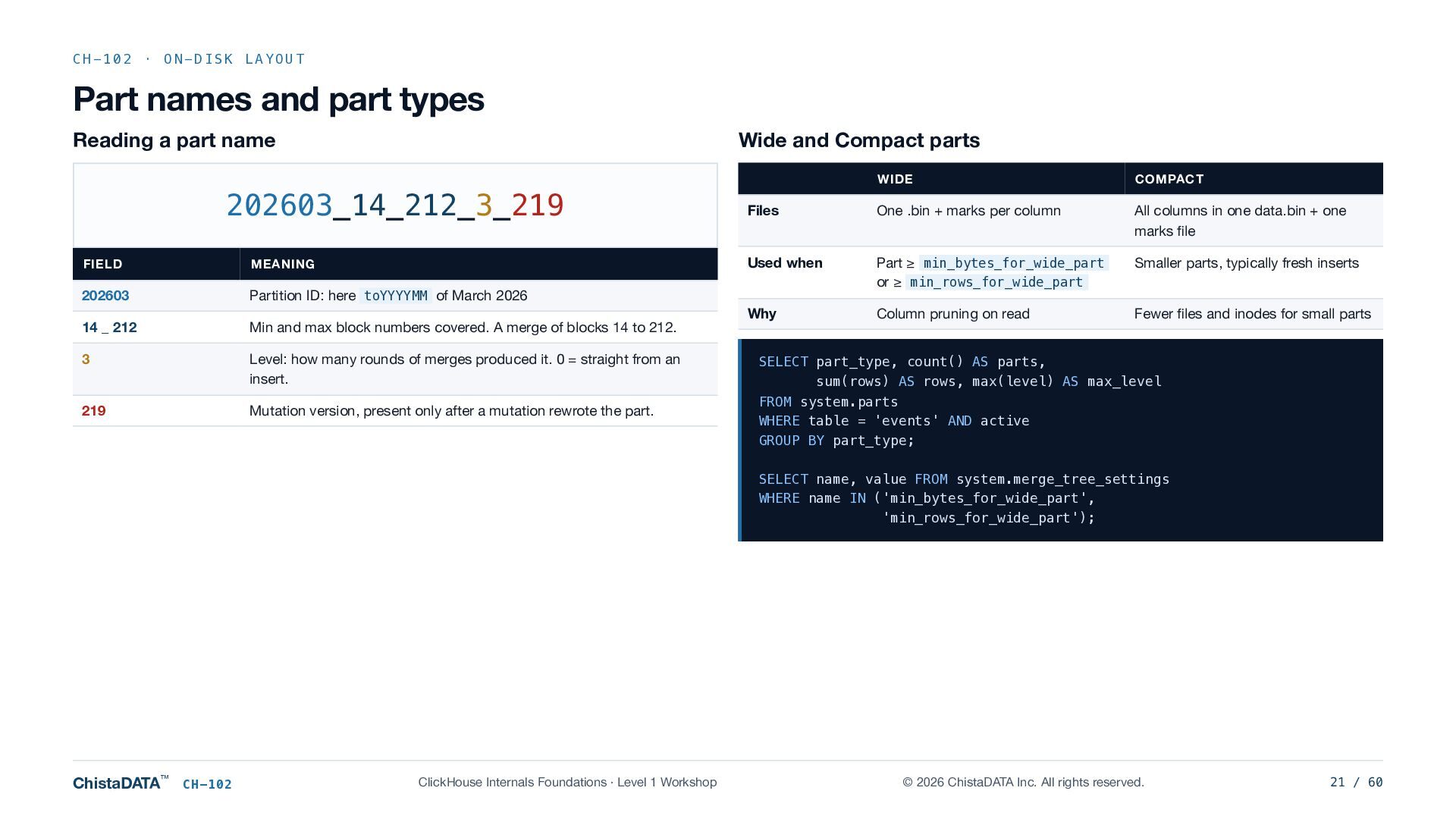
  21. CH-102 · ON-DISK LAYOUT Part names and part types Reading

    a part name Wide and Compact parts 202603_14_212_3_219 FIELD MEANING 202603 Partition ID: here toYYYYMM of March 2026 14 _ 212 Min and max block numbers covered. A merge of blocks 14 to 212. 3 Level: how many rounds of merges produced it. 0 = straight from an insert. 219 Mutation version, present only after a mutation rewrote the part. WIDE COMPACT Files One .bin + marks per column All columns in one data.bin + one marks file Used when Part ≥ min_bytes_for_wide_part or ≥ min_rows_for_wide_part Smaller parts, typically fresh inserts Why Column pruning on read Fewer files and inodes for small parts SELECT part_type, count() AS parts, sum(rows) AS rows, max(level) AS max_level FROM system.parts WHERE table = 'events' AND active GROUP BY part_type; SELECT name, value FROM system.merge_tree_settings WHERE name IN ('min_bytes_for_wide_part', 'min_rows_for_wide_part'); ChistaDATA™ CH-102 ClickHouse Internals Foundations · Level 1 Workshop © 2026 ChistaDATA Inc. All rights reserved. 21 / 60
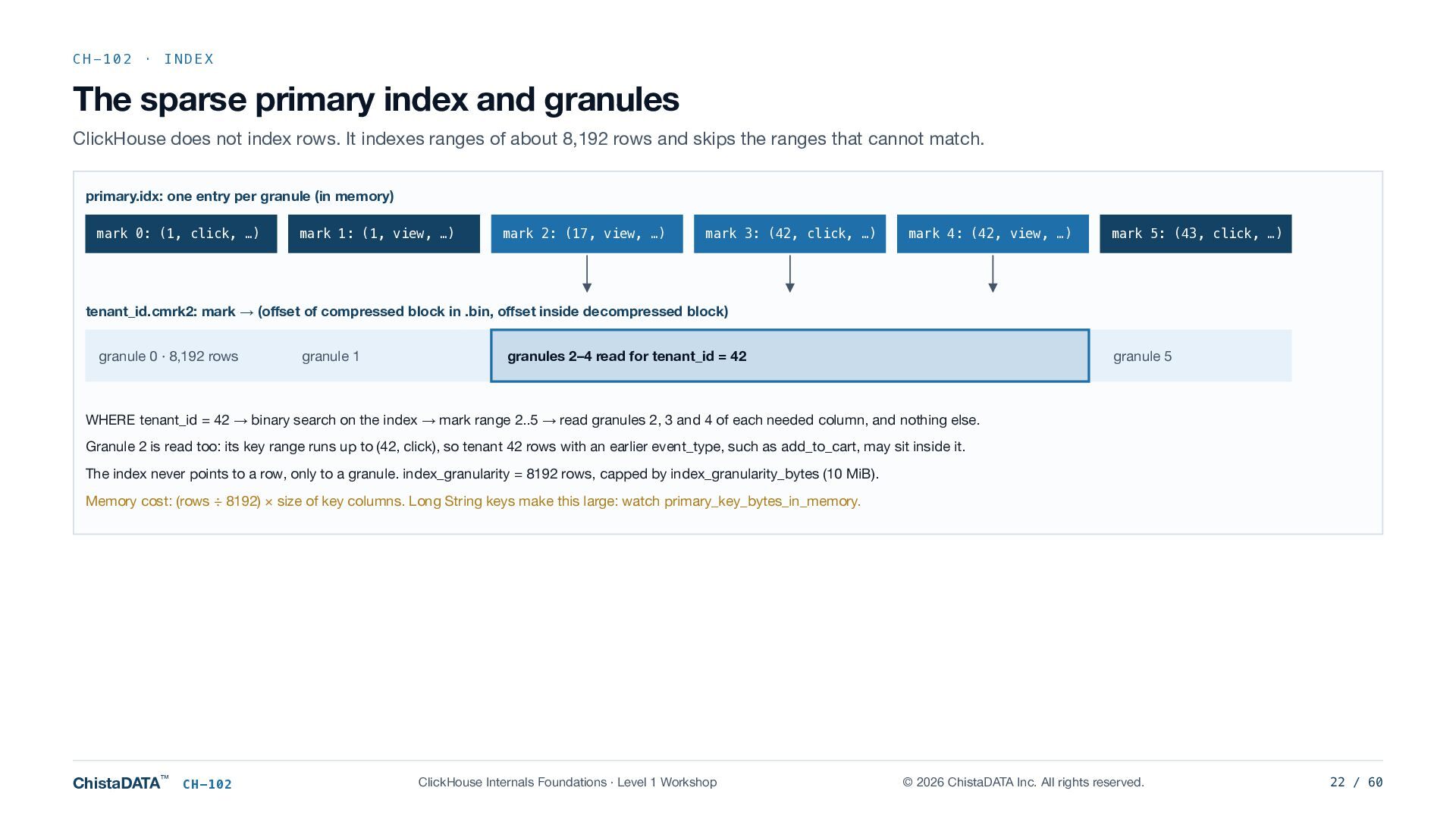
  22. CH-102 · INDEX The sparse primary index and granules ClickHouse

    does not index rows. It indexes ranges of about 8,192 rows and skips the ranges that cannot match. primary.idx: one entry per granule (in memory) mark 0: (1, click, …) mark 1: (1, view, …) mark 2: (17, view, …) mark 3: (42, click, …) mark 4: (42, view, …) mark 5: (43, click, …) tenant_id.cmrk2: mark → (offset of compressed block in .bin, offset inside decompressed block) granule 0 · 8,192 rows granule 1 granules 2–4 read for tenant_id = 42 granule 5 WHERE tenant_id = 42 → binary search on the index → mark range 2..5 → read granules 2, 3 and 4 of each needed column, and nothing else. Granule 2 is read too: its key range runs up to (42, click), so tenant 42 rows with an earlier event_type, such as add_to_cart, may sit inside it. The index never points to a row, only to a granule. index_granularity = 8192 rows, capped by index_granularity_bytes (10 MiB). Memory cost: (rows ÷ 8192) × size of key columns. Long String keys make this large: watch primary_key_bytes_in_memory. ChistaDATA™ CH-102 ClickHouse Internals Foundations · Level 1 Workshop © 2026 ChistaDATA Inc. All rights reserved. 22 / 60
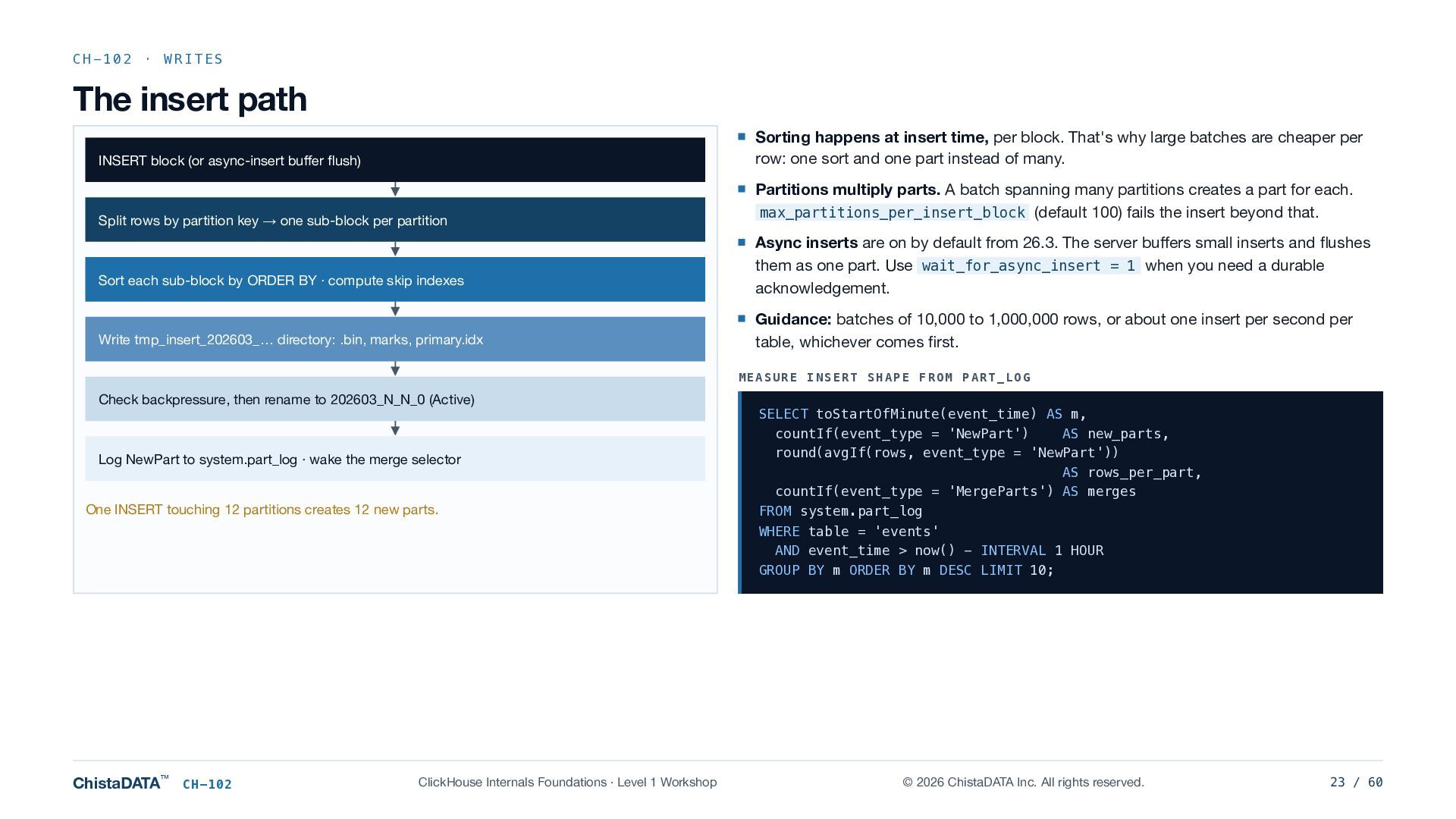
  23. CH-102 · WRITES The insert path Sorting happens at insert

    time, per block. That's why large batches are cheaper per row: one sort and one part instead of many. INSERT block (or async-insert buffer flush) Split rows by partition key → one sub-block per partition Sort each sub-block by ORDER BY · compute skip indexes Write tmp_insert_202603_… directory: .bin, marks, primary.idx Partitions multiply parts. A batch spanning many partitions creates a part for each. max_partitions_per_insert_block (default 100) fails the insert beyond that. Async inserts are on by default from 26.3. The server buffers small inserts and flushes them as one part. Use wait_for_async_insert = 1 when you need a durable acknowledgement. Guidance: batches of 10,000 to 1,000,000 rows, or about one insert per second per table, whichever comes first. MEASURE INSERT SHAPE FROM PART_LOG Check backpressure, then rename to 202603_N_N_0 (Active) Log NewPart to system.part_log · wake the merge selector One INSERT touching 12 partitions creates 12 new parts. ChistaDATA™ CH-102 ClickHouse Internals Foundations · Level 1 Workshop SELECT toStartOfMinute(event_time) AS m, countIf(event_type = 'NewPart') AS new_parts, round(avgIf(rows, event_type = 'NewPart')) AS rows_per_part, countIf(event_type = 'MergeParts') AS merges FROM system.part_log WHERE table = 'events' AND event_time > now() - INTERVAL 1 HOUR GROUP BY m ORDER BY m DESC LIMIT 10; © 2026 ChistaDATA Inc. All rights reserved. 23 / 60
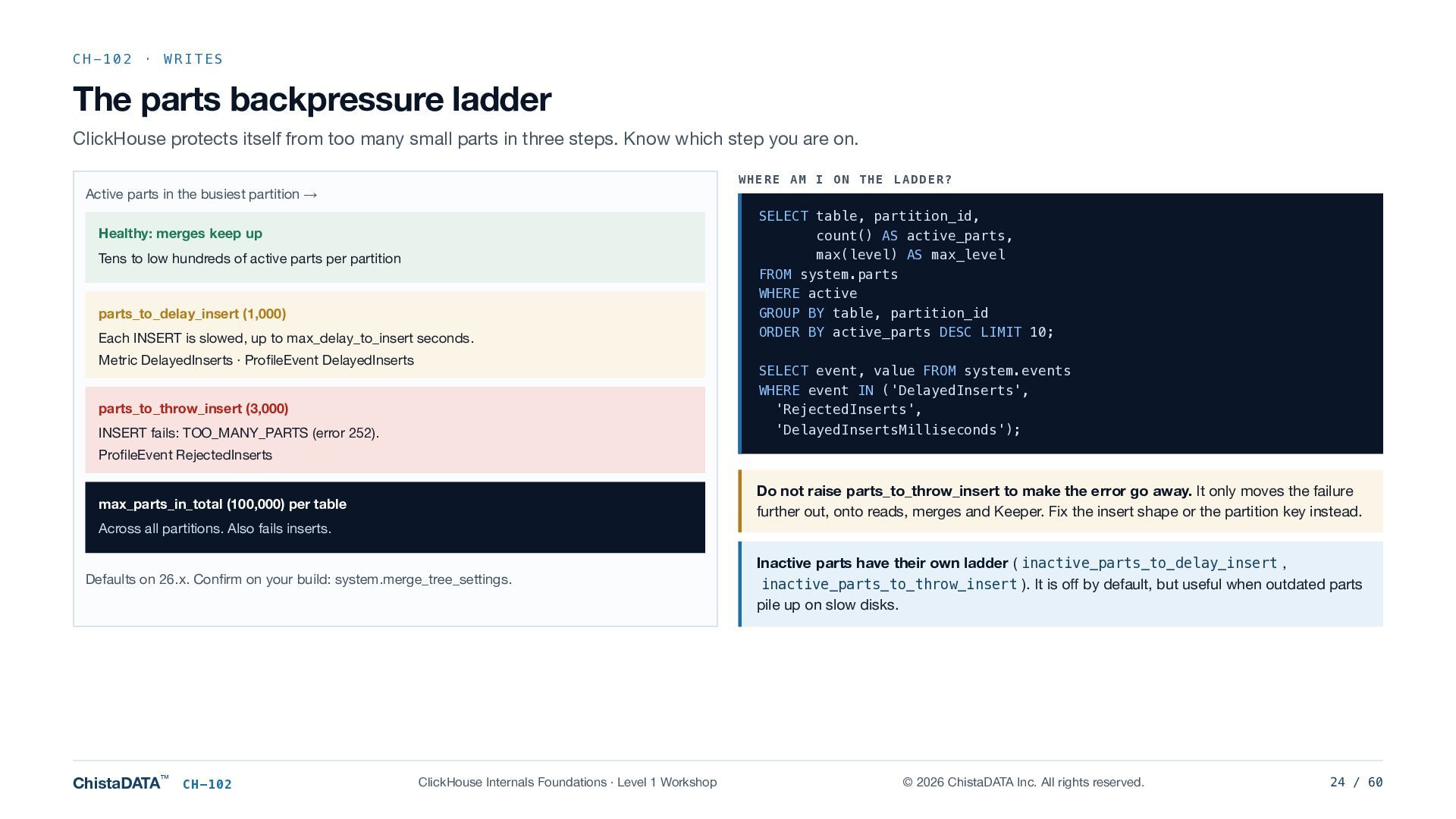
  24. CH-102 · WRITES The parts backpressure ladder ClickHouse protects itself

    from too many small parts in three steps. Know which step you are on. WHERE AM I ON THE LADDER? Active parts in the busiest partition → Healthy: merges keep up Tens to low hundreds of active parts per partition parts_to_delay_insert (1,000) Each INSERT is slowed, up to max_delay_to_insert seconds. Metric DelayedInserts · ProfileEvent DelayedInserts SELECT table, partition_id, count() AS active_parts, max(level) AS max_level FROM system.parts WHERE active GROUP BY table, partition_id ORDER BY active_parts DESC LIMIT 10; SELECT event, value FROM system.events WHERE event IN ('DelayedInserts', 'RejectedInserts', 'DelayedInsertsMilliseconds'); parts_to_throw_insert (3,000) INSERT fails: TOO_MANY_PARTS (error 252). ProfileEvent RejectedInserts Do not raise parts_to_throw_insert to make the error go away. It only moves the failure further out, onto reads, merges and Keeper. Fix the insert shape or the partition key instead. max_parts_in_total (100,000) per table Across all partitions. Also fails inserts. Defaults on 26.x. Confirm on your build: system.merge_tree_settings. ChistaDATA™ CH-102 ClickHouse Internals Foundations · Level 1 Workshop Inactive parts have their own ladder ( inactive_parts_to_delay_insert , inactive_parts_to_throw_insert ). It is off by default, but useful when outdated parts pile up on slow disks. © 2026 ChistaDATA Inc. All rights reserved. 24 / 60
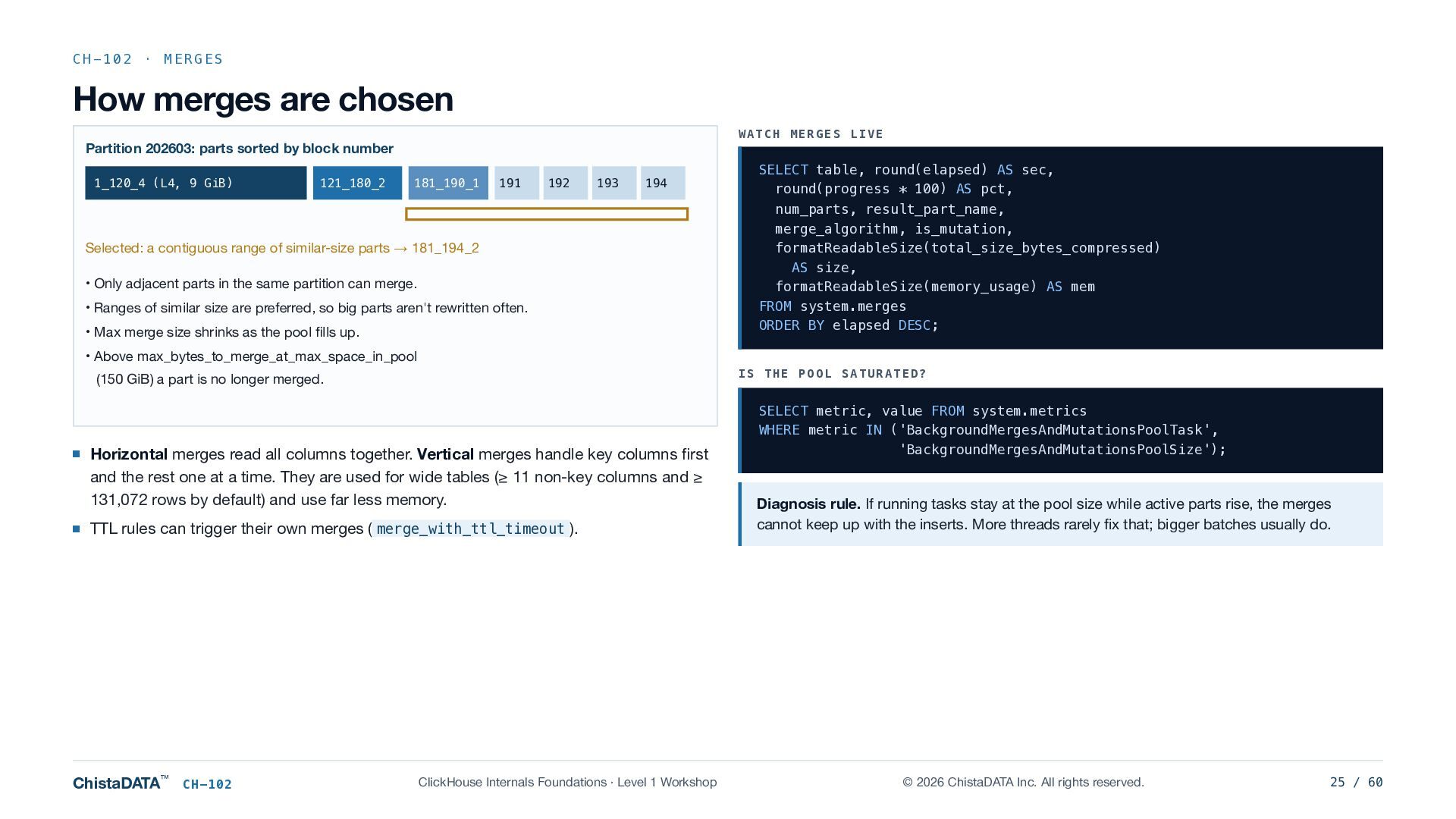
  25. CH-102 · MERGES How merges are chosen WATCH MERGES LIVE

    Partition 202603: parts sorted by block number 1_120_4 (L4, 9 GiB) 121_180_2 181_190_1 191 192 193 194 Selected: a contiguous range of similar-size parts → 181_194_2 • Only adjacent parts in the same partition can merge. • Ranges of similar size are preferred, so big parts aren't rewritten often. • Max merge size shrinks as the pool fills up. SELECT table, round(elapsed) AS sec, round(progress * 100) AS pct, num_parts, result_part_name, merge_algorithm, is_mutation, formatReadableSize(total_size_bytes_compressed) AS size, formatReadableSize(memory_usage) AS mem FROM system.merges ORDER BY elapsed DESC; • Above max_bytes_to_merge_at_max_space_in_pool IS THE POOL SATURATED? (150 GiB) a part is no longer merged. Horizontal merges read all columns together. Vertical merges handle key columns first and the rest one at a time. They are used for wide tables (≥ 11 non-key columns and ≥ 131,072 rows by default) and use far less memory. TTL rules can trigger their own merges ( merge_with_ttl_timeout ). ChistaDATA™ CH-102 ClickHouse Internals Foundations · Level 1 Workshop SELECT metric, value FROM system.metrics WHERE metric IN ('BackgroundMergesAndMutationsPoolTask', 'BackgroundMergesAndMutationsPoolSize'); Diagnosis rule. If running tasks stay at the pool size while active parts rise, the merges cannot keep up with the inserts. More threads rarely fix that; bigger batches usually do. © 2026 ChistaDATA Inc. All rights reserved. 25 / 60
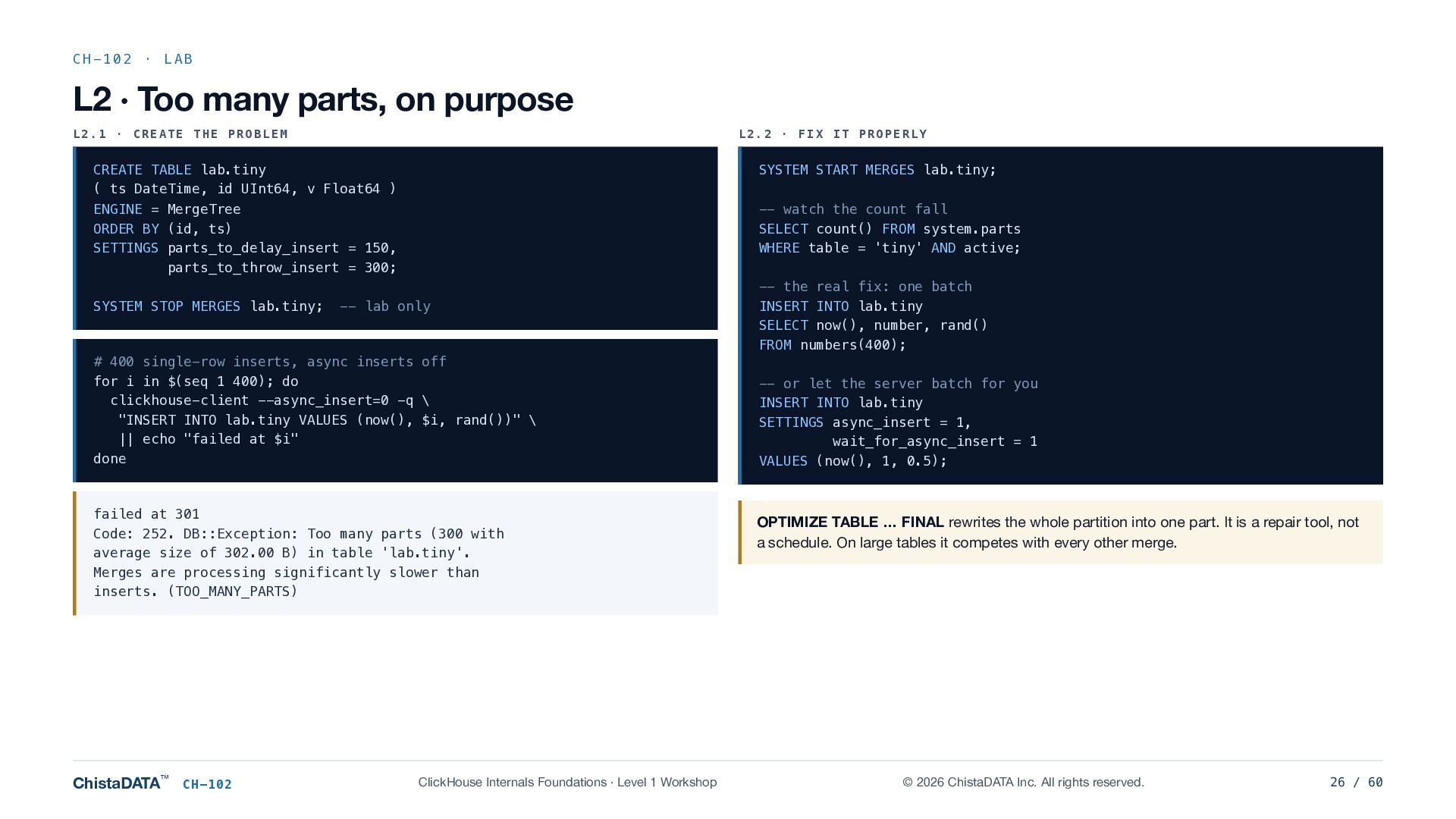
  26. CH-102 · LAB L2 · Too many parts, on purpose

    L2.1 · CREATE THE PROBLEM L2.2 · FIX IT PROPERLY CREATE TABLE lab.tiny ( ts DateTime, id UInt64, v Float64 ) ENGINE = MergeTree ORDER BY (id, ts) SETTINGS parts_to_delay_insert = 150, parts_to_throw_insert = 300; SYSTEM STOP MERGES lab.tiny; SYSTEM START MERGES lab.tiny; -- watch the count fall SELECT count() FROM system.parts WHERE table = 'tiny' AND active; -- lab only # 400 single-row inserts, async inserts off for i in $(seq 1 400); do clickhouse-client --async_insert=0 -q \ "INSERT INTO lab.tiny VALUES (now(), $i, rand())" \ || echo "failed at $i" done failed at 301 Code: 252. DB::Exception: Too many parts (300 with average size of 302.00 B) in table 'lab.tiny'. Merges are processing significantly slower than inserts. (TOO_MANY_PARTS) ChistaDATA™ CH-102 ClickHouse Internals Foundations · Level 1 Workshop -- the real fix: one batch INSERT INTO lab.tiny SELECT now(), number, rand() FROM numbers(400); -- or let the server batch for you INSERT INTO lab.tiny SETTINGS async_insert = 1, wait_for_async_insert = 1 VALUES (now(), 1, 0.5); OPTIMIZE TABLE … FINAL rewrites the whole partition into one part. It is a repair tool, not a schedule. On large tables it competes with every other merge. © 2026 ChistaDATA Inc. All rights reserved. 26 / 60
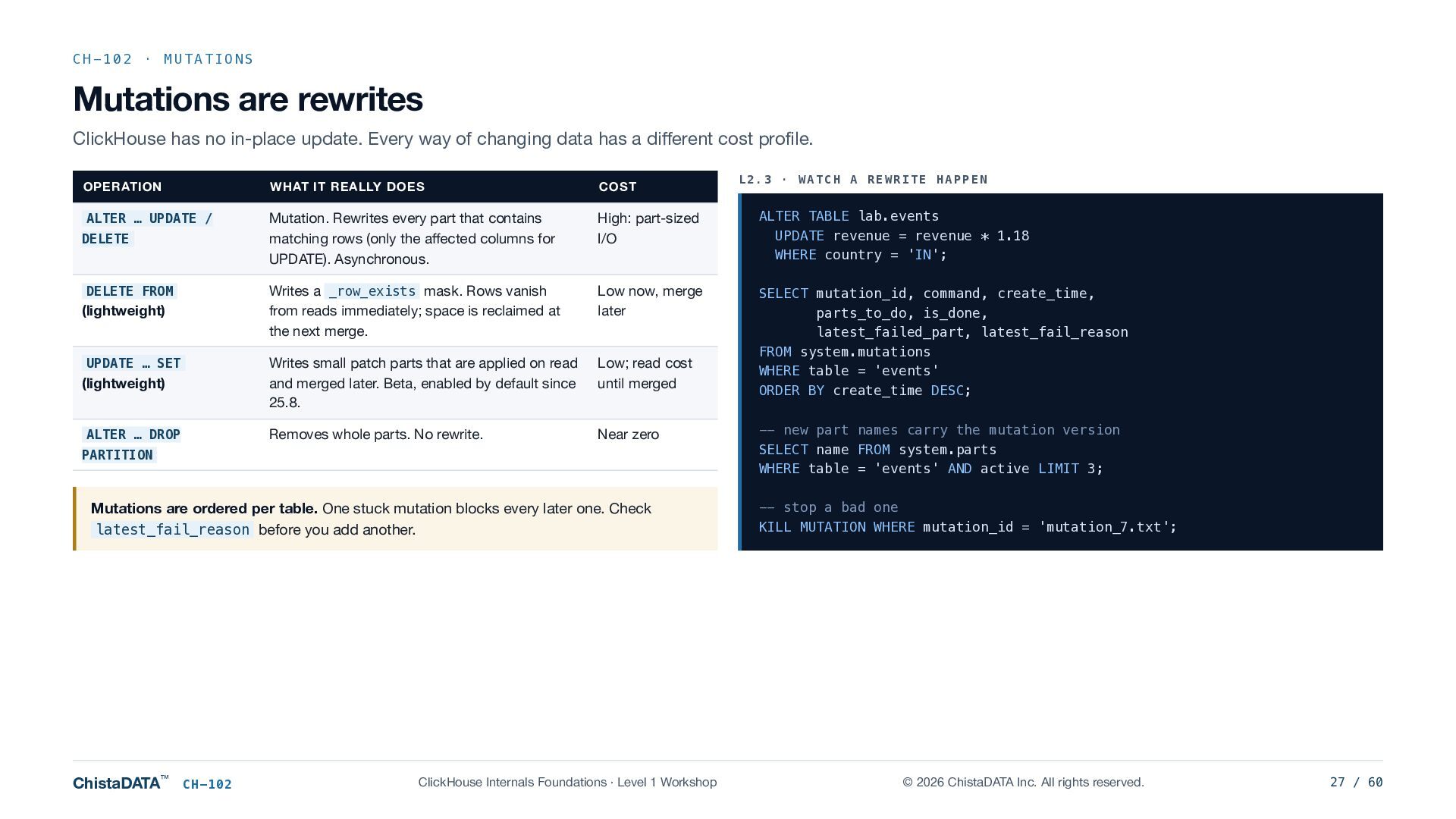
  27. CH-102 · MUTATIONS Mutations are rewrites ClickHouse has no in-place

    update. Every way of changing data has a different cost profile. L2.3 · WATCH A REWRITE HAPPEN OPERATION WHAT IT REALLY DOES COST ALTER … UPDATE / Mutation. Rewrites every part that contains matching rows (only the affected columns for UPDATE). Asynchronous. High: part-sized I/O ALTER TABLE lab.events UPDATE revenue = revenue * 1.18 WHERE country = 'IN'; Writes a _row_exists mask. Rows vanish from reads immediately; space is reclaimed at the next merge. Low now, merge later (lightweight) Writes small patch parts that are applied on read and merged later. Beta, enabled by default since 25.8. Low; read cost until merged SELECT mutation_id, command, create_time, parts_to_do, is_done, latest_failed_part, latest_fail_reason FROM system.mutations WHERE table = 'events' ORDER BY create_time DESC; ALTER … DROP Removes whole parts. No rewrite. Near zero DELETE DELETE FROM (lightweight) UPDATE … SET PARTITION -- new part names carry the mutation version SELECT name FROM system.parts WHERE table = 'events' AND active LIMIT 3; Mutations are ordered per table. One stuck mutation blocks every later one. Check latest_fail_reason before you add another. -- stop a bad one KILL MUTATION WHERE mutation_id = 'mutation_7.txt'; ChistaDATA™ CH-102 ClickHouse Internals Foundations · Level 1 Workshop © 2026 ChistaDATA Inc. All rights reserved. 27 / 60
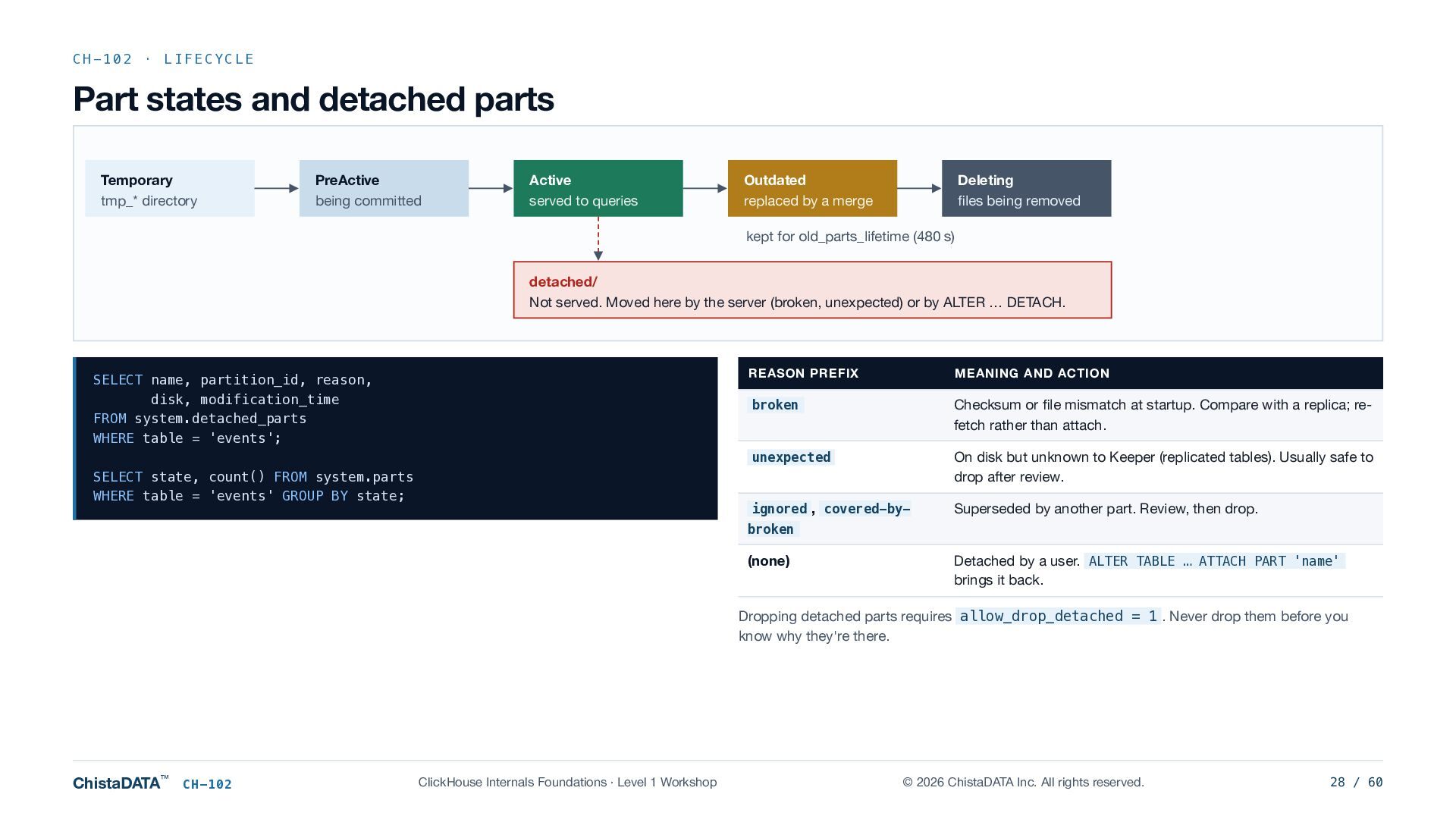
  28. CH-102 · LIFECYCLE Part states and detached parts Temporary tmp_*

    directory PreActive being committed Active served to queries Outdated replaced by a merge Deleting files being removed kept for old_parts_lifetime (480 s) detached/ Not served. Moved here by the server (broken, unexpected) or by ALTER … DETACH. SELECT name, partition_id, reason, disk, modification_time FROM system.detached_parts WHERE table = 'events'; SELECT state, count() FROM system.parts WHERE table = 'events' GROUP BY state; REASON PREFIX MEANING AND ACTION broken Checksum or file mismatch at startup. Compare with a replica; refetch rather than attach. unexpected On disk but unknown to Keeper (replicated tables). Usually safe to drop after review. ignored , covered-by- Superseded by another part. Review, then drop. broken (none) Detached by a user. ALTER TABLE … ATTACH PART 'name' brings it back. Dropping detached parts requires allow_drop_detached = 1 . Never drop them before you know why they're there. ChistaDATA™ CH-102 ClickHouse Internals Foundations · Level 1 Workshop © 2026 ChistaDATA Inc. All rights reserved. 28 / 60
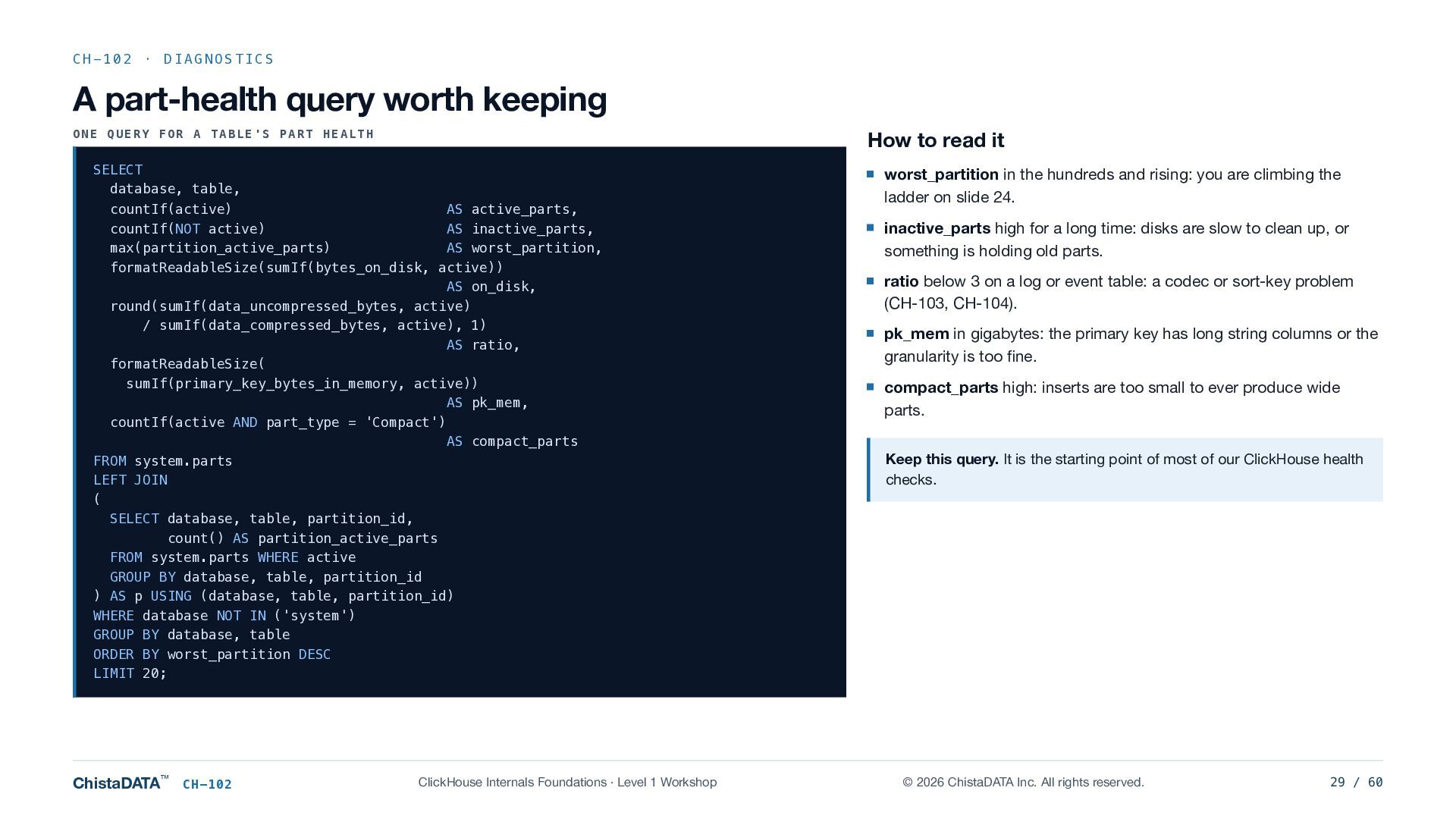
  29. CH-102 · DIAGNOSTICS A part-health query worth keeping ONE QUERY

    FOR A TABLE'S PART HEALTH How to read it SELECT database, table, countIf(active) AS active_parts, countIf(NOT active) AS inactive_parts, max(partition_active_parts) AS worst_partition, formatReadableSize(sumIf(bytes_on_disk, active)) AS on_disk, round(sumIf(data_uncompressed_bytes, active) / sumIf(data_compressed_bytes, active), 1) AS ratio, formatReadableSize( sumIf(primary_key_bytes_in_memory, active)) AS pk_mem, countIf(active AND part_type = 'Compact') AS compact_parts FROM system.parts LEFT JOIN ( SELECT database, table, partition_id, count() AS partition_active_parts FROM system.parts WHERE active GROUP BY database, table, partition_id ) AS p USING (database, table, partition_id) WHERE database NOT IN ('system') GROUP BY database, table ORDER BY worst_partition DESC LIMIT 20; ChistaDATA™ CH-102 ClickHouse Internals Foundations · Level 1 Workshop worst_partition in the hundreds and rising: you are climbing the ladder on slide 24. inactive_parts high for a long time: disks are slow to clean up, or something is holding old parts. ratio below 3 on a log or event table: a codec or sort-key problem (CH-103, CH-104). pk_mem in gigabytes: the primary key has long string columns or the granularity is too fine. compact_parts high: inserts are too small to ever produce wide parts. Keep this query. It is the starting point of most of our ClickHouse health checks. © 2026 ChistaDATA Inc. All rights reserved. 29 / 60
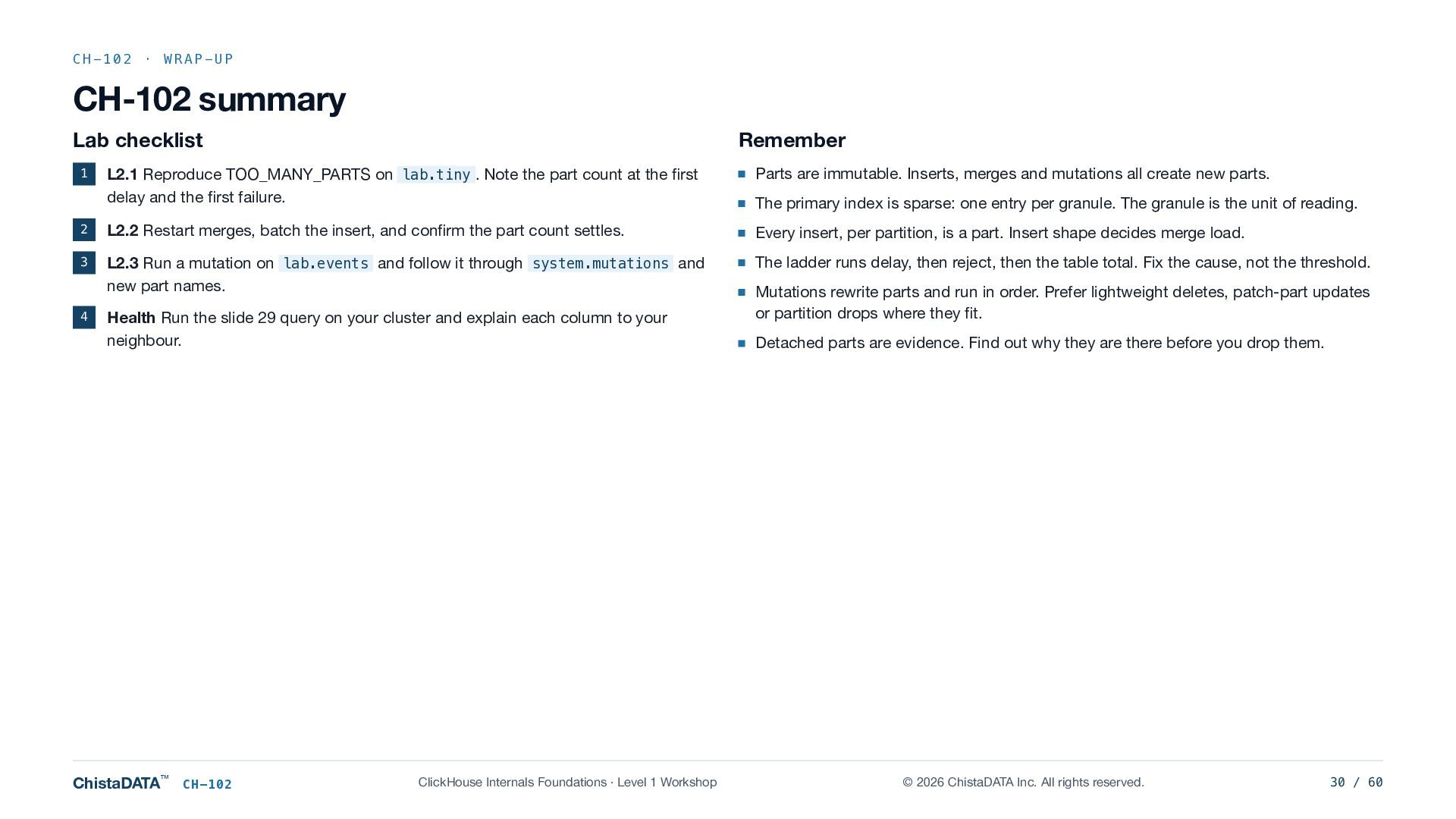
  30. CH-102 · WRAP-UP CH-102 summary Lab checklist Remember L2.1 Reproduce

    TOO_MANY_PARTS on lab.tiny . Note the part count at the first delay and the first failure. Parts are immutable. Inserts, merges and mutations all create new parts. 2 L2.2 Restart merges, batch the insert, and confirm the part count settles. Every insert, per partition, is a part. Insert shape decides merge load. 3 L2.3 Run a mutation on lab.events and follow it through system.mutations and new part names. The ladder runs delay, then reject, then the table total. Fix the cause, not the threshold. 1 4 Health Run the slide 29 query on your cluster and explain each column to your neighbour. ChistaDATA™ CH-102 ClickHouse Internals Foundations · Level 1 Workshop The primary index is sparse: one entry per granule. The granule is the unit of reading. Mutations rewrite parts and run in order. Prefer lightweight deletes, patch-part updates or partition drops where they fit. Detached parts are evidence. Find out why they are there before you drop them. © 2026 ChistaDATA Inc. All rights reserved. 30 / 60
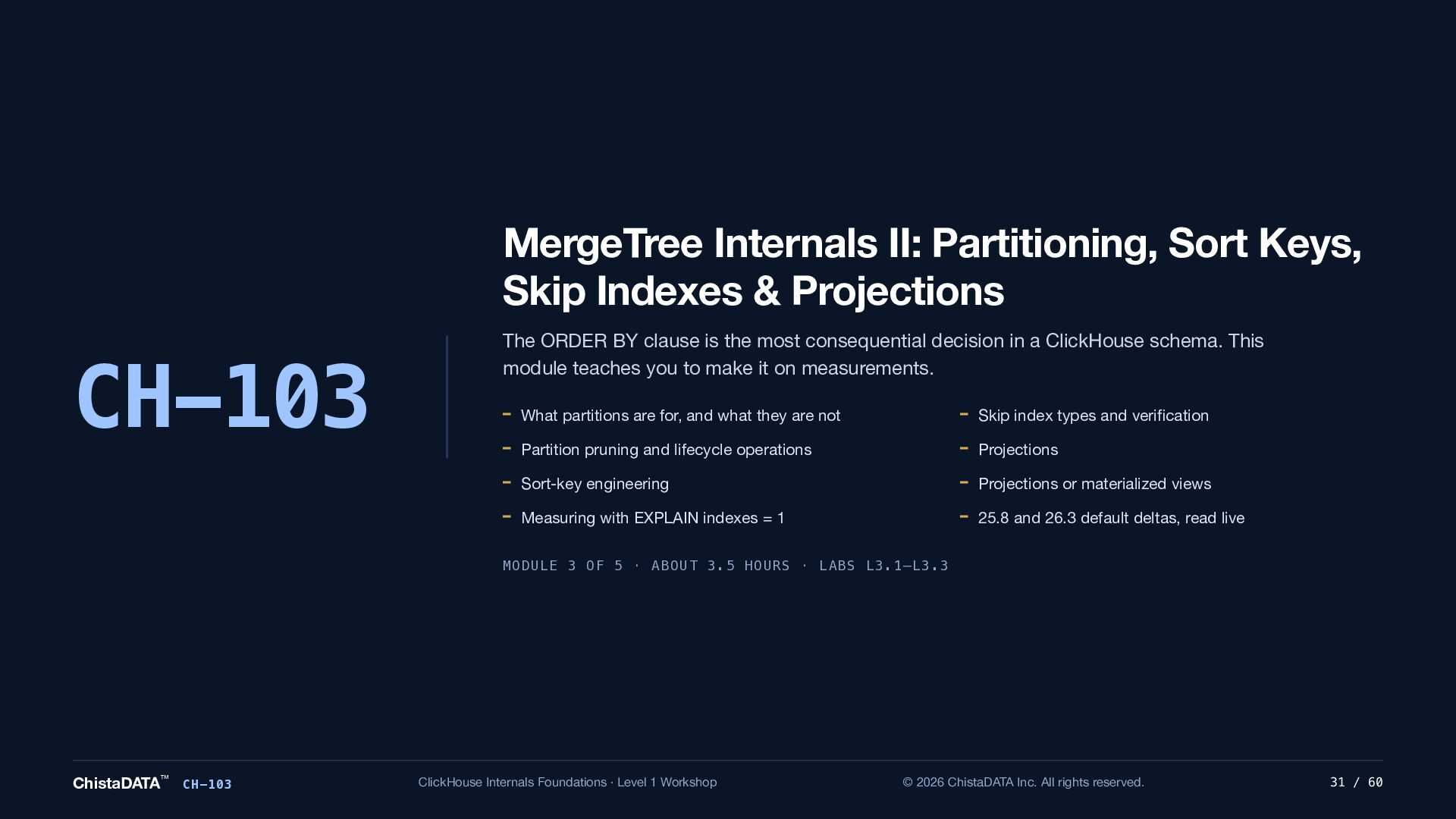
  31. MergeTree Internals II: Partitioning, Sort Keys, Skip Indexes & Projections

    CH-103 The ORDER BY clause is the most consequential decision in a ClickHouse schema. This module teaches you to make it on measurements. What partitions are for, and what they are not Skip index types and verification Partition pruning and lifecycle operations Projections Sort-key engineering Projections or materialized views Measuring with EXPLAIN indexes = 1 25.8 and 26.3 default deltas, read live MODULE 3 OF 5 · ABOUT 3.5 HOURS · LABS L3.1–L3.3 ChistaDATA™ CH-103 ClickHouse Internals Foundations · Level 1 Workshop © 2026 ChistaDATA Inc. All rights reserved. 31 / 60
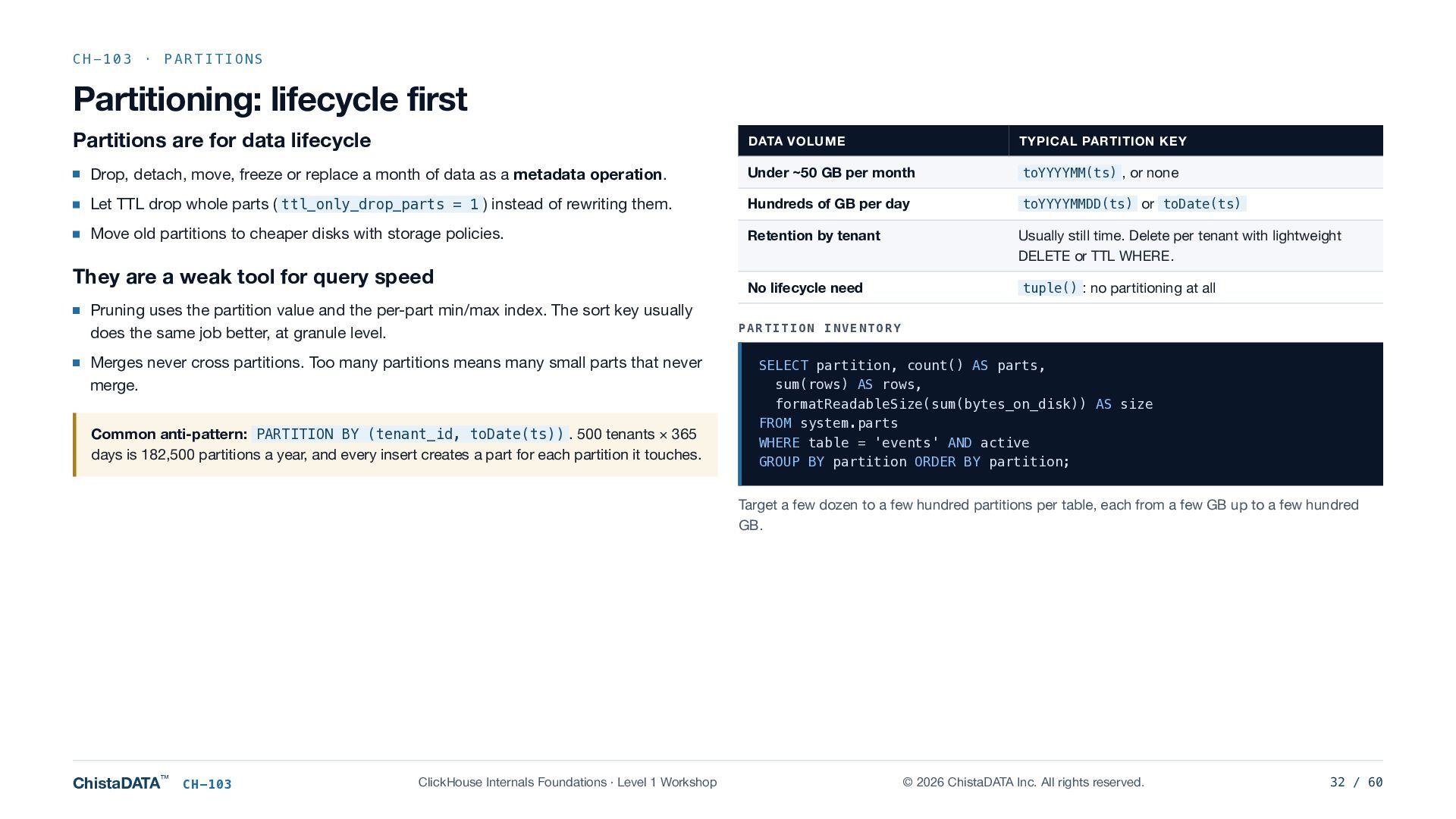
  32. CH-103 · PARTITIONS Partitioning: lifecycle first Partitions are for data

    lifecycle DATA VOLUME TYPICAL PARTITION KEY Drop, detach, move, freeze or replace a month of data as a metadata operation. Under ~50 GB per month toYYYYMM(ts) , or none Let TTL drop whole parts ( ttl_only_drop_parts = 1 ) instead of rewriting them. Hundreds of GB per day toYYYYMMDD(ts) or toDate(ts) Move old partitions to cheaper disks with storage policies. Retention by tenant Usually still time. Delete per tenant with lightweight DELETE or TTL WHERE. No lifecycle need tuple() : no partitioning at all They are a weak tool for query speed Pruning uses the partition value and the per-part min/max index. The sort key usually does the same job better, at granule level. Merges never cross partitions. Too many partitions means many small parts that never merge. Common anti-pattern: PARTITION BY (tenant_id, toDate(ts)) . 500 tenants × 365 days is 182,500 partitions a year, and every insert creates a part for each partition it touches. PARTITION INVENTORY SELECT partition, count() AS parts, sum(rows) AS rows, formatReadableSize(sum(bytes_on_disk)) AS size FROM system.parts WHERE table = 'events' AND active GROUP BY partition ORDER BY partition; Target a few dozen to a few hundred partitions per table, each from a few GB up to a few hundred GB. ChistaDATA™ CH-103 ClickHouse Internals Foundations · Level 1 Workshop © 2026 ChistaDATA Inc. All rights reserved. 32 / 60
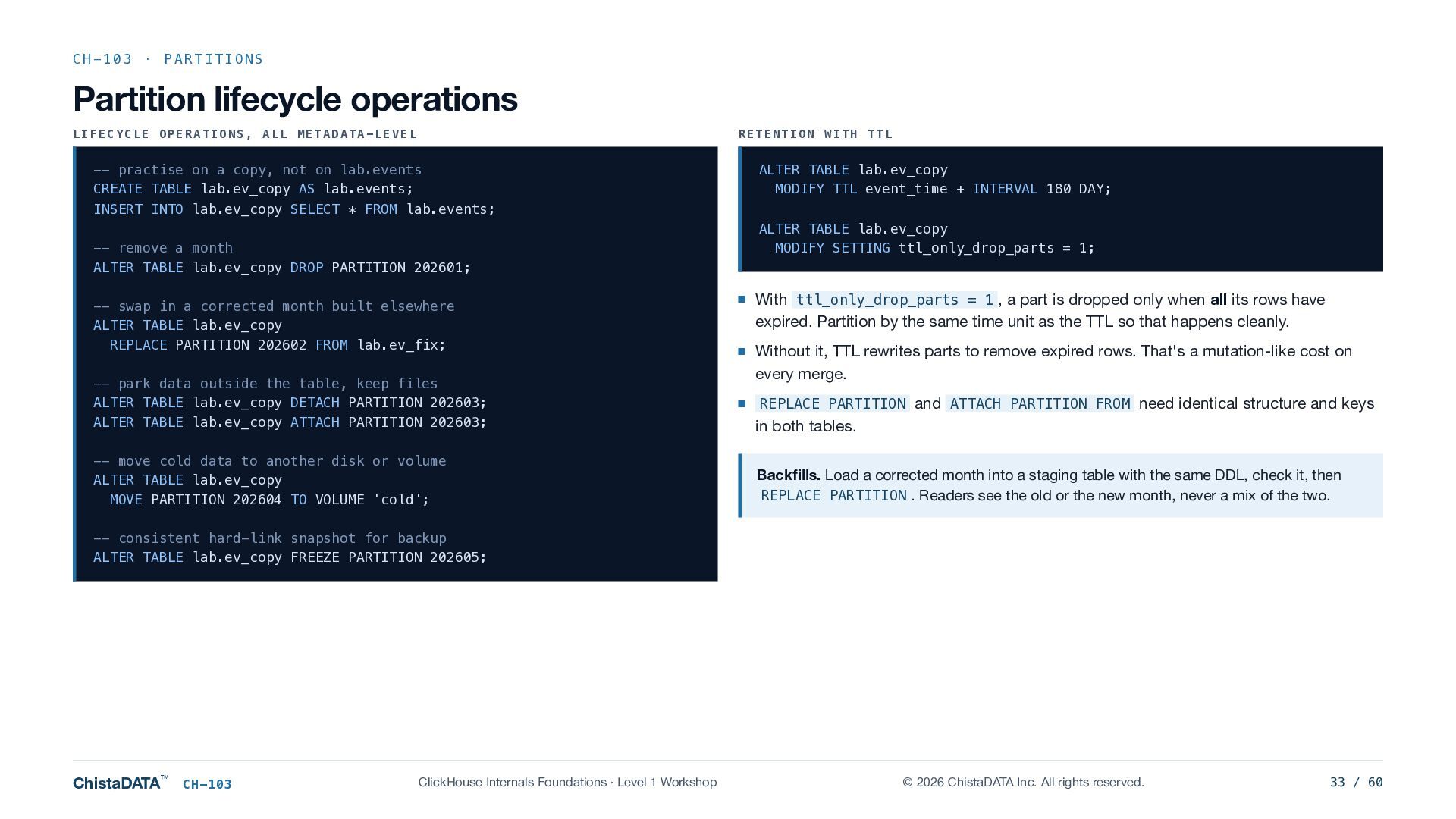
  33. CH-103 · PARTITIONS Partition lifecycle operations LIFECYCLE OPERATIONS, ALL METADATA-LEVEL

    RETENTION WITH TTL -- practise on a copy, not on lab.events CREATE TABLE lab.ev_copy AS lab.events; ALTER TABLE lab.ev_copy MODIFY TTL event_time + INTERVAL 180 DAY; INSERT INTO lab.ev_copy SELECT * FROM lab.events; -- remove a month ALTER TABLE lab.ev_copy DROP PARTITION 202601; -- swap in a corrected month built elsewhere ALTER TABLE lab.ev_copy REPLACE PARTITION 202602 FROM lab.ev_fix; -- park data outside the table, keep files ALTER TABLE lab.ev_copy DETACH PARTITION 202603; ALTER TABLE lab.ev_copy ATTACH PARTITION 202603; -- move cold data to another disk or volume ALTER TABLE lab.ev_copy MOVE PARTITION 202604 TO VOLUME 'cold'; ALTER TABLE lab.ev_copy MODIFY SETTING ttl_only_drop_parts = 1; With ttl_only_drop_parts = 1 , a part is dropped only when all its rows have expired. Partition by the same time unit as the TTL so that happens cleanly. Without it, TTL rewrites parts to remove expired rows. That's a mutation-like cost on every merge. REPLACE PARTITION and ATTACH PARTITION FROM need identical structure and keys in both tables. Backfills. Load a corrected month into a staging table with the same DDL, check it, then REPLACE PARTITION . Readers see the old or the new month, never a mix of the two. -- consistent hard-link snapshot for backup ALTER TABLE lab.ev_copy FREEZE PARTITION 202605; ChistaDATA™ CH-103 ClickHouse Internals Foundations · Level 1 Workshop © 2026 ChistaDATA Inc. All rights reserved. 33 / 60
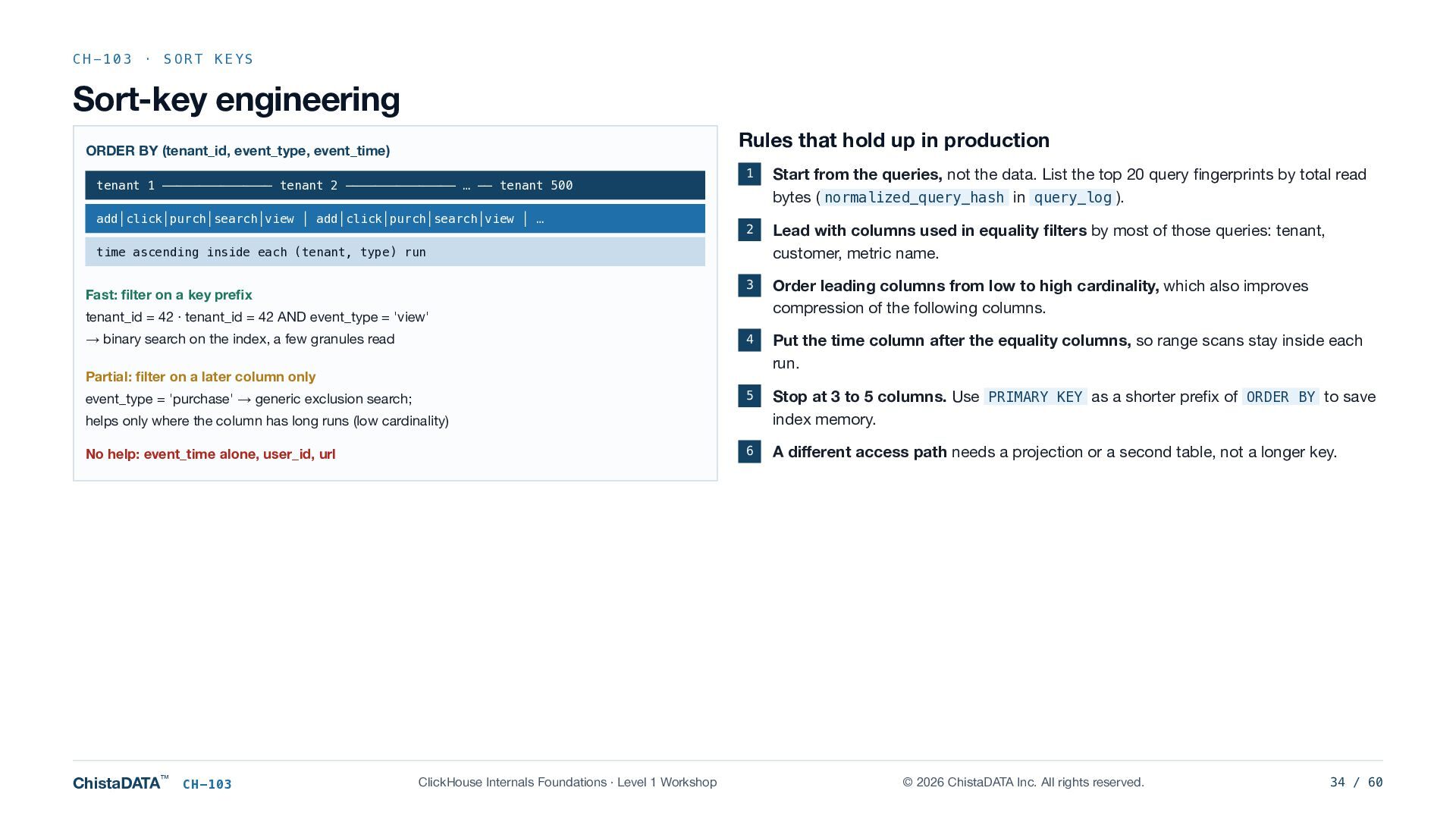
  34. CH-103 · SORT KEYS Sort-key engineering Rules that hold up

    in production ORDER BY (tenant_id, event_type, event_time) tenant 1 ─────────────── tenant 2 ─────────────── … ── tenant 500 add│click│purch│search│view │ add│click│purch│search│view │ … 1 Start from the queries, not the data. List the top 20 query fingerprints by total read bytes ( normalized_query_hash in query_log ). 2 Lead with columns used in equality filters by most of those queries: tenant, customer, metric name. 3 Order leading columns from low to high cardinality, which also improves compression of the following columns. 4 Put the time column after the equality columns, so range scans stay inside each run. 5 Stop at 3 to 5 columns. Use PRIMARY KEY as a shorter prefix of ORDER BY to save index memory. 6 A different access path needs a projection or a second table, not a longer key. time ascending inside each (tenant, type) run Fast: filter on a key prefix tenant_id = 42 · tenant_id = 42 AND event_type = 'view' → binary search on the index, a few granules read Partial: filter on a later column only event_type = 'purchase' → generic exclusion search; helps only where the column has long runs (low cardinality) No help: event_time alone, user_id, url ChistaDATA™ CH-103 ClickHouse Internals Foundations · Level 1 Workshop © 2026 ChistaDATA Inc. All rights reserved. 34 / 60
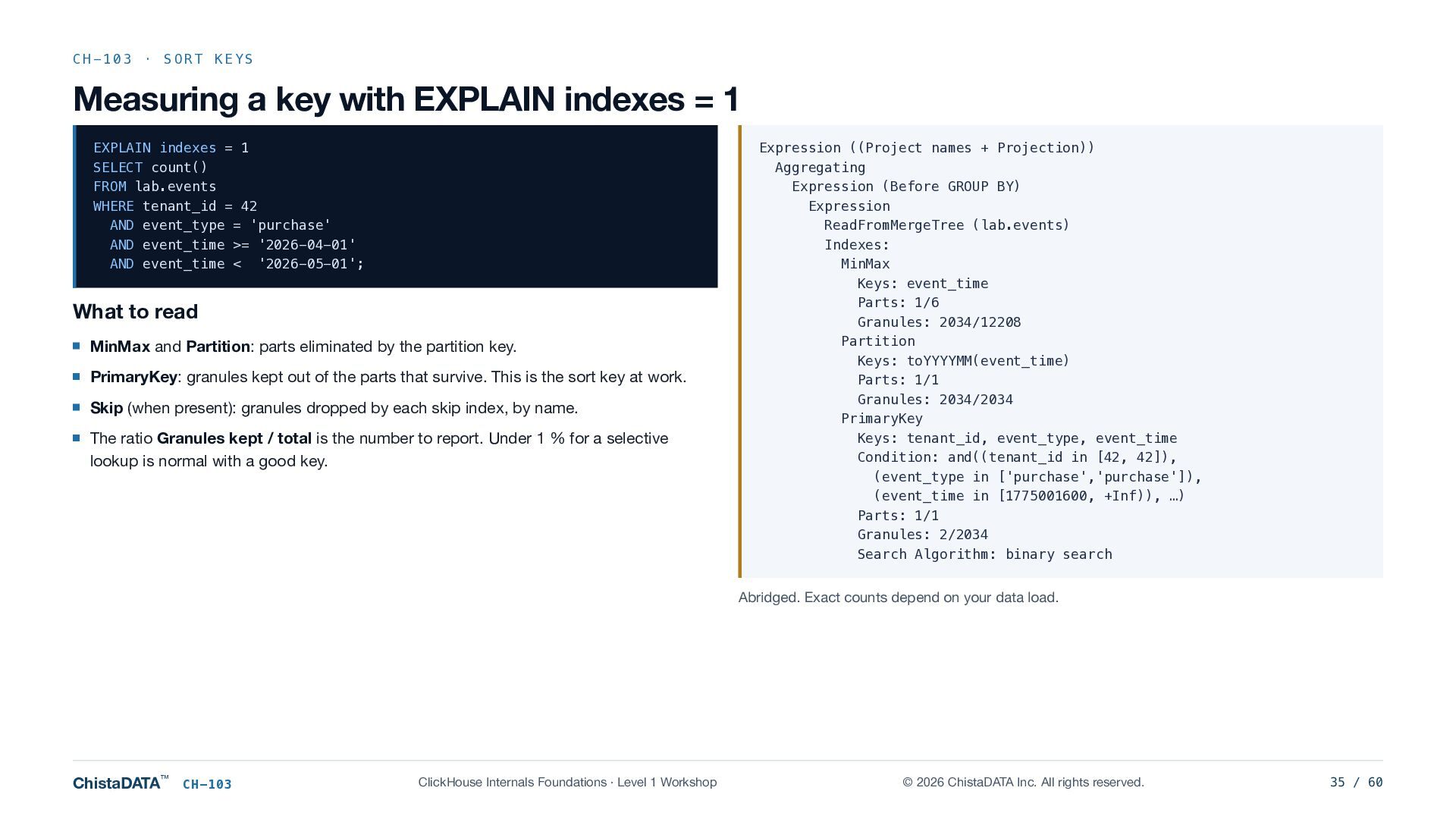
  35. CH-103 · SORT KEYS Measuring a key with EXPLAIN indexes

    = 1 EXPLAIN indexes = 1 SELECT count() FROM lab.events WHERE tenant_id = 42 AND event_type = 'purchase' AND event_time >= '2026-04-01' AND event_time < '2026-05-01'; What to read MinMax and Partition: parts eliminated by the partition key. PrimaryKey: granules kept out of the parts that survive. This is the sort key at work. Skip (when present): granules dropped by each skip index, by name. The ratio Granules kept / total is the number to report. Under 1 % for a selective lookup is normal with a good key. Expression ((Project names + Projection)) Aggregating Expression (Before GROUP BY) Expression ReadFromMergeTree (lab.events) Indexes: MinMax Keys: event_time Parts: 1/6 Granules: 2034/12208 Partition Keys: toYYYYMM(event_time) Parts: 1/1 Granules: 2034/2034 PrimaryKey Keys: tenant_id, event_type, event_time Condition: and((tenant_id in [42, 42]), (event_type in ['purchase','purchase']), (event_time in [1775001600, +Inf)), …) Parts: 1/1 Granules: 2/2034 Search Algorithm: binary search Abridged. Exact counts depend on your data load. ChistaDATA™ CH-103 ClickHouse Internals Foundations · Level 1 Workshop © 2026 ChistaDATA Inc. All rights reserved. 35 / 60
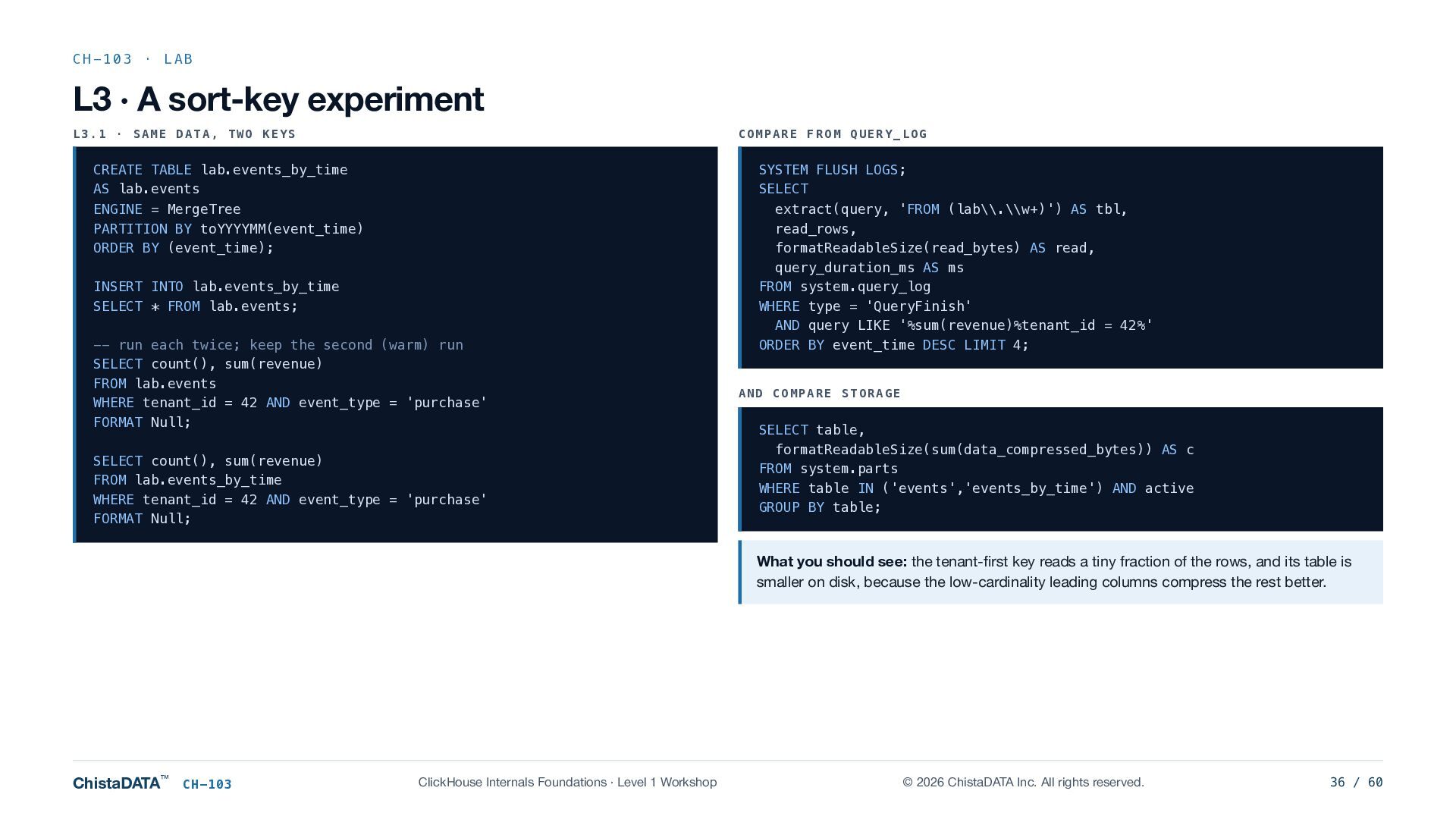
  36. CH-103 · LAB L3 · A sort-key experiment L3.1 ·

    SAME DATA, TWO KEYS COMPARE FROM QUERY_LOG CREATE TABLE lab.events_by_time AS lab.events ENGINE = MergeTree PARTITION BY toYYYYMM(event_time) ORDER BY (event_time); INSERT INTO lab.events_by_time SELECT * FROM lab.events; -- run each twice; keep the second (warm) run SELECT count(), sum(revenue) FROM lab.events WHERE tenant_id = 42 AND event_type = 'purchase' FORMAT Null; SELECT count(), sum(revenue) FROM lab.events_by_time WHERE tenant_id = 42 AND event_type = 'purchase' FORMAT Null; SYSTEM FLUSH LOGS; SELECT extract(query, 'FROM (lab\\.\\w+)') AS tbl, read_rows, formatReadableSize(read_bytes) AS read, query_duration_ms AS ms FROM system.query_log WHERE type = 'QueryFinish' AND query LIKE '%sum(revenue)%tenant_id = 42%' ORDER BY event_time DESC LIMIT 4; AND COMPARE STORAGE SELECT table, formatReadableSize(sum(data_compressed_bytes)) AS c FROM system.parts WHERE table IN ('events','events_by_time') AND active GROUP BY table; What you should see: the tenant-first key reads a tiny fraction of the rows, and its table is smaller on disk, because the low-cardinality leading columns compress the rest better. ChistaDATA™ CH-103 ClickHouse Internals Foundations · Level 1 Workshop © 2026 ChistaDATA Inc. All rights reserved. 36 / 60
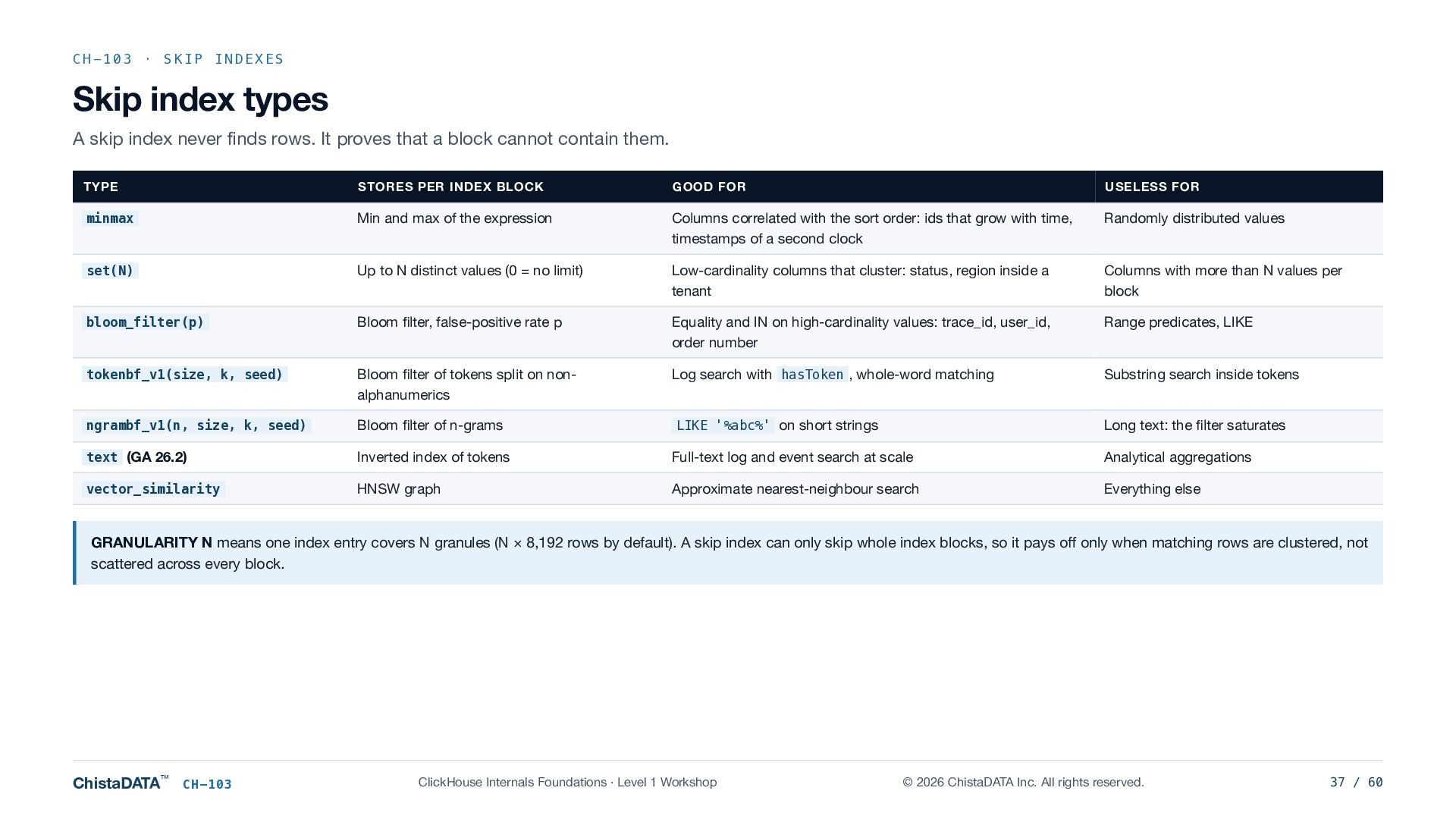
  37. CH-103 · SKIP INDEXES Skip index types A skip index

    never finds rows. It proves that a block cannot contain them. TYPE STORES PER INDEX BLOCK GOOD FOR USELESS FOR minmax Min and max of the expression Columns correlated with the sort order: ids that grow with time, timestamps of a second clock Randomly distributed values set(N) Up to N distinct values (0 = no limit) Low-cardinality columns that cluster: status, region inside a tenant Columns with more than N values per block bloom_filter(p) Bloom filter, false-positive rate p Equality and IN on high-cardinality values: trace_id, user_id, order number Range predicates, LIKE tokenbf_v1(size, k, seed) Bloom filter of tokens split on nonalphanumerics Log search with hasToken , whole-word matching Substring search inside tokens ngrambf_v1(n, size, k, seed) Bloom filter of n-grams LIKE '%abc%' on short strings Long text: the filter saturates text (GA 26.2) Inverted index of tokens Full-text log and event search at scale Analytical aggregations vector_similarity HNSW graph Approximate nearest-neighbour search Everything else GRANULARITY N means one index entry covers N granules (N × 8,192 rows by default). A skip index can only skip whole index blocks, so it pays off only when matching rows are clustered, not scattered across every block. ChistaDATA™ CH-103 ClickHouse Internals Foundations · Level 1 Workshop © 2026 ChistaDATA Inc. All rights reserved. 37 / 60
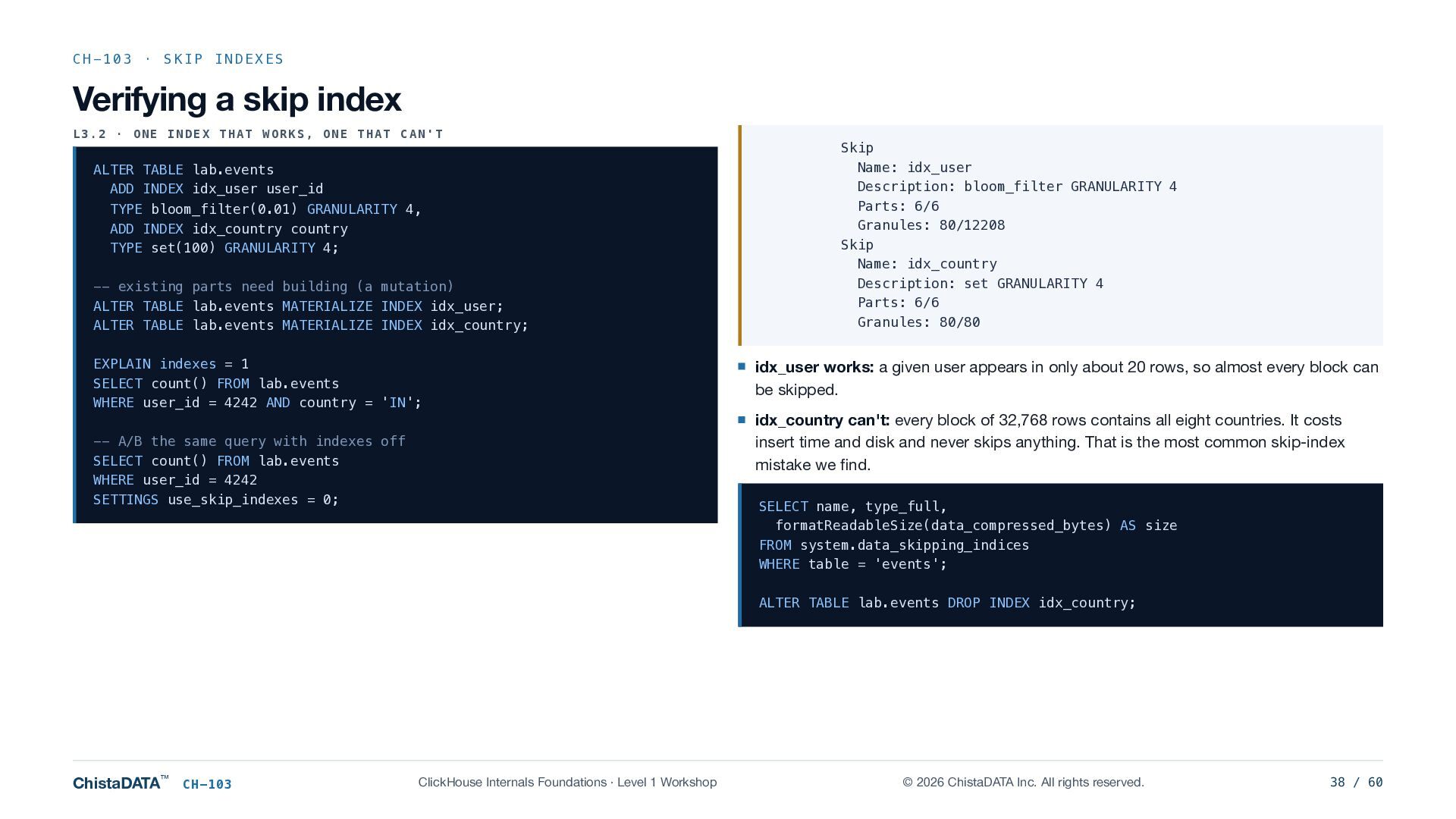
  38. CH-103 · SKIP INDEXES Verifying a skip index L3.2 ·

    ONE INDEX THAT WORKS, ONE THAT CAN'T ALTER TABLE lab.events ADD INDEX idx_user user_id TYPE bloom_filter(0.01) GRANULARITY 4, ADD INDEX idx_country country TYPE set(100) GRANULARITY 4; -- existing parts need building (a mutation) ALTER TABLE lab.events MATERIALIZE INDEX idx_user; ALTER TABLE lab.events MATERIALIZE INDEX idx_country; EXPLAIN indexes = 1 SELECT count() FROM lab.events WHERE user_id = 4242 AND country = 'IN'; -- A/B the same query with indexes off SELECT count() FROM lab.events WHERE user_id = 4242 SETTINGS use_skip_indexes = 0; Skip Name: idx_user Description: bloom_filter GRANULARITY 4 Parts: 6/6 Granules: 80/12208 Skip Name: idx_country Description: set GRANULARITY 4 Parts: 6/6 Granules: 80/80 idx_user works: a given user appears in only about 20 rows, so almost every block can be skipped. idx_country can't: every block of 32,768 rows contains all eight countries. It costs insert time and disk and never skips anything. That is the most common skip-index mistake we find. SELECT name, type_full, formatReadableSize(data_compressed_bytes) AS size FROM system.data_skipping_indices WHERE table = 'events'; ALTER TABLE lab.events DROP INDEX idx_country; ChistaDATA™ CH-103 ClickHouse Internals Foundations · Level 1 Workshop © 2026 ChistaDATA Inc. All rights reserved. 38 / 60
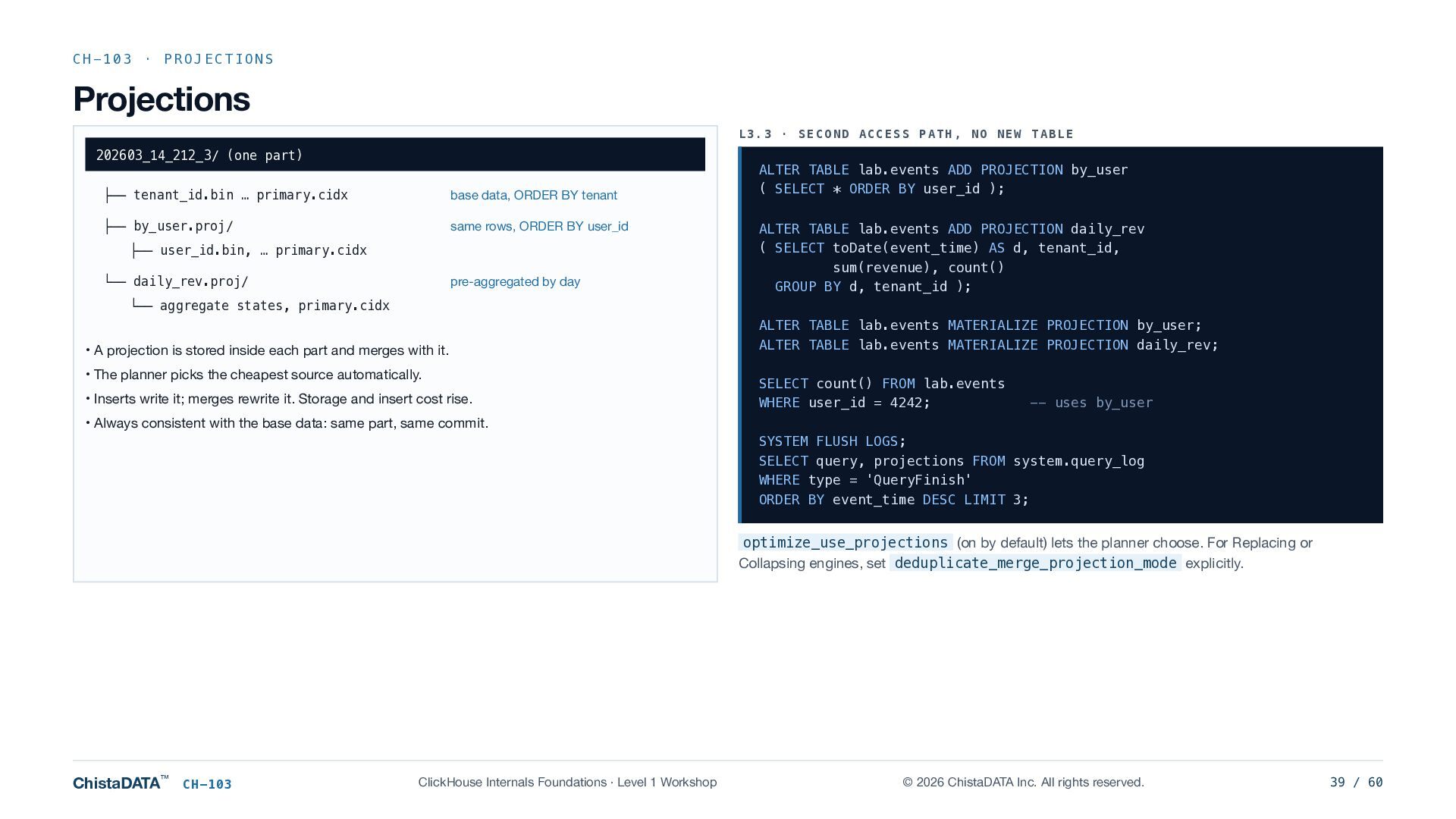
  39. CH-103 · PROJECTIONS Projections L3.3 · SECOND ACCESS PATH, NO

    NEW TABLE 202603_14_212_3/ (one part) ├── tenant_id.bin … primary.cidx base data, ORDER BY tenant ├── by_user.proj/ same rows, ORDER BY user_id ├── user_id.bin, … primary.cidx pre-aggregated by day └── daily_rev.proj/ ALTER TABLE lab.events ADD PROJECTION by_user ( SELECT * ORDER BY user_id ); ALTER TABLE lab.events ADD PROJECTION daily_rev ( SELECT toDate(event_time) AS d, tenant_id, sum(revenue), count() GROUP BY d, tenant_id ); └── aggregate states, primary.cidx • A projection is stored inside each part and merges with it. • The planner picks the cheapest source automatically. • Inserts write it; merges rewrite it. Storage and insert cost rise. ALTER TABLE lab.events MATERIALIZE PROJECTION by_user; ALTER TABLE lab.events MATERIALIZE PROJECTION daily_rev; SELECT count() FROM lab.events WHERE user_id = 4242; -- uses by_user • Always consistent with the base data: same part, same commit. SYSTEM FLUSH LOGS; SELECT query, projections FROM system.query_log WHERE type = 'QueryFinish' ORDER BY event_time DESC LIMIT 3; optimize_use_projections (on by default) lets the planner choose. For Replacing or Collapsing engines, set deduplicate_merge_projection_mode explicitly. ChistaDATA™ CH-103 ClickHouse Internals Foundations · Level 1 Workshop © 2026 ChistaDATA Inc. All rights reserved. 39 / 60
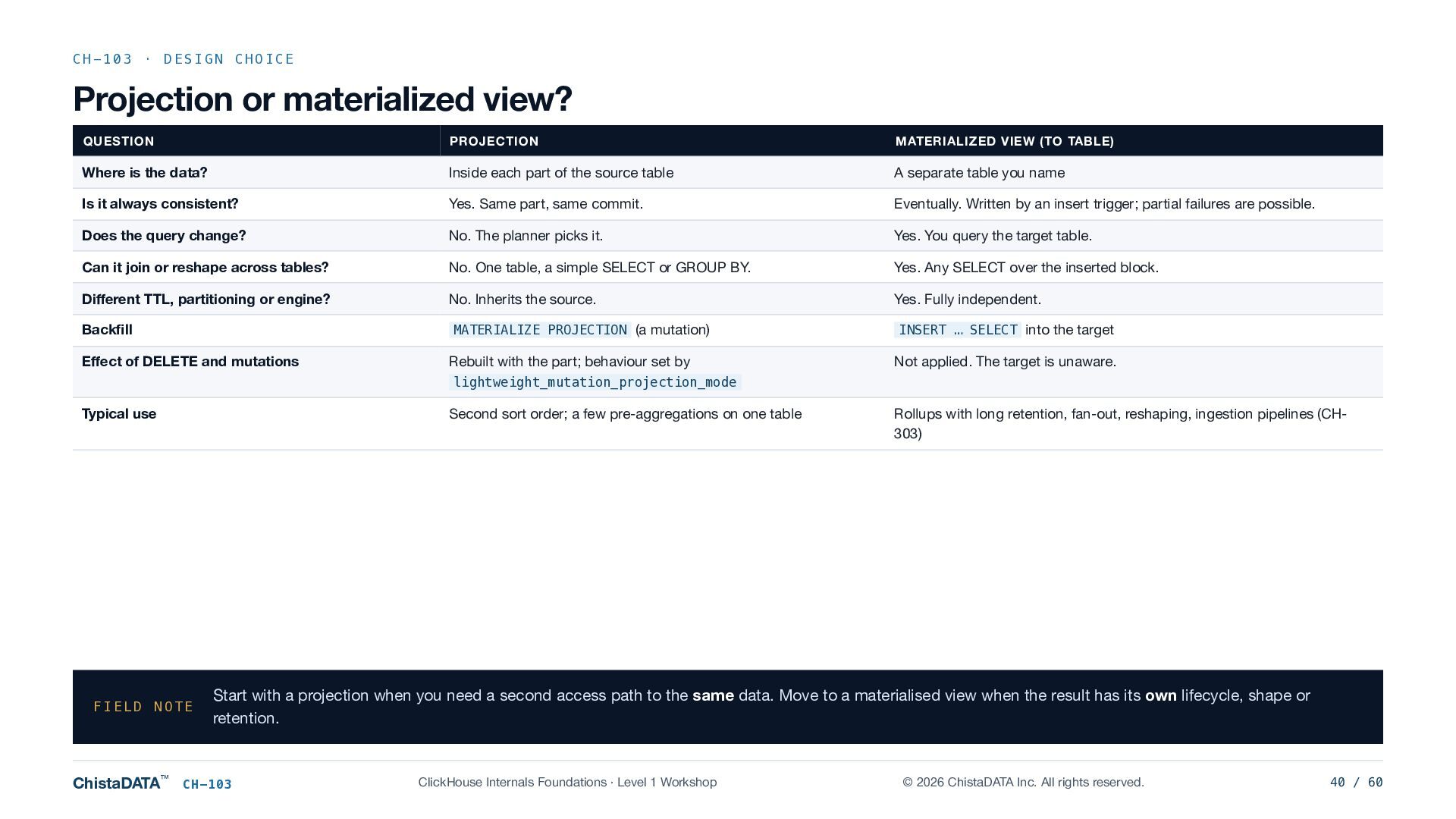
  40. CH-103 · DESIGN CHOICE Projection or materialized view? QUESTION PROJECTION

    MATERIALIZED VIEW (TO TABLE) Where is the data? Inside each part of the source table A separate table you name Is it always consistent? Yes. Same part, same commit. Eventually. Written by an insert trigger; partial failures are possible. Does the query change? No. The planner picks it. Yes. You query the target table. Can it join or reshape across tables? No. One table, a simple SELECT or GROUP BY. Yes. Any SELECT over the inserted block. Different TTL, partitioning or engine? No. Inherits the source. Yes. Fully independent. Backfill MATERIALIZE PROJECTION (a mutation) INSERT … SELECT into the target Effect of DELETE and mutations Rebuilt with the part; behaviour set by Not applied. The target is unaware. lightweight_mutation_projection_mode Typical use Second sort order; a few pre-aggregations on one table FIELD NOTE ChistaDATA™ Rollups with long retention, fan-out, reshaping, ingestion pipelines (CH303) Start with a projection when you need a second access path to the same data. Move to a materialised view when the result has its own lifecycle, shape or retention. CH-103 ClickHouse Internals Foundations · Level 1 Workshop © 2026 ChistaDATA Inc. All rights reserved. 40 / 60
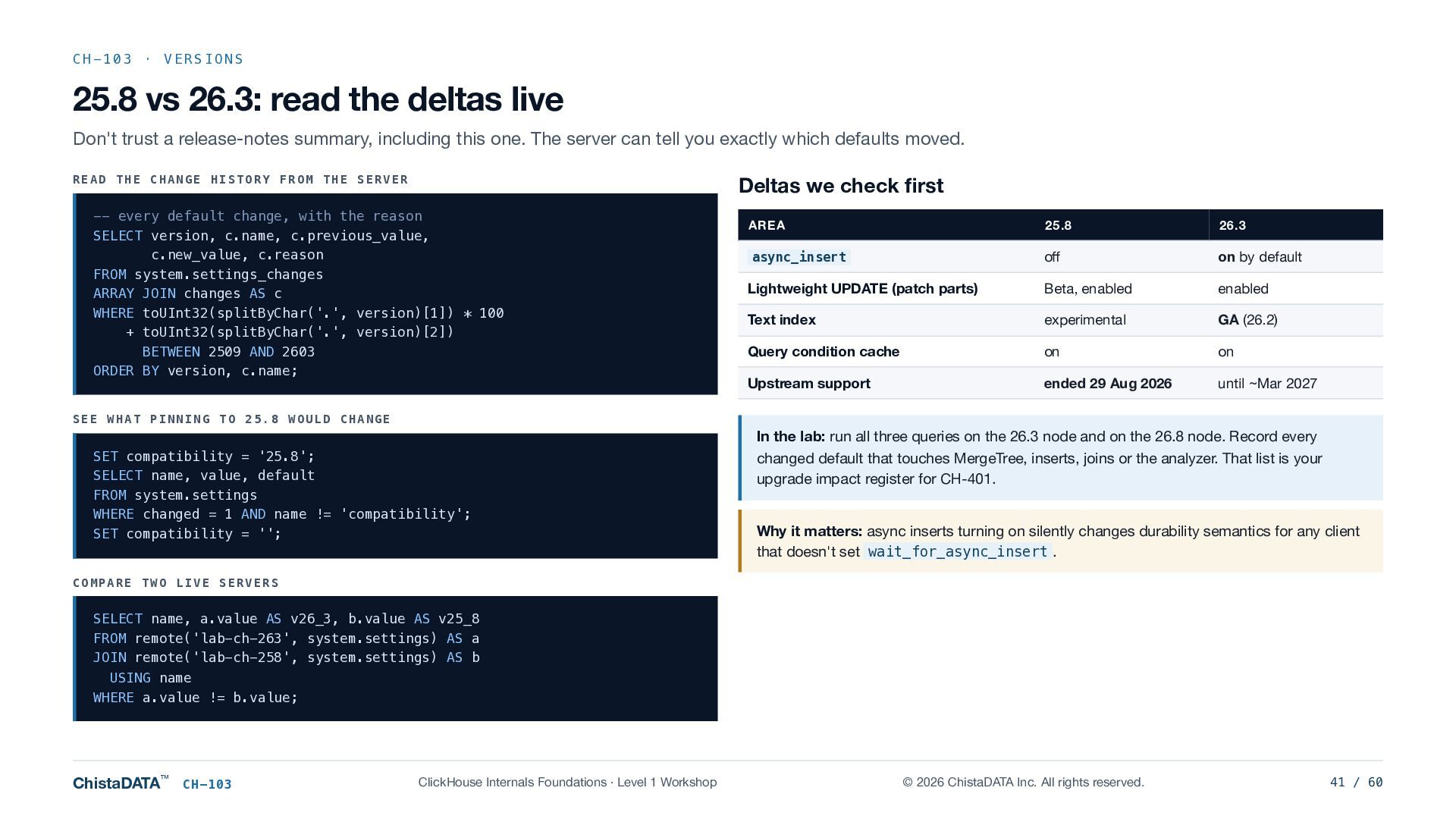
  41. CH-103 · VERSIONS 25.8 vs 26.3: read the deltas live

    Don't trust a release-notes summary, including this one. The server can tell you exactly which defaults moved. READ THE CHANGE HISTORY FROM THE SERVER Deltas we check first -- every default change, with the reason SELECT version, c.name, c.previous_value, c.new_value, c.reason FROM system.settings_changes ARRAY JOIN changes AS c WHERE toUInt32(splitByChar('.', version)[1]) * 100 + toUInt32(splitByChar('.', version)[2]) BETWEEN 2509 AND 2603 ORDER BY version, c.name; AREA 25.8 26.3 async_insert off on by default Lightweight UPDATE (patch parts) Beta, enabled enabled Text index experimental GA (26.2) Query condition cache on on Upstream support ended 29 Aug 2026 until ~Mar 2027 SEE WHAT PINNING TO 25.8 WOULD CHANGE SET compatibility = '25.8'; SELECT name, value, default FROM system.settings WHERE changed = 1 AND name != 'compatibility'; SET compatibility = ''; In the lab: run all three queries on the 26.3 node and on the 26.8 node. Record every changed default that touches MergeTree, inserts, joins or the analyzer. That list is your upgrade impact register for CH-401. Why it matters: async inserts turning on silently changes durability semantics for any client that doesn't set wait_for_async_insert . COMPARE TWO LIVE SERVERS SELECT name, a.value AS v26_3, b.value AS v25_8 FROM remote('lab-ch-263', system.settings) AS a JOIN remote('lab-ch-258', system.settings) AS b USING name WHERE a.value != b.value; ChistaDATA™ CH-103 ClickHouse Internals Foundations · Level 1 Workshop © 2026 ChistaDATA Inc. All rights reserved. 41 / 60
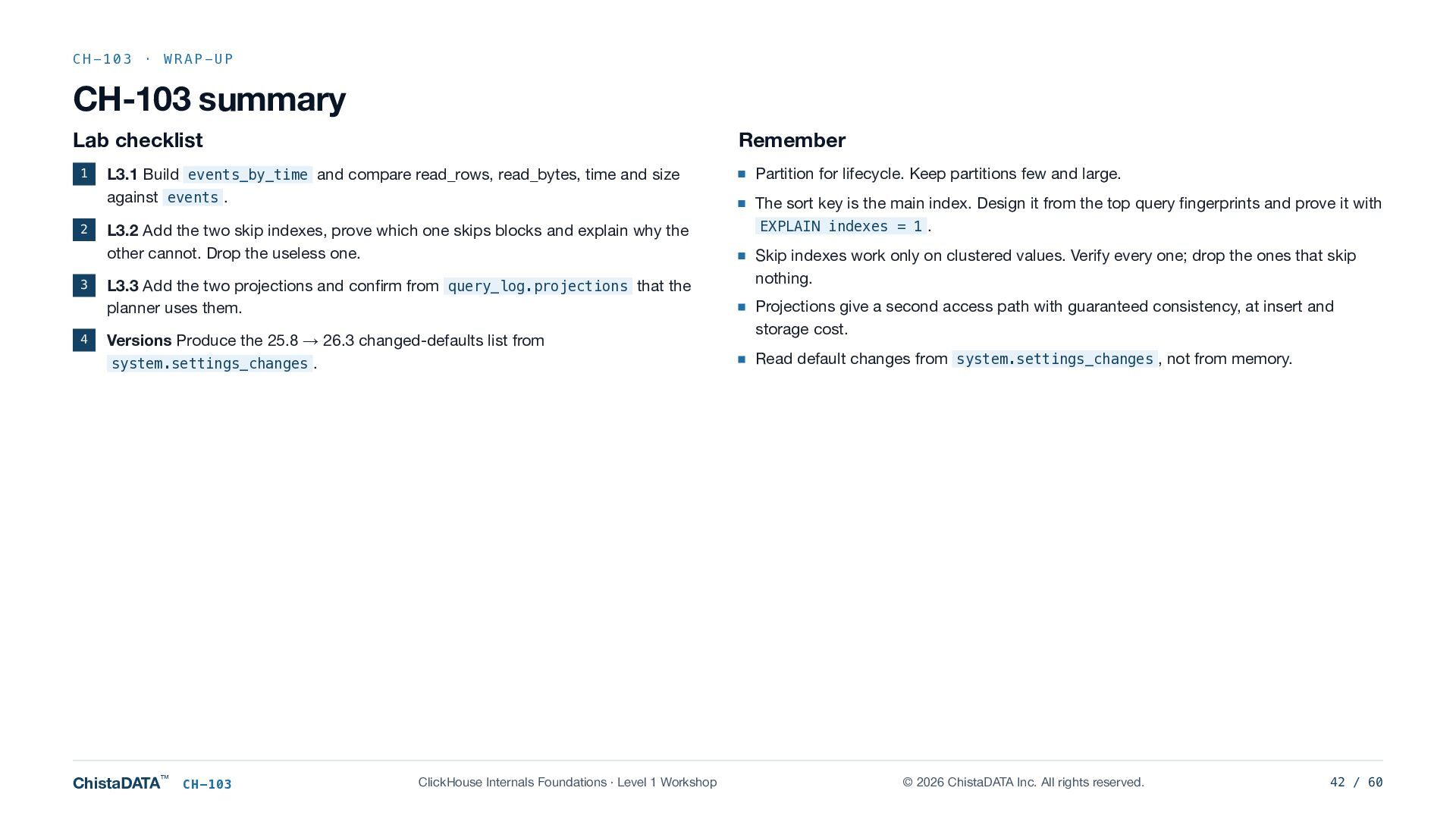
  42. CH-103 · WRAP-UP CH-103 summary Lab checklist 1 2 3

    4 Remember L3.1 Build events_by_time and compare read_rows, read_bytes, time and size against events . L3.2 Add the two skip indexes, prove which one skips blocks and explain why the other cannot. Drop the useless one. L3.3 Add the two projections and confirm from query_log.projections that the planner uses them. Versions Produce the 25.8 → 26.3 changed-defaults list from system.settings_changes . ChistaDATA™ CH-103 ClickHouse Internals Foundations · Level 1 Workshop Partition for lifecycle. Keep partitions few and large. The sort key is the main index. Design it from the top query fingerprints and prove it with EXPLAIN indexes = 1 . Skip indexes work only on clustered values. Verify every one; drop the ones that skip nothing. Projections give a second access path with guaranteed consistency, at insert and storage cost. Read default changes from system.settings_changes , not from memory. © 2026 ChistaDATA Inc. All rights reserved. 42 / 60
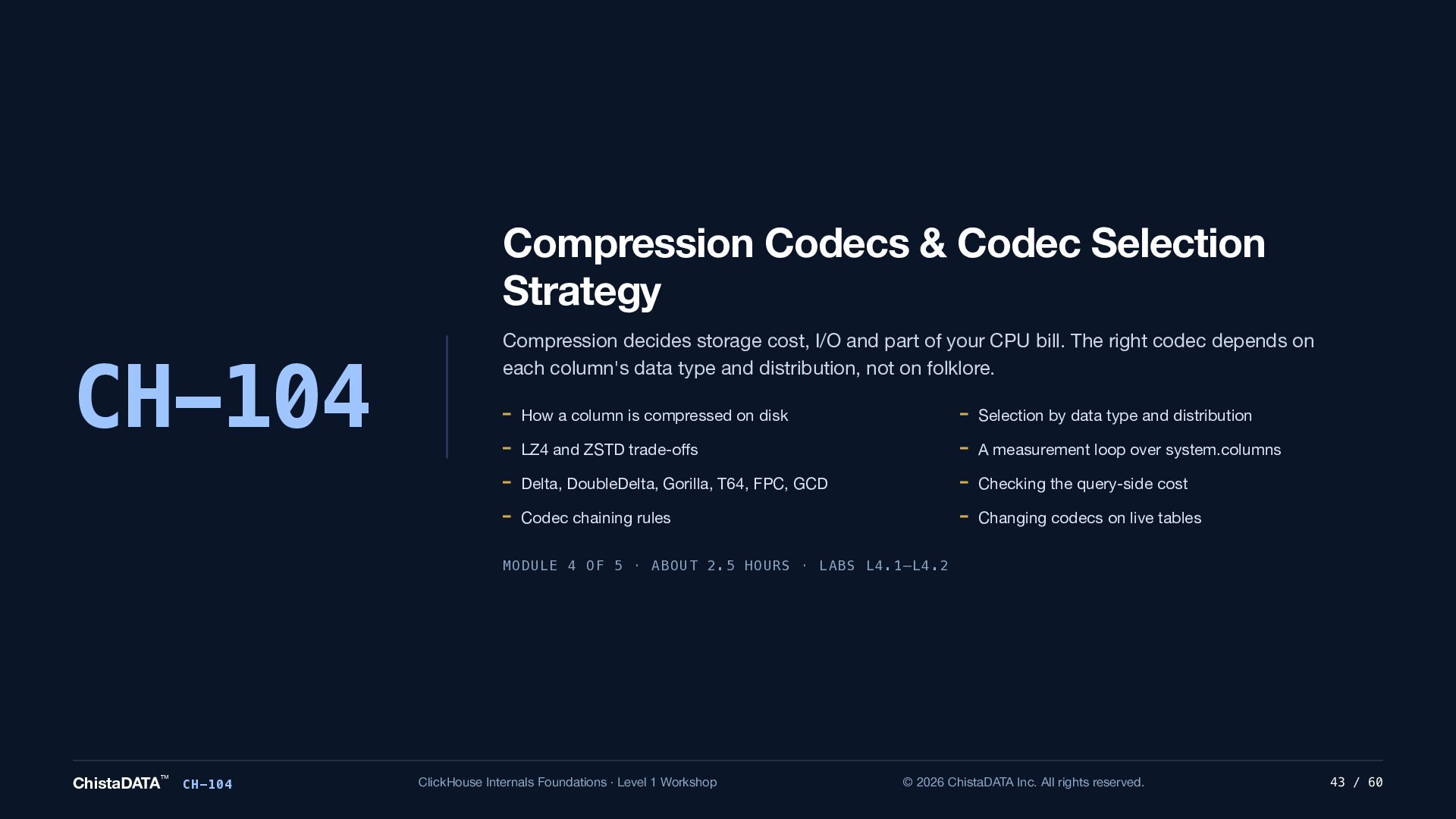
  43. Compression Codecs & Codec Selection Strategy CH-104 Compression decides storage

    cost, I/O and part of your CPU bill. The right codec depends on each column's data type and distribution, not on folklore. How a column is compressed on disk Selection by data type and distribution LZ4 and ZSTD trade-offs A measurement loop over system.columns Delta, DoubleDelta, Gorilla, T64, FPC, GCD Checking the query-side cost Codec chaining rules Changing codecs on live tables MODULE 4 OF 5 · ABOUT 2.5 HOURS · LABS L4.1–L4.2 ChistaDATA™ CH-104 ClickHouse Internals Foundations · Level 1 Workshop © 2026 ChistaDATA Inc. All rights reserved. 43 / 60
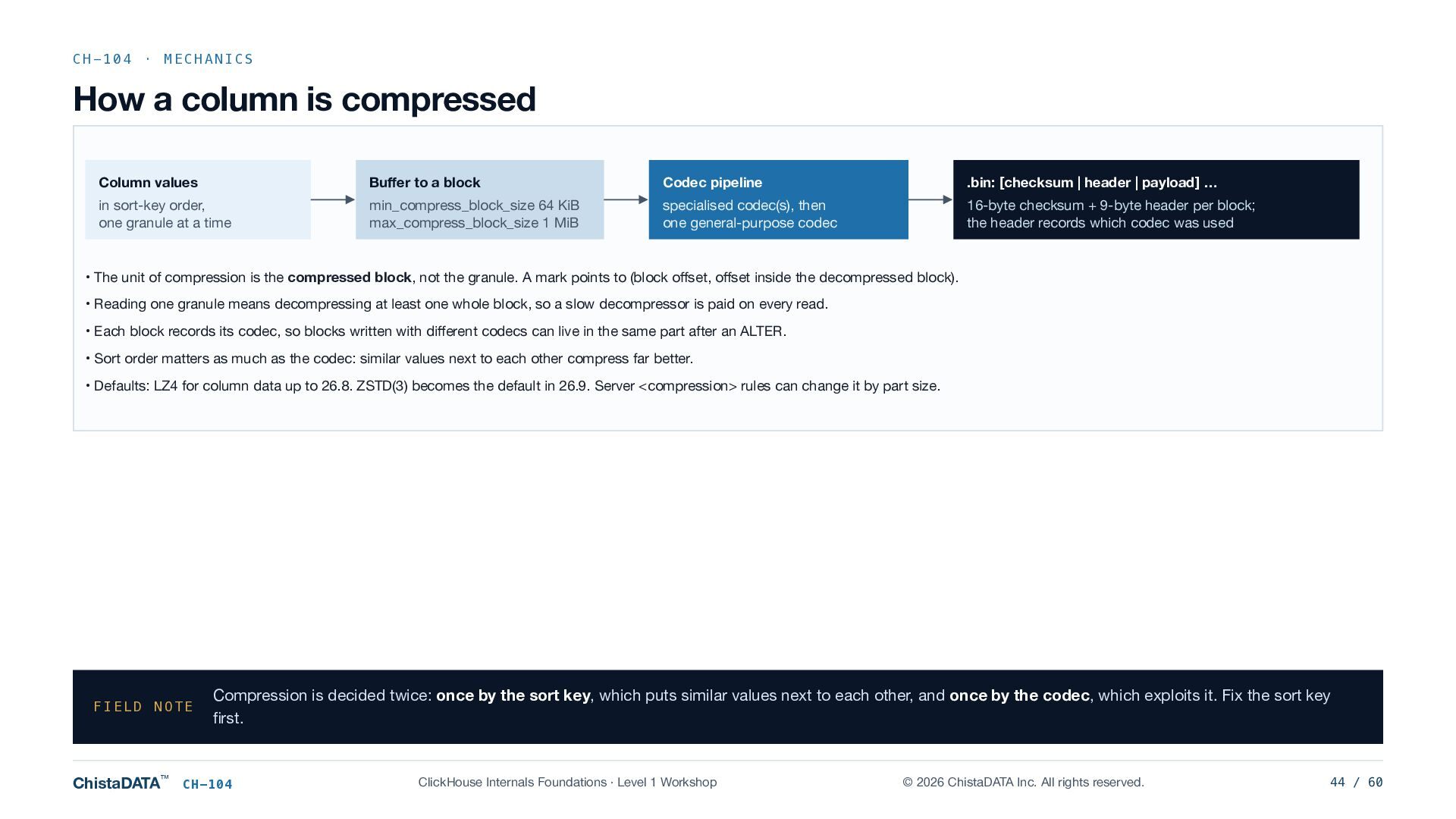
  44. CH-104 · MECHANICS How a column is compressed Column values

    Buffer to a block Codec pipeline .bin: [checksum | header | payload] … in sort-key order, one granule at a time min_compress_block_size 64 KiB max_compress_block_size 1 MiB specialised codec(s), then one general-purpose codec 16-byte checksum + 9-byte header per block; the header records which codec was used • The unit of compression is the compressed block, not the granule. A mark points to (block offset, offset inside the decompressed block). • Reading one granule means decompressing at least one whole block, so a slow decompressor is paid on every read. • Each block records its codec, so blocks written with different codecs can live in the same part after an ALTER. • Sort order matters as much as the codec: similar values next to each other compress far better. • Defaults: LZ4 for column data up to 26.8. ZSTD(3) becomes the default in 26.9. Server <compression> rules can change it by part size. FIELD NOTE ChistaDATA™ Compression is decided twice: once by the sort key, which puts similar values next to each other, and once by the codec, which exploits it. Fix the sort key first. CH-104 ClickHouse Internals Foundations · Level 1 Workshop © 2026 ChistaDATA Inc. All rights reserved. 44 / 60
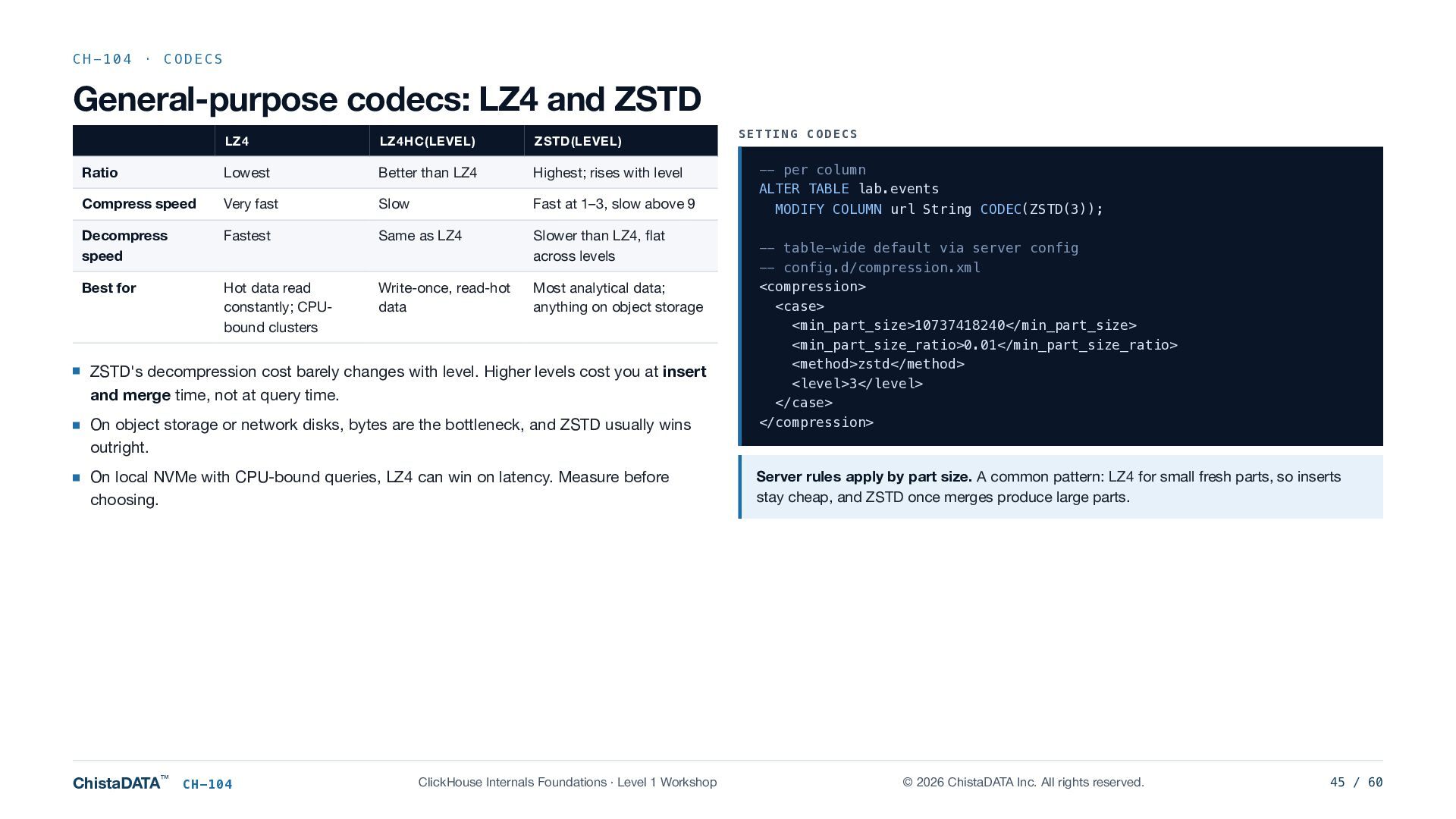
  45. CH-104 · CODECS General-purpose codecs: LZ4 and ZSTD LZ4 LZ4HC(LEVEL)

    ZSTD(LEVEL) Ratio Lowest Better than LZ4 Highest; rises with level Compress speed Very fast Slow Fast at 1–3, slow above 9 Decompress speed Fastest Same as LZ4 Slower than LZ4, flat across levels Best for Hot data read constantly; CPUbound clusters Write-once, read-hot data Most analytical data; anything on object storage ZSTD's decompression cost barely changes with level. Higher levels cost you at insert and merge time, not at query time. On object storage or network disks, bytes are the bottleneck, and ZSTD usually wins outright. On local NVMe with CPU-bound queries, LZ4 can win on latency. Measure before choosing. ChistaDATA™ CH-104 ClickHouse Internals Foundations · Level 1 Workshop SETTING CODECS -- per column ALTER TABLE lab.events MODIFY COLUMN url String CODEC(ZSTD(3)); -- table-wide default via server config -- config.d/compression.xml <compression> <case> <min_part_size>10737418240</min_part_size> <min_part_size_ratio>0.01</min_part_size_ratio> <method>zstd</method> <level>3</level> </case> </compression> Server rules apply by part size. A common pattern: LZ4 for small fresh parts, so inserts stay cheap, and ZSTD once merges produce large parts. © 2026 ChistaDATA Inc. All rights reserved. 45 / 60
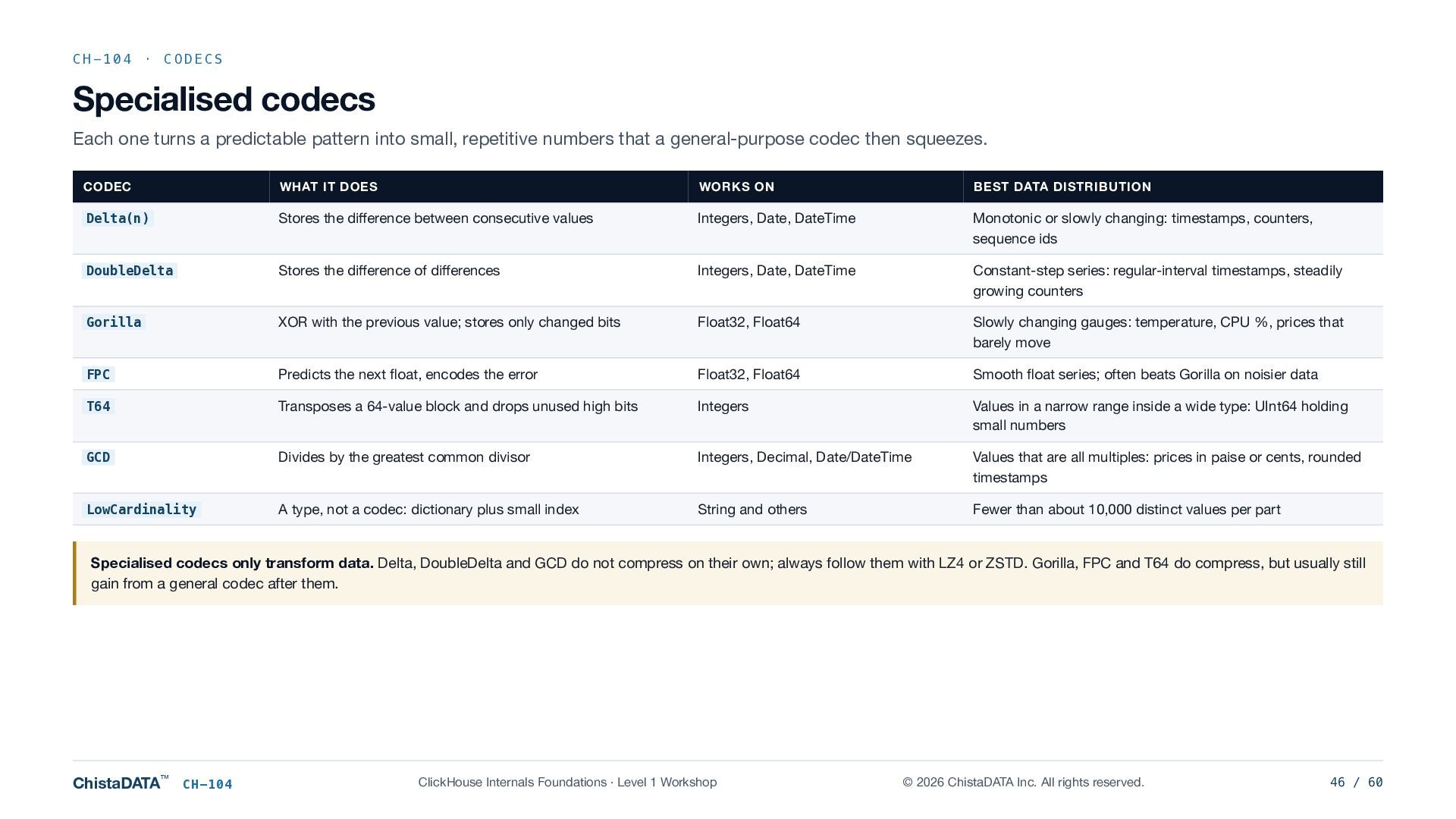
  46. CH-104 · CODECS Specialised codecs Each one turns a predictable

    pattern into small, repetitive numbers that a general-purpose codec then squeezes. CODEC WHAT IT DOES WORKS ON BEST DATA DISTRIBUTION Delta(n) Stores the difference between consecutive values Integers, Date, DateTime Monotonic or slowly changing: timestamps, counters, sequence ids DoubleDelta Stores the difference of differences Integers, Date, DateTime Constant-step series: regular-interval timestamps, steadily growing counters Gorilla XOR with the previous value; stores only changed bits Float32, Float64 Slowly changing gauges: temperature, CPU %, prices that barely move FPC Predicts the next float, encodes the error Float32, Float64 Smooth float series; often beats Gorilla on noisier data T64 Transposes a 64-value block and drops unused high bits Integers Values in a narrow range inside a wide type: UInt64 holding small numbers GCD Divides by the greatest common divisor Integers, Decimal, Date/DateTime Values that are all multiples: prices in paise or cents, rounded timestamps LowCardinality A type, not a codec: dictionary plus small index String and others Fewer than about 10,000 distinct values per part Specialised codecs only transform data. Delta, DoubleDelta and GCD do not compress on their own; always follow them with LZ4 or ZSTD. Gorilla, FPC and T64 do compress, but usually still gain from a general codec after them. ChistaDATA™ CH-104 ClickHouse Internals Foundations · Level 1 Workshop © 2026 ChistaDATA Inc. All rights reserved. 46 / 60
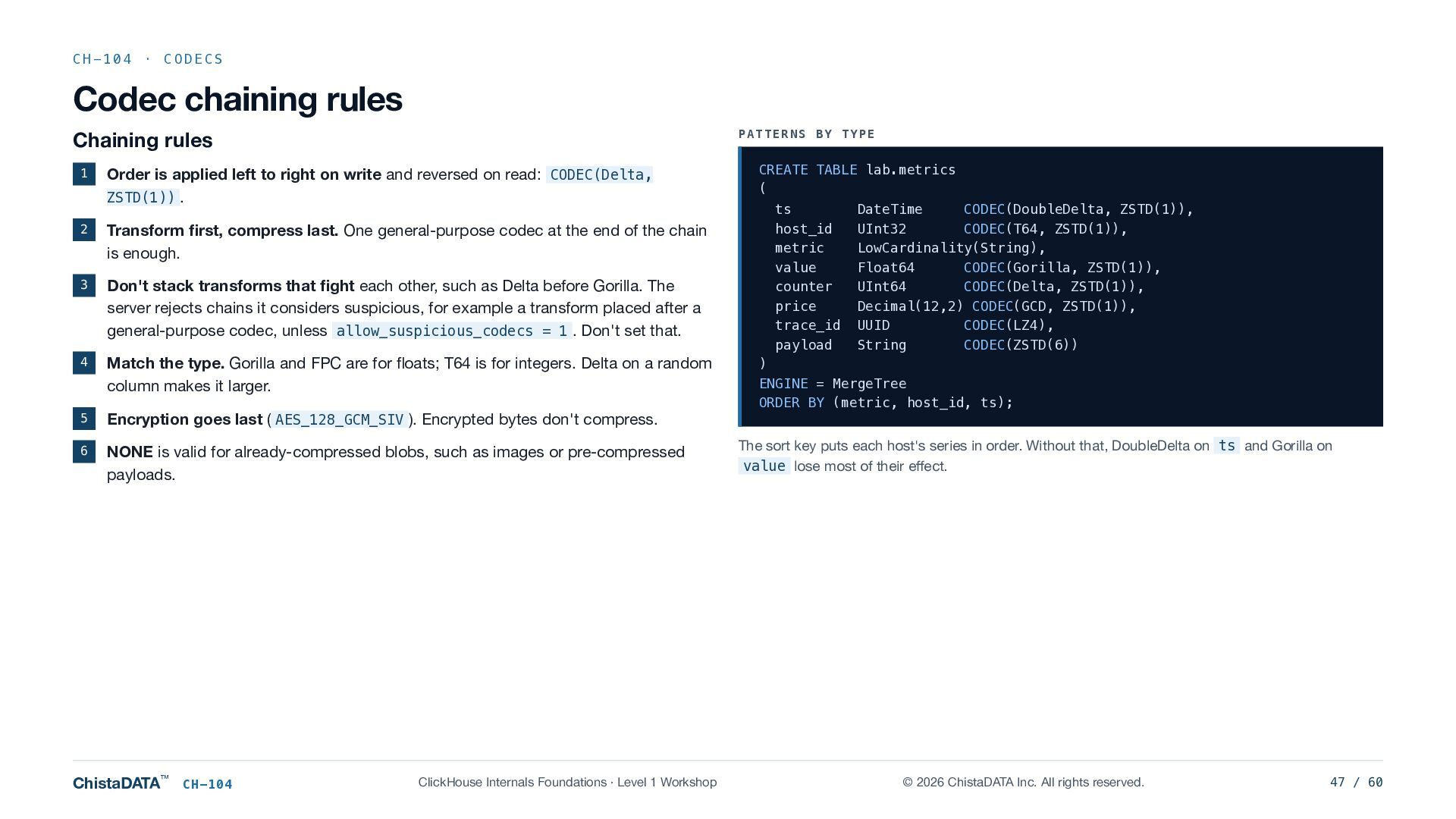
  47. CH-104 · CODECS Codec chaining rules PATTERNS BY TYPE Chaining

    rules 1 Order is applied left to right on write and reversed on read: CODEC(Delta, ZSTD(1)) . 2 Transform first, compress last. One general-purpose codec at the end of the chain is enough. 3 Don't stack transforms that fight each other, such as Delta before Gorilla. The server rejects chains it considers suspicious, for example a transform placed after a general-purpose codec, unless allow_suspicious_codecs = 1 . Don't set that. 4 Match the type. Gorilla and FPC are for floats; T64 is for integers. Delta on a random column makes it larger. 5 Encryption goes last ( AES_128_GCM_SIV ). Encrypted bytes don't compress. 6 NONE is valid for already-compressed blobs, such as images or pre-compressed payloads. ChistaDATA™ CH-104 ClickHouse Internals Foundations · Level 1 Workshop CREATE TABLE lab.metrics ( ts DateTime CODEC(DoubleDelta, ZSTD(1)), host_id UInt32 CODEC(T64, ZSTD(1)), metric LowCardinality(String), value Float64 CODEC(Gorilla, ZSTD(1)), counter UInt64 CODEC(Delta, ZSTD(1)), price Decimal(12,2) CODEC(GCD, ZSTD(1)), trace_id UUID CODEC(LZ4), payload String CODEC(ZSTD(6)) ) ENGINE = MergeTree ORDER BY (metric, host_id, ts); The sort key puts each host's series in order. Without that, DoubleDelta on ts and Gorilla on value lose most of their effect. © 2026 ChistaDATA Inc. All rights reserved. 47 / 60
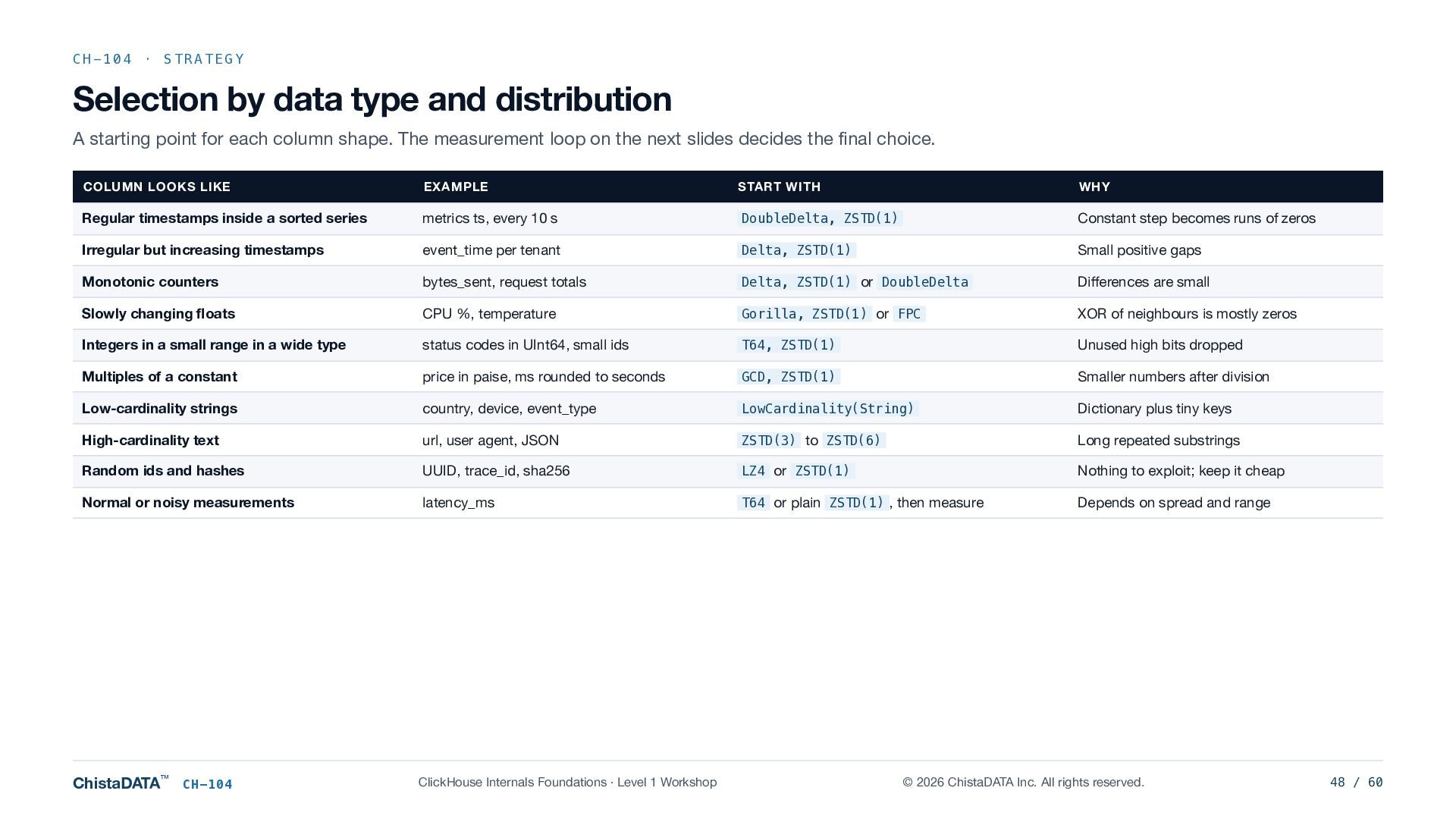
  48. CH-104 · STRATEGY Selection by data type and distribution A

    starting point for each column shape. The measurement loop on the next slides decides the final choice. COLUMN LOOKS LIKE EXAMPLE START WITH WHY Regular timestamps inside a sorted series metrics ts, every 10 s DoubleDelta, ZSTD(1) Constant step becomes runs of zeros Irregular but increasing timestamps event_time per tenant Delta, ZSTD(1) Small positive gaps Monotonic counters bytes_sent, request totals Delta, ZSTD(1) or DoubleDelta Differences are small Slowly changing floats CPU %, temperature Gorilla, ZSTD(1) or FPC XOR of neighbours is mostly zeros Integers in a small range in a wide type status codes in UInt64, small ids T64, ZSTD(1) Unused high bits dropped Multiples of a constant price in paise, ms rounded to seconds GCD, ZSTD(1) Smaller numbers after division Low-cardinality strings country, device, event_type LowCardinality(String) Dictionary plus tiny keys High-cardinality text url, user agent, JSON ZSTD(3) to ZSTD(6) Long repeated substrings Random ids and hashes UUID, trace_id, sha256 LZ4 or ZSTD(1) Nothing to exploit; keep it cheap Normal or noisy measurements latency_ms T64 or plain ZSTD(1) , then measure Depends on spread and range ChistaDATA™ CH-104 ClickHouse Internals Foundations · Level 1 Workshop © 2026 ChistaDATA Inc. All rights reserved. 48 / 60
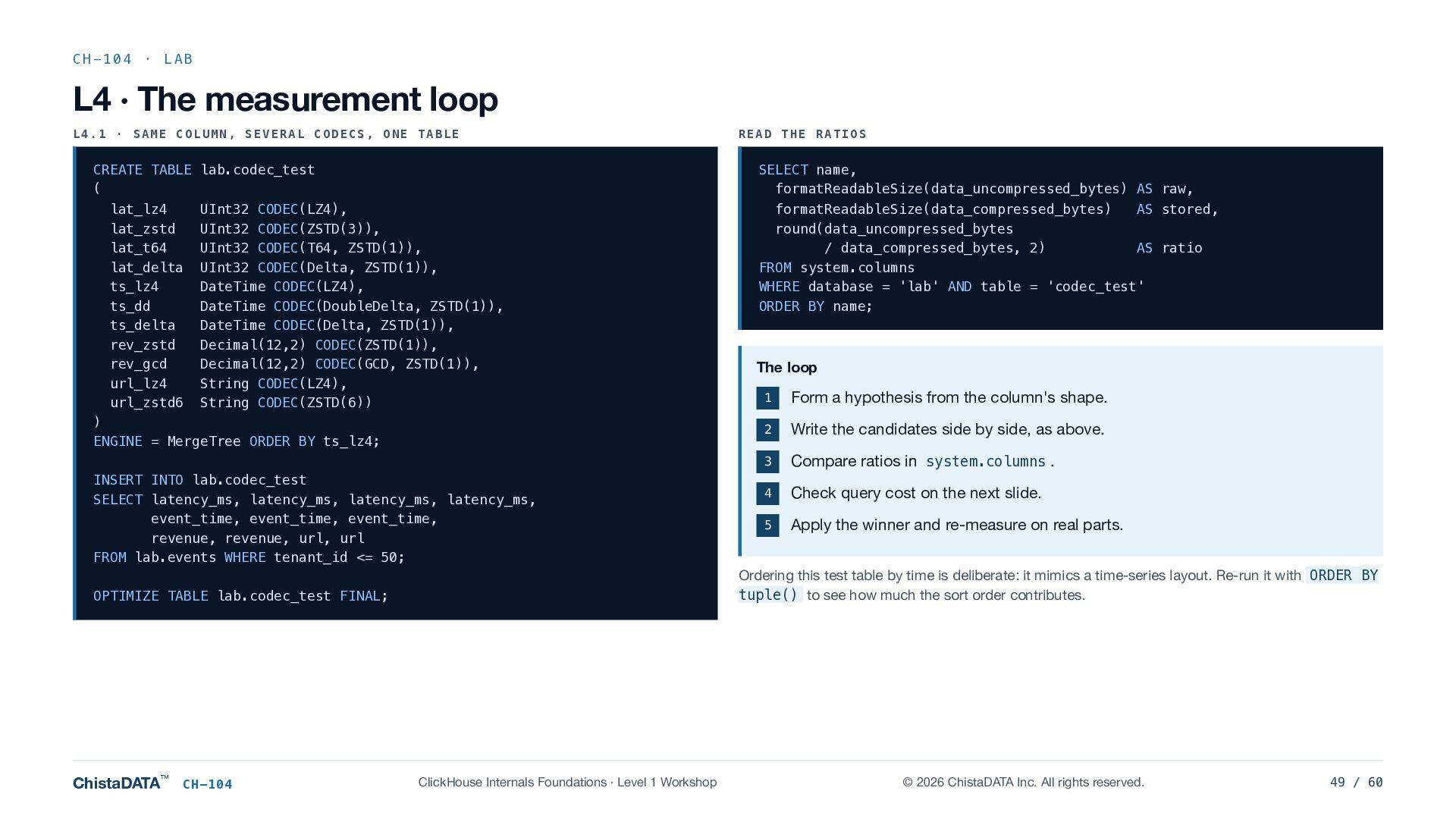
  49. CH-104 · LAB L4 · The measurement loop L4.1 ·

    SAME COLUMN, SEVERAL CODECS, ONE TABLE CREATE TABLE lab.codec_test ( lat_lz4 lat_zstd lat_t64 lat_delta ts_lz4 ts_dd ts_delta rev_zstd rev_gcd url_lz4 url_zstd6 SELECT name, formatReadableSize(data_uncompressed_bytes) AS raw, UInt32 CODEC(LZ4), UInt32 CODEC(ZSTD(3)), UInt32 CODEC(T64, ZSTD(1)), UInt32 CODEC(Delta, ZSTD(1)), DateTime CODEC(LZ4), DateTime CODEC(DoubleDelta, ZSTD(1)), DateTime CODEC(Delta, ZSTD(1)), Decimal(12,2) CODEC(ZSTD(1)), Decimal(12,2) CODEC(GCD, ZSTD(1)), String CODEC(LZ4), String CODEC(ZSTD(6)) ) ENGINE = MergeTree ORDER BY ts_lz4; INSERT INTO lab.codec_test SELECT latency_ms, latency_ms, latency_ms, latency_ms, event_time, event_time, event_time, revenue, revenue, url, url FROM lab.events WHERE tenant_id <= 50; CH-104 formatReadableSize(data_compressed_bytes) AS stored, round(data_uncompressed_bytes / data_compressed_bytes, 2) AS ratio FROM system.columns WHERE database = 'lab' AND table = 'codec_test' ORDER BY name; The loop 1 Form a hypothesis from the column's shape. 2 Write the candidates side by side, as above. 3 Compare ratios in system.columns . 4 Check query cost on the next slide. 5 Apply the winner and re-measure on real parts. Ordering this test table by time is deliberate: it mimics a time-series layout. Re-run it with ORDER BY tuple() to see how much the sort order contributes. OPTIMIZE TABLE lab.codec_test FINAL; ChistaDATA™ READ THE RATIOS ClickHouse Internals Foundations · Level 1 Workshop © 2026 ChistaDATA Inc. All rights reserved. 49 / 60
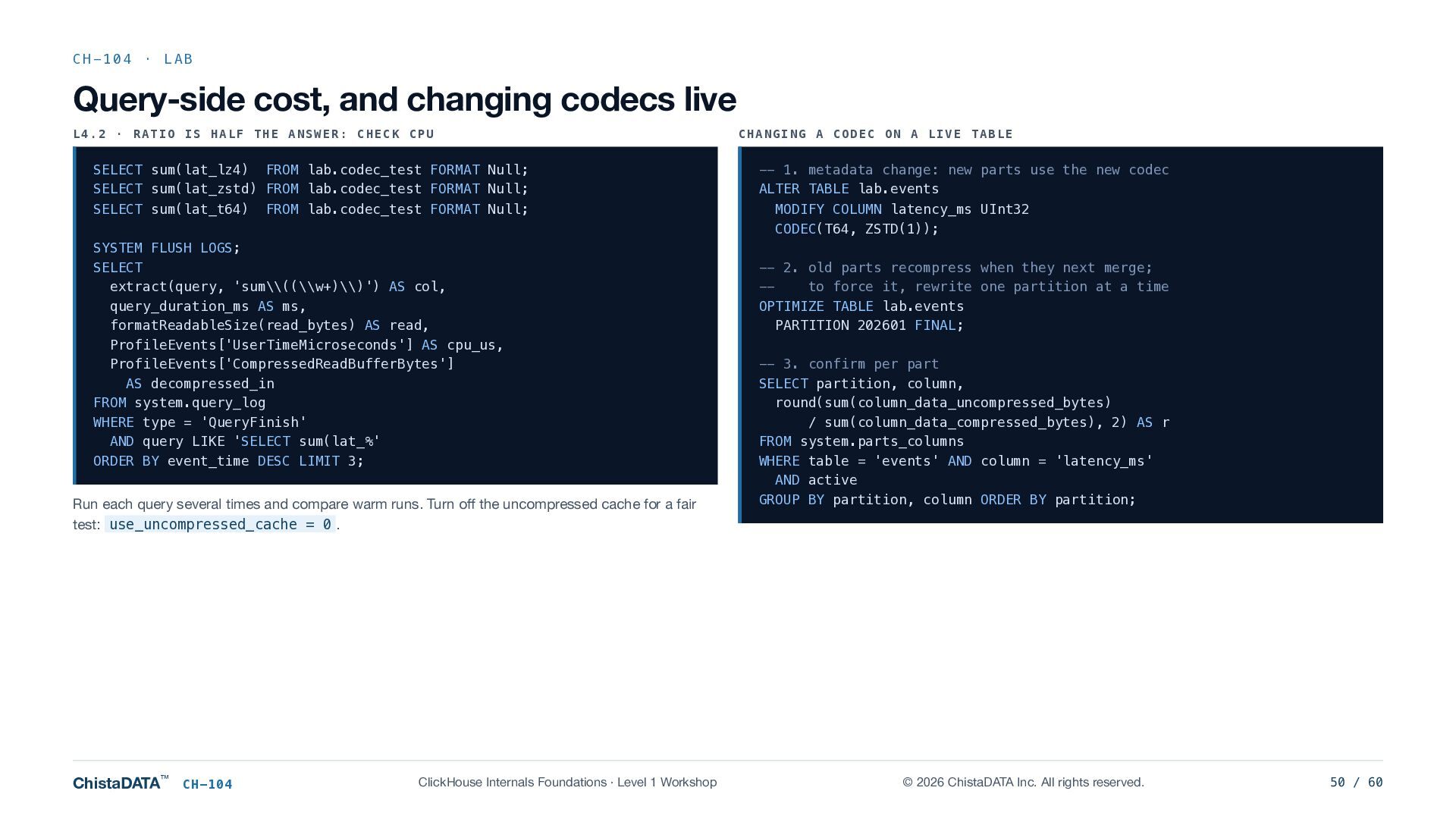
  50. CH-104 · LAB Query-side cost, and changing codecs live L4.2

    · RATIO IS HALF THE ANSWER: CHECK CPU SELECT sum(lat_lz4) FROM lab.codec_test FORMAT Null; SELECT sum(lat_zstd) FROM lab.codec_test FORMAT Null; SELECT sum(lat_t64) FROM lab.codec_test FORMAT Null; SYSTEM FLUSH LOGS; SELECT extract(query, 'sum\\((\\w+)\\)') AS col, query_duration_ms AS ms, formatReadableSize(read_bytes) AS read, ProfileEvents['UserTimeMicroseconds'] AS cpu_us, ProfileEvents['CompressedReadBufferBytes'] AS decompressed_in FROM system.query_log WHERE type = 'QueryFinish' AND query LIKE 'SELECT sum(lat_%' ORDER BY event_time DESC LIMIT 3; Run each query several times and compare warm runs. Turn off the uncompressed cache for a fair test: use_uncompressed_cache = 0 . ChistaDATA™ CH-104 ClickHouse Internals Foundations · Level 1 Workshop CHANGING A CODEC ON A LIVE TABLE -- 1. metadata change: new parts use the new codec ALTER TABLE lab.events MODIFY COLUMN latency_ms UInt32 CODEC(T64, ZSTD(1)); -- 2. old parts recompress when they next merge; -to force it, rewrite one partition at a time OPTIMIZE TABLE lab.events PARTITION 202601 FINAL; -- 3. confirm per part SELECT partition, column, round(sum(column_data_uncompressed_bytes) / sum(column_data_compressed_bytes), 2) AS r FROM system.parts_columns WHERE table = 'events' AND column = 'latency_ms' AND active GROUP BY partition, column ORDER BY partition; © 2026 ChistaDATA Inc. All rights reserved. 50 / 60
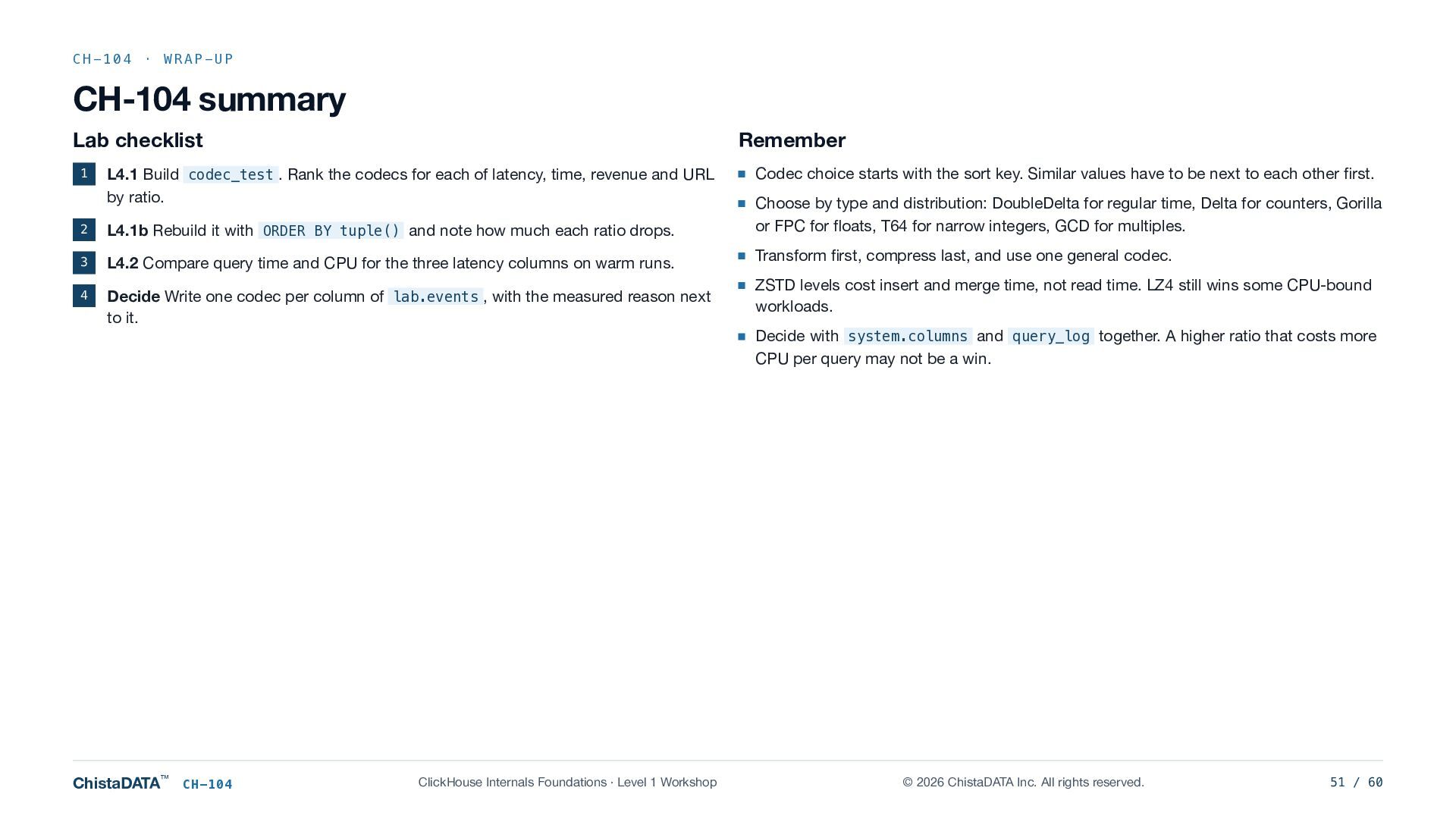
  51. CH-104 · WRAP-UP CH-104 summary Lab checklist 1 Remember L4.1

    Build codec_test . Rank the codecs for each of latency, time, revenue and URL by ratio. 2 L4.1b Rebuild it with ORDER BY tuple() and note how much each ratio drops. 3 L4.2 Compare query time and CPU for the three latency columns on warm runs. 4 Decide Write one codec per column of lab.events , with the measured reason next to it. ChistaDATA™ CH-104 ClickHouse Internals Foundations · Level 1 Workshop Codec choice starts with the sort key. Similar values have to be next to each other first. Choose by type and distribution: DoubleDelta for regular time, Delta for counters, Gorilla or FPC for floats, T64 for narrow integers, GCD for multiples. Transform first, compress last, and use one general codec. ZSTD levels cost insert and merge time, not read time. LZ4 still wins some CPU-bound workloads. Decide with system.columns and query_log together. A higher ratio that costs more CPU per query may not be a win. © 2026 ChistaDATA Inc. All rights reserved. 51 / 60
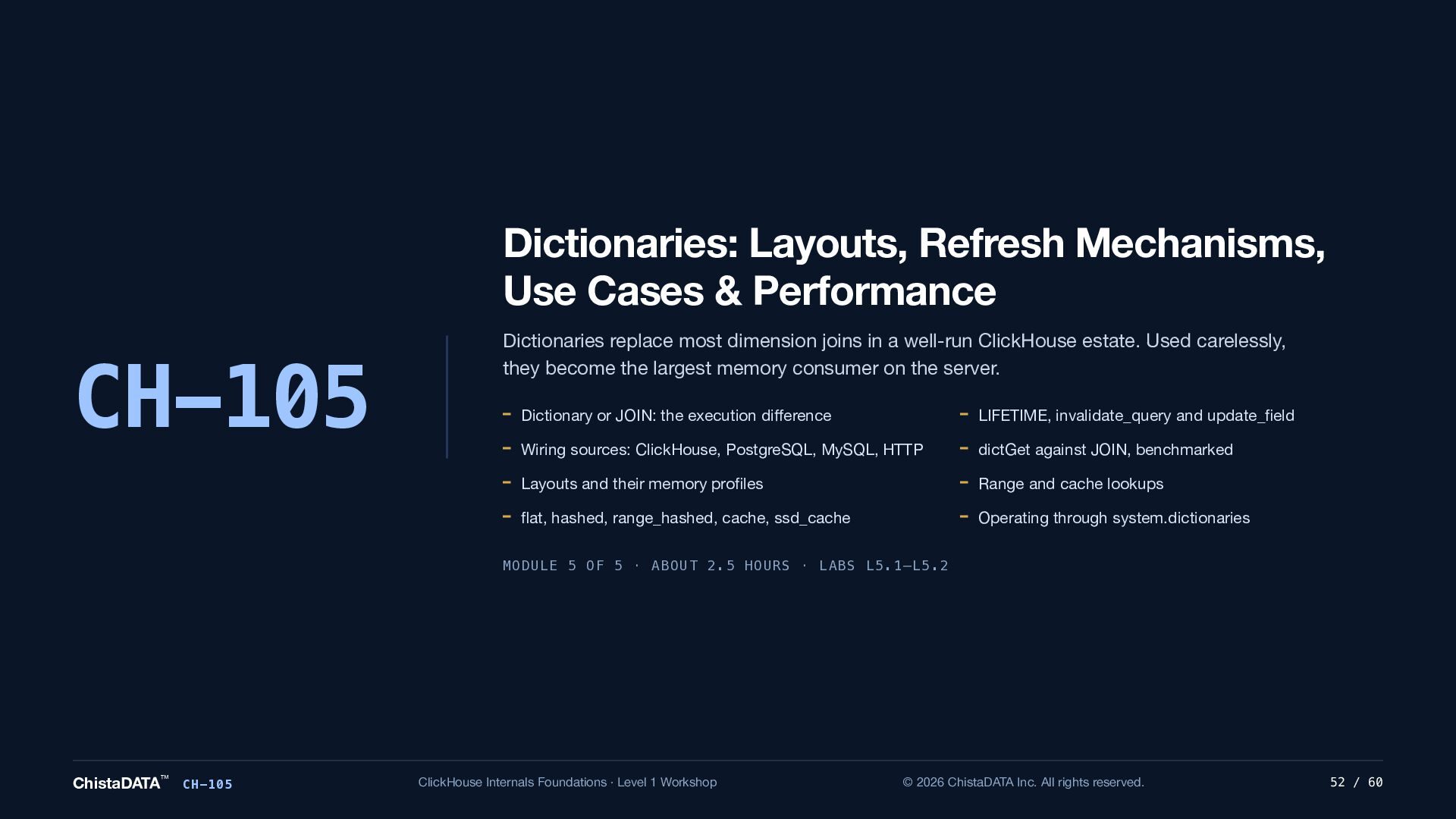
  52. Dictionaries: Layouts, Refresh Mechanisms, Use Cases & Performance CH-105 Dictionaries

    replace most dimension joins in a well-run ClickHouse estate. Used carelessly, they become the largest memory consumer on the server. Dictionary or JOIN: the execution difference LIFETIME, invalidate_query and update_field Wiring sources: ClickHouse, PostgreSQL, MySQL, HTTP dictGet against JOIN, benchmarked Layouts and their memory profiles Range and cache lookups flat, hashed, range_hashed, cache, ssd_cache Operating through system.dictionaries MODULE 5 OF 5 · ABOUT 2.5 HOURS · LABS L5.1–L5.2 ChistaDATA™ CH-105 ClickHouse Internals Foundations · Level 1 Workshop © 2026 ChistaDATA Inc. All rights reserved. 52 / 60
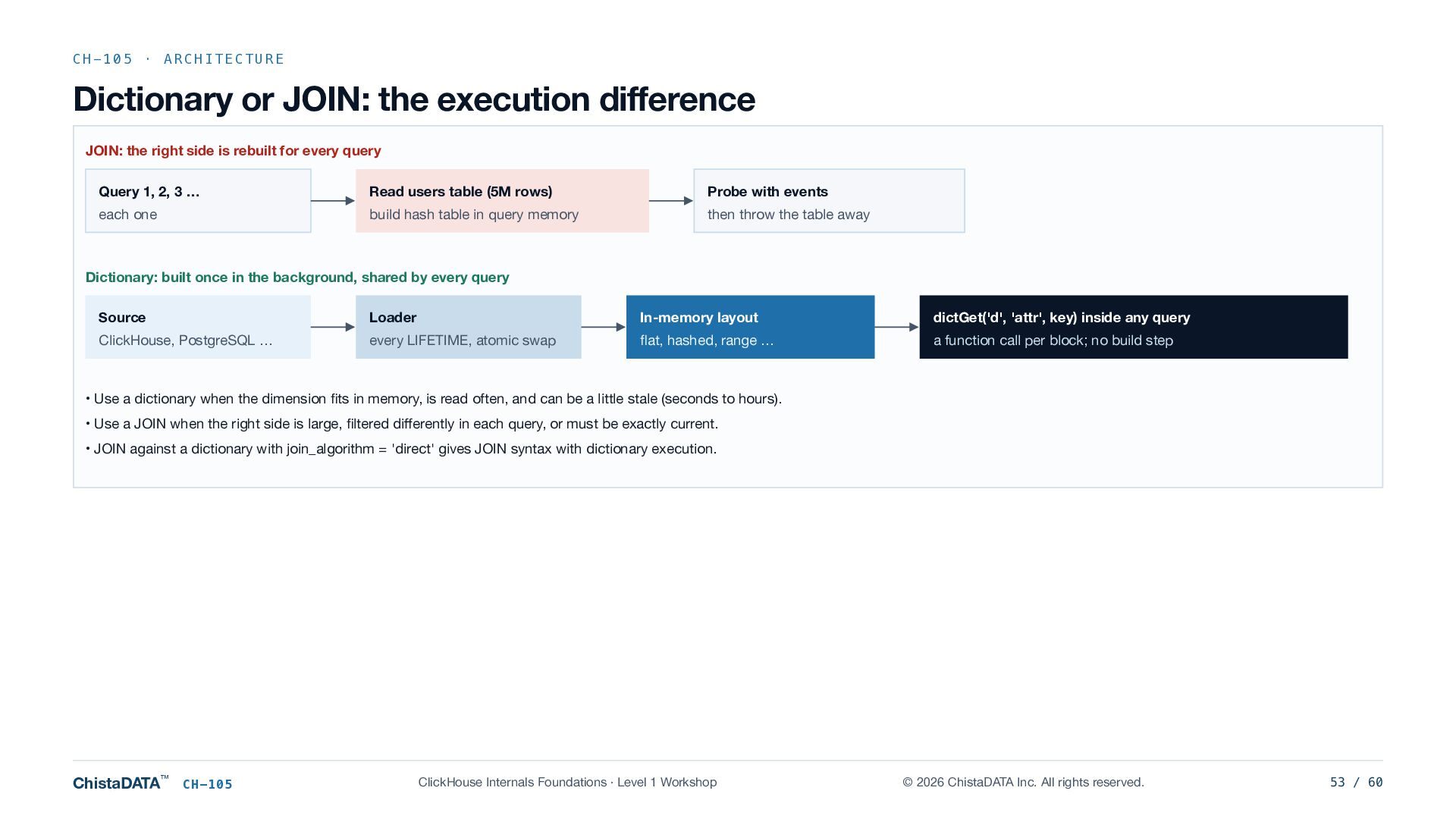
  53. CH-105 · ARCHITECTURE Dictionary or JOIN: the execution difference JOIN:

    the right side is rebuilt for every query Query 1, 2, 3 … Read users table (5M rows) Probe with events each one build hash table in query memory then throw the table away Dictionary: built once in the background, shared by every query Source Loader In-memory layout dictGet('d', 'attr', key) inside any query ClickHouse, PostgreSQL … every LIFETIME, atomic swap flat, hashed, range … a function call per block; no build step • Use a dictionary when the dimension fits in memory, is read often, and can be a little stale (seconds to hours). • Use a JOIN when the right side is large, filtered differently in each query, or must be exactly current. • JOIN against a dictionary with join_algorithm = 'direct' gives JOIN syntax with dictionary execution. ChistaDATA™ CH-105 ClickHouse Internals Foundations · Level 1 Workshop © 2026 ChistaDATA Inc. All rights reserved. 53 / 60
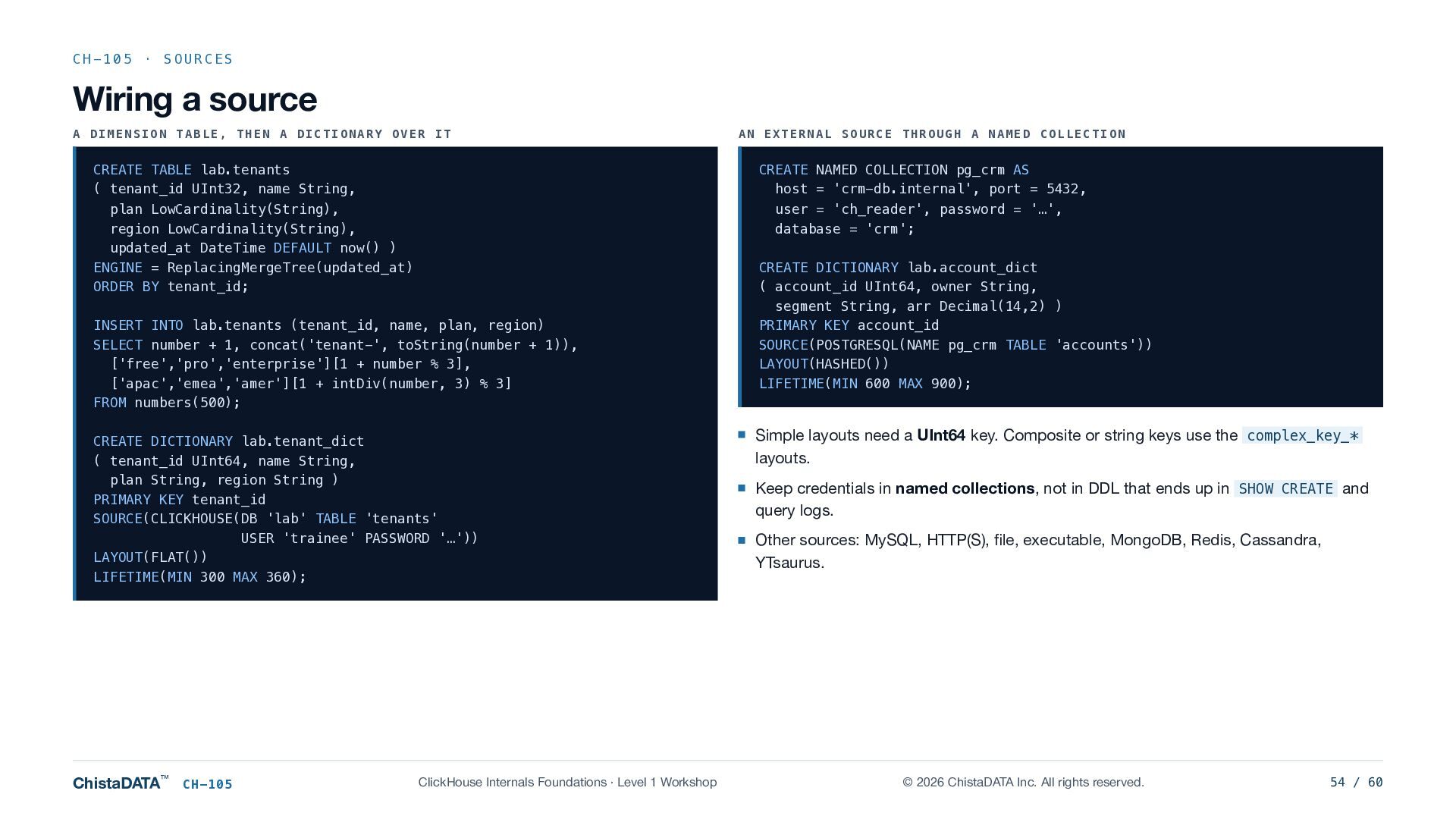
  54. CH-105 · SOURCES Wiring a source A DIMENSION TABLE, THEN

    A DICTIONARY OVER IT CREATE TABLE lab.tenants ( tenant_id UInt32, name String, plan LowCardinality(String), region LowCardinality(String), updated_at DateTime DEFAULT now() ) ENGINE = ReplacingMergeTree(updated_at) ORDER BY tenant_id; CREATE NAMED COLLECTION pg_crm AS host = 'crm-db.internal', port = 5432, user = 'ch_reader', password = '…', database = 'crm'; INSERT INTO lab.tenants (tenant_id, name, plan, region) SELECT number + 1, concat('tenant-', toString(number + 1)), ['free','pro','enterprise'][1 + number % 3], ['apac','emea','amer'][1 + intDiv(number, 3) % 3] FROM numbers(500); CREATE DICTIONARY lab.tenant_dict ( tenant_id UInt64, name String, plan String, region String ) PRIMARY KEY tenant_id SOURCE(CLICKHOUSE(DB 'lab' TABLE 'tenants' USER 'trainee' PASSWORD '…')) LAYOUT(FLAT()) LIFETIME(MIN 300 MAX 360); ChistaDATA™ CH-105 AN EXTERNAL SOURCE THROUGH A NAMED COLLECTION ClickHouse Internals Foundations · Level 1 Workshop CREATE DICTIONARY lab.account_dict ( account_id UInt64, owner String, segment String, arr Decimal(14,2) ) PRIMARY KEY account_id SOURCE(POSTGRESQL(NAME pg_crm TABLE 'accounts')) LAYOUT(HASHED()) LIFETIME(MIN 600 MAX 900); Simple layouts need a UInt64 key. Composite or string keys use the complex_key_* layouts. Keep credentials in named collections, not in DDL that ends up in SHOW CREATE and query logs. Other sources: MySQL, HTTP(S), file, executable, MongoDB, Redis, Cassandra, YTsaurus. © 2026 ChistaDATA Inc. All rights reserved. 54 / 60
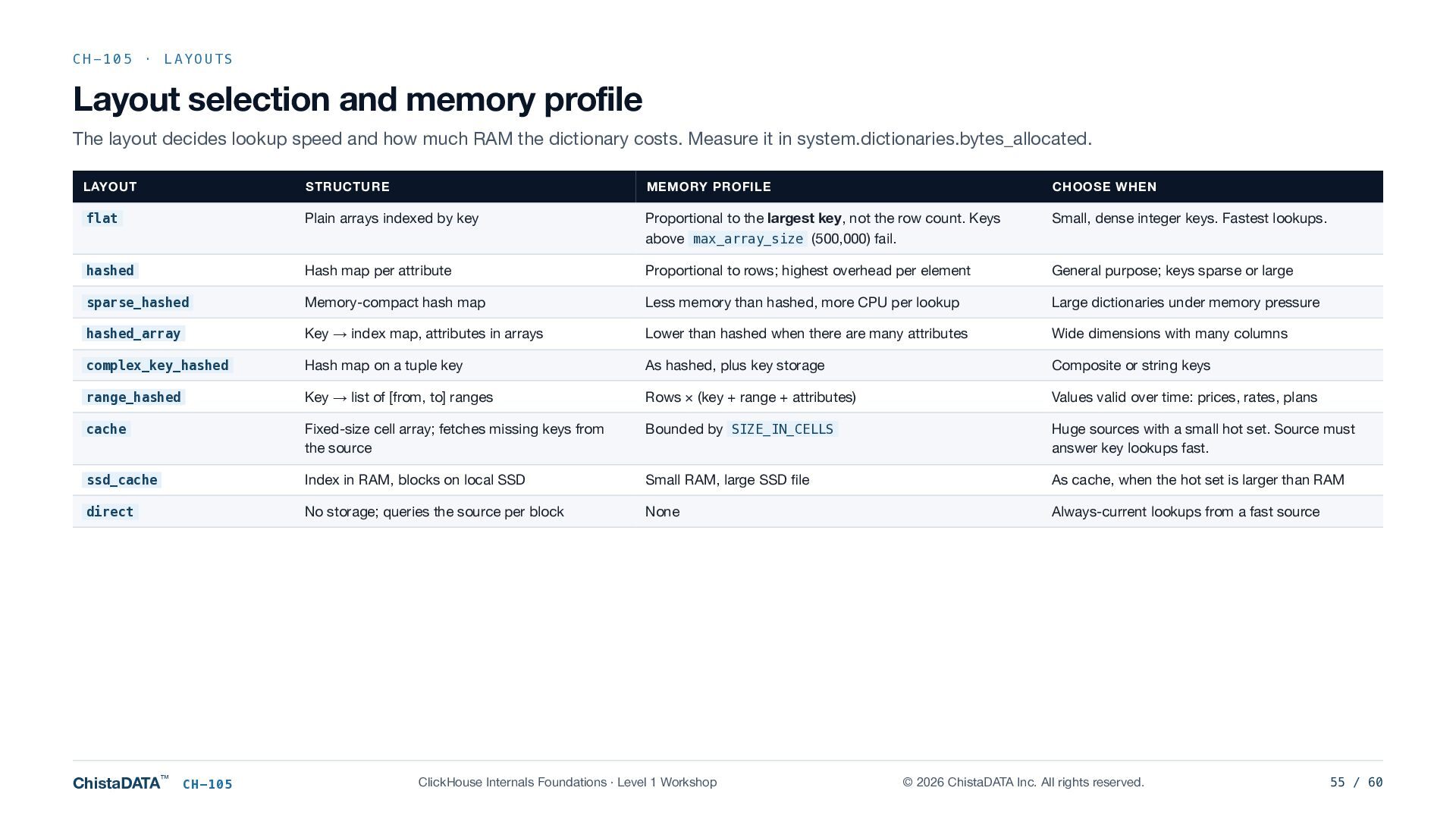
  55. CH-105 · LAYOUTS Layout selection and memory profile The layout

    decides lookup speed and how much RAM the dictionary costs. Measure it in system.dictionaries.bytes_allocated. LAYOUT STRUCTURE MEMORY PROFILE CHOOSE WHEN flat Plain arrays indexed by key Proportional to the largest key, not the row count. Keys above max_array_size (500,000) fail. Small, dense integer keys. Fastest lookups. hashed Hash map per attribute Proportional to rows; highest overhead per element General purpose; keys sparse or large sparse_hashed Memory-compact hash map Less memory than hashed, more CPU per lookup Large dictionaries under memory pressure hashed_array Key → index map, attributes in arrays Lower than hashed when there are many attributes Wide dimensions with many columns complex_key_hashed Hash map on a tuple key As hashed, plus key storage Composite or string keys range_hashed Key → list of [from, to] ranges Rows × (key + range + attributes) Values valid over time: prices, rates, plans cache Fixed-size cell array; fetches missing keys from the source Bounded by SIZE_IN_CELLS Huge sources with a small hot set. Source must answer key lookups fast. ssd_cache Index in RAM, blocks on local SSD Small RAM, large SSD file As cache, when the hot set is larger than RAM direct No storage; queries the source per block None Always-current lookups from a fast source ChistaDATA™ CH-105 ClickHouse Internals Foundations · Level 1 Workshop © 2026 ChistaDATA Inc. All rights reserved. 55 / 60
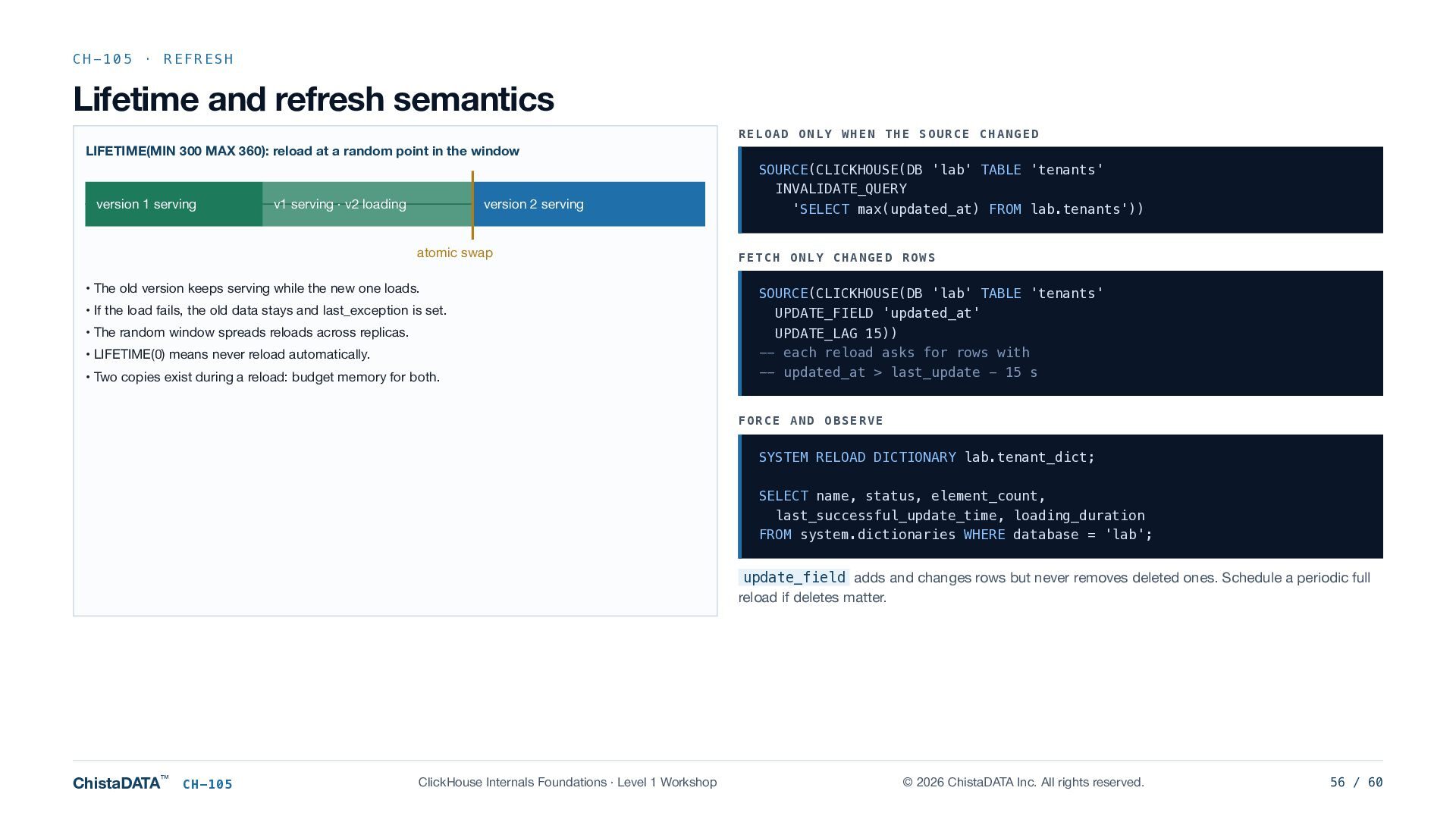
  56. CH-105 · REFRESH Lifetime and refresh semantics RELOAD ONLY WHEN

    THE SOURCE CHANGED LIFETIME(MIN 300 MAX 360): reload at a random point in the window version 1 serving v1 serving · v2 loading version 2 serving atomic swap • The old version keeps serving while the new one loads. • If the load fails, the old data stays and last_exception is set. • The random window spreads reloads across replicas. • LIFETIME(0) means never reload automatically. • Two copies exist during a reload: budget memory for both. SOURCE(CLICKHOUSE(DB 'lab' TABLE 'tenants' INVALIDATE_QUERY 'SELECT max(updated_at) FROM lab.tenants')) FETCH ONLY CHANGED ROWS SOURCE(CLICKHOUSE(DB 'lab' TABLE 'tenants' UPDATE_FIELD 'updated_at' UPDATE_LAG 15)) -- each reload asks for rows with -- updated_at > last_update - 15 s FORCE AND OBSERVE SYSTEM RELOAD DICTIONARY lab.tenant_dict; SELECT name, status, element_count, last_successful_update_time, loading_duration FROM system.dictionaries WHERE database = 'lab'; update_field adds and changes rows but never removes deleted ones. Schedule a periodic full reload if deletes matter. ChistaDATA™ CH-105 ClickHouse Internals Foundations · Level 1 Workshop © 2026 ChistaDATA Inc. All rights reserved. 56 / 60
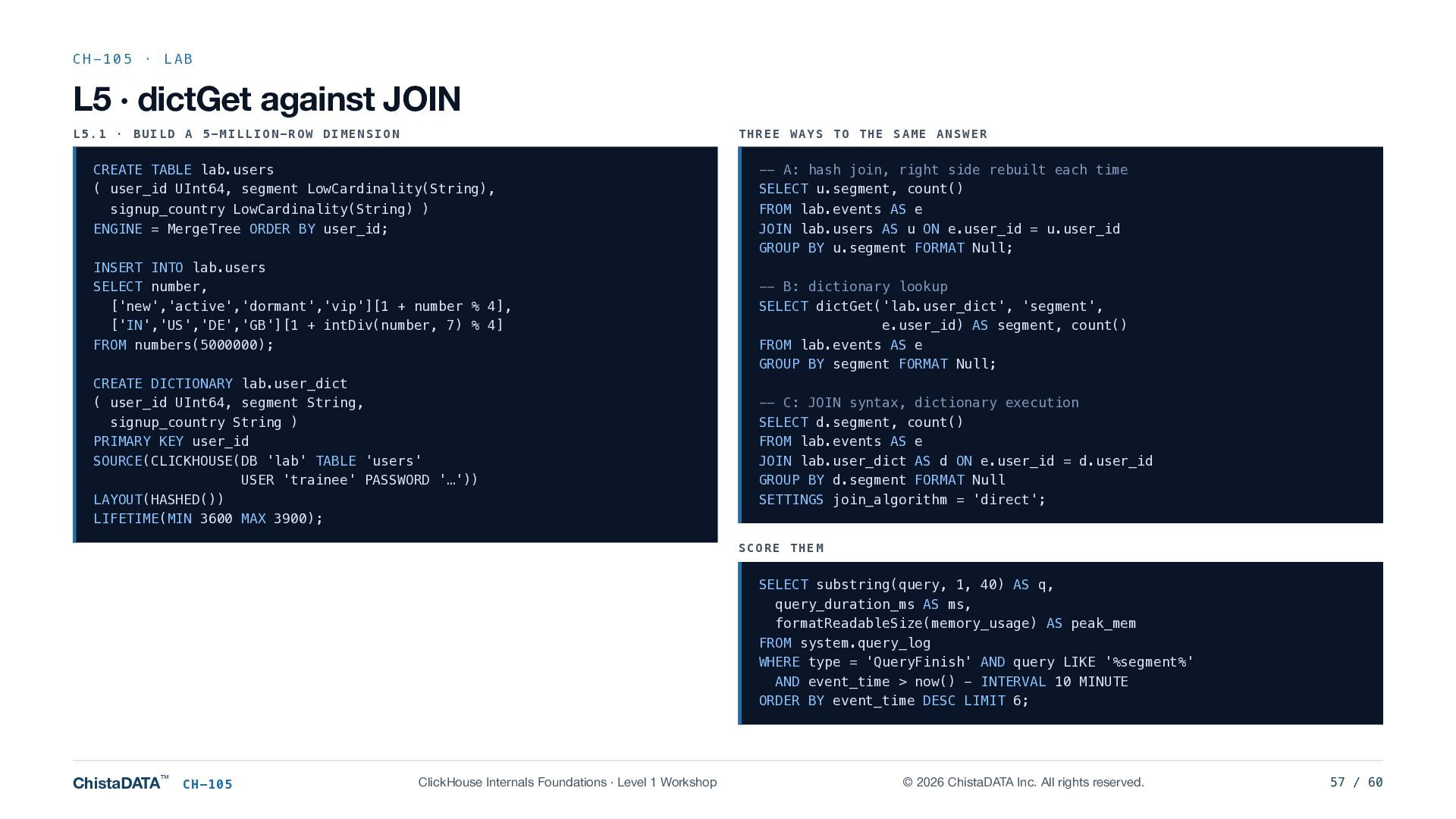
  57. CH-105 · LAB L5 · dictGet against JOIN L5.1 ·

    BUILD A 5-MILLION-ROW DIMENSION THREE WAYS TO THE SAME ANSWER CREATE TABLE lab.users ( user_id UInt64, segment LowCardinality(String), -- A: hash join, right side rebuilt each time SELECT u.segment, count() signup_country LowCardinality(String) ) ENGINE = MergeTree ORDER BY user_id; FROM lab.events AS e JOIN lab.users AS u ON e.user_id = u.user_id GROUP BY u.segment FORMAT Null; INSERT INTO lab.users SELECT number, ['new','active','dormant','vip'][1 + number % 4], ['IN','US','DE','GB'][1 + intDiv(number, 7) % 4] FROM numbers(5000000); CREATE DICTIONARY lab.user_dict ( user_id UInt64, segment String, signup_country String ) PRIMARY KEY user_id SOURCE(CLICKHOUSE(DB 'lab' TABLE 'users' USER 'trainee' PASSWORD '…')) LAYOUT(HASHED()) LIFETIME(MIN 3600 MAX 3900); -- B: dictionary lookup SELECT dictGet('lab.user_dict', 'segment', e.user_id) AS segment, count() FROM lab.events AS e GROUP BY segment FORMAT Null; -- C: JOIN syntax, dictionary execution SELECT d.segment, count() FROM lab.events AS e JOIN lab.user_dict AS d ON e.user_id = d.user_id GROUP BY d.segment FORMAT Null SETTINGS join_algorithm = 'direct'; SCORE THEM SELECT substring(query, 1, 40) AS q, query_duration_ms AS ms, formatReadableSize(memory_usage) AS peak_mem FROM system.query_log WHERE type = 'QueryFinish' AND query LIKE '%segment%' AND event_time > now() - INTERVAL 10 MINUTE ORDER BY event_time DESC LIMIT 6; ChistaDATA™ CH-105 ClickHouse Internals Foundations · Level 1 Workshop © 2026 ChistaDATA Inc. All rights reserved. 57 / 60
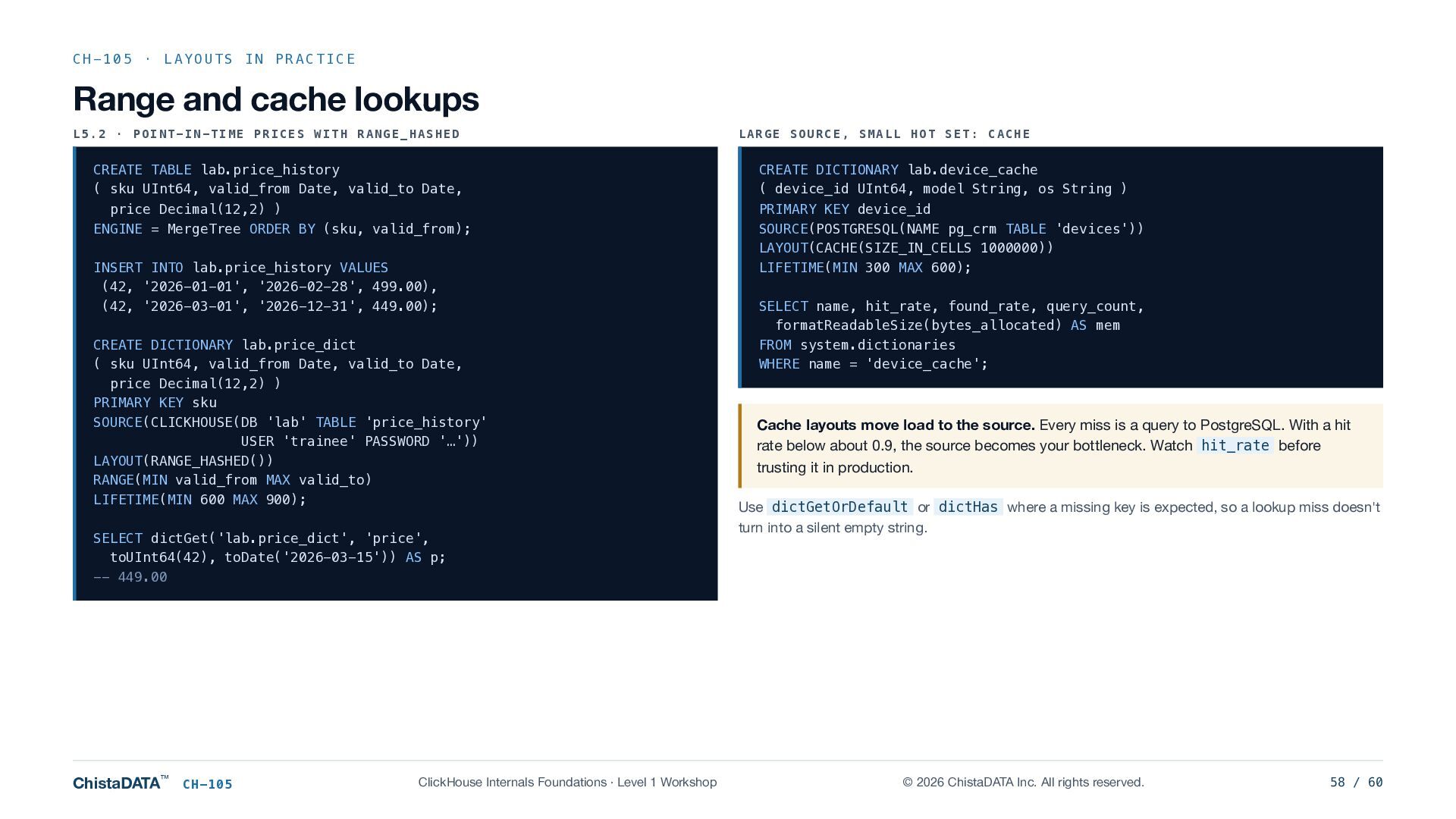
  58. CH-105 · LAYOUTS IN PRACTICE Range and cache lookups L5.2

    · POINT-IN-TIME PRICES WITH RANGE_HASHED CREATE TABLE lab.price_history ( sku UInt64, valid_from Date, valid_to Date, price Decimal(12,2) ) ENGINE = MergeTree ORDER BY (sku, valid_from); INSERT INTO lab.price_history VALUES (42, '2026-01-01', '2026-02-28', 499.00), (42, '2026-03-01', '2026-12-31', 449.00); CREATE DICTIONARY lab.price_dict ( sku UInt64, valid_from Date, valid_to Date, price Decimal(12,2) ) PRIMARY KEY sku SOURCE(CLICKHOUSE(DB 'lab' TABLE 'price_history' USER 'trainee' PASSWORD '…')) LAYOUT(RANGE_HASHED()) RANGE(MIN valid_from MAX valid_to) LIFETIME(MIN 600 MAX 900); SELECT dictGet('lab.price_dict', 'price', toUInt64(42), toDate('2026-03-15')) AS p; -- 449.00 ChistaDATA™ CH-105 ClickHouse Internals Foundations · Level 1 Workshop LARGE SOURCE, SMALL HOT SET: CACHE CREATE DICTIONARY lab.device_cache ( device_id UInt64, model String, os String ) PRIMARY KEY device_id SOURCE(POSTGRESQL(NAME pg_crm TABLE 'devices')) LAYOUT(CACHE(SIZE_IN_CELLS 1000000)) LIFETIME(MIN 300 MAX 600); SELECT name, hit_rate, found_rate, query_count, formatReadableSize(bytes_allocated) AS mem FROM system.dictionaries WHERE name = 'device_cache'; Cache layouts move load to the source. Every miss is a query to PostgreSQL. With a hit rate below about 0.9, the source becomes your bottleneck. Watch hit_rate before trusting it in production. Use dictGetOrDefault or dictHas where a missing key is expected, so a lookup miss doesn't turn into a silent empty string. © 2026 ChistaDATA Inc. All rights reserved. 58 / 60
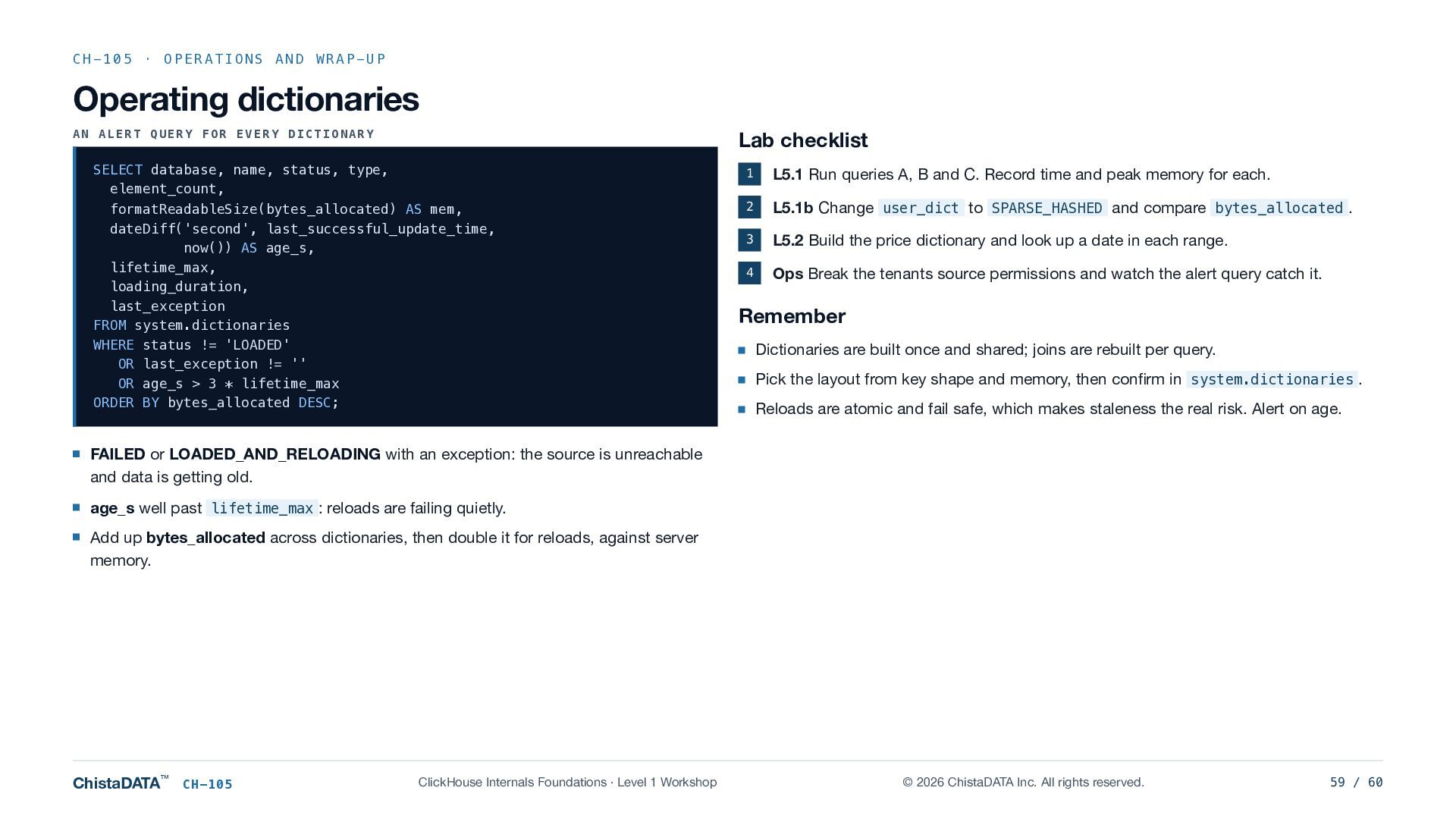
  59. CH-105 · OPERATIONS AND WRAP-UP Operating dictionaries AN ALERT QUERY

    FOR EVERY DICTIONARY Lab checklist SELECT database, name, status, type, element_count, formatReadableSize(bytes_allocated) AS mem, dateDiff('second', last_successful_update_time, now()) AS age_s, lifetime_max, loading_duration, last_exception FROM system.dictionaries WHERE status != 'LOADED' OR last_exception != '' OR age_s > 3 * lifetime_max ORDER BY bytes_allocated DESC; 1 L5.1 Run queries A, B and C. Record time and peak memory for each. 2 L5.1b Change user_dict to SPARSE_HASHED and compare bytes_allocated . 3 L5.2 Build the price dictionary and look up a date in each range. 4 Ops Break the tenants source permissions and watch the alert query catch it. Remember Dictionaries are built once and shared; joins are rebuilt per query. Pick the layout from key shape and memory, then confirm in system.dictionaries . Reloads are atomic and fail safe, which makes staleness the real risk. Alert on age. FAILED or LOADED_AND_RELOADING with an exception: the source is unreachable and data is getting old. age_s well past lifetime_max : reloads are failing quietly. Add up bytes_allocated across dictionaries, then double it for reloads, against server memory. ChistaDATA™ CH-105 ClickHouse Internals Foundations · Level 1 Workshop © 2026 ChistaDATA Inc. All rights reserved. 59 / 60
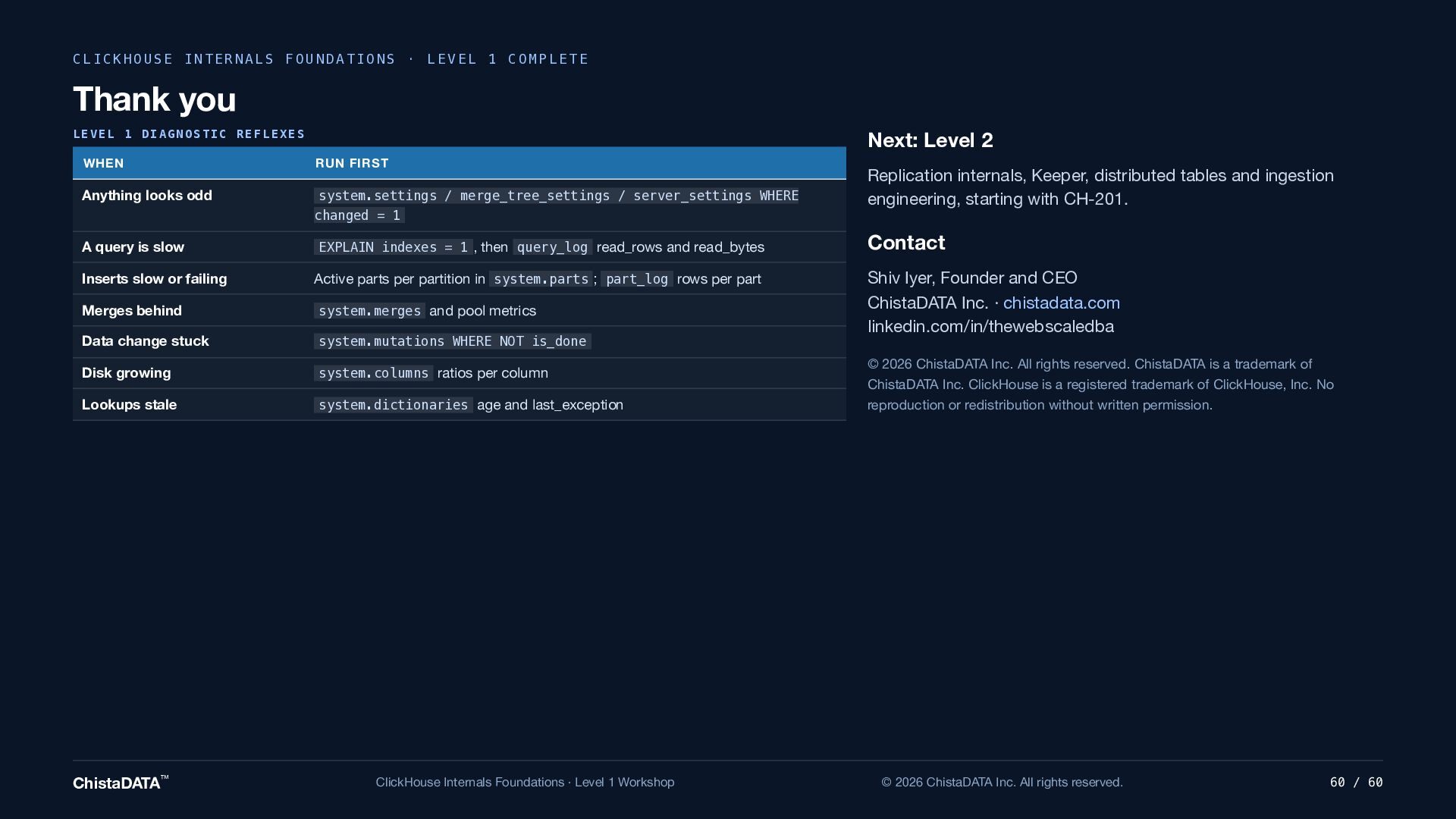
  60. CLICKHOUSE INTERNALS FOUNDATIONS · LEVEL 1 COMPLETE Thank you LEVEL

    1 DIAGNOSTIC REFLEXES Next: Level 2 WHEN RUN FIRST Anything looks odd system.settings / merge_tree_settings / server_settings WHERE changed = 1 A query is slow EXPLAIN indexes = 1 , then query_log read_rows and read_bytes Inserts slow or failing Active parts per partition in system.parts ; part_log rows per part Merges behind system.merges and pool metrics Data change stuck system.mutations WHERE NOT is_done Disk growing system.columns ratios per column Lookups stale system.dictionaries age and last_exception ChistaDATA™ ClickHouse Internals Foundations · Level 1 Workshop Replication internals, Keeper, distributed tables and ingestion engineering, starting with CH-201. Contact Shiv Iyer, Founder and CEO ChistaDATA Inc. · chistadata.com linkedin.com/in/thewebscaledba © 2026 ChistaDATA Inc. All rights reserved. ChistaDATA is a trademark of ChistaDATA Inc. ClickHouse is a registered trademark of ClickHouse, Inc. No reproduction or redistribution without written permission. © 2026 ChistaDATA Inc. All rights reserved. 60 / 60