Upgrade to Pro — share decks privately, control downloads, hide ads and more …

ClickHouse Administration & Distributed Operati...

ClickHouse Administration & Distributed Operations: Level 2 Workshop (CH-201 to CH-204)

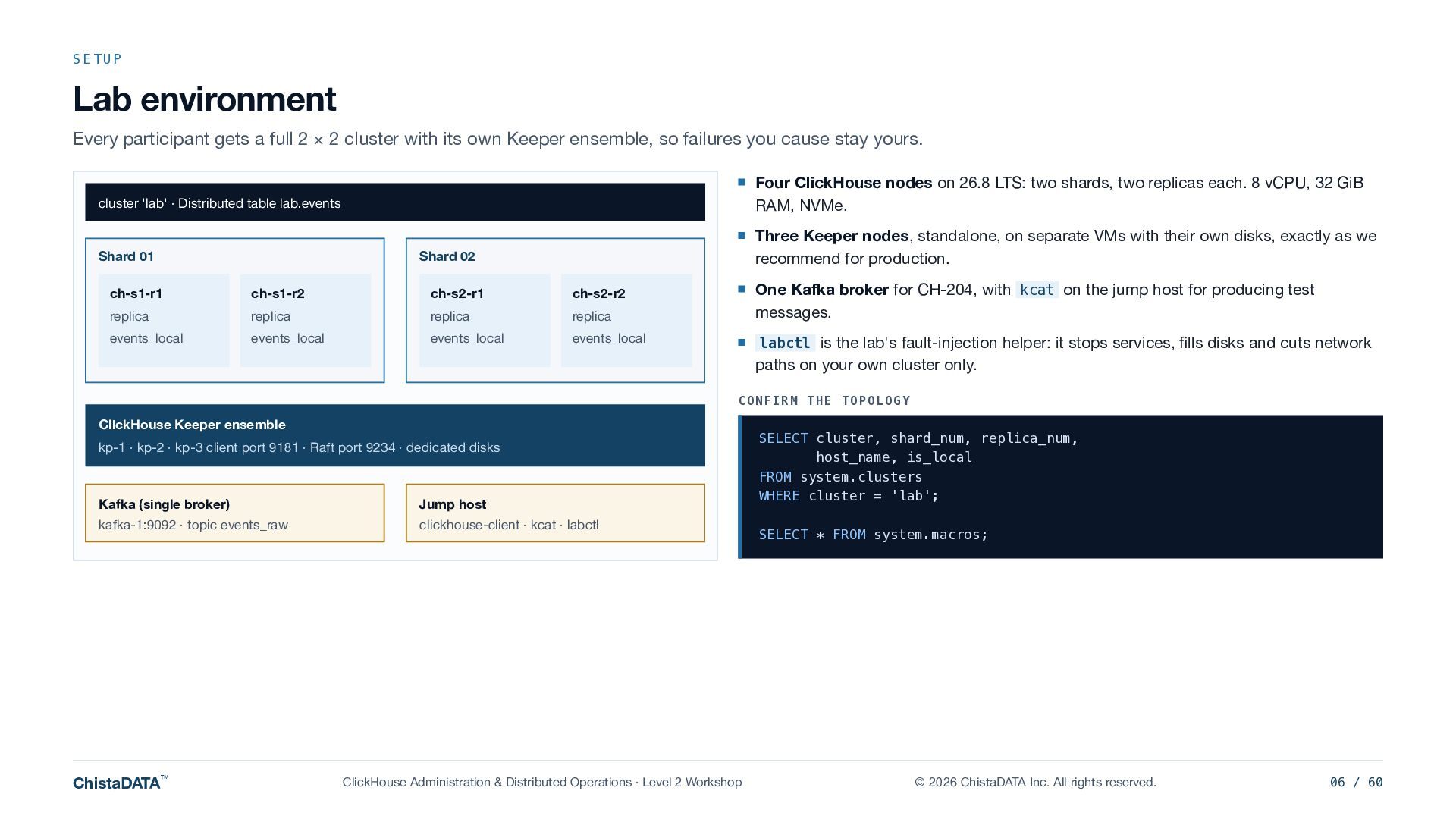
A Level 2 technical workshop from ChistaDATA on replication, Keeper, sharding and ingestion: how a ClickHouse cluster stays consistent, where it breaks, and the rehearsed procedures that bring it back. Checked against ClickHouse 26.3 and 26.8 LTS, with labs and fault drills run on a dedicated 2 x 2 cluster with its own three-node Keeper ensemble and a Kafka broker.

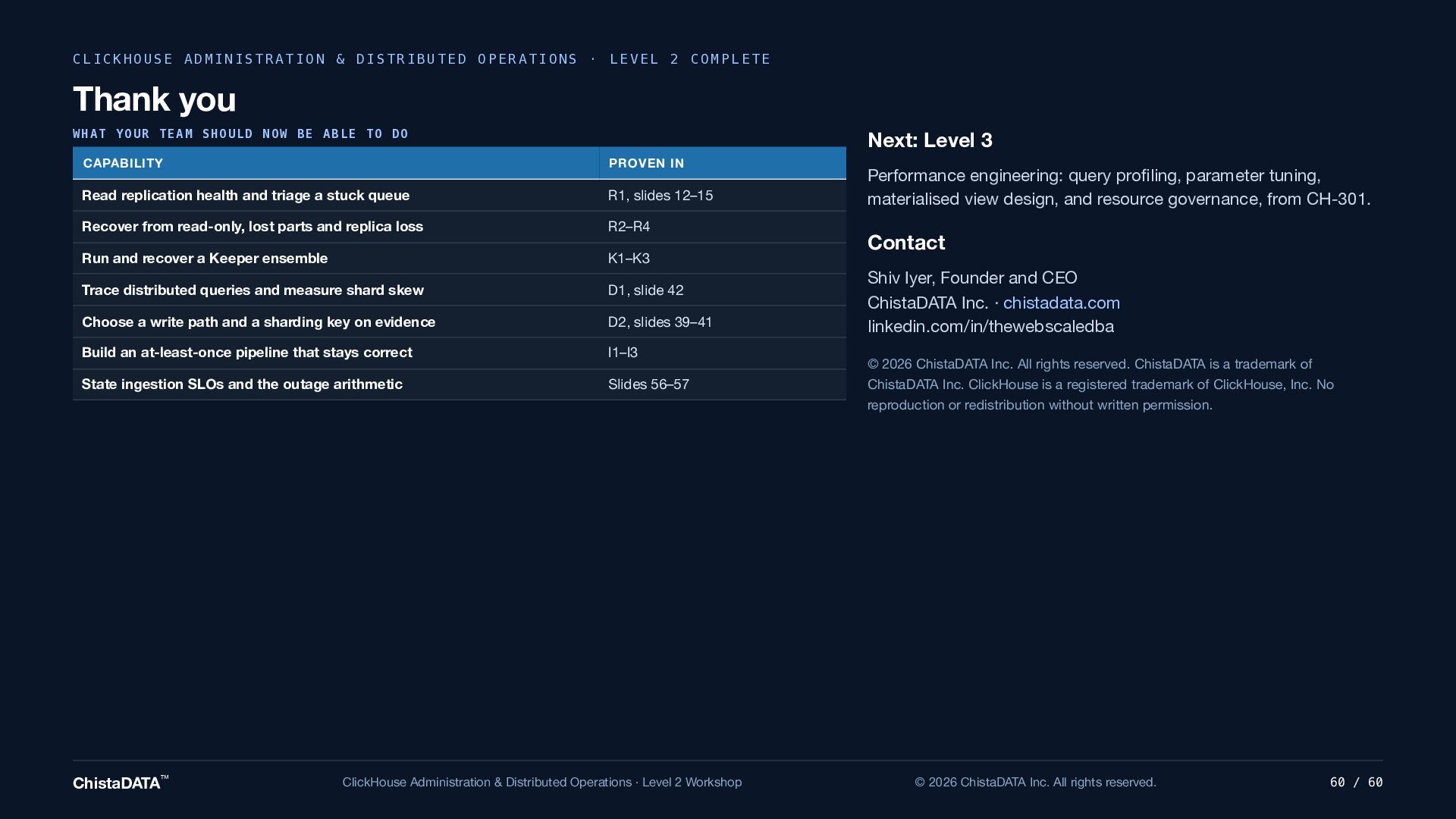
Four modules, about 14 hours, instructor-led and hands-on:

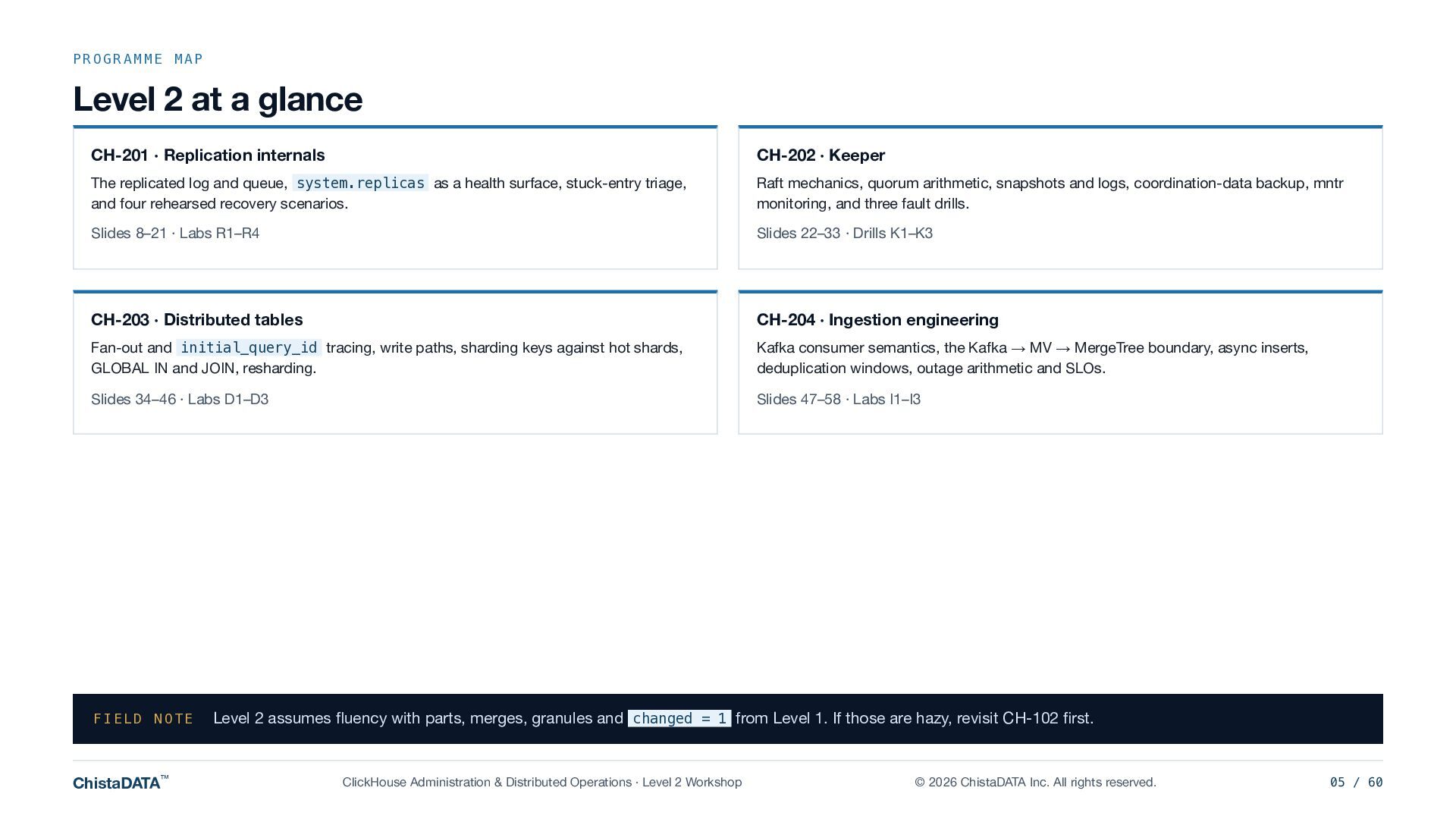
CH-201 Replication internals: the replicated log and queue, system.replicas as a health surface, stuck-entry triage, and four rehearsed recovery scenarios.

CH-202 Keeper: Raft mechanics, quorum arithmetic, snapshots and logs, coordination-data backup, mntr monitoring, and three fault drills.

CH-203 Distributed tables: fan-out and initial_query_id tracing, write paths, sharding keys against hot shards, GLOBAL IN and JOIN, and resharding.

CH-204 Ingestion engineering: Kafka consumer semantics, the Kafka engine to materialized view to MergeTree boundary, async inserts, deduplication windows, outage arithmetic and SLOs.

Written for CTOs, architects, SREs, DBAs and data engineers who run ClickHouse in production. Prerequisite: Level 1, ClickHouse Internals Foundations (CH-101 to CH-105): https://speakerdeck.com/shiviyer007/clickhouse-internals-foundations-level-1-workshop-ch-101-to-ch-105

Presented by Shiv Iyer, Founder and CEO, ChistaDATA Inc.
https://chistadata.com

The fault drills are designed for an isolated lab cluster. Do not run fault-injection steps against production or shared environments, and test on your own workload before applying anything to production.

ClickHouse is a registered trademark of ClickHouse, Inc. Apache Kafka is a trademark of the Apache Software Foundation. ChistaDATA Inc. is independent of both, and this workshop is not endorsed by either.

Avatar for Shiv Iyer

Shiv Iyer PRO

October 20, 2026

More Decks by Shiv Iyer

Other Decks in Technology

Transcript

  1. ChistaDATA™ LEVEL 2 TECHNICAL WORKSHOP · CH-201 TO CH-204 ·

    CLICKHOUSE 26.3 / 26.8 LTS ClickHouse Administration & Distributed Operations Replication, Keeper, sharding and ingestion: how a ClickHouse cluster stays consistent, where it breaks, and the rehearsed procedures that bring it back. SPEAKER F O R M AT PREREQUISITE Shiv Iyer Founder and CEO, ChistaDATA Inc. Instructor-led, hands-on Four modules, about 14 hours Level 1: ClickHouse Internals Foundations (CH-101 to CH-105) ChistaDATA™ ClickHouse Administration & Distributed Operations · Level 2 Workshop © 2026 ChistaDATA Inc. All rights reserved. 01 / 60
  2. LEGAL NOTICE AND CONVENTIONS Before we start Copyright, trademarks and

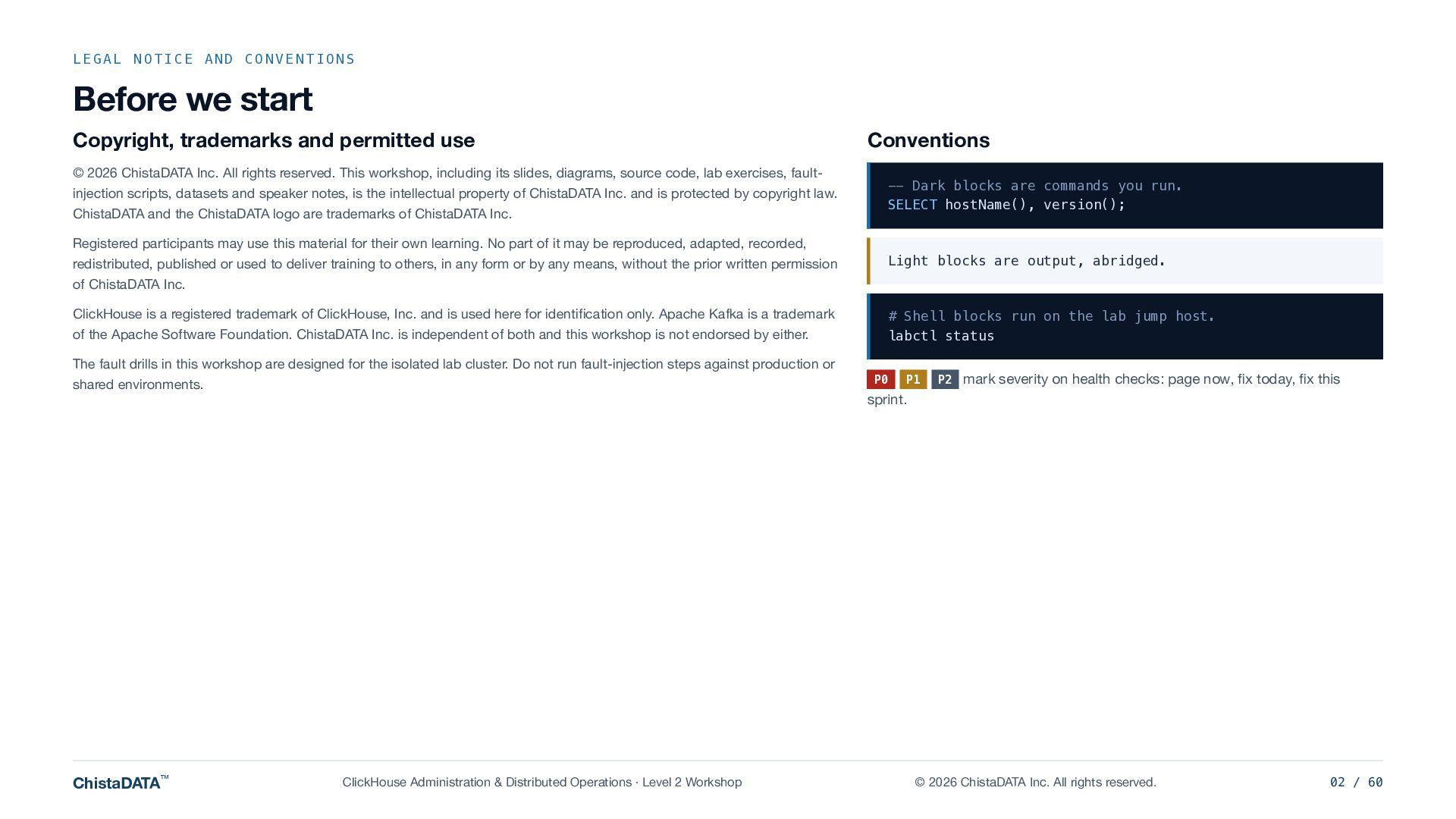
    permitted use © 2026 ChistaDATA Inc. All rights reserved. This workshop, including its slides, diagrams, source code, lab exercises, faultinjection scripts, datasets and speaker notes, is the intellectual property of ChistaDATA Inc. and is protected by copyright law. ChistaDATA and the ChistaDATA logo are trademarks of ChistaDATA Inc. Conventions -- Dark blocks are commands you run. SELECT hostName(), version(); Registered participants may use this material for their own learning. No part of it may be reproduced, adapted, recorded, redistributed, published or used to deliver training to others, in any form or by any means, without the prior written permission of ChistaDATA Inc. Light blocks are output, abridged. ClickHouse is a registered trademark of ClickHouse, Inc. and is used here for identification only. Apache Kafka is a trademark of the Apache Software Foundation. ChistaDATA Inc. is independent of both and this workshop is not endorsed by either. # Shell blocks run on the lab jump host. labctl status The fault drills in this workshop are designed for the isolated lab cluster. Do not run fault-injection steps against production or P0 shared environments. ChistaDATA™ P1 P2 mark severity on health checks: page now, fix today, fix this sprint. ClickHouse Administration & Distributed Operations · Level 2 Workshop © 2026 ChistaDATA Inc. All rights reserved. 02 / 60
  3. YOUR SPEAKER Shiv Iyer Founder and CEO, ChistaDATA Inc. and

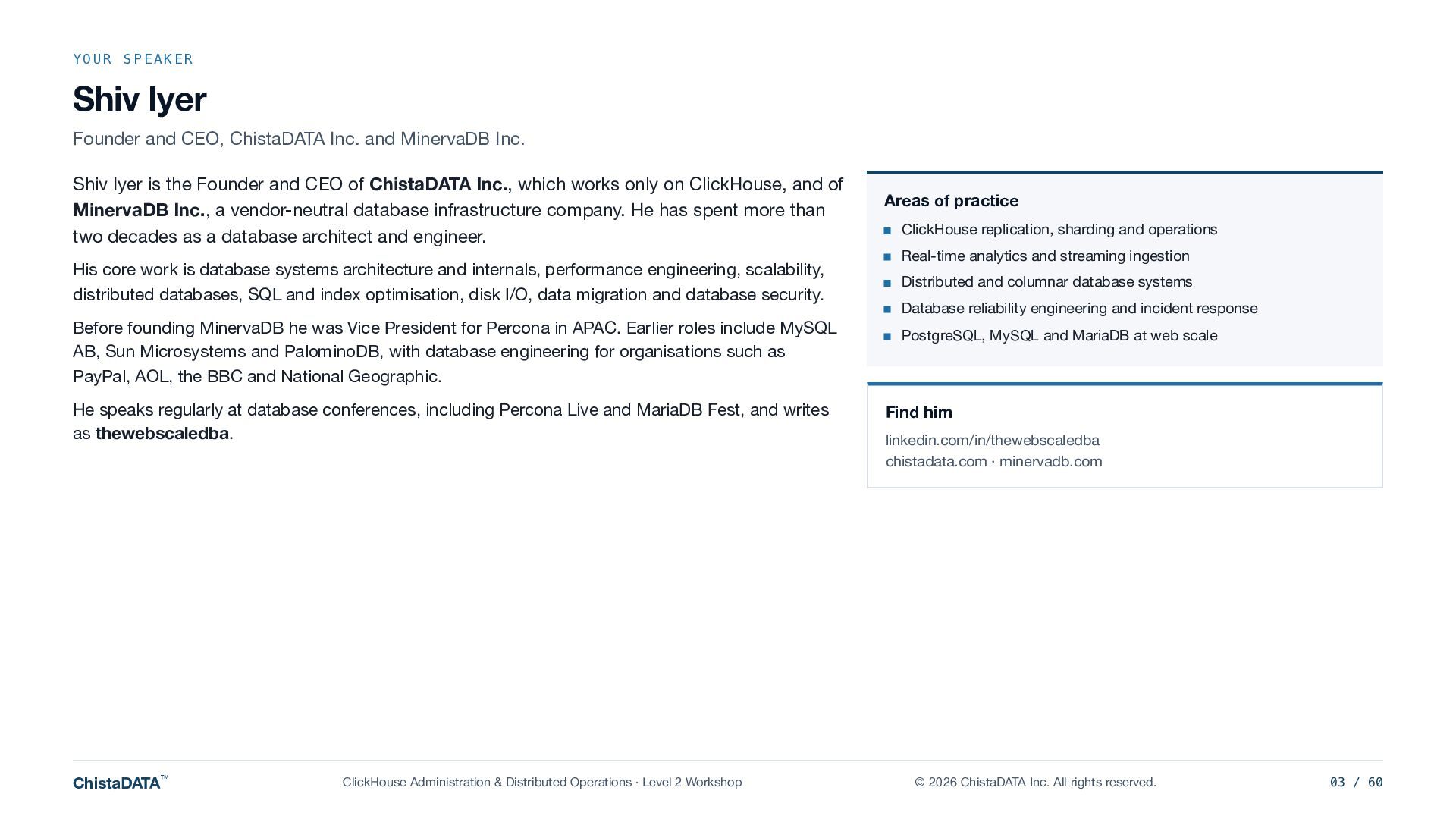
    MinervaDB Inc. Shiv Iyer is the Founder and CEO of ChistaDATA Inc., which works only on ClickHouse, and of MinervaDB Inc., a vendor-neutral database infrastructure company. He has spent more than two decades as a database architect and engineer. His core work is database systems architecture and internals, performance engineering, scalability, distributed databases, SQL and index optimisation, disk I/O, data migration and database security. Before founding MinervaDB he was Vice President for Percona in APAC. Earlier roles include MySQL AB, Sun Microsystems and PalominoDB, with database engineering for organisations such as PayPal, AOL, the BBC and National Geographic. He speaks regularly at database conferences, including Percona Live and MariaDB Fest, and writes as thewebscaledba. ChistaDATA™ ClickHouse Administration & Distributed Operations · Level 2 Workshop Areas of practice ClickHouse replication, sharding and operations Real-time analytics and streaming ingestion Distributed and columnar database systems Database reliability engineering and incident response PostgreSQL, MySQL and MariaDB at web scale Find him linkedin.com/in/thewebscaledba chistadata.com · minervadb.com © 2026 ChistaDATA Inc. All rights reserved. 03 / 60
  4. KEY MESSAGES FOR CTOS AND ARCHITECTS Executive summary Four findings

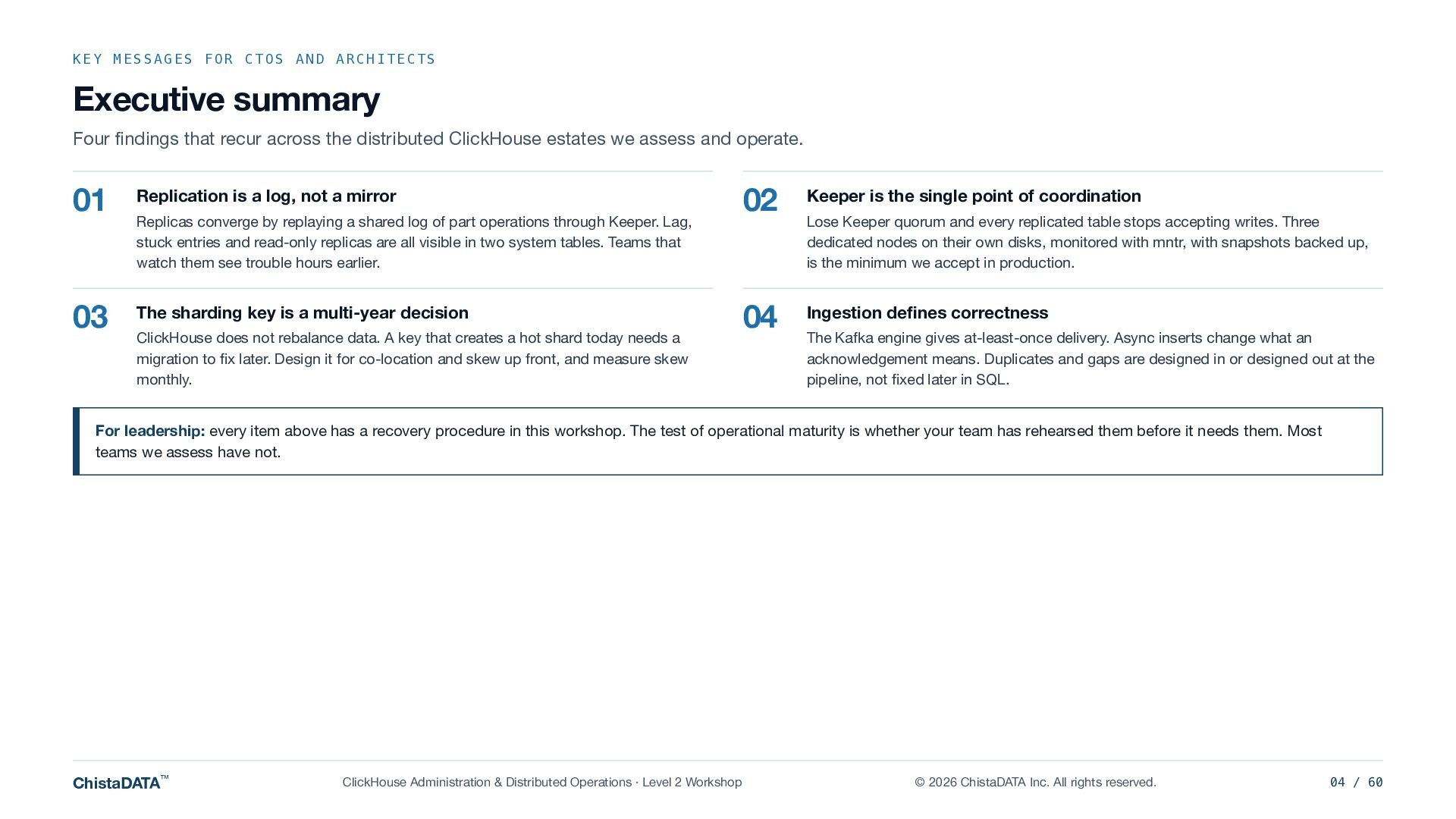
    that recur across the distributed ClickHouse estates we assess and operate. 01 Replication is a log, not a mirror 03 The sharding key is a multi-year decision Replicas converge by replaying a shared log of part operations through Keeper. Lag, stuck entries and read-only replicas are all visible in two system tables. Teams that watch them see trouble hours earlier. ClickHouse does not rebalance data. A key that creates a hot shard today needs a migration to fix later. Design it for co-location and skew up front, and measure skew monthly. 02 Keeper is the single point of coordination 04 Ingestion defines correctness Lose Keeper quorum and every replicated table stops accepting writes. Three dedicated nodes on their own disks, monitored with mntr, with snapshots backed up, is the minimum we accept in production. The Kafka engine gives at-least-once delivery. Async inserts change what an acknowledgement means. Duplicates and gaps are designed in or designed out at the pipeline, not fixed later in SQL. For leadership: every item above has a recovery procedure in this workshop. The test of operational maturity is whether your team has rehearsed them before it needs them. Most teams we assess have not. ChistaDATA™ ClickHouse Administration & Distributed Operations · Level 2 Workshop © 2026 ChistaDATA Inc. All rights reserved. 04 / 60
  5. PROGRAMME MAP Level 2 at a glance CH-201 · Replication

    internals CH-202 · Keeper The replicated log and queue, system.replicas as a health surface, stuck-entry triage, and four rehearsed recovery scenarios. Raft mechanics, quorum arithmetic, snapshots and logs, coordination-data backup, mntr monitoring, and three fault drills. Slides 8–21 · Labs R1–R4 Slides 22–33 · Drills K1–K3 CH-203 · Distributed tables CH-204 · Ingestion engineering Fan-out and initial_query_id tracing, write paths, sharding keys against hot shards, GLOBAL IN and JOIN, resharding. Kafka consumer semantics, the Kafka → MV → MergeTree boundary, async inserts, deduplication windows, outage arithmetic and SLOs. Slides 34–46 · Labs D1–D3 Slides 47–58 · Labs I1–I3 FIELD NOTE ChistaDATA™ Level 2 assumes fluency with parts, merges, granules and changed = 1 from Level 1. If those are hazy, revisit CH-102 first. ClickHouse Administration & Distributed Operations · Level 2 Workshop © 2026 ChistaDATA Inc. All rights reserved. 05 / 60
  6. SETUP Lab environment Every participant gets a full 2 ×

    2 cluster with its own Keeper ensemble, so failures you cause stay yours. Four ClickHouse nodes on 26.8 LTS: two shards, two replicas each. 8 vCPU, 32 GiB RAM, NVMe. cluster 'lab' · Distributed table lab.events Shard 01 Three Keeper nodes, standalone, on separate VMs with their own disks, exactly as we recommend for production. Shard 02 ch-s1-r1 ch-s1-r2 ch-s2-r1 ch-s2-r2 replica replica replica replica events_local events_local events_local events_local One Kafka broker for CH-204, with kcat on the jump host for producing test messages. labctl is the lab's fault-injection helper: it stops services, fills disks and cuts network paths on your own cluster only. CONFIRM THE TOPOLOGY ClickHouse Keeper ensemble kp-1 · kp-2 · kp-3 client port 9181 · Raft port 9234 · dedicated disks Kafka (single broker) Jump host kafka-1:9092 · topic events_raw clickhouse-client · kcat · labctl ChistaDATA™ ClickHouse Administration & Distributed Operations · Level 2 Workshop SELECT cluster, shard_num, replica_num, host_name, is_local FROM system.clusters WHERE cluster = 'lab'; SELECT * FROM system.macros; © 2026 ChistaDATA Inc. All rights reserved. 06 / 60
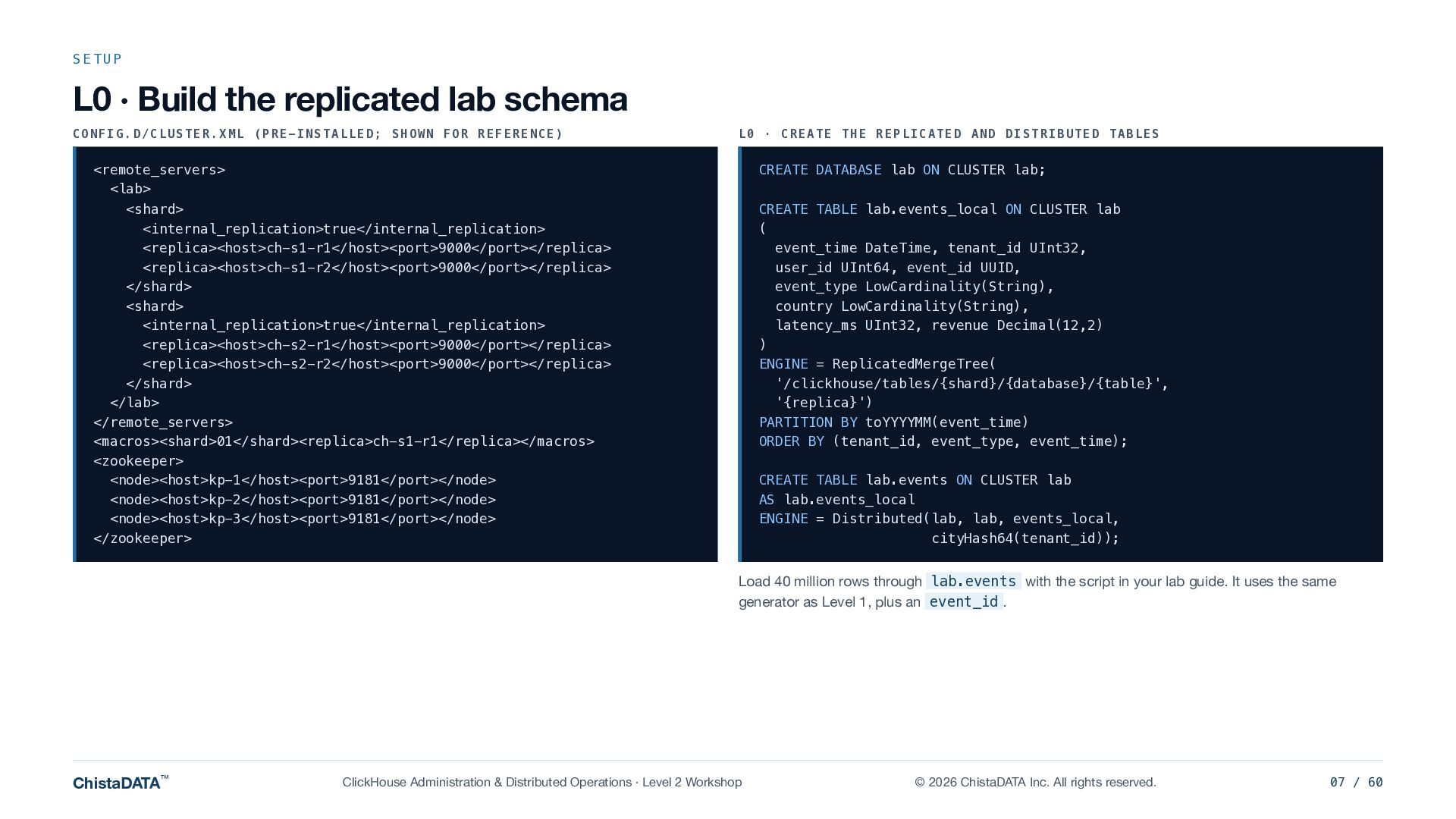
  7. SETUP L0 · Build the replicated lab schema CONFIG.D/CLUSTER.XML (PRE-INSTALLED;

    SHOWN FOR REFERENCE) L0 · CREATE THE REPLICATED AND DISTRIBUTED TABLES <remote_servers> <lab> CREATE DATABASE lab ON CLUSTER lab; <shard> <internal_replication>true</internal_replication> <replica><host>ch-s1-r1</host><port>9000</port></replica> <replica><host>ch-s1-r2</host><port>9000</port></replica> </shard> <shard> <internal_replication>true</internal_replication> <replica><host>ch-s2-r1</host><port>9000</port></replica> <replica><host>ch-s2-r2</host><port>9000</port></replica> </shard> </lab> </remote_servers> <macros><shard>01</shard><replica>ch-s1-r1</replica></macros> <zookeeper> <node><host>kp-1</host><port>9181</port></node> <node><host>kp-2</host><port>9181</port></node> <node><host>kp-3</host><port>9181</port></node> </zookeeper> CREATE TABLE lab.events_local ON CLUSTER lab ( event_time DateTime, tenant_id UInt32, user_id UInt64, event_id UUID, event_type LowCardinality(String), country LowCardinality(String), latency_ms UInt32, revenue Decimal(12,2) ) ENGINE = ReplicatedMergeTree( '/clickhouse/tables/{shard}/{database}/{table}', '{replica}') PARTITION BY toYYYYMM(event_time) ORDER BY (tenant_id, event_type, event_time); CREATE TABLE lab.events ON CLUSTER lab AS lab.events_local ENGINE = Distributed(lab, lab, events_local, cityHash64(tenant_id)); Load 40 million rows through lab.events with the script in your lab guide. It uses the same generator as Level 1, plus an event_id . ChistaDATA™ ClickHouse Administration & Distributed Operations · Level 2 Workshop © 2026 ChistaDATA Inc. All rights reserved. 07 / 60
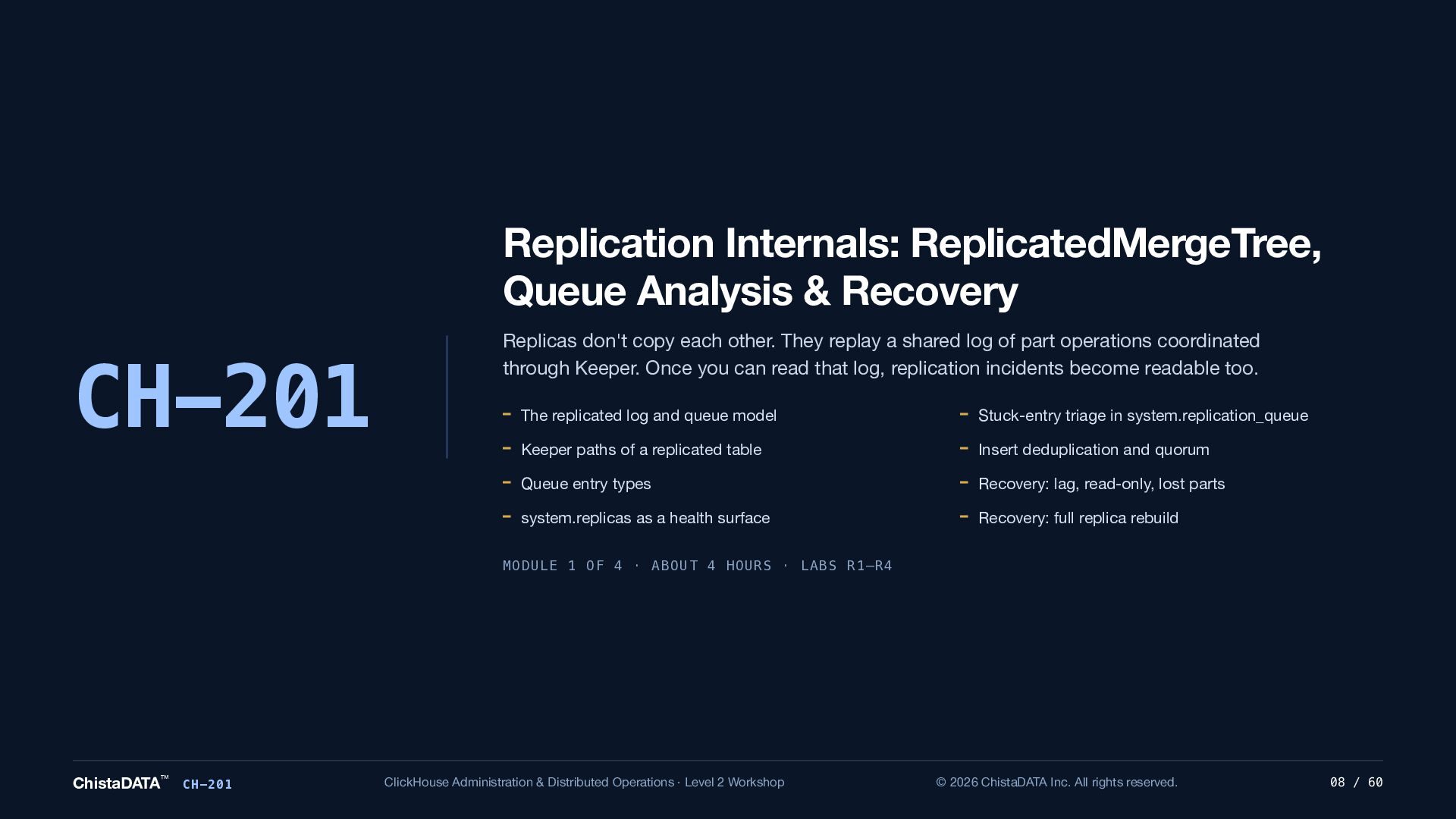
  8. Replication Internals: ReplicatedMergeTree, Queue Analysis & Recovery CH-201 Replicas don't

    copy each other. They replay a shared log of part operations coordinated through Keeper. Once you can read that log, replication incidents become readable too. The replicated log and queue model Stuck-entry triage in system.replication_queue Keeper paths of a replicated table Insert deduplication and quorum Queue entry types Recovery: lag, read-only, lost parts system.replicas as a health surface Recovery: full replica rebuild MODULE 1 OF 4 · ABOUT 4 HOURS · LABS R1–R4 ChistaDATA™ CH-201 ClickHouse Administration & Distributed Operations · Level 2 Workshop © 2026 ChistaDATA Inc. All rights reserved. 08 / 60
  9. CH-201 · MODEL The replicated log and queue model ClickHouse

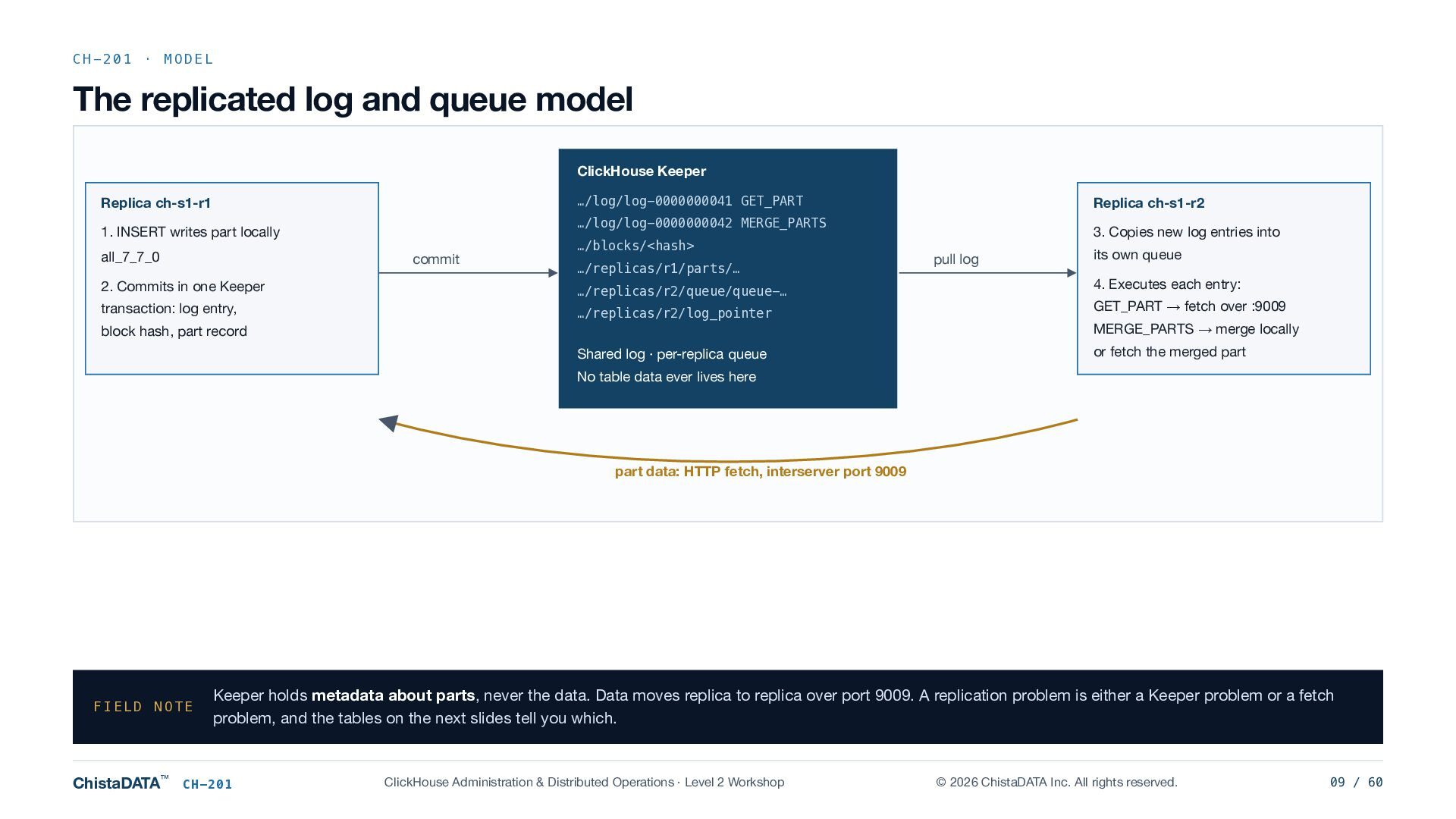
    Keeper …/log/log-0000000041 GET_PART Replica ch-s1-r1 1. INSERT writes part locally all_7_7_0 Replica ch-s1-r2 …/log/log-0000000042 MERGE_PARTS commit …/blocks/<hash> …/replicas/r1/parts/… 2. Commits in one Keeper …/replicas/r2/queue/queue-… transaction: log entry, …/replicas/r2/log_pointer block hash, part record Shared log · per-replica queue 3. Copies new log entries into pull log its own queue 4. Executes each entry: GET_PART → fetch over :9009 MERGE_PARTS → merge locally or fetch the merged part No table data ever lives here part data: HTTP fetch, interserver port 9009 FIELD NOTE ChistaDATA™ Keeper holds metadata about parts, never the data. Data moves replica to replica over port 9009. A replication problem is either a Keeper problem or a fetch problem, and the tables on the next slides tell you which. CH-201 ClickHouse Administration & Distributed Operations · Level 2 Workshop © 2026 ChistaDATA Inc. All rights reserved. 09 / 60
  10. CH-201 · MODEL What a replicated table keeps in Keeper

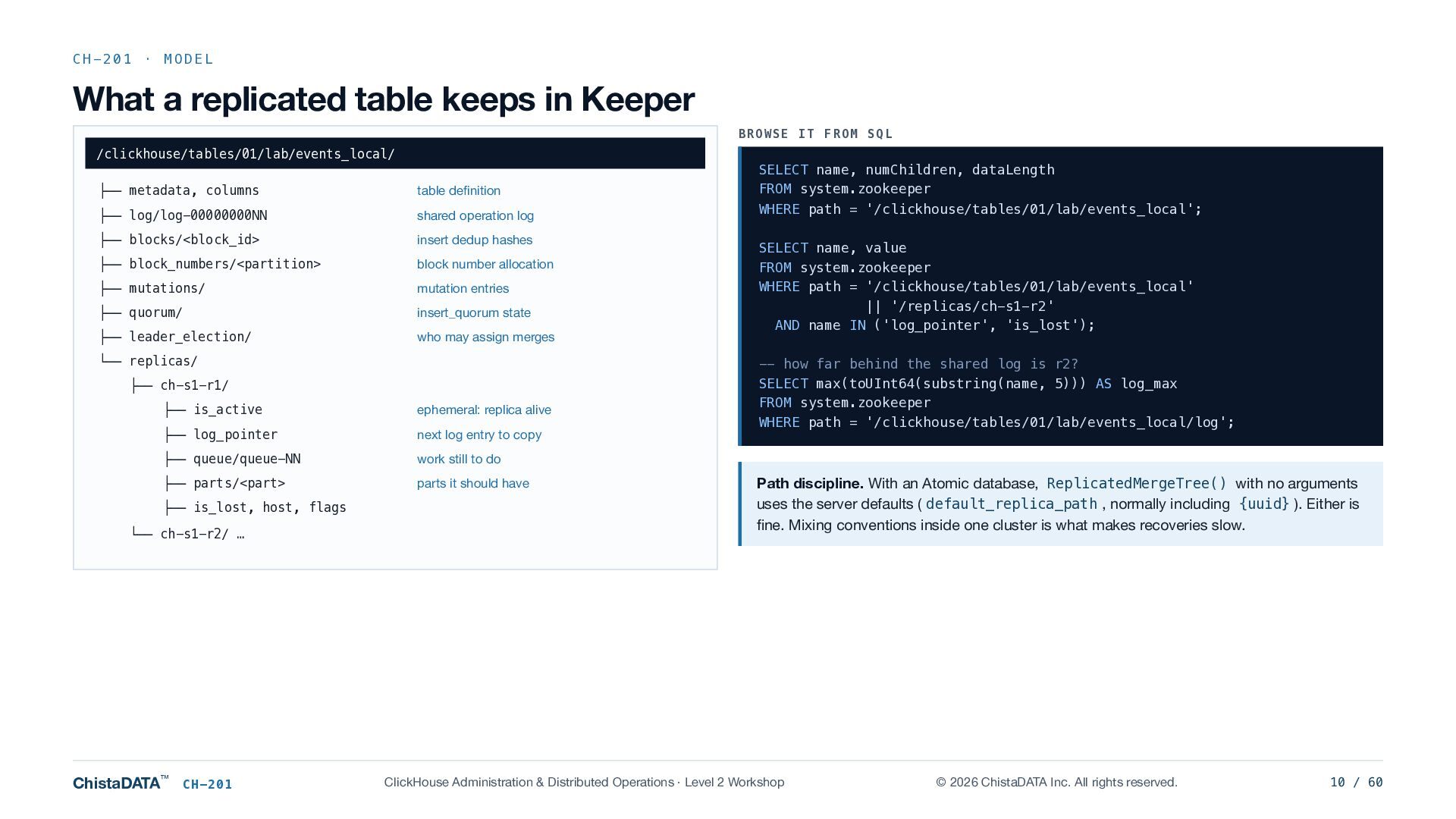
    BROWSE IT FROM SQL /clickhouse/tables/01/lab/events_local/ ├── metadata, columns table definition SELECT name, numChildren, dataLength FROM system.zookeeper ├── log/log-00000000NN shared operation log WHERE path = '/clickhouse/tables/01/lab/events_local'; ├── blocks/<block_id> insert dedup hashes ├── block_numbers/<partition> block number allocation ├── mutations/ mutation entries ├── quorum/ insert_quorum state ├── leader_election/ who may assign merges └── replicas/ ├── ch-s1-r1/ ├── is_active ephemeral: replica alive ├── log_pointer next log entry to copy ├── queue/queue-NN work still to do ├── parts/<part> parts it should have ├── is_lost, host, flags └── ch-s1-r2/ … ChistaDATA™ CH-201 SELECT name, value FROM system.zookeeper WHERE path = '/clickhouse/tables/01/lab/events_local' || '/replicas/ch-s1-r2' AND name IN ('log_pointer', 'is_lost'); -- how far behind the shared log is r2? SELECT max(toUInt64(substring(name, 5))) AS log_max FROM system.zookeeper WHERE path = '/clickhouse/tables/01/lab/events_local/log'; Path discipline. With an Atomic database, ReplicatedMergeTree() with no arguments uses the server defaults ( default_replica_path , normally including {uuid} ). Either is fine. Mixing conventions inside one cluster is what makes recoveries slow. ClickHouse Administration & Distributed Operations · Level 2 Workshop © 2026 ChistaDATA Inc. All rights reserved. 10 / 60
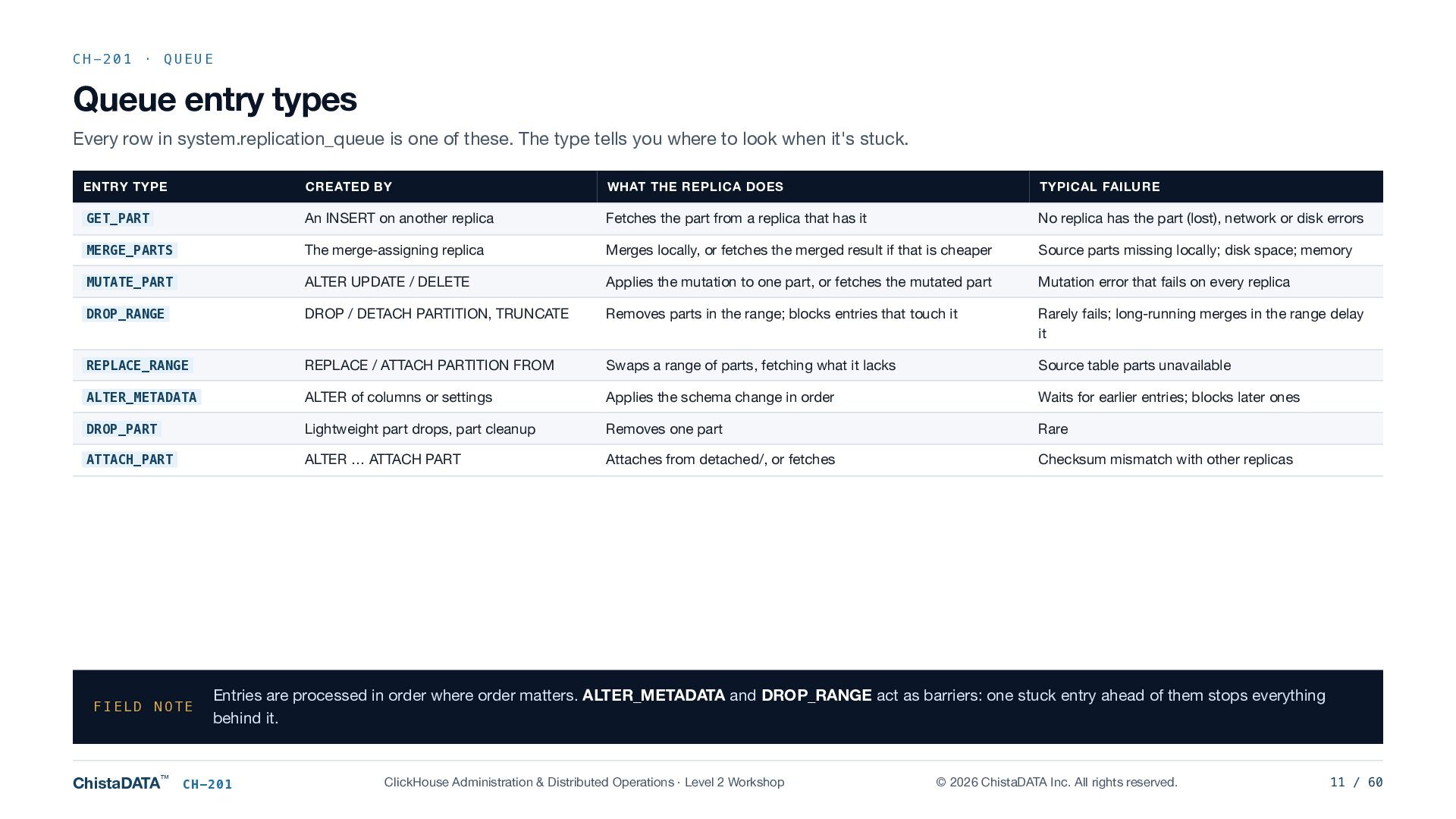
  11. CH-201 · QUEUE Queue entry types Every row in system.replication_queue

    is one of these. The type tells you where to look when it's stuck. ENTRY TYPE CREATED BY WHAT THE REPLICA DOES TYPICAL FAILURE GET_PART An INSERT on another replica Fetches the part from a replica that has it No replica has the part (lost), network or disk errors MERGE_PARTS The merge-assigning replica Merges locally, or fetches the merged result if that is cheaper Source parts missing locally; disk space; memory MUTATE_PART ALTER UPDATE / DELETE Applies the mutation to one part, or fetches the mutated part Mutation error that fails on every replica DROP_RANGE DROP / DETACH PARTITION, TRUNCATE Removes parts in the range; blocks entries that touch it Rarely fails; long-running merges in the range delay it REPLACE_RANGE REPLACE / ATTACH PARTITION FROM Swaps a range of parts, fetching what it lacks Source table parts unavailable ALTER_METADATA ALTER of columns or settings Applies the schema change in order Waits for earlier entries; blocks later ones DROP_PART Lightweight part drops, part cleanup Removes one part Rare ATTACH_PART ALTER … ATTACH PART Attaches from detached/, or fetches Checksum mismatch with other replicas FIELD NOTE ChistaDATA™ Entries are processed in order where order matters. ALTER_METADATA and DROP_RANGE act as barriers: one stuck entry ahead of them stops everything behind it. CH-201 ClickHouse Administration & Distributed Operations · Level 2 Workshop © 2026 ChistaDATA Inc. All rights reserved. 11 / 60
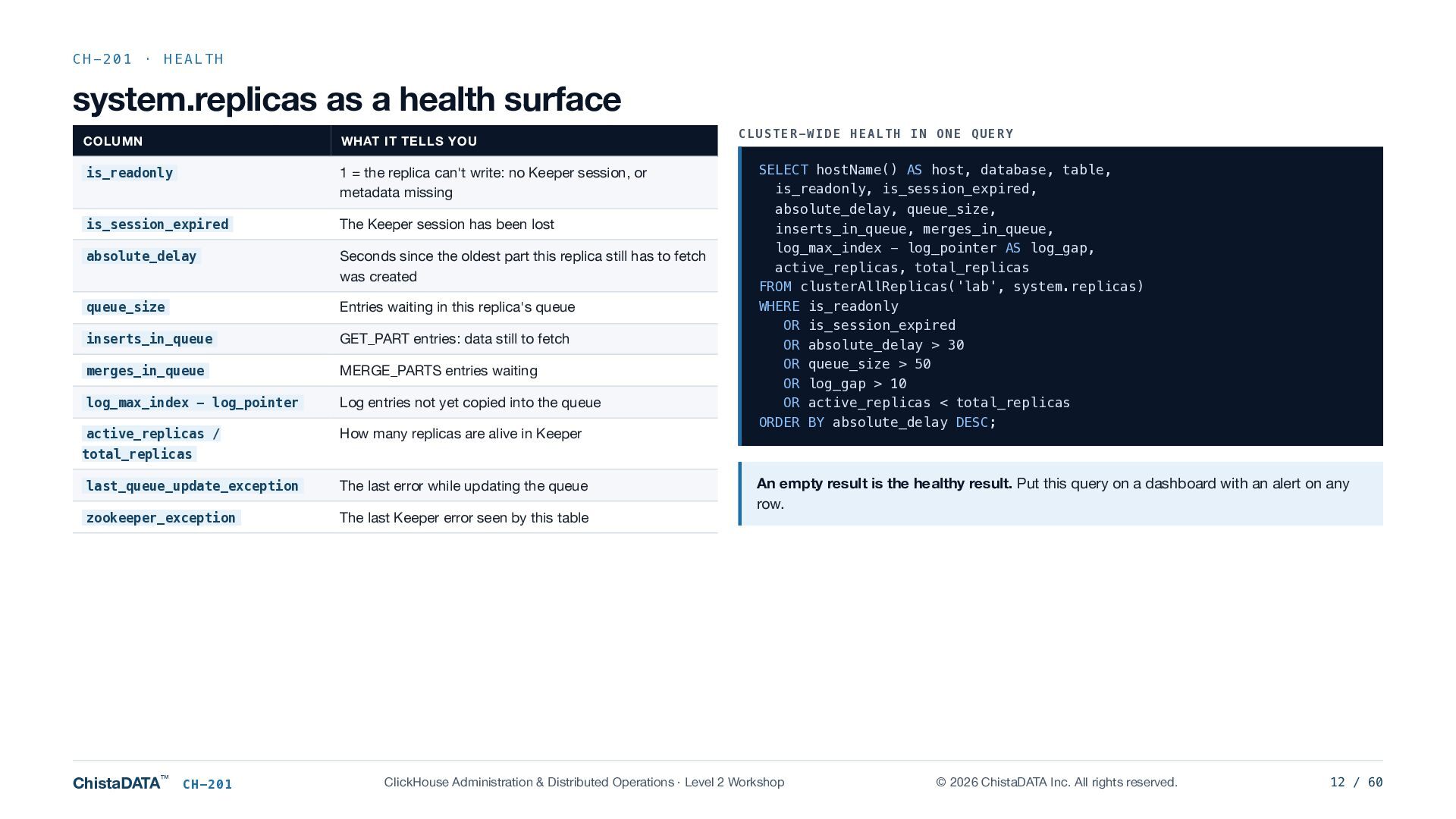
  12. CH-201 · HEALTH system.replicas as a health surface COLUMN WHAT

    IT TELLS YOU is_readonly 1 = the replica can't write: no Keeper session, or metadata missing is_session_expired The Keeper session has been lost absolute_delay Seconds since the oldest part this replica still has to fetch was created queue_size Entries waiting in this replica's queue inserts_in_queue GET_PART entries: data still to fetch merges_in_queue MERGE_PARTS entries waiting log_max_index − log_pointer Log entries not yet copied into the queue active_replicas / How many replicas are alive in Keeper CLUSTER-WIDE HEALTH IN ONE QUERY SELECT hostName() AS host, database, table, is_readonly, is_session_expired, absolute_delay, queue_size, inserts_in_queue, merges_in_queue, log_max_index - log_pointer AS log_gap, active_replicas, total_replicas FROM clusterAllReplicas('lab', system.replicas) WHERE is_readonly OR is_session_expired OR absolute_delay > 30 OR queue_size > 50 OR log_gap > 10 OR active_replicas < total_replicas ORDER BY absolute_delay DESC; total_replicas last_queue_update_exception The last error while updating the queue zookeeper_exception The last Keeper error seen by this table ChistaDATA™ CH-201 An empty result is the healthy result. Put this query on a dashboard with an alert on any row. ClickHouse Administration & Distributed Operations · Level 2 Workshop © 2026 ChistaDATA Inc. All rights reserved. 12 / 60
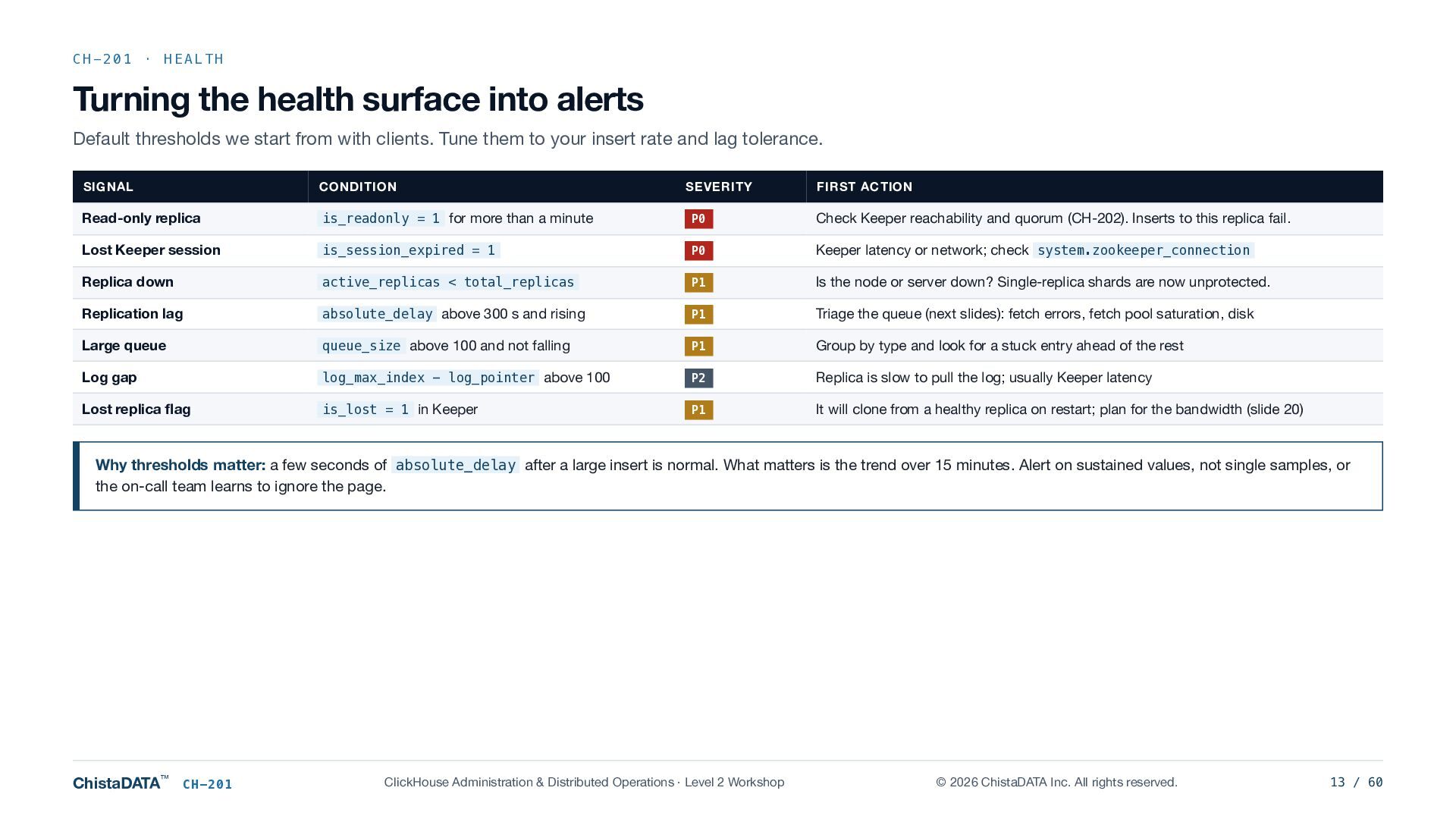
  13. CH-201 · HEALTH Turning the health surface into alerts Default

    thresholds we start from with clients. Tune them to your insert rate and lag tolerance. SIGNAL CONDITION SEVERITY FIRST ACTION Read-only replica is_readonly = 1 for more than a minute P0 Check Keeper reachability and quorum (CH-202). Inserts to this replica fail. Lost Keeper session is_session_expired = 1 P0 Keeper latency or network; check system.zookeeper_connection Replica down active_replicas < total_replicas P1 Is the node or server down? Single-replica shards are now unprotected. Replication lag absolute_delay above 300 s and rising P1 Triage the queue (next slides): fetch errors, fetch pool saturation, disk Large queue queue_size above 100 and not falling P1 Group by type and look for a stuck entry ahead of the rest Log gap log_max_index − log_pointer above 100 P2 Replica is slow to pull the log; usually Keeper latency Lost replica flag is_lost = 1 in Keeper P1 It will clone from a healthy replica on restart; plan for the bandwidth (slide 20) Why thresholds matter: a few seconds of absolute_delay after a large insert is normal. What matters is the trend over 15 minutes. Alert on sustained values, not single samples, or the on-call team learns to ignore the page. ChistaDATA™ CH-201 ClickHouse Administration & Distributed Operations · Level 2 Workshop © 2026 ChistaDATA Inc. All rights reserved. 13 / 60
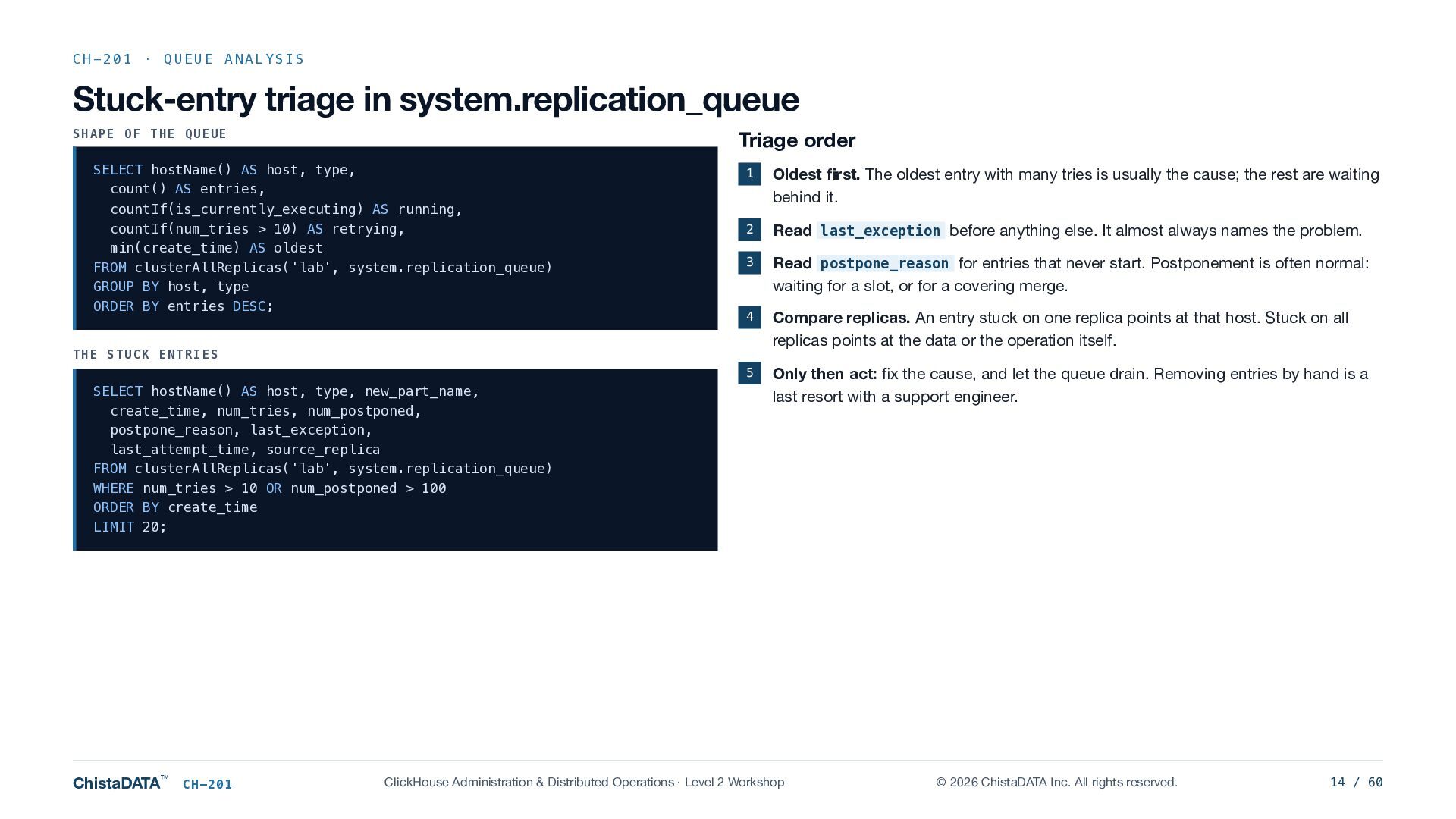
  14. CH-201 · QUEUE ANALYSIS Stuck-entry triage in system.replication_queue SHAPE OF

    THE QUEUE Triage order SELECT hostName() AS host, type, count() AS entries, countIf(is_currently_executing) AS running, countIf(num_tries > 10) AS retrying, min(create_time) AS oldest FROM clusterAllReplicas('lab', system.replication_queue) GROUP BY host, type ORDER BY entries DESC; 1 Oldest first. The oldest entry with many tries is usually the cause; the rest are waiting behind it. 2 Read last_exception before anything else. It almost always names the problem. 3 Read postpone_reason for entries that never start. Postponement is often normal: waiting for a slot, or for a covering merge. 4 Compare replicas. An entry stuck on one replica points at that host. Stuck on all replicas points at the data or the operation itself. 5 Only then act: fix the cause, and let the queue drain. Removing entries by hand is a last resort with a support engineer. THE STUCK ENTRIES SELECT hostName() AS host, type, new_part_name, create_time, num_tries, num_postponed, postpone_reason, last_exception, last_attempt_time, source_replica FROM clusterAllReplicas('lab', system.replication_queue) WHERE num_tries > 10 OR num_postponed > 100 ORDER BY create_time LIMIT 20; ChistaDATA™ CH-201 ClickHouse Administration & Distributed Operations · Level 2 Workshop © 2026 ChistaDATA Inc. All rights reserved. 14 / 60
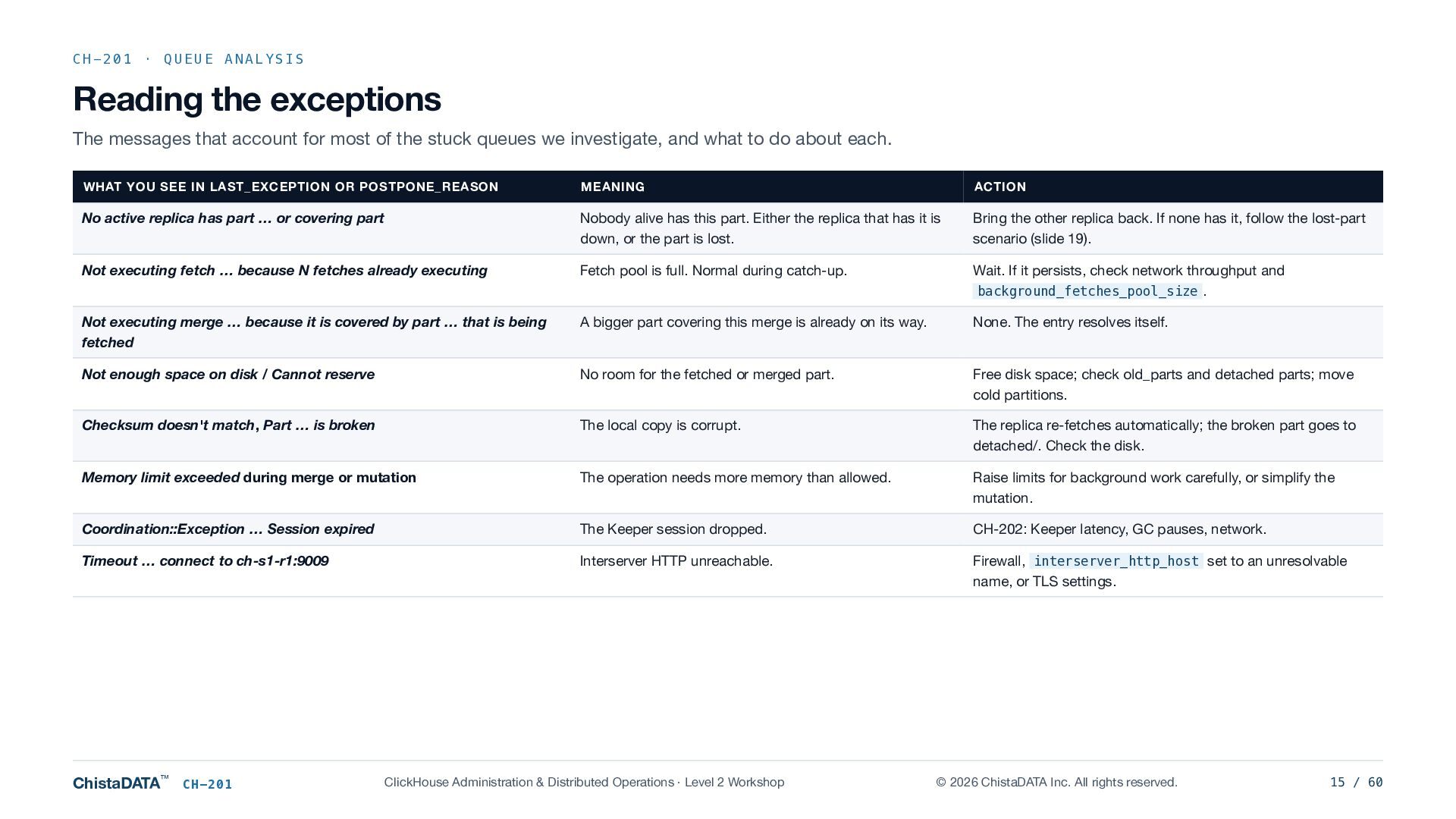
  15. CH-201 · QUEUE ANALYSIS Reading the exceptions The messages that

    account for most of the stuck queues we investigate, and what to do about each. WHAT YOU SEE IN LAST_EXCEPTION OR POSTPONE_REASON MEANING ACTION No active replica has part … or covering part Nobody alive has this part. Either the replica that has it is down, or the part is lost. Bring the other replica back. If none has it, follow the lost-part scenario (slide 19). Not executing fetch … because N fetches already executing Fetch pool is full. Normal during catch-up. Wait. If it persists, check network throughput and background_fetches_pool_size . Not executing merge … because it is covered by part … that is being fetched A bigger part covering this merge is already on its way. None. The entry resolves itself. Not enough space on disk / Cannot reserve No room for the fetched or merged part. Free disk space; check old_parts and detached parts; move cold partitions. Checksum doesn't match, Part … is broken The local copy is corrupt. The replica re-fetches automatically; the broken part goes to detached/. Check the disk. Memory limit exceeded during merge or mutation The operation needs more memory than allowed. Raise limits for background work carefully, or simplify the mutation. Coordination::Exception … Session expired The Keeper session dropped. CH-202: Keeper latency, GC pauses, network. Timeout … connect to ch-s1-r1:9009 Interserver HTTP unreachable. Firewall, interserver_http_host set to an unresolvable name, or TLS settings. ChistaDATA™ CH-201 ClickHouse Administration & Distributed Operations · Level 2 Workshop © 2026 ChistaDATA Inc. All rights reserved. 15 / 60
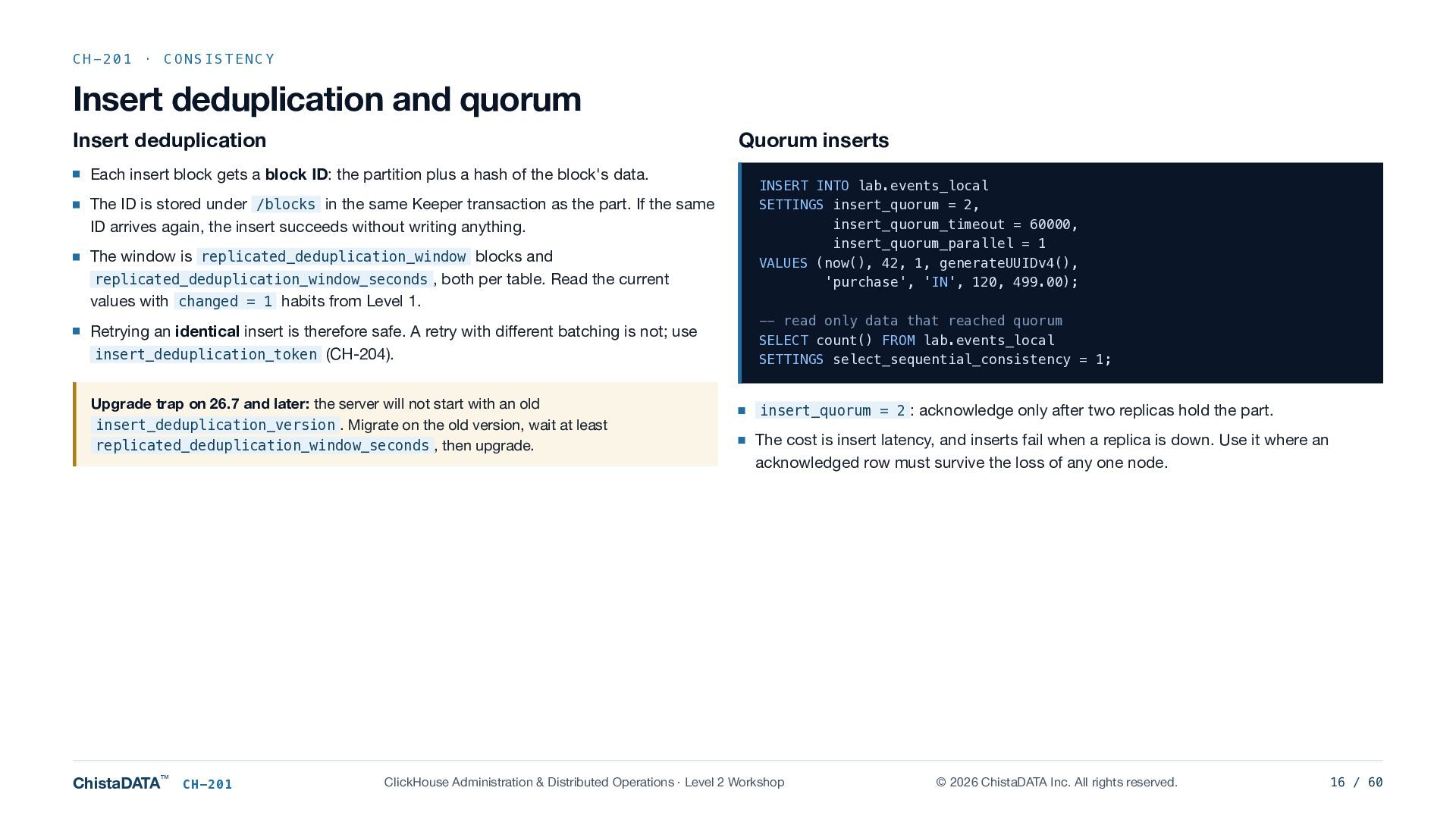
  16. CH-201 · CONSISTENCY Insert deduplication and quorum Insert deduplication Quorum

    inserts Each insert block gets a block ID: the partition plus a hash of the block's data. The ID is stored under /blocks in the same Keeper transaction as the part. If the same ID arrives again, the insert succeeds without writing anything. The window is replicated_deduplication_window blocks and replicated_deduplication_window_seconds , both per table. Read the current values with changed = 1 habits from Level 1. Retrying an identical insert is therefore safe. A retry with different batching is not; use insert_deduplication_token (CH-204). Upgrade trap on 26.7 and later: the server will not start with an old insert_deduplication_version . Migrate on the old version, wait at least replicated_deduplication_window_seconds , then upgrade. ChistaDATA™ CH-201 INSERT INTO lab.events_local SETTINGS insert_quorum = 2, insert_quorum_timeout = 60000, insert_quorum_parallel = 1 VALUES (now(), 42, 1, generateUUIDv4(), 'purchase', 'IN', 120, 499.00); -- read only data that reached quorum SELECT count() FROM lab.events_local SETTINGS select_sequential_consistency = 1; insert_quorum = 2 : acknowledge only after two replicas hold the part. The cost is insert latency, and inserts fail when a replica is down. Use it where an acknowledged row must survive the loss of any one node. ClickHouse Administration & Distributed Operations · Level 2 Workshop © 2026 ChistaDATA Inc. All rights reserved. 16 / 60
  17. CH-201 · RECOVERY SCENARIO 1 R1 · Lag and convergence

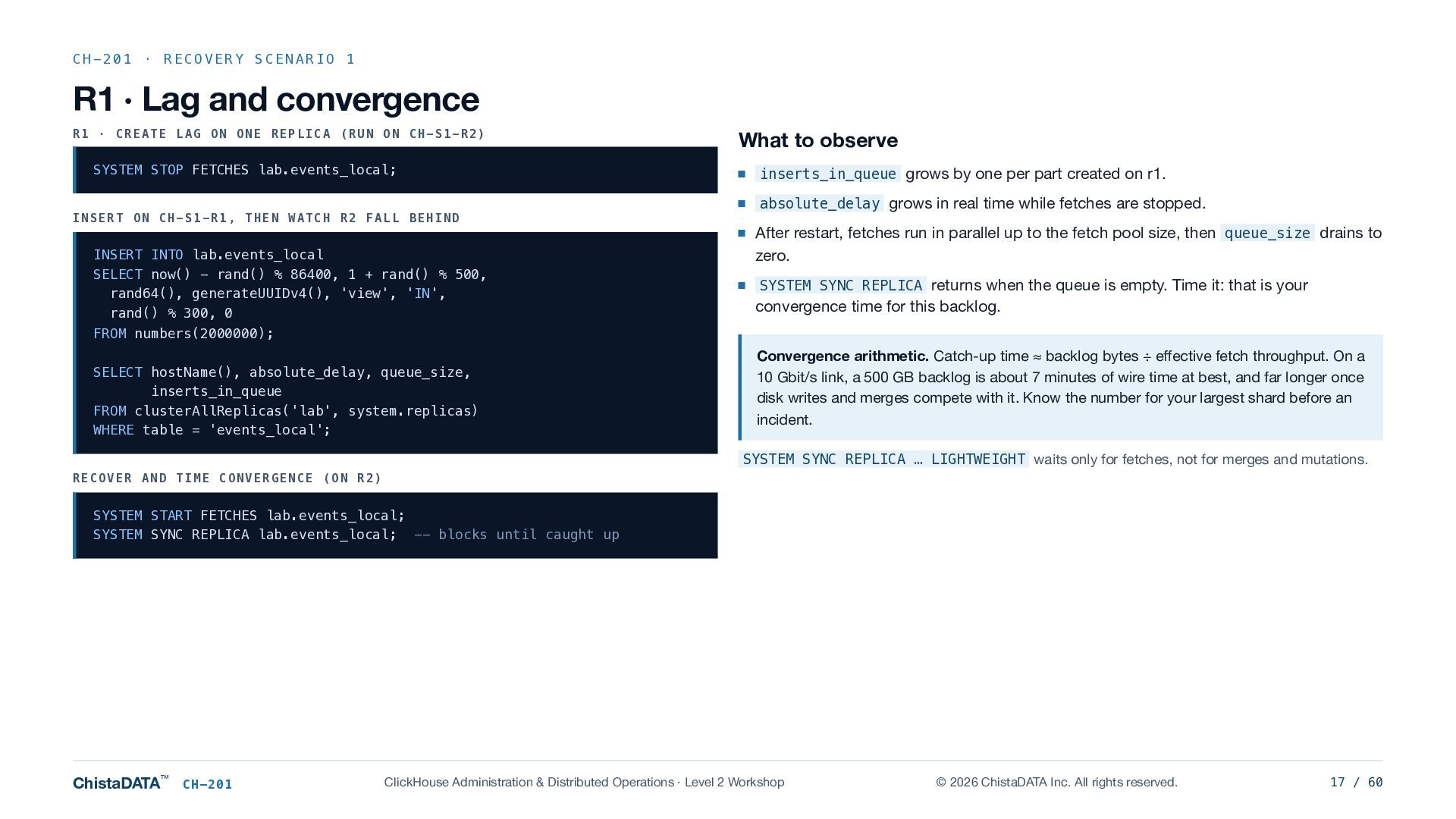
    R1 · CREATE LAG ON ONE REPLICA (RUN ON CH-S1-R2) SYSTEM STOP FETCHES lab.events_local; INSERT ON CH-S1-R1, THEN WATCH R2 FALL BEHIND INSERT INTO lab.events_local SELECT now() - rand() % 86400, 1 + rand() % 500, rand64(), generateUUIDv4(), 'view', 'IN', rand() % 300, 0 FROM numbers(2000000); SELECT hostName(), absolute_delay, queue_size, inserts_in_queue FROM clusterAllReplicas('lab', system.replicas) WHERE table = 'events_local'; What to observe inserts_in_queue grows by one per part created on r1. absolute_delay grows in real time while fetches are stopped. After restart, fetches run in parallel up to the fetch pool size, then queue_size drains to zero. SYSTEM SYNC REPLICA returns when the queue is empty. Time it: that is your convergence time for this backlog. Convergence arithmetic. Catch-up time ≈ backlog bytes ÷ effective fetch throughput. On a 10 Gbit/s link, a 500 GB backlog is about 7 minutes of wire time at best, and far longer once disk writes and merges compete with it. Know the number for your largest shard before an incident. SYSTEM SYNC REPLICA … LIGHTWEIGHT waits only for fetches, not for merges and mutations. RECOVER AND TIME CONVERGENCE (ON R2) SYSTEM START FETCHES lab.events_local; SYSTEM SYNC REPLICA lab.events_local; -- blocks until caught up ChistaDATA™ CH-201 ClickHouse Administration & Distributed Operations · Level 2 Workshop © 2026 ChistaDATA Inc. All rights reserved. 17 / 60
  18. CH-201 · RECOVERY SCENARIO 2 R2 · Read-only after Keeper

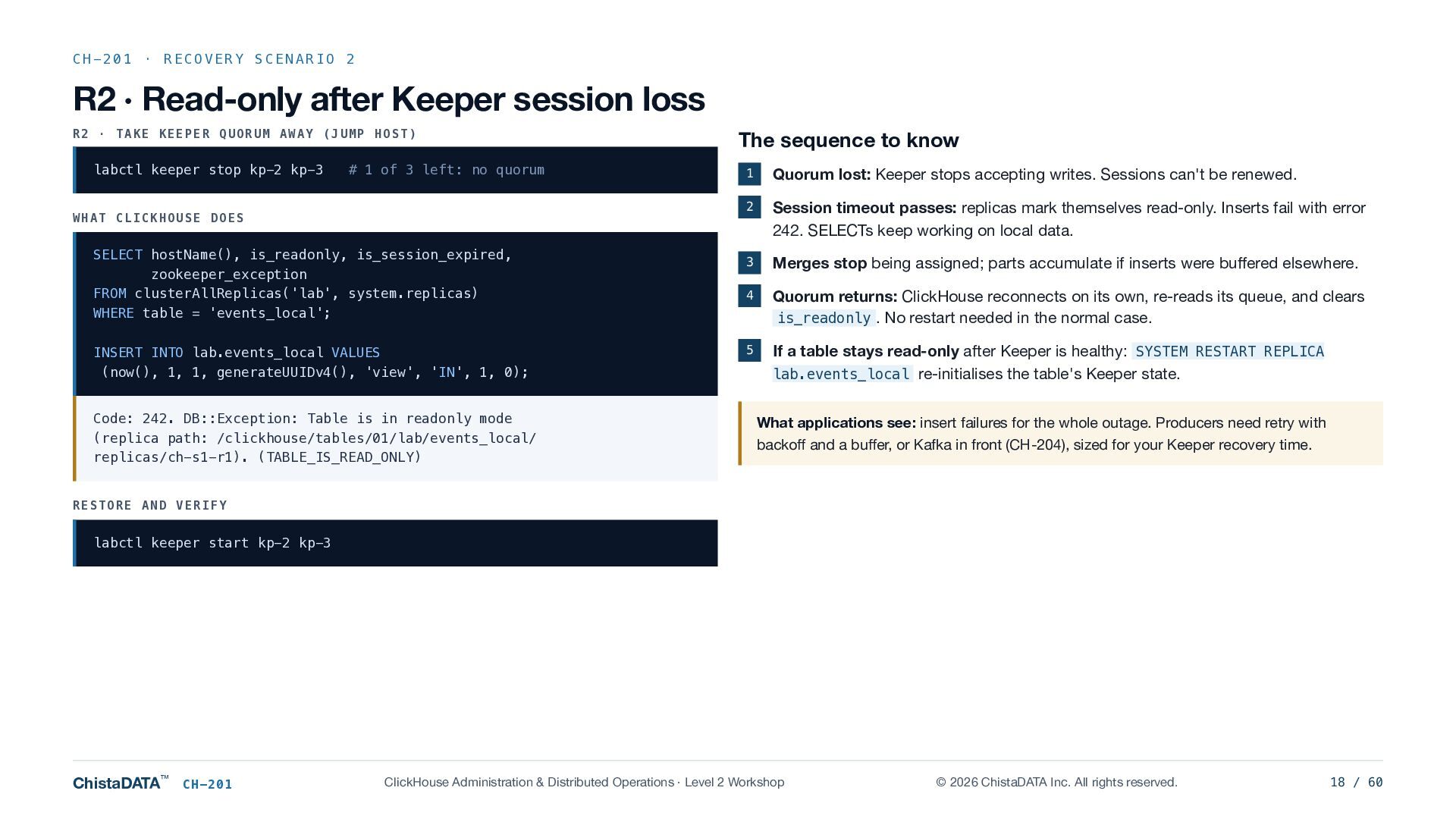
    session loss R2 · TAKE KEEPER QUORUM AWAY (JUMP HOST) labctl keeper stop kp-2 kp-3 # 1 of 3 left: no quorum WHAT CLICKHOUSE DOES SELECT hostName(), is_readonly, is_session_expired, zookeeper_exception FROM clusterAllReplicas('lab', system.replicas) WHERE table = 'events_local'; INSERT INTO lab.events_local VALUES (now(), 1, 1, generateUUIDv4(), 'view', 'IN', 1, 0); Code: 242. DB::Exception: Table is in readonly mode (replica path: /clickhouse/tables/01/lab/events_local/ replicas/ch-s1-r1). (TABLE_IS_READ_ONLY) The sequence to know 1 Quorum lost: Keeper stops accepting writes. Sessions can't be renewed. 2 Session timeout passes: replicas mark themselves read-only. Inserts fail with error 242. SELECTs keep working on local data. 3 Merges stop being assigned; parts accumulate if inserts were buffered elsewhere. 4 Quorum returns: ClickHouse reconnects on its own, re-reads its queue, and clears is_readonly . No restart needed in the normal case. 5 If a table stays read-only after Keeper is healthy: SYSTEM RESTART REPLICA lab.events_local re-initialises the table's Keeper state. What applications see: insert failures for the whole outage. Producers need retry with backoff and a buffer, or Kafka in front (CH-204), sized for your Keeper recovery time. RESTORE AND VERIFY labctl keeper start kp-2 kp-3 ChistaDATA™ CH-201 ClickHouse Administration & Distributed Operations · Level 2 Workshop © 2026 ChistaDATA Inc. All rights reserved. 18 / 60
  19. CH-201 · RECOVERY SCENARIO 3 R3 · Lost parts R3

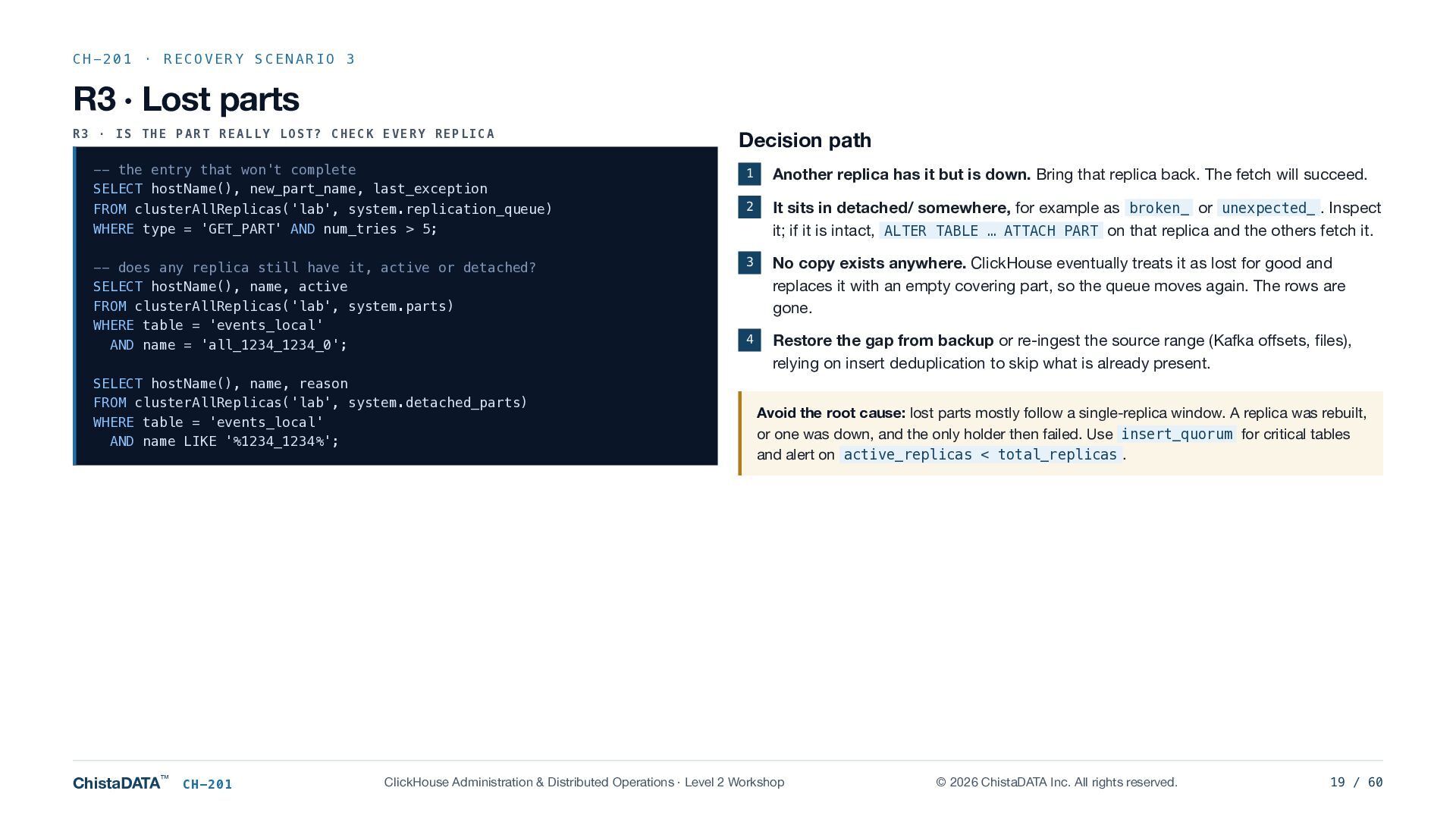
    · IS THE PART REALLY LOST? CHECK EVERY REPLICA Decision path -- the entry that won't complete SELECT hostName(), new_part_name, last_exception FROM clusterAllReplicas('lab', system.replication_queue) WHERE type = 'GET_PART' AND num_tries > 5; 1 Another replica has it but is down. Bring that replica back. The fetch will succeed. 2 It sits in detached/ somewhere, for example as broken_ or unexpected_ . Inspect it; if it is intact, ALTER TABLE … ATTACH PART on that replica and the others fetch it. -- does any replica still have it, active or detached? SELECT hostName(), name, active FROM clusterAllReplicas('lab', system.parts) WHERE table = 'events_local' AND name = 'all_1234_1234_0'; 3 No copy exists anywhere. ClickHouse eventually treats it as lost for good and replaces it with an empty covering part, so the queue moves again. The rows are gone. 4 Restore the gap from backup or re-ingest the source range (Kafka offsets, files), relying on insert deduplication to skip what is already present. SELECT hostName(), name, reason FROM clusterAllReplicas('lab', system.detached_parts) WHERE table = 'events_local' AND name LIKE '%1234_1234%'; ChistaDATA™ CH-201 Avoid the root cause: lost parts mostly follow a single-replica window. A replica was rebuilt, or one was down, and the only holder then failed. Use insert_quorum for critical tables and alert on active_replicas < total_replicas . ClickHouse Administration & Distributed Operations · Level 2 Workshop © 2026 ChistaDATA Inc. All rights reserved. 19 / 60
  20. CH-201 · RECOVERY SCENARIO 4 R4 · Full replica rebuild:

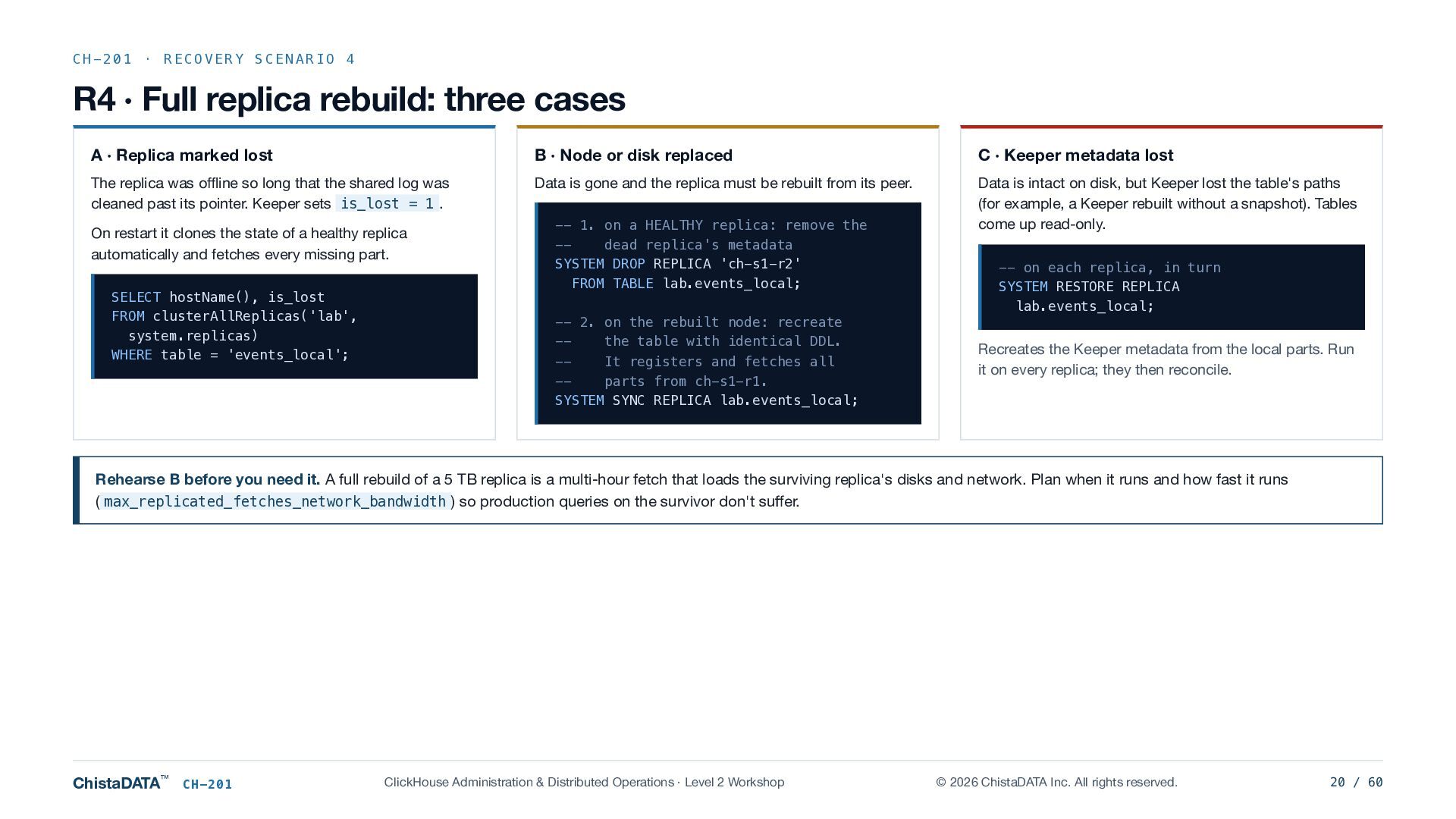
    three cases A · Replica marked lost B · Node or disk replaced C · Keeper metadata lost The replica was offline so long that the shared log was cleaned past its pointer. Keeper sets is_lost = 1 . Data is gone and the replica must be rebuilt from its peer. Data is intact on disk, but Keeper lost the table's paths (for example, a Keeper rebuilt without a snapshot). Tables come up read-only. On restart it clones the state of a healthy replica automatically and fetches every missing part. SELECT hostName(), is_lost FROM clusterAllReplicas('lab', system.replicas) WHERE table = 'events_local'; -- 1. on a HEALTHY replica: remove the -dead replica's metadata SYSTEM DROP REPLICA 'ch-s1-r2' FROM TABLE lab.events_local; -- 2. on the rebuilt node: recreate -the table with identical DDL. -It registers and fetches all -parts from ch-s1-r1. SYSTEM SYNC REPLICA lab.events_local; -- on each replica, in turn SYSTEM RESTORE REPLICA lab.events_local; Recreates the Keeper metadata from the local parts. Run it on every replica; they then reconcile. Rehearse B before you need it. A full rebuild of a 5 TB replica is a multi-hour fetch that loads the surviving replica's disks and network. Plan when it runs and how fast it runs ( max_replicated_fetches_network_bandwidth ) so production queries on the survivor don't suffer. ChistaDATA™ CH-201 ClickHouse Administration & Distributed Operations · Level 2 Workshop © 2026 ChistaDATA Inc. All rights reserved. 20 / 60
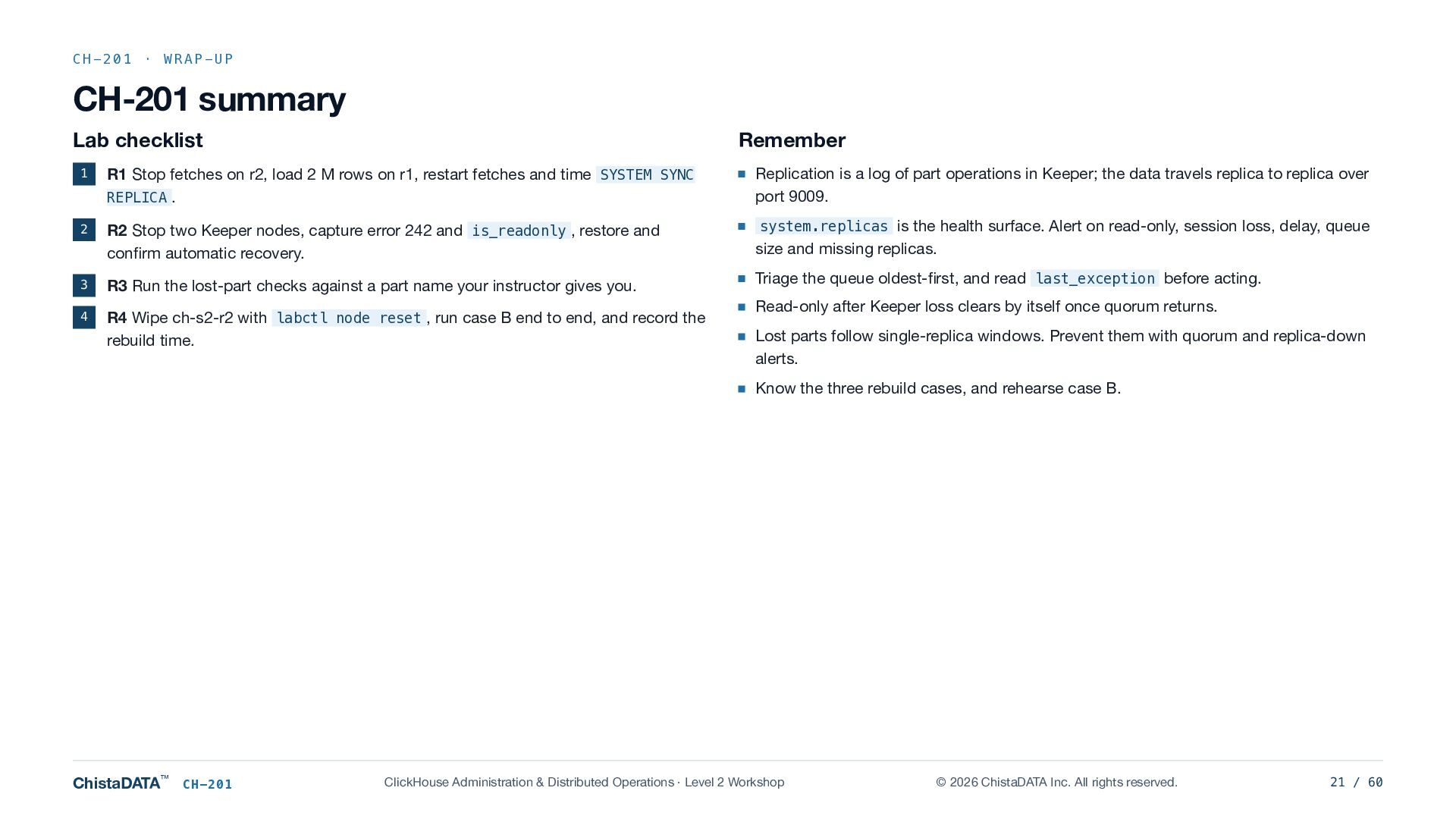
  21. CH-201 · WRAP-UP CH-201 summary Lab checklist Remember 1 R1

    Stop fetches on r2, load 2 M rows on r1, restart fetches and time SYSTEM SYNC REPLICA . Replication is a log of part operations in Keeper; the data travels replica to replica over port 9009. 2 R2 Stop two Keeper nodes, capture error 242 and is_readonly , restore and confirm automatic recovery. system.replicas is the health surface. Alert on read-only, session loss, delay, queue size and missing replicas. 3 R3 Run the lost-part checks against a part name your instructor gives you. 4 R4 Wipe ch-s2-r2 with labctl node reset , run case B end to end, and record the rebuild time. Triage the queue oldest-first, and read last_exception before acting. Read-only after Keeper loss clears by itself once quorum returns. Lost parts follow single-replica windows. Prevent them with quorum and replica-down alerts. Know the three rebuild cases, and rehearse case B. ChistaDATA™ CH-201 ClickHouse Administration & Distributed Operations · Level 2 Workshop © 2026 ChistaDATA Inc. All rights reserved. 21 / 60
  22. Keeper Internals & Troubleshooting CH-202 Keeper is the quietest component

    in the cluster until it isn't. When it stalls, inserts, merges and DDL on every replicated table stall with it. Architecture and deployment Snapshots and the Raft log Raft mechanics Monitoring with mntr Quorum arithmetic on a 3-node ensemble Coordination-data backup discipline Configuration that matters Drills: leader loss, follower disk-full, snapshot restore MODULE 2 OF 4 · ABOUT 3 HOURS · DRILLS K1–K3 ChistaDATA™ CH-202 ClickHouse Administration & Distributed Operations · Level 2 Workshop © 2026 ChistaDATA Inc. All rights reserved. 22 / 60
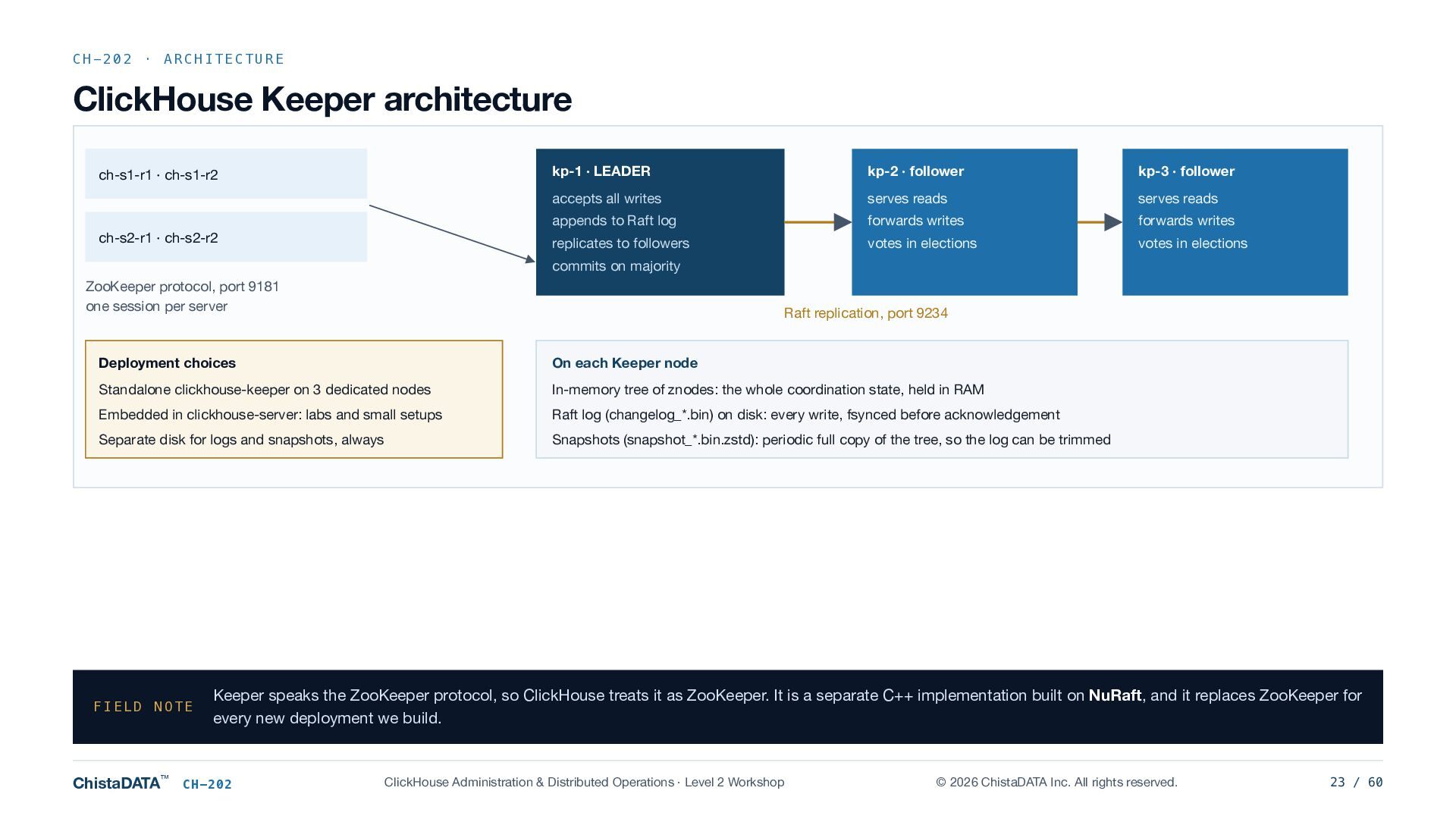
  23. CH-202 · ARCHITECTURE ClickHouse Keeper architecture ch-s1-r1 · ch-s1-r2 ch-s2-r1

    · ch-s2-r2 kp-1 · LEADER kp-2 · follower kp-3 · follower accepts all writes serves reads serves reads appends to Raft log forwards writes forwards writes replicates to followers votes in elections votes in elections commits on majority ZooKeeper protocol, port 9181 one session per server Raft replication, port 9234 Deployment choices On each Keeper node Standalone clickhouse-keeper on 3 dedicated nodes In-memory tree of znodes: the whole coordination state, held in RAM Embedded in clickhouse-server: labs and small setups Raft log (changelog_*.bin) on disk: every write, fsynced before acknowledgement Separate disk for logs and snapshots, always Snapshots (snapshot_*.bin.zstd): periodic full copy of the tree, so the log can be trimmed FIELD NOTE ChistaDATA™ Keeper speaks the ZooKeeper protocol, so ClickHouse treats it as ZooKeeper. It is a separate C++ implementation built on NuRaft, and it replaces ZooKeeper for every new deployment we build. CH-202 ClickHouse Administration & Distributed Operations · Level 2 Workshop © 2026 ChistaDATA Inc. All rights reserved. 23 / 60
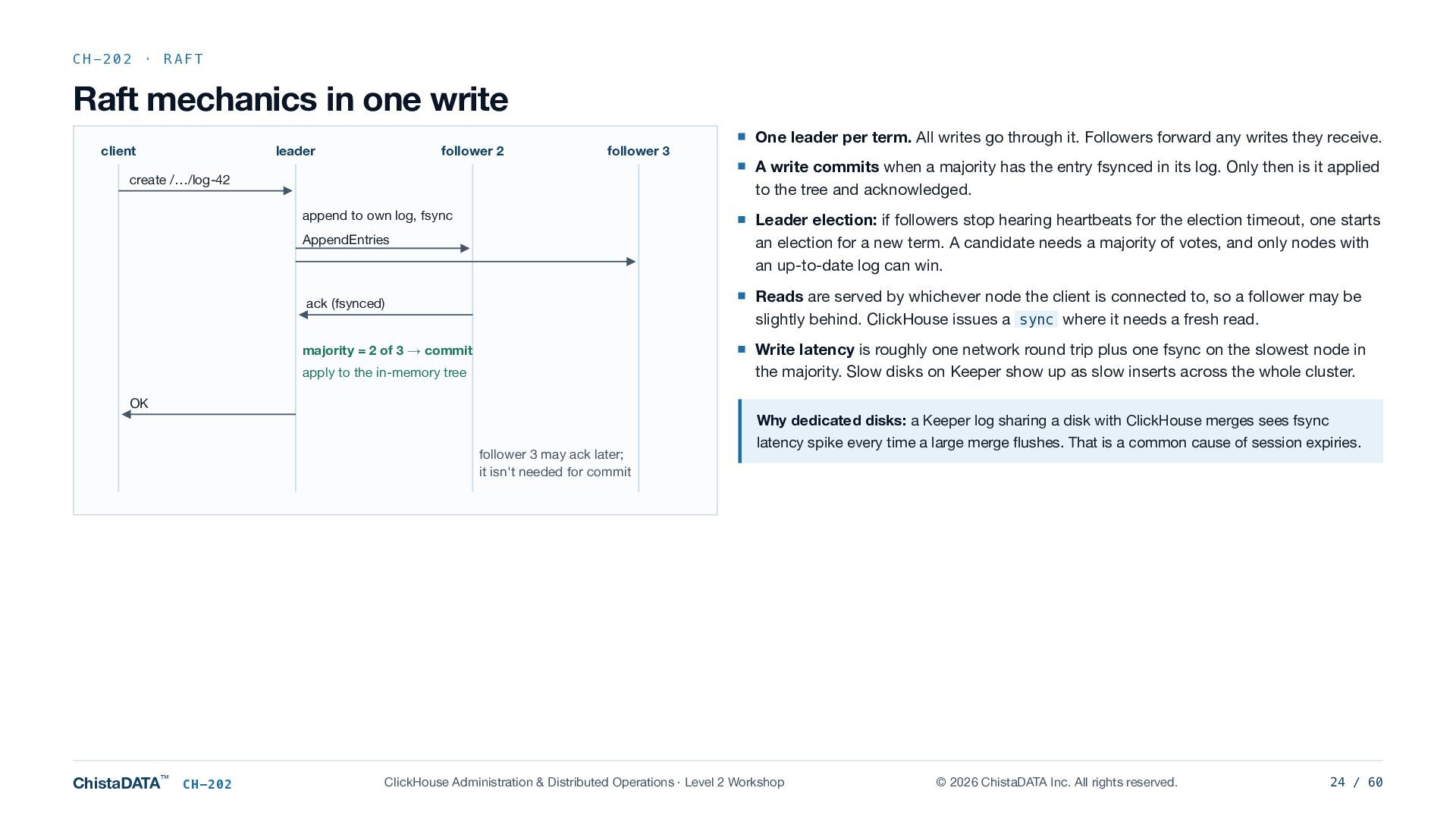
  24. CH-202 · RAFT Raft mechanics in one write client leader

    follower 2 follower 3 create /…/log-42 append to own log, fsync One leader per term. All writes go through it. Followers forward any writes they receive. A write commits when a majority has the entry fsynced in its log. Only then is it applied to the tree and acknowledged. AppendEntries Leader election: if followers stop hearing heartbeats for the election timeout, one starts an election for a new term. A candidate needs a majority of votes, and only nodes with an up-to-date log can win. ack (fsynced) Reads are served by whichever node the client is connected to, so a follower may be slightly behind. ClickHouse issues a sync where it needs a fresh read. Write latency is roughly one network round trip plus one fsync on the slowest node in the majority. Slow disks on Keeper show up as slow inserts across the whole cluster. majority = 2 of 3 → commit apply to the in-memory tree OK follower 3 may ack later; it isn't needed for commit ChistaDATA™ CH-202 Why dedicated disks: a Keeper log sharing a disk with ClickHouse merges sees fsync latency spike every time a large merge flushes. That is a common cause of session expiries. ClickHouse Administration & Distributed Operations · Level 2 Workshop © 2026 ChistaDATA Inc. All rights reserved. 24 / 60
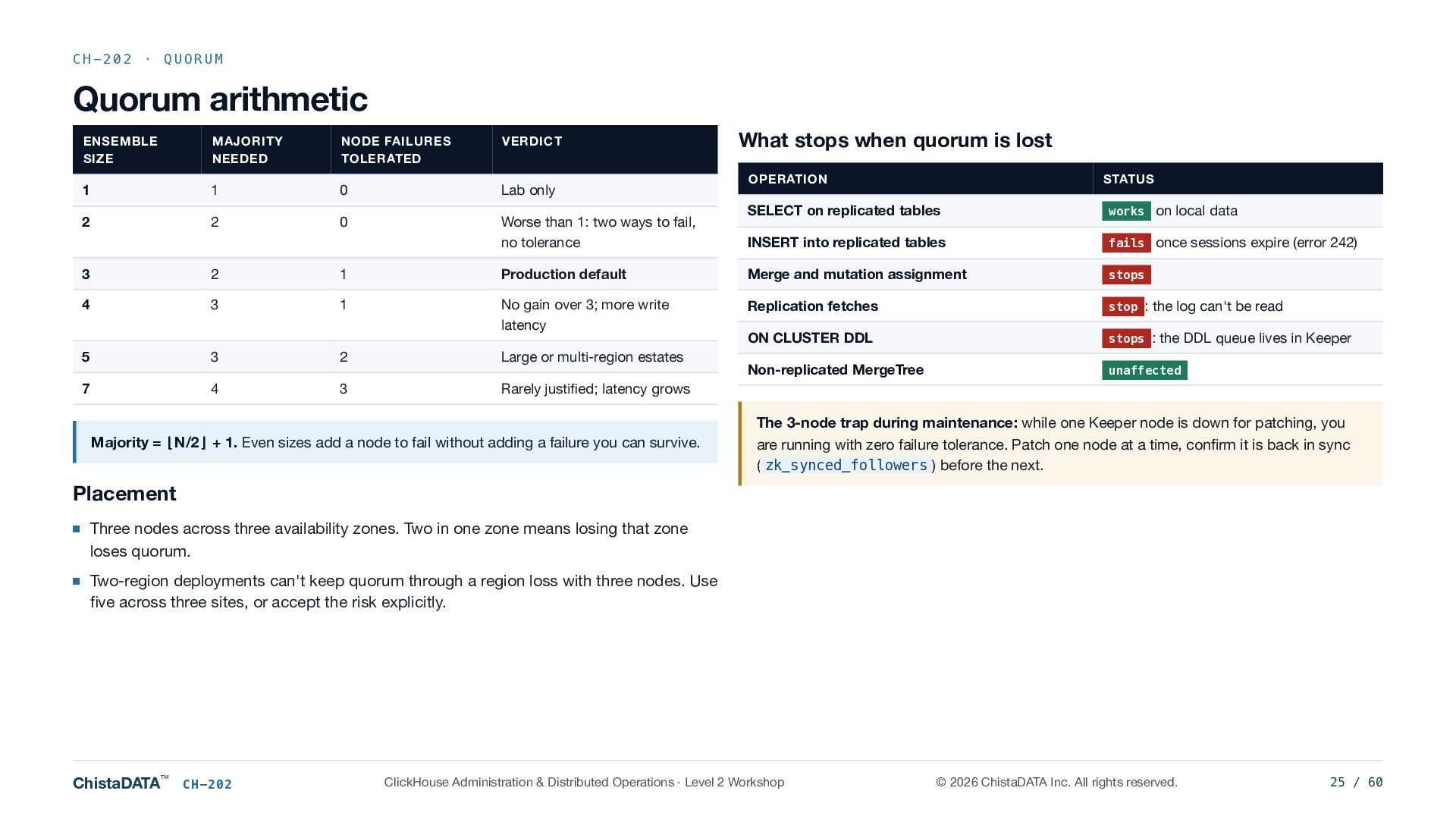
  25. CH-202 · QUORUM Quorum arithmetic ENSEMBLE SIZE MAJORITY NEEDED NODE

    FAILURES TOLERATED VERDICT 1 1 0 Lab only 2 2 0 Worse than 1: two ways to fail, no tolerance What stops when quorum is lost OPERATION STATUS SELECT on replicated tables works on local data INSERT into replicated tables fails once sessions expire (error 242) 3 2 1 Production default Merge and mutation assignment stops 4 3 1 No gain over 3; more write latency Replication fetches stop : the log can't be read ON CLUSTER DDL stops : the DDL queue lives in Keeper 5 3 2 Large or multi-region estates Non-replicated MergeTree unaffected 7 4 3 Rarely justified; latency grows Majority = ⌊N/2⌋ + 1. Even sizes add a node to fail without adding a failure you can survive. The 3-node trap during maintenance: while one Keeper node is down for patching, you are running with zero failure tolerance. Patch one node at a time, confirm it is back in sync ( zk_synced_followers ) before the next. Placement Three nodes across three availability zones. Two in one zone means losing that zone loses quorum. Two-region deployments can't keep quorum through a region loss with three nodes. Use five across three sites, or accept the risk explicitly. ChistaDATA™ CH-202 ClickHouse Administration & Distributed Operations · Level 2 Workshop © 2026 ChistaDATA Inc. All rights reserved. 25 / 60
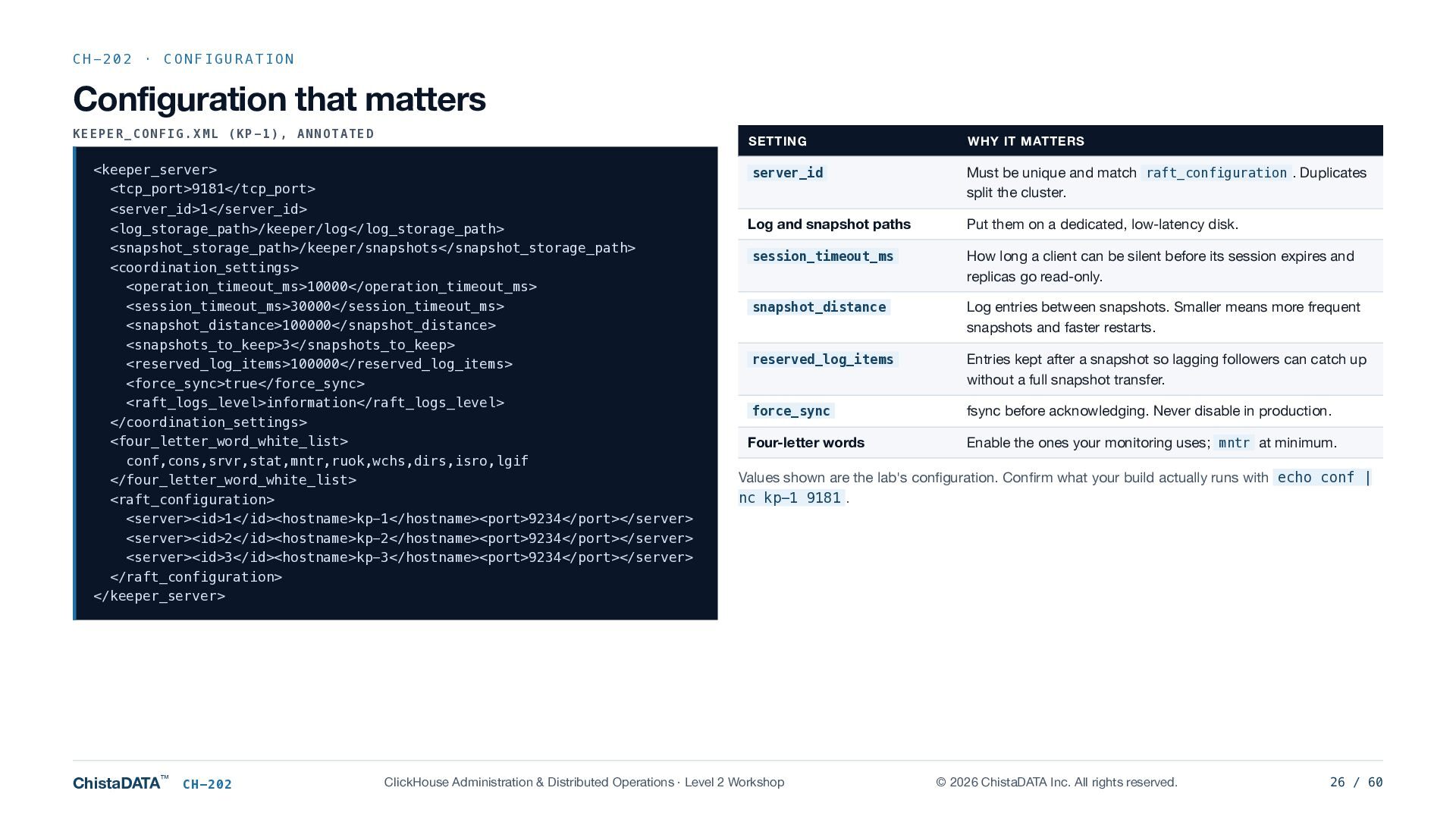
  26. CH-202 · CONFIGURATION Configuration that matters KEEPER_CONFIG.XML (KP-1), ANNOTATED <keeper_server>

    <tcp_port>9181</tcp_port> <server_id>1</server_id> <log_storage_path>/keeper/log</log_storage_path> <snapshot_storage_path>/keeper/snapshots</snapshot_storage_path> <coordination_settings> <operation_timeout_ms>10000</operation_timeout_ms> <session_timeout_ms>30000</session_timeout_ms> <snapshot_distance>100000</snapshot_distance> <snapshots_to_keep>3</snapshots_to_keep> <reserved_log_items>100000</reserved_log_items> <force_sync>true</force_sync> <raft_logs_level>information</raft_logs_level> </coordination_settings> <four_letter_word_white_list> conf,cons,srvr,stat,mntr,ruok,wchs,dirs,isro,lgif </four_letter_word_white_list> <raft_configuration> <server><id>1</id><hostname>kp-1</hostname><port>9234</port></server> <server><id>2</id><hostname>kp-2</hostname><port>9234</port></server> <server><id>3</id><hostname>kp-3</hostname><port>9234</port></server> </raft_configuration> </keeper_server> ChistaDATA™ CH-202 SETTING WHY IT MATTERS server_id Must be unique and match raft_configuration . Duplicates split the cluster. Log and snapshot paths Put them on a dedicated, low-latency disk. session_timeout_ms How long a client can be silent before its session expires and replicas go read-only. snapshot_distance Log entries between snapshots. Smaller means more frequent snapshots and faster restarts. reserved_log_items Entries kept after a snapshot so lagging followers can catch up without a full snapshot transfer. force_sync fsync before acknowledging. Never disable in production. Four-letter words Enable the ones your monitoring uses; mntr at minimum. Values shown are the lab's configuration. Confirm what your build actually runs with echo conf | nc kp-1 9181 . ClickHouse Administration & Distributed Operations · Level 2 Workshop © 2026 ChistaDATA Inc. All rights reserved. 26 / 60
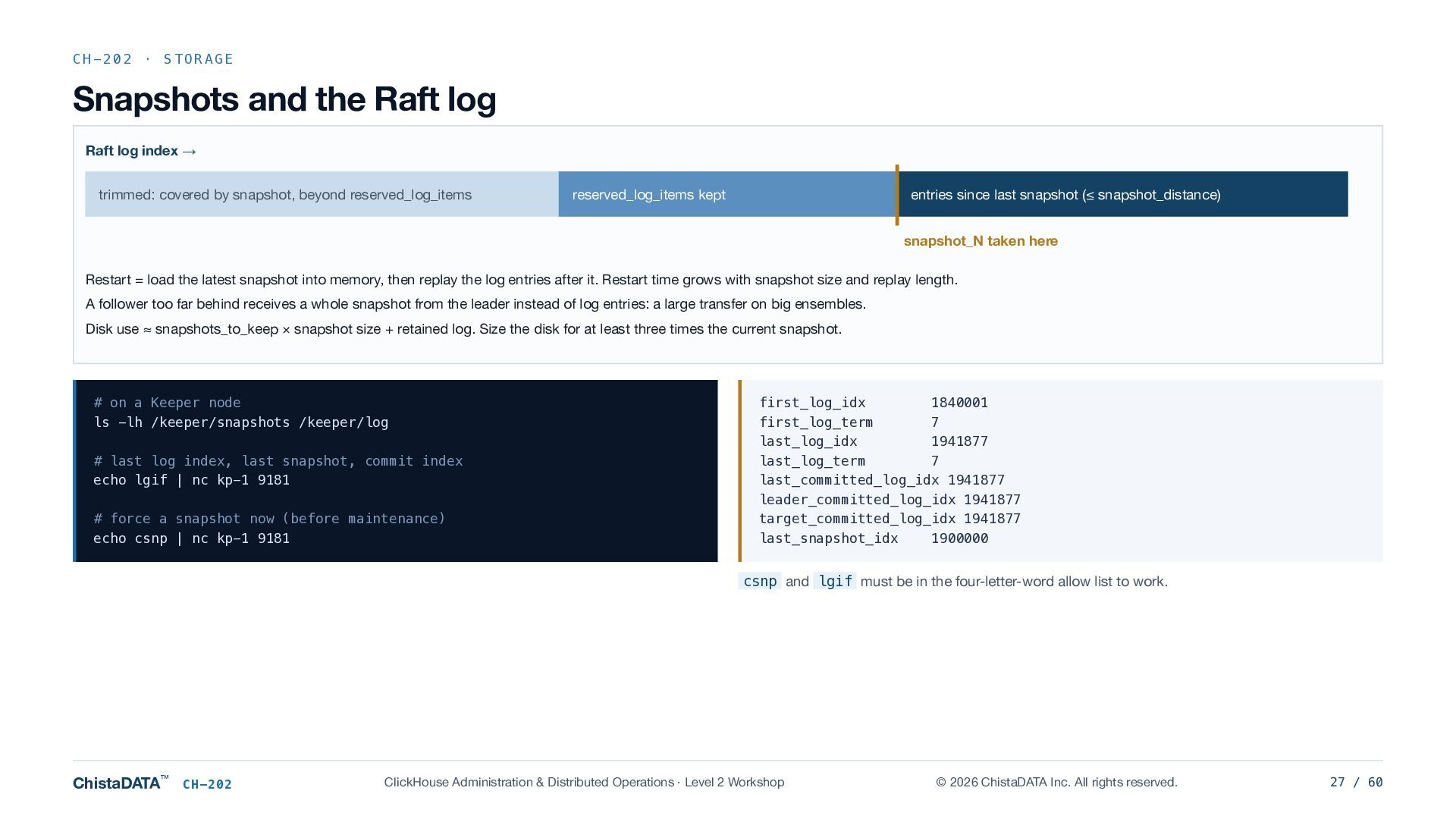
  27. CH-202 · STORAGE Snapshots and the Raft log Raft log

    index → trimmed: covered by snapshot, beyond reserved_log_items reserved_log_items kept entries since last snapshot (≤ snapshot_distance) snapshot_N taken here Restart = load the latest snapshot into memory, then replay the log entries after it. Restart time grows with snapshot size and replay length. A follower too far behind receives a whole snapshot from the leader instead of log entries: a large transfer on big ensembles. Disk use ≈ snapshots_to_keep × snapshot size + retained log. Size the disk for at least three times the current snapshot. # on a Keeper node ls -lh /keeper/snapshots /keeper/log # last log index, last snapshot, commit index echo lgif | nc kp-1 9181 # force a snapshot now (before maintenance) echo csnp | nc kp-1 9181 first_log_idx 1840001 first_log_term 7 last_log_idx 1941877 last_log_term 7 last_committed_log_idx 1941877 leader_committed_log_idx 1941877 target_committed_log_idx 1941877 last_snapshot_idx 1900000 csnp and lgif must be in the four-letter-word allow list to work. ChistaDATA™ CH-202 ClickHouse Administration & Distributed Operations · Level 2 Workshop © 2026 ChistaDATA Inc. All rights reserved. 27 / 60
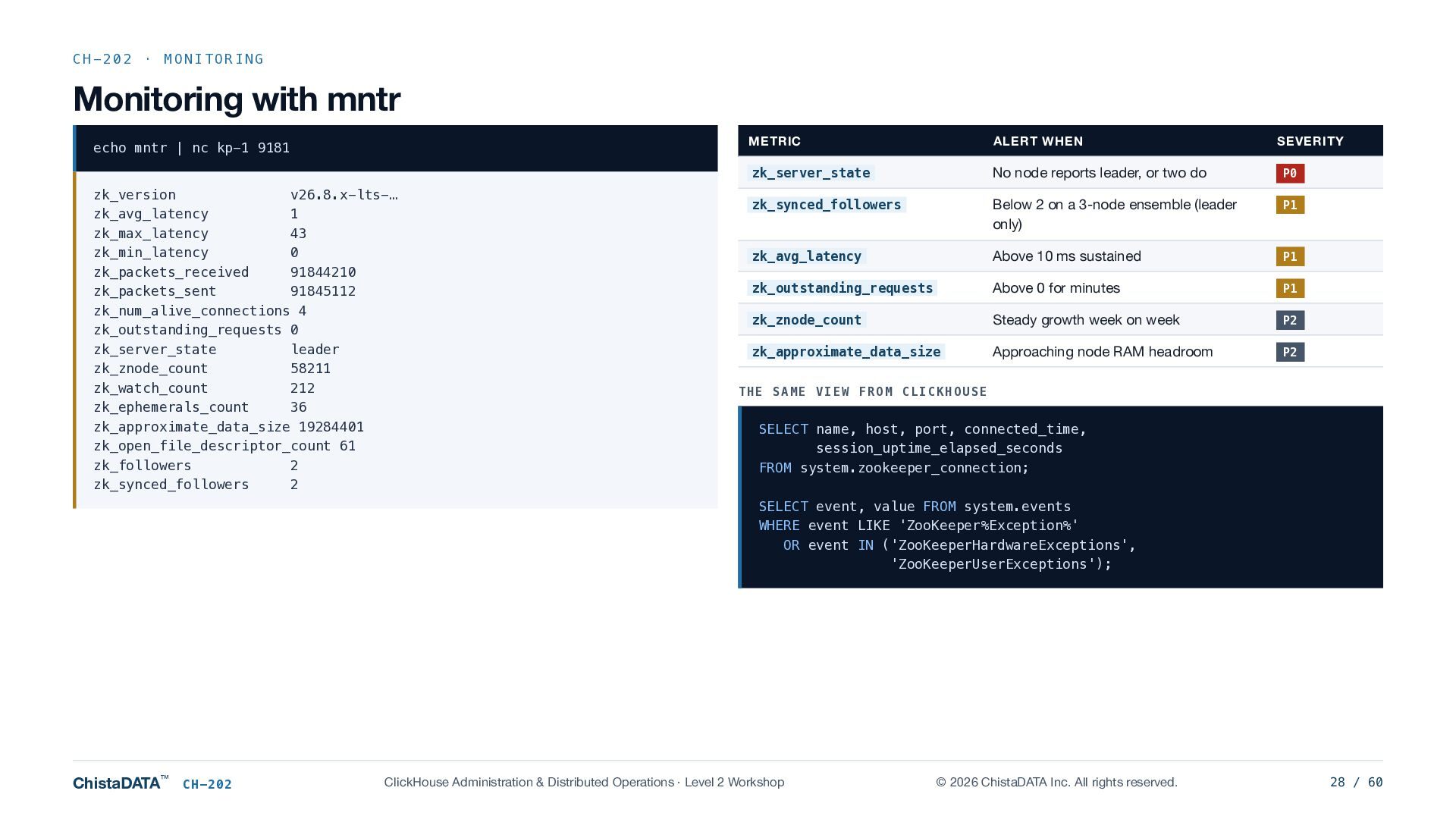
  28. CH-202 · MONITORING Monitoring with mntr echo mntr | nc

    kp-1 9181 zk_version v26.8.x-lts-… zk_avg_latency 1 zk_max_latency 43 zk_min_latency 0 zk_packets_received 91844210 zk_packets_sent 91845112 zk_num_alive_connections 4 zk_outstanding_requests 0 zk_server_state leader zk_znode_count 58211 zk_watch_count 212 zk_ephemerals_count 36 zk_approximate_data_size 19284401 zk_open_file_descriptor_count 61 zk_followers 2 zk_synced_followers 2 METRIC ALERT WHEN SEVERITY zk_server_state No node reports leader, or two do P0 zk_synced_followers Below 2 on a 3-node ensemble (leader only) P1 zk_avg_latency Above 10 ms sustained P1 zk_outstanding_requests Above 0 for minutes P1 zk_znode_count Steady growth week on week P2 zk_approximate_data_size Approaching node RAM headroom P2 THE SAME VIEW FROM CLICKHOUSE SELECT name, host, port, connected_time, session_uptime_elapsed_seconds FROM system.zookeeper_connection; SELECT event, value FROM system.events WHERE event LIKE 'ZooKeeper%Exception%' OR event IN ('ZooKeeperHardwareExceptions', 'ZooKeeperUserExceptions'); ChistaDATA™ CH-202 ClickHouse Administration & Distributed Operations · Level 2 Workshop © 2026 ChistaDATA Inc. All rights reserved. 28 / 60
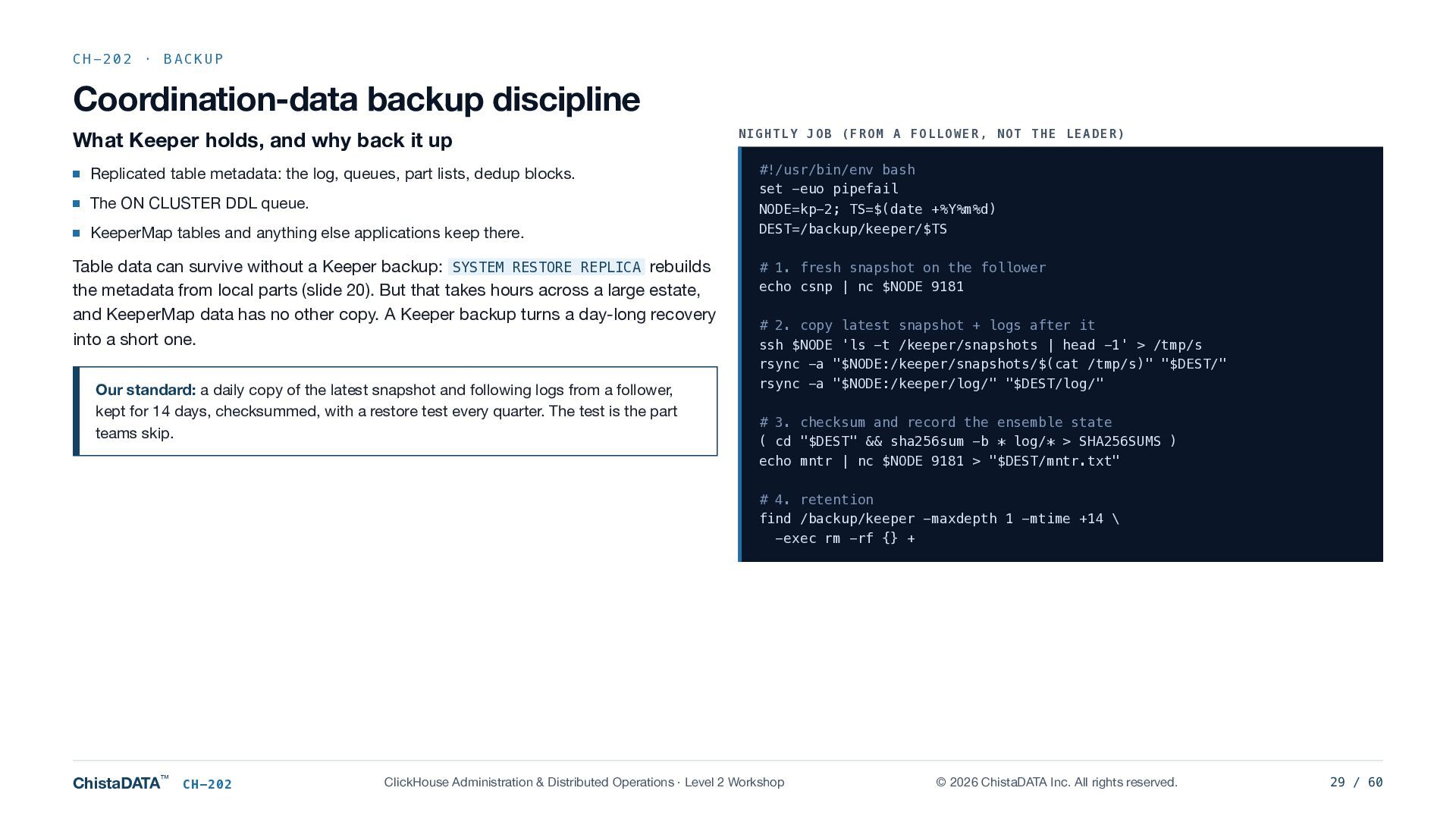
  29. CH-202 · BACKUP Coordination-data backup discipline What Keeper holds, and

    why back it up Replicated table metadata: the log, queues, part lists, dedup blocks. The ON CLUSTER DDL queue. KeeperMap tables and anything else applications keep there. Table data can survive without a Keeper backup: SYSTEM RESTORE REPLICA rebuilds the metadata from local parts (slide 20). But that takes hours across a large estate, and KeeperMap data has no other copy. A Keeper backup turns a day-long recovery into a short one. Our standard: a daily copy of the latest snapshot and following logs from a follower, kept for 14 days, checksummed, with a restore test every quarter. The test is the part teams skip. NIGHTLY JOB (FROM A FOLLOWER, NOT THE LEADER) #!/usr/bin/env bash set -euo pipefail NODE=kp-2; TS=$(date +%Y%m%d) DEST=/backup/keeper/$TS # 1. fresh snapshot on the follower echo csnp | nc $NODE 9181 # 2. copy latest snapshot + logs after it ssh $NODE 'ls -t /keeper/snapshots | head -1' > /tmp/s rsync -a "$NODE:/keeper/snapshots/$(cat /tmp/s)" "$DEST/" rsync -a "$NODE:/keeper/log/" "$DEST/log/" # 3. checksum and record the ensemble state ( cd "$DEST" && sha256sum -b * log/* > SHA256SUMS ) echo mntr | nc $NODE 9181 > "$DEST/mntr.txt" # 4. retention find /backup/keeper -maxdepth 1 -mtime +14 \ -exec rm -rf {} + ChistaDATA™ CH-202 ClickHouse Administration & Distributed Operations · Level 2 Workshop © 2026 ChistaDATA Inc. All rights reserved. 29 / 60
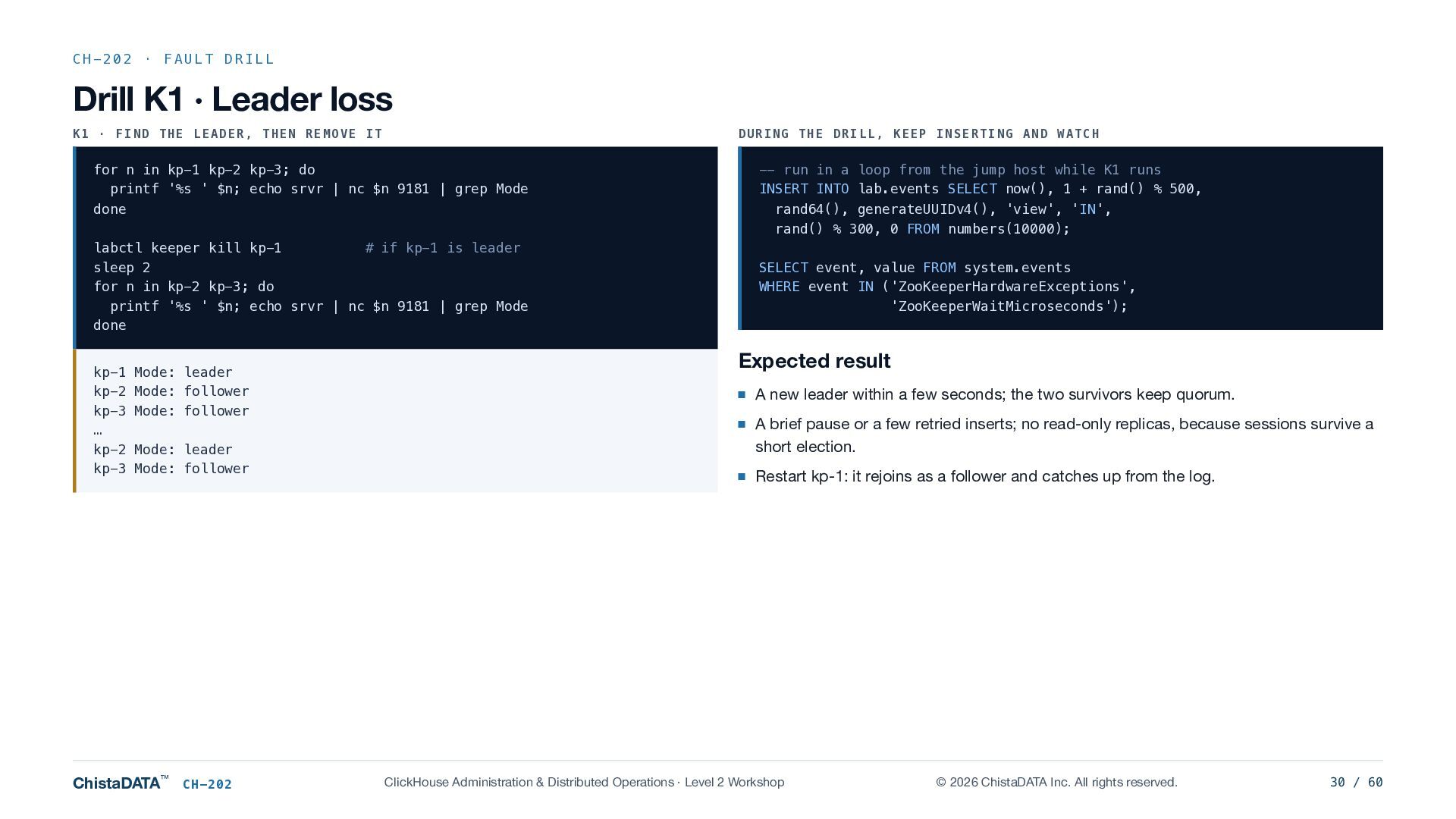
  30. CH-202 · FAULT DRILL Drill K1 · Leader loss K1

    · FIND THE LEADER, THEN REMOVE IT DURING THE DRILL, KEEP INSERTING AND WATCH for n in kp-1 kp-2 kp-3; do printf '%s ' $n; echo srvr | nc $n 9181 | grep Mode done labctl keeper kill kp-1 # if kp-1 is leader sleep 2 for n in kp-2 kp-3; do printf '%s ' $n; echo srvr | nc $n 9181 | grep Mode done kp-1 Mode: leader kp-2 Mode: follower kp-3 Mode: follower … kp-2 Mode: leader kp-3 Mode: follower ChistaDATA™ CH-202 -- run in a loop from the jump host while K1 runs INSERT INTO lab.events SELECT now(), 1 + rand() % 500, rand64(), generateUUIDv4(), 'view', 'IN', rand() % 300, 0 FROM numbers(10000); SELECT event, value FROM system.events WHERE event IN ('ZooKeeperHardwareExceptions', 'ZooKeeperWaitMicroseconds'); Expected result A new leader within a few seconds; the two survivors keep quorum. A brief pause or a few retried inserts; no read-only replicas, because sessions survive a short election. Restart kp-1: it rejoins as a follower and catches up from the log. ClickHouse Administration & Distributed Operations · Level 2 Workshop © 2026 ChistaDATA Inc. All rights reserved. 30 / 60
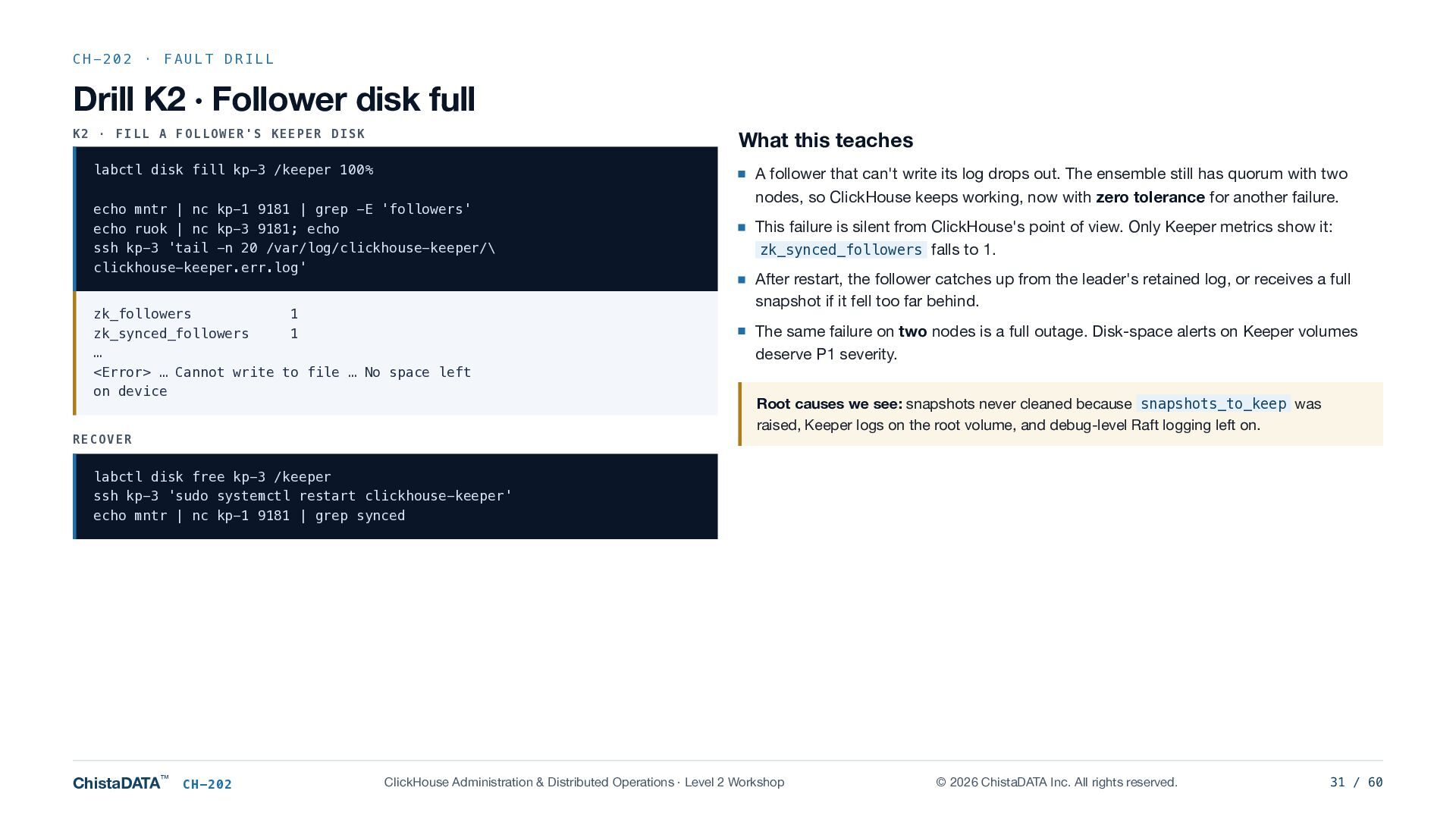
  31. CH-202 · FAULT DRILL Drill K2 · Follower disk full

    K2 · FILL A FOLLOWER'S KEEPER DISK What this teaches labctl disk fill kp-3 /keeper 100% A follower that can't write its log drops out. The ensemble still has quorum with two echo mntr | nc kp-1 9181 | grep -E 'followers' echo ruok | nc kp-3 9181; echo ssh kp-3 'tail -n 20 /var/log/clickhouse-keeper/\ clickhouse-keeper.err.log' zk_followers 1 zk_synced_followers 1 … <Error> … Cannot write to file … No space left on device RECOVER nodes, so ClickHouse keeps working, now with zero tolerance for another failure. This failure is silent from ClickHouse's point of view. Only Keeper metrics show it: zk_synced_followers falls to 1. After restart, the follower catches up from the leader's retained log, or receives a full snapshot if it fell too far behind. The same failure on two nodes is a full outage. Disk-space alerts on Keeper volumes deserve P1 severity. Root causes we see: snapshots never cleaned because snapshots_to_keep was raised, Keeper logs on the root volume, and debug-level Raft logging left on. labctl disk free kp-3 /keeper ssh kp-3 'sudo systemctl restart clickhouse-keeper' echo mntr | nc kp-1 9181 | grep synced ChistaDATA™ CH-202 ClickHouse Administration & Distributed Operations · Level 2 Workshop © 2026 ChistaDATA Inc. All rights reserved. 31 / 60
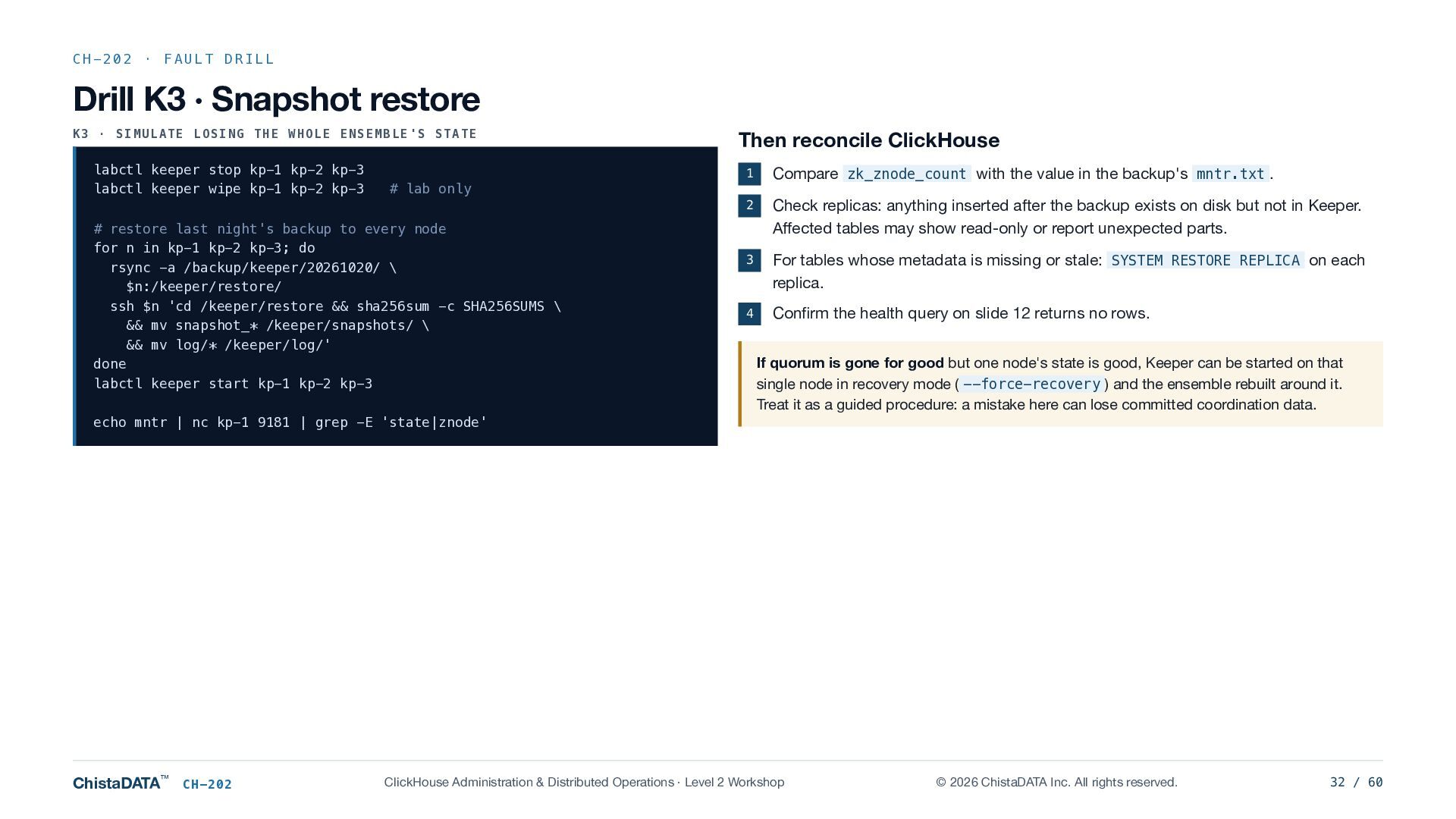
  32. CH-202 · FAULT DRILL Drill K3 · Snapshot restore K3

    · SIMULATE LOSING THE WHOLE ENSEMBLE'S STATE labctl keeper stop kp-1 kp-2 kp-3 labctl keeper wipe kp-1 kp-2 kp-3 Then reconcile ClickHouse 1 Compare zk_znode_count with the value in the backup's mntr.txt . 2 Check replicas: anything inserted after the backup exists on disk but not in Keeper. Affected tables may show read-only or report unexpected parts. 3 For tables whose metadata is missing or stale: SYSTEM RESTORE REPLICA on each replica. 4 Confirm the health query on slide 12 returns no rows. # lab only # restore last night's backup to every node for n in kp-1 kp-2 kp-3; do rsync -a /backup/keeper/20261020/ \ $n:/keeper/restore/ ssh $n 'cd /keeper/restore && sha256sum -c SHA256SUMS \ && mv snapshot_* /keeper/snapshots/ \ && mv log/* /keeper/log/' done labctl keeper start kp-1 kp-2 kp-3 If quorum is gone for good but one node's state is good, Keeper can be started on that single node in recovery mode ( --force-recovery ) and the ensemble rebuilt around it. Treat it as a guided procedure: a mistake here can lose committed coordination data. echo mntr | nc kp-1 9181 | grep -E 'state|znode' ChistaDATA™ CH-202 ClickHouse Administration & Distributed Operations · Level 2 Workshop © 2026 ChistaDATA Inc. All rights reserved. 32 / 60
  33. CH-202 · WRAP-UP CH-202 summary Drill checklist Remember 1 K1

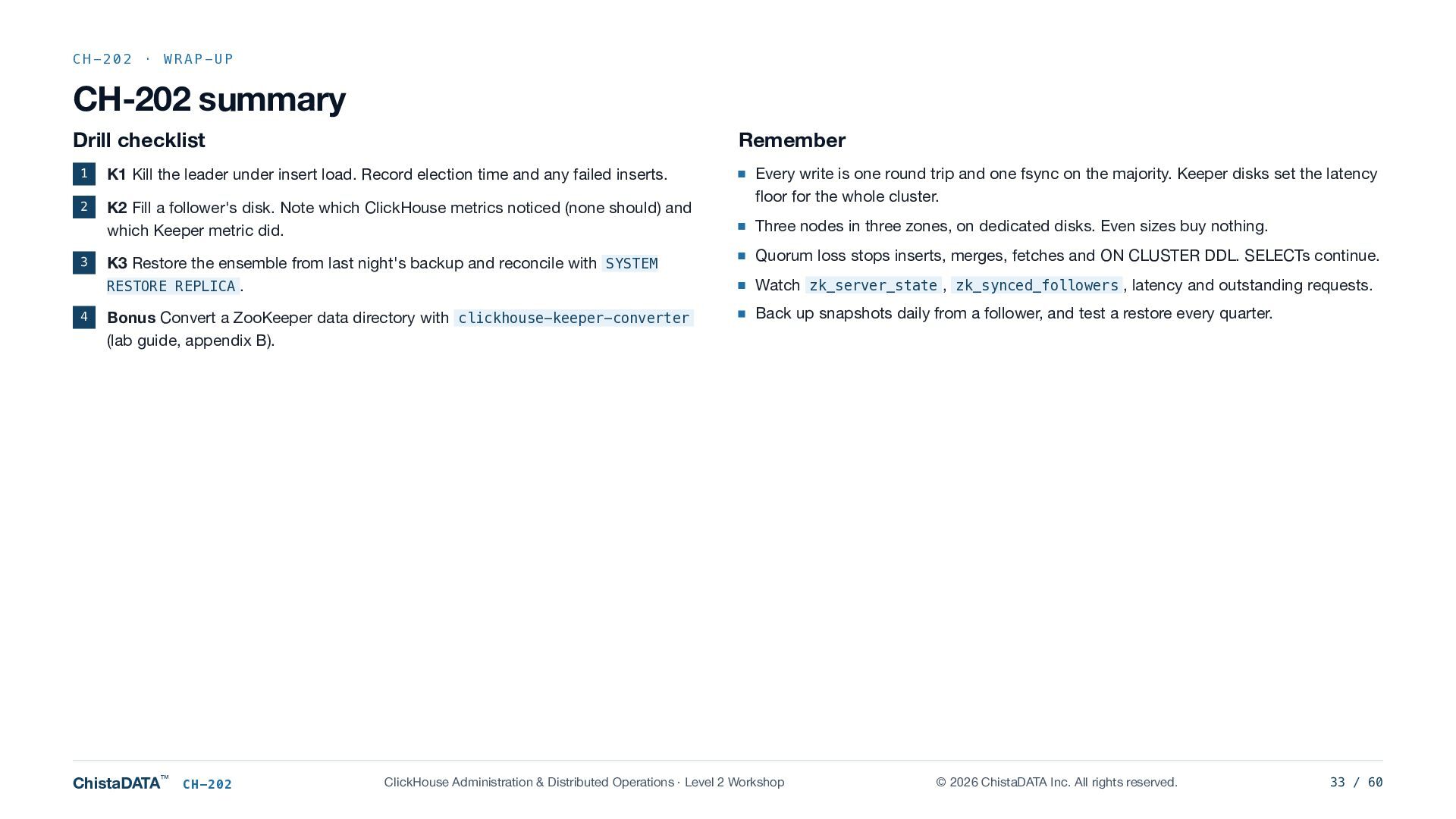
    Kill the leader under insert load. Record election time and any failed inserts. 2 K2 Fill a follower's disk. Note which ClickHouse metrics noticed (none should) and which Keeper metric did. 3 4 Every write is one round trip and one fsync on the majority. Keeper disks set the latency floor for the whole cluster. Three nodes in three zones, on dedicated disks. Even sizes buy nothing. K3 Restore the ensemble from last night's backup and reconcile with SYSTEM RESTORE REPLICA . Quorum loss stops inserts, merges, fetches and ON CLUSTER DDL. SELECTs continue. Bonus Convert a ZooKeeper data directory with clickhouse-keeper-converter (lab guide, appendix B). Back up snapshots daily from a follower, and test a restore every quarter. ChistaDATA™ CH-202 Watch zk_server_state , zk_synced_followers , latency and outstanding requests. ClickHouse Administration & Distributed Operations · Level 2 Workshop © 2026 ChistaDATA Inc. All rights reserved. 33 / 60
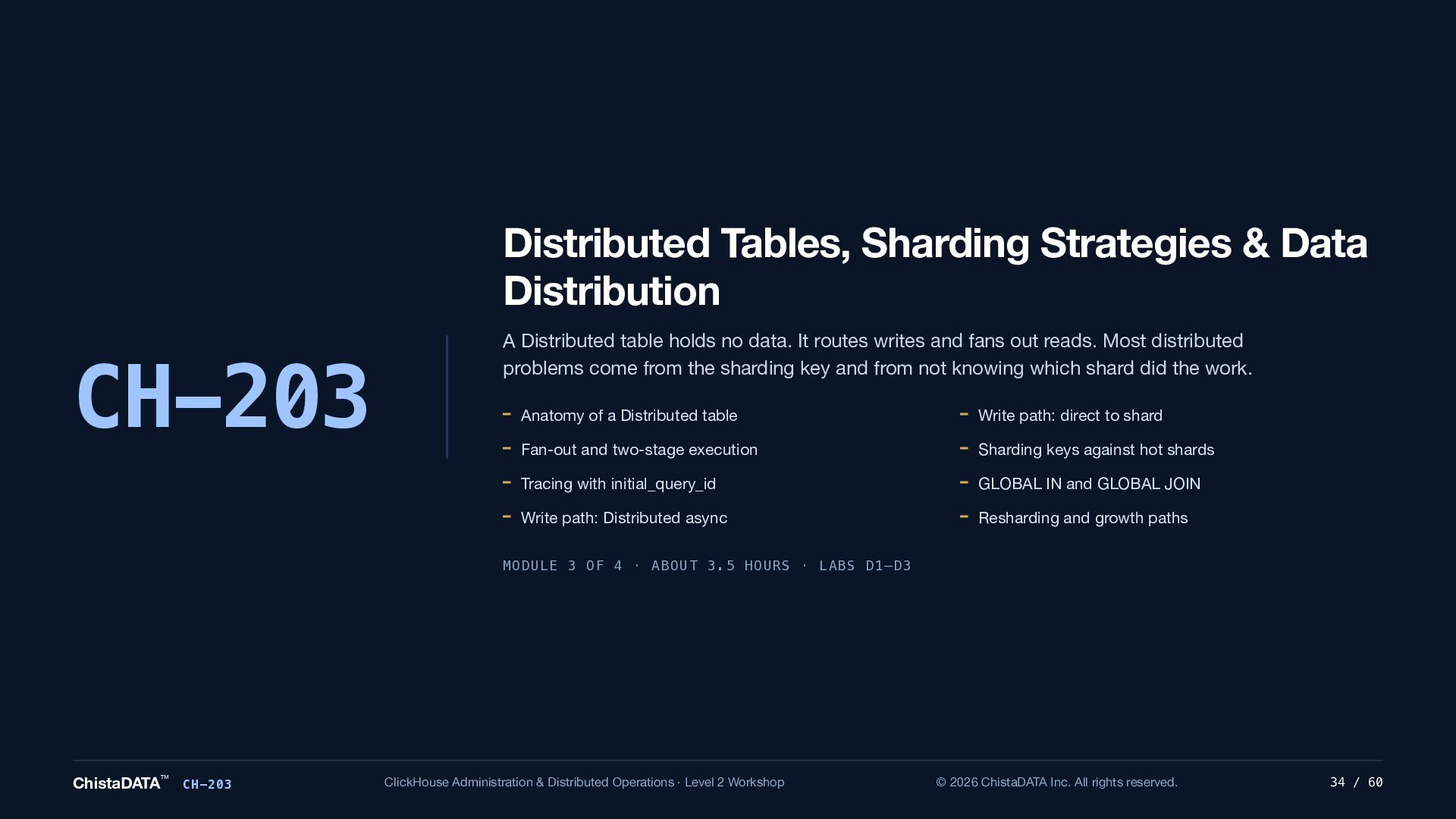
  34. Distributed Tables, Sharding Strategies & Data Distribution CH-203 A Distributed

    table holds no data. It routes writes and fans out reads. Most distributed problems come from the sharding key and from not knowing which shard did the work. Anatomy of a Distributed table Write path: direct to shard Fan-out and two-stage execution Sharding keys against hot shards Tracing with initial_query_id GLOBAL IN and GLOBAL JOIN Write path: Distributed async Resharding and growth paths MODULE 3 OF 4 · ABOUT 3.5 HOURS · LABS D1–D3 ChistaDATA™ CH-203 ClickHouse Administration & Distributed Operations · Level 2 Workshop © 2026 ChistaDATA Inc. All rights reserved. 34 / 60
  35. CH-203 · DISTRIBUTED ENGINE Anatomy of a Distributed table Shard

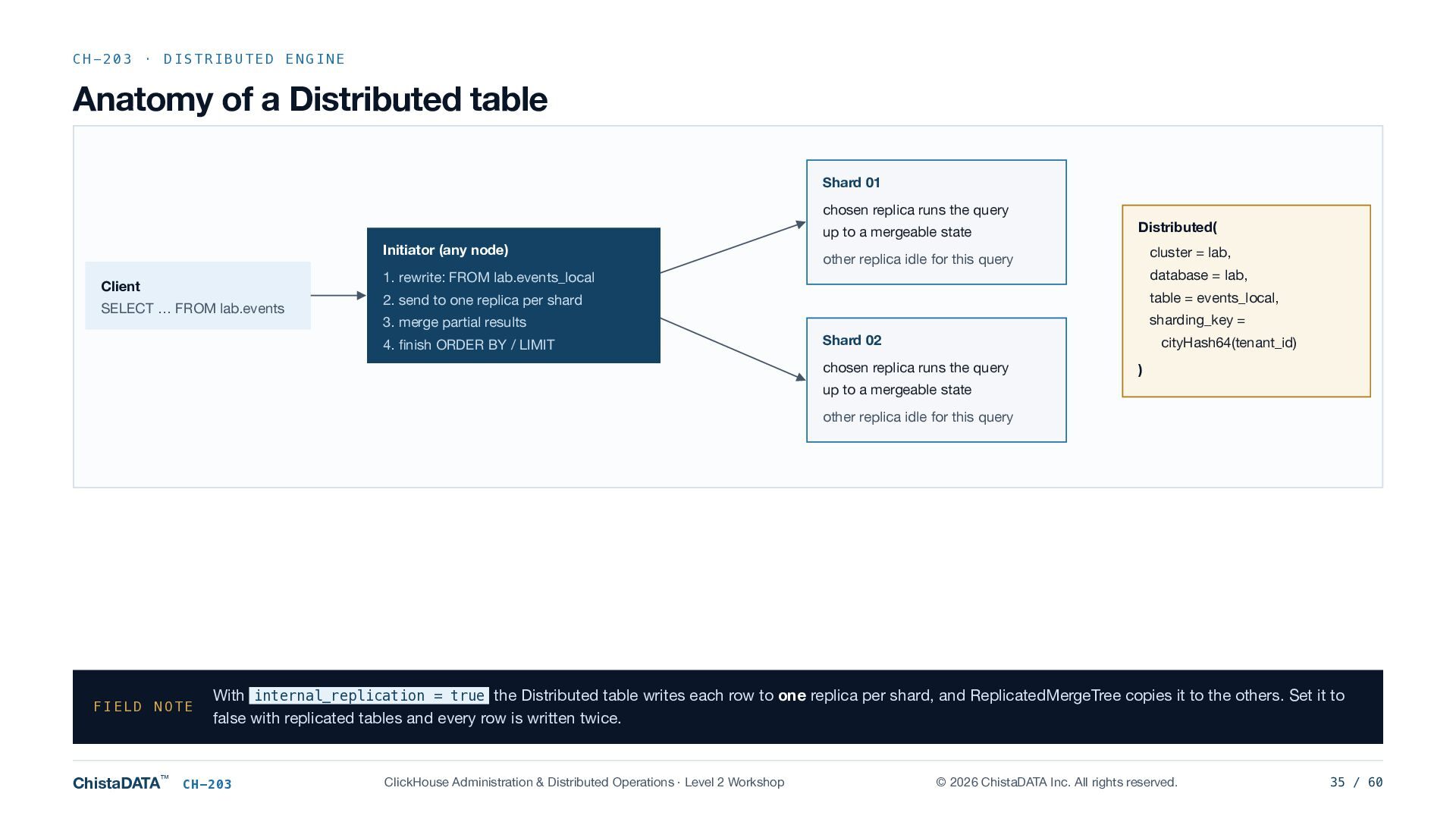
    01 chosen replica runs the query up to a mergeable state Initiator (any node) Client SELECT … FROM lab.events Distributed( cluster = lab, other replica idle for this query 1. rewrite: FROM lab.events_local database = lab, 2. send to one replica per shard table = events_local, sharding_key = 3. merge partial results 4. finish ORDER BY / LIMIT Shard 02 cityHash64(tenant_id) chosen replica runs the query ) up to a mergeable state other replica idle for this query FIELD NOTE ChistaDATA™ With internal_replication = true the Distributed table writes each row to one replica per shard, and ReplicatedMergeTree copies it to the others. Set it to false with replicated tables and every row is written twice. CH-203 ClickHouse Administration & Distributed Operations · Level 2 Workshop © 2026 ChistaDATA Inc. All rights reserved. 35 / 60
  36. CH-203 · READS Fan-out mechanics Two-stage execution Settings that change

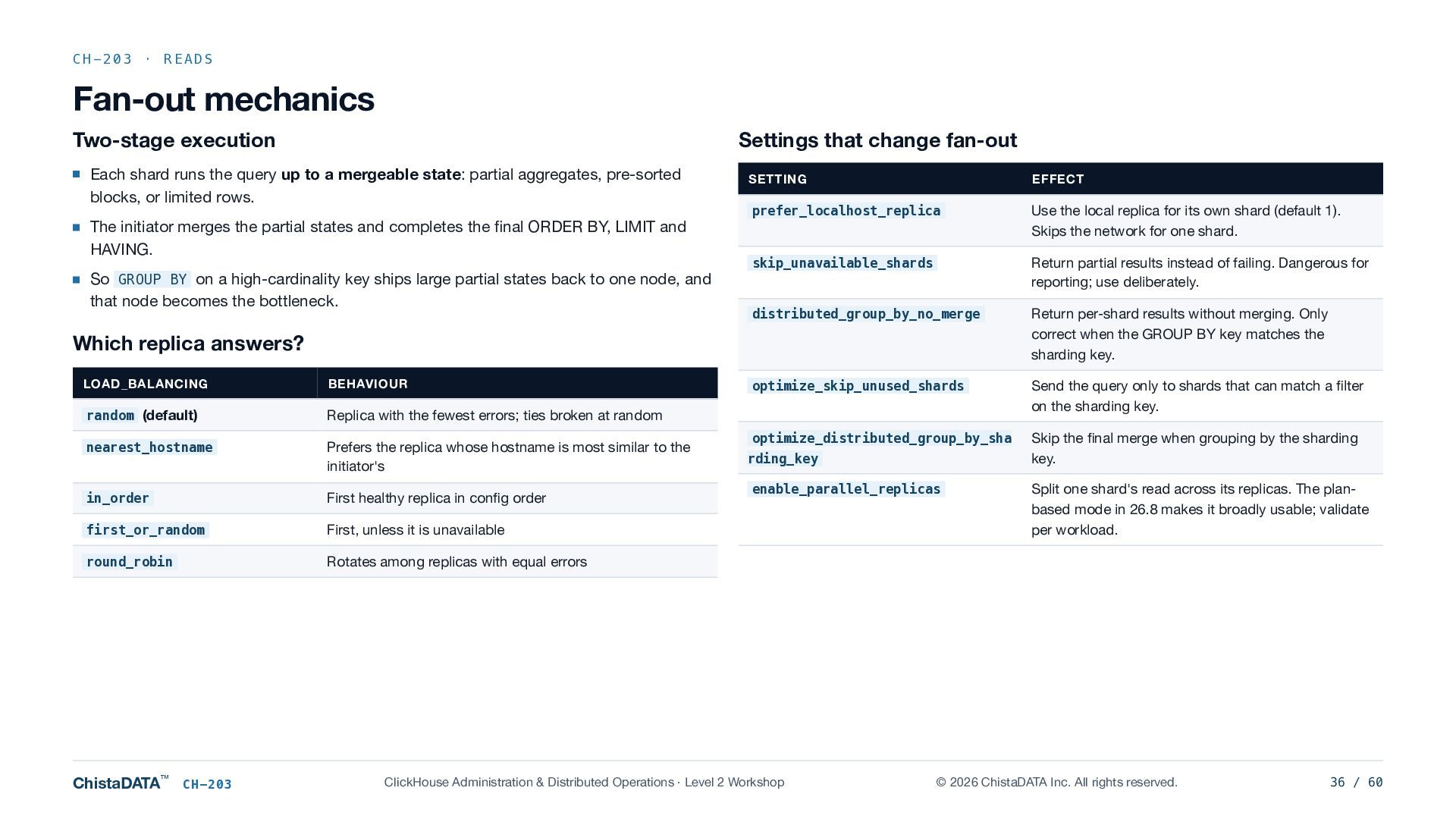
    fan-out Each shard runs the query up to a mergeable state: partial aggregates, pre-sorted blocks, or limited rows. The initiator merges the partial states and completes the final ORDER BY, LIMIT and HAVING. So GROUP BY on a high-cardinality key ships large partial states back to one node, and that node becomes the bottleneck. SETTING EFFECT prefer_localhost_replica Use the local replica for its own shard (default 1). Skips the network for one shard. skip_unavailable_shards Return partial results instead of failing. Dangerous for reporting; use deliberately. distributed_group_by_no_merge Return per-shard results without merging. Only correct when the GROUP BY key matches the sharding key. optimize_skip_unused_shards Send the query only to shards that can match a filter on the sharding key. optimize_distributed_group_by_sha Skip the final merge when grouping by the sharding key. Which replica answers? LOAD_BALANCING BEHAVIOUR random (default) Replica with the fewest errors; ties broken at random nearest_hostname Prefers the replica whose hostname is most similar to the initiator's in_order First healthy replica in config order first_or_random First, unless it is unavailable round_robin Rotates among replicas with equal errors ChistaDATA™ CH-203 rding_key enable_parallel_replicas ClickHouse Administration & Distributed Operations · Level 2 Workshop Split one shard's read across its replicas. The planbased mode in 26.8 makes it broadly usable; validate per workload. © 2026 ChistaDATA Inc. All rights reserved. 36 / 60
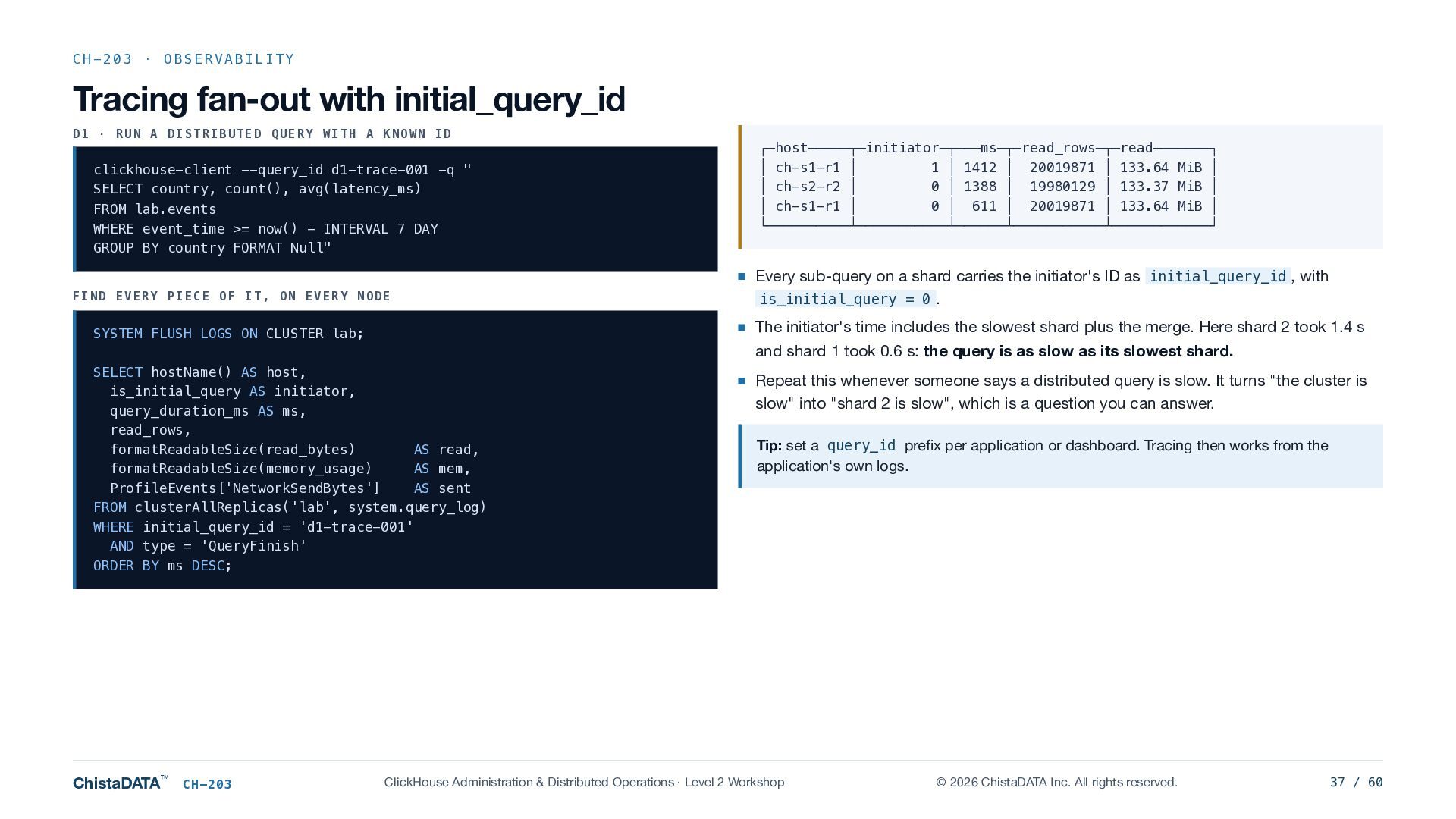
  37. CH-203 · OBSERVABILITY Tracing fan-out with initial_query_id D1 · RUN

    A DISTRIBUTED QUERY WITH A KNOWN ID clickhouse-client --query_id d1-trace-001 -q " SELECT country, count(), avg(latency_ms) FROM lab.events WHERE event_time >= now() - INTERVAL 7 DAY GROUP BY country FORMAT Null" FIND EVERY PIECE OF IT, ON EVERY NODE SELECT hostName() AS host, is_initial_query AS initiator, query_duration_ms AS ms, read_rows, formatReadableSize(read_bytes) AS read, formatReadableSize(memory_usage) AS mem, ProfileEvents['NetworkSendBytes'] AS sent FROM clusterAllReplicas('lab', system.query_log) WHERE initial_query_id = 'd1-trace-001' AND type = 'QueryFinish' ORDER BY ms DESC; CH-203 Every sub-query on a shard carries the initiator's ID as initial_query_id , with is_initial_query = 0 . The initiator's time includes the slowest shard plus the merge. Here shard 2 took 1.4 s and shard 1 took 0.6 s: the query is as slow as its slowest shard. SYSTEM FLUSH LOGS ON CLUSTER lab; ChistaDATA™ ┌─host─────┬─initiator─┬───ms─┬─read_rows─┬─read───────┐ │ ch-s1-r1 │ 1 │ 1412 │ 20019871 │ 133.64 MiB │ │ ch-s2-r2 │ 0 │ 1388 │ 19980129 │ 133.37 MiB │ │ ch-s1-r1 │ 0 │ 611 │ 20019871 │ 133.64 MiB │ └──────────┴───────────┴──────┴───────────┴────────────┘ Repeat this whenever someone says a distributed query is slow. It turns "the cluster is slow" into "shard 2 is slow", which is a question you can answer. Tip: set a query_id prefix per application or dashboard. Tracing then works from the application's own logs. ClickHouse Administration & Distributed Operations · Level 2 Workshop © 2026 ChistaDATA Inc. All rights reserved. 37 / 60
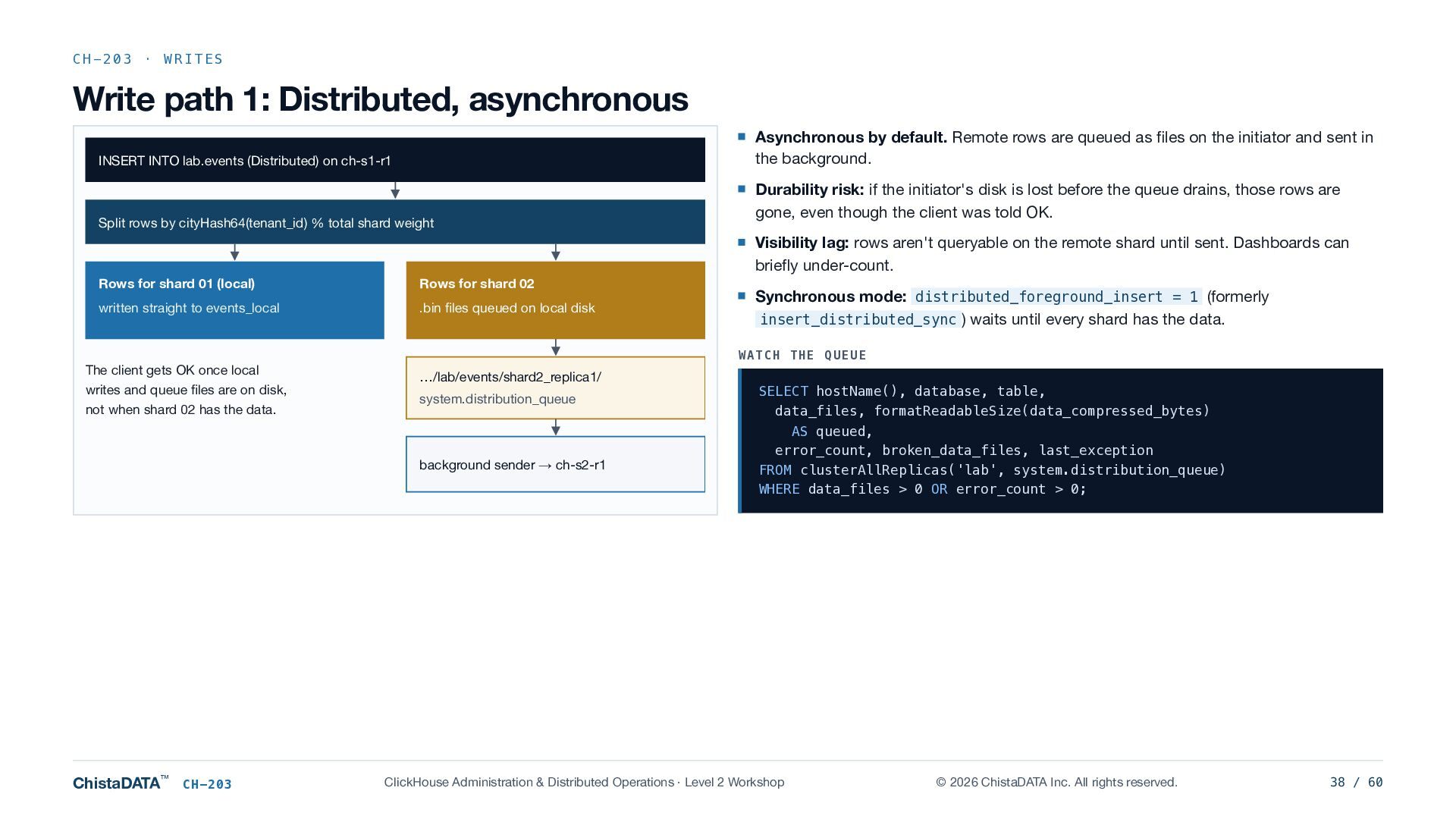
  38. CH-203 · WRITES Write path 1: Distributed, asynchronous Asynchronous by

    default. Remote rows are queued as files on the initiator and sent in the background. INSERT INTO lab.events (Distributed) on ch-s1-r1 Split rows by cityHash64(tenant_id) % total shard weight Durability risk: if the initiator's disk is lost before the queue drains, those rows are gone, even though the client was told OK. Visibility lag: rows aren't queryable on the remote shard until sent. Dashboards can briefly under-count. Rows for shard 01 (local) Rows for shard 02 written straight to events_local .bin files queued on local disk The client gets OK once local writes and queue files are on disk, not when shard 02 has the data. WATCH THE QUEUE …/lab/events/shard2_replica1/ system.distribution_queue background sender → ch-s2-r1 ChistaDATA™ CH-203 Synchronous mode: distributed_foreground_insert = 1 (formerly insert_distributed_sync ) waits until every shard has the data. SELECT hostName(), database, table, data_files, formatReadableSize(data_compressed_bytes) AS queued, error_count, broken_data_files, last_exception FROM clusterAllReplicas('lab', system.distribution_queue) WHERE data_files > 0 OR error_count > 0; ClickHouse Administration & Distributed Operations · Level 2 Workshop © 2026 ChistaDATA Inc. All rights reserved. 38 / 60
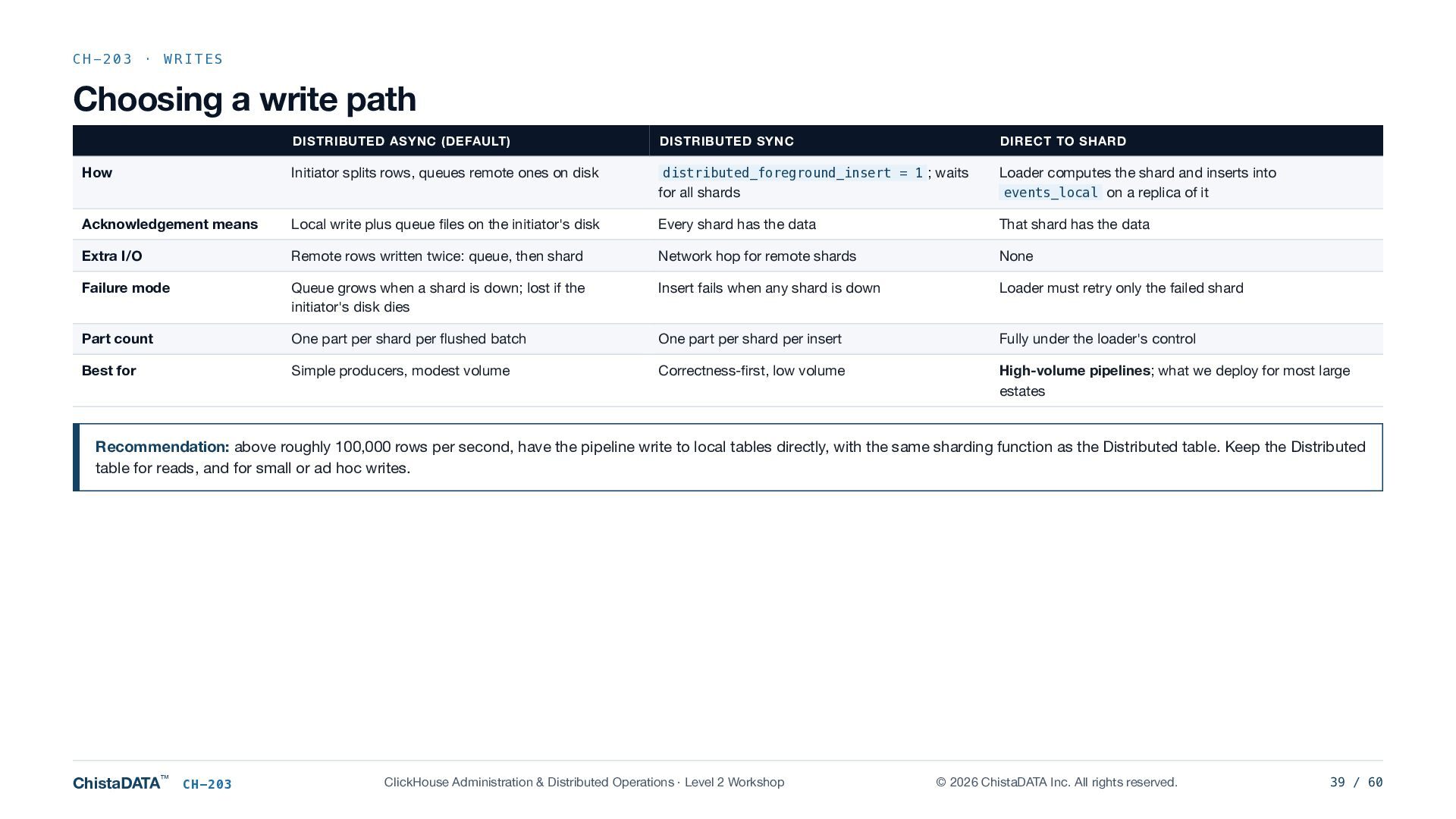
  39. CH-203 · WRITES Choosing a write path DISTRIBUTED ASYNC (DEFAULT)

    How Initiator splits rows, queues remote ones on disk DISTRIBUTED SYNC DIRECT TO SHARD distributed_foreground_insert = 1 ; waits for all shards Loader computes the shard and inserts into events_local on a replica of it Acknowledgement means Local write plus queue files on the initiator's disk Every shard has the data That shard has the data Extra I/O Remote rows written twice: queue, then shard Network hop for remote shards None Failure mode Queue grows when a shard is down; lost if the initiator's disk dies Insert fails when any shard is down Loader must retry only the failed shard Part count One part per shard per flushed batch One part per shard per insert Fully under the loader's control Best for Simple producers, modest volume Correctness-first, low volume High-volume pipelines; what we deploy for most large estates Recommendation: above roughly 100,000 rows per second, have the pipeline write to local tables directly, with the same sharding function as the Distributed table. Keep the Distributed table for reads, and for small or ad hoc writes. ChistaDATA™ CH-203 ClickHouse Administration & Distributed Operations · Level 2 Workshop © 2026 ChistaDATA Inc. All rights reserved. 39 / 60
  40. CH-203 · LAB D2 · The distribution queue D2 ·

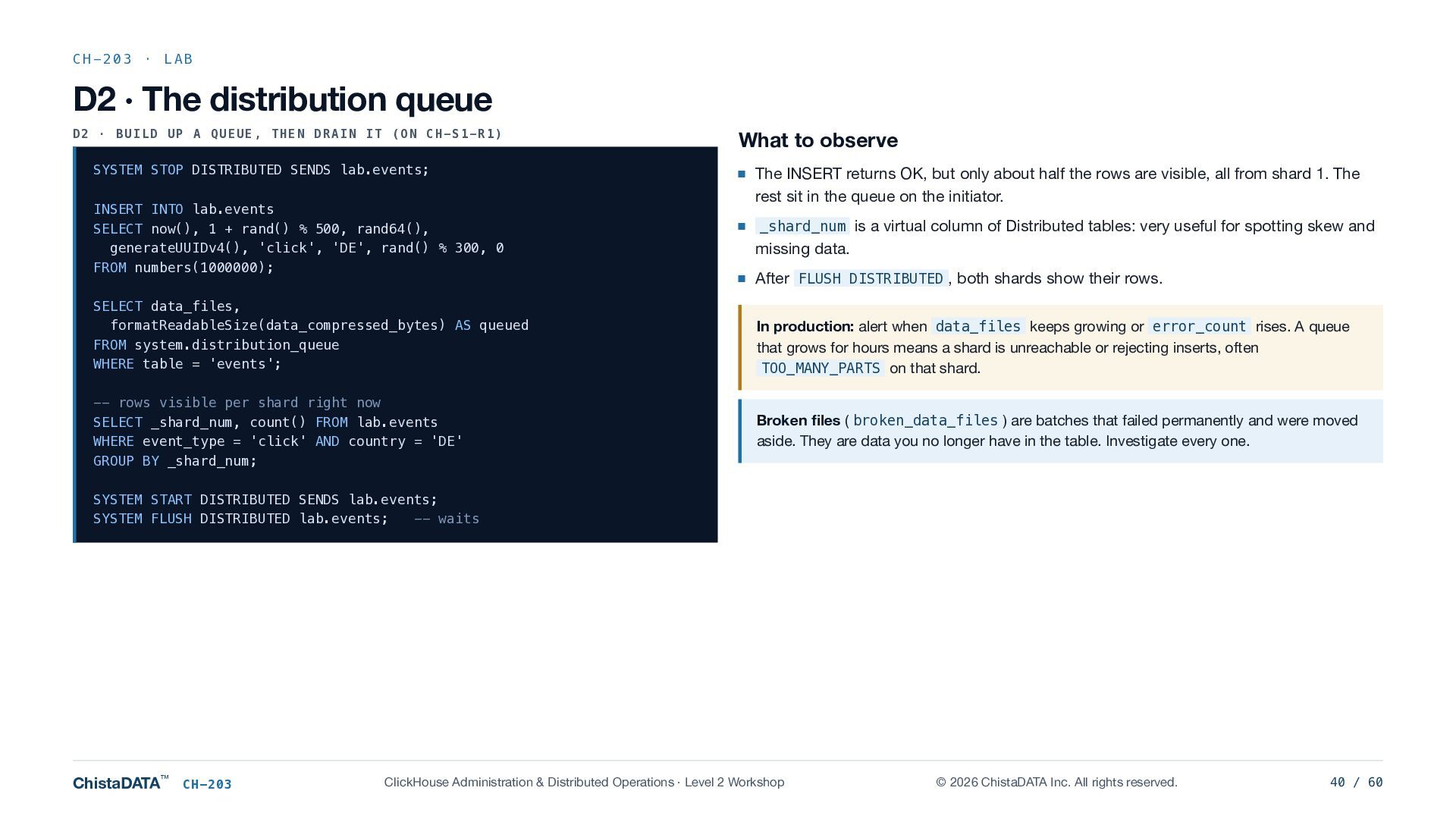
    BUILD UP A QUEUE, THEN DRAIN IT (ON CH-S1-R1) SYSTEM STOP DISTRIBUTED SENDS lab.events; INSERT INTO lab.events SELECT now(), 1 + rand() % 500, rand64(), generateUUIDv4(), 'click', 'DE', rand() % 300, 0 FROM numbers(1000000); SELECT data_files, formatReadableSize(data_compressed_bytes) AS queued FROM system.distribution_queue WHERE table = 'events'; -- rows visible per shard right now SELECT _shard_num, count() FROM lab.events WHERE event_type = 'click' AND country = 'DE' GROUP BY _shard_num; What to observe The INSERT returns OK, but only about half the rows are visible, all from shard 1. The rest sit in the queue on the initiator. _shard_num is a virtual column of Distributed tables: very useful for spotting skew and missing data. After FLUSH DISTRIBUTED , both shards show their rows. In production: alert when data_files keeps growing or error_count rises. A queue that grows for hours means a shard is unreachable or rejecting inserts, often TOO_MANY_PARTS on that shard. Broken files ( broken_data_files ) are batches that failed permanently and were moved aside. They are data you no longer have in the table. Investigate every one. SYSTEM START DISTRIBUTED SENDS lab.events; SYSTEM FLUSH DISTRIBUTED lab.events; -- waits ChistaDATA™ CH-203 ClickHouse Administration & Distributed Operations · Level 2 Workshop © 2026 ChistaDATA Inc. All rights reserved. 40 / 60
  41. CH-203 · SHARDING Sharding-key design against hot shards cityHash64(tenant_id) with

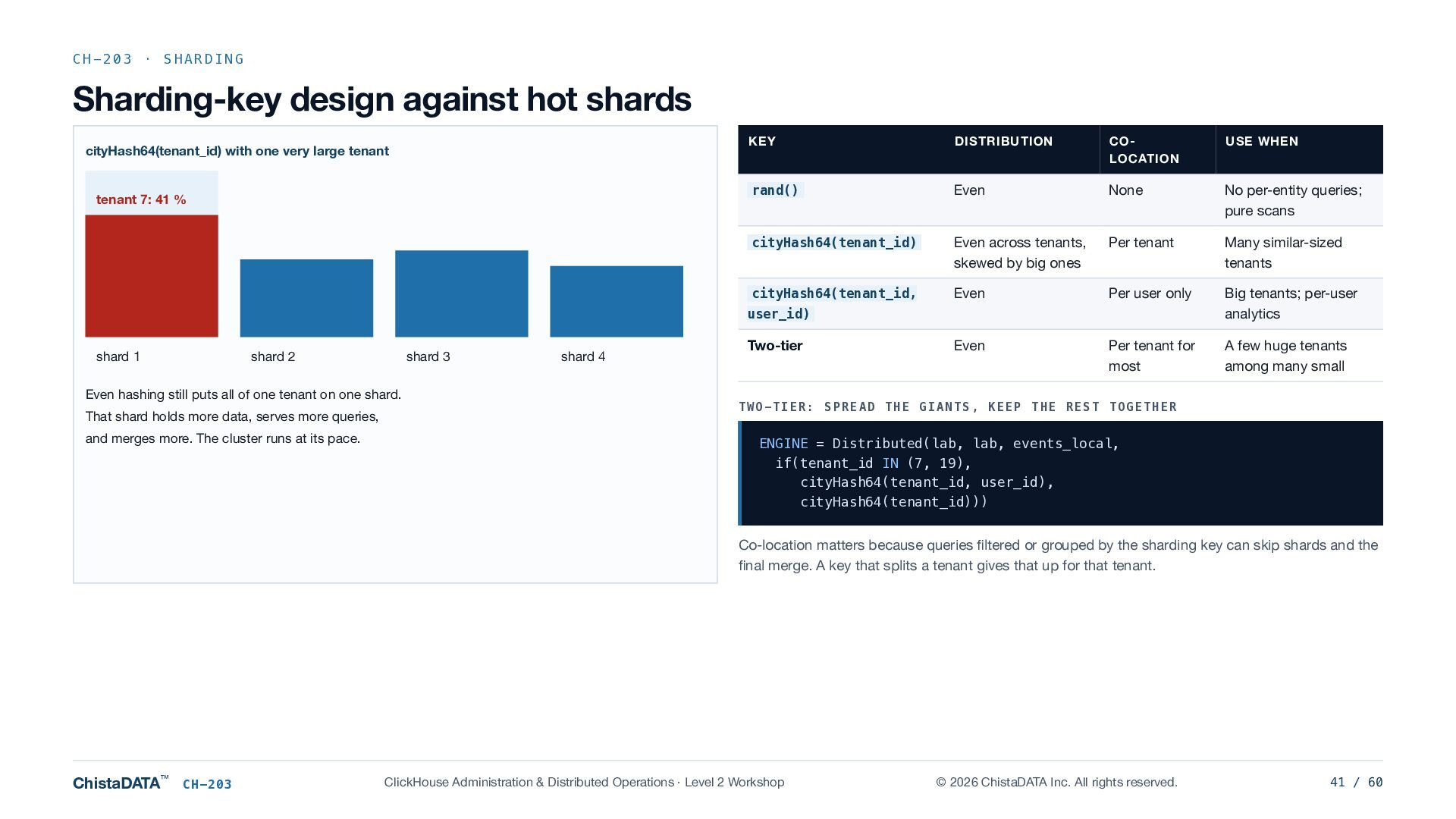
    one very large tenant tenant 7: 41 % KEY DISTRIBUTION COLOCATION USE WHEN rand() Even None No per-entity queries; pure scans cityHash64(tenant_id) Even across tenants, skewed by big ones Per tenant Many similar-sized tenants cityHash64(tenant_id, Even Per user only Big tenants; per-user analytics Even Per tenant for most A few huge tenants among many small user_id) shard 1 shard 2 shard 3 Even hashing still puts all of one tenant on one shard. That shard holds more data, serves more queries, and merges more. The cluster runs at its pace. shard 4 Two-tier TWO-TIER: SPREAD THE GIANTS, KEEP THE REST TOGETHER ENGINE = Distributed(lab, lab, events_local, if(tenant_id IN (7, 19), cityHash64(tenant_id, user_id), cityHash64(tenant_id))) Co-location matters because queries filtered or grouped by the sharding key can skip shards and the final merge. A key that splits a tenant gives that up for that tenant. ChistaDATA™ CH-203 ClickHouse Administration & Distributed Operations · Level 2 Workshop © 2026 ChistaDATA Inc. All rights reserved. 41 / 60
  42. CH-203 · SHARDING Detecting hot shards DATA SKEW PER SHARD

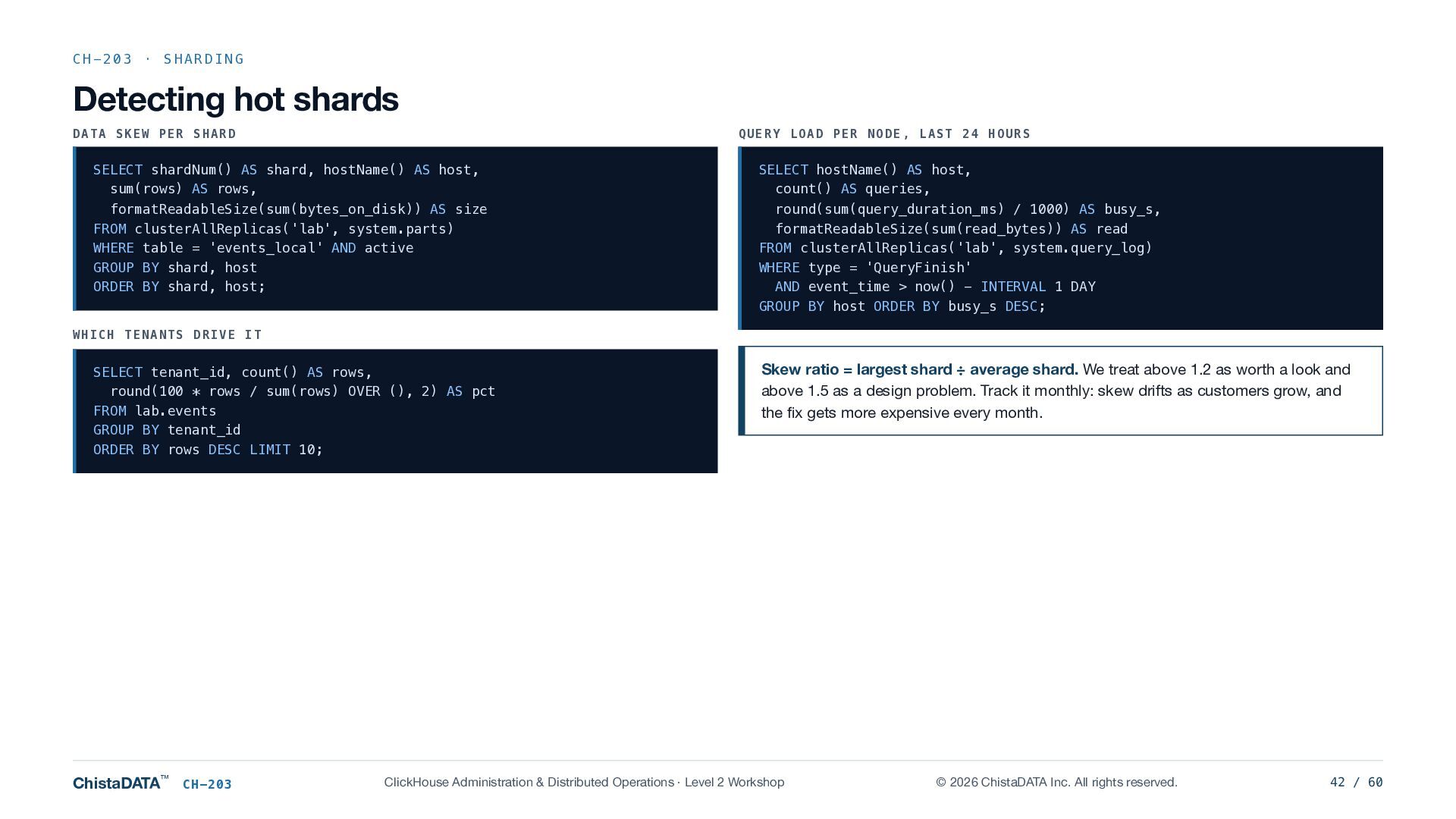
    QUERY LOAD PER NODE, LAST 24 HOURS SELECT shardNum() AS shard, hostName() AS host, sum(rows) AS rows, formatReadableSize(sum(bytes_on_disk)) AS size FROM clusterAllReplicas('lab', system.parts) WHERE table = 'events_local' AND active GROUP BY shard, host ORDER BY shard, host; SELECT hostName() AS host, count() AS queries, round(sum(query_duration_ms) / 1000) AS busy_s, formatReadableSize(sum(read_bytes)) AS read FROM clusterAllReplicas('lab', system.query_log) WHERE type = 'QueryFinish' AND event_time > now() - INTERVAL 1 DAY GROUP BY host ORDER BY busy_s DESC; WHICH TENANTS DRIVE IT SELECT tenant_id, count() AS rows, round(100 * rows / sum(rows) OVER (), 2) AS pct FROM lab.events GROUP BY tenant_id ORDER BY rows DESC LIMIT 10; ChistaDATA™ CH-203 Skew ratio = largest shard ÷ average shard. We treat above 1.2 as worth a look and above 1.5 as a design problem. Track it monthly: skew drifts as customers grow, and the fix gets more expensive every month. ClickHouse Administration & Distributed Operations · Level 2 Workshop © 2026 ChistaDATA Inc. All rights reserved. 42 / 60
  43. CH-203 · DISTRIBUTED QUERIES GLOBAL IN and GLOBAL JOIN semantics

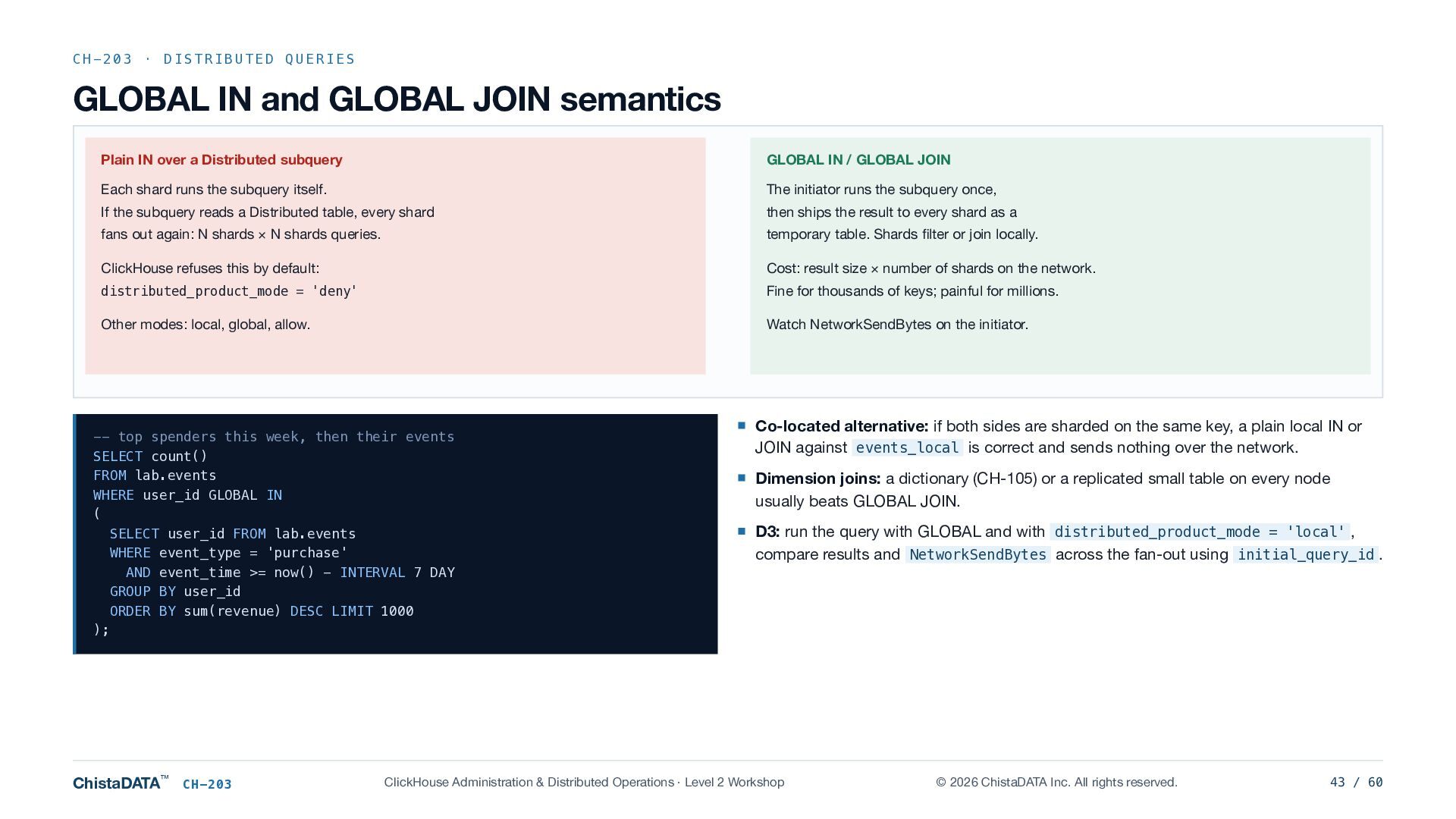
    Plain IN over a Distributed subquery GLOBAL IN / GLOBAL JOIN Each shard runs the subquery itself. The initiator runs the subquery once, If the subquery reads a Distributed table, every shard then ships the result to every shard as a fans out again: N shards × N shards queries. temporary table. Shards filter or join locally. ClickHouse refuses this by default: Cost: result size × number of shards on the network. distributed_product_mode = 'deny' Fine for thousands of keys; painful for millions. Other modes: local, global, allow. Watch NetworkSendBytes on the initiator. -- top spenders this week, then their events SELECT count() FROM lab.events WHERE user_id GLOBAL IN ( SELECT user_id FROM lab.events WHERE event_type = 'purchase' AND event_time >= now() - INTERVAL 7 DAY GROUP BY user_id ORDER BY sum(revenue) DESC LIMIT 1000 ); ChistaDATA™ CH-203 Co-located alternative: if both sides are sharded on the same key, a plain local IN or JOIN against events_local is correct and sends nothing over the network. Dimension joins: a dictionary (CH-105) or a replicated small table on every node usually beats GLOBAL JOIN. D3: run the query with GLOBAL and with distributed_product_mode = 'local' , compare results and NetworkSendBytes across the fan-out using initial_query_id . ClickHouse Administration & Distributed Operations · Level 2 Workshop © 2026 ChistaDATA Inc. All rights reserved. 43 / 60
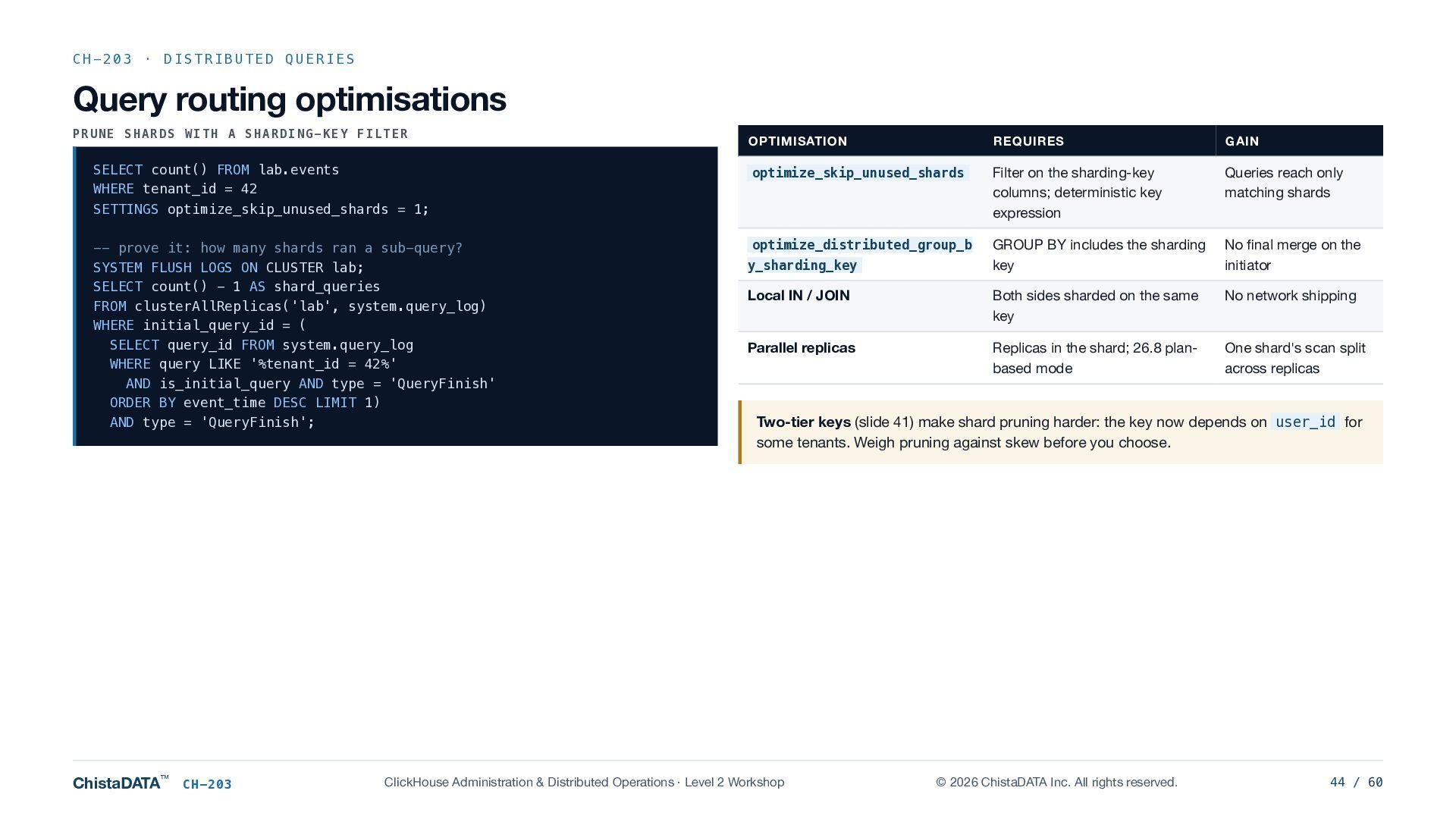
  44. CH-203 · DISTRIBUTED QUERIES Query routing optimisations PRUNE SHARDS WITH

    A SHARDING-KEY FILTER SELECT count() FROM lab.events WHERE tenant_id = 42 SETTINGS optimize_skip_unused_shards = 1; -- prove it: how many shards ran a sub-query? SYSTEM FLUSH LOGS ON CLUSTER lab; SELECT count() - 1 AS shard_queries FROM clusterAllReplicas('lab', system.query_log) WHERE initial_query_id = ( SELECT query_id FROM system.query_log WHERE query LIKE '%tenant_id = 42%' AND is_initial_query AND type = 'QueryFinish' ORDER BY event_time DESC LIMIT 1) AND type = 'QueryFinish'; ChistaDATA™ CH-203 OPTIMISATION REQUIRES GAIN optimize_skip_unused_shards Filter on the sharding-key columns; deterministic key expression Queries reach only matching shards optimize_distributed_group_b GROUP BY includes the sharding key No final merge on the initiator Local IN / JOIN Both sides sharded on the same key No network shipping Parallel replicas Replicas in the shard; 26.8 planbased mode One shard's scan split across replicas y_sharding_key Two-tier keys (slide 41) make shard pruning harder: the key now depends on user_id for some tenants. Weigh pruning against skew before you choose. ClickHouse Administration & Distributed Operations · Level 2 Workshop © 2026 ChistaDATA Inc. All rights reserved. 44 / 60
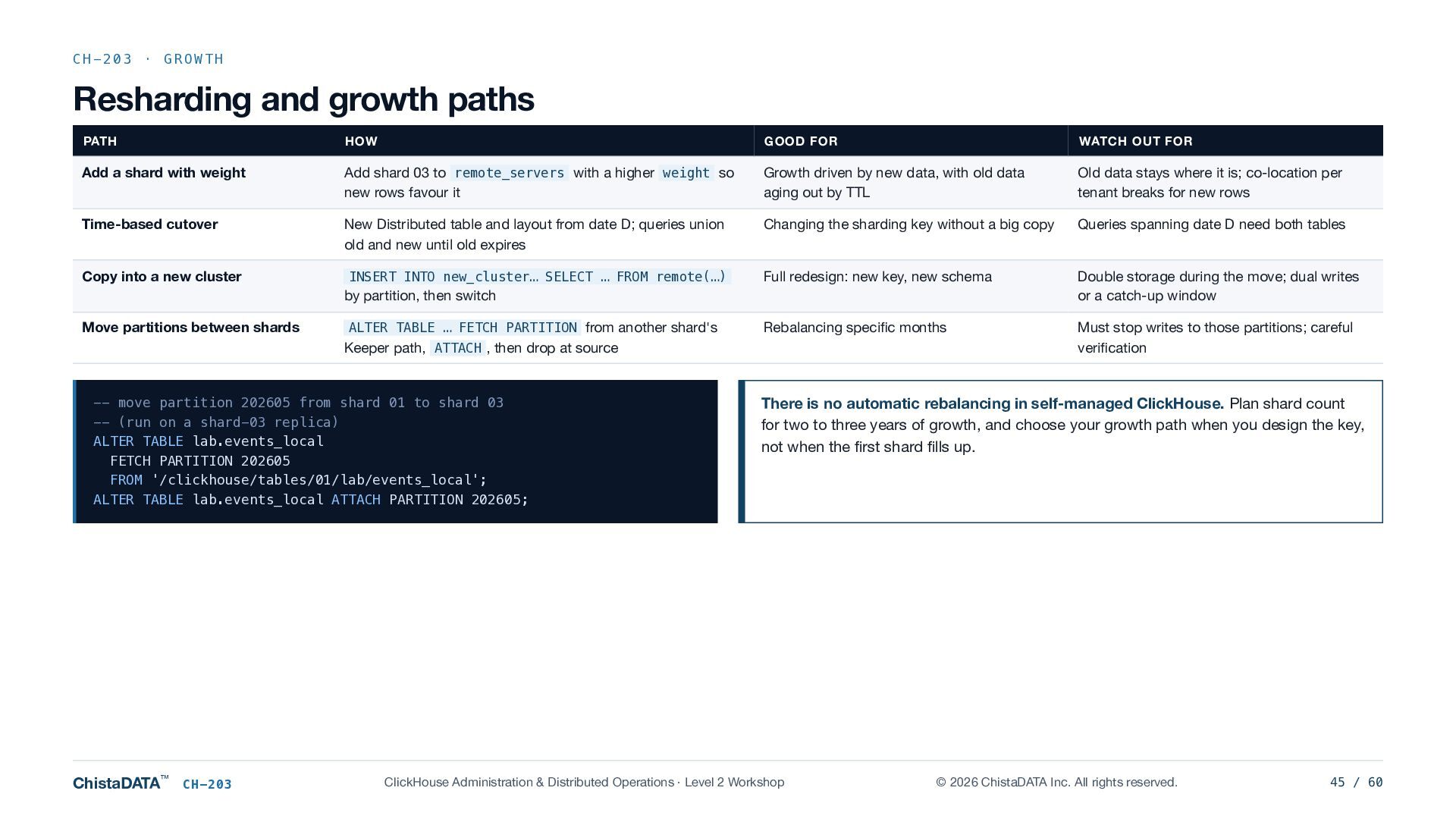
  45. CH-203 · GROWTH Resharding and growth paths PATH HOW GOOD

    FOR WATCH OUT FOR Add a shard with weight Add shard 03 to remote_servers with a higher weight so new rows favour it Growth driven by new data, with old data aging out by TTL Old data stays where it is; co-location per tenant breaks for new rows Time-based cutover New Distributed table and layout from date D; queries union old and new until old expires Changing the sharding key without a big copy Queries spanning date D need both tables INSERT INTO new_cluster… SELECT … FROM remote(…) Full redesign: new key, new schema Double storage during the move; dual writes or a catch-up window Rebalancing specific months Must stop writes to those partitions; careful verification Copy into a new cluster by partition, then switch Move partitions between shards ALTER TABLE … FETCH PARTITION from another shard's Keeper path, ATTACH , then drop at source -- move partition 202605 from shard 01 to shard 03 -- (run on a shard-03 replica) ALTER TABLE lab.events_local FETCH PARTITION 202605 FROM '/clickhouse/tables/01/lab/events_local'; ALTER TABLE lab.events_local ATTACH PARTITION 202605; ChistaDATA™ CH-203 There is no automatic rebalancing in self-managed ClickHouse. Plan shard count for two to three years of growth, and choose your growth path when you design the key, not when the first shard fills up. ClickHouse Administration & Distributed Operations · Level 2 Workshop © 2026 ChistaDATA Inc. All rights reserved. 45 / 60
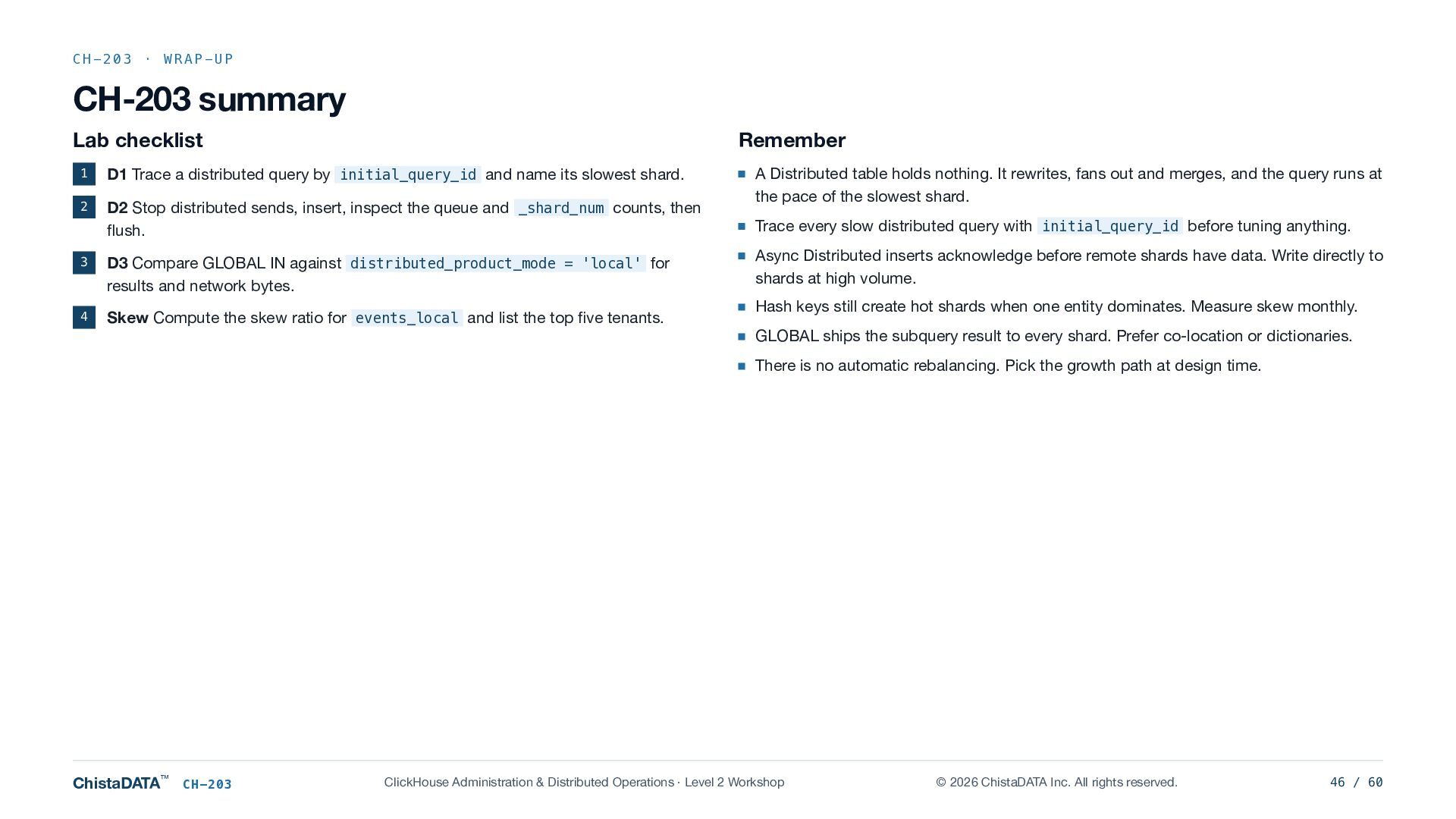
  46. CH-203 · WRAP-UP CH-203 summary Lab checklist Remember 1 D1

    Trace a distributed query by initial_query_id and name its slowest shard. 2 D2 Stop distributed sends, insert, inspect the queue and _shard_num counts, then flush. 3 D3 Compare GLOBAL IN against distributed_product_mode = 'local' for results and network bytes. 4 Skew Compute the skew ratio for events_local and list the top five tenants. A Distributed table holds nothing. It rewrites, fans out and merges, and the query runs at the pace of the slowest shard. Trace every slow distributed query with initial_query_id before tuning anything. Async Distributed inserts acknowledge before remote shards have data. Write directly to shards at high volume. Hash keys still create hot shards when one entity dominates. Measure skew monthly. GLOBAL ships the subquery result to every shard. Prefer co-location or dictionaries. There is no automatic rebalancing. Pick the growth path at design time. ChistaDATA™ CH-203 ClickHouse Administration & Distributed Operations · Level 2 Workshop © 2026 ChistaDATA Inc. All rights reserved. 46 / 60
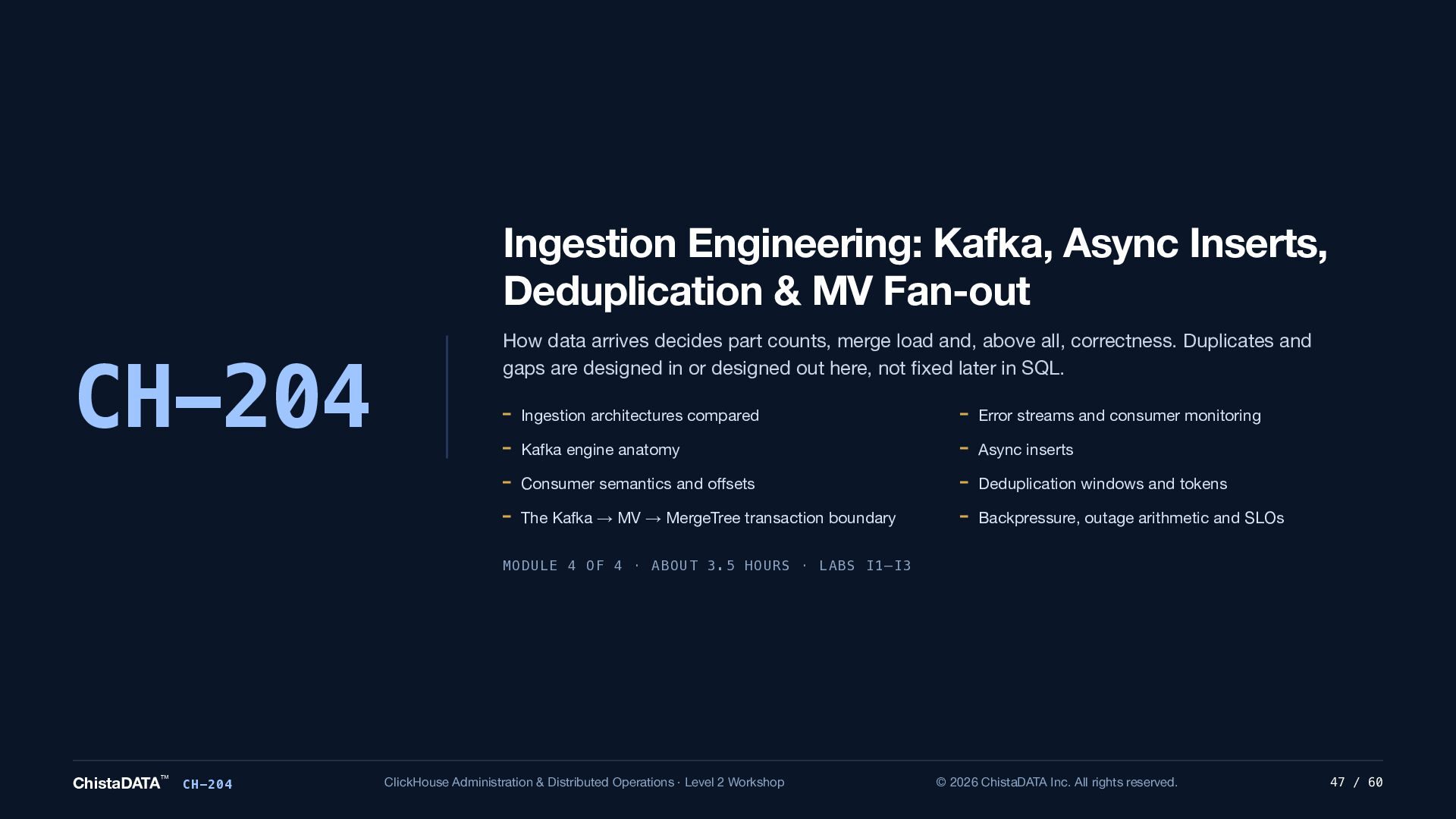
  47. Ingestion Engineering: Kafka, Async Inserts, Deduplication & MV Fan-out CH-204

    How data arrives decides part counts, merge load and, above all, correctness. Duplicates and gaps are designed in or designed out here, not fixed later in SQL. Ingestion architectures compared Error streams and consumer monitoring Kafka engine anatomy Async inserts Consumer semantics and offsets Deduplication windows and tokens The Kafka → MV → MergeTree transaction boundary Backpressure, outage arithmetic and SLOs MODULE 4 OF 4 · ABOUT 3.5 HOURS · LABS I1–I3 ChistaDATA™ CH-204 ClickHouse Administration & Distributed Operations · Level 2 Workshop © 2026 ChistaDATA Inc. All rights reserved. 47 / 60
  48. CH-204 · ARCHITECTURE Ingestion architectures compared PATTERN HOW DATA GETS

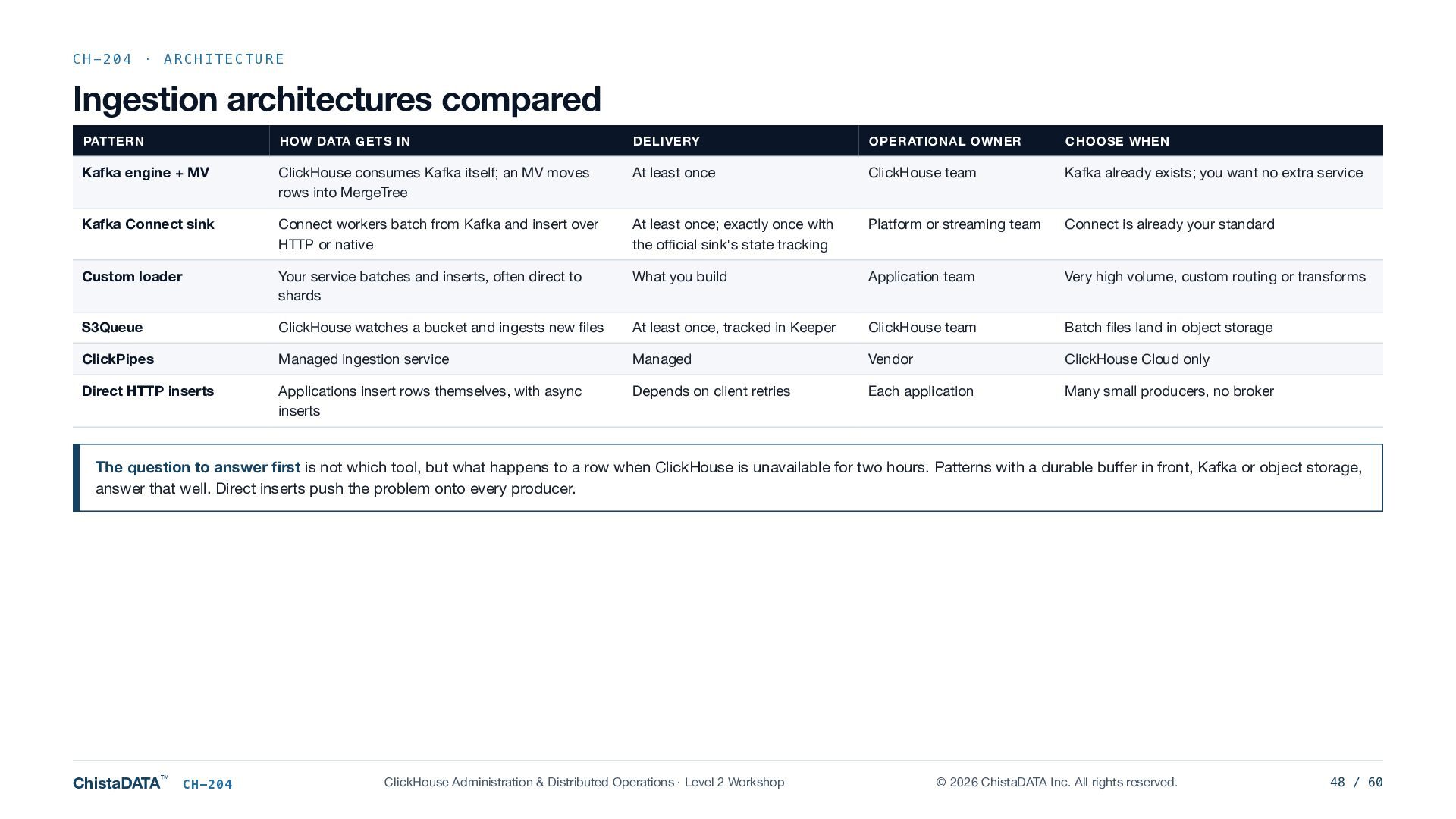
    IN DELIVERY OPERATIONAL OWNER CHOOSE WHEN Kafka engine + MV ClickHouse consumes Kafka itself; an MV moves rows into MergeTree At least once ClickHouse team Kafka already exists; you want no extra service Kafka Connect sink Connect workers batch from Kafka and insert over HTTP or native At least once; exactly once with the official sink's state tracking Platform or streaming team Connect is already your standard Custom loader Your service batches and inserts, often direct to shards What you build Application team Very high volume, custom routing or transforms S3Queue ClickHouse watches a bucket and ingests new files At least once, tracked in Keeper ClickHouse team Batch files land in object storage ClickPipes Managed ingestion service Managed Vendor ClickHouse Cloud only Direct HTTP inserts Applications insert rows themselves, with async inserts Depends on client retries Each application Many small producers, no broker The question to answer first is not which tool, but what happens to a row when ClickHouse is unavailable for two hours. Patterns with a durable buffer in front, Kafka or object storage, answer that well. Direct inserts push the problem onto every producer. ChistaDATA™ CH-204 ClickHouse Administration & Distributed Operations · Level 2 Workshop © 2026 ChistaDATA Inc. All rights reserved. 48 / 60
  49. CH-204 · KAFKA Kafka engine anatomy I1 · THE THREE

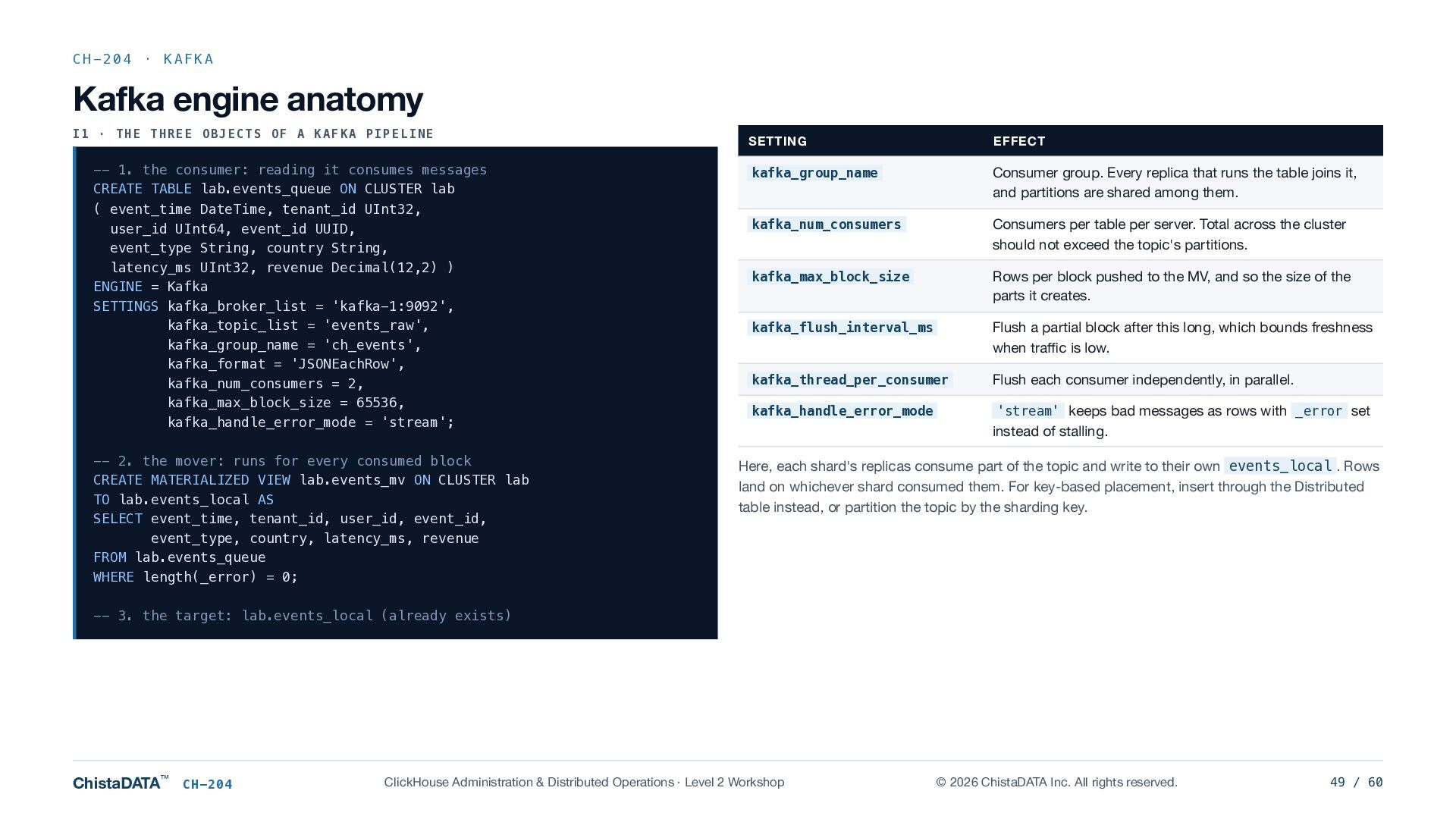
    OBJECTS OF A KAFKA PIPELINE -- 1. the consumer: reading it consumes messages CREATE TABLE lab.events_queue ON CLUSTER lab ( event_time DateTime, tenant_id UInt32, user_id UInt64, event_id UUID, event_type String, country String, latency_ms UInt32, revenue Decimal(12,2) ) ENGINE = Kafka SETTINGS kafka_broker_list = 'kafka-1:9092', kafka_topic_list = 'events_raw', kafka_group_name = 'ch_events', kafka_format = 'JSONEachRow', kafka_num_consumers = 2, kafka_max_block_size = 65536, kafka_handle_error_mode = 'stream'; -- 2. the mover: runs for every consumed block CREATE MATERIALIZED VIEW lab.events_mv ON CLUSTER lab TO lab.events_local AS SELECT event_time, tenant_id, user_id, event_id, event_type, country, latency_ms, revenue FROM lab.events_queue WHERE length(_error) = 0; SETTING EFFECT kafka_group_name Consumer group. Every replica that runs the table joins it, and partitions are shared among them. kafka_num_consumers Consumers per table per server. Total across the cluster should not exceed the topic's partitions. kafka_max_block_size Rows per block pushed to the MV, and so the size of the parts it creates. kafka_flush_interval_ms Flush a partial block after this long, which bounds freshness when traffic is low. kafka_thread_per_consumer Flush each consumer independently, in parallel. kafka_handle_error_mode 'stream' keeps bad messages as rows with _error set instead of stalling. Here, each shard's replicas consume part of the topic and write to their own events_local . Rows land on whichever shard consumed them. For key-based placement, insert through the Distributed table instead, or partition the topic by the sharding key. -- 3. the target: lab.events_local (already exists) ChistaDATA™ CH-204 ClickHouse Administration & Distributed Operations · Level 2 Workshop © 2026 ChistaDATA Inc. All rights reserved. 49 / 60
  50. CH-204 · KAFKA Consumer semantics and offsets How consumption actually

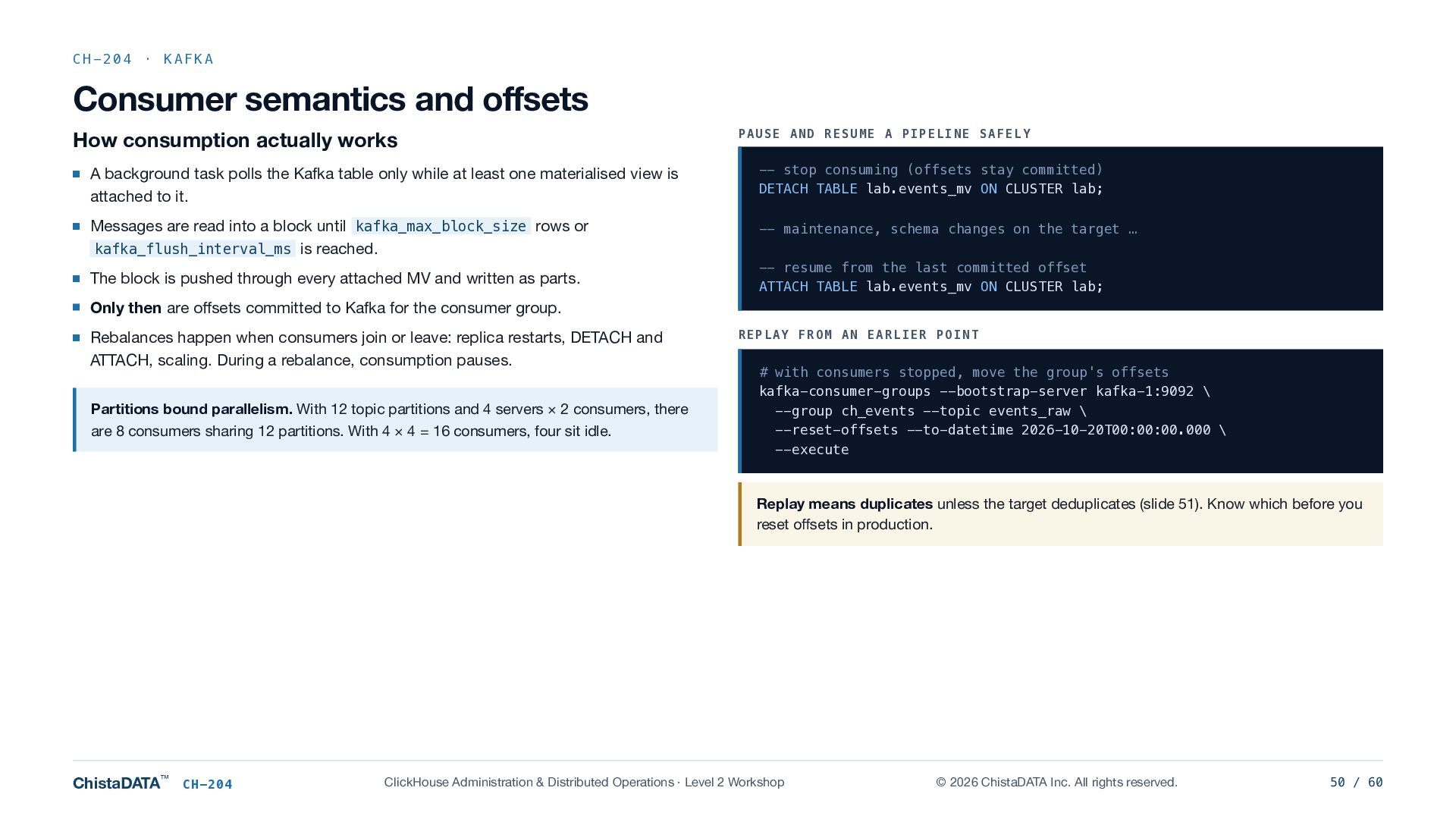
    works PAUSE AND RESUME A PIPELINE SAFELY A background task polls the Kafka table only while at least one materialised view is attached to it. -- stop consuming (offsets stay committed) DETACH TABLE lab.events_mv ON CLUSTER lab; Messages are read into a block until kafka_max_block_size rows or kafka_flush_interval_ms is reached. -- maintenance, schema changes on the target … The block is pushed through every attached MV and written as parts. -- resume from the last committed offset ATTACH TABLE lab.events_mv ON CLUSTER lab; Only then are offsets committed to Kafka for the consumer group. Rebalances happen when consumers join or leave: replica restarts, DETACH and ATTACH, scaling. During a rebalance, consumption pauses. Partitions bound parallelism. With 12 topic partitions and 4 servers × 2 consumers, there are 8 consumers sharing 12 partitions. With 4 × 4 = 16 consumers, four sit idle. REPLAY FROM AN EARLIER POINT # with consumers stopped, move the group's offsets kafka-consumer-groups --bootstrap-server kafka-1:9092 \ --group ch_events --topic events_raw \ --reset-offsets --to-datetime 2026-10-20T00:00:00.000 \ --execute Replay means duplicates unless the target deduplicates (slide 51). Know which before you reset offsets in production. ChistaDATA™ CH-204 ClickHouse Administration & Distributed Operations · Level 2 Workshop © 2026 ChistaDATA Inc. All rights reserved. 50 / 60
  51. CH-204 · CORRECTNESS The Kafka → MV → MergeTree transaction

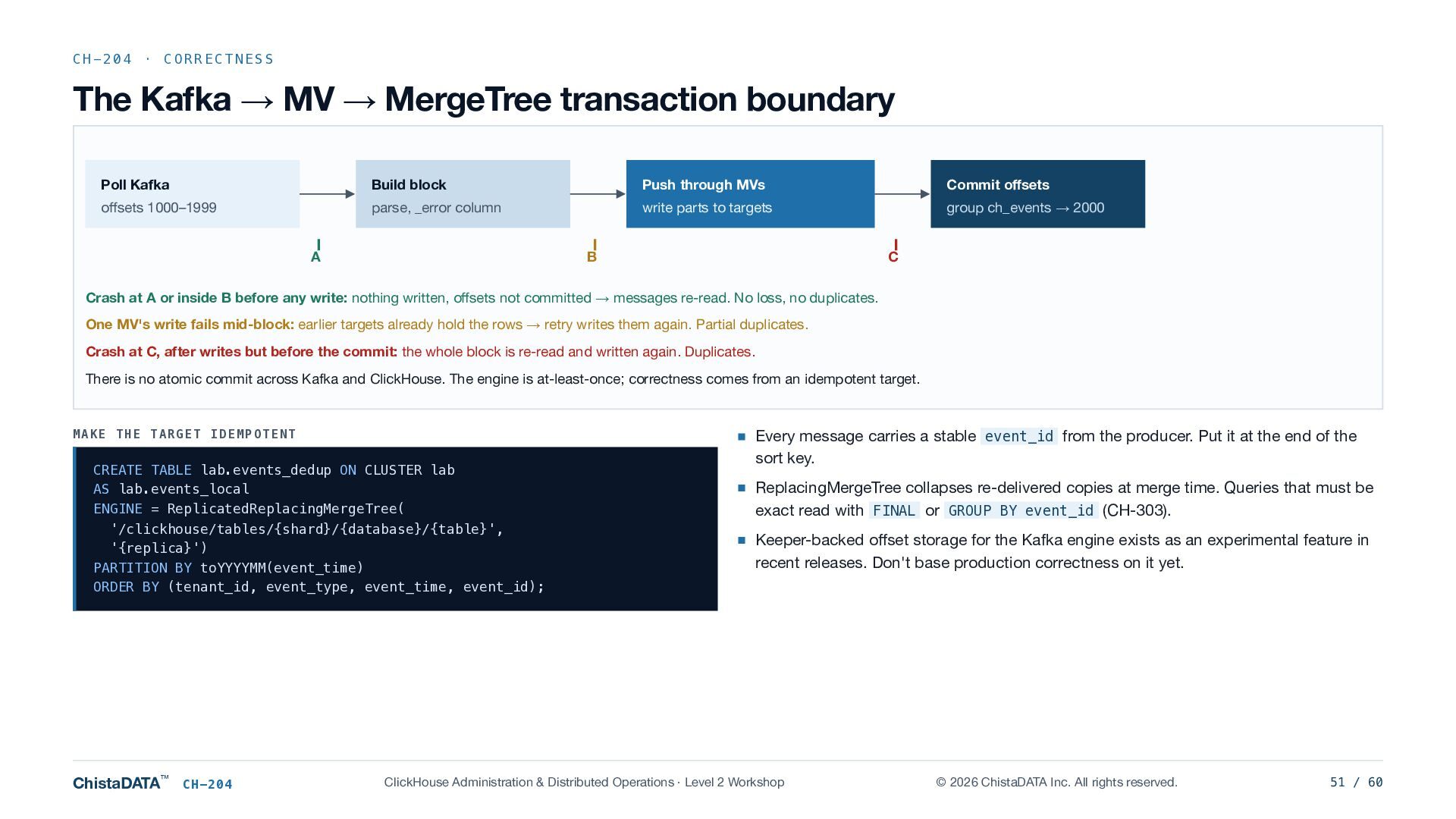
    boundary Poll Kafka Build block Push through MVs Commit offsets offsets 1000–1999 parse, _error column write parts to targets group ch_events → 2000 A B C Crash at A or inside B before any write: nothing written, offsets not committed → messages re-read. No loss, no duplicates. One MV's write fails mid-block: earlier targets already hold the rows → retry writes them again. Partial duplicates. Crash at C, after writes but before the commit: the whole block is re-read and written again. Duplicates. There is no atomic commit across Kafka and ClickHouse. The engine is at-least-once; correctness comes from an idempotent target. MAKE THE TARGET IDEMPOTENT CREATE TABLE lab.events_dedup ON CLUSTER lab AS lab.events_local ENGINE = ReplicatedReplacingMergeTree( '/clickhouse/tables/{shard}/{database}/{table}', '{replica}') PARTITION BY toYYYYMM(event_time) ORDER BY (tenant_id, event_type, event_time, event_id); ChistaDATA™ CH-204 Every message carries a stable event_id from the producer. Put it at the end of the sort key. ReplacingMergeTree collapses re-delivered copies at merge time. Queries that must be exact read with FINAL or GROUP BY event_id (CH-303). Keeper-backed offset storage for the Kafka engine exists as an experimental feature in recent releases. Don't base production correctness on it yet. ClickHouse Administration & Distributed Operations · Level 2 Workshop © 2026 ChistaDATA Inc. All rights reserved. 51 / 60
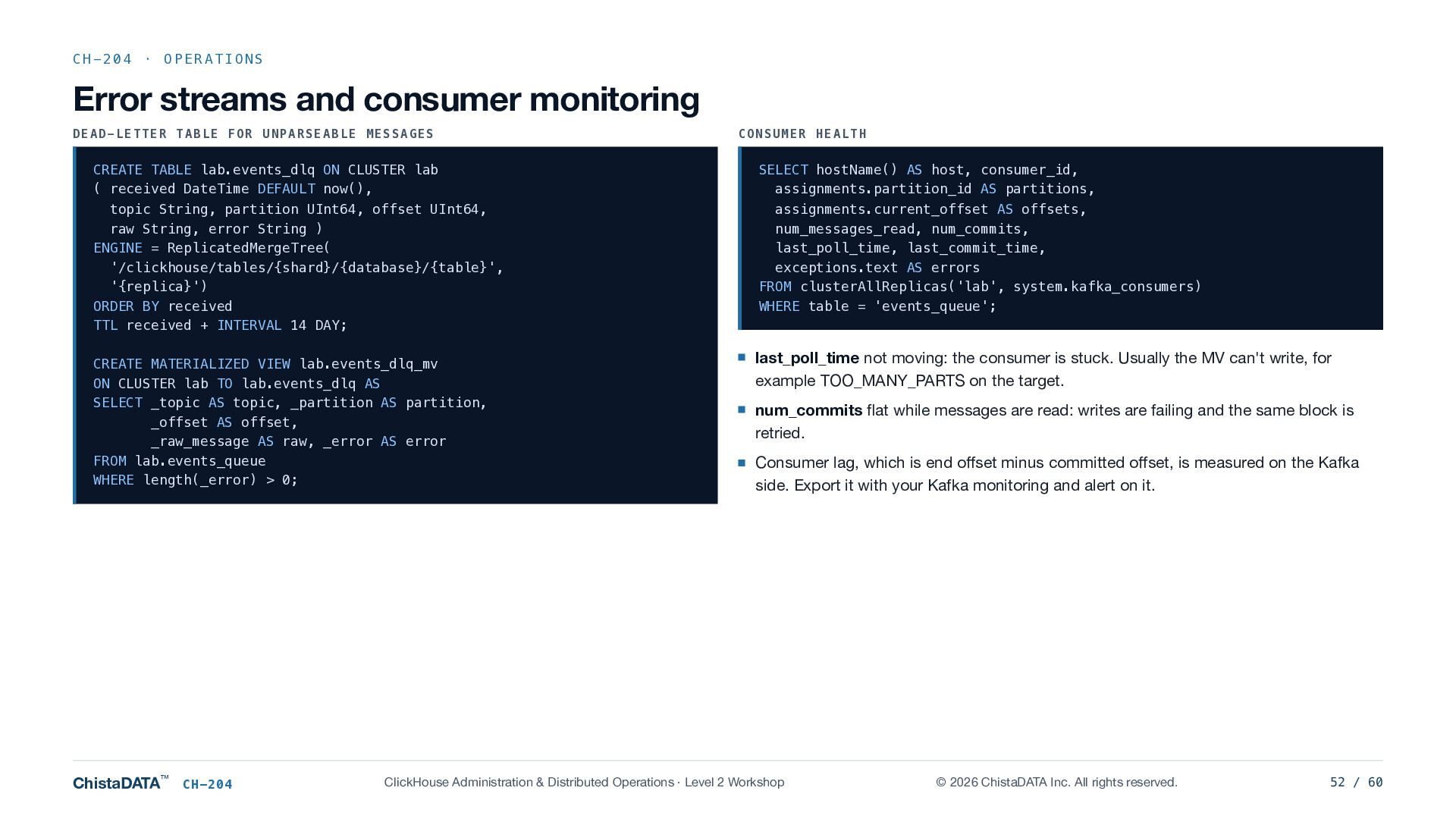
  52. CH-204 · OPERATIONS Error streams and consumer monitoring DEAD-LETTER TABLE

    FOR UNPARSEABLE MESSAGES CREATE TABLE lab.events_dlq ON CLUSTER lab ( received DateTime DEFAULT now(), topic String, partition UInt64, offset UInt64, raw String, error String ) ENGINE = ReplicatedMergeTree( '/clickhouse/tables/{shard}/{database}/{table}', '{replica}') ORDER BY received TTL received + INTERVAL 14 DAY; CREATE MATERIALIZED VIEW lab.events_dlq_mv ON CLUSTER lab TO lab.events_dlq AS SELECT _topic AS topic, _partition AS partition, _offset AS offset, _raw_message AS raw, _error AS error FROM lab.events_queue WHERE length(_error) > 0; ChistaDATA™ CH-204 CONSUMER HEALTH SELECT hostName() AS host, consumer_id, assignments.partition_id AS partitions, assignments.current_offset AS offsets, num_messages_read, num_commits, last_poll_time, last_commit_time, exceptions.text AS errors FROM clusterAllReplicas('lab', system.kafka_consumers) WHERE table = 'events_queue'; last_poll_time not moving: the consumer is stuck. Usually the MV can't write, for example TOO_MANY_PARTS on the target. num_commits flat while messages are read: writes are failing and the same block is retried. Consumer lag, which is end offset minus committed offset, is measured on the Kafka side. Export it with your Kafka monitoring and alert on it. ClickHouse Administration & Distributed Operations · Level 2 Workshop © 2026 ChistaDATA Inc. All rights reserved. 52 / 60
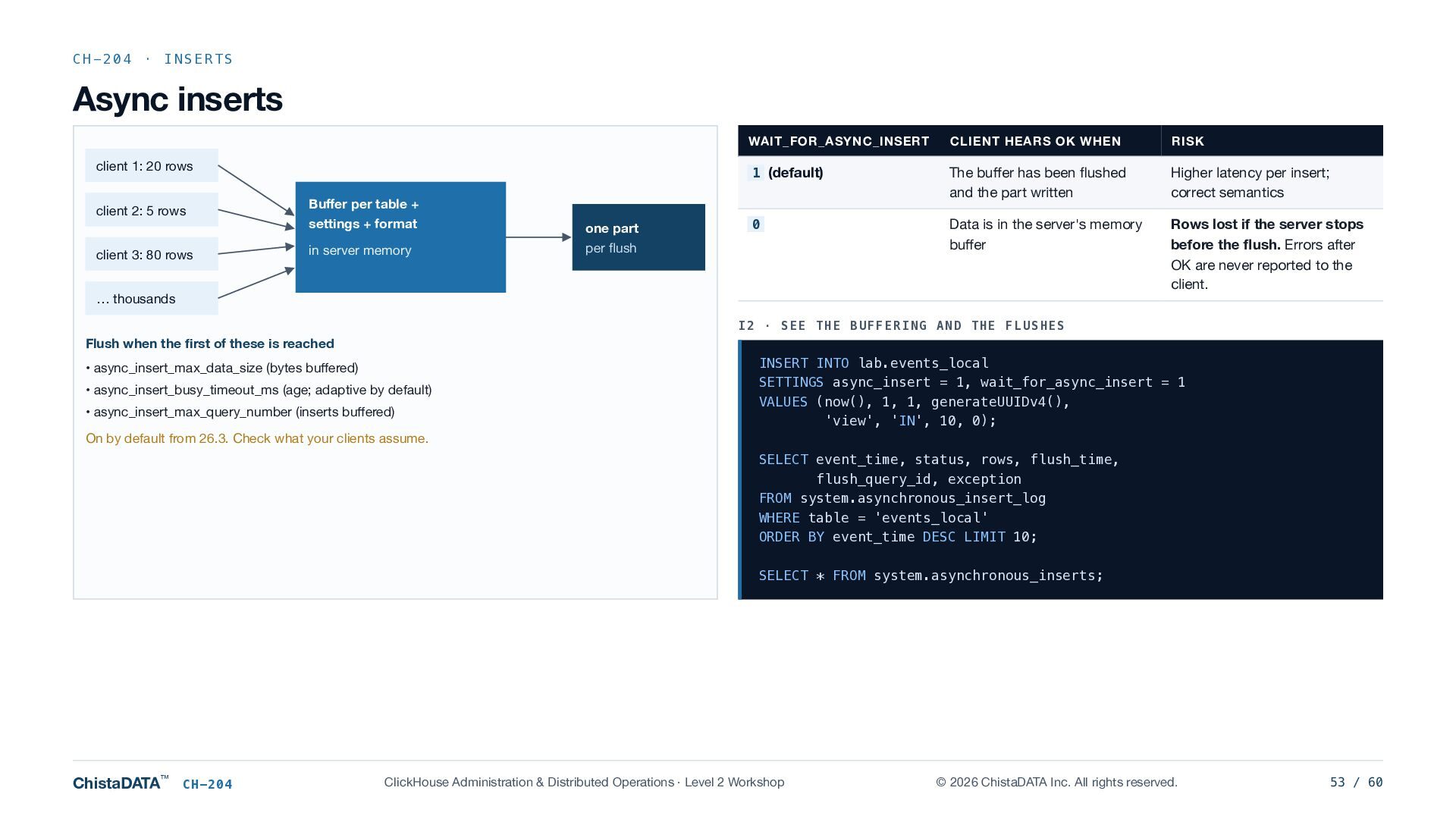
  53. CH-204 · INSERTS Async inserts client 1: 20 rows client

    2: 5 rows client 3: 80 rows WAIT_FOR_ASYNC_INSERT CLIENT HEARS OK WHEN RISK 1 (default) The buffer has been flushed and the part written Higher latency per insert; correct semantics 0 Data is in the server's memory buffer Rows lost if the server stops before the flush. Errors after OK are never reported to the client. Buffer per table + settings + format one part in server memory per flush … thousands I2 · SEE THE BUFFERING AND THE FLUSHES Flush when the first of these is reached • async_insert_max_data_size (bytes buffered) • async_insert_busy_timeout_ms (age; adaptive by default) • async_insert_max_query_number (inserts buffered) INSERT INTO lab.events_local SETTINGS async_insert = 1, wait_for_async_insert = 1 VALUES (now(), 1, 1, generateUUIDv4(), 'view', 'IN', 10, 0); On by default from 26.3. Check what your clients assume. SELECT event_time, status, rows, flush_time, flush_query_id, exception FROM system.asynchronous_insert_log WHERE table = 'events_local' ORDER BY event_time DESC LIMIT 10; SELECT * FROM system.asynchronous_inserts; ChistaDATA™ CH-204 ClickHouse Administration & Distributed Operations · Level 2 Workshop © 2026 ChistaDATA Inc. All rights reserved. 53 / 60
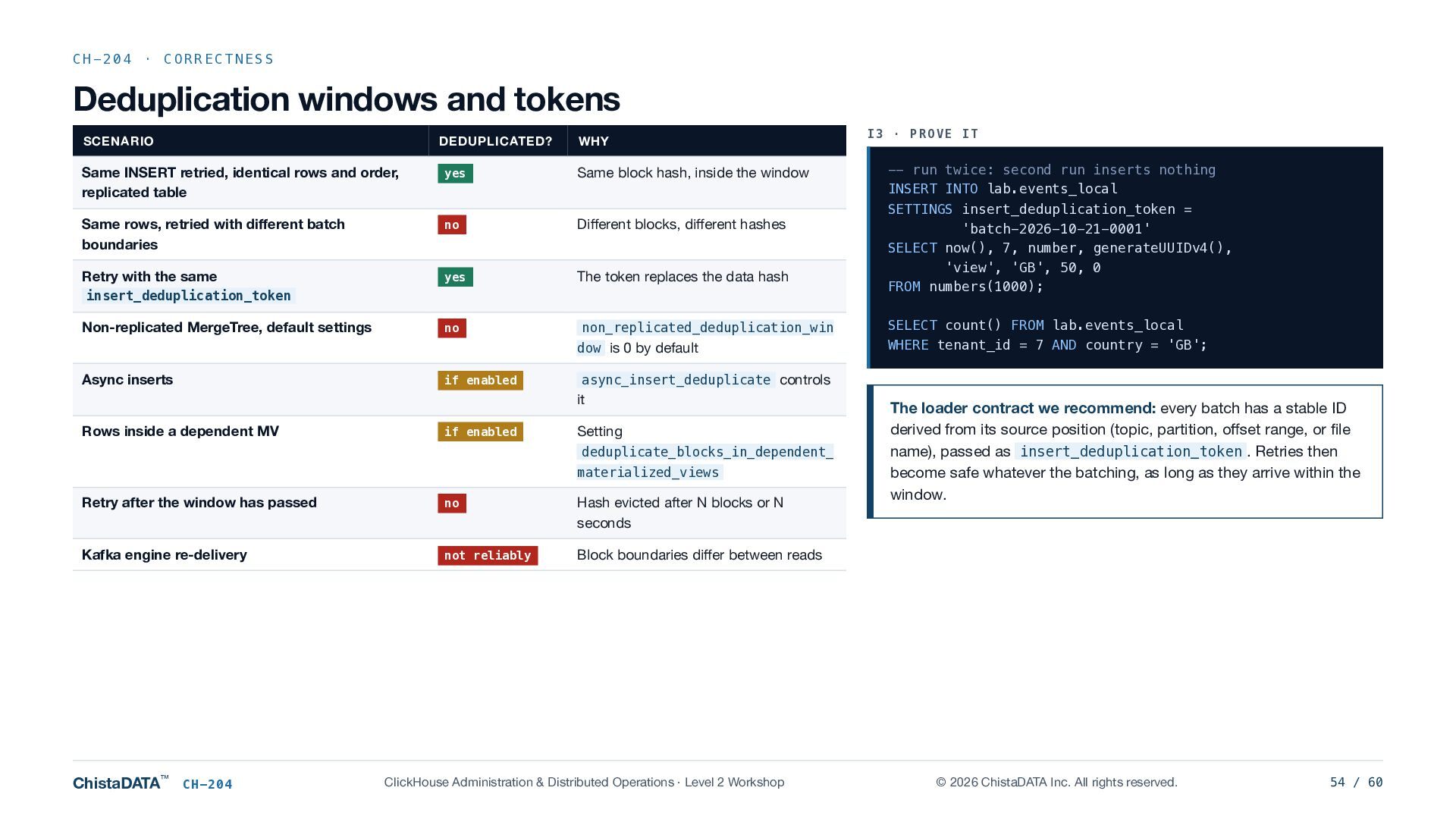
  54. CH-204 · CORRECTNESS Deduplication windows and tokens SCENARIO DEDUPLICATED? WHY

    Same INSERT retried, identical rows and order, replicated table yes Same block hash, inside the window Same rows, retried with different batch boundaries no Different blocks, different hashes Retry with the same yes The token replaces the data hash no non_replicated_deduplication_win insert_deduplication_token Non-replicated MergeTree, default settings dow is 0 by default Async inserts if enabled if enabled Setting deduplicate_blocks_in_dependent_ materialized_views Retry after the window has passed no Hash evicted after N blocks or N seconds Kafka engine re-delivery not reliably Block boundaries differ between reads ChistaDATA™ CH-204 -- run twice: second run inserts nothing INSERT INTO lab.events_local SETTINGS insert_deduplication_token = 'batch-2026-10-21-0001' SELECT now(), 7, number, generateUUIDv4(), 'view', 'GB', 50, 0 FROM numbers(1000); SELECT count() FROM lab.events_local WHERE tenant_id = 7 AND country = 'GB'; async_insert_deduplicate controls it Rows inside a dependent MV I3 · PROVE IT ClickHouse Administration & Distributed Operations · Level 2 Workshop The loader contract we recommend: every batch has a stable ID derived from its source position (topic, partition, offset range, or file name), passed as insert_deduplication_token . Retries then become safe whatever the batching, as long as they arrive within the window. © 2026 ChistaDATA Inc. All rights reserved. 54 / 60
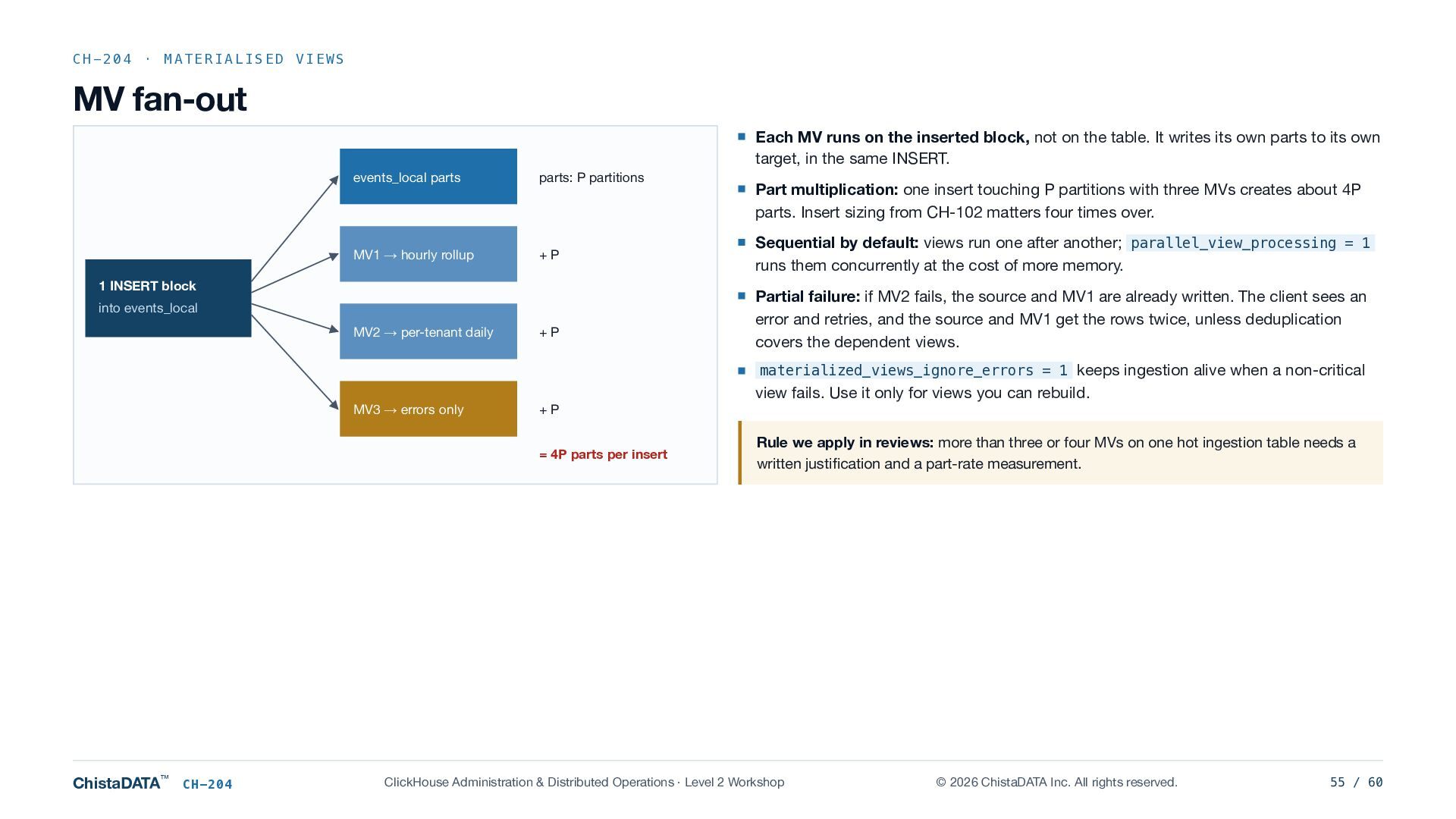
  55. CH-204 · MATERIALISED VIEWS MV fan-out Each MV runs on

    the inserted block, not on the table. It writes its own parts to its own target, in the same INSERT. events_local parts parts: P partitions MV1 → hourly rollup +P 1 INSERT block into events_local MV2 → per-tenant daily +P Part multiplication: one insert touching P partitions with three MVs creates about 4P parts. Insert sizing from CH-102 matters four times over. Sequential by default: views run one after another; parallel_view_processing = 1 runs them concurrently at the cost of more memory. Partial failure: if MV2 fails, the source and MV1 are already written. The client sees an error and retries, and the source and MV1 get the rows twice, unless deduplication covers the dependent views. materialized_views_ignore_errors = 1 keeps ingestion alive when a non-critical view fails. Use it only for views you can rebuild. MV3 → errors only +P = 4P parts per insert ChistaDATA™ CH-204 Rule we apply in reviews: more than three or four MVs on one hot ingestion table needs a written justification and a part-rate measurement. ClickHouse Administration & Distributed Operations · Level 2 Workshop © 2026 ChistaDATA Inc. All rights reserved. 55 / 60
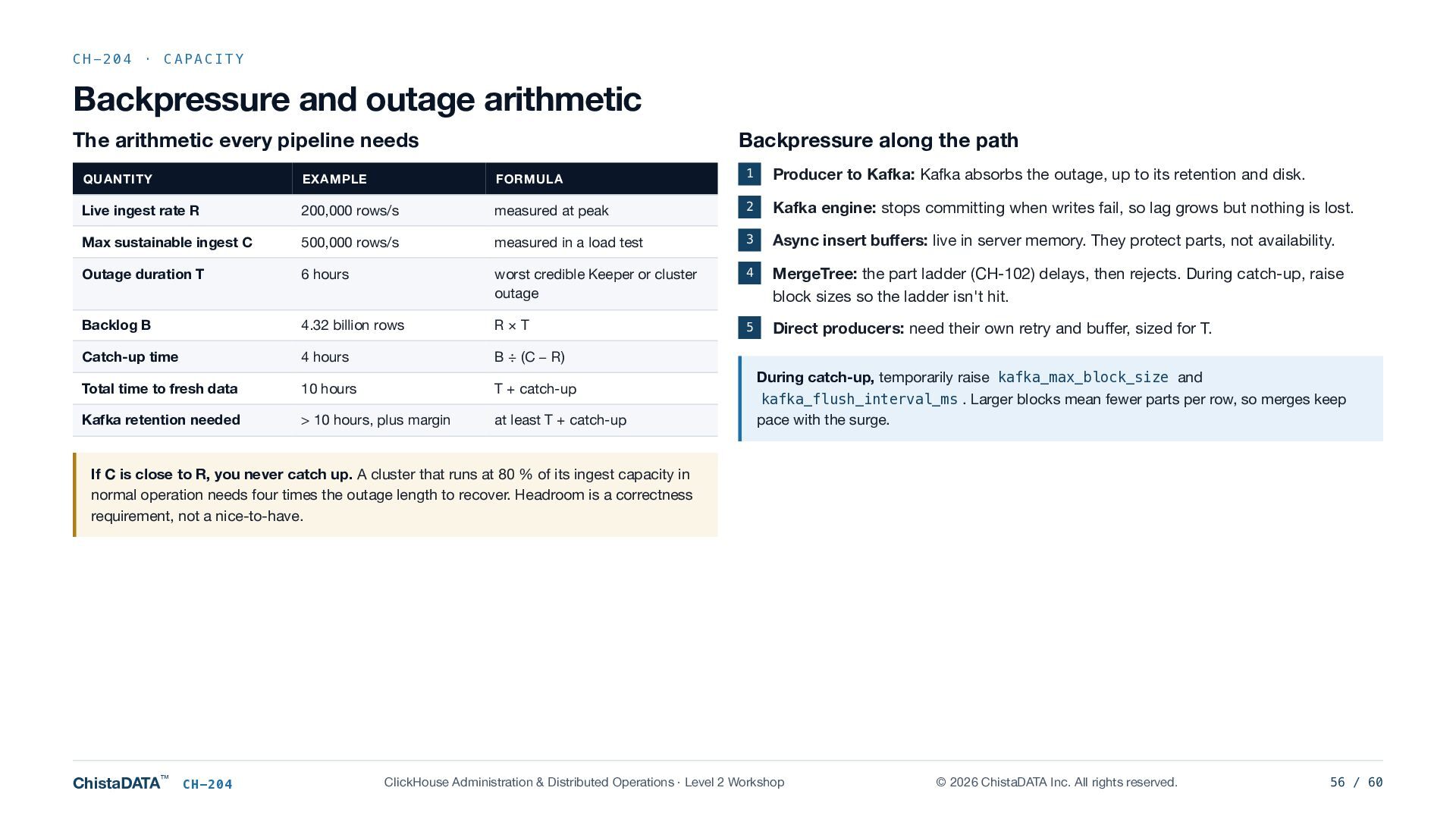
  56. CH-204 · CAPACITY Backpressure and outage arithmetic The arithmetic every

    pipeline needs Backpressure along the path QUANTITY EXAMPLE FORMULA 1 Producer to Kafka: Kafka absorbs the outage, up to its retention and disk. Live ingest rate R 200,000 rows/s measured at peak 2 Kafka engine: stops committing when writes fail, so lag grows but nothing is lost. Max sustainable ingest C 500,000 rows/s measured in a load test 3 Async insert buffers: live in server memory. They protect parts, not availability. Outage duration T 6 hours worst credible Keeper or cluster outage 4 MergeTree: the part ladder (CH-102) delays, then rejects. During catch-up, raise block sizes so the ladder isn't hit. Backlog B 4.32 billion rows R×T 5 Direct producers: need their own retry and buffer, sized for T. Catch-up time 4 hours B ÷ (C − R) Total time to fresh data 10 hours T + catch-up Kafka retention needed > 10 hours, plus margin at least T + catch-up During catch-up, temporarily raise kafka_max_block_size and kafka_flush_interval_ms . Larger blocks mean fewer parts per row, so merges keep pace with the surge. If C is close to R, you never catch up. A cluster that runs at 80 % of its ingest capacity in normal operation needs four times the outage length to recover. Headroom is a correctness requirement, not a nice-to-have. ChistaDATA™ CH-204 ClickHouse Administration & Distributed Operations · Level 2 Workshop © 2026 ChistaDATA Inc. All rights reserved. 56 / 60
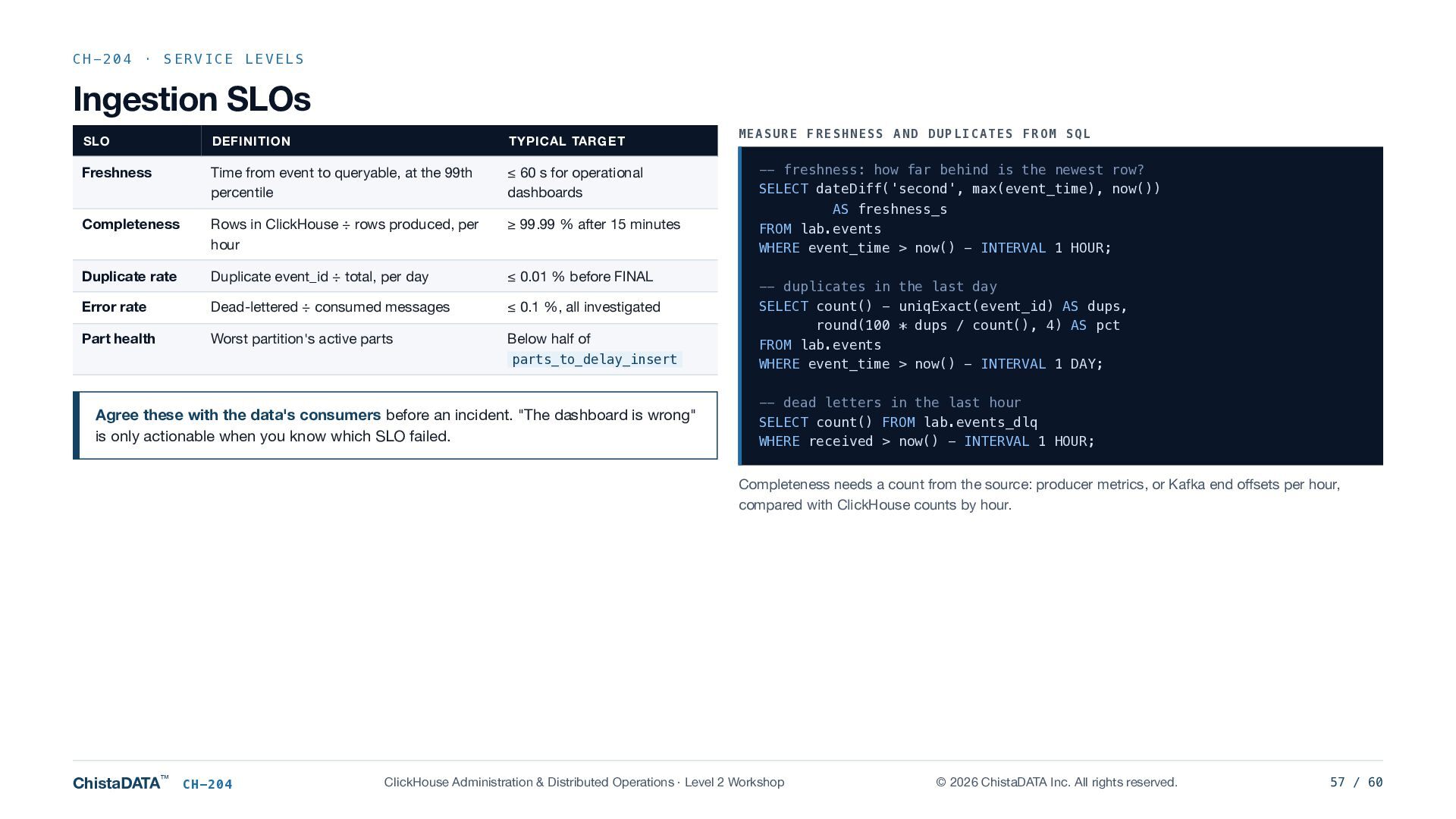
  57. CH-204 · SERVICE LEVELS Ingestion SLOs MEASURE FRESHNESS AND DUPLICATES

    FROM SQL SLO DEFINITION TYPICAL TARGET Freshness Time from event to queryable, at the 99th percentile ≤ 60 s for operational dashboards -- freshness: how far behind is the newest row? SELECT dateDiff('second', max(event_time), now()) Completeness Rows in ClickHouse ÷ rows produced, per hour ≥ 99.99 % after 15 minutes AS freshness_s FROM lab.events WHERE event_time > now() - INTERVAL 1 HOUR; Duplicate rate Duplicate event_id ÷ total, per day ≤ 0.01 % before FINAL Error rate Dead-lettered ÷ consumed messages ≤ 0.1 %, all investigated Part health Worst partition's active parts Below half of parts_to_delay_insert Agree these with the data's consumers before an incident. "The dashboard is wrong" is only actionable when you know which SLO failed. -- duplicates in the last day SELECT count() - uniqExact(event_id) AS dups, round(100 * dups / count(), 4) AS pct FROM lab.events WHERE event_time > now() - INTERVAL 1 DAY; -- dead letters in the last hour SELECT count() FROM lab.events_dlq WHERE received > now() - INTERVAL 1 HOUR; Completeness needs a count from the source: producer metrics, or Kafka end offsets per hour, compared with ClickHouse counts by hour. ChistaDATA™ CH-204 ClickHouse Administration & Distributed Operations · Level 2 Workshop © 2026 ChistaDATA Inc. All rights reserved. 57 / 60
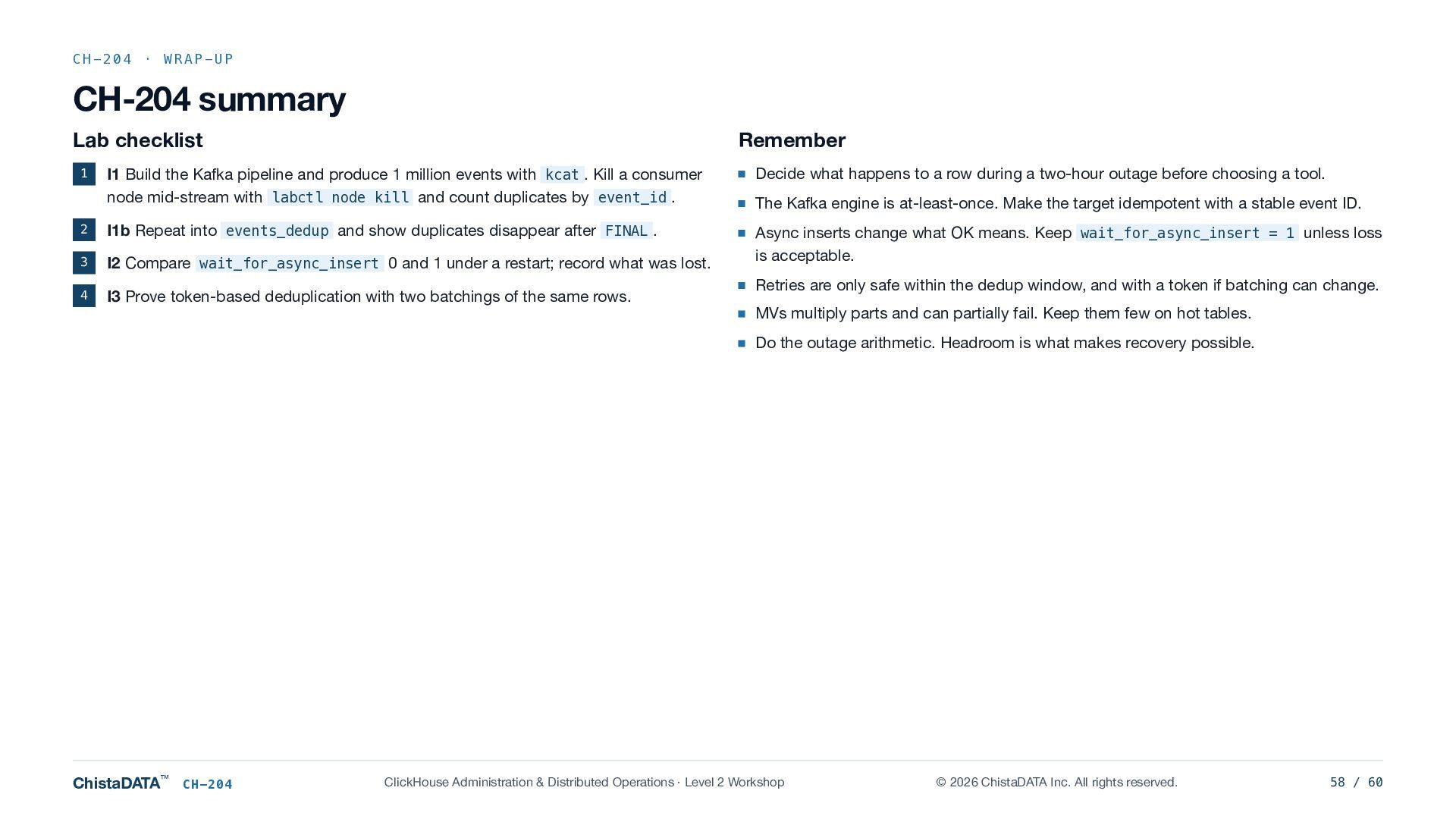
  58. CH-204 · WRAP-UP CH-204 summary Lab checklist Remember I1 Build

    the Kafka pipeline and produce 1 million events with kcat . Kill a consumer node mid-stream with labctl node kill and count duplicates by event_id . Decide what happens to a row during a two-hour outage before choosing a tool. 2 I1b Repeat into events_dedup and show duplicates disappear after FINAL . 3 I2 Compare wait_for_async_insert 0 and 1 under a restart; record what was lost. Async inserts change what OK means. Keep wait_for_async_insert = 1 unless loss is acceptable. 4 I3 Prove token-based deduplication with two batchings of the same rows. 1 The Kafka engine is at-least-once. Make the target idempotent with a stable event ID. Retries are only safe within the dedup window, and with a token if batching can change. MVs multiply parts and can partially fail. Keep them few on hot tables. Do the outage arithmetic. Headroom is what makes recovery possible. ChistaDATA™ CH-204 ClickHouse Administration & Distributed Operations · Level 2 Workshop © 2026 ChistaDATA Inc. All rights reserved. 58 / 60
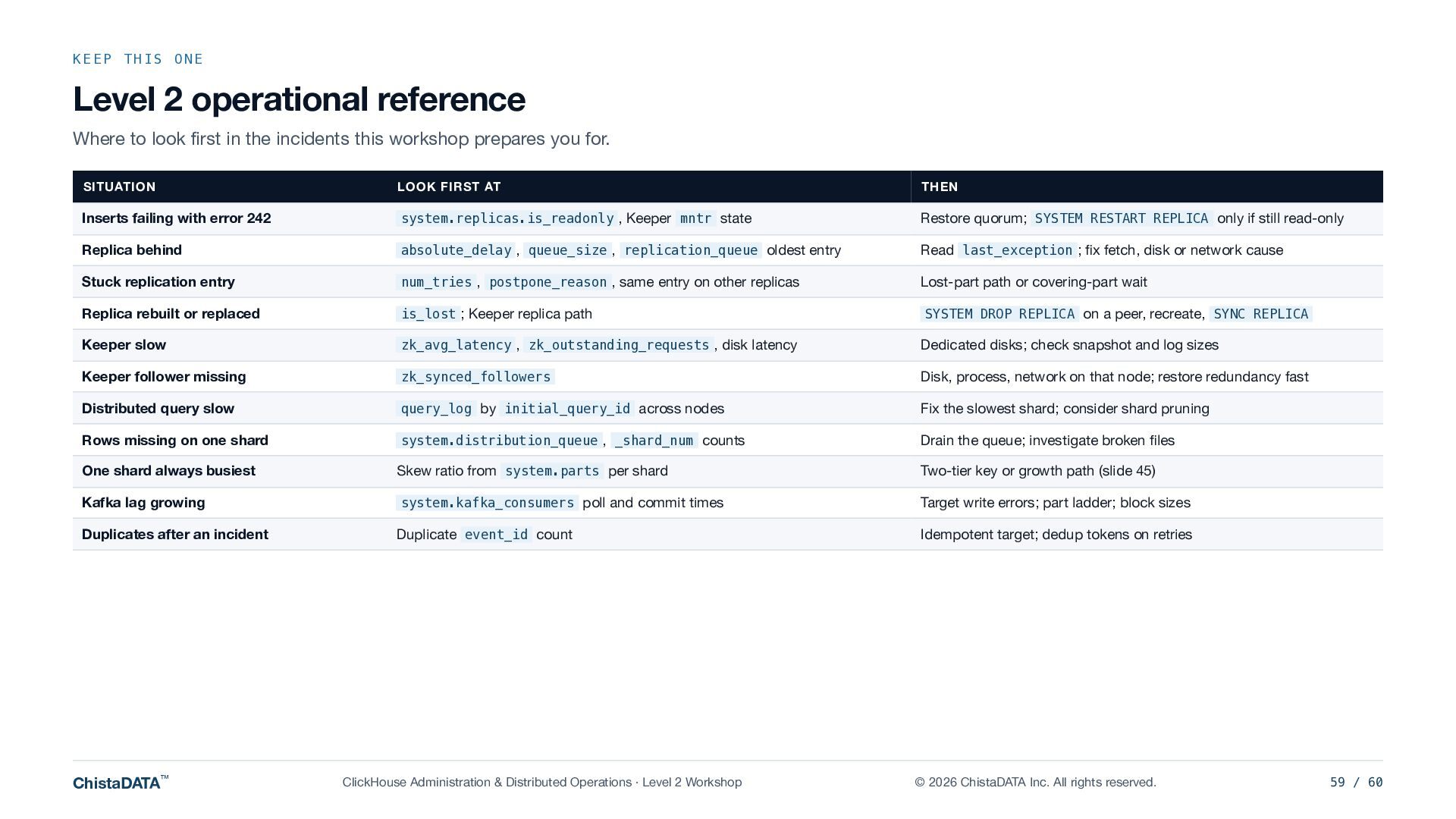
  59. KEEP THIS ONE Level 2 operational reference Where to look

    first in the incidents this workshop prepares you for. SITUATION LOOK FIRST AT THEN Inserts failing with error 242 system.replicas.is_readonly , Keeper mntr state Restore quorum; SYSTEM RESTART REPLICA only if still read-only Replica behind absolute_delay , queue_size , replication_queue oldest entry Read last_exception ; fix fetch, disk or network cause Stuck replication entry num_tries , postpone_reason , same entry on other replicas Lost-part path or covering-part wait Replica rebuilt or replaced is_lost ; Keeper replica path SYSTEM DROP REPLICA on a peer, recreate, SYNC REPLICA Keeper slow zk_avg_latency , zk_outstanding_requests , disk latency Dedicated disks; check snapshot and log sizes Keeper follower missing zk_synced_followers Disk, process, network on that node; restore redundancy fast Distributed query slow query_log by initial_query_id across nodes Fix the slowest shard; consider shard pruning Rows missing on one shard system.distribution_queue , _shard_num counts Drain the queue; investigate broken files One shard always busiest Skew ratio from system.parts per shard Two-tier key or growth path (slide 45) Kafka lag growing system.kafka_consumers poll and commit times Target write errors; part ladder; block sizes Duplicates after an incident Duplicate event_id count Idempotent target; dedup tokens on retries ChistaDATA™ ClickHouse Administration & Distributed Operations · Level 2 Workshop © 2026 ChistaDATA Inc. All rights reserved. 59 / 60
  60. CLICKHOUSE ADMINISTRATION & DISTRIBUTED OPERATIONS · LEVEL 2 COMPLETE Thank

    you WHAT YOUR TEAM SHOULD NOW BE ABLE TO DO Next: Level 3 CAPABILITY PROVEN IN Read replication health and triage a stuck queue R1, slides 12–15 Recover from read-only, lost parts and replica loss R2–R4 Run and recover a Keeper ensemble K1–K3 Trace distributed queries and measure shard skew D1, slide 42 Choose a write path and a sharding key on evidence D2, slides 39–41 Build an at-least-once pipeline that stays correct I1–I3 State ingestion SLOs and the outage arithmetic Slides 56–57 ChistaDATA™ ClickHouse Administration & Distributed Operations · Level 2 Workshop Performance engineering: query profiling, parameter tuning, materialised view design, and resource governance, from CH-301. Contact Shiv Iyer, Founder and CEO ChistaDATA Inc. · chistadata.com linkedin.com/in/thewebscaledba © 2026 ChistaDATA Inc. All rights reserved. ChistaDATA is a trademark of ChistaDATA Inc. ClickHouse is a registered trademark of ClickHouse, Inc. No reproduction or redistribution without written permission. © 2026 ChistaDATA Inc. All rights reserved. 60 / 60