Upgrade to Pro
— share decks privately, control downloads, hide ads and more …
Speaker Deck
Sign up for free
Menu
Search
Features
All features
Private URLs
Password Protection
Custom URLS
Scheduled publishing
Remove Branding
Restrict embedding
Deck Collections
Notes
Features
All features
Private URLs
Password Protection
Custom URLS
Scheduled publishing
Remove Branding
Restrict embedding
Deck Collections
Notes
Explore
Featured decks
Featured speakers
Programming
Technology
Storyboards
Explore
Featured decks
Featured speakers
Programming
Technology
Storyboards
Pricing
Search
Sign in
Sign up for free
how to mapping tasking manager
Search
gooha
June 29, 2017
Education
72
0
Share
Embed
Copy iframe code
Copy JS code
Copy link
Start on current slide
how to mapping tasking manager
in japanese
gooha
June 29, 2017
More Decks by gooha
See All by gooha
オンラインでワールド・カフェを実施するときの説明スライド
skrt1172
0
1.3k
安田遥ゼミ論20191118
skrt1172
0
110
安田遥提出物KML課題20170711
skrt1172
0
89
Other Decks in Education
See All in Education
INTRODUCTION TO THE CELL
pawan_pharm
0
330
DRONEGEOGRAFÍA: INNOVACIÓN DIDÁCTICA Y FOTOGRAMETRÍA 3D PARA LA COHESIÓN TERRITORIAL Y LA CIUDADANÍA ACTIVA
juanmartin2026
0
40k
学習者データを「見る」:外国語教師のためのデータの入力、分析、解釈方法
uranoken
0
440
20260908_ターゲットとスコープを決める発表法
masakiokuda
1
140
オンラインコミュニティ TRY部 体験マニュアル
ytapples613
0
390
[2026後期火5] 論理学(京都大学文学部 後期 第1回)「名前はあるのに、誰なのかわからない」
yatabe
0
150
Human Perception and Cognition - Lecture 4 - Human-Computer Interaction (1023841ANR)
signer
PRO
0
1.7k
Requirements Analysis and Prototyping - Lecture 3 - Human-Computer Interaction (1023841ANR)
signer
PRO
0
1.8k
マークシート試験のTeX言語を用いた自動採点について
doratex
0
6.1k
Invest Early, Build Together
rashwhitman
0
750
Introduction to M&A
bvr7352
0
240
医療事務養成の専門学校でのAI教育 非エンジニアの学生にAIを1年間使ってもらって、感じたこと
naochim2026
0
140
Featured
See All Featured
DBのスキルで生き残る技術 - AI時代におけるテーブル設計の勘所
soudai
PRO
68
58k
Hiding What from Whom? A Critical Review of the History of Programming languages for Music
tomoyanonymous
3
1.3k
Product Roadmaps are Hard
iamctodd
55
13k
Designing Dashboards & Data Visualisations in Web Apps
destraynor
232
55k
GitHub's CSS Performance
jonrohan
1033
470k
Redefining SEO in the New Era of Traffic Generation
szymonslowik
1
480
Optimizing for Happiness
mojombo
378
71k
Intergalactic Javascript Robots from Outer Space
tanoku
273
28k
What Being in a Rock Band Can Teach Us About Real World SEO
427marketing
0
1.1k
Designing Experiences People Love
moore
143
24k
The Cult of Friendly URLs
andyhume
79
7k
Speed Design
sergeychernyshev
33
2.2k
Transcript
TaskingManager マッピング方法 1A117164 安田遥
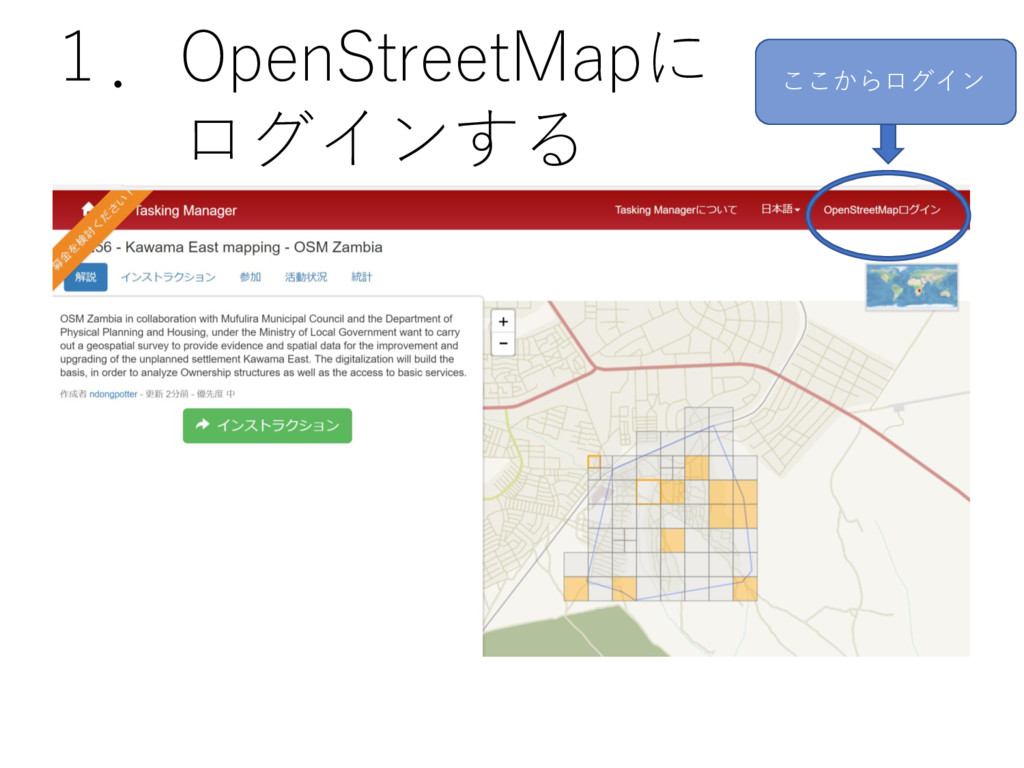
ここからログイン 1.OpenStreetMapに ログインする
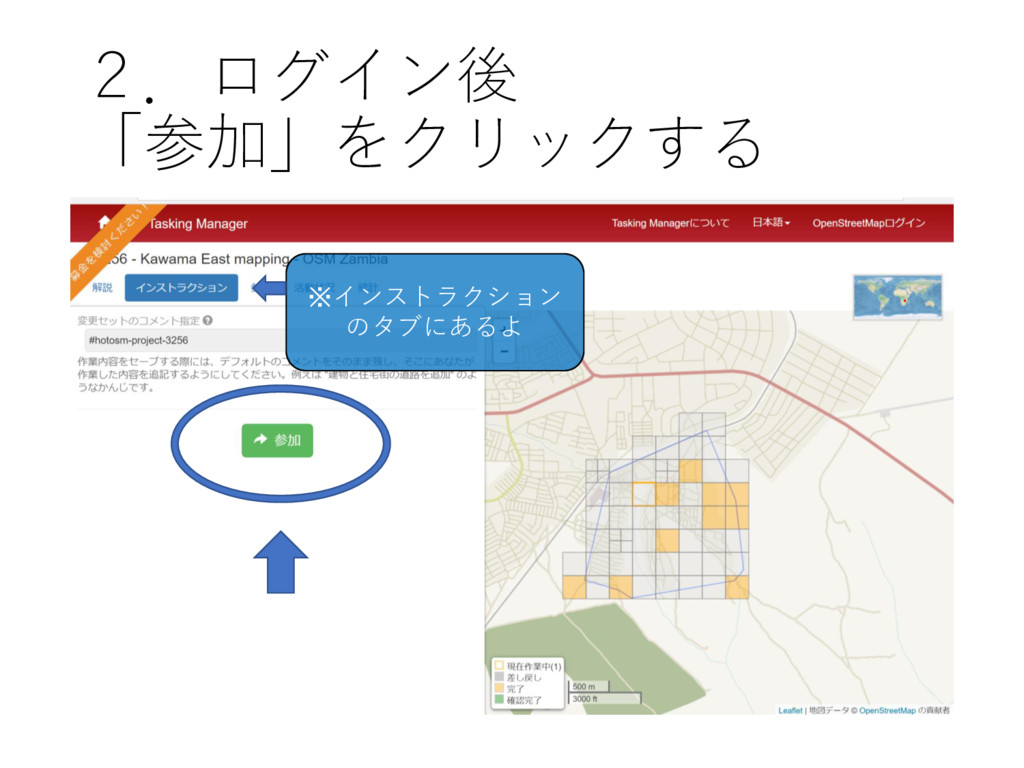
2.ログイン後 「参加」をクリックする ※インストラクション のタブにあるよ
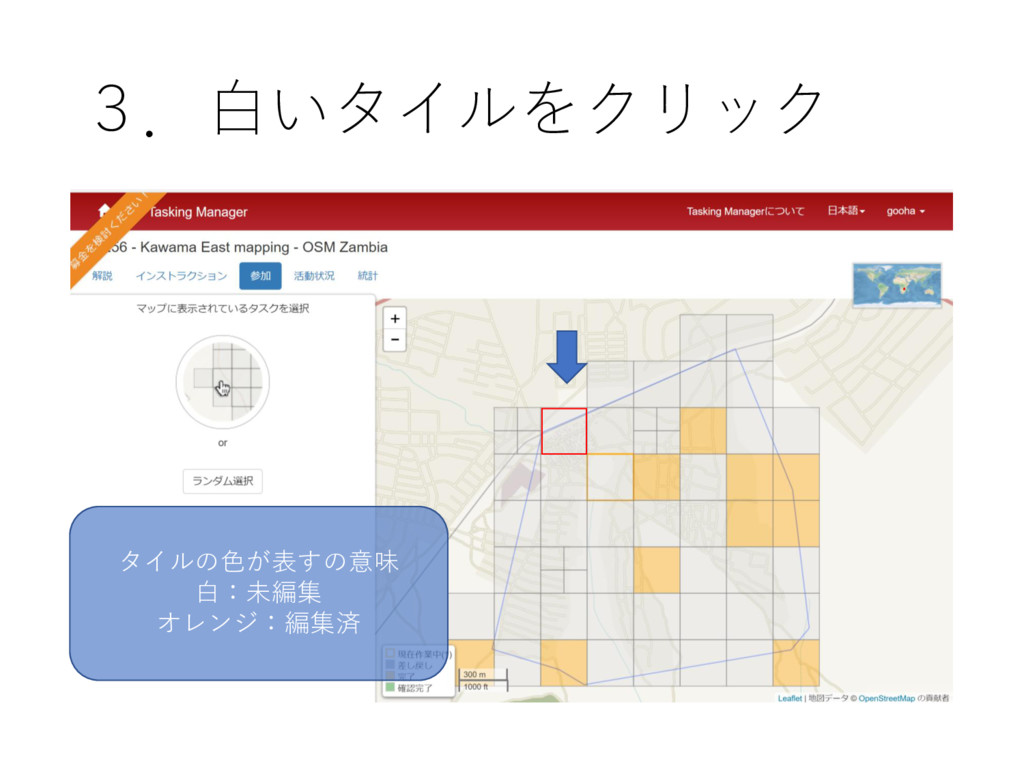
3.白いタイルをクリック タイルの色が表すの意味 白:未編集 オレンジ:編集済
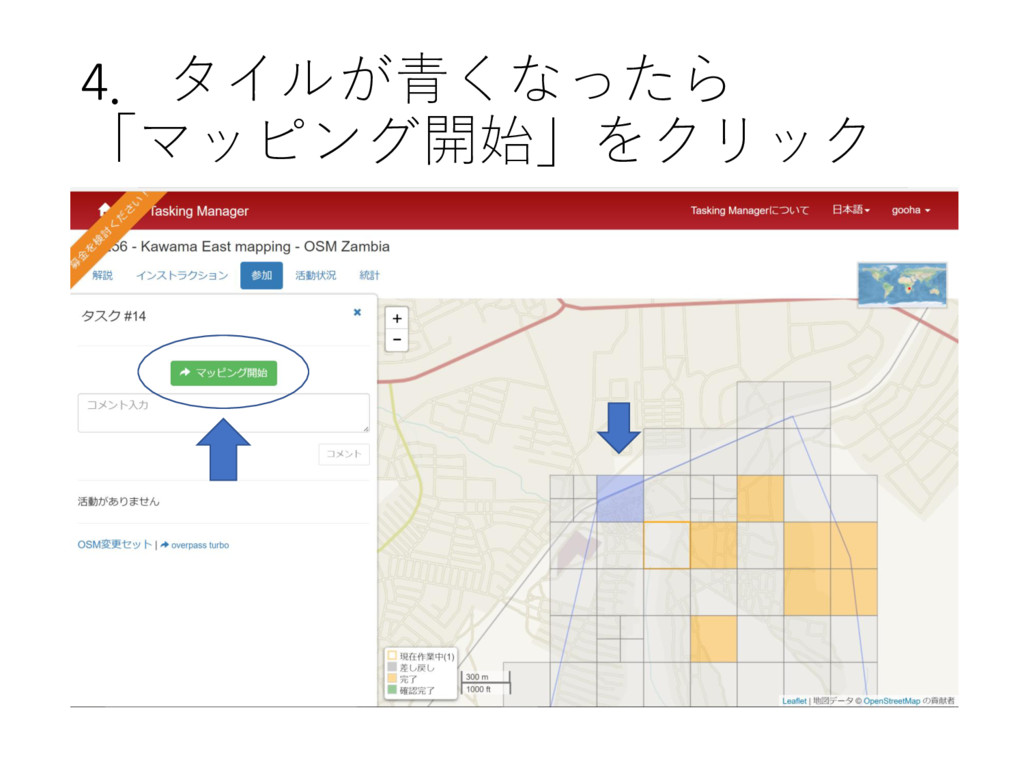
4.タイルが青くなったら 「マッピング開始」をクリック
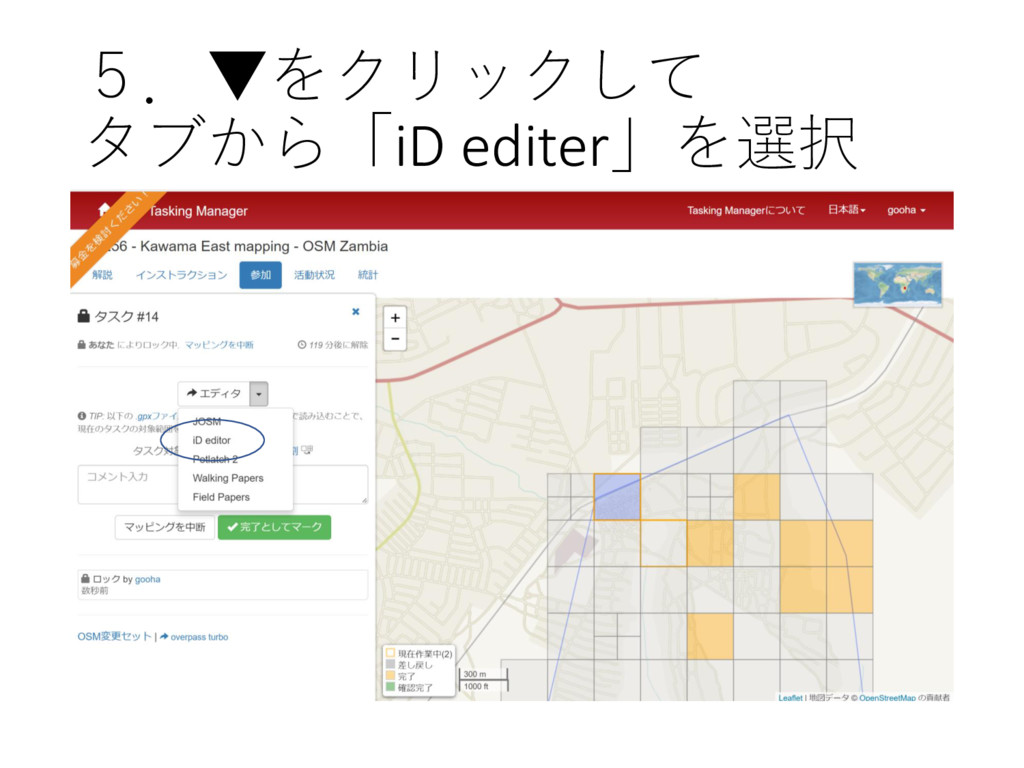
5.▼をクリックして タブから「iD editer」を選択
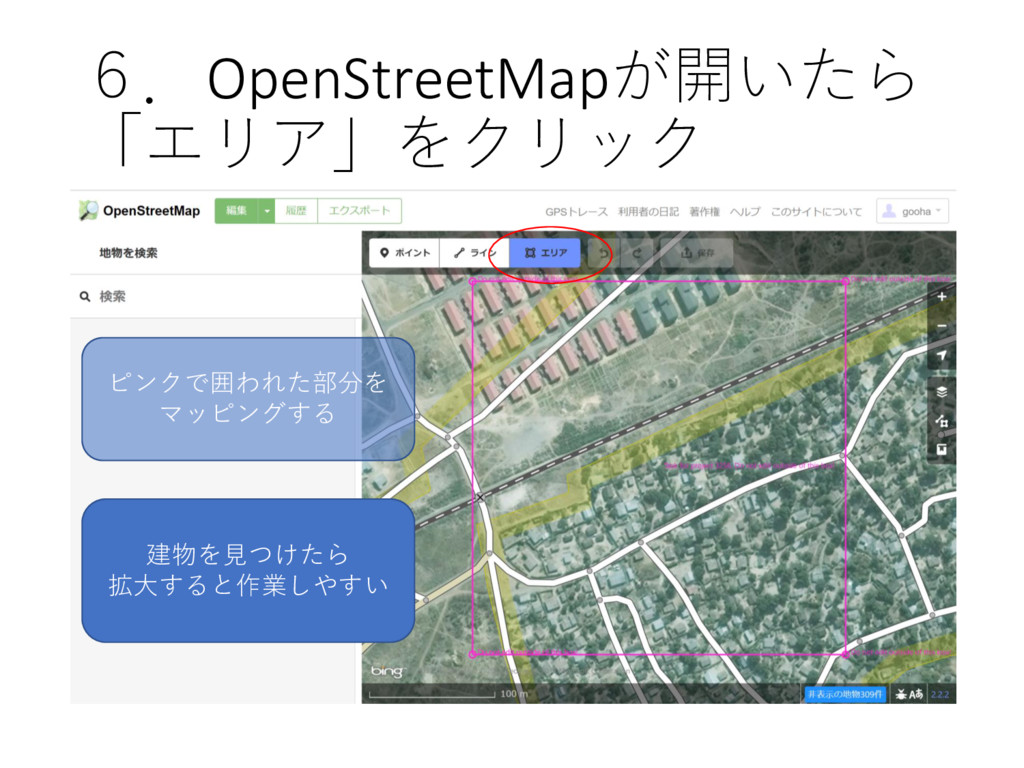
6.OpenStreetMapが開いたら 「エリア」をクリック ピンクで囲われた部分を マッピングする 建物を見つけたら 拡大すると作業しやすい
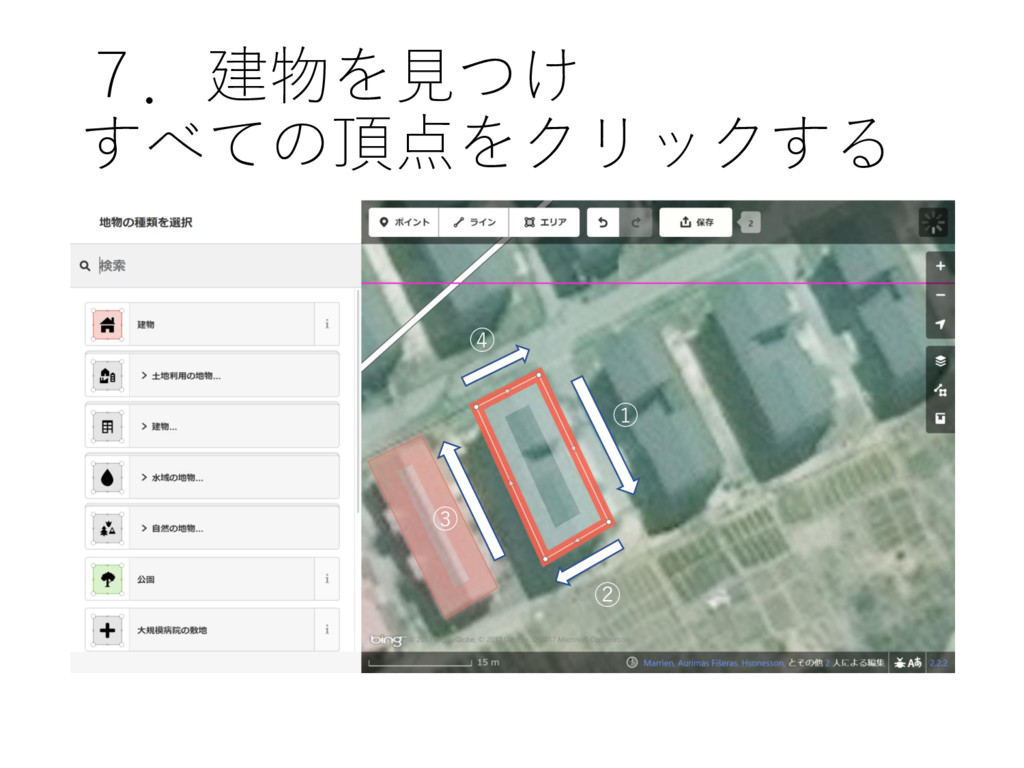
7.建物を見つけ すべての頂点をクリックする ① ② ③ ④
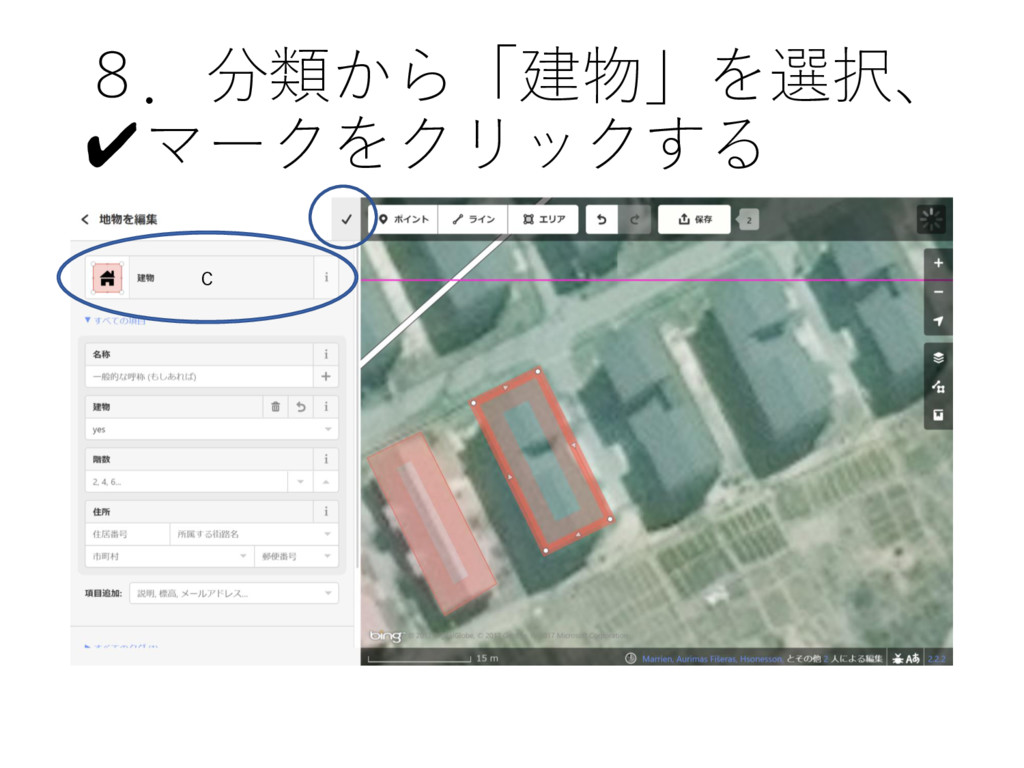
8.分類から「建物」を選択、 ✔マークをクリックする c
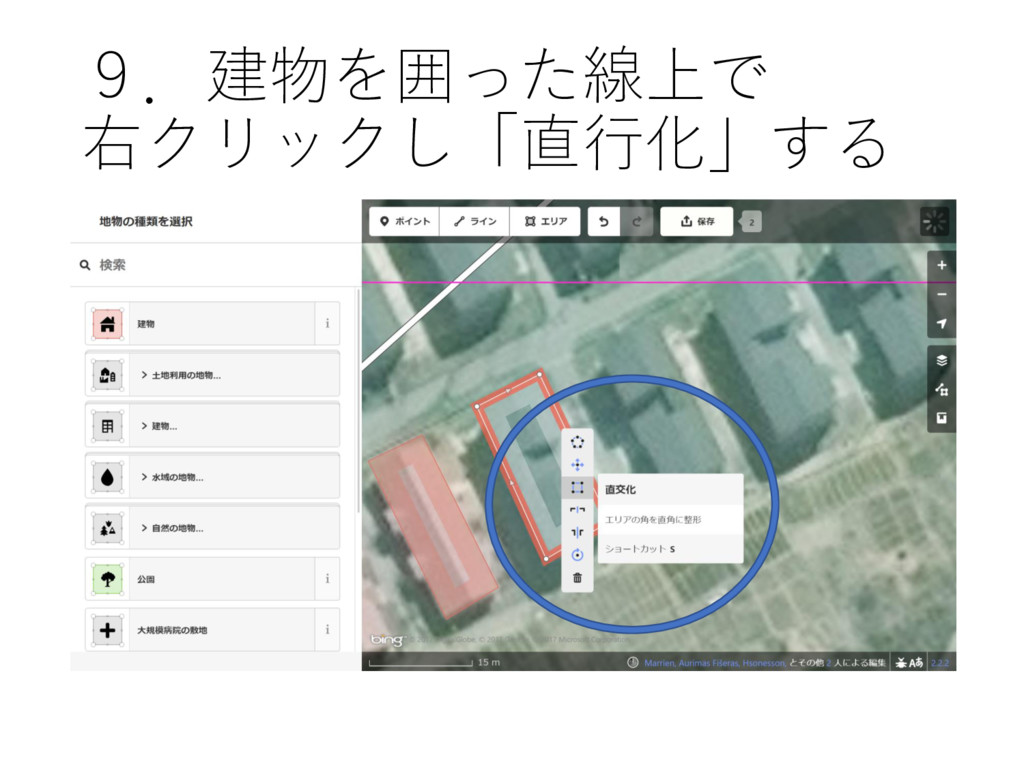
9.建物を囲った線上で 右クリックし「直行化」する
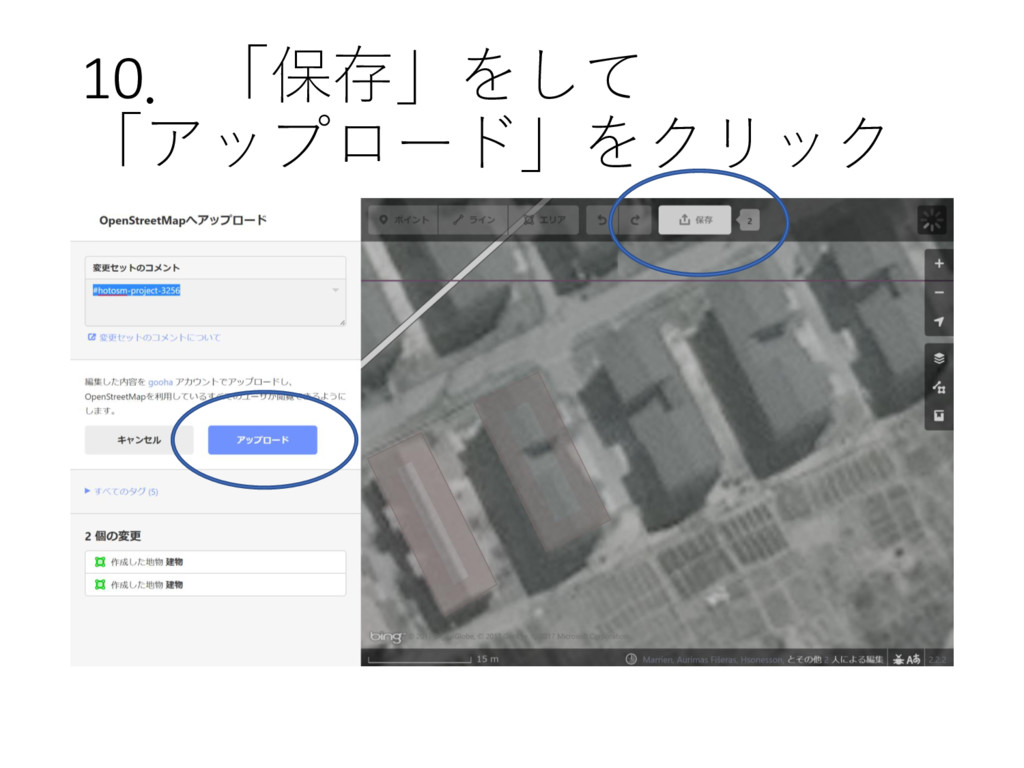
10.「保存」をして 「アップロード」をクリック
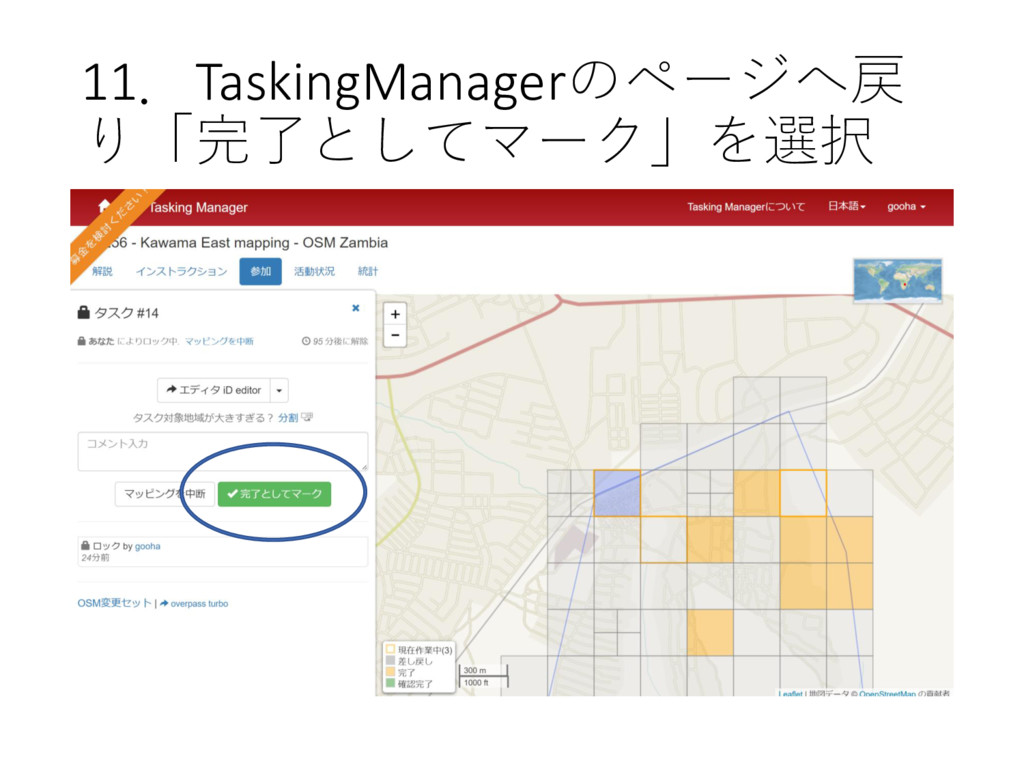
11.TaskingManagerのページへ戻 り「完了としてマーク」を選択
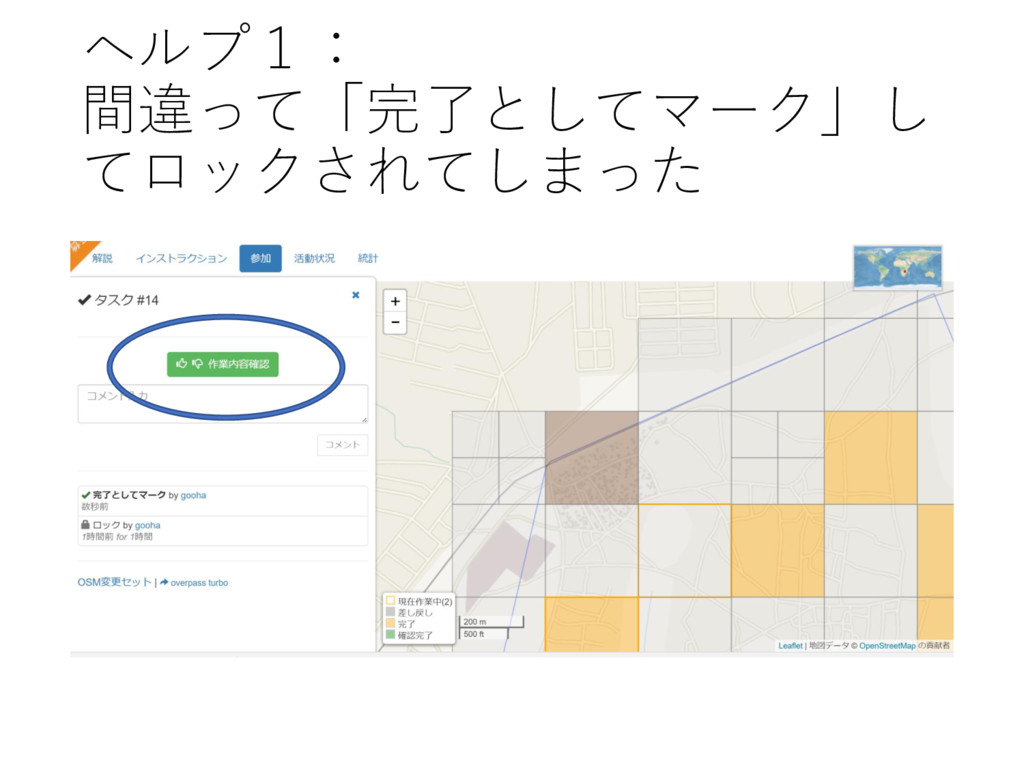
ヘルプ1: 間違って「完了としてマーク」し てロックされてしまった
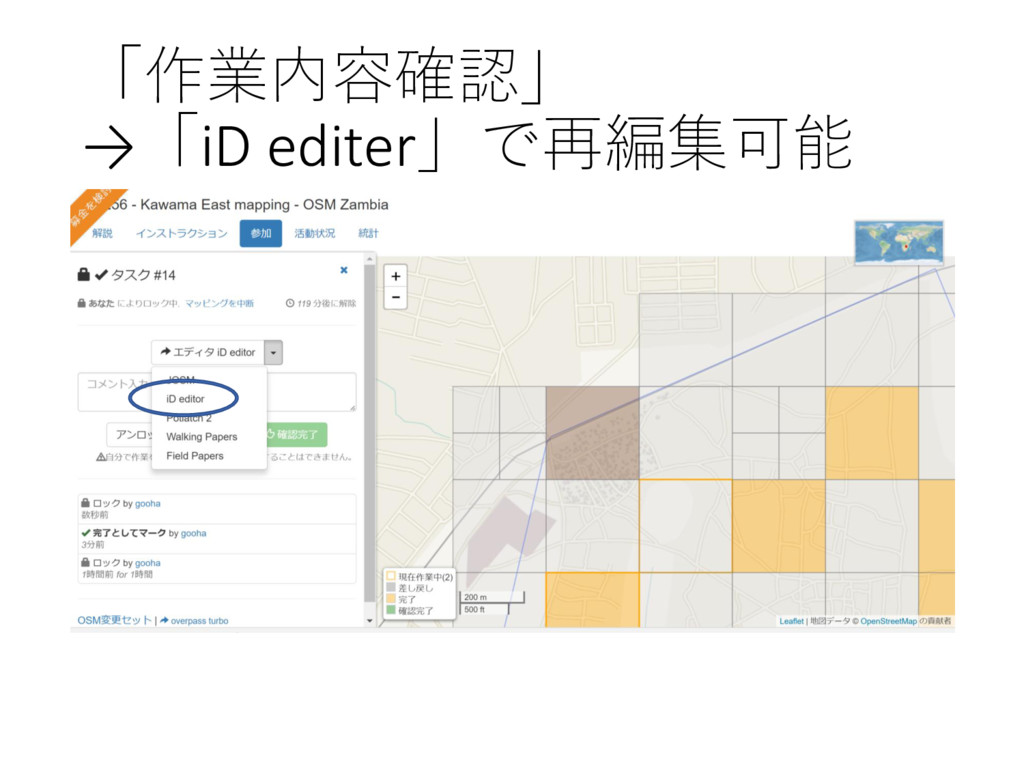
「作業内容確認」 →「iD editer」で再編集可能
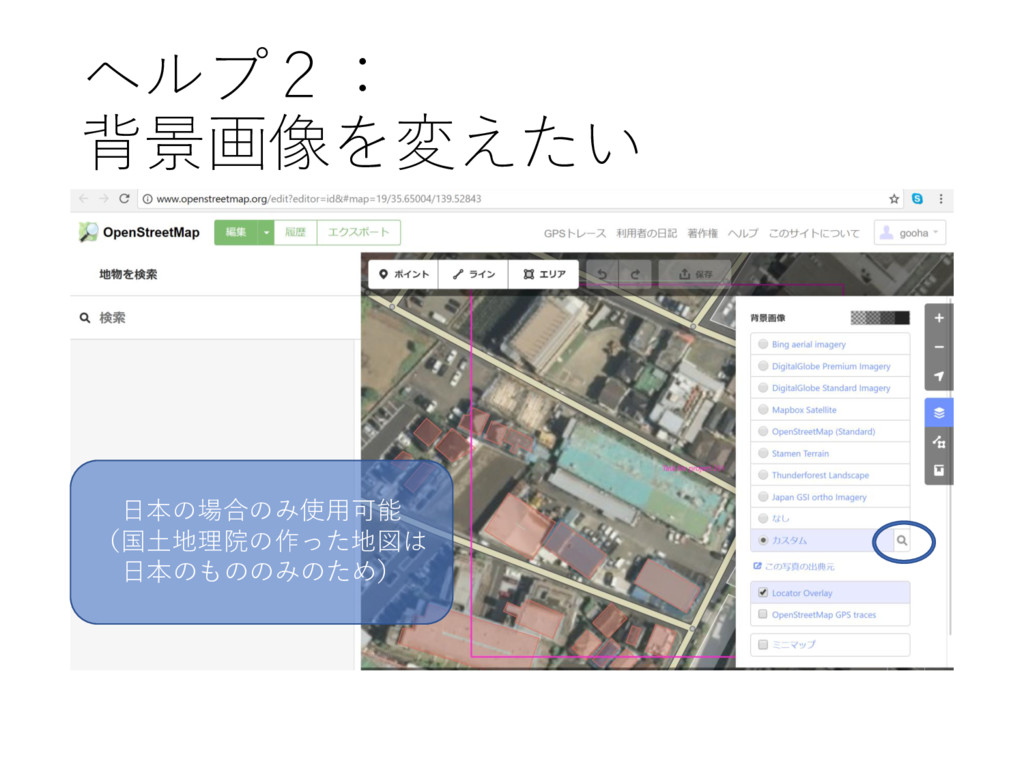
ヘルプ2: 背景画像を変えたい 日本の場合のみ使用可能 (国土地理院の作った地図は 日本のもののみのため)
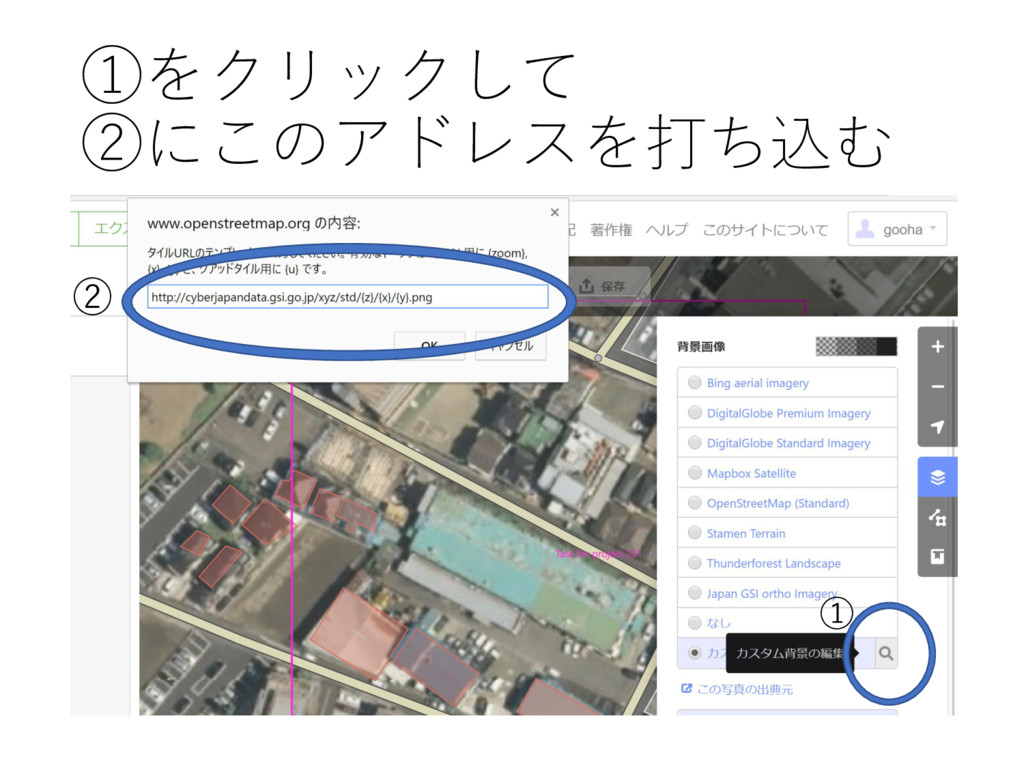
①をクリックして ②にこのアドレスを打ち込む ① ②
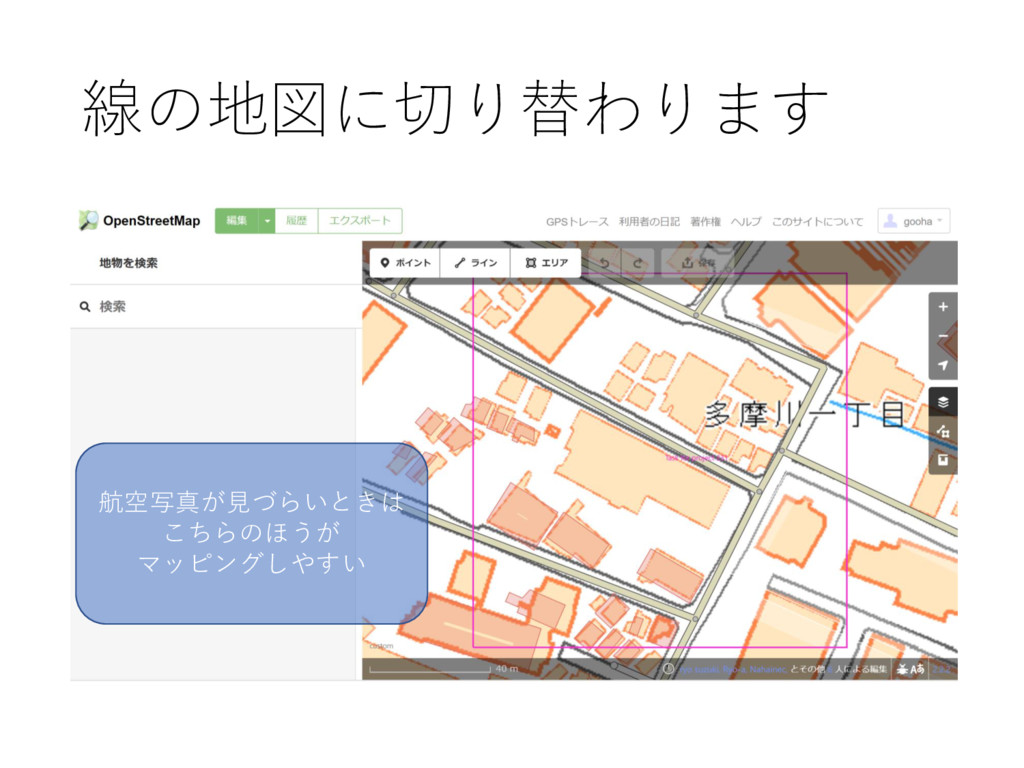
線の地図に切り替わります 航空写真が見づらいときは こちらのほうが マッピングしやすい


 skrt1172
 pawan_pharm
 juanmartin2026
 uranoken
 masakiokuda
 ytapples613
 yatabe
 signer
 doratex
 rashwhitman
 bvr7352
 naochim2026
 soudai
 tomoyanonymous
 iamctodd
 destraynor
 jonrohan
 szymonslowik
 mojombo
 tanoku
 427marketing
 moore
moore
 andyhume
 sergeychernyshev