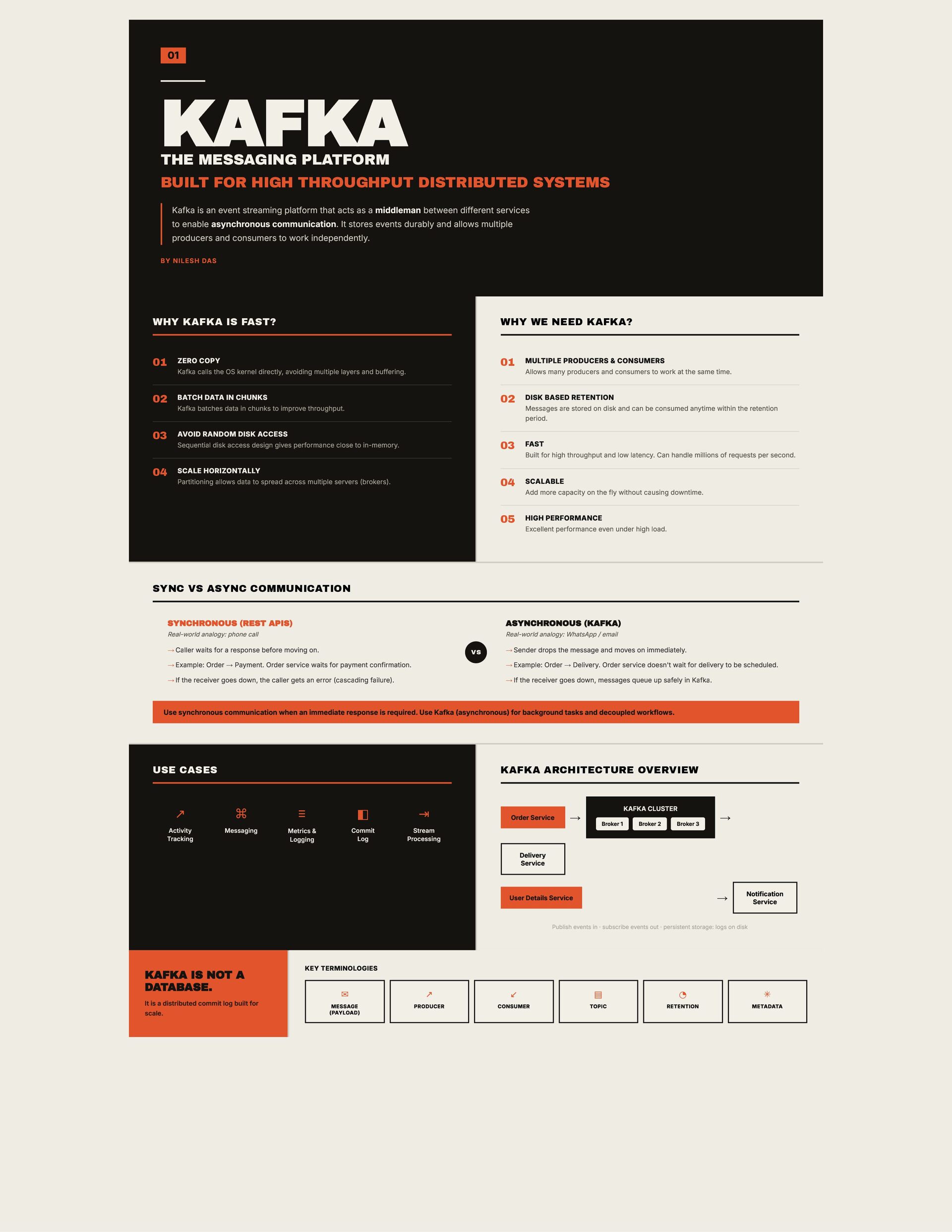
SYSTEMS Kafka is an event streaming platform that acts as a middleman between different services to enable asynchronous communication. It stores events durably and allows multiple producers and consumers to work independently. BY NILESH DAS WHY KAFKA IS FAST? WHY WE NEED KAFKA? 01 ZERO COPY 01 MULTIPLE PRODUCERS & CONSUMERS 02 BATCH DATA IN CHUNKS 02 DISK BASED RETENTION Kafka calls the OS kernel directly, avoiding multiple layers and buffering. Allows many producers and consumers to work at the same time. Kafka batches data in chunks to improve throughput. Messages are stored on disk and can be consumed anytime within the retention period. 03 AVOID RANDOM DISK ACCESS 03 FAST Sequential disk access design gives performance close to in-memory. Built for high throughput and low latency. Can handle millions of requests per second. 04 SCALE HORIZONTALLY 04 SCALABLE Partitioning allows data to spread across multiple servers (brokers). Add more capacity on the fly without causing downtime. 05 HIGH PERFORMANCE Excellent performance even under high load. SYNC VS ASYNC COMMUNICATION SYNCHRONOUS (REST APIS) ASYNCHRONOUS (KAFKA) Real-world analogy: phone call Real-world analogy: WhatsApp / email → Caller waits for a response before moving on. VS → Sender drops the message and moves on immediately. → Example: Order → Payment. Order service waits for payment confirmation. → Example: Order → Delivery. Order service doesn't wait for delivery to be scheduled. → If the receiver goes down, the caller gets an error (cascading failure). → If the receiver goes down, messages queue up safely in Kafka. Use synchronous communication when an immediate response is required. Use Kafka (asynchronous) for background tasks and decoupled workflows. USE CASES KAFKA ARCHITECTURE OVERVIEW ↗ ⌘ ≡ ◧ ⇥ Activity Tracking Messaging Metrics & Logging Commit Log Stream Processing Order Service → KAFKA CLUSTER Broker 1 Broker 2 Broker 3 → Delivery Service → User Details Service Notification Service Publish events in · subscribe events out · persistent storage: logs on disk KAFKA IS NOT A DATABASE. It is a distributed commit log built for scale. KEY TERMINOLOGIES ✉ ↗ ↙ ▤ ◔ ✳ MESSAGE (PAYLOAD) PRODUCER CONSUMER TOPIC RETENTION METADATA
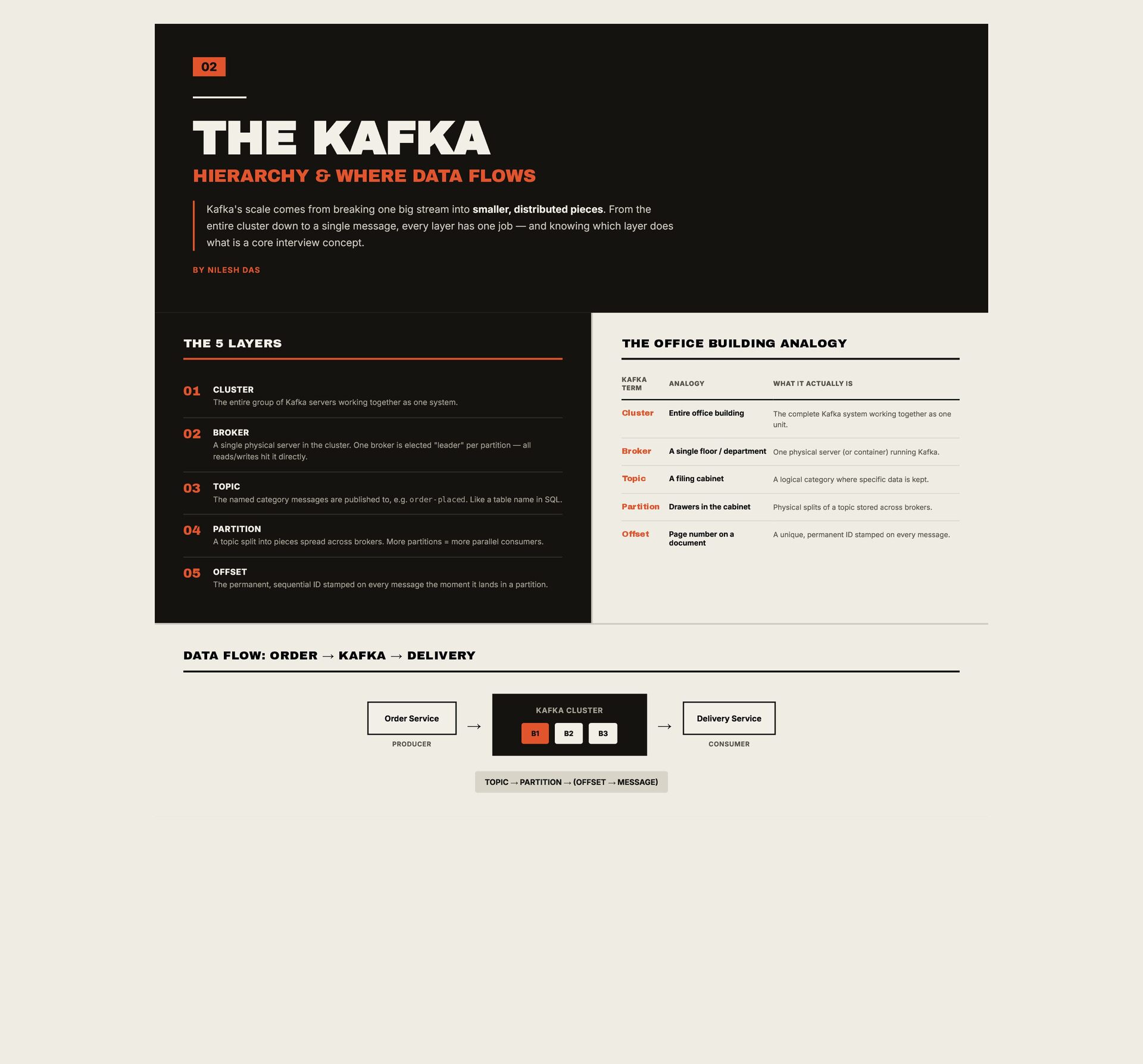
comes from breaking one big stream into smaller, distributed pieces. From the entire cluster down to a single message, every layer has one job — and knowing which layer does what is a core interview concept. BY NILESH DAS THE 5 LAYERS 01 THE OFFICE BUILDING ANALOGY CLUSTER KAFKA TERM ANALOGY WHAT IT ACTUALLY IS Cluster Entire office building The complete Kafka system working together as one unit. Broker A single floor / department One physical server (or container) running Kafka. Topic A filing cabinet A logical category where specific data is kept. Partition Drawers in the cabinet Physical splits of a topic stored across brokers. Offset Page number on a document A unique, permanent ID stamped on every message. The entire group of Kafka servers working together as one system. 02 BROKER A single physical server in the cluster. One broker is elected "leader" per partition — all reads/writes hit it directly. 03 TOPIC The named category messages are published to, e.g. order-placed. Like a table name in SQL. 04 PARTITION A topic split into pieces spread across brokers. More partitions = more parallel consumers. 05 OFFSET The permanent, sequential ID stamped on every message the moment it lands in a partition. DATA FLOW: ORDER → KAFKA → DELIVERY Order Service PRODUCER KAFKA CLUSTER → B1 B2 B3 → TOPIC → PARTITION → (OFFSET → MESSAGE) Delivery Service CONSUMER
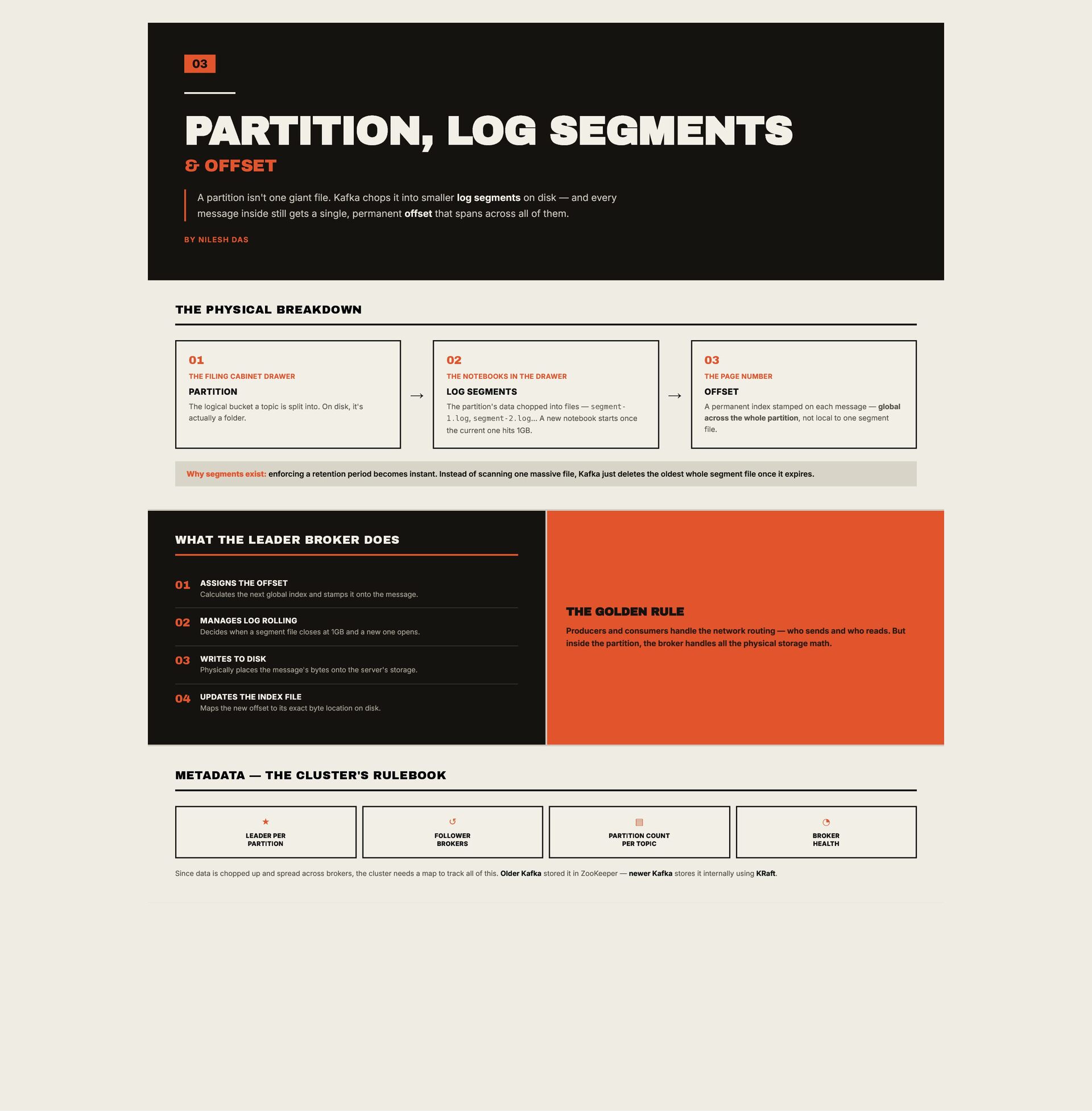
giant file. Kafka chops it into smaller log segments on disk — and every message inside still gets a single, permanent offset that spans across all of them. BY NILESH DAS THE PHYSICAL BREAKDOWN 01 02 03 THE FILING CABINET DRAWER THE NOTEBOOKS IN THE DRAWER THE PAGE NUMBER PARTITION The logical bucket a topic is split into. On disk, it's actually a folder. LOG SEGMENTS → The partition's data chopped into files — segment1.log, segment-2.log… A new notebook starts once the current one hits 1GB. → OFFSET A permanent index stamped on each message — global across the whole partition, not local to one segment file. Why segments exist: enforcing a retention period becomes instant. Instead of scanning one massive file, Kafka just deletes the oldest whole segment file once it expires. WHAT THE LEADER BROKER DOES 01 ASSIGNS THE OFFSET Calculates the next global index and stamps it onto the message. THE GOLDEN RULE 02 MANAGES LOG ROLLING Producers and consumers handle the network routing — who sends and who reads. But inside the partition, the broker handles all the physical storage math. Decides when a segment file closes at 1GB and a new one opens. 03 WRITES TO DISK Physically places the message's bytes onto the server's storage. 04 UPDATES THE INDEX FILE Maps the new offset to its exact byte location on disk. METADATA — THE CLUSTER'S RULEBOOK ★ ↺ ▤ ◔ LEADER PER PARTITION FOLLOWER BROKERS PARTITION COUNT PER TOPIC BROKER HEALTH Since data is chopped up and spread across brokers, the cluster needs a map to track all of this. Older Kafka stored it in ZooKeeper — newer Kafka stores it internally using KRaft.
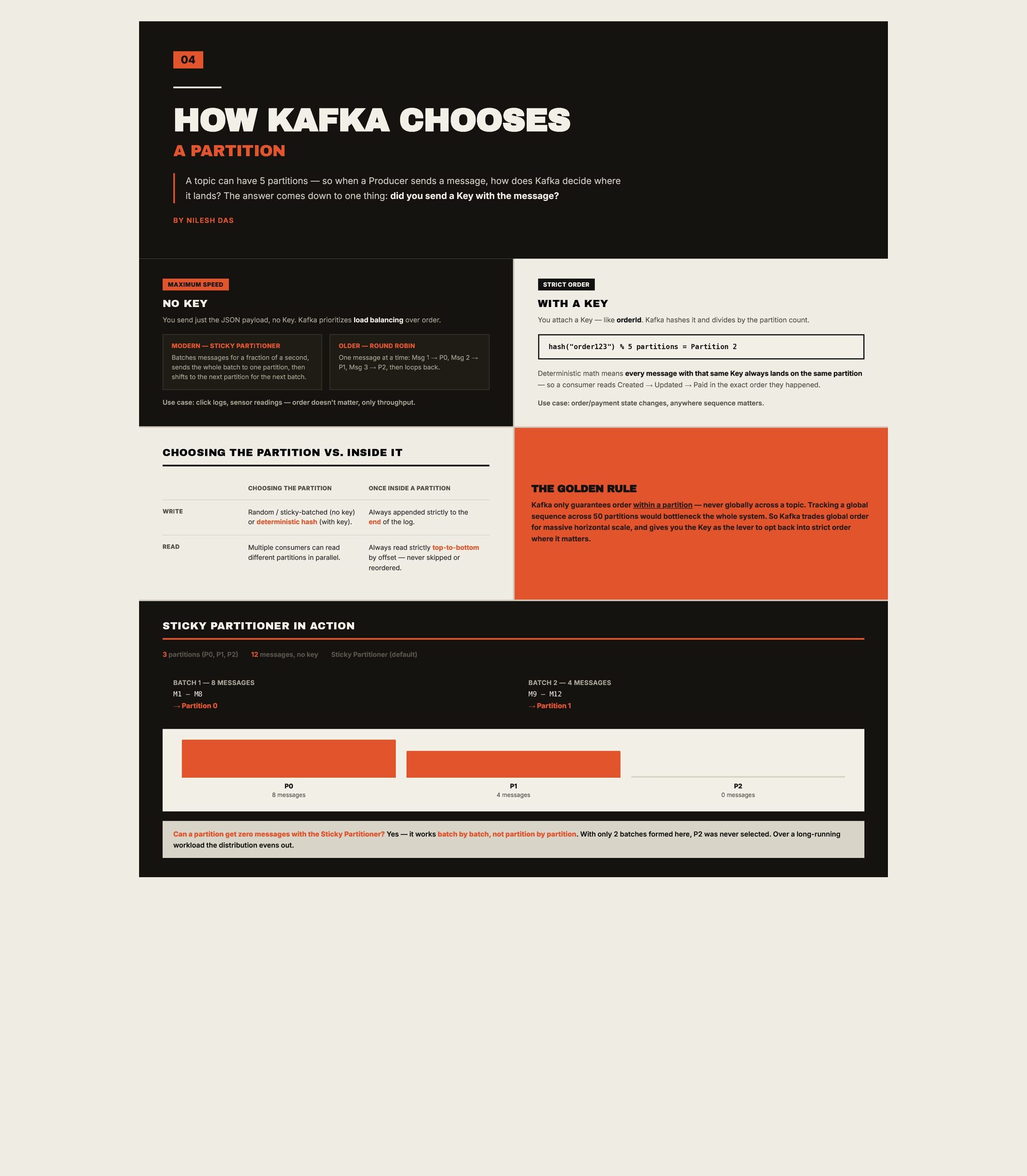
5 partitions — so when a Producer sends a message, how does Kafka decide where it lands? The answer comes down to one thing: did you send a Key with the message? BY NILESH DAS MAXIMUM SPEED STRICT ORDER NO KEY WITH A KEY You send just the JSON payload, no Key. Kafka prioritizes load balancing over order. You attach a Key — like orderId. Kafka hashes it and divides by the partition count. MODERN — STICKY PARTITIONER Batches messages for a fraction of a second, sends the whole batch to one partition, then shifts to the next partition for the next batch. OLDER — ROUND ROBIN One message at a time: Msg 1 → P0, Msg 2 → P1, Msg 3 → P2, then loops back. hash("order123") % 5 partitions = Partition 2 Deterministic math means every message with that same Key always lands on the same partition — so a consumer reads Created → Updated → Paid in the exact order they happened. Use case: click logs, sensor readings — order doesn't matter, only throughput. Use case: order/payment state changes, anywhere sequence matters. CHOOSING THE PARTITION VS. INSIDE IT CHOOSING THE PARTITION ONCE INSIDE A PARTITION WRITE Random / sticky-batched (no key) or deterministic hash (with key). Always appended strictly to the end of the log. READ Multiple consumers can read different partitions in parallel. Always read strictly top-to-bottom by offset — never skipped or reordered. THE GOLDEN RULE Kafka only guarantees order within a partition — never globally across a topic. Tracking a global sequence across 50 partitions would bottleneck the whole system. So Kafka trades global order for massive horizontal scale, and gives you the Key as the lever to opt back into strict order where it matters. STICKY PARTITIONER IN ACTION 3 partitions (P0, P1, P2) 12 messages, no key Sticky Partitioner (default) BATCH 1 — 8 MESSAGES BATCH 2 — 4 MESSAGES M1 – M8 M9 – M12 → Partition 0 → Partition 1 P0 8 messages P1 4 messages P2 0 messages Can a partition get zero messages with the Sticky Partitioner? Yes — it works batch by batch, not partition by partition. With only 2 batches formed here, P2 was never selected. Over a long-running workload the distribution evens out.
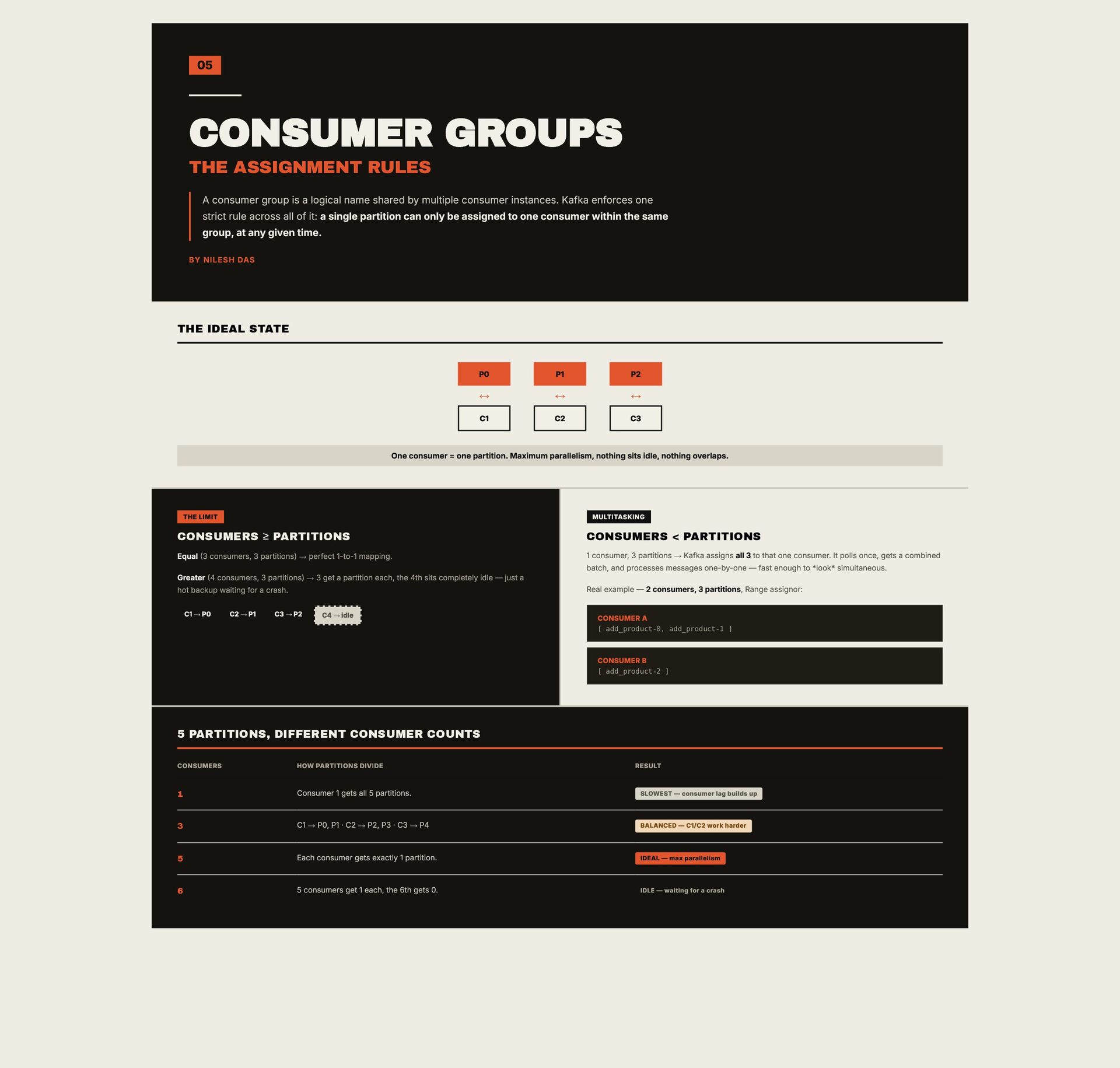
a logical name shared by multiple consumer instances. Kafka enforces one strict rule across all of it: a single partition can only be assigned to one consumer within the same group, at any given time. BY NILESH DAS THE IDEAL STATE P0 P1 P2 ↔ ↔ ↔ C1 C2 C3 One consumer = one partition. Maximum parallelism, nothing sits idle, nothing overlaps. THE LIMIT MULTITASKING CONSUMERS ≥ PARTITIONS CONSUMERS < PARTITIONS Equal (3 consumers, 3 partitions) → perfect 1-to-1 mapping. 1 consumer, 3 partitions → Kafka assigns all 3 to that one consumer. It polls once, gets a combined batch, and processes messages one-by-one — fast enough to *look* simultaneous. Greater (4 consumers, 3 partitions) → 3 get a partition each, the 4th sits completely idle — just a hot backup waiting for a crash. C1 → P0 C2 → P1 C3 → P2 C4 → idle Real example — 2 consumers, 3 partitions, Range assignor: CONSUMER A [ add_product-0, add_product-1 ] CONSUMER B [ add_product-2 ] 5 PARTITIONS, DIFFERENT CONSUMER COUNTS CONSUMERS HOW PARTITIONS DIVIDE RESULT 1 Consumer 1 gets all 5 partitions. SLOWEST — consumer lag builds up 3 C1 → P0, P1 · C2 → P2, P3 · C3 → P4 BALANCED — C1/C2 work harder 5 Each consumer gets exactly 1 partition. IDEAL — max parallelism 6 5 consumers get 1 each, the 6th gets 0. IDLE — waiting for a crash
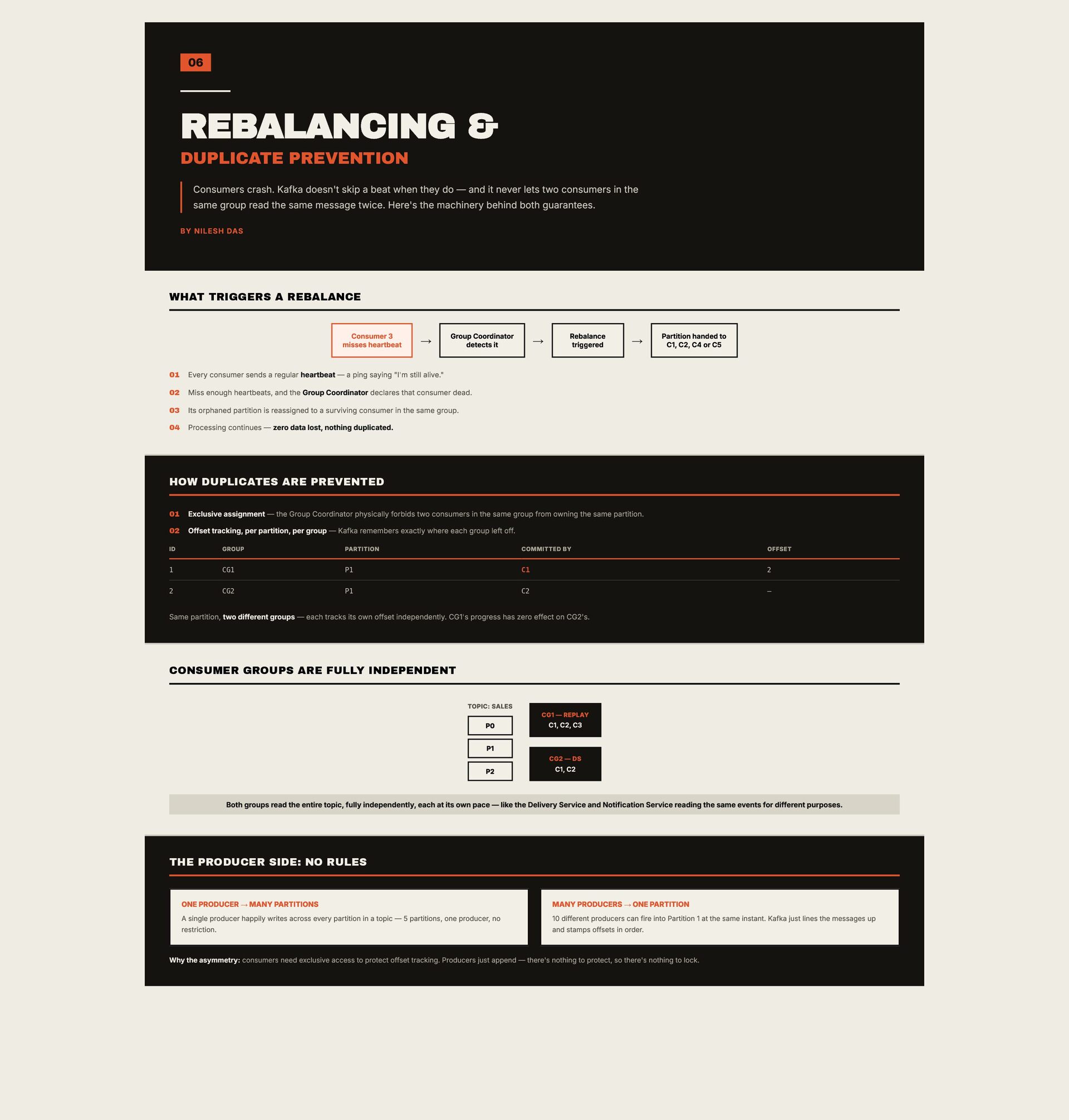
a beat when they do — and it never lets two consumers in the same group read the same message twice. Here's the machinery behind both guarantees. BY NILESH DAS WHAT TRIGGERS A REBALANCE Consumer 3 misses heartbeat → Group Coordinator detects it 01 Every consumer sends a regular heartbeat — a ping saying "I'm still alive." 02 Miss enough heartbeats, and the Group Coordinator declares that consumer dead. 03 Its orphaned partition is reassigned to a surviving consumer in the same group. 04 Processing continues — zero data lost, nothing duplicated. → Rebalance triggered → Partition handed to C1, C2, C4 or C5 HOW DUPLICATES ARE PREVENTED 01 Exclusive assignment — the Group Coordinator physically forbids two consumers in the same group from owning the same partition. 02 Offset tracking, per partition, per group — Kafka remembers exactly where each group left off. ID GROUP PARTITION COMMITTED BY OFFSET 1 CG1 P1 C1 2 2 CG2 P1 C2 — Same partition, two different groups — each tracks its own offset independently. CG1's progress has zero effect on CG2's. CONSUMER GROUPS ARE FULLY INDEPENDENT TOPIC: SALES P0 P1 P2 CG1 — REPLAY C1, C2, C3 CG2 — DS C1, C2 Both groups read the entire topic, fully independently, each at its own pace — like the Delivery Service and Notification Service reading the same events for different purposes. THE PRODUCER SIDE: NO RULES ONE PRODUCER → MANY PARTITIONS A single producer happily writes across every partition in a topic — 5 partitions, one producer, no restriction. MANY PRODUCERS → ONE PARTITION 10 different producers can fire into Partition 1 at the same instant. Kafka just lines the messages up and stamps offsets in order. Why the asymmetry: consumers need exclusive access to protect offset tracking. Producers just append — there's nothing to protect, so there's nothing to lock.
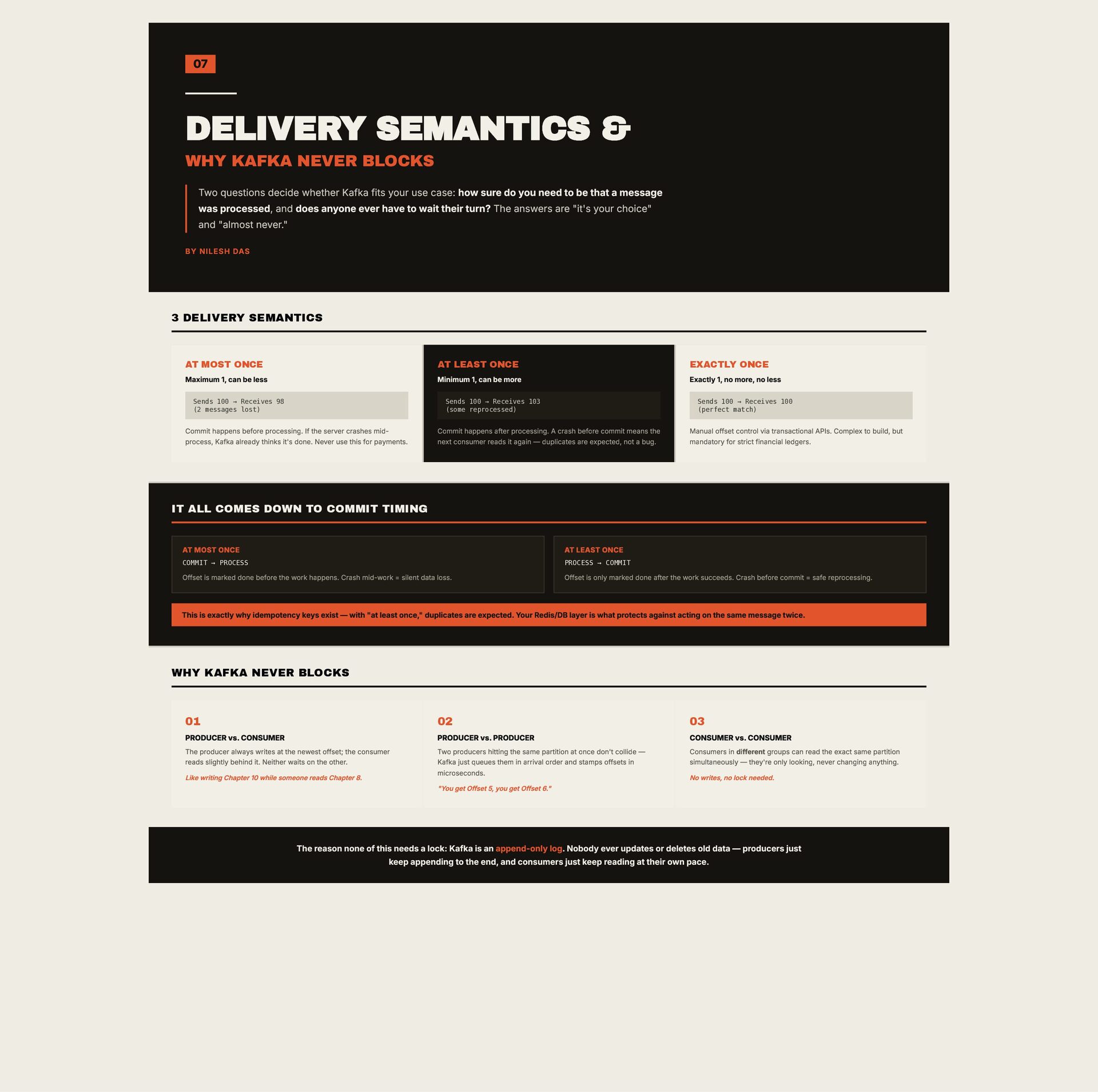
decide whether Kafka fits your use case: how sure do you need to be that a message was processed, and does anyone ever have to wait their turn? The answers are "it's your choice" and "almost never." BY NILESH DAS 3 DELIVERY SEMANTICS AT MOST ONCE AT LEAST ONCE EXACTLY ONCE Maximum 1, can be less Minimum 1, can be more Exactly 1, no more, no less Sends 100 → Receives 98 (2 messages lost) Sends 100 → Receives 103 (some reprocessed) Commit happens before processing. If the server crashes midprocess, Kafka already thinks it's done. Never use this for payments. Sends 100 → Receives 100 (perfect match) Commit happens after processing. A crash before commit means the next consumer reads it again — duplicates are expected, not a bug. Manual offset control via transactional APIs. Complex to build, but mandatory for strict financial ledgers. IT ALL COMES DOWN TO COMMIT TIMING AT MOST ONCE AT LEAST ONCE COMMIT → PROCESS PROCESS → COMMIT Offset is marked done before the work happens. Crash mid-work = silent data loss. Offset is only marked done after the work succeeds. Crash before commit = safe reprocessing. This is exactly why idempotency keys exist — with "at least once," duplicates are expected. Your Redis/DB layer is what protects against acting on the same message twice. WHY KAFKA NEVER BLOCKS 01 02 03 PRODUCER vs. CONSUMER PRODUCER vs. PRODUCER CONSUMER vs. CONSUMER The producer always writes at the newest offset; the consumer reads slightly behind it. Neither waits on the other. Two producers hitting the same partition at once don't collide — Kafka just queues them in arrival order and stamps offsets in microseconds. Consumers in different groups can read the exact same partition simultaneously — they're only looking, never changing anything. Like writing Chapter 10 while someone reads Chapter 8. "You get Offset 5, you get Offset 6." No writes, no lock needed. The reason none of this needs a lock: Kafka is an append-only log. Nobody ever updates or deletes old data — producers just keep appending to the end, and consumers just keep reading at their own pace.
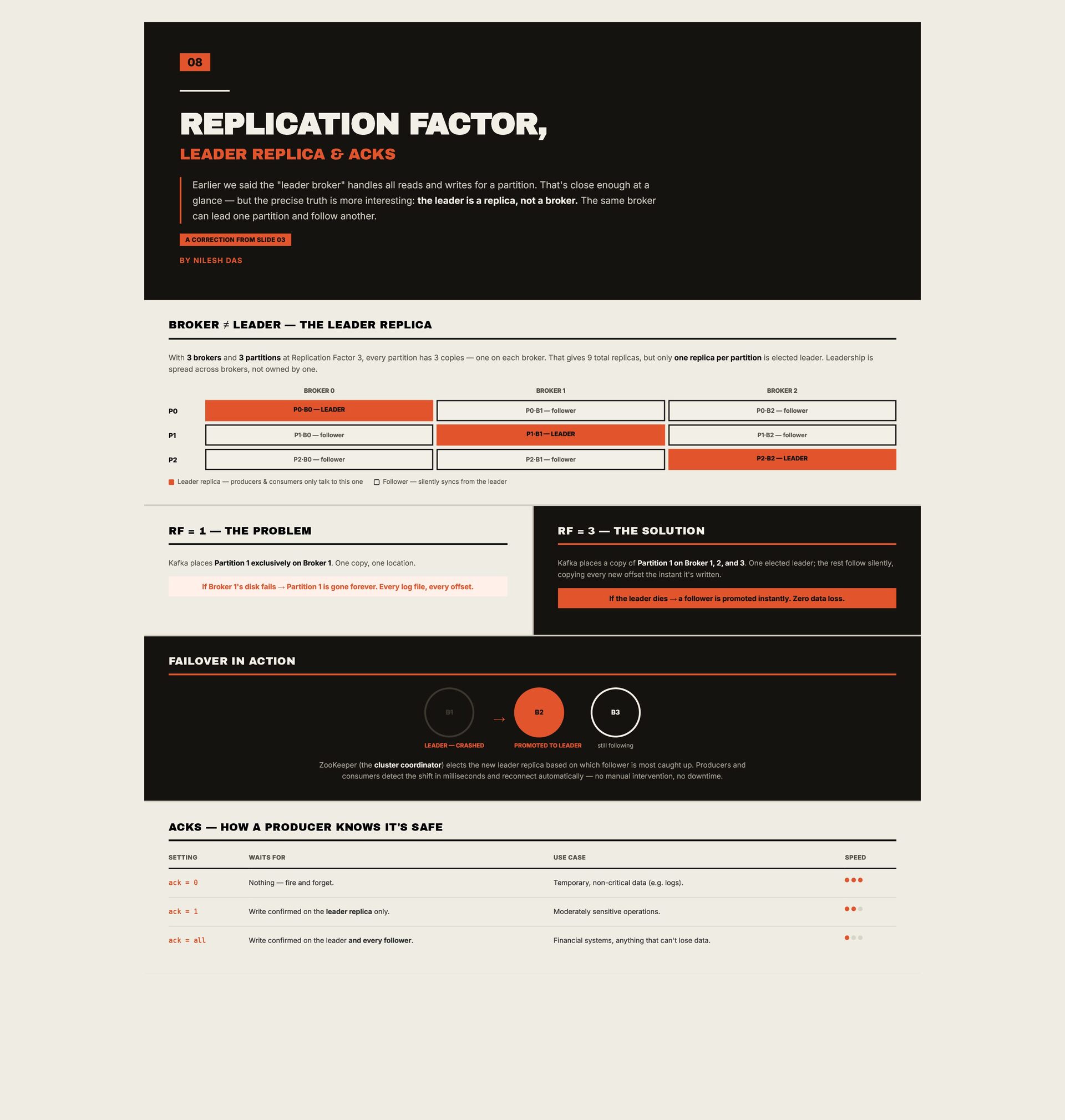
the "leader broker" handles all reads and writes for a partition. That's close enough at a glance — but the precise truth is more interesting: the leader is a replica, not a broker. The same broker can lead one partition and follow another. A CORRECTION FROM SLIDE 03 BY NILESH DAS BROKER ≠ LEADER — THE LEADER REPLICA With 3 brokers and 3 partitions at Replication Factor 3, every partition has 3 copies — one on each broker. That gives 9 total replicas, but only one replica per partition is elected leader. Leadership is spread across brokers, not owned by one. BROKER 0 BROKER 1 BROKER 2 P0 P0·B0 — LEADER P0·B1 — follower P0·B2 — follower P1 P1·B0 — follower P1·B1 — LEADER P1·B2 — follower P2 P2·B0 — follower P2·B1 — follower P2·B2 — LEADER Leader replica — producers & consumers only talk to this one Follower — silently syncs from the leader RF = 1 — THE PROBLEM RF = 3 — THE SOLUTION Kafka places Partition 1 exclusively on Broker 1. One copy, one location. Kafka places a copy of Partition 1 on Broker 1, 2, and 3. One elected leader; the rest follow silently, copying every new offset the instant it's written. If Broker 1's disk fails → Partition 1 is gone forever. Every log file, every offset. If the leader dies → a follower is promoted instantly. Zero data loss. FAILOVER IN ACTION B1 LEADER — CRASHED → B2 B3 PROMOTED TO LEADER still following ZooKeeper (the cluster coordinator) elects the new leader replica based on which follower is most caught up. Producers and consumers detect the shift in milliseconds and reconnect automatically — no manual intervention, no downtime. ACKS — HOW A PRODUCER KNOWS IT'S SAFE SETTING WAITS FOR USE CASE ack = 0 Nothing — fire and forget. Temporary, non-critical data (e.g. logs). ack = 1 Write confirmed on the leader replica only. Moderately sensitive operations. ack = all Write confirmed on the leader and every follower. Financial systems, anything that can't lose data. SPEED
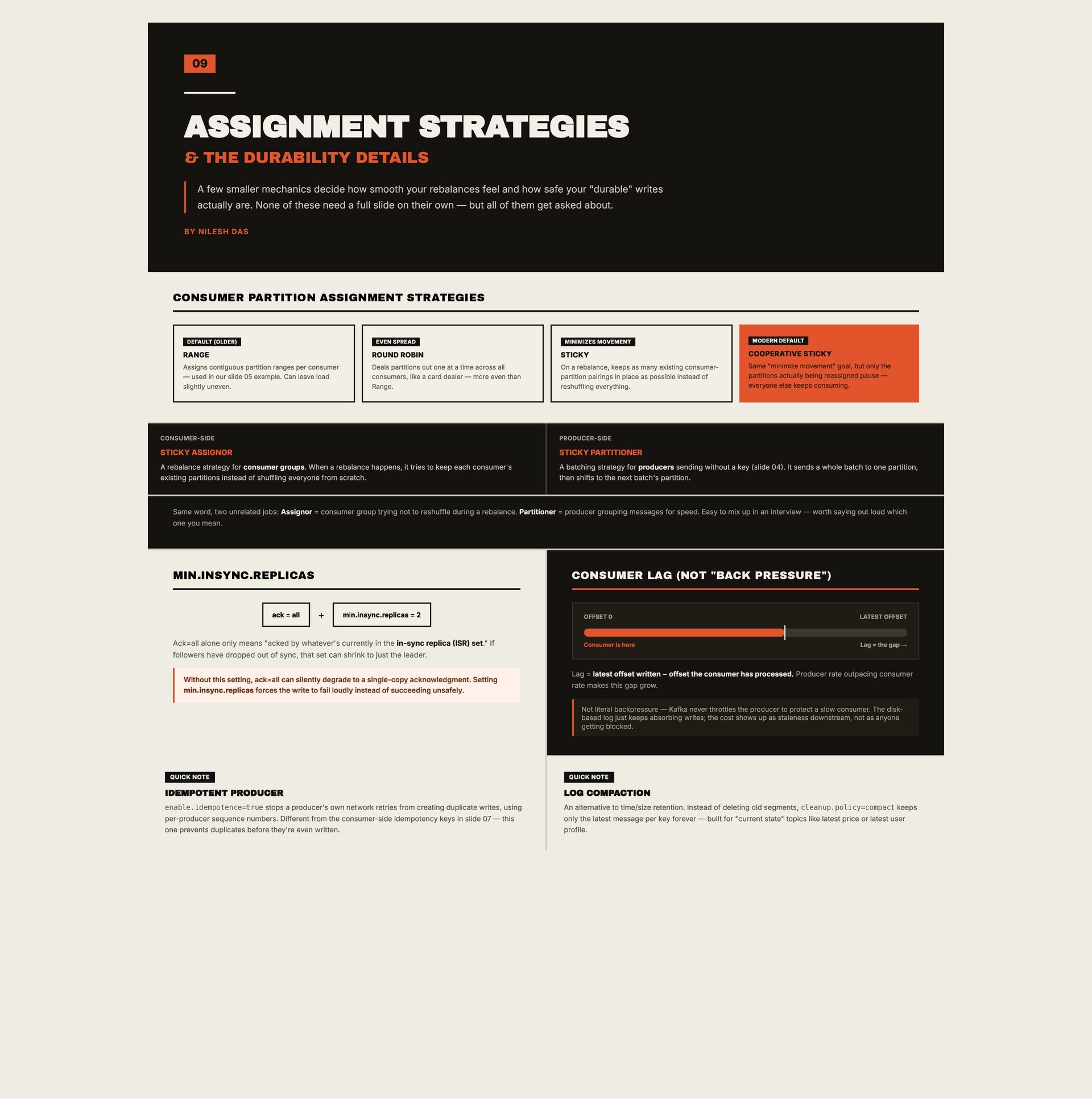
mechanics decide how smooth your rebalances feel and how safe your "durable" writes actually are. None of these need a full slide on their own — but all of them get asked about. BY NILESH DAS CONSUMER PARTITION ASSIGNMENT STRATEGIES DEFAULT (OLDER) EVEN SPREAD MINIMIZES MOVEMENT MODERN DEFAULT RANGE ROUND ROBIN STICKY COOPERATIVE STICKY Assigns contiguous partition ranges per consumer — used in our slide 05 example. Can leave load slightly uneven. Deals partitions out one at a time across all consumers, like a card dealer — more even than Range. On a rebalance, keeps as many existing consumerpartition pairings in place as possible instead of reshuffling everything. Same "minimize movement" goal, but only the partitions actually being reassigned pause — everyone else keeps consuming. CONSUMER-SIDE PRODUCER-SIDE STICKY ASSIGNOR STICKY PARTITIONER A rebalance strategy for consumer groups. When a rebalance happens, it tries to keep each consumer's existing partitions instead of shuffling everyone from scratch. A batching strategy for producers sending without a key (slide 04). It sends a whole batch to one partition, then shifts to the next batch's partition. Same word, two unrelated jobs: Assignor = consumer group trying not to reshuffle during a rebalance. Partitioner = producer grouping messages for speed. Easy to mix up in an interview — worth saying out loud which one you mean. MIN.INSYNC.REPLICAS ack = all CONSUMER LAG (NOT "BACK PRESSURE") + min.insync.replicas = 2 Ack=all alone only means "acked by whatever's currently in the in-sync replica (ISR) set." If followers have dropped out of sync, that set can shrink to just the leader. Without this setting, ack=all can silently degrade to a single-copy acknowledgment. Setting min.insync.replicas forces the write to fail loudly instead of succeeding unsafely. OFFSET 0 LATEST OFFSET Consumer is here Lag = the gap → Lag = latest offset written − offset the consumer has processed. Producer rate outpacing consumer rate makes this gap grow. Not literal backpressure — Kafka never throttles the producer to protect a slow consumer. The diskbased log just keeps absorbing writes; the cost shows up as staleness downstream, not as anyone getting blocked. QUICK NOTE QUICK NOTE IDEMPOTENT PRODUCER LOG COMPACTION enable.idempotence=true stops a producer's own network retries from creating duplicate writes, using An alternative to time/size retention. Instead of deleting old segments, cleanup.policy=compact keeps only the latest message per key forever — built for "current state" topics like latest price or latest user profile. per-producer sequence numbers. Different from the consumer-side idempotency keys in slide 07 — this one prevents duplicates before they're even written.
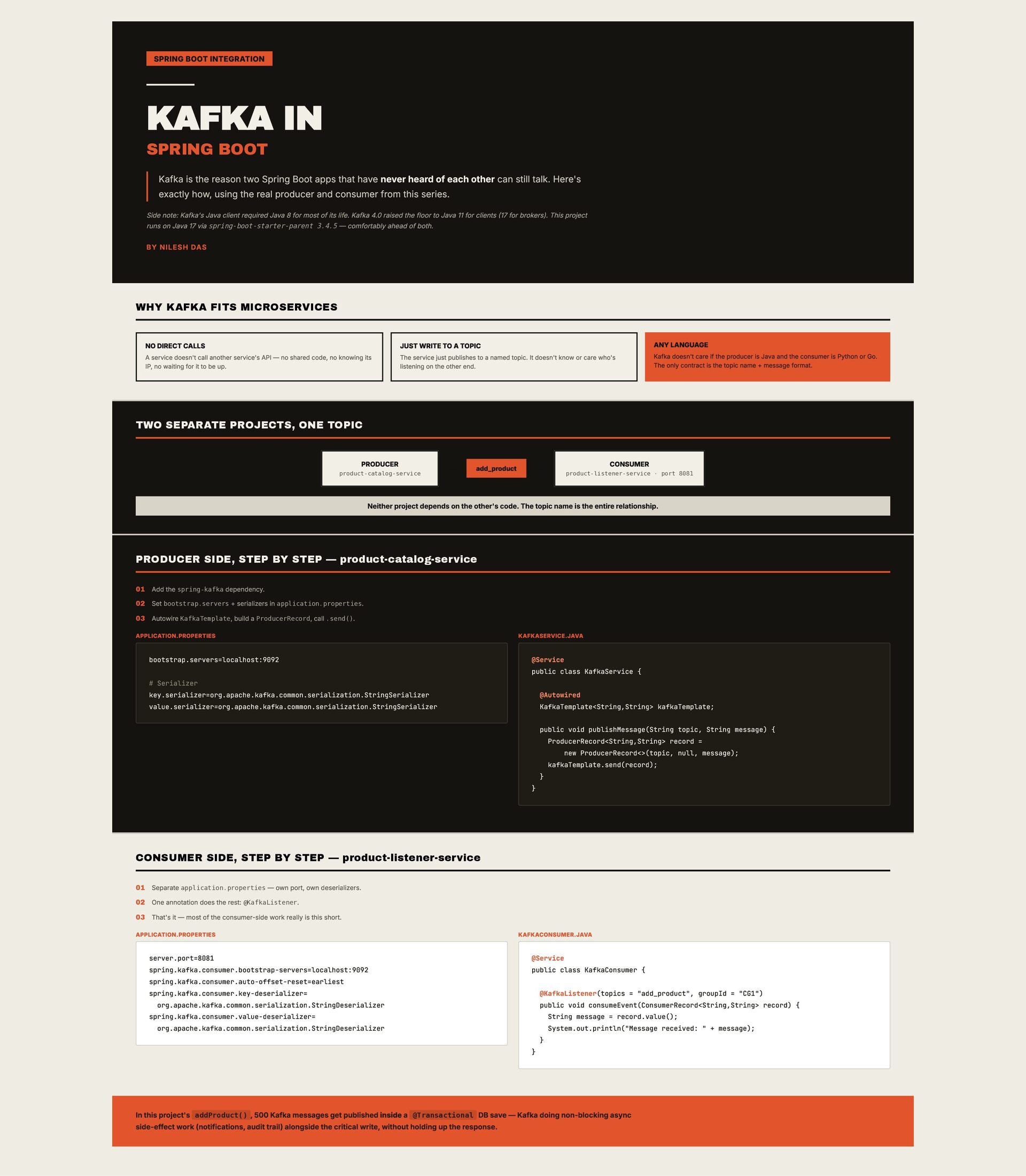
reason two Spring Boot apps that have never heard of each other can still talk. Here's exactly how, using the real producer and consumer from this series. Side note: Kafka's Java client required Java 8 for most of its life. Kafka 4.0 raised the floor to Java 11 for clients (17 for brokers). This project runs on Java 17 via spring-boot-starter-parent 3.4.5 — comfortably ahead of both. BY NILESH DAS WHY KAFKA FITS MICROSERVICES ANY LANGUAGE NO DIRECT CALLS JUST WRITE TO A TOPIC A service doesn't call another service's API — no shared code, no knowing its IP, no waiting for it to be up. The service just publishes to a named topic. It doesn't know or care who's listening on the other end. Kafka doesn't care if the producer is Java and the consumer is Python or Go. The only contract is the topic name + message format. TWO SEPARATE PROJECTS, ONE TOPIC PRODUCER product-catalog-service → add_product → CONSUMER product-listener-service · port 8081 Neither project depends on the other's code. The topic name is the entire relationship. PRODUCER SIDE, STEP BY STEP — product-catalog-service 01 Add the spring-kafka dependency. 02 Set bootstrap.servers + serializers in application.properties. 03 Autowire KafkaTemplate, build a ProducerRecord, call .send(). APPLICATION.PROPERTIES bootstrap.servers=localhost:9092 KAFKASERVICE.JAVA @Service public class KafkaService { # Serializer key.serializer=org.apache.kafka.common.serialization.StringSerializer value.serializer=org.apache.kafka.common.serialization.StringSerializer @Autowired KafkaTemplate<String,String> kafkaTemplate; public void publishMessage(String topic, String message) { ProducerRecord<String,String> record = new ProducerRecord<>(topic, null, message); kafkaTemplate.send(record); } } CONSUMER SIDE, STEP BY STEP — product-listener-service 01 Separate application.properties — own port, own deserializers. 02 One annotation does the rest: @KafkaListener. 03 That's it — most of the consumer-side work really is this short. APPLICATION.PROPERTIES server.port=8081 spring.kafka.consumer.bootstrap-servers=localhost:9092 spring.kafka.consumer.auto-offset-reset=earliest spring.kafka.consumer.key-deserializer= org.apache.kafka.common.serialization.StringDeserializer spring.kafka.consumer.value-deserializer= org.apache.kafka.common.serialization.StringDeserializer KAFKACONSUMER.JAVA @Service public class KafkaConsumer { @KafkaListener(topics = "add_product", groupId = "CG1") public void consumeEvent(ConsumerRecord<String,String> record) { String message = record.value(); System.out.println("Message received: " + message); } } In this project's addProduct() , 500 Kafka messages get published inside a @Transactional DB save — Kafka doing non-blocking async side-effect work (notifications, audit trail) alongside the critical write, without holding up the response.
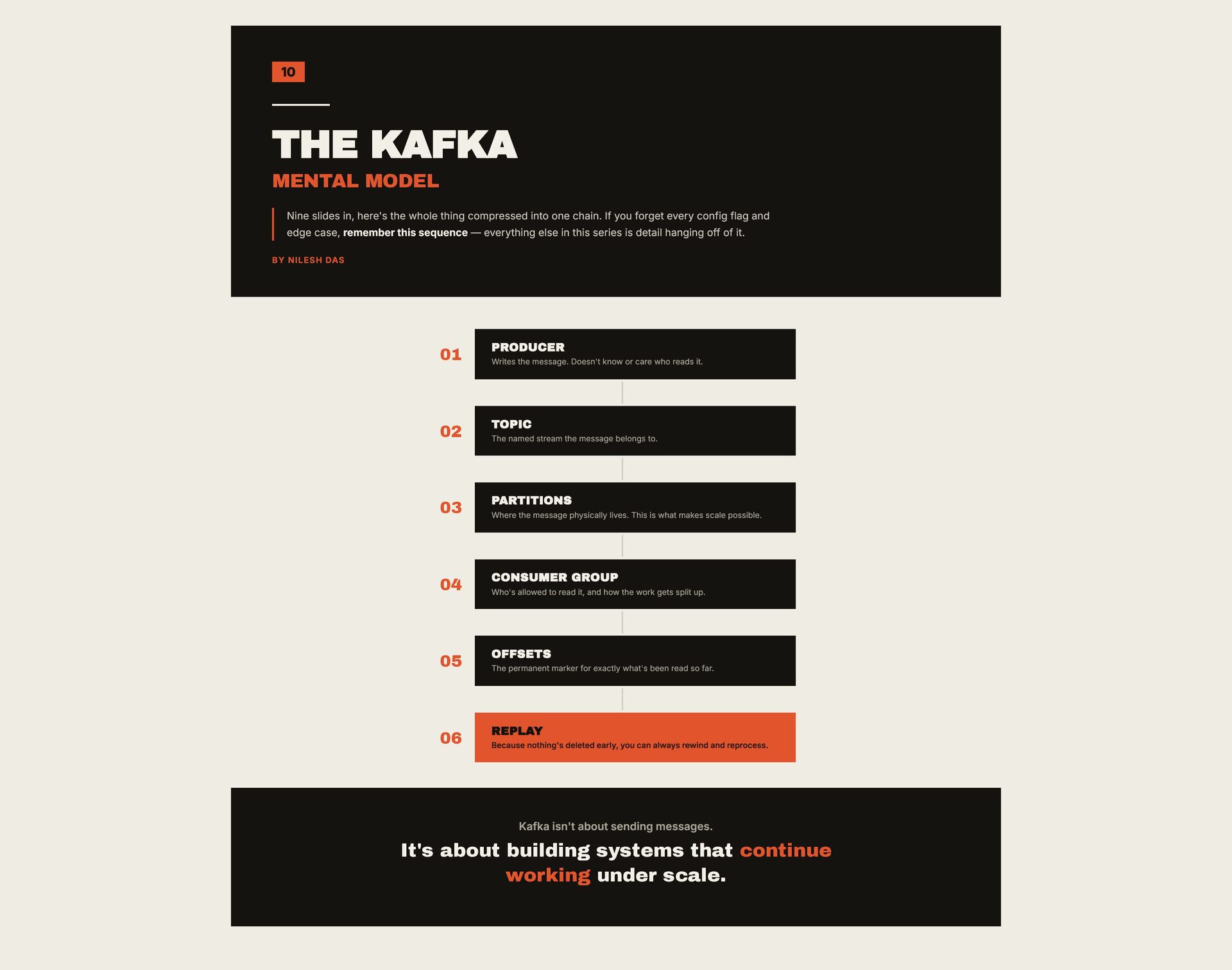
whole thing compressed into one chain. If you forget every config flag and edge case, remember this sequence — everything else in this series is detail hanging off of it. BY NILESH DAS 01 PRODUCER 02 TOPIC 03 PARTITIONS 04 CONSUMER GROUP 05 OFFSETS 06 REPLAY Writes the message. Doesn't know or care who reads it. The named stream the message belongs to. Where the message physically lives. This is what makes scale possible. Who's allowed to read it, and how the work gets split up. The permanent marker for exactly what's been read so far. Because nothing's deleted early, you can always rewind and reprocess. Kafka isn't about sending messages. It's about building systems that continue working under scale.
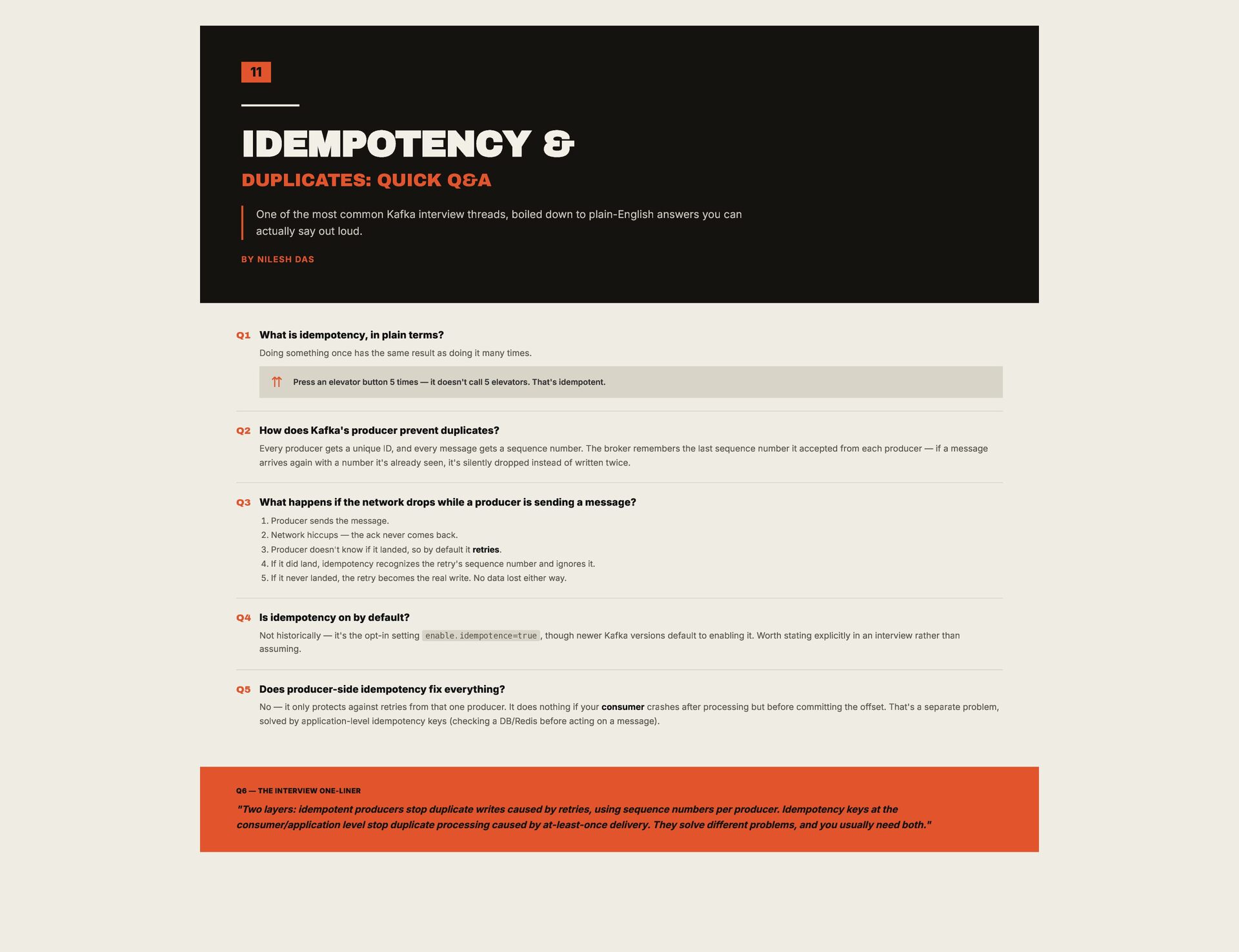
common Kafka interview threads, boiled down to plain-English answers you can actually say out loud. BY NILESH DAS Q1 What is idempotency, in plain terms? Doing something once has the same result as doing it many times. ⇈ Q2 Press an elevator button 5 times — it doesn't call 5 elevators. That's idempotent. How does Kafka's producer prevent duplicates? Every producer gets a unique ID, and every message gets a sequence number. The broker remembers the last sequence number it accepted from each producer — if a message arrives again with a number it's already seen, it's silently dropped instead of written twice. Q3 What happens if the network drops while a producer is sending a message? 1. Producer sends the message. 2. Network hiccups — the ack never comes back. 3. Producer doesn't know if it landed, so by default it retries. 4. If it did land, idempotency recognizes the retry's sequence number and ignores it. 5. If it never landed, the retry becomes the real write. No data lost either way. Q4 Is idempotency on by default? Not historically — it's the opt-in setting enable.idempotence=true , though newer Kafka versions default to enabling it. Worth stating explicitly in an interview rather than assuming. Q5 Does producer-side idempotency fix everything? No — it only protects against retries from that one producer. It does nothing if your consumer crashes after processing but before committing the offset. That's a separate problem, solved by application-level idempotency keys (checking a DB/Redis before acting on a message). Q6 — THE INTERVIEW ONE-LINER "Two layers: idempotent producers stop duplicate writes caused by retries, using sequence numbers per producer. Idempotency keys at the consumer/application level stop duplicate processing caused by at-least-once delivery. They solve different problems, and you usually need both."
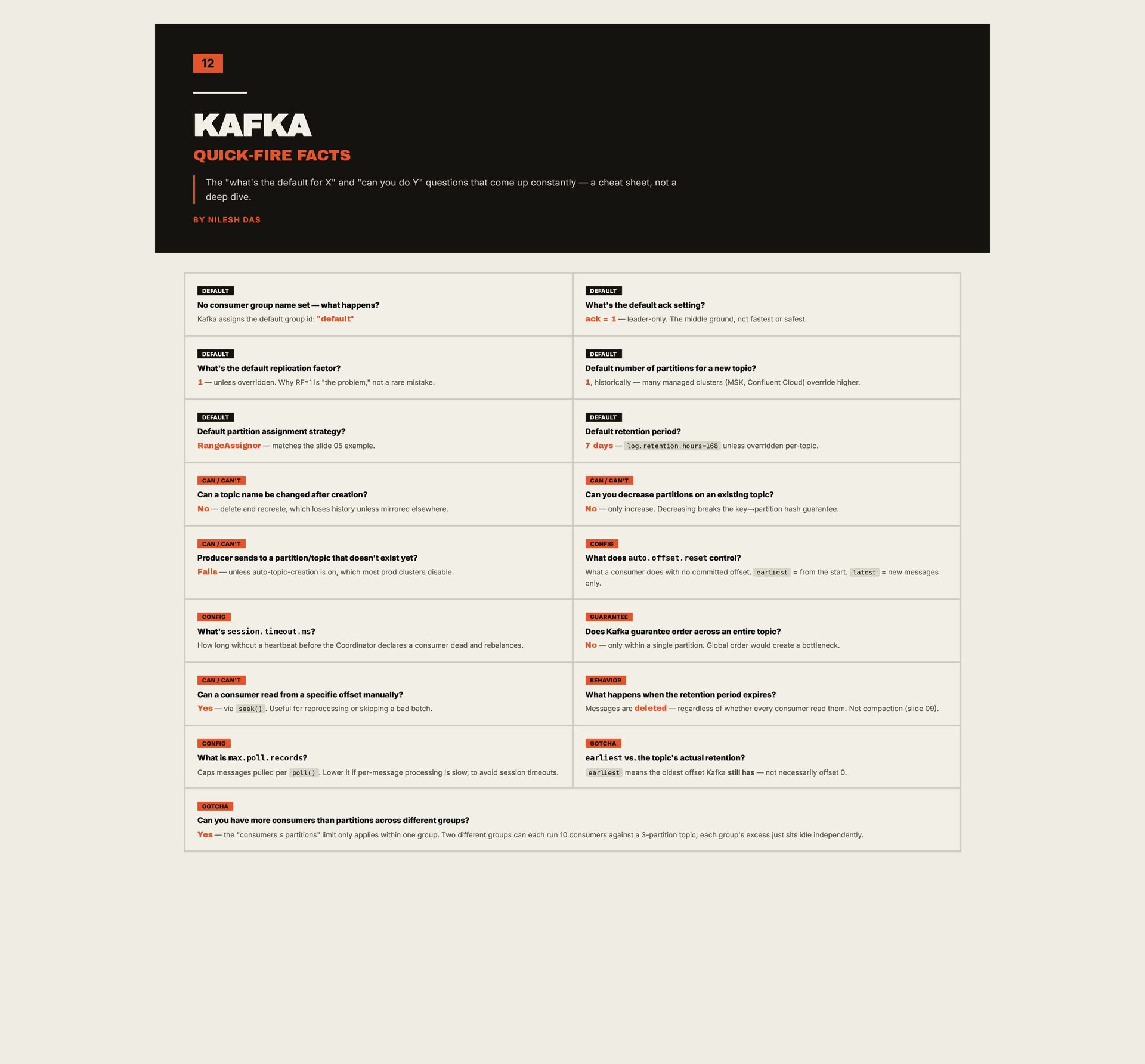
and "can you do Y" questions that come up constantly — a cheat sheet, not a deep dive. BY NILESH DAS DEFAULT DEFAULT No consumer group name set — what happens? What's the default ack setting? Kafka assigns the default group id: "default" ack = 1 — leader-only. The middle ground, not fastest or safest. DEFAULT DEFAULT What's the default replication factor? Default number of partitions for a new topic? 1 — unless overridden. Why RF=1 is "the problem," not a rare mistake. 1, historically — many managed clusters (MSK, Confluent Cloud) override higher. DEFAULT DEFAULT Default partition assignment strategy? Default retention period? RangeAssignor — matches the slide 05 example. 7 days — log.retention.hours=168 unless overridden per-topic. CAN / CAN'T CAN / CAN'T Can a topic name be changed after creation? Can you decrease partitions on an existing topic? No — delete and recreate, which loses history unless mirrored elsewhere. No — only increase. Decreasing breaks the key→partition hash guarantee. CAN / CAN'T CONFIG Producer sends to a partition/topic that doesn't exist yet? What does auto.offset.reset control? Fails — unless auto-topic-creation is on, which most prod clusters disable. What a consumer does with no committed offset. earliest = from the start. latest = new messages only. CONFIG GUARANTEE What's session.timeout.ms? Does Kafka guarantee order across an entire topic? How long without a heartbeat before the Coordinator declares a consumer dead and rebalances. No — only within a single partition. Global order would create a bottleneck. CAN / CAN'T BEHAVIOR Can a consumer read from a specific offset manually? What happens when the retention period expires? Yes — via seek() . Useful for reprocessing or skipping a bad batch. Messages are deleted — regardless of whether every consumer read them. Not compaction (slide 09). CONFIG GOTCHA What is max.poll.records? earliest vs. the topic's actual retention? Caps messages pulled per poll() . Lower it if per-message processing is slow, to avoid session timeouts. earliest means the oldest offset Kafka still has — not necessarily offset 0. GOTCHA Can you have more consumers than partitions across different groups? Yes — the "consumers ≤ partitions" limit only applies within one group. Two different groups can each run 10 consumers against a 3-partition topic; each group's excess just sits idle independently.
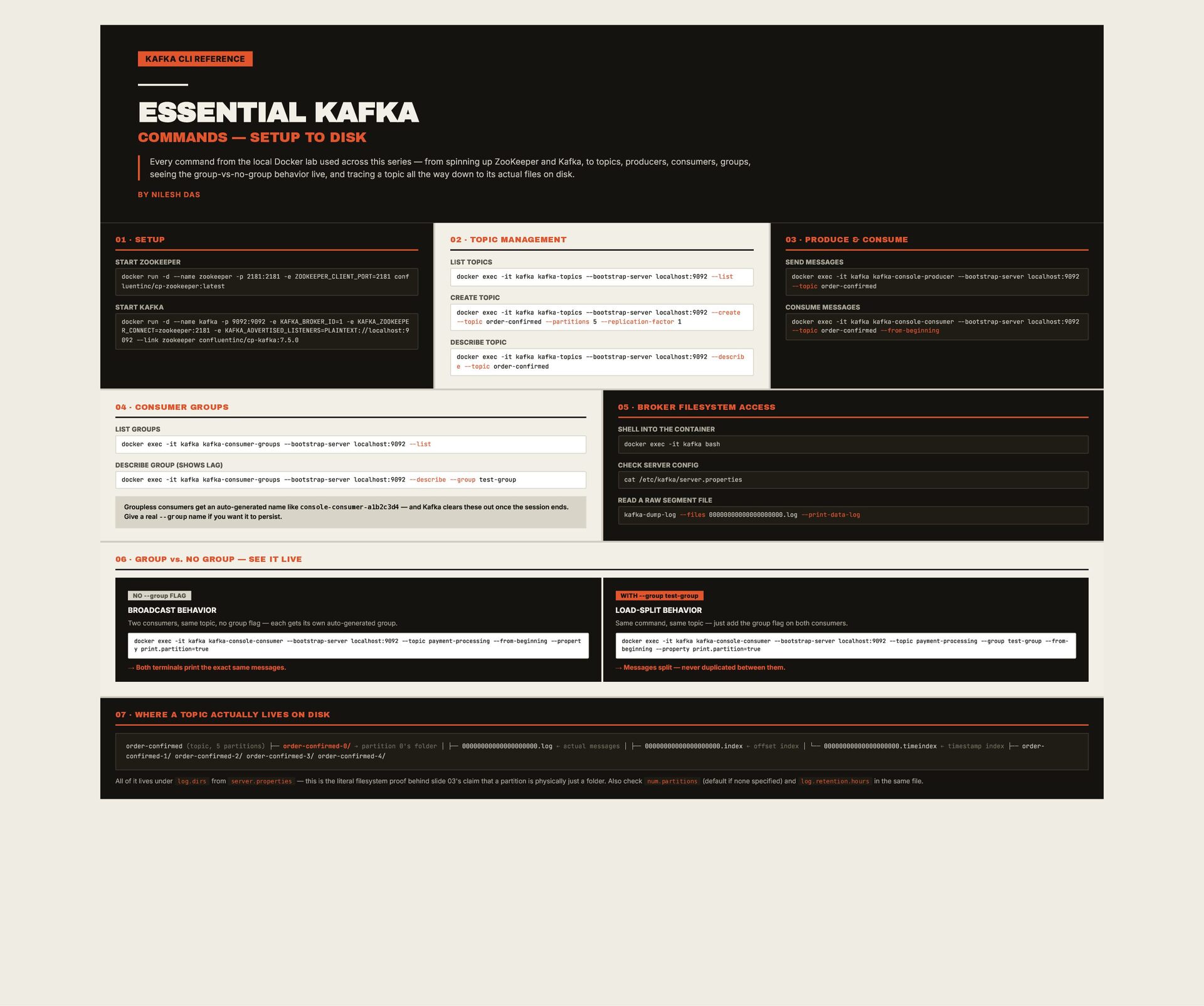
Every command from the local Docker lab used across this series — from spinning up ZooKeeper and Kafka, to topics, producers, consumers, groups, seeing the group-vs-no-group behavior live, and tracing a topic all the way down to its actual files on disk. BY NILESH DAS 01 · SETUP 02 · TOPIC MANAGEMENT 03 · PRODUCE & CONSUME START ZOOKEEPER LIST TOPICS SEND MESSAGES docker run -d --name zookeeper -p 2181:2181 -e ZOOKEEPER_CLIENT_PORT=2181 conf luentinc/cp-zookeeper:latest START KAFKA docker run -d --name kafka -p 9092:9092 -e KAFKA_BROKER_ID=1 -e KAFKA_ZOOKEEPE R_CONNECT=zookeeper:2181 -e KAFKA_ADVERTISED_LISTENERS=PLAINTEXT://localhost:9 092 --link zookeeper confluentinc/cp-kafka:7.5.0 docker exec -it kafka kafka-topics --bootstrap-server localhost:9092 --list CREATE TOPIC docker exec -it kafka kafka-topics --bootstrap-server localhost:9092 --create --topic order-confirmed --partitions 5 --replication-factor 1 docker exec -it kafka kafka-console-producer --bootstrap-server localhost:9092 --topic order-confirmed CONSUME MESSAGES docker exec -it kafka kafka-console-consumer --bootstrap-server localhost:9092 --topic order-confirmed --from-beginning DESCRIBE TOPIC docker exec -it kafka kafka-topics --bootstrap-server localhost:9092 --describ e --topic order-confirmed 04 · CONSUMER GROUPS 05 · BROKER FILESYSTEM ACCESS LIST GROUPS SHELL INTO THE CONTAINER docker exec -it kafka kafka-consumer-groups --bootstrap-server localhost:9092 --list DESCRIBE GROUP (SHOWS LAG) docker exec -it kafka kafka-consumer-groups --bootstrap-server localhost:9092 --describe --group test-group Groupless consumers get an auto-generated name like console-consumer-a1b2c3d4 — and Kafka clears these out once the session ends. Give a real --group name if you want it to persist. docker exec -it kafka bash CHECK SERVER CONFIG cat /etc/kafka/server.properties READ A RAW SEGMENT FILE kafka-dump-log --files 00000000000000000000.log --print-data-log 06 · GROUP vs. NO GROUP — SEE IT LIVE NO --group FLAG WITH --group test-group BROADCAST BEHAVIOR LOAD-SPLIT BEHAVIOR Two consumers, same topic, no group flag — each gets its own auto-generated group. Same command, same topic — just add the group flag on both consumers. docker exec -it kafka kafka-console-consumer --bootstrap-server localhost:9092 --topic payment-processing --from-beginning --propert y print.partition=true → Both terminals print the exact same messages. docker exec -it kafka kafka-console-consumer --bootstrap-server localhost:9092 --topic payment-processing --group test-group --frombeginning --property print.partition=true → Messages split — never duplicated between them. 07 · WHERE A TOPIC ACTUALLY LIVES ON DISK order-confirmed (topic, 5 partitions) ├── order-confirmed-0/ → partition 0's folder │ ├── 00000000000000000000.log ← actual messages │ ├── 00000000000000000000.index ← offset index │ └── 00000000000000000000.timeindex ← timestamp index ├── orderconfirmed-1/ order-confirmed-2/ order-confirmed-3/ order-confirmed-4/ All of it lives under log.dirs from server.properties — this is the literal filesystem proof behind slide 03's claim that a partition is physically just a folder. Also check num.partitions (default if none specified) and log.retention.hours in the same file.
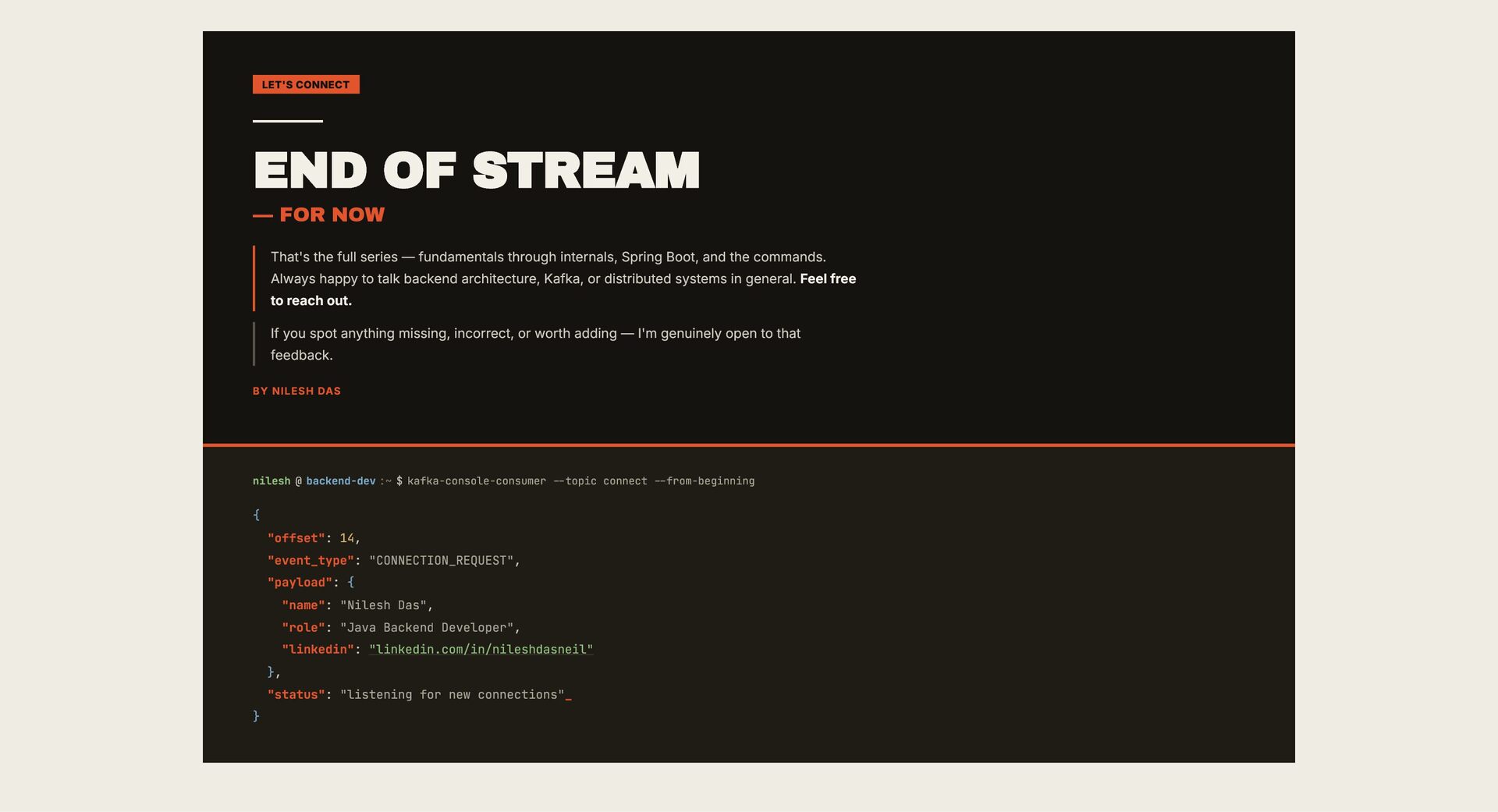
full series — fundamentals through internals, Spring Boot, and the commands. Always happy to talk backend architecture, Kafka, or distributed systems in general. Feel free to reach out. If you spot anything missing, incorrect, or worth adding — I'm genuinely open to that feedback. BY NILESH DAS nilesh @ backend-dev :~ $ kafka-console-consumer --topic connect --from-beginning { "offset": 14, "event_type": "CONNECTION_REQUEST", "payload": { "name": "Nilesh Das", "role": "Java Backend Developer", "linkedin": "linkedin.com/in/nileshdasneil" }, "status": "listening for new connections"_ }


 ytapples613
 hiola
hiola
 kentaroy47
 spring_aki
 juanmartin2026
 2720japanoke
 ainischool
 kaityo256
 pawan_pharm
 signer
 hiragahh
 tonyrice
 holman
 jmmastey
 palkan
 moore
moore
.png) helenjbeal
helenjbeal
 jlugia
 inesmontani
 irinanazarova
 pedronauck
 eileencodes
 davidcarrasco