ABCS25: Level up Your Cost Observability with t...
Sponsored
·
 Ship Features Fearlessly
Turn features on and off without deploys. Used by thousands of Ruby developers.
→
Ship Features Fearlessly
Turn features on and off without deploys. Used by thousands of Ruby developers.
→

Share
Embed
ABCS25: Level up Your Cost Observability with the new FinOps standard FOCUS and MS Fabric by Alexandre Parès
⭐️ Level up your Cost Observability with the new FinOps standard FOCUS and Microsoft Fabric#
In this session, attendees will learn how to leverage the new FinOps billing standard FOCUS and Microsoft Fabric to gain better visibility over their Cloud Costs. We will compare this stack against the native Azure Cost Management tools and see why it may sometimes be a better fit (FinOps personas, Subscriptions types, etc.).
🙂 ALEXANDRE PARÈS ⚡️ Sr. Cloud FinOps Engineer @ FinOps Foundation | FinOps Certified Professional

Azure Zurich User Group PRO
June 05, 2025
Annual Pro sale · Save $30
Have presentations of your own?
Share with private links, password protection, and more control over your work.
Transcript
53 slides
-
Level up your Cost Observability 05.06.2025 With the new FinOps
standard FOCUS and Microsoft Fabric -
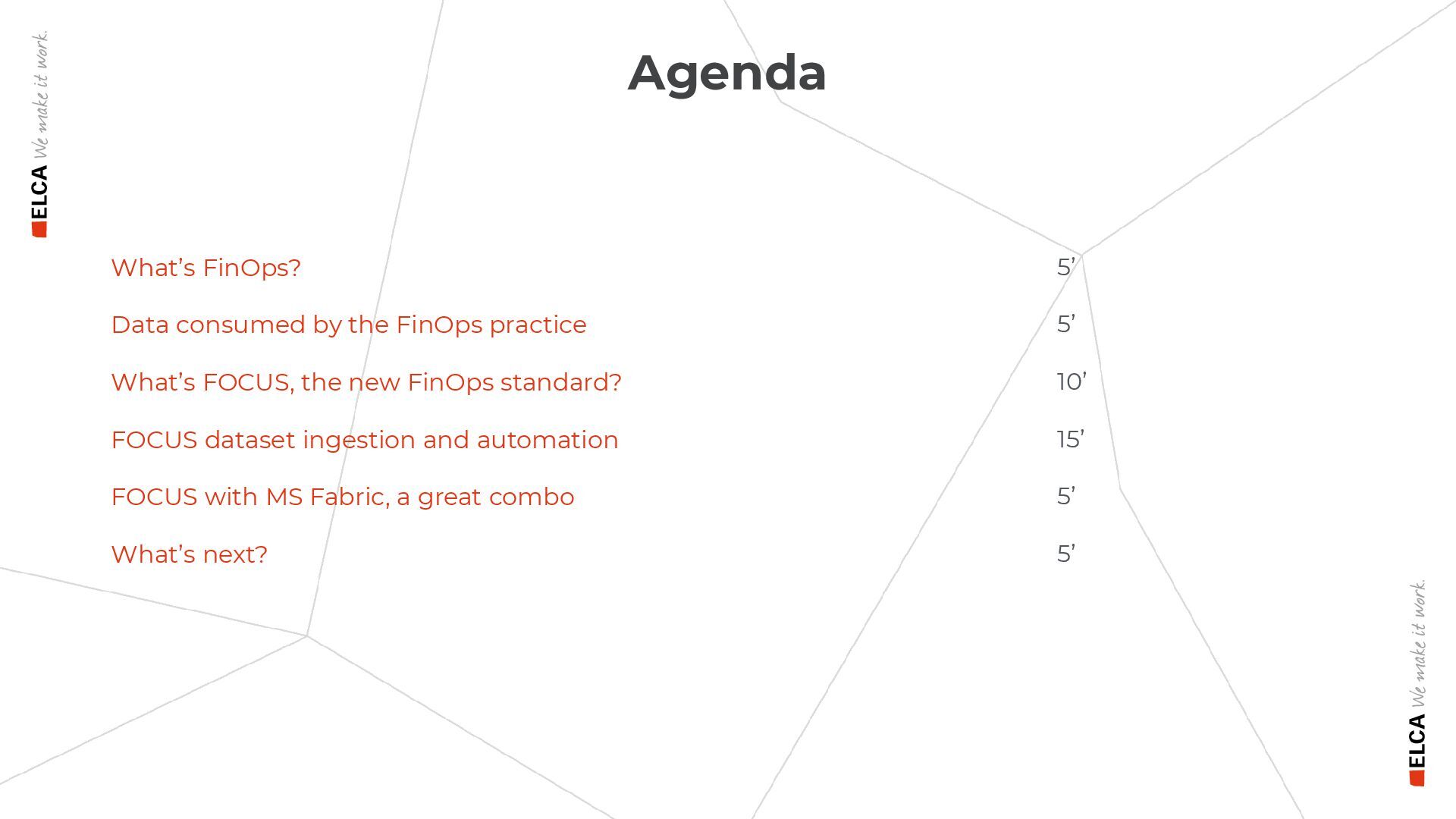
Agenda What’s FinOps? Data consumed by the FinOps practice What’s
FOCUS, the new FinOps standard? FOCUS dataset ingestion and automation FOCUS with MS Fabric, a great combo What’s next? 5’ 5’ 10’ 15’ 5’ 5’ -
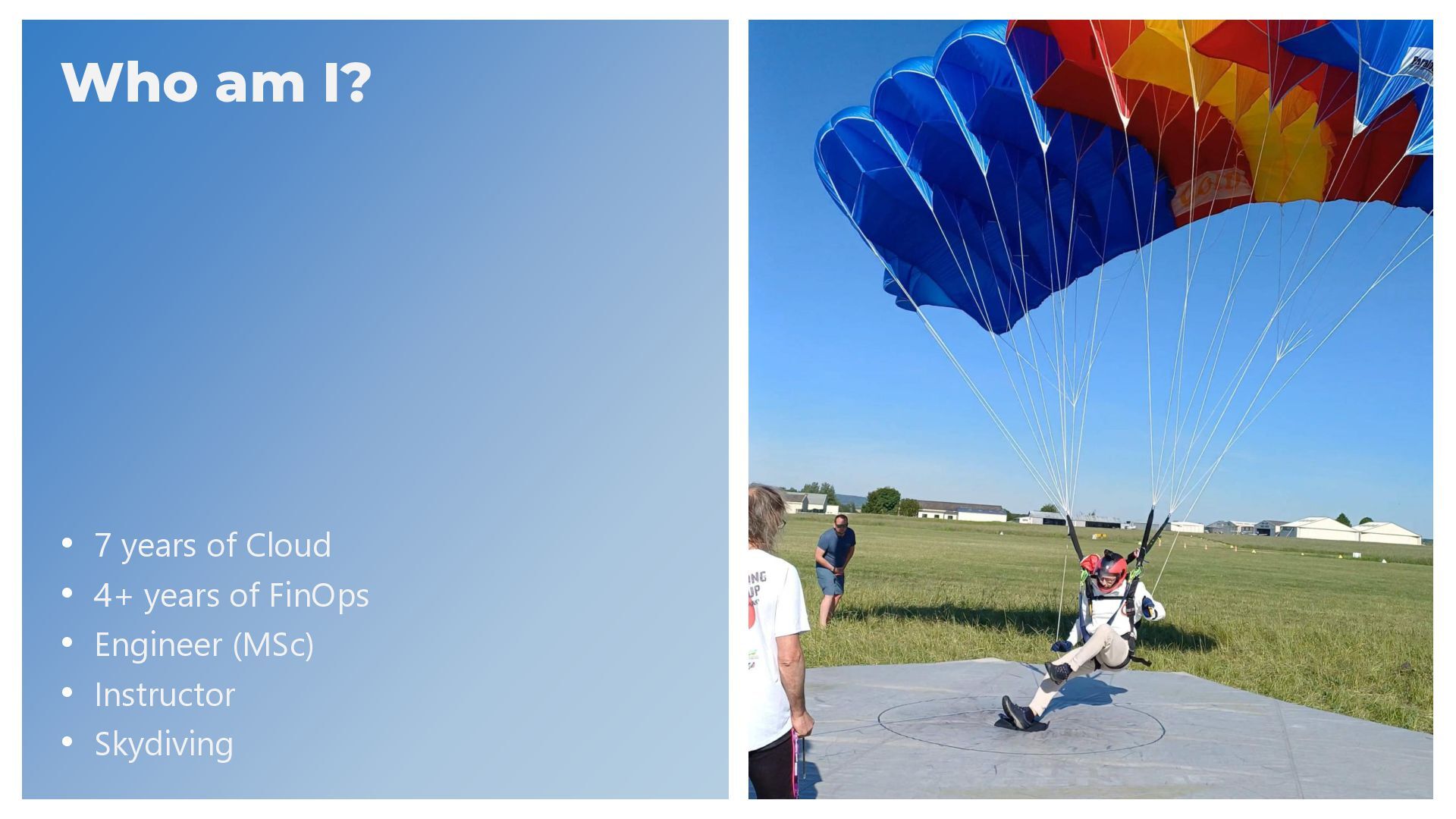
3 Who am I? • 7 years of Cloud •
4+ years of FinOps • Engineer (MSc) • Instructor • Skydiving -
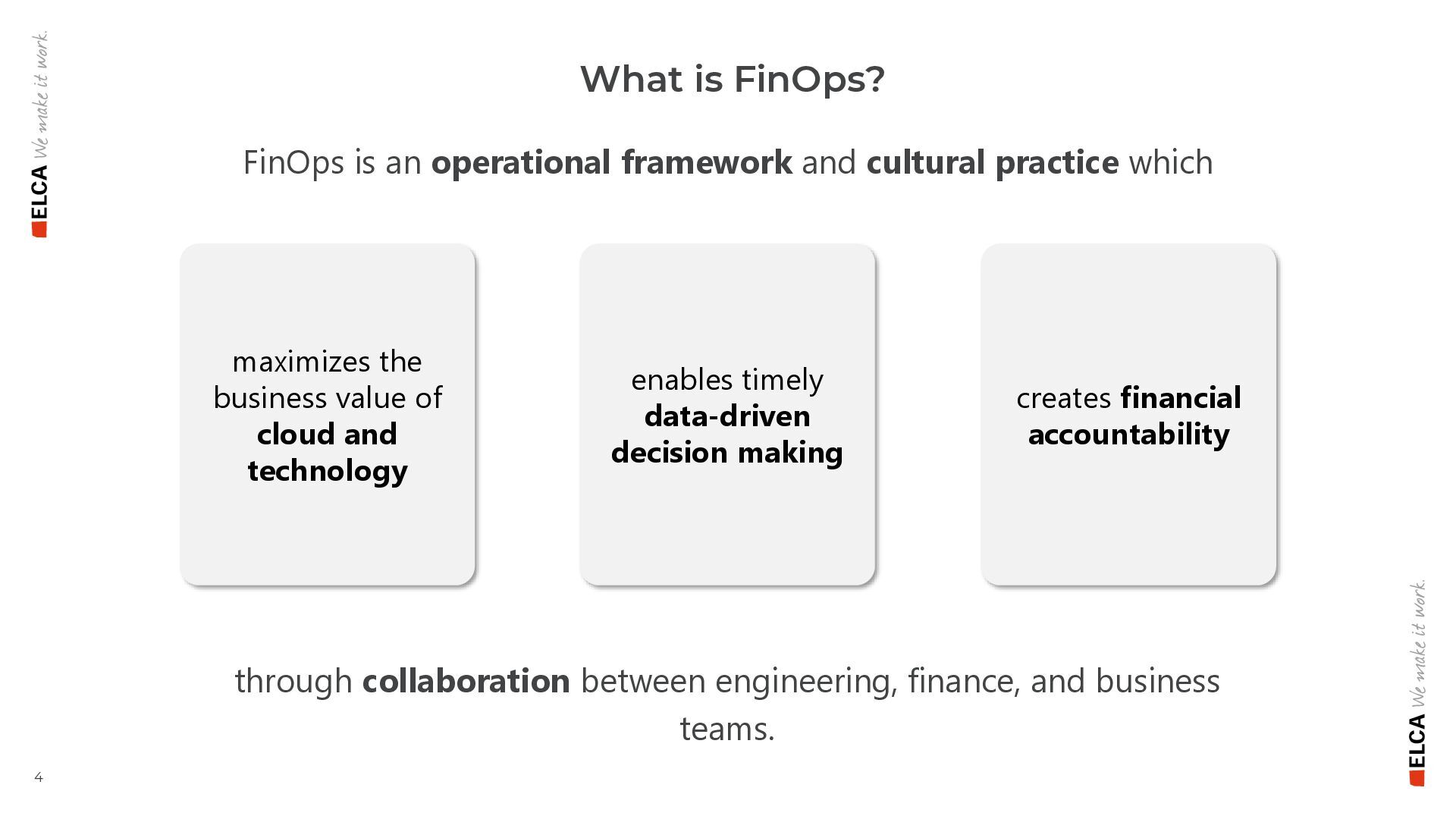
4 What is FinOps? FinOps is an operational framework and
cultural practice which creates financial accountability through collaboration between engineering, finance, and business teams. enables timely data-driven decision making maximizes the business value of cloud and technology -
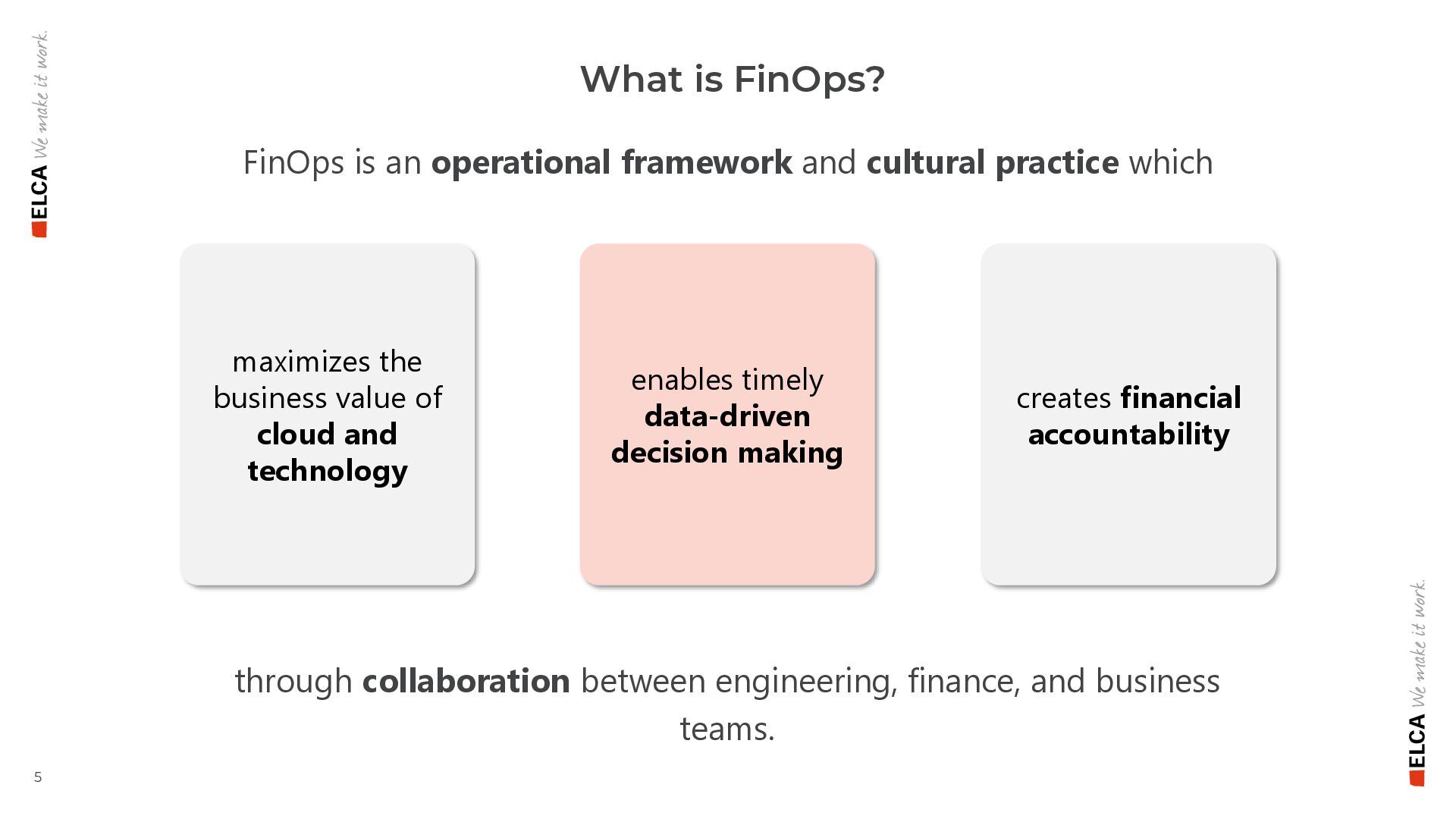
5 What is FinOps? FinOps is an operational framework and
cultural practice which creates financial accountability through collaboration between engineering, finance, and business teams. enables timely data-driven decision making maximizes the business value of cloud and technology -
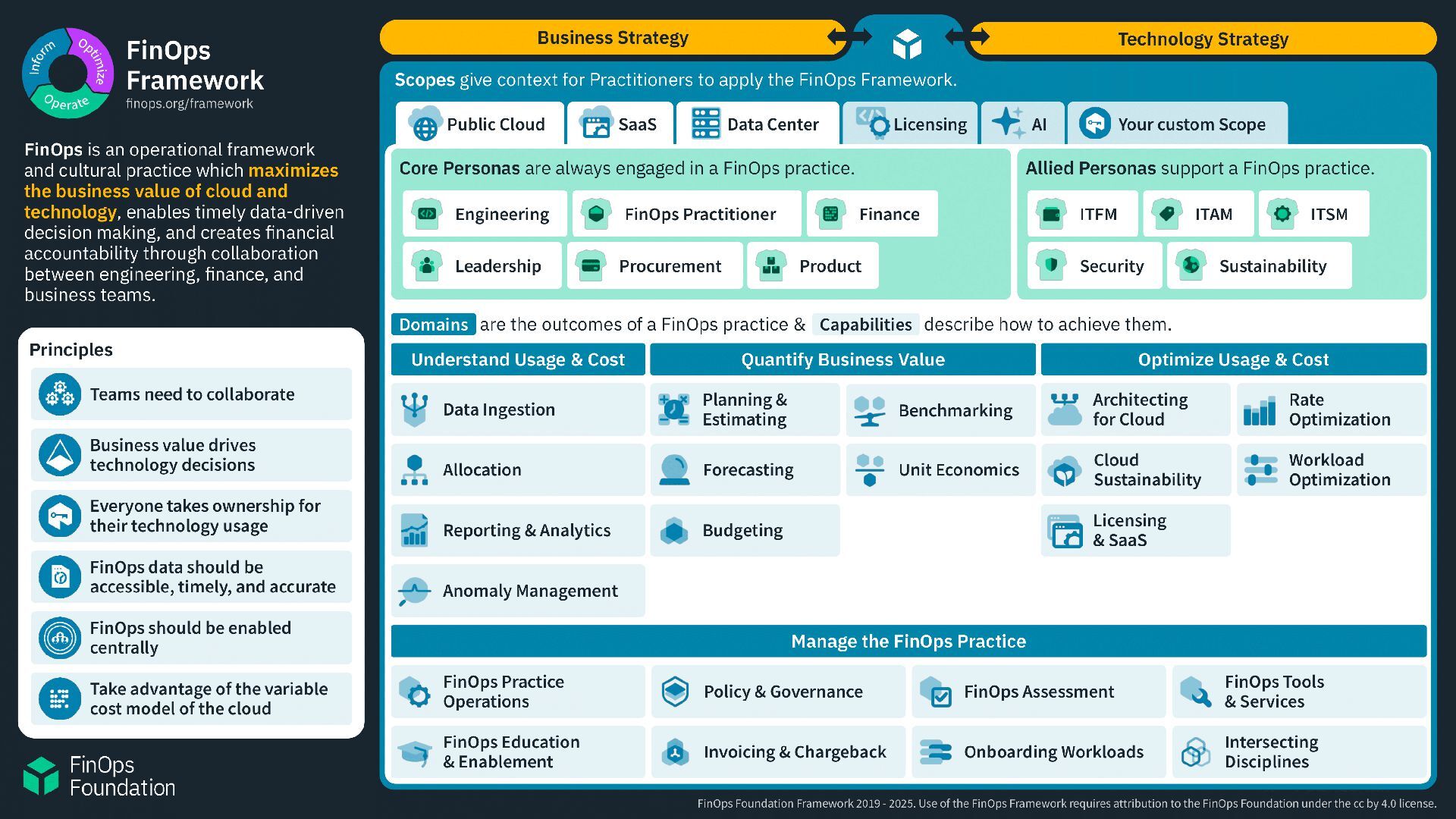
The FinOps Framework A screenshot of a computer AI-generated content
may be incorrect. -
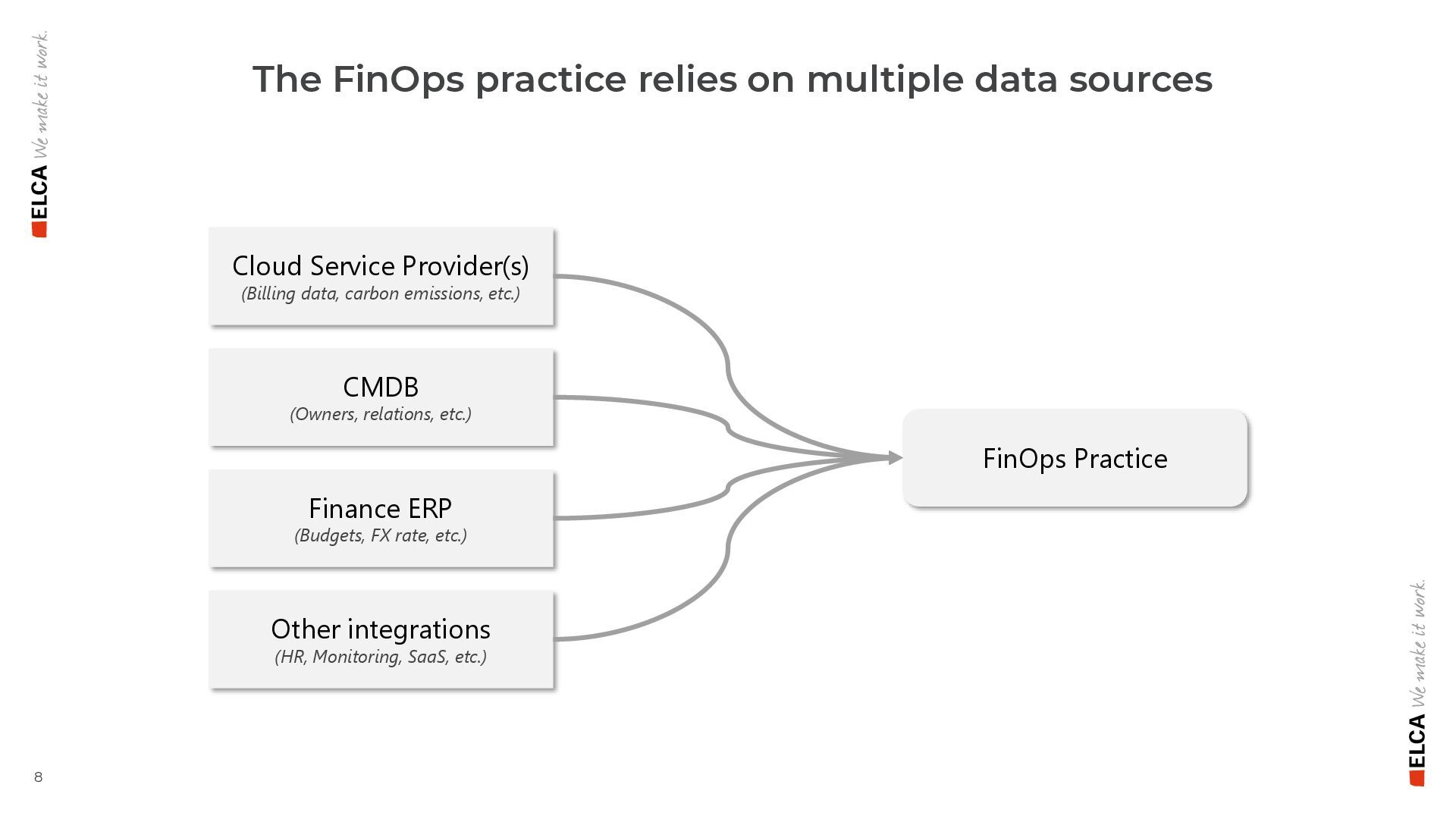
8 The FinOps practice relies on multiple data sources Cloud
Service Provider(s) (Billing data, carbon emissions, etc.) CMDB (Owners, relations, etc.) Finance ERP (Budgets, FX rate, etc.) Other integrations (HR, Monitoring, SaaS, etc.) FinOps Practice -
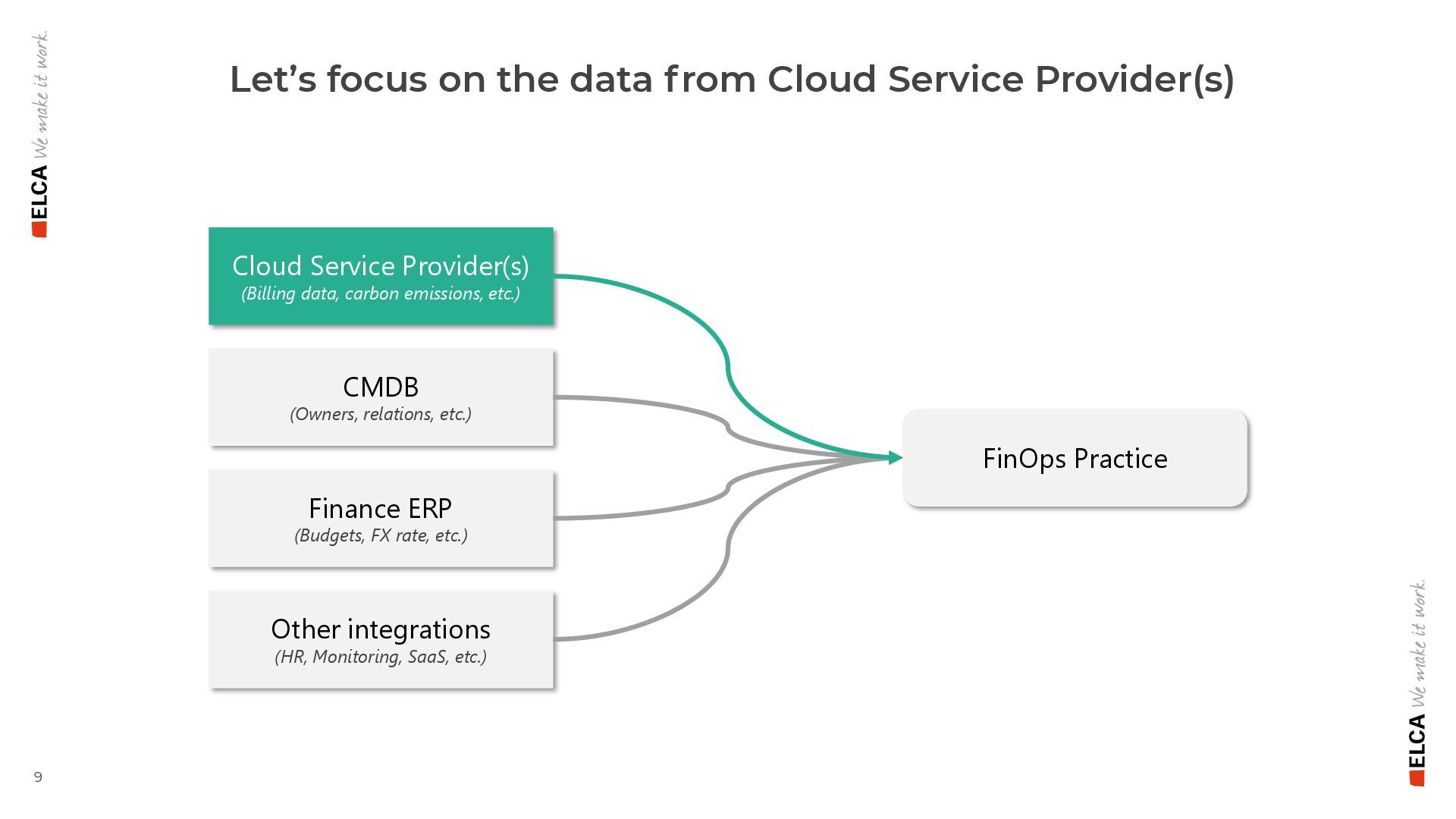
9 Let’s focus on the data from Cloud Service Provider(s)
Cloud Service Provider(s) (Billing data, carbon emissions, etc.) CMDB (Owners, relations, etc.) Finance ERP (Budgets, FX rate, etc.) Other integrations (HR, Monitoring, SaaS, etc.) FinOps Practice -
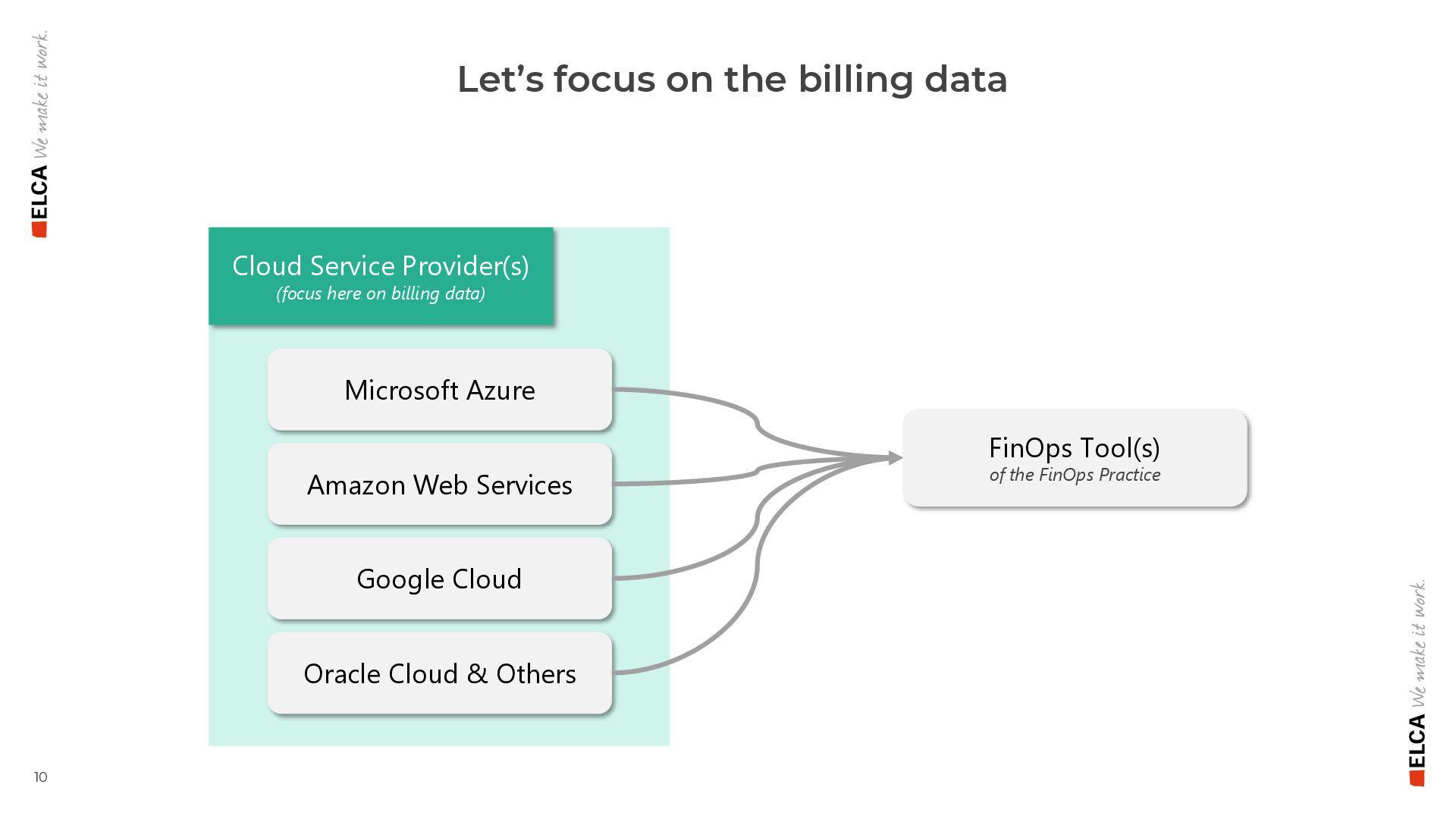
10 Let’s focus on the billing data Cloud Service Provider(s)
(focus here on billing data) Microsoft Azure Amazon Web Services Google Cloud FinOps Tool(s) of the FinOps Practice Oracle Cloud & Others -
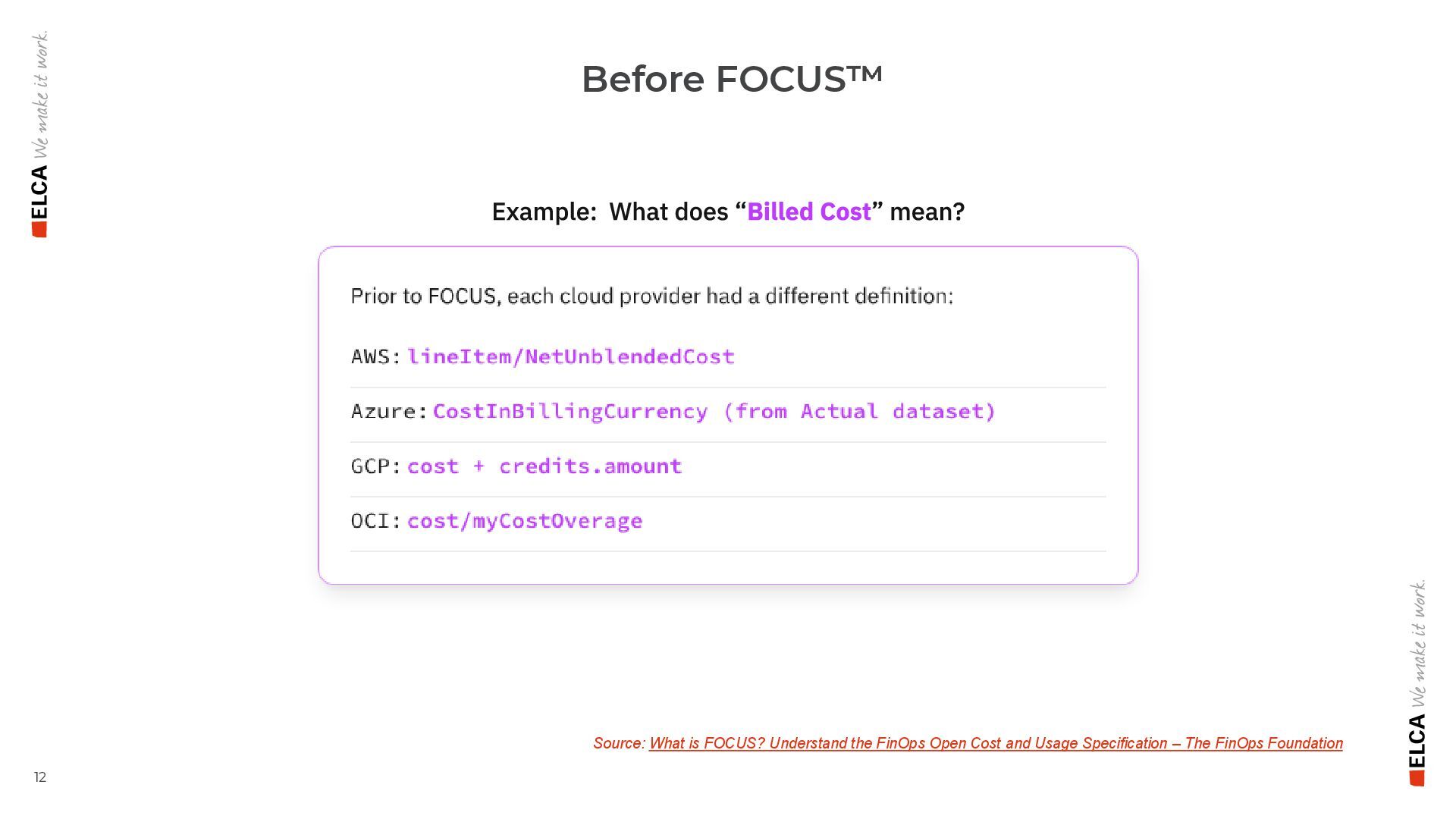
12 Before FOCUS Source: What is FOCUS? Understand the FinOps
Open Cost and Usage Specification – The FinOps Foundation -
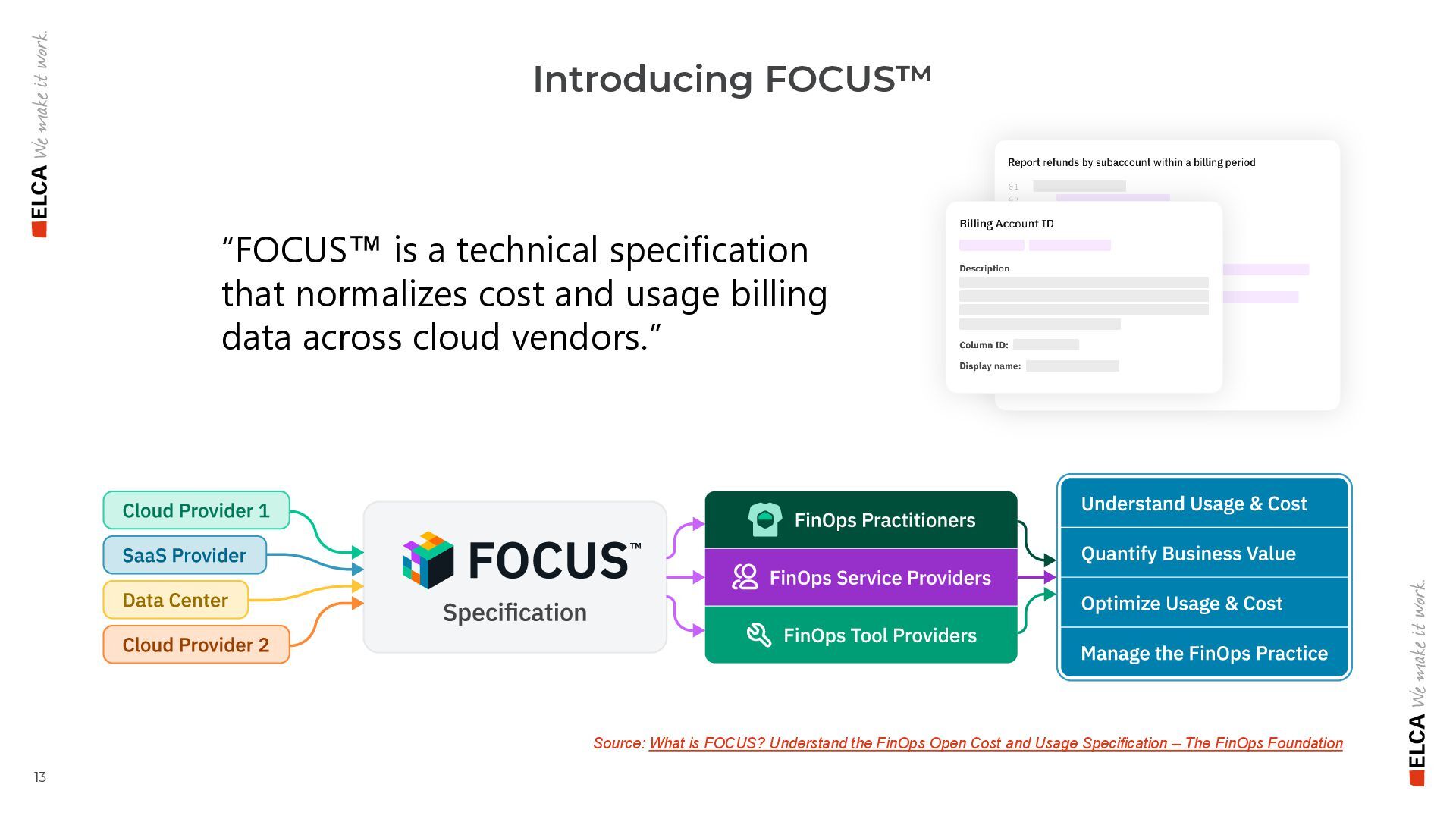
13 Introducing FOCUS Source: What is FOCUS? Understand the FinOps
Open Cost and Usage Specification – The FinOps Foundation “FOCUS is a technical specification that normalizes cost and usage billing data across cloud vendors.” -
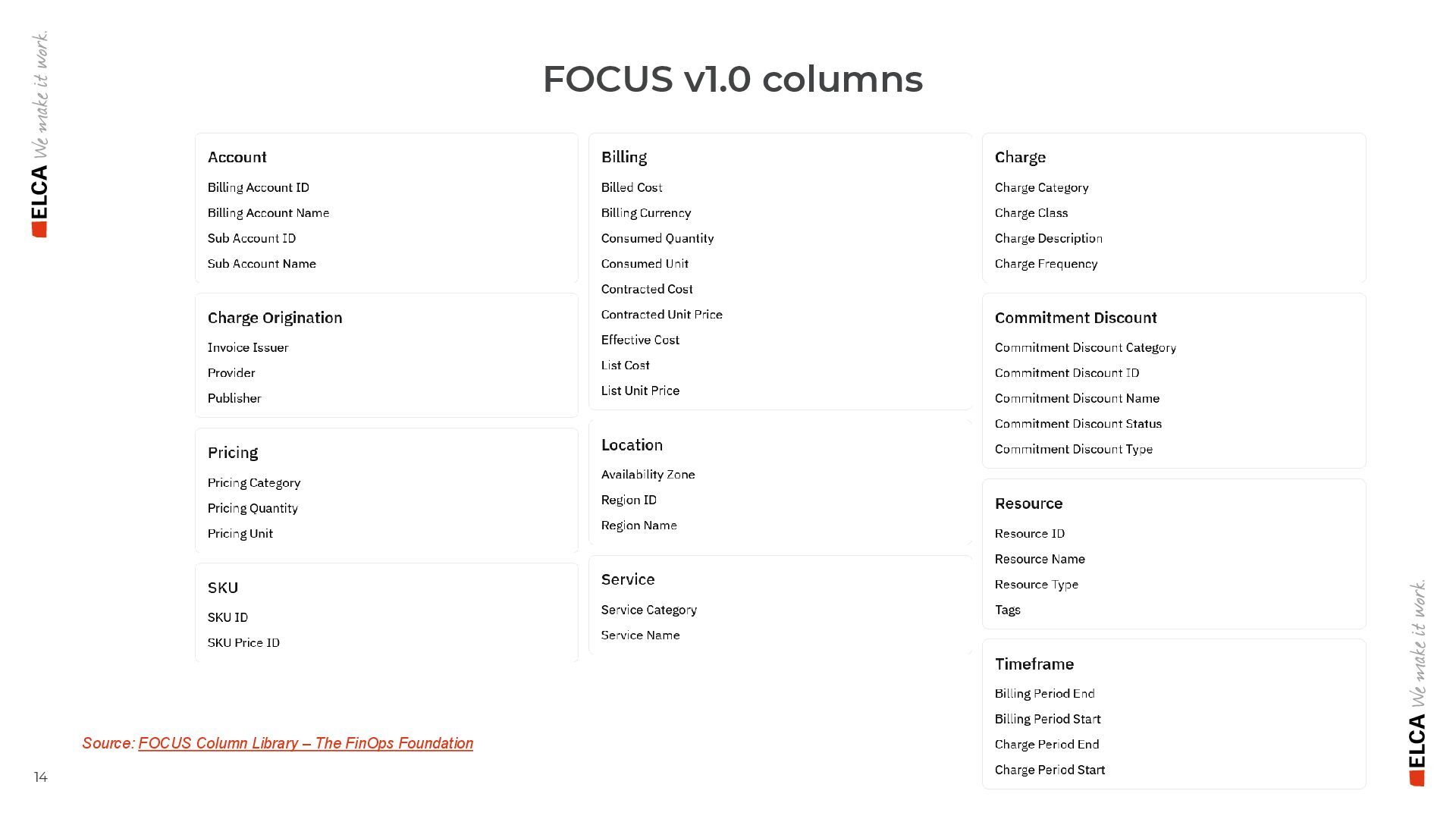
14 FOCUS v1.0 columns Source: FOCUS Column Library – The
FinOps Foundation -
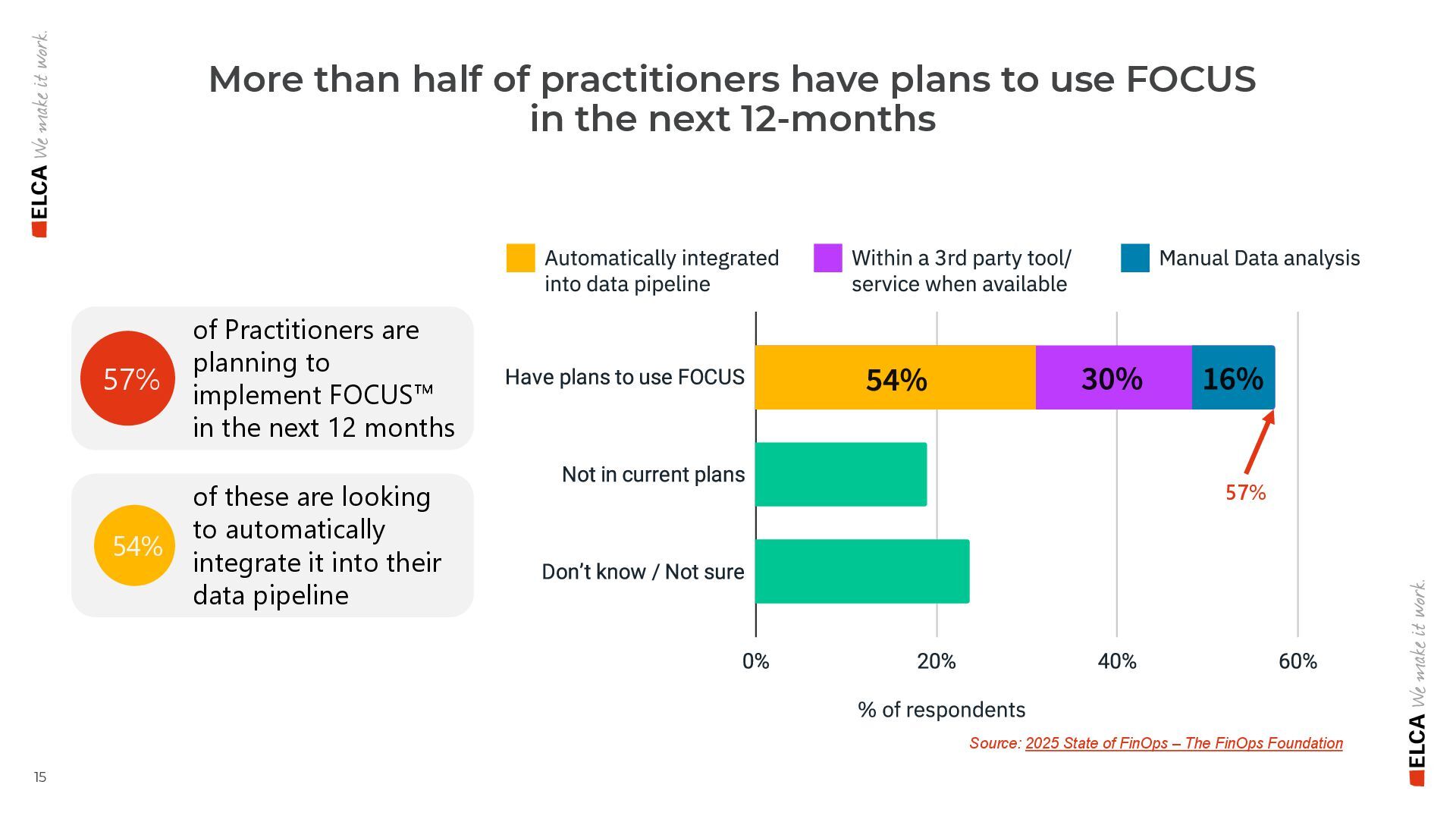
15 More than half of practitioners have plans to use
FOCUS in the next 12-months Source: 2025 State of FinOps – The FinOps Foundation 57% of Practitioners are planning to implement FOCUS in the next 12 months 54% of these are looking to automatically integrate it into their data pipeline 57% -
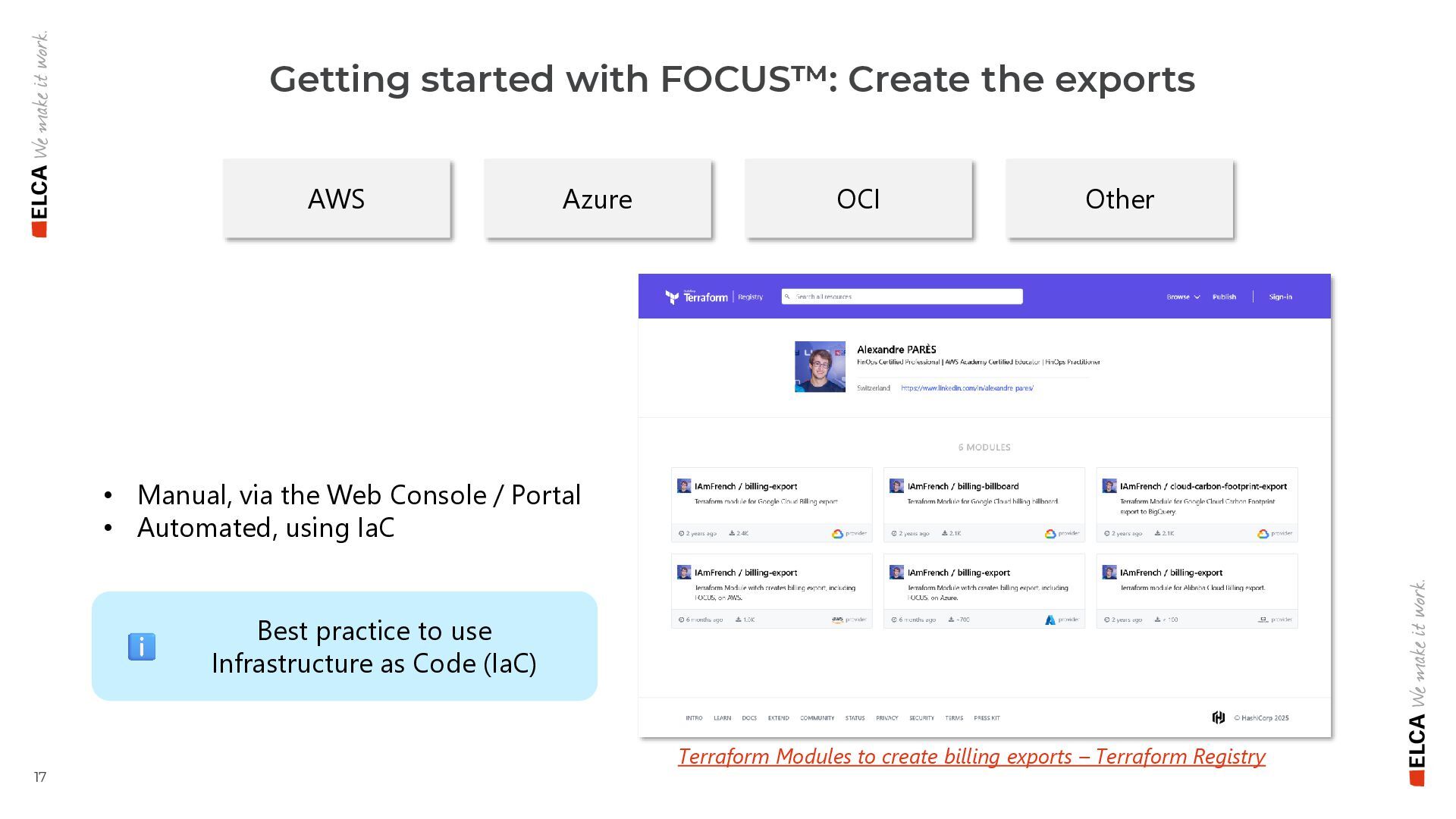
17 Getting started with FOCUS : Create the exports AWS
AWS Azure Azure OCI OCI Other • Manual, via the Web Console / Portal • Automated, using IaC Terraform Modules to create billing exports – Terraform Registry Best practice to use Infrastructure as Code (IaC) -
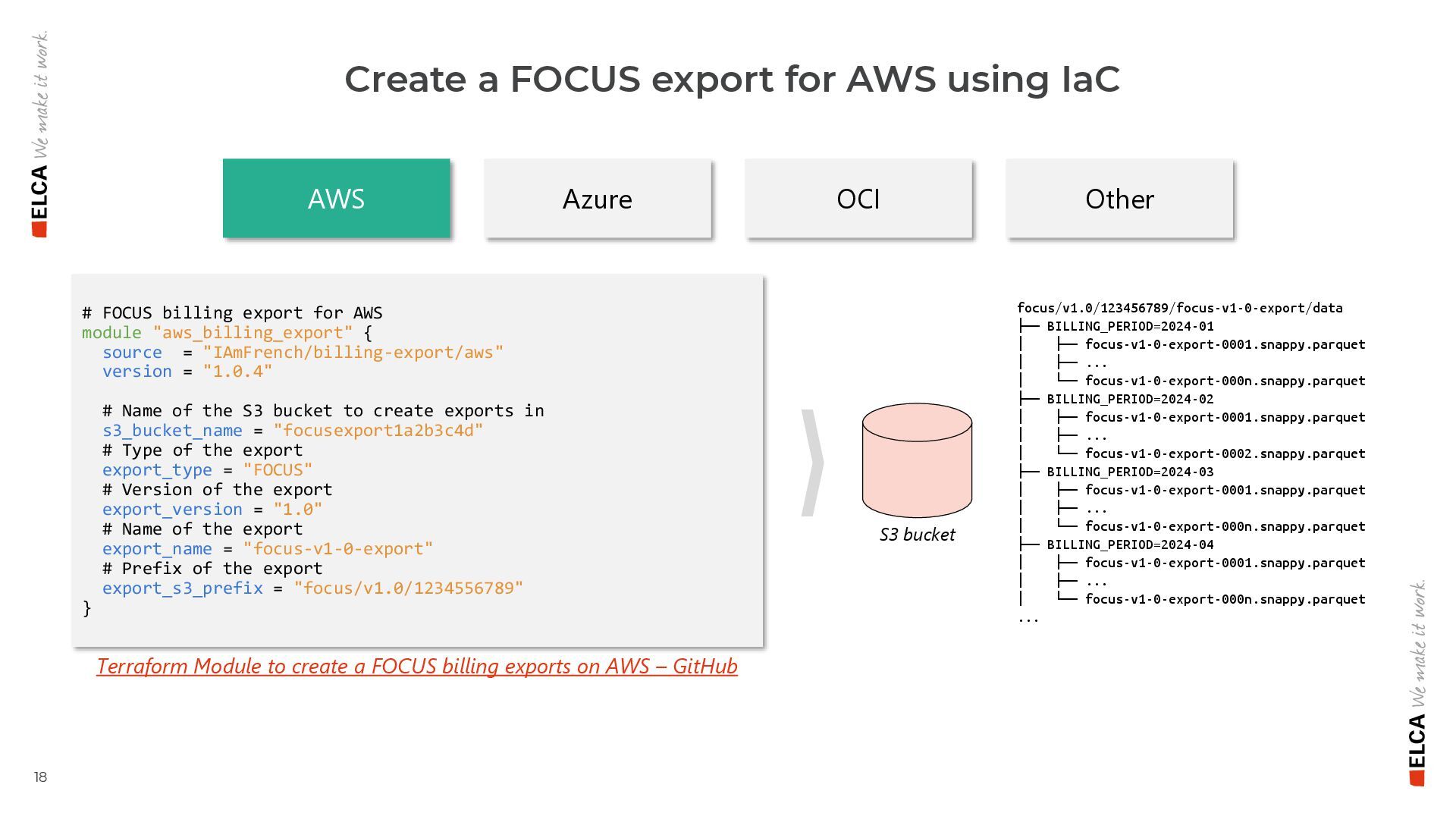
18 Create a FOCUS export for AWS using IaC AWS
Azure Azure OCI OCI Other # FOCUS billing export for AWS module "aws_billing_export" { source = "IAmFrench/billing-export/aws" version = "1.0.4" # Name of the S3 bucket to create exports in s3_bucket_name = "focusexport1a2b3c4d" # Type of the export export_type = "FOCUS" # Version of the export export_version = "1.0" # Name of the export export_name = "focus-v1-0-export" # Prefix of the export export_s3_prefix = "focus/v1.0/1234556789" } focus/v1.0/123456789/focus-v1-0-export/data ├── BILLING_PERIOD=2024-01 │ ├── focus-v1-0-export-0001.snappy.parquet │ ├── ... │ └── focus-v1-0-export-000n.snappy.parquet ├── BILLING_PERIOD=2024-02 │ ├── focus-v1-0-export-0001.snappy.parquet │ ├── ... │ └── focus-v1-0-export-0002.snappy.parquet ├── BILLING_PERIOD=2024-03 │ ├── focus-v1-0-export-0001.snappy.parquet │ ├── ... │ └── focus-v1-0-export-000n.snappy.parquet ├── BILLING_PERIOD=2024-04 │ ├── focus-v1-0-export-0001.snappy.parquet │ ├── ... │ └── focus-v1-0-export-000n.snappy.parquet ... S3 bucket Terraform Module to create a FOCUS billing exports on AWS – GitHub -
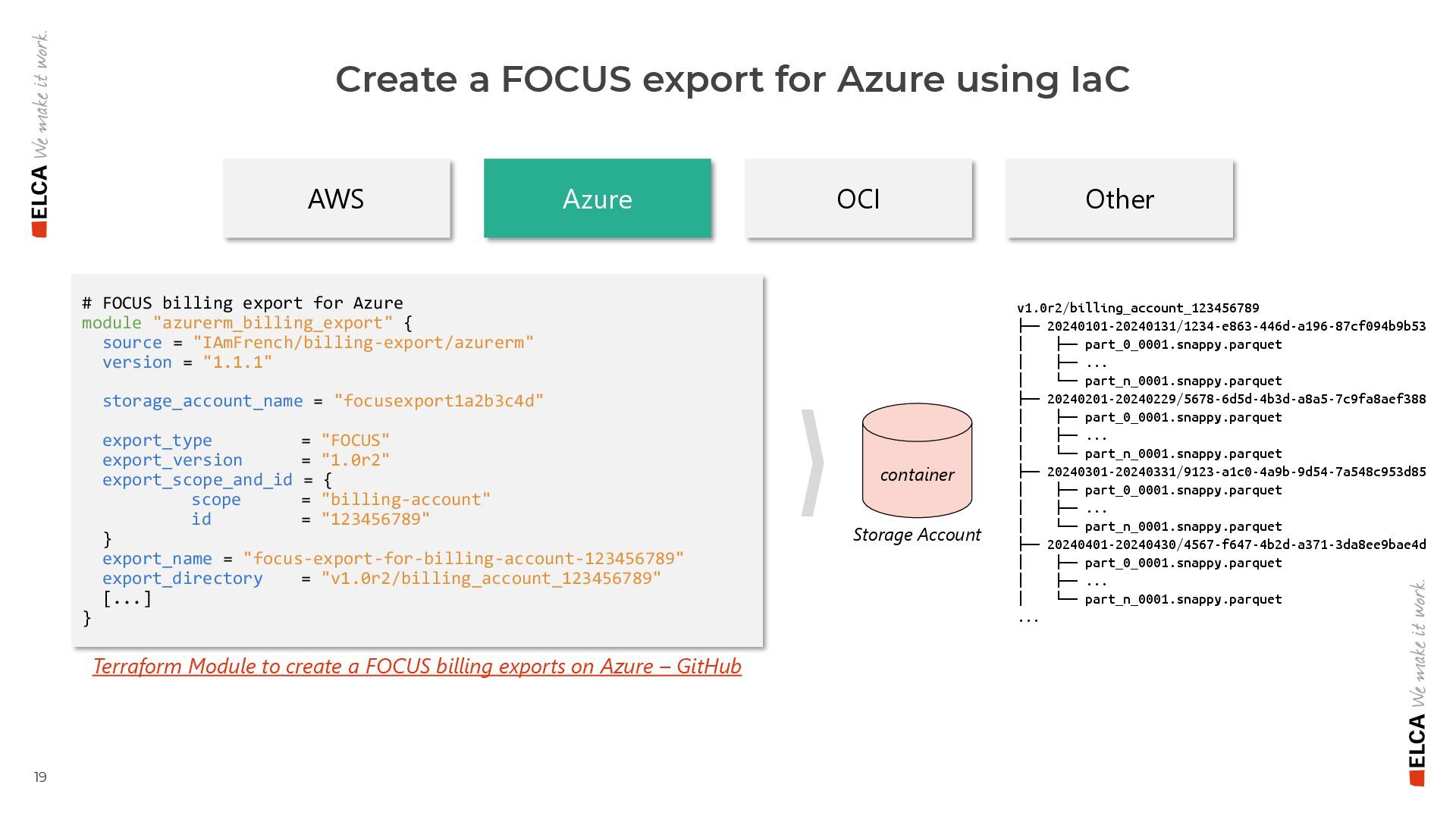
19 Create a FOCUS export for Azure using IaC AWS
AWS Azure OCI OCI Other # FOCUS billing export for Azure module "azurerm_billing_export" { source = "IAmFrench/billing-export/azurerm" version = "1.1.1" storage_account_name = "focusexport1a2b3c4d" export_type = "FOCUS" export_version = "1.0r2" export_scope_and_id = { scope = "billing-account" id = "123456789" } export_name = "focus-export-for-billing-account-123456789" export_directory = "v1.0r2/billing_account_123456789" [...] } v1.0r2/billing_account_123456789 ├── 20240101-20240131/1234-e863-446d-a196-87cf094b9b53 │ ├── part_0_0001.snappy.parquet │ ├── ... │ └── part_n_0001.snappy.parquet ├── 20240201-20240229/5678-6d5d-4b3d-a8a5-7c9fa8aef388 │ ├── part_0_0001.snappy.parquet │ ├── ... │ └── part_n_0001.snappy.parquet ├── 20240301-20240331/9123-a1c0-4a9b-9d54-7a548c953d85 │ ├── part_0_0001.snappy.parquet │ ├── ... │ └── part_n_0001.snappy.parquet ├── 20240401-20240430/4567-f647-4b2d-a371-3da8ee9bae4d │ ├── part_0_0001.snappy.parquet │ ├── ... │ └── part_n_0001.snappy.parquet ... Storage Account container Terraform Module to create a FOCUS billing exports on Azure – GitHub -
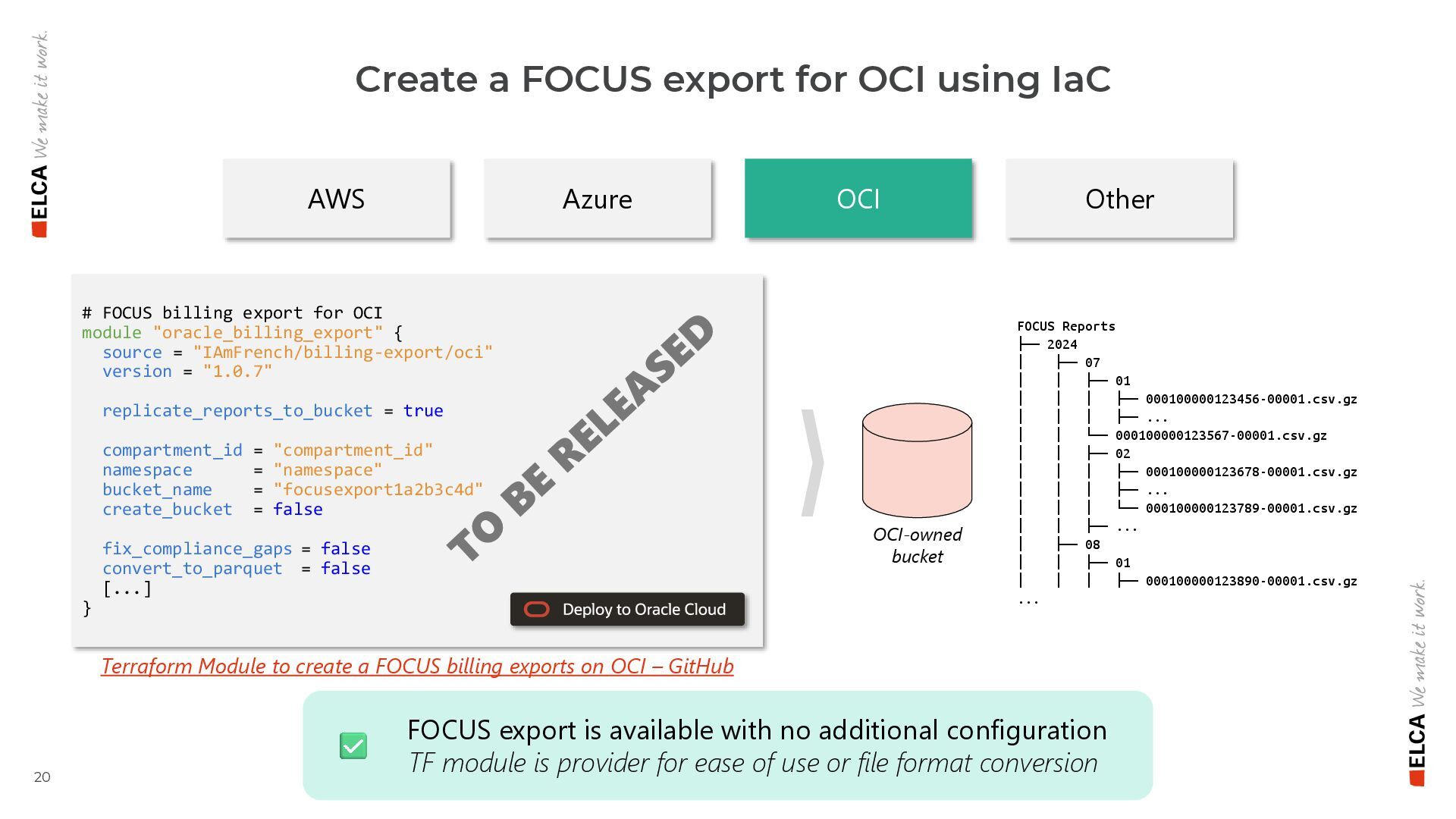
20 Create a FOCUS export for OCI using IaC AWS
AWS Azure Azure OCI Other # FOCUS billing export for OCI module "oracle_billing_export" { source = "IAmFrench/billing-export/oci" version = "1.0.7" replicate_reports_to_bucket = true compartment_id = "compartment_id" namespace = "namespace" bucket_name = "focusexport1a2b3c4d" create_bucket = false fix_compliance_gaps = false convert_to_parquet = false [...] } FOCUS Reports ├── 2024 │ ├── 07 │ │ ├── 01 │ │ │ ├── 000100000123456-00001.csv.gz │ │ │ ├── ... │ │ └── 000100000123567-00001.csv.gz │ │ ├── 02 │ │ │ ├── 000100000123678-00001.csv.gz │ │ │ ├── ... │ │ │ └── 000100000123789-00001.csv.gz │ │ ├── ... │ ├── 08 │ │ ├── 01 │ │ │ ├── 000100000123890-00001.csv.gz ... OCI-owned bucket Terraform Module to create a FOCUS billing exports on OCI – GitHub FOCUS export is available with no additional configuration TF module is provider for ease of use or file format conversion -
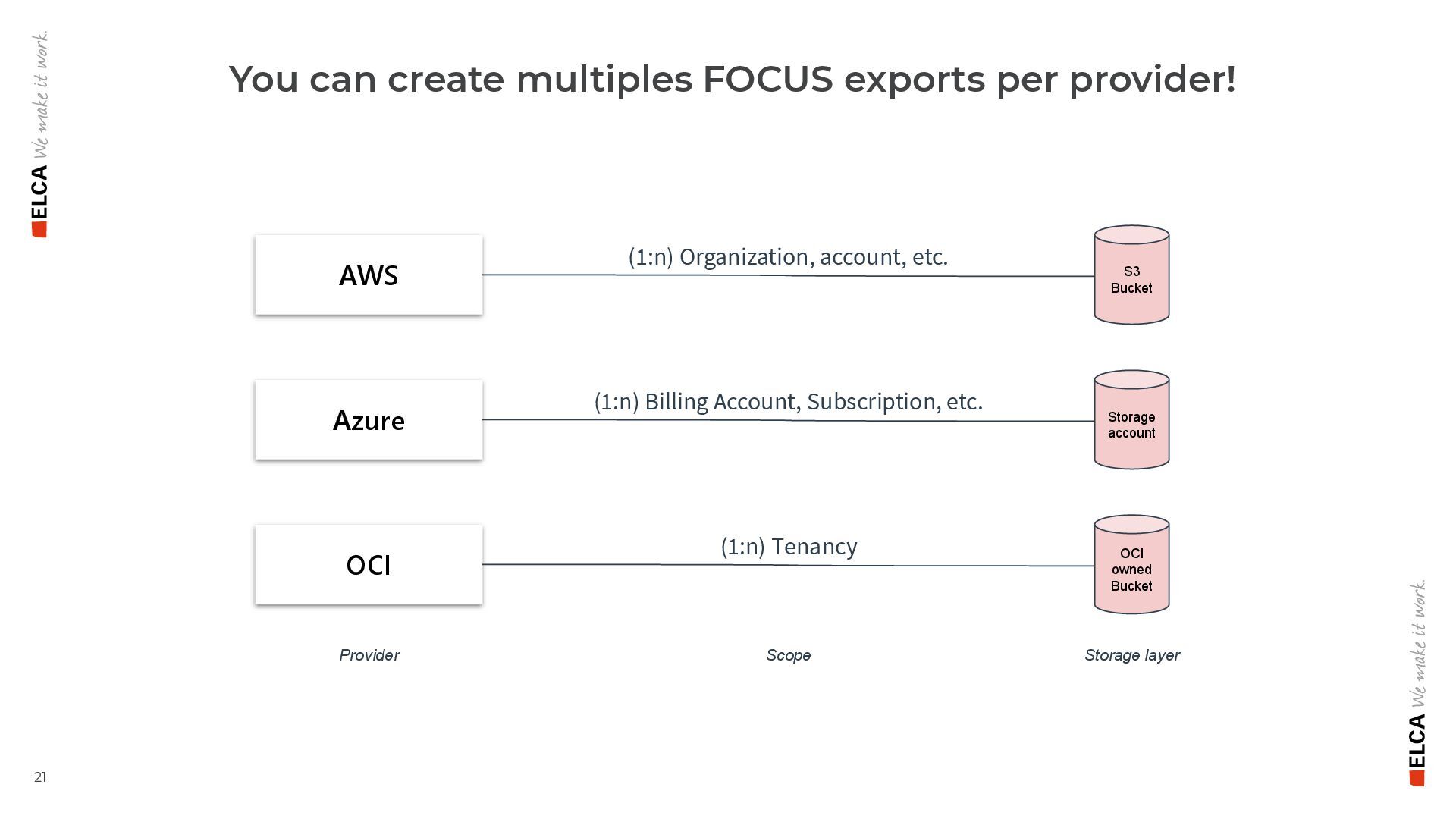
21 You can create multiples FOCUS exports per provider! Provider
Scope Storage layer S3 Bucket AWS (1:n) Organization, account, etc. OCI owned Bucket OCI (1:n) Tenancy Azure (1:n) Billing Account, Subscription, etc. Storage account -
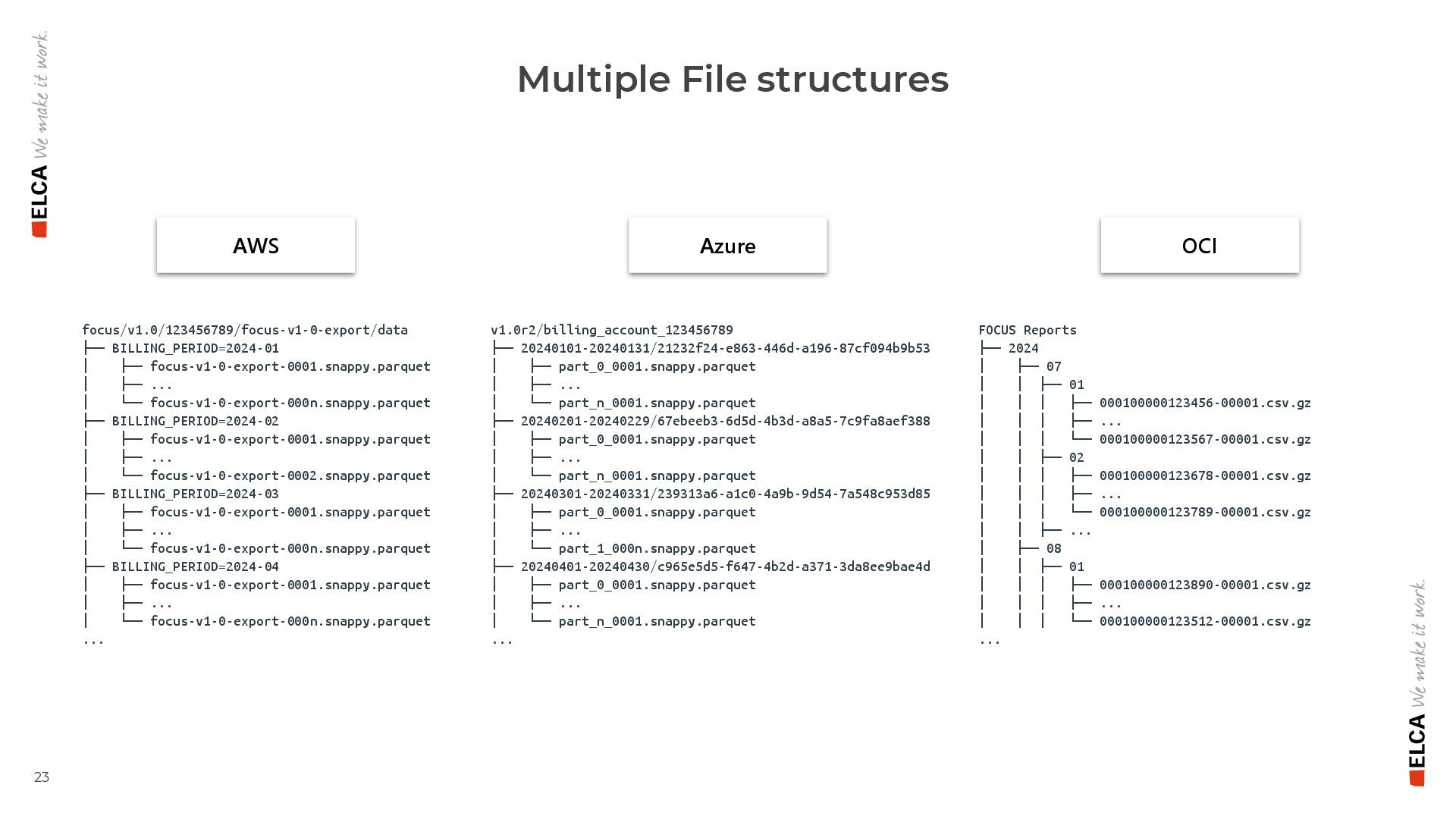
23 Multiple File structures focus/v1.0/123456789/focus-v1-0-export/data ├── BILLING_PERIOD=2024-01 │ ├── focus-v1-0-export-0001.snappy.parquet
│ ├── ... │ └── focus-v1-0-export-000n.snappy.parquet ├── BILLING_PERIOD=2024-02 │ ├── focus-v1-0-export-0001.snappy.parquet │ ├── ... │ └── focus-v1-0-export-0002.snappy.parquet ├── BILLING_PERIOD=2024-03 │ ├── focus-v1-0-export-0001.snappy.parquet │ ├── ... │ └── focus-v1-0-export-000n.snappy.parquet ├── BILLING_PERIOD=2024-04 │ ├── focus-v1-0-export-0001.snappy.parquet │ ├── ... │ └── focus-v1-0-export-000n.snappy.parquet ... v1.0r2/billing_account_123456789 ├── 20240101-20240131/21232f24-e863-446d-a196-87cf094b9b53 │ ├── part_0_0001.snappy.parquet │ ├── ... │ └── part_n_0001.snappy.parquet ├── 20240201-20240229/67ebeeb3-6d5d-4b3d-a8a5-7c9fa8aef388 │ ├── part_0_0001.snappy.parquet │ ├── ... │ └── part_n_0001.snappy.parquet ├── 20240301-20240331/239313a6-a1c0-4a9b-9d54-7a548c953d85 │ ├── part_0_0001.snappy.parquet │ ├── ... │ └── part_1_000n.snappy.parquet ├── 20240401-20240430/c965e5d5-f647-4b2d-a371-3da8ee9bae4d │ ├── part_0_0001.snappy.parquet │ ├── ... │ └── part_n_0001.snappy.parquet ... FOCUS Reports ├── 2024 │ ├── 07 │ │ ├── 01 │ │ │ ├── 000100000123456-00001.csv.gz │ │ │ ├── ... │ │ │ └── 000100000123567-00001.csv.gz │ │ ├── 02 │ │ │ ├── 000100000123678-00001.csv.gz │ │ │ ├── ... │ │ │ └── 000100000123789-00001.csv.gz │ │ ├── ... │ ├── 08 │ │ ├── 01 │ │ │ ├── 000100000123890-00001.csv.gz │ │ │ ├── ... │ │ │ └── 000100000123512-00001.csv.gz ... AWS Azure OCI -
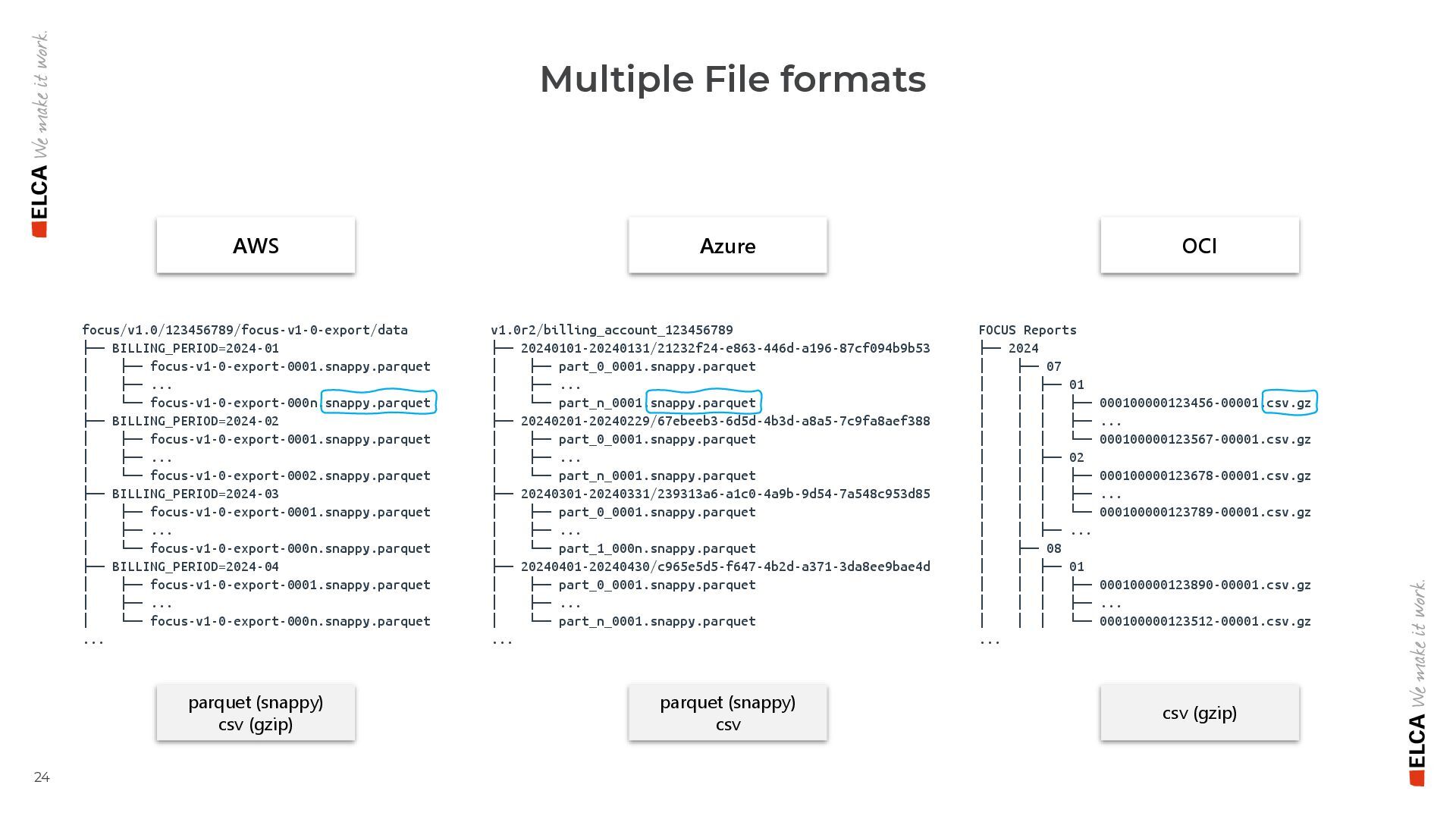
24 Multiple File formats focus/v1.0/123456789/focus-v1-0-export/data ├── BILLING_PERIOD=2024-01 │ ├── focus-v1-0-export-0001.snappy.parquet
│ ├── ... │ └── focus-v1-0-export-000n.snappy.parquet ├── BILLING_PERIOD=2024-02 │ ├── focus-v1-0-export-0001.snappy.parquet │ ├── ... │ └── focus-v1-0-export-0002.snappy.parquet ├── BILLING_PERIOD=2024-03 │ ├── focus-v1-0-export-0001.snappy.parquet │ ├── ... │ └── focus-v1-0-export-000n.snappy.parquet ├── BILLING_PERIOD=2024-04 │ ├── focus-v1-0-export-0001.snappy.parquet │ ├── ... │ └── focus-v1-0-export-000n.snappy.parquet ... v1.0r2/billing_account_123456789 ├── 20240101-20240131/21232f24-e863-446d-a196-87cf094b9b53 │ ├── part_0_0001.snappy.parquet │ ├── ... │ └── part_n_0001.snappy.parquet ├── 20240201-20240229/67ebeeb3-6d5d-4b3d-a8a5-7c9fa8aef388 │ ├── part_0_0001.snappy.parquet │ ├── ... │ └── part_n_0001.snappy.parquet ├── 20240301-20240331/239313a6-a1c0-4a9b-9d54-7a548c953d85 │ ├── part_0_0001.snappy.parquet │ ├── ... │ └── part_1_000n.snappy.parquet ├── 20240401-20240430/c965e5d5-f647-4b2d-a371-3da8ee9bae4d │ ├── part_0_0001.snappy.parquet │ ├── ... │ └── part_n_0001.snappy.parquet ... FOCUS Reports ├── 2024 │ ├── 07 │ │ ├── 01 │ │ │ ├── 000100000123456-00001.csv.gz │ │ │ ├── ... │ │ │ └── 000100000123567-00001.csv.gz │ │ ├── 02 │ │ │ ├── 000100000123678-00001.csv.gz │ │ │ ├── ... │ │ │ └── 000100000123789-00001.csv.gz │ │ ├── ... │ ├── 08 │ │ ├── 01 │ │ │ ├── 000100000123890-00001.csv.gz │ │ │ ├── ... │ │ │ └── 000100000123512-00001.csv.gz ... AWS Azure OCI parquet (snappy) csv (gzip) parquet (snappy) csv csv (gzip) -
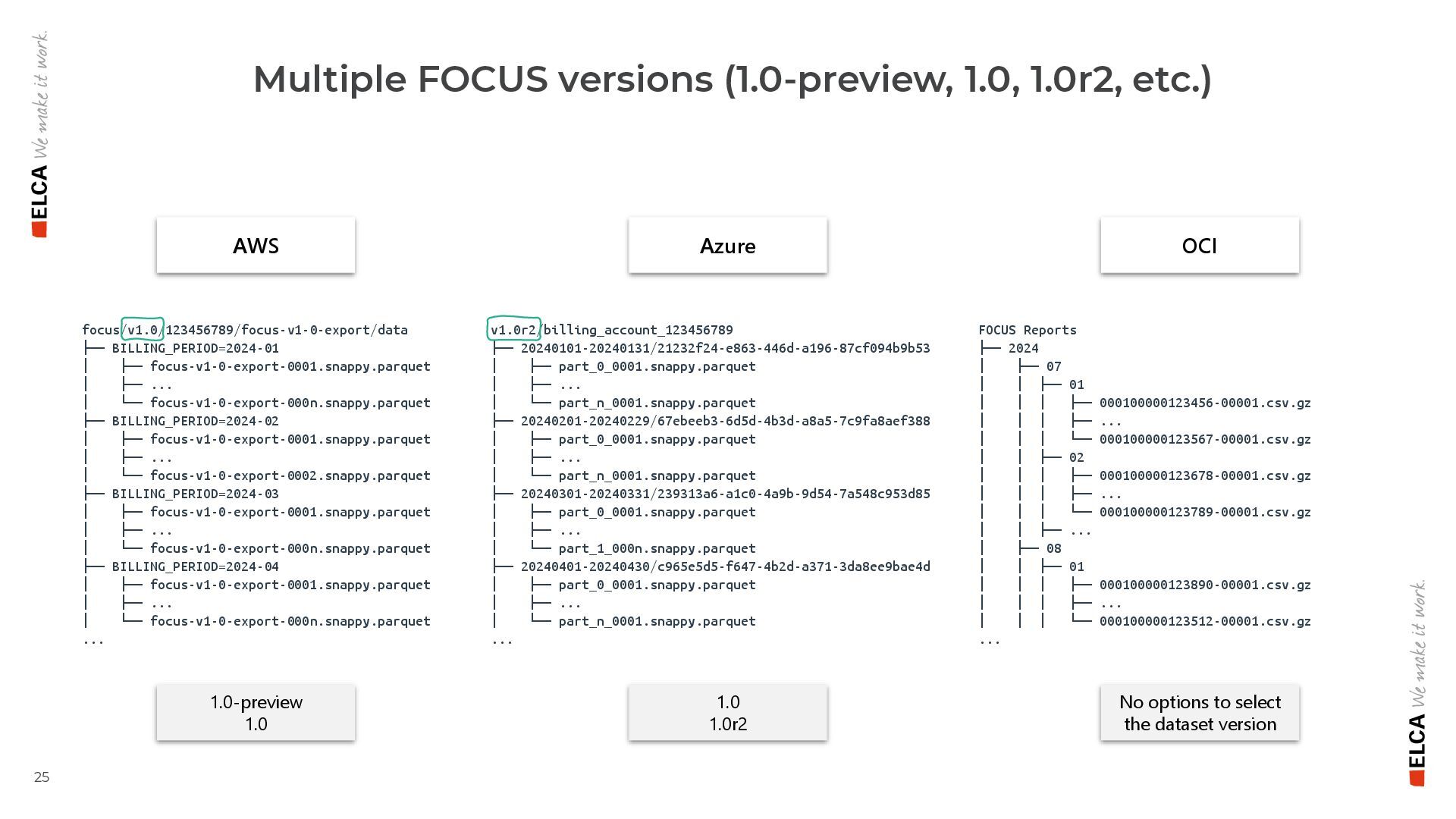
25 Multiple FOCUS versions (1.0-preview, 1.0, 1.0r2, etc.) focus/v1.0/123456789/focus-v1-0-export/data ├──
BILLING_PERIOD=2024-01 │ ├── focus-v1-0-export-0001.snappy.parquet │ ├── ... │ └── focus-v1-0-export-000n.snappy.parquet ├── BILLING_PERIOD=2024-02 │ ├── focus-v1-0-export-0001.snappy.parquet │ ├── ... │ └── focus-v1-0-export-0002.snappy.parquet ├── BILLING_PERIOD=2024-03 │ ├── focus-v1-0-export-0001.snappy.parquet │ ├── ... │ └── focus-v1-0-export-000n.snappy.parquet ├── BILLING_PERIOD=2024-04 │ ├── focus-v1-0-export-0001.snappy.parquet │ ├── ... │ └── focus-v1-0-export-000n.snappy.parquet ... v1.0r2/billing_account_123456789 ├── 20240101-20240131/21232f24-e863-446d-a196-87cf094b9b53 │ ├── part_0_0001.snappy.parquet │ ├── ... │ └── part_n_0001.snappy.parquet ├── 20240201-20240229/67ebeeb3-6d5d-4b3d-a8a5-7c9fa8aef388 │ ├── part_0_0001.snappy.parquet │ ├── ... │ └── part_n_0001.snappy.parquet ├── 20240301-20240331/239313a6-a1c0-4a9b-9d54-7a548c953d85 │ ├── part_0_0001.snappy.parquet │ ├── ... │ └── part_1_000n.snappy.parquet ├── 20240401-20240430/c965e5d5-f647-4b2d-a371-3da8ee9bae4d │ ├── part_0_0001.snappy.parquet │ ├── ... │ └── part_n_0001.snappy.parquet ... FOCUS Reports ├── 2024 │ ├── 07 │ │ ├── 01 │ │ │ ├── 000100000123456-00001.csv.gz │ │ │ ├── ... │ │ │ └── 000100000123567-00001.csv.gz │ │ ├── 02 │ │ │ ├── 000100000123678-00001.csv.gz │ │ │ ├── ... │ │ │ └── 000100000123789-00001.csv.gz │ │ ├── ... │ ├── 08 │ │ ├── 01 │ │ │ ├── 000100000123890-00001.csv.gz │ │ │ ├── ... │ │ │ └── 000100000123512-00001.csv.gz ... AWS Azure OCI 1.0-preview 1.0 1.0 1.0r2 No options to select the dataset version -
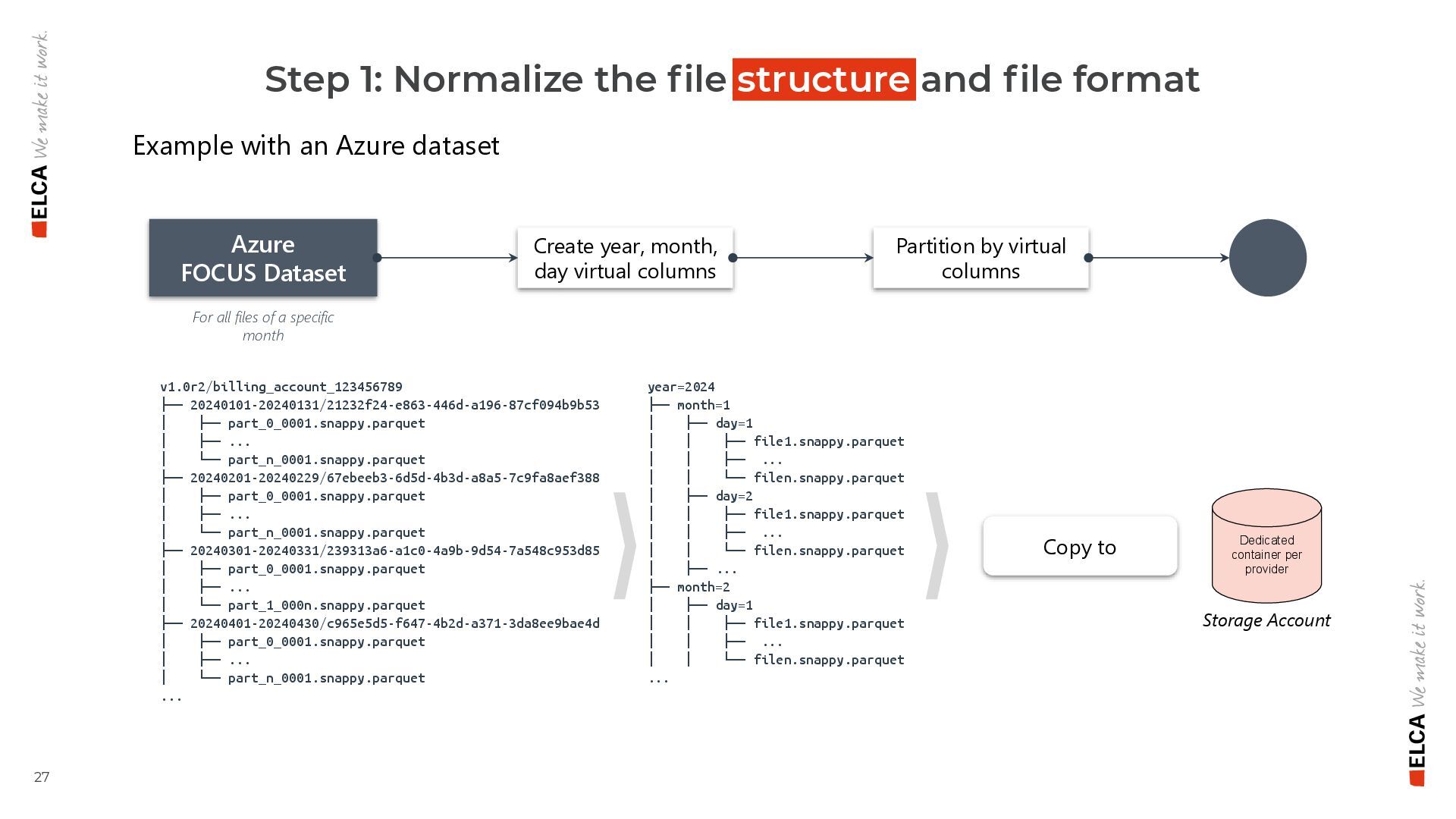
27 Step 1: Normalize the file structure and file format
year=2024 ├── month=1 │ ├── day=1 │ │ ├── file1.snappy.parquet │ │ ├── ... │ │ └── filen.snappy.parquet │ ├── day=2 │ │ ├── file1.snappy.parquet │ │ ├── ... │ │ └── filen.snappy.parquet │ ├── ... ├── month=2 │ ├── day=1 │ │ ├── file1.snappy.parquet │ │ ├── ... │ │ └── filen.snappy.parquet ... Azure FOCUS Dataset For all files of a specific month Create year, month, day virtual columns Partition by virtual columns v1.0r2/billing_account_123456789 ├── 20240101-20240131/21232f24-e863-446d-a196-87cf094b9b53 │ ├── part_0_0001.snappy.parquet │ ├── ... │ └── part_n_0001.snappy.parquet ├── 20240201-20240229/67ebeeb3-6d5d-4b3d-a8a5-7c9fa8aef388 │ ├── part_0_0001.snappy.parquet │ ├── ... │ └── part_n_0001.snappy.parquet ├── 20240301-20240331/239313a6-a1c0-4a9b-9d54-7a548c953d85 │ ├── part_0_0001.snappy.parquet │ ├── ... │ └── part_1_000n.snappy.parquet ├── 20240401-20240430/c965e5d5-f647-4b2d-a371-3da8ee9bae4d │ ├── part_0_0001.snappy.parquet │ ├── ... │ └── part_n_0001.snappy.parquet ... Example with an Azure dataset Dedicated container per provider Storage Account Copy to -
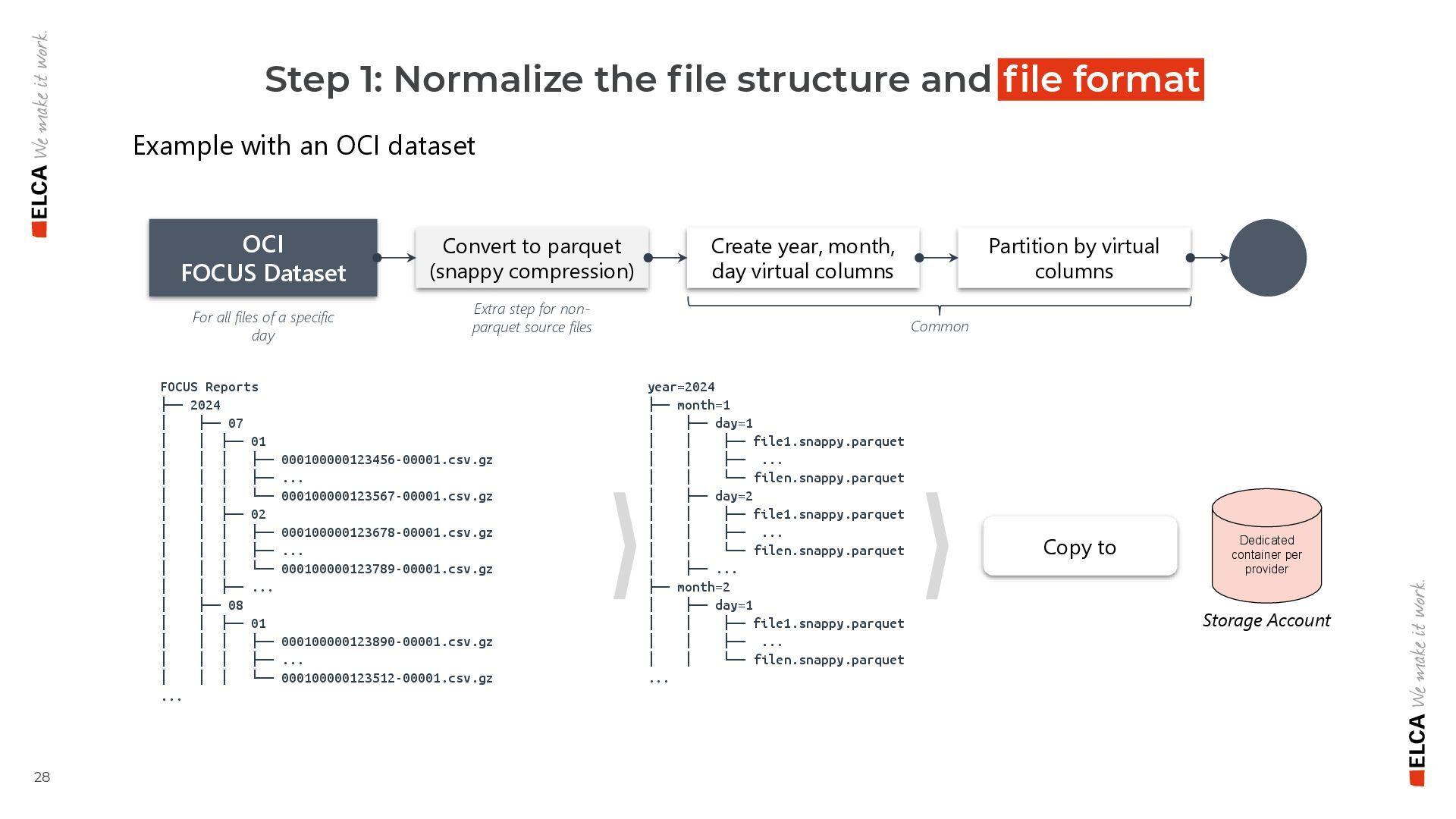
28 Step 1: Normalize the file structure and file format
OCI FOCUS Dataset For all files of a specific day Create year, month, day virtual columns Partition by virtual columns Example with an OCI dataset FOCUS Reports ├── 2024 │ ├── 07 │ │ ├── 01 │ │ │ ├── 000100000123456-00001.csv.gz │ │ │ ├── ... │ │ │ └── 000100000123567-00001.csv.gz │ │ ├── 02 │ │ │ ├── 000100000123678-00001.csv.gz │ │ │ ├── ... │ │ │ └── 000100000123789-00001.csv.gz │ │ ├── ... │ ├── 08 │ │ ├── 01 │ │ │ ├── 000100000123890-00001.csv.gz │ │ │ ├── ... │ │ │ └── 000100000123512-00001.csv.gz ... year=2024 ├── month=1 │ ├── day=1 │ │ ├── file1.snappy.parquet │ │ ├── ... │ │ └── filen.snappy.parquet │ ├── day=2 │ │ ├── file1.snappy.parquet │ │ ├── ... │ │ └── filen.snappy.parquet │ ├── ... ├── month=2 │ ├── day=1 │ │ ├── file1.snappy.parquet │ │ ├── ... │ │ └── filen.snappy.parquet ... Dedicated container per provider Storage Account Copy to Convert to parquet (snappy compression) Extra step for non- parquet source files Common -
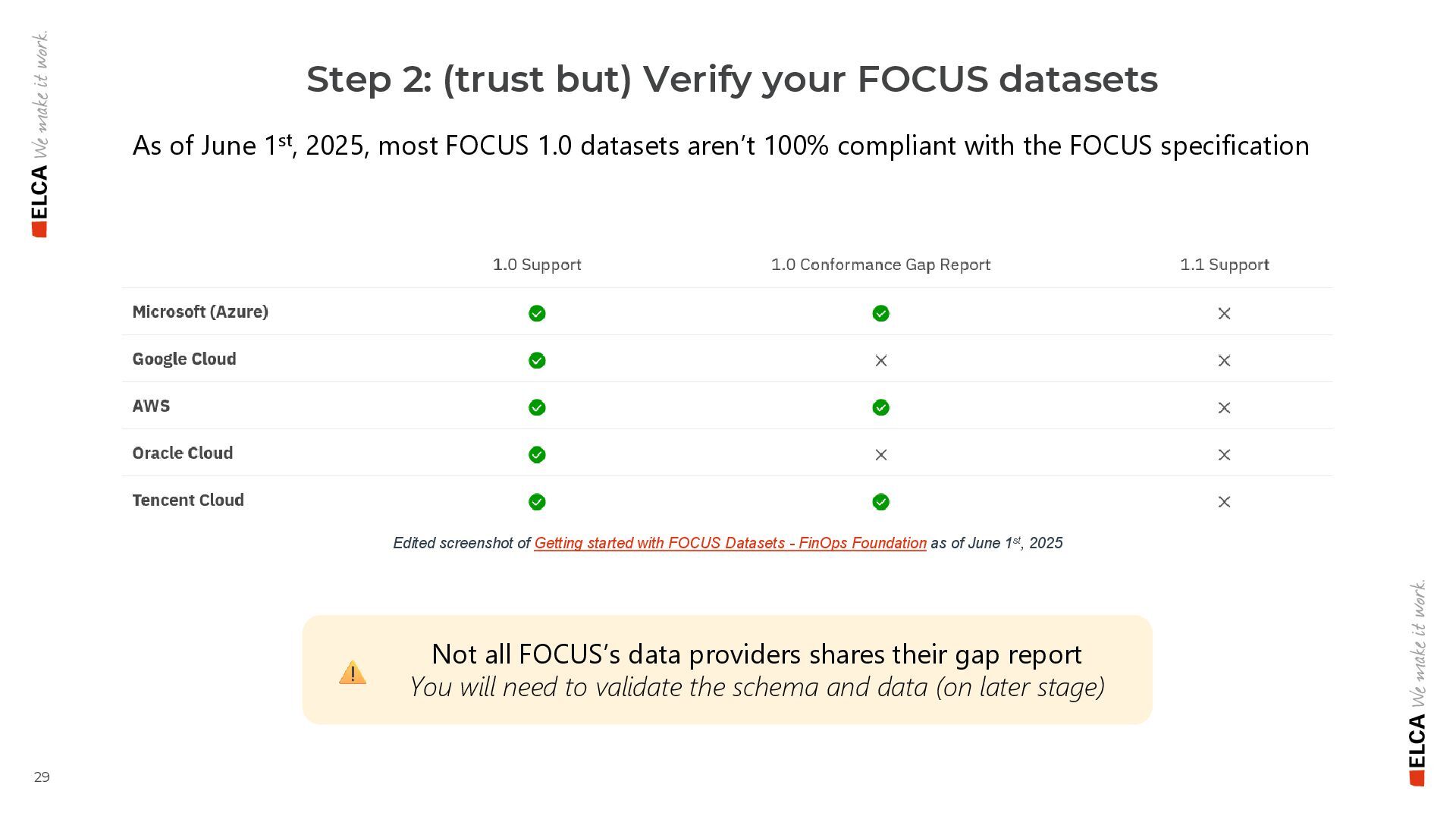
29 Step 2: (trust but) Verify your FOCUS datasets Edited
screenshot of Getting started with FOCUS Datasets - FinOps Foundation as of June 1st, 2025 As of June 1st, 2025, most FOCUS 1.0 datasets aren’t 100% compliant with the FOCUS specification Not all FOCUS’s data providers shares their gap report You will need to validate the schema and data (on later stage) -
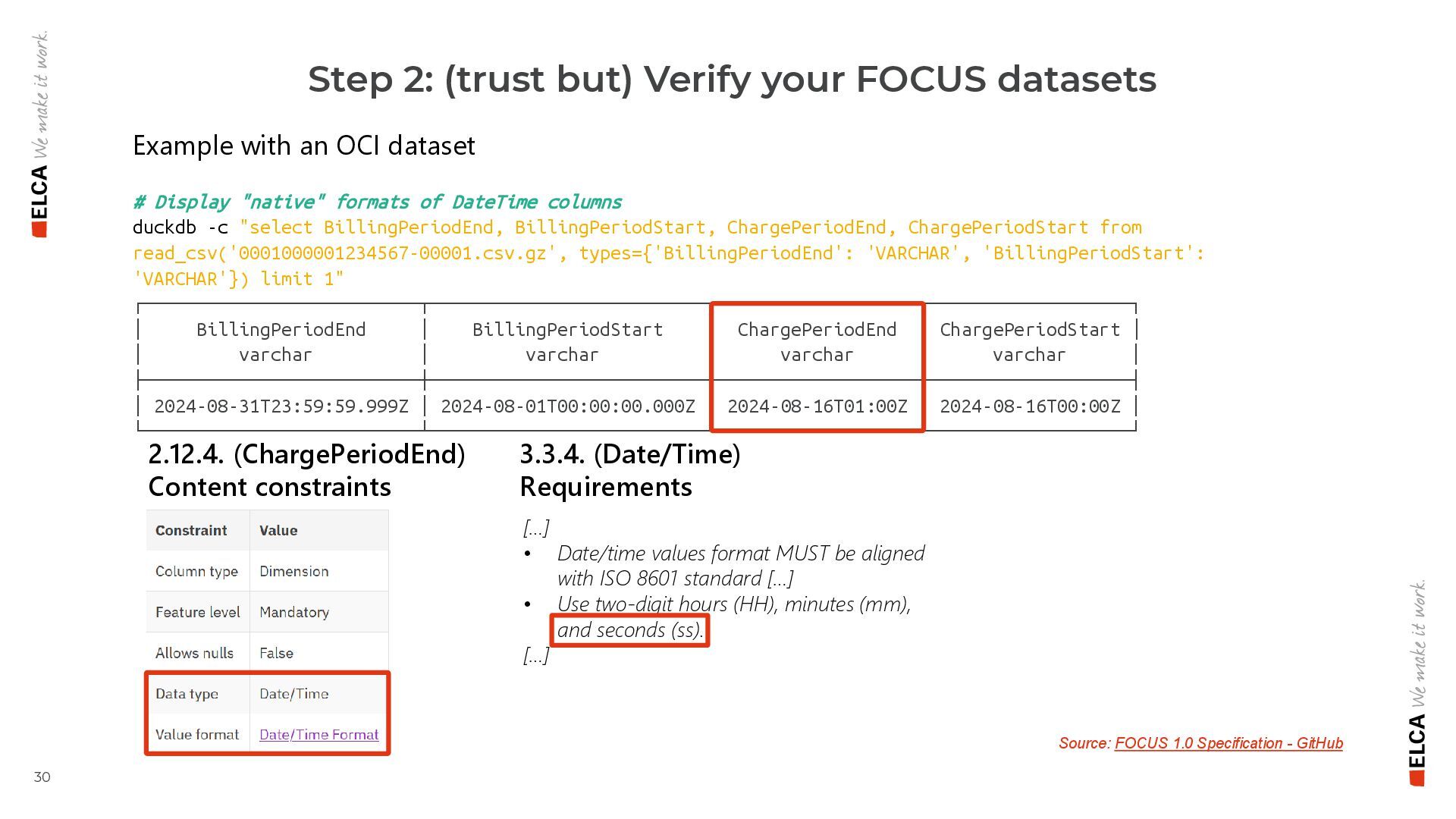
30 Step 2: (trust but) Verify your FOCUS datasets Example
with an OCI dataset # Display "native" formats of DateTime columns duckdb -c "select BillingPeriodEnd, BillingPeriodStart, ChargePeriodEnd, ChargePeriodStart from read_csv('0001000001234567-00001.csv.gz', types={'BillingPeriodEnd': 'VARCHAR', 'BillingPeriodStart': 'VARCHAR'}) limit 1" ┌──────────────────────────┬──────────────────────────┬───────────────────┬───────────────────┐ │ BillingPeriodEnd │ BillingPeriodStart │ ChargePeriodEnd │ ChargePeriodStart │ │ varchar │ varchar │ varchar │ varchar │ ├──────────────────────────┼──────────────────────────┼───────────────────┼───────────────────┤ │ 2024-08-31T23:59:59.999Z │ 2024-08-01T00:00:00.000Z │ 2024-08-16T01:00Z │ 2024-08-16T00:00Z │ └──────────────────────────┴──────────────────────────┴───────────────────┴───────────────────┘ Source: FOCUS 1.0 Specification - GitHub 2.12.4. (ChargePeriodEnd) Content constraints 3.3.4. (Date/Time) Requirements […] • Date/time values format MUST be aligned with ISO 8601 standard […] • Use two-digit hours (HH), minutes (mm), and seconds (ss). […] -
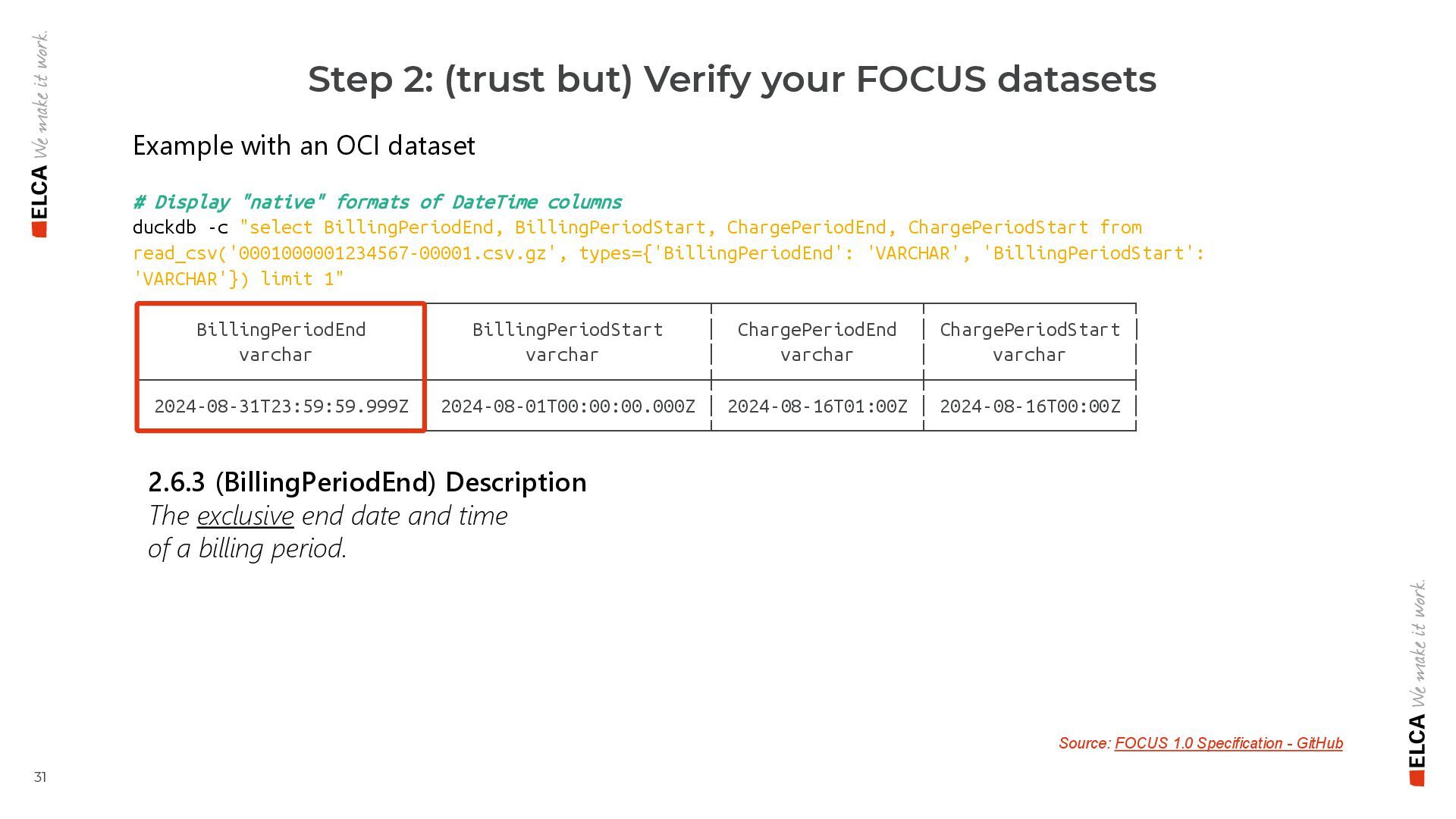
31 Step 2: (trust but) Verify your FOCUS datasets Example
with an OCI dataset # Display "native" formats of DateTime columns duckdb -c "select BillingPeriodEnd, BillingPeriodStart, ChargePeriodEnd, ChargePeriodStart from read_csv('0001000001234567-00001.csv.gz', types={'BillingPeriodEnd': 'VARCHAR', 'BillingPeriodStart': 'VARCHAR'}) limit 1" ┌──────────────────────────┬──────────────────────────┬───────────────────┬───────────────────┐ │ BillingPeriodEnd │ BillingPeriodStart │ ChargePeriodEnd │ ChargePeriodStart │ │ varchar │ varchar │ varchar │ varchar │ ├──────────────────────────┼──────────────────────────┼───────────────────┼───────────────────┤ │ 2024-08-31T23:59:59.999Z │ 2024-08-01T00:00:00.000Z │ 2024-08-16T01:00Z │ 2024-08-16T00:00Z │ └──────────────────────────┴──────────────────────────┴───────────────────┴───────────────────┘ Source: FOCUS 1.0 Specification - GitHub 2.6.3 (BillingPeriodEnd) Description The exclusive end date and time of a billing period. -
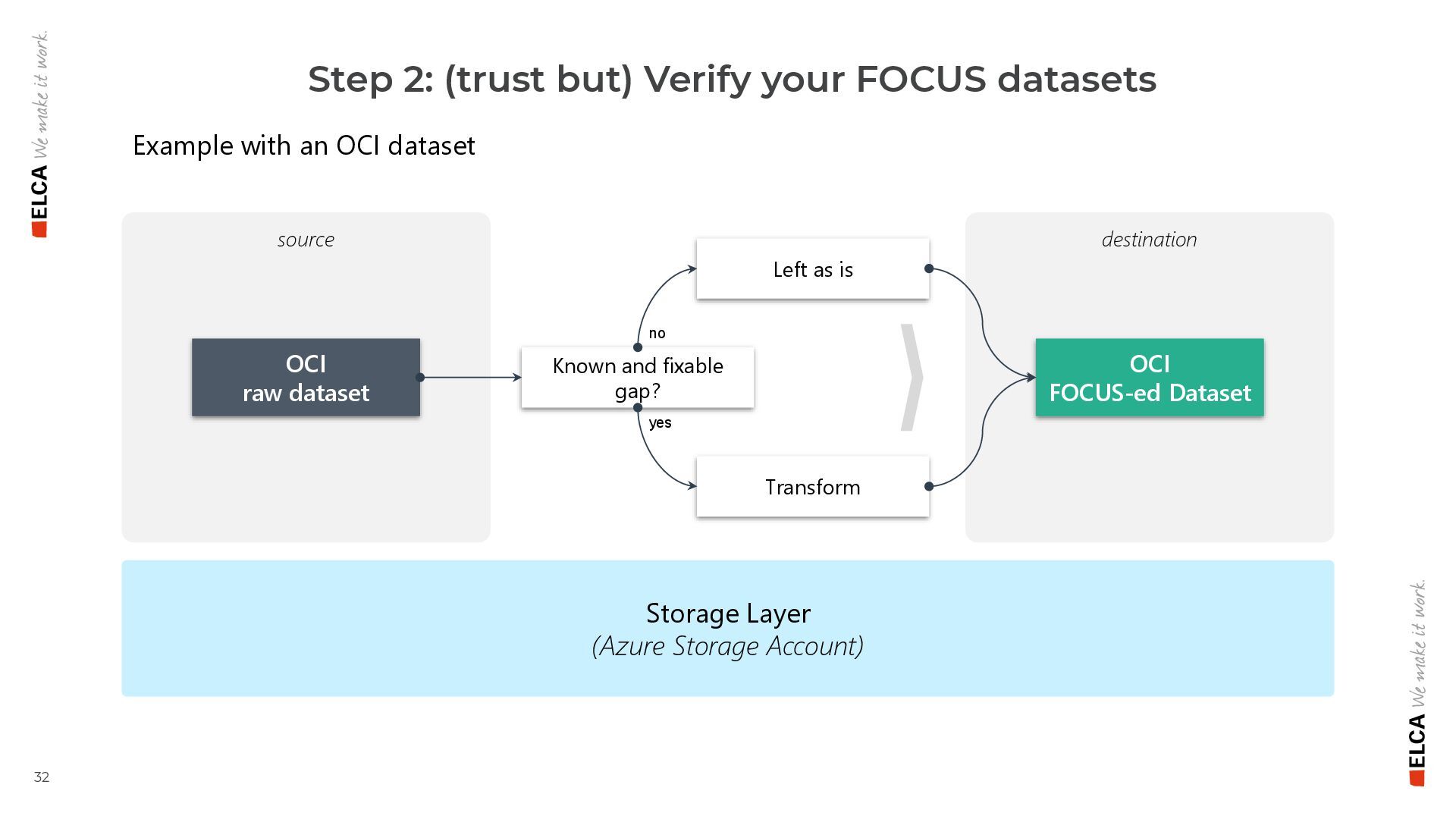
32 Step 2: (trust but) Verify your FOCUS datasets Example
with an OCI dataset Storage Layer (Azure Storage Account) OCI raw dataset Known and fixable gap? Left as is Transform no yes OCI FOCUS-ed Dataset source destination -
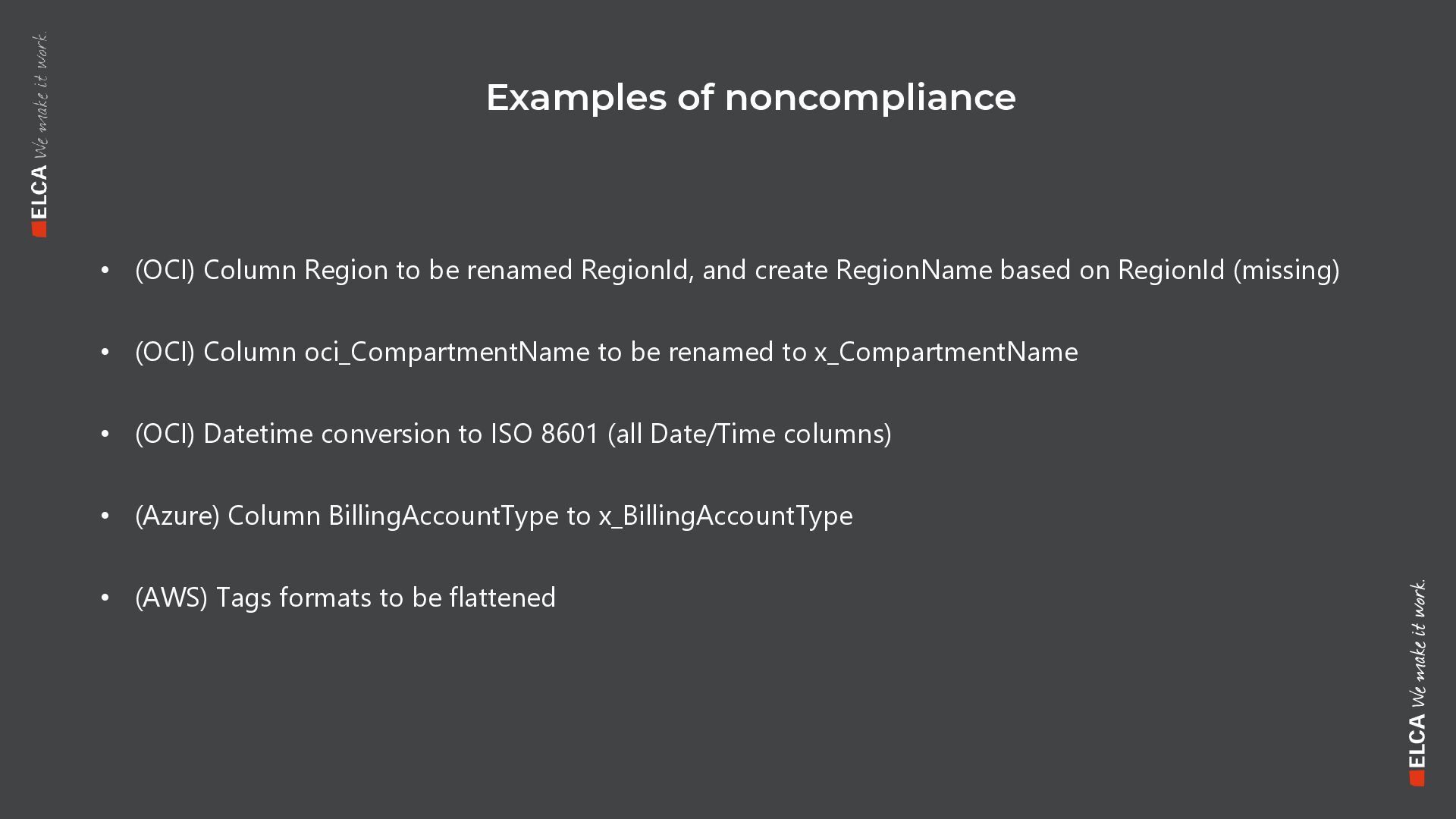
33 Click to insert title Examples of noncompliance • (OCI)
Column Region to be renamed RegionId, and create RegionName based on RegionId (missing) • (OCI) Column oci_CompartmentName to be renamed to x_CompartmentName • (OCI) Datetime conversion to ISO 8601 (all Date/Time columns) • (Azure) Column BillingAccountType to x_BillingAccountType • (AWS) Tags formats to be flattened -
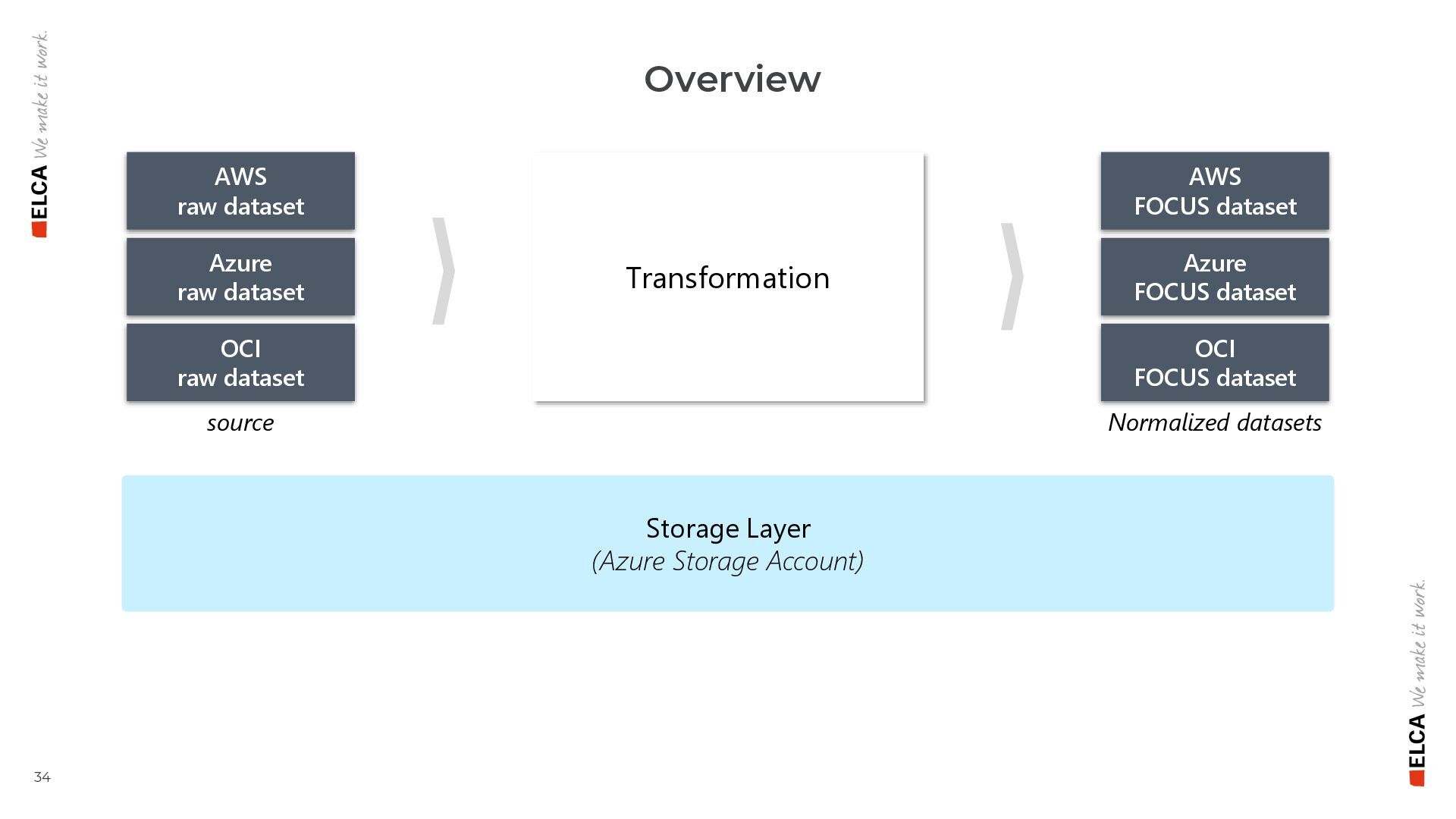
34 Overview Storage Layer (Azure Storage Account) AWS raw dataset
Azure raw dataset OCI raw dataset Transformation AWS FOCUS dataset Azure FOCUS dataset OCI FOCUS dataset source Normalized datasets -
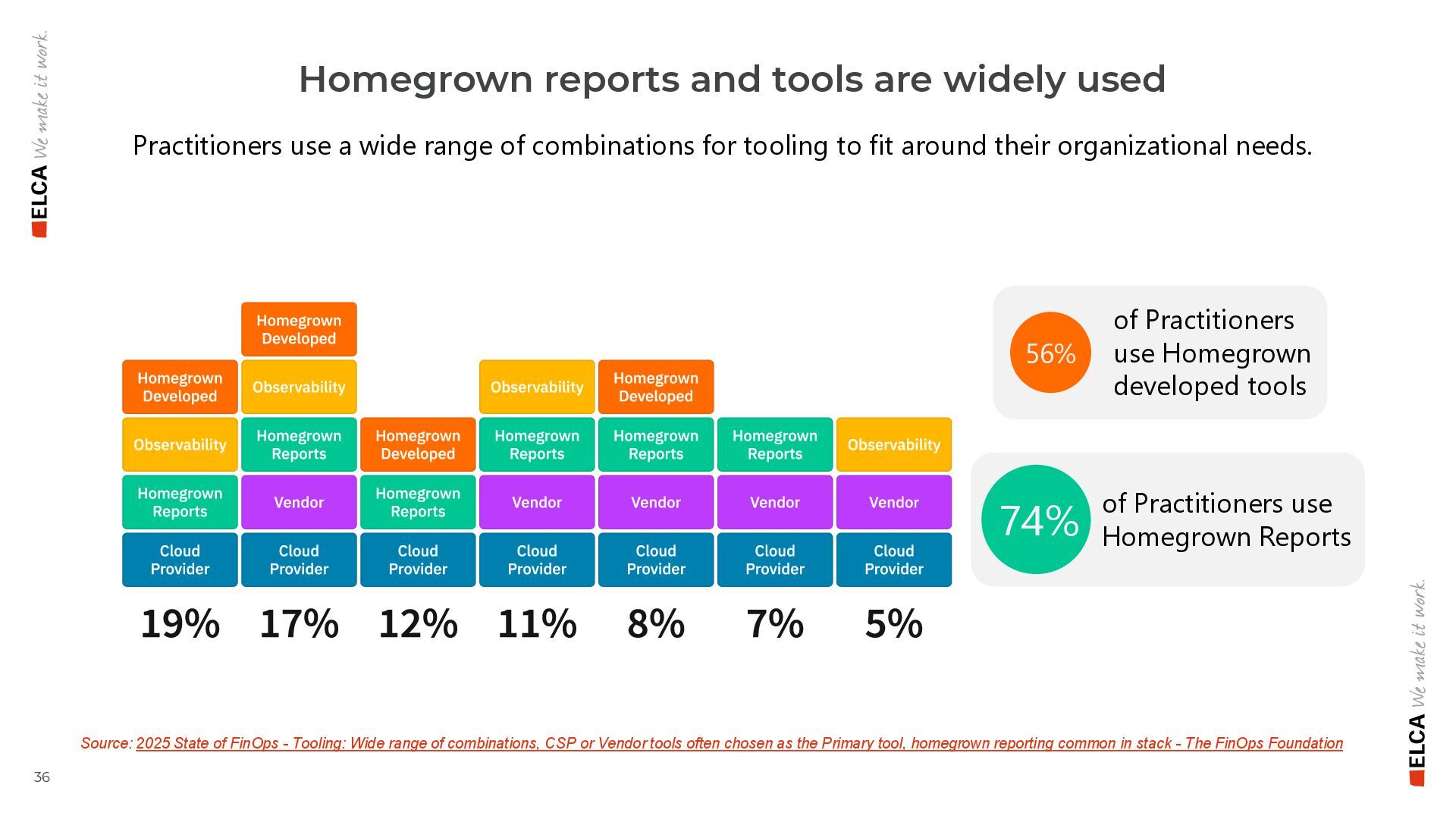
36 Homegrown reports and tools are widely used Source: 2025
State of FinOps - Tooling: Wide range of combinations, CSP or Vendor tools often chosen as the Primary tool, homegrown reporting common in stack - The FinOps Foundation Practitioners use a wide range of combinations for tooling to fit around their organizational needs. of Practitioners use Homegrown developed tools 56% of Practitioners use Homegrown Reports 74% -
39 Main components of Microsoft Fabric One Lake Data Warehouse
Power BI Storage Layer Processing & Query Layer Visualization Layer -
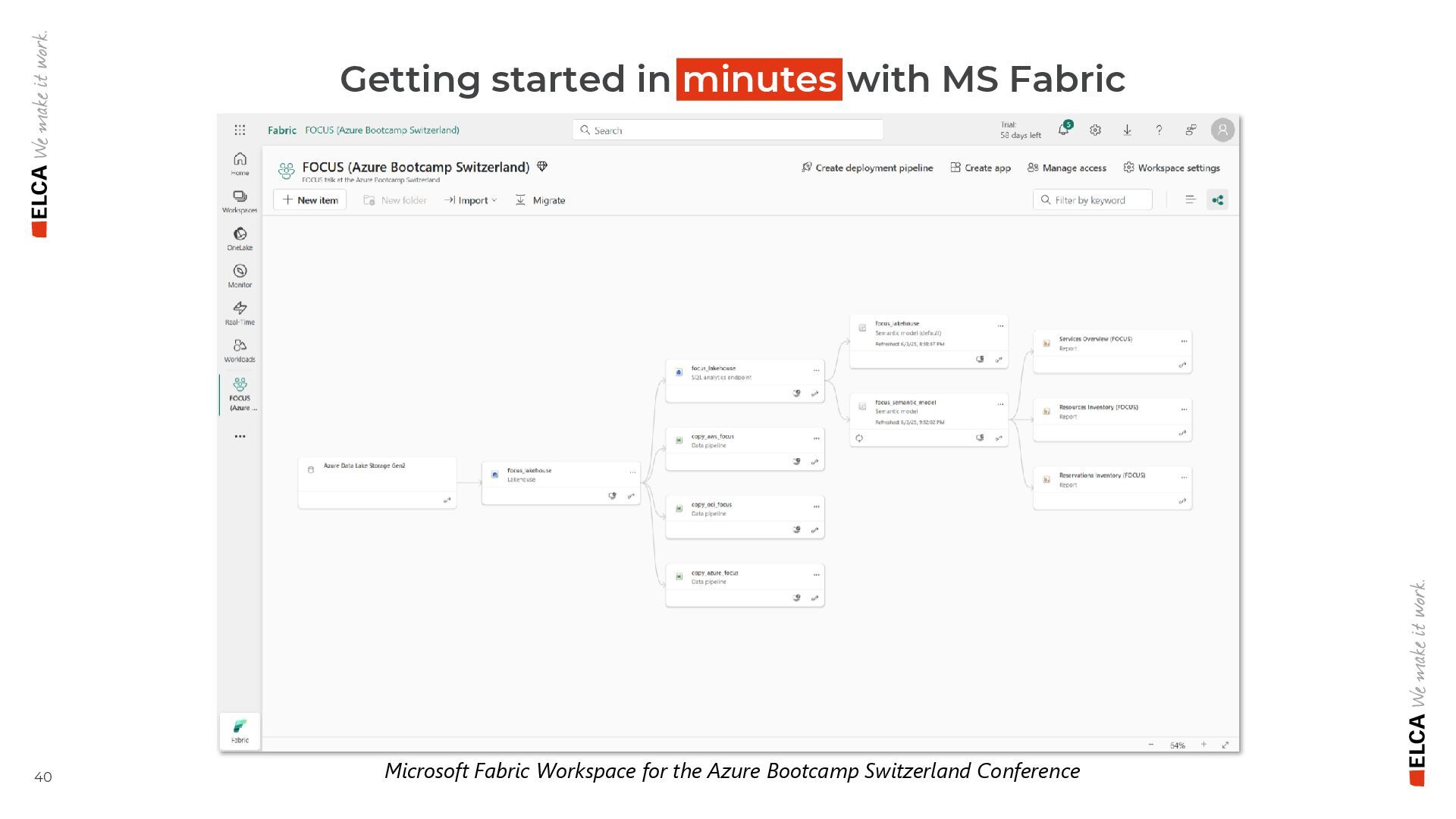
40 Getting started in minutes with MS Fabric Microsoft Fabric
Workspace for the Azure Bootcamp Switzerland Conference -
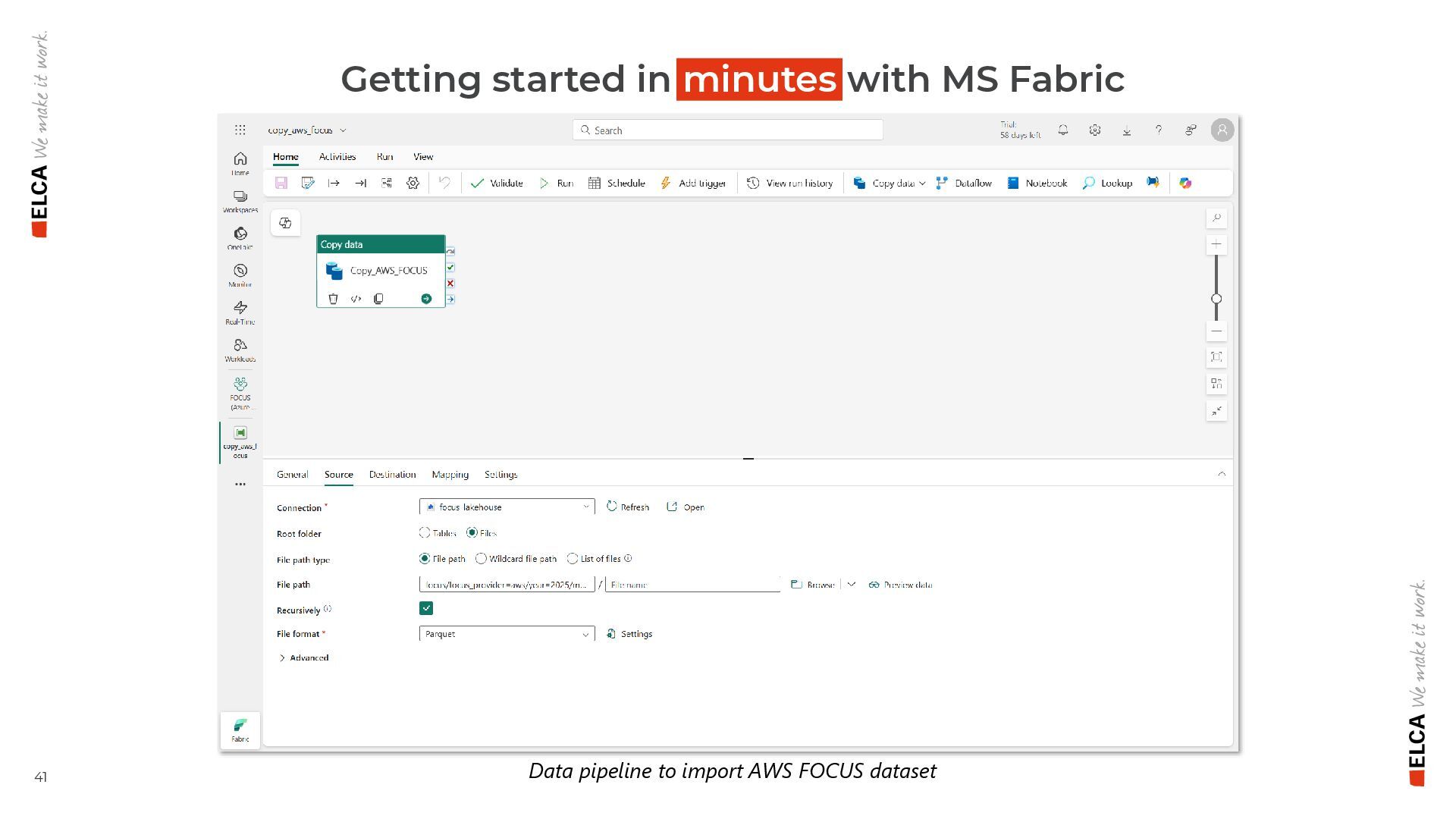
41 Getting started in minutes with MS Fabric Data pipeline
to import AWS FOCUS dataset -
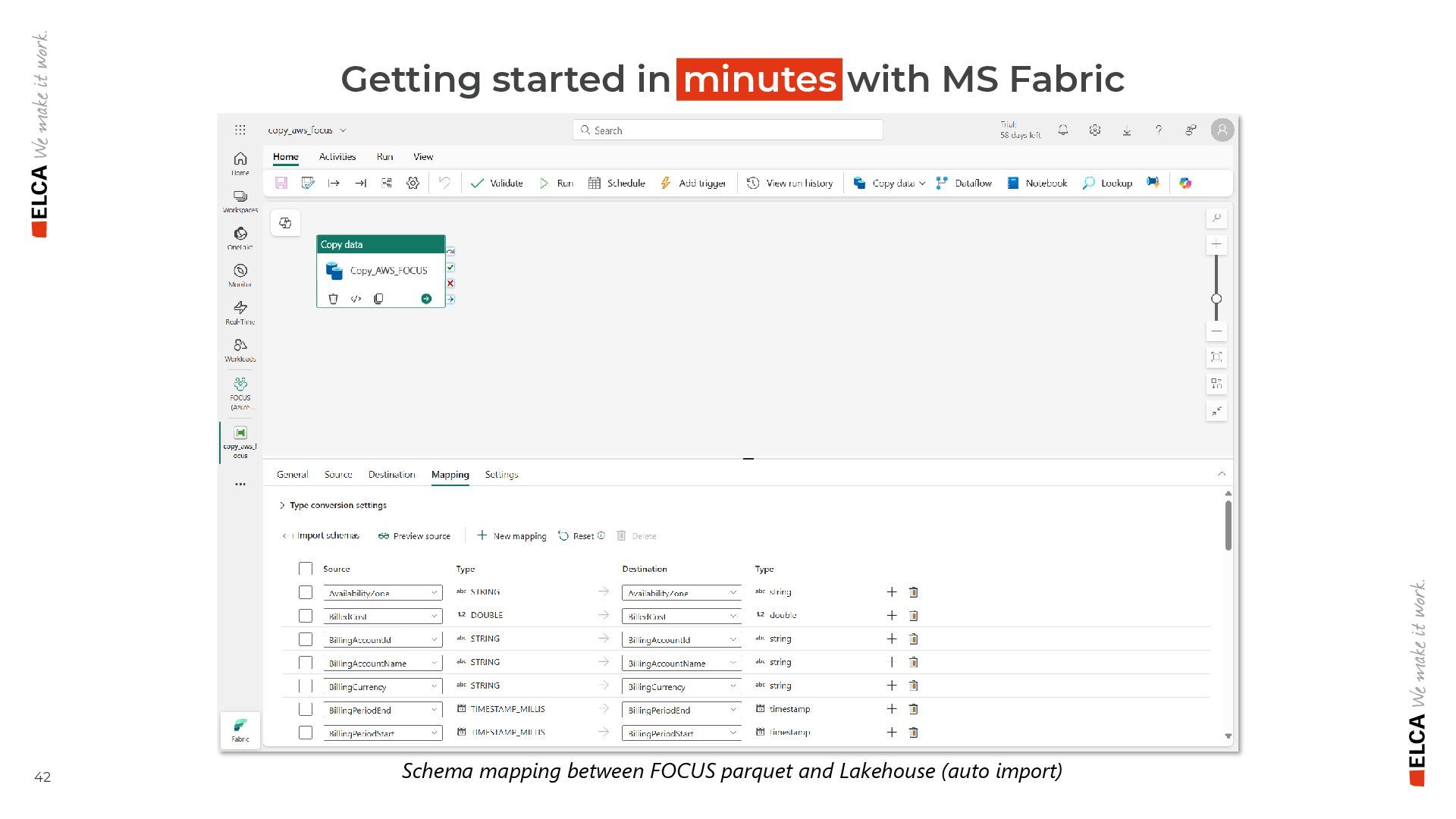
42 Getting started in minutes with MS Fabric Schema mapping
between FOCUS parquet and Lakehouse (auto import) -
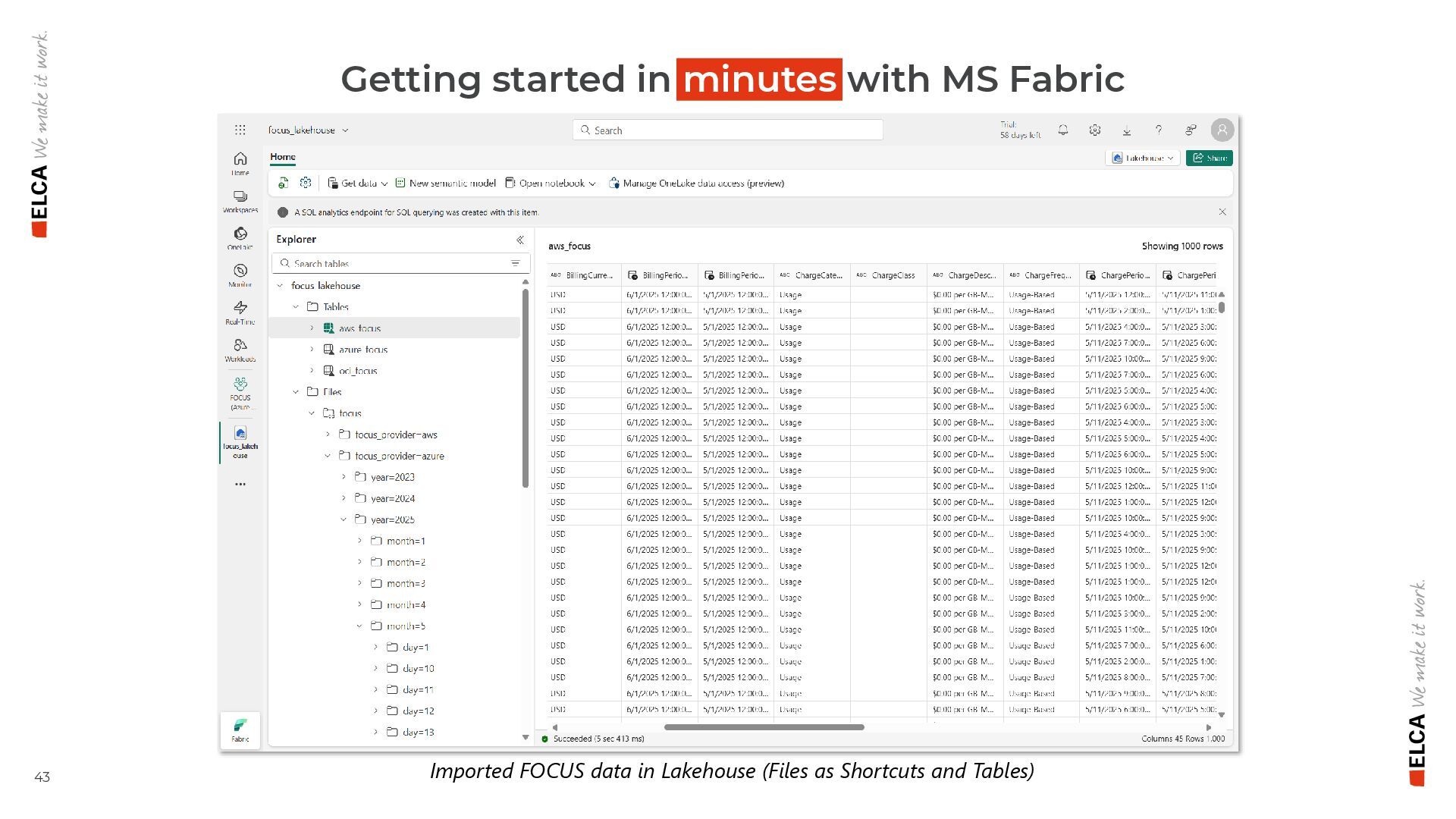
43 Getting started in minutes with MS Fabric Imported FOCUS
data in Lakehouse (Files as Shortcuts and Tables) -
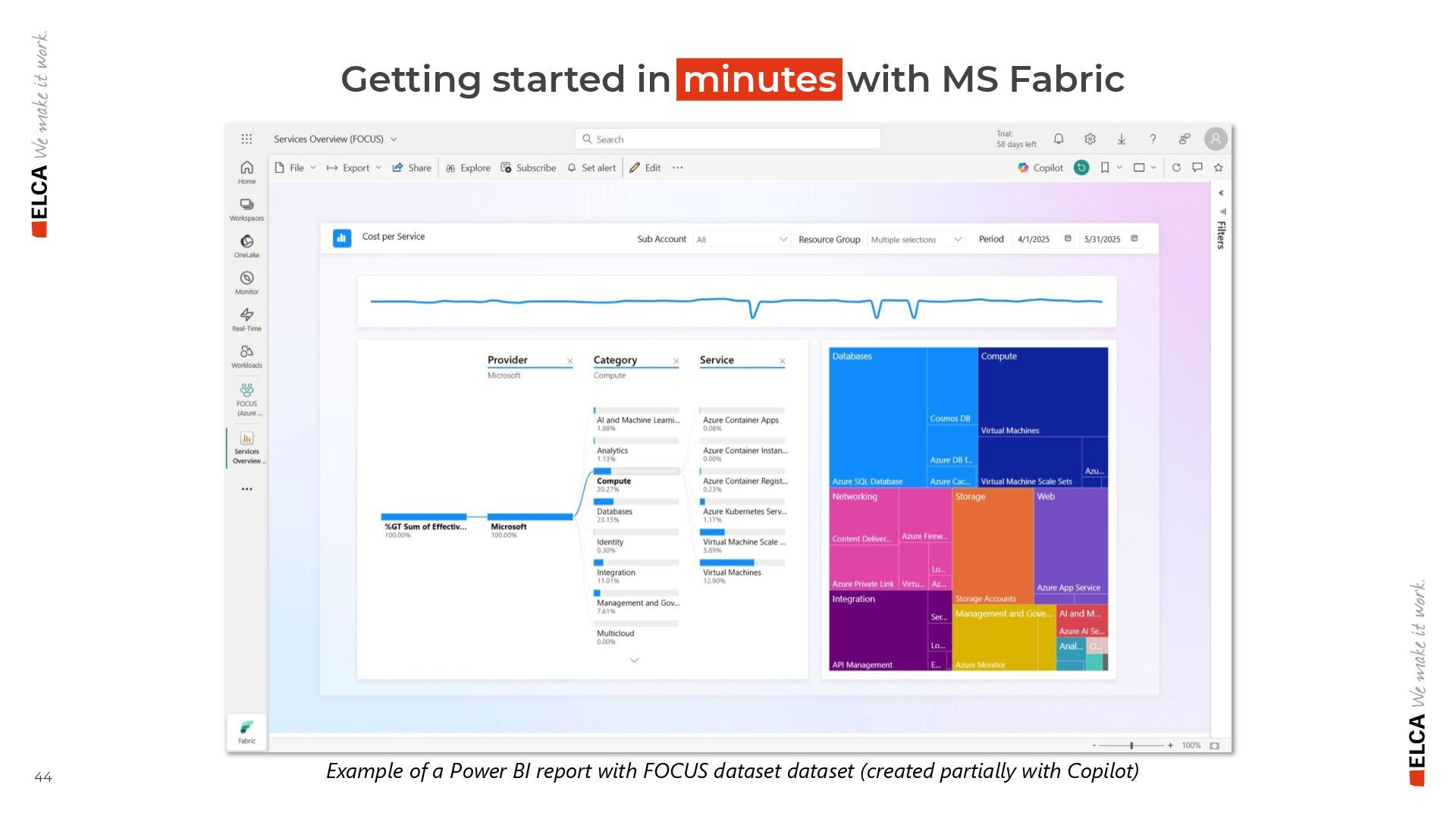
44 Getting started in minutes with MS Fabric Example of
a Power BI report with FOCUS dataset dataset (created partially with Copilot) -
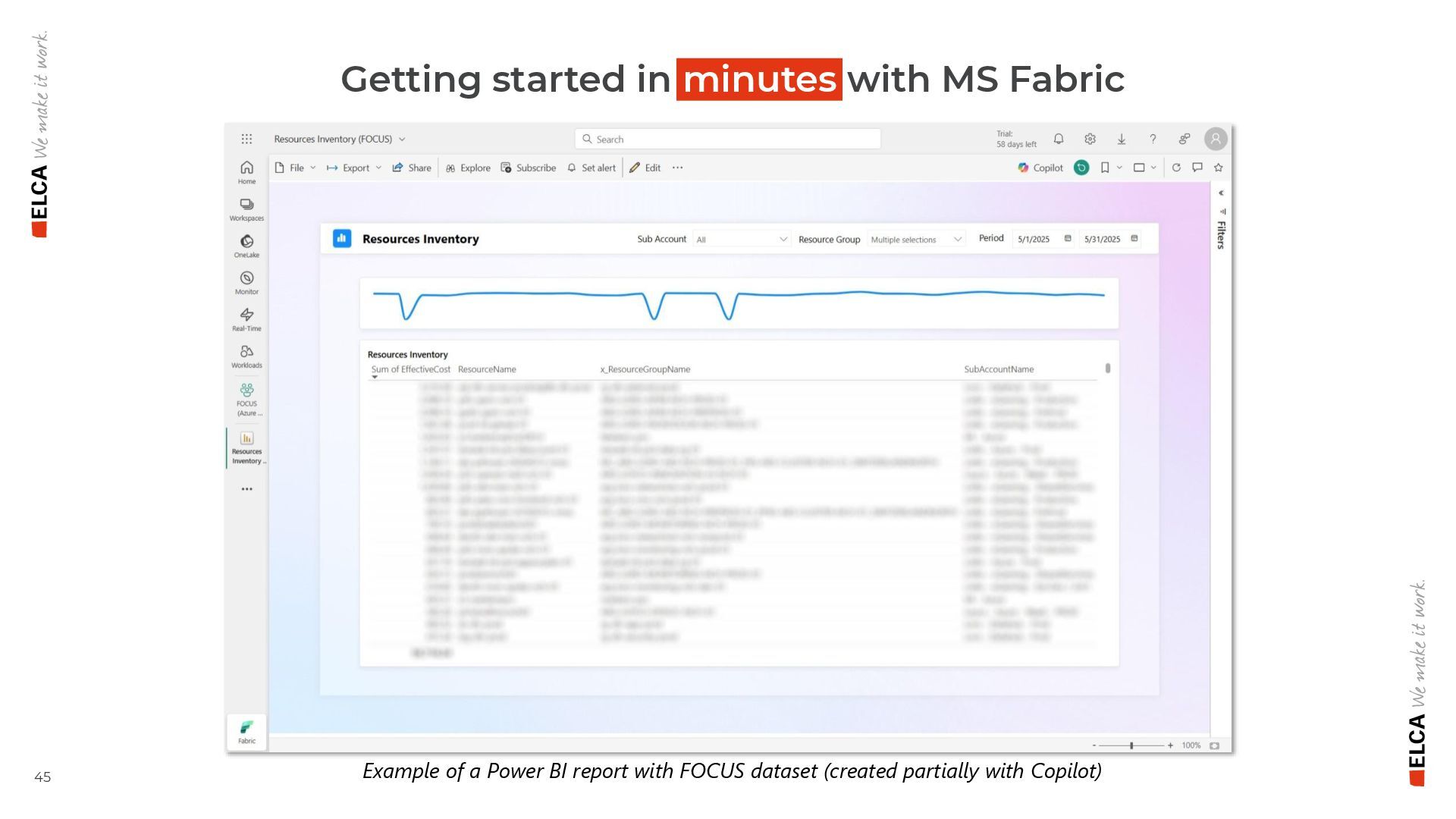
45 Getting started in minutes with MS Fabric Example of
a Power BI report with FOCUS dataset (created partially with Copilot) -
46 Getting started in minutes with MS Fabric Example of
a Power BI report with FOCUS dataset (created partially with Copilot) -
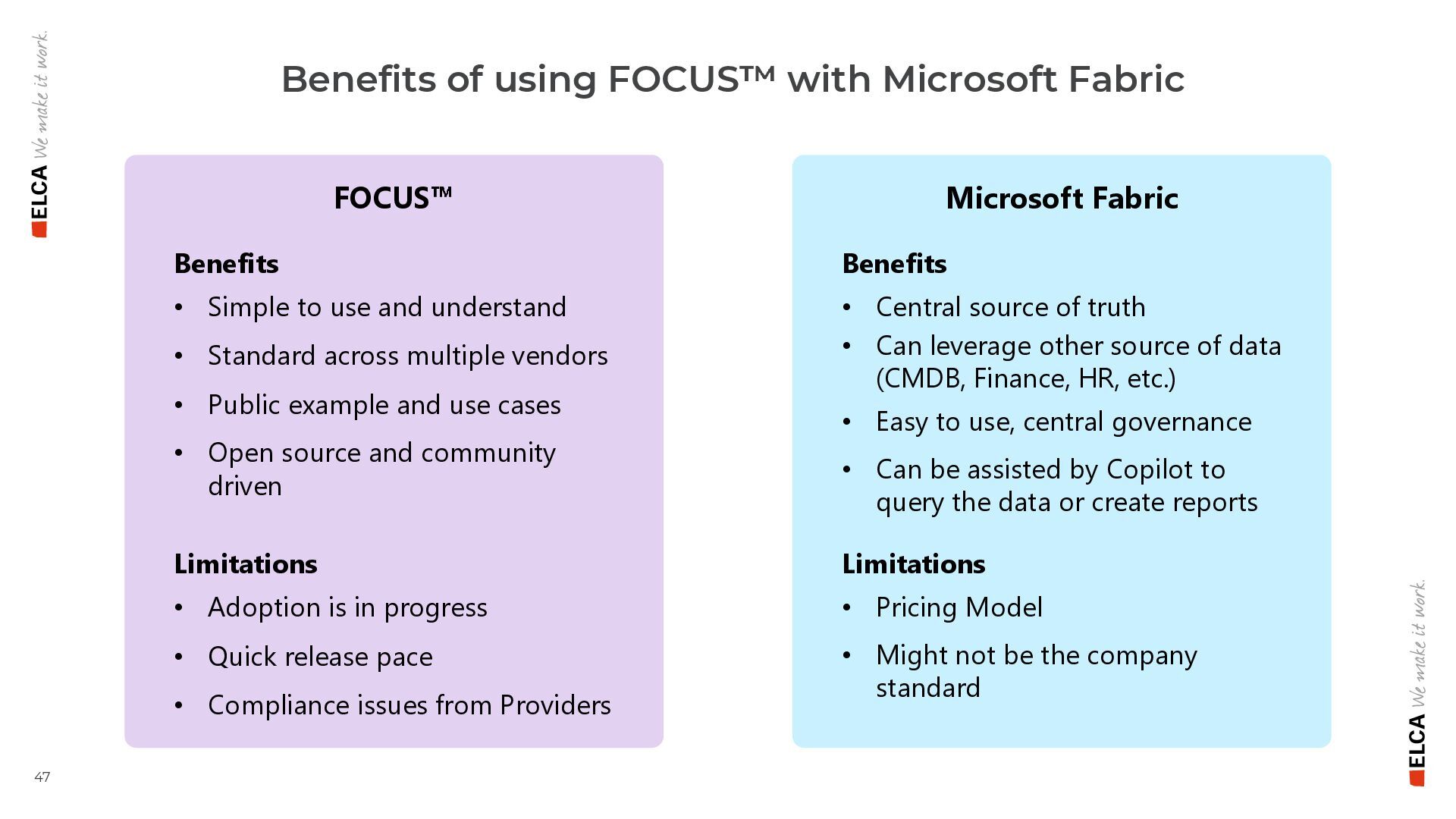
47 Benefits of using FOCUS with Microsoft Fabric FOCUS Limitations
• Adoption is in progress • Quick release pace • Compliance issues from Providers Benefits • Simple to use and understand • Standard across multiple vendors • Public example and use cases • Open source and community driven Microsoft Fabric Benefits • Central source of truth • Can leverage other source of data (CMDB, Finance, HR, etc.) • Easy to use, central governance • Can be assisted by Copilot to query the data or create reports Limitations • Pricing Model • Might not be the company standard -
50 A logo for a company AI-generated content may be
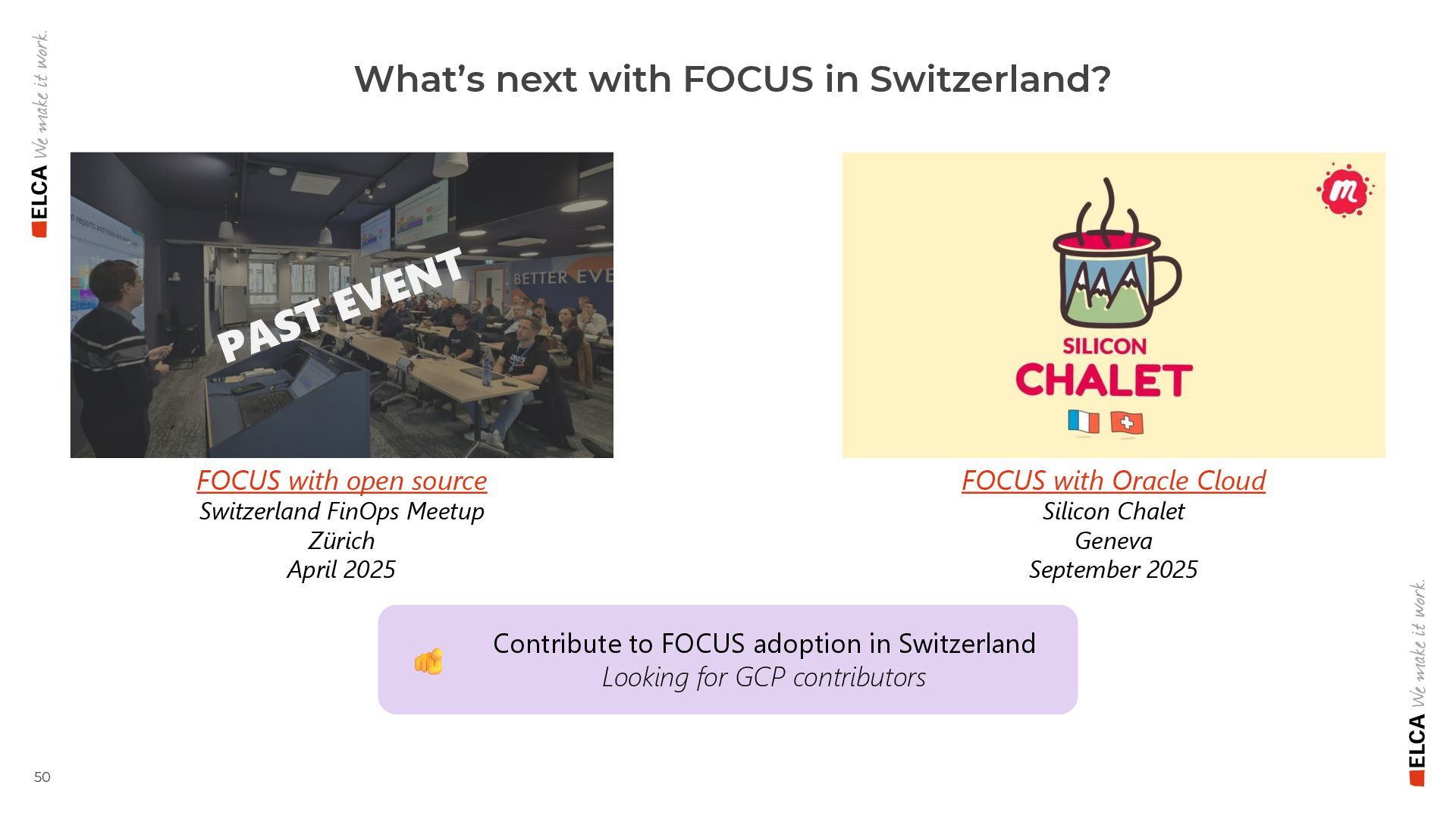
incorrect. What’s next with FOCUS in Switzerland? FOCUS with open source Switzerland FinOps Meetup Zürich April 2025 FOCUS with Oracle Cloud Silicon Chalet Geneva September 2025 A person standing in front of a podium AI-generated content may be incorrect. Contribute to FOCUS adoption in Switzerland Looking for GCP contributors -
Alexandre PARÈS Contact Sr. Cloud FinOps Engineer FinOps Certified Professional
FinOps Certified FOCUS Analyst ch.linkedin.com/in/alexandre-pares Thank you Feedback Form -
52 Cite and attribute doi.org/10.5281/zenodo.15596087 Level up your Cost Observability
with the new FinOps standard FOCUS and Microsoft Fabric By Alexandre PARÈS On (June 2025) Azure Bootcamp Switzerland https://www.azurebootcamp.ch
 azurezurich
 qatonchan
 yoshimura_datam
 ahus1
 sansan33
 yoku0825
 littlehands
 knwoop
 timakin
 oracle4engineer
 anatofuz
 hinalin
 aleyda
 axbom
 katarinadahlin
 mraible
 baasie
 badams
 kastner
 tammyeverts
 raygrieselhuber
 keathley
 marktimemedia
 ryanjones