Upgrade to Pro — share decks privately, control downloads, hide ads and more …

Slice It Up: Driving User Engagement from Outsi...

Slice It Up: Driving User Engagement from Outside Your App

This is the presentation about Android Slices that I gave at Droidcon NYC 2018. Slices are pieces of rich, dynamic, and interactive content that can show up in Google Search app results and later in Google Assistant. I explain how Slices work and cover everything you need to get started now - including best practices for building them.

Avatar for Tatyana Casino

Tatyana Casino

August 27, 2018

More Decks by Tatyana Casino

Other Decks in Programming

Transcript

  1. Charlottesville, VA / Durham, NC willowtreeapps.com | [email protected] | +1-888-329-9875

    Slice It Up: Driving User Engagement from Outside Your App Tatyana Casino WillowTree
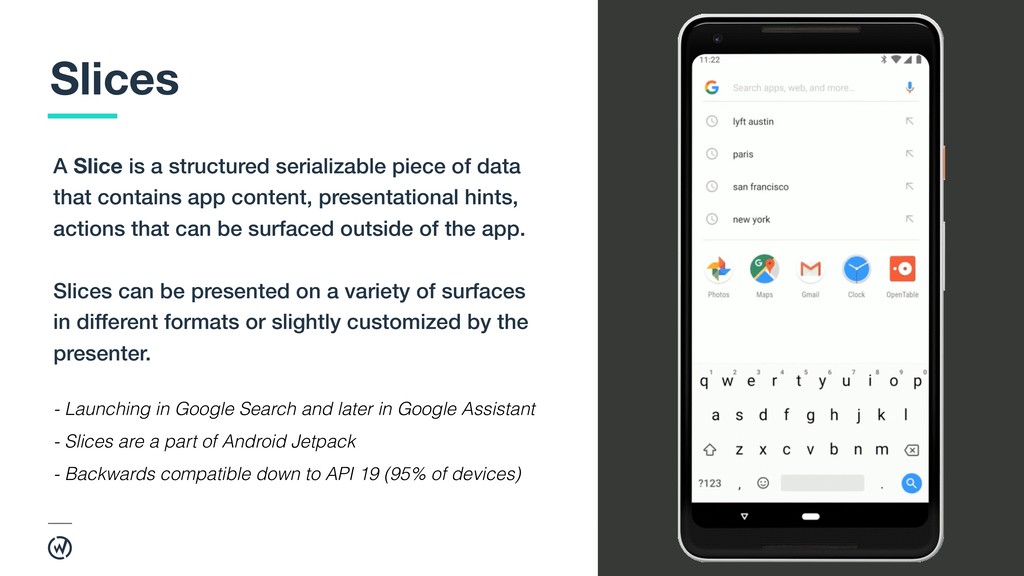
  2. 2 A Slice is a structured serializable piece of data

    that contains app content, presentational hints, actions that can be surfaced outside of the app. Slices can be presented on a variety of surfaces in different formats or slightly customized by the presenter. Slices - Launching in Google Search and later in Google Assistant - Slices are a part of Android Jetpack - Backwards compatible down to API 19 (95% of devices)
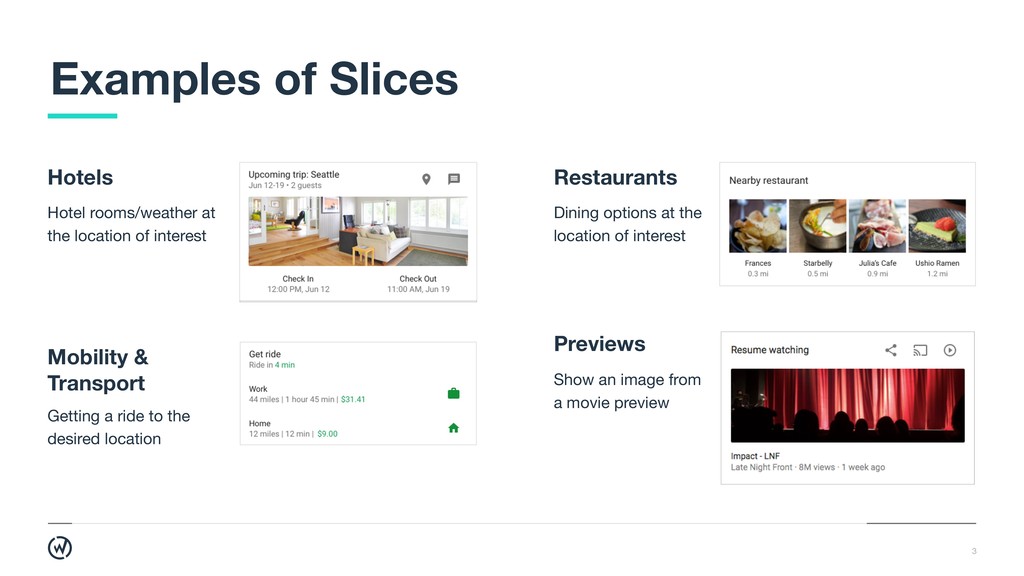
  3. 3 Examples of Slices Hotels Hotel rooms/weather at the location

    of interest Previews Show an image from a movie preview Restaurants Dining options at the location of interest Mobility & 
 Transport Getting a ride to the desired location
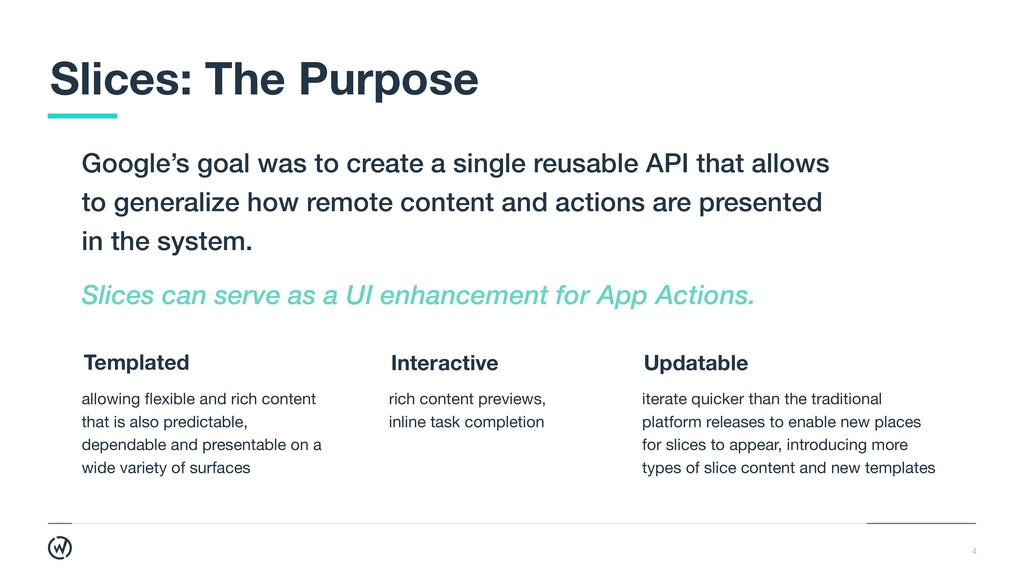
  4. 4 Google’s goal was to create a single reusable API

    that allows to generalize how remote content and actions are presented in the system. Slices: The Purpose allowing flexible and rich content that is also predictable, dependable and presentable on a wide variety of surfaces rich content previews, inline task completion Interactive iterate quicker than the traditional platform releases to enable new places for slices to appear, introducing more types of slice content and new templates Updatable Templated Slices can serve as a UI enhancement for App Actions.
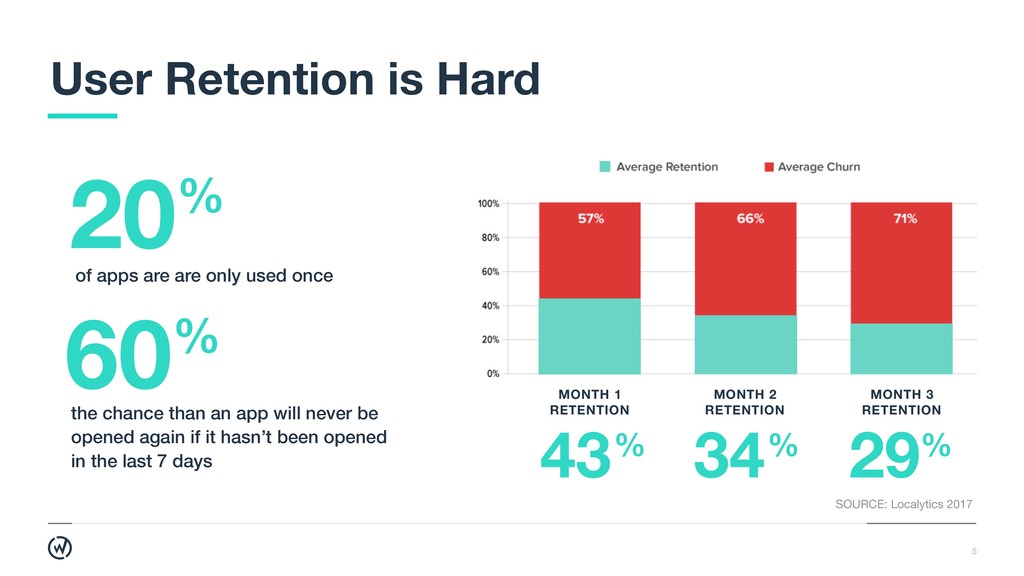
  5. 5 User Retention is Hard 20% 60% of apps are

    are only used once the chance than an app will never be opened again if it hasn’t been opened in the last 7 days SOURCE: Localytics 2017 43% MONTH 1 RETENTION 34% MONTH 2 RETENTION 29% MONTH 3 RETENTION
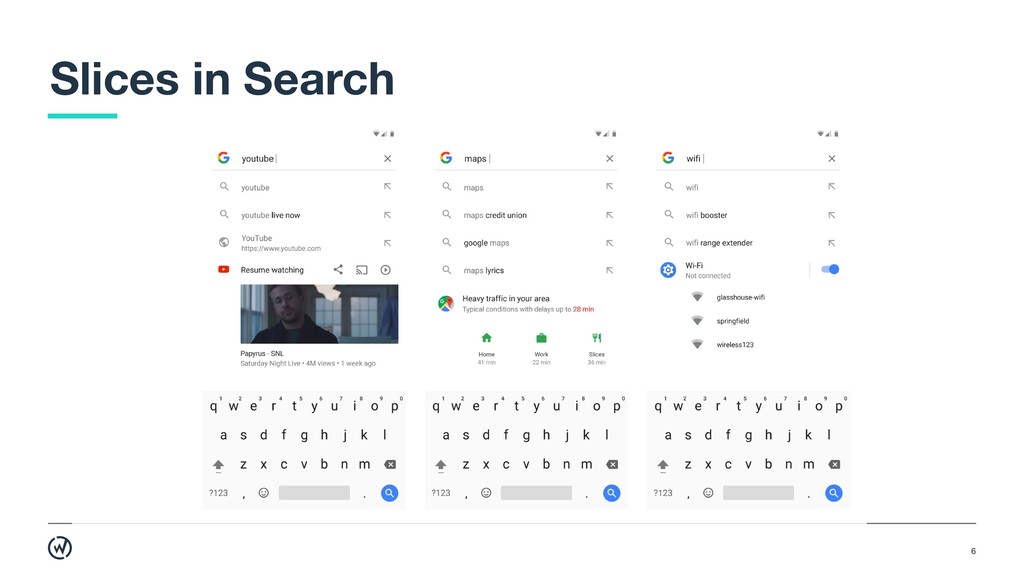
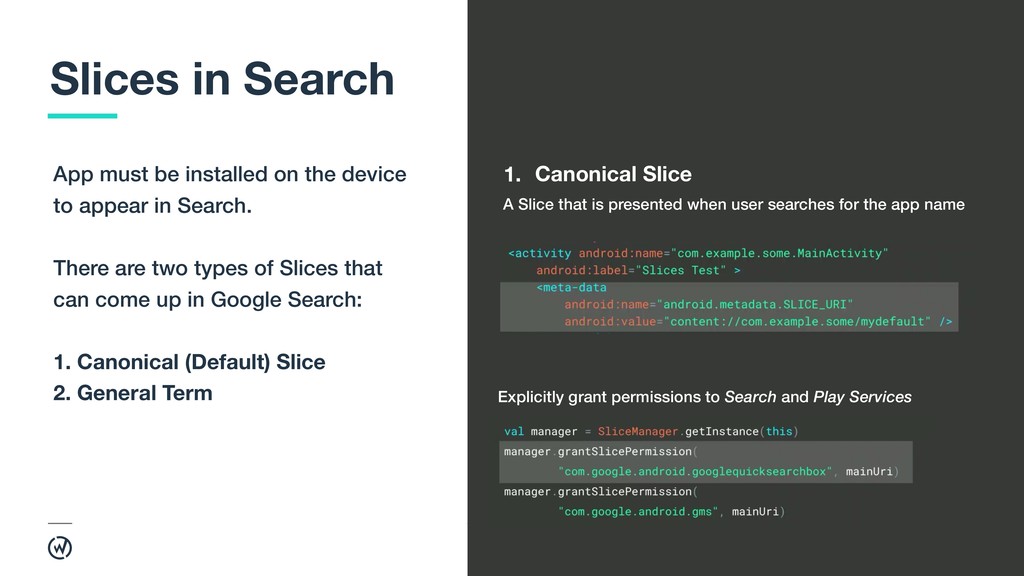
  6. 7 App must be installed on the device to appear

    in Search. There are two types of Slices that can come up in Google Search: 1. Canonical (Default) Slice
 2. General Term Slices in Search 1. Canonical Slice A Slice that is presented when user searches for the app name Explicitly grant permissions to Search and Play Services
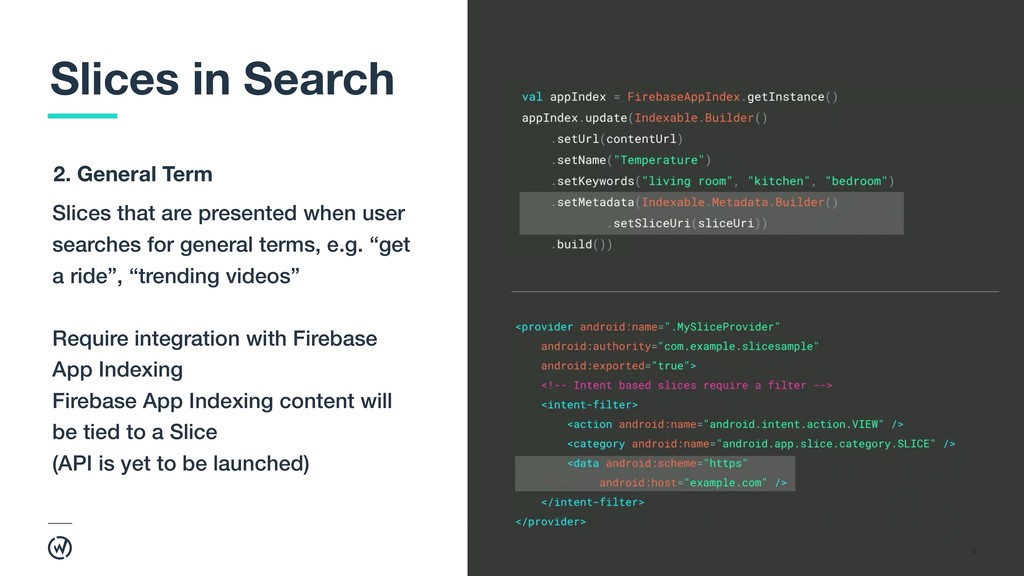
  7. 8 Slices in Search Slices that are presented when user

    searches for general terms, e.g. “get a ride”, “trending videos” Require integration with Firebase App Indexing Firebase App Indexing content will be tied to a Slice (API is yet to be launched) 2. General Term
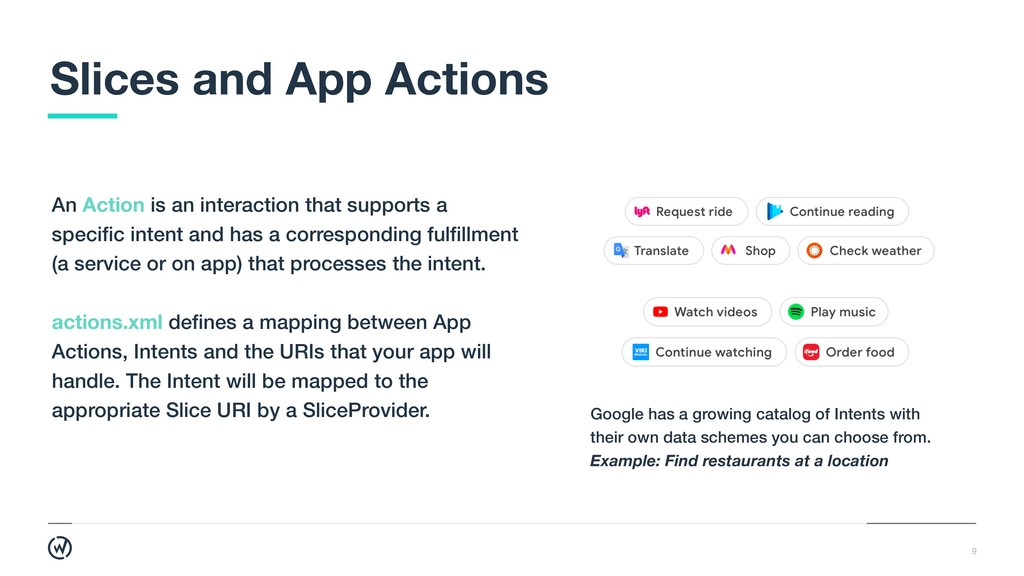
  8. 9 Slices and App Actions An Action is an interaction

    that supports a specific intent and has a corresponding fulfillment (a service or on app) that processes the intent. actions.xml defines a mapping between App Actions, Intents and the URIs that your app will handle. The Intent will be mapped to the appropriate Slice URI by a SliceProvider. Google has a growing catalog of Intents with their own data schemes you can choose from. Example: Find restaurants at a location
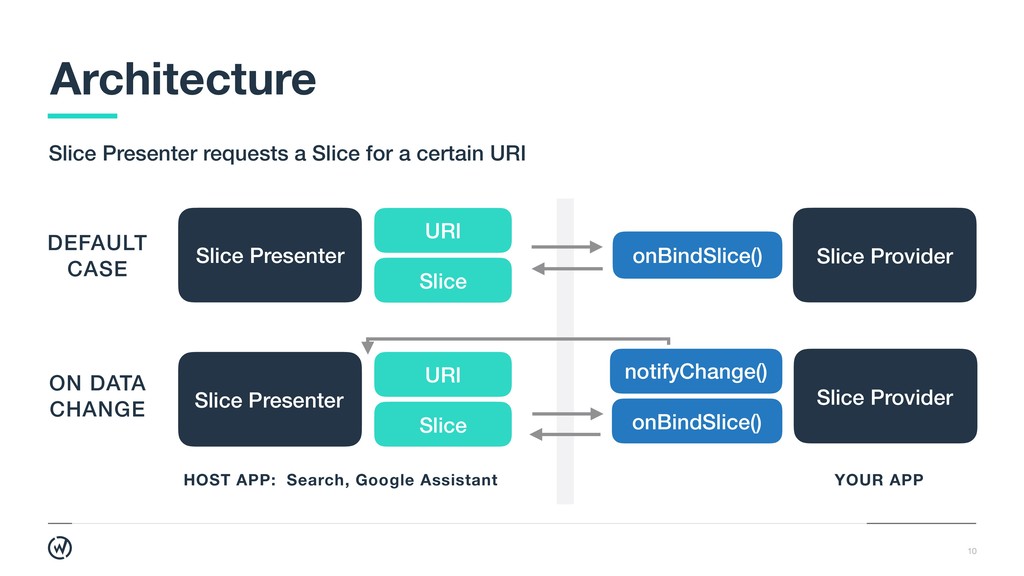
  9. 10 Architecture Slice Presenter requests a Slice for a certain

    URI ON DATA
 CHANGE Slice Presenter URI Slice YOUR APP HOST APP: Search, Google Assistant Slice Provider notifyChange() onBindSlice() DEFAULT 
 CASE Slice Presenter onBindSlice() Slice Provider URI Slice
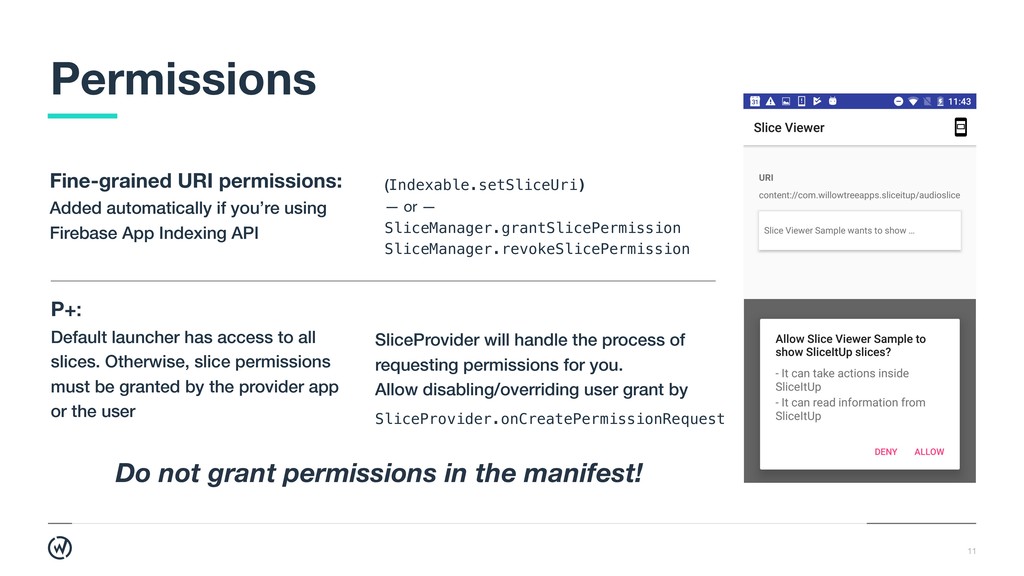
  10. 11 Permissions Fine-grained URI permissions: Added automatically if you’re using

    Firebase App Indexing API Do not grant permissions in the manifest! P+: 
 Default launcher has access to all slices. Otherwise, slice permissions must be granted by the provider app or the user (Indexable.setSliceUri) — or — SliceManager.grantSlicePermission SliceManager.revokeSlicePermission SliceProvider will handle the process of requesting permissions for you. Allow disabling/overriding user grant by SliceProvider.onCreatePermissionRequest
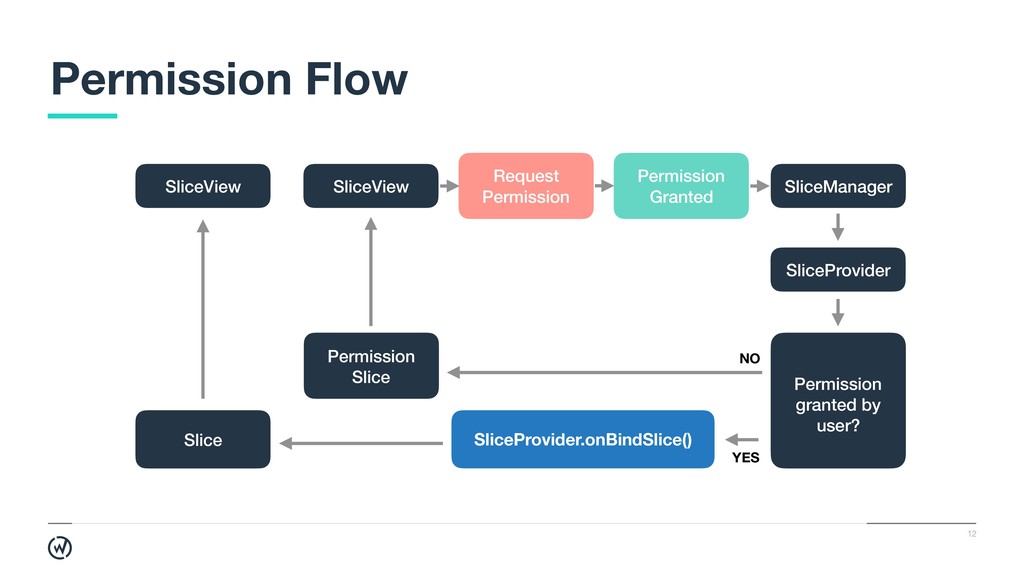
  11. 12 Permission Flow SliceView Slice SliceView Request Permission Permission Granted

    SliceManager SliceProvider Permission granted by user? SliceProvider.onBindSlice() Permission Slice NO YES
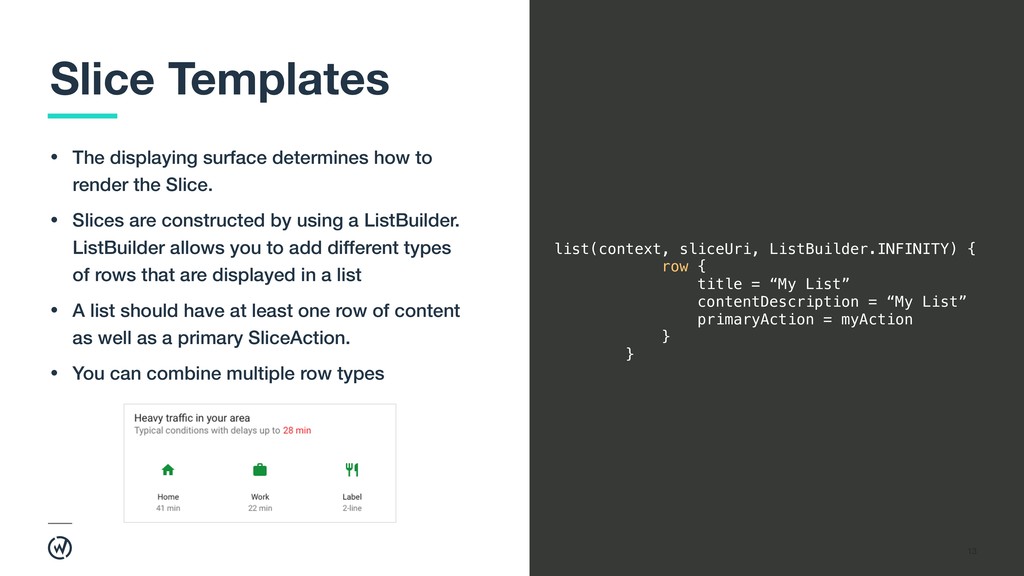
  12. 13 Slice Templates • The displaying surface determines how to

    render the Slice. • Slices are constructed by using a ListBuilder. ListBuilder allows you to add different types of rows that are displayed in a list • A list should have at least one row of content as well as a primary SliceAction. • You can combine multiple row types list(context, sliceUri, ListBuilder.INFINITY) { row { title = “My List” contentDescription = “My List” primaryAction = myAction } }
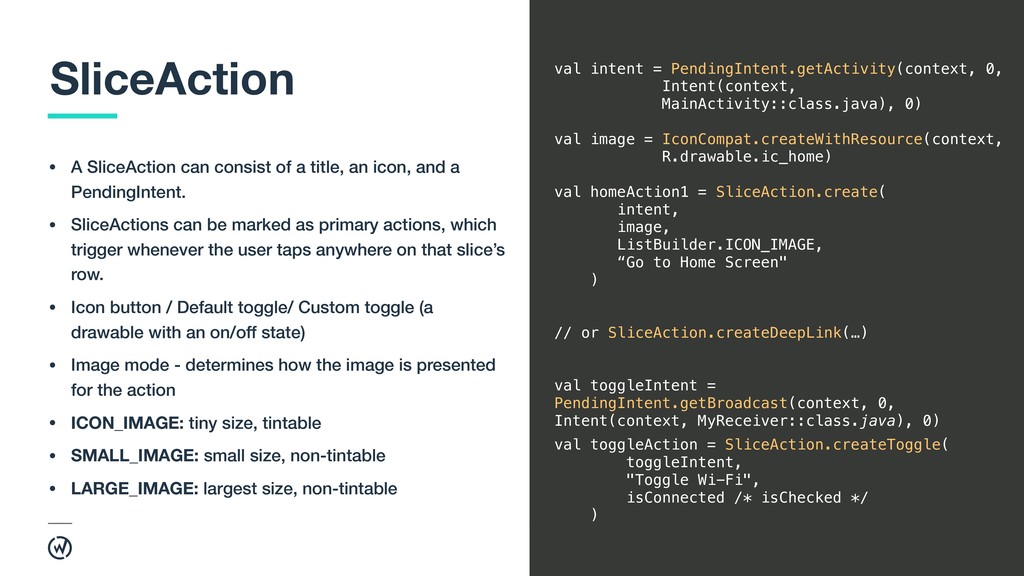
  13. 14 SliceAction • A SliceAction can consist of a title,

    an icon, and a PendingIntent. • SliceActions can be marked as primary actions, which trigger whenever the user taps anywhere on that slice’s row. • Icon button / Default toggle/ Custom toggle (a drawable with an on/off state) • Image mode - determines how the image is presented for the action • ICON_IMAGE: tiny size, tintable • SMALL_IMAGE: small size, non-tintable • LARGE_IMAGE: largest size, non-tintable val intent = PendingIntent.getActivity(context, 0, Intent(context, MainActivity::class.java), 0) val image = IconCompat.createWithResource(context, R.drawable.ic_home) val homeAction1 = SliceAction.create( intent, image, ListBuilder.ICON_IMAGE, “Go to Home Screen" ) // or SliceAction.createDeepLink(…) val toggleIntent = PendingIntent.getBroadcast(context, 0, Intent(context, MyReceiver::class.java), 0) val toggleAction = SliceAction.createToggle( toggleIntent, "Toggle Wi-Fi", isConnected /* isChecked */ )
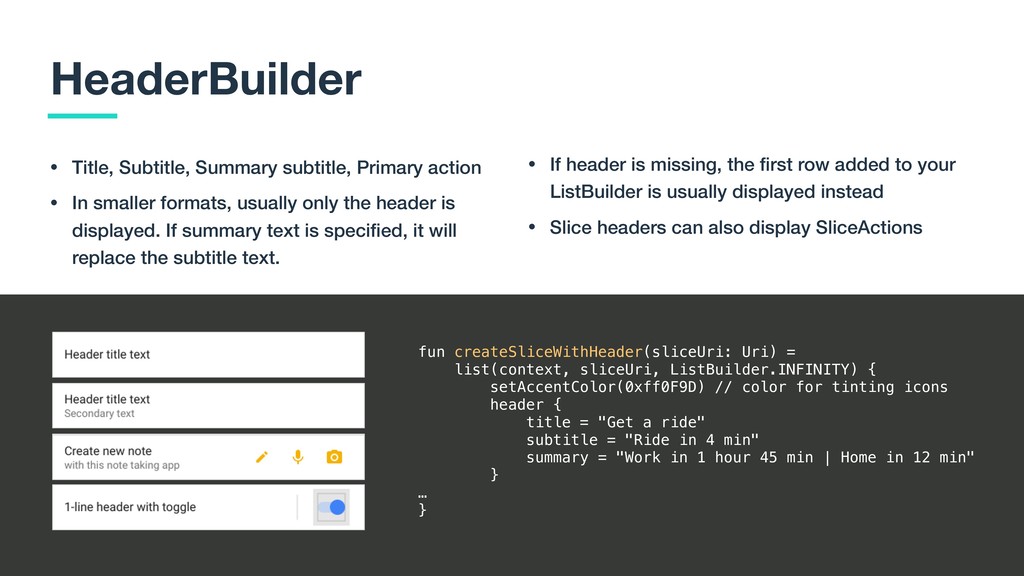
  14. 15 HeaderBuilder • Title, Subtitle, Summary subtitle, Primary action •

    In smaller formats, usually only the header is displayed. If summary text is specified, it will replace the subtitle text. fun createSliceWithHeader(sliceUri: Uri) = list(context, sliceUri, ListBuilder.INFINITY) { setAccentColor(0xff0F9D) // color for tinting icons header { title = "Get a ride" subtitle = "Ride in 4 min" summary = "Work in 1 hour 45 min | Home in 12 min" } … } • If header is missing, the first row added to your ListBuilder is usually displayed instead • Slice headers can also display SliceActions
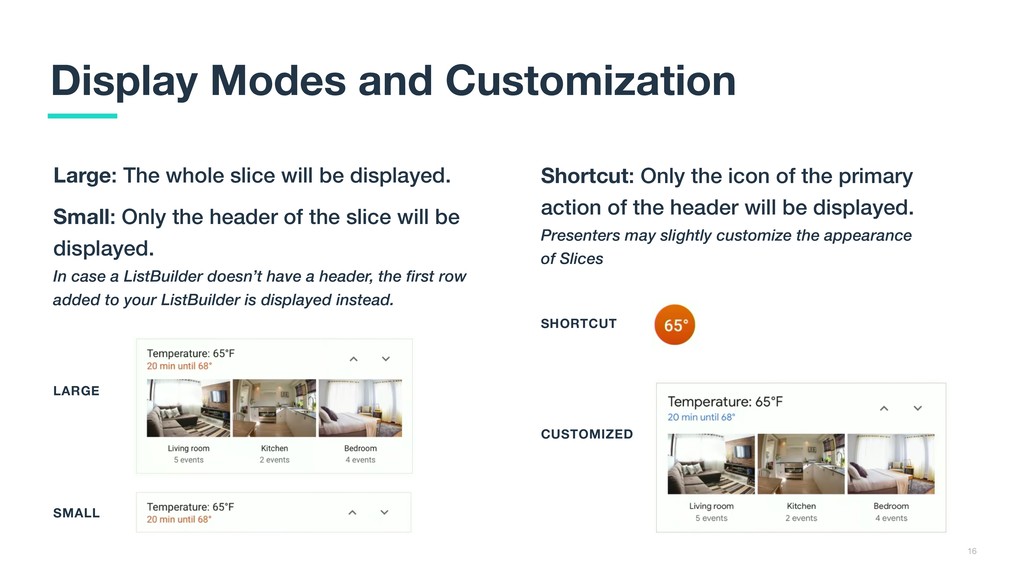
  15. 16 Display Modes and Customization Large: The whole slice will

    be displayed. Small: Only the header of the slice will be displayed.
 In case a ListBuilder doesn’t have a header, the first row added to your ListBuilder is displayed instead. LARGE SMALL SHORTCUT CUSTOMIZED Shortcut: Only the icon of the primary action of the header will be displayed.
 Presenters may slightly customize the appearance of Slices
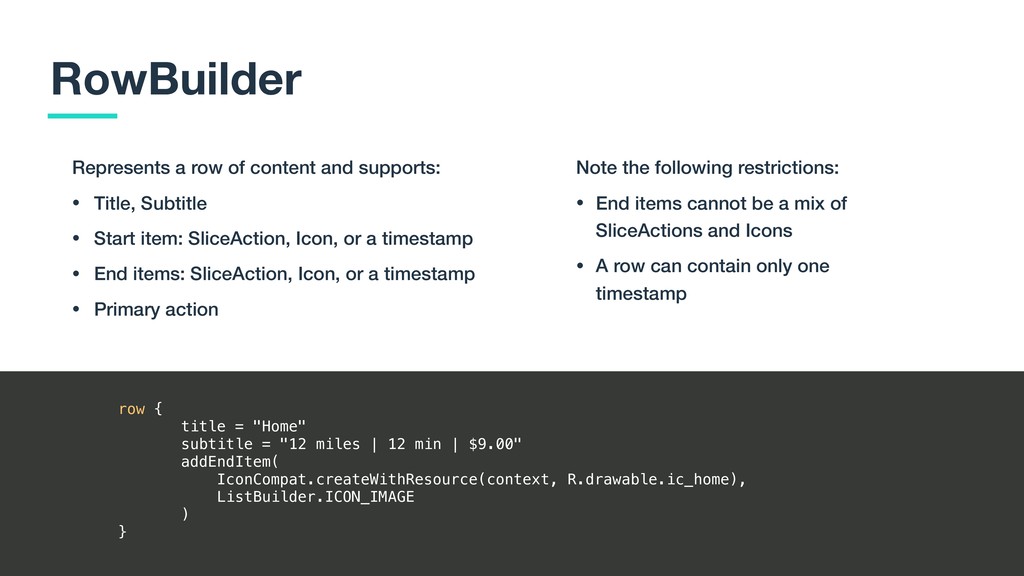
  16. 17 RowBuilder Represents a row of content and supports: •

    Title, Subtitle • Start item: SliceAction, Icon, or a timestamp • End items: SliceAction, Icon, or a timestamp • Primary action row { title = "Home" subtitle = "12 miles | 12 min | $9.00" addEndItem( IconCompat.createWithResource(context, R.drawable.ic_home), ListBuilder.ICON_IMAGE ) } Note the following restrictions: • End items cannot be a mix of SliceActions and Icons • A row can contain only one timestamp
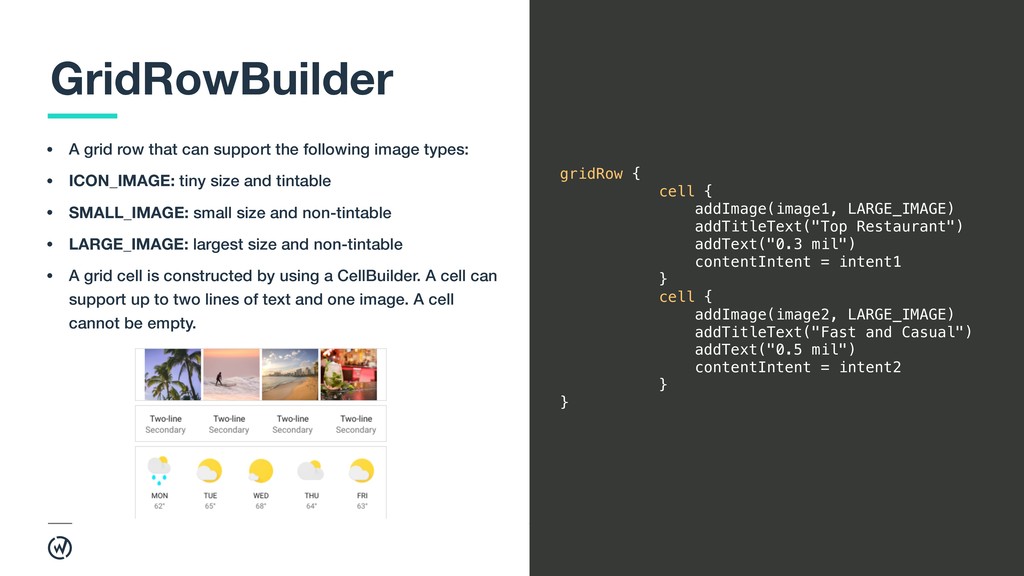
  17. 18 GridRowBuilder • A grid row that can support the

    following image types: • ICON_IMAGE: tiny size and tintable • SMALL_IMAGE: small size and non-tintable • LARGE_IMAGE: largest size and non-tintable • A grid cell is constructed by using a CellBuilder. A cell can support up to two lines of text and one image. A cell cannot be empty. gridRow { cell { addImage(image1, LARGE_IMAGE) addTitleText("Top Restaurant") addText("0.3 mil") contentIntent = intent1 } cell { addImage(image2, LARGE_IMAGE) addTitleText("Fast and Casual") addText("0.5 mil") contentIntent = intent2 } }
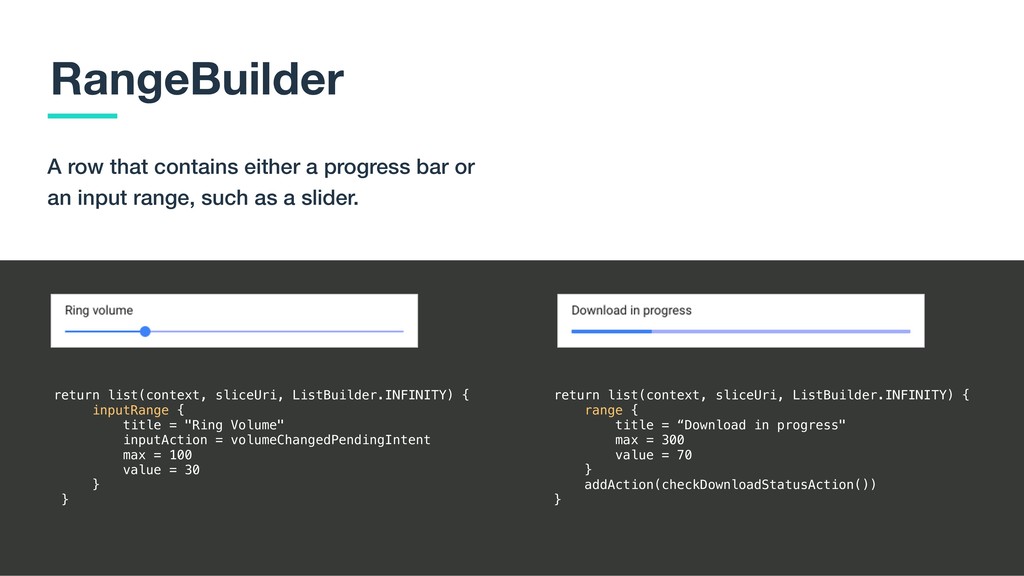
  18. 19 RangeBuilder A row that contains either a progress bar

    or an input range, such as a slider. return list(context, sliceUri, ListBuilder.INFINITY) { inputRange { title = "Ring Volume" inputAction = volumeChangedPendingIntent max = 100 value = 30 } } return list(context, sliceUri, ListBuilder.INFINITY) { range { title = “Download in progress" max = 300 value = 70 } addAction(checkDownloadStatusAction()) }
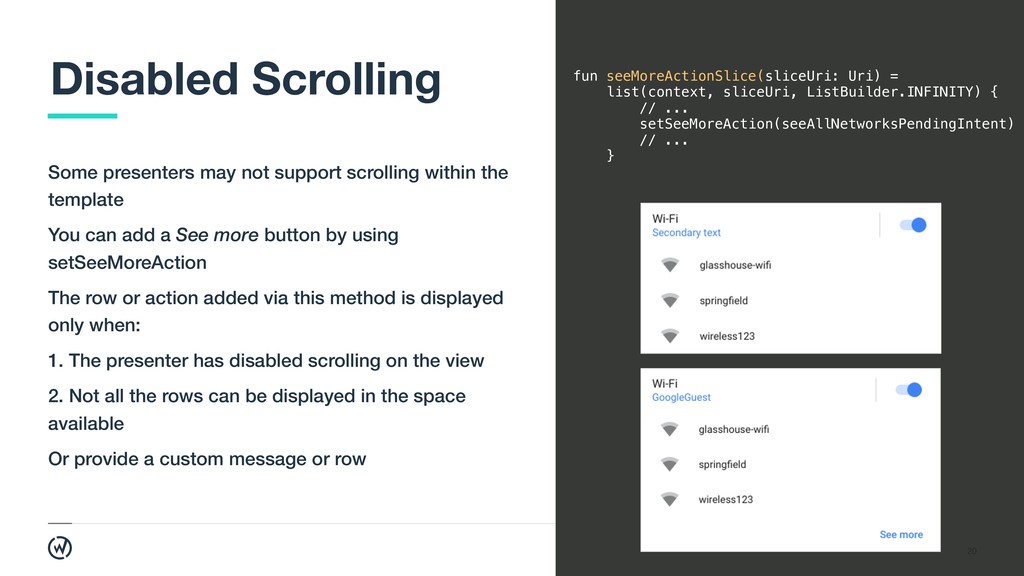
  19. 20 Disabled Scrolling Some presenters may not support scrolling within

    the template You can add a See more button by using setSeeMoreAction The row or action added via this method is displayed only when: 1. The presenter has disabled scrolling on the view 2. Not all the rows can be displayed in the space available Or provide a custom message or row fun seeMoreActionSlice(sliceUri: Uri) = list(context, sliceUri, ListBuilder.INFINITY) { // ... setSeeMoreAction(seeAllNetworksPendingIntent) // ... }
  20. 21 Prototyping Slices 1. Build a canonical Slice (for your

    app name) 2. Build Slices that will be discoverable in Search by keywords 3. Build Slices that will show up in Google Assistant as a response to user’s intent Think about intents and actions the user can take. 
 The user might want to: • Discover new content they’re interested in • Be reminded of the existing content • Accomplish a task right then and there (or see available options to complete a task) • See the actions they can take that are relevant to what they were inquiring about
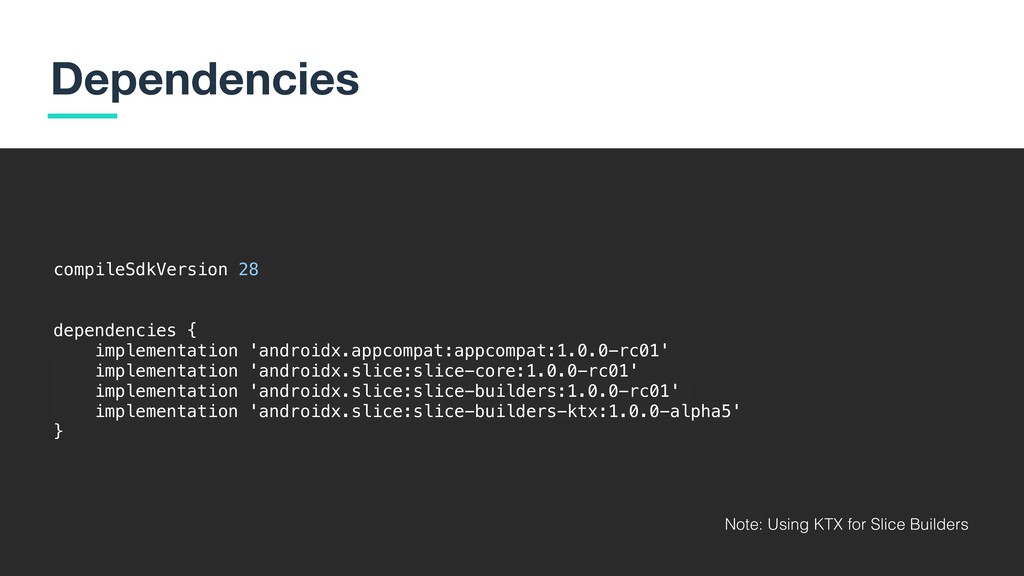
  21. 22 Dependencies compileSdkVersion 28 dependencies { implementation 'androidx.appcompat:appcompat:1.0.0-rc01' implementation 'androidx.slice:slice-core:1.0.0-rc01'

    implementation 'androidx.slice:slice-builders:1.0.0-rc01' implementation 'androidx.slice:slice-builders-ktx:1.0.0-alpha5' } Note: Using KTX for Slice Builders
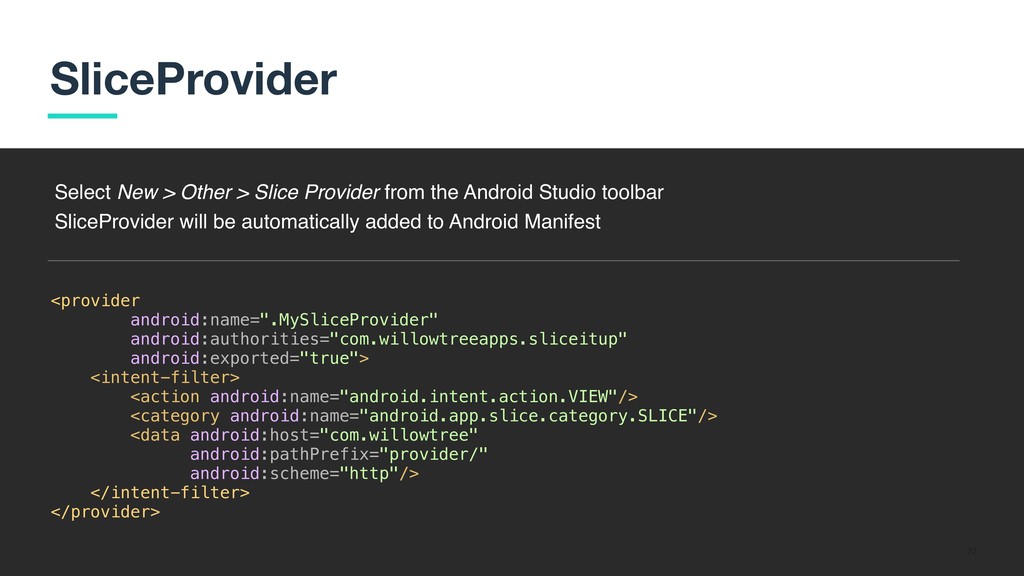
  22. 23 SliceProvider <provider android:name=".MySliceProvider" android:authorities="com.willowtreeapps.sliceitup" android:exported="true"> <intent-filter> <action android:name="android.intent.action.VIEW"/> <category

    android:name="android.app.slice.category.SLICE"/> <data android:host="com.willowtree" android:pathPrefix="provider/" android:scheme="http"/> </intent-filter> </provider> Select New > Other > Slice Provider from the Android Studio toolbar SliceProvider will be automatically added to Android Manifest
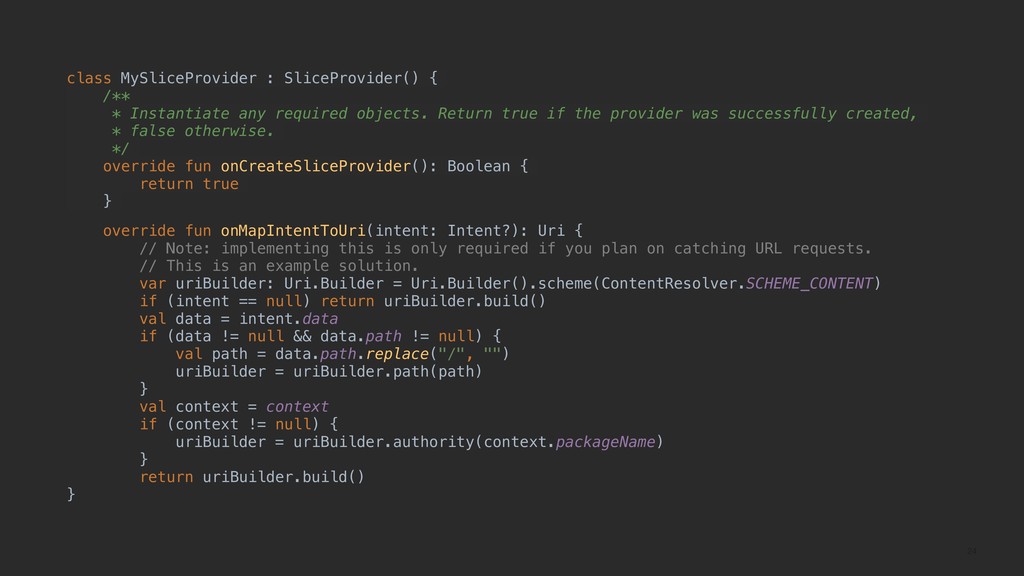
  23. 24 class MySliceProvider : SliceProvider() { /** * Instantiate any

    required objects. Return true if the provider was successfully created, * false otherwise. */ override fun onCreateSliceProvider(): Boolean { return true } override fun onMapIntentToUri(intent: Intent?): Uri { // Note: implementing this is only required if you plan on catching URL requests. // This is an example solution. var uriBuilder: Uri.Builder = Uri.Builder().scheme(ContentResolver.SCHEME_CONTENT) if (intent == null) return uriBuilder.build() val data = intent.data if (data != null && data.path != null) { val path = data.path.replace("/", "") uriBuilder = uriBuilder.path(path) } val context = context if (context != null) { uriBuilder = uriBuilder.authority(context.packageName) } return uriBuilder.build() }
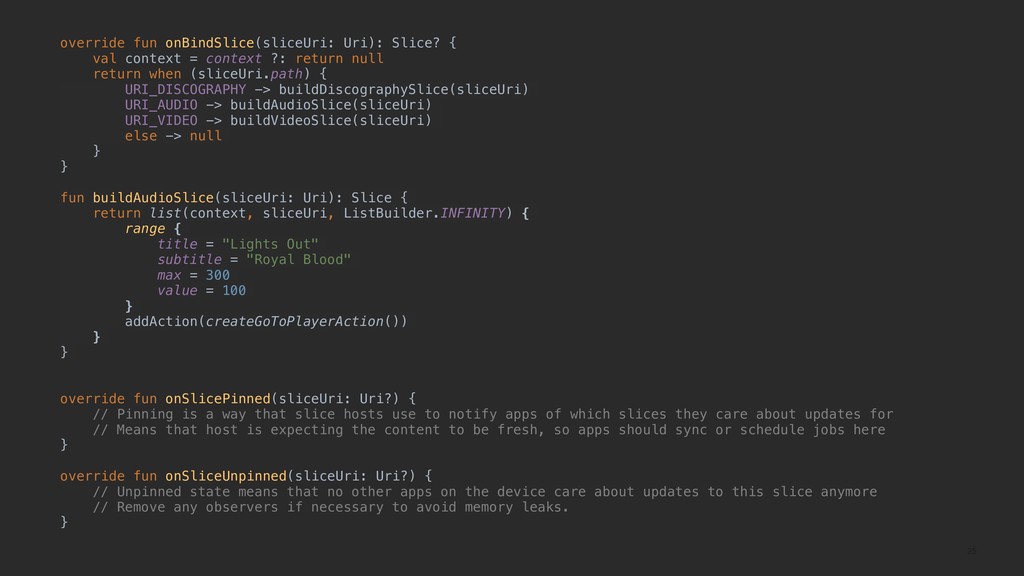
  24. 25 override fun onBindSlice(sliceUri: Uri): Slice? { val context =

    context ?: return null return when (sliceUri.path) { URI_DISCOGRAPHY -> buildDiscographySlice(sliceUri) URI_AUDIO -> buildAudioSlice(sliceUri) URI_VIDEO -> buildVideoSlice(sliceUri) else -> null } } fun buildAudioSlice(sliceUri: Uri): Slice { return list(context, sliceUri, ListBuilder.INFINITY) { range { title = "Lights Out" subtitle = "Royal Blood" max = 300 value = 100 } addAction(createGoToPlayerAction()) } } override fun onSlicePinned(sliceUri: Uri?) { // Pinning is a way that slice hosts use to notify apps of which slices they care about updates for // Means that host is expecting the content to be fresh, so apps should sync or schedule jobs here } override fun onSliceUnpinned(sliceUri: Uri?) { // Unpinned state means that no other apps on the device care about updates to this slice anymore // Remove any observers if necessary to avoid memory leaks. }
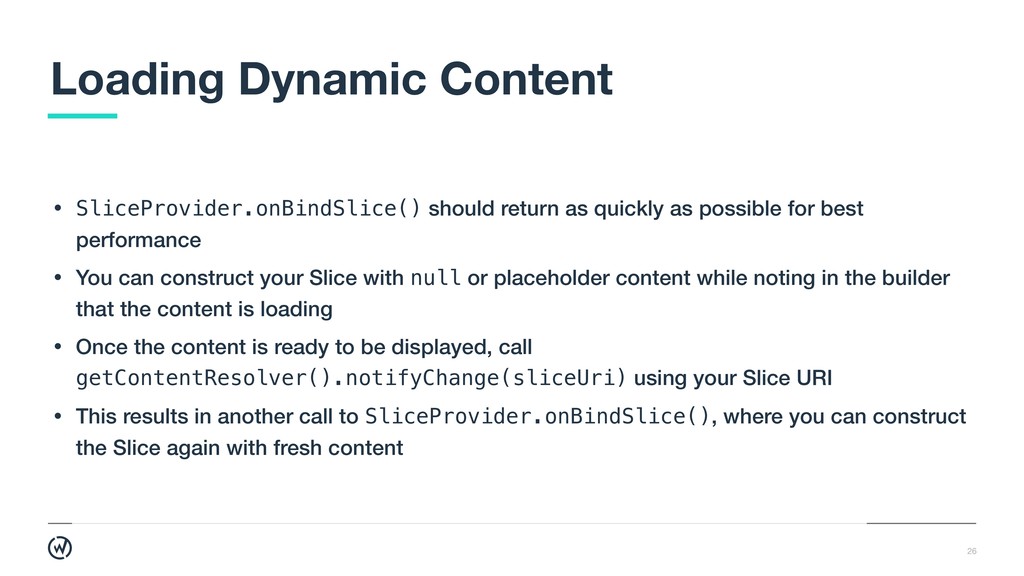
  25. 26 • SliceProvider.onBindSlice() should return as quickly as possible for

    best performance • You can construct your Slice with null or placeholder content while noting in the builder that the content is loading • Once the content is ready to be displayed, call getContentResolver().notifyChange(sliceUri) using your Slice URI • This results in another call to SliceProvider.onBindSlice(), where you can construct the Slice again with fresh content Loading Dynamic Content
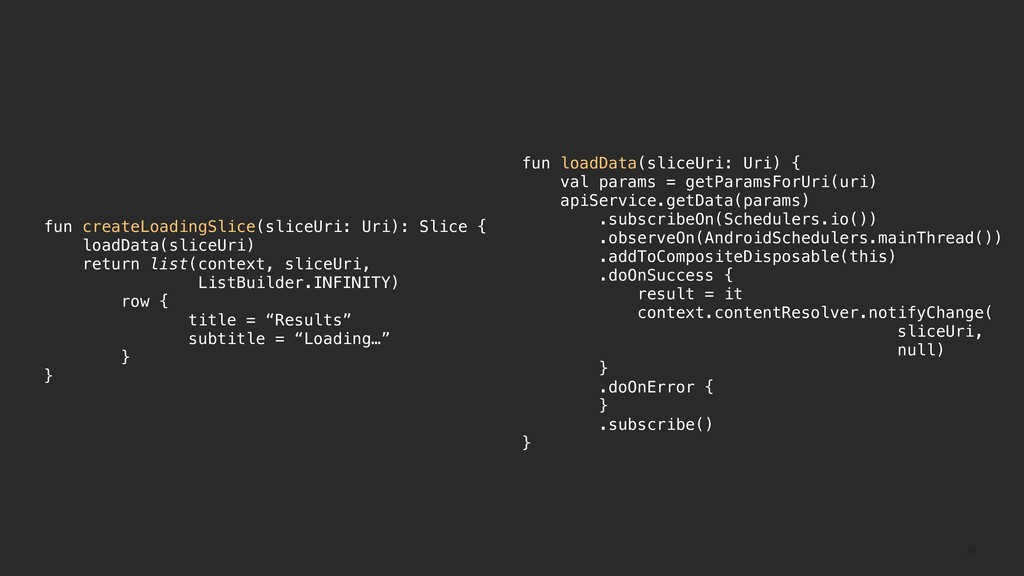
  26. 27 fun createLoadingSlice(sliceUri: Uri): Slice { loadData(sliceUri) return list(context, sliceUri,

    ListBuilder.INFINITY) row { title = “Results” subtitle = “Loading…” } } fun loadData(sliceUri: Uri) { val params = getParamsForUri(uri) apiService.getData(params) .subscribeOn(Schedulers.io()) .observeOn(AndroidSchedulers.mainThread()) .addToCompositeDisposable(this) .doOnSuccess { result = it context.contentResolver.notifyChange( sliceUri, null) } .doOnError { } .subscribe() }
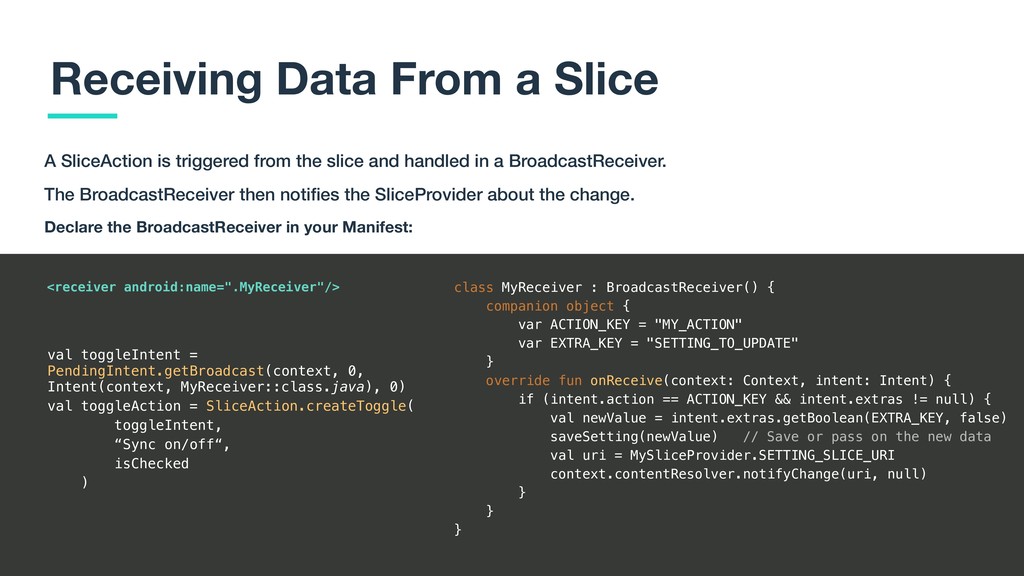
  27. 28 Receiving Data From a Slice A SliceAction is triggered

    from the slice and handled in a BroadcastReceiver. The BroadcastReceiver then notifies the SliceProvider about the change. class MyReceiver : BroadcastReceiver() { companion object { var ACTION_KEY = "MY_ACTION" var EXTRA_KEY = "SETTING_TO_UPDATE" } override fun onReceive(context: Context, intent: Intent) { if (intent.action == ACTION_KEY && intent.extras != null) { val newValue = intent.extras.getBoolean(EXTRA_KEY, false) saveSetting(newValue) // Save or pass on the new data val uri = MySliceProvider.SETTING_SLICE_URI context.contentResolver.notifyChange(uri, null) } } } Declare the BroadcastReceiver in your Manifest: <receiver android:name=".MyReceiver"/> val toggleIntent = PendingIntent.getBroadcast(context, 0, Intent(context, MyReceiver::class.java), 0) val toggleAction = SliceAction.createToggle( toggleIntent, “Sync on/off“, isChecked )
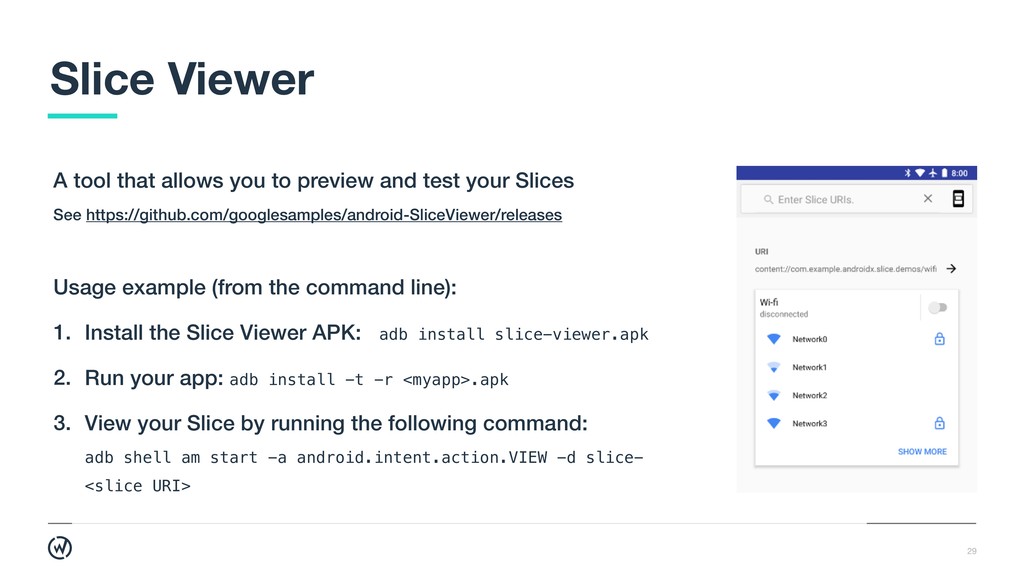
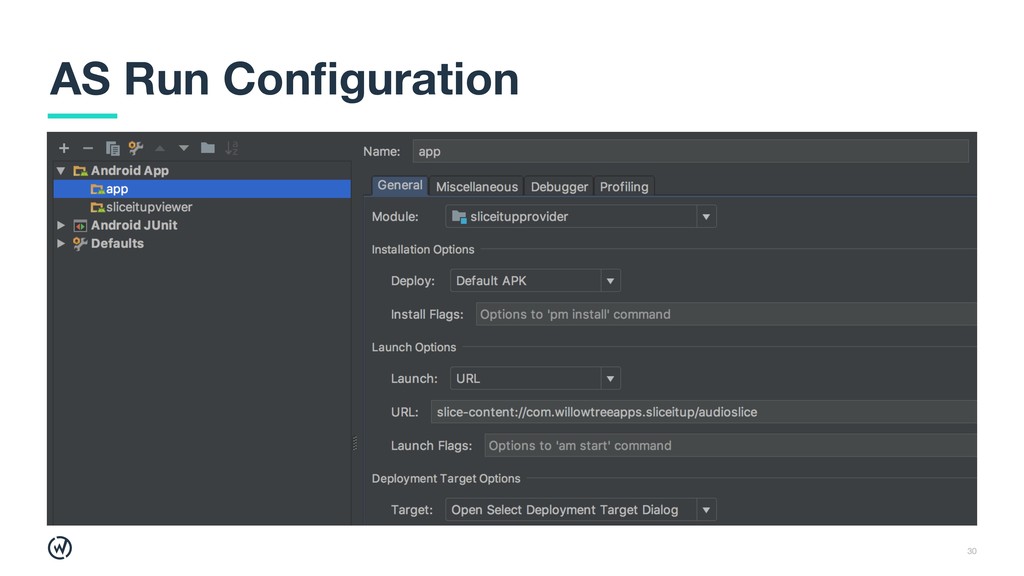
  28. 29 A tool that allows you to preview and test

    your Slices See https://github.com/googlesamples/android-SliceViewer/releases Slice Viewer Usage example (from the command line): 1. Install the Slice Viewer APK: adb install slice-viewer.apk 2. Run your app: adb install -t -r <myapp>.apk 3. View your Slice by running the following command:
 adb shell am start -a android.intent.action.VIEW -d slice- <slice URI>
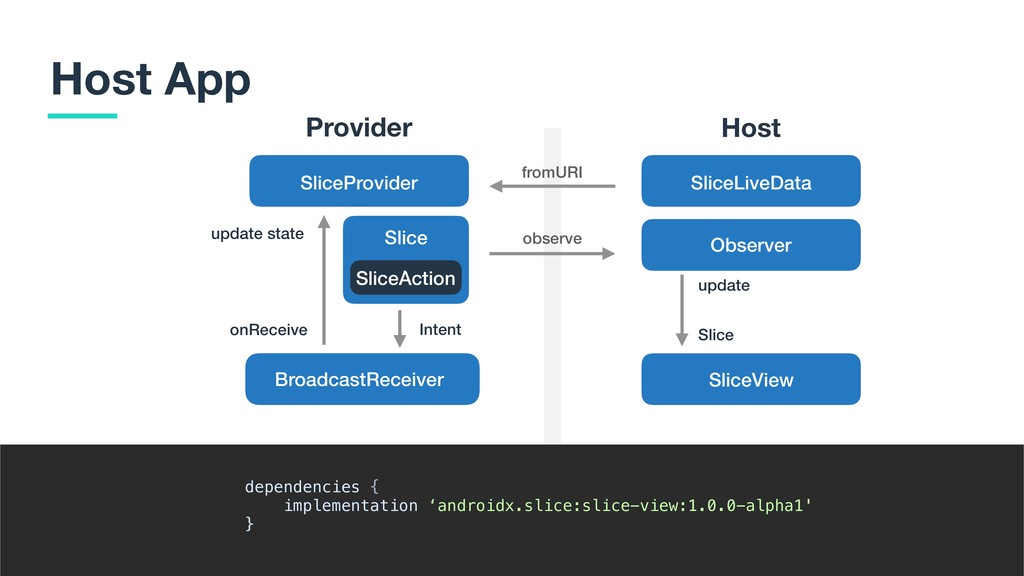
  29. 31 Host App ` Provider SliceProvider Slice SliceAction BroadcastReceiver update

    state onReceive Intent fromURI observe SliceLiveData Observer SliceView Host Slice update dependencies { implementation ‘androidx.slice:slice-view:1.0.0-alpha1' }
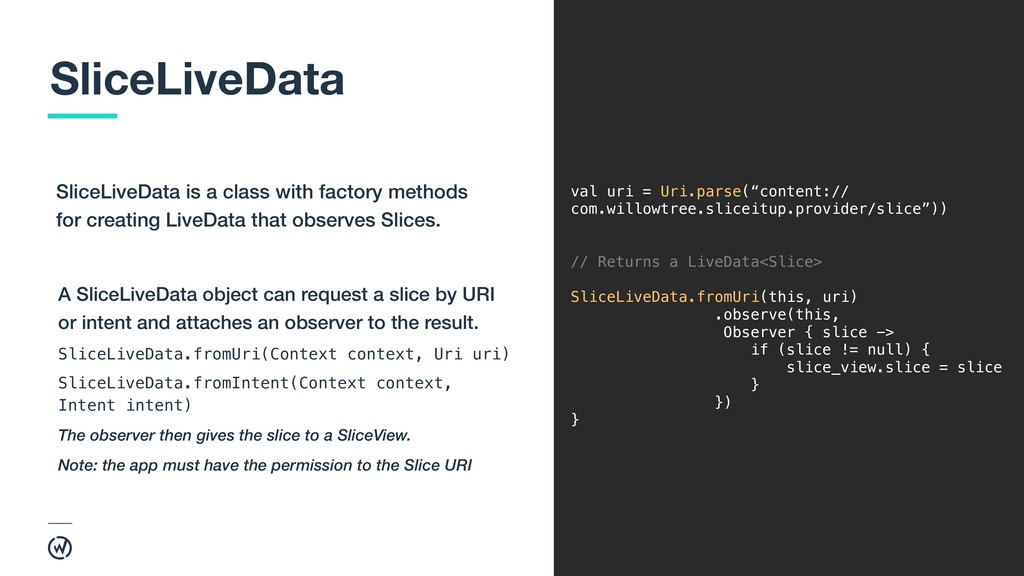
  30. 32 A SliceLiveData object can request a slice by URI

    or intent and attaches an observer to the result. SliceLiveData.fromUri(Context context, Uri uri) SliceLiveData.fromIntent(Context context, Intent intent) The observer then gives the slice to a SliceView. Note: the app must have the permission to the Slice URI SliceLiveData val uri = Uri.parse(“content:// com.willowtree.sliceitup.provider/slice”)) // Returns a LiveData<Slice> SliceLiveData.fromUri(this, uri) .observe(this, Observer { slice -> if (slice != null) { slice_view.slice = slice } }) } SliceLiveData is a class with factory methods for creating LiveData that observes Slices.
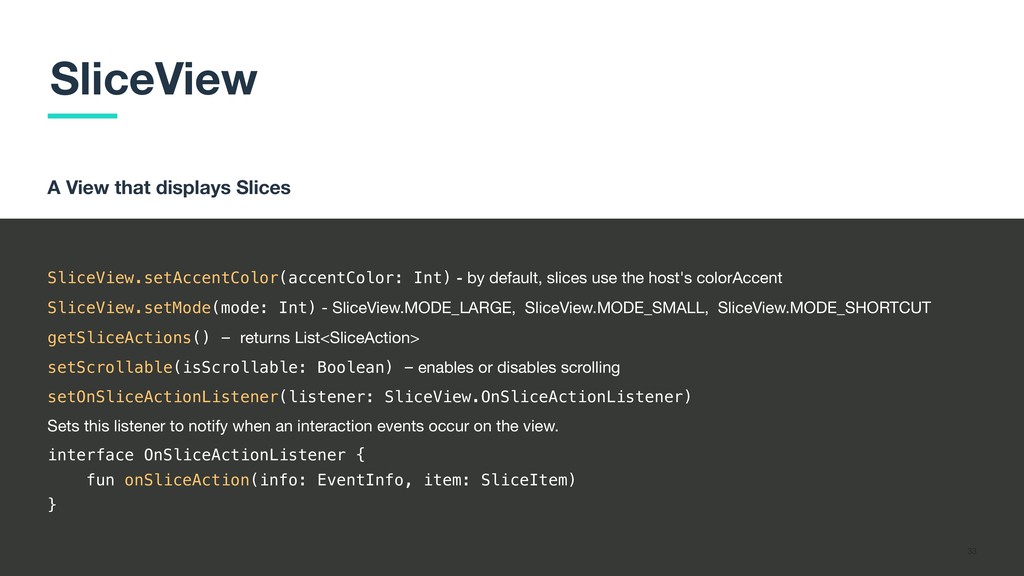
  31. 33 A View that displays Slices SliceView SliceView.setAccentColor(accentColor: Int) -

    by default, slices use the host's colorAccent SliceView.setMode(mode: Int) - SliceView.MODE_LARGE, SliceView.MODE_SMALL, SliceView.MODE_SHORTCUT getSliceActions() - returns List<SliceAction> setScrollable(isScrollable: Boolean) - enables or disables scrolling setOnSliceActionListener(listener: SliceView.OnSliceActionListener) Sets this listener to notify when an interaction events occur on the view. interface OnSliceActionListener { fun onSliceAction(info: EventInfo, item: SliceItem) }
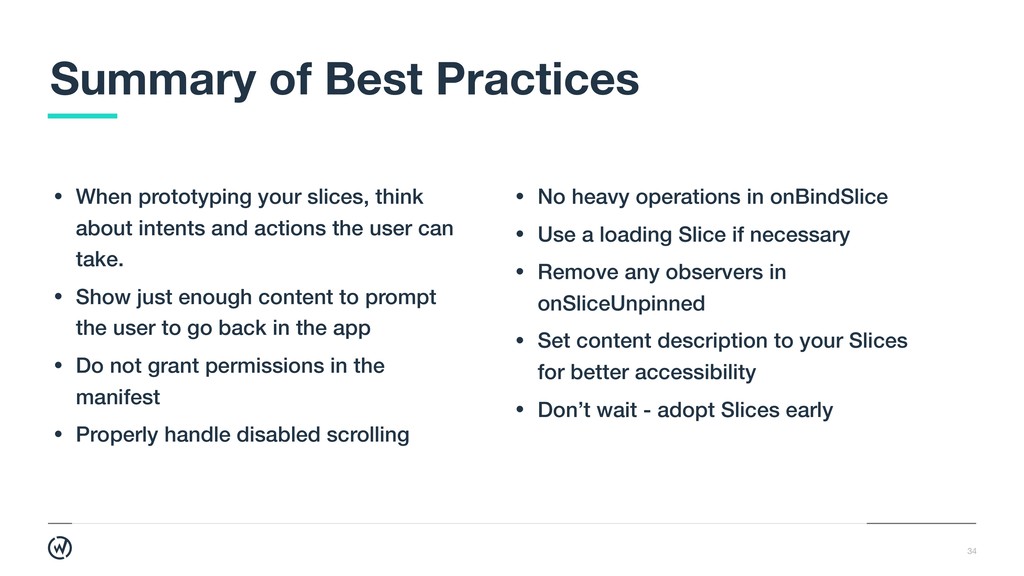
  32. 34 • When prototyping your slices, think about intents and

    actions the user can take. • Show just enough content to prompt the user to go back in the app • Do not grant permissions in the manifest • Properly handle disabled scrolling Summary of Best Practices • No heavy operations in onBindSlice • Use a loading Slice if necessary • Remove any observers in onSliceUnpinned • Set content description to your Slices for better accessibility • Don’t wait - adopt Slices early