Upgrade to Pro
— share decks privately, control downloads, hide ads and more …
Speaker Deck
Sign up for free
Menu
Search
Features
All features
Private URLs
Password Protection
Custom URLS
Scheduled publishing
Remove Branding
Restrict embedding
Deck Collections
Notes
Features
All features
Private URLs
Password Protection
Custom URLS
Scheduled publishing
Remove Branding
Restrict embedding
Deck Collections
Notes
Explore
Featured decks
Featured speakers
Programming
Technology
Storyboards
Explore
Featured decks
Featured speakers
Programming
Technology
Storyboards
Pricing
Search
Sign in
Sign up for free
FileBeat (Won't save you from the JVM)
Search
Chris Fidao
January 24, 2016
Technology
390
1
Share
Embed
Copy iframe code
Copy JS code
Copy link
Start on current slide
FileBeat (Won't save you from the JVM)
A quick presentation about using Elastic's FileBeat for log aggregation.
Chris Fidao
January 24, 2016
More Decks by Chris Fidao
See All by Chris Fidao
Development Environments that Feel Local
fideloper
0
110
Refactoring Terraform - CloudCasts - Scaling EC2
fideloper
0
120
Scaling Laravel - Laracon.net 2018
fideloper
15
2k
Linux Environment
fideloper
1
11k
Server Survival
fideloper
29
24k
Powering Your Applications With Nginx
fideloper
9
7.7k
Hexagonal Architecture
fideloper
49
200k
Intro to etcd
fideloper
3
680
Service Oriented Architecture with a little help from NodeJS
fideloper
4
2.3k
Other Decks in Technology
See All in Technology
AI × アーキテクト 第1・2章|生成AIの課題とアーキテクトの素養
daidaidai
1
240
Claude for Google Workspaces ポン出し/claude-for-google-workspace-slide-conversion
emiki
0
11k
Metadata - Section 2: Simple Metadata & Meta Tags
mohab1
0
140
僕のハーネスを紹介します
watany
5
1.6k
野良MCPサーバーを排除せよ!MCPサーバーのガバナンス
yukiogawa
1
210
sue445's proposals 2026
sue445
0
140
ポケモン対戦を自動で記録して振り返ろう
fufufukakaka
0
310
シンプルな設定ファイルで実現する AWS IAM Identity Center の ユーザー管理Terraformフレームワークを公開しました / Simplifying AWS IAM Identity Center User Management: An Open-Source Terraform Framework
yamaguchitk333
0
260
Gemini Intelligence 入門 ― AppFunctions と Gemini Nano
takuroabe
0
370
プロダクトが成長すると、 プロダクトマネージャーの仕事はどう変わるのか - 「まず作る」から「小さく学び、確かめながら進む」へ
sansantech
PRO
0
240
FinOps Agentが生んだ技術負債:コスト自動調査の落とし穴と解消までの道のり
oasis1994liveforever
3
280
dbt Semantic Layerで進めるenechainのデータ民主化
akizhou
1
250
Featured
See All Featured
My Coaching Mixtape
mlcsv
0
360
Google's AI Overviews - The New Search
badams
0
1.6k
The Illustrated Guide to Node.js - THAT Conference 2024
reverentgeek
1
580
Chrome DevTools: State of the Union 2024 - Debugging React & Beyond
addyosmani
10
1.4k
We Analyzed 250 Million AI Search Results: Here's What I Found
joshbly
2
2.1k
Why Your Marketing Sucks and What You Can Do About It - Sophie Logan
marketingsoph
0
440
Intergalactic Javascript Robots from Outer Space
tanoku
273
28k
The browser strikes back
jonoalderson
0
1.8k
Money Talks: Using Revenue to Get Sh*t Done
nikkihalliwell
0
530
How to audit for AI Accessibility on your Front & Back End
davetheseo
0
610
The #1 spot is gone: here's how to win anyway
tamaranovitovic
4
1.2k
SERP Conf. Vienna - Web Accessibility: Optimizing for Inclusivity and SEO
sarafernandez
2
1.6k
Transcript
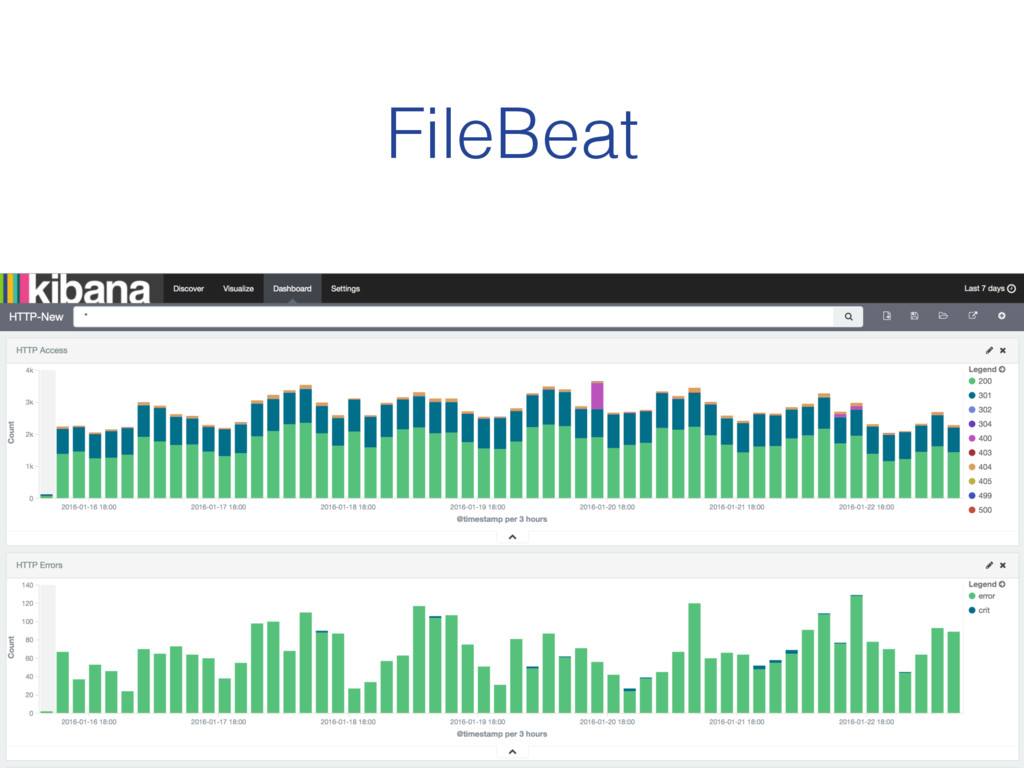
FileBeat (Won’t save you from the JVM)
Beats Data Shippers for Elasticsearch (written in Golang)
PacketBeat TopBeat
FileBeat
Versus:
!
None
None
None
Goal: "
# Download Filebeat Package (Debian/Ubuntu) curl -L -O https://download.elastic.co/beats/filebeat/ filebeat_1.0.1_amd64.deb
# Install from .deb file, # without worrying about dependencies, # because Golang ! sudo dpkg -i filebeat_1.0.1_amd64.deb #!/usr/bin/env bash
filebeat: prospectors: - paths: - /var/log/nginx/*.log input_type: log - paths:
- /var/log/php7.0-fpm.log input_type: log output: elasticsearch: hosts: [“https://search-sadevops.us-east-1.es.aws.com:443"] shipper: tags: ["web-service", "or-like-whatever"] /etc/filebeat/filebeat.yml
useless (un-parsed message)
Plaintext Log Message useless
You Can’t Escape the JVM
None
Plaintext Log Message Parsed Log (JSON)
# Install Java sudo apt-get install -y openjdk-7-jdk # Add
ES Key wget -O - http://packages.elasticsearch.org/GPG-KEY-elasticsearch | sudo apt-key add - # Add Repo echo "deb http://packages.elastic.co/logstash/2.1/debian stable main" | sudo tee /etc/apt/sources.list.d/logstash.list # Update and install package sudo apt-get update sudo apt-get install -y logstash # Install Filebeat Plugin sudo /opt/logstash/bin/plugin install logstash-input-beats On a new server…
input { beats { type => beats port => 5044
} } filter { grok { match => { "message" => "%{COMBINEDAPACHELOG}" } remove_tag => ["_grokparsefailure"] add_tag => ["nginx_access"] } } output { elasticsearch { hosts => ["search-sadevops.us-east-1.es.aws.com:80"] } } /etc/logstash/conf.d/filebeat.conf
filebeat: prospectors: - paths: - /var/log/nginx/*.log input_type: log - paths:
- /var/log/php7.0-fpm.log input_type: log output: logstash: hosts: ["172.31.28.187:5044"] shipper: tags: ["web-service", "or-like-whatever"] /etc/filebeat/filebeat.yml
None
None
$ ab -n 50000 -c 2 localhost/ mehhhhhh
40% 250mb
Conclusion: (for my use case) Fluentd is good enough. •One
less server (yay!) •Trade-off of more ram used: acceptable •JVM is “scary”, because I’m ignorant •(But PacketBeat and TopBeat look really useful)
@fideloper Thanks! Chris Fidao


 fideloper
 daidaidai
 emiki
emiki
 mohab1
 watany
 yukiogawa
 sue445
 fufufukakaka
 yamaguchitk333
 takuroabe
 sansantech
 oasis1994liveforever
 akizhou
 mlcsv
mlcsv
 badams
 reverentgeek
 addyosmani
 joshbly
 marketingsoph
 tanoku
 jonoalderson
 nikkihalliwell
 davetheseo
 tamaranovitovic
 sarafernandez