Share
Embed
Finding and debugging a memory leak in Node.js
Presented: JSConf Colombia 2018
Giovanny Gongora
November 16, 2018
Transcript
33 slides
-
N O V E M B E R 1 6
, 2 0 1 8 C O N F I D E N T I A L Leak Hunting Finding and debugging a memory leak in Node.js -
C O N F I D E N T I
A L © 2018 NodeSource Developers/Companies (not all) don’t consider how difficult could be to track and fix a memory leak until it happens -
C O N F I D E N T I
A L © 2018 NodeSource Developers/Companies (not all) don’t consider how difficult could be to track and fix a memory leak until it happens … a day before the release date -
C O N F I D E N T I
A L © 2018 NodeSource Developers/Companies (not all) don’t consider how difficult could be to track and fix a memory leak until it happens … after a new cool feature is pushed -
C O N F I D E N T I
A L © 2018 NodeSource Developers/Companies (not all) don’t consider how difficult could be to track and fix a memory leak until it happens … in production on Friday night -
C O N F I D E N T I
A L © 2018 NodeSource Developers/Companies (not all) don’t consider how difficult could be to track and fix a memory leak until it happens … prod gets more client request than dev tests -
© 2018 NodeSource C O N F I D E
N T I A L Quick brief around Memory in Node.js -
© 2018 NodeSource C O N F I D E
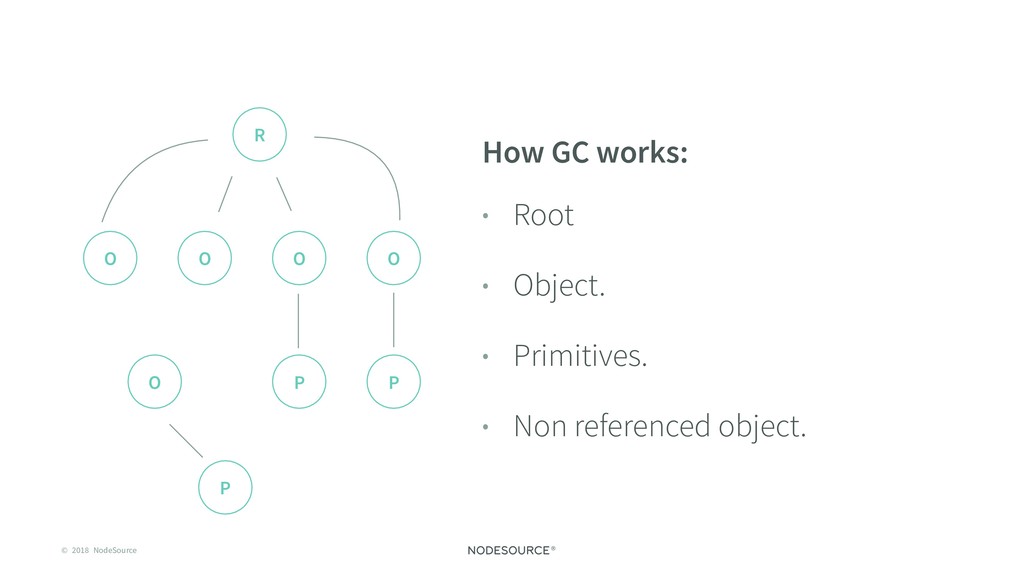
N T I A L Garbage Collection Every program that consumes memory requires a mechanism for reserving and freeing space. -
© 2018 NodeSource C O N F I D E
N T I A L How GC works: • Root • Object. • Primitives. • Non referenced object. R O O O O P P O P -
© 2018 NodeSource C O N F I D E
N T I A L Memory scheme (v8): • Resident Set • Code Segment • Stack • Heap • Used heap R E S ID E N T SE T CO DE S E GM E NT STACK H E AP RSS H E APTOTA L H E AP US E D E XT E R N AL -
© 2018 NodeSource C O N F I D E
N T I A L Relation between GC and a memory leak? • Impossible to remove non referenced data. • Portion of memory allocated not released when no longer needed. -
© 2018 NodeSource C O N F I D E
N T I A L Memory Leak causes: • Registered event handlers • Function closures • Leaking connections -
© 2018 NodeSource C O N F I D E
N T I A L Types of production issues -
© 2018 NodeSource C O N F I D E
N T I A L 1. Runtime performance: • The website/app is slow. • Not giving a great/fast experience to the user. -
© 2018 NodeSource C O N F I D E
N T I A L Things you can do on Runtime performance issues: • --perf-basic-prof-only-functions. • A system tool like Perf Events in Linux. • Spare the traces that are really important in your situation. • Checkout Daniel Khan talk to know how to visualize this data. -
© 2018 NodeSource C O N F I D E
N T I A L 2. Runtime crashes: • Uptime is critical. • Not easily to reproduce. • Resume the process asap. -
© 2018 NodeSource C O N F I D E
N T I A L Things you can do on Runtime crashes: • --abort-on-uncaught-exception. • Use some system tooling llbd, gbd, mdb. -
© 2018 NodeSource C O N F I D E
N T I A L 3. Memory leaks: • This will be our focus today. -
© 2018 NodeSource C O N F I D E
N T I A L Let’s do it! -
© 2018 NodeSource C O N F I D E
N T I A L 20 Strategy for Memory Leaks detection: • Inspect objects for more context. • Look for weird objects on heap • Growing object counts are likely leaking • Walk reverse references to find the root object • Compare object counts !important -
© 2018 NodeSource C O N F I D E
N T I A L Node.js Using V8 Inspector & Chrome Dev Tools • Run your node process with --inspect • Check chrome://inspect • Run it! -
© 2018 NodeSource C O N F I D E
N T I A L Taking Snapshots of the V8 Memory • Check the Memory tab • Take heap snapshot • Profit! -
© 2018 NodeSource C O N F I D E
N T I A L What is happening? • On the first snapshot, there are already/almost ~7-8MB allocated before any request is processed. • Memory keeps growing while the server is running and getting requests • Date objects and Objects have been allocated and increased between the two load sessions. -
© 2018 NodeSource C O N F I D E
N T I A L Possible solution: • Reduce the use of Date ? • The solution for this example is to store the logs not in memory, but on the filesystem -
© 2018 NodeSource C O N F I D E
N T I A L • As you can see, the memory growth is far slower! • This said, the API takes more time to respond. Reading and writing to the disk comes with a cost, so do other API calls or database requests. -
© 2018 NodeSource C O N F I D E
N T I A L Do something before it happens 26 -
© 2018 NodeSource C O N F I D E
N T I A L • Var test = function () {} • test.protory.biz = function () {} • fs.writeFile(chunck, function(err) {}) -
© 2018 NodeSource C O N F I D E
N T I A L I/O operations are… • Expensive. • A waste of resources if your program is unable to do other work. • Usually a hidden operation. -
© 2018 NodeSource C O N F I D E
N T I A L Blocking the Event Loop • Totally possible • Happens more times we want it to happen (who wants to block it in first place?) • Iterations and complex calculations would prevent the process from handling other events -
© 2018 NodeSource C O N F I D E
N T I A L Succeed doing I/O operations: • Choose asynchronous over synchronous • Opt for parallel I/O wherever possible • Don't hog the JavaScript thread with long-running calculations and iterations -
© 2018 NodeSource C O N F I D E
N T I A L • Better work scheduling • Reduces thread CPU overhead • V8 can only do one thing at a time • Spend as little time in V8 as possible -
© 2018 NodeSource C O N F I D E
N T I A L What we can learn from this: • Is never a good idea wait for Friday at night to learn about memory in Node.js -
C O N F I D E N T I
A L Thank you. Giovanny Gongora [email protected] @Gioyik