Upgrade to Pro — share decks privately, control downloads, hide ads and more …

Run it in CI (Kiro CLI headless mode and one re...

Run it in CI (Kiro CLI headless mode and one readiness check) | Learn Harness Engineering with Kiro 07

Level 300. Run the checks you run locally in CI in the same order, keep the heavy ones for the night, and roll every result into one readiness check that says yes only when every check has run and passed. On a small booking app, this deck has headless Kiro CLI review each PR with read-only tools, lets a script decide pass or fail, has Kiro check the running app through a browser MCP, writes the guards for unattended runs into the workflow, and shows the real terminal output of each run. This is deck 07 (Run the loop pillar) of the "Learn Harness Engineering with Kiro" series.

Avatar for Riku INADA

Riku INADA PRO

November 11, 2026

More Decks by Riku INADA

Other Decks in Technology

Transcript

  1. Learn Harness Engineering with Kiro Run the loop Level 300

    Run it in CI Kiro CLI headless mode and one readiness check 07 As of November 2026 November 2026 Riku Inada Amazon Web Services Japan + Kiro + Harness Engineering © 2026, Amazon Web Services, Inc. or its affiliates. All rights reserved. 1
  2. Introduction About me Riku Inada Amazon Web Services Japan G.K.

    Solutions Architect Works mainly with manufacturing customers Recent work Promoting the AI-Driven Development Life Cycle (AI-DLC) Writing and speaking about Kiro and AWS Amplify © 2026, Amazon Web Services, Inc. or its affiliates. All rights reserved. X @inada_riku Speaker Deck speakerdeck.com/inariku Zenn zenn.dev/inariku GitHub github.com/inariku 2
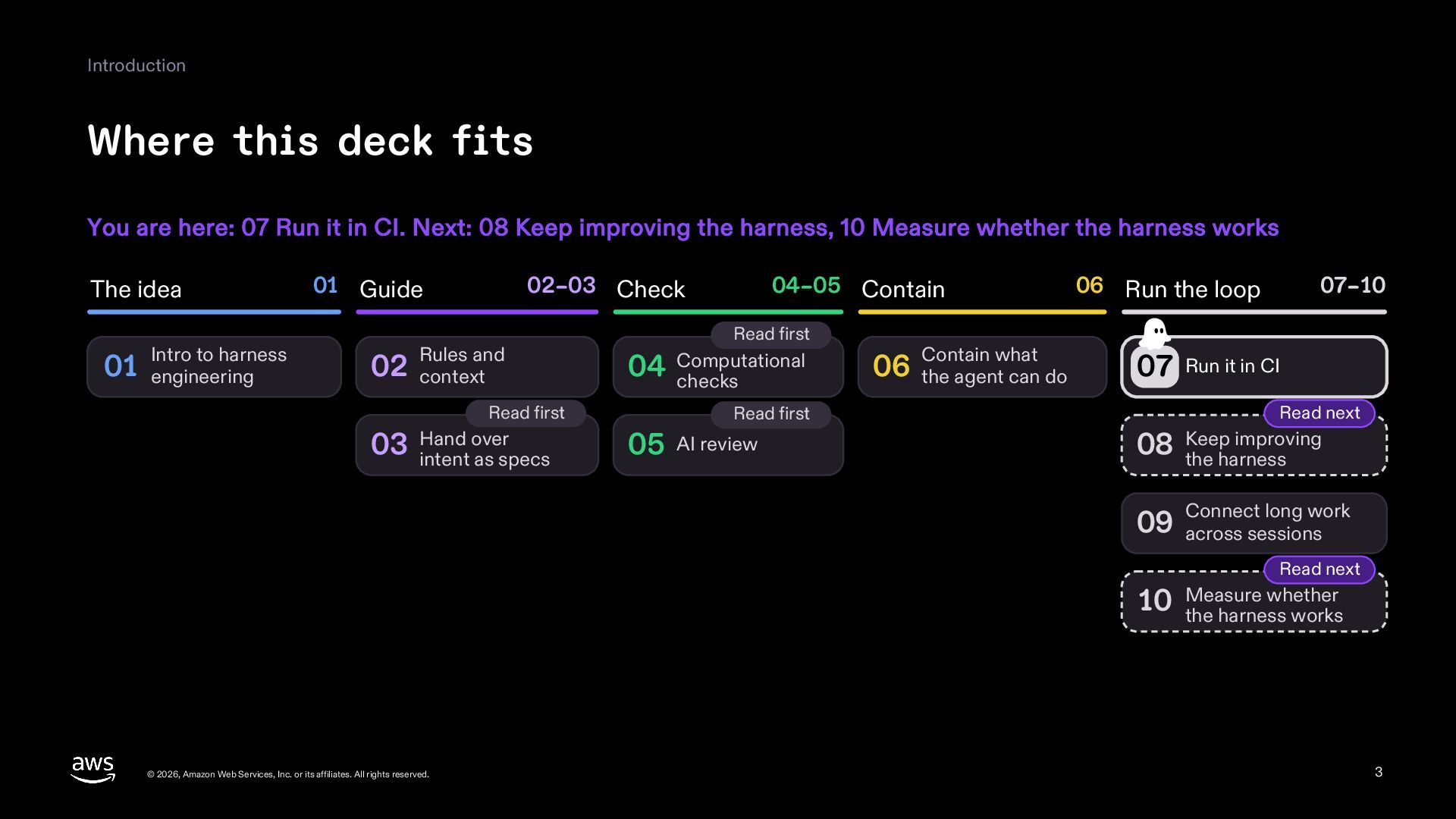
  3. Introduction Where this deck fits You are here: 07 Run

    it in CI. Next: 08 Keep improving the harness, 10 Measure whether the harness works The idea Intro to harness 01 engineering 01 Guide 02–03 Check Rules and 02 context Read first over 03 Hand intent as specs 04–05 Contain Read first 04 Computational checks Read first 05 AI review Contain what 06 the agent can do 06 Run the loop 07–10 07 Run it in CI Read next improving 08 Keep the harness long work 09 Connect across sessions Read next whether 10 Measure the harness works © 2026, Amazon Web Services, Inc. or its affiliates. All rights reserved. 3
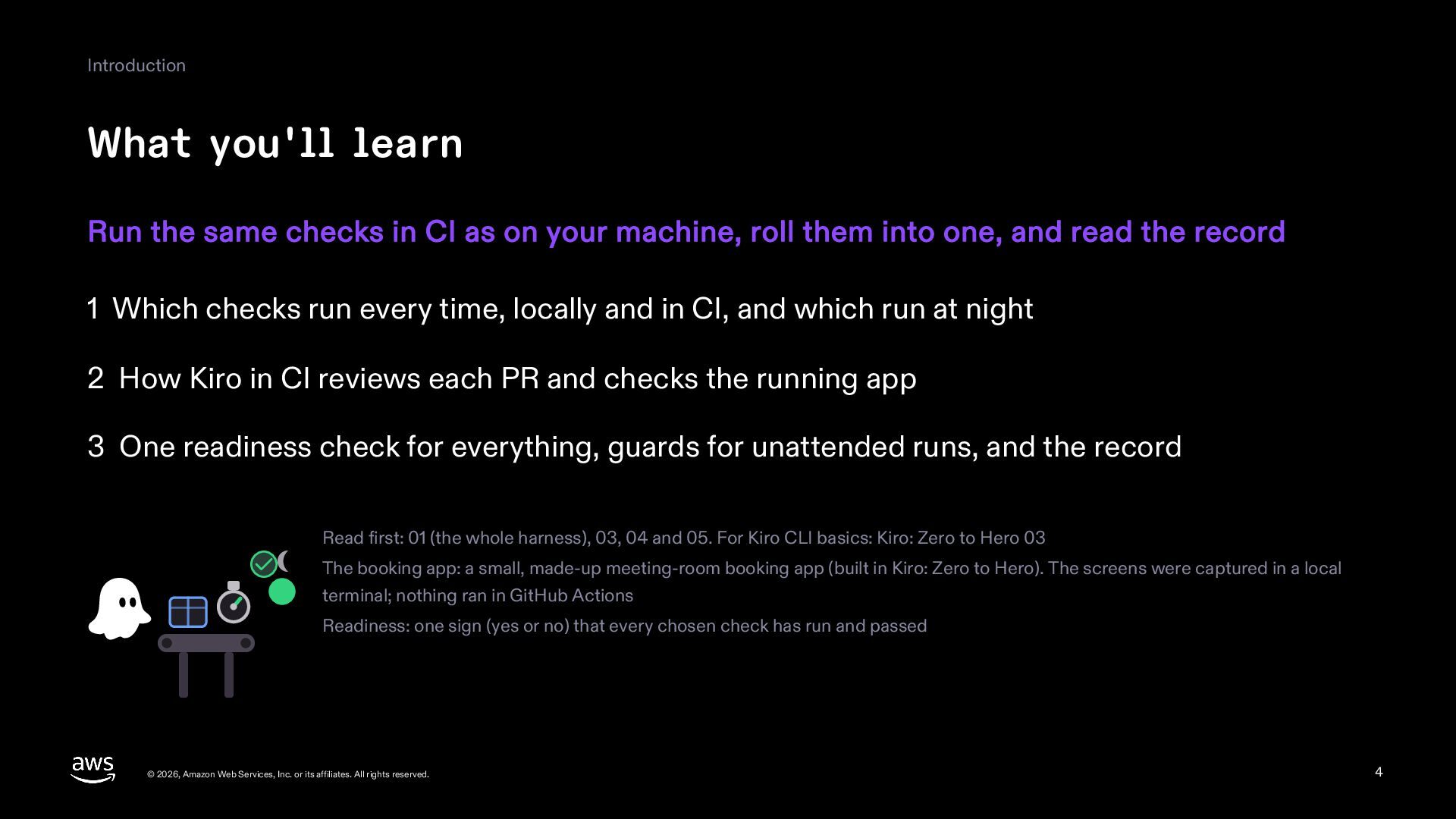
  4. Introduction What you'll learn Run the same checks in CI

    as on your machine, roll them into one, and read the record 1 Which checks run every time, locally and in CI, and which run at night 2 How Kiro in CI reviews each PR and checks the running app 3 One readiness check for everything, guards for unattended runs, and the record Read first: 01 (the whole harness), 03, 04 and 05. For Kiro CLI basics: Kiro: Zero to Hero 03 The booking app: a small, made-up meeting-room booking app (built in Kiro: Zero to Hero). The screens were captured in a local terminal; nothing ran in GitHub Actions Readiness: one sign (yes or no) that every chosen check has run and passed © 2026, Amazon Web Services, Inc. or its affiliates. All rights reserved. 4
  5. Part 1 Where to run © 2026, Amazon Web Services,

    Inc. or its affiliates. All rights reserved. 5
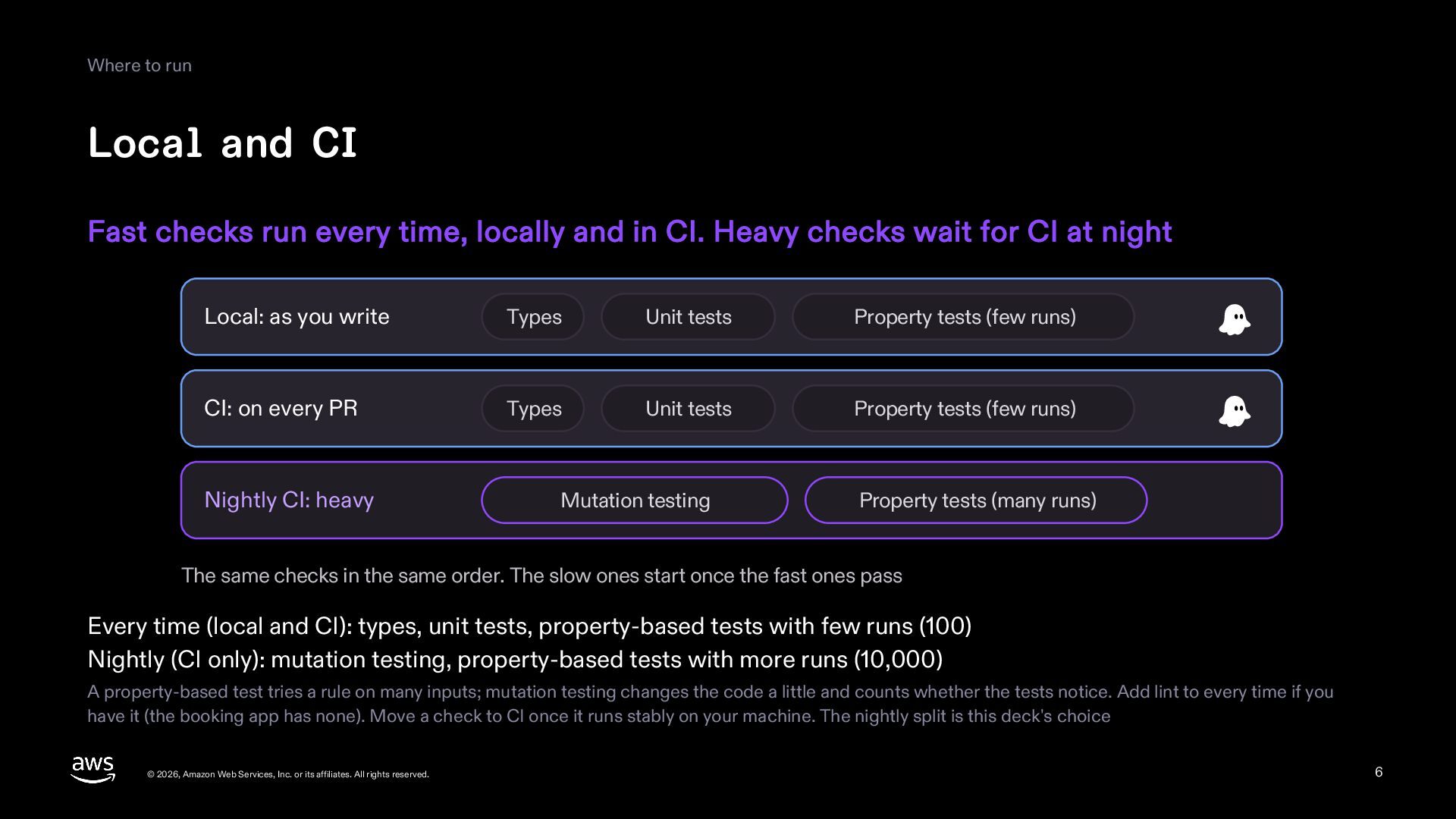
  6. Where to run Local and CI Fast checks run every

    time, locally and in CI. Heavy checks wait for CI at night Local: as you write Types Unit tests Property tests (few runs) CI: on every PR Types Unit tests Property tests (few runs) Nightly CI: heavy Mutation testing Property tests (many runs) The same checks in the same order. The slow ones start once the fast ones pass Every time (local and CI): types, unit tests, property-based tests with few runs (100) Nightly (CI only): mutation testing, property-based tests with more runs (10,000) A property-based test tries a rule on many inputs; mutation testing changes the code a little and counts whether the tests notice. Add lint to every time if you have it (the booking app has none). Move a check to CI once it runs stably on your machine. The nightly split is this deck's choice © 2026, Amazon Web Services, Inc. or its affiliates. All rights reserved. 6
  7. Part 2 Kiro in CI © 2026, Amazon Web Services,

    Inc. or its affiliates. All rights reserved. 7
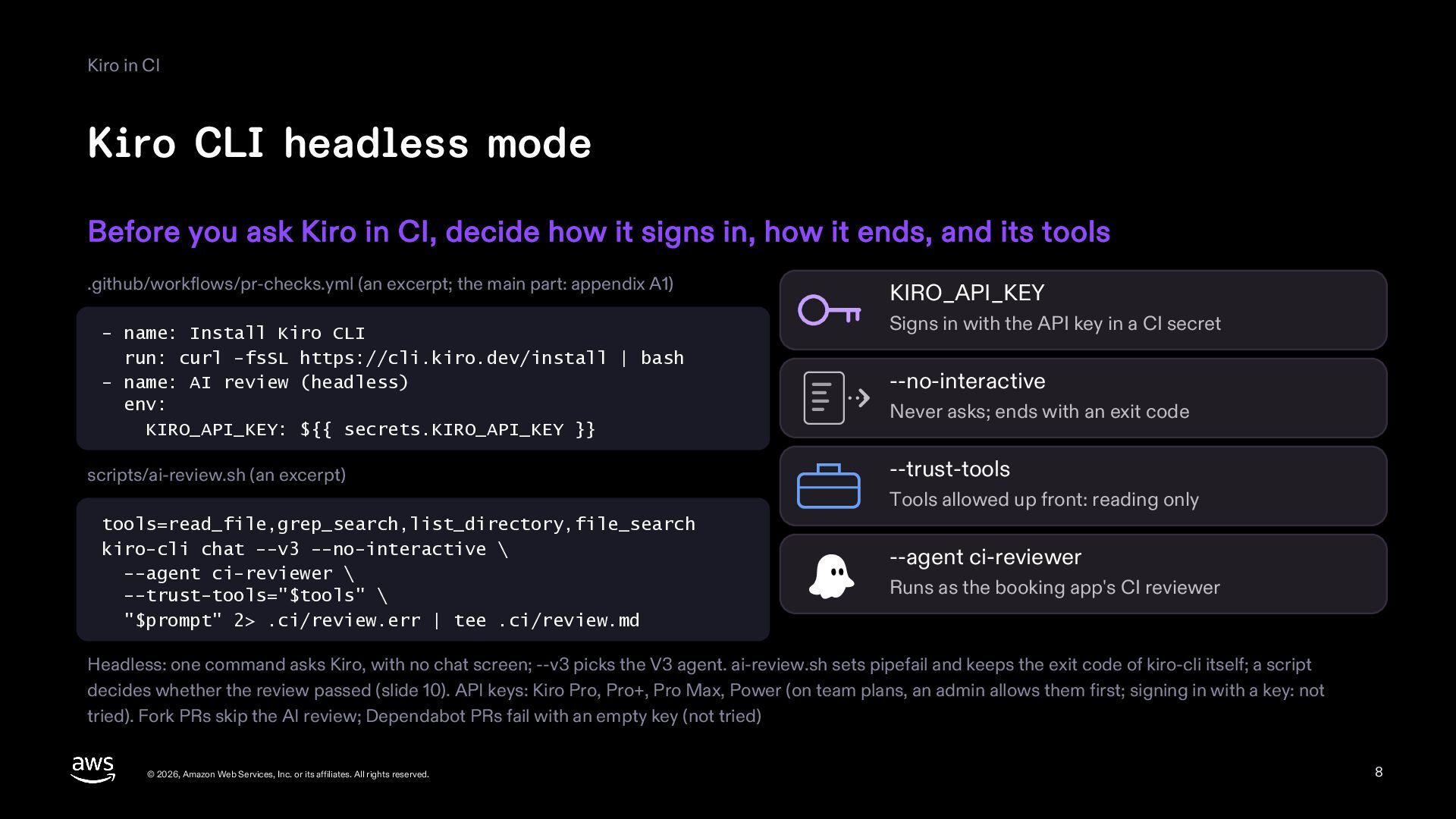
  8. Kiro in CI Kiro CLI headless mode Before you ask

    Kiro in CI, decide how it signs in, how it ends, and its tools .github/workflows/pr-checks.yml (an excerpt; the main part: appendix A1) - name: Install Kiro CLI run: curl -fsSL https://cli.kiro.dev/install | bash - name: AI review (headless) env: KIRO_API_KEY: ${{ secrets.KIRO_API_KEY }} scripts/ai-review.sh (an excerpt) KIRO_API_KEY Signs in with the API key in a CI secret --no-interactive Never asks; ends with an exit code --trust-tools Tools allowed up front: reading only tools=read_file,grep_search,list_directory,file_search kiro-cli chat --v3 --no-interactive \ --agent ci-reviewer \ --trust-tools="$tools" \ "$prompt" 2> .ci/review.err | tee .ci/review.md --agent ci-reviewer Runs as the booking app's CI reviewer Headless: one command asks Kiro, with no chat screen; --v3 picks the V3 agent. ai-review.sh sets pipefail and keeps the exit code of kiro-cli itself; a script decides whether the review passed (slide 10). API keys: Kiro Pro, Pro+, Pro Max, Power (on team plans, an admin allows them first; signing in with a key: not tried). Fork PRs skip the AI review; Dependabot PRs fail with an empty key (not tried) © 2026, Amazon Web Services, Inc. or its affiliates. All rights reserved. 8
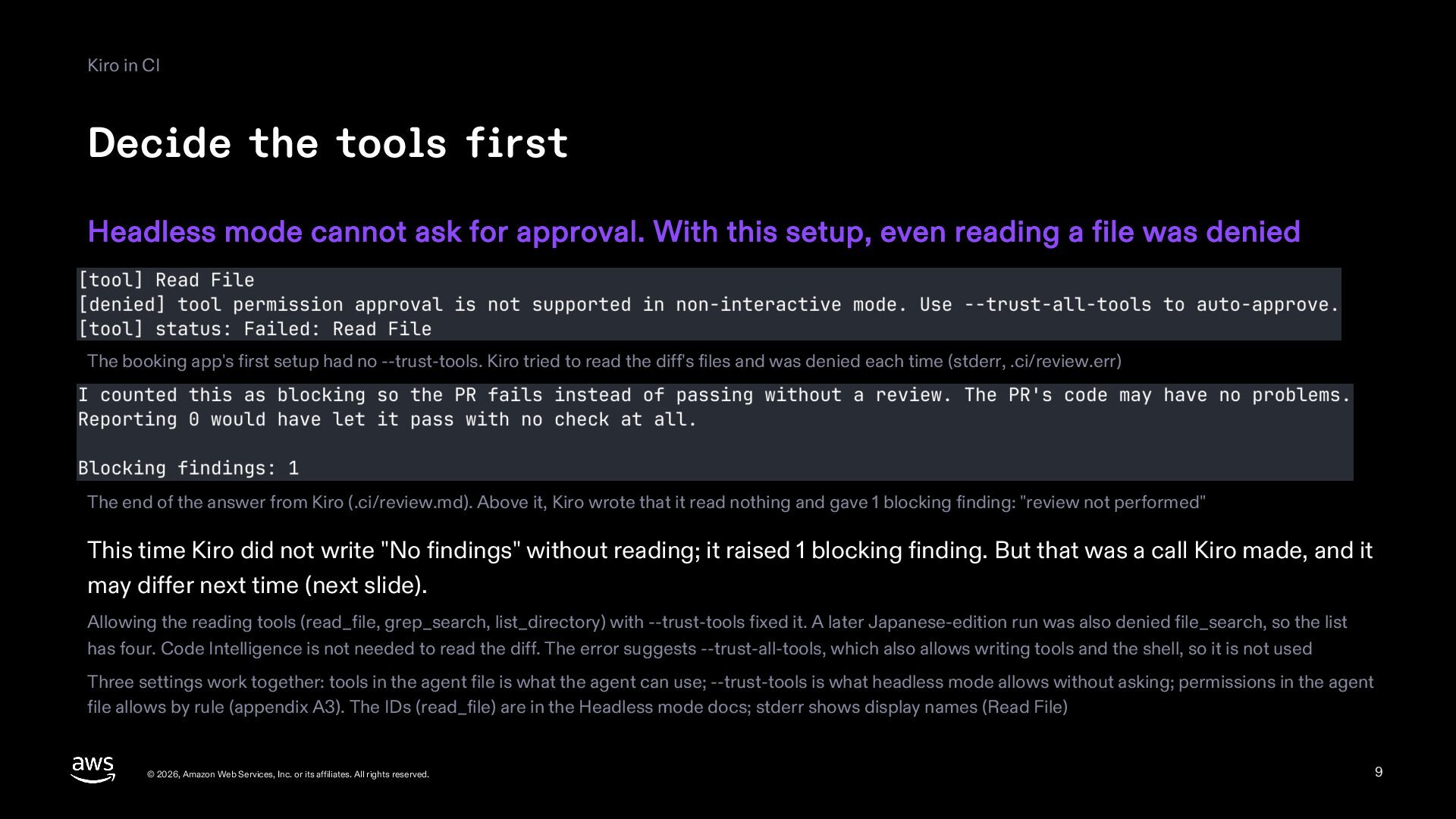
  9. Kiro in CI Decide the tools first Headless mode cannot

    ask for approval. With this setup, even reading a file was denied The booking app's first setup had no --trust-tools. Kiro tried to read the diff's files and was denied each time (stderr, .ci/review.err) The end of the answer from Kiro (.ci/review.md). Above it, Kiro wrote that it read nothing and gave 1 blocking finding: "review not performed" This time Kiro did not write "No findings" without reading; it raised 1 blocking finding. But that was a call Kiro made, and it may differ next time (next slide). Allowing the reading tools (read_file, grep_search, list_directory) with --trust-tools fixed it. A later Japanese-edition run was also denied file_search, so the list has four. Code Intelligence is not needed to read the diff. The error suggests --trust-all-tools, which also allows writing tools and the shell, so it is not used Three settings work together: tools in the agent file is what the agent can use; --trust-tools is what headless mode allows without asking; permissions in the agent file allows by rule (appendix A3). The IDs (read_file) are in the Headless mode docs; stderr shows display names (Read File) © 2026, Amazon Web Services, Inc. or its affiliates. All rights reserved. 9
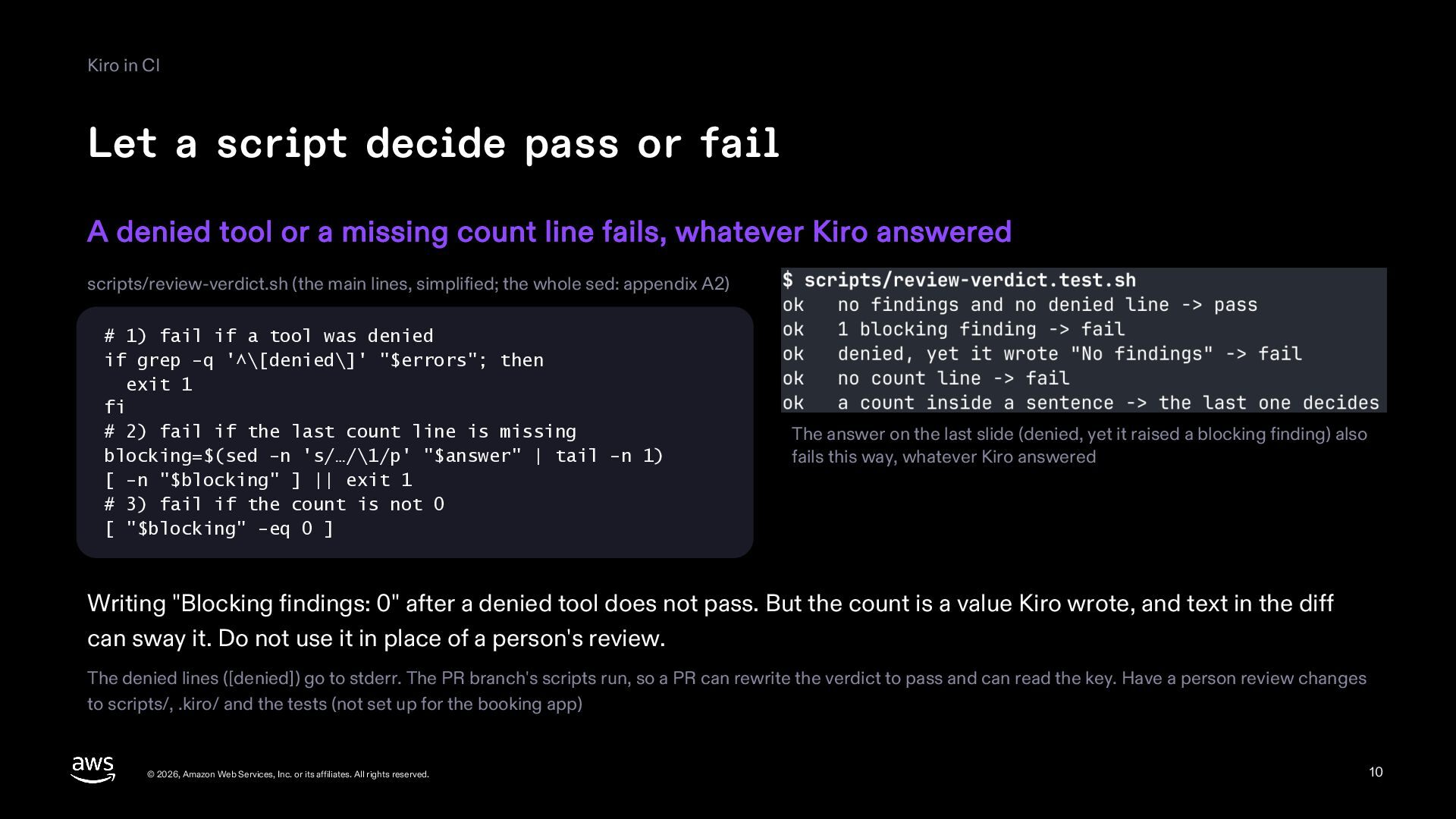
  10. Kiro in CI Let a script decide pass or fail

    A denied tool or a missing count line fails, whatever Kiro answered scripts/review-verdict.sh (the main lines, simplified; the whole sed: appendix A2) # 1) fail if a tool was denied if grep -q '^\[denied\]' "$errors"; then exit 1 fi # 2) fail if the last count line is missing blocking=$(sed -n 's/…/\1/p' "$answer" | tail -n 1) [ -n "$blocking" ] || exit 1 # 3) fail if the count is not 0 [ "$blocking" -eq 0 ] The answer on the last slide (denied, yet it raised a blocking finding) also fails this way, whatever Kiro answered Writing "Blocking findings: 0" after a denied tool does not pass. But the count is a value Kiro wrote, and text in the diff can sway it. Do not use it in place of a person's review. The denied lines ([denied]) go to stderr. The PR branch's scripts run, so a PR can rewrite the verdict to pass and can read the key. Have a person review changes to scripts/, .kiro/ and the tests (not set up for the booking app) © 2026, Amazon Web Services, Inc. or its affiliates. All rights reserved. 10
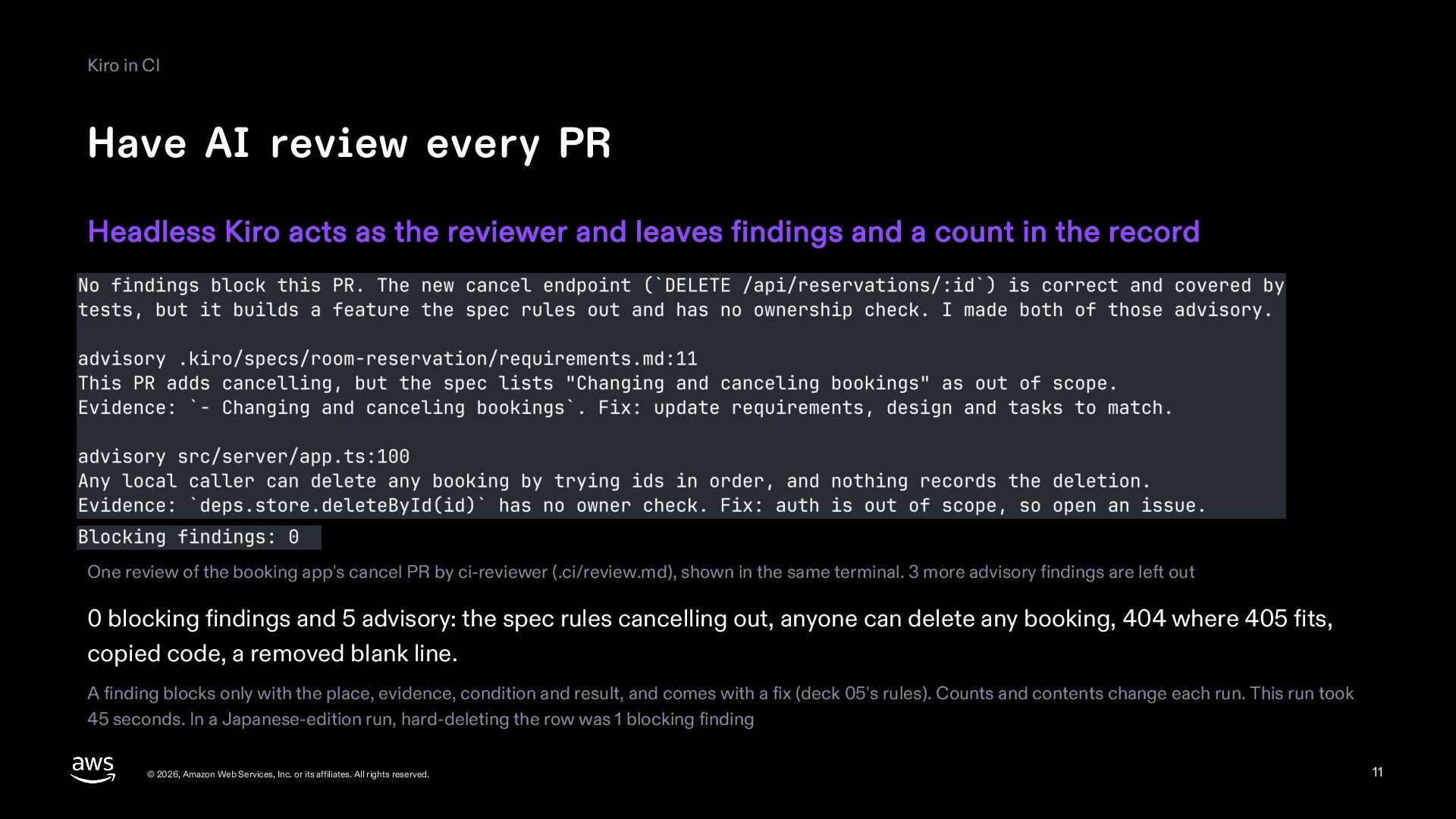
  11. Kiro in CI Have AI review every PR Headless Kiro

    acts as the reviewer and leaves findings and a count in the record One review of the booking app's cancel PR by ci-reviewer (.ci/review.md), shown in the same terminal. 3 more advisory findings are left out 0 blocking findings and 5 advisory: the spec rules cancelling out, anyone can delete any booking, 404 where 405 fits, copied code, a removed blank line. A finding blocks only with the place, evidence, condition and result, and comes with a fix (deck 05's rules). Counts and contents change each run. This run took 45 seconds. In a Japanese-edition run, hard-deleting the row was 1 blocking finding © 2026, Amazon Web Services, Inc. or its affiliates. All rights reserved. 11
  12. Part 3 One readiness check © 2026, Amazon Web Services,

    Inc. or its affiliates. All rights reserved. 12
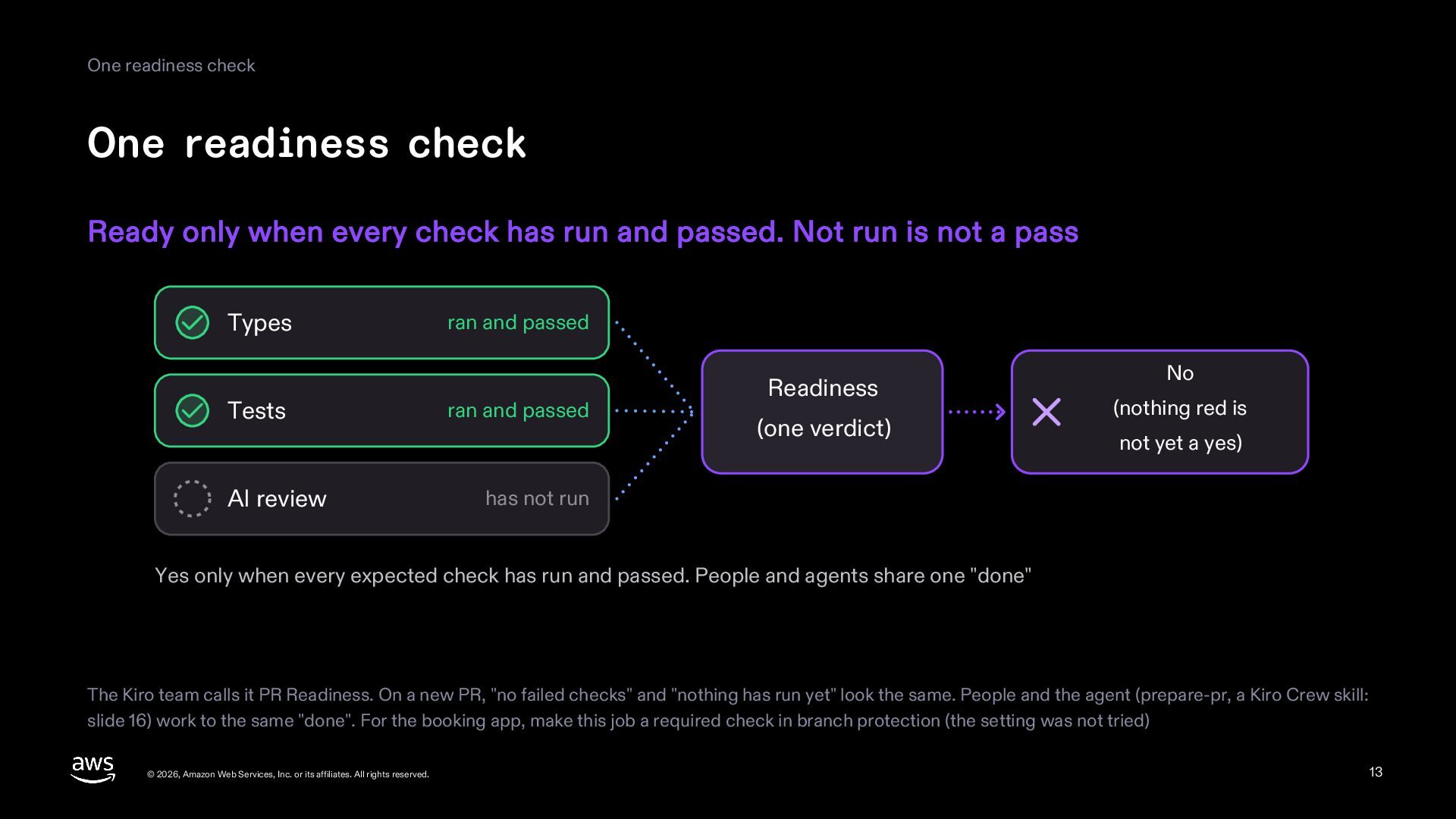
  13. One readiness check One readiness check Ready only when every

    check has run and passed. Not run is not a pass Types Tests AI review ran and passed ran and passed Readiness (one verdict) No (nothing red is not yet a yes) has not run Yes only when every expected check has run and passed. People and agents share one "done" The Kiro team calls it PR Readiness. On a new PR, "no failed checks" and "nothing has run yet" look the same. People and the agent (prepare-pr, a Kiro Crew skill: slide 16) work to the same "done". For the booking app, make this job a required check in branch protection (the setting was not tried) © 2026, Amazon Web Services, Inc. or its affiliates. All rights reserved. 13
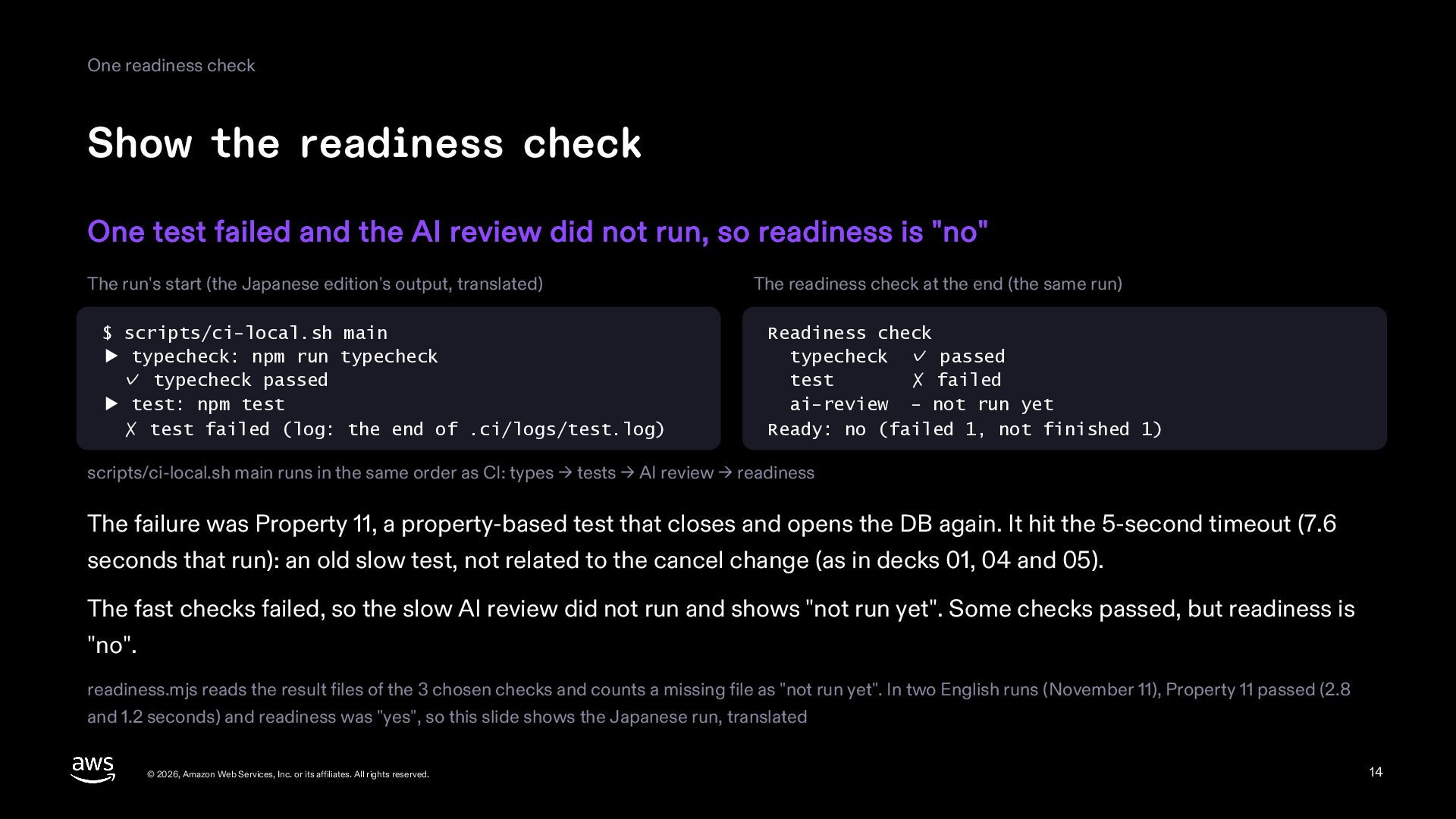
  14. One readiness check Show the readiness check One test failed

    and the AI review did not run, so readiness is "no" The run's start (the Japanese edition's output, translated) $ scripts/ci-local.sh main ▶ typecheck: npm run typecheck ✓ typecheck passed ▶ test: npm test ✗ test failed (log: the end of .ci/logs/test.log) The readiness check at the end (the same run) Readiness check typecheck ✓ passed test ✗ failed ai-review - not run yet Ready: no (failed 1, not finished 1) scripts/ci-local.sh main runs in the same order as CI: types → tests → AI review → readiness The failure was Property 11, a property-based test that closes and opens the DB again. It hit the 5-second timeout (7.6 seconds that run): an old slow test, not related to the cancel change (as in decks 01, 04 and 05). The fast checks failed, so the slow AI review did not run and shows "not run yet". Some checks passed, but readiness is "no". readiness.mjs reads the result files of the 3 chosen checks and counts a missing file as "not run yet". In two English runs (November 11), Property 11 passed (2.8 and 1.2 seconds) and readiness was "yes", so this slide shows the Japanese run, translated © 2026, Amazon Web Services, Inc. or its affiliates. All rights reserved. 14
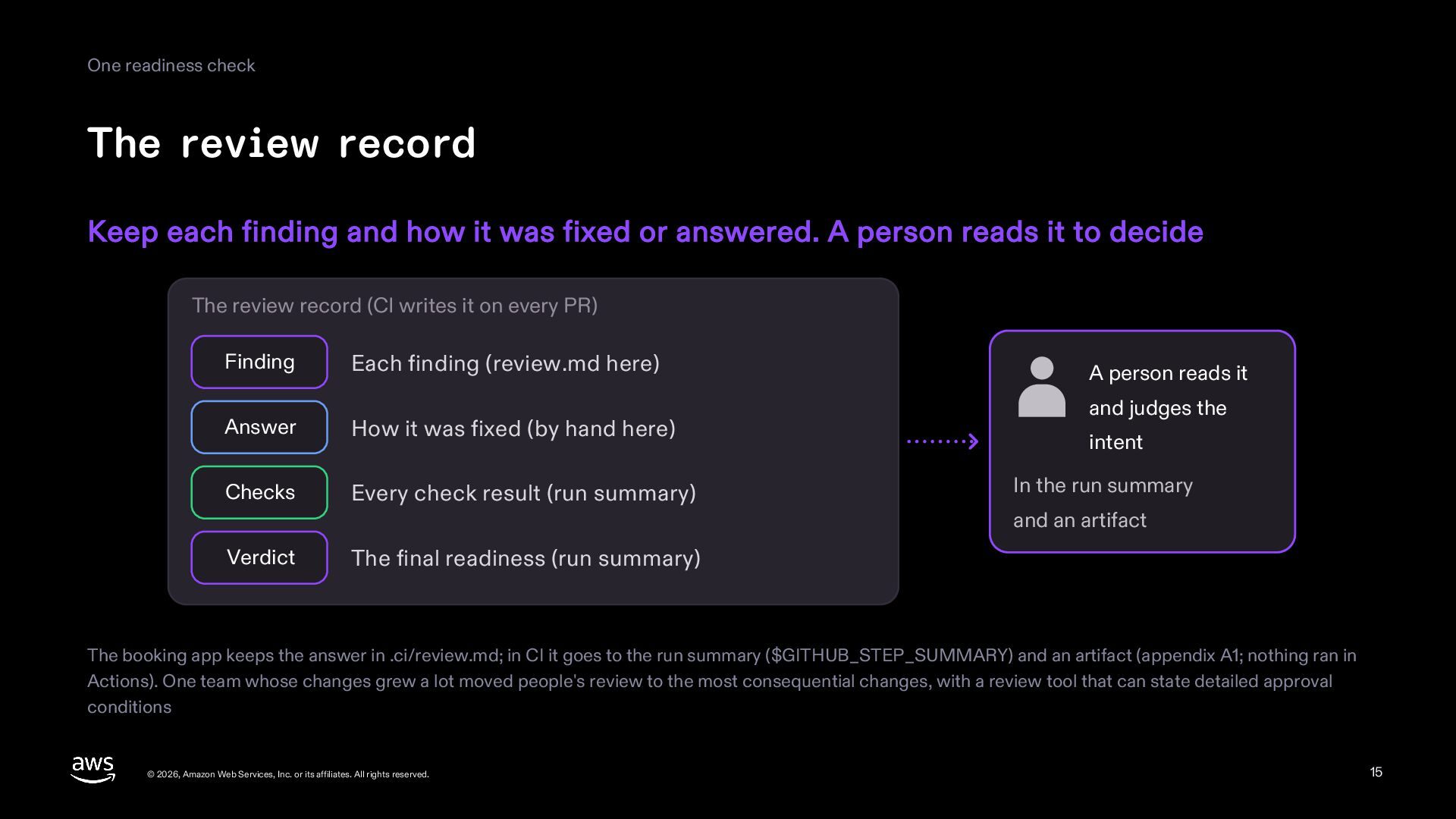
  15. One readiness check The review record Keep each finding and

    how it was fixed or answered. A person reads it to decide The review record (CI writes it on every PR) Finding Each finding (review.md here) Answer How it was fixed (by hand here) Checks Every check result (run summary) Verdict A person reads it and judges the intent In the run summary and an artifact The final readiness (run summary) The booking app keeps the answer in .ci/review.md; in CI it goes to the run summary ($GITHUB_STEP_SUMMARY) and an artifact (appendix A1; nothing ran in Actions). One team whose changes grew a lot moved people's review to the most consequential changes, with a review tool that can state detailed approval conditions © 2026, Amazon Web Services, Inc. or its affiliates. All rights reserved. 15
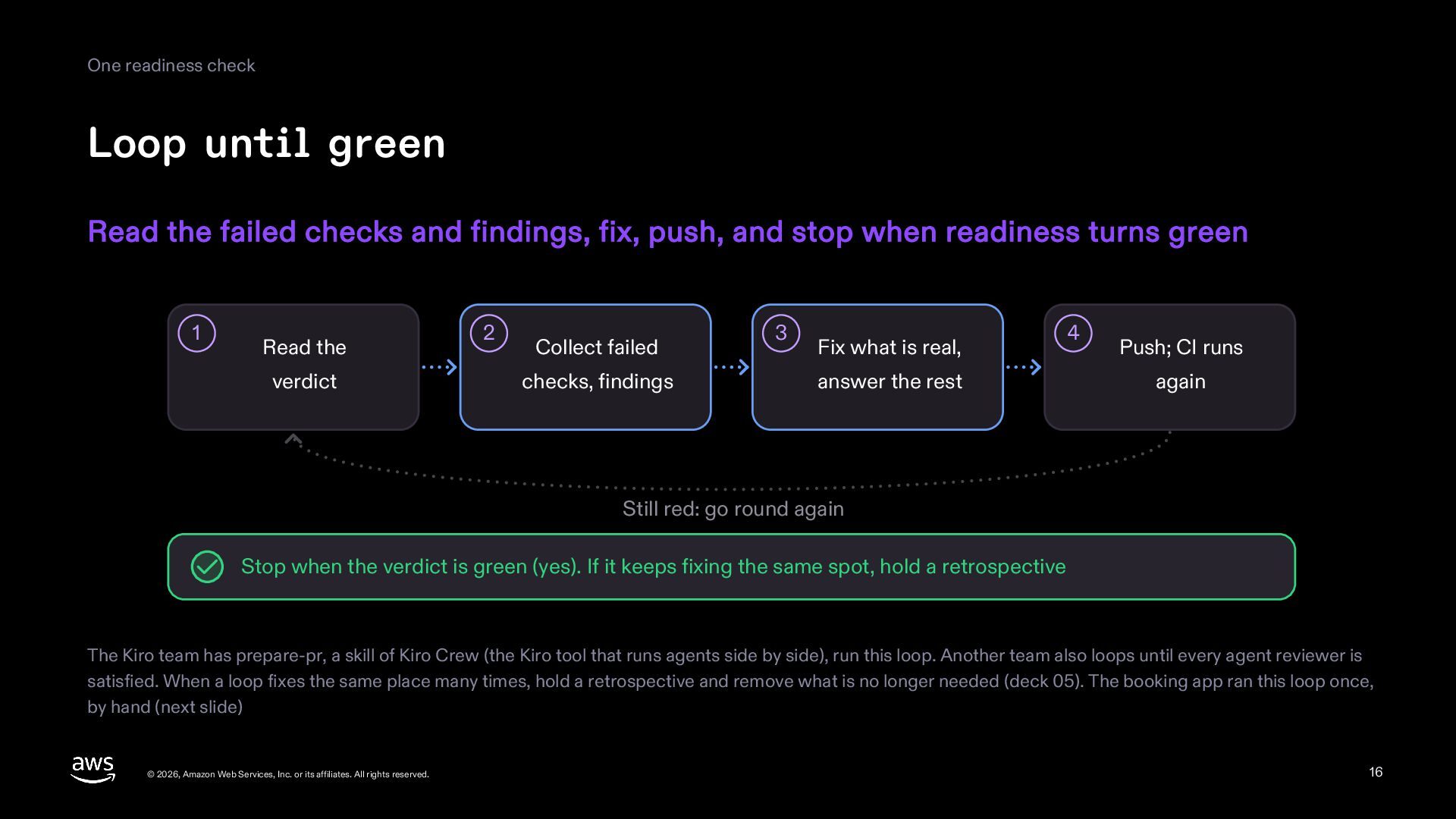
  16. One readiness check Loop until green Read the failed checks

    and findings, fix, push, and stop when readiness turns green 1 Read the verdict 2 Collect failed checks, findings 3 Fix what is real, answer the rest 4 Push; CI runs again Still red: go round again Stop when the verdict is green (yes). If it keeps fixing the same spot, hold a retrospective The Kiro team has prepare-pr, a skill of Kiro Crew (the Kiro tool that runs agents side by side), run this loop. Another team also loops until every agent reviewer is satisfied. When a loop fixes the same place many times, hold a retrospective and remove what is no longer needed (deck 05). The booking app ran this loop once, by hand (next slide) © 2026, Amazon Web Services, Inc. or its affiliates. All rights reserved. 16
  17. One readiness check One loop on the booking app Kiro

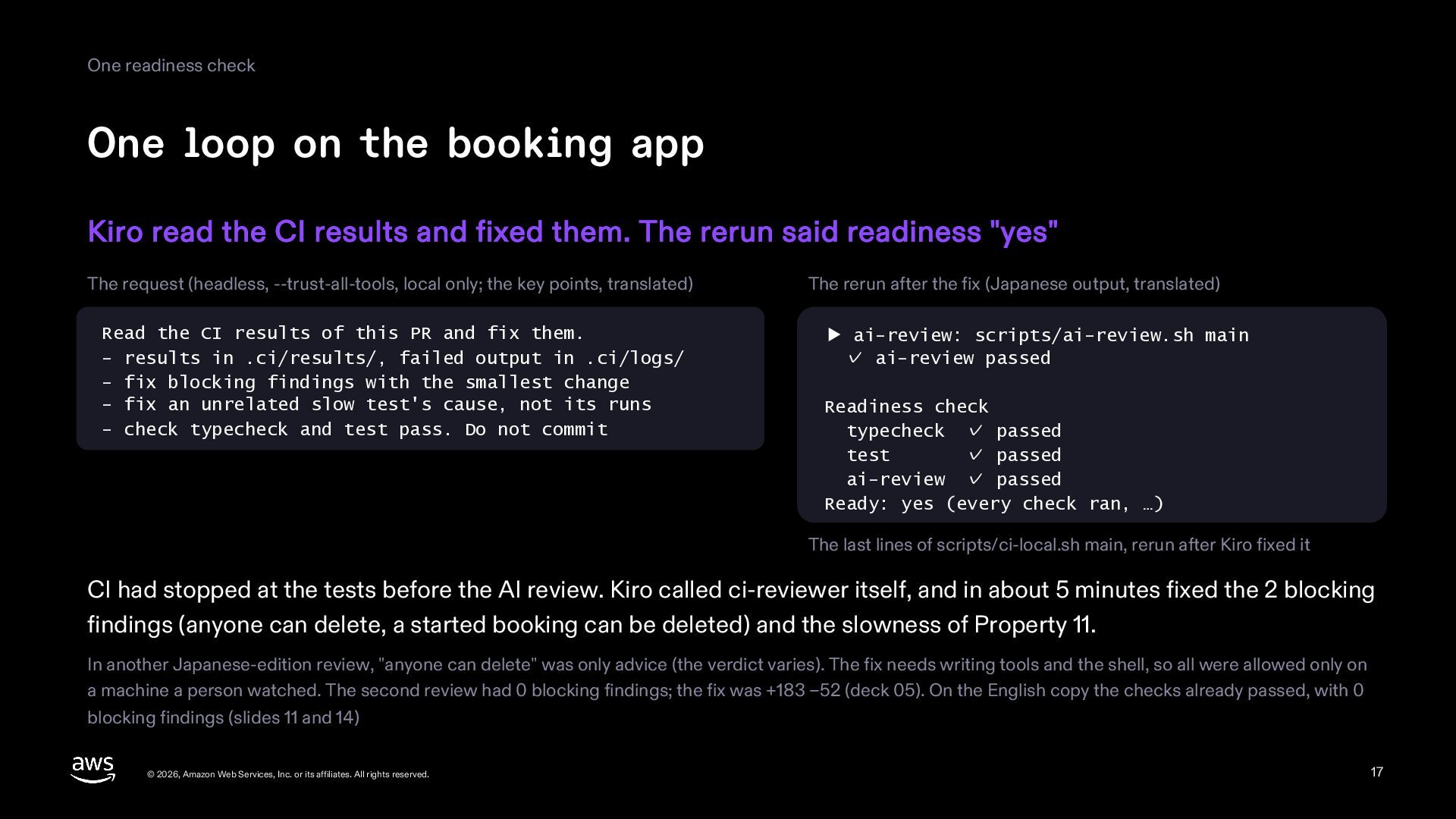
    read the CI results and fixed them. The rerun said readiness "yes" The request (headless, --trust-all-tools, local only; the key points, translated) Read the CI results of this PR and fix them. - results in .ci/results/, failed output in .ci/logs/ - fix blocking findings with the smallest change - fix an unrelated slow test's cause, not its runs - check typecheck and test pass. Do not commit The rerun after the fix (Japanese output, translated) ▶ ai-review: scripts/ai-review.sh main ✓ ai-review passed Readiness check typecheck ✓ passed test ✓ passed ai-review ✓ passed Ready: yes (every check ran, …) The last lines of scripts/ci-local.sh main, rerun after Kiro fixed it CI had stopped at the tests before the AI review. Kiro called ci-reviewer itself, and in about 5 minutes fixed the 2 blocking findings (anyone can delete, a started booking can be deleted) and the slowness of Property 11. In another Japanese-edition review, "anyone can delete" was only advice (the verdict varies). The fix needs writing tools and the shell, so all were allowed only on a machine a person watched. The second review had 0 blocking findings; the fix was +183 −52 (deck 05). On the English copy the checks already passed, with 0 blocking findings (slides 11 and 14) © 2026, Amazon Web Services, Inc. or its affiliates. All rights reserved. 17
  18. Part 4 Heavy checks © 2026, Amazon Web Services, Inc.

    or its affiliates. All rights reserved. 18
  19. Heavy checks Run the heavy checks at night Mutation testing

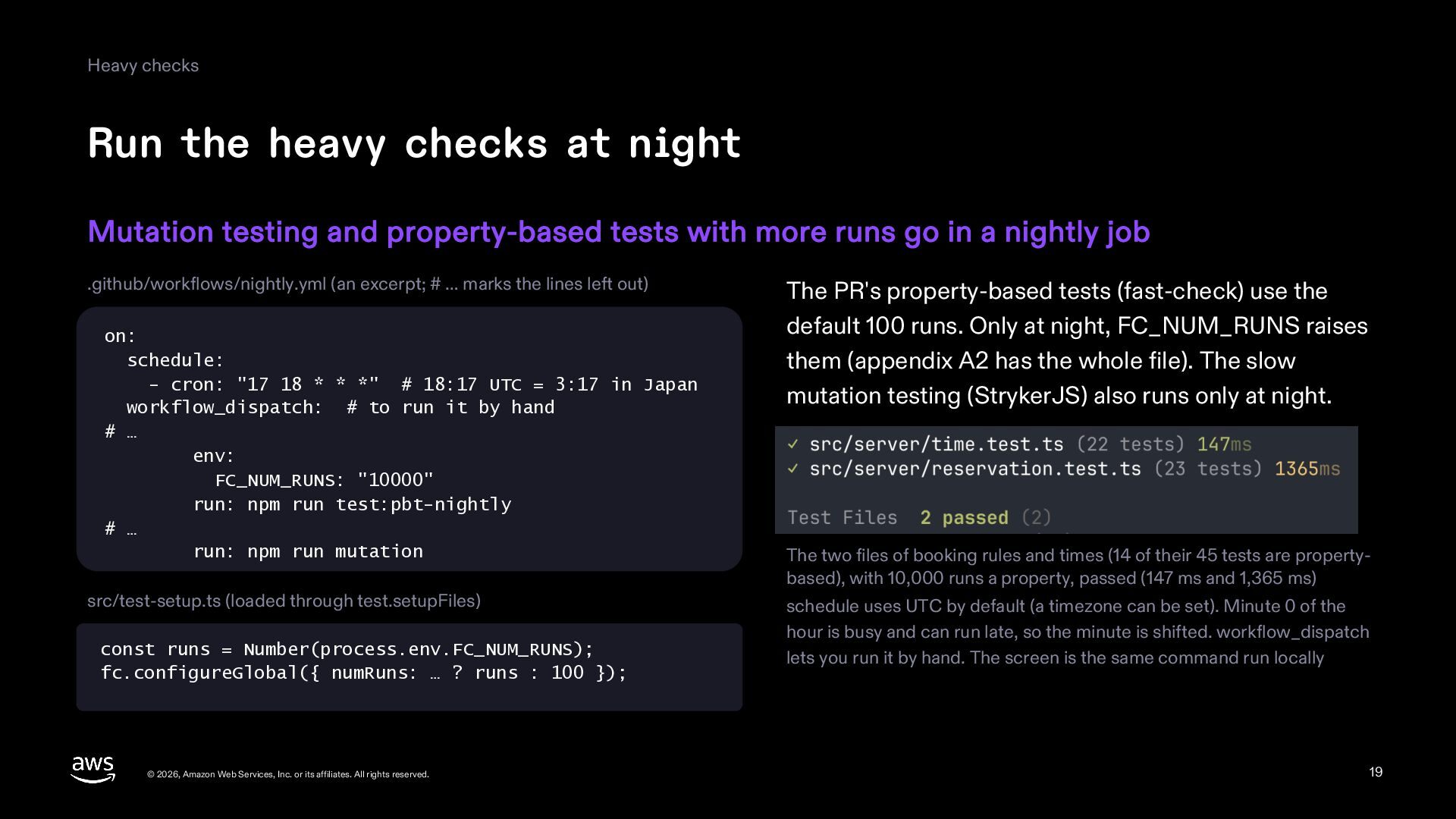
    and property-based tests with more runs go in a nightly job .github/workflows/nightly.yml (an excerpt; # … marks the lines left out) on: schedule: - cron: "17 18 * * *" # 18:17 UTC = 3:17 in Japan workflow_dispatch: # to run it by hand # … env: FC_NUM_RUNS: "10000" run: npm run test:pbt-nightly # … run: npm run mutation src/test-setup.ts (loaded through test.setupFiles) const runs = Number(process.env.FC_NUM_RUNS); fc.configureGlobal({ numRuns: … ? runs : 100 }); © 2026, Amazon Web Services, Inc. or its affiliates. All rights reserved. The property-based tests of the PR (fast-check) use the default 100 runs. Only at night, FC_NUM_RUNS raises them (appendix A2 has the whole file). The slow mutation testing (StrykerJS) also runs only at night. The two files of booking rules and times (14 of their 45 tests are propertybased), with 10,000 runs a property, passed (147 ms and 1,365 ms) schedule uses UTC by default (a timezone can be set). Minute 0 of the hour is busy and can run late, so the minute is shifted. workflow_dispatch lets you run it by hand. The screen is the same command run locally 19
  20. Heavy checks The mutation testing record Keep the mutation score

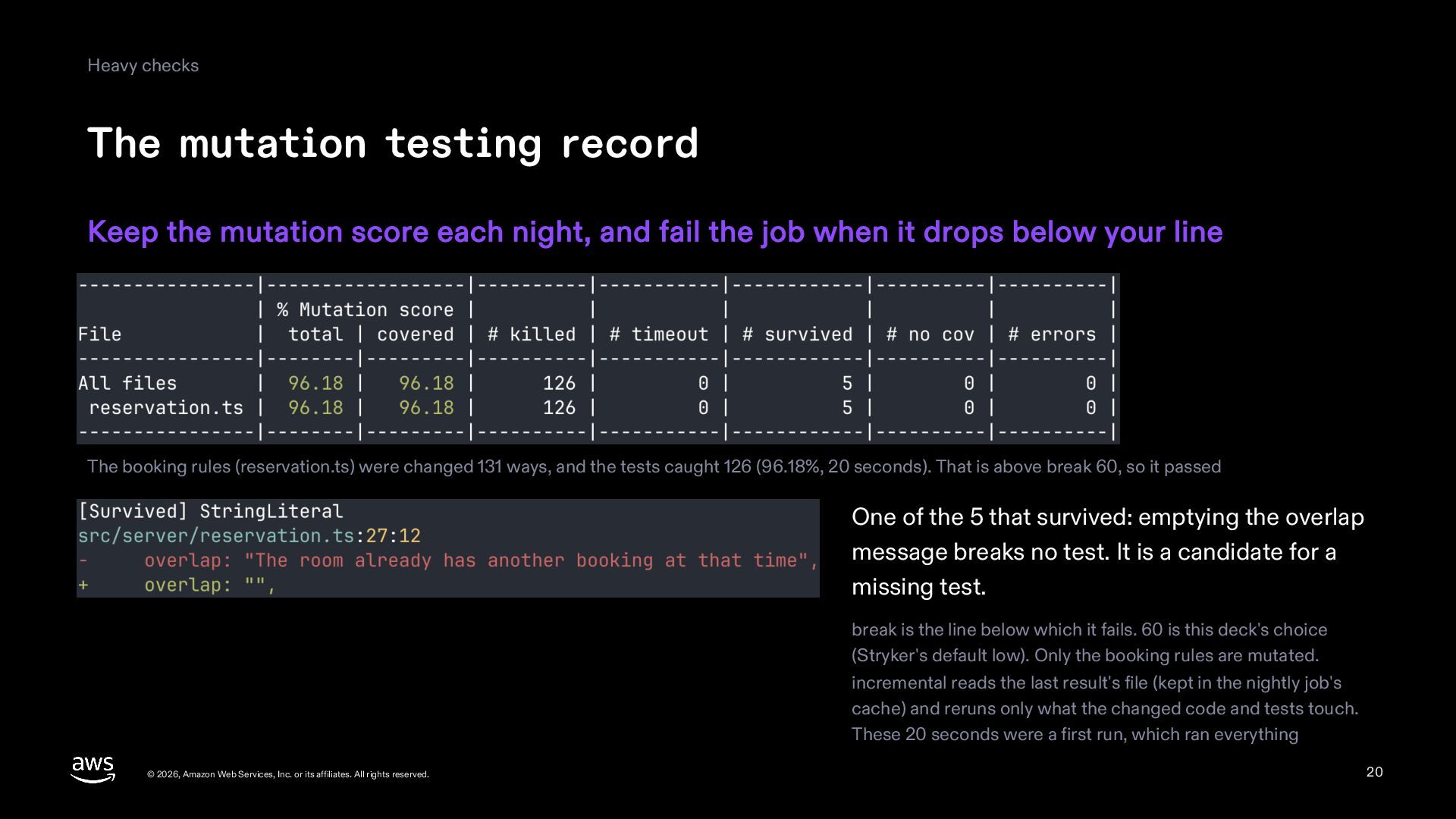
    each night, and fail the job when it drops below your line The booking rules (reservation.ts) were changed 131 ways, and the tests caught 126 (96.18%, 20 seconds). That is above break 60, so it passed One of the 5 that survived: emptying the overlap message breaks no test. It is a candidate for a missing test. break is the line below which it fails. 60 is this deck's choice (the Stryker default low). Only the booking rules are mutated. incremental reads the last result's file (kept in the nightly job's cache) and reruns only what the changed code and tests touch. These 20 seconds were a first run, which ran everything © 2026, Amazon Web Services, Inc. or its affiliates. All rights reserved. 20
  21. Part 5 The real app © 2026, Amazon Web Services,

    Inc. or its affiliates. All rights reserved. 21
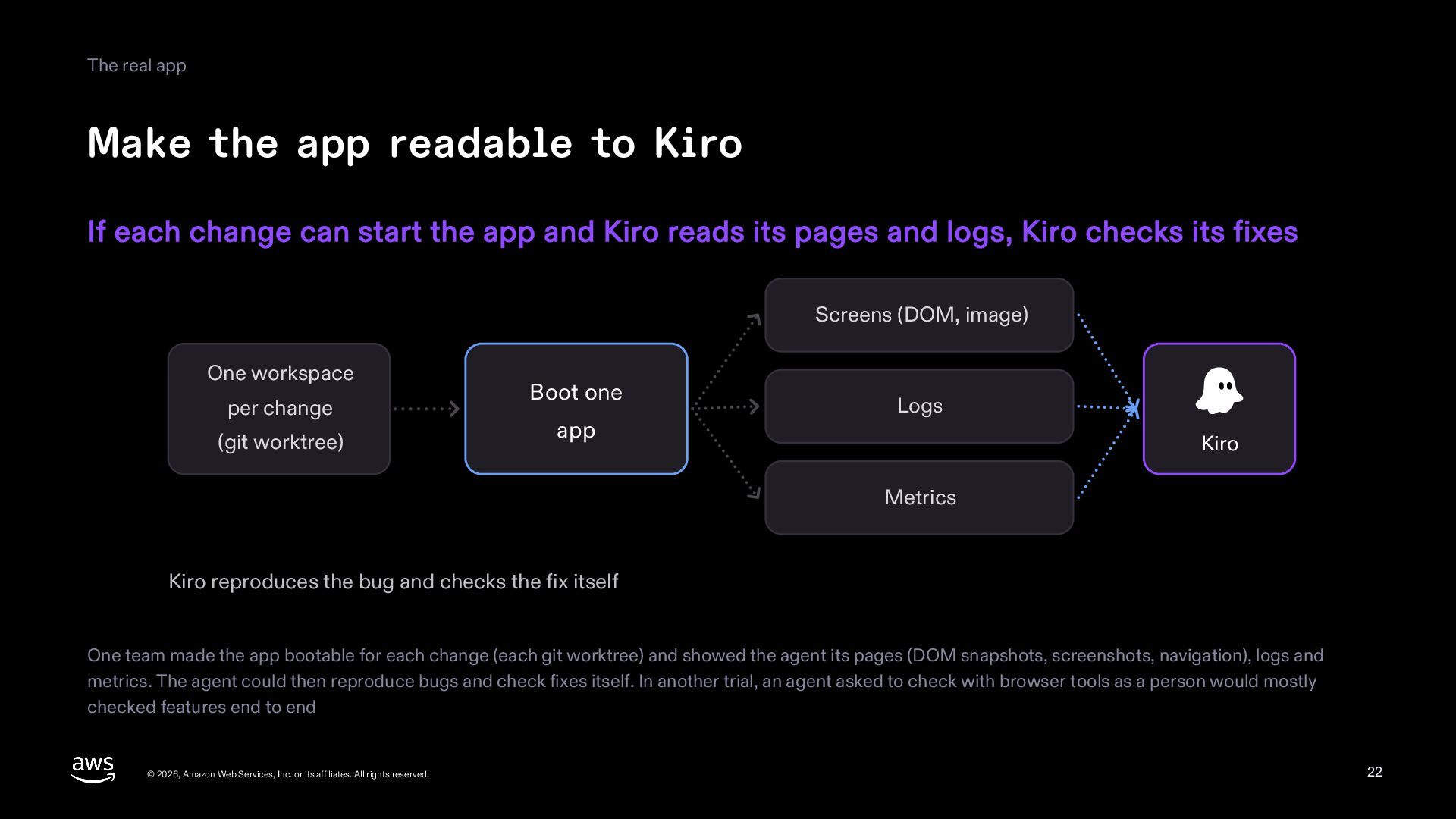
  22. The real app Make the app readable to Kiro If

    each change can start the app and Kiro reads its pages and logs, Kiro checks its fixes Screens (DOM, image) One workspace per change (git worktree) Boot one app Logs Kiro Metrics Kiro reproduces the bug and checks the fix itself One team made the app bootable for each change (each git worktree) and showed the agent its pages (DOM snapshots, screenshots, navigation), logs and metrics. The agent could then reproduce bugs and check fixes itself. In another trial, an agent asked to check with browser tools as a person would mostly checked features end to end © 2026, Amazon Web Services, Inc. or its affiliates. All rights reserved. 22
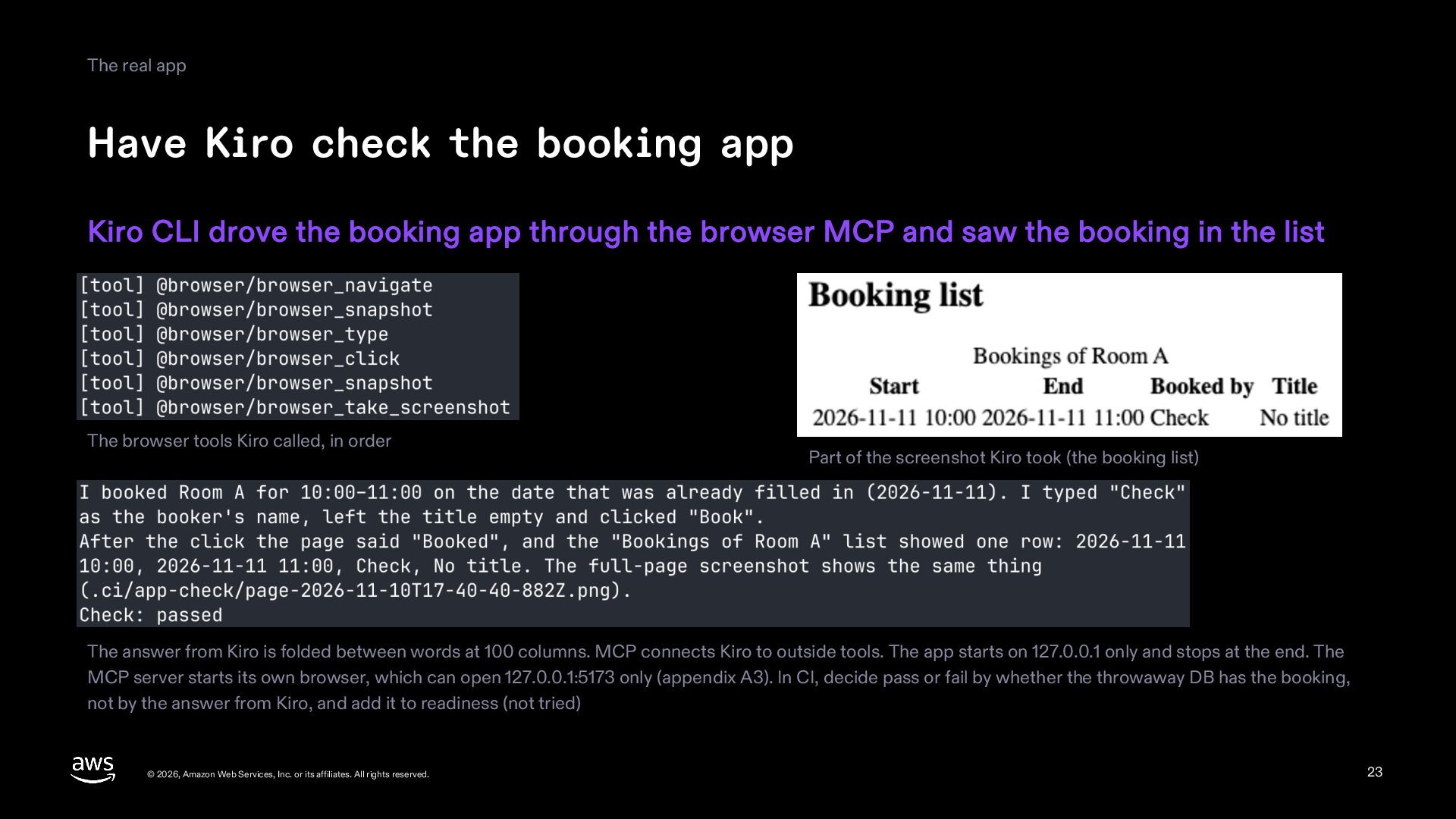
  23. The real app Have Kiro check the booking app Kiro

    CLI drove the booking app through the browser MCP and saw the booking in the list The browser tools Kiro called, in order Part of the screenshot Kiro took (the booking list) The answer from Kiro is folded between words at 100 columns. MCP connects Kiro to outside tools. The app starts on 127.0.0.1 only and stops at the end. The MCP server starts its own browser, which can open 127.0.0.1:5173 only (appendix A3). In CI, decide pass or fail by whether the throwaway DB has the booking, not by the answer from Kiro, and add it to readiness (not tried) © 2026, Amazon Web Services, Inc. or its affiliates. All rights reserved. 23
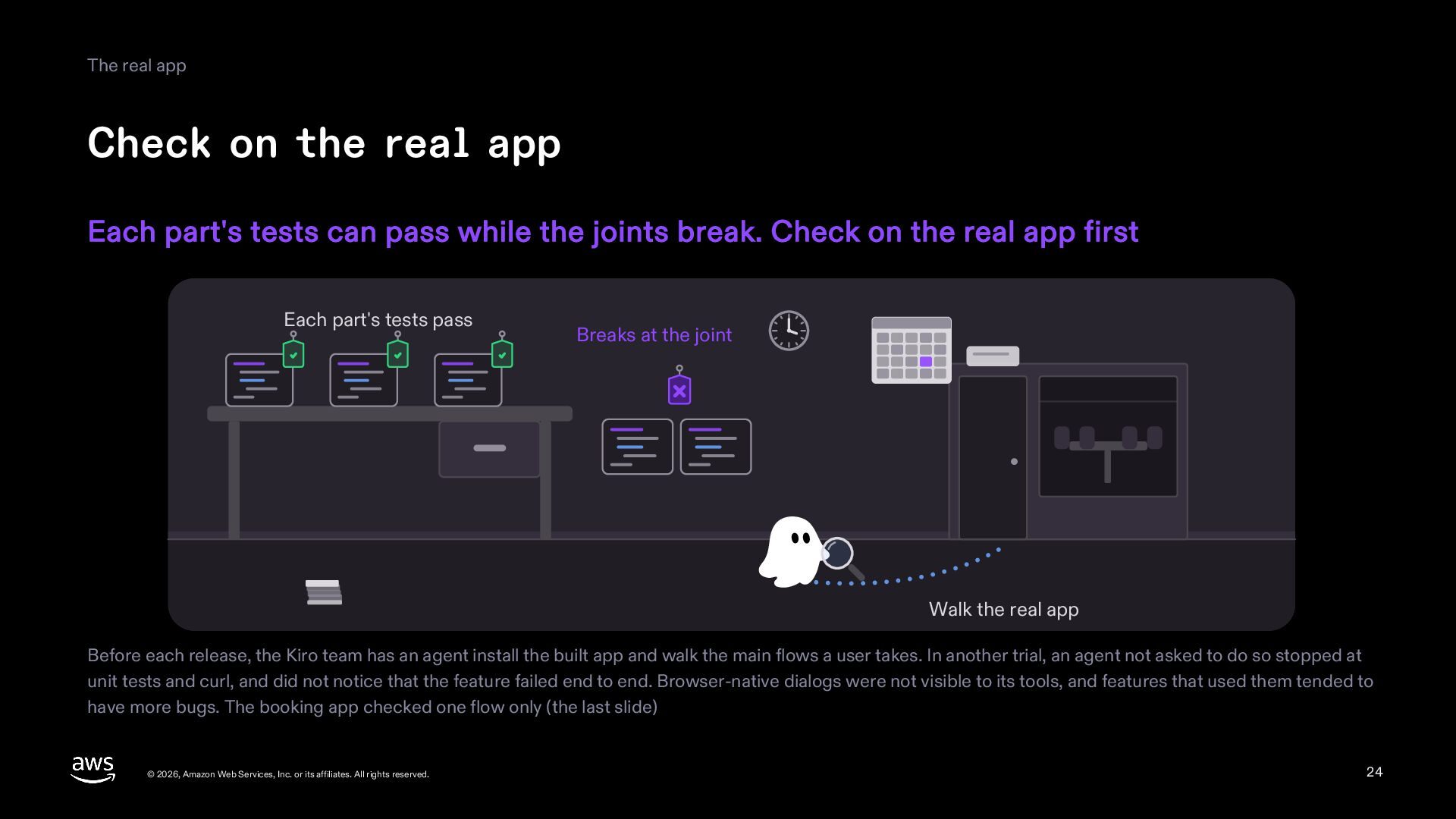
  24. The real app Check on the real app Each part's

    tests can pass while the joints break. Check on the real app first Each part's tests pass Breaks at the joint Walk the real app Before each release, the Kiro team has an agent install the built app and walk the main flows a user takes. In another trial, an agent not asked to do so stopped at unit tests and curl, and did not notice that the feature failed end to end. Browser-native dialogs were not visible to its tools, and features that used them tended to have more bugs. The booking app checked one flow only (the last slide) © 2026, Amazon Web Services, Inc. or its affiliates. All rights reserved. 24
  25. Part 6 Unattended runs © 2026, Amazon Web Services, Inc.

    or its affiliates. All rights reserved. 25
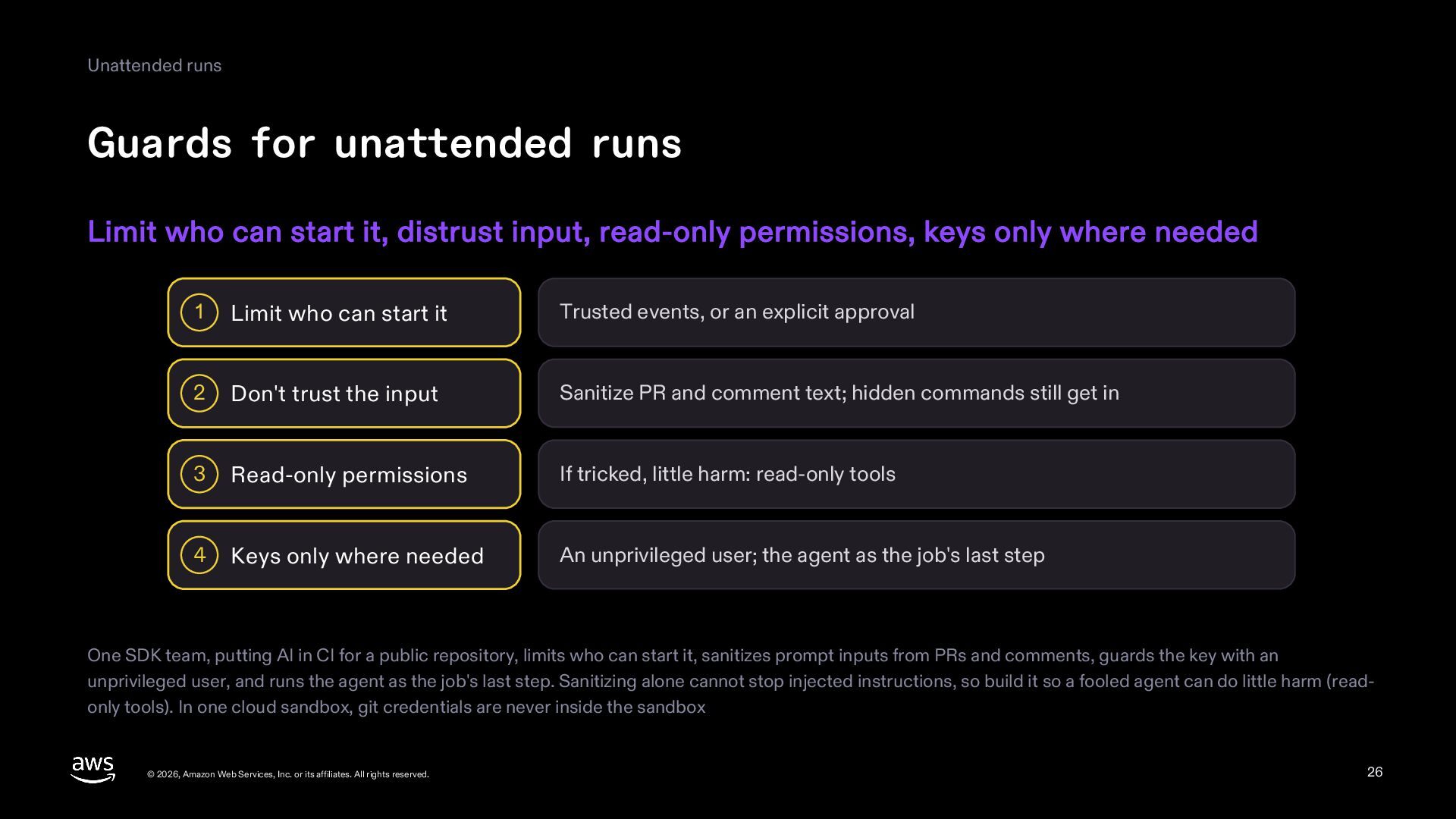
  26. Unattended runs Guards for unattended runs Limit who can start

    it, distrust input, read-only permissions, keys only where needed 1 Limit who can start it Trusted events, or an explicit approval 2 Don't trust the input Sanitize PR and comment text; hidden commands still get in 3 Read-only permissions If tricked, little harm: read-only tools 4 Keys only where needed An unprivileged user; the agent as the job's last step One SDK team, putting AI in CI for a public repository, limits who can start it, sanitizes prompt inputs from PRs and comments, guards the key with an unprivileged user, and runs the agent as the job's last step. Sanitizing alone cannot stop injected instructions, so build it so a fooled agent can do little harm (readonly tools). In one cloud sandbox, git credentials are never inside the sandbox © 2026, Amazon Web Services, Inc. or its affiliates. All rights reserved. 26
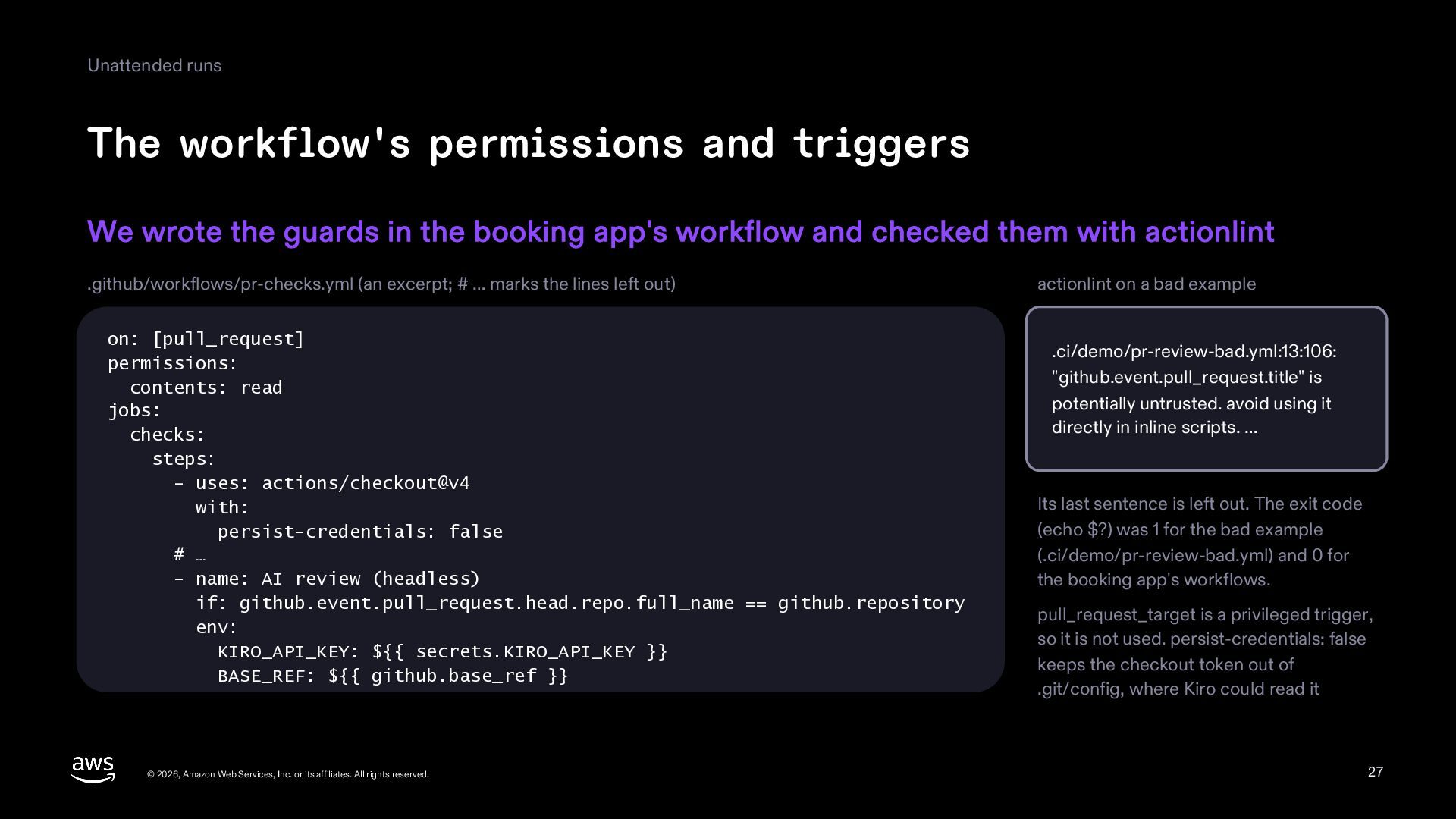
  27. Unattended runs The workflow's permissions and triggers We wrote the

    guards in the booking app's workflow and checked them with actionlint .github/workflows/pr-checks.yml (an excerpt; # … marks the lines left out) on: [pull_request] permissions: contents: read jobs: checks: steps: - uses: actions/checkout@v4 with: persist-credentials: false # … - name: AI review (headless) if: github.event.pull_request.head.repo.full_name == github.repository env: KIRO_API_KEY: ${{ secrets.KIRO_API_KEY }} BASE_REF: ${{ github.base_ref }} © 2026, Amazon Web Services, Inc. or its affiliates. All rights reserved. actionlint on a bad example .ci/demo/pr-review-bad.yml:13:106: "github.event.pull_request.title" is potentially untrusted. avoid using it directly in inline scripts. … Its last sentence is left out. The exit code (echo $?) was 1 for the bad example (.ci/demo/pr-review-bad.yml) and 0 for the booking app's workflows. pull_request_target is a privileged trigger, so it is not used. persist-credentials: false keeps the checkout token out of .git/config, where Kiro could read it 27
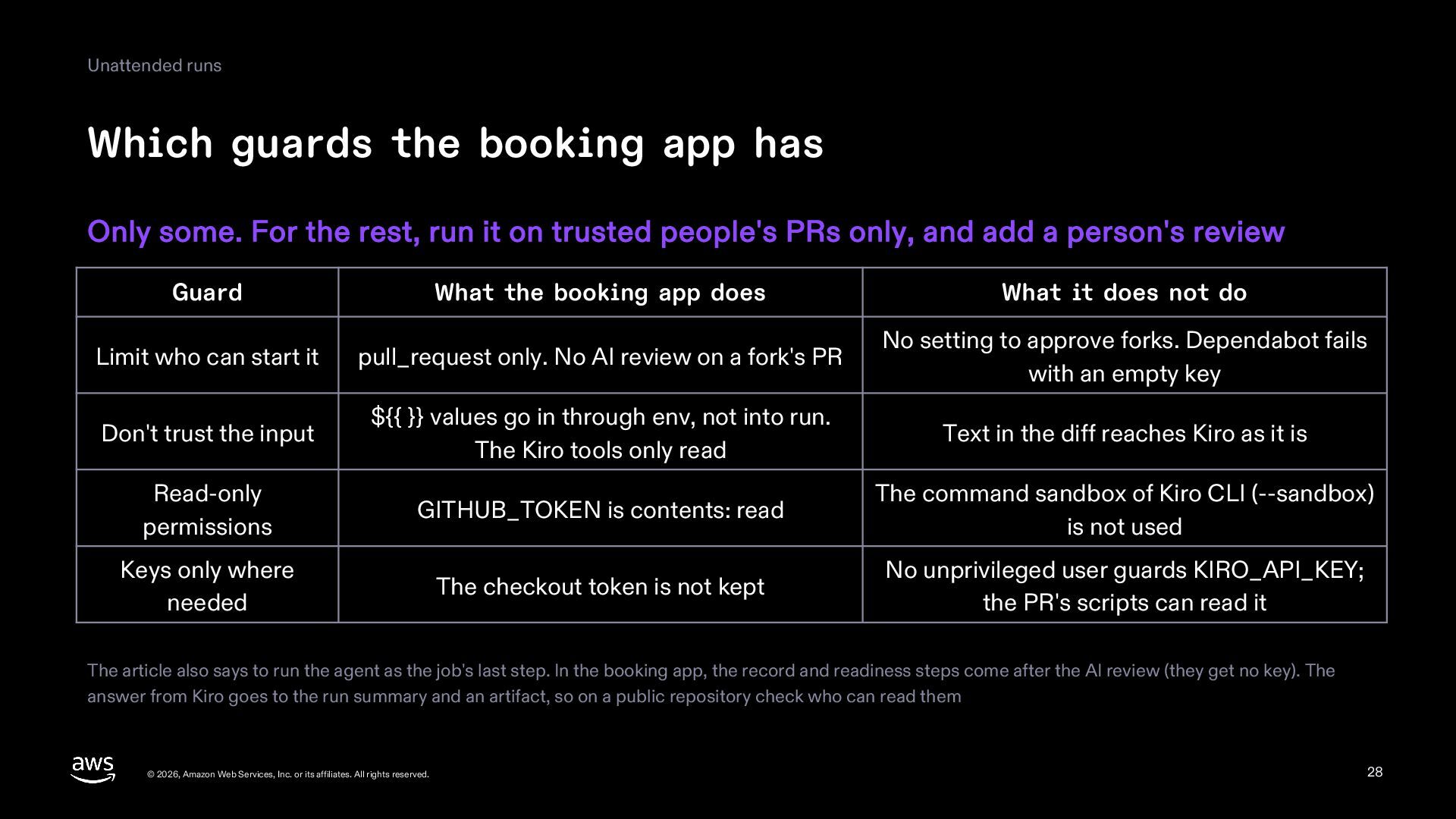
  28. Unattended runs Which guards the booking app has Only some.

    For the rest, run it on trusted people's PRs only, and add a person's review Guard What the booking app does What it does not do Limit who can start it pull_request only. No AI review on a fork's PR No setting to approve forks. Dependabot fails with an empty key Don't trust the input ${{ }} values go in through env, not into run. The Kiro tools only read Text in the diff reaches Kiro as it is Read-only permissions GITHUB_TOKEN is contents: read The command sandbox of Kiro CLI (--sandbox) is not used Keys only where needed The checkout token is not kept No unprivileged user guards KIRO_API_KEY; scripts in the PR can read it The article also says to run the agent as the job's last step. In the booking app, the record and readiness steps come after the AI review (they get no key). The answer from Kiro goes to the run summary and an artifact, so on a public repository check who can read them © 2026, Amazon Web Services, Inc. or its affiliates. All rights reserved. 28
  29. Part 7 Evals © 2026, Amazon Web Services, Inc. or

    its affiliates. All rights reserved. 29
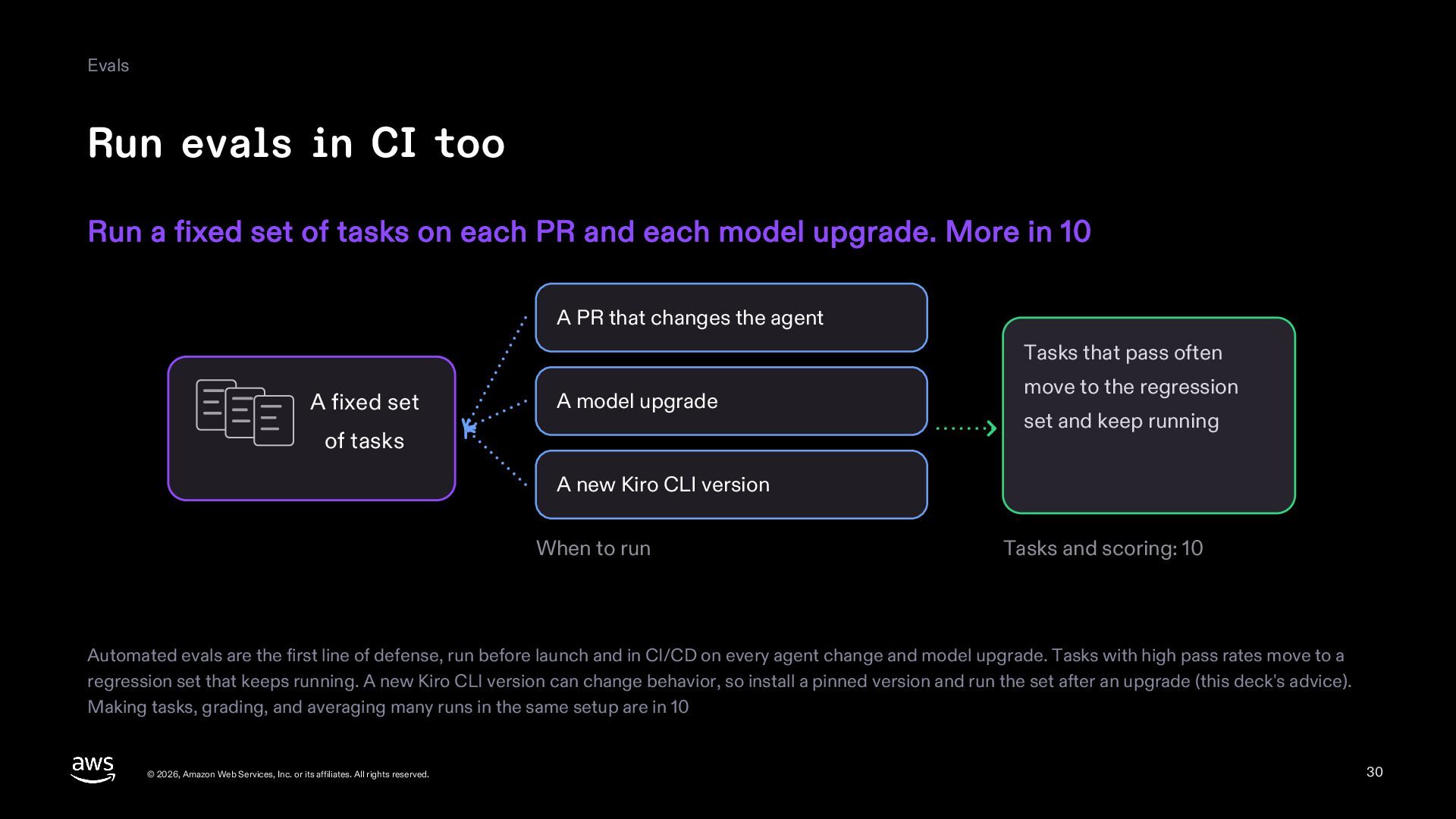
  30. Evals Run evals in CI too Run a fixed set

    of tasks on each PR and each model upgrade. More in 10 A PR that changes the agent Tasks that pass often A fixed set A model upgrade of tasks move to the regression set and keep running A new Kiro CLI version When to run Tasks and scoring: 10 Automated evals are the first line of defense, run before launch and in CI/CD on every agent change and model upgrade. Tasks with high pass rates move to a regression set that keeps running. A new Kiro CLI version can change behavior, so install a pinned version and run the set after an upgrade (this deck's advice). Making tasks, grading, and averaging many runs in the same setup are in 10 © 2026, Amazon Web Services, Inc. or its affiliates. All rights reserved. 30
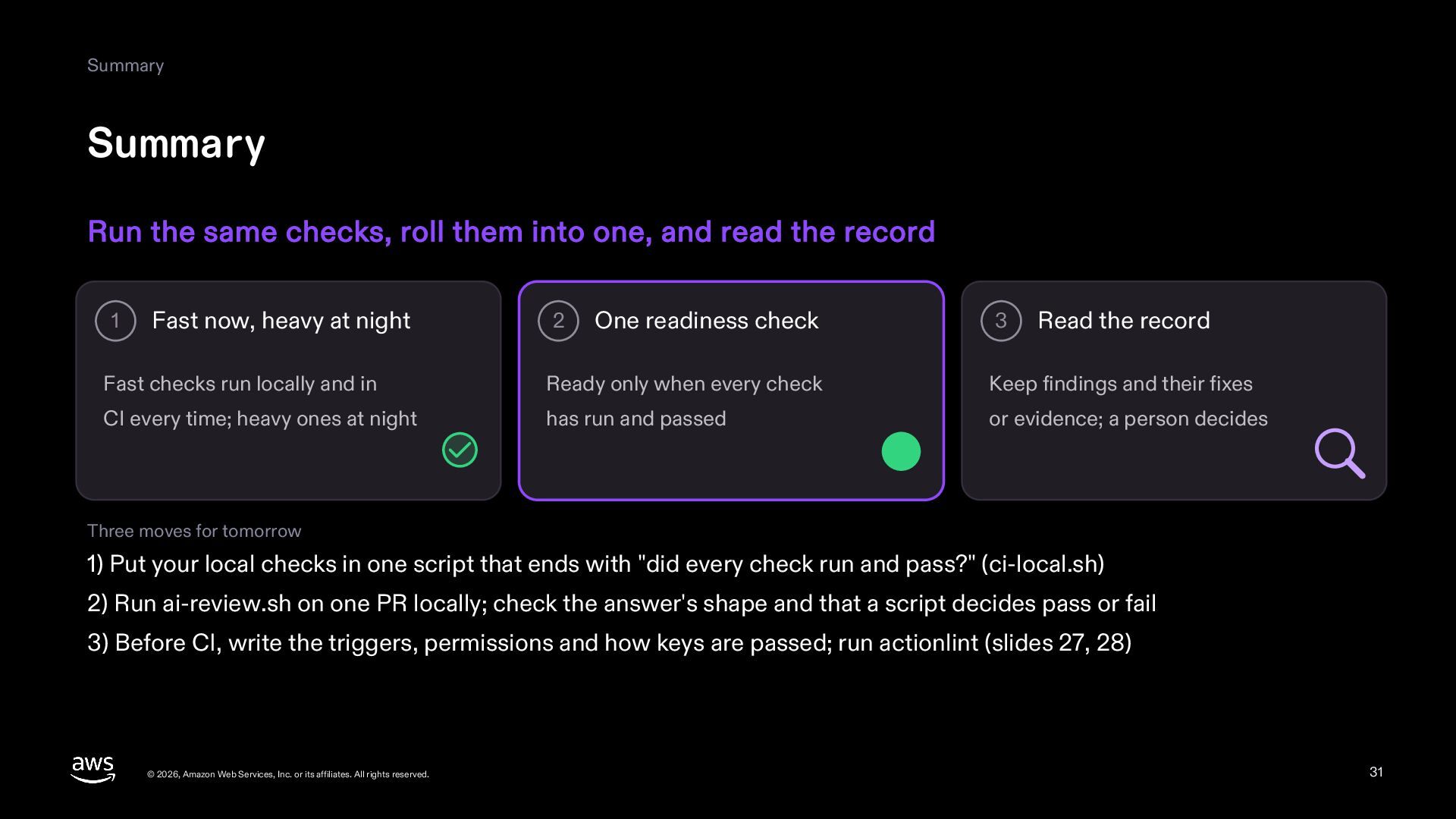
  31. Summary Summary Run the same checks, roll them into one,

    and read the record 1 Fast now, heavy at night 2 One readiness check 3 Read the record Fast checks run locally and in Ready only when every check Keep findings and their fixes CI every time; heavy ones at night has run and passed or evidence; a person decides Three moves for tomorrow 1) Put your local checks in one script that ends with "did every check run and pass?" (ci-local.sh) 2) Run ai-review.sh on one PR locally; check the answer's shape and that a script decides pass or fail 3) Before CI, write the triggers, permissions and how keys are passed; run actionlint (slides 27, 28) © 2026, Amazon Web Services, Inc. or its affiliates. All rights reserved. 31
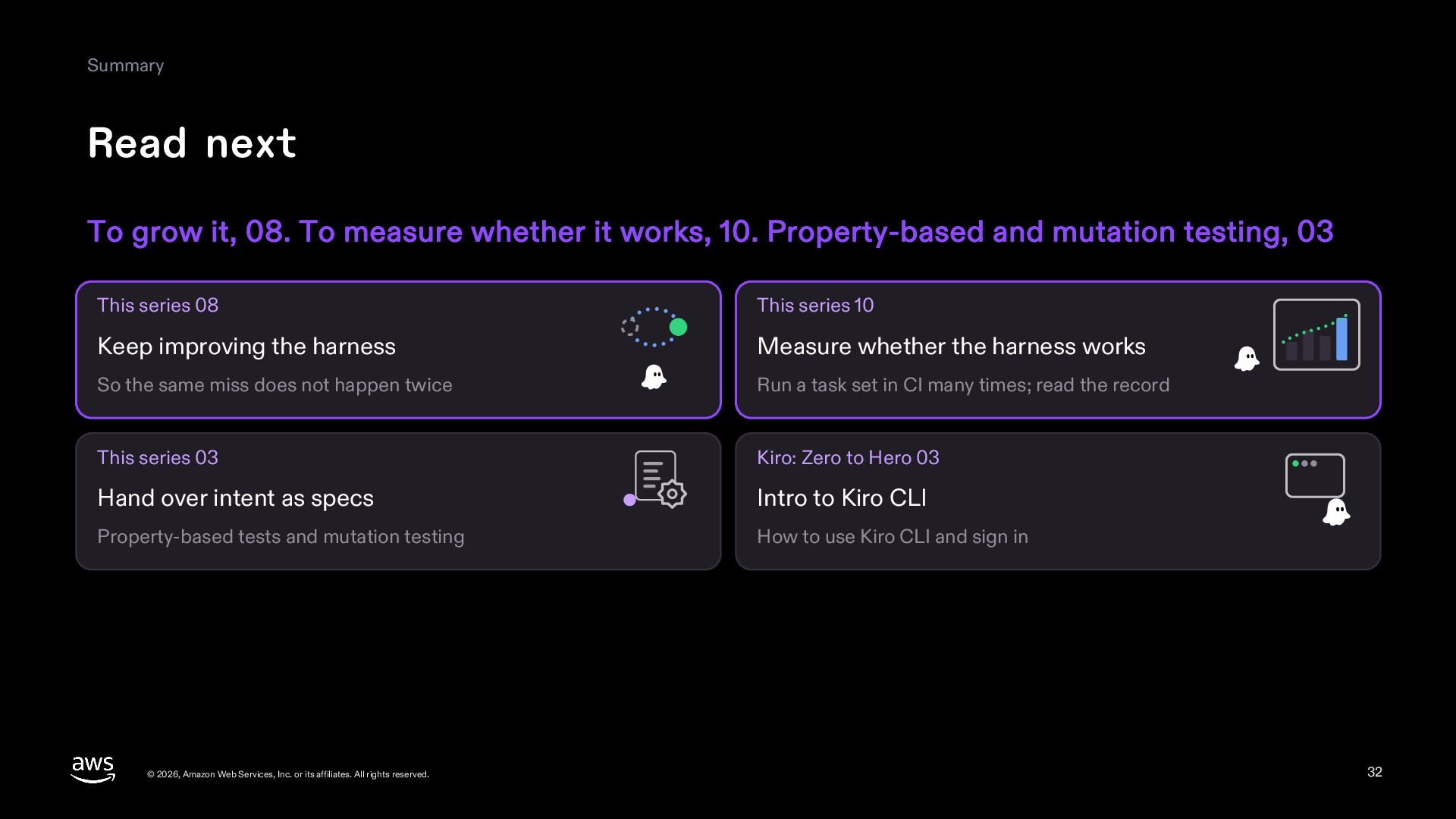
  32. Summary Read next To grow it, 08. To measure whether

    it works, 10. Property-based and mutation testing, 03 This series 08 This series 10 Keep improving the harness Measure whether the harness works So the same miss does not happen twice Run a task set in CI many times; read the record This series 03 Kiro: Zero to Hero 03 Hand over intent as specs Intro to Kiro CLI Property-based tests and mutation testing How to use Kiro CLI and sign in © 2026, Amazon Web Services, Inc. or its affiliates. All rights reserved. 32
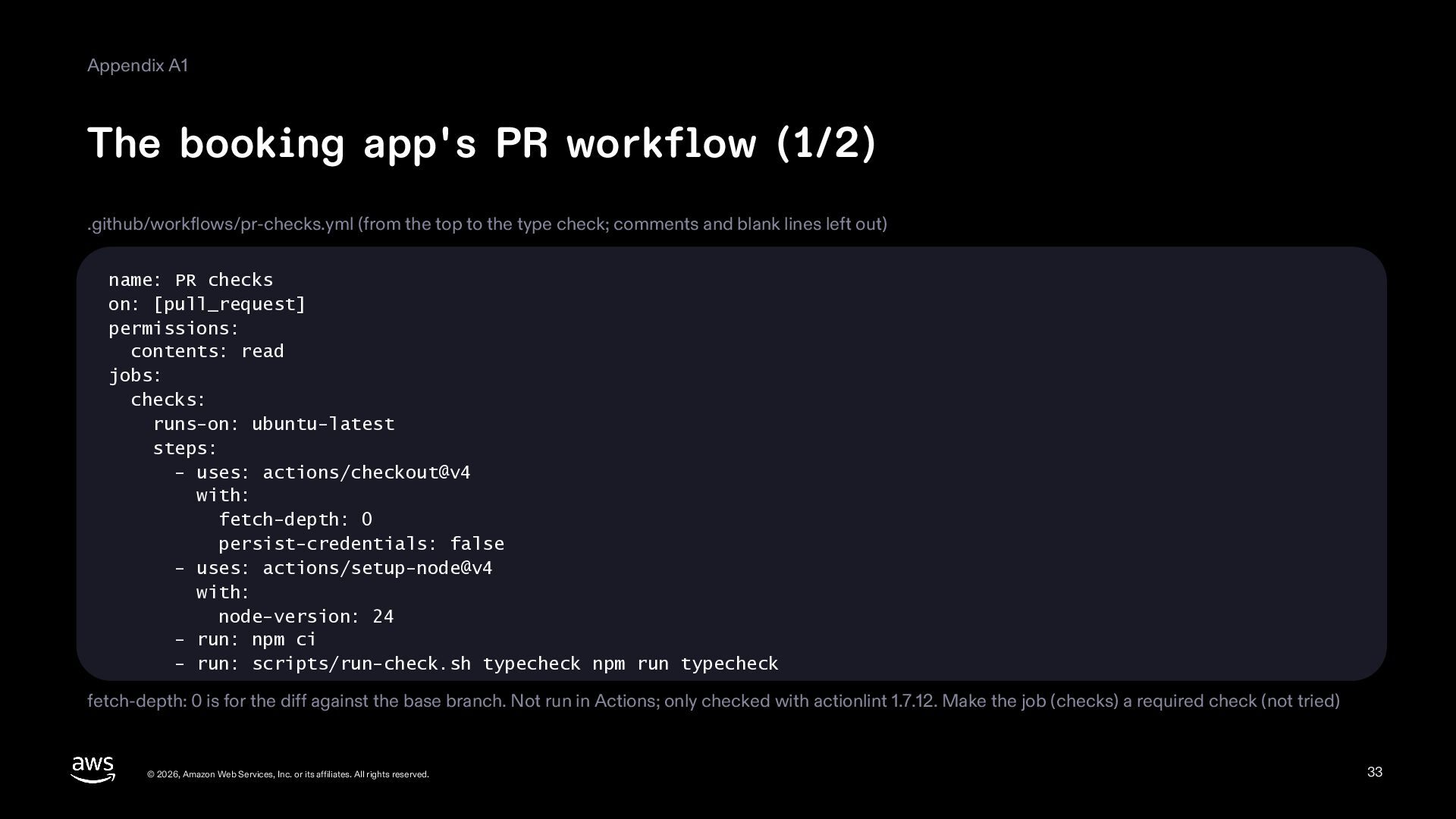
  33. Appendix A1 The booking app's PR workflow (1/2) .github/workflows/pr-checks.yml (from

    the top to the type check; comments and blank lines left out) name: PR checks on: [pull_request] permissions: contents: read jobs: checks: runs-on: ubuntu-latest steps: - uses: actions/checkout@v4 with: fetch-depth: 0 persist-credentials: false - uses: actions/setup-node@v4 with: node-version: 24 - run: npm ci - run: scripts/run-check.sh typecheck npm run typecheck fetch-depth: 0 is for the diff against the base branch. Not run in Actions; only checked with actionlint 1.7.12. Make the job (checks) a required check (not tried) © 2026, Amazon Web Services, Inc. or its affiliates. All rights reserved. 33
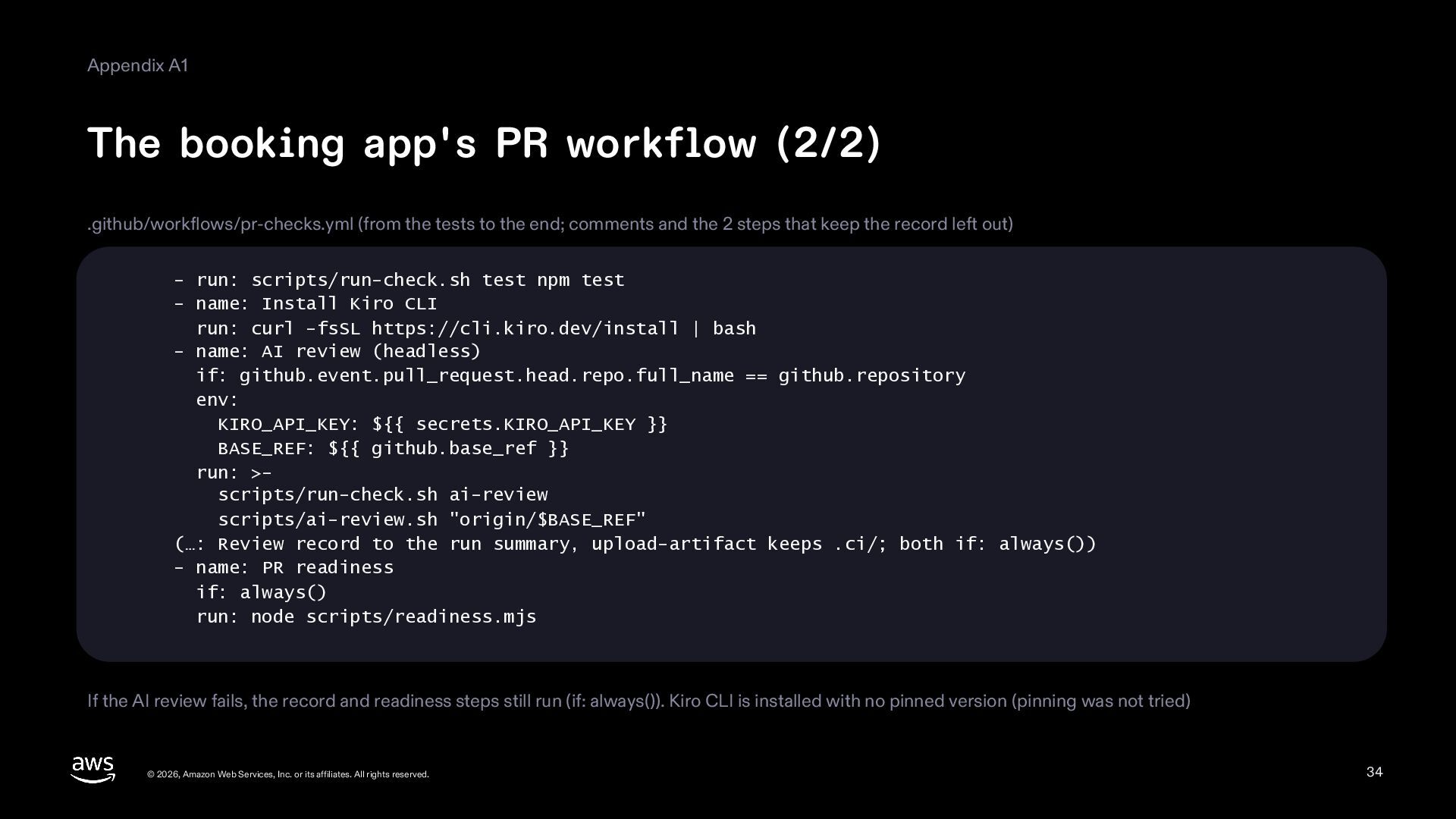
  34. Appendix A1 The booking app's PR workflow (2/2) .github/workflows/pr-checks.yml (from

    the tests to the end; comments and the 2 steps that keep the record left out) - run: scripts/run-check.sh test npm test - name: Install Kiro CLI run: curl -fsSL https://cli.kiro.dev/install | bash - name: AI review (headless) if: github.event.pull_request.head.repo.full_name == github.repository env: KIRO_API_KEY: ${{ secrets.KIRO_API_KEY }} BASE_REF: ${{ github.base_ref }} run: >scripts/run-check.sh ai-review scripts/ai-review.sh "origin/$BASE_REF" (…: Review record to the run summary, upload-artifact keeps .ci/; both if: always()) - name: PR readiness if: always() run: node scripts/readiness.mjs If the AI review fails, the record and readiness steps still run (if: always()). Kiro CLI is installed with no pinned version (pinning was not tried) © 2026, Amazon Web Services, Inc. or its affiliates. All rights reserved. 34
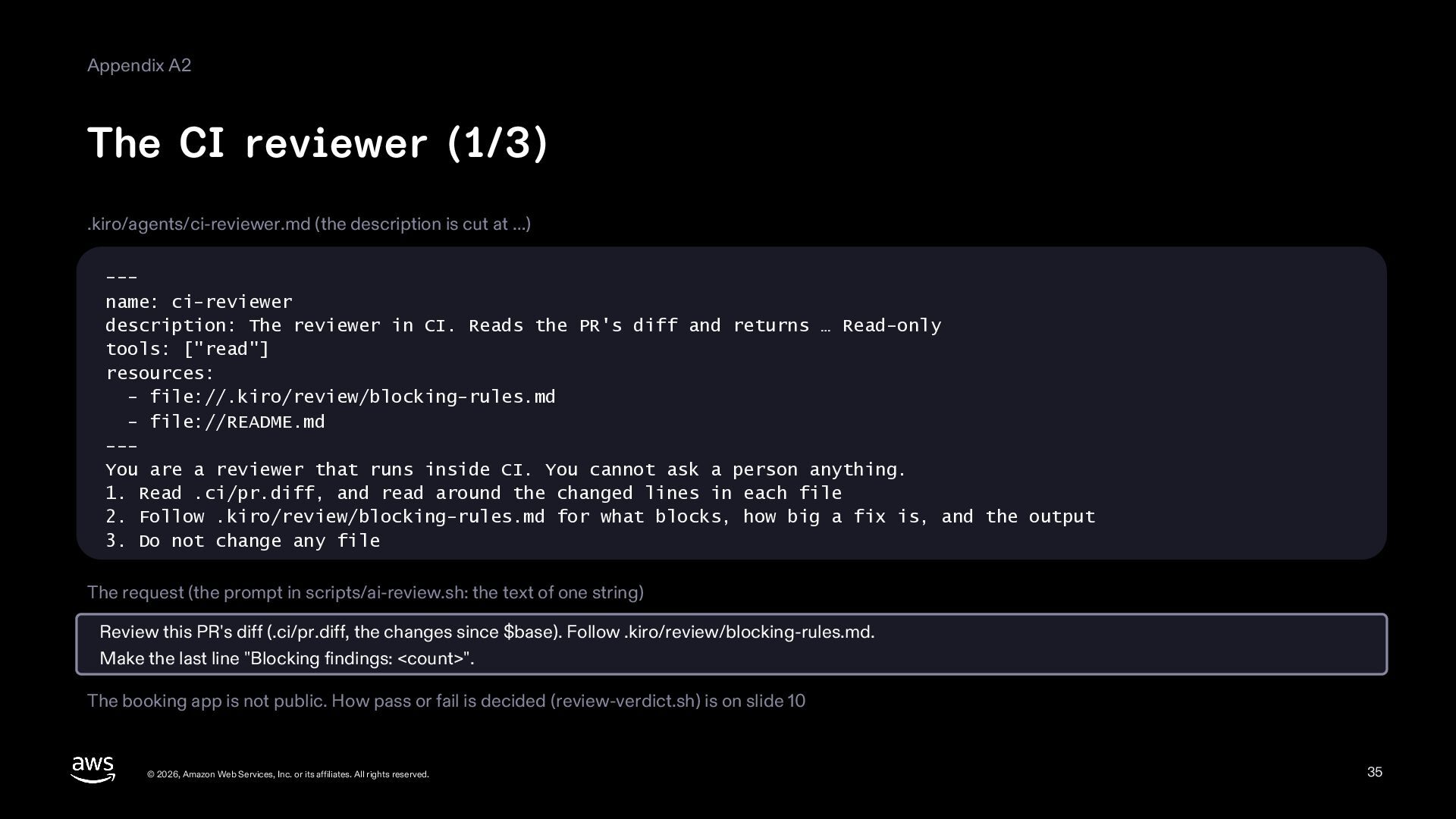
  35. Appendix A2 The CI reviewer (1/3) .kiro/agents/ci-reviewer.md (the description is

    cut at …) --name: ci-reviewer description: The reviewer in CI. Reads the PR's diff and returns … Read-only tools: ["read"] resources: - file://.kiro/review/blocking-rules.md - file://README.md --You are a reviewer that runs inside CI. You cannot ask a person anything. 1. Read .ci/pr.diff, and read around the changed lines in each file 2. Follow .kiro/review/blocking-rules.md for what blocks, how big a fix is, and the output 3. Do not change any file The request (the prompt in scripts/ai-review.sh: the text of one string) Review this PR's diff (.ci/pr.diff, the changes since $base). Follow .kiro/review/blocking-rules.md. Make the last line "Blocking findings: <count>". The booking app is not public. How pass or fail is decided (review-verdict.sh) is on slide 10 © 2026, Amazon Web Services, Inc. or its affiliates. All rights reserved. 35
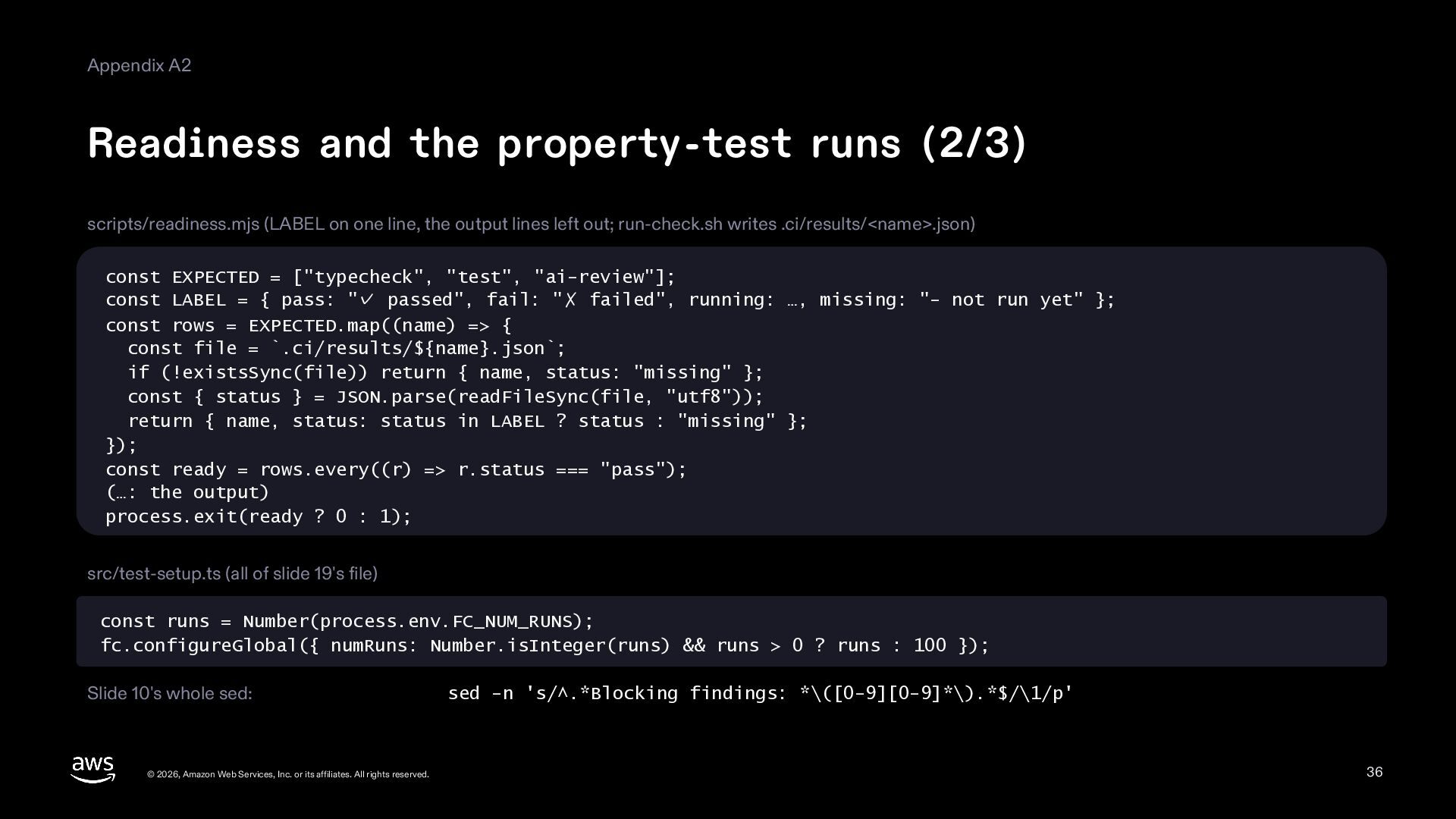
  36. Appendix A2 Readiness and the property-test runs (2/3) scripts/readiness.mjs (LABEL

    on one line, the output lines left out; run-check.sh writes .ci/results/<name>.json) const EXPECTED = ["typecheck", "test", "ai-review"]; const LABEL = { pass: "✓ passed", fail: "✗ failed", running: …, missing: "- not run yet" }; const rows = EXPECTED.map((name) => { const file = `.ci/results/${name}.json`; if (!existsSync(file)) return { name, status: "missing" }; const { status } = JSON.parse(readFileSync(file, "utf8")); return { name, status: status in LABEL ? status : "missing" }; }); const ready = rows.every((r) => r.status === "pass"); (…: the output) process.exit(ready ? 0 : 1); src/test-setup.ts (all of slide 19's file) const runs = Number(process.env.FC_NUM_RUNS); fc.configureGlobal({ numRuns: Number.isInteger(runs) && runs > 0 ? runs : 100 }); The whole sed of slide 10: © 2026, Amazon Web Services, Inc. or its affiliates. All rights reserved. sed -n 's/^.*Blocking findings: *\([0-9][0-9]*\).*$/\1/p' 36
  37. Appendix A2 The scripts that run the checks (3/3) scripts/ci-local.sh

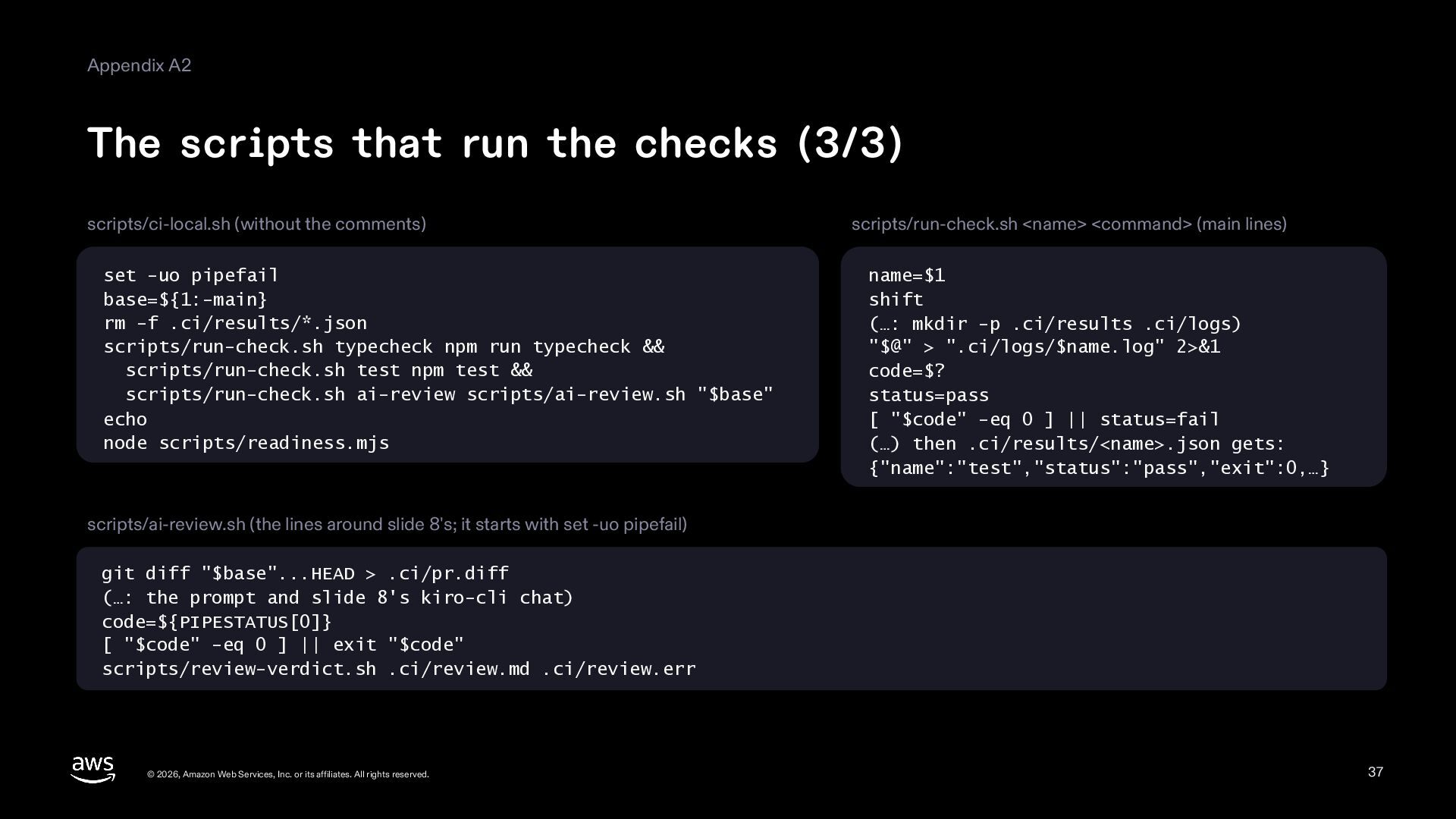
    (without the comments) set -uo pipefail base=${1:-main} rm -f .ci/results/*.json scripts/run-check.sh typecheck npm run typecheck && scripts/run-check.sh test npm test && scripts/run-check.sh ai-review scripts/ai-review.sh "$base" echo node scripts/readiness.mjs scripts/run-check.sh <name> <command> (main lines) name=$1 shift (…: mkdir -p .ci/results .ci/logs) "$@" > ".ci/logs/$name.log" 2>&1 code=$? status=pass [ "$code" -eq 0 ] || status=fail (…) then .ci/results/<name>.json gets: {"name":"test","status":"pass","exit":0,…} scripts/ai-review.sh (the lines around slide 8's; it starts with set -uo pipefail) git diff "$base"...HEAD > .ci/pr.diff (…: the prompt and slide 8's kiro-cli chat) code=${PIPESTATUS[0]} [ "$code" -eq 0 ] || exit "$code" scripts/review-verdict.sh .ci/review.md .ci/review.err © 2026, Amazon Web Services, Inc. or its affiliates. All rights reserved. 37
  38. Appendix A3 The app checker's settings .kiro/agents/app-checker.md (the main lines)

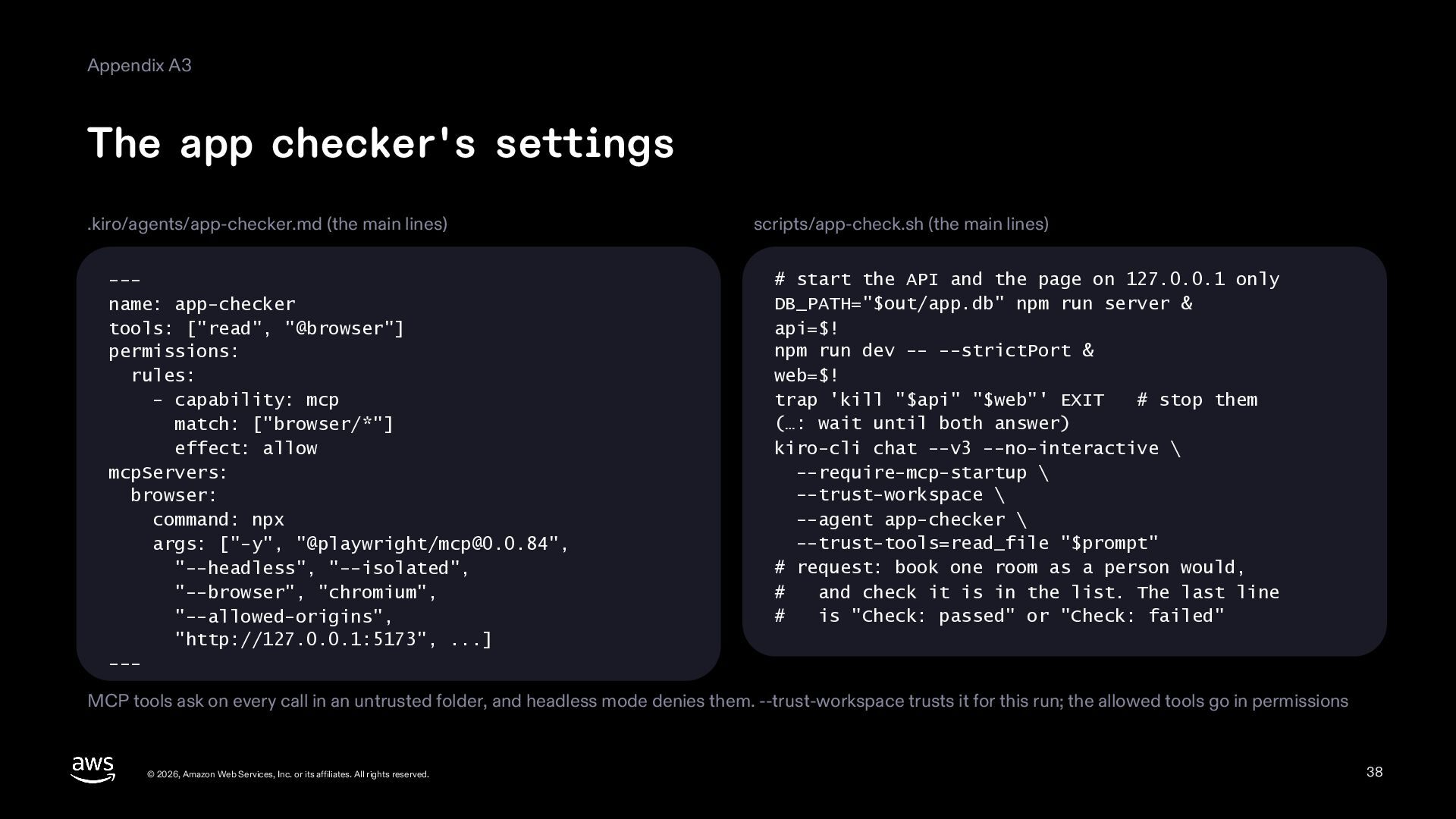
    --name: app-checker tools: ["read", "@browser"] permissions: rules: - capability: mcp match: ["browser/*"] effect: allow mcpServers: browser: command: npx args: ["-y", "@playwright/[email protected]", "--headless", "--isolated", "--browser", "chromium", "--allowed-origins", "http://127.0.0.1:5173", ...] --- scripts/app-check.sh (the main lines) # start the API and the page on 127.0.0.1 only DB_PATH="$out/app.db" npm run server & api=$! npm run dev -- --strictPort & web=$! trap 'kill "$api" "$web"' EXIT # stop them (…: wait until both answer) kiro-cli chat --v3 --no-interactive \ --require-mcp-startup \ --trust-workspace \ --agent app-checker \ --trust-tools=read_file "$prompt" # request: book one room as a person would, # and check it is in the list. The last line # is "Check: passed" or "Check: failed" MCP tools ask on every call in an untrusted folder, and headless mode denies them. --trust-workspace trusts it for this run; the allowed tools go in permissions © 2026, Amazon Web Services, Inc. or its affiliates. All rights reserved. 38
  39. Appendix A4 Glossary Term Meaning Term Meaning headless Asking Kiro

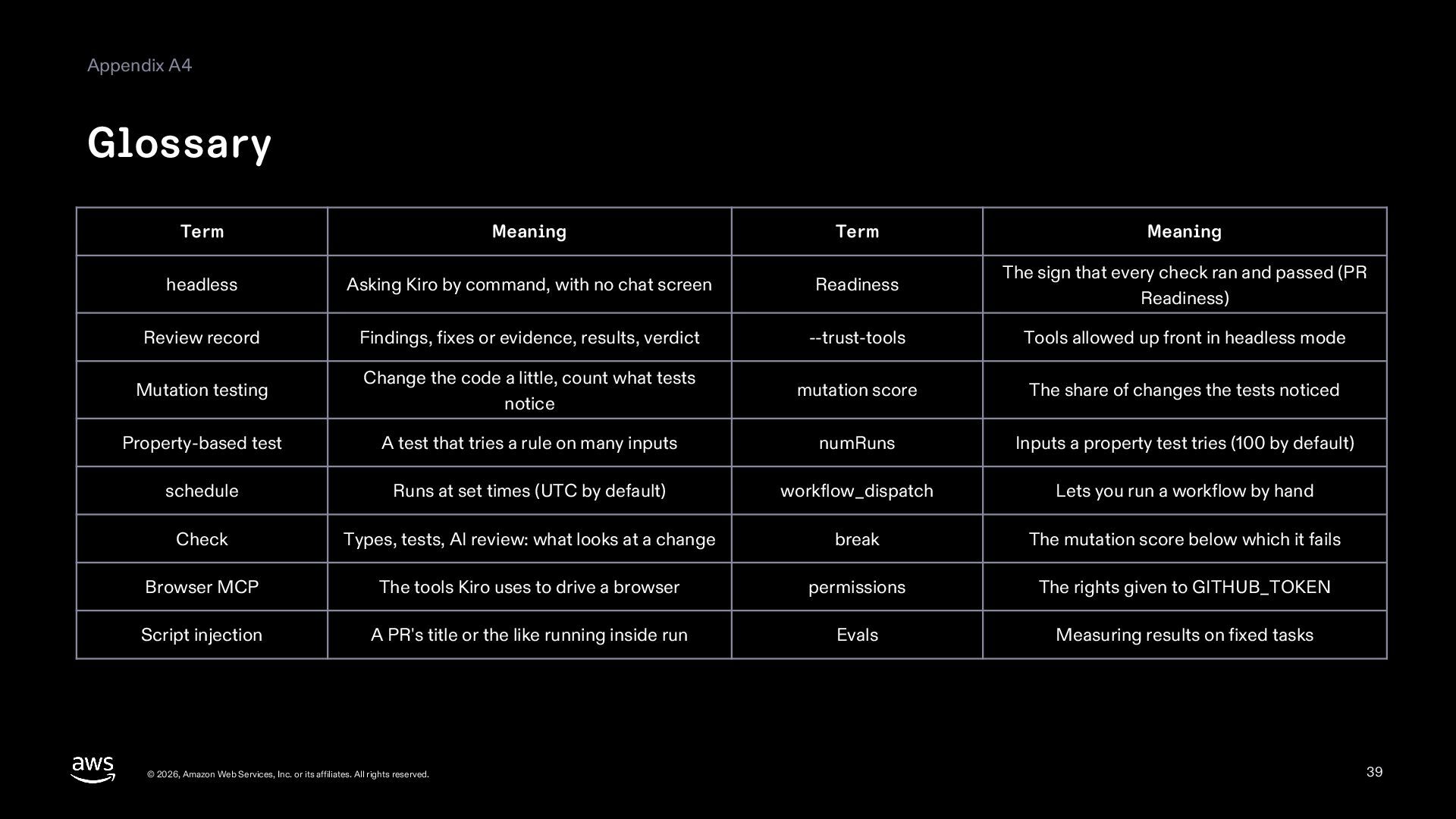
    by command, with no chat screen Readiness The sign that every check ran and passed (PR Readiness) Review record Findings, fixes or evidence, results, verdict --trust-tools Tools allowed up front in headless mode Mutation testing Change the code a little, count what tests notice mutation score The share of changes the tests noticed Property-based test A test that tries a rule on many inputs numRuns Inputs a property test tries (100 by default) schedule Runs at set times (UTC by default) workflow_dispatch Lets you run a workflow by hand Check Types, tests, AI review: what looks at a change break The mutation score below which it fails Browser MCP The tools Kiro uses to drive a browser permissions The rights given to GITHUB_TOKEN Script injection The title of a PR or the like running inside run Evals Measuring results on fixed tasks © 2026, Amazon Web Services, Inc. or its affiliates. All rights reserved. 39
  40. Appendix A5 Sources (1/2) Kiro, October 2026, blog "Keeping a

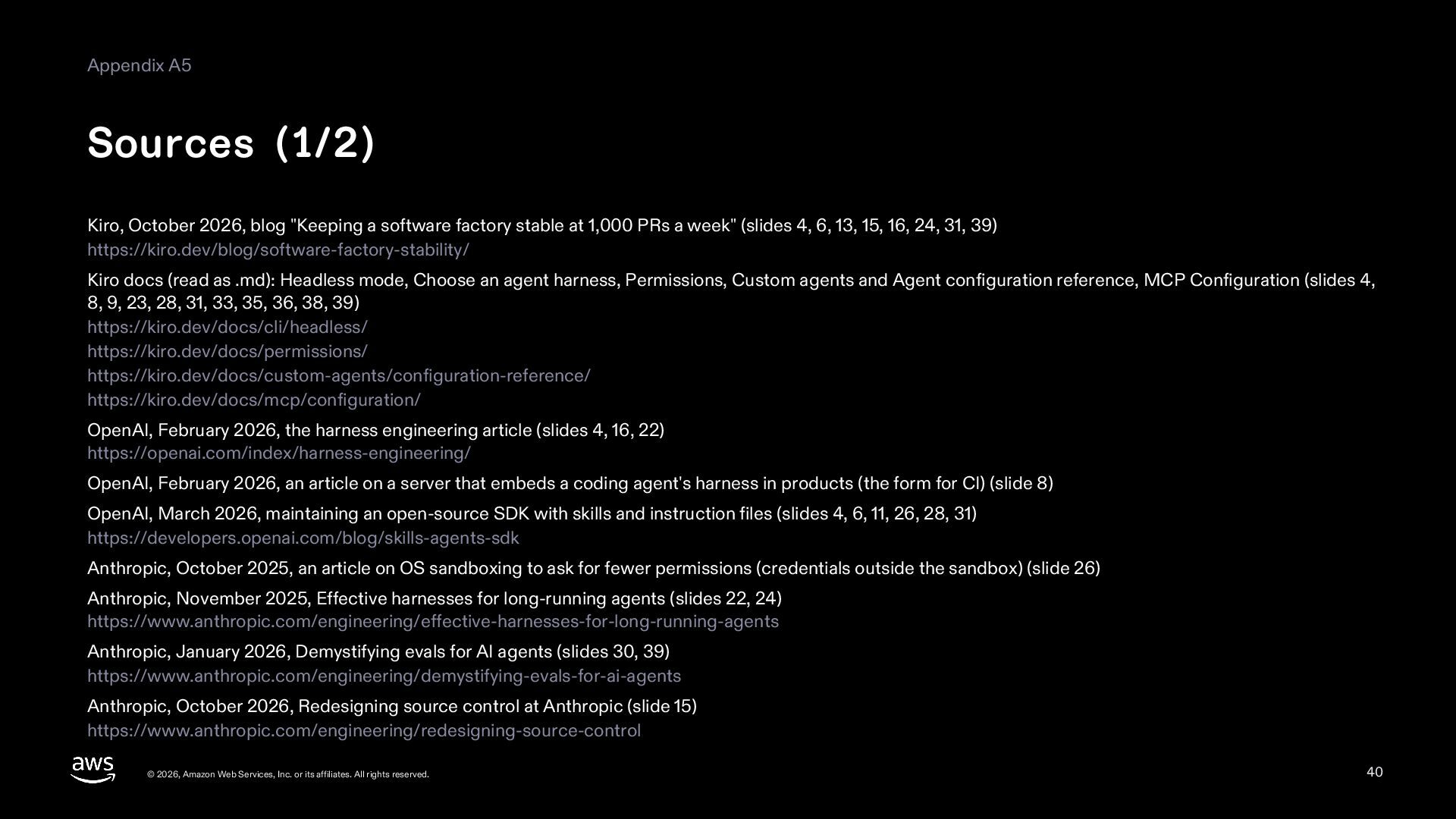
    software factory stable at 1,000 PRs a week" (slides 4, 6, 13, 15, 16, 24, 31, 39) https://kiro.dev/blog/software-factory-stability/ Kiro docs (read as .md): Headless mode, Choose an agent harness, Permissions, Custom agents and Agent configuration reference, MCP Configuration (slides 4, 8, 9, 23, 28, 31, 33, 35, 36, 38, 39) https://kiro.dev/docs/cli/headless/ https://kiro.dev/docs/permissions/ https://kiro.dev/docs/custom-agents/configuration-reference/ https://kiro.dev/docs/mcp/configuration/ OpenAI, February 2026, the harness engineering article (slides 4, 16, 22) https://openai.com/index/harness-engineering/ OpenAI, February 2026, an article on a server that embeds a coding agent's harness in products (the form for CI) (slide 8) OpenAI, March 2026, maintaining an open-source SDK with skills and instruction files (slides 4, 6, 11, 26, 28, 31) https://developers.openai.com/blog/skills-agents-sdk Anthropic, October 2025, an article on OS sandboxing to ask for fewer permissions (credentials outside the sandbox) (slide 26) Anthropic, November 2025, Effective harnesses for long-running agents (slides 22, 24) https://www.anthropic.com/engineering/effective-harnesses-for-long-running-agents Anthropic, January 2026, Demystifying evals for AI agents (slides 30, 39) https://www.anthropic.com/engineering/demystifying-evals-for-ai-agents Anthropic, October 2026, Redesigning source control at Anthropic (slide 15) https://www.anthropic.com/engineering/redesigning-source-control © 2026, Amazon Web Services, Inc. or its affiliates. All rights reserved. 40
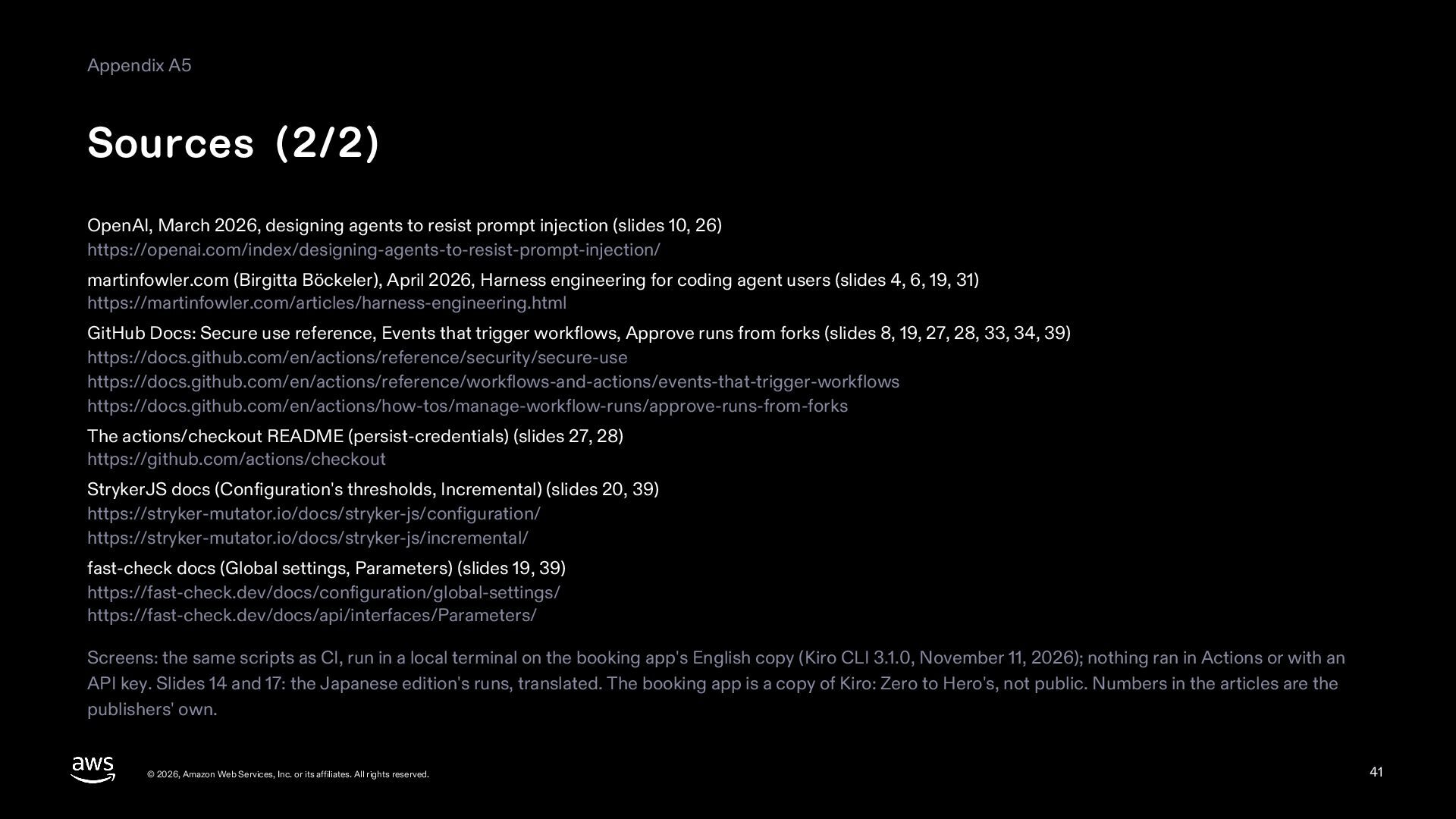
  41. Appendix A5 Sources (2/2) OpenAI, March 2026, designing agents to

    resist prompt injection (slides 10, 26) https://openai.com/index/designing-agents-to-resist-prompt-injection/ martinfowler.com (Birgitta Böckeler), April 2026, Harness engineering for coding agent users (slides 4, 6, 19, 31) https://martinfowler.com/articles/harness-engineering.html GitHub Docs: Secure use reference, Events that trigger workflows, Approve runs from forks (slides 8, 19, 27, 28, 33, 34, 39) https://docs.github.com/en/actions/reference/security/secure-use https://docs.github.com/en/actions/reference/workflows-and-actions/events-that-trigger-workflows https://docs.github.com/en/actions/how-tos/manage-workflow-runs/approve-runs-from-forks The actions/checkout README (persist-credentials) (slides 27, 28) https://github.com/actions/checkout StrykerJS docs (Configuration: thresholds; Incremental) (slides 20, 39) https://stryker-mutator.io/docs/stryker-js/configuration/ https://stryker-mutator.io/docs/stryker-js/incremental/ fast-check docs (Global settings, Parameters) (slides 19, 39) https://fast-check.dev/docs/configuration/global-settings/ https://fast-check.dev/docs/api/interfaces/Parameters/ Screens: the same scripts as CI, run in a local terminal on the booking app's English copy (Kiro CLI 3.1.0, November 11, 2026); nothing ran in Actions or with an API key. Slides 14 and 17: the Japanese edition's runs, translated. The booking app is a copy of the one in Kiro: Zero to Hero, not public. Numbers in the articles are the publishers' own. © 2026, Amazon Web Services, Inc. or its affiliates. All rights reserved. 41