Upgrade to Pro — share decks privately, control downloads, hide ads and more …

AWS Quick updates: November 2026 (Changes from ...

Avatar for Riku INADA Riku INADA PRO
November 11, 2026

AWS Quick updates: November 2026 (Changes from October 1 to November 9, 2026) | AWS Quick: Zero to Hero Updates

Level 200. A handout for users and administrators on the AWS Quick changes from October 1 to November 9, 2026: five What's New posts and the AWS blogs. It starts with the name change of November 9 (Amazon Quick is now AWS Quick, and Amazon Quick Sight is now AWS Quick Sight). 1) Once an admin adds the desktop connector, everyone with the desktop app can sign in the same way as on the web. 2) Per-user AWS Quick Sight Readers move to Quick Essentials in stages, in Regions with Quick AI features. 3) Smart Approvals lets routine actions through on desktop and mobile, and is on by default (deny-by-default profiles must allow it). 4) Quick is now available in the Singapore Region. 5) Publish your PowerPoint and Word templates, and Quick creates presentations and documents to match. For admins, one figure shows what changes by default and how to limit it with custom permissions, Limit Profiles, and Always Ask for key actions. Screens of the desktop app show where users turn Smart Approvals on or off and how to open Brand assets. From the AWS blogs, it covers access from corporate networks through AWS PrivateLink, putting tables and documents in one space so an agent answers from both, and splitting an agent into parts. The appendix has the other October blog posts, a glossary, and sources. Based on the What's New posts, documentation, blogs, and pricing page public as of November 9, 2026 (the name change slide uses the product page and User Guide read on November 11). The update issue of the series AWS Quick: Zero to Hero.

Avatar for Riku INADA

Riku INADA PRO

November 11, 2026

More Decks by Riku INADA

Other Decks in Technology

Transcript

  1. AWS Quick: Zero to Hero Updates AWS Quick updates: November

    2026 Changes from October 2026.11 1 to November 9, 2026 Level 200 / As of November 9, 2026 November 2026 Riku Inada Amazon Web Services Japan © 2026, Amazon Web © 2026, Services, Amazon Inc. or Web its Services, affiliates.Inc. All or rights its affiliates. reserved.All rights reserved. 1
  2. Introduction About me Riku Inada Amazon Web Services Japan G.K.

    Solutions Architect Works mainly with manufacturing customers Recent work Promoting the AI-Driven Development Life Cycle (AI-DLC) Writing and speaking about Kiro and AWS Amplify © 2026, Amazon Web Services, Inc. or its affiliates. All rights reserved. X @inada_riku Speaker Deck speakerdeck.com/inariku Zenn zenn.dev/inariku GitHub github.com/inariku 2
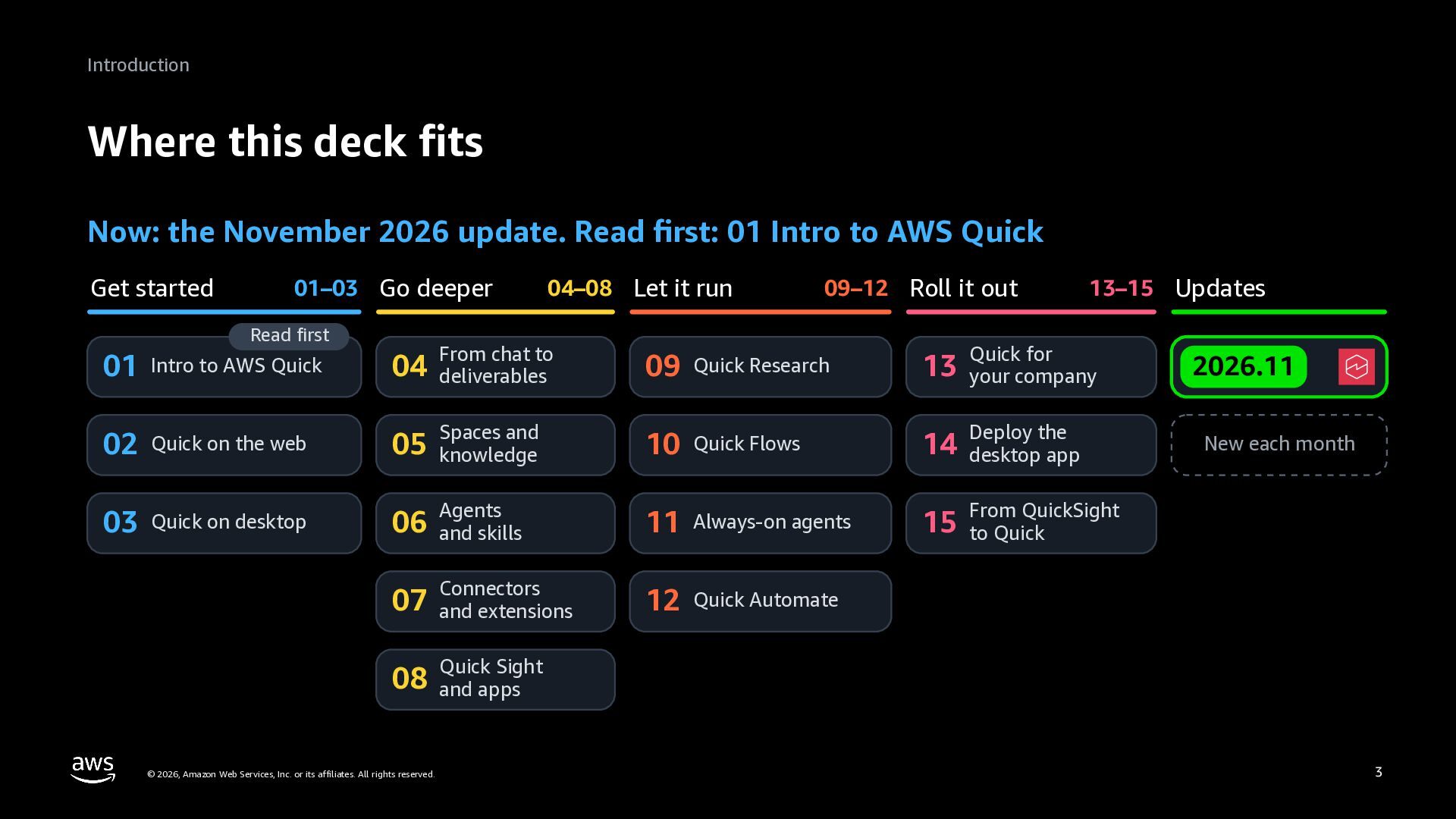
  3. Introduction Where this deck fits Now: the November 2026 update.

    Read first: 01 Intro to AWS Quick Get started 01–03 Go deeper Read first 04–08 Let it run 09–12 Roll it out 13–15 Updates From chat to 09 Quick Research 13 your company 05 knowledge Spaces and 10 Quick Flows 14 desktop app 06 Agents and skills 11 Always-on agents QuickSight 15 From to Quick 07 Connectors and extensions 12 Quick Automate 01 Intro to AWS Quick 04 deliverables 02 Quick on the web 03 Quick on desktop Quick for Deploy the 2026.11 New each month Sight 08 Quick and apps © 2026, Amazon Web Services, Inc. or its affiliates. All rights reserved. 3
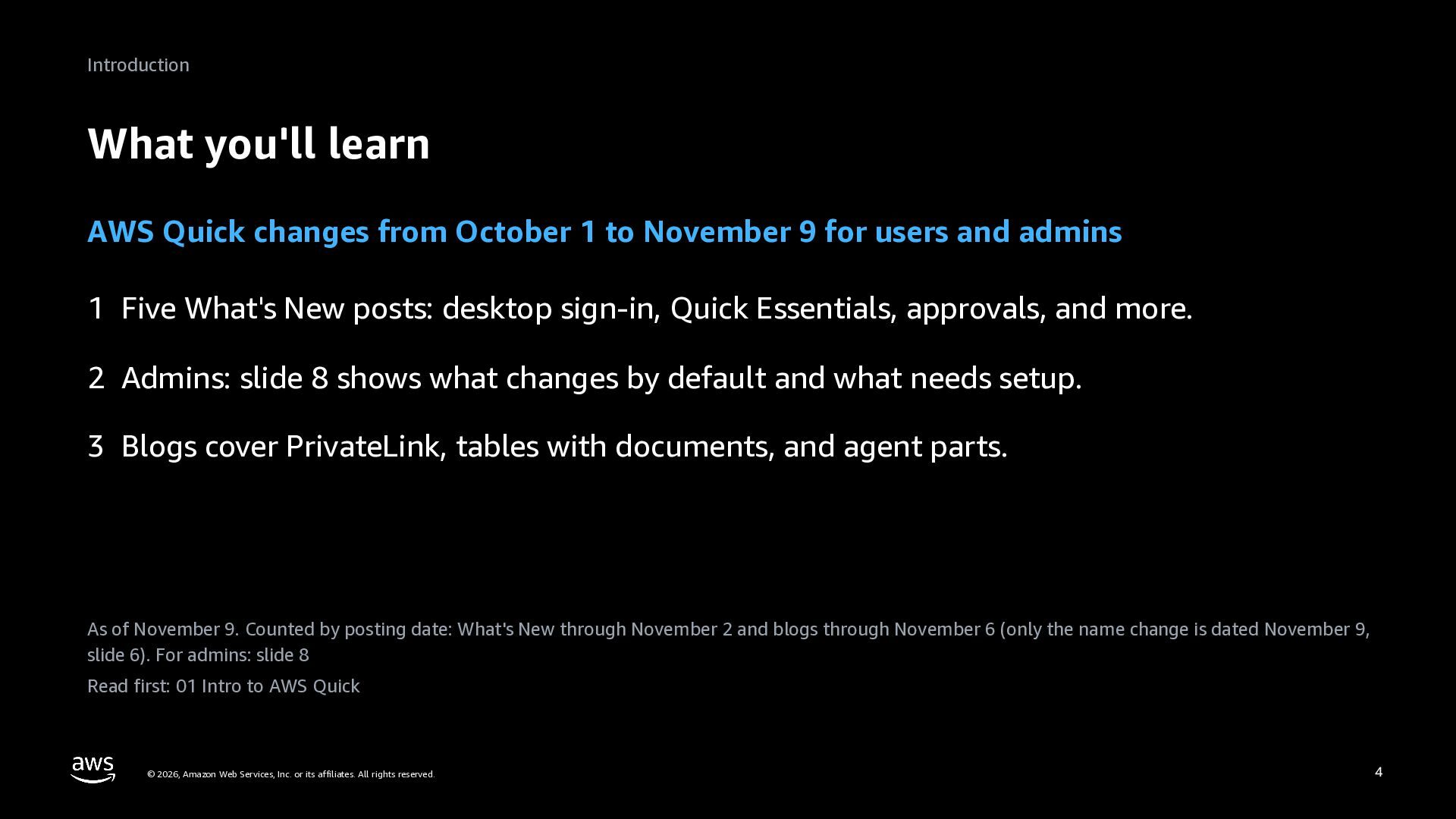
  4. Introduction What you'll learn AWS Quick changes from October 1

    to November 9 for users and admins 1 Five What's New posts: desktop sign-in, Quick Essentials, approvals, and more. 2 Admins: slide 8 shows what changes by default and what needs setup. 3 Blogs cover PrivateLink, tables with documents, and agent parts. As of November 9. Counted by posting date: What's New through November 2 and blogs through November 6 (only the name change is dated November 9, slide 6). For admins: slide 8 Read first: 01 Intro to AWS Quick © 2026, Amazon Web Services, Inc. or its affiliates. All rights reserved. 4
  5. October and November © 2026, Amazon Web Services, Inc. or

    its affiliates. All rights reserved. 5
  6. October and November The name is now AWS Quick (Nov

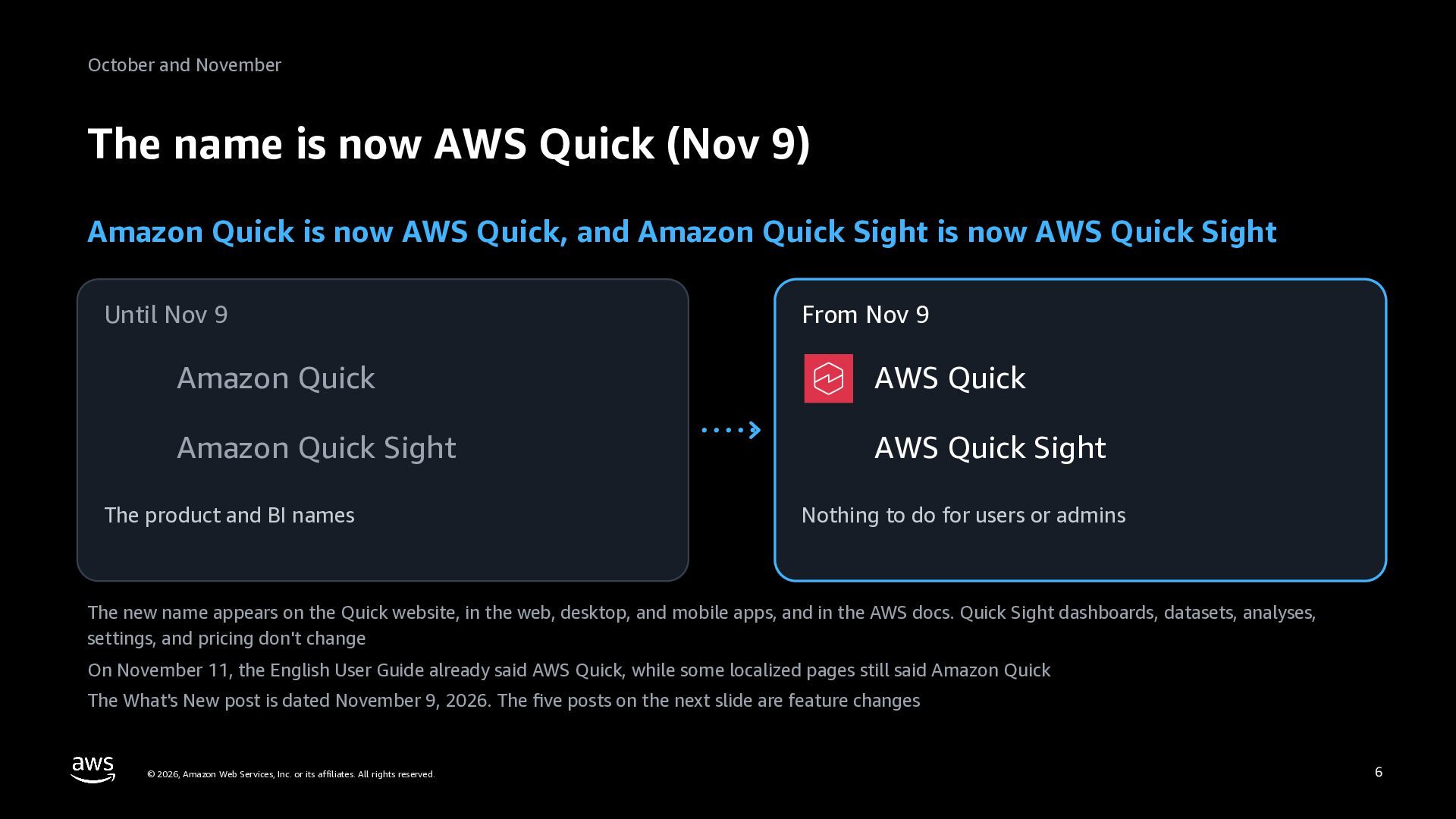
    9) Amazon Quick is now AWS Quick, and Amazon Quick Sight is now AWS Quick Sight Until Nov 9 From Nov 9 Amazon Quick AWS Quick Amazon Quick Sight AWS Quick Sight The product and BI names Nothing to do for users or admins The new name appears on the Quick website, in the web, desktop, and mobile apps, and in the AWS docs. Quick Sight dashboards, datasets, analyses, settings, and pricing don't change On November 11, the English User Guide already said AWS Quick, while some localized pages still said Amazon Quick The What's New post is dated November 9, 2026. The five posts on the next slide are feature changes © 2026, Amazon Web Services, Inc. or its affiliates. All rights reserved. 6
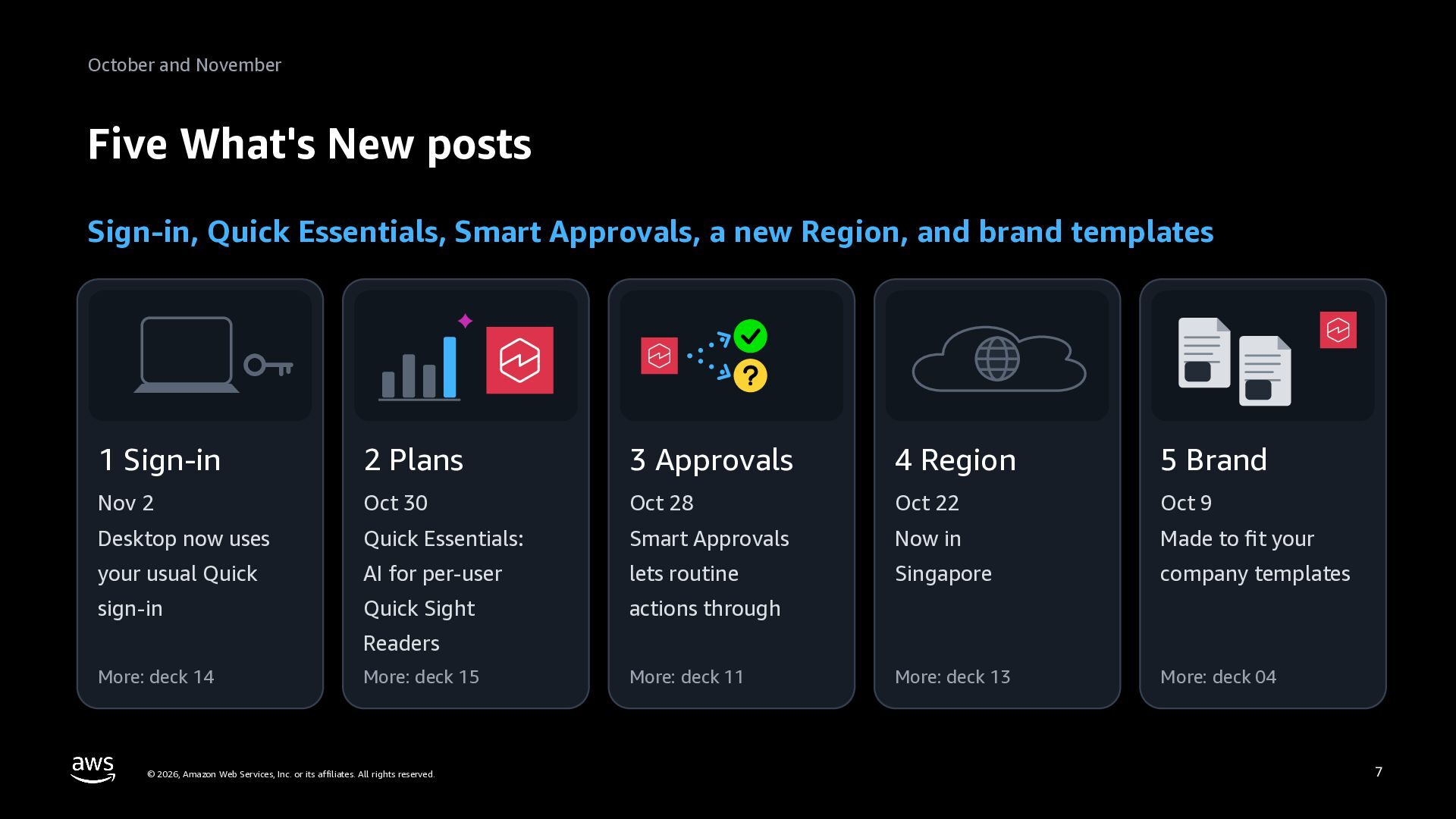
  7. October and November Five What's New posts Sign-in, Quick Essentials,

    Smart Approvals, a new Region, and brand templates 1 Sign-in 2 Plans 3 Approvals 4 Region 5 Brand Nov 2 Oct 30 Oct 28 Oct 22 Oct 9 Desktop now uses Quick Essentials: Smart Approvals Now in Made to fit your your usual Quick AI for per-user lets routine Singapore company templates sign-in Quick Sight actions through More: deck 13 More: deck 04 Readers More: deck 14 More: deck 15 © 2026, Amazon Web Services, Inc. or its affiliates. All rights reserved. More: deck 11 7
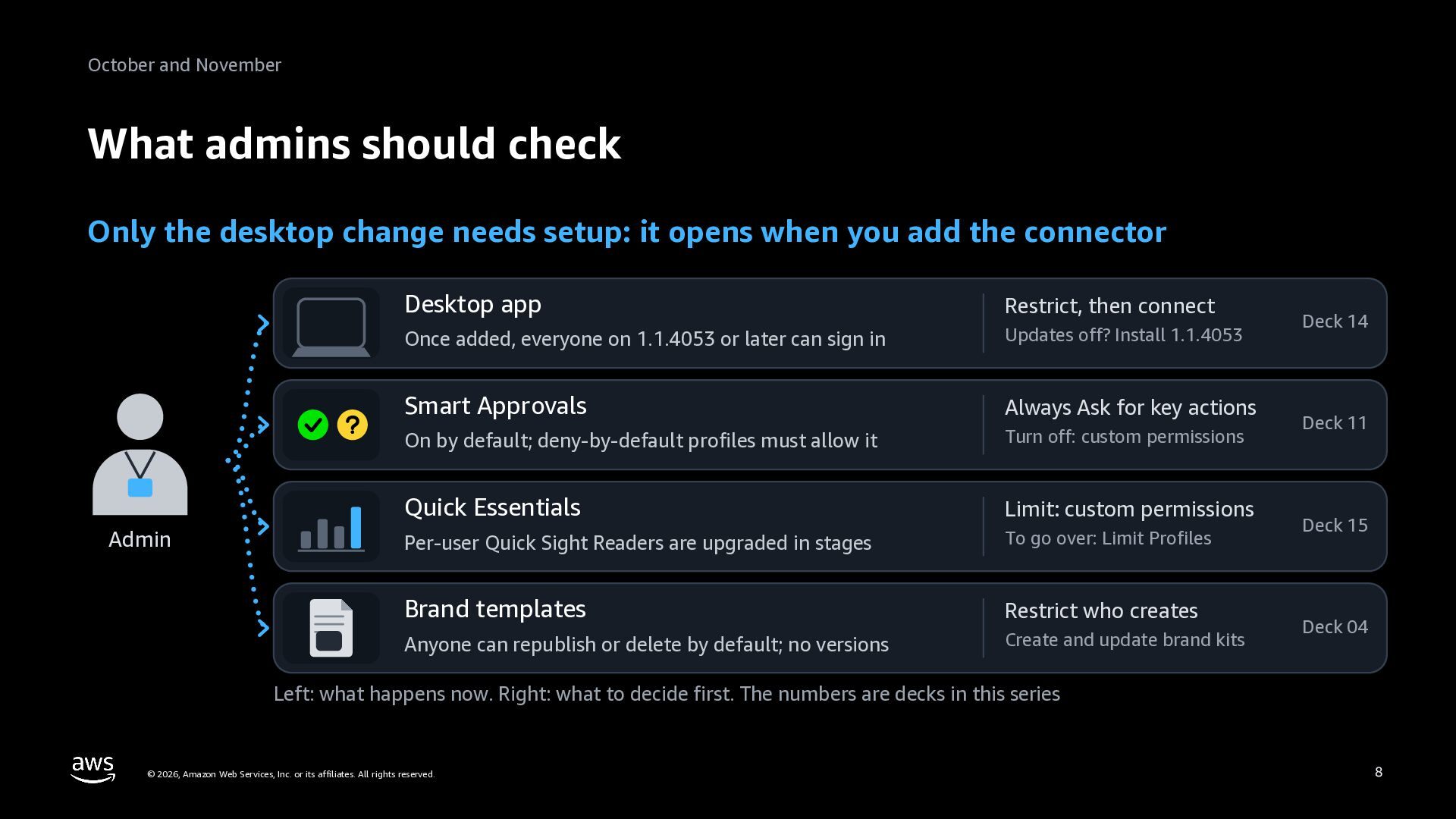
  8. October and November What admins should check Only the desktop

    change needs setup: it opens when you add the connector Admin Desktop app Restrict, then connect Once added, everyone on 1.1.4053 or later can sign in Updates off? Install 1.1.4053 Smart Approvals Always Ask for key actions On by default; deny-by-default profiles must allow it Turn off: custom permissions Quick Essentials Limit: custom permissions Per-user Quick Sight Readers are upgraded in stages To go over: Limit Profiles Brand templates Restrict who creates Anyone can republish or delete by default; no versions Create and update brand kits Deck 14 Deck 11 Deck 15 Deck 04 Left: what happens now. Right: what to decide first. The numbers are decks in this series © 2026, Amazon Web Services, Inc. or its affiliates. All rights reserved. 8
  9. What's New © 2026, Amazon Web Services, Inc. or its

    affiliates. All rights reserved. 9
  10. What's New 1 Desktop uses your sign-in (Nov 2) Sign

    in as on the web. Once you add the connector, everyone can use it 1 An admin, once 2 A user, on desktop 3 Quick opens the browser In Inbound connectors, adds Enters the Quick account Sign in as on the web, such the desktop connector and name and chooses Sign In as with IAM Identity Center picks the sign-in method To roll out in stages, restrict Quick desktop in custom permissions before adding the connector No new app to register in the IdP. Companies that set up the desktop extension earlier can still sign in that way The app must be 1.1.4053 or later. Deploy it first where automatic updates are off. Keep the extension until everyone has moved An Enterprise edition setting (the Free and Plus plans don't need it). Only in Regions with Agentic Features (slide 14). A sign-in lasts up to 30 days Yellow frames are people, and blue is what Quick does. The person with a badge is the admin; the one at the device is a user © 2026, Amazon Web Services, Inc. or its affiliates. All rights reserved. 10
  11. What's New 2 Quick Essentials (Oct 30) Quick Sight Readers

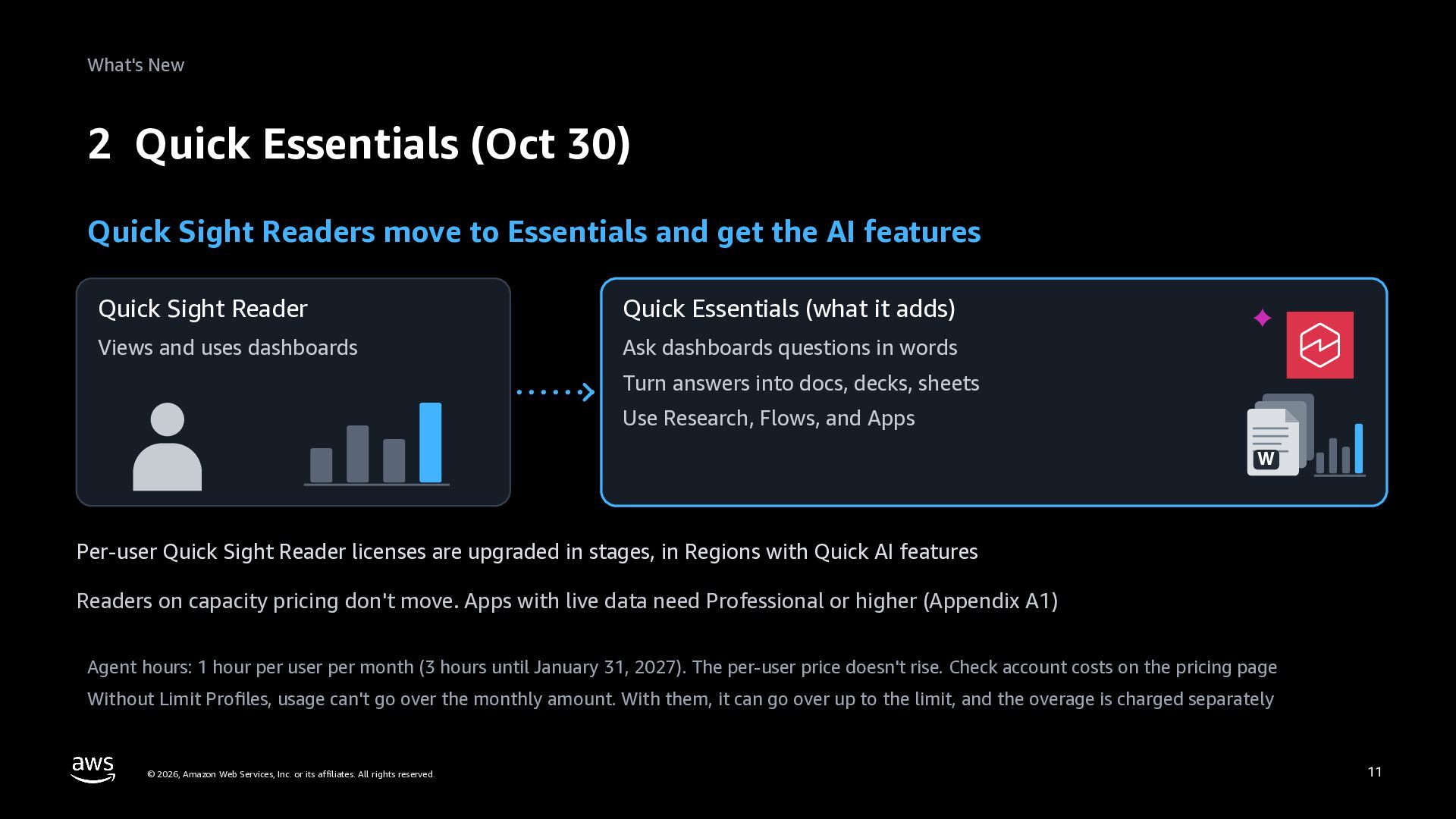
    move to Essentials and get the AI features Quick Sight Reader Quick Essentials (what it adds) Views and uses dashboards Ask dashboards questions in words Turn answers into docs, decks, sheets Use Research, Flows, and Apps W Per-user Quick Sight Reader licenses are upgraded in stages, in Regions with Quick AI features Readers on capacity pricing don't move. Apps with live data need Professional or higher (Appendix A1) Agent hours: 1 hour per user per month (3 hours until January 31, 2027). The per-user price doesn't rise. Check account costs on the pricing page Without Limit Profiles, usage can't go over the monthly amount. With them, it can go over up to the limit, and the overage is charged separately © 2026, Amazon Web Services, Inc. or its affiliates. All rights reserved. 11
  12. What's New 3 Smart Approvals (Oct 28) On desktop and

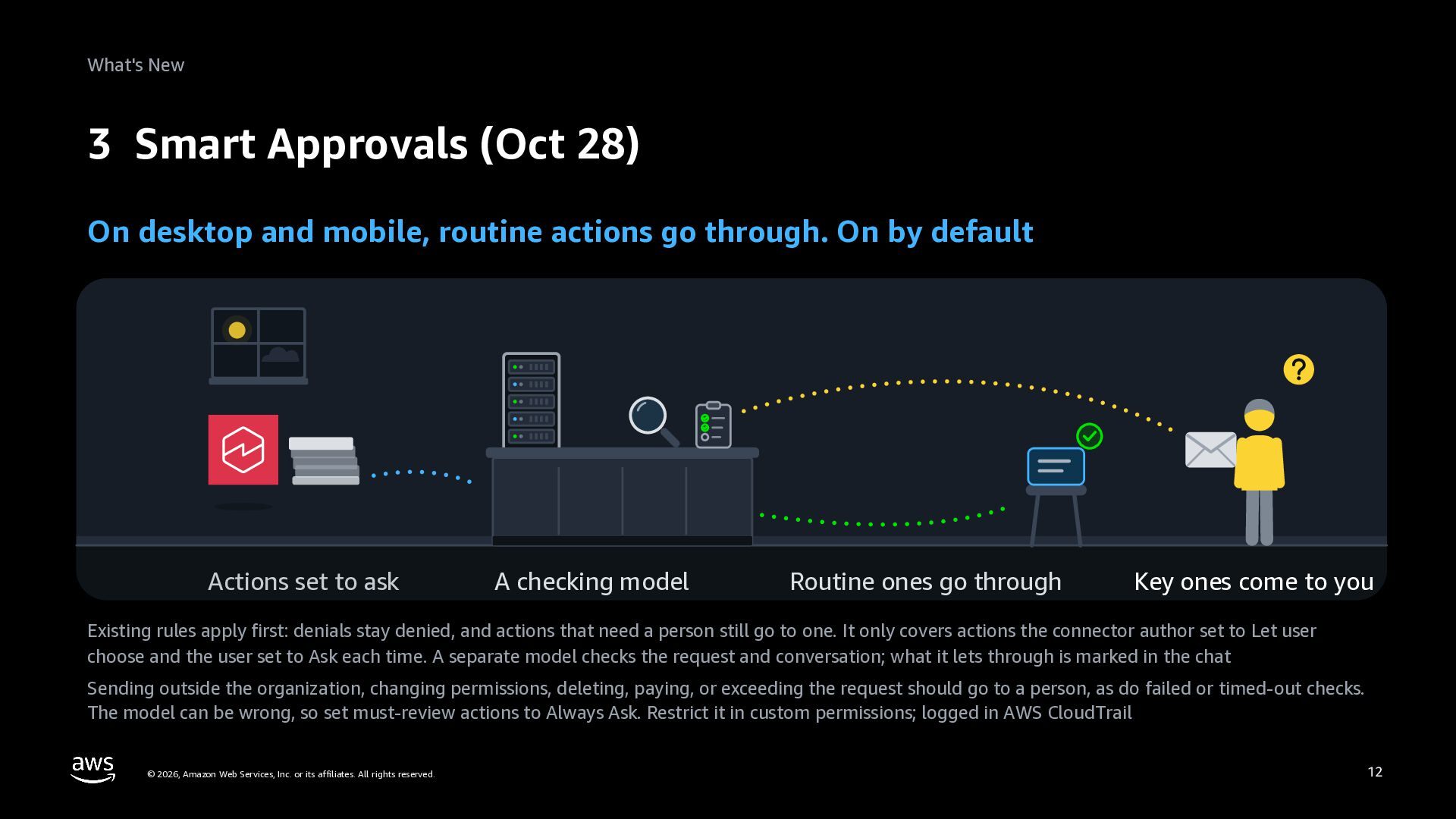
    mobile, routine actions go through. On by default Actions set to ask A checking model Routine ones go through Key ones come to you Existing rules apply first: denials stay denied, and actions that need a person still go to one. It only covers actions the connector author set to Let user choose and the user set to Ask each time. A separate model checks the request and conversation; what it lets through is marked in the chat Sending outside the organization, changing permissions, deleting, paying, or exceeding the request should go to a person, as do failed or timed-out checks. The model can be wrong, so set must-review actions to Always Ask. Restrict it in custom permissions; logged in AWS CloudTrail © 2026, Amazon Web Services, Inc. or its affiliates. All rights reserved. 12
  13. What's New The Smart Approvals screens (desktop) The + menu

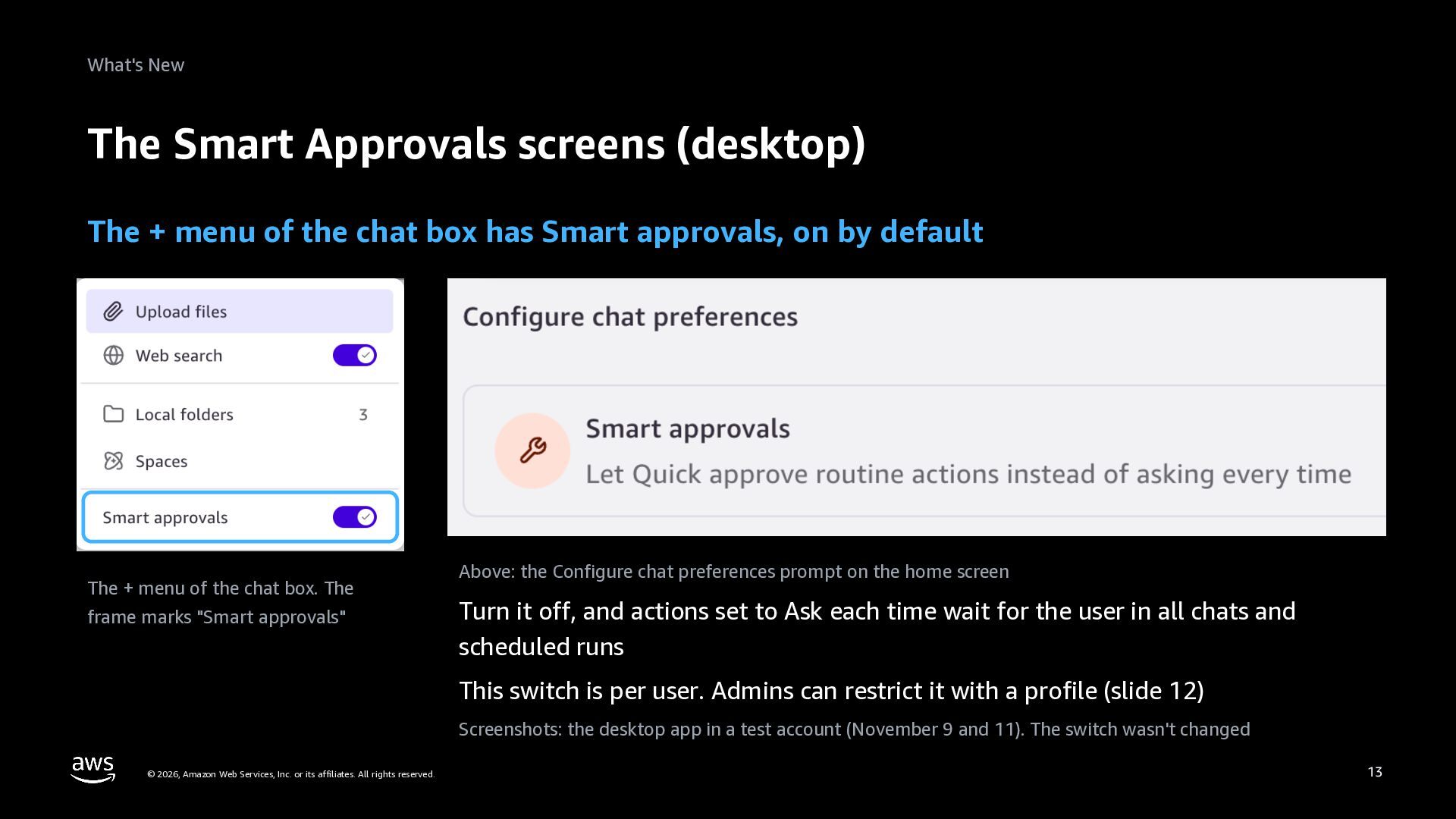
    of the chat box has Smart approvals, on by default The + menu of the chat box. The frame marks "Smart approvals" Above: the Configure chat preferences prompt on the home screen Turn it off, and actions set to Ask each time wait for the user in all chats and scheduled runs This switch is per user. Admins can restrict it with a profile (slide 12) Screenshots: the desktop app in a test account (November 9 and 11). The switch wasn't changed © 2026, Amazon Web Services, Inc. or its affiliates. All rights reserved. 13
  14. What's New 4 Singapore Region (Oct 22) Quick now runs

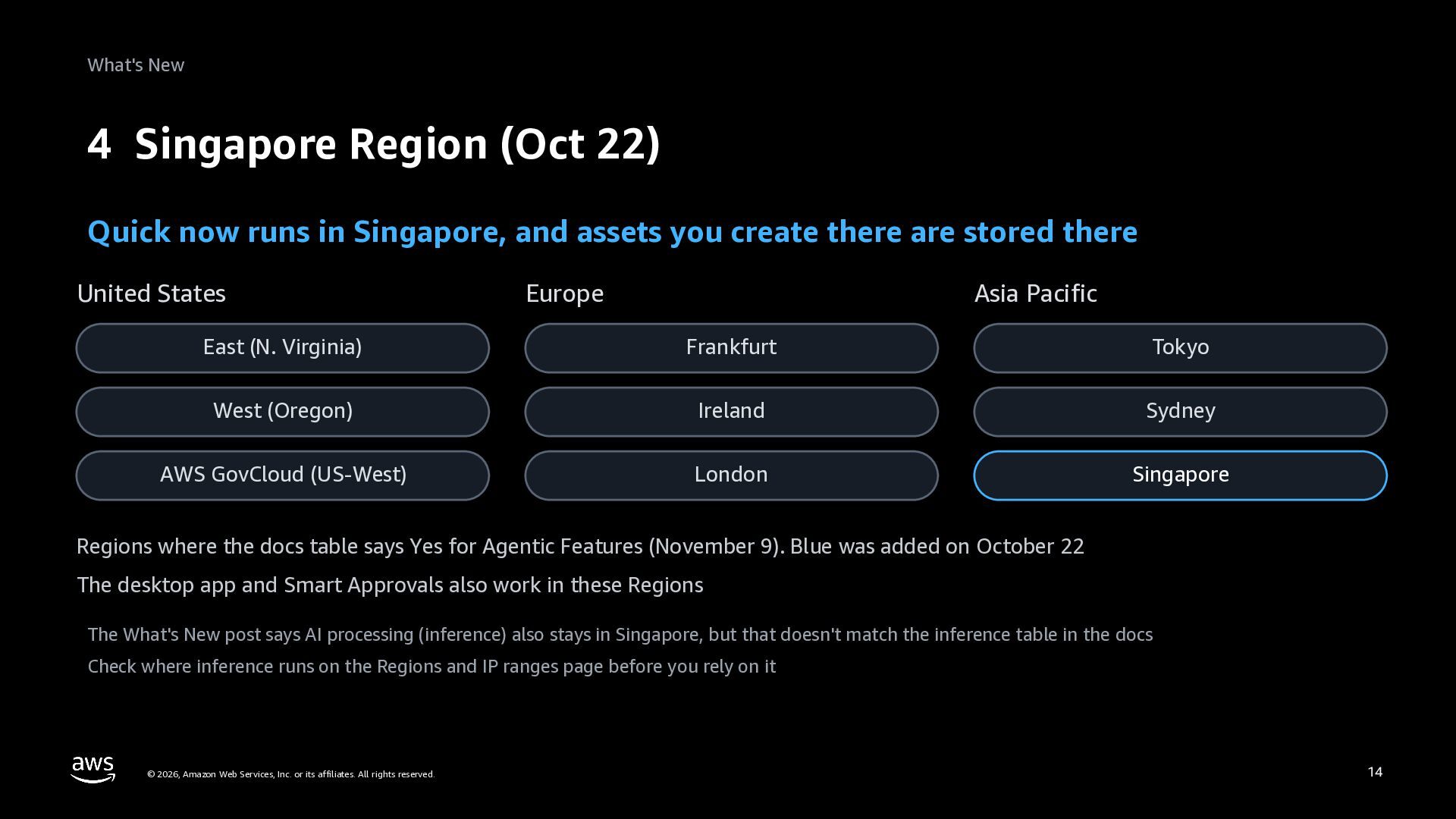
    in Singapore, and assets you create there are stored there United States Europe Asia Pacific East (N. Virginia) Frankfurt Tokyo West (Oregon) Ireland Sydney AWS GovCloud (US-West) London Singapore Regions where the docs table says Yes for Agentic Features (November 9). Blue was added on October 22 The desktop app and Smart Approvals also work in these Regions The What's New post says AI processing (inference) also stays in Singapore, but that doesn't match the inference table in the docs Check where inference runs on the Regions and IP ranges page before you rely on it © 2026, Amazon Web Services, Inc. or its affiliates. All rights reserved. 14
  15. What's New 5 Brand templates (Oct 9) Publish your PowerPoint

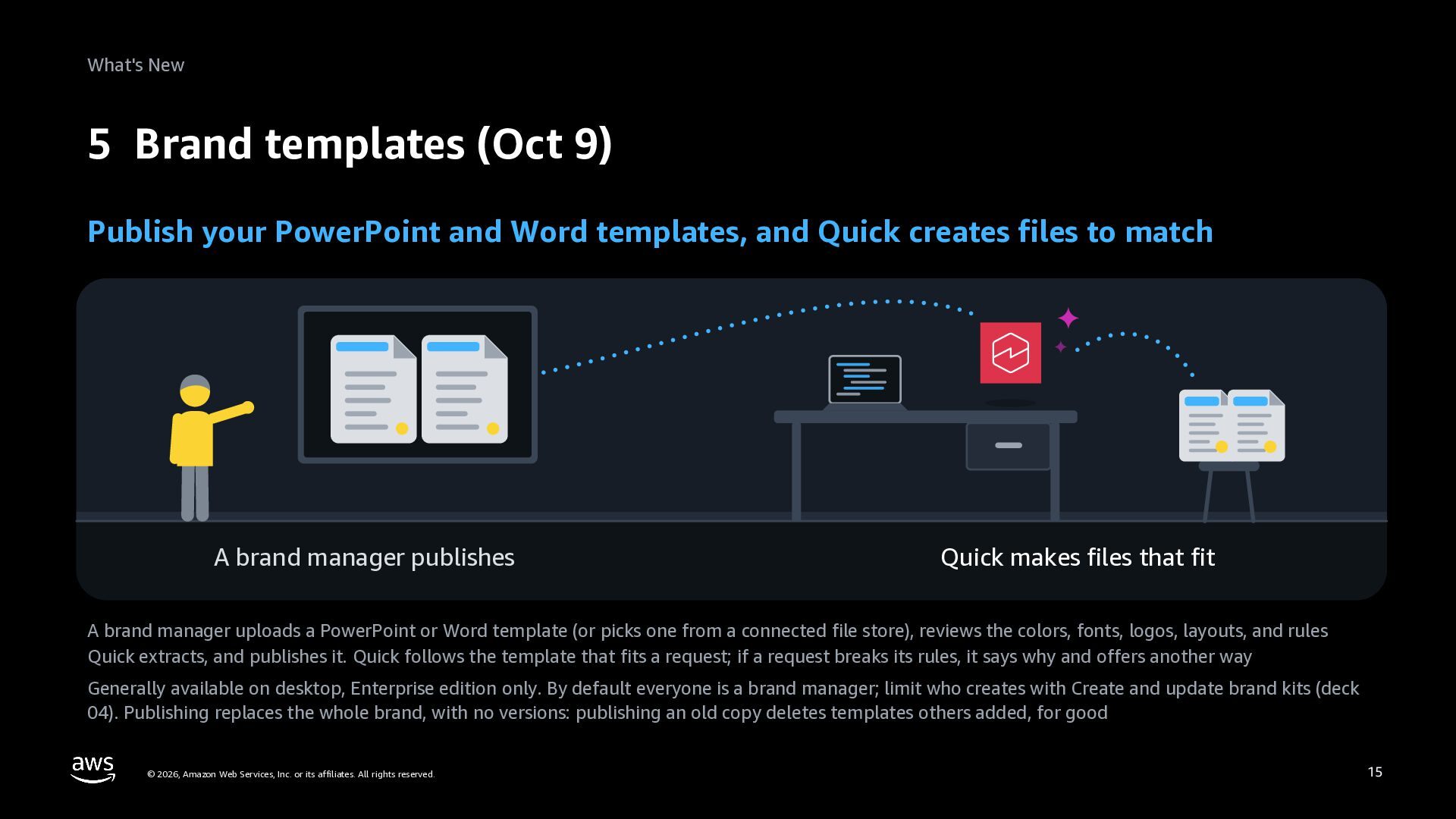
    and Word templates, and Quick creates files to match A brand manager publishes Quick makes files that fit A brand manager uploads a PowerPoint or Word template (or picks one from a connected file store), reviews the colors, fonts, logos, layouts, and rules Quick extracts, and publishes it. Quick follows the template that fits a request; if a request breaks its rules, it says why and offers another way Generally available on desktop, Enterprise edition only. By default everyone is a brand manager; limit who creates with Create and update brand kits (deck 04). Publishing replaces the whole brand, with no versions: publishing an old copy deletes templates others added, for good © 2026, Amazon Web Services, Inc. or its affiliates. All rights reserved. 15
  16. What's New The Brand assets screen (desktop) In Brand assets,

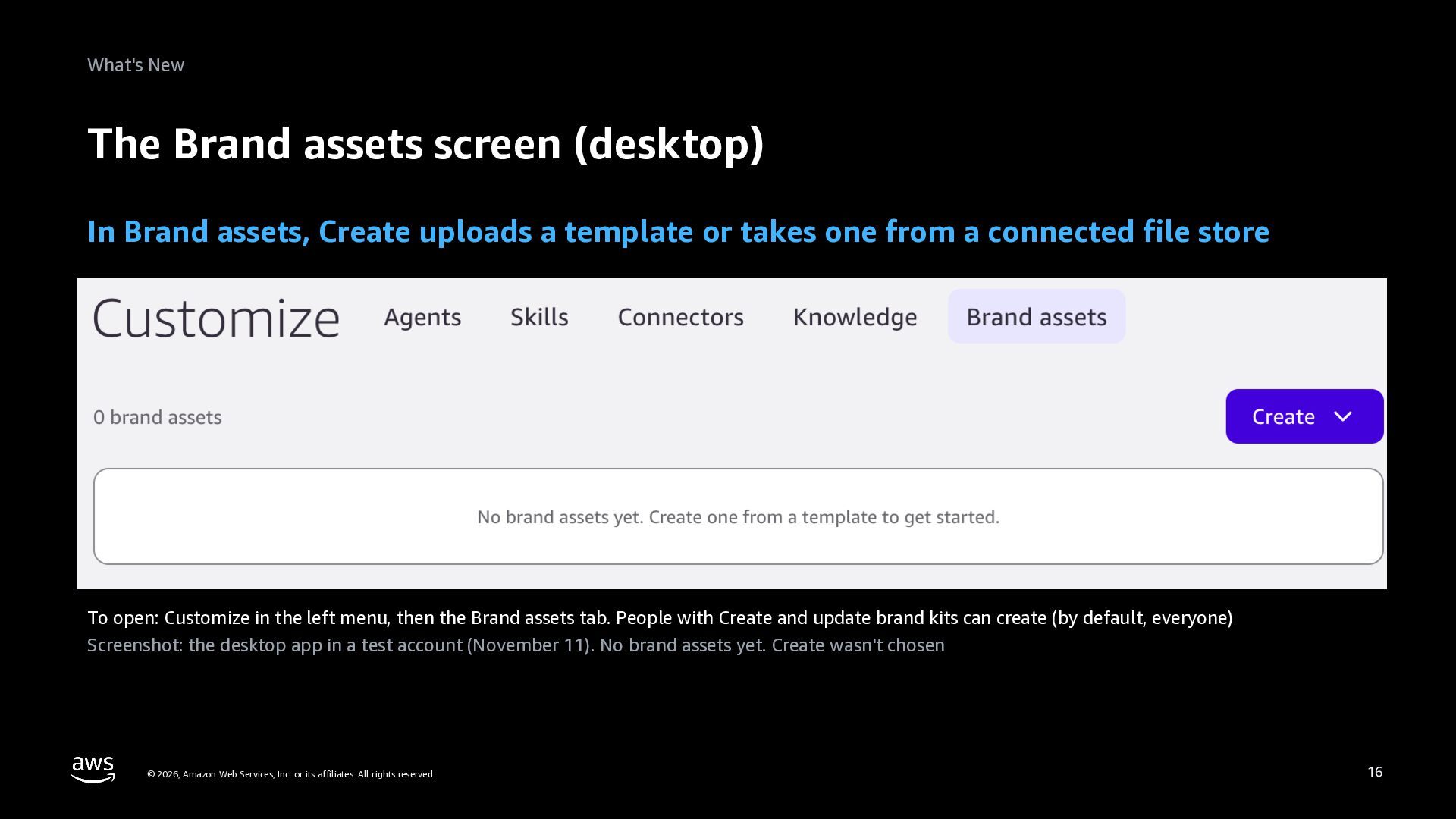
    Create uploads a template or takes one from a connected file store To open: Customize in the left menu, then the Brand assets tab. People with Create and update brand kits can create (by default, everyone) Screenshot: the desktop app in a test account (November 11). No brand assets yet. Create wasn't chosen © 2026, Amazon Web Services, Inc. or its affiliates. All rights reserved. 16
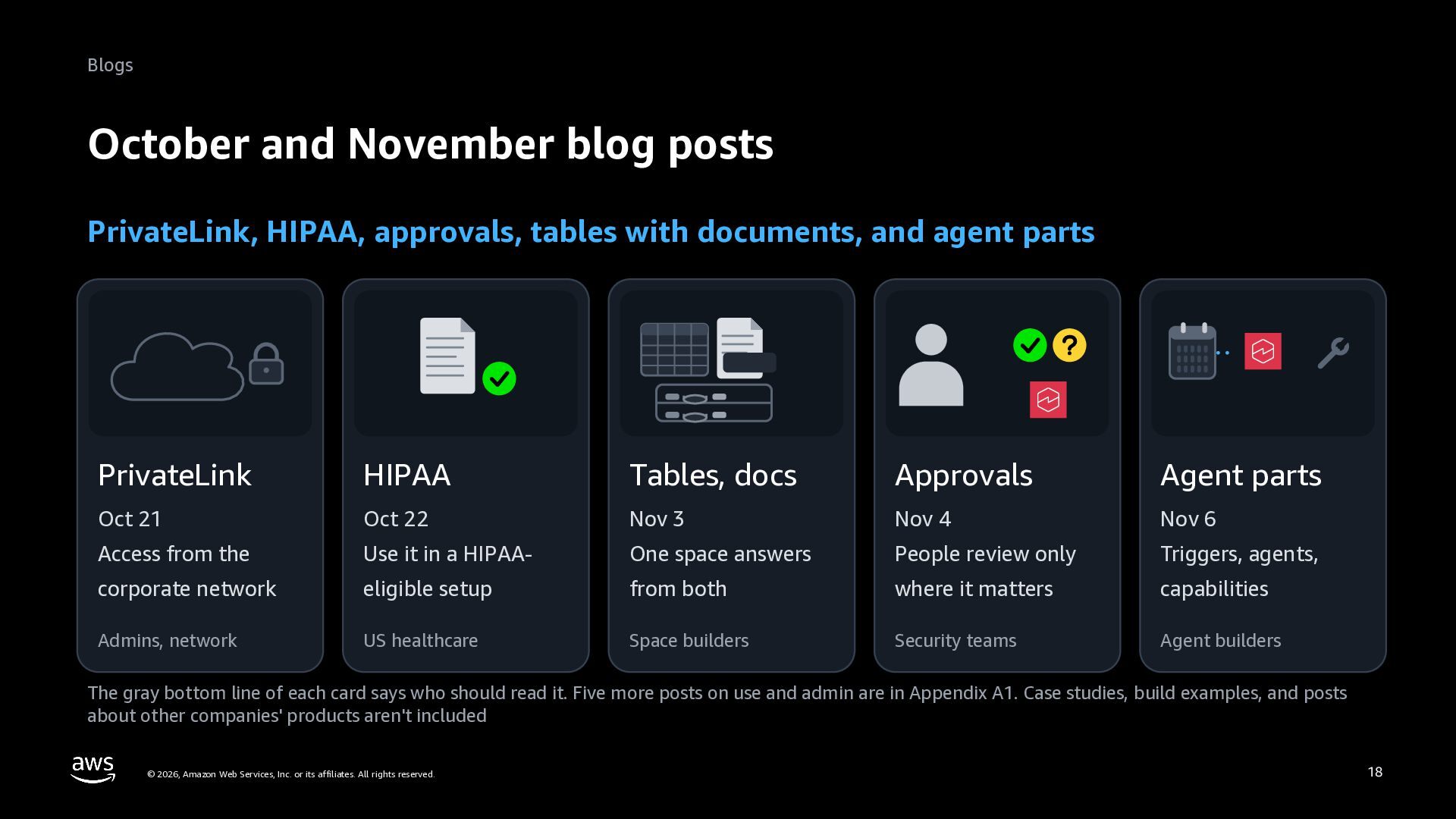
  17. Blogs October and November blog posts PrivateLink, HIPAA, approvals, tables

    with documents, and agent parts PrivateLink HIPAA Tables, docs Approvals Agent parts Oct 21 Oct 22 Nov 3 Nov 4 Nov 6 Access from the Use it in a HIPAA- One space answers People review only Triggers, agents, corporate network eligible setup from both where it matters capabilities Admins, network US healthcare Space builders Security teams Agent builders The gray bottom line of each card says who should read it. Five more posts on use and admin are in Appendix A1. Case studies, build examples, and posts about other companies' products aren't included © 2026, Amazon Web Services, Inc. or its affiliates. All rights reserved. 18
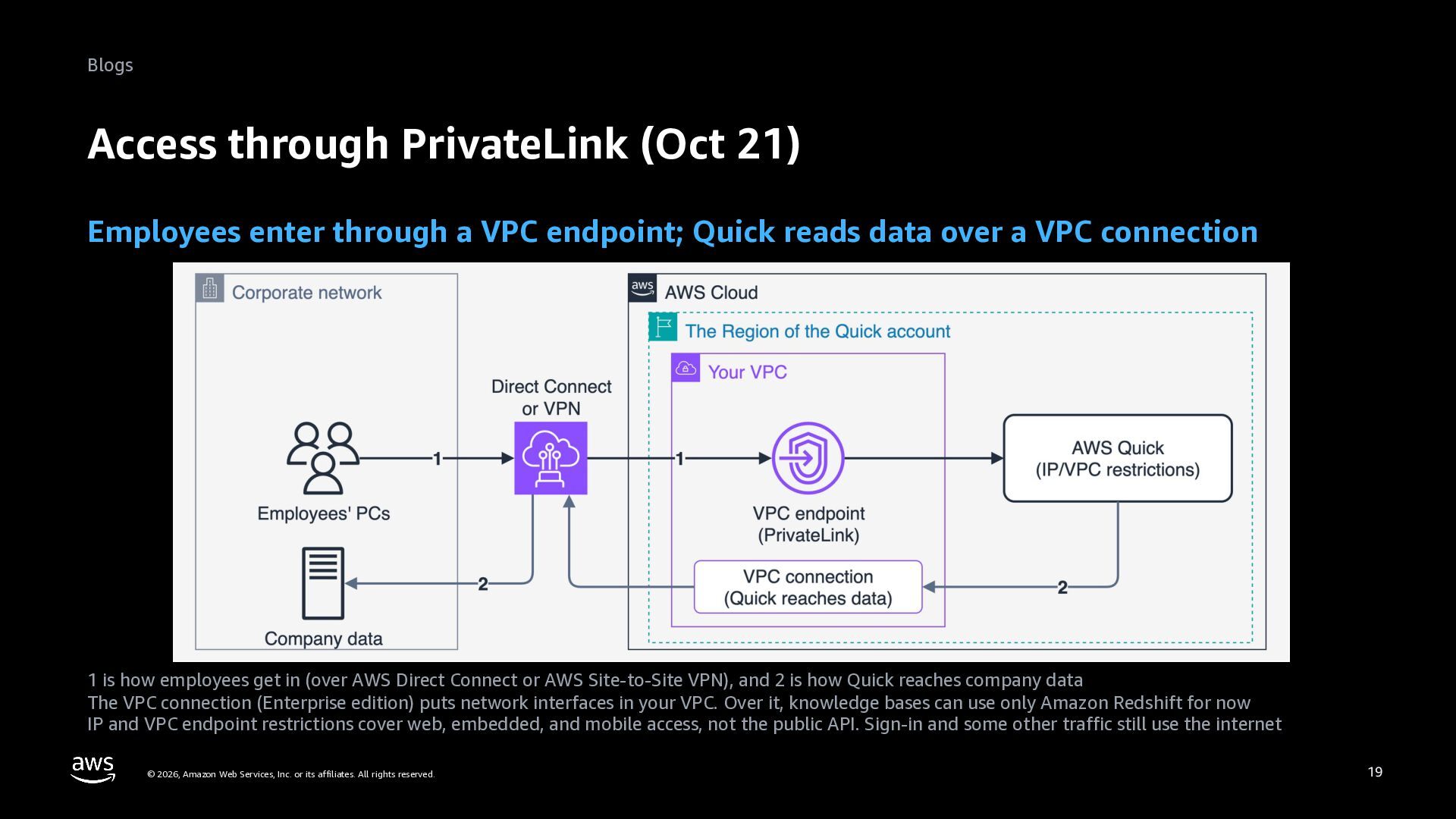
  18. Blogs Access through PrivateLink (Oct 21) Employees enter through a

    VPC endpoint; Quick reads data over a VPC connection 1 is how employees get in (over AWS Direct Connect or AWS Site-to-Site VPN), and 2 is how Quick reaches company data The VPC connection (Enterprise edition) puts network interfaces in your VPC. Over it, knowledge bases can use only Amazon Redshift for now IP and VPC endpoint restrictions cover web, embedded, and mobile access, not the public API. Sign-in and some other traffic still use the internet © 2026, Amazon Web Services, Inc. or its affiliates. All rights reserved. 19
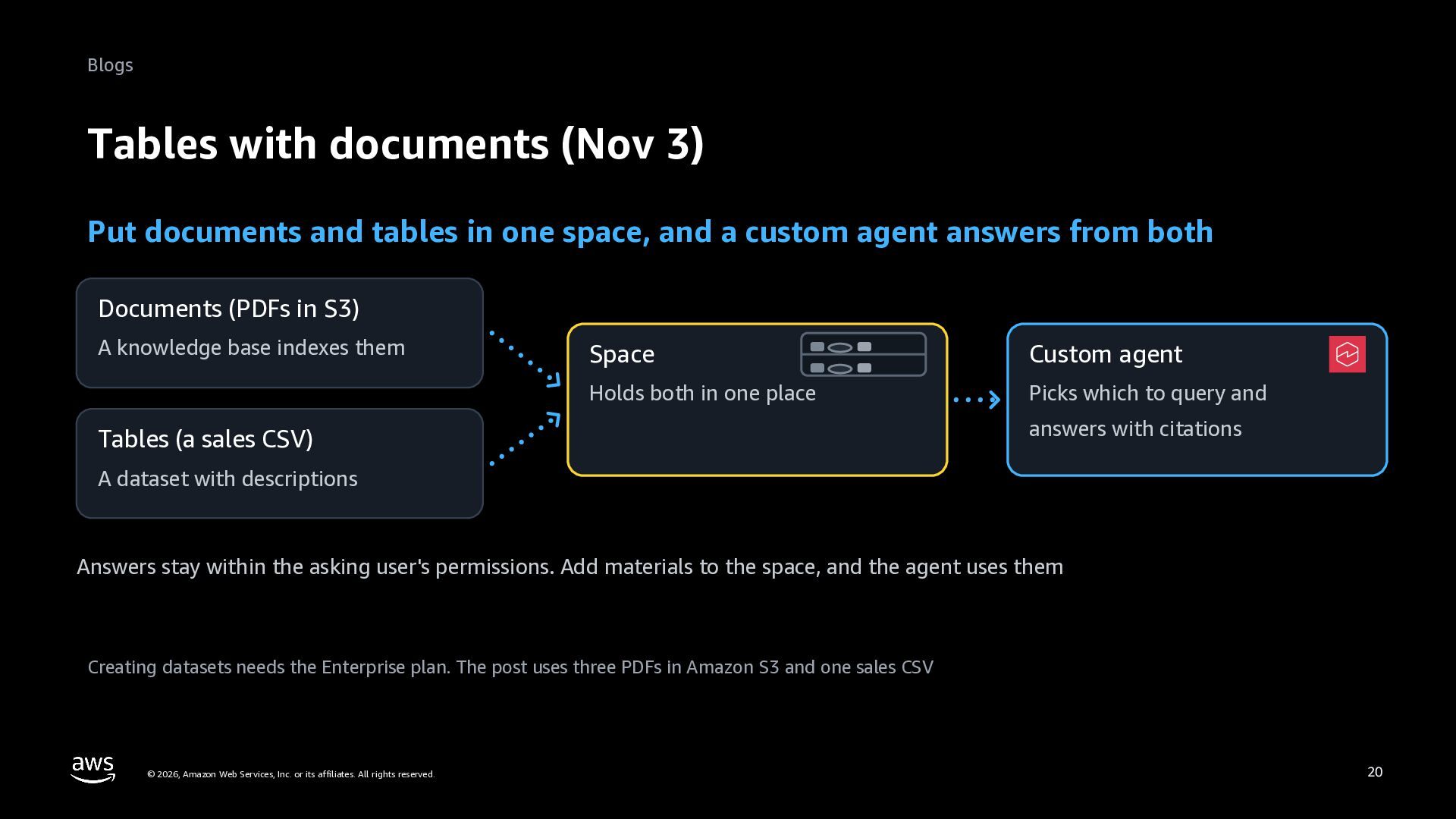
  19. Blogs Tables with documents (Nov 3) Put documents and tables

    in one space, and a custom agent answers from both Documents (PDFs in S3) A knowledge base indexes them Space Custom agent Holds both in one place Picks which to query and Tables (a sales CSV) answers with citations A dataset with descriptions Answers stay within the asking user's permissions. Add materials to the space, and the agent uses them Creating datasets needs the Enterprise plan. The post uses three PDFs in Amazon S3 and one sales CSV © 2026, Amazon Web Services, Inc. or its affiliates. All rights reserved. 20
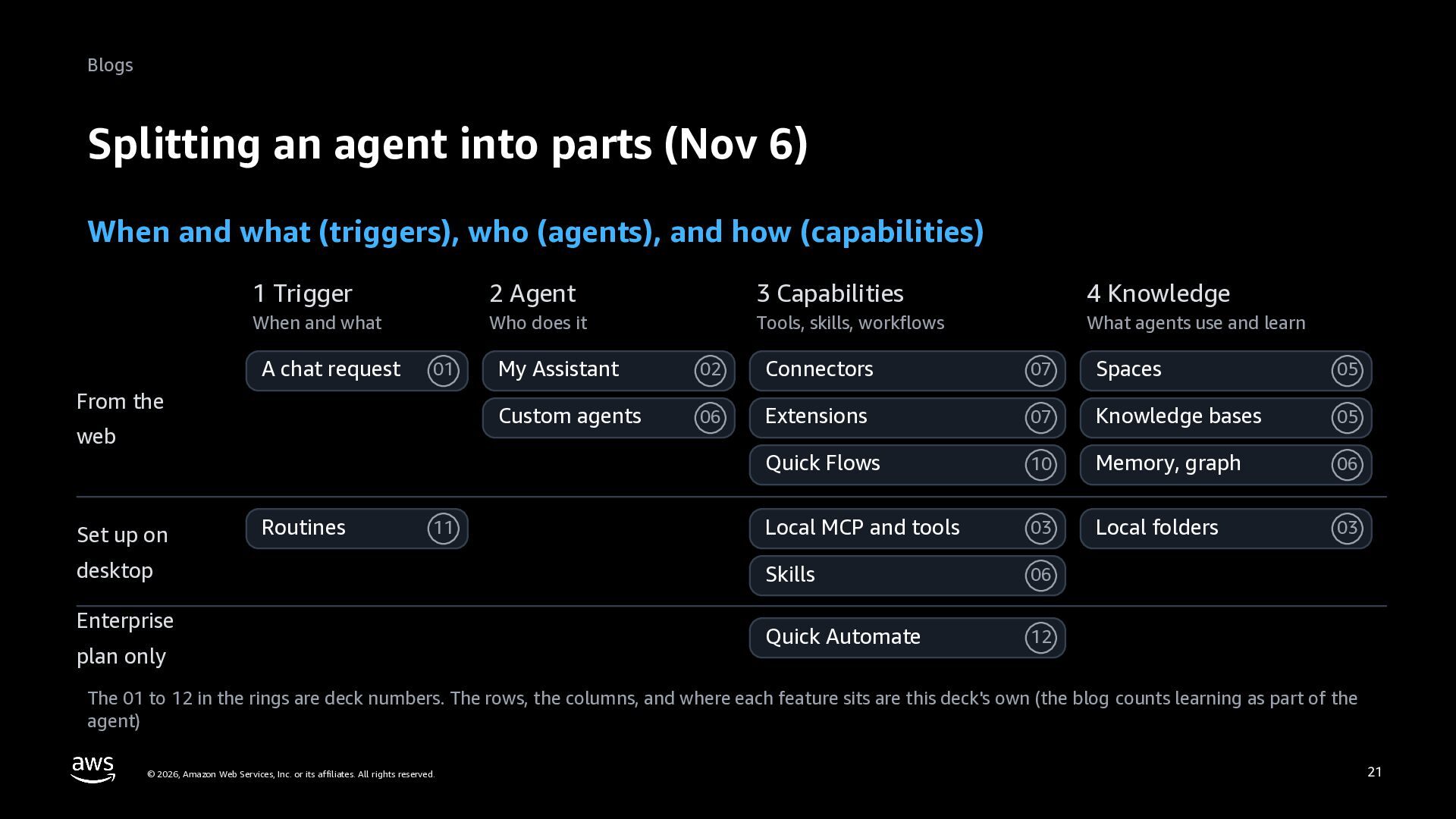
  20. Blogs Splitting an agent into parts (Nov 6) When and

    what (triggers), who (agents), and how (capabilities) 1 Trigger 2 Agent 3 Capabilities 4 Knowledge When and what Who does it Tools, skills, workflows What agents use and learn A chat request 01 From the web Set up on Routines 11 desktop Enterprise plan only My Assistant 02 Connectors 07 Spaces 05 Custom agents 06 Extensions 07 Knowledge bases 05 Quick Flows 10 Memory, graph 06 Local MCP and tools 03 Local folders 03 Skills 06 Quick Automate 12 The 01 to 12 in the rings are deck numbers. The rows, the columns, and where each feature sits are this deck's own (the blog counts learning as part of the agent) © 2026, Amazon Web Services, Inc. or its affiliates. All rights reserved. 21
  21. Summary Summary Desktop, approvals, and plans changed. Admins should check

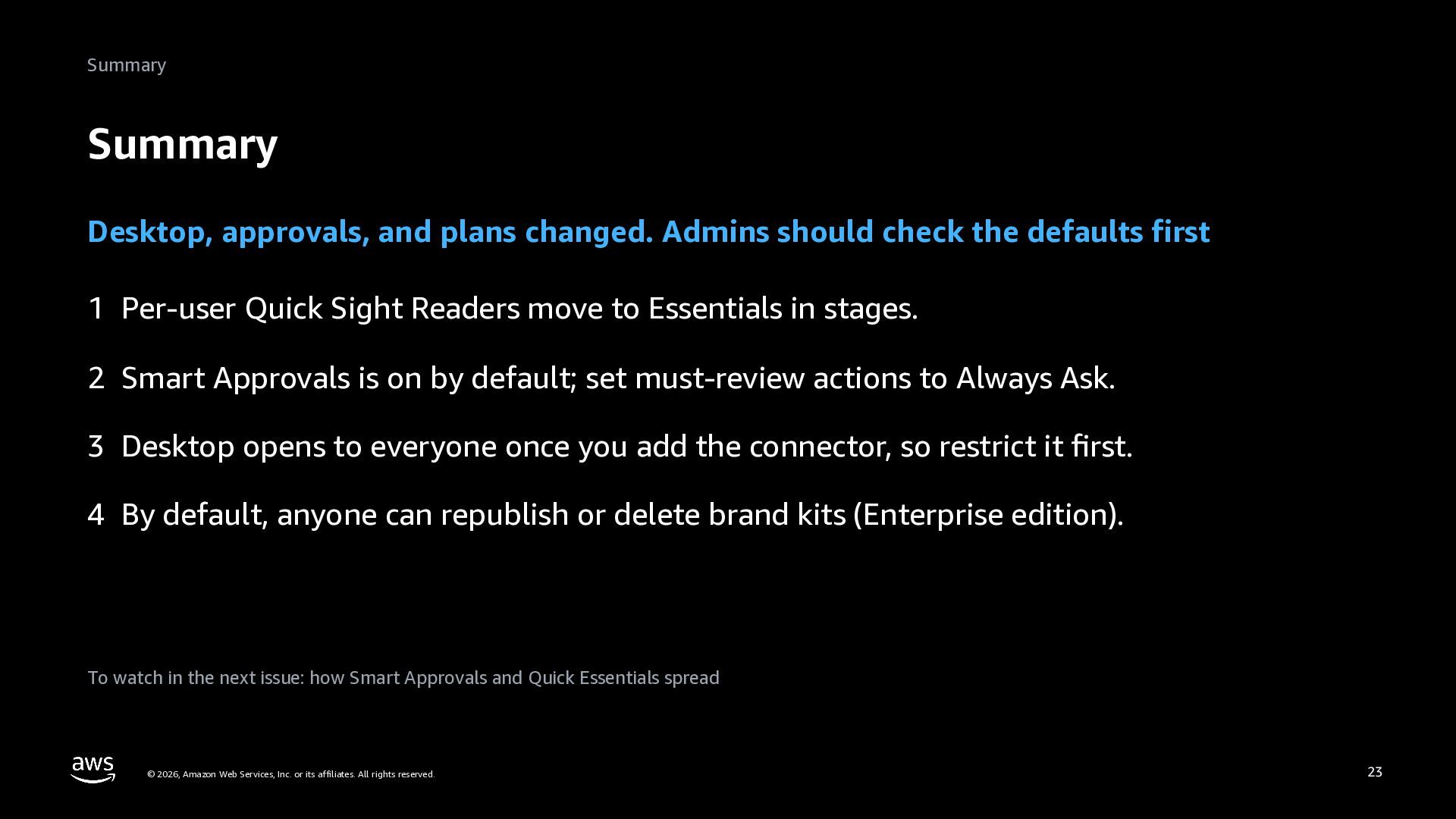
    the defaults first 1 Per-user Quick Sight Readers move to Essentials in stages. 2 Smart Approvals is on by default; set must-review actions to Always Ask. 3 Desktop opens to everyone once you add the connector, so restrict it first. 4 By default, anyone can republish or delete brand kits (Enterprise edition). To watch in the next issue: how Smart Approvals and Quick Essentials spread © 2026, Amazon Web Services, Inc. or its affiliates. All rights reserved. 23
  22. Summary Read next Approvals: 11. Deploying desktop: 14. Where Quick

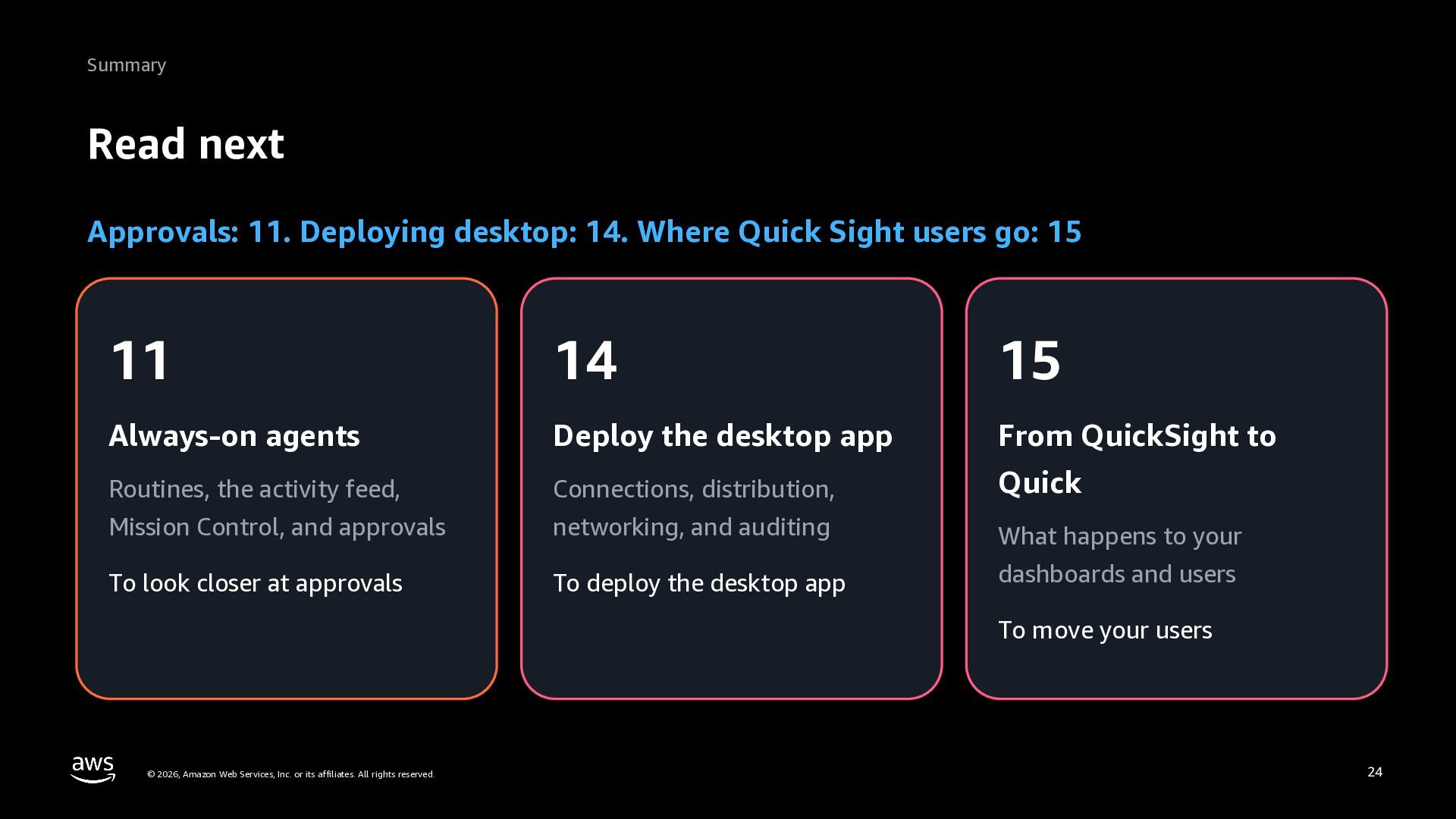
    Sight users go: 15 11 14 15 Always-on agents Deploy the desktop app From QuickSight to Routines, the activity feed, Connections, distribution, Quick Mission Control, and approvals networking, and auditing What happens to your To look closer at approvals To deploy the desktop app dashboards and users To move your users © 2026, Amazon Web Services, Inc. or its affiliates. All rights reserved. 24
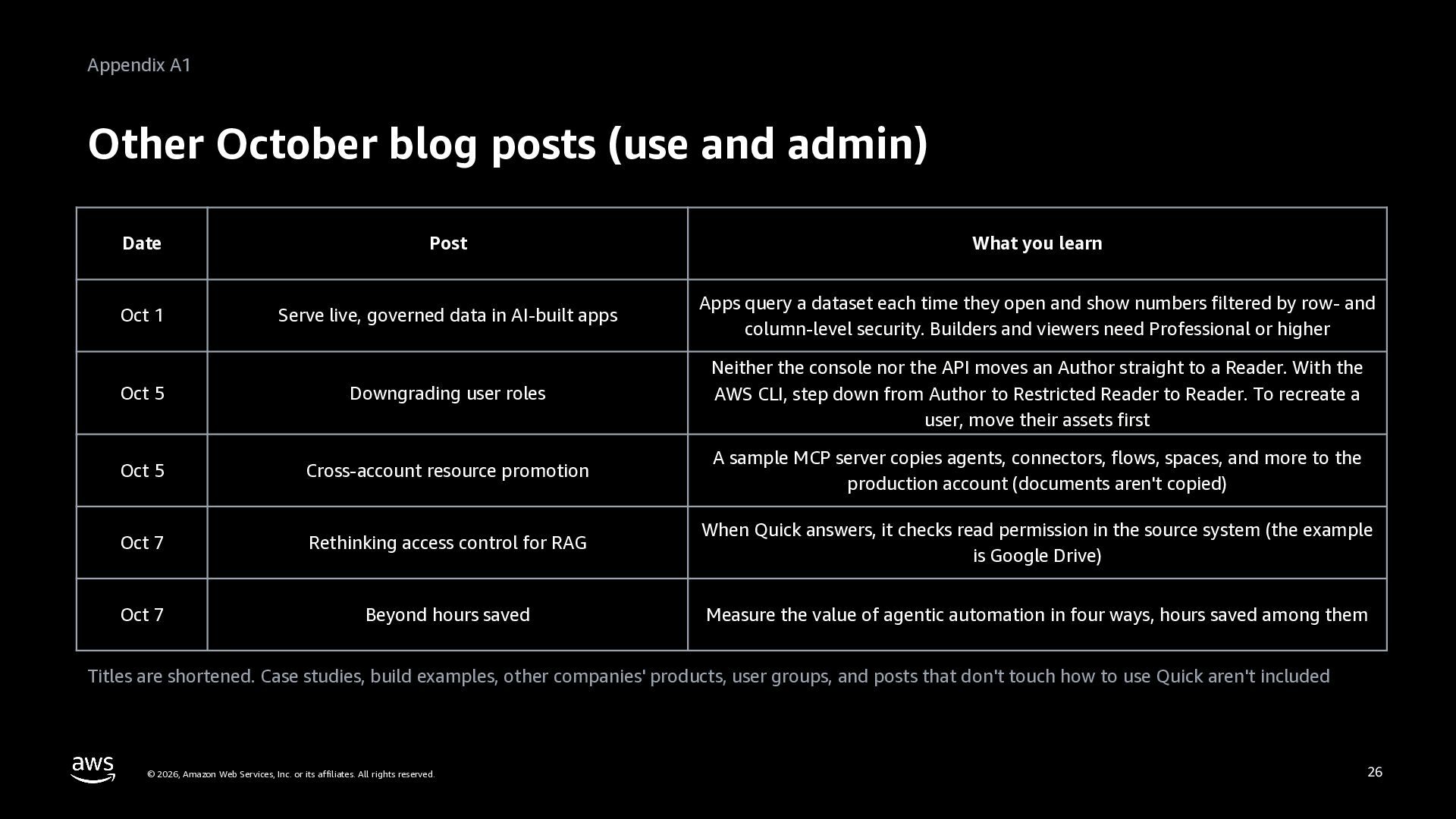
  23. Appendix A1 Other October blog posts (use and admin) Date

    Post What you learn Oct 1 Serve live, governed data in AI-built apps Apps query a dataset each time they open and show numbers filtered by row- and column-level security. Builders and viewers need Professional or higher Oct 5 Downgrading user roles Neither the console nor the API moves an Author straight to a Reader. With the AWS CLI, step down from Author to Restricted Reader to Reader. To recreate a user, move their assets first Oct 5 Cross-account resource promotion A sample MCP server copies agents, connectors, flows, spaces, and more to the production account (documents aren't copied) Oct 7 Rethinking access control for RAG When Quick answers, it checks read permission in the source system (the example is Google Drive) Oct 7 Beyond hours saved Measure the value of agentic automation in four ways, hours saved among them Titles are shortened. Case studies, build examples, other companies' products, user groups, and posts that don't touch how to use Quick aren't included © 2026, Amazon Web Services, Inc. or its affiliates. All rights reserved. 26
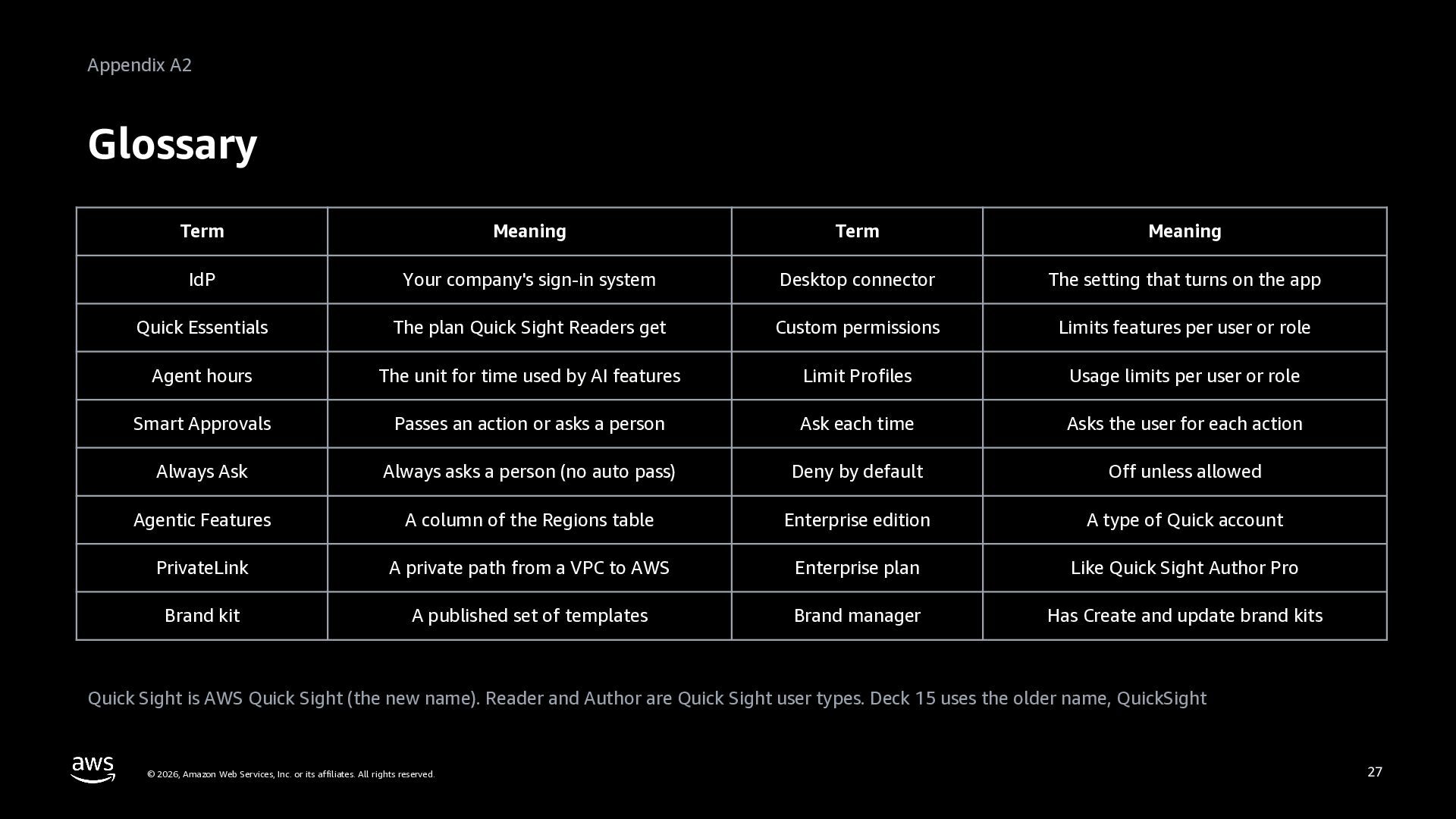
  24. Appendix A2 Glossary Term Meaning Term Meaning IdP Your company's

    sign-in system Desktop connector The setting that turns on the app Quick Essentials The plan Quick Sight Readers get Custom permissions Limits features per user or role Agent hours The unit for time used by AI features Limit Profiles Usage limits per user or role Smart Approvals Passes an action or asks a person Ask each time Asks the user for each action Always Ask Always asks a person (no auto pass) Deny by default Off unless allowed Agentic Features A column of the Regions table Enterprise edition A type of Quick account PrivateLink A private path from a VPC to AWS Enterprise plan Like Quick Sight Author Pro Brand kit A published set of templates Brand manager Has Create and update brand kits Quick Sight is AWS Quick Sight (the new name). Reader and Author are Quick Sight user types. Deck 15 uses the older name, QuickSight © 2026, Amazon Web Services, Inc. or its affiliates. All rights reserved. 27
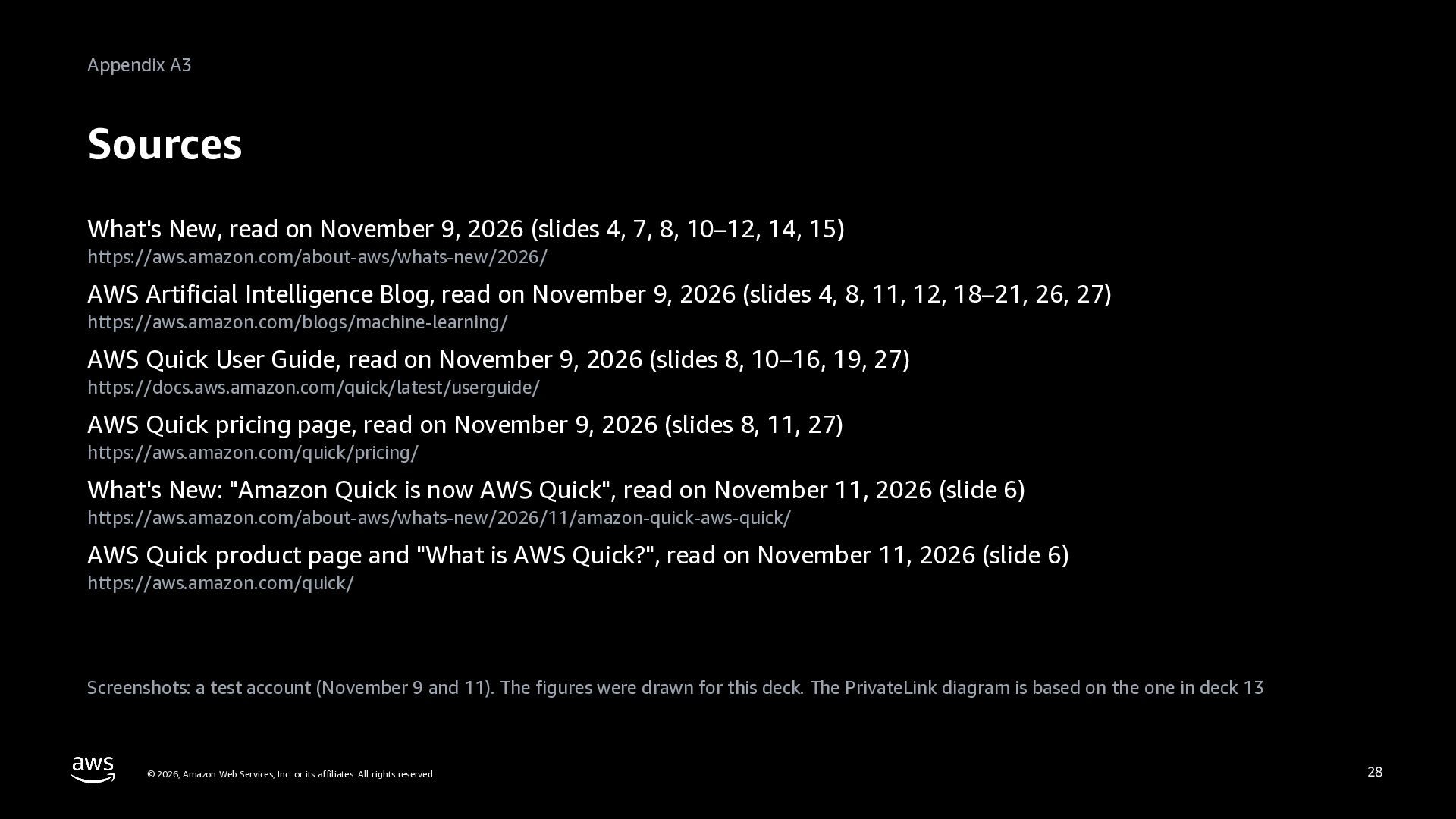
  25. Appendix A3 Sources What's New, read on November 9, 2026

    (slides 4, 7, 8, 10–12, 14, 15) https://aws.amazon.com/about-aws/whats-new/2026/ AWS Artificial Intelligence Blog, read on November 9, 2026 (slides 4, 8, 11, 12, 18–21, 26, 27) https://aws.amazon.com/blogs/machine-learning/ AWS Quick User Guide, read on November 9, 2026 (slides 8, 10–16, 19, 27) https://docs.aws.amazon.com/quick/latest/userguide/ AWS Quick pricing page, read on November 9, 2026 (slides 8, 11, 27) https://aws.amazon.com/quick/pricing/ What's New: "Amazon Quick is now AWS Quick", read on November 11, 2026 (slide 6) https://aws.amazon.com/about-aws/whats-new/2026/11/amazon-quick-aws-quick/ AWS Quick product page and "What is AWS Quick?", read on November 11, 2026 (slide 6) https://aws.amazon.com/quick/ Screenshots: a test account (November 9 and 11). The figures were drawn for this deck. The PrivateLink diagram is based on the one in deck 13 © 2026, Amazon Web Services, Inc. or its affiliates. All rights reserved. 28