Upgrade to Pro
— share decks privately, control downloads, hide ads and more …
Speaker Deck
Sign up for free
Menu
Search
Features
All features
Private URLs
Password Protection
Custom URLS
Scheduled publishing
Remove Branding
Restrict embedding
Deck Collections
Notes
Features
All features
Private URLs
Password Protection
Custom URLS
Scheduled publishing
Remove Branding
Restrict embedding
Deck Collections
Notes
Explore
Featured decks
Featured speakers
Programming
Technology
Storyboards
Explore
Featured decks
Featured speakers
Programming
Technology
Storyboards
Pricing
Search
Sign in
Sign up for free
自分のPCにPython環境を用意して_VSCodeでStreamlitアプリを動かすまでの8...
Search
Sponsored
·
Your Podcast. Everywhere. Effortlessly.
Share. Educate. Inspire. Entertain. You do you. We'll handle the rest.
→
mizzsugar
July 04, 2026
Programming
130
0
Share
Embed
Copy iframe code
Copy JS code
Copy link
Start on current slide
自分のPCにPython環境を用意して_VSCodeでStreamlitアプリを動かすまでの8ステップ.pdf
mizzsugar
July 04, 2026
More Decks by mizzsugar
See All by mizzsugar
Colabのみで初心者向けPythonハンズオン.pdf
mizzsugar
0
95
厳しさとゆるさの間で迷う人に捧げる個人開発記
mizzsugar
0
76
SQLModel入門〜クエリと型〜
mizzsugar
3
1.6k
フルリモート向いてないと思っていた私が、なんだかんだ健やかに 1年半フルリモート出来ている話
mizzsugar
1
170
Djangoでのプロジェクトだって型ヒントを運用出来る!
mizzsugar
4
9.2k
「動くものは作れる」の一歩先へ 〜「自走プログラマー」の紹介〜
mizzsugar
0
670
pytestの第一歩 〜「テスト駆動Python」の紹介〜
mizzsugar
3
500
データ分析ツール開発でpoetryを使う選択肢
mizzsugar
1
1.2k
unittest.mockを使ってテストを書こう
mizzsugar
5
7.1k
Other Decks in Programming
See All in Programming
JIS keyboard support in Omarchy
lef237
0
140
AI時代のコードレビューは人に向けるな、仕組みに向けろ
texmeijin
5
3.7k
[2026-10-14](C)Re:ゼロから始める異世界生活〜始まりの終わりと終わりの始まり〜
tosite
0
110
phperだってパンチカードでコーディングしたい
o0h
PRO
0
350
R8 の設定見直しでアプリサイズ削減
andpad
0
220
UnityでSystem.Net.WebSocketsなWebSocketサーバが動かないのでUnity Monoのコードを覗いてみた / about implementing websocket server with unity mono
drumath2237
1
610
當我們開始不讀 Code - AI Agent 時代,Code Review 與 Clean Code 還剩下什麼?
jame2408
1
260
設計次第でAIコードの読む量は減らせる / designing-for-code-reading
minodriven
35
17k
IBM Bob Dojo #1 仕様駆動開発入門
oniak3ibm
PRO
0
400
GemmaをJevのように使ってみる / Use Gemma like Jev
kishida
5
800
AWSに止められる覚悟してますか?
morizo_1984
2
540
Performance Optimization With LLMs
xleitix
0
150
Featured
See All Featured
How to Get Subject Matter Experts Bought In and Actively Contributing to SEO & PR Initiatives.
livdayseo
0
220
Exploring anti-patterns in Rails
aemeredith
4
540
Put a Button on it: Removing Barriers to Going Fast.
kastner
60
4.6k
A Tale of Four Properties
chriscoyier
163
24k
How to Align SEO within the Product Triangle To Get Buy-In & Support - #RIMC
aleyda
2
1.8k
Speed Design
sergeychernyshev
33
2.2k
<Decoding/> the Language of Devs - We Love SEO 2024
nikkihalliwell
1
360
Distributed Sagas: A Protocol for Coordinating Microservices
caitiem20
333
23k
CSS Pre-Processors: Stylus, Less & Sass
bermonpainter
360
31k
How to Think Like a Performance Engineer
csswizardry
28
2.9k
I Don’t Have Time: Getting Over the Fear to Launch Your Podcast
jcasabona
35
2.9k
The Hidden Cost of Media on the Web [PixelPalooza 2025]
tammyeverts
2
530
Transcript
PC Python 8 2026-07-11 PyLadies Shizuoka Meetup #1 Welcome Day
mizzsugar VSCode Streamlit
None
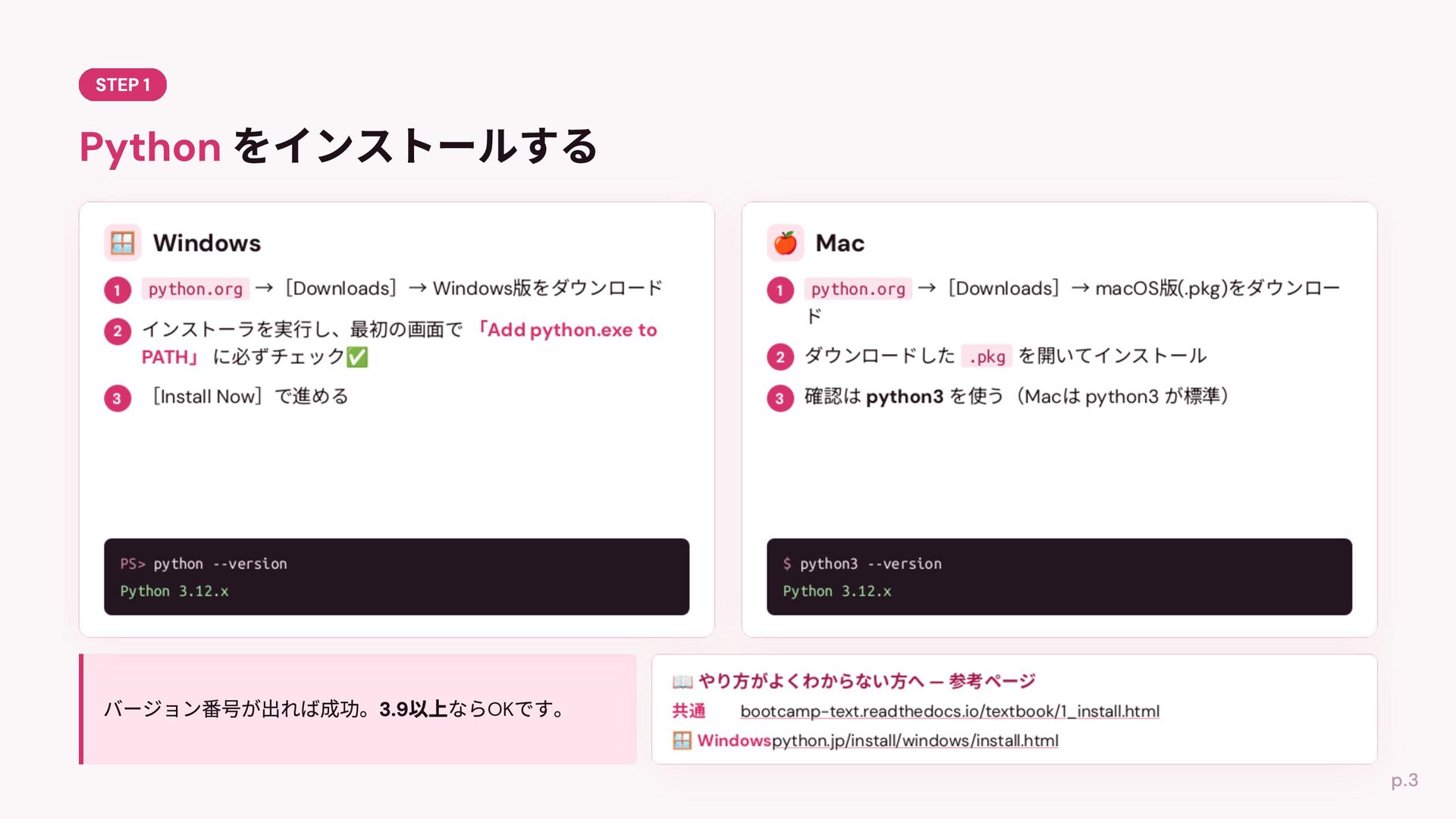
python.org Downloads Windows python.org Downloads macOS (.pkg) .pkg Install Now
Mac PS> python --version $ python3 --version Python 3.12.x Python 3.12.x OK python3 bootcamp-text.readthedocs.io/textbook/1_install.html python.jp/install/windows/install.html
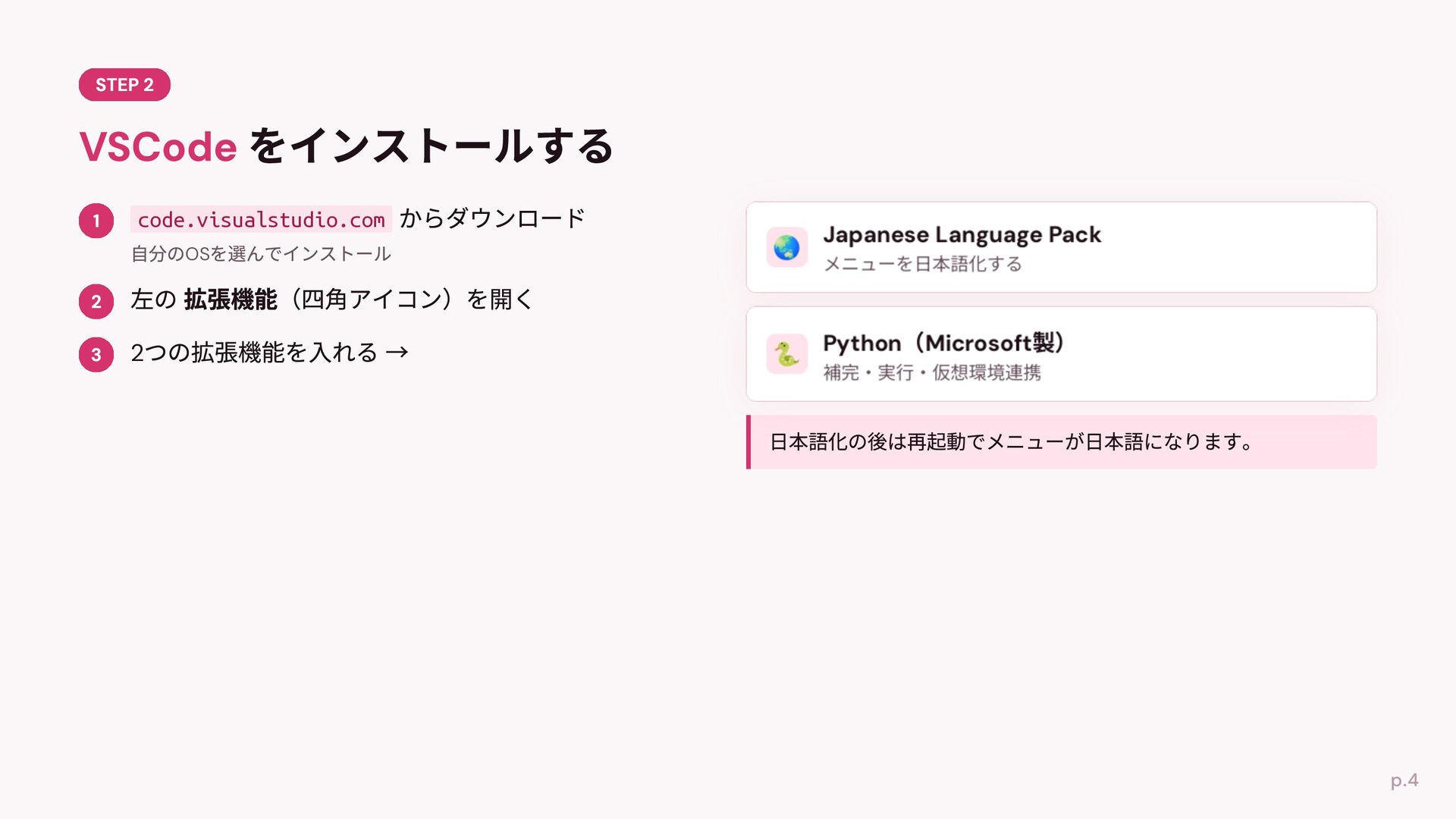
code.visualstudio.com OS 2
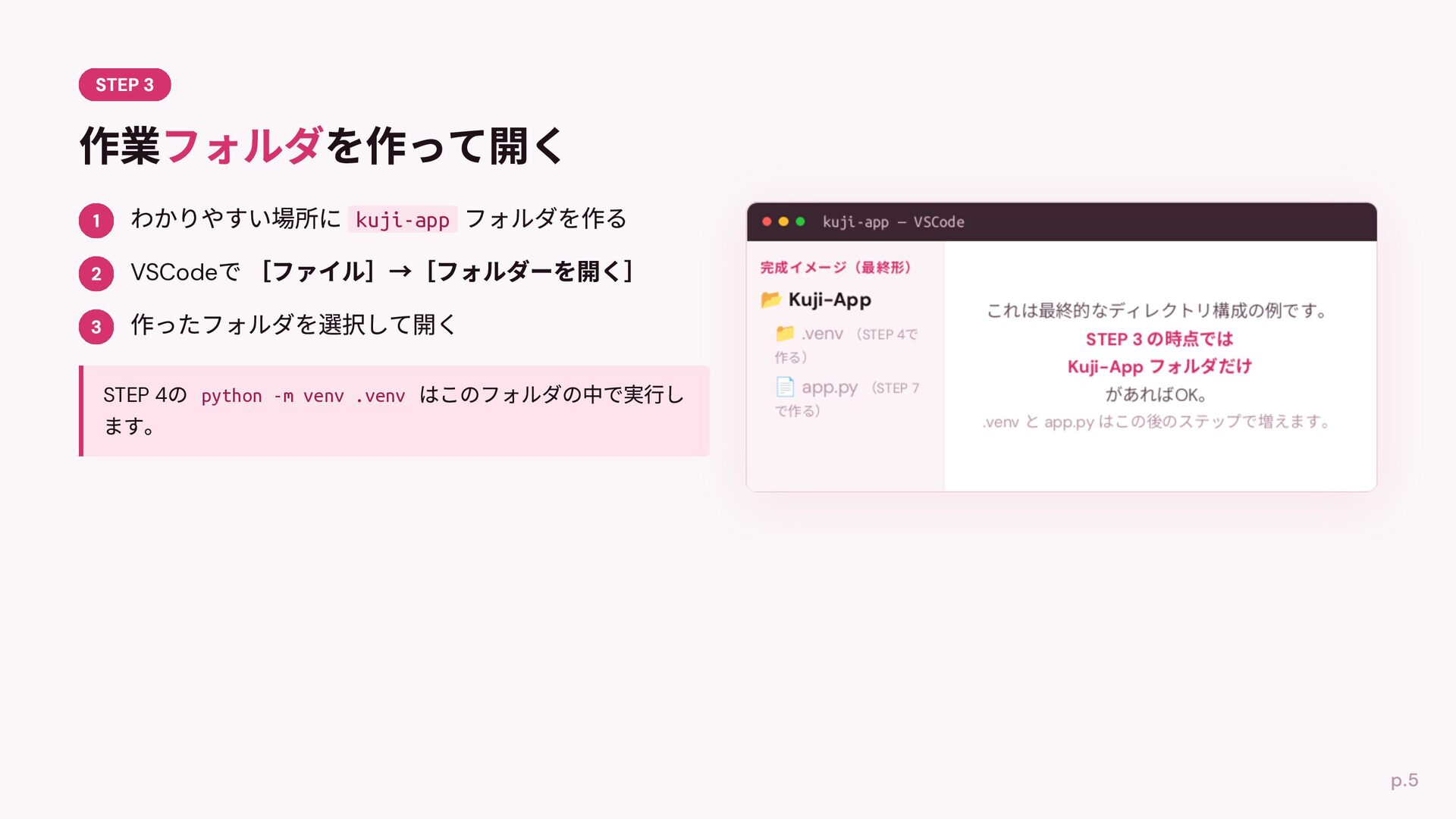
kuji-app kuji-app — VSCode VSCode .venv STEP 4 python -m
venv .venv app.py STEP 4 STEP 7 OK .venv app.py
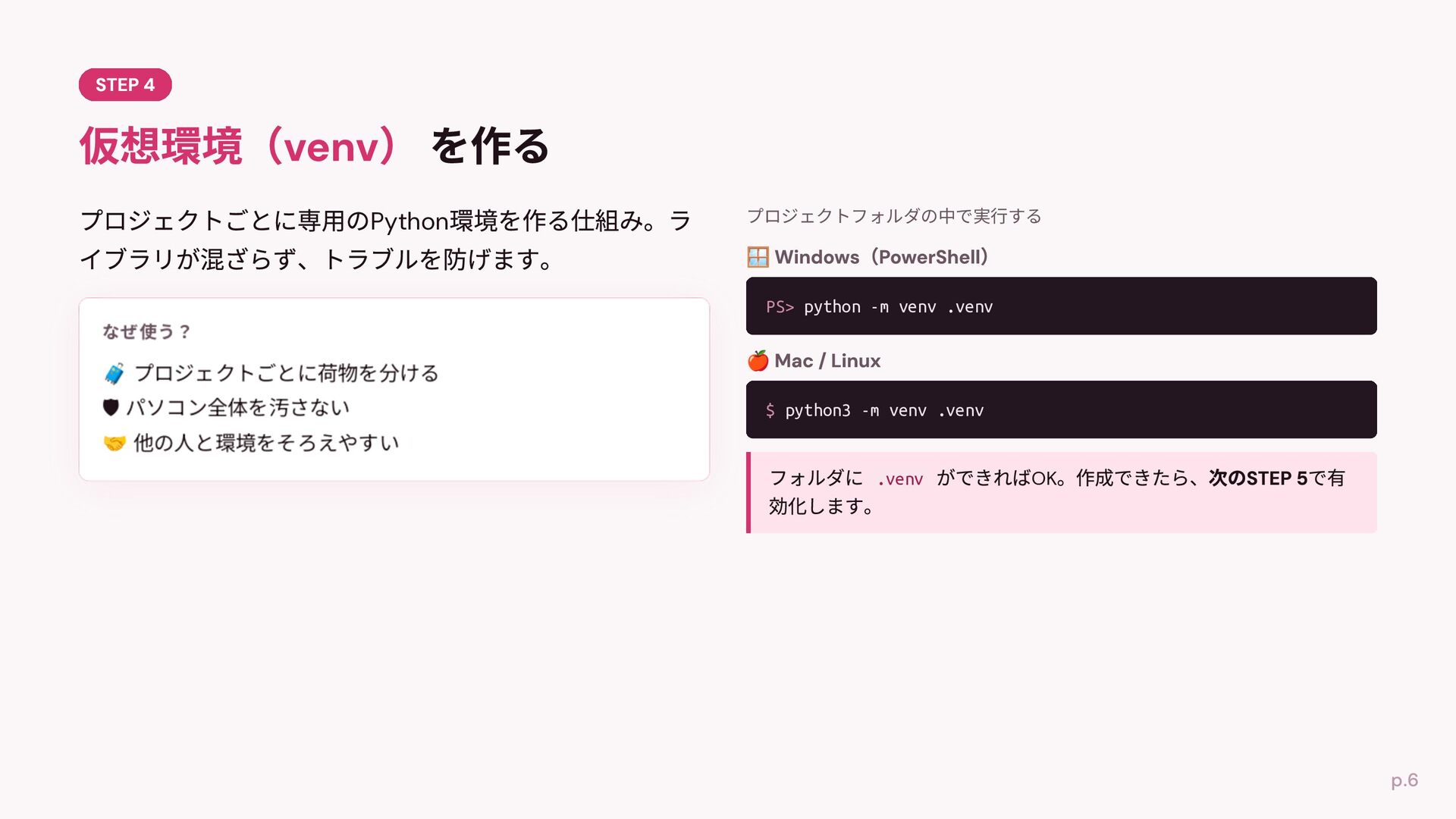
Python プロジェクトフォルダの中で実⾏する PS> python -m venv .venv 🛡 $ python3
-m venv .venv .venv OK
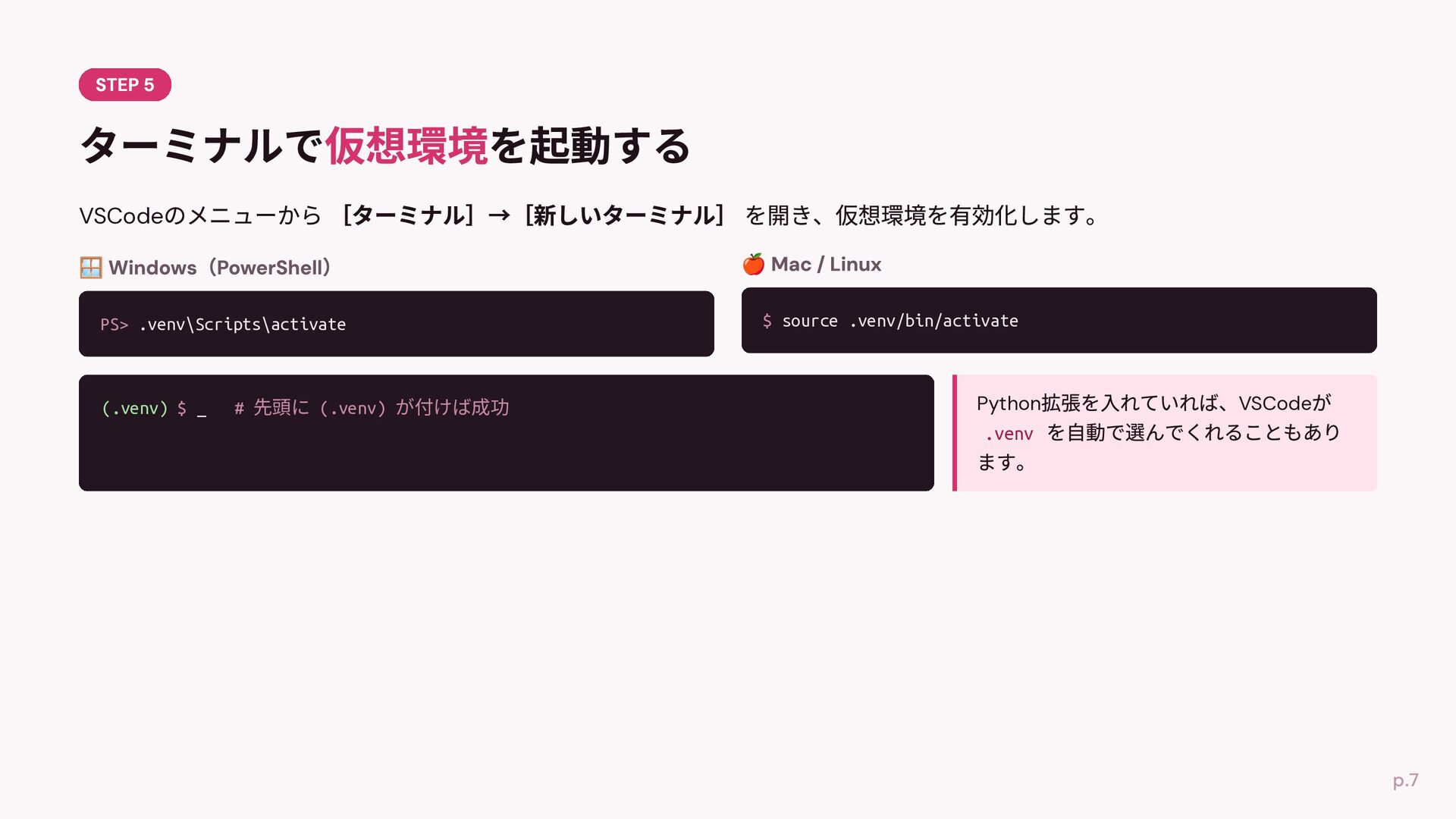
VSCode PS> .venv\Scripts\activate (.venv) $ _ # 先頭に (.venv) が付けば成功
$ source .venv/bin/activate Python .venv VSCode
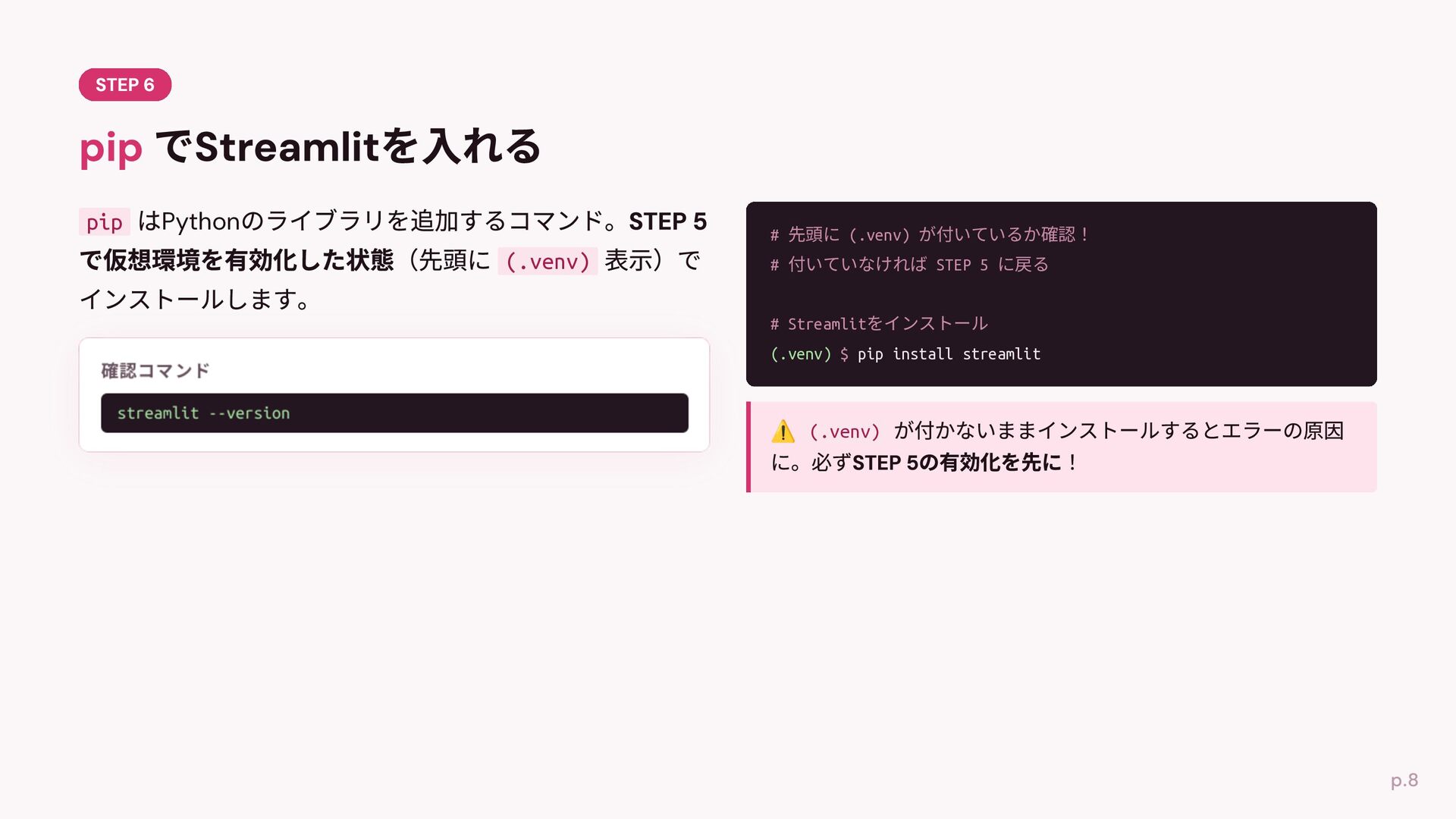
pip Python # 先頭に (.venv) が付いているか確認! (.venv) # 付いていなければ STEP
5 に戻る # Streamlitをインストール (.venv) $ pip install streamlit streamlit --version (.venv)
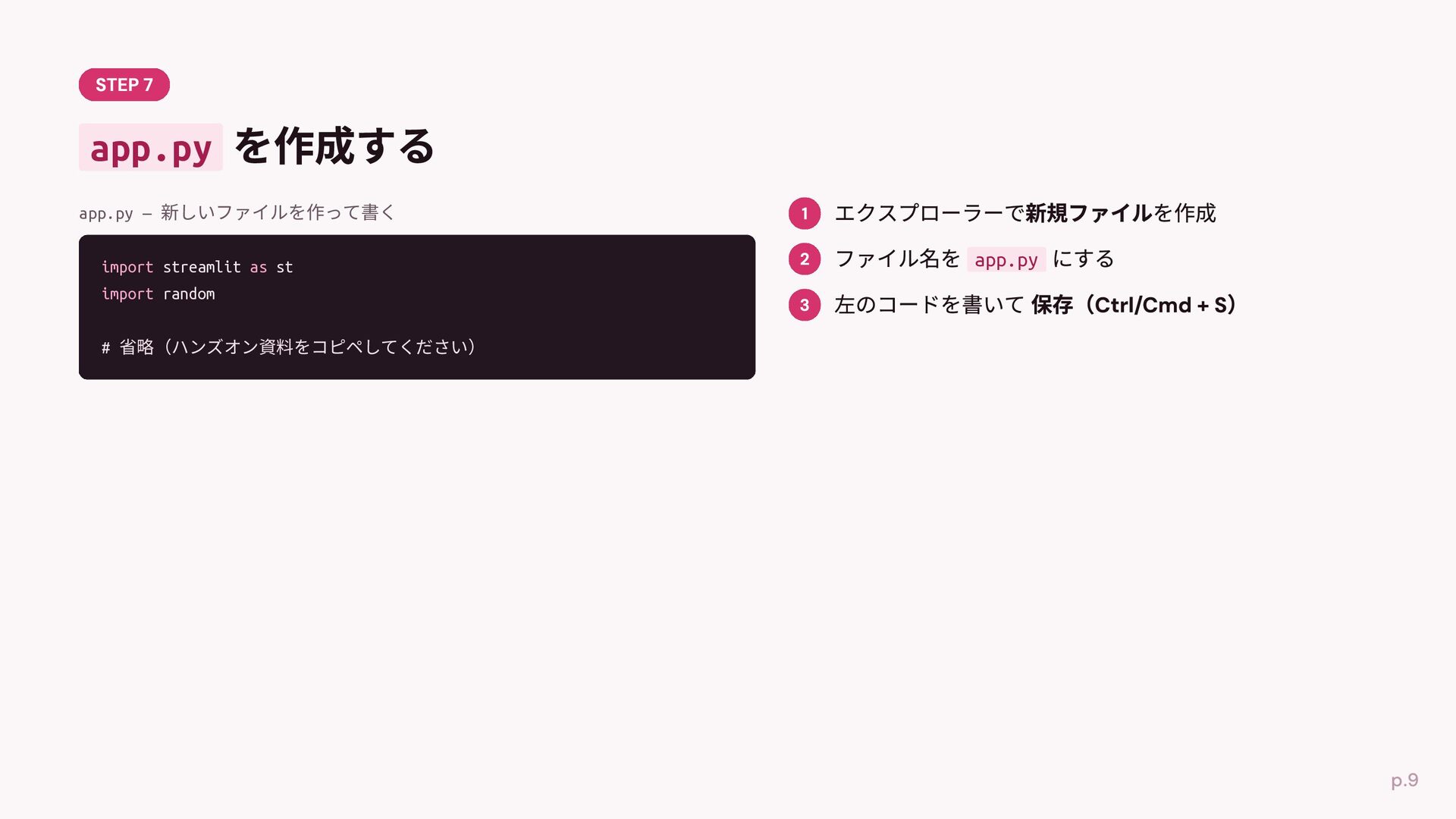
app.py app.py — 新しいファイルを作って書く https://github.com/PyLadiesShizuoka/welcomeday-handson-2026-07-11/blob/main/kuji-app/app.py app.py import random import streamlit
as st def kuji(name): fortunes = ["⼤吉", "中吉", "吉", "⼩吉", "凶"] fortune = random.choice(fortunes) message = f"{name}さんは{fortune}です!" if fortune == "⼤吉": message += "おめでとうございます!" return message st.title("おみくじアプリ") st.write("名前を⼊れてくじを引いてみよう!") name = st.text_input("あなたの名前") if st.button("くじを引く"): message = kuji(name) st.success(message)
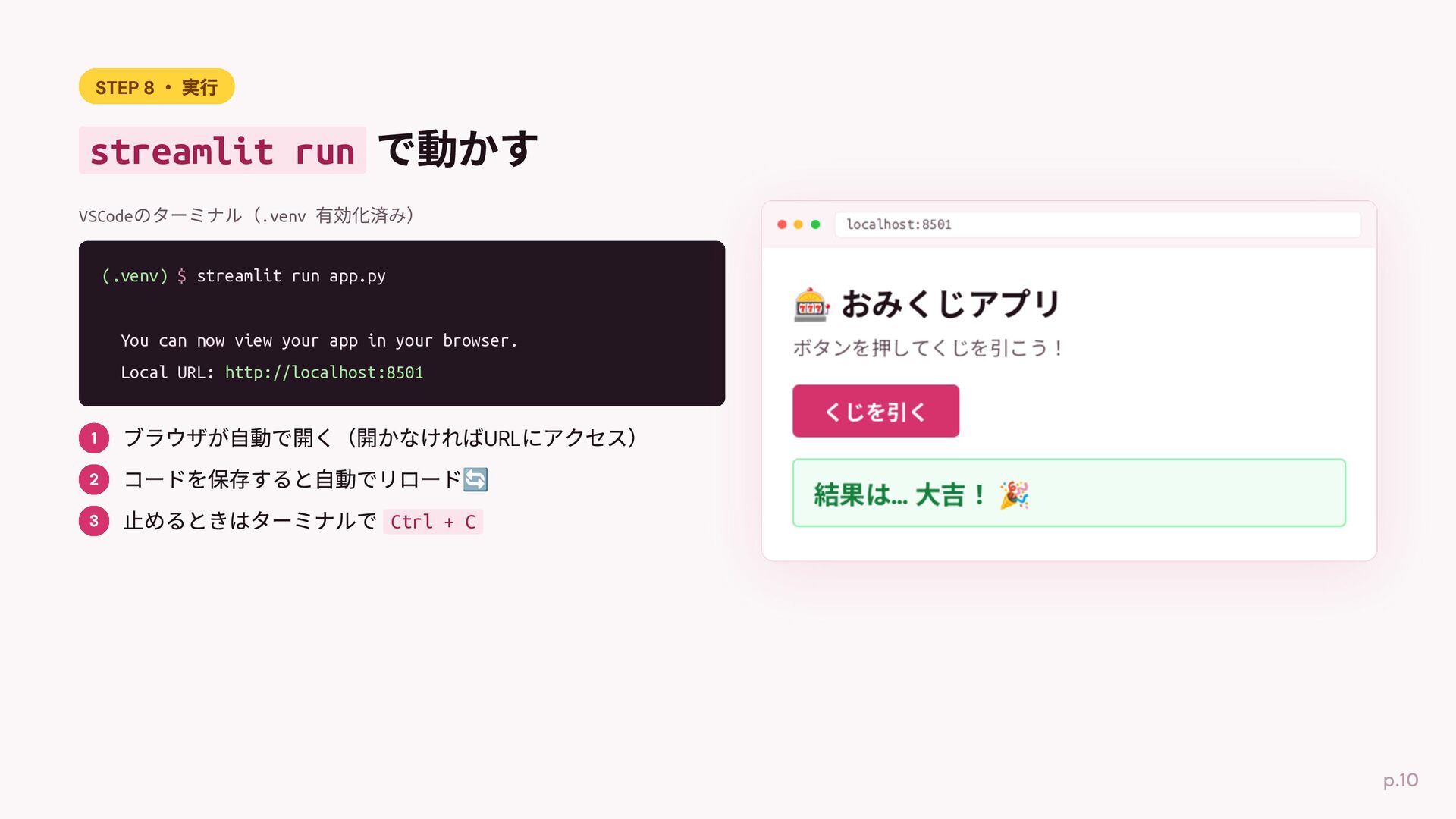
streamlit run VSCodeのターミナル(.venv 有効化済み) localhost:8501 (.venv) $ streamlit run app.py
You can now view your app in your browser. Local URL: http://localhost:8501 URL Ctrl + C
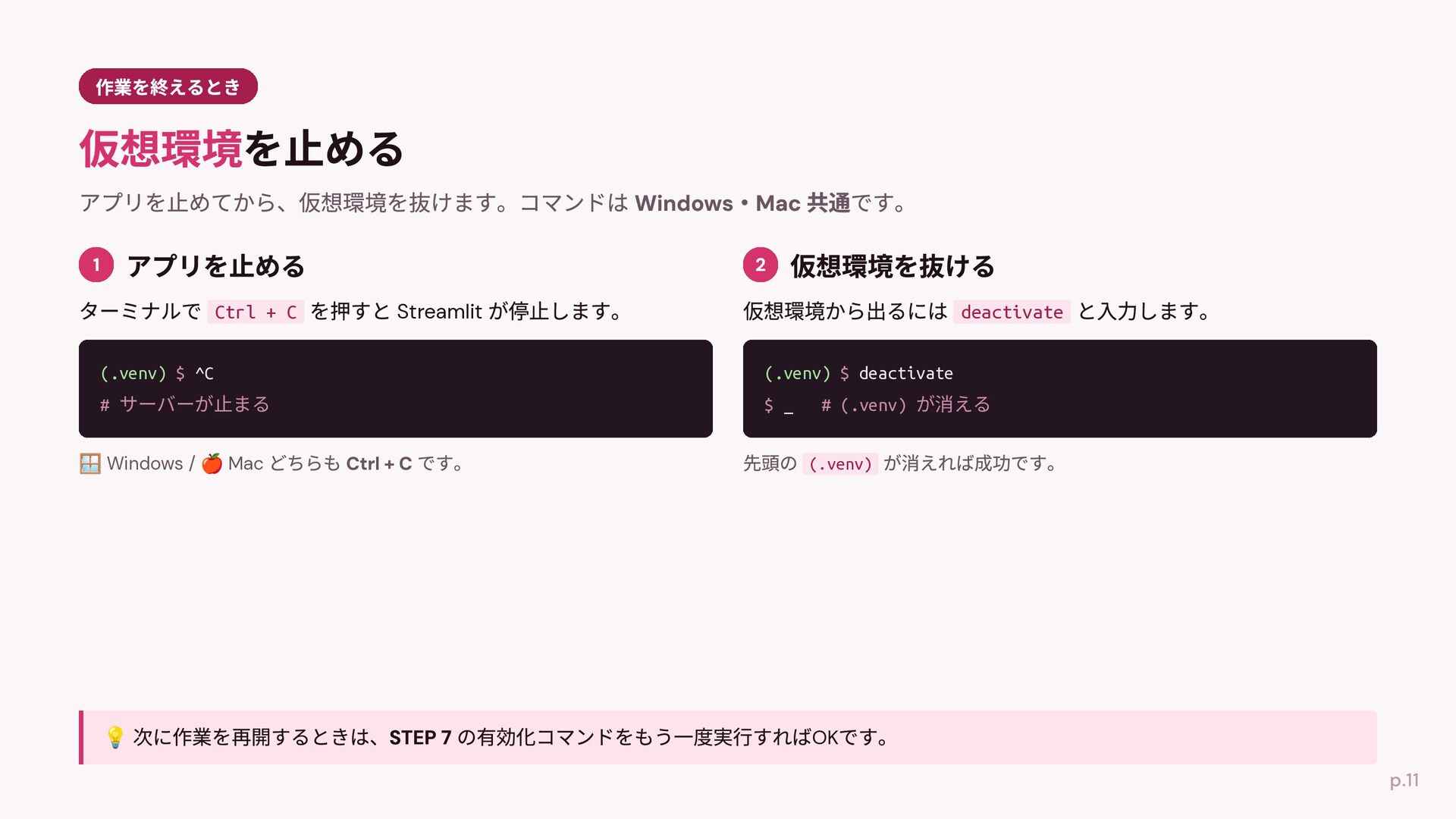
Ctrl + C Streamlit deactivate (.venv) $ ^C (.venv) $
deactivate # サーバーが⽌まる $ _ Windows / Mac # (.venv) が消える (.venv) OK
None


 mizzsugar
 lef237
 texmeijin
 tosite
 o0h
o0h
 andpad
 drumath2237
 jame2408
 minodriven
 oniak3ibm
 kishida
 morizo_1984
 xleitix
 livdayseo
 aemeredith
 kastner
 chriscoyier
 aleyda
 sergeychernyshev
 nikkihalliwell
 caitiem20
 bermonpainter
 csswizardry
 jcasabona
 tammyeverts