Upgrade to Pro
— share decks privately, control downloads, hide ads and more …
Speaker Deck
Sign up for free
Menu
Search
Features
All features
Private URLs
Password Protection
Custom URLS
Scheduled publishing
Remove Branding
Restrict embedding
Deck Collections
Notes
Features
All features
Private URLs
Password Protection
Custom URLS
Scheduled publishing
Remove Branding
Restrict embedding
Deck Collections
Notes
Explore
Featured decks
Featured speakers
Programming
Technology
Storyboards
Explore
Featured decks
Featured speakers
Programming
Technology
Storyboards
Pricing
Search
Sign in
Sign up for free
Using ImageMagick to resize your Images [FSTO]
Search
Sponsored
·
SiteGround - Reliable hosting with speed, security, and support you can count on.
→
newtron
April 08, 2015
Technology
490
0
Share
Embed
Copy iframe code
Copy JS code
Copy link
Start on current slide
Using ImageMagick to resize your Images [FSTO]
Full Stack Toronto,
2015-04-08
https://github.com/nwtn/pres-imagemagick-fsto
newtron
April 08, 2015
More Decks by newtron
See All by newtron
Universal web design [Accessibility Camp Toronto]
newtron
0
250
Universal web design [HackerYou a11y club]
newtron
0
240
Universal web design [Full Stack Toronto]
newtron
0
280
Information architecture as knowledge translation [World IA Day]
newtron
0
320
Improving performance with responsive (and responsible!) images [CSSDay.io]
newtron
1
420
Universal Web Design: How to create an awesome experience for every user [Open Source Bridge]
newtron
0
310
Improving performance with responsive (and responsible!) images [CSSConf]
newtron
6
750
Universal Web Design: How to create an awesome experience for every user [OpenWest]
newtron
0
320
Improving performance with responsive (and responsible!) images [OpenWest]
newtron
2
400
Other Decks in Technology
See All in Technology
Incremental HTTP
kazuho
5
2.1k
自分で立ててみるLLMサービス
y_sera15
0
160
二歩目のフロントエンド・ウェブアクセシビリティ
camiha
2
330
オブザーバビリティを高める AI エージェント体験を考える / Designing AI Agent Experiences That Enhance Observability
aoto
PRO
2
330
Claude Code本は、どのように執筆チームで書かれたか
oikon48
1
360
OpenSharing について熱く語る 〜AI アセットの共有について〜
kameitomohiro
0
250
大型犬好きによるPugの紹介
yamanoku
1
110
go-sqletch
moznion
0
130
MCPゲートウェイを作って運用してわかったこと — Agent時代の権限管理の現在地
mtpooh
10
3.3k
分析AIエージェントを育てる、動く環境を育てる
codatum
1
760
OR学会2026年秋期大会_機械学習と数理最適化の融合による、配合レシピ最適化システム開発事例
brainpadpr
0
120
味覇で作るパスタが美味い - 20261001_yabaubuki.dev
livesense
PRO
0
120
Featured
See All Featured
Prompt Engineering for Job Search
mfonobong
0
500
jQuery: Nuts, Bolts and Bling
dougneiner
66
8.6k
Done Done
chrislema
187
17k
Leo the Paperboy
mayatellez
10
2.4k
A Modern Web Designer's Workflow
chriscoyier
699
190k
The Anti-SEO Checklist Checklist. Pubcon Cyber Week
ryanjones
0
260
Money Talks: Using Revenue to Get Sh*t Done
nikkihalliwell
0
520
The State of eCommerce SEO: How to Win in Today's Products SERPs - #SEOweek
aleyda
2
12k
GitHub's CSS Performance
jonrohan
1033
470k
Design of three-dimensional binary manipulators for pick-and-place task avoiding obstacles (IECON2024)
konakalab
0
610
Fireside Chat
paigeccino
43
4.1k
Tips & Tricks on How to Get Your First Job In Tech
honzajavorek
1
790
Transcript
David Newton, St. Michael’s Hospital 1 1 Using ImageMagick to
resize your Images Full Stack Toronto, 2015-04-08 Twitter: @newtron Github: @nwtn Email:
[email protected]
Slides + image credits: https://github.com/nwtn/pres-imagemagick-fsto
2
3 Responsive images are a pain in the butt
4
5
6
7 ImageMagick, y’all
8
9 $ brew install imagemagick
10 Condition (unoptimized input) File size: mean File size: %
difference Photoshop CC, with optimization 260,305 bytes ImageMagick `-resize` 385,795 bytes 48.21%
11 How does image resizing work?
12 685,936 pixels 189,739 pixels
13 …to 64 pixels? How do we get from 16
pixels…
14 != resampling
15 …to 64 pixels? How do we get from 16
pixels…
16 …to 64 pixels? How do we get from 16
pixels… Background interpolation
17 …to 64 pixels? How do we get from 16
pixels… Nearest-neighbour interpolation
18 Nearest-neighbour interpolation
19 Bicubic interpolation
20 Nearest-neighbour vs. bicubic interpolation
21 7 colours 1,146 colours
22
More colours = More bytes* 23
24 https://github.com/nwtn/image-resize-tests/
25 How do we know which options are best?
Quality objective: measured with DSSIM 26
27 Control Test Difference
28
Quality subjective: from me 29
Test a variety of images 30
31 The best* settings for ImageMagick
32 mogrify -path OUTPUT_PATH -filter Triangle - define filter:support=2.0 -thumbnail
OUTPUT_WIDTH -unsharp 0.25x0.08+8.3+0.045 -dither None - posterize 136 -quality 82 -define jpeg:fancy- upsampling=off -define png:compression-filter=5 - define png:compression-level=9 -define png:compression-strategy=1 -define png:exclude- chunk=all -interlace none -colorspace sRGB INPUT_PATH With optimization:
33 https://github.com/toy/image_optim https://github.com/ajslater/picopt https://imageoptim.com/
34 mogrify -path OUTPUT_PATH -filter Triangle - define filter:support=2.0 -thumbnail
OUTPUT_WIDTH -unsharp 0.25x0.25+8+0.065 -dither None - posterize 136 -quality 82 -define jpeg:fancy- upsampling=off -define png:compression-filter=5 - define png:compression-level=9 -define png:compression-strategy=1 -define png:exclude- chunk=all -interlace none -colorspace sRGB -strip INPUT_PATH Without optimization:
35 mogrify vs. convert
36
37 mogrify -path OUTPUT_PATH -filter Triangle - define filter:support=2.0 -thumbnail
OUTPUT_WIDTH -unsharp 0.25x0.25+8+0.065 -dither None - posterize 136 -quality 82 -define jpeg:fancy- upsampling=off -define png:compression-filter=5 - define png:compression-level=9 -define png:compression-strategy=1 -define png:exclude- chunk=all -interlace none -colorspace sRGB -strip INPUT_PATH
38 resampling filter
39 mogrify -path OUTPUT_PATH -filter Triangle - define filter:support=2.0 -thumbnail
OUTPUT_WIDTH -unsharp 0.25x0.25+8+0.065 -dither None - posterize 136 -quality 82 -define jpeg:fancy- upsampling=off -define png:compression-filter=5 - define png:compression-level=9 -define png:compression-strategy=1 -define png:exclude- chunk=all -interlace none -colorspace sRGB -strip INPUT_PATH
40 Adaptive resize Distort resize Geometry Interpolative resize Liquid rescale
Resize Sample Scale Thumbnail
41 mogrify -path OUTPUT_PATH -filter Triangle - define filter:support=2.0 -thumbnail
OUTPUT_WIDTH -unsharp 0.25x0.25+8+0.065 -dither None - posterize 136 -quality 82 -define jpeg:fancy- upsampling=off -define png:compression-filter=5 - define png:compression-level=9 -define png:compression-strategy=1 -define png:exclude- chunk=all -interlace none -colorspace sRGB -strip INPUT_PATH
42
43
44 mogrify -path OUTPUT_PATH -filter Triangle - define filter:support=2.0 -thumbnail
OUTPUT_WIDTH -unsharp 0.25x0.25+8+0.065 -dither None - posterize 136 -quality 82 -define jpeg:fancy- upsampling=off -define png:compression-filter=5 - define png:compression-level=9 -define png:compression-strategy=1 -define png:exclude- chunk=all -interlace none -colorspace sRGB -strip INPUT_PATH
45
46 mogrify -path OUTPUT_PATH -filter Triangle - define filter:support=2.0 -thumbnail
OUTPUT_WIDTH -unsharp 0.25x0.25+8+0.065 -dither None - posterize 136 -quality 82 -define jpeg:fancy- upsampling=off -define png:compression-filter=5 - define png:compression-level=9 -define png:compression-strategy=1 -define png:exclude- chunk=all -interlace none -colorspace sRGB -strip INPUT_PATH
47 Fancy
48 sharpening
49 mogrify -path OUTPUT_PATH -filter Triangle - define filter:support=2.0 -thumbnail
OUTPUT_WIDTH -unsharp 0.25x0.25+8+0.065 -dither None - posterize 136 -quality 82 -define jpeg:fancy- upsampling=off -define png:compression-filter=5 - define png:compression-level=9 -define png:compression-strategy=1 -define png:exclude- chunk=all -interlace none -colorspace sRGB -strip INPUT_PATH
50 -unsharp 0.25x0.25+8+0.045 radius sigma gain threshold
51 -unsharp 0.25x0.25+8+0.045 radius sigma gain threshold
52 colour reduction
53 mogrify -path OUTPUT_PATH -filter Triangle - define filter:support=2.0 -thumbnail
OUTPUT_WIDTH -unsharp 0.25x0.25+8+0.065 -dither None - posterize 136 -quality 82 -define jpeg:fancy- upsampling=off -define png:compression-filter=5 - define png:compression-level=9 -define png:compression-strategy=1 -define png:exclude- chunk=all -interlace none -colorspace sRGB -strip INPUT_PATH
54
55
56
57
58
59 mogrify -path OUTPUT_PATH -filter Triangle - define filter:support=2.0 -thumbnail
OUTPUT_WIDTH -unsharp 0.25x0.25+8+0.065 -dither None - posterize 136 -quality 82 -colors NUMBER_OF_COLORS -define jpeg:fancy- upsampling=off -define png:compression-filter=5 - define png:compression-level=9 -define png:compression-strategy=1 -define png:exclude- chunk=all -interlace none -colorspace sRGB -strip INPUT_PATH If output file size is larger than input:
60 7 colours 1,146 colours
61 7 colours 7 colours
62 quality and compression
63 mogrify -path OUTPUT_PATH -filter Triangle - define filter:support=2.0 -thumbnail
OUTPUT_WIDTH -unsharp 0.25x0.25+8+0.065 -dither None - posterize 136 -quality 82 -define jpeg:fancy- upsampling=off -define png:compression-filter=5 - define png:compression-level=9 -define png:compression-strategy=1 -define png:exclude- chunk=all -interlace none -colorspace sRGB -strip INPUT_PATH
64 quality 10 quality 40 quality 70 quality 100
65 mogrify -path OUTPUT_PATH -filter Triangle - define filter:support=2.0 -thumbnail
OUTPUT_WIDTH -unsharp 0.25x0.25+8+0.065 -dither None - posterize 136 -quality 82 -define jpeg:fancy- upsampling=off -define png:compression-filter=5 - define png:compression-level=9 -define png:compression-strategy=1 -define png:exclude- chunk=all -interlace none -colorspace sRGB -strip INPUT_PATH
66 metadata
67 mogrify -path OUTPUT_PATH -filter Triangle - define filter:support=2.0 -thumbnail
OUTPUT_WIDTH -unsharp 0.25x0.25+8+0.065 -dither None - posterize 136 -quality 82 -define jpeg:fancy- upsampling=off -define png:compression-filter=5 - define png:compression-level=9 -define png:compression-strategy=1 -define png:exclude- chunk=all -interlace none -colorspace sRGB -strip INPUT_PATH
68 progressive rendering
69 mogrify -path OUTPUT_PATH -filter Triangle - define filter:support=2.0 -thumbnail
OUTPUT_WIDTH -unsharp 0.25x0.25+8+0.065 -dither None - posterize 136 -quality 82 -define jpeg:fancy- upsampling=off -define png:compression-filter=5 - define png:compression-level=9 -define png:compression-strategy=1 -define png:exclude- chunk=all -interlace none -colorspace sRGB -strip INPUT_PATH
70
71
Progressive JPEGs Good? Evil? 72
73 colour space
74 mogrify -path OUTPUT_PATH -filter Triangle - define filter:support=2.0 -thumbnail
OUTPUT_WIDTH -unsharp 0.25x0.25+8+0.065 -dither None - posterize 136 -quality 82 -define jpeg:fancy- upsampling=off -define png:compression-filter=5 - define png:compression-level=9 -define png:compression-strategy=1 -define png:exclude- chunk=all -interlace none -colorspace sRGB -strip INPUT_PATH
75
76 The best* settings for ImageMagick
77 mogrify -path OUTPUT_PATH -filter Triangle - define filter:support=2.0 -thumbnail
OUTPUT_WIDTH -unsharp 0.25x0.08+8.3+0.045 -dither None - posterize 136 -quality 82 -define jpeg:fancy- upsampling=off -define png:compression-filter=5 - define png:compression-level=9 -define png:compression-strategy=1 -define png:exclude- chunk=all -interlace none -colorspace sRGB INPUT_PATH With optimization:
78 mogrify -path OUTPUT_PATH -filter Triangle - define filter:support=2.0 -thumbnail
OUTPUT_WIDTH -unsharp 0.25x0.25+8+0.065 -dither None - posterize 136 -quality 82 -define jpeg:fancy- upsampling=off -define png:compression-filter=5 - define png:compression-level=9 -define png:compression-strategy=1 -define png:exclude- chunk=all -interlace none -colorspace sRGB -strip INPUT_PATH Without optimization:
79 Why even bother?
80 Condition (unoptimized input) File size: mean File size: %
difference My settings, optimization 218,274 bytes My settings, no optimization 259,852 bytes 19.05%
81 Condition (unoptimized input) File size: mean File size: %
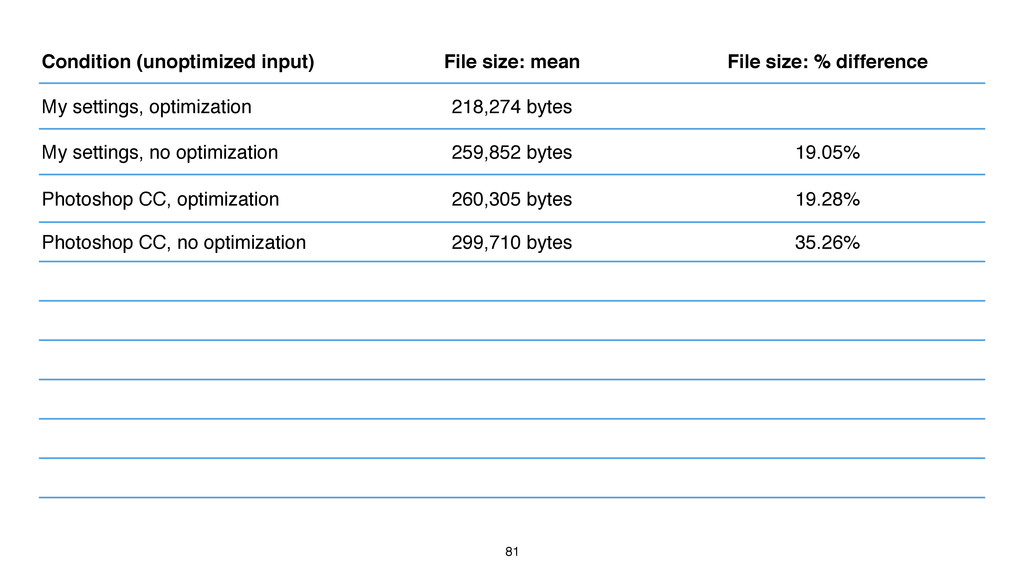
difference My settings, optimization 218,274 bytes My settings, no optimization 259,852 bytes 19.05% Photoshop CC, optimization 260,305 bytes 19.28% Photoshop CC, no optimization 299,710 bytes 35.26%
82 Condition (unoptimized input) File size: mean File size: %
difference My settings, optimization 218,274 bytes My settings, no optimization 259,852 bytes 19.05% Photoshop CC, optimization 260,305 bytes 19.28% Photoshop CC, no optimization 299,710 bytes 35.26% basic `-resize` / WordPress* 385,795 bytes 76.75%
83 Condition (unoptimized input) File size: mean File size: %
difference My settings, optimization 218,274 bytes My settings, no optimization 259,852 bytes 19.05% Photoshop CC, optimization 260,305 bytes 19.28% Photoshop CC, no optimization 299,710 bytes 35.26% CodeIgniter / ExpressionEngine 340,461 bytes 55.98% TYPO3.CMS* 359,112 bytes 64.52% basic `-resize` / WordPress* 385,795 bytes 76.75% Drupal* 397,588 bytes 82.15% Perch* 416,790 bytes 90.95% Craft CMS* 425,259 bytes 94.83% grunt-responsive-images* 500,273 bytes 129.20%
84 PHP Imagick
85
86
87 CLI Imagick DSSIM File Size -filter N/A N/A N/A
-define filter:support setOption() ? ? -thumbnail thumbnailImage() ✗ ✗ -unsharp unsharpMaskImage() ✔ ✔ -dither & -posterize posterizeImage() ✔ ✔ -quality setImageCompressionQuality() ✔ ✗ -define jpeg:fancy-upsampling setOption() ✔ ✔ -define png:compression-filter setOption() ✔ ✔ -define png:compression-level setOption() ✔ ✔ -define png:compression-strategy setOption() ✔ ✔ -define png:exclude-chunk setOption() ✔ ✔ -interlace setInterlaceScheme() ✔ ✔ -colorspace setColorspace() ✔ ✔ -strip stripImage() ✔ ✔
88
89 CLI Imagick DSSIM File Size -filter custom ✔ ✗
-define filter:support setOption() ✔ ✗ -thumbnail custom ✔ ✗ -unsharp unsharpMaskImage() ✔ ✔ -dither & -posterize posterizeImage() ✔ ✔ -quality setImageCompressionQuality() ✔ ✔ -define jpeg:fancy-upsampling setOption() ✔ ✔ -define png:compression-filter setOption() ✔ ✔ -define png:compression-level setOption() ✔ ✔ -define png:compression-strategy setOption() ✔ ✔ -define png:exclude-chunk setOption() ✔ ✔ -interlace setInterlaceScheme() ✔ ✔ -colorspace setColorspace() ✔ ✔ -strip stripImage() ✔ ✔
90 OK… but it’s still a pain in the butt
91 https://github.com/nwtn/php-respimg/ Resizing with smart defaults + more coming soon?
92 $ composer require nwtn/php-respimg
93
94 https://www.npmjs.com/package/grunt-respimg Resizing with smart defaults SVG to PNG rasterization
Optimization
95 $ npm install grunt-respimg --save-dev
96
97
David Newton, St. Michael’s Hospital 98 Using ImageMagick to resize
your Images Full Stack Toronto, 2015-04-08 Twitter: @newtron Github: @nwtn Email:
[email protected]
Slides + image credits: https://github.com/nwtn/pres-imagemagick-fsto

 SiteGround - Reliable hosting with speed, security, and support you can count on.


 newtron
 kazuho
 y_sera15
 camiha
 aoto
aoto
 oikon48
 kameitomohiro
 yamanoku
 moznion
 mtpooh
.png) codatum
codatum
 brainpadpr
 livesense
 mfonobong
 dougneiner
 chrislema
 mayatellez
 chriscoyier
 ryanjones
 nikkihalliwell
 aleyda
 jonrohan
 konakalab
 paigeccino
 honzajavorek