Upgrade to Pro — share decks privately, control downloads, hide ads and more …

3. ScalarDB Cluster Development - Objects and D...

3. ScalarDB Cluster Development - Objects and Data Access

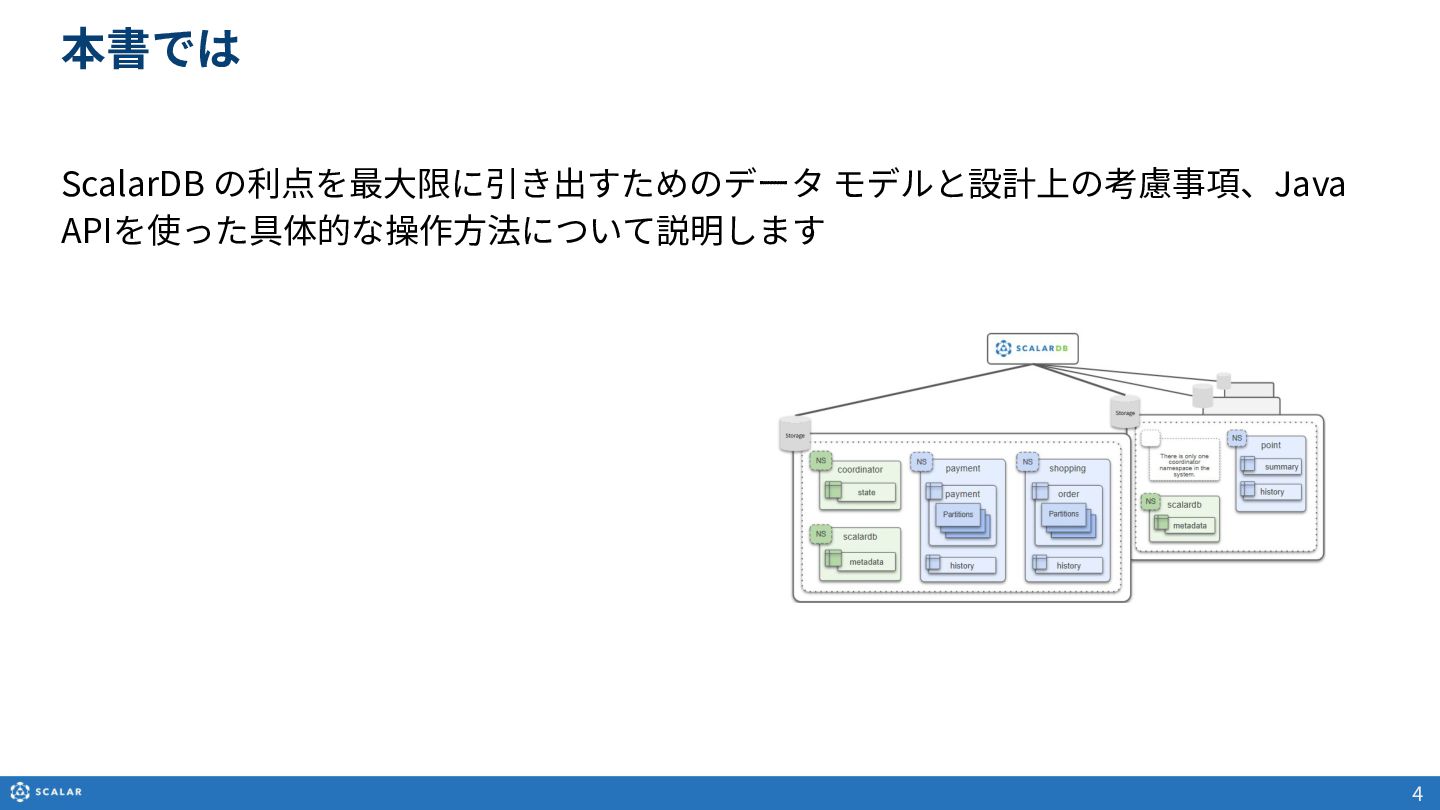
本資料は、ScalarDBの利点を最大限に引き出すためのデータモデルと設計上の考慮事項、およびJava APIを使った具体的なデータアクセス操作について解説したスライドです。

【主な内容】
・ScalarDBのデータモデルとオブジェクト
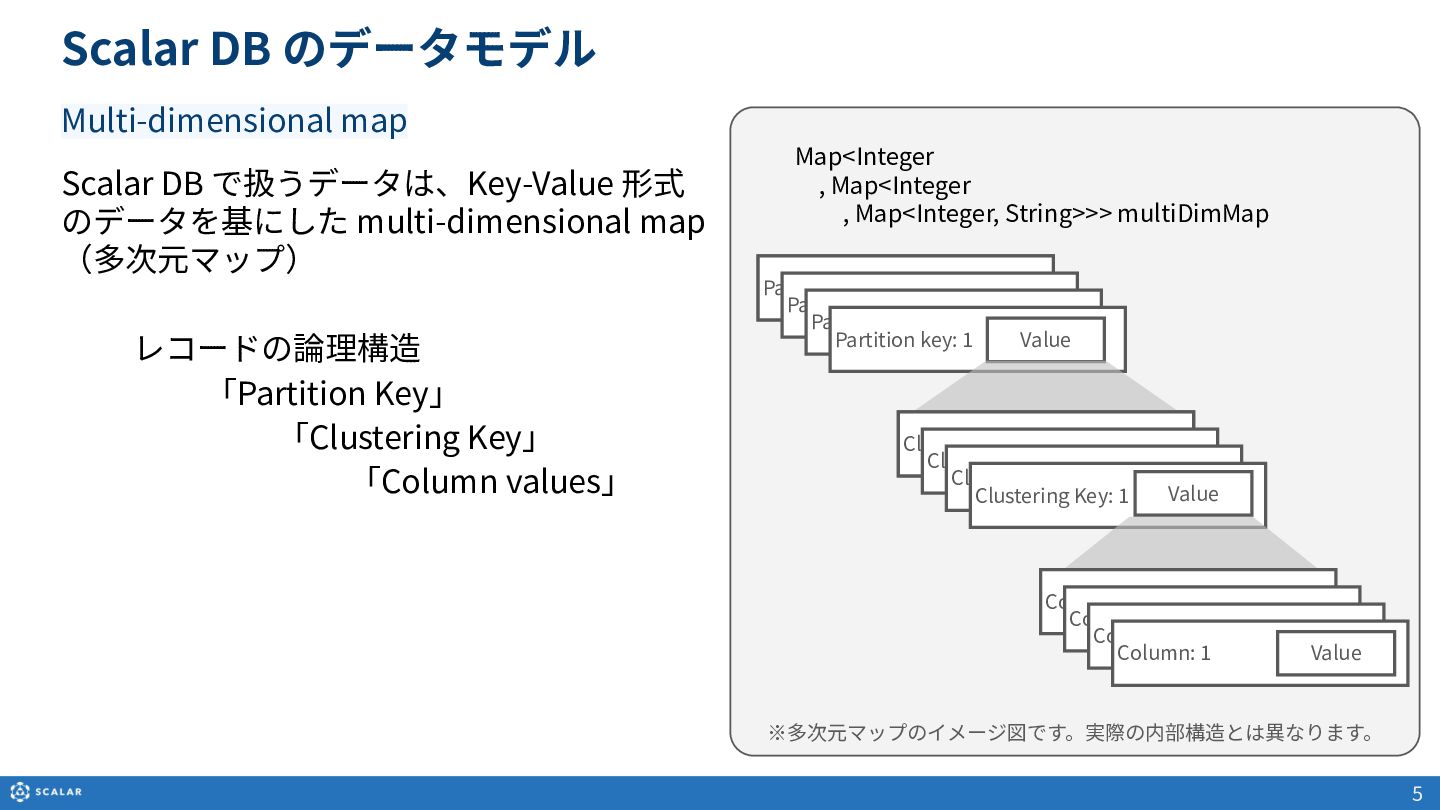
Multi-dimensional map(多次元マップ)を基にしたデータ構造や、Partition Key、Clustering Key、Secondary Indexといった各種オブジェクトの役割と構造について説明します。

・プログラミングインターフェースとCRUD操作
ScalarDBが提供するJava APIを利用した、データの作成(Insert/Upsert)、読み取り(Get/Scan)、更新、削除の基本概要を解説します。

・データへのアクセス方法(GetとScan)
- Get(単一レコード取得):Primary Key(Partition KeyとClustering Keyの組み合わせ)やSecondary Indexを利用した、一意のレコード取得方法とサンプルコードを紹介します。
- Scan(複数レコード取得):Partition Keyのみでの検索や、Clustering Keyを使った範囲指定、Secondary Indexによる検索方法を解説します。また、Cross Partition Scan(全件スキャン)の利用方法とパフォーマンス上の注意点についても触れています。
- クエリの制御:RDBとNoSQLにおける「where句」の動作の違いなど、バックエンドデータベースの特性を考慮したフィルタリングの仕組みを解説します。

・データ型のマッピング
ScalarDBでサポートされるデータ型(INT、TEXT、BLOB、TIMESTAMPなど)と、Cassandra、MySQL、PostgreSQL、Oracleなど、基盤となる他のデータベースのデータ型とのマッピングルールについて紹介します。

ScalarDBを利用したアプリケーション開発を始める方や、スケーラビリティを高めるための適切なデータ分割・クエリ設計を学びたいエンジニアの方におすすめの資料です。

Avatar for Scalar, Inc.

Scalar, Inc. PRO

May 14, 2026

More Decks by Scalar, Inc.
Other Decks in Technology

Transcript

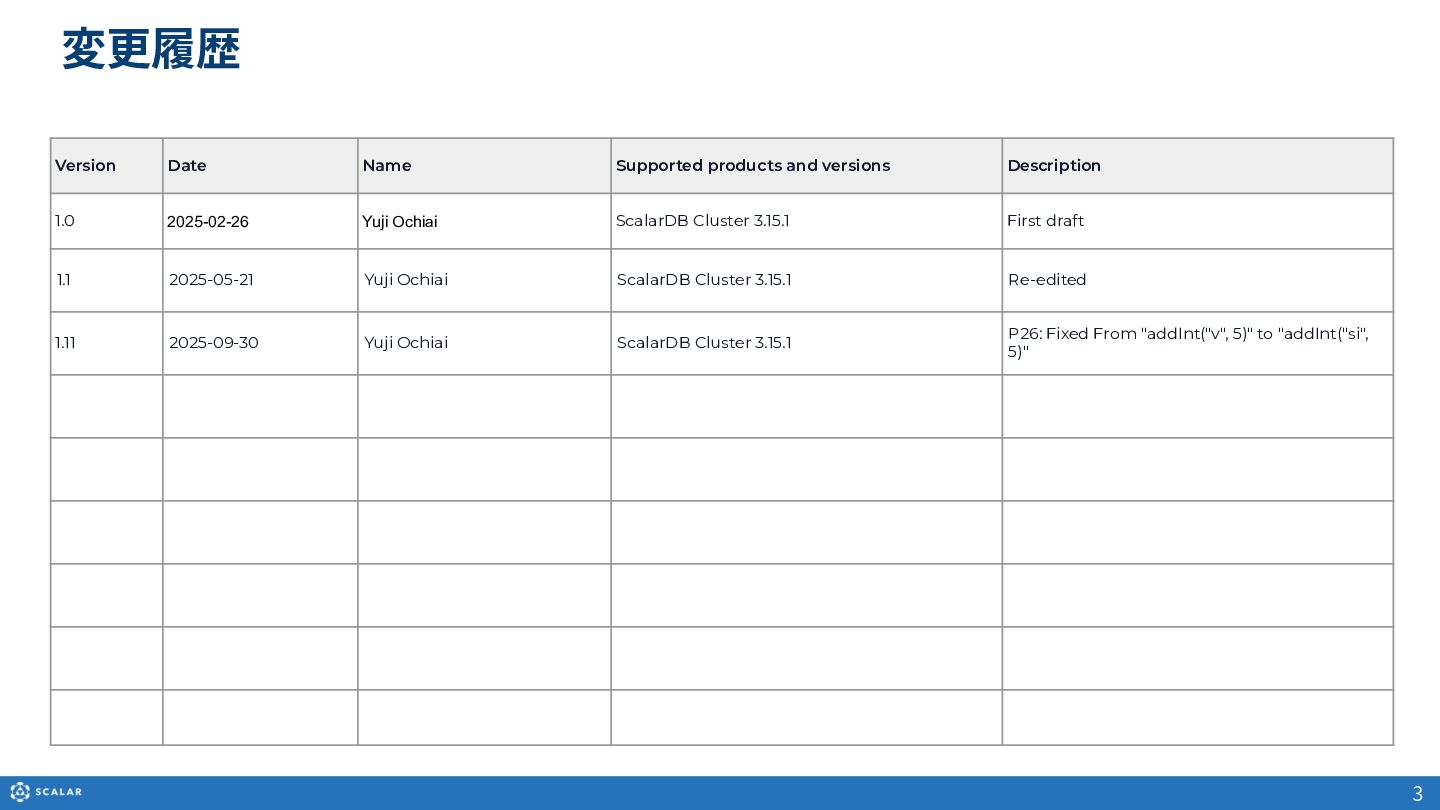
  1. 3 変更履歴 Version Date Name Supported products and versions Description

    1.0 2025-02-26 Yuji Ochiai ScalarDB Cluster 3.15.1 First draft 1.1 2025-05-21 Yuji Ochiai ScalarDB Cluster 3.15.1 Re-edited 1.11 2025-09-30 Yuji Ochiai ScalarDB Cluster 3.15.1 P26: Fixed From "addInt("v", 5)" to "addInt("si", 5)"
  2. Scalar DB で扱うデータは、Key-Value 形式 のデータを基にした multi-dimensional map (多次元マップ) レコードの論理構造 「Partition

    Key」 「Clustering Key」 「Column values」 5 ※多次元マップのイメージ図です。実際の内部構造とは異なります。 Key: 1 Partition key: 1 Partition key: Partition key: : 1 Partition key: 1 Value Scalar DB のデータモデル Key: 1 Clustering Key: 1 Clustering Key: 1 Clustering Key: 1 Clustering Key: 1 Column: 1 Value Column: 1 Column: 1 Column: 1 Value Map<Integer  , Map<Integer   , Map<Integer, String>>> multiDimMap Multi-dimensional map
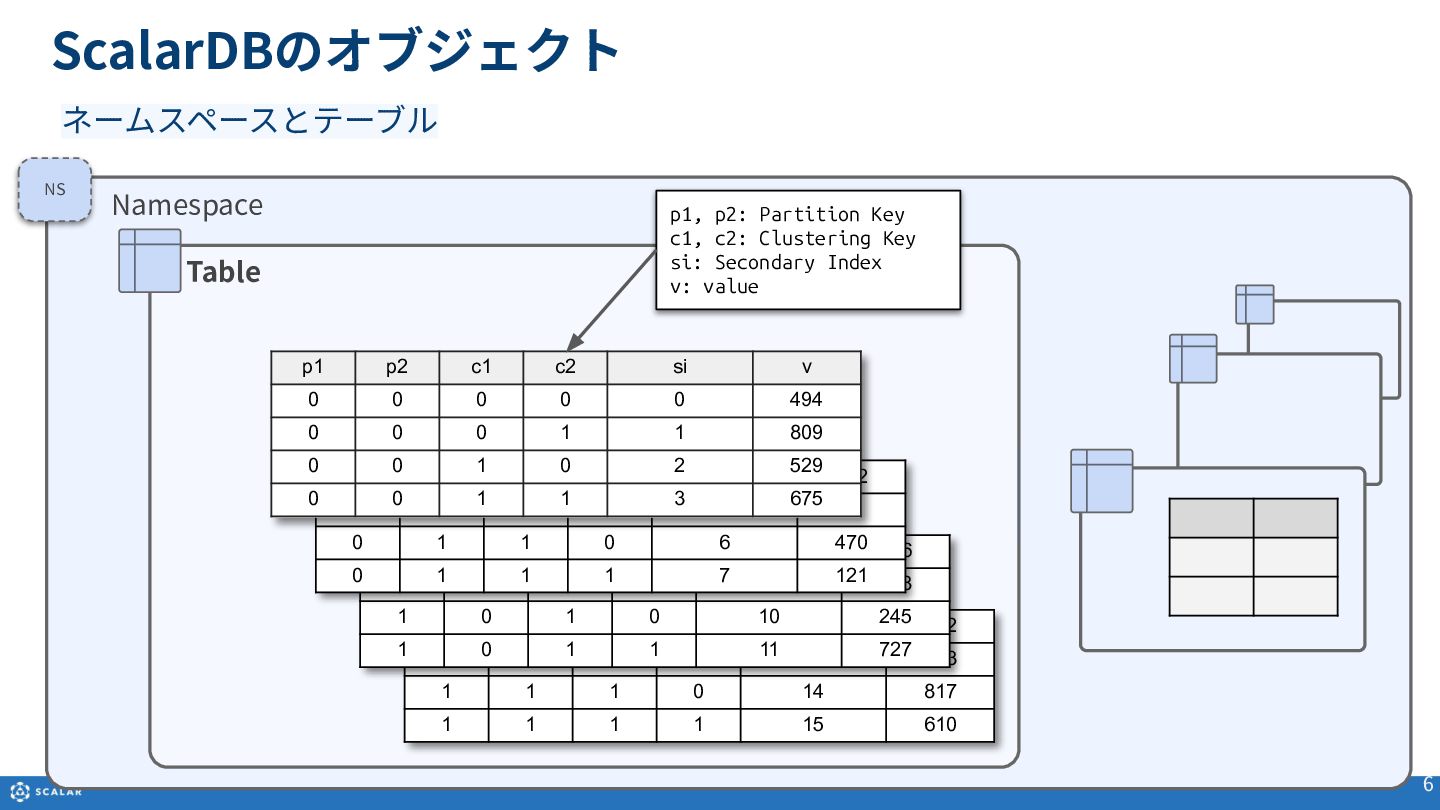
  3. 6 Namespace Table 1 1 0 0 12 782 1

    1 0 1 13 603 1 1 1 0 14 817 1 1 1 1 15 610 ScalarDBのオブジェクト 1 0 0 0 8 186 1 0 0 1 9 888 1 0 1 0 10 245 1 0 1 1 11 727 0 1 0 0 4 902 0 1 0 1 5 3 0 1 1 0 6 470 0 1 1 1 7 121 p1 p2 c1 c2 si v 0 0 0 0 0 494 0 0 0 1 1 809 0 0 1 0 2 529 0 0 1 1 3 675 NS ネームスペースとテーブル p1, p2: Partition Key c1, c2: Clustering Key si: Secondary Index v: value
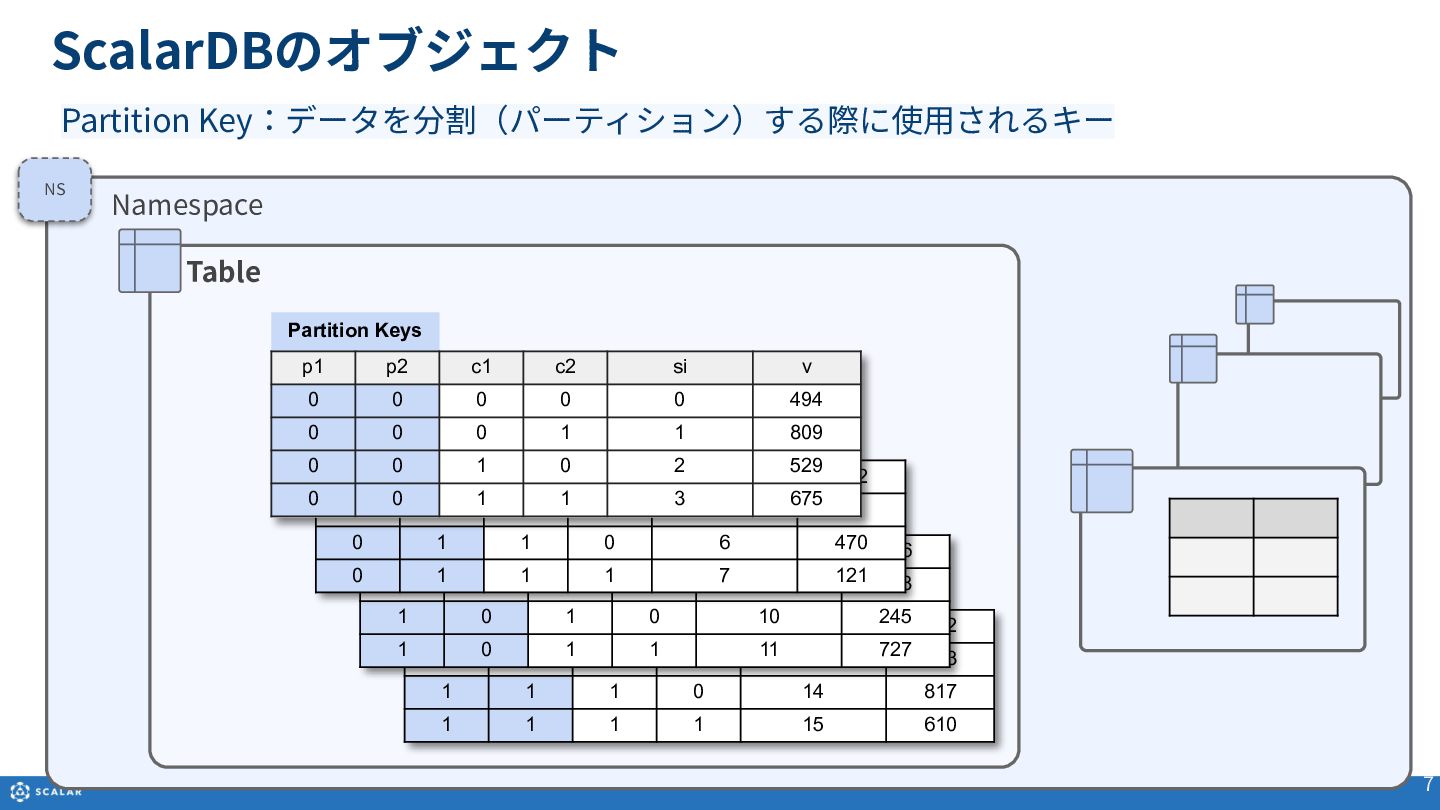
  4. ScalarDBのオブジェクト 7 Namespace Table 1 1 0 0 12 782

    1 1 0 1 13 603 1 1 1 0 14 817 1 1 1 1 15 610 1 0 0 0 8 186 1 0 0 1 9 888 1 0 1 0 10 245 1 0 1 1 11 727 0 1 0 0 4 902 0 1 0 1 5 3 0 1 1 0 6 470 0 1 1 1 7 121 Partition Keys p1 p2 c1 c2 si v 0 0 0 0 0 494 0 0 0 1 1 809 0 0 1 0 2 529 0 0 1 1 3 675 NS Partition Key:データを分割(パーティション)する際に使⽤されるキー
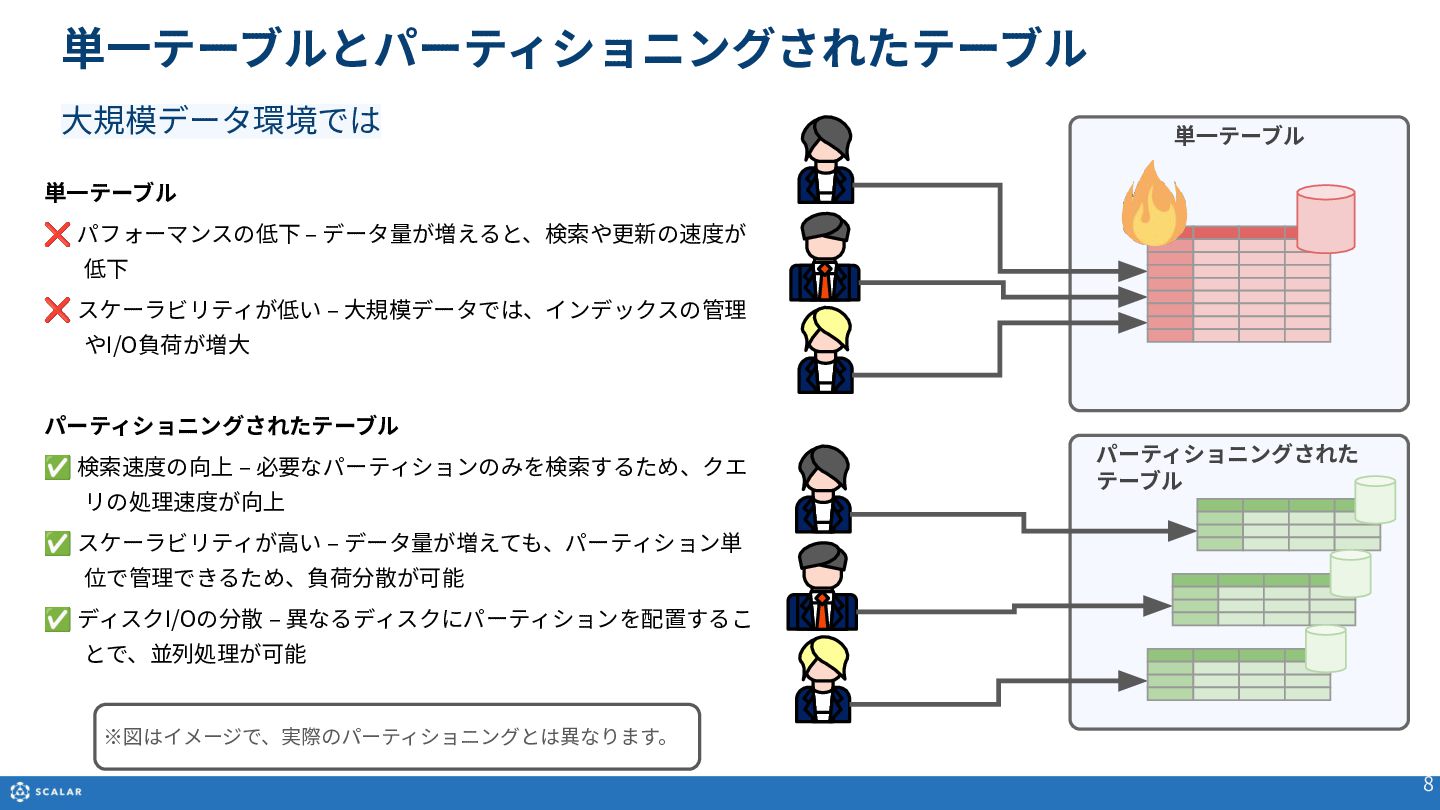
  5. 単⼀テーブル ❌ パフォーマンスの低下 ‒ データ量が増えると、検索や更新の速度が 低下 ❌ スケーラビリティが低い ‒ ⼤規模データでは、インデックスの管理

    やI/O負荷が増⼤ パーティショニングされたテーブル ✅ 検索速度の向上 ‒ 必要なパーティションのみを検索するため、クエ リの処理速度が向上 ✅ スケーラビリティが⾼い ‒ データ量が増えても、パーティション単 位で管理できるため、負荷分散が可能 ✅ ディスクI/Oの分散 ‒ 異なるディスクにパーティションを配置するこ とで、並列処理が可能 パーティショニングされた テーブル 単⼀テーブル 8 ⼤規模データ環境では ※図はイメージで、実際のパーティショニングとは異なります。 単⼀テーブルとパーティショニングされたテーブル
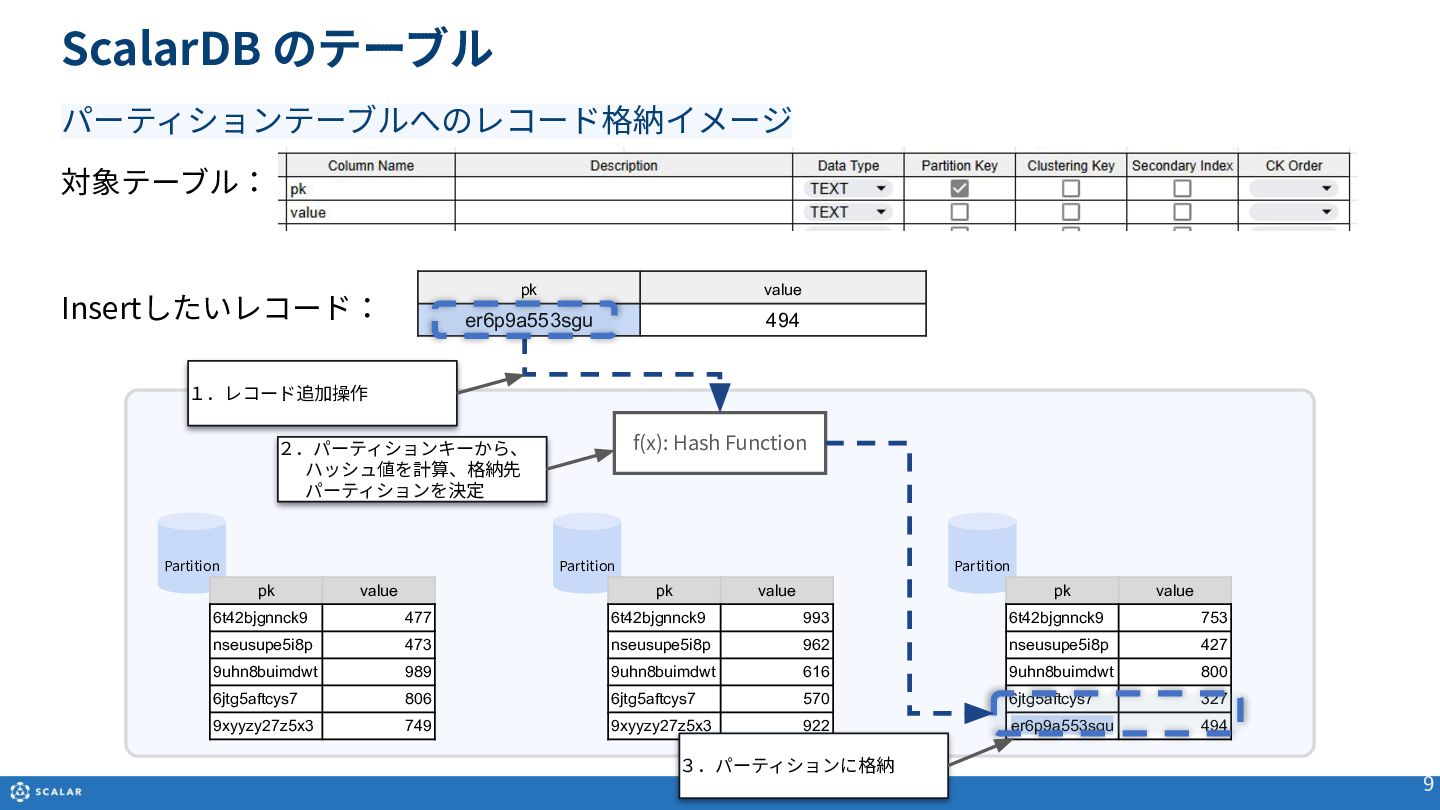
  6. Partition 対象テーブル: Insertしたいレコード: 9 パーティションテーブルへのレコード格納イメージ pk value er6p9a553sgu 494 pk

    value 6t42bjgnnck9 477 nseusupe5i8p 473 9uhn8buimdwt 989 6jtg5aftcys7 806 9xyyzy27z5x3 749 Partition Partition pk value 6t42bjgnnck9 993 nseusupe5i8p 962 9uhn8buimdwt 616 6jtg5aftcys7 570 9xyyzy27z5x3 922 pk value 6t42bjgnnck9 753 nseusupe5i8p 427 9uhn8buimdwt 800 6jtg5aftcys7 327 er6p9a553sgu 494 f(x): Hash Function 1.レコード追加操作 2.パーティションキーから、 ハッシュ値を計算、格納先 パーティションを決定 3.パーティションに格納 ScalarDB のテーブル
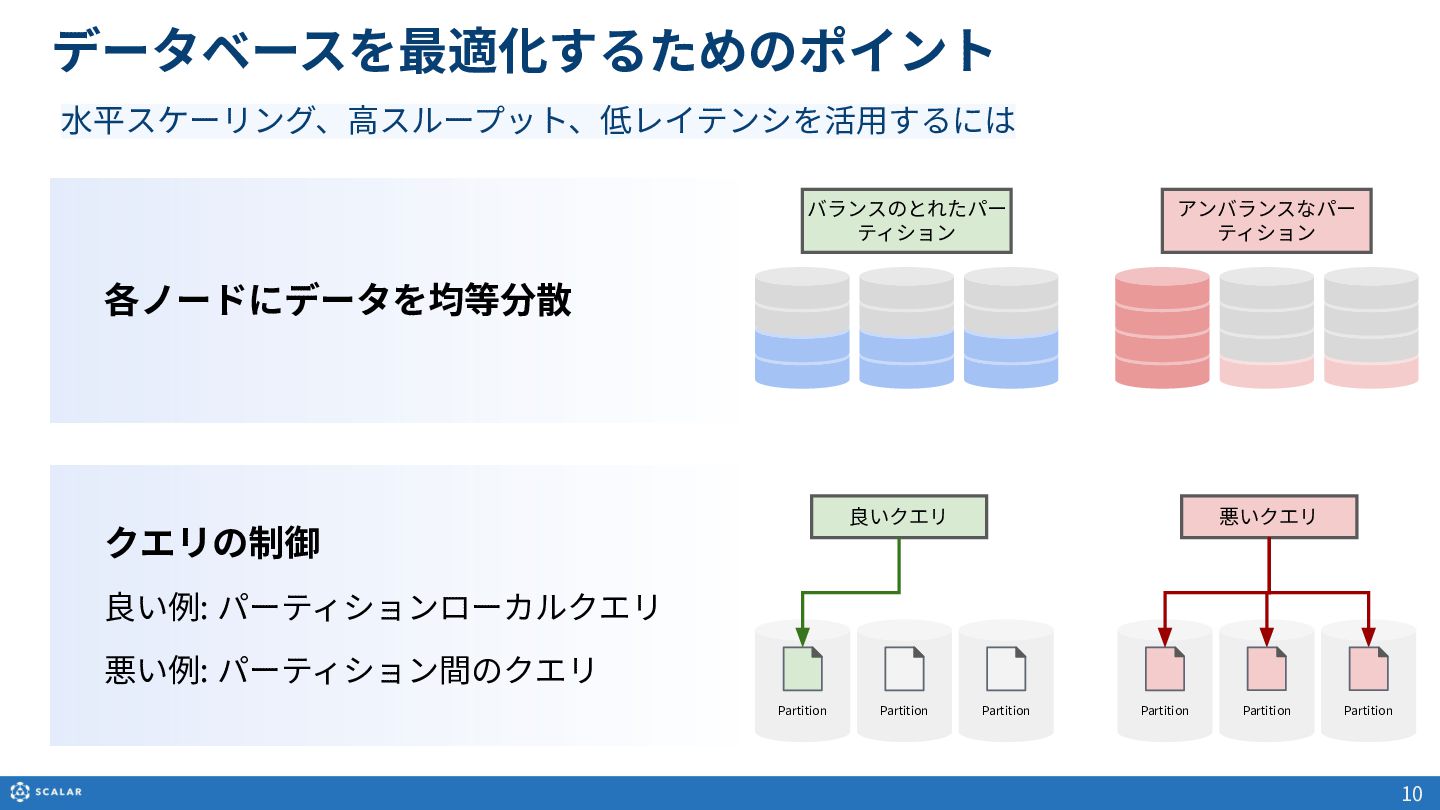
  7. クエリの制御 良い例: パーティションローカルクエリ 悪い例: パーティション間のクエリ 各ノードにデータを均等分散 Partition Partition Partition データベースを最適化するためのポイント

    Partition 良いクエリ Partition 悪いクエリ バランスのとれたパー ティション アンバランスなパー ティション 10 ⽔平スケーリング、⾼スループット、低レイテンシを活⽤するには Partition
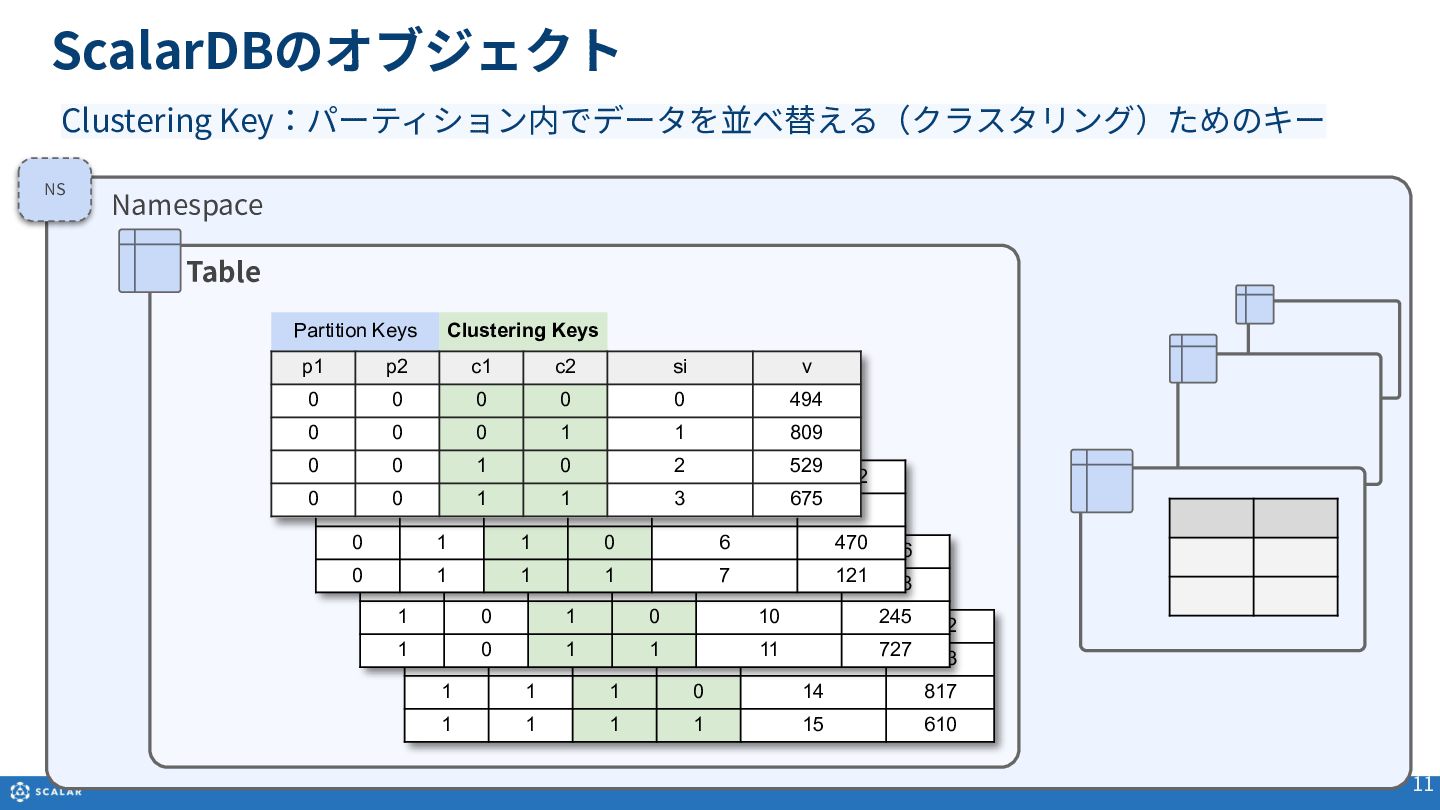
  8. ScalarDBのオブジェクト 11 Namespace Table 1 1 0 0 12 782

    1 1 0 1 13 603 1 1 1 0 14 817 1 1 1 1 15 610 1 0 0 0 8 186 1 0 0 1 9 888 1 0 1 0 10 245 1 0 1 1 11 727 0 1 0 0 4 902 0 1 0 1 5 3 0 1 1 0 6 470 0 1 1 1 7 121   Partition Keys Clustering Keys p1 p2 c1 c2 si v 0 0 0 0 0 494 0 0 0 1 1 809 0 0 1 0 2 529 0 0 1 1 3 675 NS Clustering Key:パーティション内でデータを並べ替える(クラスタリング)ためのキー
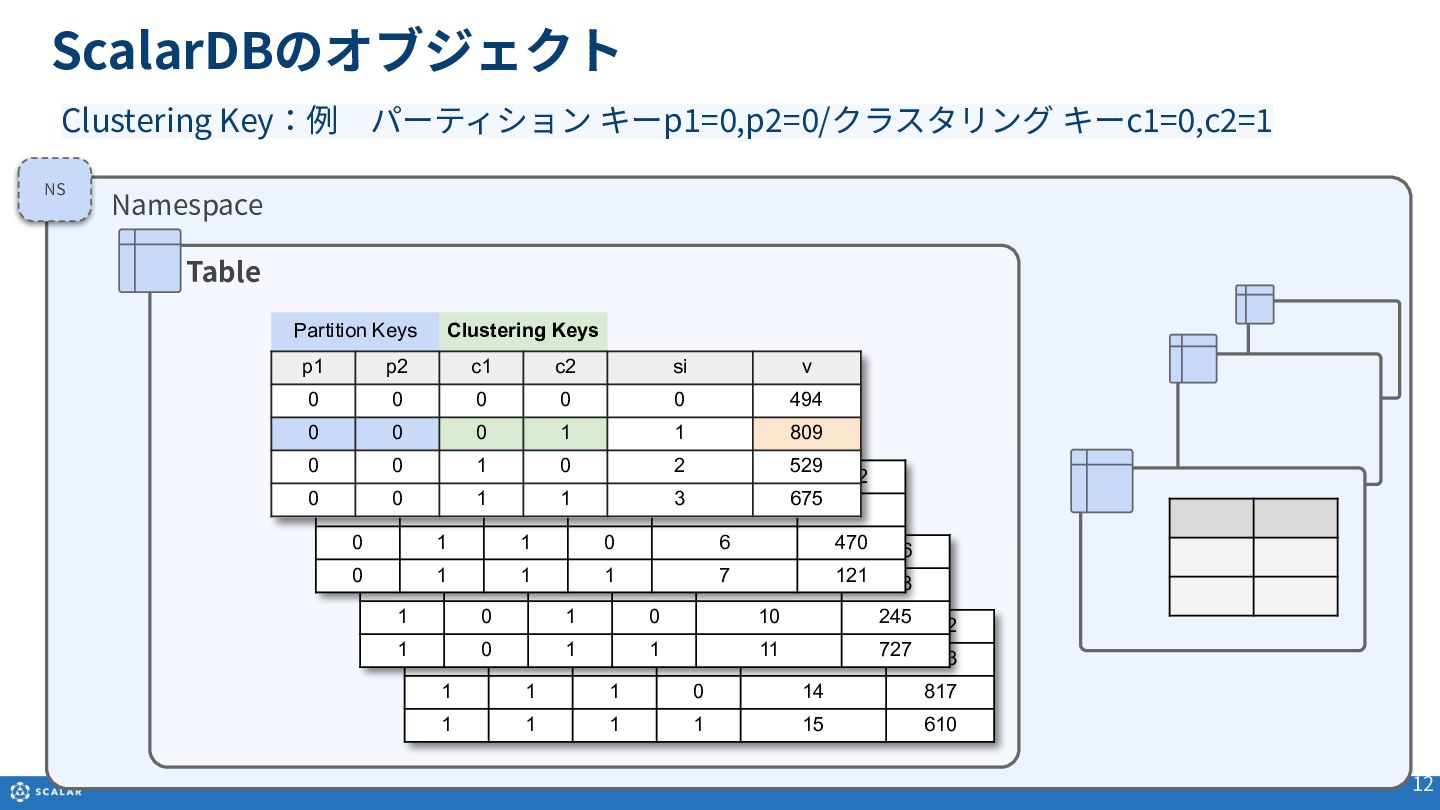
  9. ScalarDBのオブジェクト 12 Namespace Table 1 1 0 0 12 782

    1 1 0 1 13 603 1 1 1 0 14 817 1 1 1 1 15 610 1 0 0 0 8 186 1 0 0 1 9 888 1 0 1 0 10 245 1 0 1 1 11 727 0 1 0 0 4 902 0 1 0 1 5 3 0 1 1 0 6 470 0 1 1 1 7 121 Partition Keys Clustering Keys p1 p2 c1 c2 si v 0 0 0 0 0 494 0 0 0 1 1 809 0 0 1 0 2 529 0 0 1 1 3 675 NS Clustering Key:例 パーティション キーp1=0,p2=0/クラスタリング キーc1=0,c2=1
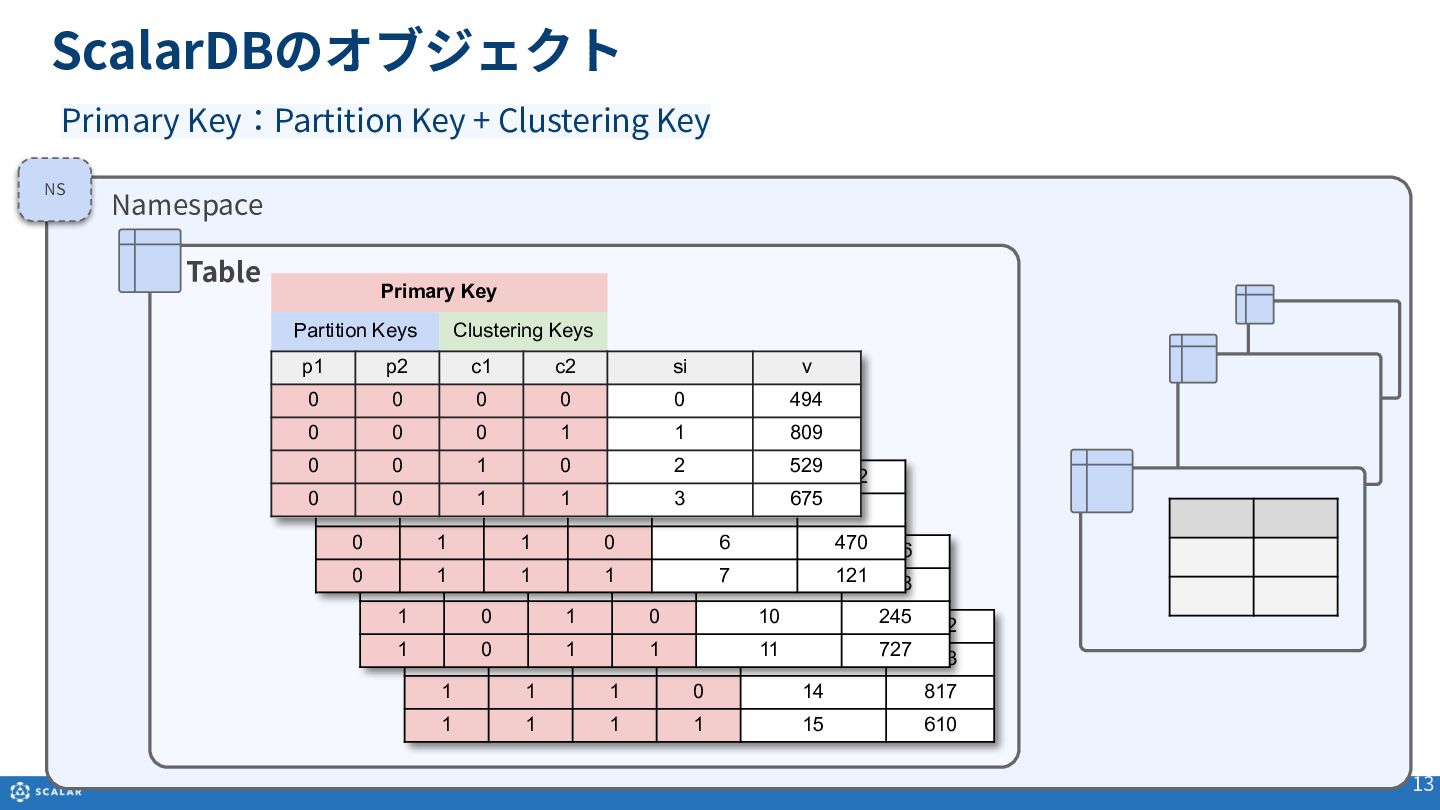
  10. ScalarDBのオブジェクト 13 Namespace Table 1 1 0 0 12 782

    1 1 0 1 13 603 1 1 1 0 14 817 1 1 1 1 15 610 1 0 0 0 8 186 1 0 0 1 9 888 1 0 1 0 10 245 1 0 1 1 11 727 0 1 0 0 4 902 0 1 0 1 5 3 0 1 1 0 6 470 0 1 1 1 7 121 Primary Key Partition Keys Clustering Keys p1 p2 c1 c2 si v 0 0 0 0 0 494 0 0 0 1 1 809 0 0 1 0 2 529 0 0 1 1 3 675 NS Primary Key:Partition Key + Clustering Key
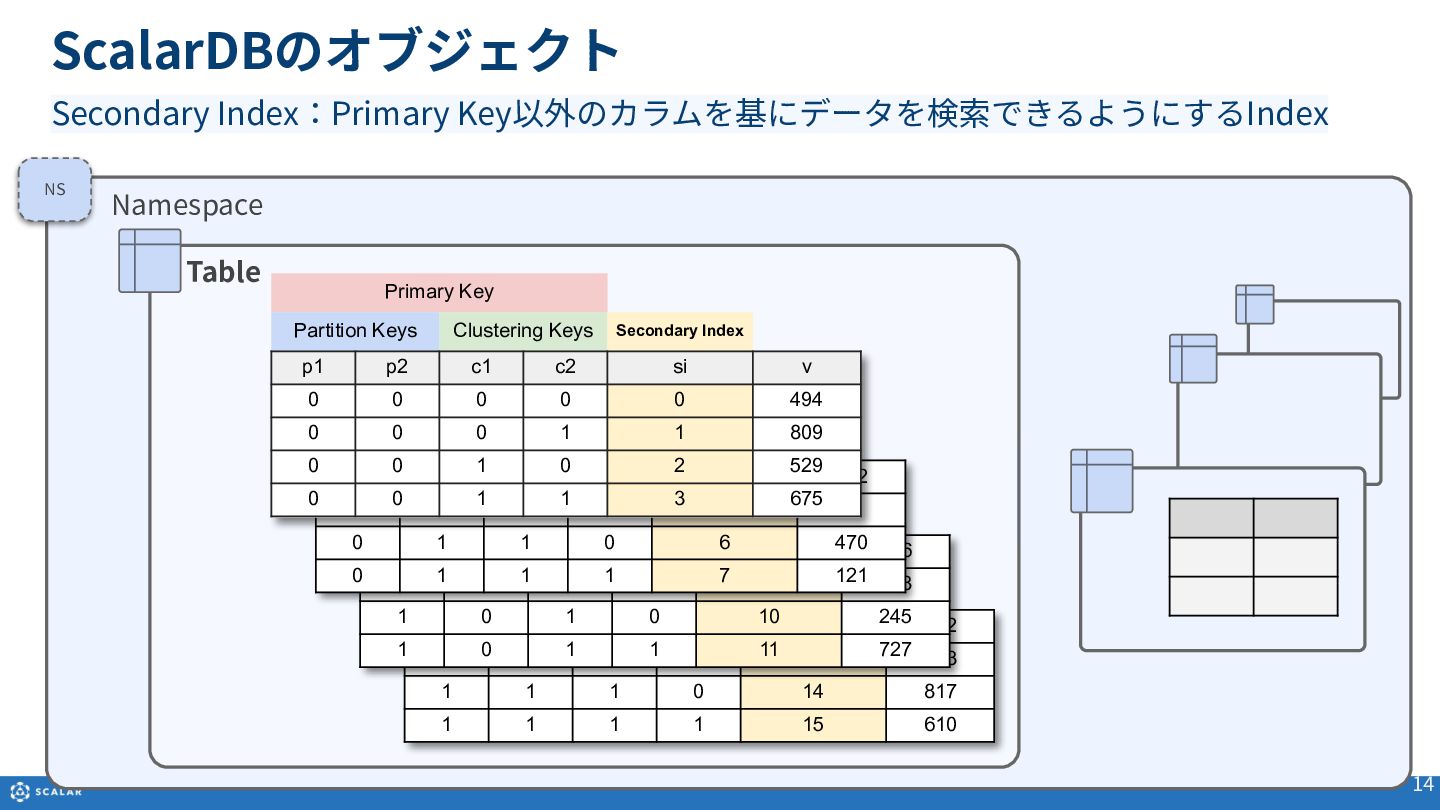
  11. ScalarDBのオブジェクト 14 Namespace Table 1 1 0 0 12 782

    1 1 0 1 13 603 1 1 1 0 14 817 1 1 1 1 15 610 Secondary Index:Primary Key以外のカラムを基にデータを検索できるようにするIndex 1 0 0 0 8 186 1 0 0 1 9 888 1 0 1 0 10 245 1 0 1 1 11 727 0 1 0 0 4 902 0 1 0 1 5 3 0 1 1 0 6 470 0 1 1 1 7 121 Primary Key Partition Keys Clustering Keys Secondary Index p1 p2 c1 c2 si v 0 0 0 0 0 494 0 0 0 1 1 809 0 0 1 0 2 529 0 0 1 1 3 675 NS
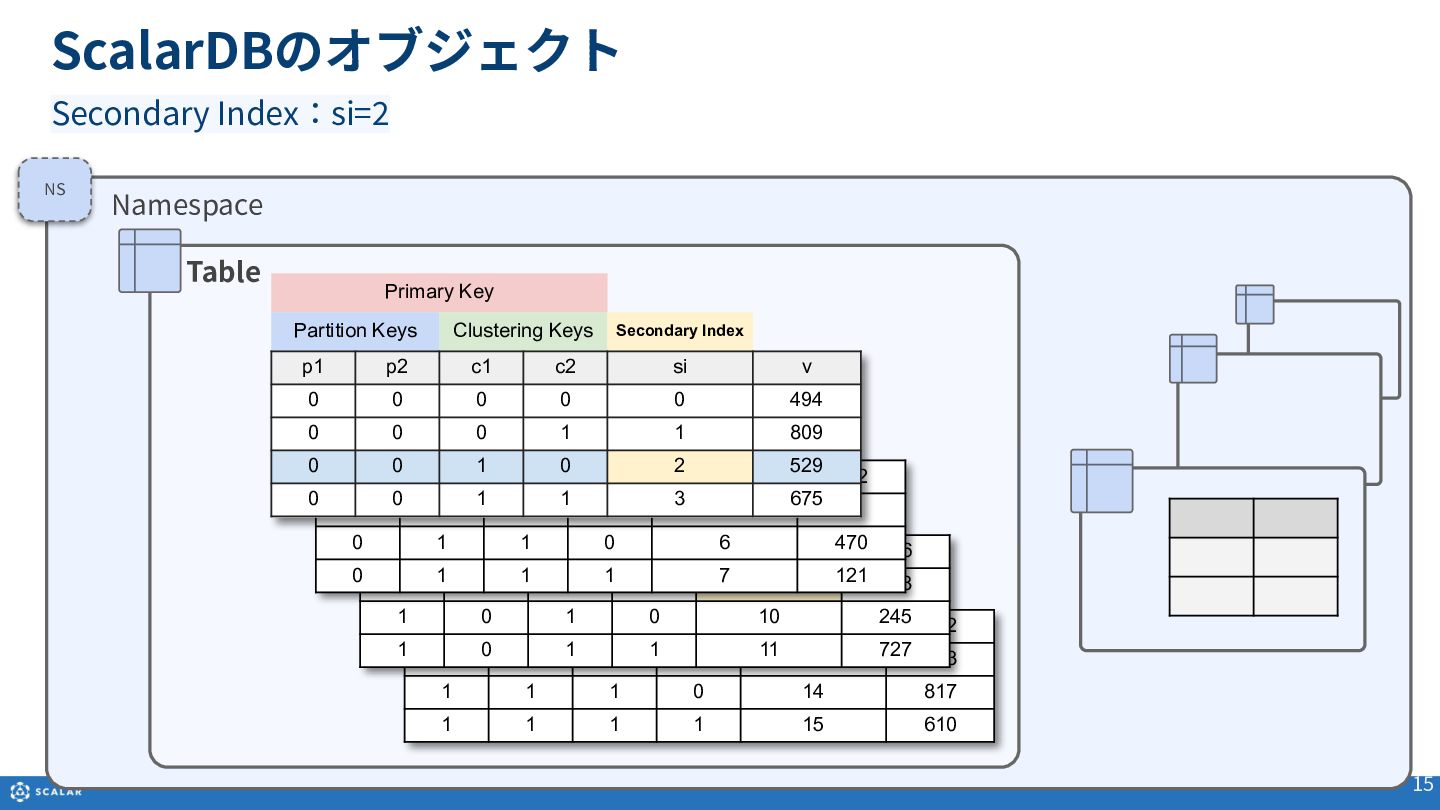
  12. ScalarDBのオブジェクト 15 Namespace Table 1 1 0 0 12 782

    1 1 0 1 13 603 1 1 1 0 14 817 1 1 1 1 15 610 Secondary Index:si=2 1 0 0 0 8 186 1 0 0 1 9 888 1 0 1 0 10 245 1 0 1 1 11 727 0 1 0 0 4 902 0 1 0 1 5 3 0 1 1 0 6 470 0 1 1 1 7 121 Primary Key Partition Keys Clustering Keys Secondary Index p1 p2 c1 c2 si v 0 0 0 0 0 494 0 0 0 1 1 809 0 0 1 0 2 529 0 0 1 1 3 675 NS
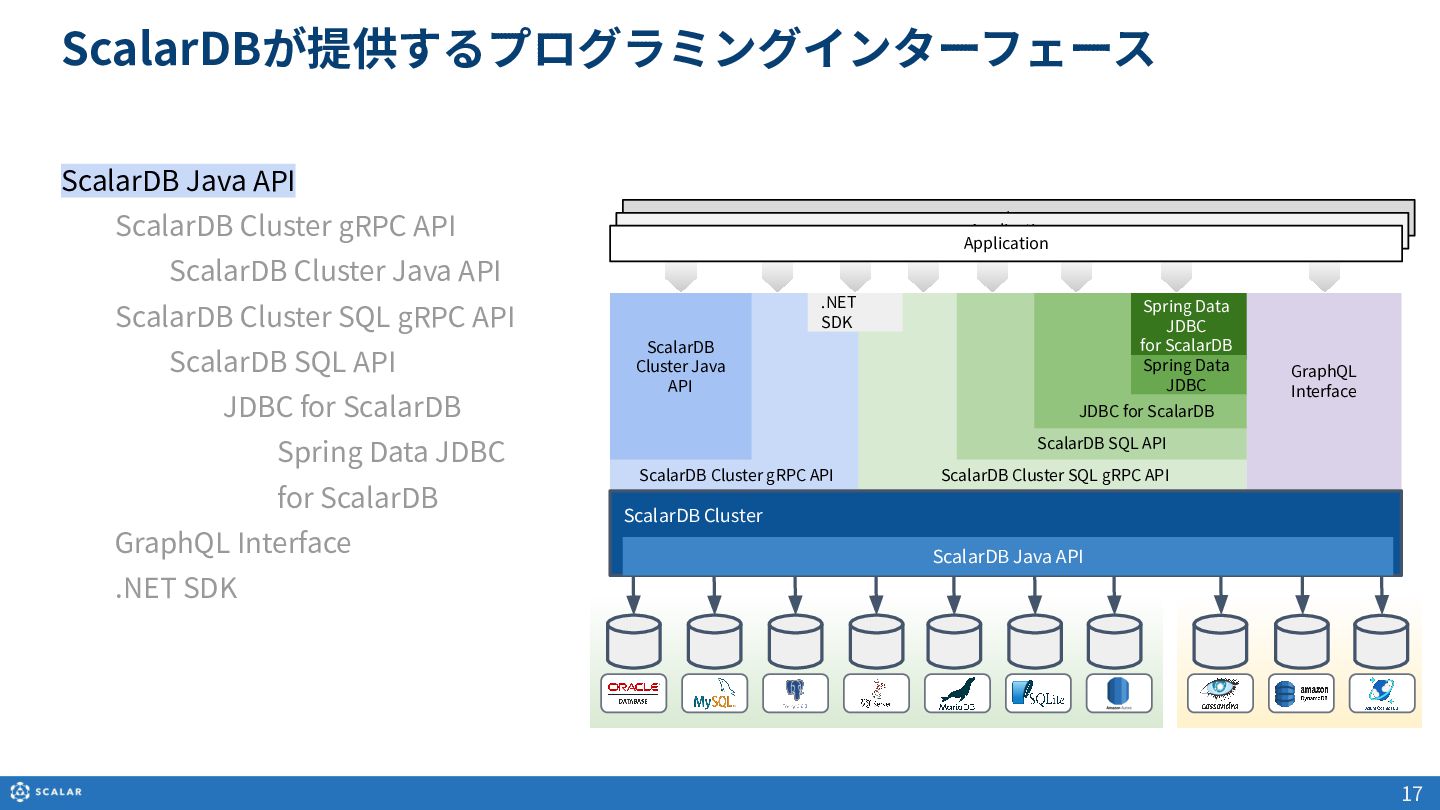
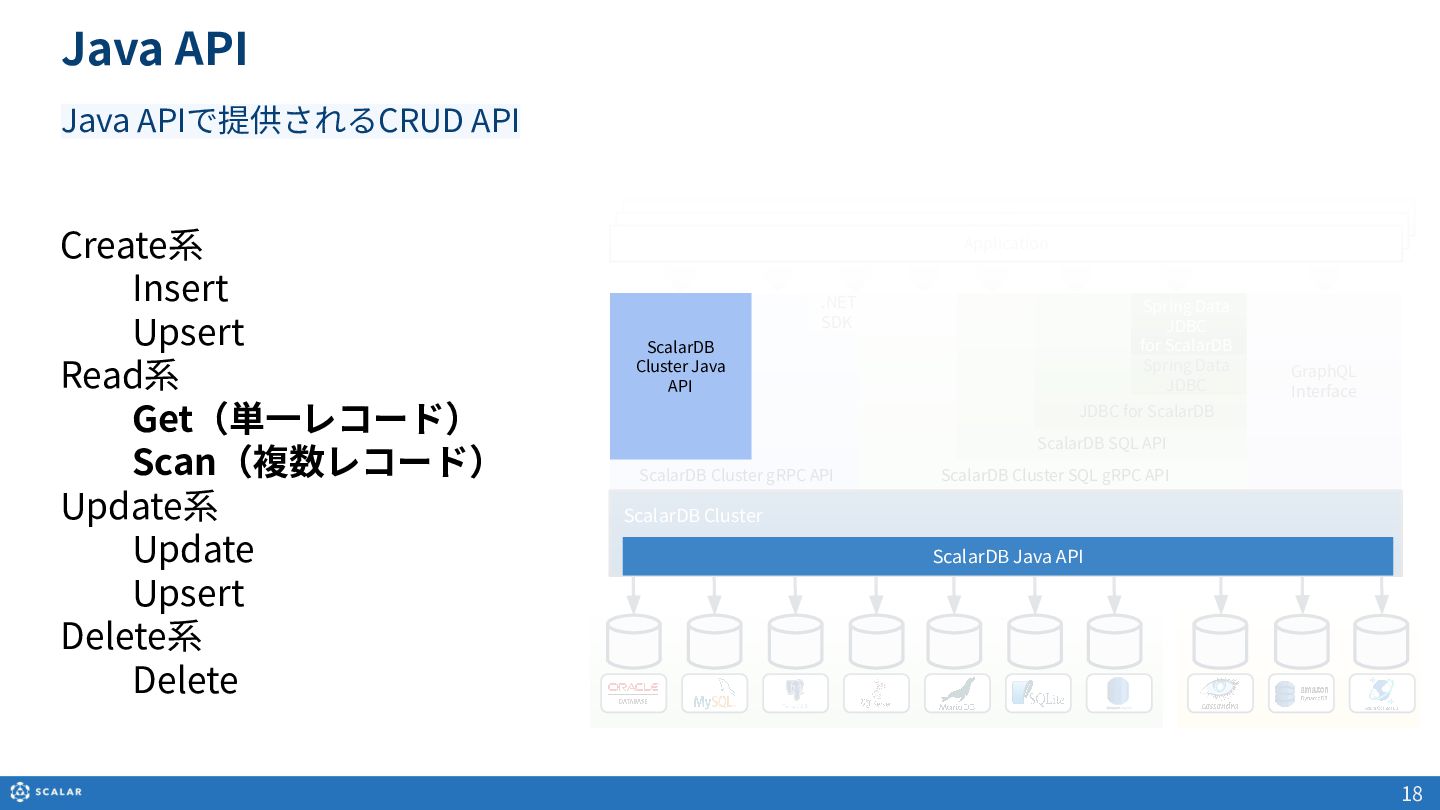
  13. ScalarDB Java API ScalarDB Cluster gRPC API ScalarDB Cluster Java

    API ScalarDB Cluster SQL gRPC API ScalarDB SQL API JDBC for ScalarDB Spring Data JDBC for ScalarDB GraphQL Interface .NET SDK ScalarDBが提供するプログラミングインターフェース 17 ScalarDB Cluster Java API GraphQL Interface Spring Data JDBC for ScalarDB Spring Data JDBC ScalarDB SQL API JDBC for ScalarDB ScalarDB Cluster SQL gRPC API ScalarDB Cluster gRPC API ScalarDB Cluster Application Application Application .NET SDK ScalarDB Java API
  14. Java API Create系 Insert Upsert Read系 Get(単⼀レコード) Scan(複数レコード) Update系 Update

    Upsert Delete系 Delete 18 Java APIで提供されるCRUD API GraphQL Interface Spring Data JDBC for ScalarDB Spring Data JDBC ScalarDB SQL API JDBC for ScalarDB ScalarDB Cluster SQL gRPC API ScalarDB Cluster gRPC API ScalarDB Cluster Application Application Application .NET SDK ScalarDB Cluster Java API ScalarDB Java API
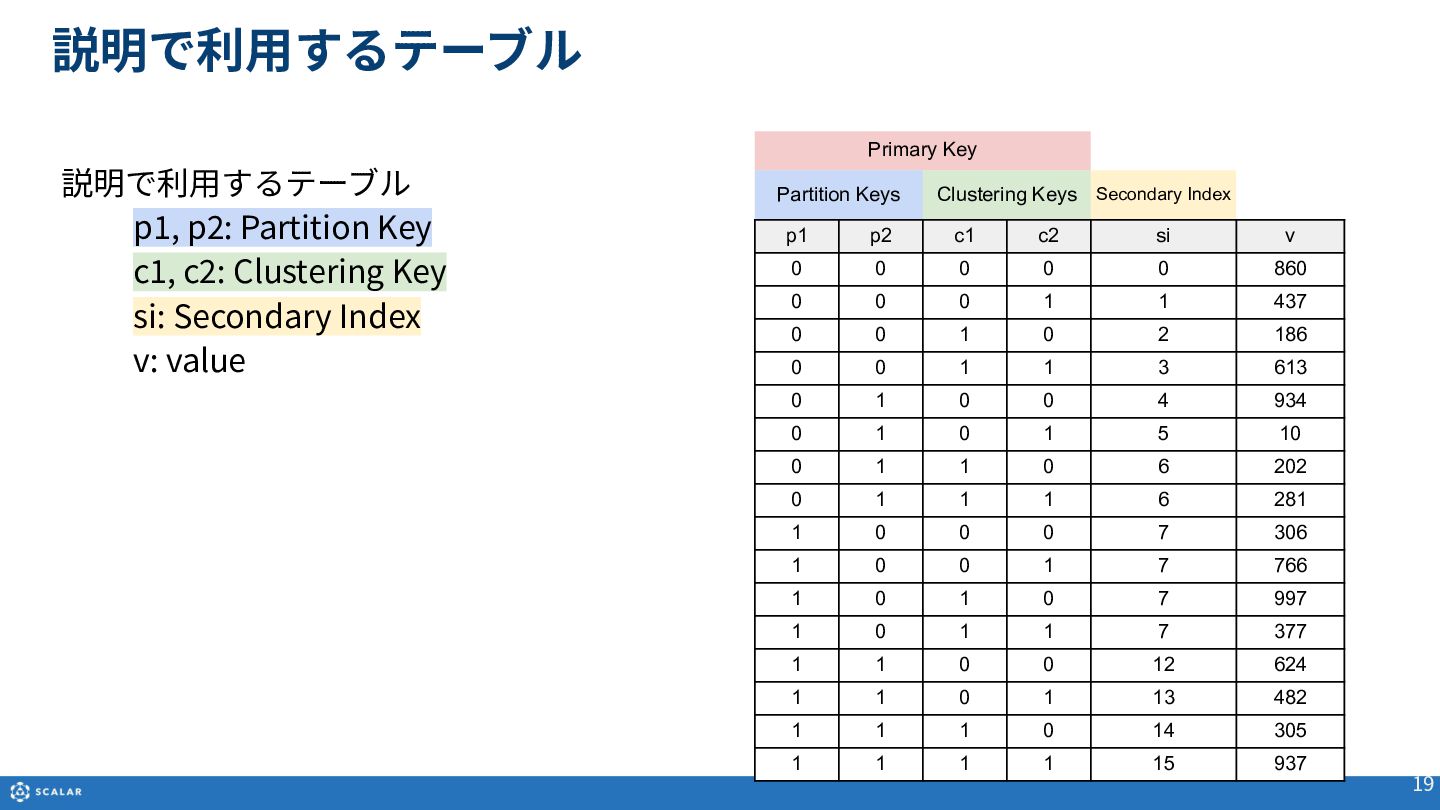
  15. 説明で利⽤するテーブル 19 Primary Key Partition Keys Clustering Keys Secondary Index

    p1 p2 c1 c2 si v 0 0 0 0 0 860 0 0 0 1 1 437 0 0 1 0 2 186 0 0 1 1 3 613 0 1 0 0 4 934 0 1 0 1 5 10 0 1 1 0 6 202 0 1 1 1 6 281 1 0 0 0 7 306 1 0 0 1 7 766 1 0 1 0 7 997 1 0 1 1 7 377 1 1 0 0 12 624 1 1 0 1 13 482 1 1 1 0 14 305 1 1 1 1 15 937 説明で利⽤するテーブル p1, p2: Partition Key c1, c2: Clustering Key si: Secondary Index v: value
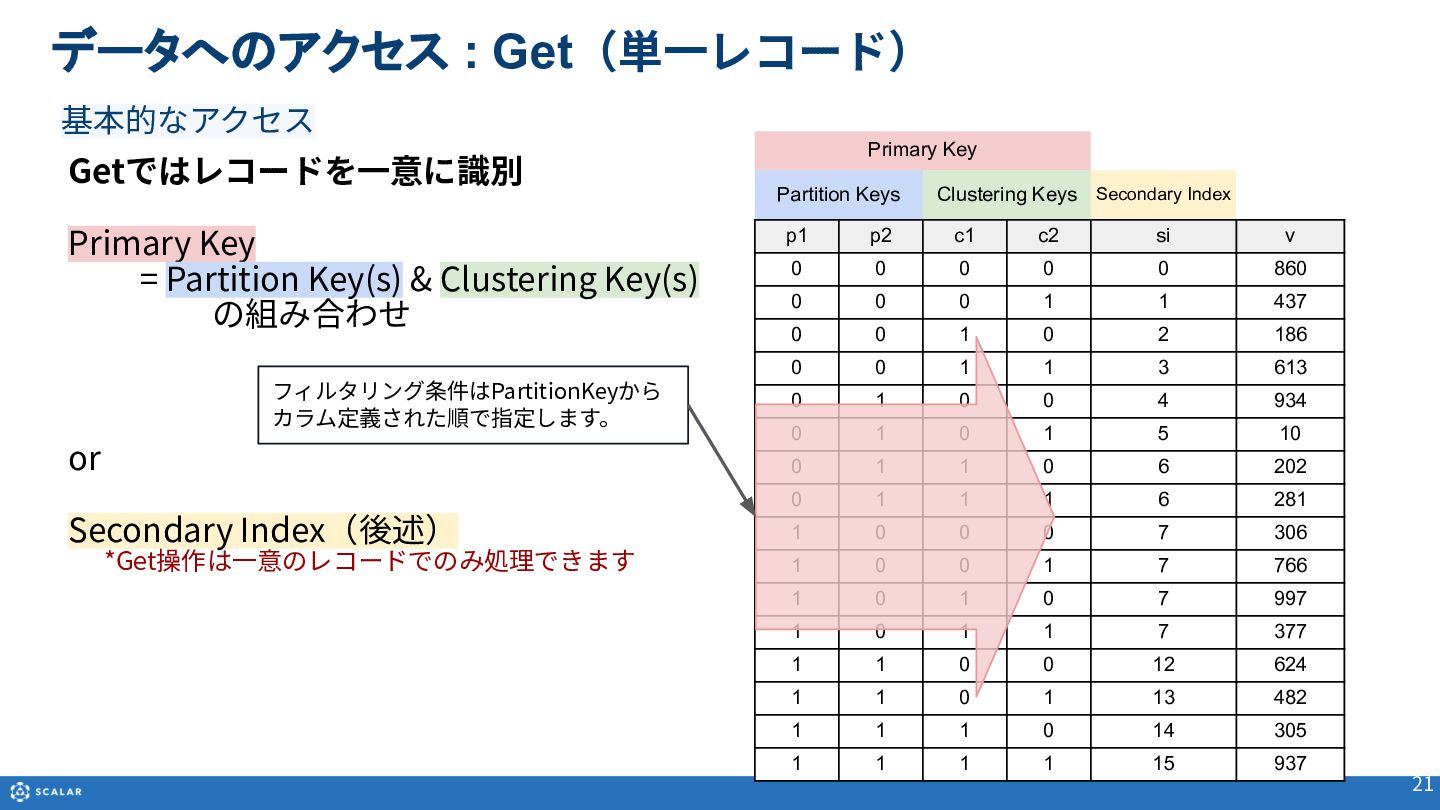
  16. Primary Key Partition Keys Clustering Keys Secondary Index p1 p2

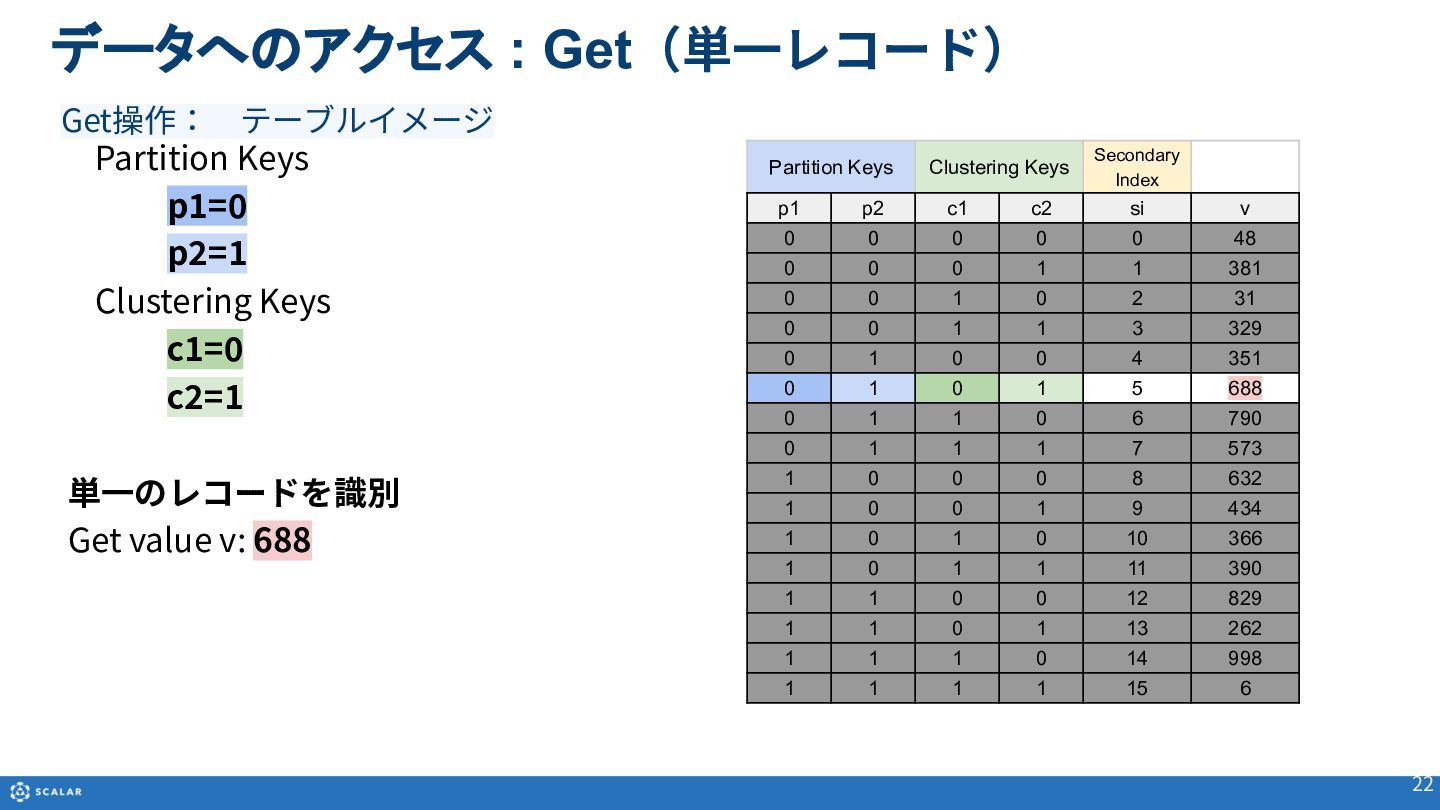
    c1 c2 si v 0 0 0 0 0 860 0 0 0 1 1 437 0 0 1 0 2 186 0 0 1 1 3 613 0 1 0 0 4 934 0 1 0 1 5 10 0 1 1 0 6 202 0 1 1 1 6 281 1 0 0 0 7 306 1 0 0 1 7 766 1 0 1 0 7 997 1 0 1 1 7 377 1 1 0 0 12 624 1 1 0 1 13 482 1 1 1 0 14 305 1 1 1 1 15 937 データへのアクセス : Get(単⼀レコード) 21 Getではレコードを⼀意に識別 Primary Key = Partition Key(s) & Clustering Key(s) の組み合わせ or Secondary Index(後述) *Get操作は⼀意のレコードでのみ処理できます フィルタリング条件はPartitionKeyから カラム定義された順で指定します。 基本的なアクセス
  17. データへのアクセス : Get(単⼀レコード) 22 Partition Keys Clustering Keys Secondary Index

    p1 p2 c1 c2 si v 0 0 0 0 0 48 0 0 0 1 1 381 0 0 1 0 2 31 0 0 1 1 3 329 0 1 0 0 4 351 0 1 0 1 5 688 0 1 1 0 6 790 0 1 1 1 7 573 1 0 0 0 8 632 1 0 0 1 9 434 1 0 1 0 10 366 1 0 1 1 11 390 1 1 0 0 12 829 1 1 0 1 13 262 1 1 1 0 14 998 1 1 1 1 15 6 Partition Keys p1=0 p2=1 Clustering Keys c1=0 c2=1 単⼀のレコードを識別 Get value v: 688 Get操作: テーブルイメージ
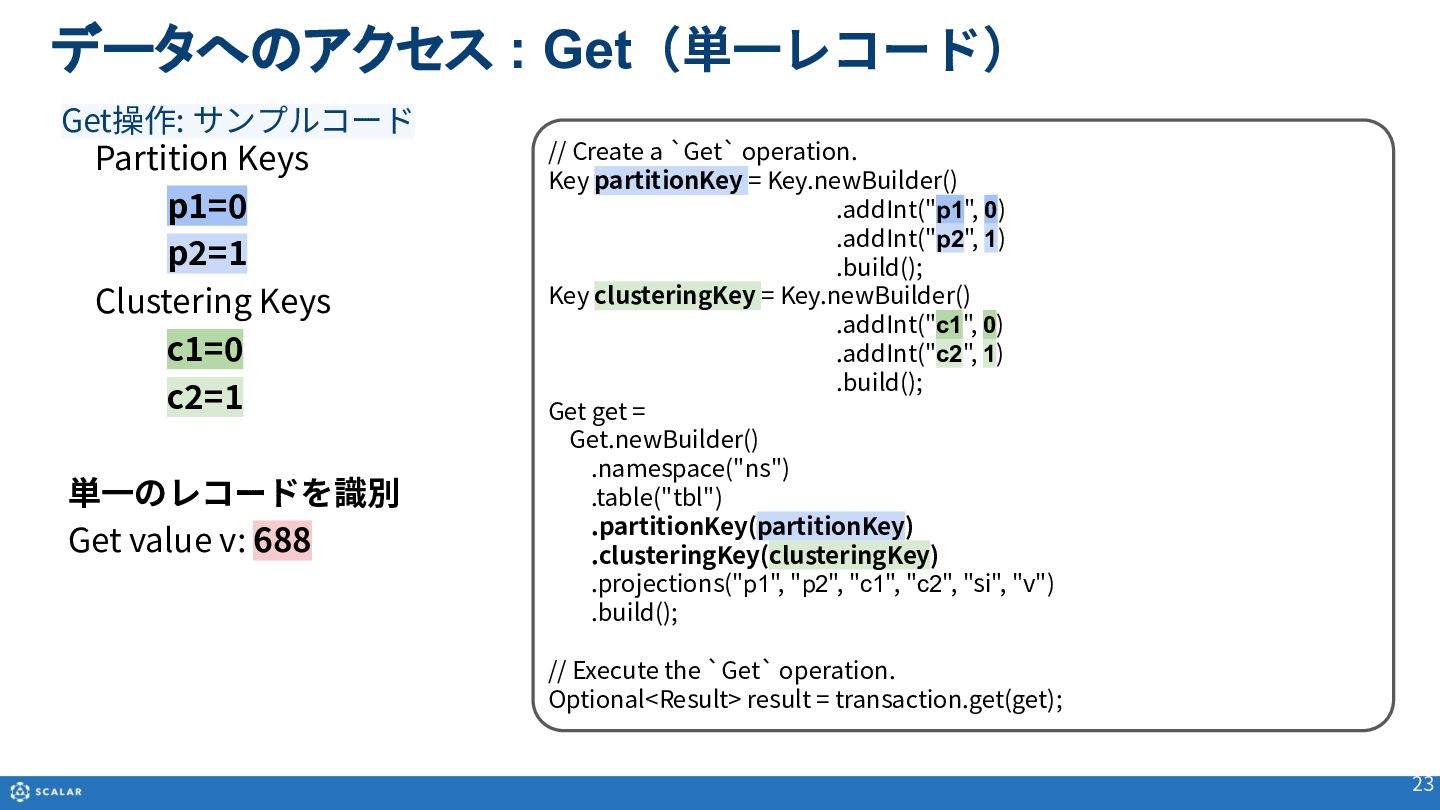
  18. データへのアクセス : Get(単⼀レコード) 23 Partition Keys Clustering Keys Secondary Index

    p1 p2 c1 c2 si v 0 0 0 0 0 48 0 0 0 1 1 381 0 0 1 0 2 31 0 0 1 1 3 329 0 1 0 0 4 351 0 1 0 1 5 688 0 1 1 0 6 790 0 1 1 1 7 573 1 0 0 0 8 632 1 0 0 1 9 434 1 0 1 0 10 366 1 0 1 1 11 390 1 1 0 0 12 829 1 1 0 1 13 262 1 1 1 0 14 998 1 1 1 1 15 6 Partition Keys p1=0 p2=1 Clustering Keys c1=0 c2=1 単⼀のレコードを識別 Get value v: 688 Get操作: サンプルコード // Create a `Get` operation. Key partitionKey = Key.newBuilder() .addInt("p1", 0) .addInt("p2", 1) .build(); Key clusteringKey = Key.newBuilder() .addInt("c1", 0) .addInt("c2", 1) .build(); Get get = Get.newBuilder() .namespace("ns") .table("tbl") .partitionKey(partitionKey) .clusteringKey(clusteringKey) .projections("p1", "p2", "c1", "c2", "si", "v") .build(); // Execute the `Get` operation. Optional<Result> result = transaction.get(get);
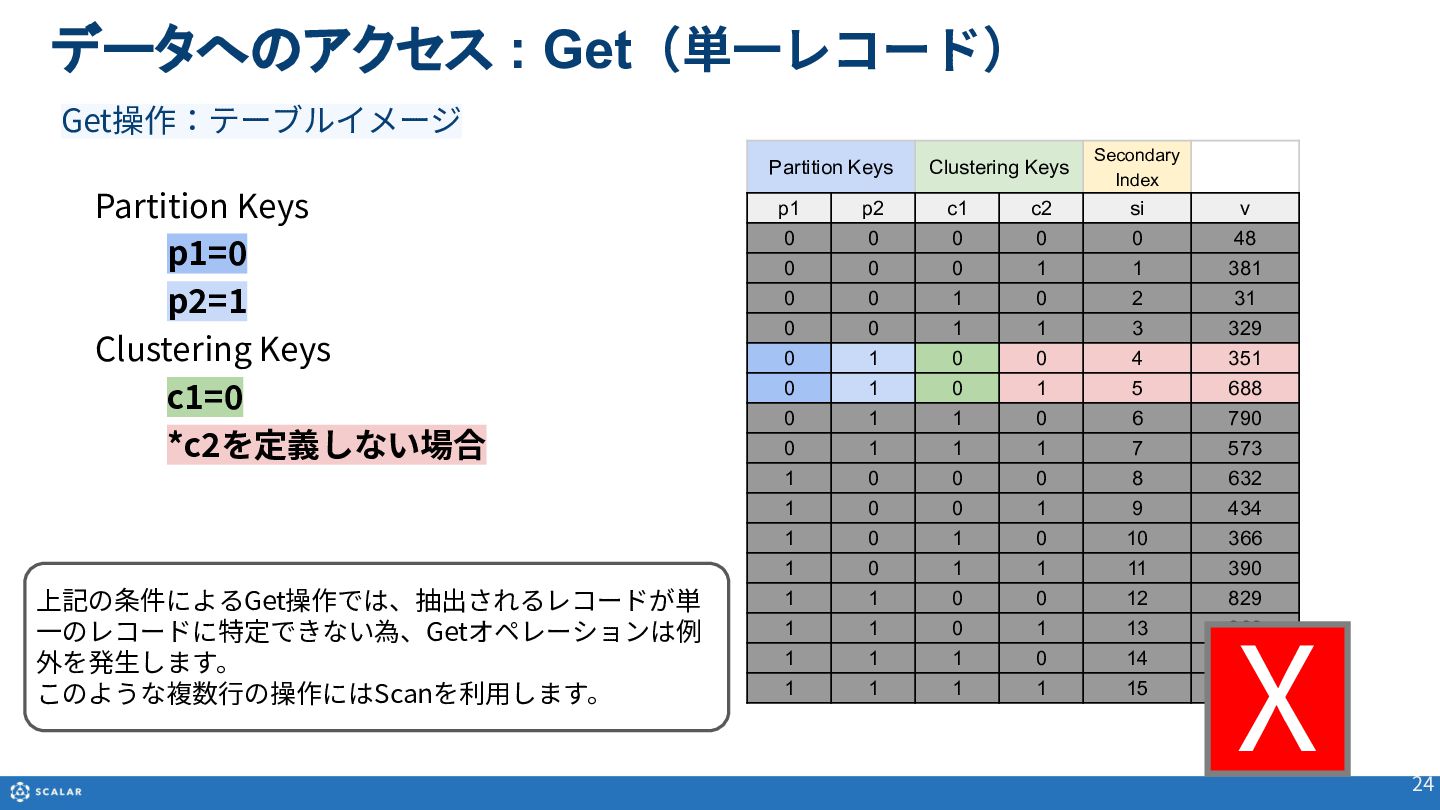
  19. データへのアクセス : Get(単⼀レコード) 24 Partition Keys Clustering Keys Secondary Index

    p1 p2 c1 c2 si v 0 0 0 0 0 48 0 0 0 1 1 381 0 0 1 0 2 31 0 0 1 1 3 329 0 1 0 0 4 351 0 1 0 1 5 688 0 1 1 0 6 790 0 1 1 1 7 573 1 0 0 0 8 632 1 0 0 1 9 434 1 0 1 0 10 366 1 0 1 1 11 390 1 1 0 0 12 829 1 1 0 1 13 262 1 1 1 0 14 998 1 1 1 1 15 6 Partition Keys p1=0 p2=1 Clustering Keys c1=0 *c2を定義しない場合 X Get操作:テーブルイメージ 上記の条件によるGet操作では、抽出されるレコードが単 ⼀のレコードに特定できない為、Getオペレーションは例 外を発⽣します。 このような複数⾏の操作にはScanを利⽤します。
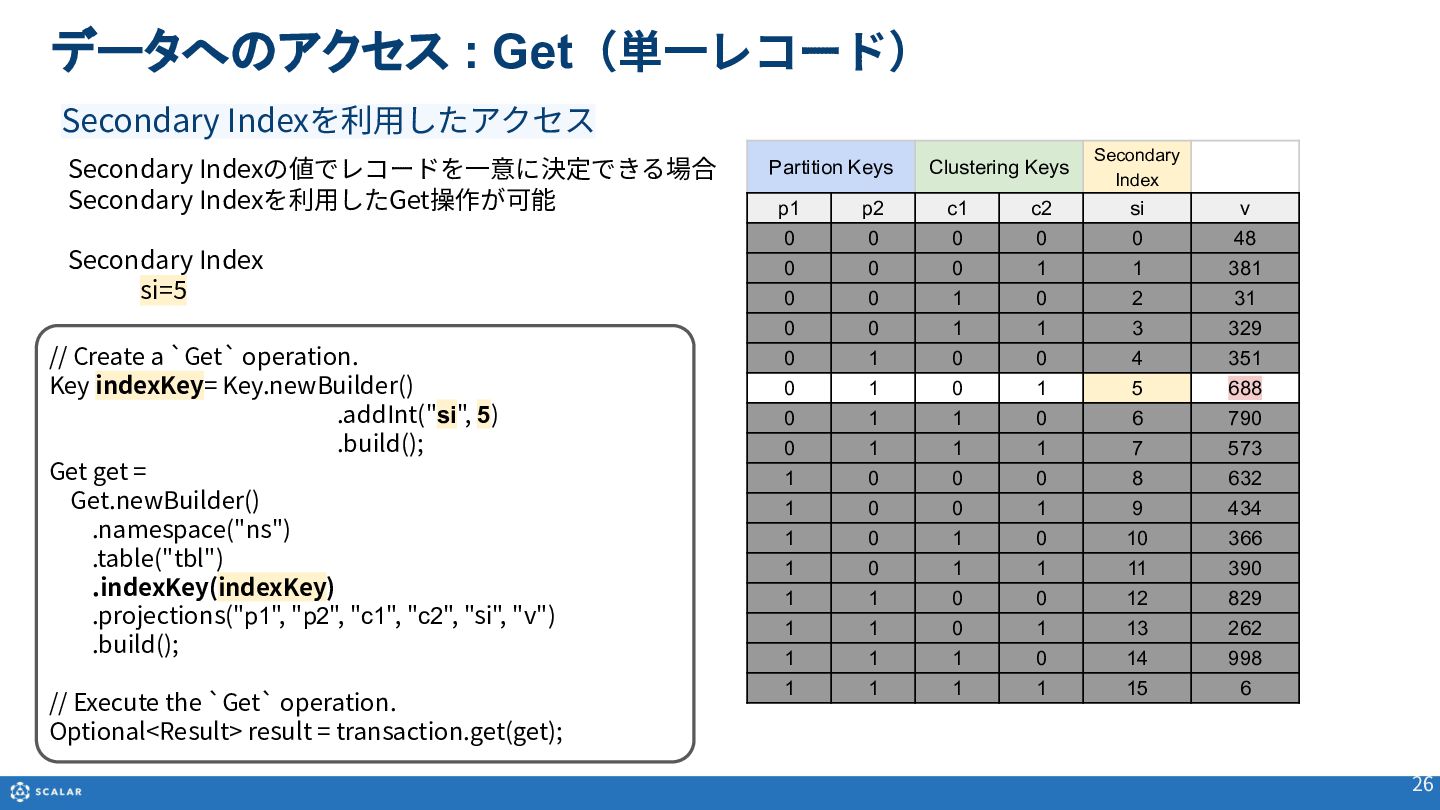
  20. データへのアクセス : Get(単⼀レコード) 26 Secondary Indexの値でレコードを⼀意に決定できる場合 Secondary Indexを利⽤したGet操作が可能 Secondary Index

    si=5 Secondary Indexを利⽤したアクセス // Create a `Get` operation. Key indexKey= Key.newBuilder() .addInt("si", 5) .build(); Get get = Get.newBuilder() .namespace("ns") .table("tbl") .indexKey(indexKey) .projections("p1", "p2", "c1", "c2", "si", "v") .build(); // Execute the `Get` operation. Optional<Result> result = transaction.get(get); Partition Keys Clustering Keys Secondary Index p1 p2 c1 c2 si v 0 0 0 0 0 48 0 0 0 1 1 381 0 0 1 0 2 31 0 0 1 1 3 329 0 1 0 0 4 351 0 1 0 1 5 688 0 1 1 0 6 790 0 1 1 1 7 573 1 0 0 0 8 632 1 0 0 1 9 434 1 0 1 0 10 366 1 0 1 1 11 390 1 1 0 0 12 829 1 1 0 1 13 262 1 1 1 0 14 998 1 1 1 1 15 6
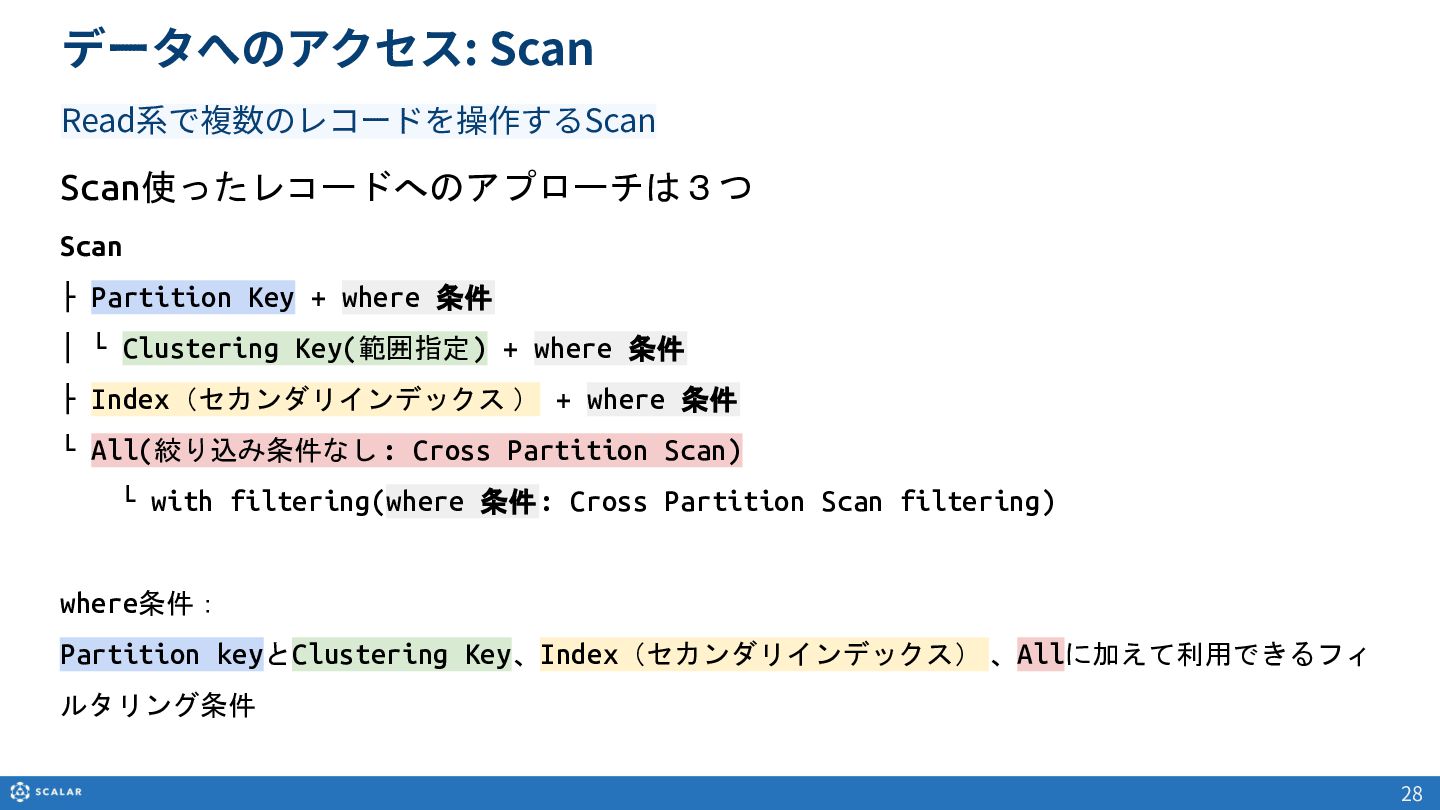
  21. データへのアクセス: Scan Scan使ったレコードへのアプローチは3つ Scan ├ Partition Key + where 条件

    │ └ Clustering Key(範囲指定) + where 条件 ├ Index(セカンダリインデックス ) + where 条件 └ All(絞り込み条件なし: Cross Partition Scan)  └ with filtering(where 条件: Cross Partition Scan filtering) where条件:  Partition keyとClustering Key、Index(セカンダリインデックス) 、Allに加えて利用できるフィ ルタリング条件 28 Read系で複数のレコードを操作するScan
  22. 29 Scan ├ Partition Key + where 条件 │ └

    Clustering Key(範囲指定) + where 条件 Scan(複数レコード)
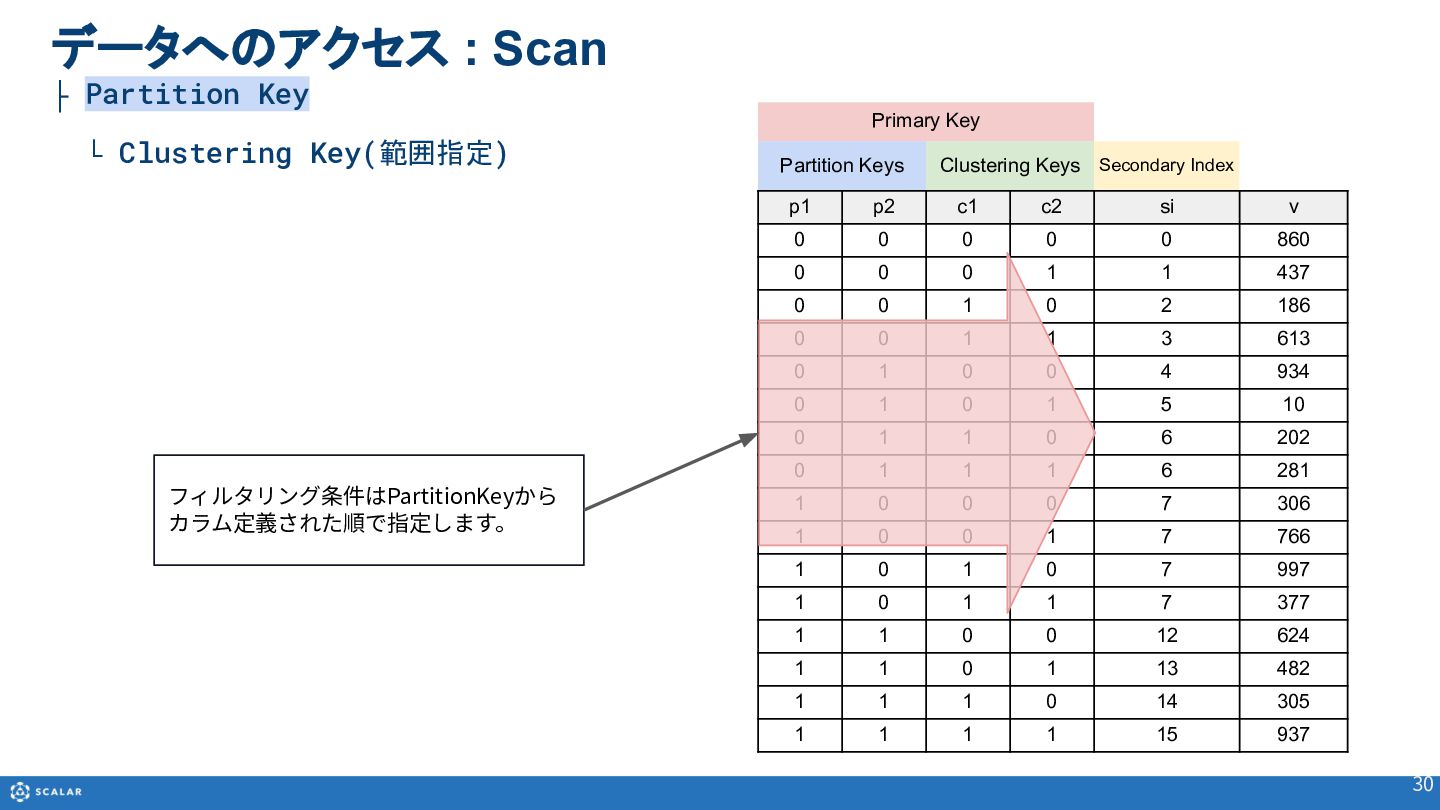
  23. Primary Key Partition Keys Clustering Keys Secondary Index p1 p2

    c1 c2 si v 0 0 0 0 0 860 0 0 0 1 1 437 0 0 1 0 2 186 0 0 1 1 3 613 0 1 0 0 4 934 0 1 0 1 5 10 0 1 1 0 6 202 0 1 1 1 6 281 1 0 0 0 7 306 1 0 0 1 7 766 1 0 1 0 7 997 1 0 1 1 7 377 1 1 0 0 12 624 1 1 0 1 13 482 1 1 1 0 14 305 1 1 1 1 15 937 データへのアクセス : Scan ├ Partition Key └ Clustering Key(範囲指定) 30 フィルタリング条件はPartitionKeyから カラム定義された順で指定します。
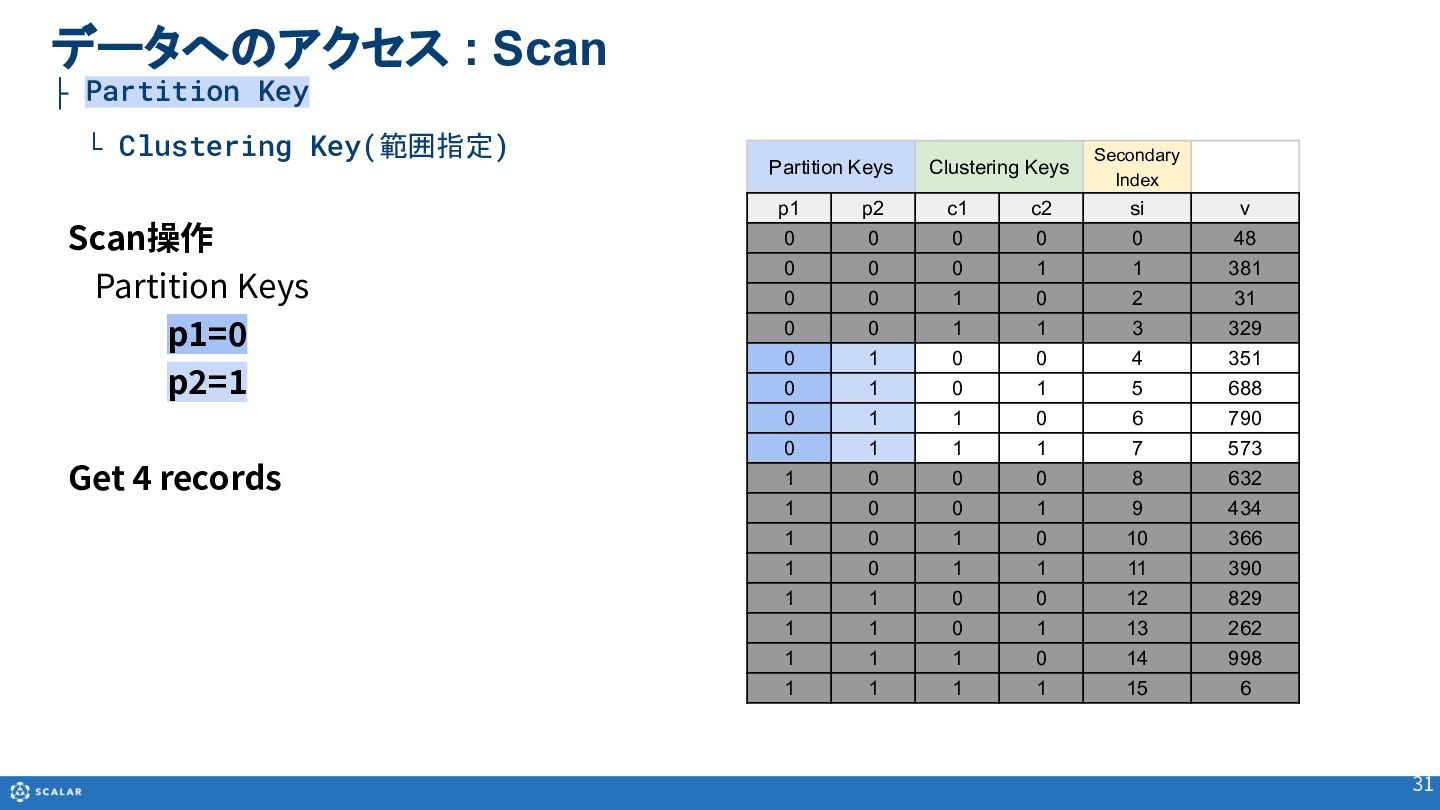
  24. 31 Scan操作 Partition Keys p1=0 p2=1 Get 4 records Partition

    Keys Clustering Keys Secondary Index p1 p2 c1 c2 si v 0 0 0 0 0 48 0 0 0 1 1 381 0 0 1 0 2 31 0 0 1 1 3 329 0 1 0 0 4 351 0 1 0 1 5 688 0 1 1 0 6 790 0 1 1 1 7 573 1 0 0 0 8 632 1 0 0 1 9 434 1 0 1 0 10 366 1 0 1 1 11 390 1 1 0 0 12 829 1 1 0 1 13 262 1 1 1 0 14 998 1 1 1 1 15 6 データへのアクセス : Scan ├ Partition Key └ Clustering Key(範囲指定)
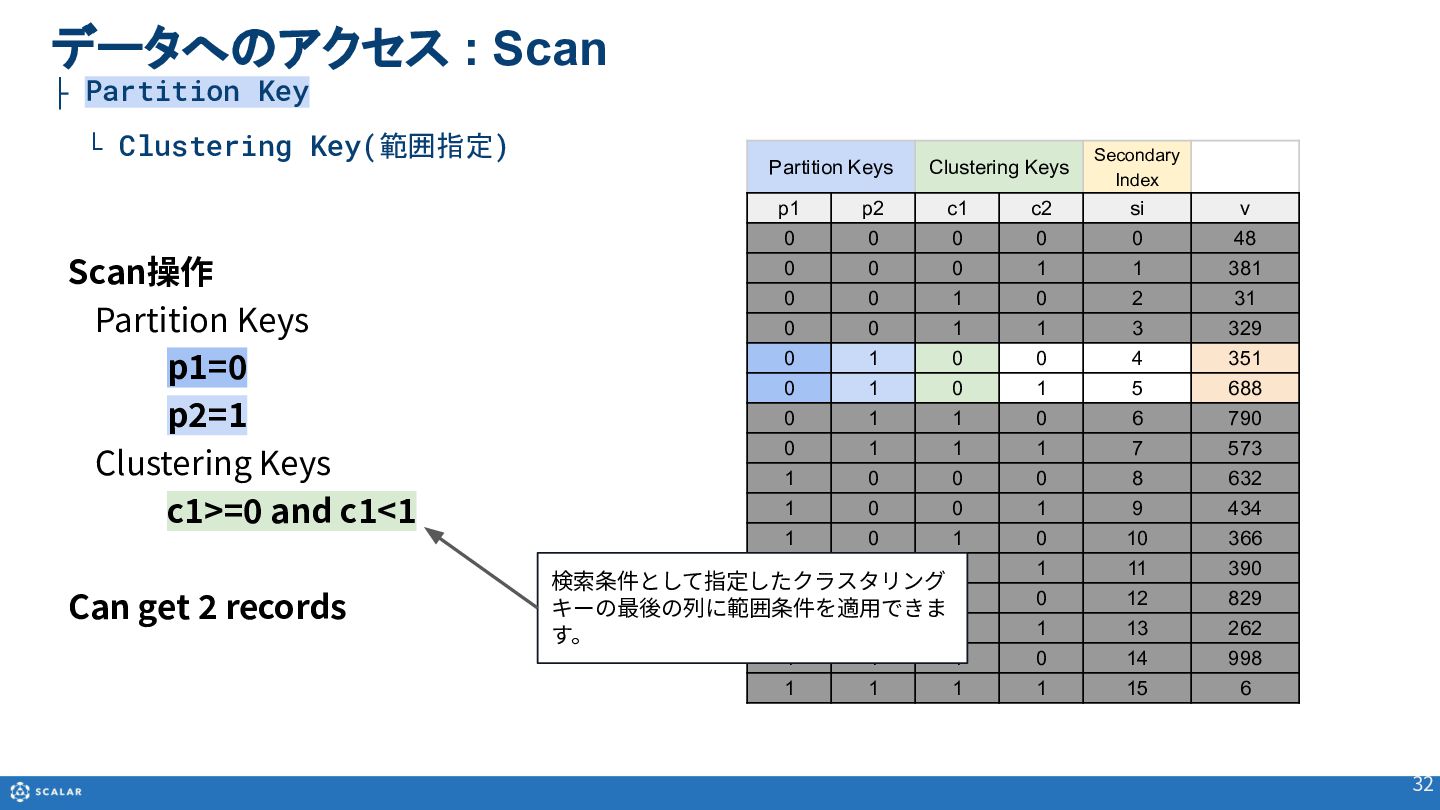
  25. 32 Scan操作 Partition Keys p1=0 p2=1 Clustering Keys c1>=0 and

    c1<1 Can get 2 records Partition Keys Clustering Keys Secondary Index p1 p2 c1 c2 si v 0 0 0 0 0 48 0 0 0 1 1 381 0 0 1 0 2 31 0 0 1 1 3 329 0 1 0 0 4 351 0 1 0 1 5 688 0 1 1 0 6 790 0 1 1 1 7 573 1 0 0 0 8 632 1 0 0 1 9 434 1 0 1 0 10 366 1 0 1 1 11 390 1 1 0 0 12 829 1 1 0 1 13 262 1 1 1 0 14 998 1 1 1 1 15 6 検索条件として指定したクラスタリング キーの最後の列に範囲条件を適⽤できま す。 データへのアクセス : Scan ├ Partition Key └ Clustering Key(範囲指定)
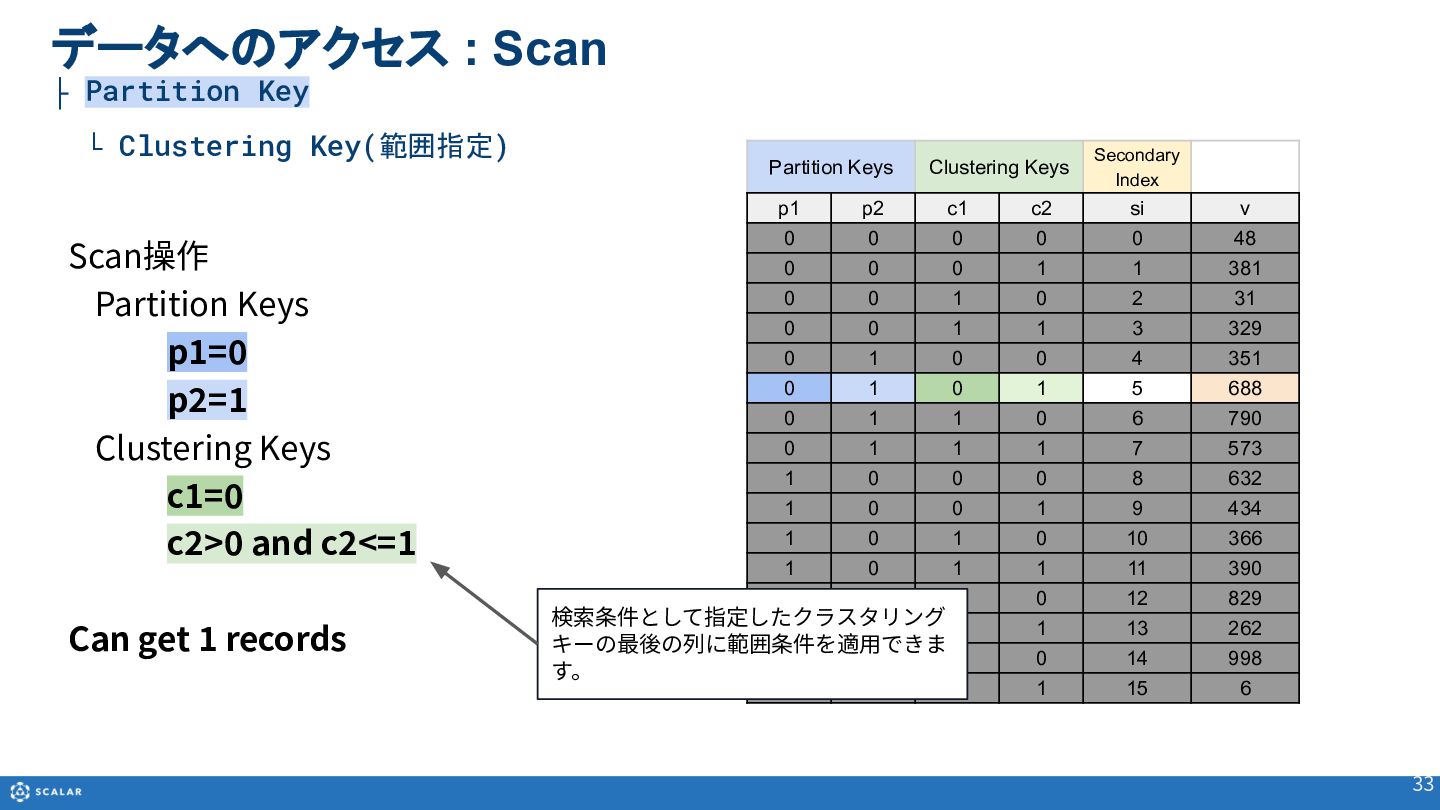
  26. 33 Scan操作 Partition Keys p1=0 p2=1 Clustering Keys c1=0 c2>0

    and c2<=1 Can get 1 records Partition Keys Clustering Keys Secondary Index p1 p2 c1 c2 si v 0 0 0 0 0 48 0 0 0 1 1 381 0 0 1 0 2 31 0 0 1 1 3 329 0 1 0 0 4 351 0 1 0 1 5 688 0 1 1 0 6 790 0 1 1 1 7 573 1 0 0 0 8 632 1 0 0 1 9 434 1 0 1 0 10 366 1 0 1 1 11 390 1 1 0 0 12 829 1 1 0 1 13 262 1 1 1 0 14 998 1 1 1 1 15 6 検索条件として指定したクラスタリング キーの最後の列に範囲条件を適⽤できま す。 データへのアクセス : Scan ├ Partition Key └ Clustering Key(範囲指定)
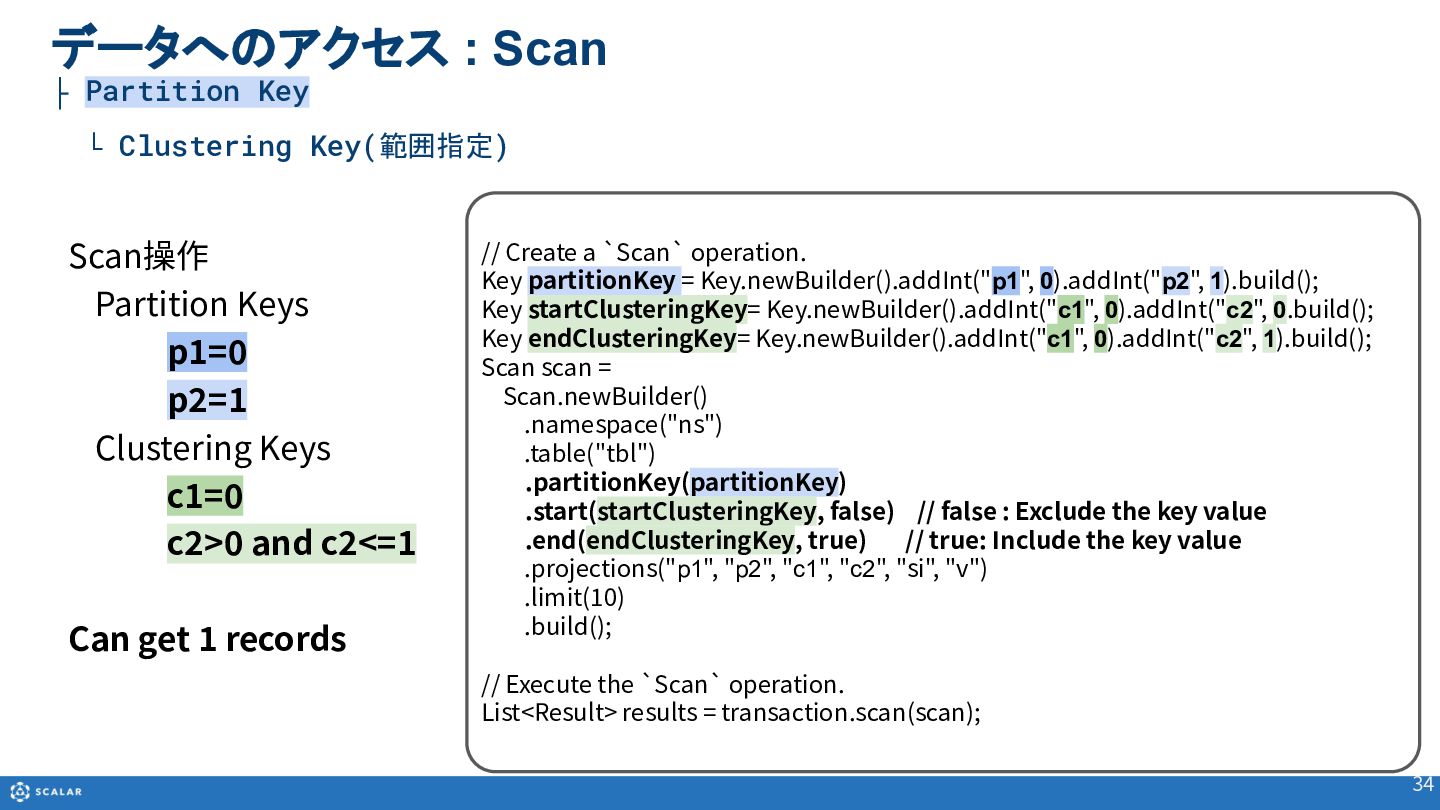
  27. 34 Scan操作 Partition Keys p1=0 p2=1 Clustering Keys c1=0 c2>0

    and c2<=1 Can get 1 records データへのアクセス : Scan ├ Partition Key └ Clustering Key(範囲指定) // Create a `Scan` operation. Key partitionKey = Key.newBuilder().addInt("p1", 0).addInt("p2", 1).build(); Key startClusteringKey= Key.newBuilder().addInt("c1", 0).addInt("c2", 0.build(); Key endClusteringKey= Key.newBuilder().addInt("c1", 0).addInt("c2", 1).build(); Scan scan = Scan.newBuilder() .namespace("ns") .table("tbl") .partitionKey(partitionKey) .start(startClusteringKey, false) // false : Exclude the key value .end(endClusteringKey, true) // true: Include the key value .projections("p1", "p2", "c1", "c2", "si", "v") .limit(10) .build(); // Execute the `Scan` operation. List<Result> results = transaction.scan(scan);
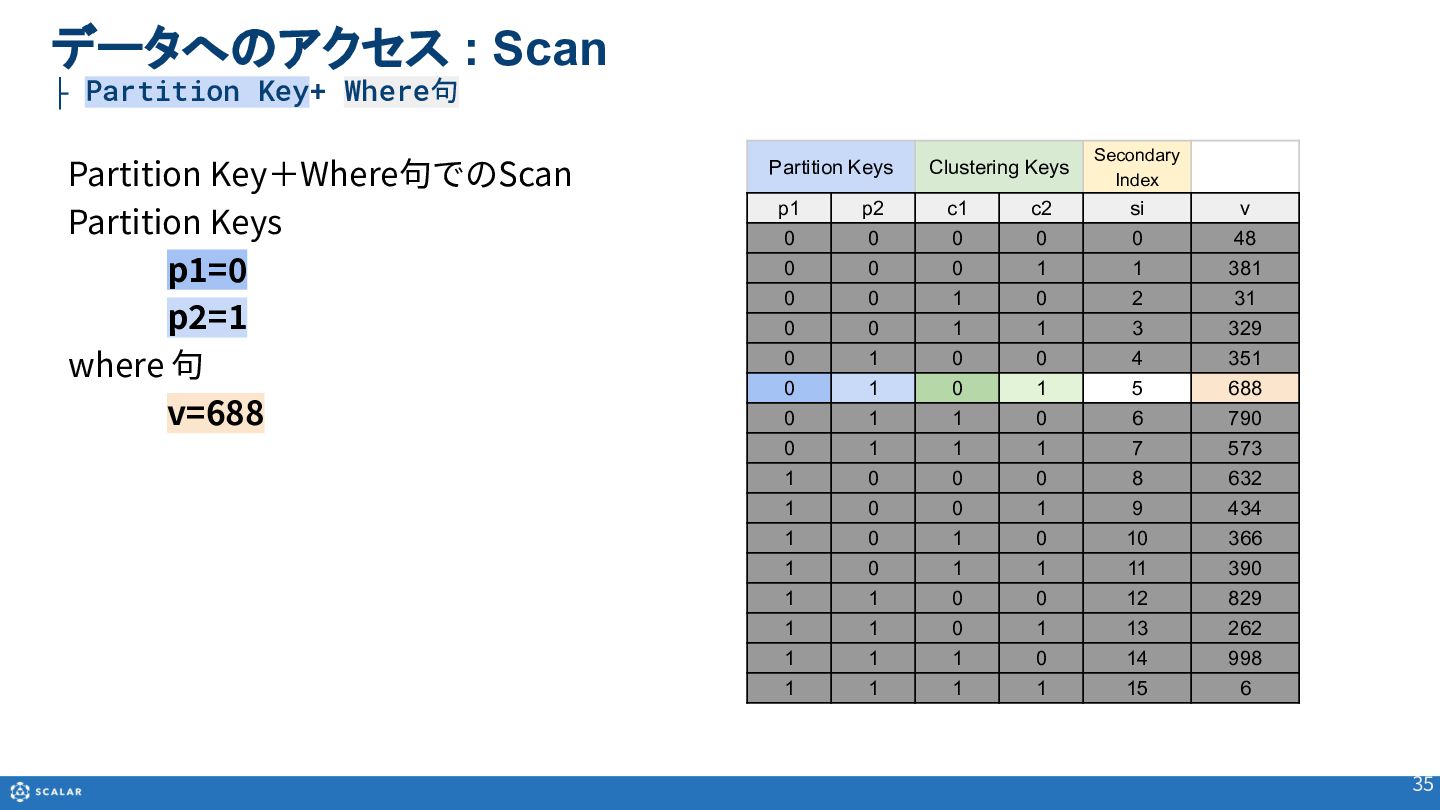
  28. 35 Partition Key+Where句でのScan Partition Keys p1=0 p2=1 where 句 v=688

    データへのアクセス : Scan ├ Partition Key+ Where句 Partition Keys Clustering Keys Secondary Index p1 p2 c1 c2 si v 0 0 0 0 0 48 0 0 0 1 1 381 0 0 1 0 2 31 0 0 1 1 3 329 0 1 0 0 4 351 0 1 0 1 5 688 0 1 1 0 6 790 0 1 1 1 7 573 1 0 0 0 8 632 1 0 0 1 9 434 1 0 1 0 10 366 1 0 1 1 11 390 1 1 0 0 12 829 1 1 0 1 13 262 1 1 1 0 14 998 1 1 1 1 15 6
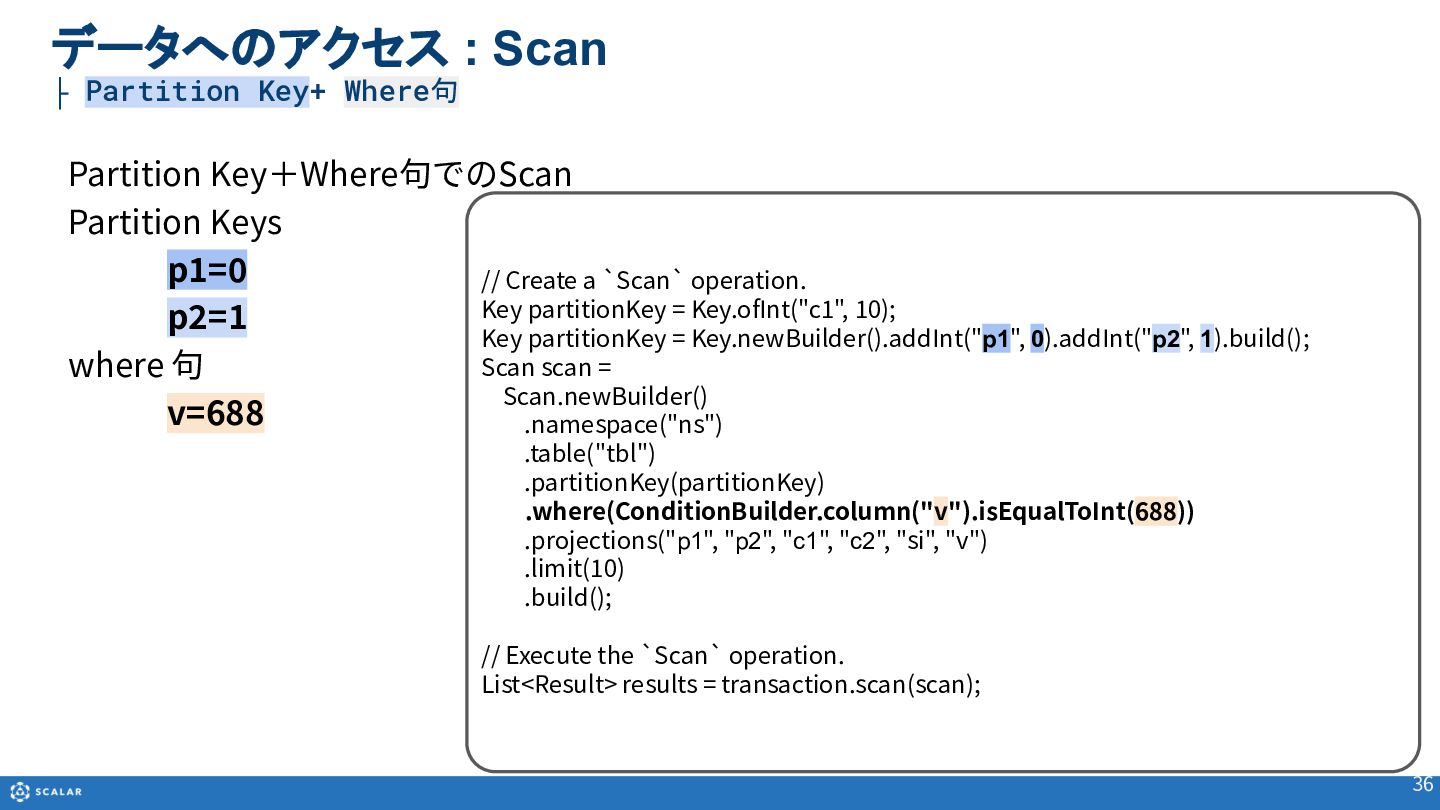
  29. 36 Partition Key+Where句でのScan Partition Keys p1=0 p2=1 where 句 v=688

    データへのアクセス : Scan ├ Partition Key+ Where句 // Create a `Scan` operation. Key partitionKey = Key.ofInt("c1", 10); Key partitionKey = Key.newBuilder().addInt("p1", 0).addInt("p2", 1).build(); Scan scan = Scan.newBuilder() .namespace("ns") .table("tbl") .partitionKey(partitionKey) .where(ConditionBuilder.column("v").isEqualToInt(688)) .projections("p1", "p2", "c1", "c2", "si", "v") .limit(10) .build(); // Execute the `Scan` operation. List<Result> results = transaction.scan(scan);
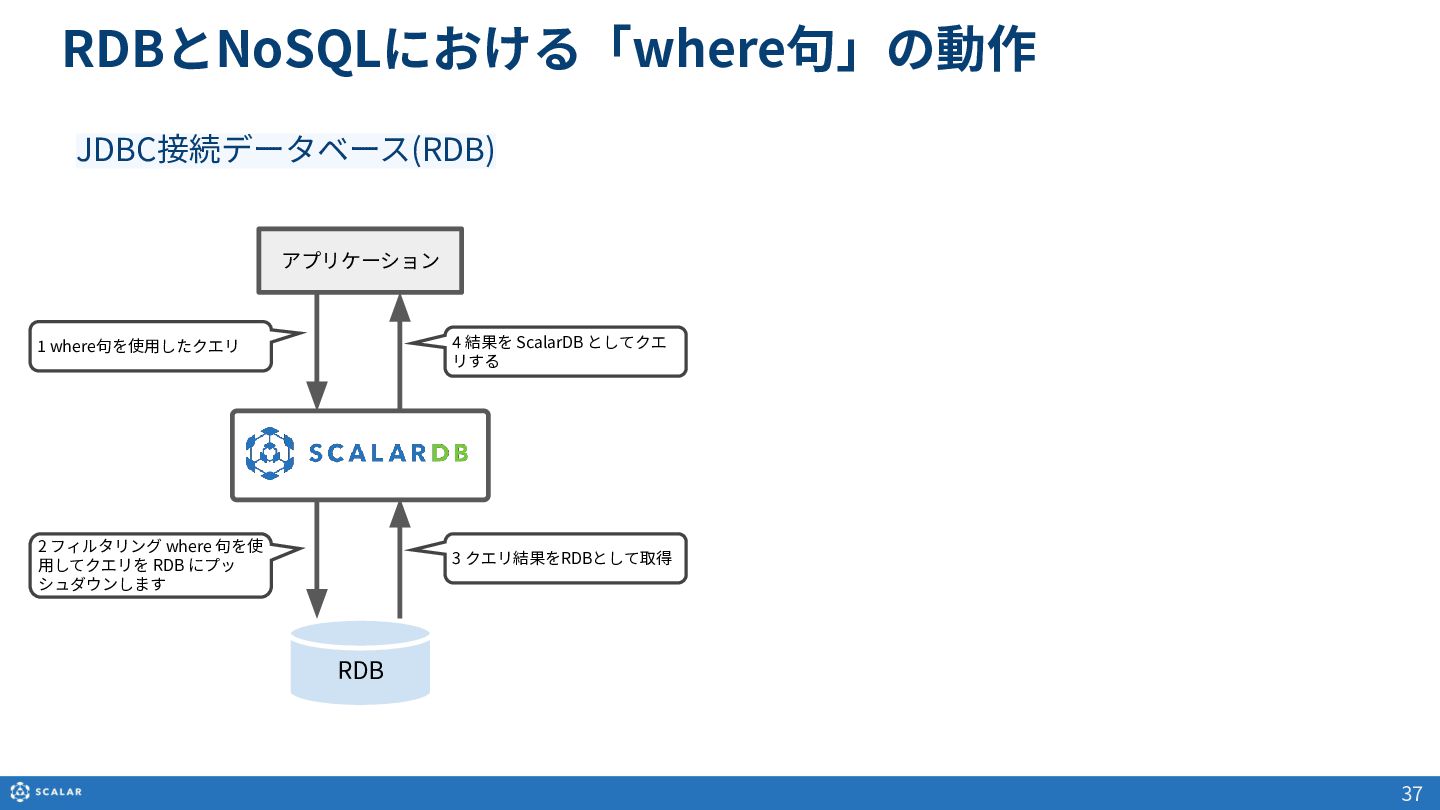
  30. RDBとNoSQLにおける「where句」の動作 37 JDBC接続データベース(RDB) RDB アプリケーション 1 where句を使⽤したクエリ 2 フィルタリング where

    句を使 ⽤してクエリを RDB にプッ シュダウンします 3 クエリ結果をRDBとして取得 4 結果を ScalarDB としてクエ リする
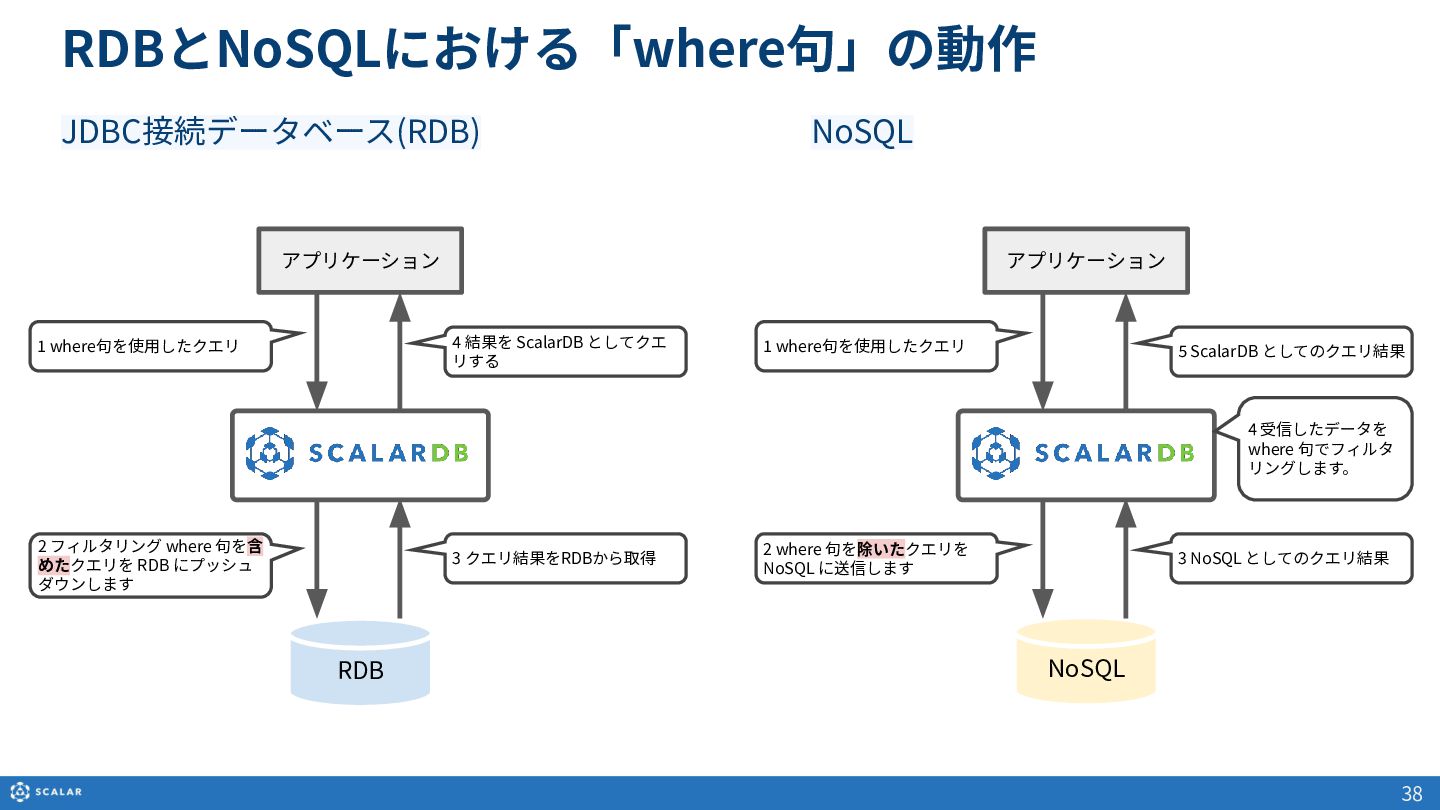
  31. 38 NoSQL アプリケーション 1 where句を使⽤したクエリ 2 where 句を除いたクエリを NoSQL に送信します

    3 NoSQL としてのクエリ結果 5 ScalarDB としてのクエリ結果 4 受信したデータを where 句でフィルタ リングします。 RDB アプリケーション 1 where句を使⽤したクエリ 2 フィルタリング where 句を含 めたクエリを RDB にプッシュ ダウンします 3 クエリ結果をRDBから取得 4 結果を ScalarDB としてクエ リする NoSQL JDBC接続データベース(RDB) RDBとNoSQLにおける「where句」の動作
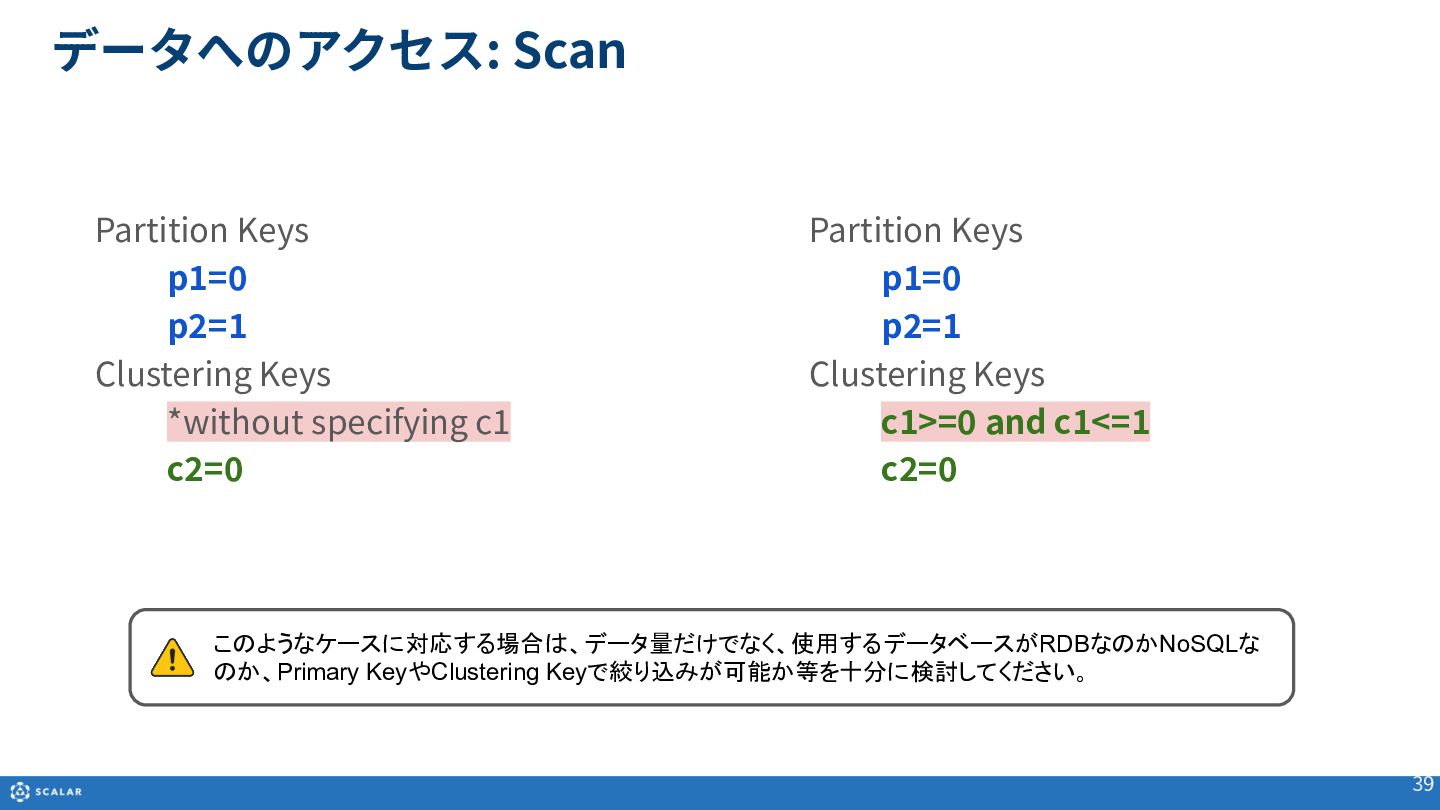
  32. データへのアクセス: Scan 39 Partition Keys p1=0 p2=1 Clustering Keys *without

    specifying c1 c2=0 Partition Keys p1=0 p2=1 Clustering Keys c1>=0 and c1<=1 c2=0 このようなケースに対応する場合は、データ量だけでなく、使用するデータベースがRDBなのかNoSQLな のか、Primary KeyやClustering Keyで絞り込みが可能か等を十分に検討してください。
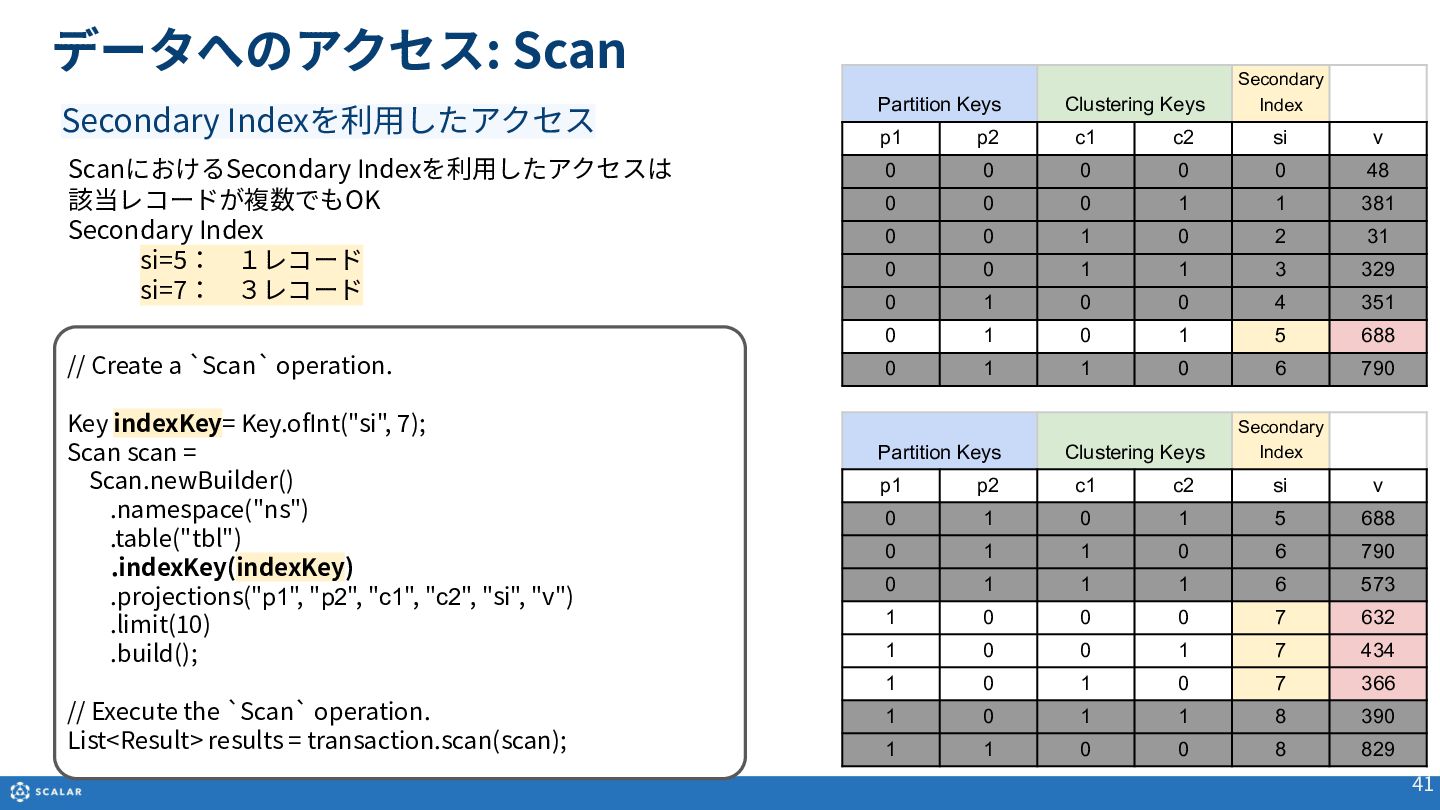
  33. データへのアクセス: Scan 41 ScanにおけるSecondary Indexを利⽤したアクセスは 該当レコードが複数でもOK Secondary Index si=5: 1レコード si=7: 3レコード

    Secondary Indexを利⽤したアクセス Partition Keys Clustering Keys Secondary Index p1 p2 c1 c2 si v 0 1 0 1 5 688 0 1 1 0 6 790 0 1 1 1 6 573 1 0 0 0 7 632 1 0 0 1 7 434 1 0 1 0 7 366 1 0 1 1 8 390 1 1 0 0 8 829 // Create a `Scan` operation. Key indexKey= Key.ofInt("si", 7); Scan scan = Scan.newBuilder() .namespace("ns") .table("tbl") .indexKey(indexKey) .projections("p1", "p2", "c1", "c2", "si", "v") .limit(10) .build(); // Execute the `Scan` operation. List<Result> results = transaction.scan(scan); Partition Keys Clustering Keys Secondary Index p1 p2 c1 c2 si v 0 0 0 0 0 48 0 0 0 1 1 381 0 0 1 0 2 31 0 0 1 1 3 329 0 1 0 0 4 351 0 1 0 1 5 688 0 1 1 0 6 790
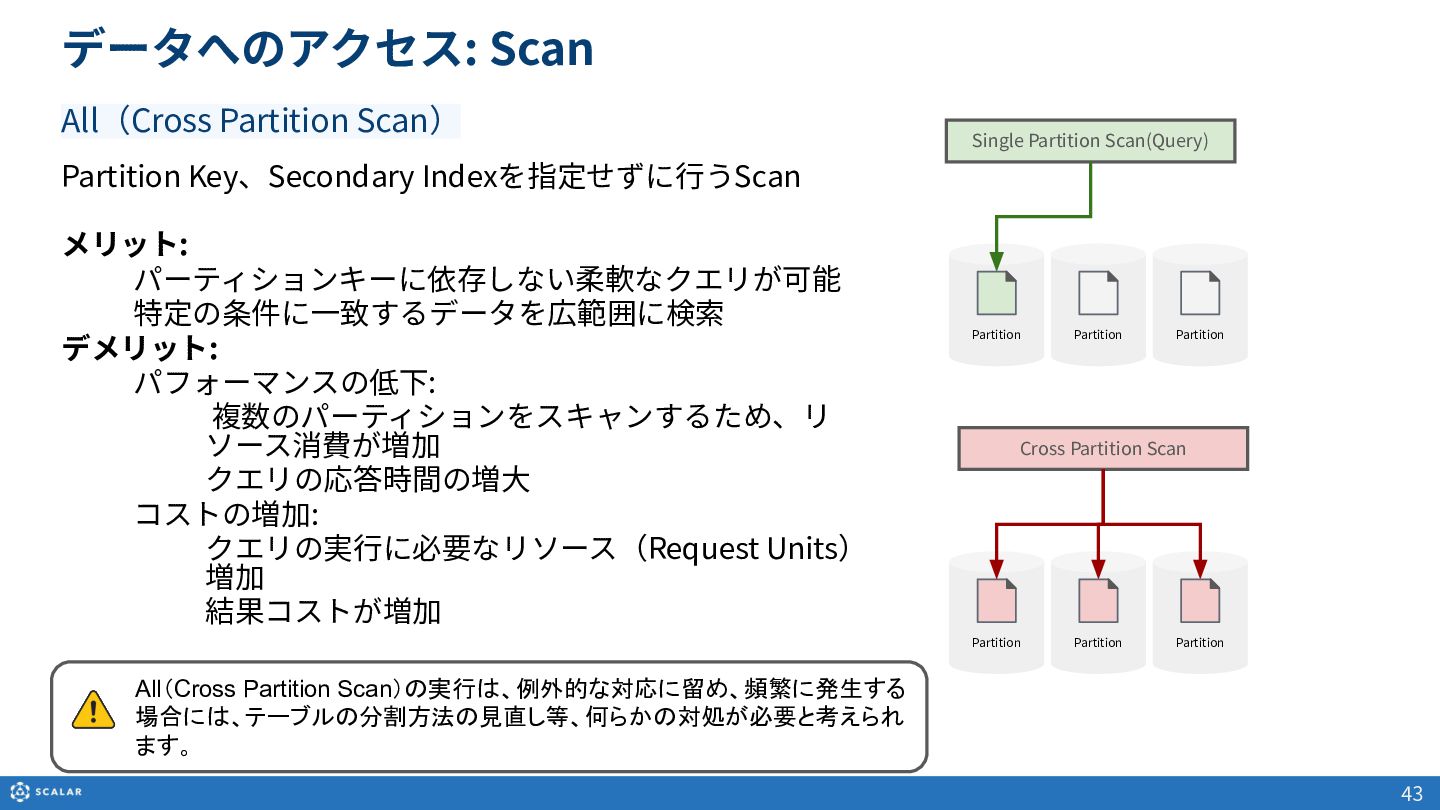
  34. データへのアクセス: Scan 43 All(Cross Partition Scan) Partition Key、Secondary Indexを指定せずに⾏うScan メリット:

    パーティションキーに依存しない柔軟なクエリが可能 特定の条件に⼀致するデータを広範囲に検索 デメリット: パフォーマンスの低下: 複数のパーティションをスキャンするため、リ ソース消費が増加 クエリの応答時間の増⼤ コストの増加: クエリの実⾏に必要なリソース(Request Units) 増加 結果コストが増加 Partition Partition Partition Partition Single Partition Scan(Query) Partition Cross Partition Scan Partition All(Cross Partition Scan)の実行は、例外的な対応に留め、頻繁に発生する 場合には、テーブルの分割方法の見直し等、何らかの対処が必要と考えられ ます。
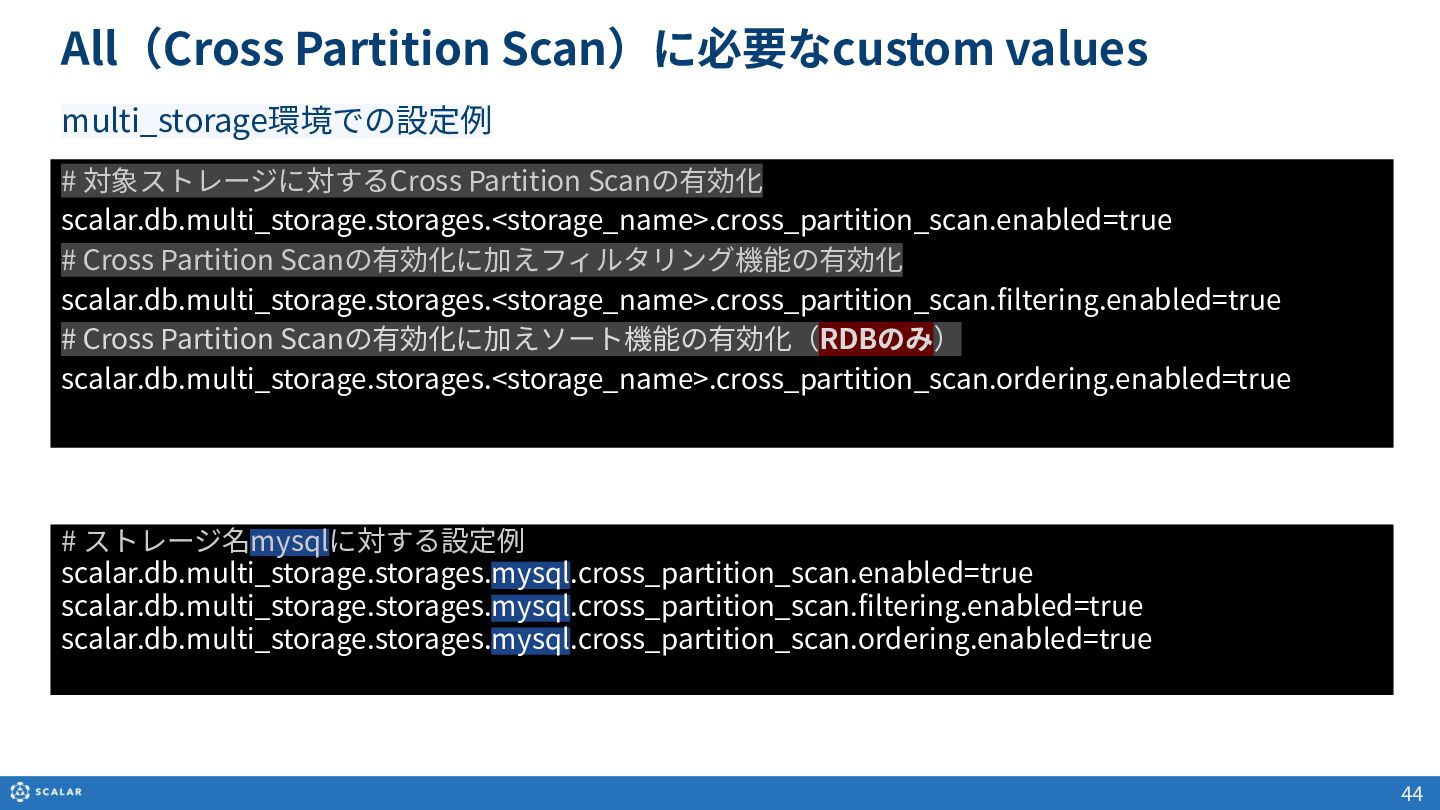
  35. 44 All(Cross Partition Scan)に必要なcustom values # 対象ストレージに対するCross Partition Scanの有効化 scalar.db.multi_storage.storages.<storage_name>.cross_partition_scan.enabled=true

    # Cross Partition Scanの有効化に加えフィルタリング機能の有効化 scalar.db.multi_storage.storages.<storage_name>.cross_partition_scan.filtering.enabled=true # Cross Partition Scanの有効化に加えソート機能の有効化(RDBのみ) scalar.db.multi_storage.storages.<storage_name>.cross_partition_scan.ordering.enabled=true multi_storage環境での設定例 # ストレージ名mysqlに対する設定例 scalar.db.multi_storage.storages.mysql.cross_partition_scan.enabled=true scalar.db.multi_storage.storages.mysql.cross_partition_scan.filtering.enabled=true scalar.db.multi_storage.storages.mysql.cross_partition_scan.ordering.enabled=true
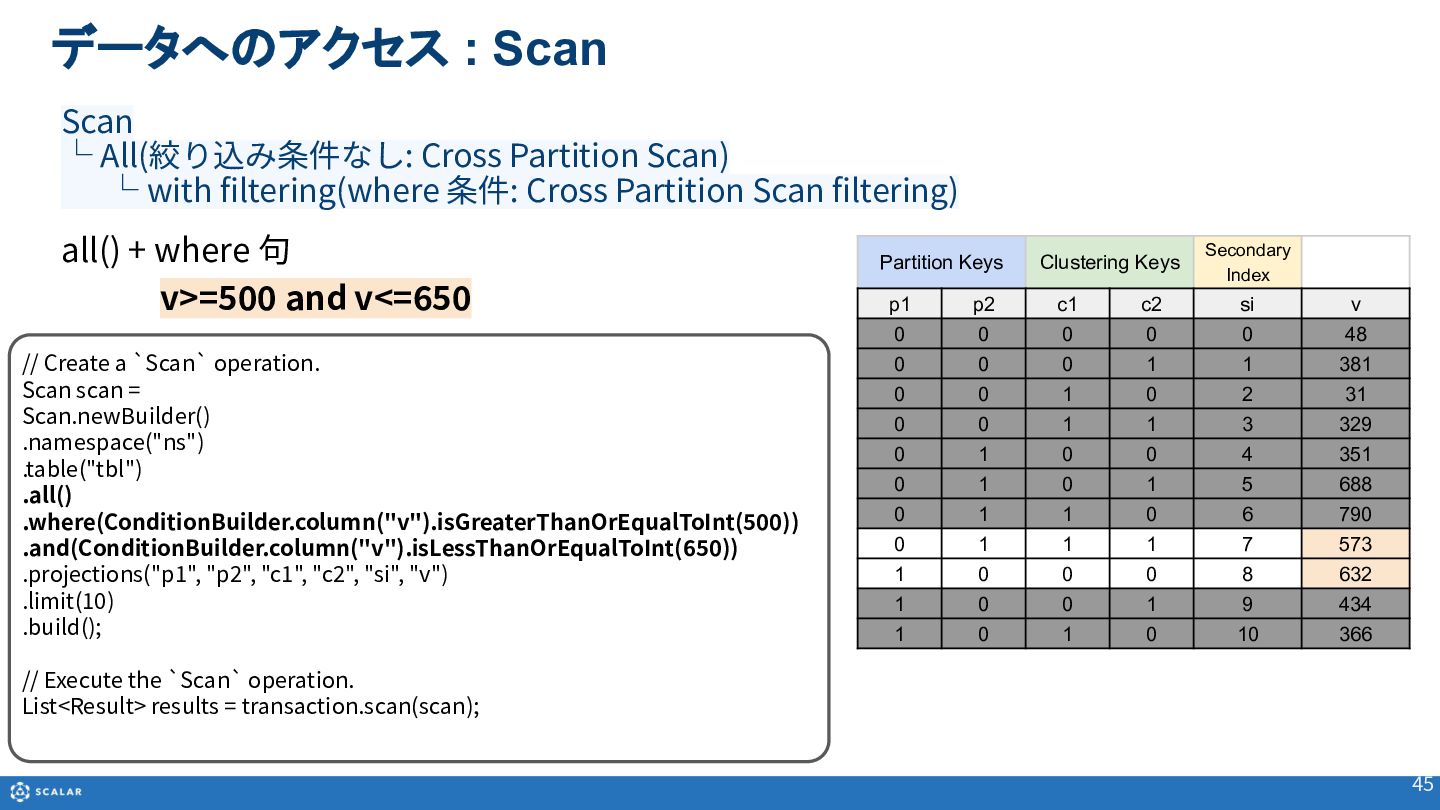
  36. all() + where 句 v>=500 and v<=650 45 データへのアクセス :

    Scan Partition Keys Clustering Keys Secondary Index p1 p2 c1 c2 si v 0 0 0 0 0 48 0 0 0 1 1 381 0 0 1 0 2 31 0 0 1 1 3 329 0 1 0 0 4 351 0 1 0 1 5 688 0 1 1 0 6 790 0 1 1 1 7 573 1 0 0 0 8 632 1 0 0 1 9 434 1 0 1 0 10 366 Scan └ All(絞り込み条件なし: Cross Partition Scan)  └ with filtering(where 条件: Cross Partition Scan filtering) // Create a `Scan` operation. Scan scan = Scan.newBuilder() .namespace("ns") .table("tbl") .all() .where(ConditionBuilder.column("v").isGreaterThanOrEqualToInt(500)) .and(ConditionBuilder.column("v").isLessThanOrEqualToInt(650)) .projections("p1", "p2", "c1", "c2", "si", "v") .limit(10) .build(); // Execute the `Scan` operation. List<Result> results = transaction.scan(scan);
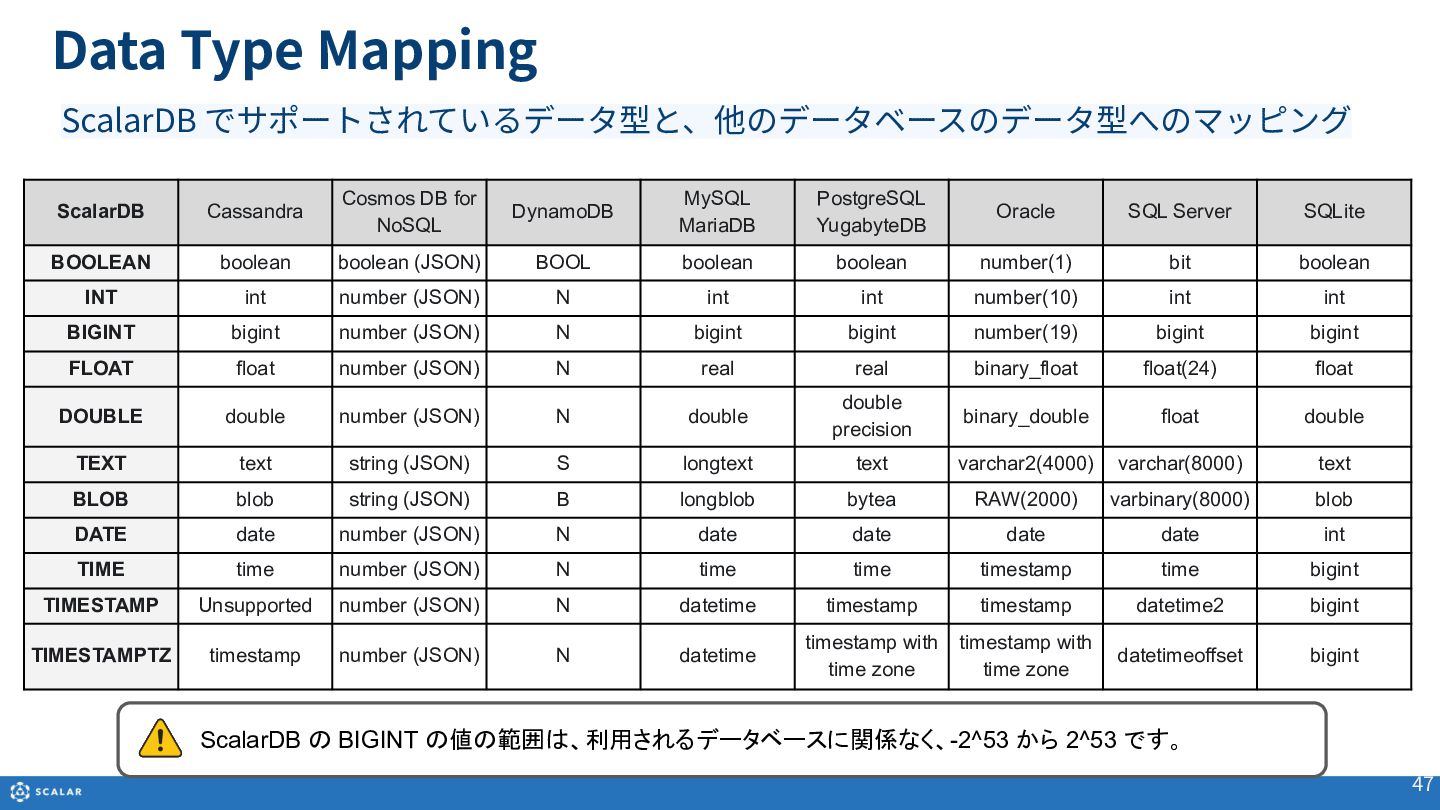
  37. Data Type Mapping 47 ScalarDB でサポートされているデータ型と、他のデータベースのデータ型へのマッピング ScalarDB Cassandra Cosmos DB

    for NoSQL DynamoDB MySQL MariaDB PostgreSQL YugabyteDB Oracle SQL Server SQLite BOOLEAN boolean boolean (JSON) BOOL boolean boolean number(1) bit boolean INT int number (JSON) N int int number(10) int int BIGINT bigint number (JSON) N bigint bigint number(19) bigint bigint FLOAT float number (JSON) N real real binary_float float(24) float DOUBLE double number (JSON) N double double precision binary_double float double TEXT text string (JSON) S longtext text varchar2(4000) varchar(8000) text BLOB blob string (JSON) B longblob bytea RAW(2000) varbinary(8000) blob DATE date number (JSON) N date date date date int TIME time number (JSON) N time time timestamp time bigint TIMESTAMP Unsupported number (JSON) N datetime timestamp timestamp datetime2 bigint TIMESTAMPTZ timestamp number (JSON) N datetime timestamp with time zone timestamp with time zone datetimeoffset bigint ScalarDB の BIGINT の値の範囲は、利用されるデータベースに関係なく、-2^53 から 2^53 です。
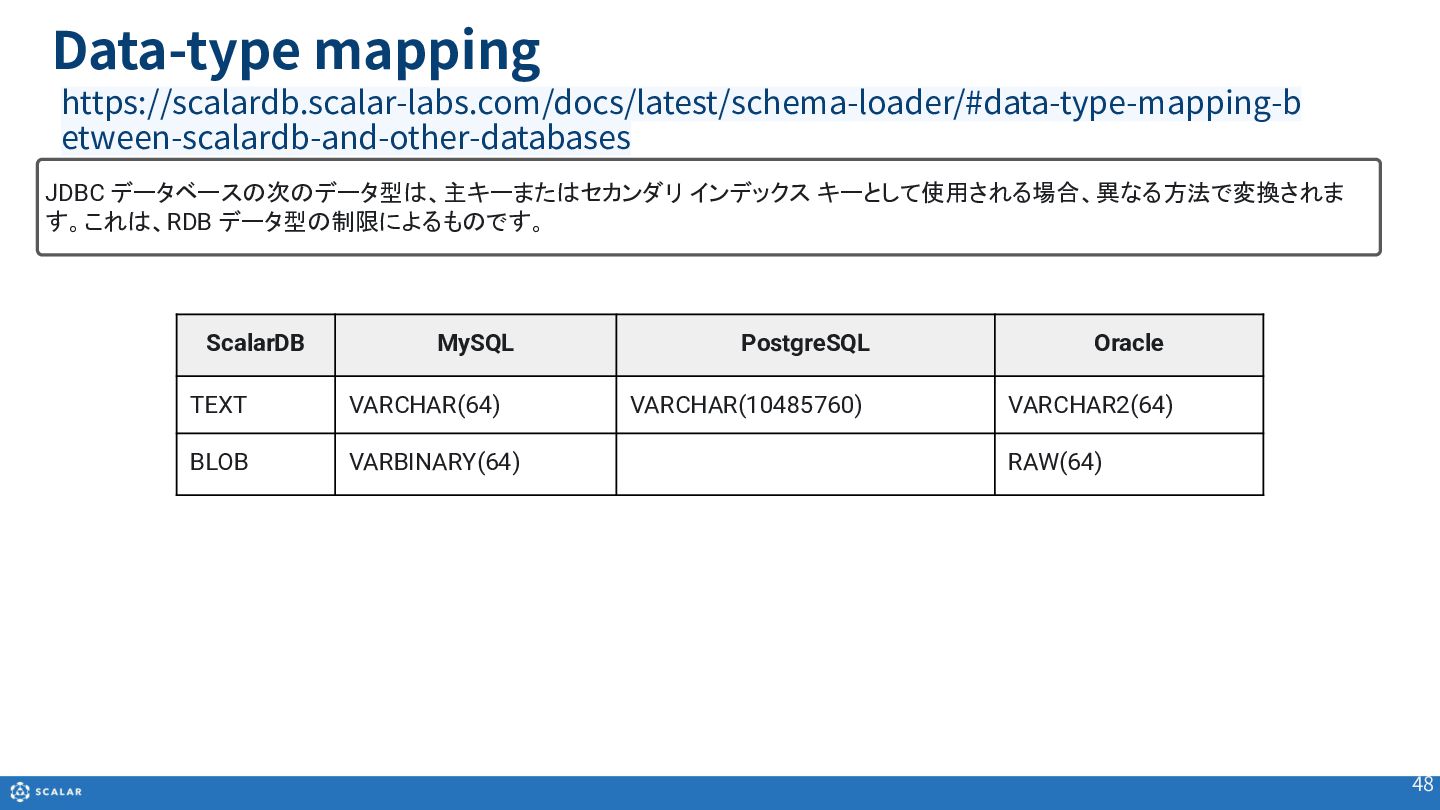
  38. Data-type mapping 48 ScalarDB MySQL PostgreSQL Oracle TEXT VARCHAR(64) VARCHAR(10485760)

    VARCHAR2(64) BLOB VARBINARY(64) RAW(64) https://scalardb.scalar-labs.com/docs/latest/schema-loader/#data-type-mapping-b etween-scalardb-and-other-databases JDBC データベースの次のデータ型は、主キーまたはセカンダリ インデックス キーとして使用される場合、異なる方法で変換されま す。これは、RDB データ型の制限によるものです。
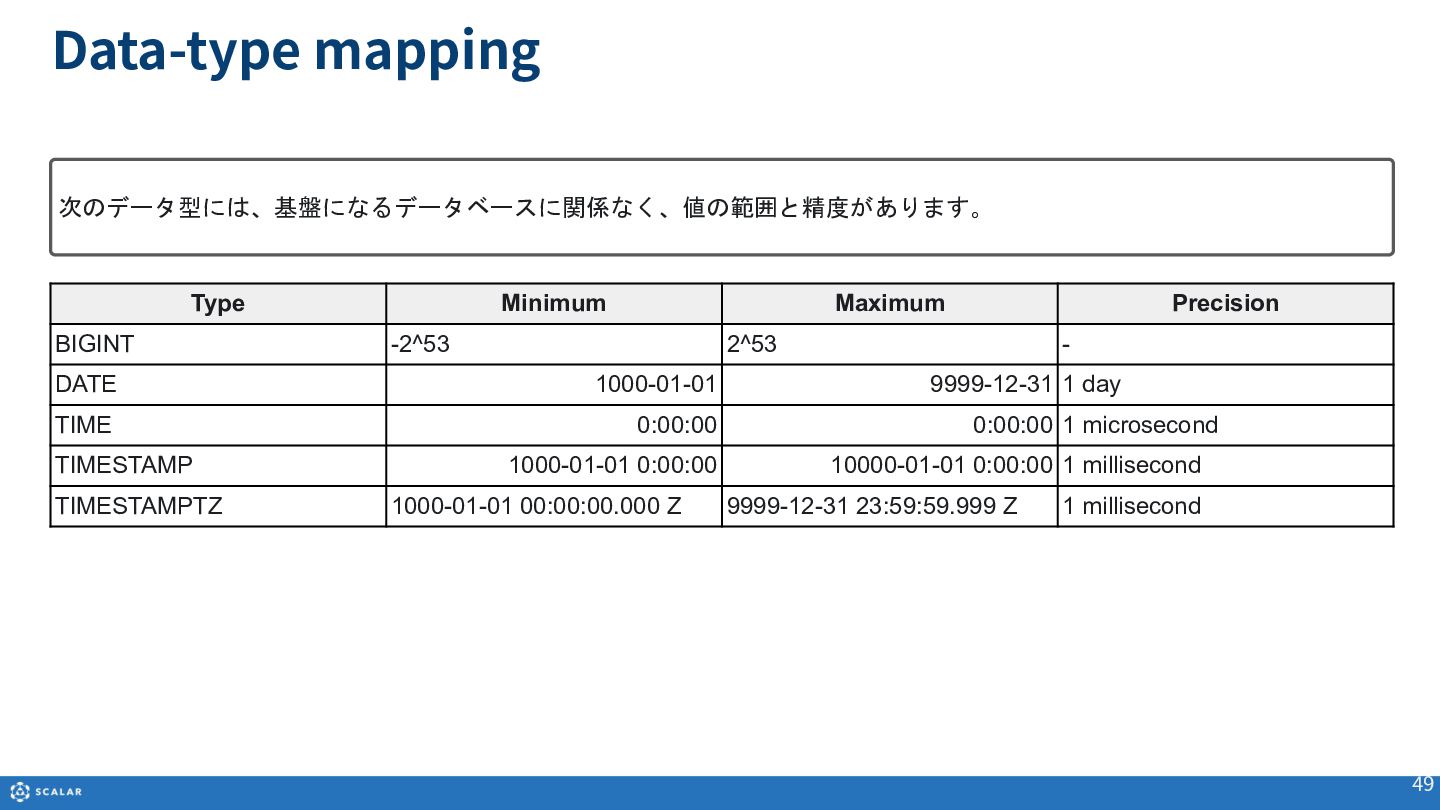
  39. Data-type mapping 49 Type Minimum Maximum Precision BIGINT -2^53 2^53

    - DATE 1000-01-01 9999-12-31 1 day TIME 0:00:00 0:00:00 1 microsecond TIMESTAMP 1000-01-01 0:00:00 10000-01-01 0:00:00 1 millisecond TIMESTAMPTZ 1000-01-01 00:00:00.000 Z 9999-12-31 23:59:59.999 Z 1 millisecond 次のデータ型には、基盤になるデータベースに関係なく、値の範囲と精度があります。