Upgrade to Pro
— share decks privately, control downloads, hide ads and more …
Speaker Deck
Sign up for free
Menu
Search
Features
All features
Private URLs
Password Protection
Custom URLS
Scheduled publishing
Remove Branding
Restrict embedding
Deck Collections
Notes
Features
All features
Private URLs
Password Protection
Custom URLS
Scheduled publishing
Remove Branding
Restrict embedding
Deck Collections
Notes
Explore
Featured decks
Featured speakers
Programming
Technology
Storyboards
Explore
Featured decks
Featured speakers
Programming
Technology
Storyboards
Pricing
Search
Sign in
Sign up for free
Getting Started with jQuery Mobile
Search
Brad Broulik
July 18, 2012
Technology
1.6k
3
Share
Embed
Copy iframe code
Copy JS code
Copy link
Start on current slide
Getting Started with jQuery Mobile
Brad Broulik
July 18, 2012
More Decks by Brad Broulik
See All by Brad Broulik
The Strangest Secret for the Perfect Team
bbroulik
0
590
Feature Flags
bbroulik
1
630
Swift Performance Tips for Busy iOS Developers
bbroulik
0
1.8k
Responsive Web Development Training
bbroulik
0
220
Freaky Fast Delivery - Responsive Performance Strategies
bbroulik
1
510
UI Testing iOS and Android Apps
bbroulik
0
620
Apple TV Developer Kit
bbroulik
1
550
Building Adaptive iOS & Android Apps
bbroulik
0
470
Responsive Web Development Patterns
bbroulik
1
410
Other Decks in Technology
See All in Technology
分析AIエージェントを育てる、動く環境を育てる
codatum
1
1.1k
Webの常識が通じないHTMLメールのダークモード
teamlab
PRO
0
120
Metadata - Section 1: HTML Basics
mohab1
0
110
AI導入は済んだ。次は統制を作り替える番だ_AI×開発組織 Summit 2026
techtekt
PRO
0
200
Browser Spec: Testing Hotwire with Ruby
takahashim
1
120
「Docker Desktop不要の時代」は 来たのか?
ueponx
0
750
LambdaWebFunctionsを試してみた / exploring-lambda-web-functions
koukihosaka
1
320
パスキーの自動テストはどこまでいけるのか
teamlab
PRO
0
180
AI コーディングと人間の認知スループット / CTO Night & Day 2026 Morning Session / AI Coding and Human Cognitive Throughput
prog893
3
890
Optunaの最新リリースv5.0について
pfn
PRO
0
110
日本語に強いオープンな大規模言語モデル「LLM-jp」
odashi
4
1.1k
「事実」を「計測」して、「解釈」する 〜AWS Lambdaのメモリ最適解の見つけ方〜
maimyyym
0
170
Featured
See All Featured
Designing for Performance
lara
612
70k
WENDY [Excerpt]
tessaabrams
14
40k
Optimizing for Happiness
mojombo
378
71k
GraphQLの誤解/rethinking-graphql
sonatard
75
12k
Producing Creativity
orderedlist
PRO
348
41k
The Language of Interfaces
destraynor
162
27k
Exploring the Power of Turbo Streams & Action Cable | RailsConf2023
kevinliebholz
37
6.6k
It's Worth the Effort
3n
188
29k
YesSQL, Process and Tooling at Scale
rocio
174
15k
Highjacked: Video Game Concept Design
rkendrick25
PRO
1
480
Stewardship and Sustainability of Urban and Community Forests
pwiseman
0
550
The Spectacular Lies of Maps
axbom
PRO
1
1.1k
Transcript
Getting started with jQuery Mobile @BradBroulik BradBroulik.blogspot.com Slides: bit.ly/codecamp-jqm
Follow along: bit.ly/codecamp-jqm http://farm6.staticflickr.com/5262/5565984041_8e335f0ec0.jpg
Sent text message Used application Used browser Accessed social networking
site Played games Listened to music 28.7% 33.7% 39.2% 52.1% 54.2% 75.9% Top Mobile Activities Mobile Content Usage (U.S.) 3 Month Avg. Ending Nov. 2012 vs. 3 Month Avg. Ending Aug. 2012 Source: comScore MobiLens
Facebook’s top mobile client is mobile web http://www.mobify.com/blog/mobile-stats-57-of-mobile-posting-on-facebook-from-mobile-web/
Twitter’s top mobile client is also mobile web Twitter via
http://www.lukew.com/ff/entry.asp?1413
“A UI framework for building cross-platform Mobile Web applications” “With
a single jQuery Mobile codebase we can create a unified user experience for nearly all mobile devices” jQ uery M obile 1.3
Simplify the journey http://i132.photobucket.com/albums/q24/BluSky07/MOBILE%20GAMES%202/OregonTrailv321.png
One codebase... CSS3
no device customer left behind iOS Android Blackberry Windows WebOS
Meego Kindle Nook Desktop Bada
Simplified Markup-Driven Development <div data-role="page"> <div data-role="header"> <h1>Page Header</h1> </div>
<div data-role="content"> <p>Hello jQuery Mobile!</p> </div> <div data-role="footer"> <h4>Page Footer</h4> </div> </div>
Unified User Interface
A-Grade experience C-Grade experience Progressive Enhancement
Responsive Design
Portrait Landscape Responsive Forms
Default Theme Alternate Theme Themable Styling
Accessible
None
http://www.flickr.com/photos/wongdood/3379046643/sizes/z/in/photostream/ Getting Started in 60 seconds
Build a page #1 <h2>Movies</h2> <ul> <li><a href="#">Kung Fu Panda</a></li>
<li><a href="#">Pirates</a></li> <li><a href="#">X-Men<a><li> </ul>
Add jQuery Mobile #2 <head> <title>Step Two - Add jQuery
Mobile</title> <meta name="viewport" content="width=device-width, initial-scale=1"> <link rel="stylesheet" href="jquery.mobile.min.css" /> <script src="jquery.min.js"></script> <script src="jquery.mobile.min.js"></script> </head> CDN repository or download via jquerymobile.com/download
Enhance: data- attributes #3 <div data-role="header"> <h2>Movies</h2> </div> <ul data-role="listview">
<li><a href="#">Kung Fu Panda</a></li> <li><a href="#">Pirates</a></li> <li><a href="#">X-Men></a><li> </ul>
More enhancements... <div data-role="content"> <ul data-role="listview" data-inset="true"> <li data-role="list-divider">Now Playing</li>
<li> <a href="#"> <img src="images/kungfupanda2.jpg" /> <h3>Kung Fu Panda</h3> <p>Rated: PG</p> <p>Runtime: 95 min.</p> </a> </li> </ul> </div>
Add theming and branding <div data-role="header" data-theme="b"> <h1>Movies</h1> </div> <div
data-role="content"> <ul data-role="listview" data-theme="a"> <li data-role="list-divider">Now Playing</li> <li> <a href="#"> <img src="images/kungfupanda2.jpg" /> <h3>Kung Fu Panda</h3> <p>Rated: PG</p> <p>Runtime: 95 min.</p> </a> </li> </ul> </div>
ThemeRoller http://jquerymobile.com/themeroller/
Single vs multi-page template <body> <!-- page #1 --> <div
data-role="page" id="home" data-title="Welcome"> <div data-role="header"> <h1>Multi-Page</h1> </div> <a href="#contact-info" data-role="button">Contact Us</a> </div> <!-- page #2 --> <div data-role="page" id="contact-info" data-title="Contacts"> <div data-role="header"> <h1>Contact Us</h1> </div> <div data-role="content"> Contact information... </div> </div> </body>
Single-page + prefetch <body> <div data-role="header"> <h1>Prefetch</h1> </div> <a href="contact.html"
data-prefetch="true">Contact Us</a> </body>
Ajaxified Navigation
Step 1, tap the button to navigate to another page
Ajaxified Navigation
Step 2, framework loads the next page side-by-side Ajaxified Navigation
Ajaxified Navigation Step 3, framework transitions to next page
Ajaxified Navigation Step 4, transition complete
Transitions <a href="#" data-role="button" data-transition="slide">slide</a>
Popups Usecases: •alerts •dialogs •tooltips •menus •forms •anything... <div data-role="popup"
id="popupWarning"> <div data-role="header" class="ui-corner-top"> <h1>Warning</h1> </div> <div data-role="content" class="ui-corner-bottom"> <p>No internet connection. Please try again later.</p> <a href="#" data-role="button" data-rel="back">OK</a> </div> </div> <a href="#popupWarning" data-rel="popup" data-role="button">Popup</a> $('#popupWarning').popup( "open" ); // Or dynamically open popup
<div data-role="footer" data-position="fixed"> <div data-role="navbar"> <ul> <li><a href="#" id="home" data-icon="home"
class="ui-btn-active">Home</a></li> <li><a href="#" id="movies" data-icon="star">Movies</a></li> <li><a href="#" id="theatres" data-icon="grid">Theatres</a></li> </ul> </div> </div> Tab bars icon name standard icons custom icons
Segmented Control <div class="segmented-control ui-bar-d"> <div data-role="controlgroup" data-type="horizontal"> <a href="#in-theatres"
data-role="button" data-theme="b">In Theatres</a> <a href="#coming-soon" data-role="button" data-theme="d">Coming Soon</a> <a href="#top-rated" data-role="button" data-theme="d">Top Rated</a> </div> </div> <style> .segmented-control { text-align:center;} .segmented-control .ui-controlgroup { margin: 0.2em; } </style>
Keyboard sensitive input types
Radio & Checkbox
Slider & Switch
Grids
Gradients
Themes: defaults & inheritance page theme set to “e”
Events Diagram mobileinit $(document).on("mobileinit", function(){ $.mobile.defaultPageTransition = "slide"; $.mobile.ajaxEnabled =
false; }); pageinit $(document).on("pageinit", "#my-page", function(e) { // Setup event handler for login button $("#loginButton").on("click", function (e) { alert("Login clicked..."); }); });
<input type=button id="changePage" value="Open dynamic page"> <script> $( "#changePage" ).on(
"click", function() { // Create page markup var newPage = $("<div data-role=header><h1>Hi</h1></div>Hello Again!"); // Add page to page container newPage.appendTo( $.mobile.pageContainer ); // Enhance and open new page $.mobile.changePage( newPage ); }); </script> $.mobile API
Panels (sliding drawer) jQ uery M obile 1.3
Responsive tables jQ uery M obile 1.3
Responsive tables jQ uery M obile 1.3
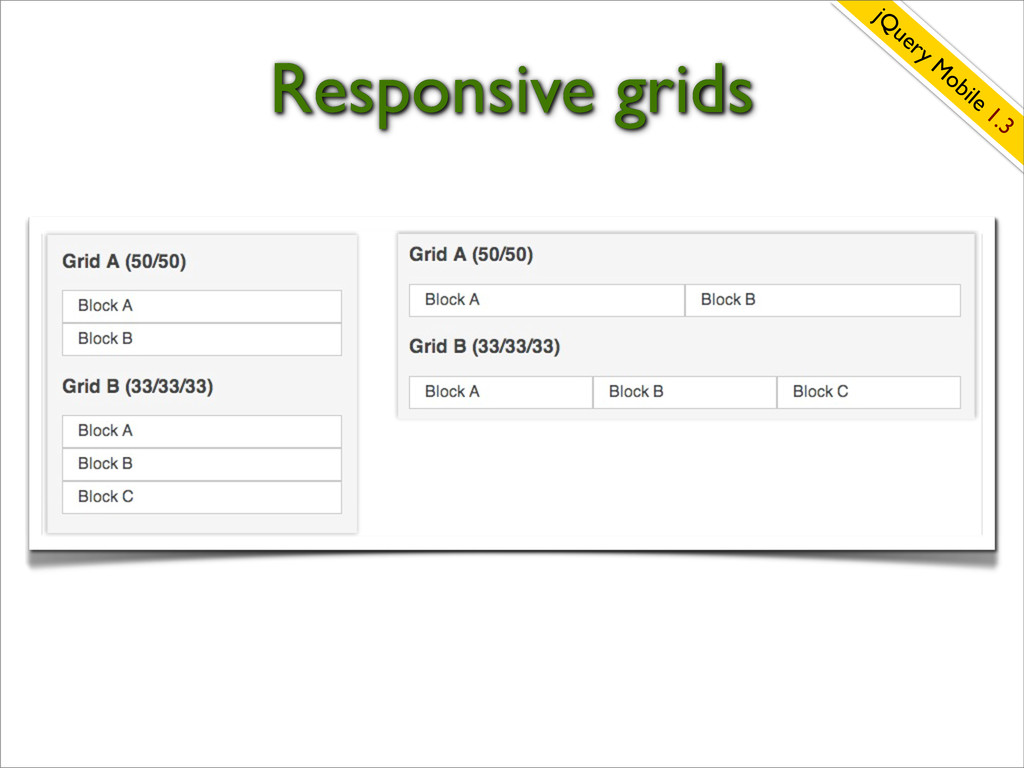
Responsive grids jQ uery M obile 1.3
More new features... jQ uery M obile 1.3 Listview autocomplete
data-clear-btn=”true” New icons
Inspiration jqmgallery.com
http://codiqa.com/
Adobe Shadow http://tv.adobe.com/watch/adobe-technology-sneaks-2012/adobe-shadow/ Simplifies multi-device testing
+ =
http://www.flickr.com/photos/oddne/3838032598/sizes/l/in/photostream/ How can we gain a performance advantage?
Prefer Native jQuery Mobile Widgets Custom message box adds overhead
Native inset list uses 80% less CSS! Compatible across all browsers! Simplifies maintenance!
Remove Unused Themes <head> <meta charset="utf-8"> <title>Custom Theme</title> <meta name="viewport"
content="width=device-width, initial-scale=1"> <link rel=stylesheet href="css/theme/custom-theme.css" /> <link rel=stylesheet href="css/structure/jquery.mobile.structure.css"/> <script type="text/javascript" src="jquery-min.js"></script> <script type="text/javascript" src="jquery.mobile-min.js"></script> </head> jQuery Mobile’s structure file without default theme
Remove Unused Plugins Download Builder •grid •navbar •select •slider •textinput
•transitions •checkboxradio •collapsible •collapsibleset •controlgroup •fieldContain •fixedToolbar http://jquerymobile.com/download-builder/
Cache highly accessed read-only pages <div data-role="page" data-dom-cache="true"> <div data-role="header">
<h1>Popular Page</h1> </div> <div data-role="content"> Lorem ipsum dolor sit amet, consectetur adipiscing elit. Curabitur hendrerit nisl et tortor tincidunt mattis. </div> </div>
Prefer the CDN-hosted resources <head> <meta charset="utf-8"> <title>CDN Hosted minified
and gzipped jQuery Mobile files</title> <meta name="viewport" content="width=device-width, minimum-scale=1.0, maximum-scale=1.0;"> <link rel="stylesheet" href="http://code.jquery.com/mobile/1.1.0/jquery.mobile-1.1.0.min.css" /> <script src="http://code.jquery.com/jquery-1.7.1.min.js"></script> <script src="http://code.jquery.com/mobile/1.1.0/jquery.mobile-1.1.0.min.js"></script> </head> Example: bonus/config/https/https-template.html
Performance Analysis Tools http://developer.yahoo.com/yslow/mobile http://blaze.io/mobile
You have safely arrived at your destination http://i132.photobucket.com/albums/q24/BluSky07/MOBILE%20GAMES%202/OregonTrailv321.png
Resources • @jquerymobile • #jquerymobile
Questions? Can I integrate with Google or Bing Maps? What’s
coming in the 1.4 release? Server-side versus client-side integration? Can I integrate with RESTful Services?
Thank You! @BradBroulik BradBroulik.blogspot.com Slides: bit.ly/codecamp-jqm


 bbroulik
.png) codatum
codatum
 teamlab
 mohab1
 techtekt
 takahashim
 ueponx
 koukihosaka
 prog893
 pfn
pfn
 odashi
 maimyyym
 lara
lara
 tessaabrams
 mojombo
 sonatard
 orderedlist
 destraynor
 kevinliebholz
 3n
3n
 rocio
rocio
 rkendrick25
 pwiseman
 axbom
axbom