Upgrade to Pro — share decks privately, control downloads, hide ads and more …

Steering and Hooks (Make Kiro follow your team'...

Steering and Hooks (Make Kiro follow your team's conventions) | Kiro: Zero to Hero 06

Make Kiro follow your team's conventions. Write steering files that Kiro reads, add hooks that run on triggers such as Kiro saving a file, and use permissions and .kiroignore to set what Kiro can't touch. Includes a running example (a meeting-room booking app). As of November 2026 (Kiro IDE 1.4, Kiro CLI 3.1). This is deck 06, in the Go deeper part of the Kiro: Zero to Hero series.

Avatar for Riku INADA

Riku INADA PRO

November 08, 2026

More Decks by Riku INADA

Other Decks in Technology

Transcript

  1. Kiro: Zero to Hero Go deeper Steering and Hooks Make

    Kiro follow your team's conventions 06 As of November 2026 (Kiro IDE 1.4, Kiro CLI 3.1) November 2026 Riku Inada Amazon Web Services Japan © 2026, Amazon Web Services, Inc. or its affiliates. All rights reserved. 1
  2. Introduction About me Riku Inada Amazon Web Services Japan G.K.

    Solutions Architect Works mainly with manufacturing customers Recent work Promoting the AI-Driven Development Life Cycle (AI-DLC) Writing and speaking about Kiro and AWS Amplify © 2026, Amazon Web Services, Inc. or its affiliates. All rights reserved. X @inada_riku Speaker Deck speakerdeck.com/inariku Zenn zenn.dev/inariku GitHub github.com/inariku 2
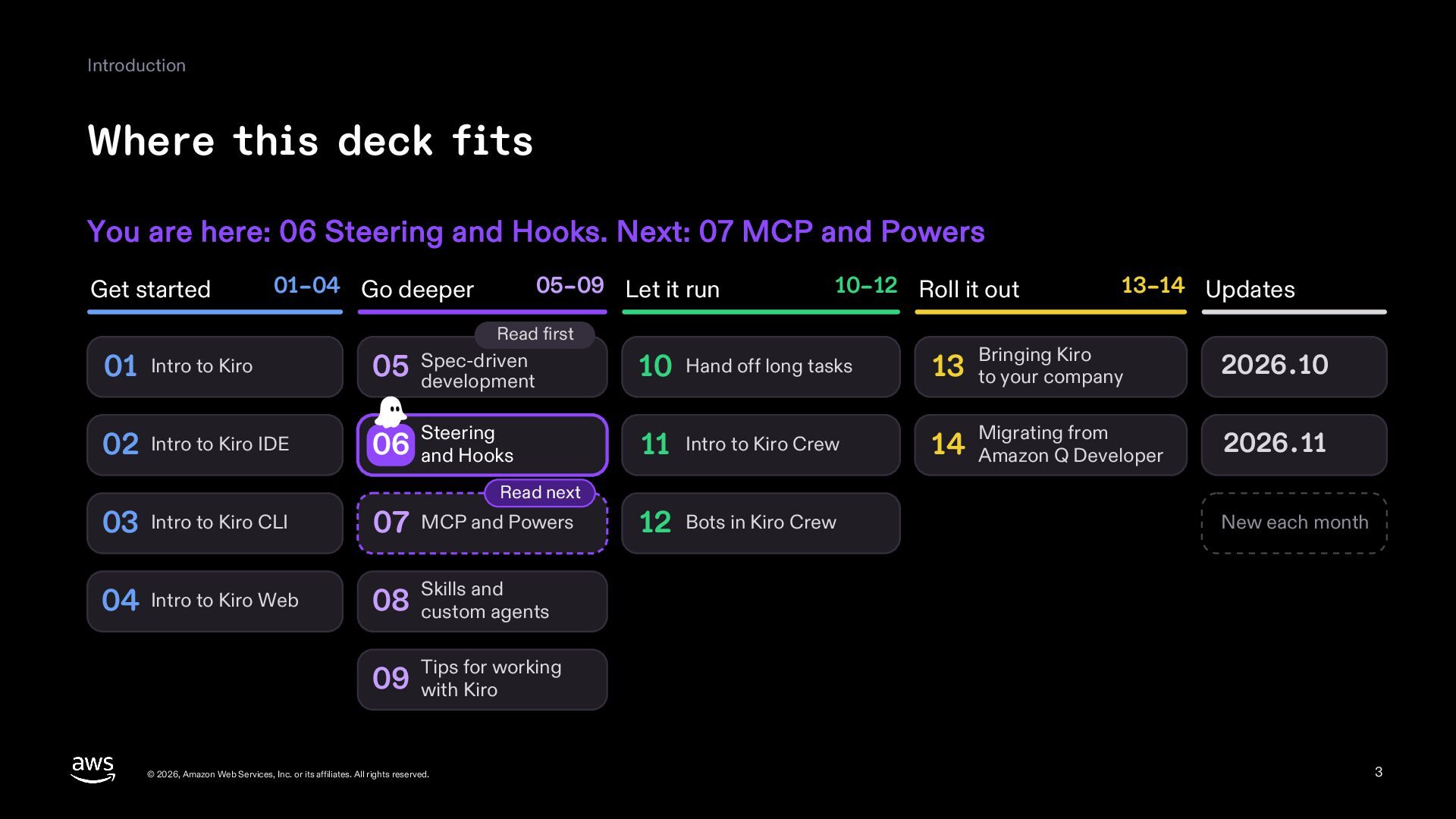
  3. Introduction Where this deck fits You are here: 06 Steering

    and Hooks. Next: 07 MCP and Powers Get started 01–04 Go deeper 05–09 Let it run 10–12 Roll it out Read first 13–14 Updates Bringing Kiro 2026.10 Migrating from 2026.11 01 Intro to Kiro 05 Spec-driven development 10 Hand off long tasks 13 to your company 02 Intro to Kiro IDE 06 and Hooks Steering 11 Intro to Kiro Crew 14 Amazon Q Developer Read next 03 Intro to Kiro CLI 07 MCP and Powers 04 Intro to Kiro Web and 08 Skills custom agents 12 Bots in Kiro Crew New each month for working 09 Tips with Kiro © 2026, Amazon Web Services, Inc. or its affiliates. All rights reserved. 3
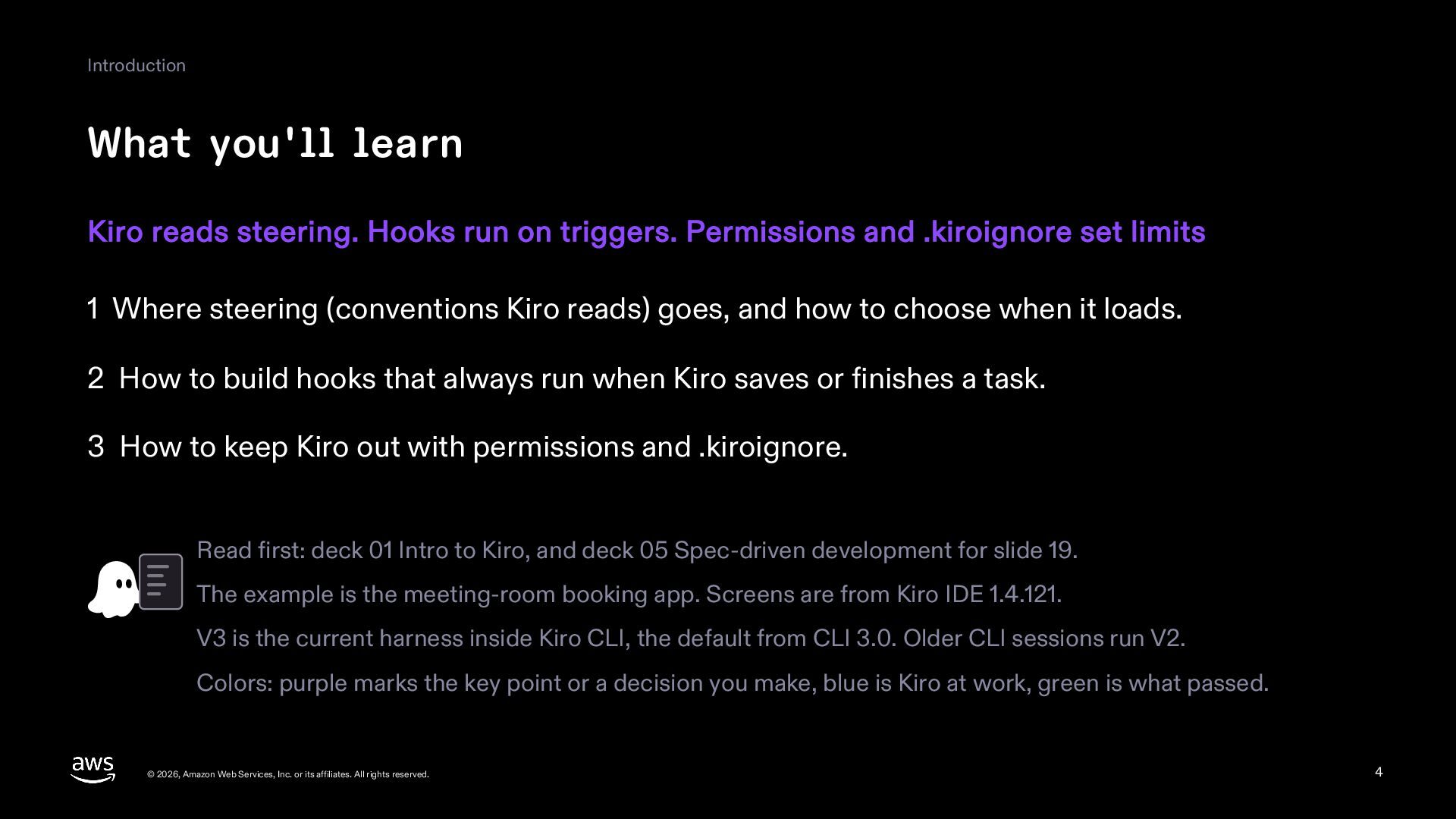
  4. Introduction What you'll learn Kiro reads steering. Hooks run on

    triggers. Permissions and .kiroignore set limits 1 Where steering (conventions Kiro reads) goes, and how to choose when it loads. 2 How to build hooks that always run when Kiro saves or finishes a task. 3 How to keep Kiro out with permissions and .kiroignore. Read first: deck 01 Intro to Kiro, and deck 05 Spec-driven development for slide 19. The example is the meeting-room booking app. Screens are from Kiro IDE 1.4.121. V3 is the current harness inside Kiro CLI, the default from CLI 3.0. Older CLI sessions run V2. Colors: purple marks the key point or a decision you make, blue is Kiro at work, green is what passed. © 2026, Amazon Web Services, Inc. or its affiliates. All rights reserved. 4
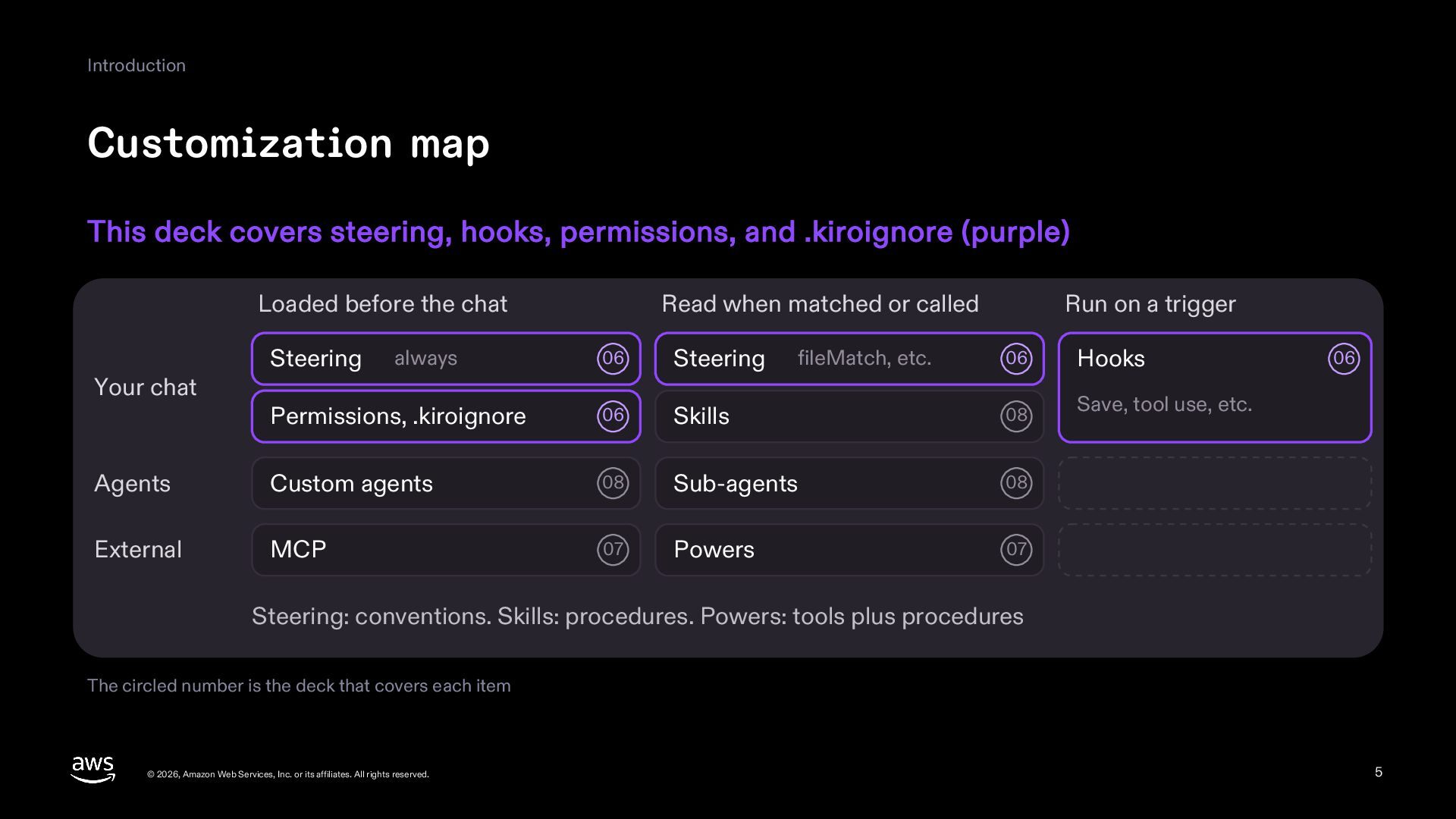
  5. Introduction Customization map This deck covers steering, hooks, permissions, and

    .kiroignore (purple) Loaded before the chat 06 Steering Permissions, .kiroignore 06 Agents Custom agents External MCP Your chat Steering Read when matched or called always Run on a trigger 06 Hooks Skills 08 Save, tool use, etc. 08 Sub-agents 08 07 Powers 07 fileMatch, etc. 06 Steering: conventions. Skills: procedures. Powers: tools plus procedures The circled number is the deck that covers each item © 2026, Amazon Web Services, Inc. or its affiliates. All rights reserved. 5
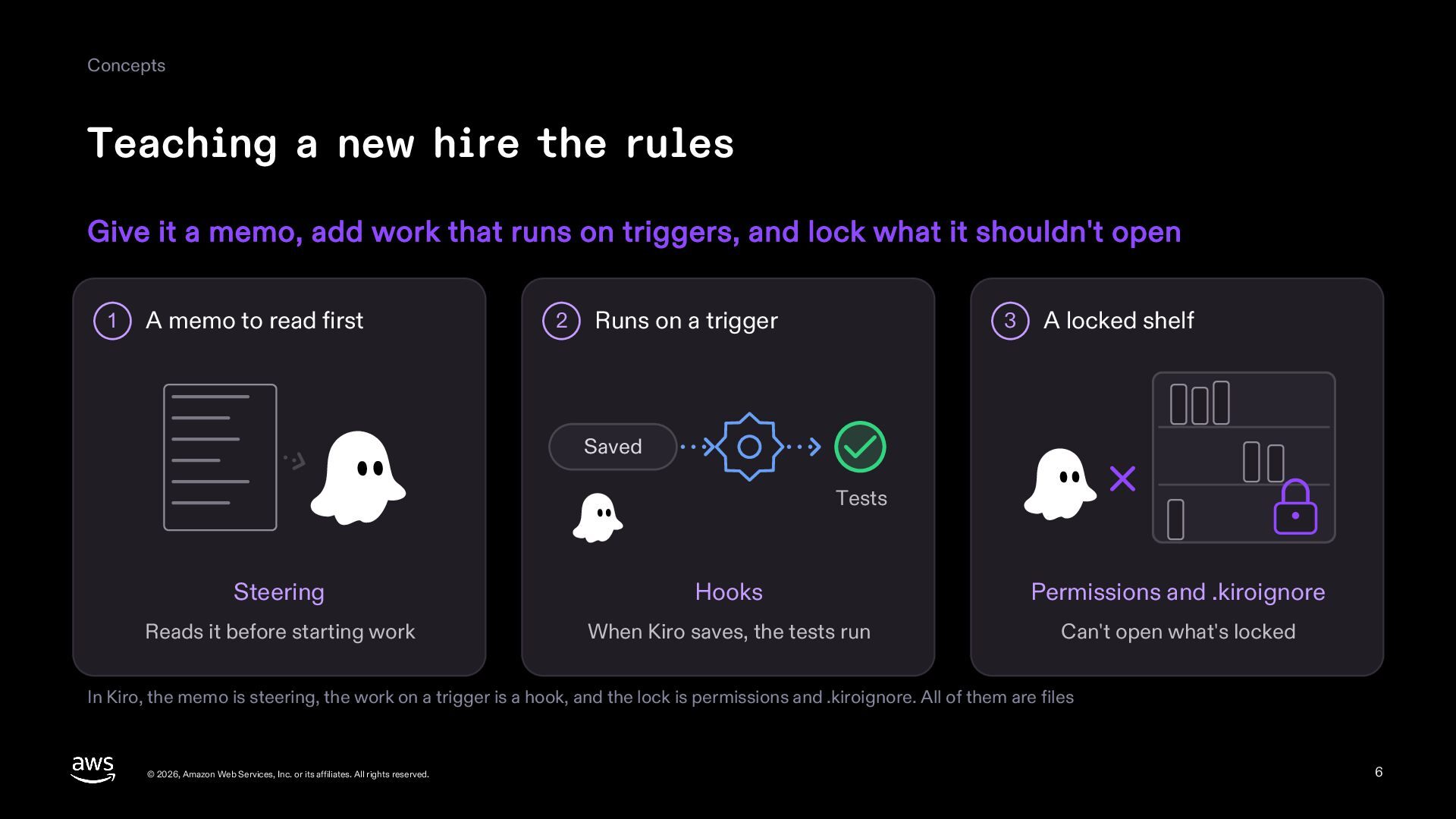
  6. Concepts Teaching a new hire the rules Give it a

    memo, add work that runs on triggers, and lock what it shouldn't open 1 A memo to read first 2 Runs on a trigger 3 A locked shelf Saved Tests Steering Hooks Permissions and .kiroignore Reads it before starting work When Kiro saves, the tests run Can't open what's locked In Kiro, the memo is steering, the work on a trigger is a hook, and the lock is permissions and .kiroignore. All of them are files © 2026, Amazon Web Services, Inc. or its affiliates. All rights reserved. 6
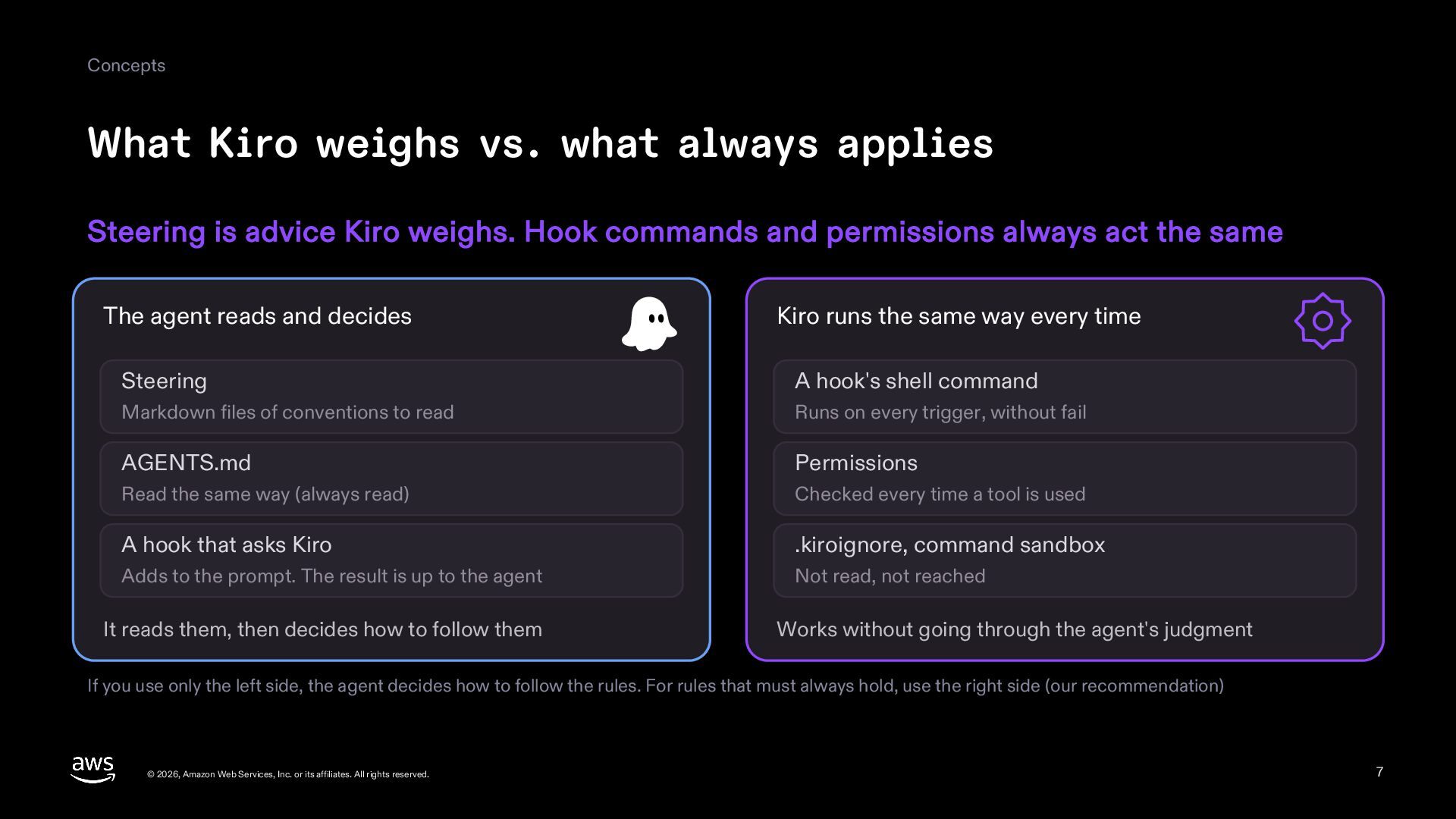
  7. Concepts What Kiro weighs vs. what always applies Steering is

    advice Kiro weighs. Hook commands and permissions always act the same The agent reads and decides Kiro runs the same way every time Steering A hook's shell command Markdown files of conventions to read Runs on every trigger, without fail AGENTS.md Permissions Read the same way (always read) Checked every time a tool is used A hook that asks Kiro .kiroignore, command sandbox Adds to the prompt. The result is up to the agent Not read, not reached It reads them, then decides how to follow them Works without going through the agent's judgment If you use only the left side, the agent decides how to follow the rules. For rules that must always hold, use the right side (our recommendation) © 2026, Amazon Web Services, Inc. or its affiliates. All rights reserved. 7
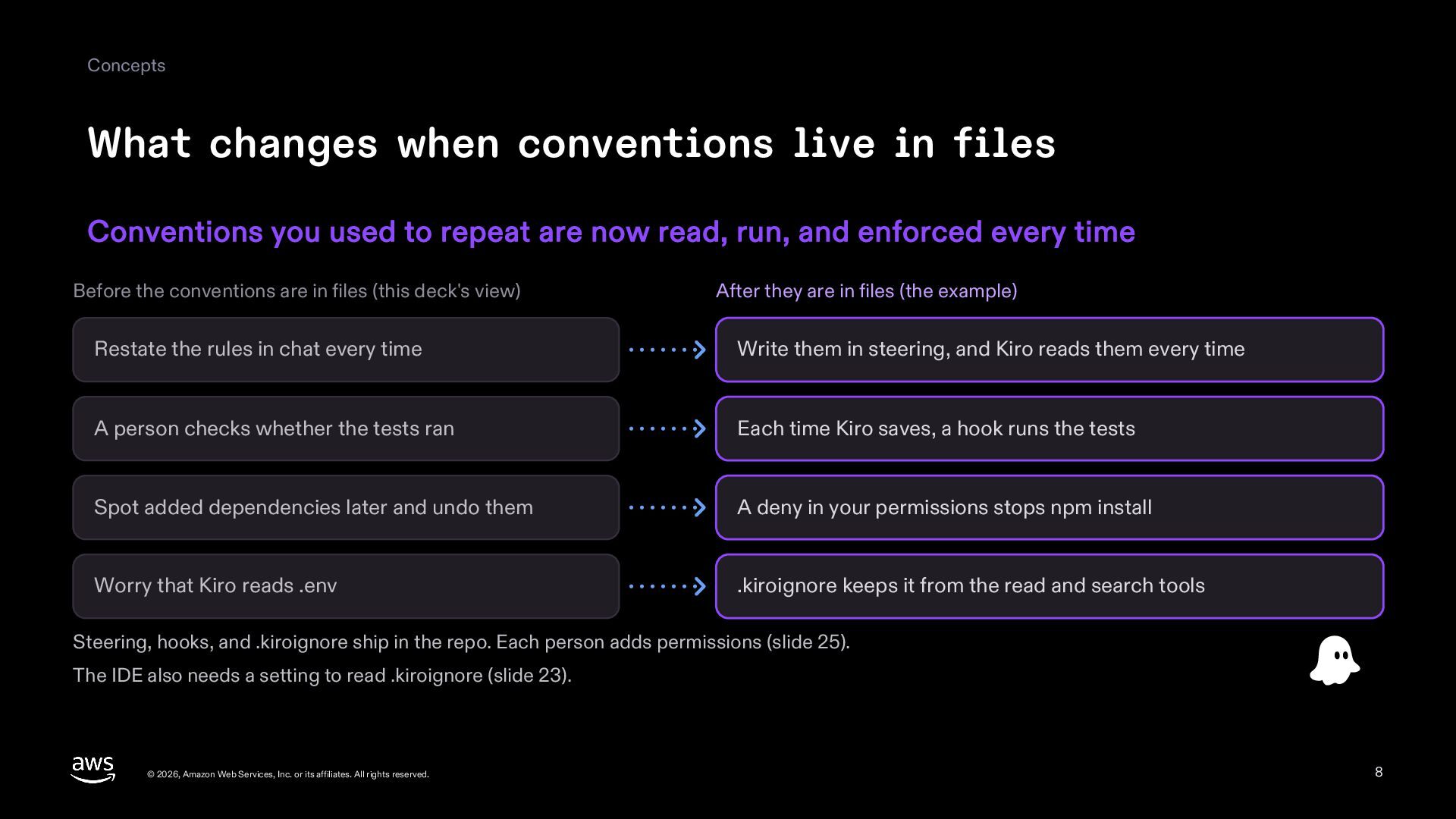
  8. Concepts What changes when conventions live in files Conventions you

    used to repeat are now read, run, and enforced every time Before the conventions are in files (this deck's view) After they are in files (the example) Restate the rules in chat every time Write them in steering, and Kiro reads them every time A person checks whether the tests ran Each time Kiro saves, a hook runs the tests Spot added dependencies later and undo them A deny in your permissions stops npm install Worry that Kiro reads .env .kiroignore keeps it from the read and search tools Steering, hooks, and .kiroignore ship in the repo. Each person adds permissions (slide 25). The IDE also needs a setting to read .kiroignore (slide 23). © 2026, Amazon Web Services, Inc. or its affiliates. All rights reserved. 8
  9. Steering Steering Steering files are Markdown notes on your conventions,

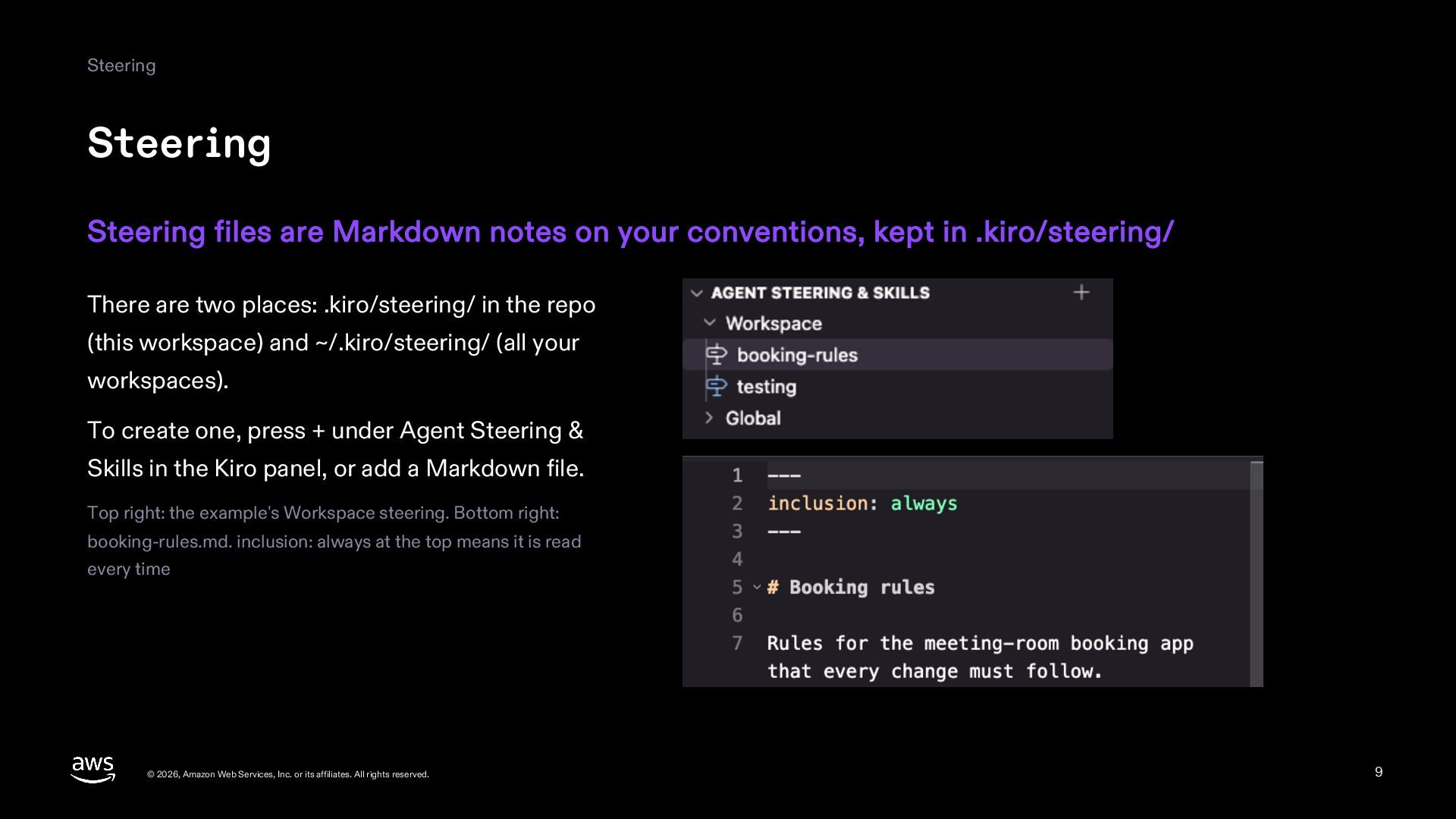
    kept in .kiro/steering/ There are two places: .kiro/steering/ in the repo (this workspace) and ~/.kiro/steering/ (all your workspaces). To create one, press + under Agent Steering & Skills in the Kiro panel, or add a Markdown file. Top right: the example's Workspace steering. Bottom right: booking-rules.md. inclusion: always at the top means it is read every time © 2026, Amazon Web Services, Inc. or its affiliates. All rights reserved. 9
  10. Steering The three project steering files Press + under Steering,

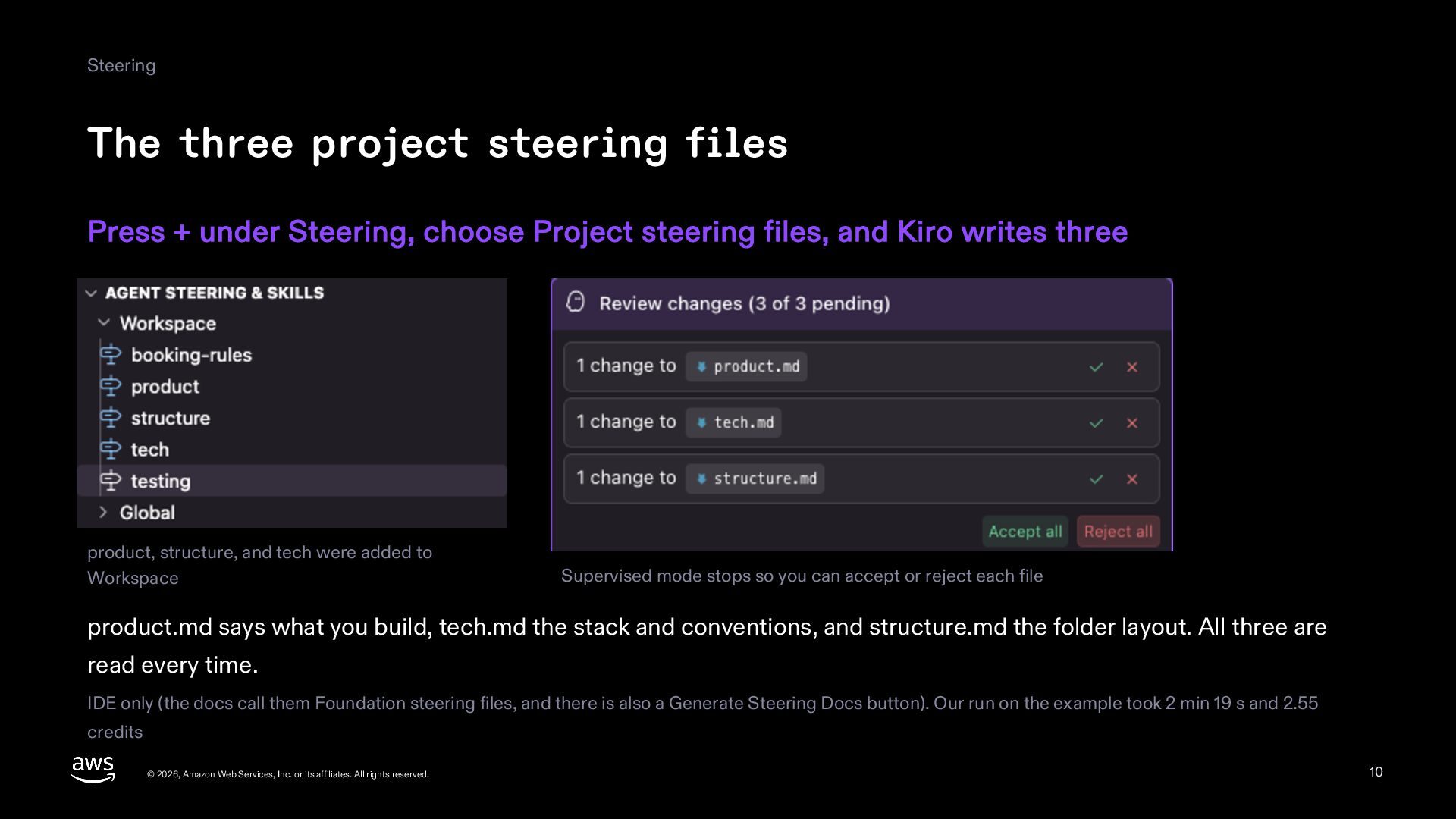
    choose Project steering files, and Kiro writes three product, structure, and tech were added to Workspace Supervised mode stops so you can accept or reject each file product.md says what you build, tech.md the stack and conventions, and structure.md the folder layout. All three are read every time. IDE only (the docs call them Foundation steering files, and there is also a Generate Steering Docs button). Our run on the example took 2 min 19 s and 2.55 credits © 2026, Amazon Web Services, Inc. or its affiliates. All rights reserved. 10
  11. Steering Four inclusion modes The inclusion field at the top

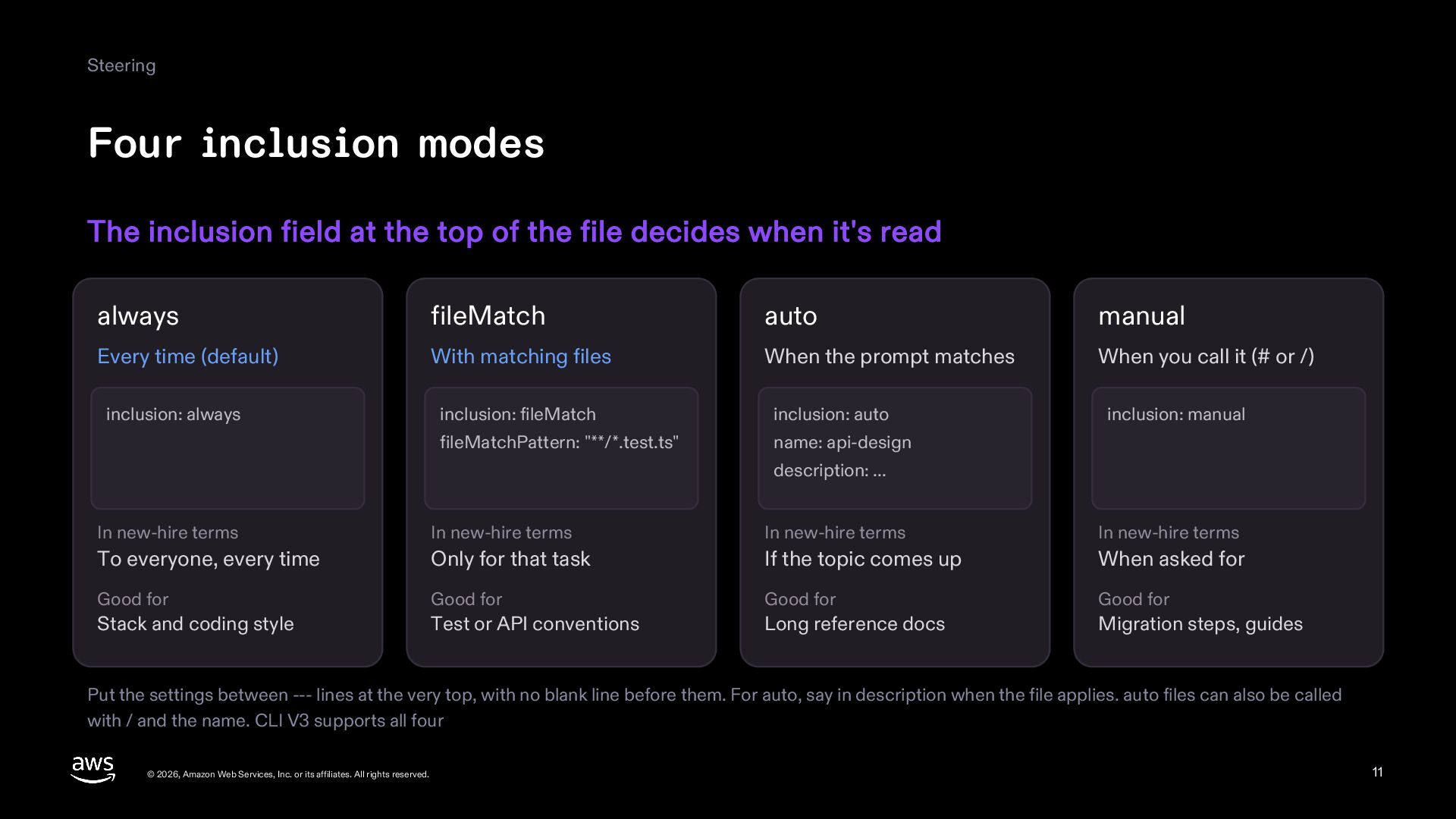
    of the file decides when it's read always fileMatch auto manual Every time (default) With matching files When the prompt matches When you call it (# or /) inclusion: always inclusion: fileMatch inclusion: auto inclusion: manual fileMatchPattern: "**/*.test.ts" name: api-design description: ... In new-hire terms In new-hire terms In new-hire terms In new-hire terms To everyone, every time Only for that task If the topic comes up When asked for Good for Good for Good for Good for Stack and coding style Test or API conventions Long reference docs Migration steps, guides Put the settings between --- lines at the very top, with no blank line before them. For auto, say in description when the file applies. auto files can also be called with / and the name. CLI V3 supports all four © 2026, Amazon Web Services, Inc. or its affiliates. All rights reserved. 11
  12. Steering The example's steering Booking rules load every time (always),

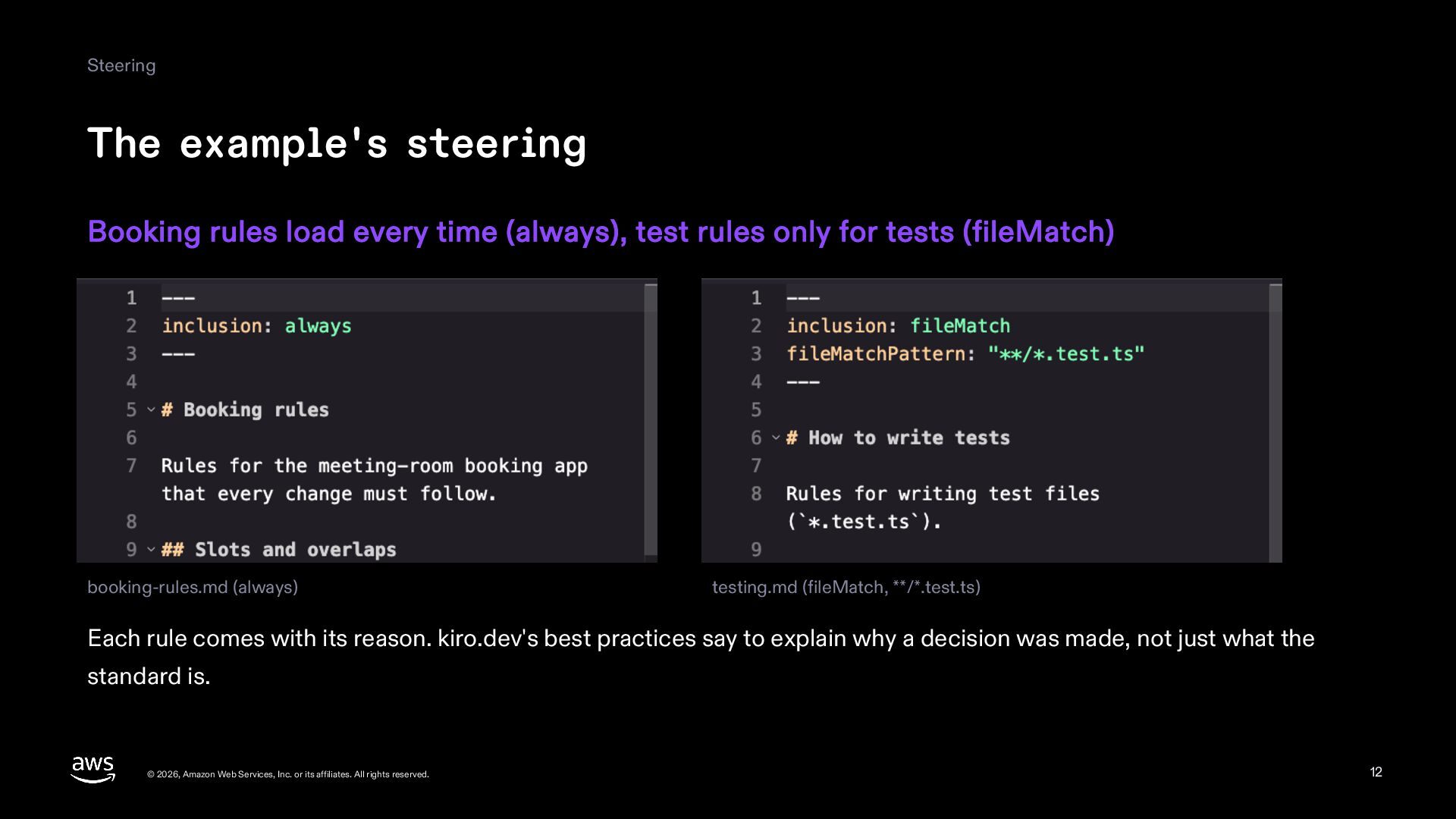
    test rules only for tests (fileMatch) booking-rules.md (always) testing.md (fileMatch, **/*.test.ts) Each rule comes with its reason. kiro.dev's best practices say to explain why a decision was made, not just what the standard is. © 2026, Amazon Web Services, Inc. or its affiliates. All rights reserved. 12
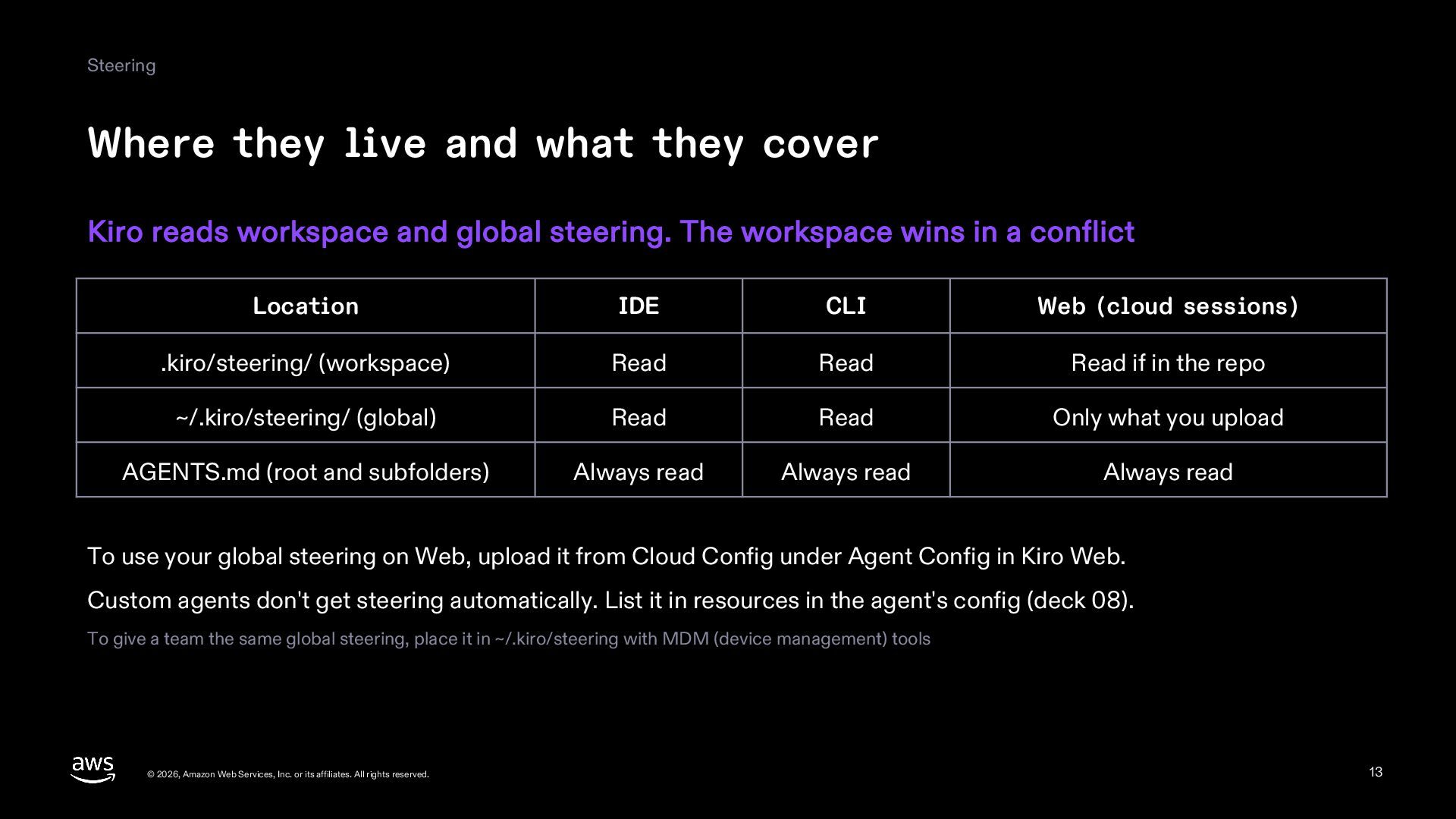
  13. Steering Where they live and what they cover Kiro reads

    workspace and global steering. The workspace wins in a conflict Location IDE CLI Web (cloud sessions) .kiro/steering/ (workspace) Read Read Read if in the repo ~/.kiro/steering/ (global) Read Read Only what you upload AGENTS.md (root and subfolders) Always read Always read Always read To use your global steering on Web, upload it from Cloud Config under Agent Config in Kiro Web. Custom agents don't get steering automatically. List it in resources in the agent's config (deck 08). To give a team the same global steering, place it in ~/.kiro/steering with MDM (device management) tools © 2026, Amazon Web Services, Inc. or its affiliates. All rights reserved. 13
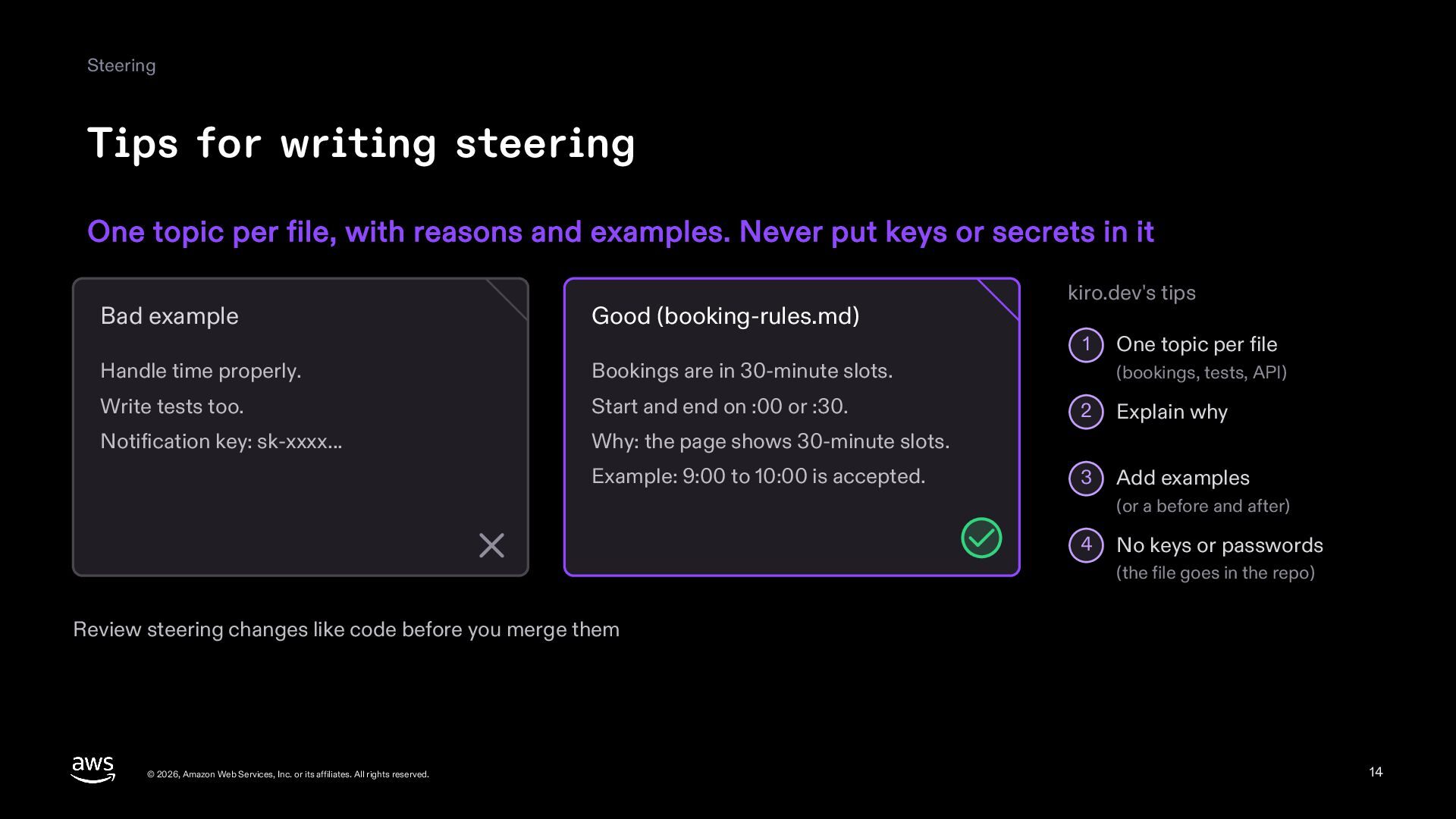
  14. Steering Tips for writing steering One topic per file, with

    reasons and examples. Never put keys or secrets in it Bad example Good (booking-rules.md) kiro.dev's tips 1 Handle time properly. Bookings are in 30-minute slots. Write tests too. Start and end on :00 or :30. Notification key: sk-xxxx... Why: the page shows 30-minute slots. Example: 9:00 to 10:00 is accepted. One topic per file (bookings, tests, API) 2 Explain why 3 Add examples (or a before and after) 4 No keys or passwords (the file goes in the repo) Review steering changes like code before you merge them © 2026, Amazon Web Services, Inc. or its affiliates. All rights reserved. 14
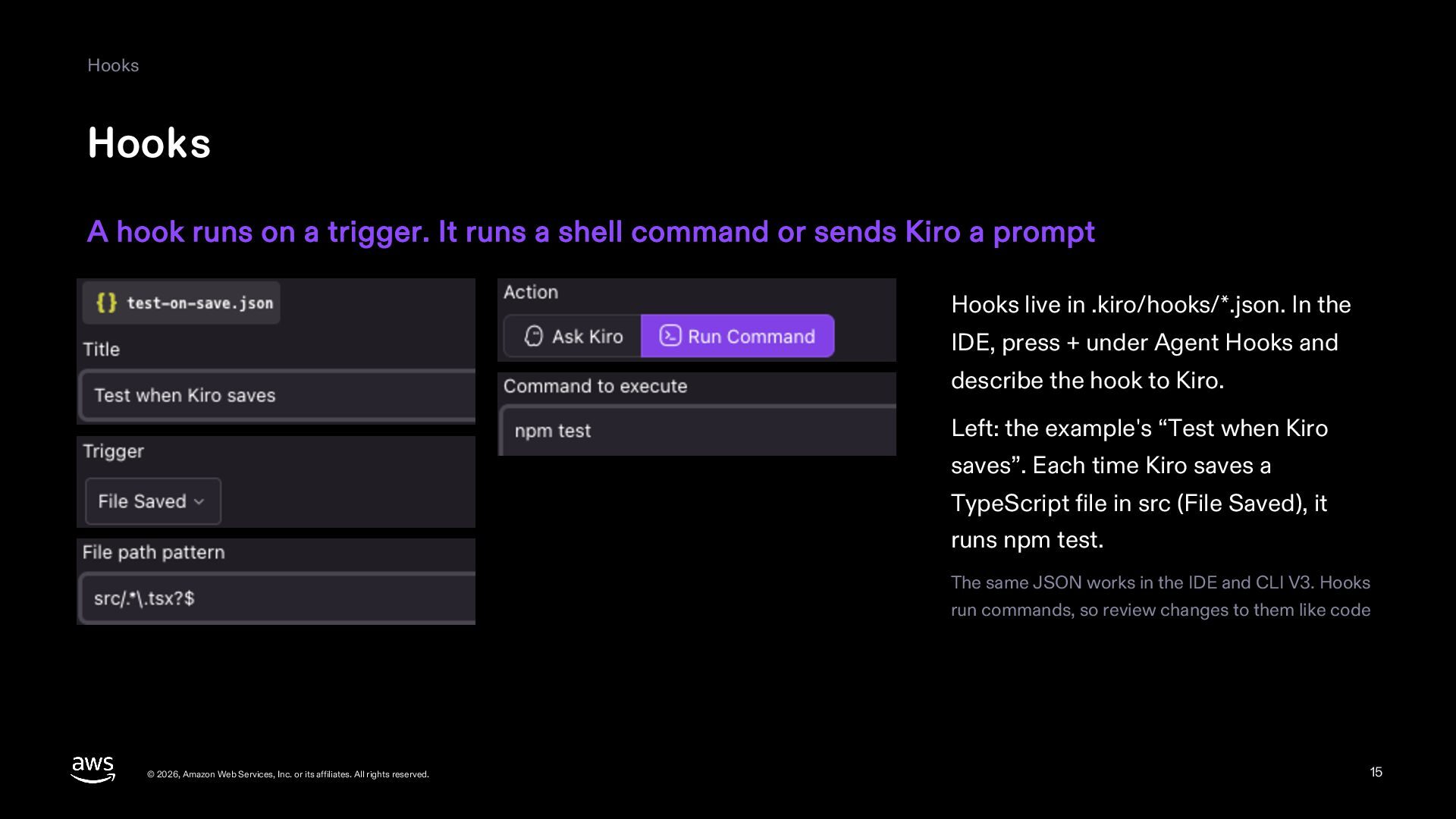
  15. Hooks Hooks A hook runs on a trigger. It runs

    a shell command or sends Kiro a prompt Hooks live in .kiro/hooks/*.json. In the IDE, press + under Agent Hooks and describe the hook to Kiro. Left: the example's “Test when Kiro saves”. Each time Kiro saves a TypeScript file in src (File Saved), it runs npm test. The same JSON works in the IDE and CLI V3. Hooks run commands, so review changes to them like code © 2026, Amazon Web Services, Inc. or its affiliates. All rights reserved. 15
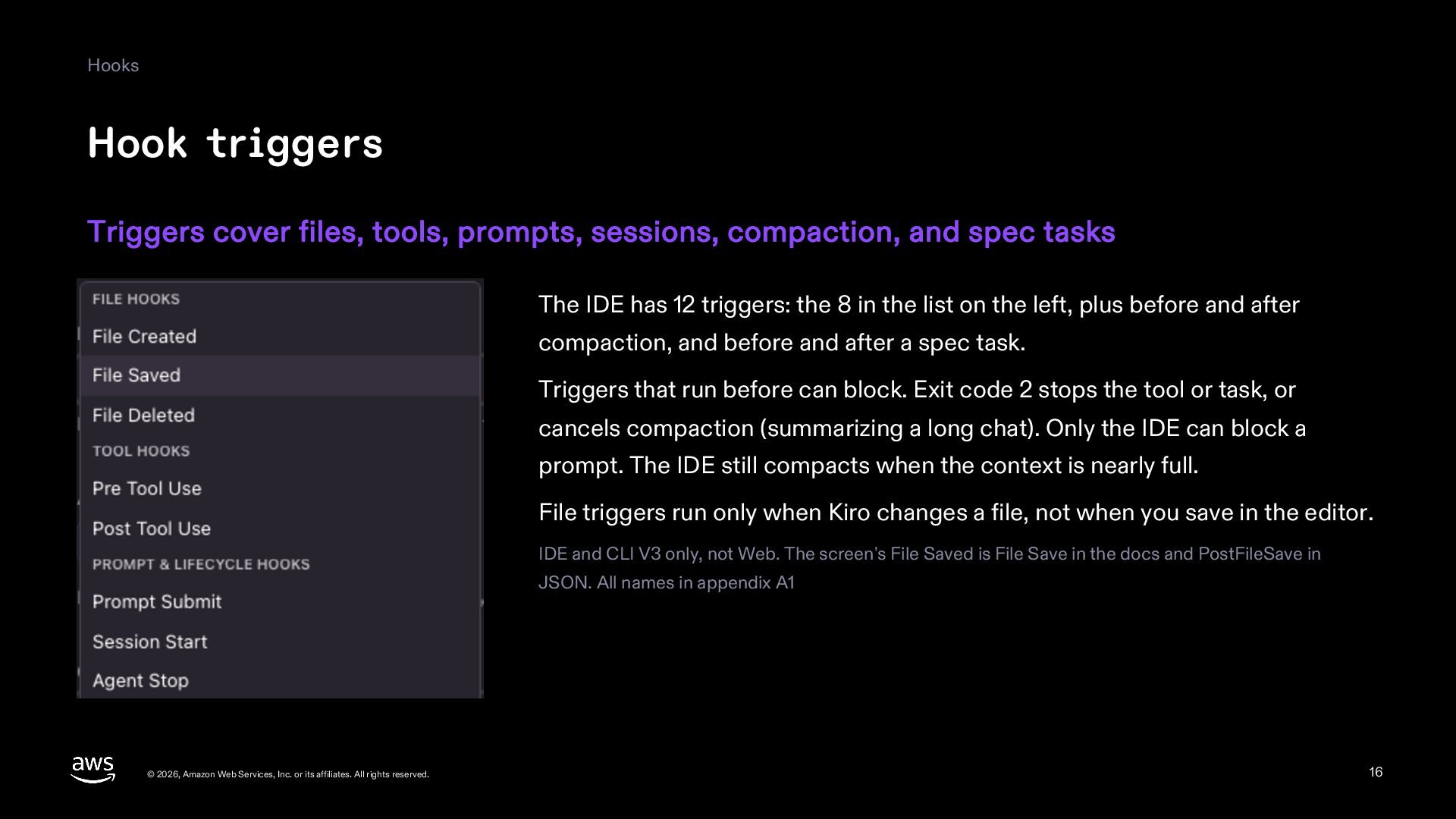
  16. Hooks Hook triggers Triggers cover files, tools, prompts, sessions, compaction,

    and spec tasks The IDE has 12 triggers: the 8 in the list on the left, plus before and after compaction, and before and after a spec task. Triggers that run before can block. Exit code 2 stops the tool or task, or cancels compaction (summarizing a long chat). Only the IDE can block a prompt. The IDE still compacts when the context is nearly full. File triggers run only when Kiro changes a file, not when you save in the editor. IDE and CLI V3 only, not Web. The screen's File Saved is File Save in the docs and PostFileSave in JSON. All names in appendix A1 © 2026, Amazon Web Services, Inc. or its affiliates. All rights reserved. 16
  17. Hooks Two kinds of action A shell command always runs

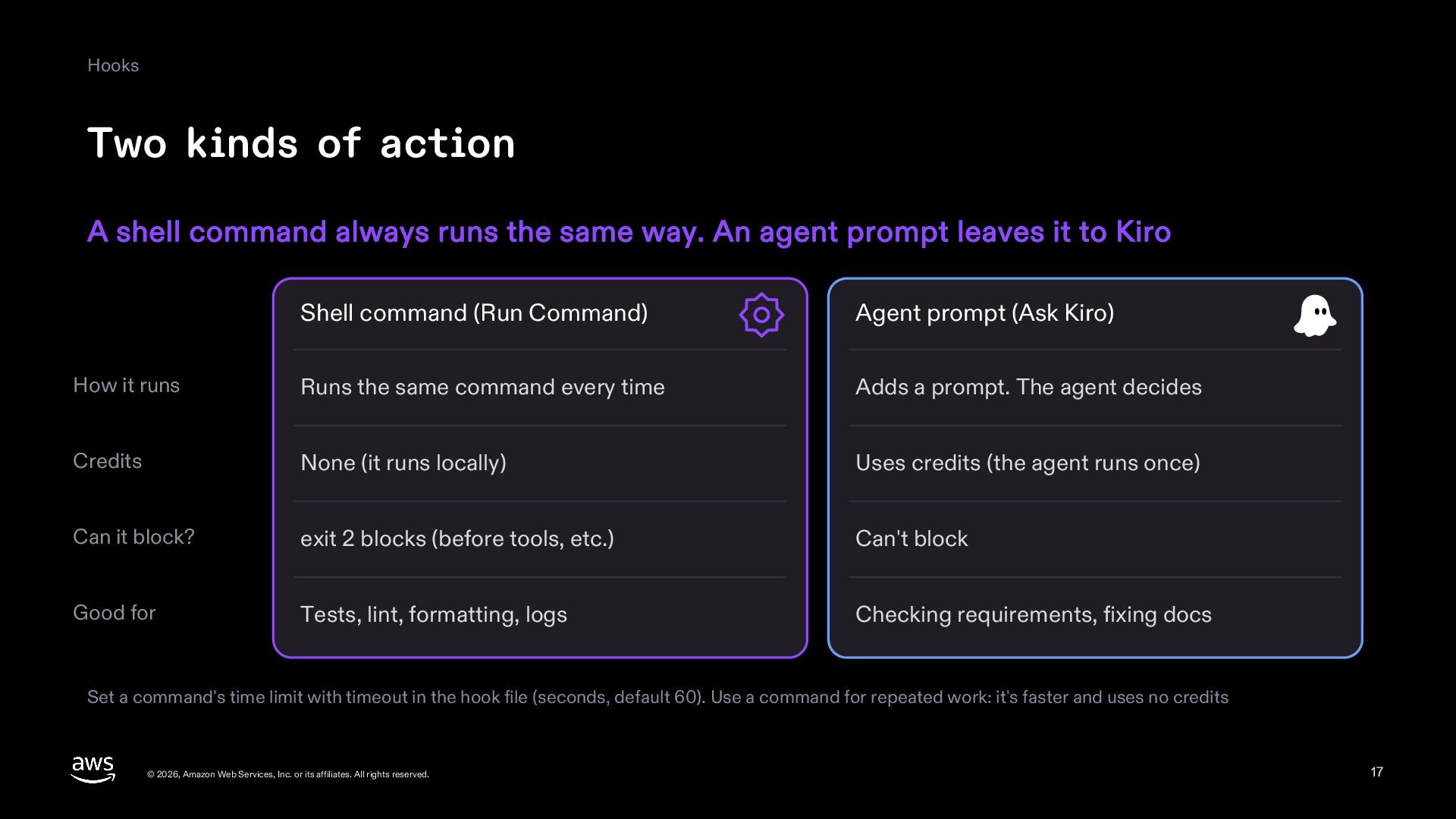
    the same way. An agent prompt leaves it to Kiro Shell command (Run Command) Agent prompt (Ask Kiro) How it runs Runs the same command every time Adds a prompt. The agent decides Credits None (it runs locally) Uses credits (the agent runs once) Can it block? exit 2 blocks (before tools, etc.) Can't block Good for Tests, lint, formatting, logs Checking requirements, fixing docs Set a command's time limit with timeout in the hook file (seconds, default 60). Use a command for repeated work: it's faster and uses no credits © 2026, Amazon Web Services, Inc. or its affiliates. All rights reserved. 17
  18. Hooks Example hook 1: test when Kiro saves When Kiro

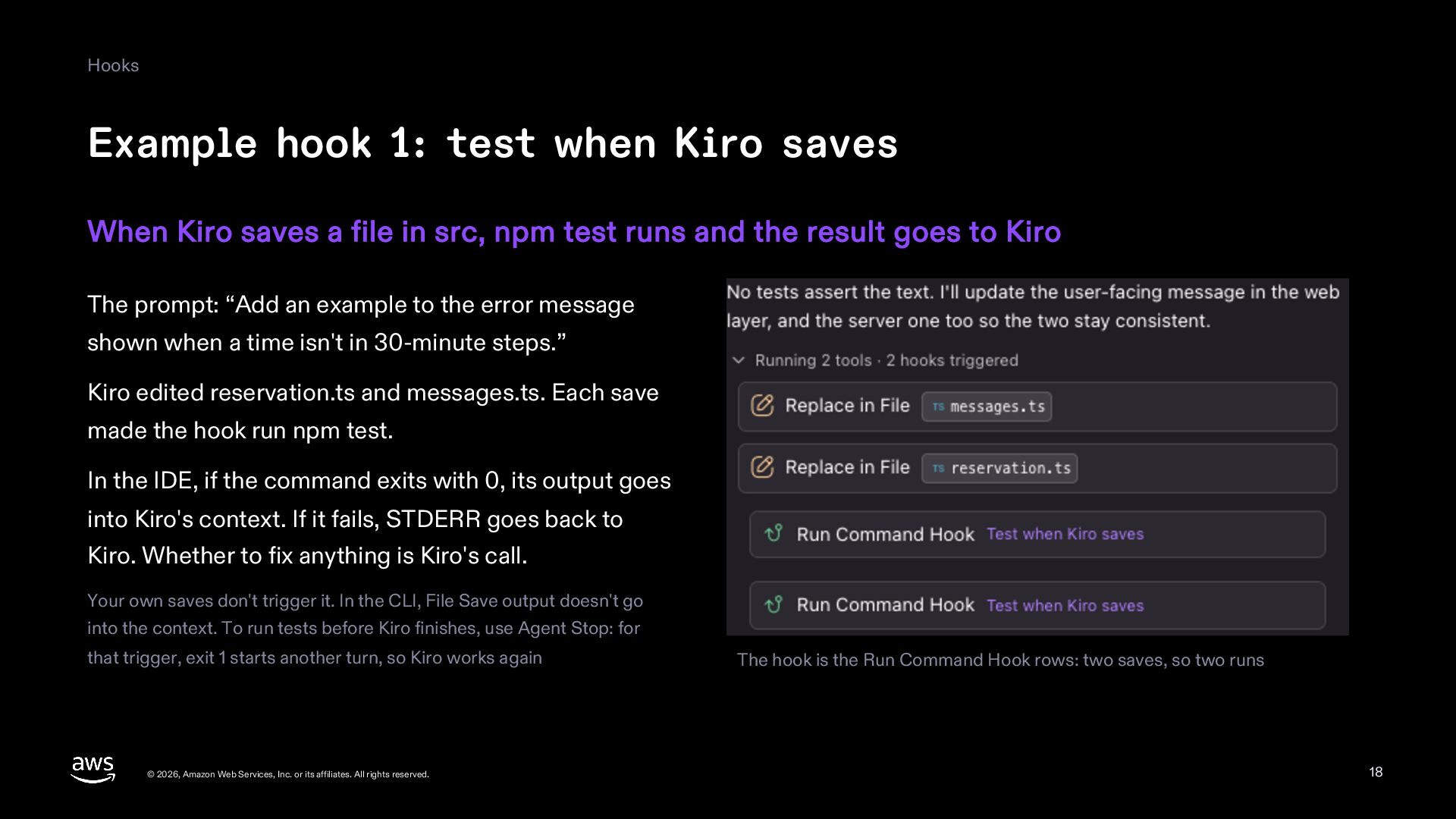
    saves a file in src, npm test runs and the result goes to Kiro The prompt: “Add an example to the error message shown when a time isn't in 30-minute steps.” Kiro edited reservation.ts and messages.ts. Each save made the hook run npm test. In the IDE, if the command exits with 0, its output goes into Kiro's context. If it fails, STDERR goes back to Kiro. Whether to fix anything is Kiro's call. Your own saves don't trigger it. In the CLI, File Save output doesn't go into the context. To run tests before Kiro finishes, use Agent Stop: for that trigger, exit 1 starts another turn, so Kiro works again © 2026, Amazon Web Services, Inc. or its affiliates. All rights reserved. The hook is the Run Command Hook rows: two saves, so two runs 18
  19. Hooks Example hook 2: check requirements per task After each

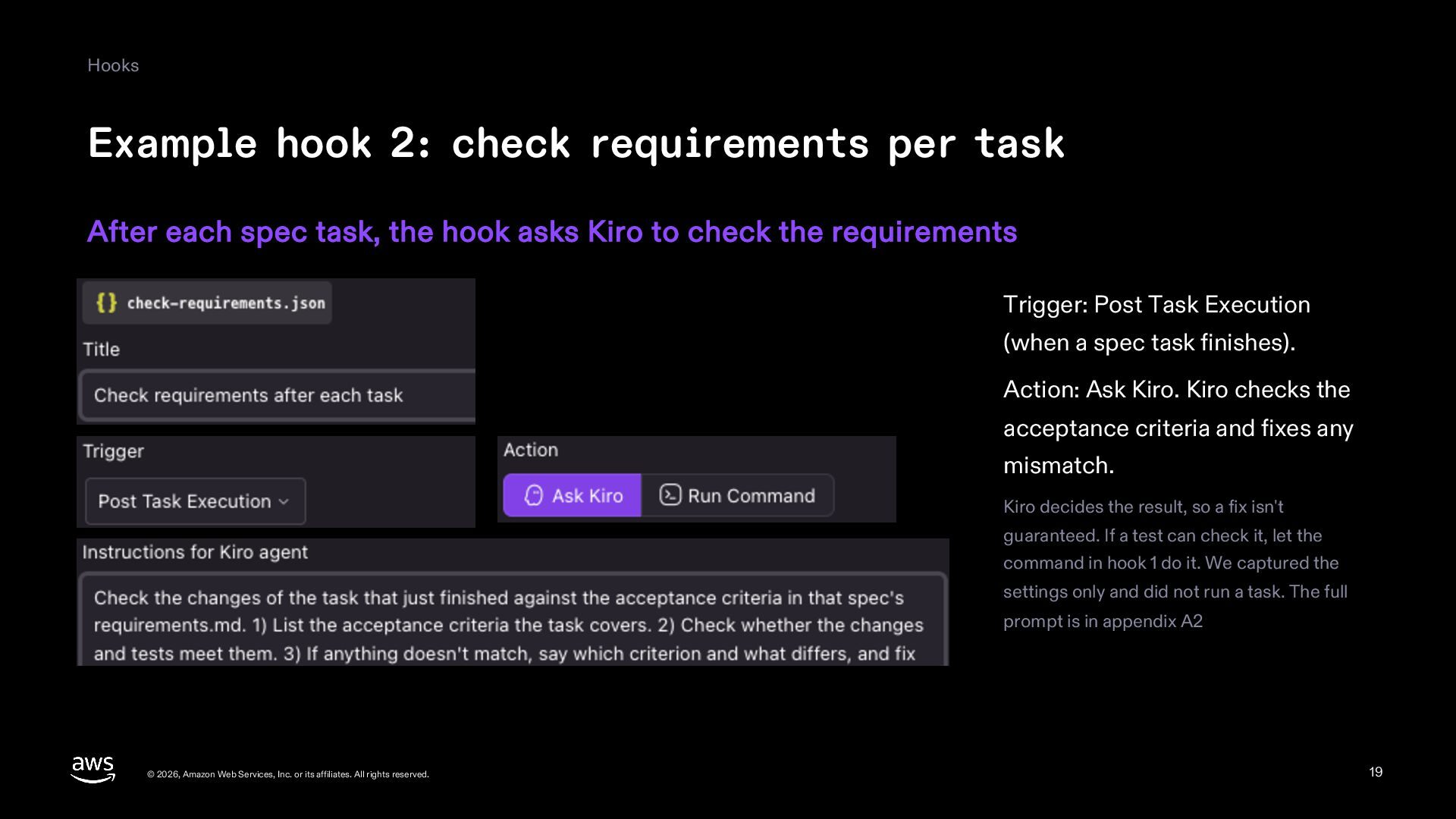
    spec task, the hook asks Kiro to check the requirements Trigger: Post Task Execution (when a spec task finishes). Action: Ask Kiro. Kiro checks the acceptance criteria and fixes any mismatch. Kiro decides the result, so a fix isn't guaranteed. If a test can check it, let the command in hook 1 do it. We captured the settings only and did not run a task. The full prompt is in appendix A2 © 2026, Amazon Web Services, Inc. or its affiliates. All rights reserved. 19
  20. Hooks Stopping a tool before it runs A Pre Tool

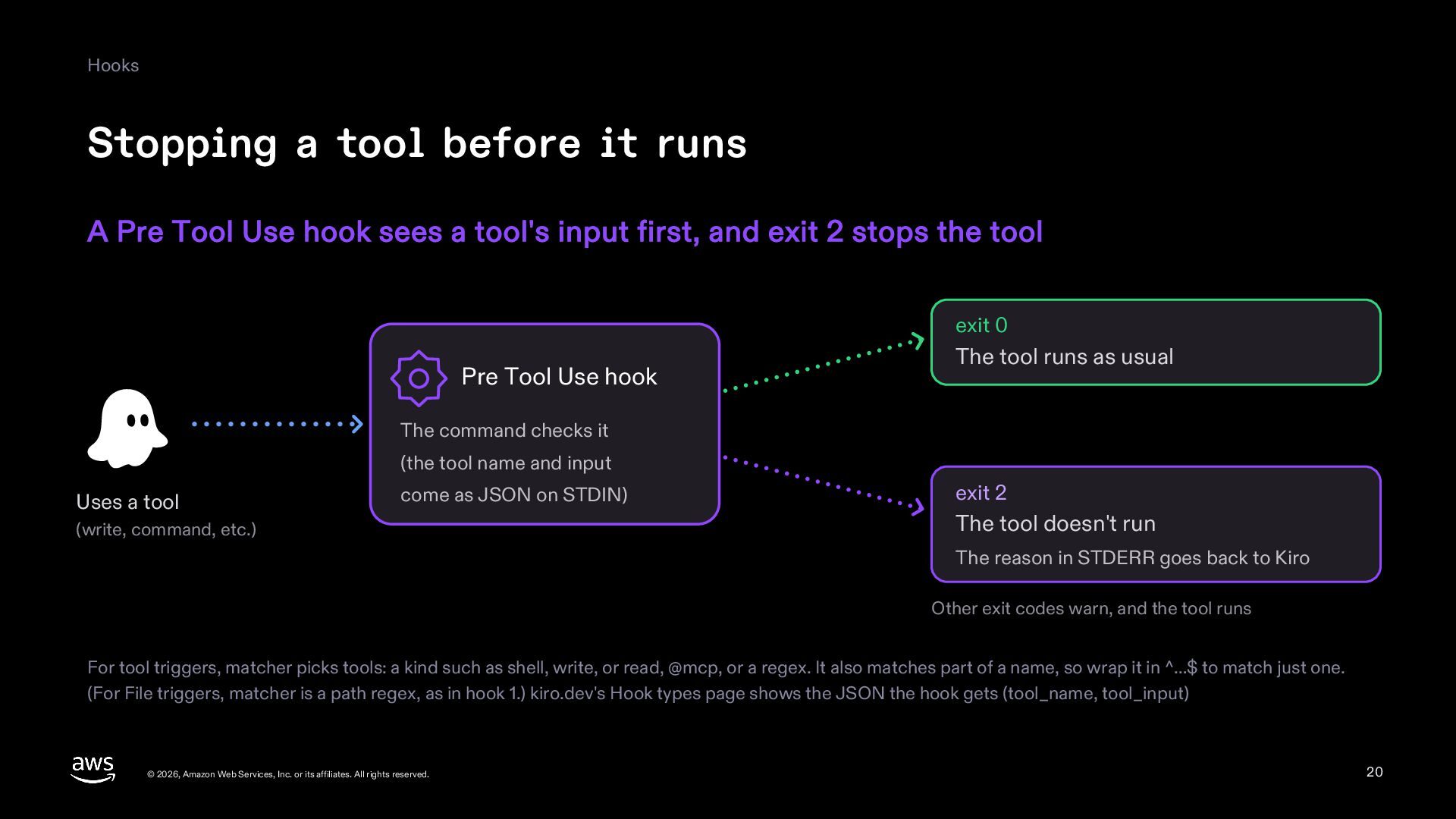
    Use hook sees a tool's input first, and exit 2 stops the tool exit 0 Pre Tool Use hook The tool runs as usual The command checks it (the tool name and input Uses a tool come as JSON on STDIN) (write, command, etc.) exit 2 The tool doesn't run The reason in STDERR goes back to Kiro Other exit codes warn, and the tool runs For tool triggers, matcher picks tools: a kind such as shell, write, or read, @mcp, or a regex. It also matches part of a name, so wrap it in ^…$ to match just one. (For File triggers, matcher is a path regex, as in hook 1.) kiro.dev's Hook types page shows the JSON the hook gets (tool_name, tool_input) © 2026, Amazon Web Services, Inc. or its affiliates. All rights reserved. 20
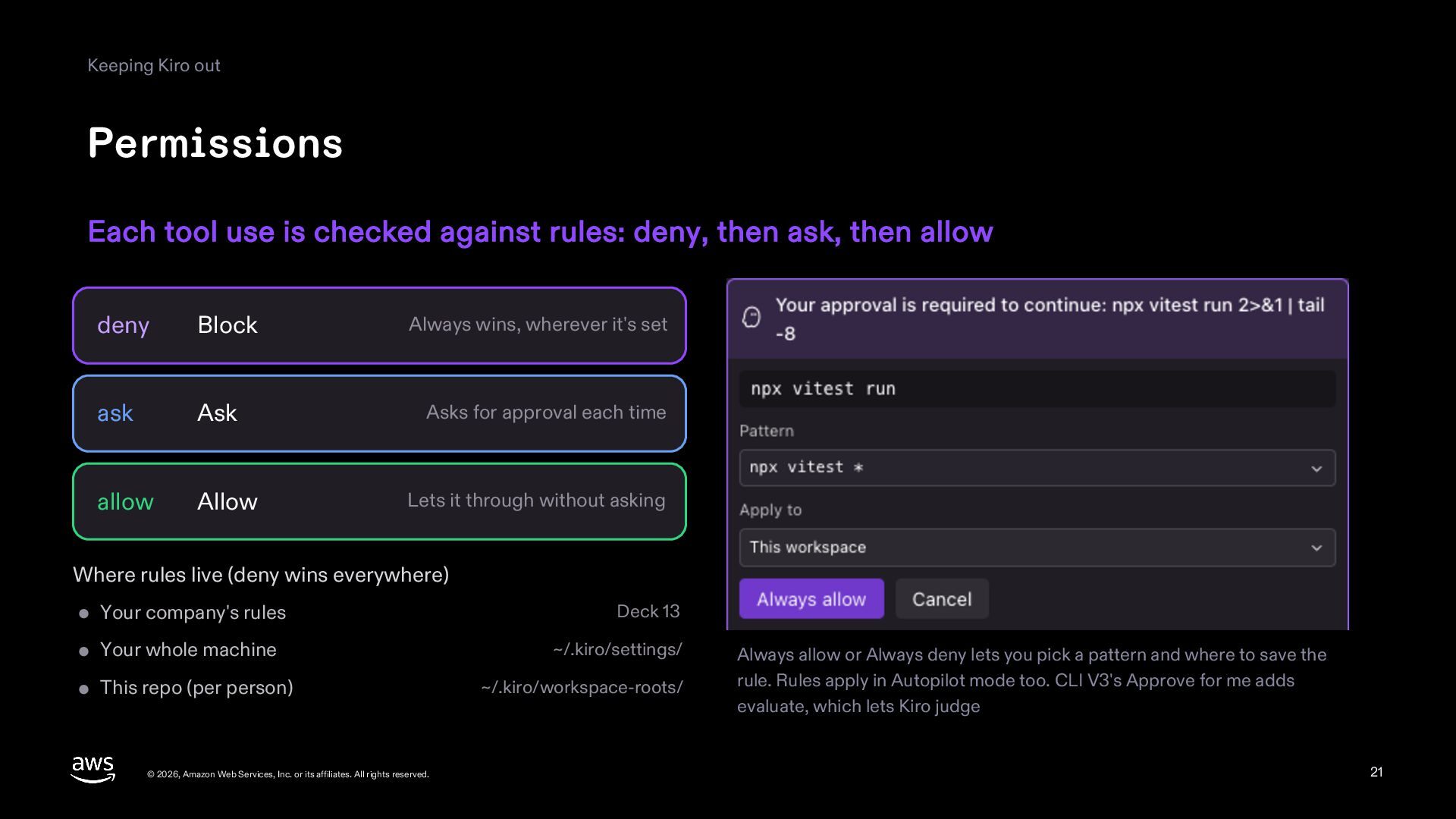
  21. Keeping Kiro out Permissions Each tool use is checked against

    rules: deny, then ask, then allow deny Block Always wins, wherever it's set ask Ask Asks for approval each time allow Allow Lets it through without asking Where rules live (deny wins everywhere) Your company's rules Deck 13 Your whole machine ~/.kiro/settings/ This repo (per person) © 2026, Amazon Web Services, Inc. or its affiliates. All rights reserved. ~/.kiro/workspace-roots/ Always allow or Always deny lets you pick a pattern and where to save the rule. Rules apply in Autopilot mode too. CLI V3's Approve for me adds evaluate, which lets Kiro judge 21
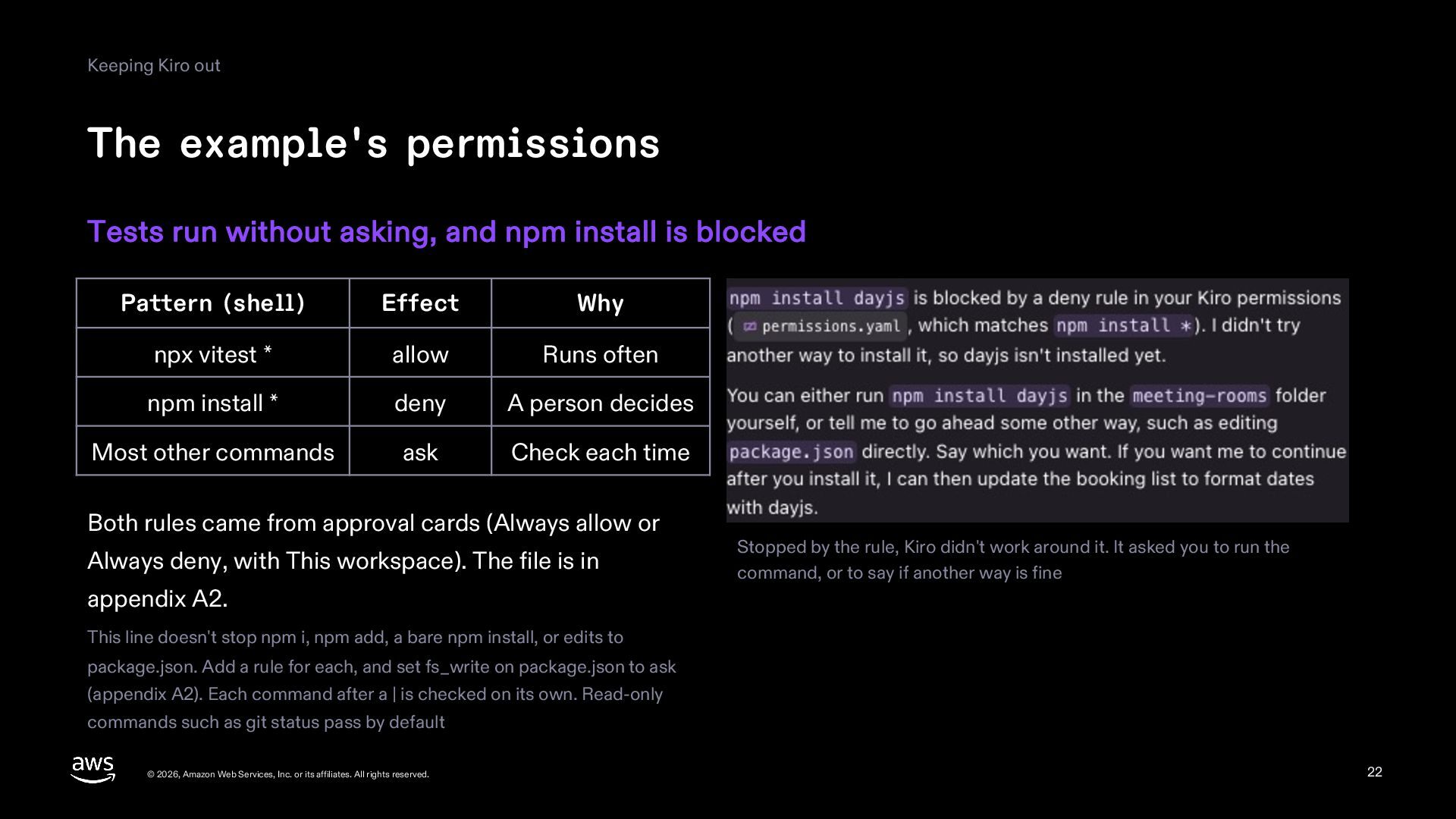
  22. Keeping Kiro out The example's permissions Tests run without asking,

    and npm install is blocked Pattern (shell) Effect Why npx vitest * allow Runs often npm install * deny A person decides Most other commands ask Check each time Both rules came from approval cards (Always allow or Always deny, with This workspace). The file is in Stopped by the rule, Kiro didn't work around it. It asked you to run the command, or to say if another way is fine appendix A2. This line doesn't stop npm i, npm add, a bare npm install, or edits to package.json. Add a rule for each, and set fs_write on package.json to ask (appendix A2). Each command after a | is checked on its own. Read-only commands such as git status pass by default © 2026, Amazon Web Services, Inc. or its affiliates. All rights reserved. 22
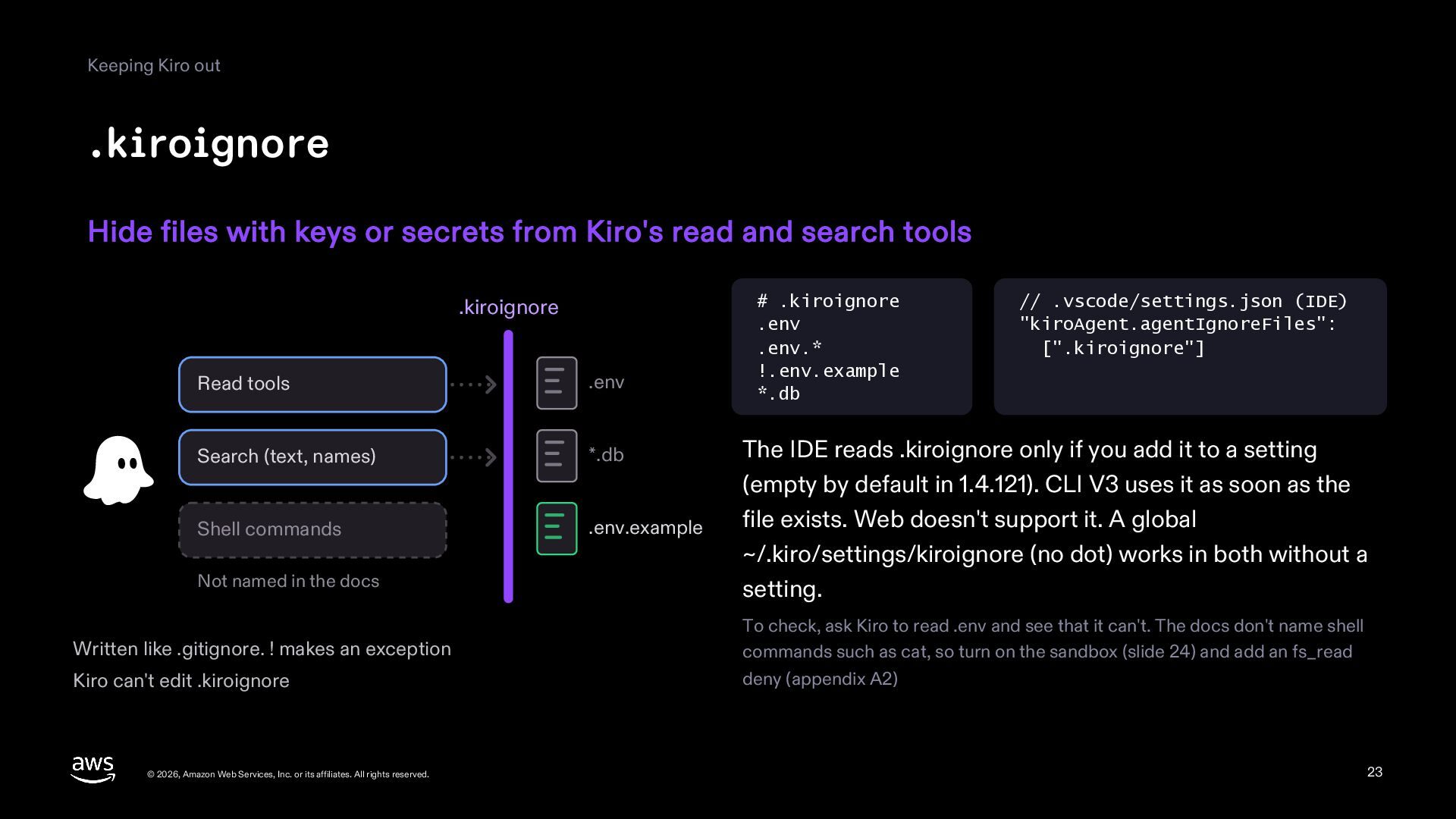
  23. Keeping Kiro out .kiroignore Hide files with keys or secrets

    from Kiro's read and search tools .kiroignore Read tools .env Search (text, names) *.db Shell commands .env.example Not named in the docs Written like .gitignore. ! makes an exception Kiro can't edit .kiroignore © 2026, Amazon Web Services, Inc. or its affiliates. All rights reserved. # .kiroignore .env .env.* !.env.example *.db // .vscode/settings.json (IDE) "kiroAgent.agentIgnoreFiles": [".kiroignore"] The IDE reads .kiroignore only if you add it to a setting (empty by default in 1.4.121). CLI V3 uses it as soon as the file exists. Web doesn't support it. A global ~/.kiro/settings/kiroignore (no dot) works in both without a setting. To check, ask Kiro to read .env and see that it can't. The docs don't name shell commands such as cat, so turn on the sandbox (slide 24) and add an fs_read deny (appendix A2) 23
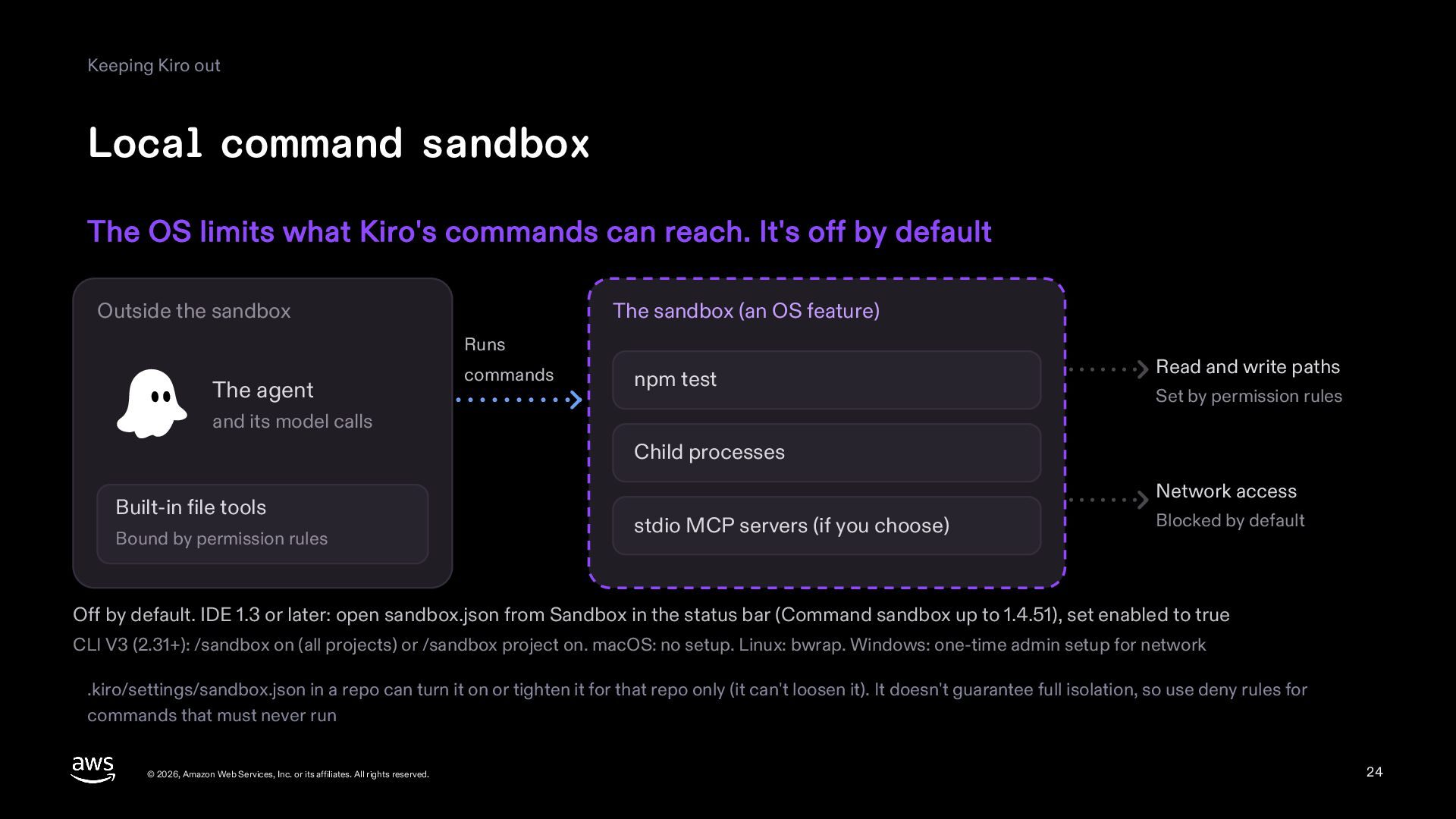
  24. Keeping Kiro out Local command sandbox The OS limits what

    Kiro's commands can reach. It's off by default Outside the sandbox The sandbox (an OS feature) Runs The agent commands npm test Read and write paths Set by permission rules and its model calls Child processes Built-in file tools Bound by permission rules Network access stdio MCP servers (if you choose) Blocked by default Off by default. IDE 1.3 or later: open sandbox.json from Sandbox in the status bar (Command sandbox up to 1.4.51), set enabled to true CLI V3 (2.31+): /sandbox on (all projects) or /sandbox project on. macOS: no setup. Linux: bwrap. Windows: one-time admin setup for network .kiro/settings/sandbox.json in a repo can turn it on or tighten it for that repo only (it can't loosen it). It doesn't guarantee full isolation, so use deny rules for commands that must never run © 2026, Amazon Web Services, Inc. or its affiliates. All rights reserved. 24
  25. As a team The same conventions for the whole team

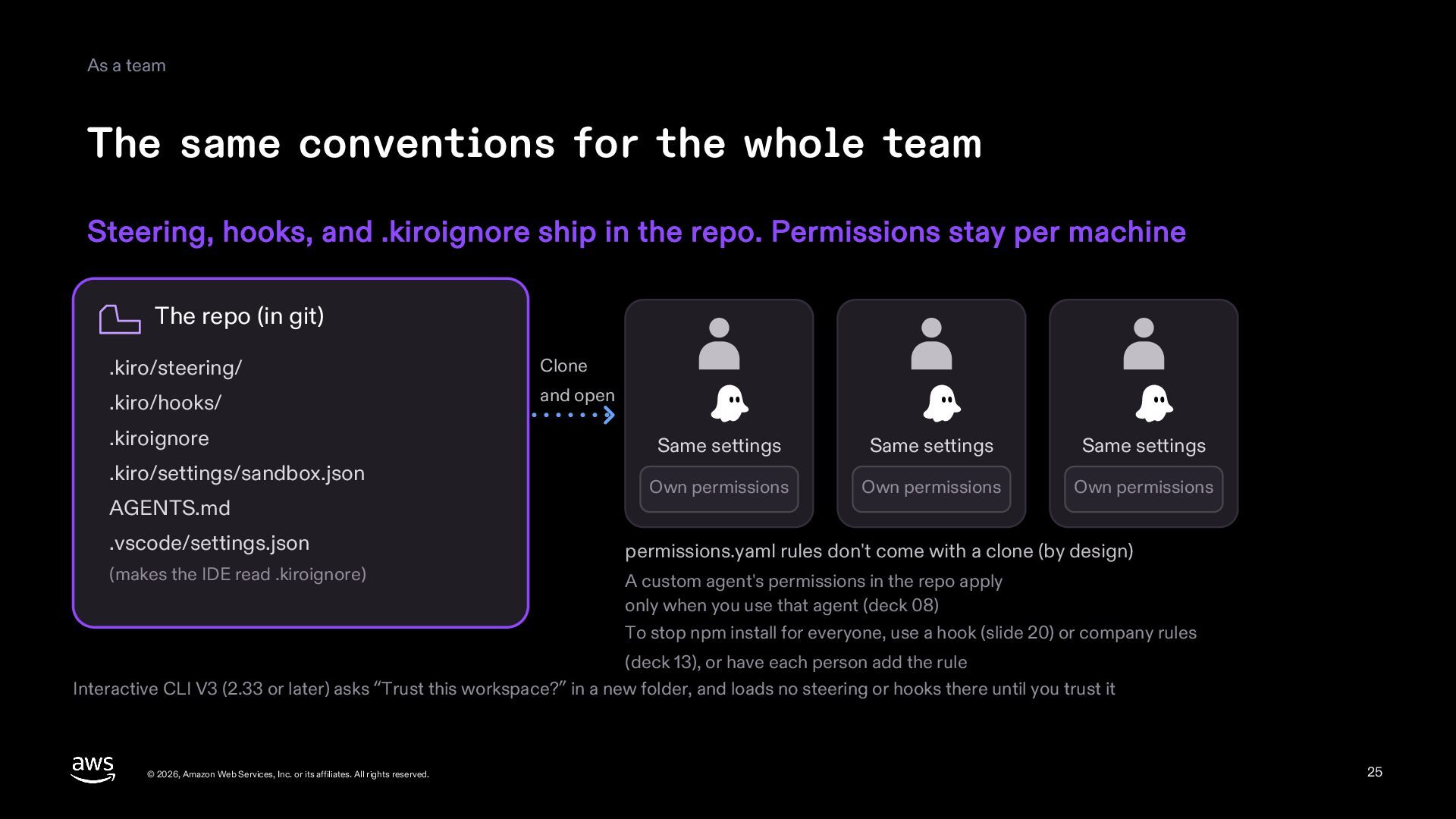
    Steering, hooks, and .kiroignore ship in the repo. Permissions stay per machine The repo (in git) .kiro/steering/ Clone .kiro/hooks/ and open .kiroignore .kiro/settings/sandbox.json AGENTS.md .vscode/settings.json (makes the IDE read .kiroignore) Same settings Same settings Same settings Own permissions Own permissions Own permissions permissions.yaml rules don't come with a clone (by design) A custom agent's permissions in the repo apply only when you use that agent (deck 08) To stop npm install for everyone, use a hook (slide 20) or company rules (deck 13), or have each person add the rule Interactive CLI V3 (2.33 or later) asks “Trust this workspace?” in a new folder, and loads no steering or hooks there until you trust it © 2026, Amazon Web Services, Inc. or its affiliates. All rights reserved. 25
  26. As a team Which one to write Hooks and permissions

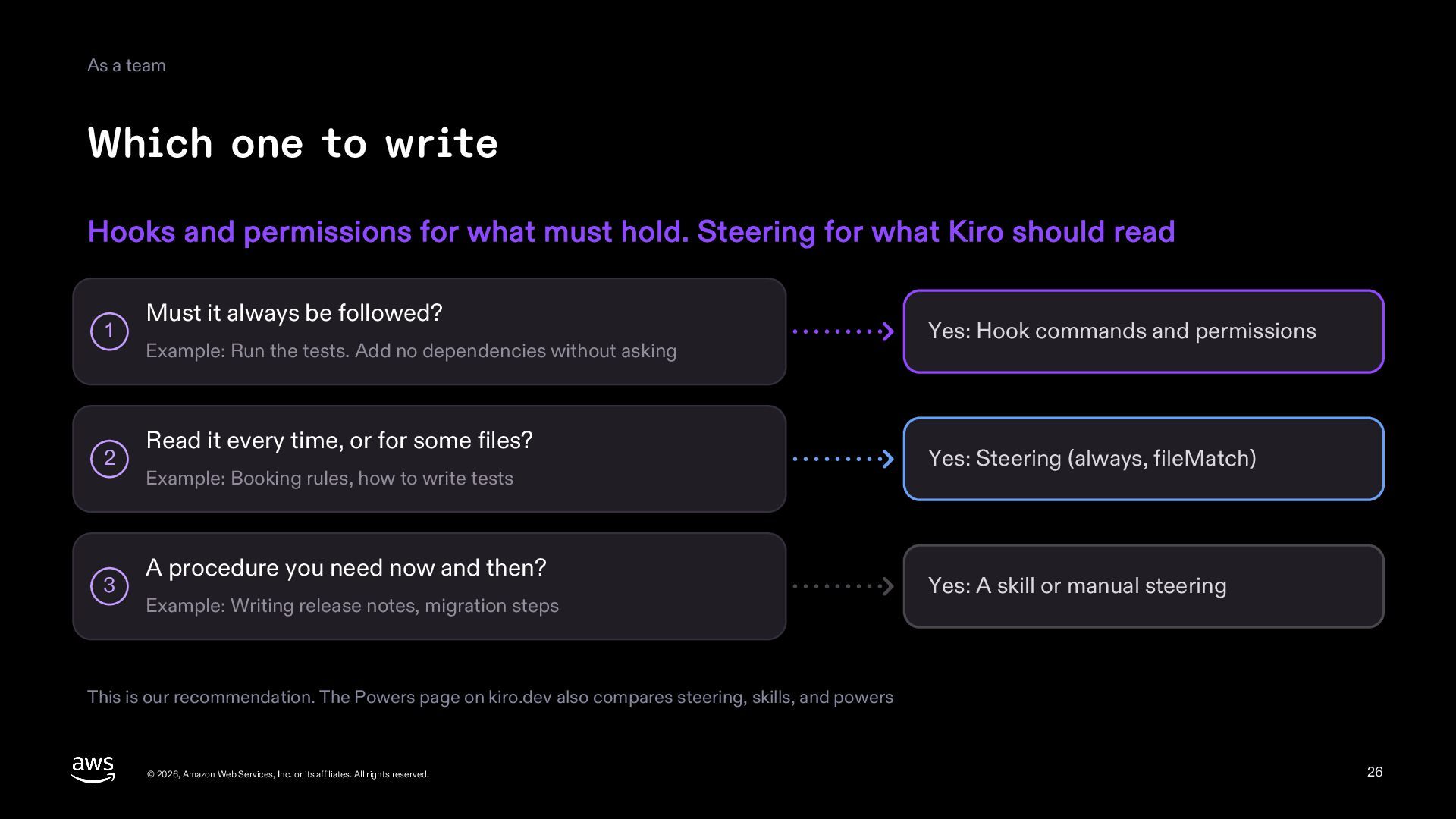
    for what must hold. Steering for what Kiro should read 1 2 3 Must it always be followed? Example: Run the tests. Add no dependencies without asking Read it every time, or for some files? Example: Booking rules, how to write tests A procedure you need now and then? Example: Writing release notes, migration steps Yes: Hook commands and permissions Yes: Steering (always, fileMatch) Yes: A skill or manual steering This is our recommendation. The Powers page on kiro.dev also compares steering, skills, and powers © 2026, Amazon Web Services, Inc. or its affiliates. All rights reserved. 26
  27. Summary Summary Kiro reads steering. Hooks run on triggers. Permissions

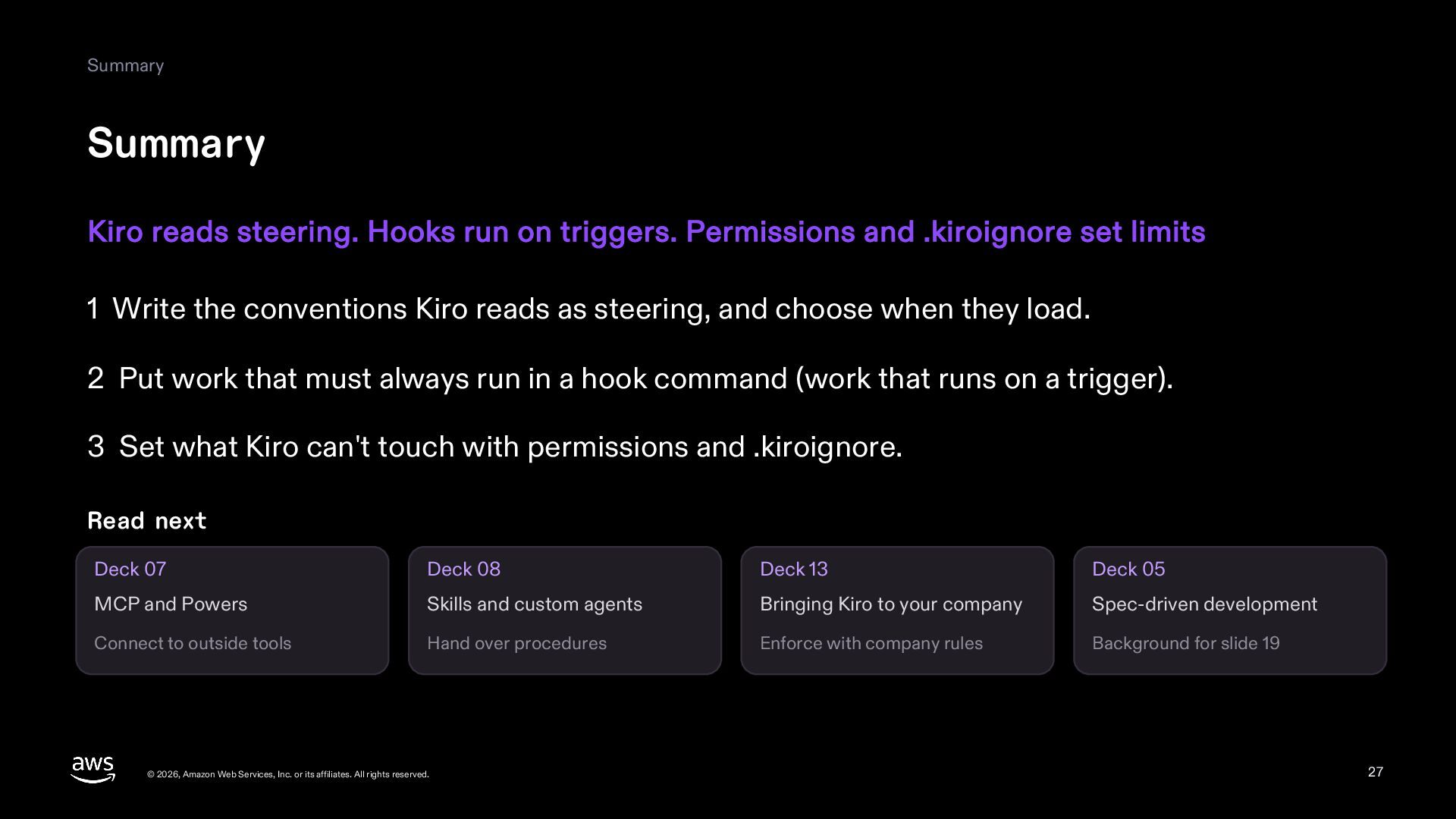
    and .kiroignore set limits 1 Write the conventions Kiro reads as steering, and choose when they load. 2 Put work that must always run in a hook command (work that runs on a trigger). 3 Set what Kiro can't touch with permissions and .kiroignore. Read next Deck 07 Deck 08 Deck 13 Deck 05 MCP and Powers Skills and custom agents Bringing Kiro to your company Spec-driven development Connect to outside tools Hand over procedures Enforce with company rules Background for slide 19 © 2026, Amazon Web Services, Inc. or its affiliates. All rights reserved. 27
  28. Appendix A1 Hook triggers Trigger JSON trigger IDE CLI Trigger

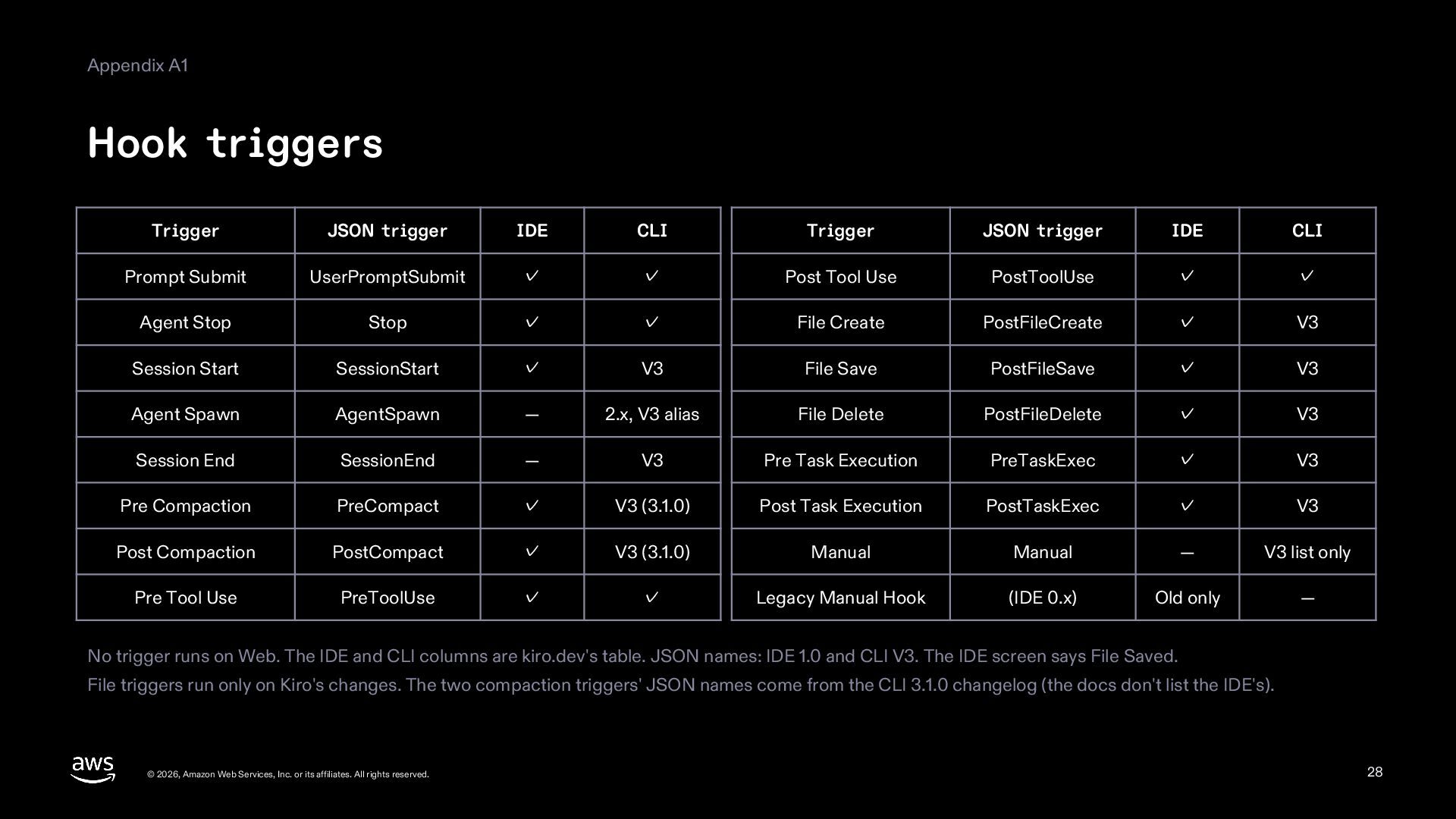
    JSON trigger IDE CLI Prompt Submit UserPromptSubmit ✓ ✓ Post Tool Use PostToolUse ✓ ✓ Agent Stop Stop ✓ ✓ File Create PostFileCreate ✓ V3 Session Start SessionStart ✓ V3 File Save PostFileSave ✓ V3 Agent Spawn AgentSpawn — 2.x, V3 alias File Delete PostFileDelete ✓ V3 Session End SessionEnd — V3 Pre Task Execution PreTaskExec ✓ V3 Pre Compaction PreCompact ✓ V3 (3.1.0) Post Task Execution PostTaskExec ✓ V3 Post Compaction PostCompact ✓ V3 (3.1.0) Manual Manual — V3 list only Pre Tool Use PreToolUse ✓ ✓ Legacy Manual Hook (IDE 0.x) Old only — No trigger runs on Web. The IDE and CLI columns are kiro.dev's table. JSON names: IDE 1.0 and CLI V3. The IDE screen says File Saved. File triggers run only on Kiro's changes. The two compaction triggers' JSON names come from the CLI 3.1.0 changelog (the docs don't list the IDE's). © 2026, Amazon Web Services, Inc. or its affiliates. All rights reserved. 28
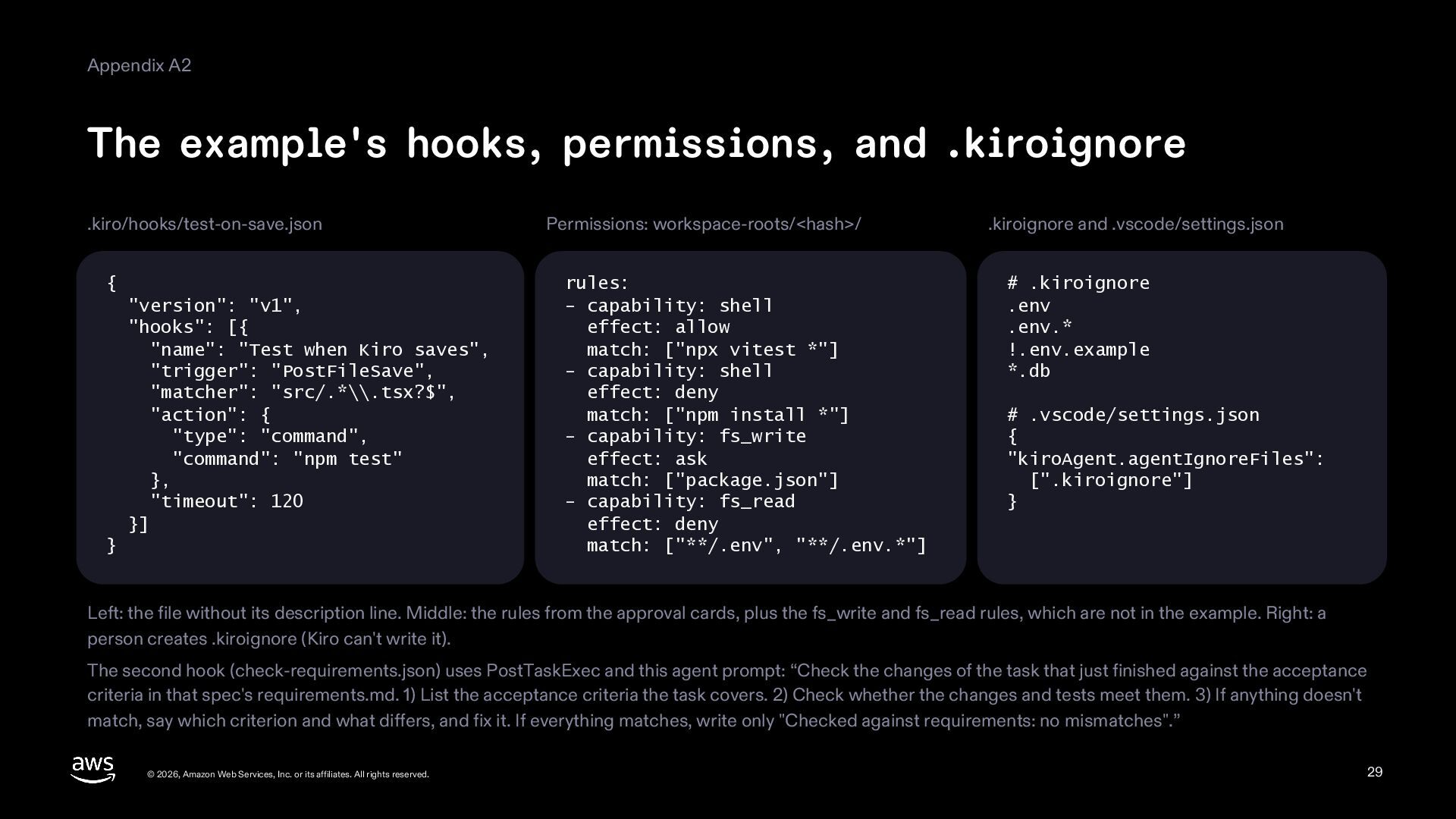
  29. Appendix A2 The example's hooks, permissions, and .kiroignore .kiro/hooks/test-on-save.json {

    "version": "v1", "hooks": [{ "name": "Test when Kiro saves", "trigger": "PostFileSave", "matcher": "src/.*\\.tsx?$", "action": { "type": "command", "command": "npm test" }, "timeout": 120 }] } Permissions: workspace-roots/<hash>/ rules: - capability: shell effect: allow match: ["npx vitest *"] - capability: shell effect: deny match: ["npm install *"] - capability: fs_write effect: ask match: ["package.json"] - capability: fs_read effect: deny match: ["**/.env", "**/.env.*"] .kiroignore and .vscode/settings.json # .kiroignore .env .env.* !.env.example *.db # .vscode/settings.json { "kiroAgent.agentIgnoreFiles": [".kiroignore"] } Left: the file without its description line. Middle: the rules from the approval cards, plus the fs_write and fs_read rules, which are not in the example. Right: a person creates .kiroignore (Kiro can't write it). The second hook (check-requirements.json) uses PostTaskExec and this agent prompt: “Check the changes of the task that just finished against the acceptance criteria in that spec's requirements.md. 1) List the acceptance criteria the task covers. 2) Check whether the changes and tests meet them. 3) If anything doesn't match, say which criterion and what differs, and fix it. If everything matches, write only "Checked against requirements: no mismatches".” © 2026, Amazon Web Services, Inc. or its affiliates. All rights reserved. 29
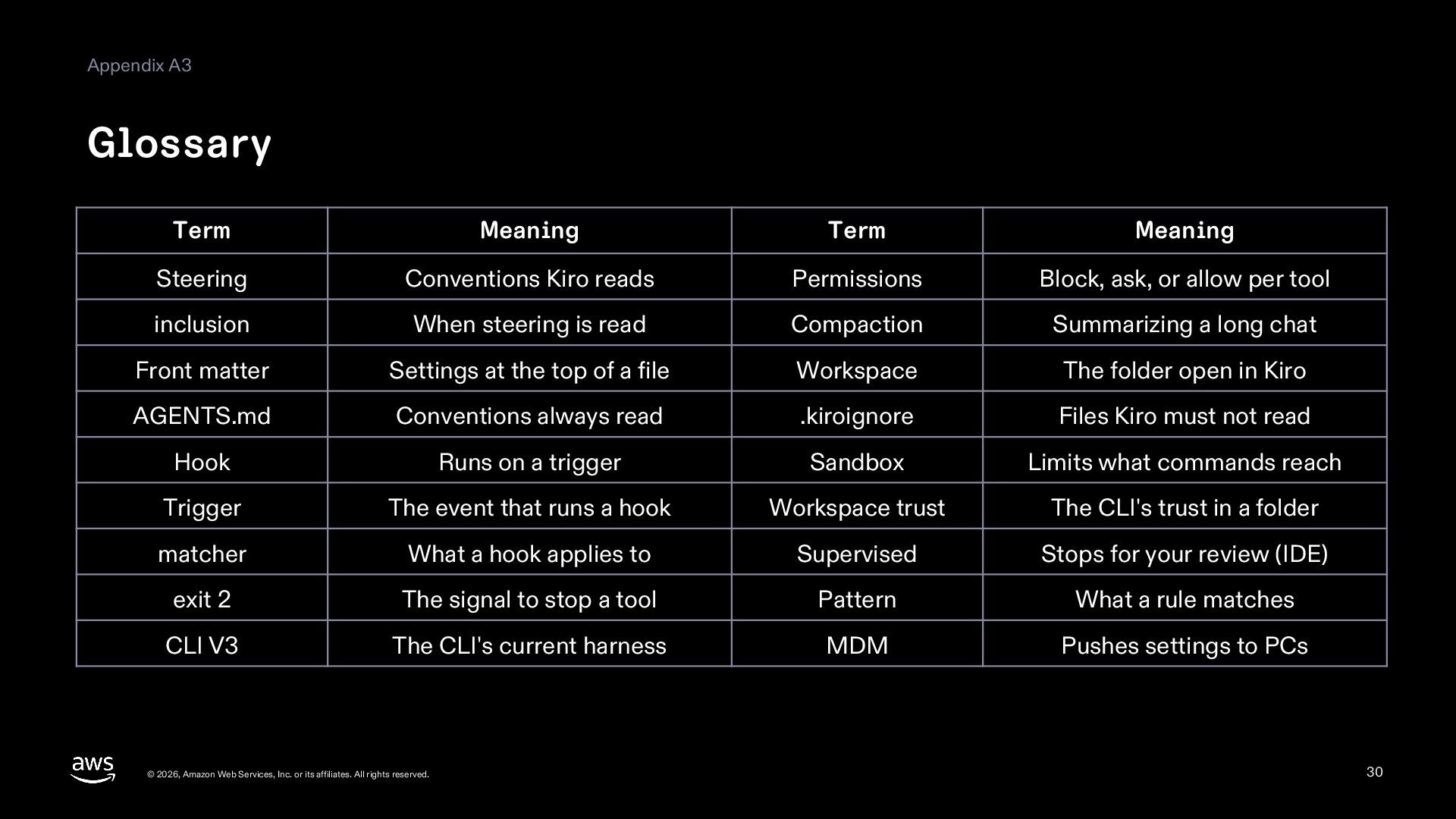
  30. Appendix A3 Glossary Term Meaning Term Meaning Steering Conventions Kiro

    reads Permissions Block, ask, or allow per tool inclusion When steering is read Compaction Summarizing a long chat Front matter Settings at the top of a file Workspace The folder open in Kiro AGENTS.md Conventions always read .kiroignore Files Kiro must not read Hook Runs on a trigger Sandbox Limits what commands reach Trigger The event that runs a hook Workspace trust The CLI's trust in a folder matcher What a hook applies to Supervised Stops for your review (IDE) exit 2 The signal to stop a tool Pattern What a rule matches CLI V3 The CLI's current harness MDM Pushes settings to PCs © 2026, Amazon Web Services, Inc. or its affiliates. All rights reserved. 30
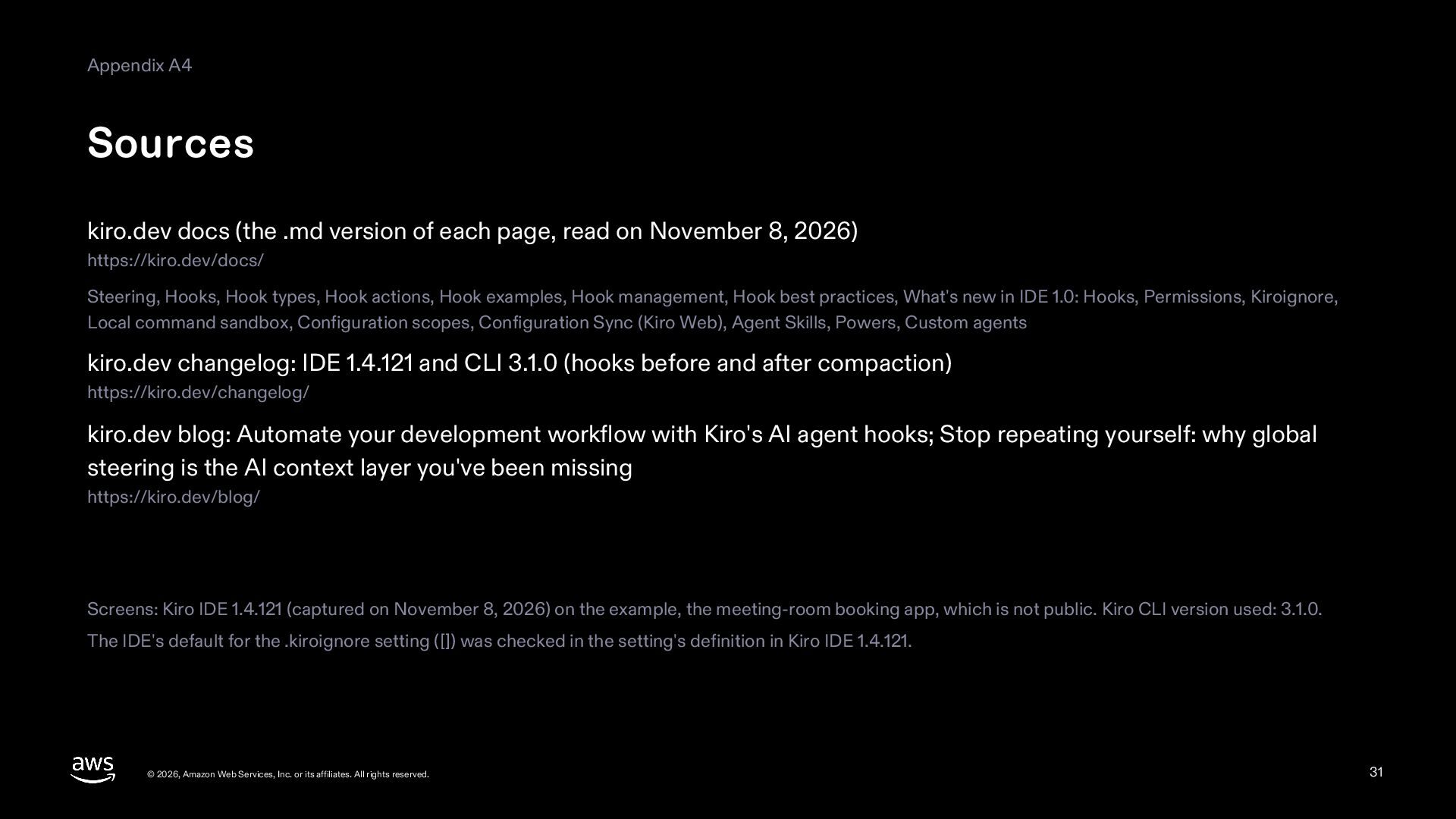
  31. Appendix A4 Sources kiro.dev docs (the .md version of each

    page, read on November 8, 2026) https://kiro.dev/docs/ Steering, Hooks, Hook types, Hook actions, Hook examples, Hook management, Hook best practices, What's new in IDE 1.0: Hooks, Permissions, Kiroignore, Local command sandbox, Configuration scopes, Configuration Sync (Kiro Web), Agent Skills, Powers, Custom agents kiro.dev changelog: IDE 1.4.121 and CLI 3.1.0 (hooks before and after compaction) https://kiro.dev/changelog/ kiro.dev blog: Automate your development workflow with Kiro's AI agent hooks; Stop repeating yourself: why global steering is the AI context layer you've been missing https://kiro.dev/blog/ Screens: Kiro IDE 1.4.121 (captured on November 8, 2026) on the example, the meeting-room booking app, which is not public. Kiro CLI version used: 3.1.0. The IDE's default for the .kiroignore setting ([]) was checked in the setting's definition in Kiro IDE 1.4.121. © 2026, Amazon Web Services, Inc. or its affiliates. All rights reserved. 31