Share
Embed
SORACOM MCP Serverを使ってみよう
2025/9/22開催
SORACOM UG Online #23
SORACOM Discovery 2025 reCap
t.kizawa
September 22, 2025
Transcript
21 slides
-
SORACOM MCP Server を使ってみよう 【 SORACOM UG Online #23 】
2025年9月22日 Tomotaka Kizawa ( kizawa2020 ) -
▪ 名前 : 木澤 朋隆 (きざわ ともたか) 所属 : (豊洲にある)
システムインテグレーター 担当業務: ① クラウドに関するマーケティング/プロモーション ② 社内エンジニアへの支援活動(情報提供など) ③ クラウドアーキテクト 自己紹介 Page.2 第4740号 -
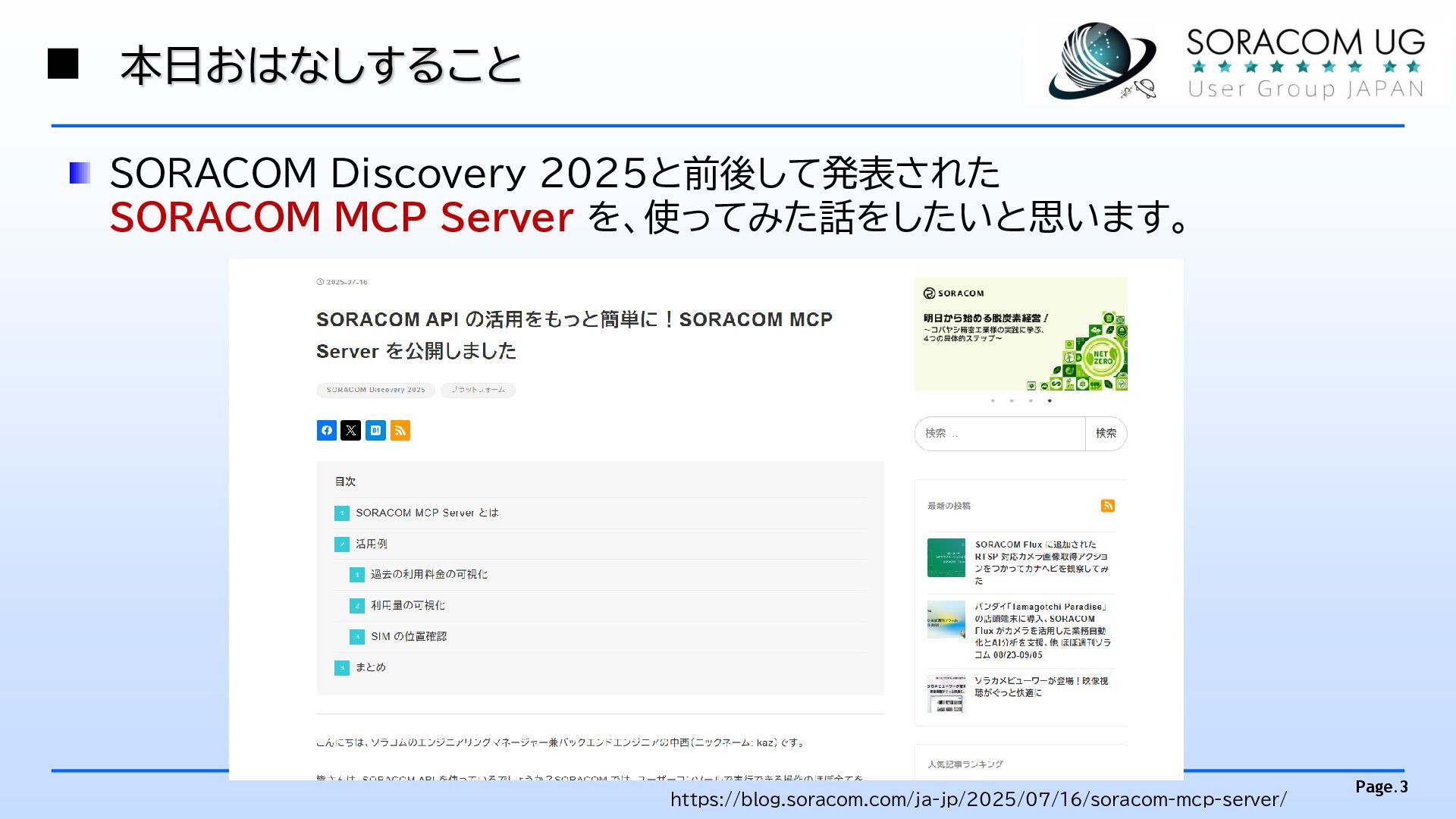
▪ 本日おはなしすること Page.3 SORACOM Discovery 2025と前後して発表された SORACOM MCP Server を、使ってみた話をしたいと思います。
https://blog.soracom.com/ja-jp/2025/07/16/soracom-mcp-server/ -
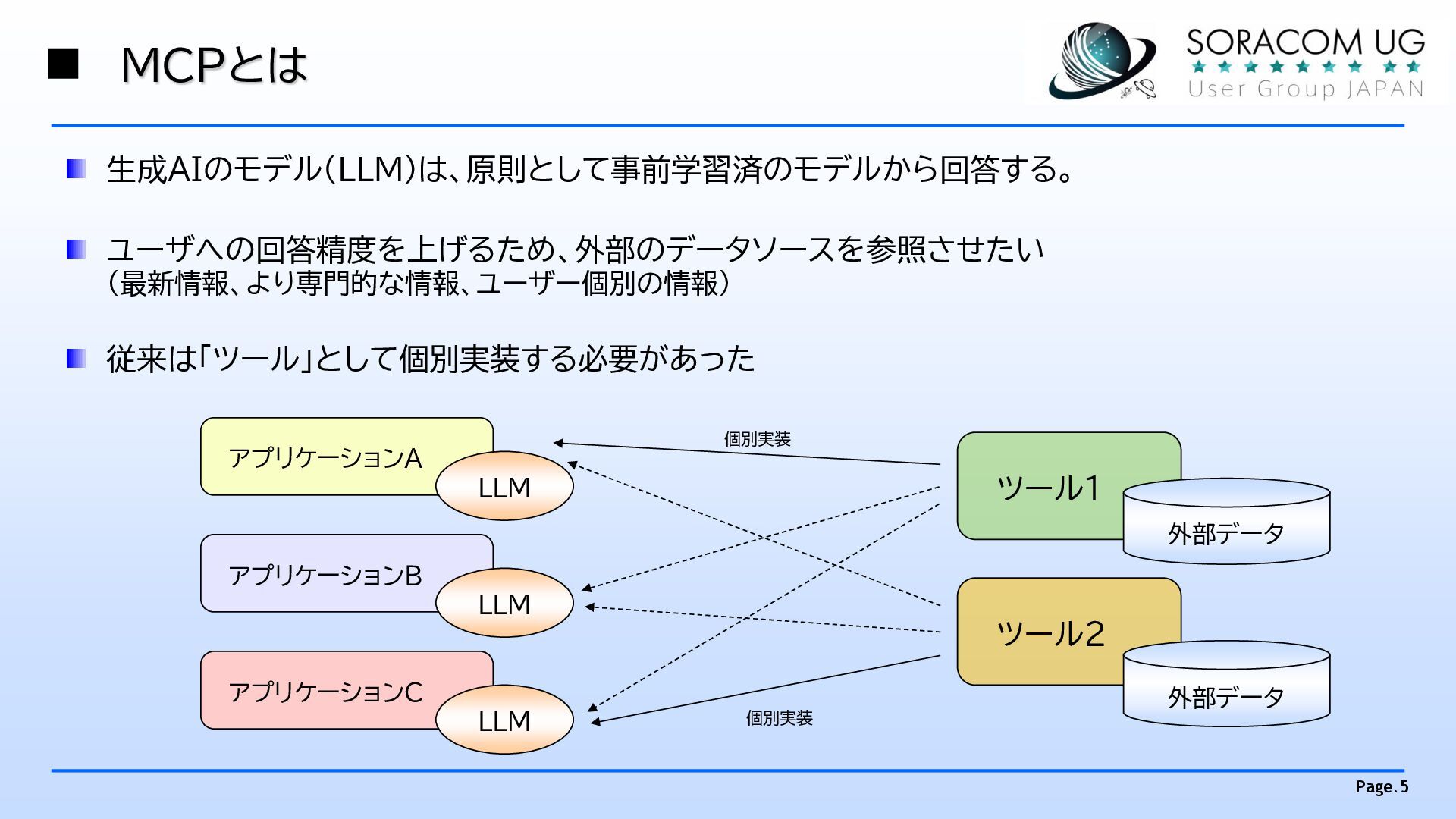
▪ MCPとは Page.5 生成AIのモデル(LLM)は、原則として事前学習済のモデルから回答する。 ユーザへの回答精度を上げるため、外部のデータソースを参照させたい (最新情報、より専門的な情報、ユーザー個別の情報) 従来は「ツール」として個別実装する必要があった アプリケーションA LLM アプリケーションB
LLM アプリケーションC LLM ツール1 ツール2 外部データ 外部データ 個別実装 個別実装 -
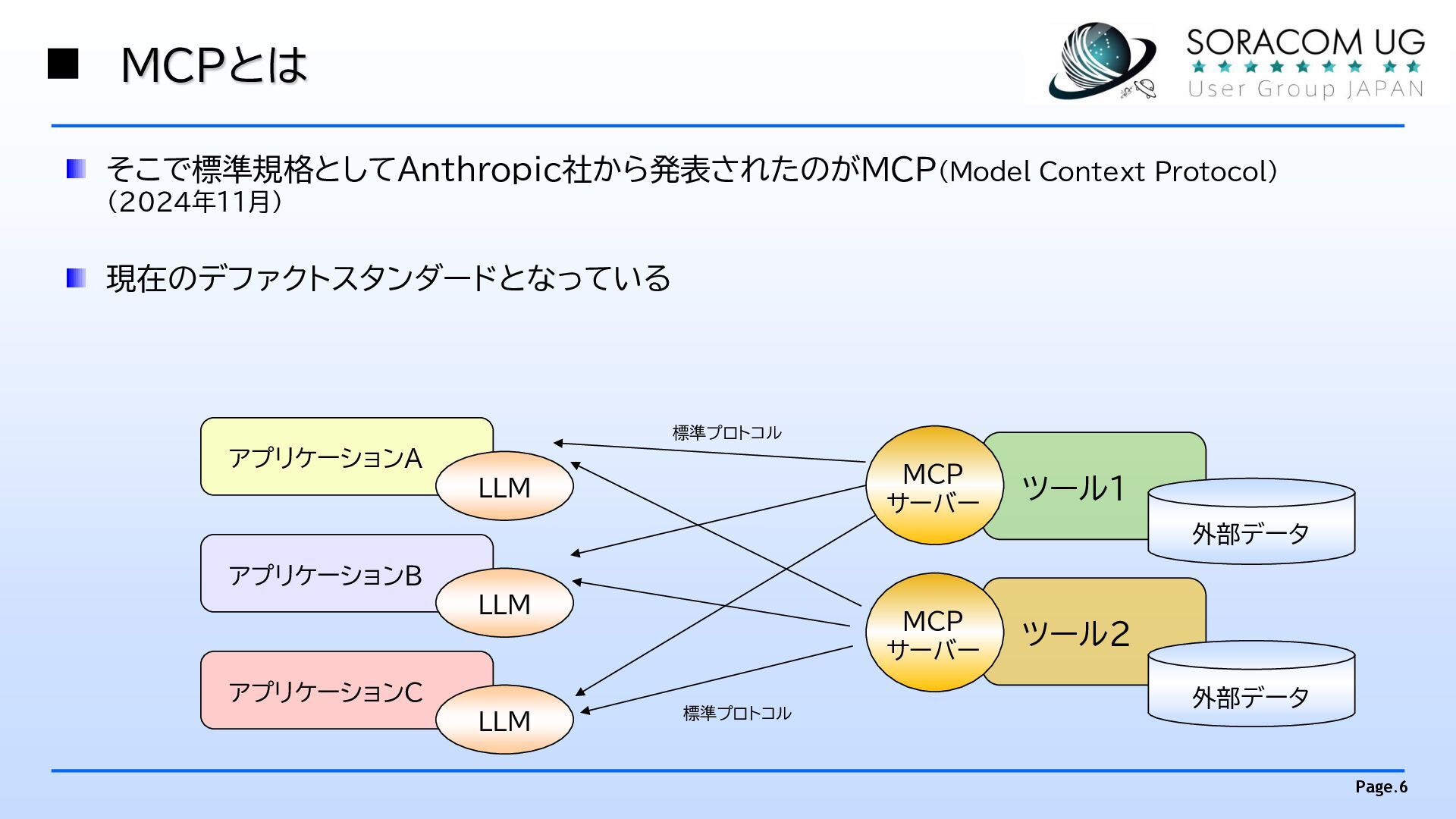
▪ MCPとは Page.6 そこで標準規格としてAnthropic社から発表されたのがMCP(Model Context Protocol) (2024年11月) 現在のデファクトスタンダードとなっている アプリケーションA LLM
アプリケーションB LLM アプリケーションC LLM ツール1 ツール2 外部データ 外部データ 標準プロトコル MCP サーバー MCP サーバー 標準プロトコル -
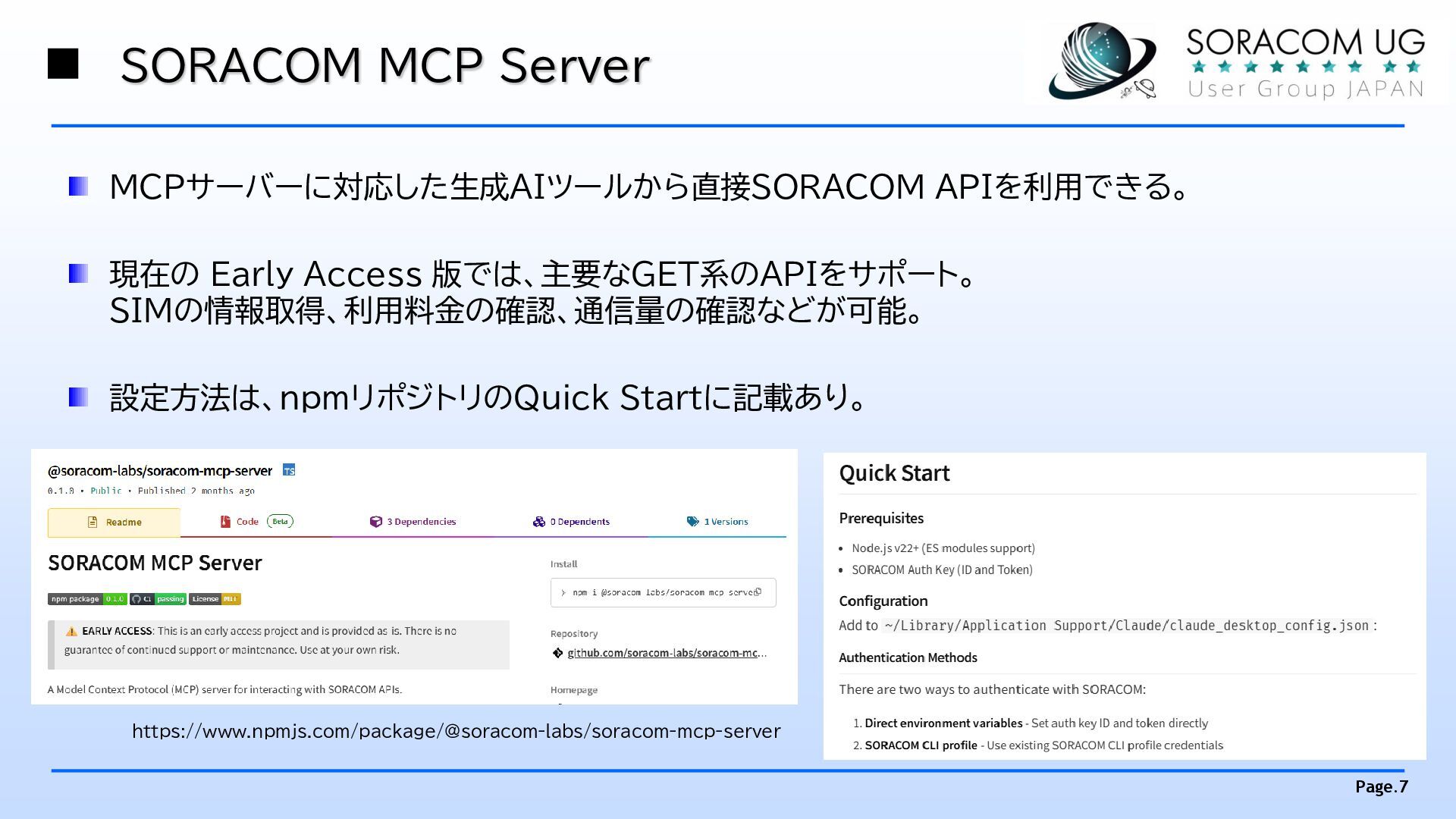
▪ SORACOM MCP Server Page.7 MCPサーバーに対応した生成AIツールから直接SORACOM APIを利用できる。 現在の Early Access
版では、主要なGET系のAPIをサポート。 SIMの情報取得、利用料金の確認、通信量の確認などが可能。 設定方法は、npmリポジトリのQuick Startに記載あり。 https://www.npmjs.com/package/@soracom-labs/soracom-mcp-server -
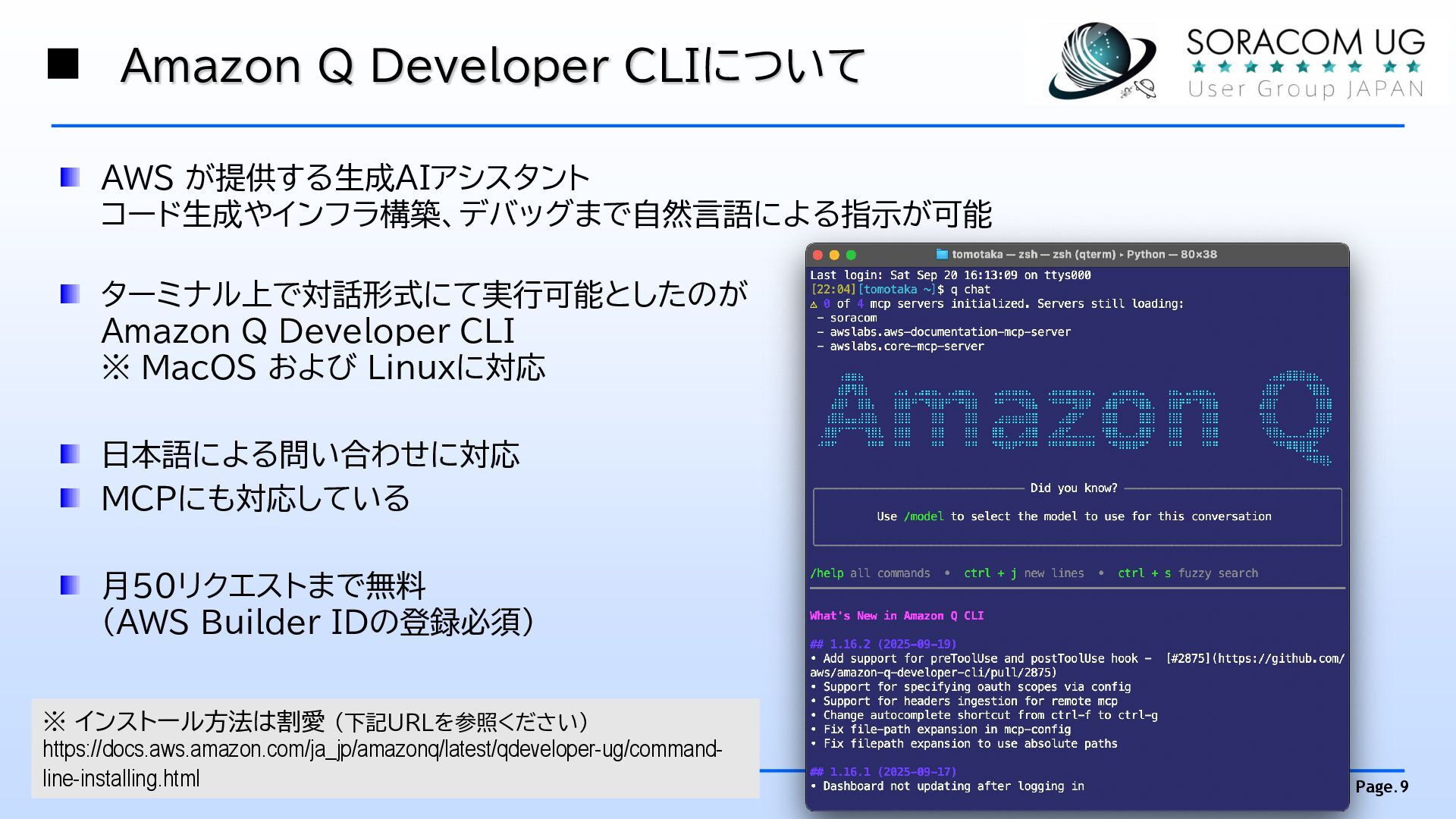
▪ Amazon Q Developer CLIについて Page.9 AWS が提供する生成AIアシスタント コード生成やインフラ構築、デバッグまで自然言語による指示が可能 ターミナル上で対話形式にて実行可能としたのが
Amazon Q Developer CLI ※ MacOS および Linuxに対応 日本語による問い合わせに対応 MCPにも対応している 月50リクエストまで無料 (AWS Builder IDの登録必須) ※ インストール方法は割愛 (下記URLを参照ください) https://docs.aws.amazon.com/ja_jp/amazonq/latest/qdeveloper-ug/command- line-installing.html -
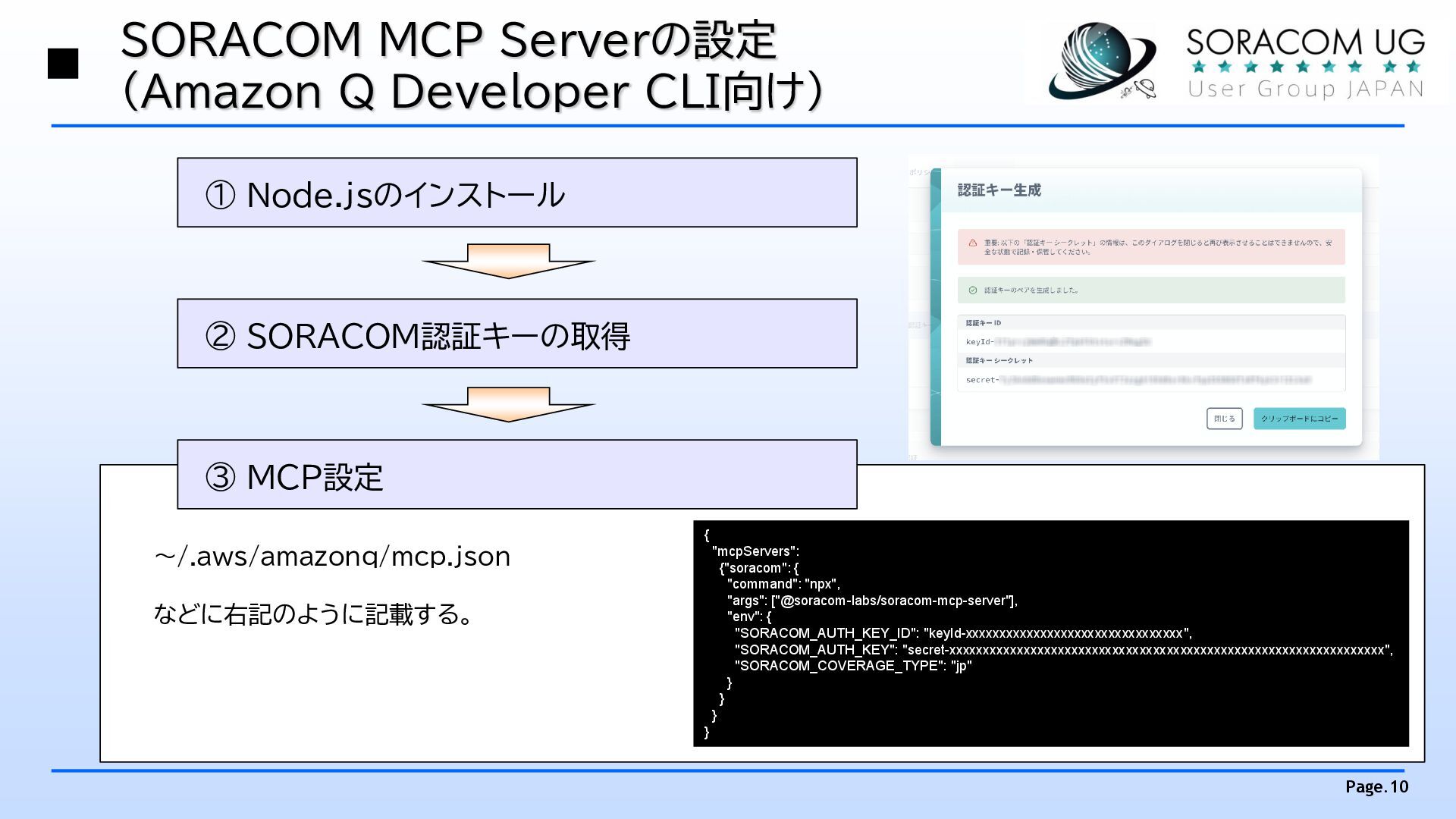
▪ SORACOM MCP Serverの設定 (Amazon Q Developer CLI向け) Page.10 ①
Node.jsのインストール ② SORACOM認証キーの取得 ③ MCP設定 { "mcpServers": {"soracom": { "command": "npx", "args": ["@soracom-labs/soracom-mcp-server"], "env": { "SORACOM_AUTH_KEY_ID": "keyId-xxxxxxxxxxxxxxxxxxxxxxxxxxxxxxxx", "SORACOM_AUTH_KEY": "secret-xxxxxxxxxxxxxxxxxxxxxxxxxxxxxxxxxxxxxxxxxxxxxxxxxxxxxxxxxxxxxxxx", "SORACOM_COVERAGE_TYPE": "jp" } } } } ~/.aws/amazonq/mcp.json などに右記のように記載する。 -
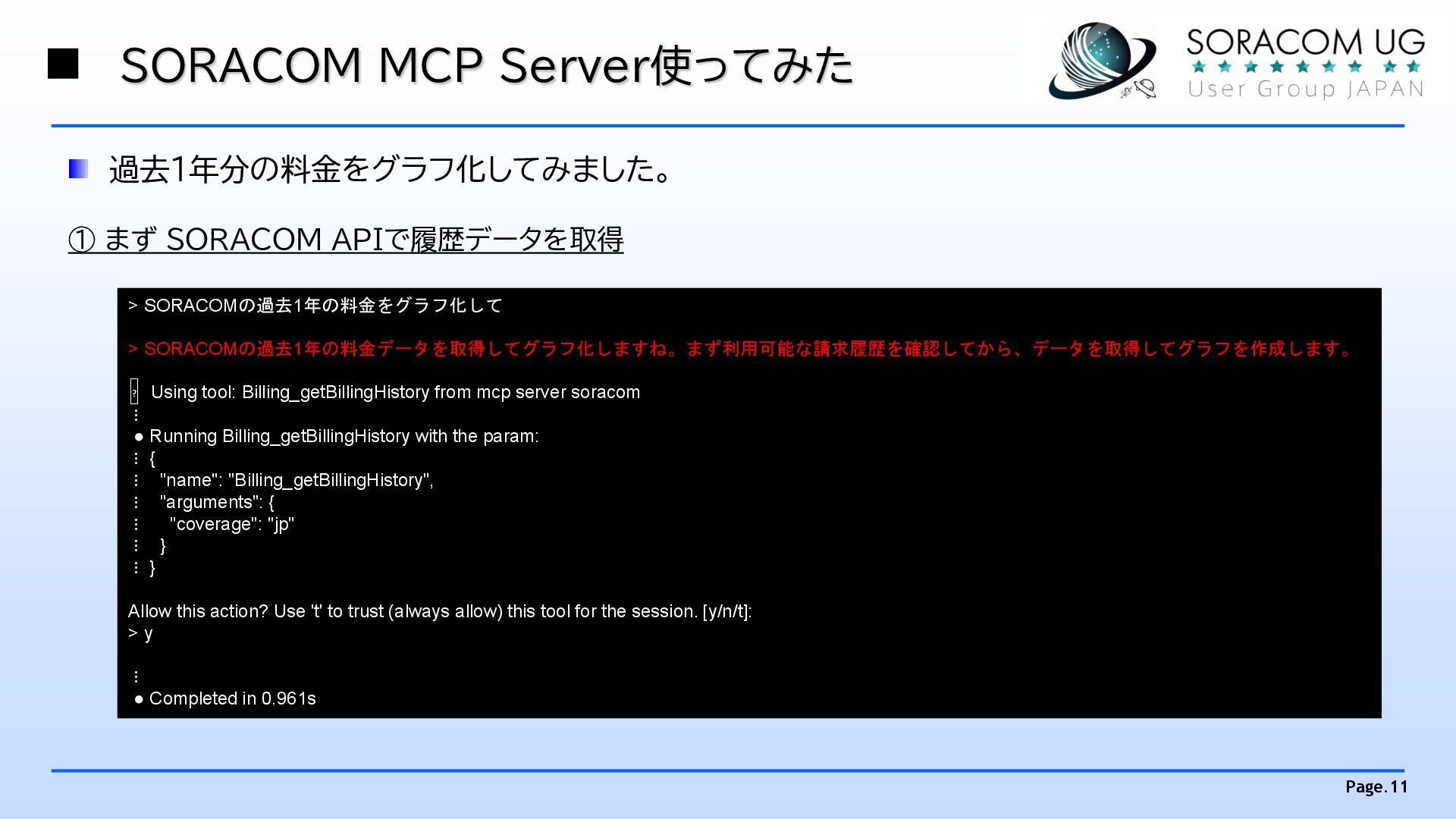
▪ SORACOM MCP Server使ってみた Page.11 過去1年分の料金をグラフ化してみました。 > SORACOMの過去1年の料金をグラフ化して > SORACOMの過去1年の料金データを取得してグラフ化しますね。まず利用可能な請求履歴を確認してから、データを取得してグラフを作成します。
️ Using tool: Billing_getBillingHistory from mcp server soracom ⋮ • Running Billing_getBillingHistory with the param: ⋮ { ⋮ "name": "Billing_getBillingHistory", ⋮ "arguments": { ⋮ "coverage": "jp" ⋮ } ⋮ } Allow this action? Use 't' to trust (always allow) this tool for the session. [y/n/t]: > y ⋮ • Completed in 0.961s ① まず SORACOM APIで履歴データを取得 -
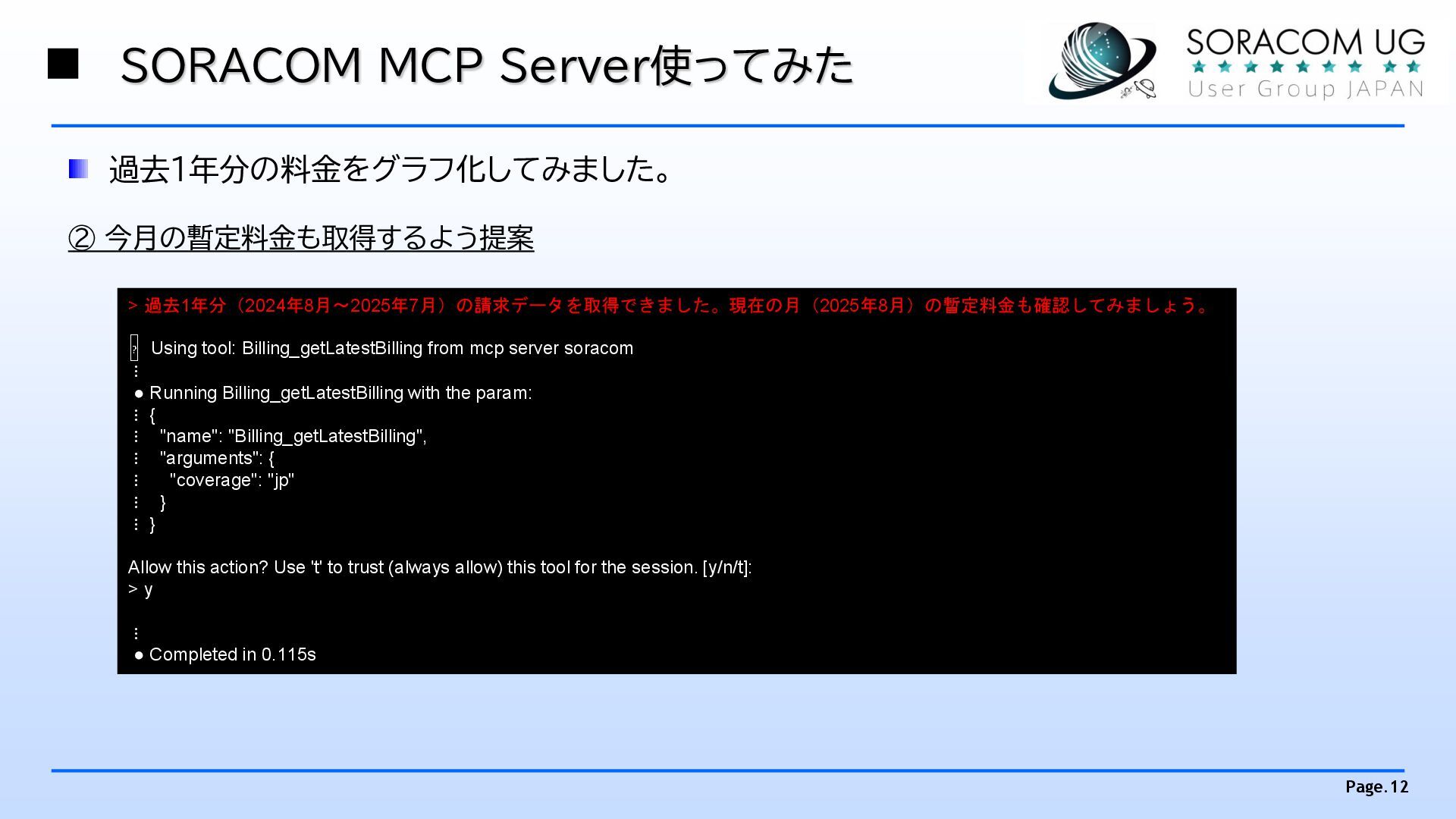
▪ SORACOM MCP Server使ってみた Page.12 過去1年分の料金をグラフ化してみました。 > 過去1年分(2024年8月〜2025年7月)の請求データを取得できました。現在の月(2025年8月)の暫定料金も確認してみましょう。 ️ Using
tool: Billing_getLatestBilling from mcp server soracom ⋮ • Running Billing_getLatestBilling with the param: ⋮ { ⋮ "name": "Billing_getLatestBilling", ⋮ "arguments": { ⋮ "coverage": "jp" ⋮ } ⋮ } Allow this action? Use 't' to trust (always allow) this tool for the session. [y/n/t]: > y ⋮ • Completed in 0.115s ② 今月の暫定料金も取得するよう提案 -
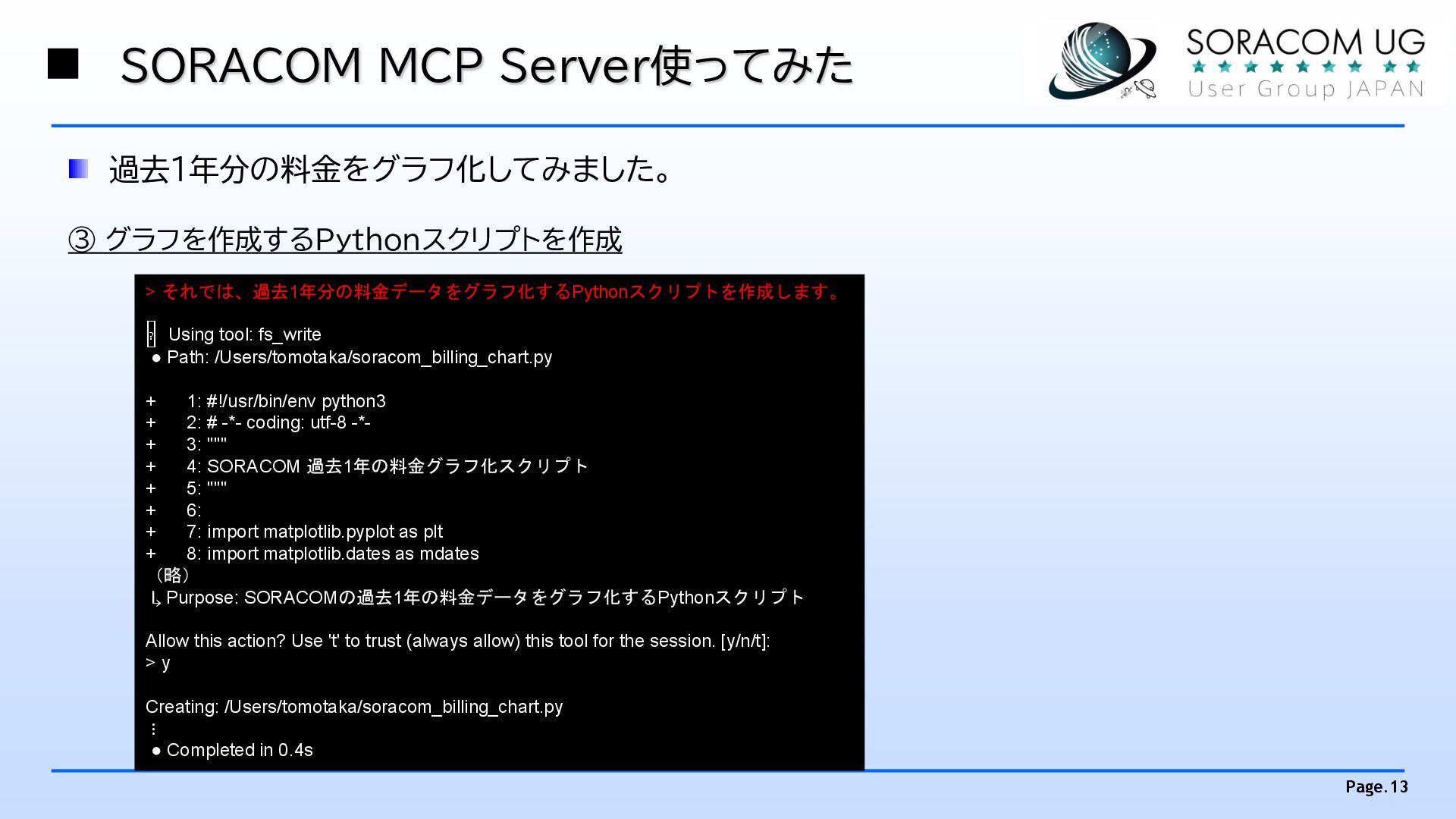
▪ SORACOM MCP Server使ってみた Page.13 過去1年分の料金をグラフ化してみました。 > それでは、過去1年分の料金データをグラフ化するPythonスクリプトを作成します。 ️ Using
tool: fs_write • Path: /Users/tomotaka/soracom_billing_chart.py + 1: #!/usr/bin/env python3 + 2: # -*- coding: utf-8 -*- + 3: """ + 4: SORACOM 過去1年の料金グラフ化スクリプト + 5: """ + 6: + 7: import matplotlib.pyplot as plt + 8: import matplotlib.dates as mdates (略) ↳ Purpose: SORACOMの過去1年の料金データをグラフ化するPythonスクリプト Allow this action? Use 't' to trust (always allow) this tool for the session. [y/n/t]: > y Creating: /Users/tomotaka/soracom_billing_chart.py ⋮ • Completed in 0.4s ③ グラフを作成するPythonスクリプトを作成 -
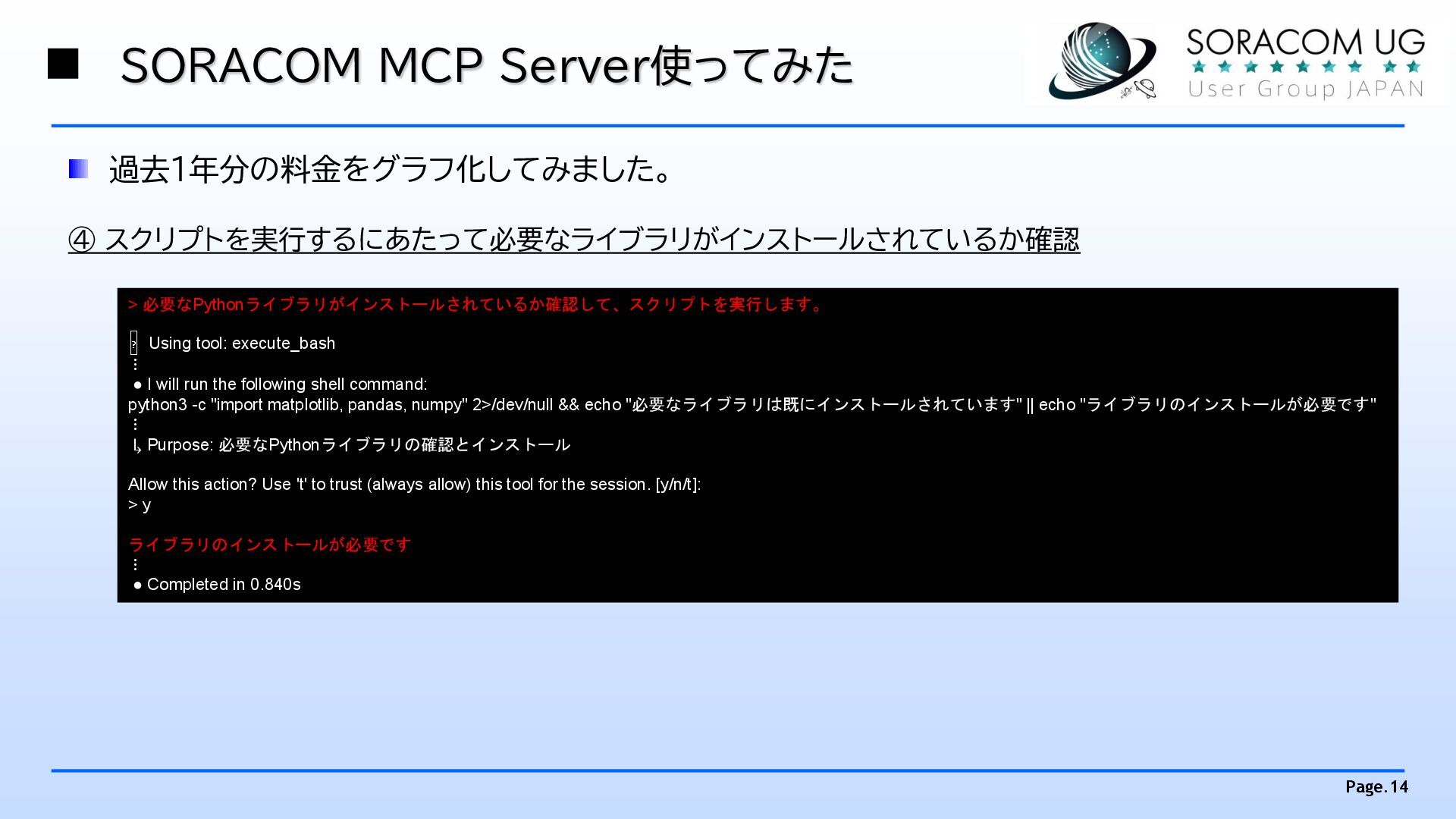
▪ SORACOM MCP Server使ってみた Page.14 過去1年分の料金をグラフ化してみました。 > 必要なPythonライブラリがインストールされているか確認して、スクリプトを実行します。 ️ Using
tool: execute_bash ⋮ • I will run the following shell command: python3 -c "import matplotlib, pandas, numpy" 2>/dev/null && echo "必要なライブラリは既にインストールされています" || echo "ライブラリのインストールが必要です" ⋮ ↳ Purpose: 必要なPythonライブラリの確認とインストール Allow this action? Use 't' to trust (always allow) this tool for the session. [y/n/t]: > y ライブラリのインストールが必要です ⋮ • Completed in 0.840s ④ スクリプトを実行するにあたって必要なライブラリがインストールされているか確認 -
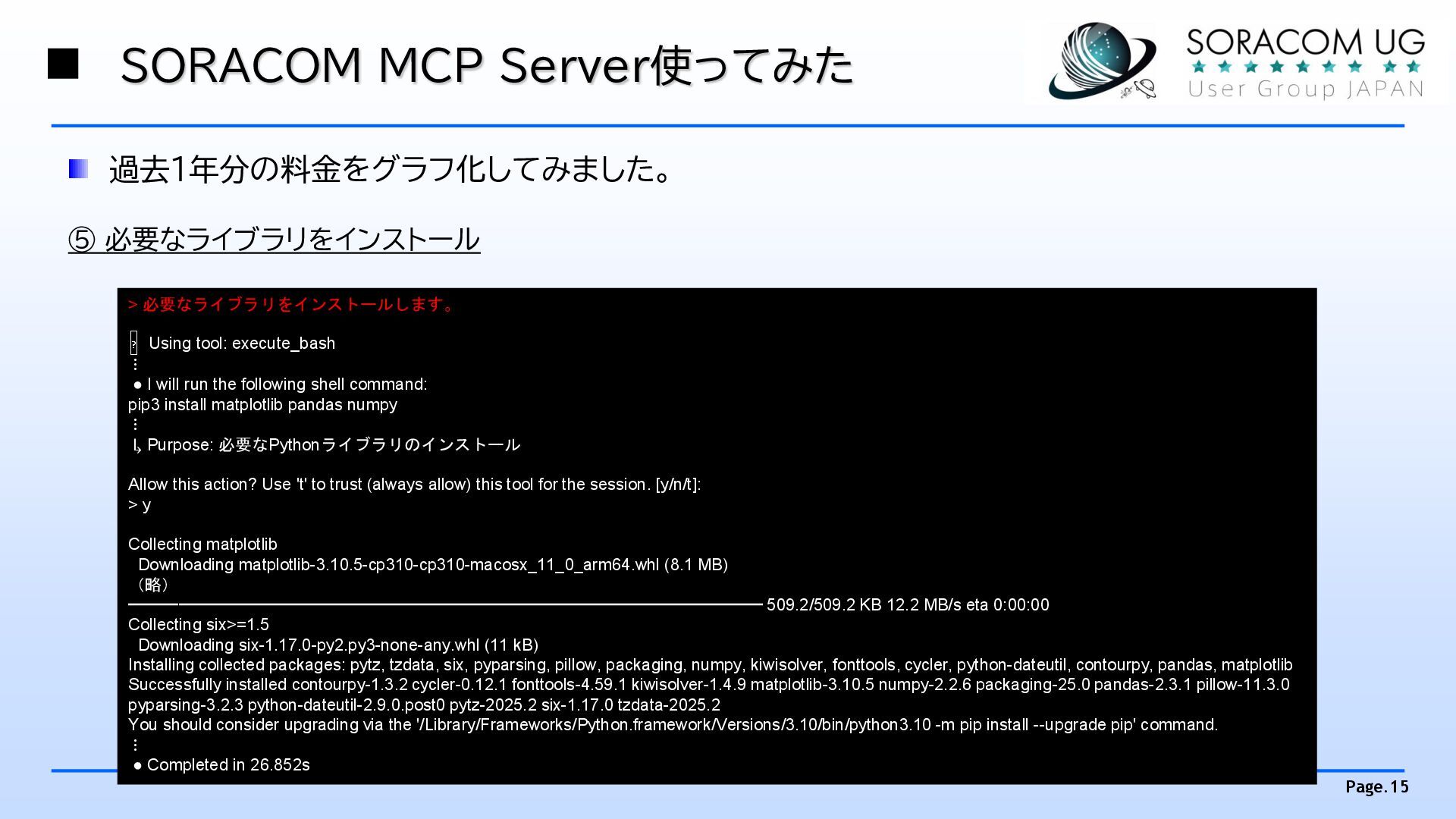
▪ SORACOM MCP Server使ってみた Page.15 過去1年分の料金をグラフ化してみました。 > 必要なライブラリをインストールします。 ️ Using
tool: execute_bash ⋮ • I will run the following shell command: pip3 install matplotlib pandas numpy ⋮ ↳ Purpose: 必要なPythonライブラリのインストール Allow this action? Use 't' to trust (always allow) this tool for the session. [y/n/t]: > y Collecting matplotlib Downloading matplotlib-3.10.5-cp310-cp310-macosx_11_0_arm64.whl (8.1 MB) (略) ━━━━━━━━━━━━━━━━━━━━━━━━━━━━━━━━━━━━━━ 509.2/509.2 KB 12.2 MB/s eta 0:00:00 Collecting six>=1.5 Downloading six-1.17.0-py2.py3-none-any.whl (11 kB) Installing collected packages: pytz, tzdata, six, pyparsing, pillow, packaging, numpy, kiwisolver, fonttools, cycler, python-dateutil, contourpy, pandas, matplotlib Successfully installed contourpy-1.3.2 cycler-0.12.1 fonttools-4.59.1 kiwisolver-1.4.9 matplotlib-3.10.5 numpy-2.2.6 packaging-25.0 pandas-2.3.1 pillow-11.3.0 pyparsing-3.2.3 python-dateutil-2.9.0.post0 pytz-2025.2 six-1.17.0 tzdata-2025.2 You should consider upgrading via the '/Library/Frameworks/Python.framework/Versions/3.10/bin/python3.10 -m pip install --upgrade pip' command. ⋮ • Completed in 26.852s ⑤ 必要なライブラリをインストール -
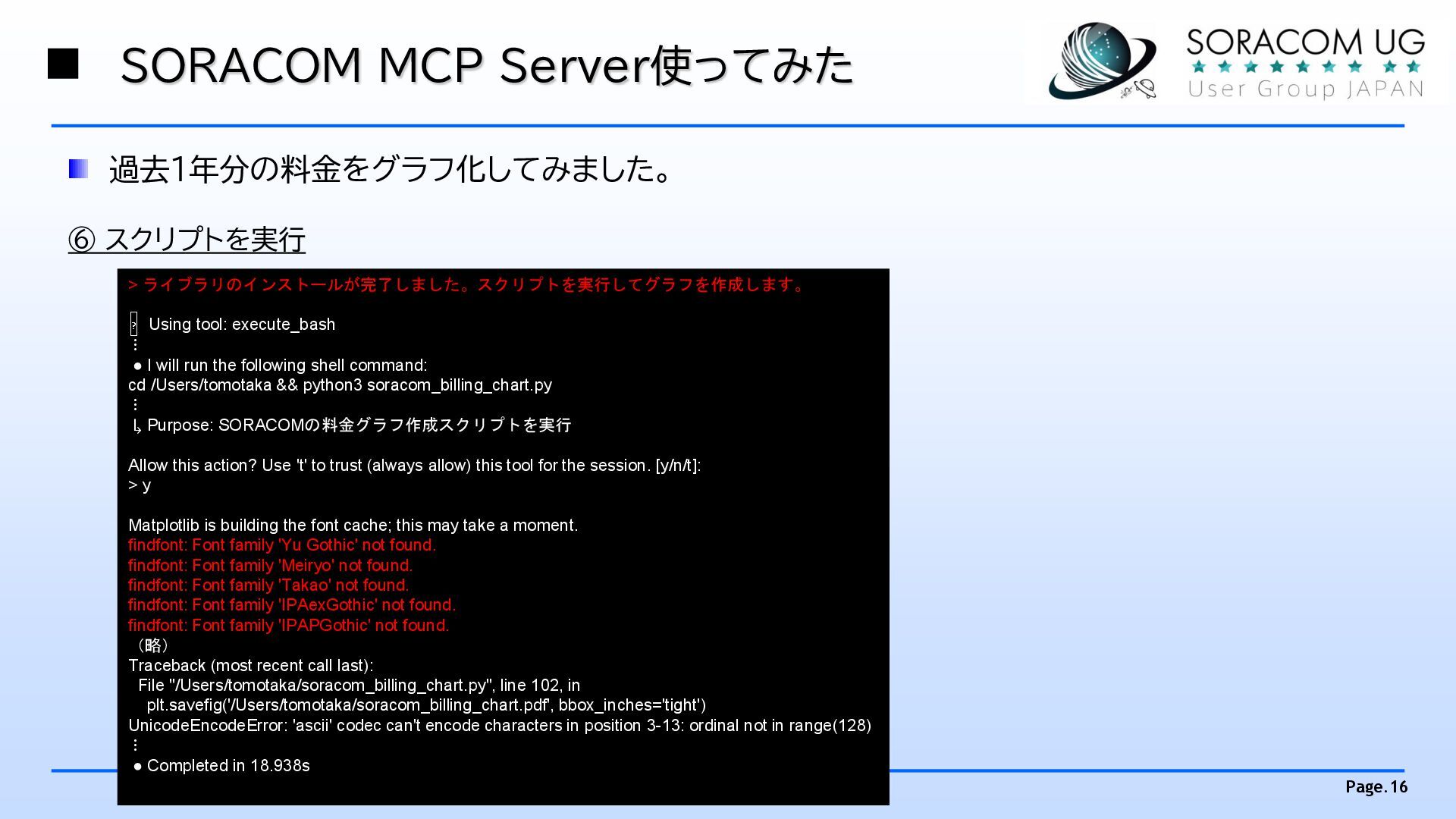
▪ SORACOM MCP Server使ってみた Page.16 過去1年分の料金をグラフ化してみました。 > ライブラリのインストールが完了しました。スクリプトを実行してグラフを作成します。 ️ Using
tool: execute_bash ⋮ • I will run the following shell command: cd /Users/tomotaka && python3 soracom_billing_chart.py ⋮ ↳ Purpose: SORACOMの料金グラフ作成スクリプトを実行 Allow this action? Use 't' to trust (always allow) this tool for the session. [y/n/t]: > y Matplotlib is building the font cache; this may take a moment. findfont: Font family 'Yu Gothic' not found. findfont: Font family 'Meiryo' not found. findfont: Font family 'Takao' not found. findfont: Font family 'IPAexGothic' not found. findfont: Font family 'IPAPGothic' not found. (略) Traceback (most recent call last): File "/Users/tomotaka/soracom_billing_chart.py", line 102, in plt.savefig('/Users/tomotaka/soracom_billing_chart.pdf', bbox_inches='tight') UnicodeEncodeError: 'ascii' codec can't encode characters in position 3-13: ordinal not in range(128) ⋮ • Completed in 18.938s ⑥ スクリプトを実行 -
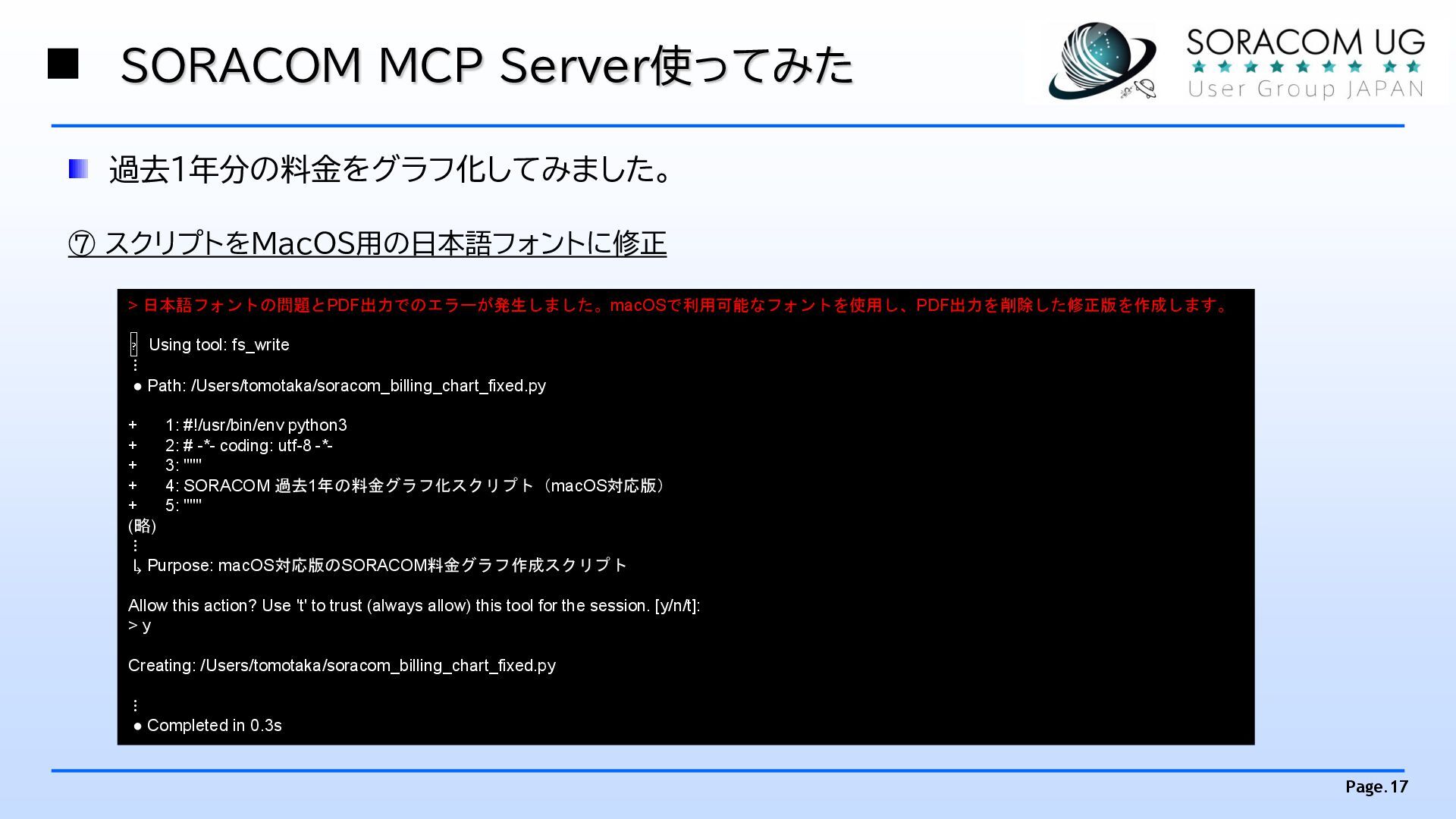
▪ SORACOM MCP Server使ってみた Page.17 過去1年分の料金をグラフ化してみました。 > 日本語フォントの問題とPDF出力でのエラーが発生しました。macOSで利用可能なフォントを使用し、PDF出力を削除した修正版を作成します。 ️ Using
tool: fs_write ⋮ • Path: /Users/tomotaka/soracom_billing_chart_fixed.py + 1: #!/usr/bin/env python3 + 2: # -*- coding: utf-8 -*- + 3: """ + 4: SORACOM 過去1年の料金グラフ化スクリプト(macOS対応版) + 5: """ (略) ⋮ ↳ Purpose: macOS対応版のSORACOM料金グラフ作成スクリプト Allow this action? Use 't' to trust (always allow) this tool for the session. [y/n/t]: > y Creating: /Users/tomotaka/soracom_billing_chart_fixed.py ⋮ • Completed in 0.3s ⑦ スクリプトをMacOS用の日本語フォントに修正 -
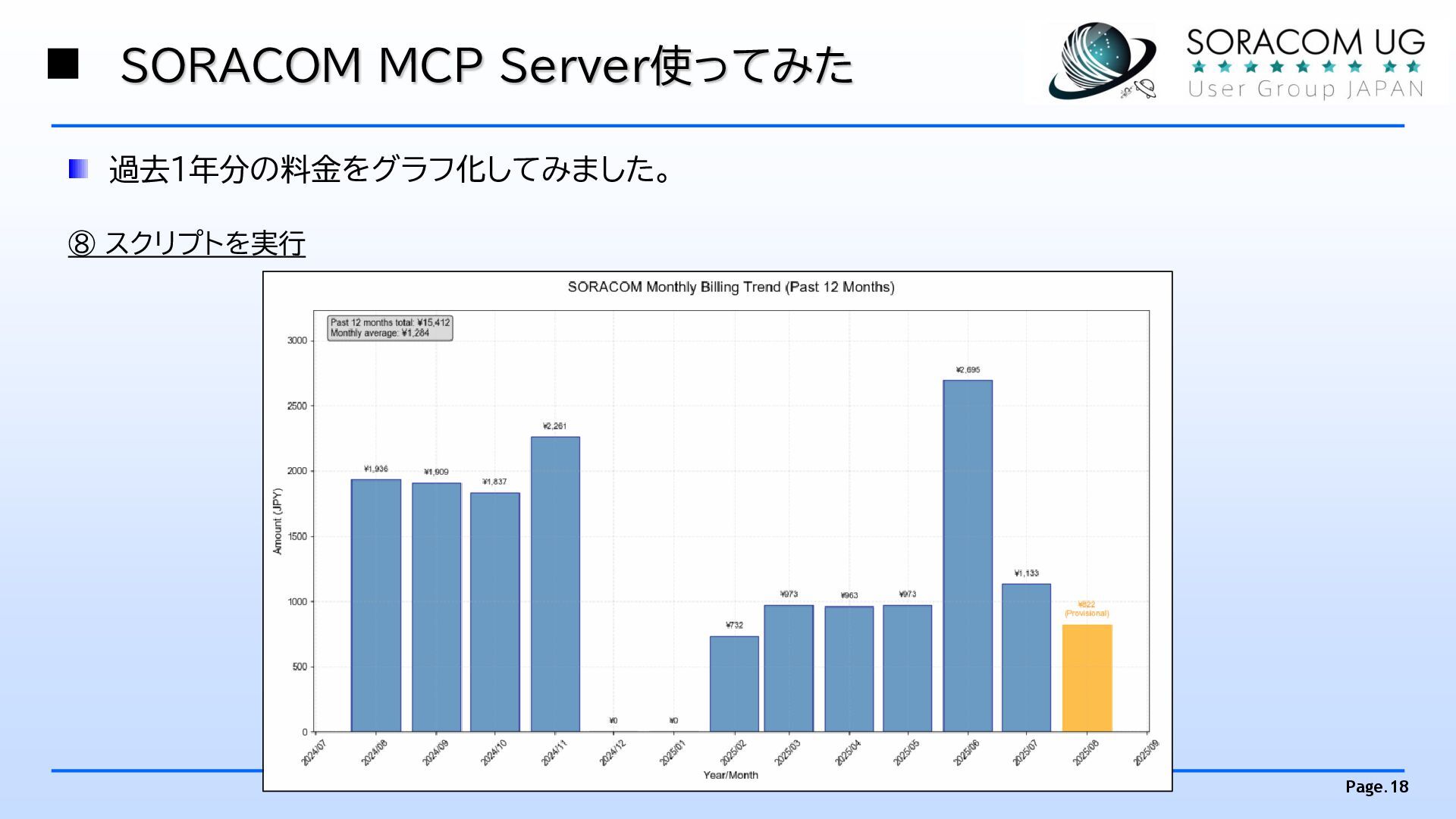
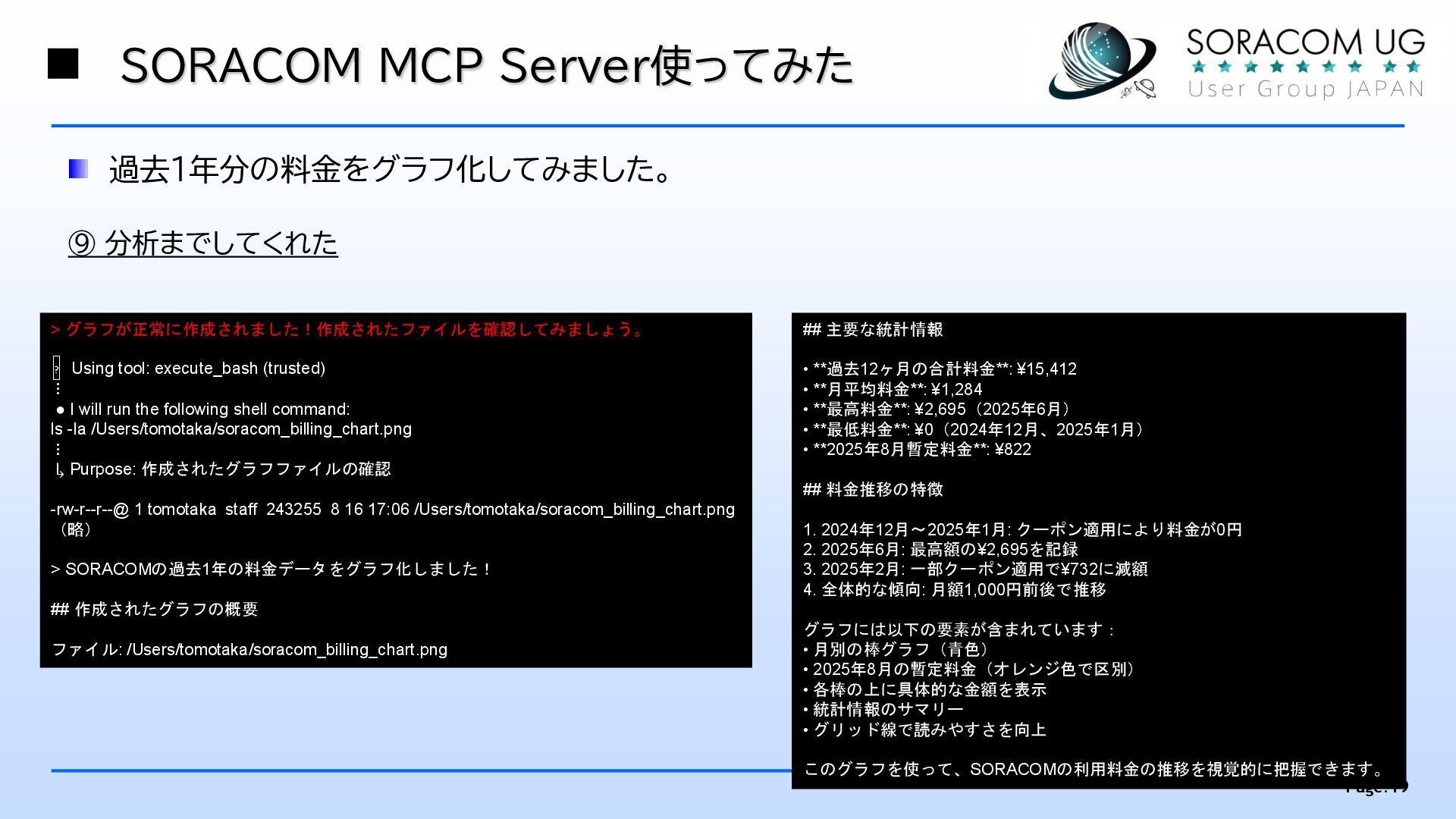
▪ SORACOM MCP Server使ってみた Page.19 過去1年分の料金をグラフ化してみました。 ⑨ 分析までしてくれた > グラフが正常に作成されました!作成されたファイルを確認してみましょう。
️ Using tool: execute_bash (trusted) ⋮ • I will run the following shell command: ls -la /Users/tomotaka/soracom_billing_chart.png ⋮ ↳ Purpose: 作成されたグラフファイルの確認 -rw-r--r--@ 1 tomotaka staff 243255 8 16 17:06 /Users/tomotaka/soracom_billing_chart.png (略) > SORACOMの過去1年の料金データをグラフ化しました! ## 作成されたグラフの概要 ファイル: /Users/tomotaka/soracom_billing_chart.png ## 主要な統計情報 • **過去12ヶ月の合計料金**: ¥15,412 • **月平均料金**: ¥1,284 • **最高料金**: ¥2,695(2025年6月) • **最低料金**: ¥0(2024年12月、2025年1月) • **2025年8月暫定料金**: ¥822 ## 料金推移の特徴 1. 2024年12月〜2025年1月: クーポン適用により料金が0円 2. 2025年6月: 最高額の¥2,695を記録 3. 2025年2月: 一部クーポン適用で¥732に減額 4. 全体的な傾向: 月額1,000円前後で推移 グラフには以下の要素が含まれています: • 月別の棒グラフ(青色) • 2025年8月の暫定料金(オレンジ色で区別) • 各棒の上に具体的な金額を表示 • 統計情報のサマリー • グリッド線で読みやすさを向上 このグラフを使って、SORACOMの利用料金の推移を視覚的に把握できます。 -
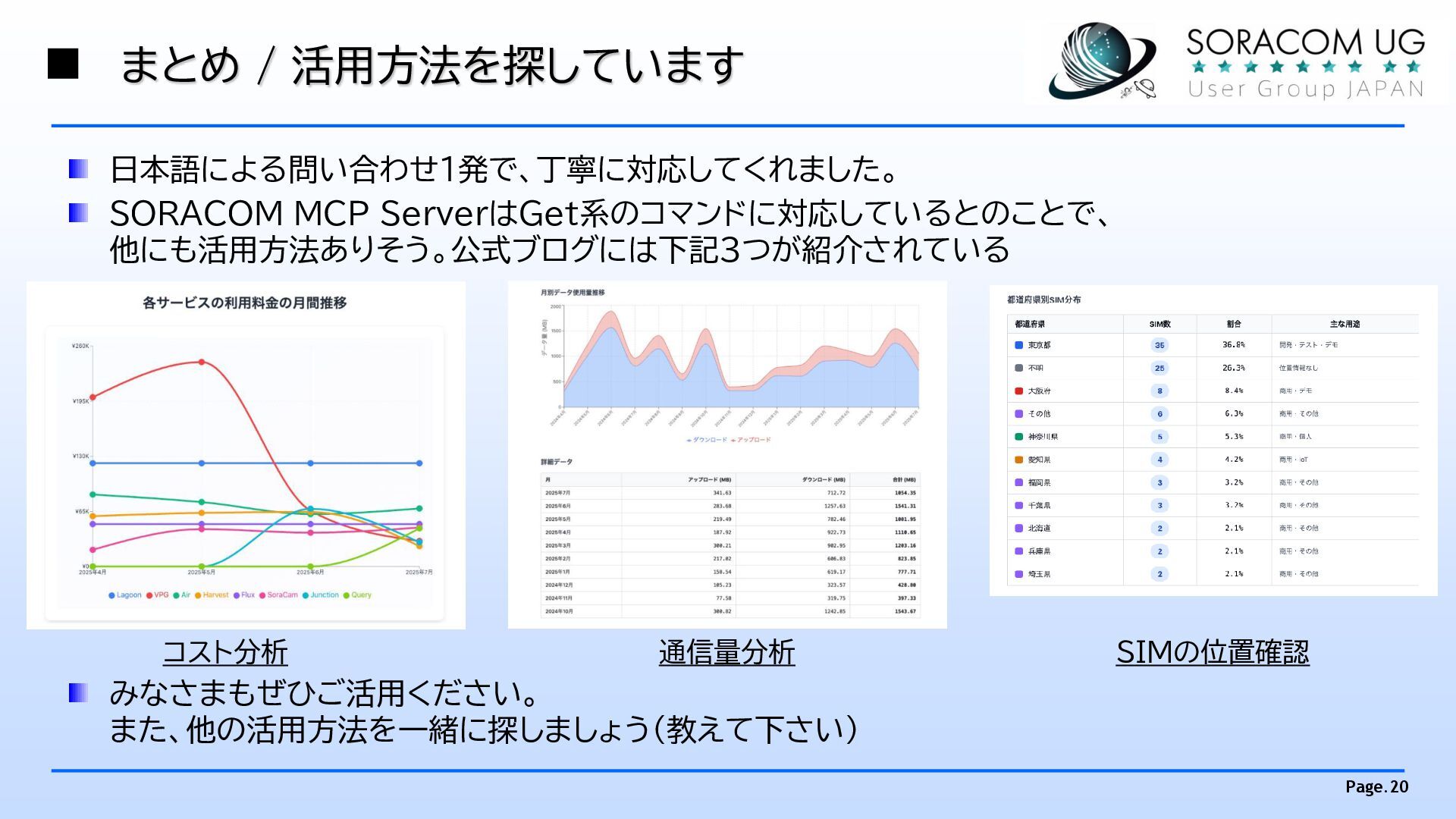
▪ まとめ / 活用方法を探しています Page.20 日本語による問い合わせ1発で、丁寧に対応してくれました。 SORACOM MCP ServerはGet系のコマンドに対応しているとのことで、 他にも活用方法ありそう。公式ブログには下記3つが紹介されている
みなさまもぜひご活用ください。 また、他の活用方法を一緒に探しましょう(教えて下さい) コスト分析 通信量分析 SIMの位置確認