User Namespaces in Production: Enabling Root in Containers with RWX
Presentation slides from KubeCon + CloudNativeCon Japan 2026 held in Yokohama, Japan on July 28 and 29, 2026
2026 年 7 月 28日、29 日に横浜で開催された KubeCon + CloudNativeCon Japan 2026 での講演資料です。
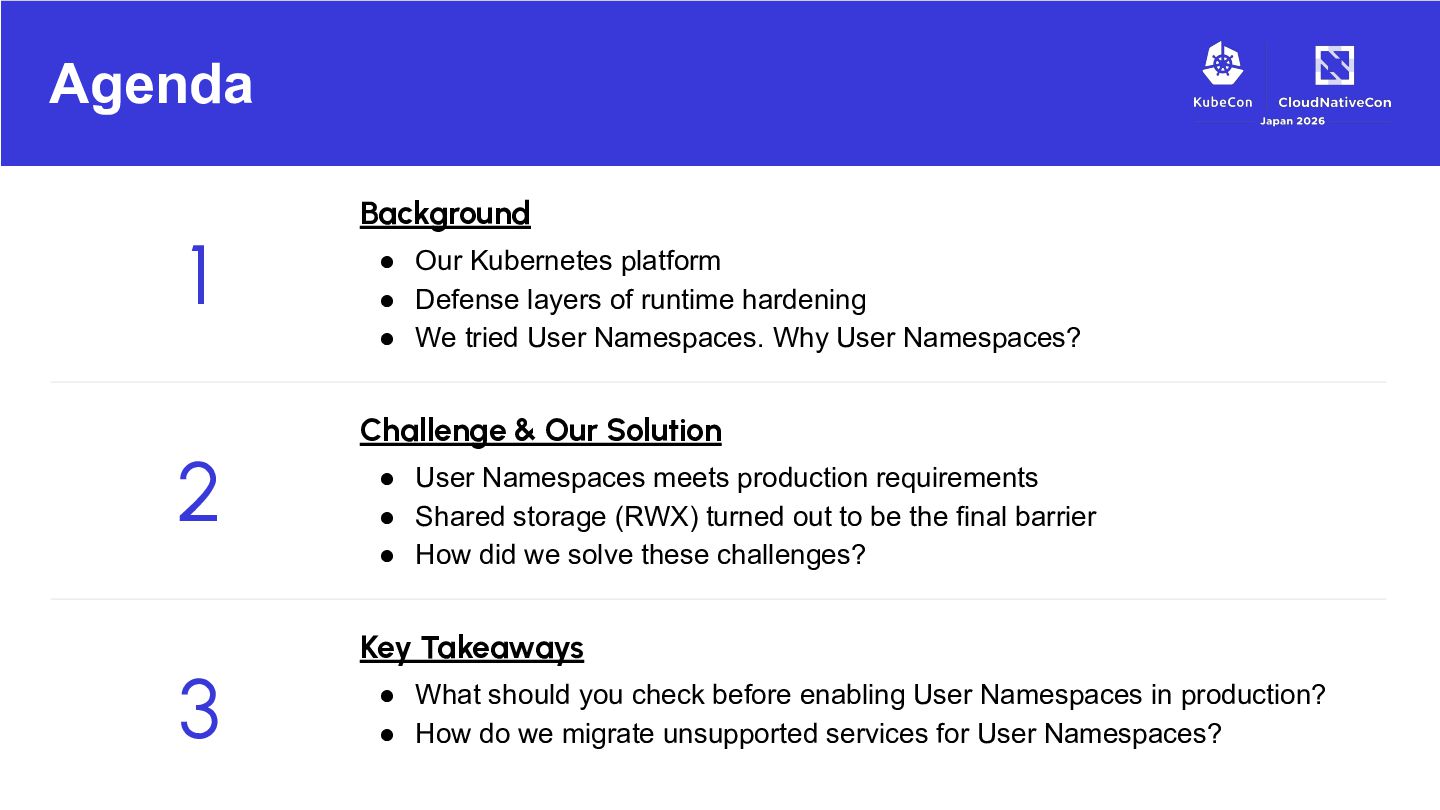
Defense layers of runtime hardening • We tried User Namespaces. Why User Namespaces? Challenge & Our Solution • User Namespaces meets production requirements • Shared storage (RWX) turned out to be the final barrier • How did we solve these challenges? Key Takeaways • What should you check before enabling User Namespaces in production? • How do we migrate unsupported services for User Namespaces?
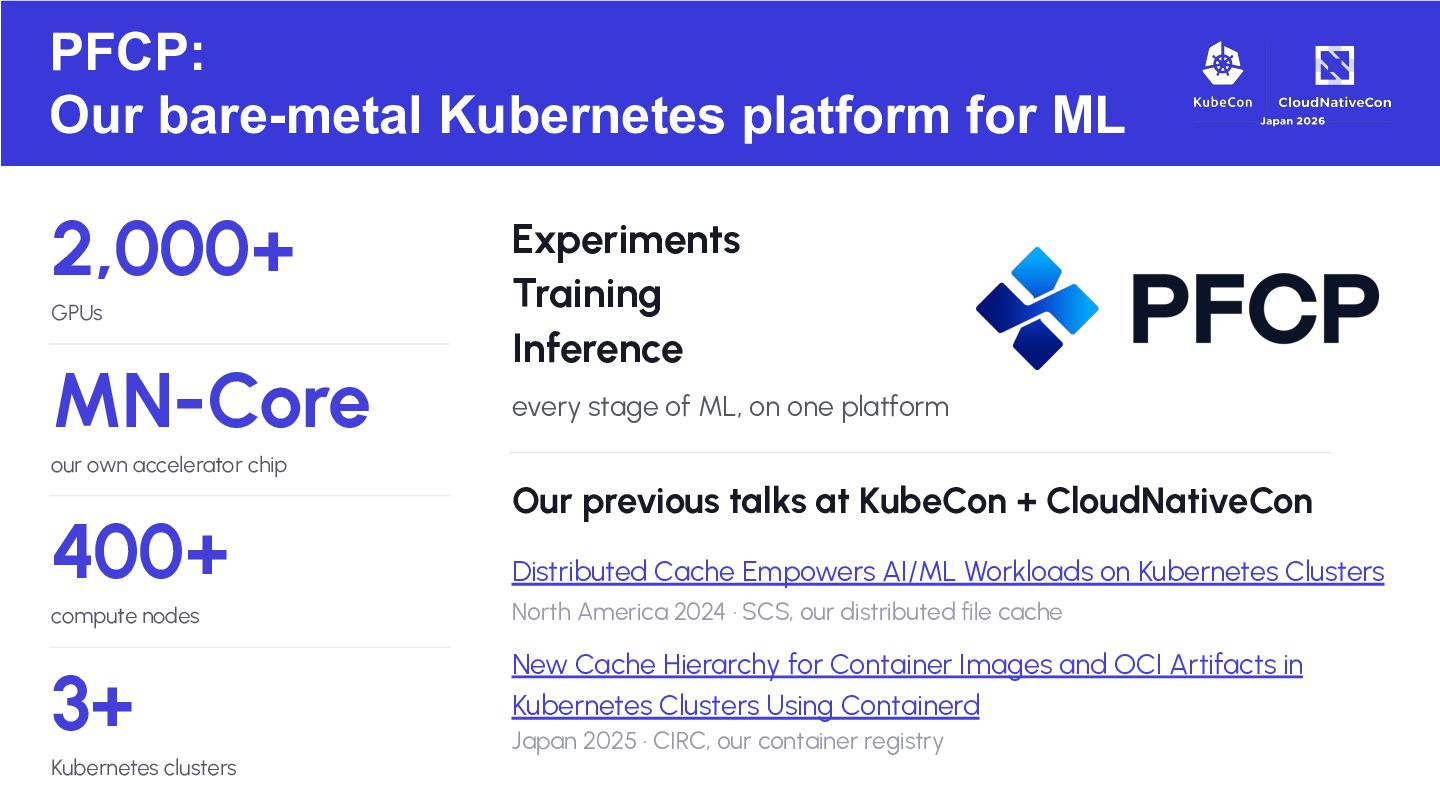
Experiments Training Inference every stage of ML, on one platform our own accelerator chip 400+ Our previous talks at KubeCon + CloudNativeCon Distributed Cache Empowers AI/ML Workloads on Kubernetes Clusters compute nodes North America 2024 · SCS, our distributed file cache 3+ New Cache Hierarchy for Container Images and OCI Artifacts in Kubernetes Clusters Using Containerd Kubernetes clusters Japan 2025 · CIRC, our container registry
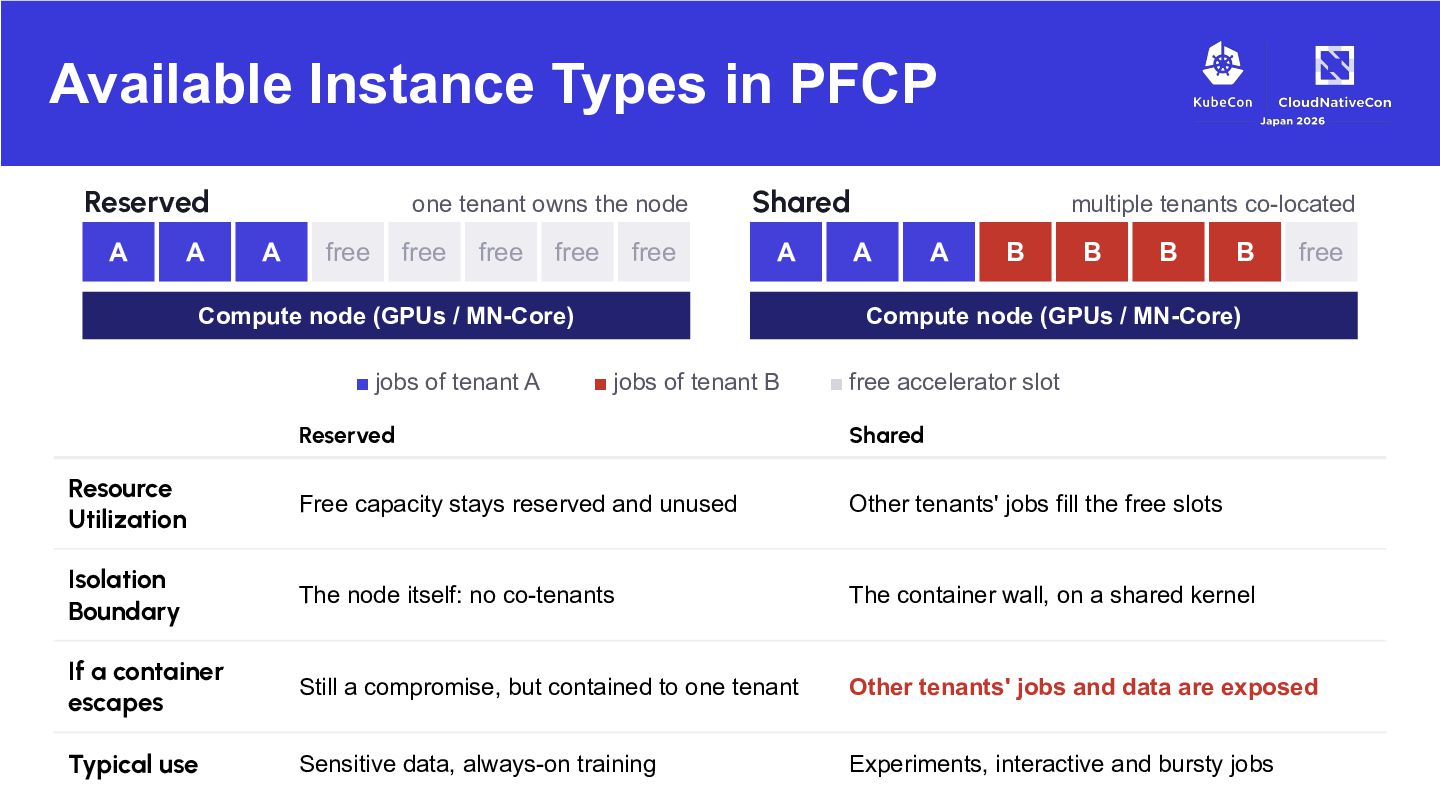
tenant owns the node A free free free free free Shared node A A Compute node (GPUs / MN-Core) ▪ jobs of tenant A multiple tenants co-located A B B B B free Compute node (GPUs / MN-Core) ▪ jobs of tenant B ▪ free accelerator slot Reserved Shared Resource Utilization Free capacity stays reserved and unused Other tenants' jobs fill the free slots Isolation Boundary The node itself: no co-tenants The container wall, on a shared kernel If a container escapes Still a compromise, but contained to one tenant Other tenants' jobs and data are exposed Typical use Sensitive data, always-on training Experiments, interactive and bursty jobs
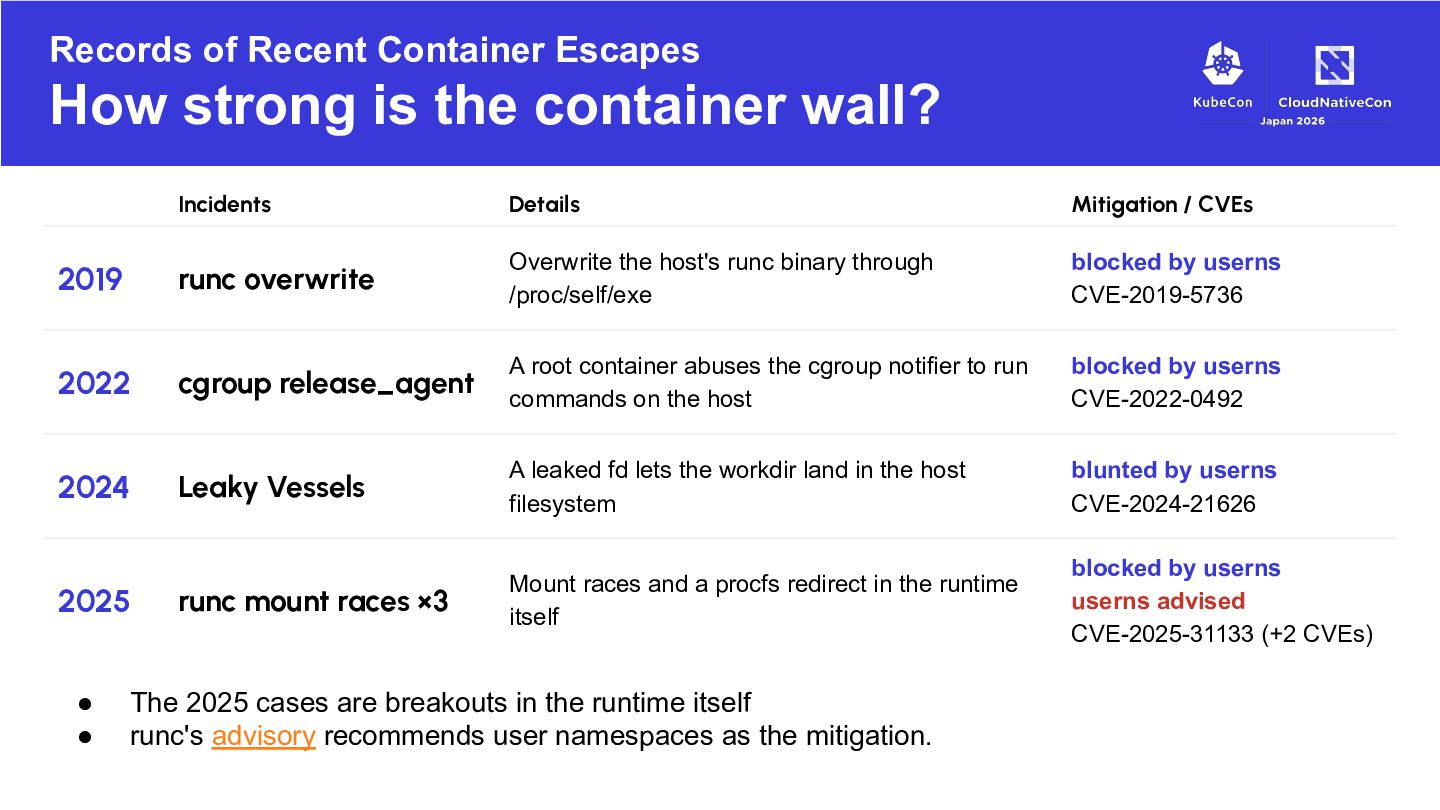
wall? Incidents Details Mitigation / CVEs 2019 runc overwrite Overwrite the host's runc binary through /proc/self/exe blocked by userns CVE-2019-5736 2022 cgroup release_agent A root container abuses the cgroup notifier to run commands on the host blocked by userns CVE-2022-0492 2024 Leaky Vessels A leaked fd lets the workdir land in the host filesystem blunted by userns CVE-2024-21626 runc mount races ×3 Mount races and a procfs redirect in the runtime itself blocked by userns userns advised CVE-2025-31133 (+2 CVEs) 2025 • • The 2025 cases are breakouts in the runtime itself runc's advisory recommends user namespaces as the mitigation.
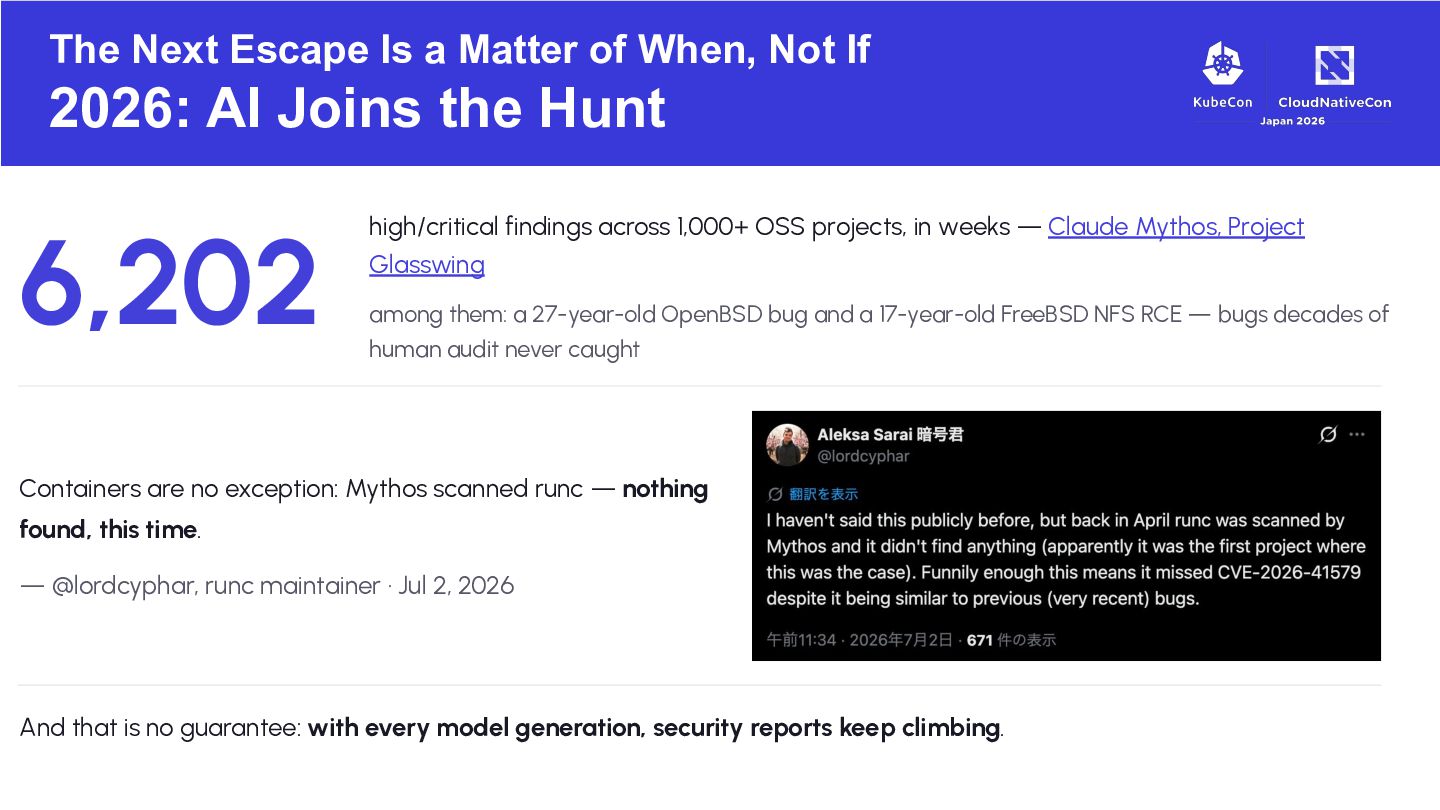
2026: AI Joins the Hunt 6,202 high/critical findings across 1,000+ OSS projects, in weeks — Claude Mythos, Project Glasswing among them: a 27-year-old OpenBSD bug and a 17-year-old FreeBSD NFS RCE — bugs decades of human audit never caught Containers are no exception: Mythos scanned runc — nothing found, this time. — @lordcyphar, runc maintainer · Jul 2, 2026 And that is no guarantee: with every model generation, security reports keep climbing.
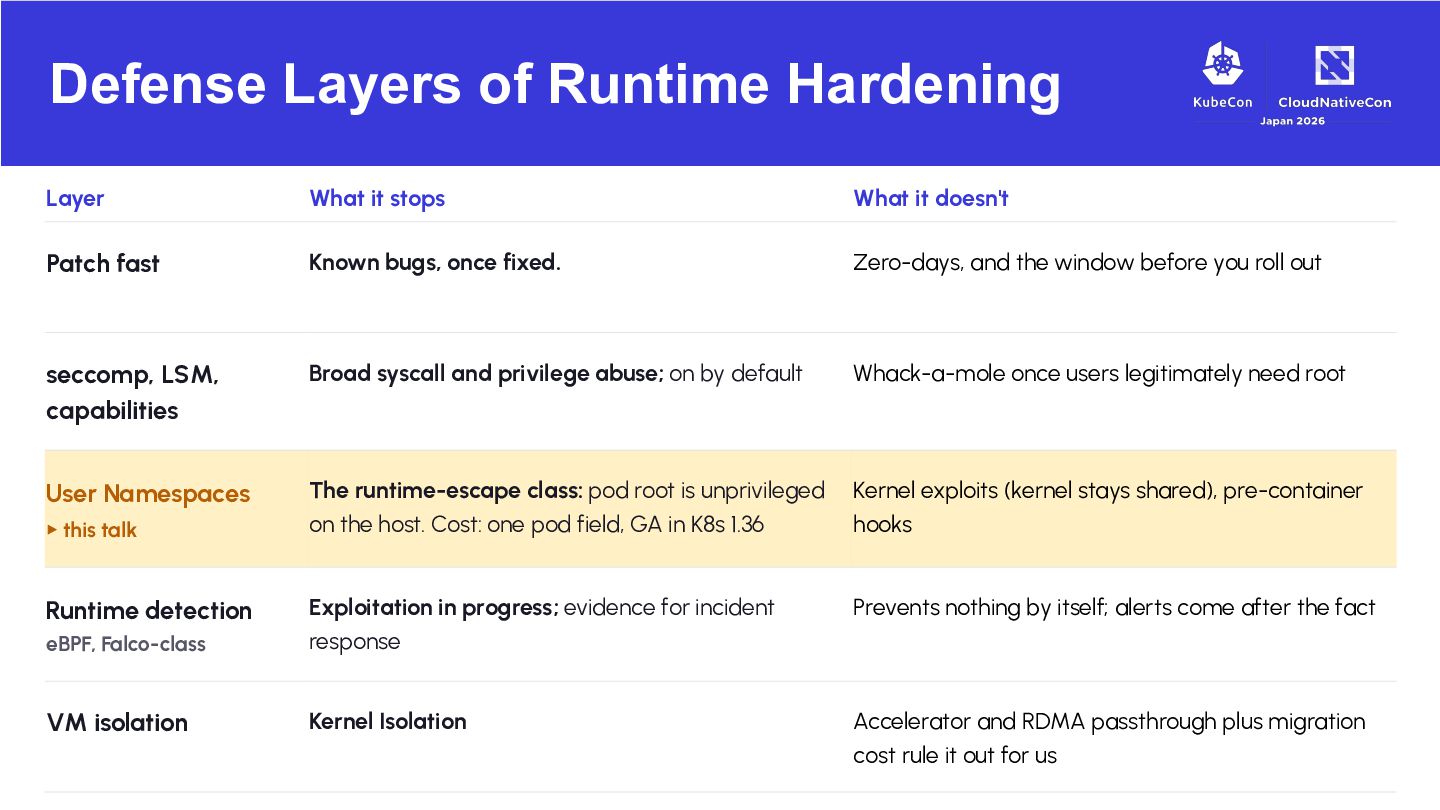
it doesn't Patch fast Known bugs, once fixed. Zero-days, and the window before you roll out seccomp, LSM, capabilities Broad syscall and privilege abuse; on by default Whack-a-mole once users legitimately need root User Namespaces The runtime-escape class: pod root is unprivileged on the host. Cost: one pod field, GA in K8s 1.36 Kernel exploits (kernel stays shared), pre-container hooks Prevents nothing by itself; alerts come after the fact eBPF, Falco-class Exploitation in progress; evidence for incident response VM isolation Kernel Isolation Accelerator and RDMA passthrough plus migration cost rule it out for us ▸ this talk Runtime detection
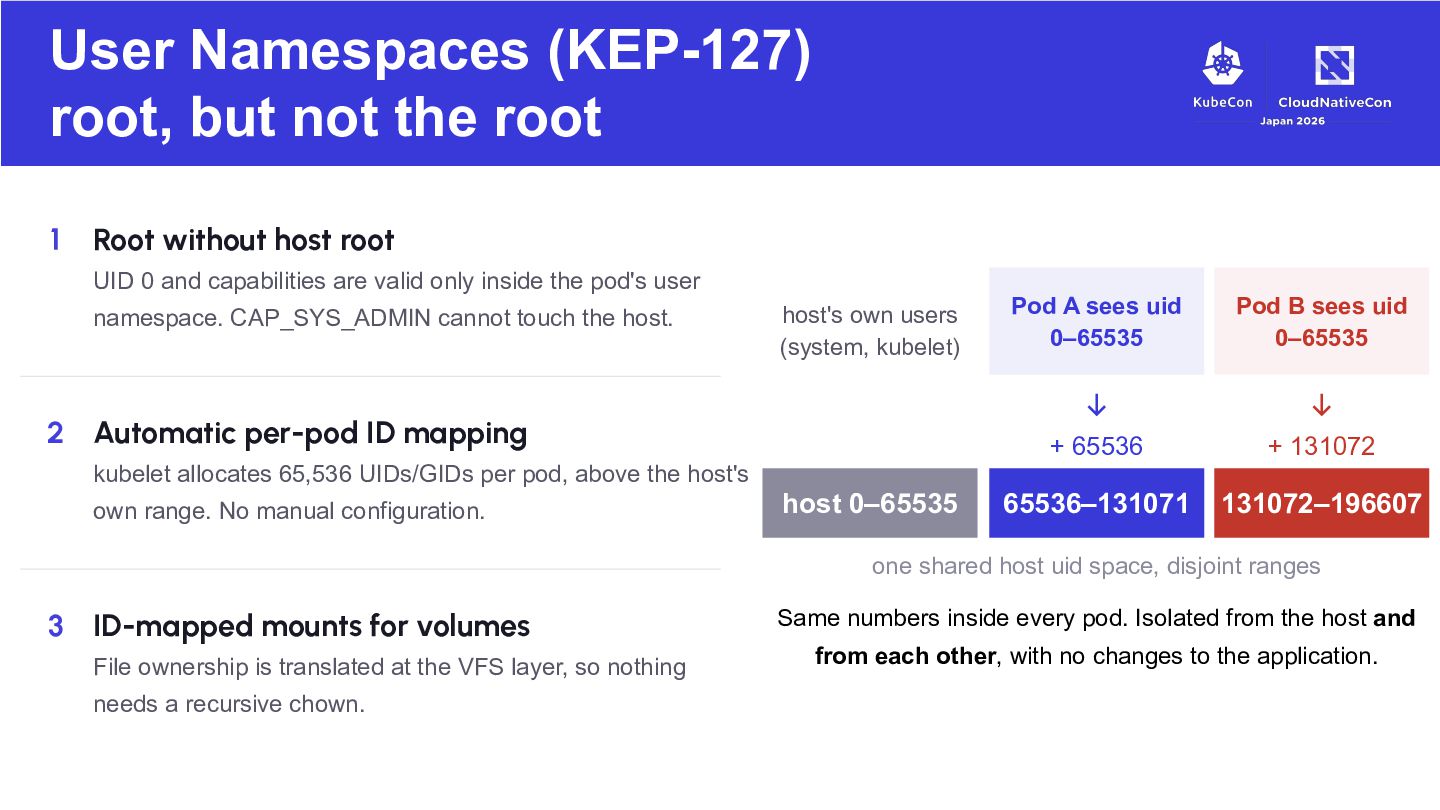
without host root UID 0 and capabilities are valid only inside the pod's user namespace. CAP_SYS_ADMIN cannot touch the host. host's own users (system, kubelet) 2 Automatic per-pod ID mapping kubelet allocates 65,536 UIDs/GIDs per pod, above the host's own range. No manual configuration. host 0–65535 Pod A sees uid 0–65535 Pod B sees uid 0–65535 ↓ ↓ + 65536 + 131072 65536–131071 131072–196607 one shared host uid space, disjoint ranges 3 ID-mapped mounts for volumes File ownership is translated at the VFS layer, so nothing needs a recursive chown. Same numbers inside every pod. Isolated from the host and from each other, with no changes to the application.
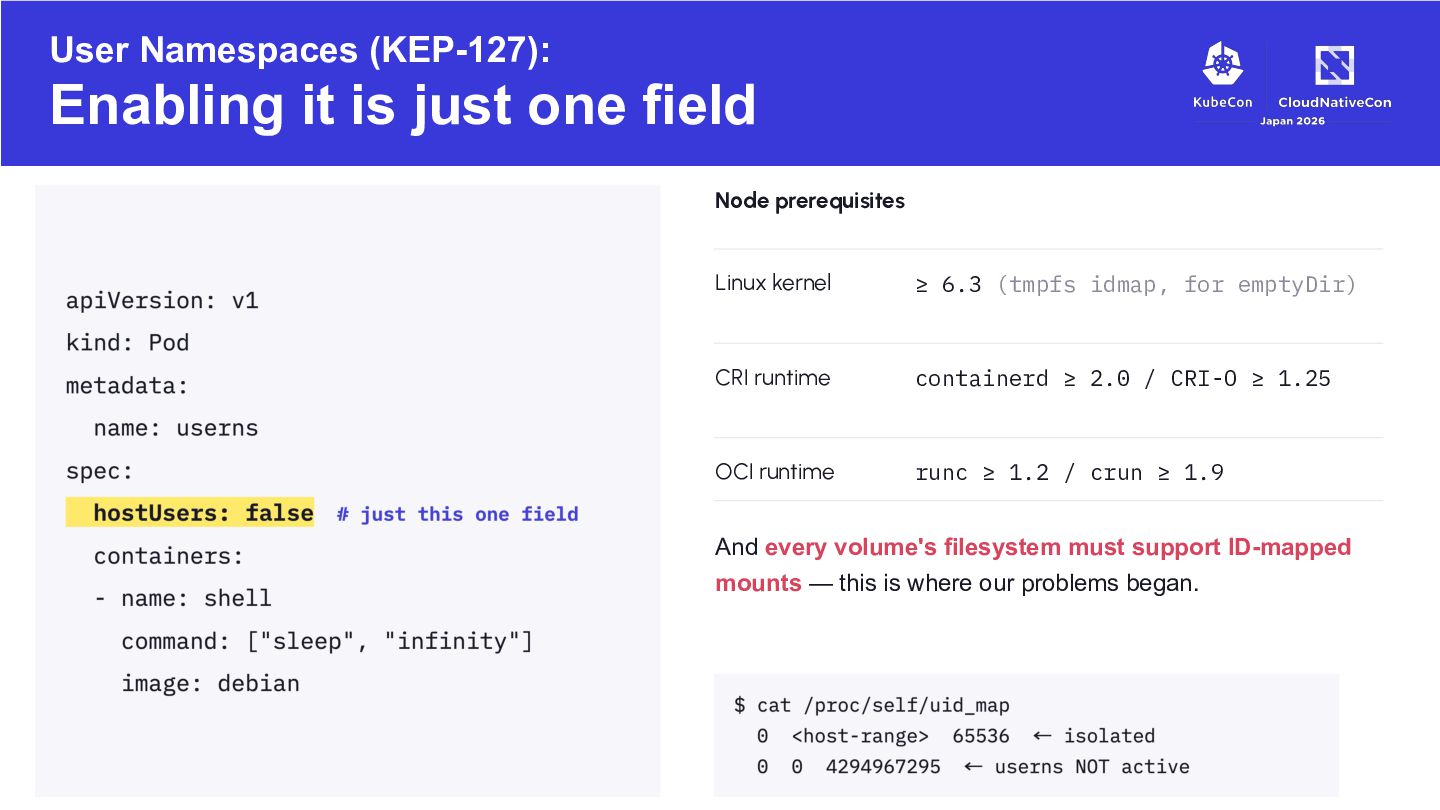
prerequisites Linux kernel ≥ 6.3 (tmpfs idmap, for emptyDir) CRI runtime containerd ≥ 2.0 / CRI-O ≥ 1.25 OCI runtime runc ≥ 1.2 / crun ≥ 1.9 And every volume's filesystem must support ID-mapped mounts — this is where our problems began.
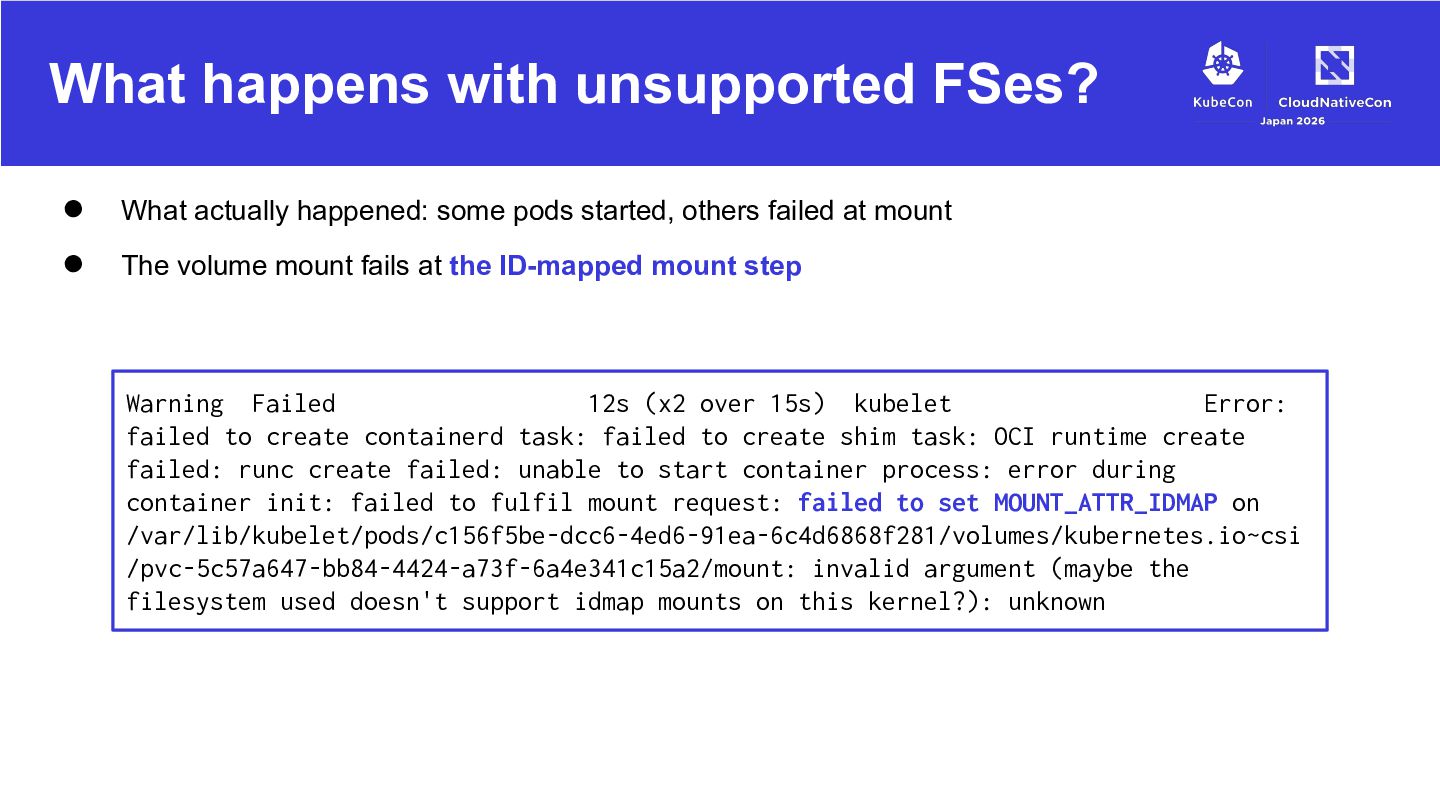
some pods started, others failed at mount The volume mount fails at the ID-mapped mount step Warning Failed 12s (x2 over 15s) kubelet Error: failed to create containerd task: failed to create shim task: OCI runtime create failed: runc create failed: unable to start container process: error during container init: failed to fulfil mount request: failed to set MOUNT_ATTR_IDMAP on /var/lib/kubelet/pods/c156f5be-dcc6-4ed6-91ea-6c4d6868f281/volumes/kubernetes.io~csi /pvc-5c57a647-bb84-4424-a73f-6a4e341c15a2/mount: invalid argument (maybe the filesystem used doesn't support idmap mounts on this kernel?): unknown
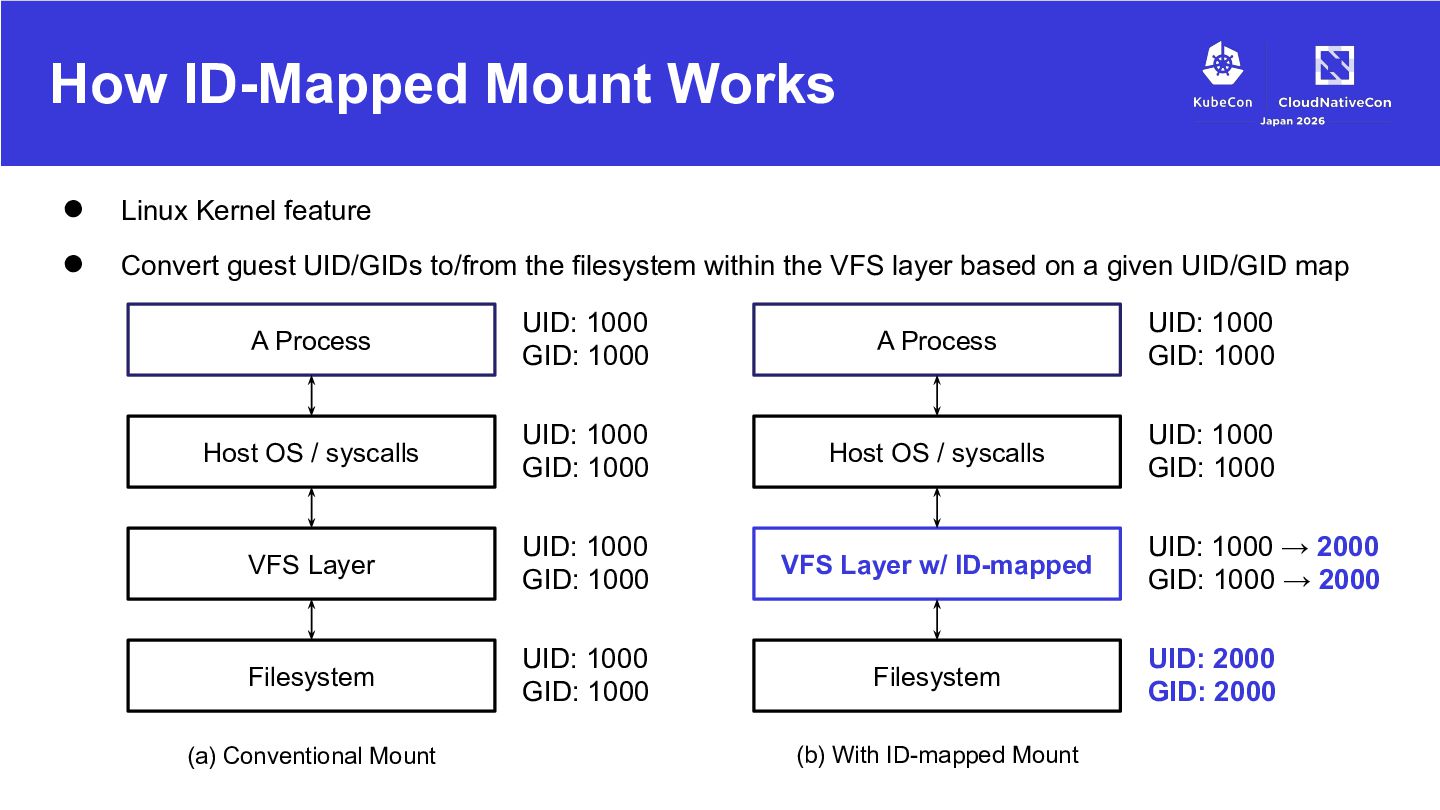
guest UID/GIDs to/from the filesystem within the VFS layer based on a given UID/GID map A Process UID: 1000 GID: 1000 A Process UID: 1000 GID: 1000 Host OS / syscalls UID: 1000 GID: 1000 Host OS / syscalls UID: 1000 GID: 1000 VFS Layer UID: 1000 GID: 1000 VFS Layer w/ ID-mapped Filesystem UID: 1000 GID: 1000 Filesystem (a) Conventional Mount (b) With ID-mapped Mount UID: 1000 → 2000 GID: 1000 → 2000 UID: 2000 GID: 2000
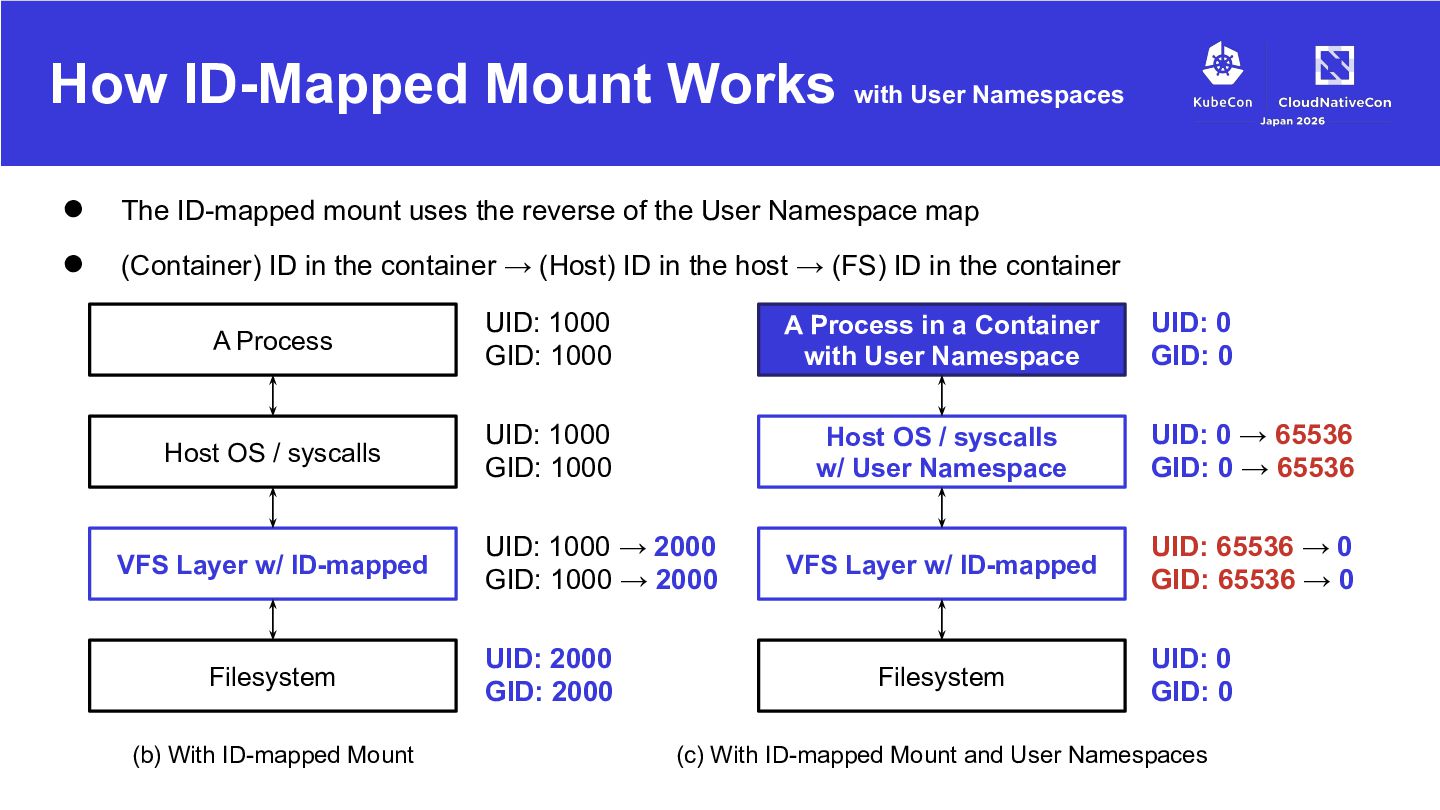
ID-mapped mount uses the reverse of the User Namespace map (Container) ID in the container → (Host) ID in the host → (FS) ID in the container UID: 0 GID: 0 A Process UID: 1000 GID: 1000 A Process in a Container with User Namespace Host OS / syscalls UID: 1000 GID: 1000 Host OS / syscalls w/ User Namespace UID: 0 → 65536 GID: 0 → 65536 VFS Layer w/ ID-mapped UID: 65536 → 0 GID: 65536 → 0 VFS Layer w/ ID-mapped Filesystem (b) With ID-mapped Mount UID: 1000 → 2000 GID: 1000 → 2000 UID: 2000 GID: 2000 Filesystem UID: 0 GID: 0 (c) With ID-mapped Mount and User Namespaces
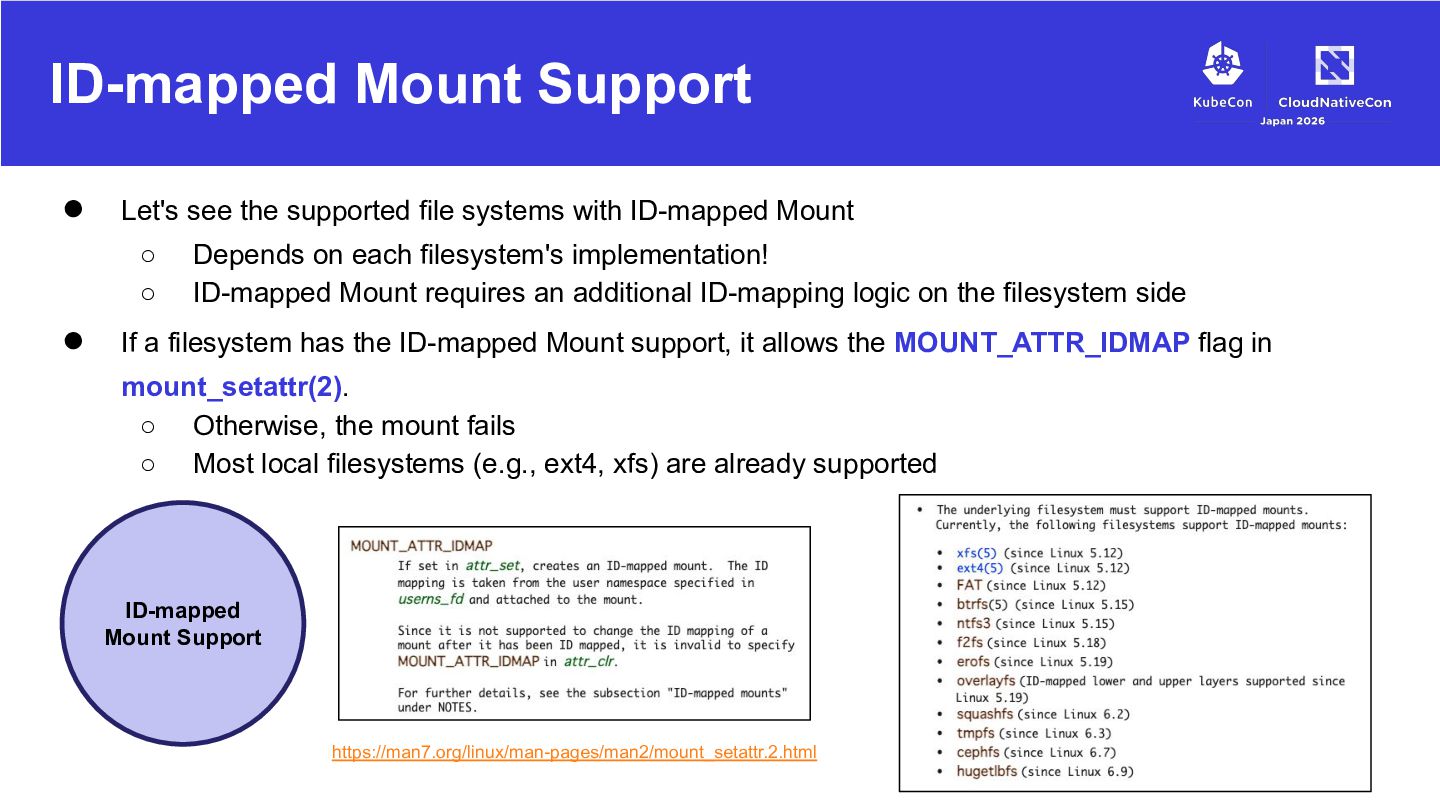
with ID-mapped Mount ◦ ◦ • Depends on each filesystem's implementation! ID-mapped Mount requires an additional ID-mapping logic on the filesystem side If a filesystem has the ID-mapped Mount support, it allows the MOUNT_ATTR_IDMAP flag in mount_setattr(2). ◦ Otherwise, the mount fails ◦ Most local filesystems (e.g., ext4, xfs) are already supported ID-mapped Mount Support https://man7.org/linux/man-pages/man2/mount_setattr.2.html
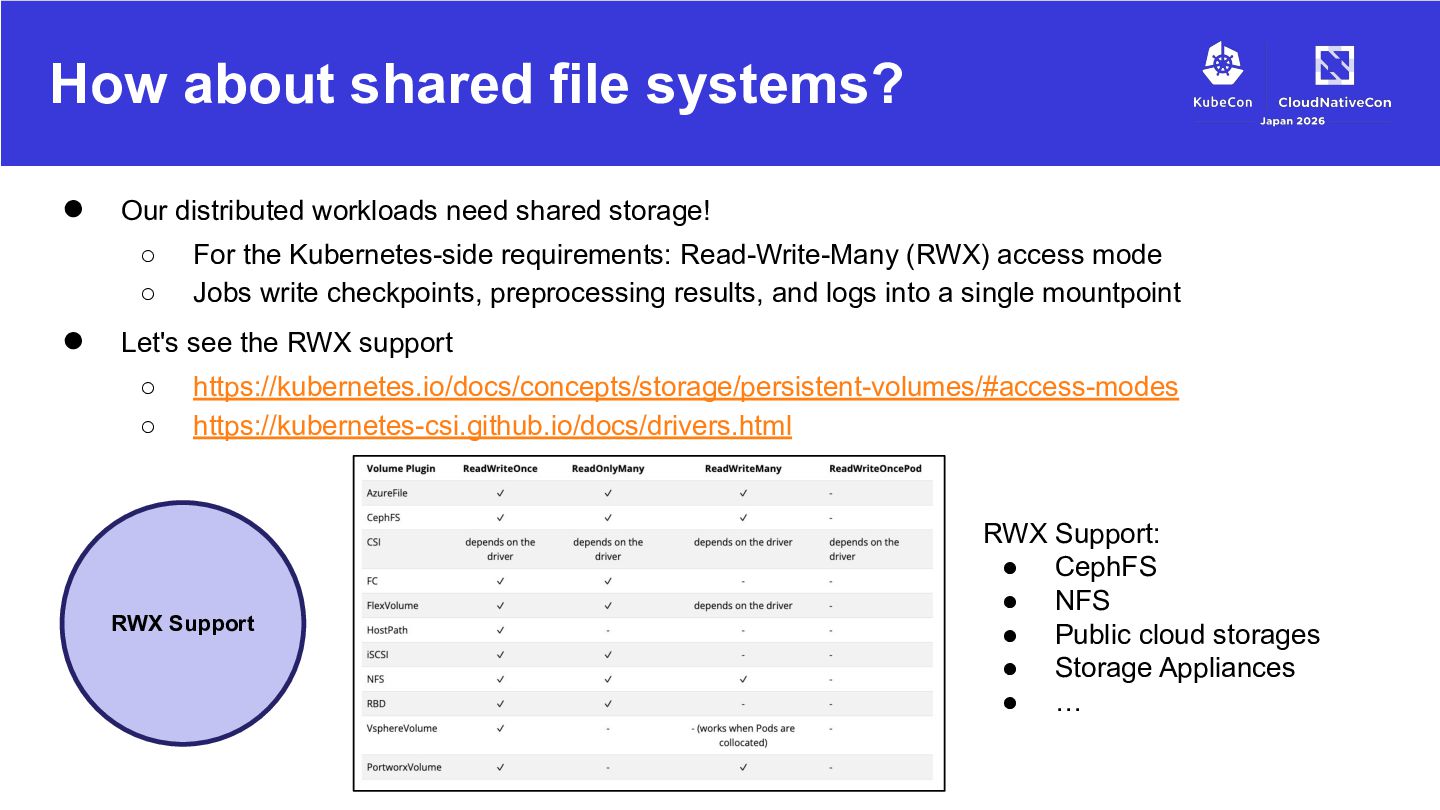
shared storage! ◦ ◦ • For the Kubernetes-side requirements: Read-Write-Many (RWX) access mode Jobs write checkpoints, preprocessing results, and logs into a single mountpoint Let's see the RWX support ◦ ◦ https://kubernetes.io/docs/concepts/storage/persistent-volumes/#access-modes https://kubernetes-csi.github.io/docs/drivers.html RWX Support RWX Support: • CephFS • NFS • Public cloud storages • Storage Appliances • …
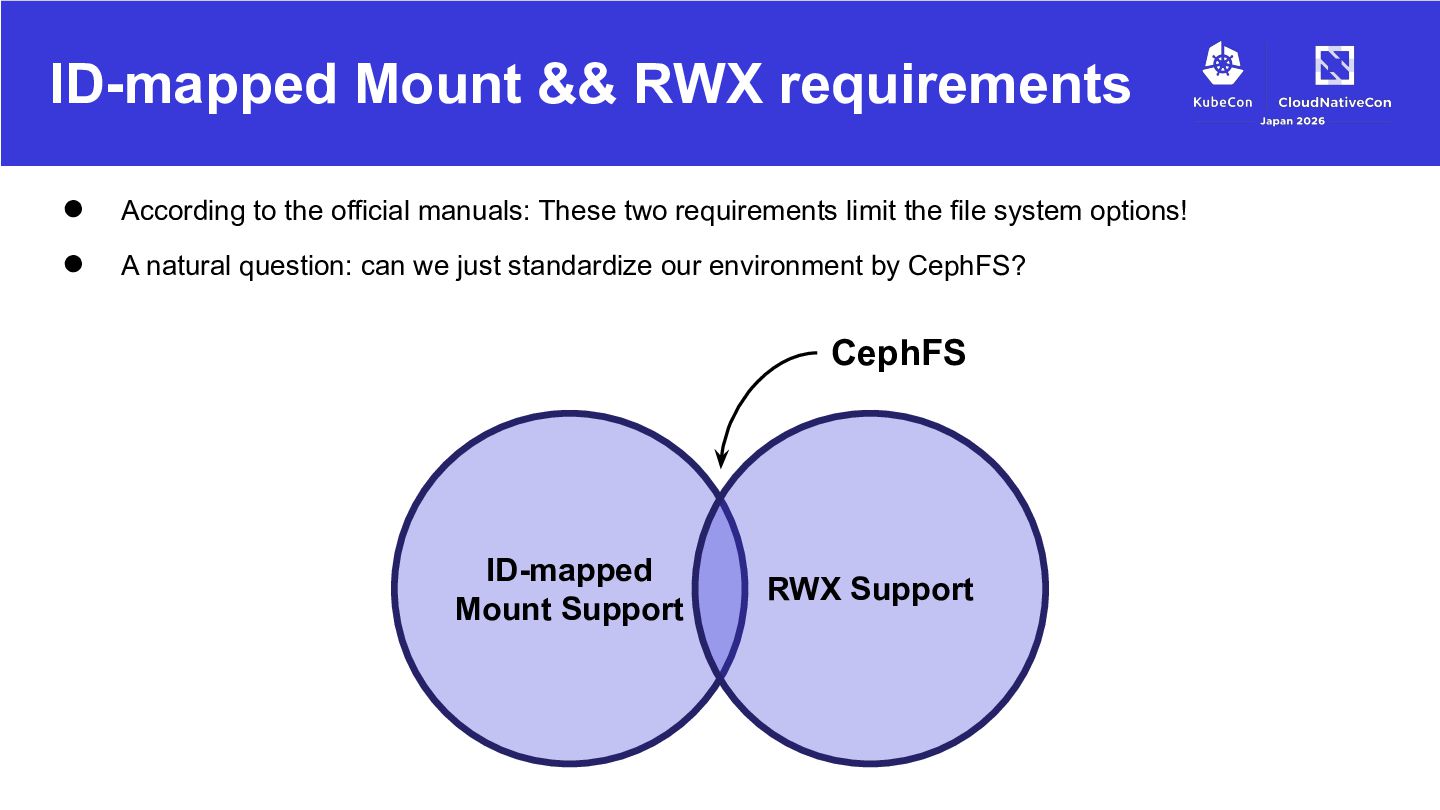
official manuals: These two requirements limit the file system options! A natural question: can we just standardize our environment by CephFS? CephFS ID-mapped Mount Support RWX Support
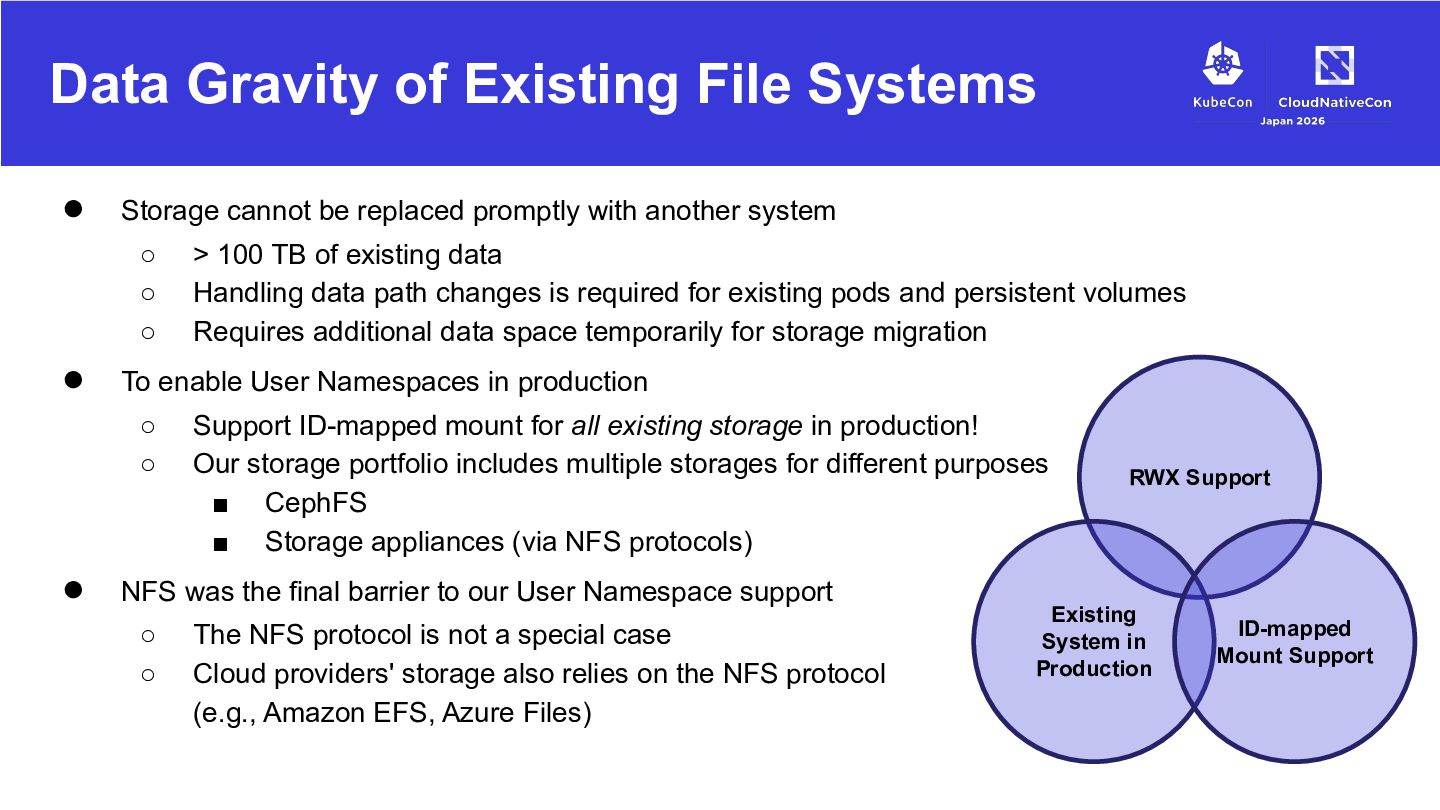
replaced promptly with another system ◦ ◦ ◦ • To enable User Namespaces in production ◦ ◦ • > 100 TB of existing data Handling data path changes is required for existing pods and persistent volumes Requires additional data space temporarily for storage migration Support ID-mapped mount for all existing storage in production! Our storage portfolio includes multiple storages for different purposes ▪ CephFS ▪ Storage appliances (via NFS protocols) NFS was the final barrier to our User Namespace support ◦ ◦ The NFS protocol is not a special case Cloud providers' storage also relies on the NFS protocol (e.g., Amazon EFS, Azure Files) RWX Support Existing System in Production ID-mapped Mount Support
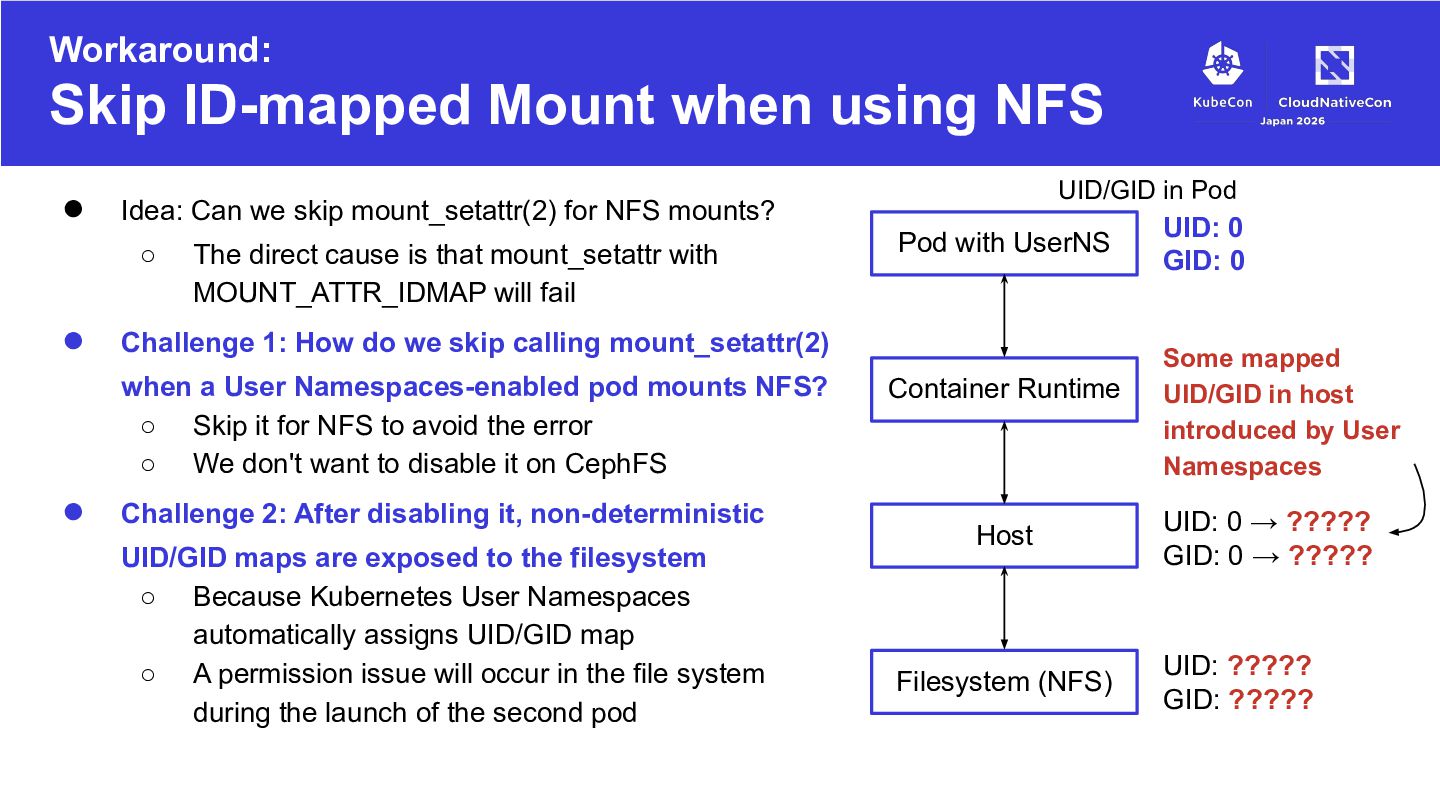
The direct cause is that mount_setattr with MOUNT_ATTR_IDMAP will fail Pod with UserNS Challenge 1: How do we skip calling mount_setattr(2) when a User Namespaces-enabled pod mounts NFS? ◦ Skip it for NFS to avoid the error ◦ We don't want to disable it on CephFS • UID/GID in Pod Idea: Can we skip mount_setattr(2) for NFS mounts? Challenge 2: After disabling it, non-deterministic UID/GID maps are exposed to the filesystem ◦ Because Kubernetes User Namespaces automatically assigns UID/GID map ◦ A permission issue will occur in the file system during the launch of the second pod Container Runtime Host Filesystem (NFS) UID: 0 GID: 0 Some mapped UID/GID in host introduced by User Namespaces UID: 0 → ????? GID: 0 → ????? UID: ????? GID: ?????
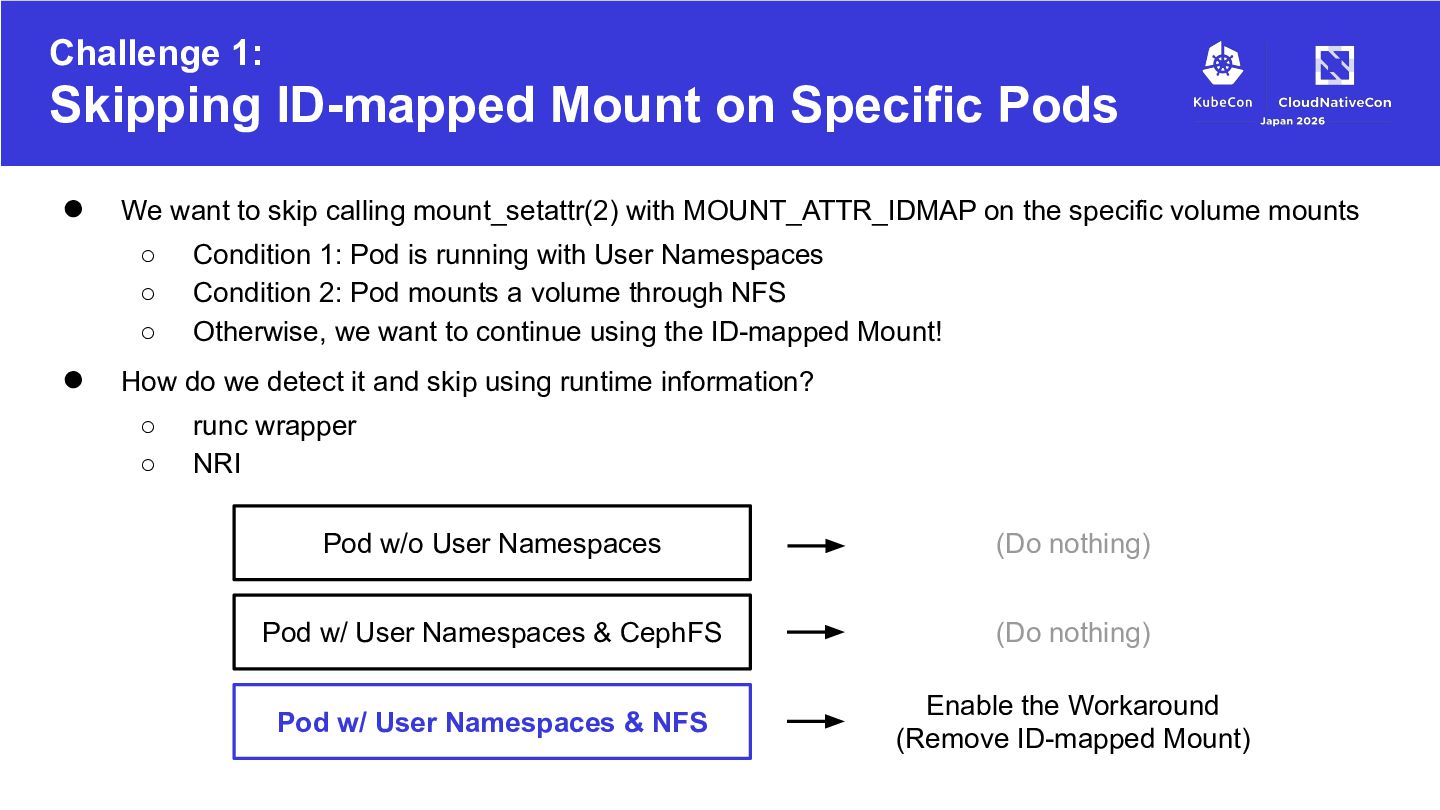
want to skip calling mount_setattr(2) with MOUNT_ATTR_IDMAP on the specific volume mounts ◦ ◦ ◦ • Condition 1: Pod is running with User Namespaces Condition 2: Pod mounts a volume through NFS Otherwise, we want to continue using the ID-mapped Mount! How do we detect it and skip using runtime information? ◦ ◦ runc wrapper NRI Pod w/o User Namespaces (Do nothing) Pod w/ User Namespaces & CephFS (Do nothing) Pod w/ User Namespaces & NFS Enable the Workaround (Remove ID-mapped Mount)
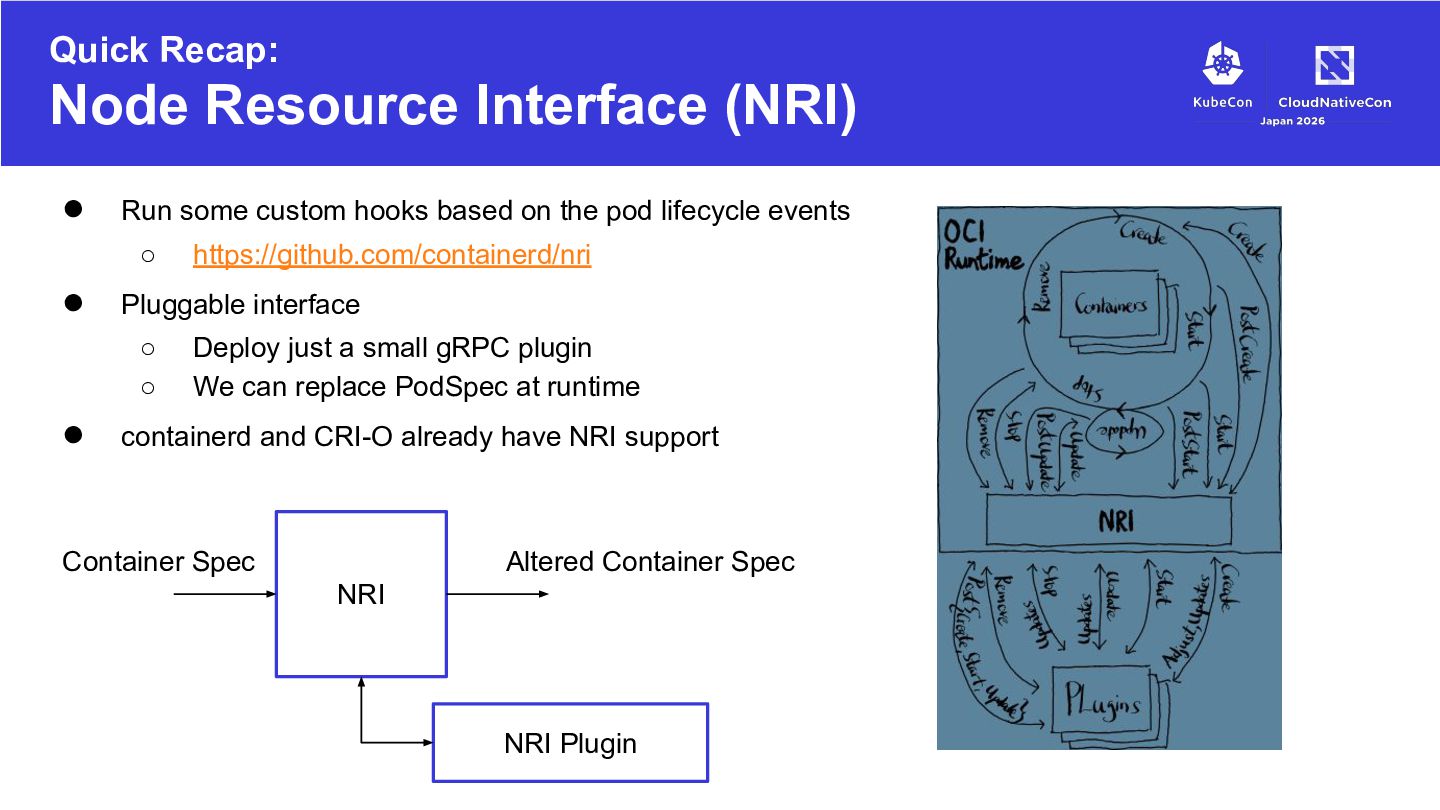
hooks based on the pod lifecycle events ◦ • Pluggable interface ◦ ◦ • https://github.com/containerd/nri Deploy just a small gRPC plugin We can replace PodSpec at runtime containerd and CRI-O already have NRI support Container Spec Altered Container Spec NRI NRI Plugin
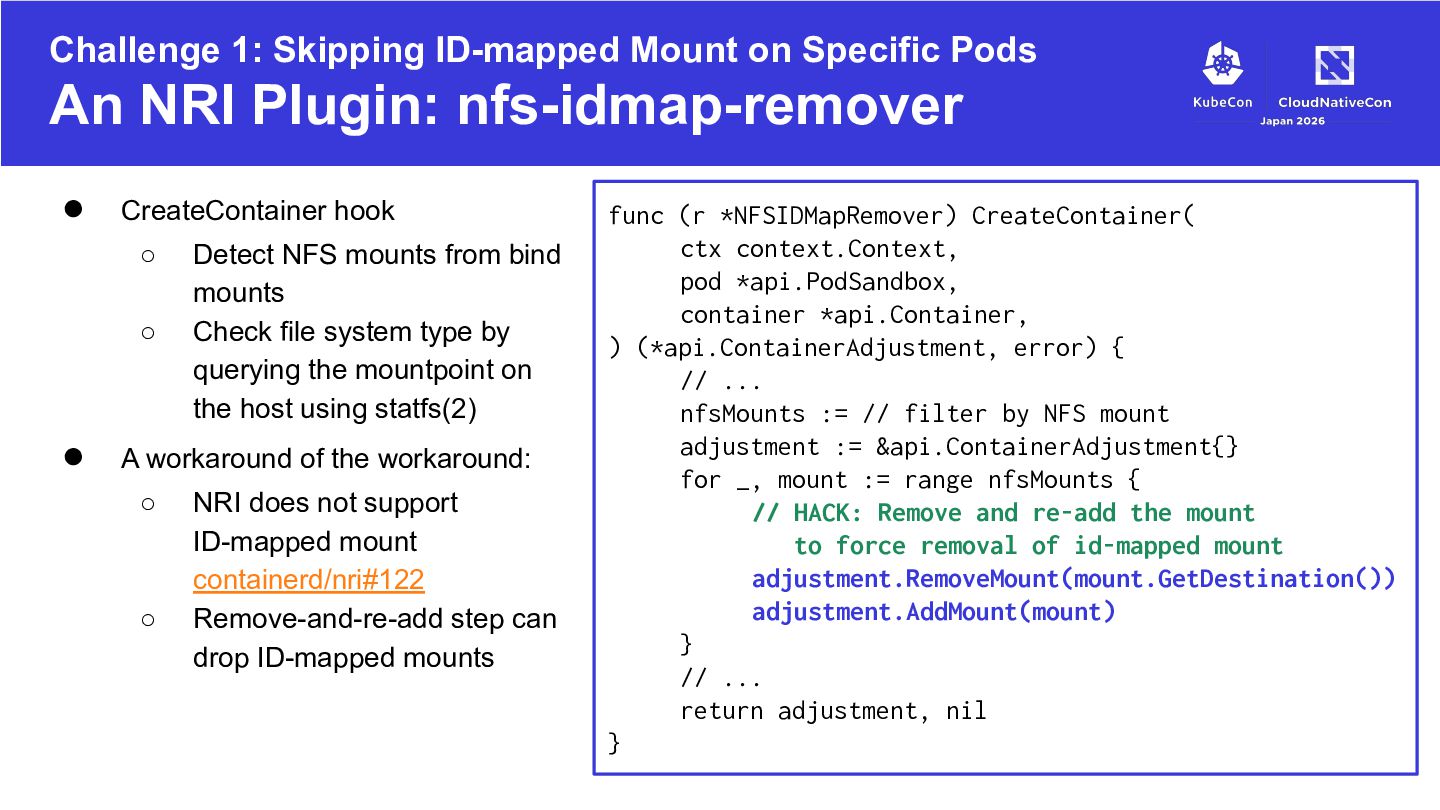
Plugin: nfs-idmap-remover • CreateContainer hook ◦ ◦ • Detect NFS mounts from bind mounts Check file system type by querying the mountpoint on the host using statfs(2) A workaround of the workaround: ◦ ◦ NRI does not support ID-mapped mount containerd/nri#122 Remove-and-re-add step can drop ID-mapped mounts func (r *NFSIDMapRemover) CreateContainer( ctx context.Context, pod *api.PodSandbox, container *api.Container, ) (*api.ContainerAdjustment, error) { // ... nfsMounts := // filter by NFS mount adjustment := &api.ContainerAdjustment{} for _, mount := range nfsMounts { // HACK: Remove and re-add the mount to force removal of id-mapped mount adjustment.RemoveMount(mount.GetDestination()) adjustment.AddMount(mount) } // ... return adjustment, nil }
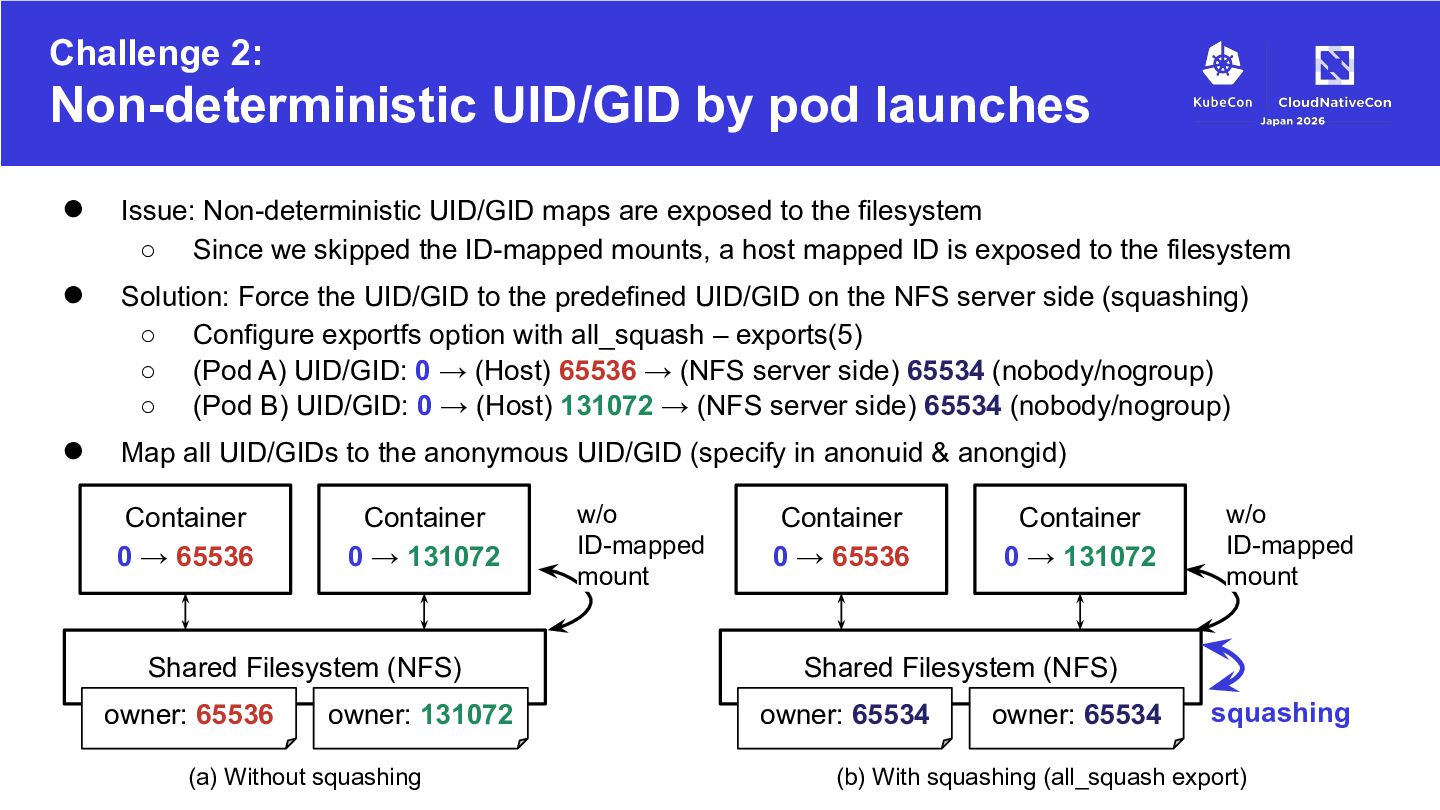
UID/GID maps are exposed to the filesystem ◦ Since we skipped the ID-mapped mounts, a host mapped ID is exposed to the filesystem • Solution: Force the UID/GID to the predefined UID/GID on the NFS server side (squashing) ◦ Configure exportfs option with all_squash – exports(5) ◦ (Pod A) UID/GID: 0 → (Host) 65536 → (NFS server side) 65534 (nobody/nogroup) ◦ (Pod B) UID/GID: 0 → (Host) 131072 → (NFS server side) 65534 (nobody/nogroup) • Map all UID/GIDs to the anonymous UID/GID (specify in anonuid & anongid) Container 0 → 65536 Container 0 → 131072 Shared Filesystem (NFS) owner: 65536 owner: 131072 (a) Without squashing w/o ID-mapped mount Container 0 → 65536 Container 0 → 131072 w/o ID-mapped mount Shared Filesystem (NFS) owner: 65534 owner: 65534 squashing (b) With squashing (all_squash export)
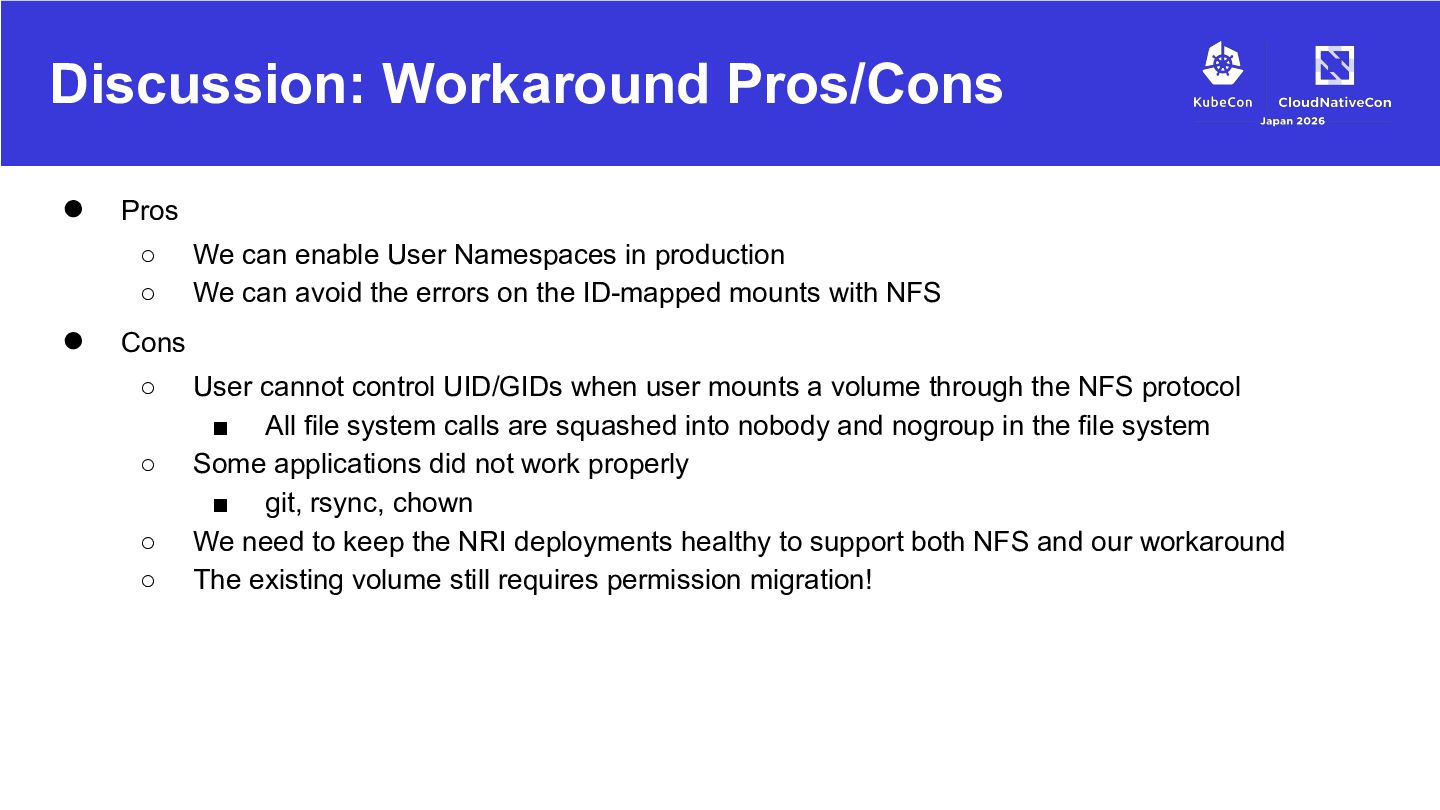
enable User Namespaces in production We can avoid the errors on the ID-mapped mounts with NFS Cons ◦ ◦ ◦ ◦ User cannot control UID/GIDs when user mounts a volume through the NFS protocol ▪ All file system calls are squashed into nobody and nogroup in the file system Some applications did not work properly ▪ git, rsync, chown We need to keep the NRI deployments healthy to support both NFS and our workaround The existing volume still requires permission migration!
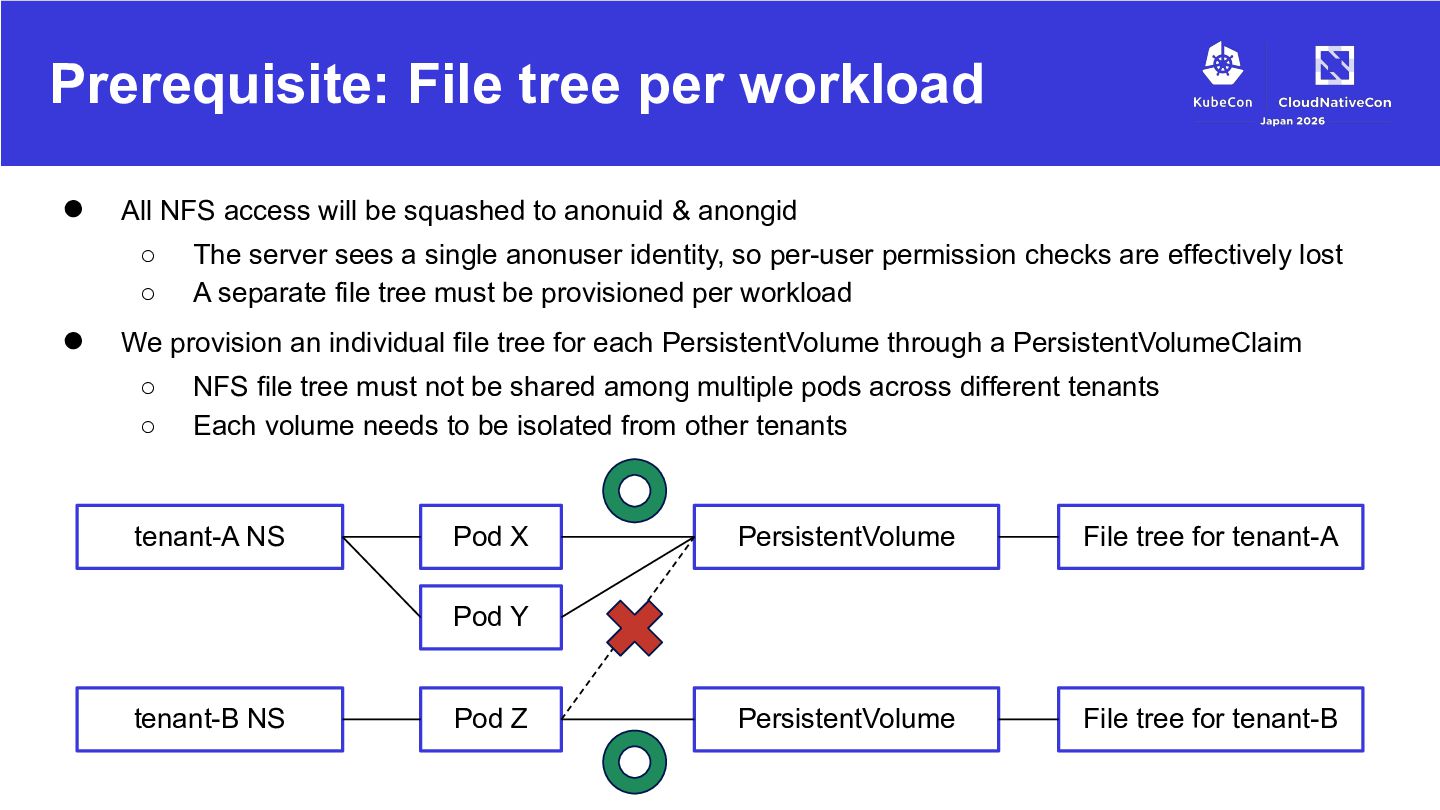
be squashed to anonuid & anongid ◦ ◦ • The server sees a single anonuser identity, so per-user permission checks are effectively lost A separate file tree must be provisioned per workload We provision an individual file tree for each PersistentVolume through a PersistentVolumeClaim ◦ ◦ NFS file tree must not be shared among multiple pods across different tenants Each volume needs to be isolated from other tenants tenant-A NS Pod X PersistentVolume File tree for tenant-A PersistentVolume File tree for tenant-B Pod Y tenant-B NS Pod Z
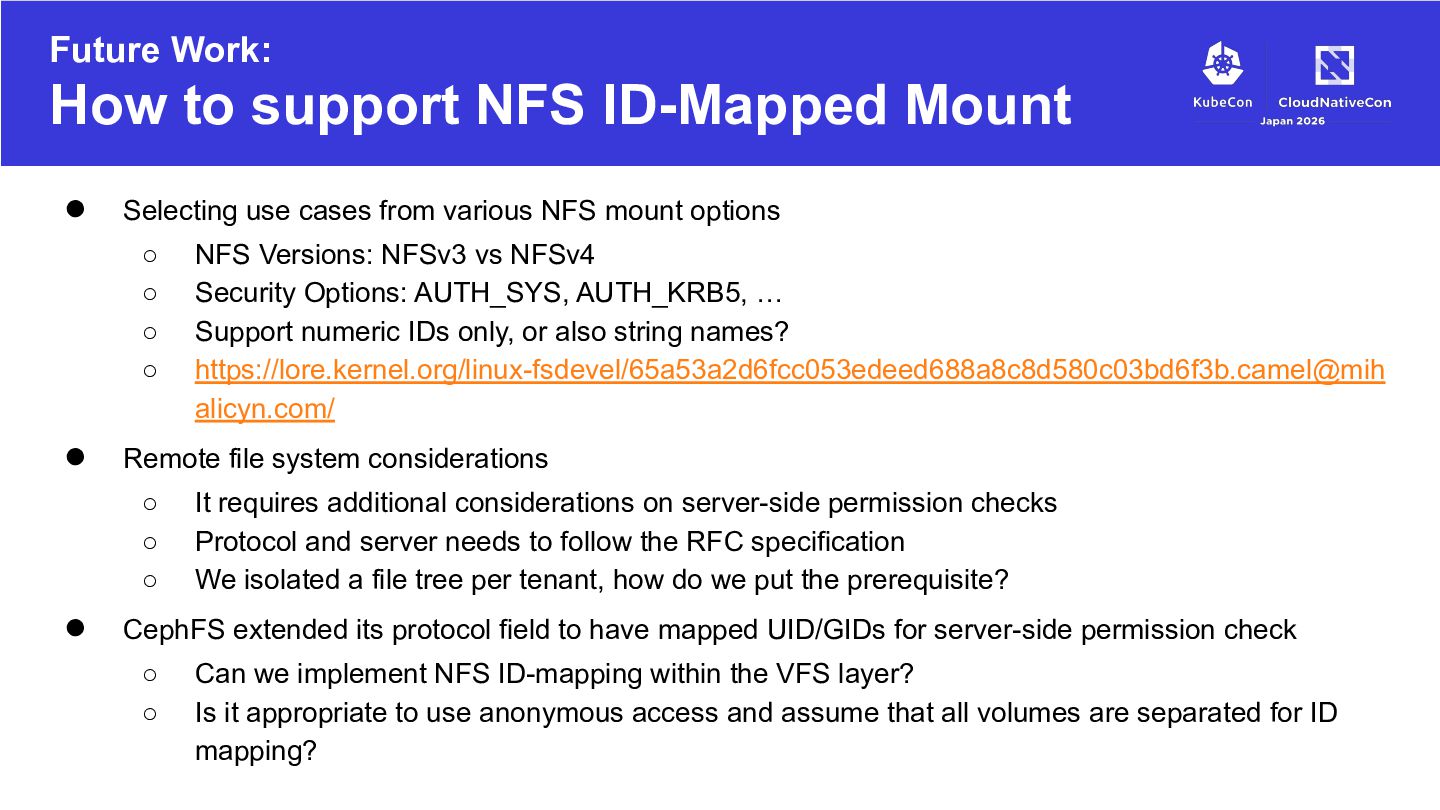
use cases from various NFS mount options ◦ ◦ ◦ ◦ • Remote file system considerations ◦ ◦ ◦ • NFS Versions: NFSv3 vs NFSv4 Security Options: AUTH_SYS, AUTH_KRB5, … Support numeric IDs only, or also string names? https://lore.kernel.org/linux-fsdevel/65a53a2d6fcc053edeed688a8c8d580c03bd6f3b.camel@mih alicyn.com/ It requires additional considerations on server-side permission checks Protocol and server needs to follow the RFC specification We isolated a file tree per tenant, how do we put the prerequisite? CephFS extended its protocol field to have mapped UID/GIDs for server-side permission check ◦ ◦ Can we implement NFS ID-mapping within the VFS layer? Is it appropriate to use anonymous access and assume that all volumes are separated for ID mapping?
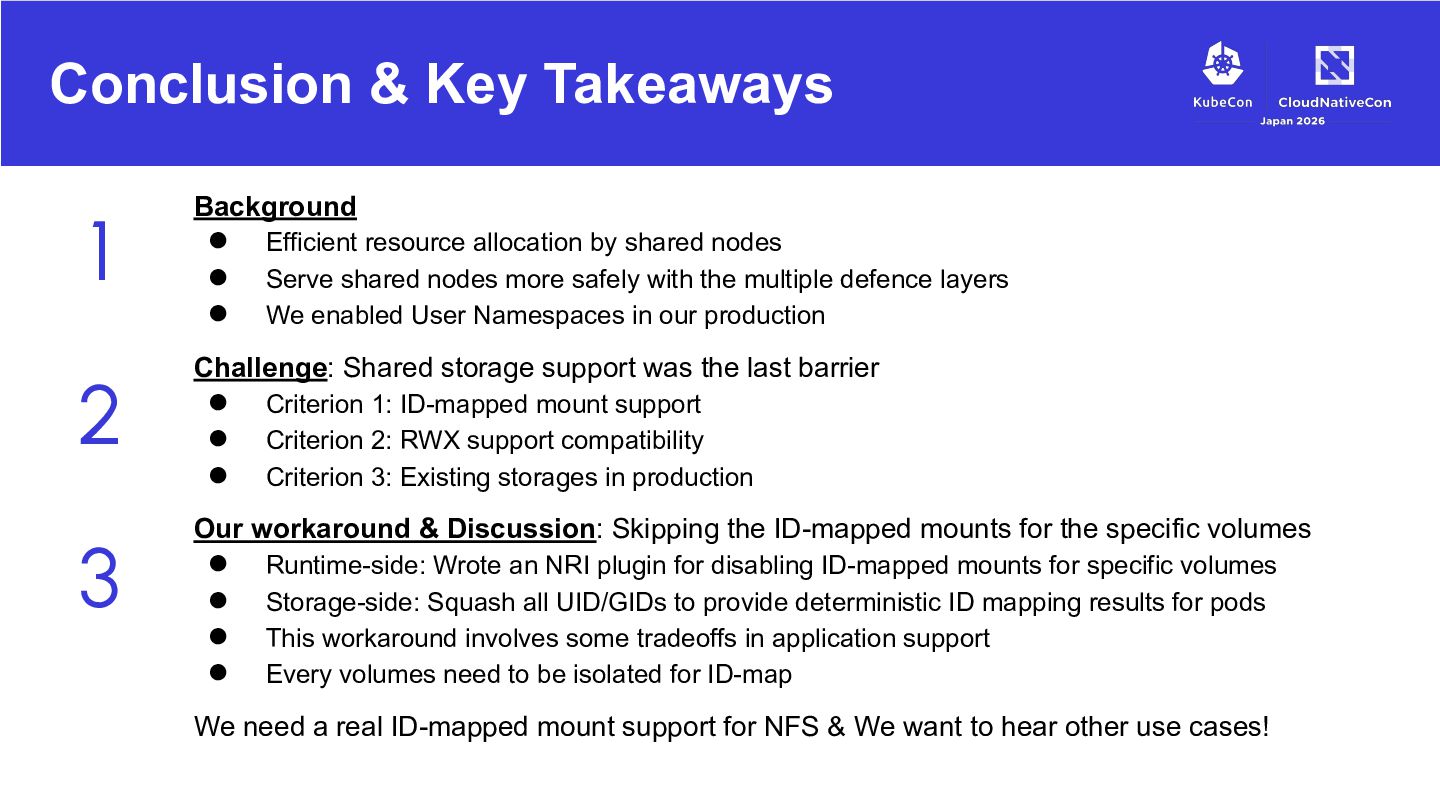
support was the last barrier 3 • • • • • • Efficient resource allocation by shared nodes Serve shared nodes more safely with the multiple defence layers We enabled User Namespaces in our production Criterion 1: ID-mapped mount support Criterion 2: RWX support compatibility Criterion 3: Existing storages in production Our workaround & Discussion: Skipping the ID-mapped mounts for the specific volumes • • • • Runtime-side: Wrote an NRI plugin for disabling ID-mapped mounts for specific volumes Storage-side: Squash all UID/GIDs to provide deterministic ID mapping results for pods This workaround involves some tradeoffs in application support Every volumes need to be isolated for ID-map We need a real ID-mapped mount support for NFS & We want to hear other use cases!


 pfn
pfn
 yoshida0129
 usanchuu
 hamadakoji
 masa_my
 sansantech
 freee
freee
 yukiogawa
 odashi
 kenichinakamura
 takuroabe
 cmusudakeisuke
 sue445
 marcduiker
 takai
takai
 reverentgeek
 sergeychernyshev
 jeffersonlam
 szymonslowik
 malarkey
 mkilby
 jonoalderson
 kimpetersen
 nmsamuel
 ryanjones