Share
OCI Always Free "Wait, what?" × 36 ~For anyone who thinks, “It’s just a free tier.”~
Cloud free tiers come with familiar assumptions: "it's time-limited anyway," "it's tiny anyway," "you'll get billed before you know it." OCI's Always Free breaks a surprising number of them. This deck collects 36 of those "Wait, what?" moments and checks/coding each one against official documentation.
The 36 are grouped under six assumptions:
1. "It's time-limited and then it's gone" → It stays
2. "Free means one tiny VM" → More than a VM
3. "You get billed before you know it" → No surprise bills
4. "Features mean bolting on more services" → More than storage
5. "You host MCP and a vector DB yourself" → Nothing to self-host
6. "It's all free, so production is fine too" → Mind the gotchas
Each one gets a single slide with a figure, an explanation, key terms, a note, and sources. Free tiers have limits, and their terms can change. Those points are collected as six "gotchas" and given the same weight as the good news.
Written for people who use AWS or Azure but have never touched OCI, and for anyone who wants a no-cost environment for testing or learning.
Information is as of November 2026. Database examples assume Autonomous AI Database 26ai on Always Free. Free-tier numbers change, so check the sources on each slide before relying on them. The views expressed here are my own and not those of my employer.
Tell me which card made you say "Wait, what?" the most. DM me on X: @shisyu_gaku
Japanese original: https://speakerdeck.com/shisyu_gaku/oci-always-free-eh-36
▼ Japanese ver.
https://speakerdeck.com/shisyu_gaku/oci-always-free-eh-36

KoheiOgawa
Transcript
59 slides
-
OCI Always Free Wait, what? ×36 For anyone who thinks,
“It’s just a free tier.” Kohei Ogawa Principal Enterprise AI GTM Architect aiX, ACE, Cloud Business Unit Oracle Corporation Japan The views expressed here are my own and not those of my employer. November 2026 edition. Database examples assume Autonomous AI Database 26ai on Always Free. -
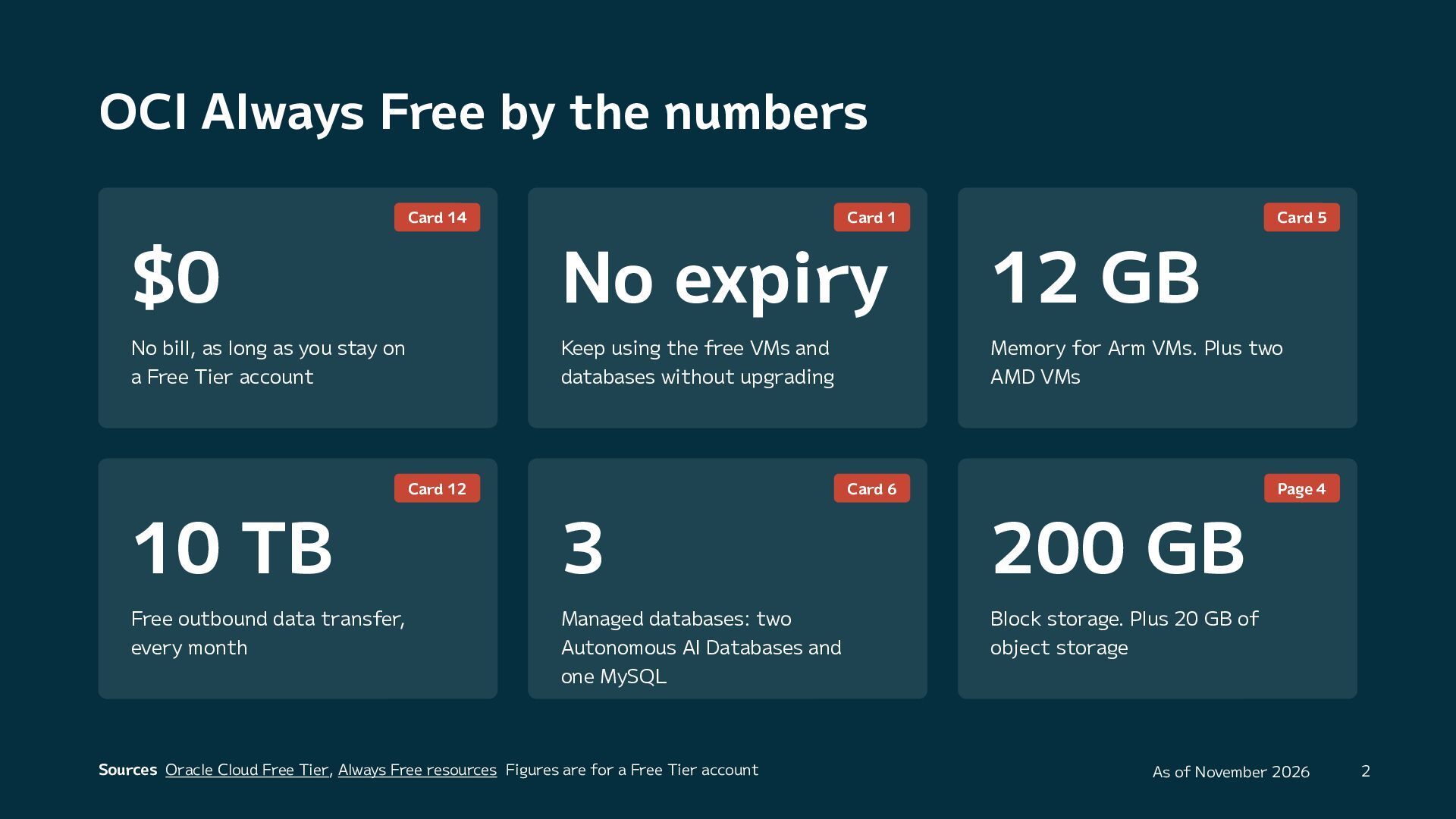
OCI Always Free by the numbers $0 Card 14 No
bill, as long as you stay on a Free Tier account 10 TB Free outbound data transfer, every month Card 12 Card 1 Card 5 No expiry 12 GB Keep using the free VMs and databases without upgrading Memory for Arm VMs. Plus two AMD VMs 3 Managed databases: two Autonomous AI Databases and one MySQL Sources Oracle Cloud Free Tier, Always Free resources Figures are for a Free Tier account Card 6 200 GB Page 4 Block storage. Plus 20 GB of object storage As of November 2026 2 -
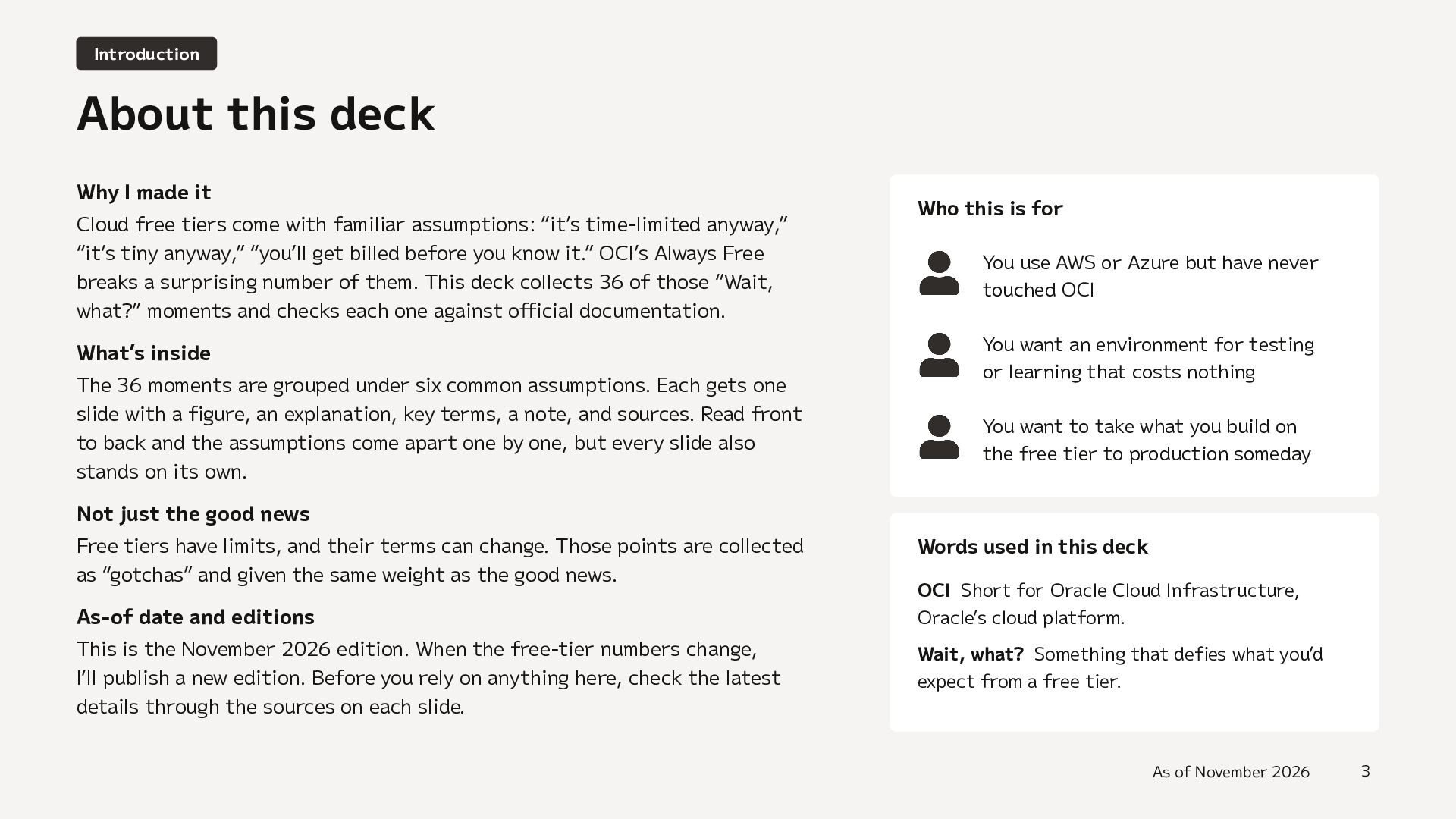
Introduction About this deck Why I made it Cloud free
tiers come with familiar assumptions: “it’s time-limited anyway,” “it’s tiny anyway,” “you’ll get billed before you know it.” OCI’s Always Free breaks a surprising number of them. This deck collects 36 of those “Wait, what?” moments and checks each one against official documentation. What’s inside The 36 moments are grouped under six common assumptions. Each gets one slide with a figure, an explanation, key terms, a note, and sources. Read front to back and the assumptions come apart one by one, but every slide also stands on its own. Who this is for You use AWS or Azure but have never touched OCI You want an environment for testing or learning that costs nothing You want to take what you build on the free tier to production someday Not just the good news Free tiers have limits, and their terms can change. Those points are collected as “gotchas” and given the same weight as the good news. Words used in this deck As-of date and editions Oracle’s cloud platform. This is the November 2026 edition. When the free-tier numbers change, I’ll publish a new edition. Before you rely on anything here, check the latest details through the sources on each slide. OCI Short for Oracle Cloud Infrastructure, Wait, what? Something that defies what you’d expect from a free tier. As of November 2026 3 -
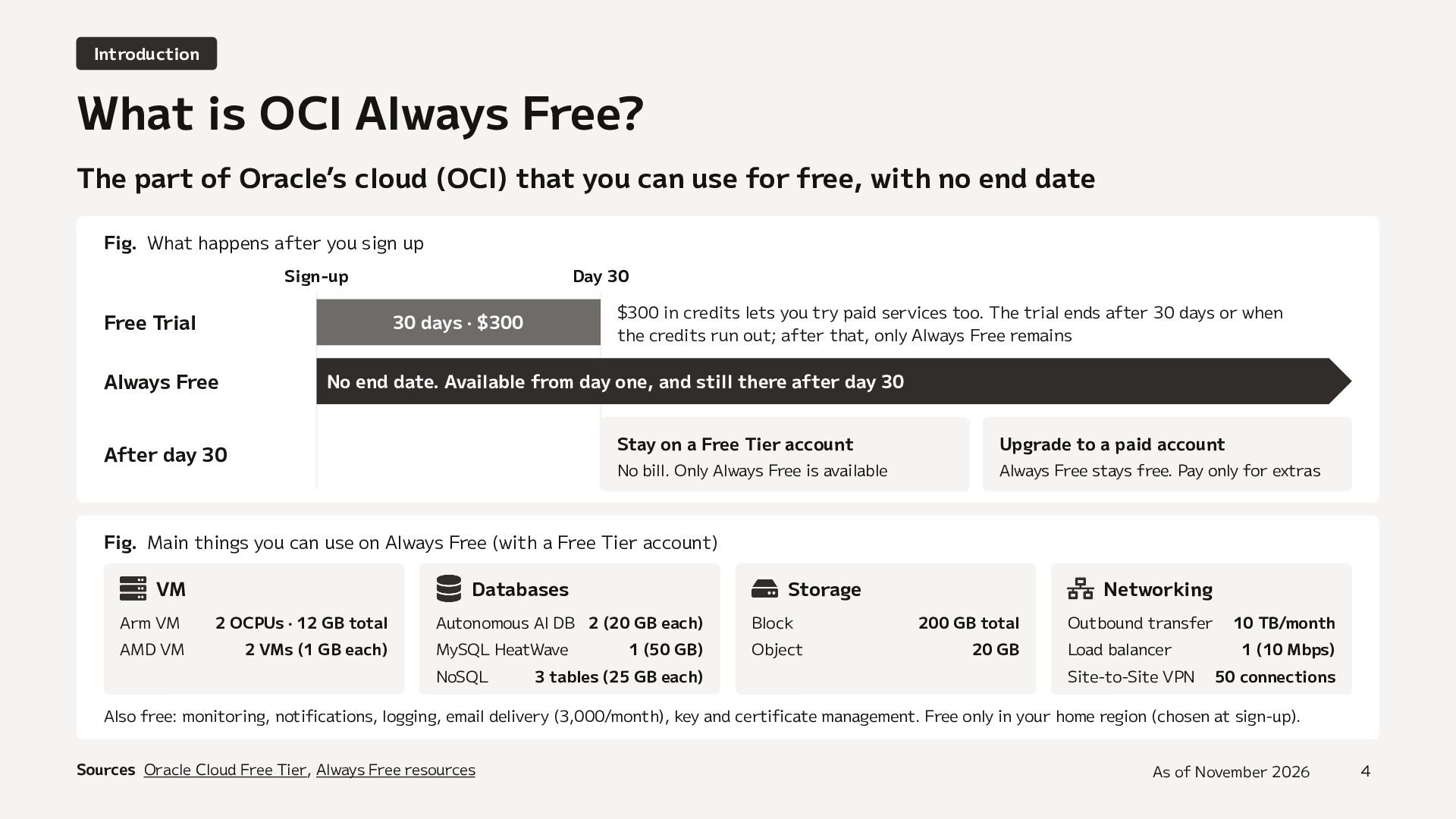
Introduction What is OCI Always Free? The part of Oracle’s
cloud (OCI) that you can use for free, with no end date Fig. What happens after you sign up Sign-up Free Trial Day 30 $300 in credits lets you try paid services too. The trial ends after 30 days or when the credits run out; after that, only Always Free remains 30 days · $300 Always Free No end date. Available from day one, and still there after day 30 After day 30 Stay on a Free Tier account Upgrade to a paid account No bill. Only Always Free is available Always Free stays free. Pay only for extras Fig. Main things you can use on Always Free (with a Free Tier account) VM Databases Arm VM 2 OCPUs · 12 GB total AMD VM 2 VMs (1 GB each) Storage Networking Autonomous AI DB 2 (20 GB each) Block 200 GB total MySQL HeatWave Object 20 GB NoSQL 1 (50 GB) 3 tables (25 GB each) Outbound transfer 10 TB/month Load balancer 1 (10 Mbps) Site-to-Site VPN 50 connections Also free: monitoring, notifications, logging, email delivery (3,000/month), key and certificate management. Free only in your home region (chosen at sign-up). Sources Oracle Cloud Free Tier, Always Free resources As of November 2026 4 -
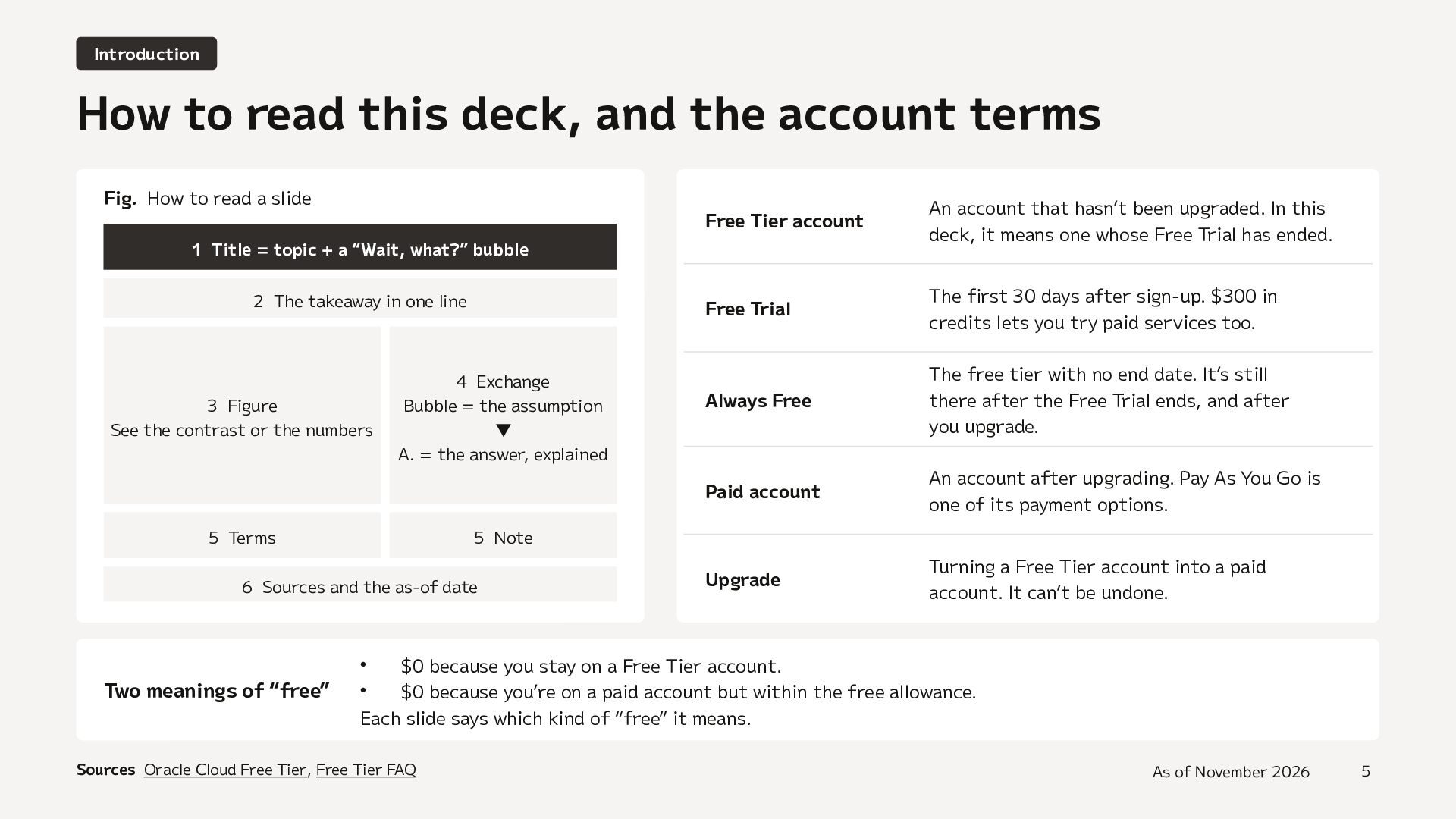
Introduction How to read this deck, and the account terms
Fig. How to read a slide Free Tier account An account that hasn’t been upgraded. In this deck, it means one whose Free Trial has ended. Free Trial The first 30 days after sign-up. $300 in credits lets you try paid services too. Always Free The free tier with no end date. It’s still there after the Free Trial ends, and after you upgrade. Paid account An account after upgrading. Pay As You Go is one of its payment options. Upgrade Turning a Free Tier account into a paid account. It can’t be undone. 1 Title = topic + a “Wait, what?” bubble 2 The takeaway in one line 3 Figure See the contrast or the numbers 4 Exchange Bubble = the assumption ▼ A. = the answer, explained 5 Terms 5 Note 6 Sources and the as-of date Two meanings of “free” $0 because you stay on a Free Tier account. $0 because you’re on a paid account but within the free allowance. Each slide says which kind of “free” it means. • • Sources Oracle Cloud Free Tier, Free Tier FAQ As of November 2026 5 -
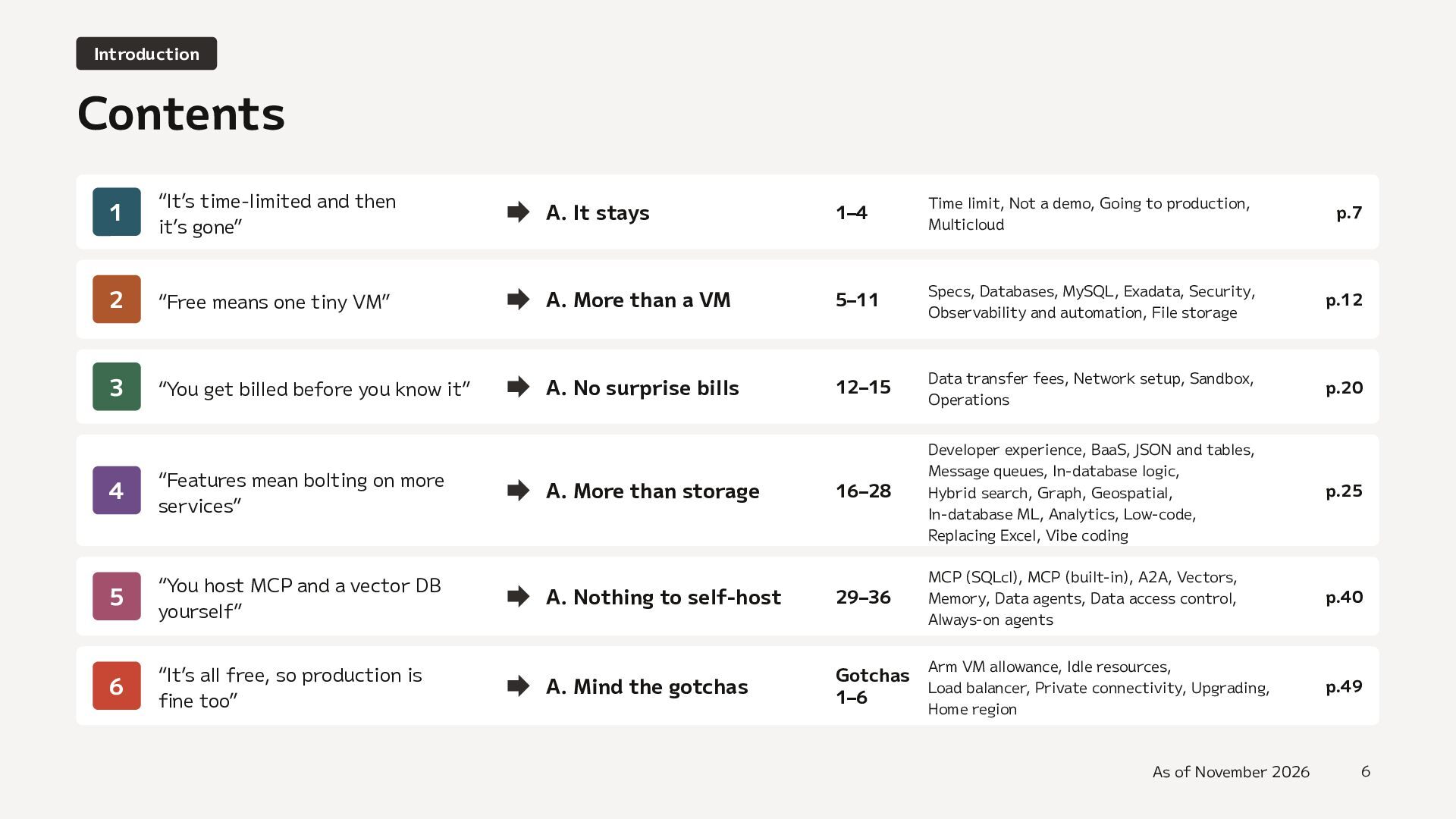
Introduction Contents 1 “It’s time-limited and then it’s gone” A.
It stays 1–4 Time limit, Not a demo, Going to production, Multicloud p.7 2 “Free means one tiny VM” A. More than a VM 5–11 Specs, Databases, MySQL, Exadata, Security, Observability and automation, File storage p.12 3 “You get billed before you know it” A. No surprise bills 12–15 Data transfer fees, Network setup, Sandbox, Operations p.20 p.25 4 “Features mean bolting on more services” A. More than storage 16–28 Developer experience, BaaS, JSON and tables, Message queues, In-database logic, Hybrid search, Graph, Geospatial, In-database ML, Analytics, Low-code, Replacing Excel, Vibe coding 5 “You host MCP and a vector DB yourself” A. Nothing to self-host 29–36 MCP (SQLcl), MCP (built-in), A2A, Vectors, Memory, Data agents, Data access control, Always-on agents p.40 6 “It’s all free, so production is fine too” A. Mind the gotchas Gotchas 1–6 Arm VM allowance, Idle resources, Load balancer, Private connectivity, Upgrading, Home region p.49 As of November 2026 6 -
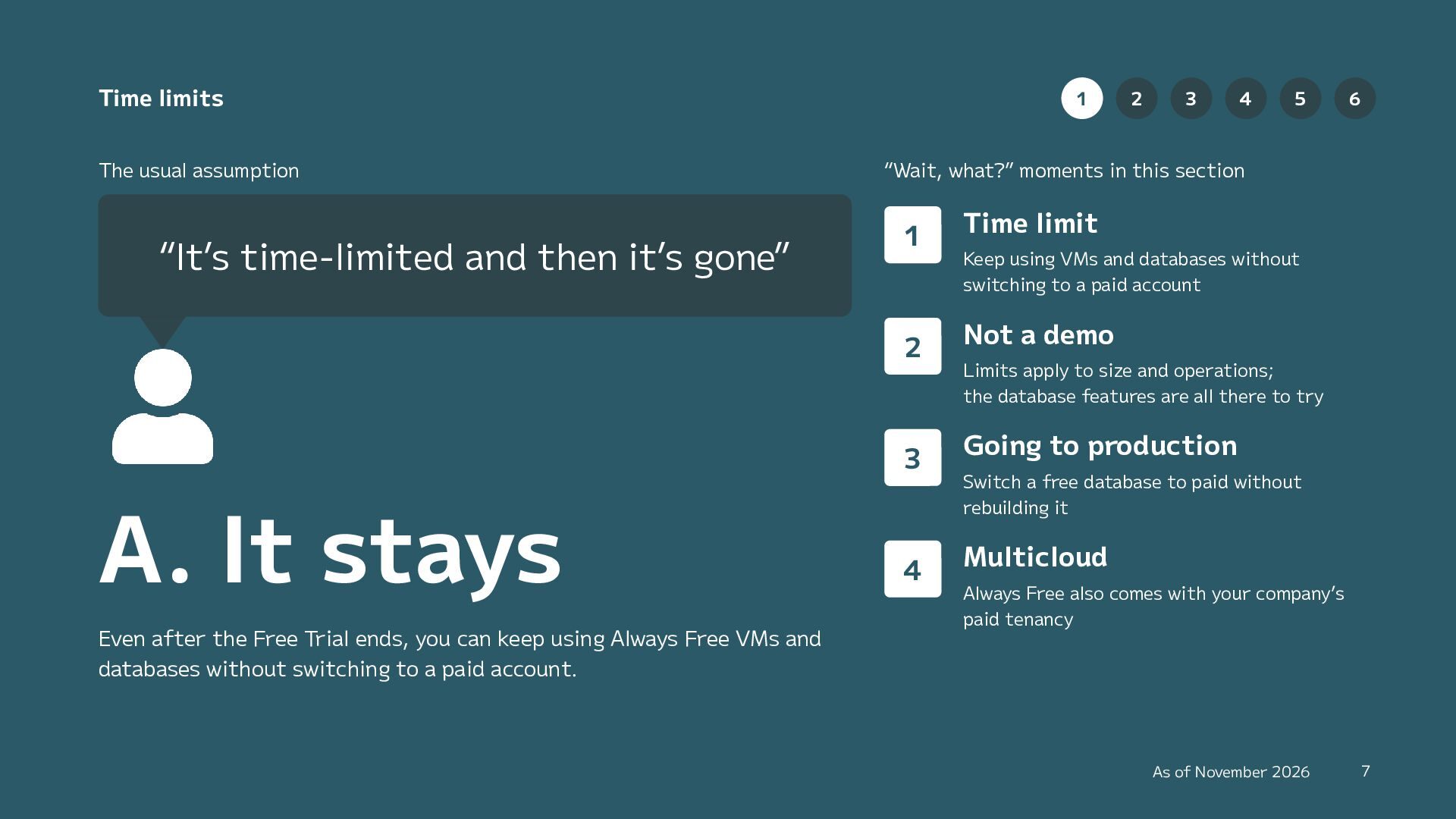
Time limits The usual assumption “It’s time-limited and then it’s
gone” A. It stays Even after the Free Trial ends, you can keep using Always Free VMs and databases without switching to a paid account. 1 2 3 4 5 6 “Wait, what?” moments in this section 1 Time limit 2 Not a demo 3 Going to production 4 Multicloud Keep using VMs and databases without switching to a paid account Limits apply to size and operations; the database features are all there to try Switch a free database to paid without rebuilding it Always Free also comes with your company’s paid tenancy As of November 2026 7 -
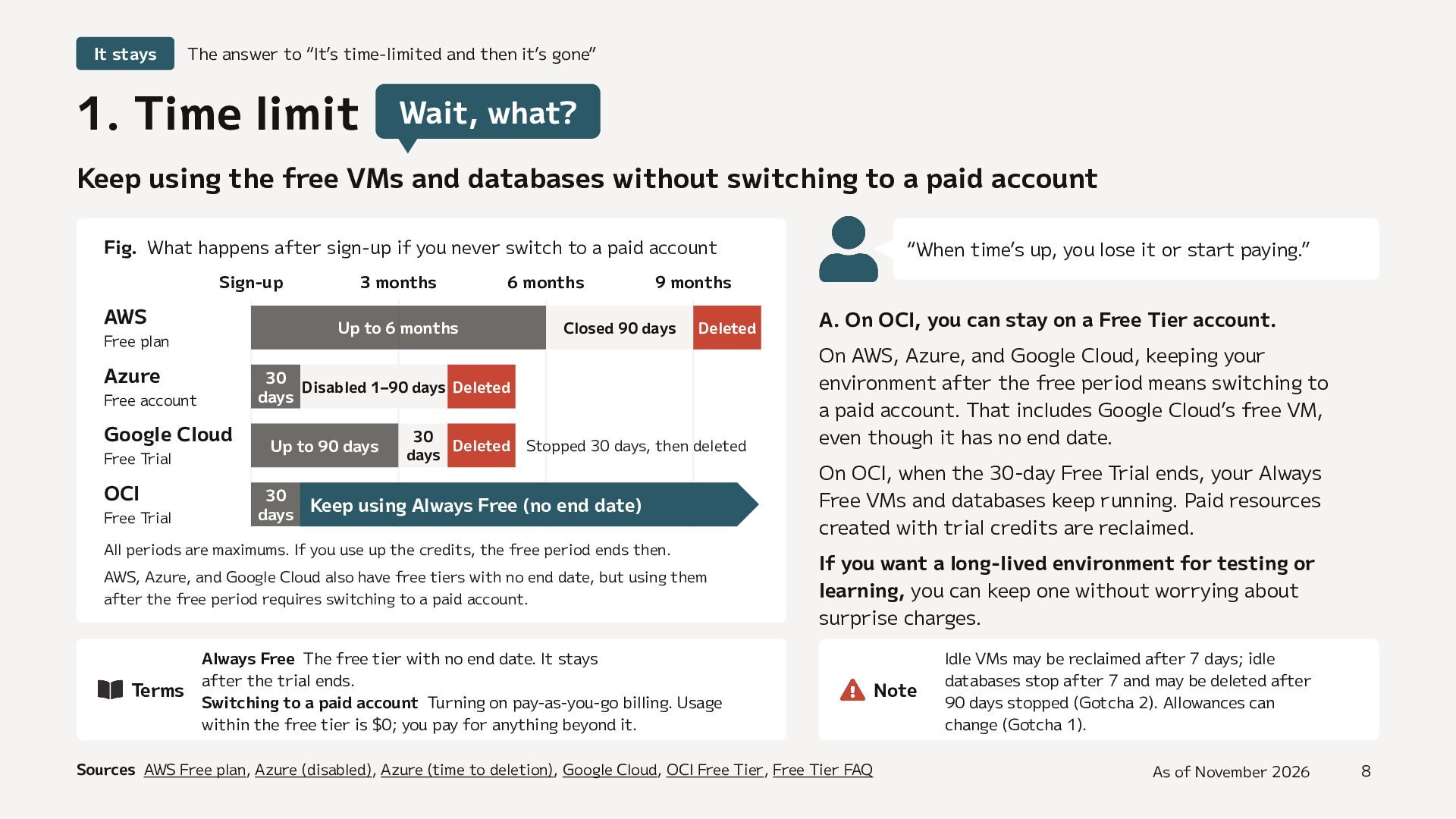
It stays The answer to “It’s time-limited and then it’s
gone” 1. Time limit Wait, what? Keep using the free VMs and databases without switching to a paid account Fig. What happens after sign-up if you never switch to a paid account Sign-up AWS Azure Google Cloud Free Trial 9 months Closed 90 days Deleted 30 Disabled 1–90 days Deleted days Free account OCI 6 months Up to 6 months Free plan Free Trial 3 months Up to 90 days 30 days 30 Deleted days Stopped 30 days, then deleted Keep using Always Free (no end date) All periods are maximums. If you use up the credits, the free period ends then. AWS, Azure, and Google Cloud also have free tiers with no end date, but using them after the free period requires switching to a paid account. Terms “When time’s up, you lose it or start paying.” A. On OCI, you can stay on a Free Tier account. On AWS, Azure, and Google Cloud, keeping your environment after the free period means switching to a paid account. That includes Google Cloud’s free VM, even though it has no end date. On OCI, when the 30-day Free Trial ends, your Always Free VMs and databases keep running. Paid resources created with trial credits are reclaimed. If you want a long-lived environment for testing or learning, you can keep one without worrying about surprise charges. Always Free The free tier with no end date. It stays after the trial ends. Switching to a paid account Turning on pay-as-you-go billing. Usage within the free tier is $0; you pay for anything beyond it. Sources AWS Free plan, Azure (disabled), Azure (time to deletion), Google Cloud, OCI Free Tier, Free Tier FAQ Note Idle VMs may be reclaimed after 7 days; idle databases stop after 7 and may be deleted after 90 days stopped (Gotcha 2). Allowances can change (Gotcha 1). As of November 2026 8 -
It stays The answer to “It’s time-limited and then it’s
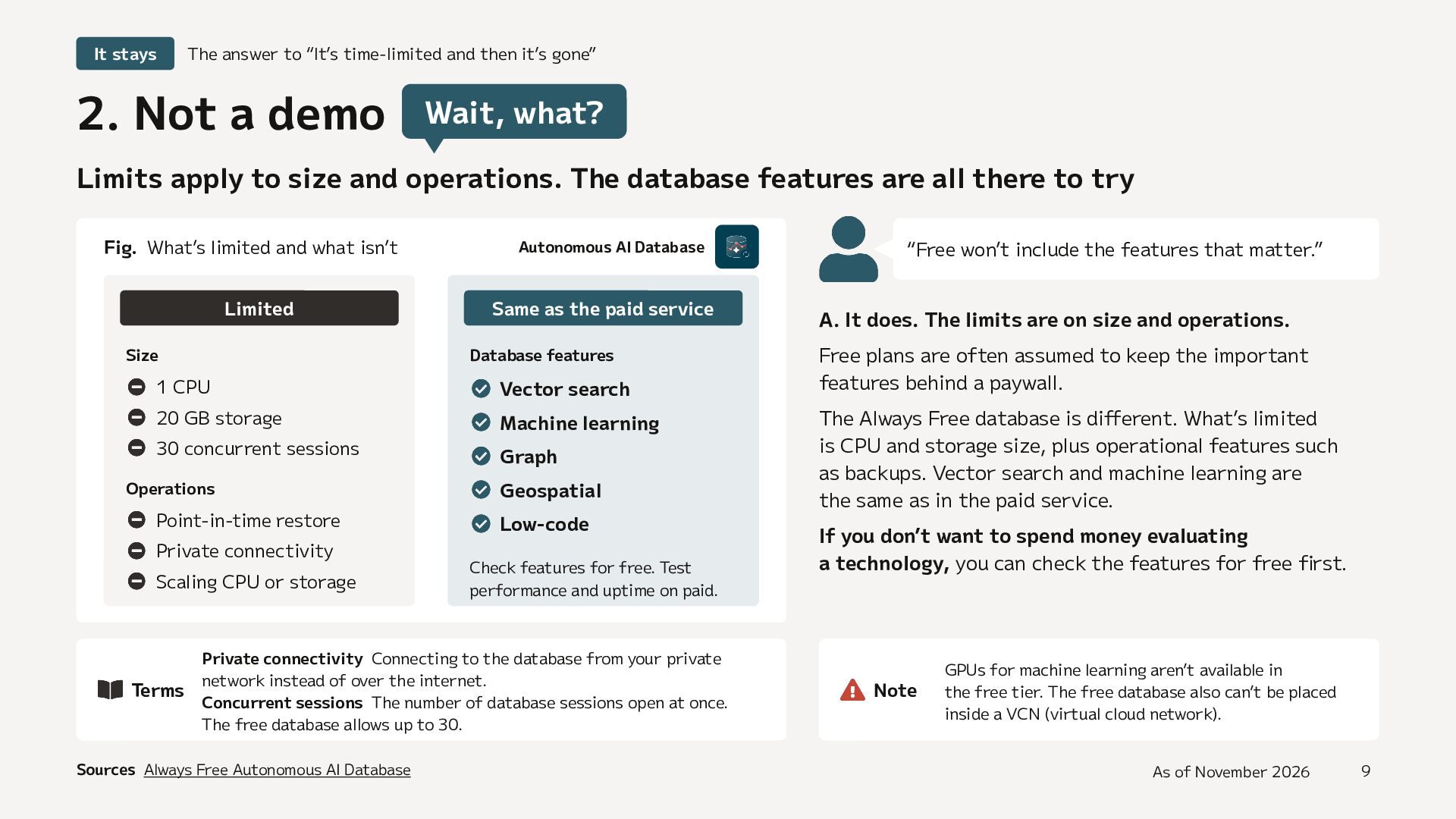
gone” 2. Not a demo Wait, what? Limits apply to size and operations. The database features are all there to try Fig. What’s limited and what isn’t Autonomous AI Database Limited Same as the paid service Size Database features 1 CPU Vector search 20 GB storage Machine learning 30 concurrent sessions Operations Point-in-time restore Private connectivity Scaling CPU or storage Terms Graph Geospatial Low-code Check features for free. Test performance and uptime on paid. Private connectivity Connecting to the database from your private network instead of over the internet. Concurrent sessions The number of database sessions open at once. The free database allows up to 30. Sources Always Free Autonomous AI Database “Free won’t include the features that matter.” A. It does. The limits are on size and operations. Free plans are often assumed to keep the important features behind a paywall. The Always Free database is different. What’s limited is CPU and storage size, plus operational features such as backups. Vector search and machine learning are the same as in the paid service. If you don’t want to spend money evaluating a technology, you can check the features for free first. Note GPUs for machine learning aren’t available in the free tier. The free database also can’t be placed inside a VCN (virtual cloud network). As of November 2026 9 -
It stays The answer to “It’s time-limited and then it’s
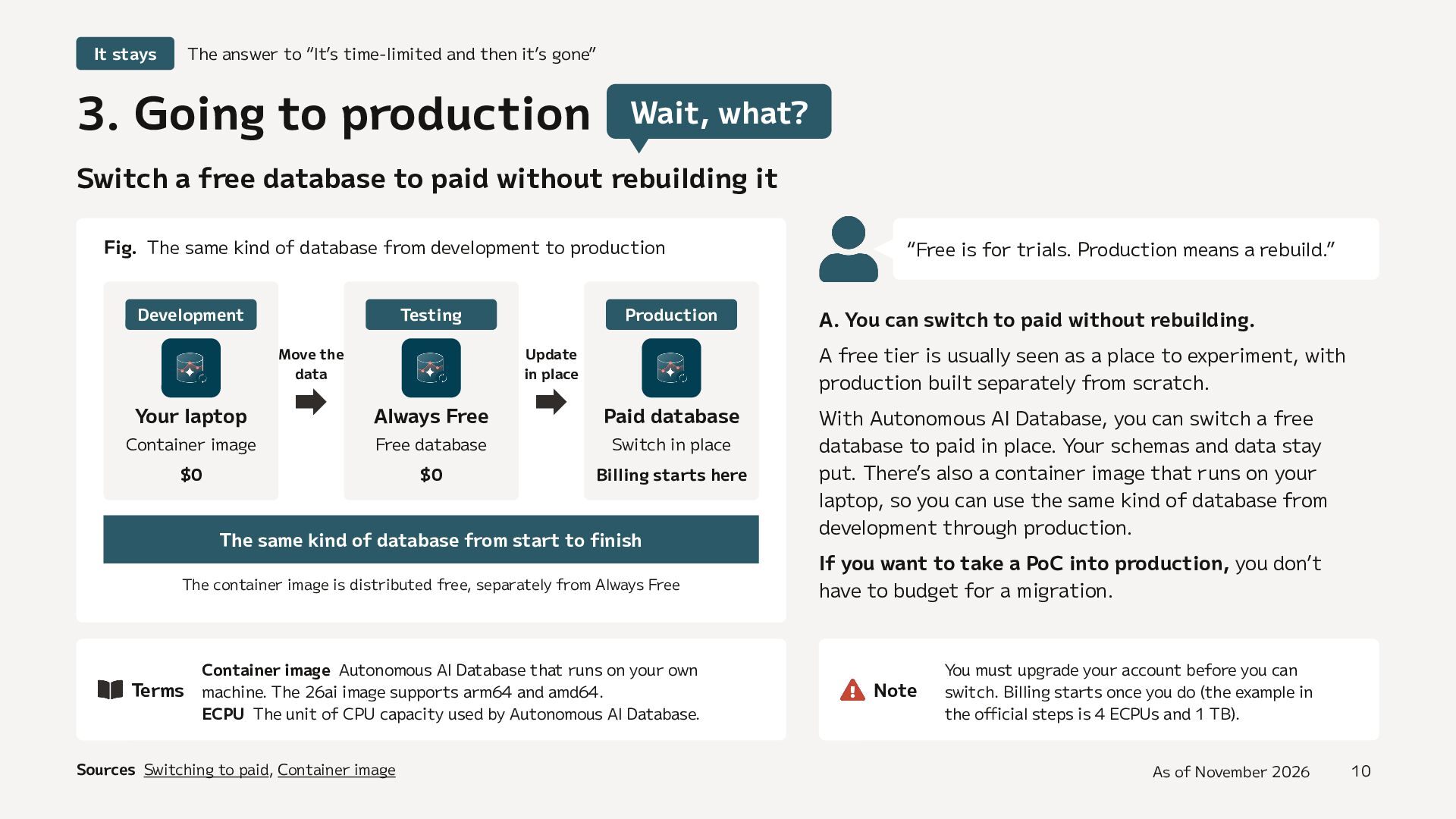
gone” 3. Going to production Wait, what? Switch a free database to paid without rebuilding it Fig. The same kind of database from development to production Development Testing Move the data Production A. You can switch to paid without rebuilding. A free tier is usually seen as a place to experiment, with production built separately from scratch. Update in place Your laptop Always Free Paid database Container image Free database Switch in place $0 $0 Billing starts here The same kind of database from start to finish The container image is distributed free, separately from Always Free Container image Autonomous AI Database that runs on your own Terms machine. The 26ai image supports arm64 and amd64. ECPU The unit of CPU capacity used by Autonomous AI Database. Sources Switching to paid, Container image “Free is for trials. Production means a rebuild.” With Autonomous AI Database, you can switch a free database to paid in place. Your schemas and data stay put. There’s also a container image that runs on your laptop, so you can use the same kind of database from development through production. If you want to take a PoC into production, you don’t have to budget for a migration. Note You must upgrade your account before you can switch. Billing starts once you do (the example in the official steps is 4 ECPUs and 1 TB). As of November 2026 10 -
It stays The answer to “It’s time-limited and then it’s
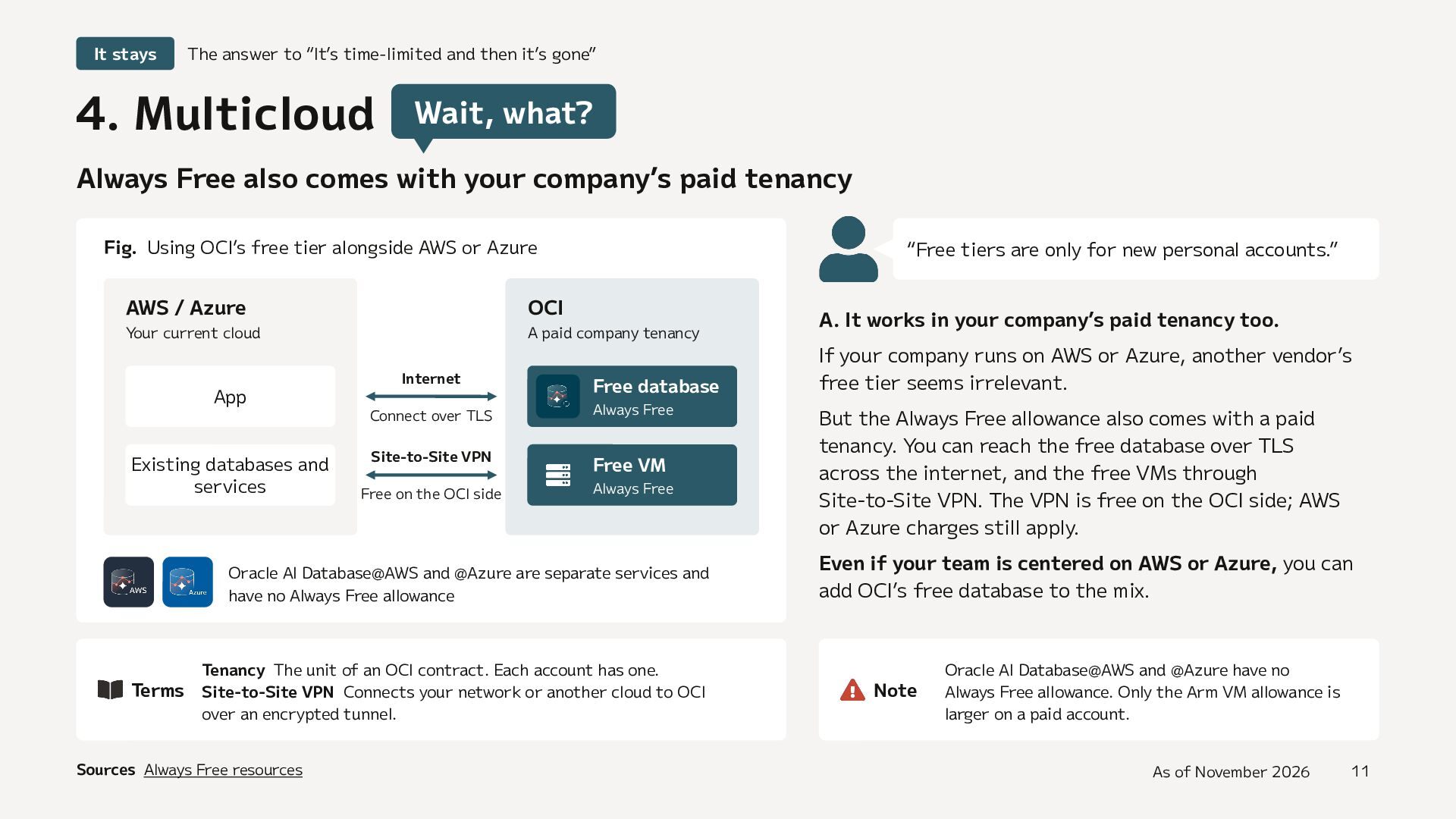
gone” 4. Multicloud Wait, what? Always Free also comes with your company’s paid tenancy Fig. Using OCI’s free tier alongside AWS or Azure “Free tiers are only for new personal accounts.” AWS / Azure OCI Your current cloud A paid company tenancy App Existing databases and services Internet Free database Connect over TLS Always Free Site-to-Site VPN Free VM Free on the OCI side Always Free Oracle AI Database@AWS and @Azure are separate services and have no Always Free allowance Tenancy The unit of an OCI contract. Each account has one. Terms Site-to-Site VPN Connects your network or another cloud to OCI over an encrypted tunnel. Sources Always Free resources A. It works in your company’s paid tenancy too. If your company runs on AWS or Azure, another vendor’s free tier seems irrelevant. But the Always Free allowance also comes with a paid tenancy. You can reach the free database over TLS across the internet, and the free VMs through Site-to-Site VPN. The VPN is free on the OCI side; AWS or Azure charges still apply. Even if your team is centered on AWS or Azure, you can add OCI’s free database to the mix. Note Oracle AI Database@AWS and @Azure have no Always Free allowance. Only the Arm VM allowance is larger on a paid account. As of November 2026 11 -
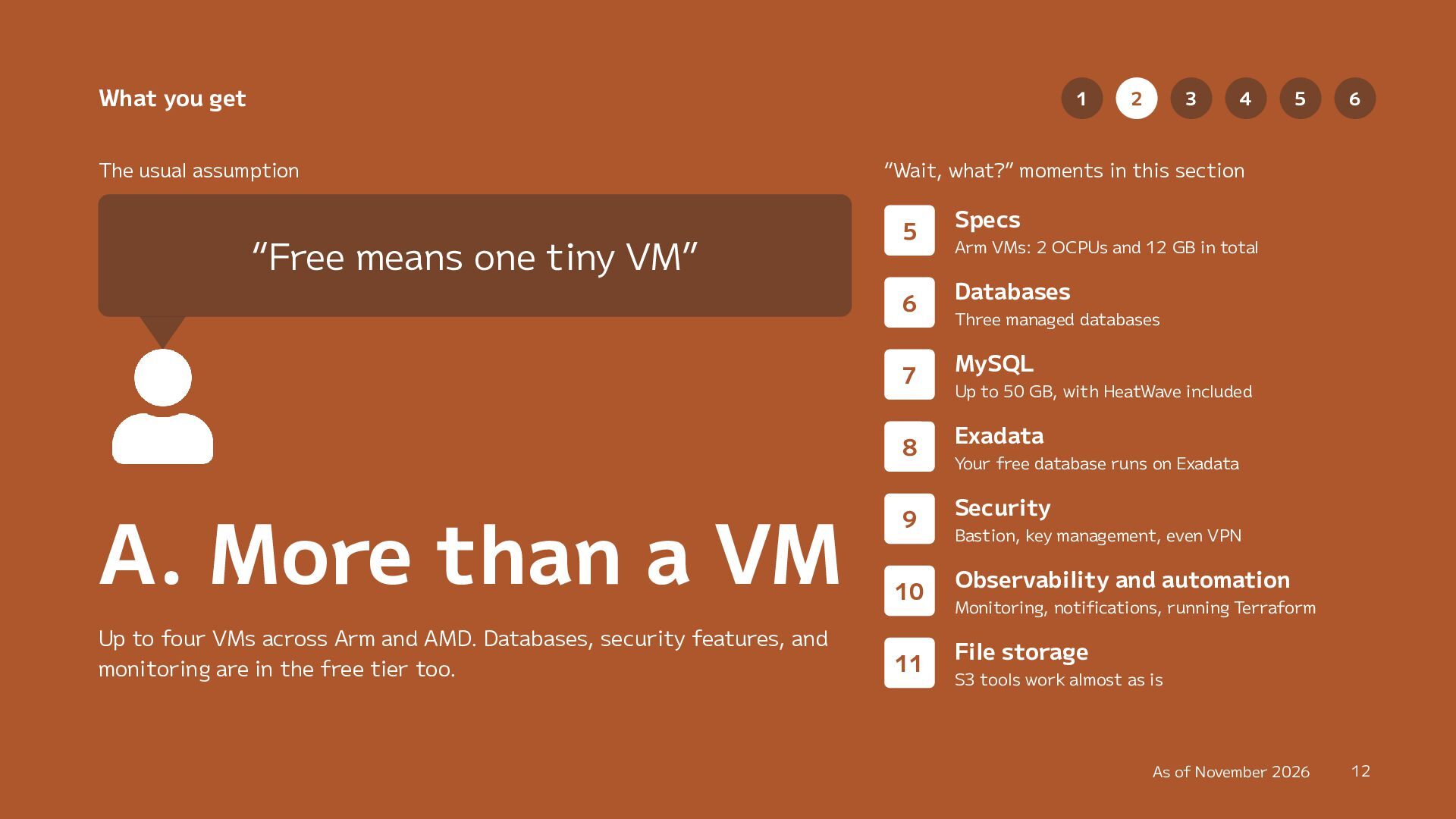
What you get 1 The usual assumption “Free means one
tiny VM” 2 3 4 5 6 “Wait, what?” moments in this section 5 6 7 8 A. More than a VM 10 Up to four VMs across Arm and AMD. Databases, security features, and monitoring are in the free tier too. 11 9 Specs Arm VMs: 2 OCPUs and 12 GB in total Databases Three managed databases MySQL Up to 50 GB, with HeatWave included Exadata Your free database runs on Exadata Security Bastion, key management, even VPN Observability and automation Monitoring, notifications, running Terraform File storage S3 tools work almost as is As of November 2026 12 -
More than a VM The answer to “Free means one
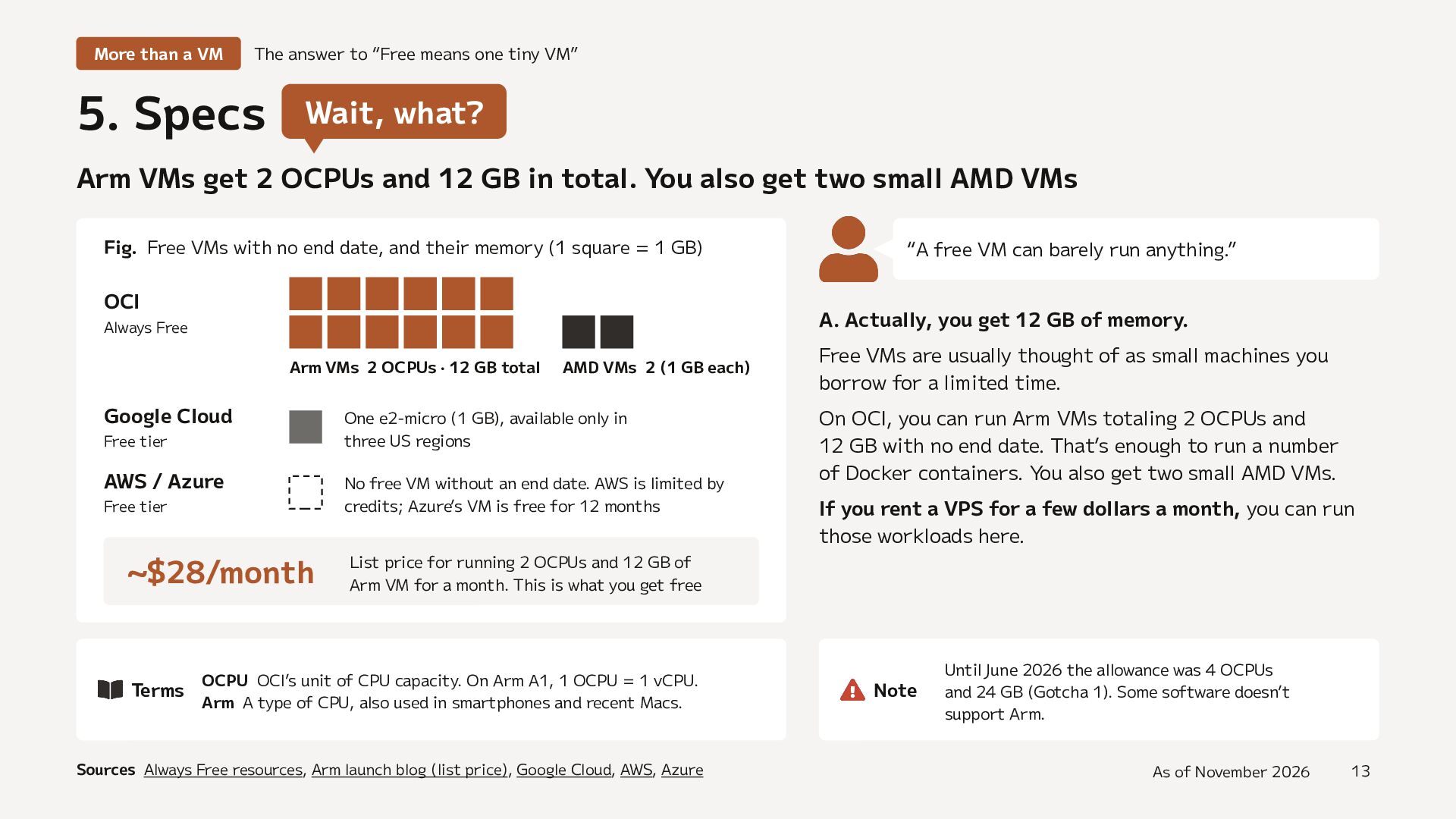
tiny VM” 5. Specs Wait, what? Arm VMs get 2 OCPUs and 12 GB in total. You also get two small AMD VMs Fig. Free VMs with no end date, and their memory (1 square = 1 GB) OCI A. Actually, you get 12 GB of memory. Always Free Arm VMs 2 OCPUs · 12 GB total Google Cloud Free tier AWS / Azure Free tier ~$28/month Terms “A free VM can barely run anything.” AMD VMs 2 (1 GB each) One e2-micro (1 GB), available only in three US regions No free VM without an end date. AWS is limited by credits; Azure’s VM is free for 12 months Free VMs are usually thought of as small machines you borrow for a limited time. On OCI, you can run Arm VMs totaling 2 OCPUs and 12 GB with no end date. That’s enough to run a number of Docker containers. You also get two small AMD VMs. If you rent a VPS for a few dollars a month, you can run those workloads here. List price for running 2 OCPUs and 12 GB of Arm VM for a month. This is what you get free OCPU OCI’s unit of CPU capacity. On Arm A1, 1 OCPU = 1 vCPU. Arm A type of CPU, also used in smartphones and recent Macs. Sources Always Free resources, Arm launch blog (list price), Google Cloud, AWS, Azure Note Until June 2026 the allowance was 4 OCPUs and 24 GB (Gotcha 1). Some software doesn’t support Arm. As of November 2026 13 -
More than a VM The answer to “Free means one
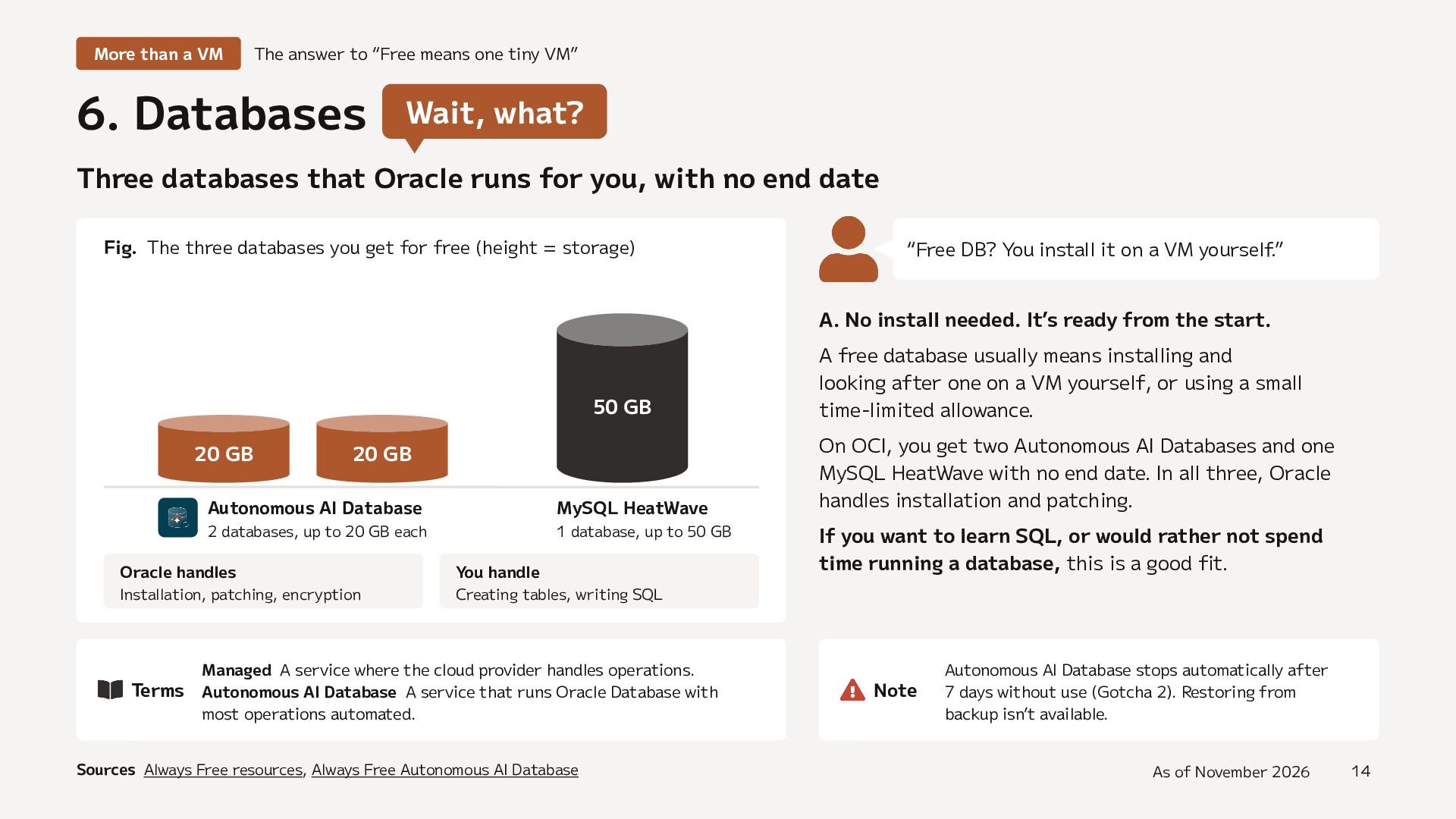
tiny VM” 6. Databases Wait, what? Three databases that Oracle runs for you, with no end date Fig. The three databases you get for free (height = storage) “Free DB? You install it on a VM yourself.” A. No install needed. It’s ready from the start. 50 GB 20 GB 20 GB Autonomous AI Database 2 databases, up to 20 GB each Oracle handles Installation, patching, encryption MySQL HeatWave 1 database, up to 50 GB You handle Creating tables, writing SQL Managed A service where the cloud provider handles operations. Terms Autonomous AI Database A service that runs Oracle Database with most operations automated. Sources Always Free resources, Always Free Autonomous AI Database A free database usually means installing and looking after one on a VM yourself, or using a small time-limited allowance. On OCI, you get two Autonomous AI Databases and one MySQL HeatWave with no end date. In all three, Oracle handles installation and patching. If you want to learn SQL, or would rather not spend time running a database, this is a good fit. Note Autonomous AI Database stops automatically after 7 days without use (Gotcha 2). Restoring from backup isn’t available. As of November 2026 14 -
More than a VM The answer to “Free means one
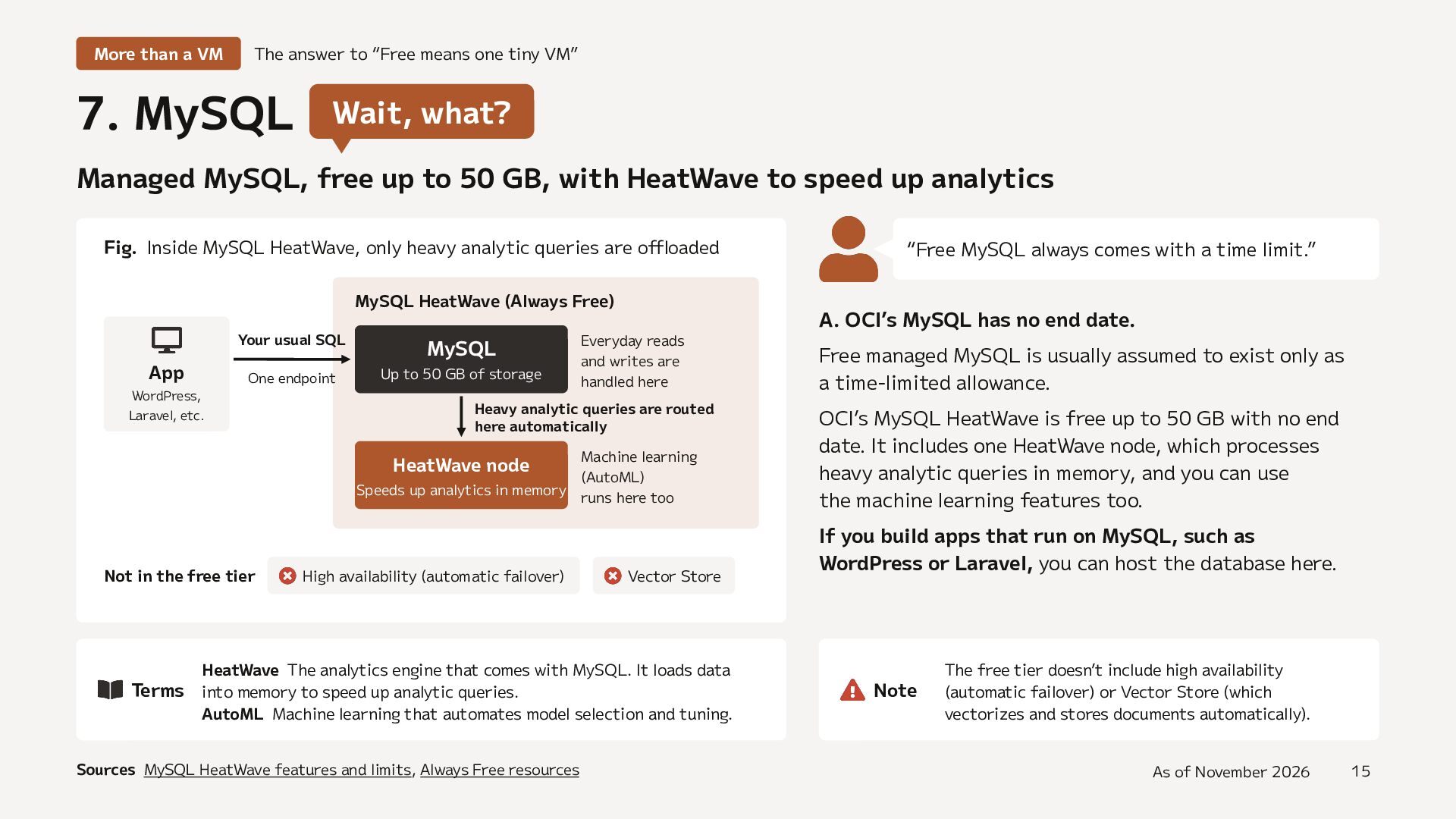
tiny VM” 7. MySQL Wait, what? Managed MySQL, free up to 50 GB, with HeatWave to speed up analytics Fig. Inside MySQL HeatWave, only heavy analytic queries are offloaded MySQL HeatWave (Always Free) App WordPress, Your usual SQL MySQL One endpoint Up to 50 GB of storage Laravel, etc. Heavy analytic queries are routed here automatically HeatWave node Speeds up analytics in memory Not in the free tier Everyday reads and writes are handled here High availability (automatic failover) Machine learning (AutoML) runs here too Vector Store HeatWave The analytics engine that comes with MySQL. It loads data Terms into memory to speed up analytic queries. AutoML Machine learning that automates model selection and tuning. Sources MySQL HeatWave features and limits, Always Free resources “Free MySQL always comes with a time limit.” A. OCI’s MySQL has no end date. Free managed MySQL is usually assumed to exist only as a time-limited allowance. OCI’s MySQL HeatWave is free up to 50 GB with no end date. It includes one HeatWave node, which processes heavy analytic queries in memory, and you can use the machine learning features too. If you build apps that run on MySQL, such as WordPress or Laravel, you can host the database here. Note The free tier doesn’t include high availability (automatic failover) or Vector Store (which vectorizes and stores documents automatically). As of November 2026 15 -
More than a VM The answer to “Free means one
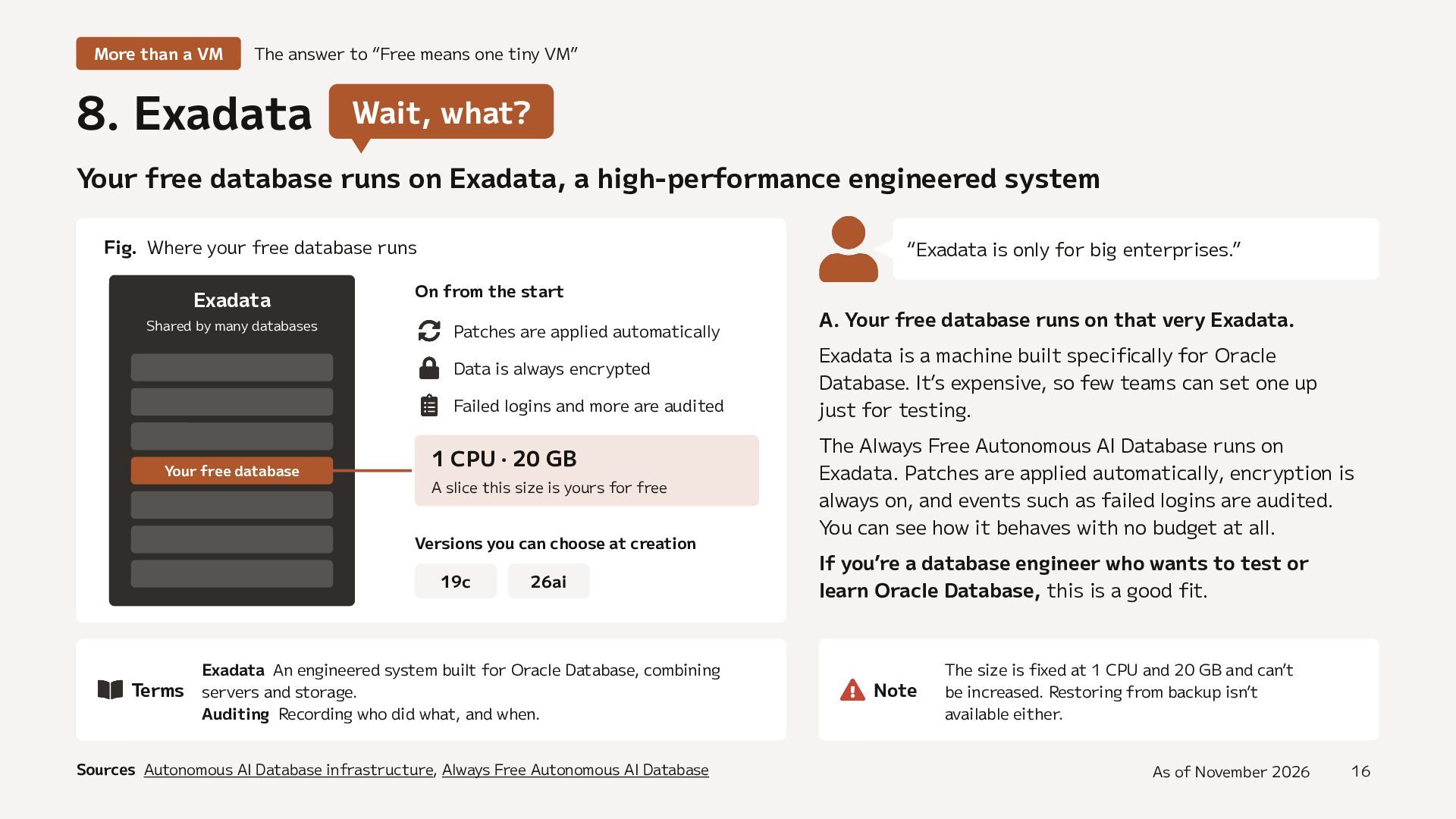
tiny VM” 8. Exadata Wait, what? Your free database runs on Exadata, a high-performance engineered system Fig. Where your free database runs Exadata Shared by many databases “Exadata is only for big enterprises.” On from the start Patches are applied automatically Data is always encrypted Failed logins and more are audited Your free database 1 CPU · 20 GB A slice this size is yours for free Versions you can choose at creation 19c 26ai Exadata An engineered system built for Oracle Database, combining Terms servers and storage. Auditing Recording who did what, and when. Sources Autonomous AI Database infrastructure, Always Free Autonomous AI Database A. Your free database runs on that very Exadata. Exadata is a machine built specifically for Oracle Database. It’s expensive, so few teams can set one up just for testing. The Always Free Autonomous AI Database runs on Exadata. Patches are applied automatically, encryption is always on, and events such as failed logins are audited. You can see how it behaves with no budget at all. If you’re a database engineer who wants to test or learn Oracle Database, this is a good fit. Note The size is fixed at 1 CPU and 20 GB and can’t be increased. Restoring from backup isn’t available either. As of November 2026 16 -
More than a VM The answer to “Free means one
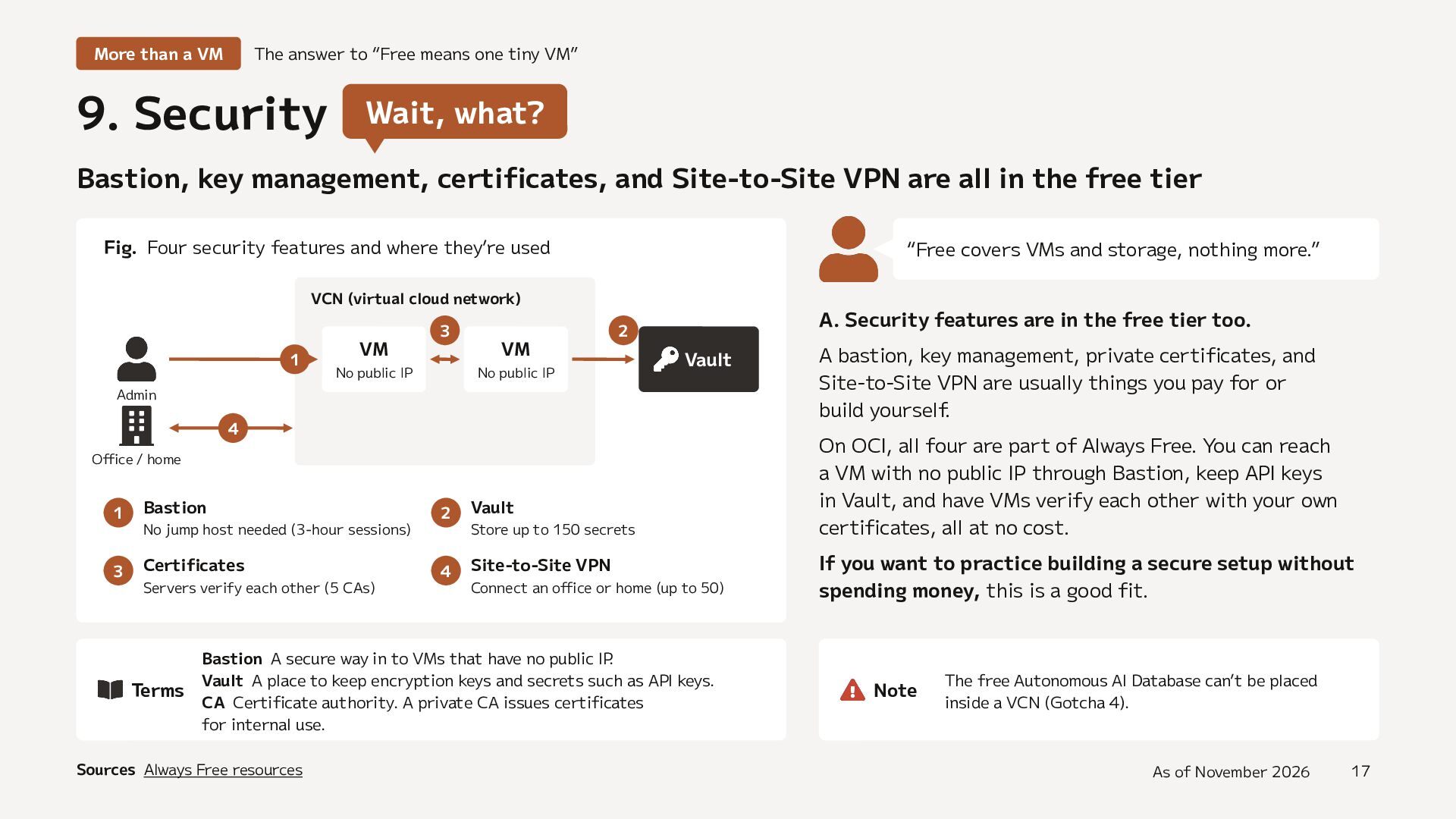
tiny VM” 9. Security Wait, what? Bastion, key management, certificates, and Site-to-Site VPN are all in the free tier Fig. Four security features and where they’re used “Free covers VMs and storage, nothing more.” VCN (virtual cloud network) 1 VM 3 No public IP VM A. Security features are in the free tier too. 2 No public IP Vault Admin 4 Office / home 1 Bastion 3 Certificates No jump host needed (3-hour sessions) Servers verify each other (5 CAs) Terms 2 Vault 4 Site-to-Site VPN Store up to 150 secrets Connect an office or home (up to 50) Bastion A secure way in to VMs that have no public IP. Vault A place to keep encryption keys and secrets such as API keys. CA Certificate authority. A private CA issues certificates for internal use. Sources Always Free resources A bastion, key management, private certificates, and Site-to-Site VPN are usually things you pay for or build yourself. On OCI, all four are part of Always Free. You can reach a VM with no public IP through Bastion, keep API keys in Vault, and have VMs verify each other with your own certificates, all at no cost. If you want to practice building a secure setup without spending money, this is a good fit. Note The free Autonomous AI Database can’t be placed inside a VCN (Gotcha 4). As of November 2026 17 -
More than a VM The answer to “Free means one
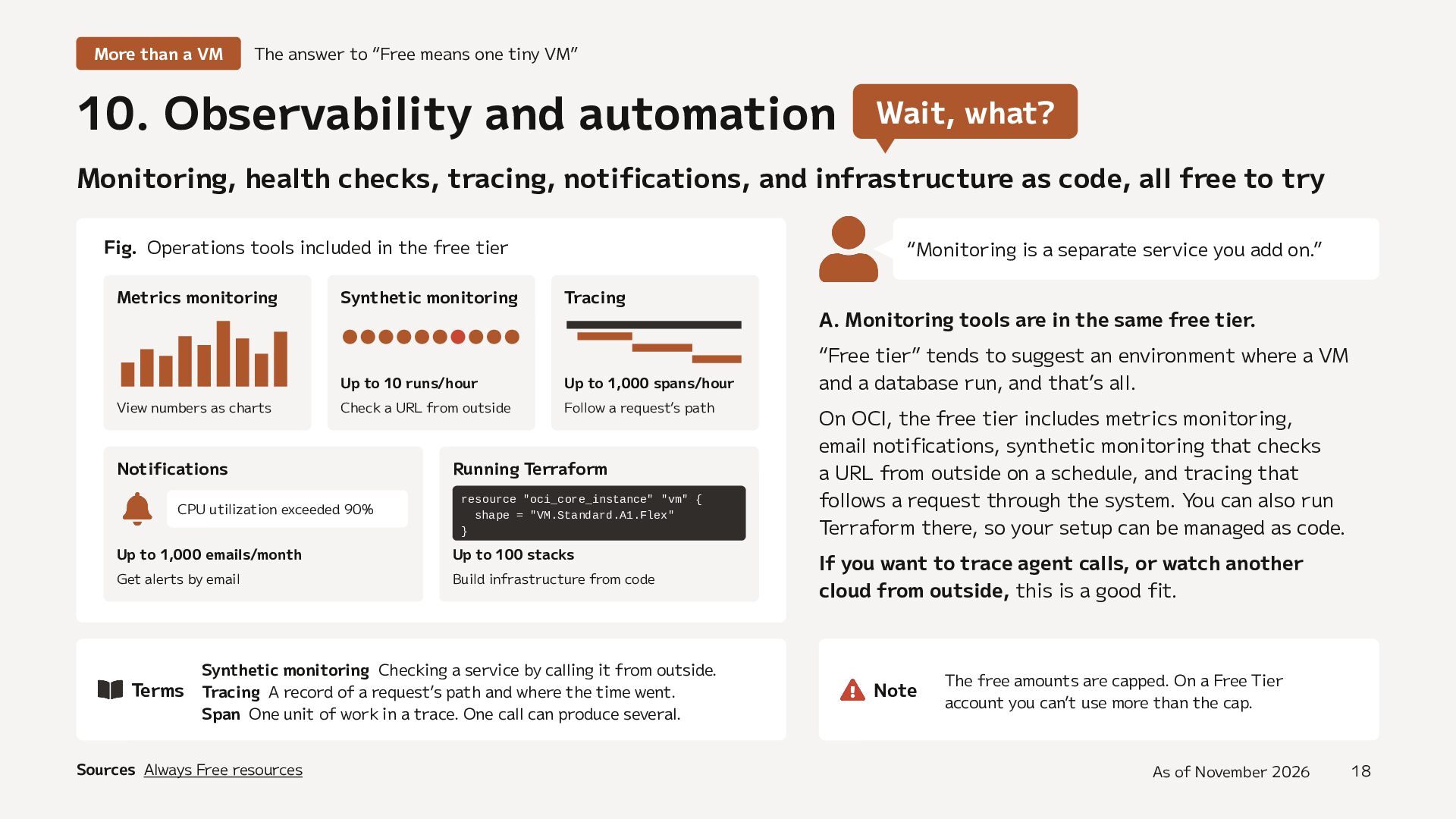
tiny VM” 10. Observability and automation Wait, what? Monitoring, health checks, tracing, notifications, and infrastructure as code, all free to try Fig. Operations tools included in the free tier Metrics monitoring View numbers as charts Synthetic monitoring “Monitoring is a separate service you add on.” Tracing Up to 10 runs/hour Up to 1,000 spans/hour Check a URL from outside Follow a request’s path Notifications CPU utilization exceeded 90% Running Terraform resource "oci_core_instance" "vm" { shape = "VM.Standard.A1.Flex" } Up to 1,000 emails/month Up to 100 stacks Get alerts by email Build infrastructure from code Synthetic monitoring Checking a service by calling it from outside. Terms Tracing A record of a request’s path and where the time went. Span One unit of work in a trace. One call can produce several. Sources Always Free resources A. Monitoring tools are in the same free tier. “Free tier” tends to suggest an environment where a VM and a database run, and that’s all. On OCI, the free tier includes metrics monitoring, email notifications, synthetic monitoring that checks a URL from outside on a schedule, and tracing that follows a request through the system. You can also run Terraform there, so your setup can be managed as code. If you want to trace agent calls, or watch another cloud from outside, this is a good fit. Note The free amounts are capped. On a Free Tier account you can’t use more than the cap. As of November 2026 18 -
More than a VM The answer to “Free means one
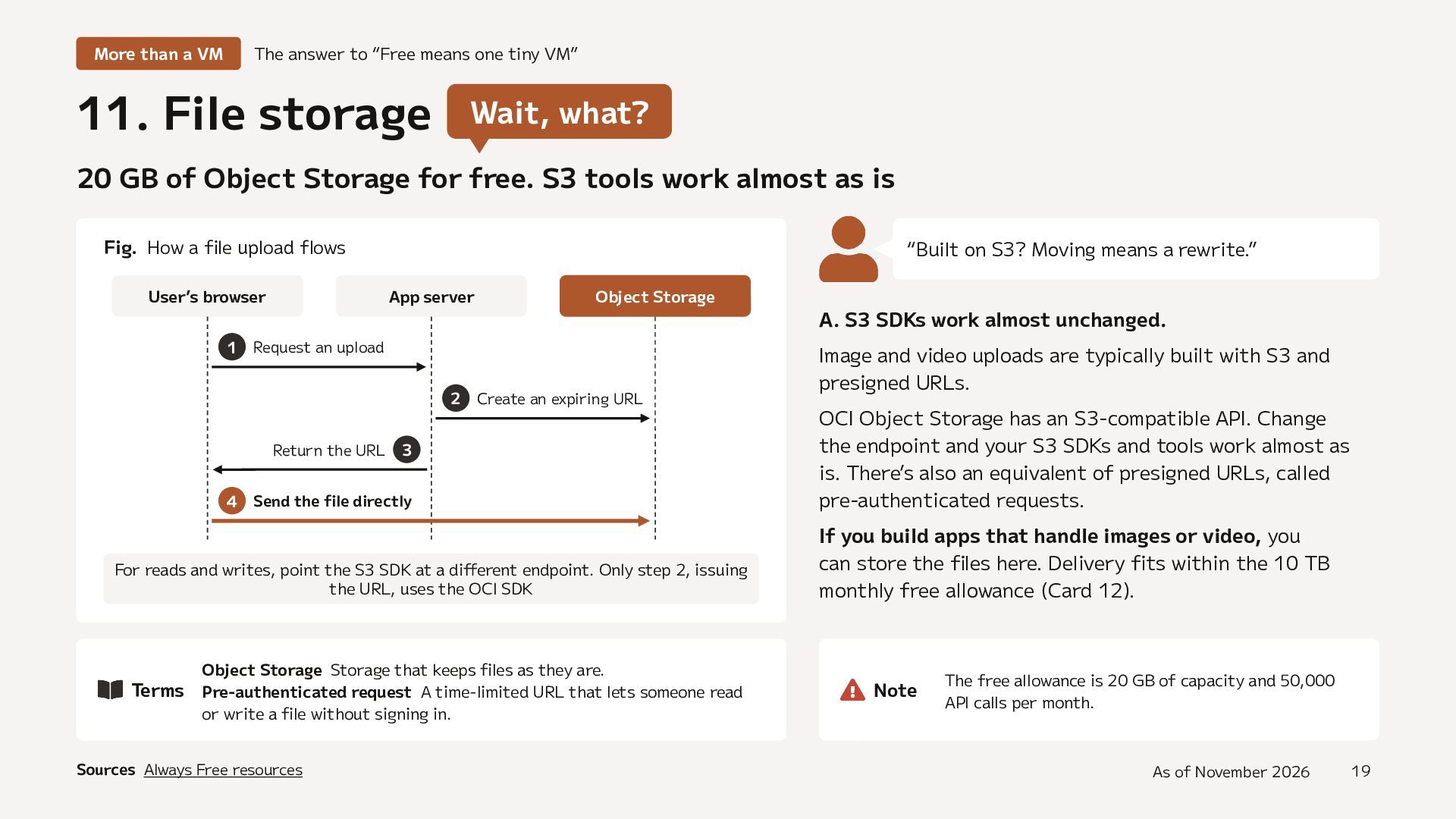
tiny VM” 11. File storage Wait, what? 20 GB of Object Storage for free. S3 tools work almost as is Fig. How a file upload flows User’s browser 1 “Built on S3? Moving means a rewrite.” App server Request an upload 2 Return the URL 4 Object Storage Create an expiring URL 3 Send the file directly For reads and writes, point the S3 SDK at a different endpoint. Only step 2, issuing the URL, uses the OCI SDK Object Storage Storage that keeps files as they are. Terms Pre-authenticated request A time-limited URL that lets someone read or write a file without signing in. Sources Always Free resources A. S3 SDKs work almost unchanged. Image and video uploads are typically built with S3 and presigned URLs. OCI Object Storage has an S3-compatible API. Change the endpoint and your S3 SDKs and tools work almost as is. There’s also an equivalent of presigned URLs, called pre-authenticated requests. If you build apps that handle images or video, you can store the files here. Delivery fits within the 10 TB monthly free allowance (Card 12). Note The free allowance is 20 GB of capacity and 50,000 API calls per month. As of November 2026 19 -
Billing 1 The usual assumption “You get billed before you
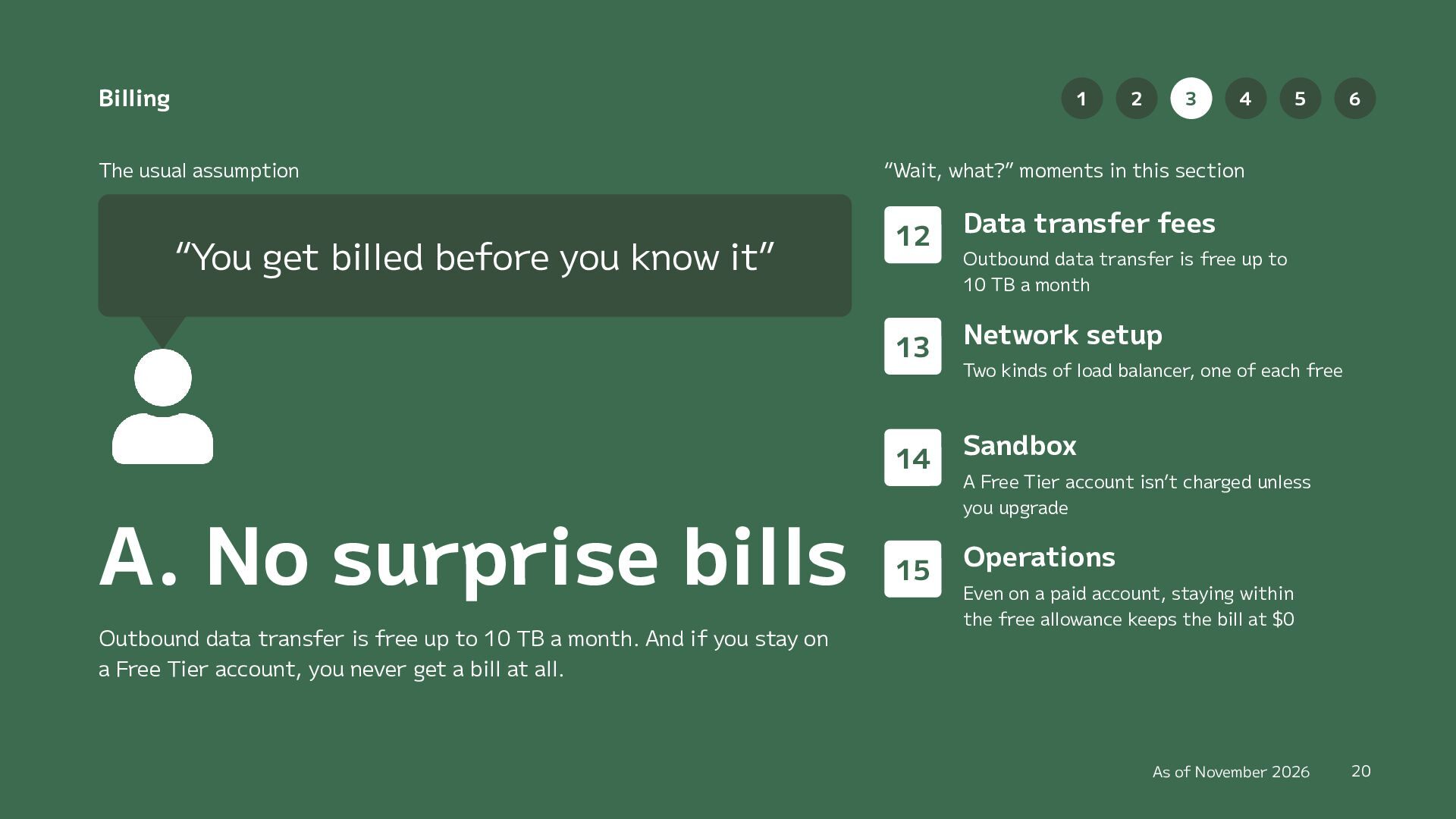
know it” A. No surprise bills Outbound data transfer is free up to 10 TB a month. And if you stay on a Free Tier account, you never get a bill at all. 2 3 4 5 6 “Wait, what?” moments in this section 12 Data transfer fees 13 Network setup 14 Sandbox 15 Operations Outbound data transfer is free up to 10 TB a month Two kinds of load balancer, one of each free A Free Tier account isn’t charged unless you upgrade Even on a paid account, staying within the free allowance keeps the bill at $0 As of November 2026 20 -
No surprise bills The answer to “You get billed before
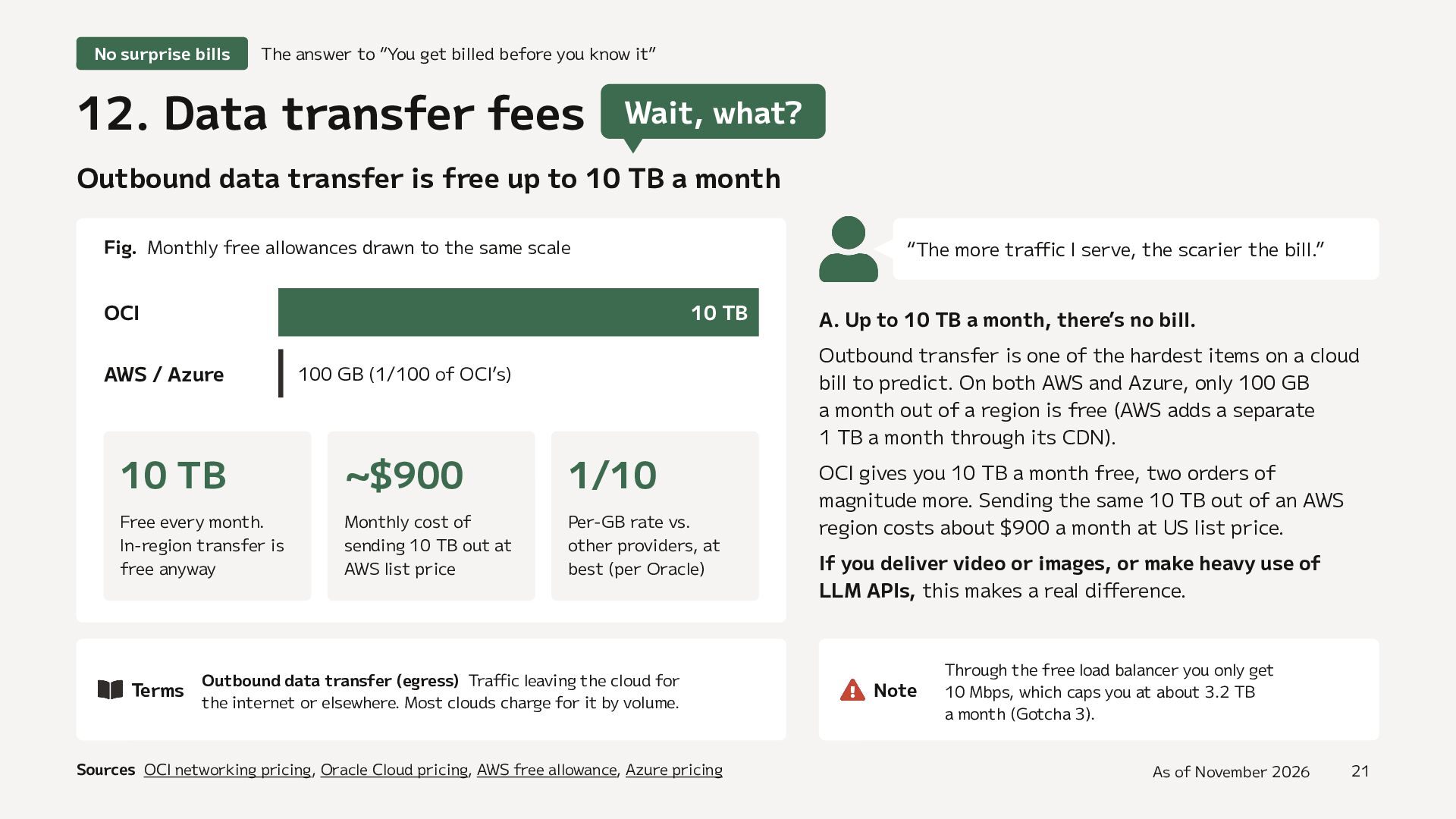
you know it” 12. Data transfer fees Wait, what? Outbound data transfer is free up to 10 TB a month Fig. Monthly free allowances drawn to the same scale OCI “The more traffic I serve, the scarier the bill.” 10 TB AWS / Azure 100 GB (1/100 of OCI’s) 10 TB ~$900 1/10 Free every month. In-region transfer is free anyway Monthly cost of sending 10 TB out at AWS list price Per-GB rate vs. other providers, at best (per Oracle) Terms Outbound data transfer (egress) Traffic leaving the cloud for the internet or elsewhere. Most clouds charge for it by volume. Sources OCI networking pricing, Oracle Cloud pricing, AWS free allowance, Azure pricing A. Up to 10 TB a month, there’s no bill. Outbound transfer is one of the hardest items on a cloud bill to predict. On both AWS and Azure, only 100 GB a month out of a region is free (AWS adds a separate 1 TB a month through its CDN). OCI gives you 10 TB a month free, two orders of magnitude more. Sending the same 10 TB out of an AWS region costs about $900 a month at US list price. If you deliver video or images, or make heavy use of LLM APIs, this makes a real difference. Note Through the free load balancer you only get 10 Mbps, which caps you at about 3.2 TB a month (Gotcha 3). As of November 2026 21 -
No surprise bills The answer to “You get billed before
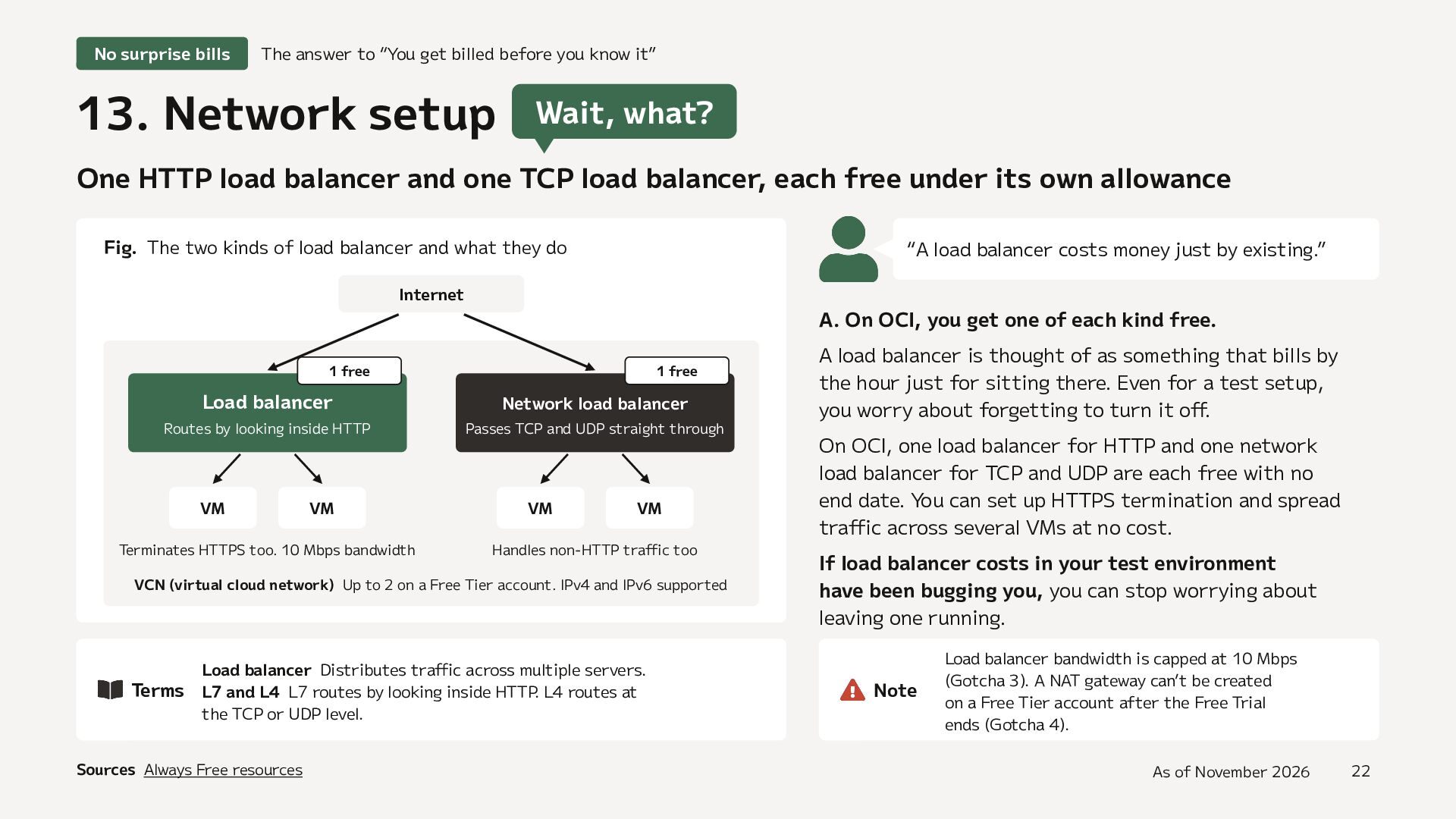
you know it” 13. Network setup Wait, what? One HTTP load balancer and one TCP load balancer, each free under its own allowance Fig. The two kinds of load balancer and what they do “A load balancer costs money just by existing.” Internet A. On OCI, you get one of each kind free. 1 free 1 free Load balancer Network load balancer Routes by looking inside HTTP Passes TCP and UDP straight through VM VM Terminates HTTPS too. 10 Mbps bandwidth VM VM Handles non-HTTP traffic too VCN (virtual cloud network) Up to 2 on a Free Tier account. IPv4 and IPv6 supported Terms Load balancer Distributes traffic across multiple servers. L7 and L4 L7 routes by looking inside HTTP. L4 routes at the TCP or UDP level. Sources Always Free resources A load balancer is thought of as something that bills by the hour just for sitting there. Even for a test setup, you worry about forgetting to turn it off. On OCI, one load balancer for HTTP and one network load balancer for TCP and UDP are each free with no end date. You can set up HTTPS termination and spread traffic across several VMs at no cost. If load balancer costs in your test environment have been bugging you, you can stop worrying about leaving one running. Note Load balancer bandwidth is capped at 10 Mbps (Gotcha 3). A NAT gateway can’t be created on a Free Tier account after the Free Trial ends (Gotcha 4). As of November 2026 22 -
No surprise bills The answer to “You get billed before
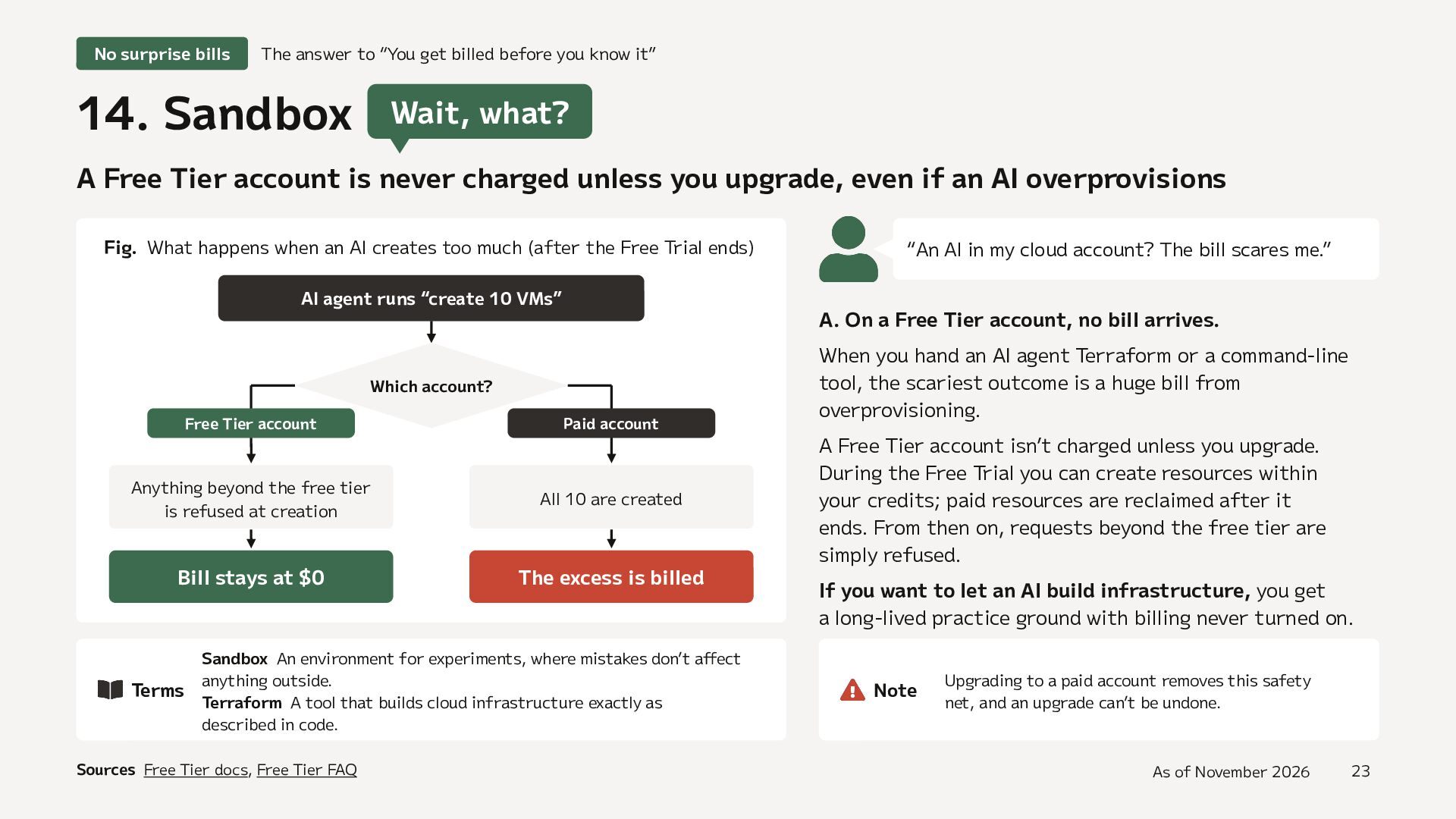
you know it” 14. Sandbox Wait, what? A Free Tier account is never charged unless you upgrade, even if an AI overprovisions Fig. What happens when an AI creates too much (after the Free Trial ends) AI agent runs “create 10 VMs” A. On a Free Tier account, no bill arrives. Which account? Free Tier account Paid account Anything beyond the free tier is refused at creation All 10 are created Bill stays at $0 The excess is billed Terms Sandbox An environment for experiments, where mistakes don’t affect anything outside. Terraform A tool that builds cloud infrastructure exactly as described in code. Sources Free Tier docs, Free Tier FAQ “An AI in my cloud account? The bill scares me.” When you hand an AI agent Terraform or a command-line tool, the scariest outcome is a huge bill from overprovisioning. A Free Tier account isn’t charged unless you upgrade. During the Free Trial you can create resources within your credits; paid resources are reclaimed after it ends. From then on, requests beyond the free tier are simply refused. If you want to let an AI build infrastructure, you get a long-lived practice ground with billing never turned on. Note Upgrading to a paid account removes this safety net, and an upgrade can’t be undone. As of November 2026 23 -
No surprise bills The answer to “You get billed before
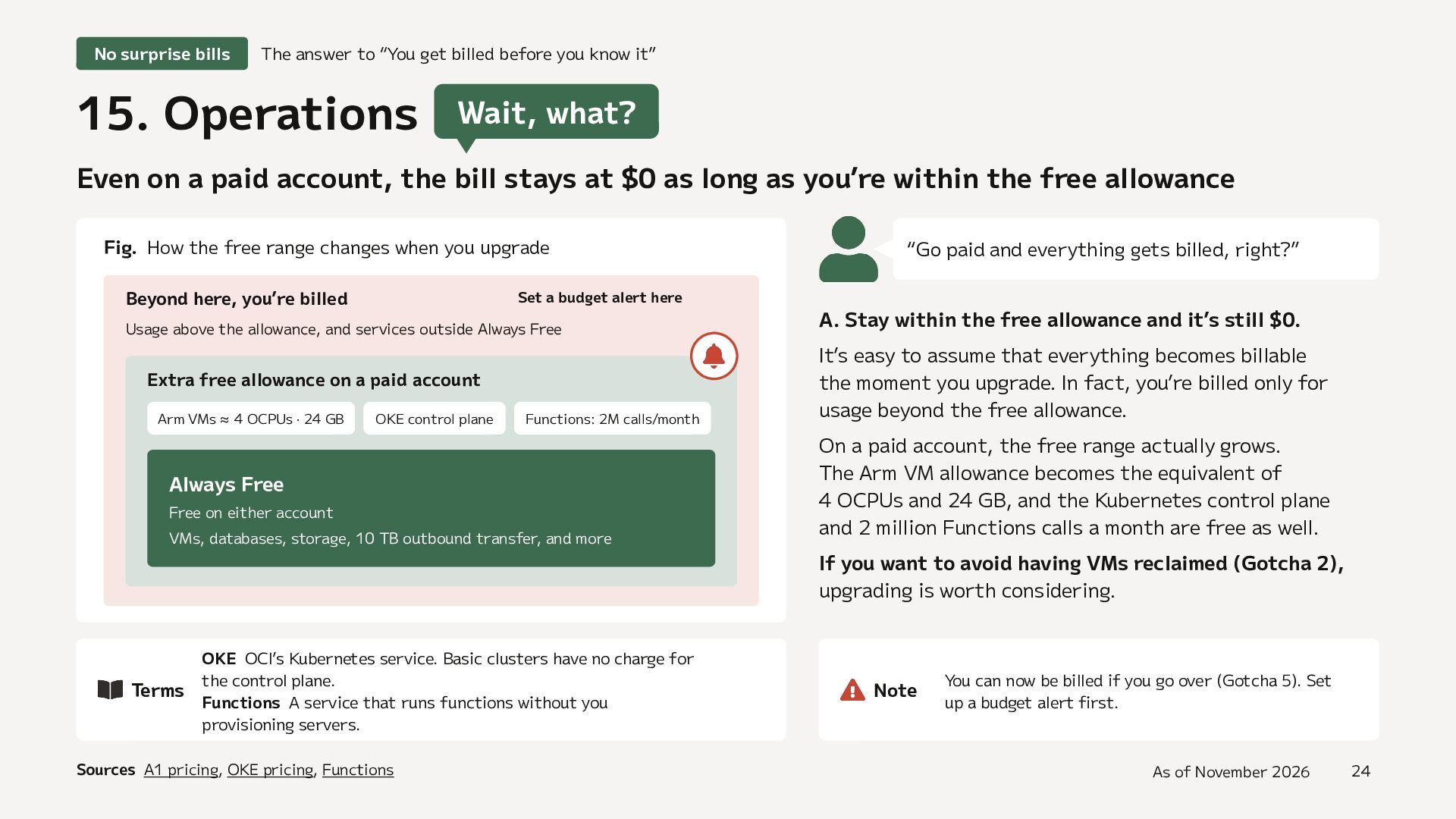
you know it” 15. Operations Wait, what? Even on a paid account, the bill stays at $0 as long as you’re within the free allowance Fig. How the free range changes when you upgrade Beyond here, you’re billed Set a budget alert here Usage above the allowance, and services outside Always Free Extra free allowance on a paid account Arm VMs ≈ 4 OCPUs · 24 GB OKE control plane Functions: 2M calls/month Always Free Free on either account VMs, databases, storage, 10 TB outbound transfer, and more Terms OKE OCI’s Kubernetes service. Basic clusters have no charge for the control plane. Functions A service that runs functions without you provisioning servers. Sources A1 pricing, OKE pricing, Functions “Go paid and everything gets billed, right?” A. Stay within the free allowance and it’s still $0. It’s easy to assume that everything becomes billable the moment you upgrade. In fact, you’re billed only for usage beyond the free allowance. On a paid account, the free range actually grows. The Arm VM allowance becomes the equivalent of 4 OCPUs and 24 GB, and the Kubernetes control plane and 2 million Functions calls a month are free as well. If you want to avoid having VMs reclaimed (Gotcha 2), upgrading is worth considering. Note You can now be billed if you go over (Gotcha 5). Set up a budget alert first. As of November 2026 24 -
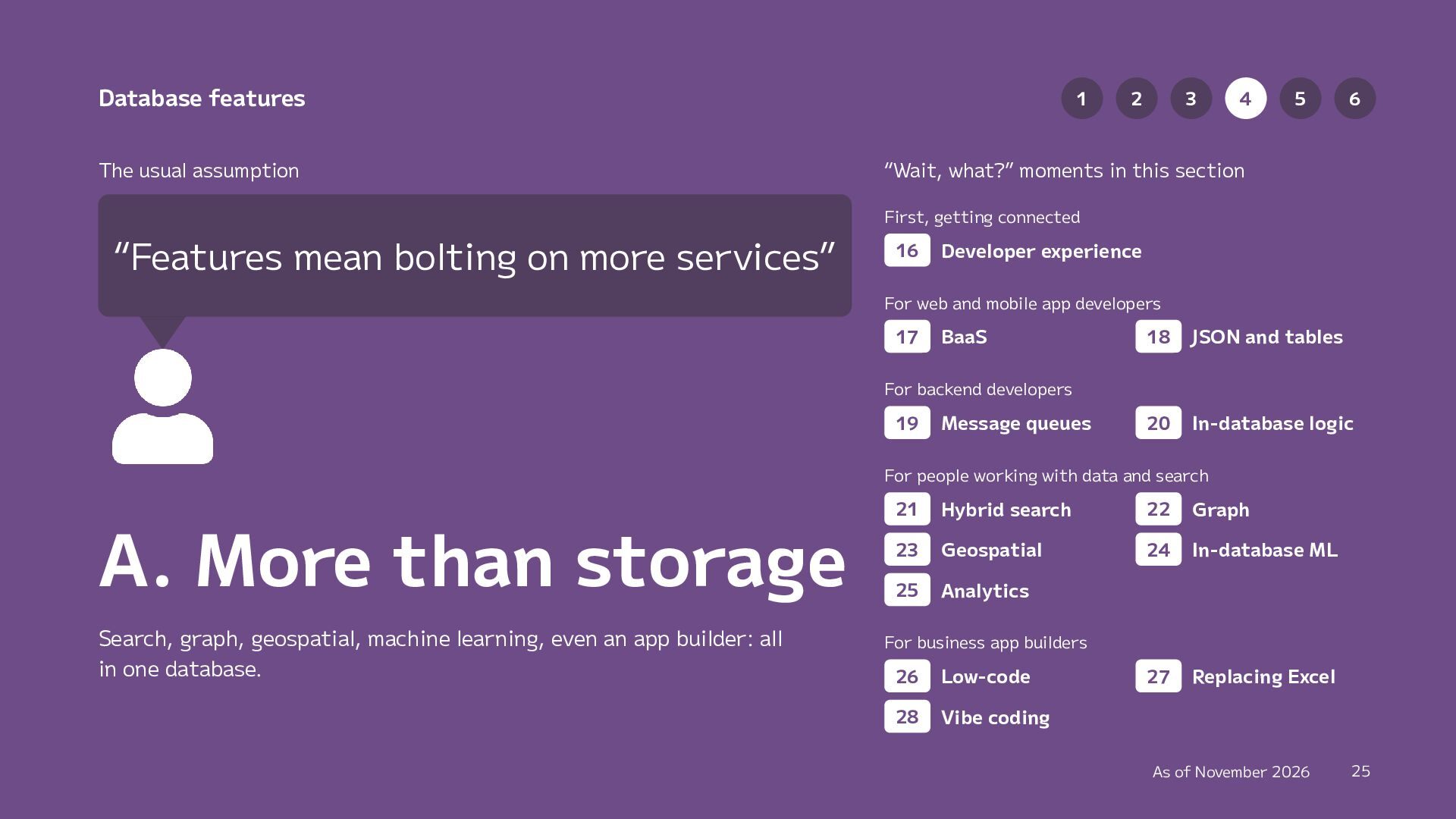
Database features The usual assumption 1 2 3 4 5
6 “Wait, what?” moments in this section First, getting connected “Features mean bolting on more services” 16 Developer experience For web and mobile app developers 17 BaaS 18 JSON and tables 20 In-database logic For backend developers 19 Message queues For people working with data and search A. More than storage Search, graph, geospatial, machine learning, even an app builder: all in one database. 21 Hybrid search 22 Graph 23 Geospatial 24 In-database ML 25 Analytics 27 Replacing Excel For business app builders 26 Low-code 28 Vibe coding As of November 2026 25 -
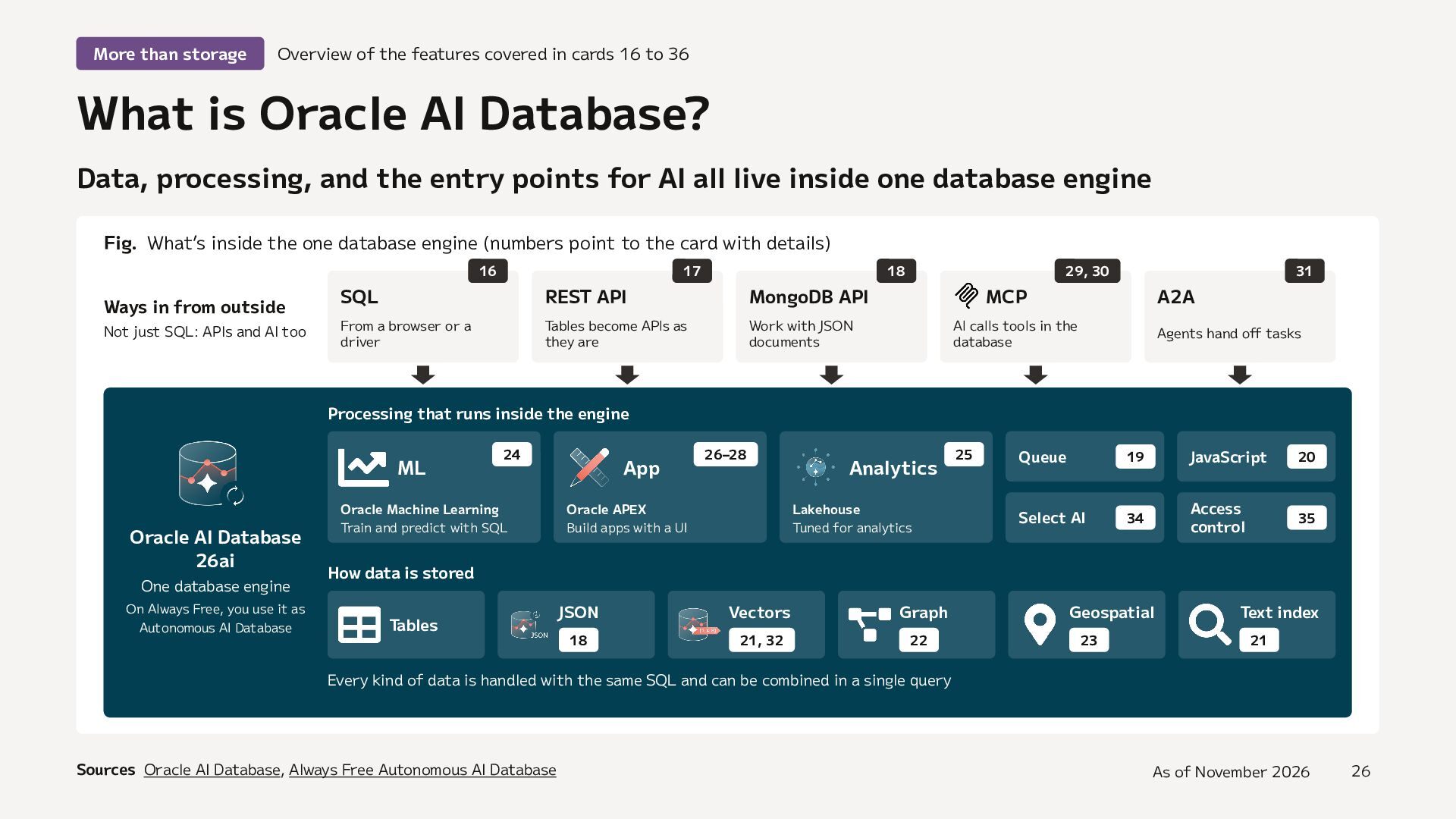
More than storage Overview of the features covered in cards
16 to 36 What is Oracle AI Database? Data, processing, and the entry points for AI all live inside one database engine Fig. What’s inside the one database engine (numbers point to the card with details) 16 Ways in from outside Not just SQL: APIs and AI too 17 18 29, 30 SQL REST API MongoDB API MCP From a browser or a driver Tables become APIs as they are Work with JSON documents AI calls tools in the database 31 A2A Agents hand off tasks Processing that runs inside the engine ML Oracle AI Database 26ai One database engine On Always Free, you use it as Autonomous AI Database 24 Oracle Machine Learning Train and predict with SQL App 26–28 Oracle APEX Build apps with a UI Analytics Lakehouse Tuned for analytics 25 Queue 19 JavaScript 20 Select AI 34 Access control 35 How data is stored Tables JSON Vectors Graph 18 21, 32 22 Geospatial 23 Text index 21 Every kind of data is handled with the same SQL and can be combined in a single query Sources Oracle AI Database, Always Free Autonomous AI Database As of November 2026 26 -
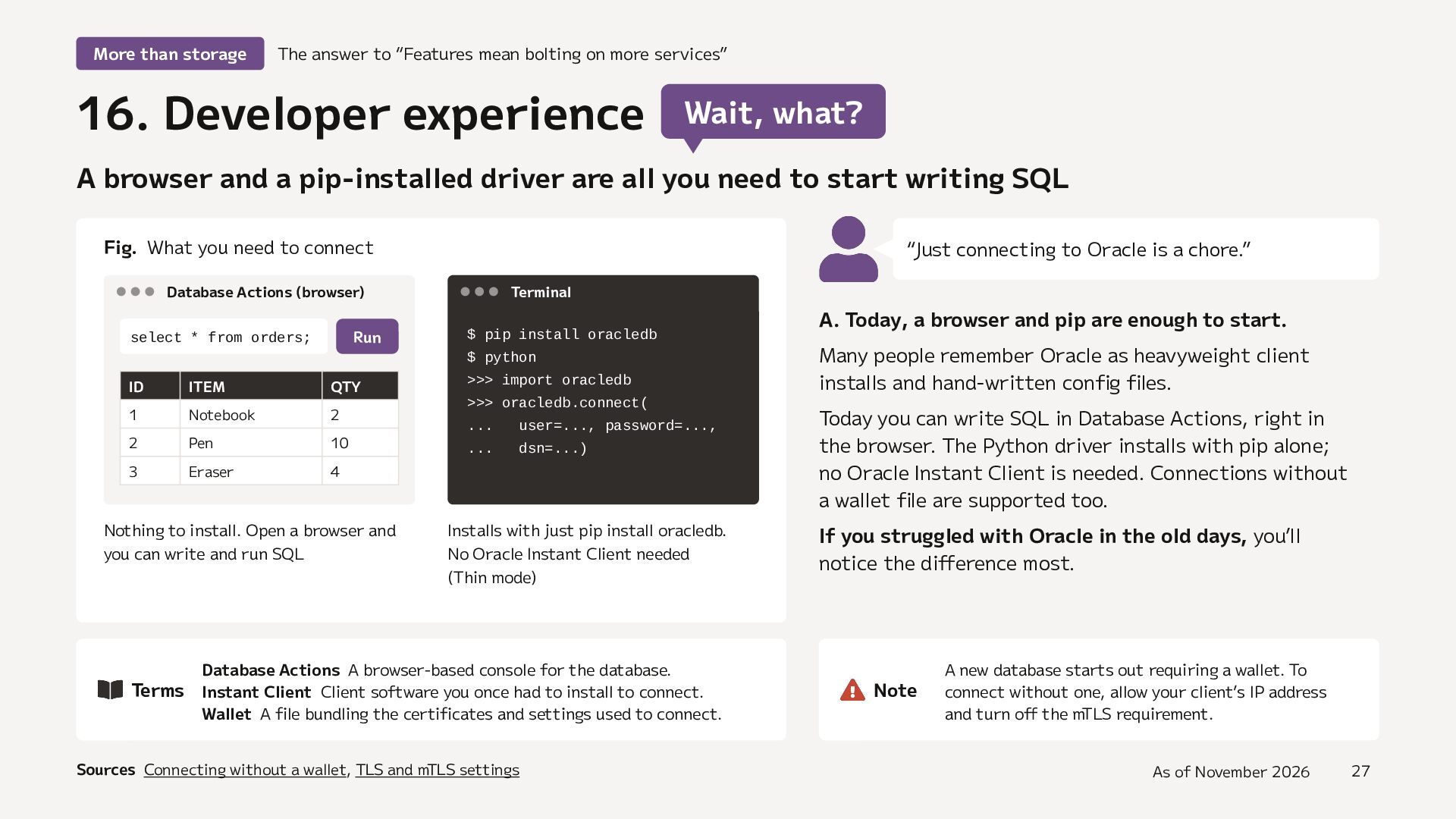
More than storage The answer to “Features mean bolting on
more services” 16. Developer experience Wait, what? A browser and a pip-installed driver are all you need to start writing SQL Fig. What you need to connect “Just connecting to Oracle is a chore.” Database Actions (browser) Run select * from orders; Terminal $ pip install oracledb $ python ID ITEM QTY 1 Notebook 2 2 Pen 10 3 Eraser 4 Nothing to install. Open a browser and you can write and run SQL >>> import oracledb >>> oracledb.connect( ... user=..., password=..., ... dsn=...) Installs with just pip install oracledb. No Oracle Instant Client needed (Thin mode) Database Actions A browser-based console for the database. Terms Instant Client Client software you once had to install to connect. Wallet A file bundling the certificates and settings used to connect. Sources Connecting without a wallet, TLS and mTLS settings A. Today, a browser and pip are enough to start. Many people remember Oracle as heavyweight client installs and hand-written config files. Today you can write SQL in Database Actions, right in the browser. The Python driver installs with pip alone; no Oracle Instant Client is needed. Connections without a wallet file are supported too. If you struggled with Oracle in the old days, you’ll notice the difference most. Note A new database starts out requiring a wallet. To connect without one, allow your client’s IP address and turn off the mTLS requirement. As of November 2026 27 -
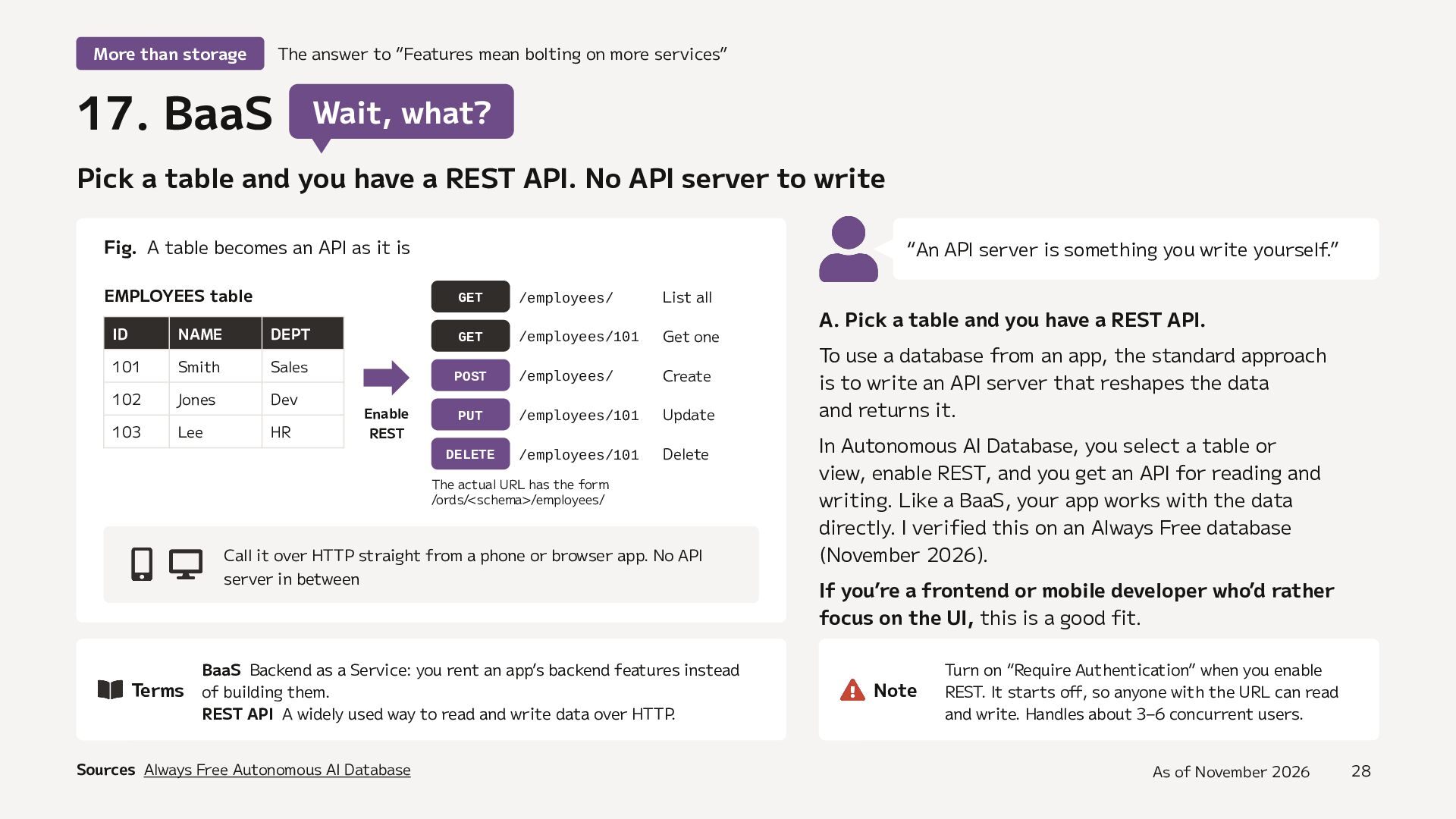
More than storage The answer to “Features mean bolting on
more services” 17. BaaS Wait, what? Pick a table and you have a REST API. No API server to write Fig. A table becomes an API as it is EMPLOYEES table ID NAME DEPT 101 Smith Sales 102 Jones Dev 103 Lee HR Enable REST “An API server is something you write yourself.” GET /employees/ List all GET /employees/101 Get one POST /employees/ Create PUT /employees/101 Update DELETE /employees/101 Delete The actual URL has the form /ords/<schema>/employees/ Call it over HTTP straight from a phone or browser app. No API server in between BaaS Backend as a Service: you rent an app’s backend features instead Terms of building them. REST API A widely used way to read and write data over HTTP. Sources Always Free Autonomous AI Database A. Pick a table and you have a REST API. To use a database from an app, the standard approach is to write an API server that reshapes the data and returns it. In Autonomous AI Database, you select a table or view, enable REST, and you get an API for reading and writing. Like a BaaS, your app works with the data directly. I verified this on an Always Free database (November 2026). If you’re a frontend or mobile developer who’d rather focus on the UI, this is a good fit. Note Turn on “Require Authentication” when you enable REST. It starts off, so anyone with the URL can read and write. Handles about 3–6 concurrent users. As of November 2026 28 -
More than storage The answer to “Features mean bolting on
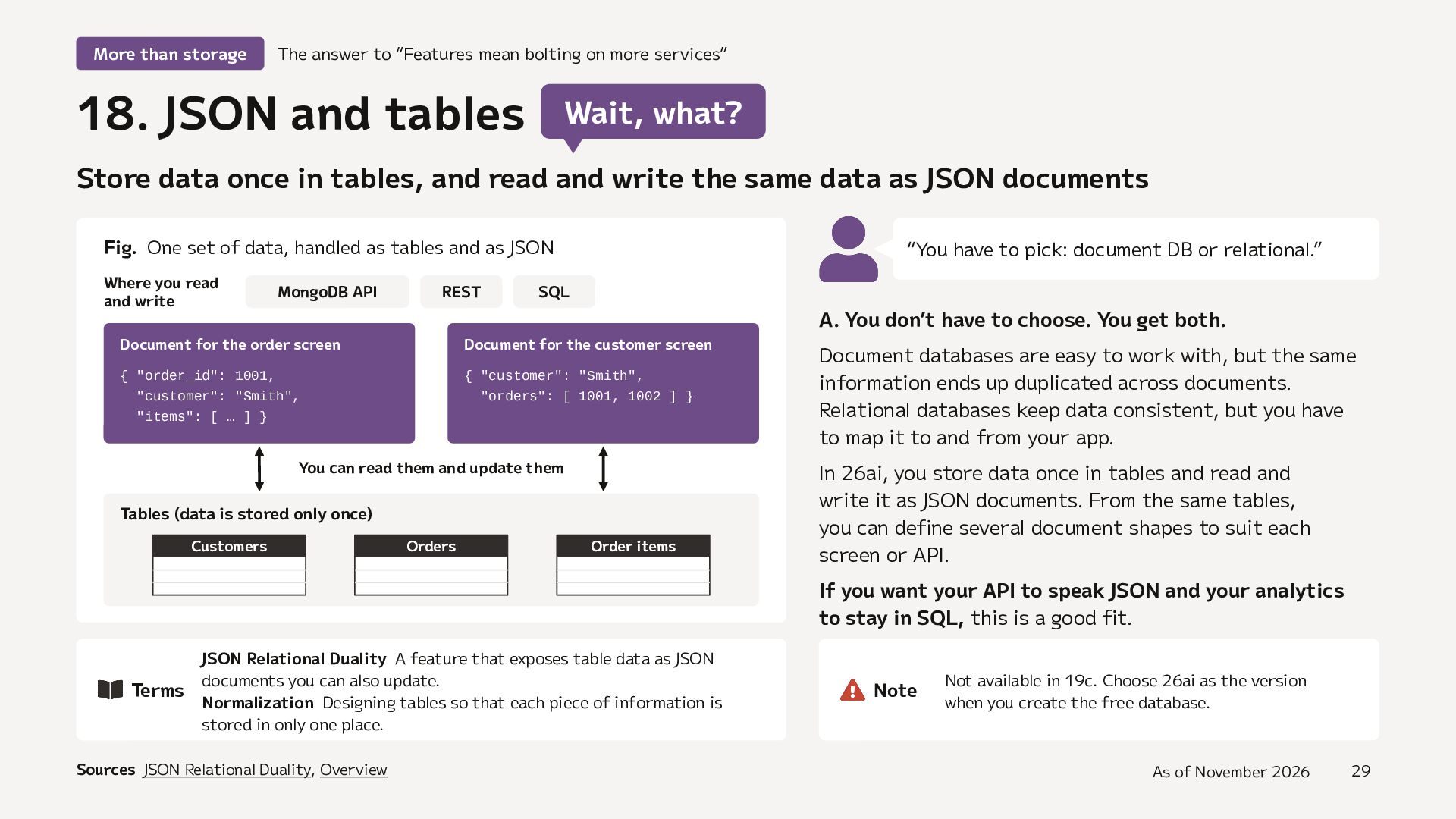
more services” 18. JSON and tables Wait, what? Store data once in tables, and read and write the same data as JSON documents Fig. One set of data, handled as tables and as JSON Where you read and write MongoDB API REST “You have to pick: document DB or relational.” SQL A. You don’t have to choose. You get both. Document for the order screen Document for the customer screen { "order_id": 1001, "customer": "Smith", "items": [ … ] } { "customer": "Smith", "orders": [ 1001, 1002 ] } You can read them and update them Tables (data is stored only once) Customers Orders Order items Document databases are easy to work with, but the same information ends up duplicated across documents. Relational databases keep data consistent, but you have to map it to and from your app. In 26ai, you store data once in tables and read and write it as JSON documents. From the same tables, you can define several document shapes to suit each screen or API. If you want your API to speak JSON and your analytics to stay in SQL, this is a good fit. Terms JSON Relational Duality A feature that exposes table data as JSON documents you can also update. Normalization Designing tables so that each piece of information is stored in only one place. Sources JSON Relational Duality, Overview Note Not available in 19c. Choose 26ai as the version when you create the free database. As of November 2026 29 -
More than storage The answer to “Features mean bolting on
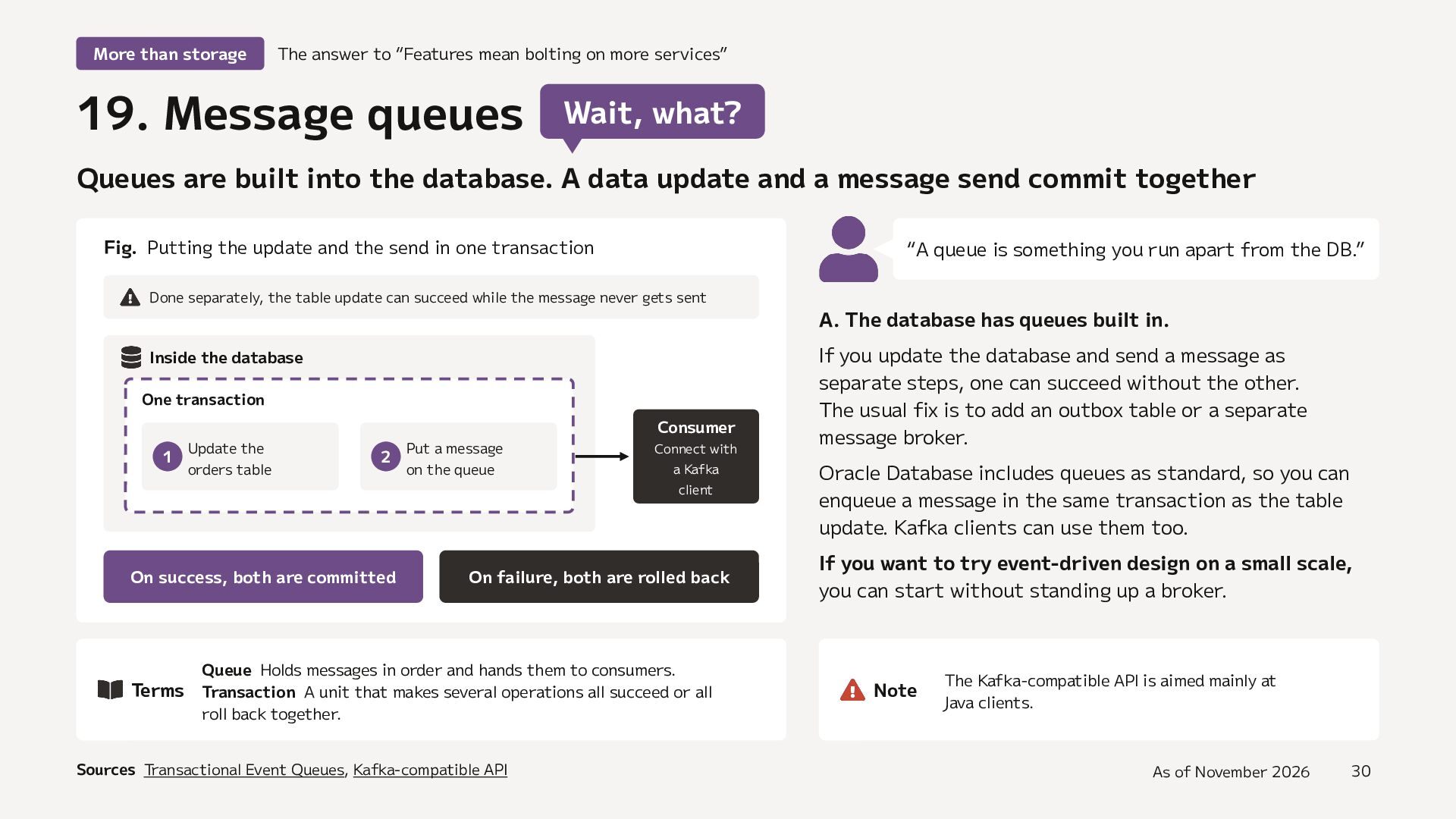
more services” 19. Message queues Wait, what? Queues are built into the database. A data update and a message send commit together Fig. Putting the update and the send in one transaction “A queue is something you run apart from the DB.” Done separately, the table update can succeed while the message never gets sent Inside the database One transaction 1 Update the orders table 2 Put a message on the queue Consumer Connect with a Kafka client On success, both are committed On failure, both are rolled back Queue Holds messages in order and hands them to consumers. Terms Transaction A unit that makes several operations all succeed or all roll back together. Sources Transactional Event Queues, Kafka-compatible API A. The database has queues built in. If you update the database and send a message as separate steps, one can succeed without the other. The usual fix is to add an outbox table or a separate message broker. Oracle Database includes queues as standard, so you can enqueue a message in the same transaction as the table update. Kafka clients can use them too. If you want to try event-driven design on a small scale, you can start without standing up a broker. Note The Kafka-compatible API is aimed mainly at Java clients. As of November 2026 30 -
More than storage The answer to “Features mean bolting on
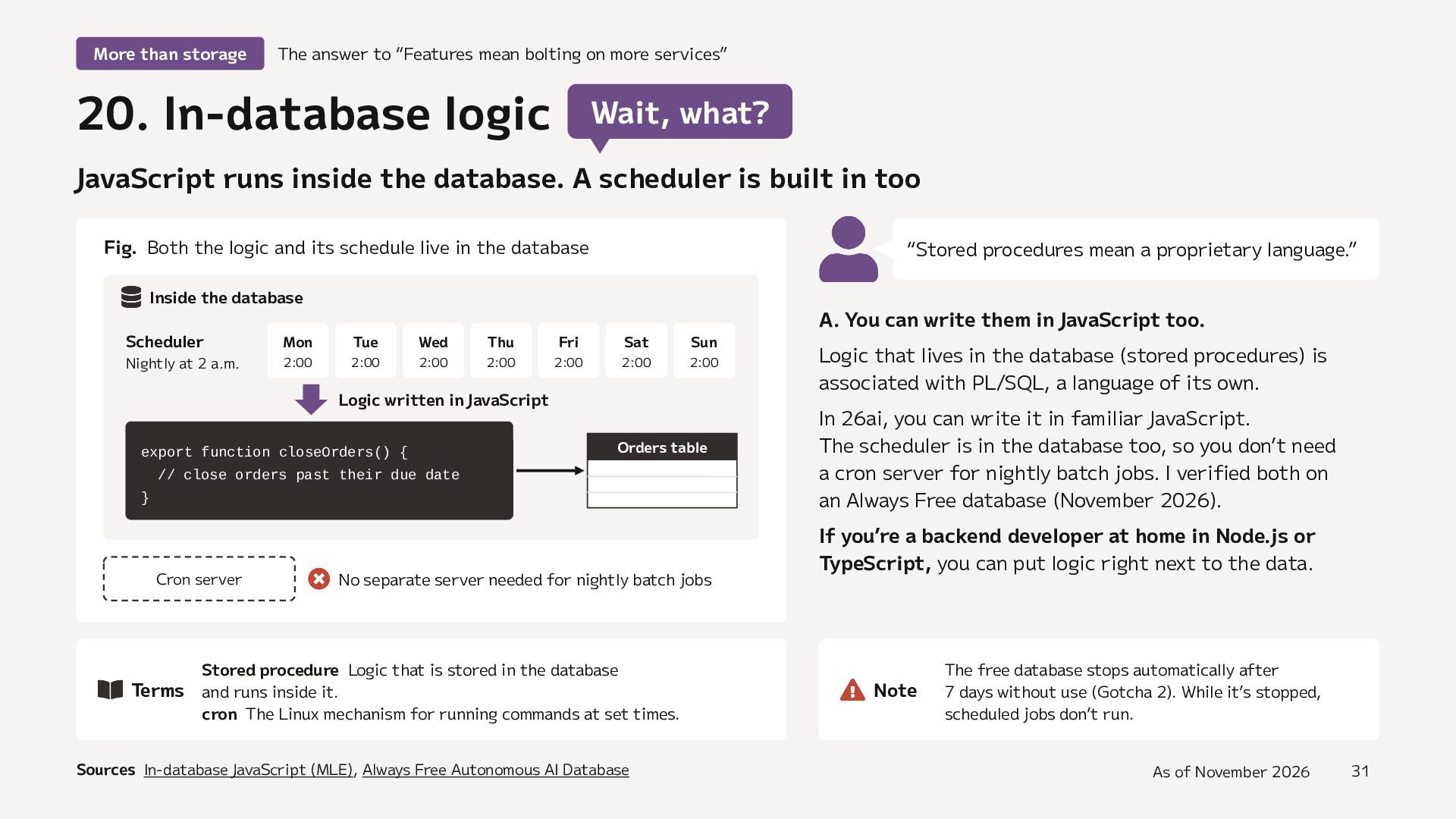
more services” 20. In-database logic Wait, what? JavaScript runs inside the database. A scheduler is built in too Fig. Both the logic and its schedule live in the database “Stored procedures mean a proprietary language.” Inside the database Scheduler Mon Tue Wed Thu Fri Sat Sun Nightly at 2 a.m. 2:00 2:00 2:00 2:00 2:00 2:00 2:00 Logic written in JavaScript export function closeOrders() { Orders table // close orders past their due date } Cron server No separate server needed for nightly batch jobs Stored procedure Logic that is stored in the database Terms and runs inside it. cron The Linux mechanism for running commands at set times. Sources In-database JavaScript (MLE), Always Free Autonomous AI Database A. You can write them in JavaScript too. Logic that lives in the database (stored procedures) is associated with PL/SQL, a language of its own. In 26ai, you can write it in familiar JavaScript. The scheduler is in the database too, so you don’t need a cron server for nightly batch jobs. I verified both on an Always Free database (November 2026). If you’re a backend developer at home in Node.js or TypeScript, you can put logic right next to the data. Note The free database stops automatically after 7 days without use (Gotcha 2). While it’s stopped, scheduled jobs don’t run. As of November 2026 31 -
More than storage The answer to “Features mean bolting on
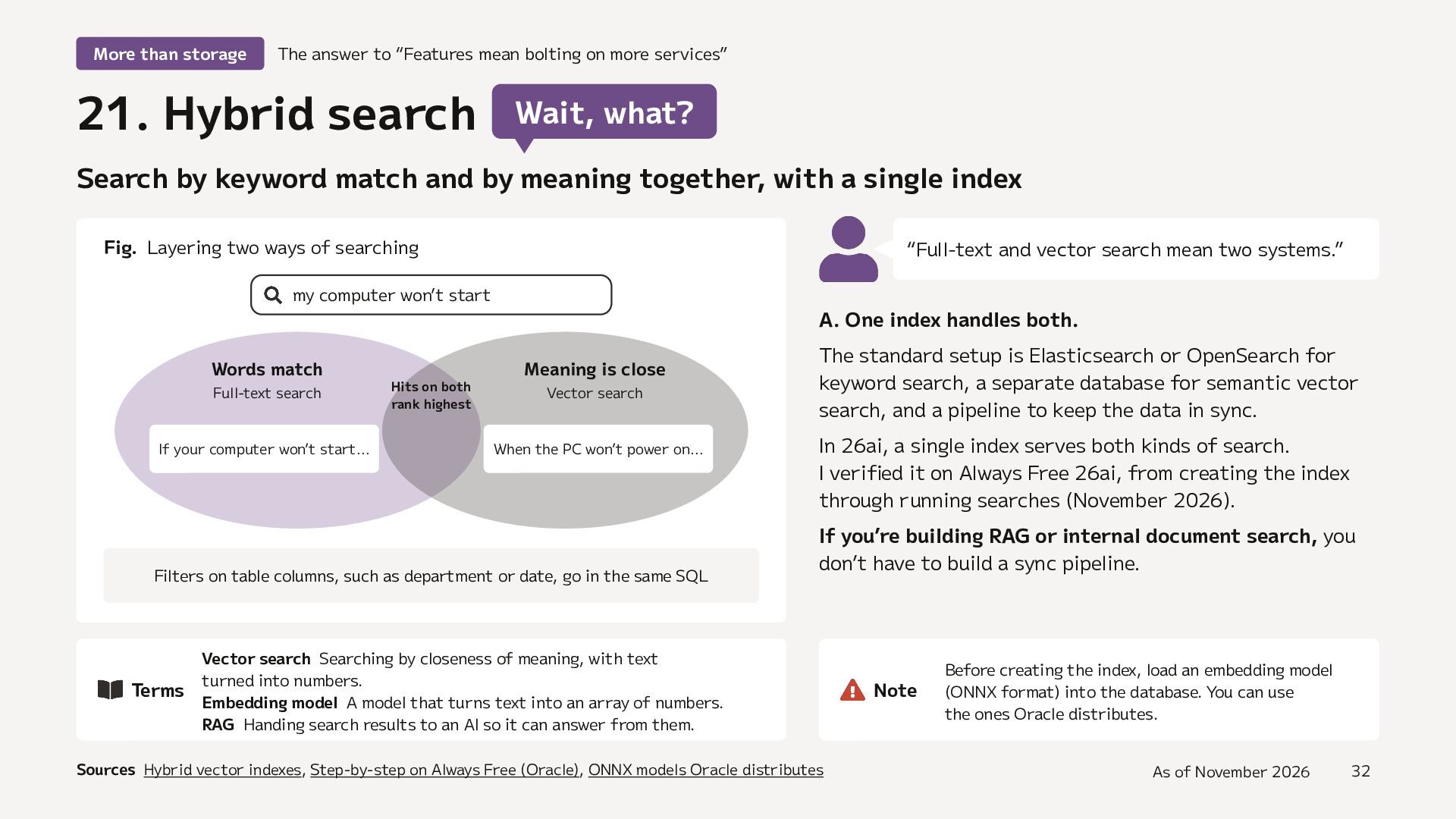
more services” 21. Hybrid search Wait, what? Search by keyword match and by meaning together, with a single index Fig. Layering two ways of searching “Full-text and vector search mean two systems.” my computer won’t start Words match Full-text search If your computer won’t start… Hits on both rank highest A. One index handles both. Meaning is close Vector search When the PC won’t power on… Filters on table columns, such as department or date, go in the same SQL Terms The standard setup is Elasticsearch or OpenSearch for keyword search, a separate database for semantic vector search, and a pipeline to keep the data in sync. In 26ai, a single index serves both kinds of search. I verified it on Always Free 26ai, from creating the index through running searches (November 2026). If you’re building RAG or internal document search, you don’t have to build a sync pipeline. Vector search Searching by closeness of meaning, with text turned into numbers. Embedding model A model that turns text into an array of numbers. RAG Handing search results to an AI so it can answer from them. Sources Hybrid vector indexes, Step-by-step on Always Free (Oracle), ONNX models Oracle distributes Note Before creating the index, load an embedding model (ONNX format) into the database. You can use the ones Oracle distributes. As of November 2026 32 -
More than storage The answer to “Features mean bolting on
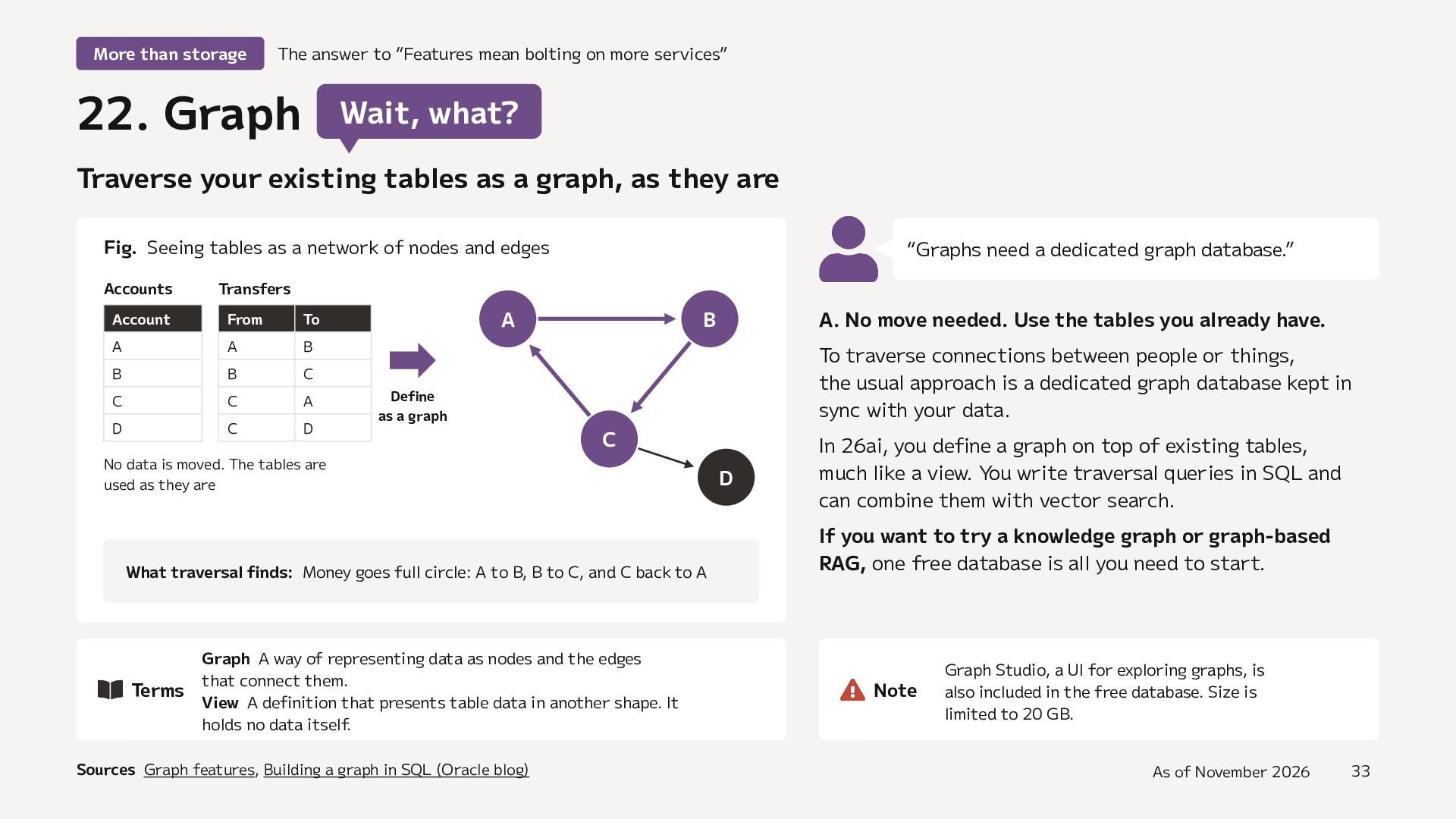
more services” 22. Graph Wait, what? Traverse your existing tables as a graph, as they are Fig. Seeing tables as a network of nodes and edges Accounts Transfers Account From To A A B B B C C C A D C D “Graphs need a dedicated graph database.” A Define as a graph B To traverse connections between people or things, the usual approach is a dedicated graph database kept in sync with your data. C No data is moved. The tables are used as they are What traversal finds: Money goes full circle: A to B, B to C, and C back to A Terms Graph A way of representing data as nodes and the edges that connect them. View A definition that presents table data in another shape. It holds no data itself. Sources Graph features, Building a graph in SQL (Oracle blog) A. No move needed. Use the tables you already have. D In 26ai, you define a graph on top of existing tables, much like a view. You write traversal queries in SQL and can combine them with vector search. If you want to try a knowledge graph or graph-based RAG, one free database is all you need to start. Note Graph Studio, a UI for exploring graphs, is also included in the free database. Size is limited to 20 GB. As of November 2026 33 -
More than storage The answer to “Features mean bolting on
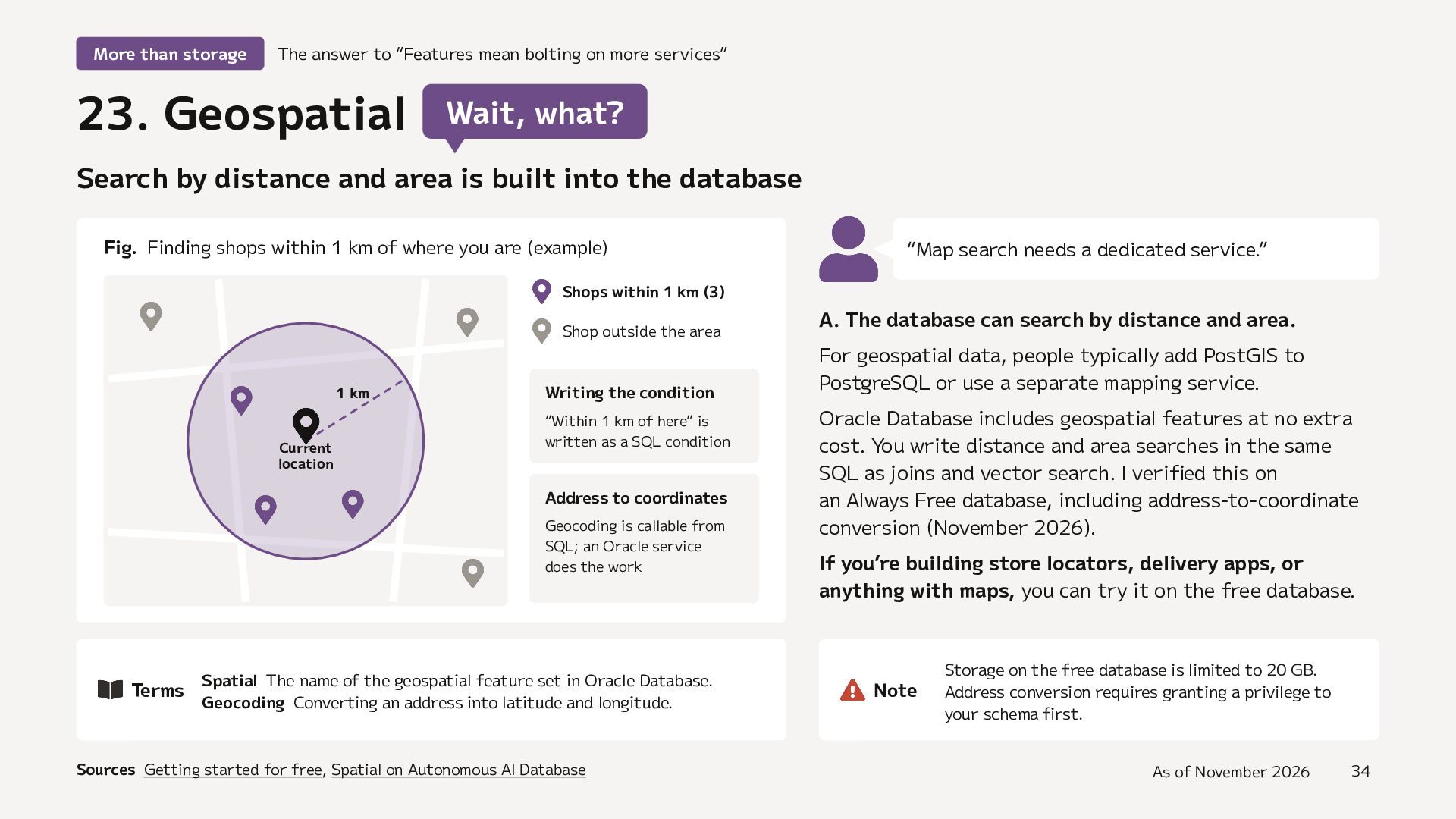
more services” 23. Geospatial Wait, what? Search by distance and area is built into the database Fig. Finding shops within 1 km of where you are (example) “Map search needs a dedicated service.” Shops within 1 km (3) Shop outside the area 1 km Current location Writing the condition “Within 1 km of here” is written as a SQL condition Address to coordinates Geocoding is callable from SQL; an Oracle service does the work Terms Spatial The name of the geospatial feature set in Oracle Database. Geocoding Converting an address into latitude and longitude. Sources Getting started for free, Spatial on Autonomous AI Database A. The database can search by distance and area. For geospatial data, people typically add PostGIS to PostgreSQL or use a separate mapping service. Oracle Database includes geospatial features at no extra cost. You write distance and area searches in the same SQL as joins and vector search. I verified this on an Always Free database, including address-to-coordinate conversion (November 2026). If you’re building store locators, delivery apps, or anything with maps, you can try it on the free database. Note Storage on the free database is limited to 20 GB. Address conversion requires granting a privilege to your schema first. As of November 2026 34 -
More than storage The answer to “Features mean bolting on
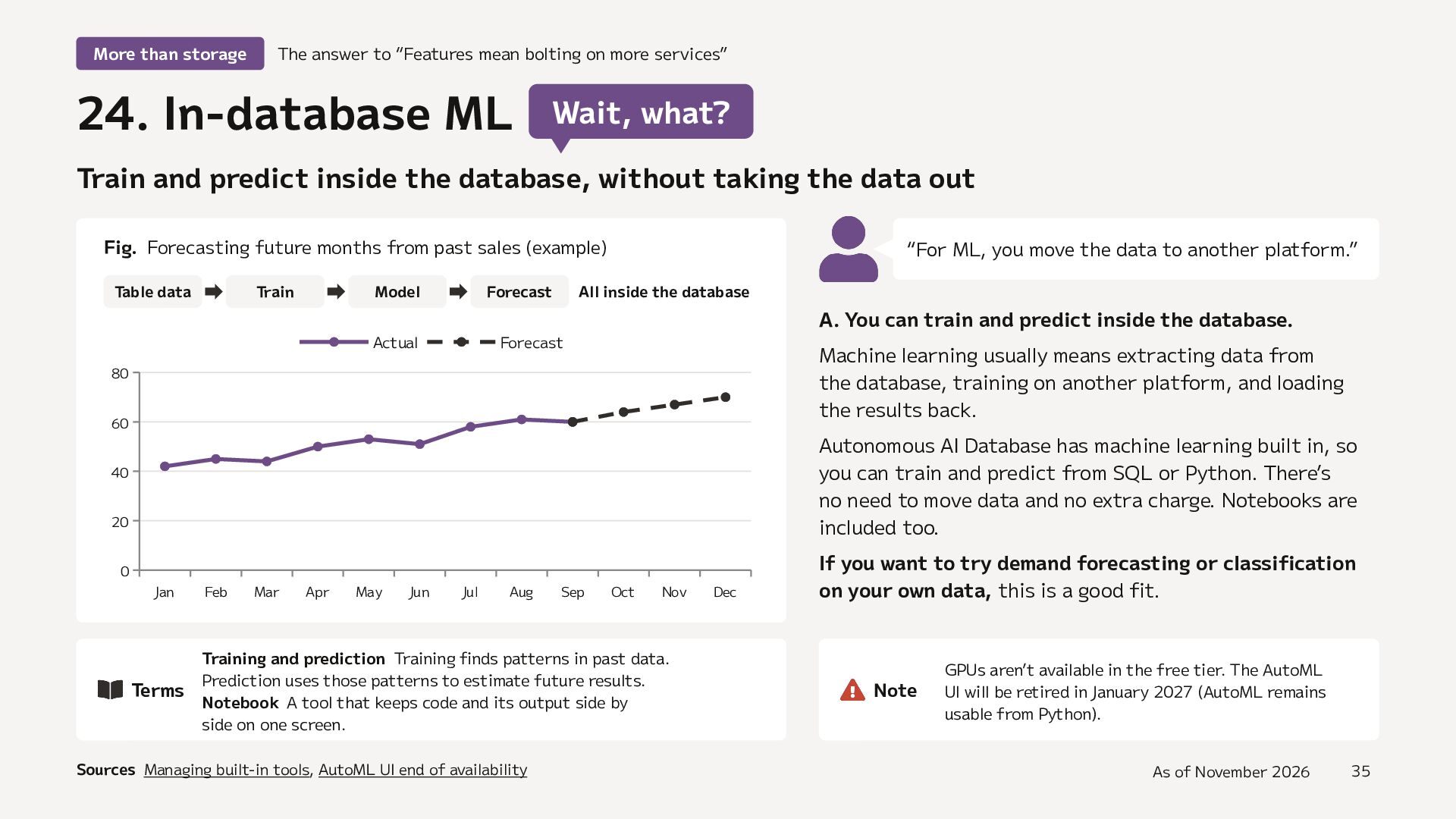
more services” 24. In-database ML Wait, what? Train and predict inside the database, without taking the data out Fig. Forecasting future months from past sales (example) Table data Train Model Forecast Actual “For ML, you move the data to another platform.” All inside the database A. You can train and predict inside the database. Forecast Machine learning usually means extracting data from the database, training on another platform, and loading the results back. 80 60 Autonomous AI Database has machine learning built in, so you can train and predict from SQL or Python. There’s no need to move data and no extra charge. Notebooks are included too. 40 20 0 Jan Terms Feb Mar Apr May Jun Jul Aug Sep Oct Nov Training and prediction Training finds patterns in past data. Prediction uses those patterns to estimate future results. Notebook A tool that keeps code and its output side by side on one screen. Sources Managing built-in tools, AutoML UI end of availability Dec If you want to try demand forecasting or classification on your own data, this is a good fit. Note GPUs aren’t available in the free tier. The AutoML UI will be retired in January 2027 (AutoML remains usable from Python). As of November 2026 35 -
More than storage The answer to “Features mean bolting on
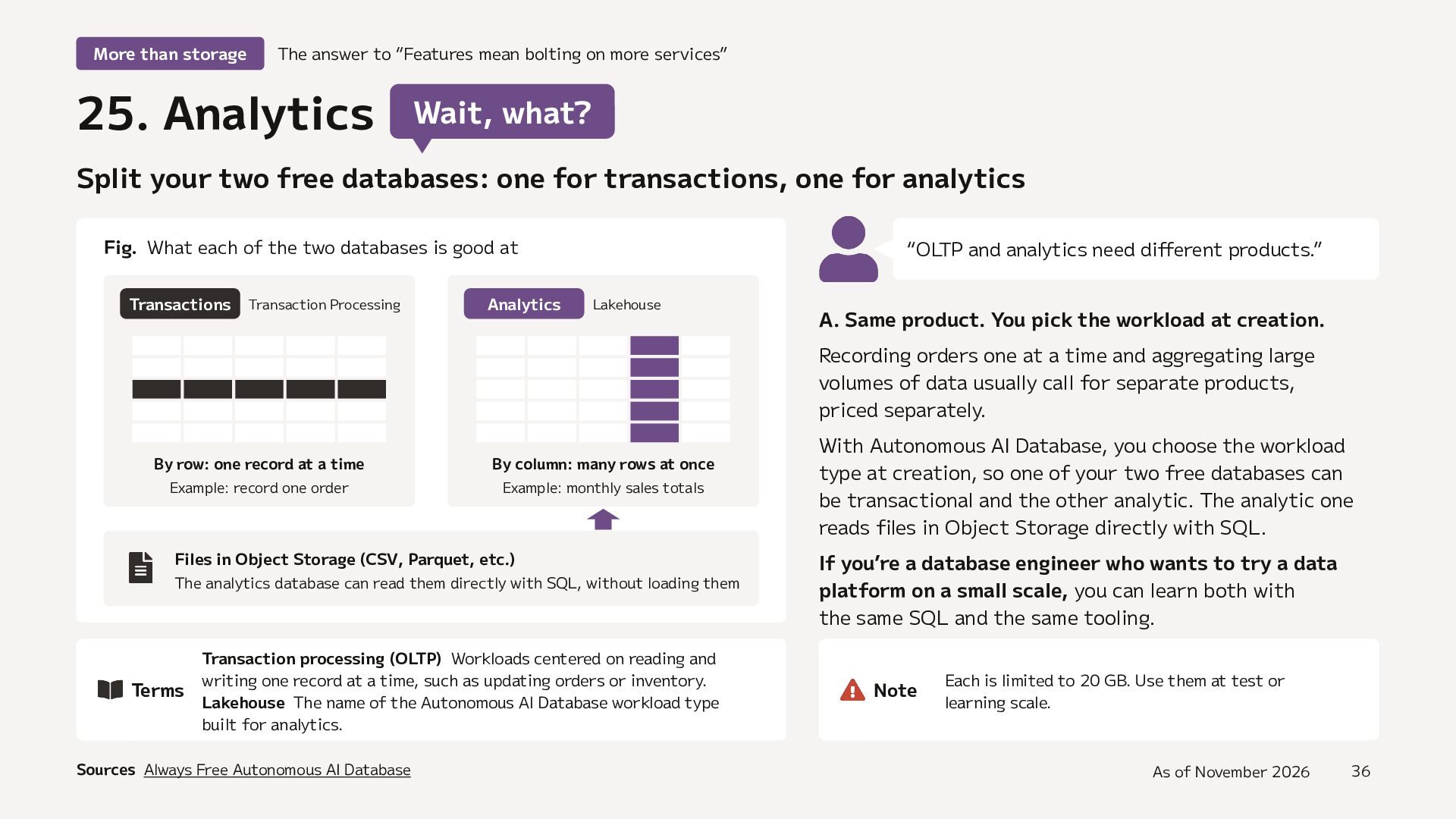
more services” 25. Analytics Wait, what? Split your two free databases: one for transactions, one for analytics Fig. What each of the two databases is good at Transactions Transaction Processing Analytics “OLTP and analytics need different products.” Lakehouse A. Same product. You pick the workload at creation. Recording orders one at a time and aggregating large volumes of data usually call for separate products, priced separately. By row: one record at a time By column: many rows at once Example: record one order Example: monthly sales totals Files in Object Storage (CSV, Parquet, etc.) The analytics database can read them directly with SQL, without loading them Terms Transaction processing (OLTP) Workloads centered on reading and writing one record at a time, such as updating orders or inventory. Lakehouse The name of the Autonomous AI Database workload type built for analytics. Sources Always Free Autonomous AI Database With Autonomous AI Database, you choose the workload type at creation, so one of your two free databases can be transactional and the other analytic. The analytic one reads files in Object Storage directly with SQL. If you’re a database engineer who wants to try a data platform on a small scale, you can learn both with the same SQL and the same tooling. Note Each is limited to 20 GB. Use them at test or learning scale. As of November 2026 36 -
More than storage The answer to “Features mean bolting on
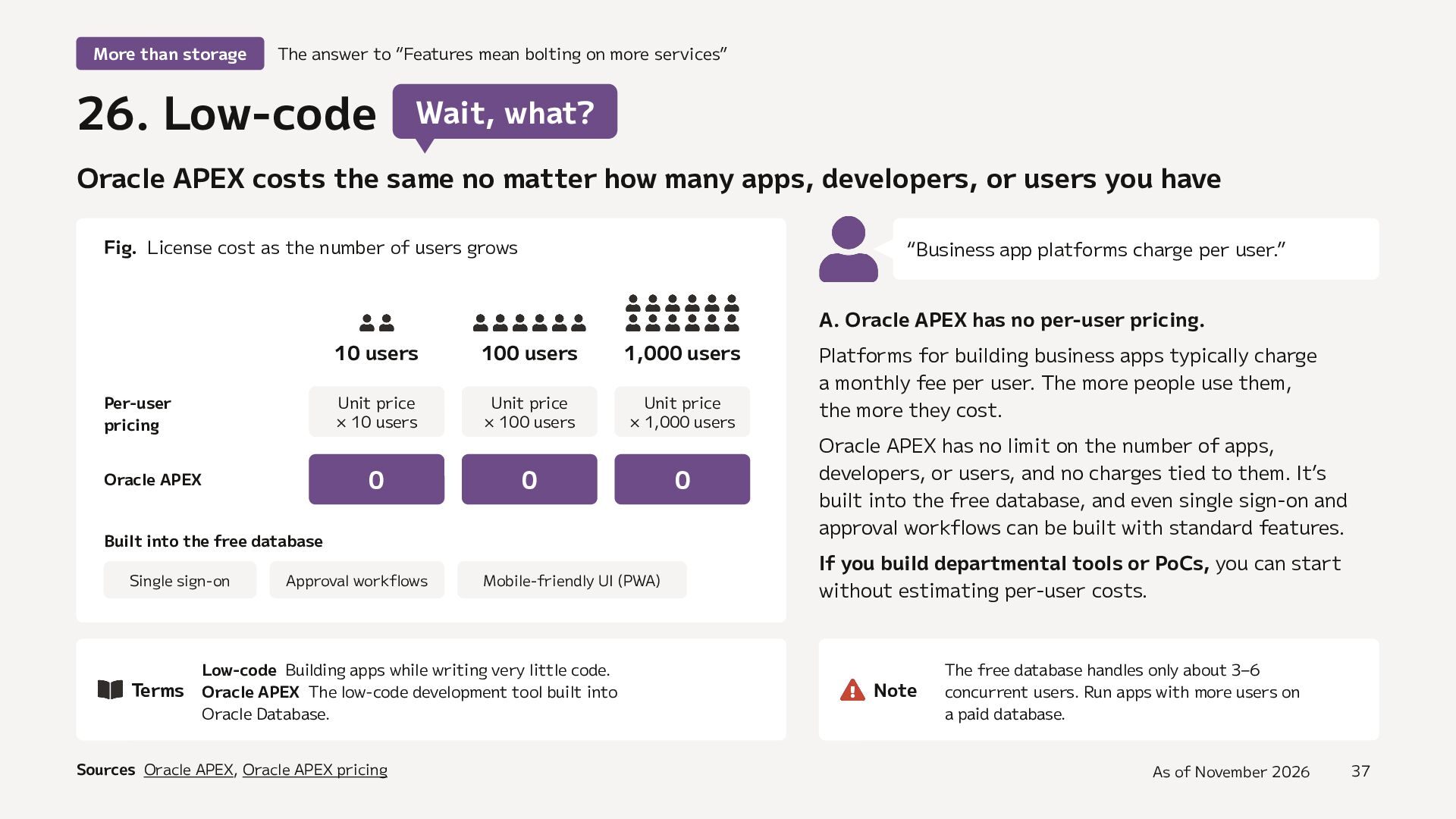
more services” 26. Low-code Wait, what? Oracle APEX costs the same no matter how many apps, developers, or users you have Fig. License cost as the number of users grows “Business app platforms charge per user.” A. Oracle APEX has no per-user pricing. Per-user pricing Oracle APEX 10 users 100 users 1,000 users Unit price × 10 users Unit price × 100 users Unit price × 1,000 users 0 0 0 Built into the free database Single sign-on Approval workflows Mobile-friendly UI (PWA) Low-code Building apps while writing very little code. Terms Oracle APEX The low-code development tool built into Oracle Database. Sources Oracle APEX, Oracle APEX pricing Platforms for building business apps typically charge a monthly fee per user. The more people use them, the more they cost. Oracle APEX has no limit on the number of apps, developers, or users, and no charges tied to them. It’s built into the free database, and even single sign-on and approval workflows can be built with standard features. If you build departmental tools or PoCs, you can start without estimating per-user costs. Note The free database handles only about 3–6 concurrent users. Run apps with more users on a paid database. As of November 2026 37 -
More than storage The answer to “Features mean bolting on
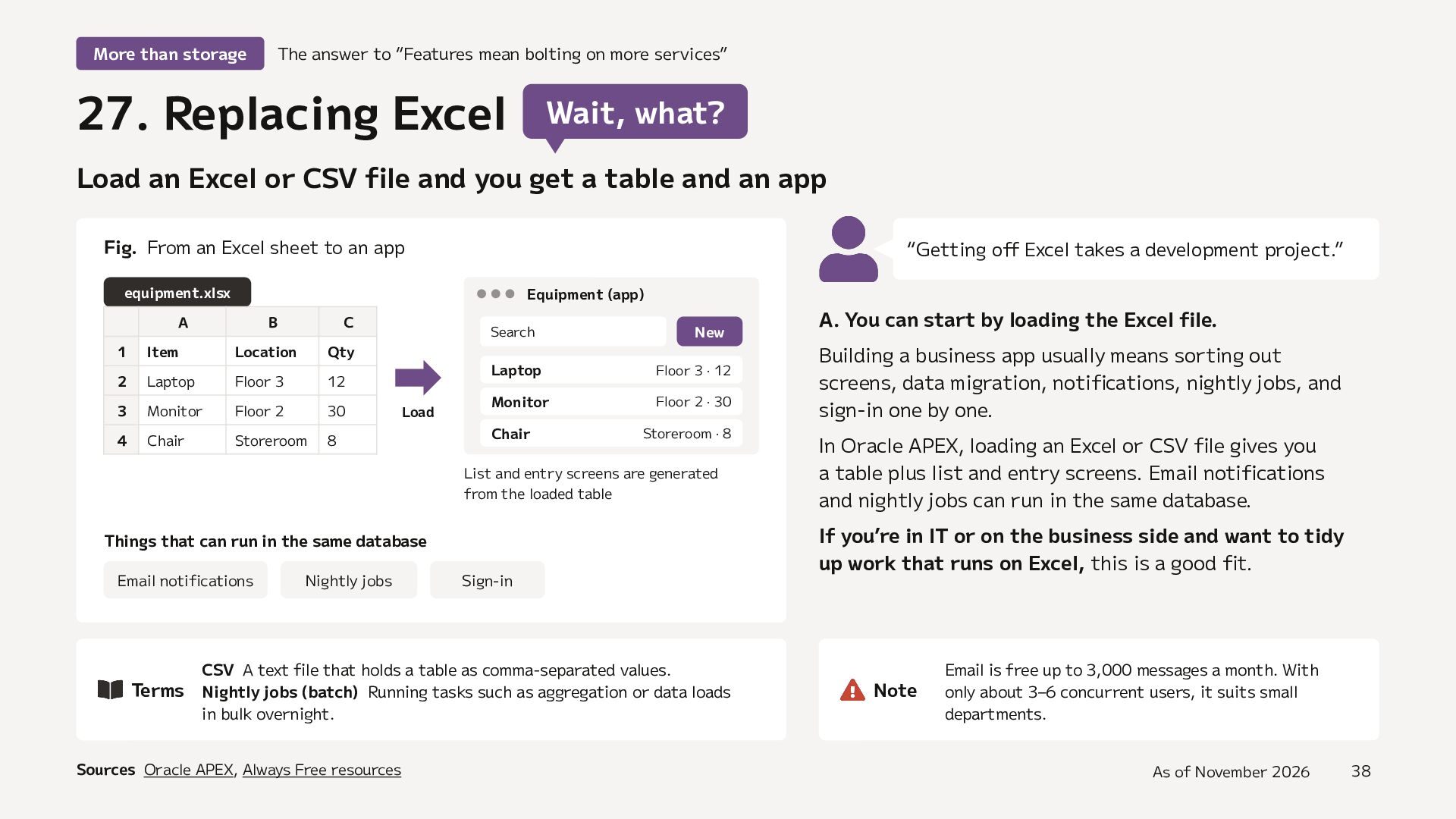
more services” 27. Replacing Excel Wait, what? Load an Excel or CSV file and you get a table and an app Fig. From an Excel sheet to an app “Getting off Excel takes a development project.” equipment.xlsx Equipment (app) A B C 1 Item Location Qty 2 Laptop Floor 3 12 3 Monitor Floor 2 30 4 Chair Storeroom 8 Load Search New Laptop Floor 3 · 12 Monitor Floor 2 · 30 Chair Storeroom · 8 List and entry screens are generated from the loaded table Things that can run in the same database Email notifications Nightly jobs Sign-in CSV A text file that holds a table as comma-separated values. Terms Nightly jobs (batch) Running tasks such as aggregation or data loads in bulk overnight. Sources Oracle APEX, Always Free resources A. You can start by loading the Excel file. Building a business app usually means sorting out screens, data migration, notifications, nightly jobs, and sign-in one by one. In Oracle APEX, loading an Excel or CSV file gives you a table plus list and entry screens. Email notifications and nightly jobs can run in the same database. If you’re in IT or on the business side and want to tidy up work that runs on Excel, this is a good fit. Note Email is free up to 3,000 messages a month. With only about 3–6 concurrent users, it suits small departments. As of November 2026 38 -
More than storage The answer to “Features mean bolting on
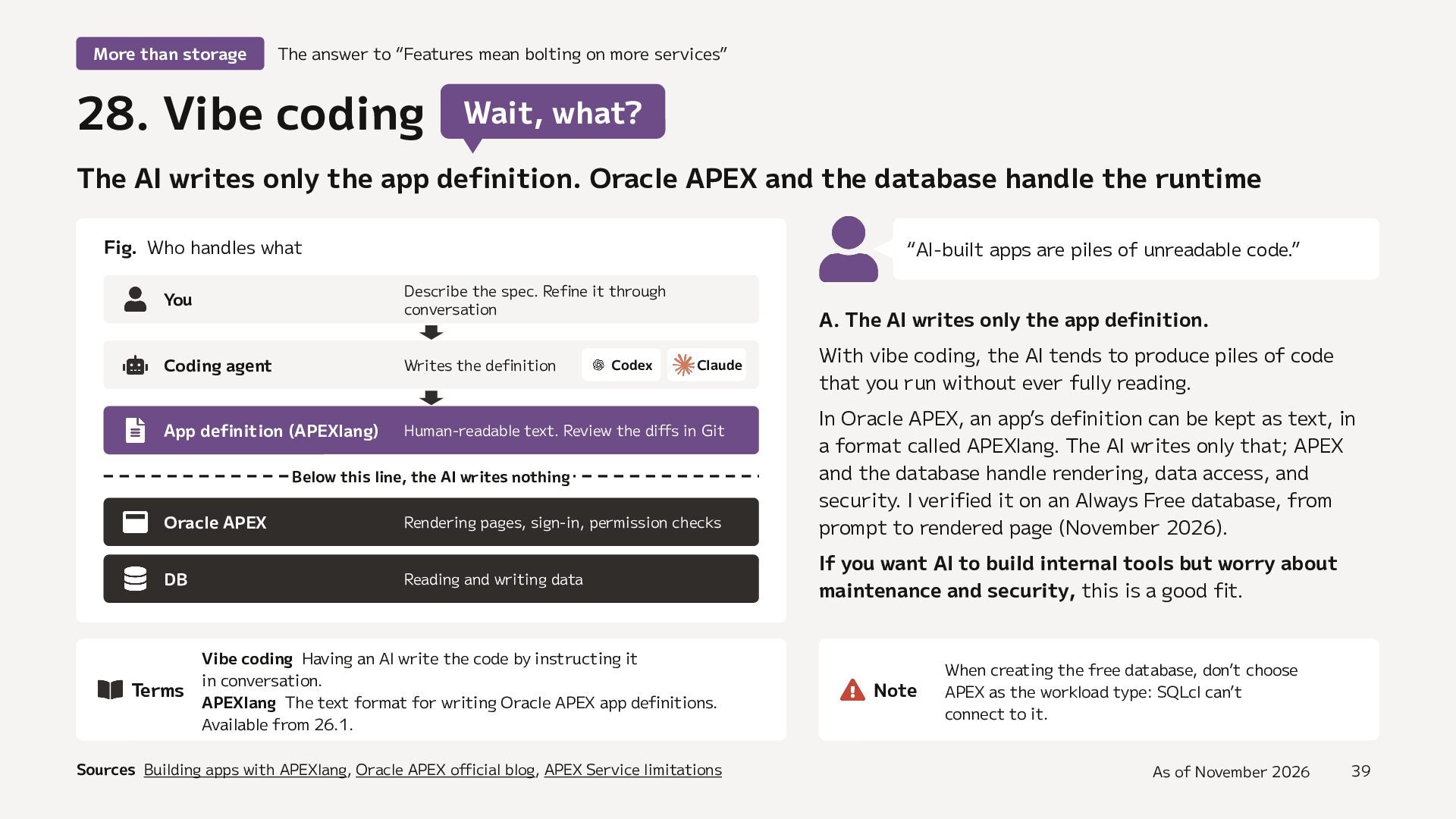
more services” 28. Vibe coding Wait, what? The AI writes only the app definition. Oracle APEX and the database handle the runtime Fig. Who handles what “AI-built apps are piles of unreadable code.” You Describe the spec. Refine it through conversation Coding agent Writes the definition App definition (APEXlang) Human-readable text. Review the diffs in Git Codex A. The AI writes only the app definition. Claude Below this line, the AI writes nothing Oracle APEX Rendering pages, sign-in, permission checks DB Reading and writing data Terms Vibe coding Having an AI write the code by instructing it in conversation. APEXlang The text format for writing Oracle APEX app definitions. Available from 26.1. Sources Building apps with APEXlang, Oracle APEX official blog, APEX Service limitations With vibe coding, the AI tends to produce piles of code that you run without ever fully reading. In Oracle APEX, an app’s definition can be kept as text, in a format called APEXlang. The AI writes only that; APEX and the database handle rendering, data access, and security. I verified it on an Always Free database, from prompt to rendered page (November 2026). If you want AI to build internal tools but worry about maintenance and security, this is a good fit. Note When creating the free database, don’t choose APEX as the workload type: SQLcl can’t connect to it. As of November 2026 39 -
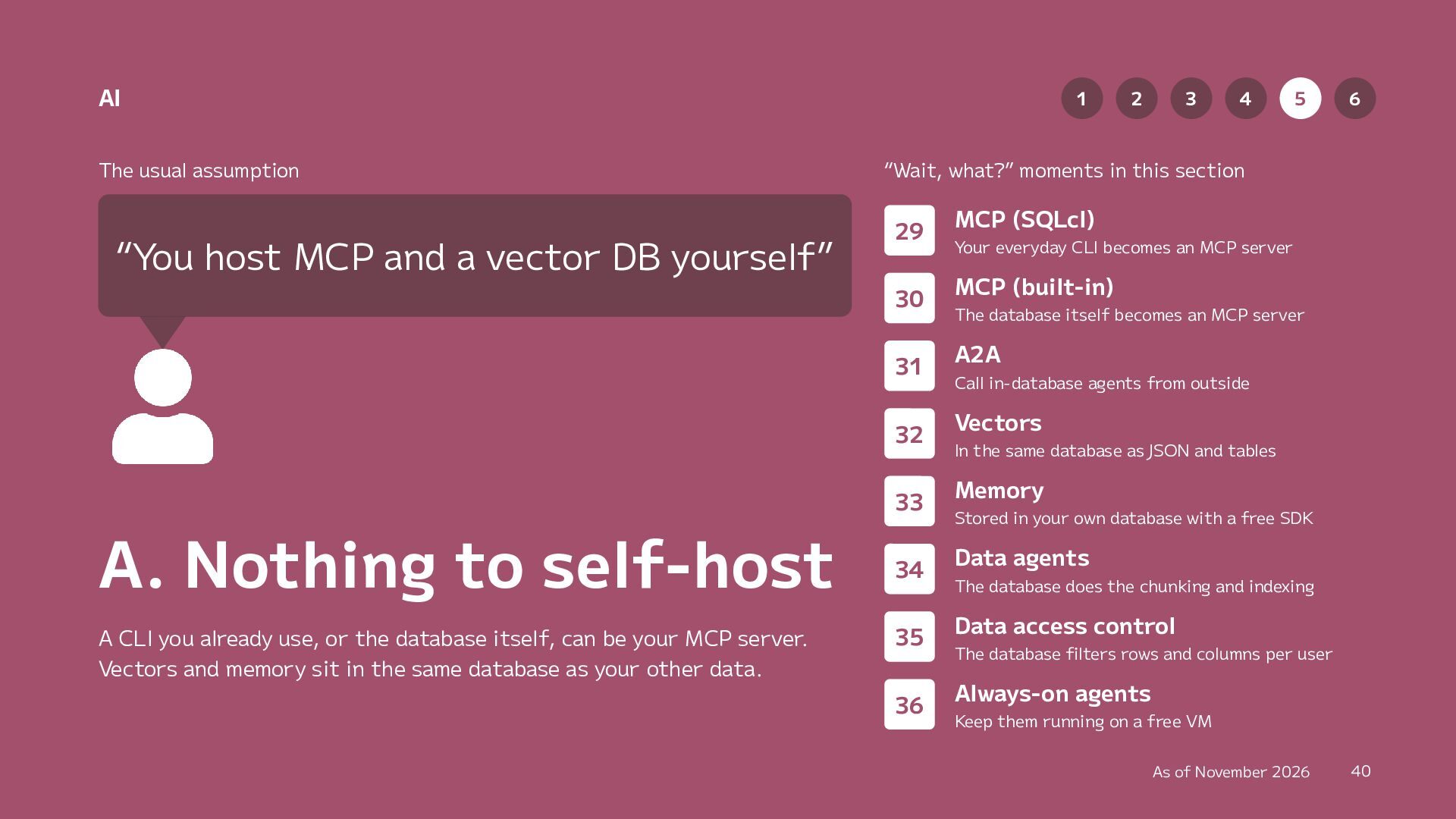
AI The usual assumption “You host MCP and a vector
DB yourself” 1 29 31 32 A CLI you already use, or the database itself, can be your MCP server. Vectors and memory sit in the same database as your other data. 3 4 5 6 “Wait, what?” moments in this section 30 A. Nothing to self-host 2 33 34 35 36 MCP (SQLcl) Your everyday CLI becomes an MCP server MCP (built-in) The database itself becomes an MCP server A2A Call in-database agents from outside Vectors In the same database as JSON and tables Memory Stored in your own database with a free SDK Data agents The database does the chunking and indexing Data access control The database filters rows and columns per user Always-on agents Keep them running on a free VM As of November 2026 40 -
Nothing to self-host The answer to “You host MCP and
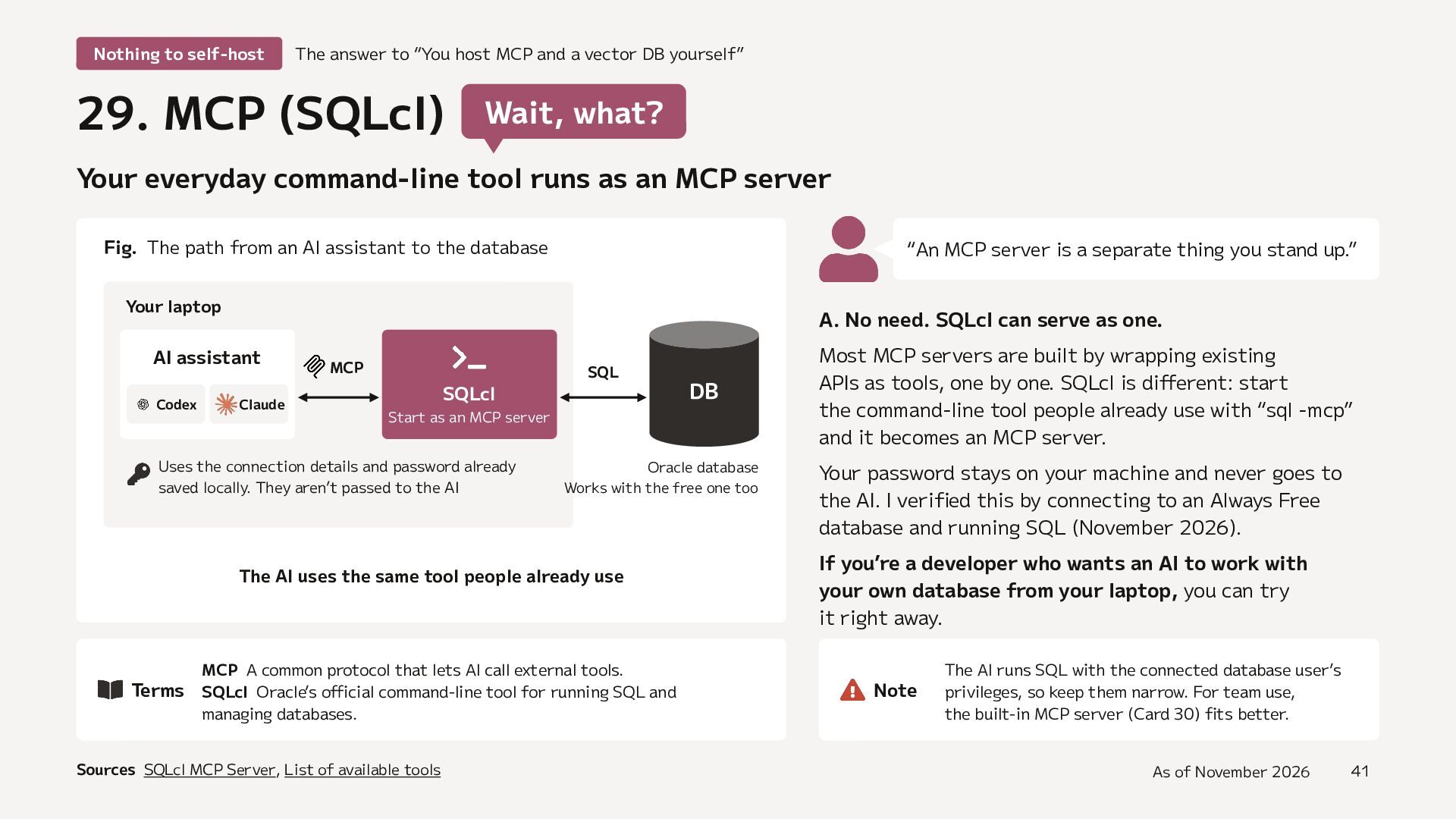
a vector DB yourself” 29. MCP (SQLcl) Wait, what? Your everyday command-line tool runs as an MCP server Fig. The path from an AI assistant to the database “An MCP server is a separate thing you stand up.” Your laptop A. No need. SQLcl can serve as one. AI assistant Codex MCP Claude SQLcl SQL DB Start as an MCP server Uses the connection details and password already saved locally. They aren’t passed to the AI Oracle database Works with the free one too The AI uses the same tool people already use MCP A common protocol that lets AI call external tools. Terms SQLcl Oracle’s official command-line tool for running SQL and managing databases. Sources SQLcl MCP Server, List of available tools Most MCP servers are built by wrapping existing APIs as tools, one by one. SQLcl is different: start the command-line tool people already use with “sql -mcp” and it becomes an MCP server. Your password stays on your machine and never goes to the AI. I verified this by connecting to an Always Free database and running SQL (November 2026). If you’re a developer who wants an AI to work with your own database from your laptop, you can try it right away. Note The AI runs SQL with the connected database user’s privileges, so keep them narrow. For team use, the built-in MCP server (Card 30) fits better. As of November 2026 41 -
Nothing to self-host The answer to “You host MCP and
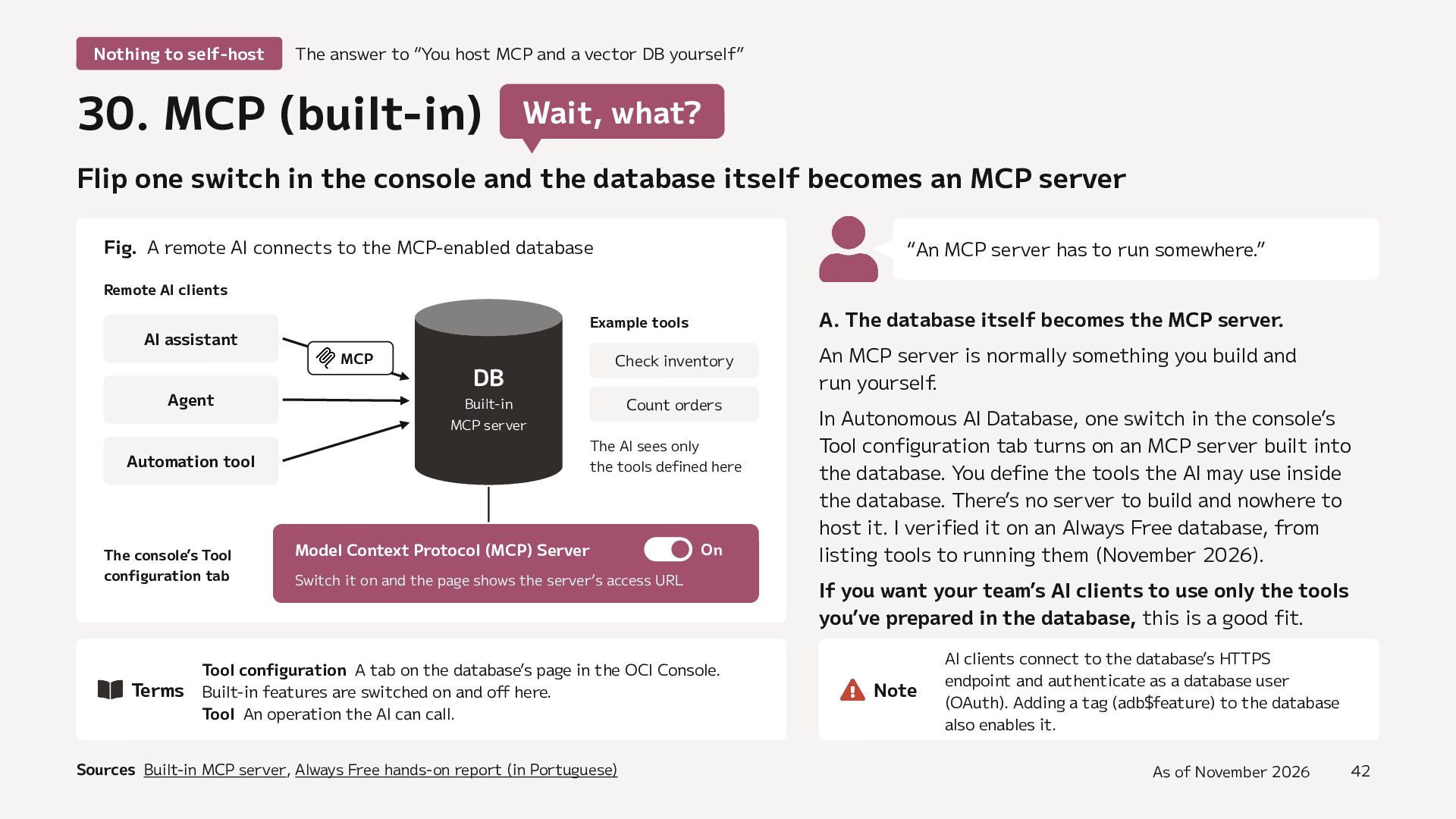
a vector DB yourself” 30. MCP (built-in) Wait, what? Flip one switch in the console and the database itself becomes an MCP server Fig. A remote AI connects to the MCP-enabled database “An MCP server has to run somewhere.” Remote AI clients AI assistant Agent MCP DB Check inventory Count orders Built-in MCP server The AI sees only the tools defined here Automation tool The console’s Tool configuration tab Terms A. The database itself becomes the MCP server. Example tools Model Context Protocol (MCP) Server On Switch it on and the page shows the server’s access URL Tool configuration A tab on the database’s page in the OCI Console. Built-in features are switched on and off here. Tool An operation the AI can call. Sources Built-in MCP server, Always Free hands-on report (in Portuguese) An MCP server is normally something you build and run yourself. In Autonomous AI Database, one switch in the console’s Tool configuration tab turns on an MCP server built into the database. You define the tools the AI may use inside the database. There’s no server to build and nowhere to host it. I verified it on an Always Free database, from listing tools to running them (November 2026). If you want your team’s AI clients to use only the tools you’ve prepared in the database, this is a good fit. Note AI clients connect to the database’s HTTPS endpoint and authenticate as a database user (OAuth). Adding a tag (adb$feature) to the database also enables it. As of November 2026 42 -
Nothing to self-host The answer to “You host MCP and
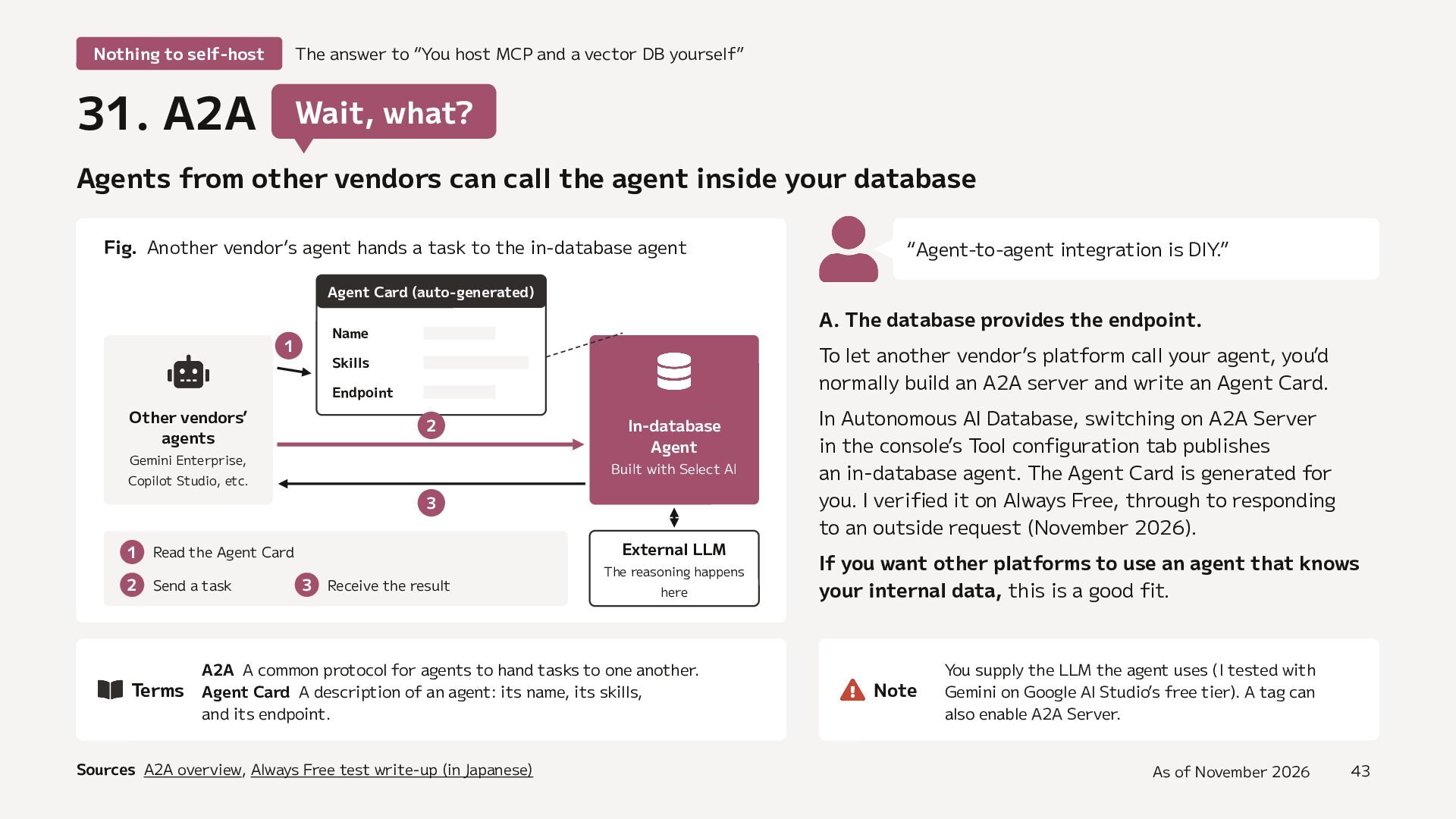
a vector DB yourself” 31. A2A Wait, what? Agents from other vendors can call the agent inside your database Fig. Another vendor’s agent hands a task to the in-database agent “Agent-to-agent integration is DIY.” Agent Card (auto-generated) A. The database provides the endpoint. Name 1 To let another vendor’s platform call your agent, you’d normally build an A2A server and write an Agent Card. Skills Endpoint Other vendors’ agents 2 Gemini Enterprise, In-database Agent Built with Select AI Copilot Studio, etc. 3 External LLM 1 Read the Agent Card 2 Send a task 3 Receive the result The reasoning happens here A2A A common protocol for agents to hand tasks to one another. Terms Agent Card A description of an agent: its name, its skills, and its endpoint. Sources A2A overview, Always Free test write-up (in Japanese) In Autonomous AI Database, switching on A2A Server in the console’s Tool configuration tab publishes an in-database agent. The Agent Card is generated for you. I verified it on Always Free, through to responding to an outside request (November 2026). If you want other platforms to use an agent that knows your internal data, this is a good fit. Note You supply the LLM the agent uses (I tested with Gemini on Google AI Studio’s free tier). A tag can also enable A2A Server. As of November 2026 43 -
Nothing to self-host The answer to “You host MCP and
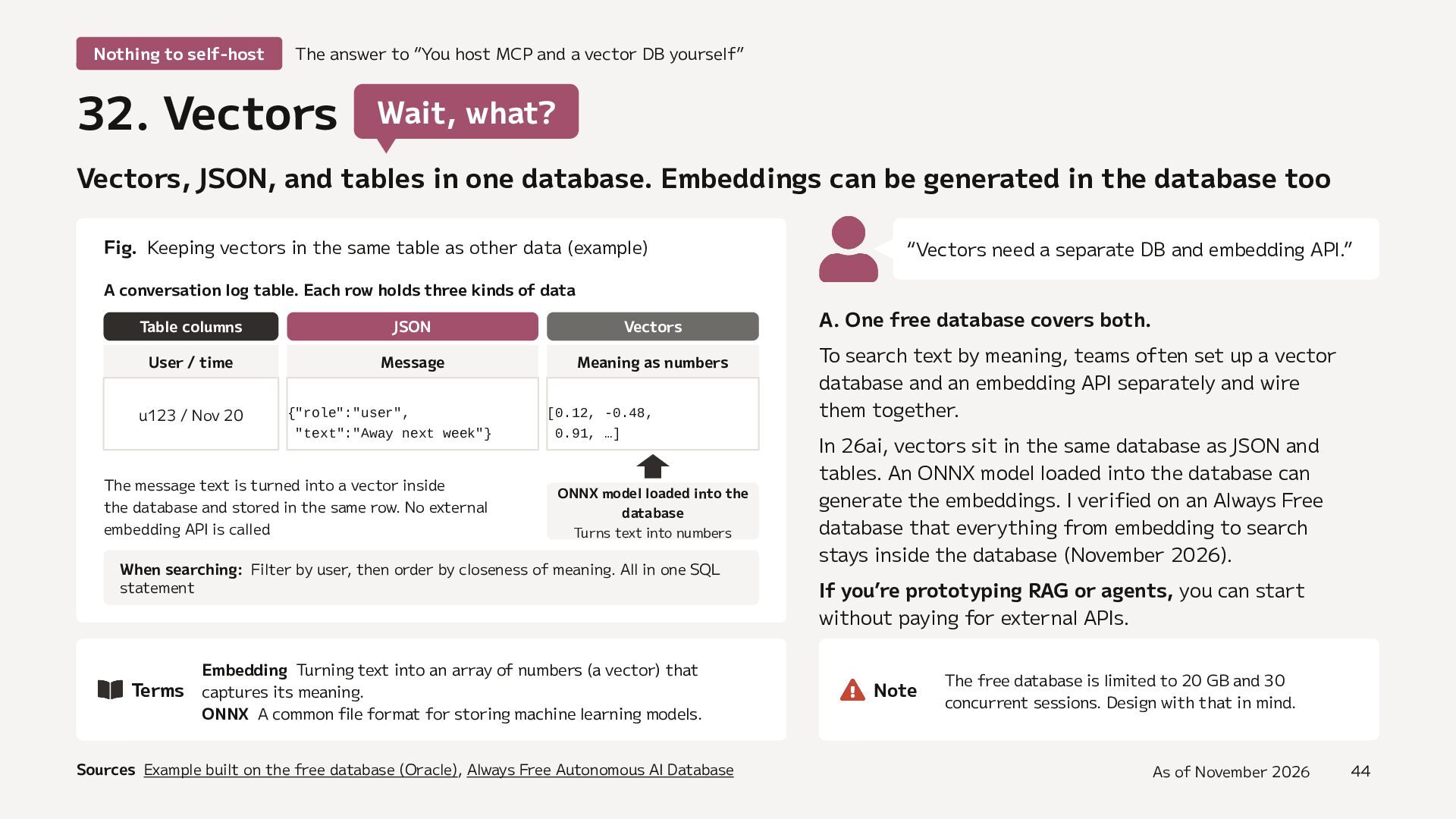
a vector DB yourself” 32. Vectors Wait, what? Vectors, JSON, and tables in one database. Embeddings can be generated in the database too Fig. Keeping vectors in the same table as other data (example) “Vectors need a separate DB and embedding API.” A conversation log table. Each row holds three kinds of data Table columns JSON Vectors User / time Message Meaning as numbers u123 / Nov 20 {"role":"user", "text":"Away next week"} The message text is turned into a vector inside the database and stored in the same row. No external embedding API is called [0.12, -0.48, 0.91, …] ONNX model loaded into the database Turns text into numbers When searching: Filter by user, then order by closeness of meaning. All in one SQL statement Embedding Turning text into an array of numbers (a vector) that Terms captures its meaning. ONNX A common file format for storing machine learning models. Sources Example built on the free database (Oracle), Always Free Autonomous AI Database A. One free database covers both. To search text by meaning, teams often set up a vector database and an embedding API separately and wire them together. In 26ai, vectors sit in the same database as JSON and tables. An ONNX model loaded into the database can generate the embeddings. I verified on an Always Free database that everything from embedding to search stays inside the database (November 2026). If you’re prototyping RAG or agents, you can start without paying for external APIs. Note The free database is limited to 20 GB and 30 concurrent sessions. Design with that in mind. As of November 2026 44 -
Nothing to self-host The answer to “You host MCP and
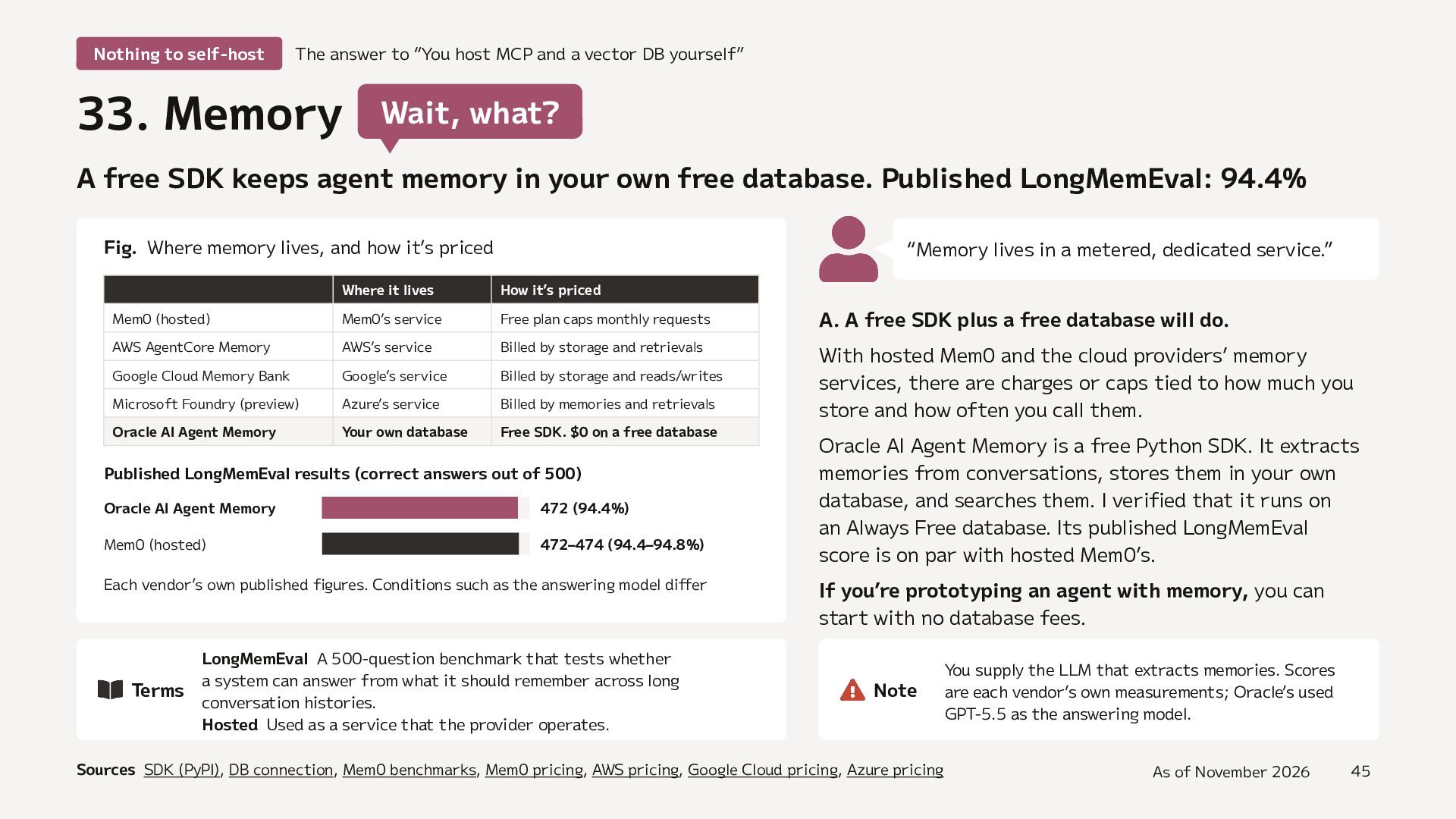
a vector DB yourself” 33. Memory Wait, what? A free SDK keeps agent memory in your own free database. Published LongMemEval: 94.4% Fig. Where memory lives, and how it’s priced “Memory lives in a metered, dedicated service.” Where it lives How it’s priced Mem0 (hosted) Mem0’s service Free plan caps monthly requests A. A free SDK plus a free database will do. AWS AgentCore Memory AWS’s service Billed by storage and retrievals Google Cloud Memory Bank Google’s service Billed by storage and reads/writes Microsoft Foundry (preview) Azure’s service Billed by memories and retrievals Oracle AI Agent Memory Your own database Free SDK. $0 on a free database With hosted Mem0 and the cloud providers’ memory services, there are charges or caps tied to how much you store and how often you call them. Published LongMemEval results (correct answers out of 500) Oracle AI Agent Memory 472 (94.4%) Mem0 (hosted) 472–474 (94.4–94.8%) Each vendor’s own published figures. Conditions such as the answering model differ Terms LongMemEval A 500-question benchmark that tests whether a system can answer from what it should remember across long conversation histories. Hosted Used as a service that the provider operates. Oracle AI Agent Memory is a free Python SDK. It extracts memories from conversations, stores them in your own database, and searches them. I verified that it runs on an Always Free database. Its published LongMemEval score is on par with hosted Mem0’s. If you’re prototyping an agent with memory, you can start with no database fees. Note Sources SDK (PyPI), DB connection, Mem0 benchmarks, Mem0 pricing, AWS pricing, Google Cloud pricing, Azure pricing You supply the LLM that extracts memories. Scores are each vendor’s own measurements; Oracle’s used GPT-5.5 as the answering model. As of November 2026 45 -
Nothing to self-host The answer to “You host MCP and
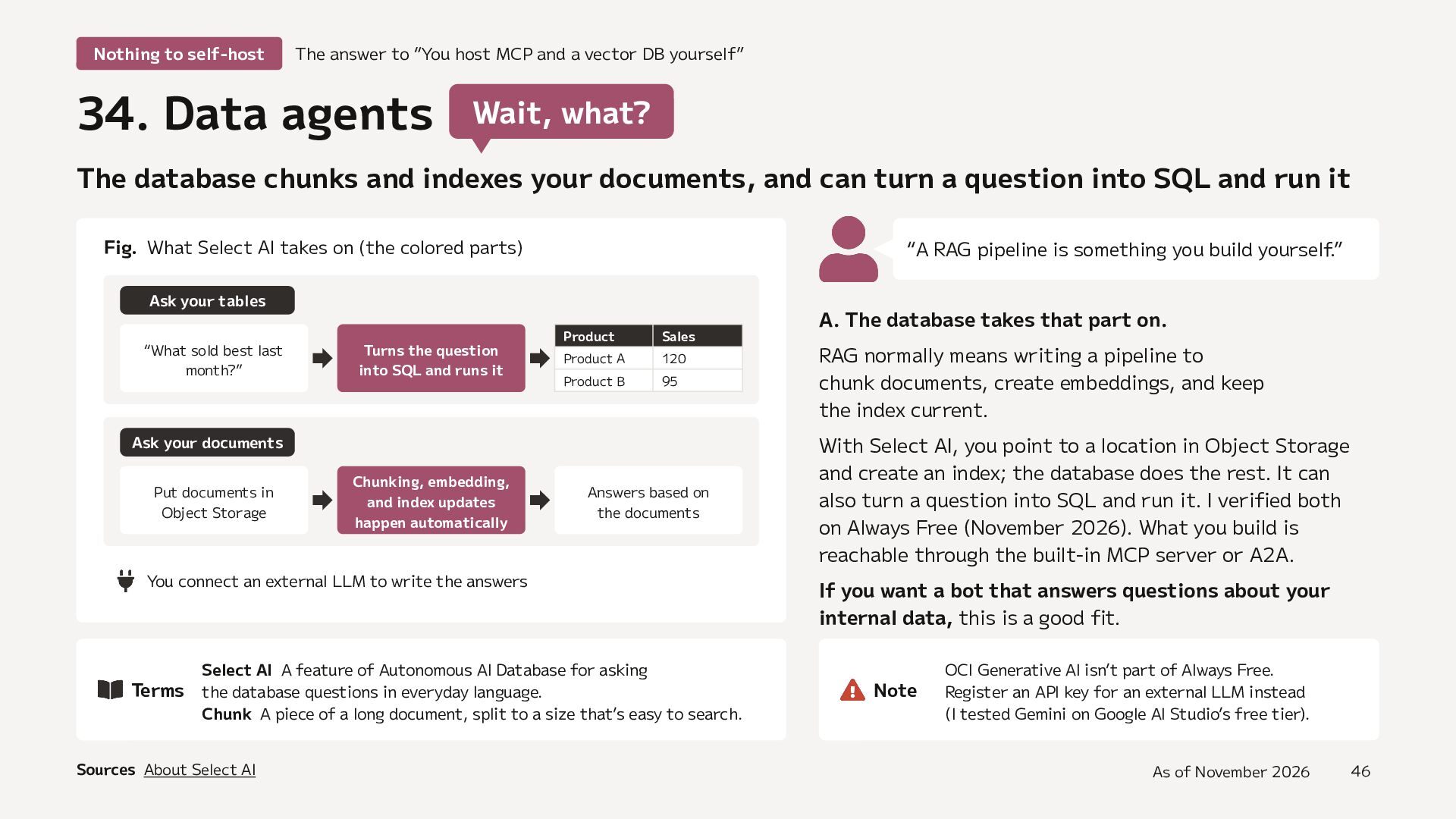
a vector DB yourself” 34. Data agents Wait, what? The database chunks and indexes your documents, and can turn a question into SQL and run it Fig. What Select AI takes on (the colored parts) “A RAG pipeline is something you build yourself.” Ask your tables “What sold best last month?” Turns the question into SQL and runs it Product Sales Product A 120 Product B 95 Ask your documents Put documents in Object Storage Chunking, embedding, and index updates happen automatically Answers based on the documents You connect an external LLM to write the answers Select AI A feature of Autonomous AI Database for asking Terms the database questions in everyday language. Chunk A piece of a long document, split to a size that’s easy to search. Sources About Select AI A. The database takes that part on. RAG normally means writing a pipeline to chunk documents, create embeddings, and keep the index current. With Select AI, you point to a location in Object Storage and create an index; the database does the rest. It can also turn a question into SQL and run it. I verified both on Always Free (November 2026). What you build is reachable through the built-in MCP server or A2A. If you want a bot that answers questions about your internal data, this is a good fit. Note OCI Generative AI isn’t part of Always Free. Register an API key for an external LLM instead (I tested Gemini on Google AI Studio’s free tier). As of November 2026 46 -
Nothing to self-host The answer to “You host MCP and
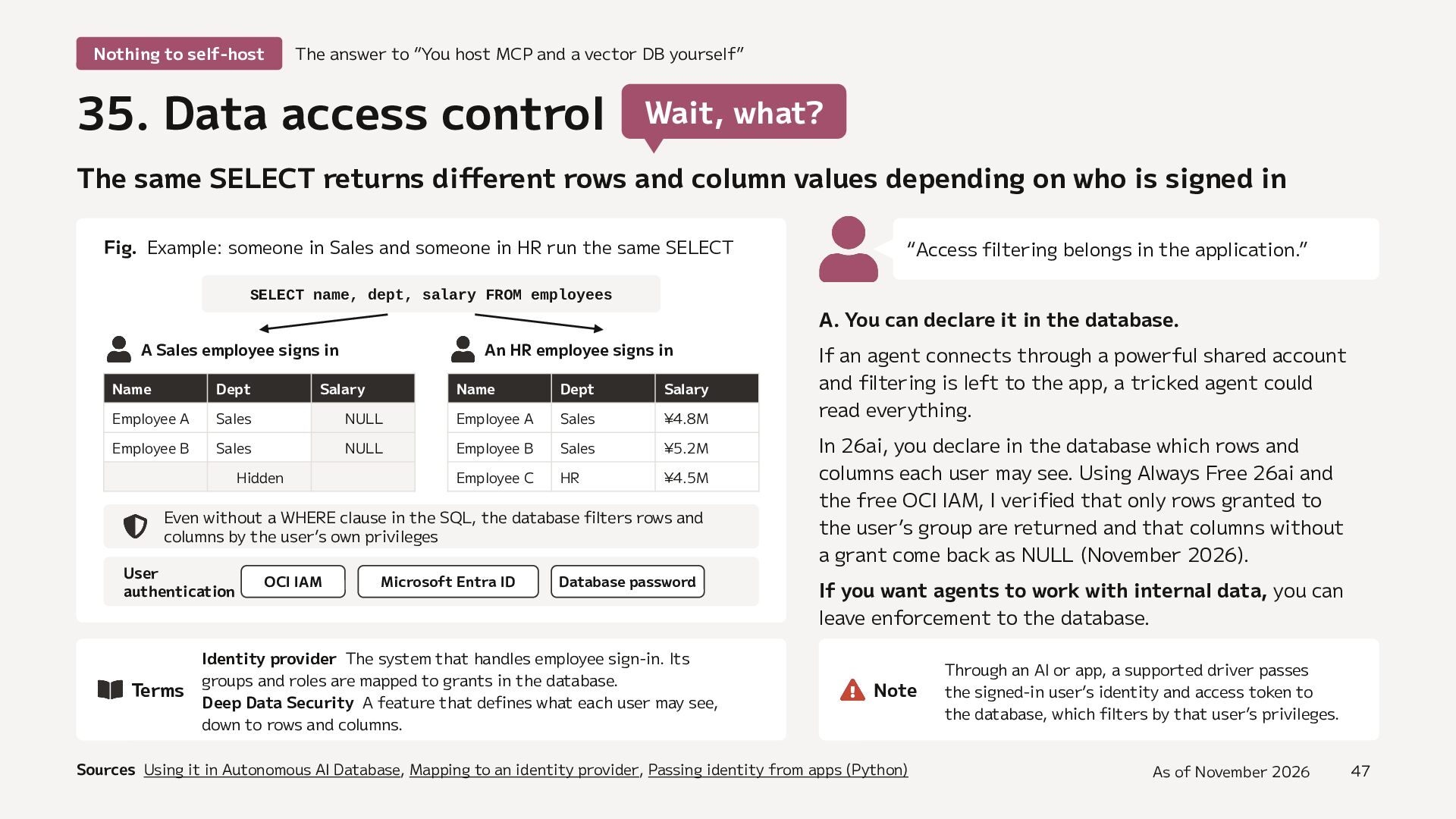
a vector DB yourself” 35. Data access control Wait, what? The same SELECT returns different rows and column values depending on who is signed in Fig. Example: someone in Sales and someone in HR run the same SELECT SELECT name, dept, salary FROM employees A Sales employee signs in Name Dept Employee A Sales Employee B Sales Hidden A. You can declare it in the database. An HR employee signs in Salary Name Dept Salary NULL Employee A Sales ¥4.8M NULL Employee B Sales ¥5.2M Employee C HR ¥4.5M Even without a WHERE clause in the SQL, the database filters rows and columns by the user’s own privileges User authentication Terms OCI IAM Microsoft Entra ID “Access filtering belongs in the application.” Database password Identity provider The system that handles employee sign-in. Its groups and roles are mapped to grants in the database. Deep Data Security A feature that defines what each user may see, down to rows and columns. If an agent connects through a powerful shared account and filtering is left to the app, a tricked agent could read everything. In 26ai, you declare in the database which rows and columns each user may see. Using Always Free 26ai and the free OCI IAM, I verified that only rows granted to the user’s group are returned and that columns without a grant come back as NULL (November 2026). If you want agents to work with internal data, you can leave enforcement to the database. Note Sources Using it in Autonomous AI Database, Mapping to an identity provider, Passing identity from apps (Python) Through an AI or app, a supported driver passes the signed-in user’s identity and access token to the database, which filters by that user’s privileges. As of November 2026 47 -
Nothing to self-host The answer to “You host MCP and
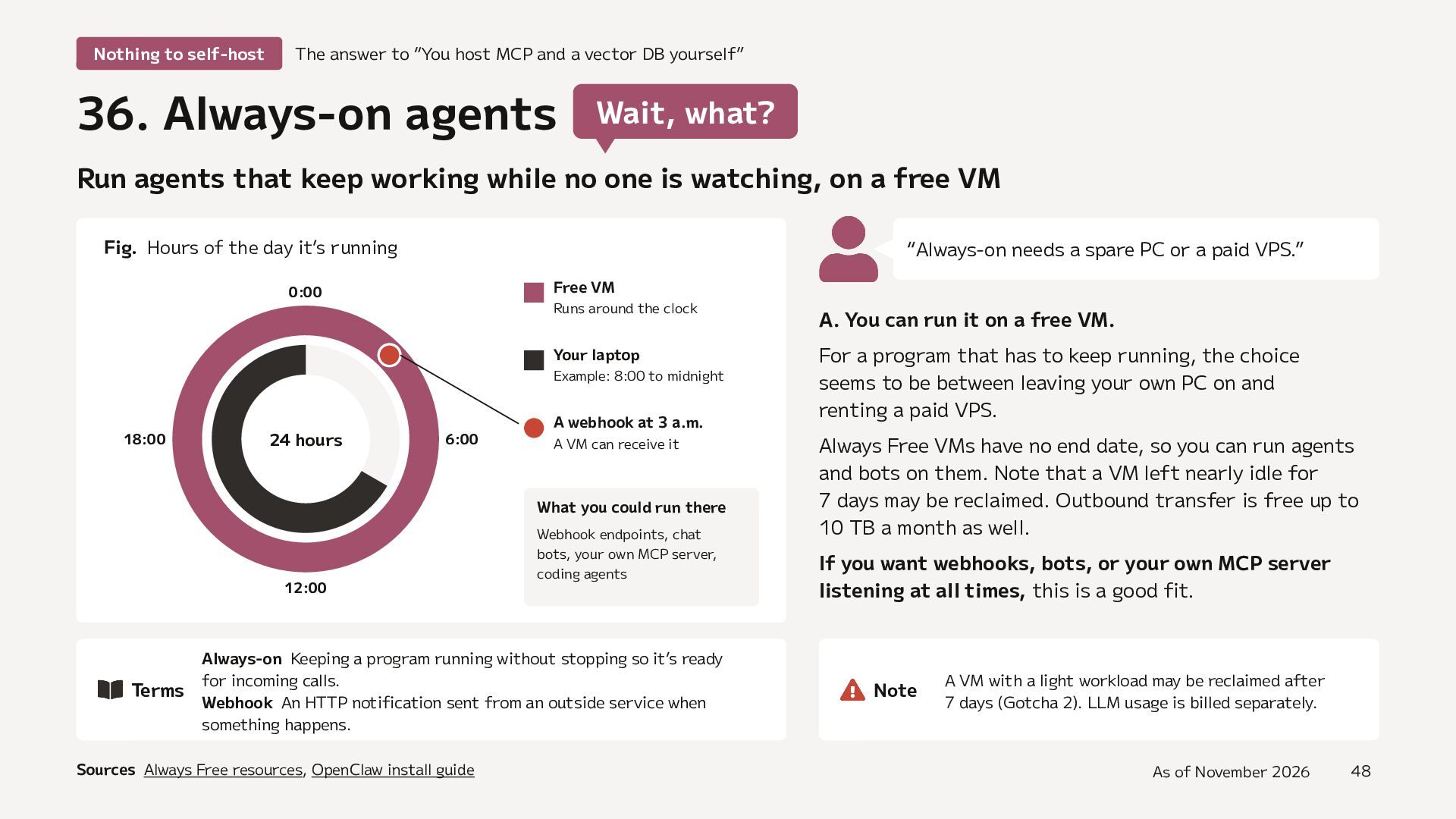
a vector DB yourself” 36. Always-on agents Wait, what? Run agents that keep working while no one is watching, on a free VM Fig. Hours of the day it’s running “Always-on needs a spare PC or a paid VPS.” Free VM 0:00 Runs around the clock A. You can run it on a free VM. Your laptop For a program that has to keep running, the choice seems to be between leaving your own PC on and renting a paid VPS. Example: 8:00 to midnight 18:00 24 hours 6:00 A webhook at 3 a.m. A VM can receive it What you could run there 12:00 Terms Webhook endpoints, chat bots, your own MCP server, coding agents Always-on Keeping a program running without stopping so it’s ready for incoming calls. Webhook An HTTP notification sent from an outside service when something happens. Sources Always Free resources, OpenClaw install guide Always Free VMs have no end date, so you can run agents and bots on them. Note that a VM left nearly idle for 7 days may be reclaimed. Outbound transfer is free up to 10 TB a month as well. If you want webhooks, bots, or your own MCP server listening at all times, this is a good fit. Note A VM with a light workload may be reclaimed after 7 days (Gotcha 2). LLM usage is billed separately. As of November 2026 48 -
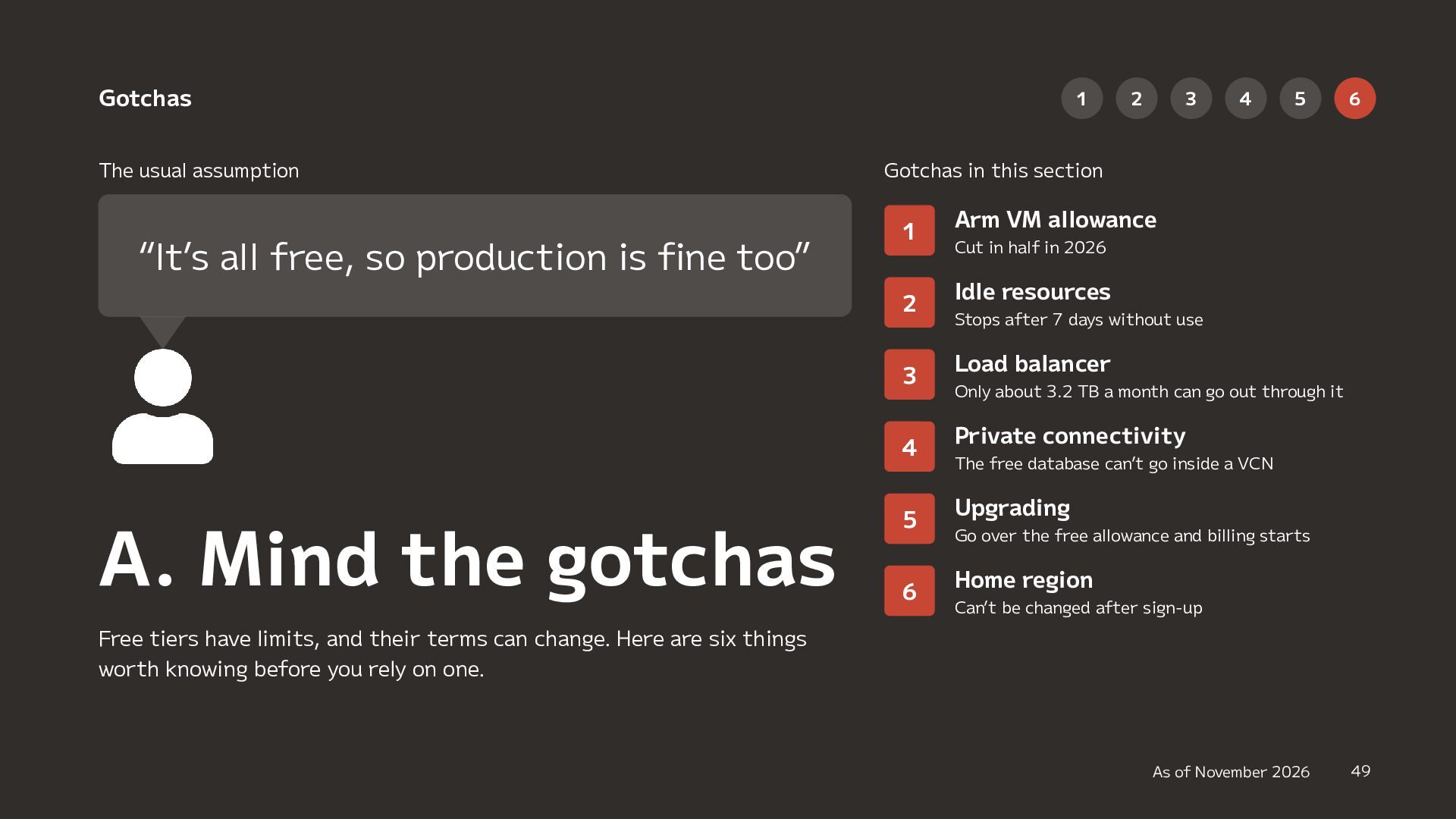
Gotchas The usual assumption “It’s all free, so production is
fine too” 1 3 4 5 6 Gotchas in this section 1 2 3 4 A. Mind the gotchas 2 5 6 Arm VM allowance Cut in half in 2026 Idle resources Stops after 7 days without use Load balancer Only about 3.2 TB a month can go out through it Private connectivity The free database can’t go inside a VCN Upgrading Go over the free allowance and billing starts Home region Can’t be changed after sign-up Free tiers have limits, and their terms can change. Here are six things worth knowing before you rely on one. As of November 2026 49 -
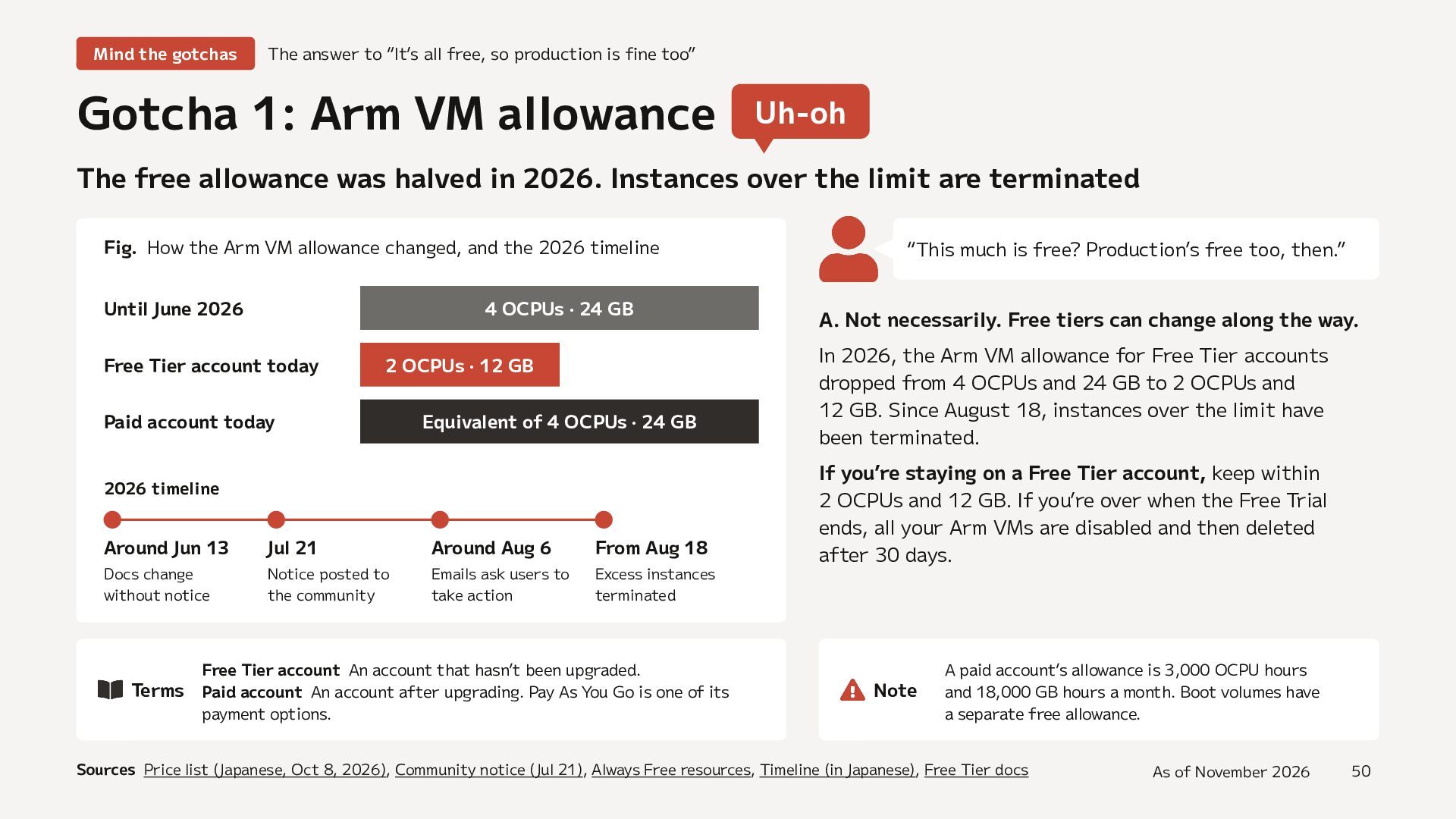
Mind the gotchas The answer to “It’s all free, so
production is fine too” Gotcha 1: Arm VM allowance Uh-oh The free allowance was halved in 2026. Instances over the limit are terminated Fig. How the Arm VM allowance changed, and the 2026 timeline Until June 2026 4 OCPUs · 24 GB Free Tier account today 2 OCPUs · 12 GB Paid account today Equivalent of 4 OCPUs · 24 GB 2026 timeline Around Jun 13 Jul 21 Around Aug 6 From Aug 18 Docs change without notice Notice posted to the community Emails ask users to take action Excess instances terminated Free Tier account An account that hasn’t been upgraded. Terms Paid account An account after upgrading. Pay As You Go is one of its payment options. “This much is free? Production’s free too, then.” A. Not necessarily. Free tiers can change along the way. In 2026, the Arm VM allowance for Free Tier accounts dropped from 4 OCPUs and 24 GB to 2 OCPUs and 12 GB. Since August 18, instances over the limit have been terminated. If you’re staying on a Free Tier account, keep within 2 OCPUs and 12 GB. If you’re over when the Free Trial ends, all your Arm VMs are disabled and then deleted after 30 days. Note A paid account’s allowance is 3,000 OCPU hours and 18,000 GB hours a month. Boot volumes have a separate free allowance. Sources Price list (Japanese, Oct 8, 2026), Community notice (Jul 21), Always Free resources, Timeline (in Japanese), Free Tier docs As of November 2026 50 -
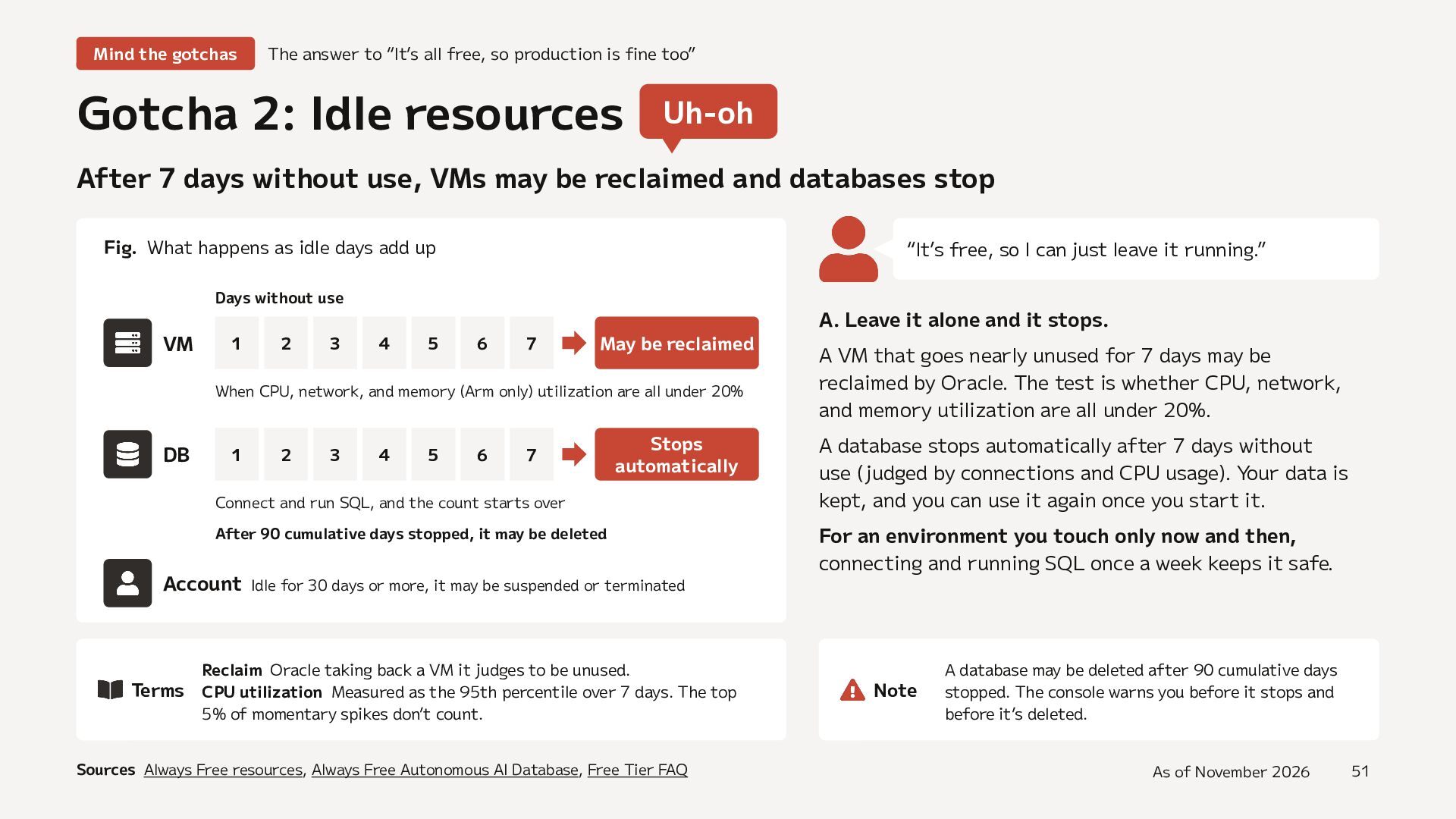
Mind the gotchas The answer to “It’s all free, so
production is fine too” Gotcha 2: Idle resources Uh-oh After 7 days without use, VMs may be reclaimed and databases stop Fig. What happens as idle days add up “It’s free, so I can just leave it running.” Days without use VM 1 2 3 4 5 6 7 May be reclaimed When CPU, network, and memory (Arm only) utilization are all under 20% DB 1 2 3 4 5 6 7 Stops automatically Connect and run SQL, and the count starts over After 90 cumulative days stopped, it may be deleted Account Idle for 30 days or more, it may be suspended or terminated Reclaim Oracle taking back a VM it judges to be unused. Terms CPU utilization Measured as the 95th percentile over 7 days. The top 5% of momentary spikes don’t count. Sources Always Free resources, Always Free Autonomous AI Database, Free Tier FAQ A. Leave it alone and it stops. A VM that goes nearly unused for 7 days may be reclaimed by Oracle. The test is whether CPU, network, and memory utilization are all under 20%. A database stops automatically after 7 days without use (judged by connections and CPU usage). Your data is kept, and you can use it again once you start it. For an environment you touch only now and then, connecting and running SQL once a week keeps it safe. Note A database may be deleted after 90 cumulative days stopped. The console warns you before it stops and before it’s deleted. As of November 2026 51 -
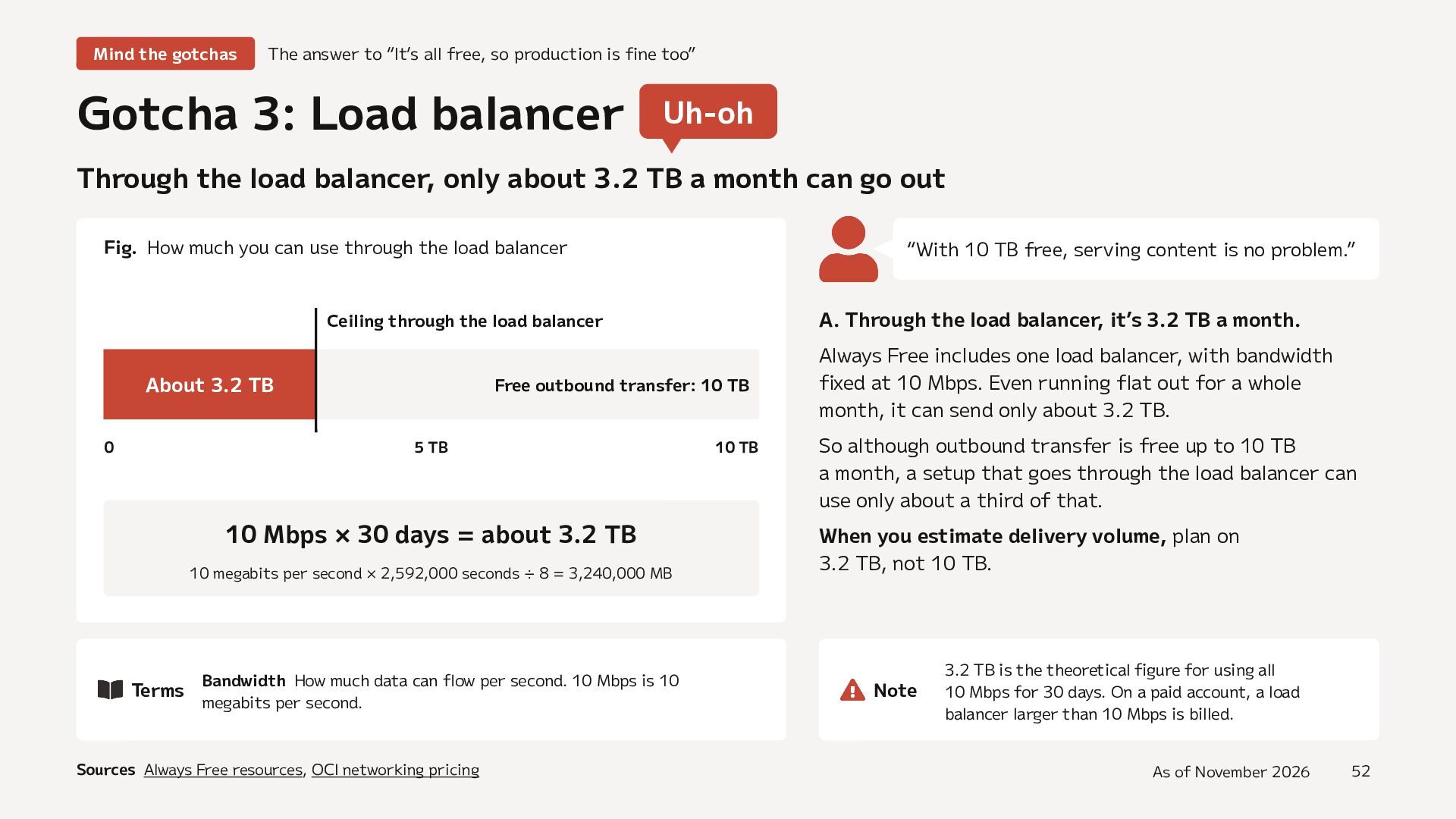
Mind the gotchas The answer to “It’s all free, so
production is fine too” Gotcha 3: Load balancer Uh-oh Through the load balancer, only about 3.2 TB a month can go out Fig. How much you can use through the load balancer “With 10 TB free, serving content is no problem.” A. Through the load balancer, it’s 3.2 TB a month. Ceiling through the load balancer About 3.2 TB 0 Free outbound transfer: 10 TB 5 TB 10 Mbps × 30 days = about 3.2 TB 10 megabits per second × 2,592,000 seconds ÷ 8 = 3,240,000 MB Terms Bandwidth How much data can flow per second. 10 Mbps is 10 megabits per second. Sources Always Free resources, OCI networking pricing 10 TB Always Free includes one load balancer, with bandwidth fixed at 10 Mbps. Even running flat out for a whole month, it can send only about 3.2 TB. So although outbound transfer is free up to 10 TB a month, a setup that goes through the load balancer can use only about a third of that. When you estimate delivery volume, plan on 3.2 TB, not 10 TB. Note 3.2 TB is the theoretical figure for using all 10 Mbps for 30 days. On a paid account, a load balancer larger than 10 Mbps is billed. As of November 2026 52 -
Mind the gotchas The answer to “It’s all free, so
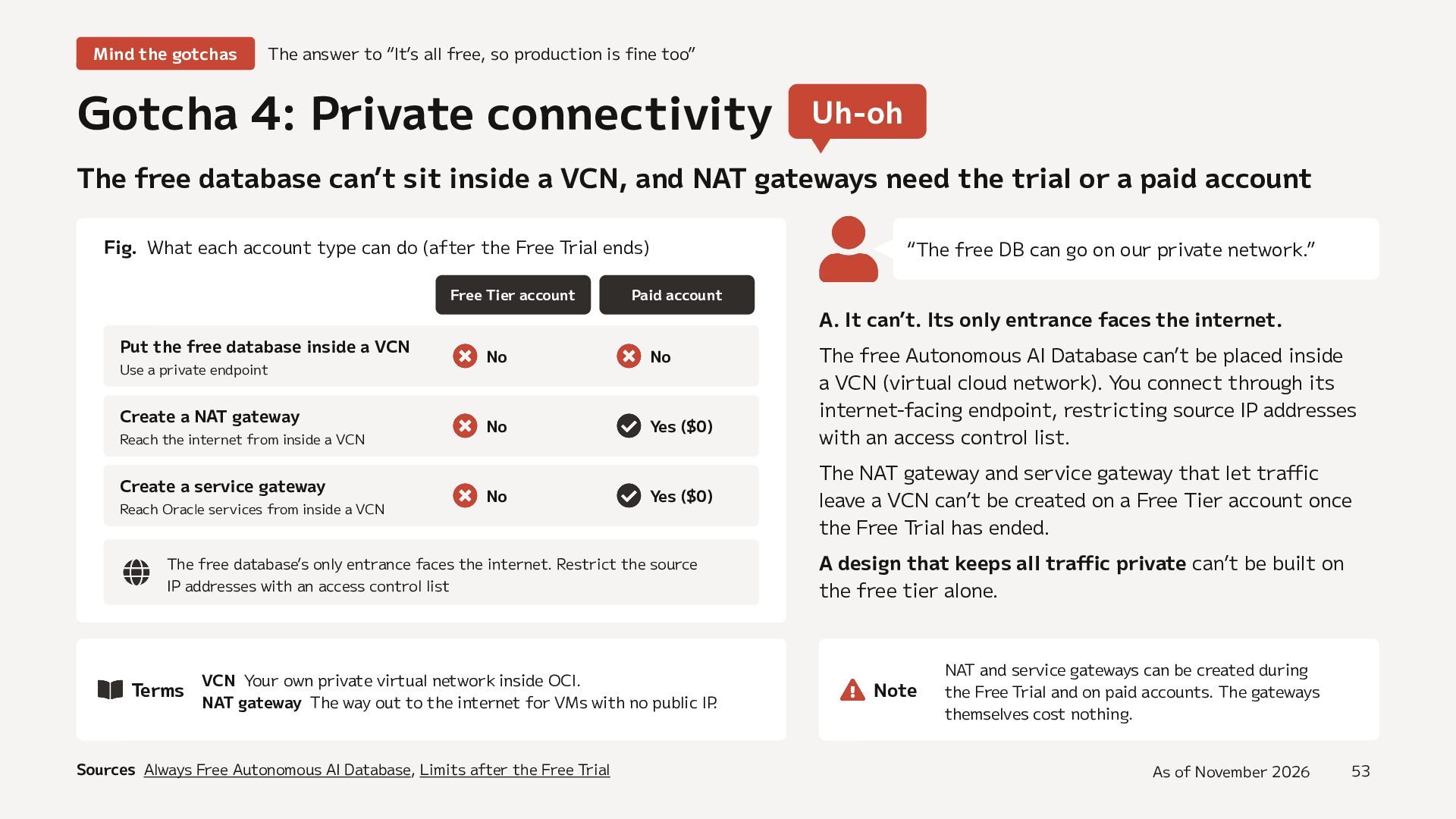
production is fine too” Gotcha 4: Private connectivity Uh-oh The free database can’t sit inside a VCN, and NAT gateways need the trial or a paid account Fig. What each account type can do (after the Free Trial ends) Free Tier account Put the free database inside a VCN Use a private endpoint Create a NAT gateway Reach the internet from inside a VCN Create a service gateway Reach Oracle services from inside a VCN Paid account No No No Yes ($0) No Yes ($0) The free database’s only entrance faces the internet. Restrict the source IP addresses with an access control list Terms VCN Your own private virtual network inside OCI. NAT gateway The way out to the internet for VMs with no public IP. Sources Always Free Autonomous AI Database, Limits after the Free Trial “The free DB can go on our private network.” A. It can’t. Its only entrance faces the internet. The free Autonomous AI Database can’t be placed inside a VCN (virtual cloud network). You connect through its internet-facing endpoint, restricting source IP addresses with an access control list. The NAT gateway and service gateway that let traffic leave a VCN can’t be created on a Free Tier account once the Free Trial has ended. A design that keeps all traffic private can’t be built on the free tier alone. Note NAT and service gateways can be created during the Free Trial and on paid accounts. The gateways themselves cost nothing. As of November 2026 53 -
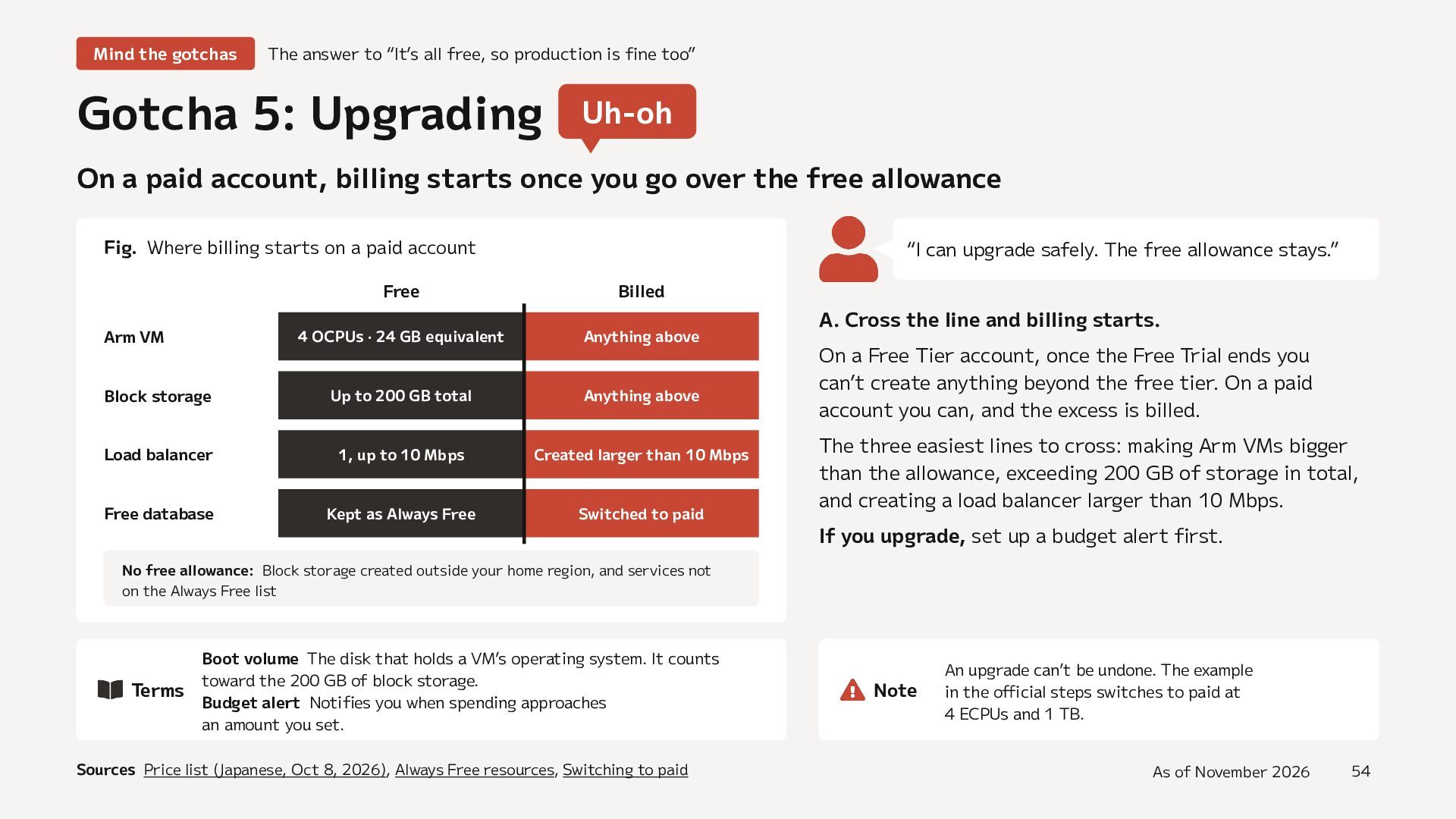
Mind the gotchas The answer to “It’s all free, so
production is fine too” Gotcha 5: Upgrading Uh-oh On a paid account, billing starts once you go over the free allowance Fig. Where billing starts on a paid account “I can upgrade safely. The free allowance stays.” Free Billed 4 OCPUs · 24 GB equivalent Anything above Block storage Up to 200 GB total Anything above Load balancer 1, up to 10 Mbps Created larger than 10 Mbps Free database Kept as Always Free Switched to paid Arm VM A. Cross the line and billing starts. On a Free Tier account, once the Free Trial ends you can’t create anything beyond the free tier. On a paid account you can, and the excess is billed. The three easiest lines to cross: making Arm VMs bigger than the allowance, exceeding 200 GB of storage in total, and creating a load balancer larger than 10 Mbps. If you upgrade, set up a budget alert first. No free allowance: Block storage created outside your home region, and services not on the Always Free list Terms Boot volume The disk that holds a VM’s operating system. It counts toward the 200 GB of block storage. Budget alert Notifies you when spending approaches an amount you set. Sources Price list (Japanese, Oct 8, 2026), Always Free resources, Switching to paid Note An upgrade can’t be undone. The example in the official steps switches to paid at 4 ECPUs and 1 TB. As of November 2026 54 -
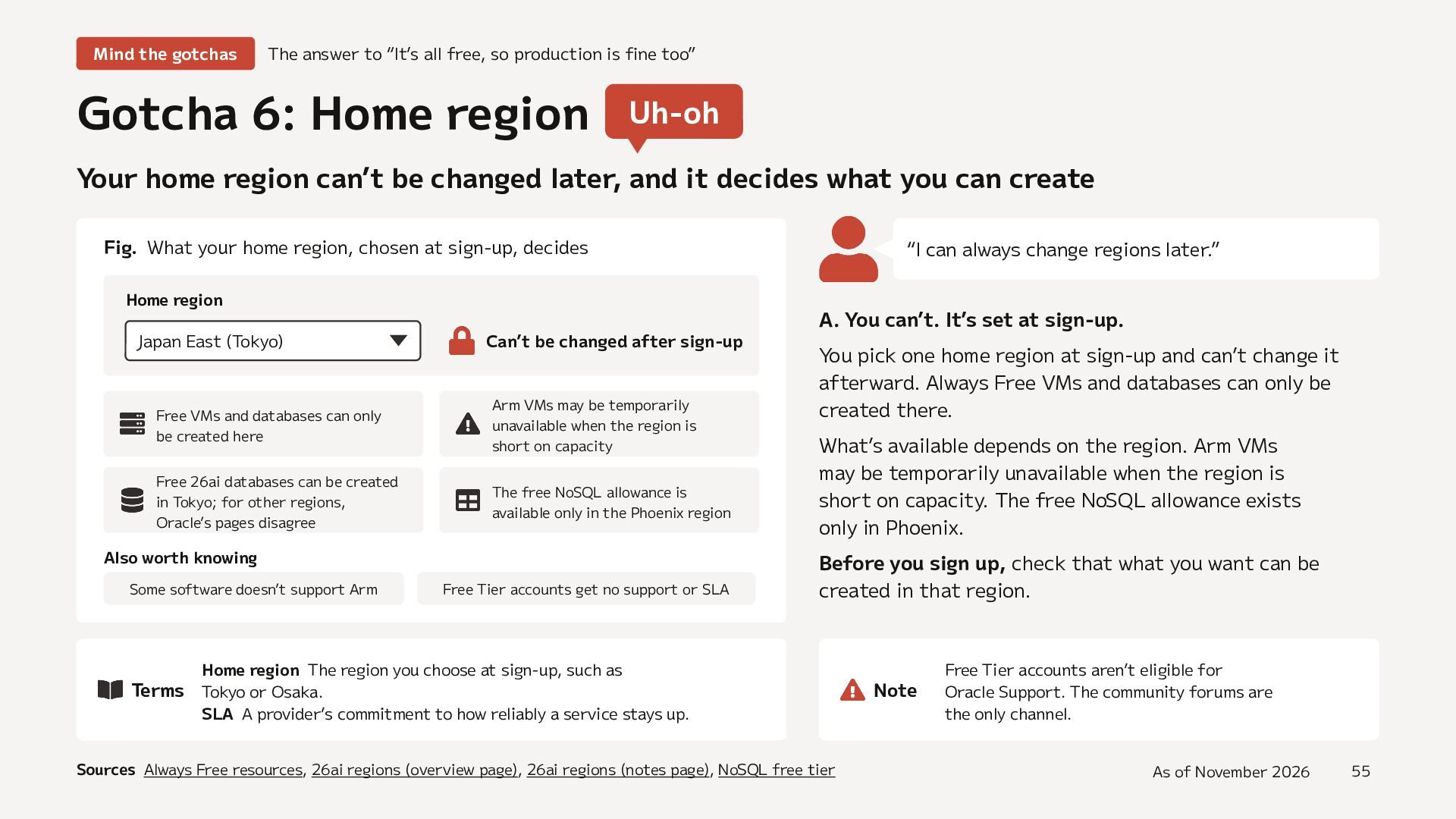
Mind the gotchas The answer to “It’s all free, so
production is fine too” Gotcha 6: Home region Uh-oh Your home region can’t be changed later, and it decides what you can create Fig. What your home region, chosen at sign-up, decides Home region Japan East (Tokyo) Can’t be changed after sign-up Free VMs and databases can only be created here Arm VMs may be temporarily unavailable when the region is short on capacity Free 26ai databases can be created in Tokyo; for other regions, Oracle’s pages disagree The free NoSQL allowance is available only in the Phoenix region Also worth knowing Some software doesn’t support Arm Free Tier accounts get no support or SLA “I can always change regions later.” A. You can’t. It’s set at sign-up. You pick one home region at sign-up and can’t change it afterward. Always Free VMs and databases can only be created there. What’s available depends on the region. Arm VMs may be temporarily unavailable when the region is short on capacity. The free NoSQL allowance exists only in Phoenix. Before you sign up, check that what you want can be created in that region. Home region The region you choose at sign-up, such as Terms Tokyo or Osaka. SLA A provider’s commitment to how reliably a service stays up. Sources Always Free resources, 26ai regions (overview page), 26ai regions (notes page), NoSQL free tier Note Free Tier accounts aren’t eligible for Oracle Support. The community forums are the only channel. As of November 2026 55 -
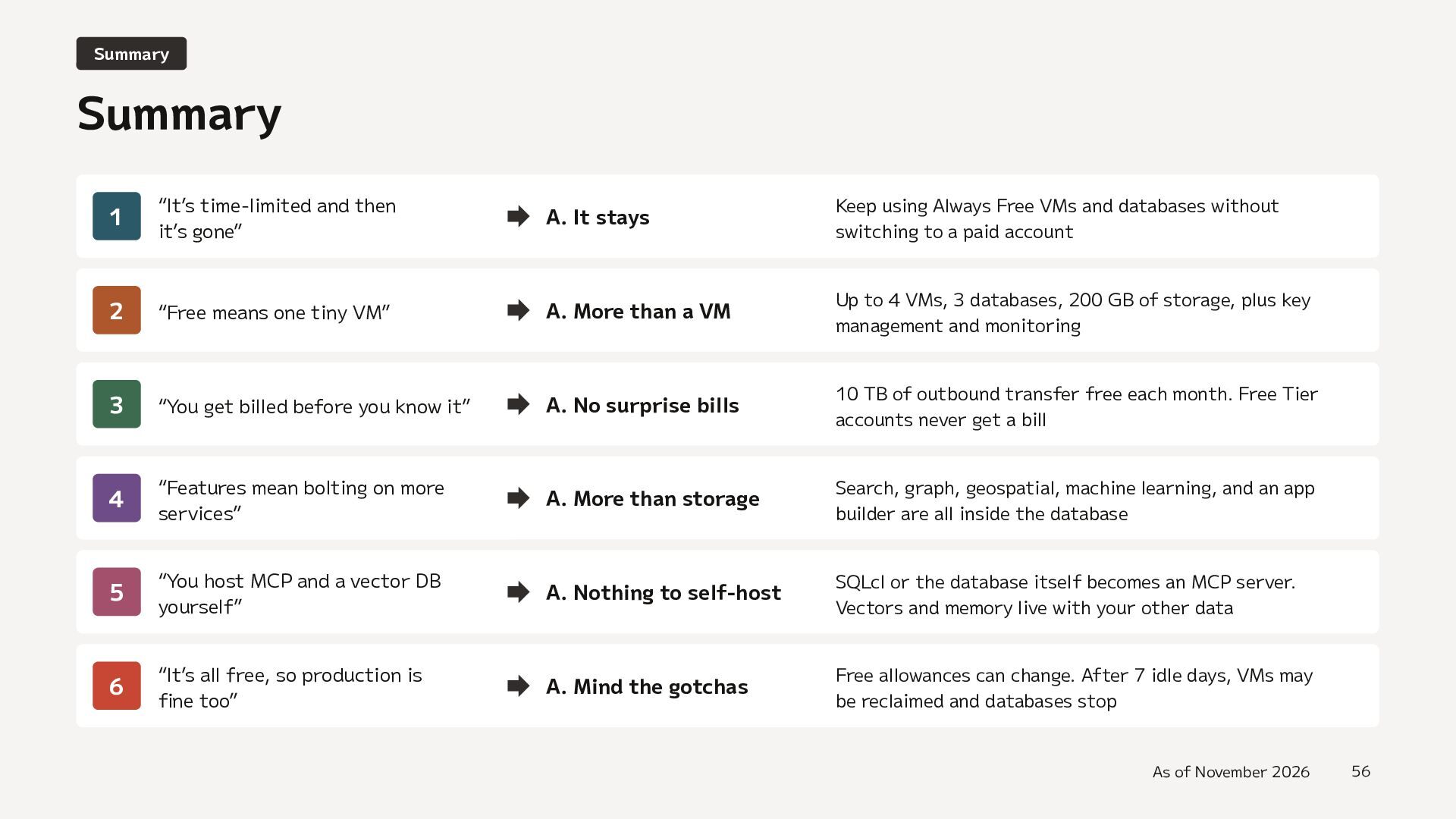
Summary Summary 1 “It’s time-limited and then it’s gone” A.
It stays Keep using Always Free VMs and databases without switching to a paid account 2 “Free means one tiny VM” A. More than a VM Up to 4 VMs, 3 databases, 200 GB of storage, plus key management and monitoring 3 “You get billed before you know it” A. No surprise bills 10 TB of outbound transfer free each month. Free Tier accounts never get a bill 4 “Features mean bolting on more services” A. More than storage Search, graph, geospatial, machine learning, and an app builder are all inside the database 5 “You host MCP and a vector DB yourself” A. Nothing to self-host SQLcl or the database itself becomes an MCP server. Vectors and memory live with your other data 6 “It’s all free, so production is fine too” A. Mind the gotchas Free allowances can change. After 7 idle days, VMs may be reclaimed and databases stop As of November 2026 56 -
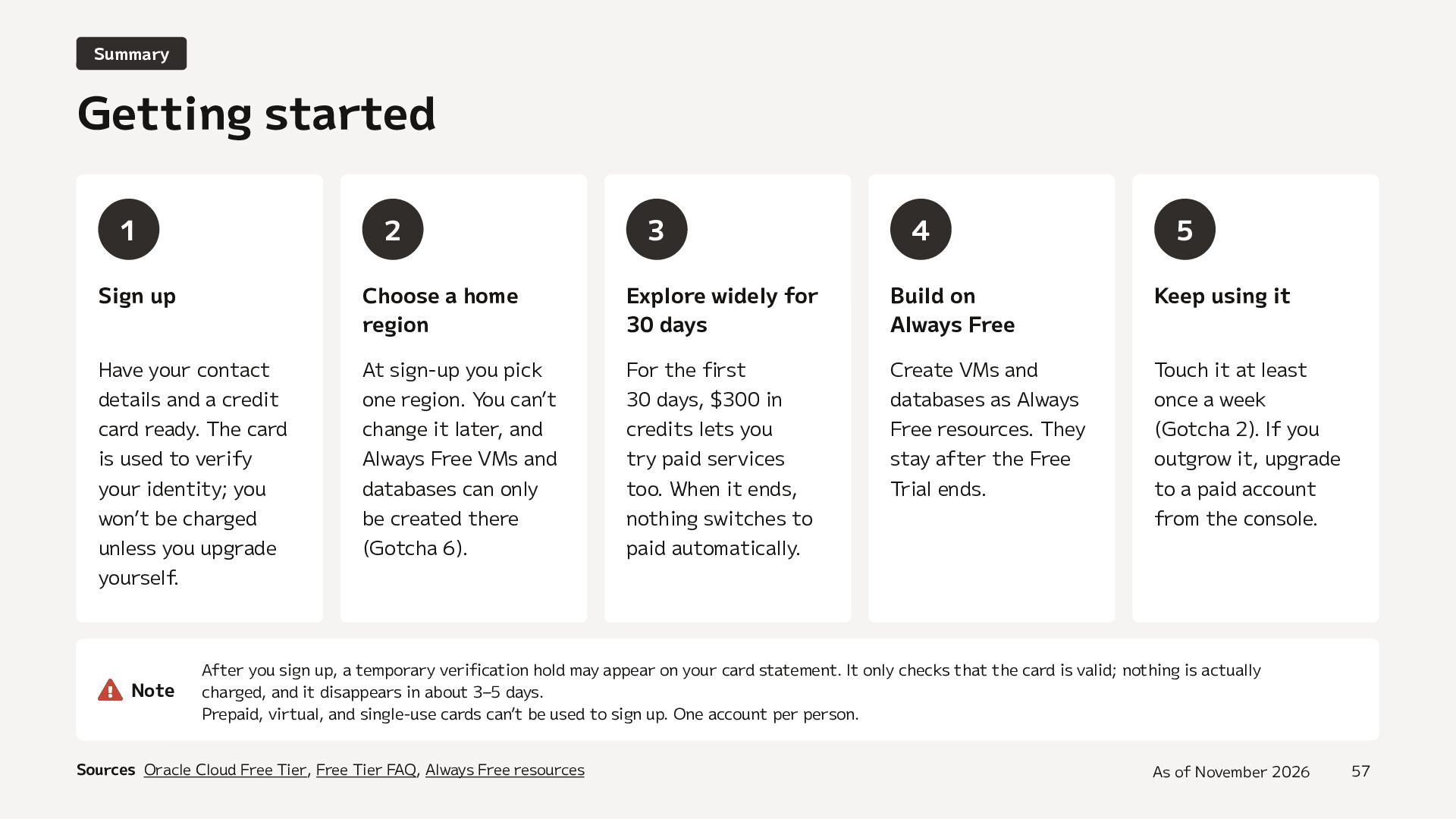
Summary Getting started 1 2 3 4 5 Sign up
Choose a home region Explore widely for 30 days Build on Always Free Keep using it Have your contact details and a credit card ready. The card is used to verify your identity; you won’t be charged unless you upgrade yourself. At sign-up you pick one region. You can’t change it later, and Always Free VMs and databases can only be created there (Gotcha 6). For the first 30 days, $300 in credits lets you try paid services too. When it ends, nothing switches to paid automatically. Create VMs and databases as Always Free resources. They stay after the Free Trial ends. Touch it at least once a week (Gotcha 2). If you outgrow it, upgrade to a paid account from the console. Note After you sign up, a temporary verification hold may appear on your card statement. It only checks that the card is valid; nothing is actually charged, and it disappears in about 3–5 days. Prepaid, virtual, and single-use cards can’t be used to sign up. One account per person. Sources Oracle Cloud Free Tier, Free Tier FAQ, Always Free resources As of November 2026 57 -
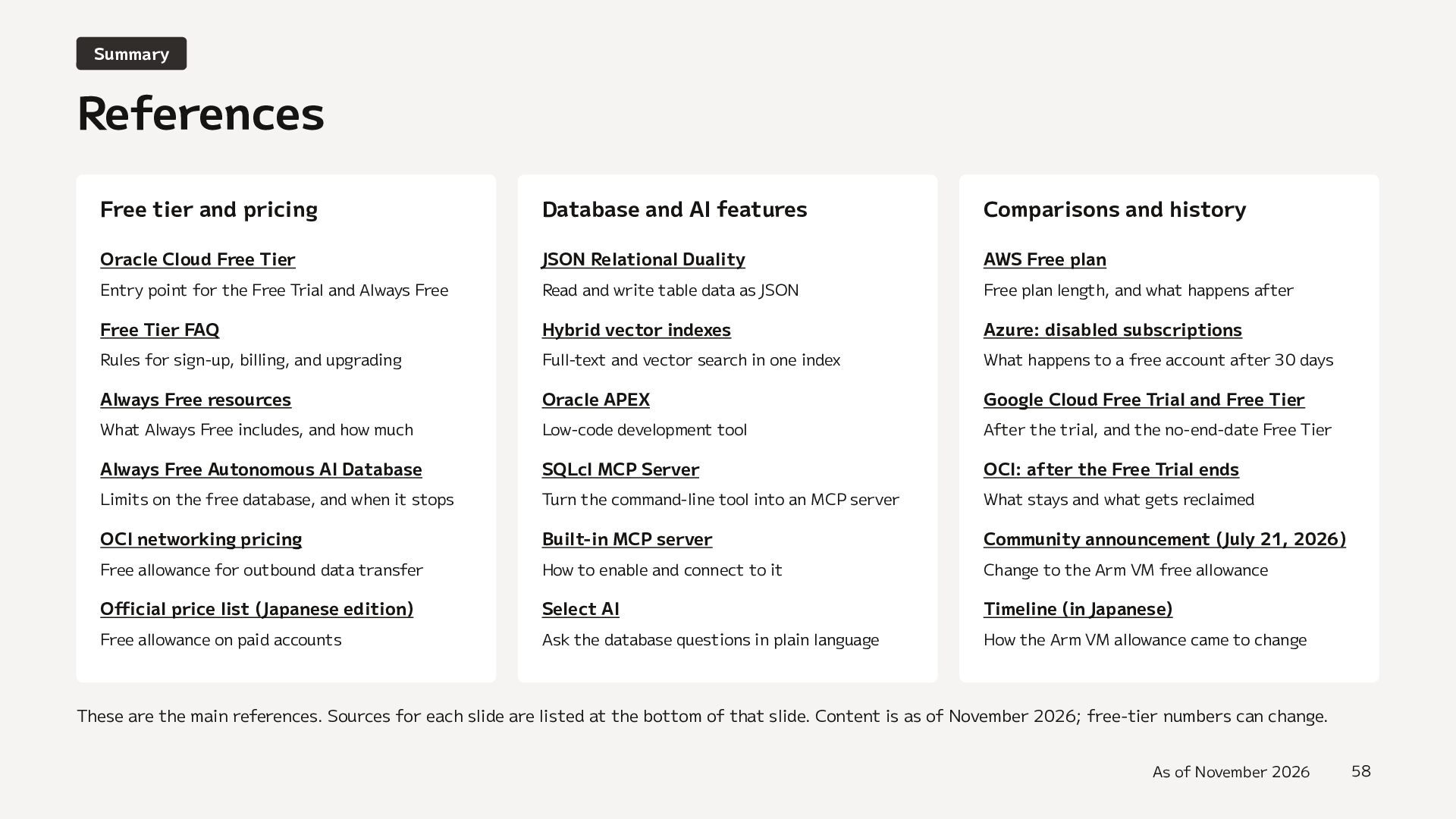
Summary References Free tier and pricing Database and AI features
Comparisons and history Oracle Cloud Free Tier JSON Relational Duality AWS Free plan Entry point for the Free Trial and Always Free Read and write table data as JSON Free plan length, and what happens after Free Tier FAQ Hybrid vector indexes Azure: disabled subscriptions Rules for sign-up, billing, and upgrading Full-text and vector search in one index What happens to a free account after 30 days Always Free resources Oracle APEX Google Cloud Free Trial and Free Tier What Always Free includes, and how much Low-code development tool After the trial, and the no-end-date Free Tier Always Free Autonomous AI Database SQLcl MCP Server OCI: after the Free Trial ends Limits on the free database, and when it stops Turn the command-line tool into an MCP server What stays and what gets reclaimed OCI networking pricing Built-in MCP server Community announcement (July 21, 2026) Free allowance for outbound data transfer How to enable and connect to it Change to the Arm VM free allowance Official price list (Japanese edition) Select AI Timeline (in Japanese) Free allowance on paid accounts Ask the database questions in plain language How the Arm VM allowance came to change These are the main references. Sources for each slide are listed at the bottom of that slide. Content is as of November 2026; free-tier numbers can change. As of November 2026 58 -
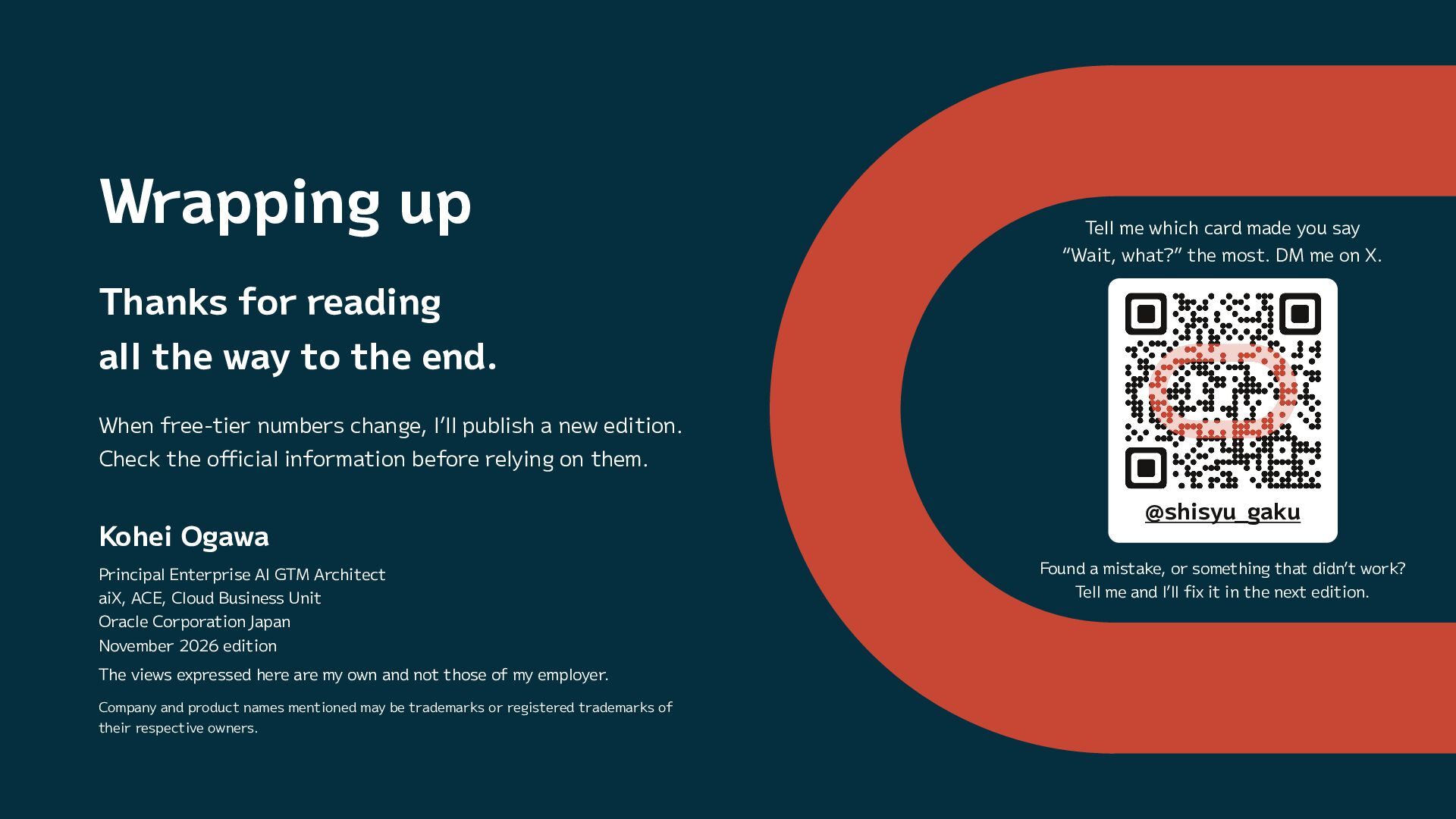
Wrapping up Tell me which card made you say “Wait,
what?” the most. DM me on X. Thanks for reading all the way to the end. When free-tier numbers change, I’ll publish a new edition. Check the official information before relying on them. Kohei Ogawa Principal Enterprise AI GTM Architect aiX, ACE, Cloud Business Unit Oracle Corporation Japan November 2026 edition The views expressed here are my own and not those of my employer. Company and product names mentioned may be trademarks or registered trademarks of their respective owners. @shisyu_gaku Found a mistake, or something that didn’t work? Tell me and I’ll fix it in the next edition.
 shisyu_gaku
 signer
 juanmartin2026
 minorun365
 spring_aki
 akiraasano
 matleenalaakso
 neuroiwm
 pfn
 aisw77
 rashwhitman
 aleyda
 akihiro_kokubo
 rkendrick25
 inesmontani
 lemiorhan
 auna
 axbom
 baasie
 chrislema
 chriscoyier
 tammyeverts
 thekraken